
Reels are short-form vertical videos on Instagram that help creators and businesses reach, engage, and grow their audiences.
If you are wondering what Reels are, how they differ from Instagram Stories, or why they matter for social media marketing, this guide explains the essentials. You will learn what Reels are, how they work, and how to use them effectively as part of a social media strategy.
What Are Reels?
Reels are short-form, vertical videos on Instagram that creators and businesses use to entertain, educate, promote products, and reach new audiences. Unlike Instagram Stories, Reels do not automatically disappear after 24 hours and can continue to be discovered after they are published.
Reels are designed for discovery and engagement. They can appear in Instagram's Reels experience, Explore, feeds, profiles, and other recommendation surfaces, giving creators an opportunity to reach people who may not already follow them.
You can create a Reel by recording video directly in Instagram or uploading existing clips. Depending on the available features, you can also add music or other audio, text, effects, transitions, and a cover before publishing.
For businesses, Reels can be used for product demonstrations, tutorials, educational content, behind-the-scenes videos, customer stories, announcements, and other content designed to attract and engage an audience.
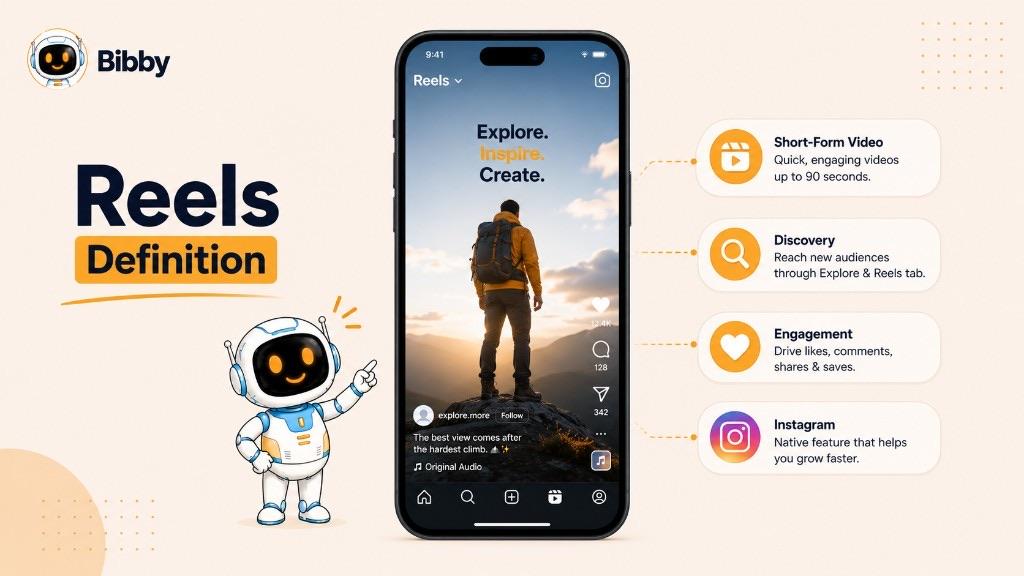
In simple terms, a Reel is Instagram's format for persistent, short-form video content built around entertainment, engagement, and discovery.
How Do Instagram Reels Work?
Instagram Reels work by combining short-form video creation with Instagram's recommendation and discovery system. A Reel can be shown to an account's existing followers, but it can also reach people who have never followed the creator.
Creating a Reel
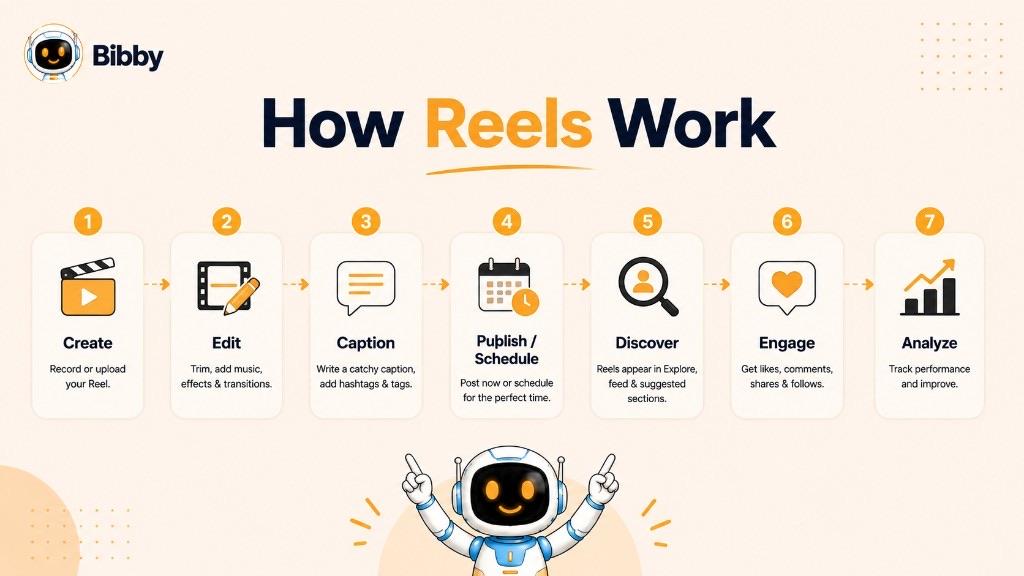
You can create a Reel by recording video directly in Instagram or uploading video clips from your device. You can then edit the video and add elements such as audio, text, effects, transitions, and a cover before publishing.
A typical Reel workflow looks like this:
- Choose a topic or idea.
- Record a video or upload existing clips.
- Edit the video into a short, focused piece of content.
- Add audio, text, effects, or other creative elements when appropriate.
- Write a caption and choose a cover.
- Publish the Reel or schedule it using an available scheduling method.
How People Discover Reels
One of the biggest differences between Reels and more traditional social posts is their potential for discovery beyond an account's existing audience.
People can discover Reels through the Reels feed, Explore, their Instagram feed, profiles, shares, and recommendations. This means a useful, entertaining, or relevant Reel can introduce an account to people who have never interacted with it before.
How Reels Drive Engagement
People can interact with Reels in several ways, including watching, liking, commenting, sharing, saving, and following the creator. These interactions provide creators and businesses with useful signals about which topics and formats resonate with their audience.
For marketers, the goal is not simply to generate views. A strong Reel should attract the right audience, hold their attention, encourage meaningful interaction, and ideally lead viewers toward the next step—such as visiting a profile, exploring a product, or following the account.
That combination of short-form video, discovery, and engagement is what makes Reels an important part of many Instagram content strategies.
Why Are Reels Important?
Reels are important because they give creators and businesses a way to put their content in front of audiences beyond their existing followers. Their combination of short-form video, entertainment, and discovery makes them a powerful format for building awareness and engagement on Instagram.
Reels Can Increase Reach
Reels can be recommended to people who do not already follow an account, giving businesses and creators an opportunity to reach new audiences.
This makes Reels particularly useful for accounts that want to grow their visibility rather than communicate only with their existing community. A well-made Reel can introduce someone to a brand, creator, product, or idea for the first time.
Reels Can Increase Engagement
Video gives audiences multiple ways to interact with content. Depending on the Reel and the audience, viewers can like, comment, share, save, or follow the creator.
Shares and saves can be especially valuable because they can indicate that viewers found the content useful, entertaining, or worth returning to. However, there is no single engagement metric that guarantees greater reach.
Reels Can Build Brand Awareness
Businesses can use Reels to show what makes their brand different in a format that feels native to Instagram, supporting brand awareness as well as immediate response.
For example, a business might use Reels to:
- Demonstrate how a product works
- Answer common customer questions
- Share useful tips or tutorials
- Show behind-the-scenes moments
- Introduce team members
- Share customer experiences
- Explain industry concepts
- Promote a new product or campaign
This allows businesses to communicate more than what they sell. Reels can also communicate their expertise, personality, values, and overall brand identity.
Reels Can Support Social Media Marketing
Reels are most effective when they are part of a larger content strategy rather than treated as an isolated tactic.
A business might use a Reel to attract someone's attention, a carousel to explain the topic in more detail, and Stories to continue the conversation with its existing audience. Together, these formats can support different stages of the customer journey, from discovery and engagement to consideration and conversion.
For creators and businesses focused on sustainable growth, the real value of Reels is not simply getting more views. It is using short-form video to consistently reach the right people, provide value, and turn attention into meaningful audience relationships.
Reels vs. Stories
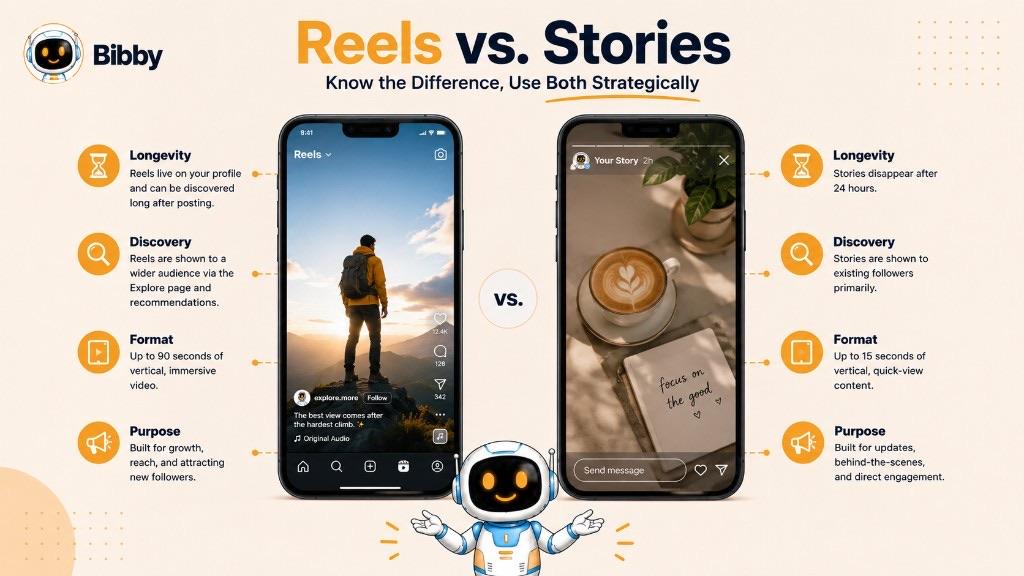
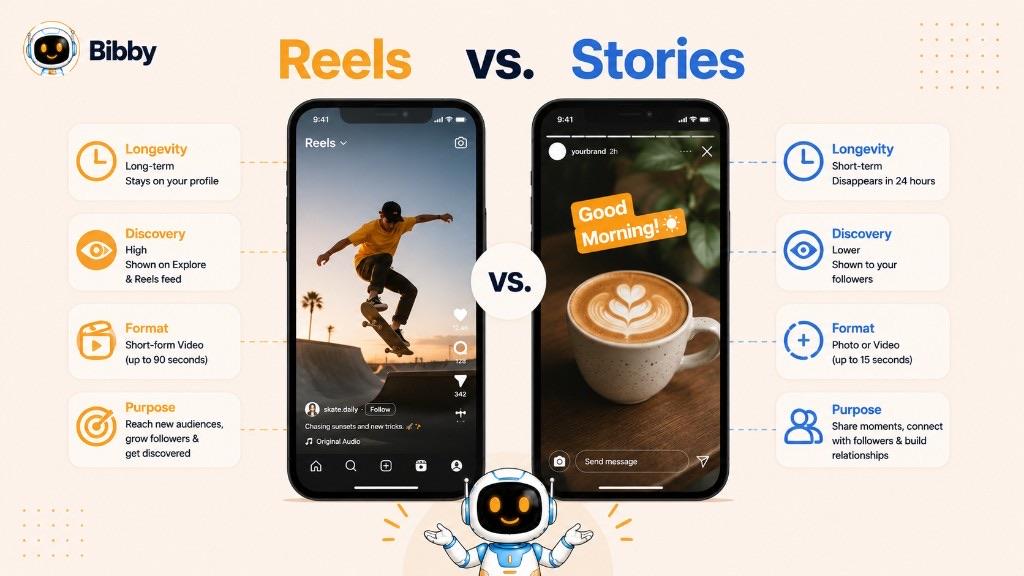
Reels and Stories are both popular Instagram content formats, but they serve different purposes. Reels are primarily designed for short-form video, discovery, and reaching new audiences, while Stories are designed for timely content and ongoing engagement with an existing audience. For a deeper comparison, see Reel vs Story.
| Feature | Reels | Stories |
|---|---|---|
| Primary purpose | Discovery, entertainment, and engagement | Timely updates and audience interaction |
| Format | Primarily short-form vertical video | Photos, videos, text, and interactive content |
| Automatically disappears | No | Yes, typically after 24 hours |
| Discovery potential | Can reach people beyond your followers | Primarily designed around your existing audience |
| Long-term visibility | Remains available after publishing | Limited unless added to Highlights or otherwise preserved |
| Best for | Reach, education, entertainment, and promotion | Updates, behind-the-scenes content, polls, and quick announcements |
Are Reels and Stories the Same Thing?
No. Although both can use vertical video, they are built for different content experiences.
A Reel is generally intended to be discoverable and evergreen. It can continue attracting views and engagement after it is published and may be recommended to people who do not follow the account.
A Story is generally more temporary and immediate. Stories are useful for sharing updates, creating urgency, showing behind-the-scenes moments, and interacting with an existing audience through features such as polls, questions, and other interactive elements.
When Should You Use Reels vs. Stories?
Use Reels when your goal is to reach new people, showcase an idea, educate an audience, entertain viewers, or promote content that can remain relevant over time.
Use Stories when you want to share something timely, start a quick conversation, provide an update, or give followers a more informal look at your brand or daily activity.
Many businesses benefit from using both. For example, a business could publish a Reel explaining a product and then use Stories to answer questions, share additional information, or direct followers toward the next step.
The key difference is simple: Reels are built primarily for discovery, while Stories are built primarily for timely audience engagement.
Reels vs. Posts vs. Stories
Instagram offers several ways to publish content, and each format has a different role. Reels are strongest for short-form video and discovery, posts are useful for persistent visual content and deeper information, and Stories are designed for timely updates and interaction.
| Format | Best suited for | Longevity | Discovery potential |
|---|---|---|---|
| Reels | Short-form video, entertainment, education, and reach | Persistent | High |
| Posts | Photos, graphics, announcements, and carousels | Persistent | Moderate to high |
| Stories | Updates, behind-the-scenes content, and quick interactions | Typically 24 hours | Primarily existing audience |
Reels
Reels are the natural choice when the goal is to attract attention through short-form video. They are particularly useful for content that benefits from demonstrations, storytelling, tutorials, entertainment, or visual explanations.
Because Reels can be recommended beyond an account's existing followers, they can also play an important role in audience discovery and growth.
Posts
Instagram posts are useful for content that people may want to view, read, save, or return to later. They can include individual images, graphics, and carousels containing multiple pieces of visual content.
For example, a business might use a carousel to explain a concept in detail after using a Reel to introduce the topic.
Stories
Stories are designed for more temporary and immediate communication. They can include photos, videos, text, links, and interactive features, making them useful for updates and conversations with an existing audience.
Because Stories typically disappear after 24 hours, they are particularly useful for content that is time-sensitive or does not need to remain permanently visible on a profile.
Which Instagram Format Should You Use?
The right format depends on what you want the content to accomplish.
- Want to reach new audiences? Reels can be a strong choice.
- Want to explain something in detail? A post or carousel may work better.
- Want to share a quick update? A Story is often more appropriate.
- Want to maximize the value of one idea? Consider adapting it across multiple formats.
The formats do not have to compete with one another. A strong Instagram strategy can use Reels for discovery, posts for depth, and Stories for ongoing engagement.
What Makes a Good Reel?
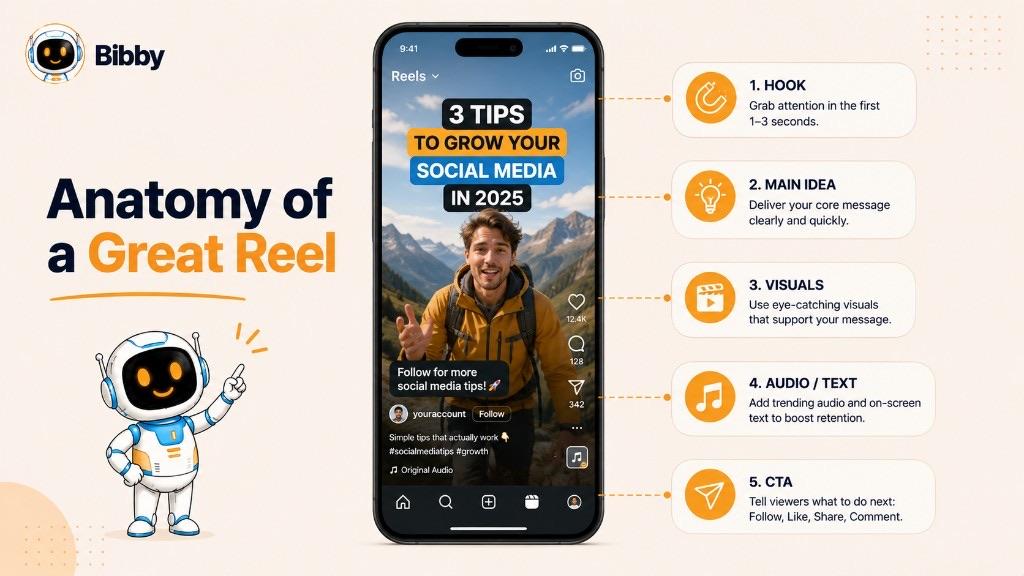
A good Reel captures attention quickly, communicates a clear idea, and gives viewers a reason to keep watching or interact with the content. The best Reels are not necessarily the most heavily edited—they are the ones that are relevant and valuable to the audience they are trying to reach.
A Strong Opening Hook
The beginning of a Reel needs to give viewers a reason to continue watching. A strong hook can be a question, surprising statement, useful promise, visual demonstration, or problem that the video will address.
For example, instead of beginning with a long introduction, a business could open with the specific problem its product solves. Hooks should still deliver what they promise—clickbait openings that mislead viewers tend to cost trust.
A Clear, Focused Message
A Reel should generally communicate one main idea rather than trying to cover too much information at once.
Before creating the video, identify what you want the viewer to understand, feel, or do after watching it. This makes the content easier to follow and gives the Reel a clearer purpose.
Mobile-Friendly Visuals
Reels are primarily consumed on mobile devices, so the video should be easy to see and understand on a small screen.
Use clear visuals, readable text, good lighting, and a vertical composition that keeps important information within the visible area.
Captions and On-Screen Text
Text can help viewers understand the message, particularly when they are watching without sound. Captions and on-screen text can also make educational or information-heavy Reels easier to follow.
Text should remain concise and readable rather than filling the screen with large blocks of information.
Relevant Audio
Music, voiceovers, dialogue, sound effects, or other audio can contribute to the viewing experience. The right audio should support the content rather than distract from the main message.
A Reason to Engage
Effective Reels often give viewers a natural reason to respond. Depending on the content, that might mean asking a question, inviting people to share an opinion, encouraging them to save a useful tip, or directing them toward another piece of content.
A call to action should match the purpose of the Reel rather than being added simply to generate interactions.
Consistent Branding
Businesses can make Reels more recognizable by maintaining consistent visual elements, messaging, tone, and storytelling. Branding does not need to overwhelm the content; the goal is to make the Reel feel like part of the broader brand experience.
Ultimately, a good Reel combines a strong hook, a clear message, useful or entertaining content, and a format that makes the video easy to watch and understand.
What Can You Post as a Reel?
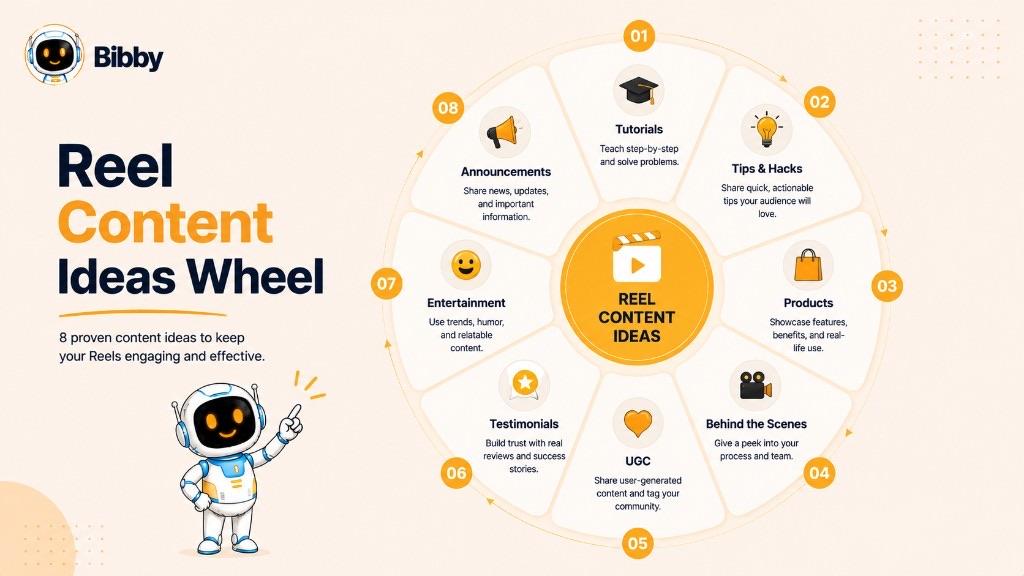
Almost any idea that can be communicated effectively through short-form video can become a Reel. Creators and businesses commonly use Reels to educate, entertain, demonstrate products, tell stories, and share moments that are visually engaging.
Educational Videos
Reels can turn useful information into quick, easy-to-consume lessons.
Examples include:
- Tips and tricks
- How-to tutorials
- Industry insights
- Quick explanations
- Common mistakes
- Frequently asked questions
- Step-by-step demonstrations
Educational Reels can be particularly useful for businesses that want to demonstrate expertise while providing something valuable to their audience.
Product Demonstrations
Businesses can use Reels to show a product in action instead of simply describing it.
A product Reel might demonstrate:
- How the product works
- How to use a particular feature
- Before-and-after results
- Different ways to use the product
- A new product or feature
- Common customer use cases
Behind-the-Scenes Content
Behind-the-scenes Reels can give audiences a more personal view of a business or creator.
You could show how a product is made, what happens before a launch, how a team works, or what goes into producing your content.
Entertainment
Reels are also well suited to entertaining content. Depending on the brand and audience, this might include humor, storytelling, reactions, trends, challenges, or visually interesting clips.
Entertainment does not necessarily mean creating content unrelated to your business. A brand can make entertaining content while still reinforcing its personality and positioning.
User-Generated Content
Customer-created videos can be adapted into Reels when appropriate permissions and platform requirements are met.
User-generated content can provide social proof while showing potential customers how real people use or experience a product or service.
Testimonials and Customer Stories
Short customer stories and testimonials can communicate benefits through real experiences. These Reels can focus on a customer's problem, their experience with the product or service, and the outcome.
Announcements and Promotions
Reels can also be used to announce:
- New products
- Product launches
- Events
- Limited-time offers
- Brand updates
- New features
- Campaigns
Promotional content is generally more effective when it provides a clear reason to watch rather than functioning only as an advertisement.
Before-and-After Content
Before-and-after videos can visually demonstrate a transformation, making them useful for industries such as beauty, fitness, home improvement, design, education, and many service businesses.
Repurposed Content
Existing content can often become a Reel with the right adaptation. For example, a long article could provide several short video ideas, while a webinar could be turned into multiple clips.
The important point is not to copy content mechanically. Repurposing works best when the content is adapted to the short-form, mobile-first viewing experience of Reels.
Whether you are teaching a concept, demonstrating a product, entertaining an audience, or telling a customer story, the strongest Reel ideas start with the same question: what would make this particular audience want to watch?
Reels for Businesses
Reels can help businesses turn short-form video into a practical part of their social media marketing strategy. From building brand awareness to demonstrating products and educating potential customers, businesses can use Reels at different stages of the customer journey.
How Businesses Use Reels
Businesses can use Reels for a wide range of marketing purposes, including:
- Building brand awareness: Introduce your brand, products, services, or expertise to new audiences.
- Reaching new customers: Use engaging content to attract people who may not already follow your account.
- Showcasing products: Demonstrate products, features, use cases, and benefits through video.
- Educating audiences: Answer questions, explain concepts, and share practical tips related to your industry.
- Demonstrating expertise: Share insights and useful information that establish your business as a knowledgeable resource.
- Humanizing the brand: Introduce employees, show behind-the-scenes moments, and give audiences a more personal view of the business.
- Promoting products or campaigns: Support launches, announcements, events, and other marketing initiatives with short-form video.
The most effective approach depends on the business, its audience, and the goal of each Reel.
Reels for Social Media Marketing
Reels work best when they are part of a broader social media strategy rather than being treated as a standalone content format.
For example, a business launching a new product could create a short Reel demonstrating the product, publish a carousel explaining its key features, and use Stories to answer questions or share updates.
This allows each format to do a different job:
Reels → discovery
Posts and carousels → deeper information
Stories → ongoing interaction
Using formats together can create a more complete content journey instead of relying on a single type of post.
Reels for Content Marketing
Reels can also extend the value of content a business has already created.
A single topic could become multiple pieces of content:
Blog post → Reel → Carousel → Story → LinkedIn post → Short-form video
For example, a business that publishes an article explaining five industry mistakes could turn each mistake into a separate Reel. The original article provides the depth, while the Reels introduce the ideas to an audience that prefers short-form video.
This approach can make content production more efficient while keeping the message consistent across channels.
Reels Throughout the Customer Journey
Businesses can use Reels for more than attracting attention.
A Reel might introduce a customer to a brand, demonstrate how a product solves a problem, answer a common objection, or encourage an existing follower to take the next step.
That makes Reels useful across several stages:
Awareness → Engagement → Consideration → Conversion
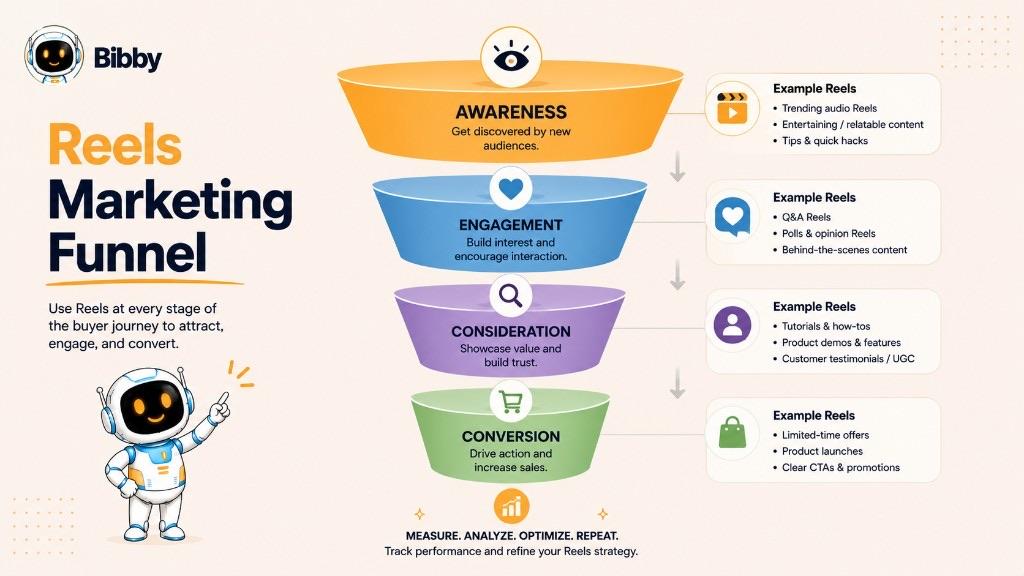
The objective should determine the content. A Reel designed to introduce a brand to new audiences will look different from one designed to explain a product to people who are already considering a purchase.
For businesses, the value of Reels ultimately comes from connecting short-form video with a clear marketing purpose rather than chasing views alone.
Reels for Creators
Reels give creators a way to showcase their personality, expertise, and creativity while reaching people beyond their existing followers. Because Reels can be recommended to new audiences, they can play an important role in audience growth and personal branding.
Audience Growth
Creators can use Reels to introduce their content to people who have not discovered their account before. A useful, entertaining, or distinctive Reel can attract new viewers and encourage them to explore the creator's profile and follow the account.
Rather than making every Reel about gaining followers, creators should focus on producing content that gives the intended audience a reason to watch, share, save, or return.
Personal Branding
Reels provide a visual way for creators to establish a recognizable identity.
Consistent topics, presentation, tone, storytelling, and visual style can help audiences understand what a creator is known for. Over time, this consistency can make individual Reels feel like part of a recognizable personal brand.
Content Discovery
Creators can use Reels to experiment with different topics and formats and learn what resonates with their audience.
For example, a creator might test:
- Educational tips
- Tutorials
- Personal stories
- Commentary
- Behind-the-scenes content
- Entertainment
- Trends
- Product recommendations
Performance data can then help identify which subjects and creative approaches deserve more attention.
Community Building
Although Reels are often associated with reach, they can also help creators build relationships with their audience.
Creators can use videos to ask questions, respond to common audience concerns, share personal experiences, or start conversations around topics their community cares about. Consistent community management in the comments turns that attention into a relationship.
The Reel attracts attention; meaningful interaction can help turn that attention into a stronger audience relationship.
Sponsorship and Brand Opportunities
A consistent Reels presence can also make a creator's content portfolio more useful to potential brand partners.
Creators can demonstrate their ability to communicate ideas, showcase products naturally, and produce content that fits a specific audience. Sponsored Reels should still provide genuine value to viewers and clearly follow applicable advertising and disclosure requirements. Both micro-influencers and larger influencers use Reels this way.
Educational and Entertainment Content
Reels work particularly well for creators who teach or entertain because complex ideas can be broken into short, focused videos.
An educator might explain one concept per Reel, while an entertainment creator might build recurring formats that give viewers a reason to return.
The strongest creator strategies usually combine a recognizable niche, consistent content, and experimentation rather than relying on a single viral video.
How Long Can Instagram Reels Be?
Instagram has changed Reel duration limits over time, so the maximum length can depend on the current Instagram features and how the Reel is created or uploaded.
For that reason, there is no single duration that should be treated as a permanent rule. Instagram's current creation and publishing interface is the best source for the latest supported length.
More importantly, a Reel does not need to use the maximum available duration to be effective. The appropriate length depends on the idea, audience, and amount of information being communicated.
How Long Should a Reel Be?
The best length is long enough to deliver the idea clearly and short enough to maintain the viewer's interest.
For example:
- A quick tip may only need a few seconds.
- A product demonstration may require more time.
- A tutorial may need additional time to explain each step.
- A story may benefit from a longer sequence.
Instead of adding unnecessary footage to reach a particular duration, focus on making every part of the Reel contribute to the viewer's experience. When an idea genuinely needs more room, consider long-form video instead of stretching a Reel.
Does a Longer Reel Get More Reach?
Not necessarily. Reel performance depends on multiple factors, including the content itself, audience interest, and how people interact with and consume the video.
A longer video is not automatically better, and a shorter video is not automatically more effective.
The better approach is to test different lengths for your particular audience and use performance data to understand which formats work best.
In short: create a Reel for the content, not for a target duration. Check Instagram's current publishing options when you need the latest maximum length or technical requirement.
What Format Should a Reel Be?
Reels are designed primarily for vertical, mobile-first video, making the vertical format the natural choice for creators and businesses publishing short-form content on Instagram.
Choosing an appropriate format helps your video use the available screen space effectively and makes important visual elements easier for viewers to see.
Reel Orientation
A vertical video is generally the best fit for Reels because it is designed around the way people commonly hold and use their phones.
A vertical composition also gives you more space to present:
- People
- Products
- Demonstrations
- Text overlays
- Step-by-step instructions
- Other important visual elements
When recording or editing a Reel, keep important information away from areas where Instagram's interface may appear.
Reel Aspect Ratio
The commonly used aspect ratio for full-screen vertical Reels is 9:16.
A 9:16 video fills a typical smartphone screen in portrait orientation and is well suited to the immersive viewing experience Reels are designed to provide.
If your original footage uses another aspect ratio, avoid simply stretching it to fill the screen. Cropping or reframing the video can produce a more natural result while keeping the important parts of the composition visible.
Reel Resolution and Quality
Upload video at a good quality so that text, faces, products, and other important details remain clear on mobile screens.
Low-resolution or heavily compressed footage can make a Reel look less professional, particularly when it contains small text or detailed visuals.
Before publishing, check the exported video for:
- Clear visuals
- Readable text
- Appropriate framing
- Good lighting
- Clean audio
- Unnecessary borders or cropping
Reel File Format
Instagram supports common video formats, but exact technical requirements can change as the platform evolves.
When preparing Reels in a third-party editing or content-management tool, use a widely supported video format and verify Instagram's current publishing requirements if you encounter an upload or compatibility issue.
Best Practices for Reel Formatting
For most creators and businesses, a simple rule works well:
Create high-quality vertical video, design for a mobile screen, and keep important content clearly visible.
Technical specifications matter, but they should support the content rather than become the focus. A correctly formatted Reel still needs a strong idea, clear message, and reason for the viewer to keep watching.
How Does the Instagram Reels Algorithm Work?
The Instagram Reels algorithm is the system Instagram uses to determine which Reels to recommend to different users. Rather than following one publicly known formula, Instagram uses multiple signals to predict which content a particular viewer is likely to find interesting or valuable.
This means the same Reel may be shown to different audiences in different ways.
What Signals Can Influence Reel Recommendations?
Instagram considers various signals related to the viewer, the content, and how people interact with it. These can include:
- What a person has previously watched or interacted with
- The topics and content they appear to be interested in
- How people respond to a Reel
- Whether viewers watch and continue engaging with the content
- Whether people share or save the content
- Information about the Reel itself
- The relationship between the viewer and the creator
These signals help Instagram determine which Reels may be relevant to an individual viewer—similar in principle to how TikTok's For You Page builds a personalized feed.
What Helps a Reel Get More Reach?
There is no guaranteed formula for making a Reel go viral. However, creators can improve their chances of reaching the right audience by focusing on the fundamentals of good content.
#### Make the Opening Strong
Give viewers a reason to keep watching from the beginning. A clear hook can establish the topic, create curiosity, or immediately demonstrate the value of the video.
#### Create for a Specific Audience
A Reel made for everyone often has a less clear message than one designed for a particular audience. Defining a user persona makes this easier.
Consider who the video is for, what they care about, and why they would find the content useful or entertaining.
#### Encourage Genuine Engagement
Create content that naturally gives people a reason to comment, save, share, or discuss it. Avoid relying on artificial engagement tactics.
For example, a useful tutorial may naturally generate saves, while an opinion-based Reel may encourage comments and discussion.
#### Make Content Worth Watching
The objective should not simply be to keep viewers watching for the sake of a metric. Deliver on the promise made by the hook and make the content useful, entertaining, informative, or otherwise worthwhile.
#### Test Different Approaches
Creators should experiment with different topics, hooks, formats, editing styles, and calls to action. Structured A/B testing makes the results easier to interpret.
Reviewing performance over time can reveal patterns about what resonates with a particular audience.
Does the Reels Algorithm Favor Certain Types of Content?
There is no universal content type that guarantees greater reach.
A Reel's performance depends partly on whether it is relevant to the people who encounter it. A highly polished video may perform poorly if it is not interesting to its intended audience, while a simple video can perform well when it communicates something viewers genuinely want to watch or share.
For businesses and creators, the better strategy is therefore to understand the audience, create useful or entertaining content, publish consistently, and learn from performance data rather than trying to find a secret algorithm hack.
The algorithm ultimately determines distribution, but creators control the quality, relevance, and purpose of the content they publish.
How to Create a Reel
Creating a Reel starts with a clear idea and ends with publishing or scheduling the finished video. You can record footage specifically for the Reel or repurpose existing video, then edit it into a format that is easy to watch on a mobile screen.
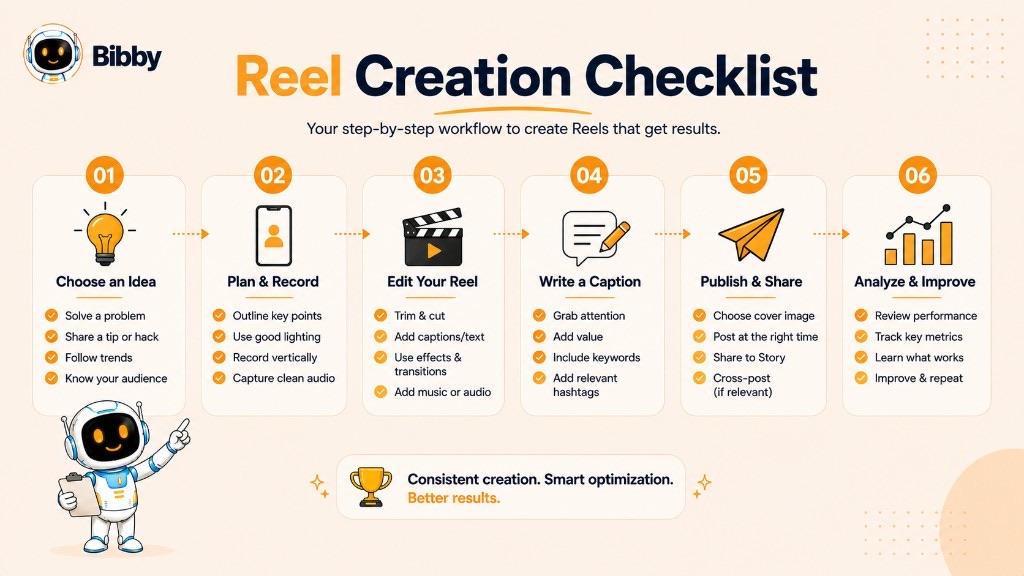
1. Choose a Reel Idea
Start with a specific topic, audience, and purpose.
Your Reel might answer a question, solve a problem, demonstrate a product, teach a skill, tell a story, or entertain viewers. Keeping each Reel focused on one main idea usually makes the content easier to understand.
2. Record or Upload Your Video
You can record video directly in Instagram or use footage you have already created.
If you are recording new footage, consider the composition, lighting, sound, and background before filming. If you are using existing footage, select clips that support the main idea rather than including everything you have recorded.
3. Edit the Video
Trim unnecessary sections and arrange the clips so the video flows naturally.
Depending on the content, you can also add:
- Music or other audio
- Voiceovers
- On-screen text
- Captions
- Transitions
- Visual effects
- Other creative elements
The goal is not to add as many effects as possible. Editing should make the message clearer and the viewing experience more engaging.
4. Add a Caption and Cover
Write a caption that provides useful context or encourages an appropriate next step.
You can also choose a cover that clearly represents the Reel. A recognizable cover can make it easier for people visiting your profile to understand what the video is about.
5. Choose Your Publishing Settings
Before publishing, review the available settings and make sure the Reel is ready for the intended audience.
Check the video, caption, cover, tags, and other relevant publishing details before confirming.
6. Publish or Schedule the Reel
You can publish the Reel immediately or use an available scheduling option when you want it to go live at a later time.
Scheduling can be particularly useful for creators and businesses that plan content in advance. Instead of manually publishing every video, you can prepare multiple pieces of content and organize them around a broader publishing schedule.
7. Review Performance
After publishing, review the available performance data in Instagram Insights to understand how the Reel performed.
Look beyond views alone. Depending on your objective, useful indicators can include:
- Reach
- Views
- Likes
- Comments
- Shares
- Saves
- Profile activity
- Follows
- Other relevant outcomes
Use these insights to identify patterns and improve future Reels.
Can You Schedule Reels?
Yes, Reels can be scheduled through supported Instagram publishing workflows and tools, although the exact options available can depend on the account, publishing method, and current Instagram features.
For businesses and creators managing multiple platforms, a social media scheduling tool can make this process more efficient. Bibby, for example, lets you upload or generate visual content, choose a posting style, automatically generate captions, and schedule social media content across supported platforms from one workflow. Confirm which Instagram formats your connected account and workflow currently support before you rely on them for a launch.
The important distinction is that creating a Reel is only one part of the process. Planning, publishing consistently, and learning from performance are what turn individual videos into a sustainable social media strategy.
How to Use Reels in a Social Media Strategy
Reels are most effective when they support a clear social media strategy rather than being published simply to increase the number of videos on an account. Start with your audience and marketing goals, then create Reels that consistently support those goals.
Create Reels Around Content Pillars
Content pillars are the recurring topics or themes that define what an account publishes.
For example, a business could build its Reel strategy around five pillars:
- Education: Tips, tutorials, explanations, and industry insights
- Entertainment: Humor, trends, stories, and engaging visual content
- Products: Demonstrations, features, use cases, and launches
- Community: Customer stories, questions, conversations, and user-generated content
- Behind the scenes: Employees, processes, events, and company culture
Content pillars make it easier to generate ideas while keeping the overall account focused and recognizable.
Build a Consistent Publishing Schedule
Consistency helps turn Reels from occasional experiments into a repeatable content channel.
That does not mean every account needs to publish the same number of Reels. The right publishing frequency depends on your available resources, audience, content quality, and goals.
A sustainable schedule is generally more useful than choosing an ambitious frequency that becomes difficult to maintain.
Planning Reels in advance can also make it easier to maintain consistency. Instead of creating and publishing content at the last minute, you can prepare multiple videos and organize them around a broader content calendar and your own best times to post.
Repurpose Reel Ideas Across Platforms
A Reel idea does not have to exist only on Instagram.
A useful concept can often be adapted into other formats and platforms. For example:
One idea → Instagram Reel → TikTok video → YouTube Short → LinkedIn video → Instagram Story → Carousel
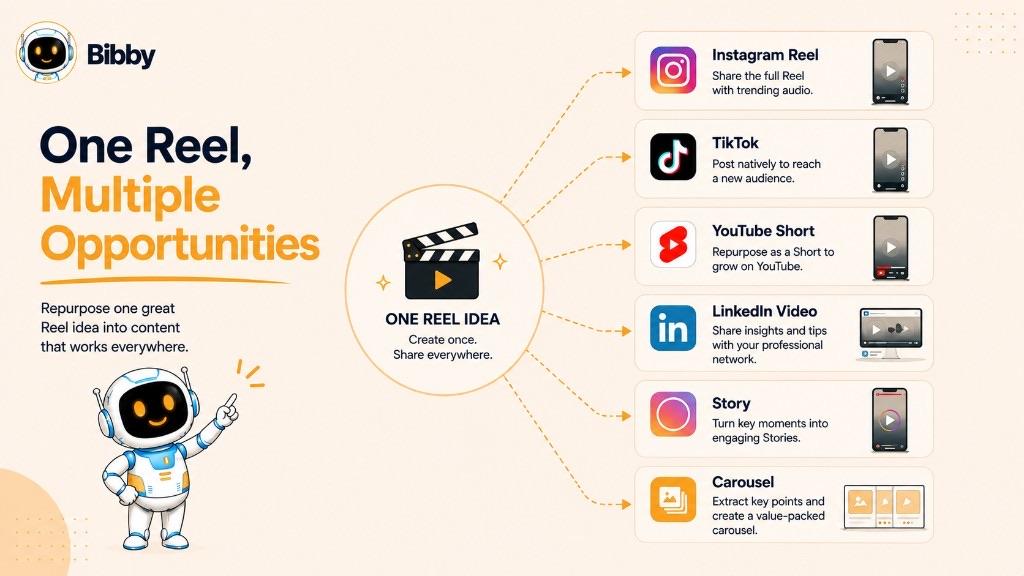
The content should be adapted to each platform rather than copied without modification. Different audiences and platform experiences may require different hooks, captions, lengths, or presentation styles.
Repurposing allows businesses and creators to get more value from the ideas they have already developed.
Test and Improve Your Reels
A successful Reel strategy requires experimentation.
Test different variables such as:
- Topics
- Hooks
- Video styles
- Lengths
- Editing approaches
- On-screen text
- Calls to action
- Publishing times
Then compare the results against your objectives.
For example, if the goal is awareness, reach and views may be useful indicators. If the goal is community engagement, shares, saves, and comments may provide more meaningful insight. If the goal is generating business results, profile activity, website visits, leads, or conversions may matter more. Choose the KPIs that match the objective and avoid judging every Reel by vanity metrics.
Avoid changing everything at once. Testing one or two variables at a time can make it easier to understand what may have contributed to a change in performance.
Turn Reels Into a Repeatable Workflow
Managing Reels becomes easier when ideation, creation, captions, scheduling, publishing, and analysis are treated as parts of one workflow.
For teams and creators managing content across multiple platforms, social media automation can reduce repetitive publishing tasks. A tool such as Bibby can help organize visual content, generate captions, schedule posts, and manage publishing across supported social platforms from a single workflow.
The goal is not to automate creativity. Use automation to handle repetitive work so you can spend more time developing ideas, improving content, and understanding your audience.
A strong Reel strategy therefore combines clear content pillars, consistent publishing, smart repurposing, and ongoing experimentation.
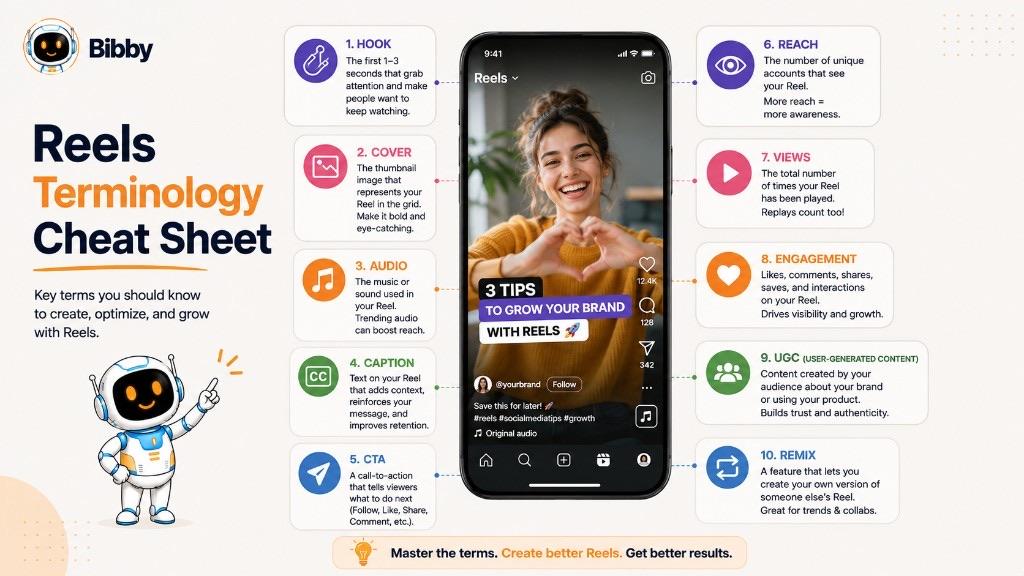
Common Reel Terms You Should Know
Understanding the terminology used around Reels makes it easier to create, publish, and analyze short-form video content.
| Term | What it means |
|---|---|
| Reel | A short-form video published on Instagram, designed for mobile viewing, entertainment, engagement, and discovery. |
| Reels feed | Instagram's dedicated viewing experience for Reels, where people continuously discover videos from accounts they follow and accounts they do not. |
| Hook | The opening of a Reel, designed to capture attention and give viewers a reason to keep watching—a question, surprising statement, visual demonstration, problem, or promise. |
| Audio | The music, dialogue, voiceover, or sound effects used in a Reel, which can set the mood or carry information. |
| Reel cover | The image that represents a Reel on your profile, helping people understand the subject at a glance. |
| Caption | The text published alongside a Reel to add context, explain the video, or encourage an action. |
| CTA | A call to action telling viewers what to do next: comment, save, visit a profile, or explore a product. |
| Reach | The number of unique accounts exposed to content, according to the platform's reporting definitions. |
| Views | Video viewing activity under Instagram's current definitions. One account can generate multiple views, so views and reach are not the same. |
| Engagement | Interactions with content such as likes, comments, shares, and saves. Which one matters depends on the goal of the Reel. |
| UGC | User-generated content created by customers or fans rather than the brand, usable as a Reel with the right permissions. |
| Remix | An Instagram feature that lets users create content alongside another Reel, subject to current availability and rules—comparable to TikTok's Duet and Stitch. |
Explore these and other definitions in the social media dictionary.
Reels and Bibby
Reels are created and published inside Instagram, but the work around them—planning ideas, writing captions, keeping a schedule, and managing several platforms—is where most of the repetition lives.
Bibby handles that side of the workflow. You can upload or generate visuals, choose a posting style, generate AI captions and regenerate any that miss, and schedule content at AI-optimized times across Facebook, Instagram, LinkedIn, YouTube, and TikTok. You can also chat with Bibby to build a brand kit, create campaigns, and produce posts conversationally.
A few boundaries worth being clear about: recording, editing, audio selection, and Remix happen in Instagram; publishing support varies by platform, format, and connected account, so confirm what your account supports; and Reels performance lives in Instagram Insights, which Bibby does not replace. Bibby also cannot guarantee reach, virality, or distribution.
Start free with Bibby and turn your Reel ideas into a schedule you can actually keep.