
A Duet is a TikTok feature that lets you create a video alongside another user's video in a side-by-side format. Instead of simply watching or sharing someone else's content, you can add your own reaction, commentary, performance, response, or creative twist to it. This makes Duets a popular way for creators to participate in trends, collaborate with others, answer questions, and interact with content.
For example, a singer might post part of a song and another creator can use a Duet to sing along. A business expert might share a tip, while another creator uses a Duet to add their opinion or explain the topic further. Brands can also use Duets to respond to creators, participate in relevant trends, or engage with user-generated content.
Here, you will learn:
- What Duet means on TikTok and how the feature works
- How to create a Duet, plus ideas, examples, and common mistakes
- How Duets differ from Stitch and how businesses can use them in a social media strategy
Let's start with the basic definition.
What Is a Duet on TikTok?
A Duet is a TikTok feature that lets you create a video alongside another user's video in a side-by-side format. Instead of simply watching or sharing someone else's content, you can add your own reaction, commentary, performance, response, or creative twist to it.
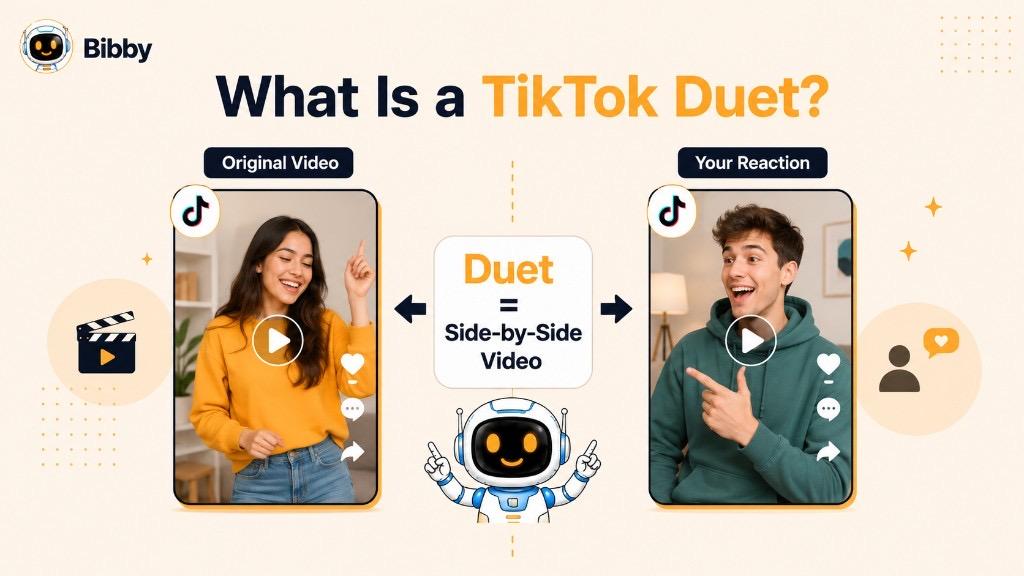
In simple terms, TikTok Duet turns someone else's video into an opportunity to create something new alongside it. It can be useful for creators, influencers, businesses, and marketers looking to build more engaging short-form video content.
What Does Duet Mean on TikTok?
On TikTok, Duet refers to a feature that allows you to create a new video that appears alongside an existing TikTok video. The original video and your recording play together in a split-screen, side-by-side format, creating the feeling of a shared performance or conversation.
The feature gets its name from the idea of a musical duet, where two performers contribute to the same piece. On TikTok, however, a Duet does not have to involve music. You can use it for almost any type of creative response, including reactions, commentary, comedy, tutorials, challenges, educational content, and collaborations.
For example, imagine a creator posts a video asking, “What's one social media mistake businesses should stop making?” You could create a Duet and answer the question directly beside their video. Similarly, if someone posts a dance, song, challenge, product demonstration, or opinion, you can potentially use a Duet to add your own contribution.
A TikTok Duet is therefore more than simply reposting another person's content. It creates a new piece of content that responds to or builds upon the original video.
Common ways people use TikTok Duets
- Reactions: Respond to a funny, surprising, educational, or controversial video.
- Collaborations: Perform or create content alongside another creator.
- Challenges: Participate in trending challenges using the original video as a starting point.
- Music: Sing, play an instrument, or perform alongside another creator.
- Commentary: Add your perspective to an existing conversation.
- Education: Explain, expand on, or respond to information shared by another creator.
- Brand engagement: Respond to relevant creator or customer content.
Whether you're a casual TikTok user or managing content for a business, the Duet feature provides a simple way to turn existing conversations into opportunities for new content.
How Does TikTok Duet Work?
TikTok Duet works by combining an existing TikTok video with a new video you create. The original video is displayed on one side of the screen while your recording appears alongside it. Both pieces of content become part of the same Duet, allowing you to react, respond, perform, or add another layer to the original idea.
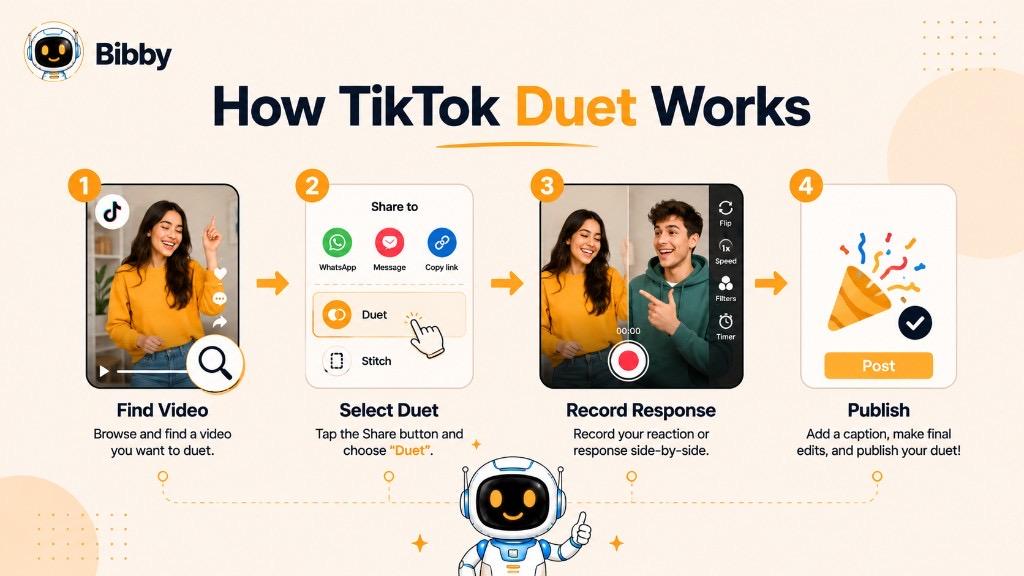
The process is straightforward, although the exact buttons and interface can change as TikTok updates its app.
1. Find a TikTok Video
Start by finding a video you want to respond to or build upon. It could be a trending video, tutorial, challenge, performance, question, or another type of content.
2. Open the Sharing Options
Open the video's sharing menu. If the creator has enabled Duets for that content, you should see the Duet option among the available actions.
3. Choose Duet
Select Duet to open TikTok's recording interface. The original video will appear alongside the area where you can record your contribution.
4. Create Your Video
Record your response while the original video plays. Depending on your idea, you might:
- React to what the creator says
- Answer a question
- Sing or perform alongside the original
- Add commentary
- Demonstrate your own technique
- Participate in a challenge
- Provide additional information
- Create a humorous response
5. Edit Your Duet
After recording, you can typically use TikTok's available editing tools to refine your video. Depending on the current app features, this may include text, effects, sounds, stickers, captions, and other creative options.
6. Add Your Caption and Publish
Once your Duet is ready, add a relevant caption and any appropriate hashtags or other publishing details. You can then publish the video to TikTok.
Why the Original Video Matters
The original video provides the context for your Duet. Your contribution should ideally add something meaningful rather than simply appearing beside the original content.
For example, a fitness creator could Duet a workout video and demonstrate an alternative exercise. A marketing professional could respond to a social media tip with additional advice. A musician could perform alongside another creator.
This interactive format is what makes Duets particularly useful for conversation-driven and community-focused content. Instead of creating every video from a blank canvas, creators can join existing conversations and contribute their own perspective.
Duet vs. Stitch: What's the Difference?
A Duet and a Stitch are both TikTok ways to respond to someone else's video, but they look different on screen.
A Duet plays your video alongside the original at the same time. A Stitch uses a clipped portion of the original video, then continues with your response.
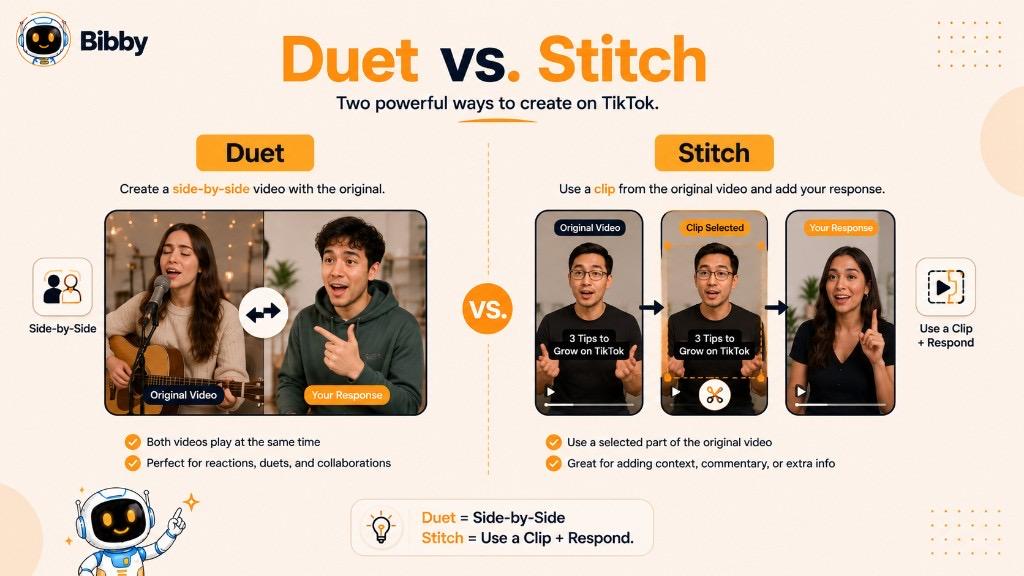
Duet = side-by-side. Both videos play together, which is useful for reactions, performances, and collaborations.
Stitch = clip + respond. You select a part of the original video and build your commentary or continuation after it.
How to Make a Duet on TikTok
Creating a Duet on TikTok is relatively simple. The basic process is to find a video that allows Duets, select the Duet option, record your contribution alongside the original video, make any necessary edits, and publish it.
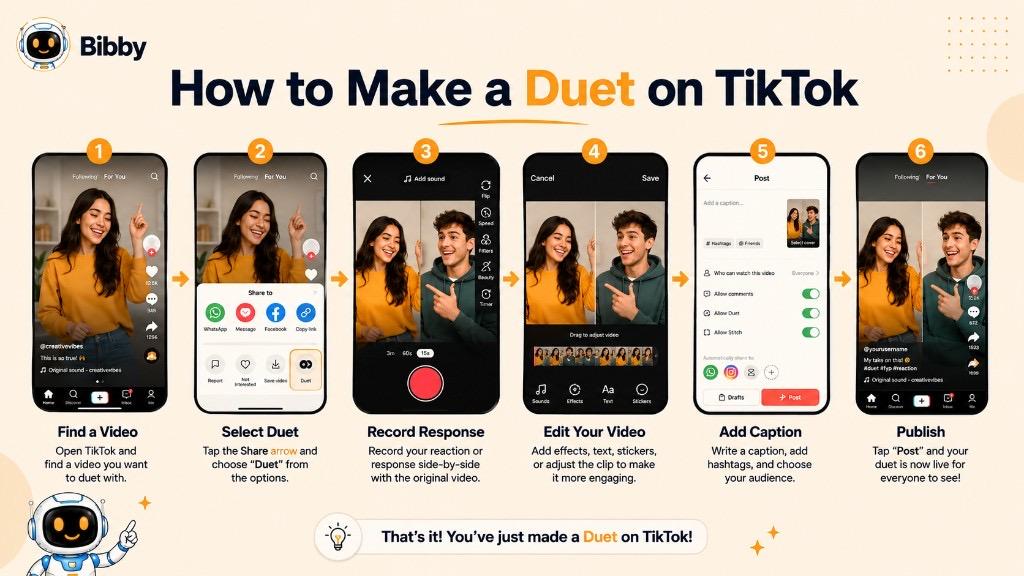
Step 1: Find a TikTok You Want to Duet
Browse TikTok and find a video that you want to respond to, collaborate with, or build upon.
Choose something that gives you a clear reason to contribute. A good Duet might be a question you can answer, a challenge you can participate in, a performance you can join, or an opinion you can add to.
Step 2: Open the Share Menu
Tap the Share button on the TikTok video. This opens the available sharing and interaction options.
If Duet is available for that particular video, you will see the Duet option.
Step 3: Select “Duet”
Tap Duet to open TikTok's Duet creation screen.
The original video will appear alongside the recording area for your new video. This side-by-side layout is the defining feature of a TikTok Duet.
Step 4: Record Your Response
Record your contribution while the original video plays.
What you record depends on your goal. You could:
- React to the original video
- Answer a question
- Add your own explanation
- Sing or perform alongside the creator
- Participate in a challenge
- Demonstrate an alternative method
- Share your professional opinion
- Add humor or commentary
The strongest Duets usually give viewers a reason to watch both sides of the screen.
Step 5: Edit Your Video
Once you've finished recording, use TikTok's available editing tools to polish the video.
You may be able to add elements such as:
- Text
- Captions
- Sounds
- Effects
- Stickers
- Filters
- Other available editing features
Keep the editing focused on your message. Too many visual elements can make a side-by-side video difficult to follow.
Step 6: Add a Caption
Write a caption that provides context or encourages viewers to engage with your content. You can also use relevant hashtags where appropriate.
For example, a social media consultant responding to a marketing tip might write:
“Here's one more strategy I'd add to this list 👇”
Step 7: Publish Your Duet
Review the finished video and publish it when you're ready. Your new TikTok will appear as a Duet connected to the original content.
What If the Duet Option Isn't Available?
Not every TikTok video can necessarily be Dueted. A creator can control whether other users are allowed to create Duets with their content, and other account or content restrictions may also affect availability.
If you don't see the Duet option, the feature may simply not be available for that particular video or account.
Tip: Before creating a Duet for marketing purposes, choose content that is genuinely relevant to your audience. Jumping onto every trend can make a brand look less strategic than simply sitting one out.
What Can You Use a TikTok Duet For?
A TikTok Duet can turn an existing video into a starting point for a new piece of content. While reactions are one of the most common uses, the format is flexible enough for entertainment, education, collaboration, challenges, product content, and brand communication.
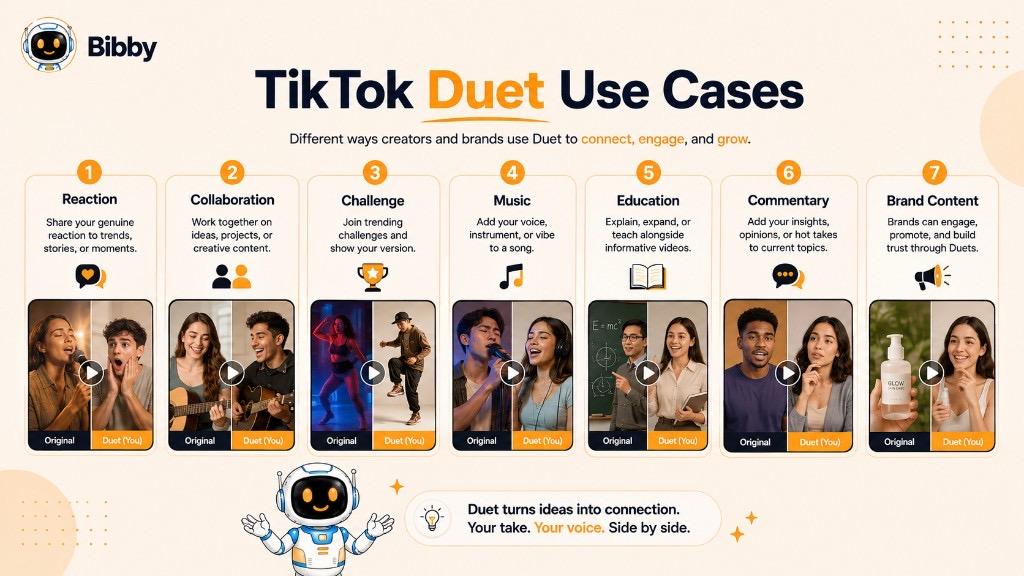
Here are some of the most common ways creators use TikTok Duets.
Reaction Videos
One of the simplest uses for a Duet is reacting to another creator's video. Your side of the screen can show your facial reaction, commentary, analysis, or response while the original video provides the context.
For example, a creator might Duet a surprising news-related clip, a funny moment, a product reveal, or an unusual opinion and provide their own reaction.
Collaborations
Duets can make collaboration possible even when two creators are not recording together at the same time or location.
Musicians can perform together, creators can respond to each other's ideas, and entertainers can build a shared format from separate recordings.
Challenges and Trends
TikTok trends often encourage users to recreate or respond to existing content. A Duet can provide an easy way to participate while adding your own personality to the trend.
For brands, however, relevance matters. A trend should make sense for the audience and brand rather than being used simply because it is popular.
Music and Performances
Musicians and performers frequently use Duets to create collaborative performances.
Some possibilities include:
- Singing alongside another creator
- Adding harmonies
- Playing an instrument
- Completing a musical performance
- Responding to a dance
- Performing a choreography
This format can make individual performances feel more interactive.
Educational Content
Duets can also be useful for teaching and explaining.
For example, a professional could respond to an existing video by:
- Adding missing information
- Explaining a complex concept
- Correcting an inaccurate claim
- Demonstrating a different technique
- Answering a question
- Providing expert commentary
This makes the Duet a useful format for creators who want to contribute knowledge rather than simply react.
Comedy and Entertainment
Comedians and entertainment creators can use Duets to build jokes around another video.
The original video can establish the situation, while the new creator adds a punchline, character, reaction, or unexpected continuation.
Product Demonstrations
Businesses can potentially use Duets to demonstrate products in context.
For instance, a brand could respond to a creator demonstrating a product by showing another way to use it, providing additional tips, or answering a common question.
Responding to User-Generated Content
Duets can also become part of a user-generated content (UGC) strategy. A brand or creator can respond to relevant community content, creating a more visible two-way interaction.
This can help make social media communication feel less like a broadcast and more like an ongoing conversation.
Answering Questions
A creator can use a Duet to answer another user's question, particularly when the original video already provides useful context.
Instead of typing a long response in the comments, the creator can turn the answer into a new piece of video content.
Adding a Different Perspective
Sometimes the most useful Duet isn't a direct reaction. It is an additional perspective.
A marketing professional might respond to a marketing tip with another strategy. A fitness creator might demonstrate an alternative exercise. A designer might explain a different approach to a visual technique.
In each case, the original video starts the conversation and the Duet adds another voice to it.
Ultimately, a TikTok Duet works best when your contribution gives viewers a reason to watch your side of the screen. The goal isn't simply to appear beside another video. It's to add context, personality, expertise, entertainment, or a fresh perspective.
TikTok Duet Examples
TikTok Duets can take many forms depending on the creator, audience, and purpose of the content. A Duet doesn't have to follow one fixed formula. The most effective examples usually take an existing video and add something new, such as a reaction, performance, explanation, joke, or alternative perspective.
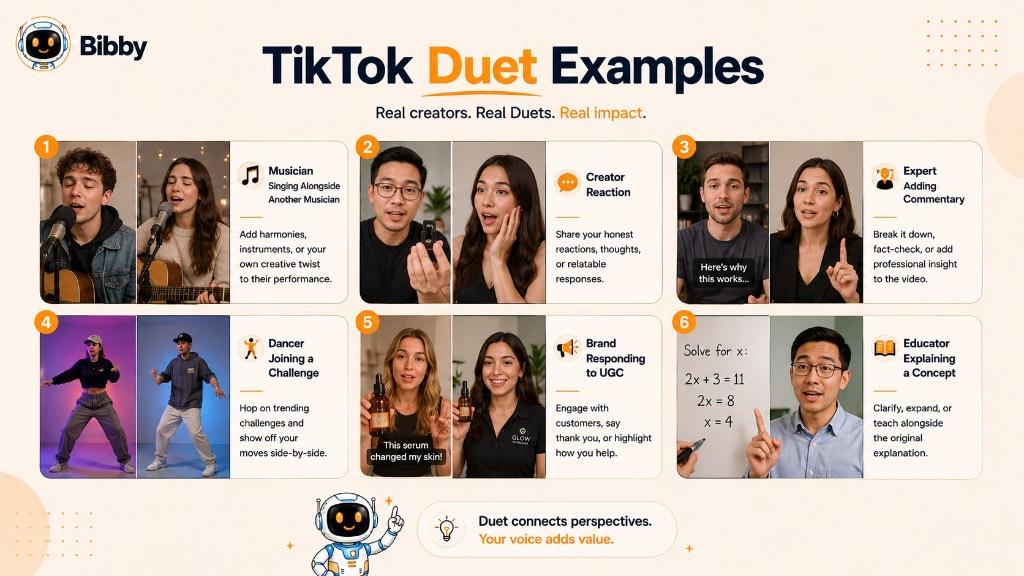
Here are some practical TikTok Duet examples.
1. Reaction Duet
A creator watches another TikTok and records their reaction alongside it.
For example, a technology creator could Duet a video showing a new gadget and explain whether the product is actually useful. A comedian could react to a funny clip, while a business creator could respond to an interesting industry opinion.
Best for: Entertainment, commentary, opinions, and trending topics.
2. Music Duet
A musician posts part of a song, and another creator uses a Duet to sing or play alongside them.
One creator might provide the vocals while the other adds an instrument or harmony. This creates a collaborative performance without requiring both creators to record together.
Best for: Musicians, singers, performers, and music challenges.
3. Dance Duet
A creator posts a dance routine, and another user performs the routine alongside the original video.
This format can be particularly effective for challenges and trending choreography because viewers can see both performances at the same time.
Best for: Dance creators, challenges, entertainment, and trends.
4. Educational Duet
An expert can respond to an educational video by adding more information or explaining a topic from another perspective.
For example, a digital marketing professional could Duet a video about social media marketing and add three practical tips that weren't included in the original.
Best for: Experts, educators, consultants, and professional creators.
5. Question-and-Answer Duet
A creator can use a Duet to answer a question raised in another TikTok.
For example:
Original video: “How do you choose the right social media platform for your business?”
Duet: A marketing professional explains how businesses can choose platforms based on their audience, content type, and goals.
This turns a simple question into a useful piece of educational content.
6. Challenge Duet
A creator starts a challenge and other users participate by creating Duets.
The original video establishes the challenge while each participant contributes their own version.
Best for: Community participation, entertainment, competitions, and trends.
7. Product Duet
A business can respond to a creator demonstrating or discussing a product.
For example, a skincare brand could respond to a creator's product demonstration with additional usage tips or information about the product.
The brand's contribution should add value rather than simply repeating the original content.
8. Expert Commentary Duet
An expert can use a Duet to provide professional context around another creator's claim or recommendation.
For example, a financial educator might respond to a personal-finance video and explain which parts of the advice are useful and which require more context.
This format can help creators establish expertise while participating in existing conversations.
9. Comedy Duet
A comedian can use another TikTok as the setup for a joke.
The original video establishes the situation, while the Duet provides an unexpected reaction, character, punchline, or continuation.
This works particularly well when the response is easy to understand without lengthy explanation.
10. Before-and-After Duet
A creator can respond to a transformation video with their own reaction or related transformation.
Examples include:
- Makeup transformations
- Home renovations
- Fitness progress
- Art transformations
- Room makeovers
- Design projects
The side-by-side format allows viewers to compare the original content and the new contribution.
11. Brand Response Duet
A brand can use a Duet to participate in relevant creator conversations.
For example, a clothing company might respond to a creator styling one of its products, while a food brand could react to a recipe featuring its product.
This can give brands a more conversational presence on TikTok.
12. Alternative-Solution Duet
A creator can respond to a tutorial or demonstration by showing another way to accomplish the same task.
For example:
Original: “Here's how I organize my content calendar.”
Duet: Another social media professional shows a different workflow and explains when it might be more effective.
This type of Duet creates useful comparison content rather than simply agreeing with the original creator.
What Makes a Good TikTok Duet?
Across all these examples, one principle remains important: the new video should contribute something of its own.
A strong Duet can add:
- A new perspective
- Useful information
- Entertainment
- Expertise
- A creative performance
- A genuine reaction
- A different solution
- A continuation of the original idea
The original TikTok provides the starting point, but your contribution is what gives the Duet a reason to exist.
Why Do Creators Use TikTok Duets?
TikTok Duets give creators a way to participate in existing conversations instead of always creating content from scratch. A single video can become the starting point for reactions, collaborations, challenges, educational responses, and other creative formats.
For creators, this can make content creation more interactive while helping them connect with audiences and other users.
1. To Increase Audience Interaction
A Duet naturally creates a two-part viewing experience. Instead of presenting an isolated video, creators can respond directly to another piece of content.
This can encourage viewers to watch, comment, share their opinions, or create their own responses.
2. To Participate in Trends
TikTok is heavily influenced by trends and recurring content formats. Duets give creators a way to participate in relevant trends while adding their own personality.
Rather than copying a popular video exactly, creators can contribute their own reaction, interpretation, or creative version.
3. To Collaborate With Other Creators
Duets make collaboration more accessible.
Two creators don't necessarily need to be in the same location or record at the same time. One person can publish a video, and another can later respond alongside it.
This opens up possibilities for:
- Musicians
- Influencers
- Educators
- Comedians
- Coaches
- Artists
- Brands
- Industry experts
4. To Create Content From Existing Conversations
Creating every social media post from a blank page can be time-consuming. A Duet provides an existing topic, question, performance, or idea that a creator can build upon.
The creator still needs to bring something original to the video, but the original content provides a useful starting point.
5. To Showcase Expertise
Professionals can use Duets to demonstrate knowledge in their field.
For example, a nutrition educator might respond to a food-related claim, a developer might explain a technical concept, or a marketing professional might add context to a social media tip.
This can turn a trending conversation into educational content.
6. To Encourage Community Participation
Duets can turn passive viewers into active participants.
A creator might start a challenge, performance, question, or interactive format that encourages others to respond with their own Duets.
This creates a chain of connected content around one original idea.
7. To Add Personality to Content
A Duet gives creators room to show their personality through reactions, humor, commentary, expressions, or creative performances.
This can make educational or promotional content feel more human and conversational.
8. To Respond to Questions or Opinions
Creators can use Duets to answer questions or address opinions expressed in other videos.
Instead of responding with a short comment, they can create a complete video response that provides more context.
9. To Engage With User-Generated Content
Businesses and creators can use Duets to interact with relevant user-generated content.
For example, a brand could respond to a customer demonstrating its product or discussing their experience. This can make the brand's TikTok presence feel more interactive instead of relying entirely on promotional posts.
10. To Explore New Content Ideas
A Duet can also become a source of creative inspiration.
One original video can lead to multiple directions:
Original video → Reaction → Expert response → Alternative solution → Challenge → Collaboration
This makes Duets useful not only as individual posts but also as part of a broader content ideation strategy.
Duets Are Not a Guaranteed Growth Hack
While Duets can create opportunities for interaction and discovery, simply using the feature does not guarantee more views, followers, or viral reach.
The quality and relevance of the contribution still matter. A useful, entertaining, or genuinely interesting response is far more valuable than creating a Duet simply because a video is popular.
For creators and businesses, the real advantage of Duets is their ability to join existing conversations while adding something original.
TikTok Duet Ideas for Creators
If you're wondering what to post in a TikTok Duet, the best approach is to look for videos that naturally invite a response. A good Duet should give you a reason to be on screen alongside the original creator, whether you're adding expertise, humor, creativity, or a completely different perspective.
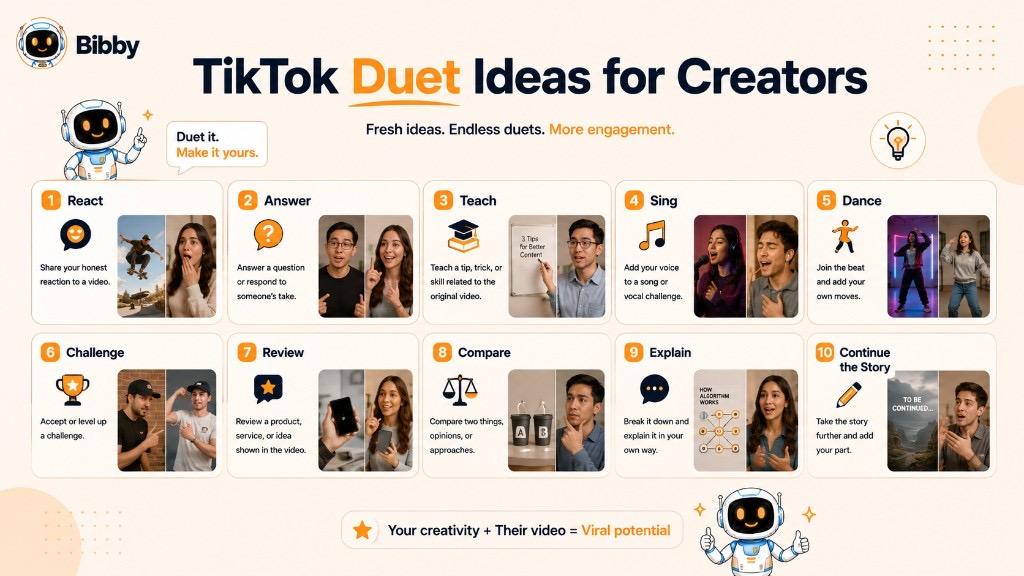
Here are practical TikTok Duet ideas for creators, influencers, experts, and businesses.
1. React to a Trending Video
Find a relevant trending video and share your genuine reaction. This works particularly well for surprising, funny, impressive, or thought-provoking content.
2. Answer a Question
Use a video containing a question as the starting point for your response. You can answer directly and turn a short question into useful educational content.
3. Add Your Expert Opinion
If a creator discusses something within your area of expertise, use a Duet to add context, explain a concept, or share another perspective.
4. Complete a Challenge
Participate in a challenge by creating your own version alongside the original video.
5. Sing Along
Musicians and singers can use Duets to add vocals, harmonies, instruments, or another section of a performance.
6. Respond to a Dance
Perform the same choreography or create your own interpretation alongside the original dancer.
7. Show an Alternative Method
If someone demonstrates how to do something, use a Duet to show another approach.
For example:
Original: “Here's how I create my weekly content calendar.”
Your Duet: “Here's the workflow I use when managing content for multiple platforms.”
8. Add Missing Information
Educational videos don't always cover every detail. A Duet can allow you to fill in an important gap or provide additional context.
9. Correct a Misconception
If a video contains an inaccurate or misleading claim, an expert can use a Duet to explain the issue clearly and respectfully.
The goal should be education rather than unnecessary confrontation.
10. Respond to a Product Demonstration
Brands and creators can respond to product-related videos by demonstrating another feature, sharing usage tips, or providing additional information.
11. React to a Transformation
Transformation content creates natural opportunities for reactions.
Examples include:
- Home makeovers
- Art transformations
- Fashion changes
- Makeup looks
- Room redesigns
- Before-and-after projects
12. Continue a Story
If another creator starts a story or narrative, your Duet can add another chapter, perspective, or humorous ending.
13. Share Your “Before vs. After”
Respond to a relevant transformation by showing your own experience or result.
This can work especially well for creators in fitness, design, beauty, education, and business.
14. Give a Professional Review
Use a relevant video as the starting point for an expert review.
For example, a social media consultant could Duet a marketing strategy and explain what they would change.
15. Create a “My Version” Video
Take an existing trend or creative format and put your own spin on it.
The objective isn't to reproduce the original video exactly. Your personality should be visible in the new version.
16. Respond to a Customer or Follower
Businesses and creators can turn relevant questions or community content into public video responses.
This can also reduce the need to repeatedly answer the same question individually.
17. Compare Two Approaches
Use a Duet to compare the original creator's method with your own.
For example:
Their approach: Manual social media scheduling
Your approach: Automated content planning and scheduling
Comparison-based content can be particularly useful for educational creators.
18. React to an Industry Prediction
Business and professional creators can respond to predictions, trends, or opinions within their industry.
Add evidence, experience, or a different viewpoint to make the response useful.
19. Turn a Comment Into a Conversation
If a video sparks an interesting question or debate, a creator can build on that conversation with a Duet and invite viewers to share their own opinions.
20. Invite Others to Join
You can also create content specifically designed to encourage additional responses.
A question, challenge, creative prompt, or unfinished performance can give other users a reason to participate.
How to Choose the Right Duet Idea
Before creating a Duet, ask yourself three simple questions:
Is the original video relevant to my audience?
Do I have something useful, entertaining, or interesting to add?
Does the side-by-side format actually improve the content?
If the answer is yes to all three, you probably have a stronger starting point than simply jumping onto the latest viral video.
The best Duets don't feel like borrowed content. They feel like new conversations built from existing ideas.
How Businesses Can Use TikTok Duets for Marketing
TikTok Duets can be useful for businesses because they allow brands to participate in existing conversations rather than relying only on traditional promotional videos. A company can respond to creators, customers, trends, demonstrations, and questions while adding its own perspective.
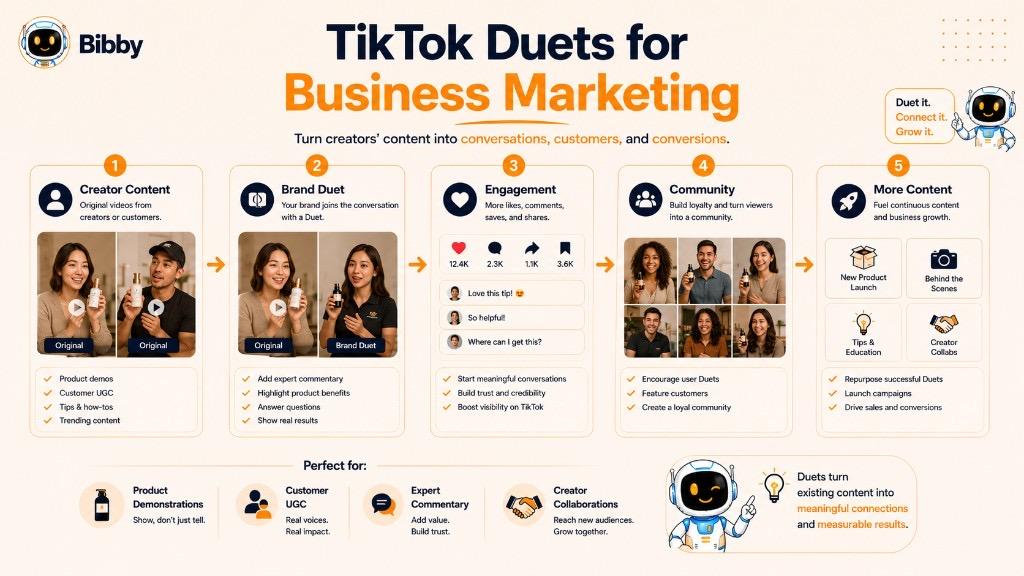
When used strategically, Duets can become part of a broader TikTok content strategy focused on engagement, community, and creator collaboration.
Partner With Creators
Brands can use Duets to participate in creator-led content and collaborations.
For example, a fitness brand could respond to a creator demonstrating a workout product, while a fashion brand could add styling advice to a creator's outfit video.
The important part is relevance. A creator's content should align with the brand, product, and target audience.
Respond to Customer Content
Customer-generated videos can provide opportunities for authentic brand interaction.
A business might use a Duet to:
- Answer a customer question
- Respond to a product demonstration
- Share additional product information
- Explain how to use a feature
- Thank a customer
- Address a common concern
This can make the brand's TikTok presence feel more conversational.
Showcase Products in Context
Instead of creating a standalone product advertisement, a brand can use a relevant video as the context for demonstrating its product.
For example, a productivity software company could respond to a video about managing a busy workday and demonstrate how its tool can simplify part of that workflow.
Participate in Relevant Trends
TikTok trends can give businesses opportunities to reach audiences through familiar content formats.
However, brands should avoid forcing themselves into every trend. A trend is useful when it naturally connects with the company's audience, products, expertise, or personality.
Relevance beats trend-chasing.
Answer Frequently Asked Questions
A business can turn common customer questions into short Duet-based responses when an appropriate original video provides the context.
For example:
Question: “How does this product actually work?”
Brand response: A short demonstration explaining the product step by step.
This can also create a library of educational content that answers questions potential customers may have.
Add Expert Commentary
Businesses can use Duets to demonstrate expertise around industry conversations.
A software company might respond to a video about AI trends. A marketing agency could comment on a social media strategy. A fitness company could add context to a workout-related video.
The goal is to contribute useful knowledge rather than simply promote the business.
Encourage User-Generated Content
Duets can become part of a UGC strategy by encouraging customers and creators to participate in content formats started by a brand.
For example, a company could publish a challenge or demonstration and invite customers to create their own versions.
The resulting responses can create a network of connected content around the original idea.
Humanize the Brand
People often respond better to brands that communicate like people rather than constantly publishing polished advertisements.
A founder, employee, social media manager, or brand representative can use Duets to respond naturally to relevant content.
This can give the brand a more recognizable voice and personality.
Repurpose Conversations Into Content Ideas
A useful TikTok conversation can inspire additional content across your social media channels.
For example:
TikTok Duet → Instagram Reel → YouTube Short → LinkedIn post → Carousel
The content should be adapted for each platform rather than copied blindly. The original Duet can simply serve as the starting point for a wider content idea.
Use Duets as Part of a Larger Content Strategy
A Duet shouldn't have to stand alone.
Businesses can combine Duets with:
- Original videos
- Product demonstrations
- Educational content
- Carousels
- Stories
- Customer content
- Creator collaborations
- Promotional campaigns
This creates a more varied content mix instead of filling an entire social calendar with one format.
Measure the Results
Businesses should evaluate Duets based on their actual objectives rather than assuming that every response will produce viral results.
Depending on the campaign, useful metrics can include:
- Views
- Engagement
- Comments
- Shares
- Profile visits
- Follower growth
- Website traffic
- Leads or conversions
The goal is to understand which types of Duet content resonate with the target audience and then use those insights to improve future content.
Use Duets Strategically, Not Automatically
A Duet can be a powerful content format, but it isn't a substitute for a complete social media strategy.
The strongest approach is to identify relevant conversations, contribute something valuable, and then incorporate those responses into a consistent content workflow. With the right planning, Duets can become one useful piece of a larger system for creating, publishing, and managing social media content.
Why Can't I Duet a TikTok?
If you can't find the Duet option on a TikTok video, it doesn't necessarily mean there's something wrong with your account. The feature may be unavailable because of the original creator's settings, the video's restrictions, your account settings, or changes to TikTok's current feature availability.
Here are some common reasons you may not be able to create a Duet.
1. The Creator Has Turned Off Duets
The most common reason is that the original creator doesn't allow other users to Duet their video.
Creators can control how other people interact with their content. If Duets are disabled, the option won't appear in the video's sharing menu.
2. The Video Has Specific Restrictions
Some videos may have restrictions that prevent certain interaction or reuse features.
If the Duet button isn't available on one particular video but works on others, the issue may be related to that video's settings rather than your account.
3. The Account's Privacy Settings Limit the Feature
Privacy and audience settings can affect how content can be interacted with.
If you're trying to Duet content from an account with restrictive privacy settings, the feature may not be available.
4. You're Using a Different TikTok Experience
TikTok can provide different features, controls, or interfaces depending on factors such as account type, location, app version, and ongoing platform changes.
As a result, the steps or buttons you see may not exactly match another user's TikTok app.
5. The App Needs an Update
If the feature should be available but isn't appearing consistently, check whether you're using the latest version of TikTok.
An outdated app can sometimes cause differences in available features or interface behavior.
6. The Feature May Not Be Available in That Situation
TikTok can change, test, expand, or restrict features over time. A feature that is available for one account or video may not necessarily be available in every situation.
How to Troubleshoot a Missing Duet Option
Try these steps:
- Check another TikTok video.
If Duet works on other videos, the original video is likely the reason.
- Check the sharing menu.
Make sure you're looking at the complete set of available interaction options.
- Update TikTok.
Install the latest available version of the app.
- Review your account settings.
Check whether your account has any privacy or content restrictions affecting interactions.
- Try again later.
Temporary app issues or platform changes can affect feature availability.
What If Duet Works on Other Videos?
If you can Duet some TikToks but not a particular one, that's a useful clue. The problem is likely connected to the specific video or creator's settings, rather than your account.
For example:
Video A: Duet option available
Video B: Duet option unavailable
In this situation, the creator of Video B may have disabled Duets or the video may have another restriction.
Don't Confuse a Missing Duet Button With a Technical Problem
A missing Duet option isn't automatically an error. In many cases, it is an intentional setting controlled by the original creator or a limitation associated with the content.
If your goal is to create interactive TikTok content, look for videos where Duets are available and choose content that naturally gives you something valuable to add.
Tips for Creating Better TikTok Duets
Creating a Duet is easy, but creating a good Duet requires more than placing your video beside someone else's. Your contribution should give viewers a reason to keep watching and should make sense alongside the original content.
Whether you're creating reaction videos, educational responses, collaborations, or branded content, these tips can help you make stronger TikTok Duets.
1. Choose the Right Original Video
Start with content that is genuinely relevant to you and your audience.
Look for videos that give you a natural opportunity to:
- Add an opinion
- Answer a question
- Demonstrate something
- Provide expertise
- React
- Entertain
- Continue an idea
A popular video isn't automatically a good Duet opportunity.
2. Add Something New
Your contribution should bring something that wasn't already present in the original video.
You could add:
- A new perspective
- Expert knowledge
- Humor
- A demonstration
- A reaction
- A different solution
- Additional context
Think of the original TikTok as the starting point, not the finished product.
3. Get to the Point Quickly
TikTok is a fast-moving environment. Don't spend most of the opening explaining why you're responding to a video.
Instead, make your contribution clear quickly.
For example:
Weak opening:
“Okay, so I saw this video earlier and I thought I would make a Duet because I have some thoughts about it...”
Stronger opening:
“There's one important thing missing from this strategy.”
The second approach immediately tells viewers why they should pay attention.
4. Make Sure Your Audio Is Clear
Good audio matters particularly in Duets because viewers are processing two pieces of content.
Make sure your voice, music, or other sounds don't overwhelm the original video's important audio.
If viewers can't understand your contribution, even a great idea can get lost.
5. Use the Side-by-Side Format Intentionally
Remember that part of the screen is occupied by the original video.
Position yourself appropriately and avoid placing important text or visual elements where they become difficult to see.
Your framing should work with the original video rather than competing with it.
6. Keep Your Response Focused
A Duet doesn't need to explain everything you know about a topic.
Choose one clear idea and communicate it well.
For educational content, for example, one useful insight may be more effective than trying to cover ten unrelated points.
7. Match Your Response to the Original Context
Watch the original video carefully before recording your response.
A reaction that ignores the original context can feel confusing or disconnected.
Ask yourself:
What is the creator saying?
Why am I responding?
What should viewers learn, feel, or do after watching my side?
8. Bring Your Personality
A technically correct response can still feel flat.
Your voice, expressions, humor, experience, or communication style can make the content more memorable.
This is particularly important for creators and brands trying to develop a recognizable presence.
9. Don't Force a Trend
Not every viral video deserves a Duet.
If a trend doesn't make sense for your audience or brand, skipping it can be better than producing irrelevant content.
A smaller, highly relevant conversation can be more valuable than a massive trend with no connection to your niche.
10. Give Proper Context
Viewers who discover your Duet may not immediately understand the original video.
Make your response understandable within the available format. If necessary, briefly explain what you're responding to without spending too much time repeating the original content.
11. Encourage Conversation
A strong Duet can give viewers something to discuss.
You might end with a question such as:
“Which approach would you use?”
or
“What would you add to this strategy?”
This can turn the video into the beginning of a broader conversation.
12. Think About Your Audience, Not Just the Algorithm
It's tempting to create Duets purely because you think they might generate views.
A better approach is to ask whether the content is useful or entertaining for the people you actually want to reach.
Audience relevance should come before algorithm chasing.
13. Test Different Duet Formats
Experiment with different approaches:
- Reaction Duets
- Educational responses
- Expert commentary
- Challenges
- Product demonstrations
- Collaborations
- Alternative solutions
- Question-and-answer videos
Track which formats generate meaningful engagement and use those insights to shape future content.
14. Repurpose the Idea Across Your Content Strategy
A successful Duet can inspire additional content.
For example:
TikTok Duet → Instagram Reel → YouTube Short → LinkedIn discussion → Carousel
The content should be adapted to each platform rather than copied word-for-word, but the core idea can often travel.
15. Respect the Original Creator
A Duet is built around another creator's content, so treat the original work appropriately.
Avoid misleading viewers, misrepresenting what the creator said, or using the format to create unnecessary conflict simply to attract attention.
The best Duets feel like contributions to a conversation, not attempts to hijack one.
Common Mistakes to Avoid When Creating TikTok Duets
A TikTok Duet can be a useful format for reactions, collaborations, education, and marketing, but not every Duet makes good content. Many creators focus so heavily on the original video that they forget the most important part: their own contribution needs to provide value.
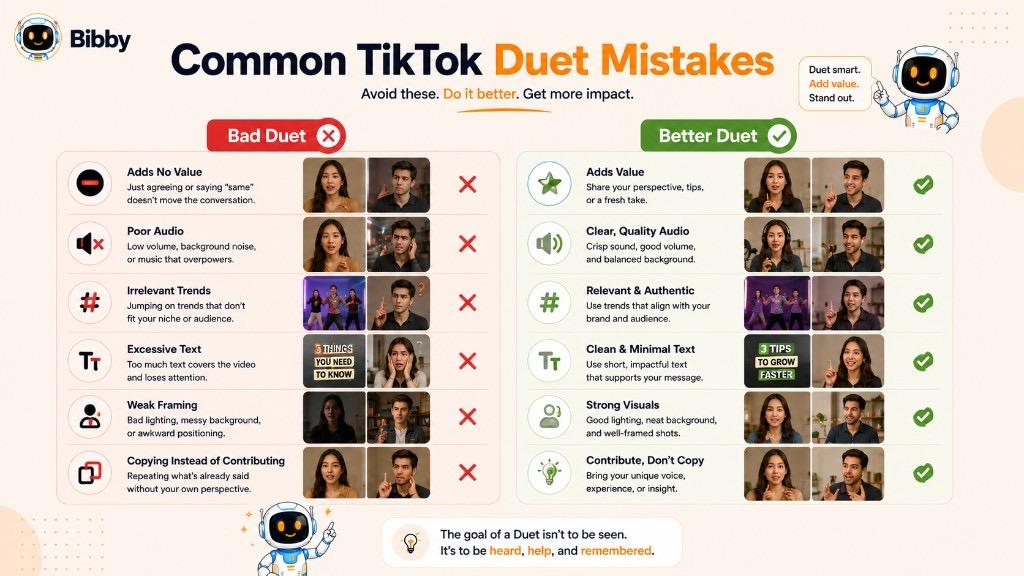
Here are some common mistakes to avoid.
1. Adding Nothing New
Simply appearing next to another video doesn't automatically make a Duet interesting.
If your response adds no reaction, insight, entertainment, or creative contribution, viewers have little reason to watch.
Better approach: Ask yourself what you're adding that the original video doesn't already provide.
2. Choosing a Video Only Because It's Viral
A video can have millions of views and still be completely irrelevant to your audience.
Jumping onto unrelated trends can make your content feel disconnected from your niche.
Choose videos based on relevance, audience interest, and your ability to contribute, not view count alone.
3. Taking Too Long to Get Started
Long introductions can lose viewers before you reach the actual point of your response.
Instead of spending several seconds explaining what you're about to discuss, get into the interesting part quickly.
4. Poor Audio Quality
Duets often contain multiple audio sources, making sound particularly important.
If your voice is too quiet, distorted, or competing with the original video's audio, viewers may struggle to understand your response.
5. Ignoring the Original Context
A Duet should make sense alongside the original video.
Watch the entire source content before recording your response. Taking a statement out of context can result in a confusing or misleading video.
6. Covering Important Parts of the Screen
The side-by-side format means you have limited visual space.
Placing text, captions, stickers, or other elements in the wrong area can make your contribution difficult to see.
Keep your layout simple and make important information easy to read.
7. Overloading the Video With Text
Text can help explain your response, but too much text can compete with both videos.
Use short, purposeful text rather than turning the screen into a wall of words.
8. Copying Instead of Contributing
A Duet should ideally transform an existing idea into something new.
Repeating everything the original creator already said doesn't give viewers much additional value.
Try adding a different perspective, demonstration, explanation, reaction, or creative interpretation.
9. Being Negative Just to Get Attention
Controversy can attract attention, but manufacturing conflict around another creator's content can damage credibility.
If you disagree with the original video, explain why thoughtfully and provide useful context rather than relying on personal attacks.
10. Using Trends That Don't Fit Your Brand
A trend may be popular without being appropriate for your business.
For brands especially, every piece of content should support the overall identity and audience strategy.
A relevant trend used creatively is usually more valuable than an unrelated trend used simply for visibility.
11. Forgetting the Audience
Creators sometimes make Duets because *they* find the original video interesting, without considering whether their own audience will care.
Before publishing, ask:
“Why would my audience want to watch this?”
If you can't answer that question, rethink the concept.
12. Expecting Every Duet to Go Viral
A Duet is a content format, not a guaranteed growth mechanism.
Views and engagement depend on many factors, including the quality and relevance of the content, audience interest, timing, competition, and TikTok's distribution systems.
Focus on creating useful or entertaining content rather than chasing guaranteed virality.
13. Ignoring Copyright and Platform Rules
Not every piece of content should automatically be reused simply because it appears on TikTok.
Creators and businesses should respect intellectual property, platform policies, creator permissions, and applicable copyright rules when creating and distributing content.
14. Forgetting to Measure Performance
If you're using Duets as part of a business or creator strategy, don't publish them without learning from the results.
Look at metrics such as:
- Views
- Engagement
- Comments
- Shares
- Profile visits
- Follower growth
- Website activity
- Conversions, when relevant
Use those insights to determine which Duet formats are worth repeating.
The Goal Is to Add Value
The strongest Duets aren't simply copies of popular videos. They extend the conversation.
Whether you're adding humor, expertise, a reaction, a performance, or a different perspective, your contribution should give viewers a reason to watch your side of the screen.
How Duets Fit Into a Social Media Content Strategy
A TikTok Duet can be more than a one-off reaction or trend post. When used intentionally, it can become part of a broader social media content strategy that combines original content, community engagement, creator collaborations, and content repurposing.
Instead of treating every Duet as an isolated post, creators and businesses can use the format as one component of a larger content workflow.
Use Duets as Part of Your Content Mix
A balanced social media strategy can include multiple content formats, such as:
- Original videos
- TikTok Duets
- Educational videos
- Product demonstrations
- Customer-generated content
- Behind-the-scenes content
- Tutorials
- Stories
- Carousels
- Promotional posts
- Creator collaborations
Duets can add variety while helping your account participate in conversations already happening within your niche.
Build a Conversation Around One Topic
One idea can become multiple pieces of content.
For example, a social media marketing brand could start with an original video about content scheduling. A creator might respond with a Duet sharing a different approach. The brand could then create another video responding to that perspective.
The workflow could look like:
Original Video → Duet Response → Brand Response → Educational Post → Community Discussion
This turns a single idea into an ongoing content conversation.
Combine Duets With Original Content
Duets shouldn't replace original content. Instead, they can complement it.
For example, a business might follow a weekly content structure such as:
Monday: Educational TikTok
Tuesday: Product video
Wednesday: Relevant Duet
Thursday: Customer-focused content
Friday: Behind-the-scenes video
The exact schedule depends on the audience, goals, and available resources, but the principle remains the same: use different formats for different purposes.
Turn Audience Questions Into Content
Questions and discussions around your content can reveal what your audience wants to know.
If someone creates a TikTok asking a question related to your industry, a relevant Duet can become an opportunity to answer it publicly.
That response can then inspire:
Duet → FAQ → Blog article → Instagram post → YouTube Short
This approach turns audience conversations into a source of content ideas.
Repurpose Successful Ideas
A successful Duet can reveal a topic that resonates with your audience.
Suppose an educational Duet performs particularly well. Instead of stopping there, you could expand the underlying idea into:
- A longer TikTok
- Instagram Reel
- YouTube Short
- LinkedIn post
- Carousel
- Blog article
- Email newsletter
The goal isn't to duplicate the exact video everywhere. Instead, extract the core idea and adapt it to each platform.
Use Duets for Community Building
Social media works best when it isn't entirely one-way.
Duets can help creators participate in conversations with:
- Followers
- Customers
- Creators
- Industry professionals
- Communities
- Potential customers
This can make your social presence feel more responsive and participatory.
Connect Duets to Campaigns
Businesses can also incorporate Duets into larger campaigns.
For example:
Campaign Launch → Original TikTok → Creator Participation → Duet Responses → Community Content → Follow-Up Content
A campaign doesn't have to depend entirely on Duets, but the format can provide an additional way for creators and audiences to participate.
Measure Duets Against Your Goals
Not every Duet needs to be judged by views alone.
If your goal is awareness, you might focus on reach and video views. If you're trying to build a community, comments, shares, and meaningful interactions may matter more. For campaigns, profile visits, website traffic, leads, or conversions can be more useful.
The important thing is to connect the content format to a measurable objective.
Automate the Rest of Your Social Media Workflow
Creating a Duet is only one part of social media management. After creating the content, you may still need to write captions, prepare other posts, organize campaigns, select platforms, and schedule content.
This is where a social media automation workflow can reduce repetitive work.
With Bibby, you can upload or generate content with AI, choose a posting style, let AI generate captions, select your social platforms, and schedule content at AI-optimized times. You can manage images, carousels, videos, Stories, and other social content across platforms such as Facebook, Instagram, LinkedIn, YouTube, and TikTok.
Bibby's chat interface also allows you to manage parts of your social media workflow conversationally, including creating a brand kit, building campaigns, creating posts, and regenerating captions.
The result is a workflow where Duets can be one creative ingredient inside a larger, organized content system, rather than another task competing for space on an already crowded social media to-do list.
How Bibby Helps You Manage Social Media Content
Creating a TikTok Duet is only one part of running a consistent social media strategy. Once you have content ready, you still need to create captions, organize campaigns, prepare different formats, choose platforms, and schedule posts at the right times.
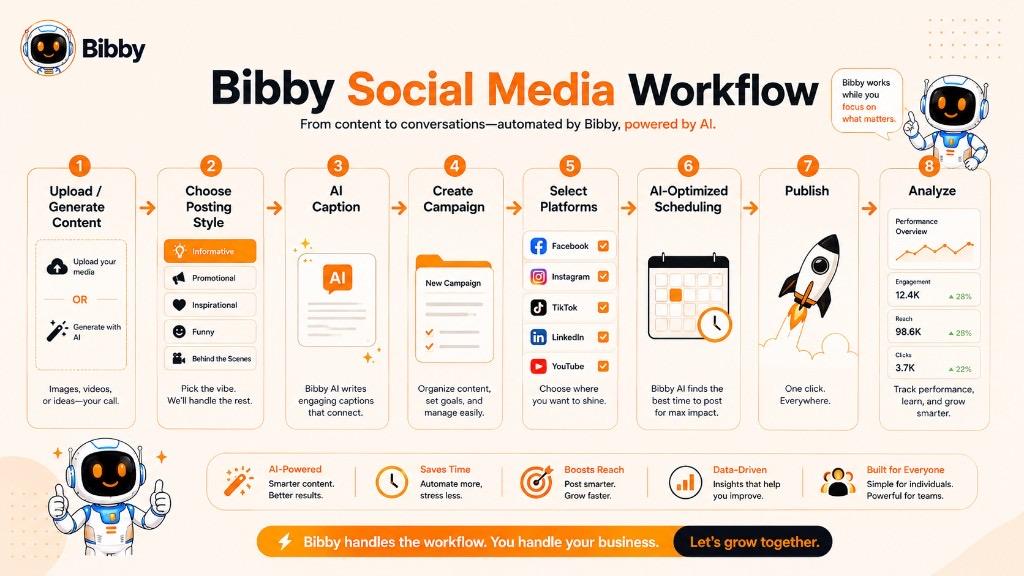
Bibby brings these tasks into one social media automation workflow, helping creators and businesses spend less time managing repetitive publishing tasks and more time creating content.
Create or Generate Your Content
Start by uploading your own image or other media, or use AI to generate content. You can then build your social media workflow around the content you want to publish.
Bibby supports different content formats, including:
- Images
- Carousels
- Videos
- Stories
- Other social media content
Choose Your Posting Style
Once your content is ready, choose the posting style that fits your goal. Bibby can then help shape the content for your social media publishing workflow.
This is particularly useful when you're managing content for multiple platforms rather than creating every post manually.
Let AI Generate Captions
Instead of writing every caption from scratch, Bibby can generate captions automatically based on your content and selected posting style.
You can also regenerate captions when you want a different angle, tone, or approach.
Schedule Across Multiple Platforms
Bibby can help organize and schedule your content across platforms such as:
- YouTube
- TikTok
Its AI-optimized scheduling workflow helps determine appropriate publishing times for your selected content and platforms.
Manage Social Media Through Chat
Bibby also provides a chat-based way to manage your social media workflow.
Instead of navigating through different tools and settings, you can interact with Bibby conversationally to perform tasks such as:
- Create a brand kit
- Create a campaign
- Create posts
- Regenerate captions
- Manage content
- Plan social media activity
This makes social media management feel more like having a conversation with a dedicated social media assistant than maintaining another spreadsheet full of publishing tasks.
Turn One Content Idea Into a Larger Workflow
A TikTok Duet can be one piece of a broader content strategy.
For example:
Create Duet → Generate Caption → Add to Campaign → Prepare Supporting Content → Select Platforms → Schedule → Publish
The same campaign can include videos, images, carousels, Stories, and other content formats depending on your social media goals.
Keep Your Content Workflow Organized
The real advantage of social media automation isn't simply publishing faster. It is creating a repeatable system.
Instead of constantly asking:
“What should I post today?”
you can build a structured workflow for creating, organizing, scheduling, and publishing content consistently.
For creators and businesses using formats such as TikTok Duets alongside original videos, educational content, promotional posts, and other social media formats, Bibby can help turn those individual content ideas into an organized publishing system.
Key Takeaways
- A Duet is a TikTok feature that places your new video side by side with another user's video so you can react, collaborate, perform, or add a new perspective.
- A Duet is not the same as a Stitch. Duets run alongside the original; Stitches use a clipped portion of it in a new video.
- Not every TikTok can be Dueted. Creators can turn the feature off, and privacy or video restrictions can hide the option.
- The strongest Duets add something new—expertise, humor, a demonstration, or a genuine reaction—rather than sitting next to a viral video with nothing extra to say.
- Brands can use Duets for creator collabs, UGC responses, FAQs, and relevant trends, then measure results against real goals, not assumed virality.
- Bibby helps you caption, campaign, and schedule the rest of your social workflow so Duets sit inside a consistent content system.