
Social media has evolved beyond simply publishing content. Today, some of the most successful brands, creators, and businesses grow faster by creating content together. One of the easiest and most effective ways to do this is through a Collab Post.
A Collab Post is a social media post that is jointly published by two or more accounts. Instead of one person posting and merely tagging another, all collaborators share the same post, engagement, and visibility. This allows the content to appear on multiple profiles while combining likes, comments, shares, and reach into a single post. The result is greater exposure, stronger audience engagement, and a more authentic way to promote products, services, events, or ideas.
Collab Posts have become a popular strategy for influencers, brands, content creators, agencies, and businesses of every size. Whether you're launching a new product, partnering with another company, running an influencer campaign, or showcasing customer success stories, collaboration helps you reach audiences that would be difficult to access on your own.
Although Instagram popularized the Collab Post feature, the concept of collaborative content has expanded across multiple social media platforms. Businesses now use collaboration to increase brand awareness, build trust, generate leads, and grow their communities without significantly increasing their marketing budgets.
In this guide, you'll learn exactly what a Collab Post is, how it works, its benefits, common use cases, best practices, mistakes to avoid, and how businesses can use AI-powered social media tools to plan, schedule, and manage collaborative campaigns more efficiently. By the end, you'll have a clear understanding of when and how to use Collab Posts to maximize your social media growth.
What Is a Collab Post?
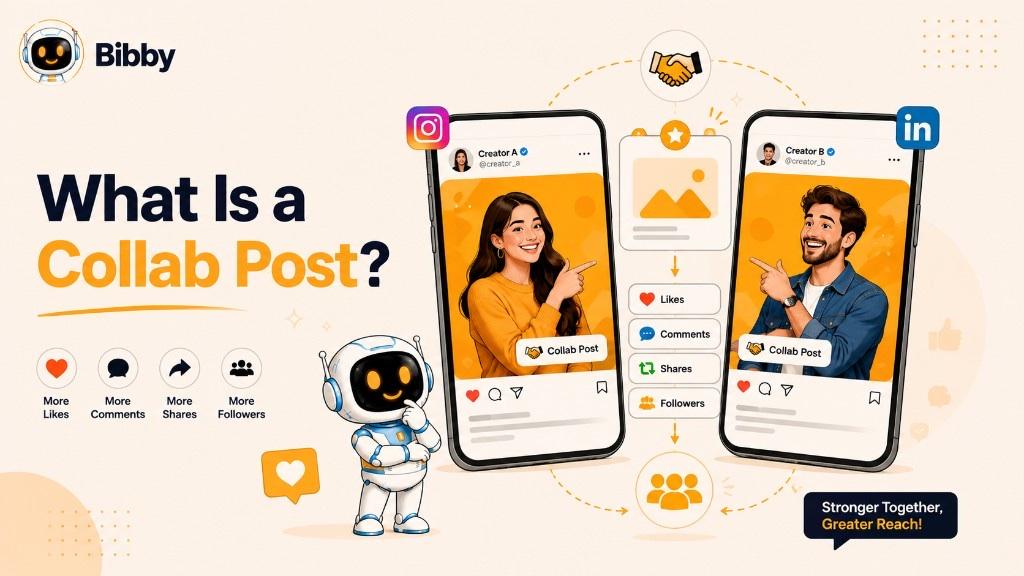
Collab Posts are designed to help brands, creators, influencers, businesses, and organizations reach larger audiences through shared content. Because the post is visible to the followers of every collaborator, it can generate significantly more exposure and engagement than a standard post published by a single account.
For example, imagine a fitness apparel brand partnering with a popular fitness coach to launch a new product. Rather than each account creating separate posts, they can publish one Collab Post. The post will appear on both profiles, and every like, comment, and share contributes to the same engagement, making the campaign more impactful and easier to manage.
Unlike traditional tagging, where only one account owns the post, a Collab Post gives every approved collaborator shared ownership and visibility. This creates a seamless experience for audiences while helping both parties strengthen credibility, increase organic reach, and grow their communities together.
As collaborative marketing continues to grow, Collab Posts have become an essential strategy for product launches, influencer partnerships, customer testimonials, event promotions, educational content, and cross-brand campaigns. They enable businesses and creators to maximize the value of every piece of content while building meaningful relationships with new audiences.
What Does a Collab Post Mean?
The term Collab Post is short for Collaboration Post, which refers to content created and published jointly by two or more social media accounts. Rather than one account creating a post and simply mentioning another user, a Collab Post allows multiple accounts to become official co-authors of the same content.
Once a collaboration invitation is accepted, the post is displayed on each collaborator's profile and shares the same engagement metrics, including likes, comments, shares, and views. This shared ownership helps every participant benefit from the combined audience, making collaborative campaigns more effective than traditional cross-promotion.
In simple terms, a Collab Post means working together to create one piece of content that represents all collaborators equally. It is a digital partnership that helps brands, creators, businesses, nonprofits, and influencers expand their reach while presenting a unified message.
Why Is It Called a "Collab" Post?
"Collab" is a shortened version of the word collaboration, which means two or more people or organizations working together toward a common goal. On social media, that goal could include:
- Launching a new product
- Promoting an event
- Growing followers
- Increasing brand awareness
- Sharing educational content
- Highlighting customer success stories
- Running influencer marketing campaigns
- Celebrating partnerships or milestones
The collaboration feature makes these partnerships visible to the audiences of all participating accounts, creating greater authenticity and trust than a standalone promotional post.
Collab Post vs. Tagging Someone
Many people confuse a Collab Post with simply tagging another account, but they are fundamentally different.
When you tag someone, the post still belongs to your account. The tagged person may receive a notification, but the content does not automatically appear on their profile, and engagement remains associated with the original publisher.
With a Collab Post, every collaborator becomes a co-publisher. The content is shared across multiple profiles, and all engagement is combined into a single post. This collaborative approach increases visibility, strengthens partnerships, and often delivers better organic performance because the content reaches multiple audiences simultaneously.
This is why Collab Posts have become a preferred strategy for businesses, creators, and marketers looking to maximize the impact of their social media campaigns.
How Does a Collab Post Work?
A Collab Post is designed to let two or more social media accounts publish and promote the same piece of content together. Instead of creating separate posts for each account, collaborators share one post, one conversation, and one set of engagement metrics. This makes collaboration more efficient while helping everyone involved reach a larger audience.
Although the exact process varies slightly across social media platforms, the overall workflow is simple and user-friendly.
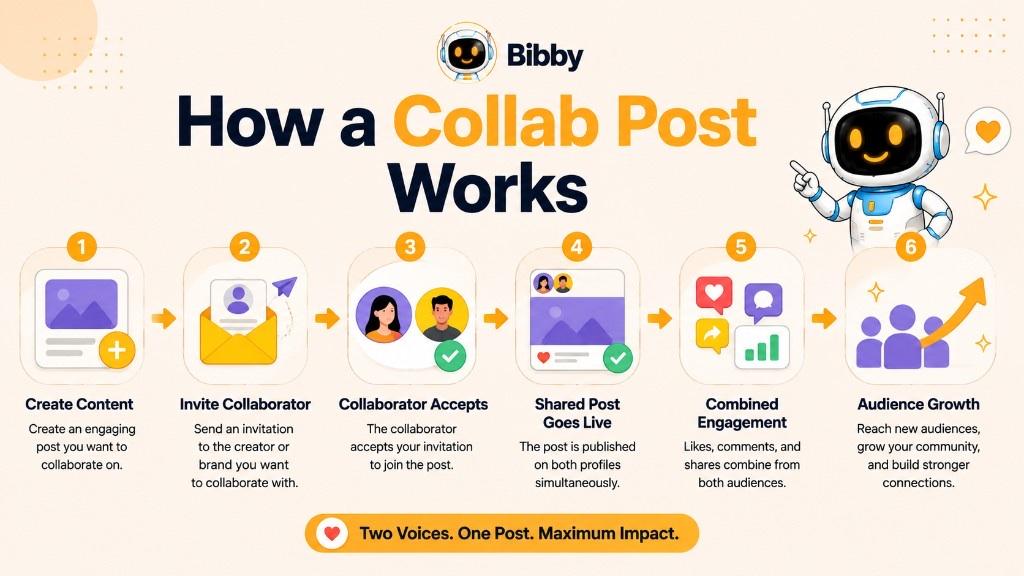
Step 1: Create Your Content
Start by creating the content you want to publish. This could be:
- A single image
- A carousel post
- A short-form video
- A product announcement
- An event promotion
- An educational infographic
- A customer success story
Before publishing, ensure the content aligns with the goals of all collaborators and provides value to their audiences.
Step 2: Invite a Collaborator
When preparing your post, use the platform's collaboration feature to invite another account as a collaborator. The invitation is sent directly to the selected user or brand.
You can collaborate with:
- Influencers
- Brands
- Business partners
- Content creators
- Customers
- Team members
- Organizations
Step 3: The Collaborator Reviews the Invitation
The invited account receives a notification asking them to accept or decline the collaboration request.
If they accept:
- The post becomes a shared publication.
- It appears on both profiles.
- Engagement is combined into one post.
If they decline, the post remains published only on the original account.
Step 4: Publish the Post
Once the collaboration is confirmed, the content is published as a shared post. Followers of each collaborator can discover the same content from either profile, creating a seamless experience for both audiences.
Because there is only one version of the post, users interact with the same likes, comments, and discussions regardless of which profile they visit.
Step 5: Engagement Is Shared
One of the biggest advantages of a Collab Post is that engagement is unified.
Instead of splitting interactions across multiple posts, collaborators benefit from:
- Shared likes
- Shared comments
- Shared views
- Shared shares
- Shared saves
- A single engagement history
This often results in stronger social proof and higher overall engagement.
Step 6: Reach Expands Naturally
A Collab Post is exposed to the followers of every participating account. Since multiple communities see and interact with the same content, the post has a greater opportunity to gain visibility, increase organic reach, and attract new followers.
For businesses and creators, this means one post can achieve the impact of several individual posts while requiring less time and effort.
Example of a Collab Post
Imagine a coffee brand partnering with a popular food blogger to launch a new seasonal drink.
Instead of each account publishing separate promotional posts, they create one Collab Post. After the blogger accepts the invitation, the post appears on both profiles. Followers of the coffee brand and the blogger see the same content, and all likes, comments, and shares contribute to one shared post.
The coffee brand reaches new potential customers, the blogger provides valuable content to their audience, and both benefit from increased engagement and stronger brand visibility.
Why This Workflow Matters
Traditional cross-promotion often requires multiple posts, duplicate content, and separate engagement tracking. A Collab Post simplifies the entire process by bringing collaborators together under one shared publication.
This streamlined workflow helps businesses, creators, and marketing teams save time while maximizing reach, improving engagement, and building stronger partnerships across social media platforms.
Which Social Media Platforms Support Collab Posts?
Collab Posts have become an increasingly popular way to expand reach and engagement, but not every social media platform offers the same collaboration features. Some platforms provide native tools that allow multiple accounts to co-author a single post, while others support collaboration through alternative features such as co-hosted content, shared campaigns, or content partnerships.
Understanding what each platform offers helps businesses and creators choose the right strategy for their marketing goals.
| Platform | Supports Native Collab Posts | How Collaboration Works |
|---|---|---|
| Yes | Invite another account to become a collaborator on a Feed post or Reel. The post appears on both profiles and shares likes, comments, and views. | |
| Limited | Facebook Pages can collaborate through branded content, cross-posting, and shared campaigns, but native Collab Posts are more limited than Instagram. | |
| No | Businesses and professionals collaborate by co-creating content, mentioning partners, employee advocacy, and resharing posts rather than using a native collaboration feature. | |
| TikTok | Limited | TikTok supports collaboration through Duets, Stitch, creator partnerships, and branded content, although it does not currently offer Instagram-style shared posts. |
| YouTube | No | Collaboration happens through co-created videos, guest appearances, shared playlists, and channel partnerships rather than a native Collab Post feature. |
Instagram is currently the leading platform for Collab Posts. Its built-in Invite Collaborator feature allows two accounts to publish the same Feed post or Reel together.
Once the invitation is accepted:
- The post appears on both profiles.
- Likes and comments are combined.
- Both creators receive visibility.
- Followers from both accounts discover the same content.
This feature has become a favorite among influencers, brands, ecommerce businesses, and content creators looking to grow organically.
Facebook supports collaborative marketing in several ways, although it doesn't offer the same native Collab Post experience as Instagram.
Businesses commonly collaborate through:
- Branded content partnerships
- Cross-posted videos
- Co-hosted events
- Shared marketing campaigns
- Business Page mentions
These features help brands reach wider audiences while maintaining consistent messaging across multiple Pages.
LinkedIn focuses more on professional networking than collaborative publishing. While it doesn't have a native Collab Post feature, businesses can still create successful partnerships by:
- Co-authoring articles
- Mentioning partner companies
- Publishing joint announcements
- Encouraging employee advocacy
- Sharing customer success stories
- Promoting webinars and events together
These strategies are especially effective for B2B marketing and thought leadership.
TikTok
TikTok encourages collaboration through creative formats rather than shared ownership of posts.
Popular collaboration options include:
- Duets
- Stitch videos
- Creator partnerships
- Sponsored collaborations
- User-generated content campaigns
- Branded hashtag challenges
These features help creators and brands interact with each other's audiences in engaging and authentic ways.
YouTube
Although YouTube doesn't support native Collab Posts, it remains one of the strongest platforms for collaborative content.
Brands and creators frequently collaborate through:
- Guest appearances
- Interview videos
- Podcast episodes
- Product reviews
- Joint livestreams
- Educational series
- Creator partnerships
These collaborations help channels reach new viewers while building credibility through trusted partnerships.
Which Platform Is Best for Collab Posts?
If your goal is to publish a single post that appears on multiple profiles with shared engagement, Instagram is currently the most advanced platform for native Collab Posts.
However, businesses often run collaborative campaigns across multiple social networks to maximize visibility. For example, a brand might launch a collaboration on Instagram, promote it on Facebook, share behind-the-scenes content on TikTok, publish a detailed discussion on LinkedIn, and upload a supporting video to YouTube.
Managing all these campaigns manually can quickly become time-consuming. AI-powered social media management tools like Bibby simplify the process by helping teams create content, generate captions, schedule posts at AI-optimized times, and manage campaigns across platforms from one centralized dashboard.
Types of Collab Posts
Not all Collab Posts are created for the same purpose. Some focus on increasing brand awareness, while others drive sales, educate audiences, promote events, or strengthen customer relationships. Choosing the right type of collaboration helps ensure your campaign reaches the right people and delivers meaningful results.
Below are the most common types of Collab Posts used by brands, creators, and businesses.
1. Brand + Influencer Collaboration
This is one of the most popular forms of Collab Posts. A business partners with an influencer or content creator to promote a product, service, or campaign to a larger audience.
Because influencers have built trust with their followers, these collaborations often generate higher engagement and stronger purchase intent than traditional advertisements.
Common examples include:
- Product launches
- Sponsored product reviews
- Unboxing videos
- Seasonal promotions
- Affiliate marketing campaigns
- Brand ambassador partnerships
Best for: Ecommerce brands, beauty companies, fashion brands, fitness businesses, SaaS products, and consumer goods.
2. Brand + Brand Collaboration
Two businesses with complementary products or services work together to create content that benefits both audiences. These partnerships help companies increase exposure while offering more value to customers.
For example, a coffee shop and a local bakery could jointly promote a breakfast special using a shared Collab Post.
Common examples include:
- Joint product launches
- Limited-edition collaborations
- Cross-promotional campaigns
- Holiday marketing campaigns
- Event sponsorships
Best for: Local businesses, retail brands, hospitality, restaurants, and startups.
3. Creator + Creator Collaboration
Content creators frequently collaborate to introduce themselves to new audiences, exchange expertise, and create more engaging content.
Since both creators benefit from shared exposure, these collaborations are an effective way to grow followers organically.
Popular formats include:
- Educational content
- Podcast episodes
- Interviews
- Live sessions
- Challenges
- Tutorials
- Reaction videos
Best for: YouTubers, Instagram creators, coaches, educators, and podcasters.
4. Business + Customer Collaboration
Many businesses turn their happiest customers into brand advocates by inviting them to participate in collaborative content.
Featuring real customers adds authenticity and builds trust because audiences often value genuine experiences more than polished advertisements.
Examples include:
- Customer testimonials
- Before-and-after results
- User-generated content (UGC)
- Success stories
- Product reviews
- Community spotlights
Best for: Ecommerce stores, SaaS companies, healthcare providers, fitness brands, and online services.
5. Agency + Client Collaboration
Marketing agencies often create Collab Posts with their clients to showcase campaigns, announce new partnerships, or celebrate successful projects.
These collaborations strengthen the agency's portfolio while giving clients additional visibility.
Examples include:
- Campaign launches
- Project case studies
- Website launches
- Award announcements
- Business milestones
- Client success stories
Best for: Digital agencies, creative studios, consultants, and marketing firms.
6. Employee Advocacy Collaboration
Employees are among a company's most trusted ambassadors. Businesses increasingly encourage team members to collaborate on company announcements and thought leadership content.
This approach humanizes the brand and extends its reach beyond official company pages.
Examples include:
- New product announcements
- Company achievements
- Recruitment campaigns
- Workplace culture highlights
- Conference participation
- Leadership insights
Best for: B2B companies, enterprise organizations, technology firms, and startups.
7. Influencer + Influencer Collaboration
When two influencers collaborate, they combine their audiences to create highly engaging content that feels natural and entertaining.
These partnerships are especially effective when both creators share similar interests or complementary niches.
Examples include:
- Travel collaborations
- Fitness challenges
- Beauty tutorials
- Gaming livestreams
- Cooking videos
- Lifestyle content
8. Nonprofit + Brand Collaboration
Nonprofit organizations and businesses often work together to raise awareness for social causes while strengthening community engagement.
These campaigns help brands demonstrate corporate social responsibility while supporting meaningful initiatives.
Examples include:
- Charity fundraisers
- Environmental campaigns
- Community events
- Awareness drives
- Volunteer initiatives
9. Event Collaboration
Businesses, speakers, sponsors, and organizers frequently collaborate to promote conferences, webinars, product launches, workshops, and live events.
Instead of each participant publishing separate announcements, everyone promotes the same Collab Post to maximize registrations and attendance.
Examples include:
- Industry conferences
- Virtual summits
- Webinars
- Product launch events
- Workshops
- Networking events
10. Educational Collaboration
Educational institutions, coaches, industry experts, and businesses often collaborate to share valuable knowledge and establish authority.
These partnerships focus on educating audiences while expanding credibility for everyone involved.
Examples include:
- Expert interviews
- Industry reports
- Research findings
- Online courses
- Learning series
- Professional webinars
Which Type of Collab Post Is Right for You?
The best collaboration depends on your goals.
- Want to increase brand awareness? Partner with influencers or complementary brands.
- Looking to generate leads? Collaborate with industry experts or host educational content.
- Need stronger customer trust? Showcase customer success stories and user-generated content.
- Launching a new product? Work with creators, partners, or affiliates to maximize visibility.
- Growing a B2B brand? Leverage employee advocacy and LinkedIn partnerships.
No matter which type you choose, successful Collab Posts share one common trait: they deliver value to every participant and their audiences. When the collaboration feels authentic rather than promotional, it is more likely to generate meaningful engagement, stronger relationships, and long-term growth.
Why Are Collab Posts Important?
Social media has become increasingly competitive, making it harder for brands and creators to reach new audiences through organic content alone. Algorithms now prioritize engaging, relevant, and trustworthy content, which is why Collab Posts have become a valuable marketing strategy.
By allowing two or more accounts to publish the same content together, Collab Posts expand visibility, improve engagement, and strengthen relationships between brands, creators, and communities. Instead of working independently, collaborators combine their audiences and credibility to achieve better results with a single post.
Here are the key reasons why Collab Posts matter in modern social media marketing.
Expand Your Organic Reach
One of the biggest advantages of a Collab Post is its ability to reach multiple audiences simultaneously.
Instead of your content being limited to your own followers, it is also shown to the followers of your collaborator. This significantly increases the chances of attracting new viewers, followers, and potential customers without spending additional money on advertising.
For businesses trying to grow organically, this expanded reach can make a noticeable difference in campaign performance.
Increase Engagement
Collab Posts combine likes, comments, shares, and other interactions into one shared post.
Rather than splitting engagement across multiple versions of the same content, every interaction contributes to a single conversation. Higher engagement often signals to social media algorithms that the content is valuable, increasing its chances of being recommended to more users.
Build Trust and Credibility
People are more likely to trust recommendations from creators, industry experts, customers, or businesses they already follow.
When two reputable accounts publish content together, audiences perceive the partnership as more authentic than a standard promotional post. This shared credibility helps businesses establish stronger relationships with potential customers.
For example, a software company collaborating with a respected industry consultant instantly gains additional authority among that consultant's audience.
Grow Your Audience Faster
Collab Posts naturally introduce your brand to people who may have never discovered you otherwise.
If your content provides value, followers from your collaborator's community are more likely to visit your profile, engage with your content, and follow your account. Over time, consistent collaborations can become a reliable source of organic audience growth.
Improve Brand Awareness
Repeated collaborations with trusted partners help increase brand recognition.
Whether you're launching a product, announcing an event, or sharing educational content, appearing alongside respected creators or businesses reinforces your brand's presence across multiple communities.
This increased visibility often leads to greater familiarity and stronger brand recall.
Strengthen Business Relationships
Collaboration is about more than increasing metrics. It also helps businesses build lasting partnerships.
Working together on campaigns creates opportunities for:
- Cross-promotions
- Future partnerships
- Joint product launches
- Affiliate relationships
- Industry networking
- Community building
These relationships often lead to long-term business growth beyond a single campaign.
Improve Marketing ROI
Creating high-quality content requires time, creativity, and resources.
A Collab Post allows multiple organizations or creators to benefit from the same piece of content, making each campaign more cost-effective. Instead of producing separate posts for every partner, everyone shares the same publication while maximizing its overall impact.
This makes collaborative marketing especially attractive for startups and small businesses with limited marketing budgets.
Encourage Community Engagement
Social media thrives on conversations, and Collab Posts encourage interaction from multiple communities at once.
Followers from different audiences come together to discuss, comment, ask questions, and share ideas. This creates a richer community experience and often leads to stronger engagement than content published by a single account.
Support Influencer Marketing Campaigns
Influencer marketing has become one of the most effective digital marketing strategies, and Collab Posts make these partnerships even more impactful.
Instead of relying on mentions or tags, influencers and brands can jointly publish content that appears on both profiles. This creates a more seamless experience for followers while improving campaign transparency and performance.
Increase the Lifespan of Your Content
Content that receives consistent engagement is more likely to remain visible in users' feeds and recommendation sections.
Because Collab Posts attract interactions from multiple audiences, they often continue generating engagement for a longer period compared to standard posts. This extended visibility helps brands maximize the value of every piece of content they publish.
Why Businesses Should Include Collab Posts in Their Social Media Strategy
Whether you're a startup, ecommerce brand, SaaS company, local business, or enterprise organization, Collab Posts offer a practical way to grow your online presence without dramatically increasing your marketing spend.
When combined with high-quality visuals, compelling captions, and a consistent publishing schedule, collaborative content can help you:
- Reach new audiences organically
- Build stronger brand credibility
- Increase engagement across platforms
- Generate more leads and conversions
- Strengthen partnerships with creators and businesses
- Create long-term community growth
For businesses managing multiple collaborations each month, AI-powered platforms like Bibby simplify the entire workflow by helping teams generate captions, organize campaigns, schedule posts at AI-optimized times, and publish content across multiple social media platforms from one place. This allows marketers to spend less time on repetitive tasks and more time building successful partnerships.
Benefits of Using Collab Posts
Collab Posts are more than just a social media feature. They are a growth strategy that helps businesses, creators, influencers, and marketers achieve better results with less effort. By combining audiences, sharing engagement, and creating authentic partnerships, Collab Posts can improve nearly every aspect of your social media marketing.
Here are the biggest benefits of using Collab Posts.
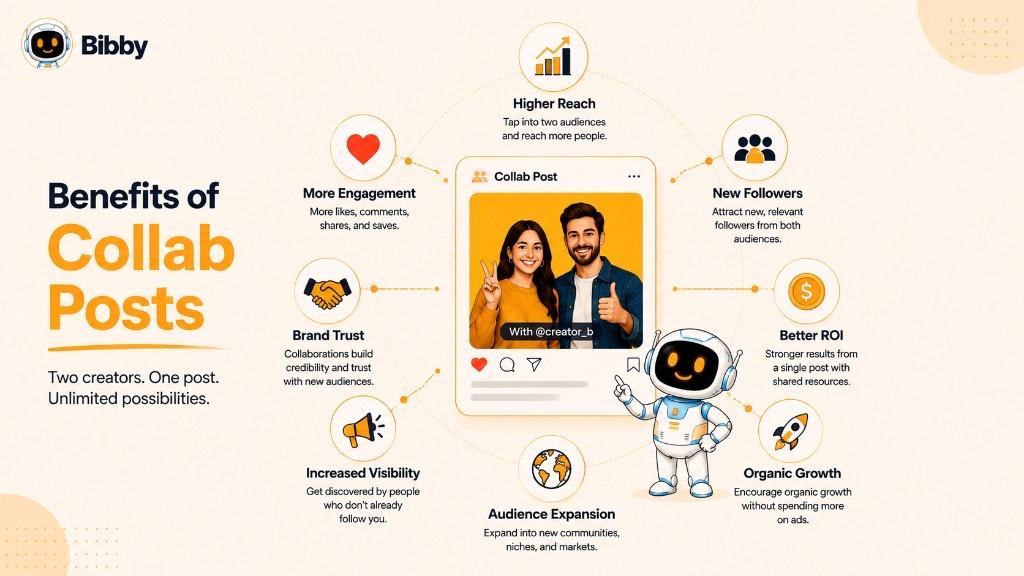
1. Reach a Larger Audience
Every collaborator brings their own audience to the campaign. Instead of your content being seen only by your followers, it is also exposed to the followers of your partners.
This expanded visibility helps you:
- Increase brand awareness
- Reach potential customers
- Enter new markets
- Build a larger online presence
For brands looking to grow organically, this is one of the most valuable advantages of collaborative content.
2. Increase Engagement
Collab Posts combine engagement into a single post instead of spreading it across multiple versions.
This means all collaborators benefit from shared:
- Likes
- Comments
- Shares
- Saves
- Views
Higher engagement often signals quality content to social media algorithms, which may result in additional organic distribution.
3. Grow Followers Faster
When people discover your brand through a trusted creator or business, they are more likely to visit your profile and follow you.
Unlike paid advertising, these followers often have genuine interest in your products, services, or content because they found you through someone they already trust.
4. Build Trust and Social Proof
People naturally trust recommendations from brands and creators they already follow.
A Collab Post acts as a public endorsement between collaborators, increasing confidence in both parties. This shared credibility can influence purchasing decisions and encourage users to engage with your content.
For example, a skincare brand collaborating with a dermatologist is likely to gain more trust than publishing a promotional post alone.
5. Improve Brand Awareness
Every successful collaboration introduces your business to new communities.
Even if users don't immediately become customers, repeated exposure through partnerships helps them recognize and remember your brand over time.
Greater visibility leads to stronger brand recall, making future marketing campaigns more effective.
6. Create More Authentic Marketing
Traditional advertising can sometimes feel overly promotional.
Collab Posts, on the other hand, often feel more genuine because they are built around real partnerships, shared experiences, and mutual value. This authenticity makes audiences more likely to engage with the content.
7. Increase Website Traffic and Leads
Well-planned collaborations often encourage users to:
- Visit your website
- Explore your products
- Download resources
- Register for events
- Request demos
- Subscribe to newsletters
When combined with compelling calls to action, Collab Posts can become a reliable source of qualified traffic and lead generation.
8. Strengthen Business Relationships
Collaboration creates opportunities that extend beyond a single campaign.
Working with creators, brands, agencies, customers, or industry experts helps build long-term partnerships that can lead to future marketing initiatives, product launches, and business growth.
9. Improve Marketing ROI
Creating high-quality content requires time, budget, and creative resources.
Since one Collab Post serves multiple brands or creators, everyone benefits from the same investment. This makes collaborative campaigns more cost-effective than producing separate promotional content for every partner.
For startups and small businesses, this can significantly improve return on investment.
10. Encourage User-Generated Content (UGC)
Collab Posts often inspire customers and followers to create and share their own experiences.
This user-generated content helps businesses:
- Build community
- Increase authenticity
- Generate additional organic reach
- Create a continuous stream of fresh content
UGC also strengthens customer loyalty by making people feel like active participants in your brand.
11. Improve Algorithm Performance
Social media platforms prioritize content that receives strong engagement soon after publication.
Because Collab Posts reach multiple audiences simultaneously, they often generate faster interactions, which can improve their chances of appearing in recommendations, Explore pages, or suggested feeds.
While algorithms differ across platforms, higher-quality engagement generally supports better visibility.
12. Save Time on Content Promotion
Instead of coordinating multiple posts across different accounts, collaborators can focus on creating one high-quality piece of content.
This streamlined workflow reduces duplication, simplifies campaign management, and ensures consistent messaging across all participating accounts.
13. Increase Sales and Conversions
Collaboration introduces your products or services to audiences that already trust your partner.
This trust often shortens the buying journey, leading to:
- More product inquiries
- Higher conversion rates
- Increased sales
- Better campaign performance
Whether you're launching a product or promoting a limited-time offer, Collab Posts can help generate measurable business results.
14. Gain Valuable Insights
Collaborative campaigns provide useful data about audience behavior and content performance.
Businesses can analyze metrics such as:
- Reach
- Engagement rate
- Follower growth
- Click-through rate
- Profile visits
- Conversion rate
These insights help marketers refine future collaborations and create more effective campaigns.
Maximize the Benefits with AI Automation
Running occasional Collab Posts is simple, but managing multiple partnerships, campaigns, captions, and publishing schedules can quickly become challenging.
AI-powered social media management platforms like Bibby simplify this process by helping marketers:
- Generate engaging captions with AI
- Organize collaboration campaigns
- Schedule posts at AI-optimized times
- Publish across Facebook, Instagram, LinkedIn, TikTok, and YouTube
- Manage content through a conversational chat interface
- Maintain consistent posting without manual effort
By combining collaboration with automation, businesses can spend more time building meaningful partnerships and less time managing repetitive social media tasks.
Collab Post vs. Tagging Someone
Many people assume that creating a Collab Post is the same as tagging another account, but these are two very different features. While both involve another user, they serve different purposes and produce very different results.
Tagging simply mentions another person or brand in your content. The post remains yours, and all engagement belongs to your account. A Collab Post, however, creates shared ownership, allowing multiple accounts to publish the same content and benefit from the combined engagement.
Understanding this difference is essential if you want to maximize your social media reach and build stronger partnerships.
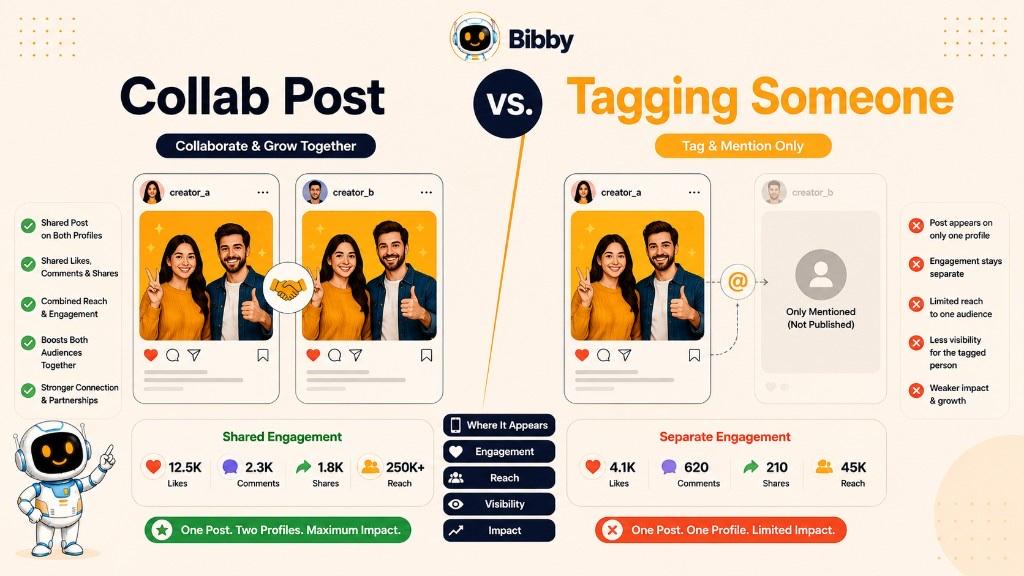
Collab Post vs. Tagging: Comparison Table
| Feature | Collab Post | Tagging Someone |
|---|---|---|
| Post Ownership | Shared between all collaborators | Belongs to the original publisher only |
| Profile Visibility | Appears on every collaborator's profile | Appears only on the original account |
| Likes & Comments | Shared across one post | Engagement belongs to the original post only |
| Audience Reach | Reaches followers of all collaborators | Primarily reaches the original account's audience |
| Follower Growth | Greater opportunity for mutual follower growth | Limited exposure for the tagged account |
| Campaign Management | One shared campaign | Separate promotions may be required |
| Brand Partnership Value | High | Moderate |
| Best Use Case | Influencer marketing, partnerships, joint announcements | Giving credit, mentioning people, identifying products or locations |
What Happens When You Tag Someone?
Tagging is one of the most common features on social media. It allows you to mention another account within your post, photo, or video.
For example, a restaurant might tag its food supplier in a post, or a photographer may tag the model featured in a photoshoot.
Tagging helps users:
- Give credit to creators
- Mention partners
- Identify products or locations
- Notify another account
- Increase transparency
However, the tagged account does not become a co-owner of the post. The content remains published only on the creator's profile, and all likes, comments, and shares are associated with that account.
What Happens in a Collab Post?
A Collab Post goes much further than tagging.
After the invited collaborator accepts the request:
- The post appears on both profiles.
- Both accounts become co-authors.
- Likes and comments are shared.
- Followers from both communities see the same post.
- Engagement contributes to one unified publication.
Instead of promoting the same campaign through multiple posts, collaborators work together on a single piece of content that benefits everyone involved.
When Should You Use a Collab Post?
Choose a Collab Post when:
- Launching a new product with a partner
- Working with an influencer
- Announcing a business partnership
- Promoting a webinar or event
- Publishing customer success stories
- Running cross-brand marketing campaigns
- Showcasing creator collaborations
- Celebrating shared achievements
A Collab Post is ideal whenever multiple people or organizations should receive equal visibility and recognition.
When Is Tagging the Better Choice?
Tagging is still useful in many situations, especially when you simply want to acknowledge or reference another account.
Use tagging when you want to:
- Credit a photographer, designer, or creator
- Mention a customer or employee
- Identify a product or location
- Thank a sponsor
- Highlight someone featured in your content
- Reference another business without creating a joint campaign
In these cases, a full collaboration may not be necessary.
Which Option Delivers Better Results?
If your objective is to increase reach, engagement, follower growth, and campaign performance, Collab Posts generally outperform standard tagging because they combine audiences and create shared social proof.
Tagging remains an important feature for attribution and networking, but it does not provide the same level of exposure or engagement that a collaborative publication can achieve.
For businesses running regular partnership campaigns, Collab Posts should be a core part of their social media strategy, while tagging should be used to complement content when collaboration isn't required.
Managing multiple collaborative campaigns across different platforms can become time-consuming. Tools like Bibby simplify the process by helping you create AI-generated captions, organize campaigns, schedule content at AI-optimized times, and publish consistently across all your social media channels from one dashboard.
Collab Post vs. Sponsored Post
Both Collab Posts and Sponsored Posts involve partnerships between brands and creators, but they serve different marketing purposes. While a Collab Post focuses on shared ownership and organic audience growth, a Sponsored Post is a paid promotion where a creator or influencer advertises a product or service on behalf of a brand.
Choosing the right approach depends on your campaign goals, budget, and the type of relationship you want to build with your audience.
Collab Post vs. Sponsored Post: Comparison Table
| Feature | Collab Post | Sponsored Post |
|---|---|---|
| Ownership | Shared between collaborators | Owned by the creator or publisher |
| Purpose | Build mutual visibility and engagement | Promote a product, service, or campaign through paid collaboration |
| Audience | Combined audience of all collaborators | Primarily the creator's audience |
| Engagement | Shared likes, comments, and views | Engagement belongs to the creator's post |
| Payment | May be unpaid or part of a partnership | Usually involves financial compensation or free products/services |
| Visibility | Appears on multiple profiles | Appears on the creator's profile only |
| Campaign Goal | Community growth, brand awareness, partnerships | Sales, lead generation, product promotion, brand awareness |
| Best For | Joint announcements, partnerships, events, launches | Influencer marketing, product promotions, paid campaigns |
What Is a Sponsored Post?
A Sponsored Post is content created by an influencer, creator, publisher, or media outlet in exchange for payment, free products, affiliate commissions, or other compensation.
The purpose is to introduce the creator's audience to a brand, product, or service in a way that feels informative and authentic.
Common examples include:
- Product reviews
- Unboxing videos
- Brand recommendations
- Service demonstrations
- Giveaway announcements
- Affiliate marketing campaigns
In many regions, sponsored content must be clearly disclosed using labels such as #Ad, #Sponsored, or platform-specific branded content tools to maintain transparency.
What Is a Collab Post?
A Collab Post is a jointly published post where two or more accounts become co-authors of the same content.
Rather than one person promoting another brand independently, collaborators share:
- The same post
- The same engagement
- The same visibility
- The same conversation
A Collab Post may be completely organic or part of a paid partnership. Payment is not what defines the feature. Instead, it is the shared ownership of the content.
Key Differences
#### Shared Ownership vs. Individual Ownership
The biggest difference is ownership.
With a Collab Post, both parties publish the same content together. With a Sponsored Post, the creator publishes content independently while promoting a brand.
#### Organic Growth vs. Paid Promotion
Collab Posts are often used to expand audiences through mutual collaboration.
Sponsored Posts are primarily designed to promote products or services through paid influencer marketing.
#### Audience Experience
A Collab Post feels like a partnership between equals because the content appears on multiple profiles.
A Sponsored Post typically highlights one creator's endorsement of a brand, even if the collaboration is genuine.
#### Engagement Distribution
Collab Posts combine engagement into a single publication.
Sponsored Posts keep engagement separate because the content belongs to the creator's account.
Can a Post Be Both a Collab Post and a Sponsored Post?
Yes.
Many influencer marketing campaigns combine both strategies.
For example, a fitness apparel company may pay an influencer to promote a new product while also publishing the content as an Instagram Collab Post.
In this case:
- The influencer receives compensation.
- The post appears on both profiles.
- Engagement is shared.
- Both audiences benefit from the collaboration.
- The content is disclosed as sponsored where required.
This approach often delivers stronger visibility than a standard sponsored post because it combines paid promotion with shared organic reach.
Which One Should You Choose?
Choose a Collab Post if your goal is to:
- Grow both audiences
- Build long-term partnerships
- Increase organic engagement
- Strengthen community relationships
- Launch products together
- Promote events or announcements
Choose a Sponsored Post if your goal is to:
- Promote a product quickly
- Reach a creator's established audience
- Generate sales or leads
- Launch a paid influencer campaign
- Increase brand awareness through advertising
Many successful brands use both strategies together, balancing organic collaboration with paid influencer marketing to maximize campaign performance.
Simplify Every Partnership with Bibby
Whether you're managing Collab Posts, Sponsored Posts, or a combination of both, keeping campaigns organized across multiple platforms can be challenging.
With Bibby, you can streamline the entire process by:
- Creating AI-powered captions for every campaign
- Organizing collaborations in one workspace
- Scheduling posts across Facebook, Instagram, LinkedIn, TikTok, and YouTube
- Publishing at AI-optimized times
- Managing campaigns through a simple chat interface
- Keeping your content calendar consistent without manual scheduling
Instead of juggling multiple tools, Bibby helps you manage every collaboration from one intelligent platform, saving time while improving the consistency and effectiveness of your social media marketing.
How to Create a Collab Post on Instagram
Instagram's Collab feature makes it easy for two accounts to publish and promote the same content together. Instead of creating separate posts, you can invite another creator, business, or brand to become a collaborator. Once they accept the invitation, the post appears on both profiles and shares the same likes, comments, views, and engagement.
Whether you're launching a product, working with an influencer, announcing an event, or partnering with another business, creating a Collab Post only takes a few minutes.
Follow these steps to publish your first Instagram Collab Post.
Step 1: Open Instagram and Create a New Post
Launch the Instagram app and tap the "+" (Create) button.
Choose the type of content you want to publish, such as:
- Photo
- Carousel
- Reel
Select or upload your media, then edit it as needed before moving to the next screen.
Step 2: Write Your Caption
Create a caption that explains your collaboration and encourages your audience to engage.
A strong caption should:
- Explain what the collaboration is about.
- Highlight the value for your audience.
- Mention the partner naturally.
- Include a clear call to action.
- Use relevant hashtags if appropriate.
The more engaging your caption, the more likely people are to interact with your post.
Step 3: Tap Tag People
On the final publishing screen, tap Tag People.
Instagram provides options to tag users and invite collaborators.
Step 4: Select Invite Collaborator
Choose Invite Collaborator and search for the Instagram account you want to collaborate with.
You can invite:
- Brands
- Businesses
- Influencers
- Content creators
- Customers
- Team members
- Business partners
Double-check that you select the correct account before continuing.
Step 5: Publish the Post
After reviewing your caption, media, and collaborator invitation, publish the post.
At this stage:
- The post is live on your profile.
- The collaborator receives an invitation.
- The collaboration is not complete until they accept.
Step 6: Wait for the Collaborator to Accept
The invited collaborator will receive a notification requesting approval.
If they accept:
- The post appears on both profiles.
- Both accounts become co-authors.
- Likes, comments, and views are shared.
- Followers from both audiences can engage with the same post.
If they decline, the post remains on your account only.
Step 7: Monitor Performance
Once the collaboration is active, track how your post performs.
Key metrics to monitor include:
- Reach
- Impressions
- Likes
- Comments
- Shares
- Saves
- Profile visits
- Follower growth
- Website clicks
- Conversions (if applicable)
These insights help you understand which collaborations produce the best results and improve future campaigns.
Best Practices for Instagram Collab Posts
Creating a Collab Post is simple, but getting strong results requires thoughtful planning.
Follow these best practices to maximize engagement and reach.
#### Choose the Right Collaborator
Work with creators or brands that share a similar audience, values, and goals.
A smaller but highly relevant audience often delivers better results than partnering with an account that has millions of unrelated followers.
#### Create High-Quality Content
Your visuals should capture attention immediately.
Use:
- Professional photos
- Engaging videos
- Well-designed carousels
- Eye-catching graphics
- Consistent brand elements
High-quality content increases the likelihood of shares and saves.
#### Write an Engaging Caption
Your caption should encourage conversation.
Ask questions, invite opinions, or encourage users to share their experiences. More meaningful interactions often lead to stronger engagement.
#### Publish at the Right Time
Timing matters.
Posting when both audiences are most active increases the chances of early engagement, which can improve visibility in Instagram's algorithm.
AI-powered scheduling tools like Bibby help identify the best publishing times based on audience activity, removing the guesswork from scheduling.
#### Promote Beyond Instagram
Don't limit your collaboration to a single platform.
Repurpose your content across:
- TikTok
- YouTube
- Stories
- Email newsletters
A multi-platform strategy extends the reach and impact of every collaboration.
Common Reasons a Collab Invitation Doesn't Work
Sometimes collaborators cannot accept your invitation immediately.
Common reasons include:
- The invitation expired.
- The wrong account was selected.
- The collaborator declined the request.
- The account has privacy or eligibility restrictions.
- The feature is temporarily unavailable in the region.
- Instagram app needs updating.
Checking these factors usually resolves most collaboration issues.
Save Time Creating Collab Posts with Bibby
After you've created your Instagram Collab Post, the next challenge is managing the rest of your social media content.
Instead of switching between multiple tools, Bibby helps you streamline your workflow by allowing you to:
- Generate AI-powered captions in seconds
- Create multiple caption variations
- Organize collaboration campaigns
- Schedule content at AI-optimized times
- Publish across Facebook, Instagram, LinkedIn, TikTok, and YouTube
- Manage your content calendar from one dashboard
- Use an AI chat interface to create campaigns, posts, and brand assets with simple prompts
With Bibby handling the repetitive work, you can focus on building meaningful partnerships and creating content that drives real business growth.
Best Practices for Creating Successful Collab Posts
Creating a Collab Post is easy, but creating one that delivers meaningful results requires planning. The most successful collaborations are built around shared goals, valuable content, and a genuine connection between the collaborators and their audiences.
Whether you're partnering with an influencer, another business, or a customer, following these best practices can help maximize your reach, engagement, and return on investment.
Choose the Right Collaboration Partner
The success of a Collab Post begins with selecting the right partner.
Look for collaborators who:
- Share a similar target audience
- Have values that align with your brand
- Produce high-quality content
- Maintain an active and engaged community
- Have a positive reputation in their industry
A relevant partner with an engaged audience often delivers better results than a larger account with low engagement.
Define Clear Campaign Goals
Before creating content, decide what you want to achieve.
Your objectives might include:
- Increasing brand awareness
- Growing followers
- Driving website traffic
- Generating leads
- Boosting product sales
- Promoting an event
- Launching a new product
- Building community engagement
Clear goals make it easier to measure campaign success.
Create Valuable Content
People engage with content that educates, entertains, inspires, or solves a problem.
Instead of creating content that feels overly promotional, focus on delivering value to both audiences.
Popular content formats include:
- Tutorials
- Product demonstrations
- Industry tips
- Behind-the-scenes videos
- Customer stories
- Educational carousels
- Interviews
- Success stories
When audiences gain value from your content, they're more likely to like, comment, save, and share it.
Keep Your Branding Consistent
Even though multiple accounts are involved, your content should maintain a consistent visual identity.
Ensure that your:
- Colors
- Fonts
- Images
- Logo usage
- Messaging
- Tone of voice
reflect your brand while complementing your collaborator's style.
A consistent presentation builds professionalism and brand recognition.
Write a Strong Caption
Your caption is just as important as your visuals.
An effective caption should:
- Explain the collaboration
- Tell a story
- Highlight the value for the audience
- Encourage interaction
- Include a clear call to action
Avoid making the caption feel like an advertisement. Instead, make it conversational and informative. Need caption ideas fast? Try Bibby's free Caption Generator.
Use High-Quality Visuals
Strong visuals stop users from scrolling.
Use:
- Professional photography
- High-resolution videos
- Well-designed graphics
- Clean layouts
- Branded imagery
If you're promoting a product or service, demonstrate it in real-life situations whenever possible.
Include Relevant Hashtags
Hashtags can improve discoverability when used strategically.
Choose hashtags that are:
- Relevant to your industry
- Related to the campaign
- Popular enough to generate visibility
- Specific enough to reach your target audience
Avoid stuffing your post with excessive or unrelated hashtags. For ideas, use Bibby's free Hashtag Generator.
Publish at the Best Time
Timing plays an important role in engagement.
Publishing when both audiences are active increases the chances of early interactions, which may improve your content's visibility.
Rather than guessing, use AI-powered scheduling tools like Bibby to identify the best posting times based on audience behavior and historical performance.
Engage After Publishing
Your work doesn't end after clicking "Publish."
Respond to:
- Comments
- Questions
- Mentions
- Direct messages
Active participation encourages more conversations and signals to social media algorithms that your content is valuable.
Track Campaign Performance
Every Collab Post provides valuable insights that can improve future campaigns.
Monitor metrics such as:
- Reach
- Impressions
- Engagement rate
- Shares
- Saves
- Profile visits
- Follower growth
- Link clicks
- Leads
- Conversions
Compare these results with your campaign goals to understand what worked and what can be improved.
Build Long-Term Partnerships
One successful collaboration often leads to many more.
Instead of treating every campaign as a one-time activity, invest in building lasting relationships with creators, customers, industry experts, and complementary brands.
Long-term partnerships create:
- Greater audience trust
- Consistent brand visibility
- Stronger campaign performance
- More authentic marketing opportunities
These relationships often become one of the most valuable assets in a social media strategy.
Common Mistakes to Avoid
Even experienced marketers can make mistakes that reduce the effectiveness of a Collab Post.
Avoid these common pitfalls:
- Choosing collaborators with unrelated audiences
- Prioritizing follower count over engagement quality
- Creating overly promotional content
- Ignoring audience interests
- Using poor-quality visuals
- Writing vague or uninspiring captions
- Publishing without clear goals
- Forgetting to measure results
- Posting inconsistently
- Failing to engage with comments after publishing
Avoiding these mistakes can significantly improve the performance of your collaborative campaigns.
Make Every Collaboration Easier with Bibby
Planning, creating, scheduling, and tracking collaborative campaigns manually can quickly become overwhelming, especially when managing multiple social media platforms.
With Bibby, you can simplify the entire workflow by:
- Creating AI-generated captions in seconds
- Building complete social media campaigns through chat
- Generating multiple caption variations
- Organizing your brand assets and content
- Scheduling posts at AI-optimized times
- Publishing across Facebook, Instagram, LinkedIn, TikTok, and YouTube from one place
- Managing your social media calendar without spreadsheets or manual reminders
By combining AI with automation, Bibby helps you spend less time managing content and more time building successful collaborations that grow your business.
Common Mistakes to Avoid When Creating Collab Posts
Even the best collaboration can fail if it isn't planned properly. Many businesses and creators focus only on finding a collaborator while overlooking factors like audience fit, content quality, timing, and campaign goals.
Avoiding these common mistakes will help you create Collab Posts that generate stronger engagement, build trust, and deliver better business results.
Choosing the Wrong Collaborator
One of the biggest mistakes is partnering with someone simply because they have a large following.
A successful collaboration depends on audience relevance, not follower count.
Choose collaborators who:
- Share a similar target audience
- Have high engagement
- Align with your brand values
- Produce quality content
- Maintain a positive reputation
A smaller creator with an engaged community often delivers better results than a celebrity with millions of disengaged followers.
Making the Post Too Promotional
People use social media to discover useful, entertaining, and inspiring content, not to see constant advertisements.
If your Collab Post feels like a sales pitch, users are less likely to engage.
Instead:
- Tell a story.
- Share useful information.
- Demonstrate real value.
- Educate or entertain your audience.
- Let the promotion feel natural.
Authenticity almost always outperforms aggressive marketing.
Ignoring Your Audience
Many collaborations fail because brands create content they like instead of content their audience wants.
Before publishing, ask:
- What problems does my audience have?
- What questions are they asking?
- What type of content performs well?
- Will both audiences find this valuable?
Successful collaborations solve problems or provide entertainment for everyone involved.
Using Low-Quality Visuals
Your content competes with thousands of posts every day.
Blurry photos, poorly edited videos, inconsistent branding, or cluttered graphics can reduce engagement before users even read your caption.
Invest in:
- High-resolution images
- Professional videos
- Clean designs
- Consistent branding
- Mobile-friendly formatting
Strong visuals create a positive first impression.
Writing Weak Captions
A beautiful image alone rarely drives meaningful engagement.
Many marketers write captions that are too short, too generic, or overly promotional.
Instead, write captions that:
- Explain the collaboration
- Tell a compelling story
- Highlight audience benefits
- Ask a question
- Encourage comments or shares
- Include a clear call to action
Great captions turn viewers into participants.
Forgetting to Set Campaign Goals
Without clear objectives, it's impossible to measure success.
Before launching your Collab Post, decide whether you want to:
- Increase brand awareness
- Grow followers
- Drive website traffic
- Generate leads
- Increase sales
- Promote an event
- Build community engagement
Every decision, from your collaborator to your caption, should support these goals.
Posting at the Wrong Time
Publishing excellent content when your audience is inactive can significantly reduce its reach.
Research when both audiences are most active and schedule your Collab Post accordingly.
AI-powered tools like Bibby can analyze audience activity and recommend the best posting times automatically.
Ignoring Comments After Publishing
Social media is designed for conversations.
If people leave comments or ask questions, respond promptly.
Active engagement:
- Builds trust
- Encourages more discussions
- Improves customer relationships
- Signals positive engagement to platform algorithms
A Collab Post should continue the conversation long after it's published.
Not Measuring Performance
Many businesses move on to the next campaign without analyzing results.
Track important metrics such as:
- Reach
- Engagement rate
- Likes
- Comments
- Shares
- Saves
- Follower growth
- Website clicks
- Conversions
Reviewing performance helps you understand which collaborations deliver the highest return and where future campaigns can improve.
Focusing Only on One Platform
Many marketers publish a Collab Post on Instagram and stop there.
However, your collaboration can often reach a much larger audience when repurposed across multiple platforms.
Consider adapting your campaign for:
- TikTok
- YouTube
- Email newsletters
- Blog articles
A multi-channel approach maximizes the value of every collaboration.
Treating Collaborations as One-Time Campaigns
The strongest partnerships are built over time.
Instead of collaborating once and moving on, continue building relationships with creators, customers, and business partners.
Long-term collaborations create:
- Greater trust
- Stronger audience loyalty
- Consistent brand exposure
- Better campaign performance
- Higher lifetime value from partnerships
People are more likely to engage with partnerships they recognize and trust.
Turn Better Collaborations into Better Results
Creating a successful Collab Post isn't just about finding a partner. It requires thoughtful planning, valuable content, consistent engagement, and continuous optimization.
By avoiding these common mistakes and focusing on authentic partnerships, businesses and creators can build campaigns that reach more people, generate higher engagement, and create lasting relationships.
To make the process even easier, platforms like Bibby help you manage every stage of your collaboration. From generating AI-powered captions and organizing campaigns to scheduling posts at AI-optimized times and publishing across multiple social media platforms, Bibby gives you everything you need to create smarter, more effective collaborative marketing campaigns.
How Businesses Use Collab Posts
Collab Posts have become an essential part of modern social media marketing. Businesses of all sizes, from local startups to global brands, use them to increase brand awareness, reach new audiences, build trust, and drive measurable business results.
Unlike traditional promotional posts, Collab Posts allow companies to leverage the credibility and audience of trusted partners. Whether the goal is launching a product, generating leads, or strengthening customer relationships, collaborative content often delivers better engagement than publishing alone.
Here are some of the most effective ways businesses use Collab Posts.
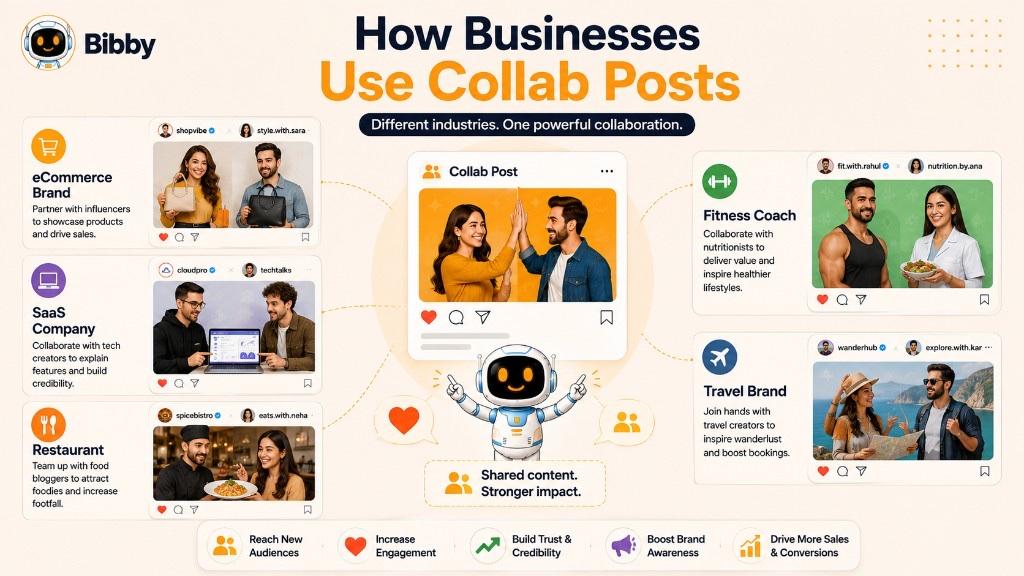
Product Launches
Launching a new product is one of the most popular uses for Collab Posts.
Instead of announcing a product only on the company's social media account, businesses partner with influencers, retailers, ambassadors, or industry experts to create a shared announcement.
This approach helps:
- Increase product visibility
- Generate excitement before launch
- Reach multiple audiences at once
- Build trust through third-party endorsement
- Drive more website traffic and sales
A single Collab Post can generate significantly more exposure than multiple separate announcements.
Influencer Marketing Campaigns
Brands regularly collaborate with influencers who have established trust within a specific niche.
Examples include:
- Fashion brands partnering with lifestyle creators
- Fitness companies collaborating with personal trainers
- Software companies working with technology experts
- Restaurants partnering with local food bloggers
These collaborations introduce products to highly targeted audiences in a way that feels authentic rather than promotional.
Brand-to-Brand Partnerships
Businesses with complementary products or services often collaborate to reach new customers.
Examples include:
- A coffee shop partnering with a local bakery
- A travel agency collaborating with a hotel
- A skincare brand working with a cosmetics company
- A software company partnering with a cloud service provider
Both businesses benefit by sharing audiences while providing additional value to customers.
Customer Success Stories
Happy customers are powerful marketing assets.
Many businesses create Collab Posts featuring real customers to highlight authentic experiences and measurable results.
Popular formats include:
- Testimonials
- Before-and-after transformations
- Case studies
- Product reviews
- Customer interviews
- Success milestones
These collaborations build trust because potential customers relate more easily to genuine user experiences than traditional advertising.
Event Promotion
Businesses frequently collaborate with speakers, sponsors, exhibitors, or venue partners when promoting events.
Examples include:
- Conferences
- Trade shows
- Webinars
- Product demonstrations
- Workshops
- Networking events
Publishing one Collab Post allows every participant to promote the same event while increasing registrations and attendance.
Educational Content
Educational content consistently performs well on social media.
Businesses partner with industry experts, consultants, educators, and thought leaders to create valuable resources for their audiences.
Examples include:
- Industry insights
- Expert interviews
- Live Q&A sessions
- Tutorials
- Research reports
- Best practice guides
This type of collaboration helps establish authority while delivering useful information that audiences are more likely to save and share.
Employee Advocacy
Employees are among the most trusted voices within any organization.
Businesses encourage executives and team members to collaborate on content related to:
- Company achievements
- Workplace culture
- Hiring announcements
- Product innovations
- Industry expertise
- Corporate events
Employee advocacy increases credibility while expanding the reach of company content through personal networks.
Community and CSR Campaigns
Many companies use Collab Posts to support charitable organizations and community initiatives.
Examples include:
- Fundraising campaigns
- Environmental awareness programs
- Volunteer activities
- Educational initiatives
- Local community projects
These collaborations demonstrate social responsibility while helping organizations connect with purpose-driven audiences.
Affiliate and Partner Marketing
Affiliate partners, resellers, and strategic business partners often collaborate with brands to promote products and services.
Shared content helps ensure:
- Consistent messaging
- Greater campaign visibility
- Higher engagement
- Better lead generation
It also strengthens relationships between brands and their partner ecosystem.
Seasonal and Holiday Campaigns
Major shopping seasons and holidays create excellent opportunities for collaboration.
Businesses frequently partner for campaigns around:
- Black Friday
- Cyber Monday
- Christmas
- Valentine's Day
- Mother's Day
- Summer promotions
- Back-to-school campaigns
Collaborative promotions during these high-demand periods often generate increased engagement and sales.
Industries That Benefit from Collab Posts
Almost every industry can use Collab Posts to strengthen its social media strategy.
Popular industries include:
#### Ecommerce
Promote new products, influencer reviews, customer testimonials, and limited-time offers.
#### SaaS and Technology
Partner with industry experts, consultants, technology influencers, and integration partners to demonstrate software solutions.
#### Healthcare
Collaborate with doctors, wellness experts, hospitals, and healthcare organizations to educate audiences and build trust.
#### Real Estate
Work with interior designers, mortgage advisors, builders, and local businesses to showcase properties and neighborhood insights.
#### Hospitality and Travel
Partner with hotels, restaurants, travel influencers, and tourism boards to promote destinations and travel experiences.
#### Education
Collaborate with instructors, alumni, guest speakers, and educational organizations to promote courses, webinars, and student success stories.
#### Fitness and Wellness
Create collaborative campaigns with trainers, nutritionists, physiotherapists, and health influencers to inspire and educate audiences.
#### Financial Services
Partner with financial advisors, accountants, and industry experts to simplify complex financial topics and build credibility.
Scale Your Business Collaborations with Bibby
As your business grows, managing multiple collaborations across different social media platforms becomes increasingly complex.
With Bibby, you can streamline your entire collaboration workflow by:
- Creating AI-powered captions in seconds
- Building complete marketing campaigns through a simple chat interface
- Organizing your brand kit and content library
- Scheduling posts at AI-optimized publishing times
- Publishing across Facebook, Instagram, LinkedIn, TikTok, and YouTube from one dashboard
- Managing images, videos, carousels, and stories in a single platform
Whether you're working with influencers, customers, partners, or employees, Bibby helps you automate the repetitive tasks so you can focus on creating stronger partnerships and growing your business through smarter social media marketing.
How Creators and Influencers Use Collab Posts
For creators and influencers, visibility is everything. The more people who discover your content, the greater your opportunities to grow your audience, secure brand partnerships, and generate income. That's why Collab Posts have become one of the most valuable tools in creator marketing.
Instead of relying solely on their own followers, creators can collaborate with brands, other influencers, industry experts, and even their communities to expand their reach and build credibility. A single Collab Post can introduce a creator to thousands of potential new followers while strengthening relationships with existing audiences.
Here are some of the most common ways creators and influencers use Collab Posts.
Brand Partnerships
One of the primary uses of Collab Posts is working with brands on sponsored or organic campaigns.
Creators collaborate with businesses to promote:
- New products
- Mobile apps
- SaaS platforms
- Fashion collections
- Beauty products
- Fitness programs
- Travel experiences
- Online courses
Because the post appears on both profiles, the creator and the brand benefit from increased visibility and shared engagement.
Growing Their Audience
Collaborating with another creator is one of the fastest ways to reach new people who are already interested in similar content.
For example:
- A fitness coach partners with a nutrition expert.
- A travel creator collaborates with a photographer.
- A business coach works with an entrepreneur.
- A tech reviewer partners with a software developer.
These partnerships expose both creators to relevant audiences, leading to higher-quality follower growth.
Launching Digital Products
Many creators use Collab Posts to promote products they create together, such as:
- Online courses
- E-books
- Membership communities
- Templates
- Digital downloads
- Workshops
- Coaching programs
Publishing together helps both creators maximize awareness and increase sales.
Promoting Podcasts and Videos
Podcast hosts and YouTubers frequently collaborate with guests to promote new episodes.
Instead of publishing separate announcements, both participants share one Collab Post that reaches each audience simultaneously.
This strategy helps:
- Increase episode views
- Drive podcast downloads
- Expand subscriber growth
- Improve audience engagement
Hosting Live Events
Creators often collaborate to promote:
- Instagram Live sessions
- Webinars
- Ask Me Anything (AMA) sessions
- Workshops
- Virtual conferences
- Product demonstrations
A shared announcement improves attendance because followers from both communities receive the same invitation.
Building Personal Brands
Successful creators don't only promote products.
They collaborate with respected experts and industry leaders to strengthen their own reputation.
Examples include:
- Expert interviews
- Thought leadership discussions
- Panel conversations
- Educational collaborations
- Industry roundtables
These partnerships help position creators as trusted voices within their niche.
Showcasing User-Generated Content
Many influencers collaborate with their followers by featuring:
- Customer photos
- Product reviews
- Transformation stories
- Community achievements
- Fan-generated content
This encourages more audience participation while making followers feel recognized and valued.
Supporting Charity and Community Campaigns
Creators often use their influence to support meaningful causes.
Collab Posts are commonly used for:
- Fundraising campaigns
- Environmental initiatives
- Health awareness programs
- Educational projects
- Community events
These collaborations help creators make a positive impact while strengthening trust with their audience.
Tips for Creators to Get Better Results
Whether you're an established influencer or just starting your creator journey, these practices can help improve your collaborations.
#### Collaborate with Relevant Creators
Choose partners whose audience overlaps with yours.
Shared interests typically generate better engagement than collaborations with unrelated creators.
#### Prioritize Authenticity
Promote products and brands you genuinely believe in.
Authentic recommendations consistently outperform forced or purely promotional content.
#### Focus on Value
Every collaboration should teach, entertain, inspire, or solve a problem.
When audiences receive value first, engagement naturally follows.
#### Maintain Consistency
Collaborate regularly rather than occasionally.
Consistent partnerships help audiences become familiar with your network and increase long-term growth opportunities.
#### Measure Performance
After every collaboration, review metrics such as:
- Reach
- Engagement
- Profile visits
- Follower growth
- Website clicks
- Sales or affiliate conversions
Learning from past campaigns helps improve future collaborations.
How Bibby Helps Creators Manage Collab Posts
As creators grow, managing content across multiple platforms becomes increasingly time-consuming.
Instead of switching between scheduling tools, note-taking apps, design platforms, and content calendars, Bibby brings everything together in one AI-powered workspace.
With Bibby, creators can:
- Generate engaging captions with AI
- Create complete campaigns through a conversational chat interface
- Build and manage a personal brand kit
- Generate multiple caption variations instantly
- Schedule posts at AI-optimized publishing times
- Publish images, carousels, videos, stories, and more across Facebook, Instagram, LinkedIn, TikTok, and YouTube
- Manage an entire content calendar from a single dashboard
Whether you're collaborating with brands, launching a course, promoting a podcast, or growing your personal brand, Bibby helps automate the repetitive work so you can spend more time creating content and engaging with your audience.
How AI Is Transforming Collab Posts
Artificial intelligence is changing the way businesses, creators, and marketers plan, create, publish, and optimize social media collaborations. What once required hours of brainstorming, writing, designing, scheduling, and performance tracking can now be completed in minutes with AI-powered tools.
Instead of replacing creativity, AI enhances it by automating repetitive tasks, analyzing large amounts of data, and providing intelligent recommendations. This allows marketers to focus on building stronger partnerships and creating content that delivers real value.
Here are some of the biggest ways AI is transforming Collab Posts.
AI Generates High-Quality Captions
Writing engaging captions for collaborative campaigns can be challenging, especially when multiple brands or creators are involved.
AI can generate captions that:
- Match your brand voice
- Highlight the collaboration naturally
- Include persuasive calls to action
- Optimize readability
- Suggest relevant hashtags
- Create multiple caption variations
This saves time while ensuring every post is engaging and consistent.
AI Helps Generate Content Ideas
Running out of collaboration ideas is common, particularly for businesses that publish content regularly.
AI can suggest fresh campaign concepts such as:
- Product launches
- Seasonal promotions
- Educational series
- Customer success stories
- Industry trends
- Interactive polls
- Giveaway campaigns
- Behind-the-scenes content
These recommendations help maintain a consistent and creative publishing schedule. For brainstorming help, try Bibby's free Post Idea Generator.
AI Recommends the Best Publishing Time
Posting at the wrong time can significantly reduce reach and engagement.
Modern AI tools analyze audience behavior, historical performance, and engagement trends to recommend the best time to publish collaborative content.
Instead of guessing when your audience is online, AI helps maximize visibility through data-driven scheduling.
AI Improves Content Personalization
Different audiences respond to different messaging.
AI can help personalize:
- Captions
- Calls to action
- Content variations
- Language
- Tone of voice
- Visual recommendations
This enables brands to create more relevant experiences for different audience segments without manually rewriting every post.
AI Simplifies Multi-Platform Publishing
Most collaborations extend beyond a single social media platform.
AI-powered scheduling platforms help marketers adapt and publish content across:
- TikTok
- YouTube
Instead of manually uploading content to each platform, AI automates the publishing process while maintaining consistency.
AI Organizes Collaboration Campaigns
Managing multiple creators, brands, deadlines, and campaigns can quickly become overwhelming.
AI helps organize:
- Content calendars
- Campaign timelines
- Brand assets
- Captions
- Media libraries
- Publishing schedules
Everything stays organized in one place, making collaboration easier for marketing teams.
AI Repurposes Existing Content
One successful Collab Post can become many different pieces of content.
AI can transform a single campaign into:
- Short captions
- Blog content
- LinkedIn posts
- X (Twitter) posts
- Instagram Stories
- Carousel copy
- Email newsletters
- Video descriptions
Repurposing content increases ROI while reducing the time spent creating new material.
AI Analyzes Campaign Performance
Understanding why one collaboration succeeds while another underperforms is essential for continuous improvement.
AI can automatically analyze metrics such as:
- Reach
- Engagement rate
- Audience growth
- Click-through rate
- Shares
- Saves
- Conversion rate
These insights help marketers optimize future campaigns based on real performance data instead of assumptions.
AI Supports Better Team Collaboration
Many businesses involve designers, copywriters, social media managers, marketing teams, and clients in a single campaign.
AI-powered collaboration tools help everyone stay aligned by centralizing:
- Content approvals
- Campaign planning
- Creative assets
- Publishing schedules
- Feedback
- Performance reports
This reduces confusion and speeds up campaign execution.
How Bibby Uses AI to Simplify Collab Posts
Bibby is built to make collaborative social media management faster, smarter, and more efficient. Instead of juggling multiple tools, you can manage the entire workflow from one AI-powered platform.
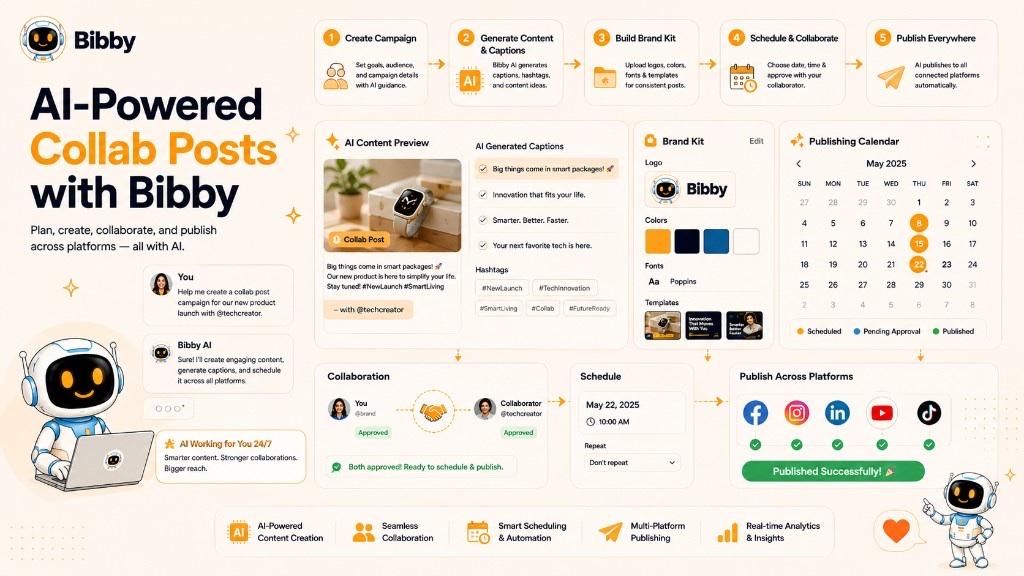
With Bibby, you can:
- Upload your own images or generate visuals with AI.
- Create AI-powered captions tailored to your brand.
- Generate multiple caption variations in seconds.
- Build a complete brand kit through a simple chat interface.
- Create and organize marketing campaigns with conversational prompts.
- Regenerate captions whenever you need a fresh version.
- Schedule Collab Posts at AI-optimized publishing times.
- Publish images, videos, carousels, and stories across Facebook, Instagram, LinkedIn, TikTok, and YouTube.
- Manage your social media calendar from one dashboard.
- Control your entire social media workflow simply by chatting with Bibby.
Instead of spending hours switching between design tools, writing assistants, scheduling platforms, and spreadsheets, Bibby combines AI content creation, campaign management, and social media automation into one seamless experience.
The Future of AI-Powered Collaboration
As AI continues to evolve, collaborative marketing will become even more intelligent.
Future AI capabilities are expected to include:
- Predictive engagement scoring before publishing
- Automated campaign optimization
- Smarter audience segmentation
- Personalized content recommendations
- AI-assisted influencer discovery
- Real-time performance adjustments
- Advanced cross-platform content optimization
Businesses and creators that combine authentic partnerships with AI-powered automation will be better positioned to create consistent, high-performing campaigns while saving significant time and resources.
Collab Posts are already one of the most effective ways to grow organically. When paired with AI platforms like Bibby, they become an even more powerful strategy for scaling social media marketing with less manual effort.
Key Takeaways
- A Collab Post is co-published by two or more accounts—unlike tagging, every collaborator shares ownership, profile visibility, and engagement.
- Instagram currently offers the strongest native Collab Post feature; other platforms support collaboration through Duets, branded content, co-created videos, and partnerships.
- Collab Posts help expand organic reach, increase engagement, build trust, grow followers, and improve marketing ROI.
- Choose partners with audience fit and engagement quality over raw follower count, and create value-first content for both communities.
- Collab Posts and Sponsored Posts can work together—shared ownership is separate from whether a campaign is paid.
- Plan, caption, schedule, and publish collaborative campaigns more efficiently with Bibby, then keep learning with related terms like influencer, brand ambassador, carousel post, engagement, and brand awareness.
- Ready to put your collaboration strategy into action? Start with a free Bibby trial.