
A hashtag is a word or phrase preceded by the # symbol that helps categorize and organize content on social media.
Whether you're trying to make a post easier to discover, join a trending conversation, or build a recognizable brand campaign, understanding hashtags can help you use social media more strategically. In this guide, you'll learn what hashtags mean, how they work, and how to use them effectively across different platforms.
In this article, you will learn:
- What a hashtag is and how the # symbol works
- Types of hashtags and how to choose them for each platform
- How hashtags differ from keywords and @mentions
What Is a Hashtag?
A hashtag is a word or phrase preceded by the # symbol and used on social media to categorize content around a specific topic, idea, event, or conversation. For example, `#SocialMediaMarketing`, `#ContentCreation`, and `#SmallBusiness` are all hashtags.
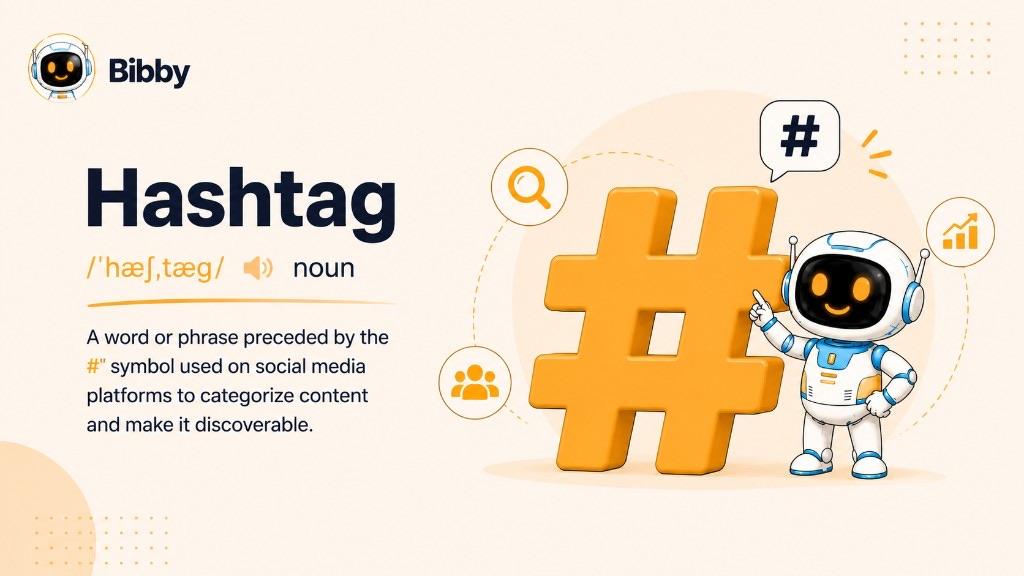
When a hashtag is added to a social media post, it can become clickable and searchable on platforms that support hashtags. People can use hashtags to discover related content, follow conversations, explore specific interests, or find posts connected to a particular campaign or community.
For example, a business sharing social media tips might use hashtags such as `#SocialMediaTips` or `#DigitalMarketing`. Someone interested in those topics can search for or click the hashtags to find other relevant posts.
How hashtags are written
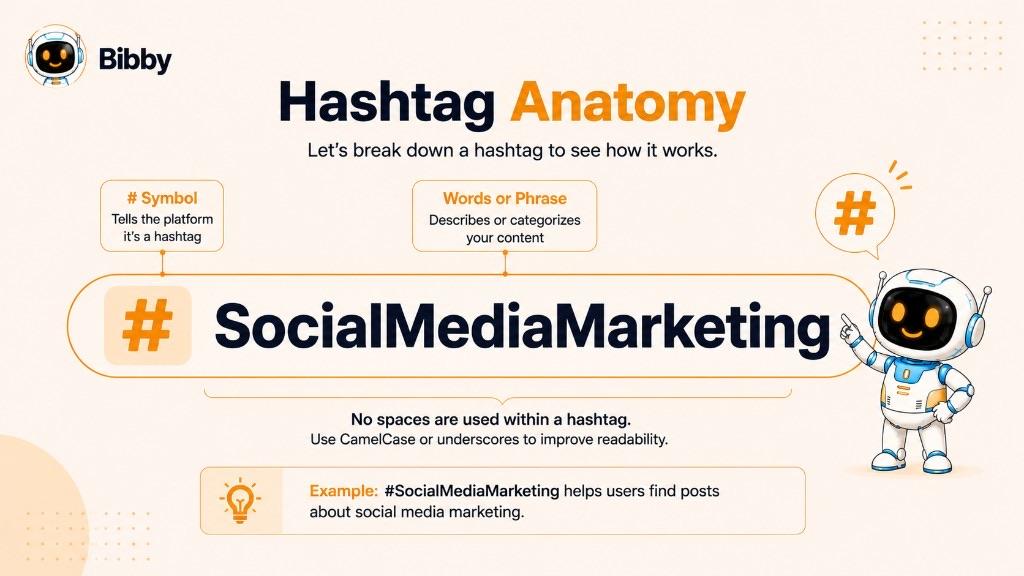
A hashtag starts with the # symbol, followed by a word or phrase without spaces.
Examples:
- `#Marketing`
- `#SocialMedia`
- `#ContentMarketing`
- `#SocialMediaStrategy`
For multi-word hashtags, the words are joined together. Capitalizing the first letter of each word can make longer hashtags easier to read, such as `#SocialMediaMarketing`.
At their core, hashtags are simply a way to give social media content additional context and make it easier to organize and discover.
How Do Hashtags Work?
Hashtags work by connecting social media posts to a specific topic, category, or conversation. When you add a hashtag to a post, the social media platform can associate that content with the hashtag, allowing people to discover other posts using the same term.
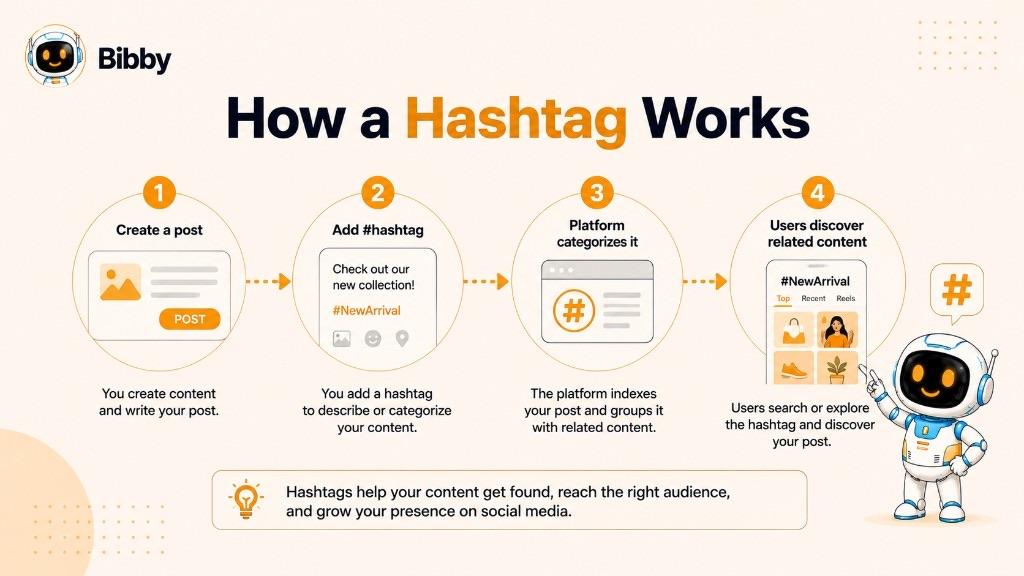
The basic process is simple:
- Add a hashtag to your post. For example, a post about social media automation might include `#SocialMediaAutomation`.
- The platform recognizes the hashtag. The `#` symbol tells the platform that the following word or phrase is a hashtag.
- The hashtag becomes searchable or clickable. On supported platforms, users can select the hashtag to explore related content.
- People discover relevant posts. Users interested in that topic may find your content while searching, browsing, or following related conversations.
For example, imagine you publish a post about creating a content calendar and include `#ContentMarketing`. Someone exploring that hashtag may encounter your post alongside other content related to content marketing.
However, hashtags aren't a guaranteed way to make every post go viral. Their effectiveness depends on factors such as the platform, the relevance of the hashtag, the quality of the content, audience interest, and the overall social media strategy behind the post.
What makes a hashtag a hashtag?
A hashtag generally follows this structure:
# + word or phrase
For example:
- `#InstagramTips`
- `#AI`
- `#SocialMediaManager`
- `#ContentStrategy`
Spaces aren't included within a hashtag. For example, `#SocialMediaMarketing` works as a single hashtag, while `#Social Media Marketing` creates separate elements rather than one complete hashtag.
The important idea is that hashtags provide context and a discovery path. They tell both users and social platforms what a piece of content is about and connect that content with other posts discussing the same topic.
What Is the Purpose of a Hashtag?
The main purpose of a hashtag is to categorize social media content and make it easier to discover. A well-chosen hashtag gives context to a post while connecting it with other content about the same topic, interest, event, or conversation.
Here are some of the most common purposes of hashtags:
1. Content discovery
Hashtags can help people discover content beyond the accounts they already follow. When users search for or select a hashtag, they may see posts associated with that topic.
For example, someone interested in social media marketing might explore `#SocialMediaMarketing` to find relevant posts, ideas, and conversations.
2. Content categorization
Hashtags help organize posts around particular subjects. Adding `#ContentCreation` to a post immediately gives users additional context about what the content is about.
This can be especially useful when publishing content across multiple topics or niches.
3. Community building
Hashtags can bring people with shared interests together. Communities often use specific hashtags to share ideas, experiences, recommendations, and conversations.
For example, creators, marketers, entrepreneurs, and other professionals may use niche-specific hashtags to participate in conversations with people interested in the same subjects.
4. Joining trends and conversations
Hashtags can also connect posts to trending topics, events, challenges, or broader conversations. Using a relevant hashtag can help a post become part of an existing discussion rather than existing in isolation.
However, a trending hashtag should only be used when it genuinely relates to the content.
5. Promoting campaigns
Brands can create hashtags specifically for marketing campaigns, product launches, contests, events, or announcements.
A unique campaign hashtag gives people a simple way to find and participate in content related to that campaign.
6. Building brand identity
A branded hashtag can help a company create a recognizable connection between its brand and its social media content.
For example, a business might use a consistent branded hashtag alongside topic-specific hashtags. Over time, this can help organize brand-related content and encourage audiences to associate the hashtag with the business—supporting brand awareness.
Ultimately, hashtags are most useful when they are relevant, intentional, and connected to the content being published. They're not simply extra words to add to a post—they're a way of connecting content with topics, audiences, communities, and conversations.
What Are the Different Types of Hashtags?
Not all hashtags serve the same purpose. Some are designed to describe a topic, while others help brands organize campaigns, connect with communities, or associate content with a specific location or event.
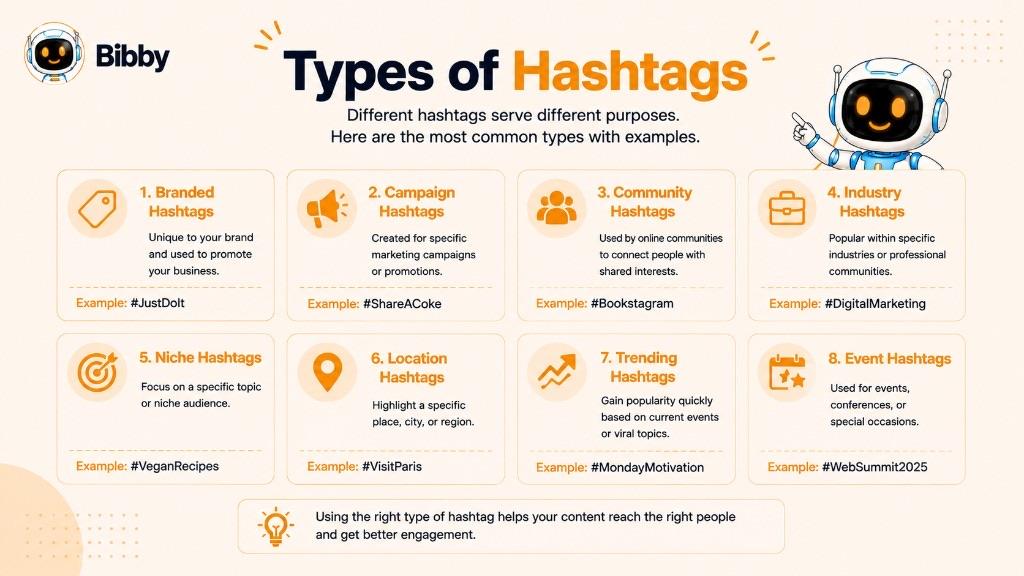
Understanding the different types of hashtags makes it easier to choose hashtags that match the goal of your social media post.
1. Branded hashtags
A branded hashtag is created specifically for a company, product, service, or brand.
For example, a social media automation company might use `#Bibby` as its branded hashtag.
Branded hashtags can help organize a brand's content and make it easier for audiences to find posts associated with the business.
2. Campaign hashtags
A campaign hashtag is created for a specific marketing campaign, promotion, product launch, or initiative.
For example, a company launching a new product could create a unique hashtag for the launch and use it across related social media posts.
Campaign hashtags can also encourage customers or followers to participate by creating and sharing their own content.
3. Community hashtags
Community hashtags are commonly used by groups of people who share an interest, profession, hobby, or identity.
Examples include:
- `#ContentCreators`
- `#DigitalMarketers`
- `#SmallBusinessOwners`
- `#Entrepreneurs`
These hashtags can help users discover conversations and content created by others within the same community.
4. Industry hashtags
Industry hashtags describe broad professional or commercial fields.
Examples include:
- `#DigitalMarketing`
- `#SocialMediaMarketing`
- `#Ecommerce`
- `#SaaS`
They can help associate content with a particular industry and make it easier for people interested in that field to discover relevant posts.
5. Niche hashtags
Niche hashtags focus on a narrower subject than broad industry hashtags.
For example, `#InstagramMarketingTips` is more specific than `#Marketing`.
Niche hashtags can be useful when you want to reach a more focused audience with a particular interest.
6. Location hashtags
Location hashtags associate content with a particular place. They work alongside a geotag when you want both a searchable topic and a map location.
Examples include:
- `#NewYork`
- `#London`
- `#IndiaTravel`
- `#MumbaiFood`
Businesses, travelers, event organizers, and local creators can use location-based hashtags to connect their content with a geographic audience.
7. Trending hashtags
Trending hashtags are hashtags receiving significant attention or usage at a particular time.
They can be associated with breaking conversations, cultural moments, news, challenges, or popular topics.
However, using a trending hashtag simply because it is popular isn't always effective. It should be relevant to the content and appropriate for the audience.
8. Event hashtags
Event hashtags are associated with conferences, festivals, sporting events, webinars, product launches, and other specific events.
For example, an event might encourage attendees to use one official hashtag when sharing photos, updates, or opinions.
This creates a shared stream of content that participants and other interested users can explore.
Choosing the right type of hashtag
The best hashtag depends on what you're trying to accomplish with your post. A single post can combine different types—for example, a branded hashtag, an industry hashtag, and a niche hashtag.
The important thing is to choose hashtags that are relevant to the content, audience, and purpose of the post rather than adding hashtags simply to increase the number of hashtags.
How to Create a Hashtag
Creating a hashtag is simple: start with the # symbol and add a relevant word or phrase. The challenge isn't creating a technically valid hashtag—it's creating one that is clear, relevant, memorable, and useful for your audience.
Basic hashtag formula
# + relevant word or phrase
For example:
- `#SocialMedia`
- `#ContentMarketing`
- `#AITools`
- `#SmallBusinessTips`
For a multi-word hashtag, remove the spaces between words:
Social Media Marketing → `#SocialMediaMarketing`
Capitalizing the first letter of each word can make longer hashtags easier to read, although capitalization doesn't change the underlying hashtag.
Best practices for creating hashtags
#### Keep it relevant
Your hashtag should accurately describe the content you're publishing. A post about social media scheduling, for example, could use `#SocialMediaScheduling` rather than an unrelated popular hashtag.
#### Make it easy to understand
Avoid unnecessarily complicated words, confusing abbreviations, or combinations that are difficult to read.
A clear hashtag is easier for people to understand and remember.
#### Keep branded hashtags memorable
If you're creating a hashtag for a business or campaign, make it distinctive enough to associate with your brand while keeping it simple enough for people to remember and use.
#### Check existing usage
Before launching a new branded or campaign hashtag, search for it on the relevant social platform. A hashtag that already has an unrelated meaning or large volume of unrelated content may create confusion.
#### Avoid ambiguous combinations
When multiple words are joined together, read the complete hashtag carefully to make sure it cannot be interpreted in an unintended way.
Hashtag examples
Suppose you're promoting a post about AI-powered social media management. Potential hashtags could include:
- `#SocialMediaAutomation`
- `#SocialMediaTools`
- `#AIMarketing`
- `#SocialMediaManager`
For a branded campaign, you might create something like:
- `#Bibby`
- `#BibbyAI`
- `#AutomateWithBibby`
The best hashtag isn't necessarily the most popular one. A useful hashtag is one that accurately connects your content with the audience, topic, or conversation you want to reach.
How to Use Hashtags Effectively
Adding hashtags to a social media post is easy. Using them effectively requires more thought. The goal isn't to add as many hashtags as possible, but to choose hashtags that are relevant to your content, audience, platform, and overall social media strategy.
Use relevant hashtags
Relevance should come first. Choose hashtags that accurately describe the topic of your post or connect it with a conversation your audience cares about.
For example, a post explaining social media automation could use `#SocialMediaAutomation` or `#SocialMediaMarketing`. Using an unrelated trending hashtag simply because it is popular can attract the wrong audience and make your content appear spammy.
Combine broad and specific hashtags
Consider using a mixture of broader and more specific hashtags when appropriate.
For example:
- Broad: `#Marketing`
- Industry-specific: `#DigitalMarketing`
- Niche-specific: `#SocialMediaAutomation`
This approach can help you associate your content with both a larger topic and a more specific subject.
Match hashtags to each post
Avoid automatically adding exactly the same set of hashtags to every post. Your hashtags should reflect what each piece of content is actually about.
A post about Instagram tips, for example, may need a different hashtag set from a post about LinkedIn marketing.
Consider the platform
Hashtag behavior varies between social networks. A hashtag strategy that makes sense on Instagram may not work exactly the same way on LinkedIn, TikTok, Facebook, or YouTube.
Consider the platform's audience, content format, and current hashtag conventions when deciding which hashtags to use.
Use branded hashtags strategically
If you're building a brand, consider creating a recognizable branded hashtag that can be used alongside relevant topic or campaign hashtags.
A branded hashtag can help organize brand-related content and give your audience a simple way to associate posts with your business.
Avoid hashtag stuffing
More hashtags don't automatically mean more reach. Adding large numbers of irrelevant or repetitive hashtags can make a post harder to read and may reduce its perceived quality.
Instead, focus on a smaller set of hashtags that genuinely add context or help your content reach a relevant audience.
Review and refine your approach
Hashtag performance can change over time. Review which types of hashtags appear alongside your strongest-performing content and adjust your strategy accordingly.
You can experiment with different combinations of:
- Broad hashtags
- Niche hashtags
- Industry hashtags
- Branded hashtags
- Campaign hashtags
- Location hashtags
The most effective hashtag strategy is ultimately one that supports the content rather than distracting from it. Create valuable content first, then use relevant hashtags to help people understand and discover it.
How Many Hashtags Should You Use?
There is no universal number of hashtags that works best for every social media platform, account, or post. The right number depends on the platform, your content, your audience, and what you're trying to achieve.
Instead of asking, “How many hashtags should I use?”, a better question is: “Which hashtags are genuinely useful for this post?”
Use quality over quantity
Adding more hashtags doesn't automatically increase reach or engagement. A long list of unrelated hashtags can make a post look cluttered and may attract people who aren't interested in the content.
Focus on hashtags that:
- Clearly relate to the post
- Match your target audience's interests
- Fit the platform you're publishing on
- Support your content or campaign goal
- Add useful context to the post
Hashtag usage varies by platform
Different social networks have different audiences, content formats, and hashtag behaviors. What works well on Instagram may not be the best approach for LinkedIn, TikTok, Facebook, or YouTube.
For this reason, avoid using one fixed hashtag formula across every platform. Instead, adapt your hashtag selection to each network.
Test different combinations
If you're managing a business or creator account, experiment with different combinations of relevant hashtags and observe how your content performs.
For example, you could test combinations of:
- Broad topic hashtags
- Industry hashtags
- Niche hashtags
- Branded hashtags
- Campaign hashtags
- Location hashtags
Over time, performance data can help you identify which approaches are most useful for your particular audience.
Don't rely on hashtags alone
Hashtags are only one part of a social media strategy. Content quality, audience relevance, creative assets, captions, timing, engagement, and platform-specific best practices can all influence how a post performs.
Think of hashtags as a discovery and categorization tool, not a guaranteed shortcut to viral reach.
The best approach is simple: use enough relevant hashtags to clearly connect your content with the right topics and audience, without adding unnecessary ones.
Hashtag Examples
The best hashtags depend on the topic, audience, platform, and purpose of your post. Looking at examples can make it easier to understand how different hashtags can be used in real social media content.
Social media marketing hashtags
For a post about social media marketing, you might use:
- `#SocialMediaMarketing`
- `#SocialMediaTips`
- `#DigitalMarketing`
- `#SocialMediaStrategy`
- `#ContentMarketing`
Small business hashtags
A small business sharing advice, products, or business updates could use:
- `#SmallBusiness`
- `#SmallBusinessTips`
- `#Entrepreneurship`
- `#SmallBusinessOwner`
- `#BusinessTips`
Content creation hashtags
For posts about creating and publishing content:
- `#ContentCreation`
- `#ContentCreator`
- `#ContentStrategy`
- `#CreatorEconomy`
- `#ContentMarketing`
Fitness hashtags
A fitness creator or brand could use:
- `#FitnessTips`
- `#WorkoutMotivation`
- `#FitnessJourney`
- `#HealthyLifestyle`
- `#HomeWorkout`
E-commerce hashtags
An online store might use hashtags such as:
- `#Ecommerce`
- `#OnlineShopping`
- `#OnlineBusiness`
- `#ShopOnline`
- `#SmallBusiness`
Personal branding hashtags
Professionals and creators building their personal brand could use:
- `#PersonalBranding`
- `#PersonalBrand`
- `#ContentCreator`
- `#ThoughtLeadership`
- `#BuildInPublic`
AI and technology hashtags
For content about artificial intelligence and technology:
- `#ArtificialIntelligence`
- `#AI`
- `#AITools`
- `#GenerativeAI`
- `#TechTrends`
Branded hashtag examples
Brands can also create hashtags specifically for their own content or campaigns. For example, a social media automation platform could use:
- `#Bibby`
- `#BibbyAI`
- `#AutomateWithBibby`
A branded hashtag can be combined with topic-specific hashtags rather than being used on its own.
How to choose from these examples
Don't copy a list of popular hashtags and add all of them to every post. Use these examples as starting points, then select hashtags that accurately describe the specific content you're publishing.
For example, a post about AI-powered social media scheduling might combine a broad hashtag such as `#AI` with more specific hashtags such as `#SocialMediaAutomation` and `#SocialMediaScheduling`.
The goal is to create a hashtag set that is relevant to the post and useful to the audience—not simply large.
Hashtags on Different Social Media Platforms
Hashtags can be used across many social media platforms, but they don't work exactly the same way everywhere. Each platform has its own audience, content formats, discovery systems, and conventions, so a hashtag strategy should be adapted to the network you're publishing on.
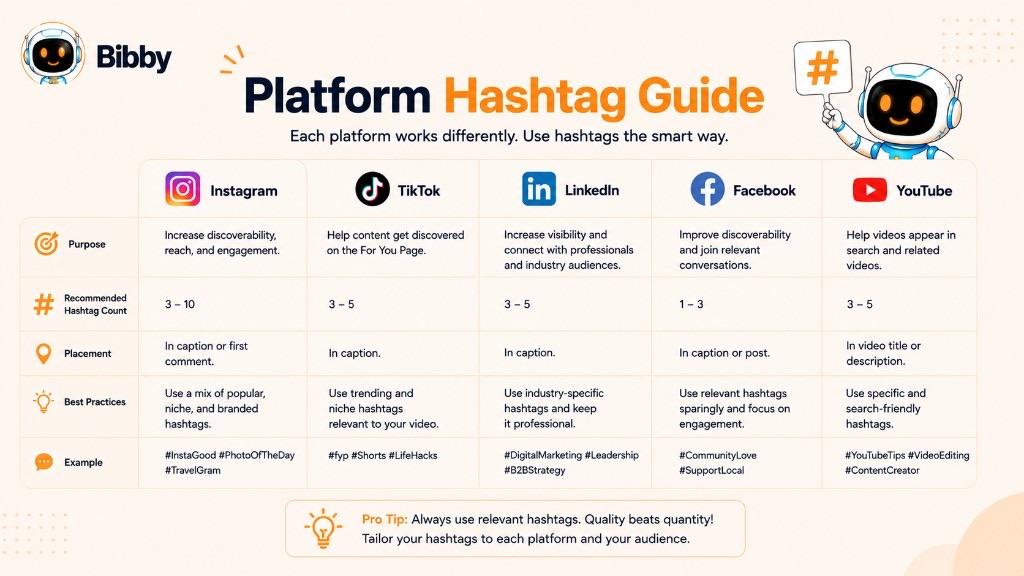
Hashtags on Instagram
Instagram hashtags can help categorize content and connect posts with specific topics, interests, and communities.
For example, a social media marketer might use:
`#SocialMediaMarketing`
`#InstagramMarketing`
`#ContentStrategy`
Relevance is more important than simply adding a large number of hashtags. Choose hashtags that accurately represent the content and the audience you're trying to reach.
Hashtags on TikTok
On TikTok, hashtags can provide context about a video's topic and connect content with specific interests, trends, or communities. They are not a substitute for the For You Page ranking signals.
For example:
- `#MarketingTips`
- `#SmallBusiness`
- `#ContentCreator`
Trending hashtags can be useful when they genuinely relate to your video, but adding an unrelated trending hashtag doesn't automatically make content more discoverable.
Hashtags on LinkedIn
LinkedIn hashtags can help categorize professional content around industries, topics, skills, and business conversations.
Examples include:
- `#DigitalMarketing`
- `#Entrepreneurship`
- `#Leadership`
- `#SocialMediaMarketing`
Because LinkedIn is primarily a professional network, hashtags should generally be closely connected to the subject of the post.
Hashtags on Facebook
Facebook supports hashtags for categorizing and discovering content, although they typically play a different role than they do on more hashtag-focused platforms.
If you use hashtags on Facebook, keep them relevant and connected to the topic of the post rather than adding a long list of unrelated terms.
Hashtags on YouTube
YouTube allows hashtags to be added to video titles and descriptions. They can help associate videos with specific topics and related content.
For example, a video about social media automation might use:
`#SocialMediaAutomation`
`#SocialMediaMarketing`
`#AITools`
As with other platforms, hashtags should accurately describe the video rather than being added simply because they are popular.
Should you use the same hashtags everywhere?
Not necessarily.
A hashtag that makes sense for Instagram may not be the best choice for LinkedIn or YouTube. When publishing the same content across multiple platforms, consider adapting the hashtag selection to each platform's audience and conventions.
This is especially important when managing multiple social networks at once. Instead of treating every platform identically, build a publishing workflow that allows the content, caption, and hashtags to be appropriate for each network.
Ultimately, hashtags are platform-specific tools. Use them where they provide value, and adapt your approach based on how your audience discovers and interacts with content on each social network.
Hashtag vs. Keyword: What's the Difference?
A hashtag and a keyword can describe the same topic, but they serve different purposes. The biggest difference is that a hashtag uses the # symbol and is primarily used to categorize and connect content on social media, while a keyword is a word or phrase that describes what a piece of content is about and can be used across search engines, websites, and digital content.
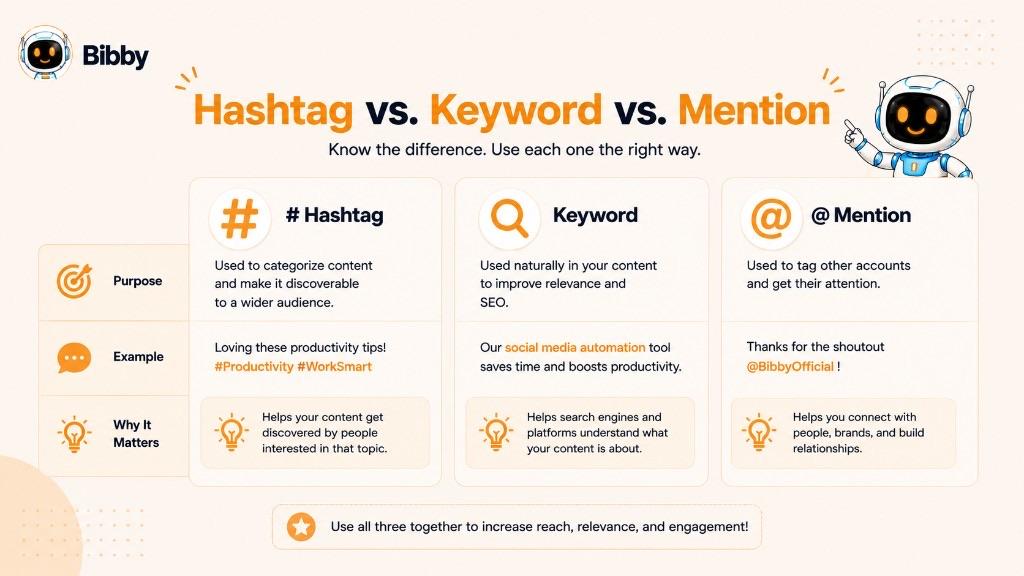
For example:
- Hashtag: `#SocialMediaMarketing`
- Keyword: `social media marketing`
The words are essentially the same, but their roles are different.
What is a hashtag?
A hashtag is a word or phrase preceded by `#` and used on supported social platforms to categorize content and make it discoverable through hashtag searches or feeds.
Example: `#ContentMarketing`
What is a keyword?
A keyword is a word or phrase that represents a topic people search for or that helps describe the subject of a piece of content.
For example, social media automation could be a keyword targeted by a blog post, landing page, video, or other piece of content.
Keywords are particularly important for search engine optimization (SEO) because they help search engines understand the subject of a page and can align content with what people are searching for.
Hashtag vs. keyword
| Hashtag | Keyword |
|---|---|
| Uses the `#` symbol | Usually doesn't use a special symbol |
| Primarily associated with social media | Used across search engines and digital content |
| Helps categorize social posts | Describes the subject or search intent |
| Can be clickable on supported platforms | Usually isn't a social category |
| Example: `#SocialMediaTips` | Example: `social media tips` |
Can a hashtag also be a keyword?
Yes. A hashtag can contain a keyword.
For example, social media marketing can appear as the keyword `social media marketing` in an article and as the hashtag `#SocialMediaMarketing` in a social media post.
The important distinction is how the term is being used. Keywords help describe and optimize content for search and information discovery, while hashtags help categorize and connect social media content.
Understanding the difference can help you build a more effective strategy across both search engines and social media platforms.
Hashtag vs. Mention: What's the Difference?
A hashtag and a mention both use a special symbol on social media, but they have completely different purposes.
A hashtag uses the # symbol to categorize content around a topic, while a mention uses the @ symbol to identify or reference a specific social media handle.
For example:
- Hashtag: `#SocialMediaMarketing`
- Mention: `@BibbySocial`
What is a hashtag?
A hashtag connects a post with a particular topic, interest, campaign, or conversation.
For example, a social media post about content creation might include:
`#ContentCreation`
People can select or search for the hashtag on supported platforms to explore related content.
What is a mention?
A mention uses `@` followed by a username or account name to reference another social media account.
For example:
`@BibbySocial`
Mentions are commonly used to:
- Directly reference another account
- Notify or bring attention to another user
- Credit a creator or business
- Start a conversation
- Collaborate with another account
Hashtag vs. mention
| Hashtag | Mention |
|---|---|
| Uses `#` | Uses `@` |
| Represents a topic or category | Represents a specific account |
| Helps organize and discover content | Helps reference or connect with an account |
| Example: `#SocialMediaTips` | Example: `@BibbySocial` |
Can you use hashtags and mentions together?
Yes. They can serve complementary purposes within the same post.
For example:
We're sharing our latest social media automation tips with the community. Follow @BibbySocial for more and explore #SocialMediaAutomation.
Here, `@BibbySocial` identifies a specific account, while `#SocialMediaAutomation` identifies the topic.
The easiest way to remember the difference is:
# = topic or category
@ = account or person
Once you understand this distinction, it's much easier to use both hashtags and mentions intentionally in your social media content.
Common Hashtag Mistakes to Avoid
Hashtags can support content discovery and organization, but using them without a strategy can make your posts less effective. Avoiding a few common mistakes can help you create cleaner, more relevant social media content.
1. Using irrelevant hashtags
One of the biggest mistakes is adding hashtags simply because they are popular.
For example, adding a trending entertainment hashtag to an unrelated post about accounting won't make the content more valuable to the people following that hashtag. It can instead attract the wrong audience and make the post feel spammy.
Better approach: Use hashtags that genuinely describe your content.
2. Using only broad hashtags
Extremely broad hashtags such as `#Marketing`, `#Business`, or `#Travel` can represent huge amounts of content.
Broad hashtags can sometimes be useful, but relying exclusively on them may make it difficult for your content to stand out.
Better approach: Consider combining broader hashtags with more specific industry or niche hashtags.
3. Adding too many hashtags
More hashtags don't automatically mean more reach.
A large collection of hashtags can make a post look cluttered and can dilute the connection between your content and its most relevant topics.
Better approach: Choose a focused group of relevant hashtags rather than adding every potentially related term.
4. Using the same hashtags for every post
Copying the exact same hashtag list onto every post ignores the fact that different posts have different topics and audiences.
Better approach: Build hashtag groups around specific content themes and adjust them for each post.
5. Ignoring the platform
Hashtag conventions vary between Instagram, TikTok, LinkedIn, Facebook, YouTube, and other platforms.
A hashtag strategy that works on one network may not translate directly to another.
Better approach: Adapt your hashtags to the platform, content format, and audience.
6. Using difficult-to-read hashtags
Long combinations of words can be difficult to understand at a glance.
For example, a long hashtag containing several words without clear capitalization can be harder to read.
Better approach: Keep hashtags concise where possible and use capitalization to improve readability.
7. Using a hashtag without checking its meaning
A hashtag may already be associated with a particular brand, community, campaign, or conversation.
Better approach: Search a hashtag before using it, especially when creating a branded or campaign hashtag.
8. Treating hashtags as a guaranteed growth tactic
Hashtags can help categorize and potentially improve content discovery, but they don't guarantee views, engagement, followers, or viral reach.
Better approach: Treat hashtags as one component of a broader social media strategy that includes strong content, relevant captions, good creative assets, consistent publishing, and audience engagement.
9. Never reviewing performance
A hashtag strategy shouldn't remain unchanged forever. Audience behavior, platform features, trends, and content performance can change.
Better approach: Review your social media results and refine your hashtag approach based on what actually works for your audience.
The simplest rule is to choose relevant hashtags that add context to your content and help connect it with the right audience. Quality and relevance matter more than quantity.
How to Build a Hashtag Strategy
Using hashtags effectively is easier when you have a consistent strategy rather than choosing them randomly for every post. A good hashtag strategy connects your content with the right topics and audiences while supporting your broader social media goals.
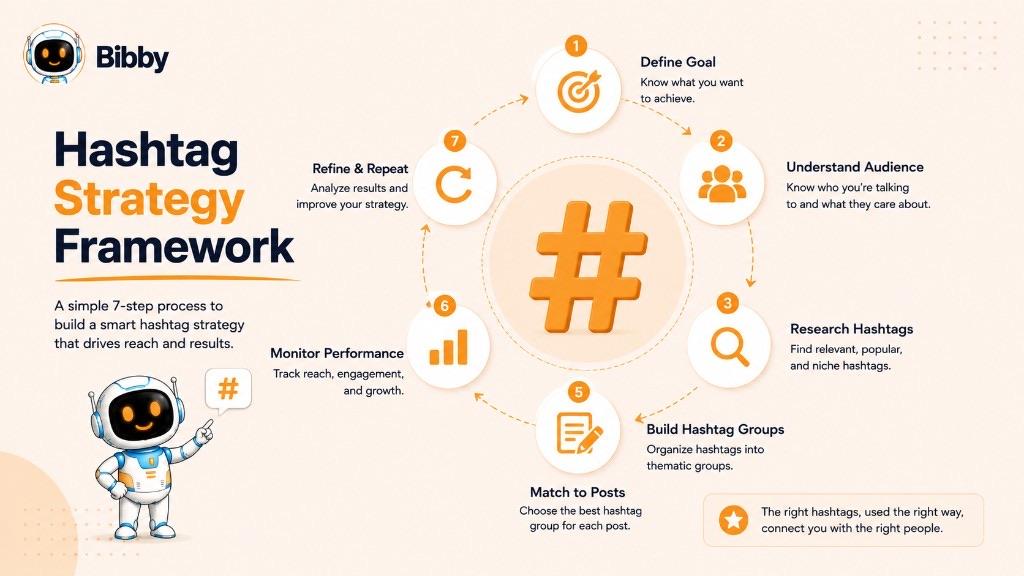
Step 1: Define your content goal
Start by deciding what you want your social media content to accomplish.
Your goal might be to:
- Increase brand awareness
- Reach a specific audience
- Promote a campaign
- Build a community
- Share educational content
- Promote a product or service
- Generate engagement
Your goal can influence the types of hashtags you choose.
Step 2: Understand your audience
Think about the topics, interests, problems, and communities your target audience cares about.
For example, a business targeting social media managers might explore hashtags related to:
- Social media marketing
- Content creation
- Social media automation
- Marketing tools
- Content strategy
The best hashtags aren't necessarily the ones with the largest audiences. They are the ones that help you connect with relevant people.
Step 3: Create hashtag groups
Instead of maintaining one giant list of hashtags, organize them into useful groups.
For example:
Brand hashtags
- `#Bibby`
Industry hashtags
- `#SocialMediaMarketing`
- `#DigitalMarketing`
Niche hashtags
- `#SocialMediaAutomation`
- `#SocialMediaScheduling`
Campaign hashtags
- A unique hashtag created for a particular campaign or launch
This makes it easier to select appropriate hashtags for different types of content.
Step 4: Match hashtags to each post
Choose hashtags based on the specific content you're publishing.
A post about social media scheduling doesn't need exactly the same hashtags as a post about AI image generation or content creation.
Your hashtags should reinforce what the post is actually about.
Step 5: Adapt hashtags for each platform
If you're publishing the same content across Instagram, TikTok, LinkedIn, Facebook, and YouTube, don't assume that one identical hashtag set is ideal everywhere.
Consider the audience, content format, and hashtag conventions of each platform and adjust your approach accordingly.
Step 6: Monitor your results
Pay attention to how your content performs when using different hashtag groups.
Look for patterns in:
- Reach
- Engagement
- Content discovery
- Audience quality
- Follower growth
- Campaign participation
The goal isn't to prove that a particular hashtag is responsible for every result. Instead, use performance data to understand which topics and hashtag approaches are worth continuing to test.
Step 7: Refine your strategy
Hashtag strategies should evolve.
Remove hashtags that consistently provide little value, experiment with relevant alternatives, and update campaign or trending hashtags when the conversation changes.
Most importantly, don't let hashtags become the entire strategy. Strong content comes first; hashtags help categorize and connect that content with relevant audiences.
Managing hashtags across multiple social platforms
For businesses and creators publishing frequently, manually selecting hashtags, writing captions, preparing media, and scheduling every post can become time-consuming.
A social media automation platform such as Bibby can help bring these activities into one workflow. You can upload an image or generate one with AI, choose a posting style, generate captions, and schedule content across selected social platforms.
Bibby's chat interface can also let you manage social media tasks conversationally, including creating campaigns, creating posts, regenerating captions, and managing your brand kit.
This makes hashtag planning part of a broader, repeatable content workflow rather than another manual task you have to manage for every post.
How Bibby Helps You Manage Social Media Content
A strong hashtag strategy works best when it is part of a consistent social media publishing workflow. Instead of planning hashtags separately from your content, you can incorporate them into the process of creating, customizing, and scheduling posts.
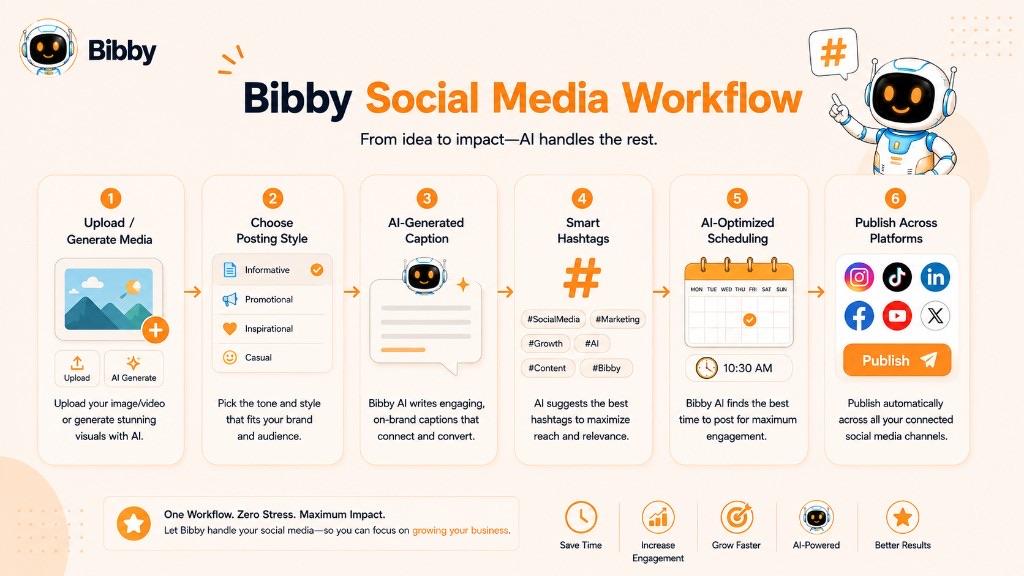
Bibby is designed to bring that workflow into one place.
Create content with AI
Start by uploading your own image or generating an image with AI. You can then choose a posting style and let Bibby help create the accompanying social media content.
This allows you to move from a creative idea to a ready-to-publish post without building every element manually.
Generate captions automatically
Bibby can generate captions based on your content and selected posting style. This can make it easier to create social posts that have the right context for your audience and platform.
When relevant, hashtags can become part of that overall content strategy rather than something you have to remember to add at the last minute.
Schedule content across platforms
Once your content is ready, Bibby can schedule it across your selected social platforms at AI-optimized times.
You can use the workflow to manage different types of social content, including:
- Images
- Carousels
- Videos
- Stories
This makes it possible to manage a broader content calendar without manually publishing every post.
Manage your social media through chat
Bibby also includes a chat interface that lets you manage social media tasks through conversation.
From the chat, you can:
- Create a brand kit
- Create campaigns
- Create posts
- Regenerate captions
- Manage other social media tasks
Instead of switching between multiple tools for planning, creation, writing, and scheduling, you can manage these activities through a single workflow.
Turn hashtag planning into a repeatable workflow
Hashtags are only one part of social media marketing. The bigger challenge is consistently creating useful content, adapting it for different platforms, and publishing it at the right time.
By combining content creation, AI-generated captions, social media scheduling, and conversational management, Bibby helps turn that process into a repeatable workflow.
The result is a more organized approach to social media where hashtags support the content strategy instead of becoming another manual task to manage.
Key Takeaways
A hashtag is a `#` word or phrase that categorizes social content around a topic, campaign, place, or community. It is not the same as a keyword, a handle, or a geotag.
Use hashtags that are relevant, readable, and matched to the platform. Mix branded, industry, and niche tags when they help—don't stuff a post with popular tags that don't describe the content.
Bibby can help you generate captions, create posts, and schedule them across Facebook, Instagram, LinkedIn, YouTube, and TikTok so hashtags sit inside a consistent publishing workflow.
Continue learning with related dictionary entries on handles, captions, geotags, UGC, trending, and brand awareness—or browse the social media dictionary. Then start a free Bibby trial to create, caption, and schedule visual content across your channels.