

On social media, UGC lets brands show products through real people’s experiences—not only polished studio posts. It can appear organically or from a campaign. Share or repurpose it only with appropriate permission and attribution.
Bibby does not scrape mentions or collect reviews. After you have rights, generate captions and schedule images, carousels, videos, and Stories on Facebook, Instagram, LinkedIn, YouTube, and TikTok—not X. See the dictionary, blog, and free tools.
What Does UGC Stand For?
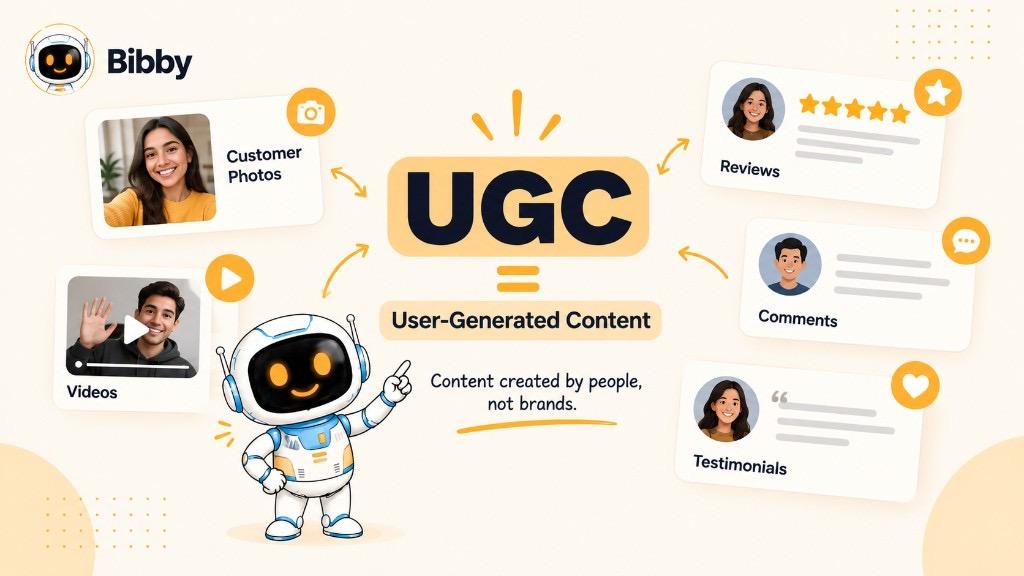
UGC stands for user-generated content.
- User — customer, follower, fan, employee, or community member
- Generated — they made it, not the marketing team
- Content — text, images, video, reviews, comments, posts
A tagged Instagram Reel of someone using a product, a review, an unboxing, or a service photo can all be UGC.
In marketing: customer- or community-created content that can represent a brand or experience. Discover it organically or invite it with hashtags, challenges, and reviews. In simple terms: UGC is content about a brand from the people who experience it.
What Is UGC in Social Media?
It is content users create and share about a brand, product, service, or experience—from a product photo to a YouTube review.
Instagram — photos, Reels, Stories, tagged posts
TikTok — experiences, reviews, tutorials, challenges
Facebook — posts, recommendations, comments
YouTube — reviews, tutorials, unboxings
LinkedIn — professional stories and recommendations
UGC vs. Brand-Created Social Content
| Brand-created | User-generated |
|---|---|
| Made by the brand or agency | Made by customers, fans, or other people |
| Planned creative | Organic or campaign-prompted |
| Brand controls direction | Creator controls the original take |
| Intentional marketing message | Personal experience or opinion |
| Ads and promo posts | Reviews, customer photos, product videos |
A studio collection shoot is branded. A customer in those clothes sharing their day is UGC.
Why use it? Another perspective, reusable assets (with rights), and a mix that is not only ads. One customer video might become a Reel, TikTok, Story, or campaign piece—if permission allows.
What Counts as UGC?
Ask: Who created it? If an individual made it from their experience, it may be UGC. Paid or commissioned work is often better called creator content, sponsored content, or UGC-style.
- Text — reviews, testimonials, comments, mentions, stories, recommendations
- Images — product-in-use, lifestyle, before/after, events
- Video — reviews, unboxings, tutorials, Reels, TikToks, YouTube
- Audio — podcasts, voice testimonials, social audio
- Reviews and testimonials — what they bought, used, liked, and would recommend
- Mentions — “Just tried this coffee shop…” with a tag
- Unboxing — package → contents → first reaction
- Demos — software, fitness gear, cameras, hotel stays in context
What Are the Different Types of UGC?
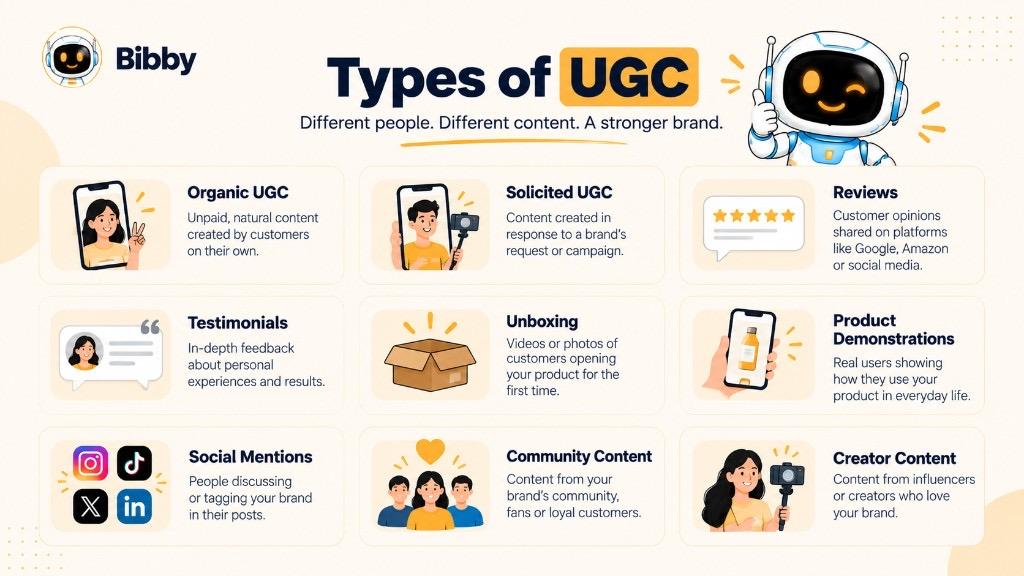
Organic — voluntary, unpaid (unprompted review or Story).
Solicited — the brand asked (hashtag, challenge, contest, review request).
Customer-generated — from people who bought or used it.
Creator UGC — platform-native video; if paid, disclose and do not call it organic.
Reviews / testimonials — written, video, ratings, quotes.
Mentions — tags across networks.
Unboxing and demos — first look and how-to.
Community — tips, Q&A, forums, challenges.
Employee-generated (EGC) — BTS from staff; related, not customer UGC.
| Type | Who | Example |
|---|---|---|
| Organic | Customers or users | Unprompted product post |
| Solicited | Customers or users | Campaign submission |
| Customer | Customers | Product review |
| Creator UGC | Creators | Commissioned product video |
| Review | Customers | Recommendation |
| Mention | Social users | Tagged Instagram post |
| Unboxing | Customers or creators | Opening video |
| Demo | Users or creators | Tutorial |
| Community | Members | User tips |
| EGC | Employees | Workplace post |
UGC Examples
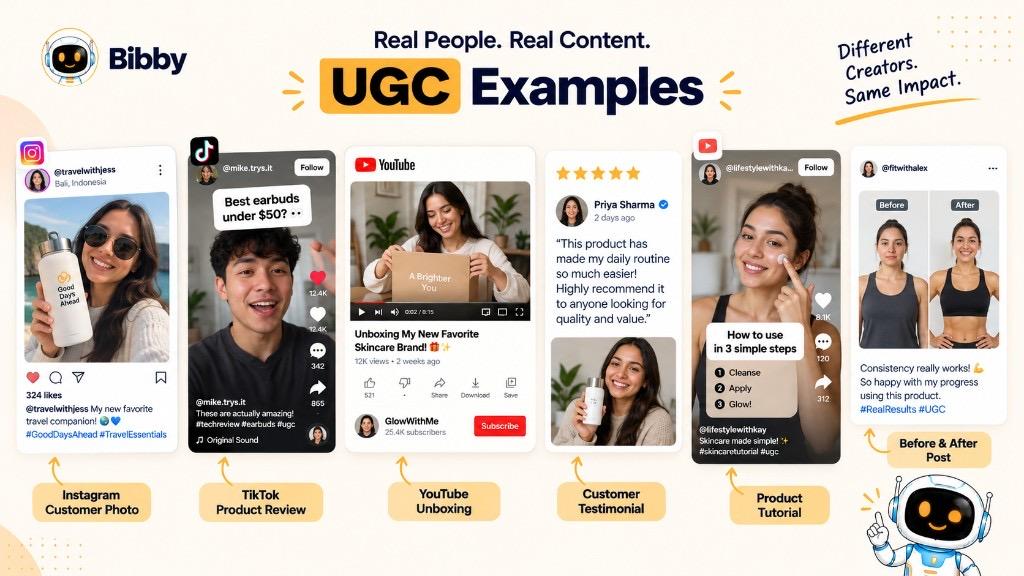
- Instagram photo — trip shot tagging a backpack brand
- TikTok review — what they bought, how they use it, whether they recommend it
- Unboxing — packaging and first impressions
- Testimonial — how software fits a team’s workflow (with rights)
- Written review — e.g. planning weeks of posts in one sitting (teaching example, not a Bibby result)
- Before/after — beauty, home, fitness, workflows—document *their* change
- Customer story — problem → search → use → outcome
- Comment — “scheduling saved me hours” as text UGC
- Tutorial — YouTube walkthrough of a workflow
- Submitted photo — travel or fashion call-outs, then feature with permission
| Example | Format | Typical place |
|---|---|---|
| Product photo | Image | Instagram, Facebook |
| Review | Text or video | Site, YouTube, TikTok |
| Unboxing | Video | YouTube, TikTok, Instagram |
| Testimonial | Text or video | Site, LinkedIn, Instagram |
| Demo | Video | TikTok, YouTube, Instagram |
| Story | Text or video | LinkedIn, Instagram, YouTube |
| Mention | Mixed | Social apps |
| Tutorial | Video | YouTube, TikTok |
| Before/after | Image or video | Instagram, TikTok |
| Comment | Text | Social apps |
The common thread is the user’s perspective.
Why Is UGC Important for Social Media Marketing?
It adds social proof, customer language, community participation, extra assets, real-world use, possible engagement, research context, and insight (use cases, complaints, phrasing). None of that is automatic.
One video → Reel → TikTok → Story → quote post—adapt, do not clone. Vanity metrics are not the score.
A structured workflow (review, rights, captions, schedule) is the hard part. Bibby helps after the asset is approved.
UGC vs. Influencer Content
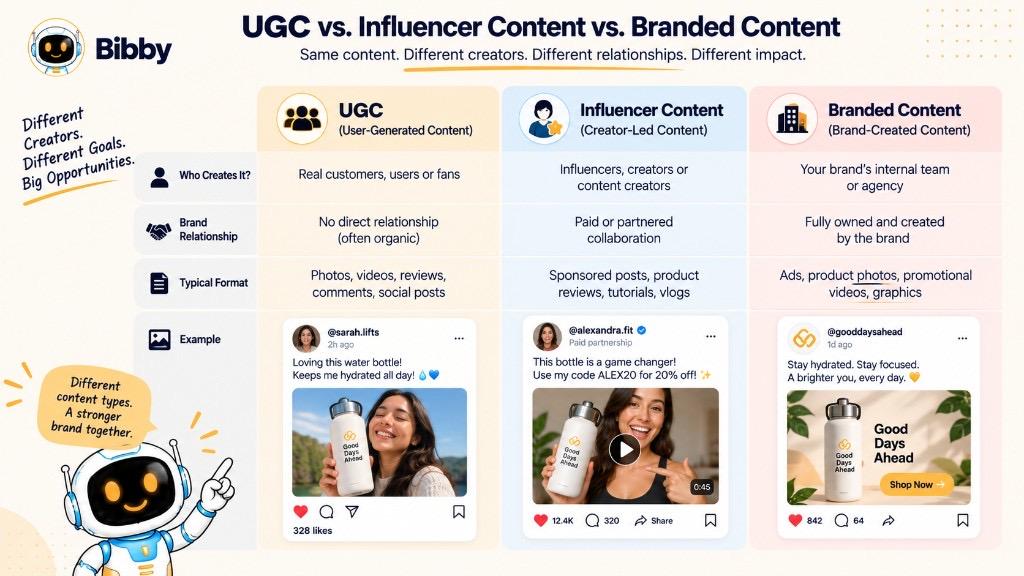
UGC = users’ own experience; follower count is optional.
Influencer content = established audience, often paid, gifted, or affiliate.
| UGC | Influencer content |
|---|---|
| Any customer or user | Established creator |
| Large audience not required | Audience often the point |
| Can be organic | Usually planned |
| May be unpaid | Often compensated |
| Personal experience | Experience plus reach |
| Often discovered later | Usually commissioned |
A voluntary customer Reel is organic UGC. A paid product video is sponsored. A commissioned “looks like TikTok” ad is UGC-style. Do not treat them as interchangeable.
UGC vs. Branded Content
| UGC | Branded |
|---|---|
| Users and customers | Brand or agency |
| Individual perspective | Planned message |
| Can be organic | Usually on a calendar |
| Often found after posting | Made for an objective |
| Creator owns the original | Brand controls production |
Jacket launch: studio shoot = branded. Customer wearing it on Instagram = UGC. Quality is not the test—who made it is.
What Is UGC-Style Content?
Casual, handheld, first-person look produced by a brand, agency, paid creator, or in-house team. It can look like a customer TikTok and still be commercial. Disclose paid work. Authentic *look* ≠ organic *origin*.
UGC: “I used this and shared.”
Branded: “The brand said this.”
UGC-style: “Made for marketing to feel like a user.”
How Does UGC Work?
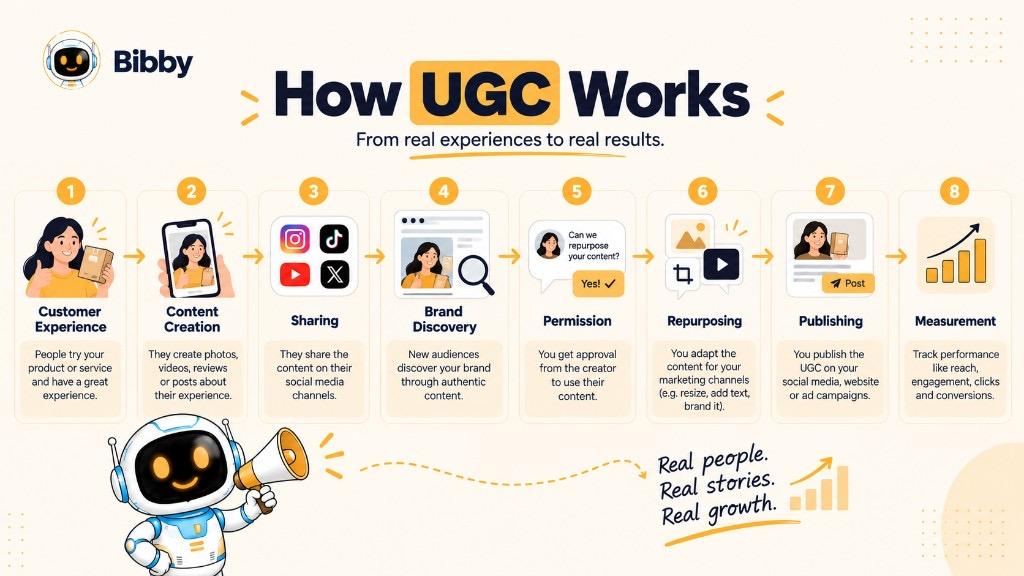
Experience → create → share or submit → discover → review → permission → repurpose → publish → measure
Find posts via tags, hashtags, reviews, forms, communities, or listening tools—not inside Bibby. Review for fit, accuracy, safety, and rights. Ask before reuse. A quote can become a graphic, carousel, or LinkedIn post. Measure reach, impressions, engagement, CTR, leads, conversions against the goal.
How Do Brands Get More UGC?
Quality beats volume.
Ask specifically. Use a branded hashtag (discovery ≠ permission). Run a campaign with a theme. Request reviews with useful prompts. Run contests with clear rules. Feature a Customer Spotlight. Ask real questions. Make sharing easy. Reward only with required disclosures.
Clear prompt + easy path + relevant audience + honest incentive + permission + consistent promotion. Do not fake authenticity.
How to Create a UGC Campaign
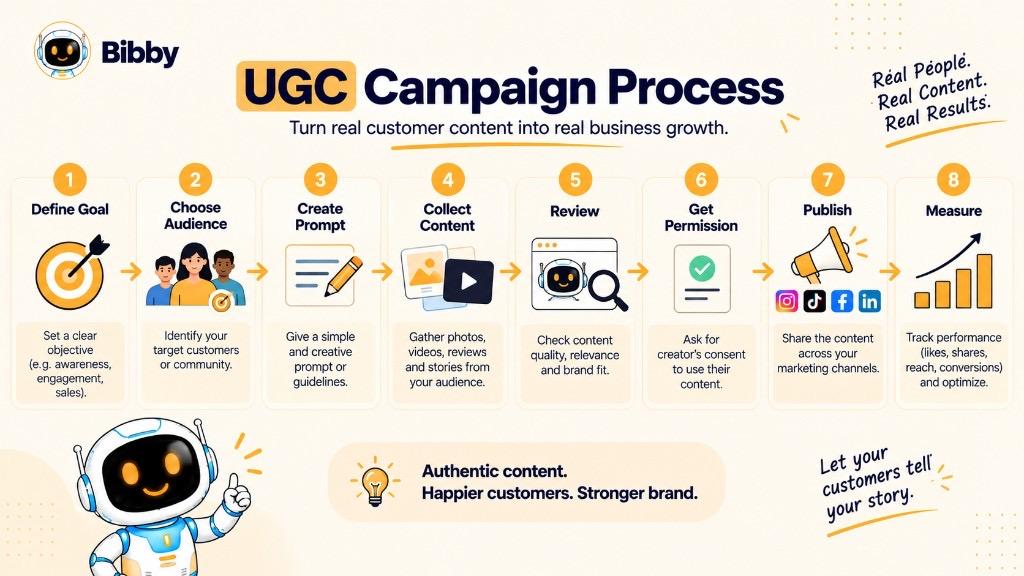
- Objective (awareness, demos, launch, community)
- Audience (buyers, fans, pros)
- Format (photo vs. five-minute film)
- Prompt (what / where / what next)
- Platforms that already fit
- Guidelines (hashtag, rights, disclosures)
- Collection method
- Review
- Permission for this use
- Publish and repurpose
- Measure submissions, unique creators, and the goal
Define → audience → format → prompt → guidelines → collect → review → rights → publish → measure.
Start ideas with the post idea generator; write captions and hashtags that match the post.
How to Use UGC in Social Media Content
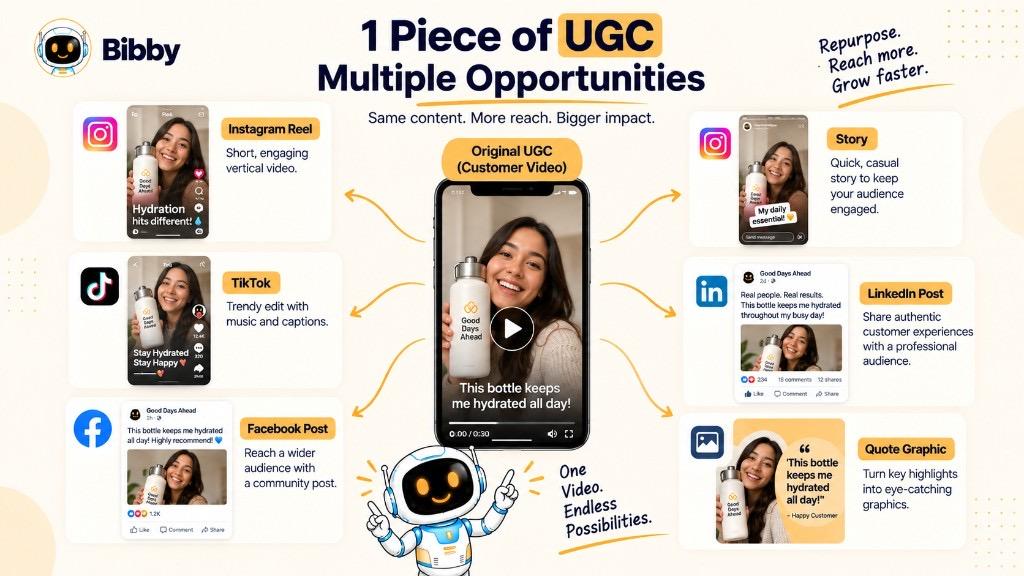
Keep the customer’s meaning. Credit when agreed.
Feed posts, Reels, TikTok (rewrite for the format), Stories and shoutouts, review carousels, LinkedIn for B2B, YouTube for longer interviews. One video can feed several cuts; one review can feed a quote graphic.
Then: store, select, caption, adapt, date, schedule, review. Automation publishes; it does not make the original authentic.
Collect → review → permission → organize → platform posts → schedule → publish → measure.
How to Schedule and Automate UGC
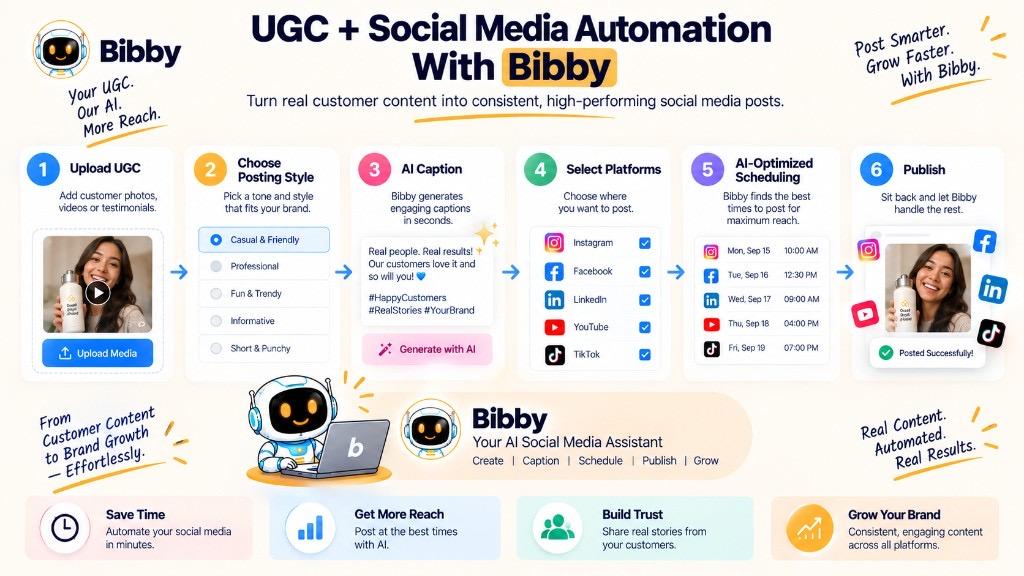
Organize by type, campaign, and approved vs. waiting. Captions add context and a CTA without twisting the quote. Adapt crop and copy per network. Put UGC on the calendar (stories Monday, reviews Wednesday—your mix). Track what ran where.
Bibby: upload or generate visuals, posting style, captions, campaigns, brand kit in chat, then schedule images, carousels, videos, and Stories to the five channels. Mix UGC with education, product, promo, and community. Plans and sign up; more in resources and help.
UGC Metrics: How to Measure Performance
Participation rate = submissions ÷ invited × 100 (quality still matters).
Volume — posts *and* unique creators.
Reach / impressions — awareness.
Engagement — comments and shares vs. taps; same formula each time (engagement rate if you use one).
CTR — if there is a link.
Conversions and revenue — with honest attribution.
Sentiment — themes; tools plus human read.
Usable rate = approved ÷ relevant submissions.
| Goal | Useful metrics |
|---|---|
| Awareness | Reach, impressions, mentions |
| Community | Submissions, unique creators, participation |
| Engagement | Comments, shares, saves |
| Traffic | Clicks, CTR |
| Leads / sales | Leads, purchases, conversion |
| Insight | Themes, feedback |
| Library | Volume, usable rate |
Track in native Insights or your site. Growth Insights and the report card are not a UGC rights dashboard.
Advantages of UGC
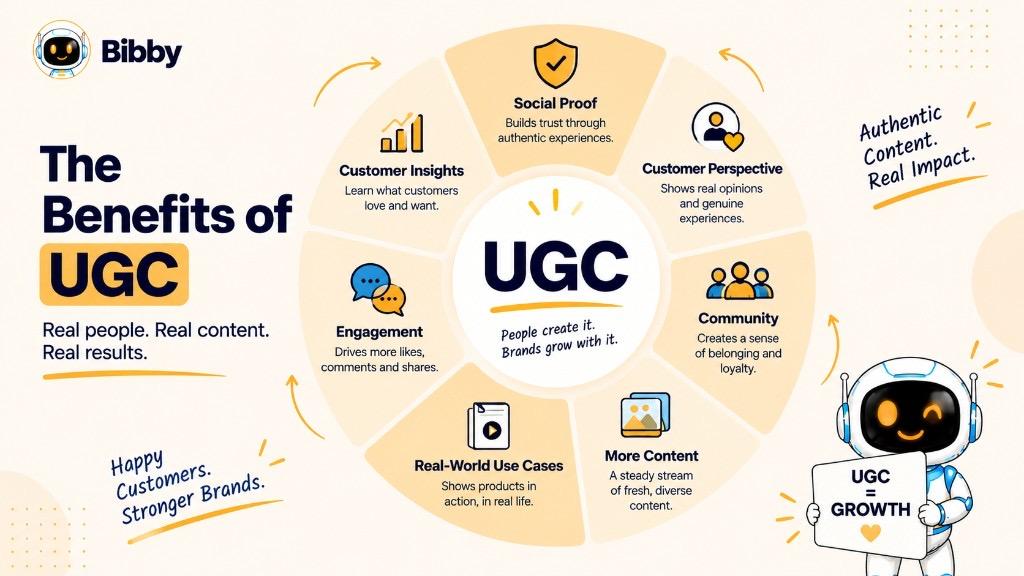
Customer voice, social proof, more assets, participation, real-world use, repurposing, insight, possible conversation, and a journey from discovery → research → decision → new UGC. Use it with branded education—not instead of it. No performance guarantee.
Limitations and Challenges of UGC
Uneven quality. Brand safety. Public ≠ reusable. Permission tracking. Negative reviews (listen; do not bury legitimate criticism). Off-brand voice. Volume overload. Fake reviews and fake engagement. Disclosure for paid or gifted posts. Results depend on fit, platform, and execution.
Collect → review → verify → permission → organize → repurpose → publish → measure.
Do You Need Permission to Use UGC?
Usually yes before marketing reuse. Tagging or a hashtag is not permission. Organic repost ≠ paid ad ≠ website ≠ packaging. Credit ≠ license. Paid UGC needs disclosure.
Ask: which asset, where, organic vs. paid, duration, compensation, credit. Keep a log (creator, asset, platform, status, approved use, date, limits).
Do we have the right for *this* purpose? If unclear, wait.
UGC Best Practices
Easy prompt. Clear guidelines. Preserve meaning. Rights first. Credit when appropriate. Review before publish. Do not fake organic. Allow honest feedback. Adapt per platform. Organize the library. Measure the goal. Mix with other pillars.
Checklist: relevant, permitted, disclosed, honest, credited, right platform, measurable.
UGC in Different Industries
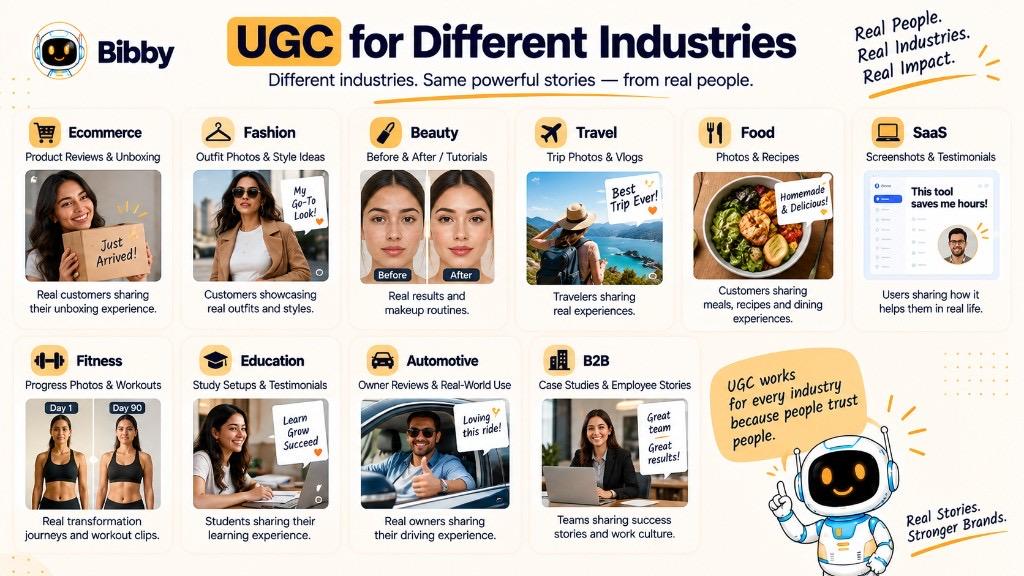
Ecommerce — photos, unboxings, reviews. Fashion and beauty — outfits, tutorials. Travel and food — trips, plates, stays. SaaS and services — workflows, LinkedIn stories. Fitness — routines (no universal results claims). Education, auto, B2B — stories and proof, not only viral clips. See industries and case studies. Freelancers and marketers often run the same permission workflow.
UGC for B2B Brands
Longer sales cycle. Useful UGC: LinkedIn posts, testimonials, workflow demos, success stories, reviews, event recaps, screenshots (strip confidential data), community tips. Separate client UGC from employee posts. Context and credibility beat like counts.
Key Takeaways
UGC is their content about your brand. Encourage it, review it, get rights, keep context, publish honestly, measure the goal. Automation organizes publishing; the customer still supplies the perspective.
Next: social proof, influencer content, and a social media strategy.