
Community management is the practice of building, engaging, and nurturing relationships with your audience across online communities and social media platforms. It involves interacting with customers, answering questions, responding to feedback, moderating discussions, and creating meaningful conversations that strengthen trust in your brand.
As businesses increasingly rely on digital channels to connect with customers, community management has become an essential part of modern marketing. While creating great content helps attract an audience, actively engaging with that audience is what turns followers into loyal customers and brand advocates. Effective community management helps brands improve customer satisfaction, gather valuable insights, protect their reputation, and foster long-term relationships that drive sustainable growth.
In this guide, you'll learn what community management is, why it matters, the responsibilities of a community manager, best practices for building an engaged community, common mistakes to avoid, and how AI is transforming the way brands manage online conversations. With Bibby, teams can also generate captions, schedule posts at AI-optimized times, and free up more time for authentic engagement across multiple platforms.
What Is Community Management?
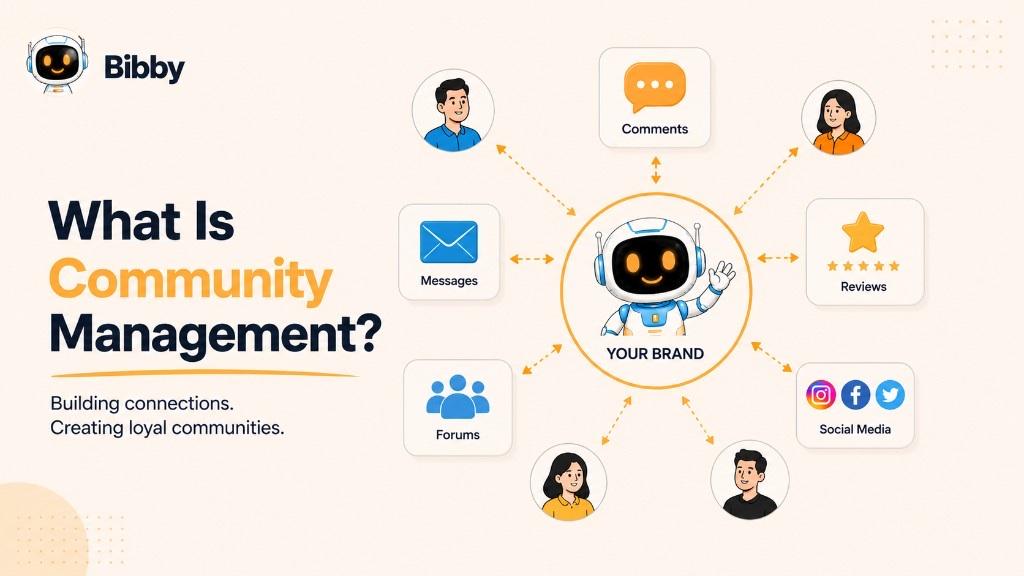
Unlike one-way marketing, community management is built on two-way communication. Instead of simply publishing content, brands actively listen to their audience, participate in conversations, and provide value beyond their products or services. This approach helps transform passive followers into active participants who engage with the brand, share their experiences, and advocate for it within their own networks.
Community management can take place across various digital channels, including social media platforms like Facebook, Instagram, LinkedIn, TikTok, and X (formerly Twitter), as well as online forums, Discord servers, Slack communities, Reddit communities, customer support portals, and branded online communities.
At its core, community management is about creating genuine human connections. Whether it's thanking a customer for a positive review, resolving a complaint in the comments, answering product questions through direct messages, or encouraging members to share their experiences, every interaction contributes to building trust and strengthening the relationship between a brand and its audience.
Community Management Definition
In simple terms, community management is the practice of engaging with your audience, building relationships, and creating a welcoming environment where customers and followers feel heard, valued, and connected to your brand.
From a business perspective, community management is a strategic marketing and customer experience function that improves customer loyalty, increases engagement, gathers valuable feedback, and helps maintain a positive brand reputation across digital channels.
Community Management vs. Community Building
Although the terms are often used interchangeably, community management and community building serve different purposes.
Community building focuses on attracting people with shared interests and creating a space where they can connect. It involves growing the audience, defining the community's purpose, and encouraging people to join.
Community management, on the other hand, begins after the community exists. It involves nurturing relationships, facilitating discussions, answering questions, resolving conflicts, and keeping members engaged over time.
In other words:
- Community building brings people together.
- Community management keeps them engaged, connected, and loyal.
The most successful brands invest in both. They continuously grow their communities while actively managing conversations to ensure members have a positive and valuable experience.
Why Is Community Management Important?
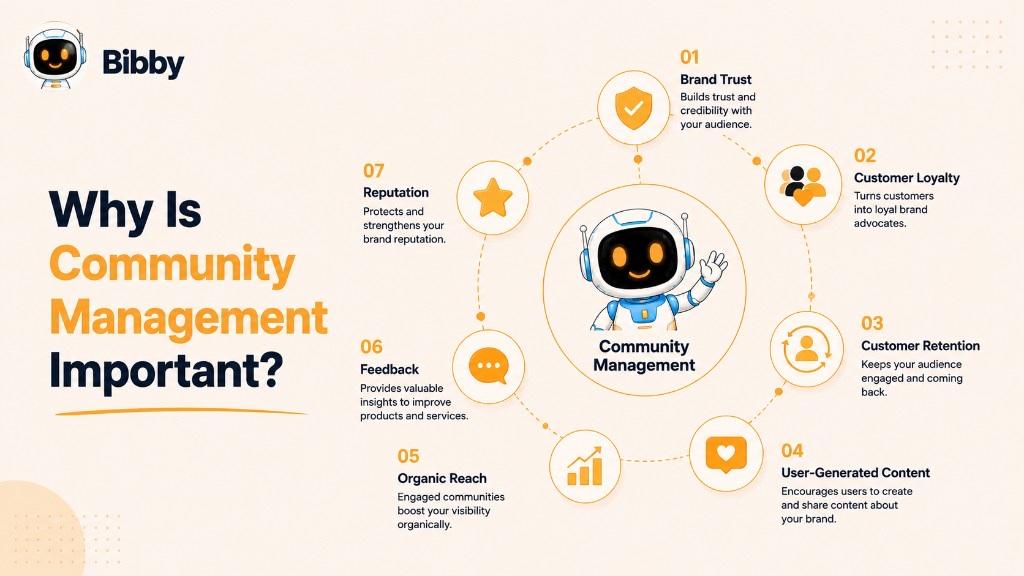
Community management is more than replying to comments or answering direct messages—it's about building lasting relationships that help a brand grow. In today's digital landscape, customers expect businesses to be responsive, approachable, and engaged. Brands that actively interact with their audience are more likely to earn trust, encourage loyalty, and create meaningful experiences that set them apart from competitors.
Whether you're a small business, a growing startup, or a global brand, effective community management can improve customer satisfaction, strengthen your reputation, and increase long-term engagement. Here are some of the biggest benefits of community management.
Builds Brand Trust
Trust is one of the most valuable assets a business can earn. When customers see a brand responding to questions, addressing concerns, and participating in conversations, they're more likely to view the company as reliable and authentic.
Simple actions—such as thanking someone for a positive review or resolving a complaint professionally—show that the business values its customers. Over time, these interactions build credibility and encourage more people to engage with the brand.
Increases Customer Loyalty
People are more likely to stay loyal to brands that make them feel heard and appreciated. Community management helps strengthen these relationships by creating consistent, personalized interactions that go beyond promotional content.
When customers receive timely responses and feel like they're part of a community, they're more likely to return, recommend the brand to others, and continue supporting it.
Improves Customer Retention
Acquiring new customers is important, but retaining existing ones is often more cost-effective. Community management plays a key role in retention by helping businesses resolve issues quickly, answer questions before they become frustrations, and maintain positive relationships over time.
Satisfied customers are more likely to make repeat purchases and remain engaged with the brand.
Encourages User-Generated Content
An engaged community naturally creates content. Customers often share photos, videos, testimonials, reviews, and success stories featuring the products or services they love.
By recognizing and encouraging this user-generated content (UGC), brands can increase authenticity, build social proof, and inspire others to participate in the conversation.
Strengthens Brand Reputation
Every interaction contributes to how people perceive a business. Responding respectfully to criticism, acknowledging mistakes, and celebrating positive feedback all help shape a strong and trustworthy brand image.
Consistent community management also helps brands address misinformation, reduce negative sentiment, and manage potential issues before they escalate—supporting stronger brand awareness over time.
Provides Valuable Customer Insights
Your community is one of the best sources of feedback. Through comments, polls, discussions, and direct messages, customers regularly share opinions, suggestions, and pain points.
These insights can help businesses improve products, refine marketing strategies, identify emerging trends, and better understand customer needs without relying solely on formal surveys.
Increases Organic Engagement and Reach
Most social media platforms reward meaningful interactions. Posts that receive comments, shares, saves, and conversations are more likely to reach a wider audience organically.
By actively participating in discussions and encouraging engagement, community managers help increase content visibility and organic reach while fostering stronger relationships with followers.
Creates Brand Advocates
The ultimate goal of community management isn't simply to grow a follower count—it's to cultivate loyal supporters who genuinely believe in your brand.
Brand advocates voluntarily recommend your business, defend it during criticism, share your content, and introduce your products or services to others. These authentic recommendations often carry more influence than traditional advertising because they come from real customer experiences. Over time, some advocates may become brand ambassadors.
When businesses consistently engage, listen, and provide value, they transform customers into enthusiastic ambassadors who contribute to long-term growth.
What Does a Community Manager Do?
A community manager is responsible for building and maintaining positive relationships between a brand and its audience. They act as the bridge between the business and its customers by encouraging conversations, answering questions, gathering feedback, and ensuring every interaction reflects the brand's values and voice.
While the exact responsibilities vary depending on the organization, community managers typically balance day-to-day engagement with long-term community growth. Their goal is not only to keep conversations active but also to create an environment where customers feel welcomed, supported, and connected.
Daily Responsibilities of a Community Manager
#### Respond to Comments
Replying to comments on social media posts is one of the most visible aspects of community management. Whether responding to compliments, answering questions, or addressing concerns, timely replies show that the brand values its audience and is actively listening.
#### Answer Direct Messages (DMs)
Customers frequently reach out through private messages for product information, order updates, pricing, or support. Community managers ensure these inquiries receive prompt and helpful responses or are directed to the appropriate team when necessary.
#### Moderate Discussions
Healthy communities require active moderation. Community managers monitor conversations to encourage respectful interactions while removing spam, offensive content, misinformation, or posts that violate community guidelines.
#### Engage With Followers
Community management isn't just reactive—it should also be proactive. Community managers start conversations by asking questions, replying to user-generated content, celebrating milestones, and interacting with followers beyond their own posts.
#### Welcome New Members
For brands with Facebook Groups, Discord servers, Slack workspaces, or other private communities, welcoming new members helps create a positive first impression and encourages participation from day one.
#### Resolve Customer Concerns
Not every interaction is positive. Community managers often handle complaints, negative reviews, or public criticism by responding professionally, empathizing with customers, and working toward practical solutions. Their approach can significantly influence public perception of the brand.
#### Monitor Brand Mentions
People don't always tag a brand when talking about it. Community managers monitor mentions across social media and online communities—often with social listening—to discover opportunities for engagement, thank customers for positive feedback, or address potential issues before they grow.
#### Encourage User-Generated Content
Community managers motivate customers to share their experiences through photos, videos, testimonials, reviews, and branded hashtags. Highlighting this content not only rewards community members but also provides authentic social proof for prospective customers.
Strategic Responsibilities of a Community Manager
#### Develop Engagement Strategies
Community managers create initiatives that encourage participation, such as Q&A sessions, challenges, polls, contests, live events, and discussion prompts. These activities help keep the community active and strengthen relationships between members and the brand.
#### Measure Community Performance
Successful community management relies on data. Community managers track key metrics such as engagement rate, response time, sentiment, active members, customer satisfaction, and community growth to evaluate performance and identify opportunities for improvement.
#### Collect Customer Feedback
Communities provide direct access to customer opinions and suggestions. Community managers gather recurring feedback and share it with product, marketing, and customer success teams to help improve products, services, and overall customer experience.
#### Build Brand Advocacy
One of the most valuable long-term goals is turning satisfied customers into enthusiastic advocates. Community managers recognize loyal members, encourage referrals, feature customer success stories, and create opportunities for community members to become ambassadors for the brand.
#### Collaborate Across Teams
Community managers work closely with marketing, sales, product development, and customer support teams. Insights gathered from the community often influence campaign planning, feature development, content creation, and customer service improvements.
The Evolving Role of AI in Community Management
Modern community managers are increasingly supported by AI-powered tools that automate repetitive tasks while allowing them to focus on building authentic relationships.
AI can help by:
- Suggesting replies to common questions
- Identifying trending conversations
- Detecting spam or inappropriate content
- Analyzing audience sentiment
- Prioritizing urgent messages
- Scheduling engaging content at optimal times
- Generating caption ideas and conversation starters
Rather than replacing human interaction, AI enables community managers to respond faster, work more efficiently, and dedicate more time to meaningful conversations that strengthen their communities. Platforms like Bibby help with AI captions, campaign organization, and scheduling so teams can spend more time engaging.
Types of Community Management
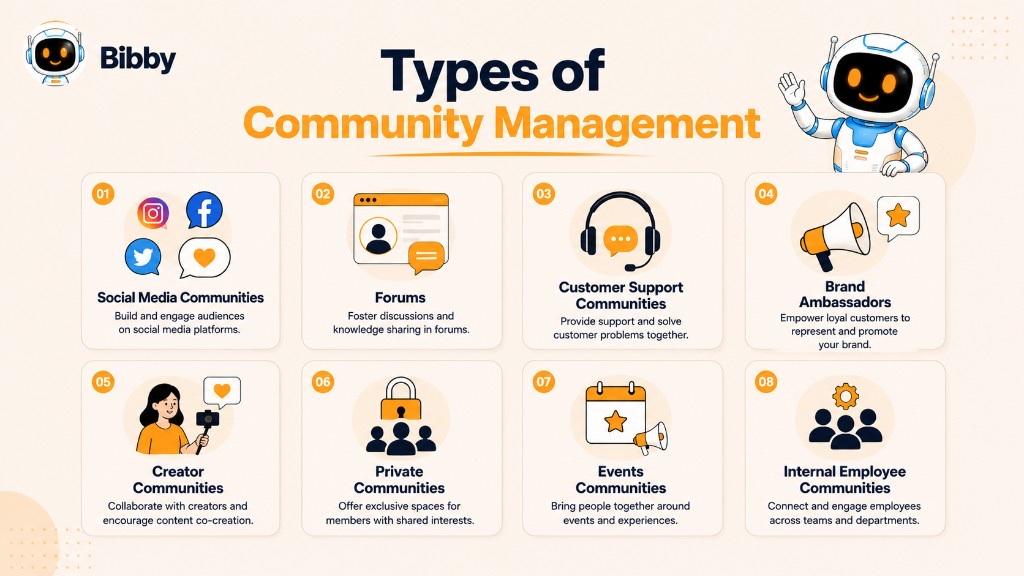
Community management isn't limited to replying to comments on social media. Depending on a brand's goals, audience, and communication channels, community managers may oversee several different types of communities. Each type requires its own engagement strategy, moderation approach, and success metrics.
Social Media Community Management
Social media community management focuses on engaging with audiences across platforms like Facebook, Instagram, LinkedIn, TikTok, X (formerly Twitter), Pinterest, and YouTube.
Community managers actively participate in conversations by:
- Responding to comments and direct messages
- Answering customer questions
- Engaging with user-generated content
- Monitoring brand mentions
- Handling customer feedback
- Encouraging discussions
- Building relationships with followers
Since social media is often the first place customers interact with a brand, effective community management helps create positive experiences that improve trust, loyalty, and engagement.
Online Forum Community Management
Many brands build communities around discussion forums where members can ask questions, share knowledge, and help one another—including brand-hosted forums, industry boards, Reddit communities, and Q&A platforms. Community managers keep discussions helpful, organized, and respectful.
Customer Support Communities
Customer support communities allow users to solve problems collaboratively while reducing the burden on support teams—through help centers, knowledge bases, community Q&A forums, and technical discussion groups. Community managers encourage experienced users to share solutions and escalate unresolved issues when needed.
Brand Ambassador Communities
Brand ambassador communities consist of loyal customers, creators, influencers, or partners who actively promote a company's products or services. Community managers share exclusive updates, provide campaign resources, recognize top contributors, offer rewards, and collect feedback before product launches—often working closely with a formal brand ambassador program.
Creator Communities
Many companies build communities for content creators who produce educational, entertaining, or promotional content. Community managers support creators with collaboration opportunities, creative guidelines, partnership answers, content highlights, and creator events or challenges.
Private Communities
Private communities—Facebook Groups, Discord servers, Slack workspaces, WhatsApp Communities, Circle, Skool, and similar platforms—often generate deeper discussions because membership is controlled. Community managers welcome new members, enforce guidelines, facilitate conversations, and maintain an inclusive atmosphere.
Event and Webinar Communities
Businesses create temporary or ongoing communities around events, webinars, conferences, workshops, or online courses. Community managers share announcements, answer questions, encourage networking, facilitate live discussions, collect feedback, and continue conversations after the event.
Internal Employee Communities
Organizations also build internal communities—employee forums, Slack channels, Microsoft Teams communities, knowledge-sharing platforms, and innovation groups—to improve communication, collaboration, and company culture.
Which Type of Community Management Is Right for Your Business?
The right approach depends on your audience and business objectives. Many successful businesses combine several types—attracting audiences on social media, supporting customers in forums, nurturing loyal customers in private groups, and collaborating with creators through ambassador programs—to build stronger relationships across the customer lifecycle.
Community Management vs. Social Media Management
Although the terms are often used interchangeably, they represent two distinct disciplines. Simply put, social media management is about publishing content, while community management is about building relationships.
A social media manager plans, creates, schedules, and analyzes content to increase brand visibility and achieve marketing goals. A community manager engages with the people who interact with that content—responding to comments, answering questions, moderating discussions, and fostering loyalty.
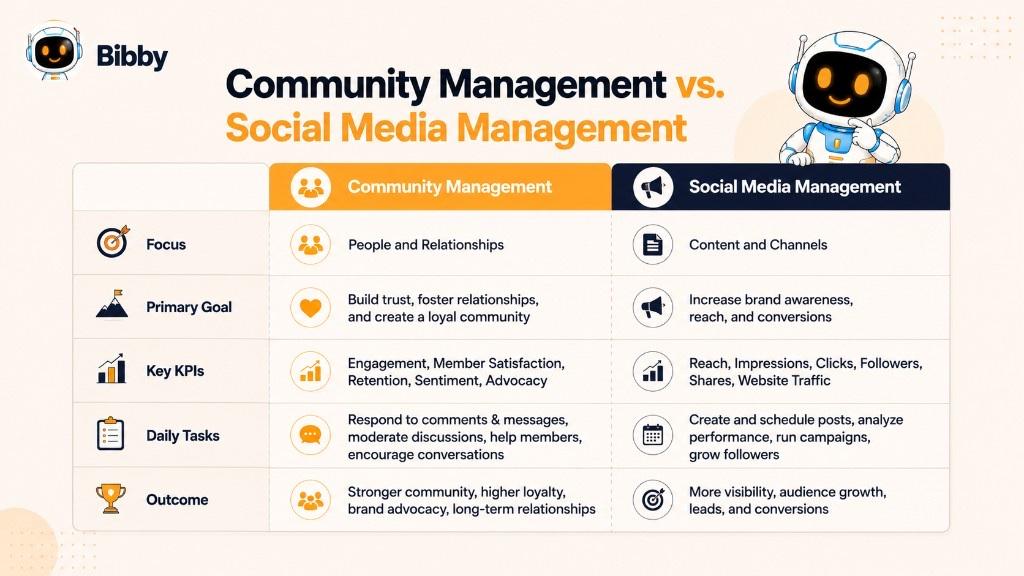
| Social Media Management | Community Management |
|---|---|
| Creates and publishes content | Engages with the audience |
| Focuses on content strategy | Focuses on relationship building |
| Plans content calendars | Facilitates conversations |
| Schedules posts across platforms | Responds to comments and direct messages |
| Measures content performance | Measures community health and engagement |
| Promotes products and campaigns | Builds trust and customer loyalty |
| Aims to increase reach and visibility | Aims to increase engagement and advocacy |
| Primarily proactive | Both proactive and reactive |
Key Differences
Primary goal: Social media management increases brand awareness, traffic, leads, and visibility through strategic publishing. Community management builds genuine relationships, encourages conversations, and creates a positive brand experience.
Daily activities: Social media managers create content, design graphics, write captions, schedule posts, plan campaigns, and review analytics. Community managers reply to comments and DMs, moderate discussions, resolve concerns, welcome members, monitor mentions, and engage with creators and advocates.
Success metrics: Social media management often tracks reach, impressions, follower growth, CTR, website traffic, content engagement, and conversion rate. Community management tracks response time, engagement quality, community growth, CSAT, sentiment, repeat engagement, active members, and brand advocacy.
How They Work Together
These functions are most effective when they complement each other. A social media manager might publish a product launch; the community manager answers questions, thanks customers, addresses concerns, and keeps the conversation active. Insights from community interactions then influence future content—creating a loop of publish → engage → gather insights → improve → strengthen relationships.
For small businesses, one person often handles both. AI-powered tools like Bibby make this easier with caption generation, content calendars, scheduling, and multi-platform publishing from a single workspace. As organizations grow, roles often specialize—but consistent content plus authentic engagement remains essential.
Community Management vs. Customer Support
Community management and customer support both involve interacting with customers, but they serve different purposes. Customer support focuses on solving individual problems; community management builds long-term relationships and an engaged, loyal audience.
| Community Management | Customer Support |
|---|---|
| Builds relationships with the audience | Solves customer problems and issues |
| Encourages conversations and engagement | Provides technical or account assistance |
| Focuses on long-term community growth | Focuses on resolving individual cases |
| Proactively starts discussions | Primarily responds to support requests |
| Measures engagement and community health | Measures resolution time and customer satisfaction |
| Often works on public platforms | Often works through private support channels |
Community managers communicate in a conversational, brand-aligned style that encourages participation. Support teams communicate with a stronger focus on clear, accurate problem-solving. Channels often overlap—a customer may report an issue in a public comment before being directed to private support.
When community management becomes support (login issues, bugs, refunds), the community manager acknowledges the concern, provides initial guidance if appropriate, and escalates privately so sensitive details stay out of public threads.
Businesses need both: community managers strengthen relationships and represent the brand publicly; support teams resolve issues and help customers succeed. Together they improve response quality, satisfaction, loyalty, reputation, feedback quality, and retention.
Essential Community Management Skills
Successful community management requires communication, empathy, strategic thinking, and problem-solving—not just being active on social media.
Key skills include:
- Communication — clear, platform-appropriate messaging that reflects the brand
- Empathy — understanding how customers feel and responding with care
- Active listening — spotting FAQs, pain points, feature requests, and trends
- Conflict resolution — de-escalating tense situations calmly and constructively
- Writing — clear, friendly, concise, accurate replies
- Brand voice consistency — every response should match the brand's personality
- Problem-solving — assessing situations quickly and collaborating across teams
- Organization and time management — prioritizing urgent inquiries across channels
- Data analysis — engagement rate, response time, growth, sentiment, CSAT, UGC, mentions
- Crisis management — communicating promptly, accurately, and empathetically under pressure
- Adaptability — learning new platforms, algorithms, and audience behaviors
- Creativity — polls, Q&As, challenges, giveaways, live discussions, spotlights, UGC campaigns
- AI literacy — drafting replies, summarizing conversations, prioritizing messages, generating engagement ideas
The most important skill remains building genuine relationships. Communities thrive when members feel welcomed, respected, and appreciated.
Community Management Best Practices
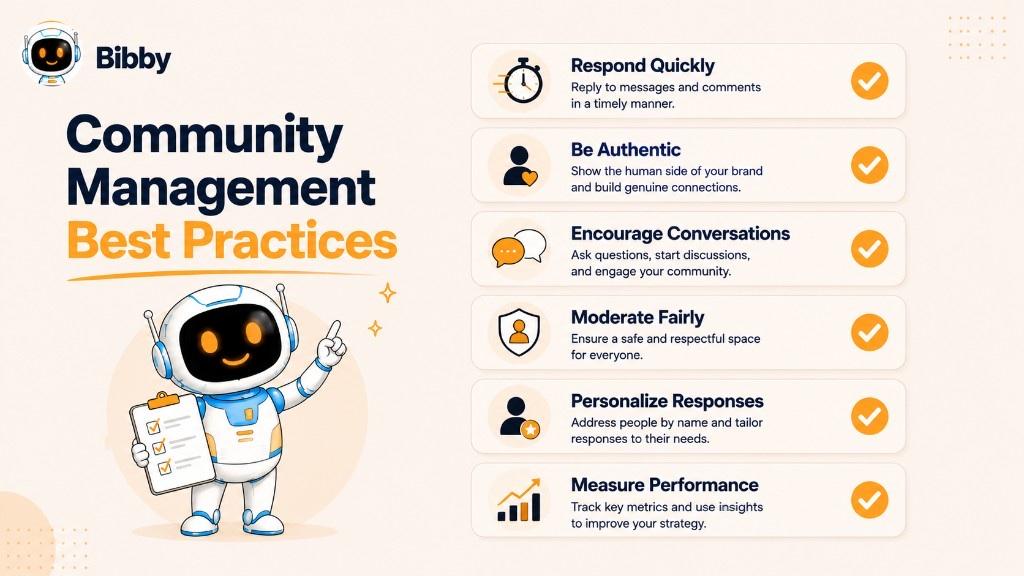
Respond Promptly
Timely replies show that your brand is active and values its audience. You don't always need an immediate solution, but acknowledging the message lets customers know they've been heard.
Be Authentic and Human
Avoid overly scripted responses. Use a natural tone, personalize replies, show appreciation, admit mistakes honestly, and celebrate customer successes.
Maintain a Consistent Brand Voice
Create brand voice guidelines so everyone managing the community communicates consistently across platforms.
Encourage Two-Way Conversations
Ask open-ended questions, run polls and surveys, invite opinions, start industry discussions, request customer stories, and encourage people to share experiences.
Recognize and Celebrate Community Members
Feature success stories, share UGC, celebrate milestones, thank loyal followers, showcase achievements, and offer ambassador recognition.
Handle Negative Feedback Professionally
Stay calm, acknowledge concerns, avoid defensiveness, offer solutions, move sensitive conversations private when needed, and follow up after resolution.
Establish Clear Community Guidelines
Explain acceptable conduct, prohibited content, promotion rules, anti-spam policies, respectful standards, and consequences for violations.
Moderate Consistently
Remove spam, prevent harassment, address misinformation, enforce rules fairly, and protect members—without silencing healthy debate.
Personalize Your Responses
Reference the customer's specific question or experience instead of generic "Thanks for your comment" replies.
Listen More Than You Talk
Monitor comments, DMs, reviews, and discussions to understand needs, FAQs, product feedback, trends, pain points, and content ideas—supported by social listening when possible.
Encourage User-Generated Content
Invite photos, video reviews, testimonials, tutorials, success stories, and creative challenges—then feature community-created content to build trust.
Measure Performance Regularly
Track engagement rate, response time, community growth, active members, CSAT, brand mentions, sentiment, and UGC volume.
Leverage AI to Improve Efficiency
Use AI for drafting replies, prioritizing messages, detecting spam, identifying sentiment, suggesting engagement opportunities, summarizing conversations, scheduling content, and generating caption ideas—without replacing authentic human interaction. Bibby helps with AI captions, campaign organization, and AI-optimized scheduling so you can focus on relationships.
Keep Showing Up
Communities grow through regular, authentic engagement over time—not one viral post. Consistency turns followers into loyal customers and advocates.
Common Community Management Mistakes
- Ignoring comments and messages — unanswered interactions discourage future engagement
- Responding too slowly — delays frustrate customers and let negative conversations grow
- Using generic or robotic responses — impersonal replies weaken relationships
- Deleting negative feedback unnecessarily — silencing legitimate criticism damages trust
- Being defensive — arguing or blaming rarely improves the situation
- Inconsistent brand voice — mixed tones confuse customers
- Focusing only on promotion — constant ads kill meaningful conversation
- Over-moderating — excessive control discourages participation
- Failing to establish guidelines — inconsistent moderation and unsafe spaces
- Ignoring customer feedback — missed product and experience improvements
- Neglecting analytics — intuition alone can't guide strategy
- Relying too heavily on automation — context-free auto-replies feel machine-like
- No crisis communication plan — delayed or contradictory responses under pressure
- Forgetting relationships — communities thrive on connection, not just publishing
Brands that prioritize listening, authenticity, consistency, and genuine relationship-building develop engaged communities that support long-term growth.
Community Management Metrics to Track
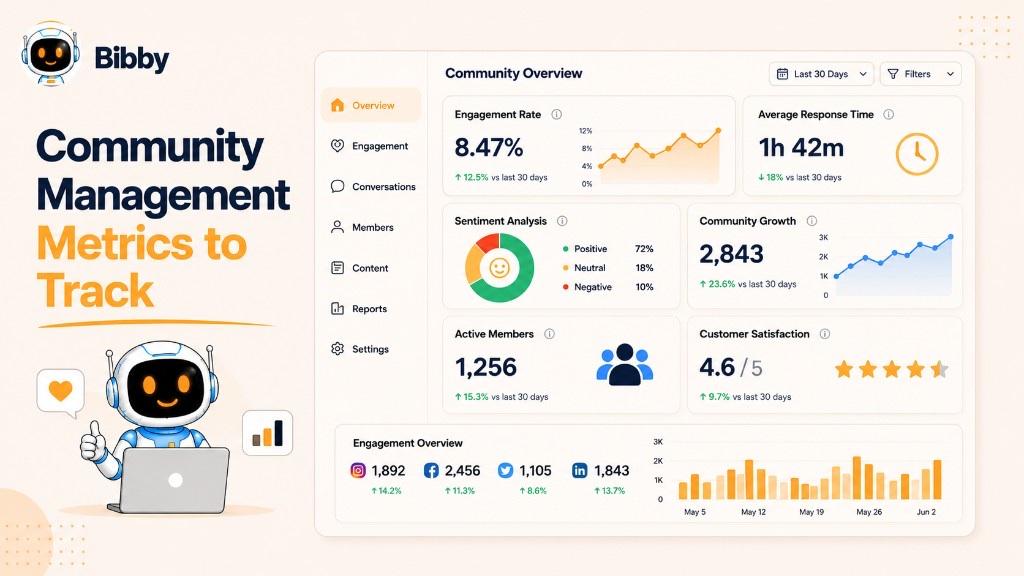
Engagement Rate
Measures likes, comments, shares, saves, replies, mentions, and reactions—a core indicator of community health and engagement.
Response Time & First Response Time (FRT)
How quickly you reply—and how quickly you send the first acknowledgment—signals attentiveness and customer focus.
Average Resolution Time
How long it takes to fully resolve questions, complaints, or support-related conversations.
Community Growth & Active Members
Track new followers/members and how many regularly comment, post, share, attend events, or participate in polls. Engaged members matter more than inactive audience size.
Brand Mentions & Sentiment Analysis
Monitor tagged and untagged mentions via social listening, and classify conversations as positive, neutral, or negative.
Customer Satisfaction (CSAT) & Net Promoter Score (NPS)
Measure satisfaction after interactions and willingness to recommend your brand.
User-Generated Content & Share Rate
Track customer photos, testimonials, reviews, tutorials, and branded hashtag usage—plus shares that expand organic reach.
Retention Rate & Conversion Metrics
Measure ongoing participation and business outcomes such as website visits, newsletter sign-ups, trials, purchases, event registrations, and leads.
Choose KPIs that match your goals—SaaS may prioritize response time and CSAT; ecommerce may focus on UGC and conversions; creators may value active participation and shares. Review analytics regularly and turn insights into action.
Community Management Tools
Community management tools help businesses streamline communication, engagement, analytics, and automation as conversations grow across platforms.
Categories of Tools
- Social media management platforms — scheduling, publishing, unified inbox, comment/DM management, calendars, collaboration, analytics
- Community platforms — Facebook Groups, Discord, Slack, Circle, Skool, branded forums
- Social listening tools — brand mentions, trends, sentiment, competitor discussions
- CRM tools — contact history, preferences, lead status for more personalized interactions
- Analytics and reporting — engagement, growth, response time, sentiment, conversions
- AI-powered tools — draft replies, generate captions, prioritize messages, detect spam, translate, automate workflows
When evaluating tools, look for multi-platform publishing, unified inbox, AI content creation, analytics, automation, integrations, and ease of use.
How Bibby Simplifies Community Management
While many tools focus on just one aspect of social media, Bibby brings content creation, publishing, automation, and AI together in a single platform.
With Bibby, you can:
- Generate images with AI or upload your own media
- Create engaging captions automatically
- Schedule posts across Facebook, Instagram, LinkedIn, YouTube, TikTok, and other supported platforms
- Publish images, videos, carousels, stories, and more from one dashboard
- Manage social media through a natural AI chat interface
Instead of navigating multiple tools, you can chat with Bibby to create a brand kit, build campaigns, generate posts, regenerate captions, organize schedules, and manage your publishing workflow—so community managers spend less time on repetitive tasks and more time engaging.
How AI Is Changing Community Management
AI reshapes community management by helping brands stay responsive without sacrificing quality. It automates repetitive tasks, surfaces insights, and assists workflows so community managers can focus on genuine relationships.
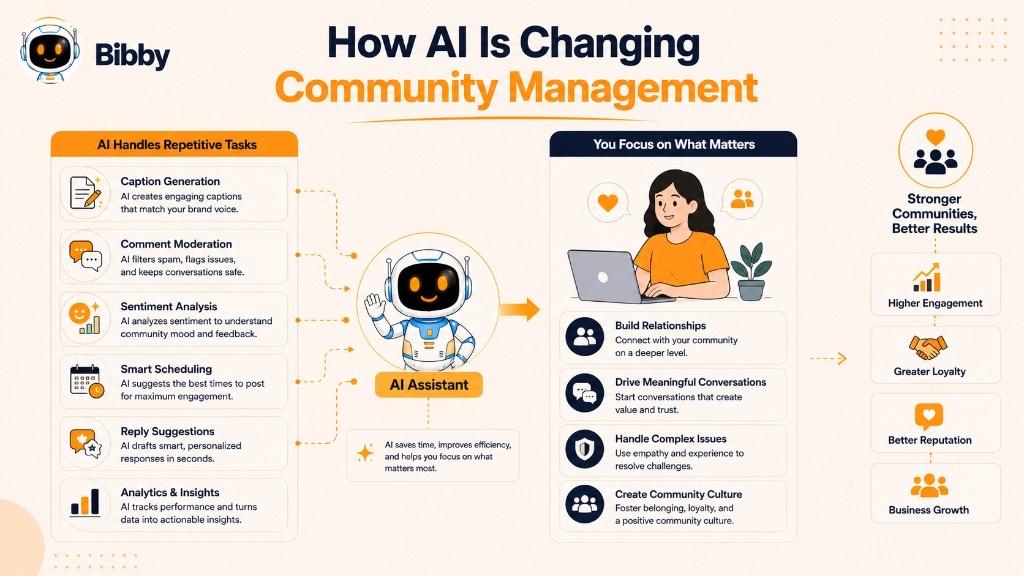
AI helps with:
- Faster response suggestions and message prioritization
- AI-assisted caption and discussion-prompt creation
- Smarter content scheduling at optimal times
- Automated moderation for spam and policy violations
- Sentiment analysis across conversations
- Social listening at scale
- Workflow automation and AI-powered analytics
Human oversight remains essential for empathy, creativity, conflict resolution, and brand authenticity. Sensitive conversations should always involve human judgment.
How Bibby Uses AI for Smarter Community Management
Bibby combines AI-powered content creation, intelligent scheduling, and conversational automation. Through its AI chat interface, users can create brand kits, launch campaigns, generate posts, regenerate captions, organize publishing schedules, and manage content workflows—making social media management faster and more intuitive for small businesses, creators, and marketing teams.
The Future of Community Management
As AI evolves, community management will become more proactive, data-driven, and personalized. The strongest brands will still prioritize authentic human connections. The future isn't human versus AI—it's human expertise enhanced by intelligent automation.
Community Management Examples
Example 1: Responding to a Customer Complaint
Poor response: "Please contact support."
Better response: "Hi Sarah, we're sorry to hear your order hasn't arrived yet. We'd like to help resolve this as quickly as possible. Please send us a direct message with your order number, and our team will look into it right away."
This acknowledges the concern, shows empathy, offers a clear next step, and moves sensitive details private.
Example 2: Encouraging User-Generated Content
A fitness brand runs a monthly branded hashtag campaign, highlights customer posts, and thanks participants—increasing participation, visibility, social proof, and relationships through UGC.
Example 3: Managing a Product Launch
During a major feature release, the community manager answers questions, shares tutorials, responds to bug reports, collects feature requests, thanks customers, and provides updates—supporting customers while feeding insights back to the product team.
Example 4: Welcoming New Community Members
In a private Facebook Group, new members receive a welcome message, intro guide, guidelines, resources, and an invitation to introduce themselves—making them more likely to participate.
Example 5: Turning Customers Into Brand Advocates
When a customer regularly shares positive experiences, the community manager thanks them publicly, features content (with permission), invites early feature testing, includes them in ambassador campaigns, and shares exclusive updates—moving them toward brand ambassador status.
Example 6: Managing a Viral Conversation
When a post goes viral, the community manager answers FAQs, removes spam, moderates inappropriate comments, responds to constructive feedback, highlights helpful replies, and shares updates to keep the experience positive.
Example 7: Building Community Through Educational Content
When the same questions repeat, the community manager creates short videos, guides, live Q&As, downloadable resources, and weekly tips—reducing repetitive questions and positioning the brand as a trusted expert.
What These Examples Teach Us
- Listen before responding.
- Communicate with empathy and professionalism.
- Encourage meaningful conversations.
- Recognize and appreciate community members.
- Resolve issues quickly and transparently.
- Create opportunities for participation.
- Build long-term relationships—not only short-term engagement.
How to Build a Community Management Strategy
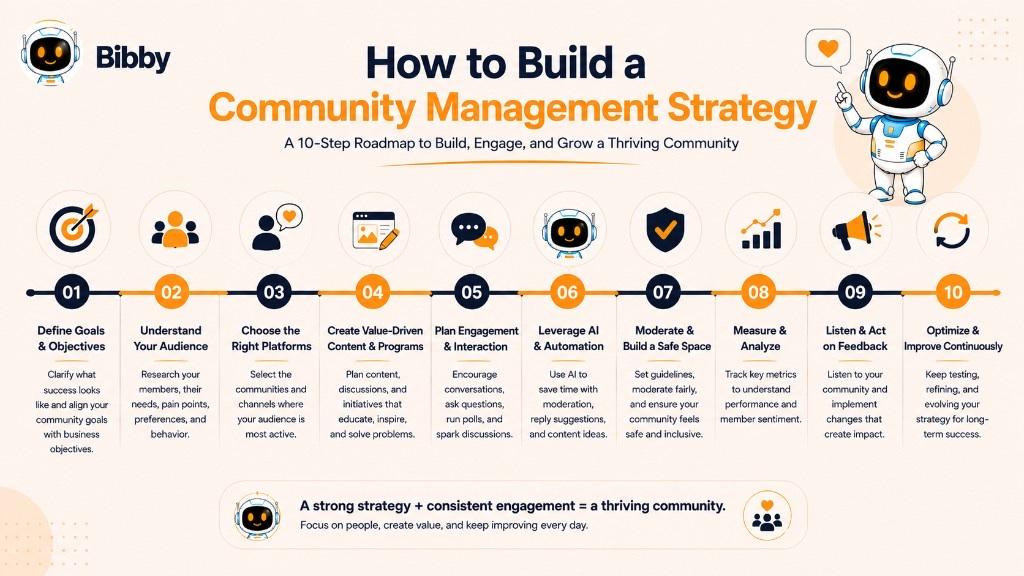
1. Define Your Goals
Set goals such as increasing engagement, building awareness, improving loyalty, reducing support requests, growing the community, collecting feedback, encouraging UGC, increasing retention, or strengthening advocacy.
2. Understand Your Audience
Research interests, challenges, preferred platforms, communication preferences, FAQs, content they enjoy, and reasons they engage with your brand.
3. Choose the Right Community Channels
Focus where your audience already spends time—Facebook, Instagram, LinkedIn, TikTok, YouTube, Discord, Reddit, Slack, private forums, or branded community platforms.
4. Create Community Guidelines
Define acceptable behavior, respectful communication, spam policies, promotional rules, privacy expectations, and consequences for violations.
5. Develop an Engagement Plan
Ask questions, run polls, host live Q&As, share behind-the-scenes content, highlight members, encourage UGC, celebrate milestones, and start industry discussions.
6. Create a Content Publishing Schedule
Plan educational posts, product updates, customer stories, tutorials, industry news, videos, carousels, stories, and community highlights using a content calendar.
7. Respond Consistently
Set standards for response times, brand voice, escalation, support handoffs, moderation, and crisis communication.
8. Empower Your Team With AI and Automation
Automate scheduling, draft captions, organize campaigns, prioritize messages, identify spam, summarize conversations, and recommend optimal posting times with tools like Bibby.
9. Measure and Optimize Your Strategy
Review engagement rate, response time, growth, active members, CSAT, sentiment, UGC, and conversion rates—then refine.
10. Continuously Listen and Improve
Pay attention to feedback, FAQs, feature requests, trends, discussions, and product suggestions. Community management is an ongoing process: listen, engage, provide value, and adapt as platforms and expectations change.
By combining thoughtful strategy, authentic communication, consistent engagement, and modern AI-powered tools, businesses can create communities that support marketing efforts and become a lasting competitive advantage.
Key Takeaways
- Community management builds two-way relationships—listening, responding, moderating, and nurturing loyalty beyond one-way publishing.
- It differs from social media management (content) and customer support (case resolution), but works best when all three collaborate.
- Strong communities need clear guidelines, consistent response standards, authentic engagement, and regular measurement.
- Track engagement, response time, sentiment, active members, UGC, CSAT/NPS, and business outcomes—not vanity metrics alone.
- AI can draft replies, generate captions, schedule content, and surface insights, but human empathy still drives trust.
- Bibby helps automate captions, campaigns, and AI-optimized publishing so you can spend more time engaging—start with a free trial or explore related terms like engagement, UGC, social listening, brand ambassadors, and social media strategy.