
If you manage multiple social channels, scheduling can turn publishing from a daily chore into a predictable workflow. In this guide you’ll learn what it means, how it works, how it differs from automation and management, and how AI-powered tools can make the process faster—without treating a queue as a reach guarantee.
Let’s start with the fundamentals.
What Is Social Media Scheduling?
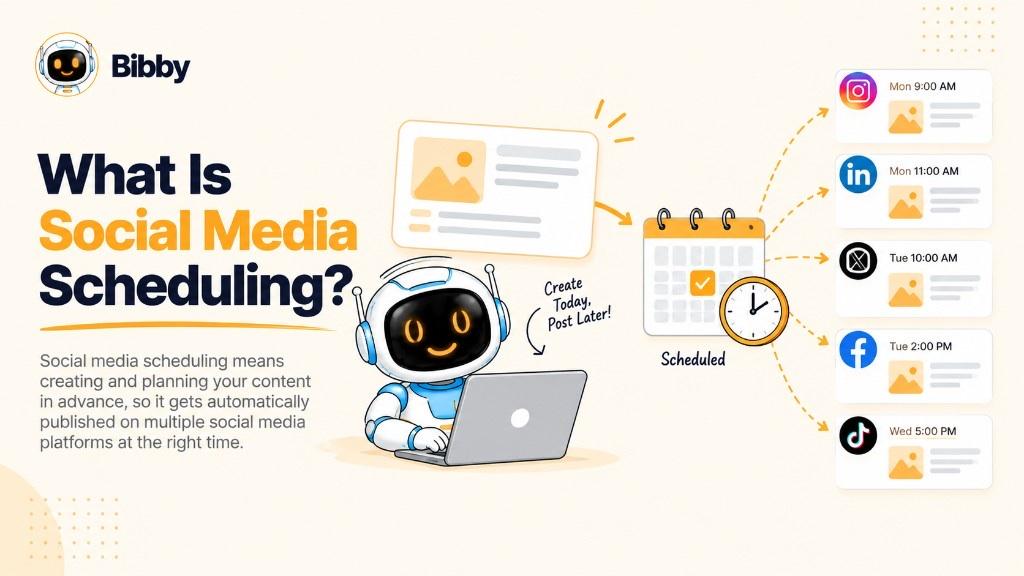
Social media scheduling is the process of planning social content in advance and setting it to publish automatically at a chosen date and time. Instead of posting manually every day, you prepare multiple posts and let a scheduling tool publish them according to your plan.
A typical workflow: create or upload content, choose platforms, write a caption, pick a time, and schedule. The tool stores those instructions and attempts to publish at the selected time.
You can schedule many formats: images, carousels, videos, Stories, educational posts, promotions, and campaign sequences. Depending on the tool and network, you can customize copy and media per platform before anything goes live.
The biggest advantage is consistency. Rather than deciding what to post every time you open an app, you organize work into a content calendar and keep a regular cadence.
Modern tools can go beyond a timer. AI can help generate captions, create visuals, recommend times, and automate parts of the workflow. Scheduling is then less about setting an alarm and more about running a system.
In simple terms: scheduling helps you decide what to publish, where, and when—before the post goes live.
How Does Social Media Scheduling Work?
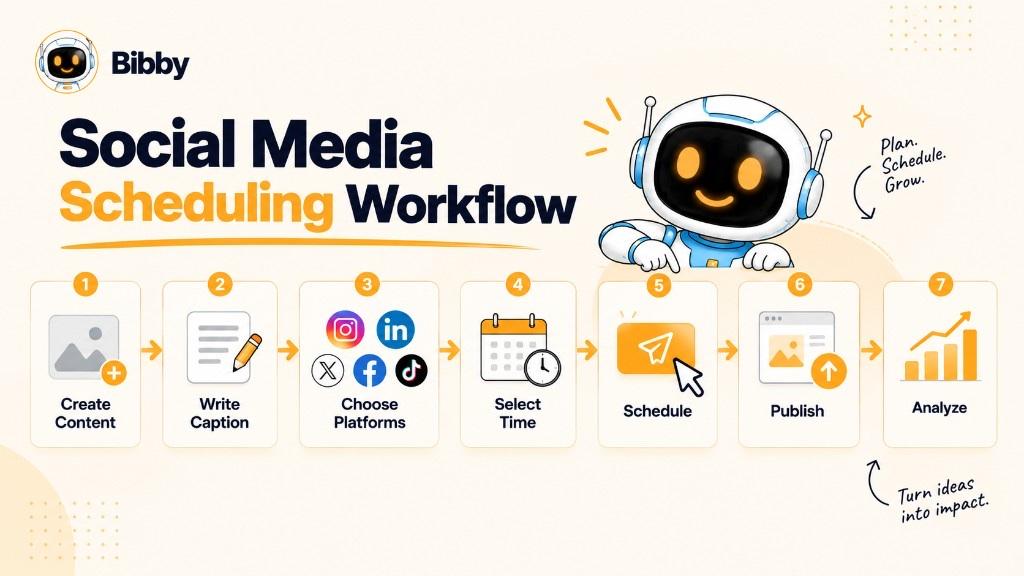
You prepare content in advance and set rules for when and where it should publish. Exact screens vary by tool; most workflows follow these steps.
1. Create or Upload Your Content
Prepare an image, carousel, video, Story, or other supported format. Some tools, including Bibby, can also generate a visual with AI so you can start from an idea instead of a file.
2. Choose Your Social Media Platforms
Select where the content should appear. Bibby supports Facebook, Instagram, LinkedIn, YouTube, and TikTok from one workflow. That reduces app-switching. Graphics that include X are illustrations—Bibby does not publish there.
3. Create the Caption and Post Copy
Write the caption yourself or use AI based on the content, brand voice, or posting style. For cross-platform work, adapt copy and format for each network instead of sending one unmodified asset everywhere.
4. Choose When the Post Should Be Published
Traditional scheduling uses the exact time you pick. AI-assisted tools can recommend or select times from audience activity, history, and other available signals. There is no universal best time to post.
5. Schedule the Post
The tool stores the instructions and automatically attempts to publish at the selected time. Repeat for multiple posts to fill a calendar. Publishing depends on connected accounts, platform rules, and successful delivery—it is not a distribution or virality guarantee.
6. Review and Manage Your Scheduled Content
Scheduling is not set-and-forget. Review upcoming posts, change captions, replace media, move times, regenerate copy, or reschedule when plans change. The calendar is the control room for what is about to go live.
From Manual Posting to Automated Publishing
The idea is simple: prepare once, publish later without repeating the upload every day.
Modern tools combine that with AI creation, captions, time suggestions, and broader automation. Scheduling becomes one step in create → plan → publish → manage.
Why Is Social Media Scheduling Important?
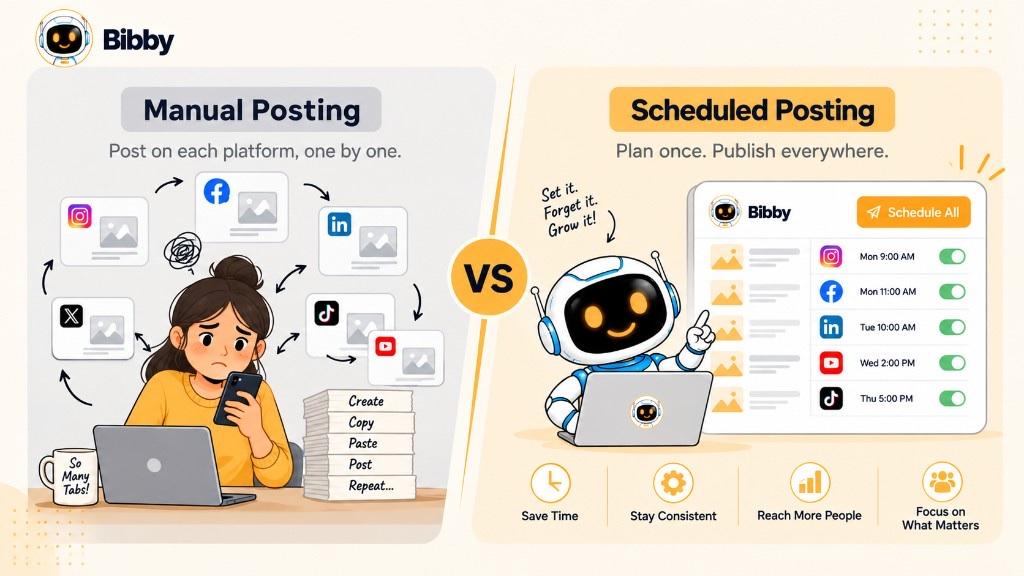
A consistent presence across several platforms is hard when every post is created and published by hand. Scheduling adds structure and cuts repetitive publishing work.
Maintain a Consistent Posting Schedule
Plan ahead instead of relying on daily motivation. A queue also helps during busy periods, holidays, and launches when you cannot sit in the apps.
Save Time on Repetitive Publishing Tasks
Uploading media, writing captions, picking times, and switching accounts adds up. A scheduler lets you prepare a batch once.
Manage Multiple Social Media Platforms
One network is manageable. Several at once is not, if you do every step natively. Centralized scheduling coordinates campaigns while you still adapt each post.
Plan Content and Campaigns in Advance
Build around launches, promotions, events, educational series, and seasons. Map the sequence before the campaign starts instead of improvising at the last minute.
Publish at Strategic Times
You do not have to be online when a post should go live. Choose times from strategy, audience behavior, or tool recommendations. AI can suggest windows; it cannot promise extra impressions.
Reduce Last-Minute Social Media Work
Without a plan, social becomes: open the app, invent a post, write a caption, upload, publish. Scheduling moves most of that into planned preparation.
Create a More Repeatable Social Media Workflow
The benefit is not only “later.” It is a repeatable process:
Create → Write → Review → Schedule → Publish → Analyze → Improve
Analyze in native Insights or a dedicated analytics product. Bibby does not replace those dashboards. Then improve the next batch.
Social Media Scheduling vs. Social Media Automation
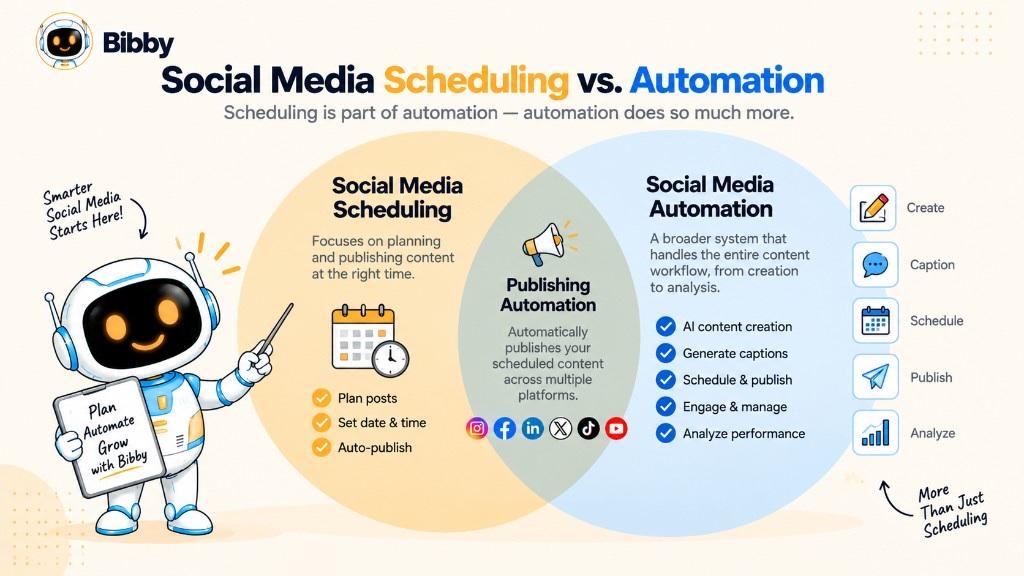
They are related, but not the same. Scheduling focuses on when content is published. Automation can cover a broader range of tasks.
What Is Social Media Scheduling?
Prepare content and set a date and time. Example: create ten Instagram posts on Monday and queue them across two weeks. The tool handles publishing so you do not tap Post each time.
What Is Social Media Automation?
Social media automation uses software to reduce manual work across the workflow. Depending on the tool, that can include captions, creating or repurposing content, scheduling, publishing, time recommendations, campaigns, and—in some products—analytics. Capabilities vary. Bibby automates create, caption, campaign, and schedule; performance stays in Insights.
Social Media Scheduling vs. Automation: What's the Difference?
| Social media scheduling | Social media automation |
|---|---|
| Focuses on publishing at planned times | Covers a broader range of tasks |
| Content is prepared before it is queued | May assist with preparation itself |
| Usually centers on a content calendar | Can involve complete workflows |
| Answers when a post should go live | Can assist before, during, and after publish |
| One part of social media management | Can support several management areas |
Scheduling answers: “When should this post go live?”
Automation answers: “Which parts of this workflow can happen without me doing them by hand?”
Is Social Media Scheduling a Form of Automation?
Yes. The publish step happens automatically after you configure the schedule.
Not every scheduler is a full automation platform. A basic tool may only fire at a clock time. A more advanced product can combine the queue with AI visuals, captions, time optimization, and chat workflows.
Social Media Scheduling vs. Social Media Management
Scheduling is one part of management. Scheduling is the publishing workflow. Management is the whole presence.
What Is Social Media Scheduling?
It helps you prepare content, choose platforms, write or generate captions, pick times, queue posts, and organize upcoming work in a calendar. The goal is consistent publishing with less day-to-day tapping.
What Is Social Media Management?
Management includes strategy, content, brand voice, campaigns, scheduling, audience replies, monitoring conversations (in listening or native tools), analyzing performance, and adjusting the plan. Scheduling is a specific activity; management is the operation.
Social Media Scheduling vs. Social Media Management
| Social media scheduling | Social media management |
|---|---|
| Planning and publishing content | The overall social presence |
| When content goes live | Strategy, content, publishing, engagement, and analysis |
| Often uses a content calendar | Uses several processes and tools |
| Can automate publishing | Mix of manual and automated work |
| One part of management | Includes scheduling plus everything around it |
How Scheduling Fits Into a Social Media Workflow
Strategy → Content creation → Caption writing → Scheduling → Publishing → Engagement → Analysis → Optimization
Scheduling sits in the middle: it connects preparation to publication. AI can help create visuals, generate captions, organize campaigns, suggest times, and queue posts in one flow. A scheduler helps you publish on time. A broader system helps you manage the process around publishing. Replies and judgment stay human. Mentions and Insights stay in the tools built for them.
What Can You Schedule on Social Media?
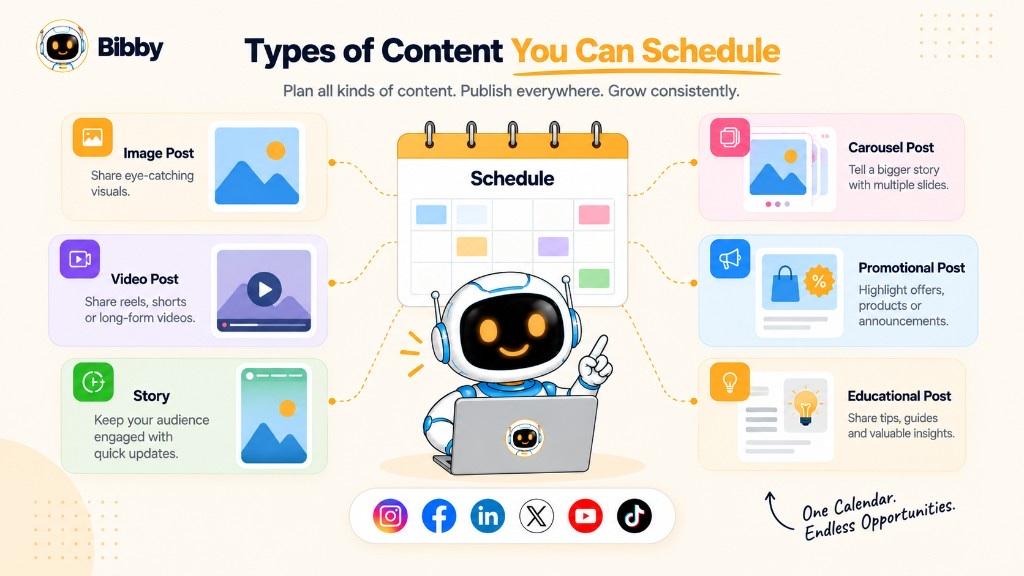
Formats depend on the network, publishing method, and tool.
Image Posts
Single-image posts for education, announcements, products, quotes, tips, or branded visuals. Batching keeps a consistent look without uploading one-by-one.
Carousel Posts
Multiple slides for tutorials, lists, education, product showcases, and stories. If the platform and tool support carousels, queue them beside other formats.
Video Posts
Short-form and long-form video on supported platforms—series, demos, interviews, education. Check that your tool supports the specific format and limits.
Stories
Temporary updates for behind-the-scenes, announcements, reminders, and daily notes. Some tools support Story scheduling; others have limits. Bibby can schedule Stories on supported channels.
Promotional Content
Launches, offers, events, and webinars. Planning ahead helps several posts work as one campaign. Do not leave expired discounts in the queue.
Educational and Informational Content
Tutorials, tips, stats, and insights can sit on a recurring slot—for example a weekly educational post every Tuesday.
Campaign Content
A campaign is often a sequence:
Announcement → Education → Product or service highlight → Social proof → Reminder → Final call to action
Scheduling holds the intended order and cadence.
Platform-Specific Content
The same asset does not always work everywhere. Aspect ratio, caption length, hashtags, video specs, and audience norms differ. Effective scheduling is centralized planning with platform-specific execution, not identical copies on every network.
Which Social Media Platforms Support Social Media Scheduling?
Native tools and third-party software both exist. Formats and rules change, so confirm current capabilities before you depend on a workflow.
Pages can schedule announcements, education, promotions, videos, and other updates. A calendar helps Facebook sit inside a wider plan instead of one-off native posts.
Supported feed posts, carousels, Reels, and other formats depending on the publishing method. Visuals, captions, and audience expectations often need Instagram-specific prep.
Useful for thought leadership, company updates, education, and industry insights. Queue professional content into the same strategy as other channels.
YouTube
Eligible videos can be set for a future date. Regular channels use that to keep a predictable cadence while finishing edits.
TikTok
Eligible short-form video can be scheduled through supported workflows. Features change—check your tool before you build the whole calendar around it.
Why Multi-Platform Scheduling Matters
Doing each network separately means re-uploading, rewriting, picking times, and tracking several calendars.
Instead of Facebook → Instagram → LinkedIn → YouTube → TikTok as five isolated jobs, one publishing system can still send adapted posts. The goal is not identical content everywhere.
Bibby coordinates those five networks. It does not publish to X or Pinterest.
What Is an AI Social Media Scheduler?
An AI social media scheduler uses models to assist with more than a clock. It may help create content, write captions, recommend times, adapt copy, and connect workflow steps. A traditional scheduler asks you for the asset and the time. An AI scheduler can help with work before the queue.
AI-Generated Captions
Frequent posting makes captions a bottleneck. AI can draft from the visual, topic, voice, or posting style. Review, edit, or regenerate before you schedule.
AI-Generated Visual Content
Some tools generate images from a description:
Idea → AI-generated visual → Caption → Schedule → Publish
AI-Recommended Publishing Times
A basic scheduler follows your clock. AI can use audience, engagement, historical, or contextual signals to suggest times. There is still no universal best hour. Useful recommendations depend on your audience, platform, content, and data.
Platform-Specific Content Assistance
AI can help adapt wording so networks are not treated as identical, while the core message stays consistent.
Automated Social Media Workflows
Create → Write → Adapt → Schedule → Publish can live in one path. Some products also accept natural-language instructions.
Conversational Social Media Management
Instead of hunting through menus, you describe the job. In Bibby, chat can help create a brand kit, a campaign, posts, regenerated captions, and other content tasks. That is workflow assistance—not a replacement for strategy or replies.
Traditional Scheduler vs. AI Social Media Scheduler
| Traditional scheduler | AI social media scheduler |
|---|---|
| You create the content | AI may help create content |
| You write the caption | AI can draft caption options |
| You choose the time | AI can recommend or optimize timing |
| You run each task separately | AI can assist connected workflows |
| Primarily publishing | Creation, planning, and publishing |
AI does not replace scheduling—it expands what can happen around it. A traditional tool automates *when*. An AI scheduler can also assist with *what*, *how it is presented*, and *when*.
What Is the Best Time to Schedule Social Media Posts?
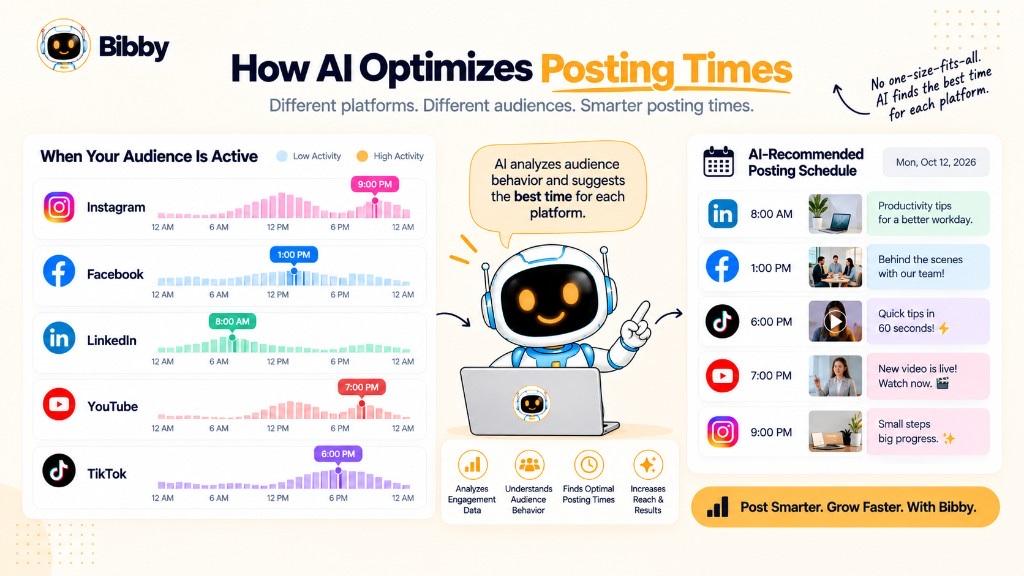
There is no single best time for every business, creator, or platform. Timing depends on audience, location, network, content type, industry, and history. Prefer your own data over “post at 9 AM.”
Consider When Your Audience Is Active
Professionals, students, and always-on consumer audiences behave differently. Multiple time zones are a reason to queue instead of staying up to tap Publish.
Consider the Social Media Platform
Instagram, LinkedIn, and TikTok do not share one peak. Treat each network on its own.
Consider Your Content Type
Education, announcements, entertainment, and time-sensitive offers have different needs. An event post follows the event, not a generic engagement window.
Use Historical Performance
In Insights, look for stronger days, consistent hours, platform differences, format differences, and time-zone patterns. Those numbers are not in Bibby.
AI-Optimized Social Media Scheduling
AI can recommend or select times from available signals so you are not guessing every slot. The advantage is your context, not a magic hour. Scheduling still does not guarantee that more people will see the post.
Should You Use the Same Posting Time for Every Platform?
Usually no.
One campaign → Multiple platforms → Platform-specific times
Centralize the plan; let timing vary. The strategy is test, measure, improve—not find one perfect clock.
How to Create a Social Media Scheduling Strategy
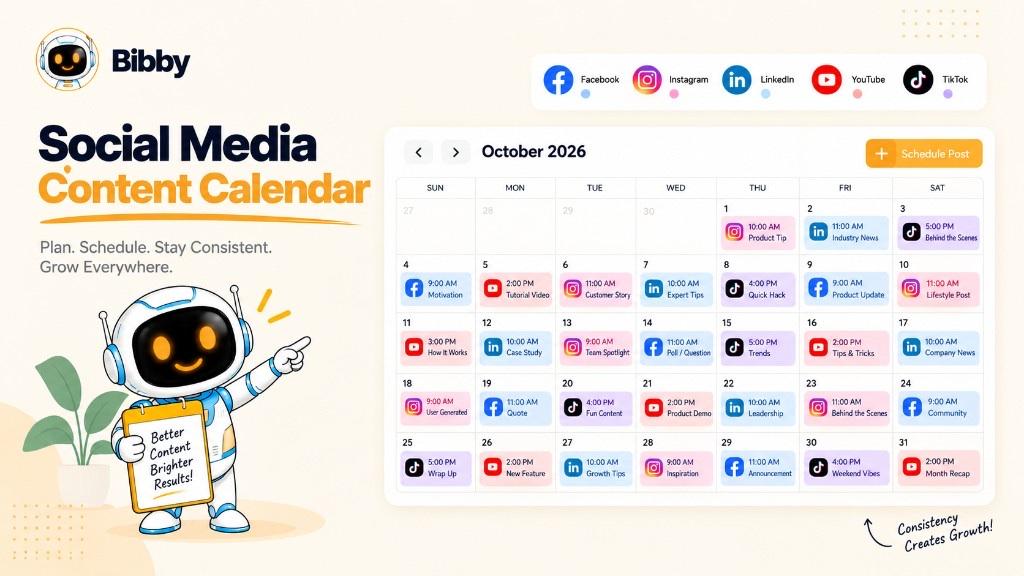
A strategy decides what to publish, where, how often, and when—tied to goals, not random slots.
1. Define Your Social Media Goals
Brand awareness, traffic, leads, sales, community, education, or product promotion. Goals shape content and how you judge the calendar.
2. Choose the Right Social Platforms
You do not need every network. Pick where the audience is and where you can show up consistently.
3. Define Your Content Pillars
Content pillars are recurring themes. Example for software: Education → Product tips → Industry insights → Customer stories → Company updates. Pillars keep the calendar from becoming unrelated leftovers.
4. Decide How Often You Want to Publish
Choose a cadence you can support. More is not automatically better. Frequency can differ by platform.
5. Create Content in Batches
Make several assets in one session, draft captions, then drop them on the calendar. Batching pairs well with a queue.
6. Prepare Platform-Specific Captions and Media
Adapt caption, format, message, or CTA where needed. A central tool can still keep this efficient.
7. Choose Your Publishing Times
Manual times, recurring slots, Insights, or AI-assisted scheduling. Start reasonable; refine with data.
8. Schedule Your Content in Advance
The calendar shows gaps, repeats, and overload.
9. Review Your Scheduled Content
Check facts, spelling, repeats, voice, media, formatting, and expired promotions before anything goes live.
10. Analyze and Improve Your Schedule
Review engagement, reach, clicks, or conversions in Insights against your goals. Then:
Plan → Create → Schedule → Publish → Measure → Improve
A strong strategy is a repeatable system that connects content, timing, platforms, and goals.
How to Choose a Social Media Scheduling Tool
The right tool fits your workflow, platforms, and formats—and cuts repetitive work without removing review.
Platform Support
Start with the networks you use. Bibby covers Facebook, Instagram, LinkedIn, YouTube, and TikTok. If you need X or other networks, you will need another publisher for those accounts.
Content Format Support
Images, carousels, videos, Stories, short-form video, and other formats are not automatically all supported on every network. Confirm what you actually publish.
AI Content Creation
Useful extras: AI images, captions, ideas, platform-specific copy, variations, and regeneration. The more of the loop one tool covers, the less you hop between apps.
AI-Powered Scheduling
A basic tool is a date picker. Advanced tools can recommend times from your signals rather than a generic best-time article.
Content Calendar
You should see upcoming work, gaps, campaigns, edits, reschedules, and what goes live where.
Bulk Scheduling
If you publish often, queuing one-by-one still hurts. Bulk scheduling turns a batch into a week or month on the calendar.
Brand Consistency
Brand kits, posting styles, and saved voice help when several people contribute. Bibby can store a brand kit in chat.
Campaign Management
Launches and promotions need posts grouped across dates and platforms.
Ease of Use
Create → Caption → Select platforms → Schedule → Publish should feel faster than native posting, not heavier.
Conversational Management
Natural language can start a campaign, generate posts, or regenerate captions. Still review before publish.
Analytics and Optimization
After posts go live, understand performance in Insights or an analytics product, then improve times and content. Bibby does not replace those dashboards. Some schedulers bundle reports; treat those as their feature, not Bibby’s.
The best tool is the one that removes the most friction from your workflow while leaving enough control for quality and strategy. Compare plans if you are ready to try Bibby.
Benefits of Using a Social Media Scheduling Tool
A scheduler turns one-off publishing into a centralized workflow.
- Several platforms from one place — Facebook, Instagram, LinkedIn, YouTube, and TikTok without constant account switching
- Batch scheduling — a week or month in one session
- A consistent routine — the queue does not depend on someone remembering
- Less repetitive work — upload, write, pick platform, pick time, publish
- A visible calendar — gaps, campaigns, last-minute edits
- Campaign coordination — sequences across dates and networks
- AI for creation — visuals and captions in the same loop
- Informed timing — suggestions from available data, not a guess
- A larger pipeline — nobody has to be online for every go-live
- An end-to-end path — create → caption → platforms → schedule → publish → review Insights
When those steps connect, scheduling is more than a calendar. It is the publishing system for the operation.
Social Media Scheduling With Bibby
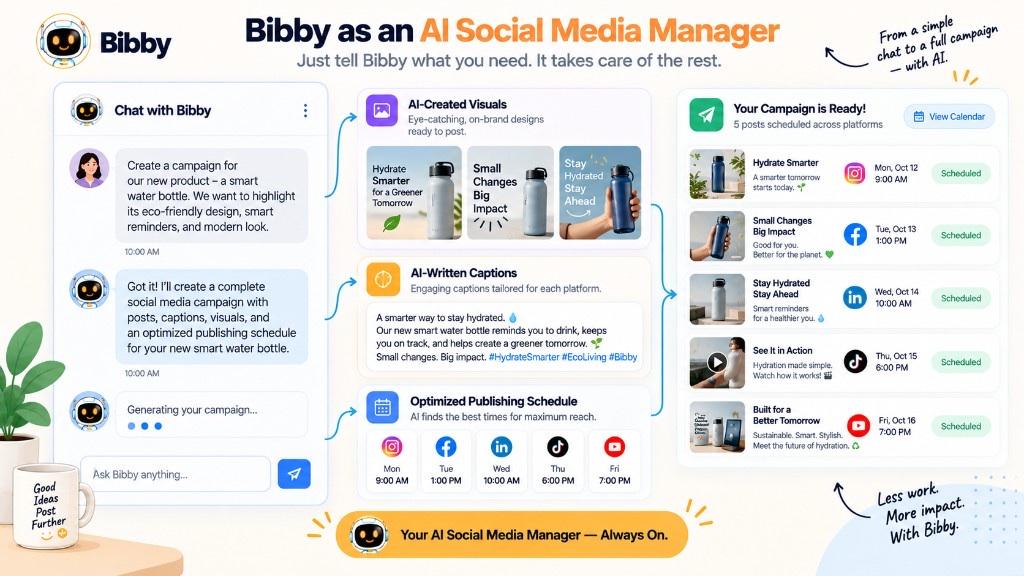
Bibby combines scheduling with AI creation and automation so more of the loop lives in one place—not a separate design tool, caption doc, and calendar.
Upload or Generate Your Content
Upload an image, carousel, or video, or generate a visual with AI when you do not have a file yet.
Choose Your Posting Style
Pick a style that matches brand and objective so captions have context instead of a blank page.
Generate Captions Automatically
Generate, then regenerate if the first draft is off. Edit before you queue.
Schedule Content Across Multiple Platforms
Organize Facebook, Instagram, LinkedIn, YouTube, and TikTok together. Formats include images, carousels, videos, and Stories where the network and workflow support them.
Use AI-Optimized Publishing Times
AI can suggest times so you are not picking every slot by habit. It is still not a promise of more reach. Recheck the calendar around launches, holidays, and news.
Manage Social Media Through Chat
Create a brand kit, campaign, or posts; regenerate captions; and work through other content tasks in conversation. That feels less like a bare calendar and more like an assistant for the publishing workflow. Strategy, replies, and Insights stay with you.
From Social Media Scheduling to Social Media Management
A traditional tool mainly asks when. Bibby connects the work before that:
Create → Write → Optimize timing → Schedule → Publish
Then you engage as a person and measure in Insights. Scheduling remains a workflow, not a growth hack.
Conclusion
Social media scheduling is planning content in advance and automatically publishing it at selected or optimized times. It supports a consistent routine, cuts repetitive uploads, and coordinates several channels.
Remember:
- Scheduling turns one-off posts into a planned publishing system.
- Multiple platforms and formats can share one workflow if you still adapt each post.
- AI can extend scheduling into creation, captions, timing, and broader automation.
- A queue is not a reach, engagement, or analytics guarantee.
- Bibby publishes to Facebook, Instagram, LinkedIn, YouTube, and TikTok—not X.
If you want the wider loop, read social media automation. For the calendar itself, see content calendar. For timing research, see best time to post. Create a Bibby account when you are ready to queue the next batch—and still review it before it goes live.