
A content calendar is a planning system used to organize, manage, schedule, and publish content across different channels, showing what content will be published, when, where, and why.
Whether you manage one social account or multiple platforms, a content calendar helps you plan ahead, maintain consistency, and coordinate campaigns without scrambling for ideas every day. In this guide, you'll learn what a content calendar is, what it includes, how to create one, and how AI-powered tools like Bibby can turn planning into an automated publishing workflow.
In this guide, we will discuss:
- What a content calendar is and why it matters
- Types of content calendars and how they compare to social media calendars and content strategy
- How to create, manage, and optimize a content calendar with AI and automation
Let's start with the definition.
What Is a Content Calendar?
A content calendar is a planning system used to organize, manage, schedule, and publish content across different channels. It shows what content will be published, when it will be published, where it will appear, and why it is being created.
A content calendar can include social media posts, images, carousels, videos, stories, blog articles, newsletters, and other types of content. For social media marketing, it helps businesses plan and schedule posts across platforms such as Facebook, Instagram, LinkedIn, YouTube, and TikTok.
Instead of deciding what to post every day, a content calendar gives you a clear view of your upcoming content. It can also include captions, content formats, campaigns, target audiences, publishing times, and post status.
For example, a social media content calendar might show that a business will publish an educational Instagram carousel on Monday, a LinkedIn industry post on Wednesday, and a TikTok video on Friday.
Today, content calendars are also becoming more intelligent with AI. Tools such as Bibby can help turn content planning into an automated workflow by generating captions, organizing campaigns, scheduling posts, and selecting optimized publishing times across multiple social platforms.
Why Is a Content Calendar Important?
A content calendar helps turn content creation from an unplanned, last-minute task into a structured marketing process. Instead of constantly asking, “What should we post today?”, you can plan your content in advance and maintain a clear publishing schedule.
A well-organized content calendar is particularly useful when managing multiple social media platforms, campaigns, content formats, or team members.
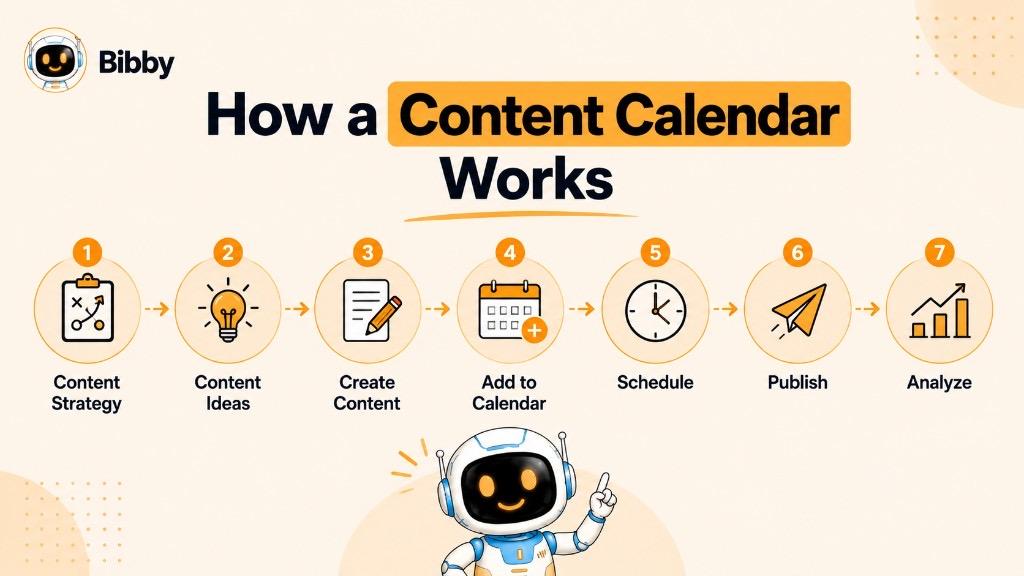
1. Keeps Your Content Consistent
Consistency is important for building an active social media presence. A content calendar helps you maintain a regular publishing schedule instead of posting frequently one week and disappearing the next.
2. Saves Time
Planning several posts at once can reduce the amount of time spent deciding what to publish every day. You can prepare content in batches and schedule it ahead of time.
3. Makes Campaign Planning Easier
Product launches, seasonal promotions, events, holidays, and special offers often require multiple posts. A content calendar lets you map these posts across different dates and platforms.
4. Prevents Missed Opportunities
Important dates, industry events, product announcements, and promotional periods are easier to track when they are included in your calendar. This reduces the chance of remembering an important post at the last minute.
5. Helps Maintain a Balanced Content Mix
Without planning, social media feeds can become repetitive or overly promotional. A content calendar allows you to balance different content types, such as educational posts, promotional content, customer stories, videos, and entertaining content.
6. Improves Team Collaboration
When several people work on content, a shared calendar provides visibility into what is being created, reviewed, approved, scheduled, and published. Everyone can understand their responsibilities and upcoming deadlines.
7. Makes Multi-Platform Management Easier
Managing Facebook, Instagram, LinkedIn, YouTube, and TikTok separately can quickly become complicated. A content calendar provides one overall view of your publishing activity and helps coordinate content across platforms.
8. Makes Performance Improvement Easier
A content calendar can also be used alongside analytics. By reviewing what you published and comparing it with engagement, reach, clicks, or conversions, you can identify what works and adjust future content.
9. Reduces Last-Minute Content Stress
When content is planned ahead, you have more time to create better visuals, refine captions, review campaigns, and make necessary changes before publication.
10. Creates a Foundation for Automation
A content calendar becomes even more useful when connected to an automation platform. Instead of simply recording what should be published, you can create, schedule, and manage posts from the same workflow.
With an AI-powered platform such as Bibby, for example, businesses can combine content creation, AI-generated captions, campaign management, scheduling, and multi-platform publishing rather than treating the calendar as a separate spreadsheet.
In short, a content calendar gives your content strategy structure, visibility, and consistency, while automation can take that structure and turn it into an active publishing workflow.
What Does a Content Calendar Include?
A content calendar can be as simple or detailed as your marketing process requires. A basic calendar may only contain a content idea, publishing date, and platform, while a more advanced calendar can include captions, visuals, campaigns, posting times, target audiences, and performance information.
For social media marketing, the following elements are commonly included.
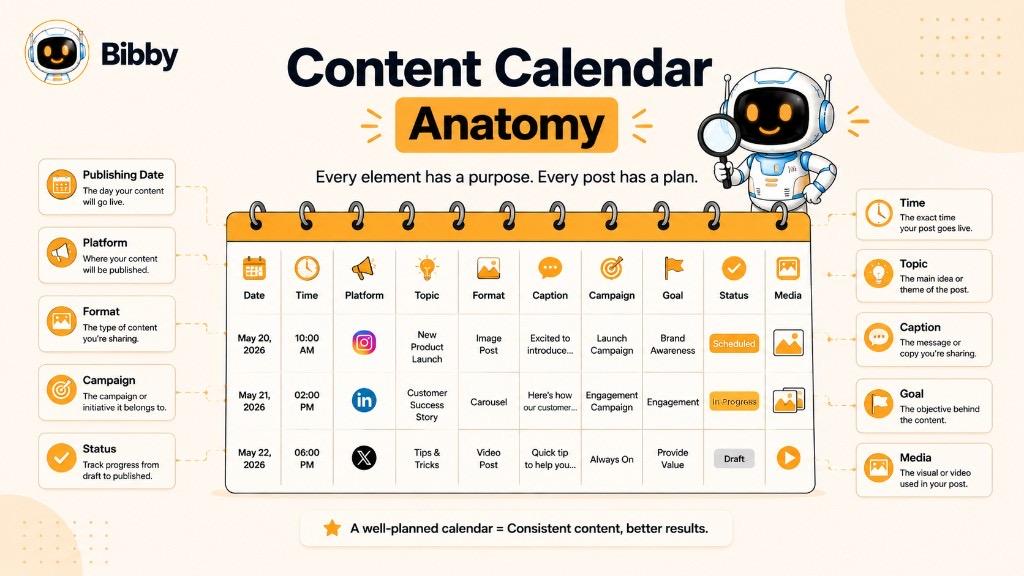
1. Publishing Date
The date tells you when a piece of content is planned to go live. Planning dates in advance helps maintain a consistent publishing schedule.
2. Publishing Time
The specific time a post should be published can also be recorded. Some social media scheduling tools can use performance data and AI to recommend or automatically select suitable posting times.
3. Social Media Platform
Specify where the content will be published, such as:
A single piece of content may also be adapted for several platforms.
4. Content Topic
The topic briefly describes what the post is about. For example:
- Social media marketing tips
- Product announcement
- Customer success story
- Industry trend
- Behind-the-scenes content
5. Content Format
The calendar should identify the format being used. Common formats include:
- Images
- Carousels
- Videos
- Stories
- Reels
- Text-based posts
- Short-form videos
Tracking formats helps you maintain variety instead of publishing the same type of content repeatedly.
6. Caption
The planned caption can be added directly to the calendar. This makes it easier to review messaging before publication and maintain a consistent brand voice.
7. Visual or Media File
The calendar can contain a link or attachment for the image, video, carousel, or other media associated with the post.
8. Campaign
If a post belongs to a specific campaign, identify the campaign in the calendar. For example, a business might have separate campaigns for a product launch, holiday promotion, or lead-generation initiative.
9. Content Goal
Adding the purpose of each post helps connect individual pieces of content to broader marketing objectives.
Common goals include:
- Brand awareness
- Engagement
- Website traffic
- Lead generation
- Sales
- Customer education
- Community building
10. Target Audience
Some calendars also identify the audience a particular post is intended to reach. This can help marketers create more relevant content and adapt messaging for different customer groups.
11. Content Status
A status column shows where each piece of content is in the workflow.
Typical statuses include:
Idea → Draft → Review → Approved → Scheduled → Published
12. Hashtags and Keywords
For platforms where hashtags and keywords are relevant, they can be included alongside the planned caption and content.
13. Assigned Team Member
For teams and agencies, assigning an owner to each piece of content makes responsibilities clearer. One person might create the visual, another might write the caption, and another might approve the final post.
14. Performance Data
After publication, the calendar can be updated with metrics such as:
- Reach
- Impressions
- Likes
- Comments
- Shares
- Saves
- Clicks
- Conversions
This turns the content calendar from a simple planning document into a useful record for improving future content.
A Simple Content Calendar Structure
A basic social media content calendar might look like this:
| Date | Platform | Format | Topic | Goal | Status |
|---|---|---|---|---|---|
| Monday | Carousel | Social Media Tips | Engagement | Scheduled | |
| Tuesday | Image | Industry Insight | Awareness | Draft | |
| Wednesday | TikTok | Video | Marketing Tip | Reach | Scheduled |
| Thursday | Image | Customer Story | Trust | Approved | |
| Friday | YouTube | Video | Product Tutorial | Education | Published |
The important thing is not to fill a calendar with unnecessary fields. A good content calendar contains enough information to make publishing organized and actionable without becoming difficult to maintain.
Types of Content Calendars
Not every content calendar looks the same. The format and information you include depend on the type of content you publish, the channels you use, and your marketing goals.
A blogger may need a calendar for articles and newsletters, while a social media manager may need to coordinate hundreds of posts across multiple platforms. Here are the most common types of content calendars.
1. Social Media Content Calendar
A social media content calendar is used to plan and organize posts for social networking platforms.
It can include:
- Publishing dates and times
- Platforms
- Captions
- Images and videos
- Carousels
- Stories
- Hashtags
- Campaigns
- Content categories
- Post status
For businesses managing several social networks, this type of calendar provides a single view of upcoming social media activity.
2. Editorial Content Calendar
An editorial content calendar is primarily used to plan long-form content such as:
- Blog posts
- Articles
- Newsletters
- Guides
- Ebooks
- Case studies
It usually tracks topics, keywords, writers, editors, deadlines, publication dates, and content status.
Editorial calendars are especially useful for websites that publish content regularly and need to coordinate writers, editors, designers, and SEO teams.
3. Content Marketing Calendar
A content marketing calendar takes a broader view of content and connects individual pieces of content with marketing objectives.
For example, a campaign designed to generate leads might include:
Blog article → LinkedIn post → Instagram carousel → Short-form video → Email newsletter → Product landing page
The calendar helps ensure that these different assets support the same campaign or marketing objective.
4. Campaign Content Calendar
A campaign content calendar focuses on content related to a specific marketing campaign.
For example, a product launch might require:
- Announcement posts
- Educational content
- Product demonstrations
- Customer testimonials
- Promotional posts
- Countdown posts
- Launch-day content
- Follow-up content
Planning these pieces on a calendar helps marketers coordinate the campaign instead of publishing individual posts without a clear sequence.
5. Video Content Calendar
A video content calendar is designed specifically for video-based content.
It can be used to organize:
- YouTube videos
- YouTube Shorts
- TikTok videos
- Instagram Reels
- Facebook videos
- Product demonstrations
- Tutorials
- Interviews
A video calendar may also track scripts, filming dates, editing status, thumbnails, descriptions, and publication dates.
6. Multi-Platform Content Calendar
A multi-platform content calendar organizes content across several channels in one place.
For example, a business might plan the same campaign across:
Facebook + Instagram + LinkedIn + YouTube + TikTok
The content does not necessarily need to be identical on every platform. A single campaign can be adapted into different formats and messages based on how audiences use each network.
7. AI Content Calendar
An AI content calendar combines traditional content planning with artificial intelligence.
Instead of simply recording publishing dates, an AI-powered workflow can assist with tasks such as:
- Generating content ideas
- Creating captions
- Suggesting content formats
- Repurposing content
- Planning campaigns
- Selecting posting times
- Scheduling posts
- Managing multiple platforms
- Analyzing content performance
This can make the calendar more dynamic because AI can assist with both planning and execution.
For example, Bibby allows users to move from content creation to scheduling within the same social media automation workflow. Users can upload an image or generate one with AI, select a posting style, generate captions, create campaigns, and schedule content across supported social platforms.
Which Type of Content Calendar Should You Use?
The right choice depends on your needs.
- Social media creator: Social media content calendar
- Blogging team: Editorial content calendar
- Marketing department: Content marketing calendar
- Product launch: Campaign content calendar
- Video creator: Video content calendar
- Business using several social networks: Multi-platform content calendar
- Business looking to automate content creation and publishing: AI-powered content calendar
In practice, these types can overlap. A business might use one comprehensive calendar that combines social media planning, campaigns, video content, and AI-powered scheduling rather than maintaining separate calendars for every activity.
Content Calendar vs. Social Media Calendar
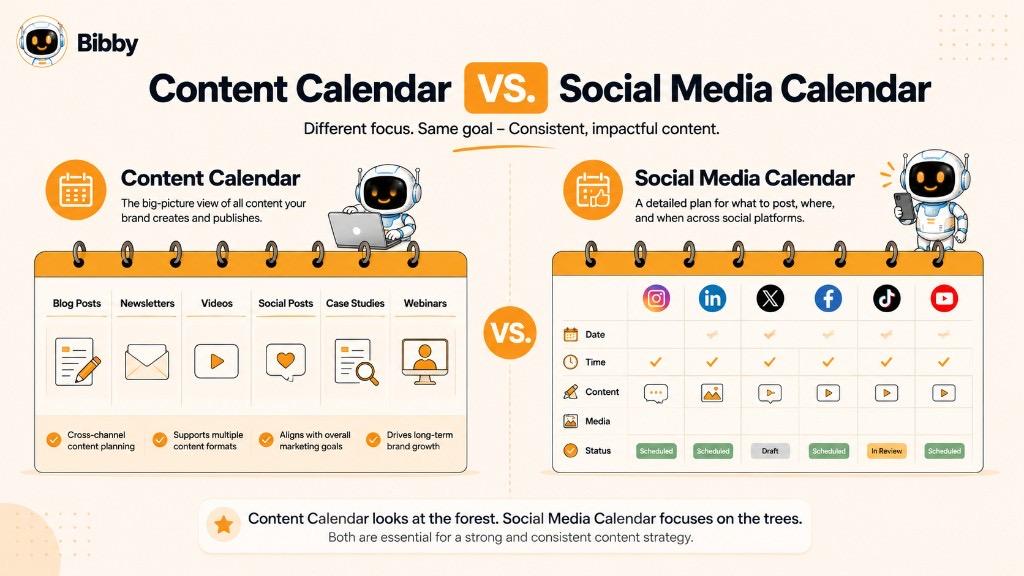
The terms content calendar and social media calendar are often used interchangeably, but they do not always mean the same thing.
The main difference is scope.
A content calendar can cover almost any type of content a business creates, including blog posts, newsletters, videos, ebooks, podcasts, and social media posts. A social media calendar is specifically focused on content that will be published on social media platforms.
Content Calendar
A content calendar provides a broader view of a brand's content activities.
It may include:
- Blog articles
- Social media posts
- Videos
- Newsletters
- Podcasts
- Ebooks
- Case studies
- Webinars
- Email campaigns
- Downloadable resources
For example, a monthly content calendar might show that a company is publishing two blog articles, sending four newsletters, and creating 20 social media posts during the month.
Social Media Calendar
A social media calendar focuses specifically on social media publishing.
It typically tracks:
- Social media platform
- Post date
- Post time
- Caption
- Image or video
- Content format
- Hashtags
- Campaign
- Publishing status
- Performance
For example, a social media calendar could show when a brand will publish an Instagram carousel, LinkedIn post, TikTok video, Facebook image, or YouTube video.
Content Calendar vs. Social Media Calendar
| Content Calendar | Social Media Calendar |
|---|---|
| Covers multiple content channels | Focuses on social media |
| Can include blogs and newsletters | Primarily includes social posts |
| Broader content planning tool | Social publishing tool |
| May track long-form content | Tracks social formats and posts |
| Useful for content and marketing teams | Useful for social media teams and creators |
| Can include entire campaigns | Can coordinate social campaigns |
Can You Use Both?
Yes. In fact, they can work together.
A content calendar can provide the big-picture content strategy, while a social media calendar can handle the details of distributing that content across social platforms.
For example, a company could publish a new blog article on Monday and then use its social media calendar to promote that article through an Instagram carousel, LinkedIn post, Facebook post, and short-form video throughout the week.
For businesses focused heavily on social media, a modern social media automation platform can combine many of these activities into one workflow. Instead of maintaining a calendar separately from the publishing process, you can create content, generate captions, organize campaigns, and schedule posts from the same system.
In short: a social media calendar is a type of content calendar, but a content calendar can cover much more than social media.
Content Calendar vs. Content Strategy
A content calendar and a content strategy are closely connected, but they serve different purposes. The easiest way to understand the difference is to think of the strategy as the plan for what you want to achieve and the calendar as the schedule for putting that plan into action.
What Is a Content Strategy?
A content strategy defines the overall direction of your content marketing.
It answers questions such as:
- Who is our target audience?
- What are their needs and interests?
- What topics should we cover?
- What type of content should we create?
- Which platforms should we use?
- What business goals should our content support?
- What tone and brand voice should we use?
- How will we measure success?
For example, a SaaS company might create a content strategy focused on educating small businesses about social media automation and generating product leads.
What Is a Content Calendar?
A content calendar takes that strategy and turns it into a publishing schedule.
It answers questions such as:
- What are we publishing?
- When will we publish it?
- Where will it be published?
- What format will it use?
- Which campaign does it support?
- Who is responsible for it?
- Has it been published?
For example, based on the SaaS company's strategy, its calendar might schedule an Instagram carousel about social media automation on Monday, a LinkedIn educational post on Wednesday, and a TikTok video on Friday.
Content Strategy vs. Content Calendar
| Content Strategy | Content Calendar |
|---|---|
| Defines the overall direction | Organizes publishing activities |
| Focuses on goals and audience | Focuses on dates and content |
| Explains why content is created | Explains what and when to publish |
| Determines topics and content pillars | Schedules individual content pieces |
| Establishes brand voice and approach | Tracks content production and publishing |
| Usually changes less frequently | Updated regularly |
How They Work Together
A content calendar works best when it is based on a clear content strategy.
For example:
Content Strategy:
Increase brand awareness among small businesses interested in social media automation.
Content Pillar:
Social media productivity.
Content Idea:
“5 Ways to Save Time Managing Social Media.”
Content Format:
Publishing Date:
Monday.
Supporting Content:
LinkedIn post + TikTok video + Facebook post.
The strategy determines the direction, while the calendar organizes the execution.
Without a strategy, a calendar can become a collection of random posts. Without a calendar, even a strong strategy can remain an idea rather than becoming a consistent publishing system.
Modern AI-powered social media tools can connect these two layers by helping with content ideas, captions, campaign creation, scheduling, and publishing. This makes it possible to move from strategy → content creation → calendar → automated publishing within a more connected workflow.
Benefits of Using a Content Calendar
A content calendar does more than list upcoming posts. It creates a structured system for planning, creating, publishing, and reviewing content. Whether you are an individual creator, small business, marketing team, or agency, a well-managed calendar can make content operations more predictable and easier to scale.
1. Maintain Consistent Publishing
Consistency is one of the biggest benefits of a content calendar. Planning posts in advance makes it easier to maintain a regular publishing schedule instead of going through periods of frequent posting followed by long gaps.
A consistent calendar also helps your audience know when to expect new content.
2. Save Time
Without a calendar, content planning can become a daily task. You may spend time deciding what to post, writing captions, finding visuals, and figuring out when to publish.
Planning content in batches can reduce this repetitive work and give you more time to focus on strategy and creativity.
3. Organize Multiple Platforms
Managing several social networks can quickly become complicated. Each platform may require different content formats, publishing schedules, and messaging.
A content calendar gives you a central view of your publishing activity across platforms such as Facebook, Instagram, LinkedIn, YouTube, and TikTok.
4. Plan Campaigns More Effectively
A campaign rarely consists of one post. Product launches, seasonal promotions, events, and special offers often require multiple pieces of content.
A calendar lets you map the campaign from beginning to end, including:
Teaser → Announcement → Educational Content → Promotion → Reminder → Follow-Up
This creates a more coordinated experience for your audience.
5. Create a Better Content Mix
Posting the same type of content repeatedly can make a social media feed feel predictable.
A content calendar lets you deliberately mix:
- Educational content
- Promotional posts
- Customer stories
- Industry insights
- Entertainment
- Behind-the-scenes content
- Videos
- Images
- Carousels
- Stories
This creates more variety while keeping content aligned with your overall strategy.
6. Reduce Last-Minute Publishing
Last-minute content creation often leads to rushed captions, weak visuals, or missed publishing opportunities.
Planning ahead gives you time to review content, make changes, get approvals, and prepare different versions for different platforms.
7. Improve Team Collaboration
A shared content calendar can show everyone what is being created and where each piece of content is in the workflow.
For example:
Idea → Writing → Design → Review → Approved → Scheduled → Published
This makes responsibilities clearer and reduces unnecessary back-and-forth between team members.
8. Avoid Missing Important Dates
A calendar makes it easier to plan around:
- Holidays
- Product launches
- Industry events
- Seasonal promotions
- Company announcements
- Important business dates
You can prepare content before these dates arrive instead of trying to create something at the last moment.
9. Make Content Repurposing Easier
One strong piece of content can often become several different assets.
For example, a blog article could be transformed into:
Blog → LinkedIn post → Instagram carousel → Facebook post → TikTok video → YouTube Short
A content calendar helps you organize these related pieces and distribute them over time rather than publishing everything simultaneously.
10. Connect Content With Marketing Goals
Each post can have a specific purpose, such as:
- Increasing awareness
- Generating engagement
- Driving website traffic
- Generating leads
- Promoting a product
- Educating customers
- Building trust
Adding these objectives to the calendar helps ensure that content contributes to broader business goals instead of simply filling the publishing schedule.
11. Make Performance Analysis Easier
A content calendar provides a record of what you published. When combined with analytics, you can identify patterns in your content performance.
For example, you might discover that educational carousels generate more saves, short videos receive greater reach, and customer stories generate more comments.
Those insights can then influence your future content calendar.
12. Create Opportunities for Automation
A content calendar becomes even more powerful when connected to an automation platform.
Instead of using a calendar only to remember what needs to be published, you can connect planning with content creation, caption generation, scheduling, and publishing.
For example, Bibby allows users to upload or generate visuals with AI, choose a posting style, generate captions, create campaigns, and schedule content across multiple social platforms. Its chat interface also allows users to manage tasks such as creating campaigns, generating posts, creating a brand kit, and regenerating captions through conversation.
The result is a shift from simply planning content to building a repeatable content workflow.
13. Reduce Content Planning Stress
Perhaps the simplest benefit is knowing what comes next.
Instead of starting each day with an empty content screen, you have a structured view of upcoming topics, formats, campaigns, and publishing dates.
In short, a content calendar gives your content process structure. It helps you plan ahead, publish consistently, coordinate campaigns, manage multiple platforms, and use automation more effectively.
How to Create a Content Calendar
Creating a content calendar does not have to be complicated. You can start with a simple spreadsheet or use a social media scheduling and automation platform that combines planning with content creation and publishing.
The key is to build a calendar around your goals, audience, content topics, platforms, and publishing schedule.
Here is a practical step-by-step process.
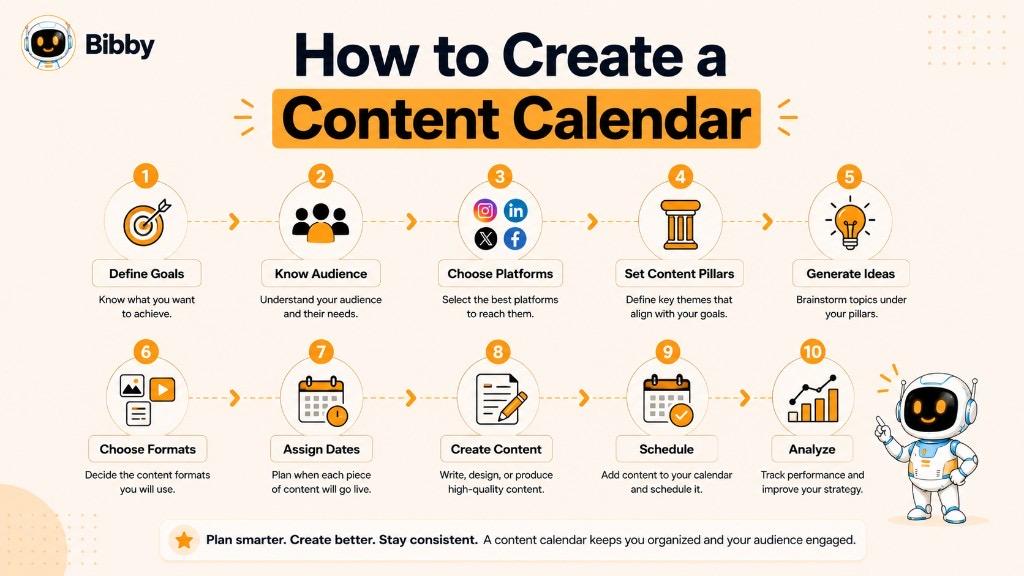
Step 1: Define Your Content Goals
Start by deciding what you want your content to achieve.
Common content goals include:
- Increasing brand awareness
- Growing social media followers
- Increasing engagement
- Driving website traffic
- Generating leads
- Promoting products or services
- Educating customers
- Building a community
- Increasing sales
Your goals will influence the type of content you create and the platforms you use.
Step 2: Understand Your Target Audience
Identify who you are creating content for and what they want to see.
Consider:
- Their interests
- Problems and challenges
- Questions they ask
- Content formats they prefer
- Platforms they use
- Buying concerns
- Topics they want to learn about
For example, a B2B software company may focus on educational LinkedIn content, while a fashion brand may rely more heavily on visual content for Instagram and TikTok.
Step 3: Choose Your Content Platforms
Decide where your content will be published.
Depending on your audience and goals, this might include:
You do not necessarily need to be active on every platform. Focus on the channels where your target audience is most relevant and where you can consistently create quality content.
Step 4: Define Your Content Pillars
Content pillars are the main topics or themes around which you create content.
For example, a social media automation company might use:
- Social media tips
- AI marketing
- Content creation
- Social media automation
- Product education
Content pillars make it easier to generate ideas while keeping your publishing aligned with your overall strategy.
Step 5: Choose Your Content Formats
Decide which formats you will use for each platform.
Common formats include:
- Images
- Carousels
- Videos
- Reels
- Stories
- Text posts
- Tutorials
- Customer testimonials
- Educational posts
Using multiple formats can help keep your content varied and allow you to adapt ideas to different platforms.
Step 6: Generate Content Ideas
Create a list of potential topics before assigning them to specific dates.
Ideas can come from:
- Frequently asked customer questions
- Industry trends
- Common problems
- Product features
- Customer feedback
- Competitor gaps
- Seasonal events
- Frequently searched topics
- Existing high-performing content
AI can also help generate and expand content ideas, particularly when you need to create content consistently.
Step 7: Assign Content to Dates
Now turn your list of ideas into an actual schedule.
For each piece of content, decide:
- What will be published?
- On which platform?
- On what date?
- At what time?
- In which format?
- Which campaign does it support?
For example:
| Day | Platform | Format | Topic | Goal |
|---|---|---|---|---|
| Monday | Carousel | 5 Marketing Tips | Engagement | |
| Tuesday | Text + Image | Industry Insight | Awareness | |
| Wednesday | TikTok | Video | Quick Marketing Tip | Reach |
| Thursday | Image | Customer Story | Trust | |
| Friday | YouTube | Video | Product Tutorial | Education |
Step 8: Create the Visuals and Captions
Once the schedule is planned, create the actual content.
This may include:
- Designing graphics
- Recording videos
- Writing captions
- Adding hashtags
- Creating thumbnails
- Preparing calls to action
AI tools can assist with several of these tasks, including generating images, writing captions, and adapting content for different platforms.
Step 9: Review and Approve the Content
Before publishing, review each post for:
- Accuracy
- Spelling and grammar
- Brand voice
- Visual quality
- Links
- Calls to action
- Platform requirements
- Campaign consistency
For teams, this stage can also include client or manager approval.
Step 10: Schedule and Publish
Once content is approved, schedule it for publication.
A scheduling platform can publish posts automatically according to the calendar, eliminating the need to manually publish every post.
AI-powered scheduling can take this a step further by helping determine suitable publishing times based on available data and platform activity.
Step 11: Track Performance
Creating the calendar is not the final step.
After content is published, review metrics such as:
- Reach
- Impressions
- Engagement
- Likes
- Comments
- Shares
- Saves
- Clicks
- Leads
- Conversions
- Follower growth
Use these insights to understand which topics, formats, platforms, and publishing patterns perform best.
Step 12: Improve the Next Calendar
A content calendar should evolve.
If videos consistently outperform static posts, consider increasing video content. If certain topics generate strong engagement, create more content around those subjects. If a platform produces little value despite significant effort, reconsider how much time you allocate to it.
This creates a continuous cycle:
Plan → Create → Schedule → Publish → Analyze → Improve → Plan Again
Creating a Content Calendar With AI
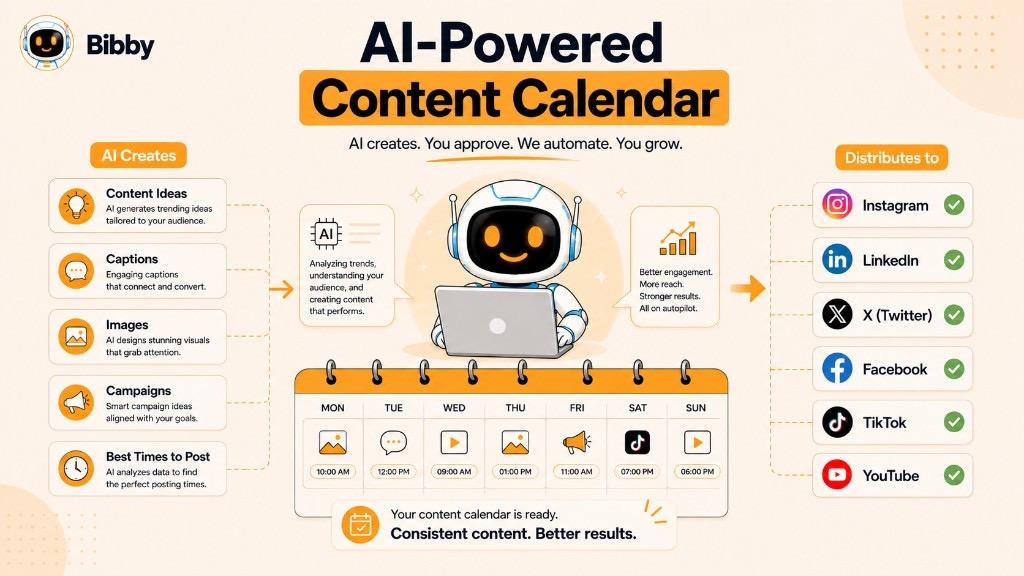
AI can make several parts of this process faster. Instead of manually moving between separate tools for ideas, captions, visuals, campaigns, and scheduling, an AI-powered social media platform can bring these activities together.
With Bibby, for example, you can upload an existing image or generate an image with AI, choose a posting style, generate captions, create campaigns, and schedule content across supported platforms. Bibby's chat interface can also be used to manage social media tasks conversationally, including creating posts, campaigns, brand kits, and regenerating captions.
This makes the content calendar more than a planning document. It becomes part of an automated social media workflow that takes content from an idea to scheduled publication.
How AI Is Changing Content Calendars
Artificial intelligence is changing the role of the traditional content calendar. In the past, a calendar was mainly a planning document that told a team what to publish and when. Today, AI can help with many of the tasks that happen before, during, and after publishing.
Instead of using a calendar simply to record content, businesses can use AI to help generate ideas, create captions, organize campaigns, select formats, optimize publishing times, and automate scheduling.
AI Can Help Generate Content Ideas
One of the biggest challenges in content marketing is consistently coming up with new ideas.
AI can help turn a topic, product, audience, or campaign objective into multiple content ideas.
For example, instead of starting with an empty calendar, a marketer could ask an AI tool to suggest content around social media automation. It might generate ideas for:
- Educational posts
- Industry insights
- Product tips
- Customer questions
- Short-form videos
- Carousels
- Promotional posts
- Thought leadership content
These ideas can then be reviewed and added to the content calendar.
AI Can Help Create Captions
Writing a unique caption for every social media post can take considerable time, particularly when managing several platforms.
AI can generate captions based on:
- The uploaded visual
- Content topic
- Posting style
- Brand voice
- Target audience
- Campaign objective
- Social media platform
Marketers can then review, edit, or regenerate the caption when necessary.
AI Can Help Repurpose Content
A single content idea can be transformed into multiple pieces of content.
For example:
Blog article → LinkedIn post → Instagram carousel → Facebook post → TikTok video → YouTube Short
AI can help adapt the original idea to different formats and audiences while maintaining the central message.
This makes it easier to build a fuller content calendar without creating every piece of content completely from scratch.
AI Can Help With Content Scheduling
Traditional calendars tell you when you *plan* to publish something. AI-powered scheduling tools can help determine when content should actually be published.
Depending on the available audience and performance data, AI can help identify potentially effective publishing times for different platforms.
This can be especially useful when managing multiple social media accounts with different audiences and activity patterns.
AI Can Help Manage Multiple Platforms
Publishing content across several social networks manually can become repetitive.
An AI-powered workflow can help coordinate content across platforms such as:
The same campaign can be planned across multiple channels while allowing content to be adapted to each platform's format and audience.
AI Can Help Build Campaigns
Instead of adding individual posts to a calendar one at a time, AI can assist with planning an entire campaign.
For example, a product launch campaign could include:
Teaser → Announcement → Product Education → Feature Highlight → Customer Proof → Launch Promotion → Follow-Up
AI can help generate ideas for each stage and organize them into a publishing sequence.
AI Can Make the Content Calendar More Dynamic
A traditional calendar is largely static. Once a post is assigned to a date, changing the schedule may require manual work.
An AI-assisted workflow can make content planning more flexible.
For example, you may be able to:
- Regenerate a caption
- Change a posting style
- Create additional posts
- Adjust a campaign
- Repurpose existing content
- Move scheduled content
- Generate new ideas
- Modify content for another platform
This makes the calendar less like a fixed spreadsheet and more like an active content management system.
AI and Human Judgment Still Work Together
AI can accelerate content planning and execution, but it does not eliminate the need for human judgment.
People should still review content for:
- Accuracy
- Brand alignment
- Originality
- Context
- Sensitive topics
- Campaign objectives
- Overall quality
The strongest workflow is often AI-assisted rather than completely hands-off. AI handles repetitive and time-consuming tasks while marketers provide strategy, creativity, judgment, and final approval.
How Bibby Uses AI for Content Calendar Workflows
Bibby brings several of these AI-assisted capabilities into one social media automation workflow.
You can upload an image or generate one with AI, choose a posting style, generate captions, create campaigns, and schedule content across supported social platforms. Bibby also provides a chat interface through which users can manage social media tasks conversationally.
For example, a user can interact with Bibby to:
- Create a brand kit
- Create a campaign
- Create posts
- Generate captions
- Regenerate captions
- Manage content
- Schedule posts
This changes the role of the content calendar from simply “What are we posting next?” to a broader workflow of “What should we create, how should we publish it, and how can we automate the process?”
The result is a more connected approach to social media planning where AI, content creation, scheduling, and automation work together rather than operating as separate tasks.
How Bibby Helps You Create and Manage a Content Calendar
A traditional content calendar helps you decide what to publish and when to publish it. Bibby takes that process further by connecting content creation, caption generation, campaign management, scheduling, and social media automation in one workflow.
Instead of creating a calendar in one tool and then manually transferring every post into a separate scheduling platform, you can manage more of the process from within Bibby.
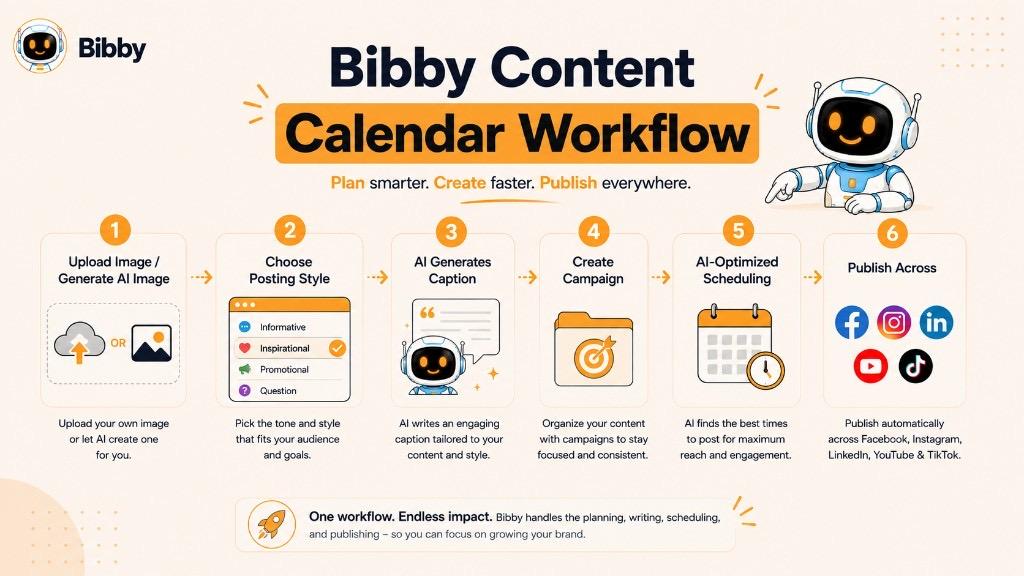
Start With Your Visual Content
The workflow can begin with content you already have.
You can upload an image, video, or other supported media and use it as the foundation for your social media content.
If you do not have a visual ready, Bibby can also help you generate an image with AI, giving you a starting point for your planned content.
Choose Your Posting Style
Once your content is ready, you can select the posting style you want to use.
This helps give your content direction before captions and publishing details are generated.
For example, your content could be positioned around:
- Educational content
- Promotional content
- Brand awareness
- Engagement
- Product-focused content
- Informational content
The exact approach can depend on your campaign and marketing objective.
Let AI Generate Captions
Writing captions for every post can become one of the most repetitive parts of social media management.
Bibby can generate captions based on your content and selected posting style, helping you move from a visual asset to a ready-to-publish social media post more quickly.
You can also regenerate captions when the first version does not match what you want.
For example, you might ask for a caption that is:
- More professional
- More engaging
- Shorter
- More promotional
- More conversational
- Better suited to a particular audience
Create and Organize Campaigns
A content calendar often contains multiple posts that belong to the same campaign.
Bibby allows you to create campaigns and organize related social media content around a common objective.
For example, a product launch campaign might include:
Announcement → Educational Post → Feature Highlight → Customer Story → Promotional Post → Reminder
Instead of treating each post as an isolated item, the campaign provides a larger structure for the content.
Schedule Content Across Multiple Platforms
One of the biggest challenges with a content calendar is turning planned dates into actual published posts.
Bibby can help automate the scheduling process across supported platforms, including:
This means your content calendar can become an active publishing schedule rather than simply a document that tells you what you *should* publish.
Schedule Different Content Formats
Social media calendars are no longer limited to simple image posts.
Depending on the platform and supported publishing capabilities, Bibby can help manage different types of social content, including:
- Images
- Carousels
- Videos
- Stories
- Other supported social media formats
This gives businesses and creators more flexibility when building a varied content calendar.
Use AI-Optimized Publishing Times
Choosing a publishing time manually can be difficult when you are managing multiple platforms and audiences.
Bibby's workflow can schedule content at AI-optimized times, helping reduce the need to manually decide when every post should go live.
Instead of creating a calendar filled with arbitrary times, the scheduling process can incorporate optimization into the publishing workflow.
Manage Your Calendar Through Chat
Bibby's chat interface adds another layer to content calendar management.
Rather than navigating through multiple screens for every task, you can interact with Bibby conversationally to manage your social media workflow.
For example, you could use the chat interface to:
“Create a campaign for our new product.”
“Regenerate the caption for this post.”
“Create a brand kit.”
“Schedule these posts.”
This conversational approach makes content calendar management feel less like maintaining a spreadsheet and more like working with a digital social media manager.
From Content Calendar to Automated Workflow
The biggest difference is that Bibby can connect the different stages of social media management:
Upload or Generate Content → Choose Posting Style → Generate Caption → Create Campaign → Schedule → Publish
That means you do not have to treat content planning, content creation, and scheduling as completely separate activities.
A content calendar can provide the structure, while automation handles much of the repetitive execution.
In short, Bibby helps turn a content calendar from a static planning document into an actionable social media workflow where content can be created, organized, scheduled, and managed from one place.
Managing a Content Calendar Through AI Chat
Traditional content calendars require you to manually add ideas, update dates, write captions, assign content, and move posts through different stages of the publishing process. An AI chat interface can make this workflow more conversational.
Instead of navigating through multiple menus, you can describe what you want to accomplish in natural language and use the AI assistant to help manage the task.
Chat With Bibby to Manage Your Social Media
Bibby's chat interface allows you to manage different parts of your social media workflow through conversation.
For example, instead of manually creating a campaign and then adding individual posts, you could tell Bibby what you want to achieve and use the chat workflow to build the campaign.
You can use the chat interface to:
- Create a brand kit
- Create campaigns
- Create social media posts
- Generate captions
- Regenerate captions
- Plan content
- Manage scheduled content
- Work with different content formats
- Organize your social media workflow
This makes the interaction more direct because you can communicate your requirements instead of manually completing every step.
Create a Campaign Through Chat
Suppose you are launching a new product and want to create a social media campaign.
You could start with a simple instruction such as:
“Create a social media campaign for our new product launch.”
From there, the campaign can become the foundation for multiple pieces of content that can be planned and scheduled across your selected platforms.
This approach can help transform a single marketing objective into an organized content workflow.
Create Posts Through Conversation
You can also use the chat interface to create individual posts or groups of posts.
For example:
“Create five LinkedIn posts about AI marketing.”
Or:
“Create a week's worth of Instagram content about social media automation.”
The goal is to reduce the repetitive process of manually creating every post from scratch.
Regenerate Captions When Needed
The first caption is not always the right caption.
With an AI chat workflow, you can ask Bibby to regenerate or adjust a caption rather than starting over.
For example:
“Make this caption more conversational.”
“Make it shorter.”
“Give me a stronger call to action.”
This makes content refinement part of the same workflow instead of requiring another writing tool.
Create a Brand Kit
A consistent content calendar should reflect a consistent brand identity.
Bibby's chat interface can also be used to create a brand kit, helping establish the visual and messaging elements that should guide your content.
A brand kit can help keep content aligned with your brand as you create and schedule posts over time.
Manage Content Across Multiple Platforms
A content calendar becomes more complicated when you manage several social networks.
With Bibby, the workflow can bring together platforms such as:
You can plan and schedule content across your selected platforms instead of manually managing every publishing process separately.
From Conversation to Scheduled Content
The major advantage of a chat-based workflow is that the conversation can connect several stages of content management.
A typical workflow might look like:
Chat With Bibby → Create Content → Generate Caption → Refine Content → Add to Campaign → Schedule → Publish
This can make social media management more accessible to users who prefer describing what they want instead of working through a complex dashboard.
Why Chat-Based Content Management Matters
A content calendar is ultimately a means of organizing your publishing workflow. When AI chat is connected to that workflow, the calendar can become more interactive.
You are no longer limited to recording:
“Publish this post on Friday.”
You can work toward the larger objective:
“Create a campaign, prepare the posts, refine the captions, and schedule the content.”
That distinction is important because modern content management is moving beyond simply planning posts toward creating and executing complete content workflows.
With Bibby's AI chat functionality, the content calendar can therefore become part of a broader conversational social media management system, where you can use natural-language instructions to create, organize, refine, and schedule your social media content.
Content Calendar Example
A content calendar becomes easier to understand when you see how it works in a real publishing workflow. A social media calendar can organize content by date, platform, format, topic, campaign, goal, and status, giving you a clear view of what is planned and what still needs to be completed.
For example, imagine a small business that wants to publish consistently across Instagram, Facebook, LinkedIn, YouTube, and TikTok.
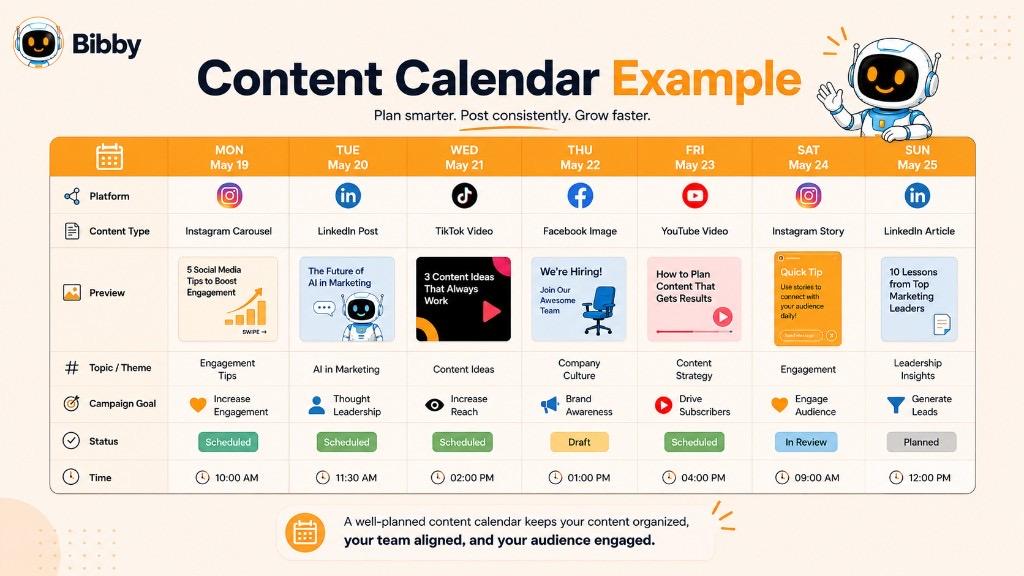
Example of a Weekly Social Media Content Calendar
| Day | Platform | Format | Content Topic | Goal | Status |
|---|---|---|---|---|---|
| Monday | Carousel | 5 Social Media Tips | Engagement | Scheduled | |
| Tuesday | Image + Caption | Industry Insight | Awareness | Scheduled | |
| Wednesday | TikTok | Video | Quick Marketing Tip | Reach | Scheduled |
| Thursday | Image | Customer Success Story | Trust | Scheduled | |
| Friday | YouTube | Video | Product Tutorial | Education | Scheduled |
| Saturday | Story | Behind the Scenes | Engagement | Scheduled | |
| Sunday | TikTok | Video | Weekly Recap | Awareness | Draft |
This calendar provides a basic overview of the week's publishing activity. It also ensures that the business is not relying on one content format or publishing only promotional messages.
Example of a Monthly Content Calendar
For longer-term planning, a business can organize content around weekly themes.
Week 1: Educational Content
- Social media tips
- Industry statistics
- How-to carousel
- Educational video
Week 2: Product Content
- Product feature
- Product demonstration
- Customer use case
- FAQ video
Week 3: Engagement Content
- Poll
- Question post
- Community discussion
- Behind-the-scenes content
Week 4: Promotional Content
- Offer announcement
- Product benefits
- Customer testimonial
- Call-to-action post
This approach creates variety while keeping the content connected to broader marketing objectives.
Example of a Campaign Content Calendar
A campaign may require a more detailed schedule.
For example, a company launching a new product could plan:
| Stage | Content | Platform | Format |
|---|---|---|---|
| Teaser | Something New Is Coming | Story | |
| Announcement | Product Launch | Image | |
| Education | How the Product Works | YouTube | Video |
| Feature | Key Product Benefits | Carousel | |
| Social Proof | Customer Testimonial | Image | |
| Promotion | Launch Offer | TikTok | Video |
| Reminder | Last Chance | Reel |
The calendar gives each piece of content a role in the campaign rather than treating every post as an unrelated publication.
Example of a Multi-Platform Content Workflow
One content idea can also be adapted across several platforms.
For example, suppose the original topic is:
“How AI Can Save Time on Social Media Management.”
That single idea could become:
LinkedIn: Detailed educational post
Instagram: Carousel explaining the key benefits
Facebook: Short educational post
TikTok: Short video with three tips
YouTube: Longer explainer video
The core idea remains consistent, while the format and presentation are adapted to each platform.
Example of an AI-Assisted Content Calendar
An AI-powered workflow can take this process further.
Instead of manually creating every entry, a marketer could use an AI social media automation platform to help generate content ideas, captions, campaigns, and publishing schedules.
With Bibby, for example, the workflow can look like:
Upload Image or Generate Image With AI → Choose Posting Style → Generate Caption → Create Campaign → Schedule Posts → Publish Across Selected Platforms
The user can also interact with Bibby's chat interface to create campaigns, generate posts, create a brand kit, regenerate captions, and manage other social media tasks.
What Makes a Good Content Calendar Example?
A useful content calendar should answer five basic questions for every piece of content:
- What are you publishing?
- Where will you publish it?
- When will it be published?
- Why are you publishing it?
- What happens next?
The last question is particularly important when using an automated workflow. Once content is planned, it should move smoothly through creation, approval, scheduling, publishing, and performance analysis.
A content calendar does not need to be complicated. Even a simple weekly table can provide significant structure. As your publishing operation grows, you can add campaigns, content pillars, approvals, analytics, AI assistance, and automated scheduling to turn the calendar into a complete content management workflow.
Content Calendar Best Practices
A content calendar is most effective when it makes publishing simpler, more consistent, and easier to manage. Adding more columns or planning further ahead does not automatically create a better calendar. The goal is to build a system that your team can actually maintain.
Here are some practical content calendar best practices.
1. Plan Around Clear Content Goals
Every piece of content should have a reason for being published.
Before filling your calendar, define whether your content is intended to:
- Increase brand awareness
- Generate engagement
- Educate your audience
- Drive website traffic
- Generate leads
- Promote products or services
- Build customer trust
- Increase sales
A clear goal makes it easier to decide which topics and formats belong in your calendar.
2. Use Content Pillars
Content pillars give your calendar a consistent structure.
For example, a social media automation brand might use:
- Social media education
- AI and automation
- Content creation
- Marketing tips
- Product education
Instead of randomly selecting topics every day, you can rotate through your content pillars and maintain a balanced publishing mix.
3. Maintain a Consistent Publishing Schedule
Consistency is generally more useful than creating an unrealistic posting frequency that your team cannot maintain.
Choose a schedule that matches your:
- Resources
- Audience
- Platforms
- Content formats
- Marketing goals
A sustainable calendar is better than an ambitious calendar that becomes impossible to maintain after a few weeks.
4. Adapt Content for Each Platform
Avoid automatically publishing exactly the same content everywhere.
An idea can remain consistent while its presentation changes.
For example:
LinkedIn: Detailed industry insight
TikTok: Short video
Facebook: Community-focused post
YouTube: Longer educational video
Adapting content helps it fit the expectations and formats of different platforms.
5. Mix Different Content Formats
A strong calendar should not contain only promotional images or text posts.
Consider combining:
- Images
- Carousels
- Videos
- Stories
- Reels
- Tutorials
- Customer stories
- Educational posts
- Product content
A varied content mix can help keep your publishing strategy fresh.
6. Balance Promotional and Non-Promotional Content
If every post asks people to buy something, your social media feed can quickly feel like a continuous advertisement.
Include content that provides value without requiring an immediate purchase, such as:
- Tips
- Tutorials
- Industry insights
- Answers to common questions
- Educational content
- Behind-the-scenes posts
- Community discussions
The right balance depends on your audience and business objectives.
7. Leave Room for Trending Topics
A content calendar should provide structure without becoming rigid.
Leave some space for:
- Breaking industry developments
- Trends
- Viral conversations
- Current events relevant to your audience
- Unexpected opportunities
This allows your brand to respond to what is happening now rather than being locked into a schedule created weeks earlier.
8. Plan Campaigns in Advance
If a campaign involves multiple posts, map the entire sequence before publishing begins.
For example:
Teaser → Announcement → Education → Product Benefits → Social Proof → Promotion → Follow-Up
This keeps the campaign cohesive and prevents important supporting content from being forgotten.
9. Reuse and Repurpose Strong Content
You do not need to create every piece of content from scratch.
A high-performing blog article, video, customer story, or social media post can become multiple pieces of content.
For example:
YouTube Video → LinkedIn Post → Instagram Carousel → Facebook Post → TikTok Clip
AI can make this process faster by helping adapt the original idea into different formats.
10. Use AI for Repetitive Tasks
AI can reduce the manual work involved in maintaining a content calendar.
Depending on the tool, AI can help with:
- Content ideas
- Captions
- Visual generation
- Content repurposing
- Campaign planning
- Posting-time recommendations
- Scheduling
- Content management
Bibby combines several of these capabilities in its social media automation workflow, allowing users to generate or upload content, create captions, build campaigns, and schedule posts across supported social platforms.
11. Review Content Before It Goes Live
Automation should not mean skipping quality control.
Before publishing, check:
- Caption accuracy
- Spelling and grammar
- Visual quality
- Links
- Brand voice
- Calls to action
- Platform-specific formatting
- Campaign details
A quick review can prevent small mistakes from becoming public posts.
12. Use AI-Optimized Scheduling When Appropriate
Choosing a posting time manually for every platform can be tedious.
AI-powered scheduling can help identify potentially effective publishing times based on available data and audience activity.
This is particularly useful when your content calendar includes multiple platforms and many scheduled posts.
13. Track Performance
A calendar should not end when the post is published.
Review metrics such as:
- Reach
- Impressions
- Engagement
- Comments
- Shares
- Saves
- Clicks
- Leads
- Conversions
- Follower growth
Look for patterns rather than focusing on one isolated post.
14. Update Your Calendar Based on Results
Your content calendar should evolve with your audience.
If educational videos consistently outperform static posts, create more videos. If certain topics generate strong engagement, explore those topics further. If a platform consumes significant resources without producing meaningful results, reconsider your approach.
This creates a continuous process:
Plan → Create → Publish → Measure → Learn → Improve
15. Keep the Calendar Simple Enough to Use
One of the most common mistakes is making the calendar so complicated that nobody wants to maintain it.
Start with the essentials:
Date + Platform + Topic + Format + Caption + Status
Add campaigns, goals, keywords, approvals, analytics, and other fields only when they provide real value.
The best content calendar is not necessarily the one with the most information. It is the one that helps you consistently move from an idea to published content with the least unnecessary friction.
Common Content Calendar Mistakes
A content calendar can make social media management much easier, but only when it is built and maintained properly. Many businesses create a calendar and still struggle with inconsistent publishing, repetitive content, or poor engagement because the calendar focuses on scheduling without considering strategy and execution.
Here are some of the most common content calendar mistakes to avoid.
1. Creating a Calendar Without a Content Strategy
A calendar filled with random post ideas is not a content strategy.
Before scheduling content, define your:
- Marketing goals
- Target audience
- Content pillars
- Key topics
- Platforms
- Content formats
- Campaign objectives
Your calendar should turn your strategy into an actionable publishing plan.
2. Focusing Only on Promotional Content
Constantly promoting products or services can make your social media feed feel repetitive.
Instead, create a mix of:
- Educational content
- Promotional content
- Entertainment
- Industry insights
- Customer stories
- Behind-the-scenes content
- Community-focused posts
The right mix depends on your audience and business goals.
3. Publishing the Same Content Everywhere
Cross-platform publishing can save time, but copying and pasting the exact same post to every network is not always effective.
A LinkedIn audience may respond to a detailed professional insight, while TikTok users may prefer a short video and Instagram users may engage more with a visual carousel.
Use the same core idea when appropriate, but adapt the format, caption, and presentation to each platform.
4. Creating an Unrealistic Publishing Schedule
Planning 10 posts a day may look impressive on paper, but it becomes a problem if you cannot consistently create and manage that volume.
A sustainable schedule is more valuable than an ambitious calendar that gets abandoned after a few weeks.
Consider your available:
- Time
- Budget
- Team size
- Content resources
- Creative capacity
5. Planning Too Far Ahead Without Flexibility
Long-term planning can be useful, but a calendar should not become a rigid script.
New trends, industry developments, customer conversations, and unexpected opportunities can emerge at any time.
Leave some room for timely content so your brand can respond to relevant conversations.
6. Ignoring Important Dates
Failing to account for important dates can result in missed marketing opportunities.
Depending on your business, these might include:
- Holidays
- Product launches
- Industry events
- Seasonal campaigns
- Company anniversaries
- Sales periods
- Conferences
Add important dates to your calendar early so you have enough time to prepare supporting content.
7. Forgetting About Content Formats
A calendar that only tracks topics may not provide enough information to execute the content effectively.
Include the intended format, such as:
- Image
- Carousel
- Video
- Story
- Reel
- Text post
This helps you maintain a more balanced content mix.
8. Writing Captions at the Last Minute
Leaving captions until the day of publication can create unnecessary pressure.
Whenever possible, prepare captions alongside the content or use AI assistance to generate initial drafts that can then be reviewed and refined.
This is particularly useful when managing a large number of posts.
9. Treating the Calendar as a Static Spreadsheet
A spreadsheet can be an excellent planning tool, but planning alone does not publish content.
If your workflow requires manually transferring every calendar entry into another scheduling platform, the process can become repetitive and prone to errors.
Connecting planning with content creation, scheduling, and publishing automation can reduce this friction.
10. Ignoring Performance Data
A calendar should not simply move forward without learning from previous content.
If certain posts consistently perform better than others, investigate why.
Look at:
- Engagement
- Reach
- Saves
- Shares
- Clicks
- Conversions
- Follower growth
Use these insights to improve your future calendar.
11. Not Updating the Calendar
A calendar can quickly become outdated if plans change but the document is never updated.
Campaign dates move. Posts get canceled. New content opportunities appear. Some content may need to be rewritten.
Keep the calendar current so everyone is working from the same information.
12. Making the Calendar Too Complicated
Adding dozens of columns does not necessarily make a calendar better.
If team members need to spend more time managing the calendar than creating content, the system has become counterproductive.
Start with the information you actually need and expand the system only when necessary.
13. Forgetting Content Repurposing
Creating every post from scratch can consume significant time.
A strong content calendar should identify opportunities to repurpose existing content.
For example:
Blog → Carousel → LinkedIn Post → Short Video → Story
This allows one strong idea to support multiple publishing opportunities.
14. Relying Entirely on Automation
Automation can save time, but it should not replace human judgment.
AI-generated captions, visuals, and scheduling recommendations should still be reviewed for:
- Accuracy
- Brand voice
- Context
- Relevance
- Quality
Automation works best when it handles repetitive tasks while people remain responsible for strategy and final decisions.
15. Creating the Calendar but Not Following Through
Perhaps the biggest mistake is creating an impressive calendar and then failing to execute it.
A useful content calendar should connect the entire workflow:
Idea → Creation → Review → Scheduling → Publishing → Analysis
If the calendar only stores ideas and dates, it is a planning document. When connected to creation and automation, it becomes part of a complete content publishing system.
The goal is not to create the perfect calendar. The goal is to create a practical system that helps you consistently produce, publish, measure, and improve your content.
How Often Should You Update a Content Calendar?
There is no single schedule that works for every content calendar. How often you should update it depends on your content volume, business goals, team size, platforms, and how quickly your industry changes.
For most businesses, a good approach is to maintain a longer-term content plan while reviewing and adjusting the calendar regularly.
Daily Content Calendar Updates
Daily updates are useful for businesses that publish frequently or need to respond to fast-moving trends.
You may need to update the calendar when:
- A post needs to be changed
- A trend becomes relevant
- A campaign changes
- A scheduled post is canceled
- Breaking industry news creates a new opportunity
- A customer question inspires timely content
Daily maintenance does not mean rebuilding the entire calendar every day. Small adjustments are often enough.
Weekly Content Calendar Updates
A weekly review works well for many creators, small businesses, and social media teams.
At the beginning or end of each week, review:
- What was published
- What is scheduled
- What performed well
- What needs to be changed
- Which new ideas should be added
- Whether upcoming campaigns are on track
Weekly reviews help keep the calendar current without creating unnecessary administrative work.
Monthly Content Calendar Planning
Monthly planning is useful when you want a broader view of your content.
At the beginning of a month, you can plan:
- Major topics
- Content pillars
- Campaigns
- Product promotions
- Important dates
- Seasonal content
- Major videos or articles
For example, a business might plan the entire month's major themes while leaving individual publishing dates flexible.
Quarterly Content Planning
Larger marketing teams may also create quarterly content plans.
A quarterly plan can establish:
- Major marketing objectives
- Campaign themes
- Product launches
- Seasonal priorities
- Content pillars
- Major content projects
However, a quarterly plan should not mean every post is permanently locked in three months ahead.
A useful approach is:
Quarterly strategy → Monthly planning → Weekly review → Daily adjustments when necessary
How Far Ahead Should You Plan?
A practical planning horizon might look like this:
| Planning Period | Best Used For |
|---|---|
| Daily | Trends and last-minute changes |
| Weekly | Publishing and workflow management |
| Monthly | Content themes and campaigns |
| Quarterly | Strategic direction and major initiatives |
For many social media teams, planning several weeks ahead while reviewing the calendar every week provides a good balance between organization and flexibility.
Do You Need to Plan Every Post in Advance?
Not necessarily.
Some content benefits from advance planning, particularly:
- Product launches
- Promotional campaigns
- Educational series
- Seasonal campaigns
- Evergreen content
- Scheduled videos
Other content may need to remain flexible:
- Trending topics
- Real-time conversations
- Breaking industry news
- Community responses
- Unexpected opportunities
A strong content calendar leaves room for both.
AI Can Make Calendar Updates Easier
AI-powered social media automation can reduce the manual work involved in maintaining a calendar.
Instead of repeatedly editing spreadsheets, moving posts, writing captions, and scheduling content separately, an AI-powered workflow can help with tasks such as:
- Generating new content
- Creating captions
- Regenerating captions
- Building campaigns
- Scheduling posts
- Selecting optimized publishing times
- Managing multiple social platforms
With Bibby, users can manage these types of social media tasks through its workflow and AI chat interface. This can make it easier to adjust a content plan without rebuilding the publishing process from scratch.
The Best Approach: Plan Ahead, Review Often
A content calendar should provide structure without becoming rigid.
A practical system is to plan major content and campaigns ahead of time, review the calendar weekly, and make smaller adjustments whenever circumstances change.
This gives you the best of both worlds:
Long-term planning + short-term flexibility + ongoing optimization.
Ultimately, you should update your content calendar as often as needed to keep it accurate, relevant, and useful. A calendar that reflects your current publishing plan is far more valuable than one that looks perfectly organized but no longer matches what you actually intend to publish.
Who Uses Content Calendars?
Content calendars are useful for almost anyone who creates and publishes content consistently. The specific way a calendar is used depends on the person's goals, publishing frequency, platforms, and team structure.
From individual creators to large marketing departments, a content calendar can provide a central system for organizing content and keeping publishing on track.
1. Businesses
Businesses use content calendars to maintain a consistent online presence and coordinate marketing activities.
A business might use its calendar to plan:
- Social media posts
- Product announcements
- Promotions
- Customer stories
- Educational content
- Videos
- Seasonal campaigns
A calendar also helps businesses connect individual posts with broader marketing goals.
2. Social Media Managers
Social media managers often manage several platforms at the same time, making organization particularly important.
A social media manager may use a calendar to track:
- Multiple social accounts
- Content formats
- Captions
- Campaigns
- Publishing dates
- Approval status
- Scheduled posts
- Performance
Instead of keeping separate lists for every platform, a centralized calendar can provide one view of upcoming social activity.
3. Content Creators
Creators can use content calendars to plan videos, images, stories, posts, and other content.
For example, a creator might plan:
Monday: Educational video
Wednesday: Behind-the-scenes post
Friday: Short-form video
Sunday: Community-focused content
This reduces the need to decide what to publish from scratch every day.
4. Marketing Teams
Marketing teams often coordinate several types of content at the same time.
Their calendar may include:
- Blog articles
- Social media posts
- Email campaigns
- Videos
- Lead magnets
- Webinars
- Product campaigns
A shared calendar helps different team members understand what is being created, when it is due, and how each asset fits into the larger campaign.
5. Digital Marketing Agencies
Agencies managing social media for multiple clients can use content calendars to organize client-specific publishing schedules.
An agency may need to track:
- Client accounts
- Approval deadlines
- Content themes
- Campaigns
- Platform requirements
- Publishing schedules
- Performance results
A structured calendar helps reduce confusion when multiple brands are being managed simultaneously.
6. Startups
Startups often have limited marketing resources, which makes efficient planning important.
A content calendar can help a small team decide where to focus its efforts instead of creating content randomly.
For example, a startup could dedicate different days to:
- Educational content
- Product education
- Customer stories
- Industry insights
- Brand-building content
7. Freelancers
Freelancers can use content calendars for both their personal brands and client work.
A freelance designer, developer, consultant, or marketer might use one to plan:
- Professional insights
- Portfolio content
- Educational posts
- Case studies
- Client success stories
- Service promotions
This can help freelancers maintain an active professional presence without constantly planning content at the last minute.
8. Influencers and Personal Brands
Influencers and personal-brand creators often publish across multiple platforms and formats.
A content calendar can help coordinate:
- Reels
- Stories
- Short videos
- Long-form videos
- Brand collaborations
- Sponsored content
- Personal updates
It can also help ensure that sponsored or campaign-related content is published according to agreed schedules.
9. Ecommerce Businesses
Online stores can use content calendars to coordinate product marketing with social media activity.
For example, a product campaign might include:
Product Teaser → Product Reveal → Feature Carousel → Demonstration Video → Customer Review → Promotional Offer
The calendar keeps these pieces connected and helps coordinate publishing around launches and promotions.
10. Nonprofit Organizations
Nonprofits can use content calendars to organize awareness campaigns, fundraising initiatives, community updates, educational content, and event promotion.
Planning ahead can be particularly helpful when multiple stakeholders need to review content before publication.
11. Educational Organizations
Schools, universities, training companies, and educational creators can use content calendars to plan:
- Educational posts
- Course promotions
- Tutorials
- Student stories
- Events
- Announcements
- Educational videos
A structured calendar can also help align content with academic or enrollment cycles.
12. Anyone Managing Multiple Social Platforms
You do not need to be part of a large marketing team to benefit from a content calendar.
If you are managing Facebook, Instagram, LinkedIn, YouTube, and TikTok, or several other platforms, a calendar can provide a central view of your publishing schedule.
With AI-powered social media automation tools such as Bibby, individuals and teams can take this organization further by combining content creation, caption generation, campaign management, scheduling, and publishing in one workflow.
Who Needs a Content Calendar Most?
A content calendar becomes especially valuable when:
- You publish frequently
- You manage multiple platforms
- Several people create content
- You run recurring campaigns
- You need consistent publishing
- You manage multiple clients
- You want to automate repetitive tasks
Whether you are a solo creator with five posts a week or a marketing team managing hundreds of posts across several brands, the principle remains the same: a content calendar gives your publishing process structure and makes it easier to turn ideas into consistent content.
Content Calendar Tools
A content calendar can be created with anything from a simple spreadsheet to a specialized social media automation platform. The right tool depends on how much content you publish, how many people are involved, how many platforms you manage, and how much of the publishing process you want to automate.
1. Spreadsheets
Tools such as spreadsheets are one of the simplest ways to create a content calendar.
A spreadsheet can contain columns for:
- Date
- Platform
- Content topic
- Format
- Caption
- Campaign
- Status
- Assigned team member
- Publishing time
Advantages:
- Simple to set up
- Flexible
- Easy to customize
- Suitable for basic planning
Limitations:
- Does not automatically publish content
- Captions and visuals usually need to be created separately
- Scheduling can require manual work
- Managing large volumes of content can become difficult
Spreadsheets work well when you primarily need a planning document rather than an automated publishing system.
2. Project Management Tools
Project management platforms can also be adapted for content planning.
They are useful when content creation involves multiple people and stages, such as:
Idea → Writing → Design → Review → Approval → Scheduling → Published
These tools can provide task assignments, deadlines, comments, and workflow management.
However, they may not be designed specifically for social media publishing, meaning you may still need another tool to actually schedule and publish posts.
3. Social Media Scheduling Tools
Social media scheduling tools are designed to connect content planning with publishing.
Depending on the platform, they may allow you to:
- Create posts
- Upload media
- Write captions
- Schedule content
- Manage multiple social accounts
- Review upcoming posts
- Analyze performance
This eliminates some of the manual work associated with maintaining a separate calendar and then transferring every post into a publishing platform.
4. AI-Powered Content Calendar Tools
AI-powered tools take content planning a step further by helping with both planning and execution.
Depending on the platform, AI can assist with:
- Content ideas
- Caption generation
- Image generation
- Content repurposing
- Campaign creation
- Posting styles
- Scheduling
- Publishing-time optimization
- Social media management
Instead of simply recording what should be published, an AI-powered system can help create and execute the content itself.
5. Bibby for AI-Powered Content Scheduling and Automation
Bibby combines content creation, AI assistance, scheduling, and social media automation into one workflow.
You can start by uploading your own visual content or generating an image with AI. You can then choose a posting style, generate captions, create campaigns, and schedule content across supported social platforms.
Bibby supports workflows involving platforms such as:
It can also work with different social media formats, including images, carousels, videos, and stories, depending on platform support.
Managing Content Through Bibby's AI Chat
Bibby's chat interface adds another way to manage your content workflow.
Instead of manually navigating through every step, you can interact with the system conversationally to perform tasks such as:
- Create a brand kit
- Create a campaign
- Create posts
- Generate captions
- Regenerate captions
- Manage social media content
- Schedule posts
This makes the content calendar part of a broader social media management workflow.
Choosing the Right Content Calendar Tool
When comparing content calendar tools, consider more than whether they provide a calendar view.
Look for capabilities such as:
Planning
- Calendar view
- Content organization
- Campaign management
- Content categories
Creation
- Image creation
- AI-generated content
- Caption generation
- Content repurposing
Scheduling
- Multi-platform scheduling
- Automated publishing
- Publishing-time optimization
- Recurring content
Management
- Team collaboration
- Approval workflows
- Content status
- AI chat interface
Measurement
- Analytics
- Engagement tracking
- Performance reporting
The best tool depends on your needs. A spreadsheet may be enough for someone planning a few posts each week, while a growing business or social media team may benefit from a platform that connects planning, content creation, scheduling, automation, and analytics.
The important distinction is this: a content calendar tells you what should happen, while a content scheduling and automation tool can help make it happen.
Key Takeaways
- A content calendar is a planning system that shows what content will be published, when, where, and why across multiple channels.
- Content calendars improve consistency, save time, support campaign planning, and make multi-platform publishing easier to manage.
- A content strategy defines direction; a content calendar turns that strategy into an actionable publishing schedule.
- A social media calendar is a type of content calendar focused specifically on social platform publishing.
- Strong calendars include dates, platforms, formats, topics, captions, campaigns, goals, status, and performance data.
- Create a calendar by defining goals, understanding your audience, choosing platforms, setting content pillars, generating ideas, assigning dates, creating content, reviewing, scheduling, and analyzing results.
- AI can help with ideas, captions, repurposing, campaigns, AI-optimized times, and automated social media scheduling.
- Bibby connects content creation, AI captions, campaign management, and multi-platform scheduling in one chat-based workflow across Facebook, Instagram, LinkedIn, YouTube, and TikTok.