
A content creator is someone who creates and publishes content to inform, entertain, educate, or connect with an audience, usually through digital platforms.
Today, content creators can build audiences through social media posts, videos, images, carousels, Stories, blogs, podcasts, and more. In this guide, you'll learn what a content creator does, the different types of content creators, and how modern tools like Bibby can make creating and publishing content easier.
In this guide, we will discuss:
- What a content creator is and what they do
- The different types of content creators
- How content creators create, publish, and monetize content
Let's start by looking at exactly what the term "content creator" means.
What Is a Content Creator?
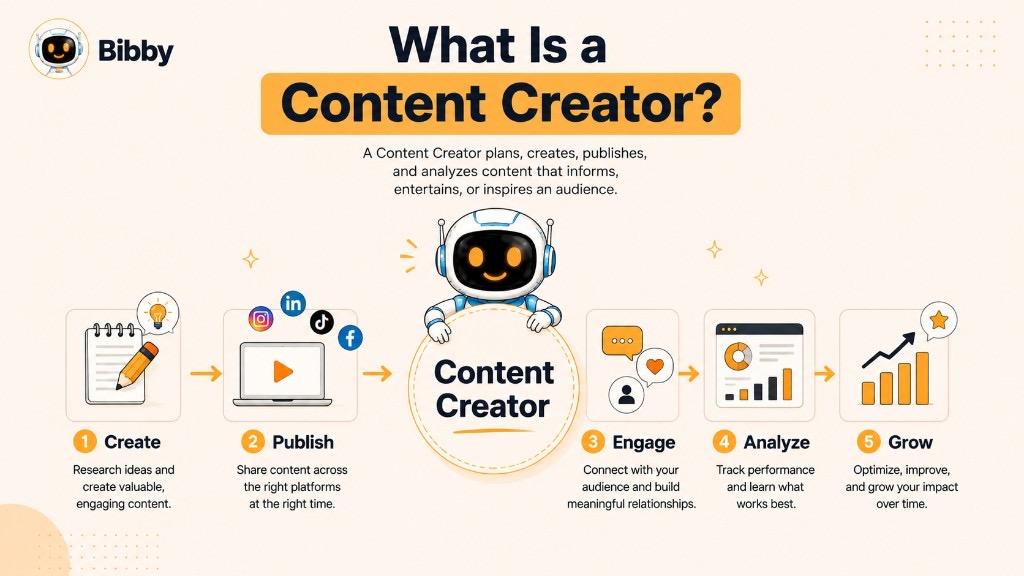
Content creators commonly publish their work on digital platforms such as Instagram, TikTok, YouTube, Facebook, LinkedIn, websites, blogs, and newsletters. Depending on their niche and platform, they may create videos, images, social media posts, carousels, Stories, articles, podcasts, livestreams, or other types of digital content.
Being a content creator does not necessarily mean having millions of followers or working with brands. A person who regularly creates useful LinkedIn posts for a professional audience, shares cooking videos on TikTok, writes a niche blog, or publishes educational YouTube videos can all be considered content creators.
The role also involves more than simply making content. A content creator may research topics, develop ideas, write captions or scripts, create visual assets, edit videos, publish content, interact with their audience, and analyze performance to understand what works.
In simple terms, a content creator creates valuable or engaging content and shares it with an audience through one or more channels.
What Does a Content Creator Do?
A content creator's job goes far beyond simply publishing posts. They turn ideas, knowledge, experiences, or creative concepts into content that an audience finds useful, entertaining, or interesting.
Depending on their niche and platform, a content creator may handle some or all of the following tasks:
- Research topics: Find relevant subjects, audience questions, trends, and ideas worth creating content about.
- Generate content ideas: Brainstorm topics that align with their audience, niche, goals, and current conversations.
- Create content: Produce images, videos, carousels, articles, Stories, podcasts, or other media formats.
- Write captions and scripts: Develop the written messaging that accompanies or forms the content.
- Edit content: Improve images, videos, audio, and written content before publishing.
- Optimize for platforms: Adapt content to suit the format, audience, and publishing style of each social media platform.
- Schedule and publish: Plan when content should go live and publish it consistently across selected channels.
- Engage with the audience: Respond to comments, messages, questions, and other forms of audience interaction.
- Analyze performance: Review metrics such as views, engagement, reach, clicks, and conversions to understand which content performs best.
- Repurpose content: Turn one piece of content into multiple formats or adapt it for different platforms.
- Build their personal brand: Develop a recognizable voice, style, topic focus, and identity that audiences can associate with them.
- Collaborate with brands: Create sponsored content, product reviews, UGC, or other promotional content for businesses.
Not every content creator performs all of these tasks alone. Some work with photographers, video editors, designers, writers, social media managers, or other specialists. Others use AI and automation tools to handle repetitive parts of the workflow.
For example, a creator might spend their time developing an idea and recording a video, then use software to generate captions, create variations, schedule the content, and publish it across multiple platforms.
Ultimately, the responsibilities of a content creator depend on their niche, audience, content format, platforms, and goals.
Types of Content Creators
Content creators come in many different forms. Some focus on a specific platform, while others specialize in a particular content format, industry, or audience.
Here are some of the most common types of content creators:
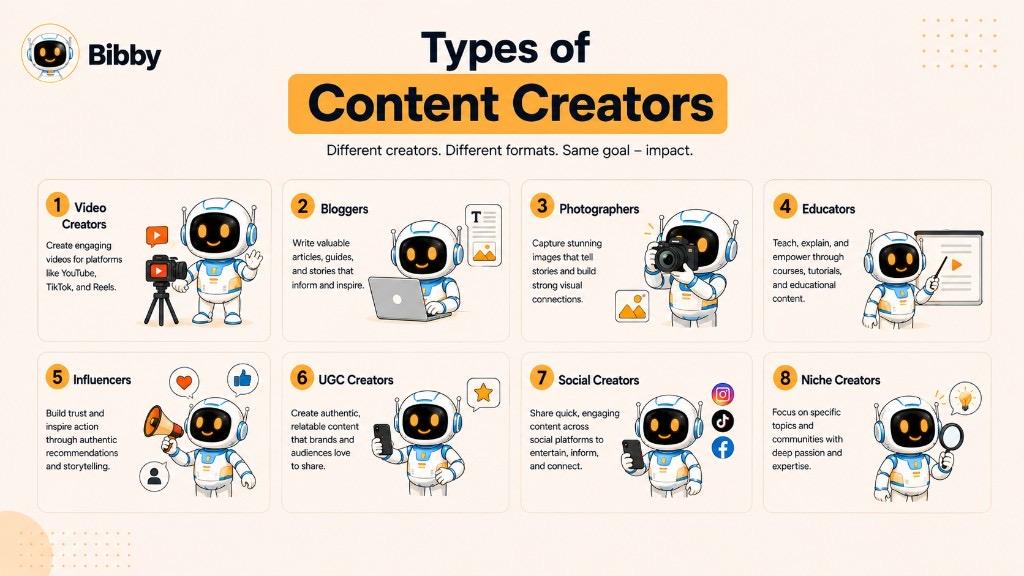
Social Media Content Creators
Social media content creators primarily create content for platforms such as Facebook, Instagram, LinkedIn, TikTok, and X.
They may publish images, carousels, short-form videos, Stories, text posts, or other platform-specific content. Many social media creators publish across several platforms and adapt the same idea to fit each channel.
Video Content Creators
Video creators produce visual content for platforms such as YouTube, TikTok, Instagram, and Facebook.
Their content can include short-form videos, tutorials, reviews, educational videos, entertainment, interviews, vlogs, livestreams, and other formats. Video creators may handle everything from scripting and filming to editing, publishing, and audience engagement.
Written Content Creators
Written content creators focus primarily on text-based content. They may create blog posts, newsletters, social media posts, articles, guides, essays, or other written resources.
Bloggers, newsletter writers, LinkedIn creators, and niche publishers can all fall into this category.
Visual Content Creators
Visual creators use images and design to communicate ideas or tell stories. This group can include photographers, graphic designers, illustrators, digital artists, and creators who specialize in visual social media content.
Their work may appear as photographs, illustrations, infographics, social media graphics, carousels, or other visual formats.
Educational Content Creators
Educational creators focus on teaching their audience something useful. Their subjects can range from business and technology to fitness, cooking, finance, language learning, and professional skills.
Teachers, coaches, consultants, and industry experts can all become educational content creators by turning their knowledge into useful content.
UGC Content Creators
User-generated content (UGC) creators produce content featuring products, services, or brands, often in a way that feels natural and relatable rather than like traditional advertising.
A UGC creator may create product demonstrations, reviews, tutorials, testimonials, unboxing videos, or lifestyle content for a brand to use in its marketing.
Influencer Content Creators
Influencer creators combine content creation with an established relationship with an audience. Their influence may come from expertise, personality, entertainment value, credibility, or a strong connection with a particular community.
Influencers often work with brands through sponsored posts, product collaborations, affiliate marketing, and other partnerships.
Niche Content Creators
Niche creators focus on a specific subject or community rather than trying to appeal to everyone. Examples include creators focused on travel, food, gaming, fashion, photography, technology, business, parenting, or personal finance.
A narrow niche can help a creator attract a highly relevant audience and establish expertise in a particular area.
Multi-Platform Content Creators
Some creators don't build their entire presence around a single platform. Instead, they create content once and distribute or adapt it across multiple channels.
For example, a creator might turn one idea into an Instagram carousel, a LinkedIn post, a TikTok video, a YouTube Short, and a Facebook post.
This approach allows creators to reach different audiences while getting more value from the time they spend creating content.
Why the Types of Content Creator Overlap
These categories aren't mutually exclusive. One person can fit several types at the same time.
For example, a fitness creator could be a social media creator, video creator, educational creator, niche creator, and influencer simultaneously.
What matters most is the type of content they create, the audience they serve, the platforms they use, and the purpose behind their content.
Content Creator vs. Influencer: What's the Difference?
The terms content creator and influencer are often used interchangeably, but they don't mean exactly the same thing.
A content creator primarily focuses on creating content for an audience, while an influencer is someone who uses their relationship, credibility, expertise, or reach to influence an audience's opinions, decisions, or behavior.
There is significant overlap between the two. An influencer needs content to maintain an audience, and a successful content creator can become influential within their niche.
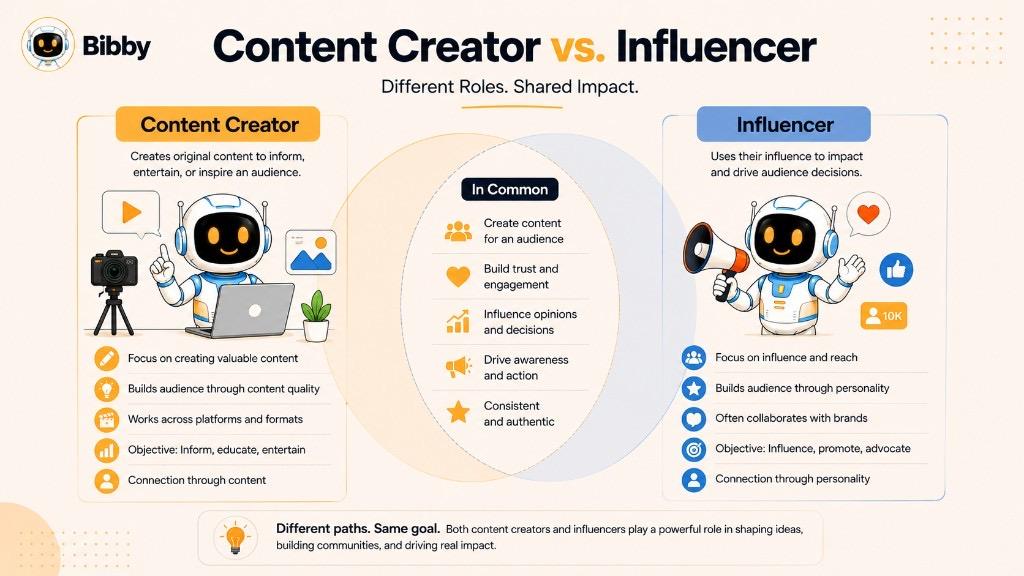
| Content Creator | Influencer | |
|---|---|---|
| Primary focus | Creating and publishing content | Influencing an audience |
| Main asset | Content and creative skills | Audience trust and influence |
| Audience size | Can be small or large | Can be small or large |
| Content formats | Videos, images, posts, blogs, podcasts, and more | Often social media posts, videos, Stories, and sponsored content |
| Brand partnerships | May work with brands | Often works with brands and sponsors |
| Monetization | Products, services, ads, sponsorships, affiliates, and more | Sponsorships, affiliates, products, services, and more |
Can You Be Both a Content Creator and an Influencer?
Yes. In fact, many people are both.
For example, someone who creates daily fitness videos may start as a content creator. As their audience grows and people begin trusting their recommendations, they may become an influencer as well.
However, you don't need to be an influencer to be a content creator. A person can create valuable content for a small, highly specific audience without promoting products or trying to influence purchasing decisions.
Likewise, influence isn't necessarily determined by follower count. A creator with a few thousand highly engaged followers can have significant influence within a specific niche.
The Key Difference
The simplest way to remember the distinction is:
Content creators create content. Influencers use their audience and credibility to influence people.
Because the two roles overlap so frequently, many modern creators combine both approaches—building an audience through consistent content while using their influence to promote ideas, products, services, or their own business.
What Skills Does a Content Creator Need?
Content creation combines creativity, communication, technology, and strategy. The exact skills required depend on the creator's niche and content format, but several skills are useful across almost every type of content creation.
Creativity and Idea Generation
Content creators need to consistently come up with ideas that are relevant and interesting to their audience. This can involve finding new angles on familiar topics, responding to trends, answering audience questions, or turning everyday experiences into content.
The ability to generate ideas consistently is especially important because successful creators need to publish regularly rather than relying on a single great piece of content.
Writing and Storytelling
Even creators who primarily produce visual or video content benefit from strong writing skills. Captions, headlines, scripts, hooks, descriptions, and calls to action all require clear communication.
Storytelling also helps creators turn information into content that people want to watch, read, or share.
Visual Communication
Creators who work with images, graphics, carousels, or video need to understand basic visual communication. This includes choosing appropriate images, arranging information clearly, and creating content that is easy to understand at a glance.
Advanced graphic design skills aren't required for every creator, but understanding visual quality and consistency can make content more effective.
Video Production
Video has become an important format across many social platforms. Creators may need to understand basic filming, lighting, audio, editing, framing, transitions, and pacing.
Creators don't necessarily need expensive equipment. A smartphone and a simple editing workflow can be enough to get started.
Understanding Social Media Platforms
Each platform has its own audience, formats, conventions, and publishing environment. A content creator should understand how their chosen platforms work and how to adapt content accordingly.
For example, a creator might turn the same topic into a short video for TikTok, a carousel for Instagram, and a text-based post for LinkedIn.
Audience Research
Great content starts with understanding the people it is intended for. Creators need to know what their audience cares about, what questions they ask, what problems they have, and what type of content they respond to.
Audience feedback, comments, search behavior, and performance data can all provide useful insights.
Analytics and Performance Analysis
Content creators can use analytics to understand what is working and what needs improvement. Useful metrics may include views, reach, engagement, watch time, clicks, saves, shares, follower growth, and conversions.
The goal isn't simply to chase numbers. Analytics help creators identify patterns and make better decisions about future content.
Consistency and Organization
Creating content regularly requires planning. Without an organized workflow, creators can spend too much time deciding what to create, writing captions, preparing media, and manually publishing posts.
Content calendars, templates, scheduling systems, and automation can help creators maintain consistency while spending more time on creative work.
Adaptability
Social platforms, audience preferences, and content formats change frequently. Successful creators need to experiment, learn from results, and adapt their approach.
Being willing to test new formats or change a strategy when the data suggests something isn't working can be just as important as creativity.
Personal Branding
Creators who want to build a recognizable presence also benefit from developing a consistent voice, visual identity, subject focus, and communication style.
A strong personal brand helps an audience understand what a creator represents and why they should continue following their content.
Ultimately, a content creator doesn't need to master every skill before getting started. The most important approach is to start creating, learn from the results, and gradually improve the skills that matter most for your audience and niche.
How Does a Content Creator Create Content?
Content creation usually follows a repeatable process, although the exact workflow varies depending on the creator, platform, and type of content. A creator might spend minutes creating a simple social media post or several days producing a detailed video or article.
A typical content creation workflow looks like this:
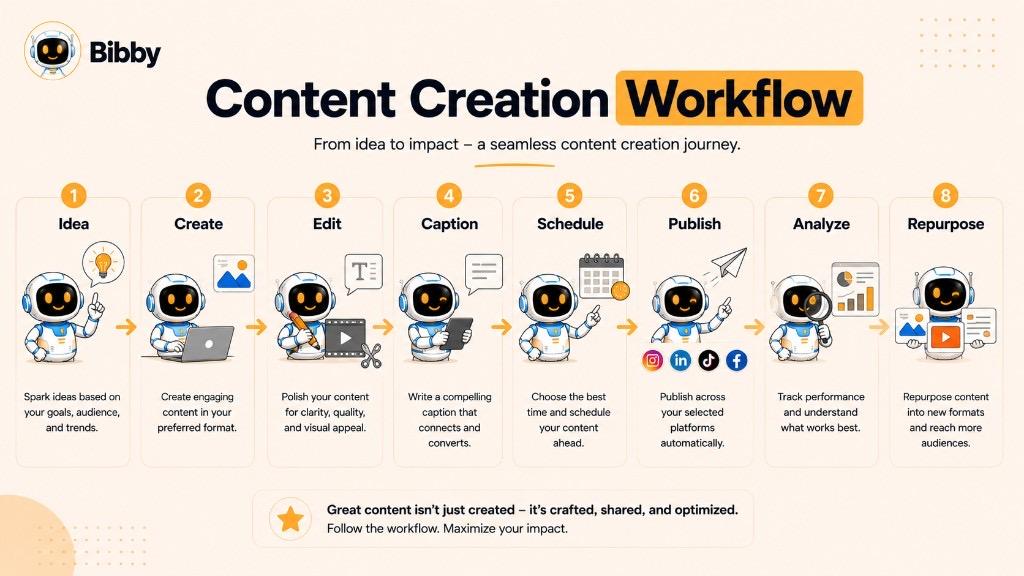
1. Define the Audience
Before creating content, a creator needs to understand who they are trying to reach. This includes identifying their interests, problems, questions, goals, and preferred content formats.
The clearer the target audience, the easier it becomes to create content that feels relevant.
2. Choose a Topic or Idea
Creators find topics from many sources, including audience questions, industry trends, personal experiences, keyword research, competitor analysis, and previous content performance.
The best ideas usually connect something the creator knows or cares about with something their audience wants to learn or experience.
3. Choose the Content Format
The creator then decides how to present the idea. Depending on the topic, this could be:
- A social media post
- An image
- A carousel
- A short-form video
- A long-form video
- A Story
- A blog post
- A podcast
- A newsletter
- A livestream
The same idea can often be adapted into several formats.
4. Create the Content
This is where the creator produces the actual media. They may write the article or script, take photographs, record video, design graphics, record audio, or generate visual assets with AI.
The creation process can be completely manual or supported by specialized creative and AI tools.
5. Edit and Improve It
Before publishing, creators review their content for quality, clarity, accuracy, and platform suitability.
For video, this may mean trimming footage, improving audio, adding captions, or adjusting the pacing. For written content, it could involve editing the copy, improving the headline, or making the message easier to understand.
6. Write the Caption or Supporting Copy
Social media content often needs additional text to provide context and encourage engagement.
Creators may write captions, descriptions, headlines, hooks, calls to action, or hashtags depending on the platform and content format.
7. Adapt the Content for Each Platform
Creators who publish across multiple platforms often need to adjust their content rather than simply copying and pasting the same post everywhere.
For example, a single idea could become a visual carousel on Instagram, a professional text post on LinkedIn, and a short video on TikTok.
8. Schedule or Publish the Content
Creators can publish content manually or use a scheduling tool to plan posts in advance.
Scheduling makes it possible to prepare content ahead of time and maintain a consistent publishing schedule without having to manually publish every post at the exact moment it should go live.
9. Engage With the Audience
Publishing isn't necessarily the end of the process. Creators may respond to comments, answer questions, participate in conversations, and use audience feedback to generate future content ideas.
This interaction can also help creators understand what their audience finds useful or interesting.
10. Analyze the Results
After publishing, creators can review performance data to see how their content performed.
Depending on the platform and goal, they might examine reach, impressions, views, watch time, engagement, shares, saves, clicks, leads, or conversions.
11. Repurpose What Works
A successful piece of content doesn't have to be used only once.
Creators can turn an article into several social posts, convert a video into short clips, transform a list into a carousel, or adapt an existing idea for another platform.
Repurposing allows creators to get more value from the effort already invested in creating the original content.
A Modern Content Creation Workflow
With AI and automation tools, many repetitive parts of this process can now be streamlined. A creator can use AI to generate ideas, create visual assets, write captions, adapt content, and prepare posts for multiple platforms.
The creator still provides the ideas, expertise, creativity, and judgment, while technology can help reduce the repetitive work involved in turning those ideas into published content.
The result is a more efficient workflow where creators can spend less time managing individual publishing tasks and more time creating content their audience actually wants.
What Platforms Do Content Creators Use?
Content creators can publish on almost any digital platform where they can reach an audience. Some creators focus on one platform, while others build a presence across several channels to reach different audiences and reduce their dependence on a single platform.
The right platform depends on the creator's niche, audience, content format, and goals.
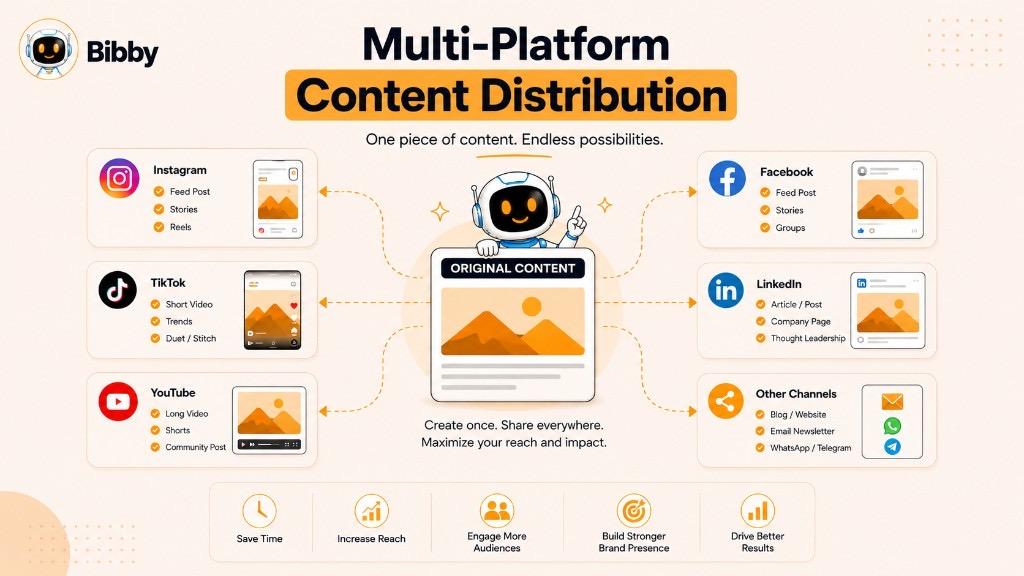
Instagram is widely used for visual content and community building. Creators can publish images, carousels, Reels, and Stories to showcase their ideas, products, expertise, or personality.
It can work particularly well for creators in areas such as fashion, food, travel, fitness, photography, lifestyle, design, and personal branding.
TikTok
TikTok is centered around short-form video and is known for its fast-moving trends and highly engaging content formats.
Creators use TikTok for entertainment, education, storytelling, product demonstrations, tutorials, reviews, and niche-specific content.
YouTube
YouTube supports both long-form and short-form video, making it suitable for creators who want to build deeper video content around a subject.
Creators can publish tutorials, reviews, educational videos, interviews, entertainment, vlogs, livestreams, and YouTube Shorts.
Facebook supports a broad range of content formats, including posts, images, videos, Reels, and Stories.
It can be useful for creators who want to reach established communities, participate in groups, build pages, and distribute content to audiences across different age groups and interests.
LinkedIn is particularly useful for professional and business-focused content.
Creators use LinkedIn to share industry insights, career advice, educational content, personal experiences, company updates, and expertise. Professionals can also use the platform to build their personal brand and attract business opportunities.
X
X is primarily focused on short-form written communication, although creators can also share images, videos, links, and other media.
It can be useful for creators who want to participate in real-time conversations, share opinions, discuss industry topics, or build an audience around a particular subject.
Pinterest is a visual discovery platform where creators can publish content designed to help people discover ideas, products, inspiration, and information.
Creators in areas such as recipes, home design, fashion, travel, crafts, and lifestyle can use Pinterest to drive audiences toward their websites or other content.
Blogs and Websites
Not every content creator relies on social media. Blogs and personal websites give creators greater control over their content and audience experience.
Creators can publish articles, guides, tutorials, resources, newsletters, portfolios, and other long-form content while using social platforms to distribute and promote it.
Podcasts
Podcasts allow creators to build an audience through long-form audio conversations, interviews, storytelling, education, commentary, or entertainment.
Many podcast creators also repurpose episodes into videos, short clips, quotes, articles, and social media posts.
Should a Content Creator Use Multiple Platforms?
Using multiple platforms can help creators reach more people, but it can also increase the amount of work required to create and publish content.
A practical approach is to start with one or two platforms where the target audience is already active, develop a repeatable workflow, and expand gradually.
Creators who publish across multiple platforms can also repurpose their core ideas instead of creating completely different content from scratch for every channel.
For example, one topic could become an Instagram carousel, a TikTok video, a YouTube Short, a LinkedIn post, and a Facebook post.
The goal isn't to be everywhere. The goal is to consistently reach the right audience with content that fits the platform they're using.
How Do Content Creators Make Money?
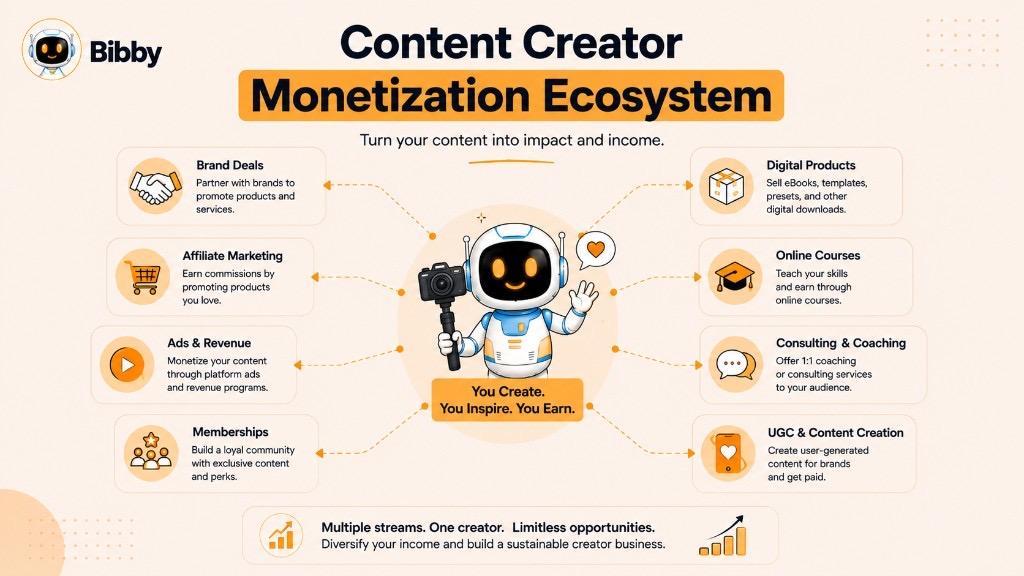
Content creators can make money in many different ways. The best monetization method depends on their audience, niche, platform, expertise, and the type of content they produce.
Some creators rely on a single income stream, while others combine several methods to build a more sustainable creator business.
Brand Sponsorships
Brands may pay creators to feature their products or services in sponsored content. This can include social media posts, videos, product demonstrations, reviews, or other promotional campaigns.
The value of a creator to a brand isn't determined only by follower count. Audience relevance, engagement, credibility, content quality, and niche can all influence the value of a partnership.
Affiliate Marketing
Creators can earn commissions by recommending products or services through affiliate links or other trackable referral methods.
For example, a technology creator might recommend software or equipment and receive a percentage of qualifying purchases generated through their referral.
Advertising Revenue
Some platforms allow eligible creators to earn money from advertisements displayed alongside or within their content.
YouTube, for example, has established advertising-based monetization options for eligible creators. Other platforms may offer their own monetization programs, although eligibility, availability, and terms can vary.
Digital Products
Creators can use their expertise and audience to sell digital products such as:
- Ebooks
- Templates
- Online courses
- Guides
- Presets
- Design assets
- Paid resources
- Digital downloads
Digital products can allow creators to monetize their knowledge without relying entirely on sponsorships or platform-based revenue.
Memberships and Subscriptions
Some creators offer exclusive content or benefits through paid memberships and subscriptions.
These can include private communities, bonus content, exclusive videos, newsletters, live sessions, or direct access to the creator.
Coaching and Consulting
Creators with specialized expertise can turn their knowledge into services.
For example, a marketing creator might offer consulting, while a fitness creator could provide coaching programs. In this model, content acts as a way to demonstrate expertise and attract potential clients.
UGC Services
UGC creators can make content for brands without necessarily publishing it to their own large audience.
A company might pay a creator to produce a product demonstration, testimonial, unboxing video, or lifestyle video that the company can then use in its own marketing campaigns.
Selling Products or Services
A creator may also use their audience to sell physical products, software, freelance services, events, or other offerings.
In this case, content helps attract attention, build trust, educate potential customers, and ultimately drive sales.
Creator Funds and Platform Monetization
Some social platforms provide monetization programs that reward eligible creators based on factors such as content performance, audience engagement, or other criteria.
These programs can change over time and may not be available in every country or to every creator, so creators should check the current requirements of each platform.
Why Multiple Income Streams Matter
Relying entirely on one platform or one source of revenue can create risk. Platform algorithms, monetization rules, audience behavior, and advertising markets can all change.
For that reason, many established creators build several complementary income streams.
For example, a business creator might combine sponsorships, affiliate marketing, consulting, digital products, and educational content.
Ultimately, the strongest monetization strategy is usually one that aligns the creator's expertise, audience needs, and content strategy rather than simply chasing the highest-paying opportunity.
How to Become a Content Creator
You don't need a large audience, expensive equipment, or professional experience to start creating content. What matters most is having something useful, interesting, entertaining, or valuable to share and building a consistent process around it.
Here is a practical roadmap for getting started.
1. Choose a Niche or Area of Focus
Start by deciding what you want to create content about. Your niche could be based on your expertise, professional experience, hobbies, interests, or the type of audience you want to help.
For example, you might focus on fitness, technology, cooking, marketing, personal finance, travel, education, gaming, or personal development.
You don't have to choose a niche that is extremely narrow from day one. Start with a clear area and refine it as you learn more about your audience.
2. Define Your Target Audience
Knowing who you're creating for makes it easier to decide what to publish.
Think about:
- Who do you want to reach?
- What problems do they have?
- What questions do they ask?
- What are they interested in?
- What type of content do they enjoy?
- What would make them follow or return to your content?
The more clearly you understand your audience, the easier it becomes to create relevant content.
3. Choose Your Primary Platform
You don't need to start on every social network.
Choose one platform where your target audience is active and where your preferred content format fits naturally.
For example, a video-focused creator might start with YouTube or TikTok, while a professional creator might begin with LinkedIn.
Once you develop a reliable workflow, you can expand to additional platforms.
4. Define Your Content Pillars
Content pillars are the main topics you repeatedly create content around.
For example, a marketing creator might use:
- Social media marketing
- Content strategy
- SEO
- Marketing tools
- Business growth
Having a few clear content pillars makes it easier to generate ideas while keeping your overall content focused.
5. Create a Repeatable Content Workflow
Decide how you will move from an idea to a published piece of content.
A simple workflow might be:
Idea → Creation → Editing → Caption → Scheduling → Publishing → Analysis
A repeatable process prevents every new post from becoming a completely new project.
6. Start Creating With the Tools You Have
Don't wait until you have perfect equipment.
A smartphone can be enough to create photographs, videos, Stories, and short-form content. Free or inexpensive software can also handle many basic editing and design tasks.
As your needs grow, you can invest in better equipment and specialized tools.
7. Publish Consistently
Consistency helps you build an audience and gives you more opportunities to learn what works.
This doesn't necessarily mean publishing every day. A sustainable schedule that you can maintain for months is generally more useful than an ambitious schedule you abandon after a few weeks.
8. Study Your Results
Pay attention to how your audience responds.
Look at metrics such as views, reach, engagement, shares, saves, watch time, clicks, and conversions depending on your goals and platform.
Use these insights to identify patterns rather than judging your entire strategy based on one successful or unsuccessful post.
9. Improve Your Content Over Time
Your first pieces of content probably won't be your best—and that's normal.
Use audience feedback and performance data to improve your ideas, hooks, visuals, storytelling, editing, captions, and publishing strategy.
Content creation is a skill that develops through repetition.
10. Build Your Personal Brand
As you publish more content, develop recognizable elements of your identity.
This could include your tone of voice, visual style, subject matter, opinions, storytelling approach, or the specific problems you help your audience solve.
A consistent identity can make it easier for people to recognize and remember your content.
11. Expand and Monetize
Once you've developed an audience and understand what content performs well, you can explore additional platforms and monetization opportunities.
You might add sponsorships, affiliate marketing, digital products, consulting, UGC services, memberships, or your own products and services.
The key is to build the audience and content foundation first, then choose monetization methods that genuinely fit your audience.
The Most Important Step: Start
Many aspiring creators spend too much time planning their niche, buying equipment, choosing tools, or waiting for the perfect idea.
You learn how to become a better content creator by actually creating content.
Start with what you know, use the resources available to you, publish consistently, learn from the results, and improve with every iteration.
How Often Should a Content Creator Post?
There is no single posting frequency that works for every content creator. The right schedule depends on the platform, content format, audience, niche, available resources, and goals.
For most creators, consistency is more important than posting as often as possible.
Focus on a Sustainable Schedule
A creator who publishes three high-quality posts every week for a year will generally have a stronger foundation than someone who publishes ten posts a day for two weeks and then stops.
Choose a publishing schedule you can realistically maintain without sacrificing the quality of your content or burning out.
For example, a creator might start with:
- 2–3 social media posts per week
- 1–2 short-form videos per week
- 1 longer piece of content per week
- Several Stories or community updates throughout the week
These are examples rather than universal requirements. The best schedule is the one that fits your audience and workflow.
Consider the Platform
Different platforms support different content rhythms. Short-form video platforms may support frequent publishing, while creating high-quality long-form videos or detailed articles can require significantly more time.
Creators should consider both how often their audience wants content and how quickly they can produce valuable content.
Quality vs. Quantity
Posting more content does not automatically produce better results.
Publishing low-quality or repetitive content simply to hit a posting target can make it harder to maintain audience interest. Instead, creators should focus on producing content that provides a clear reason for someone to watch, read, save, share, or engage with it.
That doesn't mean every post needs to be a major production. Simple, useful, authentic content can perform extremely well.
Use a Content Calendar
A content calendar can help creators plan topics, formats, campaigns, and publishing dates in advance.
Instead of deciding what to publish every day, creators can prepare a group of posts ahead of time and organize them around their broader content strategy.
This also makes it easier to maintain a balanced mix of content rather than repeatedly publishing the same type of post.
Use Scheduling and Automation
Manually publishing every piece of content can become time-consuming, especially when a creator manages multiple social platforms.
Social media scheduling and automation tools can help creators prepare content in advance, generate supporting copy, schedule posts, and manage publishing across multiple channels.
For example, a creator can prepare a batch of images or videos, create captions, and schedule them for different dates instead of returning to each platform individually every time they need to publish.
Let Performance Guide Your Schedule
Analytics can help determine whether your publishing frequency is working.
Pay attention to engagement, reach, views, audience growth, and other relevant metrics over time. If increasing your publishing frequency improves results without reducing quality, it may make sense to publish more.
If producing more content causes quality or engagement to decline, reducing the frequency may be the better strategy.
The goal is not to publish the most content. The goal is to create a publishing system that allows you to consistently deliver valuable content to the right audience without exhausting your creative resources.
How AI Helps Content Creators
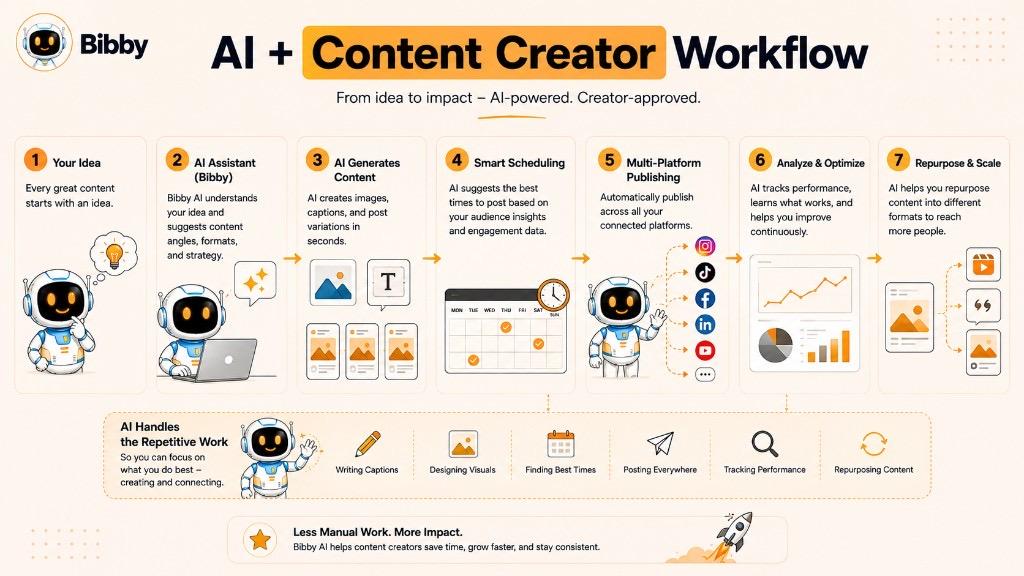
Artificial intelligence has become a useful part of the modern content creation workflow. Instead of replacing the creator's ideas and expertise, AI can help with repetitive or time-consuming tasks involved in turning those ideas into finished content.
Creators can use AI at different stages of the content creation process.
Generate Content Ideas
Coming up with fresh ideas consistently can be difficult. AI tools can help creators brainstorm topics, content angles, hooks, questions, and variations based on a niche or target audience.
A creator can then select, improve, or combine the ideas that best fit their own expertise and audience.
Create and Improve Visual Content
AI can help creators generate images, illustrations, backgrounds, and other visual assets from text descriptions.
It can also assist with tasks such as resizing, editing, removing backgrounds, enhancing images, or creating variations of existing creative assets.
This can be particularly useful for creators who need a steady supply of visual content but don't have advanced design skills.
Write Captions and Copy
Creators can use AI to draft social media captions, headlines, descriptions, hooks, calls to action, scripts, and other supporting copy.
Instead of starting with a blank page, a creator can provide the key information and use AI to generate a starting point that they can then review and personalize.
Repurpose Existing Content
One piece of content can often become many pieces of content.
AI can help transform a long-form article into social media posts, turn a video transcript into captions, identify potential short-form clips, or adapt an idea for different platforms.
This allows creators to get more value from the work they have already done.
Adapt Content for Different Platforms
A message that works on LinkedIn may not work exactly the same way on TikTok or Instagram.
AI can help creators rewrite or restructure content for different platforms while preserving the original idea.
This can reduce the amount of manual editing required when distributing content across multiple platforms.
Plan and Organize Content
AI can also help creators organize their content strategy.
Depending on the tool, creators can use AI to develop content calendars, group ideas into content pillars, plan campaigns, suggest publishing schedules, and identify gaps in their content.
Automate Repetitive Tasks
Many parts of content publishing are repetitive rather than creative.
AI-powered automation can help with tasks such as generating captions, preparing variations, organizing posts, scheduling content, and distributing media across multiple platforms.
Reducing these manual tasks gives creators more time to focus on ideas, expertise, storytelling, and audience relationships.
AI Doesn't Replace the Creator
AI can make content creation faster, but the creator still plays an important role.
The creator provides the experience, perspective, creativity, judgment, and understanding of their audience. AI should be treated as an assistant that helps turn those inputs into content more efficiently.
Creators should also review AI-generated content before publishing it to ensure that it is accurate, relevant, original, and consistent with their voice.
The Future of Content Creation Is Human + AI
The most useful approach isn't choosing between traditional content creation and AI. It's combining the strengths of both.
Creators can focus on what humans do particularly well—ideas, expertise, creativity, storytelling, and connection—while AI handles more of the repetitive work surrounding those creative decisions.
For creators publishing regularly across multiple social platforms, this combination can make the entire journey from idea to published content significantly more efficient.
How Bibby Helps Content Creators
Creating content is only one part of being a content creator. Turning that content into platform-ready posts, writing captions, choosing publishing times, and managing multiple social networks can take just as much time as the creative work itself.
Bibby is a social media scheduling and automation tool designed to simplify that workflow. Content creators can use it to create, prepare, and schedule social media content across multiple platforms from one place.
Create or Generate Visual Content
Creators can upload their own images or use AI to generate visual content.
This gives creators flexibility to start with content they have already produced or create new visual assets as part of their workflow.
Generate Captions Automatically
After choosing a posting style, Bibby can generate captions for the content.
Creators can then review, adjust, or regenerate the captions instead of writing every post from scratch.
Schedule Content Automatically
Creators can schedule their content for different dates and use AI-optimized publishing times to help organize when posts should be published.
This is particularly useful for creators who want to prepare content in batches rather than manually publishing every post.
Publish Across Multiple Platforms
Instead of managing each social network separately, creators can use Bibby to manage content across supported platforms from one workflow.
Depending on the content and selected channels, creators can publish formats including:
- Images
- Carousels
- Videos
- Stories
- Other supported social media formats
This can make multi-platform content distribution much easier to manage.
Manage Social Media Through Chat
Bibby also includes a chat-based interface that allows creators to manage parts of their social media workflow through conversation.
Instead of navigating through multiple settings and menus, creators can use chat to perform tasks such as:
- Create a brand kit
- Create a campaign
- Create posts
- Regenerate captions
- Manage content
- Work with their existing social media workflow
This approach allows creators to interact with their social media tools in a more natural, conversational way.
Spend More Time Creating
For creators, the biggest benefit of automation isn't simply publishing more posts. It's reducing the repetitive work surrounding content creation.
A creator can focus on developing ideas, producing high-quality media, building relationships with their audience, and growing their personal brand while Bibby helps handle parts of the preparation, scheduling, and publishing workflow.
In other words, Bibby helps content creators move from creating content to consistently publishing it without having to manually manage every step.
Content Creator Tools and Software
The right tools can make content creation faster, more organized, and easier to scale. Content creators typically use a combination of tools for planning, creating, editing, publishing, and analyzing their content.
The best tools depend on the creator's workflow, content format, platforms, and goals.
Content Ideation Tools
Ideation tools help creators discover topics and develop new content ideas.
They can be useful for brainstorming:
- Content topics
- Audience questions
- Content pillars
- Headlines and hooks
- Trending subjects
- Content series
- Campaign ideas
AI-powered tools can also help creators generate ideas based on a specific niche, audience, or topic.
Graphic Design Tools
Graphic design tools help creators produce visual content such as social media posts, carousels, thumbnails, presentations, and other graphics.
They are particularly useful for creators who want to maintain a consistent visual identity without relying on a professional designer for every piece of content.
Video Editing Tools
Video editing software allows creators to turn raw footage into finished videos.
Common capabilities include trimming clips, adding transitions, captions, music, effects, graphics, and other elements.
Video creators may use different tools depending on whether they're producing short-form social content, long-form videos, tutorials, or more complex productions.
AI Content Creation Tools
AI tools can assist with many parts of the creative process.
Depending on the software, creators may use AI to:
- Brainstorm ideas
- Generate images
- Write captions
- Create scripts
- Repurpose content
- Rewrite content
- Generate variations
- Summarize information
- Plan content
AI is most useful when it supports the creator's own ideas and expertise rather than replacing them.
Social Media Scheduling Tools
Creators who publish across multiple platforms can use scheduling tools to plan and organize their content in advance.
A social media scheduling tool can help creators:
- Prepare posts ahead of time
- Organize a content calendar
- Schedule posts for specific dates
- Publish across multiple platforms
- Reduce repetitive publishing tasks
- Maintain a consistent posting schedule
This becomes increasingly valuable as the number of platforms and posts increases.
Analytics Tools
Analytics tools help creators understand how their content performs.
Depending on the platform, useful metrics may include:
- Reach
- Impressions
- Views
- Engagement
- Watch time
- Shares
- Saves
- Clicks
- Follower growth
- Conversions
Creators can use this information to identify successful topics and formats and make better decisions about future content.
Brand and Content Management Tools
Creators who publish frequently may also need tools for organizing their brand assets and content.
These can include brand kits, content libraries, templates, campaign management, and systems for keeping visual and written content consistent.
What Should Content Creators Look for in a Tool?
Creators don't necessarily need dozens of separate applications. In many cases, a connected workflow can be more efficient than constantly moving content between different tools.
When evaluating a content creation or social media tool, consider whether it provides:
- Ease of use: Can you accomplish common tasks without a complicated workflow?
- Multi-platform support: Can you manage the social networks where your audience is active?
- AI assistance: Can AI reduce repetitive creative and publishing tasks?
- Scheduling: Can you prepare and schedule content in advance?
- Content flexibility: Does it support the formats you actually publish?
- Automation: Can repetitive tasks happen without manual intervention?
- Brand management: Can you maintain consistent branding across your content?
- Analytics: Can you understand what is working?
- Scalability: Will the workflow still work as your content volume grows?
The best content creator tool isn't necessarily the one with the longest feature list. It's the one that removes the most friction from your particular workflow while allowing you to stay focused on creating useful content for your audience.
Final Takeaway
A content creator is someone who creates and publishes content to inform, educate, entertain, inspire, or connect with an audience. Content creators can work across many formats and platforms, from social media posts and short-form videos to blogs, podcasts, and newsletters.
The most important things to remember are:
- Content creation involves much more than simply publishing posts.
- Successful creators combine creativity, audience understanding, consistency, and strategy.
- AI and automation can reduce repetitive work and make multi-platform publishing easier.
As your content output grows, having a repeatable workflow becomes increasingly important. Instead of manually creating, adapting, captioning, and scheduling every post, you can use tools such as Bibby to streamline more of the process and spend more time on the creative work itself.
If you're ready to take the next step, explore how to build an efficient social media content workflow that helps you consistently create, schedule, and publish content across multiple platforms.
Key Takeaways
- A content creator produces and publishes content for an audience through social media, blogs, podcasts, newsletters, and other digital channels.
- Content creation includes ideation, production, editing, captioning, publishing, engagement, and performance analysis—not just posting.
- Creators can specialize as social media, video, written, visual, educational, UGC, influencer, niche, or multi-platform creators—and many roles overlap.
- Influencers focus on audience influence; content creators focus on producing content—many people are both.
- Monetization options include sponsorships, affiliate marketing, ads, digital products, memberships, coaching, UGC services, and selling your own products.
- Consistency, a content calendar, and scheduling tools matter more than posting as often as possible.
- AI helps with ideas, visuals, captions, repurposing, and multi-platform publishing—while the creator still provides expertise and judgment.
- Bibby helps creators upload or generate visuals, write AI captions, schedule at AI-optimized times, and publish across Facebook, Instagram, LinkedIn, YouTube, and TikTok from one workspace.