

A carousel post is a social media post that contains multiple images, videos, or a combination of both within a single post. Instead of sharing one piece of content, users can swipe through a series of slides to explore a story, tutorial, product showcase, or educational content at their own pace. Carousel posts are widely supported on platforms such as Instagram, Facebook, LinkedIn, and TikTok, making them one of the most engaging content formats for creators, businesses, and marketers.
Unlike a standard single-image post, a carousel allows you to present more information without overwhelming your audience. Each slide builds on the previous one, making it ideal for storytelling, step-by-step guides, case studies, before-and-after comparisons, product collections, and actionable tips. Because users spend more time interacting with carousel content by swiping through multiple slides, these posts often generate higher engagement, more saves, and increased shares compared to traditional posts.
This page explains what a carousel post is, how the format works, and best practices for using it well. To generate swipe-ready slide outlines (hook, slides, CTA), use Bibby's free Carousel Generator. When your slides are ready, Bibby helps you schedule carousel posts, write AI-powered captions, and publish across multiple platforms at AI-optimized posting times.
For businesses, carousel posts are a powerful way to educate audiences, showcase products or services, highlight customer success stories, and build stronger brand awareness. They encourage meaningful interactions while helping followers consume complex information in a visually appealing, easy-to-digest format. Whether you're a small business, content creator, marketer, or enterprise brand, carousel posts can help you communicate more effectively and keep your audience engaged.
What Is a Carousel Post?
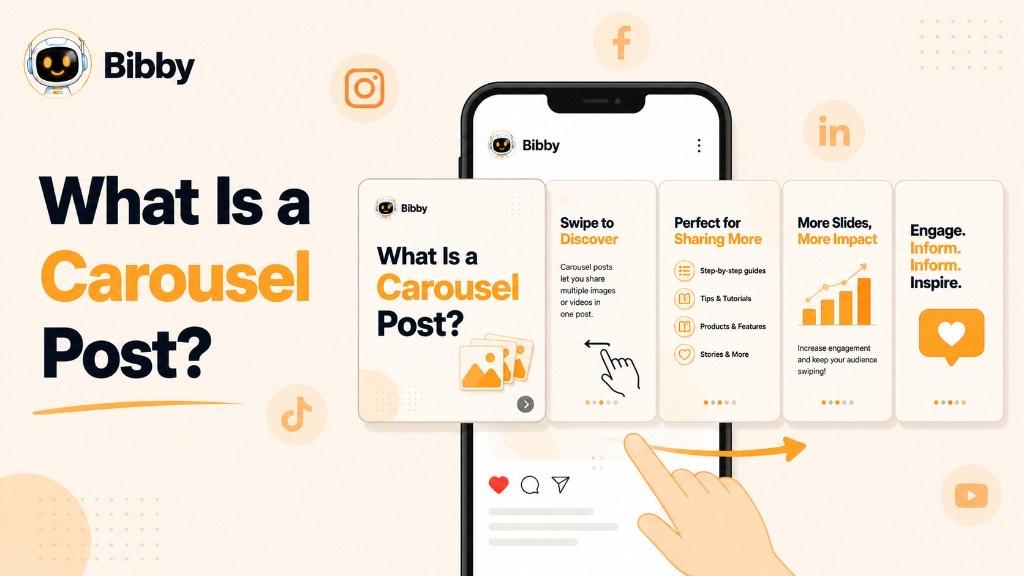
Think of a carousel post as a digital presentation designed for social media. Each slide contributes to a larger message, giving you the flexibility to explain a concept, showcase multiple products, highlight customer success stories, or guide users through a process without creating multiple separate posts.
Carousel posts have become one of the most effective content formats because they encourage active participation. Every swipe is an interaction, and users who continue through all the slides typically spend more time engaging with your content. This increased dwell time can improve overall engagement metrics, including saves, shares, comments, and click-through rates.
Key Characteristics of a Carousel Post
A carousel post typically includes the following features:
- Multiple slides: Share several images, videos, or a combination of both within one post.
- Swipeable experience: Users navigate through the content by swiping horizontally.
- Single caption: One caption and set of hashtags apply to the entire carousel.
- Unified message: Every slide contributes to one topic, story, or campaign.
- Interactive format: Encourages users to keep swiping, increasing engagement.
- Versatile content: Suitable for educational posts, product showcases, tutorials, announcements, portfolios, and storytelling.
Why Is It Called a Carousel Post?
The term "carousel" comes from the rotating movement of a traditional carousel. On social media, the concept is similar: instead of viewing a single image, users move through a rotating series of slides within one post. This creates a more immersive experience than a standard image post while allowing creators to present information in a logical sequence.
Where Are Carousel Posts Used?
Carousel posts are popular across multiple social media platforms because they support a wide variety of content goals, including education, marketing, and brand storytelling. Businesses and creators commonly use them to:
- Explain complex topics in simple, visual steps.
- Showcase multiple products or services.
- Share before-and-after transformations.
- Publish how-to guides and tutorials.
- Present customer testimonials and case studies.
- Highlight event recaps or company milestones.
- Create engaging storytelling campaigns.
- Deliver industry insights and actionable tips.
Because carousel posts combine visual appeal with detailed information, they have become an essential part of modern social media marketing strategies. They help brands communicate more effectively while encouraging audiences to interact, save, and share valuable content.
How Does a Carousel Post Work?
A carousel post works by combining multiple slides into a single social media post. Instead of presenting all your information in one image or video, you divide your content into a sequence of slides that users can swipe through. Each slide adds context, builds curiosity, or explains the next part of the story, creating a more engaging and interactive experience.
When someone encounters a carousel post in their social media feed, they see the first slide along with the post caption. If the opening slide captures their attention, they can swipe horizontally to explore the remaining slides. This swipe-based interaction encourages users to spend more time with your content, which often leads to higher engagement compared to single-image posts.
A well-designed carousel follows a logical flow. Every slide should have a purpose and naturally lead to the next, making it easy for users to follow the message from beginning to end.
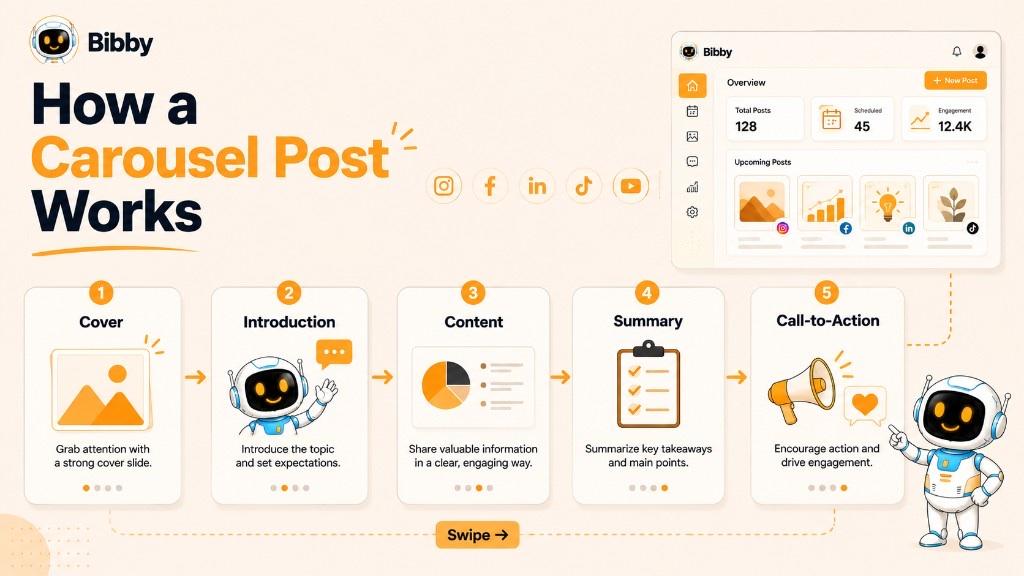
The Typical Flow of a Carousel Post
#### 1. Cover Slide
The first slide is the most important because it determines whether users will continue swiping. It should include:
- A compelling headline
- An eye-catching visual
- A clear promise of value
- Minimal text that sparks curiosity
For example:
- "7 Social Media Mistakes Hurting Your Growth"
- "How to Double Your Engagement in 30 Days"
- "Everything You Need to Know About AI Scheduling"
#### 2. Introduction or Context
The second slide briefly introduces the topic and tells readers what they will learn. This creates a smooth transition into the main content while setting clear expectations.
#### 3. Main Content Slides
The middle slides contain the core information. Depending on your objective, these slides might include:
- Tips and best practices
- Step-by-step tutorials
- Product features
- Educational insights
- Customer success stories
- Statistics and research
- Before-and-after comparisons
- Lists or checklists
Each slide should focus on one key idea to keep the content easy to understand.
#### 4. Summary Slide
Before ending the carousel, summarize the key takeaways. This reinforces the main message and helps users remember the most important points.
#### 5. Call-to-Action (CTA)
The final slide encourages users to take the next step. Common calls-to-action include:
- Save this post for later.
- Share it with your team.
- Leave a comment.
- Visit your website.
- Follow your account.
- Download a free resource.
- Learn more about your product or service.
A clear CTA increases the likelihood of further engagement and helps turn viewers into followers or customers.
Why This Format Works
Carousel posts are effective because they encourage users to interact rather than simply scroll past. Every swipe is a signal that the audience is interested in your content. As users move through multiple slides, they spend more time with your post, which can contribute to stronger engagement metrics such as saves, shares, comments, and click-through rates.
This format also makes it easier to present detailed information without overwhelming your audience. Instead of fitting everything into one image, you can organize your ideas into smaller, digestible sections that are easier to read and remember.
Tips for Creating a Smooth Carousel Experience
To keep users engaged from the first slide to the last:
- Start with a strong hook that grabs attention immediately.
- Present one idea per slide to avoid information overload.
- Maintain consistent colors, fonts, and branding throughout the carousel.
- Use visuals to support your message instead of relying on large blocks of text.
- Arrange slides in a logical order so the story flows naturally.
- End with a compelling call-to-action that encourages further interaction.
Whether you're educating your audience, promoting products, sharing success stories, or building brand awareness, understanding how a carousel post works will help you create content that is both informative and engaging.
Why Are Carousel Posts So Popular?
Carousel posts have become one of the most effective social media content formats because they combine visual storytelling with user interaction. Instead of relying on a single image or short video, they allow creators and businesses to deliver more value in one post while encouraging users to actively engage by swiping through multiple slides.
From educational content and product showcases to case studies and storytelling, carousel posts help brands communicate complex ideas in a simple, visually appealing way. This makes them valuable for businesses of all sizes, content creators, marketers, and educators looking to increase engagement and build stronger relationships with their audiences.
1. Higher Engagement Rates
One of the biggest reasons carousel posts are popular is their ability to generate strong engagement. Users spend more time interacting with carousel content because they swipe through multiple slides instead of viewing a single image.
This additional interaction often leads to:
- More likes
- More comments
- More shares
- More saves
- Increased profile visits
The more valuable your content is, the more likely users are to complete the carousel and interact with it.
2. Better Storytelling
Not every message can be explained in one image. Carousel posts allow you to guide your audience through a complete story, with each slide building on the previous one.
This format works well for:
- Brand stories
- Customer journeys
- Product launches
- Company milestones
- Behind-the-scenes content
- Event highlights
Instead of overwhelming users with too much information at once, you can reveal your message gradually.
3. Perfect for Educational Content
Educational posts consistently perform well on social media, and carousel posts make learning easier.
You can break a complex topic into smaller sections, making it easier for readers to understand and remember the information.
Popular educational formats include:
- How-to guides
- Industry tips
- Marketing strategies
- Checklists
- Step-by-step tutorials
- Frequently asked questions
- Myth vs. fact posts
This structured approach encourages users to save the post for future reference.
4. Showcase Multiple Products or Services
Businesses often need more than one image to demonstrate what they offer.
Carousel posts make it easy to highlight:
- Product collections
- New arrivals
- Different service packages
- Product features
- Customer use cases
- Before-and-after results
Instead of creating several separate posts, everything can be presented in one organized sequence.
5. Encourages Users to Spend More Time on Your Content
Every swipe requires an intentional action from the user. As people move through each slide, they naturally spend more time consuming your content.
Longer viewing sessions help users absorb your message and create more opportunities for them to interact with your brand.
6. Improves Content Organization
Carousel posts allow you to organize information into logical sections instead of placing everything in a single graphic.
For example:
- Slide 1: Hook
- Slide 2: Introduction
- Slides 3 to 7: Main content
- Slide 8: Key takeaway
- Slide 9: Call-to-action
This format is easier to follow and creates a better reading experience.
7. Increases Saves and Shares
People frequently save carousel posts because they provide lasting value.
Content that users commonly save includes:
- Checklists
- Templates
- Marketing tips
- Business advice
- Productivity hacks
- Industry statistics
- Educational resources
Similarly, informative carousel posts are often shared with colleagues, friends, and team members, extending their reach beyond your immediate audience.
8. Supports Multiple Marketing Goals
A single carousel post can achieve several objectives at once.
Depending on your strategy, it can help you:
- Build brand awareness
- Educate your audience
- Generate leads
- Promote products or services
- Increase website traffic
- Strengthen customer trust
- Encourage community engagement
This versatility makes carousel posts an essential content format for modern social media marketing.
9. Suitable for Almost Every Industry
Carousel posts aren't limited to influencers or lifestyle brands. Nearly every industry can use them effectively.
Examples include:
- SaaS companies explaining product features
- E-commerce stores showcasing collections
- Marketing agencies sharing industry insights
- Healthcare providers educating patients
- Real estate agencies presenting property listings
- Fitness coaches demonstrating workout routines
- Educational institutions sharing learning resources
- Financial advisors simplifying complex topics
Regardless of the niche, carousel posts help transform detailed information into content that's engaging and easy to consume.
10. Easy to Repurpose Across Platforms
Another reason carousel posts are so popular is their flexibility. The same content can often be adapted for multiple social media platforms with minimal changes.
For example, a single educational carousel can be customized for Instagram, LinkedIn, Facebook, or TikTok Photo Mode while keeping the core message consistent. This allows businesses to maximize the value of their content without creating a new post from scratch for every platform.
Why Businesses Include Carousel Posts in Their Content Strategy
Carousel posts strike the right balance between education, storytelling, and engagement. They help brands deliver meaningful content in a structured format while giving audiences a reason to stop, swipe, and interact.
When combined with a consistent publishing schedule, carousel posts can become a powerful part of a long-term social media strategy. Many businesses use Bibby to automate this process by scheduling carousel posts across multiple social networks, generating AI-powered captions, and publishing content at AI-optimized posting times, ensuring their audience receives valuable content consistently without the need for manual posting.
Carousel Posts Across Different Social Media Platforms
While the concept of a carousel post remains the same across social media, each platform offers its own features, audience behavior, and best practices. Understanding these differences helps you create content that feels native to each platform while maximizing engagement.
Whether you're educating your audience, showcasing products, or telling your brand story, adapting your carousel posts for each platform can significantly improve performance.
Instagram Carousel Posts
Instagram is one of the most popular platforms for carousel posts. Users can swipe through multiple images or videos in a single post, making it ideal for visual storytelling and educational content.
Best uses on Instagram include:
- Educational tips and tutorials
- Product launches
- Before-and-after transformations
- Travel and lifestyle storytelling
- Portfolio showcases
- Customer testimonials
- Infographics
- Behind-the-scenes content
Why it works
Instagram users enjoy consuming visually rich, bite-sized content. A well-designed carousel encourages users to keep swiping, increasing engagement and giving your content more opportunities to be discovered.
Best practices
- Create an attention-grabbing cover slide.
- Keep branding consistent across all slides.
- Use concise, easy-to-read text.
- End with a strong call-to-action, such as "Save this post" or "Share with a friend."
LinkedIn Carousel Posts
LinkedIn carousel posts are highly effective for professional storytelling and knowledge sharing. Businesses and professionals often use them to present reports, industry insights, case studies, and educational content in a structured format.
Popular LinkedIn carousel content includes:
- Industry trends
- Business strategies
- Marketing frameworks
- Company case studies
- Hiring advice
- Professional checklists
- Sales techniques
- Leadership insights
Why it works
LinkedIn users actively seek informative and career-focused content. Carousels allow businesses to explain complex ideas without overwhelming readers, making them ideal for B2B marketing and thought leadership.
Best practices
- Focus on solving professional challenges.
- Keep each slide clear and actionable.
- Include data, charts, or statistics where relevant.
- Finish with a discussion question or invitation to comment.
Facebook Carousel Posts
Facebook supports carousel-style content for businesses looking to showcase products, services, events, and brand stories. The format works well for both organic content and paid campaigns.
Common Facebook carousel uses include:
- Product catalogs
- Service highlights
- Local business promotions
- Customer success stories
- Event recaps
- Seasonal campaigns
- Brand storytelling
Why it works
Facebook's diverse audience makes carousel posts useful for businesses that want to present multiple products or ideas in a single, easy-to-browse post.
Best practices
- Use high-quality visuals.
- Highlight one feature or benefit per slide.
- Include clear descriptions.
- Add a compelling CTA that encourages users to learn more or visit your website.
TikTok Carousel Posts
TikTok's Photo Mode allows creators to publish swipeable image-based posts alongside traditional short-form videos. These carousel-style posts are becoming increasingly popular for educational and storytelling content.
Popular TikTok carousel ideas include:
- Step-by-step tutorials
- Travel stories
- Product recommendations
- Before-and-after results
- Lifestyle content
- Fashion inspiration
- Productivity tips
- Educational content
Why it works
Many users enjoy consuming information at their own pace rather than watching a full video. Carousel posts provide a quick, engaging way to deliver valuable content while maintaining the platform's visual appeal.
Best practices
- Use bold headlines on each slide.
- Keep text minimal.
- Tell a story from beginning to end.
- Encourage users to swipe until the final slide.
Pinterest Carousel Posts
Pinterest supports multi-image formats that help users discover ideas, products, and inspiration through visually organized content.
Ideal Pinterest carousel topics include:
- Home décor inspiration
- DIY tutorials
- Recipes
- Fashion collections
- Product catalogs
- Design inspiration
- Travel guides
- Wedding planning
Why it works
Pinterest users actively search for ideas and often save content for future reference. Multi-image posts allow creators to provide more context while increasing the chances of content being saved.
Best practices
- Use vertical, high-resolution images.
- Focus on visually appealing designs.
- Include keyword-rich descriptions.
- Organize slides in a logical sequence.
Which Platform Is Best for Carousel Posts?
The right platform depends on your audience and marketing goals.
| Platform | Best For | Primary Goal |
|---|---|---|
| Educational content, storytelling, product showcases | Engagement and brand awareness | |
| B2B marketing, thought leadership, professional education | Authority and lead generation | |
| Product promotions, community updates, local businesses | Reach and customer engagement | |
| TikTok | Visual storytelling, tutorials, lifestyle content | Discovery and audience growth |
| Inspiration, DIY content, shopping, long-term discovery | Saves and referral traffic |
Managing Carousel Posts Across Multiple Platforms
Publishing carousel posts consistently across several social networks can quickly become time-consuming, especially when each platform has different audience expectations and posting schedules.
Instead of manually uploading the same content to every platform, many businesses streamline their workflow with Bibby. It helps teams schedule carousel posts across supported social media platforms, generate AI-powered captions, organize campaigns, and publish content at AI-optimized posting times, making it easier to maintain a consistent and effective social media presence from a single workspace.
Need a slide outline first? Try Bibby's free Carousel Generator — then schedule and publish with Bibby.
Types of Carousel Posts
One of the biggest advantages of carousel posts is their versatility. The same format can be adapted for education, storytelling, product marketing, brand building, and audience engagement. By choosing the right type of carousel post, businesses and creators can communicate their message more effectively while encouraging users to swipe through every slide.
Below are some of the most effective types of carousel posts used across social media platforms.
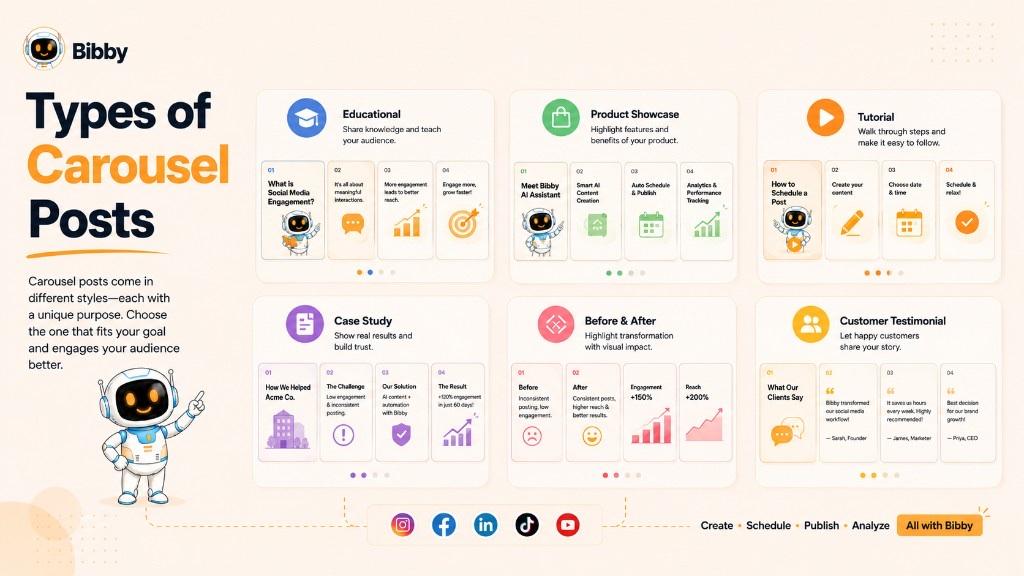
1. Educational Carousel Posts
Educational carousels are designed to teach audiences something valuable. They simplify complex topics into bite-sized slides, making information easier to understand and remember.
Common examples include:
- Marketing tips
- Social media strategies
- Industry trends
- Business advice
- Productivity techniques
- SEO best practices
- AI tool guides
Best for: Building authority, increasing saves, and establishing thought leadership.
2. Step-by-Step Tutorial Carousels
Tutorial carousels guide users through a process one slide at a time. Each slide explains a single step, making it easy for readers to follow along.
Examples:
- How to create a content calendar
- How to optimize a LinkedIn profile
- How to launch a marketing campaign
- How to use a software product
- How to build a personal brand
Best for: Educating customers and reducing learning barriers.
3. Product Showcase Carousels
Instead of highlighting just one product, businesses can present multiple products, features, or variations within a single carousel.
These posts often include:
- Product collections
- Feature highlights
- Color or style variations
- Product comparisons
- New arrivals
- Seasonal collections
Best for: E-commerce brands, SaaS companies, retailers, and service providers.
4. Before-and-After Carousels
Transformation stories capture attention because they visually demonstrate progress or improvement.
Popular examples include:
- Fitness transformations
- Home renovations
- Graphic design redesigns
- Marketing campaign results
- Website redesigns
- Product improvements
Best for: Building credibility and showcasing measurable results.
5. Case Study Carousels
Case studies explain how a business solved a customer's problem using real-world examples.
Typical structure:
- Client challenge
- Solution
- Implementation
- Results
- Key takeaways
Best for: B2B companies, agencies, consultants, and SaaS businesses.
6. Customer Testimonial Carousels
Instead of publishing one review, businesses can showcase multiple customer testimonials within the same post.
These may include:
- Customer quotes
- Ratings
- Success stories
- Video testimonials
- Before-and-after outcomes
Best for: Increasing trust and demonstrating social proof.
7. Storytelling Carousels
Storytelling creates emotional connections with audiences by presenting events or experiences across multiple slides.
Examples include:
- Brand journey
- Founder story
- Company milestones
- Behind-the-scenes content
- Event recaps
- Employee stories
Best for: Humanizing your brand and building stronger audience relationships.
8. Tips and Checklist Carousels
These are among the most saved types of social media content because they provide practical, actionable advice.
Popular topics include:
- Marketing tips
- Productivity hacks
- Business checklists
- Design principles
- Writing techniques
- Social media best practices
Best for: Increasing saves, shares, and long-term engagement.
9. FAQ Carousel Posts
Instead of answering one question, businesses can dedicate each slide to a frequently asked question.
Examples include:
- Product FAQs
- Pricing questions
- Service explanations
- Onboarding information
- Industry misconceptions
Best for: Educating prospects and reducing customer support inquiries.
10. Portfolio Carousel Posts
Creative professionals often use carousel posts to showcase multiple projects within a single post.
Common examples include:
- Graphic design work
- Photography collections
- Architecture projects
- UI/UX designs
- Branding projects
- Illustration portfolios
Best for: Freelancers, agencies, and creative businesses.
11. Data and Statistics Carousels
Presenting research, survey findings, or industry statistics across multiple slides makes complex data easier to understand.
These posts may include:
- Charts
- Graphs
- Market research
- Consumer behavior insights
- Industry benchmarks
- Trend reports
Best for: Thought leadership and educational marketing.
12. Product Comparison Carousels
Comparison posts help audiences make informed decisions by evaluating multiple products, services, or solutions.
Examples include:
- Product A vs. Product B
- Free vs. Premium plans
- Old solution vs. New solution
- Feature comparisons
- Pricing comparisons
Best for: Helping buyers move closer to a purchasing decision.
13. Event Recap Carousels
Businesses frequently use carousel posts to summarize conferences, webinars, workshops, product launches, or company events.
Slides can include:
- Event highlights
- Speaker quotes
- Key learnings
- Photos
- Audience reactions
- Next steps
Best for: Extending the value of live events and keeping audiences informed.
14. Campaign Announcement Carousels
Launching a new product, feature, or marketing campaign often requires more than a single image. A carousel allows you to explain the announcement clearly.
Common uses include:
- New product launches
- Feature releases
- Seasonal promotions
- Holiday campaigns
- Company announcements
- Partnership news
Best for: Delivering detailed updates while maintaining audience interest.
Choosing the Right Type of Carousel Post
The most effective carousel depends on your objective. Consider what you want your audience to do after viewing the post.
| Goal | Recommended Carousel Type |
|---|---|
| Educate your audience | Educational, Tutorial, FAQ |
| Build trust | Testimonials, Case Studies |
| Increase product awareness | Product Showcase, Product Comparison |
| Improve engagement | Tips, Checklists, Storytelling |
| Demonstrate expertise | Industry Insights, Data & Statistics |
| Promote events | Event Recaps, Campaign Announcements |
| Showcase creative work | Portfolio, Before-and-After |
Rather than relying on a single format, many successful brands rotate different types of carousel posts throughout their content calendar. This variety keeps their social media feeds engaging, addresses different audience needs, and supports multiple marketing goals, from education and brand awareness to lead generation and customer retention.
Carousel Post Examples
Carousel posts can be adapted to almost any industry or content strategy. Whether you're educating your audience, promoting products, or sharing customer success stories, the key is to organize your message into a series of connected slides that provide value from beginning to end.
Below are some practical examples of how different businesses and creators use carousel posts to engage their audiences.
1. Educational Marketing Carousel
Business: Digital Marketing Agency
Topic: *10 SEO Mistakes That Hurt Your Website Rankings*
Slide Structure:
- Slide 1: Attention-grabbing title
- Slide 2: Why SEO mistakes matter
- Slides 3 to 10: One mistake per slide
- Final Slide: Summary and CTA
Why it works:
Educational content encourages users to save and share the post because it offers practical advice they can revisit later.
2. Product Showcase Carousel
Business: E-commerce Brand
Topic: *Our New Summer Collection*
Slide Structure:
- Cover image
- Featured product 1
- Featured product 2
- Featured product 3
- Product benefits
- Customer reviews
- Shopping CTA
Why it works:
Instead of creating multiple individual posts, the business presents an entire collection in one engaging experience.
3. SaaS Feature Carousel
Business: Software Company
Topic: *5 Features That Save Your Team Hours Every Week*
Slide Structure:
- Problem statement
- Feature #1
- Feature #2
- Feature #3
- Feature #4
- Feature #5
- Call-to-action
Why it works:
Breaking down software features into separate slides makes them easier to understand and demonstrates real-world value.
4. Step-by-Step Tutorial Carousel
Business: Content Creator
Topic: *How to Build a Monthly Content Calendar*
Slide Structure:
- Introduction
- Step 1
- Step 2
- Step 3
- Step 4
- Final checklist
- CTA
Why it works:
Users can follow the process one step at a time without feeling overwhelmed.
5. Customer Success Story Carousel
Business: Marketing Agency
Topic: *How We Increased Engagement by 180%*
Slide Structure:
- Client introduction
- Initial challenge
- Strategy implemented
- Results achieved
- Key metrics
- Lessons learned
- CTA
Why it works:
Real success stories build trust while demonstrating expertise.
6. Before-and-After Carousel
Business: Graphic Design Studio
Topic: *Website Redesign Transformation*
Slides include:
- Original design
- Problems identified
- Design improvements
- Final website
- Results
Why it works:
Visual transformations immediately communicate value without requiring lengthy explanations.
7. Product Comparison Carousel
Business: Technology Brand
Topic: *Which Plan Is Right for You?*
Slides compare:
- Features
- Pricing
- Ideal customer
- Benefits
- Recommendations
Why it works:
Comparison carousels simplify buying decisions and answer common customer questions.
8. Industry Statistics Carousel
Business: Research Company
Topic: *Social Media Trends in 2026*
Slides feature:
- Key statistics
- Market insights
- Consumer behavior
- Growth predictions
- Expert takeaways
Why it works:
Data-driven content positions brands as trusted sources of information while encouraging shares among professionals.
9. FAQ Carousel
Business: Financial Services Firm
Topic: *Frequently Asked Investment Questions*
Each slide answers one question, such as:
- How much should I invest?
- What is diversification?
- How do mutual funds work?
- What are investment risks?
- How can beginners get started?
Why it works:
Answering one question per slide keeps the content focused and easy to consume.
10. Event Recap Carousel
Business: Conference Organizer
Topic: *Highlights from Our Annual Summit*
Slides may include:
- Opening keynote
- Guest speakers
- Workshop sessions
- Networking moments
- Audience reactions
- Key announcements
- Next event details
Why it works:
An event recap extends the life of your event while keeping attendees and those who missed it engaged.
What Makes These Carousel Posts Effective?
Although the topics vary, successful carousel posts share several common characteristics:
- They start with a compelling headline that encourages users to swipe.
- Each slide focuses on one key idea instead of overwhelming readers with information.
- Visuals and text work together to communicate the message clearly.
- The content follows a logical sequence from introduction to conclusion.
- The final slide includes a clear call-to-action, such as saving the post, sharing it, leaving a comment, or visiting a website.
Inspiration for Your Next Carousel Post
If you're looking for ideas, here are a few formats that consistently perform well across industries:
- "7 Mistakes to Avoid"
- "Step-by-Step Beginner's Guide"
- "Before vs. After"
- "Myth vs. Fact"
- "Top Trends This Year"
- "Customer Success Story"
- "Product Feature Breakdown"
- "Ultimate Checklist"
- "Frequently Asked Questions"
- "Everything You Need to Know About [Topic]"
These formats are easy to adapt to different niches and are especially effective for educating audiences, showcasing expertise, and encouraging meaningful engagement.
Once you've planned your carousel, the next step is publishing it consistently. Businesses often streamline this process with Bibby, using its AI-powered workflow to schedule carousel posts across multiple platforms, generate engaging captions with caption generation, and manage campaigns from one place. This helps maintain a consistent posting schedule while reducing the time spent on manual publishing.
Anatomy of a Great Carousel Post
Creating a carousel post is about more than placing multiple images in one post. The most successful carousel posts follow a clear structure that guides users from the first slide to the last while keeping them engaged throughout the journey.
Think of each slide as a chapter in a story. Every chapter should have a purpose, naturally leading users to the next one until they reach your final message or call-to-action.
Here's what a high-performing carousel post typically looks like.
1. Cover Slide: Capture Attention Instantly
The cover slide is the most important part of your carousel because it's the first thing users see in their feed. If it fails to grab attention, people are unlikely to swipe further.
An effective cover slide should:
- Include a compelling headline.
- Clearly communicate the value of the carousel.
- Use bold, easy-to-read typography.
- Feature a clean, eye-catching design.
- Spark curiosity without being misleading.
Examples of strong cover headlines:
- 10 Social Media Tips Every Business Should Know
- The Ultimate Guide to AI Content Creation
- 7 Marketing Mistakes That Cost You Customers
- Everything You Need to Know About LinkedIn Growth
Goal: Encourage users to stop scrolling and start swiping.
2. Introduction Slide: Set Expectations
After capturing attention, the next slide should briefly explain what users will learn or gain by continuing through the carousel.
This slide should:
- Introduce the topic.
- Explain why it matters.
- Create a smooth transition into the main content.
- Reinforce the value promised on the cover slide.
A short introduction helps users understand they're about to receive useful information, increasing the likelihood they'll continue reading.
3. Content Slides: Deliver Value
These middle slides form the heart of your carousel. Each slide should focus on one key point to keep the content clear and easy to follow.
Depending on your objective, content slides may include:
- Tips
- Tutorials
- Product features
- Statistics
- Customer testimonials
- Checklists
- Examples
- Case studies
- Comparisons
Avoid placing multiple ideas on a single slide. Breaking information into smaller sections improves readability and keeps users engaged.
Best practice: Aim for concise copy supported by visuals, icons, or illustrations that reinforce the message.
4. Supporting Visuals: Strengthen Your Message
Visual elements are just as important as the written content. They help explain ideas faster and make your carousel more appealing.
Useful visual elements include:
- Icons
- Charts
- Graphs
- Product images
- Screenshots
- Illustrations
- Infographics
- Diagrams
Use visuals that support the message rather than distract from it. Consistent colors, typography, and branding also create a more professional appearance.
5. Summary Slide: Reinforce the Main Takeaways
Before asking users to take action, summarize the key points from the carousel.
A summary slide helps readers:
- Remember important information.
- Review the main lessons quickly.
- Feel they completed the entire journey.
This slide can highlight:
- Three key takeaways
- Important statistics
- Final recommendations
- Actionable next steps
A concise summary leaves users with a clear understanding of your message.
6. Call-to-Action (CTA): Encourage the Next Step
The final slide should tell users what to do next. Without a clear CTA, many viewers may simply move on after reading your content.
Common calls-to-action include:
- Save this post for later.
- Share it with your team.
- Leave your thoughts in the comments.
- Follow for more tips.
- Visit our website.
- Explore our latest guide.
- Download a free resource.
Choose a CTA that aligns with the goal of your carousel, whether it's increasing engagement, driving traffic, or generating leads.
Design Principles for Every Slide
Regardless of the topic, every slide should follow a few core design principles.
#### Keep Text Short
Large blocks of text can discourage users from reading. Focus on one message per slide and keep copy concise.
#### Maintain Consistent Branding
Use the same:
- Colors
- Fonts
- Icon style
- Layout
- Logo placement
Consistency helps users recognize your brand and creates a polished experience.
#### Use Strong Visual Hierarchy
Guide the reader's attention by organizing content with:
- Clear headings
- Subheadings
- Bullet points
- Icons
- Visual spacing
Important information should stand out immediately.
#### Optimize for Mobile Devices
Most people view carousel posts on smartphones, so design every slide with mobile readability in mind.
Make sure:
- Fonts are large enough to read.
- Buttons or CTAs are easy to notice.
- Images remain clear on smaller screens.
- Text doesn't appear crowded.
A Simple Carousel Structure
A proven structure for many carousel posts looks like this:
| Slide | Purpose |
|---|---|
| 1 | Attention-grabbing cover |
| 2 | Introduction and context |
| 3 to 7 | Main content or educational points |
| 8 | Summary or key takeaways |
| 9 | Call-to-action |
This framework works well for educational content, product showcases, tutorials, case studies, and storytelling because it keeps readers engaged while delivering information in a logical order.
Why Structure Matters
An effective carousel isn't just a collection of slides. It's a guided experience that leads users from curiosity to understanding and, ultimately, to action. By combining a strong opening, valuable content, consistent design, and a clear call-to-action, you can create carousel posts that attract attention, encourage engagement, and leave a lasting impression on your audience.
Carousel Post Best Practices
Creating a carousel post is only the first step. To maximize engagement, improve readability, and encourage users to swipe through every slide, you need to follow proven best practices. Whether you're creating educational content, promoting products, or telling your brand's story, these recommendations will help you produce carousel posts that resonate with your audience.
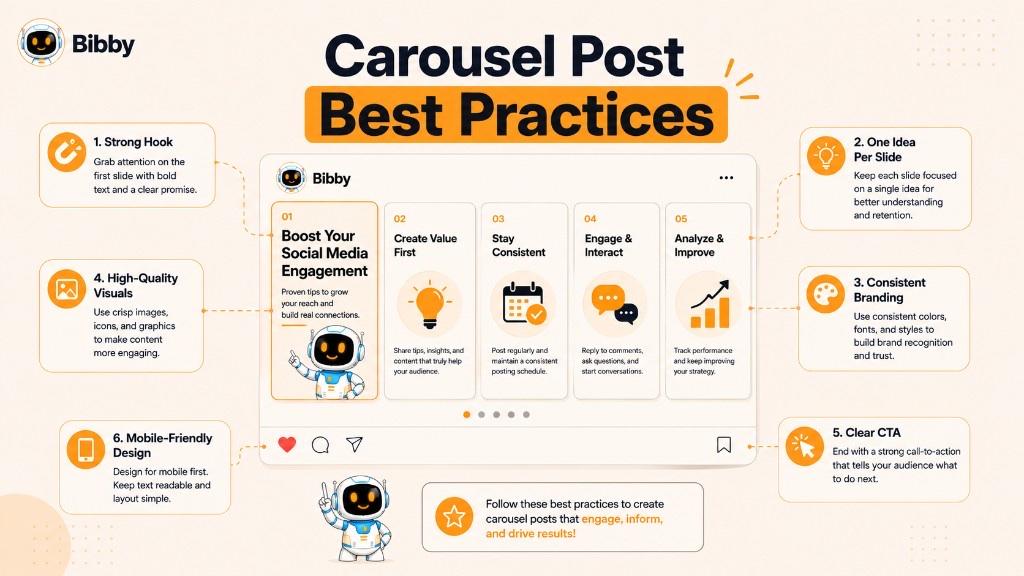
Start with a Strong Hook
Your first slide determines whether people stop scrolling or continue past your post. It should immediately communicate the value users will gain by swiping through the carousel.
A strong opening often includes:
- A compelling question
- A surprising statistic
- A bold statement
- A common problem
- A clear promise of value
For example:
- "9 Social Media Mistakes You Might Be Making"
- "Everything You Need to Know About Content Marketing"
- "How We Increased Engagement by 150%"
The goal is to create enough curiosity for users to explore the remaining slides.
Focus on One Idea Per Slide
Avoid trying to explain multiple concepts on a single slide. Each slide should communicate one clear idea that naturally connects to the next.
Breaking content into smaller sections:
- Improves readability
- Keeps users engaged
- Makes complex topics easier to understand
- Reduces visual clutter
If your audience can understand each slide in a few seconds, they're more likely to continue swiping.
Tell a Complete Story
The best carousel posts guide users through a logical journey rather than presenting random pieces of information.
A simple storytelling structure might look like this:
- Introduce the topic.
- Explain the problem.
- Present the solution.
- Share supporting details.
- Summarize key takeaways.
- End with a call-to-action.
This structure keeps readers interested from beginning to end.
Keep Your Design Consistent
Consistency makes your carousel look more professional and strengthens brand recognition.
Maintain consistency across all slides by using:
- The same color palette
- Consistent fonts
- Uniform icon styles
- Similar spacing
- Matching layouts
- Consistent logo placement
A cohesive design also makes the content easier to follow.
Prioritize Readability
Most people view carousel posts on mobile devices, so every slide should be easy to read without zooming in.
To improve readability:
- Use large, legible fonts.
- Keep text concise.
- Leave enough white space.
- Choose high-contrast colors.
- Avoid overcrowding slides with too many elements.
A clean design helps users focus on your message.
Use High-Quality Visuals
Visual content plays a major role in keeping users engaged. Blurry images or inconsistent graphics can reduce the perceived quality of your content.
Consider using:
- Professional photography
- Custom illustrations
- Icons
- Charts
- Infographics
- Product screenshots
- Branded graphics
Every visual should reinforce the message on the slide rather than distract from it.
Encourage Users to Keep Swiping
Each slide should create a reason to continue.
You can do this by:
- Breaking information into a sequence.
- Using numbered lists.
- Asking questions.
- Creating curiosity between slides.
- Teasing the next point.
Avoid revealing everything on the first slide. Instead, let the story unfold naturally.
Add a Clear Call-to-Action
Every carousel should end with a meaningful next step.
Depending on your goals, encourage users to:
- Save the post.
- Share it with colleagues or friends.
- Leave a comment.
- Follow your account.
- Visit your website.
- Learn more about your product or service.
A simple CTA helps turn engagement into meaningful action.
Optimize for Your Audience
Different audiences expect different types of content.
For example:
- Professionals on LinkedIn often prefer educational insights and industry trends.
- Instagram users engage well with visual storytelling and tutorials.
- Facebook audiences respond to community updates, promotions, and customer stories.
- TikTok users often prefer fast-paced, visually engaging content.
Tailor your messaging and design to match the platform and audience.
Publish Consistently
Even the best carousel post will have limited impact if you publish only occasionally.
Develop a consistent posting schedule by:
- Planning content in advance.
- Creating content in batches.
- Aligning posts with campaigns or seasonal events.
- Reviewing performance to identify what resonates with your audience.
Consistency helps build trust, maintain visibility, and keep your audience engaged over time.
Quick Checklist Before Publishing a Carousel Post
Before you hit publish, ask yourself:
- Does the first slide grab attention?
- Does each slide focus on one key idea?
- Is the content organized in a logical order?
- Are the visuals clear and high quality?
- Is the text easy to read on mobile devices?
- Is the branding consistent across all slides?
- Does the final slide include a clear call-to-action?
- Have you reviewed the post for spelling, grammar, and design consistency?
If you can answer "yes" to these questions, your carousel is well positioned to perform effectively.
Simplify Your Carousel Workflow
Creating engaging carousel posts is only part of the process. Planning, writing captions, scheduling, and publishing them consistently across multiple platforms can quickly become time-consuming.
Many businesses simplify this workflow with Bibby, which helps teams schedule carousel posts, generate AI-powered captions, organize content campaigns, and publish posts at AI-optimized posting times from a single dashboard. Need a slide outline first? Try Bibby's free Carousel Generator — then schedule and publish with Bibby.
Common Carousel Post Mistakes to Avoid
Carousel posts can significantly increase engagement when they're well planned, but small mistakes can reduce their effectiveness. A confusing layout, weak opening slide, or inconsistent design may cause users to stop swiping before reaching your main message.
By understanding the most common mistakes, you can create carousel posts that are easier to read, more engaging, and more likely to achieve your marketing goals.
1. Using a Weak Cover Slide
The first slide is your opportunity to capture attention. If it doesn't immediately communicate value or spark curiosity, users may continue scrolling without interacting with your post.
Common mistakes include:
- Generic headlines
- Low-quality visuals
- Too much text
- Unclear messaging
- No obvious benefit for the reader
Better approach:
Create a cover slide with a bold headline, clean design, and a clear reason for users to keep swiping.
2. Overloading Slides with Text
Trying to fit an entire article onto one slide makes the content difficult to read, especially on mobile devices.
Problems this creates:
- Visual clutter
- Poor readability
- Reduced engagement
- Information overload
Better approach:
Focus on one key idea per slide and use concise, easy-to-read copy supported by visuals where appropriate.
3. No Clear Story or Flow
A carousel should guide users through a logical sequence. Random or disconnected slides make it difficult for readers to understand your message.
Signs of poor flow:
- Ideas presented out of order
- Abrupt topic changes
- Repetitive information
- Missing context between slides
Better approach:
Organize your content with a beginning, middle, and conclusion so each slide naturally leads to the next.
4. Inconsistent Design
Changing fonts, colors, layouts, or graphic styles from one slide to another creates an unprofessional appearance and weakens brand recognition.
Common inconsistencies include:
- Multiple font styles
- Different color palettes
- Uneven spacing
- Inconsistent icon designs
- Changing logo placement
Better approach:
Use a consistent visual style across every slide to create a cohesive reading experience.
5. Ignoring Mobile Users
Most people view social media on smartphones. Designs that look good on a desktop screen may be difficult to read on smaller devices.
Common issues:
- Tiny text
- Crowded layouts
- Small graphics
- Poor spacing
Better approach:
Design every slide with mobile readability in mind by using larger fonts, generous spacing, and clear visual hierarchy.
6. Using Low-Quality Images
Blurry or poorly cropped images can reduce the perceived quality of your content and negatively affect your brand's credibility.
Better approach:
Use high-resolution images, professionally designed graphics, and visuals that reinforce your message.
7. Adding Too Many Slides
While carousel posts allow multiple slides, more isn't always better.
A very long carousel can lead to:
- Audience fatigue
- Lower completion rates
- Reduced engagement
- Repetitive content
Better approach:
Include only as many slides as necessary to communicate your message clearly. Every slide should provide unique value.
8. Forgetting a Call-to-Action
After users finish your carousel, they should know what to do next. Ending without a clear direction is a missed opportunity.
Examples of effective CTAs:
- Save this post for future reference.
- Share it with your team.
- Leave your opinion in the comments.
- Follow us for more tips.
- Explore more resources on our website.
A simple CTA can significantly increase engagement and encourage further interaction.
9. Not Providing Real Value
Some carousel posts focus too heavily on promotion without offering useful information. If users don't learn something, solve a problem, or gain inspiration, they're less likely to engage.
Better approach:
Prioritize helping your audience by sharing:
- Actionable tips
- Educational insights
- Practical examples
- Useful resources
- Real experiences
- Proven strategies
Value-driven content builds trust and encourages repeat engagement.
10. Skipping Proofreading
Even a well-designed carousel can lose credibility because of spelling, grammar, or formatting mistakes.
Before publishing, review:
- Headlines
- Body text
- Image alignment
- Slide order
- Branding consistency
- Grammar and spelling
- Links and calls-to-action
A careful review helps ensure your content reflects your professionalism.
Quick Mistake Checklist
Before publishing your carousel, make sure you avoid these common issues:
- Weak or unclear cover slide
- Too much text on each slide
- Poor storytelling or slide sequence
- Inconsistent branding and design
- Small text that's difficult to read on mobile
- Low-quality images or graphics
- Unnecessary or repetitive slides
- Missing call-to-action
- Promotional content without educational value
- Spelling, grammar, or formatting errors
Final Tip
The most successful carousel posts are simple, focused, and audience-centered. Every slide should have a purpose, contribute to the overall story, and make it worthwhile for users to keep swiping. By avoiding these common mistakes and following proven best practices, you'll create carousel posts that not only look professional but also drive stronger engagement, increase saves and shares, and deliver greater value to your audience.
Carousel Post vs. Single Image Post
Both carousel posts and single image posts are valuable content formats, but they serve different purposes. Choosing the right format depends on your message, audience, and marketing objective.
A single image post is ideal when you want to communicate one clear message quickly. A carousel post, on the other hand, gives you the space to explain ideas in greater detail, tell a story, or showcase multiple visuals within a single post.
Understanding the strengths of each format can help you create more effective social media content.
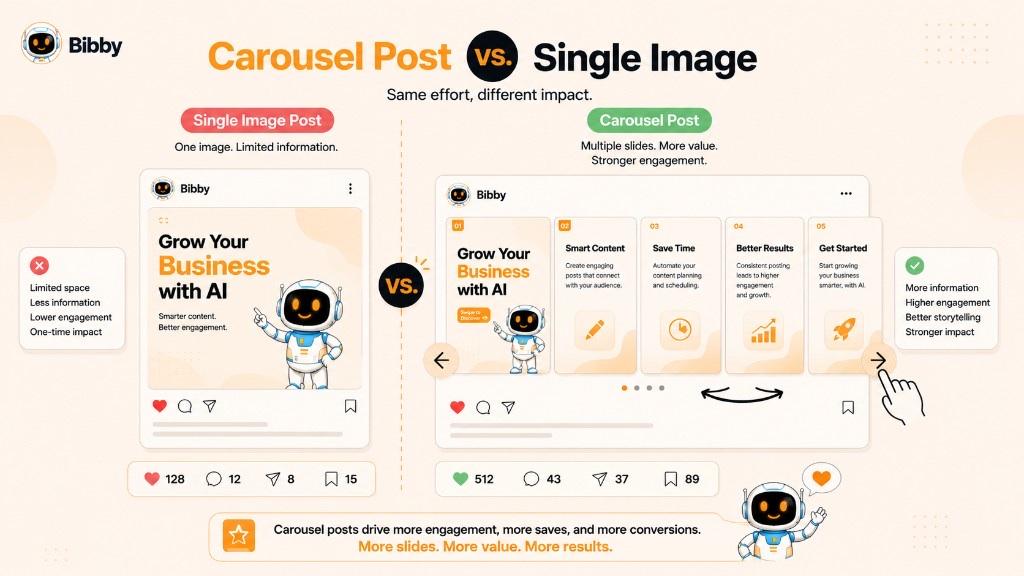
| Feature | Carousel Post | Single Image Post |
|---|---|---|
| Number of Visuals | Multiple images, videos, or a mix of both | One image or graphic |
| User Interaction | Users swipe through slides | Users view a single image |
| Content Depth | High, allowing detailed explanations | Limited to one visual and caption |
| Storytelling | Excellent for step-by-step narratives | Best for simple messages |
| Educational Content | Ideal for guides, tutorials, and tips | Suitable for quick insights |
| Product Showcase | Display multiple products or features | Highlight one product or offer |
| Engagement Potential | Often encourages more time spent interacting | Best for fast consumption |
| Design Effort | Requires planning across multiple slides | Faster to create and publish |
| Best Use Cases | Tutorials, case studies, comparisons, storytelling | Announcements, promotions, quotes, event reminders |
When to Use a Carousel Post
Choose a carousel post when you need to share information that can't be communicated effectively in a single image.
Carousel posts work well for:
- Step-by-step tutorials
- Educational content
- Product demonstrations
- Customer success stories
- Before-and-after comparisons
- Industry insights
- Checklists
- Frequently asked questions
- Multi-product showcases
- Data and statistics
Because users actively swipe through the content, carousel posts often encourage deeper engagement and make it easier to explain complex topics.
When to Use a Single Image Post
Single image posts are best when your message is simple, timely, or visually impactful.
They're commonly used for:
- Product launches
- Company announcements
- Inspirational quotes
- Promotional offers
- Event reminders
- Brand awareness campaigns
- Holiday greetings
- Quick tips
- News updates
A single image allows users to absorb your message almost instantly without additional interaction.
Which Format Generates More Engagement?
There's no universal winner because performance depends on your content quality, audience, and objectives. However, carousel posts often perform exceptionally well for educational and value-driven content because they encourage users to spend more time interacting with the post.
Users are also more likely to:
- Save informative carousel posts for future reference.
- Share helpful carousels with colleagues or friends.
- Comment on detailed discussions.
- Swipe through multiple slides to learn more.
Single image posts, meanwhile, can perform well when the goal is immediate visibility or communicating one memorable message.
Can You Use Both in Your Content Strategy?
Absolutely. Most successful brands use a combination of both formats to keep their content varied and engaging.
For example:
- Use carousel posts for tutorials, industry insights, customer stories, and educational content.
- Use single image posts for announcements, promotions, brand updates, and quick engagement opportunities.
Mixing formats helps prevent content fatigue while addressing different audience preferences and marketing goals.
Choosing the Right Format
Before creating your next post, ask yourself these questions:
- Am I explaining one idea or several?
- Does my audience need step-by-step guidance?
- Would multiple visuals improve understanding?
- Is the goal to educate, inspire, or simply inform?
- Can the message be understood in one image?
If your answer involves detailed explanations, storytelling, or showcasing multiple ideas, a carousel post is likely the better choice. If your message is short, direct, and visually striking, a single image post may be all you need.
By selecting the format that best matches your content and objectives, you can create a more engaging experience for your audience while making every social media post more effective.
Carousel Post vs. Video Post
Carousel posts and video posts are two of the most engaging content formats on social media, but they offer different experiences for users. While videos capture attention through motion and sound, carousel posts encourage users to interact by swiping through a sequence of images or videos at their own pace.
Neither format is inherently better. The right choice depends on your content, audience, and marketing goals.
| Feature | Carousel Post | Video Post |
|---|---|---|
| Content Format | Multiple images, videos, or both | Single video |
| User Interaction | Swipe through slides | Watch from start to finish |
| Content Pace | User-controlled | Creator-controlled |
| Storytelling | Step-by-step, slide-based | Continuous visual narrative |
| Production Time | Moderate | Often higher due to filming and editing |
| Educational Content | Excellent for breaking down topics | Great for demonstrations and storytelling |
| Accessibility | Easy to skim and revisit individual slides | Requires viewers to watch the video |
| Repurposing | Slides can be reused as standalone graphics | Video clips can be reused but often require editing |
| Best For | Tutorials, tips, comparisons, product showcases | Product demos, interviews, behind-the-scenes, brand storytelling |
When to Use a Carousel Post
Carousel posts are ideal when your audience benefits from consuming information one step at a time. They work particularly well for educational and reference-based content because users can move through the slides at their own speed and revisit important sections whenever they want.
Use carousel posts for:
- Step-by-step tutorials
- Checklists
- Product comparisons
- Marketing tips
- Industry insights
- Customer success stories
- Infographics
- Frequently asked questions
- Multi-product showcases
Because each slide focuses on one idea, carousel posts make complex topics easier to understand.
When to Use a Video Post
Video posts are better suited for content that relies on motion, emotion, or real-time demonstrations. They create a more immersive experience and can quickly communicate personality and energy.
Video posts are commonly used for:
- Product demonstrations
- Behind-the-scenes content
- Brand storytelling
- Interviews
- Customer testimonials
- Event highlights
- Tutorials requiring live demonstrations
- Announcements
- Product launches
Videos are especially effective when showing how something works rather than simply explaining it.
Carousel vs. Video: Which Drives More Engagement?
Both formats can generate excellent engagement, but they do so in different ways.
Carousel posts often encourage:
- More saves
- More shares
- Longer reading sessions
- Higher engagement with educational content
- Repeat visits to reference valuable information
Video posts often encourage:
- More views
- Higher emotional engagement
- Better storytelling through motion and sound
- Increased watch time
- Stronger entertainment value
The most effective format depends on what your audience expects and how they prefer to consume content.
Can You Combine Both?
Yes. Many social media platforms allow you to include videos within a carousel post. This hybrid approach lets you combine the strengths of both formats.
For example, you might create a carousel that includes:
- A compelling cover image
- Educational graphics
- A short product demonstration video
- Customer testimonial clips
- A final call-to-action
This combination creates a more dynamic experience while still allowing users to control how they consume the content.
Which Format Should You Choose?
Ask yourself these questions before creating your post:
- Am I teaching a concept or demonstrating a process?
- Does the content require motion or audio?
- Will users benefit from reviewing information at their own pace?
- Is my goal to educate, entertain, or inspire?
- Which format aligns best with my audience's preferences?
If your objective is to explain, compare, or educate, a carousel post is often the better choice. If your goal is to demonstrate, entertain, or tell an emotional story, a video post may have a greater impact.
A Balanced Content Strategy
Many successful brands don't choose between carousel posts and video posts. Instead, they use both strategically.
For example:
- Publish carousel posts to educate your audience, share industry insights, and provide actionable tips.
- Use video posts to demonstrate products, showcase company culture, announce launches, and build emotional connections.
By combining both formats in your content strategy, you can reach different audience preferences, keep your social media feed diverse, and maximize engagement across multiple platforms.
When Should You Use a Carousel Post?
A carousel post is most effective when your message requires more than a single image or short caption. Instead of overwhelming your audience with too much information at once, you can break it into multiple slides that are easy to read, visually appealing, and logically organized.
Whether you're educating your audience, showcasing products, or telling your brand story, carousel posts help deliver detailed information in a way that keeps users engaged from the first slide to the last.
Here are some of the best situations to use a carousel post.
To Educate Your Audience
Carousel posts are perfect for educational content because each slide can focus on one concept or lesson. This makes complex topics easier to understand and encourages users to save the post for future reference.
Examples include:
- Industry tips
- Marketing strategies
- Beginner's guides
- Best practices
- Frequently asked questions
- Productivity advice
- Software tutorials
If your goal is to teach rather than simply inform, a carousel is often the ideal format.
To Explain a Step-by-Step Process
When your audience needs guidance through a process, carousel posts provide a natural way to present one step at a time.
Popular examples include:
- How to launch a social media campaign
- How to optimize a website
- How to use a software product
- How to create a marketing strategy
- How to prepare for an event
Each slide builds on the previous one, making the process easier to follow.
To Showcase Multiple Products or Services
If you're promoting more than one product, feature, or service, a carousel allows you to present everything within a single post.
You can highlight:
- Product collections
- Different service packages
- Product features
- Color or style variations
- Customer favorites
- Seasonal offers
This gives your audience a broader view of what you offer without requiring multiple separate posts.
To Tell a Story
Stories naturally unfold over time, making carousel posts an excellent storytelling format.
Use them to share:
- Brand history
- Founder journeys
- Customer experiences
- Behind-the-scenes content
- Event highlights
- Company milestones
A well-structured story keeps users curious about what comes next.
To Share Case Studies or Success Stories
Case studies often contain several important details that are difficult to fit into one image.
A carousel allows you to explain:
- The initial challenge
- Your solution
- The implementation process
- Results achieved
- Lessons learned
This format helps build credibility while demonstrating real-world value.
To Compare Products or Ideas
Comparison content performs well because it helps audiences make informed decisions.
Carousel posts can compare:
- Product A vs. Product B
- Free vs. Premium plans
- Traditional methods vs. Modern solutions
- Before-and-after transformations
- Different service options
Each slide can focus on one comparison point, making the information easy to digest.
To Share Statistics and Research
Large amounts of data become much easier to understand when presented visually across multiple slides.
You might share:
- Industry trends
- Survey findings
- Consumer insights
- Performance metrics
- Annual reports
- Market forecasts
Charts, graphs, and infographics work particularly well in this format.
To Build Trust Through Social Proof
Social proof is more convincing when you can present multiple examples instead of just one.
Carousel posts are ideal for showcasing:
- Customer testimonials
- Reviews
- Success stories
- Client transformations
- User-generated content
- Awards and achievements
This helps potential customers gain confidence in your brand.
To Increase Saves and Shares
Some types of content naturally encourage users to save them for later.
Carousel posts are especially effective for:
- Checklists
- Templates
- Cheat sheets
- Resource collections
- Educational guides
- Industry tips
The more practical your content is, the more likely people are to save and share it.
To Support Long-Term Content Marketing
Not every social media post should focus on promotion. Carousel posts are excellent for providing consistent value while strengthening your brand's authority.
Businesses often use them to:
- Answer common questions
- Share expert advice
- Demonstrate expertise
- Educate prospects
- Nurture existing customers
Over time, this type of content helps establish trust and keeps audiences engaged.
When a Carousel Post May Not Be the Best Choice
Although carousel posts are highly versatile, there are situations where another format may work better.
Consider using a different format if:
- You only have one strong visual to share.
- Your message can be communicated in a single sentence or image.
- The content depends on motion or sound, making video a better choice.
- You're posting a quick announcement or time-sensitive update.
- The audience doesn't need detailed explanations.
Choosing the simplest format that effectively communicates your message often leads to better results.
Choosing the Right Format for Your Goal
Before creating your next post, ask yourself:
- Does my audience need multiple slides to understand the topic?
- Am I explaining a process, telling a story, or comparing ideas?
- Will additional visuals make the content more valuable?
- Can users benefit from reviewing this information later?
If the answer is yes, a carousel post is likely the right choice.
By matching the format to your content and audience needs, you can create posts that are more informative, more engaging, and more likely to achieve your social media marketing objectives.
How Often Should You Publish Carousel Posts?
There is no universal rule for how often you should publish carousel posts. The ideal frequency depends on your audience, industry, content strategy, and the amount of high-quality content you can consistently produce.
Rather than focusing on publishing as many carousel posts as possible, prioritize creating valuable, engaging content that meets your audience's needs. Consistency almost always outperforms volume.
Prioritize Quality Over Quantity
A well-designed carousel that educates, entertains, or solves a problem is far more valuable than several rushed posts.
Instead of asking:
"How many carousel posts should I publish?"
Ask:
"Can I consistently publish carousel posts that provide real value?"
Your audience is more likely to engage with informative, visually appealing content than repetitive or overly promotional posts.
Suggested Publishing Frequency
While every brand is different, the following schedule provides a good starting point:
| Business Type | Suggested Carousel Frequency |
|---|---|
| Small businesses | 1 to 2 carousel posts per week |
| Growing brands | 2 to 3 carousel posts per week |
| Content creators | 3 to 5 carousel posts per week |
| Marketing agencies | 2 to 4 carousel posts per week |
| Enterprise brands | Based on campaign and content calendar |
These are general recommendations, not strict rules. The right frequency depends on your audience's expectations and your team's capacity to produce quality content.
Match Carousel Posts to Your Content Strategy
Carousel posts work best when they're part of a balanced content mix rather than the only format you publish.
For example, a weekly content plan might include:
- Educational carousel posts
- Short-form videos
- Single-image announcements
- Customer testimonials
- Stories
- Polls or interactive posts
Using different formats keeps your social media feed fresh and appeals to a wider range of audience preferences.
Publish When You Have Something Valuable to Share
Don't create a carousel simply to fill your posting schedule.
Instead, use carousel posts when you want to:
- Explain a complex topic
- Share industry insights
- Teach a process
- Present a case study
- Showcase multiple products
- Publish a checklist
- Answer frequently asked questions
If your message can be communicated effectively with a single image or a short video, those formats may be a better fit.
Monitor Performance and Adjust
The best publishing schedule is one that's informed by data.
Track metrics such as:
- Engagement rate
- Saves
- Shares
- Comments
- Reach
- Click-through rate
- Follower growth
If carousel posts consistently outperform other formats, consider increasing their frequency. If engagement declines, review your topics, design, or posting schedule before publishing more often.
Stay Consistent
Consistency helps your audience know when to expect new content and builds long-term trust.
A predictable publishing rhythm also makes it easier to:
- Plan campaigns
- Maintain brand visibility
- Improve workflow efficiency
- Measure performance over time
It's better to publish one high-quality carousel every week than several inconsistent posts followed by long periods of inactivity.
Tips for Maintaining a Consistent Carousel Schedule
Creating carousel posts regularly doesn't have to be overwhelming. These practices can help you stay organized:
- Plan content several weeks in advance.
- Batch-create multiple carousel posts in one session.
- Reuse successful topics with updated information.
- Build content around seasonal events and campaigns.
- Review analytics to identify high-performing themes.
A structured content plan reduces last-minute work and helps maintain a steady publishing cadence.
Simplify Carousel Scheduling
As your social media presence grows, manually publishing carousel posts across multiple platforms can become time-consuming.
Many businesses use Bibby to streamline this process. Instead of uploading content separately to each platform, teams can schedule carousel posts in advance, generate AI-powered captions, organize campaigns, and publish content at AI-optimized posting times from one centralized workspace. This helps maintain a consistent posting schedule while freeing up time to focus on creating high-quality content and engaging with audiences.
How to Measure the Performance of a Carousel Post
Publishing a carousel post is only part of the process. To understand whether your content is achieving its goals, you need to measure its performance using the right social media metrics.
Tracking performance helps you identify what resonates with your audience, refine your content strategy, and create carousel posts that generate stronger engagement over time.
Rather than focusing on a single metric, evaluate your carousel posts using a combination of engagement, reach, and conversion indicators.
Engagement Rate
Engagement rate measures how actively people interact with your carousel post. It provides a good overall indication of how valuable and relevant your content is to your audience.
Common engagement actions include:
- Likes
- Comments
- Shares
- Saves
- Clicks
A high engagement rate usually suggests that users found your content useful, interesting, or entertaining.
Reach
Reach represents the number of unique users who saw your carousel post.
Monitoring reach helps you understand:
- How many people discovered your content.
- Whether your audience is growing.
- Which topics attract the widest audience.
Comparing reach across different carousel topics can reveal which themes generate the most visibility.
Impressions
Impressions count the total number of times your carousel post was displayed, including multiple views from the same person.
If impressions are significantly higher than reach, it means some users viewed your content more than once.
This can indicate that your carousel was memorable or valuable enough for users to revisit.
Saves
Saves are one of the strongest indicators that your carousel provides long-term value.
People typically save posts they want to reference later, such as:
- Checklists
- Tutorials
- Industry insights
- Marketing tips
- Educational guides
- Templates
A high number of saves often signals that your content is practical and evergreen.
Shares
Shares measure how often users send your carousel to friends, colleagues, or their own audience.
Shared content often includes:
- Helpful advice
- Educational resources
- Inspiring stories
- Industry trends
- Practical solutions
A high share count indicates your audience believes the content is worth recommending to others.
Comments
Comments provide direct feedback from your audience and indicate meaningful interaction.
Look for:
- Questions
- Opinions
- Discussions
- Suggestions
- Personal experiences
Responding to comments can strengthen community engagement and encourage future interactions.
Click-Through Rate (CTR)
If your carousel includes a call-to-action that directs users to your website or another destination, monitor its click-through rate.
CTR helps you understand:
- How effective your call-to-action is.
- Whether your content motivates users to take the next step.
- Which topics generate the most interest beyond social media.
A strong CTA combined with valuable content often leads to higher click-through rates.
Follower Growth
Although follower growth isn't tied to a single post, consistently publishing valuable carousel content can contribute to long-term audience growth.
If new followers increase after educational or engaging carousel posts, it may indicate that your content is attracting the right audience.
Content Completion
One of the unique advantages of carousel posts is that users interact with multiple slides.
Where platform analytics are available, review indicators that suggest users are progressing through the carousel rather than stopping after the first slide.
A high completion rate generally means:
- Your opening slide captured attention.
- The content remained interesting.
- The information flowed logically.
- Users found value throughout the carousel.
If many users stop after the first few slides, consider improving your storytelling or simplifying your content.
Conversion Metrics
If your carousel supports a business objective, measure how it contributes to meaningful outcomes.
Depending on your goals, conversions might include:
- Website visits
- Newsletter sign-ups
- Product inquiries
- Free trial registrations
- Resource downloads
- Purchases
Engagement is important, but conversions show how your content supports broader marketing objectives.
Which Metrics Matter Most?
The right metrics depend on your goal.
| Goal | Metrics to Track |
|---|---|
| Build brand awareness | Reach, impressions, follower growth |
| Increase engagement | Likes, comments, shares, saves |
| Educate your audience | Saves, shares, completion rate |
| Generate website traffic | Click-through rate, website visits |
| Generate leads | Conversions, sign-ups, inquiries |
| Build community | Comments, shares, follower growth |
Instead of trying to maximize every metric, focus on those that align with the purpose of your carousel.
How to Improve Future Carousel Posts
Performance data is only valuable if you use it to improve future content.
After reviewing your analytics, ask yourself:
- Which topics generated the most engagement?
- Which cover slides attracted the most attention?
- Which posts received the most saves?
- Which carousel length performed best?
- What types of calls-to-action generated the most clicks?
- Which designs encouraged users to keep swiping?
Testing different topics, layouts, headlines, and storytelling approaches over time will help you create more effective carousel posts.
Track Performance Consistently
The most successful brands don't evaluate one carousel in isolation. They monitor performance over weeks and months to identify trends, understand audience preferences, and continuously improve their content strategy.
By consistently measuring the right metrics and refining your approach, you can create carousel posts that not only capture attention but also educate your audience, strengthen engagement, and support your long-term social media marketing goals.
Tips to Increase Carousel Post Engagement
Creating a carousel post is only half the battle. The real goal is to encourage people to stop scrolling, swipe through every slide, interact with your content, and take action. While there's no guaranteed formula for viral success, following proven engagement strategies can significantly improve the performance of your carousel posts.
Whether you're creating content for Instagram, LinkedIn, Facebook, or TikTok, these best practices can help you reach more people and build stronger connections with your audience.
Start with a Powerful First Slide
Your cover slide is your first impression. If it doesn't immediately grab attention, users may never see the rest of your content.
A strong first slide should:
- Present a clear benefit.
- Create curiosity.
- Use bold, readable typography.
- Include a clean, visually appealing design.
- Avoid unnecessary clutter.
Examples of effective headlines include:
- 10 Social Media Tips That Actually Work
- Stop Making These Marketing Mistakes
- Everything You Need to Know About AI Content
Your goal is simple: make users want to swipe.
Deliver Value on Every Slide
Each slide should contribute something meaningful to the overall message.
Avoid:
- Repeating information
- Filling slides with decorative content
- Adding unnecessary text
Instead, ensure every slide teaches, explains, demonstrates, or inspires.
When users feel that each swipe reveals something valuable, they're more likely to continue until the end.
Keep the Content Easy to Scan
Most people browse social media quickly, so readability matters.
Use:
- Short headlines
- Bullet points
- Simple language
- Visual hierarchy
- Plenty of white space
Slides that can be understood within a few seconds tend to perform better than those packed with lengthy paragraphs.
Tell a Story
People naturally engage with stories because they create curiosity and emotional connection.
Instead of presenting isolated facts, guide readers through a journey.
For example:
- Introduce the problem.
- Explain why it matters.
- Present the solution.
- Share supporting examples.
- Summarize key takeaways.
- End with a call-to-action.
A logical narrative encourages users to keep swiping to discover what comes next.
Use High-Quality Visuals
Strong visuals can dramatically improve engagement.
Consider including:
- Custom graphics
- Icons
- Charts
- Illustrations
- Product images
- Screenshots
- Infographics
Maintain a consistent design style so your carousel looks polished and professional from the first slide to the last.
Encourage Saves
Saved posts often continue generating value long after they're published.
People typically save content that helps them solve future problems.
Content that performs well includes:
- Checklists
- Templates
- Marketing tips
- Tutorials
- Resource lists
- Industry insights
- Step-by-step guides
You can also remind users to save the post if they found it helpful.
Encourage Sharing
Shared content expands your reach beyond your existing audience.
People are more likely to share carousel posts that are:
- Educational
- Inspirational
- Practical
- Data-driven
- Thought-provoking
Creating genuinely useful content naturally increases the likelihood of shares.
Ask Questions
Inviting conversation can increase comments and strengthen engagement.
Examples include:
- Which tip do you use most?
- What's your biggest challenge?
- Which slide was most helpful?
- Do you agree with these recommendations?
- What would you add to this list?
Simple questions encourage readers to join the discussion.
Include a Clear Call-to-Action
Never assume users know what to do after reading your carousel.
Guide them with a simple CTA such as:
- Save this post.
- Share it with your team.
- Leave your thoughts below.
- Follow for more insights.
- Explore our latest resources.
The CTA should feel like a natural next step rather than an aggressive sales pitch.
Publish Consistently
Engagement grows over time through consistent, high-quality publishing.
A regular content schedule helps:
- Increase brand recognition.
- Build audience trust.
- Improve long-term visibility.
- Keep followers engaged.
Consistency often has a greater impact than posting large amounts of content inconsistently.
Bonus Tips for Better Engagement
Small improvements can make a noticeable difference.
Consider these additional strategies:
- Keep branding consistent across every slide.
- Use numbered lists to encourage users to keep swiping.
- Highlight important words with visual emphasis.
- Balance text with visuals for easier reading.
- Review analytics to identify your best-performing topics.
- Refresh successful carousel ideas with updated information.
- Test different cover headlines to see what attracts the most attention.
Continuous experimentation helps you discover what resonates most with your audience.
Turn Engagement Into Long-Term Growth
High engagement doesn't happen by chance. It comes from understanding your audience, providing genuine value, and consistently publishing well-structured content.
Planning, writing captions, scheduling posts, and publishing them across multiple platforms can be time-consuming, especially as your content library grows. Many businesses simplify this process with Bibby, using AI to generate captions, schedule carousel posts at AI-optimized posting times, organize campaigns, and manage their social media publishing from a single workspace.
By combining valuable content with a consistent publishing strategy, you can create carousel posts that not only attract attention but also encourage meaningful engagement, strengthen your brand, and support long-term social media success.
How Bibby Helps You Manage Carousel Posts
Creating an engaging carousel post takes time, but creating, organizing, scheduling, and publishing them consistently across multiple social media platforms can take even longer. As your content calendar grows, managing every post manually becomes difficult, especially when you're posting on platforms like Instagram, Facebook, LinkedIn, TikTok, and YouTube.
Bibby simplifies the entire social media workflow by bringing AI-powered content creation, scheduling, publishing, and campaign management into one platform. Instead of switching between multiple tools, you can manage your carousel posts and other social media content from a single dashboard.
This dictionary page covers what carousel posts are and how to use the format well. For slide outlines (hook, slides, CTA), use the free Carousel Generator. For scheduling, captions, and multi-platform publishing, Bibby handles the rest.
Create Engaging Captions with AI
Writing captions for every carousel post can be time-consuming. Bibby's AI helps generate platform-friendly captions that match your brand voice and complement your carousel content.
With AI-generated captions, you can:
- Save time on content writing.
- Maintain a consistent tone of voice.
- Create captions for different social media platforms.
- Regenerate captions whenever you want a fresh variation.
- Add relevant hashtags and calls-to-action.
This allows you to focus on designing valuable carousel content while reducing the effort involved in writing copy.
Schedule Carousel Posts in Advance
Consistency is one of the biggest factors in social media success. Rather than publishing posts manually every day, Bibby lets you plan your content ahead of time.
You can:
- Schedule carousel posts days, weeks, or months in advance.
- Organize content for upcoming campaigns.
- Maintain a consistent publishing schedule.
- Reduce last-minute posting.
Planning ahead helps marketing teams stay organized while ensuring content is published on time.
Publish Across Multiple Social Media Platforms
Managing separate publishing workflows for different platforms can quickly become repetitive.
Bibby helps streamline the process by allowing you to manage content for multiple supported social media platforms from one workspace.
Instead of handling each platform individually, you can coordinate your publishing strategy more efficiently while keeping your content calendar organized.
AI-Optimized Publishing Times
Publishing at the right time can improve the visibility of your social media content.
Bibby helps optimize your publishing schedule by recommending AI-optimized posting times based on your publishing strategy, helping you reach your audience when they're most likely to be active.
This reduces the guesswork involved in deciding when to publish new content.
Organize Content with Campaigns
Managing individual posts becomes challenging as your marketing efforts grow.
Bibby allows you to organize content into campaigns, making it easier to manage:
- Product launches
- Seasonal promotions
- Marketing initiatives
- Educational content series
- Brand awareness campaigns
Campaign organization helps teams maintain a structured content strategy across multiple social media channels.
Keep Your Brand Consistent
Consistency builds recognition and trust.
Bibby's Brand Kit feature helps teams maintain a unified visual identity across their social media content by storing essential brand assets in one place.
This includes elements such as:
- Brand colors
- Logos
- Fonts
- Brand messaging
- Visual guidelines
Using a consistent brand identity across carousel posts helps create a more professional and recognizable social media presence.
Manage Social Media Through AI Chat
One of Bibby's standout features is its AI-powered chat interface.
Instead of navigating multiple menus, you can simply interact with Bibby using natural language to perform common social media tasks.
For example, you can ask Bibby to:
- Create a new brand kit.
- Build a marketing campaign.
- Generate social media posts.
- Rewrite or regenerate captions.
- Organize upcoming content.
- Assist with your publishing workflow.
This conversational approach makes social media management faster and more intuitive, especially for busy marketing teams and business owners.
Save Time with Automation
Manual publishing often involves repetitive tasks such as uploading content, writing captions, selecting platforms, and scheduling posts.
Bibby automates much of this workflow, allowing you to spend more time on strategy and content creation instead of repetitive administrative work.
Automation can help improve productivity while supporting a more consistent publishing schedule.
A Smarter Way to Manage Carousel Content
Whether you're a content creator, small business, marketing agency, or enterprise team, managing carousel posts becomes much easier when your entire workflow is centralized.
With AI-powered caption generation, campaign organization, smart scheduling, multi-platform publishing, Brand Kit management, and a conversational AI assistant, Bibby helps simplify day-to-day social media management so you can focus on creating content that engages your audience.
Need a slide outline first? Try Bibby's free Carousel Generator — then schedule and publish with Bibby. Start with a free trial when you're ready to put your carousel strategy into action.
Key Takeaways
- A carousel post is a swipeable social format with multiple images or videos in one post—ideal for storytelling, education, and product showcases.
- This page explains what a carousel post is and how to use the format well; to generate swipe-ready slide outlines (hook, slides, CTA), use Bibby's free Carousel Generator.
- Strong carousels follow a clear flow: cover slide, introduction, main content, summary, and call to action.
- Carousel posts often drive higher engagement, saves, and shares than single-image posts when content delivers real value.
- Match format to goal—carousels for depth and tutorials; single images or video when one visual or motion tells the story.
- Schedule carousel posts, write AI captions, and publish across multiple platforms at AI-optimized posting times with Bibby.
Continue learning with related dictionary entries on captions, engagement rate, brand awareness, call to action, hashtags, and Collab Posts—then outline your next carousel with the free Carousel Generator or start scheduling with a free Bibby trial.