
Captions do more than add text to a photo or video—they provide context, spark conversations, strengthen storytelling, and help content connect with the right audience.
Whether you're posting on Instagram, sharing a LinkedIn update, publishing a YouTube video, or creating marketing content, writing an effective caption can significantly improve engagement and communication. Understanding what a caption is, when to use it, and how to write one is an essential skill for creators, marketers, businesses, and everyday social media users.
In this guide:
- What a caption is and why it matters across different platforms.
- The different types of captions, with practical examples and use cases.
- Proven techniques for writing engaging captions that drive more interaction.
Let's begin by understanding exactly what a caption is and how it differs across various contexts.
What Is a Caption?
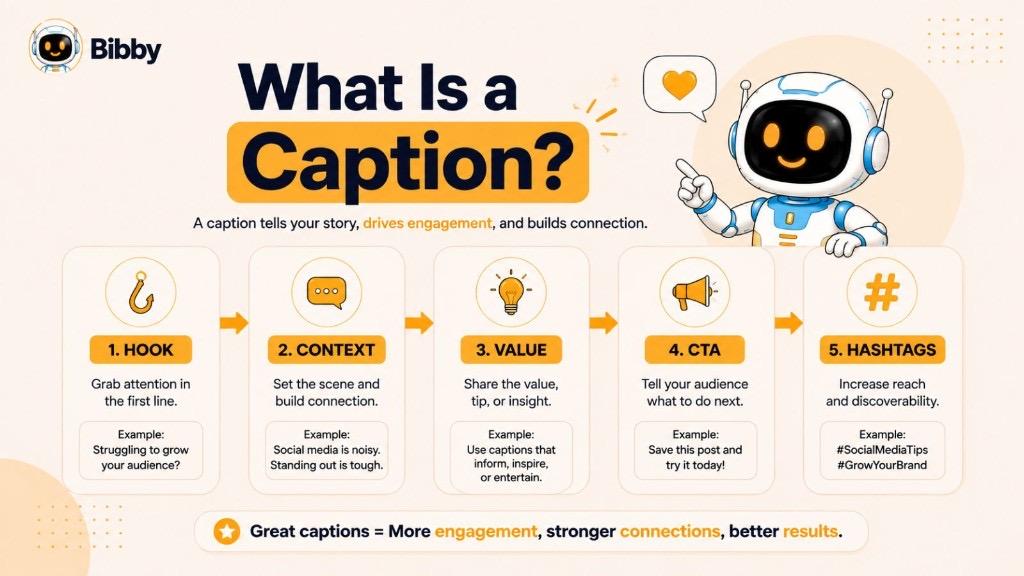
A caption is a short piece of text that accompanies a photo, video, graphic, or social media post to provide context, explain the content, tell a story, or encourage audience engagement. Depending on the platform and purpose, a caption can be informative, descriptive, entertaining, or promotional.
In social media marketing, captions play a vital role in communicating your message, reflecting your brand's personality, and inspiring users to take action—whether that's liking a post, leaving a comment, sharing content, or clicking a link.
Simple Definition
Dictionary Definition
Caption in Social Media
Caption in Photography
Caption in Video
Key Characteristics of a Good Caption
An effective caption should:
- Clearly explain or complement the visual content.
- Match the tone and purpose of the post.
- Capture the audience's attention with a strong opening.
- Encourage interaction through questions or calls to action.
- Be concise, easy to read, and relevant to the intended audience.
Caption Meaning
The meaning of a caption varies depending on where it is used, but its primary purpose remains the same: to provide context, communicate information, or enhance the understanding of visual or multimedia content.
Here's what a caption means in different contexts:
Caption Meaning in Social Media
On social media platforms like Instagram, Facebook, LinkedIn, TikTok, and X (formerly Twitter), a caption is the text that accompanies a post. It helps explain the content, tell a story, express an opinion, ask questions, promote products, or encourage users to engage through likes, comments, and shares.
Example:
*Sunsets are proof that every day can end beautifully. 🌅 What's your favorite place to watch the sunset?*
This caption adds personality, creates an emotional connection, and invites conversation.
Caption Meaning in Photography
In photography, a caption provides information about an image by identifying the people, places, objects, or events shown. It gives viewers the context needed to understand the story behind the photograph.
Example:
*Volunteers planting trees during the city's annual environmental awareness campaign.*
Caption Meaning in Journalism
Journalists use captions to explain photographs published in newspapers, magazines, and online articles. These captions often include factual details such as who is in the image, what is happening, where it took place, and when the event occurred.
Example:
*Firefighters respond to a residential fire in downtown Seattle on Tuesday evening.*
Caption Meaning in Video Content
For videos, the word caption can refer to two different things:
- Post Caption: The text written alongside a video on social media platforms.
- On-Screen Caption: Text displayed during a video that represents spoken dialogue and, in some cases, important sounds to improve accessibility.
Both types of captions improve the viewer experience by adding context and making content easier to understand.
Caption Meaning in Accessibility
Accessibility captions, often called closed captions, display spoken dialogue along with meaningful sounds such as music cues, laughter, or background noises. They help people who are deaf or hard of hearing access video content and also benefit viewers watching videos without sound.
Caption Meaning in Academic and Educational Content
In textbooks, research papers, presentations, and reports, captions describe tables, charts, graphs, diagrams, and illustrations. A clear caption helps readers quickly understand what the visual represents without reading the entire document.
Example:
*Figure 2. Monthly website traffic growth from January to June 2026.*
One Term, Multiple Uses
Although captions are used in different industries, they all serve the same fundamental purpose: to make content clearer, more informative, and more engaging. Whether you're writing an Instagram caption, labeling a photograph, adding subtitles to a video, or explaining a chart in a report, a well-crafted caption helps your audience understand and connect with your content more effectively.
Why Captions Matter
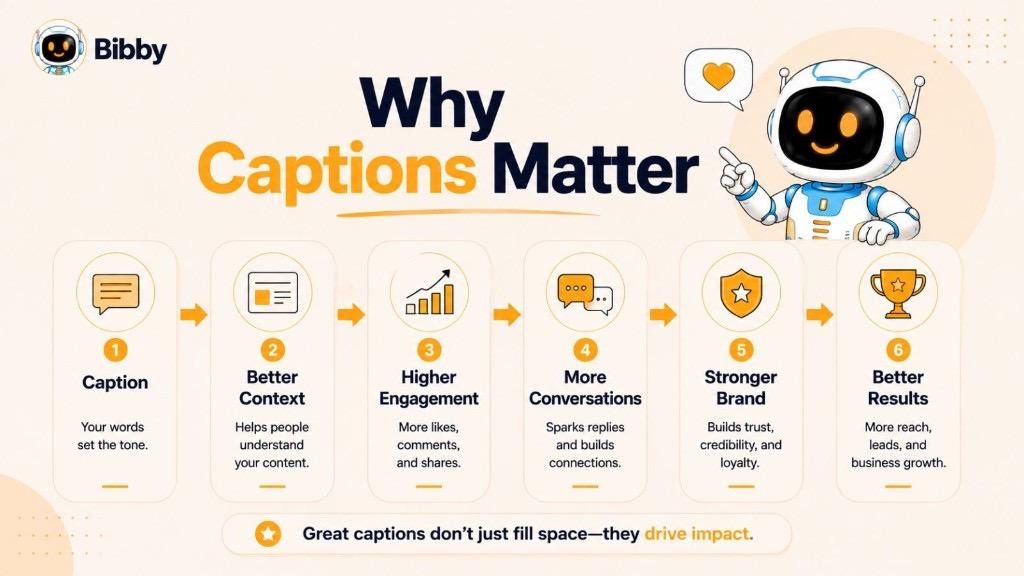
A caption is more than just text beneath a photo or video—it's an opportunity to communicate your message, build relationships with your audience, and encourage meaningful interaction. Whether you're an individual creator, a business, or a marketer, well-written captions can make your content more engaging, memorable, and accessible.
Provide Context
Visuals often capture attention, but they don't always tell the full story. Captions add context by explaining what's happening, sharing important details, or highlighting the message behind an image or video.
Increase Audience Engagement
Thoughtful captions encourage people to interact with your content. Asking questions, sharing personal experiences, or inviting opinions can lead to more comments, likes, shares, and conversations.
Strengthen Brand Voice
Every caption reflects your brand's personality. Whether your tone is professional, educational, humorous, or inspirational, consistent captions help build trust and create a recognizable identity across social media platforms.
Improve Storytelling
Stories create emotional connections. Instead of simply describing a visual, captions can share experiences, lessons, or behind-the-scenes moments that make your content more relatable and memorable.
Encourage Action
Captions are an effective place to include a clear call to action (CTA). Whether you want readers to visit your website, explore a product, watch a video, or leave a comment, a compelling caption can guide them toward the next step.
Support Accessibility
Captions improve accessibility by helping users understand content more easily. On videos, captions allow people who are deaf or hard of hearing to follow spoken dialogue, while many viewers also rely on captions when watching videos without sound.
Boost Content Performance
While captions aren't a direct ranking factor for search engines, they can improve content performance by increasing engagement, watch time, and audience retention. On social media, engaging captions may contribute to greater visibility by encouraging interactions that platform algorithms often reward.
Build Stronger Connections
People engage with content that feels authentic and relevant. Captions give creators and brands the chance to express personality, start conversations, and foster a loyal community rather than simply publishing visuals.
Key Takeaway
A great caption does more than describe content—it adds value. It informs, entertains, inspires, and encourages action, helping your content stand out while creating stronger connections with your audience.
Types of Captions
Not all captions serve the same purpose. The best type of caption depends on your goals, audience, and the platform you're using. Some captions are designed to inform, while others aim to entertain, inspire, or encourage action.
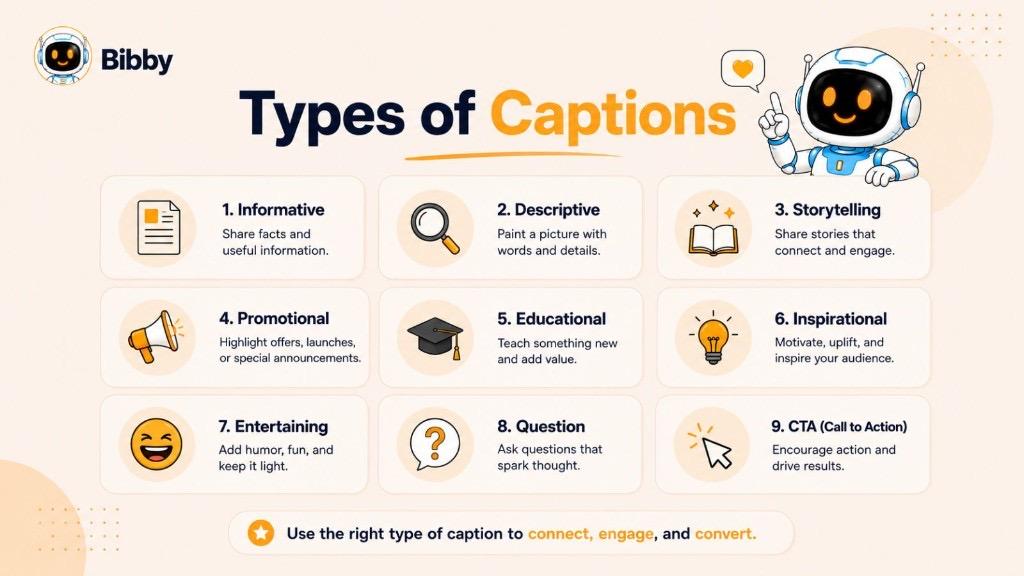
Here are the most common types of captions and when to use them.
Informative Captions
Informative captions provide useful details or explain what's happening in a photo, video, or post. They're commonly used by businesses, educational creators, and news organizations to help audiences better understand the content.
Example:
*"Our latest feature now lets you schedule posts across multiple social media platforms from one dashboard."*
Best for:
- Product updates
- News
- Educational content
- Event announcements
Descriptive Captions
Descriptive captions focus on explaining the visual content. They provide context by identifying people, places, objects, or events shown in an image or video.
Example:
*"A colorful hot air balloon rising above the mountains during sunrise."*
Best for:
- Photography
- Journalism
- Blogs
- Image galleries
Storytelling Captions
Storytelling captions go beyond describing the visual by sharing experiences, emotions, or lessons. They help build stronger emotional connections with your audience.
Example:
*"Three years ago, this business started with nothing more than a laptop and a dream. Today, we're celebrating our 10,000th customer."*
Best for:
- Personal brands
- Behind-the-scenes content
- Founder stories
- Customer journeys
Promotional Captions
Promotional captions highlight products, services, offers, or events while encouraging users to take action. The key is to focus on value rather than sounding overly sales-driven.
Example:
*"Launch your social media campaigns faster with Bibby's AI-powered automation tools. Start your free trial today."*
Best for:
- Product launches
- Discounts
- Sales campaigns
- Lead generation
Educational Captions
Educational captions teach your audience something valuable. They simplify complex topics, share tips, or explain industry concepts.
Example:
*"Posting consistently is one of the easiest ways to improve long-term engagement on social media."*
Best for:
- Tutorials
- How-to content
- Industry insights
- Thought leadership
Inspirational Captions
Inspirational captions motivate, encourage, or uplift readers. They're often paired with quotes, achievements, or personal milestones.
Example:
*"Success isn't built overnight—it's built through consistent action every single day."*
Best for:
- Personal development
- Brand storytelling
- Community building
Entertaining Captions
Entertaining captions use humor, clever wordplay, or relatable situations to capture attention and encourage sharing.
Example:
*"Me: I'll only scroll for five minutes. Also me: It's somehow midnight."*
Best for:
- Memes
- Lifestyle brands
- Creator content
- Viral posts
Question Captions
Question captions invite your audience to participate by sharing opinions or experiences. They're an effective way to boost comments and start conversations.
Example:
*"What's one productivity tip that has completely changed the way you work?"*
Best for:
- Community engagement
- Market research
- Audience interaction
Call-to-Action (CTA) Captions
CTA captions guide readers toward a specific action, such as visiting a website, downloading a resource, signing up, or leaving a comment.
Example:
*"Ready to simplify your social media workflow? Try Bibby today and see how much time you can save."*
Best for:
- Conversions
- Email signups
- Website traffic
- Product demos
AI-Generated Captions
AI-generated captions are created with artificial intelligence tools that help users produce engaging content quickly. These tools can generate captions in different tones, suggest hashtags, improve readability, and adapt content for various social media platforms.
Best for:
- Busy marketers
- Content creators
- Agencies
- Businesses managing multiple social accounts
Choosing the Right Type of Caption
The most effective captions align with your content and objective. For example:
| Goal | Best Caption Type |
|---|---|
| Educate your audience | Educational, Informative |
| Increase engagement | Question, Storytelling, Entertaining |
| Drive sales | Promotional, CTA |
| Build trust | Storytelling, Educational |
| Explain an image | Descriptive, Informative |
| Inspire your audience | Inspirational |
The strongest social media strategies often combine multiple caption styles—for example, starting with a story, sharing valuable information, and ending with a clear call to action.
Caption Examples
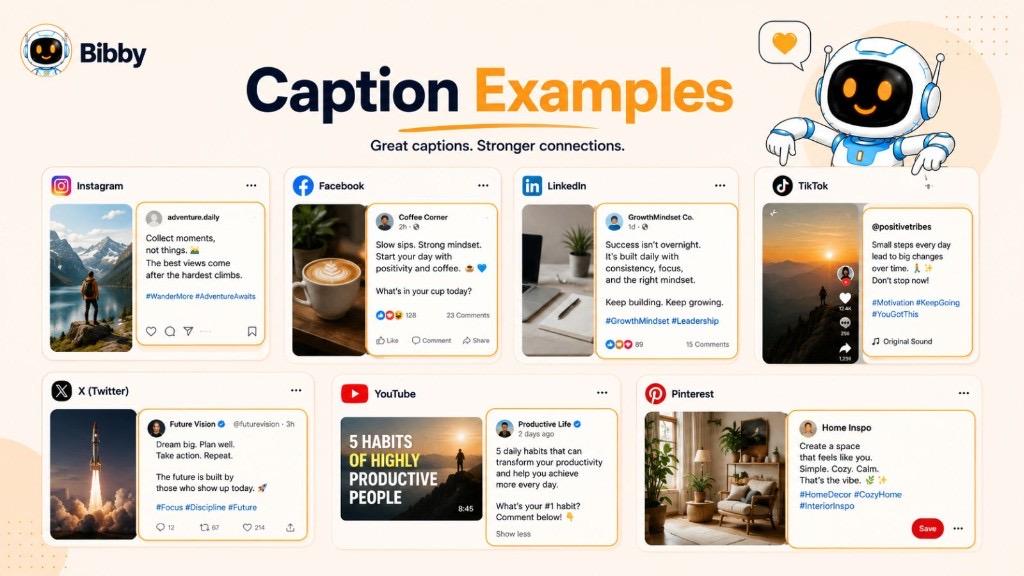
The best caption depends on your audience, platform, and goal. Below are examples of captions tailored for different social media platforms and content types.
Instagram Caption Examples
Instagram captions often combine storytelling, personality, emojis, and calls to action to encourage engagement.
Example 1
*"Chasing sunsets and making memories. 🌅 What's your favorite place to unwind after a busy day?"*
Example 2
*"Small steps every day lead to big results. What's one goal you're working toward this week?"*
Best for:
- Lifestyle creators
- Personal brands
- Travel and photography
- Small businesses
Facebook Caption Examples
Facebook captions work well when they encourage conversations and community engagement.
Example 1
*"We're excited to announce our newest feature! Which update are you most looking forward to trying?"*
Example 2
*"Every customer has a story, and today we're celebrating one of our favorites. Thank you for being part of our journey!"*
Best for:
- Community updates
- Business announcements
- Events
- Customer stories
LinkedIn Caption Examples
LinkedIn captions should be professional, insightful, and value-driven.
Example 1
*"One lesson I've learned about leadership: great teams aren't built overnight—they're built through consistent trust and communication."*
Example 2
*"Automation doesn't replace creativity. It gives creators and marketers more time to focus on meaningful work."*
Best for:
- Thought leadership
- Career advice
- Company updates
- Industry insights
TikTok Caption Examples
TikTok captions are typically short, attention-grabbing, and designed to complement the video.
Example 1
*"Wait until the end... 👀"*
Example 2
*"POV: You finally automate your social media workflow."*
Best for:
- Trends
- Entertainment
- Short-form videos
- Viral content
X (Formerly Twitter) Caption Examples
On X, concise and impactful captions often perform best.
Example 1
*"Consistency beats perfection every time."*
Example 2
*"What's one marketing trend you think is overrated?"*
Best for:
- Opinions
- Industry discussions
- News
- Quick updates
YouTube Caption Examples
YouTube captions (video descriptions or community posts) should provide context while encouraging viewers to watch and engage.
Example 1
*"Learn five proven strategies to grow your social media faster. Watch until the end for a bonus tip!"*
Example 2
*"Have questions after watching? Drop them in the comments—we'd love to help."*
Best for:
- Tutorials
- Product demonstrations
- Educational content
- Video promotions
Pinterest Caption Examples
Pinterest captions should clearly describe the content while naturally including relevant keywords.
Example 1
*"Discover easy social media caption ideas to increase engagement and save time on content creation."*
Example 2
*"Learn how to write Instagram captions that capture attention and encourage more interactions."*
Best for:
- Blog posts
- DIY content
- Recipes
- Marketing resources
Tips for Creating Better Captions
No matter which platform you're using, great captions usually have these qualities:
- Start with a compelling opening line.
- Match your brand's tone and voice.
- Provide value or tell a story.
- Keep the content easy to read.
- Include a clear call to action when appropriate.
- Use emojis and hashtags thoughtfully instead of excessively.
- Tailor the caption to the platform and audience.
Quick Reference Table
| Platform | Caption Style | Primary Goal |
|---|---|---|
| Storytelling, engaging | Build community and interactions | |
| Conversational | Encourage discussions and shares | |
| Professional, educational | Build credibility and thought leadership | |
| TikTok | Short, catchy | Increase video engagement |
| X | Concise, opinion-driven | Spark conversations |
| YouTube | Informative | Increase watch time and engagement |
| Keyword-focused | Drive clicks and discoverability |
The most effective captions aren't copied—they're adapted. Use these examples as inspiration, then customize them to reflect your brand, audience, and message.
How to Write a Great Caption
Writing a great caption is about more than describing a photo or video—it's about grabbing attention, delivering value, and encouraging your audience to take action. Whether you're creating content for social media, marketing campaigns, or your business, following a simple process can help you write captions that connect with your audience.
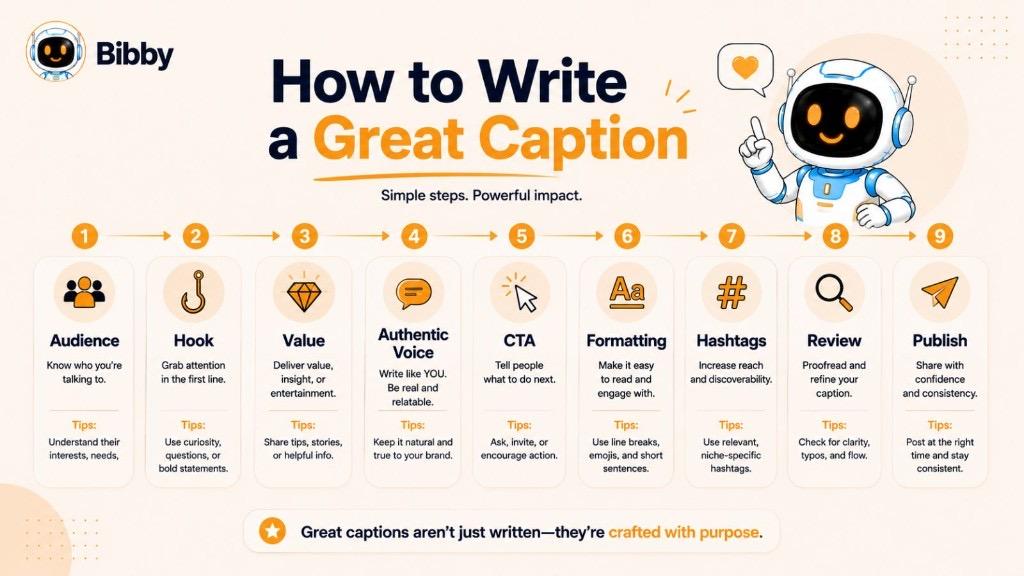
1. Know Your Audience
Before writing a caption, think about who you're speaking to. Understanding your audience's interests, challenges, and preferences will help you choose the right tone, language, and message.
Ask yourself:
- Who is this content for?
- What problem or interest does it address?
- What action do I want readers to take?
2. Start with a Strong Hook
The opening line determines whether people keep reading. Use an interesting fact, question, bold statement, or curiosity-driven sentence to capture attention.
Examples:
- *Want to save hours managing social media?*
- *Most creators make this common caption mistake.*
- *Here's the secret to writing captions people actually read.*
3. Provide Value
Give readers a reason to keep reading. Share useful information, tell a story, offer a tip, or explain why your content matters.
Instead of simply describing what's in the image or video, focus on what your audience can learn or gain from it.
4. Keep It Clear and Authentic
Write in a natural, conversational tone that matches your brand. Avoid overly complicated language or unnecessary jargon, and aim for clarity over cleverness.
People are more likely to engage with captions that feel genuine and relatable.
5. Include a Call to Action (CTA)
A clear call to action tells readers what to do next. Even a simple prompt can encourage more engagement.
Examples:
- Share your thoughts in the comments.
- Save this post for later.
- Tag someone who needs to see this.
- Visit our website to learn more.
- Try Bibby for free.
6. Format for Readability
Long blocks of text can be difficult to read, especially on mobile devices.
Improve readability by:
- Breaking content into short paragraphs.
- Using bullet points when appropriate.
- Adding line breaks to separate ideas.
- Highlighting key information naturally.
Well-formatted captions are easier to scan and more enjoyable to read.
7. Use Emojis Thoughtfully
Emojis can make captions more engaging and visually appealing, but they should support your message rather than distract from it.
Use them to:
- Add personality.
- Draw attention to important points.
- Create a friendly, approachable tone.
Avoid overusing emojis, as too many can reduce readability.
8. Add Relevant Hashtags
Hashtags can improve the discoverability of your content on many social media platforms. Focus on hashtags that are relevant to your topic, audience, and industry rather than using large numbers of unrelated tags. A hashtag generator can help you find relevant options quickly.
Quality and relevance are generally more effective than quantity.
9. Edit Before Publishing
Take a moment to review your caption before posting.
Check for:
- Spelling and grammar mistakes.
- Clarity and readability.
- Consistent tone of voice.
- Accurate links, mentions, and hashtags.
- A strong call to action.
A quick review helps ensure your message is professional and effective.
10. Experiment and Learn
No single caption style works for every audience. Test different approaches—such as storytelling, educational content, questions, or humor—and monitor engagement to understand what resonates best.
Over time, these insights can help you refine your caption strategy and improve your results. Use A/B testing when you want to compare hooks, lengths, or CTAs.
Caption Writing Checklist
Before publishing, ask yourself:
- Does the first line grab attention?
- Does the caption provide value?
- Is it easy to read?
- Does it reflect my brand voice?
- Have I included a clear call to action?
- Is the caption appropriate for the platform?
- Have I checked for spelling and grammar errors?
Following this simple checklist can help you create captions that are informative, engaging, and more likely to inspire meaningful interactions.
Pro Tip: If you're managing multiple social media accounts, AI-powered tools like Bibby can help you generate platform-specific captions with AI caption generation, refine your tone, and save time while maintaining consistency across your content.
Best Practices for Writing Captions
A well-written caption can capture attention, communicate your message, and encourage meaningful engagement. While every platform and audience is different, the following best practices can help you create captions that consistently perform well.
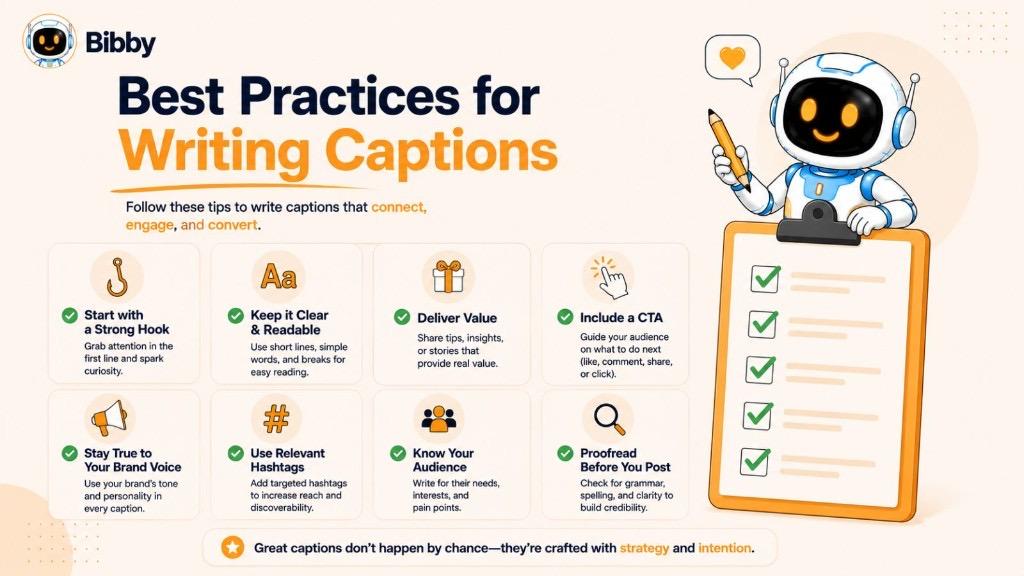
Keep It Relevant
Your caption should support the image, video, or content it accompanies. Avoid adding unrelated information that may confuse your audience.
Tip: Make sure the caption adds value instead of simply repeating what viewers can already see.
Capture Attention Early
Most users decide within seconds whether to continue reading. Begin with a strong opening sentence that sparks curiosity or highlights the value of your content.
Effective opening ideas:
- Ask a question.
- Share a surprising fact.
- Make a bold statement.
- Start with an interesting story.
Write in Your Brand Voice
Maintain a consistent tone across your content. Whether your brand is professional, friendly, educational, or humorous, your captions should reflect your identity and resonate with your audience.
Consistency helps build trust and brand recognition over time.
Focus on Value
The best captions give readers a reason to keep reading. Offer insights, useful tips, entertainment, inspiration, or practical advice whenever possible.
Ask yourself:
"What will my audience gain from reading this caption?"
Keep It Easy to Read
Mobile users often skim content rather than reading every word.
Improve readability by:
- Writing short paragraphs.
- Using bullet points when appropriate.
- Breaking up long sections with line breaks.
- Keeping sentences concise and straightforward.
Include a Clear Call to Action
Guide your audience toward the next step. A simple call to action can increase engagement and help achieve your content goals.
Examples include:
- Leave a comment.
- Share this post.
- Save it for later.
- Visit our website.
- Try our product.
- Learn more.
Use Emojis Purposefully
Emojis can help emphasize ideas, create visual interest, and express personality. Use them sparingly to complement your message without overwhelming the caption.
Use Hashtags Strategically
Hashtags can improve content discoverability on many social media platforms when they're relevant and used naturally.
Instead of adding as many hashtags as possible, choose a small number that accurately describe your content and audience.
Adapt to Each Platform
Every platform has different user expectations.
For example:
- Instagram: Storytelling and personality perform well.
- LinkedIn: Professional insights and educational content are effective.
- TikTok: Short, engaging captions complement video content.
- X: Concise, conversation-starting captions work best.
Tailoring your captions to the platform improves the user experience and can lead to better engagement.
Test and Improve
There's no universal formula for the perfect caption. Experiment with different styles, lengths, hooks, and calls to action to learn what resonates with your audience.
Track metrics such as:
- Likes
- Comments
- Shares
- Saves
- Click-through rate
- Engagement rate
Use these insights to refine your future captions.
Caption Best Practices Checklist
Before publishing, make sure your caption:
- Matches the visual content.
- Starts with an engaging hook.
- Provides value to the audience.
- Reflects your brand voice.
- Is easy to read on mobile devices.
- Includes a relevant call to action.
- Uses hashtags thoughtfully.
- Is free from spelling and grammar errors.
- Fits the platform where it will be published.
Following these best practices will help you create captions that are clear, engaging, and more effective at building relationships with your audience while supporting your marketing goals.
Common Caption Mistakes to Avoid
Even great content can underperform if it's paired with a weak caption. Avoiding common mistakes can help your posts attract more attention, encourage engagement, and communicate your message more effectively.
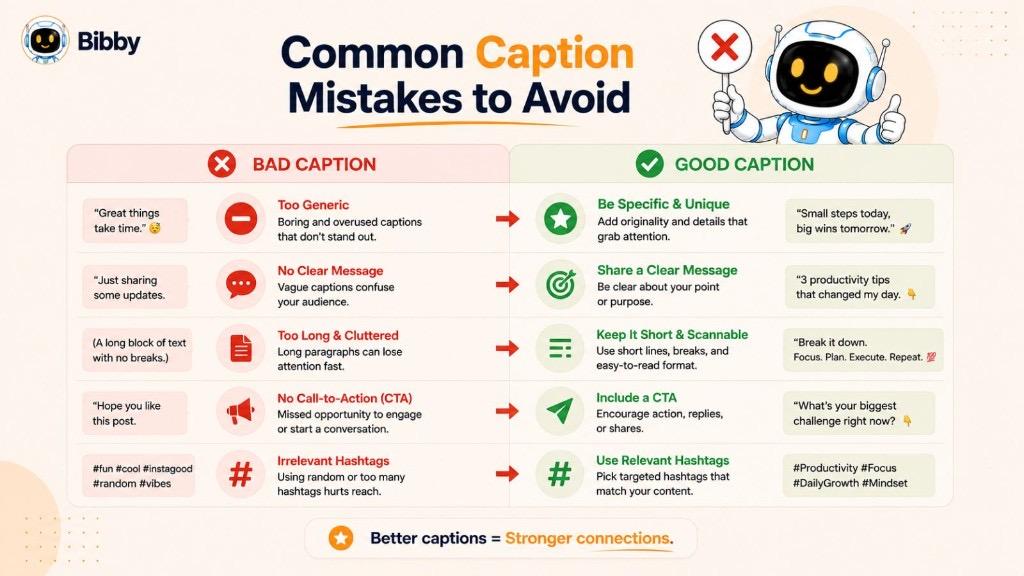
Writing Without a Clear Purpose
Every caption should have a goal. Whether you're trying to educate, entertain, inspire, or drive conversions, your message should support that objective.
Instead of: Writing whatever comes to mind.
Do this: Decide what you want your audience to think, feel, or do after reading the caption.
Starting with a Weak Opening
If the first sentence doesn't capture attention, many users won't continue reading.
Weak opening:
*"Here's another post about our product."*
Stronger opening:
*"Looking for a faster way to manage your social media?"*
A compelling hook encourages readers to stay engaged.
Focusing Only on Selling
Constantly promoting products or services can make captions feel repetitive and overly promotional.
Instead, balance promotional content with:
- Educational tips
- Stories
- Behind-the-scenes moments
- Customer success stories
- Industry insights
Providing value first helps build trust over time.
Making Captions Too Long or Too Short
Length alone doesn't determine quality.
A short caption can be highly effective if it's impactful, while a longer caption works well when it tells a meaningful story or delivers useful information.
Focus on writing only as much as your message requires.
Ignoring Readability
Large blocks of text can discourage readers, especially on mobile devices.
Improve readability by:
- Using short paragraphs.
- Breaking up ideas with spacing.
- Keeping sentences concise.
- Removing unnecessary words.
Well-structured captions are easier to scan and understand.
Using Too Many Hashtags
Adding a large number of unrelated hashtags can make your caption look cluttered and reduce its effectiveness.
Choose hashtags that are directly relevant to your content, audience, and industry instead of trying to maximize the total number.
Forgetting a Call to Action
Many captions end without telling readers what to do next.
Simple calls to action can significantly improve engagement.
Examples include:
- Share your thoughts below.
- Save this post for later.
- Tag someone who would find this helpful.
- Visit our website to learn more.
Overusing Emojis
Emojis can add personality, but excessive use may distract readers and reduce professionalism.
Use emojis intentionally to support your message rather than replace words.
Neglecting Proofreading
Small spelling or grammar mistakes can reduce credibility.
Before publishing, check for:
- Typos
- Grammar errors
- Broken links
- Incorrect mentions
- Missing hashtags
A quick review helps ensure your caption is polished and professional.
Copying Every Trending Style
Following trends can increase visibility, but copying every viral caption style may make your content feel generic.
Instead, adapt trends to fit your own brand voice and audience while maintaining authenticity.
Quick Checklist: Avoid These Caption Mistakes
Before publishing, make sure you're not:
- Writing without a clear goal.
- Using a weak opening.
- Being overly promotional.
- Making captions difficult to read.
- Adding irrelevant hashtags.
- Forgetting a call to action.
- Overusing emojis.
- Publishing without proofreading.
- Copying trends without adding your own perspective.
By avoiding these common mistakes, you can create captions that are more engaging, easier to read, and better aligned with your audience's expectations.
Caption vs Description vs Subtitle vs Closed Caption
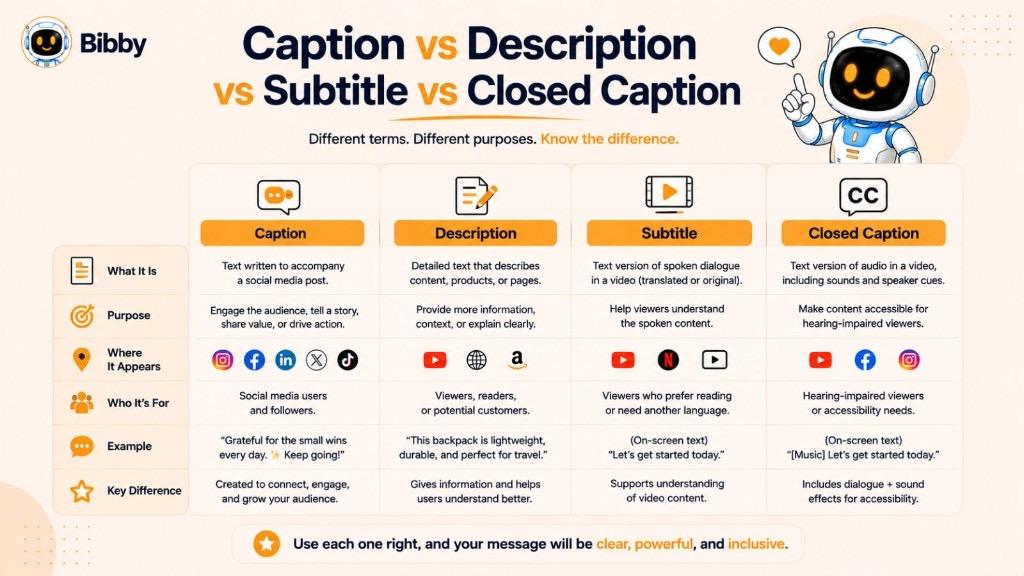
Terms like caption, description, subtitle, and closed caption are often used interchangeably, but they serve different purposes. Understanding these differences helps you choose the right format for your content.
Caption vs Description
A caption is short text that accompanies an image, video, or social media post to provide context, tell a story, or encourage engagement.
A description provides more detailed information about content, products, videos, or webpages. Descriptions are typically longer and focus on explaining or summarizing information.
| Caption | Description |
|---|---|
| Short and concise | More detailed and informative |
| Appears with images, videos, or posts | Used for products, videos, articles, or webpages |
| Focuses on context and engagement | Focuses on explanation and information |
| Often includes a call to action | Usually provides additional details |
Example Caption:
*"Coffee tastes better with a mountain view. ☕🏔️"*
Example Description:
*"This guide explains how to brew the perfect cup of coffee using pour-over techniques, including recommended equipment and brewing ratios."*
Caption vs Subtitle
Although they both display text alongside video content, captions and subtitles have different purposes.
Subtitles translate or transcribe spoken dialogue for viewers who can hear the audio but don't understand the language being spoken.
Captions, particularly closed captions, include spoken dialogue as well as important non-speech audio such as music cues, sound effects, and speaker identification.
| Caption | Subtitle |
|---|---|
| Includes dialogue and relevant sounds | Primarily displays spoken dialogue |
| Improves accessibility | Helps viewers understand another language |
| May identify speakers | Usually doesn't identify speakers |
| Designed for accessibility | Designed for translation or language support |
Caption vs Closed Caption
A caption is a broad term that refers to text accompanying visual content. A closed caption is a specific type of caption used in videos to improve accessibility.
| Caption | Closed Caption |
|---|---|
| Accompanies images, videos, or social posts | Appears during video playback |
| Adds context or encourages engagement | Displays dialogue and important sounds |
| Always visible with the content | Can usually be turned on or off by viewers |
| Used across many types of media | Primarily used for accessibility |
Caption vs Hashtag
Captions and hashtags often appear together on social media, but they serve different roles.
A caption communicates your message, while a hashtag categorizes your content and can help users discover posts related to a particular topic.
| Caption | Hashtag |
|---|---|
| Explains or enhances the content | Groups content by topic |
| Written as complete sentences | Uses keywords preceded by # |
| Provides context and storytelling | Improves discoverability on supported platforms |
| Can include questions and CTAs | Used for categorization and reach |
Which One Should You Use?
The right choice depends on your content and objective:
- Use a caption to provide context, tell a story, or encourage engagement.
- Use a description when detailed explanations are needed.
- Use subtitles to display spoken dialogue in another language or as a transcription for viewers.
- Use closed captions to make video content more accessible by including dialogue and important audio cues.
- Use hashtags to categorize your content and improve discoverability where supported.
Understanding these differences allows you to communicate more effectively while improving the user experience across websites, social media platforms, videos, and other digital content.
AI Caption Generator
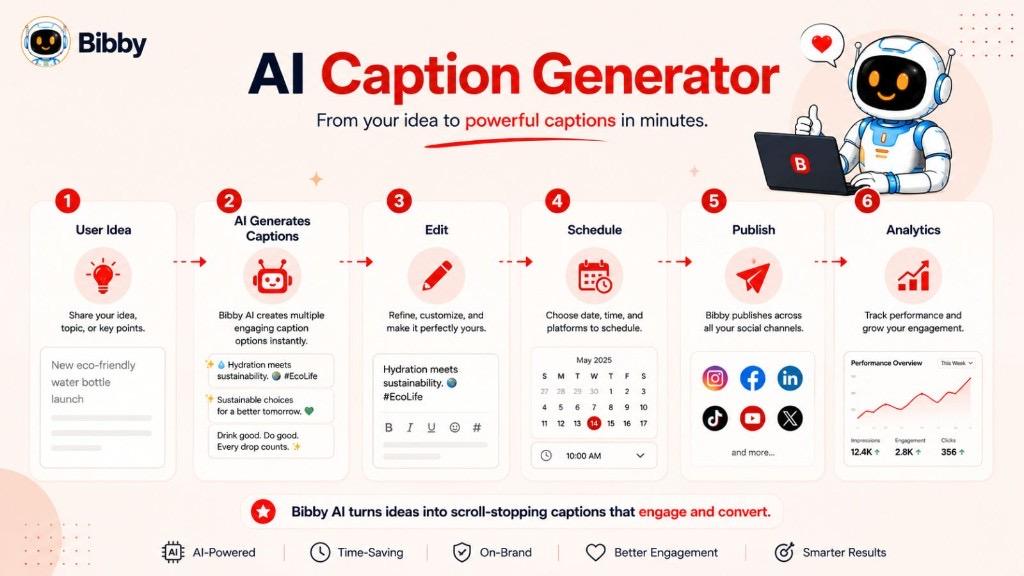
Writing engaging captions consistently can be time-consuming, especially if you're managing multiple social media accounts or publishing content every day. AI caption generators simplify the process by helping you create high-quality captions in seconds.
What Is an AI Caption Generator?
An AI caption generator is a tool that uses artificial intelligence to create captions based on your content, topic, audience, or preferred tone. Instead of starting from a blank page, you receive ready-to-use caption suggestions that you can edit and personalize.
Whether you're promoting a product, sharing a personal story, or publishing educational content, an AI caption generator helps speed up content creation while maintaining quality.
Benefits of Using an AI Caption Generator
Using AI to write captions offers several advantages:
- Save time by generating captions in seconds.
- Overcome writer's block with fresh ideas.
- Maintain a consistent brand voice across platforms.
- Create multiple caption variations for A/B testing.
- Adapt captions for different social media channels.
- Improve productivity without sacrificing creativity.
When to Use an AI Caption Generator
AI-generated captions are especially useful for:
- Social media managers
- Content creators
- Small business owners
- Marketing teams
- Agencies
- Personal brands
Whether you're posting once a week or several times a day, AI can help you publish content more efficiently.
What Makes a Good AI Caption?
The best AI-generated captions should:
- Match your brand's tone and voice.
- Be relevant to your content.
- Capture attention with a strong opening.
- Provide value to the audience.
- Include a clear call to action when appropriate.
- Be easy to read and edit.
AI should enhance your creativity—not replace it. Reviewing and personalizing generated captions helps ensure they align with your goals and audience.
Create Captions Faster with Bibby
Bibby combines AI-powered writing with social media automation to help you create and publish content more efficiently. Instead of spending time brainstorming every caption from scratch, you can generate engaging, platform-specific captions tailored to your needs.
With Bibby, you can:
- Generate captions in different tones and styles.
- Create captions for Instagram, Facebook, LinkedIn, TikTok, X, and more.
- Rewrite or improve existing captions.
- Produce multiple variations for testing.
- Schedule and publish across multiple platforms from one workspace.
- Save time while maintaining a consistent brand voice.
Whether you're a solo creator, a growing business, or a marketing agency, Bibby helps you streamline your content workflow and focus on creating meaningful connections with your audience. Start a free trial to try the AI caption generator and publish faster.
Pro Tip: AI works best when paired with human creativity. Use AI to generate ideas quickly, then refine the output with your unique voice, experiences, and brand personality for captions that feel authentic and engaging.
Caption Length Guide
There isn't a single perfect caption length that works for every platform. The ideal length depends on your audience, content type, and goals. While some platforms favor short, attention-grabbing captions, others allow more detailed storytelling and professional insights.
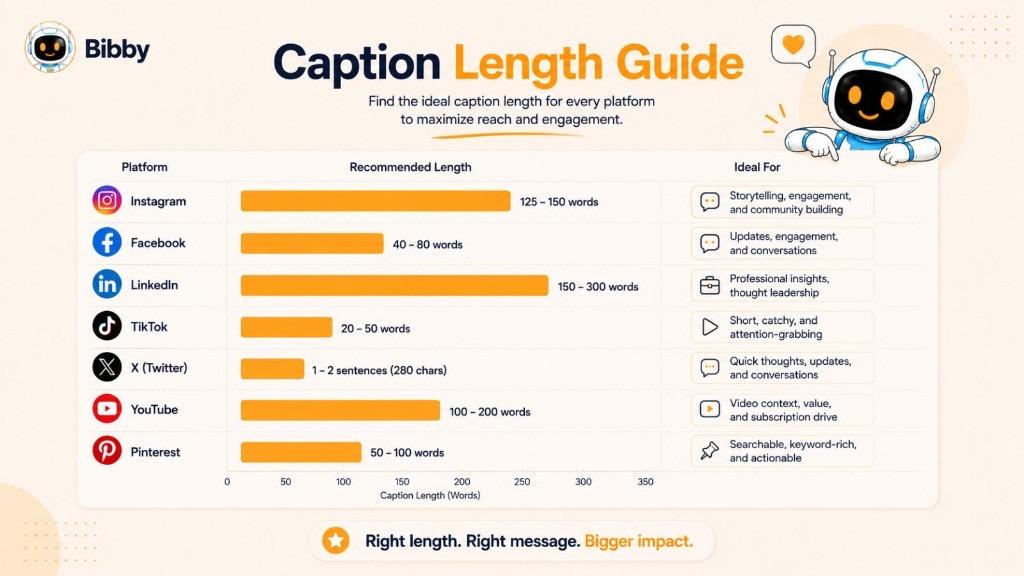
Use the following guidelines as a starting point.
| Platform | Recommended Caption Length | Best Practice |
|---|---|---|
| 125–300 characters for most posts | Start with a strong hook and place key information in the first sentence. | |
| 80–250 characters | Keep captions conversational and encourage comments or shares. | |
| 150–300 words | Focus on professional insights, storytelling, and clear formatting with short paragraphs. | |
| TikTok | 50–150 characters | Keep captions brief and support the video rather than repeating it. |
| X | 71–100 characters | Be concise, clear, and conversation-focused. |
| YouTube | 100–300 characters (community posts) or detailed video descriptions | Use the first few lines to summarize the content and encourage viewers to watch. |
| 100–300 characters | Write keyword-rich, descriptive captions that clearly explain the content. |
Does a Longer Caption Perform Better?
Not necessarily.
Short captions work well when you want to deliver a quick message or complement a strong visual. Longer captions are effective when you're telling a story, sharing valuable insights, or explaining a complex topic.
Instead of focusing solely on length, prioritize:
- Relevance
- Clarity
- Readability
- Value
- Audience intent
A concise caption that resonates with your audience is often more effective than a lengthy caption that doesn't add value.
Tips for Different Platforms
- Capture attention in the first sentence.
- Use line breaks to improve readability.
- End with a question or call to action.
- Write conversationally.
- Encourage discussions with open-ended questions.
- Share stories or updates that invite interaction.
- Lead with a compelling insight or opinion.
- Break longer posts into short paragraphs.
- Offer actionable advice or lessons learned.
TikTok
- Support the video without repeating what's already shown.
- Use relevant keywords and hashtags where appropriate.
- Keep captions easy to scan.
X
- Focus on one idea.
- Ask thought-provoking questions.
- Keep your message concise and impactful.
YouTube
- Summarize the video's value in the opening lines.
- Include relevant resources, timestamps, or links in the description when appropriate.
- Encourage viewers to like, comment, and subscribe.
- Describe the content clearly.
- Include relevant keywords naturally.
- Inspire users to click through for more information.
Quality Matters More Than Length
The most effective captions aren't defined by their character count—they're defined by how well they connect with the audience. A strong hook, valuable message, and clear call to action will usually have a greater impact than simply writing a longer caption.
When in doubt, write only as much as needed to communicate your message clearly and encourage your audience to take the next step.
Key Takeaways
Captions are more than just text beneath a photo or video—they're a powerful way to communicate your message, tell stories, build relationships, and encourage meaningful engagement. Whether you're creating content for social media, marketing campaigns, blogs, or videos, the right caption can make your content more compelling and memorable.
In this guide, you've learned:
- What a caption is and how it's used across different contexts.
- The different types of captions, along with real-world examples and best practices.
- How to write captions that capture attention, provide value, and inspire action.
Remember, there's no one-size-fits-all formula for writing the perfect caption. The most effective captions are tailored to your audience, align with your goals, and reflect your unique voice. Experiment with different styles, measure what resonates, and continue refining your approach over time.
If you're looking to create high-quality captions faster, AI can help streamline the process. With Bibby, you can generate platform-specific captions with the AI caption generator, overcome writer's block, and maintain a consistent brand voice—allowing you to spend less time writing and more time creating content that connects with your audience.
Ready to write better captions? Explore Bibby's AI-powered caption generator and start creating engaging content in minutes. Publish across multiple platforms from one workspace and keep your voice consistent everywhere you post.