
A link in bio is a clickable URL placed in a social media profile's biography section that sends visitors to an external destination, such as a website, landing page, online store, newsletter signup, booking page, or a page containing multiple links.
The phrase “link in bio” is common when creators, influencers, brands, and businesses want followers to visit something outside the platform. A creator might announce a new video and tell followers to “check the link in bio.” The follower opens the profile, clicks the bio URL, and reaches the promoted destination.
A link in bio can point to one important page, or it can lead to a link-in-bio page that organizes several destinations. That makes it possible to promote a website, products, articles, a newsletter, a YouTube channel, a booking page, and other resources from a single profile URL.
For marketers, the bio link is a bridge between social content and business outcomes. A post attracts attention, the profile adds context, and the bio link provides a path toward a purchase, signup, article, or lead.
When you publish consistently, that path can sit inside a repeatable workflow. Bibby helps you create campaigns, generate captions, schedule posts at AI-optimized times, and publish images, carousels, videos, and Stories across Facebook, Instagram, LinkedIn, YouTube, and TikTok. The content attracts the audience; the link in bio remains the destination on the profile itself.
In this article, you will learn:
- What “link in bio” means and how it works
- Where to find one and how to add one
- What to put on a link-in-bio page
- Examples, mistakes, measurement, and campaign use
- How social content and a bio link work together
What Does “Link in Bio” Mean?
“Link in bio” means there is a clickable website URL in a social media profile's biography section. The link gives followers a way to visit a website, landing page, store, signup page, article, booking page, or another destination outside the social platform.
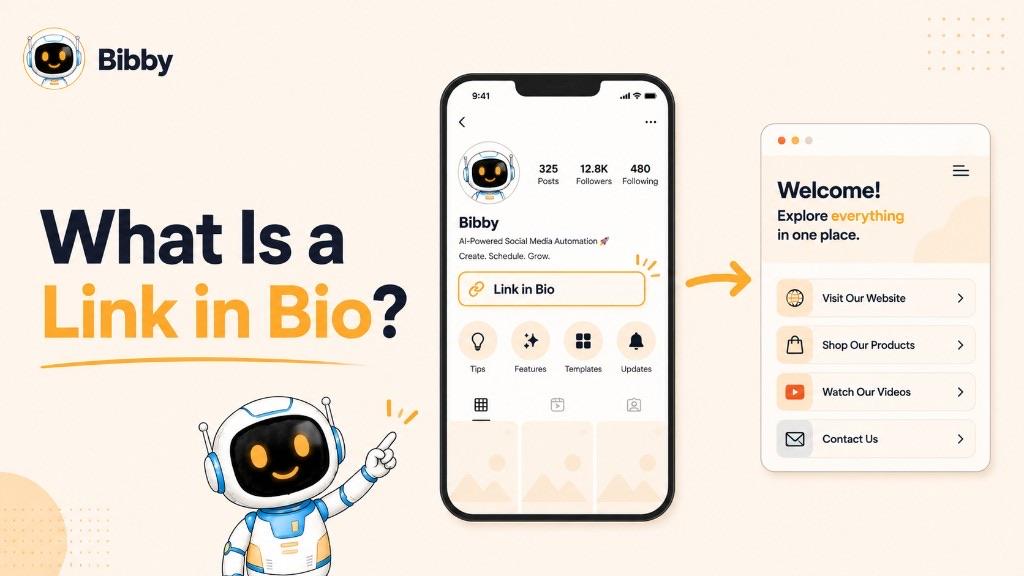
The phrase is especially common in captions. When a brand says “click the link in bio,” they are directing people to the profile to select the URL displayed there.
For example, a clothing brand might post a new collection and write:
“The new collection is live. Shop now through the link in bio.”
The post creates interest; the bio link provides the next step.
Breaking Down the Phrase
Link: A clickable URL that leads to another webpage.
Bio: The short biography or profile-information section on a social account.
Link in bio: A clickable URL located in that profile information.
It can be as simple as a company homepage, or it can lead to a dedicated link-in-bio page with several buttons.
Why Do People Say “Link in Bio”?
Posts often have limited space for external links, or the platform may not make every post clickable off-platform. A profile link is a persistent destination followers can reach from the account.
Instead of a different URL in every post, one profile link can stay in place:
Social post → “Visit the link in bio” → Profile → Bio link → Website
What Can a Link in Bio Point To?
Destinations should match the action you want:
- Company website or online store
- A specific product or campaign landing page
- A blog article or long-form resource
- Newsletter signup or lead form
- Booking or appointment page
- Portfolio, podcast, or YouTube channel
- App download page
- A page containing multiple links
A consultant might send visitors to a booking page; an e-commerce brand might send them to the latest collection.
Link in Bio vs. Link-in-Bio Page
These terms are related but not identical.
A link in bio is the URL placed on the profile.
A link-in-bio page is the webpage that URL may open. It can contain multiple buttons so visitors choose where to go.
Instagram profile → Link in bio → Link-in-bio page → Shop / Blog / Newsletter / YouTube / Contact
This is useful when you need several destinations without changing the main profile URL every time.
Simple Example
A fitness creator might show:
Helping you build stronger habits
Free 7-day workout plan ↓
[website URL]
The website URL is the link in bio. If that URL opens buttons for a workout plan, coaching, YouTube, newsletter, and equipment, that destination is a link-in-bio page.
When someone says “the link is in my bio,” they are telling followers the profile contains a clickable URL for the product, resource, or page being discussed.
How Does a Link in Bio Work?
A link in bio is a simple bridge between a social profile and an external destination. The usual path is:
Social content → Profile visit → Link in bio → Website or landing page → Desired action
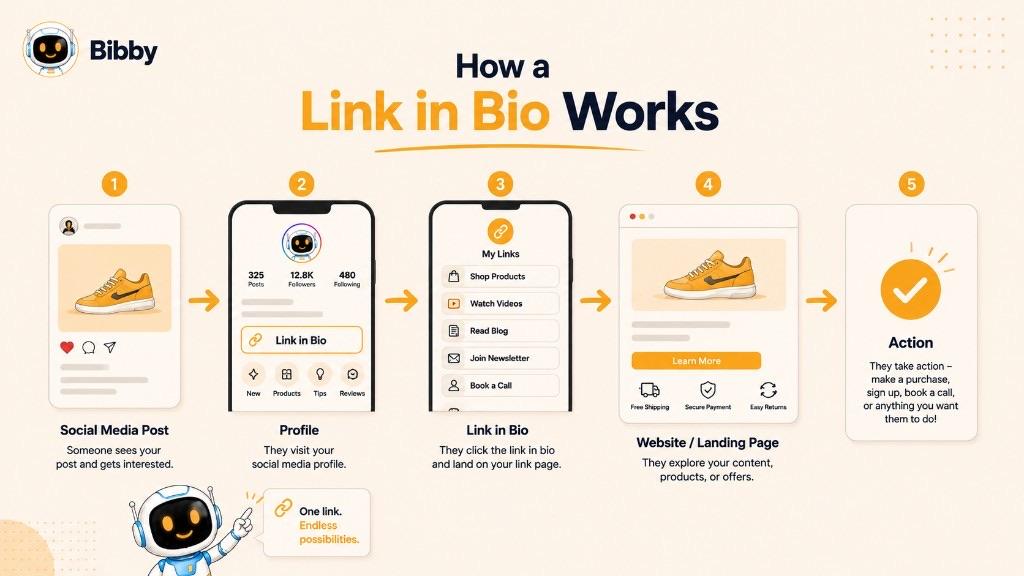
A brand might publish an Instagram post, tell interested people to visit the bio, and send them to a product or campaign page.
Step 1: Add a URL to the Social Profile
The account owner adds an external URL to the website or link field. Location and options depend on the platform and account type.
Step 2: Publish Content That Creates Interest
The bio link is more useful when content gives people a reason to click—a new course, product launch, or free trial.
Step 3: Direct Followers to the Bio
Use language that names the outcome:
- “Learn more through the link in bio.”
- “Shop through the link in our bio.”
- “Get the full guide from the link in bio.”
- “Book your consultation using the link in bio.”
Step 4: The Visitor Clicks the Bio Link
The follower opens the profile and selects the URL. A direct link goes straight to one page. A multi-link page shows options first.
Step 5: The Visitor Takes an Action
Depending on the account, they might buy, read, join an email list, download a resource, book, start a trial, watch a video, or contact the business.
That is the journey from social discovery to an external action.
Single-Destination Link vs. Multi-Link Page
Single destination: Profile → Bio link → Product page. Best when there is one clear priority (launch, registration, limited offer).
Multi-link page: Profile → Bio link → Page with several destinations (shop, blog, newsletter, YouTube, booking). One primary URL; many choices behind it.
Why the Destination Matters
If a post promotes a specific product but the bio sends people to a generic homepage, they may have to search. A stronger path is:
Product post → Profile → Link in bio → Product page
A campaign for a free guide should lead to the page where they can access that guide.
Link in Bio as Part of the Social Media Funnel
Content → Attention → Profile visit → Bio-link click → Website or landing page → Conversion
For teams that publish often, scheduling and campaigns in Bibby can keep the content side consistent. The post starts the conversation, the profile builds context, and the link in bio gives the visitor somewhere to go next.
Is a Link in Bio the Same as a Link-in-Bio Tool?
No.
Link in bio = the URL on your profile
Link-in-bio tool = optional software to create or manage the destination page
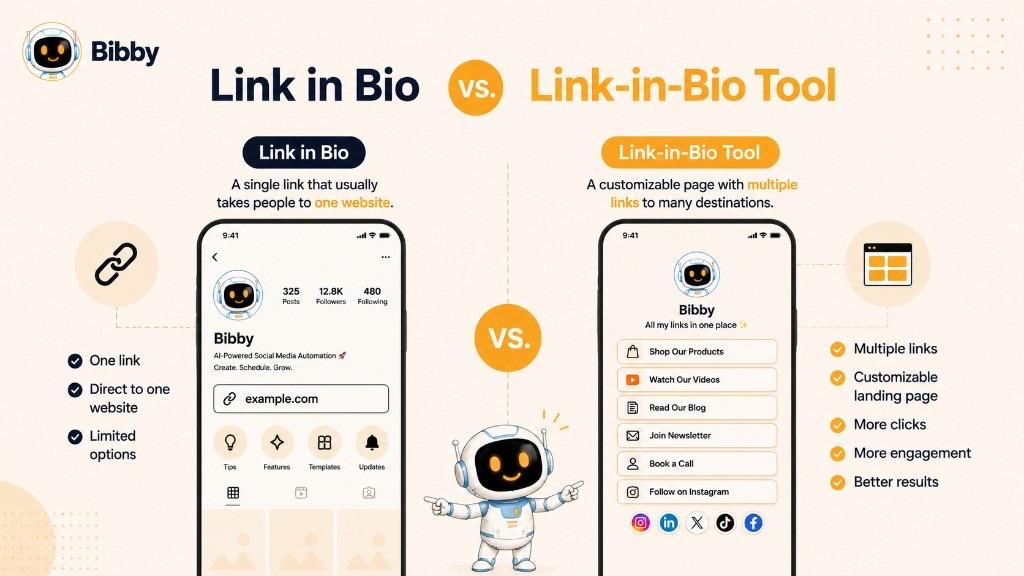
What Is a Link in Bio?
A clickable web address on the profile, such as yourwebsite.com, pointing to a homepage, product, article, booking page, or form.
What Is a Link-in-Bio Tool?
A service that builds a dedicated page with multiple links and other elements. The profile URL then leads to: profile → link-in-bio page → multiple destinations.
Why Use a Link-in-Bio Tool?
Centralization. A creator promoting YouTube, a newsletter, a course, a product, and a blog can keep one profile URL while the page content changes.
When Should You Use a Direct Link?
When you have one clear objective: a product launch, event registration, booking, one article, or a focused lead campaign.
Instagram profile → Link in bio → New product page
Fewer steps between the visitor and the action.
When Should You Use a Link-in-Bio Page?
When visitors need several options—shop, latest video, blog, newsletter, consultation—without adding links just because a tool allows it. A focused page with a clear primary CTA beats a long list of unrelated destinations.
| Term | What it means | Example |
|---|---|---|
| Link in bio | The clickable URL on a social profile | example.com |
| Link-in-bio page | The webpage opened by that URL | A page with several buttons |
| Link-in-bio tool | Software to create or manage that page | A multi-link profile page builder |
You do not need a specialized tool if a direct website URL is enough. Choose based on how many destinations you need and how focused the strategy is.
Where Is the Link in Bio?
The link is usually on the profile, near the biography or other profile information. Features vary by platform and can change as interfaces update.
Open the account's profile → Find the profile link → Click the link
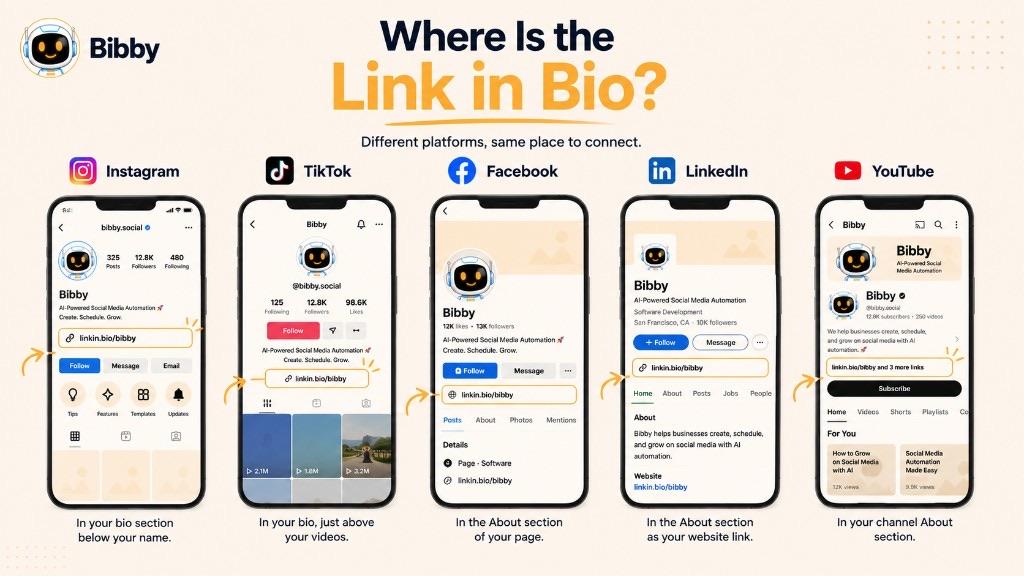
Look below the profile information for available links. Instagram may support more than one destination depending on current account features. Always use the options shown in the app today.
TikTok
Open the profile and check the biography and profile-link area. Available website options can vary by account.
Facebook handles website and contact fields differently from an Instagram-style bio link. Pages may surface a website or action through Page features rather than a single “bio” URL.
Website and contact-information fields can point to a personal site, portfolio, company site, consulting page, or booking page.
YouTube
Channel customization can include external links to a website, store, newsletter, other social accounts, or a campaign page. Placement and number of links can change as YouTube updates channel features.
Why Can't I See Someone's Link in Bio?
They may not have added one, the account may not have the same features, settings may hide it, the link may have been removed, or the interface may have changed. There is no universal location on every network. Start at the profile and look for the website or profile link.
How to Add a Link in Your Bio
In general: open the profile, edit profile information, find the website or link field, enter the URL, save, and test. Exact taps differ by platform and account type.
Decide the destination first—website, store, product, newsletter, booking, campaign page, or multi-link page.
- Open Instagram and go to your profile.
- Edit profile.
- Find profile links or website.
- Add the URL and save.
- View the profile and test the link.
For a product launch, prefer the product page over a generic homepage.
TikTok
- Open your profile.
- Edit profile.
- Find the website or link option if available.
- Enter the URL, save, and confirm it works.
Not every account has identical options.
- Open the profile or Page.
- Edit profile or Page information.
- Find website, contact, or relevant link fields.
- Enter the URL, save, and verify the public view.
- Open your profile.
- Edit the contact or website section.
- Add the destination, save, and check the public profile.
YouTube
- Open your channel.
- Open channel customization or profile settings.
- Add external links and labels, save, and view the channel as a visitor.
Test After You Add It
Confirm the URL opens, works on mobile, loads, matches the campaign, and that any tracking parameters behave as expected. If a post says “Shop the new collection through the link in bio,” the destination should make that collection easy to find.
Platforms change their interfaces—always follow the current fields in your account.
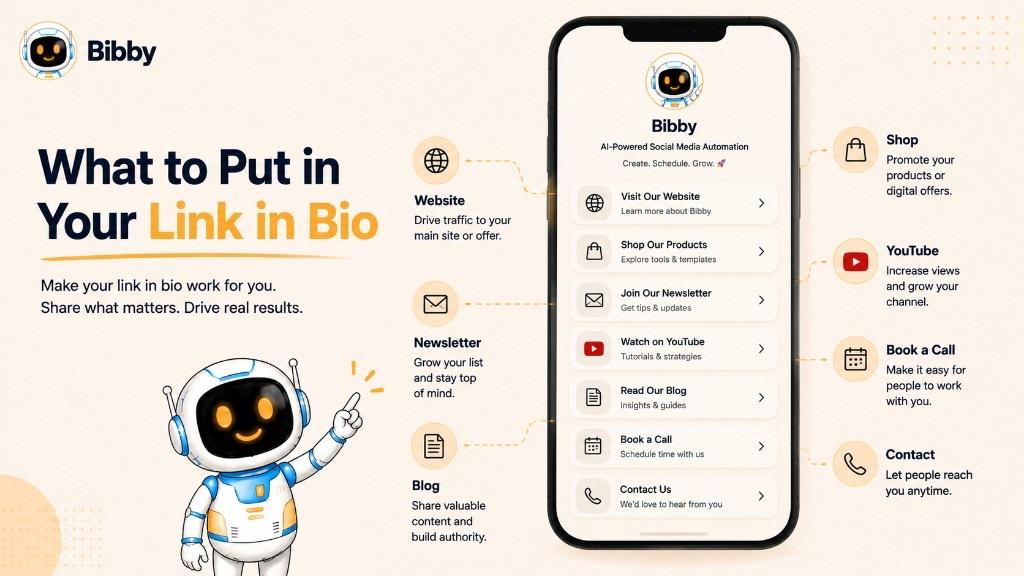
What Should You Put in Your Link in Bio?
Put the most important action first. Do not treat every link as equal.
Creators
Latest video, YouTube, newsletter, blog, course, digital products, affiliate storefront, portfolio, media kit, collaboration or contact. A new course might sit first while it is the priority.
Businesses
Website, store, best sellers, new arrivals, current promotion, booking, contact, newsletter, support, lead page. An e-commerce brand might lead with Shop New Arrivals.
Influencers
Partnerships, affiliate storefront, recommended products, sponsored campaigns, YouTube, newsletter, site, media kit, contact. The live campaign should usually be most prominent.
Agencies
Services, portfolio, case studies, results, packages, consultation booking, contact. Example: Book a Strategy Call, then work, case studies, services.
Link-in-Bio Page Layout
Name → short description → primary CTA → supporting links → about/contact. Remove links that no longer serve a purpose.
Should Your Homepage Be Your Link in Bio?
It can be, especially for a broad brand. It is not always best.
Less focused: Post → Profile → Homepage → Search → Product
More focused: Post → Profile → Link in bio → Product page
Keep the Primary Action Clear
Use labels such as Shop New Arrivals, Book a Consultation, Download the Free Guide, Watch the Latest Video, Join the Newsletter. Avoid Click Here or More Information when a specific CTA is possible.
Keep Links Current
Update when a campaign ends, a product is discontinued, an event has passed, or a new campaign takes priority. Treat the bio link as part of the content calendar, not a one-time profile setting.
How Should You Structure a Link-in-Bio Page?
Profile identity → Primary CTA → Important destinations → Secondary resources → Contact or social links
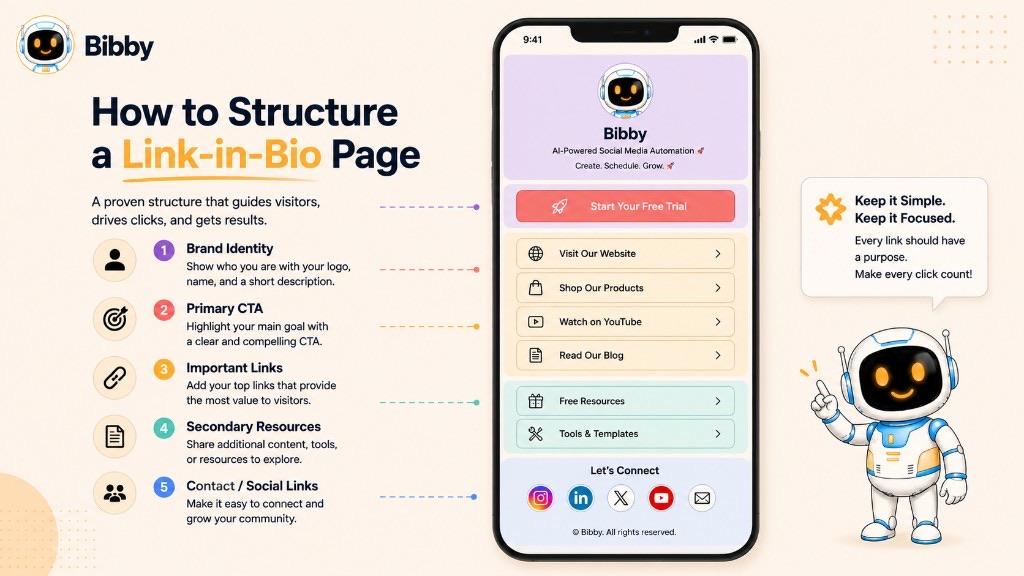
- Identity: Logo or photo, name, short tagline.
- Primary CTA first: Shop, trial, book, download, watch, subscribe—change it as priorities change.
- Secondary destinations your audience actually uses (site, blog, YouTube, products, services). You do not need every URL you own.
- Clear labels: “Shop Best Sellers,” not “Click Here.”
- Mobile-first: Readable text, tappable targets, fast load, simple layout.
- Group related links: Shop / Content / Connect.
- Only useful links: Five relevant choices can beat twenty unrelated ones.
- Match social content: If you are promoting a course, that course should be easy to find.
Example structure:
Bibby
*Social media scheduling and automation*
Start Creating
Latest resources · Social media dictionary · AI social media guide · Tutorials · Newsletter · Contact
The goal is not the longest list. It is profile discovery → the right next action.
Why Is a Link in Bio Important?
Social platforms are strong for discovery. Businesses and creators still need a path to pages they control—stores, newsletters, booking systems, lead forms.
Content → Profile → Link in bio → Website or landing page → Action
It connects social media with your website, gives profile visitors a next step, supports leads and sales, makes campaigns easier to promote, can centralize multiple destinations, and keeps one consistent URL while posts say “link in bio.”
The link does not guarantee conversions. Its value is a clear path plus a relevant destination.
Bibby can keep the content that creates profile visits on a schedule. The bio link is still the handoff to the page you choose.
Benefits of Using a Link in Bio
- Website traffic from profile visits.
- An external conversion path for purchases, signups, bookings, trials, or downloads.
- Product and service promotion you can change as priorities change.
- Centralized destinations behind one profile URL.
- Campaign support throughout a content calendar.
- Lead generation to guides, webinars, demos, or newsletters.
- Connection across channels (site, YouTube, podcast, store, other profiles).
- Measurable clicks when tracking is set up (clicks, sessions, leads, purchases).
- A path from follower to customer—still dependent on offer, trust, and the landing page.
- More control over owned destinations while platforms control the feed.
The benefit is not the link itself. It is the path between attention and the action you want.
Link in Bio Examples
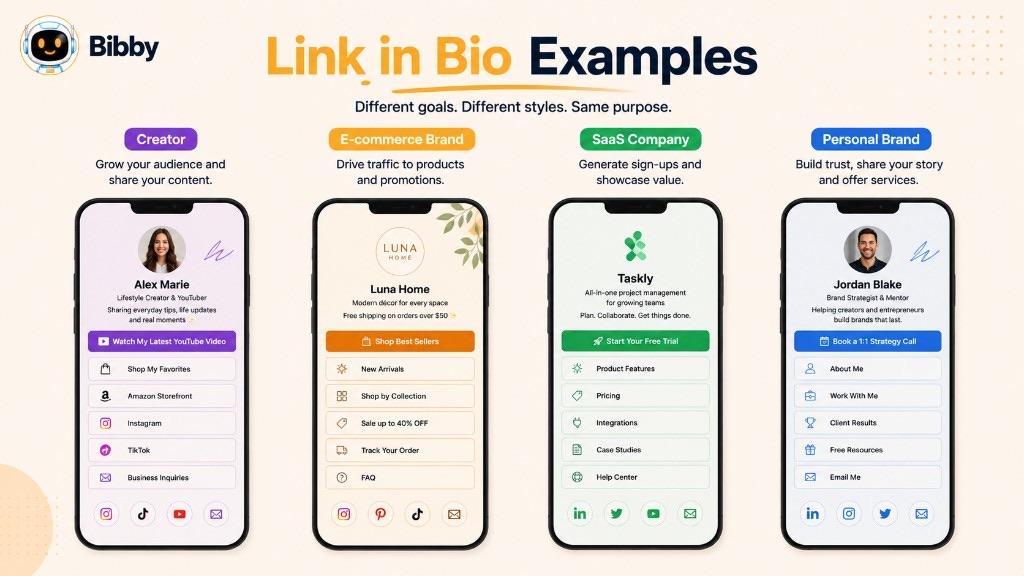
Creator: Free 7-day plan first, then YouTube, newsletter, program, equipment, work-with-me.
E-commerce: Shop new arrivals first, then best sellers, collection, offers, story, support.
SaaS (example): Start Creating first, then product, how it works, campaign, dictionary, resources, contact—aligned with a trial or demo goal.
Personal brand: Book a session first, then site, case studies, speaking, articles, newsletter.
Influencer: Shop favorites first, then video, guides, partnerships, gear, contact.
Agency: Free strategy call first, then services, case studies, portfolio, resources.
Newsletter: Subscribe first, then latest edition, archive, podcast, about, advertise.
Campaign: Shop the new collection first, then details, launch video, reviews, newsletter—then swap the primary link when the campaign ends.
Pattern: Identify the audience → choose the most important action → put that action first → add only relevant secondary destinations.
Should You Use One Link or Multiple Links in Your Bio?
A single destination is often best for one clear objective. A multi-link page is better when visitors have different reasons to come.
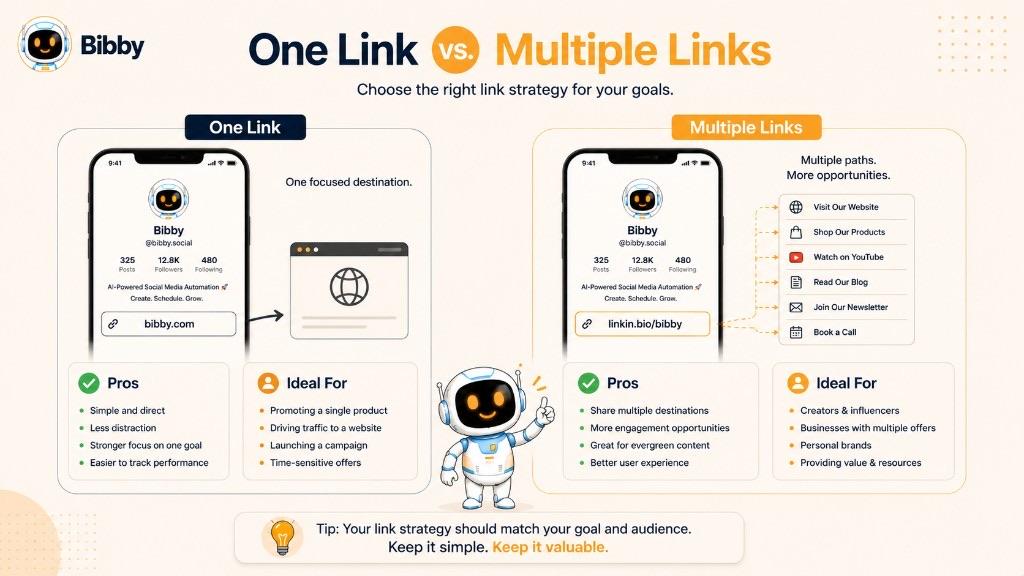
| Approach | Best for | Main advantage | Potential limitation |
|---|---|---|---|
| Single destination | One campaign or goal | Simple and focused | Only one destination |
| Multiple links | Several relevant destinations | More choice | Too many choices create friction |
| Campaign landing page | Product or promo | Keeps one objective | Needs updates |
| Store or product page | E-commerce | Short path to shop | May not serve other needs |
Do not turn the bio into a link directory. Ask which links help someone on this profile today?
A third option is a campaign landing page—not a homepage and not a long menu—containing everything needed to decide, then update the profile URL when the campaign ends.
How to Optimize Your Link in Bio
Optimization is relevance, clarity, usability, and conversion.
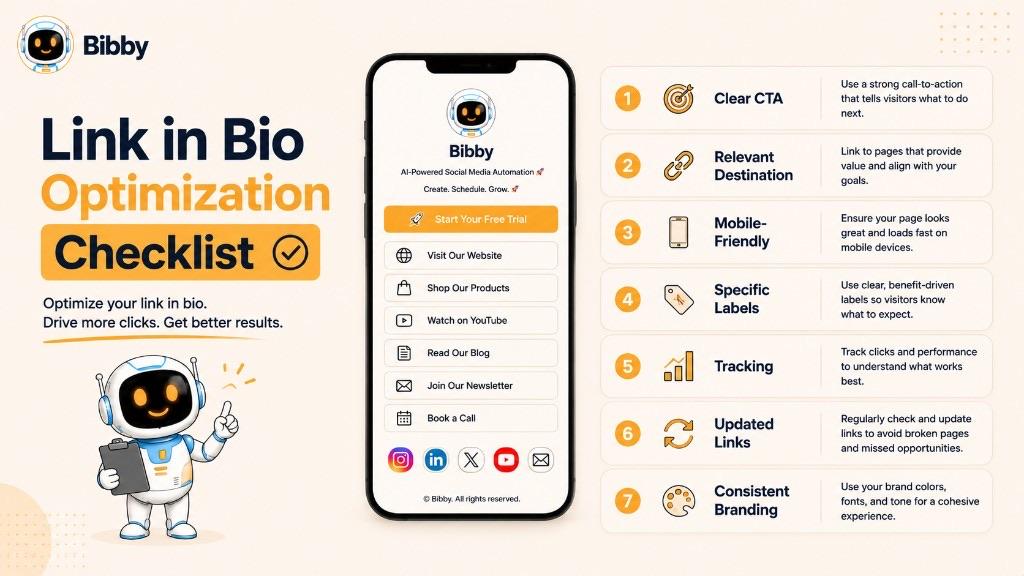
- Use a descriptive CTA, not “Click Here.”
- Match the link to the current campaign.
- Put the most important link first on a multi-link page.
- Keep labels specific.
- Make the destination mobile-friendly.
- Prefer relevant landing pages over a default homepage.
- Track traffic (clicks, sessions, leads, purchases) in your website or campaign analytics—not as a Bibby product feature.
- Update when campaigns change.
- Keep branding consistent from profile to page.
- Test CTA wording when you have enough traffic to compare.
A strong journey: useful content → profile → clear bio link → relevant landing page → desired action.
Link in Bio Best Practices
Keep the primary CTA obvious. Make every extra link useful. Remove expired campaigns. Use short descriptive labels. Prioritize mobile. Maintain branding. Use UTM parameters in your analytics setup where appropriate. Send people to relevant landing pages. Review performance against the real goal. Update when priorities change.
How Do Marketers Use Link in Bio?
Marketers use it to connect audiences with websites, products, lead forms, and other destinations across the funnel:
- Campaign and product launches
- Blog and long-form content promotion
- Lead generation and newsletter growth
- Webinar and event registration
- App downloads
- Affiliate recommendations (with required disclosures)
- Booking and seasonal promotions
Start with what action should a profile visitor take? Then choose Buy, Subscribe, Register, Book, Learn, or Try—and match the page.
Scheduled campaigns in Bibby can repeat that invitation across platforms. The bio link stays the external destination for the campaign goal.
How Does a Link in Bio Fit Into Social Media Automation?
They serve different parts of the same journey.
Create content → Publish consistently → Generate profile visits → Link in bio → External destination
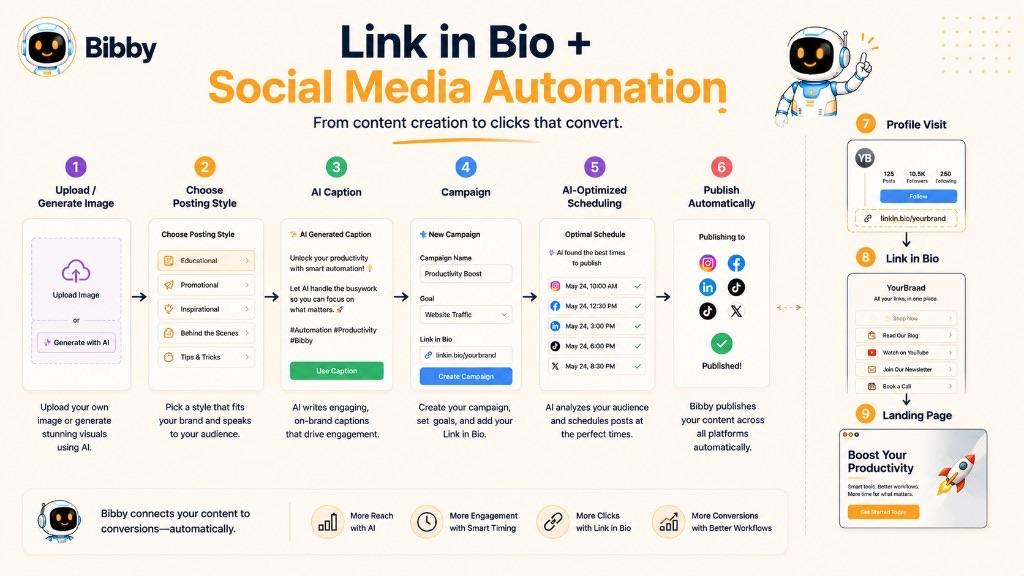
The bio link is the destination. Automation is the distribution layer—campaigns, captions, and scheduling so posts go out on a rhythm.
Example workflow with Bibby
- Upload an image or generate one with AI.
- Choose a posting style.
- Generate captions.
- Create a campaign.
- Schedule at AI-optimized times.
- Publish images, carousels, videos, and Stories on Facebook, Instagram, LinkedIn, YouTube, and TikTok.
- Use chat for brand kit, campaigns, posts, and caption regenerations.
Keep the bio destination aligned with the week's message: product content → product page; webinar content → registration page.
Automation increases consistency. Content creates discovery. The bio link provides the next destination. The destination supports the marketing goal.
How to Use a Link in Bio for Social Media Campaigns
Campaign content → Profile → Link in bio → Campaign landing page → Conversion
- Define the goal (sales, leads, signups, traffic, downloads, bookings).
- Choose a relevant destination, not a default homepage.
- Make the bio the next step in the caption.
- Use a clear campaign CTA.
- Keep the primary destination consistent across posts in the same campaign.
- Update the link as the campaign moves (waitlist → product → stories).
- Use a multi-link page only when supporting resources are needed—and keep the primary CTA obvious.
- Track clicks and the conversion that matches the goal.
- Plan content and destination together, then schedule the posts.
Example: New collection → “Shop the New Collection” → collection page ← announcement, carousel, demo, testimonial, reminder.
Treat bio link, content, CTA, landing page, and measurement as one journey.
Common Link-in-Bio Mistakes to Avoid
- Adding too many links.
- No clear primary CTA.
- Sending every visitor to the homepage.
- Outdated or broken URLs.
- Ignoring mobile.
- Vague labels (“Click Here,” “More”).
- Never tracking results in website or campaign analytics.
- Promoting an ended campaign.
- A landing page that does not match the post.
- Setting the link once and forgetting it.
The biggest mistake is thinking the goal is merely to have a link. The goal is:
Relevant content → Profile → Clear bio link → Relevant destination → Desired action
How Do You Measure Link in Bio Performance?
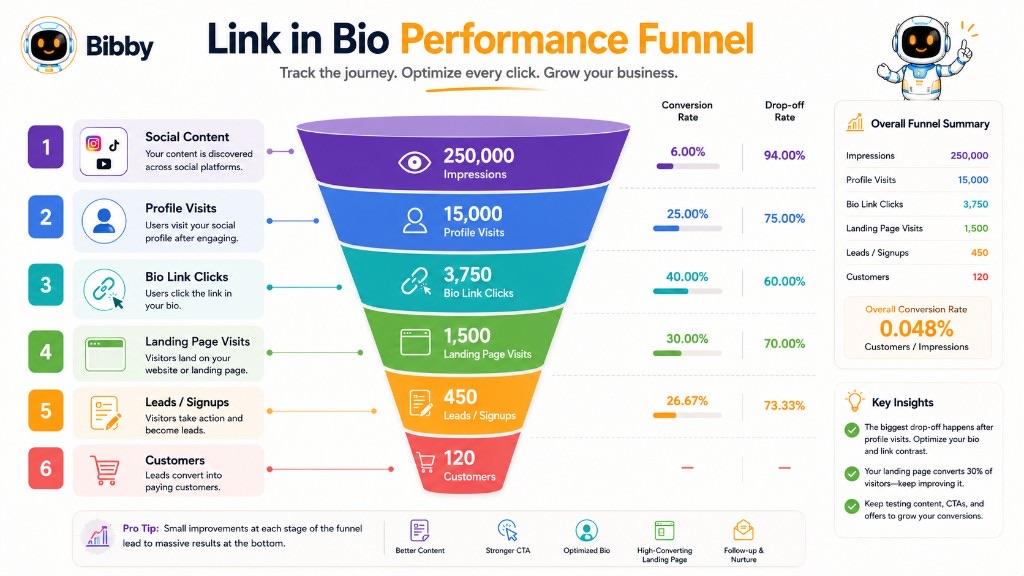
Measure the outcome that matches the objective. Use native platform insights, your website analytics, and any link-in-bio service you already use—not a Bibby analytics dashboard.
| Metric | What it tells you |
|---|---|
| Link clicks | People took the next step from the profile |
| Website sessions | Traffic that arrived on your site |
| Click-through rate | Clicks vs. a relevant impression or visit count—do not mix unlike metrics |
| Leads | Signups, demos, downloads |
| Purchases and revenue | E-commerce outcomes |
| Newsletter signups | List growth |
| Bookings | Service demand |
| Campaign conversions | The action the campaign was built for |
UTM parameters
Marketers often add `utm_source`, `utm_medium`, and `utm_campaign` so reports stay consistent. Naming should match your analytics setup.
A useful funnel: profile visits → clicks → landing-page visits → desired action → business result.
Connect measurement to content quality, offer, timing, and creative. Bibby helps you publish the campaign; your analytics tools tell you whether the destination converted.
Link in Bio vs. Website Link vs. Landing Page
| Element | Main purpose | Example |
|---|---|---|
| Link in bio | Connect a profile to an external destination | Instagram → profile link |
| Website link | Any URL to a webpage | example.com/products |
| Landing page | Encourage a specific action | Webinar registration |
Link in bio = how visitors get there. Website link = where a URL takes them. Landing page = what the destination is designed to accomplish.
They work together: content → profile → bio link → landing page → action.
Use a broad website URL for brand discovery. Use a landing page for a specific campaign. Use a multi-link page when visitors have different jobs to do—still with one obvious priority when a campaign is live.
Can You Put Multiple Links in a Bio?
Yes. Many platforms and link-in-bio pages let you offer several destinations behind one profile URL.
Profile → one bio URL → multi-link page → shop, article, YouTube, newsletter, booking
Use multiple links when audiences have different needs. Do not add as many as possible. Prioritize: current CTA, frequently used destinations, expected resources, then contact.
A product launch might list: Shop, Demo, Details, Reviews, Support—with Shop first.
Keep the list updated when campaigns end.
Multiple links should create useful choice, not decision overload.
Link in Bio for Different Users
| User | Common primary goal | Useful bio destination |
|---|---|---|
| Creator | Audience growth | Newsletter, content, or product |
| Influencer | Monetization | Products or affiliate storefront |
| E-commerce | Sales | Product or collection page |
| SaaS | Signups | Trial or demo |
| Personal brand | Leads | Booking or consultation |
| Agency | New clients | Consultation or services |
| Small business | Customer action | Booking, ordering, or website |
| Publisher | Audience growth | Newsletter or latest story |
| Nonprofit | Support | Donation or campaign page |
| Job seeker | Opportunity | Portfolio, resume, or contact |
Start with the objective, not the maximum number of buttons.
Link in Bio on Different Social Platforms
The function is the same; the UI is not.
- Instagram: Post → profile → link (the phrase is most associated here).
- TikTok: Video → profile → bio link when the account has the feature.
- Facebook: Page or profile website and contact fields.
- LinkedIn: Website and professional links; strong for services and B2B.
- YouTube: Channel links from a video to a site or store.
You can use one destination everywhere, or tailor it (visual collection on Instagram, case study on LinkedIn). Keep the campaign message aligned even if the tap path differs.
Bibby can schedule the same campaign across those networks. Each profile still uses that platform's current link fields.
“Link in bio” describes the function, not one identical button on every app.
How Bibby Can Help You Promote Your Link in Bio
A bio link works best when content consistently brings people to the profile and tells them why to click. Bibby supports that content-distribution layer. It does not build or host the link-in-bio page for you.
Create content → Publish consistently → Profile visits → Link in bio → External destination
You can:
- Upload media or generate images with AI
- Choose a posting style
- Generate captions (including CTAs such as “Explore the collection through the link in our bio”)
- Organize a campaign (announcement, carousel, demo, benefit post, reminder)
- Schedule at AI-optimized times
- Publish images, carousels, videos, and Stories on Facebook, Instagram, LinkedIn, YouTube, and TikTok
- Use chat to create a brand kit, campaign, posts, and regenerated captions
Keep content and destination aligned:
Post: Discover the new product. Profile CTA: Shop the New Product. Bio URL: Product landing page.
A practical workflow
- Choose the campaign goal.
- Select the bio-link destination (on the platform or your own page).
- Upload or generate visuals.
- Choose posting style and generate captions.
- Create the campaign and schedule posts.
- Publish, then send interested people to the profile.
- Measure traffic and conversions in your website or platform analytics.
Bibby powers the posts that create discovery. Your profile URL and landing page complete the click.
Key Takeaways
A link in bio is the clickable URL on a social profile. A link-in-bio page is optional. A link-in-bio tool is optional software.
- Match the destination to the post, not always the homepage.
- One clear primary CTA beats a long unfocused list.
- Test on mobile and update when campaigns change.
- Measure clicks and the action you care about.
- Use Bibby to create, caption, and schedule the content that drives profile visits—then start a free trial to publish across your channels.
Continue with social media bio, call to action, captions, content calendars, and conversion rate in the social media dictionary.