
If you’re wondering how brands turn social content into a more direct path to purchase, shoppable posts are one of the simplest ways to connect product discovery with ecommerce. They make it easier to move from seeing a product to learning more about it and, where supported, buying it without a lengthy search.
In this guide we cover what a shoppable post is, how it works, examples across major platforms, how it differs from a regular post, and how to create and optimize shoppable social content.
Bibby can help you create visuals, captions, campaigns, and schedules. Product catalogs, tags, and checkout stay in each platform’s native shopping tools.
What Is a Shoppable Post?
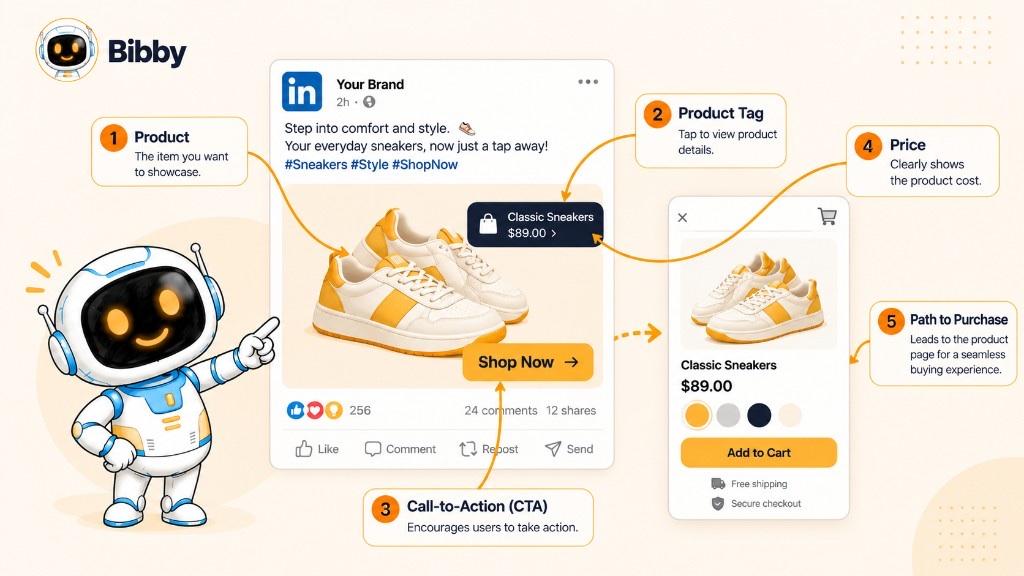
A shoppable post is a social media post that includes product tags, links, or shopping features that let users explore and purchase the products shown. Instead of seeing a product and searching for it separately, people can interact with the post to open product information and continue toward a purchase.
For example, a clothing brand might publish a photo of a model wearing several products and tag each item. A user taps a tagged product to view its name, price, and product page—depending on the platform’s shopping features.
Shoppable posts can use images, carousels, videos, and Stories. The shopping experience varies by platform, account eligibility, location, and the features that network currently offers.
The key difference is that a shoppable post connects social content with the product-buying journey. A regular post may promote a product; a shoppable post gives a more direct way to discover and act on it.
How Do Shoppable Posts Work?
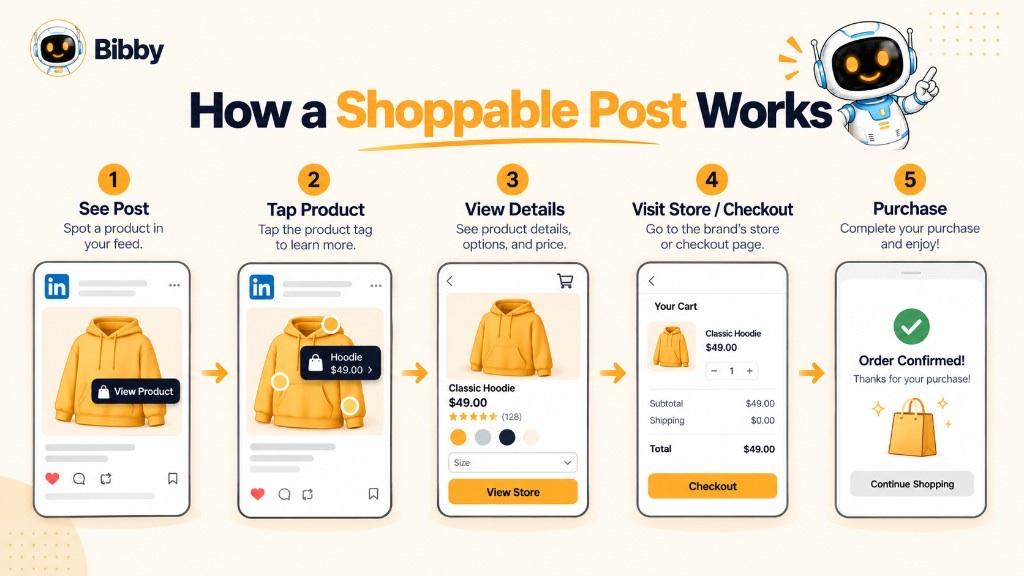
Shoppable posts connect a post with specific products so users can move from discovery to purchase with fewer steps. The exact process depends on the platform, but the workflow is similar.
- A brand creates social content. An image, carousel, video, or Story featuring one or more products.
- Products are connected to the content. Product tags, shopping links, or other supported shopping features.
- Users discover the product while browsing a feed.
- Users interact with the product and see name, price, images, or description.
- Users continue toward purchase in the social shopping experience or on the brand’s store.
- The brand measures performance where analytics exist—product interactions, clicks, traffic, and purchases.
The main advantage is reduced friction. Instead of remembering a product name, visiting a profile, searching a site, and finding the item, the post connects what someone is already viewing with what they may want to buy.
Shoppable Post Examples
The most effective examples showcase products naturally while making it easy to learn more or start buying.
1. Fashion Shoppable Post
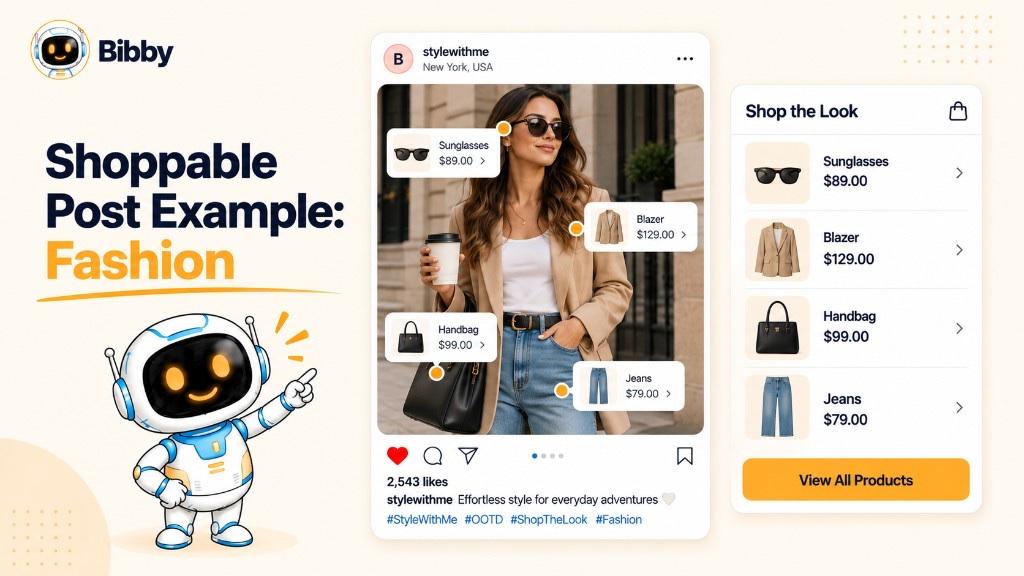
A clothing brand shows a complete outfit and tags the shirt, trousers, shoes, or accessories so users do not have to search each item.
2. Beauty Shoppable Post
A cosmetics brand publishes a makeup tutorial or demonstration. Featured products connect to shopping information so viewers can identify what they see.
3. Home Decor Shoppable Post
A furniture brand shares a styled room and makes the sofa, table, lamp, or rug discoverable through shopping features.
4. Product Showcase Post
A close-up image or short video of a new product links directly to product information and its purchase destination.
5. Shoppable Carousel
An ecommerce brand uses a carousel for several products or angles. Shopping features help users move from a slide to the item they want.
6. Shoppable Video
A short-form video or longer demo shows the product in use. Shopping elements connect viewers without a separate search.
7. Shoppable Story
A Story promotes a product, collection, or offer and uses the platform’s shopping stickers or tags.
A shoppable post does not have to look like a traditional ad. Demonstrations, tutorials, lifestyle content, and visual storytelling can all become shoppable when the right products are connected.
Shoppable Post vs. Regular Social Media Post
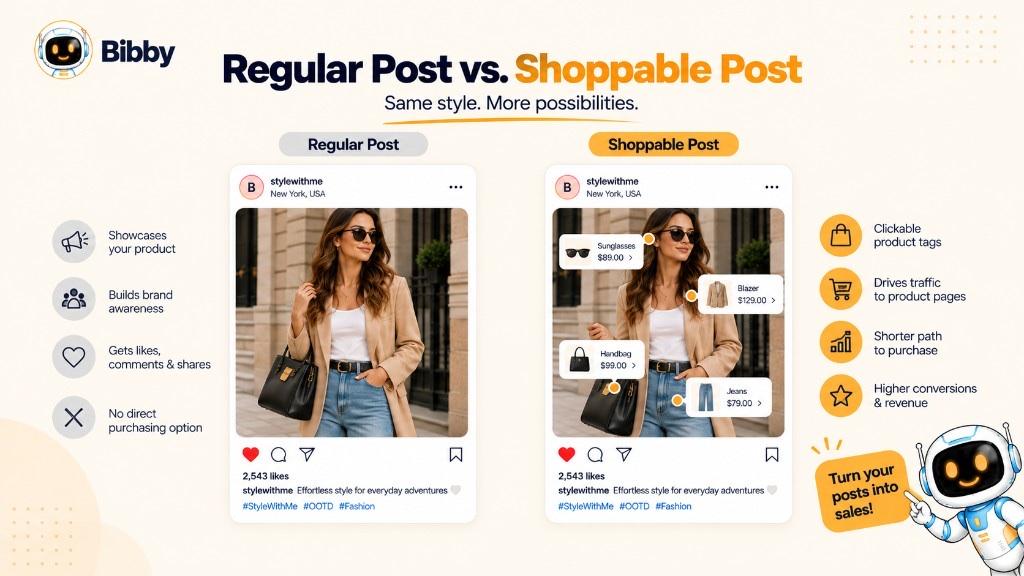
A regular post can feature a product, but people may still have to search or follow a separate link. A shoppable post adds product-specific shopping functionality.
| Feature | Regular social media post | Shoppable post |
|---|---|---|
| Features a product | Can | Yes, typically |
| Product tags or shopping links | Usually not | Yes |
| Product information | May sit in the caption | Often available through shopping features |
| Direct connection to product page | May require an external link | Built into the shopping experience |
| Purchase journey | Usually more steps | Typically fewer steps |
| Primary purpose | Engagement, education, or promotion | Product discovery and shopping, alongside engagement |
A shoe brand that says “visit our website to shop” is promotional. The same photo becomes a shoppable post when users can tap the sneakers through product tags and reach the product.
A URL in the caption is not enough. The post needs a platform-supported mechanism that connects the featured content with the product or shopping destination.
Which Social Media Platforms Support Shoppable Posts?
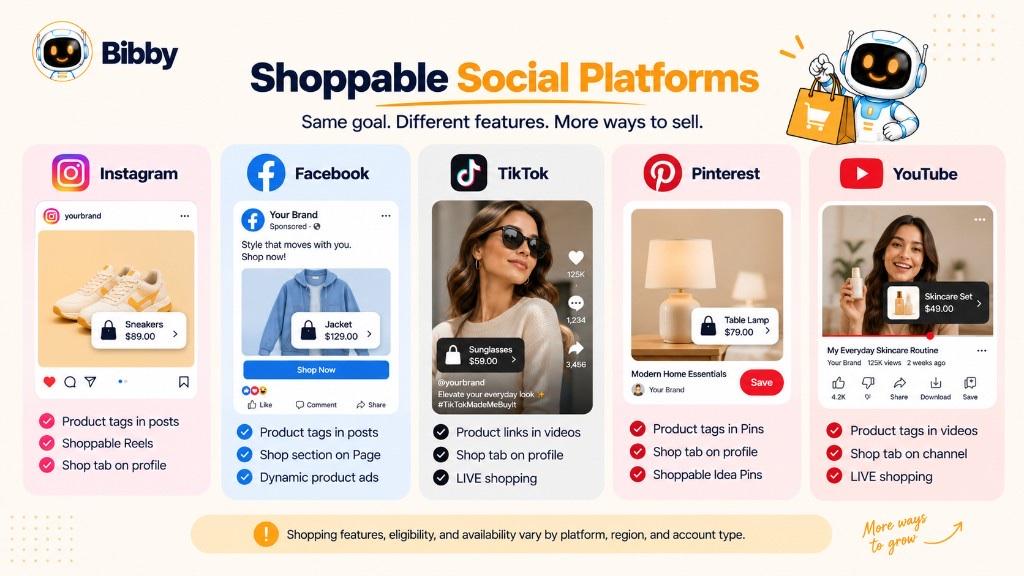
Shopping features, eligible accounts, formats, and checkout differ by platform and region.
Instagram is widely used for product discovery. Eligible businesses can connect products to posts, Reels, or other supported formats so people can explore items while they browse.
Facebook supports ecommerce experiences that connect catalogs with a Page or shop. Eligible accounts can use product-focused content to help users discover items and reach a purchase destination.
TikTok
TikTok pairs short-form video with product discovery. Available shopping features can let viewers interact with products they see in videos.
Pinterest is built for inspiration and product discovery. Businesses can use supported shopping features to connect products with Pins. Bibby does not publish to Pinterest; create that content in Pinterest’s own tools.
YouTube
YouTube can connect products with video through supported shopping features so viewers can learn more about what they see.
Does every platform work the same way?
No. Some networks keep product details in-app; others send people to an external store. Features also depend on country, account type, category, catalog setup, eligibility, and current policies. Check the platform you plan to use.
The idea stays the same: connect social content with products so discovery can lead to shopping with fewer steps.
What Types of Content Can Be Shoppable?
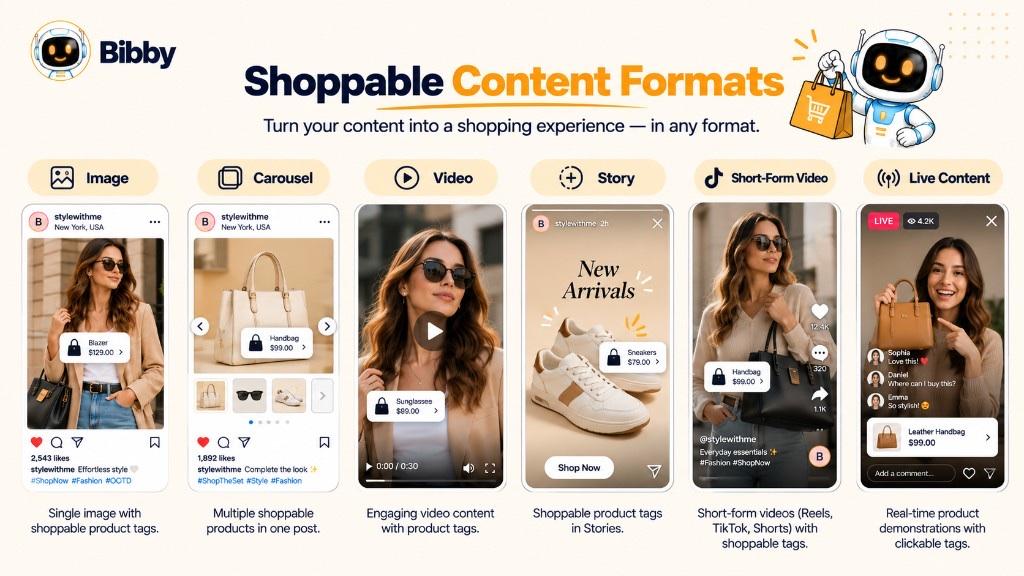
Shoppable Image Posts
A static image with one or more tagged products. Strong for fashion, beauty, furniture, food, and other visual categories.
Shoppable Carousel Posts
Multiple images for several products, variants, angles, or a collection.
Shoppable Videos
Tutorials, demos, unboxings, reviews, or lifestyle video with shopping elements.
Shoppable Stories
Temporary, interactive promotion for arrivals, offers, or behind-the-scenes.
Shoppable Short-Form Videos
Quick tutorials or lookbooks that mix entertainment, education, and discovery—including Reels.
Shoppable Live Content
Some platforms support shopping during live video so hosts can demo products and point viewers to featured items.
Pick the format that matches the product: a still for a simple visual, a video or carousel when people need to see fit, function, or context.
Benefits of Shoppable Posts
Shoppable posts can connect social media with ecommerce instead of treating the feed and the store as separate worlds.
- Shorter path from discovery to purchase — fewer “remember, search, find” steps
- Easier product discovery while people scroll
- Product content that can also shop — demos and tutorials with a next step
- Less friction between interest and product information
- Social as part of the journey, not only awareness
- More measurable promotion when the platform reports product taps, clicks, visits, or purchases
They do not guarantee more sales. Results still depend on product-market fit, creative, audience, price, offer, trust, and checkout. The advantage is convenience between discovery and shopping.
How to Create a Shoppable Post
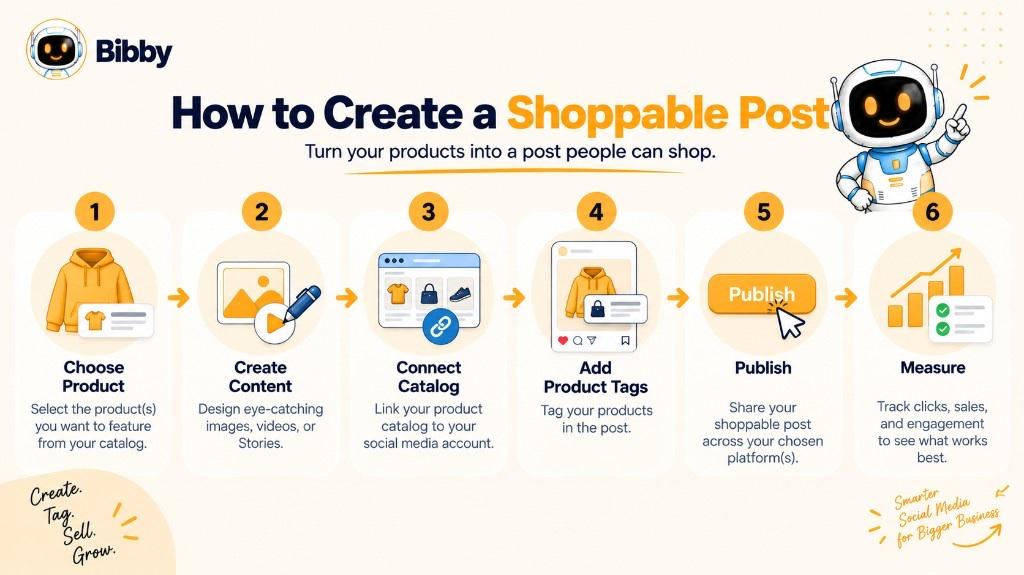
Creating a shoppable post is more than dropping a link in a caption.
- Choose the product that naturally belongs in the content.
- Create the creative — image, carousel, video, or Story where the item is easy to recognize.
- Set up the catalog on an eligible business account. Keep names, prices, and images accurate.
- Add tags in the platform’s shopping tools. Every tag should match the product shown.
- Write a caption that adds a benefit, use case, or answer—not only the product name. Include a call to action when it helps.
- Preview tags, images, and destinations on mobile.
- Publish and monitor engagement, product interactions, clicks, traffic, or purchases in native analytics.
- Improve the next posts using what performed.
The platform steps differ; the pattern does not: useful product content → correct connections → verify the path → measure.
How to Create Shoppable Campaign Content with Bibby
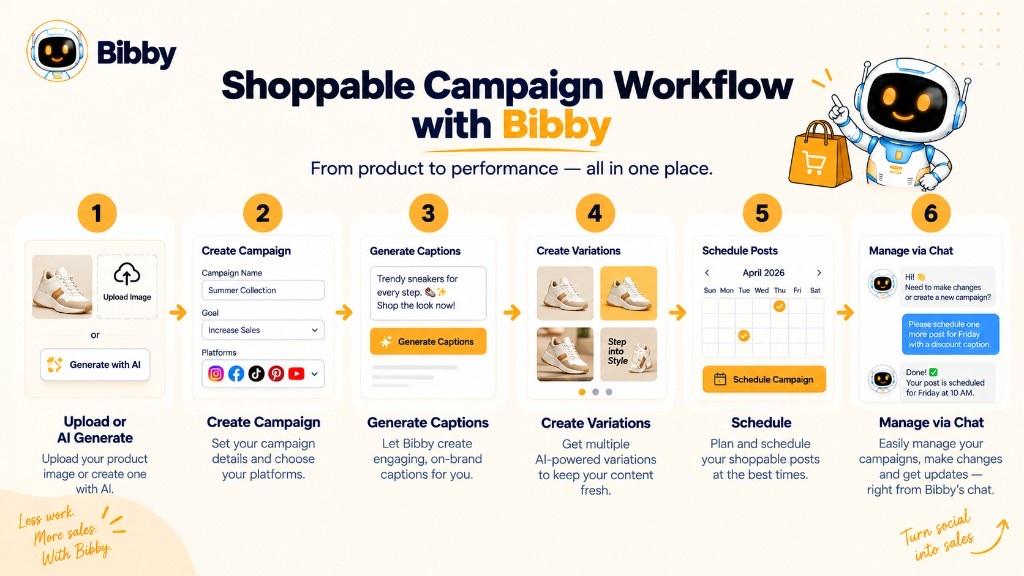
One shoppable post is straightforward. A campaign stream around a product is more work. Bibby helps with creation, captions, campaigns, and scheduling—not with native product tags or checkout.
A typical workflow:
- Upload or generate product visuals with existing photos or AI images.
- Create a campaign in chat around the product or collection.
- Prepare formats — images, carousels, videos, and Stories for Facebook, Instagram, LinkedIn, YouTube, and TikTok.
- Generate captions from a posting style, then regenerate if needed.
- Schedule at planned dates and AI-optimized times.
- Add shopping tags in the native app after (or as) you publish, then confirm they work.
You might tell Bibby, *“Create a two-week campaign promoting our new summer collection.”* Bibby can turn that into posts, captions, and a schedule. Instagram or TikTok still handle the catalog, tags, and purchase path.
If you schedule first, open the live post and verify tags. Scheduling tools do not always preserve shopping stickers.
Shoppable Post Best Practices
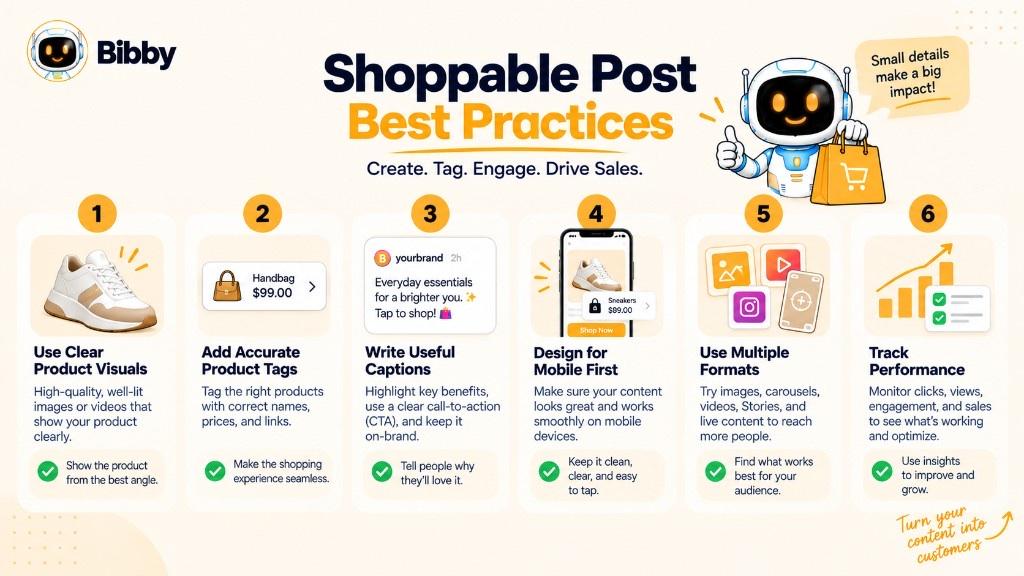
- Make the product easy to recognize
- Show it in context (lifestyle, demo, tutorial)
- Tag the correct products
- Write captions that add value
- Adapt creative to each platform
- Use more than one format when it helps
- Keep the path to the product simple
- Do not make every post a sales pitch
- Test presentation, format, captions, and CTAs
The goal is not more tagged posts. It is useful social content that naturally connects discovery with the next step.
Common Shoppable Post Mistakes
- Tagging the wrong product or variant
- Weak visuals that shopping icons cannot rescue
- Hiding the featured item
- Treating every post like an ad
- Irrelevant tags
- Ignoring mobile layout
- Stale prices, stock, or landing pages
- Assuming every platform works the same
- Measuring only sales and ignoring discovery, consideration, engagement, and traffic
- Never reviewing platform analytics
Good creative, accurate catalog data, a smooth path, and iteration matter more than the shopping icon itself.
Shoppable Post vs. Social Commerce vs. Social Selling
| Term | What it means |
|---|---|
| Shoppable post | A specific post with product tags, links, or shopping functionality. |
| Social commerce | The broader practice of discovering, evaluating, and buying through social platforms. |
| Social selling | Using social to build relationships, engage prospects, and influence decisions—often more conversation than checkout. |
A shoppable post is one piece of content. Social commerce is the ecosystem (discovery, catalogs, storefronts, creator recommendations). Social selling is relationship-led, for example a salesperson using LinkedIn before an offer.
They can work together: social selling to build an audience, social commerce for the shopping environment, shoppable posts to connect individual creatives with products.
Conclusion
A shoppable post connects social content with the buying journey through platform-supported shopping features. Unlike a regular promo post, it gives products a more direct path from the feed.
Remember:
- Shoppable posts connect products with social content.
- They can use images, carousels, videos, Stories, and other supported formats.
- They work when the content is relevant and the shopping path is simple.
Managing that content across platforms still takes time. Bibby can help you create visuals, generate captions, organize campaigns, and schedule posts. Native shopping tags and checkout stay on each network.
Continue with social commerce, CTA, conversion rate, UGC, link in bio, carousel posts, Reels, and Stories—or browse the social media dictionary. Then start a free Bibby trial to create, caption, and schedule campaign content across your channels.