
A social media feed is the constantly updating stream where users discover posts, images, videos, recommendations, and advertisements from accounts and brands they follow.
Understanding how feeds work helps businesses create content that gets noticed instead of simply adding another post to the stream. In this guide, you'll learn what a social media feed is, how platforms decide what appears in it, and how businesses can manage feed content more effectively.
In this article, you will learn:
- What a social media feed is and how it works
- How algorithms determine what appears in your feed
- How businesses can create and manage better feed content
First, let's look at exactly what the term “feed” means in social media.
What Is a Feed?
A feed is a continuously updating stream of content displayed by a social media platform. It can include posts, photos, videos, links, recommendations, and advertisements from friends, creators, businesses, and other accounts.
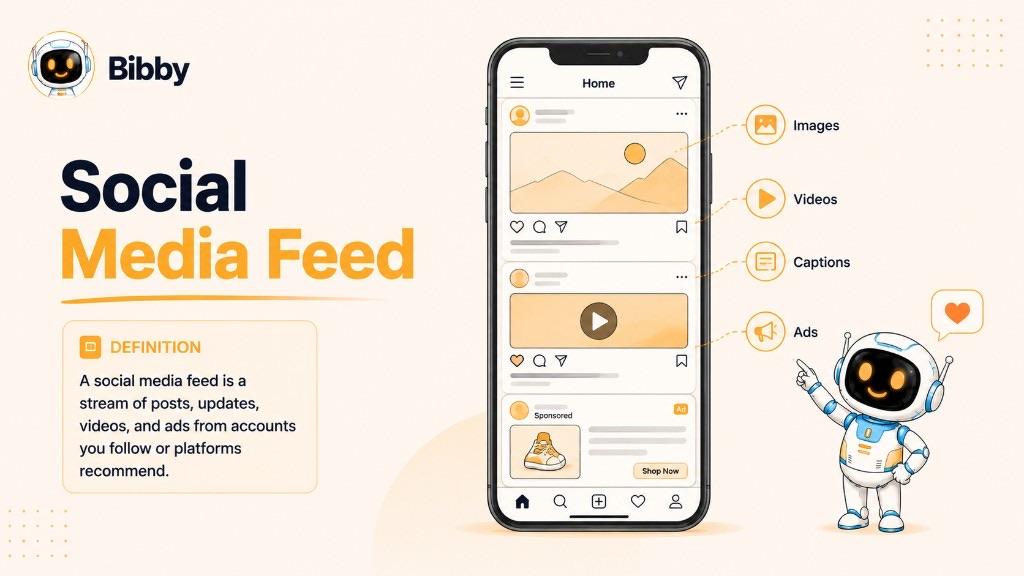
When you open a social media app, the collection of content you scroll through is generally your feed. Instead of showing every piece of content published on the platform, the platform selects and organizes content based on factors such as the accounts you follow, your previous interactions, the content's relevance, and how recently it was published.
A feed is different from an individual post. A post is one piece of content published by a user or organization, while the feed is the ongoing stream where multiple pieces of content are presented to you.
For businesses, the feed is an important place to reach potential customers, build awareness, share valuable content, and encourage engagement. Because feeds are constantly changing, creating useful content and publishing consistently can help a brand remain visible to its audience.
Now that we have defined a feed, let's look at how social media platforms decide what appears in it.
How Does a Social Media Feed Work?
A social media feed works by continuously collecting, organizing, and displaying content that a platform believes will be relevant or interesting to each user. Because millions of posts can be published across a platform, users typically don't see everything that is available.
Instead, social media platforms use ranking and recommendation systems to decide which content to show and in what order.
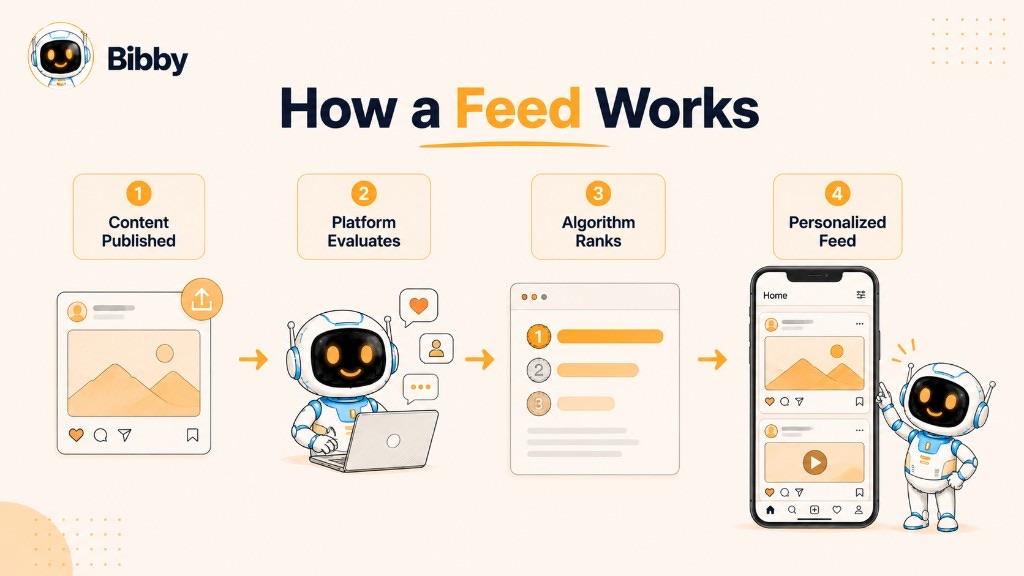
1. Content Is Published
The process starts when people, creators, businesses, and advertisers publish content. Depending on the platform, this might include text posts, images, carousels, videos, links, or other formats.
2. The Platform Collects Potential Content
The platform identifies content that could potentially appear in your feed. This can include posts from accounts you follow as well as recommended content from accounts you don't follow.
3. Content Is Evaluated
The platform evaluates potential content using signals such as your previous interactions, the type of content you usually engage with, how recent the content is, and information about the post itself.
4. Content Is Ranked
The platform's systems then determine which pieces of content are most likely to be useful or interesting to you. Higher-ranked content may be shown more prominently in your feed.
5. Your Feed Is Personalized
The result is a feed that is different for each user. Two people can follow many of the same accounts but still see different posts because their interests, interactions, and activity can differ.
Feeds also change continuously. As new content is published and users interact with different posts, the content and order of their feeds can change.
This personalization is why businesses need to think beyond simply publishing content. The next question is what actually determines whether a piece of content gets shown in someone's feed.
What Can Appear in a Social Media Feed?
A social media feed can contain many different types of content. The exact formats depend on the platform, but most feeds combine content from people you follow, recommended accounts, businesses, creators, and advertisers.
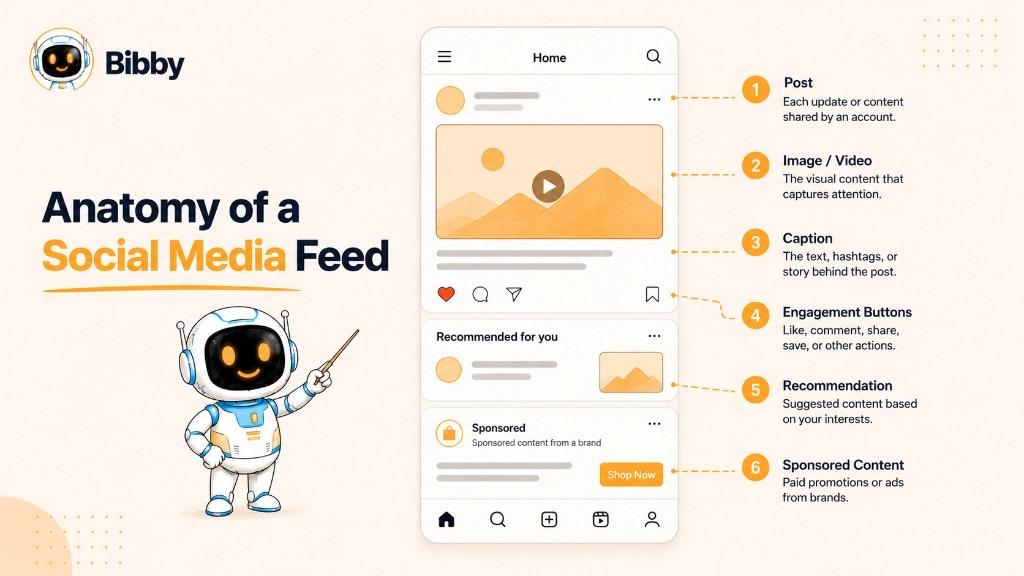
Text Posts
Text-based posts allow users and businesses to share thoughts, updates, opinions, announcements, and other information. Some platforms place more emphasis on written content than others.
Images
Images are one of the most common forms of feed content. Brands can use photos, graphics, product images, illustrations, and other visual content to communicate ideas quickly.
Carousels
Carousels contain multiple images or pieces of visual content that users can swipe through. They're useful for tutorials, product showcases, educational content, lists, and storytelling.
Videos
Video can appear directly in many social media feeds, ranging from short-form clips to longer videos. Video content can be particularly useful for demonstrations, entertainment, education, and storytelling.
Links
Some platforms allow users and businesses to share links that direct people to websites, articles, products, landing pages, or other online resources.
Recommended Content
Your feed may contain content from accounts you don't follow. Platforms can recommend posts, creators, videos, or other content based on signals about your interests and activity.
Sponsored Advertisements
Businesses can pay to have advertisements displayed in social media feeds. These ads can be targeted toward particular audiences and are typically labeled as sponsored or promoted content. That is paid social distribution, as opposed to organic reach.
Stories and Other Formats
Depending on the platform, users may also encounter Stories, short-form videos, polls, live content, and other interactive formats connected to their feed experience.
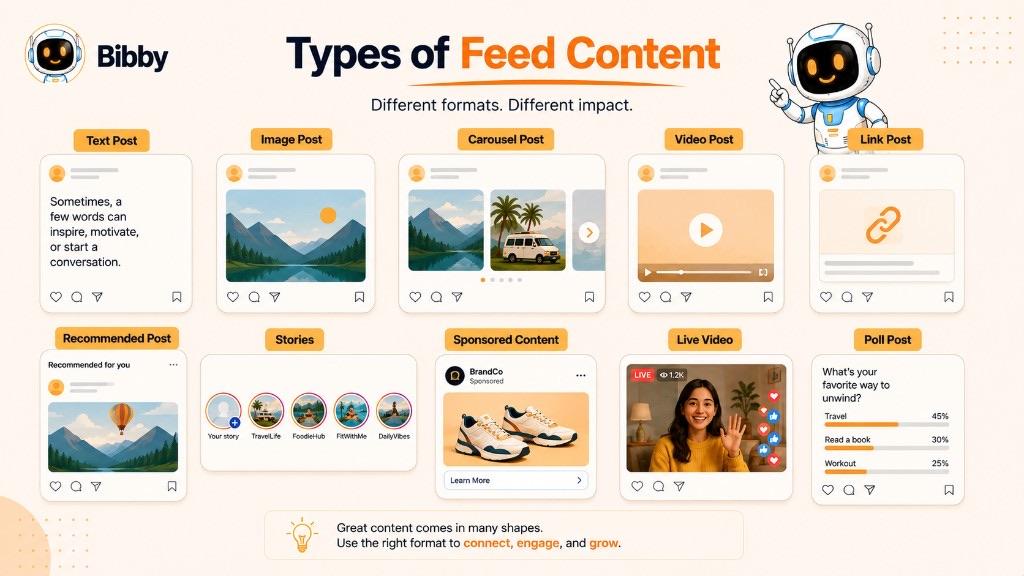
Because every platform organizes these formats differently, the feed experience can vary significantly from one social network to another. Let's compare what users commonly encounter across the major platforms.
What Does a Feed Look Like on Different Social Media Platforms?
The basic idea of a feed is similar across social networks: it is a stream of content personalized for each user. However, the types of content and the way that content is presented can vary considerably between platforms.
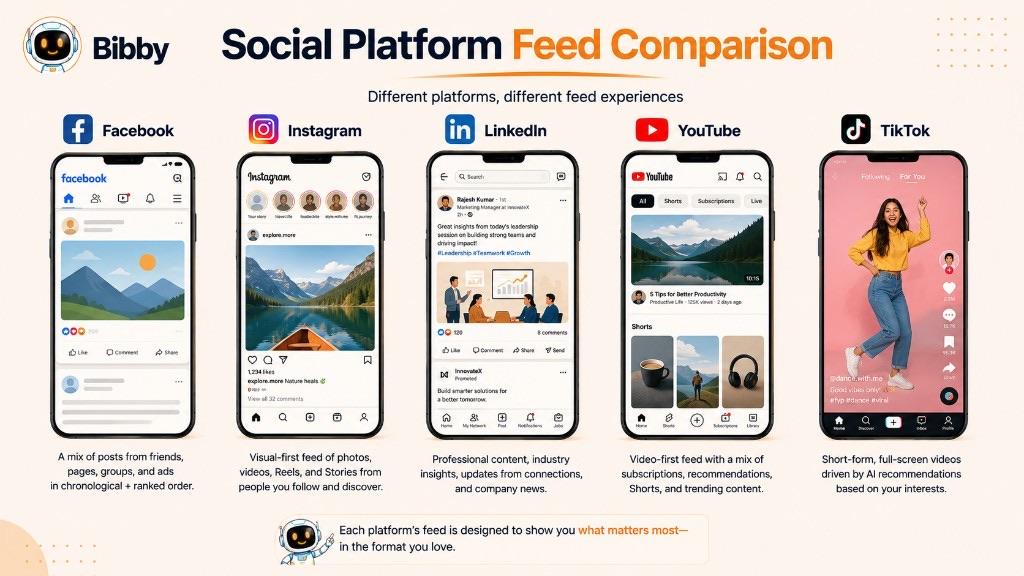
| Platform | Common Feed Content |
|---|---|
| Text posts, photos, videos, links, group content, recommendations, and advertisements | |
| Photos, carousels, videos, recommended posts, and sponsored content | |
| Professional posts, images, videos, articles, company updates, and advertisements | |
| YouTube | Recommended videos, videos from subscribed channels, Shorts, and sponsored content |
| TikTok | Short-form videos, personalized recommendations, creator content, and sponsored videos |
Facebook Feed
The Facebook feed can contain updates from friends, pages, groups, businesses, and recommended sources. Users may encounter a mix of text, images, videos, links, and sponsored content as they scroll.
Instagram Feed
The Instagram feed is heavily visual and commonly features photos, carousels, and videos. It can also include recommended posts and sponsored content alongside posts from accounts a user follows.
LinkedIn Feed
The LinkedIn feed is centered around professional and business-related content. Users can encounter posts from colleagues, companies, creators, industry professionals, and other members of the LinkedIn community.
YouTube Feed
YouTube's feed experience focuses primarily on video discovery. Users may see recommendations based on their viewing activity, subscriptions, interests, and other signals.
TikTok Feed
TikTok is built around personalized short-form video discovery. Its recommendation systems can surface videos from creators a user doesn't follow based heavily on predicted interest and previous viewing behavior.
Although these platforms have different feed experiences, they all use feeds to help users discover content. Understanding the differences becomes especially important for businesses managing content across multiple social networks.
Feed vs. Timeline vs. Profile: What's the Difference?
The terms feed, timeline, and profile are sometimes used interchangeably, but they describe different parts of a social media experience.
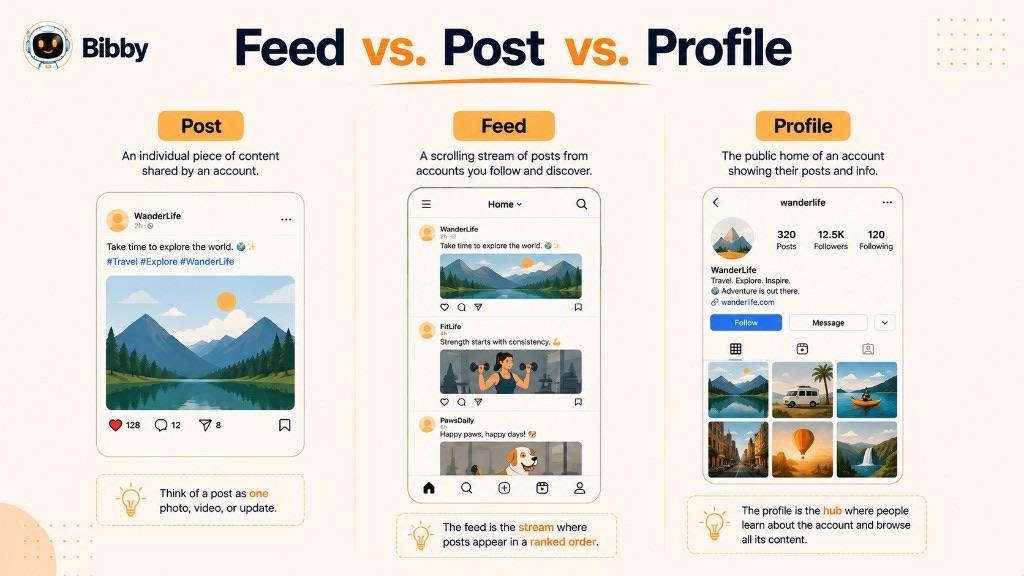
Feed
A feed is the continuously updating stream of content presented to a user. It can include posts from accounts they follow, recommended content, and advertisements.
Think of a feed as the stream you scroll through to discover what is happening across the platform.
Timeline
A timeline generally refers to a sequence or stream of content arranged around time or activity. The exact meaning varies by platform, and some social networks use the term differently or have moved away from using it as a primary interface label.
A timeline may emphasize the sequence of someone's updates, while a modern feed can use algorithms to personalize which content appears and when.
Profile
A profile is an individual's, creator's, business's, or organization's dedicated page on a social media platform. It provides information about that account and typically gives visitors access to content published by it.
For example, a business profile might contain its name, description, contact information, links, and published posts.
Feed vs. Timeline vs. Profile
| Term | Meaning |
|---|---|
| Feed | A continuously updating stream of content shown to a user |
| Timeline | A sequence or stream of content, often associated with time or activity |
| Profile | A dedicated page representing a person, creator, business, or organization |
The simplest way to remember the difference is: a profile represents an account, a feed is the stream you browse, and a timeline generally describes content arranged as a sequence.
Understanding these distinctions also makes it easier to understand the technology that determines which content appears in a feed.
What Is a Social Media Feed Algorithm?
A social media feed algorithm is the system or collection of ranking and recommendation technologies a platform uses to determine which content to show users and in what order.
Rather than displaying every available post chronologically, platforms can evaluate large amounts of content and personalize the feed based on signals that indicate what a user may find relevant or interesting.
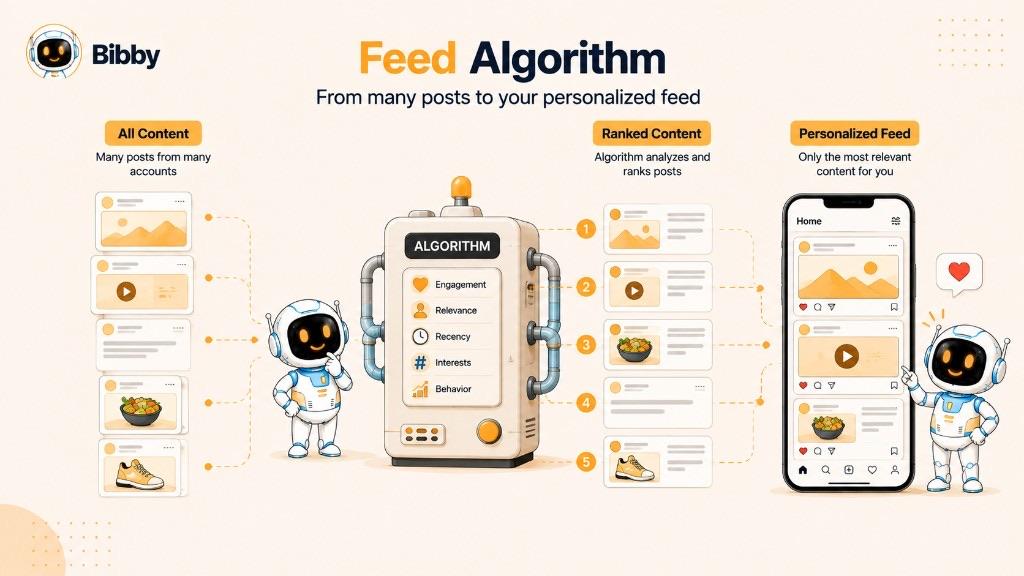
How Feed Algorithms Work
Although the exact systems differ between platforms, the process generally involves:
- Collecting potential content — The platform identifies posts, videos, and other content that could be shown to the user.
- Analyzing signals — It considers information such as the user's activity, previous interactions, content characteristics, and freshness.
- Predicting relevance — The system estimates which content the user is most likely to find useful or engaging.
- Ranking content — Potential content is ordered based on those predictions and other platform-specific factors.
- Updating the feed — As new content and new user activity appear, recommendations can change.
Why Your Feed Is Different From Someone Else's
Two people can follow many of the same accounts and still have very different feeds. Their individual interactions, viewing habits, interests, connections, and other signals can influence what each person is shown.
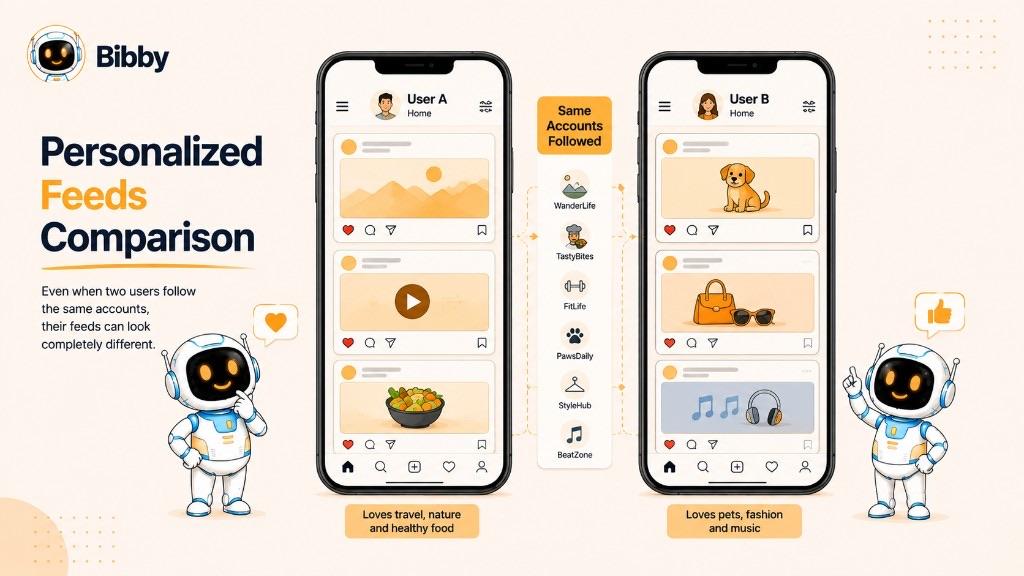
For example, if two users follow the same fitness creator but one frequently watches workout videos while the other regularly engages with nutrition content, the platform may recommend different content to each user.
What Feed Algorithms Mean for Businesses
For businesses, understanding feed algorithms means recognizing that publishing content is only one part of social media marketing. Content also needs to be relevant to the intended audience and appropriate for the platform where it is published.
There is no universal trick that guarantees a post will receive high reach. Instead, businesses should focus on consistently creating useful content, understanding their audience, testing different formats, and using performance data to improve their strategy.
Feed algorithms ultimately exist to help platforms organize enormous amounts of content. For businesses, that makes the feed an important environment for building visibility, engagement, and relationships with an audience.
Why Is the Feed Important for Social Media Marketing?
The feed is one of the primary places where people discover and interact with content on social media. For businesses, it provides an opportunity to put their brand, products, ideas, and expertise in front of existing and potential customers.
A strong social media feed strategy can support several marketing goals.
Build Brand Awareness
Regularly publishing useful and recognizable content can help people become familiar with a brand. Consistent visuals, messaging, and topics can make a business easier to recognize as users encounter its content over time.
Increase Engagement
Feed content can encourage people to interact with a business through likes, comments, shares, saves, clicks, and other actions. Meaningful engagement can help businesses understand what resonates with their audience.
Reach New Audiences
Social platforms can recommend content beyond a business's existing followers. When content reaches people who have not previously interacted with a brand, it can create opportunities to grow an audience.
Drive Website Traffic
Businesses can use social content to introduce an article, product, service, resource, or landing page and encourage interested users to learn more.
Generate Leads and Sales
Feed content can also support conversion-focused marketing. Depending on the business and platform, posts can educate potential customers, demonstrate products, answer common questions, and direct people toward a purchase or inquiry.
Build an Active Content Presence
A business that publishes consistently has more opportunities to communicate with its audience. However, consistency doesn't mean posting as frequently as possible. A sustainable publishing schedule combined with useful, relevant content is generally more valuable than producing content simply to fill a feed.
For businesses managing several social networks, maintaining that consistency can become challenging. This is where a structured content workflow and social media scheduling can make feed management easier.
How to Create Content That Stands Out in a Social Media Feed
Every social media feed contains a constant flow of competing content. Businesses therefore need to create content that is relevant to their audience, easy to understand, and suited to the platform where it will appear.
Here are several practical ways to improve feed content.
Use Strong Visuals
Images and videos can communicate an idea quickly while someone is scrolling. Use clear, high-quality visuals that support the message of the post rather than adding visual elements simply for decoration.
Carousels can also be useful when you need multiple slides to explain a process, share several tips, or tell a story.
Write Useful Captions
A caption should give the audience a reason to stop, read, or interact. Depending on the post, it might explain the visual, teach something useful, tell a story, ask a question, or provide additional context.
The best caption style can vary by audience and platform, so businesses should experiment rather than rely on one formula for every post.
Choose the Right Content Format
Different ideas work better in different formats. A step-by-step tutorial might work well as a carousel, while a product demonstration could be more effective as a video.
Choosing the format based on the message can make content easier to consume and more engaging.
Publish Consistently
Consistency helps businesses maintain an active presence and gives audiences more opportunities to encounter their content. A realistic publishing schedule is usually more sustainable than trying to publish as frequently as possible.
For businesses managing several platforms, scheduling content in advance can make maintaining that consistency considerably easier.
Understand Your Audience
Effective feed content starts with knowing who you are trying to reach. Consider your audience's interests, questions, problems, preferences, and the type of content they already engage with.
Test and Improve
There is no universal content formula that works for every business. Track how different posts perform and use those insights to improve future content.
Test different topics, formats, creative approaches, captions, and publishing times. Over time, these observations can help you build a more effective social media content strategy.
Creating good content is only part of the process. Businesses also need a practical way to plan, organize, publish, and monitor that content across their social media feeds.
What Is Social Media Feed Management?
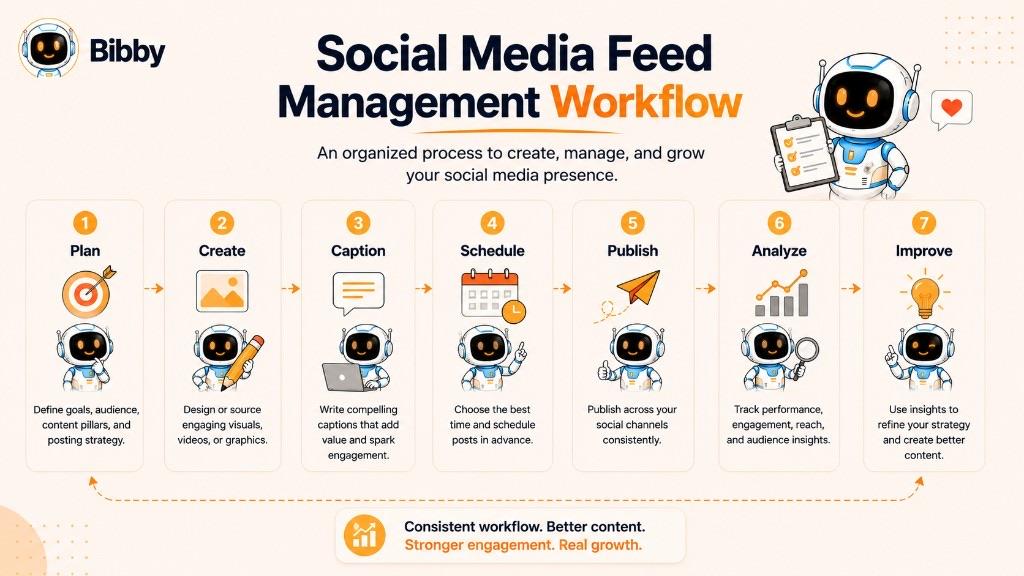
Social media feed management is the process of planning, creating, organizing, publishing, and monitoring content intended for social media feeds. It helps businesses maintain a consistent presence while making sure their content is relevant to the right audience and platform.
Managing one social media account can be straightforward. Managing several platforms at the same time can quickly become more complicated because each platform may require different formats, captions, publishing schedules, and creative approaches.
What Does Feed Management Include?
Social media feed management can involve several activities:
- Content planning: Deciding what topics and messages to publish.
- Content creation: Producing images, videos, carousels, captions, and other media.
- Content organization: Keeping upcoming posts and creative assets organized.
- Scheduling: Planning posts to publish on specific dates and times.
- Cross-platform publishing: Managing content across multiple social networks.
- Performance monitoring: Reviewing engagement, reach, clicks, and other results.
- Content optimization: Using performance insights to improve future posts.
A content calendar is often the planning layer that holds these activities together.
Why Is Feed Management Important?
Without a structured process, businesses can end up posting inconsistently, repeating ideas, missing important publishing dates, or spending too much time switching between social media platforms.
A feed management workflow can bring these activities into one organized process. Instead of creating and publishing each post manually as it becomes necessary, businesses can plan content ahead of time and manage multiple publishing tasks together.
How AI Can Help With Feed Management
AI can assist with several repetitive parts of the workflow, including generating visual ideas, creating captions, adapting content for different platforms, and identifying potentially useful publishing times.
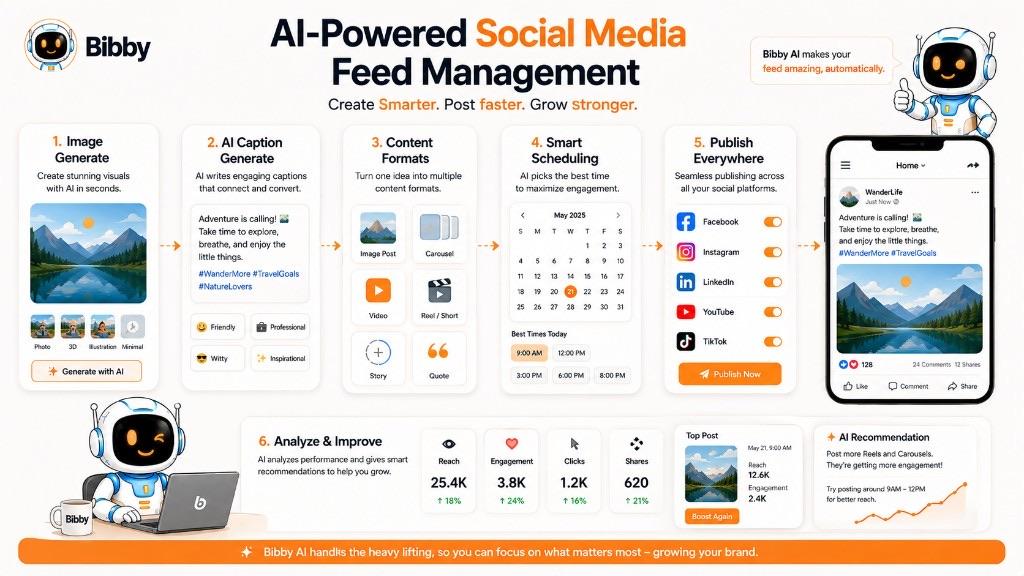
Tools such as Bibby can combine these capabilities into a single workflow, allowing businesses to create media, generate captions, choose posting styles, and schedule content across multiple social platforms.
Effective feed management isn't about filling a feed with as many posts as possible. It's about creating useful content consistently and building a repeatable system for getting that content in front of the right audience.
How Does Social Media Scheduling Help With Feed Content?
Social media scheduling allows businesses to prepare content in advance and set it to publish at specific dates and times. Instead of manually publishing every post when it is time to go live, businesses can organize upcoming content within a single workflow.
This can make managing multiple social media feeds more efficient and consistent.
Plan Content in Advance
Scheduling makes it possible to prepare posts ahead of time. Businesses can organize content around product launches, campaigns, seasonal events, educational topics, or their regular publishing calendar.
Planning ahead can also reduce the pressure of creating something new every time a post needs to be published.
Maintain a Consistent Publishing Schedule
A scheduling system can help businesses maintain a predictable publishing cadence across their social channels. Consistency gives businesses more opportunities to communicate with their audience without requiring someone to manually publish every post.
Manage Multiple Social Media Feeds
Businesses often maintain accounts across several platforms, each with its own audience and content formats. A social media scheduling tool can bring these publishing activities into one workflow.
For example, a business may prepare content for Facebook, Instagram, LinkedIn, YouTube, and TikTok and organize the publishing schedule from one place.
Schedule Different Content Formats
Modern social media management isn't limited to standard image posts. Depending on the platform, businesses may need to manage images, carousels, videos, and Stories.
A scheduling workflow can help organize these different content types alongside their captions and publishing dates.
Use AI to Assist With Content Creation
AI can reduce some of the repetitive work involved in preparing feed content. It can help generate images, create captions, suggest variations, and assist with content planning.
Bibby brings these capabilities together by allowing users to upload or generate media, choose a posting style, automatically generate captions, and schedule content across selected social platforms. Its chat interface also lets users manage tasks such as creating campaigns, creating posts, building a brand kit, and regenerating captions through conversation.
Optimize the Publishing Workflow
Scheduling is most useful when it is part of a broader content workflow. Rather than treating every post as a separate task, businesses can create their media, prepare captions, select platforms, organize dates, and manage upcoming content as part of one process.
For businesses managing multiple social feeds, this can turn social media publishing from a repetitive manual task into a more organized system.
Conclusion
A social media feed is the continuously updating stream where users discover posts, videos, images, recommendations, and advertisements. What appears in that stream is influenced by platform-specific ranking systems, user activity, relevance, freshness, and other signals.
For businesses, the feed is a key environment for building awareness, engaging audiences, and distributing content. Creating useful content, choosing the right formats, publishing consistently, and managing content across multiple platforms can make social media marketing more effective.
If you're ready to go beyond understanding feeds and learn how to manage your publishing workflow more efficiently, the next step is to explore social media scheduling. Scheduling can help you plan content in advance, maintain consistency, and manage posts across multiple platforms without having to publish everything manually.
With Bibby, you can upload an image or generate one with AI, choose a posting style, generate captions, create images, carousels, videos, and Stories, and schedule posts across Facebook, Instagram, LinkedIn, YouTube, and TikTok.
Continue learning with related dictionary entries on the social media algorithm, organic reach, engagement, followers, content calendars, short-form video, and social media scheduling—or browse the social media dictionary. Then start a free Bibby trial to create, caption, and schedule feed content across your channels.