
A CTA (Call to Action) is a word, phrase, button, or instruction that tells your audience what to do next. Common examples include “Buy Now,” “Learn More,” “Sign Up,” “Download the Guide,” “Book a Demo,” “Follow Us,” and “Save This Post.” In marketing, a CTA turns passive attention into a specific action.
Think of it as the signpost at the end of your content. Your audience may enjoy a social media post, watch a video, read a blog, or browse a product page, but a clear CTA tells them where to go next.
CTAs are especially important on social media because users scroll quickly and interact with content in different ways. Depending on your goal, you might ask someone to comment, share, save, follow, visit your website, send a message, or make a purchase. The right CTA can turn an ordinary post into an opportunity for engagement, leads, or conversions.
A good CTA is clear, relevant, action-oriented, and connected to the content. It should give people a simple next step rather than making them guess what to do.
For businesses managing multiple platforms, creating the content is only part of the job. The CTA also needs to fit the caption, campaign, audience, and platform. Tools such as Bibby can make this workflow easier by helping create posts, generate captions, refine messaging, and schedule content across social media channels.
In this guide, we'll explore what CTA means, the different types of CTAs, real-world examples, best practices, common mistakes, and how to create CTAs that encourage meaningful action.
What Does CTA Stand For?
CTA stands for “Call to Action.” It refers to a message that encourages a person to take a specific action after seeing or reading your content.
The action can be almost anything that supports your marketing goal. You might want someone to click a link, make a purchase, sign up for a service, download a resource, follow your social media account, or simply leave a comment.
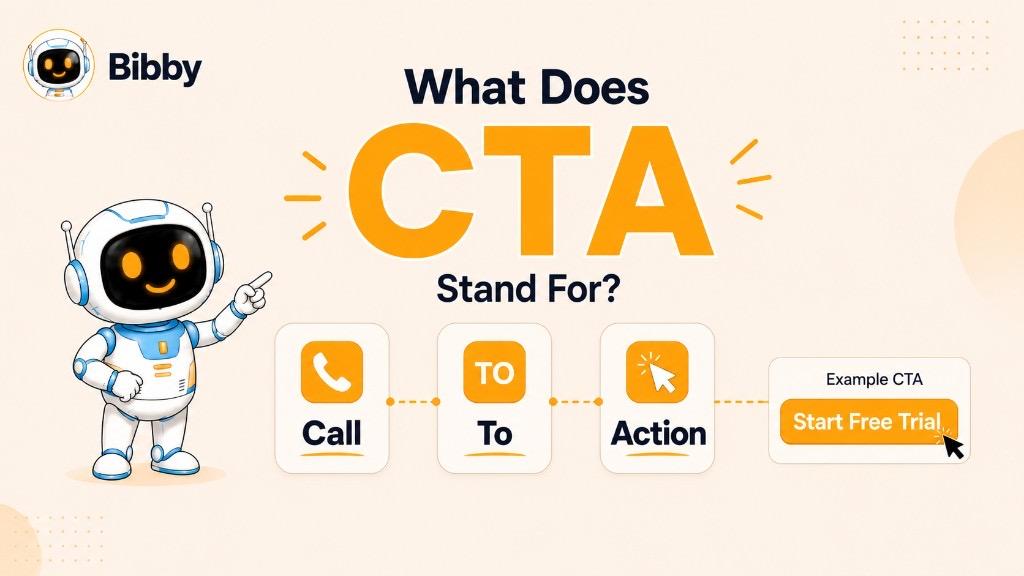
The three words in “Call to Action” explain the concept:
- Call: You are directly addressing or encouraging your audience.
- To: You are guiding them toward a specific next step.
- Action: You are asking them to do something.
For example, imagine a social media post explaining five ways to improve Instagram engagement. Ending the post with “Save this post and try these tips this week” gives the audience a clear next step. “Save this post” is the CTA.
CTAs can appear in many forms. On a website, it might be a button that says “Start Free Trial.” In an email, it could be “Download the Report.” On Instagram, it might be “Comment below and share your experience.” In a YouTube video, the CTA could be “Subscribe for more videos.”
The wording changes depending on the platform and objective, but the purpose remains the same: guide the audience toward the action you want them to take.
A CTA does not always need to push a sale, either. Some CTAs are designed to increase engagement, build an audience, generate leads, encourage content discovery, or move people to the next stage of a customer journey. That makes the CTA a small part of the content, but an important part of the overall marketing strategy.
What Is a Call to Action in Marketing?
In marketing, a Call to Action (CTA) is a message that encourages a customer or prospect to take a specific step toward a desired outcome. That action could be clicking a link, signing up for a service, downloading a resource, requesting a demo, making a purchase, or engaging with content.
A CTA connects your marketing message with the action that follows it.
For example, a business might publish a blog post explaining how to improve social media performance. At the end of the article, it could use a CTA such as “Download our free social media checklist.” The content provides information, while the CTA gives the reader a clear way to continue.
Why CTAs Matter in Marketing
People do not always know what they should do after interacting with marketing content. Even when someone is interested in a product or topic, they may simply move on to the next page, post, or video.
A clear CTA removes that uncertainty.
Instead of leaving the audience with an open-ended message, a CTA gives them a specific next step. This can help marketers:
- Generate leads
- Increase website traffic
- Encourage purchases
- Get more registrations
- Increase content engagement
- Grow an email list
- Promote products or services
- Encourage users to request demos
- Move prospects further through the sales funnel
The most effective CTA depends on the marketing goal and the audience's stage in the customer journey.
CTAs Across the Marketing Funnel
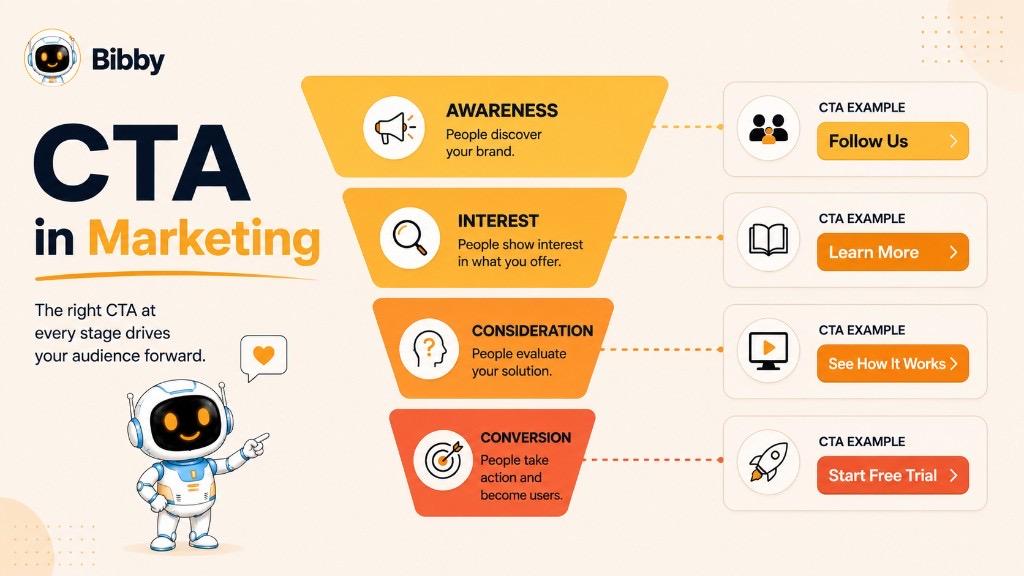
A CTA can change as someone moves from discovering a brand to becoming a customer.
| Marketing Stage | Goal | Example CTA |
|---|---|---|
| Awareness | Get attention and build an audience | Follow Us |
| Interest | Encourage further exploration | Learn More |
| Consideration | Help prospects evaluate an offer | See How It Works |
| Conversion | Encourage a purchase or sign-up | Start Your Free Trial |
| Retention | Encourage continued engagement | Explore What's New |
For example, asking a person who has never heard of your business to “Buy Now” may be too aggressive. A CTA such as “Learn More” could be more appropriate at that stage.
On the other hand, someone who has already compared your product and is ready to take action may respond better to “Start Free Trial” or “Book a Demo.”
A CTA Should Match the Content
A CTA works best when it feels like a natural continuation of the message.
Suppose a company publishes a post titled “10 Social Media Content Ideas for Small Businesses.” A relevant CTA could be:
“Save this list and use it when planning your next content calendar.”
A sales-focused CTA such as “Buy Now” would feel disconnected unless the post is specifically promoting a product.
This is why effective CTA marketing is not simply about using powerful words. It is about choosing the right action for the right audience at the right moment.
In social media marketing, this becomes even more important because a single piece of content can have very different goals. One post may be designed to generate comments, another to drive website traffic, and another to generate sales. The CTA should make that goal clear.
What Is a CTA in Social Media?
A CTA in social media is a message that encourages people to take a specific action after interacting with a post, video, Story, carousel, or other social content. The action could be as simple as leaving a comment or saving a post, or as valuable as visiting a website, signing up for a service, or making a purchase.
Social media users scroll quickly, so a clear CTA can make the difference between someone simply viewing your content and actually doing something with it.
For example, a fitness brand might publish a carousel explaining five beginner workout mistakes and end the caption with:
“Save this post before your next workout.”
Here, “Save this post” is the CTA. It tells the audience exactly what to do and connects naturally with the educational content.
Common Social Media CTA Actions
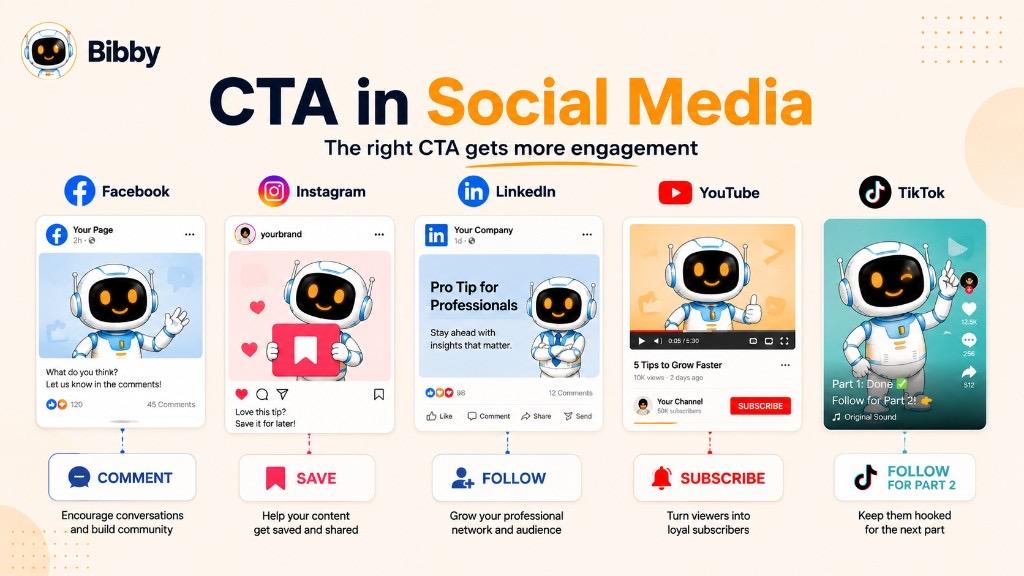
The best CTA depends on what you want your audience to accomplish. Common social media CTAs include:
- Like: “Like this post if you agree.”
- Comment: “Tell us your answer in the comments.”
- Share: “Share this with someone who needs it.”
- Save: “Save this guide for later.”
- Follow: “Follow us for more tips.”
- Click: “Click the link to learn more.”
- Visit: “Visit our website to explore the full guide.”
- Message: “Send us a DM to get started.”
- Shop: “Shop the collection today.”
- Sign up: “Sign up for the free webinar.”
- Book: “Book your free consultation.”
- Download: “Download the free checklist.”
Why Are CTAs Important on Social Media?
Social media platforms are built around continuous content discovery. Someone can see your post, find it useful, and move on within seconds.
A CTA gives that person a reason to stop and interact.
For example:
Without a CTA:
“Here are five ways to create better social media content.”
With a CTA:
“Here are five ways to create better social media content. Which strategy are you going to try first? Tell us in the comments.”
The second version creates a clear opportunity for interaction.
CTAs can help businesses achieve different social media goals, including:
- Increasing engagement
- Growing followers
- Driving website traffic
- Generating leads
- Promoting products
- Increasing content shares
- Encouraging saves
- Starting conversations
- Building communities
- Supporting conversions
CTAs Should Match the Social Media Platform
A CTA that works well on one platform may not be the best choice for another.
For example, an Instagram post might encourage users to “Save this post for later,” while a LinkedIn post may ask “What do you think? Share your experience in the comments.” A YouTube video might end with “Subscribe for more videos,” while a TikTok creator may use “Follow for Part 2.”
The objective remains the same, but the wording should fit the platform, content format, and audience behavior.
CTAs and Different Social Media Formats
CTAs can also change depending on the type of content being published.
Image post:
“Share this tip with your team.”
Carousel:
“Save this carousel for your next campaign.”
Video:
“Follow for more practical marketing tips.”
Story:
“Tap the link to learn more.”
Educational post:
“What strategy has worked best for you? Comment below.”
Product post:
“Explore the collection today.”
The goal is not to add a CTA simply because every post is supposed to have one. The goal is to give the audience a useful and relevant next step.
For businesses managing content across multiple platforms, this can become difficult when posts, captions, formats, and publishing schedules all need to be managed separately. A social media automation platform such as Bibby can help streamline this workflow by combining content creation, AI-generated captions, CTA refinement, scheduling, and publishing into a single workflow.
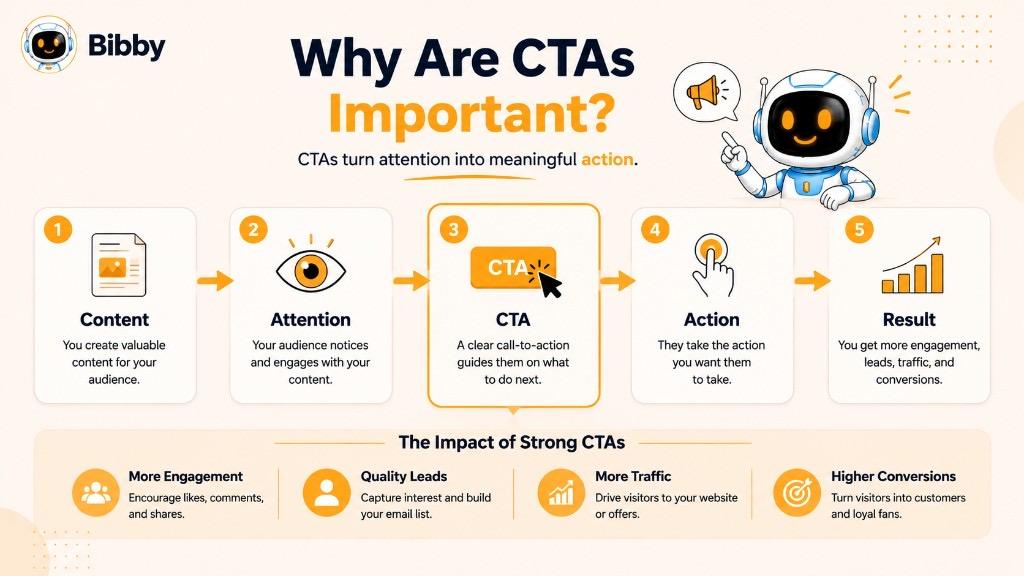
Why Are CTAs Important?
A CTA gives your audience a clear direction after they interact with your content. Without one, people may read your post, watch your video, or visit your website and leave without taking the next step.
A strong CTA helps turn attention into action.
Whether your goal is to increase engagement, generate leads, drive sales, or build a community, the CTA connects your content with that goal.
1. CTAs Tell People What to Do Next
Your audience should not have to figure out what you want them to do.
For example, instead of ending a post with:
“We just launched our new collection.”
You could say:
“Explore the new collection today.”
The second version gives the audience a clear next step.
2. CTAs Can Increase Engagement
Social media engagement does not always happen automatically. Sometimes people need a simple prompt.
For example:
“Which feature would you use most? Tell us in the comments.”
This CTA gives people a specific reason to participate.
Depending on the content, you can encourage:
- Comments
- Likes
- Shares
- Saves
- Follows
- Mentions
- Direct messages
The key is to ask for an action that makes sense for the content.
3. CTAs Help Generate Leads
Not every marketing CTA needs to sell something immediately. Some are designed to turn interested visitors into leads.
Examples include:
- Download the Free Guide
- Get the Checklist
- Book a Free Consultation
- Request a Demo
- Join the Webinar
- Sign Up for Updates
For example, a SaaS company could publish a guide about improving social media management and use:
“Get the free social media planning template.”
The content attracts the audience, while the CTA encourages them to take a measurable next step.
4. CTAs Can Support Conversions
When a customer is ready to act, a clear CTA can remove unnecessary friction.
Examples include:
- Buy Now
- Start Free Trial
- Get Started
- Subscribe Now
- Book a Demo
- Add to Cart
- Request a Quote
A CTA should make the intended action easy to understand. If someone has already decided that they want the product, “Start Your Free Trial” is much clearer than a vague button such as “Continue.”
5. CTAs Give Content a Clear Purpose
Every piece of content does not need to generate a sale.
A social media post might exist to:
- Educate an audience
- Start a conversation
- Build trust
- Increase brand awareness
- Generate website traffic
- Promote a product
- Collect leads
- Grow followers
The CTA helps translate that purpose into an action.
For example:
Goal: Increase saves
CTA: “Save this checklist for your next campaign.”
Goal: Increase comments
CTA: “What would you add to this list?”
Goal: Generate leads
CTA: “Download the free strategy guide.”
Goal: Drive sales
CTA: “Shop the collection today.”
6. CTAs Make Marketing Performance Easier to Measure
A CTA also creates something that marketers can track.
Depending on the campaign, you can measure:
- Click-through rate
- Link clicks
- Conversion rate
- Sign-ups
- Downloads
- Purchases
- Comments
- Shares
- Saves
- Follows
- Website visits
For example, if two CTA variations are used in a campaign, their performance can be compared to understand which message generates better results.
This makes CTAs useful not only for encouraging action but also for testing and improving marketing performance.
7. CTAs Help Move People Through the Customer Journey
A person who has just discovered your brand may not be ready to buy. Asking them to make a purchase immediately may create unnecessary friction.
Instead, the CTA can match their current level of interest.
A simple journey might look like:
Follow Us → Learn More → Download the Guide → Book a Demo → Start Free Trial
Each CTA represents a different step.
The most effective CTA is therefore not always the most aggressive one. It is the one that makes sense for what the audience is ready to do next.
8. CTAs Make Social Media Content More Actionable
For social media marketers, a CTA can turn a passive post into an interactive experience.
Consider these two examples:
Without CTA:
“Here are five content planning tips for small businesses.”
With CTA:
“Here are five content planning tips for small businesses. Save this post and use it when planning your next week of content.”
The second version gives the audience a reason to interact with the post and provides a clear next step.
That is the real value of a CTA: it bridges the gap between seeing your content and doing something with it.
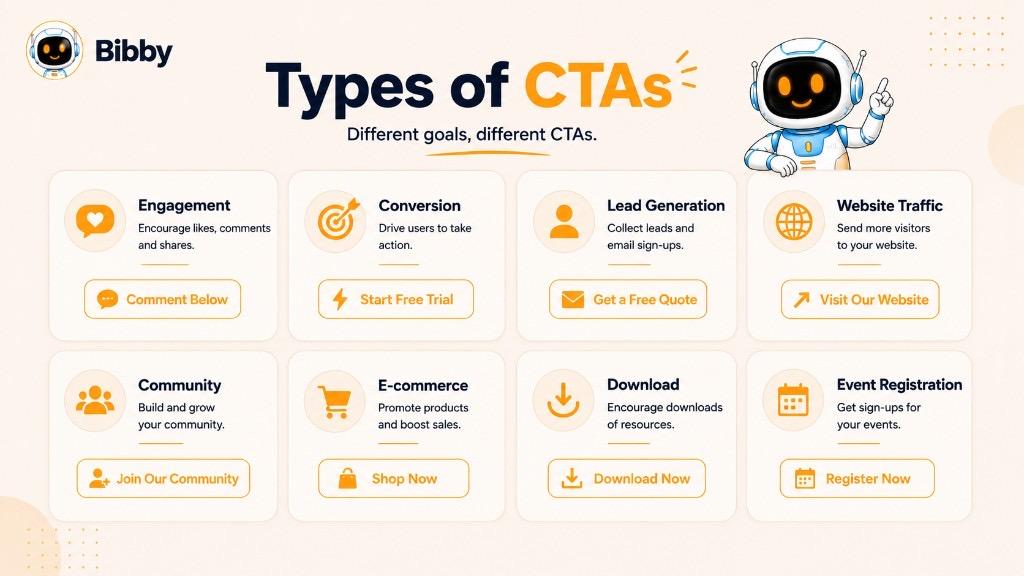
Types of CTAs
Not every CTA has the same purpose. A “Buy Now” button and a “Comment Below” prompt may both be calls to action, but they are designed to produce very different outcomes.
The right CTA depends on your marketing goal, audience, platform, content format, and where the person is in the customer journey.
Here are the most common types of CTAs used in marketing and social media.
1. Engagement CTAs
Engagement CTAs encourage people to interact with your content rather than immediately making a purchase or visiting a website.
They are especially common on social media.
Examples:
- “Comment below.”
- “Tell us what you think.”
- “Share your opinion.”
- “Tag someone who needs to see this.”
- “Share this post.”
- “Save this for later.”
- “Which one is your favorite?”
Best for: Increasing comments, shares, saves, likes, and overall social media interaction.
For example:
“Which social media platform brings you the best results? Tell us in the comments.”
This CTA turns a simple informational post into an opportunity for conversation.
2. Conversion CTAs
Conversion CTAs encourage the audience to take an action that directly supports a business goal, such as making a purchase or starting a subscription.
Examples:
- “Buy Now.”
- “Start Free Trial.”
- “Get Started.”
- “Subscribe Now.”
- “Upgrade Today.”
- “Order Now.”
- “Shop Now.”
Best for: E-commerce, SaaS, subscriptions, paid services, and other direct-response campaigns.
For example:
“Ready to simplify your social media workflow? Start your free trial today.”
The CTA clearly communicates both the action and the opportunity.
3. Lead Generation CTAs
Lead generation CTAs encourage people to provide their contact information or enter a sales or marketing funnel.
Examples:
- “Download the Free Guide.”
- “Get Your Free Checklist.”
- “Book a Consultation.”
- “Request a Demo.”
- “Get a Free Quote.”
- “Join the Webinar.”
- “Sign Up for Updates.”
Best for: B2B companies, SaaS businesses, agencies, consultants, and service providers.
For example:
“Want to improve your social media strategy? Download our free checklist.”
The CTA offers something useful in exchange for taking the next step.
4. Website Traffic CTAs
These CTAs encourage users to leave the platform and visit a website, landing page, product page, or blog article.
Examples:
- “Learn More.”
- “Read the Full Guide.”
- “Visit Our Website.”
- “Explore the Details.”
- “See How It Works.”
- “Read More.”
Best for: Blog promotion, product education, landing pages, content marketing, and brand awareness campaigns.
For example:
“Want the complete strategy? Read the full guide on our website.”
5. Content Discovery CTAs
Content discovery CTAs encourage people to explore additional content.
They are useful when your primary goal is keeping an audience engaged with your content ecosystem.
Examples:
- “Watch the Next Video.”
- “Explore More Tips.”
- “Read the Next Guide.”
- “See More Examples.”
- “Discover More.”
- “Check Out Our Latest Article.”
For example, a YouTube video might end with:
“Watch our next video to learn how to build your content calendar.”
6. Community-Building CTAs
These CTAs focus on creating an ongoing relationship between a brand and its audience.
Examples:
- “Follow Us.”
- “Join the Community.”
- “Join the Conversation.”
- “Share Your Story.”
- “Connect With Us.”
- “Tell Us Your Experience.”
These are particularly useful for creators, brands, online communities, and businesses that rely on long-term audience relationships.
7. E-commerce CTAs
E-commerce CTAs are designed to move shoppers toward browsing, purchasing, or completing a transaction.
Examples:
- “Shop Now.”
- “Buy Now.”
- “Add to Cart.”
- “View Product.”
- “Explore the Collection.”
- “Get Yours Today.”
- “Shop the Latest Arrivals.”
For example:
“Found your favorite? Shop the collection today.”
The CTA should make the shopping action obvious without adding unnecessary complexity.
8. Event and Registration CTAs
These CTAs encourage people to register for an event, webinar, workshop, conference, or other scheduled activity.
Examples:
- “Register Now.”
- “Reserve Your Spot.”
- “Save Your Seat.”
- “Join the Webinar.”
- “Get Your Ticket.”
- “Sign Up Today.”
For limited-capacity events, a CTA can also communicate genuine availability constraints:
“Reserve your seat before registration closes.”
9. Download CTAs
Download CTAs encourage users to access a digital resource.
These are common in content marketing and lead-generation campaigns.
Examples:
- “Download the Guide.”
- “Get the Free Template.”
- “Download the Report.”
- “Get the Checklist.”
- “Access the Free Resource.”
A benefit-focused CTA can be stronger than a generic instruction.
Instead of:
“Download.”
Try:
“Get Your Free Social Media Template.”
10. Contact CTAs
Contact CTAs encourage potential customers to start a direct conversation with a business.
Examples:
- “Contact Us.”
- “Talk to an Expert.”
- “Send Us a Message.”
- “Book a Call.”
- “Request a Quote.”
- “Speak With Our Team.”
These are particularly useful for businesses selling professional services, consulting, software, and high-value products.
11. Video CTAs
Video CTAs encourage viewers to take an action during or after watching a video.
Examples:
- “Subscribe for More.”
- “Watch the Next Video.”
- “Like and Share.”
- “Comment Below.”
- “Visit the Link in the Description.”
- “Follow for Part 2.”
The CTA can appear in the spoken content, on-screen text, the video description, or an end screen.
12. Social Sharing CTAs
These CTAs specifically encourage audiences to distribute content to their own networks.
Examples:
- “Share this with your team.”
- “Send this to a friend.”
- “Know someone who needs this? Share it with them.”
- “Repost this for your audience.”
Sharing CTAs work particularly well when the content is useful, entertaining, relatable, or highly relevant to a specific group.
Choosing the Right CTA
The most effective CTA is not necessarily the one that sounds the most persuasive. It is the one that matches the goal of the content and the action your audience is most likely to take at that moment.
A simple way to choose is:
Want engagement? → Ask people to comment, share, or save.
Want followers? → Ask people to follow.
Want traffic? → Ask people to visit or read.
Want leads? → Offer a guide, demo, consultation, or resource.
Want sales? → Encourage people to shop, buy, or get started.
Want community? → Invite people to join or participate.
For social media teams managing multiple campaigns, these CTA variations can be incorporated into the content creation workflow instead of being added at the last minute. With AI-assisted tools such as Bibby, marketers can create posts, generate and regenerate captions, refine messaging, and schedule content while keeping the CTA aligned with each campaign's objective.
CTA Examples
A CTA can be only a few words, but those words can influence what your audience does next. The best CTA depends on the content, platform, audience, and marketing goal.
Below are practical CTA examples you can use across social media, websites, email campaigns, videos, and other marketing channels.
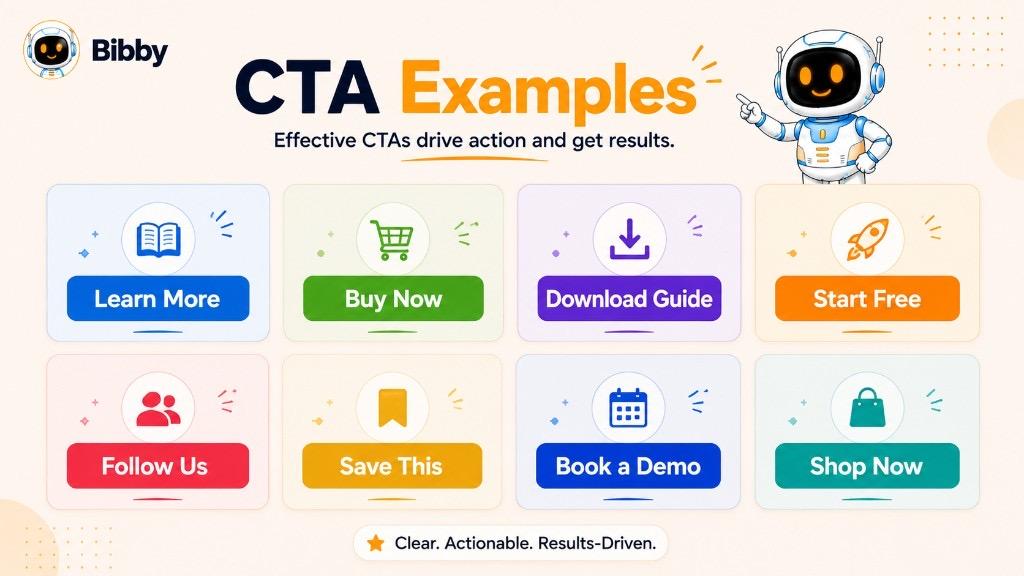
General CTA Examples
These CTAs work across many types of digital content:
- Learn More
- Get Started
- Start Free
- Try It Today
- Sign Up Free
- Download Now
- Read More
- Watch Now
- Subscribe
- Follow Us
- Contact Us
- Book a Demo
- Get a Free Quote
- Shop Now
- Explore More
- Discover More
- Join Us
- Get Started Today
- See How It Works
- Talk to an Expert
However, a generic CTA is not always the strongest option. Whenever possible, make the action and benefit clear.
For example:
Generic:
“Download Now”
More specific:
“Download the Free Social Media Checklist”
The second CTA tells users exactly what they will receive.
CTA Examples for Engagement
If your goal is to generate more interaction on social media, try CTAs such as:
- “What do you think? Tell us below.”
- “Which one would you choose?”
- “Comment with your answer.”
- “Share your experience in the comments.”
- “Tag someone who needs to see this.”
- “Save this post for later.”
- “Share this with your team.”
- “Double-tap if you agree.”
- “What would you add to this list?”
- “Tell us your biggest challenge.”
For example:
“Which social media platform do you find hardest to manage? Tell us in the comments.”
This works because it gives people a specific question rather than simply asking them to “engage.”
CTA Examples for Increasing Followers
When the goal is audience growth, your CTA should clearly explain why someone should follow.
Examples:
- “Follow us for more social media tips.”
- “Follow for weekly marketing strategies.”
- “Want more tips like this? Follow us.”
- “Follow us for practical business insights.”
- “Follow for Part 2.”
- “Follow to see more tutorials.”
- “Follow us for the latest industry updates.”
A benefit-oriented CTA is often stronger than simply saying:
“Please follow us.”
Instead, explain what the audience can expect after following.
CTA Examples for Saves
Save-focused CTAs work particularly well for educational content, checklists, tutorials, and reference material.
Examples:
- “Save this post for later.”
- “Save this checklist for your next campaign.”
- “Bookmark this guide before you start.”
- “Save these tips so you can come back to them.”
- “Keep this post handy for your next content planning session.”
For example:
“Planning next month's content? Save this checklist so you can use it later.”
CTA Examples for Shares
Sharing CTAs encourage your audience to distribute content to their friends, colleagues, customers, or followers.
Examples:
- “Share this with someone who needs it.”
- “Send this to your marketing team.”
- “Know someone struggling with this? Share this post.”
- “Share this guide with your team.”
- “Tag a friend who should see this.”
- “Repost this if you found it useful.”
The best sharing CTAs usually explain who might benefit from the content.
CTA Examples for Website Traffic
Use these CTAs when you want social media users or readers to visit another page.
Examples:
- “Read the full guide.”
- “Learn more on our website.”
- “Explore the complete guide.”
- “See how it works.”
- “Discover the full strategy.”
- “Read the full article.”
- “Explore the details.”
- “Visit our website to learn more.”
For example:
“Want the complete strategy? Read the full guide on our website.”
CTA Examples for Lead Generation
Lead-generation CTAs usually offer something valuable in exchange for an action such as submitting a form or providing an email address.
Examples:
- “Download the free guide.”
- “Get your free checklist.”
- “Book your free consultation.”
- “Request a demo.”
- “Get your free quote.”
- “Join the free webinar.”
- “Download the template.”
- “Get the complete report.”
- “Sign up for the free course.”
A benefit-focused CTA can make the offer more compelling:
“Get the free social media content calendar.”
CTA Examples for Sales
When your goal is to generate purchases, subscriptions, or sign-ups, use a CTA that clearly communicates the desired action.
Examples:
- “Buy Now.”
- “Shop Now.”
- “Start Your Free Trial.”
- “Get Started Today.”
- “Subscribe Now.”
- “Upgrade Today.”
- “Order Now.”
- “Get Yours Today.”
- “Choose Your Plan.”
- “Start Creating Today.”
For SaaS products, for example:
“Start your free trial and create your first campaign today.”
CTA Examples for Social Media Marketing
Social media CTAs can be more conversational than traditional website buttons.
Examples:
“Save this post before planning your next campaign.”
“What social media strategy has worked best for you? Comment below.”
“Follow us for more practical marketing tips.”
“Share this with a business owner who needs it.”
“Want more content ideas? Follow for the next strategy.”
These CTAs feel like part of the conversation rather than a hard sales pitch.
CTA Examples for SaaS Businesses
SaaS companies often use CTAs designed around trials, demos, product exploration, and education.
Examples:
- “Start Free Trial.”
- “See How It Works.”
- “Book a Demo.”
- “Explore Features.”
- “Compare Plans.”
- “Get Started Free.”
- “Try It Free.”
- “Create Your Account.”
- “Start Building.”
- “Talk to an Expert.”
For a social media automation platform such as Bibby:
“Start creating and scheduling your social media content today.”
The CTA focuses on the outcome rather than simply telling users to click a button.
CTA Examples for Educational Content
Educational content often works better with low-friction CTAs.
Examples:
- “Read the next guide.”
- “Save this for later.”
- “Try this strategy today.”
- “Watch the tutorial.”
- “Download the checklist.”
- “Explore more tips.”
- “Follow for more educational content.”
- “Share this with your team.”
For example:
“Save this guide and use it when planning your next social media campaign.”
CTA Examples for Product Promotion
Product-focused CTAs should make the next action obvious.
Examples:
- “Explore the Product.”
- “Shop Now.”
- “View Product Details.”
- “See It in Action.”
- “Try It Today.”
- “Get Yours Today.”
- “Explore the Collection.”
- “Discover the New Release.”
Instead of relying on urgency alone, focus on the value the product provides.
CTA Examples for Videos
Video content can use CTAs at different points throughout the viewing experience.
At the beginning:
“Stay until the end to see the full strategy.”
During the video:
“Pause here and try this approach with your next campaign.”
At the end:
“Subscribe for more practical marketing tutorials.”
Other examples include:
- “Watch the next video.”
- “Subscribe for more.”
- “Like and share this video.”
- “Comment with your question.”
- “Visit the link in the description.”
- “Follow for Part 2.”
CTA Examples for Stories
Stories are often designed for quick interactions, so short CTAs work well.
Examples:
- “Swipe Up” or “Tap the Link”
- “Shop Now”
- “Learn More”
- “Reply to This Story”
- “Send Us a Message”
- “Vote Below”
- “Ask Us a Question”
- “Check Out the New Collection”
The CTA should fit the available interaction and the purpose of the Story.
CTA Examples for Different Marketing Goals
| Marketing Goal | CTA Example |
|---|---|
| Increase comments | “What do you think? Comment below.” |
| Increase saves | “Save this guide for later.” |
| Increase shares | “Share this with your team.” |
| Grow followers | “Follow for more tips.” |
| Drive traffic | “Read the full guide.” |
| Generate leads | “Download the free checklist.” |
| Get demos | “Book a free demo.” |
| Increase sales | “Shop Now.” |
| Increase registrations | “Reserve Your Spot.” |
| Build community | “Join the Conversation.” |
The biggest lesson is that there is no single “best CTA.” A CTA is effective when it fits the goal behind the content.
A post designed to generate comments should not necessarily end with “Buy Now.” Likewise, a product launch post may need a stronger conversion-focused CTA than an educational carousel.
The CTA should answer one simple question:
“What should the audience do next?”
Once that answer is clear, writing the CTA becomes much easier.
Social Media CTA Examples
Social media CTAs need to fit the platform, content format, audience, and objective. A CTA that works well on Instagram may feel unnatural on LinkedIn, while a CTA that works in a YouTube video may not make sense in a short TikTok caption or carousel post.
The goal is not to force the same CTA everywhere. Instead, adapt the action to how people use each platform.
Instagram CTA Examples
Instagram is built around visual content and quick interactions, making CTAs such as saves, shares, comments, follows, and website visits particularly useful.
For engagement:
- “What do you think? Tell us in the comments.”
- “Which one is your favorite?”
- “Comment your answer below.”
- “Tag someone who needs to see this.”
For saves:
- “Save this post for later.”
- “Save this checklist for your next campaign.”
- “Bookmark these tips before you start.”
For followers:
- “Follow us for more practical tips.”
- “Follow for more social media strategies.”
- “Want more tips like this? Follow us.”
For website traffic:
- “Visit the link in our bio to learn more.”
- “Read the full guide through the link in our bio.”
- “Explore the complete strategy on our website.”
Example:
“Planning your next social media campaign? Save this post and follow us for more practical marketing tips.”
Facebook CTA Examples
Facebook supports a wide range of content, from educational posts and community discussions to product promotions.
Engagement CTAs:
- “Tell us what you think.”
- “Share your experience below.”
- “Which option would you choose?”
- “Tag a friend who needs this.”
- “Share this post with your network.”
Traffic CTAs:
- “Read the full article.”
- “Learn more on our website.”
- “Explore the complete guide.”
Sales CTAs:
- “Shop the collection.”
- “Explore our latest products.”
- “Get started today.”
Example:
“Which social media challenge takes the most time for your business? Share your experience in the comments.”
LinkedIn CTA Examples
LinkedIn content often focuses on professional insights, industry discussions, educational content, and business outcomes. CTAs should generally encourage meaningful discussion or deeper exploration.
Engagement CTAs:
- “What has been your experience?”
- “Do you agree? Share your perspective.”
- “What would you add to this list?”
- “Tell us what has worked for your business.”
- “Share your thoughts in the comments.”
Content CTAs:
- “Read the full report.”
- “Explore the complete guide.”
- “Download the full research report.”
- “Learn how other businesses are approaching this.”
Lead-generation CTAs:
- “Book a consultation.”
- “Request a demo.”
- “Download the free guide.”
Example:
“AI is changing how businesses manage social media. What part of the workflow would you automate first? Share your perspective below.”
This approach invites a professional conversation rather than simply asking users to “engage.”
TikTok CTA Examples
TikTok CTAs are often short, conversational, and connected to the fast-moving nature of the platform.
Examples:
- “Follow for Part 2.”
- “Save this for later.”
- “Try this strategy and tell us how it goes.”
- “Comment your answer.”
- “Share this with your team.”
- “Follow for more tips.”
- “Want the full tutorial? Follow us.”
- “Check the link in bio.”
Example:
“Try this content strategy for seven days. Save this video and follow for the results.”
YouTube CTA Examples
YouTube gives creators more room to use CTAs throughout the video, description, comments, and end screens.
Examples:
- “Subscribe for more videos.”
- “Watch the next video.”
- “Like this video if you found it useful.”
- “Share this with someone who needs it.”
- “Comment with your biggest question.”
- “Visit our website to learn more.”
- “Download the free guide in the description.”
- “Turn on notifications for future videos.”
A good YouTube CTA should feel connected to the viewer's experience.
For example:
“If this strategy helped you, subscribe for more practical social media tutorials.”
CTA Examples for Different Social Media Formats
The format of your content should also influence your CTA.
#### Image Posts
“Save this tip for your next campaign.”
#### Carousels
“Swipe through the full checklist and save it for later.”
#### Short Videos
“Follow for more strategies like this.”
#### Educational Videos
“Watch the next tutorial to learn how to put this strategy into practice.”
#### Stories
“Tap the link to explore the full guide.”
#### Product Posts
“Explore the collection today.”
#### Polls
“Vote and tell us why in the comments.”
#### Case Studies
“Want to see how this could work for your business? Learn more.”
How to Choose the Right CTA for Each Platform
A useful approach is to match three things:
Platform behavior + Content purpose + Desired action
For example:
Instagram carousel + Educational content + Save
“Save this carousel for your next content planning session.”
LinkedIn post + Industry discussion + Comment
“What has been your experience? Share your thoughts below.”
TikTok video + Tutorial + Follow
“Follow for Part 2.”
YouTube tutorial + Educational content + Subscribe
“Subscribe for more step-by-step tutorials.”
This makes the CTA feel like a natural part of the content instead of an instruction added at the last second.
One CTA Does Not Mean One Exact Phrase
You can communicate the same goal in different ways.
For example, if your goal is to increase saves:
- “Save this post for later.”
- “Keep this guide handy.”
- “Bookmark this for your next campaign.”
- “Save this checklist before you start.”
- “Want to use these tips later? Save this post.”
Testing different versions can help you discover which language resonates most with your audience.
For businesses publishing content across Facebook, Instagram, LinkedIn, YouTube, and TikTok, creating platform-specific CTAs for every post can quickly become repetitive and time-consuming. Bibby's AI-assisted content workflow can help marketers create posts and captions, regenerate messaging, and schedule content across selected platforms while adapting the content workflow to different publishing needs.
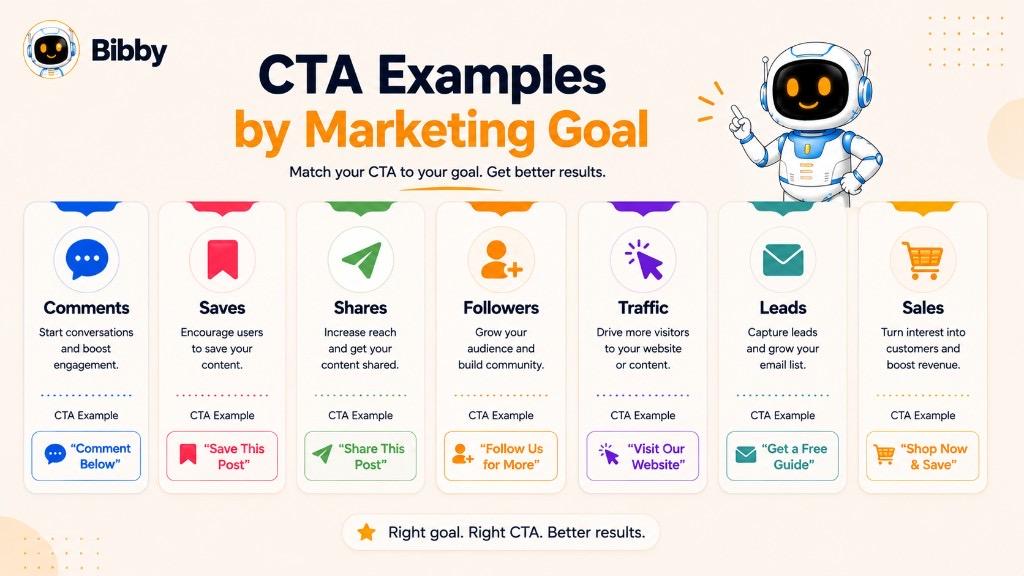
CTA Examples by Marketing Goal
The best CTA depends on what you want your audience to do. A social media post designed to generate comments needs a different CTA from a product post designed to drive sales.
Instead of asking, “What is a good CTA?”, start with a more useful question:
“What action do I want my audience to take?”
Once the goal is clear, choosing the right CTA becomes much easier.
1. To Increase Comments
If your goal is to start conversations, ask a specific question or invite people to share an opinion.
CTA examples:
- “What do you think? Tell us below.”
- “Which one would you choose?”
- “What would you add to this list?”
- “Share your experience in the comments.”
- “What is your biggest challenge?”
- “Do you agree? Tell us why.”
Example:
“Which social media platform gives your business the best results? Tell us in the comments.”
A specific question is generally more useful than simply saying “Comment below.” It gives people something to respond to.
2. To Increase Saves
Save CTAs work particularly well for educational posts, checklists, tutorials, templates, statistics, and other content people may want to revisit.
CTA examples:
- “Save this post for later.”
- “Save this checklist for your next campaign.”
- “Bookmark these tips.”
- “Keep this guide handy.”
- “Save this before planning your next campaign.”
Example:
“Planning next month's content? Save this checklist so you can come back to it later.”
The CTA works because the content has ongoing value.
3. To Increase Shares
Sharing CTAs encourage people to distribute your content to others who may find it useful.
CTA examples:
- “Share this with your team.”
- “Send this to someone who needs it.”
- “Know someone struggling with this? Share this post.”
- “Tag a friend who should see this.”
- “Share this guide with your marketing team.”
Example:
“Know a business owner who is struggling with social media? Share this guide with them.”
The strongest sharing CTAs often identify who would benefit from the content.
4. To Increase Followers
If you're trying to grow your social media audience, give people a reason to follow rather than simply asking them to do it.
CTA examples:
- “Follow us for more social media tips.”
- “Follow for weekly marketing strategies.”
- “Want more tips like this? Follow us.”
- “Follow for practical business insights.”
- “Follow us for more industry updates.”
Example:
“Want more practical social media strategies? Follow us for new tips every week.”
The benefit gives the audience a reason to continue the relationship.
5. To Increase Website Traffic
When your goal is to move people from social media to your website, make the destination and benefit clear.
CTA examples:
- “Read the full guide.”
- “Learn more on our website.”
- “Explore the complete strategy.”
- “See how it works.”
- “Read the full article.”
- “Discover the details.”
Example:
“Want the complete social media strategy? Read the full guide on our website.”
6. To Generate Leads
Lead-generation CTAs usually offer something valuable in exchange for an action such as submitting a form or providing contact information.
CTA examples:
- “Download the free guide.”
- “Get your free checklist.”
- “Book a free consultation.”
- “Request a demo.”
- “Get a free quote.”
- “Join the webinar.”
- “Download the template.”
Example:
“Want to plan your social media content faster? Download our free content calendar.”
The offer should provide a clear reason for the audience to take the next step.
7. To Generate Sales
Sales CTAs should make the purchasing action obvious.
CTA examples:
- “Shop Now.”
- “Buy Now.”
- “Get Started Today.”
- “Start Your Free Trial.”
- “Choose Your Plan.”
- “Order Now.”
- “Get Yours Today.”
Example:
“Ready to simplify your social media workflow? Start your free trial today.”
For products and SaaS services, focusing on the outcome can make the CTA more meaningful than using a generic command.
8. To Generate Product Trials
For SaaS companies, a free trial can be an important step between interest and conversion.
CTA examples:
- “Start Your Free Trial.”
- “Try It Free.”
- “Start Creating Free.”
- “Get Started Free.”
- “Explore the Platform.”
- “Create Your Free Account.”
Example:
“Ready to automate your social media workflow? Start creating for free.”
9. To Generate Demo Requests
A demo CTA is useful when prospects need to understand a product before making a purchasing decision.
CTA examples:
- “Book a Demo.”
- “See It in Action.”
- “Schedule a Demo.”
- “Talk to an Expert.”
- “Explore the Platform.”
- “See How It Works.”
Example:
“Want to see how the workflow works? Book a personalized demo.”
10. To Promote an Event
Event CTAs should clearly communicate the registration action.
CTA examples:
- “Register Now.”
- “Reserve Your Spot.”
- “Save Your Seat.”
- “Join the Webinar.”
- “Get Your Ticket.”
- “Register for Free.”
Example:
“Ready to learn the latest social media strategies? Reserve your free webinar seat.”
11. To Encourage Downloads
Download CTAs are common for ebooks, reports, templates, checklists, whitepapers, and other resources.
CTA examples:
- “Download the Guide.”
- “Get the Free Template.”
- “Download the Report.”
- “Access the Checklist.”
- “Get the Free Resource.”
- “Download Your Copy.”
Example:
“Planning your next campaign? Download our free social media checklist.”
12. To Encourage Direct Messages
DM-focused CTAs can be useful when a business wants to start one-to-one conversations.
CTA examples:
- “Send us a DM.”
- “Message us to learn more.”
- “DM us for details.”
- “Have questions? Send us a message.”
- “Want help choosing the right option? DM us.”
Example:
“Not sure which plan is right for you? Send us a DM and we'll help you choose.”
13. To Build a Community
Community-focused CTAs encourage participation and long-term relationships rather than immediate sales.
CTA examples:
- “Join the conversation.”
- “Share your story.”
- “Join our community.”
- “Tell us about your experience.”
- “Connect with other marketers.”
- “Follow along for more.”
Example:
“What is one social media lesson you learned the hard way? Share your experience with the community.”
14. To Promote Educational Content
Educational content often benefits from lower-pressure CTAs that encourage people to learn, save, or explore.
CTA examples:
- “Learn More.”
- “Read the Full Guide.”
- “Watch the Tutorial.”
- “Save This for Later.”
- “Explore More Tips.”
- “Download the Checklist.”
Example:
“Want to put these strategies into practice? Read our complete guide to social media planning.”
15. To Encourage Repeat Engagement
If you want your audience to return for more content, use CTAs that create a reason to come back.
CTA examples:
- “Follow for the next tip.”
- “Come back tomorrow for Part 2.”
- “Watch the next tutorial.”
- “Follow along for the full series.”
- “Stay tuned for the next strategy.”
Example:
“This is Part 1. Follow us for Part 2, where we'll build the campaign step by step.”
Choosing a CTA Based on Your Goal
A simple framework can help you select the right CTA:
| Your Goal | CTA Type | Example |
|---|---|---|
| More comments | Engagement | “What do you think? Comment below.” |
| More saves | Save | “Save this for later.” |
| More shares | Share | “Share this with your team.” |
| More followers | Follow | “Follow for more tips.” |
| More traffic | Website | “Read the full guide.” |
| More leads | Lead generation | “Download the free checklist.” |
| More sales | Conversion | “Shop Now.” |
| More trials | Trial | “Start Your Free Trial.” |
| More demos | Demo | “Book a Demo.” |
| More registrations | Event | “Reserve Your Spot.” |
| More messages | Direct message | “Send us a DM.” |
| More community participation | Community | “Join the conversation.” |
The important thing is to choose the CTA before creating the content, not as an afterthought. When you know the desired action, you can shape the post, caption, creative, and message around that objective.
For social media marketers, this approach also makes content planning easier. A campaign can have different CTAs across different posts while still working toward one larger objective. Bibby's AI-powered social media workflow can support this process by helping users create campaigns, generate posts and captions, regenerate messaging, and schedule content across multiple platforms.
What Makes a Good CTA?
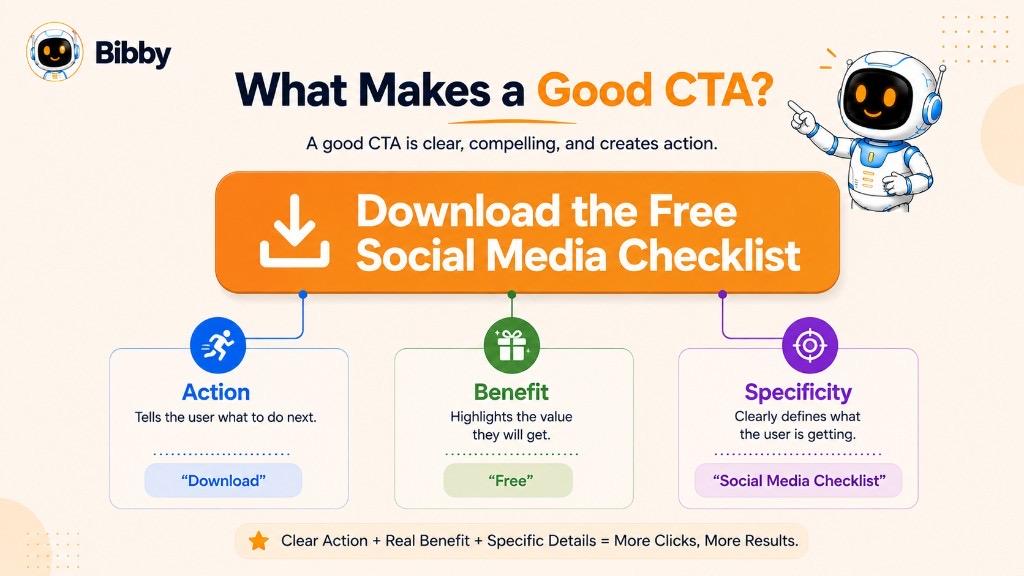
A good CTA does more than tell people to click, buy, follow, or sign up. It makes the next step clear and worthwhile.
The strongest CTAs are usually simple, specific, relevant to the content, and aligned with what the audience wants to accomplish. They do not need complicated copy or clever wordplay. A few well-chosen words can be enough when the purpose is clear.
Here are the key characteristics of an effective CTA.
1. It Is Clear
People should understand what will happen when they take the action.
Compare:
Weak:
“Continue”
Clear:
“Download the Free Guide”
The second CTA immediately tells the user what action to take and what they will receive.
2. It Uses Action-Oriented Language
Strong CTAs generally begin with a clear action.
Useful CTA verbs include:
- Get
- Start
- Download
- Discover
- Explore
- Learn
- Watch
- Join
- Book
- Shop
- Subscribe
- Follow
- Save
- Share
- Comment
For example:
“Explore the Complete Guide”
is more specific than:
“More Information.”
3. It Gives the Audience a Reason to Act
A CTA becomes more compelling when the audience understands the benefit.
Compare:
“Download Now”
with:
“Download the Free Social Media Checklist”
The second version gives the audience more information about what they are getting.
For conversion-focused CTAs, you can make the outcome even clearer:
“Start Creating Social Content for Free.”
4. It Matches the Content
A CTA should feel like the natural next step after consuming the content.
Imagine a post explaining how to create a social media content calendar.
A relevant CTA could be:
“Save this guide for your next content planning session.”
An unrelated CTA such as:
“Buy Now”
could feel forced unless the post is specifically promoting a product.
The content creates the context, and the CTA should continue that context.
5. It Matches the Audience's Intent
Not every visitor is ready to make a purchase.
Someone discovering your brand for the first time might prefer:
“Learn More”
A person comparing solutions might respond better to:
“See How It Works”
Someone ready to purchase may be ready for:
“Start Free Trial”
Matching the CTA to audience intent reduces friction and creates a more natural customer journey.
6. It Is Specific
Specific CTAs reduce uncertainty.
Instead of:
“Click Here”
try:
“Read the Full Guide”
Instead of:
“Submit”
try:
“Get My Free Quote”
Instead of:
“Learn More”
try:
“See How Social Media Automation Works”
The audience should know what they are getting before taking the action.
7. It Creates a Low-Friction Next Step
Not every CTA needs to ask for a major commitment.
For someone who has just discovered your brand, “Follow Us” or “Learn More” may be easier than “Book a Sales Call.”
Similarly, an educational social media post may perform better with:
“Save this post for later.”
rather than asking users to complete a form.
The smaller the commitment, the easier it can be for someone to take the first step.
8. It Uses Urgency When It Is Genuine
Urgency can encourage action when there is a legitimate reason to act now.
Examples:
- “Register Before Friday.”
- “Reserve Your Spot.”
- “Order Before the Sale Ends.”
- “Get Early Access Today.”
However, artificial urgency can damage trust. Not every CTA needs phrases such as “Act Now” or “Limited Time.”
Use urgency when it reflects a real deadline, limited availability, launch, or offer.
9. It Is Easy to Notice
A CTA can be well-written but ineffective if people cannot find it.
On a website, CTA buttons should have enough visual distinction from surrounding content.
In social media captions, the CTA should be easy to identify without making the entire caption feel like an advertisement.
For videos and graphics, CTA text should be readable and appear at an appropriate moment.
10. It Fits the Platform
Different platforms encourage different types of actions.
For example:
“Save this post for later.”
“What do you think? Share your perspective.”
TikTok:
“Follow for Part 2.”
YouTube:
“Subscribe for more tutorials.”
The same campaign can use different CTA wording while maintaining the same overall marketing objective.
11. It Focuses on One Primary Action
A common mistake is asking the audience to do everything at once.
For example:
“Like this post, comment below, share it, follow us, visit our website, download the guide, and book a demo.”
That creates unnecessary friction.
Instead, choose the most important action for that piece of content.
For example:
“Save this guide for your next campaign.”
You can still include secondary actions elsewhere, but the primary CTA should be obvious.
12. It Sounds Natural
A CTA does not have to sound like traditional advertising.
On social media, conversational CTAs can often feel more appropriate.
Instead of:
“Engage with the content by providing your response.”
Use:
“What do you think? Tell us below.”
The second version sounds like something a real person would actually say.
A Simple Formula for a Strong CTA
A useful starting formula is:
Action + Benefit + Optional Context
For example:
Download + the Free Social Media Checklist
or:
Save + this guide + for your next campaign
or:
Start Creating + social content + for free
This framework keeps the CTA focused without making it unnecessarily complicated.
Ultimately, a good CTA answers three questions:
What should I do?
Why should I do it?
What happens next?
When those answers are clear, your CTA has a much better chance of turning attention into meaningful action.
How to Write an Effective CTA
Writing an effective CTA starts with one simple decision: what do you want your audience to do next?
Once the desired action is clear, you can choose the right words, benefit, tone, and placement around it. A good CTA should feel like a natural next step rather than an interruption.
Here is a practical process for creating stronger CTAs.
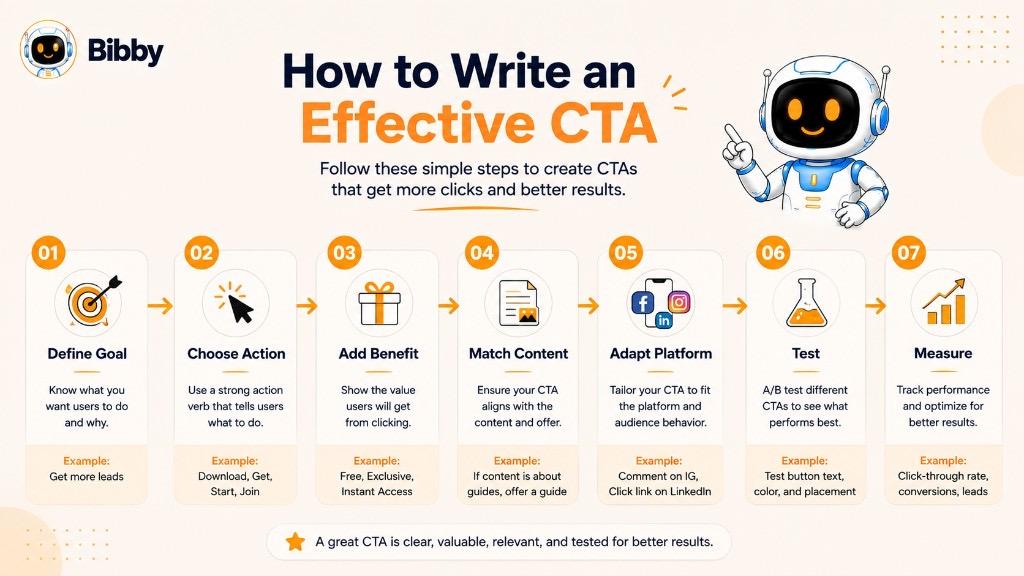
Step 1: Define Your Goal
Before writing the CTA, identify the result you want.
Ask yourself:
What action would make this content successful?
For example:
- Want more engagement? Ask people to comment.
- Want more saves? Ask people to save the post.
- Want more followers? Ask them to follow.
- Want website traffic? Send them to a relevant page.
- Want leads? Offer a downloadable resource.
- Want sales? Direct them toward a purchase.
- Want product trials? Encourage users to start a free trial.
For example, if your goal is to increase saves, your CTA could be:
“Save this checklist for your next campaign.”
There is no need to force a sales CTA onto content that was designed for engagement.
Step 2: Choose One Primary Action
Avoid giving your audience a long list of instructions.
Instead of:
“Like this post, comment below, share it with your friends, follow us, visit our website, and download our guide.”
Choose the most important action.
For example:
“Download the free guide.”
If you have secondary goals, they can appear elsewhere in the content or campaign.
Step 3: Start With an Action Verb
Action verbs make the next step obvious.
Useful words include:
- Start
- Get
- Download
- Explore
- Discover
- Learn
- Watch
- Join
- Book
- Shop
- Subscribe
- Follow
- Save
- Share
- Comment
- Try
For example:
Weak:
“More information about our platform”
Stronger:
“Explore How the Platform Works”
Step 4: Explain the Benefit
People are more likely to act when they understand what they will get.
Compare:
“Download Now”
with:
“Download the Free Social Media Calendar”
The second CTA provides more context.
You can also focus on the outcome:
“Start Planning Your Content in Minutes.”
The action is clear, but the audience also understands the potential benefit.
Step 5: Match the CTA to the Content
Your CTA should logically follow the content.
For example, if you publish a carousel titled:
“10 Social Media Content Ideas for Small Businesses”
a natural CTA might be:
“Save this carousel for your next content planning session.”
If the post is announcing a product launch, a more appropriate CTA might be:
“Explore the new collection.”
The CTA should complete the thought created by the content.
Step 6: Match the CTA to Audience Intent
Think about what your audience is ready to do.
A first-time visitor may be more comfortable with:
“Learn More”
Someone actively researching solutions might respond to:
“See How It Works”
Someone who is ready to purchase may prefer:
“Start Your Free Trial”
This is particularly important for businesses with longer customer journeys. A CTA should move people forward without asking for more commitment than they are ready to give.
Step 7: Make the CTA Specific
Avoid vague instructions whenever possible.
Instead of:
“Click Here”
use:
“Read the Full Guide”
Instead of:
“Submit”
use:
“Get My Free Quote”
Instead of:
“Learn More”
use:
“See How Social Media Automation Works”
Specific language reduces uncertainty and helps people understand what happens after they act.
Step 8: Add Urgency When It Makes Sense
Urgency can encourage people to act when there is a genuine reason to do so.
Examples:
- “Register Before Friday.”
- “Reserve Your Spot Today.”
- “Get Early Access.”
- “Order Before the Offer Ends.”
However, urgency should not be manufactured. If there is no real deadline or limited availability, you do not need to add one.
Step 9: Adapt the CTA to the Platform
A CTA should reflect how people interact with the platform.
For example:
Instagram:
“Save this post for later.”
LinkedIn:
“What has worked for your business? Share your experience.”
TikTok:
“Follow for Part 2.”
YouTube:
“Subscribe for more tutorials.”
Website:
“Start Your Free Trial.”
The underlying marketing goal may be the same, but the language should feel native to the platform.
Step 10: Make the CTA Easy to Understand
Avoid unnecessary jargon, complicated sentences, or clever wording that hides the action.
A simple:
“Start Free”
can be more effective than:
“Commence your journey toward a more efficient social media management experience.”
The second version sounds impressive but makes the action harder to identify.
Step 11: Test Different CTA Variations
Even a well-written CTA is still a hypothesis.
Try different versions and compare performance.
For example:
Version A:
“Start Your Free Trial”
Version B:
“Start Creating for Free”
Both encourage the same basic action, but one may resonate better with your audience.
You can test:
- CTA wording
- Benefits
- Action verbs
- Length
- Placement
- Tone
- Urgency
- Personalization
Then measure the results against the campaign goal.
A Simple CTA Writing Formula
One useful formula is:
Action + Benefit
Examples:
Download + the Free Social Media Checklist
Start + Creating Social Content for Free
Explore + the Complete Guide
Save + This Checklist for Later
Another useful structure is:
Problem + Action + Benefit
For example:
“Struggling to plan your content? Get the free content calendar.”
This approach connects the audience's problem with a clear solution.
Example: Turning a Weak CTA Into a Strong CTA
Consider this social media caption:
“We have created a guide about social media automation. Click here to read it.”
The CTA “Click here” does not tell the audience why they should click.
A stronger version would be:
“Want to save time managing your social media? Read our complete guide to social media automation.”
The second version communicates the action and the reason for taking it.
For businesses managing large volumes of social content, creating these variations manually can become repetitive. Bibby's AI-powered workflow can help marketers create posts and captions, regenerate messaging, develop campaigns, and schedule content across selected platforms. This makes it easier to treat the CTA as part of the content strategy rather than something added at the very end.
CTA Copywriting Formulas
You do not need to reinvent your CTA every time you create a social media post, landing page, email, or campaign. A few simple CTA copywriting formulas can help you create clear and action-focused CTAs faster.
These formulas are not rigid rules. Think of them as starting points you can adapt to your audience, content, platform, and marketing goal.
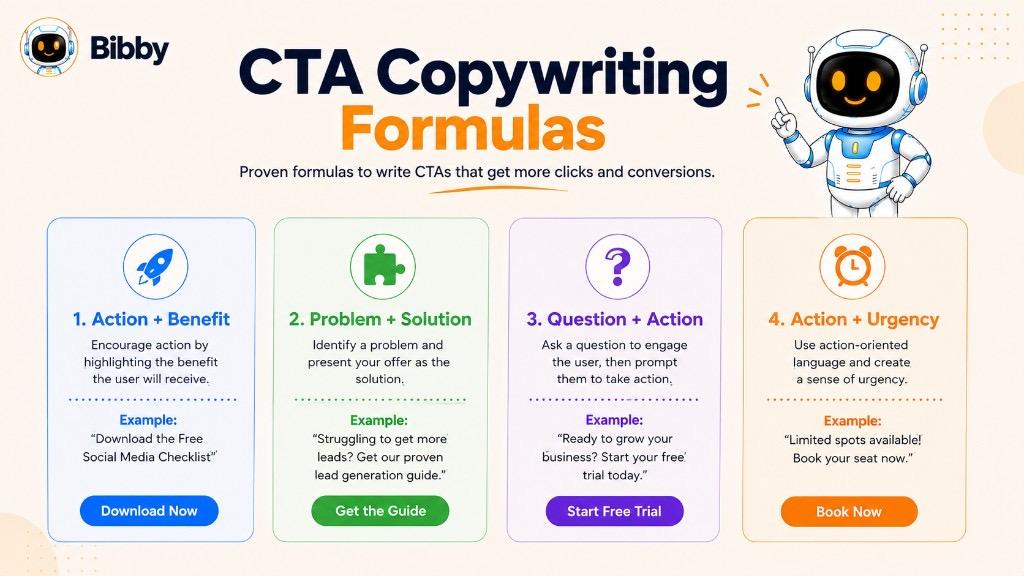
1. Action + Benefit
This is one of the simplest CTA formulas.
Formula:
Action + Benefit
Examples:
- “Download the Free Guide.”
- “Start Creating for Free.”
- “Explore New Features.”
- “Get Your Free Checklist.”
- “Learn How to Grow Your Audience.”
The action tells people what to do, while the benefit explains why they might want to do it.
2. Action + Outcome
This formula focuses on the result the audience can achieve.
Formula:
Action + Desired Outcome
Examples:
- “Start Growing Your Audience.”
- “Build Your Content Calendar.”
- “Create Better Social Posts.”
- “Improve Your Marketing Strategy.”
- “Save Time Managing Social Media.”
This approach works particularly well for SaaS products, services, and educational content because it focuses on what the user wants to accomplish.
3. Action + Free Offer
If you have a free resource, trial, consultation, or tool, make that value obvious.
Formula:
Action + Free Offer
Examples:
- “Start Your Free Trial.”
- “Download the Free Template.”
- “Get Your Free Quote.”
- “Book Your Free Consultation.”
- “Try It Free Today.”
The word “free” can reduce the perceived commitment when the offer genuinely has no cost.
4. Action + Specific Resource
This formula works well for content marketing.
Formula:
Action + Resource
Examples:
- “Download the Social Media Checklist.”
- “Read the Complete Marketing Guide.”
- “Watch the Content Planning Tutorial.”
- “Get the Social Media Calendar.”
- “Explore the Full Report.”
Specificity helps people understand exactly what they will receive.
5. Problem + Solution
This formula connects the audience's problem with the action you want them to take.
Formula:
Problem + Solution
Examples:
- “Struggling With Content Ideas? Get the Free Guide.”
- “Spending Too Much Time Scheduling Posts? Start Automating.”
- “Not Sure What to Post? Explore These 50 Ideas.”
- “Finding Social Media Management Difficult? See How Bibby Can Help.”
This can be especially effective when your audience already recognizes the problem you're addressing.
6. Question + Action
Start with a question that reflects the audience's situation, then provide a next step.
Formula:
Question + Action
Examples:
- “Ready to Save Time? Start Automating Today.”
- “Want More Engagement? Try These Strategies.”
- “Need More Content Ideas? Explore the Full Guide.”
- “Ready to Grow Your Audience? Follow for More Tips.”
This format works naturally in social media captions because it feels conversational.
7. Benefit + Action
Lead with the value and then tell people how to get it.
Formula:
Benefit + Action
Examples:
- “Save Time on Social Media. Start Free.”
- “Get Better Content Ideas. Download the Guide.”
- “Plan Your Content Faster. Get the Free Calendar.”
- “Create and Schedule Content More Easily. Get Started.”
This approach is useful when the benefit is more compelling than the action itself.
8. Action + Urgency
Use this formula when there is a genuine deadline, limited availability, or time-sensitive opportunity.
Formula:
Action + Genuine Urgency
Examples:
- “Register Before Friday.”
- “Reserve Your Spot Today.”
- “Get Early Access Now.”
- “Shop Before the Sale Ends.”
- “Book Your Consultation Before Registration Closes.”
Urgency should reflect a real reason to act. Adding artificial pressure to every CTA can make marketing messages feel less trustworthy.
9. Social Proof + Action
You can combine a positive result or proof point with a CTA.
Formula:
Social Proof + Action
Examples:
- “Join thousands of creators. Start Free.”
- “See Why Businesses Use Bibby. Get Started.”
- “Discover How Other Teams Simplify Social Media. Try It Free.”
This formula can work well when you have credible customer numbers, reviews, case studies, or measurable results to support the claim.
10. Curiosity + Action
Curiosity can encourage people to explore additional information.
Formula:
Curiosity + Action
Examples:
- “Want to See How It Works? Explore the Platform.”
- “Wondering What You're Missing? Read the Full Guide.”
- “See What Your Content Strategy Could Look Like. Learn More.”
- “Want the Strategy Behind the Results? Read the Case Study.”
The goal is to create interest without becoming vague or clickbait-heavy.
11. Save + Future Use
This formula is particularly useful for social media.
Formula:
Save + Future Use
Examples:
- “Save This Post for Your Next Campaign.”
- “Bookmark These Tips for Later.”
- “Save This Checklist Before Planning Your Content.”
- “Keep This Guide Handy for Your Next Strategy Session.”
It works especially well for content that provides practical information people may need again.
12. Comment + Specific Question
Instead of simply asking people to comment, give them something specific to answer.
Formula:
Comment + Question
Examples:
- “Which strategy would you try first? Comment below.”
- “What is your biggest social media challenge? Tell us below.”
- “Which platform works best for your business? Share your answer.”
- “What would you add to this list? Let us know.”
Specific questions usually create a clearer invitation to participate than a generic “Comment below.”
CTA Formula Examples for Social Media
Here is how the formulas can be adapted to different social media goals:
| Goal | Formula | Example CTA |
|---|---|---|
| Comments | Comment + Question | “Which strategy would you try first? Tell us below.” |
| Saves | Save + Future Use | “Save this guide for your next campaign.” |
| Shares | Share + Audience | “Share this with someone who needs it.” |
| Followers | Benefit + Follow | “Want more social media tips? Follow us.” |
| Traffic | Benefit + Action | “Want the complete strategy? Read the full guide.” |
| Leads | Action + Resource | “Download the free social media checklist.” |
| Sales | Action + Benefit | “Start creating social content for free.” |
| Demos | Question + Action | “Want to see how it works? Book a demo.” |
| Community | Question + Comment | “What has worked for you? Share your experience.” |
How to Use CTA Formulas Without Sounding Repetitive
Formulas are useful, but copying the same sentence structure into every post can make your content feel mechanical.
Instead, vary:
- The opening phrase
- Action verbs
- Benefits
- Questions
- Tone
- Audience references
- Platform-specific language
For example, if your goal is to increase saves, you do not have to use “Save this post for later” every time.
You could write:
“Keep this checklist handy for your next campaign.”
or:
“Bookmark these tips before you start planning.”
or:
“Save this guide so you can come back to it when you need it.”
The desired action remains the same, but the wording feels fresher.
The Golden Rule of CTA Copywriting
A CTA should make the next step clear, relevant, and valuable.
You do not need complicated copy to persuade someone to act. If your audience understands what to do, why it matters, and what they can expect next, your CTA is doing its job.
For social media teams creating content at scale, AI can also help generate multiple CTA variations for the same post or campaign. With Bibby, marketers can create campaigns and posts, generate or regenerate captions, refine messaging through the chat interface, and schedule content across selected social platforms. This makes it easier to test different CTA approaches without turning every post into a copywriting puzzle.
CTA Button vs CTA Text
A CTA can appear as a button, text, link, caption, graphic, or spoken instruction. The format changes depending on where the CTA is used, but the purpose remains the same: guide the audience toward a specific action.
Two of the most common forms are CTA buttons and CTA text.
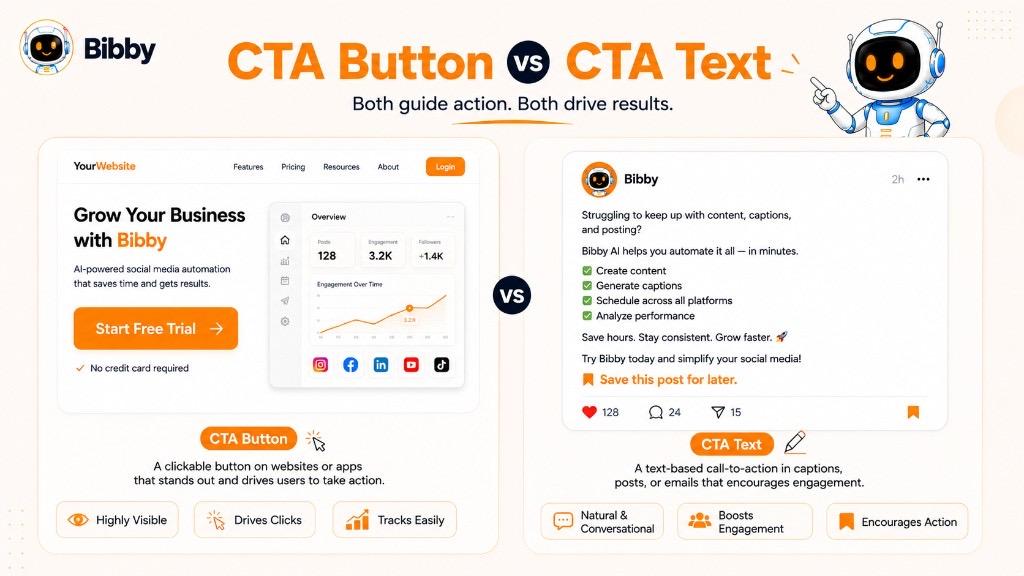
What Is a CTA Button?
A CTA button is a clickable element that encourages users to take an action.
You commonly find CTA buttons on:
- Websites
- Landing pages
- SaaS platforms
- E-commerce stores
- Apps
- Emails
- Online advertisements
Examples include:
- Start Free Trial
- Buy Now
- Book a Demo
- Get Started
- Download Guide
- Sign Up
- Shop Now
- Learn More
For example, a SaaS landing page might explain the benefits of a product and then display:
Start Your Free Trial
The button gives visitors a clear path from reading about the product to taking action.
What Makes a Good CTA Button?
A good CTA button should make three things easy to understand:
What happens when I click?
What will I get?
Why should I click it?
For example:
Weak:
Click Here
Better:
Download the Guide
Even more specific:
Get the Free Social Media Guide
The more relevant information the button provides, the less uncertainty the user has about the next step.
What Is CTA Text?
CTA text is an instruction or invitation written directly into content rather than presented as a standalone button.
It is especially common in:
- Social media captions
- Blog posts
- Videos
- Emails
- Stories
- Social media graphics
- Comments
- Articles
Examples include:
“Save this post for your next campaign.”
“Follow us for more social media tips.”
“Tell us your biggest challenge in the comments.”
“Read the complete guide on our website.”
Unlike a button, CTA text may not always be directly clickable. Its job can be to encourage an interaction, tell users where to go, or reinforce the desired action.
CTA Button vs CTA Text
| Feature | CTA Button | CTA Text |
|---|---|---|
| Common location | Websites, apps, landing pages | Social media, blogs, videos |
| Usually clickable | Yes | Sometimes |
| Main purpose | Drive a specific action | Encourage or guide an action |
| Typical length | Short | Can be longer |
| Example | “Start Free Trial” | “Ready to save time? Start your free trial today.” |
| Best for | Direct conversions | Engagement, education, and contextual actions |
When Should You Use a CTA Button?
CTA buttons are particularly useful when the user needs to take a measurable digital action.
For example:
Landing page:
Book a Demo
Pricing page:
Choose Your Plan
Product page:
Buy Now
SaaS homepage:
Start Free
The button should be positioned close to the information users need before making the decision.
When Should You Use CTA Text?
CTA text is often more natural when the content itself is conversational or educational.
For example, a LinkedIn post might end with:
“What has worked best for your business? Share your experience in the comments.”
A button would feel unnatural in that context. The CTA works because it fits the way people interact with the platform.
Similarly, an Instagram caption might end with:
“Save this post before planning your next campaign.”
The CTA is part of the conversation rather than a separate interface element.
Can You Use Both?
Yes. In many campaigns, CTA text and CTA buttons can work together.
For example, a landing page might contain:
Ready to simplify your social media workflow? Start creating content in less time.
[Start Free Trial]
The text provides context and motivation, while the button provides the direct action.
This combination is particularly useful for conversion-focused pages because the audience gets both the reason to act and the mechanism to act.
CTA Buttons and Social Media
Some social platforms provide native buttons or interactive features that function as CTAs. Others rely more heavily on captions, links, Stories, comments, or profile links.
For example:
Instagram:
“Save this post for later.”
LinkedIn:
“Read the full report.”
YouTube:
“Subscribe for more tutorials.”
Website:
[Start Free Trial]
The CTA should always reflect the action that is actually available to the user.
The Most Important Difference
The difference between a CTA button and CTA text is mainly format and context, not purpose.
A button might say:
Start Free Trial
CTA text might say:
“Ready to create and schedule your social content? Start your free trial today.”
Both encourage the same fundamental action.
The strongest choice depends on where your audience is, what they are doing, and how much context they need before taking the next step.
Where Should You Use a CTA?
A CTA can be used almost anywhere you want to guide an audience toward a specific action. Websites, social media posts, emails, videos, advertisements, and landing pages all use CTAs to move people from consuming content to taking the next step.
However, the CTA should always fit the content, platform, audience, and marketing objective. Adding a CTA simply because you can does not make content more effective.
Here are the most common places to use CTAs.
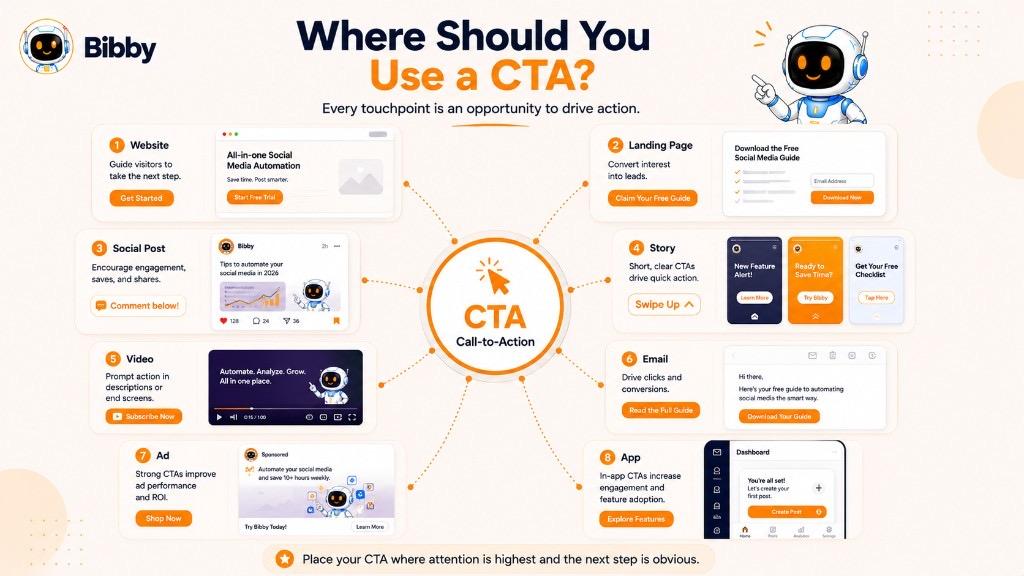
1. Website Homepage
Your homepage is often one of the first places potential customers interact with your business.
A CTA can guide visitors toward an important next step, such as:
- Exploring your product
- Starting a free trial
- Booking a demo
- Contacting your team
- Viewing services
- Learning more
Examples:
“Start Free”
“Explore Our Services”
“See How It Works”
The homepage may contain several CTAs, but one primary action should usually be more prominent than the others.
2. Landing Pages
Landing pages are often built around a specific campaign, offer, or conversion goal.
Common CTAs include:
- Sign Up
- Download Now
- Book a Demo
- Get Started
- Claim the Offer
- Start Free Trial
For example, a landing page promoting a free marketing guide might use:
“Get Your Free Guide”
The CTA should directly support the purpose of the landing page.
3. Product Pages
Product pages need to help visitors move from researching a product to taking action.
Depending on the business model, CTAs may include:
- Buy Now
- Add to Cart
- Start Free Trial
- Request a Demo
- Get a Quote
- Choose a Plan
- Explore Features
For SaaS products, a CTA such as “Start Free Trial” can be more appropriate than “Buy Now.”
4. Pricing Pages
Pricing pages are usually visited by people who are already evaluating a product or service.
Useful CTAs include:
- Choose a Plan
- Start Free
- Get Started
- Upgrade
- Contact Sales
- Book a Demo
For example:
“Choose Your Plan”
helps users understand exactly what happens next.
5. Blog Posts
Blog posts can use CTAs to turn readers into subscribers, leads, customers, or deeper content consumers.
Examples:
- “Read the Next Guide.”
- “Download the Free Checklist.”
- “Subscribe for More Tips.”
- “Book a Consultation.”
- “Explore Our Services.”
- “Start Your Free Trial.”
The CTA should relate to the topic of the article.
For example, an article about social media planning could end with:
“Download our free social media content calendar.”
6. Social Media Posts
Social media is one of the most common places for CTAs.
You can use CTAs to encourage:
- Comments
- Likes
- Shares
- Saves
- Follows
- Website visits
- Direct messages
- Purchases
- Sign-ups
Examples:
“Save this post for later.”
“Follow us for more tips.”
“Tell us your biggest social media challenge.”
“Read the full guide through the link in our bio.”
The CTA should match the content format and platform.
7. Social Media Captions
Captions provide a natural place for CTA text.
For example:
“Creating content consistently can be difficult when you are managing multiple platforms. These five strategies can help simplify your workflow. Save this post and use the checklist when planning your next campaign.”
The CTA feels like part of the message rather than a separate advertisement.
8. Social Media Stories
Stories are designed for quick consumption and interaction, so short CTAs often work best.
Examples:
- “Tap the Link”
- “Shop Now”
- “Learn More”
- “Send Us a Message”
- “Vote Below”
- “Ask Us a Question”
- “Check Out the New Collection”
Interactive features such as polls, questions, and links can make Story CTAs more actionable.
9. Videos
Videos can use CTAs at several points.
Opening CTA:
“Stay until the end to see the complete strategy.”
Mid-video CTA:
“If this tip is useful, save it so you can try it later.”
End CTA:
“Subscribe for more social media tutorials.”
You can also use CTAs in video descriptions, pinned comments, and end screens.
10. Email Marketing
Email CTAs can guide subscribers toward a specific action.
Examples include:
- Read the Article
- Shop Now
- Download the Guide
- Register for the Webinar
- Book a Demo
- Start Free Trial
- Explore the Product
A typical email might explain the value first and then use:
“Explore the New Features”
as the primary CTA.
11. Advertisements
Digital advertisements generally need a very clear CTA because the user has limited time and attention.
Examples:
- Shop Now
- Learn More
- Sign Up
- Download
- Get Started
- Book Now
- Try Free
The CTA should align with the ad's promise and the landing page users reach after clicking.
If an advertisement says “Download the Free Guide”, the landing page should make that guide immediately accessible.
12. E-commerce Stores
E-commerce websites use CTAs throughout the shopping journey.
Examples:
Product discovery:
“Explore Collection”
Product page:
“Add to Cart”
Shopping cart:
“Proceed to Checkout”
Promotion:
“Shop the Sale”
Each CTA helps move the shopper toward the next stage.
13. App and Software Interfaces
CTAs are also common inside apps and software products.
Examples:
- Create Account
- Create New Project
- Upload File
- Generate Content
- Invite Team
- Start Campaign
- Connect Account
- Upgrade Plan
In these situations, the CTA is often directly connected to the user's current task.
14. Social Media Profiles and Bios
Your profile or bio can also include a CTA.
Examples:
- “Explore Our Website.”
- “Shop the Collection.”
- “Download the Free Guide.”
- “Book a Consultation.”
- “Start Creating Free.”
- “Follow Our Newsletter.”
For businesses, the bio CTA should generally support the profile's primary objective.
Where Should a CTA Appear in Social Media Content?
There is no single placement that works for every post.
You can place CTA messaging:
- At the end of the caption
- Within the caption
- In the visual itself
- In a Story sticker
- In a video
- In the description
- In a pinned comment
- In the profile bio
For example, an educational carousel might provide value across several slides and finish with:
“Save this carousel for your next content planning session.”
The CTA appears after the audience has received the value, making it a natural conclusion.
Match the CTA to the User's Next Step
The most important principle is simple:
Put the CTA where the audience is most likely to take the intended action.
A product page needs a purchase or trial CTA.
A blog post may need a content or lead-generation CTA.
A social media post may need an engagement CTA.
A video may need a subscription or next-video CTA.
The CTA should not compete with the content. It should complete it.
For marketers managing content across multiple platforms, this can become difficult when every post needs a different message, format, CTA, and publishing schedule. Bibby helps bring these tasks into one workflow by allowing users to create posts, generate and regenerate captions, build campaigns, and schedule content across selected social media platforms.
CTAs Across Different Social Media Content Formats
A CTA should not look or sound the same across every type of social media content. A single image, carousel, video, Story, and text-based post give audiences different ways to interact, so the CTA should fit the format.
The goal is to make the desired action feel like a natural extension of the content.
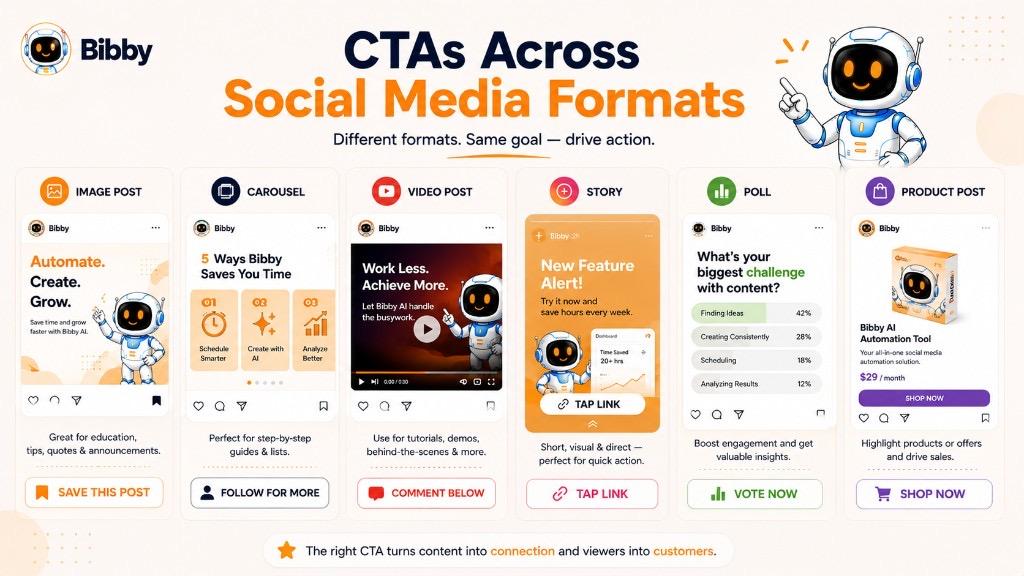
1. Single Image Posts
Single-image posts are often used for announcements, quotes, educational tips, product promotions, statistics, or brand messages.
A CTA can appear in the caption or directly within the creative.
Examples:
“Save this tip for your next campaign.”
“Share this with your marketing team.”
“Follow us for more practical tips.”
For a product image:
“Explore the collection today.”
The CTA should not overwhelm the visual. The image should communicate the main message, while the CTA provides the next step.
2. Carousel Posts
Carousels are useful for guides, tutorials, lists, comparisons, checklists, and educational content.
Because users move through multiple slides, the CTA can encourage them to complete the carousel or interact with it afterward.
Examples:
“Swipe through all seven tips and save this carousel for later.”
“Which tip would you try first? Tell us below.”
“Save this guide for your next content planning session.”
A carousel can also use a CTA on the final slide:
Learn → Apply → Save → Share
For example:
“Found this useful? Save it and share it with your team.”
3. Short-Form Videos
Short videos on platforms such as Instagram Reels and TikTok need concise CTAs because users move quickly from one piece of content to another.
Examples:
- “Follow for Part 2.”
- “Save this for later.”
- “Try this strategy today.”
- “Comment your answer.”
- “Share this with a friend.”
- “Follow for more tips.”
The CTA can appear as:
- Spoken dialogue
- On-screen text
- Caption text
- End-frame text
For example, a video explaining a social media growth strategy could end with:
“Save this strategy and try it for the next 30 days.”
4. Long-Form Videos
Long-form videos provide more opportunities for CTAs.
A creator can use different CTAs at different stages of the video.
Beginning:
“Stay until the end to see the complete strategy.”
Middle:
“If you're finding this useful, save this video so you can come back to it later.”
End:
“Subscribe for more step-by-step marketing guides.”
However, using too many CTAs can interrupt the viewing experience. Each CTA should have a clear purpose.
5. Stories
Stories are highly interactive and can use platform-specific features to make CTAs more actionable.
Examples:
- “Tap the Link”
- “Shop Now”
- “Learn More”
- “Vote Below”
- “Ask Us a Question”
- “Send Us a Message”
- “Reply to This Story”
For example:
“Want the complete checklist? Tap the link to download it.”
A Story CTA should usually be short because users consume Stories quickly.
6. Text-Based Posts
Text-heavy posts can use conversational CTAs.
For example:
“AI is changing how businesses approach social media. What part of social media management would you automate first? Share your thoughts below.”
The CTA here is not a button. The question itself creates the action.
Other examples include:
- “Do you agree?”
- “What would you add?”
- “Have you experienced this?”
- “Share your perspective.”
- “Tell us what worked for you.”
This format works particularly well for professional discussions and community-driven content.
7. Polls
Polls already contain an interactive action, but a supporting CTA can encourage additional participation.
For example:
“Vote below, then tell us why in the comments.”
This combines two actions:
Vote → Explain
Poll CTAs can also encourage people to share their reasoning or experiences.
8. Product Posts
Product-focused content generally needs a conversion-oriented CTA.
Examples:
- “Shop Now.”
- “Explore the Product.”
- “See It in Action.”
- “Get Yours Today.”
- “Try It Free.”
- “Start Your Free Trial.”
For example, a SaaS product post could say:
“Ready to simplify your social media workflow? Start creating for free.”
The CTA focuses on the desired outcome rather than simply saying “Click Here.”
9. Educational Posts
Educational content often performs well with CTAs focused on saving, sharing, or exploring more information.
Examples:
“Save this guide for later.”
“Share these tips with your team.”
“Want to learn more? Read the full guide.”
“Follow for more practical strategies.”
The best CTA depends on how useful the content is likely to be after the initial viewing.
10. Announcement Posts
Announcements can use CTAs that encourage audiences to explore the news or take advantage of the new offering.
Examples:
- “Explore the New Feature.”
- “Try It Today.”
- “Learn More.”
- “See What's New.”
- “Get Early Access.”
- “Join the Launch.”
For example:
“Our new AI campaign workflow is live. Explore what's new today.”
11. User-Generated Content
When sharing customer stories, reviews, testimonials, or user-generated content, CTAs can encourage audiences to learn more or participate.
Examples:
- “Want to see how it works? Learn more.”
- “Share your experience with us.”
- “Tag us in your next post.”
- “Join the community.”
- “Try it for yourself.”
12. Live Content
Live streams can use CTAs throughout the session.
Examples:
During the live session:
“Drop your questions in the chat.”
For engagement:
“Tell us where you're watching from.”
For conversion:
“Visit the link to explore the offer.”
At the end:
“Follow us so you don't miss the next session.”
The CTA should match what is happening at that moment rather than interrupting the conversation.
How to Match the CTA to the Content Format
A simple framework can help:
Content Format → Audience Behavior → Desired Action
For example:
Carousel → People swipe through information → Save or share
“Save this carousel for your next campaign.”
Short video → People watch quickly → Follow or comment
“Follow for Part 2.”
Educational post → People consume useful information → Save
“Save this guide for later.”
Product post → People evaluate an offer → Shop or try
“Start your free trial.”
Discussion post → People form opinions → Comment
“What do you think? Tell us below.”
This approach keeps the CTA connected to the content instead of treating it as a separate piece of copy.
One Content Format Can Support Multiple CTA Goals
The same format can serve different objectives.
For example, a carousel could be designed to:
Generate saves:
“Save this checklist for later.”
Generate shares:
“Share this with your marketing team.”
Generate comments:
“Which strategy would you try first?”
Drive traffic:
“Read the complete guide on our website.”
The content format does not determine the CTA by itself. The campaign objective ultimately decides which action matters most.
This is particularly useful for social media automation because marketers often publish different content formats across multiple platforms. Bibby allows users to create images or generate visuals with AI, create posts and captions, manage campaigns through its chat interface, and schedule different types of social content across selected platforms. The CTA can therefore be treated as part of the broader content strategy rather than an afterthought added immediately before publishing.
CTA Best Practices for Social Media
A good social media CTA should make the next action obvious without making the post feel forced or overly promotional. The best approach depends on your content, audience, platform, and campaign objective.
Whether you want more comments, saves, shares, followers, website traffic, leads, or sales, these CTA best practices can help you create more effective social media content.
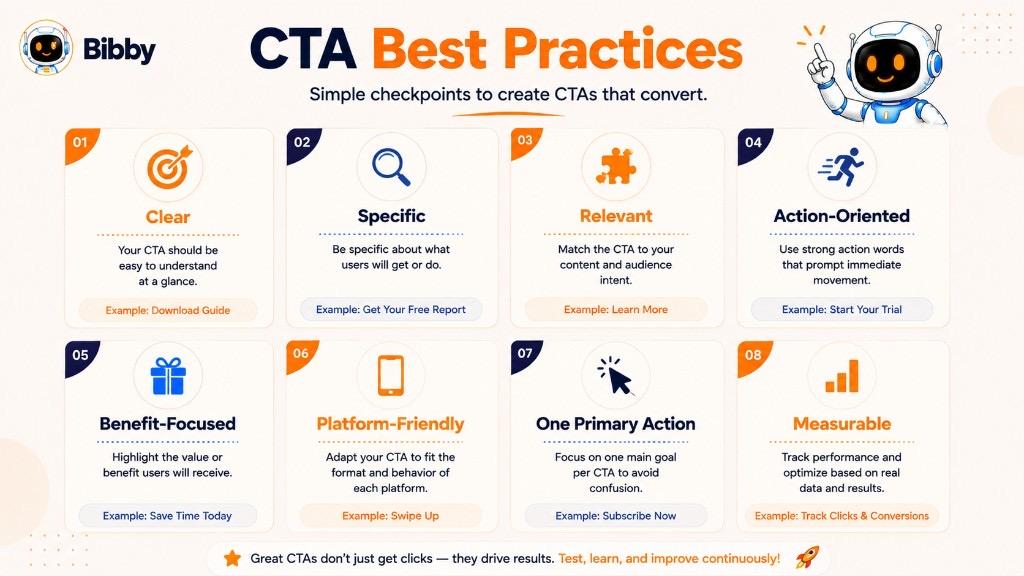
1. Start With a Clear Goal
Before writing a CTA, decide what you want the post to achieve.
For example:
- More comments → Ask a specific question
- More saves → Offer useful information worth revisiting
- More shares → Give people something worth passing along
- More followers → Explain what they will get by following
- More traffic → Direct users to a relevant page
- More leads → Offer a useful resource
- More sales → Present a clear buying action
A CTA without a defined objective can become generic.
Instead of automatically ending every post with “Learn More,” decide what action actually matters for that piece of content.
2. Use One Primary CTA
Giving people too many instructions can make the desired action unclear.
For example:
“Like this post, comment below, share it, follow us, visit our website, download the guide, and book a demo.”
That is a lot of homework for one caption.
A better approach is to choose one primary action:
“Save this guide for your next campaign.”
You can include secondary actions when appropriate, but the main CTA should be easy to identify.
3. Use Strong Action Words
Your CTA should tell people what to do.
Useful action words include:
- Save
- Share
- Follow
- Comment
- Download
- Explore
- Discover
- Learn
- Watch
- Join
- Book
- Shop
- Start
- Try
- Subscribe
For example:
Weak:
“More information available here.”
Stronger:
“Explore the Complete Guide.”
4. Give People a Reason to Act
A CTA becomes more useful when the audience understands the benefit.
Compare:
“Download Now.”
with:
“Download the Free Social Media Checklist.”
Or:
“Start Free.”
with:
“Start Creating Social Content for Free.”
The second versions give the audience more context about what they will get.
5. Make the CTA Relevant to the Content
The CTA should logically follow the post.
If you publish a carousel about 10 social media content ideas, a suitable CTA could be:
“Save this carousel for your next content planning session.”
If you publish a product announcement, a more relevant CTA might be:
“Explore the new feature.”
The CTA should feel like the next chapter of the content, not a completely unrelated advertisement.
6. Adapt the CTA to the Platform
Different platforms encourage different types of interaction.
Instagram:
“Save this post for later.”
“Share this with someone who needs it.”
LinkedIn:
“What has worked for your business? Share your experience.”
TikTok:
“Follow for Part 2.”
YouTube:
“Subscribe for more tutorials.”
The campaign goal may remain the same, but the wording should feel natural for each platform.
7. Match the CTA to the Audience's Intent
Not everyone who sees your content is ready to buy.
A new audience member may respond better to:
“Follow for more tips.”
Someone researching a solution may be ready for:
“See How It Works.”
Someone who has already evaluated your product may be ready for:
“Start Your Free Trial.”
Matching the CTA to the audience's level of interest can reduce friction.
8. Keep Social Media CTAs Conversational
Social media is built around interaction, so CTAs do not always need to sound like advertisements.
Instead of:
“Provide your response in the designated comment section.”
Use:
“What do you think? Tell us below.”
Instead of:
“Initiate the process of following our account.”
Use:
“Follow us for more practical tips.”
Simple language usually feels more natural.
9. Create Save-Worthy Content for Save CTAs
If you want people to save a post, give them something worth returning to.
Good save-focused content includes:
- Checklists
- Tutorials
- Templates
- Step-by-step guides
- Statistics
- Frameworks
- Tips
- Resource lists
Then use a CTA such as:
“Save this checklist for your next campaign.”
The CTA works because the content has future value.
10. Make Share CTAs Audience-Specific
Instead of simply saying:
“Share this post.”
Try identifying who would benefit:
“Share this with your marketing team.”
or:
“Know a small business owner struggling with content planning? Send this to them.”
This gives the audience a clear reason to share.
11. Ask Specific Questions for Comments
Generic:
“Comment below.”
Specific:
“Which social media platform is hardest for you to manage? Tell us below.”
Specific questions give people something concrete to answer and can make conversations easier to start.
12. Avoid Fake Urgency
Phrases such as “Act Now” or “Limited Time” should have a genuine reason behind them.
Use urgency when there is:
- A real deadline
- Limited availability
- An actual sale period
- Early-access window
- Registration closing date
For example:
“Register before Friday to reserve your seat.”
is useful when Friday is genuinely the registration deadline.
13. Test Different CTA Variations
There is no universal CTA that works for every audience.
You can test:
- Different action verbs
- Different benefits
- Short vs. long CTAs
- Questions vs. statements
- Direct vs. conversational wording
- Urgency vs. no urgency
- Different CTA placements
For example:
Version A:
“Save this post for later.”
Version B:
“Bookmark this guide for your next campaign.”
The objective is to discover which version produces the desired result.
14. Track the Right Metric
Do not judge every CTA by clicks alone.
Match the metric to the CTA goal.
| CTA Goal | Useful Metrics |
|---|---|
| Comments | Comments, engagement rate |
| Saves | Saves |
| Shares | Shares |
| Followers | New followers, profile visits |
| Website traffic | Link clicks, CTR |
| Leads | Leads, conversion rate |
| Sales | Purchases, revenue, conversion rate |
| Video engagement | Watch time, completion rate |
A CTA that produces fewer clicks but more qualified leads may be more valuable than one that generates many low-quality clicks.
15. Avoid Repeating the Same CTA Everywhere
Using “Learn More” on every post can make your content feel repetitive.
Rotate CTA styles based on your content and campaign goals.
For example:
Educational post:
“Save this guide for later.”
Discussion post:
“What would you add to this list?”
Product post:
“Explore the new features.”
Video:
“Follow for Part 2.”
Lead-generation post:
“Download the free checklist.”
This creates variety while keeping every CTA purposeful.
16. Make the CTA Easy to Act On
The action you ask for should actually be available to the audience.
If you ask people to “Click the link”, make sure there is an accessible link.
If you say “Download the guide”, make sure the download process is straightforward.
If you ask people to “Book a demo,” the booking process should not involve unnecessary steps.
A strong CTA cannot compensate for a confusing experience after the click.
17. Align the CTA With the Campaign
Individual posts should support the larger campaign objective.
For example, a social media campaign promoting a new SaaS product might include:
Educational post:
“Save this guide for later.”
Problem-focused post:
“Want to simplify this workflow? See how it works.”
Product demonstration:
“Watch the full demo.”
Conversion post:
“Start your free trial.”
Each CTA serves a different purpose while moving the audience toward the same broader goal.
Social Media CTA Checklist
Before publishing a post, ask:
- Is the primary goal clear?
- Is there one main action?
- Does the CTA use clear action language?
- Does it provide a reason to act?
- Does it match the content?
- Does it fit the platform?
- Is it appropriate for the audience's intent?
- Is the action easy to complete?
- Can the result be measured?
- Does the CTA feel natural rather than forced?
If the answer is yes to most of these questions, your CTA is likely doing its job.
For teams managing large volumes of social media content, applying these principles manually to every image, carousel, video, caption, and campaign can become repetitive. Bibby's AI-powered workflow can help streamline the process by allowing marketers to create campaigns, generate posts and captions, regenerate copy, manage content through chat, and schedule content across selected social platforms. This allows CTA planning to become part of the publishing workflow rather than a last-minute copywriting task.
Common CTA Mistakes
A CTA can be short and simple, but writing one effectively still requires some thought. A poorly written CTA can confuse the audience, create unnecessary friction, or push people toward an action that does not match their intent.
The good news is that most CTA mistakes are easy to identify and fix.
Here are some of the most common mistakes marketers make when creating calls to action.
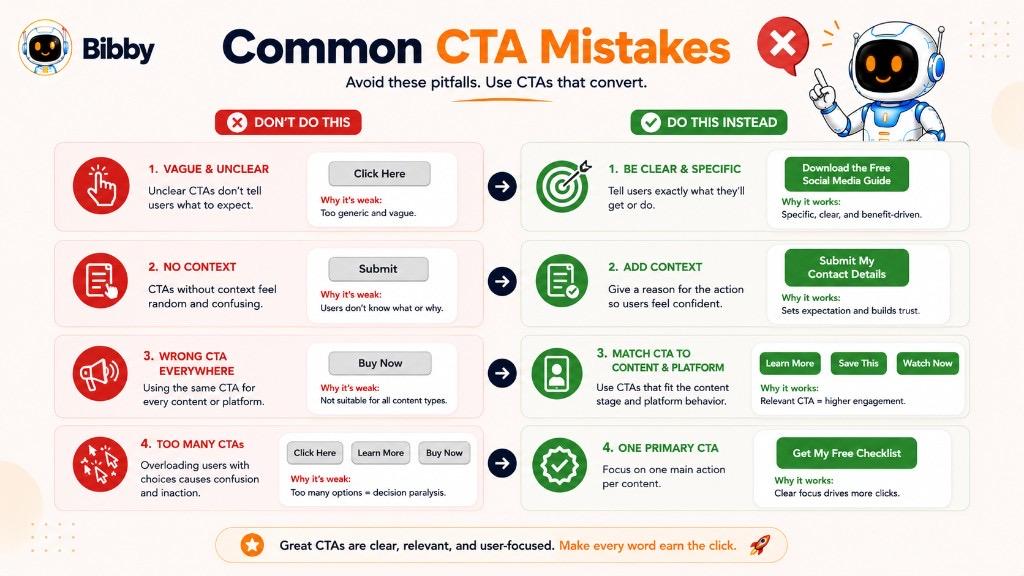
1. Using Vague CTAs
One of the most common mistakes is using words that do not tell the audience what they will get or what happens next.
For example:
“Click Here”
“Continue”
“Submit”
“More”
These phrases may technically tell users to take action, but they provide very little context.
A more specific CTA could be:
“Download the Free Guide”
or:
“See How It Works”
Specific language reduces uncertainty and makes the next step easier to understand.
2. Using Too Many CTAs at Once
Trying to accomplish everything with one post can make the audience unsure about what matters most.
For example:
“Like this post, comment below, share it, follow us, visit our website, download the guide, book a demo, and start your free trial.”
That is a lot of instructions packed into one CTA.
Instead, identify the primary objective.
If the goal is engagement:
“What do you think? Tell us below.”
If the goal is lead generation:
“Download the free guide.”
If the goal is conversion:
“Start your free trial.”
One clear primary action is often easier for the audience to understand.
3. Making Every CTA Sales-Focused
Not every social media interaction needs to end with a sales pitch.
If every post says:
“Buy Now.”
“Shop Now.”
“Book a Demo.”
your audience may begin to feel like every piece of content is trying to sell them something.
Educational and community-focused content can use softer CTAs such as:
- “Save this post.”
- “What do you think?”
- “Follow for more tips.”
- “Share this with your team.”
- “Read the full guide.”
A balanced content strategy can build trust before asking for a larger commitment.
4. Ignoring the Content's Purpose
The CTA should support the reason the content exists.
Imagine publishing a detailed educational carousel about 10 social media scheduling tips and ending with:
“Buy Now.”
Unless the post is directly connected to a product offer, the CTA may feel disconnected.
A more natural CTA would be:
“Save this carousel for your next content planning session.”
The CTA should complete the content rather than abruptly changing direction.
5. Using the Same CTA Everywhere
Repeating the exact same CTA across every post can make content feel predictable.
For example:
“Follow us for more tips.”
on every Instagram post, LinkedIn update, video, carousel, and Story quickly becomes background noise.
Instead, vary the CTA according to the content:
Educational post:
“Save this guide for later.”
Discussion post:
“What would you add?”
Video:
“Follow for Part 2.”
Product post:
“Explore the new features.”
This keeps the CTA relevant and gives different types of content a distinct purpose.
6. Making the CTA Too Long
A CTA does not need to explain the entire offer.
For example:
“Click the button below to learn more about all the different ways our platform can help you manage, create, schedule, and optimize your social media content.”
That is more of a paragraph than a CTA.
A cleaner version could be:
“See How Bibby Works.”
If additional explanation is necessary, place it around the CTA rather than packing everything into the action phrase.
7. Using Weak or Generic Action Words
Some CTAs fail because they do not communicate a meaningful action.
For example:
“More Information”
is less direct than:
“Explore the Full Guide.”
Similarly:
“Submit”
could become:
“Get My Free Quote.”
The goal is not to make every CTA clever. It is to make every CTA understandable.
8. Focusing Only on What the Business Wants
A CTA should consider the audience's benefit, not just the company's objective.
For example:
“Give us your email address.”
focuses entirely on the business's need.
A more audience-focused version might be:
“Get the Free Social Media Checklist.”
The business still receives the lead, but the audience understands what they receive in return.
9. Asking for Too Much Commitment Too Soon
Someone who has just discovered your brand may not be ready to book a sales call.
For a new audience member, a CTA such as:
“Learn More”
or:
“Follow for More Tips”
may be a more appropriate first step.
Later, after the person has explored the product and developed interest, a CTA such as:
“Book a Demo”
may make more sense.
The CTA should match the audience's level of intent.
10. Creating Fake Urgency
Using urgency can be effective when there is a genuine reason to act now.
But phrases such as:
“ACT NOW!!!”
“LAST CHANCE!!!”
“ONLY 5 MINUTES LEFT!!!”
can damage credibility when there is no real deadline.
Use urgency when it reflects something real, such as:
- A registration deadline
- A limited-time offer
- A genuine product launch
- Limited event capacity
- Early-access availability
For example:
“Register before Friday to reserve your seat.”
is useful when Friday is actually the registration deadline.
11. Ignoring Platform Behavior
A CTA should make sense for the platform where it appears.
For example:
“Click the link in our bio”
may make sense on Instagram when the relevant link is available there.
A LinkedIn post might instead use:
“Read the full report.”
A YouTube video could use:
“Subscribe for more tutorials.”
A TikTok video might use:
“Follow for Part 2.”
The CTA should reflect the actions the platform makes easy for users.
12. Forgetting About Mobile Users
A large amount of social media activity happens on mobile devices. CTAs should therefore be easy to read and interact with on smaller screens.
Avoid:
- Tiny CTA text
- Overcrowded graphics
- Long button labels
- Difficult-to-tap buttons
- Important CTA information hidden in dense copy
For social graphics, the CTA should remain readable without requiring users to zoom in.
13. Making the CTA Hard to Find
A CTA can be well-written but still underperform if people cannot see it.
On websites, make sure the CTA has enough visual distinction.
In social media captions, consider placing the CTA where it is easy to notice.
In videos, display or speak the CTA at a logical moment.
The goal is not to make the CTA visually aggressive. It should simply be discoverable.
14. Using Clickbait Instead of Clear Value
Curiosity can be useful, but misleading CTAs can damage trust.
For example:
“You Won't Believe What Happens Next!”
does not tell the audience what they will actually get.
A clearer CTA might be:
“Watch the Tutorial to See the Strategy in Action.”
The second version creates curiosity while still communicating the value.
15. Forgetting to Test CTA Performance
A CTA that sounds good is not automatically a CTA that performs well.
Different audiences may respond differently to:
“Start Free Trial”
and:
“Start Creating for Free.”
Testing can help determine which wording generates better results.
Depending on your goal, you can compare:
- Clicks
- CTR
- Comments
- Saves
- Shares
- Sign-ups
- Leads
- Purchases
- Conversion rate
The data can reveal what your audience actually responds to.
How to Fix a Weak CTA
A simple editing process can improve many CTA problems.
Ask:
Is the action clear?
If not, use a stronger action verb.
Is the benefit obvious?
If not, explain what the audience gets.
Does it match the content?
If not, choose an action that naturally follows the message.
Is it asking for too much?
If yes, reduce the commitment.
Is there too much happening at once?
If yes, choose one primary CTA.
Can the result be measured?
If not, consider how success will be tracked.
Weak vs. Strong CTA Examples
| Weak CTA | Stronger CTA |
|---|---|
| Click Here | Read the Full Guide |
| Submit | Get My Free Quote |
| Learn More | See How It Works |
| Download | Download the Free Checklist |
| Buy | Shop the Collection |
| Follow | Follow for Weekly Social Media Tips |
| Comment | Which Strategy Would You Try First? |
| Share | Share This With Your Marketing Team |
| Sign Up | Start Your Free Account |
| More Information | Explore the Complete Guide |
A strong CTA does not need to be flashy. It simply needs to make the next step clear, relevant, and worthwhile.
For social media teams managing content at scale, avoiding these mistakes across every post can become difficult. Bibby's AI-assisted workflow can help marketers create campaigns, generate and regenerate captions, develop posts, and manage content through its chat interface before scheduling it across selected social platforms. This gives marketers more opportunity to review the CTA as part of the complete content workflow instead of treating it as an afterthought.
CTA vs CTR vs Conversion
CTA, CTR, and conversion are closely related marketing terms, but they describe different things.
A CTA tells someone what to do.
CTR tells you how often people click.
A conversion tells you whether the desired outcome actually happened.
Understanding the difference is important because a CTA can receive plenty of clicks without necessarily producing valuable business results.
What Is a CTA?
A CTA (Call to Action) is the message that encourages someone to take a specific action.
Examples include:
- “Start Free Trial”
- “Download the Guide”
- “Shop Now”
- “Read the Full Article”
- “Save This Post”
- “Follow for More Tips”
The CTA is the instruction or invitation.
For example:
“Download the Free Social Media Checklist.”
That sentence is the CTA.
What Is CTR?
CTR stands for Click-Through Rate.
It measures the percentage of people who click a link or clickable element after seeing it.
A basic CTR formula is:
CTR = (Clicks ÷ Impressions) × 100
For example, if a link receives 100 clicks from 10,000 impressions:
CTR = (100 ÷ 10,000) × 100 = 1%
CTR is useful for understanding how effectively an ad, link, headline, button, or CTA encourages people to click.
However, a high CTR does not automatically mean a campaign is successful.
What Is a Conversion?
A conversion happens when someone completes the desired action defined by a campaign.
The conversion could be:
- Making a purchase
- Signing up
- Starting a free trial
- Booking a demo
- Downloading a resource
- Completing a form
- Registering for an event
- Subscribing to a service
The definition of conversion depends on the campaign objective.
For example, if a SaaS company wants people to start free trials, then a completed free-trial registration is a conversion.
What Is Conversion Rate?
Conversion rate measures the percentage of people who complete the desired conversion.
A basic formula is:
Conversion Rate = (Conversions ÷ Total Visitors or Relevant Interactions) × 100
For example, if 500 people visit a landing page and 25 sign up:
Conversion Rate = (25 ÷ 500) × 100 = 5%
The exact denominator can vary depending on what is being measured, so marketers should define the measurement clearly.
How to Measure CTA Performance
Writing a CTA is only the beginning. To understand whether it is actually working, you need to measure what happens after people see it.
The right metric depends on the action your CTA is asking people to take. A CTA designed to generate comments should not be judged by purchases, just as a sales CTA should not be judged only by likes.
The basic principle is:
CTA goal → Relevant action → Appropriate metric → Performance analysis
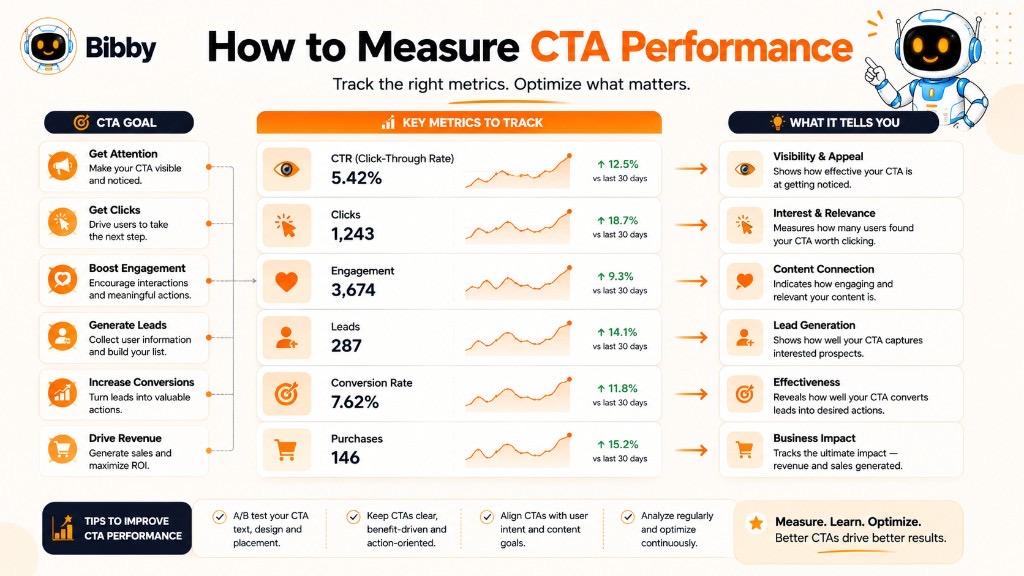
1. Define the CTA Goal First
Before measuring performance, identify what the CTA is supposed to accomplish.
For example:
- “Comment below” → Generate discussion
- “Save this post” → Increase saves
- “Follow us” → Grow followers
- “Read the full guide” → Drive website traffic
- “Download the guide” → Generate leads
- “Start your free trial” → Generate sign-ups
- “Buy now” → Generate purchases
Without a defined goal, it is difficult to determine whether a CTA is successful.
2. Track Click-Through Rate
Click-through rate (CTR) is one of the most common metrics for measuring clickable CTAs.
The basic formula is:
CTR = (Clicks ÷ Impressions) × 100
For example, if 20,000 people see an ad and 400 click the CTA:
CTR = (400 ÷ 20,000) × 100 = 2%
CTR can help you understand whether your CTA and surrounding content are encouraging people to click.
However, CTR alone does not tell you whether those clicks generated meaningful business results.
3. Measure Conversion Rate
If your CTA leads to a landing page, signup form, product page, or checkout process, track the percentage of users who complete the desired action.
A basic formula is:
Conversion Rate = (Conversions ÷ Relevant Visitors or Interactions) × 100
For example:
- 1,000 landing-page visitors
- 50 completed sign-ups
Conversion rate:
5%
A CTA may have a strong CTR but a weak conversion rate. In that situation, the problem may not be the CTA itself. The landing page, offer, pricing, form, or user experience may need attention.
4. Track Social Media Engagement
For social media CTAs, engagement metrics can be more useful than clicks.
Depending on the CTA, monitor:
- Comments
- Likes
- Shares
- Saves
- Mentions
- Profile visits
- New followers
- Replies
- Direct messages
For example, if your CTA is:
“Save this checklist for later.”
then saves are a more relevant success metric than clicks.
5. Measure Link Clicks
If your CTA sends people to another page, link clicks can show how many users followed the intended path.
For example:
“Read the full guide.”
You can measure:
- Link clicks
- Unique clicks
- CTR
- Landing-page visits
These metrics can help determine whether the CTA successfully moves people from social media to your website.
6. Track Leads Generated
For lead-generation CTAs, focus on the number and quality of leads rather than clicks alone.
For example:
“Book a Free Consultation.”
Useful metrics may include:
- Form submissions
- Demo requests
- Consultation bookings
- Qualified leads
- Cost per lead
- Lead-to-customer rate
A CTA that generates 20 highly qualified leads may be more valuable than one that generates 200 low-quality leads.
7. Track Purchases and Revenue
For sales-focused CTAs, the ultimate goal is usually revenue.
Examples:
“Shop Now.”
“Start Your Subscription.”
“Buy Now.”
Relevant metrics include:
- Purchases
- Revenue
- Average order value
- Conversion rate
- Customer acquisition cost
- Return on ad spend
- Revenue per visitor
This provides a clearer picture of whether the CTA is contributing to business outcomes.
8. Measure CTA Performance by Platform
The same CTA can perform differently across platforms.
For example, a social media campaign may use:
Instagram:
“Save this post for later.”
LinkedIn:
“Share your experience below.”
TikTok:
“Follow for Part 2.”
YouTube:
“Subscribe for more tutorials.”
The appropriate measurement also changes:
| Platform | CTA | Potential Primary Metric |
|---|---|---|
| Save this post | Saves | |
| Share this post | Shares | |
| Comment below | Comments | |
| TikTok | Follow for Part 2 | New followers |
| YouTube | Subscribe | Subscribers |
| Website | Start Free Trial | Sign-ups |
The goal is not to compare every platform using one universal metric. Instead, measure each CTA against its intended objective.
9. Compare Different CTA Variations
Testing different CTA versions can reveal which wording works better for your audience.
For example:
Version A:
“Start Your Free Trial.”
Version B:
“Start Creating for Free.”
Both CTAs encourage a trial, but the wording emphasizes different benefits.
You can test variations in:
- Action verbs
- Benefits
- Length
- Tone
- Urgency
- Personalization
- CTA placement
The important thing is to change meaningful elements while keeping the comparison as fair as possible.
10. Look Beyond Vanity Metrics
A CTA that generates thousands of likes is not automatically more successful than one that generates a smaller number of qualified leads.
For example:
CTA A
- 20,000 impressions
- 1,500 likes
- 50 website visits
- 2 leads
CTA B
- 10,000 impressions
- 600 likes
- 300 website visits
- 30 leads
CTA A looks stronger if you only consider likes.
CTA B may be much more valuable if the campaign's objective is lead generation.
This is why CTA performance should always be evaluated against the business objective.
11. Measure the Complete CTA Journey
For conversion-focused campaigns, look beyond the CTA itself.
A useful funnel is:
Impression → CTA Interaction → Click → Landing Page → Conversion → Customer
Each stage can reveal a different problem.
#### Low interaction
The CTA or content may not be compelling enough.
#### High clicks but low conversions
The landing page or offer may need improvement.
#### High conversions but poor profitability
The acquisition cost or offer economics may need attention.
This broader view prevents marketers from blaming the CTA for problems that actually happen elsewhere in the customer journey.
CTA Performance Measurement Table
| CTA Goal | CTA Example | Key Metrics |
|---|---|---|
| Comments | “Tell us what you think.” | Comments, engagement rate |
| Saves | “Save this guide.” | Saves |
| Shares | “Share this with your team.” | Shares |
| Followers | “Follow for more tips.” | New followers, profile visits |
| Traffic | “Read the full guide.” | Clicks, CTR |
| Leads | “Download the free guide.” | Leads, downloads, conversion rate |
| Demo requests | “Book a Demo.” | Bookings, qualified leads |
| Trials | “Start Free Trial.” | Sign-ups, conversion rate |
| Purchases | “Shop Now.” | Purchases, revenue |
| Video engagement | “Subscribe for more.” | Subscribers, watch time |
How Bibby Can Support CTA Testing and Optimization
For businesses publishing content across multiple social platforms, manually creating and testing different CTA variations can become time-consuming.
Bibby can help streamline the content workflow by allowing marketers to:
- Create campaigns
- Generate social media posts
- Generate and regenerate captions
- Refine messaging through chat
- Create different content formats
- Schedule posts across selected platforms
- Manage social media content from one workflow
The marketer still decides the campaign objective and evaluates the results, while AI can help reduce the repetitive work involved in creating and managing the content.
The most important rule is simple: measure the action that your CTA was designed to produce. A good CTA is not the one with the most clicks or likes. It is the one that helps achieve the goal behind the content.
How to A/B Test CTAs
A CTA that looks strong on paper may not necessarily be the one that performs best with your audience. Different words, benefits, tones, and placements can produce different results.
A/B testing, also called split testing, helps you compare two versions of a CTA to determine which one produces better results.
Instead of guessing which CTA is better, you can use actual audience behavior to make the decision.
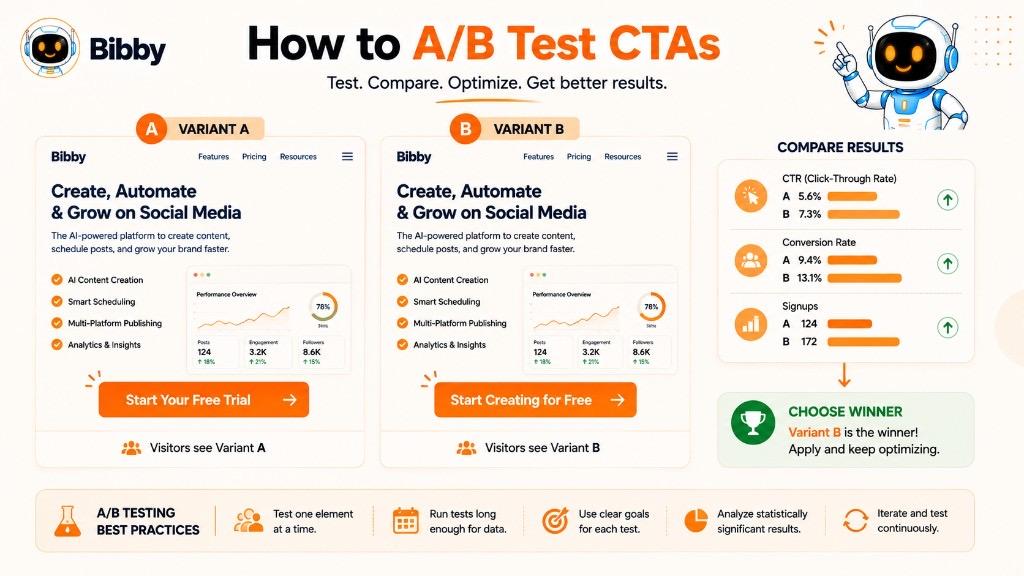
What Is A/B Testing for CTAs?
CTA A/B testing means creating two versions of a CTA and comparing their performance against the same objective.
For example:
Version A:
“Start Your Free Trial”
Version B:
“Start Creating for Free”
Both CTAs encourage people to begin a free trial, but they emphasize different ideas.
You can then compare their performance based on the campaign goal.
If the objective is trial sign-ups, you might compare:
- Click-through rate
- Sign-up rate
- Conversion rate
- Number of completed trials
Why Should You A/B Test CTAs?
Small changes in wording can influence how people respond.
For example, these CTAs have slightly different emphasis:
- “Download the Guide”
- “Get the Free Guide”
- “Download Your Free Guide”
- “Get My Free Social Media Guide”
The underlying offer is similar, but the language changes the way the action is presented.
A/B testing can help you discover:
- Which action verbs work best
- Which benefits resonate with your audience
- Whether shorter CTAs perform better
- Whether conversational language works better
- Whether urgency improves results
- Which CTA placement attracts more interaction
- Which message produces better-quality conversions
What CTA Elements Can You Test?
You can test several parts of a CTA.
#### 1. Action Verb
Compare:
“Start Free”
vs.
“Try It Free”
or:
“Get Started”
Different verbs can create different expectations.
#### 2. Benefit
Compare:
“Start Your Free Trial”
vs.
“Create Social Content for Free”
The first focuses on the offer. The second focuses on the activity or outcome.
#### 3. Length
Compare a short CTA:
“Start Free”
with a longer version:
“Start Creating and Scheduling Content for Free”
Shorter is not automatically better. The right length depends on the context.
#### 4. Tone
You can test a direct CTA against a conversational one.
Direct:
“Download the Guide.”
Conversational:
“Want the full strategy? Get the free guide.”
This can help determine which tone fits your audience.
#### 5. Urgency
When there is a genuine deadline, compare:
“Register Now”
with:
“Register Before Friday”
The second version adds a specific reason to act now.
Do not introduce artificial urgency simply to create a test variation.
#### 6. Personalization
You can compare general and audience-specific wording.
General:
“Get the Guide.”
Personalized:
“Get Your Social Media Guide.”
The personalized version may feel more relevant to the intended audience.
#### 7. CTA Placement
The wording is not the only variable.
You can test where the CTA appears:
- Beginning of caption
- End of caption
- Within the content
- Final carousel slide
- Video ending
- Landing-page hero section
- Below supporting information
Placement can influence whether people notice and act on the CTA.
How to Run a CTA A/B Test
Step 1: Define the Objective
Decide what success means before running the test.
For example:
Goal: Increase free-trial registrations.
Your primary metric should then be related to completed registrations rather than likes or impressions.
Step 2: Create Two CTA Variations
Keep the difference between the variations clear.
For example:
A:
“Start Your Free Trial”
B:
“Start Creating for Free”
Step 3: Keep Other Variables Consistent
If possible, keep the following the same:
- Audience
- Offer
- Landing page
- Content
- Campaign objective
- Budget
- Timing
This makes it easier to understand whether the CTA itself contributed to the difference.
Step 4: Collect Enough Data
Do not make a decision based on a handful of clicks.
The amount of data needed depends on your traffic, conversion rate, audience size, and test design. Smaller campaigns may require more time before a meaningful pattern becomes visible.
Step 5: Compare the Right Metric
If your goal is:
Engagement:
Measure comments, shares, saves, or other relevant interactions.
Traffic:
Measure clicks and CTR.
Leads:
Measure qualified leads and conversion rate.
Sales:
Measure purchases, revenue, and conversion rate.
The winning CTA should be the one that best supports the actual campaign objective.
Step 6: Apply the Learning
Once you have enough evidence, use the stronger CTA as the new baseline.
Then test another meaningful variation.
For example:
Test 1
A: “Start Your Free Trial”
B: “Start Creating for Free”
If B performs better, it becomes the new baseline.
Test 2
B: “Start Creating for Free”
C: “Create Your First Post for Free”
Over time, this process can help you build a better understanding of what your audience responds to.
CTA A/B Testing Example
Imagine a social media automation company wants to increase free-trial registrations.
The campaign uses the same creative, audience, offer, and landing page.
CTA A:
“Start Your Free Trial.”
CTA B:
“Create Your First Post for Free.”
After the test, suppose CTA B produces more completed registrations.
The result suggests that focusing on the immediate outcome, rather than simply mentioning the trial, may resonate better with this audience.
The lesson is not that “Create Your First Post for Free” is universally better.
It means that this audience, in this campaign, responded better to that particular message.
That distinction matters because there is no universally perfect CTA.
Common A/B Testing Mistakes
Testing Too Many Things at Once
If you change the CTA, creative, audience, headline, offer, and landing page simultaneously, it becomes difficult to determine what caused the result.
Choosing a Winner Too Quickly
A small early difference does not necessarily mean one CTA will remain better.
Measuring the Wrong Metric
A CTA may generate more clicks but fewer qualified leads. Looking only at CTR could lead you to choose the wrong winner.
Testing Nearly Identical Variations
Changing:
“Start Free”
to:
“Start for Free”
may produce very little useful insight.
Meaningful differences are generally more informative.
Ignoring Business Outcomes
A CTA should ultimately be evaluated according to the purpose of the campaign.
More clicks are useful when the objective is traffic. They are less important if those clicks do not lead to conversions.
CTA Testing Ideas
Here are some practical CTA variations marketers can test:
| Test Area | Version A | Version B |
|---|---|---|
| Action | Start Free | Try It Free |
| Benefit | Start Your Free Trial | Create for Free |
| Specificity | Download Now | Download the Free Guide |
| Tone | Get Started | Ready to Get Started? |
| Urgency | Register Now | Register Before Friday |
| Social engagement | Comment Below | What's Your Take? |
| Saves | Save This Post | Bookmark This Guide |
| Sharing | Share This Post | Share This With Your Team |
| Following | Follow Us | Follow for More Tips |
The key is to treat CTA testing as an ongoing optimization process rather than a one-time exercise.
For teams creating large volumes of social media content, AI can help generate multiple CTA and caption variations quickly. Bibby's chat-based workflow can support this process by helping users create campaigns, generate posts, regenerate captions, and refine messaging before scheduling content across selected social platforms. The performance data still determines which CTA deserves to become the next baseline.
CTA Personalization
A personalized CTA adapts the call to action to the audience, context, content, or stage of the customer journey instead of presenting the same message to everyone.
For example, a first-time visitor may see:
“Learn How It Works”
while someone who has already explored the product may see:
“Start Your Free Trial.”
Both CTAs promote the same general product, but they reflect different levels of user intent.
Personalization can make a CTA feel more relevant because it considers what the audience is likely to need or do next.
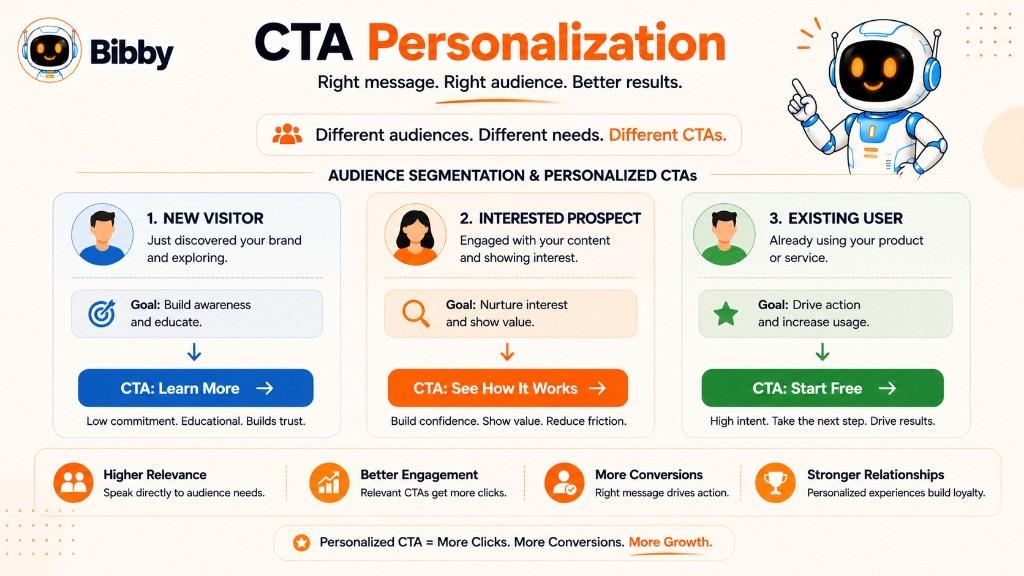
Why Does CTA Personalization Matter?
People interact with content for different reasons. A new visitor may want information, while an existing customer may want to take a specific action.
Using the same CTA for every person can create unnecessary friction.
A personalized CTA can help you:
- Make messaging more relevant
- Match the audience's intent
- Reduce unnecessary steps
- Improve engagement
- Support different customer journey stages
- Create more relevant offers
- Improve conversion opportunities
However, personalization should be useful rather than intrusive. You do not need to reference personal information simply because you have access to it.
1. Personalize CTAs by Customer Journey Stage
One of the most useful ways to personalize CTAs is by considering where someone is in the customer journey.
#### New Audience
Someone discovering your brand for the first time may respond to:
“Learn More”
or:
“Follow for More Tips.”
#### Interested Audience
Someone who has interacted with your content may be ready for:
“See How It Works.”
or:
“Explore the Features.”
#### High-Intent Audience
Someone who has already researched your product may be ready for:
“Start Your Free Trial.”
or:
“Book a Demo.”
This approach avoids asking every visitor to make the same level of commitment.
2. Personalize CTAs by Audience Segment
Different audiences can have different goals.
For example, a social media platform might serve:
- Small businesses
- Marketing agencies
- Freelancers
- Content creators
- E-commerce brands
A small business owner might respond well to:
“Save Time Managing Your Social Media.”
An agency might prefer:
“Manage Multiple Client Accounts.”
A content creator might respond to:
“Create More Content in Less Time.”
The underlying product may be the same, but the CTA highlights the outcome most relevant to each audience.
3. Personalize CTAs by Content Topic
The CTA should reflect what the audience just consumed.
Suppose you publish an article about social media content planning.
A relevant CTA could be:
“Get the Free Content Calendar.”
If the content is about social media automation, a better CTA might be:
“See How Social Media Automation Works.”
If the content is about Instagram growth:
“Explore More Instagram Growth Strategies.”
The content provides context, making the CTA feel more natural.
4. Personalize CTAs by User Intent
Not everyone searching for the same topic has the same intention.
Someone searching:
“What is social media automation?”
may need educational content.
A person searching:
“Best social media automation tool”
may be comparing solutions.
Someone searching:
“Social media automation software free trial”
may already be ready to test a product.
The CTA can reflect these different levels of intent:
Informational:
“Learn More.”
Commercial research:
“Compare Features.”
High intent:
“Start Your Free Trial.”
This creates a more logical progression from information to action.
5. Personalize CTAs by Platform
The same campaign can use different CTAs on different social platforms.
For example:
Instagram:
“Save this post for later.”
LinkedIn:
“Share your experience in the comments.”
TikTok:
“Follow for Part 2.”
YouTube:
“Subscribe for more tutorials.”
The campaign message remains consistent, but the CTA adapts to the way users interact with each platform.
6. Personalize CTAs by Content Format
A CTA can also change based on whether the audience is viewing an image, carousel, video, Story, or text post.
Carousel:
“Save this checklist for your next campaign.”
Short video:
“Follow for Part 2.”
Story:
“Tap the link to explore the guide.”
Educational post:
“What would you add? Tell us below.”
The format determines which action feels most natural.
7. Personalize CTAs by Customer Status
Existing customers often need different CTAs from new prospects.
For example:
New visitor:
“Explore the Platform.”
Trial user:
“Create Your First Campaign.”
Existing customer:
“Create Your Next Campaign.”
Inactive customer:
“See What's New.”
The CTA becomes more useful when it reflects the person's current relationship with the product.
8. Personalize the Benefit, Not Just the Name
CTA personalization does not have to mean adding someone's name.
Compare:
“John, Start Your Free Trial.”
with:
“Create and Schedule Your Social Content Faster.”
The second version personalizes the value proposition rather than simply inserting personal information.
For many marketing campaigns, relevance is more useful than superficial personalization.
9. Use Contextual Personalization
Context can also make a CTA more relevant.
For example, after an article about content calendars:
“Ready to plan next month's content? Get the free calendar.”
After an article about social media scheduling:
“Ready to stop scheduling posts manually? See how automation works.”
After a guide about social media captions:
“Need captions for your next campaign? Create them with AI.”
The CTA feels connected because it responds directly to the reader's current topic.
CTA Personalization Examples
| Audience or Context | Generic CTA | Personalized CTA |
|---|---|---|
| New visitor | Get Started | Learn How It Works |
| Interested prospect | Get Started | Explore the Features |
| High-intent visitor | Learn More | Start Your Free Trial |
| Small business | Try It | Save Time Managing Social Media |
| Agency | Get Started | Manage Client Content Faster |
| Content creator | Learn More | Create More Content in Less Time |
| Educational content | Learn More | Save the Guide for Later |
| Product content | Buy Now | Explore the New Collection |
| Existing user | Get Started | Create Your Next Campaign |
Avoid Over-Personalization
Personalization should make the CTA more useful, not make the audience uncomfortable.
Avoid adding personal details that are unnecessary for the action.
For example, a simple:
“Get Your Free Guide”
may be better than a CTA filled with personal references that do not add value.
The objective is relevance, not personalization for its own sake.
AI and CTA Personalization
AI can make it easier to create CTA variations for different audiences, content types, platforms, and campaigns.
For example, one campaign could generate variations such as:
For small businesses:
“Save Time Managing Your Social Media.”
For agencies:
“Manage More Client Content in Less Time.”
For creators:
“Create and Schedule More Content.”
The marketer can then select, refine, or test the versions that best fit the campaign.
Bibby's chat-based workflow can support this type of content creation by helping users create campaigns, generate posts, regenerate captions, and refine messaging conversationally. Instead of manually rewriting every CTA from scratch, marketers can use AI to produce variations while keeping the campaign's core objective consistent.
The most effective personalization is ultimately simple: give the right audience the right next step at the right moment.
AI and CTAs
Artificial intelligence is changing how marketers create, personalize, test, and manage CTAs. Instead of writing every call to action manually, marketers can use AI to generate multiple variations, adapt messaging to different audiences, and align CTAs with specific content and campaign goals.
However, AI does not automatically create an effective CTA simply by adding persuasive words. The CTA still needs a clear objective, relevant audience, useful offer, and appropriate context.
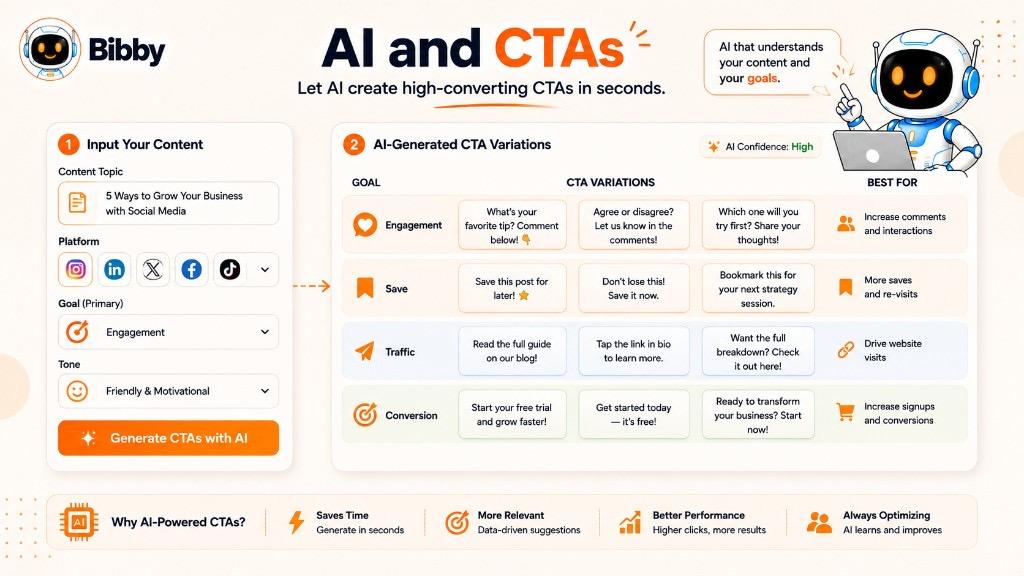
How Can AI Help Create CTAs?
AI can assist with several parts of the CTA creation process.
1. Generate CTA Variations
A single piece of content can support several possible CTAs.
For example, a post about social media automation could use:
Engagement CTA:
“What part of social media management takes the most time? Tell us below.”
Save CTA:
“Save this workflow for your next content planning session.”
Traffic CTA:
“Read the complete guide to social media automation.”
Conversion CTA:
“Start creating and scheduling your social content for free.”
AI can generate these variations quickly, allowing marketers to choose the version that best fits the campaign objective.
2. Match CTAs to Content
AI can analyze the context of a post and suggest a CTA that naturally follows the message.
For example, if the content explains:
“10 ways to improve your social media content strategy”
AI might suggest:
“Save these strategies for your next content planning session.”
If the content promotes a new product feature, it may instead suggest:
“Explore the new feature today.”
The important idea is that the CTA should be connected to the content rather than randomly attached to it.
3. Create Platform-Specific CTAs
Different social platforms encourage different types of interactions.
AI can help adapt a campaign CTA for each platform.
Instagram:
“Save this post for later.”
LinkedIn:
“What has worked for your business? Share your experience.”
TikTok:
“Follow for Part 2.”
YouTube:
“Subscribe for more tutorials.”
The campaign can maintain a consistent message while the CTA changes to fit the platform.
4. Generate CTAs for Different Content Formats
AI can also adapt CTAs according to the content format.
For example:
Carousel:
“Swipe through the full checklist and save it for later.”
Short video:
“Follow for more strategies.”
Story:
“Tap the link to get the complete guide.”
Educational post:
“What would you add? Tell us in the comments.”
Product post:
“Explore the collection.”
This can reduce the repetitive work involved in managing content across multiple formats.
5. Personalize CTA Messaging
AI can generate CTA variations for different audience segments.
For example:
Small business audience:
“Save Time Managing Your Social Media.”
Marketing agency:
“Manage More Client Content in Less Time.”
Content creator:
“Create and Schedule More Content.”
Each CTA focuses on a different audience need while supporting the same broader product or campaign.
6. Generate CTAs for Different Funnel Stages
AI can also help marketers create CTAs that match the customer journey.
Awareness:
“Follow for More Social Media Tips.”
Interest:
“Learn How Social Media Automation Works.”
Consideration:
“Explore the Features.”
Conversion:
“Start Your Free Trial.”
Retention:
“Create Your Next Campaign.”
This helps prevent the common mistake of asking every audience member to make the same level of commitment.
7. Improve Existing CTAs
AI does not always need to create a CTA from scratch.
You can provide an existing CTA and ask for alternatives.
For example:
Original:
“Click here to learn more.”
Possible alternatives:
- “Explore the Complete Guide.”
- “See How It Works.”
- “Discover the Full Strategy.”
- “Learn More About Social Media Automation.”
The marketer can then select the version that best matches the content.
8. Create CTA Variations for Testing
AI can quickly produce different versions for A/B testing.
For example:
Version A:
“Start Your Free Trial.”
Version B:
“Start Creating for Free.”
Version C:
“Create Your First Post for Free.”
These variations can then be tested against the campaign objective to determine which message performs better.
AI makes the generation of alternatives faster. The actual performance data still determines which CTA is most effective.
AI-Generated CTAs Still Need Human Review
AI can produce dozens of CTA ideas in seconds, but more options do not automatically mean better marketing.
Human review is still important for checking:
- Accuracy
- Brand voice
- Relevance
- Audience fit
- Platform conventions
- Offer details
- Tone
- Clarity
- Compliance
- Genuine urgency
For example, AI might generate:
“Claim Your Limited-Time Offer Now!”
If there is no actual limited-time offer, the CTA should not be used.
AI should support the marketer's judgment, not replace it.
AI and Social Media CTA Automation
The biggest opportunity comes when CTA creation becomes part of the larger social media workflow.
Instead of:
Create Post → Write Caption → Think of CTA → Rewrite → Schedule Manually
an AI-assisted workflow can become:
Create or Upload Content → Choose Posting Style → Generate Caption → Refine CTA → Schedule → Publish
This can make social media content production more consistent and reduce repetitive manual work.
How Bibby Can Help With AI-Powered CTA Workflows
Bibby combines AI-assisted content creation with social media scheduling and automation.
Users can work through the platform's chat interface to:
- Create a brand kit
- Create campaigns
- Create posts
- Generate captions
- Regenerate captions
- Refine messaging
- Develop different content variations
- Schedule content
- Manage social media publishing
For example, a marketer could ask Bibby to create a campaign for a new product and then refine the CTA for different content goals.
A single campaign could include:
Educational post:
“Save this guide for later.”
Engagement post:
“What do you think? Tell us below.”
Product post:
“See how it works.”
Conversion post:
“Start creating for free.”
This allows the CTA to be planned as part of the campaign rather than added after the content is finished.
The Future of AI-Powered CTAs
AI is making CTA creation faster and more flexible, but the fundamentals remain unchanged.
A good CTA still needs to answer:
What should the audience do?
Why should they do it?
Why is this the right next step for them?
AI can help generate the words, adapt them to different contexts, and create variations at scale. The marketer still needs to define the objective and judge whether the CTA makes sense.
The strongest AI-assisted CTA workflow is therefore not about generating the cleverest phrase. It is about creating relevant, platform-appropriate, goal-driven calls to action at scale.
How Bibby Helps Create CTA-Driven Social Media Content
Creating a strong CTA is only one part of a successful social media workflow. You also need to create the visual, write the caption, choose the right posting style, adapt the content for different platforms, and publish it at the right time.
This is where Bibby can simplify the process.
Bibby is an AI-powered social media scheduling and automation platform that brings content creation, caption generation, campaign management, and scheduling into one workflow. Instead of switching between multiple tools for different parts of your social media strategy, you can manage much of the process from a single platform.
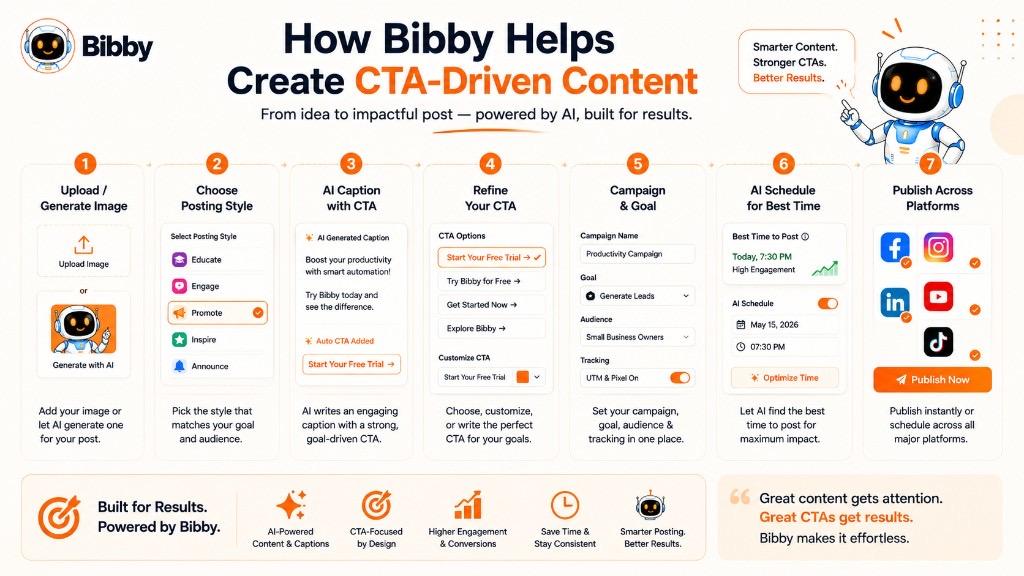
Create Content and Add the Right CTA
Bibby's workflow starts with your content.
You can upload an image or use AI to generate one. From there, you can choose your preferred posting style and let Bibby help create the accompanying social media content.
The CTA can then become part of the overall message.
For example, suppose you upload an educational graphic about social media planning. Instead of manually writing everything around it, you can build a post around an objective such as increasing saves.
The resulting CTA could be:
“Save this post for your next content planning session.”
For a product-focused post, the CTA could instead encourage a conversion:
“Start creating and scheduling your social content for free.”
The important point is that the CTA supports the purpose of the post.
Generate and Regenerate Captions
A CTA often appears at the end of a social media caption, but the wording needs to match the tone and purpose of the entire post.
Bibby can generate captions for your content and allows you to regenerate or refine them when the first version is not quite right.
For example, you might start with:
“Here are five ways to improve your social media workflow.”
You can then refine the messaging around a specific objective:
“Managing social media across multiple platforms can quickly become time-consuming. These five workflow improvements can help you organize your content and publish more consistently. Save this post and use these tips when planning your next campaign.”
The CTA becomes part of the caption rather than an unrelated line added at the end.
Create Campaigns With Different CTA Goals
Not every post in a campaign needs to use the same CTA.
A campaign can contain different content designed to move the audience through different actions.
For example:
Post 1: Awareness
“Follow us for more social media strategies.”
Post 2: Engagement
“What is the biggest challenge you face when managing social media? Tell us below.”
Post 3: Education
“Save this checklist for your next campaign.”
Post 4: Product consideration
“See how the workflow works.”
Post 5: Conversion
“Start creating your social content for free.”
Each CTA has a different purpose, while all five posts contribute to the same campaign.
Manage Social Media Through Chat
Bibby's chat interface adds another layer to the workflow. Instead of navigating through separate screens for every task, you can interact with the platform conversationally.
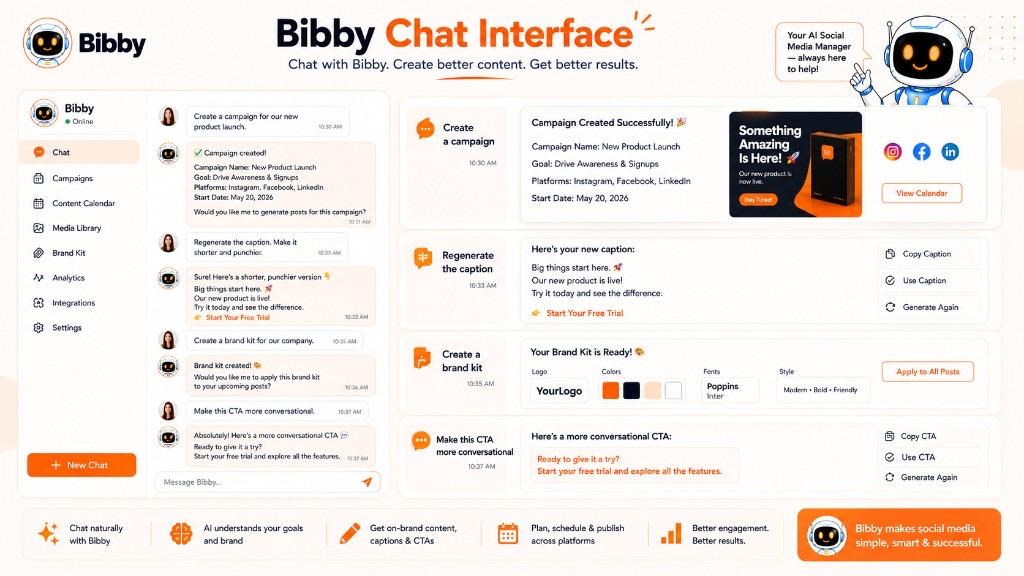
Within the chat, you can use Bibby to:
- Create a brand kit
- Create a campaign
- Create posts
- Generate captions
- Regenerate captions
- Refine messaging
- Manage content
- Work with your social media publishing workflow
This makes it easier to refine a CTA while you are already working on the content surrounding it.
For example, you could ask for a more conversational CTA for an educational post, a stronger conversion CTA for a product campaign, or several variations for testing.
Keep CTAs Consistent With Your Brand
A CTA should sound like your brand.
A professional B2B company may use:
“Book a consultation to explore your options.”
A creator-focused brand might use:
“Follow for more content ideas.”
An e-commerce brand may use:
“Explore the new collection.”
Consistency becomes particularly important when publishing content frequently across several social platforms.
Bibby's brand kit functionality can help keep your broader content aligned with your established brand identity while you create and manage campaigns.
Schedule CTA-Driven Content Across Platforms
Once the content and CTA are ready, the next challenge is publishing.
Bibby allows you to schedule social media content across selected platforms, including Facebook, Instagram, LinkedIn, YouTube, and TikTok.
This means a campaign can be planned as a complete sequence rather than as individual posts created and published manually.
For example:
Monday: Educational post → “Save this guide.”
Wednesday: Discussion post → “Tell us your experience.”
Friday: Product post → “See how it works.”
Sunday: Conversion post → “Start creating for free.”
The CTA changes according to the purpose of each post, while the campaign maintains a consistent direction.
Use Different Content Formats
CTAs also need to work with different types of social media content.
Bibby supports workflows involving formats such as:
- Images
- Carousels
- Videos
- Stories
- Other social media posts
That gives marketers more flexibility when building CTA-driven campaigns.
For example:
Carousel:
“Save this checklist for later.”
Video:
“Follow for Part 2.”
Story:
“Tap the link to learn more.”
Product image:
“Explore the collection.”
The CTA can therefore adapt to the content format instead of forcing every post into the same structure.
A Simpler CTA-Driven Workflow
With Bibby, the broader process can look like:
Upload or Generate Visual → Choose Posting Style → Generate Caption → Refine CTA → Create Campaign → Schedule → Publish
This approach treats the CTA as part of the content strategy from the beginning.
Instead of creating a post first and asking, “What CTA should I add?”, you can start with the campaign objective and build the content around the action you want the audience to take.
The CTA Still Needs Strategy
Automation does not mean every CTA should be generated and published without review.
Before publishing, consider:
- What is the goal of this post?
- What action should the audience take?
- Does the CTA match the content?
- Is the CTA appropriate for the platform?
- Is the requested action easy to complete?
- Does the CTA fit the brand voice?
- How will success be measured?
Bibby can reduce the repetitive work involved in creating and scheduling social content, but the strategic decision still comes down to understanding your audience and campaign objective.
A good CTA tells people what to do next. A good CTA-driven workflow makes sure that action fits the content, campaign, platform, and customer journey.
CTA Examples for Bibby Users
If you use Bibby to create and schedule social media content, your CTA should reflect the purpose of each post. A campaign can contain educational posts, engagement posts, promotional content, and conversion-focused posts, with each one using a different CTA.
Here are practical CTA examples you can adapt for Bibby campaigns.
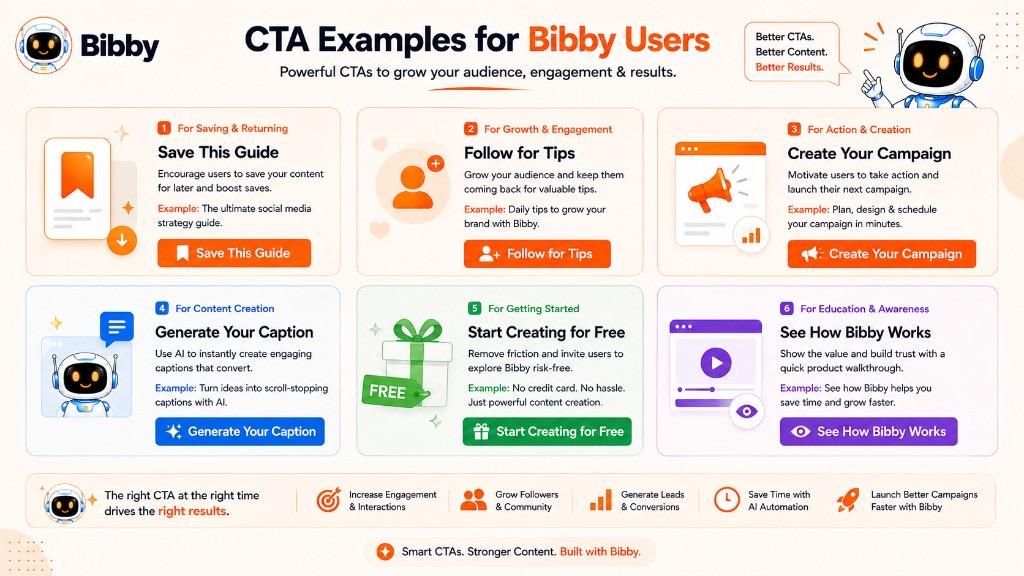
CTA Examples for Engagement
Use engagement CTAs when you want to start conversations and encourage your audience to participate.
Examples:
- “What do you think? Tell us below.”
- “Which strategy would you try first?”
- “What is your biggest social media challenge?”
- “Which platform do you use most?”
- “What would you add to this list?”
- “Share your experience in the comments.”
- “Do you agree? Tell us why.”
Example Bibby post:
Managing multiple social media platforms can be challenging. Which part of social media management takes the most time for you? Tell us in the comments.
CTA Examples for Saves
Educational content, checklists, frameworks, and tutorials can use save-focused CTAs.
Examples:
- “Save this post for later.”
- “Save this checklist for your next campaign.”
- “Bookmark this guide for your next content planning session.”
- “Keep these tips handy.”
- “Save this workflow before planning your next campaign.”
Example:
These five steps can help you build a more organized social media workflow. Save this post and come back to it when planning your next campaign.
CTA Examples for Shares
Share CTAs work particularly well when the content solves a common problem or provides useful information.
Examples:
- “Share this with your marketing team.”
- “Send this to someone managing social media.”
- “Know a business owner who needs this? Share it with them.”
- “Share this guide with your team.”
- “Tag someone who should see this.”
Example:
Managing social media across multiple platforms can quickly become overwhelming. Share this with someone who is still managing everything manually.
CTA Examples for Growing Followers
If your goal is audience growth, explain what people can expect after following.
Examples:
- “Follow us for more social media strategies.”
- “Follow for practical content marketing tips.”
- “Want more tips like this? Follow us.”
- “Follow for weekly social media insights.”
- “Follow us for more AI-powered marketing ideas.”
Example:
Want more practical ways to simplify social media management? Follow us for new strategies and tips.
CTA Examples for Website Traffic
Use these when your social media post is designed to introduce an audience to a longer resource.
Examples:
- “Read the full guide.”
- “Explore the complete strategy.”
- “Learn more on our website.”
- “See how it works.”
- “Read the complete article.”
- “Explore the full workflow.”
Example:
Want to understand how AI can simplify your social media workflow? Read the complete guide to social media automation.
CTA Examples for Bibby Product Awareness
When introducing Bibby's capabilities, the CTA can focus on exploration rather than immediately asking for a purchase.
Examples:
- “See how Bibby works.”
- “Explore Bibby's social media workflow.”
- “Discover a simpler way to manage social media.”
- “See how AI can simplify your workflow.”
- “Explore the platform.”
- “Learn how Bibby can help.”
Example:
Upload your content, generate captions with AI, choose your posting style, and schedule your posts across your selected platforms. See how Bibby works.
CTA Examples for Free Usage or Trial
For conversion-focused Bibby content, the CTA can emphasize getting started and creating content.
Examples:
- “Start creating for free.”
- “Get started with Bibby.”
- “Create your first post.”
- “Start scheduling your content.”
- “Try Bibby today.”
- “Start automating your social media workflow.”
Example:
Ready to spend less time managing social media? Start creating and scheduling your content with Bibby.
CTA Examples for AI Features
When promoting Bibby's AI capabilities, focus on the outcome rather than simply mentioning artificial intelligence.
Examples:
- “Let AI create your next caption.”
- “Generate your next social post.”
- “Create content with AI.”
- “Let AI help plan your next campaign.”
- “Generate and refine your captions.”
- “Create your next campaign with AI.”
Example:
Upload an image, choose your posting style, and let AI help turn it into social media content. Create your next post with Bibby.
CTA Examples for Bibby's Chat Interface
Bibby's chat-based workflow can also inspire conversational CTAs.
Examples:
- “Tell Bibby what you want to create.”
- “Start managing your social media through chat.”
- “Create your next campaign through chat.”
- “Ask Bibby to create your next post.”
- “Let Bibby help build your next campaign.”
Example:
Need a new social media campaign? Tell Bibby what you want to promote and let the AI-assisted workflow help you build it. Start your next campaign through chat.
CTA Examples for Creating a Brand Kit
When introducing Bibby's brand kit functionality, use CTAs that encourage users to establish consistent branding.
Examples:
- “Create your brand kit.”
- “Set up your brand identity.”
- “Build your brand kit with Bibby.”
- “Keep your social content on brand.”
- “Set up your brand before creating your next campaign.”
Example:
Your social media content should look and sound consistent wherever you publish. Create your brand kit and build your next campaign around it.
CTA Examples for Campaign Creation
Campaign-focused CTAs can encourage users to move from individual posts to a more organized content strategy.
Examples:
- “Create your next campaign.”
- “Build your social media campaign.”
- “Plan your next campaign with Bibby.”
- “Turn your idea into a campaign.”
- “Start building your campaign.”
Example:
Have one idea but multiple posts to create? Turn it into a complete social media campaign with Bibby.
CTA Examples for Caption Generation and Regeneration
Captions are another area where CTA variations can become useful.
Examples:
- “Generate your next caption.”
- “Create a caption with AI.”
- “Need a better caption? Regenerate it.”
- “Refine your caption with AI.”
- “Create multiple caption variations.”
Example:
Your first caption does not have to be your final caption. Regenerate and refine it until it fits your post.
CTA Examples for Different Bibby Content Formats
Because Bibby supports different types of social content, the CTA can change with the format.
Image post:
“Save this tip for later.”
Carousel:
“Swipe through the checklist and save it for your next campaign.”
Video:
“Follow for more social media strategies.”
Story:
“Tap the link to learn more.”
Educational post:
“What would you add? Tell us below.”
Product post:
“See how Bibby works.”
CTA Examples for Different Bibby Campaign Objectives
| Campaign Objective | Example CTA |
|---|---|
| Build awareness | “Discover a simpler way to manage social media.” |
| Increase engagement | “What part of social media takes the most time? Tell us below.” |
| Increase saves | “Save this workflow for your next campaign.” |
| Increase shares | “Share this with someone managing multiple platforms.” |
| Grow followers | “Follow for more social media automation tips.” |
| Drive traffic | “Read the complete guide.” |
| Promote AI features | “Create your next post with AI.” |
| Promote chat | “Start managing your social media through chat.” |
| Promote campaigns | “Create your next campaign with Bibby.” |
| Drive trial usage | “Start creating for free.” |
How to Choose the Right CTA for a Bibby Post
Before publishing a Bibby-related post, ask three questions:
What is this post about?
Is it educational, promotional, product-focused, or community-driven?
What should the audience do next?
Should they comment, save, share, explore, create, or start using Bibby?
What is the campaign objective?
Are you trying to build awareness, generate engagement, drive traffic, or encourage product adoption?
For example, an educational post about social media automation may use:
“Save this guide for your next campaign.”
A product demonstration could use:
“See how Bibby's workflow works.”
A conversion-focused post could use:
“Start creating and scheduling your social content for free.”
The CTA should change with the objective. There is no need to make every Bibby post sound like a sales pitch.
The strongest CTA is the one that gives the audience a clear, relevant next step while naturally continuing the conversation started by the content.
Key Takeaways
- A CTA (Call to Action) is a clear instruction that tells your audience what to do next—turning passive attention into comments, clicks, saves, follows, sign-ups, or purchases.
- The best CTA matches your content, platform, audience intent, and marketing goal rather than using generic phrases like "Click Here."
- CTA types span engagement, lead generation, website traffic, conversion, and community-building—each designed for a different outcome.
- On social media, CTAs should feel native to the format—save prompts for educational carousels, questions for discussion posts, and link in bio prompts for Instagram traffic.
- Measure CTA performance through CTR, clicks, engagement, and conversion rate—then use A/B testing to refine wording and placement.
- Bibby helps teams embed strong CTAs into AI-generated captions, campaigns, and multi-platform scheduling workflows so every post has a purposeful next step.