
A DM (Direct Message) is a private message sent from one person or account to another through a social media platform. Unlike a public comment, post, or reply, a DM is generally visible only to the people involved in the conversation. You can use direct messages to ask questions, share information, discuss a product or service, connect with someone professionally, or simply have a private conversation.
Today, DMs are an important part of how people communicate on social media. Platforms such as Instagram, Facebook, LinkedIn, TikTok, and X provide messaging features that let users communicate beyond the public feed. For businesses and marketers, DMs can also become a valuable channel for customer support, lead generation, relationship building, and social selling.
Here, you will learn:
- What DM means and how a Direct Message works
- How DMs differ from comments, mentions, and message requests
- How marketers and businesses use DMs without turning them into spam
Let's start with the basic definition.
What Does DM Mean?
DM stands for Direct Message. It refers to a private message sent directly to another user through a social media platform or messaging service. Unlike a public comment or post, a DM is intended for a private conversation between the sender and recipient, although some platforms also support group messaging.
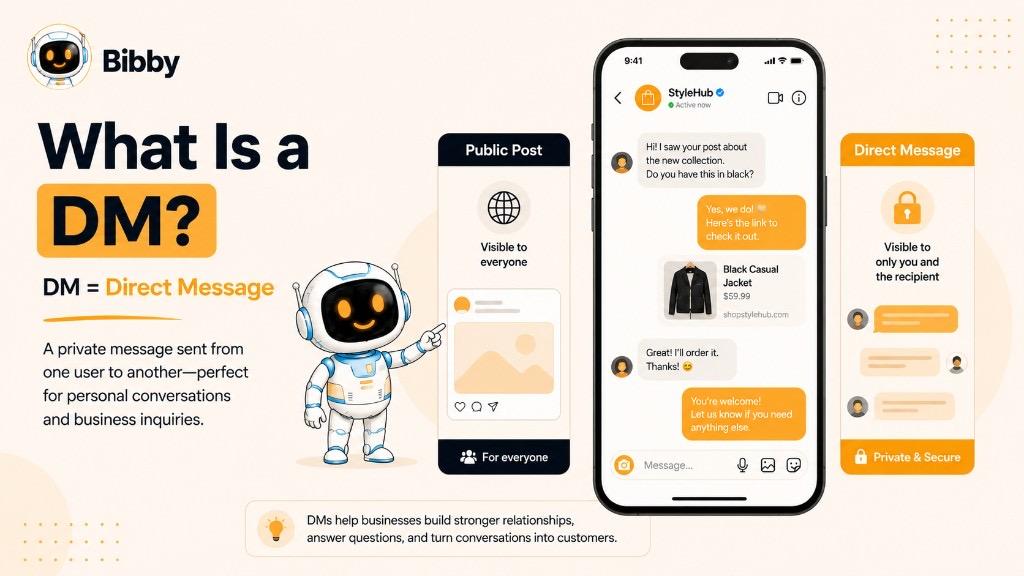
The term DM is widely used across social media. “Check your DMs” means that someone has sent you a private message that you can find in your social media inbox.
For example, imagine a business publishes a post about a new service. Someone might publicly comment, “How much does this cost?” The business could answer publicly, but it could also invite the person to continue the conversation through a DM if more detailed or personalized information is needed.
What Does DM Mean on Social Media?
On social media, a DM generally means a private conversation between users. The exact features and terminology can vary from one platform to another, but the basic idea remains the same: instead of communicating publicly through a post or comment, users communicate through a private messaging channel.
DMs can be used for many purposes, including:
- Asking questions about a product or service
- Talking with friends and followers
- Connecting with potential clients
- Providing customer support
- Discussing business opportunities
- Sharing posts, images, videos, or links
- Following up with leads
- Networking with other professionals
- Building relationships with an audience
For businesses, DMs can be particularly useful because they move conversations from the public social media feed into a more personal communication space.
What Does “Send Me a DM” Mean?
When someone says “Send me a DM,” they simply mean “Send me a private message.”
For example:
Public post:
“Want to know more about our new service? Send us a DM.”
This means interested users should open the platform's messaging feature and privately contact the business. The phrase is common on Instagram, Facebook, TikTok, LinkedIn, X, and other platforms that support direct messaging.
Is DM the Same as a Private Message?
In most everyday social media conversations, DM and private message mean essentially the same thing. Some platforms may use different names for their messaging features, but users often use “DM” as a general term for private social media communication.
So, if someone asks, “Can I DM you?”, they are asking whether they can contact you privately rather than communicating through a public post or comment.
What Is a Direct Message?
A Direct Message (DM) is a private communication sent from one social media account to another. Instead of appearing publicly on a profile, post, video, or comment section, the message is delivered through the platform's private messaging system.
Direct messages can be as simple as a short text such as “Hi, I have a question,” or they can become longer conversations involving multiple messages, images, videos, links, voice notes, reactions, and other features supported by the platform.
For example, if someone sees a social media post from a clothing brand and wants to ask about the availability of a particular product, they can send the brand a DM rather than posting their question publicly.
How Does a Direct Message Work?
Although the exact process differs between social media platforms, sending a DM generally involves a few simple steps:
- Open the social media platform.
- Go to the messaging or inbox section.
- Select the person, creator, business, or account you want to contact.
- Write your message.
- Add supported media, such as an image, video, or link, if needed.
- Send the message.
- Continue the conversation when the recipient responds.
Some platforms may place messages from people you do not already follow or connect with into a message request or similar inbox. The recipient may need to accept the request before the conversation moves into their regular messages.
What Can You Send in a DM?
The features available inside a DM depend on the platform, but direct messages can support much more than plain text.
Depending on the social network, users may be able to send:
- Text messages
- Images
- Videos
- Links
- Posts or content shared from the platform
- Emojis and reactions
- GIFs or stickers
- Voice messages
- Files or other supported content
This makes DMs useful for both casual conversations and more detailed business communication.
Why Are Direct Messages Useful?
The biggest advantage of a DM is privacy. A public comment is visible to other users, while a direct message allows the conversation to happen privately.
For individuals, DMs make it easier to have personal conversations, network, ask questions, and communicate with friends or creators.
For businesses, DMs can provide a direct communication channel for:
- Customer questions
- Product inquiries
- Service discussions
- Customer support
- Lead qualification
- Sales conversations
- Partnership opportunities
- Community engagement
A social media post may attract someone's attention, but a DM can give that person a direct path to the brand.
Example of a Direct Message
Imagine a software company publishes a post about its new social media automation features.
A potential customer comments:
“Does this work for multiple social media platforms?”
The company could answer publicly:
“Yes, it supports multiple platforms.”
Or it could invite the person to continue the conversation privately:
“Absolutely. I'll send you the details in a DM.”
The DM can then become a more personalized conversation about the customer's requirements, pricing, features, or next steps.
This is why direct messaging has become an important part of modern social media communication. A DM isn't simply another way to send a message. It creates a private space where a public social media interaction can develop into a one-to-one conversation.
How Does a DM Work on Social Media?
A DM works through a social media platform's private messaging system. Instead of publishing a message to a public feed, you select another account and send the message directly to its inbox. The recipient can then read the message and respond privately.
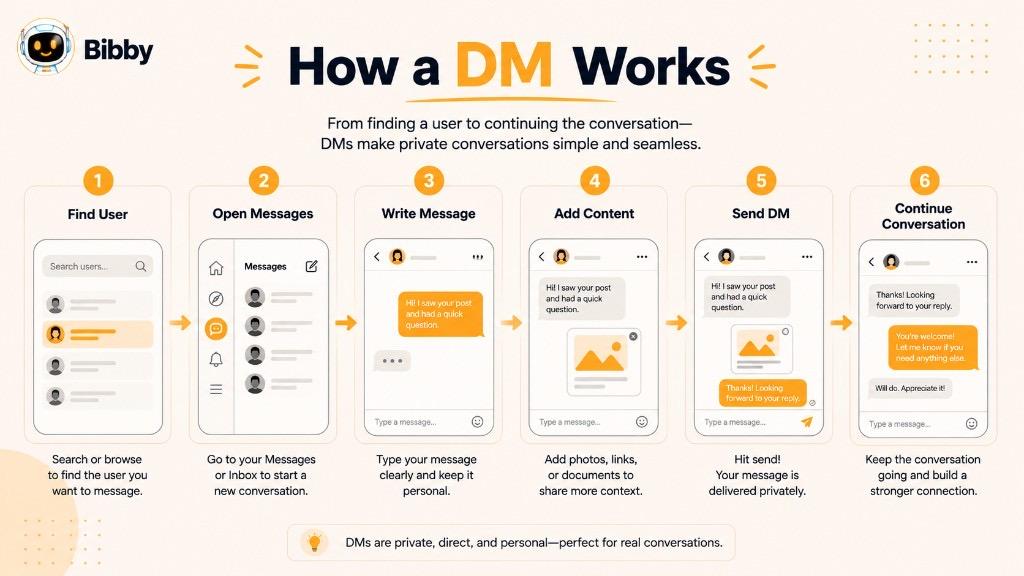
While the exact interface and features vary between platforms, the basic process is similar across most social networks.
1. Open the Messaging Inbox
Start by opening the social media platform and finding its messaging feature. This may appear as a Messages, Inbox, or chat icon, depending on the platform.
2. Choose a Person or Account
Select an existing conversation or search for the person, creator, business, or account you want to contact.
Depending on the platform's privacy settings, you may not always be able to send a regular DM to every account. Some messages may instead appear as message requests.
3. Write Your Message
Type the message you want to send. A DM can be a simple question, a professional introduction, customer inquiry, feedback, or any other appropriate private communication.
For example:
“Hi, I saw your post about social media automation. Could you tell me more about how it works?”
4. Add Media or Other Content
Many social platforms allow users to add more than text to their DMs. Depending on the platform, you may be able to share images, videos, links, posts, reactions, voice messages, GIFs, or other supported content.
5. Send the DM
Once your message is ready, select the send option. The message will appear in the recipient's private inbox or message-request area.
6. Continue the Conversation
If the recipient responds, the DM can develop into an ongoing private conversation. This is particularly useful for businesses because a short question can become a customer-support conversation, sales discussion, or potential business relationship.
Are DMs Always Private?
DMs are generally designed for private communication, but private does not necessarily mean completely confidential. Platform features, privacy policies, reporting systems, account access, and moderation processes can affect how messages are handled.
Users should therefore avoid assuming that a social media DM is an appropriate place for highly sensitive information.
Can You DM Someone You Don't Follow?
Sometimes, yes. However, the ability to send a DM to someone you do not follow or connect with depends on the platform, account settings, relationship between the accounts, and other restrictions.
Instead of appearing directly in the recipient's main inbox, your message may be delivered as a message request. The recipient can then decide whether to accept, ignore, or otherwise manage the request.
Why Businesses Pay Attention to DMs
For brands, the DM inbox can become an extension of the social media presence. Public posts attract attention, comments create visible engagement, and DMs provide a place for more personal conversations.
A typical customer journey might look like:
Social Media Post → Comment or Engagement → DM → Conversation → Lead or Customer
This makes direct messaging an important part of social media marketing, customer service, community management, and relationship building.
What Does DM Mean on Different Social Media Platforms?
The basic meaning of a DM (Direct Message) remains the same across social media platforms: it is a private way to communicate with another user. However, the name, available features, privacy rules, and messaging options can differ from one platform to another.
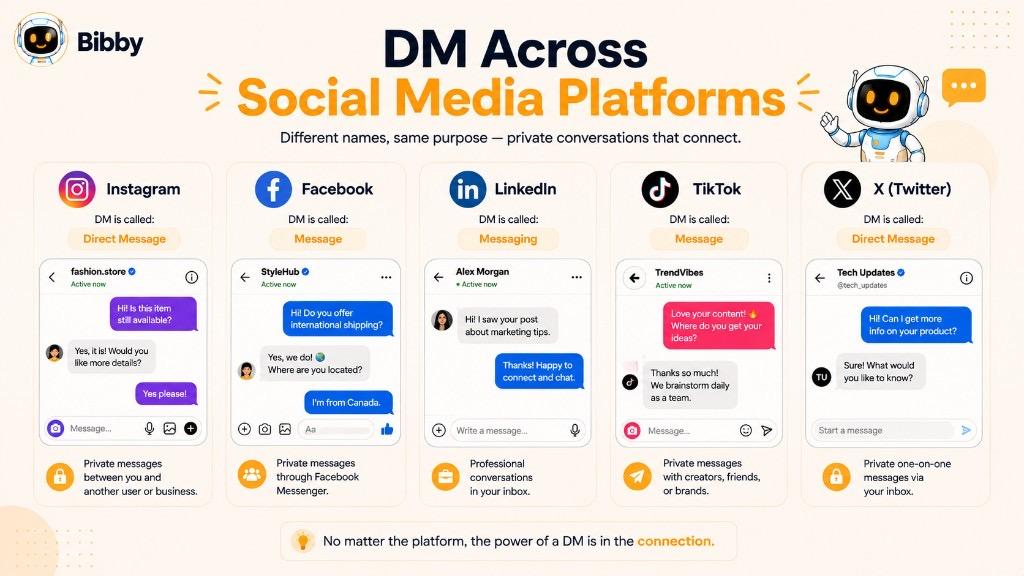
Understanding these differences is useful because a DM on Instagram may work differently from a message on LinkedIn or TikTok.
DM on Instagram
On Instagram, DMs are handled through Instagram Direct and allow users to communicate privately with individuals, creators, businesses, and groups.
Users can use Instagram DMs to:
- Send text messages
- Share posts and Reels
- Send images and videos
- Share links and other supported content
- React to messages
- Communicate with businesses and creators
- Continue conversations that began through public content
For businesses, Instagram DMs can be useful for answering product questions, responding to followers, handling customer inquiries, and developing relationships with potential customers.
For example, a user might discover a product through an Instagram post and send a DM asking about its price or availability.
DM on Facebook
Facebook uses Messenger as its primary messaging service. Users can communicate privately with friends, businesses, Pages, and other accounts where messaging is available.
Businesses can use Facebook messaging to:
- Answer customer questions
- Provide support
- Discuss products or services
- Respond to inquiries
- Continue conversations that started through Facebook content
Facebook also allows users to share posts, photos, videos, links, and other supported content through private conversations.
DM on LinkedIn
LinkedIn uses private messaging primarily for professional communication. Users can message connections and, depending on their account and LinkedIn's available features, communicate with people outside their immediate network through additional messaging options.
LinkedIn messages are commonly used for:
- Professional networking
- Recruiting
- Business development
- Sales outreach
- Partnership discussions
- Industry conversations
- Following up after connecting
For example, after connecting with a potential business partner on LinkedIn, you might send a message introducing yourself and explaining why you would like to connect.
LinkedIn messaging is therefore similar to a DM in function, although the platform generally refers to the feature as Messaging rather than making “DM” its primary terminology.
DM on TikTok
TikTok also provides direct messaging features that allow eligible users to communicate privately.
TikTok DMs can be used for:
- Private conversations
- Sharing supported TikTok content
- Communicating with friends or followers
- Discussing content
- Engaging with creators where messaging is available
TikTok's messaging availability can depend on factors such as age, account settings, privacy settings, and platform rules.
DM on X
On X, private messages are called Direct Messages, commonly shortened to DMs.
Unlike replies and posts, DMs allow users to communicate privately. They can be used for personal conversations, professional networking, customer communication, and other appropriate interactions.
For businesses and creators, DMs can provide another channel for answering questions or continuing conversations that started through public posts.
DM on YouTube
YouTube's communication model is different from platforms that are built around traditional direct messaging. YouTube has historically changed how private messaging works, so users should not assume that every YouTube account has the same conventional DM functionality available on platforms such as Instagram or X.
YouTube primarily focuses on public interactions such as comments, while creators can use other available communication and community features depending on the current platform functionality.
Do All Social Media Platforms Use the Term “DM”?
No. DM is a general term rather than a universal feature name.
Some platforms explicitly use terms such as Direct Message, while others use names such as Messenger or simply Messages.
Regardless of the terminology, the basic concept is similar: a private communication channel that allows users to interact directly rather than posting publicly.
| Platform | Common Messaging Term | Typical Uses |
|---|---|---|
| Direct / DMs | Personal conversations, customer inquiries, sharing content | |
| Messenger | Personal communication, customer support, business inquiries | |
| Messaging | Networking, sales, recruiting, professional communication | |
| TikTok | Direct Messages | Private conversations, creator and follower communication |
| X | Direct Messages | Private conversations, networking, customer communication |
| YouTube | Messaging/community features vary | Creator-audience communication and public engagement |
The exact features and availability can change as social platforms update their products, privacy controls, and messaging policies. For businesses, it is therefore important to check the current capabilities and rules of each platform before building a messaging workflow around it.
DM vs. Comment: What's the Difference?
A DM and a comment are both ways to interact on social media, but they serve very different purposes. The biggest difference is visibility: a comment is generally part of a public conversation, while a DM is intended for private communication.
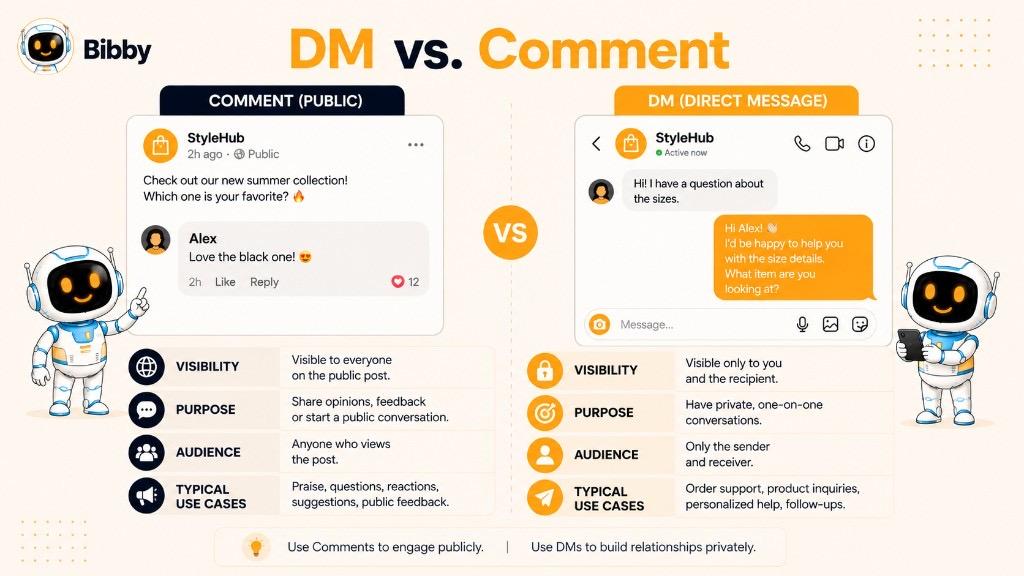
For example, if you comment on a brand's Instagram post asking, “What is the price?”, other users may be able to see your question and the brand's response. If you send the same question through a DM, the conversation takes place privately.
DM vs. Comment Comparison
| Feature | DM (Direct Message) | Comment |
|---|---|---|
| Visibility | Generally private | Generally public |
| Main purpose | Private conversation | Public interaction |
| Customer support | Useful for detailed or personal questions | Useful for simple public questions |
| Lead conversations | Useful for private follow-up | Often an initial interaction |
| Personal communication | Highly suitable | Less private |
| Audience visibility | Usually limited to participants | Often visible to other users |
| Best for | Conversations, inquiries, follow-ups | Reactions, discussions, public questions |
When Should You Use a DM?
A DM is usually more appropriate when the conversation involves information that does not need to be public or requires a personalized response.
For example:
“Hi, I'm interested in your service. Can you explain your pricing options for a small business?”
A business can answer this question privately and ask for additional information about the customer's needs.
DMs are also useful when a conversation involves account-specific information, customer support, business discussions, or personal details that should not be shared publicly.
When Should You Use a Comment?
Comments work well when the interaction is intended to be part of the public conversation around a post, video, or other piece of content.
For example:
“This is a really useful tip. Thanks for sharing!”
A public comment can increase engagement and contribute to the conversation that other users can see.
Businesses can also answer frequently asked questions publicly through comments. This can be helpful when the answer may benefit other potential customers.
Can a Comment Turn Into a DM?
Yes. In social media marketing, this happens frequently.
Imagine a business publishes:
“Want to learn how our social media automation works? Ask us below.”
A user comments:
“Can you tell me more?”
The business might provide a short public answer and then invite the user to continue the discussion through a DM.
The interaction can therefore move from:
Post → Comment → DM → Private Conversation
This combination can be particularly useful for businesses because comments create visible engagement while DMs provide space for more personalized communication.
DM or Comment: Which Is Better?
Neither is universally better. The right option depends on the purpose of the conversation.
Use a comment when you want to participate in a public discussion, share a reaction, or ask a question that other users may also find useful.
Use a DM when you need a private, personalized, or more detailed conversation.
For businesses, the strongest social media strategy often uses both. Public content and comments help build visible engagement, while DMs provide a private channel for deeper conversations with customers, prospects, followers, and partners.
DM vs. Mention: What's the Difference?
A DM (Direct Message) and a mention are two different ways to communicate with someone on social media. A DM creates a private conversation, while a mention usually draws someone's attention publicly by including their username in a post, comment, caption, or other visible content.
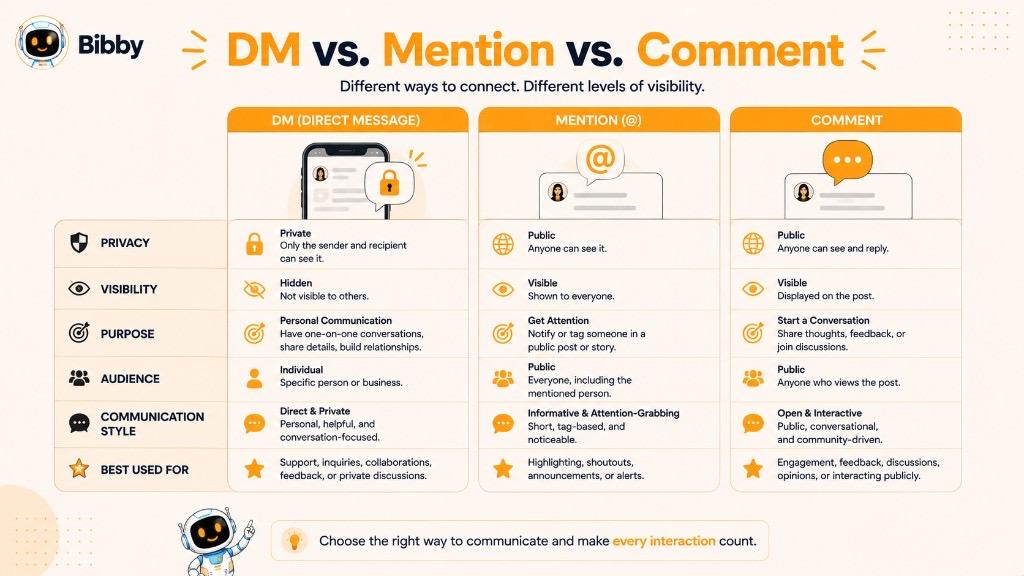
For example, writing “@BrandName, I love your new product!” is a mention. Sending “Hi, I have a question about your new product” through the platform's messaging system is a DM.
DM vs. Mention Comparison
| Feature | DM (Direct Message) | Mention |
|---|---|---|
| Visibility | Generally private | Usually public |
| Main purpose | Private communication | Get someone's attention publicly |
| Typical location | Messaging inbox | Post, comment, caption, or content |
| Customer questions | Useful for private discussions | Useful for public questions |
| Audience visibility | Usually limited to participants | Other users may see it |
| Best for | Detailed conversations and follow-ups | Public recognition and engagement |
What Is a Mention on Social Media?
A mention happens when you reference another social media account by using its username or account handle.
For example:
“Thanks to @Bibby for helping us organize our social media workflow.”
The mentioned account may receive a notification, depending on the platform and its settings.
Mentions are often used to:
- Get another user's attention
- Give credit to a person or brand
- Reference a business or creator
- Participate in conversations
- Encourage public engagement
- Collaborate with other accounts
Because mentions are generally visible to other users, they are particularly useful for public interactions.
When Should You Use a DM?
Use a DM when the conversation needs to happen privately or requires a more personalized discussion.
For example:
“Hi, I saw your post about social media automation. I run a small business and would like to know which features might be useful for me.”
This type of conversation is better suited to a DM than a public mention because it may involve specific business requirements or follow-up questions.
When Should You Use a Mention?
A mention is useful when you want to bring someone's attention to something publicly.
For example:
“@John, this article reminded me of the strategy we discussed.”
Or:
“Great collaboration with @BrandName!”
The interaction remains part of the public social conversation, allowing other users to see the connection.
Can a Mention Lead to a DM?
Yes. Mentions and DMs can work together as part of a broader social media engagement strategy.
For example:
Public post → Mention → User notices → DM → Private conversation
A business might mention a customer in a public post when appropriate, while moving a more detailed conversation into DMs.
DM or Mention: Which Should You Use?
The choice depends on what you want to accomplish.
Use a mention when you want to publicly recognize someone, get their attention, or include them in a visible conversation.
Use a DM when you want to communicate privately, discuss specific details, answer a personal question, or continue a conversation away from the public feed.
For brands, both can be valuable. Mentions can increase public visibility and engagement, while DMs create a more direct and personal communication channel.
DM vs. Message Request: What's the Difference?
A DM (Direct Message) and a message request are closely related, but they are not always the same thing. A DM is a private message sent through a social platform, while a message request is typically a message from someone the recipient does not already follow, connect with, or have an established conversation with.
When someone you do not know sends you a message, many social platforms may place that message in a separate message request area. This gives you the opportunity to review it before deciding whether to accept or respond.
DM vs. Message Request Comparison
| Feature | DM | Message Request |
|---|---|---|
| Meaning | Private message | Message awaiting recipient action or approval |
| Typical sender | Existing connection, follower, friend, or permitted account | Someone outside an established connection |
| Location | Regular messaging inbox | Request or filtered inbox |
| Conversation status | Usually an active conversation | May be a new or unapproved conversation |
| Recipient action | Can usually respond directly | May need to accept or interact with the request first |
| Common business use | Customer support, follow-ups, conversations | New inquiries and first-time contacts |
What Is a Message Request?
A message request is generally an incoming private message that a social media platform separates from a user's normal conversations.
For example, suppose someone discovers a business on Instagram but does not follow the account. If they send a message, the platform may treat it as a message request rather than placing it directly into the business's primary inbox.
The recipient can then decide how to handle it based on the platform's available options.
Why Do Social Platforms Use Message Requests?
Message requests can help users manage communication from people they do not already know.
They can also help reduce unwanted messages and give recipients more control over who enters their inbox.
This is particularly important for:
- Large creator accounts
- Businesses
- Public figures
- Influencers
- Professionals
- Accounts with large audiences
Without some form of filtering, a popular account could quickly become buried under thousands of unsolicited messages.
Can a Message Request Become a DM?
Yes. A message request can become a normal private conversation if the recipient accepts, responds to, or otherwise engages with it, depending on the platform.
For example:
Customer discovers brand → Sends message → Message request → Brand responds → Private conversation
Once the conversation is established, the participants can continue communicating through the platform's regular messaging system.
Message Requests for Businesses
Message requests can be valuable because they may represent conversations with people who have never interacted with a business privately before.
A potential customer might discover a product through a social media post and send:
“Hi, I saw your post about your new service. Can you tell me how much it costs?”
The business may receive this as a message request. If the business responds, the request can develop into a customer conversation.
This makes it important for businesses and social media managers to monitor not only their regular inbox but also any message-request areas supported by the platforms they use.
How Should Businesses Handle Message Requests?
Businesses should treat message requests as potential conversations rather than automatically assuming that every request is a sales opportunity.
Good practices include:
- Responding to genuine questions promptly
- Personalizing responses
- Avoiding irrelevant promotional messages
- Identifying the customer's actual need
- Keeping the conversation professional
- Moving sensitive information to an appropriate channel when necessary
- Following each platform's messaging and automation rules
DM vs. Message Request: The Simple Difference
The easiest way to remember the distinction is:
DM = private message or conversation.
Message request = a private message that may require the recipient's attention or approval before becoming a regular conversation.
The exact terminology and behavior vary between platforms, so businesses should always check the current messaging features and privacy settings of each social network they use.
Why Are Direct Messages Important for Businesses?
Direct messages give businesses a private way to communicate with customers, prospects, followers, and other people in their audience. While social media posts and comments are useful for attracting public attention, DMs create a space for more personalized conversations.
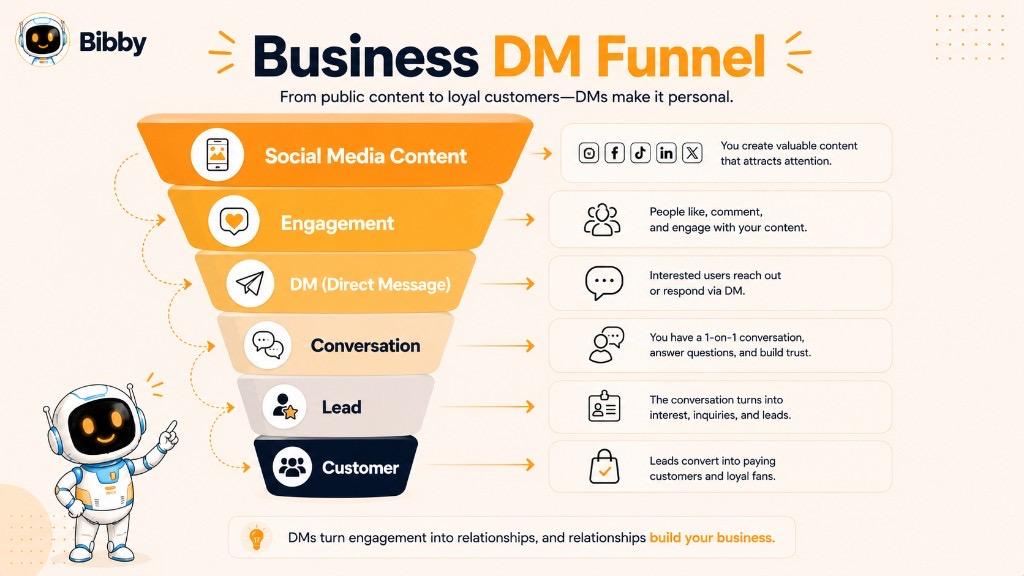
For many businesses, the customer journey does not end when someone likes a post or leaves a comment. A question in the comments can become a private conversation, and that conversation can eventually lead to a purchase, booking, consultation, or long-term customer relationship.
1. DMs Provide Personalized Customer Communication
A public post can reach thousands or even millions of people, but a DM allows a business to address one person's specific situation.
For example, instead of replying publicly:
“Our pricing depends on your requirements.”
A business can continue privately:
“Thanks for reaching out. Could you tell us how many users you need? We can recommend the most suitable option.”
This makes the interaction more relevant and personal.
2. DMs Support Customer Service
Customers often have questions that are better handled privately.
They may want to ask about:
- Orders
- Pricing
- Product availability
- Services
- Appointments
- Technical issues
- Returns or exchanges
- Account-related concerns
A DM gives businesses a convenient channel for handling these conversations without filling a public comment section with customer-specific information.
3. DMs Can Help Generate Leads
A social media post can create awareness, but a DM can help move an interested person into a more direct conversation.
For example:
Social post → User shows interest → DM → Questions answered → Lead qualified → Sales conversation
A potential customer may not be ready to fill out a form or schedule a call immediately. Starting with a simple DM can create a lower-friction way to begin the conversation.
4. DMs Help Build Customer Relationships
People often respond differently when they are having a direct conversation with a brand rather than interacting with a generic post.
Businesses can use DMs to:
- Thank customers
- Answer questions
- Follow up on conversations
- Share relevant information
- Understand customer needs
- Strengthen relationships with loyal followers
The goal should not always be to sell. Sometimes the most valuable outcome of a DM is simply building trust.
5. DMs Enable Social Selling
Social selling involves using social platforms to develop relationships and identify potential business opportunities.
A marketer might notice that someone regularly engages with content about a particular topic. Instead of immediately sending a sales pitch, they can start a relevant conversation when appropriate.
For example:
“I noticed you're interested in improving your social media workflow. Are you currently scheduling your content manually?”
If the person responds positively, the conversation can develop naturally.
6. DMs Create a Channel for Feedback
Customers may be more comfortable sharing certain feedback privately than posting it publicly.
Businesses can use these conversations to discover:
- Common customer concerns
- Product problems
- Frequently asked questions
- Feature requests
- Service improvements
- Content ideas
These insights can also influence future social media content. If customers repeatedly ask the same question through DMs, that question may be worth answering in a future post, video, carousel, or FAQ.
7. DMs Can Turn Engagement Into Action
A person can like a post and move on. A DM creates an opportunity for a deeper interaction.
For example:
Post:
“Need help creating a consistent social media strategy?”
Comment:
“I definitely do!”
DM:
“Happy to help. What platforms are you currently using?”
The conversation now has context and direction.
This is one reason DMs are an important part of a broader social media strategy. Public content attracts attention, while private messaging can help turn attention into meaningful conversations.
DMs Are Not Just a Sales Channel
One common mistake is treating every DM as an opportunity to pitch a product.
A good business messaging strategy balances:
Support + Education + Engagement + Relationship Building + Sales
Not every conversation needs a sales pitch. A helpful answer, thoughtful response, or useful resource can create more long-term value than an immediate promotion.
Why DMs Matter in Social Media Marketing
For businesses, social media is no longer limited to publishing content and collecting likes. Modern social media marketing involves creating content, engaging with audiences, answering questions, building relationships, and responding to opportunities as they appear.
DMs provide the private communication layer that connects these activities.
A simple social media journey can look like:
Create Content → Publish → Attract Attention → Engage → Start a DM → Build a Conversation → Take the Next Step
When managed thoughtfully, direct messages can become an important part of customer experience, community management, lead generation, and social selling.
How Do Marketers Use DMs?
Marketers use DMs (Direct Messages) to turn social media from a one-way publishing channel into a two-way communication channel. A post can introduce a brand to an audience, but a DM gives marketers an opportunity to have a more personal conversation with an individual.
The most effective DM strategies focus on relevance and genuine communication rather than sending large numbers of unsolicited promotional messages.
1. Responding to Customer Questions
One of the simplest uses of DMs is answering questions from customers and followers.
For example, someone might message a clothing brand:
“Do you have this jacket in medium?”
The business can provide a direct answer without requiring the customer to search through a website or public comments.
This can make the customer experience faster and more convenient.
2. Following Up With Interested Prospects
A person who interacts with a brand's content may already have some level of interest in its products or services.
When appropriate, marketers can continue the conversation privately.
For example:
“Thanks for commenting on our post about social media scheduling. Are you currently managing your content manually?”
If the person responds, the marketer can learn more about their needs before suggesting a relevant solution.
3. Building Relationships
Not every DM needs to lead directly to a sale.
Marketers can use direct messages to:
- Thank followers for engaging
- Welcome new community members
- Respond to thoughtful questions
- Continue conversations from posts
- Share relevant resources
- Connect with industry professionals
These small interactions can help make a brand feel more accessible and human.
4. Social Selling
DMs are often used as part of a social selling strategy.
Instead of immediately sending a sales pitch, marketers can use the conversation to understand the prospect's situation.
A natural progression might be:
Engagement → Conversation → Understand Need → Provide Value → Recommend Relevant Solution
For example:
“What are you currently using to schedule your social media content?”
This is more conversational than immediately sending a promotional message.
5. Influencer and Creator Outreach
Brands can also use DMs to contact creators and influencers about potential collaborations.
A good outreach message should explain why the person is being contacted and why the opportunity may be relevant to them.
Instead of:
“Hi, promote our product.”
A more useful approach might be:
“Hi, we enjoyed your recent content about small-business marketing. We think our social media automation platform could be relevant to your audience. Would you be open to discussing a potential collaboration?”
The second approach provides context and gives the recipient a clear reason to respond.
6. Partnership and Networking
DMs can be useful for professional networking and business partnerships.
Marketers may contact:
- Potential partners
- Industry experts
- Event organizers
- Creators
- Agencies
- Business owners
- Other marketing professionals
The message should be relevant to the recipient rather than simply being a generic introduction.
7. Customer Feedback
Marketers can use DMs to gather qualitative feedback from their audience.
For example:
“We've noticed that many customers are asking about content scheduling. What part of managing your social media takes the most time?”
Responses can reveal useful information about customer needs, frustrations, and content preferences.
8. Community Management
DMs can also support community-building efforts.
A brand may use private conversations to welcome followers, answer questions, resolve concerns, or recognize highly engaged members.
This is particularly useful for brands that depend heavily on relationships and ongoing audience engagement.
9. Turning Public Engagement Into Private Conversations
One of the most useful applications of DMs is moving a conversation from a public interaction into a private channel when appropriate.
For example:
Post → Comment → Response → DM → Detailed Conversation
A customer might comment:
“I have a question about your pricing.”
The brand can respond:
“Absolutely. I'll send you a DM so we can discuss the options.”
The public comment remains useful for engagement, while the detailed discussion happens privately.
10. Using DM Insights to Improve Content
DMs can also help marketers understand what their audience actually wants to know.
Suppose a business receives repeated questions about:
- Pricing
- Product features
- How-to instructions
- Industry problems
- Comparisons
- Setup processes
These questions can become future social media content.
For example:
Repeated DM question → Educational post → Carousel → Short video → FAQ
In this way, DMs don't just support communication. They can also become a source of content ideas.
What Makes a Good Marketing DM?
An effective marketing DM is generally:
- Relevant
- Clear
- Concise
- Personalized
- Helpful
- Respectful
- Easy to respond to
The goal is to start or continue a meaningful conversation, not simply to increase the number of messages sent.
For businesses using social media at scale, this distinction matters. Automation can make publishing and content management easier, but conversations that require context, judgment, or empathy should still be handled thoughtfully and according to each platform's rules.
How to Write an Effective DM
Writing a good DM (Direct Message) is less about using the perfect words and more about making the message relevant, clear, and easy to respond to. Whether you are talking to a customer, prospect, creator, business partner, or follower, the recipient should quickly understand why you are contacting them.
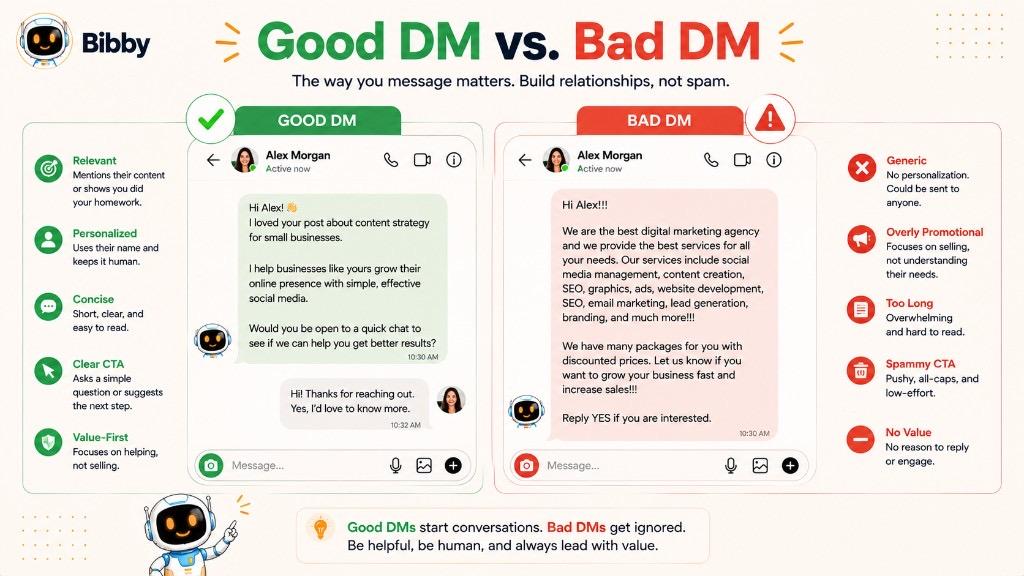
A strong DM should feel like the beginning of a conversation, not a message copied and pasted to hundreds of people.
1. Start With a Clear Reason
Tell the recipient why you are reaching out.
Instead of:
“Hi, how are you?”
Try:
“Hi Sarah, I saw your post about managing social media for small businesses and wanted to ask about your current workflow.”
The second message gives the recipient context and makes it easier to respond.
2. Keep Your DM Concise
Social media users receive plenty of notifications and messages. A long introduction can make your DM difficult to read.
Try to communicate the main point in a few sentences.
For example:
“Hi Alex, I enjoyed your recent post about content marketing. We work with businesses that are trying to simplify social media scheduling. Would you be interested in learning more?”
The message is short but still explains the purpose of the conversation.
3. Personalize the Message
Personalization can make a DM feel more relevant.
Mention something genuinely connected to the recipient, such as:
- A recent post
- Their business
- A product they discussed
- A professional interest
- A shared event
- A relevant conversation
Avoid adding a person's name to an otherwise generic message and calling it personalization. That trick has been spotted by the internet approximately 47 million times.
4. Provide Context
If the recipient does not immediately understand why you are contacting them, they may ignore the message.
For example, instead of:
“I'd like to work with you.”
Try:
“I manage marketing for a SaaS brand, and we've been following your content about productivity tools. We'd like to explore whether a content collaboration could make sense.”
Now the recipient knows who you are, why you contacted them, and what you want to discuss.
5. Make the Message Relevant to the Recipient
A good DM focuses on the conversation, not just the sender.
If you are contacting a potential customer, think about their problem before talking about your product.
For example:
“Are you currently scheduling posts manually across multiple platforms?”
This question may open a more useful conversation than:
“Our platform has 25 amazing features. Want a demo?”
6. Use a Simple Call to Action
Give the recipient an easy next step.
Your CTA could be:
- “Would you like me to send the details?”
- “Would you be open to a quick conversation?”
- “Can I share the pricing information?”
- “Would you like to see an example?”
- “What are you currently using?”
Avoid giving the recipient five different things to do in the same message.
7. Avoid Unsolicited Spam
Sending large volumes of irrelevant promotional DMs can damage your brand reputation and may violate platform rules.
Before sending a marketing DM, consider:
Is this message relevant?
Does the recipient have a reasonable reason to care?
Am I providing value?
Would I be comfortable receiving this message myself?
If the answer is no, the message probably needs another pass.
8. Match the Platform
A professional DM on LinkedIn may sound different from a casual conversation on Instagram or TikTok.
Consider the platform, audience, relationship, and context before deciding how formal your message should be.
The objective is not to sound robotic. It is to sound appropriate.
9. Respect the Recipient's Response
If someone does not respond, avoid repeatedly sending follow-up messages.
A reasonable follow-up can be appropriate in some professional situations, but repeated unwanted messages can quickly become spam.
Good messaging includes knowing when to continue the conversation and when to leave it alone.
10. Know When a DM Should Become a Human Conversation
Automation can help with repetitive social media tasks, but not every conversation should be automated.
A customer dealing with a complicated problem, a sensitive complaint, or a nuanced business question may need a human response.
The best approach is often a combination of automation for efficiency and human judgment for meaningful conversations.
Simple Formula for a Good DM
A useful structure is:
Context → Reason → Value → Simple Question
For example:
“Hi Priya, I saw your post about managing multiple social media accounts. We help businesses simplify content creation and scheduling. Would you like me to show you how the workflow works?”
This formula works because the recipient can quickly understand why you contacted them, what you are offering, and what they can do next.
Direct Message Examples
The best DM depends on the situation. A message to a customer should not sound like a sales pitch, while a message to a potential business partner may need a more professional tone. The goal is to make every conversation relevant to the person receiving it.
Here are some practical DM examples for common social media situations.
Customer Support DM Example
When a customer has a problem or question, focus on acknowledging the issue and explaining the next step.
Customer: “Hi, I can't find my order details. Can you help?”
Business: “Hi! Absolutely. Please share your order number, and we'll check the status for you.”
The response is short, helpful, and moves the conversation toward a solution.
Product Inquiry DM Example
A customer may send a DM after discovering a product through a post or video.
Customer: “Hi, is this product still available?”
Business: “Hi! Yes, it's currently available. If you'd like, I can also share the available options and pricing.”
This approach answers the question while naturally opening the door for further conversation.
Lead Generation DM Example
A potential customer may interact with a business's content before sending a message.
Prospect: “I'm interested in learning more about your service.”
Business: “Thanks for reaching out! We'd be happy to help. Could you tell us a little about what you're currently trying to achieve so we can point you toward the right option?”
Instead of immediately pushing a sale, the business first tries to understand the prospect's needs.
Professional Networking DM Example
LinkedIn and other professional platforms are often used for networking.
“Hi David, I enjoyed your recent post about digital transformation. Your point about automation in customer workflows was particularly interesting. I'd be glad to connect and follow your work.”
This type of message has a clear reason for the connection and does not immediately ask for something.
Collaboration DM Example
Creators, brands, and agencies may use DMs to explore potential collaborations.
“Hi Emma, we've been following your content around small-business marketing and really like your practical approach. We're exploring a collaboration around social media automation and think there could be a strong fit. Would you be open to discussing it?”
The message explains why the person was selected instead of sending a generic partnership request.
Follow-Up DM Example
If a previous conversation has paused, a short follow-up can reopen it.
“Hi Alex, just following up on our conversation about social media scheduling. If you're still exploring options, I'd be happy to answer any questions or share more details.”
The follow-up is polite and gives the recipient an easy way to continue the conversation.
Customer Feedback DM Example
Businesses can also use DMs to gather feedback.
“Hi! Thanks for using our product. We'd love to know how your experience has been so far. Is there anything you think we could improve?”
This can generate useful insights while showing customers that their opinions matter.
Community Engagement DM Example
A brand may privately welcome or thank an engaged follower.
“Hi! Thanks for being part of our community and regularly engaging with our content. We noticed you enjoyed our recent social media tips. Is there a particular topic you'd like us to cover next?”
This turns audience engagement into an opportunity for a genuine conversation.
Sales Outreach DM Example
When contacting a potential customer, avoid immediately sending a long product pitch.
Instead, start with a relevant question:
“Hi Mike, I noticed your team manages several social media channels. Are you currently using a scheduling tool, or is your team handling posts manually?”
If the recipient responds, the conversation can naturally move toward their challenges and potential solutions.
Bibby-Related DM Example
For a social media automation business such as Bibby, a relevant conversation could look like this:
Prospect: “How do you manage posts across multiple platforms?”
Bibby: “Bibby lets you upload or generate content with AI, create captions, choose your posting style, and schedule your content at AI-optimized times across supported social platforms. What platforms are you currently managing?”
This keeps the conversation focused on the person's needs rather than immediately listing every product feature.
What Makes These DM Examples Effective?
Good business DMs generally share a few characteristics:
- They have a clear purpose.
- They provide context.
- They are reasonably short.
- They sound natural.
- They focus on the recipient.
- They avoid unnecessary promotional language.
- They make it easy to respond.
- They respect the recipient's time and privacy.
The exact wording should always be adapted to the platform, relationship, and purpose of the conversation. A DM that works for a customer-support conversation may be completely inappropriate for cold outreach.
The best direct messages don't try to force a conversation. They give the other person a clear and relevant reason to continue it.
Can Businesses Automate Direct Messages?
Businesses can automate certain parts of their social media messaging workflow, but DM automation is not the same as automatically sending unlimited messages to anyone. What a business can automate depends on the social media platform, account type, available integrations, user permissions, and the platform's current messaging policies.
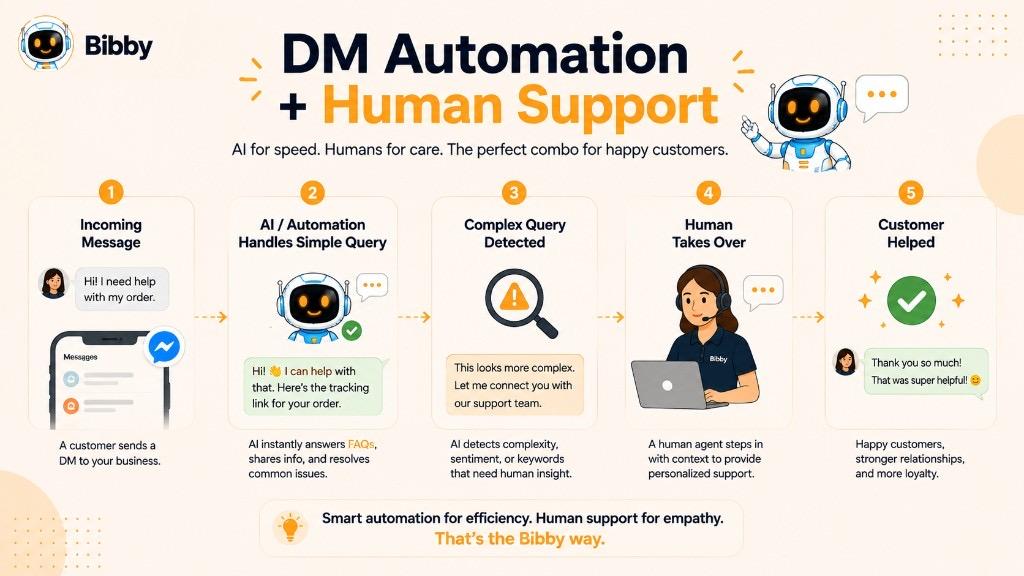
Automation can be useful for repetitive tasks, while conversations that require context, judgment, or empathy may still benefit from human involvement.
What Is DM Automation?
DM automation uses software, workflows, or AI-powered tools to help manage certain direct-message activities without requiring a person to perform every step manually.
Depending on the platform and available tools, automation may help with tasks such as:
- Responding to common questions
- Sending predefined replies
- Managing incoming conversations
- Routing inquiries to the appropriate team
- Collecting basic information
- Triggering responses to specific interactions
- Identifying conversations that need human attention
- Organizing customer communication
The exact capabilities vary significantly between platforms.
Why Do Businesses Automate Messaging?
Managing social media manually can become difficult when a business receives a large number of messages.
Imagine a brand receiving questions such as:
- “What are your prices?”
- “Where can I find your products?”
- “Do you offer this service?”
- “How does it work?”
- “When will you respond?”
- “Can I book an appointment?”
If the same questions appear repeatedly, automation can help reduce repetitive work.
Instead of manually typing the same basic response dozens of times, a business may use an approved automated workflow to provide an initial answer and then allow a person to take over when necessary.
AI and DM Management
AI can make social media messaging more flexible by helping businesses understand incoming questions and generate relevant responses.
For example, an AI-assisted system might recognize that a customer is asking about pricing and help prepare an appropriate response.
However, AI-generated messaging should still be reviewed and managed responsibly. A customer asking a complicated question may need a human rather than an automated answer that confidently wanders into the weeds.
Automated DMs vs. Human Conversations
The strongest social media workflows often combine automation with human communication.
| Automated Tasks | Human Tasks |
|---|---|
| Answering repetitive questions | Handling complex complaints |
| Sending approved information | Negotiating with a customer |
| Organizing conversations | Understanding sensitive situations |
| Routing inquiries | Making important business decisions |
| Providing basic first responses | Building high-value relationships |
Automation is most useful when it removes repetitive work without removing the human element from conversations that genuinely need it.
Can You Automatically Send Promotional DMs?
This is where businesses need to be particularly careful.
Sending unsolicited promotional messages at scale can be considered spam and may violate a platform's rules. Social networks also have different restrictions around messaging, automation, consent, and user interactions.
Businesses should therefore avoid treating DM automation as a license to send mass promotional messages.
A better approach is:
Relevant Interaction → Appropriate Response → Helpful Conversation → Human Follow-Up When Needed
How Social Media Automation Fits Around DMs
DMs are only one part of a broader social media workflow.
A business may use automation to:
Create Content → Generate Captions → Schedule Posts → Publish → Monitor Engagement → Respond to Conversations
Tools such as Bibby can help simplify the content creation and publishing side of this workflow by allowing businesses to upload or generate content with AI, create captions, select posting styles, and schedule content across supported social platforms.
Bibby's chat interface also allows users to manage social media tasks conversationally, including creating brand kits, campaigns, posts, and regenerating captions.
This is different from claiming that every social media DM can be automatically sent or managed without restrictions. Content automation and messaging automation are related but separate capabilities.
Best Practices for DM Automation
If a business uses automation around direct messaging, it should:
- Follow each platform's current rules and API requirements.
- Avoid unsolicited mass messaging.
- Use automation for repetitive, appropriate tasks.
- Make it clear when users are interacting with an automated system where appropriate.
- Provide a path to human support when needed.
- Protect customer information.
- Review automated responses regularly.
- Keep the brand's communication natural and helpful.
- Avoid making promises the business cannot fulfill.
- Monitor conversations for errors or situations requiring human intervention.
The goal of DM automation is not to make every conversation robotic. The goal is to reduce repetitive work while making it easier for businesses to respond to people effectively.
How Do DMs Fit Into a Social Media Strategy?
A social media strategy is not just about publishing posts and collecting likes. Modern social media marketing involves creating content, attracting attention, engaging with an audience, answering questions, building relationships, and turning relevant interactions into meaningful conversations.
Direct Messages (DMs) are the private communication layer within this process. They give businesses a way to continue conversations that begin through public posts, comments, videos, Stories, or other social interactions.
A simple social media journey can look like:
Create Content → Publish → Attract Attention → Engage → Start a DM → Build a Relationship → Take Action
DMs Connect Content With Conversations
Social media content is often the first point of contact between a person and a brand.
For example, a business might publish a post explaining how to improve social media marketing. Someone sees the post, likes it, leaves a comment, and then decides to send a DM asking for more information.
The journey becomes:
Post → Engagement → DM → Private Conversation
The post creates awareness, while the DM provides a space for personalized communication.
DMs Can Support the Customer Journey
A customer may interact with a brand at different stages before making a decision.
For example:
Awareness:
The customer discovers a social media post.
Interest:
They watch a video, save a carousel, or visit the profile.
Consideration:
They ask a question in the comments or send a DM.
Decision:
The business provides relevant information and answers questions.
Action:
The customer makes a purchase, books a service, requests a demo, or takes another appropriate next step.
Not every customer follows this exact journey, but DMs can play an important role when someone needs a more personalized conversation.
DMs and Community Engagement
Community engagement is another important part of social media marketing.
A business can use public comments to participate in conversations while using DMs for situations that require more personal attention.
For example:
Public comment:
“Thanks for sharing this feedback!”
DM:
“Thanks for taking the time to explain the issue. We'd like to understand what happened and see how we can help.”
This approach allows the public conversation to remain positive while moving detailed customer support into a private channel.
DMs Can Generate Content Ideas
Direct messages can also influence the content a business publishes.
If customers repeatedly ask:
- How does your product work?
- How much does it cost?
- Which option should I choose?
- How do I get started?
- Does this work for my business?
- Can I use it on multiple platforms?
Those questions can become future content.
For example:
Frequently Asked DM → Educational Post → Carousel → Video → FAQ
This creates a useful feedback loop between audience conversations and content strategy.
DMs and Social Media Automation
Automation can help businesses maintain consistency across the public side of their social media strategy.
A typical workflow might look like:
Upload or Generate Content → Choose Posting Style → Generate Caption → Select Platforms → AI-Optimized Scheduling → Publish → Engage → Respond
Bibby is designed to simplify this type of workflow. Users can upload an image or generate one with AI, choose a posting style, generate captions, and schedule content across supported social platforms. Bibby also supports different content formats such as images, carousels, videos, and Stories.
Its chat interface adds another layer of convenience by allowing users to manage social media tasks conversationally, including creating a brand kit, creating campaigns, creating posts, and regenerating captions.
This means the public content workflow can be managed more efficiently, while DMs remain an important channel for the conversations that happen around that content.
The Relationship Between Automation and Human Engagement
Automation can help a business publish consistently, but publishing is only one part of social media management.
A healthy strategy balances:
Automation for Repetitive Work + Human Attention for Meaningful Conversations
For example, a business can automate content scheduling while having a person respond to a customer who asks a complex question in a DM.
This creates a more balanced workflow:
AI & Automation → More Consistent Content → More Opportunities for Engagement → Human Conversations → Stronger Relationships
DMs Should Have a Purpose
Not every follower needs a DM, and not every DM needs a sales pitch.
Businesses should use direct messaging when a private conversation genuinely adds value. The purpose might be customer support, answering a question, providing information, networking, gathering feedback, or helping someone take the next step.
When used thoughtfully, DMs become more than another inbox to manage. They become a bridge between public social media content and private, one-to-one relationships.
How Bibby Helps With Social Media Management
Managing social media involves much more than publishing a post. Businesses need to create content, write captions, maintain a consistent brand voice, choose the right platforms, schedule posts, and keep their content organized. When all of these tasks are handled manually, social media management can quickly become a time-consuming process.
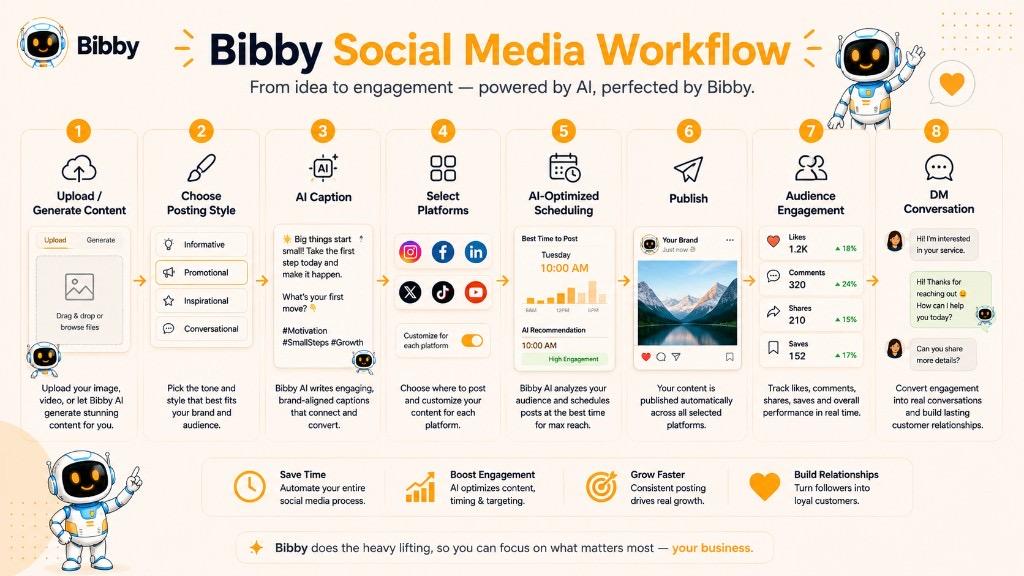
Bibby brings these activities into a simpler AI-powered social media workflow.
Instead of switching between multiple tools for content creation, captions, scheduling, and campaign management, users can manage much of their social media workflow from one platform.
Create or Generate Social Media Content
The workflow starts with the content.
You can upload your own image or use AI to generate an image for your social media post. This gives businesses and creators flexibility to either work with existing creative assets or create new content when they need it.
Bibby supports multiple types of social media content, including:
- Images
- Carousels
- Videos
- Stories
- Other supported social media formats
This makes it possible to build a varied content strategy instead of relying on one type of post.
Choose Your Posting Style
Once your content is ready, you can choose the posting style that fits your social media strategy.
The goal is to make the publishing process easier while maintaining consistency across different pieces of content.
Rather than manually planning every individual post, users can create a workflow that helps turn their content into a structured publishing schedule.
Generate Captions With AI
Writing a different caption for every social media post can become repetitive, especially when managing multiple platforms.
Bibby can generate captions automatically based on the content and selected posting style.
This helps reduce the time spent staring at an empty caption box and wondering whether “Happy Monday!” has already been used 37 times this month.
Users can also regenerate captions when they want a different approach or tone.
Schedule Content at AI-Optimized Times
After the content and captions are ready, Bibby can schedule the media across selected social platforms at AI-optimized times.
This allows businesses to plan their content in advance rather than manually publishing every post.
A typical workflow can look like:
Upload or Generate Content → Choose Posting Style → Generate Caption → Select Platforms → AI-Optimized Scheduling → Publish
The result is a more organized approach to maintaining a consistent social media presence.
Manage Multiple Social Platforms
Social media strategies often involve more than one platform. A business may need to maintain a presence across Facebook, Instagram, LinkedIn, YouTube, and TikTok.
Bibby is designed to help manage publishing across supported platforms from a centralized workflow.
This can reduce the need to recreate the same publishing process separately for every network.
Manage Social Media Through Chat
Bibby's chat interface adds a conversational way to manage social media tasks.
Instead of navigating through different parts of a platform for every task, users can interact with Bibby through chat to work on their social media workflow.
Depending on the task, users can ask Bibby to:
- Create a brand kit
- Create a campaign
- Create posts
- Regenerate captions
- Work with social media content
- Manage other supported social media tasks
This makes the experience feel less like operating another complicated dashboard and more like working with a digital social media assistant.
Where Do DMs Fit Into Bibby's Workflow?
DMs are an important part of social media communication, but they are different from content publishing.
Bibby focuses on helping businesses manage the broader social media workflow, including content creation, AI captions, campaign management, scheduling, and publishing.
The relationship can be understood like this:
**Bibby helps you create and publish the conversation starter.
DMs help you continue the conversation privately.**
For example:
Create a post → Publish across social platforms → Audience engages → Someone sends a DM → Business continues the conversation
This distinction is important because social media automation is broader than direct-message automation. The availability of automated messaging features also depends on the individual platform, account permissions, integrations, and current platform policies.
Why This Workflow Matters
A consistent social media presence creates more opportunities for people to discover, engage with, and communicate with a brand.
When content creation and scheduling become easier, businesses can spend less time on repetitive publishing tasks and more time on the activities that require human attention, such as community engagement, customer conversations, strategy, and relationship building.
In that sense, Bibby's workflow and social media DMs serve different but connected purposes:
Create → Publish → Engage → Converse → Build Relationships
That is where social media moves beyond simply posting content and becomes an ongoing conversation with an audience.
Best Practices for Direct Messages
A good DM should make communication easier, not create more noise. Whether you are using direct messages for customer support, networking, sales, community engagement, or everyday communication, the same basic principle applies: be relevant, respectful, and clear.
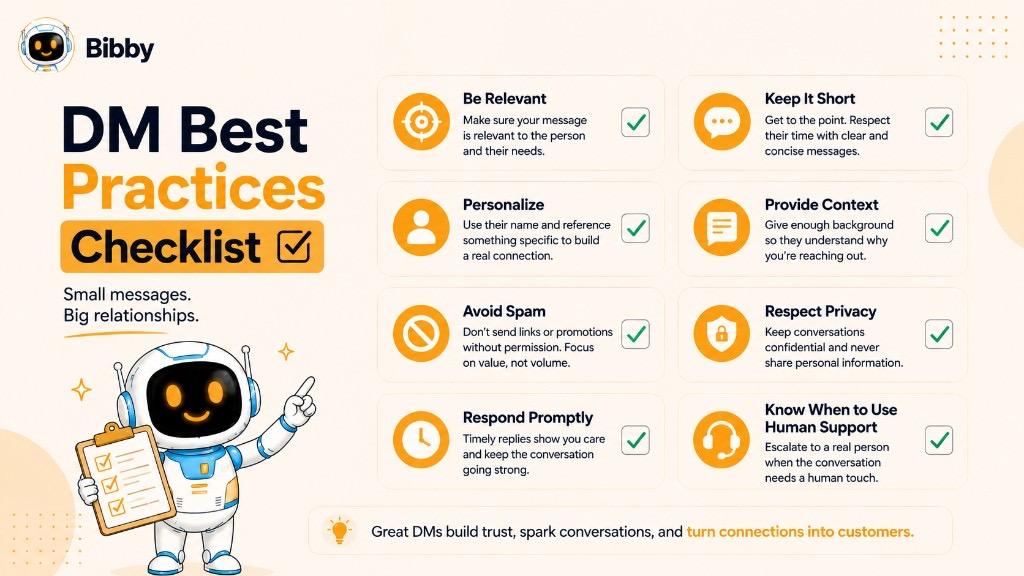
Here are some best practices for managing and sending direct messages on social media.
1. Respond Promptly
When someone sends a genuine question, a timely response can improve their experience with your brand.
You do not need to respond instantly to every message, but businesses should establish a reasonable process for monitoring their inboxes and responding to important conversations.
2. Personalize Your Responses
Avoid treating every person as if they are just another entry in a spreadsheet.
Use the context of the conversation to make your response relevant. If someone has already explained their problem, don't make them repeat it in your next message.
For example, instead of:
“Please tell us how we can help.”
Try:
“Thanks for explaining the issue with your order. Let's check the delivery status for you.”
The second response shows that you have actually read the conversation.
3. Keep Messages Clear and Concise
A DM does not need to contain every detail at once.
Start with the most important information and provide additional details when they are useful. If a response requires a lengthy explanation, consider breaking it into smaller, easy-to-read messages or directing the person to an appropriate resource.
4. Give the Conversation Context
When contacting someone first, explain why you are reaching out.
A message such as:
“Hi, we'd love to work with you.”
provides very little information.
A stronger message might explain:
“Hi, we enjoyed your recent content about small-business marketing and think your audience could be a good fit for an upcoming collaboration. Would you be open to discussing it?”
Context helps the recipient quickly understand the purpose of the DM.
5. Avoid Unsolicited Mass Messages
Sending the same promotional DM to large numbers of people can quickly become spam.
Before sending a marketing message, ask whether the recipient is likely to find it relevant. If there is no meaningful connection between the person and the message, reconsider sending it.
Quality conversations are generally more valuable than a giant pile of ignored messages.
6. Don't Turn Every DM Into a Sales Pitch
A person may contact a brand because they have a question, need support, want information, or simply want to engage with its content.
Not every conversation needs an immediate sales offer.
Listen first. Understand the person's intent. Then provide the most relevant response.
7. Use Automation Carefully
Automation can help businesses manage repetitive social media tasks, but it should not remove human judgment from conversations that require it.
Automated responses can be useful for common questions or basic workflows where supported by the platform. More complicated conversations may require a person.
A practical approach is:
Automation → Handle Repetitive Tasks → Identify Important Conversations → Human Follow-Up
8. Maintain a Consistent Brand Voice
If multiple people manage a company's social media inbox, customers should still receive a consistent experience.
Create basic guidelines for:
- Tone
- Common responses
- Product information
- Customer support procedures
- Escalation rules
- Response times
This helps the brand sound consistent without making every message feel identical.
9. Protect Customer Privacy
A DM may be private from the general public, but businesses should still be careful about what information they request or store.
Avoid asking customers to share sensitive information through social media unless the platform and business process are specifically designed to handle it appropriately.
When necessary, move the conversation to a more suitable secure channel.
10. Know When to Escalate
Some conversations should not be handled entirely through a standard DM workflow.
Escalate when a customer has:
- A complex technical problem
- A serious complaint
- A sensitive account issue
- A payment-related concern
- A legal or compliance question
- A situation requiring specialist support
Knowing when to involve the right person can be more valuable than having the fastest possible automated reply.
11. Respect Platform Rules
Every social network has its own rules around messaging, automation, privacy, spam, and user interactions.
Businesses should review the current requirements for each platform they use, particularly before implementing automated messaging workflows or large-scale outreach.
12. Know When to Stop
If someone clearly indicates that they do not want further communication, respect that decision.
Repeatedly sending follow-ups after someone has ignored or rejected multiple messages can damage trust and may create a poor experience.
A strong DM strategy knows not only how to start a conversation, but also when to leave the conversation alone.
A Simple Rule for Better DMs
Before sending a DM, ask yourself:
Is it relevant? Is it useful? Is it respectful? Is it easy to understand?
If the answer to all four is yes, you are much more likely to create a positive conversation rather than another unread notification.
Common Direct Messaging Mistakes
Direct messages can be powerful for communication, customer support, networking, and social selling, but poor messaging can quickly have the opposite effect. A DM that feels irrelevant, aggressive, or overly automated may be ignored, reported, or remembered for all the wrong reasons.
Here are some of the most common DM mistakes individuals and businesses should avoid.
1. Sending Generic Messages
One of the biggest mistakes is sending the same message to everyone.
For example:
“Hi! We love your profile. We have an amazing business opportunity for you. Are you interested?”
The recipient has no idea why they were contacted or why the opportunity is relevant to them.
A better DM explains the specific reason for reaching out and provides useful context.
2. Starting With a Hard Sales Pitch
Opening a conversation with a product pitch can make a DM feel transactional.
Instead of immediately saying:
“Buy our software today!”
Start by understanding the person's needs when appropriate.
For example:
“Are you currently managing your social media posts manually?”
If the person responds, the conversation can develop naturally.
3. Sending Too Many Follow-Ups
A follow-up can be useful. Repeated messages after someone has shown no interest can become annoying.
For example:
“Just checking in.”
“Following up again.”
“Did you see my last message?”
“One last follow-up.”
At some point, the conversation has stopped being a conversation and started becoming an inbox hostage situation.
Give people space to respond.
4. Writing Extremely Long Messages
A DM is usually not the best place for a wall of text.
If the recipient needs a detailed explanation, start with the key information and provide additional details when requested or appropriate.
Long messages can make it difficult for the recipient to identify the actual question or next step.
5. Not Explaining Why You're Contacting Someone
A message such as:
“Hi, I want to discuss something with you.”
creates unnecessary uncertainty.
Instead, explain the reason:
“Hi, I saw your recent post about content marketing and wanted to ask whether you're currently using a scheduling tool.”
The recipient immediately understands the context.
6. Ignoring the Person's Actual Question
If someone asks:
“How much does your service cost?”
and the response is:
“Hi! Have you seen our latest blog post?”
the business has missed the point.
Read the message carefully and answer the question before moving the conversation elsewhere.
7. Over-Automating Conversations
Automation is useful for repetitive tasks, but not every conversation should receive an automated response.
A customer with a complicated issue may become frustrated if every response sounds like a template.
Use automation where it genuinely improves efficiency, and involve a human when context and judgment matter.
8. Using Too Many Emojis or Excessive Informality
Tone matters.
A casual Instagram conversation may support a different style from a professional LinkedIn conversation. Excessive emojis, slang, or overly familiar language can feel inappropriate depending on the recipient and situation.
Match the tone to the platform, audience, and relationship.
9. Asking for Too Much Information
Don't turn a simple DM into an interrogation.
If someone asks a basic question, avoid immediately requesting a long list of personal or business details unless they are genuinely necessary.
Ask only for information that is relevant to solving the person's problem or continuing the conversation.
10. Ignoring Message Requests
Businesses often focus on their primary inbox and forget about message requests.
Potential customers, partnership opportunities, and genuine questions can sometimes arrive through these filtered areas.
If your business relies on social media communication, establish a process for checking all relevant messaging areas.
11. Making False or Unclear Promises
Avoid statements that could mislead the recipient.
For example, don't promise:
- Guaranteed results
- Instant support
- Features your product does not have
- Availability that you cannot confirm
- Outcomes you cannot reasonably control
A clear and honest DM builds more trust than an exaggerated one.
12. Ignoring Platform Rules
Each social platform can have different rules regarding spam, messaging, automation, user privacy, and commercial communication.
Businesses should understand the current requirements before using tools or workflows that send or manage messages automatically.
13. Continuing After Someone Says No
A clear “no” is a complete answer.
If someone declines an offer or asks not to be contacted, respect that decision. Continuing to push can damage the relationship and may result in the message being reported.
14. Forgetting That DMs Represent Your Brand
For businesses, every DM is part of the customer experience.
A helpful, thoughtful message can strengthen a brand. A careless or robotic response can weaken it.
Before sending a business DM, ask:
Would this message make the recipient feel understood, respected, and appropriately informed?
If not, rewrite it.
The Biggest DM Mistake
Ultimately, the biggest mistake is treating direct messaging as a numbers game instead of a communication channel.
Sending more messages does not automatically create better results. Relevant conversations, useful responses, good timing, and respect for the recipient matter far more than simply increasing the number of DMs sent.
Advantages and Disadvantages of Direct Messages
Direct messages have become an important part of social media communication because they provide a private way to interact with individuals, customers, creators, and businesses. However, DMs also have limitations, particularly when businesses try to manage a large volume of conversations or rely too heavily on automation.
Understanding both the benefits and drawbacks can help you use direct messaging more effectively.
Advantages of DMs
#### 1. Private Communication
The biggest advantage of a DM is that it allows people to communicate privately rather than sharing every detail publicly.
This is particularly useful for customer questions, support conversations, professional discussions, and personal communication.
#### 2. Personalized Conversations
A DM allows businesses to tailor their responses to an individual's needs.
Instead of publishing a generic answer for everyone, a business can understand the person's specific situation and provide a more relevant response.
#### 3. Better Customer Support
Customers can use DMs to ask questions, report problems, or request information without having to publicly describe their situation in a comment.
This can create a more convenient customer-service experience.
#### 4. Lead Generation
DMs can provide a direct path from social media engagement to a potential business conversation.
A person who discovers a brand through a post can ask questions privately and potentially become a qualified lead.
#### 5. Relationship Building
Direct conversations can help businesses build stronger relationships with customers, followers, creators, and professional contacts.
People often appreciate being able to communicate directly with a brand rather than navigating a complicated support process.
#### 6. Social Selling
DMs can support social selling by giving marketers a place to understand prospects, answer questions, provide information, and discuss potential solutions.
The conversation can be more personalized than a standard advertisement or public post.
#### 7. Useful Customer Insights
Questions and feedback received through DMs can reveal what an audience actually wants.
Businesses can use these insights to improve:
- Products
- Services
- Customer support
- Social media content
- FAQs
- Marketing campaigns
Disadvantages of DMs
#### 1. Difficult to Manage at Scale
A business with hundreds or thousands of incoming messages may struggle to respond to every conversation manually.
Without an organized workflow, important messages can easily get buried.
#### 2. Message Requests Can Be Missed
Potential customers may send messages through request or filtered inboxes rather than the primary inbox.
If these areas are not monitored, genuine opportunities can be overlooked.
#### 3. Risk of Spam
Businesses that use DMs for aggressive outreach can quickly cross the line into spam.
Unsolicited mass messages may annoy users, damage brand reputation, and potentially violate platform rules.
#### 4. Too Much Automation Can Feel Robotic
Automation can reduce repetitive work, but poorly designed automated conversations can make customers feel like they are talking to a machine that did not read their question.
Some conversations require empathy, context, and human judgment.
#### 5. Platform Limitations
DM functionality varies between social networks.
Features, privacy controls, messaging permissions, automation options, and restrictions can change over time. A workflow that works on one platform may not work the same way on another.
#### 6. Privacy Considerations
Although DMs are generally private from the public audience, businesses should still treat customer information responsibly.
Sensitive information should not automatically be requested or stored through a social media inbox simply because the conversation is private.
#### 7. Difficult Conversations Can Be Hard to Resolve
A complicated customer complaint can become difficult to manage through short text messages.
Some situations are better handled through email, phone support, a dedicated support system, or another secure channel.
Advantages vs. Disadvantages at a Glance
| Advantages | Disadvantages |
|---|---|
| Private communication | Can be difficult to manage at scale |
| Personalized interaction | Message requests can be missed |
| Useful for customer support | Can become a source of spam |
| Supports lead generation | Poor automation can feel robotic |
| Helps build relationships | Platform features vary |
| Useful for social selling | Privacy must be handled carefully |
| Provides customer insights | Complex issues may need another channel |
Are DMs Worth Using for Business?
For most businesses with an active social media presence, DMs can be a valuable communication channel. The key is to use them for the situations where private conversation adds genuine value.
The strongest approach combines public content, thoughtful engagement, organized messaging, and appropriate automation rather than treating DMs as a replacement for every other communication channel.
Used well, a DM can be the beginning of a customer relationship. Used poorly, it can become just another notification people learn to ignore.
Key Takeaways
- A DM (Direct Message) is a private message sent through a social platform—generally visible only to the people in the conversation, not the public feed.
- “DM me” means send a private message. The same idea may be called Messages, Messenger, or Direct, depending on the platform.
- Use a comment or mention for public engagement. Use a DM for private questions, support, follow-ups, and personalized conversations.
- A message request is often a DM from someone you don't already follow or connect with. Businesses should monitor request inboxes as well as the main inbox.
- Treat DMs as support, education, relationships, and sales—not a channel for unsolicited mass pitches.
- Bibby helps you create and schedule the public content that starts conversations; DMs are how those conversations continue privately.