
TikTok describes Stitch as a way to combine another TikTok with one you are creating. When you want to respond, you take a portion of that video as the start of your own. The original stays associated with the new post; this is not the same as downloading and re-uploading someone else’s file.
Stitch is built in TikTok. Bibby can help you create and schedule original videos and other posts on TikTok and other supported networks. It cannot clip another creator’s video, run native Stitch, pick trending targets, or promise For You placement.
Not every TikTok can be Stitched. Creators control reuse in privacy settings, and TikTok can hide Stitch on a post. If the option is missing, respect that—do not treat it as a prompt to copy the video elsewhere.
What Is Stitch on TikTok?
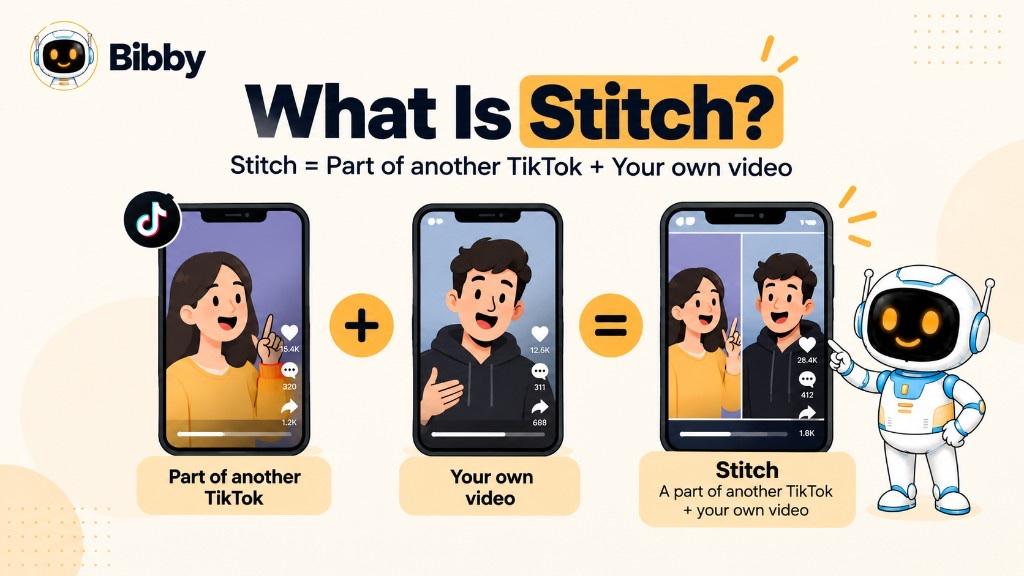
Stitch on TikTok lets you combine part of an existing TikTok with a new video you record. Instead of only sharing someone else’s post, you add a response, explanation, reaction, or creative contribution.
Example: a creator asks, “What is the best productivity tip you’ve ever learned?” Another creator Stitches a portion of that question and records an answer. The new TikTok is built around an existing conversation.
That makes Stitch useful for reactions, commentary, Q&A, education, trends, storytelling, comedy, and creator-to-creator talk. You can join a discussion that is already happening instead of starting from a blank screen.
It is also different from a Duet, where your video sits alongside the original. With Stitch, the original clip is part of your video’s sequence.
How Stitch Works
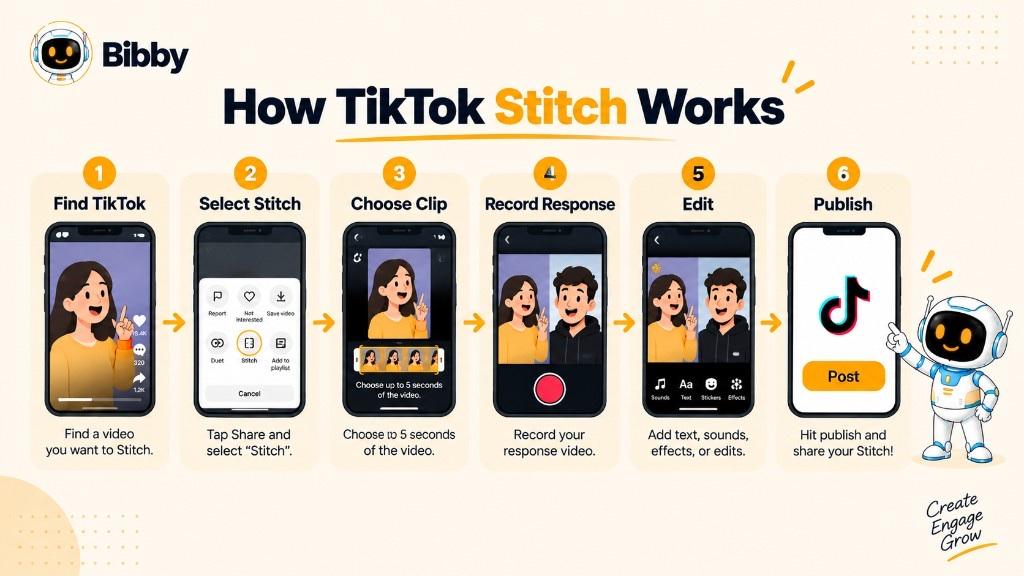
Existing TikTok → Select a portion → Add your video → Edit → Publish
When Stitch is on, eligible users pick a section, record a response, and may add text, stickers, effects, voice, and other TikTok tools before publishing.
Not every post has Stitch. Creators can turn it off per video. TikTok’s rules for public accounts and reuse have changed over time—trust the Share menu on that post, not a permanent policy summary.
Why Is Stitch Important for TikTok Creators?
The value is conversation. You do not need a fully independent topic to join in. You can:
- React to what someone said or did
- Answer a question
- Add context or detail
- Share expertise
- Join a trend
- Challenge or discuss an opinion
- Make a humorous response
- Continue a story
- Build on user-generated videos (when Stitch is allowed)
One TikTok can become a starting point for many perspectives. Stitch is a social format for participation, not only an editor.
How to Stitch a Video on TikTok
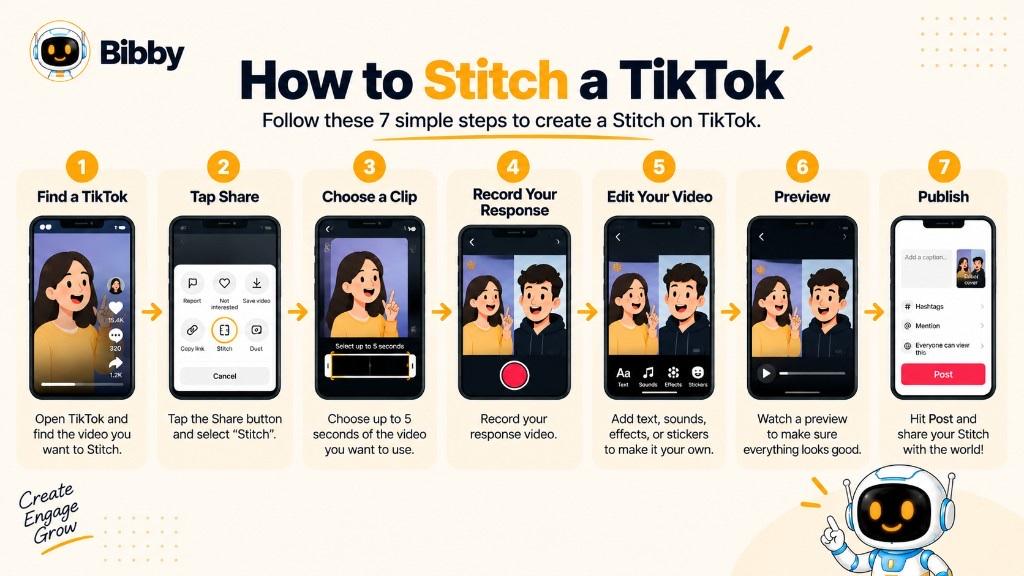
If Stitch is enabled, it lives in that video’s Share options.
- Find the TikTok — pick a post you can add to (question, opinion, tutorial, story, trend).
- Open Share — look for Stitch. If it is absent, you cannot Stitch that video.
- Tap Stitch — TikTok opens the clip picker.
- Choose the relevant portion — enough context, not the whole file. Original clip → Your response → Clear takeaway.
- Record your video — answer, react, explain, continue, or twist the idea. Repeat less; add more.
- Edit — watch the transition; use TikTok text, effects, sound, stickers, and captions as needed.
- Caption and post — publish in TikTok. Native Stitch is not a Bibby publish action.
What Makes a Good TikTok Stitch?
Ask: “What can I add that makes this more useful, entertaining, or interesting?” A marketer might Stitch a common mistake and add a fix. A comedian might turn a setup into a punchline. The original starts the talk; your part should earn the rest of the watch.
What Is the Purpose of Stitch on TikTok?
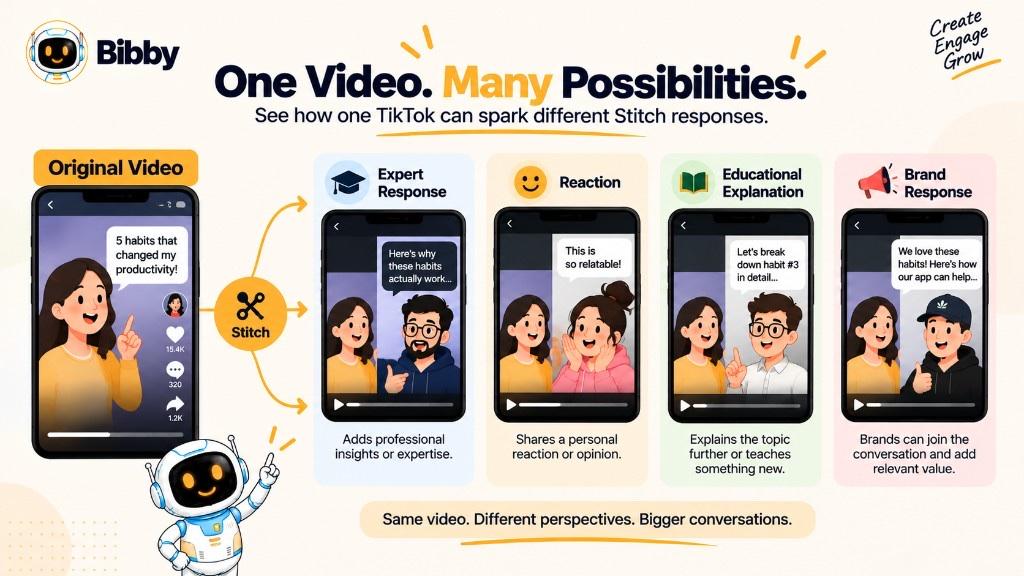
Stitch exists so creators can build on existing content instead of responding with no context.
Reacting — surprise, opinion, demo, challenge. Commentary — what a claim gets right or misses. Answering questions — question first, then your answer. Trends — your interpretation without cloning the original. A different view — alternative approach or extra context, not disagreement only for attention. Teaching — nutrition, finance, language, software, marketing: original as setup, your clip as the lesson. Conversation — replies that invite more replies. Lightweight collaboration — no need to record in the same room; chains of related posts can form.
For strategy, Stitch can help you join relevant talks and show expertise. It works when you contribute something new—not when you borrow a popular clip and add nothing.
Stitch Examples on TikTok
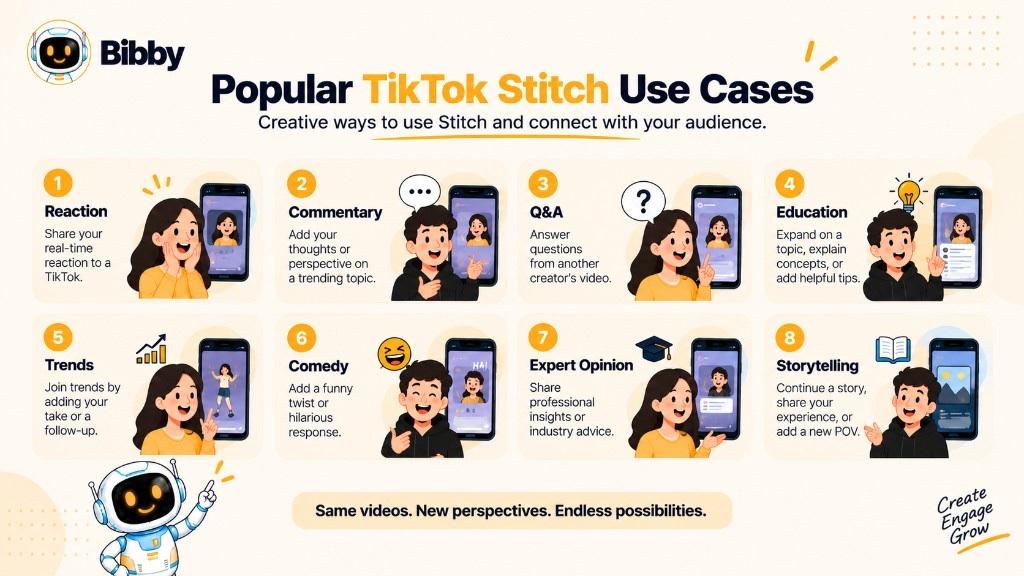
- Reaction — a travel creator Stitches an unusual destination and shares their visit. Curiosity, then a new angle.
- Expert commentary — a security professional Stitches a common mistake and explains what to do.
- Q&A — “What should I learn before an online business?” then three practical recommendations.
- Trend — Stitch the prompt, then show how your experience differs.
- Education — a developer Stitches a concept video and adds a beginner use case.
- Another opinion — a marketer Stitches “post every day” and explains why cadence depends on audience, quality, platform, and strategy. Useful, not performative conflict.
- Comedy — serious setup, humorous ending. The original does the setup work.
- Continuing a story — first-day-at-work clip, then your first day.
A Stitch is not valuable only because the source has views. It should add information, context, an answer, an experience, a new view, entertainment, or a next step. For brands, stitching every viral clip can make the calendar random. Choose conversations your audience actually cares about.
Stitch vs. Duet on TikTok
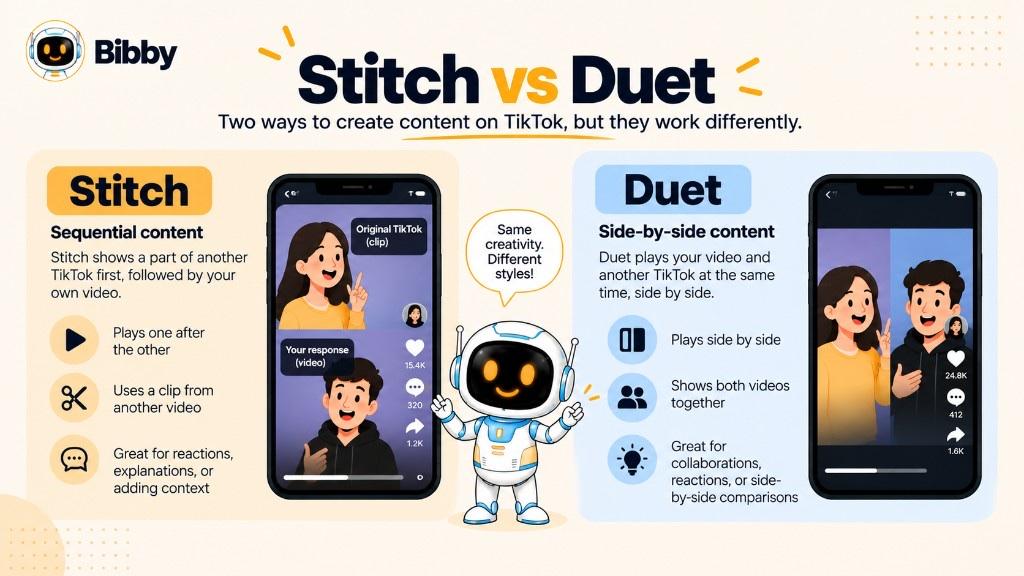
Both let you build around another user’s video. Presentation is the difference.
| Stitch | Duet | |
|---|---|---|
| Uses another TikTok | Yes | Yes |
| How the original appears | Selected clip in sequence | Alongside yours |
| You record | Yes | Yes |
| Typical format | Sequential | Side-by-side |
| Common use | Responses, commentary, explanations | Reactions, performances, comparisons |
| Best for | Continuing a conversation | Interacting in real time on screen |
Stitch: Part of original → Your response.
Duet: Original + Your video together.
Use Stitch to answer a question, explain a claim, continue a story, or add a punchline after a specific moment. Use Duet to react in real time, perform with a musician, compare products, or show two perspectives at once. Neither is universally better; match the format to the idea.
What Is the Difference Between Stitch and Reposting?
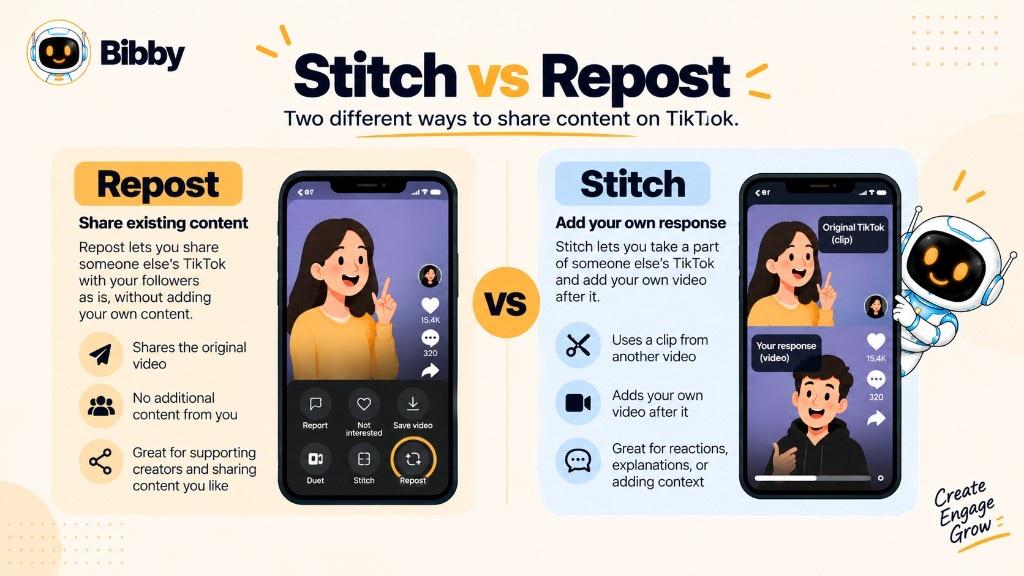
A repost shares an existing TikTok. A Stitch creates new content around a selected clip.
| Stitch | Repost | |
|---|---|---|
| New content | Yes | No new video required |
| Uses their video | Selected portion | The existing TikTok |
| Your recording | Yes | No |
| Purpose | Respond, comment, explain, create | Share with your audience |
| Best for | Conversation | Discovery and sharing |
Repost a useful tip so followers see it. Stitch the same tip to explain why it works or add another tactic. Stitch does not make you the owner of the original. Do not treat a missing Stitch button as permission to download and re-upload.
Can You Stitch Any TikTok Video?
No. Availability depends on the creator’s settings and TikTok’s rules. The Share menu is the live answer.
Stitch may be missing because:
- The creator turned it off for that post
- Privacy or reuse settings restrict the account or video
- TikTok limits the feature for that content, account, or region
Private TikToks are generally not open for public Stitching. Creators can turn Stitch off. If the button is missing: try another video from the same creator, check privacy, update the app, confirm the feature exists for your account, then try another eligible public post.
If Stitch is not offered, do not treat a download as the same thing. That is a different copyright and permission question.
Simple rule: Stitch is a permission-based doorway. If it is on and eligible, use TikTok’s tool. If not, stop. Publishing a video does not require you to allow Stitch.
How Long Can a TikTok Stitch Be?
Length depends on the clip TikTok lets you select and current creation limits. TikTok has changed those limits. Check the in-app picker and TikTok’s help pages—do not treat a fixed second count as permanent.
Stitch is not meant to reproduce an entire TikTok. Pick a relevant clip, then add your recording.
Too little original footage and viewers miss the point. Too much and your contribution is slow to start. Context → Response → Value. You control which part you Stitch: question, claim, tutorial step, story setup, or trend hook.
Focus on how much context you need, not a magic duration.
Why Do Creators Use Stitch?
It is a simple way to join a conversation that already has context: more replies in a chain, trend participation without a clone, missing context on a short claim, expert replies, and community prompts.
Reach: a response can introduce you to people who never saw your account. That is not a viral shortcut. A popular original does not make every Stitch succeed. You still need a hook, a clear message, and a reason to keep watching. Review performance in TikTok Analytics—not in Bibby.
Use Stitch because the conversation fits, not only because the source is popular.
How Brands Can Use TikTok Stitch
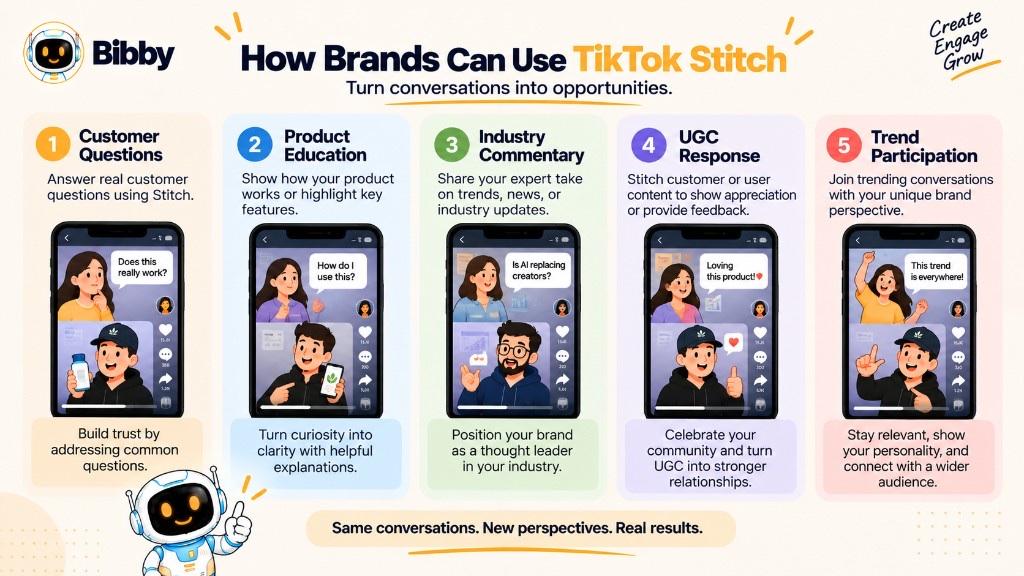
Use Stitch to participate, not only to promote. Stay relevant to audience, industry, or expertise.
- Answer customer questions already on TikTok
- Join trends that actually fit (relevance over raw views)
- Add industry commentary on misconceptions or news
- Show a product inside a problem (e.g. organizing a content calendar)—solve first, pitch second
- Expert commentary in your field
- Respond to eligible UGC (thanks, extra info, demo)—with respect for the creator
- Turn FAQs into videos
Before you publish: Is it relevant? Do we add something useful? Does it fit our voice? Will the audience get why we replied? Are we fair to the original?
Stitch should sit beside original videos, education, product posts, and stories—not replace a strategy. Record Stitches in TikTok. Use Bibby to create, caption, and schedule original posts on Facebook, Instagram, LinkedIn, YouTube, and TikTok. Bibby does not Stitch clips or guarantee that a brand reply will convert.
Stitch Best Practices
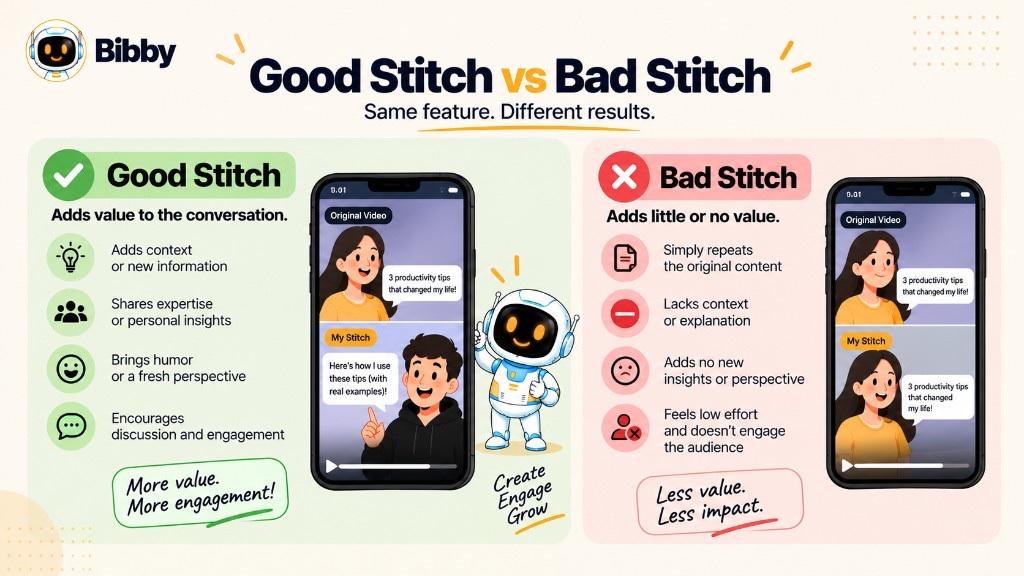
- Add value — idea, tip, explanation, experience, correction, or creative twist
- Stay relevant — random viral replies rarely serve your account
- Clip tightly — the moment you are answering
- Give context — e.g. “One detail is missing from this explanation.”
- Stay original — do not recap their whole video
- Respect the creator — argue the idea, not the person; do not twist a quote
- Do not mislead — a short clip can distort a longer video
- Transition clearly — statement → your reaction → takeaway
- Earn the watch — skip “I agree they said three tips…”; try “I’d add one strategy most teams skip.”
- Mix formats — original education, product, BTS, tutorials, occasional Stitches
- Choose conversation over virality — “Will my audience value this?” beats “Will this ride a trend?”
Stitch Etiquette and Copyright Considerations
Being able to Stitch does not give unrestricted rights to the original.
Respect the creator. Do not use Stitch to harass or embarrass. Controls are in TikTok settings—check them. You do not own the source video. Do not download and re-upload if Stitch is off. Brands should not assume Stitch permission covers ads, sites, or other commercial use—get a license if you need the footage elsewhere. Keep clips fair. Add a real contribution. Recheck TikTok’s current policies; they change.
Use Stitch to join a conversation, not to take someone’s content.
Stitch Meaning in Social Media
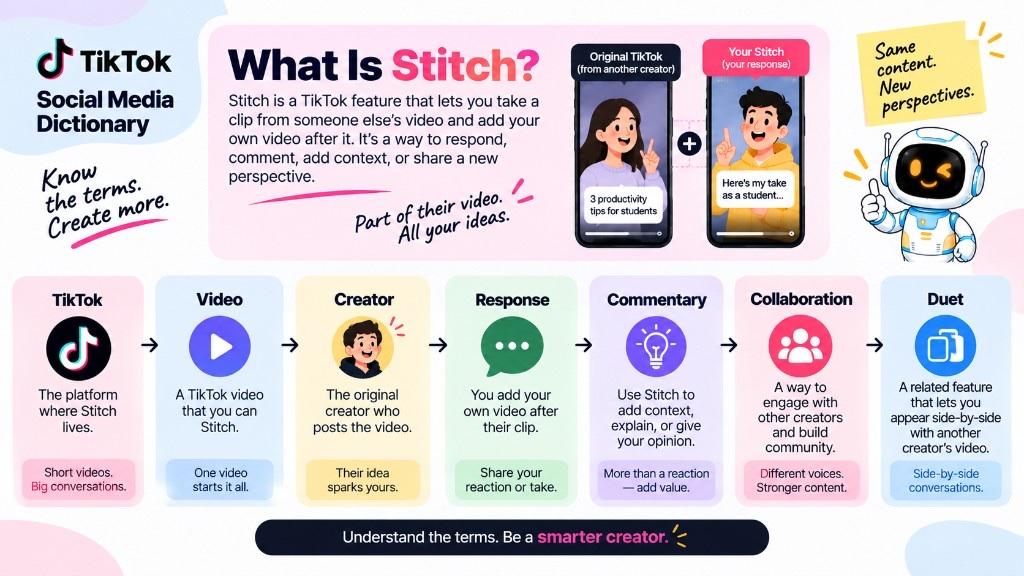
In social media, Stitch usually means TikTok’s feature for folding part of another user’s video into yours, then adding a response. The everyday word *stitch* means joining pieces; TikTok made that a format.
It is not automatically a formal collab. One person posts; another responds independently—agree, disagree, explain, or divert.
For marketers it is a shift from broadcast (brand posts, audience watches) toward response (someone publishes, you reply, others join). Unrelated viral Stitches can inflate views without attracting people who care about the brand.
Shortest line: use part of another eligible video, then add your own.
Stitch vs. Other TikTok Features
| Feature | What it does | Best for |
|---|---|---|
| Stitch | Selected clip + your video | Responses, commentary, explanations |
| Duet | Your video beside theirs | Side-by-side reaction, performance, comparison |
| Repost | Shares the existing TikTok | Passing along useful content |
| Reply with video | Video response to a comment | Audience Q&A |
| Original video | Entirely your idea | Standalone education, entertainment, or promo |
Respond to part of a video → Stitch.
Need both on screen → Duet.
Share without a new recording → Repost.
Answer a comment → Reply with video.
Your own idea from scratch → Original.
A TikTok mix can use several of these. Original videos you already shot can be captioned and scheduled in Bibby; Stitch, Duet, and comment-replies stay in TikTok.
Conclusion
Stitch turns part of someone else’s eligible TikTok into the opening of yours. It is sequential, permission-based, and different from Duet, repost, and a full re-upload.
Three things to remember:
- Sequence, not side-by-side — clip, then your contribution.
- Availability is not automatic — if Stitch is missing, do not bypass it.
- Add something the original did not — that is the reason to watch you.
Record Stitches in TikTok. Plan original posts and a calendar in a tool such as Bibby when you need create, caption, and schedule—not native Stitch.