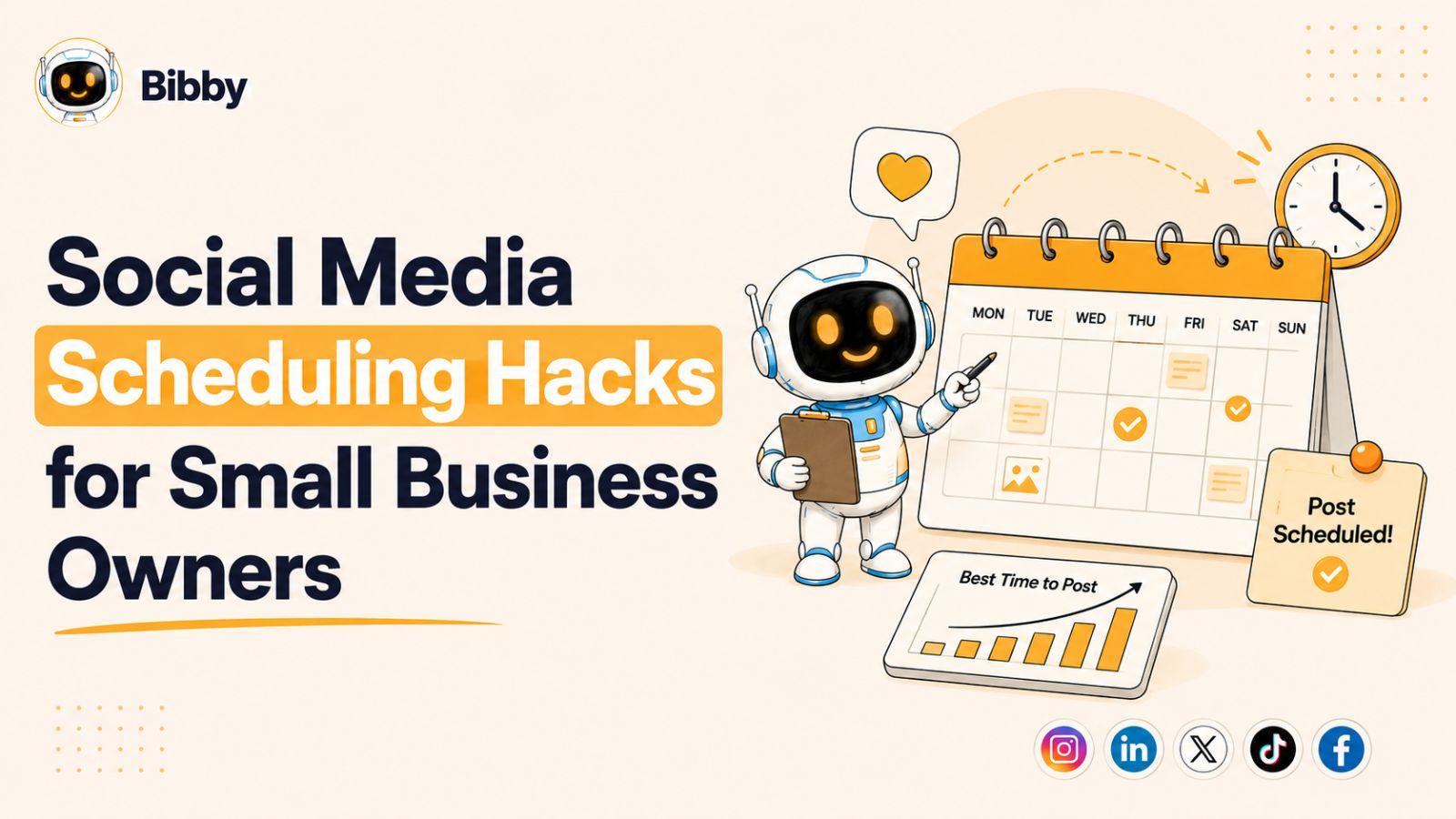
Running a small business is demanding, and keeping up with social media can quickly become a full-time job.
If you're struggling to post consistently across Facebook, Instagram, LinkedIn, TikTok, and YouTube, you're not alone. The good news is that the right scheduling strategies and automation tools can help you save hours every week while improving your reach, engagement, and overall marketing results.
From content batching and AI-generated captions to fully automated publishing with tools like Bibby, these practical scheduling hacks will help you spend less time managing social media and more time growing your business.
What Is Social Media Scheduling?
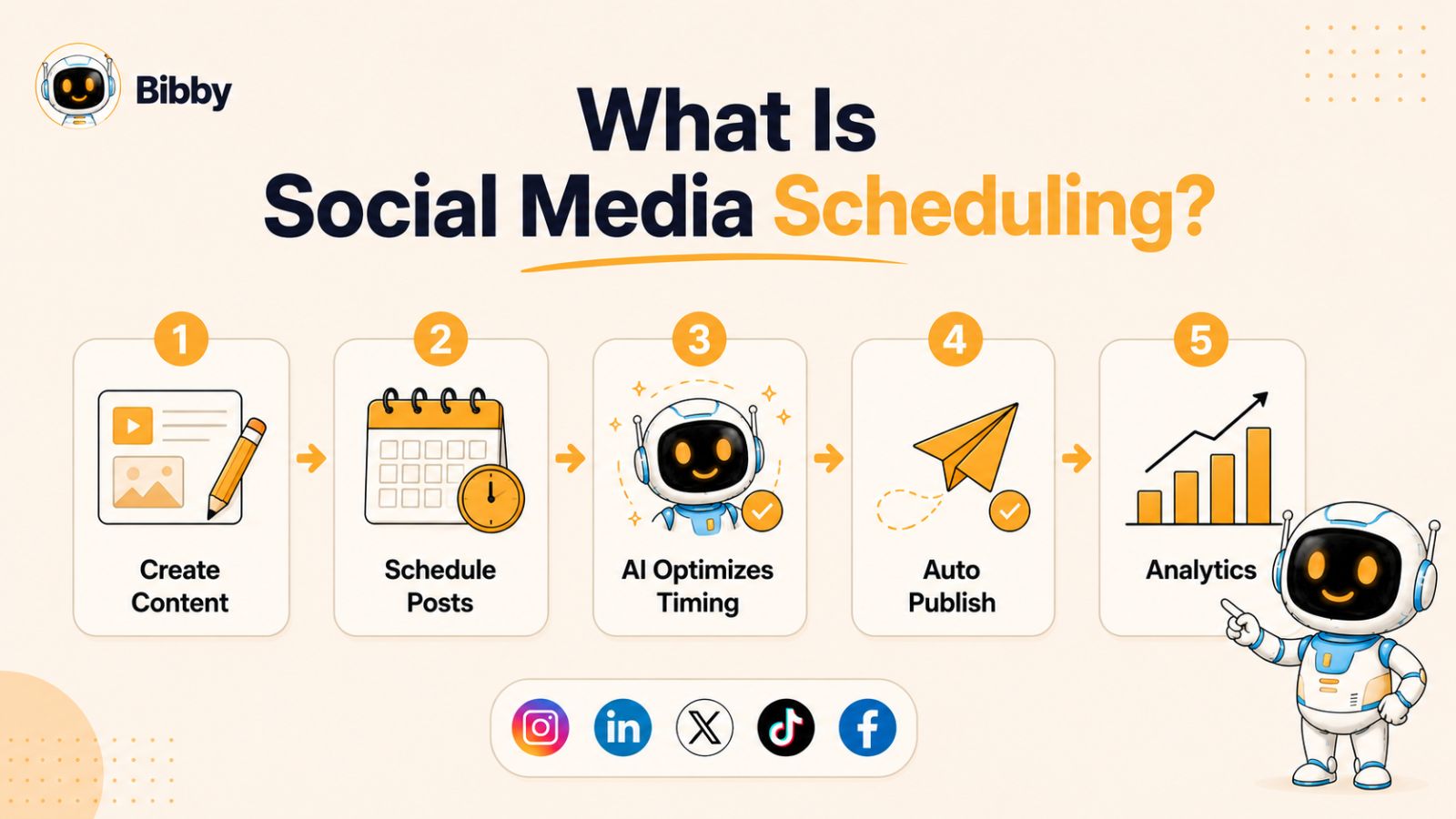
Social media scheduling is the process of planning, creating, and publishing content on social media platforms in advance rather than posting manually every day. Using scheduling tools, businesses can prepare weeks or even months of content ahead of time and automatically publish posts at predetermined times.
For small business owners, social media scheduling eliminates the need to stop what you're doing every day to create and publish content. Instead, you can dedicate a few hours to preparing content in batches and let automation handle the rest.
Social Media Scheduling vs. Social Media Automation
While the terms are often used interchangeably, social media scheduling and social media automation are slightly different.
Social media scheduling focuses on planning and publishing content at specific dates and times.
Social media automation goes a step further by using technology and artificial intelligence to streamline tasks such as caption creation, content recommendations, optimal posting times, analytics tracking, and multi-platform publishing.
Modern tools combine both capabilities, allowing businesses to create content once and distribute it everywhere automatically.
Why Social Media Scheduling Matters
Consistency is one of the biggest factors influencing social media success. Most social platforms reward accounts that publish valuable content regularly. However, maintaining a consistent posting schedule can be challenging when you're managing customers, operations, sales, and other business responsibilities.
Scheduling helps solve this problem by ensuring your content continues to reach your audience even when you're busy focusing on other aspects of your business.
Key Benefits of Social Media Scheduling
Saves Valuable Time
Instead of creating content daily, you can batch-create content and schedule it in advance, freeing up hours every week.
Improves Consistency
Scheduled content helps maintain a regular posting schedule, which can improve visibility and audience trust over time.
Increases Engagement
Posting at the right times gives your content a better chance of reaching followers when they're most active.
Reduces Marketing Stress
With content already planned and scheduled, there's less pressure to come up with last-minute post ideas.
Supports Multi-Platform Growth
Scheduling tools make it easier to maintain an active presence on multiple platforms without multiplying your workload.
For many small business owners, social media scheduling is the difference between posting occasionally and building a consistent online presence that generates real business results.
Also read: Scheduled Posts vs Manual Posting: What Works Best
Why Most Small Business Owners Struggle With Social Media
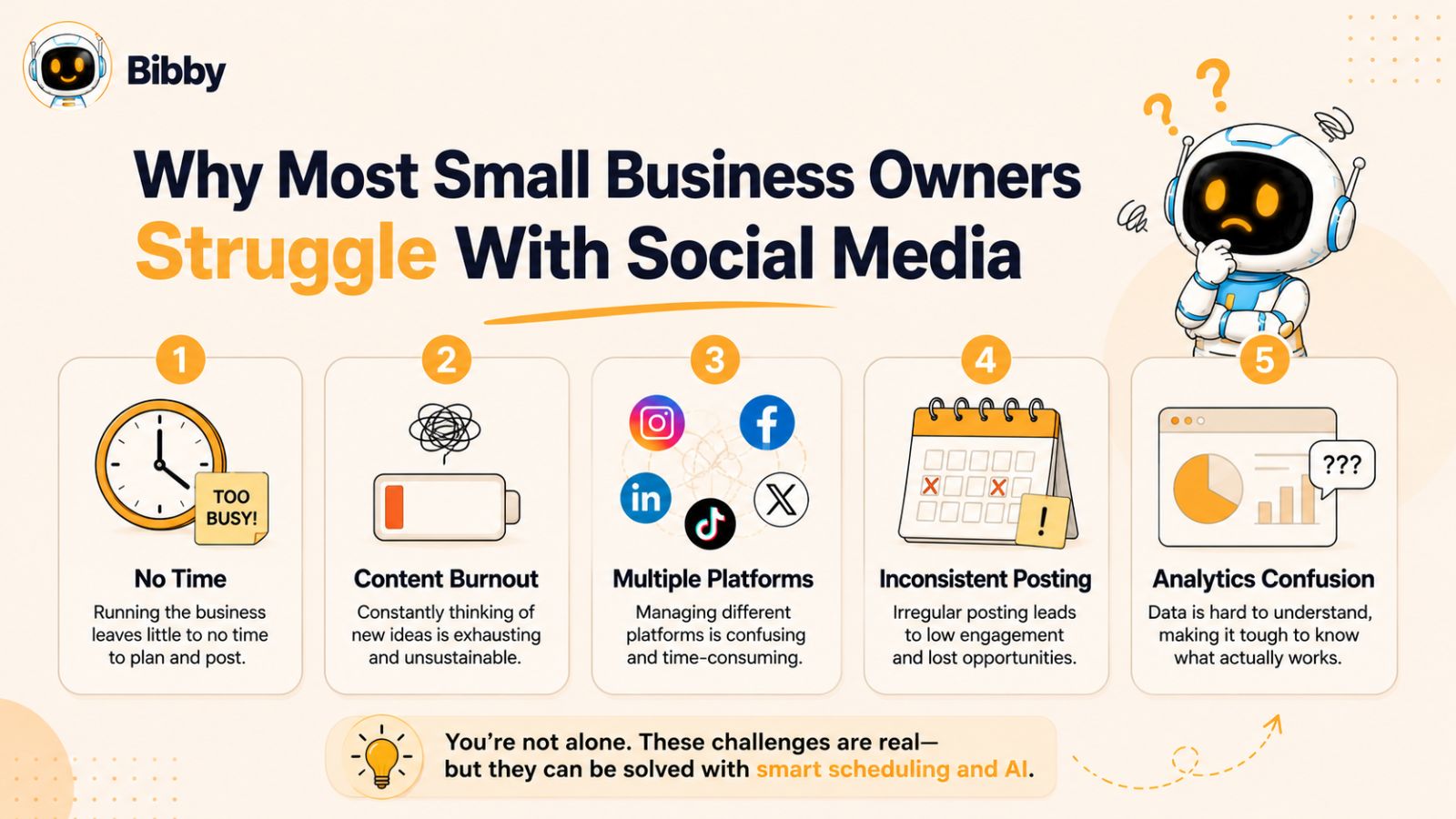
Most small business owners understand the importance of social media marketing. The challenge isn't knowing they should post—it's finding the time, resources, and consistency to do it effectively.
Between serving customers, managing operations, handling finances, and growing the business, social media often gets pushed to the bottom of the priority list. As a result, many businesses post inconsistently, miss opportunities to engage their audience, and struggle to generate meaningful results.
Lack of Time
Time is the biggest obstacle for most small business owners.
A typical day can include customer meetings, inventory management, employee supervision, sales activities, and administrative tasks. When the day is over, creating social media content is often the last thing on the to-do list.
The problem is that social media rewards consistency. Posting only when you remember or when business is slow rarely produces long-term growth.
Content Creation Burnout
Coming up with new content ideas every day can be exhausting.
Many business owners spend more time wondering what to post than actually creating content. This often leads to creative fatigue, repetitive content, or long periods of inactivity.
Common content challenges include:
- Running out of post ideas
- Writing engaging captions
- Creating eye-catching visuals
- Keeping up with industry trends
- Adapting content for different platforms
Without a system in place, content creation can quickly become overwhelming.
Managing Multiple Social Media Platforms
Today's customers are spread across multiple platforms.
Your audience might discover your business on Instagram, connect with you on Facebook, research your expertise on LinkedIn, watch your videos on YouTube, and engage with your short-form content on TikTok.
Managing all these channels manually requires significant time and effort. Creating unique content, formatting posts correctly, and publishing them individually can turn social media into a full-time job.
Uncertainty About What Works
Many small business owners are unsure whether their social media efforts are producing results.
Questions like these are common:
- What should I post?
- How often should I post?
- Which platform deserves the most attention?
- When should I publish content?
- How do I know what's working?
Without access to clear analytics and performance data, it's difficult to improve your strategy.
Inconsistent Posting Hurts Growth
One of the most damaging social media mistakes is inconsistency.
Many businesses post heavily for a week or two and then disappear for a month. Others only post when they have a promotion or product launch.
This inconsistency makes it harder to build audience trust, maintain engagement, and benefit from social media algorithms that favor active accounts.
The Solution: Systems and Automation
The good news is that successful social media marketing doesn't require spending hours every day online.
The most effective small business owners rely on systems, scheduling, and automation to maintain a consistent presence. By creating content in batches, scheduling posts in advance, and leveraging AI-powered tools, businesses can stay active across multiple platforms without sacrificing valuable time.
The following social media scheduling hacks will show you exactly how to build a more efficient workflow, increase consistency, and achieve better results with less effort.
Hack #1: Create Content in Batches
One of the most effective social media scheduling hacks for small business owners is content batching.
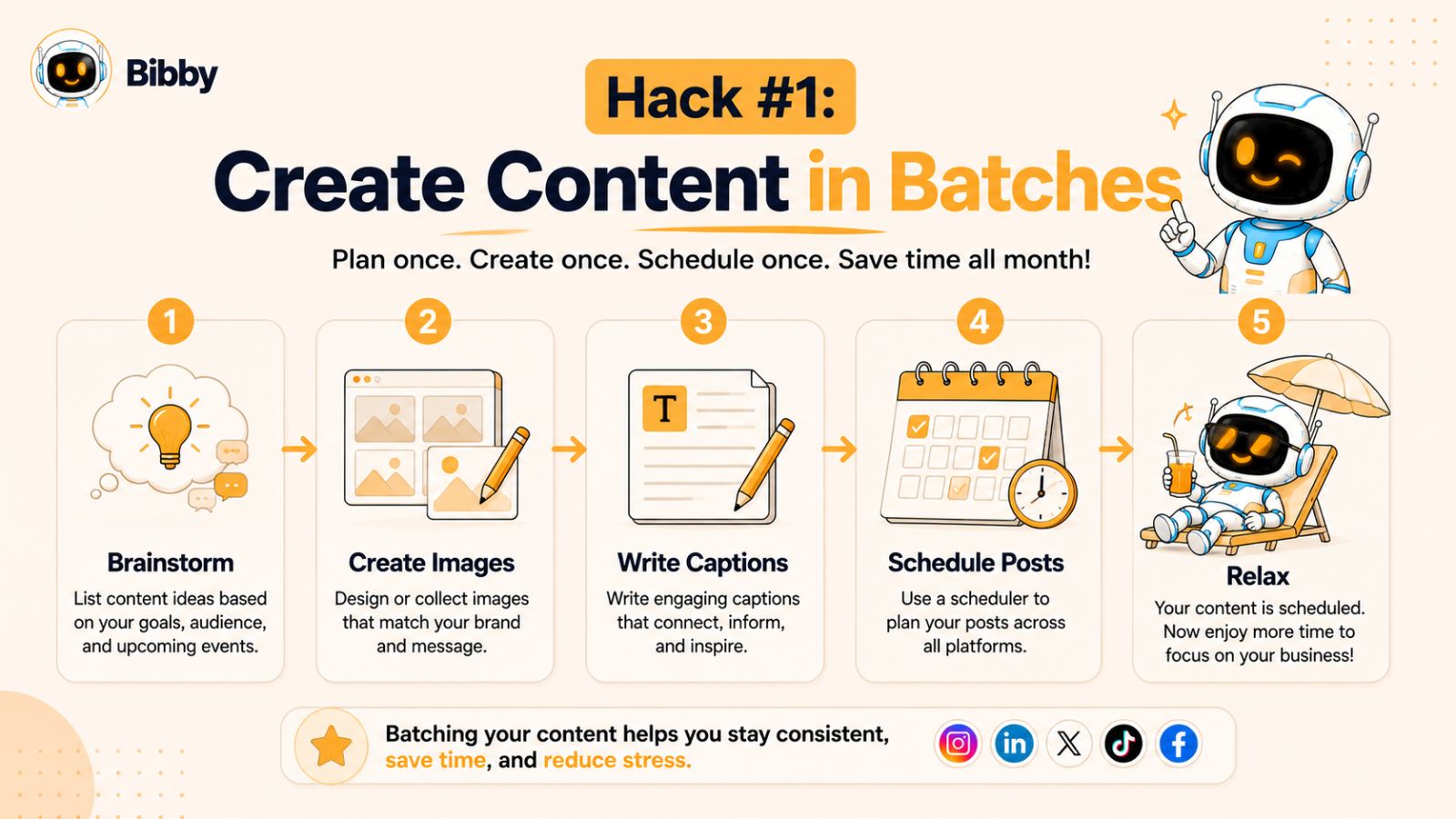
Instead of creating and publishing content every day, content batching involves producing multiple posts during a dedicated content creation session. This approach reduces context switching, improves efficiency, and helps maintain a consistent posting schedule.
Think of it this way: creating one social media post every day means you're repeatedly stopping what you're doing, brainstorming ideas, designing visuals, writing captions, and publishing content. When you batch your content, you complete those tasks in a single focused session.
What Is Content Batching?
Content batching is the process of creating a large amount of content at one time and scheduling it for future publication.
For example, you might:
- Create 20 Instagram posts in one afternoon
- Record a month's worth of videos in a single day
- Write captions for several weeks of content at once
- Plan your entire monthly content calendar in advance
Rather than constantly thinking about social media, you work ahead and let your schedule do the heavy lifting.
Why Content Batching Works
Increased Productivity
When you focus on one type of task at a time, your brain works more efficiently. Instead of switching between customer service, sales, operations, and content creation, you stay focused on producing content.
Better Content Quality
Creating multiple posts together helps maintain consistency in messaging, branding, and campaign goals. It also gives you more time to think strategically about your content.
Reduced Daily Stress
One of the biggest advantages of batching is peace of mind. Knowing that your social media content is already planned and scheduled removes the pressure of finding something to post every day.
Improved Consistency
Consistency is easier when your content calendar is already filled weeks in advance. Scheduled content keeps your audience engaged even during busy periods.
A Simple Content Batching Workflow
Many successful small business owners dedicate one day each month to content creation.
A simple workflow might look like this:
- Brainstorm content ideas for the month
- Organize posts into content categories
- Create or gather images and videos
- Write captions for each post
- Schedule everything in advance
- Review performance and refine next month's plan
With this system, a few hours of focused work can generate weeks of content.
How AI Makes Content Batching Even Faster
Traditionally, the most time-consuming part of batching content was creating visuals and writing captions.
Today, AI-powered tools dramatically speed up the process.
For example, with Bibby, you can upload your images—or generate new images using AI—select your preferred posting style, and let the platform automatically generate captions for your content. Instead of spending hours writing copy for every post, you can review and approve AI-generated suggestions in minutes.
When combined with scheduling and automation, content batching becomes one of the fastest ways to maintain a professional and consistent social media presence.
Key Takeaway
If you're currently creating social media content one post at a time, you're making the process harder than it needs to be. By batching your content and scheduling it in advance, you can save hours every week, reduce stress, and build a more consistent presence across all your social media channels.
Please also read: Multi Platform Social Media Management: The Complete Guide for Businesses
Hack #2: Use an AI-Powered Scheduling Tool
If content batching is the foundation of an efficient social media strategy, an AI-powered scheduling tool is what allows you to scale it.
Many small business owners start by manually scheduling posts on each platform. While this approach may work initially, it quickly becomes difficult to manage as your content volume increases and your audience expands across multiple channels.
An AI-powered scheduling tool eliminates repetitive tasks, streamlines content creation, and helps ens
ure your posts reach the right audience at the right time.
Why Traditional Scheduling Tools Fall Short
Most scheduling tools only solve one problem: publishing content at a future date.
You still have to:
- Create images
- Write captions
- Decide when to post
- Upload content to multiple platforms
- Monitor performance manually
As a result, social media management remains time-consuming.
Modern AI-powered platforms go much further by automating much of the content creation and scheduling process.
How AI Improves Social Media Scheduling
Artificial intelligence can help small businesses:
- Generate engaging captions
- Recommend content styles
- Optimize posting times
- Analyze audience behavior
- Improve content performance over time
- Automate repetitive publishing tasks
Instead of guessing what might work, AI uses data and automation to simplify decision-making.
Bibby: A Smarter Way to Schedule Social Media Content
For small business owners looking to save time and simplify social media management, Bibby provides a streamlined workflow designed around automation and ease of use.
Unlike traditional scheduling tools that require multiple manual steps, Bibby combines content creation, caption generation, scheduling, publishing, and analytics in a single platform.
How Bibby Works
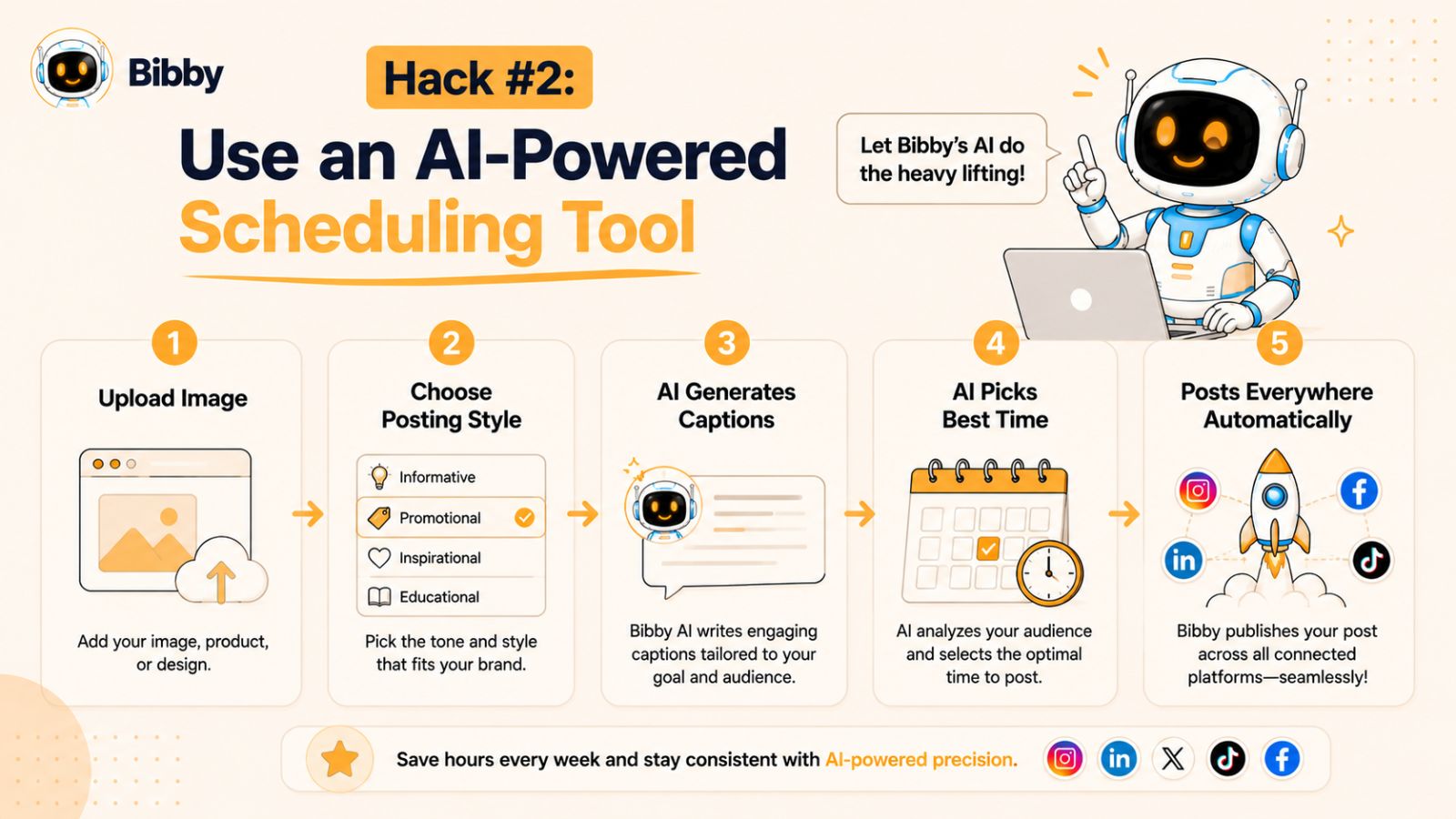
The process is intentionally simple:
Step 1: Upload Your Image or Generate One With AI
Start by uploading your own content or creating new visuals using Bibby's AI image generation capabilities.
This gives businesses flexibility whether they already have marketing assets or need help creating fresh content.
Step 2: Choose Your Posting Style
Select the style and tone that best matches your brand.
For example, you might choose:
- Professional
- Educational
- Inspirational
- Promotional
- Friendly and conversational
This helps maintain a consistent voice across all platforms.
Step 3: Let AI Generate Captions
Once your content is uploaded, Bibby's AI automatically creates captions tailored to your selected style.
This significantly reduces the time spent writing content while helping maintain consistency across campaigns.
Step 4: AI Optimizes Posting Times
One of the biggest challenges in social media marketing is determining when to publish content.
Bibby analyzes posting opportunities and schedules content at AI-optimized times designed to maximize visibility and engagement.
Rather than guessing when your audience is online, the system helps automate the timing process.
Step 5: Publish Everywhere From One Dashboard
Instead of logging into multiple social networks, Bibby allows you to schedule and publish content across multiple platforms simultaneously.
Supported platforms include:
- TikTok
- YouTube
This centralized workflow saves significant time and reduces administrative work.
More Than Just Post Scheduling
Many social media management tools focus only on standard feed posts.
Bibby supports a broader range of content formats, including:
Video Scheduling
Plan and publish video content across multiple platforms from one place.
Story Scheduling
Schedule stories in advance to maintain daily visibility without manual posting.
Content Automation
Reduce repetitive marketing tasks through AI-assisted workflows.
Performance Analytics
Track engagement, reach, audience growth, and content performance from a centralized analytics dashboard.
Why Small Business Owners Benefit Most
Large companies often have dedicated marketing teams. Small business owners rarely have that luxury.
That's why efficiency matters.
An AI-powered platform like Bibby helps business owners:
- Save time
- Maintain consistency
- Reduce content creation workload
- Expand their presence across multiple channels
- Make better decisions using analytics
- Focus more on growing their business
Key Takeaway
The goal of social media automation isn't to replace creativity—it's to eliminate repetitive work.
By using an AI-powered scheduling platform like Bibby, small business owners can create content faster, automate publishing, optimize posting times, and manage multiple platforms from a single dashboard. The result is a more consistent social media presence with significantly less effort.
Must read: How Far Ahead Should You Schedule Social Media Posts?
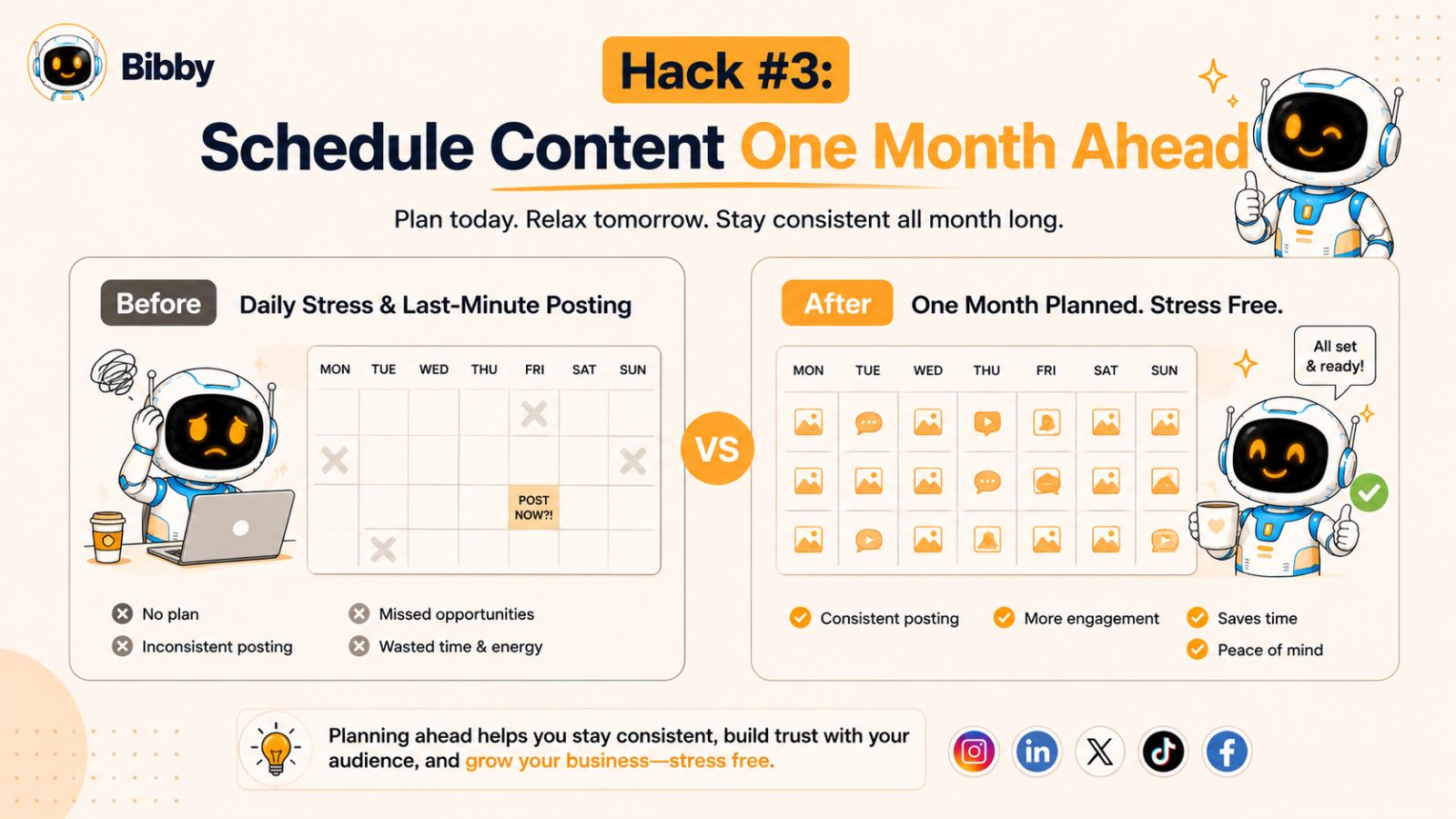
Hack #3: Schedule Content One Month Ahead
One of the biggest mistakes small business owners make is planning their social media content only a few days in advance. While this approach may seem manageable, it often leads to rushed content, inconsistent posting, and unnecessary stress.
A more effective strategy is to schedule your content at least one month ahead.
By creating a monthly content calendar and scheduling posts in advance, you gain greater control over your marketing efforts while freeing yourself from daily content management tasks.
Why One Month Is the Sweet Spot
Scheduling content too far into the future can make it difficult to adapt to trends and business changes. Scheduling only a few days ahead often creates constant pressure.
A one-month planning window offers the ideal balance between flexibility and consistency.
Benefits include:
- Better content organization
- Reduced last-minute stress
- More strategic marketing campaigns
- Consistent posting frequency
- Improved team collaboration
- More time to engage with followers
When your content is already scheduled, you can focus on running your business instead of worrying about tomorrow's post.
Create a Monthly Content Calendar
Before scheduling content, it's helpful to map out your month.
Your calendar might include:
Educational Content
Share tips, tutorials, industry insights, and frequently asked questions.
Promotional Content
Highlight products, services, offers, and upcoming events.
Feature customer reviews, testimonials, case studies, and success stories.
Behind-the-Scenes Content
Show the people, processes, and culture behind your business.
Engagement Posts
Encourage comments, conversations, polls, and audience participation.
A balanced content calendar helps prevent repetitive posting and keeps your audience interested.
Plan Around Key Dates
When scheduling a month in advance, you can strategically prepare for important events.
Examples include:
- Holidays
- Industry events
- Seasonal promotions
- Product launches
- Local community events
- Company milestones
Planning ahead ensures you never miss opportunities to participate in relevant conversations.
Eliminate Daily Posting Decisions
Decision fatigue is a hidden productivity killer.
Every day you ask yourself:
- What should I post today?
- Which platform should I use?
- What should I write?
- What image should I share?
You're spending mental energy on repetitive decisions.
Scheduling a month ahead eliminates these daily questions. The content is already prepared, approved, and ready to publish automatically.
How Bibby Simplifies Monthly Scheduling
Scheduling an entire month of content manually across multiple platforms can still take a considerable amount of time.
Bibby's AI-powered workflow makes the process significantly easier.
After uploading your images or generating new visuals with AI, you can choose your preferred posting style and allow Bibby to generate captions automatically. The platform then schedules your content at AI-optimized times and publishes it across your selected social channels.
Instead of scheduling posts individually for Facebook, Instagram, LinkedIn, TikTok, and YouTube, you can manage everything from one dashboard.
This allows business owners to build a month's worth of content in a single session and then focus on serving customers and growing their business.
Leave Room for Real-Time Content
Scheduling ahead doesn't mean your social media becomes rigid.
The most effective strategy combines:
- Scheduled evergreen content
- Planned campaigns
- Real-time updates
- Trend-based content
- Community engagement
This balance provides consistency while preserving the flexibility to react to opportunities as they arise.
Key Takeaway
Scheduling content one month ahead transforms social media from a daily task into a manageable business system. With a structured content calendar and the right automation tools, you can reduce stress, improve consistency, and maintain a strong online presence without spending hours every day managing social media.
Also read: Benefits of Scheduling Social Media Posts for Faster Growth
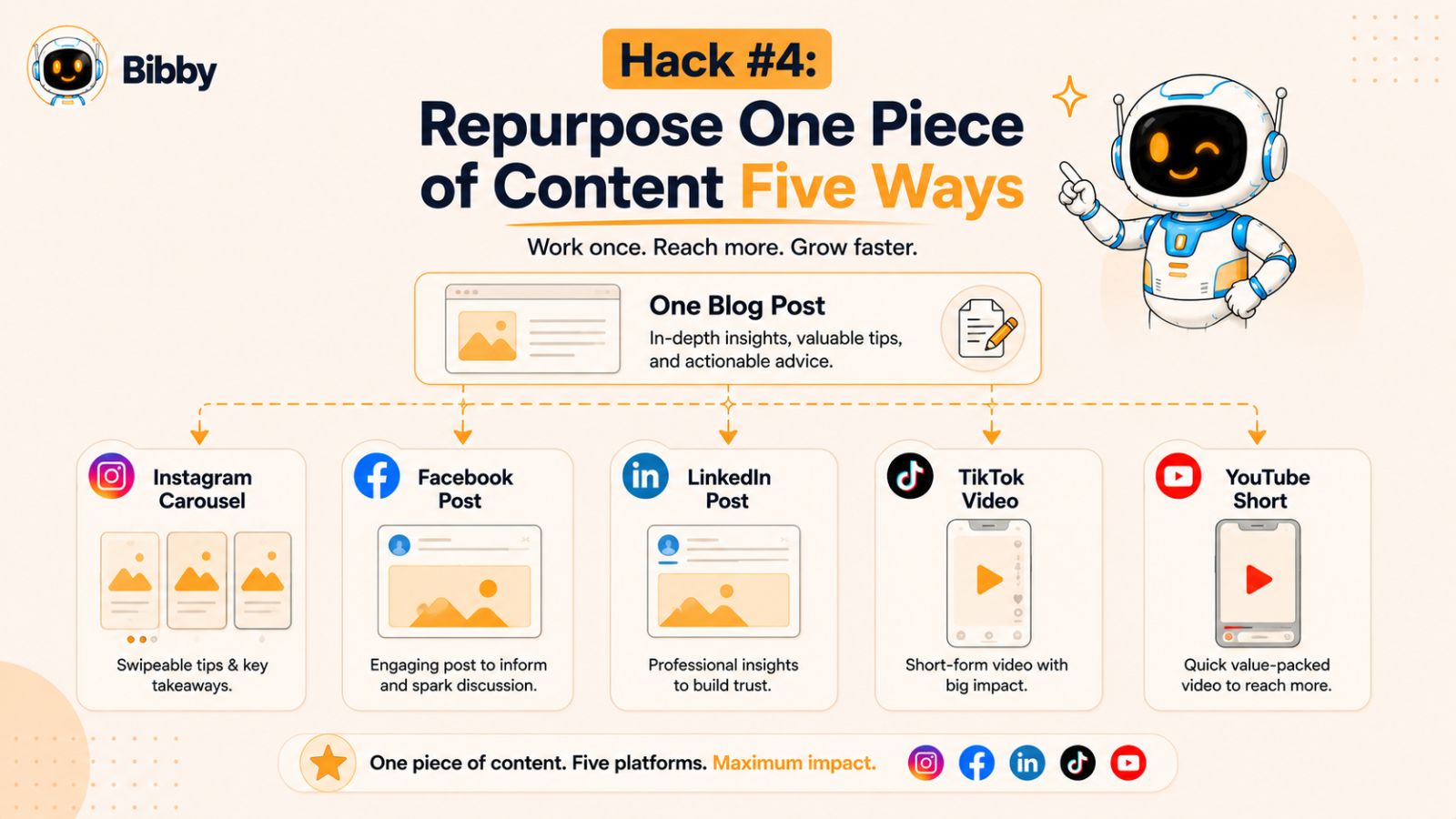
Hack #4: Repurpose One Piece of Content Five Ways
One of the fastest ways to grow your social media presence without constantly creating new content is through content repurposing.
Many small business owners assume they need a fresh idea for every post on every platform. In reality, successful marketers often take a single piece of content and transform it into multiple formats that can be shared across different channels.
This approach saves time, increases content output, and ensures you're getting maximum value from every piece of content you create.
What Is Content Repurposing?
Content repurposing means taking an existing piece of content and adapting it for different platforms, audiences, or formats.
Instead of creating five completely different posts, you create one core piece of content and distribute it in multiple ways.
Think of each piece of content as an asset. The more ways you can use that asset, the higher your return on the time and effort invested in creating it.
The 1-to-5 Content Formula
Here's a simple example.
Imagine you write a blog post about improving customer service.
That single piece of content can become:
1. An Instagram Carousel
Break down the main tips into visually appealing slides that followers can swipe through.
2. A Facebook Post
Share a summarized version of the article with a question that encourages engagement.
3. A LinkedIn Post
Present the key insights from a professional perspective aimed at business owners and decision-makers.
4. A TikTok Video
Create a short video highlighting the most important takeaway.
5. A YouTube Short
Repurpose the same video concept into a short-form educational clip.
One idea. Five pieces of content.
Why Repurposing Works
Saves Time
Creating new content from scratch every day is exhausting. Repurposing allows you to produce more content without increasing your workload.
Reinforces Your Message
Most followers won't see every post you publish. Repeating your core message across different formats helps increase awareness and retention.
Expands Reach
Different people prefer different platforms. Repurposing helps you reach audiences wherever they spend their time online.
Improves Content ROI
Every blog post, video, image, or customer success story becomes a long-term marketing asset rather than a one-time post.
Content Types You Can Repurpose
Almost any content can be transformed into multiple formats.
Examples include:
- Blog posts
- Customer testimonials
- Case studies
- Product demonstrations
- FAQs
- Industry insights
- Podcast episodes
- Webinar recordings
- Behind-the-scenes content
The key is identifying the core idea and adapting it to fit each platform.
Customize Content for Each Platform
While repurposing is powerful, simply copying and pasting the same content everywhere isn't ideal.
Each platform has unique audience expectations.
For example:
- Instagram prioritizes visual content.
- LinkedIn favors professional insights.
- TikTok rewards short, engaging videos.
- Facebook encourages conversations.
- YouTube performs well with educational content.
The best strategy is to keep the core message while adjusting the format and presentation for each channel.
How Bibby Makes Repurposing Easier
Repurposing becomes even more efficient when combined with AI-powered scheduling and automation.
With Bibby, you can upload your images or videos, choose your preferred posting style, and generate captions automatically for multiple platforms. Instead of manually creating separate captions and scheduling content individually, Bibby helps streamline the entire process from creation to publishing.
Once your content is ready, Bibby can schedule it across Facebook, Instagram, LinkedIn, TikTok, and YouTube at AI-optimized times, helping you maximize the value of every piece of content you create.
Key Takeaway
Creating more content doesn't always require more work. By repurposing one piece of content into multiple formats, you can dramatically increase your visibility, reach new audiences, and maintain a consistent publishing schedule without constantly starting from scratch.
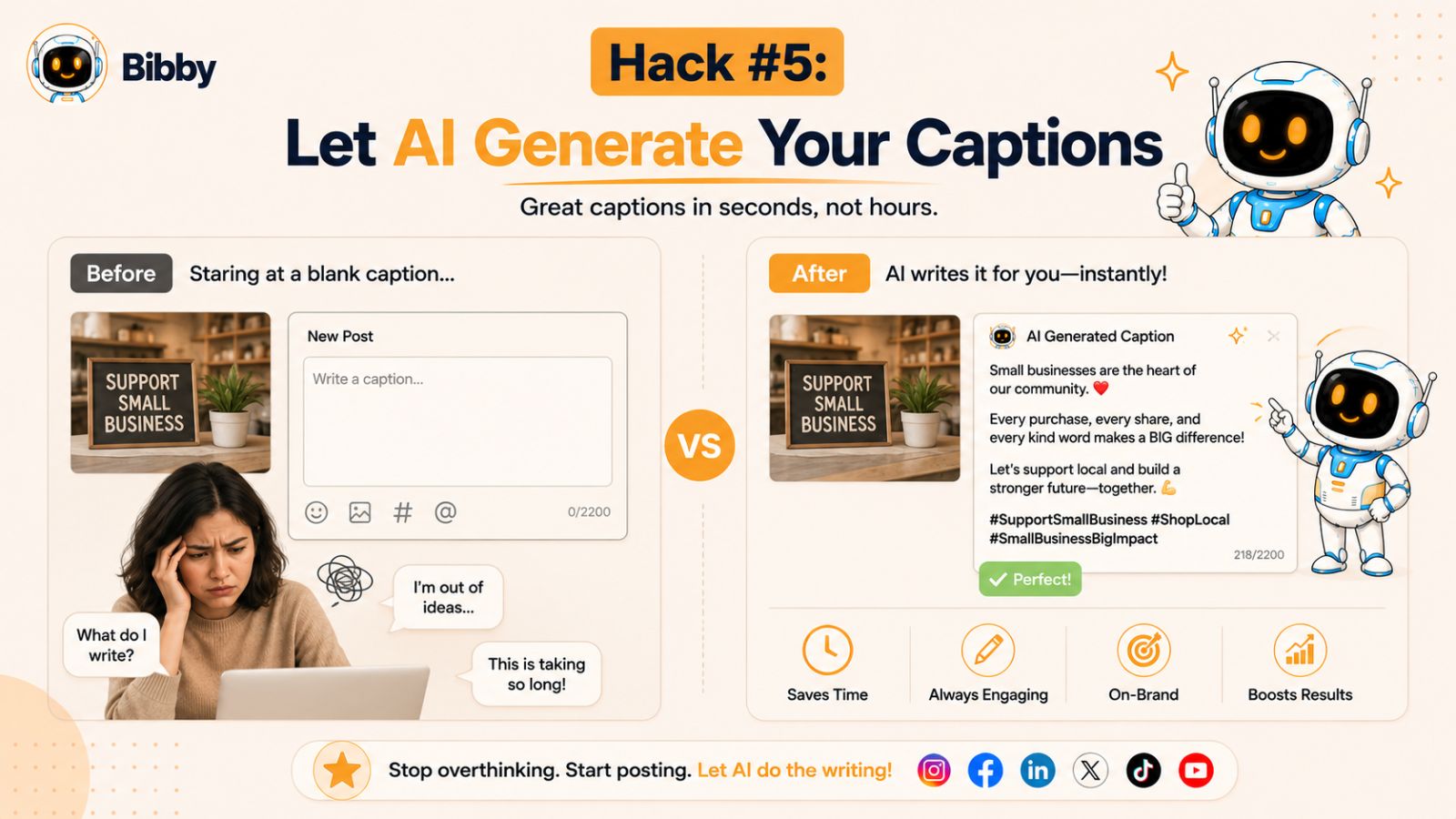
Hack #5: Let AI Generate Your Captions
Creating social media content is often easier than writing the caption that goes with it.
Many small business owners can quickly take a photo, record a video, or design a graphic. However, turning that content into an engaging social media post can take far longer than expected. Finding the right words, crafting a compelling message, and adapting it for different platforms often becomes a major bottleneck.
That's why AI-powered caption generation has become one of the most valuable social media scheduling hacks available today.
Why Writing Captions Takes So Much Time
A great caption does more than describe an image.
It should:
- Grab attention
- Communicate value
- Reflect your brand voice
- Encourage engagement
- Include relevant keywords
- Inspire action
When you're managing multiple social media accounts, writing unique captions for every platform can consume hours each week.
For busy small business owners, this is time that could be spent serving customers, improving products, or growing the business.
The Benefits of AI-Generated Captions
Artificial intelligence can significantly reduce the time required to create content while maintaining quality and consistency.
Faster Content Creation
Instead of staring at a blank screen, AI can generate caption ideas in seconds.
This allows you to focus on refining and personalizing content rather than starting from scratch.
Consistent Brand Voice
Maintaining a consistent voice across platforms is important for building brand recognition.
AI can generate captions that align with your preferred tone and style, helping create a more cohesive brand experience.
More Content With Less Effort
Businesses that struggle to post consistently often face a content production problem.
AI-generated captions help remove one of the largest obstacles to creating and publishing content regularly.
Creative Inspiration
Even experienced marketers occasionally run out of ideas.
AI can provide new angles, fresh messaging approaches, and creative ideas that spark inspiration.
Common Caption Styles That Perform Well
Different content goals require different caption styles.
Examples include:
Educational Captions
Teach your audience something useful while demonstrating expertise.
Storytelling Captions
Share experiences, customer stories, and behind-the-scenes moments.
Promotional Captions
Highlight products, services, offers, and special announcements.
Motivational Captions
Inspire followers with encouraging messages and insights.
Engagement-Focused Captions
Ask questions, create polls, and encourage conversations.
The most effective social media strategies combine multiple caption styles to keep content interesting and diverse.
How Bibby Automates Caption Creation
One of Bibby's most powerful features is its ability to generate captions automatically as part of the content scheduling workflow.
After uploading an image or creating one with AI, users can simply select their preferred posting style. Bibby's AI then generates captions designed to match that style and align with the content being shared.
This streamlined process removes one of the most time-consuming parts of social media management.
Instead of:
- Uploading content
- Writing captions manually
- Editing multiple platform variations
- Scheduling each post separately
Business owners can handle the entire workflow from a single dashboard.
AI Should Assist, Not Replace, Your Brand Voice
While AI can save significant time, the best results often come from combining automation with human insight.
Consider reviewing generated captions and adding:
- Personal experiences
- Customer stories
- Industry expertise
- Brand-specific language
- Unique perspectives
This combination allows you to maintain authenticity while still benefiting from the speed of automation.
Build a Caption Library Over Time
Another effective strategy is creating a library of high-performing captions.
As you discover captions that generate strong engagement, save them as templates for future use.
Over time, you'll build a collection of proven content that can be reused, modified, and enhanced with AI assistance.
Key Takeaway
Writing captions doesn't have to be the most time-consuming part of social media marketing. AI-powered caption generation can help small business owners create content faster, maintain consistency, and publish more frequently without sacrificing quality. By combining AI-generated captions with your unique expertise and brand voice, you can significantly reduce workload while improving your social media presence.
You may also like to read: The Complete Social Media Management Checklist for Agencies
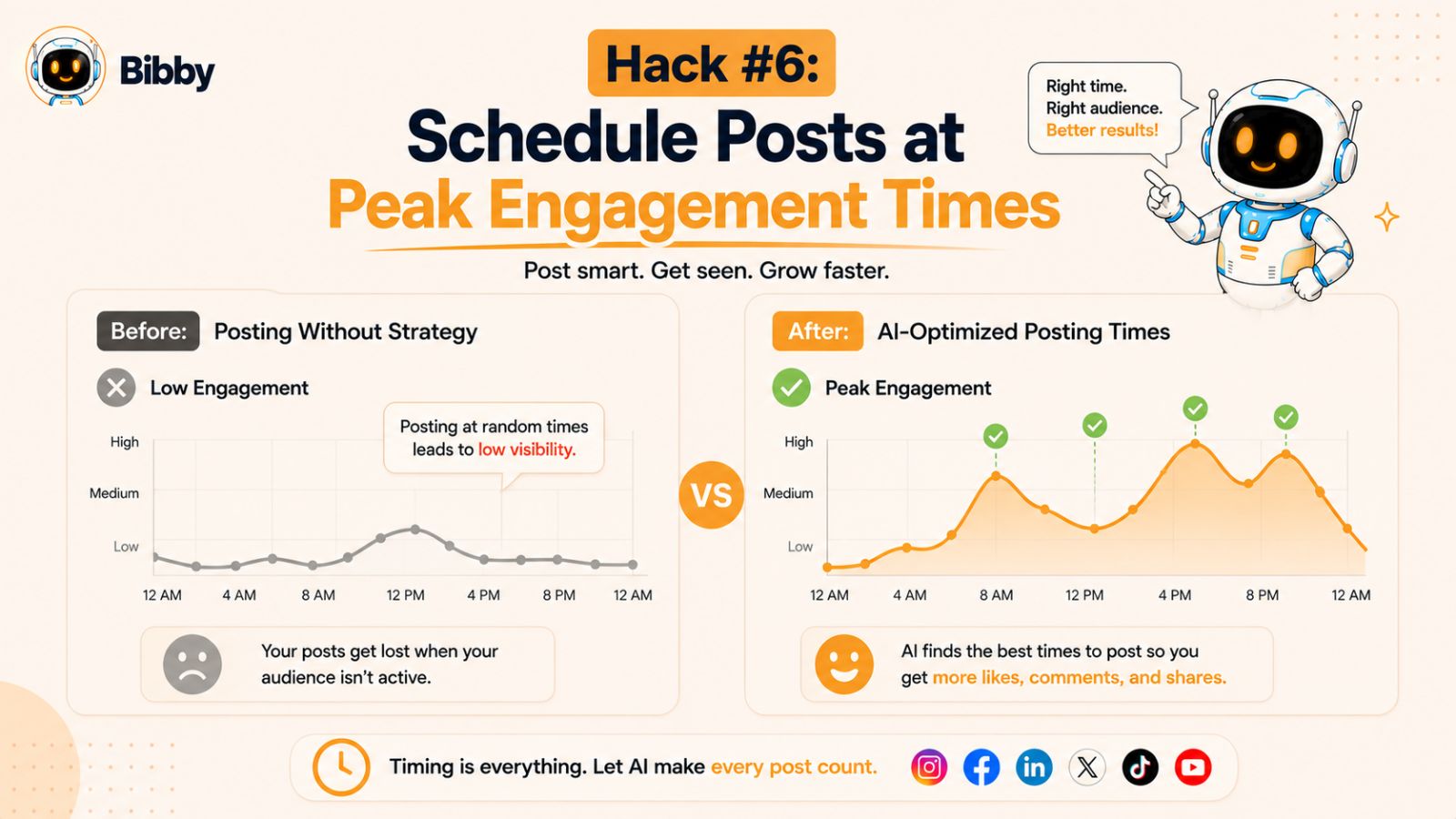
Hack #6: Schedule Posts at Peak Engagement Times
You can create amazing content, write compelling captions, and design eye-catching visuals, but if nobody sees your posts, your efforts won't produce the results you're hoping for.
That's why timing matters.
One of the most overlooked social media scheduling hacks is publishing content when your audience is most likely to be online and engaged. Posting at the right time can significantly improve reach, engagement, clicks, and overall content performance.
Why Posting Time Matters
Social media platforms are highly competitive.
Every minute, thousands of new posts compete for attention in users' feeds. When you publish content during periods of low audience activity, your posts may quickly disappear before followers have a chance to see them.
Publishing when your audience is active increases the likelihood that people will:
- View your content
- Like your posts
- Leave comments
- Share your content
- Click your links
- Visit your website
Higher engagement often signals value to social media algorithms, which can help increase visibility even further.
The Problem With Generic "Best Time to Post" Advice
You'll often find articles claiming there is a universal best time to post on social media.
The reality is much more complicated.
The ideal posting time depends on factors such as:
- Your industry
- Your audience demographics
- Geographic location
- Platform preferences
- Content type
- Historical engagement patterns
What works for a local restaurant may not work for a B2B consulting firm. What works on TikTok may be completely different from LinkedIn.
That's why relying solely on generic recommendations can limit your results.
Understanding Audience Behavior
The most successful social media strategies focus on audience behavior rather than arbitrary posting schedules.
Questions worth considering include:
- When are your followers most active?
- Which days generate the most engagement?
- What content performs best at different times?
- How do weekdays compare to weekends?
- Are there seasonal trends affecting performance?
The answers often reveal opportunities to improve visibility without creating additional content.
Common Peak Engagement Windows
Although every audience is different, certain patterns appear across many industries.
Examples include:
Early Morning
Many users check social media shortly after waking up.
Lunch Breaks
Midday often sees increased engagement as people browse social platforms during breaks.
Evening Hours
After work, users tend to spend more time consuming content and interacting online.
Weekend Activity
Certain industries experience stronger engagement during weekends, especially consumer-focused businesses.
However, these should be viewed as starting points rather than fixed rules.
Why Manual Scheduling Can Be Difficult
Determining optimal posting times manually requires:
- Monitoring engagement data
- Analyzing audience behavior
- Testing different schedules
- Reviewing performance trends
- Continuously adjusting strategy
For small business owners, this process can quickly become overwhelming.
How Bibby's AI-Optimized Scheduling Helps
One of the biggest advantages of using an AI-powered platform like Bibby is removing the guesswork from scheduling.
Rather than manually choosing publishing times, Bibby uses AI to optimize when your content is posted. This helps increase the likelihood that your audience sees your content when they are most active and engaged.
Combined with automated caption generation and multi-platform publishing, AI-optimized scheduling allows business owners to focus on creating valuable content instead of constantly analyzing posting schedules.
The result is a smarter and more efficient approach to social media management.
Track and Refine Your Results
Even with AI assistance, ongoing optimization is important.
Review your analytics regularly and pay attention to:
- Reach
- Engagement rates
- Click-through rates
- Video views
- Shares and saves
- Audience growth
Over time, these insights can help further improve your content strategy and scheduling decisions.
Key Takeaway
Timing can have a major impact on social media performance. Posting when your audience is most active increases the chances of generating engagement and maximizing reach. Rather than relying on guesswork or generic recommendations, using AI-powered scheduling tools can help ensure your content is published at the moments most likely to produce results.
Also have a look at guide on Social Media Automation for Marketing Agencies
Hack #7: Build Evergreen Content Libraries
One of the biggest challenges in social media marketing is the constant pressure to create new content.
Many small business owners feel like they need fresh ideas every day to keep their social media channels active. While timely and trend-based content certainly has its place, relying on it exclusively can quickly lead to burnout.
That's where evergreen content becomes invaluable.
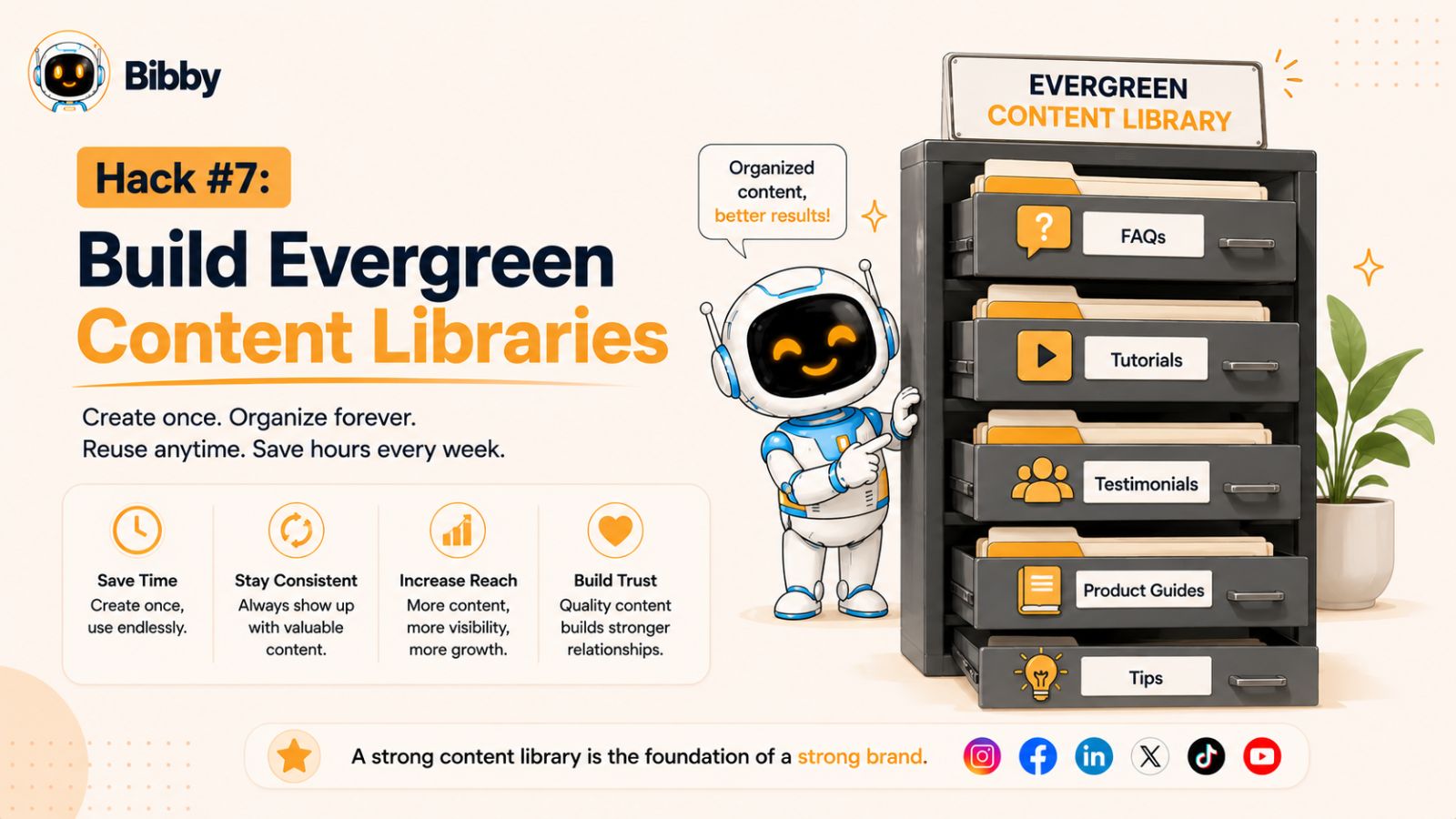
An evergreen content library gives you a collection of posts that remain relevant for months or even years, allowing you to maintain a consistent posting schedule without constantly creating content from scratch.
What Is Evergreen Content?
Evergreen content refers to content that remains useful and valuable long after it is published.
Unlike seasonal promotions or trend-based posts, evergreen content addresses topics that your audience will continue searching for and benefiting from over time.
Examples include:
- Frequently asked questions
- How-to guides
- Industry tips
- Educational content
- Customer success stories
- Product tutorials
- Business advice
- Common mistakes to avoid
Because these topics stay relevant, they can be reused, refreshed, and republished multiple times.
Why Every Small Business Needs an Evergreen Library
Creating evergreen content is one of the smartest long-term investments you can make in your social media strategy.
Reduces Content Creation Pressure
When your content calendar is running low, your evergreen library provides ready-to-use content that can be scheduled immediately.
Maintains Consistency
A content library ensures you always have valuable posts available, even during busy periods.
Maximizes Content Value
Instead of creating content that is used once and forgotten, evergreen content continues generating engagement over time.
Supports Long-Term Growth
Educational and informative content helps establish authority and attract new audiences consistently.
Categories to Include in Your Evergreen Library
A well-organized content library should include a variety of content types.
Educational Posts
Teach your audience useful skills, strategies, or industry insights.
Examples:
- Beginner guides
- Best practices
- Industry trends
- Expert tips
Frequently Asked Questions
Answer common customer questions before they're asked.
Examples:
- Pricing questions
- Product information
- Service explanations
- Buying guides
Customer Testimonials
Showcase real customer experiences and success stories.
Social proof remains effective regardless of when it is shared.
Product and Service Highlights
Explain key benefits, features, and use cases for your offerings.
Behind-the-Scenes Content
Give followers a closer look at your business, team, and processes.
Inspirational and Motivational Content
Share insights and lessons that resonate with your audience.
Organize Your Content for Easy Access
A content library becomes much more useful when it's organized.
Consider categorizing content by:
- Topic
- Platform
- Content format
- Campaign type
- Audience segment
- Performance level
This makes it easy to find relevant content whenever you need to fill gaps in your schedule.
Refresh and Reuse High-Performing Content
Many business owners make the mistake of publishing content once and never using it again.
The reality is that most followers won't see every post you publish.
If a piece of content performed well six months ago, it will often perform well again when updated and republished.
Simple ways to refresh content include:
- Updating statistics
- Rewriting captions
- Creating new graphics
- Turning articles into videos
- Expanding short posts into longer content
This approach allows you to get more value from your best-performing assets.
How Bibby Helps Manage Evergreen Content
Building an evergreen content library becomes even more effective when paired with automation.
With Bibby, you can upload content, generate AI-powered captions, and schedule evergreen posts months in advance. Because content can be managed from a centralized dashboard, it's easy to keep your posting schedule full without constantly creating new material.
By combining evergreen content with AI-generated scheduling and publishing, small business owners can maintain a consistent online presence while significantly reducing their content workload.
Balance Evergreen and Timely Content
While evergreen content is powerful, the best strategy combines both evergreen and real-time content.
A balanced content mix might include:
- 70% evergreen content
- 20% engagement-focused content
- 10% trend-based or timely content
This approach provides stability while still allowing your brand to participate in current conversations and events.
Key Takeaway
An evergreen content library is one of the most effective ways to simplify social media marketing. By creating valuable content that remains relevant over time, you can reduce content creation stress, maintain consistency, and maximize the return on every piece of content you produce. Combined with scheduling and automation tools, evergreen content becomes a powerful engine for long-term social media growth.
Hack #8: Use Content Themes
One of the most common reasons small business owners struggle with social media is a lack of content direction.
Every day starts with the same question:
"What should I post today?"
Over time, constantly searching for new ideas becomes exhausting and can lead to inconsistent posting. A simple solution is to create content themes.
Content themes provide a framework for your social media strategy by assigning specific topics to different days or categories. Instead of starting from scratch every time you create content, you already know the type of content you're going to publish.
What Are Content Themes?
Content themes are recurring content categories that guide your posting schedule.
Rather than randomly posting whatever comes to mind, you organize your content around predictable themes that align with your audience's interests and your business goals.
For example, a small business might rotate between:
- Educational content
- Customer stories
- Product highlights
- Industry insights
- Behind-the-scenes content
- Community engagement posts
This creates variety while maintaining consistency.
Why Content Themes Work
Eliminate Decision Fatigue
When you know the purpose of each day's content, planning becomes much easier.
Instead of brainstorming endlessly, you simply create content that fits the assigned theme.
Improve Content Consistency
Themes help ensure your content remains balanced and aligned with your marketing goals.
Strengthen Brand Identity
Over time, followers begin to associate certain types of valuable content with your brand.
Simplify Content Planning
Content calendars become easier to create because you already have a structure to follow.
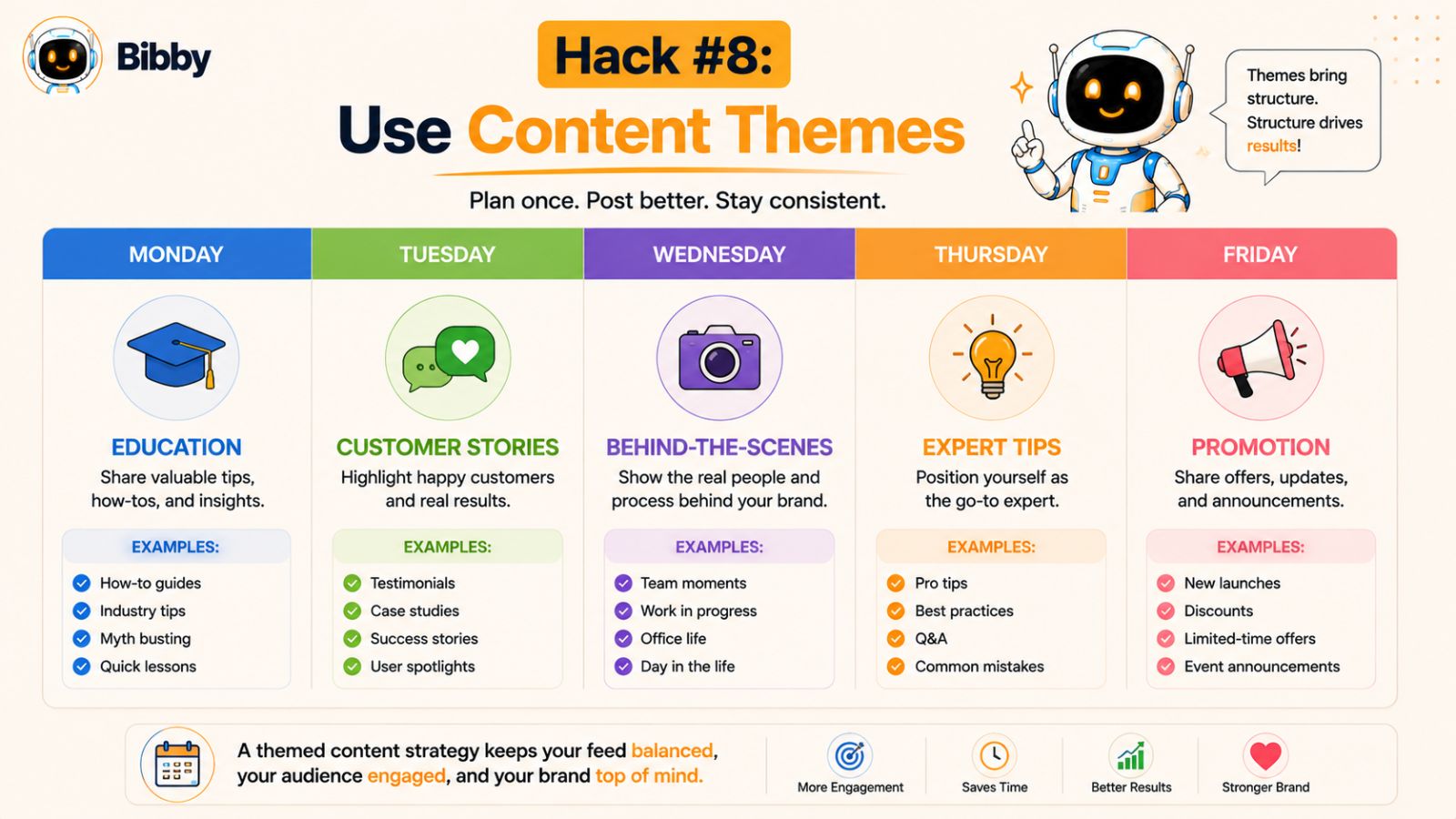
Example Weekly Content Theme Schedule
Here's a simple framework many small businesses can use.
Monday: Educational Monday
Share tips, tutorials, industry insights, or frequently asked questions.
Examples:
- How-to guides
- Best practices
- Industry advice
- Common mistakes
Tuesday: Customer Spotlight
Showcase customer success stories, testimonials, and case studies.
Examples:
- Customer transformations
- Reviews
- User-generated content
- Success stories
Wednesday: Behind-the-Scenes
Give followers a look inside your business.
Examples:
- Team introductions
- Office culture
- Daily operations
- Product creation process
Thursday: Expert Insights
Position your business as an authority.
Examples:
- Industry trends
- Professional opinions
- Market updates
- Educational commentary
Friday: Promotional Content
Highlight products, services, offers, or upcoming events.
Examples:
- Product demonstrations
- Limited-time offers
- Service benefits
- New launches
Customize Themes for Your Business
The best content themes depend on your audience and industry.
For example:
Local Businesses
- Community updates
- Customer spotlights
- Local events
- Promotions
Service Businesses
- Educational tips
- Case studies
- Client success stories
- Industry insights
E-commerce Brands
- Product showcases
- User-generated content
- Behind-the-scenes production
- Customer reviews
The goal is to create a structure that supports your business objectives while delivering value to your audience.
Use Themes to Speed Up Content Creation
Content themes work especially well when combined with content batching.
Instead of creating random posts, you can sit down once a month and develop content for each theme category.
For example:
- Four educational posts
- Four customer stories
- Four behind-the-scenes updates
- Four promotional posts
Within a few hours, you've created a month's worth of organized content.
How Bibby Simplifies Theme-Based Scheduling
Once your content themes are planned, Bibby helps automate the publishing process.
You can upload your images or videos, select a posting style that aligns with your theme, and let Bibby's AI generate captions automatically. The platform then schedules your content across Facebook, Instagram, LinkedIn, TikTok, and YouTube at AI-optimized times.
This makes it easy to maintain a structured content strategy without spending hours manually managing posts.
Key Takeaway
Content themes remove the guesswork from social media marketing. By assigning specific topics to different days or categories, you can create content faster, stay consistent, and build a more recognizable brand. Combined with content batching and automation, themes provide a simple system that makes social media management significantly easier.
Hack #9: Automate Video Publishing
If there's one content format that continues to dominate social media, it's video.
From TikTok and Instagram Reels to YouTube Shorts and Facebook videos, short-form video content consistently generates higher engagement, stronger reach, and greater audience retention than many traditional post formats.
The challenge for small business owners isn't understanding the value of video—it's finding the time to publish and manage video content consistently.
That's why automating video publishing has become one of the most effective social media scheduling hacks available today.
Why Video Content Matters More Than Ever
Video allows businesses to communicate more information in less time.
Instead of reading a long post, users can quickly watch a short video and understand:
- Product benefits
- Customer success stories
- Educational tips
- Behind-the-scenes content
- Brand personality
As social media platforms continue prioritizing video content, businesses that publish consistently often gain a competitive advantage.
The Biggest Challenges of Video Marketing
Although video performs exceptionally well, many small business owners struggle with the process.
Common challenges include:
Time-Consuming Workflows
Recording, editing, uploading, and publishing videos can require significant effort.
Platform Management
Each platform may require different formatting, captions, descriptions, and publishing schedules.
Consistency
Many businesses publish videos sporadically rather than maintaining a reliable schedule.
Performance Tracking
Monitoring results across multiple platforms can become difficult without centralized reporting.
These challenges often prevent businesses from taking full advantage of video marketing opportunities.
Types of Videos Small Businesses Should Publish
You don't need a professional production team to succeed with video.
Some of the most effective business videos are simple, authentic, and informative.
Educational Videos
Teach customers something useful.
Examples include:
- Tutorials
- How-to videos
- Industry tips
- Frequently asked questions
Product Demonstrations
Show products or services in action.
These videos help customers understand value more quickly than text alone.
Customer Testimonials
Real customer experiences help build trust and credibility.
Behind-the-Scenes Videos
Give audiences an inside look at your team, culture, and daily operations.
Short Tips and Insights
Quick, actionable advice often performs well on platforms like TikTok, Instagram Reels, and YouTube Shorts.
Why Automation Is Essential
Manually uploading videos to every platform can quickly become overwhelming.
A single video might require:
- Multiple uploads
- Platform-specific captions
- Scheduling adjustments
- Performance tracking
- Repetitive administrative work
As your content library grows, these tasks consume valuable time that could be spent growing the business.
Automation helps eliminate much of this manual effort.
How Bibby Simplifies Video Publishing
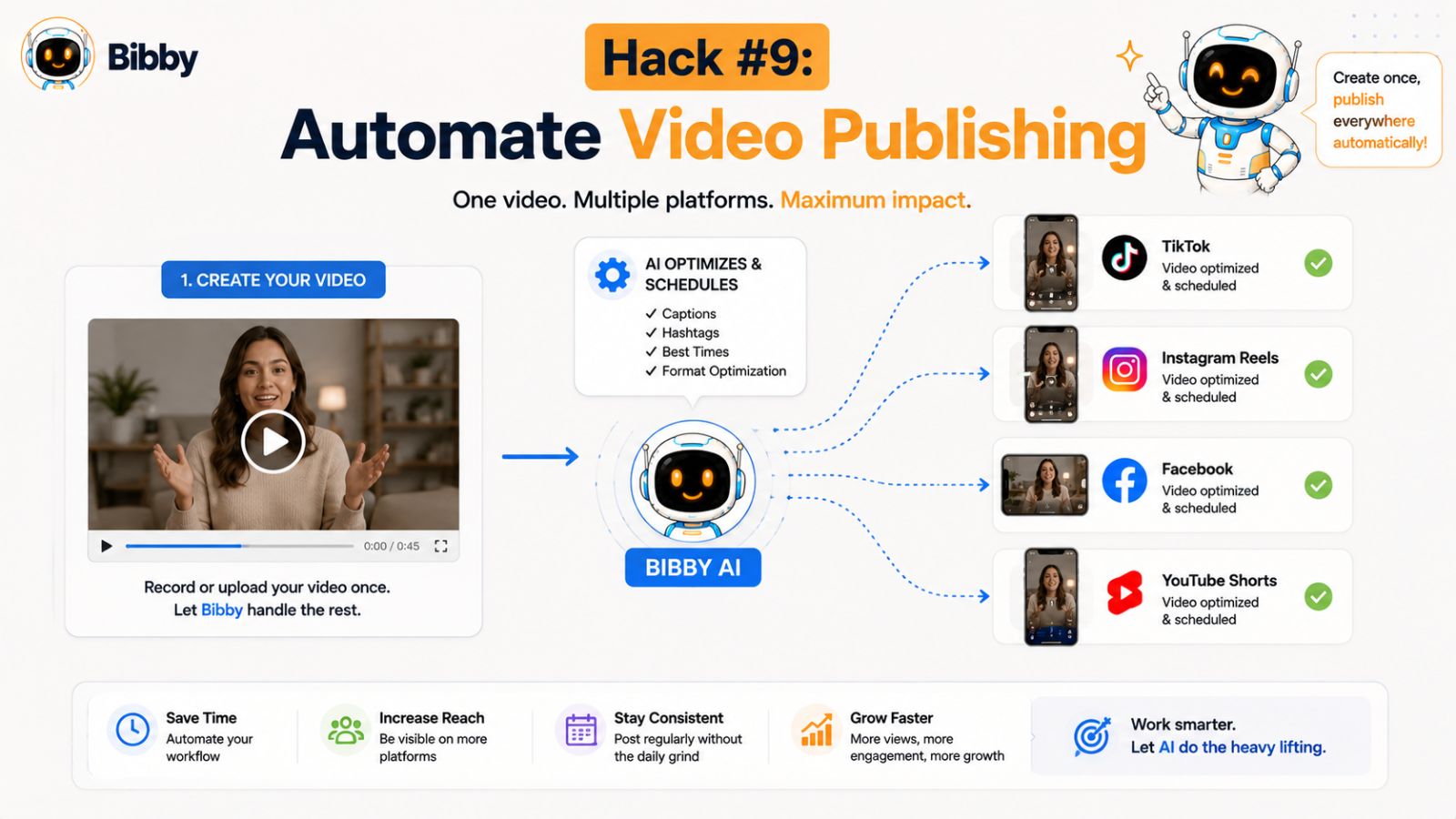
Bibby allows small business owners to manage video content alongside their other social media posts from a single platform.
Instead of jumping between multiple apps and dashboards, users can upload videos, generate captions, schedule content, and publish across selected social channels through one streamlined workflow.
Benefits include:
- Centralized video management
- AI-generated captions
- Multi-platform publishing
- AI-optimized posting times
- Automated scheduling
- Performance analytics
This approach allows businesses to maintain a consistent video strategy without significantly increasing workload.
Build a Video Content Pipeline
The most successful businesses don't create videos one at a time.
Instead, they batch-create content and schedule it in advance.
For example:
- Record 10 videos in one session
- Generate captions
- Schedule content for the next month
- Monitor analytics
- Refine future videos based on performance
This system helps ensure a steady stream of content without requiring daily production.
Measure Video Performance
Publishing videos is only part of the process.
Regularly review metrics such as:
- Video views
- Watch time
- Engagement rate
- Shares
- Click-through rate
- Follower growth
These insights help identify what content resonates most with your audience.
Key Takeaway
Video content is one of the most powerful tools available to small businesses, but managing it manually can be time-consuming. By automating video publishing, scheduling content in advance, and using tools like Bibby to streamline workflows, businesses can consistently leverage video marketing without adding hours to their weekly workload.
Hack #10: Schedule Stories in Advance
Stories have become one of the most effective ways to stay visible on social media.
Whether on Instagram, Facebook, or other platforms, stories appear prominently at the top of users' feeds, making them an excellent tool for increasing brand awareness and maintaining regular contact with your audience.
However, many small business owners struggle to use stories consistently because they often feel more temporary and require frequent posting.
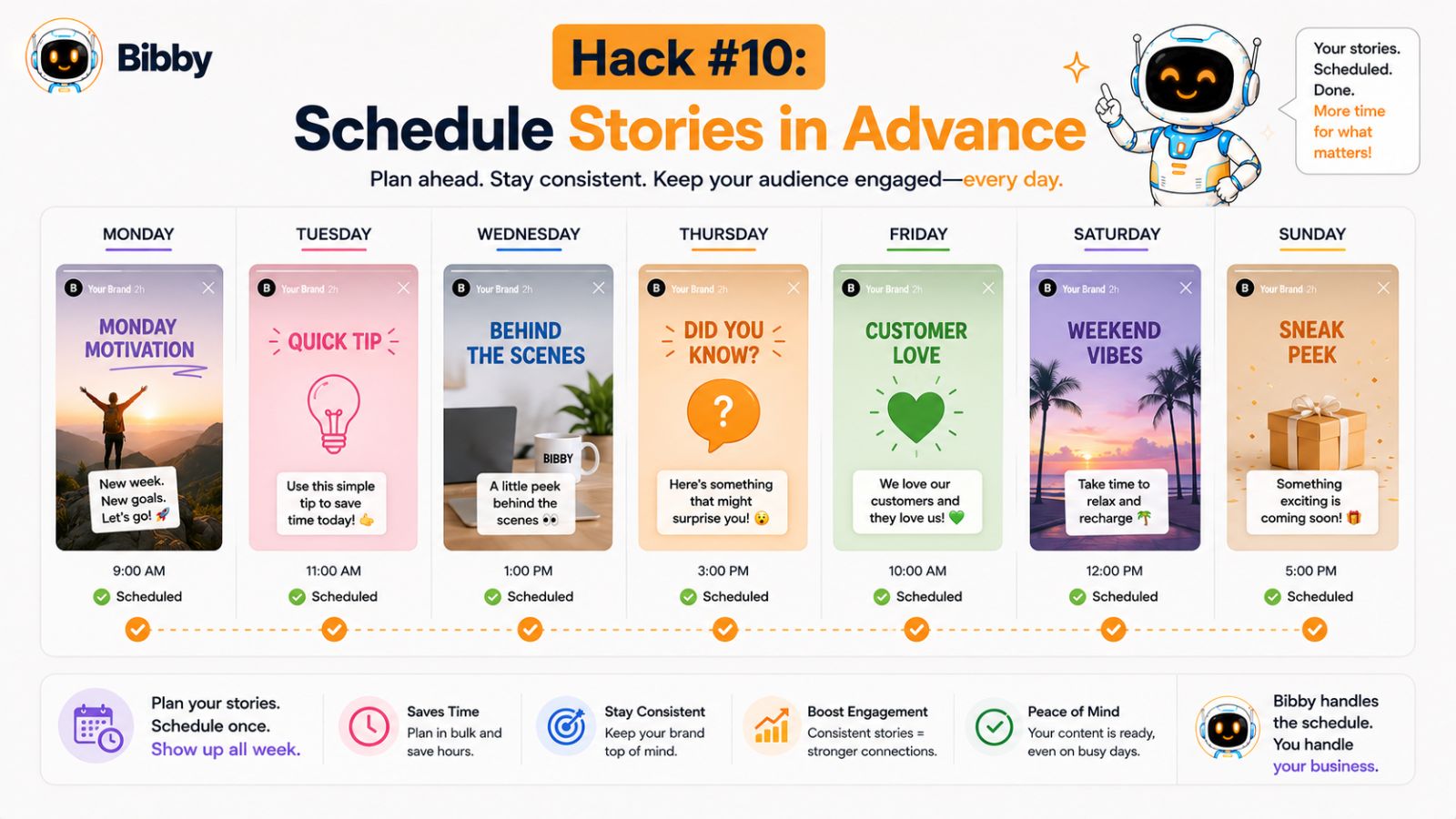
The solution is simple: schedule stories in advance.
Why Stories Matter
Unlike traditional posts that may get buried in crowded feeds, stories are designed for quick and frequent engagement.
They help businesses:
- Stay visible every day
- Increase audience engagement
- Build stronger relationships
- Share timely updates
- Promote products and services
- Drive traffic to websites and offers
Because stories are short and easy to consume, many users view them regularly throughout the day.
The Problem With Posting Stories Manually
Most business owners understand the value of stories but struggle with consistency.
Common challenges include:
- Forgetting to post
- Running out of ideas
- Lack of time
- Managing multiple platforms
- Creating content at the last minute
As a result, stories often become an afterthought rather than a strategic part of the marketing plan.
Types of Stories That Work Well
You don't need highly produced content to succeed with stories.
In fact, simple and authentic content often performs best.
Behind-the-Scenes Updates
Show your team, workspace, products, or daily operations.
Quick Tips
Share short educational insights that provide immediate value.
Product Highlights
Feature products, services, and promotions.
Customer Testimonials
Share positive customer experiences and feedback.
Polls and Questions
Encourage audience participation and collect valuable insights.
Event Announcements
Promote launches, sales, webinars, and special events.
Create Stories in Batches
Just like regular social media posts, stories can be batch-created.
For example, you might spend one hour creating:
- Weekly tips
- Product showcases
- Promotional announcements
- Customer success stories
Once created, these stories can be scheduled throughout the month.
This approach saves time and ensures you maintain daily visibility without constant effort.
Why Scheduled Stories Improve Consistency
Consistency is one of the biggest drivers of social media success.
Businesses that regularly appear in their audience's feeds are more likely to:
- Build trust
- Increase brand recognition
- Generate engagement
- Stay top of mind
- Drive conversions
Scheduled stories help achieve this consistency automatically.
Instead of remembering to post every day, your content continues working in the background.
How Bibby Helps Automate Story Scheduling
Managing stories manually across multiple platforms can become time-consuming.
Bibby simplifies the process by allowing users to schedule stories alongside their regular social media content.
From a single dashboard, business owners can:
- Upload story content
- Generate AI-powered captions
- Organize publishing schedules
- Schedule stories in advance
- Publish across supported platforms
- Track performance through analytics
This makes it easier to maintain a consistent presence without adding more tasks to your daily routine.
Combine Stories With Your Overall Content Strategy
Stories work best when they're part of a broader social media strategy.
For example:
- Publish an educational post
- Share a related story
- Promote the content again later in the week
- Encourage engagement through polls or questions
This creates multiple touchpoints with your audience and increases the likelihood that your message will be seen.
Key Takeaway
Stories offer an excellent opportunity to increase visibility and strengthen audience relationships, but consistency is essential. By creating stories in batches and scheduling them in advance, small business owners can stay active every day without constantly managing content. When combined with automation tools like Bibby, story marketing becomes significantly easier and more effective.
Hack #11: Analyze Performance Monthly
One of the biggest mistakes small business owners make on social media is focusing entirely on publishing content while ignoring performance data.
Posting consistently is important, but without analyzing results, it's difficult to know what's actually working.
Successful social media marketing isn't about posting more content—it's about posting more of the right content.
That's why a monthly analytics review should be part of every social media strategy.
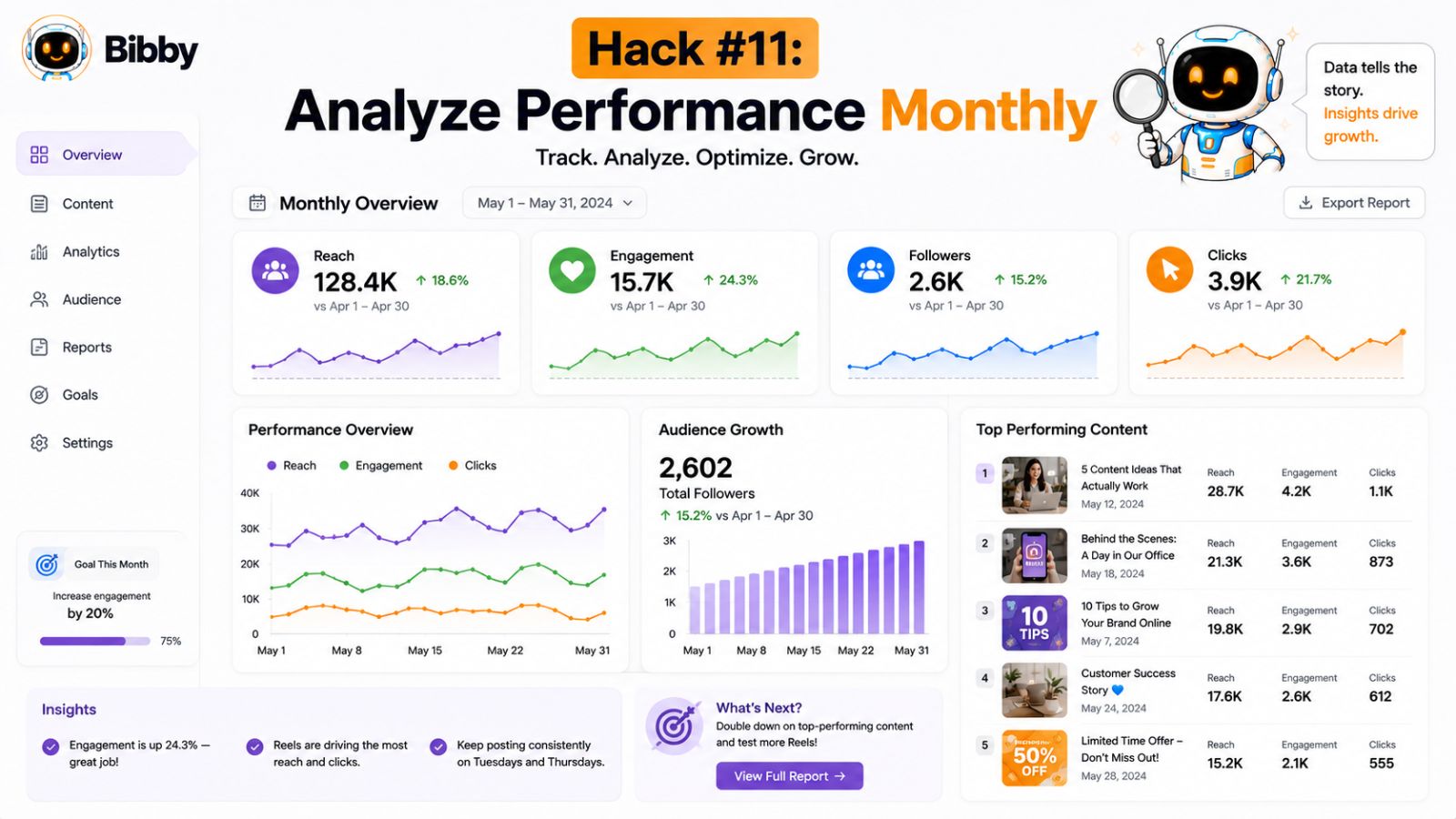
Why Analytics Matter
Every post you publish provides valuable information about your audience.
Analytics reveal:
- What content performs best
- Which platforms generate the most engagement
- When your audience is most active
- What topics resonate with followers
- Which campaigns drive results
Without this data, marketing decisions become based on assumptions rather than evidence.
The Problem With Daily Monitoring
Many business owners either ignore analytics completely or check them obsessively.
Neither approach is ideal.
Daily fluctuations are normal and often don't provide meaningful insights. Looking at performance over a longer period allows you to identify patterns and trends that can guide future decisions.
A monthly review provides enough data to make informed adjustments without becoming distracted by short-term changes.
Key Metrics Every Small Business Should Track
You don't need to monitor dozens of metrics.
Focus on the numbers that directly support your business goals.
Reach
Reach measures how many people saw your content.
Increasing reach helps expand brand awareness and attract new audiences.
Engagement Rate
Engagement includes:
- Likes
- Comments
- Shares
- Saves
- Reactions
High engagement often indicates that your content resonates with your audience.
Click-Through Rate
If your goal is driving traffic, this metric shows how often users click your links.
Follower Growth
Steady audience growth suggests that your content is attracting and retaining attention.
Video Performance
Track:
- Views
- Watch time
- Completion rates
- Shares
These metrics help evaluate the effectiveness of video content.
Conversions
Ultimately, social media should support business objectives.
Monitor actions such as:
- Leads generated
- Sales
- Sign-ups
- Bookings
- Inquiries
These metrics connect social media activity to business outcomes.
Questions to Ask During Your Monthly Review
A monthly review should focus on identifying opportunities for improvement.
Ask questions such as:
- Which posts generated the most engagement?
- Which content formats performed best?
- What posting times produced the strongest results?
- Which platform delivered the highest ROI?
- What topics should be expanded next month?
- What content should be reduced or eliminated?
The answers often reveal clear patterns that can improve future performance.
Turn Insights Into Action
Analytics are only valuable when they influence your strategy.
For example:
If educational posts consistently outperform promotional content, create more educational content.
If video content receives higher engagement than images, increase video production.
If certain posting times generate stronger results, adjust your schedule accordingly.
Small improvements made consistently can produce significant long-term growth.
How Bibby Simplifies Analytics
Collecting and interpreting data across multiple platforms can be overwhelming.
Bibby's analytics dashboard helps centralize performance tracking, allowing business owners to monitor key metrics from one location.
Instead of switching between Facebook, Instagram, LinkedIn, TikTok, and YouTube analytics, users can gain a clearer understanding of overall performance and identify opportunities for optimization.
Combined with AI-powered scheduling and content automation, analytics help create a continuous cycle of improvement.
Create a Monthly Optimization Routine
A simple monthly workflow might look like this:
- Review analytics from the previous month
- Identify top-performing content
- Analyze engagement trends
- Adjust content themes if necessary
- Update posting schedules
- Plan next month's content
- Schedule everything in advance
This process ensures your strategy evolves based on real audience behavior.
Key Takeaway
Analytics transform social media marketing from guesswork into a data-driven system. By reviewing performance monthly, identifying trends, and refining your strategy accordingly, you can continuously improve results over time. Combined with scheduling and automation tools, analytics provide the insights needed to create smarter, more effective social media campaigns.
Must read: How to Market Your Business on Social Media and Automate Growth
Hack #12: Create Seasonal Content Calendars
Some of the most successful social media campaigns are planned long before they are published.
While day-to-day content keeps your audience engaged, seasonal content helps your business capitalize on predictable events, holidays, trends, and buying opportunities throughout the year.
The problem is that many small business owners think about seasonal marketing too late. By the time they start creating content for a holiday or event, competitors have already launched their campaigns.
Creating a seasonal content calendar helps you stay ahead, remain organized, and maximize important marketing opportunities.
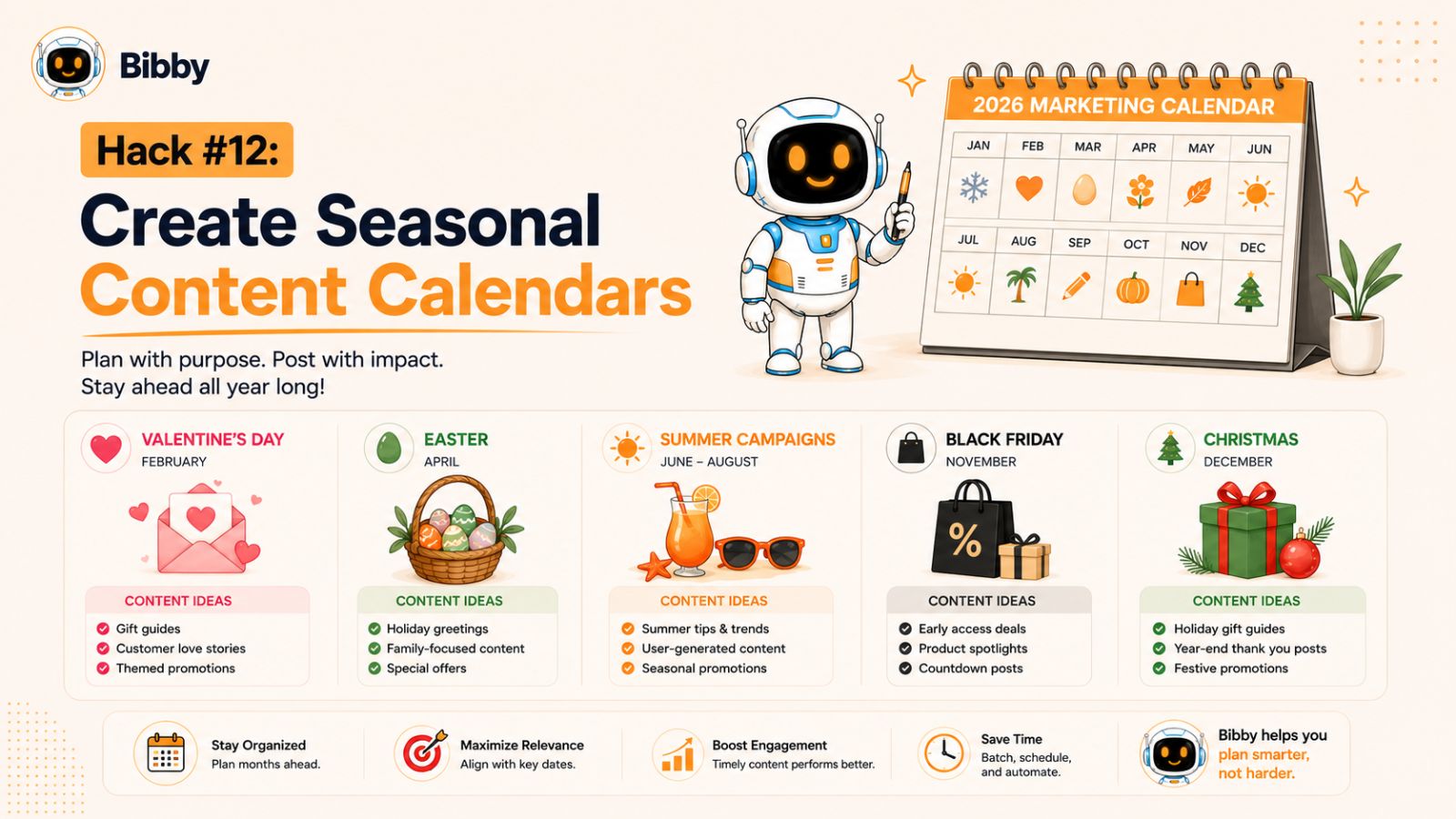
What Is a Seasonal Content Calendar?
A seasonal content calendar is a long-term planning tool that maps out important dates, events, and campaigns throughout the year.
Instead of reacting to holidays and events at the last minute, you prepare content in advance and schedule it ahead of time.
This allows you to create higher-quality campaigns while reducing stress and workload.
Why Seasonal Planning Matters
Seasonal content often performs exceptionally well because it aligns with what people are already thinking about.
Benefits include:
- Increased engagement
- Higher brand visibility
- More relevant content
- Better campaign organization
- Improved promotional opportunities
- Greater sales potential
Planning ahead also prevents missed opportunities that could generate significant traffic and revenue.
Important Dates to Include
Every business will have different priorities, but most seasonal calendars should include:
Major Holidays
Examples include:
- New Year's Day
- Valentine's Day
- Easter
- Mother's Day
- Father's Day
- Halloween
- Black Friday
- Cyber Monday
- Christmas
Industry Events
Every industry has conferences, awareness days, and important dates that can inspire content.
Seasonal Changes
Consider how your products or services relate to:
- Spring
- Summer
- Autumn
- Winter
Seasonal shifts often influence customer needs and buying behavior.
Company Milestones
Don't forget internal events such as:
- Business anniversaries
- Product launches
- Team achievements
- Expansion announcements
These moments help humanize your brand and build stronger audience connections.
Plan Campaigns Early
One of the biggest advantages of a seasonal content calendar is preparation.
Ideally, begin planning major campaigns several weeks—or even months—in advance.
This gives you time to:
- Create content
- Design graphics
- Record videos
- Write captions
- Coordinate promotions
- Schedule posts
Early planning almost always produces stronger results than rushed execution.
Combine Seasonal and Evergreen Content
A common mistake is focusing exclusively on seasonal content during busy periods.
The most effective strategy combines:
- Evergreen educational content
- Seasonal campaigns
- Customer stories
- Promotional content
- Engagement posts
This balance keeps your content valuable and relevant throughout the year.
How Bibby Helps Manage Seasonal Campaigns
Seasonal campaigns often involve multiple content formats, platforms, and publishing dates.
Bibby's scheduling and automation features make it easier to organize these campaigns from a single dashboard.
Business owners can:
- Upload images and videos
- Generate AI-powered captions
- Schedule campaigns weeks or months ahead
- Publish across multiple platforms
- Track campaign performance through analytics
This helps ensure seasonal campaigns launch on time without requiring constant manual management.
Build a Yearly Marketing Roadmap
The most successful businesses think beyond the current week or month.
Consider creating a yearly roadmap that outlines:
- Major promotions
- Product launches
- Seasonal campaigns
- Industry events
- Community activities
This long-term perspective helps align your social media strategy with broader business objectives.
Key Takeaway
Seasonal content calendars help small businesses stay proactive rather than reactive. By identifying important dates, planning campaigns early, and scheduling content in advance, you can capitalize on key opportunities while reducing stress. Combined with automation tools and a structured content strategy, seasonal planning helps create more organized and effective social media marketing throughout the year.
Hack #13: Use Platform-Specific Formatting
One of the most common social media mistakes small business owners make is posting the exact same content across every platform without making any adjustments.
While cross-posting can save time, each social media platform has its own audience expectations, content formats, and engagement patterns. Content that performs exceptionally well on one platform may struggle on another.
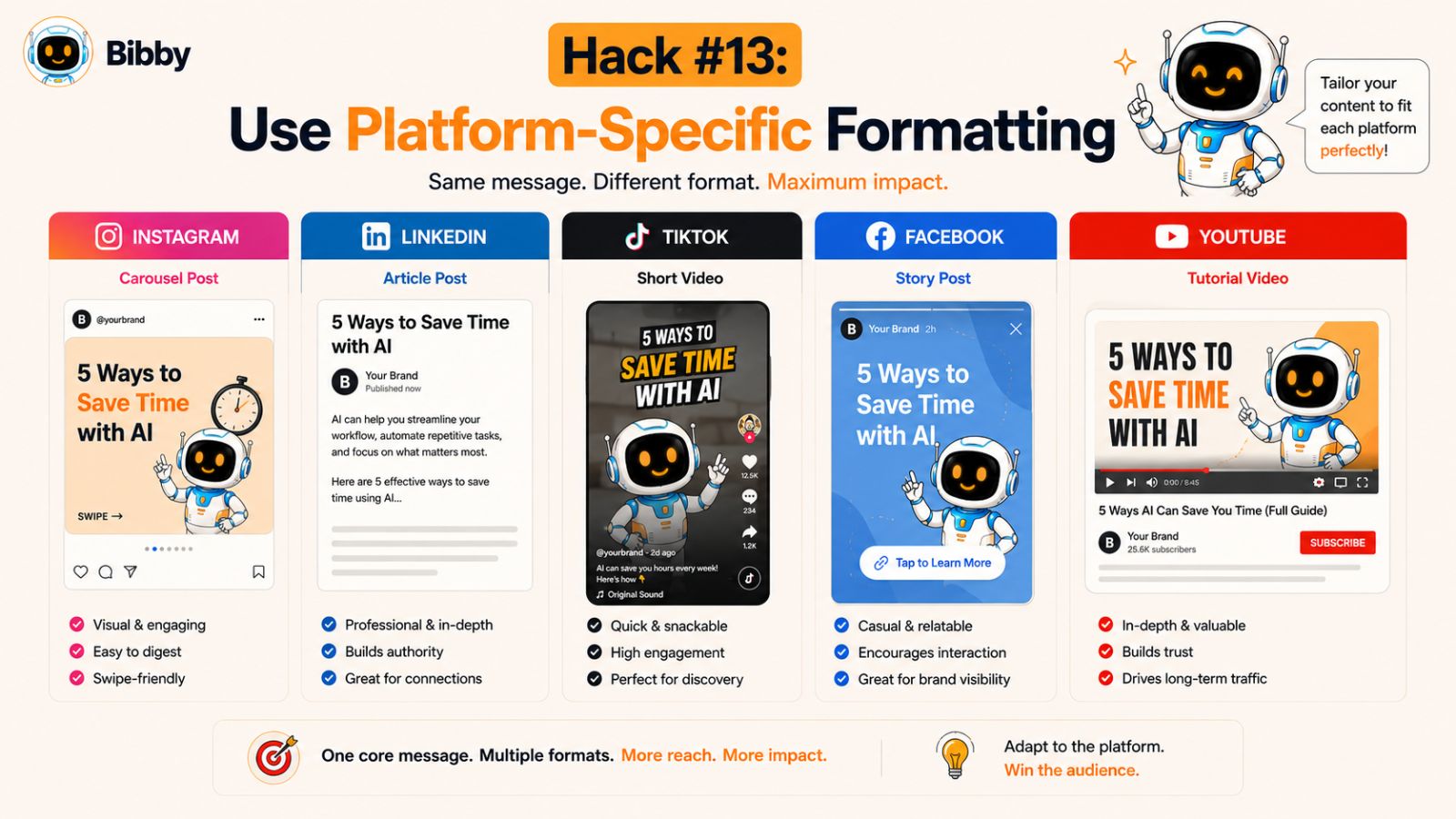
The most effective strategy is to maintain a consistent message while adapting the format to fit each platform.
Why Platform-Specific Content Matters
Every social media platform serves a different purpose.
People use Instagram differently than LinkedIn. They consume content differently on TikTok than they do on Facebook.
When your content matches the platform's style and user behavior, it feels more natural and often generates stronger engagement.
Benefits include:
- Higher engagement rates
- Better audience retention
- Increased reach
- Improved user experience
- Stronger platform performance
How Different Platforms Prefer Different Content
Understanding platform behavior helps you create more effective content.
Facebook users often engage with:
- Storytelling content
- Community discussions
- Longer captions
- Customer success stories
- Local business updates
Posts that encourage conversations tend to perform particularly well.
Instagram is highly visual.
Popular content includes:
- High-quality images
- Carousels
- Reels
- Stories
- Behind-the-scenes content
Captions should support the visual rather than overwhelm it.
LinkedIn audiences typically respond to:
- Professional insights
- Industry trends
- Business lessons
- Thought leadership
- Career-related content
A more professional tone generally works best.
TikTok
TikTok favors:
- Short-form videos
- Authentic content
- Trends
- Entertainment
- Quick educational tips
Highly polished content is not always necessary. Authenticity often performs better.
YouTube
YouTube users frequently seek:
- Tutorials
- Educational content
- Product demonstrations
- Long-form explanations
- Shorts
Providing value and depth is often rewarded.
Adapt the Format, Not the Message
Repurposing content remains one of the most efficient marketing strategies.
However, instead of copying and pasting identical posts, consider adjusting:
- Caption length
- Visual format
- Call-to-action
- Video style
- Tone of voice
- Hashtag usage
For example, a customer success story could become:
- A carousel on Instagram
- A professional case study on LinkedIn
- A testimonial video on TikTok
- A longer story on Facebook
- A detailed walkthrough on YouTube
The core message remains the same while the presentation changes.
Create Content With Repurposing in Mind
One of the easiest ways to improve efficiency is to plan content that can be adapted for multiple platforms from the beginning.
When creating content, ask:
- How would this look as a video?
- Could this become a carousel?
- Would this work as a LinkedIn article?
- Can I create a story from this post?
Thinking this way increases the lifespan and value of every piece of content.
How Bibby Simplifies Multi-Platform Publishing
Managing platform-specific content manually can become complicated as your content volume grows.
Bibby helps streamline the process by allowing business owners to manage multiple platforms from one dashboard. After uploading content and selecting a posting style, AI-generated captions can help tailor messaging while automated scheduling ensures content is distributed efficiently across Facebook, Instagram, LinkedIn, TikTok, and YouTube.
This allows businesses to maintain platform-specific strategies without dramatically increasing workload.
Don't Chase Every Platform Equally
Another important consideration is prioritization.
Not every platform deserves the same amount of attention.
Focus primarily on the channels where:
- Your audience spends time
- Engagement is strongest
- Business goals are being achieved
- Conversions are occurring
It's often better to excel on three platforms than perform poorly on six.
Key Takeaway
Every social media platform has unique strengths, audiences, and content expectations. While repurposing content is highly effective, adapting it to fit each platform can dramatically improve engagement and performance. By combining platform-specific formatting with automation and scheduling tools, small business owners can maximize results without multiplying their workload.
Hack #14: Automate Routine Marketing Tasks
Many small business owners spend far too much time on repetitive marketing activities that don't directly contribute to growth.
Tasks like uploading content, writing captions, scheduling posts, selecting publishing times, and tracking performance can consume hours every week. While these tasks are important, they often prevent business owners from focusing on higher-value activities such as serving customers, improving products, and generating sales.
The solution is automation.
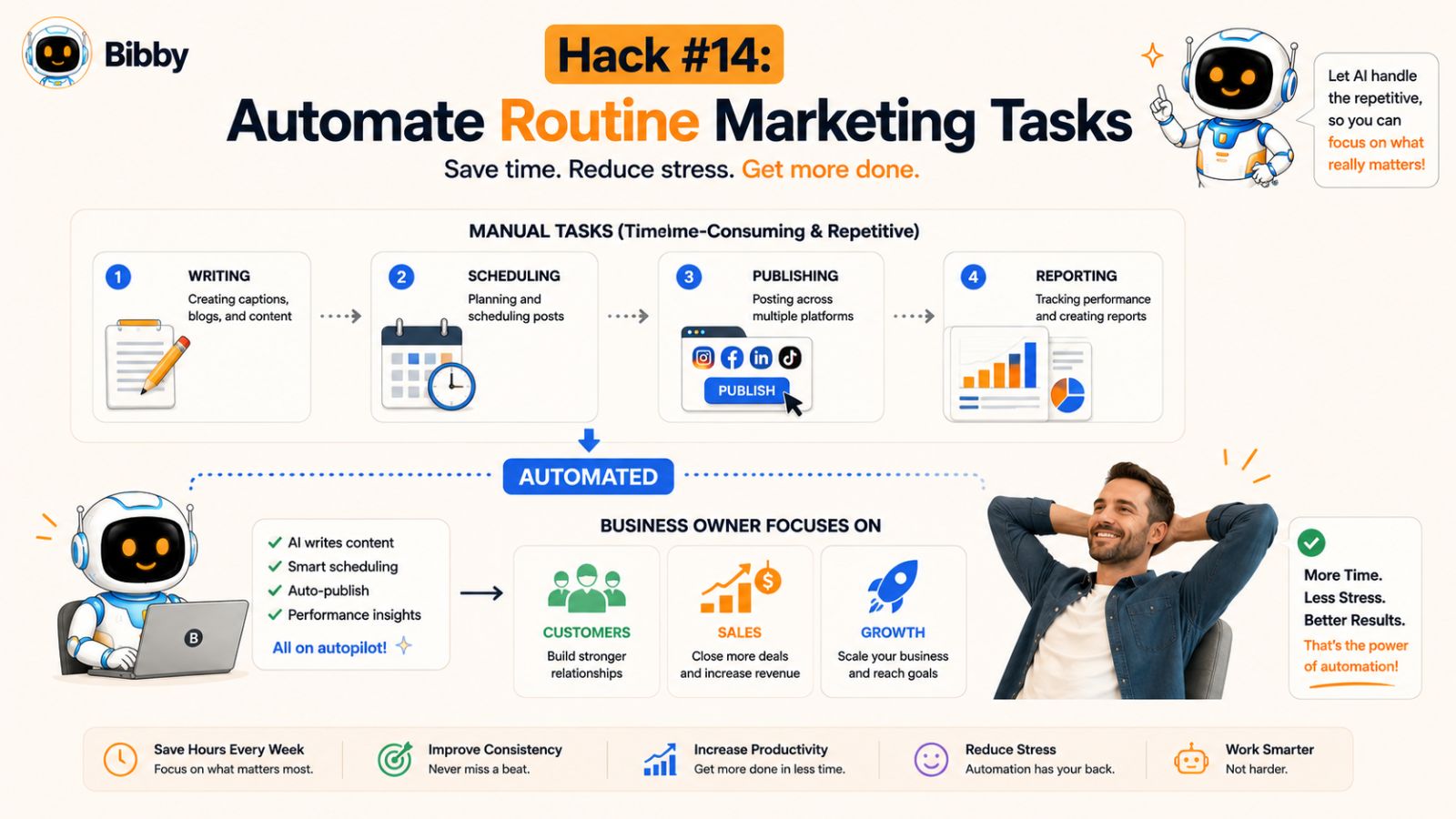
By automating routine marketing tasks, you can maintain a consistent social media presence while significantly reducing the amount of manual work required.
Why Automation Matters
The goal of automation isn't to remove the human element from your marketing.
It's to eliminate repetitive tasks so you can spend more time on strategy, creativity, and customer relationships.
Benefits of automation include:
- Time savings
- Improved consistency
- Reduced human error
- Increased productivity
- Better scalability
- More efficient workflows
For many small businesses, automation provides the leverage needed to compete with larger companies that have dedicated marketing teams.
Tasks You Should Automate
Not every marketing activity should be automated, but many routine processes can be streamlined.
Content Scheduling
Instead of manually publishing content every day, schedule posts weeks or months in advance.
This ensures consistency while eliminating daily posting responsibilities.
Caption Generation
AI-powered tools can create caption drafts in seconds, dramatically reducing content creation time.
Posting Time Optimization
Rather than guessing when your audience is online, automation tools can help determine optimal publishing times.
Multi-Platform Publishing
Uploading the same content to multiple platforms manually is inefficient.
Automation allows you to publish from a centralized dashboard.
Analytics Reporting
Gathering data from several platforms can be time-consuming.
Automated reporting makes it easier to monitor performance and identify trends.
What Should Not Be Automated?
While automation is powerful, some tasks still benefit from a personal touch.
Examples include:
- Responding to customer questions
- Managing community interactions
- Building relationships
- Addressing customer concerns
- Participating in conversations
Automation should support engagement, not replace it.
The most successful businesses combine automation with genuine human interaction.
Create a Social Media System
A system-driven approach typically produces better results than relying on motivation alone.
A simple workflow might look like this:
- Create content in batches
- Upload content to your scheduling platform
- Generate captions using AI
- Schedule posts in advance
- Publish automatically
- Review analytics monthly
- Optimize future content
With this system in place, social media becomes predictable and manageable.
How Bibby Automates the Entire Workflow
One of the reasons many small business owners choose Bibby is because it combines multiple automation features into a single platform.
Rather than using separate tools for content creation, scheduling, publishing, and analytics, Bibby helps streamline the entire process.
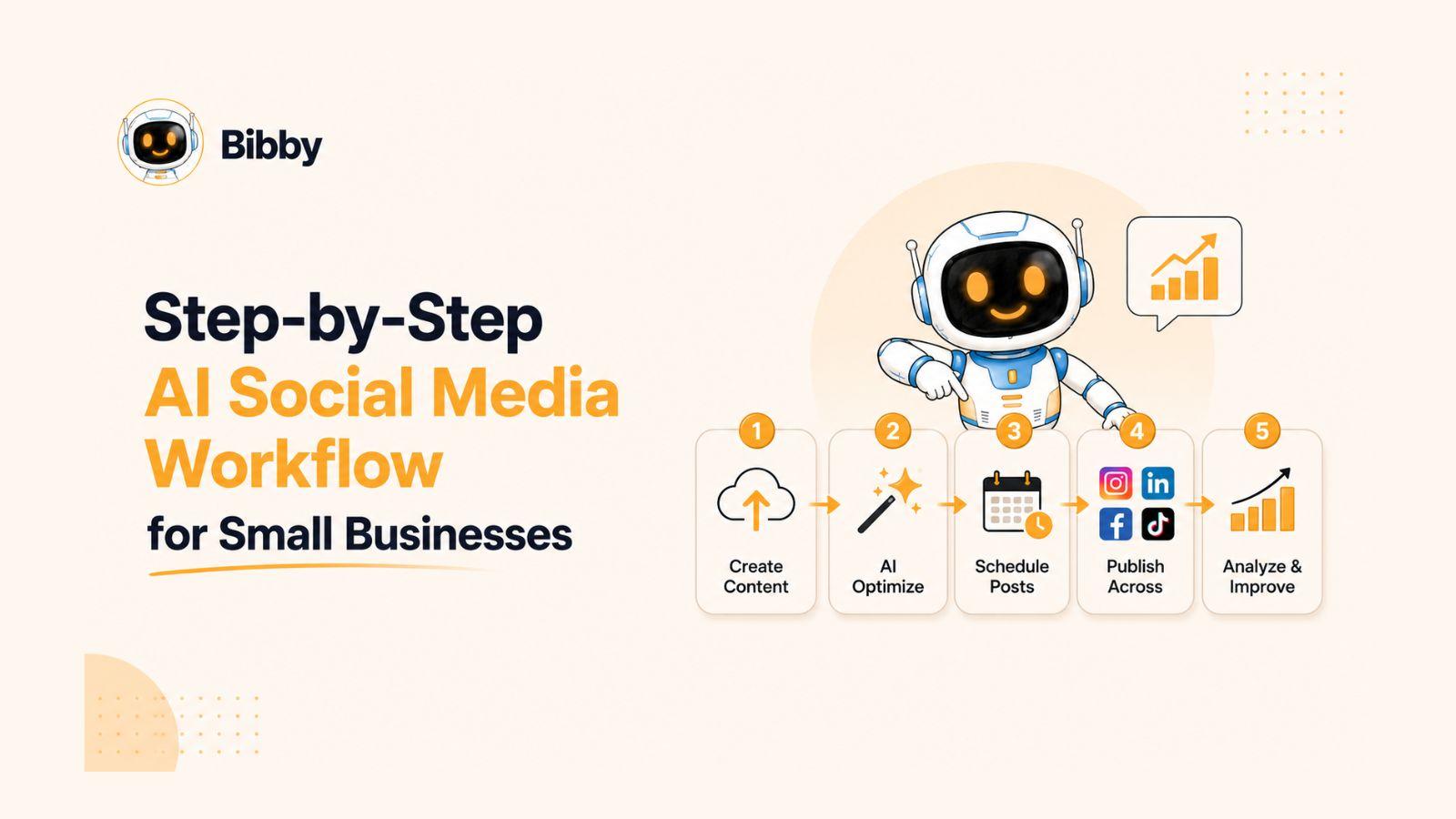
A typical workflow looks like this:
Upload or Generate Content
Upload your own images and videos or create new visuals using AI.
Choose a Posting Style
Select the tone and style that best matches your brand.
Generate Captions Automatically
Bibby's AI creates captions designed to align with your selected content style.
Schedule at AI-Optimized Times
The platform automatically determines effective publishing times based on AI-driven scheduling.
Publish Across Multiple Platforms
Manage Facebook, Instagram, LinkedIn, TikTok, and YouTube from one dashboard.
Monitor Performance
Track results through integrated analytics and reporting tools.
This level of automation helps reduce administrative work while maintaining a professional and consistent social media presence.
The Compounding Effect of Automation
One of the biggest advantages of automation is that its benefits compound over time.
Saving:
- 15 minutes per day
- 1 hour per week
- 5 hours per month
may not seem significant initially.
However, over the course of a year, those saved hours can be redirected toward activities that directly contribute to business growth.
Key Takeaway
Automation allows small business owners to spend less time managing social media and more time running their businesses. By automating repetitive tasks such as scheduling, caption generation, publishing, and analytics tracking, you can create a scalable marketing system that delivers consistent results with far less effort. The right automation tools turn social media from a daily burden into a streamlined growth engine.
Hack #15: Build a 90-Day Content Pipeline
Most small business owners plan their social media content one week at a time.
The problem with this approach is that it keeps you in a constant cycle of content creation, scheduling, and last-minute decision-making. As soon as one week ends, you're back to figuring out what to post next.
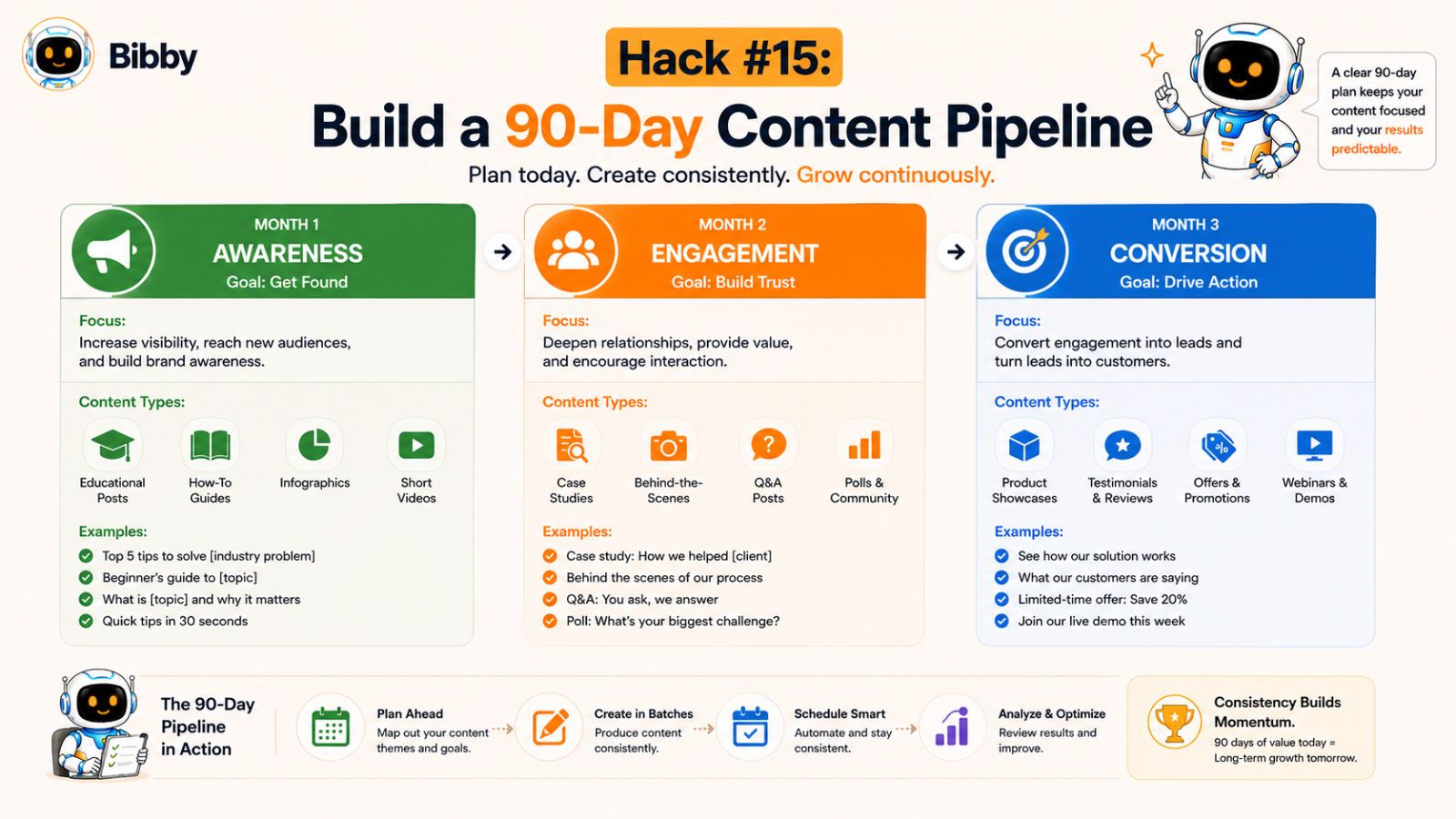
A more effective strategy is to build a 90-day content pipeline.
By planning and organizing content three months in advance, you create a predictable marketing system that reduces stress, improves consistency, and allows you to focus on growing your business rather than constantly managing social media.
What Is a 90-Day Content Pipeline?
A 90-day content pipeline is a structured content plan that maps out your social media strategy for the next three months.
Instead of creating content reactively, you proactively organize:
- Content themes
- Campaigns
- Promotions
- Educational posts
- Videos
- Stories
- Seasonal content
- Customer success stories
This gives you a clear roadmap and ensures your social media efforts align with your business goals.
Why Long-Term Planning Works
Reduces Last-Minute Stress
When content is already planned, you eliminate the daily pressure of deciding what to post.
Improves Consistency
A structured pipeline helps maintain regular publishing schedules across all platforms.
Supports Bigger Campaigns
Long-term planning allows you to coordinate launches, promotions, and seasonal campaigns more effectively.
Creates Better Content
With more time to prepare, you can focus on quality rather than rushing to fill your content calendar.
Aligns Marketing With Business Goals
Your content becomes more strategic because it supports upcoming events, products, and growth initiatives.
What to Include in Your 90-Day Plan
A strong content pipeline should contain a mix of content types.
Evergreen Content
Educational and informational content that remains valuable over time.
Promotional Content
Posts designed to generate leads, sales, or inquiries.
Video Content
Short-form and long-form videos that increase engagement and reach.
Stories
Quick updates that maintain daily visibility.
Seasonal Campaigns
Holiday promotions, industry events, and special occasions.
Customer-Focused Content
Testimonials, reviews, case studies, and success stories.
A Simple 90-Day Planning Process
You don't need a complicated system to build a content pipeline.
A practical process might look like this:
Month 1: Foundation
Focus on educational content, audience growth, and brand awareness.
Month 2: Engagement
Increase interaction through stories, videos, polls, and community-focused content.
Month 3: Conversion
Introduce stronger promotional content, offers, and calls to action.
This structure creates a natural progression from awareness to engagement to business results.
Build Content in Batches
Once your 90-day plan is outlined, batch-create content whenever possible.
Examples include:
- Recording multiple videos in one session
- Designing graphics in bulk
- Writing captions for several weeks at once
- Preparing stories ahead of time
Batching significantly reduces production time and improves efficiency.
How Bibby Makes 90-Day Planning Easier
Managing three months of content manually can quickly become overwhelming.
Bibby's AI-powered workflow helps simplify long-term planning by bringing content creation, scheduling, publishing, and analytics into one platform.
Business owners can:
- Upload images and videos
- Generate visuals with AI
- Select a posting style
- Generate captions automatically
- Schedule content months in advance
- Publish across Facebook, Instagram, LinkedIn, TikTok, and YouTube
- Track performance through analytics
This makes it possible to build and manage a comprehensive content pipeline without spending countless hours organizing individual posts.
Leave Room for Flexibility
A 90-day pipeline should provide structure, not rigidity.
Leave space for:
- Trending topics
- Breaking industry news
- Customer questions
- New opportunities
- Real-time engagement
The goal is to have a strong foundation while remaining adaptable when opportunities arise.
Key Takeaway
A 90-day content pipeline transforms social media from a reactive task into a proactive business system. By planning content well in advance, batching production, and using automation tools to handle scheduling and publishing, small business owners can maintain consistency, reduce stress, and achieve better long-term marketing results with far less effort.
Common Social Media Scheduling Mistakes to Avoid
Social media scheduling can save an enormous amount of time, improve consistency, and help businesses scale their marketing efforts. However, scheduling alone does not guarantee success.
Many small business owners unknowingly make mistakes that limit engagement, reduce reach, and weaken their overall social media strategy.
The good news is that most of these mistakes are easy to avoid once you know what to look for.
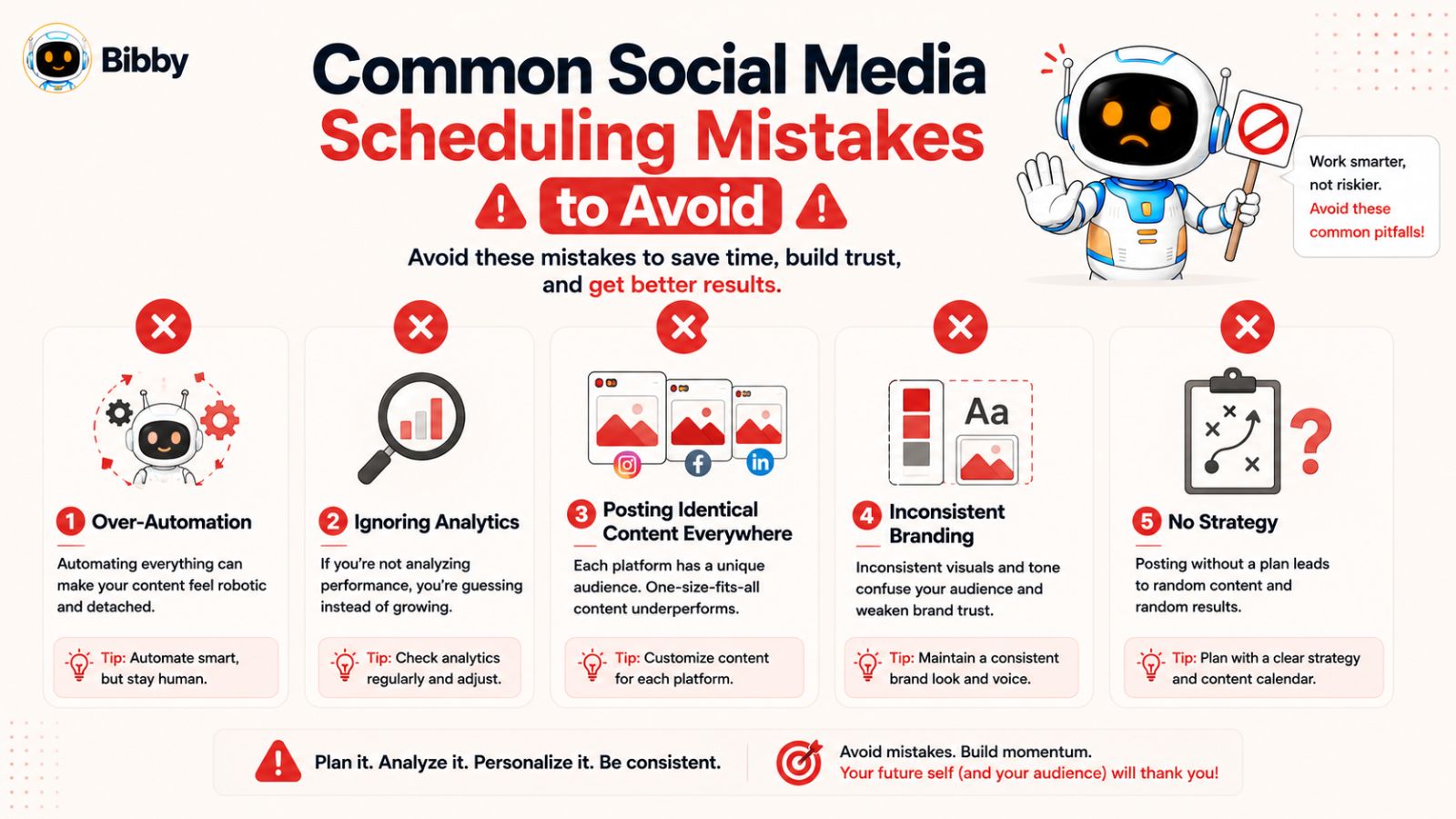
Mistake #1: Over-Automating Everything
Automation is a powerful tool, but it should not replace genuine human interaction.
Some businesses schedule months of content and then completely disappear from their social media accounts.
As a result:
- Comments go unanswered
- Customer questions are ignored
- Engagement opportunities are missed
- Relationships become weaker
Automation should handle repetitive tasks while you focus on meaningful interactions with your audience.
The most successful brands combine automation with authentic engagement.
Mistake #2: Ignoring Analytics
Many businesses spend time creating content but never review performance data.
Without analytics, it's impossible to know:
- Which posts perform best
- What content drives engagement
- Which platforms generate results
- How audience behavior is changing
Social media success comes from continuous improvement.
Reviewing analytics regularly helps ensure your strategy evolves based on real-world results rather than assumptions.
Mistake #3: Posting the Same Content Everywhere
Cross-posting can save time, but publishing identical content across every platform often reduces effectiveness.
Each platform has different:
- User expectations
- Content formats
- Engagement patterns
- Audience demographics
A post that performs well on LinkedIn may not resonate on TikTok or Instagram.
Instead of copying and pasting, adapt content to fit the platform while maintaining the core message.
Mistake #4: Scheduling Too Far Ahead Without Reviewing
Planning content months in advance can be beneficial, but completely forgetting about scheduled content can create problems.
Businesses change.
Industries evolve.
Current events happen.
Content that seemed relevant months ago may no longer align with your audience or business objectives.
Regular reviews help ensure your content remains timely and appropriate.
Mistake #5: Focusing on Quantity Over Quality
More content is not always better.
Publishing low-quality content simply to fill a schedule can hurt engagement and weaken your brand.
It's often more effective to publish fewer high-value posts than a large volume of content that provides little value.
Prioritize:
- Relevance
- Quality
- Audience needs
- Educational value
- Authenticity
Mistake #6: Neglecting Video Content
Many businesses continue focusing primarily on images and text while ignoring video.
This can be a missed opportunity.
Video content often generates:
- Higher engagement
- Longer viewing times
- Increased reach
- Better audience retention
A balanced content strategy should include both traditional posts and video content.
Mistake #7: Inconsistent Branding
Scheduling content from multiple sources without a clear brand strategy can create inconsistency.
Common issues include:
- Mixed messaging
- Different tones of voice
- Inconsistent visual styles
- Confusing calls-to-action
A recognizable and consistent brand experience helps build trust and improve audience recognition.
Mistake #8: Not Having a Content Strategy
Scheduling tools are only as effective as the strategy behind them.
Without a clear plan, businesses often end up posting random content without clear objectives.
Before scheduling content, define:
- Business goals
- Target audience
- Content themes
- Posting frequency
- Success metrics
A strategy-first approach produces better results than simply filling a calendar.
Mistake #9: Choosing Tools Based Only on Price
Many businesses select scheduling tools solely because they're inexpensive.
While cost matters, the cheapest tool is not always the best value.
A platform that saves significant time through automation, AI-generated captions, analytics, and multi-platform publishing may deliver far greater ROI than a cheaper alternative that requires extensive manual work.
Consider:
- Ease of use
- Automation capabilities
- Supported platforms
- Analytics features
- Scalability
- Time savings
How to Avoid These Mistakes
A successful social media system combines:
- Strategic planning
- Consistent scheduling
- Content batching
- Platform-specific content
- Analytics review
- Audience engagement
- Smart automation
Tools like Bibby help simplify many of these processes by combining content creation, AI-generated captions, scheduling, publishing, and analytics into a single workflow. However, even the best software works best when paired with a thoughtful content strategy and ongoing audience engagement.
Key Takeaway
Social media scheduling can dramatically improve efficiency, but avoiding common mistakes is just as important as following best practices. By balancing automation with authentic engagement, reviewing analytics regularly, and maintaining a clear content strategy, small business owners can maximize the effectiveness of their social media efforts and achieve more consistent results over time.
Also read: 7 Reasons Your Small Business Should Switch to AI Social Media Scheduling
How to Choose the Best Social Media Scheduling Tool
There are dozens of social media scheduling tools available today, each promising to save time and simplify marketing. However, not all tools are created equal.
For small business owners, the best solution isn't necessarily the one with the most features—it's the one that helps you create, schedule, publish, and analyze content with the least amount of effort.
Choosing the right platform can mean the difference between spending hours managing social media every week and running an efficient, largely automated marketing system.
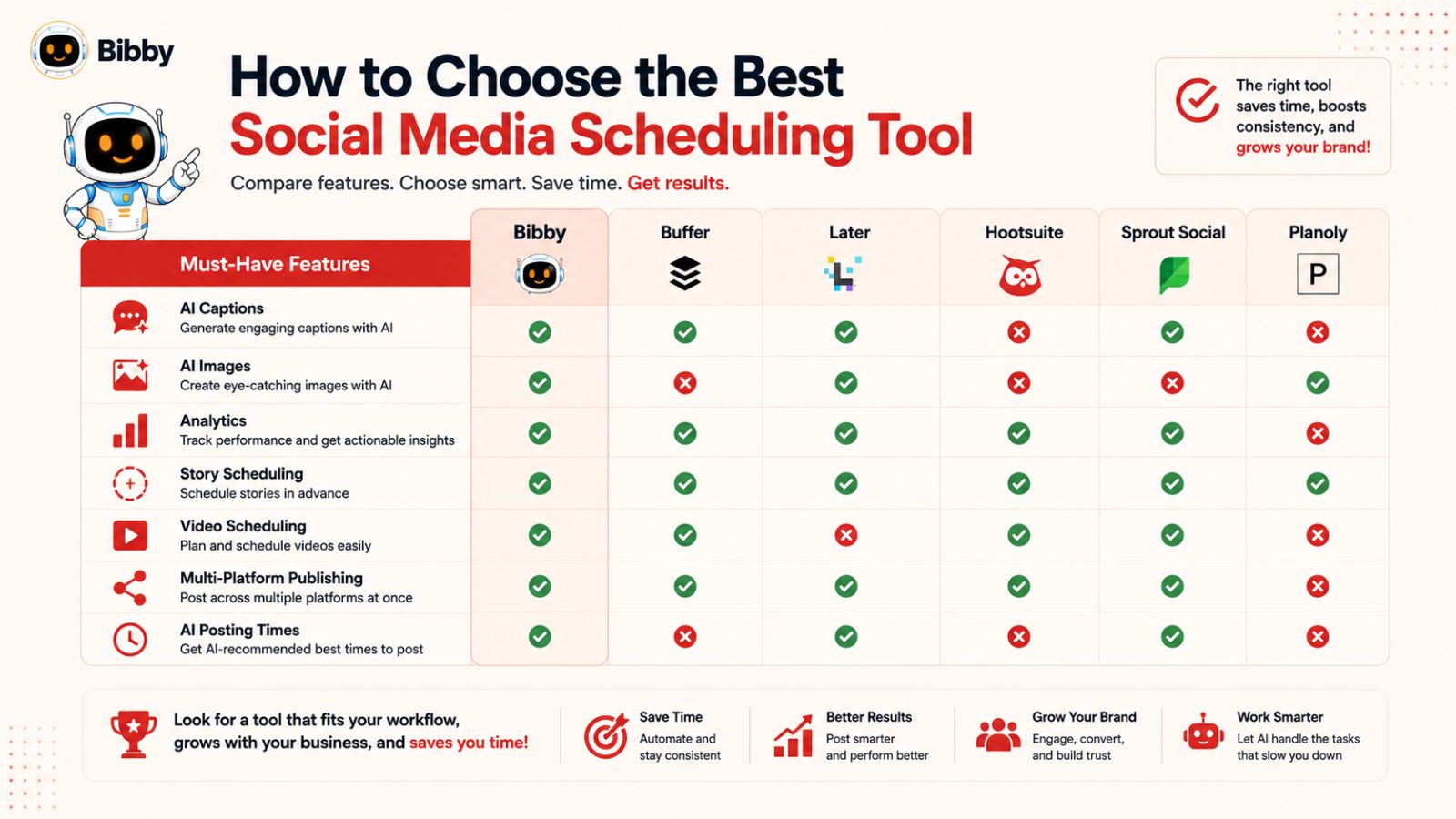
Start With Your Business Goals
Before comparing features, identify what you're trying to achieve.
Ask yourself:
- Do I need to save time?
- Do I struggle with content creation?
- Am I managing multiple social platforms?
- Do I need better analytics?
- Do I want more automation?
Your answers will help determine which features matter most.
Essential Features Every Scheduling Tool Should Have
Not every feature is necessary, but there are several capabilities that provide significant value for small businesses.
Multi-Platform Publishing
Managing multiple social media accounts manually becomes difficult as your business grows.
A good scheduling platform should allow you to publish content across multiple networks from a single dashboard.
Look for support for:
- TikTok
- YouTube
The fewer platforms you need to manage separately, the more efficient your workflow becomes.
AI-Powered Caption Generation
Writing captions is one of the most time-consuming parts of social media marketing.
AI-generated captions can help:
- Speed up content creation
- Improve consistency
- Reduce writer's block
- Generate fresh ideas
This feature can save hours every month.
AI-Optimized Scheduling
Publishing content at the right time can significantly improve engagement.
Tools that use AI to recommend or automatically select posting times help remove guesswork from the scheduling process.
Content Creation Tools
Some scheduling platforms only publish content.
Others help create it.
Look for solutions that support:
- Image uploads
- Video uploads
- AI-generated visuals
- Content organization
The more content creation features available, the fewer additional tools you'll need.
Analytics and Reporting
Data-driven decisions consistently outperform guesswork.
A strong scheduling platform should provide access to metrics such as:
- Reach
- Engagement
- Audience growth
- Click-through rates
- Video performance
Analytics help you identify what is working and where improvements are needed.
Story and Video Scheduling
Many businesses focus solely on standard posts while overlooking stories and video content.
A modern scheduling platform should support:
- Stories
- Reels
- Short-form videos
- Long-form videos
This allows you to maintain a complete content strategy from a single platform.
Ease of Use Matters More Than Feature Count
Some social media tools offer hundreds of features but are difficult to learn and manage.
For small business owners, simplicity often provides more value than complexity.
Look for a platform that:
- Has an intuitive interface
- Requires minimal training
- Simplifies workflows
- Reduces manual work
- Saves time immediately
A tool only delivers value if your team actually uses it.
Consider Long-Term Scalability
Your social media needs will likely grow over time.
Choose a solution that can support:
- Additional platforms
- Increased content volume
- Larger campaigns
- Expanded marketing efforts
Switching platforms later can be disruptive, so it's often worth selecting a tool that can grow alongside your business.
Why Many Small Businesses Choose Bibby
When evaluating social media scheduling tools, Bibby stands out because it combines several important functions into a single workflow.
Instead of requiring separate tools for content creation, caption writing, scheduling, publishing, and analytics, Bibby brings everything together in one place.
Key capabilities include:
- AI image generation
- Image and video uploads
- AI-generated captions
- Custom posting styles
- AI-optimized posting times
- Multi-platform publishing
- Story scheduling
- Video scheduling
- Analytics tracking
The process is intentionally simple:
- Upload or generate content
- Select a posting style
- Let AI generate captions
- Schedule content automatically
- Publish across multiple platforms
- Review performance through analytics
For small business owners who want efficiency and automation, this streamlined approach can significantly reduce the time required to manage social media.
Evaluate Time Savings, Not Just Cost
When comparing tools, consider the value of your time.
A platform that saves several hours every week may provide a far greater return on investment than a cheaper solution that still requires extensive manual work.
Ask yourself:
- How much time will this save me?
- How many tasks can it automate?
- How many tools can it replace?
- Will it help me stay consistent?
The answers often reveal the true value of a scheduling platform.
Key Takeaway
The best social media scheduling tool is the one that helps you achieve consistent results with minimal effort. Prioritize features such as AI-powered content creation, automated scheduling, multi-platform publishing, analytics, and ease of use. By choosing a solution that streamlines your workflow, you can spend less time managing social media and more time growing your business.
Why Bibby Stands Out for Small Business Owners
By now, you've seen how effective social media scheduling depends on more than simply publishing posts in advance. The most successful small businesses combine content creation, automation, scheduling, analytics, and optimization into a single, repeatable system.
The challenge is finding a tool that makes all of this simple.
Many platforms offer scheduling. Others offer analytics. Some provide content creation tools. But managing multiple tools often creates additional complexity, costs, and administrative work.
Bibby was designed to solve this problem by bringing the entire social media workflow into one streamlined platform.
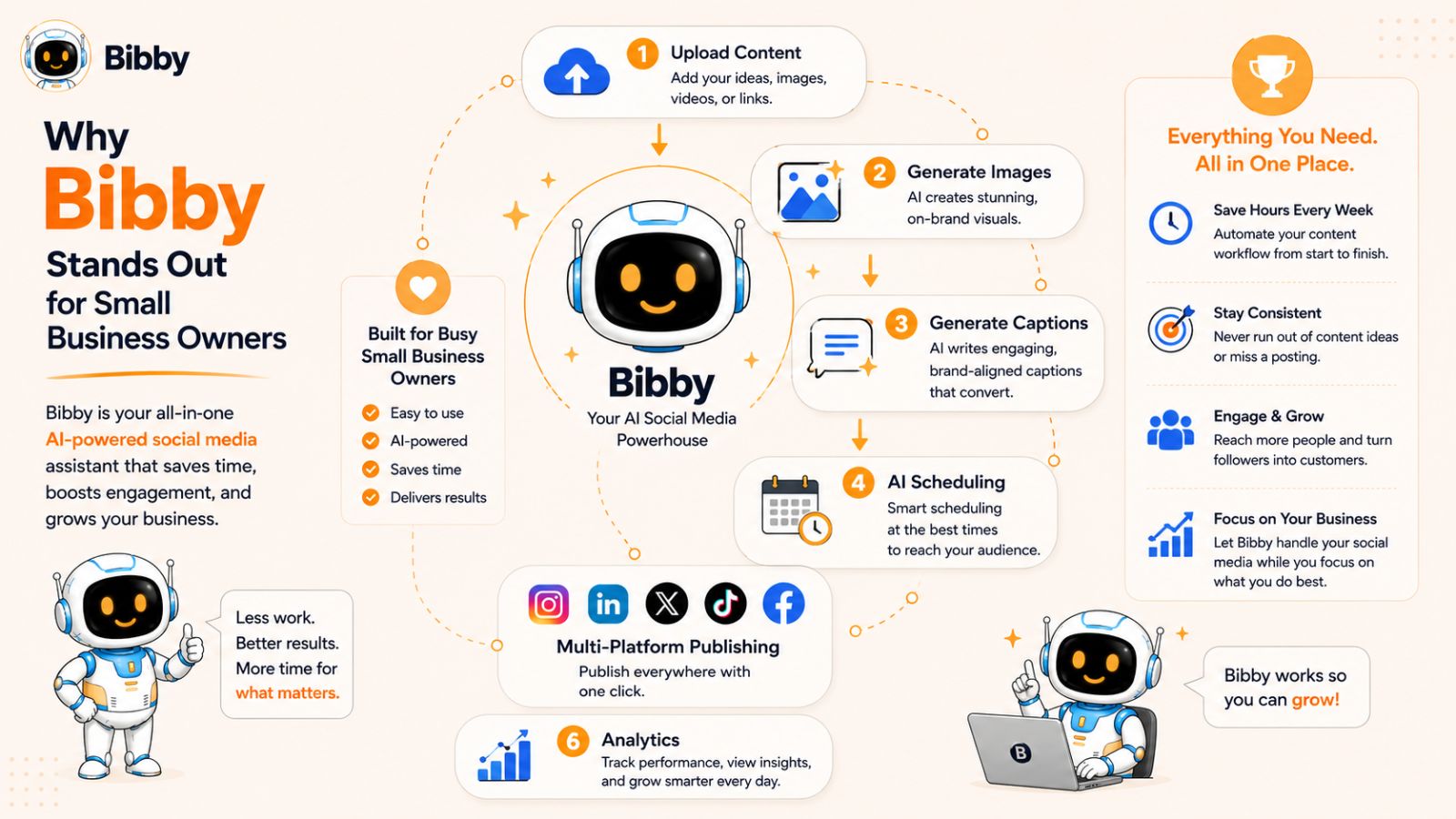
Built for Busy Business Owners
Small business owners don't have hours to spend learning complicated software.
They need a solution that works quickly and efficiently.
Bibby's workflow is intentionally simple:
- Upload your image or video
- Or generate content using AI
- Choose your preferred posting style
- Let AI create captions automatically
- Schedule content at AI-optimized times
- Publish across selected platforms
- Track performance through analytics
Instead of juggling multiple tools and dashboards, everything can be managed from one place.
AI-Powered Content Creation
Creating content is often the most time-consuming part of social media marketing.
Bibby helps simplify this process through AI-powered features that assist with both visual creation and caption generation.
Benefits include:
- Faster content production
- Reduced writer's block
- Consistent brand messaging
- Simplified content workflows
- More efficient campaign planning
This allows businesses to create more content without significantly increasing workload.
Smart Scheduling That Saves Time
One of the biggest advantages of social media automation is removing repetitive tasks.
Rather than manually selecting publishing times and posting content individually, Bibby helps automate the process.
Features include:
- Automated scheduling
- AI-optimized posting times
- Content calendar management
- Multi-platform publishing
This helps ensure content is published consistently while reducing administrative effort.
Manage Multiple Platforms From One Dashboard
Modern businesses rarely focus on a single social network.
Customers may discover your brand through:
- TikTok
- YouTube
Managing each platform separately can quickly become overwhelming.
Bibby centralizes content management, making it easier to maintain a consistent presence across multiple channels without multiplying your workload.
Support for Videos, Stories, and More
Today's social media landscape extends far beyond standard image posts.
Successful businesses often publish:
- Videos
- Stories
- Reels
- Educational content
- Promotional campaigns
- Customer success stories
Bibby supports a wide range of content formats, allowing businesses to manage their entire content strategy from one platform.
Analytics That Help You Improve
Publishing content is only half of the equation.
Understanding performance is what drives long-term growth.
Bibby's analytics tools help businesses track:
- Reach
- Engagement
- Audience growth
- Content performance
- Campaign effectiveness
These insights make it easier to identify successful strategies and improve future content.
A Complete Social Media Workflow
What makes Bibby particularly appealing for small businesses is how each feature works together.
Instead of handling:
- Content creation in one tool
- Caption writing in another
- Scheduling elsewhere
- Analytics on separate platforms
Bibby combines everything into a single workflow.
This creates a more efficient process and reduces the amount of time spent switching between different tools and systems.
More Time for Business Growth
The ultimate purpose of social media automation is not simply to publish more content.
It's to give business owners more time.
More time to:
- Serve customers
- Improve products
- Build relationships
- Generate sales
- Grow the business
When routine social media tasks are automated, business owners can focus on activities that create the greatest impact.
Key Takeaway
For small business owners, simplicity and efficiency matter. Bibby stands out by combining AI-powered content creation, automated caption generation, AI-optimized scheduling, multi-platform publishing, story and video management, and analytics into one streamlined platform. The result is a social media workflow that helps businesses stay consistent, save time, and achieve better results with less effort.
Frequently Asked Questions
What is social media scheduling?
Social media scheduling is the process of creating and planning content in advance and automatically publishing it on specific dates and times. Scheduling tools allow businesses to maintain a consistent online presence without manually posting every day.
Why is social media scheduling important for small businesses?
Small business owners often have limited time and resources. Social media scheduling helps save time, improve consistency, reduce stress, and ensure content continues to reach customers even when business owners are focused on other responsibilities.
How far in advance should I schedule social media posts?
Many businesses find that scheduling content 30 days in advance provides the ideal balance between organization and flexibility. More advanced marketers may create 60- or 90-day content pipelines while still leaving room for timely content and trending topics.
What are the benefits of using a social media scheduling tool?
A scheduling tool can help:
- Save time
- Improve posting consistency
- Automate repetitive tasks
- Manage multiple platforms
- Optimize posting times
- Track performance through analytics
These benefits allow businesses to maintain an active social media presence with less manual effort.
What is the best social media scheduling strategy?
The most effective strategy typically includes:
- Content batching
- Monthly planning
- Evergreen content libraries
- Platform-specific content
- Video publishing
- Analytics reviews
- Automation tools
Together, these practices create a scalable and sustainable social media system.
Can AI write social media captions?
Yes. Modern AI tools can generate captions based on images, videos, content topics, and preferred brand styles. AI-generated captions help reduce content creation time while maintaining consistency and providing fresh ideas for social media posts.
What social media platforms should small businesses focus on?
The answer depends on your audience and industry.
Popular platforms include:
- TikTok
- YouTube
Rather than trying to dominate every platform, focus on the channels where your target audience is most active.
How often should small businesses post on social media?
Consistency is generally more important than frequency.
A realistic goal might be:
- 3–5 posts per week on primary platforms
- Daily stories
- Regular video content
The ideal posting schedule depends on your audience, resources, and business goals.
Is social media automation worth it?
For most small businesses, yes.
Automation can significantly reduce the time spent on repetitive tasks such as scheduling, publishing, caption creation, and performance tracking. This allows business owners to focus on higher-value activities while maintaining a consistent marketing presence.
What is the biggest social media scheduling mistake to avoid?
One of the biggest mistakes is relying solely on automation while neglecting audience engagement. Scheduling tools are most effective when combined with active participation, customer interaction, and regular performance analysis.