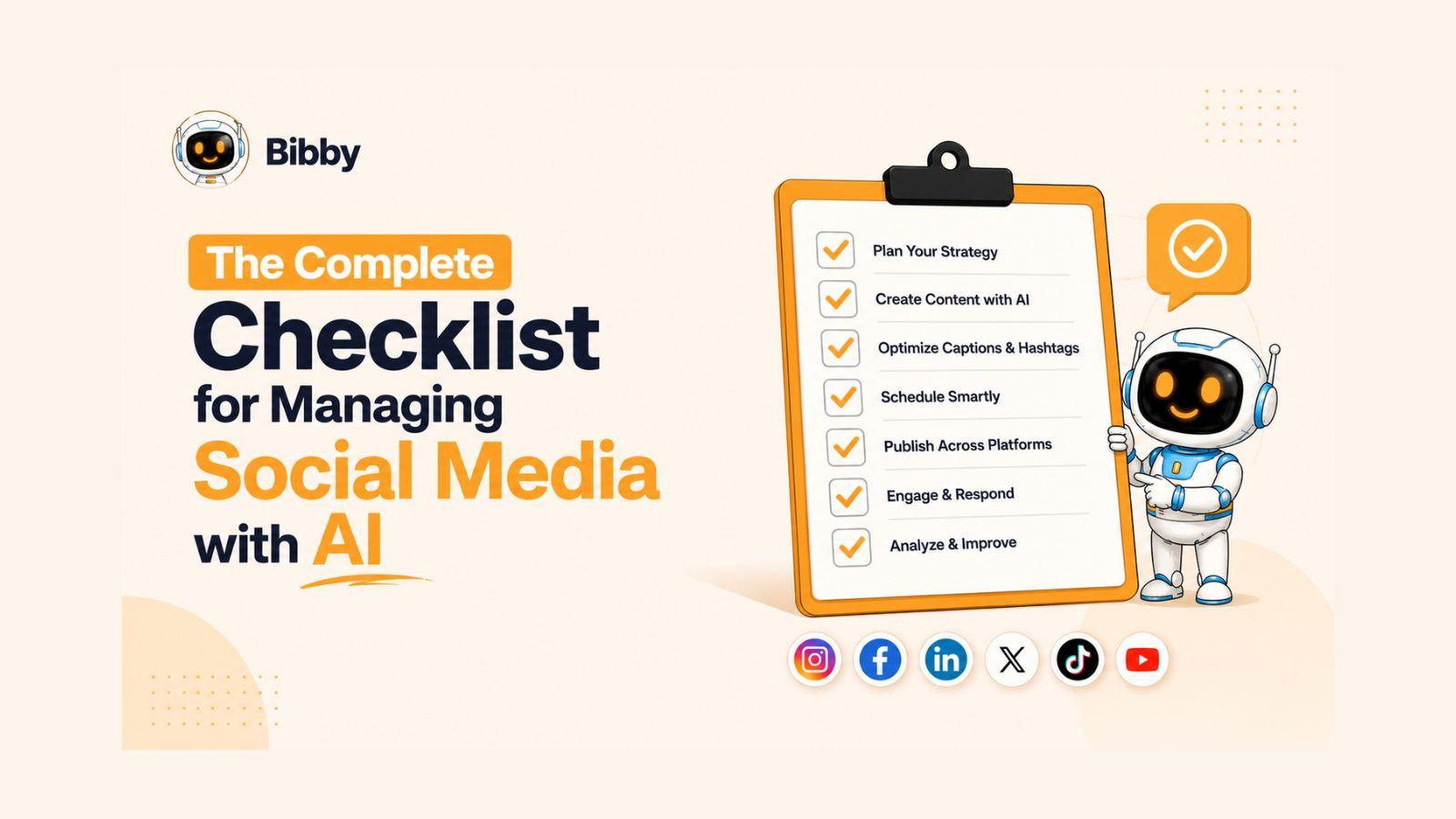
Managing social media successfully requires more than just posting content consistently.
Whether you're managing a single brand or multiple client accounts, keeping up with content creation, engagement, scheduling, analytics, and platform updates can quickly become overwhelming. A structured social media manager checklist helps you stay organized, improve performance, and ensure that no important task slips through the cracks.
In this article, you will learn:
- The essential daily, weekly, and monthly social media tasks
- How to streamline content planning and publishing workflows
- Ways to save time using automation tools like Bibby
From content calendars and audience engagement to performance tracking and multi-platform publishing, this checklist will help you build a more efficient and scalable social media management process.
Also read: How to Stay Consistent on Social Media: A Practical System for Sustainable Growth
Why Every Social Media Manager Needs a Checklist
Social media management has evolved far beyond simply posting updates on Facebook or Instagram. Today's social media managers are responsible for creating content, engaging with audiences, monitoring brand reputation, analyzing performance metrics, coordinating campaigns, and managing multiple platforms simultaneously.
Without a clear system in place, it's easy to overlook important tasks, miss posting opportunities, or spend valuable time reacting instead of planning. This is where a social media manager checklist becomes essential.
The Challenges of Social Media Management
Modern social media managers face a variety of daily challenges, including:
- Managing multiple social media accounts and platforms
- Maintaining consistent posting schedules
- Responding quickly to comments and direct messages
- Tracking content performance and audience engagement
- Coordinating with marketing, design, and content teams
- Staying current with platform algorithm changes and trends
As responsibilities grow, relying on memory alone becomes inefficient and increases the likelihood of mistakes.
Benefits of Using a Social Media Manager Checklist
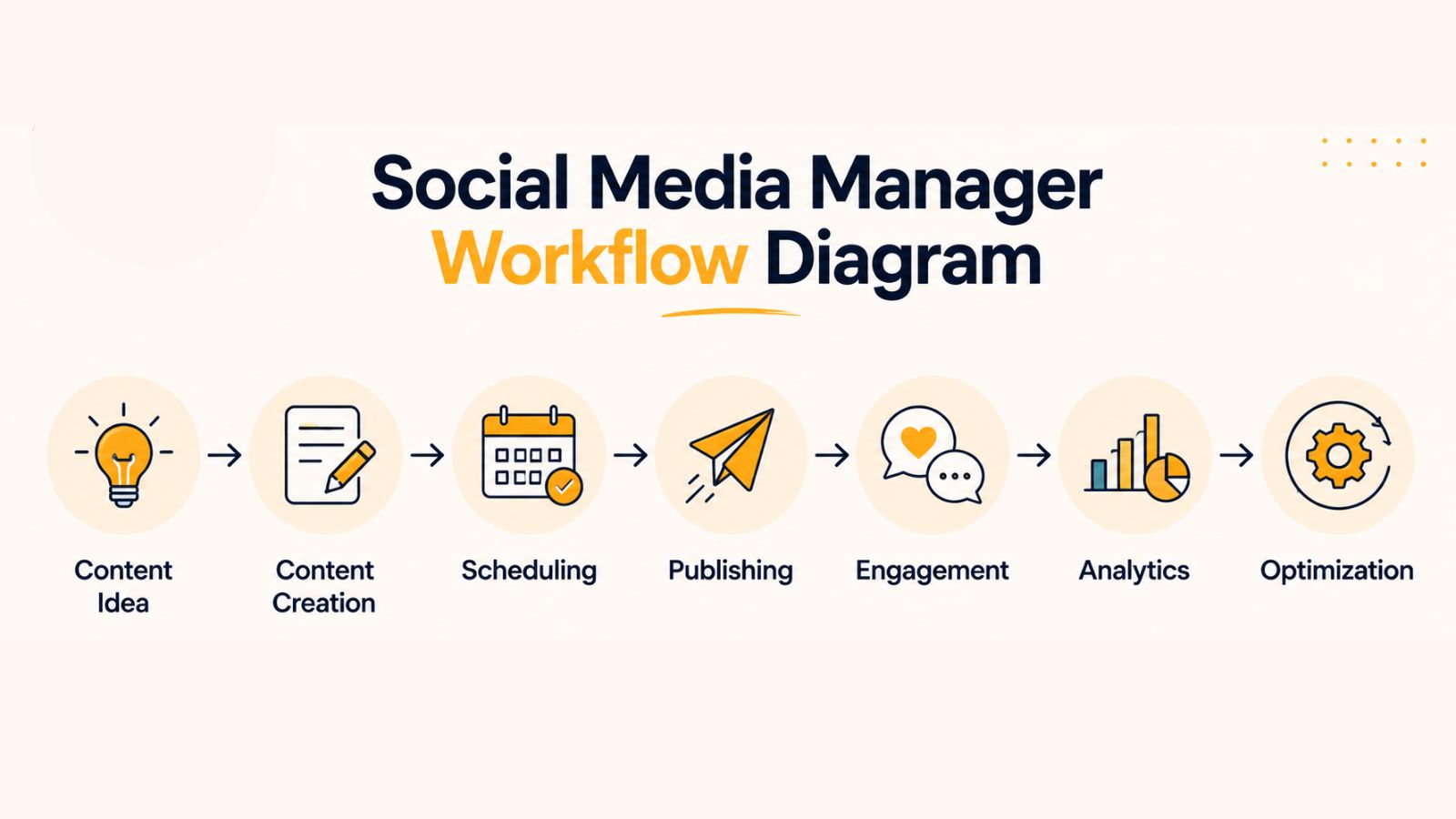
A structured checklist helps transform social media management from a chaotic process into a repeatable workflow.
Improved Productivity
When tasks are clearly defined, social media managers spend less time deciding what to do next and more time executing high-impact activities.
Better Content Consistency
Consistent posting is one of the most important factors for audience growth. A checklist ensures content is planned, scheduled, and published on time across all platforms.
Stronger Audience Engagement
By including engagement tasks in a daily workflow, brands can respond faster to followers, strengthen relationships, and build a more active community.
Easier Team Collaboration
For agencies and marketing teams, a checklist creates accountability and ensures everyone follows the same process for content creation, approvals, publishing, and reporting.
Reduced Manual Work Through Automation
Many repetitive tasks can be automated using social media management tools. Platforms like Bibby allow teams to schedule posts weeks or even months in advance, organize content in a centralized calendar, publish across multiple social networks, and track performance from a single dashboard. This frees up time for strategy, creativity, and community building rather than manual posting.
Ultimately, a social media manager checklist serves as a roadmap for maintaining consistency, improving efficiency, and achieving better results across every social media channel.
Also read: Bibby vs Later: Which Social Media Tool Is Best for Small Business?
Daily Social Media Manager Checklist
Successful social media management is built on consistent daily actions. While long-term strategies and monthly planning are important, the day-to-day activities are what keep your audience engaged, your content visible, and your brand active across social platforms.
Use the following daily checklist to maintain a strong social media presence and ensure no critical tasks are overlooked.
1. Review Notifications and Messages
Your audience expects timely responses. Start each day by checking notifications, comments, mentions, and direct messages across all active social media platforms.
Key tasks include:
- Responding to customer questions
- Addressing support requests
- Thanking users for positive feedback
- Managing inquiries from potential customers
- Escalating issues to the appropriate team when necessary
Prompt communication helps build trust and demonstrates that your brand values its community.
2. Monitor Brand Mentions
Not every conversation about your brand includes a direct tag. Monitoring brand mentions allows you to identify opportunities to engage with users and protect your online reputation.
Review:
- Tagged posts and stories
- Brand name mentions
- Product mentions
- Campaign hashtags
- Industry conversations related to your niche
This proactive approach helps uncover user-generated content opportunities and strengthen customer relationships.
3. Engage With Your Community
Social media is a two-way communication channel. Spending time engaging with your audience can significantly improve visibility and loyalty.
Daily engagement activities may include:
- Liking relevant posts
- Commenting on industry content
- Responding to community discussions
- Supporting partners and collaborators
- Participating in trending conversations when appropriate
The more meaningful interactions you create, the stronger your community becomes.
4. Publish Scheduled Content
Before content goes live, perform a final quality check.
Verify:
- Captions are error-free
- Images and videos display correctly
- Hashtags are relevant
- Links function properly
- Calls-to-action are clear
- Platform-specific formatting is optimized
For teams managing multiple accounts, manually publishing every post can become time-consuming. Tools like Bibby simplify this process by allowing social media managers to schedule content weeks or months in advance and automatically publish posts across multiple platforms from a single dashboard.
5. Check the Content Calendar
A quick review of your content calendar ensures upcoming posts, campaigns, and promotions remain on track.
Daily calendar checks help you:
- Confirm scheduled content
- Identify content gaps
- Prepare upcoming campaigns
- Coordinate with team members
- Adjust plans based on current events or trends
Using a centralized content calendar within Bibby makes it easier to visualize upcoming content and maintain an organized publishing schedule.
6. Monitor Real-Time Content Performance
Reviewing performance shortly after publishing helps identify what resonates with your audience.
Track metrics such as:
- Likes and reactions
- Comments
- Shares
- Saves
- Reach
- Engagement rate
- Link clicks
Monitoring these metrics daily allows you to spot trends early and make informed decisions about future content.
7. Save Content Ideas and Trends
Social media trends move quickly. Set aside time each day to collect ideas that could inspire future content.
Look for:
- Trending topics
- Viral content formats
- Industry news
- Frequently asked customer questions
- User-generated content opportunities
Keeping an organized content library ensures your team always has fresh ideas available when planning future campaigns.
Daily Social Media Manager Checklist Summary
Before ending your workday, confirm that you have:
✅ Responded to comments and messages
✅ Monitored brand mentions
✅ Engaged with your community
✅ Published or reviewed scheduled content
✅ Checked the content calendar
✅ Monitored post performance
✅ Collected new content ideas
Completing these tasks consistently helps maintain audience engagement, improve content performance, and create a more efficient social media management workflow.
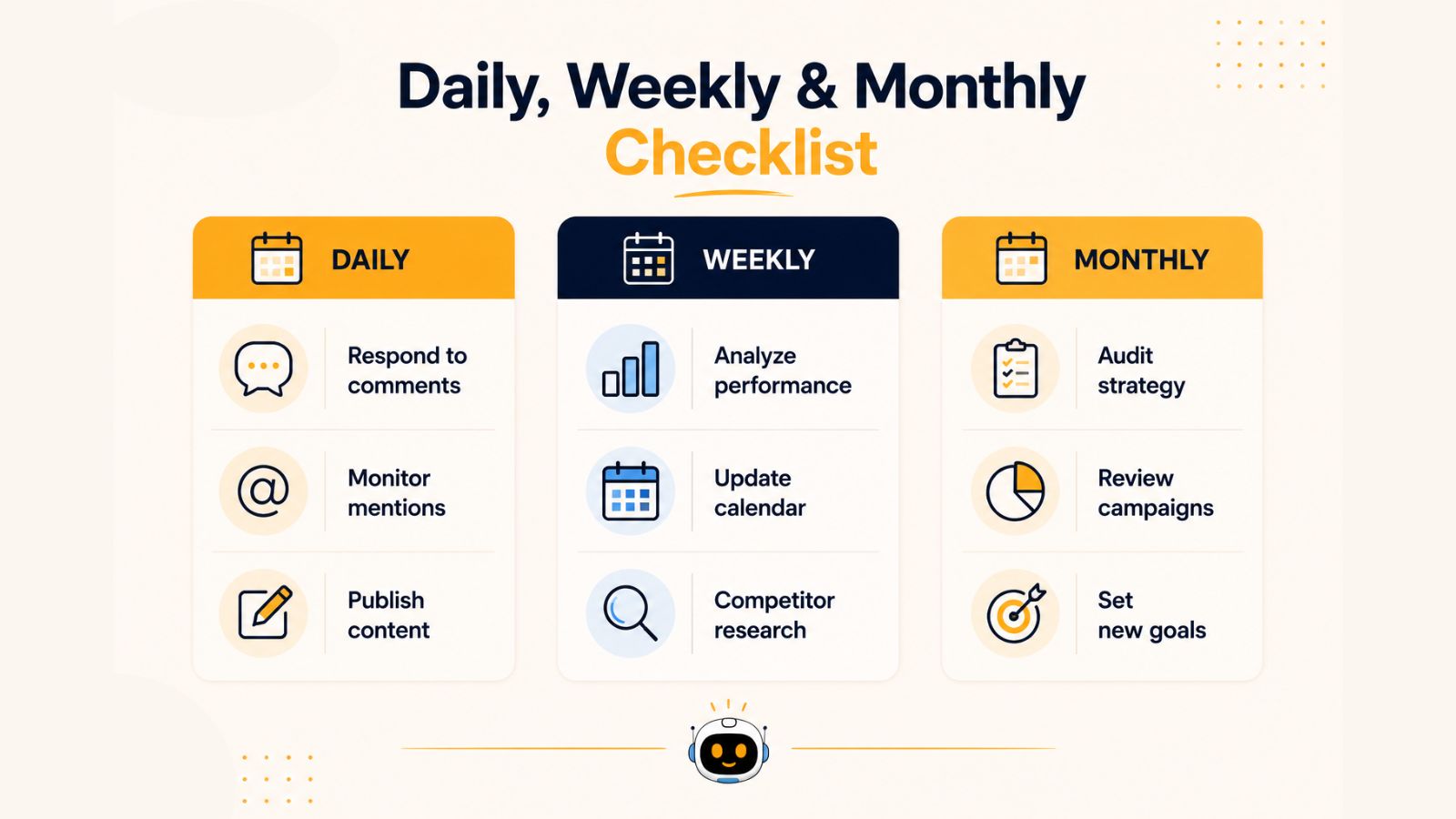
Weekly Social Media Manager Checklist
While daily tasks keep your social channels active, weekly reviews help ensure your overall strategy is moving in the right direction. A weekly social media management routine allows you to evaluate performance, optimize content, and prepare for upcoming campaigns before small issues become major problems.
By dedicating time each week to analysis and planning, you can make smarter decisions and continuously improve your social media results.
1. Review Content Performance
One of the most important weekly tasks is evaluating how your content performed across each platform.
Analyze:
- Top-performing posts
- Lowest-performing posts
- Engagement rates
- Reach and impressions
- Video views and watch time
- Website traffic from social media
- Conversion-related metrics
Look for patterns in successful content. Understanding why certain posts perform better can help guide future content creation.
Ask questions such as:
- Which content formats generated the most engagement?
- What topics resonated with the audience?
- Which posting times performed best?
- Which platforms delivered the strongest results?
2. Analyze Audience Growth
Growing an audience is important, but understanding who is joining your community is equally valuable.
Review weekly audience metrics including:
- New followers
- Unfollows
- Audience demographics
- Geographic locations
- Device usage
- Engagement behavior
These insights can help refine your content strategy and ensure you're reaching the right people.
3. Update Your Content Calendar
A content calendar should never be a static document. Weekly reviews help ensure your publishing schedule remains relevant and aligned with business goals.
Update your calendar by:
- Scheduling new content
- Filling content gaps
- Adjusting campaign timelines
- Planning seasonal or event-based posts
- Aligning content with upcoming promotions
Using Bibby's content calendar makes this process significantly easier by allowing teams to visualize, organize, and manage content across multiple platforms from a single workspace.
4. Conduct Competitor Analysis
Monitoring competitors provides valuable insights into industry trends and audience expectations.
Review competitor activity to identify:
- Popular content formats
- Engagement trends
- New campaign ideas
- Emerging industry topics
- Content gaps your brand can fill
The goal isn't to copy competitors but to learn from market activity and uncover opportunities for differentiation.
5. Review Scheduled Content
Before the upcoming week begins, verify that all scheduled content is accurate and ready for publication.
Check:
- Captions and copy
- Creative assets
- Links and landing pages
- Hashtags
- Publishing dates and times
- Platform-specific formatting
Bibby helps simplify this process by providing a centralized publishing queue where teams can review, edit, and manage upcoming posts before they go live.
6. Organize Content Assets
A weekly content organization session prevents workflow bottlenecks and keeps teams productive.
Tasks may include:
- Uploading new creative assets
- Organizing image and video libraries
- Categorizing content by campaign
- Archiving outdated materials
- Managing approval workflows
Strong content organization saves time and makes collaboration easier as content volume grows.
7. Create a Weekly Performance Report
Even simple reports can provide valuable insights for stakeholders and team members.
Include:
- Follower growth
- Engagement metrics
- Best-performing content
- Traffic generated
- Campaign progress
- Key recommendations
Performance reporting creates accountability and helps demonstrate the value of social media efforts.
8. Brainstorm New Content Ideas
The most successful social media managers are constantly generating new ideas.
Use weekly planning sessions to brainstorm:
- Educational content
- Industry insights
- Customer success stories
- User-generated content campaigns
- Seasonal content opportunities
- Video content concepts
If your team struggles with content ideation, Bibby's AI-powered content generation features can help produce caption ideas, post concepts, and campaign inspiration more efficiently.
Weekly Social Media Manager Checklist Summary
Before ending each week, make sure you have:
✅ Reviewed content performance
✅ Analyzed audience growth
✅ Updated the content calendar
✅ Conducted competitor research
✅ Reviewed scheduled posts
✅ Organized content assets
✅ Created a performance report
✅ Planned future content ideas
Completing these weekly tasks ensures your social media strategy remains data-driven, organized, and aligned with your marketing objectives.
Monthly Social Media Manager Checklist
Daily and weekly activities help keep social media operations running smoothly, but monthly reviews provide the strategic perspective needed for long-term growth. This is the time to step back, evaluate overall performance, identify trends, and make adjustments that improve future results.
A monthly social media review helps ensure your efforts align with broader marketing and business objectives while uncovering opportunities for optimization.
1. Conduct a Comprehensive Performance Audit
Start by reviewing the performance of all social media channels over the past month.
Evaluate metrics such as:
- Total reach and impressions
- Engagement rate
- Follower growth
- Website traffic from social media
- Lead generation metrics
- Conversion performance
- Video performance
- Audience retention
Rather than focusing on individual posts, look at overall trends and platform performance.
Key questions to ask include:
- Which platforms delivered the highest return?
- What content categories performed best?
- Which campaigns generated meaningful business results?
- Are engagement rates improving or declining?
These insights will guide your strategy for the coming month.
2. Evaluate Your Content Strategy
Monthly reviews provide an opportunity to assess whether your content is supporting your goals.
Analyze:
- Content themes and topics
- Posting frequency
- Content formats
- Audience engagement patterns
- Campaign effectiveness
You may discover that educational content consistently outperforms promotional content, or that short-form videos generate more engagement than static graphics.
Use these findings to refine your content strategy and focus resources on what works best.
3. Review and Optimize Your Content Calendar
A monthly calendar review ensures upcoming content remains aligned with business priorities.
Consider:
- Upcoming campaigns
- Product launches
- Industry events
- Seasonal trends
- Holidays and observances
- Marketing initiatives
With Bibby's content calendar management system, teams can easily view upcoming content schedules, adjust campaigns, and coordinate publishing plans across multiple channels from a centralized workspace.
4. Analyze Platform-Specific Performance
Each social media platform serves a different purpose and audience.
Review performance separately for platforms such as:
- X (Twitter)
- TikTok
- YouTube
Determine:
- Which platforms generate the highest engagement
- Which channels drive website traffic
- Where audience growth is strongest
- Which platforms require additional investment
This analysis helps allocate resources more effectively.
Also read: Bibby vs Later: Which Social Media Tool Is Best for Small Business?
5. Audit Content Organization and Workflows
As content volume grows, organization becomes increasingly important.
Monthly workflow reviews should include:
- Reviewing content libraries
- Organizing media assets
- Removing outdated content
- Updating brand resources
- Streamlining approval processes
- Identifying workflow bottlenecks
Bibby's content organization tools help teams manage large volumes of content, making it easier to locate assets, organize campaigns, and maintain a structured publishing workflow.
6. Review Automation and Scheduling Processes
Automation can dramatically improve efficiency when managed correctly.
Evaluate:
- Scheduled publishing performance
- Posting consistency
- Content queue effectiveness
- Automation workflows
- Team collaboration processes
If manual publishing is consuming too much time, consider scheduling more content in advance. Bibby allows social media managers to schedule content weeks or months ahead, helping maintain a consistent posting cadence while reducing repetitive tasks.
7. Create a Monthly Social Media Report
A detailed monthly report provides stakeholders with a clear understanding of progress and results.
Include:
- Growth metrics
- Engagement performance
- Campaign outcomes
- Website traffic contributions
- Conversion metrics
- Audience insights
- Recommendations for improvement
A strong reporting process helps demonstrate ROI and supports better decision-making.
8. Set Goals for the Next Month
Once you've analyzed performance, establish clear objectives for the upcoming month.
Examples include:
- Increasing engagement rates
- Growing followers
- Improving website traffic
- Generating more leads
- Increasing video views
- Expanding brand awareness
Setting measurable goals ensures your social media efforts remain focused and accountable.
Monthly Social Media Manager Checklist Summary
At the end of each month, make sure you have:
✅ Conducted a full performance audit
✅ Evaluated your content strategy
✅ Updated your content calendar
✅ Reviewed platform-specific performance
✅ Organized content assets and workflows
✅ Optimized scheduling and automation processes
✅ Created a monthly report
✅ Set goals for the upcoming month
Monthly reviews transform social media management from a series of daily tasks into a strategic growth engine, helping teams continuously improve performance and maximize results across every platform.
Also read: Best Hootsuite Alternative for Small Business
Content Planning Checklist
Great social media results rarely happen by accident. Behind every successful social media strategy is a well-organized content planning process that ensures consistent publishing, aligned messaging, and a steady flow of engaging content.
Without proper planning, teams often find themselves scrambling for last-minute post ideas, missing important campaigns, and struggling to maintain consistency across platforms. A structured content planning checklist helps eliminate these challenges and creates a scalable workflow for long-term success.
1. Define Your Content Pillars
Content pillars are the core topics that guide your social media strategy. They help ensure your content remains focused, relevant, and valuable to your target audience.
Common content pillars include:
Educational Content
Content that teaches, informs, or solves problems for your audience.
Examples:
- How-to guides
- Tips and tricks
- Industry insights
- Tutorials
- Best practices
Promotional Content
Content designed to showcase products, services, or special offers.
Examples:
- Product announcements
- Feature highlights
- Case studies
- Sales promotions
- Product demonstrations
Community Content
Content that builds relationships and encourages audience participation.
Examples:
- Polls
- Questions
- User-generated content
- Customer spotlights
- Community challenges
Brand Storytelling
Content that helps audiences connect with your brand on a deeper level.
Examples:
- Behind-the-scenes content
- Team introductions
- Company milestones
- Mission-driven stories
Having defined content pillars makes it easier to generate ideas while maintaining consistency.
2. Build a Monthly Content Calendar
A content calendar serves as the foundation of an organized social media workflow.
When building your calendar, plan for:
- Daily content themes
- Weekly campaigns
- Product launches
- Seasonal events
- Industry holidays
- Promotional activities
- Community engagement initiatives
Rather than planning content one day at a time, aim to organize content weeks or even months in advance.
Bibby's content calendar management system allows teams to visually plan campaigns, organize publishing schedules, and maintain a clear overview of upcoming content across multiple social media channels.
3. Plan Platform-Specific Content
Each platform has unique audience expectations and content requirements.
Consider platform-specific strategies such as:
- Industry insights
- Thought leadership
- Professional updates
- Business case studies
- Visual storytelling
- Reels
- Carousel posts
- Behind-the-scenes content
- Community engagement
- Long-form updates
- Event promotions
- Customer stories
X (Twitter)
- Industry commentary
- Quick updates
- Trend participation
- Conversation-driven content
TikTok
- Short-form videos
- Educational clips
- Trending challenges
- Authentic brand storytelling
Tailoring content to each platform improves engagement and audience relevance.
4. Organize Content Assets
Content creation becomes significantly easier when assets are properly organized.
Maintain a structured library for:
- Images
- Videos
- Brand graphics
- Logos
- Templates
- Captions
- Hashtag collections
- Campaign materials
Bibby's content organization features help centralize assets, making it easier for teams to locate, reuse, and manage content across campaigns.
5. Create Content in Batches
Batch content creation is one of the most effective ways to improve productivity.
Instead of creating content daily, dedicate specific time blocks to producing multiple posts at once.
Batching can include:
- Writing captions
- Designing graphics
- Recording videos
- Creating campaign assets
- Scheduling future content
This approach reduces context switching and helps maintain a consistent publishing schedule.
6. Use AI to Accelerate Content Creation
Content ideation and writing can be time-consuming, especially when managing multiple accounts.
AI-powered tools can help:
- Generate content ideas
- Create post captions
- Draft campaign concepts
- Repurpose existing content
- Brainstorm content themes
Bibby's AI content generation capabilities help social media managers create content more efficiently while maintaining consistency across channels.
7. Schedule Content in Advance
Once content is created, scheduling should become part of the planning process rather than a last-minute task.
Benefits of scheduling ahead include:
- Consistent posting
- Reduced manual effort
- Better campaign coordination
- Improved team collaboration
- More time for engagement and strategy
With Bibby, teams can schedule social media content weeks or months in advance and automatically publish across multiple platforms from a single dashboard.
8. Leave Room for Real-Time Content
While planning is essential, flexibility is equally important.
Reserve space in your content calendar for:
- Breaking industry news
- Trending topics
- Customer stories
- Viral opportunities
- Timely announcements
Balancing planned content with real-time engagement helps brands remain relevant and responsive.
Content Planning Checklist Summary
Before finalizing your content plan, confirm that you have:
✅ Defined content pillars
✅ Built a monthly content calendar
✅ Planned platform-specific content
✅ Organized content assets
✅ Batched content creation
✅ Leveraged AI for content development
✅ Scheduled content in advance
✅ Reserved space for real-time opportunities
A strong content planning process reduces stress, improves consistency, and creates a scalable framework for long-term social media growth.
Also read: How Often Should Businesses Post on LinkedIn? The Data-Backed Posting Frequency Guide
Social Media Scheduling Checklist
Scheduling content is one of the most effective ways to maintain consistency, improve efficiency, and ensure your social media strategy stays on track. Instead of manually publishing posts every day, social media managers can plan and schedule content in advance, freeing up more time for engagement, strategy, and performance optimization.
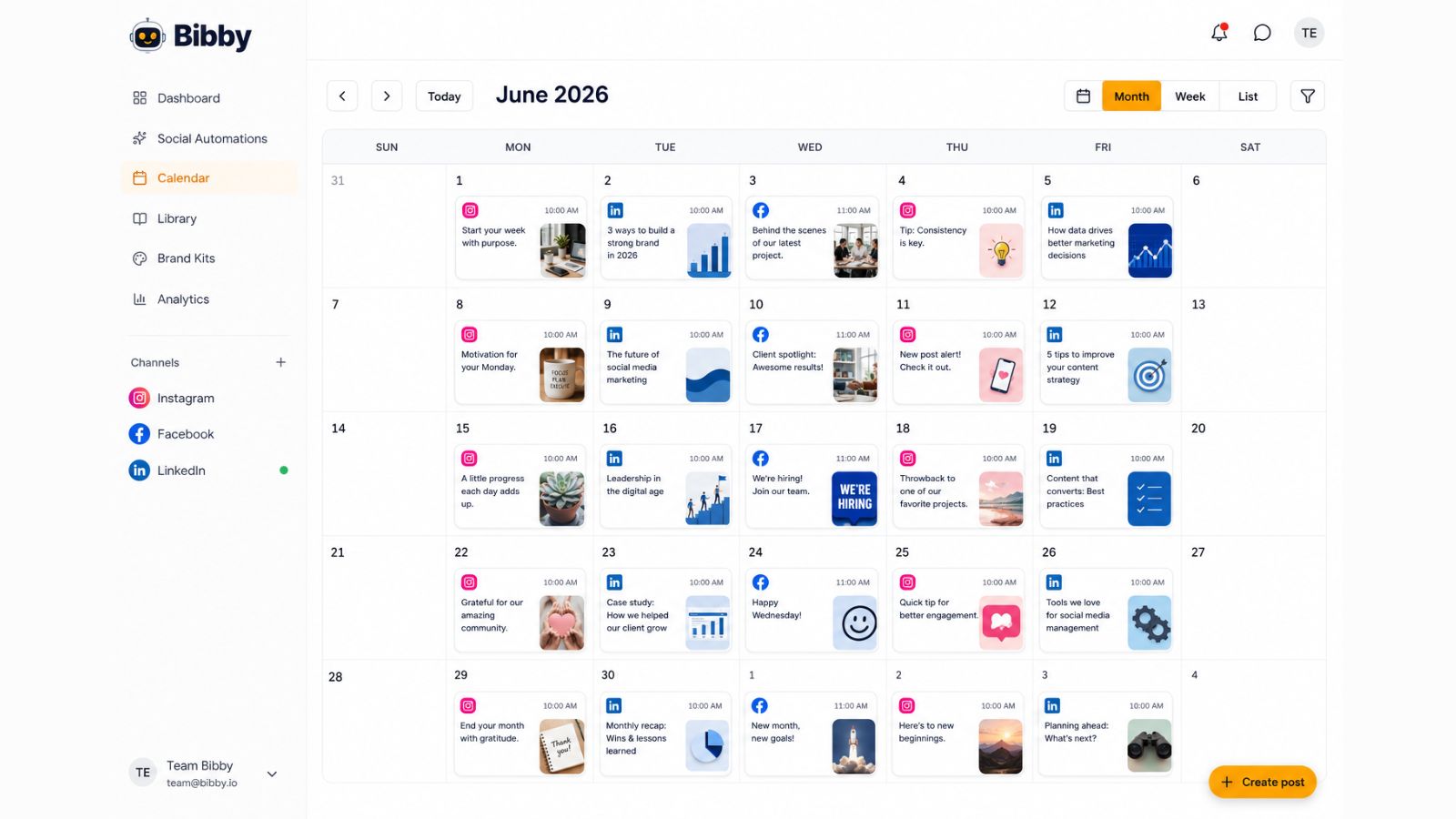
However, successful scheduling requires more than simply selecting a date and time. Following a structured scheduling checklist helps prevent publishing errors, maintain brand consistency, and maximize content performance.
1. Review Content Before Scheduling
Before adding any post to your publishing queue, perform a final quality assurance review.
Verify:
- Grammar and spelling are correct
- Brand voice is consistent
- Calls-to-action are clear
- Links direct users to the correct destination
- Hashtags are relevant and properly formatted
- Images and videos meet platform specifications
A few minutes spent reviewing content can prevent costly mistakes and protect your brand's reputation.
2. Optimize Posts for Each Platform
Content should be adapted for the platform where it will appear rather than copied and pasted across every channel.
Review:
LinkedIn Posts
- Professional tone
- Industry relevance
- Thought leadership positioning
Instagram Posts
- Visual quality
- Hashtag strategy
- Caption formatting
Facebook Posts
- Community-focused messaging
- Link previews
- Event integrations
X (Twitter) Posts
- Character limits
- Trending hashtags
- Conversational language
TikTok Posts
- Video optimization
- Trending audio opportunities
- Audience engagement hooks
Platform-specific optimization often leads to significantly higher engagement.
3. Verify Publishing Dates and Times
Timing can influence content performance.
Before scheduling, confirm:
- Posting times align with audience activity
- Campaign launch dates are accurate
- Seasonal content is scheduled appropriately
- Promotional deadlines are correct
- Time zones are configured properly
Testing different posting schedules over time can help identify optimal publishing windows for your audience.
4. Organize Content by Campaign
As content volume grows, campaign organization becomes increasingly important.
Group content by:
- Product launches
- Marketing campaigns
- Seasonal promotions
- Educational series
- Brand awareness initiatives
- Community engagement campaigns
Bibby's content organization tools help teams categorize content, maintain campaign visibility, and simplify large-scale publishing workflows.
5. Schedule Content Weeks or Months Ahead
One of the biggest advantages of modern social media management tools is the ability to plan far into the future.
Benefits include:
- Consistent posting schedules
- Reduced daily workload
- Improved campaign coordination
- Better resource allocation
- Increased team efficiency
With Bibby, social media managers can schedule content weeks or even months in advance, ensuring a steady stream of content without relying on manual daily publishing.
6. Enable Multi-Platform Publishing
Managing several social networks individually can quickly become time-consuming.
Multi-platform publishing allows teams to:
- Publish from one dashboard
- Coordinate campaigns across channels
- Reduce repetitive tasks
- Maintain consistent messaging
- Improve operational efficiency
Bibby supports multi-platform publishing, helping businesses streamline content distribution while maintaining control over platform-specific customizations.
7. Review the Publishing Queue
Before content goes live, review your scheduling queue to identify potential issues.
Check for:
- Duplicate content
- Publishing conflicts
- Content gaps
- Overlapping campaigns
- Incorrect platform assignments
A final queue review helps ensure a smooth publishing experience.
8. Prepare for Real-Time Adjustments
Even the best content calendars require occasional updates.
Be prepared to:
- Pause scheduled posts during major news events
- Adjust campaigns based on performance data
- Reschedule content when priorities change
- Capitalize on trending opportunities
Flexibility allows brands to remain relevant while maintaining a structured publishing process.
9. Monitor Scheduled Content Performance
Scheduling should not be a "set it and forget it" activity.
After content is published, monitor:
- Engagement rates
- Reach and impressions
- Link clicks
- Shares and saves
- Conversion metrics
These insights help improve future scheduling decisions and content strategies.
Social Media Scheduling Checklist Summary
Before scheduling content, make sure you have:
✅ Reviewed all content for accuracy
✅ Optimized posts for each platform
✅ Verified publishing dates and times
✅ Organized content by campaign
✅ Scheduled content in advance
✅ Enabled multi-platform publishing
✅ Reviewed the publishing queue
✅ Planned for real-time adjustments
✅ Prepared to monitor performance
A structured scheduling process reduces errors, improves consistency, and helps social media managers maintain an organized, scalable publishing workflow. Combined with a platform like Bibby, scheduling becomes a strategic advantage that supports long-term growth and operational efficiency.
Also read: How to Grow on Social Media With AI: A Complete Guide for Faster Audience Growth
How Bibby Simplifies Social Media Management
Managing social media effectively requires balancing content creation, planning, scheduling, publishing, engagement, and reporting. As businesses grow and social media responsibilities expand, relying on manual processes becomes increasingly inefficient.
This is where Bibby helps.

Bibby is an all-in-one social media automation platform designed to help marketers, agencies, creators, and businesses streamline their entire social media workflow—from content creation to performance tracking.
Instead of juggling multiple tools and spreadsheets, teams can manage everything from a centralized platform.
Schedule Content Weeks or Months in Advance
One of the biggest challenges social media managers face is maintaining a consistent posting schedule.
Bibby makes it easy to plan ahead by allowing users to schedule content weeks or even months in advance.
Benefits include:
- Consistent content publishing
- Reduced daily workload
- Better campaign planning
- Improved team productivity
- Fewer missed posting opportunities
By automating publishing, social media managers can spend less time on repetitive tasks and more time focusing on strategy and audience engagement.
Create Content Faster With AI
Generating fresh content ideas consistently can be difficult, especially when managing multiple brands or social media accounts.
Bibby's AI-powered content creation features help users:
- Generate social media post ideas
- Create engaging captions
- Overcome writer's block
- Repurpose existing content
- Develop campaign concepts faster
Rather than starting from a blank page every time, social media managers can use AI to accelerate content production while maintaining brand consistency.
Manage Content With a Visual Content Calendar
A well-organized content calendar is the foundation of an effective social media strategy.
Bibby's content calendar provides a centralized view of all scheduled content, helping teams:
- Plan campaigns more effectively
- Visualize publishing schedules
- Identify content gaps
- Coordinate team activities
- Maintain posting consistency
Having a clear overview of upcoming content makes long-term planning significantly easier.
Publish Across Multiple Platforms From One Dashboard
Managing multiple social media channels individually can quickly become time-consuming.
Bibby simplifies distribution through multi-platform publishing, allowing users to publish content across multiple networks from a single dashboard.
This helps teams:
- Save time
- Reduce repetitive tasks
- Maintain consistent messaging
- Coordinate campaigns across channels
- Improve workflow efficiency
Whether managing one brand or dozens of client accounts, centralized publishing creates a more streamlined process.
Keep Content Organized and Accessible
As content libraries grow, organization becomes increasingly important.
Bibby helps teams keep content structured by providing tools to:
- Organize media assets
- Store captions and creative files
- Categorize content by campaign
- Manage content libraries
- Improve team collaboration
With better organization, teams can locate assets faster and avoid duplicating work.
Track Performance and Measure Results
Publishing content is only part of the process. Understanding what works is essential for continuous improvement.
Bibby provides performance tracking features that help users monitor:
- Engagement metrics
- Reach and impressions
- Audience growth
- Content performance
- Campaign effectiveness
These insights allow social media managers to make data-driven decisions and refine their strategies over time.
Why Social Media Managers Choose Bibby
Social media success depends on consistency, organization, and efficiency. Bibby brings these elements together in a single platform, helping teams simplify complex workflows and achieve better results.
With Bibby, you can:
- Schedule content weeks or months ahead
- Generate content using AI
- Manage campaigns with a visual content calendar
- Publish across multiple social media platforms
- Organize content and creative assets
- Track performance from one dashboard
For businesses and marketers looking to scale their social media efforts without increasing manual workload, Bibby provides the tools needed to streamline operations and stay organized.
Bibby at a Glance
If you're looking for a social media management platform that combines automation, AI content creation, content calendar management, multi-platform publishing, content organization, and performance tracking, Bibby offers a comprehensive solution designed to support modern social media teams.
By centralizing your workflow, Bibby helps transform social media management from a collection of disconnected tasks into a more efficient, scalable, and results-driven process.
Also read: Best Hootsuite Alternative for Small Business
Common Social Media Management Mistakes to Avoid
Even with a well-defined strategy and the right tools, social media managers can fall into habits that limit growth and reduce overall performance. Identifying and avoiding these common mistakes can help improve engagement, increase efficiency, and generate better results across all social media platforms.
Whether you're managing a personal brand, a business account, or multiple client profiles, avoiding these pitfalls is essential for long-term success.
1. Posting Without a Clear Strategy
One of the most common mistakes is publishing content without a defined objective.
Many brands post consistently but fail to connect their content to broader business goals.
Before publishing, ask:
- What is the purpose of this post?
- Who is the target audience?
- What action do we want users to take?
- How does this support our marketing goals?
Every piece of content should contribute to objectives such as brand awareness, engagement, lead generation, website traffic, or customer retention.
2. Inconsistent Posting Schedules
Consistency plays a major role in social media growth.
Long gaps between posts can reduce audience engagement and make it difficult to maintain visibility in platform algorithms.
Common causes of inconsistency include:
- Lack of planning
- Last-minute content creation
- Manual publishing processes
- Poor workflow management
Using a content calendar and scheduling content in advance with Bibby helps maintain a reliable publishing cadence without requiring daily manual effort.
3. Ignoring Audience Engagement
Social media is designed for interaction, not one-way broadcasting.
Brands that focus solely on publishing content often miss opportunities to build relationships with their audience.
Avoid neglecting:
- Comments
- Direct messages
- Brand mentions
- User-generated content
- Community discussions
Active engagement strengthens trust, improves loyalty, and often increases content visibility.
4. Focusing on Vanity Metrics Only
Follower count can be exciting, but it doesn't always indicate success.
Many social media managers focus too heavily on metrics such as:
- Followers
- Likes
- Views
While these numbers are useful, they should be evaluated alongside more meaningful indicators, including:
- Engagement rate
- Website traffic
- Lead generation
- Conversions
- Customer acquisition
A balanced approach provides a more accurate picture of social media performance.
5. Not Reviewing Analytics Regularly
Publishing content without analyzing results makes it difficult to improve.
Regular performance reviews help identify:
- Top-performing content
- Underperforming campaigns
- Audience preferences
- Platform-specific opportunities
Bibby's performance tracking features provide valuable insights that help social media managers make informed decisions and continuously optimize their strategy.
6. Using the Same Content Everywhere
While cross-posting can save time, publishing identical content across every platform often leads to lower engagement.
Each platform has unique:
- Audience expectations
- Content formats
- User behaviors
- Algorithm preferences
Adapting content for each platform improves relevance and increases the likelihood of engagement.
7. Failing to Plan Content in Advance
Without a content plan, teams often operate in reactive mode.
This can result in:
- Missed opportunities
- Inconsistent messaging
- Last-minute content creation
- Increased stress
Building a content calendar and scheduling posts weeks or months ahead creates a more organized and proactive workflow.
8. Overlooking Content Organization
As brands create more content, poor organization becomes a major productivity challenge.
Common issues include:
- Lost creative assets
- Duplicate content creation
- Disorganized campaign files
- Inefficient collaboration
Using a centralized content organization system helps teams work faster and maintain consistency across campaigns.
9. Avoiding Automation
Some social media managers still rely heavily on manual processes for publishing and content management.
This often leads to:
- Increased workload
- Missed posting opportunities
- Lower efficiency
- Difficulty scaling operations
Automation tools such as Bibby help streamline repetitive tasks through scheduling, content management, AI-assisted content creation, and multi-platform publishing.
10. Neglecting Content Experimentation
Audience preferences and platform algorithms evolve constantly.
Brands that never test new approaches may struggle to maintain growth.
Experiment with:
- New content formats
- Posting schedules
- Creative styles
- Video content
- Interactive posts
- AI-assisted content creation
Continuous testing helps uncover opportunities for improved performance.
Mistakes to Avoid Checklist
Review this quick checklist regularly:
❌ Posting without goals
❌ Inconsistent publishing
❌ Ignoring audience engagement
❌ Tracking only vanity metrics
❌ Skipping analytics reviews
❌ Using identical content everywhere
❌ Failing to plan ahead
❌ Poor content organization
❌ Avoiding automation
❌ Refusing to experiment
The most successful social media managers combine strategic planning, consistent execution, audience engagement, and data-driven decision-making. By avoiding these common mistakes and implementing structured workflows, businesses can improve efficiency, strengthen audience relationships, and achieve better social media results.
Tools like Bibby further simplify the process by helping teams plan, create, schedule, organize, publish, and track content from a single platform, making it easier to avoid many of the challenges that commonly slow social media growth.
Also read: How to Schedule Instagram Reels Automatically?
Conclusion
Managing social media successfully requires more than creativity—it demands consistency, organization, and a structured workflow. By following a daily, weekly, and monthly checklist, social media managers can stay on top of content planning, audience engagement, performance analysis, and campaign execution without feeling overwhelmed.
The most important takeaways are simple: establish repeatable workflows, plan content in advance using a content calendar, and leverage automation to reduce manual work. Together, these practices help improve efficiency, maintain publishing consistency, and drive stronger results across every social media platform.
Platforms like Bibby make this process even easier by combining AI-powered content creation, content calendar management, multi-platform publishing, content organization, scheduling automation, and performance tracking into a single solution. This allows teams to spend less time managing tasks and more time focusing on growth.
As your next step, explore how to build a comprehensive social media content calendar that aligns with your marketing goals, improves collaboration, and creates a scalable foundation for long-term social media success.