Managing social media has never been more important—or more demanding—as AI transforms the way businesses and creators produce, publish, and optimize content.
Whether you're a business owner, marketer, creator, or agency, keeping up with multiple platforms, creating fresh content, writing engaging captions, and posting consistently can quickly become overwhelming. The good news is that AI can automate much of this work, helping you save time, stay consistent, and improve results without sacrificing quality.
By the end of this guide, you'll have a practical, step-by-step checklist to build an efficient AI-powered social media workflow that lets you spend less time managing posts and more time growing your brand.
Why AI Is Changing Social media management
Social media has evolved from a simple marketing channel into one of the most important ways for brands to connect with their audience. But as platforms continue to introduce new content formats, algorithms, and engagement signals, managing a consistent presence has become increasingly complex.
Today, businesses are expected to publish high-quality content across multiple platforms like Facebook, Instagram, LinkedIn, YouTube, and TikTok while maintaining a consistent brand voice. On top of that, they need to create engaging visuals, write compelling captions, respond to audience interactions, monitor analytics, and identify the best times to post. Handling all of these tasks manually can consume hours every week and often leads to inconsistent posting, creative burnout, and missed growth opportunities.
This is where artificial intelligence is making a meaningful difference. Instead of replacing creativity, AI helps streamline repetitive tasks so marketers and creators can focus on strategy and producing valuable content. AI can assist with generating content ideas, creating images, writing platform-specific captions, recommending hashtags, identifying optimal publishing times, scheduling posts, and analyzing performance to uncover what resonates most with your audience.
An AI-powered workflow also makes it easier to maintain consistency—one of the most important factors for long-term social media growth. Rather than scrambling to create and publish content every day, you can plan your posts in advance, automate publishing, and let AI handle much of the repetitive work behind the scenes.
For an even simpler workflow, all-in-one platforms like Bibby bring these capabilities together in a single place. Instead of switching between separate design, caption-writing, scheduling, and analytics tools, you can upload an existing image or generate one with AI, choose your preferred posting style, let Bibby automatically generate engaging captions, and schedule your content across Facebook, Instagram, LinkedIn, YouTube, and TikTok. Bibby also uses AI-optimized posting times to help maximize reach, supports posts, videos, and stories, and provides analytics to help you continuously improve your social media strategy.
The result is a faster, more organized workflow that saves time, reduces manual effort, and helps you maintain a consistent presence across every major social platform. With the right AI tools and a clear process, social media management becomes less about juggling daily tasks and more about creating meaningful connections with your audience.
Now that you understand why AI is transforming social media management, let's walk through the complete checklist you can use to build an efficient, scalable workflow.
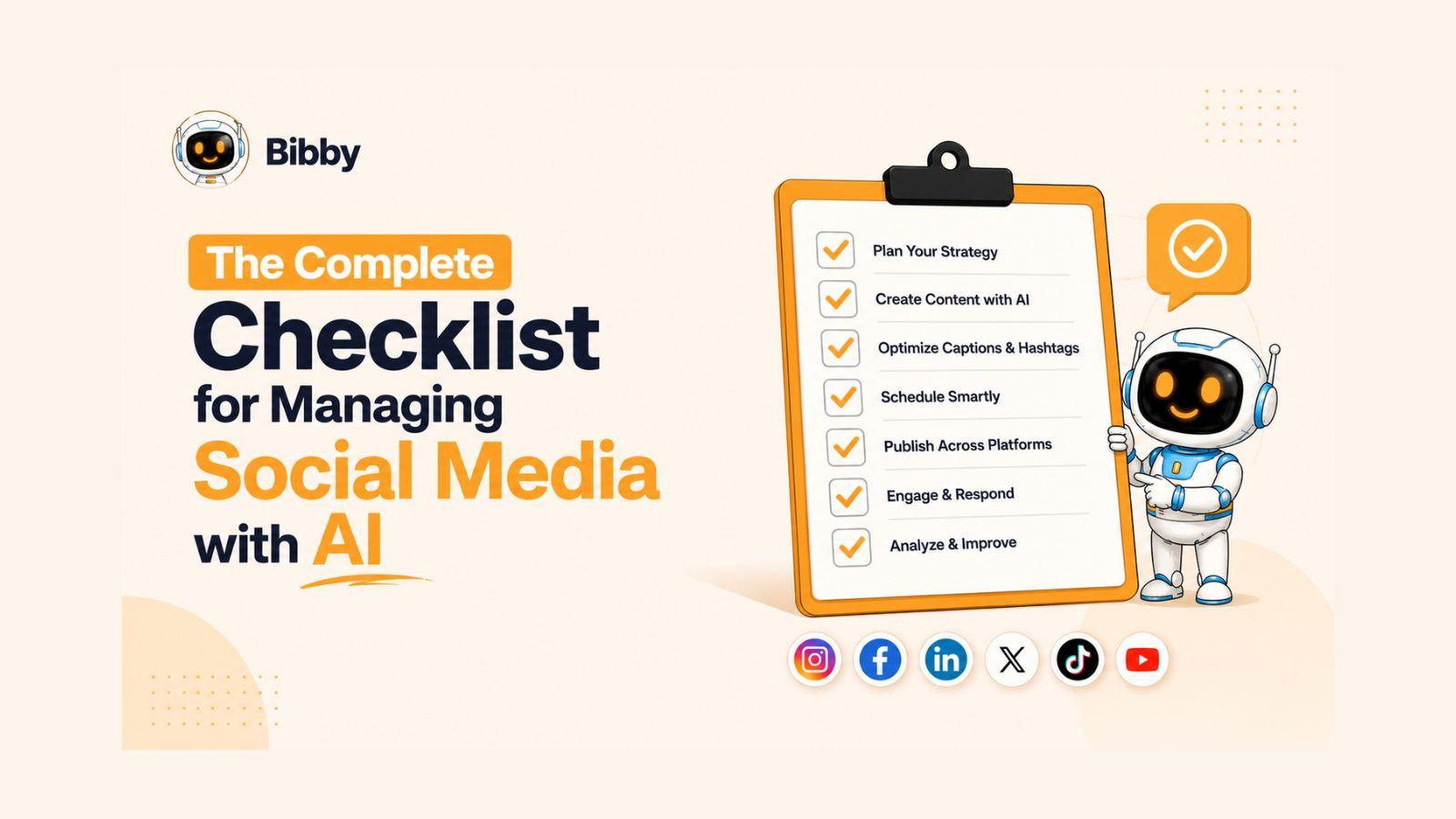
The Complete AI Social Media Management Checklist
Successful social media management starts long before you create your first post. While AI can automate many repetitive tasks, it works best when guided by a clear strategy. Use the following checklist to build a streamlined workflow that helps you create better content, stay consistent, and grow your audience across every platform.
Step 1: Plan Your Content Strategy
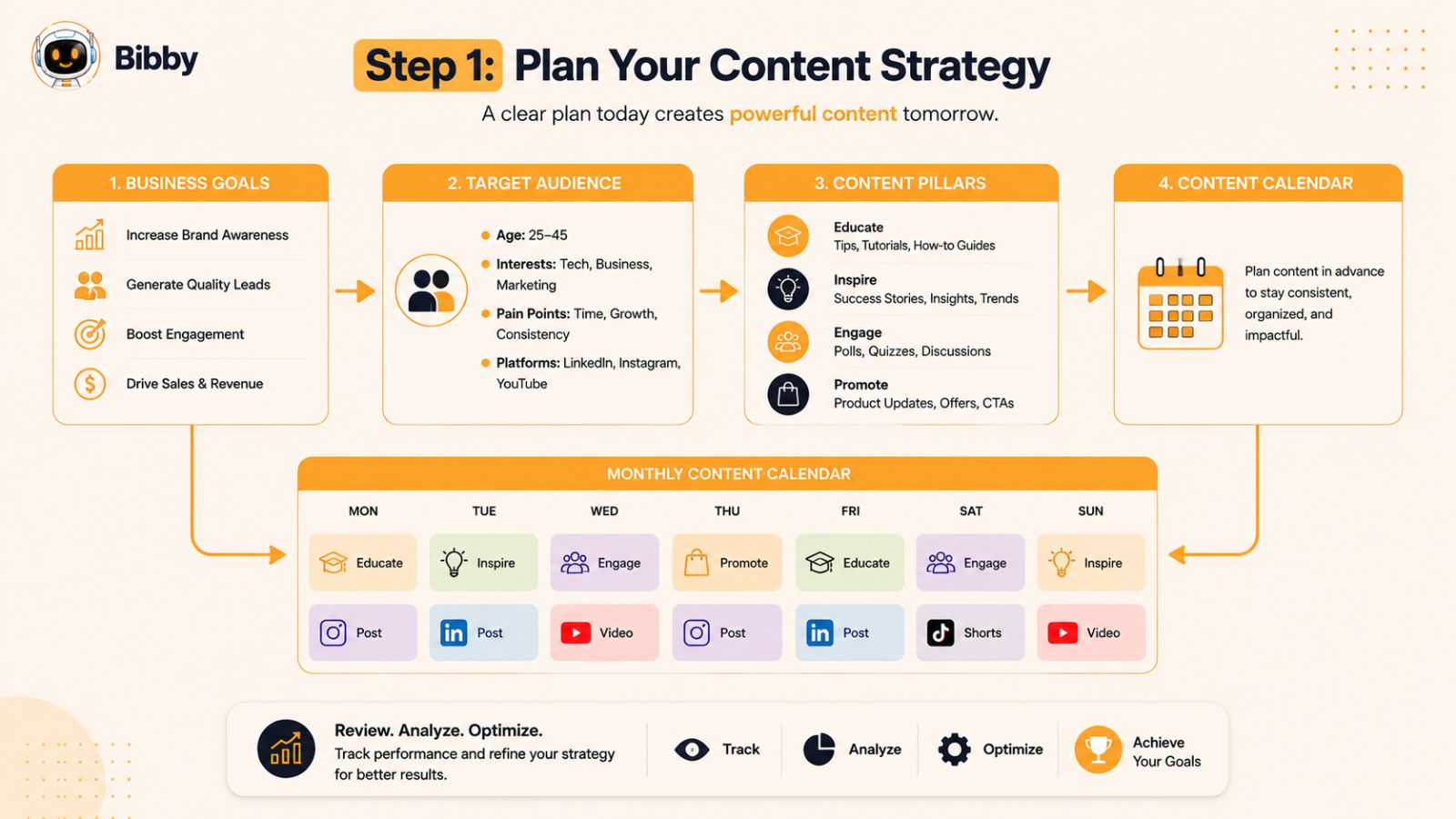
Without a strategy, even the best AI tools will struggle to deliver consistent results. Before generating content or scheduling posts, take time to define what you want to achieve and who you want to reach. A clear content strategy ensures every post supports your business goals instead of simply filling your content calendar.
Define Your Goals
Start by identifying your primary objectives. Your goals will influence the type of content you create, the platforms you prioritize, and the metrics you track.
Common social media goals include:
- Increase brand awareness
- Drive website traffic
- Generate leads
- Boost product or service sales
- Grow your community
- Improve customer engagement
- Build authority in your industry
Choose one or two primary goals to keep your strategy focused.
Understand Your Audience
The most successful content speaks directly to a specific audience. Research who your ideal customers are, what challenges they face, and the type of content they enjoy consuming.
Ask yourself:
- Who is my target audience?
- Which platforms do they use most?
- What problems are they trying to solve?
- What questions do they frequently ask?
- What type of content gets the most engagement?
The better you understand your audience, the easier it becomes for AI to generate relevant captions, content ideas, and messaging.
Create Content Pillars
Content pillars are the main topics your brand will consistently post about. They help you maintain variety while reinforcing your expertise.
For example, a digital marketing business might use pillars such as:
- Educational tips
- Industry news
- Case studies
- Product updates
- Customer success stories
- Behind-the-scenes content
With defined pillars, you'll never have to wonder what to post next.
Build a Monthly Content Calendar
Planning your content in advance reduces stress and keeps your posting schedule consistent. Instead of creating posts at the last minute, map out your content for the weeks ahead.
A balanced calendar might include:
- Educational posts
- Promotional content
- Customer testimonials
- Short-form videos
- Stories
- Trending topics
- Interactive polls and questions
Having a content calendar also makes it easier to batch-create content and automate publishing later in the process.
Decide on Your Posting Frequency
Consistency matters more than posting constantly. Choose a publishing schedule you can realistically maintain based on your available resources and audience preferences.
For many businesses, a practical starting point could include:
- 3–5 feed posts each week
- Daily Stories
- 2–3 short-form videos weekly
- Weekly LinkedIn updates
- One longer YouTube video each week or month, depending on your content strategy
As your workflow becomes more efficient with AI, you can gradually increase your publishing frequency without sacrificing quality.
Strategy Checklist
Before moving to the next step, make sure you've completed the following:
- ✅ Defined your social media goals
- ✅ Identified your target audience
- ✅ Created 3–5 content pillars
- ✅ Planned a monthly content calendar
- ✅ Established a realistic posting schedule
Once your strategy is in place, you're ready to start creating the visual content that will power your campaigns. In the next step, we'll look at how AI can help you create professional-quality images or enhance your existing visuals in minutes.
Step 2: Create or Generate Images with AI
Visual content is often the first thing people notice when scrolling through their social media feeds. Whether you're promoting a product, sharing educational content, or building your personal brand, high-quality visuals can significantly increase engagement and encourage users to stop scrolling.
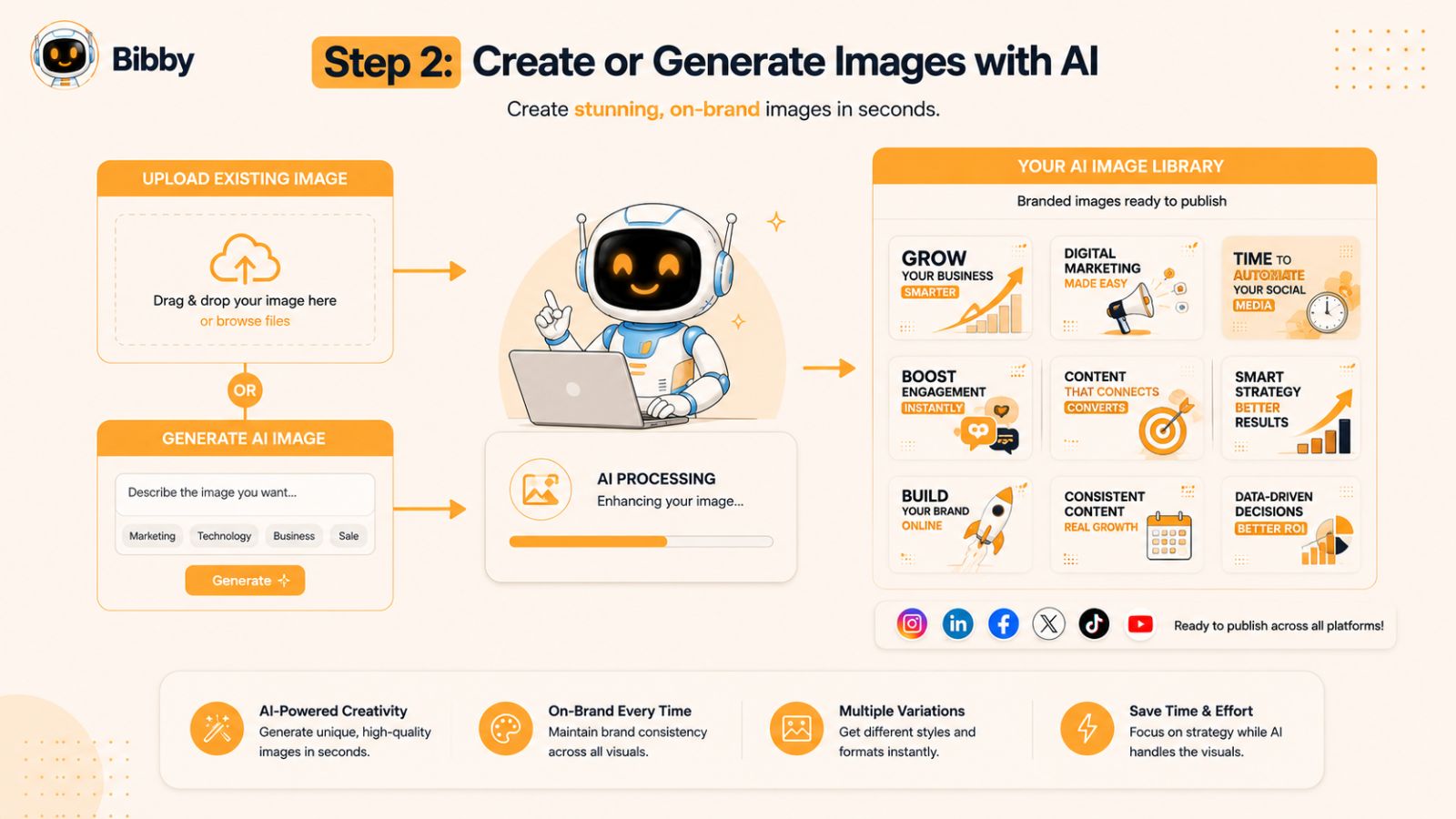
Creating graphics from scratch, however, can be time-consuming—especially if you're managing multiple social media accounts. This is where AI can dramatically simplify the process.
Use Existing Images or Generate New Ones
Not every post requires a professionally designed graphic. Sometimes you already have the perfect product photo, team picture, event image, or screenshot ready to go. Other times, you may need a completely new visual that matches your campaign.
Modern AI tools give you both options:
- Upload your own images.
- Generate original visuals with AI.
- Create branded graphics in minutes.
- Produce unique images for different campaigns.
- Refresh older content with updated visuals.
This flexibility helps you maintain a consistent posting schedule without spending hours designing every post manually.
Keep Your Brand Consistent
Consistency builds recognition and trust. Regardless of how your visuals are created, they should reflect your brand identity.
Make sure your content includes:
- Consistent colors and fonts
- Your logo when appropriate
- A recognizable visual style
- High-resolution images
- Platform-appropriate dimensions
A cohesive visual identity makes your content instantly recognizable, whether someone discovers it on Instagram, LinkedIn, Facebook, TikTok, or YouTube.
Optimize Images for Every Platform
Each social platform displays content differently. Before publishing, ensure your visuals are optimized for the format you're using.
For example:
- Square images work well for Instagram and Facebook feeds.
- Vertical images are ideal for Stories and short-form content.
- Landscape visuals are often better suited for YouTube thumbnails and certain LinkedIn posts.
Using the correct dimensions helps your content look professional and prevents important elements from being cropped.
Simplify the Entire Process with Bibby
Instead of using one tool to design graphics and another to prepare social media posts, Bibby combines everything into a single workflow.
Simply upload your existing image or generate a new one with AI, and Bibby prepares it for the next steps in your publishing process. From there, you can choose the style of your post, let AI generate an engaging caption, and schedule your content—all without switching between multiple applications.
Whether you're publishing a single announcement or planning an entire month's worth of content, Bibby helps eliminate repetitive tasks so you can focus on creating meaningful content instead of managing complicated workflows.
Image Creation Checklist
Before moving on, make sure you've completed the following:
- ✅ Uploaded your own images or generated new visuals with AI
- ✅ Maintained consistent branding
- ✅ Used high-quality images
- ✅ Optimized visuals for each platform
- ✅ Organized your creative assets for upcoming posts
With your visuals ready, it's time to write captions that capture attention, encourage engagement, and inspire action. In the next step, you'll learn how AI can generate compelling captions tailored to every social media platform.
Step 3: Generate High-Converting AI Captions
A great image may grab attention, but it's the caption that starts conversations, builds trust, and encourages your audience to take action. Whether you want more comments, website clicks, or product sales, well-written captions play a crucial role in your social media strategy.
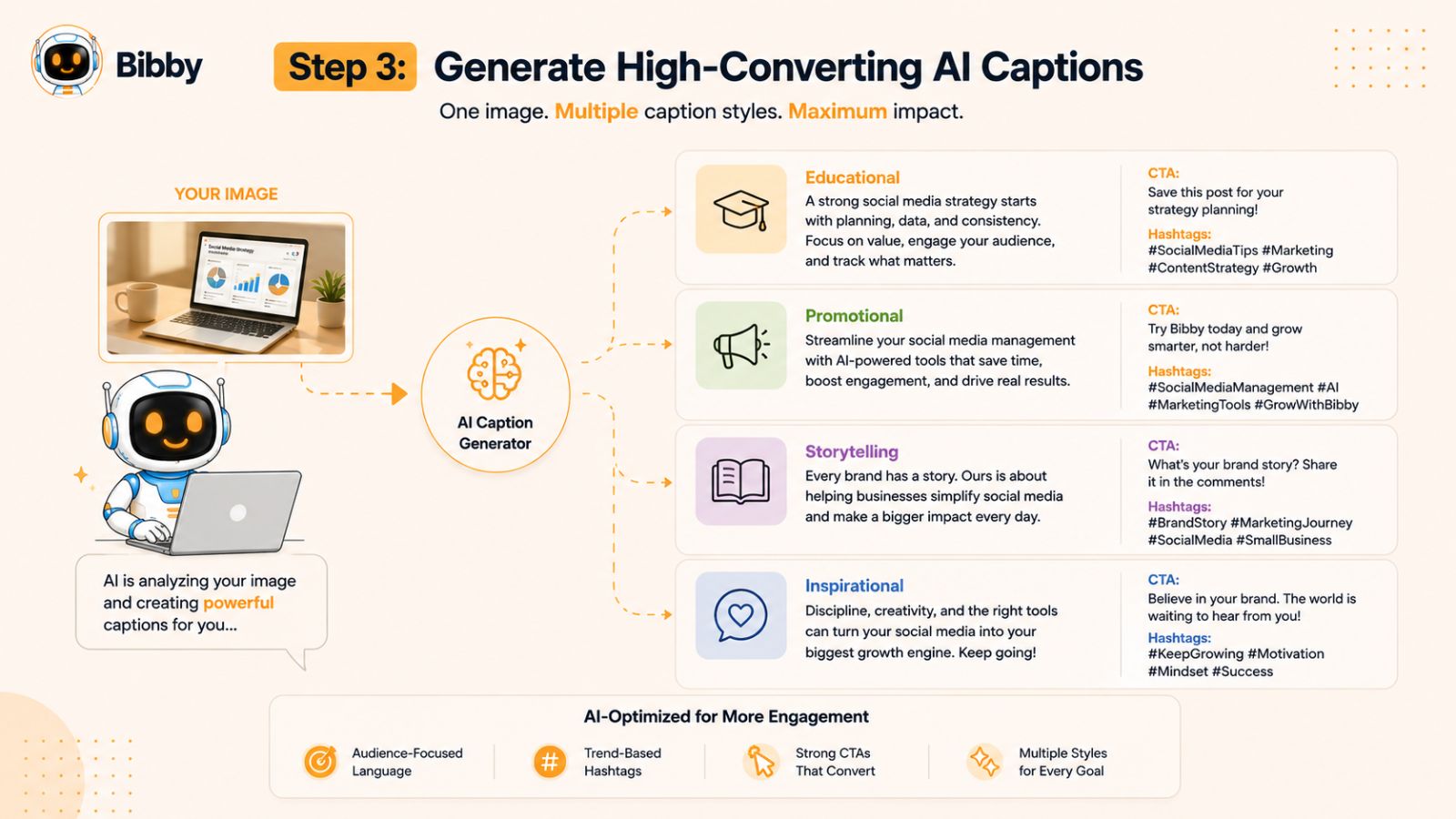
Writing unique captions for every platform, however, can quickly become one of the most time-consuming parts of managing social media. If you're posting multiple times a week across Facebook, Instagram, LinkedIn, YouTube, and TikTok, creating fresh copy for each post can lead to writer's block and inconsistent messaging.
This is where AI becomes a powerful content assistant.
Let AI Write the First Draft
Instead of starting with a blank page, AI can generate captions in seconds based on your content, audience, and preferred communication style. This allows you to spend less time writing and more time refining your message.
A strong AI-generated caption typically includes:
- An attention-grabbing opening line
- Clear and concise messaging
- A conversational tone
- Relevant emojis (when appropriate)
- Platform-specific formatting
- A compelling call to action
- Optimized hashtags for better discoverability
Rather than replacing your creativity, AI gives you a high-quality starting point that you can publish as-is or personalize further.
Match the Right Tone to Your Audience
Different audiences respond to different styles of communication. A caption that performs well on LinkedIn may not resonate with users on TikTok or Instagram.
Consider using different tones depending on your goal:
- Educational: Share tips, tutorials, or industry insights.
- Storytelling: Connect through personal experiences or customer success stories.
- Promotional: Highlight products, services, or limited-time offers.
- Inspirational: Motivate your audience with meaningful messages.
- Entertaining: Use humor, trends, or relatable content to increase engagement.
Choosing the right style helps your content feel authentic and relevant, regardless of the platform.
Save Time with Bibby's AI Caption Generator
After you've uploaded or generated your visual, Bibby makes the next step effortless. Simply choose your preferred posting style—whether it's educational, promotional, storytelling, or another format—and Bibby's AI automatically generates a polished, engaging caption that aligns with your content.
Instead of switching between AI writing tools and social media schedulers, everything happens within the same workflow. Once your caption is ready, you can review it, make any adjustments you'd like, and move directly to scheduling your post across your selected social media platforms.
This streamlined process not only saves time but also helps maintain a consistent brand voice across every channel.
Caption Creation Checklist
Before moving on, make sure you've completed the following:
- ✅ Created an engaging opening hook
- ✅ Matched the caption to your audience and platform
- ✅ Included a clear call to action
- ✅ Added relevant hashtags where appropriate
- ✅ Reviewed the caption for accuracy and brand voice
- ✅ Used AI to speed up the writing process without sacrificing quality
With your visuals and captions complete, the next step is deciding how each piece of content should be presented. Let's explore how choosing the right posting style can help you connect more effectively with your audience.
Step 4: Choose the Right Posting Style
Not every social media post should sound the same. Some posts are designed to educate your audience, while others aim to entertain, inspire, or promote a product. Using the same tone for every post can make your content feel repetitive and reduce engagement over time.
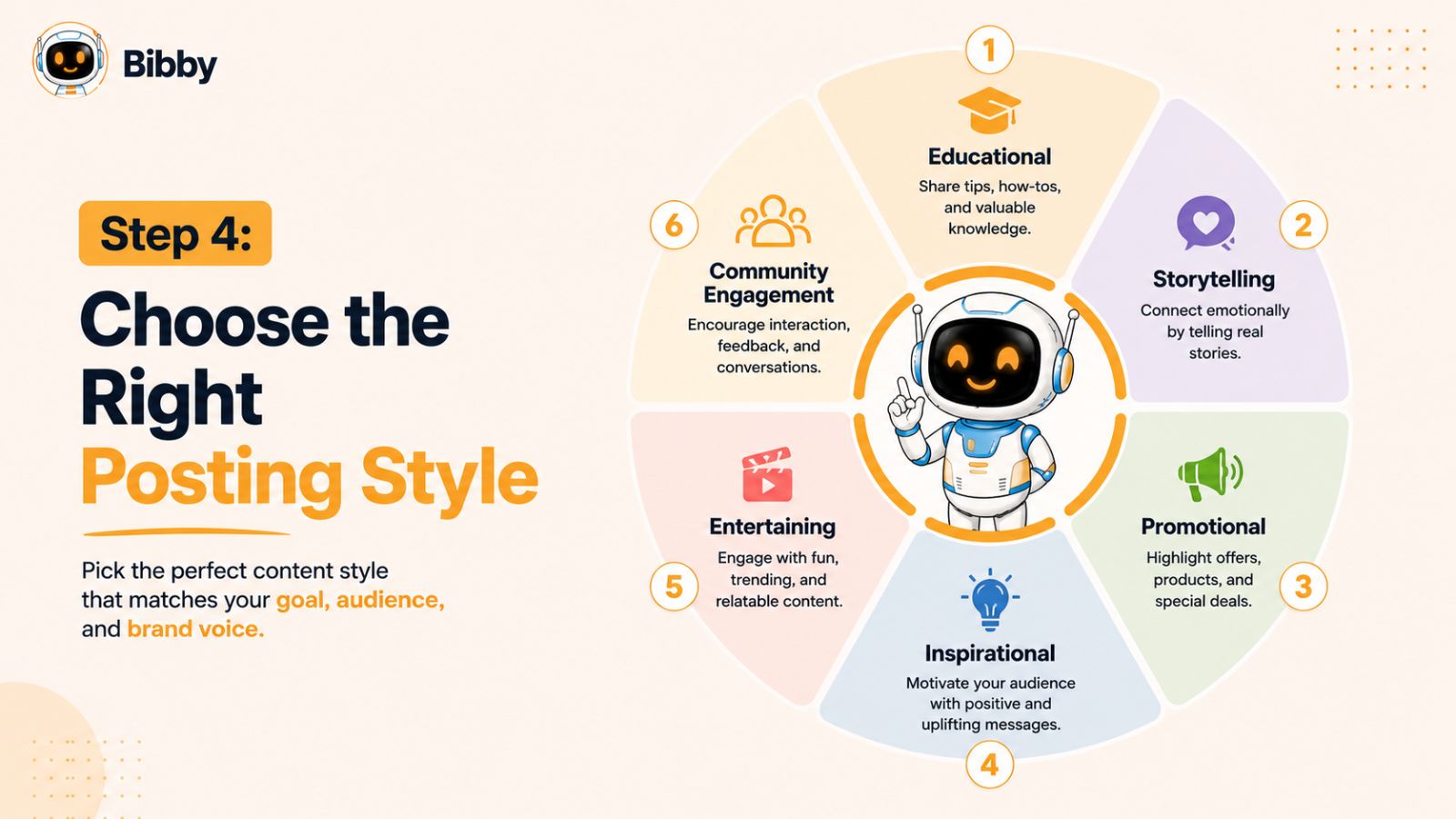
A well-rounded social media strategy uses a variety of posting styles to keep your audience interested and to support different business goals throughout the customer journey.
Popular Social Media Posting Styles
Here are some of the most effective content styles to include in your strategy:
Educational
Share practical tips, tutorials, industry insights, or how-to guides that help your audience solve a problem. Educational content positions your brand as a trusted resource and often generates saves and shares.
Storytelling
People connect with stories more than sales pitches. Share customer success stories, business milestones, lessons learned, or behind-the-scenes moments to build stronger relationships with your audience.
Promotional
Highlight your products, services, special offers, or new launches. The most effective promotional posts focus on the value you provide rather than simply asking people to buy.
Inspirational
Motivational quotes, success stories, or messages that encourage your audience can help strengthen your brand identity and create emotional connections.
Entertaining
Humor, trends, memes, challenges, and lighthearted content can significantly increase reach and engagement while making your brand more relatable.
Community & Engagement
Ask questions, run polls, encourage discussions, or invite followers to share their experiences. Engagement-focused posts help build an active community and provide valuable insights into your audience.
Why Variety Matters
Publishing the same type of content every day can lead to audience fatigue. Mixing different posting styles keeps your social media feeds fresh and encourages followers to interact with your content in different ways.
For example, a balanced weekly schedule might look like this:
- Monday: Educational tip
- Tuesday: Behind-the-scenes story
- Wednesday: Customer testimonial
- Thursday: Product promotion
- Friday: Industry news
- Saturday: Short-form video
- Sunday: Community question or poll
This variety helps maintain audience interest while supporting both brand awareness and business growth.
Let Bibby Adapt to Your Preferred Style
One of Bibby's biggest advantages is its simple, guided workflow. After uploading your own image or generating one with AI, you can select the posting style that best matches your goals.
Whether you want an educational post that teaches, a storytelling post that connects emotionally, or a promotional post that drives conversions, Bibby's AI generates a caption tailored to that style. This means your content remains consistent with your marketing objectives while reducing the time spent rewriting captions for different campaigns.
By choosing the right posting style before scheduling, you ensure every piece of content has a clear purpose and speaks to your audience in the most effective way.
Posting Style Checklist
Before scheduling your content, make sure you've:
- ✅ Selected the appropriate posting style
- ✅ Matched the tone to your audience
- ✅ Balanced educational, promotional, and engagement-focused content
- ✅ Aligned each post with your marketing goals
- ✅ Used AI to generate captions that reflect your chosen style
Now that your content is ready, it's time to automate the publishing process. In the next step, you'll learn how AI scheduling helps you stay consistent, save hours every week, and publish across all your social media platforms with minimal effort.
Step 5: Schedule Posts Automatically
Creating great content is only half the battle. To achieve consistent growth on social media, you need to publish regularly—and that's where many businesses and creators struggle. Busy schedules, competing priorities, and the demands of managing multiple platforms often lead to missed posting opportunities and inconsistent engagement.
scheduling your content in advance solves this problem. Instead of logging into each platform every day, you can prepare your content in batches and let automation handle the publishing. This not only saves time but also helps you maintain a reliable posting schedule that keeps your audience engaged.
Why Social Media Scheduling Matters
Automating your publishing workflow offers several advantages:
- Stay consistent, even during busy periods.
- Save hours every week by eliminating manual posting.
- Plan campaigns weeks or months in advance.
- Reduce the risk of forgetting important posts.
- Coordinate launches and seasonal promotions more effectively.
- Manage multiple social media accounts from one place.
Rather than reacting to your content calendar each day, you can focus on strategy, customer engagement, and creating new ideas while your scheduled posts are published automatically.
A Complete AI Workflow with Bibby
Many social media tools only solve one part of the workflow. You might use one platform for graphic design, another for AI writing, another for scheduling, and yet another for analytics. Constantly switching between tools slows your workflow and increases the chance of errors.
Bibby simplifies the entire process by bringing everything together in one platform.
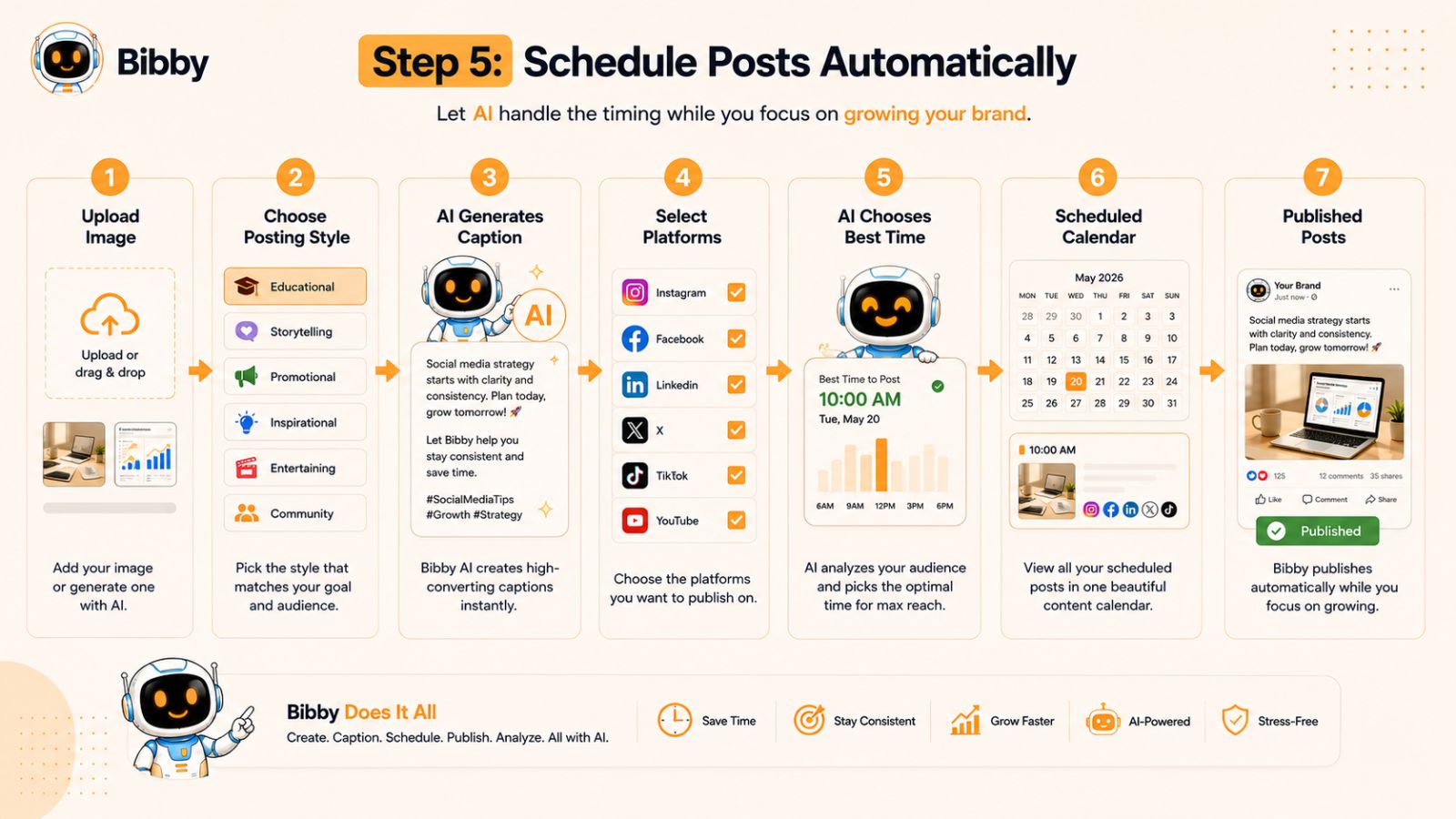
Here's what the workflow looks like:
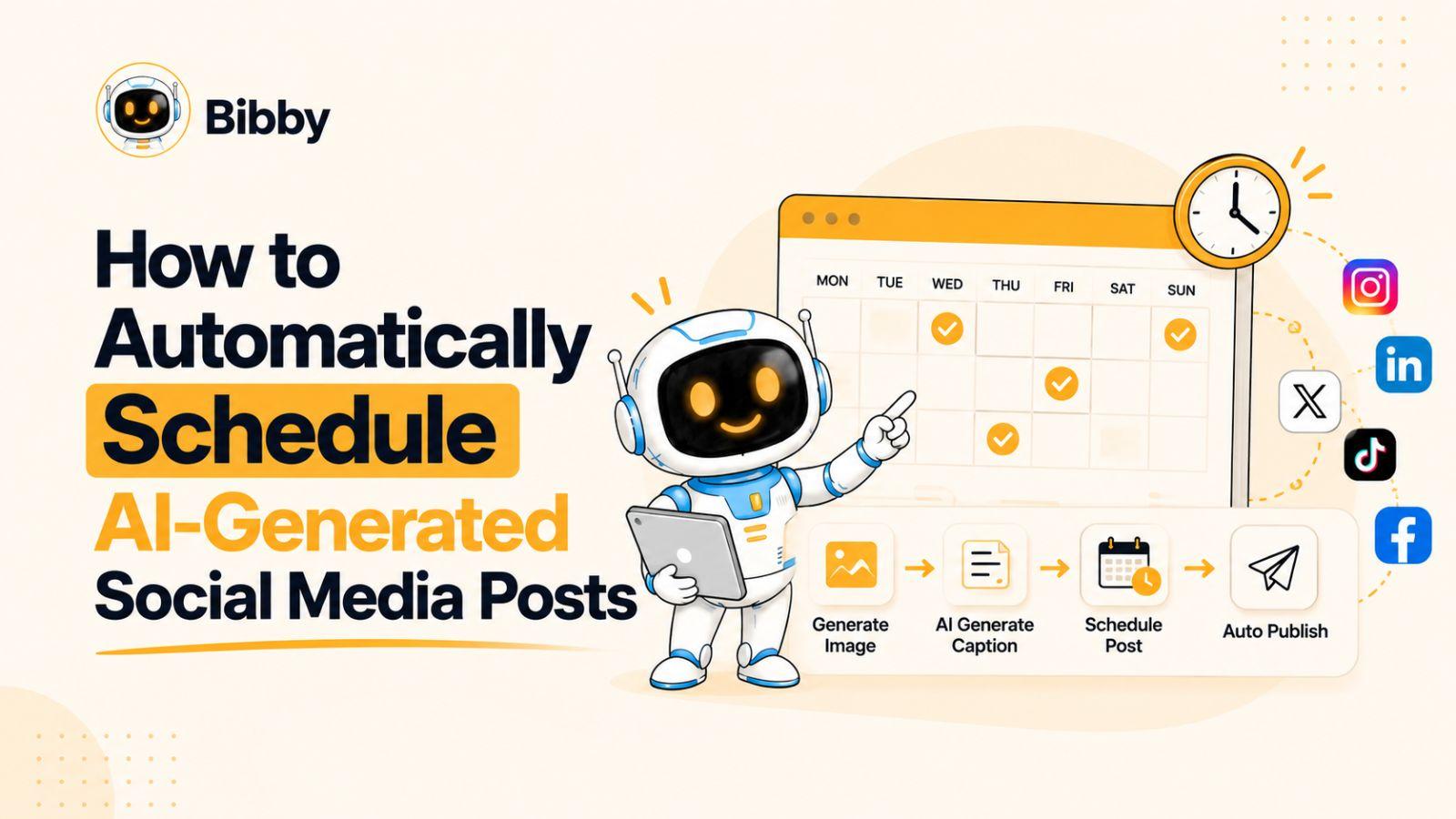
1. Upload or Generate Your Image
Start with your own photo, product image, or graphic—or let Bibby's AI generate a new image for your content.
2. Choose Your Posting Style
Select the type of content you want to publish, such as educational, promotional, storytelling, inspirational, or engagement-focused.
3. Generate AI Captions Automatically
Based on your selected style, Bibby creates an engaging caption that matches your content and brand voice. You can publish it as-is or make quick edits before scheduling.
4. Schedule Across Multiple Platforms
With just a few clicks, schedule your content for all your selected social media channels, including:
- TikTok
- YouTube
Instead of publishing separately on each platform, Bibby manages everything from a single dashboard.
5. Publish at AI-Optimized Times
Timing can have a significant impact on engagement. Rather than relying on generic recommendations, Bibby uses AI to recommend optimized publishing times designed to help your content reach more people when your audience is most likely to be active.
6. Schedule More Than Just Posts
Modern social media isn't limited to static images. Bibby also supports scheduling:
- Videos
- Stories
- Promotional campaigns
- Ongoing content calendars
This allows you to manage your complete content strategy without juggling multiple scheduling tools.
Spend Less Time Managing Social Media
Imagine preparing an entire month's worth of content in one afternoon. Instead of worrying about what to post every day, your content is already planned, optimized, and scheduled to publish automatically.
That means fewer interruptions, fewer manual tasks, and more time to focus on growing your business, engaging with your audience, and measuring results.
Scheduling Checklist
Before moving to the next step, make sure you've:
- ✅ Uploaded or generated your images
- ✅ Selected your preferred posting style
- ✅ Generated AI-powered captions
- ✅ Scheduled content across your chosen platforms
- ✅ Enabled AI-optimized posting times
- ✅ Planned posts, videos, and stories in advance
Once your content is scheduled, your work isn't finished. The next step is making sure every post is optimized for the platform where it will appear, helping you maximize reach and engagement across your entire social media presence.
Step 6: Publish Across Every Platform
Every social media platform has its own audience, content formats, and best practices. While it may be tempting to post the exact same content everywhere, making small adjustments for each platform can significantly improve your reach, engagement, and overall performance.
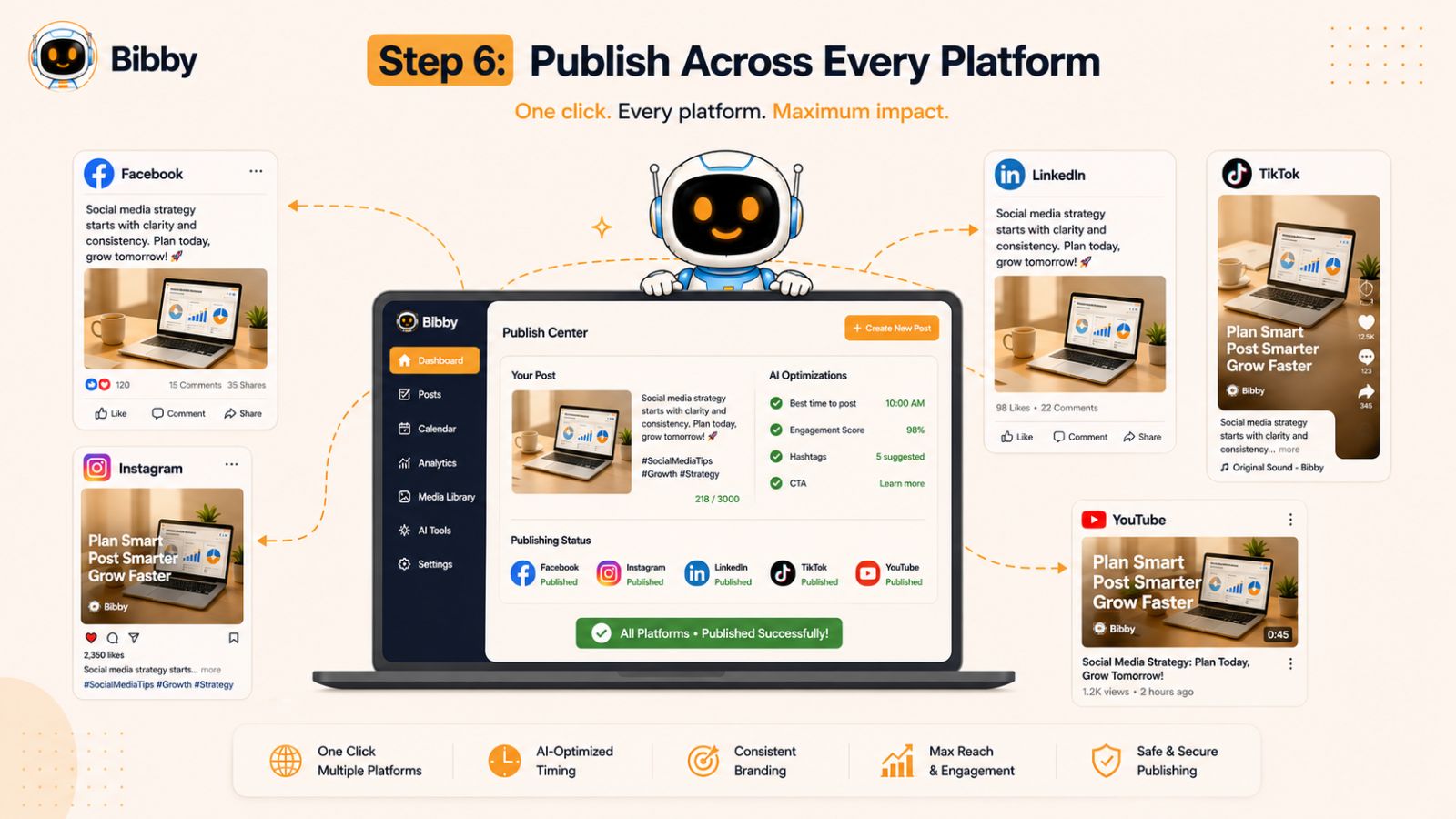
The good news is that you don't have to create entirely new content for every channel. With the right AI workflow, you can repurpose a single piece of content and tailor it to each platform automatically.
Optimize Content for Each Platform
Here's how your content strategy can vary across the major social networks:
Facebook performs well with a mix of images, videos, stories, and community-focused posts. Use conversational captions, encourage discussions, and include clear calls to action to drive comments and shares.
Instagram is highly visual. Prioritize high-quality images, Reels, carousel posts, and Stories. Keep captions engaging, use relevant hashtags, and encourage saves and shares to increase visibility.
Professional audiences prefer educational content, industry insights, thought leadership, and business success stories. A more informative and authoritative tone generally performs better than highly promotional content.
TikTok
TikTok rewards creativity, authenticity, and short-form video. Focus on trends, storytelling, behind-the-scenes content, and quick educational videos that capture attention within the first few seconds.
YouTube
Whether you're publishing long-form videos or Shorts, YouTube benefits from compelling thumbnails, keyword-rich titles, and informative descriptions that encourage viewers to watch until the end.
Maintain a Consistent Brand Voice
While your content should be adapted for each platform, your brand identity should remain consistent. Use the same messaging, visual style, and overall tone so your audience instantly recognizes your content wherever they find it.
Consistency builds trust and strengthens your brand over time.
Publish Everywhere from One Dashboard
Managing multiple platforms individually can quickly become overwhelming. Logging into each account, uploading media, adjusting captions, and scheduling posts separately adds unnecessary work to your daily routine.
Bibby simplifies this process by allowing you to publish your content across Facebook, Instagram, LinkedIn, TikTok, and YouTube from a single dashboard. Once your content is ready, you can select the platforms you want to publish to, review any platform-specific adjustments, and schedule everything in just a few clicks.
This centralized approach helps you maintain a consistent publishing schedule without constantly switching between different apps and dashboards.
Multi-Platform Publishing Checklist
Before moving on, make sure you've:
- ✅ Optimized your content for each platform
- ✅ Adjusted captions where needed
- ✅ Used the correct image or video formats
- ✅ Maintained a consistent brand voice
- ✅ Scheduled your content across all relevant social media channels
Publishing consistently across multiple platforms is a major step toward social media success. But to maximize engagement, you also need to take advantage of today's most popular content formats—videos, Stories, Reels, and Shorts. In the next step, we'll explore how AI can help you schedule and manage them just as easily as traditional posts.
Step 7: Schedule Videos, Reels, Shorts, and Stories
Social media is no longer dominated by static images. Today, short-form videos and temporary content often generate the highest engagement, making them an essential part of any successful social media strategy.
Whether you're creating product demonstrations, educational tutorials, behind-the-scenes content, or quick updates, publishing videos consistently helps you reach new audiences and strengthen relationships with existing followers.
Why Video Content Matters
Video has become one of the most effective ways to capture attention and increase engagement across nearly every major platform.
Benefits of publishing videos regularly include:
- Higher engagement rates
- Increased organic reach
- Better audience retention
- More opportunities to appear in platform recommendations
- Stronger brand awareness
- Improved storytelling compared to static images
Short-form content is especially valuable because it allows you to deliver useful information in just a few seconds, making it easier for viewers to consume and share.
Don't Overlook Stories
Stories provide a more casual and authentic way to connect with your audience. They are perfect for:
- Daily updates
- Behind-the-scenes moments
- Product launches
- Limited-time promotions
- Polls and questions
- Customer testimonials
- Event coverage
Because Stories disappear after a limited time, they encourage followers to check your content regularly and engage more frequently.
Batch Your Video Content
Creating videos every day isn't realistic for most businesses. Instead, consider producing multiple videos during a single recording session and scheduling them throughout the week or month.
Batching content allows you to:
- Stay consistent
- Reduce production time
- Maintain a steady publishing schedule
- Focus on quality rather than rushing to create last-minute content
Combined with AI-powered scheduling, this approach makes video marketing far more manageable.
Manage Every Content Format with Bibby
One of the biggest advantages of Bibby is that it goes beyond scheduling standard social media posts.
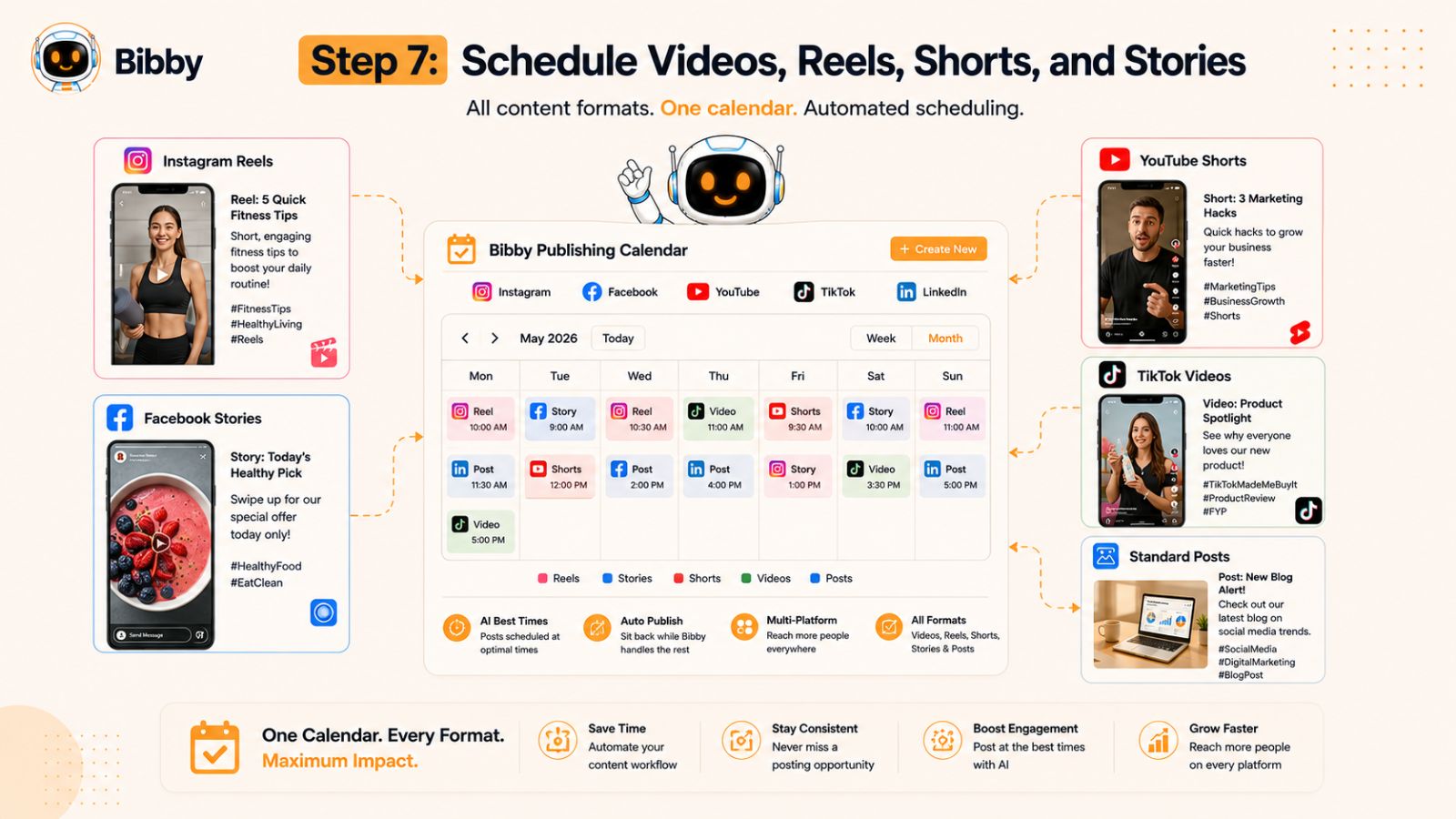
From the same dashboard, you can plan and schedule:
- Image posts
- Videos
- Instagram Stories
- Facebook Stories
- YouTube videos
- YouTube Shorts
- TikTok videos
- Ongoing social media campaigns
Instead of using separate tools for each content format, Bibby lets you organize your entire publishing calendar in one place. Whether you're planning next week's Stories or scheduling a month's worth of short-form videos, your content stays organized and ready to publish automatically.
This unified workflow makes it easier to maintain a consistent presence across every platform while dramatically reducing the time spent on manual publishing.
Video & Stories Checklist
Before continuing, make sure you've:
- ✅ Created short-form video content
- ✅ Planned Story content
- ✅ Batched videos for future publishing
- ✅ Scheduled videos, Shorts, Reels, and Stories in advance
- ✅ Organized your complete content calendar in one place
Now that your content is ready to go live, the next step is ensuring it reaches your audience at the right moment. In the next section, you'll learn how AI helps identify the best publishing times to maximize visibility and engagement.
Step 8: Optimize Posting Times with AI
One of the most common questions in social media marketing is, "What's the best time to post?" The truth is, there isn't a universal answer.
Every audience is different. A B2B company on LinkedIn may see the highest engagement during business hours, while an e-commerce brand on Instagram or TikTok might perform better in the evenings or on weekends. The ideal posting time depends on your audience's behavior, industry, location, and the platforms you use.
This is why AI-powered scheduling has become such a valuable tool.
Why Generic Posting Time Guides Fall Short
You'll find countless articles recommending fixed posting times for each platform. While these can be useful as a starting point, they don't account for your unique audience.
Factors that influence the best publishing time include:
- Where your audience is located
- When your followers are most active
- The type of content you're publishing
- Day of the week
- Seasonal trends
- Platform-specific engagement patterns
Instead of relying on one-size-fits-all advice, it's more effective to let data guide your publishing schedule.
How AI Improves Your Posting Schedule
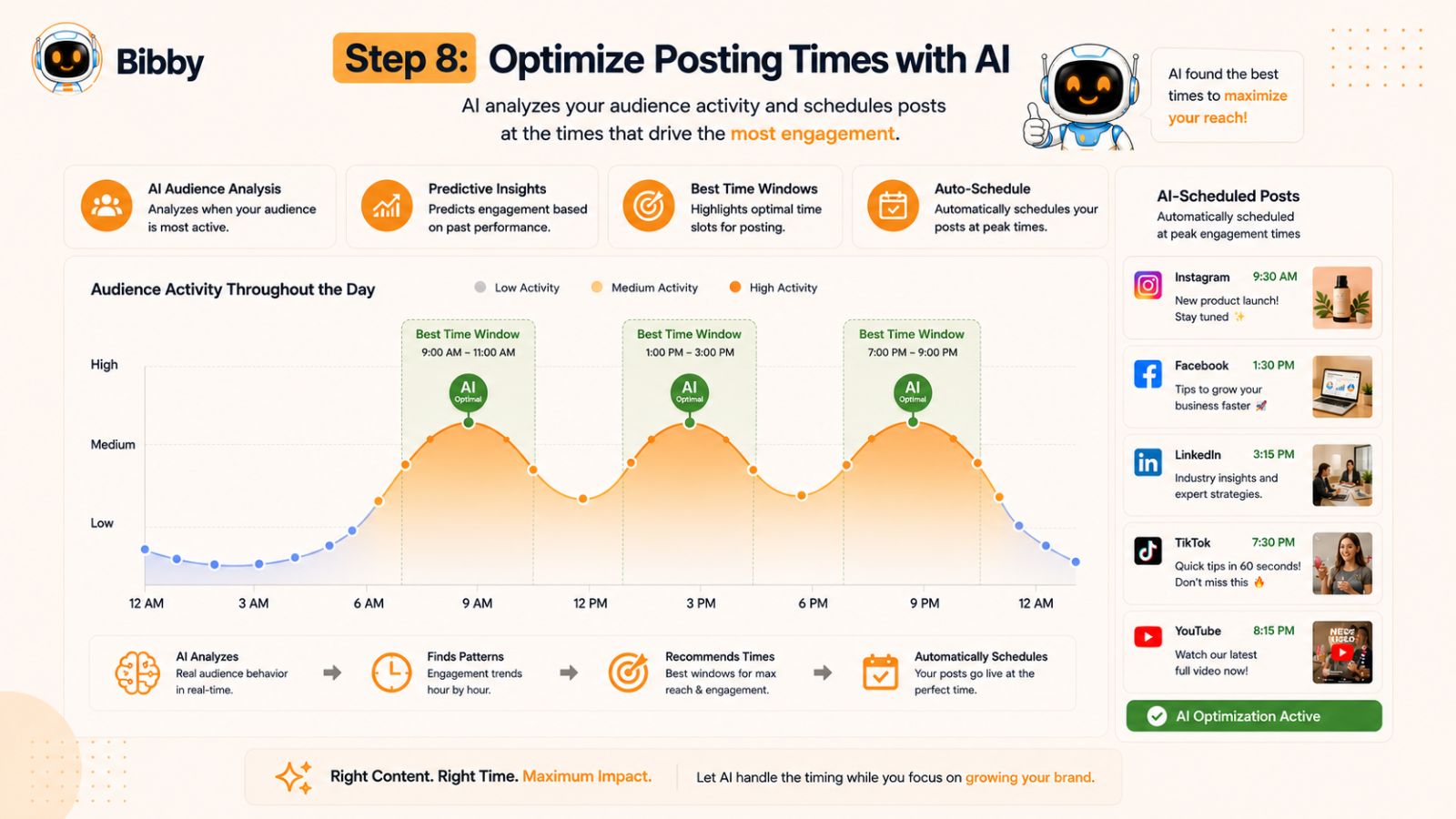
AI analyzes performance patterns and recommends publishing times that are more likely to maximize visibility and engagement.
Rather than guessing when to post, AI helps you:
- Reach more followers when they're active
- Increase engagement opportunities
- Improve consistency across platforms
- Reduce the need for manual testing
- Continuously refine your posting schedule based on performance
Over time, these small improvements can contribute to stronger reach, higher engagement, and more efficient social media management.
Let Bibby Choose the Right Time
Bibby takes the guesswork out of scheduling by recommending AI-optimized posting times for your content. Instead of manually selecting a time for every post, Bibby helps you publish when your audience is most likely to be active.
This feature works seamlessly with Bibby's scheduling workflow. After uploading or generating your visual, selecting your posting style, and generating an AI caption, you can schedule your content with confidence, knowing your publishing times are optimized to support better performance.
The result is a more intelligent publishing strategy that saves time while helping your content reach the right audience at the right moment.
AI Posting Time Checklist
Before moving to the next step, make sure you've:
- ✅ Avoided relying solely on generic posting time recommendations
- ✅ Considered your audience's behavior
- ✅ Used AI-optimized scheduling
- ✅ Planned content for consistent publishing
- ✅ Reviewed performance regularly to refine your schedule
Publishing at the right time is important, but it's only part of the equation. To keep improving your results, you need to understand what's working and what isn't. In the next step, we'll explore how analytics help you measure success and make smarter content decisions.
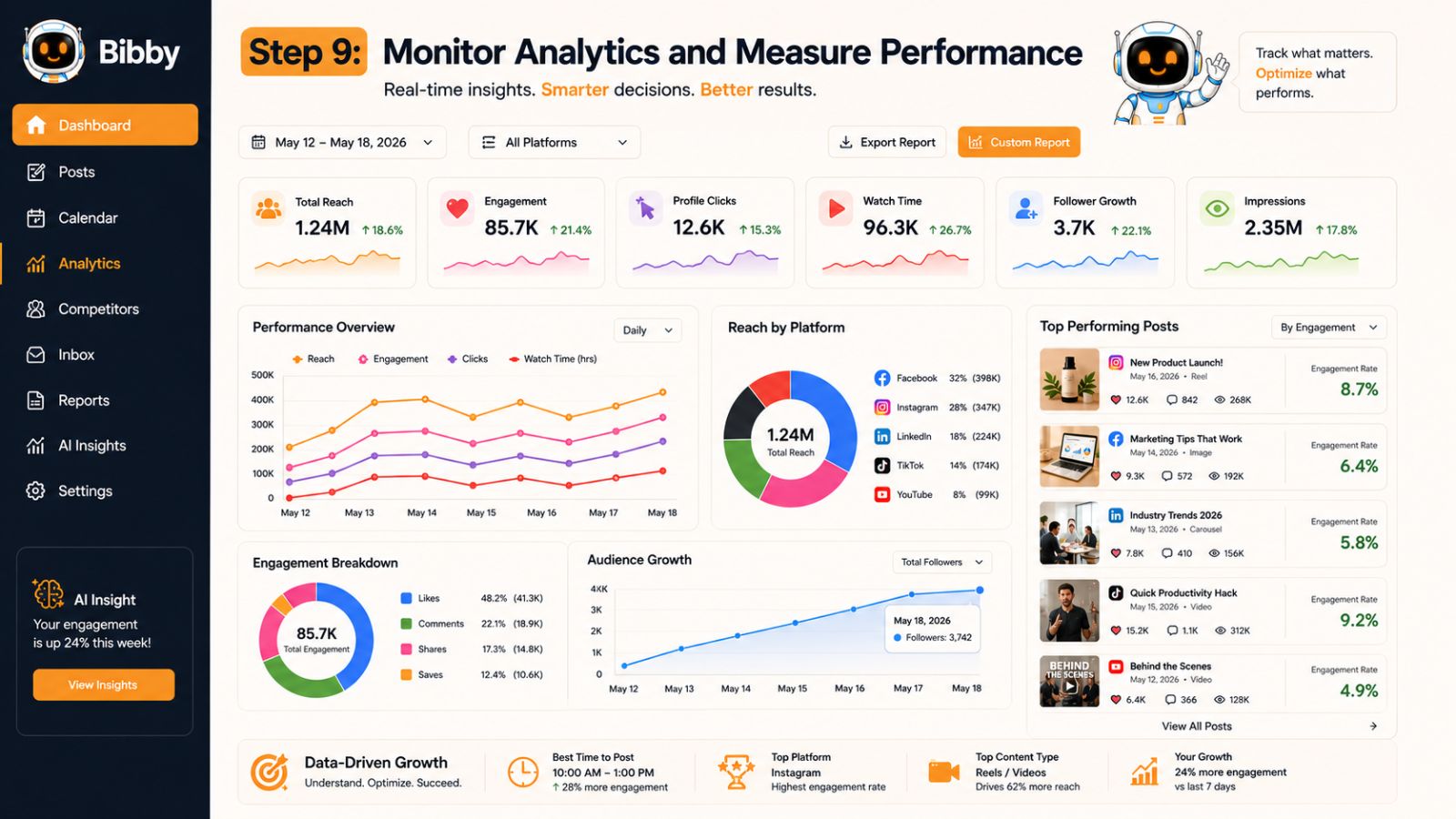
Step 9: Monitor Analytics and Measure Performance
Publishing content consistently is a major achievement, but successful social media management doesn't end when your posts go live. The most effective marketers continuously measure performance, identify trends, and refine their strategy based on real data.
Analytics help you understand what your audience enjoys, which content drives results, and where there are opportunities to improve. Instead of relying on assumptions, you can make informed decisions that strengthen your social media strategy over time.
Focus on the Metrics That Matter
Every business has different goals, but there are several key performance indicators (KPIs) that are valuable for most social media strategies:
Reach and Impressions
These metrics show how many people are seeing your content. If your reach is growing over time, your content is becoming more visible to your target audience.
Likes, comments, shares, saves, and other interactions reveal how well your content resonates with your audience. High engagement often signals that your posts are relevant and valuable.
Follower Growth
Tracking follower growth helps you understand whether your content strategy is attracting new audiences and building long-term brand awareness.
Click-Through Rate (CTR)
If your goal is to drive traffic to your website, landing pages, or online store, CTR is an important indicator of how effectively your posts encourage people to take action.
Video Performance
For video content, monitor metrics such as watch time, average view duration, and completion rate. These insights help you identify which videos keep viewers engaged and which may need improvement.
Conversions
Ultimately, many businesses want social media to generate leads, sales, newsletter sign-ups, or other meaningful actions. Tracking conversions helps connect your content efforts to real business outcomes.
Turn Data Into Better Content
Collecting data is only useful if you act on it. Make it a habit to review your analytics regularly and look for patterns.
Ask yourself:
- Which posts generated the highest engagement?
- What posting styles performed best?
- Which content pillars attracted the most interest?
- What time of day consistently delivered stronger results?
- Which platforms produced the highest return on effort?
The answers to these questions can help you create more of the content your audience values while reducing time spent on less effective formats.
Track Everything with Bibby
Bibby doesn't just help you create and schedule content—it also provides analytics to help you understand how your social media strategy is performing.
From a single dashboard, you can monitor the performance of your campaigns, identify your best-performing posts, and use those insights to improve future content. Instead of switching between multiple platform analytics, Bibby gives you a centralized view of your social media performance, making it easier to spot trends and optimize your strategy.
By combining AI-powered content creation, scheduling, and analytics, Bibby supports a complete workflow that helps you work smarter—not harder.
Analytics Checklist
Before moving to the final step, make sure you've:
- ✅ Monitored reach and impressions
- ✅ Tracked engagement across platforms
- ✅ Measured follower growth
- ✅ Reviewed click-through rates and conversions
- ✅ Evaluated video performance
- ✅ Used analytics to improve future content
The best social media strategies are never static. As your audience evolves and new trends emerge, your content should evolve too. In the final step, we'll explore how AI insights can help you continuously improve your strategy and achieve better results over time.
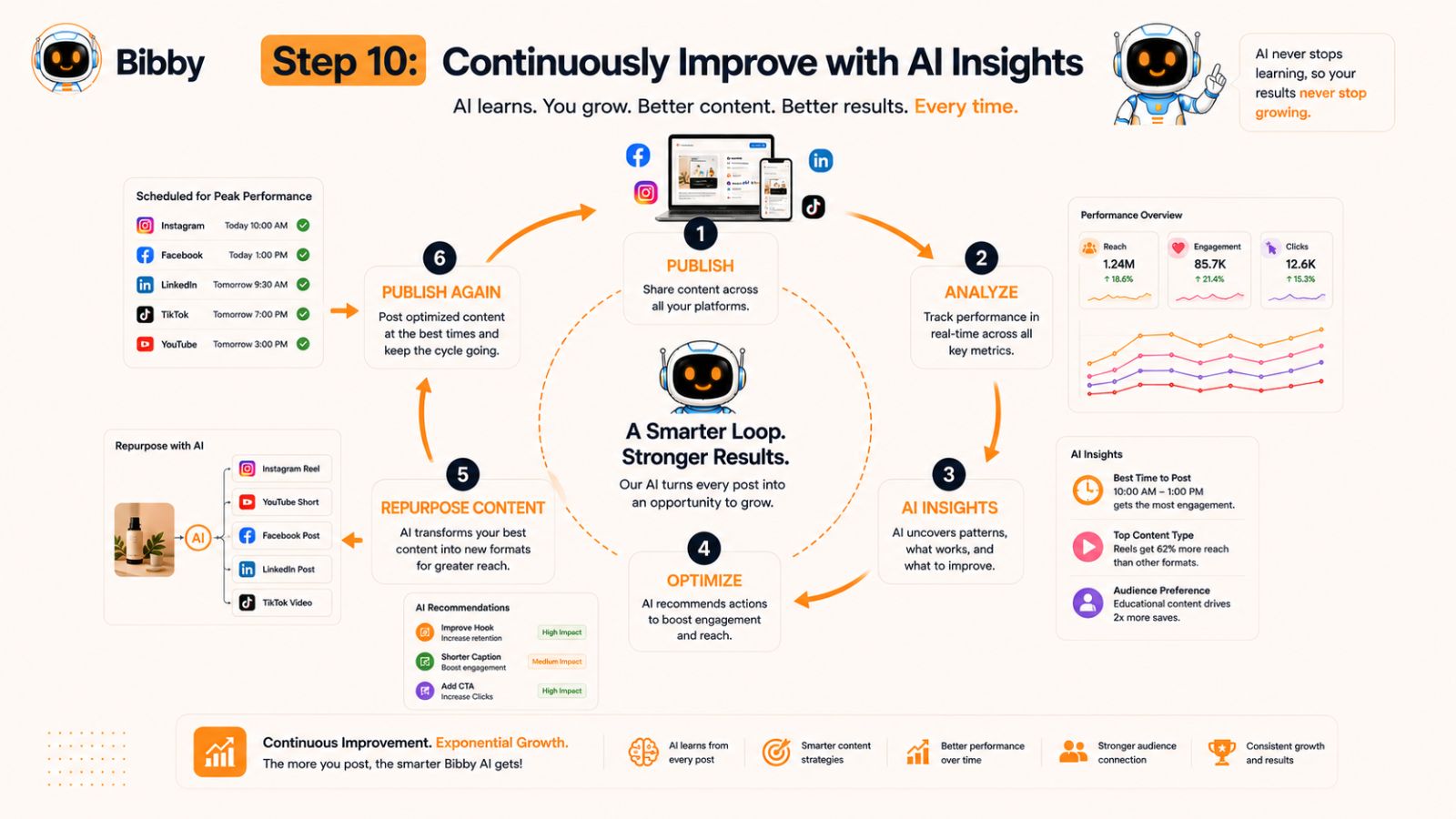
Step 10: Continuously Improve with AI Insights
The best social media strategies aren't built overnight—they improve over time. Every post you publish generates valuable data about what your audience enjoys, when they're most active, and which types of content drive the best results.
Instead of treating social media as a repetitive task, use AI to turn every campaign into a learning opportunity. By combining analytics with automation, you can make smarter decisions and continuously refine your strategy.
Identify Your Top-Performing Content
Not every post will be a viral success, and that's okay. The goal is to understand why certain content performs better than others.
Look for patterns such as:
- Topics that consistently generate high engagement
- Caption styles that encourage more comments and shares
- Visual formats that attract the most attention
- Videos with the highest watch time
- Posts that drive the most website clicks or conversions
Once you identify these patterns, create more content around what already works instead of constantly starting from scratch.
Repurpose Winning Content
Creating new content every day isn't necessary. One of the smartest ways to scale your social media strategy is by repurposing your best-performing content into new formats.
For example, you can:
- Turn a popular blog post into a LinkedIn carousel.
- Convert customer testimonials into Instagram graphics.
- Transform a webinar into multiple short-form videos.
- Break a long YouTube video into Shorts or TikTok clips.
- Refresh evergreen posts with updated visuals and captions.
Repurposing saves time while extending the value of your best ideas.
Experiment and Optimize
Social media trends change quickly, so don't be afraid to test new approaches.
Experiment with:
- Different posting styles
- New content formats
- Alternative calls to action
- Caption lengths
- Posting frequencies
- AI-generated images
- Video-first campaigns
Track the results, learn from the data, and continue refining your strategy based on what resonates with your audience.
Build a Smarter Workflow with Bibby
Bibby brings together every stage of AI-powered social media management into one streamlined workflow. You can upload your own images or generate them with AI, choose a posting style, generate captions automatically, schedule posts across Facebook, Instagram, LinkedIn, YouTube, and TikTok, publish at AI-optimized times, manage videos and Stories, and monitor analytics—all from a single platform.
Because your content creation, scheduling, publishing, and performance insights are connected, it's easier to identify successful patterns and make improvements without juggling multiple tools. Instead of spending hours on repetitive tasks, you can focus on creating better content and growing your brand.
Continuous Improvement Checklist
Before considering your social media workflow complete, ask yourself:
- ✅ Am I reviewing analytics regularly?
- ✅ Am I creating more of my best-performing content?
- ✅ Am I repurposing successful posts into new formats?
- ✅ Am I testing new ideas and measuring the results?
- ✅ Am I using AI to automate repetitive tasks?
- ✅ Am I continually refining my strategy based on real performance data?
Social media success isn't about posting more—it's about posting smarter. With a clear strategy, consistent execution, and AI-powered tools supporting every step of the process, you can build a sustainable workflow that saves time, improves engagement, and helps your brand grow across every major platform.
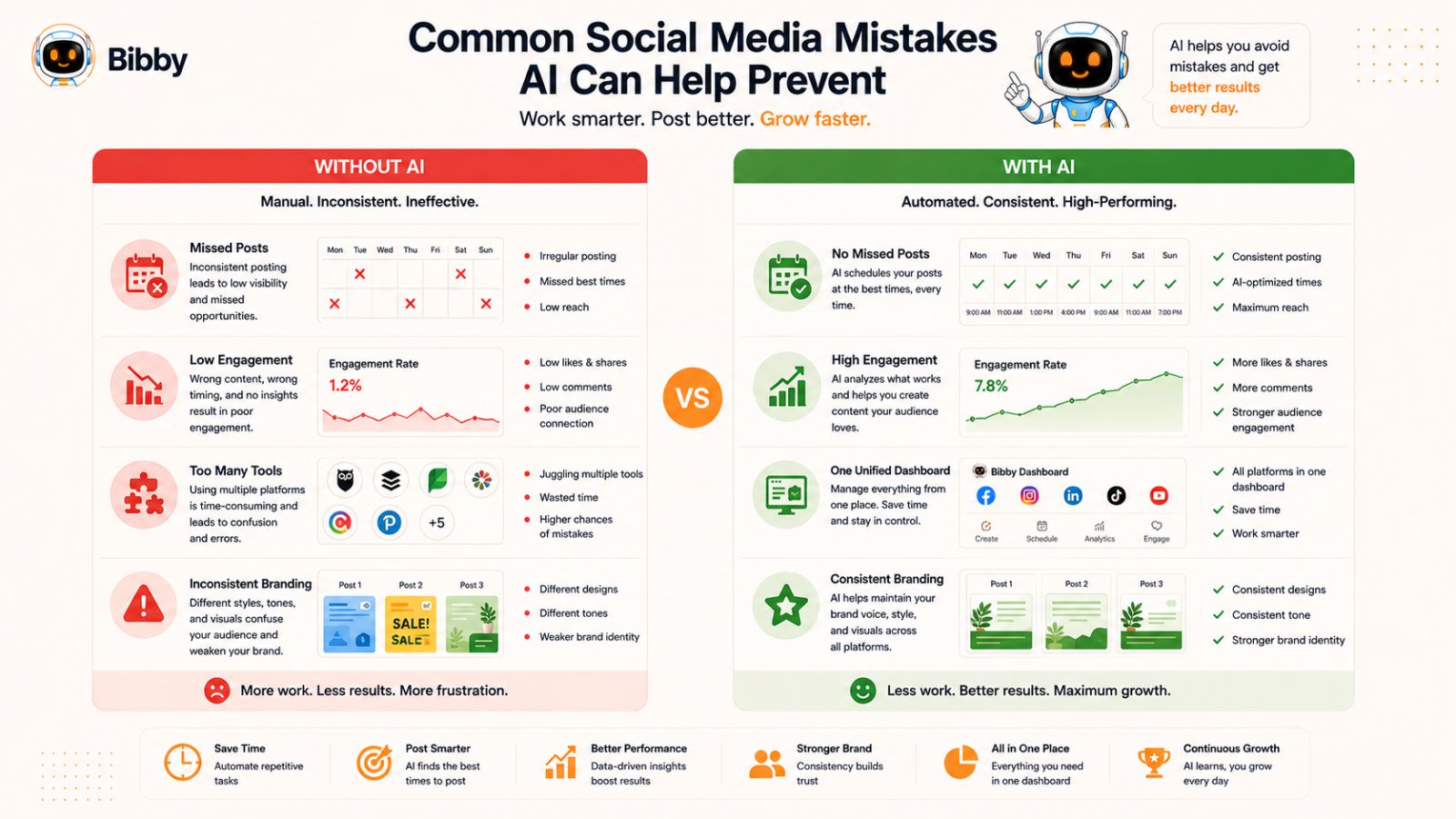
Common Social Media Mistakes AI Can Help Prevent
Even experienced marketers make mistakes when managing social media. Between creating content, keeping up with trends, responding to followers, and posting across multiple platforms, it's easy for important tasks to slip through the cracks.
The good news is that many of these common challenges can be reduced—or even eliminated—with the help of AI and automation. Here's what to watch out for.
1. Posting Inconsistently
One of the biggest reasons businesses struggle to grow on social media is inconsistent posting. Long gaps between posts can reduce visibility, weaken audience engagement, and make it harder to build momentum.
How AI helps:
- Plans content in advance
- Schedules posts automatically
- Maintains a consistent publishing calendar
- Reduces the risk of missed posts
2. Spending Too Much Time Creating Content
Many creators spend hours brainstorming ideas, designing graphics, and writing captions for every post.
How AI helps:
- Generates content ideas
- Creates AI images
- Writes captions in seconds
- Speeds up the entire content creation process
This allows you to spend more time focusing on your business instead of repetitive marketing tasks.
3. Using the Same Content Style Every Time
Publishing only promotional content or repeating the same messaging can cause audience fatigue.
How AI helps:
- Suggests different posting styles
- Supports educational, storytelling, promotional, and engagement-focused content
- Encourages greater variety in your content calendar
A balanced mix of content keeps your audience interested and engaged.
4. Posting at the Wrong Time
Publishing when your audience is inactive can limit your reach, even if your content is excellent.
How AI helps:
- Recommends AI-optimized posting times
- Learns from engagement patterns
- Removes the guesswork from scheduling
5. Managing Too Many Tools
A common workflow looks something like this:
- One tool for graphic design
- Another for AI writing
- A separate scheduling platform
- Native analytics on every social network
- Multiple browser tabs open all day
Not only is this inefficient, but it also increases the chances of mistakes and slows down your workflow.
How AI helps:
All-in-one platforms combine these tasks into a single streamlined process, reducing complexity and improving productivity.
6. Ignoring Analytics
Many businesses publish content consistently but rarely review performance data.
Without analytics, it's difficult to know:
- Which posts perform best
- Which platforms generate results
- What content your audience actually wants
- Where improvements are needed
How AI helps:
AI-powered analytics make it easier to identify trends, compare performance, and make smarter content decisions based on real data.
7. Forgetting About Videos and Stories
Many social media strategies focus only on feed posts while neglecting Stories, Reels, Shorts, and TikTok videos.
Since these formats often receive high engagement, overlooking them can limit your growth potential.
How AI helps:
Scheduling tools make it easier to plan every type of content—including videos and Stories—so your publishing strategy remains balanced across all formats.
8. Trying to Do Everything Manually
Manual social media management becomes increasingly difficult as your business grows. More platforms, more campaigns, and more content usually mean more repetitive work.
This is where an AI-powered workflow delivers the greatest value.
With Bibby, you can simplify nearly every stage of social media management. From uploading or generating AI images to selecting a posting style, generating captions, scheduling content across Facebook, Instagram, LinkedIn, YouTube, and TikTok, publishing at AI-optimized times, and reviewing analytics, Bibby helps reduce manual effort while keeping your entire workflow organized in one place.
Why an All-in-One AI Workflow Beats Using Multiple Tools
Many businesses don't realize how much time they lose by switching between different social media tools. A typical workflow often involves one platform for graphic design, another for AI writing, a separate scheduler, and individual analytics dashboards for each social network.
While each tool may perform its task well, constantly moving between them creates unnecessary complexity. Files need to be downloaded and uploaded multiple times, captions are copied and pasted between applications, and performance data is scattered across different dashboards.
An all-in-one AI workflow eliminates these bottlenecks by connecting every stage of the content creation process into a single, streamlined experience.
Traditional Workflow
Managing social media manually often looks like this:
- Brainstorm content ideas.
- Design graphics in one application.
- Generate captions with an AI writing tool.
- Copy and paste the captions into a scheduling platform.
- Upload images again.
- Customize posts for each social network.
- Schedule each platform individually.
- Check analytics inside every social media account.
- Repeat the same process every week.
Although this approach works, it involves a significant amount of repetitive work that adds up over time.
The Bibby Workflow
Bibby simplifies social media management by combining content creation, automation, scheduling, publishing, and analytics into one intuitive workflow.
Instead of juggling multiple tools, you can:
- Upload your own image or generate one with AI.
- Choose the posting style that matches your content goals.
- Generate an AI-powered caption tailored to your selected style.
- Review and customize the content if needed.
- Schedule your posts across Facebook, Instagram, LinkedIn, YouTube, and TikTok.
- Publish at AI-optimized times to help maximize visibility and engagement.
- Manage image posts, videos, and Stories from one content calendar.
- Track analytics to understand what's working and improve future campaigns.
Because every step happens in one place, your workflow becomes faster, simpler, and easier to manage.
The Benefits of an All-in-One Platform
Using a unified platform offers several advantages over managing separate tools:
- Save hours each week by reducing repetitive tasks.
- Maintain a consistent publishing schedule.
- Keep your branding and messaging aligned across platforms.
- Eliminate the need to copy and paste content between applications.
- Reduce the risk of publishing errors.
- Manage your entire content calendar from one dashboard.
- Monitor performance without switching between multiple analytics tools.
- Scale your social media efforts more efficiently as your business grows.
Whether you're managing one brand or dozens of client accounts, consolidating your workflow can significantly improve productivity.
Who Benefits Most?
An all-in-one AI workflow is especially valuable for:
- Small business owners with limited time.
- Marketing teams managing multiple campaigns.
- Social media managers handling several accounts.
- Agencies serving multiple clients.
- Content creators who publish frequently.
- E-commerce brands running ongoing promotions.
- Coaches, consultants, and personal brands building an online presence.
As your content volume increases, the advantages of having everything in one platform become even more noticeable.
Why Simplicity Wins
The goal of AI isn't just to automate tasks—it's to simplify the entire process of managing social media.
When your workflow is straightforward, it's easier to stay consistent, produce better content, and spend more time engaging with your audience instead of managing software.
By bringing AI image generation, caption writing, smart scheduling, AI-optimized publishing times, multi-platform posting, video and Story management, and analytics together in one place, Bibby helps transform a complex, time-consuming process into a workflow that feels effortless.
The result is more time to focus on strategy, creativity, and business growth—while AI takes care of the repetitive work behind the scenes.
Who Should Use AI for Social Media Management?
AI-powered social media management isn't just for large companies with dedicated marketing teams. Whether you're building a personal brand, running a small business, or managing dozens of client accounts, AI can help you save time, improve consistency, and scale your content strategy more efficiently.
If you're spending hours each week creating content, writing captions, scheduling posts, or tracking performance, AI can simplify your workflow and free you to focus on higher-value work.
Small Business Owners
Small businesses often have limited time and resources, making it difficult to maintain an active presence across multiple social media platforms.
AI helps by:
- Creating content faster
- Automating scheduling
- Maintaining a consistent posting schedule
- Reducing the need for multiple marketing tools
This allows business owners to focus more on serving customers and growing their business.
Content Creators and Influencers
Creators need to publish consistently to keep their audience engaged, but producing content every day can quickly become overwhelming.
AI can help creators:
- Generate captions quickly
- Plan content calendars
- Schedule posts in advance
- Repurpose existing content
- Analyze audience engagement
Instead of worrying about daily publishing, creators can dedicate more time to producing high-quality content.
Marketing Teams
Internal marketing teams often manage campaigns across several platforms while collaborating with multiple stakeholders.
An AI-powered workflow helps teams:
- Improve collaboration
- Maintain brand consistency
- Speed up content production
- Schedule campaigns efficiently
- Measure performance from one place
This increases productivity without increasing workload.
Social Media Managers and Agencies
Managing multiple client accounts requires organization, consistency, and efficiency.
AI enables agencies and freelancers to:
- Manage several brands simultaneously
- Batch-create content
- Schedule campaigns weeks in advance
- Track analytics across multiple accounts
- Deliver consistent results more efficiently
As client portfolios grow, automation becomes increasingly valuable.
E-commerce Businesses
Online stores rely heavily on social media to showcase products, announce promotions, and drive traffic to their websites.
AI helps e-commerce brands:
- Schedule product launches
- Promote seasonal campaigns
- Generate engaging product captions
- Publish consistently across platforms
- Analyze campaign performance
This creates a more predictable and scalable marketing process.
Coaches, Consultants, and Personal Brands
Professionals who build their business through thought leadership need to publish educational and engaging content regularly.
AI makes it easier to:
- Share industry insights
- Publish consistently
- Build credibility
- Grow an engaged audience
- Maintain a professional online presence
With repetitive tasks automated, more time can be spent serving clients and developing new ideas.
Teams That Want a Simpler Workflow
Regardless of your industry, one challenge is universal: social media management becomes more difficult as your content volume increases.
That's where an all-in-one platform like Bibby can make a significant difference. Instead of managing separate tools for image creation, AI writing, scheduling, publishing, and analytics, Bibby brings everything together into a single workflow. You can upload or generate images with AI, choose your posting style, generate captions automatically, schedule content across Facebook, Instagram, LinkedIn, YouTube, and TikTok, publish at AI-optimized times, manage videos and Stories, and monitor analytics—all from one dashboard.
Whether you're managing one account or one hundred, a unified workflow helps you stay organized, save time, and scale your social media efforts with greater confidence.
The Bottom Line
If your goal is to spend less time on repetitive tasks while maintaining a consistent and effective social media presence, AI can become one of your most valuable marketing tools. From planning and content creation to scheduling, publishing, and performance analysis, AI helps streamline every stage of the process so you can focus on building meaningful connections with your audience.
Frequently Asked Questions
What is AI social media management?
AI social media management uses artificial intelligence to simplify and automate tasks such as content planning, image generation, caption writing, post scheduling, publishing, analytics, and performance optimization. Instead of managing every step manually, AI helps streamline your workflow so you can save time while maintaining a consistent social media presence.
How can AI help with social media marketing?
AI can assist with nearly every stage of social media marketing. It can generate content ideas, create or enhance images, write engaging captions, recommend hashtags, schedule posts, identify optimal publishing times, analyze performance metrics, and suggest improvements based on audience behavior. This allows marketers and creators to focus more on strategy and creativity rather than repetitive administrative tasks.
Can AI write social media captions?
Yes. Modern AI tools can generate captions for different platforms and content styles, including educational, promotional, storytelling, and engagement-focused posts. You can use AI-generated captions as they are or customize them to better match your brand voice.
Can AI generate social media images?
Yes. Many AI-powered platforms can generate original visuals from text prompts or allow you to upload your own images for use in your content strategy. This makes it easier to create professional-looking social media content without extensive design experience.
What is the best way to schedule social media posts?
The most efficient approach is to batch-create your content, organize it in a content calendar, and schedule it in advance using an AI-powered social media management platform. This helps you stay consistent, reduce manual work, and maintain an active presence across multiple social networks.
Can I manage multiple social media platforms from one place?
Yes. Many modern social media management platforms support publishing across multiple networks from a single dashboard. For example, Bibby allows you to create content, generate AI captions, schedule posts, publish to Facebook, Instagram, LinkedIn, YouTube, and TikTok, manage videos and Stories, and monitor analytics without switching between different tools.
Does AI choose the best time to post?
Many AI-powered scheduling tools analyze engagement patterns and recommend optimized publishing times based on your audience's activity. This approach is generally more effective than relying on generic "best time to post" recommendations because it adapts to your specific audience and content performance.
Can AI improve my social media engagement?
AI can contribute to better engagement by helping you publish consistently, generate stronger captions, recommend optimized posting times, and identify which content performs best. While results depend on the quality of your content and your audience, AI provides valuable insights that support continuous improvement.
Is Bibby suitable for businesses, agencies, and creators?
Yes. Bibby is designed for businesses, marketing teams, agencies, content creators, freelancers, and personal brands that want a simpler way to manage social media. Its workflow combines AI image generation, caption creation, multi-platform scheduling, AI-optimized posting times, support for videos and Stories, and analytics in one platform, making it easier to scale your social media efforts.
What's the biggest advantage of using AI for social media?
The biggest advantage is efficiency. AI automates repetitive tasks such as content creation, scheduling, and performance analysis, allowing you to spend more time developing creative ideas, engaging with your audience, and growing your business while maintaining a consistent online presence.
Conclusion
Managing social media doesn't have to mean spending hours every week creating content, writing captions, scheduling posts, and analyzing performance manually. With the right strategy and AI-powered tools, you can simplify your workflow, stay consistent across every platform, and focus more on building meaningful relationships with your audience.
The three biggest takeaways from this checklist are simple: start with a clear content strategy, automate repetitive tasks like content creation and scheduling, and use analytics to continuously improve your results. When these elements work together, social media becomes a predictable, scalable part of your marketing instead of a daily challenge.
If you're ready to put this checklist into action, consider using an all-in-one platform like Bibby. From uploading or generating AI images and creating captions to scheduling posts at AI-optimized times, publishing across Facebook, Instagram, LinkedIn, YouTube, and TikTok, managing videos and Stories, and tracking analytics, Bibby brings your entire social media workflow together in one place.
The next step isn't to post more—it's to post smarter. Start applying this checklist, automate the tasks that slow you down, and build a social media system that saves time, delivers consistent results, and grows with your business.