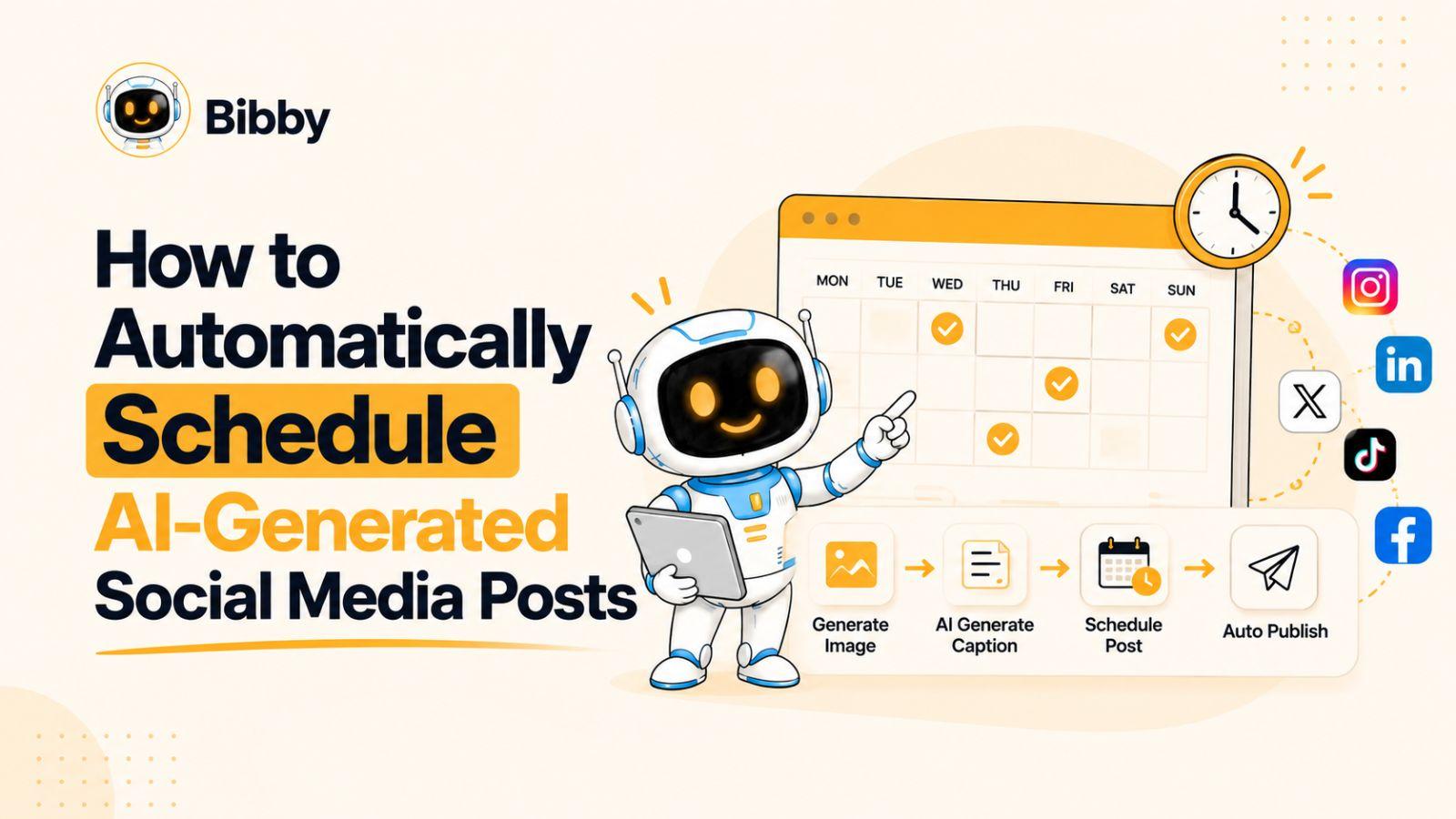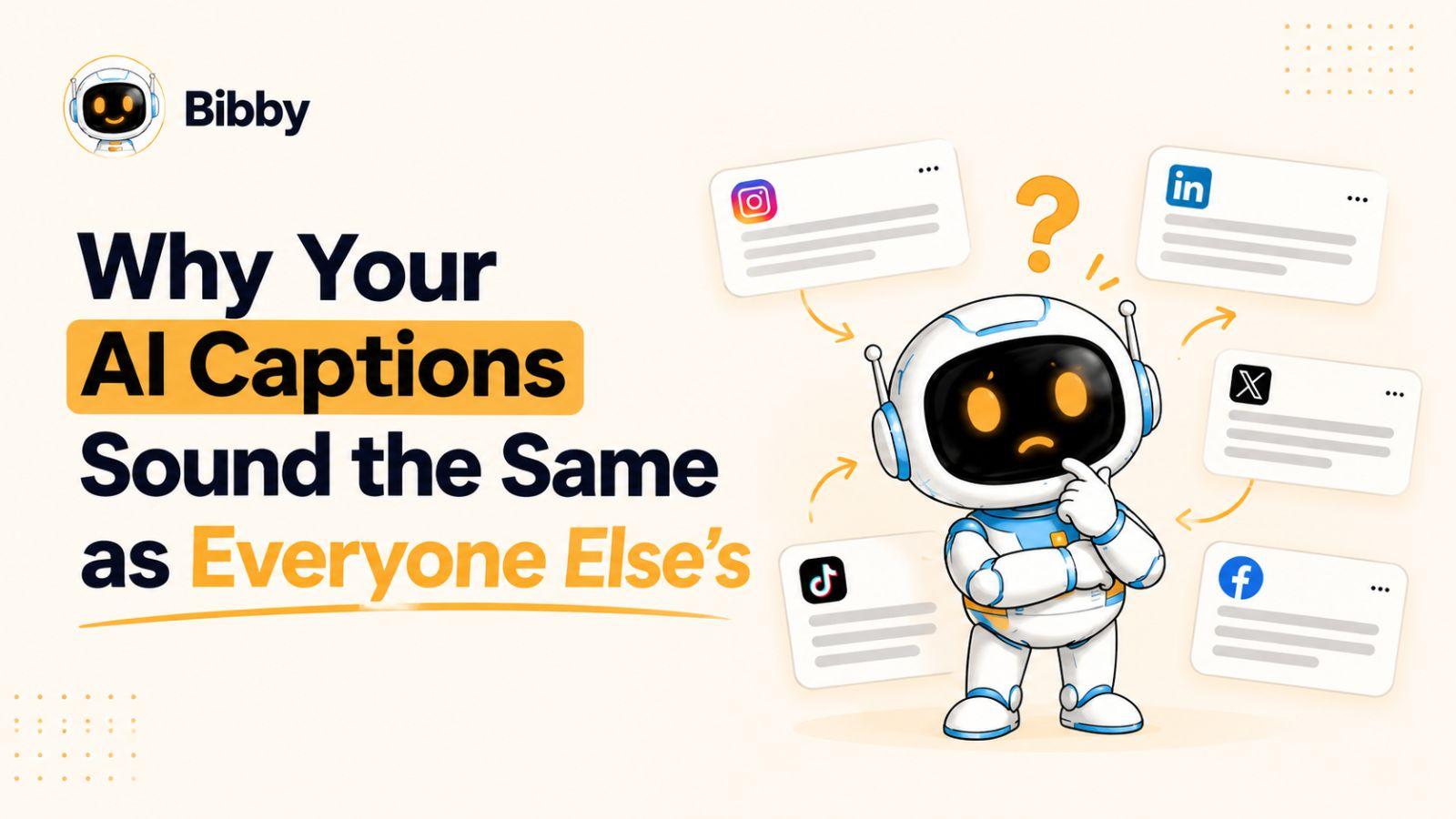
If your AI-generated social media captions keep sounding polished, predictable, and strangely similar to everyone else’s, the problem probably isn’t the AI—it’s the way you’re using it.
To write better AI captions, you need to give AI more than a topic and an instruction to “make it engaging.” The strongest captions come from specific ideas, recognizable brand voice, and a workflow that uses AI to amplify your perspective rather than replace it.
The goal isn’t to stop using AI for social media—it’s to make the AI sound more like you.
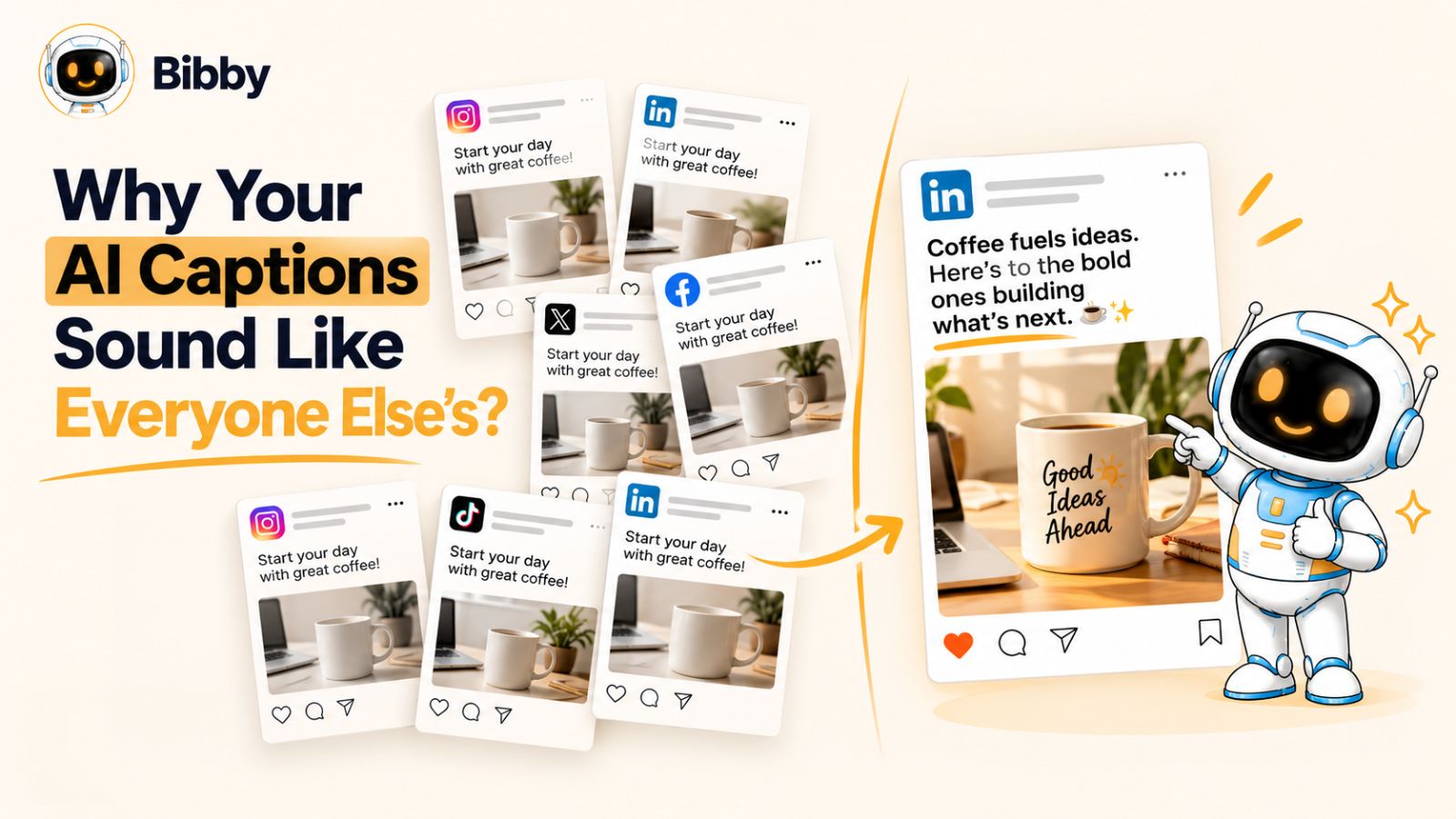
Why Your AI Captions Sound Like Everyone Else’s
AI is very good at producing language that sounds reasonable. That is exactly why your social media captions can start sounding like everyone else’s.
When you ask an AI tool to “write an engaging Instagram caption about our new product,” it has very little information about what makes your brand different. It knows the subject, the platform, and the requested format. What it doesn’t know is the opinion behind the post, the inside joke your audience would recognize, the customer problem you actually understand, or the particular way your brand communicates.
So it fills in the gaps with familiar patterns.
You get openings such as “Ready to take your…” or “Here’s the thing…” You get phrases about “unlocking your potential,” “taking things to the next level,” or “showing up as your best self.” You get a question at the beginning, a few short paragraphs, some emojis, and a call to action at the end.
None of these techniques are automatically bad. The problem is that they are interchangeable.
Remove the company name from the caption and ask yourself whether you could tell which brand wrote it. If the answer is no, the caption has a differentiation problem.
AI Doesn't Know What Makes Your Brand Interesting
An AI model can generate thousands of variations of a caption. But variation is not the same thing as originality.
If the information you provide is generic, the output will usually be generic too.
Consider two prompts.
Prompt A:
Write an engaging Instagram caption for a productivity app. Make it conversational and inspiring.
Prompt B:
Write an Instagram caption for a productivity app aimed at freelancers who regularly lose track of small client tasks. The post shows a freelancer closing their laptop after finishing a Friday afternoon admin session. Keep the tone practical and slightly self-aware. Don't use motivational language or emojis. The main idea is that productivity isn't always about doing more; sometimes it's about finally getting the small things out of your head.
The second prompt gives the AI something to work with: a specific audience, situation, visual, perspective, tone, and idea.
That distinction matters.
AI can help you express an idea. It cannot invent your brand's lived experience simply because you asked it to “sound authentic.”
Most People Are Prompting AI From the Same Starting Point
There is another reason AI captions converge: millions of people are asking AI to perform essentially the same task.
They use instructions such as:
- “Make this more engaging.”
- “Make it sound human.”
- “Add a catchy hook.”
- “Make it relatable.”
- “Add emojis.”
- “Make it go viral.”
- “End with a strong CTA.”
These instructions aren't necessarily wrong, but they describe surface-level characteristics rather than the substance of the post.
And when you repeatedly optimize for the same characteristics, you shouldn't be surprised when the results begin to resemble one another.
This is particularly noticeable on social media because people consume large volumes of content. A caption that looks perfectly acceptable in isolation can feel painfully familiar when someone has already encountered hundreds of similar captions that week.
“Human” Doesn't Mean Adding More Personality Words
One of the most common attempts to fix generic AI writing is to tell the model to “sound more human.”
That usually isn't enough.
Human writing isn't defined by adding phrases like “honestly,” “let's be real,” or “we've all been there.” Those expressions can become another form of AI cliché when they are inserted without a genuine reason.
What makes a caption feel human is usually specificity.
A founder mentioning the exact mistake they made while launching a product feels more human than a caption saying they “learned an important lesson.”
A creator describing the awkward five minutes before recording a video feels more human than saying “behind every great video is hard work.”
A company explaining why it removed a feature after customers complained gives readers something concrete to react to. “We're always listening to our community” doesn't.
The difference isn't how casual the sentence sounds.
It's whether there is something real behind it.
The Real Problem Is the Distance Between Your Idea and the Prompt
Think of AI caption writing as a translation process.
You have an idea in your head. The AI has to turn that idea into words. The less information you give it about the original idea, the more it has to fill in the blanks itself.
And those blanks are where generic language enters.
This is why better AI captions don't necessarily require a more sophisticated prompt with dozens of instructions. They require better raw material.
Give AI a specific observation instead of a vague topic.
Give it a point of view instead of a content category.
Give it an actual audience instead of “people interested in our product.”
Give it examples of how your brand speaks instead of simply saying “make it sound like us.”
Once you do that, AI has something distinctive to preserve.
And that leads to the next problem: even when you provide good information, AI can still fall back on recognizable writing patterns that make a caption immediately feel machine-generated.
The Hidden Patterns That Make AI Captions Feel AI-Generated
You don't need to be an AI expert to recognize an AI-generated caption.
Sometimes you can sense it before you can explain why. The caption is grammatically perfect, the message is positive, the structure is clean—and yet it feels strangely familiar.
That feeling usually comes from patterns.
AI doesn't have to use the exact same sentence every time to sound repetitive. It can change the words while keeping the same underlying structure. On social media, those structures become easy to recognize because you're exposed to them repeatedly.
Here are some of the biggest ones to watch for.
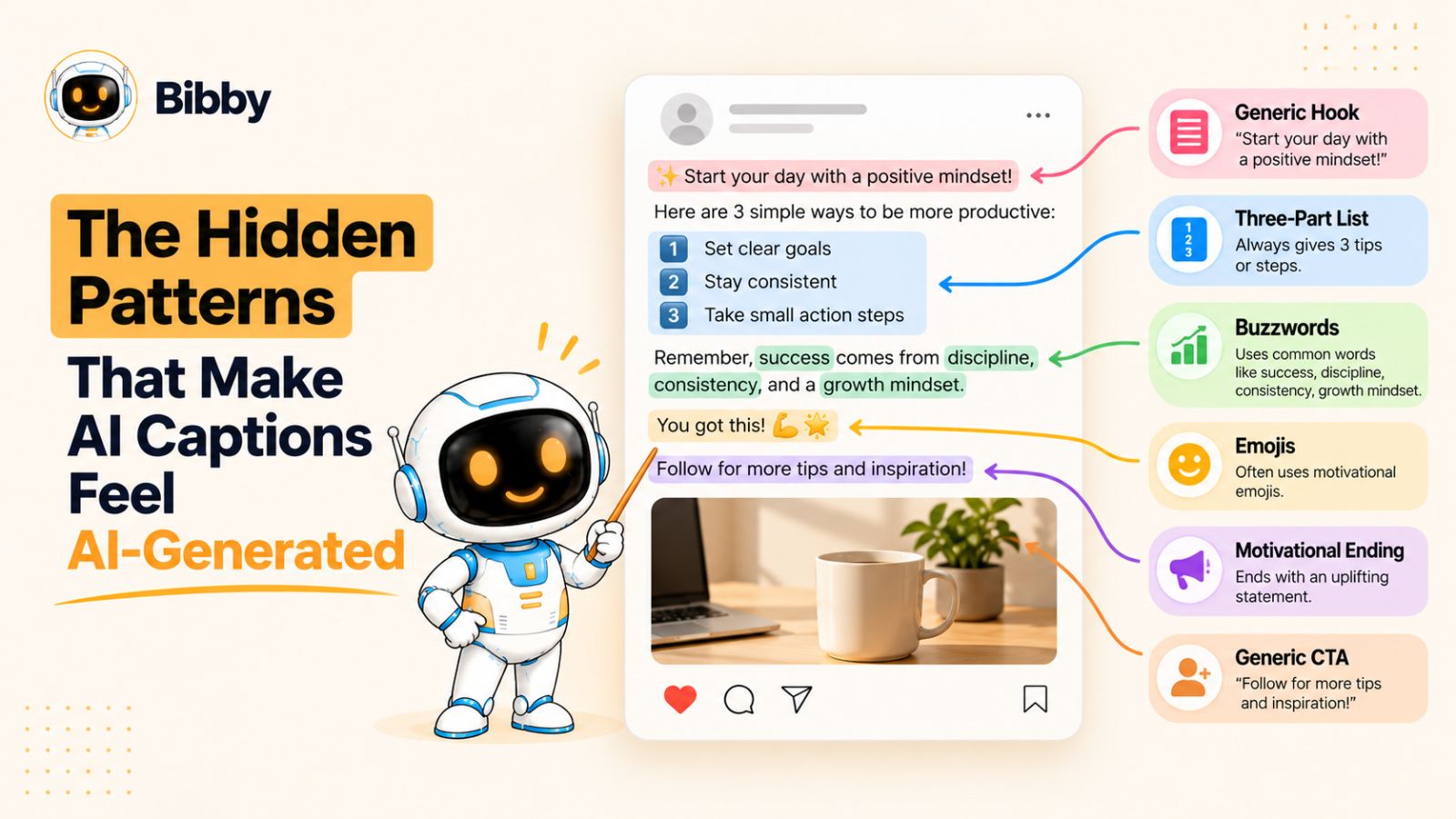
1. The Predictable “Big Hook”
AI loves a dramatic opening.
You might see:
“What if everything you thought about productivity was wrong?”
Or:
“Stop scrolling. You need to hear this.”
Or:
“Here's the secret nobody tells you about growing on social media.”
These hooks aren't inherently bad. A strong opening can absolutely improve a caption.
The problem is that a hook without a genuinely interesting idea is just packaging.
If every post starts with a dramatic question or a command to stop scrolling, the technique stops feeling attention-grabbing and starts feeling formulaic.
A better approach is to make the first sentence interesting because of what it says—not because it announces that something interesting is coming.
2. The “It's Not X. It's Y.” Formula
This structure has become particularly common in AI-assisted content:
“It's not about working harder. It's about working smarter.”
“It's not just a tool. It's your new productivity partner.”
“It's not about posting more. It's about posting better.”
The construction is easy for AI to generate because it creates a neat contrast and sounds persuasive.
But neat isn't always memorable.
If your audience sees the same rhetorical structure across dozens of brands, changing the nouns won't make the writing feel original.
Before keeping a sentence like this, ask whether the contrast actually reveals something useful.
If it doesn't, rewrite it as a direct observation.
3. The Three-Point Rhythm
AI frequently organizes ideas into tidy groups of three.
For example:
Create better content.
Build stronger relationships.
Grow your audience.
There's nothing wrong with three points. Humans use lists all the time.
But when every caption follows the same rhythm—statement, three benefits, motivational conclusion—the writing becomes mechanically predictable.
Sometimes the strongest caption needs one idea.
Sometimes it needs a short story.
Sometimes it needs an uncomfortable observation that doesn't fit neatly into three bullet points.
Don't force every thought into a structure simply because AI can organize it beautifully.
4. Generic Emotional Language
Words such as inspiring, powerful, exciting, game-changing, authentic, effortless, transformative, meaningful, and empowering can quickly drain specificity from a caption.
Consider:
“We're excited to announce this powerful new feature designed to transform the way you manage your content.”
What does that actually tell the reader?
Very little.
Compare it with:
“You can now schedule a week's worth of posts without opening five different publishing tools.”
The second sentence isn't trying as hard to sound exciting.
It simply gives the reader something concrete.
That is often more persuasive.
5. The Forced Conversational Voice
AI has learned that social media writing is supposed to sound conversational. So it sometimes manufactures conversation rather than actually sounding like a person.
You get:
“Okay, but can we talk about this?”
“Let's be honest for a second…”
“We've all been there.”
“Here's the thing…”
Used occasionally and intentionally, these phrases are perfectly natural.
Used because an AI prompt said “make it conversational,” they become verbal decorations.
The easiest test is to read the caption aloud.
If you wouldn't actually say the sentence to a customer, colleague, or friend, don't keep it simply because it makes the caption sound “human.”
6. The Inspirational Ending
Another common pattern is the motivational wrap-up:
“Your journey starts today.”
“The future is yours to create.”
“Keep showing up. Keep creating. Keep growing.”
Again, there's nothing inherently wrong with encouragement.
But if your product post, educational post, founder story, and customer announcement all end with the same inspirational energy, your brand starts to sound like a motivational poster.
A better ending usually follows naturally from the subject.
Sometimes that means asking a specific question. Sometimes it means giving the reader a useful next step. Sometimes the caption doesn't need a call to action at all.
7. The Emoji Layer
Emojis can add personality, but they're also one of the easiest ways to make AI-generated captions feel templated.
A common AI pattern is:
Hook + emoji → explanation → three benefits → CTA + emojis
The problem isn't the emojis themselves. It's when they're being used to manufacture personality that isn't present in the writing.
If your brand genuinely uses emojis, use them because they fit your communication style—not because the prompt says “make this more engaging.”
8. The Caption Says What the Image Already Says
This is one of the most overlooked problems with AI captions.
You upload a photo of a new product and ask AI to write a caption. The resulting caption simply describes the product.
You upload a team photo and get:
“Great things happen when talented people come together.”
You upload a coffee shop photo and get:
“Nothing beats starting your day with a fresh cup of coffee.”
The caption isn't adding another layer to the content. It's narrating what the audience can already see.
A stronger caption gives the visual context, opinion, story, or information that isn't immediately visible.
The image shows the product.
The caption could explain why you built it.
The video shows the event.
The caption could reveal what went wrong before the camera started rolling.
The team photo shows the people.
The caption could tell readers about the unusual decision that brought them together.
That's where AI becomes much more useful: not as a machine for describing the pixels, but as a tool for turning context into a compelling story.
The Pattern to Watch for
None of these patterns make a caption automatically bad.
That's important.
The goal isn't to create some arbitrary list of words AI is forbidden from using. The goal is to recognize when formula has replaced thought.
A caption can start with a question. It can use an emoji. It can have three points. It can even say “here's the thing.”
The question is whether those choices are serving the idea—or whether the idea was shaped around a familiar AI template.
Once you start noticing that distinction, improving your AI captions becomes much easier.
Instead of asking AI to “sound less like AI,” you can give it better material to work with.
And that brings us to the most important rule for writing better AI captions: specificity beats clever prompting.
The First Rule for Better AI Captions: Give AI Something Specific to Say
If you take only one idea from this article, make it this:
The fastest way to write better AI captions is to give AI better material.
Most people try to improve an AI caption after it has already been generated. They ask for another version, then another, then a version that's “more human,” “less generic,” or “more engaging.”
That can work occasionally.
But there's a better approach: improve what the AI knows before it writes.
Think about the difference between giving someone a topic and giving them a story.
If you tell a copywriter, “Write something about our new scheduling feature,” they have almost nothing to work with.
If you tell them, “We built this because our team kept forgetting to publish posts after spending hours creating them,” suddenly there's a story.
The second version gives the writer a reason to care.
AI works the same way.
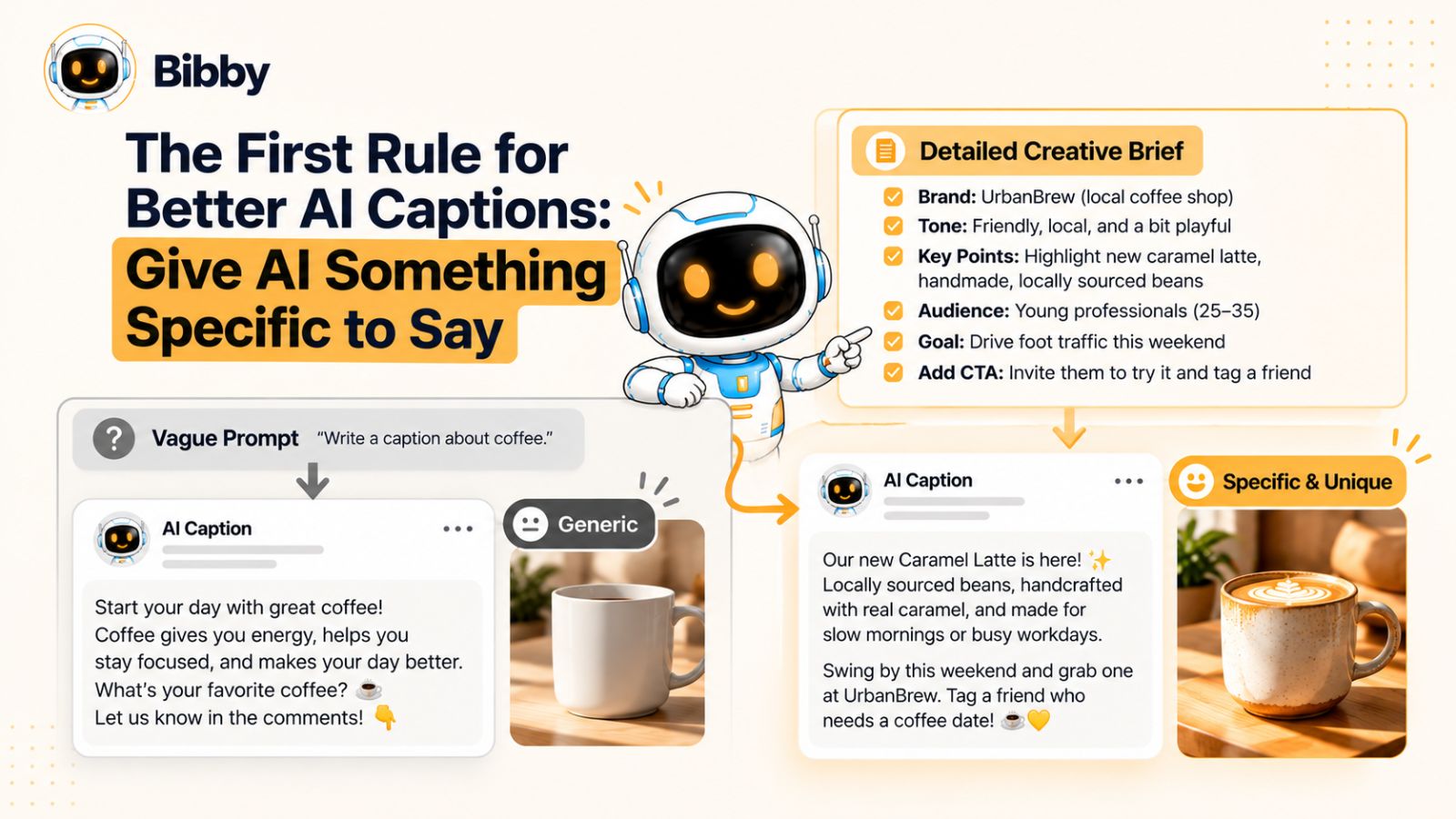
Replace Topics With Angles
A topic tells AI what the post is about.
An angle tells AI why the post is worth reading.
For example:
Topic:
Our new social media scheduling feature.
Angle:
We built the feature after realizing that creating content wasn't our biggest problem. Remembering to publish it consistently was.
The first gives AI a category.
The second gives it a point of view.
That point of view is what helps separate a caption from the thousands of other posts discussing the same subject.
Before asking AI for a caption, try finishing this sentence:
“The interesting thing about this post is…”
If you can't complete that sentence with something specific, the problem may not be the caption. You may not have found the angle yet.
Give AI Concrete Details
Specific details are valuable because they constrain the output.
Instead of:
“Write a caption about our new feature.”
Give AI:
“We added automatic scheduling because our users were creating several posts at once but manually publishing them throughout the week. The feature can now distribute posts across different dates and recommended publishing times.”
Now AI has facts it can turn into language.
It doesn't have to invent a generic benefit like “save time and grow your presence.”
It can explain the actual problem the feature solves.
This principle applies to almost any type of social content.
For a founder story, provide the mistake.
For a customer story, provide the result.
For an educational post, provide the surprising observation.
For a product launch, provide the reason the product exists.
For a behind-the-scenes post, provide what happened that the audience didn't see.
Details give AI somewhere to go.
Turn Features Into Observations
Product teams naturally describe what something does.
Social media audiences are usually more interested in why it matters.
Imagine you're creating a post about a feature that automatically schedules social media content.
A feature description might say:
“Automatically schedule your posts across multiple social media platforms.”
That's clear, but it isn't particularly interesting.
An observation might be:
“Most social media workflows don't fail when you're creating the post. They fail three days later when nobody remembers to publish it.”
Now you have an idea.
The feature can become evidence for that idea rather than the entire subject of the caption.
This is a useful distinction when working with AI.
Don't just give it your product's feature list. Give it the observations, frustrations, decisions, and customer behaviors behind those features.
Give AI Something Only Your Brand Could Say
Here's a simple test for improving AI-generated captions:
Could a competitor copy this caption without changing anything except the company name?
If yes, you probably need more specificity.
Suppose you're a social media tool.
A generic caption might say:
“Take your social media strategy to the next level with smarter content creation and scheduling.”
Almost any competitor could publish it.
Now consider:
“Your content calendar shouldn't require a spreadsheet, three browser tabs, and a reminder to remember the reminder.”
That's more distinctive.
It contains a specific picture of the problem. It also has a point of view.
The goal isn't necessarily to be clever.
The goal is to make the caption difficult to separate from the brand that wrote it.
Don't Overload the Prompt With Instructions
There's a temptation to solve generic AI writing by creating enormous prompts.
You might tell AI:
Be witty, conversational, authentic, concise, emotional, engaging, professional but casual, insightful, relatable, persuasive, human, and scroll-stopping.
That's a lot of adjectives.
It still doesn't tell the AI what you actually think.
Compare that with:
Our audience creates content in batches but often forgets to publish it consistently. We built this workflow because we wanted publishing to happen automatically after the creative work was finished. Write for marketers who are tired of maintaining complicated content calendars. Keep the tone practical and slightly self-aware. Don't use motivational language.
The second prompt is shorter in some ways, but far more useful.
Context beats adjectives.
Build a Library of Real Brand Material
You don't have to reinvent your inputs for every post.
Start collecting material that represents how your brand actually thinks and communicates:
- Customer questions
- Support conversations
- Product feedback
- Founder opinions
- Interesting mistakes
- Frequently misunderstood ideas
- Customer success stories
- Internal observations
- Sales objections
- Product decisions
- Memorable phrases your team actually uses
This material can become the raw input for future AI captions.
Over time, you're no longer asking AI to create something from nothing.
You're asking it to turn a growing library of real knowledge into social content.
That's a much more reliable way to scale.
The Caption Should Add Something the Audience Didn't Already Have
A useful final test is simple:
After reading the caption, does the audience know something they couldn't get from the visual alone?
If the answer is no, rewrite it.
Maybe the caption provides context.
Maybe it tells a story.
Maybe it challenges an assumption.
Maybe it gives a useful lesson.
Maybe it reveals why a decision was made.
Maybe it simply expresses an opinion worth discussing.
Whatever it is, give the audience another reason to consume the post.
That's the point where AI-generated captions stop being descriptions and start becoming content.
And once you've solved the problem of what to say, there's another challenge: making sure the words actually sound like your brand.
How to Write Better AI Captions With a Strong Brand Voice
Specific ideas make AI captions more interesting. A recognizable voice makes them yours.
This is where many brands run into a second problem. They tell AI to “use our brand voice,” but their brand voice exists mostly as a vague idea in someone's head.
Maybe the team describes it as:
Friendly.
Professional.
Modern.
Fun.
Authentic.
Those words sound useful, but they don't give AI much to work with.
A better brand voice is observable.
You should be able to look at a caption and explain why it sounds like your company.
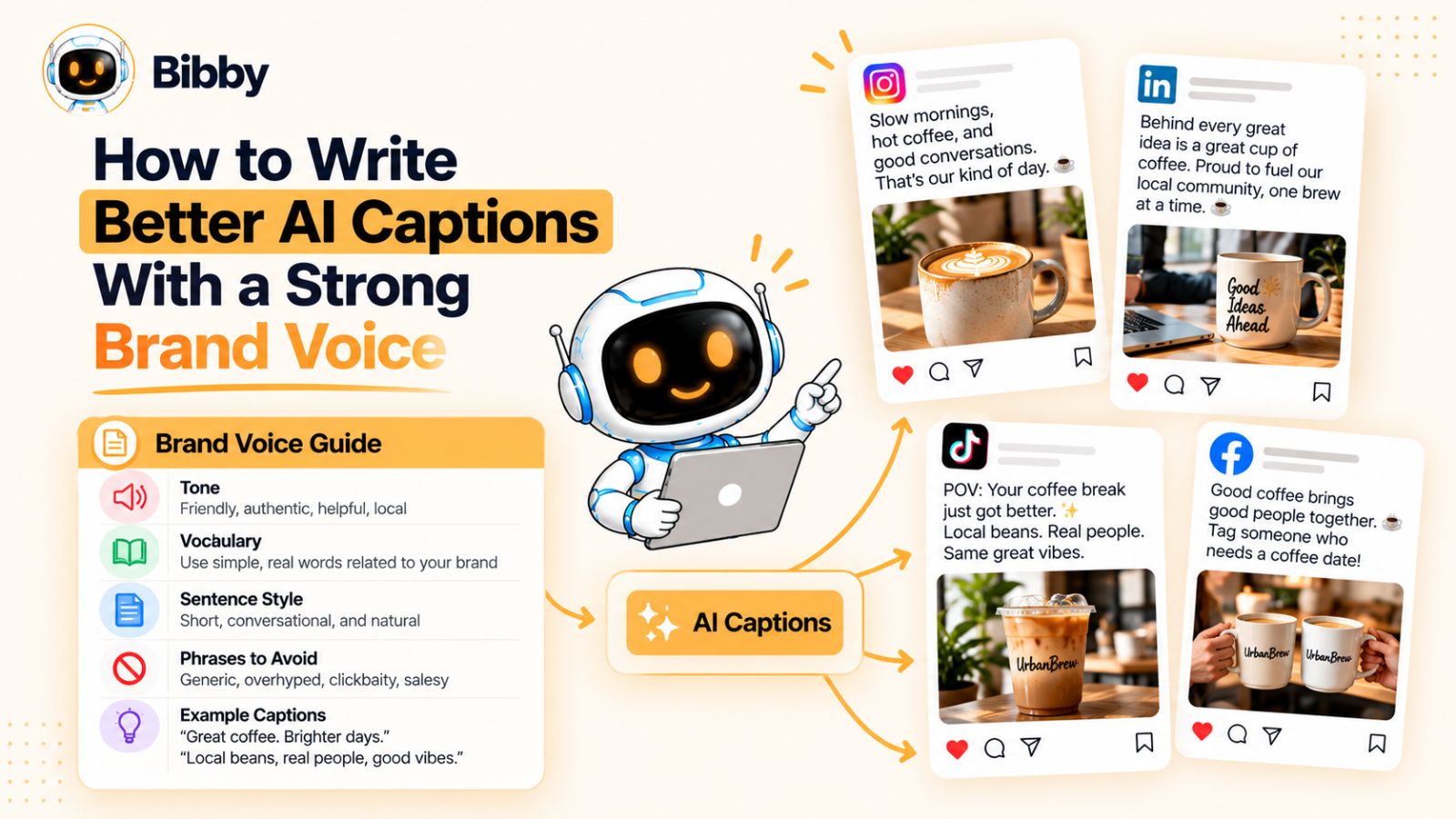
Define How Your Brand Actually Talks
Instead of describing your voice with broad adjectives, define the choices your brand makes when communicating.
For example:
Instead of:
“Friendly and professional.”
Try:
“Use short sentences. Explain complicated ideas in plain English. Sound confident without making exaggerated claims. Use humor occasionally, but never force a joke. Avoid corporate phrases such as ‘unlock your potential’ and ‘revolutionize your workflow.’”
Now there's something an AI system can actually follow.
You can go further.
Define:
- How formal your sentences are
- Whether you use contractions
- Whether you use emojis
- How often you use humor
- Whether you speak directly to the reader
- How you handle technical terminology
- Whether you prefer short or long captions
- Which phrases your brand regularly uses
- Which phrases your brand would never use
- How your brand handles calls to action
The more observable the rules, the easier they are to reproduce.
Show AI What Good Looks Like
One of the strongest ways to communicate a voice is to provide examples.
Don't just say:
“Make this sound like our brand.”
Give AI several captions you've already published and explain why they work.
For example:
“This caption is a good example of our voice because it starts with an observation, uses simple language, and doesn't oversell the product.”
You can also provide negative examples:
“Don't write like this. It's too promotional and uses generic marketing language.”
That distinction is powerful because you're not asking AI to guess what “authentic” means.
You're giving it evidence.
The same principle applies when working with a social media workflow that supports a reusable brand profile or brand kit. Instead of rebuilding your preferences every time you generate content, you can establish those guidelines once and use them as context across future posts.
That becomes increasingly important when you're publishing across several platforms.
Your Voice Should Survive Platform Changes
A brand shouldn't suddenly become a completely different company because a post is going from Instagram to LinkedIn.
But the expression can change.
An Instagram caption might be shorter and more conversational.
A LinkedIn version might provide more context.
A TikTok caption might be much more direct.
The mistake is treating “adapt for each platform” as “rewrite the brand voice.”
Your voice should remain recognizable while the format changes.
Think of it like a person talking to different groups of people. You might change the level of detail depending on who you're speaking to, but you don't suddenly adopt an entirely different personality.
AI can help with that adaptation, but only if you've established what should remain consistent.
Create a List of Words You Don't Want to Sound Like
This is an underrated part of building an AI-friendly brand voice.
Most brand guidelines tell writers what to do.
They should also tell them what not to do.
Create a small “avoid” list based on the language that repeatedly makes your content sound generic.
For example:
- “In today's fast-paced world”
- “Take your business to the next level”
- “Unlock the power of”
- “Game-changing”
- “Revolutionize”
- “Here's the thing”
- “Ready to transform”
- “It's not just X, it's Y”
The exact list will depend on your industry and audience.
The point isn't to ban individual words forever. It's to identify patterns that don't sound like your brand.
You can even ask AI to flag them during editing:
“Identify any phrases that sound generic or interchangeable with another company's social media copy. Rewrite only those parts.”
That is usually more useful than simply asking for another complete caption.
Don't Make Your Voice Too Perfect
There's an interesting contradiction in AI-assisted writing.
The more you try to make every sentence polished, balanced, and perfectly structured, the more likely your writing is to lose personality.
Real people don't communicate in perfectly symmetrical paragraphs.
They occasionally use a fragment.
They emphasize a word.
They write a sentence that's shorter than expected.
They have preferences.
They repeat a phrase because it's something they genuinely say.
That doesn't mean your social content should contain mistakes for the sake of appearing human. It means personality shouldn't be edited out in the pursuit of polish.
If your brand naturally has a dry sense of humor, keep it.
If your founder writes bluntly, don't turn every sentence into corporate copy.
If your company explains complicated things simply, don't add jargon just because the post is going on LinkedIn.
The objective isn't to make AI writing indistinguishable from a human in some abstract sense.
It's to make the writing recognizable as your brand.
Build a Brand Voice AI Can Actually Use
A practical brand voice profile might look something like this:
We sound:
Clear, practical, confident, occasionally playful.
We don't sound:
Corporate, overly enthusiastic, motivational, or sales-heavy.
Our sentences:
Usually short to medium length. We prefer plain English.
Our humor:
Dry and occasional. Never forced.
Our vocabulary:
Specific and concrete. We avoid unnecessary marketing jargon.
Our CTAs:
Direct and useful rather than dramatic.
Our captions should:
Lead with an interesting observation, explain the idea clearly, and give the reader a reason to care.
Avoid:
Generic hooks, exaggerated claims, filler phrases, excessive emojis, and artificial urgency.
That's much more actionable than saying “sound authentic.”
And there's a larger benefit.
Once your voice is documented, you don't have to rely entirely on one person remembering how the brand should sound. The same principles can guide captions created by different people, different workflows, and different AI tools.
That makes consistency possible without making every post identical.
And that's the balance you're really looking for: consistent voice, different ideas.
The next step is to change the way you ask AI to create captions in the first place. Instead of giving it the job “write a caption,” give it a specific communication job to accomplish.
Stop Asking AI to “Write a Caption”
“Write a caption” sounds like a simple instruction.
It is also one of the least useful instructions you can give an AI writing tool.
A caption isn't really a type of content. It's a communication job.
One caption might need to make someone curious. Another might explain an idea. Another might tell a customer story. Another might persuade someone to try a product. Another might simply give context to a video.
If you give AI the same instruction for all of them, you shouldn't expect radically different results.
To write better AI captions, start by deciding what the caption needs to do.
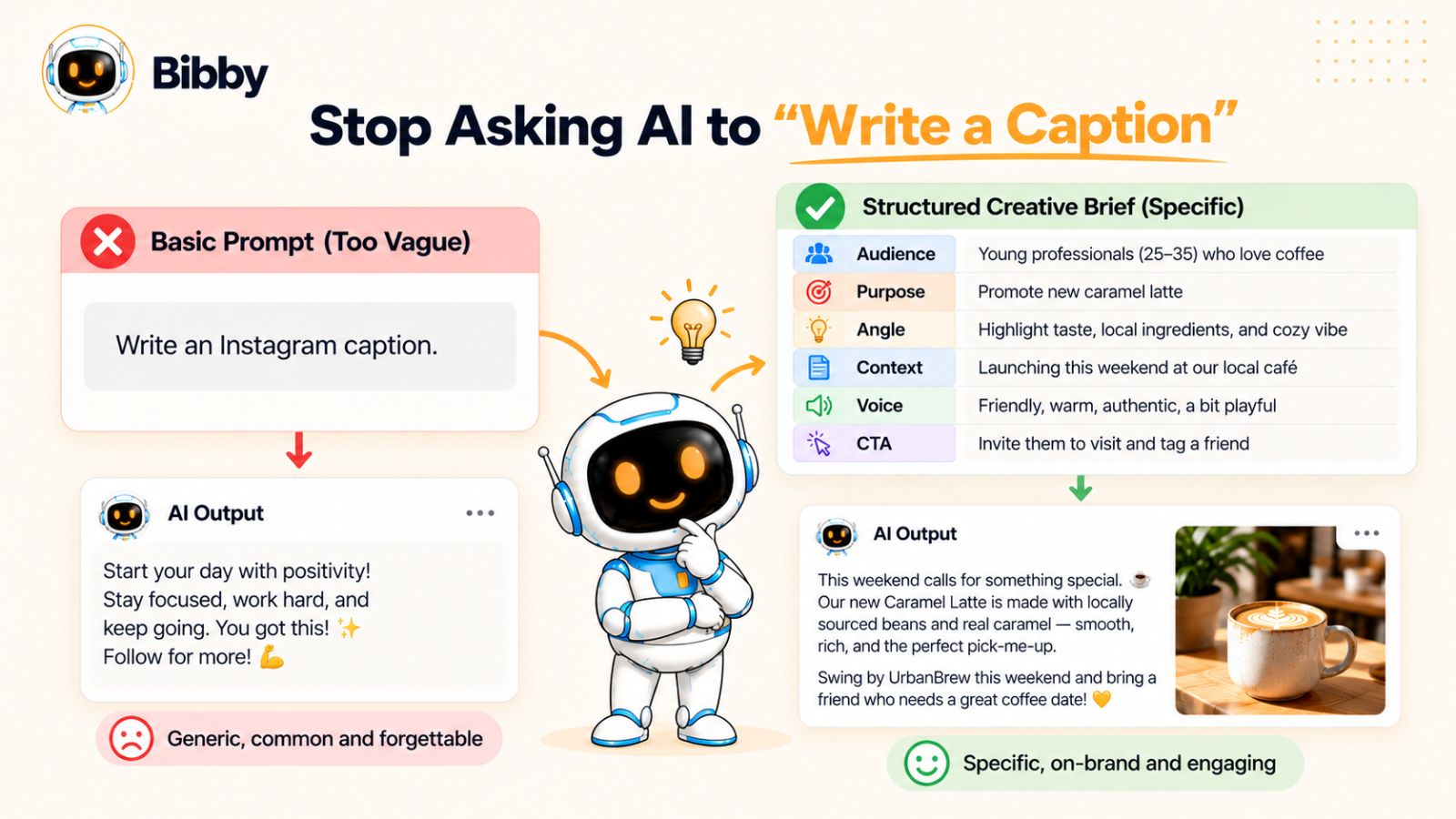
Give the AI a Job
Instead of:
“Write an Instagram caption for this image.”
Try:
“Use this image to explain the small problem that led us to build this feature. The reader should understand the problem within the first two sentences and leave knowing why the feature exists.”
Now the AI has a job.
Or:
“Write a caption that challenges the assumption that posting more frequently automatically produces better social media results. Use one concrete example and end with a question that encourages marketers to share their experience.”
Again, the instruction isn't simply “write.”
It's communicate this idea to this audience for this reason.
That difference changes the output considerably.
Match the Prompt to the Purpose of the Post
Different types of social posts need different caption strategies.
Educational posts
The caption should help the audience understand something.
Give AI:
- The misconception you're correcting
- The lesson
- The audience's current level of knowledge
- A concrete example
- The practical takeaway
Instead of asking for an “educational caption,” tell AI what the audience currently gets wrong and what you want them to understand.
Promotional posts
Don't ask AI to “make the product sound exciting.”
Tell it why the product matters.
For example:
“The audience currently uses three separate tools to create, schedule, and publish social content. Explain how this workflow reduces that fragmentation without making exaggerated claims.”
Now the AI has a real argument.
Thought-leadership posts
Give AI an opinion.
This is especially important because AI cannot manufacture genuine expertise simply by using authoritative language.
Tell it:
- What you believe
- What you disagree with
- Why you believe it
- What experience led you there
- What evidence supports the position
Then ask AI to express that perspective clearly.
Storytelling posts
Give AI the actual story.
Who was involved?
What happened?
What went wrong?
What changed?
What did you learn?
The more real the story, the less AI has to fill in with generic storytelling language.
Community posts
Give AI a reason for the audience to participate.
Instead of:
“What do you think?”
Try:
“Ask social media managers whether they prefer batching a week's content or creating posts individually. Briefly explain why we're interested in the difference.”
Specific questions produce more useful conversations than generic engagement bait.
Separate the Creative Brief From the Writing Task
Another useful technique is to stop giving AI one giant instruction.
Give it a small creative brief first.
For example:
Audience: Social media managers at small businesses
Post type: Product announcement
Core idea: Scheduling should happen after content creation, not become another manual task
Angle: Most teams lose consistency between creating content and actually publishing it
Voice: Practical, direct, slightly witty
Avoid: Hype, generic marketing language, excessive emojis
CTA: Invite readers to consider how much of their workflow is still manual
Then ask it to write the caption.
This gives the model a much clearer creative boundary.
It also makes the output easier to evaluate.
You can look at the final caption and ask:
Did it communicate the brief?
That's a much better standard than simply asking whether it “sounds good.”
Ask for Angles Before Asking for Final Copy
You don't always have to generate the final caption immediately.
For important posts, ask AI to give you several possible angles first.
For example:
“Based on this product announcement, give me five distinct angles for a social media post. Don't write captions yet. Each angle should have a different central idea and explain why the audience would care.”
You might get angles around:
- The problem that existed before the feature
- A surprising customer behavior
- A productivity insight
- A behind-the-scenes product decision
- A common misconception
Now you can choose the idea you actually want to communicate.
Only then ask AI to write the caption.
This two-stage process often produces better content than generating ten complete captions and choosing the least generic one.
Regeneration Isn't the Same as Improvement
There's another trap in AI-assisted content creation: regenerating the same idea repeatedly.
You ask for a caption.
You don't like it.
You click regenerate.
You don't like that one either.
You regenerate again.
Eventually you have twelve captions that use different words to communicate essentially the same generic idea.
The better question isn't:
“Can AI give me another version?”
It's:
“What is missing from this version?”
Maybe the angle is weak.
Maybe the caption is repeating the visual.
Maybe the opening is generic.
Maybe the brand voice isn't coming through.
Maybe there isn't enough context.
Fix the underlying problem and regenerate from the improved brief.
That's how AI becomes a writing partner rather than a slot machine for random variations.
One Prompt Doesn't Have to Do Everything
A useful AI workflow might involve several smaller tasks:
- Find the strongest angle.
- Challenge the angle.
- Create a rough caption.
- Check it against the brand voice.
- Remove generic language.
- Adapt it to the platform.
- Create the final version.
This is often more effective than one enormous prompt asking AI to simultaneously be a strategist, copywriter, editor, brand manager, social media expert, and growth marketer.
The more clearly you define each job, the easier it is to identify where the output went wrong.
Think Beyond the Caption
A caption is only one part of a social post.
The visual, format, timing, platform, audience, and caption should work together.
For example, a carousel can use the slides to teach the concept while the caption provides the argument behind it.
A short video can demonstrate the result while the caption explains the problem that prompted the experiment.
A story can create immediacy while the feed post provides the deeper context.
This is why better AI caption writing is ultimately connected to a better social content workflow.
You're not trying to generate isolated pieces of text.
You're building a system where the creative idea, format, caption, platform, and publishing schedule support one another.
And once you start thinking about captions that way, you can use AI for much more than generating copy—you can use it to help manage the entire journey from an idea to a published post.
A Better Framework for Writing AI Captions
If you want to consistently write better AI captions, you need a repeatable way to give AI the information it needs.
That doesn't mean creating a 2,000-word prompt every time you publish something.
A better approach is to give the AI seven pieces of information:
Context → Audience → Angle → Voice → Specificity → Tension → Action
Think of these as the raw ingredients of a caption.
You don't necessarily need to spell out every ingredient for every post. But when a caption feels generic, one of these is usually missing.
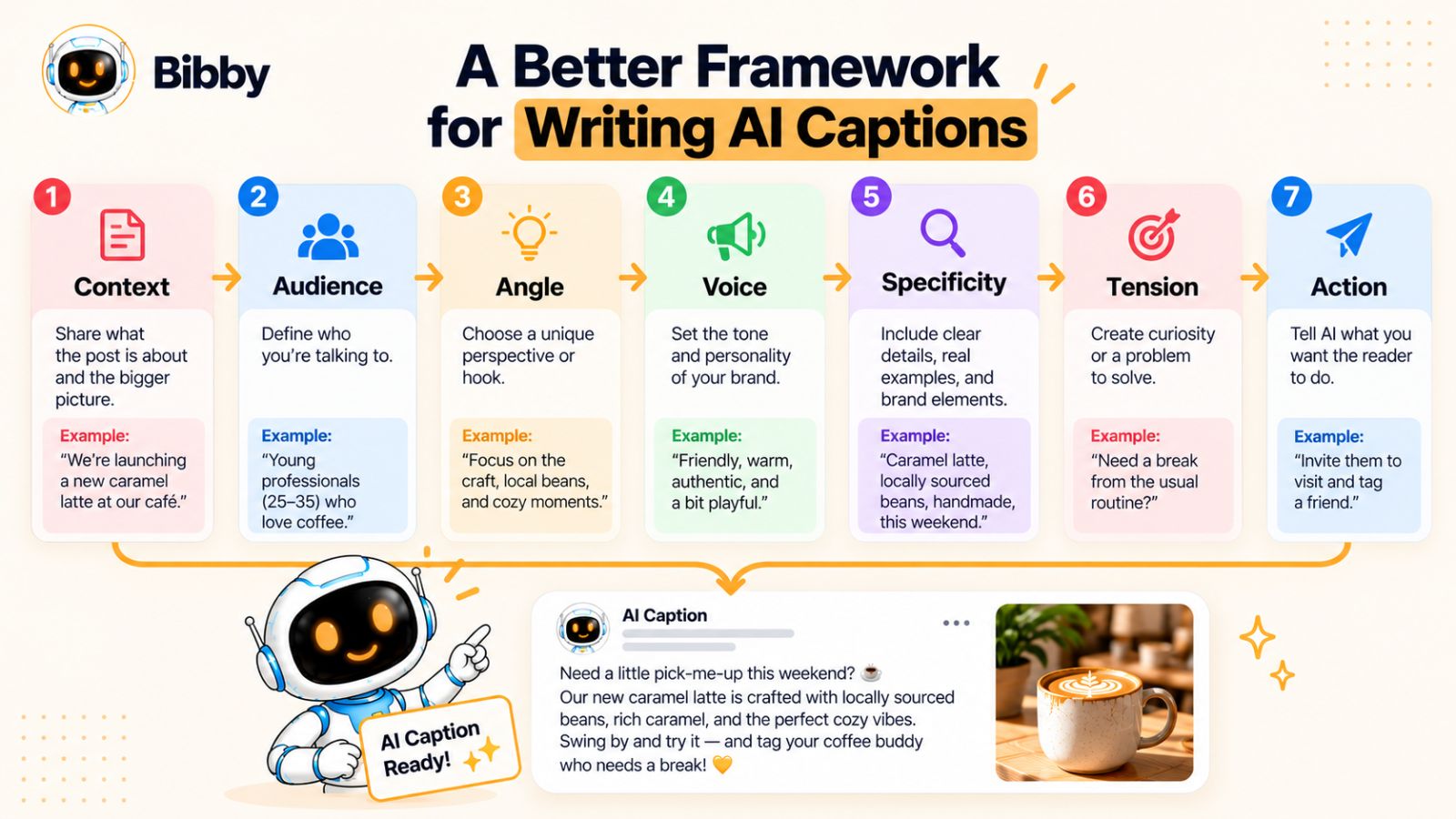
1. Context: What Is Actually Happening?
Start with the basic situation.
What is the image, video, carousel, or post about?
Don't stop at what is visually obvious.
If you're posting a photo of your team, the context might be:
“This photo was taken immediately after we launched a feature the team had been working on for four months.”
That's more useful than:
“This is a team photo.”
If you're uploading a product screenshot, explain what the audience is looking at and why it matters.
Context prevents AI from inventing filler.
2. Audience: Who Needs to Care?
“Social media users” isn't an audience.
Neither is “business owners.”
The more precisely you understand the reader, the easier it is to make the caption relevant.
Compare:
“Write for marketers.”
with:
“Write for small marketing teams that create content consistently but still manually publish across several social platforms.”
The second audience has a recognizable problem.
That gives AI a direction.
You can also consider what the audience already knows.
Are they beginners?
Experienced marketers?
Existing customers?
People discovering your brand for the first time?
The same idea may need completely different language depending on the reader.
3. Angle: What Is the Interesting Idea?
This is probably the most important part.
The angle is the reason someone should care about the post.
Suppose the topic is social media scheduling.
Possible angles include:
- Scheduling saves time.
- Consistency is difficult when publishing is manual.
- Creating content isn't always the bottleneck.
- A complicated content calendar can become its own problem.
- Publishing at different times can help content reach audiences across time zones.
The topic hasn't changed.
The angle has.
If your caption isn't working, don't immediately rewrite the words.
Ask whether you've chosen an interesting idea in the first place.
4. Voice: How Should It Sound?
Now tell AI how to express the idea.
This is where your brand voice comes in.
Instead of:
“Make it engaging.”
Use instructions such as:
“Keep the tone practical and confident. Use plain English. Avoid hype. Sound like an experienced marketer explaining something to another marketer.”
Even better, give the AI examples from your existing content.
Remember that voice isn't simply a personality adjective.
It's a collection of writing decisions.
5. Specificity: What Details Make This Real?
Specificity gives a caption texture.
Numbers help.
Situations help.
Customer behavior helps.
Product details help.
Small observations help.
Instead of:
“Our customers struggle with consistency.”
Try:
“Many of our customers create five or ten posts on Monday, then manually publish them throughout the week.”
Now the sentence has something to say.
It also gives AI a detail it can build around.
If you have data, use it.
If you have a customer quote, use it.
If you have a story, use it.
If you have a strange but true observation, use it.
Generic inputs produce generic possibilities.
Specific inputs create constraints—and those constraints are often what make writing interesting.
6. Tension: What Question or Contradiction Creates Interest?
Not every caption needs drama.
But many strong captions contain some form of tension.
For example:
“The problem isn't that your team doesn't create enough content. It's that half of what they create never gets published.”
Now there's a contrast.
Or:
“We thought people wanted more scheduling controls. They actually wanted fewer decisions.”
Again, there's a contradiction that makes the reader curious.
Tension can come from:
- A surprising result
- A common misconception
- A mistake
- A disagreement
- A before-and-after situation
- An unexpected customer behavior
- A problem that isn't what it initially appears to be
Ask:
“What would make someone stop and think, ‘Wait, that's interesting’?”
Then give that information to AI.
7. Action: What Should the Reader Do Next?
Finally, decide what happens after the caption.
That doesn't always mean “click the link.”
The action might be:
- Try something
- Think about a problem differently
- Save the post
- Share an experience
- Read more
- Visit a product
- Comment with an opinion
- Watch the rest of a video
- Do nothing except remember the idea
The important thing is that the action should fit the post.
Don't add “What do you think?” to every caption simply because AI knows social media posts often end with questions.
If there isn't a genuine conversation to have, don't manufacture one.
Put the Framework Together
Imagine you're promoting a new feature that automatically distributes social media posts across different publishing dates.
Your creative brief might look like this:
Context:
The feature automatically schedules batches of social posts across multiple dates.
Audience:
Small marketing teams that create content in batches.
Angle:
The tedious part of social media isn't always creating content; it's remembering to publish everything afterward.
Voice:
Direct, practical, slightly witty.
Specificity:
Users can prepare multiple posts at once instead of manually returning to publish each one.
Tension:
Creating the content feels productive, but an unpublished post produces no results.
Action:
Encourage readers to look at how much of their current publishing workflow is still manual.
Now AI has a real creative brief.
Compare that with:
“Write an engaging caption about our new social media scheduling feature.”
The difference isn't the sophistication of the AI.
It's the quality of the information surrounding it.
You Can Use the Framework Without Writing a Formal Prompt
You don't even have to type these seven categories manually every time.
Once you've established your brand voice and typical audience, your workflow can capture much of the context automatically.
For example, a social media tool might know your preferred platforms, brand guidelines, content style, and publishing preferences. You can then focus your input on what's actually different about this particular post: the image, the idea, the campaign, or the message.
This is one reason an AI-powered workflow can be more useful than a standalone caption generator.
The goal isn't simply to generate text.
It's to reduce the repetitive work around turning an idea into a finished social post.
Tools such as Bibby, for example, combine content creation, caption generation, platform selection, and scheduling in one workflow. If you've already established your brand context, you can spend more of your time deciding what you want to say rather than repeatedly rebuilding the mechanics around every post.
The technology is most useful when it removes repetition without removing the decisions that make your content distinctive.
The Framework in One Line
When you're stuck, remember:
Context tells AI what is happening. Audience tells it who matters. Angle tells it why it matters. Voice tells it how to say it. Specificity makes it real. Tension makes it interesting. Action gives it a purpose.
That's enough structure to transform a vague request into a useful creative brief.
But even with a strong brief, the first AI draft can still sound overly polished.
The next step is learning how to take that polished draft and make it feel more natural without simply telling AI to “sound human.”
How to Make AI Captions Sound More Human
Once you've given AI a strong idea, useful context, and a clear voice, you might still get a caption that feels too polished.
That's normal.
AI is very good at producing clean writing. Social media often benefits from something slightly more natural: a sentence that gets to the point quickly, a specific observation, a little personality, or a phrase that sounds like something a real person would actually say.
The answer isn't to make the writing worse.
It's to make it less interchangeable.
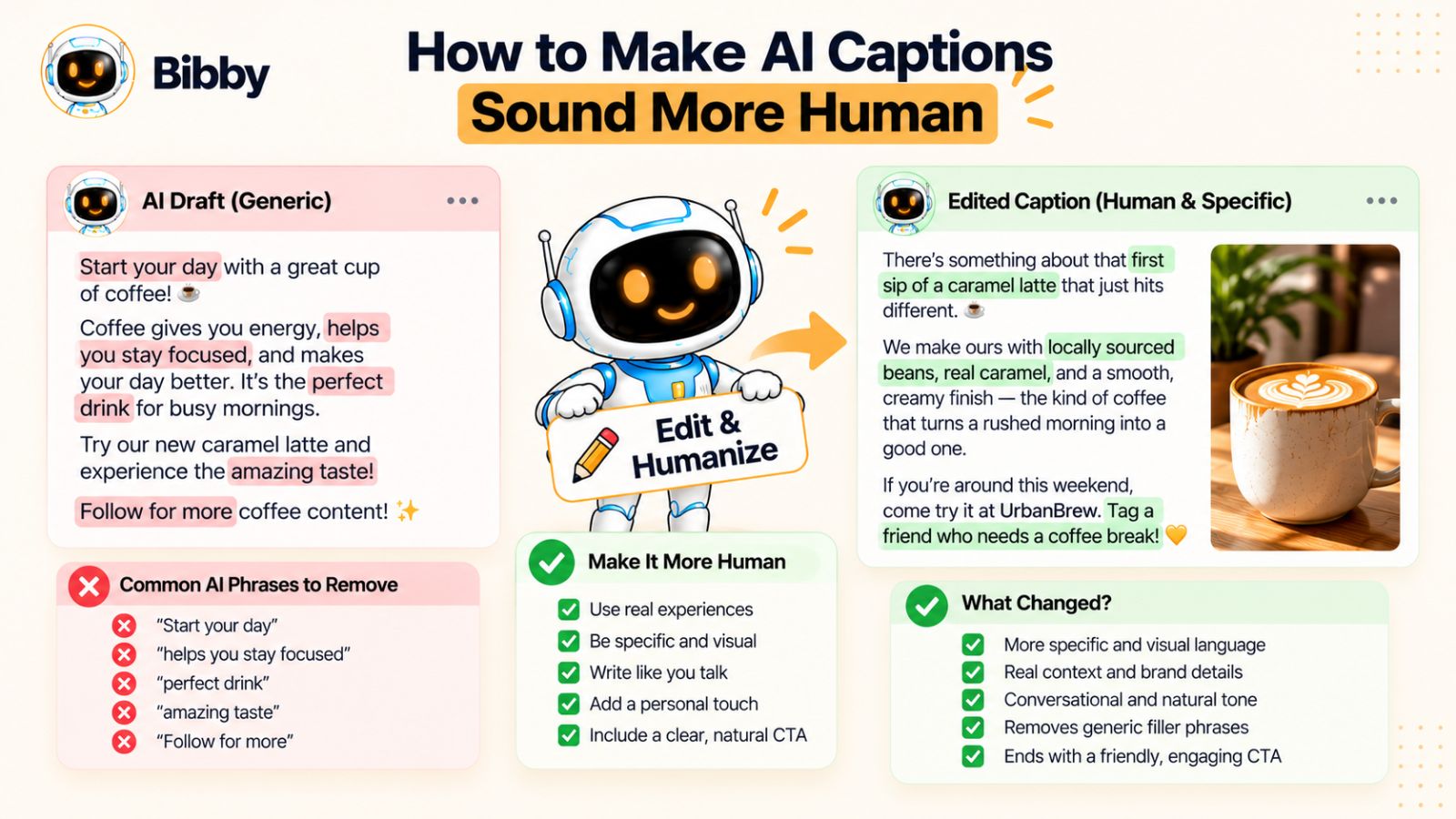
Cut the Sentences That Don't Add Anything
AI often adds sentences because they sound reasonable, not because they're necessary.
For example:
“In today's fast-paced digital world, staying consistent on social media can be a challenge for businesses of all sizes.”
The sentence isn't incorrect.
It just doesn't give the reader much.
You could say:
“Most teams don't struggle to create one post. They struggle to keep publishing next Tuesday.”
The second version gets to an actual observation.
When editing an AI caption, look at every sentence and ask:
If I removed this, would the reader lose anything?
If the answer is no, remove it.
Replace Abstract Claims With Concrete Ones
AI tends to favor broad language because broad language is difficult to disagree with.
Consider:
“Our solution helps businesses save time and improve their social media strategy.”
Almost every social media tool could say that.
Now make it concrete:
“Create your week's posts in one sitting instead of opening each platform every day to publish them.”
The second statement gives the reader something they can picture.
Concrete writing also makes your claims easier to evaluate.
Instead of saying your product is “powerful,” explain what it lets someone do.
Instead of saying something is “easy,” describe the steps.
Instead of saying a strategy “drives engagement,” explain what changed.
Remove the Marketing Voice When It Isn't Needed
AI often assumes that social media content should sell.
That can produce phrases like:
“Discover a smarter way to transform your social media presence.”
Sometimes promotional language has a place.
But not every post needs to sound like an advertisement.
A product can be explained without constantly praising itself.
For example:
“You can now prepare your posts in advance and let the schedule handle when they go live.”
That's straightforward.
It doesn't tell the reader that the feature is “revolutionary.”
It lets the benefit speak for itself.
This is particularly useful for brands that publish frequently. If every caption sounds like a sales pitch, audiences eventually learn to ignore the tone.
Keep Some Sentence Variety
AI-generated text can have an unusually consistent rhythm.
Several medium-length sentences appear one after another.
Then there's a list.
Then a concluding sentence.
Then a CTA.
That structure is easy to read, but repeated too often it becomes recognizable.
Mix things up.
Use a short sentence.
Then explain the idea.
Use a fragment when it fits your brand.
Change the length of your paragraphs.
Don't force every thought into the same visual structure.
For example:
We used to think the hardest part was creating content.
It wasn't.
It was everything that happened afterward: choosing the platform, finding a publishing time, remembering which posts were ready, and making sure nothing got forgotten.
The short second sentence creates emphasis because it breaks the rhythm.
You don't need to manufacture this in every caption. But variation makes writing feel less templated.
Don't Add “Human” Phrases Just to Sound Human
This deserves repeating.
If the caption doesn't sound human, adding:
“Let's be honest…”
probably isn't going to fix it.
Neither is:
“Okay, hear me out.”
Or:
“We've all been there.”
Those phrases can be natural when they're genuinely part of your voice.
They're artificial when they're used as shortcuts for personality.
Instead, add something that a real person would have a reason to say.
A specific opinion.
A small admission.
A customer observation.
An unexpected detail.
A point of disagreement.
That's where personality comes from.
Give AI an Editing Job
Instead of asking:
“Make this sound more human.”
Give the AI a measurable task.
For example:
“Remove generic marketing phrases. Keep the core idea unchanged. Replace abstract claims with concrete language wherever possible. Delete sentences that don't add new information. Keep the tone conversational without adding slang.”
Or:
“Read this caption as if you're a social media manager who has seen thousands of AI-generated posts. Highlight anything that feels predictable, exaggerated, or interchangeable, then rewrite only those sections.”
This is much more useful than asking for another complete version.
You're telling AI what problem to solve.
Read It Out Loud
One of the simplest editing techniques is also one of the most effective.
Read the caption out loud.
You'll notice things you might skip while reading silently.
A sentence might be technically correct but awkward to say.
A phrase might sound like corporate copy.
A paragraph might be too long for a social feed.
A word might be something you would never actually use.
If you stumble over it, your audience might too.
Social media isn't an academic paper. The writing should work when someone encounters it quickly on a screen.
Don't Polish Away the Interesting Parts
There's one final danger.
After generating and editing a caption, you can keep improving it until it becomes bland.
You remove every unusual phrase.
You smooth every sentence.
You make the tone perfectly consistent.
You eliminate every bit of personality.
Eventually, the caption is technically excellent and completely forgettable.
Don't optimize for perfection.
Optimize for recognition and relevance.
If there's a slightly unusual phrase that your audience understands and your brand genuinely uses, keep it.
If a sentence has personality but isn't perfectly symmetrical, leave it alone.
If your founder has a distinctive way of explaining something, don't turn it into generic marketing language.
AI should help you communicate your voice more efficiently.
It shouldn't sand your voice down until there's nothing left.
The Human Edit Is the Final Filter
The best AI-assisted caption isn't necessarily the one AI can produce without intervention.
It's the one where AI handles the repetitive work and a human decides what deserves to stay.
That might mean spending thirty seconds removing a generic opening.
It might mean changing one sentence.
It might mean adding the detail AI couldn't know.
Sometimes it's simply deciding, “No, that's not how we talk.”
Those small decisions compound.
And when you're publishing dozens of posts across multiple platforms, having a workflow that makes those decisions easier to apply consistently becomes increasingly valuable.
The objective isn't to make every caption look manually written.
It's to make sure automation doesn't become visible in the writing.
That distinction becomes especially important when you start producing content at scale—which is where your caption workflow, platform adaptations, and scheduling process all need to work together.
Examples: Turning Generic AI Captions Into Better Captions
Knowing what makes an AI caption generic is useful.
Seeing the difference side by side is better.
The examples below show how a caption can change when you replace generic instructions with a specific idea, audience, and point of view.
The goal isn't to find one “perfect” caption. It's to understand the decisions that make the second version more distinctive.
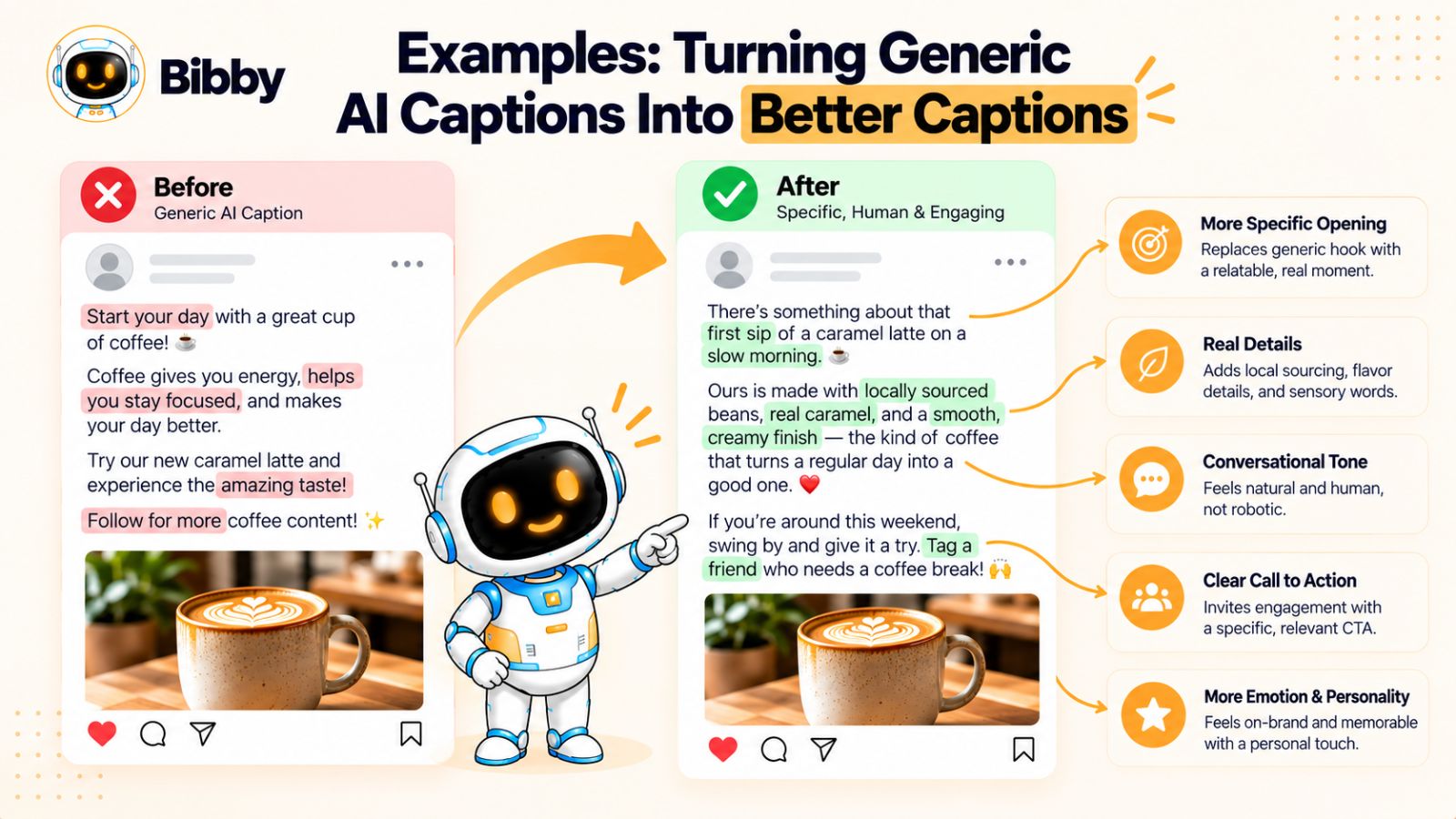
Example 1: A Product Image
Imagine a social media tool has released a new scheduling feature.
A generic AI-generated caption might look like this:
Ready to take your social media strategy to the next level? 🚀
Say hello to smarter scheduling! Save time, stay consistent, and make sure your content reaches your audience at the right time.
Start scheduling today and take control of your social media! ✨
There's nothing obviously wrong with it.
That's precisely the problem.
Almost any social media software company could publish it.
Now give AI a stronger angle:
Most teams don't need more ideas for social media. They need fewer things to remember.
Create the posts when you have the time. Let the schedule handle the publishing later.
That's the part of social media we wanted to make boring.
The second version isn't trying as hard to sell.
It makes an observation.
It also gives the product a reason to exist.
Why it works better: The caption isn't describing the feature. It's explaining the problem behind the feature.
Example 2: A Founder Post
Imagine a founder is sharing a photo from the early days of the company.
A generic caption:
Every great journey starts with a single step.
Building a business isn't easy, but every challenge teaches you something new. We're grateful for the lessons, the people, and the journey so far.
Here's to continuing to dream big and build the future! 🚀
This could belong to thousands of founders.
Now give AI the actual story:
This photo was taken three months after we started.
We had a product, a handful of users, and absolutely no idea how long it would take to get the next hundred.
Looking back, the biggest lesson wasn't about growth. It was realizing how many things we thought customers wanted that they never actually asked for.
Building got easier once we started listening more than guessing.
Why it works better: The caption contains information that couldn't have been generated from the photograph alone. It gives the audience a reason to read instead of simply providing an inspirational interpretation of the image.
Example 3: An Educational Carousel
Suppose the carousel explains five common social media mistakes.
A generic caption might say:
Want to improve your social media strategy? 📱
We've put together five common mistakes that could be holding your brand back.
Swipe through to discover what you're doing wrong and how to fix it!
Save this post for later and share it with someone who needs it.
This follows a familiar formula:
Hook → promise → swipe CTA → save/share CTA.
Now change the angle.
Suppose the actual insight is that many brands are optimizing for publishing frequency rather than content quality.
The caption could say:
Posting every day isn't automatically a social media strategy.
If you're publishing seven posts a week because your calendar says you should, but none of them has a clear reason to exist, adding another post probably won't fix the problem.
We put five common versions of this mistake into the carousel—including one we've made ourselves.
Why it works better: The caption introduces an argument rather than simply announcing what the carousel contains.
It also creates a reason to swipe: the reader now wants to see whether their own workflow contains one of those mistakes.
Example 4: A Short-Form Video
Imagine a video shows someone preparing an entire week's social media content in one sitting.
A generic caption:
Work smarter, not harder! 💪
Here's how we make social media management easier and more efficient.
Save this video for later and follow for more productivity tips!
Now imagine the real insight is that batching content reduces the number of times the team has to switch between creative and administrative tasks.
A better caption:
The hardest part of posting five times a week isn't creating five posts.
It's switching back into “social media admin mode” five separate times.
We started batching the creative work and scheduling everything afterward. One session. Five posts. No daily reminder to publish something.
Why it works better: The caption adds an idea that the video itself doesn't necessarily communicate. It gives the audience a useful explanation for the behavior they're seeing.
Example 5: A Promotional Post
Promotional content is where generic AI language can become especially obvious.
Suppose a company wants to promote an AI social media assistant.
A generic version:
Meet your new AI-powered social media assistant! 🤖
Create engaging content, save valuable time, and grow your online presence with intelligent automation.
Ready to transform your social media strategy? Try it today!
Now remove the generic benefits and describe the actual workflow:
You can spend an hour writing captions—or spend that hour deciding what you actually want to say.
Upload the visual, choose the kind of post you want, and let the system handle the first draft. From there, you can edit it, schedule it, and move on.
The useful part of AI isn't that it can write a caption.
It's that it can remove the five small tasks that usually happen before and after one.
Why it works better: It doesn't pretend AI is magical. It identifies a specific workflow problem and explains where the technology fits.
What Changed in Every Example?
Notice that none of the improved captions required an elaborate writing trick.
They simply contained better information.
The generic versions relied on:
- Broad benefits
- Predictable hooks
- Marketing adjectives
- Generic CTAs
- Inspirational language
- Descriptions of what the audience could already see
The stronger versions relied on:
- Specific observations
- Real situations
- Opinions
- Problems
- Contrasts
- Details
- A clear reason for the post to exist
That's an important distinction.
Better AI captions aren't necessarily more creative. They're more informed.
Don't Copy the Writing Style—Copy the Process
There's a temptation to look at these examples and think the solution is to make every caption sound like them.
That's not the point.
Your brand might be playful.
It might be serious.
It might be technical.
It might use one-line captions.
It might write long stories.
The process stays useful regardless:
Find the idea → add context → define the audience → choose the angle → establish the voice → give AI the details → edit the result.
That process is far more valuable than copying a particular sentence structure.
What Happens When You Need to Do This Every Day?
Writing one strong caption is manageable.
Doing it for every image, carousel, video, and story across several social platforms is where the process can become repetitive.
That's when AI becomes genuinely useful—not because you can generate more generic captions faster, but because you can build a workflow where the repetitive parts are automated while the important creative decisions remain under your control.
And that's the difference between using AI to create more content and using AI to build a better social media system.
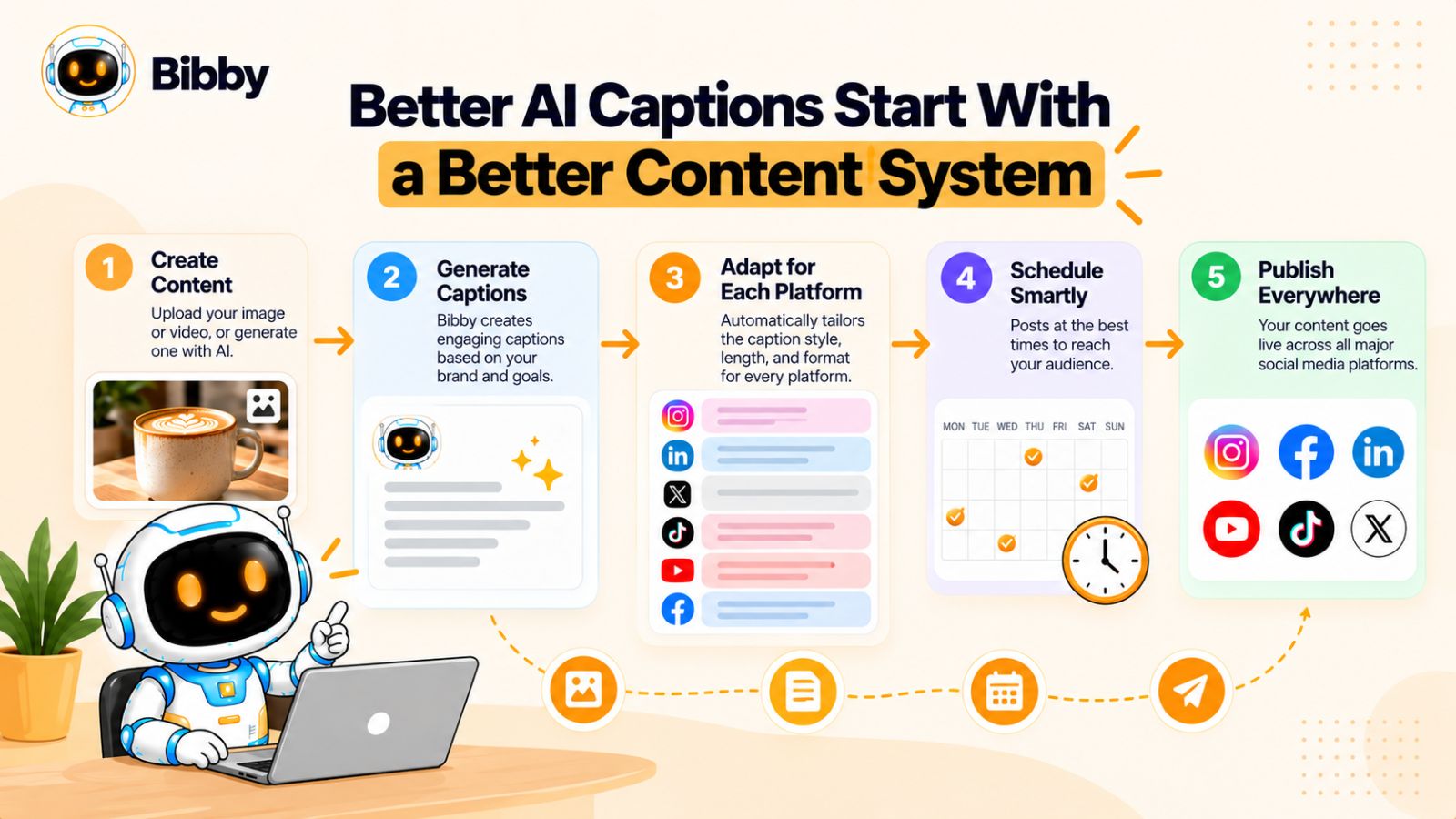
Better AI Captions Start With a Better Content System
There is a point where improving the caption itself stops being the biggest problem.
You can have a strong idea, a useful creative brief, and a well-defined brand voice. But if creating and publishing every social post still requires a dozen repetitive steps, consistency becomes difficult.
You have to create the visual.
Write the caption.
Adapt it for each platform.
Choose when to publish.
Schedule it.
Remember what has already gone live.
Then do the same thing again tomorrow.
When that workflow becomes complicated, people often respond by producing less content or rushing through the parts that require the most thought.
That can affect caption quality.
Content Creation and Publishing Shouldn't Be Completely Separate
Think about what happens when you create a social post manually.
You might finish an image on Monday but not publish it until Thursday.
By Thursday, you've forgotten why you created it.
Then you open the platform, stare at the image, and ask an AI tool to write a caption from scratch.
The AI sees the image.
It doesn't see the conversation that led to the image.
It doesn't know what you were trying to communicate three days earlier.
So it produces a reasonable caption based on limited information.
This is one reason context matters so much.
A better workflow keeps more of the creative context connected from the beginning.
If the system knows what the content is about, which style you're using, which audience you're targeting, and what the brand sounds like, caption generation becomes less of a blank-page exercise.
Don't Publish the Same Thought Everywhere
Another problem with social media automation is confusing distribution with duplication.
You can publish the same piece of content on Instagram, Facebook, LinkedIn, TikTok, and other platforms.
But that doesn't mean the exact same caption belongs everywhere.
The audiences behave differently.
The formats are different.
The amount of context people expect is different.
A LinkedIn post might benefit from a little more explanation.
An Instagram caption might work better with a stronger visual connection.
A TikTok caption may need to get out of the way and let the video do most of the work.
The underlying idea can remain consistent while the expression changes.
That's where AI can be useful.
Instead of manually rewriting every post from scratch, you can use the original creative brief and ask AI to adapt the same idea to each platform while preserving the brand voice.
Automation Should Remove Repetition, Not Personality
This is an important distinction.
Good automation removes repetitive actions.
Bad automation makes everything look identical.
There's a difference between automatically scheduling five genuinely different posts and automatically publishing the same caption everywhere.
The first saves time.
The second saves time by making the content less useful.
The goal should be to automate the mechanics around content while keeping the thinking inside the content.
For example, a social media workflow might handle:
- Organizing your media
- Generating an initial caption
- Adapting content for different platforms
- Selecting publishing dates
- Recommending publishing times
- Scheduling posts
- Managing multiple formats
You can then spend your attention on the parts AI can't reliably determine on its own:
What should we say? Why does it matter? Does it sound like us? Is this actually worth publishing?
Where a Tool Like Bibby Fits
This is also where an all-in-one workflow can become useful.
Bibby, for example, is designed around the idea that creating and publishing social media content shouldn't require moving between a collection of separate tools.
You can upload an image or generate one with AI, choose a posting style, and have captions generated as part of the workflow. The content can then be scheduled across selected platforms at different dates and AI-recommended publishing times.
That can include different types of media rather than just static images—such as carousels, videos, and stories.
The interesting part isn't simply that a tool can generate a caption.
Plenty of AI tools can do that.
The more useful question is whether the caption is being generated inside the context of the publishing workflow.
If you're already preparing a piece of content, choosing its style, deciding where it belongs, and planning when it should go live, having caption generation in that same process reduces the number of times you have to reconstruct the context.
Bibby also has a conversational interface, which changes the workflow in another way. Instead of navigating through individual controls for every task, you can use a chat interaction to manage parts of your social media process—for example, creating a brand kit, setting up a campaign, creating posts, or regenerating captions.
That doesn't magically make the resulting captions better.
The quality still depends on the ideas, context, and brand information you give the system.
But reducing the administrative work gives you more room to spend time on those things.
Automation Makes a Bigger Difference When You're Publishing at Scale
Imagine managing one social post every two weeks.
You can probably handle the entire workflow manually.
Now imagine producing content every day across several platforms, with images, carousels, short videos, stories, and different publishing schedules.
The repetitive work multiplies quickly.
This is where automation can change the economics of content creation.
Instead of asking:
“How do I manually publish this post?”
You can focus on:
“Is this the right idea for my audience?”
The first is an operational question.
The second is a creative one.
The more of the first question your tools can handle, the more attention you can give to the second.
But Don't Automate the Judgment
There is still a point where human judgment matters.
An AI system can generate ten caption variations.
That doesn't mean all ten deserve to be published.
It can suggest a publishing time.
That doesn't mean the suggested time is automatically right for every piece of content.
It can adapt a caption for five platforms.
That doesn't mean every adaptation will preserve the nuance of your message.
Automation works best when you treat it as infrastructure around your creative process.
Let the software handle repetitive execution.
Keep the important decisions visible.
That's how you scale social media without making your audience feel like they're being fed content by a machine.
And once the workflow is connected—from the original idea to the finished post—you can start improving another part of the process: making sure the same brand voice survives every piece of content you publish.
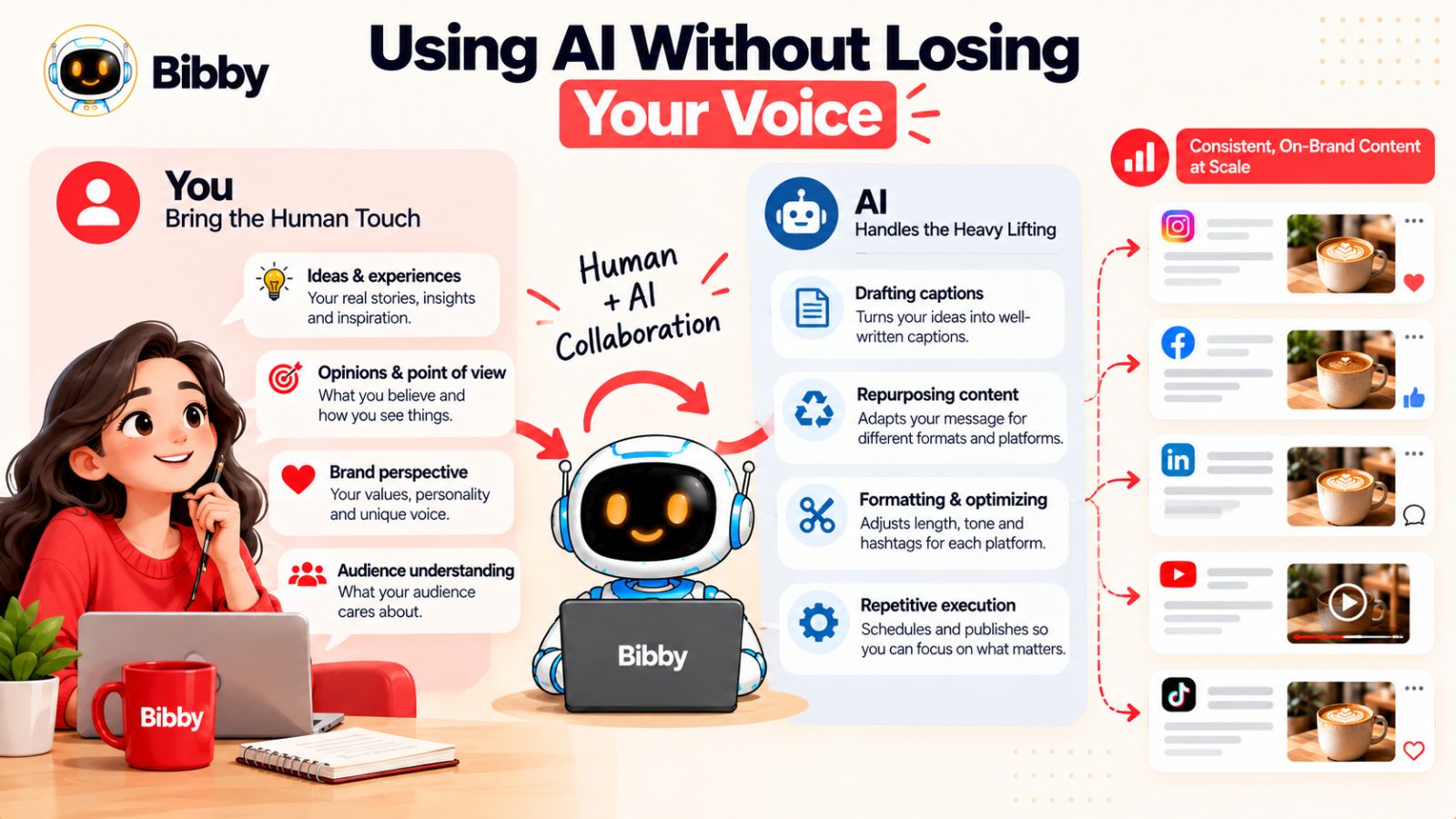
Using AI Without Losing Your Voice
The biggest risk of using AI for social media isn't that the captions will contain grammatical mistakes.
It's that they will all start sounding correct in exactly the same way.
That can happen even when the AI is producing technically strong content. Every caption is clear. Every hook works. Every CTA makes sense. Nothing is obviously wrong.
And yet, after twenty posts, your brand has started to sound like a generic content account.
The solution isn't to use less AI.
It's to decide where AI should make decisions and where it shouldn't.
Let AI Handle Repetition
There are plenty of social media tasks that don't require your unique perspective.
AI can help with:
- Turning a creative brief into caption drafts
- Generating variations
- Rewriting content for different platforms
- Shortening or expanding copy
- Repurposing an idea into different formats
- Organizing content
- Suggesting publishing times
- Scheduling posts
- Creating first drafts from existing information
These are areas where speed can be valuable.
If you can eliminate twenty minutes of repetitive work without changing the quality of the idea, that's a useful application of AI.
Keep the Point of View Human
Other decisions are much harder to automate well.
For example:
What do we actually believe?
What do we disagree with?
What have we learned from our customers?
What mistake did we make?
What is worth talking about right now?
What would we never say about our product?
Those decisions are part of your brand's identity.
AI can help express them.
It shouldn't be responsible for inventing them.
This is why a caption that contains a genuine opinion often feels more distinctive than one filled with clever copywriting techniques.
A real opinion creates boundaries.
It gives the brand something to stand for.
Build a Feedback Loop
One of the best ways to use AI over time is to let your own content teach you what works.
Suppose you publish twenty captions.
Some receive strong responses.
Some get saved frequently.
Some generate thoughtful comments.
Some receive almost no reaction.
Don't just look at the numbers and move on.
Study the language.
What did the strongest posts have in common?
Maybe they started with a specific observation.
Maybe they told a story.
Maybe they challenged a common assumption.
Maybe they were more direct.
Maybe they avoided traditional CTAs.
Maybe they sounded more like your founder and less like marketing copy.
Those patterns can become future instructions for AI.
You're effectively building a feedback loop:
Create → publish → observe → learn → update the creative brief → create again.
That's much more valuable than endlessly searching for the perfect prompt.
Save Your Best Captions
Your strongest captions are not just published content.
They're training material for your future workflow.
Keep examples of captions that represent your voice particularly well.
You might categorize them by:
- Product announcements
- Educational posts
- Founder content
- Customer stories
- Promotional posts
- Short-form video
- Thought leadership
- Community content
When you're creating something new, AI can use those examples as references.
This is especially helpful for teams.
A new marketer shouldn't have to reverse-engineer five years of company communication to understand how the brand speaks.
Give them examples.
Give them principles.
Give them boundaries.
Then let AI help apply them.
Don't Chase “Human-Like” AI
There's an important shift in mindset here.
The goal isn't to make AI-generated text indistinguishable from something a human could have written.
The goal is to make the communication valuable enough that the audience doesn't care how it was produced.
A useful caption can be AI-assisted and still feel genuine because the underlying idea is genuine.
A founder can use AI to tighten a post without outsourcing their opinion.
A social media manager can automate scheduling without automating judgment.
A small team can publish more consistently without pretending they have a fifty-person content department.
The technology isn't the interesting part.
The message is.
Use AI to Multiply Your Voice, Not Replace It
Imagine you have ten genuinely useful ideas.
Without AI, you might only have the capacity to turn three of them into social content.
With a good workflow, those ten ideas can become:
- Different post formats
- Platform-specific versions
- Multiple caption directions
- Carousels
- Short-form videos
- Stories
- Follow-up posts
That's the opportunity.
AI can increase the amount of content you can produce from the thinking you've already done.
But if you start with ten generic ideas, AI will simply help you produce more generic content.
AI amplifies inputs.
That's why the quality of your ideas, examples, brand voice, and creative direction matters so much.
The Best AI Workflow Has a Human at the Right Points
You don't need a human manually touching every word.
You need a human involved where judgment matters.
A practical workflow might look like this:
Human: Chooses the idea.
AI: Develops possible angles.
Human: Chooses the angle.
AI: Creates the first caption.
AI: Adapts it for different platforms.
Human: Checks the voice and accuracy.
AI: Handles formatting and scheduling.
Human: Reviews performance and learns from the results.
That division can give you both speed and personality.
The human provides the perspective.
The AI provides leverage.
The system handles the repetition.
That's a much more sustainable model than trying to make AI independently run every part of your social presence.
And when you have that system in place, creating one good caption is no longer the goal. The goal becomes creating a repeatable process for producing consistently good social content without making every post feel the same.
A Practical Workflow to Write Better AI Captions at Scale
Knowing how to write one better AI caption is useful.
Knowing how to repeat that process across dozens of posts is much more valuable.
The challenge for most social media teams isn't coming up with a single good caption. It's maintaining quality when you're publishing across multiple platforms, formats, campaigns, and dates.
That's where a repeatable workflow helps.
Instead of treating every caption as a separate writing task, build a system that moves from idea to published post with as little unnecessary friction as possible.
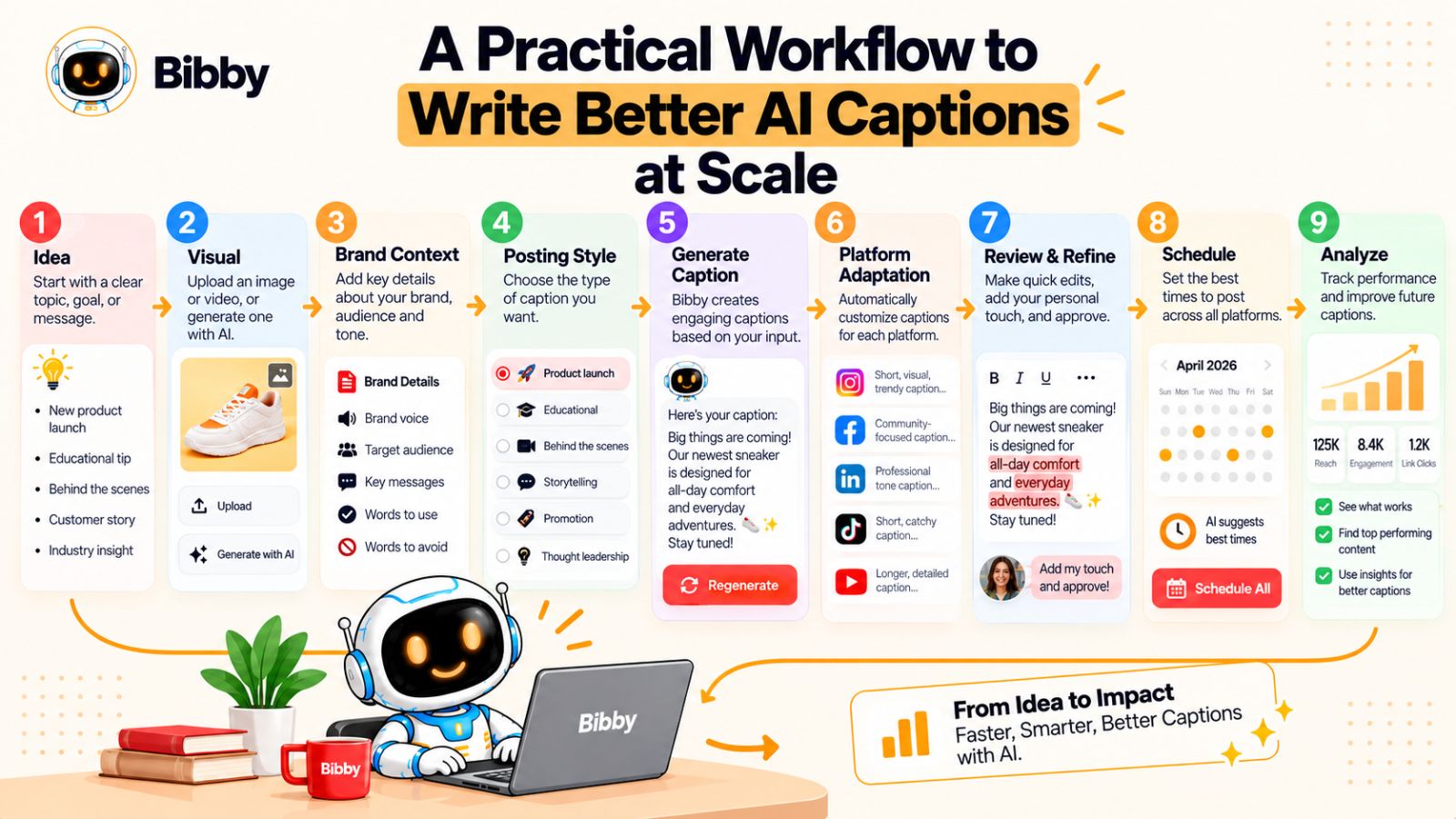
Step 1: Start With the Content, Not the Caption
Before opening an AI writing tool, identify what you're actually publishing.
That could be:
- A product image
- A carousel
- A short-form video
- A customer story
- A founder post
- An educational graphic
- A behind-the-scenes photo
- A product announcement
- A promotional campaign
The format matters because the caption should support the content rather than compete with it.
Don't begin with:
“What should I write?”
Begin with:
“What is this post trying to communicate?”
That one change can prevent a surprising amount of generic copy.
Step 2: Define the One Idea
Every post should have a reason to exist.
Write the idea in one sentence.
For example:
“Creating social content isn't usually the difficult part; remembering to publish it consistently is.”
Or:
“Our customers don't need more content ideas. They need a simpler way to turn existing ideas into scheduled posts.”
If you can't summarize the idea clearly, the AI probably won't improve the situation.
It will simply produce more words around the uncertainty.
Step 3: Add Your Brand Context
Now give AI the information that should remain consistent across posts.
This might include:
- Brand voice
- Target audience
- Content pillars
- Preferred vocabulary
- Words and phrases to avoid
- Typical CTA style
- Level of formality
- Platform preferences
- Examples of strong existing captions
This is where a reusable brand kit or brand profile becomes useful.
You shouldn't have to explain the entire personality of your company every time you create a post.
Set the foundation once, then focus on the unique information for each piece of content.
Step 4: Choose the Posting Style
Not every post should have the same structure.
You might want:
- Educational
- Storytelling
- Promotional
- Conversational
- Thought leadership
- Behind the scenes
- Product-focused
- Community-driven
Choosing the style first gives AI a clearer creative direction.
It also prevents your social feed from becoming a collection of posts that all use the same hook → explanation → CTA formula.
Variation should happen at the idea and format level, not just through random word changes.
Step 5: Generate the Caption
Now let AI do what it's good at.
Give it the visual, the idea, the audience, the brand context, and the desired style.
Then ask for a caption.
If the first draft is generic, don't immediately regenerate it ten times.
Identify what is missing.
Does it lack a specific detail?
Is the angle weak?
Is the voice wrong?
Is it describing the image instead of adding context?
Fix the input.
Then generate again.
Step 6: Adapt the Idea for Each Platform
Once you have a strong core message, adapt it rather than blindly duplicating it.
The same content might need different treatment on Facebook, Instagram, LinkedIn, YouTube, or TikTok.
That doesn't mean creating five completely unrelated pieces.
The central idea stays consistent.
The presentation changes.
For example, a LinkedIn version might explain the business lesson behind a post, while an Instagram version might focus more heavily on the visual and the audience's immediate reaction.
A TikTok post may need a short caption because the video itself carries most of the narrative.
The goal is platform-native adaptation without losing brand identity.
Step 7: Review Before Publishing
AI-generated doesn't mean automatically publishable.
Run a quick quality check:
Does it sound like us?
Is there a real idea here?
Is anything generic or unnecessary?
Does it add value beyond the visual?
Are the claims accurate?
Would we actually say this to a customer?
Is the CTA appropriate?
This review can take less than a minute once your standards are clear.
But it can make the difference between automation that feels useful and automation that feels obvious.
Step 8: Schedule the Content
Once the post is ready, scheduling should be the easy part.
A modern social media workflow can take the finished media and caption and distribute it across selected platforms, with different publishing dates and recommended publishing times.
That removes one of the least interesting parts of social media management: remembering to publish something you've already finished creating.
Tools such as Bibby combine this publishing workflow with AI-assisted content creation, caption generation, platform selection, and scheduling. Its conversational interface also allows tasks such as creating a brand kit, setting up campaigns, creating posts, and regenerating captions through chat.
The value of that kind of workflow isn't that it eliminates the need for judgment.
It's that it puts many of the repetitive steps in one place.
You can move from:
“Here's the content I want to publish.”
to:
“Here's the content, the message, the platforms, and the schedule.”
without rebuilding the process across several disconnected tools.
Step 9: Learn From What Gets Published
Publishing isn't the end of the workflow.
It's the beginning of the next iteration.
After your posts have had time to perform, look beyond simple reach.
Pay attention to:
- Which topics generated meaningful comments
- Which posts were saved
- Which hooks attracted attention
- Which formats produced useful engagement
- Which captions generated conversations
- Which ideas performed differently across platforms
Then feed those observations back into your content system.
If specific types of posts consistently work better, create more of those.
If certain caption patterns consistently fall flat, stop using them.
Your AI workflow should get more useful as your library of brand knowledge grows.
A Simple Weekly Workflow
You can even turn the process into a weekly routine.
Monday: Decide on the week's core ideas.
Tuesday: Create or collect the visuals.
Wednesday: Generate captions and platform adaptations.
Thursday: Review, edit, and approve.
Friday: Schedule upcoming content and review recent performance.
The exact days don't matter.
The principle does.
Separate creative thinking from repetitive execution wherever possible.
That gives you more time to think about what your audience actually needs rather than spending the majority of your social media time moving content between boxes.
The Goal Isn't Maximum Automation
This is worth emphasizing because “AI-powered social media” can easily become synonymous with “automate everything.”
That's not necessarily the goal.
The goal is to automate the parts that don't need your attention.
Let AI help with drafts.
Let software handle scheduling.
Let automation move content between platforms.
Let a system remember publishing times.
But keep your perspective.
Keep your stories.
Keep your opinions.
Keep the details that only your business knows.
That's what prevents your social media from becoming another stream of interchangeable AI content.
Scale the workflow. Don't scale the sameness.
The “Does This Sound Like Everyone Else?” Caption Checklist
Before you publish an AI-assisted caption, take thirty seconds to challenge it.
Don't ask whether it's grammatically correct.
Don't ask whether it contains a catchy hook.
Ask whether it sounds like something only your brand would publish.
Use this checklist.
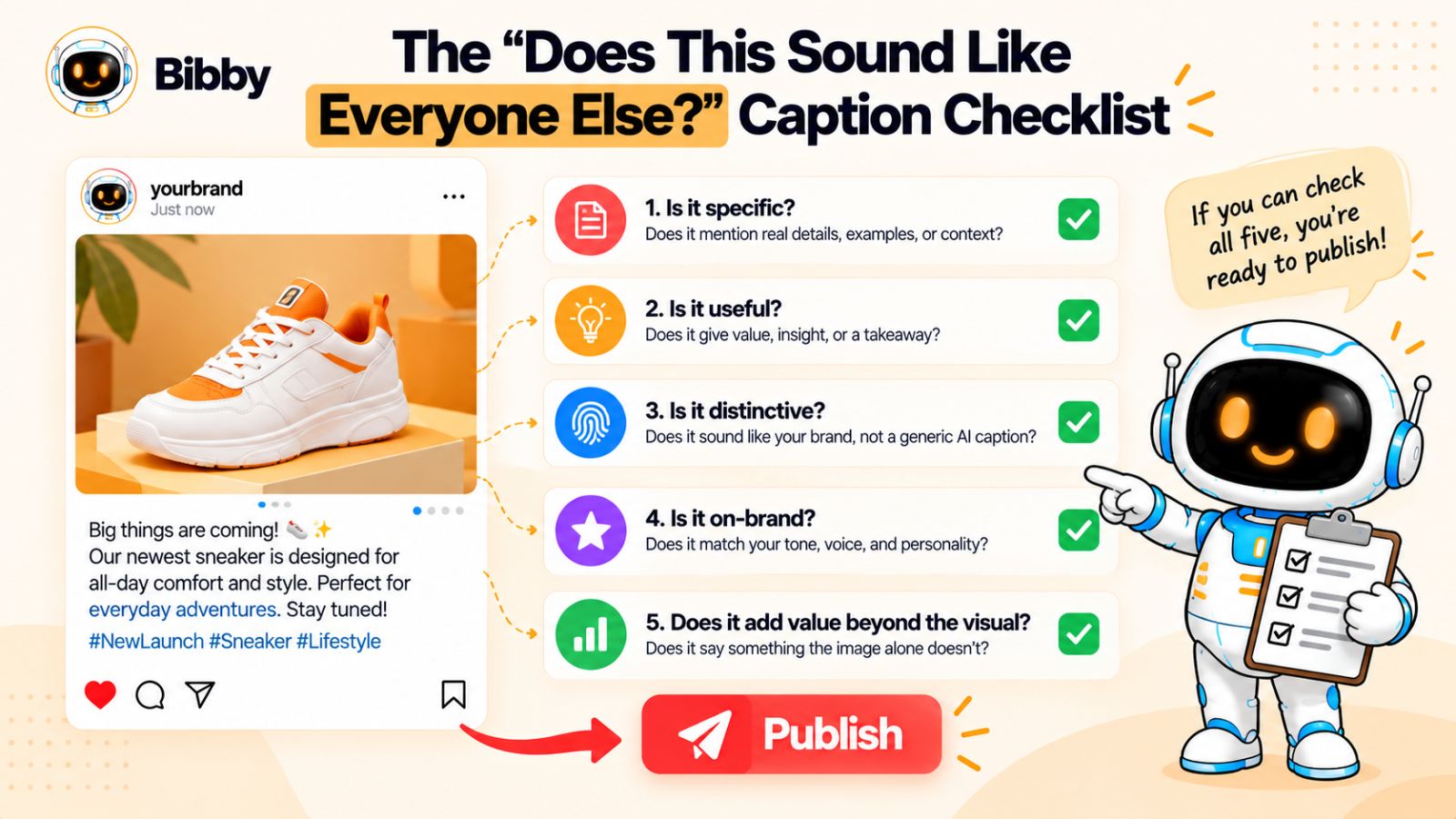
1. Could a Competitor Publish This Unchanged?
Remove your company name from the caption.
Now imagine it appearing on a competitor's account.
Would anything need to change?
If the answer is no, the caption probably needs a stronger point of view or more specific detail.
2. Does the First Sentence Contain an Actual Idea?
A hook doesn't have to be dramatic.
It just needs to give the reader a reason to continue.
Compare:
“Ready to transform your social media strategy?”
with:
“Your social media problem might not be a lack of content.”
The second sentence introduces an idea.
That's more useful than announcing that an exciting idea is coming.
3. Is There Something Specific Here?
Look for:
- Numbers
- Situations
- Examples
- Customer behavior
- Product details
- Observations
- Opinions
- Real experiences
If the caption could have been written without knowing anything about your business, there's probably not enough specificity.
4. Does It Sound Like Your Brand?
Read it aloud.
Would your founder say it?
Would your social media manager say it?
Would someone on your team recognize it as your company's writing?
If your brand is normally direct and the caption suddenly sounds like a motivational speaker, something went wrong.
5. Did AI Add Filler?
Look for sentences that exist mainly to connect other sentences.
Phrases such as:
“In today's fast-paced world…”
“In an ever-changing digital landscape…”
“It's important to remember…”
These aren't automatically wrong.
But if removing them doesn't change the meaning, remove them.
6. Is the Caption Saying Something the Visual Doesn't?
If the image already shows the product, don't spend the caption describing the product.
If the video already demonstrates the feature, don't spend the entire caption explaining what viewers just watched.
Add another layer.
Tell them why.
Tell them what happened before.
Give them an insight.
Share the lesson.
Challenge an assumption.
The caption should earn its place.
7. Is the CTA Actually Necessary?
Not every post needs:
“What do you think?”
Not every post needs:
“Comment below.”
Not every post needs:
“Follow for more.”
If the CTA doesn't serve the post, remove it.
A useful call to action should feel like the natural next step—not an obligatory final sentence.
8. Does It Use AI Clichés?
Look for patterns rather than obsessing over individual words.
Is the caption full of:
- “Unlock”
- “Transform”
- “Elevate”
- “Game-changing”
- “Powerful”
- “Seamless”
- “Revolutionary”
- “Take it to the next level”
One of these words doesn't automatically make a caption bad.
A caption that relies on them instead of explaining something specific probably needs another pass.
9. Does It Sound Overwritten?
Sometimes the problem is not generic language.
It's too much language.
A caption may take 150 words to communicate something that needs 40.
Cut it.
Then read it again.
If the important idea survived, you've improved it.
10. Would You Remember It Tomorrow?
This is the hardest test.
After reading the caption, what does the audience actually remember?
If the answer is:
“It was about improving social media.”
that's probably not enough.
If the answer is:
“They said the real problem isn't creating content—it's remembering to publish it later.”
now there's an idea attached to the brand.
That's what you're looking for.
The 30-Second Version
If you don't have time for the full checklist, ask five questions:
Is it specific?
Is there a real idea?
Does it sound like us?
Does it add something beyond the visual?
Could another brand publish it unchanged?
If you can answer those five questions honestly, you'll catch many of the problems that make AI captions feel generic.
And there's an important pattern behind all of them.
The strongest captions aren't necessarily the ones with the cleverest hooks or the most sophisticated prompts.
They're the ones with something worth saying.
AI can help you say it faster.
It can't decide what your brand has to say unless you give it the substance to work with.
That is the difference between using AI to generate social media captions and using AI to help you create social media content people actually recognize.
Conclusion
AI isn't the reason your social media captions sound like everyone else's.
The bigger problem is giving AI the same vague instructions, generic topics, and broad brand descriptions that everyone else gives it.
If you want to write better AI captions, start with three things: give AI a specific idea worth communicating, give it enough context to understand your audience and brand voice, and build a workflow that automates repetitive publishing without automating your perspective.
The goal isn't to make AI sound human for the sake of it. It's to make your content specific enough, useful enough, and recognizable enough that the technology disappears behind the message.
And you don't have to choose between quality and scale. With the right workflow, AI can help turn one strong idea into platform-specific posts, captions, formats, and scheduled content while you stay responsible for the thinking that makes the content worth publishing.
The natural next step is to make that voice easier for AI to reproduce consistently.
Next, learn how to build a brand voice guide that AI can actually use—so every caption can sound like your brand without sounding exactly the same.