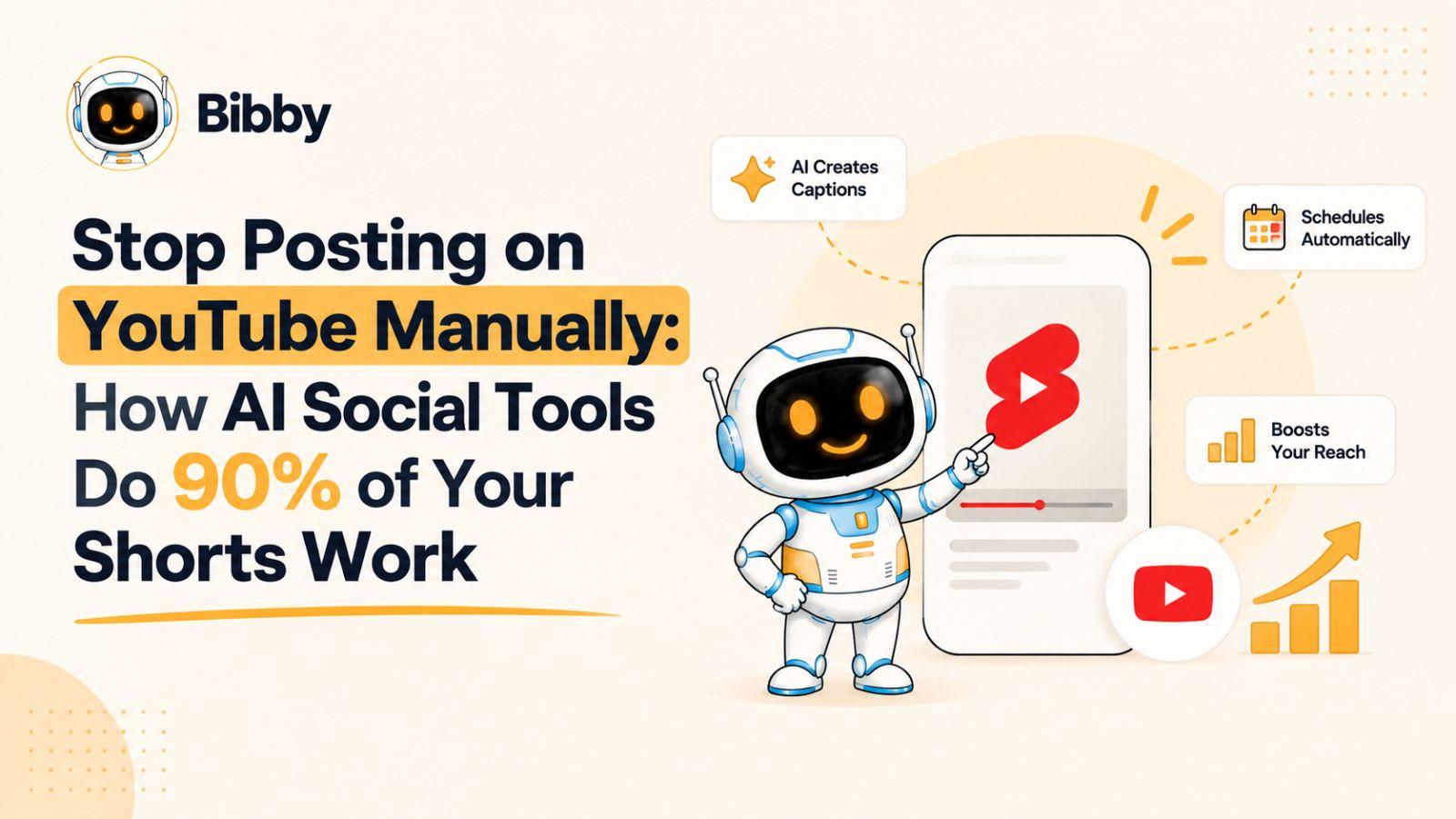
Posting a YouTube Short takes minutes; turning that Short into consistent, cross-platform social content can take hours.
If you are still uploading Shorts manually, writing captions from scratch, and scheduling the same content separately for YouTube, Instagram, Facebook, LinkedIn, and TikTok, you are spending valuable time on work AI can now handle. Modern AI social media tools can automate much of the repetitive workflow—from generating captions and visuals to scheduling content at optimized times—so you can focus more on creating and less on publishing.
The key is knowing which parts of your social media workflow to automate and where human creativity still matters.
Why Manually Posting YouTube Shorts Doesn't Scale
Creating a YouTube Short is only one part of the job. Once the video is ready, you still have to upload it, write a description or caption, add relevant details, choose when to publish it, and repeat the process for every other platform where your audience spends time.
That workflow might feel manageable when you publish a few times per week. But as your content output increases, manual publishing quickly becomes one of the most repetitive parts of social media management.
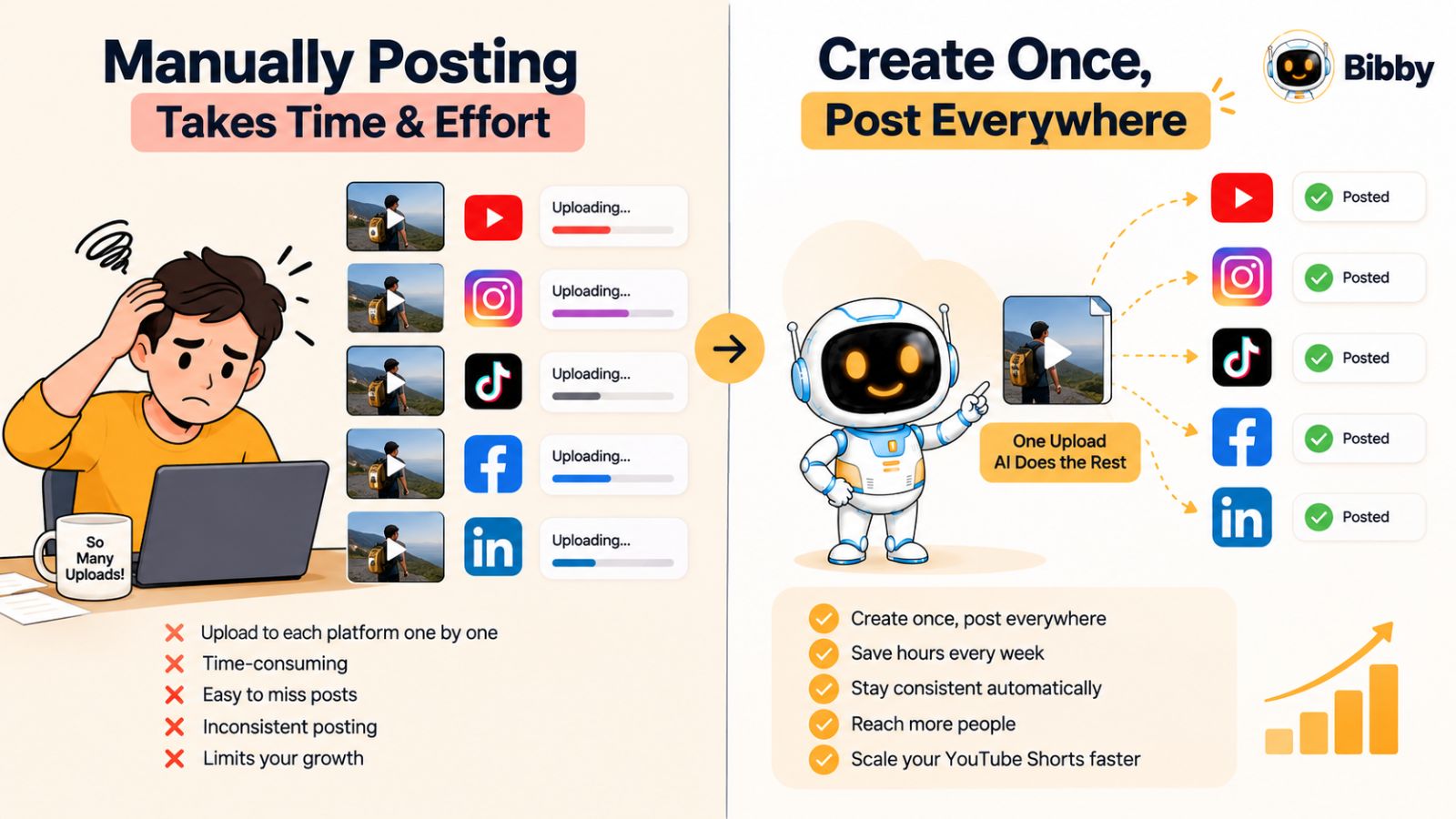
One Short Can Become Five Separate Publishing Tasks
Suppose you create one 30-second video.
You might want that same piece of content to reach people on YouTube, Instagram, TikTok, Facebook, and LinkedIn. Instead of one publishing task, you now have several:
- Upload the video to YouTube.
- Prepare the title, description, and other publishing details.
- Upload and prepare the Instagram version.
- Upload the TikTok version.
- Publish or schedule the Facebook version.
- Adapt the content for LinkedIn.
- Write captions or descriptions for each platform.
- Decide when each version should go live.
- Repeat the process for your next piece of content.
The content itself may have taken 30 minutes to create. Distribution can then consume another significant block of time.
This is the problem AI social media automation is designed to solve.
The Hidden Cost Isn't Just Time
Manual social media publishing creates another problem: inconsistency.
When publishing depends entirely on someone remembering to upload content at the right time, schedules can slip. A creator might have ten videos ready but publish only two because distributing them across multiple platforms becomes too tedious.
The result is a familiar cycle:
Create → manually upload → write → schedule → repeat → get busy → stop posting consistently.
The more platforms you manage, the more noticeable this problem becomes.
Social media scheduling tools have existed for years, but traditional schedulers still require you to prepare much of the content yourself. You may still need to write captions, choose publishing times, upload media, and organize individual posts.
AI changes that workflow by helping with the work that comes before scheduling.
The Goal Isn't to Automate Creativity
There is an important distinction here.
AI social media automation shouldn't mean handing your entire content strategy to a machine and publishing whatever it generates. Your ideas, expertise, brand voice, and creative direction still matter.
The opportunity is to automate the repetitive execution surrounding those ideas.
You create the content—or use AI to help create it—and an AI-powered social media tool can take care of much of what happens afterward.
That can include generating captions, preparing different types of posts, organizing campaigns, selecting publishing times, and distributing content across multiple platforms.
Instead of spending your time acting as the person who clicks Publish repeatedly, you can spend it deciding what deserves to be published in the first place.
And that is where AI social media scheduling becomes much more interesting than simply putting posts on a calendar.
What an AI Social Media Scheduler Actually Does
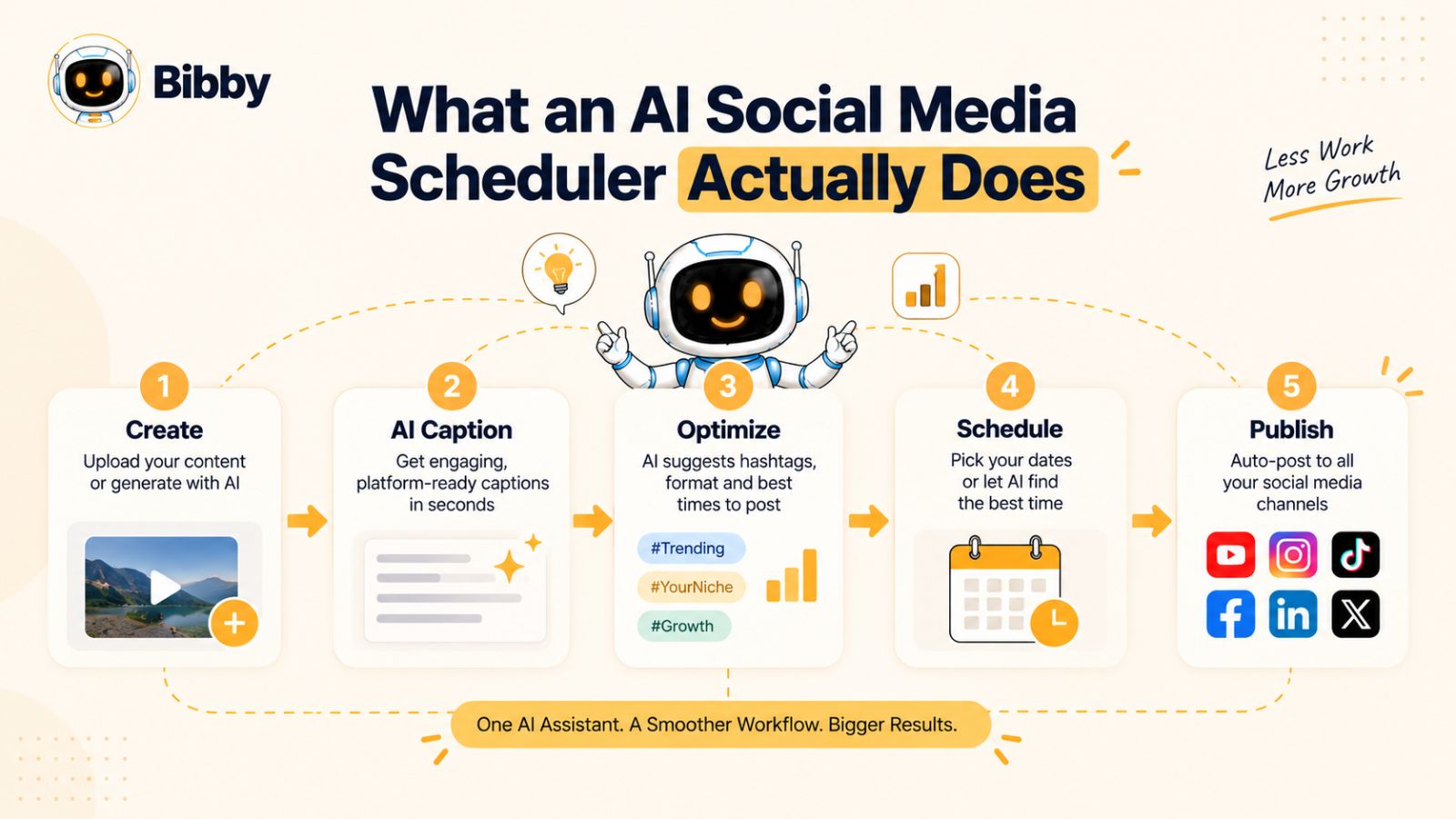
An AI social media scheduler combines traditional publishing automation with artificial intelligence. Instead of simply letting you choose a date and time for a post, it can help create, adapt, organize, and schedule social media content with less manual work.
That distinction matters.
A traditional social media scheduler answers a relatively simple question: “When should this post be published?”
An AI social media scheduler can help answer a much broader set of questions:
- What should the caption say?
- Which type of post should I create?
- When should it be published?
- Which social platforms should receive it?
- How should the content be adapted for each platform?
- How can multiple pieces of content be organized into a campaign?
- What repetitive publishing tasks can be automated?
The result is a workflow that moves beyond scheduling and toward AI-assisted social media management.
Scheduling, Automation, and AI Are Different
These three terms are often used interchangeably, but they describe different levels of assistance.
Social media scheduling means preparing a post and selecting when it should be published. You still do most of the work manually.
Social media automation goes a step further by automatically handling repetitive actions, such as publishing posts according to a predefined schedule.
AI social media automation adds intelligence to that process. The software can help generate captions, create or modify visual content, organize posts, suggest publishing times, and support other decisions that previously required manual input.
This means the workflow can look more like:
Create → AI assists → Review → Schedule → Publish automatically
rather than:
Create → Upload → Write → Schedule → Repeat manually
AI Can Handle More Than Captions
One of the biggest misconceptions about AI social media tools is that they are essentially caption generators with a calendar attached.
Modern platforms can cover a much larger part of the content workflow.
For example, you may start with an image or video and use AI to help turn it into a social post. You can generate captions, select a publishing style, prepare different types of media, and organize content for several social networks.
Some tools can also help with AI image generation, campaigns, brand guidelines, and content planning.
This is particularly useful for creators and businesses that already have plenty of content but struggle to distribute it consistently.
AI-Optimized Timing Reduces Another Manual Decision
Choosing when to publish is another repetitive task that can become difficult when you manage several platforms.
You could manually research when your audience is active, create a publishing calendar, and adjust it over time. Or an AI-powered tool can use available data and scheduling logic to help determine appropriate publishing times.
The objective isn't simply to fill a calendar.
It is to create a consistent publishing system without requiring you to manually decide the timing of every individual post.
For someone publishing one or two pieces of content occasionally, that may not seem significant. For a creator publishing dozens of posts, videos, carousels, or Stories every month, eliminating those small decisions can save substantial time.
The Bigger Shift: From Scheduler to AI Social Media Manager
This is where tools such as Bibby fit into the broader evolution of social media software.
Instead of treating social media as a collection of individual posts, Bibby is designed around a workflow where you can upload an image or video, generate an image with AI, choose a posting style, and let the platform generate captions and schedule your content across selected social networks.
You can work with different content formats—including images, carousels, videos, and Stories—and manage distribution across platforms such as Facebook, Instagram, LinkedIn, YouTube, and TikTok.
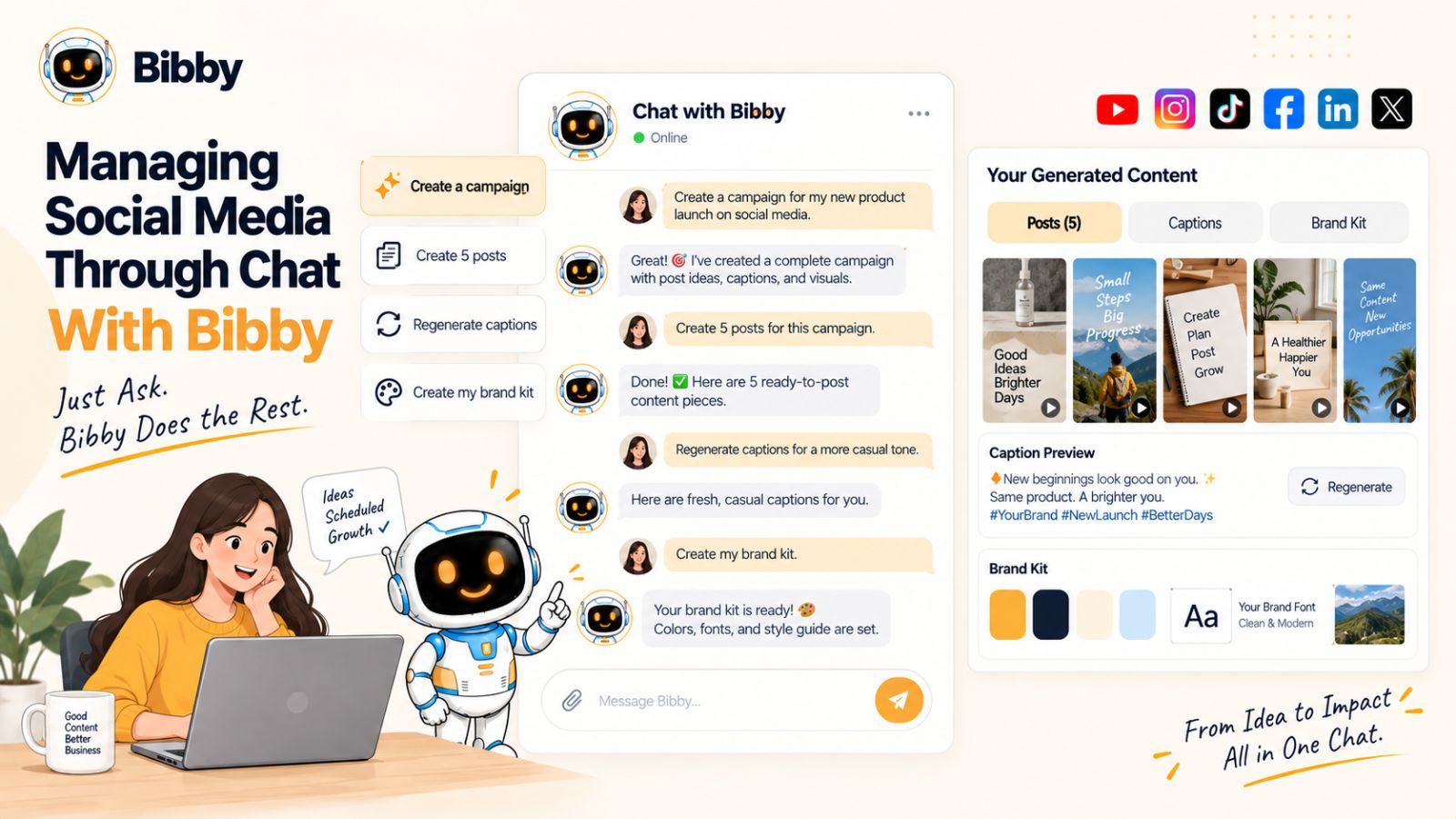
Bibby also brings a conversational layer to social media management. Instead of navigating through every individual setting, you can use its chat interface to perform tasks such as creating a brand kit, building a campaign, creating posts, or regenerating captions.
That changes the role of the scheduler.
You are no longer simply telling software “publish this post on Friday.”
You are increasingly telling an AI system “help me manage this part of my social media workflow.”
The next question is how much of the actual YouTube Shorts workflow can realistically be handed over to AI.
Can AI Really Do 90% of Your Shorts Workflow?
“90% automated” sounds impressive, but what does it actually mean?
It doesn't mean an AI tool should independently decide your entire content strategy, create every video, and publish everything without supervision. The more useful interpretation is that AI can take over a large percentage of the repetitive operational work surrounding your content.
Think about everything that happens after you have an idea for a Short.
You may need to create the video, prepare the media, write captions, choose platforms, decide publishing times, schedule the posts, and repeat the process for every piece of content.
Not every task needs to be automated.
But many of them can be.
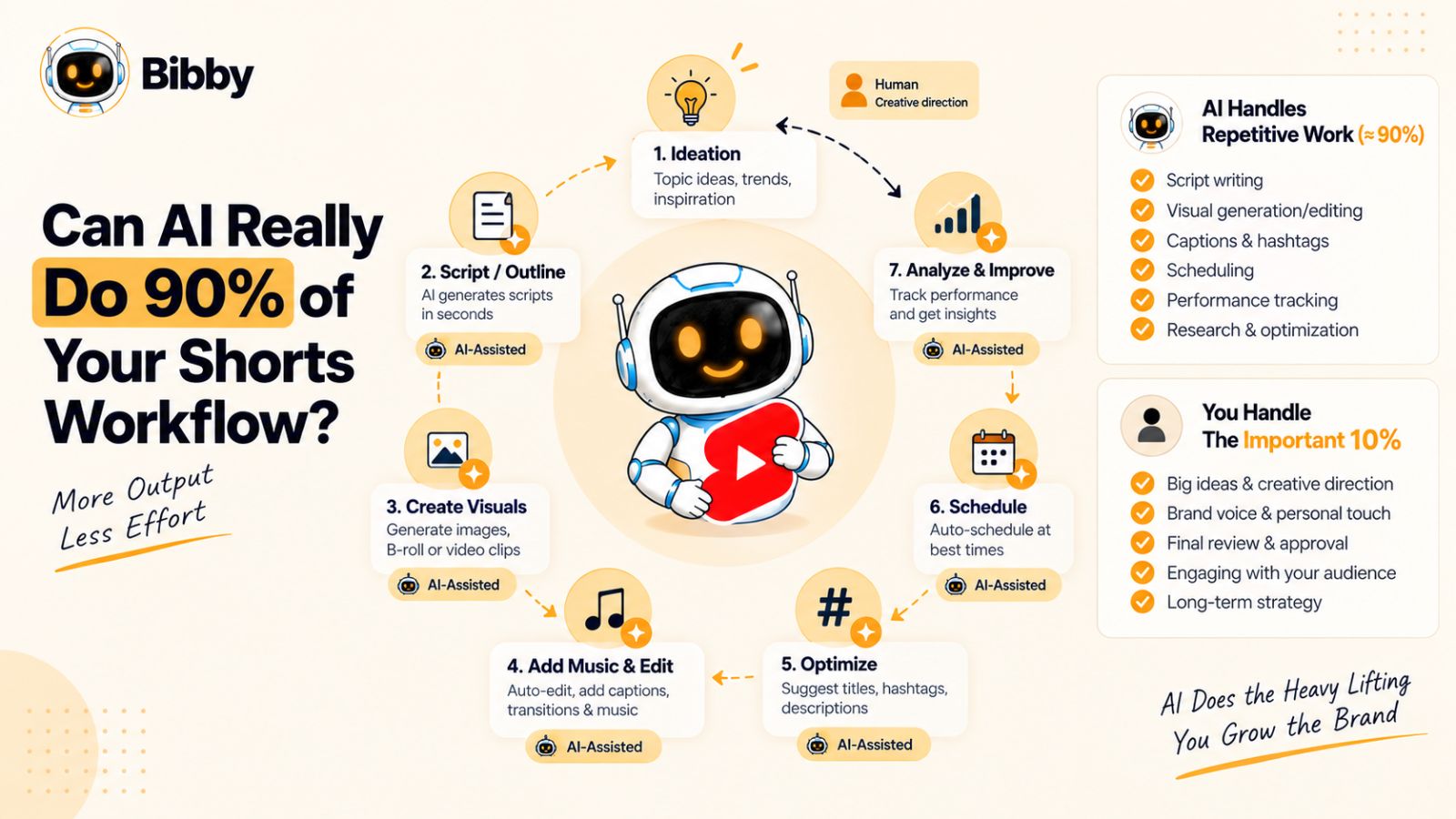
Break the Workflow Into Individual Tasks
A typical Shorts distribution workflow looks something like this:
| Task | Manual effort | Potential for AI assistance |
|---|---|---|
| Content idea | High | Medium |
| Video creation | High | Medium to High |
| Image generation | Medium | High |
| Caption writing | Medium | High |
| Content variations | Medium | High |
| Platform selection | Medium | Medium |
| Scheduling | Medium | High |
| Publishing | Low to Medium | High |
| Campaign organization | Medium | High |
| Brand consistency | High | Medium to High |
| Performance analysis | Medium | High |
The important insight is that automation doesn't have to replace the creative part of the job to eliminate most of the repetitive work.
If you already have the video, for example, an AI social media tool can potentially handle much of everything that comes after it.
Where AI Can Save the Most Time
Caption creation is an obvious example.
Instead of opening a separate document, writing a caption, editing it, copying it into a scheduler, and repeating the process for another platform, an AI tool can generate a starting point from your content and chosen posting style.
The same principle applies to visual content.
If you need an image to accompany a campaign, AI image generation can remove the need to start every visual from a blank canvas. You can then review the result and decide whether it fits your brand.
Scheduling is another major opportunity.
Rather than maintaining a spreadsheet of publishing dates and manually entering every post into several platforms, an AI-powered scheduler can organize the content and automatically publish it according to the schedule.
This is where the cumulative time savings become significant.
One Video Can Become an Entire Content Workflow
Imagine you have created a 45-second educational YouTube Short.
Instead of treating it as one isolated upload, you can turn it into a broader distribution opportunity.
The workflow could look like this:
YouTube Short → Instagram video → TikTok post → Facebook video → LinkedIn post → supporting image → follow-up content
The core idea remains the same, but the distribution becomes much broader.
An AI social media tool can help generate the accompanying copy, organize the content, and schedule the resulting posts rather than requiring you to manually recreate the workflow each time.
This is the real value of automation.
You aren't necessarily creating more content.
You're getting more distribution from the content you already created.
What Still Needs a Human
The strongest AI workflow isn't completely hands-off.
Your audience, positioning, expertise, and brand voice still need human direction.
You should decide what topics matter to your audience. You should review important campaigns. You should make sure AI-generated captions don't introduce inaccurate claims. And you should retain control over content that could affect your brand reputation.
AI is particularly effective at repetitive execution.
Humans are still valuable for context, judgment, originality, and strategy.
That creates a much more realistic model:
Human strategy + AI execution + human review.
For many creators and businesses, that combination can remove the majority of the tedious work without turning their social media presence into generic automated content.
The 90% Isn't a Magic Number
The exact percentage will vary depending on your workflow.
Someone who creates every video from scratch and requires extensive editing will automate less than someone who already has a library of finished Shorts.
Likewise, a creator publishing twice a month has less repetitive work to eliminate than a brand publishing multiple pieces of content every day.
So “90%” should be understood as a workflow goal, not a universal measurement.
The real question is simpler:
How many repetitive steps between creating your content and getting it published can you remove?
With the right AI Social Media Workflow, the answer can be surprisingly large.
The Modern AI Social Media Workflow
The biggest advantage of an AI social media tool isn't one individual feature. It's what happens when several time-consuming tasks are connected into a single workflow.
Instead of creating content in one application, generating captions somewhere else, keeping a publishing calendar in a spreadsheet, and manually uploading everything to each social network, an AI-powered workflow can bring those steps together.
A modern workflow can look like this:
Create or upload → Choose your style → Generate → Schedule → Publish → Review
The exact process varies between tools, but the principle is the same: remove unnecessary manual steps between having content and distributing it.
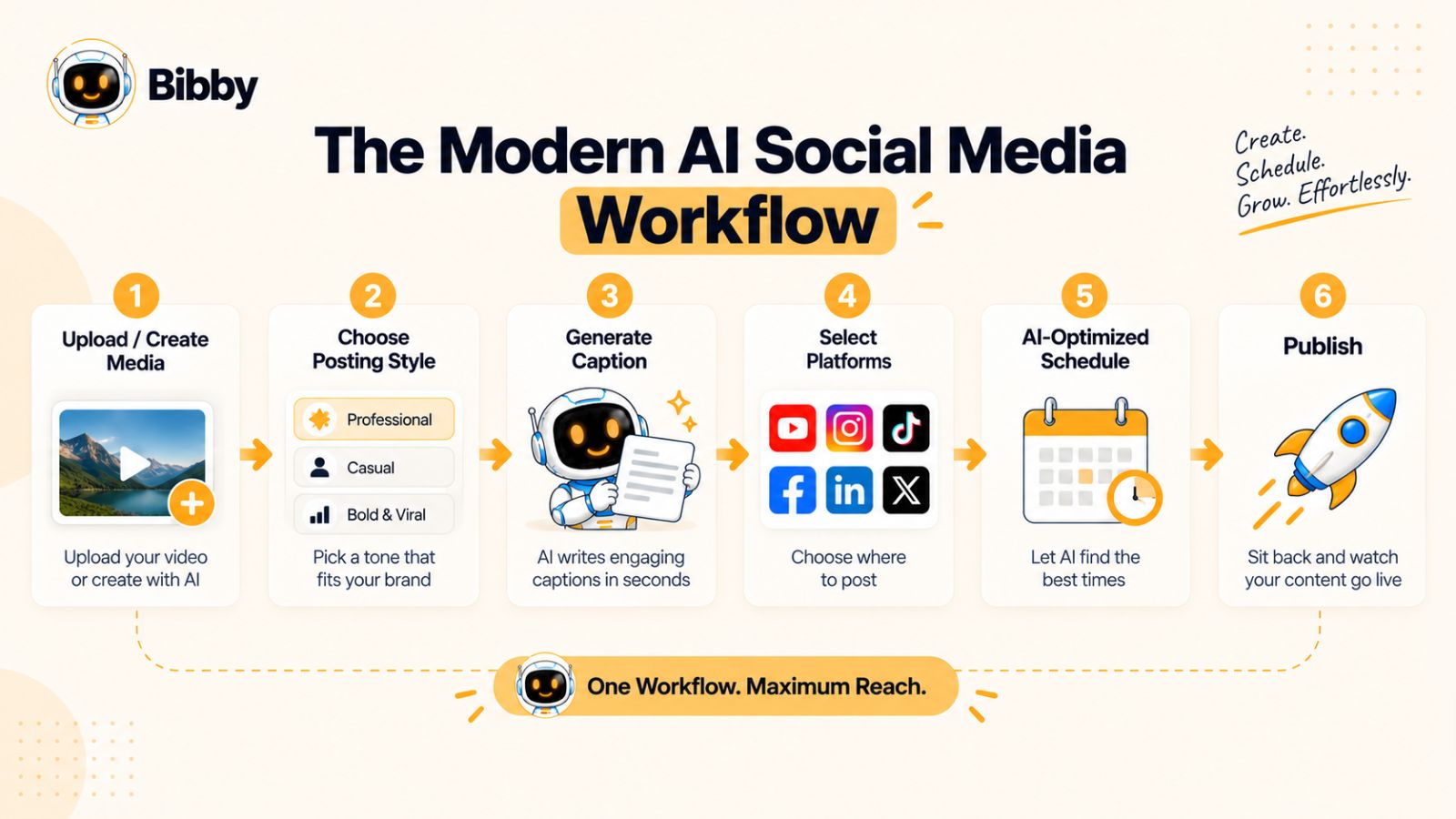
Step 1: Create or Upload Your Content
Everything starts with the content.
You might already have a finished YouTube Short, product video, photograph, promotional graphic, or carousel. Alternatively, you may want to generate an image with AI before creating the social post.
This flexibility matters because not every social media workflow starts with a video.
A business might have product images. A creator might have a collection of Shorts. A consultant might have a written idea that needs to become a visual post.
The AI workflow should accommodate the content you already have rather than forcing you to rebuild everything from scratch.
Step 2: Choose the Posting Style
Once the media is ready, the next step is deciding how you want the post to communicate.
Your posting style can influence the tone, structure, and messaging of the resulting content.
For example, a brand might want content that is educational and direct. Another might prefer conversational posts designed to encourage discussion.
This is more useful than generating a completely random caption every time because the AI has a defined direction to work within.
Step 3: Let AI Generate the Caption
Writing captions individually can become one of the biggest bottlenecks in a high-volume publishing workflow.
An AI social media tool can use your media and selected style to generate a caption automatically.
You can then review it, make changes, or regenerate it when the result doesn't match what you want.
The important difference is that you're starting with a usable draft rather than an empty text box.
That small change can dramatically reduce the friction involved in publishing consistently.
Step 4: Select Your Platforms
The next decision is distribution.
Instead of uploading the same content separately to every social network, you can select the platforms you want to target as part of the publishing workflow.
Depending on your strategy, that could include:
- YouTube
- TikTok
Not every piece of content needs to appear everywhere. The point is that the distribution decision can happen in one workflow rather than requiring separate uploads to multiple platforms.
Step 5: Schedule at AI-Optimized Times
Once your content and platforms are selected, scheduling becomes the final operational step.
Rather than manually choosing a date and time for every post, AI-powered scheduling can help determine appropriate publishing times based on available signals and the tool's scheduling logic.
This is particularly useful when your content library is larger than what you can reasonably publish manually.
You can prepare content in advance and allow the system to distribute it according to the schedule.
The benefit isn't simply convenience.
It creates consistency.
Your social media accounts can continue publishing even when you are working on your next video, serving customers, running a business, or simply away from your computer.
Step 6: Publish Across Your Content Formats
An effective social media workflow shouldn't be limited to Shorts.
A modern social presence can include:
- Images
- Carousels
- Videos
- YouTube Shorts
- Stories
- Promotional posts
- Educational posts
- Campaign content
Having these formats inside the same workflow means you don't need a separate system for every type of media.
This is particularly valuable for businesses because a social media calendar rarely consists of one format alone.
Step 7: Review Instead of Rebuild
Automation works best when it removes repetitive execution rather than removing human oversight.
Before important content goes live, you can review the generated caption, visual, platform selection, and campaign context.
If something doesn't sound right, change it.
If the caption isn't strong enough, regenerate it.
If the content needs a different angle, adjust the posting style.
The AI does the repetitive work. You remain in control of the final output.
The Result Is a Different Way of Working
The traditional social media workflow is built around individual posts.
The AI-assisted workflow is built around content systems.
You create content once, prepare it for distribution, and let automation handle much of the repetitive publishing process.
That difference becomes even more important when you stop thinking about YouTube Shorts as a single-platform format and start treating each Short as an opportunity to build a cross-platform content campaign.
Why Cross-Platform Publishing Matters More Than YouTube Alone
YouTube Shorts can be an important part of a social media strategy, but treating Shorts as a YouTube-only format leaves distribution opportunities on the table.
The same short-form video can often be adapted for other platforms where your audience already spends time. Instead of creating completely different content for every network, you can build a cross-platform social media workflow around the content you already have.
This is one of the biggest reasons AI social media scheduling tools are becoming more useful.
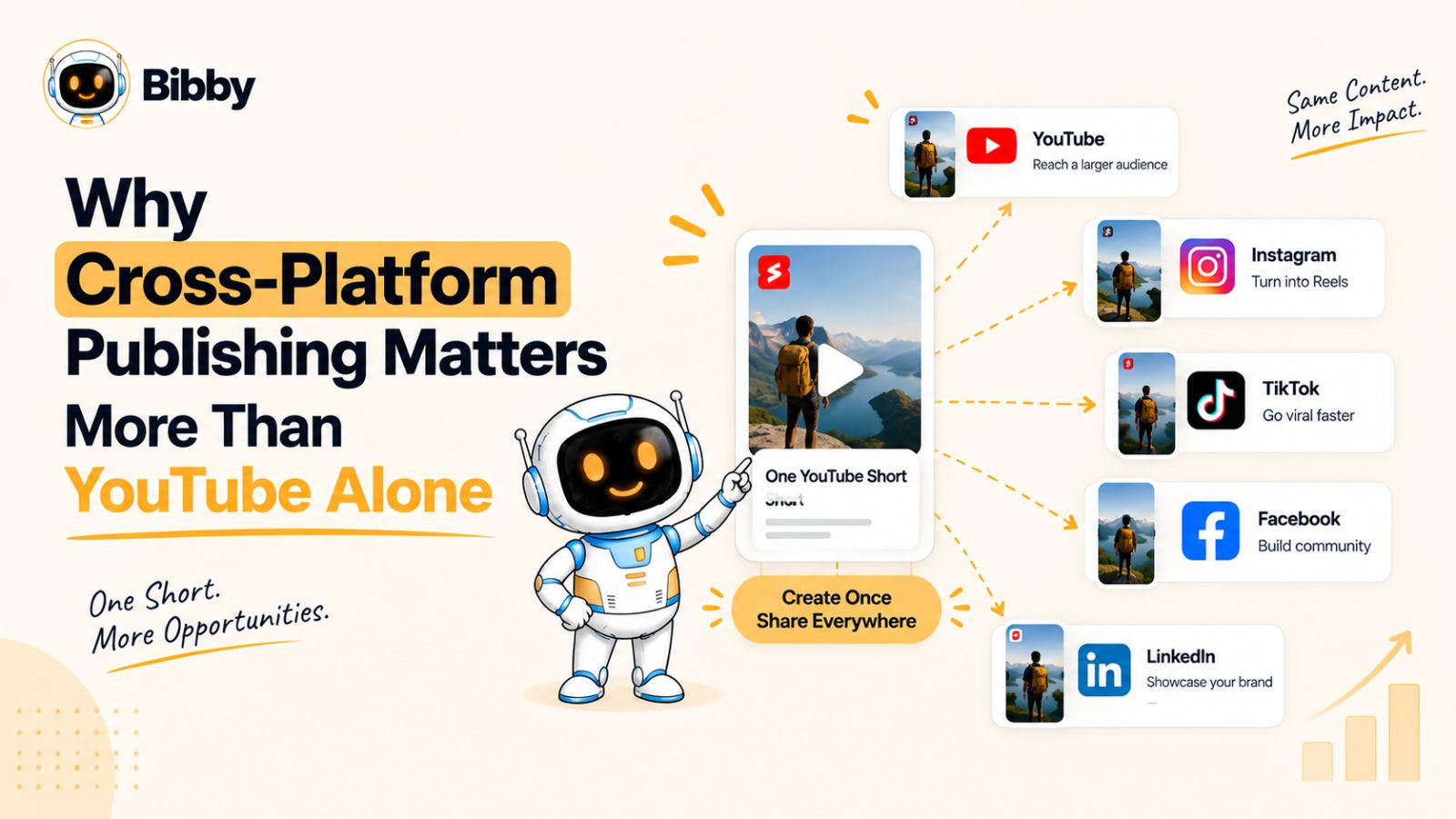
One Piece of Content Can Have Multiple Distribution Paths
Imagine you've spent an hour creating a short educational video.
Publishing it only on YouTube means that one piece of work has one primary distribution channel.
A cross-platform strategy might distribute that content through:
- YouTube Shorts
- TikTok
The exact platforms should depend on where your audience is active and what type of content you create.
The important concept is content repurposing.
You don't necessarily need five completely different ideas.
You can start with one strong idea and adapt it into multiple pieces of social content.
YouTube Shorts
YouTube Shorts are designed for short-form video discovery within YouTube.
A creator might use Shorts to explain an idea, demonstrate a product, answer a common question, share a quick tutorial, or introduce viewers to longer-form content.
Once the Short is created, however, there is no reason to assume the work is finished.
The same underlying idea may be useful elsewhere.
Instagram provides several ways to distribute visual content, including short-form video, images, carousels, and Stories.
A Short can therefore become part of a broader Instagram content strategy rather than existing as an isolated video.
For example, the video could become the primary post while an accompanying image or carousel expands on the topic.
The goal isn't to blindly duplicate everything.
It's to make better use of the content you've already produced.
TikTok
TikTok is another natural destination for short-form video.
If the content is appropriate for the platform, distributing a Short there can expose the idea to another audience without requiring you to develop an entirely new concept.
This is particularly valuable for educational, entertainment, product, and commentary-based content where the underlying idea isn't dependent on a single platform.
Facebook can provide another distribution channel for video, images, carousels, and other social content.
For businesses with established Facebook audiences, automatically including Facebook in a broader publishing workflow can reduce the temptation to treat it as an afterthought.
Instead of remembering to publish there later, it can be part of the original distribution plan.
LinkedIn is particularly interesting for professional, educational, B2B, and founder-led content.
Not every YouTube Short belongs on LinkedIn. But a business-related video can often be reframed around the lesson, insight, or professional problem behind the original content.
For example, a 45-second video about a marketing mistake could become a LinkedIn post explaining the lesson in more detail.
This is an important distinction:
Cross-platform publishing does not have to mean identical publishing.
The idea can remain consistent while the presentation changes.
The Problem With Manually Repurposing Everything
The theory sounds simple until you try to do it every day.
For every piece of content, someone has to remember:
- Which platforms should receive it?
- What caption should accompany it?
- When should it be published?
- Does the format work on each platform?
- Has it already been published?
- What should be posted tomorrow?
- What happens if there are 20 more pieces of content waiting?
At a small volume, you can manage this manually.
At scale, it becomes an operational problem.
This is where social media scheduling and automation software becomes valuable.
AI Turns Repurposing Into a Repeatable System
An AI social media tool can help turn cross-platform distribution into a repeatable workflow.
Instead of opening five different platforms after creating every video, you can prepare the content once and manage its distribution from a central system.
For example, with a tool such as Bibby, you can upload your media or generate an image with AI, choose your posting style, generate captions, select your social platforms, and schedule the content.
The same workflow can accommodate different media types, including images, carousels, videos, and Stories.
That means your content calendar can become more than a collection of YouTube uploads.
It can become a centralized social media distribution system.
Create Once, Distribute Strategically
The objective isn't to publish identical content everywhere simply because automation makes it possible.
Good cross-platform marketing still requires judgment.
Some content belongs on every platform. Some should be adapted. Some should remain exclusive to a particular audience.
AI automation gives you the ability to execute those decisions efficiently.
Instead of asking, “How do I manually post this video five times?”
You can start asking a more useful question:
“Where should this content appear, and how can I distribute it with the least repetitive work?”
That shift—from manual posting to strategic distribution—is where AI social media automation starts becoming a genuine productivity tool rather than just another scheduling calendar.
How Bibby Turns Social Media Scheduling Into an AI Workflow
Most social media scheduling tools are built around a calendar.
You create the post, write the caption, choose a date, and place it on the calendar. That solves one problem—publishing—but leaves much of the work surrounding the post in your hands.
Bibby approaches the workflow differently.
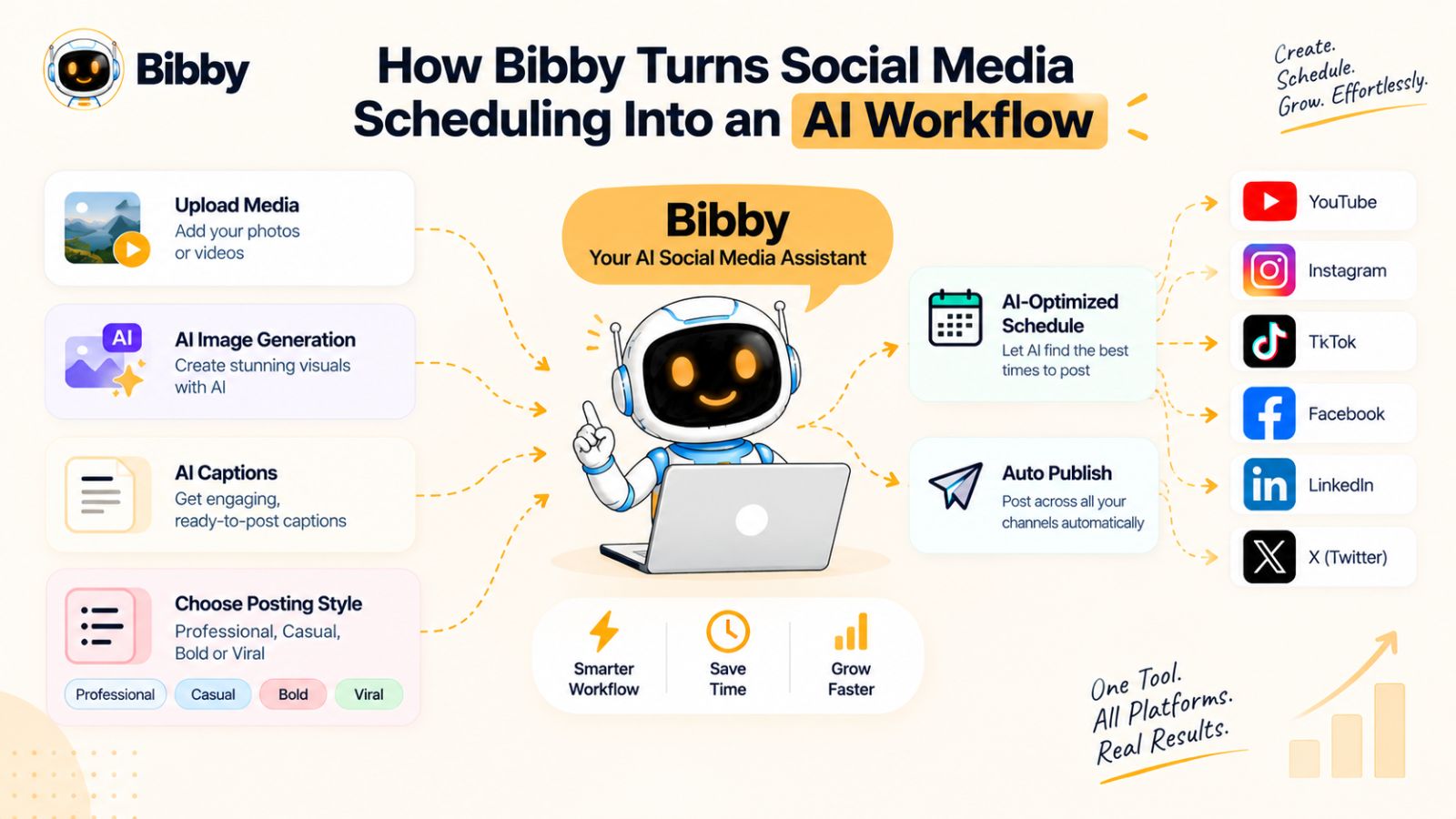
Instead of making you manage every step separately, Bibby combines content creation, AI assistance, caption generation, scheduling, and multi-platform publishing into one social media workflow.
The idea is simple: give the AI the content and direction, then let it handle much of the repetitive work.
Start With an Image, Video, or AI-Generated Visual
Your workflow can begin with content you already have.
Upload an image or video, or generate an image with AI when you need a new visual for your social media content.
This means you don't have to change your entire creative process just to use an automation tool.
If your team already has a library of product photos, promotional videos, YouTube Shorts, graphics, or other social assets, those can become the starting point for your publishing workflow.
You can also create new visual content when needed.
Choose Your Posting Style
Once your media is ready, you can select the posting style you want to use.
This gives the AI context for how the content should be presented instead of asking it to generate a completely generic caption.
A social media post for an educational brand might need a different approach from a product announcement, founder post, promotional campaign, or community-focused update.
Giving the system a defined style helps turn AI generation into a more repeatable process.
Let AI Generate the Caption
Writing captions is one of those tasks that seems insignificant until you have to do it dozens of times.
Bibby can generate captions automatically based on your content and chosen posting style.
If the first version isn't right, you can regenerate it rather than starting from a blank page.
This creates a much faster editing workflow:
Generate → Review → Regenerate or edit → Schedule
You still have control over the final post, but you don't have to spend your time staring at an empty caption field.
Schedule Multiple Platforms From One Workflow
Once the post is ready, you can select the platforms where you want to publish it.
Bibby supports social media distribution across platforms such as:
- YouTube
- TikTok
This matters because managing each platform individually creates unnecessary operational work.
Instead of remembering to return to every network and publish the same campaign manually, you can organize the distribution through one workflow.
Let AI Optimize Publishing Times
Scheduling isn't only about choosing a date.
Timing can also influence when your audience encounters your content.
Bibby can schedule media at AI-optimized times, allowing you to prepare content in advance while the system handles the timing of publication.
This is particularly useful for creators and businesses operating at higher content volumes.
You can prepare a batch of content without having to manually assign a publishing time to every individual post.
More Than YouTube Shorts
Although YouTube Shorts can be an important part of the workflow, Bibby isn't limited to short-form video.
You can use the platform to manage different social media formats, including:
- Images
- Carousels
- Videos
- Stories
- Other social posts and campaign content
That makes it possible to build a complete social media calendar rather than a Shorts-only publishing system.
For example, a business could prepare a product video, several supporting images, an educational carousel, and Stories, then organize them into a broader campaign.
From Individual Posts to Campaigns
This is where the workflow becomes more interesting.
A social media strategy isn't simply a collection of unrelated posts. Posts often belong to campaigns, product launches, educational series, promotions, or recurring content themes.
Bibby can help organize this type of activity so that content creation and distribution are treated as connected parts of the same process.
Instead of thinking:
“I need to publish today's post.”
You can think:
“I need to execute this week's campaign.”
That distinction becomes increasingly important as a brand's content operation grows.
The Goal Is to Give You Your Time Back
The value of an AI social media scheduler isn't that you never have to look at social media again.
The value is that you stop spending your time on tasks that don't require your attention.
You shouldn't need to manually copy captions between platforms, repeatedly upload the same media, maintain a separate spreadsheet for every publishing date, or remember to schedule every post individually.
Bibby handles much of that repetitive workflow while you retain control over the content and strategy.
And there is another layer to this approach that makes the workflow even more interesting: you can now manage social media through conversation instead of navigating every part of the interface manually.
Managing Social Media Through Chat With Bibby
Traditional social media software makes you navigate through menus.
You open the content calendar, create a post, upload media, write a caption, choose a platform, select a date, and repeat the process whenever you need to make another change.
A conversational AI interface introduces a different way to manage that workflow.
Instead of figuring out where a particular setting lives, you can describe what you want to accomplish and use the AI interface to help execute the task.
This is the direction Bibby is taking with its chat-based social media management experience.
Your Social Media Tool Becomes Conversational
Imagine opening your social media platform and typing a request instead of navigating through several screens.
You could ask the system to help create a campaign, generate a post, regenerate a caption, or work with your brand information.
The interaction becomes closer to communicating with a social media manager than operating a traditional scheduling dashboard.
That doesn't eliminate the need for strategy.
It reduces the amount of software operation required to execute the strategy.
Create a Brand Kit Through Chat
Brand consistency becomes increasingly difficult when content volume increases.
A brand may have preferred language, visual direction, tone, messaging principles, and other guidelines that need to remain consistent across dozens of posts.
A brand kit provides a central reference for those decisions.
With Bibby's chat interface, you can work on creating a brand kit conversationally rather than treating brand setup as an isolated technical task.
The broader benefit is consistency.
Instead of repeatedly explaining your brand style while creating individual posts, the AI can work within the context you've established.
Create Campaigns Without Building Everything Manually
Campaigns often require multiple pieces of content rather than one post.
A product launch, for example, might require announcement posts, educational content, images, videos, Stories, and follow-up posts.
Building all of that manually can take considerable time.
A conversational workflow can make the process more direct.
You can use Bibby to create a campaign and then work through the content required for that campaign using the same interface.
The campaign becomes the organizing principle rather than an afterthought added to individual posts.
Create Social Posts Through Conversation
The same concept applies to individual posts.
Instead of opening a new post window and configuring every field manually, you can interact with the AI to create content.
The advantage is particularly noticeable when you're working through a batch of posts.
Rather than repeating the same interface actions dozens of times, you can focus on what you want the content to communicate.
For example, you might have a collection of product images and want to turn them into a series of educational or promotional posts.
The AI can help with the repetitive generation work while you decide which content is actually worth publishing.
Regenerate Captions Without Starting Over
AI-generated content won't always be perfect on the first attempt.
A caption might be too formal.
It might be too long.
It might not sound like your brand.
Or it might simply approach the topic from the wrong angle.
Starting from scratch defeats much of the purpose of AI assistance.
A conversational interface makes iteration easier.
With Bibby, you can regenerate captions and continue refining the content rather than rebuilding the entire post.
This is an important part of useful AI software:
Generation is only half the workflow. Iteration is the other half.
Chat Can Become the Control Layer for Social Media
The larger idea goes beyond captions or individual posts.
As AI systems become more capable, conversational interfaces can become a control layer between you and increasingly complex software.
Instead of learning every feature, you communicate the desired outcome.
For social media, that could mean:
Strategy → Conversation → AI execution → Human review → Scheduled publishing
The software handles much of the operational complexity behind the request.
You remain responsible for the decisions that matter.
The Social Media Manager Doesn't Disappear
It's tempting to describe conversational AI as a replacement for social media managers.
In practice, the more useful way to think about it is as an augmentation layer.
A human still needs to understand the audience, define the brand, decide what the company should communicate, review important content, and evaluate whether the strategy is working.
AI can take over many of the repetitive execution tasks around those decisions.
That means a social media manager can spend less time performing administrative work and more time on strategy, creative direction, community understanding, and performance analysis.
And that leads to an important comparison: how different is this AI-first workflow from the traditional social media scheduling tools businesses have been using for years?
AI Social Media Automation vs. Traditional Social Media Scheduling
Social media scheduling isn't new.
For years, businesses and creators have used scheduling platforms to prepare posts in advance and publish them automatically. These tools solved an important problem: you no longer needed to be online at the exact moment a post was supposed to go live.
But scheduling alone doesn't eliminate all of the work.
Someone still has to create the content, write the caption, select the platform, choose the time, and organize the publishing calendar.
AI social media automation changes how much of that preparation can be handled by the software.
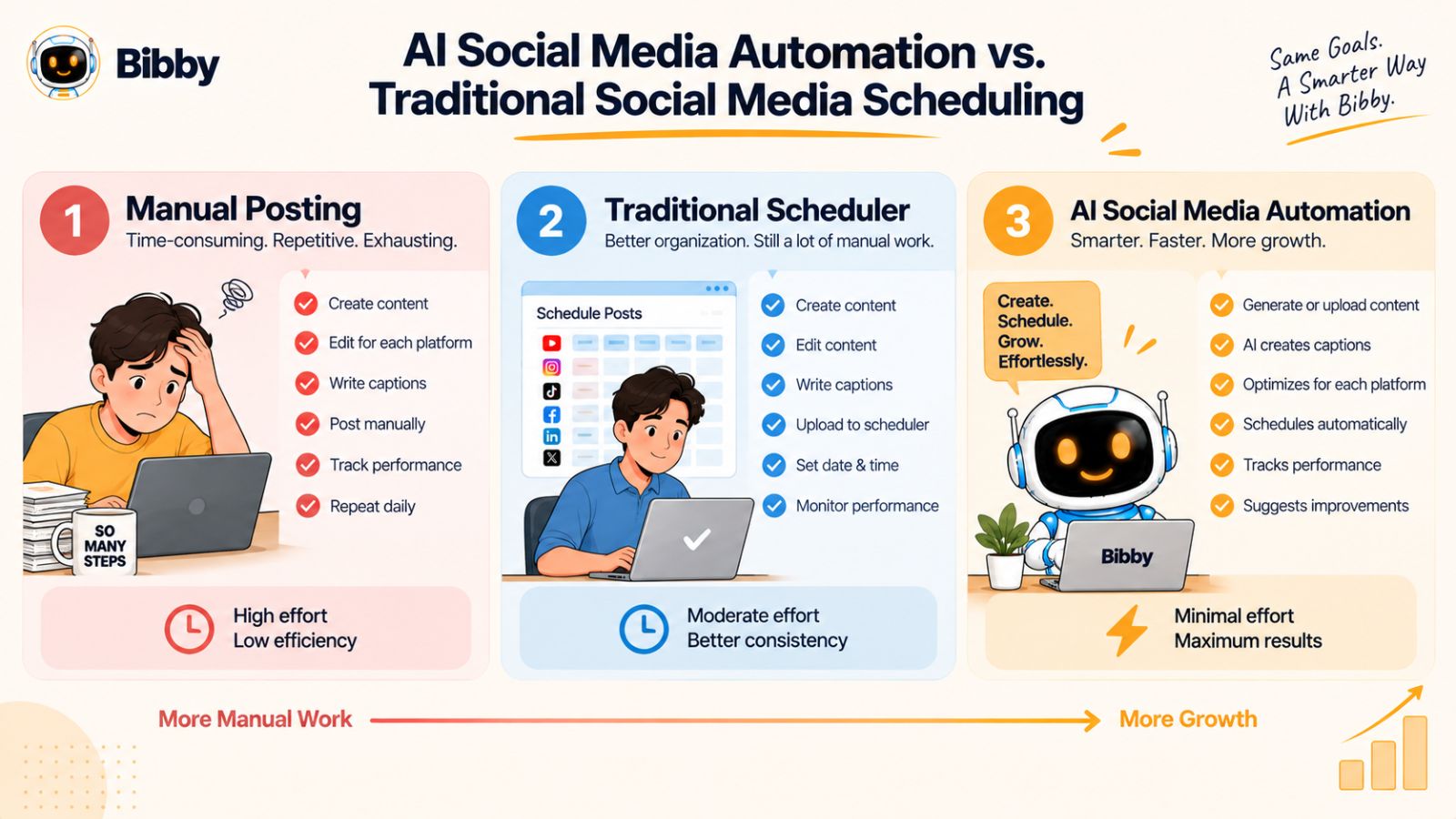
Manual Posting
The traditional workflow starts with the person.
You create a piece of content, open each social platform, upload the media, write the caption, add the relevant details, and publish or schedule it.
If you're active on five platforms, you may repeat much of that process five times.
Typical workflow:
Create → Upload → Write → Schedule → Publish → Repeat
The advantage is maximum control.
The disadvantage is that almost every step requires your time.
Traditional Social Media Scheduling
A scheduling tool removes some of the repetition.
You can prepare a post in advance and tell the software when to publish it. Some tools also allow you to manage multiple social accounts from one dashboard.
The workflow becomes:
Create → Upload → Write → Schedule → Automatic publishing
That's a meaningful improvement.
But much of the creative and operational preparation remains manual.
The scheduler is essentially an automated calendar.
AI Social Media Scheduling
AI-powered scheduling adds another layer.
The software can assist with the work that happens before the post reaches the calendar.
That can include generating captions, creating visual assets, suggesting or selecting publishing times, organizing campaigns, and helping adapt content for different channels.
The workflow can become:
Create or generate → AI assists → Review → Schedule → Automatic publishing
This is a fundamentally different proposition.
The software isn't simply remembering when to publish.
It is helping prepare the content for publication.
AI Social Media Management
The next evolution is broader than scheduling.
An AI social media management platform can potentially connect content creation, brand information, campaign planning, caption generation, scheduling, publishing, and conversational control.
This is where a tool such as Bibby becomes relevant.
Rather than using AI for one isolated feature, you can use it across a larger workflow—from generating visual content and captions to organizing campaigns and scheduling media across multiple platforms.
Its chat interface also allows social media tasks to be managed conversationally, including creating brand kits, creating campaigns, creating posts, and regenerating captions.
The distinction can be summarized like this:
| Workflow | Main role of the software |
|---|---|
| Manual posting | Publishes only when you operate each platform |
| Traditional scheduling | Publishes prepared posts automatically |
| AI scheduling | Helps prepare and schedule content |
| AI social media management | Helps coordinate creation, content, campaigns, scheduling, and publishing |
The more sophisticated the workflow becomes, the less time you spend operating the software.
The Goal Isn't Maximum Automation
More automation isn't automatically better.
A brand could technically automate almost every publishing decision and still end up with weak social media content.
The goal should instead be useful automation.
Automate tasks that are repetitive and predictable.
Keep humans involved in tasks that require context, judgment, originality, or accountability.
For example, generating ten caption drafts is an excellent use of AI assistance.
Deciding what your brand should say during a sensitive situation may require human judgment.
Scheduling a batch of evergreen educational posts can be automated.
Deciding whether a major product announcement is ready for publication may deserve human review.
The most effective workflow is therefore not:
AI does everything.
It is:
AI handles the repetitive work while humans handle the important decisions.
Why This Matters for Shorts
This distinction is particularly important for YouTube Shorts creators.
The bottleneck isn't always making the video.
It is everything that happens after the video is finished.
If an AI social media platform can help generate supporting content, write captions, organize campaigns, select publishing times, and distribute the content across multiple channels, the creator can spend significantly less time managing distribution.
That is the real promise behind AI social media automation.
You're not just scheduling a video.
You're building a system that turns finished content into consistent multi-platform distribution.
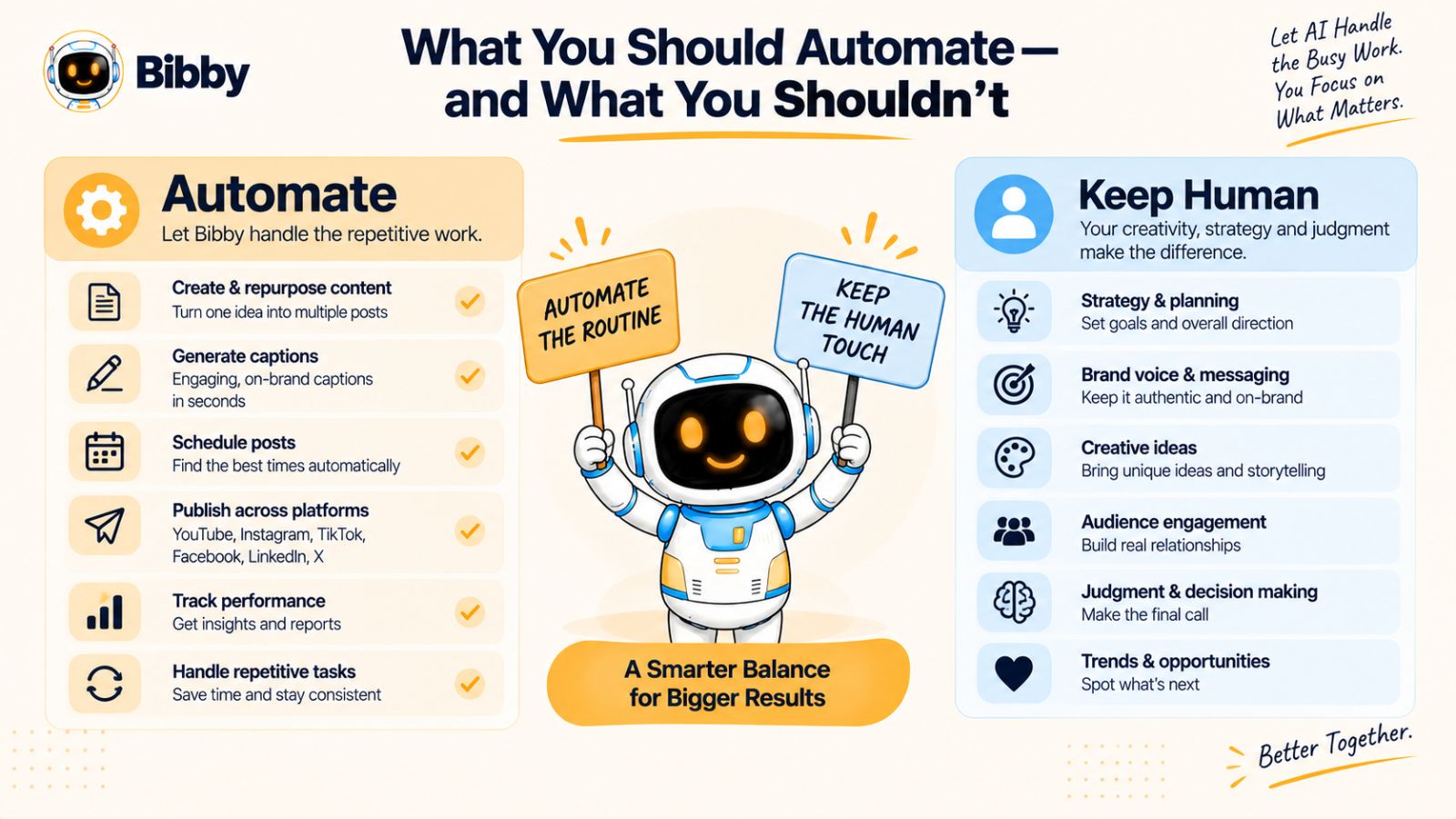
What You Should Automate—and What You Shouldn't
The best AI social media workflow isn't the one with the fewest human decisions.
It's the one that removes the most repetitive work without sacrificing quality, accuracy, or brand identity.
That distinction is important because social media automation can create a dangerous temptation: once publishing becomes easy, it's possible to publish far more content than your audience actually wants.
AI should make your workflow more efficient, not make your feed noisier.
Automate Repetitive Publishing Tasks
The easiest tasks to automate are the ones that follow predictable patterns.
These can include:
- Scheduling posts
- Publishing content across multiple platforms
- Generating initial caption drafts
- Creating content variations
- Organizing posts into campaigns
- Preparing batches of social content
- Repeating established publishing workflows
- Selecting publishing times through AI-assisted scheduling
These tasks consume time but don't necessarily require a human to perform every individual action.
If you're publishing dozens of posts every month, automating them can create substantial time savings.
Automate Caption Generation—but Review the Result
AI-generated captions are useful because they eliminate the blank page.
But a generated caption shouldn't automatically become a published caption.
Review it for:
- Accuracy
- Brand voice
- Clarity
- Relevance
- Unnecessary claims
- Tone
- Calls to action
For straightforward content, the review might take seconds.
For important campaigns, you may want a deeper editorial review.
The point is that AI gives you a starting point much faster than writing everything from scratch.
Automate Scheduling
Scheduling is one of the safest areas for automation.
Once you've approved the content and selected the appropriate channels, there is little benefit in manually returning to each platform at a specific time to press Publish.
An AI social media scheduler can handle that operational step for you.
This is especially valuable when your audience spans different time zones or when you're publishing frequently.
Tools such as Bibby can schedule media across selected platforms at AI-optimized times, allowing you to prepare content ahead of time rather than managing every publishing event manually.
Don't Automate Your Entire Brand Voice
Your brand voice shouldn't emerge randomly from whatever an AI model generates that day.
You should define the characteristics you want your brand to communicate.
Is the brand:
- Educational?
- Conversational?
- Technical?
- Playful?
- Direct?
- Premium?
- Community-focused?
Once those guidelines exist, AI can help produce content within that framework.
This is where a brand kit becomes useful.
The AI should have context about the brand rather than treating every post as an independent writing assignment.
Don't Automate Strategy
AI can help execute a strategy.
It shouldn't replace the process of deciding what your strategy is.
You still need to determine:
Who are we trying to reach?
What do we want them to understand?
What action should they take?
Which platforms matter to this audience?
What type of content supports our business goals?
Those decisions determine whether your automation is actually useful.
Without strategy, automation simply helps you produce more content faster.
Don't Publish Everything Everywhere
Cross-platform publishing is powerful, but that doesn't mean every post belongs on every platform.
A professional B2B insight might make sense on LinkedIn but have little relevance to a TikTok audience.
A trend-driven Short might work well on YouTube, Instagram, and TikTok but not need a LinkedIn version.
Automation should make distribution easier after you've made the distribution decision.
The objective is not maximum volume.
It's maximum usefulness from the content you've created.
Use AI for Execution, Humans for Judgment
A practical division of responsibility looks like this:
| Human responsibility | AI responsibility |
|---|---|
| Brand strategy | Caption drafts |
| Content direction | Content variations |
| Audience understanding | Scheduling |
| Creative judgment | Publishing |
| Final approval | Campaign organization |
| Sensitive communications | Repetitive workflow execution |
| Business priorities | AI-assisted optimization |
This doesn't have to be a rigid division.
As AI tools improve, the boundary will continue to move.
But for now, this approach provides a useful rule:
Automate the repetitive. Review the important. Own the strategy.
When those three principles work together, AI social media automation becomes much more than a way to save a few minutes per post.
It becomes a way to build a social media operation that can scale without requiring every additional post to consume another block of your time.
A Practical YouTube Shorts Automation Workflow
Knowing that AI can automate social media publishing is useful. Knowing exactly how to structure that automation is more valuable.
The simplest approach is to build your workflow around one principle:
Create the content once, then maximize its useful distribution.
You don't need to publish everything everywhere. You need a repeatable system that turns a finished YouTube Short into the right content for the right channels with as little repetitive work as possible.
Here's what that workflow can look like.
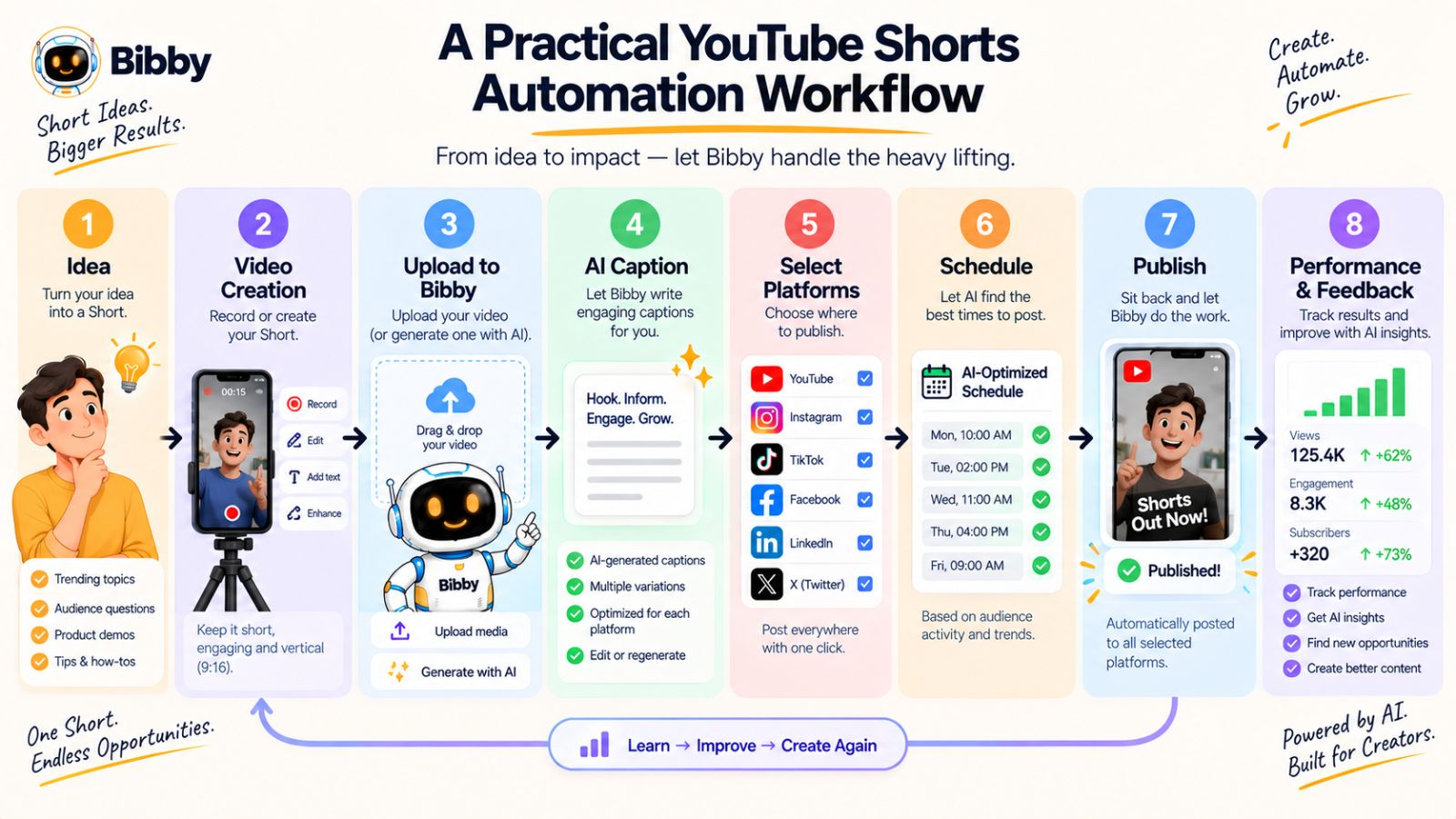
Step 1: Start With One Strong Content Idea
Before opening your scheduler, decide what the content is actually about.
A Short could answer a customer question, demonstrate a product, explain a concept, share an industry insight, or entertain your audience.
The idea should come before the automation.
AI can help you execute the workflow, but automation can't rescue content that has no clear purpose.
Start with a simple question:
What should someone get from watching this?
Once that is clear, everything else becomes easier.
Step 2: Create the YouTube Short
Create the core video.
This might involve recording yourself, producing a tutorial, demonstrating a product, editing existing footage, or creating an educational animation.
At this stage, focus on the quality of the core content rather than worrying about every social platform.
Your Short is the primary content asset.
Step 3: Upload the Media to Your AI Social Media Tool
Once the video is ready, bring it into your social media workflow.
With Bibby, for example, you can upload your media or generate an image with AI when additional visual content is needed.
This gives you a central starting point for the distribution process.
Instead of creating the same publishing workflow separately inside every social network, you can manage the content from one place.
Step 4: Choose the Posting Style
Select the style that fits the content and your brand.
An educational video might need an informative approach.
A product video could use a promotional style.
A founder-led video might work better with a conversational tone.
This step provides AI with the context it needs to generate more appropriate content around the original media.
Step 5: Generate the Caption
Let AI create the initial caption instead of writing it manually from scratch.
Review the result.
If it works, keep it.
If it doesn't, regenerate or edit it.
This simple process can turn a five-minute writing task into a much faster review task.
And when you're publishing frequently, those small savings accumulate.
Step 6: Choose Your Distribution Channels
Now decide where the content should go.
For a short-form video, your distribution list might include:
YouTube + Instagram + TikTok + Facebook
For a professional or B2B topic, you might also create a LinkedIn version.
The important thing is to make this an intentional decision.
Don't automatically select every platform just because you can.
Step 7: Add Supporting Content
Your Short doesn't have to be the only asset in the campaign.
You might add:
- A supporting image
- A carousel explaining the main idea
- A Story promoting the video
- A follow-up post
- A product image
- A second educational post
This is where one piece of content starts becoming a campaign rather than a single upload.
Step 8: Schedule the Campaign
Once your content is ready, schedule it.
With an AI-powered social media scheduler such as Bibby, you can schedule media across selected platforms at AI-optimized times.
Instead of manually deciding when every individual post should go live, you can prepare the content and let the scheduling system handle the publishing calendar.
That means your social media can continue operating even while you're doing something else.
Step 9: Review Before Publishing
Automation shouldn't remove quality control.
Quickly review:
- The media
- The caption
- The selected platforms
- The publishing schedule
- Any links or calls to action
- Brand consistency
For important campaigns, take more time.
For routine evergreen content, the review can be much faster.
Step 10: Learn From What Performs
Publishing isn't the final step.
Once content has been distributed, look at what your audience responds to.
Which topics generate engagement?
Which hooks attract attention?
Which formats perform well?
Which platforms produce meaningful results?
Use those observations to improve your next batch of content.
This creates a feedback loop:
Create → Distribute → Measure → Learn → Create better content
AI can help with parts of this loop, but the strategic insight still comes from understanding your audience and business.
What This Workflow Removes
Notice what you aren't doing anymore.
You're not opening five social networks individually for every post.
You're not writing every caption from a blank page.
You're not manually entering every publishing time.
You're not maintaining separate publishing calendars for every platform.
You're not treating every social post as a completely new project.
Instead, you have one repeatable system for turning finished content into coordinated social distribution.
That is the practical meaning of YouTube Shorts automation.
The goal isn't to automate YouTube.
The goal is to automate the repetitive work that happens after you create the content, so one Short can contribute to a much larger social media presence.
How to Choose an AI Social Media Scheduling Tool
Not every social media scheduling tool solves the same problem.
Some are primarily calendars. Others focus on publishing. Some add AI-generated captions, while newer platforms are moving toward broader AI-assisted social media management.
If your goal is to automate a large portion of your Shorts and social media workflow, choosing a tool based only on whether it has a scheduling calendar isn't enough.
You need to look at the entire workflow.
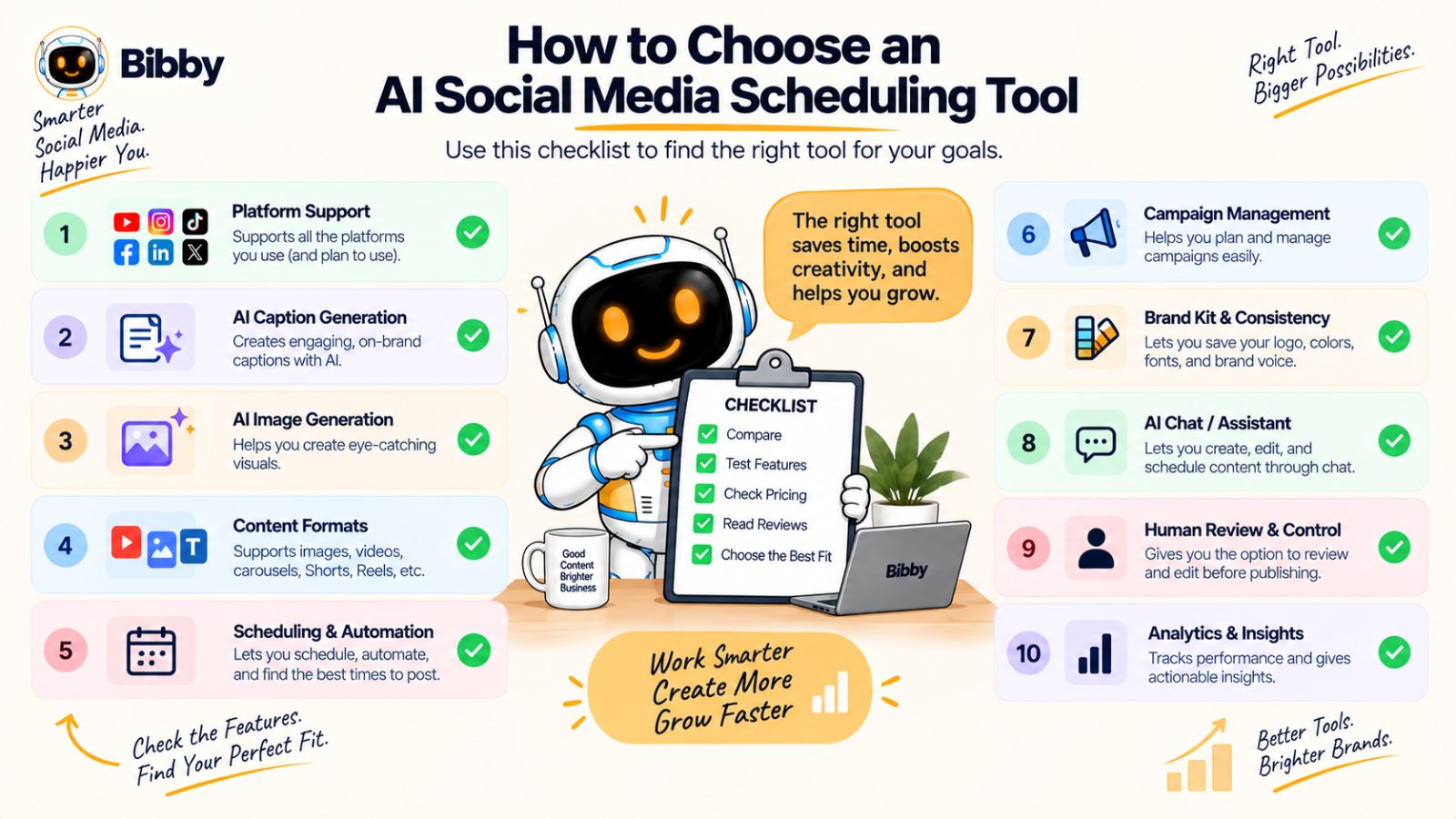
1. Check Which Platforms It Supports
Start with the platforms that matter to your audience.
If your strategy involves YouTube, Instagram, TikTok, Facebook, and LinkedIn, your scheduling tool should support the channels you actually use.
Otherwise, you end up maintaining multiple tools—which defeats part of the purpose of automation.
Cross-platform support is particularly important when you're turning one piece of content into several distribution opportunities.
2. Look for AI Caption Generation
Caption creation can become a significant bottleneck when you're publishing frequently.
An AI social media tool should help you generate useful caption drafts instead of simply providing an empty text field.
Ideally, you should also be able to regenerate or refine the result when the first version doesn't fit your brand.
The goal isn't to eliminate editing.
It's to eliminate starting from zero.
3. Consider AI Image Generation
Social media isn't only video.
You may need images for announcements, product posts, educational content, campaigns, or supporting content around a Short.
Having AI image generation inside the same workflow can reduce the need to jump between separate tools.
For example, Bibby allows you to upload existing media or generate images with AI as part of the social content workflow.
4. Check the Supported Content Formats
Look beyond ordinary posts.
Your social strategy may include:
- Images
- Carousels
- Videos
- YouTube Shorts
- Stories
- Promotional content
- Educational content
- Campaign posts
A tool that handles several formats from one workflow can be more useful than one designed around a single type of post.
5. Look for AI-Assisted Scheduling
A good scheduler shouldn't force you to manually choose a date and time for every post.
AI-assisted scheduling can help determine appropriate publishing times, allowing you to prepare content in batches and let the system manage the calendar.
This becomes particularly valuable as your publishing volume increases.
The more content you have, the less practical manual scheduling becomes.
6. Check Whether It Supports Campaigns
Social media posts often work better as connected sequences than isolated updates.
A product launch might require several posts.
An educational series could run for multiple weeks.
A promotion may need videos, images, carousels, and Stories.
Campaign functionality lets you organize these pieces around a larger objective.
This is one area where a workflow-oriented platform can provide more value than a basic post scheduler.
7. Look for Brand Management
AI-generated content is only useful if it still sounds like your brand.
Look for features that help establish consistent brand guidelines, messaging, visual direction, and tone.
A brand kit can provide AI with the context it needs to create content that is more aligned with the organization.
This becomes increasingly important when multiple people are creating content or when your publishing volume increases significantly.
8. Consider Whether You Can Manage It Through Chat
This is an increasingly interesting feature category.
A traditional interface requires you to learn where everything is.
A conversational interface lets you describe what you want to accomplish.
For example, Bibby's chat interface can be used for tasks such as:
- Creating a brand kit
- Creating a campaign
- Creating posts
- Regenerating captions
- Managing social media content
This doesn't mean every task should be performed through chat.
It means the software gives you another way to interact with the workflow—particularly useful when the underlying system has many capabilities.
9. Don't Ignore Human Review
Automation should make review easier, not remove it completely.
Before choosing a tool, consider whether you can easily edit AI-generated content, regenerate captions, adjust schedules, change platforms, and review posts before publication.
The best workflow is usually one where AI does the repetitive work while you retain control.
10. Evaluate the Entire Workflow, Not Individual Features
A scheduler might have an excellent calendar.
Another tool might have a good caption generator.
A third might have AI image generation.
But if you have to move between all three to publish one campaign, you're still doing a lot of manual work.
The bigger question is:
How many steps exist between having an idea and having the finished content published?
The more of those steps you can bring into one workflow, the more useful automation becomes.
For creators and businesses trying to reduce manual social media work, that's ultimately the feature that matters most.
You don't need another dashboard to maintain.
You need a system that can help turn your content into consistent distribution with fewer repetitive actions.
Common Mistakes With AI Social Media Automation
AI can remove a huge amount of repetitive social media work, but automation alone doesn't guarantee better content.
In fact, making the wrong things automatic can create new problems. A brand can publish more frequently while becoming less relevant, less distinctive, or less useful to its audience.
The solution isn't to avoid automation.
It's to automate intelligently.
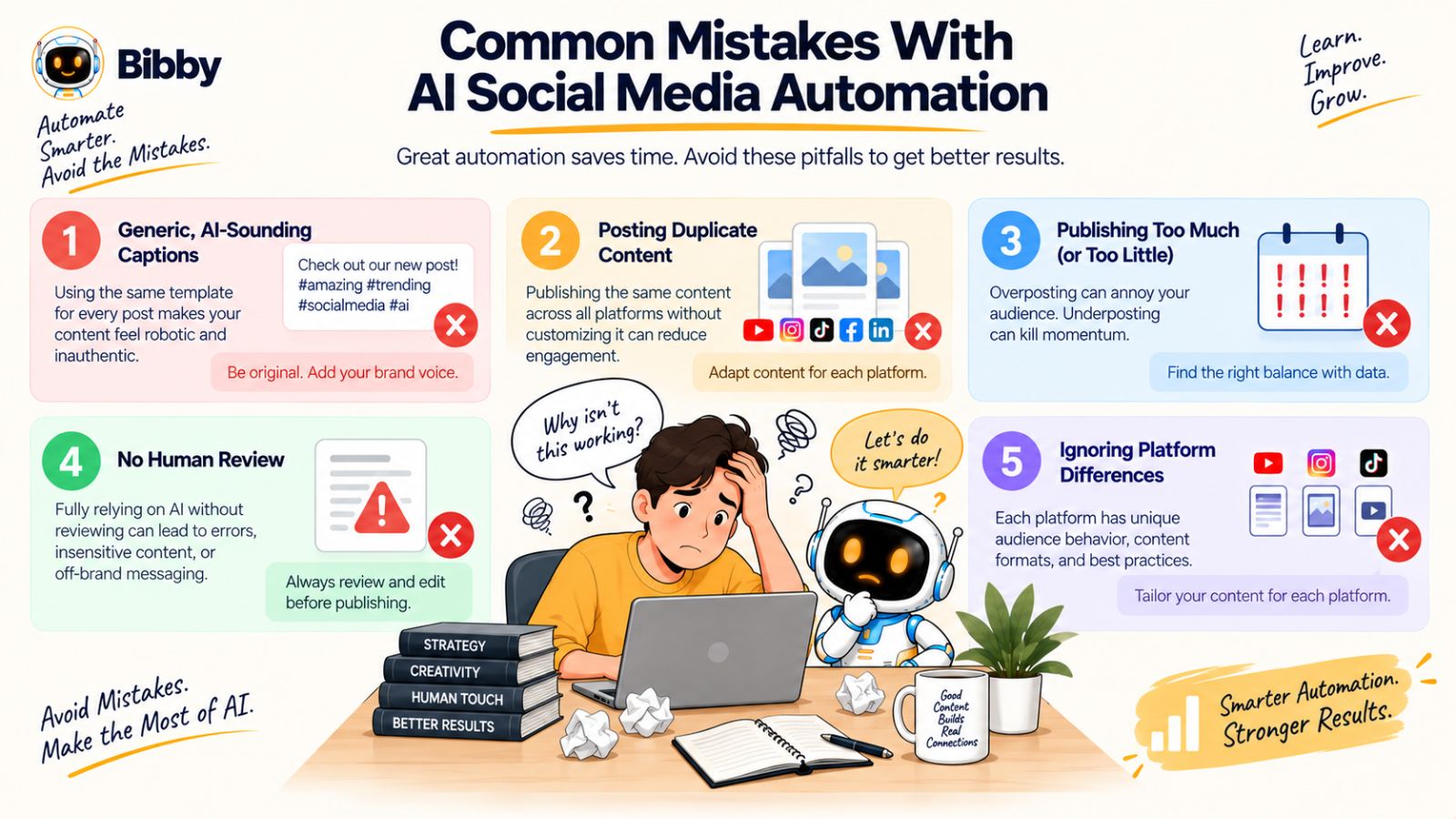
Mistake #1: Automating Low-Quality Content
The first rule of automation is simple:
Don't automate content that shouldn't have been created in the first place.
If a post has no useful information, weak messaging, or no clear purpose, publishing it automatically won't make it better.
AI should accelerate good ideas—not manufacture an endless supply of mediocre ones.
Start with a clear content strategy and use automation to execute it efficiently.
Mistake #2: Publishing the Exact Same Content Everywhere
Cross-platform publishing is useful, but copying and pasting the exact same post across every network isn't always the best strategy.
Different platforms have different audiences, formats, and expectations.
A YouTube Short might work perfectly as a short-form video on another platform.
A professional insight may need additional context before becoming a LinkedIn post.
The underlying idea can remain the same while the presentation changes.
Use AI to help adapt content rather than assuming one caption fits every audience.
Mistake #3: Treating AI Captions as Final Copy
AI-generated captions can save significant time, but the first version isn't necessarily the final version.
A caption may be factually correct but sound unlike your brand.
It may be too generic.
It may use unnecessary phrases.
Or it may miss the most interesting part of the content.
Always review important AI-generated content before it goes live.
If the result isn't right, regenerate it or edit it.
The goal is faster content creation—not lower editorial standards.
Mistake #4: Publishing Too Much Just Because You Can
Automation removes the friction from publishing.
That can be both a benefit and a problem.
When publishing becomes easy, it's tempting to fill every available time slot.
But your audience doesn't measure your productivity by how many posts you publish.
They care whether the content is worth their attention.
A smaller number of useful posts can be more valuable than an endless stream of automated updates.
Use automation to maintain consistency, not to maximize volume for its own sake.
Mistake #5: Ignoring Platform Differences
A social media automation tool can distribute content across multiple networks, but that doesn't mean every platform should receive the same treatment.
Consider:
- Audience expectations
- Content format
- Caption length
- Brand context
- Calls to action
- Video presentation
- Publishing frequency
A strong workflow accounts for these differences before automation begins.
Mistake #6: Forgetting Human Review
One of the biggest mistakes is assuming that AI means “publish without looking.”
Human review is still valuable.
Check important posts for accuracy, tone, brand alignment, and context.
This is particularly important for announcements, product claims, sensitive subjects, or content representing the company publicly.
A useful workflow is:
AI generates → Human reviews → AI schedules → Platform publishes
That small human checkpoint can protect the quality of an otherwise highly automated workflow.
Mistake #7: Automating Without Measuring
Publishing is not the end of social media marketing.
You need to understand what happens after publication.
Which topics generate meaningful engagement?
Which formats attract attention?
Which platforms are actually useful for your business?
Which content should be repeated, adapted, or retired?
Automation gives you more time to answer those questions because you're spending less time performing routine publishing tasks.
The strongest workflow therefore creates a feedback loop:
Create → Automate → Publish → Measure → Improve
The Right Goal for Automation
The purpose of AI social media automation isn't to make your social accounts look like machines are running them.
The purpose is to make the operation behind your social presence more efficient while keeping the content human, relevant, and intentional.
Use AI for repetitive execution.
Use humans for strategy and judgment.
When those roles are combined properly, automation can give creators and businesses something more valuable than additional posts:
more time to create, think, and grow.
The Future of Social Media Management Is AI-Assisted, Not Fully Hands-Off
Social media management is moving beyond simple scheduling.
For years, the basic promise was straightforward: prepare your content in advance and let software publish it while you're busy doing something else.
AI is expanding that idea.
Instead of only automating when something gets published, social media platforms can increasingly help with what gets published, how it is written, how it is organized, and how it gets distributed.
That changes the role of the scheduling tool.
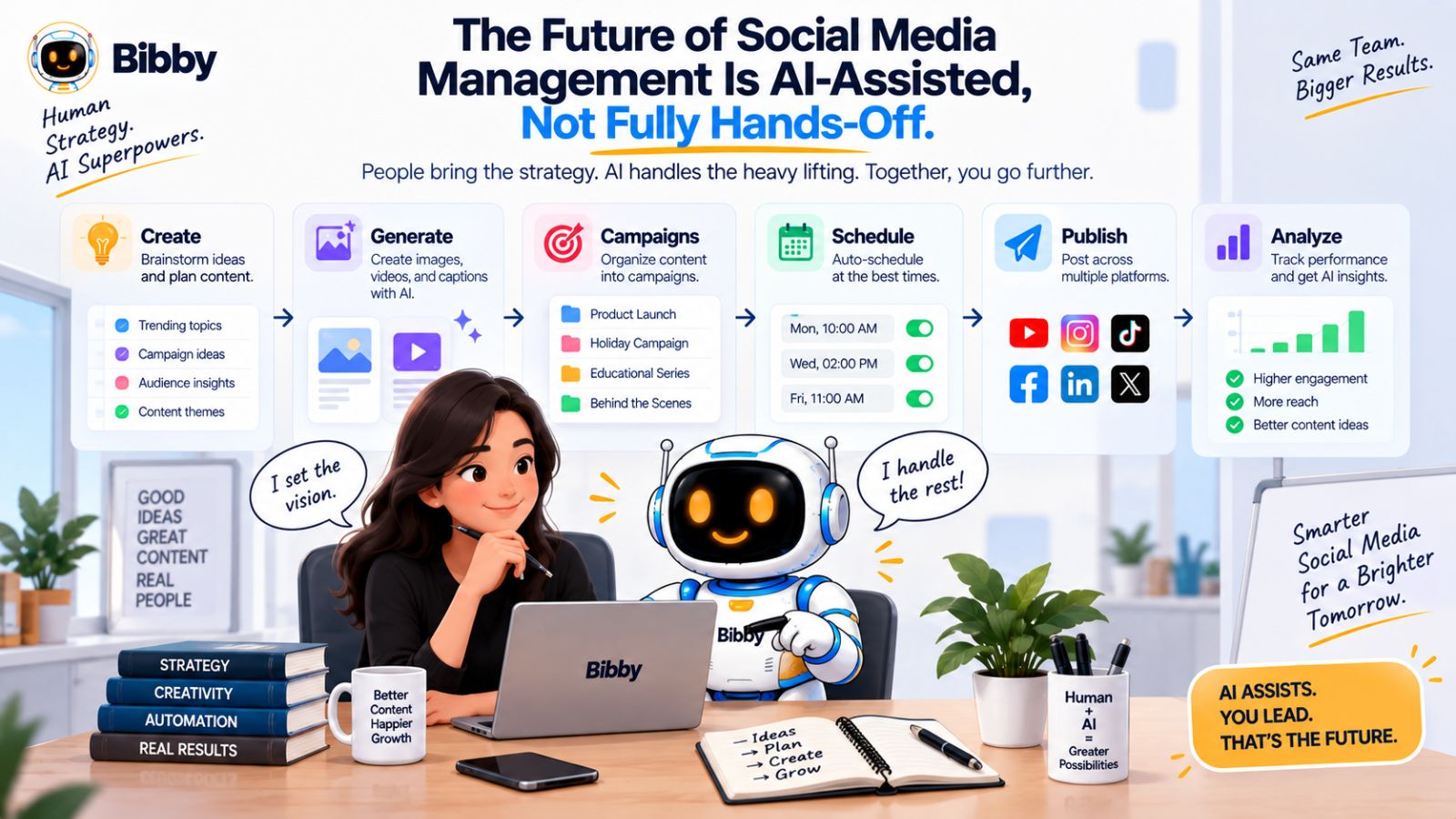
From Calendar to Content Workflow
A traditional scheduler revolves around a calendar.
You create a post, place it on a date, and wait for it to publish.
An AI-powered workflow can connect several steps:
Content → AI generation → Caption → Campaign → Scheduling → Publishing
This means the calendar becomes only one part of a much larger system.
For creators, that can mean less administrative work.
For businesses, it can mean a more repeatable content operation.
For social media managers, it can mean spending more time on strategy and less time performing repetitive publishing tasks.
Conversational Interfaces Change How You Operate Software
Another major shift is the move toward conversational interfaces.
Instead of learning where every feature lives, you can increasingly describe what you want to accomplish.
Bibby's chat experience reflects this direction.
You can use conversation to work on tasks such as creating a brand kit, creating a campaign, creating posts, or regenerating captions.
The important change isn't simply that there's a chat box.
It's that conversation can become the interface for executing a workflow.
Rather than thinking in terms of individual buttons, you can think in terms of outcomes.
That is a much more natural way to interact with increasingly complex software.
The AI Social Media Manager Is Really a Workflow
The phrase “AI social media manager” can sound like an AI employee that completely replaces a person.
A more practical interpretation is an AI system that handles a large portion of the operational workflow.
The human still provides:
- Strategy
- Brand direction
- Audience knowledge
- Creative judgment
- Business priorities
- Final approval
The AI can assist with:
- Content generation
- Caption writing
- Content variations
- Campaign organization
- Scheduling
- Publishing
- Repetitive social media tasks
This division makes the technology useful without pretending that human expertise is no longer necessary.
Why This Matters for YouTube Shorts
YouTube Shorts are a perfect example of why this evolution matters.
The video itself may be short.
The distribution process doesn't have to be.
One Short can potentially become a YouTube post, Instagram content, TikTok content, Facebook content, LinkedIn content, supporting images, Stories, and follow-up posts.
The challenge is no longer simply creating enough content.
It's managing the distribution of the content you've already created.
AI social media automation can help solve that operational problem.
The Future Is More Leverage, Not More Work
The real promise of AI social media tools isn't that you will publish ten times more content.
It's that the same amount of human effort can potentially produce more useful output.
Instead of spending your afternoon uploading, copying, scheduling, and rewriting, you can spend more of that time researching your audience, developing better ideas, creating stronger videos, and improving your overall content strategy.
That is what makes the “90% automation” idea meaningful.
It's not about removing humans from social media.
It's about removing the repetitive work that prevents humans from doing the work only they can do well.
The next generation of social media management will therefore likely be less about managing a calendar and more about managing an AI-assisted content system.
Conclusion
Posting YouTube Shorts manually is no longer the only way to manage social media distribution. AI social media tools can now handle much of the repetitive work around content creation, caption generation, scheduling, campaign organization, and cross-platform publishing.
The three biggest takeaways are simple:
- AI can automate much of the repetitive work surrounding YouTube Shorts.
- Cross-platform scheduling can turn one piece of content into broader distribution.
- Tools like Bibby combine AI creation, captions, scheduling, campaigns, and chat-based management in one workflow.
The goal isn't to remove humans from social media. It's to remove the repetitive tasks that prevent creators and businesses from spending more time on strategy, creativity, and audience relationships.
Once you have an AI-powered publishing workflow in place, the natural next step is building a repeatable social media content system—one that consistently turns your ideas into videos, images, carousels, Stories, and scheduled posts without starting from scratch every day.