Managing social media consistently can feel overwhelming for small business owners, especially when every platform demands fresh content and regular posting.
If you're looking for a smarter way to create, schedule, and publish content, an AI-powered social media workflow can help you save time while improving consistency and engagement. By combining AI content creation with automation, you can spend less time on repetitive tasks and more time growing your business.
In this article, you will learn:
- Build a repeatable AI social media workflow from start to finish.
- Automate content creation and scheduling across multiple platforms.
- Save hours every week using AI-powered social media tools like Bibby.
Whether you're managing one social account or several, the step-by-step workflow below will help you simplify your marketing and achieve more with less effort.
Why Every Small Business Needs an AI Social Media Workflow
Social media has become one of the most effective ways for small businesses to reach new customers, build trust, and grow their brand. However, consistently creating high-quality content for multiple platforms can quickly become overwhelming—especially when you're also managing sales, customer service, and day-to-day operations.
Many small business owners start with the best intentions but struggle to maintain a regular posting schedule. As a result, social media becomes inconsistent, engagement drops, and valuable opportunities to connect with potential customers are lost.
An AI social media workflow solves these challenges by streamlining every stage of the content creation process. Instead of manually brainstorming ideas, writing captions, designing graphics, and scheduling posts one by one, AI can help automate repetitive tasks while you stay in control of your brand voice and strategy.
The Biggest Challenges Small Businesses Face
Limited Time
Most small business owners wear multiple hats. Between serving customers, managing inventory, handling finances, and growing the business, finding time to create social media content often falls to the bottom of the priority list.
Content Creation Burnout
Coming up with new post ideas every day can be exhausting. After a few weeks, many businesses begin repeating the same content or stop posting altogether.
Managing Multiple Platforms
Each social media platform has different audiences, image sizes, content formats, and best practices. Publishing separately to Facebook, Instagram, LinkedIn, TikTok, and YouTube requires significant time and attention.
Inconsistent Posting
Success on social media depends on consistency. Sporadic posting makes it harder to build momentum, reach new audiences, and stay visible in platform algorithms.
Limited Marketing Resources
Hiring a dedicated social media manager or marketing agency isn't always realistic for small businesses. Many owners need an affordable solution that helps them achieve professional results without expanding their team.
How AI Changes the Game
Artificial intelligence makes social media management faster, smarter, and more efficient by automating many of the tasks that traditionally consume hours each week.
With the right AI workflow, you can:
- Generate fresh content ideas in minutes.
- Create eye-catching images with AI.
- Write engaging captions tailored to each platform.
- Schedule weeks of content in advance.
- Publish automatically across multiple social networks.
- Post at AI-optimized times for better engagement.
- Maintain a consistent online presence with minimal manual effort.
Instead of replacing your creativity, AI enhances it. You remain in control of your messaging and brand identity while AI handles repetitive, time-consuming work behind the scenes.
Why an End-to-End Workflow Matters
Many businesses use separate tools for graphic design, caption writing, scheduling, and publishing. Constantly switching between platforms slows down the process and increases the chances of errors.
An all-in-one workflow simplifies everything. For example, with Bibby, you can upload your own image or generate one with AI, choose your preferred posting style, let AI create platform-ready captions, and automatically schedule content across Facebook, Instagram, LinkedIn, TikTok, and YouTube. Whether you're publishing single images, carousels, videos, or stories, everything can be managed from one simple dashboard.
The result is a streamlined process that helps you stay consistent, save hours every week, and focus more on growing your business instead of managing social media.
What Is an AI Social Media Workflow?
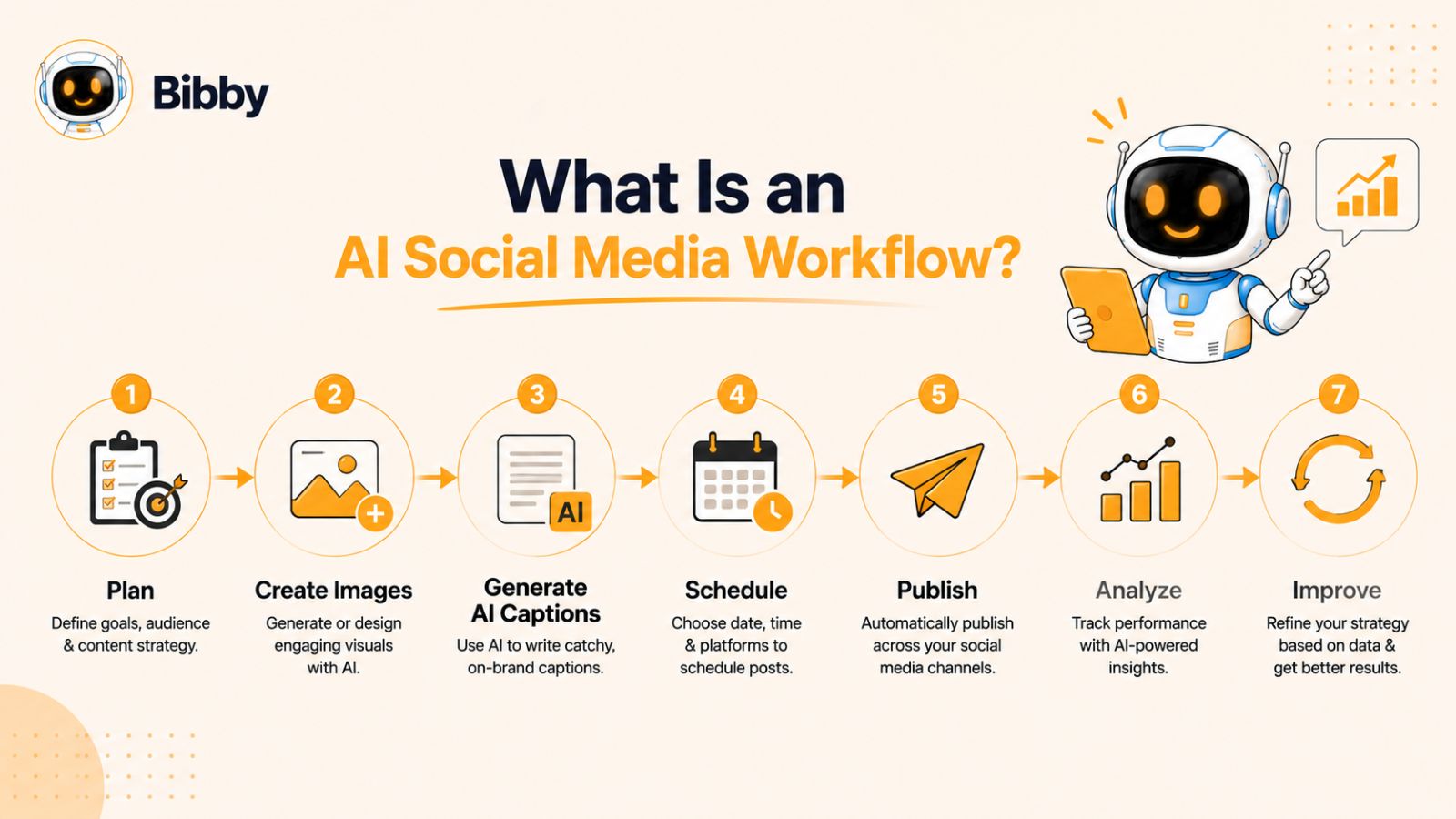
An AI social media workflow is a structured process that uses artificial intelligence to streamline every stage of social media management—from planning and creating content to scheduling, publishing, and analyzing results. Instead of completing each task manually, AI assists with repetitive work, allowing you to produce more content in less time while maintaining quality and consistency.
For small businesses, an AI workflow isn't about replacing human creativity. It's about eliminating tedious tasks so you can focus on strategy, customer relationships, and business growth.
A well-designed workflow also ensures that your content remains organized, your publishing schedule stays consistent, and your brand voice is maintained across every platform.
The Traditional Social Media Process
Without AI, managing social media often looks like this:
- Brainstorm content ideas
- Design graphics or edit videos
- Write captions
- Research hashtags
- Resize content for each platform
- Schedule posts manually
- Publish content
- Monitor performance
- Repeat the process every week
While this approach works, it's time-consuming and difficult to scale—especially for solo entrepreneurs and small marketing teams.
The AI-Powered Social Media Workflow
By incorporating AI into your workflow, many of these tasks become faster and more efficient. Instead of jumping between multiple tools, AI helps automate the most repetitive parts of the process while keeping you in control of the final output.
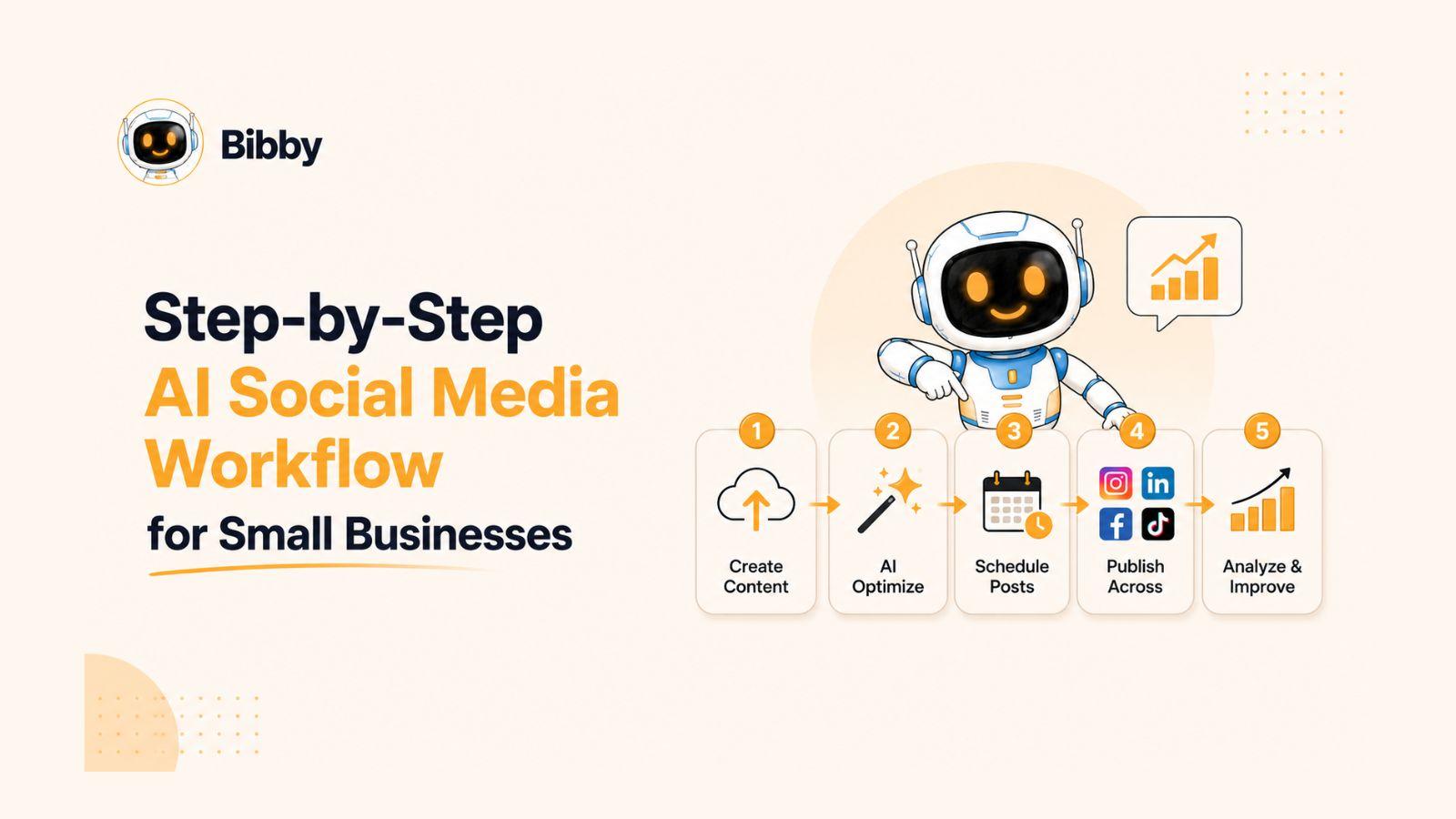
A typical AI social media workflow looks like this:
1. Plan Your Content
- Define your goals and content pillars.
- Brainstorm post ideas for the week or month.
2. Create Visuals
- Upload your own images and videos, or generate new visuals with AI.
- Prepare content for different social media formats.
3. Generate Captions with AI
- Create engaging captions tailored to each platform.
- Add hashtags, calls-to-action, and platform-specific formatting.
4. Schedule Your Content
- Organize your posts into a content calendar.
- Set publishing dates and times.
5. Publish Automatically
- Share content across multiple social media platforms without manual posting.
6. Analyze Performance
- Review engagement, reach, clicks, and conversions.
- Use insights to improve future content.
Why a Repeatable Workflow Matters
One of the biggest advantages of an AI workflow is consistency. Instead of creating content one post at a time, you can batch your work, schedule weeks of posts in advance, and maintain an active presence across all your social channels.
This approach reduces last-minute stress, improves productivity, and ensures your audience regularly sees fresh, relevant content.
How Bibby Simplifies the Entire Workflow
While many businesses rely on separate tools for design, caption writing, scheduling, and publishing, Bibby combines these steps into one intuitive workflow.
With Bibby, you can:
- Upload your own image or generate one with AI.
- Select your preferred posting style or brand voice.
- Let AI automatically generate engaging captions.
- Schedule content for AI-optimized posting times.
- Publish to Facebook, Instagram, LinkedIn, TikTok, and YouTube from one dashboard.
- Manage image posts, carousels, videos, and stories without switching between multiple platforms.
By bringing every stage of the workflow together, Bibby helps small businesses spend less time managing social media and more time focusing on customers, sales, and growth.
In the next section, we'll begin building this workflow step by step, starting with how to plan a content strategy that keeps your social media organized and effective.
Step 1: Plan Your Monthly Content Strategy
Before AI can help you create and automate content, you need a clear strategy. A well-planned content calendar ensures every post has a purpose, aligns with your business goals, and speaks to your target audience.
The good news is that you don't need an overly complex marketing plan. Even a simple monthly strategy can dramatically improve your consistency and results.
Start with Your Business Goals
Every piece of content should support a specific objective. Ask yourself what you want your social media efforts to achieve over the next month.
Common goals include:
- Increase brand awareness
- Drive traffic to your website
- Generate more leads
- Boost product or service sales
- Grow your social media following
- Build customer trust and loyalty
When your goals are clear, it's much easier to create content that delivers measurable results.
Understand Your Audience
Successful social media content is built around your audience—not your business.
Consider questions like:
- Who are your ideal customers?
- What challenges do they face?
- What questions do they ask most often?
- Which platforms do they use regularly?
- What type of content do they engage with?
The better you understand your audience, the easier it becomes to create posts they'll find valuable, entertaining, or inspiring.
Create Content Pillars
Content pillars are the main topics you'll consistently post about. They help maintain variety while reinforcing your expertise and brand identity.
For most small businesses, four to six content pillars work well.
Examples include:
Educational Content
- Tips and tutorials
- Industry insights
- How-to guides
- Frequently asked questions
Promotional Content
- Product launches
- Limited-time offers
- Seasonal promotions
- New services
Customer Success Stories
- Testimonials
- Case studies
- User-generated content
- Before-and-after transformations
Behind-the-Scenes
- Meet the team
- Daily operations
- Company culture
- Workspace tours
Engagement Content
- Polls
- Questions
- Quizzes
- Fun facts
- Trending topics
By rotating through these pillars, you'll avoid repetitive content while keeping your audience engaged.
Decide on Your Posting Frequency
Consistency matters more than posting constantly. It's better to publish three high-quality posts every week than to post daily for one month and disappear the next.
Choose a schedule that's realistic for your business.
For example:
- Facebook: 3–5 posts per week
- Instagram: 4–7 posts per week
- LinkedIn: 2–5 posts per week
- TikTok: 3–7 videos per week
- YouTube: 1–2 videos per week
Remember, these are starting points—not strict rules. Monitor your analytics over time and adjust your posting frequency based on audience engagement and available resources.
Build a Simple Monthly Content Calendar
Once you've defined your goals, audience, and content pillars, map your ideas into a monthly calendar.
Here's a simple example:
| Week | Monday | Wednesday | Friday |
|---|---|---|---|
| Week 1 | Educational Tip | Product Showcase | Customer Testimonial |
| Week 2 | Behind the Scenes | Industry Insight | Promotional Offer |
| Week 3 | FAQ | Customer Story | Team Spotlight |
| Week 4 | How-To Guide | Product Feature | Community Highlight |
Planning your content in advance helps you identify gaps, maintain a healthy mix of content types, and reduce the pressure of coming up with ideas at the last minute.
Let AI Turn Your Plan into Published Content
Once your monthly strategy is ready, AI can handle much of the execution.
With Bibby, you can upload your own images or generate new visuals with AI, choose a posting style that matches your brand, and let the platform generate engaging captions automatically. From there, Bibby schedules your posts at AI-optimized times and publishes them across Facebook, Instagram, LinkedIn, TikTok, and YouTube—all from a single dashboard.
Instead of planning one post at a time, you can prepare an entire month's content in a single session, freeing up more time to focus on serving customers and growing your business.
Now that your strategy is in place, the next step is creating eye-catching visuals that stop users from scrolling and encourage them to engage with your content.
Step 2: Create Images and Videos with AI
Visual content is the first thing people notice when scrolling through social media. Whether it's a striking image, an engaging carousel, or a short video, high-quality visuals can stop users from scrolling and encourage them to interact with your content.
The challenge for many small businesses is that creating professional visuals takes time, design skills, and often a significant budget. Fortunately, AI has changed that. Today, you can create eye-catching content in minutes instead of hours, making it easier to maintain a consistent posting schedule without sacrificing quality.
Why AI Is Transforming Content Creation
AI-powered creative tools can help businesses produce high-quality visuals quickly while reducing the need for expensive software or professional design experience.
Some of the biggest benefits include:
- Generate original images from simple text prompts.
- Edit and enhance existing photos in seconds.
- Remove backgrounds automatically.
- Create branded graphics for promotions and announcements.
- Produce multiple design variations for A/B testing.
- Resize content for different social media platforms.
Instead of spending hours designing each post from scratch, you can focus on your message while AI handles much of the creative work.
Choose the Right Content Format
Different types of content perform better depending on the platform and your marketing goals. A varied mix keeps your audience engaged and helps you reach people with different content preferences.
Here are some popular formats to include in your content plan:
Single Image Posts
Perfect for:
- Product announcements
- Inspirational quotes
- Quick tips
- Promotions
- Company updates
Simple image posts are fast to create and remain highly effective for delivering concise messages.
Carousels
Carousels encourage users to swipe through multiple images, increasing engagement and time spent viewing your content.
Use them for:
- Step-by-step tutorials
- Before-and-after transformations
- Product features
- Educational lists
- Customer success stories
Short-form video continues to drive strong engagement across social platforms.
Ideas include:
- Product demonstrations
- Behind-the-scenes footage
- Customer testimonials
- Quick tutorials
- Frequently asked questions
Even simple videos recorded on a smartphone can perform well when they provide value.
Stories
Stories are ideal for sharing timely, authentic updates that create a sense of connection with your audience.
Use Stories to share:
- Daily business updates
- Flash sales
- Polls and questions
- Event reminders
- Behind-the-scenes moments
Because Stories disappear after a set period, they encourage followers to check your content regularly.
Maintain Consistent Branding
Creating visuals is only part of the process. Every piece of content should reinforce your brand identity.
Keep these elements consistent across all posts:
- Brand colors
- Fonts
- Logo placement
- Photography style
- Graphic elements
- Tone and messaging
A recognizable visual identity helps build trust and makes your business easier to remember.
Batch Create Your Visual Content
One of the biggest time-saving strategies is batching.
Instead of creating one post every day, dedicate a few hours each month to producing all your images and videos at once.
For example, you could:
- Create 10 promotional graphics.
- Design 8 educational posts.
- Record 5 short videos.
- Prepare 4 customer success stories.
- Build 6 carousel posts.
Once your visual assets are ready, the rest of your workflow becomes much faster.
How Bibby Makes Visual Content Creation Easier
Bibby simplifies this stage by giving you two flexible options. You can upload your own images and videos or generate brand-new visuals with AI directly within the platform.
After your visuals are ready, you simply choose your preferred posting style, and Bibby's AI generates platform-ready captions that match your content. From there, you can schedule image posts, carousels, videos, and Stories for Facebook, Instagram, LinkedIn, TikTok, and YouTube—all from one streamlined workflow.
This eliminates the need to move files between multiple design, writing, and scheduling tools, allowing you to create and prepare weeks of content in a fraction of the time.
Pro Tips for Better AI-Generated Visuals
To get the most from AI-generated content:
- Use high-resolution images whenever possible.
- Write clear, descriptive prompts when generating visuals.
- Keep branding consistent across every design.
- Mix images, carousels, videos, and Stories to keep your content fresh.
- Review every AI-generated asset before publishing to ensure it aligns with your brand and messaging.
With your visuals ready, the next step is giving them a voice. In the following section, you'll learn how AI can generate engaging captions that capture attention, encourage interaction, and drive action across every social media platform.
Step 3: Organize Your Content Library
Creating great content is only half the battle. If your images, videos, captions, and brand assets are scattered across different folders, cloud drives, and devices, you'll waste valuable time searching for files every time you need to publish.
An organized content library helps you work faster, stay consistent, and make the most of every piece of content you create. It also makes it much easier to batch-create content, collaborate with team members, and repurpose high-performing posts in the future.
Why Content Organization Matters
Without a structured system, it's easy to:
- Upload the wrong image.
- Reuse outdated promotions.
- Lose track of approved brand assets.
- Duplicate content accidentally.
- Spend more time searching than creating.
A well-organized content library eliminates these problems and keeps your entire social media workflow running smoothly.
Use Clear File Naming Conventions
Consistent file names make searching much easier.
Instead of names like:
- IMG_4829.jpg
- Final_v2.png
- Post_new_latest.png
Use descriptive names such as:
- summer-sale-facebook.jpg
- customer-testimonial-june.png
- how-to-use-product-carousel.pdf
- behind-the-scenes-video.mp4
Including dates, campaigns, or content categories in file names also makes long-term organization easier.
Keep Brand Assets in One Place
Your brand identity should remain consistent across every platform.
Store frequently used assets together, including:
- Logos
- Color palettes
- Fonts
- Brand guidelines
- Approved graphics
- Intro and outro video clips
- Watermarks
- Design templates
This ensures every new piece of content follows the same visual standards.
Build an Evergreen Content Library
Not every post needs to be created from scratch.
Evergreen content remains useful long after it's published and can often be updated or repurposed.
Examples include:
- Frequently asked questions
- Product tutorials
- Customer testimonials
- Team introductions
- Educational tips
- Industry facts
- Case studies
- Seasonal content that repeats annually
Having a library of evergreen content makes it easy to fill gaps in your content calendar without starting from zero.
Organize Content by Campaign
If you're running promotions throughout the year, create dedicated folders for each campaign.
For example:
- Spring Sale
- Summer Collection
- Back-to-School
- Black Friday
- Holiday Promotions
- Product Launches
Keeping campaign assets together helps you quickly find and reuse content when similar promotions come around again.
Tag and Categorize Your Content
As your library grows, tags become just as important as folders.
Useful categories include:
- Educational
- Promotional
- Behind the Scenes
- Customer Stories
- Product Features
- Videos
- Carousels
- Stories
- Seasonal
- Evergreen
This makes filtering and locating specific content much faster, especially when managing hundreds of assets.
How Bibby Keeps Your Workflow Organized
A well-organized library becomes even more valuable when it's connected directly to your publishing workflow.
With Bibby, you can upload your images and videos—or generate new visuals with AI—and prepare them for publishing without switching between multiple tools. Once your assets are ready, choose your preferred posting style, and Bibby automatically generates captions that align with your content.
From there, you can organize and schedule image posts, carousels, videos, and Stories across Facebook, Instagram, LinkedIn, TikTok, and YouTube from one central dashboard. Instead of juggling separate folders, caption documents, and scheduling platforms, your content stays connected throughout the entire publishing process.
Pro Tip: Think Like a Content Library, Not a Content Calendar
Many businesses create content only for the current week or month. A more effective approach is to build a growing library of reusable assets that you can draw from whenever needed.
Over time, this library becomes one of your most valuable marketing resources. You'll spend less time creating from scratch, maintain a more consistent posting schedule, and respond more quickly to new opportunities or trends.
Now that your visuals are organized and ready to go, it's time to make each post more engaging. In the next step, we'll explore how AI can generate compelling captions that capture attention, encourage conversations, and drive clicks across every social media platform.
Step 4: Use AI to Generate Better Captions
A great image might catch someone's attention, but it's often the caption that encourages them to stop scrolling, engage with your content, and take action.
Whether your goal is to generate comments, drive website traffic, promote a product, or increase sales, well-written captions provide context, build relationships, and guide your audience toward the next step.
The challenge is that writing unique, engaging captions for multiple social media platforms every week can be incredibly time-consuming. This is where AI becomes one of the most valuable tools in your workflow.
Why Captions Matter
A strong caption does more than describe an image. It tells a story, sparks curiosity, answers questions, and encourages interaction.
Effective captions can help you:
- Increase engagement
- Improve reach
- Build trust with your audience
- Showcase your brand personality
- Drive website clicks
- Generate leads and sales
Even a simple product photo can perform significantly better when paired with a compelling caption.
The Anatomy of a Great Social Media Caption
While every platform is different, most successful captions include the same core elements.
1. A Strong Hook
The first sentence should grab attention immediately.
Examples include:
- "Most small businesses waste hours on social media every week..."
- "Want to create an entire month of content in one afternoon?"
- "Here's the easiest way to stay consistent on social media."
A compelling hook encourages users to keep reading.
2. Valuable Content
Once you've captured attention, provide useful information.
This could be:
- A practical tip
- A short story
- A customer success story
- A lesson learned
- An educational insight
- A product benefit
Focus on solving a problem or answering a common question.
3. A Clear Call-to-Action
Never assume readers know what to do next.
Guide them with a simple call-to-action such as:
- Leave a comment below.
- Share this with another business owner.
- Visit our website.
- Download our free guide.
- Book a consultation.
- Try our latest product.
Small prompts like these can significantly improve engagement.
Adapt Your Captions for Every Platform
Copying the exact same caption to every social network isn't always the best approach. Each platform has its own audience, style, and content expectations.
For example:
- Conversational
- Community-focused
- Longer storytelling
- Visual-first
- Engaging captions
- Strategic hashtags
- Professional
- Educational
- Thought leadership
TikTok
- Short
- Trend-driven
- Casual language
YouTube
- Search-friendly
- Informative
- Action-oriented
Tailoring your captions to each platform helps your content feel more natural and improves the likelihood of engagement.
How AI Simplifies Caption Writing
Instead of staring at a blank screen every time you create a post, AI can generate high-quality caption drafts in seconds.
AI can help you:
- Write attention-grabbing hooks.
- Create captions in different tones.
- Generate hashtags.
- Suggest calls-to-action.
- Rewrite captions for different platforms.
- Expand short ideas into complete posts.
- Maintain a consistent brand voice.
Rather than replacing your creativity, AI gives you a strong starting point that you can refine as needed.
How Bibby Automates the Entire Caption Workflow
Bibby takes AI caption generation a step further by integrating it directly into your publishing workflow.
After uploading your own image or generating one with AI, simply choose the posting style that best matches your brand. Bibby's AI automatically creates engaging captions designed for your content, helping you avoid writer's block and maintain a consistent voice.
Once you're happy with the caption, you can review or edit it if needed, then schedule everything from the same dashboard. Bibby publishes image posts, carousels, videos, and Stories across Facebook, Instagram, LinkedIn, TikTok, and YouTube, eliminating the need to copy and paste captions between multiple tools.
Instead of managing separate writing software and scheduling platforms, your captions become part of one seamless AI-powered workflow.
Best Practices for AI-Generated Captions
AI works best when combined with human insight. Before publishing, take a moment to:
- Verify facts and product details.
- Add your brand's unique voice.
- Include relevant keywords naturally.
- Use a clear call-to-action.
- Remove unnecessary repetition.
- Adjust formatting for each platform.
- Proofread before scheduling.
A quick review helps ensure your captions remain authentic, accurate, and aligned with your business goals.
With your visuals created and captions ready, the next step is putting your entire content plan on autopilot. In the following section, you'll learn how Bibby schedules your posts at AI-optimized times and publishes them across multiple social media platforms automatically.
Step 5: Schedule Everything Automatically with Bibby
Planning your content, creating visuals, and writing captions are important steps—but the real productivity boost comes from automation. Instead of manually publishing every post, you can schedule your content in advance and let AI handle the timing and delivery.
This is where Bibby transforms your social media workflow. Rather than using one tool for design, another for caption writing, and a third for scheduling, Bibby brings everything together into one simple, AI-powered platform.
Whether you're a solo entrepreneur, a growing startup, or a small marketing team, Bibby helps you create, organize, schedule, and publish content faster while maintaining a consistent presence across every major social media platform.
How Bibby Works
Bibby is designed to make social media management as simple as possible. Instead of navigating a complicated workflow, you can prepare weeks—or even months—of content in just a few steps.
Step 1: Upload Your Content or Generate It with AI
Start by choosing the visual for your post.
You can:
- Upload your own image
- Upload a video
- Import existing creative assets
- Generate a brand-new image using AI
This flexibility allows you to combine your original content with AI-generated visuals, depending on your campaign and marketing goals.
Step 2: Choose Your Posting Style
Every brand has its own personality.
Instead of rewriting prompts every time, simply choose the posting style that best fits your business.
For example:
- Professional
- Friendly
- Educational
- Promotional
- Inspirational
- Humorous
This helps keep your messaging consistent across every post.
Step 3: Let AI Write the Caption
Once your visual and posting style are selected, Bibby's AI gets to work.
It automatically generates a caption designed to match your content and chosen tone, helping you:
- Save time
- Overcome writer's block
- Maintain consistency
- Create engaging social posts faster
If you'd like to make changes, you can edit the caption before scheduling.
Step 4: Choose Where You Want to Publish
Instead of logging into each platform separately, simply select the channels where you'd like your content to appear.
Bibby supports publishing across major social media platforms, including:
- TikTok
- YouTube
This centralized approach saves time and helps ensure your messaging stays consistent everywhere your audience interacts with your brand.
Step 5: Schedule at AI-Optimized Times
One of the biggest advantages of automation is removing the guesswork from publishing.
Rather than manually choosing a posting time, Bibby analyzes engagement patterns and schedules your content for AI-optimized publishing times, helping your posts reach audiences when they're most likely to be active.
That means you can prepare your content today while Bibby handles publishing over the coming days or weeks.
Step 6: Publish Automatically
After everything is scheduled, Bibby takes care of the rest.
Your content is automatically published on the dates and times you've selected, allowing you to stay active on social media without needing to log in every day.
Whether you're on vacation, meeting with clients, or focused on running your business, your content continues to reach your audience.
Support for Every Major Content Format
Today's audiences expect more than static images. Different formats help you educate, entertain, and connect with your followers in different ways.
With Bibby, you can manage and publish:
- Single image posts
- Carousels
- Videos
- Stories
Having all these formats available from one platform makes it easier to diversify your content strategy without increasing your workload.
Why Small Businesses Choose Bibby
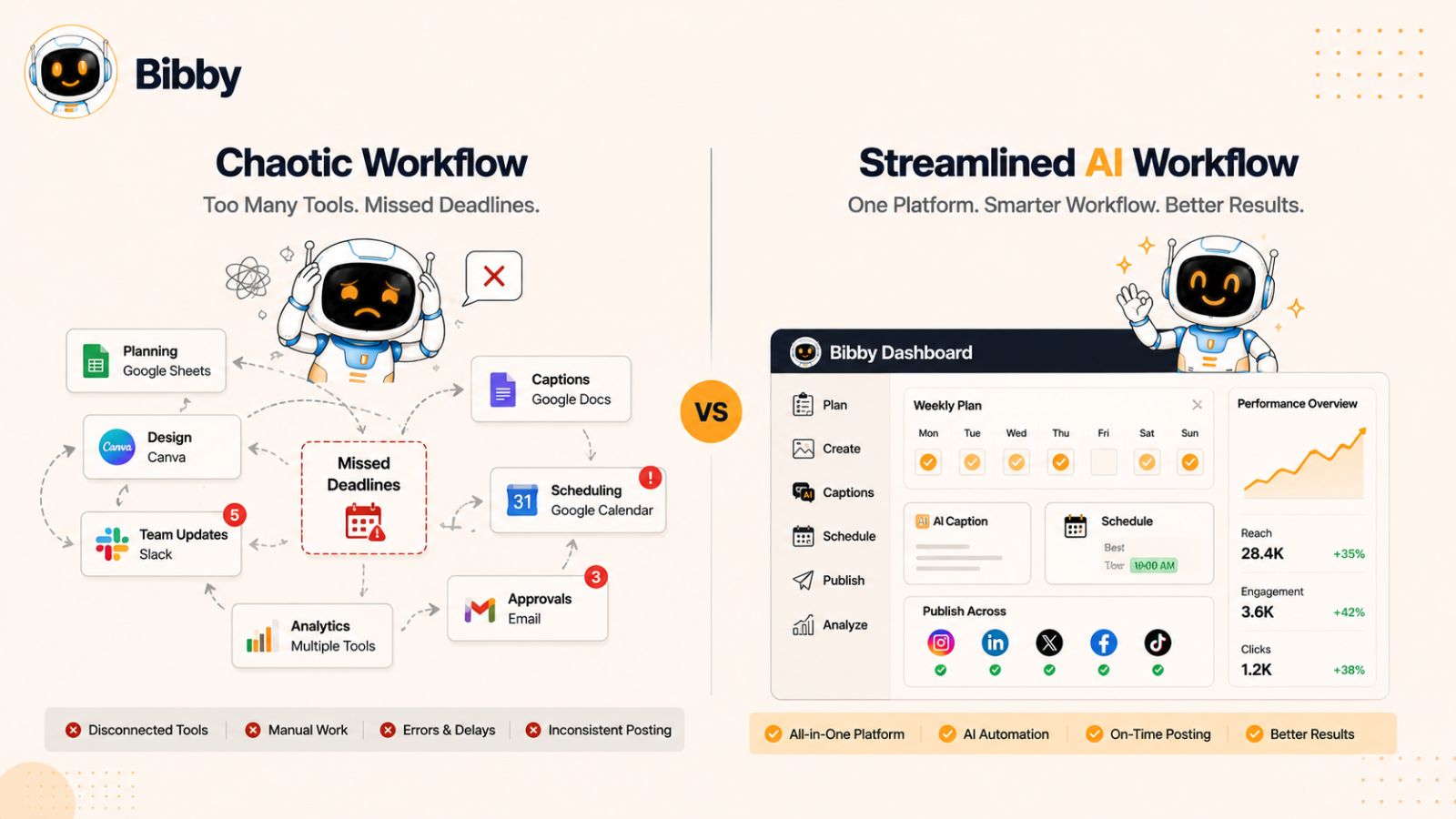
Many social media workflows involve switching between multiple applications throughout the day.
A typical process might look like this:
- Create graphics in one tool.
- Write captions in another.
- Store files in cloud storage.
- Copy and paste captions into a scheduler.
- Log into multiple social media platforms.
- Publish content manually.
Every extra step adds time and creates opportunities for mistakes.
Bibby replaces this fragmented process with one streamlined workflow:
- Upload or generate your visual.
- Choose your posting style.
- Let AI generate the caption.
- Select your social platforms.
- Schedule at AI-optimized times.
- Publish automatically.
The result is a faster, simpler workflow that helps you stay consistent while dramatically reducing the amount of manual work required.
Spend Less Time Posting and More Time Growing
Consistency is one of the biggest factors in social media success, but consistency shouldn't require hours of repetitive work every week.
By combining AI-powered content creation, automatic caption generation, intelligent scheduling, and multi-platform publishing into one easy-to-use platform, Bibby allows small businesses to focus on what matters most—building relationships with customers, growing their brand, and increasing sales.
Now that your content is being published automatically, the next step is understanding why when you post matters just as much as what you post. In the next section, we'll explore how AI determines the best posting times to maximize reach and engagement.
Step 6: Let AI Choose the Best Posting Times
Creating great content is only part of the equation. Even the most engaging post can underperform if it's published when your audience isn't online.
Many businesses spend hours researching the "best" times to post on social media, only to discover that there isn't a universal answer. The ideal posting time depends on your audience, industry, location, platform, and even the type of content you're sharing.
This is where AI provides a significant advantage. Instead of relying on generic recommendations, AI analyzes engagement patterns and helps determine the optimal times to publish your content for maximum visibility.
Why Posting Time Matters
Social media platforms prioritize content that receives engagement shortly after it's published. When your audience is active and interacts with your posts quickly, platforms are more likely to show your content to even more users.
Posting at the right time can lead to:
- Higher reach
- More likes and reactions
- Increased comments
- More shares
- Better click-through rates
- Higher video watch time
- Improved overall engagement
While great content remains the most important factor, publishing at the right moment gives that content the best chance to succeed.
There's No Universal "Best Time"
You've probably seen articles claiming that Tuesday at 10 a.m. or Thursday at 2 p.m. is the perfect time to post.
The reality is much more nuanced.
The best posting time depends on factors such as:
- Your target audience
- Their time zone
- Their daily routines
- The social platform
- Your industry
- The content format
- Historical engagement with your posts
For example, a restaurant, an online retailer, and a B2B consulting firm may all have completely different peak engagement windows.
Rather than following generic advice, it's better to let data guide your publishing schedule.
How AI Determines the Best Posting Times
AI scheduling tools continuously analyze engagement trends and historical performance to recommend—or automatically choose—the best times to publish your content.
Instead of making educated guesses, AI can evaluate patterns such as:
- When your audience is most active
- Which days generate the highest engagement
- How different content formats perform
- Platform-specific engagement trends
- Past performance of similar posts
As more data becomes available, AI can refine its recommendations over time, helping your publishing schedule evolve alongside your audience's behavior.
AI Optimizes Across Multiple Platforms
One of the biggest challenges of social media management is that every platform behaves differently.
For example:
- Facebook users may engage more during the evening.
- LinkedIn audiences are often more active during business hours.
- Instagram engagement may peak around lunch breaks or evenings.
- TikTok trends can shift rapidly throughout the day.
- YouTube viewers often consume longer content during evenings or weekends.
Publishing the same content everywhere at exactly the same time isn't always the most effective strategy.
AI helps optimize your publishing schedule for each platform, giving every post a better opportunity to reach the right audience.
How Bibby Makes Smart Scheduling Effortless
Instead of manually analyzing analytics and experimenting with publishing times, Bibby simplifies the process with AI-powered scheduling.
Once you've uploaded your content or generated it with AI, selected your posting style, and approved your captions, Bibby recommends and schedules your posts at AI-optimized times. This helps your content reach your audience when they're most likely to engage—without requiring constant monitoring or manual adjustments.
Whether you're publishing to Facebook, Instagram, LinkedIn, TikTok, or YouTube, Bibby removes the guesswork from scheduling so you can focus on creating valuable content while the platform handles the timing.
Schedule Weeks—or Even Months—in Advance
One of the biggest benefits of AI scheduling is the ability to work ahead.
Instead of worrying about tomorrow's post, you can dedicate a few hours to preparing an entire month's content.
For example, you might:
- Plan your monthly content calendar.
- Upload all images and videos.
- Generate captions with AI.
- Review and approve each post.
- Schedule everything in one session.
With your publishing schedule set, you can spend the rest of the month focusing on serving customers, launching new products, or growing your business—confident that your social media remains active and consistent.
AI Helps You Stay Consistent
Consistency is often more valuable than posting frequently. Businesses that publish on a regular schedule are more likely to build audience trust, strengthen brand recognition, and maintain steady engagement over time.
By automating the scheduling process, AI removes one of the biggest barriers to consistency: remembering to post every day.
With Bibby managing your publishing schedule behind the scenes, you can maintain a reliable social media presence without interrupting your daily workflow.
Now that your content is being published at the right times, it's time to take automation even further. In the next section, we'll explore how AI can automate repetitive marketing tasks, helping you save even more time while keeping your social media strategy running smoothly.
Step 7: Automate Repetitive Marketing Tasks
Scheduling your posts is a major time-saver, but it's only one piece of an effective AI social media workflow. Many of the repetitive tasks that consume hours each week can also be automated, allowing you to focus on strategy, customer relationships, and business growth.
From recurring promotions to evergreen content, AI helps ensure your marketing continues running even when you're busy with other priorities.
Why Marketing Automation Matters
Many small business owners spend valuable time repeating the same tasks every week, such as:
- Creating similar promotional posts
- Publishing weekly announcements
- Reminding customers about upcoming events
- Sharing seasonal offers
- Reposting evergreen content
- Managing multiple publishing schedules
While each task may only take a few minutes, they quickly add up over the course of a month.
By automating these activities, you reduce manual work while maintaining a consistent and professional online presence.
Reuse Evergreen Content
Not every post needs to be brand new.
Evergreen content remains valuable long after it's published and can be shared again with minor updates.
Examples include:
- Frequently asked questions
- Product tutorials
- Customer testimonials
- Business introductions
- Industry tips
- Educational content
- Success stories
- Buying guides
Refreshing and republishing evergreen content helps maximize the value of the work you've already created.
Schedule Seasonal Campaigns Early
Major holidays and seasonal promotions happen every year, so there's no need to create them at the last minute.
You can prepare campaigns well in advance for events such as:
- New Year
- Valentine's Day
- Mother's Day
- Summer promotions
- Back-to-school season
- Halloween
- Black Friday
- Cyber Monday
- Holiday sales
Planning these campaigns ahead of time reduces stress and gives you more time to refine your messaging.
Build Recurring Content Series
Creating repeatable content formats makes social media planning much easier.
For example:
Monday
- Marketing Tip Monday
Wednesday
- Customer Success Story
Friday
- Product Spotlight
Weekend
- Behind-the-Scenes Update
These recurring themes help your audience know what to expect while making content planning faster and more consistent.
Repurpose High-Performing Content
One successful post can often become multiple pieces of content.
For example, a popular blog article can be transformed into:
- A carousel
- Several quote graphics
- A short video
- A LinkedIn post
- Multiple Instagram captions
- A Facebook discussion
- YouTube Shorts
- TikTok clips
Repurposing allows you to reach new audiences while getting more value from your existing content.
Create Content in Batches
Instead of creating posts every day, dedicate a few hours to producing content in bulk.
A typical monthly workflow might look like this:
- Plan your content calendar.
- Create all visuals.
- Generate captions with AI.
- Review and approve content.
- Schedule the entire month.
Batching your work reduces context switching and helps you stay focused, making the content creation process far more efficient.
How Bibby Automates Your Marketing Workflow
Bibby brings these automation strategies together into one streamlined platform.
Instead of moving between design software, AI writing tools, cloud storage, and separate scheduling platforms, Bibby lets you manage everything from a single dashboard.
With Bibby, you can:
- Upload your own images or generate visuals with AI.
- Choose your preferred posting style.
- Automatically generate captions with AI.
- Schedule content weeks or months in advance.
- Publish to Facebook, Instagram, LinkedIn, TikTok, and YouTube.
- Manage image posts, carousels, videos, and Stories in one place.
This end-to-end workflow dramatically reduces the time spent on repetitive marketing tasks while helping you maintain a consistent presence across all your social media channels.
Automation Doesn't Replace Authenticity
Although AI can automate much of the workflow, your audience still wants to connect with real people.
Continue to:
- Respond to comments and messages.
- Join conversations in your industry.
- Celebrate customer successes.
- Share behind-the-scenes moments.
- Add personal insights and experiences.
- Engage with your community regularly.
Think of AI as your marketing assistant—not your replacement. It handles repetitive tasks so you can spend more time building genuine relationships with your audience.
Once your workflow is fully automated, the final step is measuring what works. In the next section, you'll learn how to track performance, identify your best-performing content, and use AI-driven insights to continuously improve your social media strategy.
Step 8: Monitor Performance and Improve with AI
Publishing content consistently is a great achievement, but successful social media marketing doesn't end once your posts go live. The most effective businesses regularly analyze performance, identify what resonates with their audience, and refine their strategy based on real data.
AI makes this process much easier by transforming complex analytics into actionable insights. Instead of manually reviewing dozens of reports, you can quickly understand what's working, what isn't, and where you should focus your efforts next.
Why Analytics Matter
Without measuring results, you're simply guessing.
Tracking your social media performance allows you to:
- Understand what your audience enjoys.
- Identify your highest-performing content.
- Improve future posts.
- Increase engagement over time.
- Generate more leads and sales.
- Make smarter marketing decisions.
The goal isn't to chase vanity metrics—it's to understand how your content supports your business objectives.
Key Metrics to Track
While every business has different goals, these metrics provide a strong foundation for evaluating your social media performance.
Reach
Reach measures how many unique users saw your content.
A growing reach indicates your posts are being discovered by new audiences.
Engagement
Engagement includes:
- Likes
- Comments
- Shares
- Saves
- Reactions
High engagement usually signals that your content is relevant and valuable.
Click-Through Rate (CTR)
CTR measures how often people click on links in your posts.
A higher click-through rate generally indicates that your captions and calls-to-action are compelling.
Follower Growth
Monitor how quickly your audience is growing over time.
Steady, organic growth often reflects consistent content quality and audience interest.
Video Performance
If you publish video content, pay attention to:
- Views
- Watch time
- Completion rate
- Audience retention
- Shares
These metrics help you understand which videos keep viewers engaged from start to finish.
Conversions
Ultimately, social media should contribute to your business goals.
Track actions such as:
- Website visits
- Newsletter signups
- Product purchases
- Appointment bookings
- Quote requests
- Lead form submissions
These metrics connect your social media efforts to measurable business outcomes.
Use AI to Spot Patterns
Reviewing analytics manually can be time-consuming, especially when you're publishing across multiple platforms.
AI helps identify patterns that might otherwise go unnoticed, such as:
- Which content pillars generate the most engagement.
- The captions that drive the highest click-through rates.
- The content formats your audience prefers.
- The best-performing publishing times.
- Seasonal trends in audience behavior.
- Topics that consistently generate conversations.
These insights help you make informed decisions instead of relying on trial and error.
Test, Learn, and Improve
Social media success is built through continuous improvement.
Experiment with different variables, including:
- Caption styles
- Calls-to-action
- Content formats
- Carousel length
- Video duration
- Image styles
- Posting frequency
- Publishing times
Even small adjustments can lead to meaningful improvements in reach, engagement, and conversions over time.
Let Data Shape Your Content Strategy
As you collect more performance data, use it to refine your monthly content plan.
For example, if educational carousels consistently outperform promotional posts, consider increasing the number of educational posts in your content calendar.
Likewise, if short videos generate the highest engagement on Instagram and TikTok, allocate more time to creating video content for those platforms.
The more you align your strategy with audience behavior, the stronger your long-term results will become.
How Bibby Supports Continuous Improvement
Bibby isn't just designed to help you create and schedule content—it also supports a smarter, data-driven workflow.
By centralizing your content creation, AI-generated captions, scheduling, and publishing, Bibby makes it easier to review what's been posted and identify patterns in your overall content strategy. Instead of managing separate tools for every stage of the process, you can focus on refining your approach based on real performance and audience engagement.
As you learn which topics, formats, and posting styles resonate most with your audience, you can use those insights to create even stronger content, schedule it more effectively, and build a repeatable system that improves month after month.
AI Is Your Competitive Advantage
The businesses that succeed on social media aren't necessarily the ones posting the most—they're the ones that consistently learn, adapt, and improve.
AI gives small businesses access to capabilities that were once available only to large marketing teams. By combining intelligent content creation, automated scheduling, and ongoing performance analysis, you can build a scalable social media strategy that grows alongside your business.
The best AI social media workflow isn't a one-time setup. It's a continuous cycle:
Plan → Create → Organize → Generate Captions → Schedule → Publish → Analyze → Improve
Each cycle makes your content smarter, your workflow faster, and your marketing more effective.
Now that you've built a complete AI social media workflow from start to finish, the remaining sections will help you avoid common mistakes, establish long-term best practices, and answer the most frequently asked questions from small business owners adopting AI-powered social media management.
Common Mistakes to Avoid When Using AI for Social Media
Artificial intelligence can dramatically improve your social media workflow, but it's not a "set it and forget it" solution. The most successful businesses combine AI's speed with human creativity, strategic thinking, and authentic customer engagement.
By avoiding these common mistakes, you'll get better results while maintaining a genuine connection with your audience.
1. Over-Automating Everything
Automation saves time, but relying on it for every interaction can make your brand feel impersonal.
For example, automatically publishing posts is helpful, but responding to comments, answering questions, and engaging with your community should still be handled by a real person whenever possible.
Best Practice:
Use AI to automate repetitive tasks while staying actively involved in conversations with your audience.
2. Publishing Without Reviewing AI Content
AI can generate impressive captions and content ideas, but it's not perfect. Occasionally, it may misunderstand context, use incorrect facts, or produce wording that doesn't match your brand.
Before publishing, always review:
- Facts and statistics
- Product information
- Links
- Brand messaging
- Grammar and spelling
- Calls-to-action
A quick review only takes a few minutes and helps prevent costly mistakes.
3. Ignoring Your Brand Voice
One of the biggest risks of AI-generated content is sounding generic.
If every caption sounds like it came from the same template, your brand loses personality.
Instead, customize AI-generated drafts by adding:
- Personal experiences
- Company stories
- Customer success stories
- Industry expertise
- Brand-specific language
Your audience follows your business because of its unique perspective—not because it sounds like everyone else.
4. Posting the Same Content Everywhere
Every social media platform has a different audience and content style.
For example:
- LinkedIn users often expect educational and professional content.
- Instagram audiences respond well to visually engaging storytelling.
- Facebook encourages community interaction.
- TikTok favors short, entertaining videos.
- YouTube rewards searchable, value-driven video content.
Rather than copying the exact same post everywhere, adapt your content to fit each platform's audience and best practices.
5. Prioritizing Quantity Over Quality
Publishing more frequently doesn't always lead to better results.
A handful of valuable, engaging posts each week is usually more effective than publishing low-quality content every day.
Focus on creating content that educates, entertains, inspires, or solves problems for your audience.
6. Forgetting to Use Calls-to-Action
Many businesses create informative posts but forget to tell readers what to do next.
Every post should encourage some type of action, such as:
- Visit your website.
- Leave a comment.
- Share the post.
- Download a guide.
- Watch a video.
- Contact your business.
- Book a consultation.
A clear call-to-action helps turn engagement into measurable business results.
7. Neglecting Analytics
One of the biggest advantages of AI is its ability to help you make data-driven decisions.
If you're not reviewing your analytics regularly, you're missing opportunities to improve your strategy.
Set aside time each month to evaluate:
- Top-performing posts
- Engagement trends
- Reach
- Click-through rates
- Conversion rates
- Audience growth
Use these insights to refine your content calendar and create more of what your audience enjoys.
8. Using Too Many Separate Tools
Many businesses unintentionally create a complicated workflow by using one platform for image creation, another for AI writing, a third for scheduling, and yet another for publishing.
Constantly switching between tools can:
- Slow down your workflow
- Increase the risk of errors
- Create duplicate work
- Make collaboration more difficult
Whenever possible, simplify your process with an all-in-one solution.
For example, Bibby combines AI-powered image generation, caption creation, scheduling, AI-optimized publishing times, and multi-platform publishing into one streamlined workflow. Instead of juggling multiple applications, you can manage images, carousels, videos, and Stories for Facebook, Instagram, LinkedIn, TikTok, and YouTube from a single dashboard.
9. Expecting Instant Results
Even with AI, social media success takes time.
Growing an engaged audience requires:
- Consistent posting
- Valuable content
- Audience interaction
- Ongoing testing
- Continuous optimization
AI accelerates your workflow, but long-term success still depends on building trust and delivering value over time.
10. Treating AI as a Replacement Instead of an Assistant
The businesses seeing the best results use AI as a productivity tool—not as a complete replacement for human creativity.
AI can help you:
- Generate ideas.
- Write first drafts.
- Create visuals.
- Schedule content.
- Automate repetitive tasks.
Your expertise, customer knowledge, and authentic voice are what transform AI-generated content into marketing that truly connects with people.
The Key Takeaway
AI is most effective when it enhances your workflow rather than replaces your involvement.
Use automation to eliminate repetitive tasks, but continue to bring your creativity, expertise, and personality to every piece of content. By combining AI with a thoughtful strategy—and using an all-in-one platform like Bibby to streamline content creation, scheduling, and publishing—you'll build a social media presence that's both efficient and authentic.
In the next section, we'll put everything together with a sample weekly AI social media workflow you can use as a blueprint for your own business.
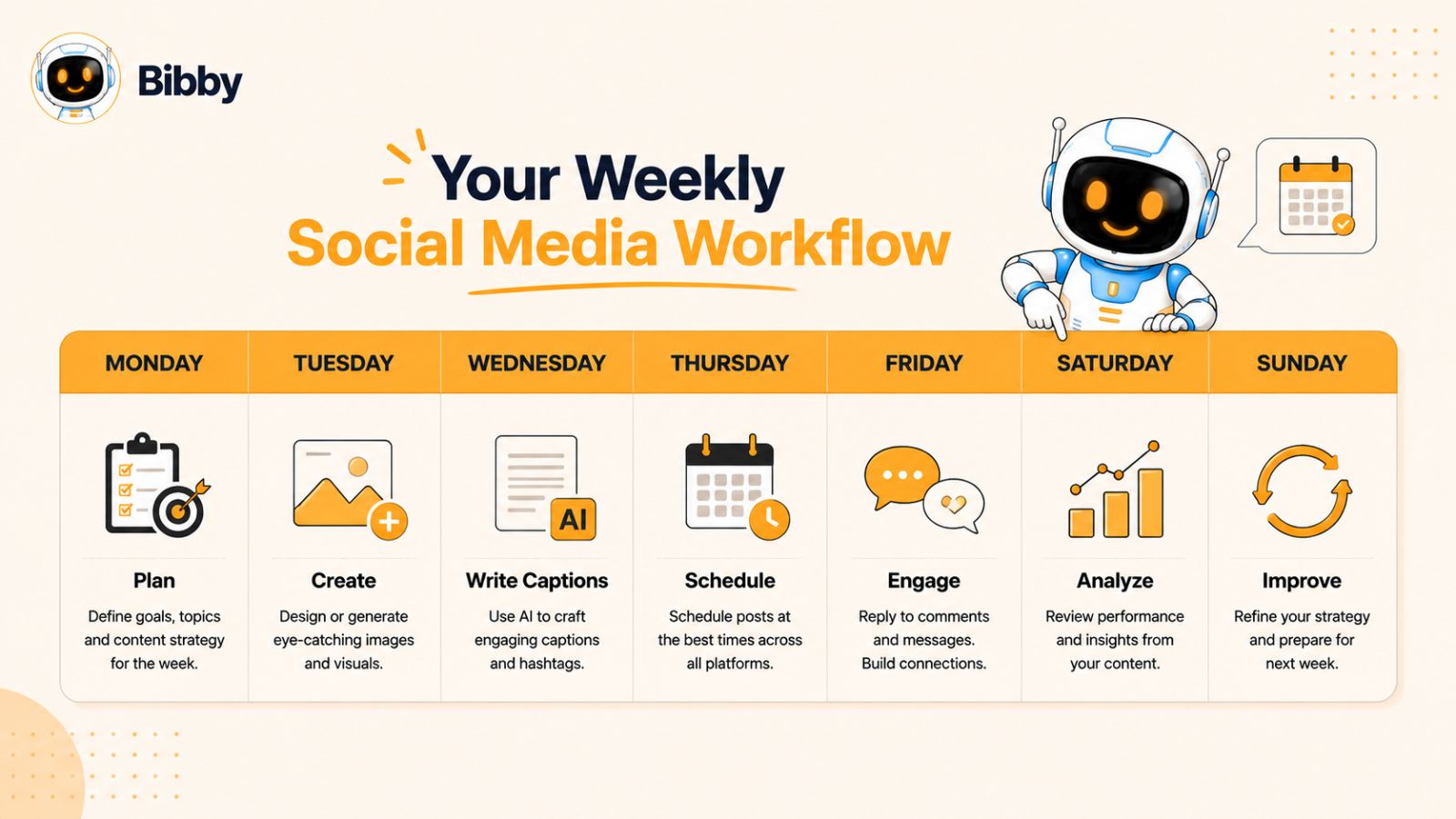
Sample Weekly AI Social Media Workflow
One of the biggest advantages of using AI is that you don't have to work on social media every single day. Instead of constantly creating content at the last minute, you can batch your work into a simple weekly workflow that keeps your marketing consistent while freeing up valuable time.
The following example is designed for small business owners, freelancers, and marketing teams who want to stay active across multiple platforms without spending hours each day on social media.
Monday: Plan Your Content
Start the week by mapping out your content.
Review your business goals, upcoming promotions, seasonal events, and any important announcements. Then decide what you'll post throughout the week.
Questions to ask:
- What products or services should I promote?
- What questions are customers asking?
- Which content performed well last week?
- Are there any holidays or events coming up?
- What value can I provide this week?
By the end of Monday, you should have a clear content calendar for the week.
Tuesday: Create Your Visuals
Now it's time to bring your ideas to life.
Create or collect all the visuals you'll need, including:
- Product photos
- AI-generated images
- Short videos
- Customer testimonials
- Carousels
- Stories
Instead of creating one post at a time, produce all your visual content in a single session.
Batch creation helps maintain a consistent look and significantly speeds up your workflow.
Wednesday: Generate Captions with AI
Once your visuals are ready, write captions for every post.
This is where AI can save hours of work.
With Bibby, simply upload your image or generate one with AI, choose your preferred posting style, and let the platform create engaging captions automatically. You can quickly review, personalize, and approve each caption before moving on to scheduling.
Rather than spending 15–20 minutes writing each post from scratch, you can prepare an entire week's worth of captions in a fraction of the time.
Thursday: Review and Schedule Everything
Before publishing, review your content to ensure everything aligns with your brand.
Check:
- Captions
- Images
- Videos
- Links
- Hashtags
- Calls-to-action
- Brand consistency
Once everything is approved, schedule your posts.
With Bibby, you can publish image posts, carousels, videos, and Stories across Facebook, Instagram, LinkedIn, TikTok, and YouTube from one dashboard. AI-optimized scheduling helps ensure your content is published when your audience is most likely to engage.
Friday: Engage With Your Audience
Automation handles publishing, but building relationships still requires a human touch.
Spend time:
- Responding to comments
- Replying to direct messages
- Thanking customers
- Answering questions
- Joining conversations
- Engaging with industry content
Even 20–30 minutes of genuine interaction can strengthen customer relationships and increase brand loyalty.
Weekend: Review Your Results
Use the weekend—or another quieter time during the week—to review your performance.
Focus on questions like:
- Which posts generated the most engagement?
- Which content formats performed best?
- Which captions received the most clicks?
- Did videos outperform images?
- Which topics sparked conversations?
These insights will help you make smarter decisions when planning next week's content.
A Weekly Workflow in Action
Here's what the entire process looks like:
| Day | Primary Focus | Outcome |
|---|---|---|
| Monday | Plan content | Weekly content calendar |
| Tuesday | Create visuals | Images, videos, carousels, Stories |
| Wednesday | Generate captions | AI-written, brand-ready copy |
| Thursday | Review and schedule | Content scheduled across all platforms |
| Friday | Engage with audience | Stronger relationships and community |
| Weekend | Analyze performance | Insights to improve next week's strategy |
Turn a Weekly Routine into a Long-Term System
Following this workflow consistently helps you move from reactive posting to strategic marketing.
Instead of wondering what to publish each day, you'll have a repeatable system that keeps your social media organized, efficient, and effective.
When paired with Bibby's AI-powered workflow—uploading or generating visuals, automatically creating captions, scheduling at AI-optimized times, and publishing across Facebook, Instagram, LinkedIn, TikTok, and YouTube—you can manage an entire week's social media from one platform with far less effort.
The result is more consistency, better content, and more time to focus on growing your business.
In the next section, we'll cover the best practices that will help you get even more value from your AI social media workflow over the long term.
Best Practices for Long-Term Success
Building an AI social media workflow isn't just about saving time—it's about creating a system that consistently delivers results. The businesses that see the greatest success aren't necessarily the ones posting the most content. They're the ones that continuously improve their process, adapt to audience preferences, and use AI strategically.
Follow these best practices to keep your workflow efficient and your social media growing over time.
1. Batch Create Your Content
Creating content in batches is one of the simplest ways to improve productivity.
Instead of creating one post every day, dedicate a few hours each week or month to:
- Planning your content calendar
- Creating visuals
- Writing or generating captions
- Reviewing content
- Scheduling posts
Batching helps you stay focused, reduces context switching, and ensures you always have content ready to publish.
2. Maintain a Consistent Posting Schedule
Consistency builds trust with both your audience and social media algorithms.
Whether you post three times a week or once a day, stick to a schedule you can realistically maintain.
With Bibby's AI scheduling, you can prepare your content in advance and let the platform publish it automatically at AI-optimized times, making consistency much easier to achieve.
3. Repurpose Your Best Content
Don't assume every post should only be published once.
High-performing content can often be repurposed into multiple formats.
For example:
- Turn a blog post into a carousel.
- Convert customer testimonials into quote graphics.
- Transform a webinar into several short videos.
- Break a long video into YouTube Shorts, Instagram Reels, and TikTok clips.
- Update evergreen posts with fresh insights and publish them again.
Repurposing allows you to maximize the value of every piece of content you create.
4. Keep Your Brand Voice Consistent
AI can generate content quickly, but your brand's personality should always remain recognizable.
Create simple brand guidelines that define:
- Your tone of voice
- Preferred vocabulary
- Writing style
- Brand colors
- Visual style
- Messaging priorities
Following these guidelines ensures every post feels like it comes from the same trusted business.
5. Mix Different Content Formats
Audiences engage with different types of content in different ways.
A balanced content strategy should include:
- Images
- Carousels
- Videos
- Stories
- Educational posts
- Promotional content
- Customer testimonials
- Behind-the-scenes updates
Using a variety of formats keeps your feed interesting and allows you to reach different segments of your audience.
6. Review Your Analytics Every Month
Data should guide your content strategy.
At least once a month, review:
- Reach
- Engagement
- Click-through rates
- Follower growth
- Video performance
- Conversion metrics
Look for trends rather than focusing on individual posts. Small improvements made consistently often lead to significant long-term growth.
7. Refine Your AI Prompts and Posting Style
As you gain experience, you'll better understand what resonates with your audience.
Experiment with:
- Different caption styles
- Stronger hooks
- New calls-to-action
- Various storytelling approaches
- Alternative posting styles
Over time, these refinements help AI generate content that's even more aligned with your brand and audience.
8. Stay Involved With Your Community
Automation handles publishing, but relationships require genuine interaction.
Make time to:
- Reply to comments
- Respond to direct messages
- Thank customers
- Answer questions
- Join relevant conversations
- Celebrate customer achievements
These interactions build trust and strengthen your brand far beyond what automation alone can achieve.
9. Simplify Your Workflow
Using multiple disconnected tools can slow your team down and create unnecessary complexity.
Whenever possible, choose a workflow that keeps content creation, caption generation, scheduling, and publishing together.
With Bibby, you can upload your own visuals or generate them with AI, select your preferred posting style, generate captions automatically, and publish images, carousels, videos, and Stories across Facebook, Instagram, LinkedIn, TikTok, and YouTube—all from one intuitive platform.
A simpler workflow means fewer mistakes, faster execution, and more time to focus on growing your business.
10. Think Long Term
Social media success isn't built overnight.
The businesses that consistently grow their audience are the ones that:
- Publish valuable content regularly.
- Learn from their analytics.
- Test new ideas.
- Adapt to changing trends.
- Continue improving their workflow.
AI gives you the tools to work more efficiently, but long-term growth comes from consistently delivering value to your audience.
Final Thoughts on Building a Sustainable Workflow
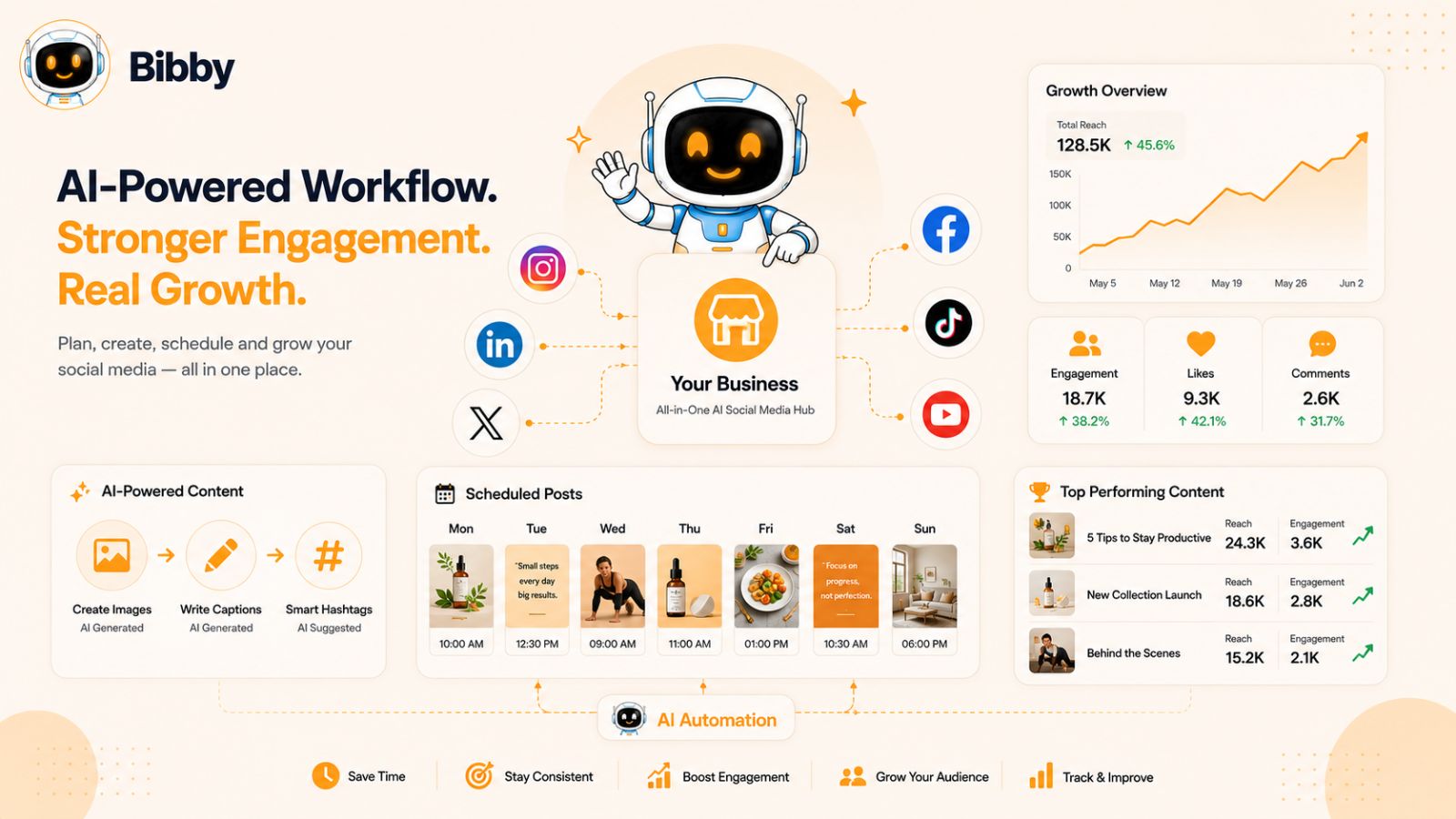
The goal of an AI social media workflow isn't simply to automate tasks—it's to create a repeatable system that saves time while producing better marketing results.
By combining thoughtful planning, high-quality visuals, engaging captions, intelligent scheduling, and ongoing optimization, you'll spend less time managing social media and more time growing your business.
With an all-in-one platform like Bibby supporting every stage of the process, it's easier than ever to build a workflow that scales with your business, keeps your content consistent, and helps you stay ahead in an increasingly competitive digital landscape.
Next, we'll answer some of the most common questions small business owners have about AI-powered social media workflows and automation.
Frequently Asked Questions (FAQ)
What is an AI social media workflow?
An AI social media workflow is a structured process that uses artificial intelligence to help plan, create, schedule, publish, and optimize social media content. Instead of handling every task manually, AI assists with repetitive activities like generating images, writing captions, choosing posting times, and automating publishing. This allows businesses to save time while maintaining a consistent and effective social media presence.
Why should small businesses use AI for social media?
Small businesses often have limited time, staff, and marketing budgets. AI helps streamline content creation and automation, making it possible to produce high-quality social media content without hiring a large marketing team.
Some of the biggest benefits include:
- Faster content creation
- Consistent posting
- Reduced manual work
- Better audience engagement
- More time to focus on running the business
Can AI completely manage my social media accounts?
AI can automate many repetitive tasks, including content generation, caption writing, scheduling, and publishing. However, it shouldn't replace genuine human interaction.
For the best results, continue to:
- Respond to comments
- Answer direct messages
- Engage with your community
- Share authentic experiences
- Build customer relationships
Think of AI as your marketing assistant rather than your replacement.
How much time can AI save on social media management?
The amount of time saved depends on your workflow and posting frequency. Businesses that batch-create content and automate scheduling often reduce the time spent on social media management significantly each week.
By using AI to generate captions, create visuals, and schedule posts in advance, many routine marketing tasks can be completed in a single planning session instead of requiring daily attention.
What types of content can AI help create?
Modern AI tools can assist with creating a wide variety of social media content, including:
- Images
- AI-generated artwork
- Carousels
- Videos
- Stories
- Captions
- Hashtags
- Calls-to-action
- Content ideas
- Promotional copy
This makes it easier to maintain a diverse and engaging content strategy across multiple platforms.
Which social media platforms should small businesses focus on?
The best platforms depend on your audience and business goals.
For many businesses:
- Facebook is effective for community engagement and local marketing.
- Instagram is ideal for visual storytelling and product-focused businesses.
- LinkedIn works well for B2B companies and professional services.
- TikTok is great for reaching new audiences with short-form videos.
- YouTube is valuable for tutorials, product demonstrations, and educational content.
Rather than trying to master every platform immediately, focus on the channels where your target audience spends the most time.
Is it better to schedule posts or publish them manually?
Scheduling offers several advantages over manual publishing.
It allows you to:
- Plan content in advance
- Maintain a consistent posting schedule
- Reduce last-minute stress
- Stay active during holidays or busy periods
- Publish at optimal times
Manual posting may still be useful for breaking news or real-time updates, but scheduling is generally more efficient for ongoing content marketing.
How does AI choose the best time to post?
AI scheduling tools analyze factors such as:
- Audience activity
- Historical engagement
- Platform behavior
- Previous post performance
- Content type
Using these insights, AI recommends or automatically selects publishing times that are more likely to maximize reach and engagement.
What makes Bibby different from other social media tools?
Bibby simplifies social media management by combining multiple steps into one streamlined workflow.
With Bibby, you can:
- Upload your own images or generate new ones with AI.
- Choose your preferred posting style.
- Generate captions automatically with AI.
- Schedule content at AI-optimized times.
- Publish across Facebook, Instagram, LinkedIn, TikTok, and YouTube.
- Manage image posts, carousels, videos, and Stories from one dashboard.
Instead of switching between separate design, writing, and scheduling tools, Bibby helps you manage your entire social media workflow in one place.
What's the best way to start using AI for social media?
The easiest way to begin is by building a simple, repeatable workflow.
Start by:
- Planning your monthly content.
- Creating or generating your visuals.
- Using AI to write captions.
- Scheduling posts in advance.
- Publishing consistently.
- Reviewing analytics and improving over time.
As your business grows, you can expand your workflow with additional automation while keeping your brand voice authentic and your audience at the center of every post.
Conclusion
Building an AI social media workflow doesn't have to be complicated. By following a repeatable process—planning your content, creating visuals, generating captions with AI, scheduling posts intelligently, and continuously analyzing performance—you can dramatically reduce the time spent managing social media while improving consistency and results.
The three biggest takeaways are simple: create a structured workflow instead of posting randomly, use AI to automate repetitive tasks without sacrificing your brand's unique voice, and regularly review your analytics so your content becomes more effective over time.
An all-in-one platform like Bibby makes this process even easier. From uploading your own images or generating AI visuals to automatically creating captions, scheduling posts at AI-optimized times, and publishing images, carousels, videos, and Stories across Facebook, Instagram, LinkedIn, TikTok, and YouTube, Bibby helps you manage your entire social media workflow from one intuitive dashboard.
Once you've mastered your AI workflow, the next step is learning how to repurpose a single piece of content into dozens of high-performing social media posts. That's one of the fastest ways to increase your reach, maximize your content investment, and grow your business with even less effort.