Creating and scheduling social media content manually can turn into a repetitive cycle of writing captions, preparing media, choosing posting times, and publishing to multiple platforms.
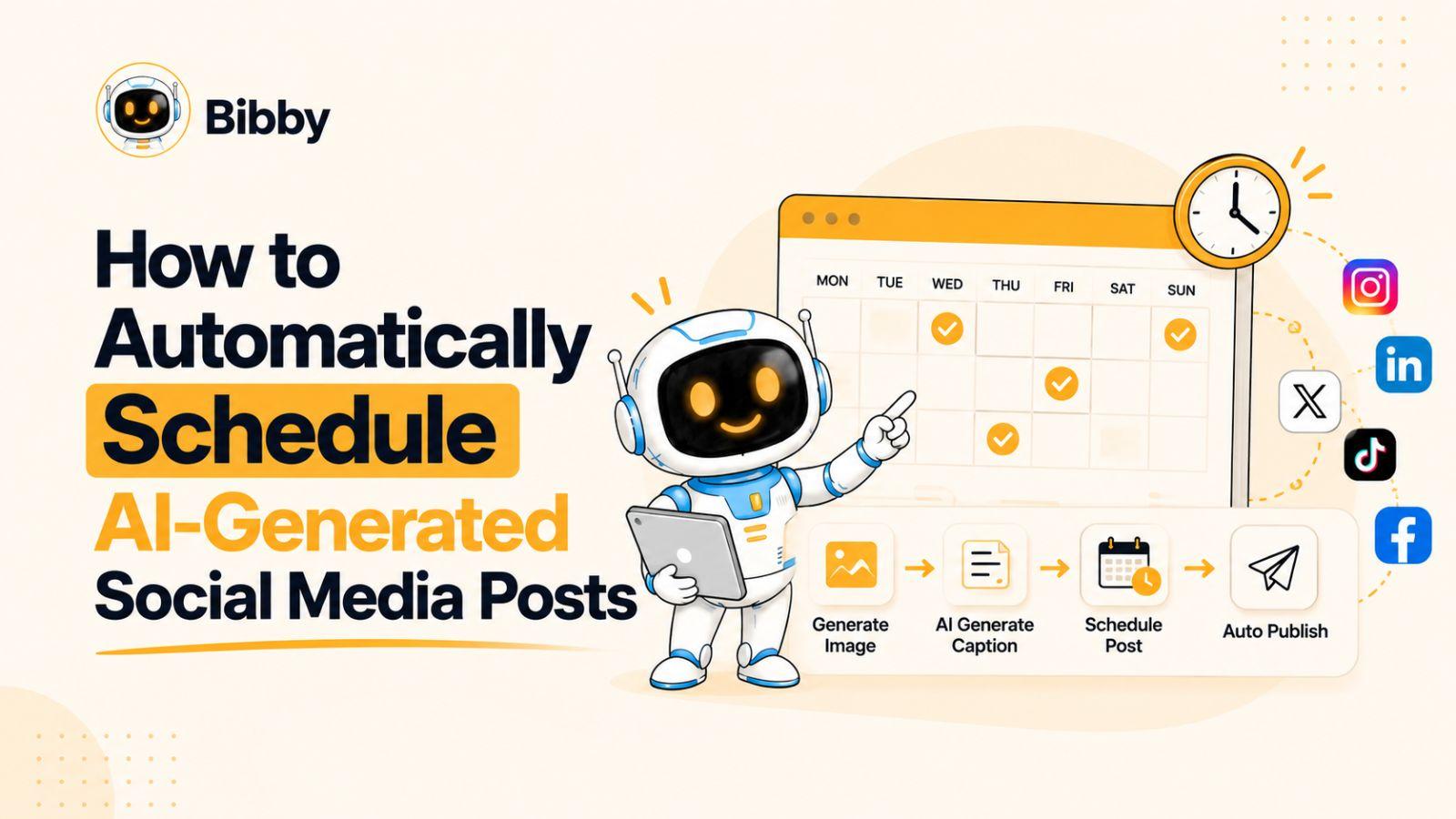
If you want to automatically schedule AI-generated social media posts, the real opportunity is to automate the entire workflow—not just use AI to write captions. Tools such as Bibby bring content creation, AI-generated captions, platform selection, scheduling, and publishing into one workflow, helping you spend less time managing posts and more time on your social media strategy.
Let’s start by understanding exactly what AI-powered social media scheduling involves.
What Does It Mean to Automatically Schedule AI-Generated Social Media Posts?
Automatically scheduling AI-generated social media posts means using AI to help create your social media content and then automatically organizing and publishing that content at predetermined or AI-optimized times. Instead of separately creating a visual, writing a caption, choosing a publishing time, and posting to every platform, these steps can become part of one connected workflow.
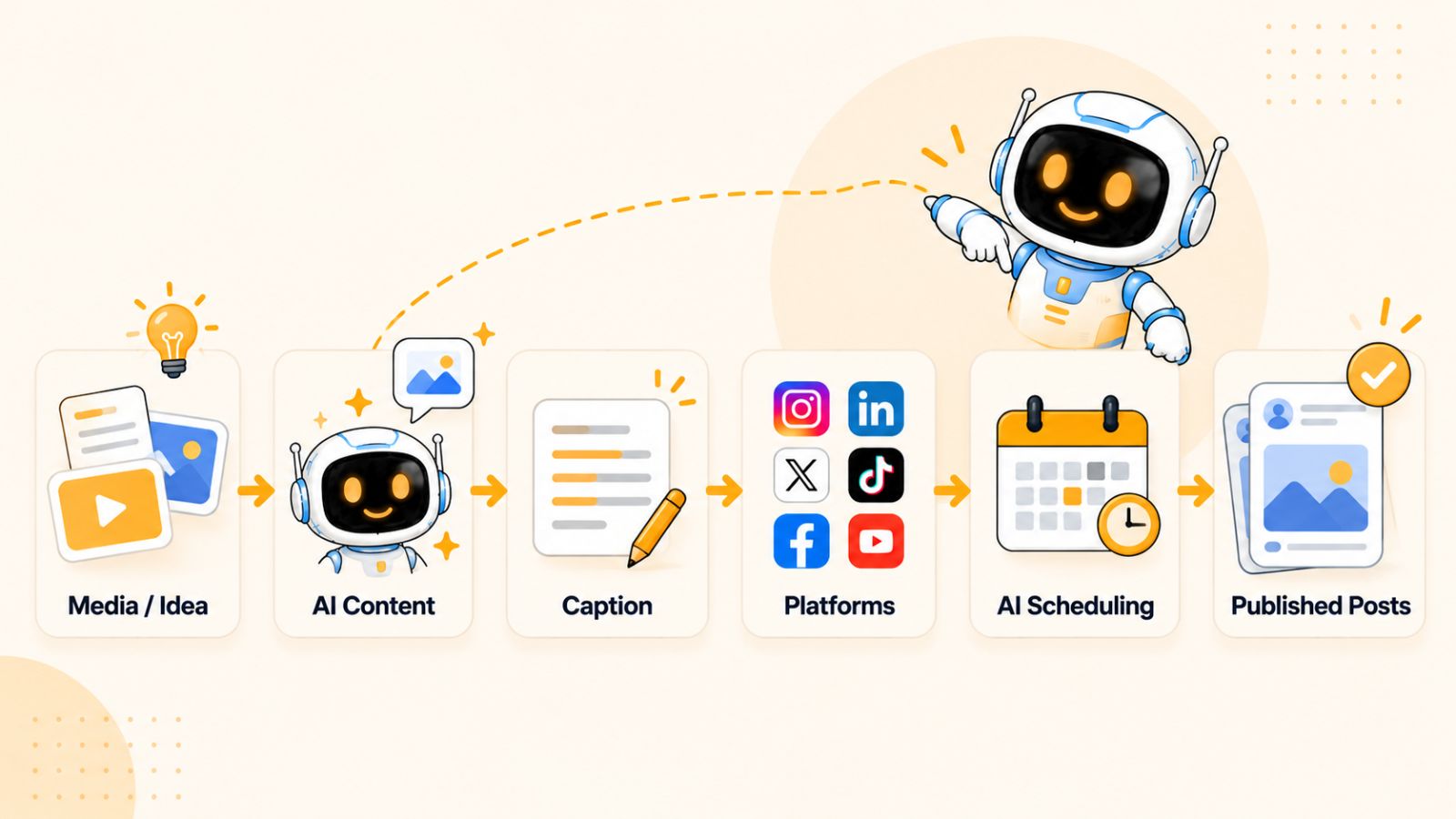
This is different from using an AI writing tool to generate a caption and then manually uploading the finished post to instagram, Facebook, LinkedIn, TikTok, or YouTube. In that workflow, AI handles only one part of the process. The rest still depends on you.
An AI-powered social media scheduling workflow can handle several steps together:
- Content creation: Upload existing images and videos or create new visuals with AI.
- Caption generation: Give the AI context about your content, brand, or campaign and let it generate the accompanying copy.
- Content adaptation: Prepare posts for the social platforms you want to use rather than repeatedly creating each post from scratch.
- Scheduling: Choose when content should be published or allow the platform to determine suitable publishing times based on available data.
- Multi-platform publishing: Connect your social accounts and distribute scheduled content across the platforms you select.
- Content management: Review, regenerate, modify, or organize posts without rebuilding the entire workflow.
The biggest advantage is not simply that AI can write faster. It is that repetitive decisions can be moved into an automated system.
For example, imagine you have 20 product images and want to turn them into a month of social media content. A traditional workflow might require you to write 20 captions, decide which platform receives each post, manually select dates and times, upload every piece of media, and repeat the process for different content formats.
With an AI-powered workflow, you can provide the media and instructions once, generate the supporting content, select your platforms, and let the system organize the publishing schedule. You can then review the resulting content before it goes live.
This is where tools such as Bibby become useful. Instead of treating AI content generation and social media scheduling as two separate tasks, Bibby combines them into a single workflow: you can upload an image or generate one with AI, choose a posting style, generate captions, select your social platforms, and schedule the resulting content.
The goal of automation is therefore not to remove human involvement completely. It is to remove the repetitive work that makes social media management time-consuming, while leaving you in control of the strategy, creative direction, and final content.
Once you understand this distinction, the next question is how the complete AI social media scheduling workflow actually works.
Also read the complete guide on: Best AI Social Media Content Scheduling Tools
How AI Social Media Scheduling Works
AI social media scheduling works by connecting content creation, caption writing, platform selection, timing, and publishing into a single workflow. Instead of treating each task as a separate job, an AI social media scheduler can use information about your content and brand to automate much of the process.
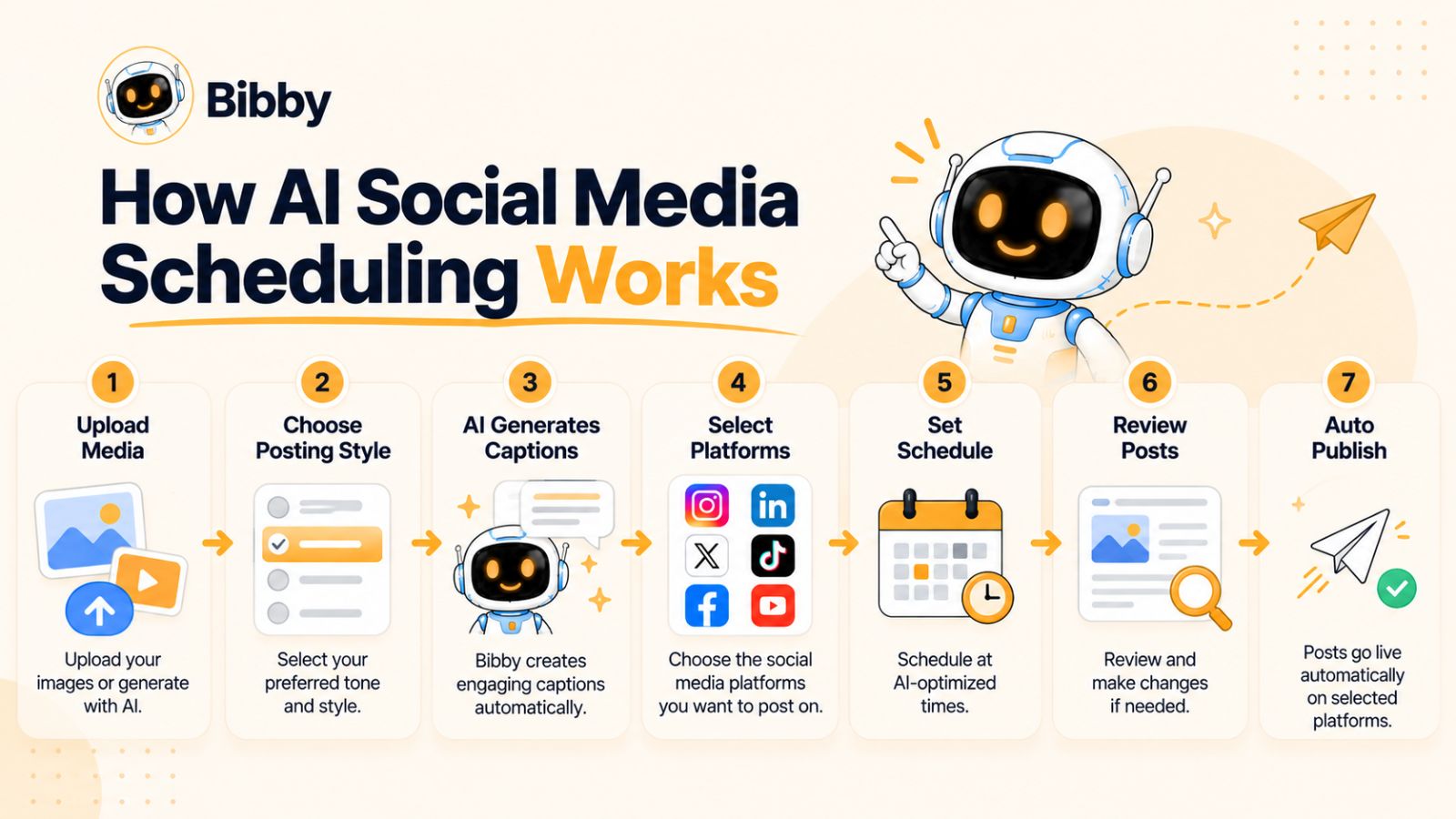
A typical workflow looks like this:
Create or upload your content → choose your posting style → generate the caption → select platforms → optimize the schedule → review → publish automatically.
Here is what happens at each stage.
1. Start With Your Media
Every social media post needs something for people to see or interact with. This could be an image, carousel, video, or story.
You can start with media you have already created, such as product photos, educational graphics, behind-the-scenes videos, or promotional assets. Alternatively, an AI-powered platform may allow you to generate the visual itself.
This matters because automation does not have to begin with text. Your existing visual content can become the starting point for an entire social media campaign.
2. Choose Your Posting Style
The same piece of content can communicate very differently depending on your objective and brand voice.
For example, a business might want a post to sound:
- Educational
- Promotional
- Conversational
- Inspirational
- Entertaining
- Professional
- Story-driven
Giving the AI a defined posting style helps it generate content that fits the purpose of the post instead of producing generic copy.
A good social media automation system should also understand that a brand's communication style needs to remain consistent across multiple posts.
3. Let AI Generate the Caption
Once the AI understands the media and desired style, it can generate the accompanying caption.
This can eliminate one of the most repetitive parts of social media management: staring at an image and trying to decide what to write underneath it.
The best workflows don't stop at generating a random description of the image. The caption should support the purpose of the post, communicate the intended message, and fit the brand's overall voice.
With Bibby, for example, you can provide your media and choose the style you want, and the platform can generate captions for the resulting social media posts.
4. Select the Social Platforms
The next step is deciding where the content should appear.
A single campaign might need to reach audiences on Facebook, Instagram, LinkedIn, YouTube, and TikTok. Manually preparing and publishing the same campaign separately on each platform creates unnecessary work.
AI-powered scheduling allows you to select the platforms you want to use and manage the publishing workflow from one place.
However, cross-platform publishing does not necessarily mean every platform should receive exactly the same content. A professional workflow should account for differences in audience, format, and communication style.
5. Choose or Optimize Publishing Times
Timing is another part of social media management that can consume significant time.
Instead of manually opening a calendar and deciding that every post should go live at the same time, an AI-powered scheduler can use available audience and scheduling information to determine suitable publishing times.
The objective is to create a publishing schedule that distributes your content consistently rather than leaving you to manually determine every date and time.
This is particularly useful when you are scheduling content in batches. You can prepare a large collection of posts and let the scheduling system organize when they should be published.
6. Review the Content Before It Goes Live
Automation should not mean blindly publishing everything an AI creates.
A review step gives you an opportunity to check whether the caption sounds like your brand, whether the visual communicates the intended message, and whether the content is appropriate for the selected platform.
If something does not feel right, AI makes revisions much easier. Instead of starting from an empty text box, you can regenerate or modify the content based on your instructions.
7. Schedule the Complete Content Batch
Once the posts are ready, the scheduler can organize them across the selected dates and platforms.
This changes the nature of social media management.
Rather than asking:
“What should I post today?”
you can work in batches and ask:
“What content do I want my audience to receive over the next few weeks?”
That shift can make social media considerably easier to manage.
Why This Workflow Matters
The value of AI social media scheduling comes from connecting all of these steps.
Using one tool to generate a caption and another tool to schedule it still leaves you managing a fragmented process. The more connected the workflow becomes, the fewer repetitive decisions you need to make manually.
This is the approach behind Bibby. Its workflow allows you to upload or generate media, choose a posting style, generate captions, select platforms, and schedule content at AI-optimized times. It also supports different formats, including images, carousels, videos, and stories.
The result is not simply an AI caption generator or a traditional social media calendar. It is a workflow designed to take content from an initial idea or media asset toward scheduled publication.
But before you automate that process, there are a few things you should prepare to make the automation actually useful.
Also read: Social Media Growth With AI: The New Rules Every Brand Must Know →
What You Need Before Automating Your Social Media Posts
Automating social media posts does not mean handing everything over to AI without preparation. The quality of your automated content depends heavily on the information, media, and direction you give the system.
Before setting up an automated social media workflow, prepare a few basic elements.
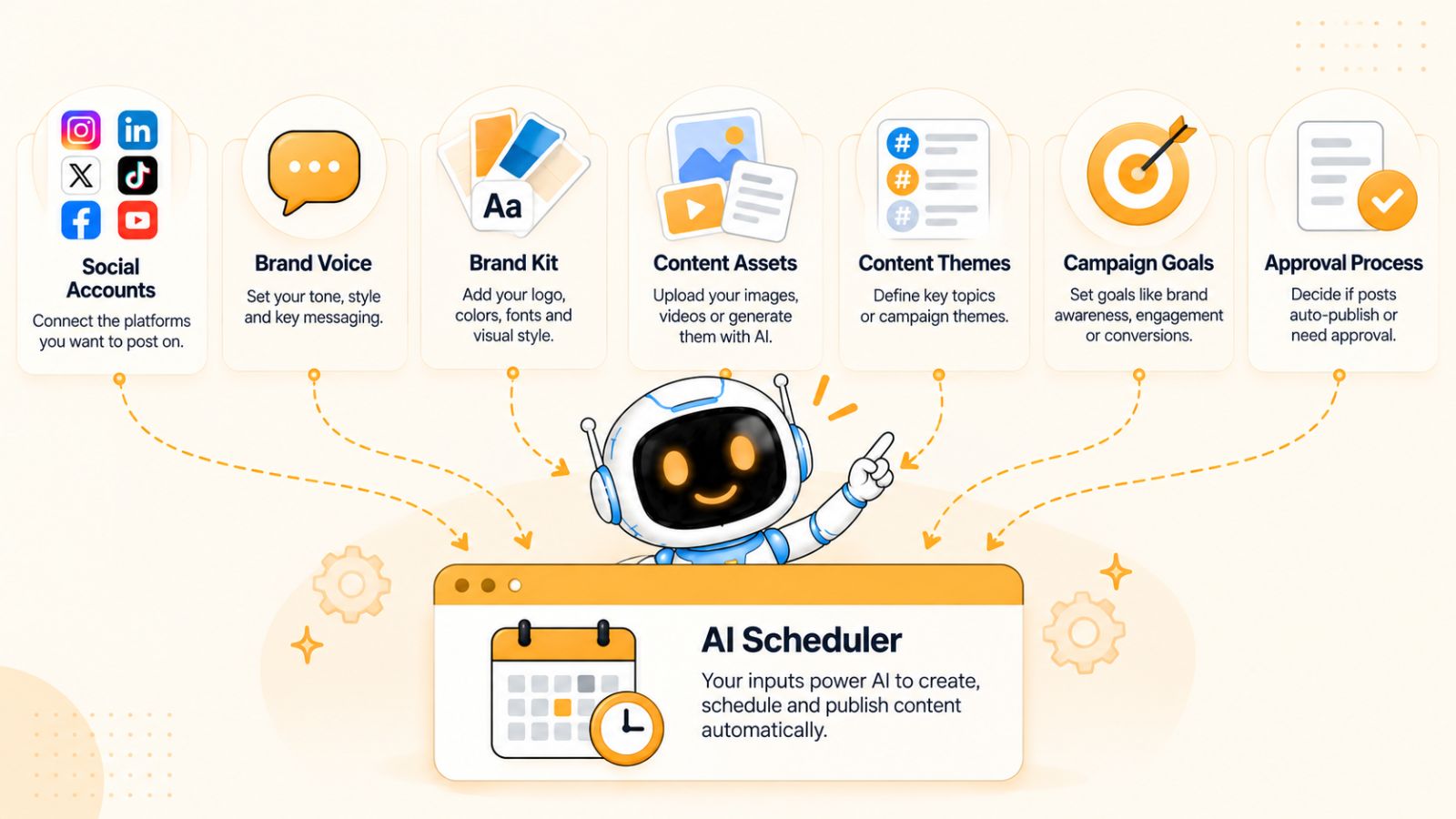
1. Your Social Media Accounts
Start by deciding which platforms you want to manage.
Depending on your audience and content strategy, that could include Facebook, Instagram, LinkedIn, YouTube, TikTok, or several of them at once.
Connecting your accounts to a scheduling platform gives you one place to organize and publish content instead of switching between multiple apps.
You do not necessarily need to publish everything everywhere. Your platform selection should reflect where your audience actually spends time and which channels make sense for your content.
2. Your Brand Voice
AI can generate a caption in seconds, but speed does not automatically make the caption sound like your brand.
Give your AI scheduler enough information to understand how your business communicates.
For example, your brand might be:
- Friendly and conversational
- Technical and educational
- Direct and professional
- Playful and energetic
- Premium and sophisticated
- Simple and approachable
You can also define words, phrases, or communication styles you want the AI to use—or avoid.
The clearer your brand direction is, the easier it becomes to automate content without making every post sound generic.
3. Your Brand Kit
A brand kit can provide a centralized reference for your visual identity and communication guidelines.
Depending on the tool, this may include elements such as your logo, colors, fonts, brand information, and preferred voice.
This becomes particularly useful when AI is involved in content creation because the system has more context about what your brand should look and sound like.
Bibby takes this idea further through its chat interface, where you can create and manage a brand kit conversationally rather than treating brand information as a one-time setup task.
4. Your Content Assets
Automation needs something to work with.
Prepare the images, videos, product assets, educational graphics, or other media you want to turn into social posts.
You do not necessarily need to create every asset manually. An AI-powered workflow can also begin with an idea and generate a visual when appropriate.
For example, instead of designing every social graphic from scratch, you could start with a campaign concept and use AI to help create the required media.
5. Your Content Themes
One of the easiest ways to make automated social media content more useful is to define a few recurring content themes.
These could include:
- Educational content
- Product demonstrations
- Customer stories
- Industry insights
- Behind-the-scenes content
- Promotional offers
- Frequently asked questions
- Company updates
Content themes prevent your automated schedule from becoming a random collection of posts.
They also make it easier to create content in batches. Once you know the themes you want to cover, AI can help turn those themes into individual posts.
6. Your Campaign Goals
Automation should serve a goal.
Before generating dozens of posts, determine what you want the content to accomplish.
For example, you may want to:
- Increase awareness of a product
- Drive traffic to your website
- Generate leads
- Educate potential customers
- Promote an upcoming launch
- Build an audience
- Maintain a consistent publishing schedule
Your goal influences the type of content you create, the tone of your captions, and the platforms you prioritize.
7. A Review Process
Even highly automated social media workflows benefit from human review.
Decide which content can be published automatically and which content should require approval.
For example, evergreen educational posts might be suitable for a streamlined workflow, while sensitive announcements, major promotions, or important company updates may deserve a manual review.
The goal is not to eliminate human involvement. It is to make human involvement more valuable by removing repetitive work.
The More Context You Give AI, the More Useful Automation Becomes
The most effective AI social media workflows are not built around a single command such as “write me a post.”
They are built around context.
Your brand, audience, content themes, visual identity, campaign objectives, preferred platforms, and publishing preferences all help determine what a useful post looks like.
Once those foundations are in place, the actual automation becomes much simpler.
You can upload or generate your media, tell the system how you want the content presented, generate the captions, select your platforms, and create a publishing schedule.
That brings us to the most important part: how to actually automate the entire process from start to finish.
How to Automatically Schedule AI-Generated Social Media Posts
Once your accounts, brand information, and content assets are ready, you can build an automated workflow that takes social media content from creation to scheduled publication.
The exact interface will vary depending on the tool you use, but the underlying process is generally the same: create the media, give AI the right direction, generate the post, select your platforms, optimize the schedule, and review the final content.
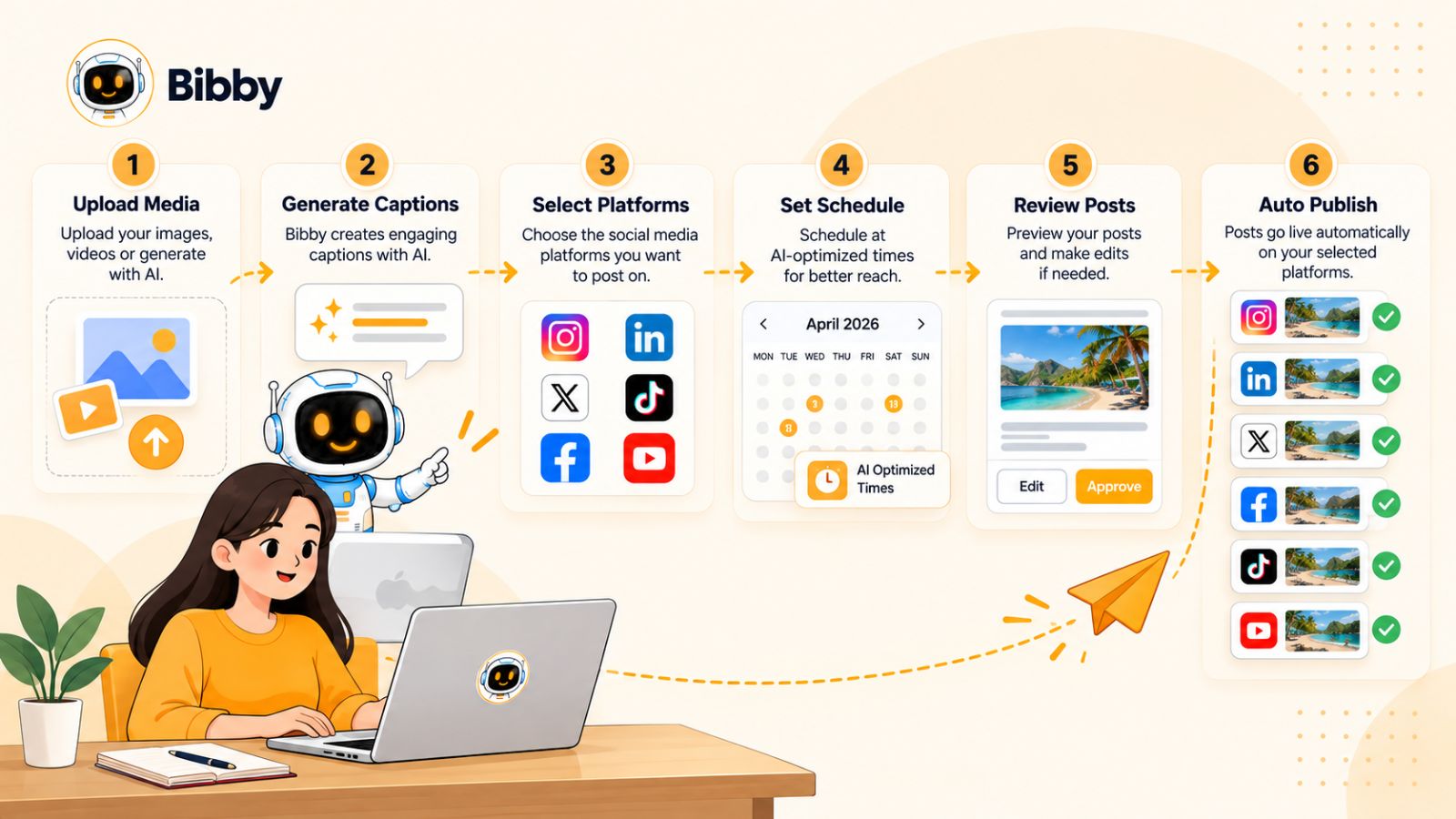
Here is how to automatically schedule AI-generated social media posts from start to finish.
Step 1: Upload Your Existing Media or Generate New Content
Begin with the visual content you want to publish.
You might already have product photographs, promotional graphics, videos, screenshots, customer content, or educational assets ready to go.
If you do not have a suitable visual, an AI-powered social media platform can potentially help you generate one from a description or campaign concept.
This gives you two ways to start:
Existing media → upload content you have already created.
AI-generated media → describe what you want and use AI to create the visual.
The right approach depends on your content strategy. Businesses with an established creative library can repurpose existing assets, while businesses starting from scratch may benefit from AI-assisted content creation.
Step 2: Choose Your Posting Style
Next, tell the AI how you want the content to communicate.
A product image, for example, could become an educational post explaining a problem, a promotional post highlighting an offer, or a conversational post asking the audience a question.
Your chosen posting style provides the creative direction for the caption and overall message.
This is also where your brand voice becomes important. If your brand is professional and informative, the resulting copy should reflect that. If your brand is casual and conversational, the AI should be given that direction instead.
The goal is to make AI-generated content feel like an extension of your brand rather than generic text produced by a machine.
Step 3: Generate the Caption With AI
Once the media and style are defined, let AI generate the caption.
A useful AI-generated caption should do more than describe the image. It should support the purpose of the post.
For example, an educational post might explain a concept and encourage discussion, while a promotional post might focus on a product benefit and direct people toward an action.
If the first version isn't right, regenerate it rather than rewriting everything manually.
This is one of the practical advantages of AI-assisted social media management: you can iterate quickly.
With Bibby, for example, you can upload your media, select a posting style, and have AI generate the caption automatically. If the generated version does not match what you want, you can work with the AI to regenerate or modify it.
Step 4: Select the Social Platforms
Now decide where the content should be published.
A modern social media workflow may involve several platforms, including:
- YouTube
- TikTok
Select the platforms relevant to your audience and campaign.
However, avoid assuming that every post needs to appear on every platform. A B2B educational post might have a natural home on LinkedIn, while a short visual demonstration might be better suited to Instagram or TikTok.
The benefit of centralized scheduling is that you can manage those decisions from one workflow instead of manually uploading the same campaign to every platform.
Step 5: Let AI Optimize the Publishing Schedule
Once your content and platforms are selected, the next question is when each post should be published.
This is where AI-powered scheduling can remove another manual task.
Instead of manually assigning every post to a date and time, an AI scheduler can use available information about your content, audience, and scheduling setup to determine suitable publishing times.
Bibby, for example, can schedule selected media across different dates at AI-optimized times.
This becomes especially valuable when you are scheduling a large batch of content. Rather than spending an afternoon manually arranging dozens of posts on a calendar, you can let the system handle the repetitive scheduling decisions.
Step 6: Review the Generated Posts
Automation should still include quality control.
Before content is published, review the posts and check:
- Does the caption accurately represent the media?
- Does it sound like your brand?
- Is the message appropriate for the selected platform?
- Are there any factual or grammatical problems?
- Is the call to action clear?
- Does the visual match the intended message?
- Is the content appropriate to publish automatically?
This review does not have to defeat the purpose of automation.
If AI handles the repetitive work, you can spend your time reviewing a batch of finished posts rather than creating every post manually.
Step 7: Regenerate or Modify Anything That Needs Improvement
AI-generated content will not always be perfect on the first attempt.
Maybe the caption is too formal. Perhaps it needs a stronger hook. Maybe the post is too promotional or doesn't sound enough like your brand.
Instead of starting over, ask the AI to change it.
For example:
Make the caption more conversational.
Give me a stronger opening hook.
Make this sound more professional.
Focus more on the product benefit.
Shorten the caption.
The ability to iterate through natural instructions makes AI automation considerably more flexible than a fixed scheduling template.
Step 8: Schedule the Complete Content Batch
Once your posts are approved, schedule them.
At this point, the individual tasks that traditionally take hours—uploading media, writing captions, choosing platforms, selecting dates, and assigning times—have been combined into a single workflow.
You can schedule one post or prepare an entire batch of content.
For businesses and creators that publish consistently, batch scheduling can be particularly useful because it separates content production from content publication.
Instead of stopping every day to create something new, you can dedicate specific periods to content production and let the scheduler distribute that content over time.
Step 9: Use the Results to Improve the Next Batch
Automation should not end when the posts are scheduled.
Your publishing data can help you understand what your audience responds to, which formats perform well, and which topics deserve more attention.
Those insights can then inform your next batch of AI-generated content.
For example, if educational carousel posts consistently attract more engagement than promotional graphics, you might create more educational carousel content in your next campaign.
This creates a continuous loop:
Create → schedule → publish → analyze → improve → create again.
That is ultimately what makes AI social media automation more powerful than simply asking an AI chatbot to write a caption.
A Practical Example
Imagine a small business has 30 product images and wants to maintain an active social media presence for the next month.
Without automation, the owner might need to:
- Select an image every few days.
- Write a caption.
- Decide which platforms to use.
- Adapt the content manually.
- Choose a date.
- Choose a time.
- Upload the post.
- Repeat the process again.
With an AI-powered workflow, the business can upload the media in batches, define its preferred posting style, generate captions, select the relevant platforms, and create a schedule for the content.
Bibby is designed around this type of workflow. It can take uploaded or AI-generated media, turn it into social content with AI-generated captions, and schedule the resulting posts across selected platforms at AI-optimized times.
The result is not that social media strategy becomes completely hands-off. Instead, the repetitive execution becomes automated, giving you more time to focus on what should actually be communicated to your audience.
And the automation does not have to stop at simple image posts. The same approach can extend to carousels, videos, stories, and other social media formats.
Also read: The ROI of Autonomous Marketing with AI: Putting Your Social Media on Pure Auto-Pilot
How Bibby Automates AI Social Media Scheduling
There are many tools that solve individual parts of social media management. One tool might generate images, another might write captions, and another might schedule posts.
Bibby takes a more connected approach by bringing content creation, AI-assisted copywriting, scheduling, and social media management into one workflow.
That matters because the biggest time savings come from connecting the individual steps rather than automating only one task.
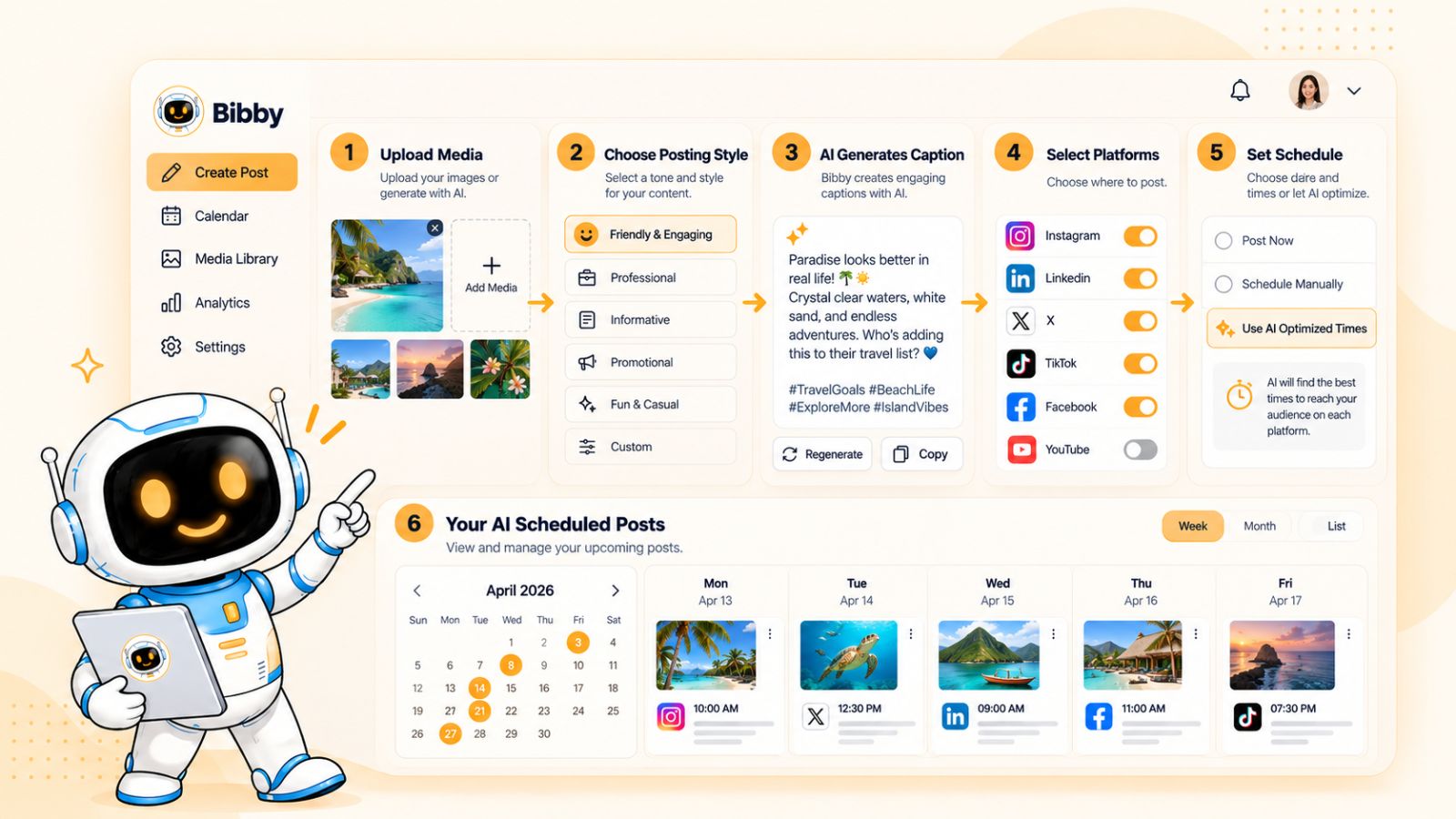
Start With an Image or Generate One With AI
The workflow can begin with media you already have.
Upload an image, video, or other content you want to turn into a social media post. If you need a new visual, you can also use AI to generate one as part of the content creation process.
This means you don't have to wait until every creative asset has been manually designed before starting your social media workflow.
For example, a business launching a new product could provide its product information and create the visual content it needs, then move directly into creating the social posts.
Choose How You Want the Post to Communicate
After selecting your media, you can choose the posting style you want.
This gives the AI additional context about the type of content you are trying to create.
A product image could become a promotional post. The same image could instead be used for an educational post explaining a customer problem or a conversational post designed to generate comments.
Giving the system this direction helps separate content generation from simply asking AI to “write a caption.”
Let AI Generate the Caption
Bibby can automatically generate captions based on the media and selected posting style.
That removes one of the most repetitive parts of maintaining an active social media presence.
Instead of opening a separate AI writing tool, describing your image, copying the generated caption, editing it, and moving it into a scheduler, the content-generation step happens within the social media workflow.
You can also regenerate or modify the content when the first version isn't what you want.
This makes the process iterative rather than one-and-done.
Schedule Content Across Your Selected Platforms
Once your posts are ready, you can select the social platforms where you want them published.
Bibby's workflow is designed to support multiple major social channels, including Facebook, Instagram, LinkedIn, YouTube, and TikTok.
This is particularly useful for businesses that manage several channels simultaneously.
Instead of maintaining separate publishing calendars, you can organize the campaign from a centralized workflow.
You can also work with different types of media, including:
- Image posts
- Carousels
- Videos
- Stories
That gives you more flexibility than an automation system designed around a single post format.
Let AI Handle the Publishing Schedule
One of the more important parts of automated social media management is deciding when content should go live.
Bibby can schedule media across different dates using AI-optimized publishing times.
That means you don't necessarily have to manually assign a date and time to every individual post.
For a larger content batch, this can save substantial administrative work.
You can prepare your content, select the platforms, and let the scheduling workflow organize when the posts should be published.
Manage Social Media Through Chat
Bibby's workflow also extends beyond traditional menus and scheduling calendars through its chat interface.
Instead of navigating through different parts of the application for every task, you can interact with the system conversationally.
For example, inside the chat interface, you can use natural-language instructions to work on tasks such as:
- Creating a brand kit
- Creating a campaign
- Creating social media posts
- Regenerating captions
- Managing content
- Refining generated content
This changes the role of AI from simply being a writing assistant to becoming an interface for managing your social media workflow.
Instead of thinking about which button you need to click, you can describe what you want to accomplish.
For example, you might tell the system that you want to create a campaign around a new product, ask it to generate several posts, change the tone of a caption, or regenerate content that doesn't match your brand.
The important distinction is that the conversation is connected to the underlying social media workflow.
Why an End-to-End Workflow Matters
The advantage of a platform such as Bibby isn't simply that it can generate an AI caption.
Caption generation by itself solves only one small part of the social media process.
The larger opportunity comes from connecting:
Media → AI creation → posting style → caption → platforms → scheduling → publishing → management
When these steps live within one workflow, you spend less time moving information between different tools.
That can be especially valuable for creators, small businesses, marketing teams, and agencies that need to maintain a consistent social media presence without spending every day manually publishing content.
The best way to evaluate any AI social media scheduler is therefore not just to ask, “Can it write captions?”
A better question is:
“How much of the complete content-to-publishing workflow can it automate while still giving me control?”
That question becomes even more important when you need to publish different types of content, such as images, carousels, videos, and stories.
How to Schedule Different Types of AI-Generated Social Media Content
Social media automation becomes much more useful when it can handle more than a basic image and caption.
Different platforms and audiences respond to different content formats. A brand might use an educational carousel on LinkedIn, a short video on TikTok, a product image on Instagram, and a story to promote a limited-time offer.
An effective AI social media scheduling workflow should therefore make it possible to create, organize, and schedule multiple types of content from the same system.

AI-Generated Image Posts
Image posts are one of the simplest formats to automate.
You can start with an existing photograph, product image, graphic, screenshot, or other visual asset. AI can then help create the accompanying caption based on your chosen posting style.
Alternatively, AI image generation can be used when you don't already have a suitable visual.
For example, a business could provide a concept such as “five ways to improve your morning productivity” and create a visual around that idea before generating the corresponding caption.
The important part is keeping the visual and caption connected. AI should not create a generic image and then attach unrelated copy simply because both were generated automatically.
AI-Generated Carousel Posts
Carousels allow you to communicate more information than a single image.
They are particularly useful for:
- Tutorials
- Step-by-step guides
- Lists
- Educational content
- Product features
- Comparisons
- Industry insights
- Storytelling
A carousel can begin with a strong opening slide, develop the idea across several slides, and finish with a takeaway or call to action.
AI can help with the planning and copy for each slide, while an automation platform can help organize and schedule the finished carousel.
For marketers, this creates an opportunity to turn one topic into a structured piece of social content rather than publishing a single paragraph beneath an image.
AI-Assisted Video Posts
Video is another important format for automated social media publishing.
A video might be:
- A product demonstration
- An educational explanation
- A short tutorial
- A customer story
- A behind-the-scenes clip
- A promotional video
- A short-form social video
The AI workflow can assist with the surrounding content, such as captions, descriptions, and publishing schedules.
The key is to treat video as its own content format rather than simply converting every text post into a video.
Different platforms also have different expectations for video length, dimensions, presentation, and audience behavior. Your automation workflow should account for those differences before publishing.
Stories
Stories are useful when you want to publish temporary, frequent, or timely content without filling your main feed with every update.
Businesses can use stories for:
- Product announcements
- Limited-time promotions
- Behind-the-scenes content
- Questions and polls
- Event reminders
- New content announcements
- Quick updates
Because stories often have a different purpose from permanent feed posts, they should be included in your automation strategy rather than treated as an afterthought.
A scheduling system that supports stories gives you another way to maintain a consistent presence without requiring you to manually publish every update.
Repurposing One Idea Into Multiple Formats
One of the biggest opportunities created by AI is content repurposing.
Instead of creating every social post from scratch, you can begin with one core idea and adapt it into several formats.
For example, imagine your core topic is:
“How small businesses can use AI to save time on social media.”
That single idea could become:
- An educational carousel
- A short video
- An image quote
- A LinkedIn post
- An Instagram caption
- A TikTok video concept
- A series of stories
The underlying idea remains the same, but the presentation changes depending on the platform and format.
This is more efficient than creating seven unrelated pieces of content.
Don't Confuse Repurposing With Copying
There is an important difference between repurposing and publishing the exact same post everywhere.
Simply copying the same caption and visual across every platform may save time, but it can also ignore the way people use each network.
A better AI workflow takes the original idea and adapts it.
For example, the same business insight could be presented as a professional discussion on LinkedIn, a concise visual explanation on Instagram, and a short-form video on TikTok.
The underlying message stays consistent while the execution changes.
Scheduling Multiple Formats From One Workflow
This is where centralized scheduling becomes especially valuable.
Rather than maintaining one calendar for images, another for videos, and another for stories, you can organize different content formats within a single publishing workflow.
Bibby supports multiple media formats, including images, carousels, videos, and stories, allowing businesses to incorporate different types of content into their automated social media strategy.
The result is a more varied content calendar without requiring you to manually manage every format independently.
And once multiple formats are involved, the next challenge is deciding where each piece of content should be published.
How to Automatically Schedule Posts Across Multiple Social Media Platforms
Managing multiple social media platforms is one of the main reasons businesses turn to automation.
Publishing on Facebook, Instagram, LinkedIn, YouTube, and TikTok separately means repeating many of the same tasks: uploading media, writing copy, choosing publishing times, checking formatting, and keeping track of what has already been published.
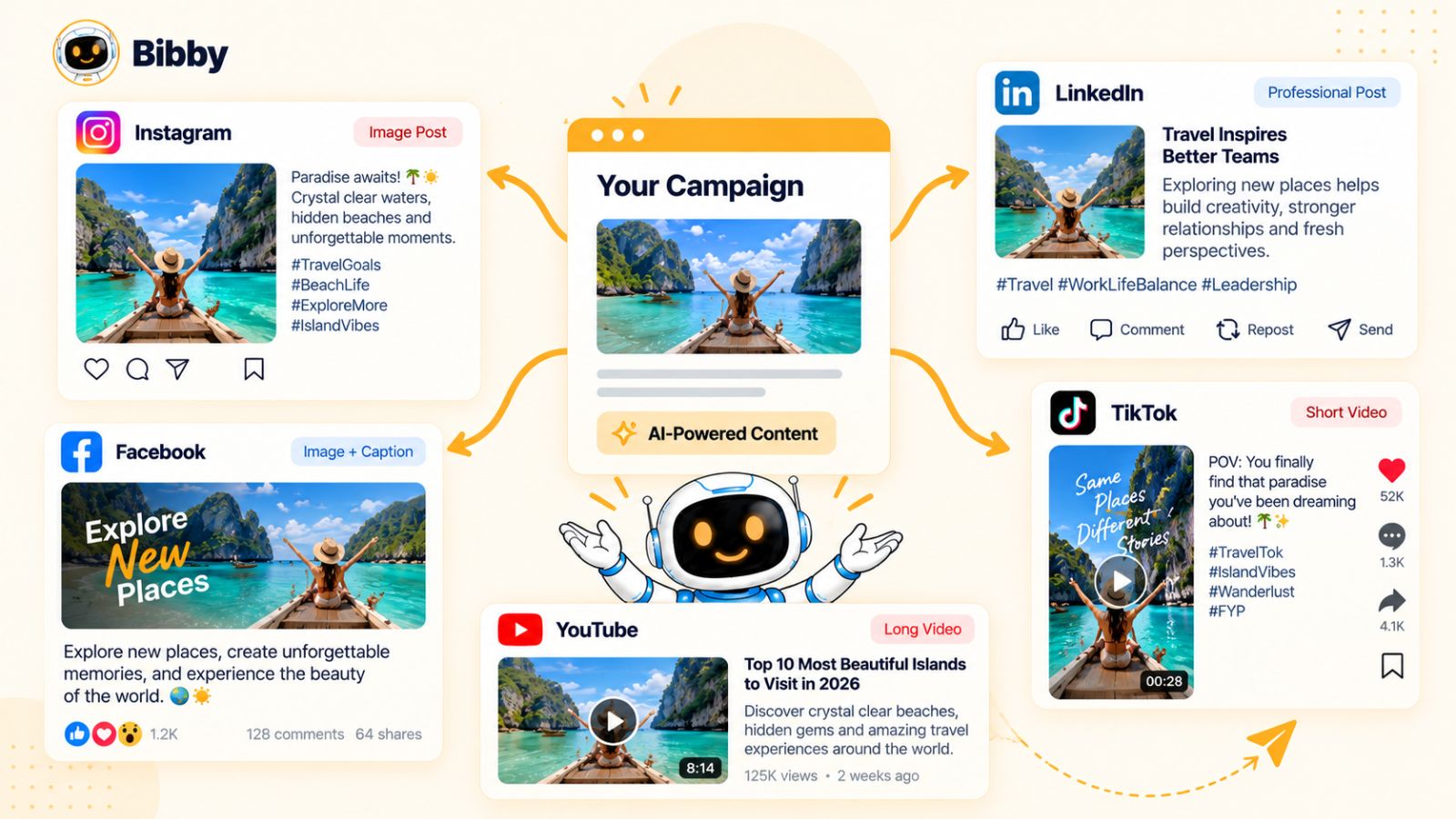
An AI social media scheduler can centralize those tasks and make it possible to manage multiple platforms from one workflow.
But effective cross-platform scheduling is about more than pressing “publish everywhere.”
Facebook can support a wide variety of content, including images, videos, promotional posts, educational content, and community-focused updates.
When scheduling Facebook content, consider what action you want the audience to take. Some posts may be designed to generate discussion, while others may drive traffic or promote a product.
AI can help adapt the caption to the purpose of the post while the scheduling system handles the publishing workflow.
Instagram is highly visual, making the relationship between the creative asset and caption particularly important.
Depending on your content strategy, you may use:
- Image posts
- Carousels
- Videos
- Stories
A centralized AI workflow can help generate the supporting copy and organize the publishing schedule without requiring you to manually create each post.
Visual consistency also matters on Instagram, so your brand kit and creative direction should be part of the information provided to the AI.
LinkedIn often requires a different communication style from consumer-focused social networks.
A business might use LinkedIn to share:
- Industry insights
- Educational content
- Company updates
- Professional opinions
- Case studies
- Product information
Simply copying an Instagram caption onto LinkedIn may not produce the same result as adapting the underlying idea for a professional audience.
AI can help create platform-appropriate variations while preserving the central message of the campaign.
YouTube
YouTube adds another dimension to social media scheduling because video is central to the platform.
Instead of treating YouTube as simply another place to publish a short caption, consider the role of video in your overall content strategy.
A single campaign could include longer educational videos, short-form video content, or promotional material depending on your goals.
Centralized scheduling can make it easier to include YouTube in the same publishing system rather than managing it completely separately.
TikTok
TikTok is particularly focused on short-form, highly engaging video content.
A social media automation workflow can help manage the supporting copy and scheduling process, while the creative itself should be designed with the platform's audience and format in mind.
Again, the objective is not necessarily to duplicate content. It is to take a content idea and adapt it to the environment where it will be published.
Should You Publish the Same Post Everywhere?
Sometimes yes—but not always.
Cross-platform scheduling is most useful when it removes repetitive work without removing strategic thinking.
For example, a product announcement may legitimately need to appear across Facebook, Instagram, LinkedIn, YouTube, and TikTok.
But the way that announcement is communicated can differ.
The central idea might remain:
“We launched a new product.”
The execution could then change:
- Facebook: Explain the product and invite discussion.
- Instagram: Lead with the visual and product benefits.
- LinkedIn: Explain the problem the product solves for customers.
- YouTube: Demonstrate how the product works.
- TikTok: Turn the launch into short-form video content.
This approach gives you the efficiency of centralized scheduling without turning your social media presence into a collection of identical posts.
How AI Helps With Cross-Platform Scheduling
AI can reduce the amount of manual adaptation required.
Instead of writing five completely separate posts, you can provide one campaign idea and use AI to help create platform-specific versions.
The workflow might look like this:
Campaign idea → AI-generated content → platform-specific variations → platform selection → optimized scheduling → automatic publishing
This is more sophisticated than simply using a social media calendar.
The AI becomes part of the content production process, while the scheduler handles distribution.
Managing Multiple Platforms From One Place
The biggest practical benefit is having a centralized workflow.
Bibby, for example, allows users to select multiple social platforms and schedule media across different dates at AI-optimized times. Its workflow can include Facebook, Instagram, LinkedIn, YouTube, and TikTok, alongside different content formats such as images, carousels, videos, and stories.
That means a campaign can be planned as a single content operation rather than as five separate publishing projects.
For someone managing social media alone, that can eliminate a significant amount of repetitive administrative work.
For a marketing team, it can also make the publishing process easier to coordinate.
Automation Still Needs Platform Awareness
The goal of AI social media scheduling is not to make every platform behave the same.
The goal is to make the workflow consistent while allowing the content to be appropriate for each platform.
That distinction is important.
You want one efficient system for managing your social media presence, but you do not necessarily want one identical post copied everywhere.
Once your content can be adapted and scheduled across multiple platforms, the next question is one of the most important parts of automated publishing: when should each post actually go live?
Also read: How AI Finds Hidden Opportunities to Grow Your Social Media
How AI Determines the Best Time to Post
Choosing when to publish a social media post sounds simple until you have dozens of posts, multiple platforms, different audiences, and different time zones to manage.
There is no single posting time that is guaranteed to be best for every account. The right publishing time can vary based on your audience, platform, content type, location, and historical activity.
That is why AI-powered scheduling focuses on optimizing the publishing process rather than relying on a universal rule such as “always post at 9 AM.”
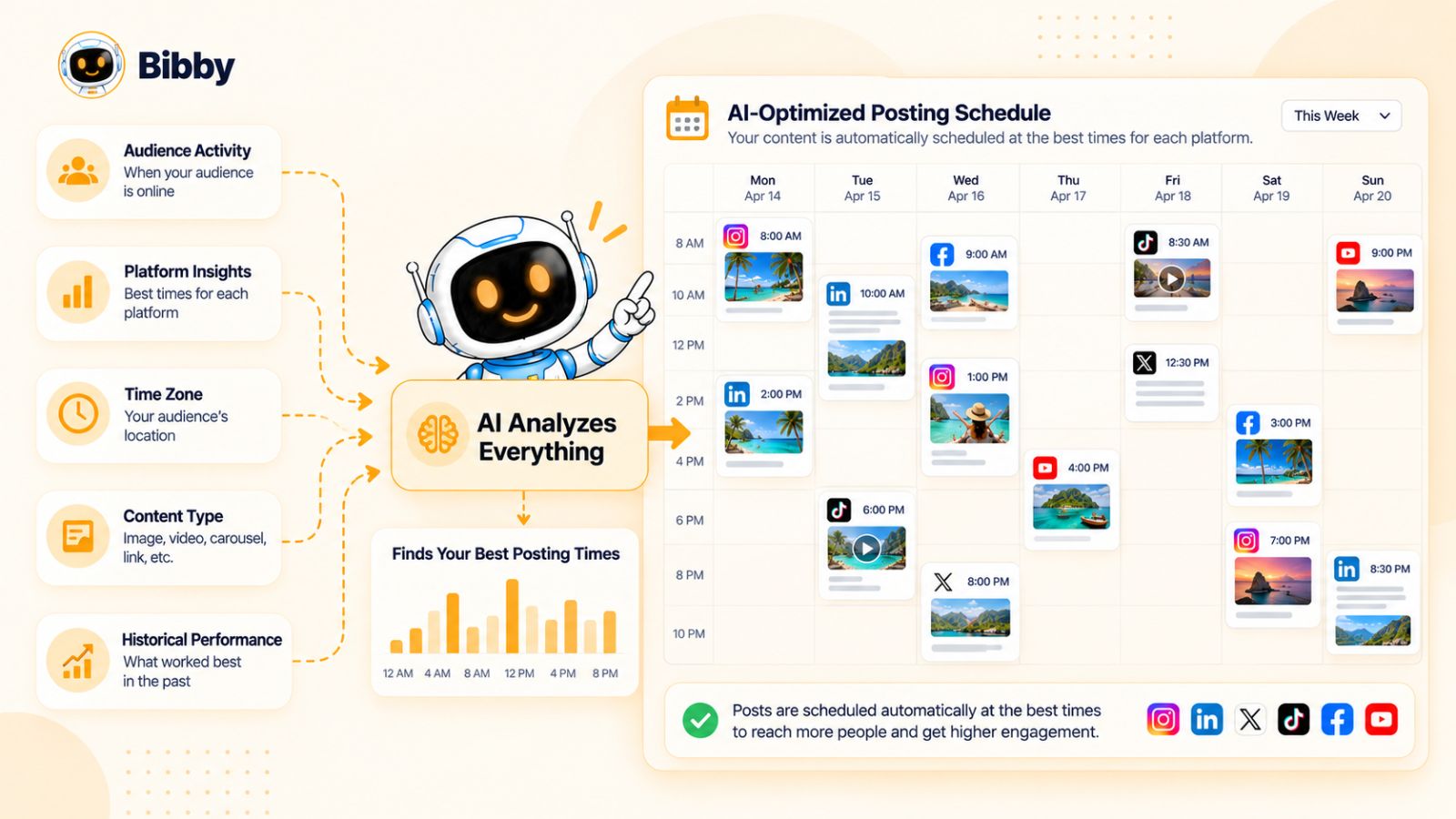
Audience Activity
One factor that can influence publishing time is when your audience is active.
If your audience is primarily active during certain periods, scheduling content around those periods can help your posts reach people when they are more likely to be using the platform.
The important point is that audience behavior is specific to the account.
A time that works well for one brand may not be appropriate for another brand with a different audience.
Platform Differences
Your audience may behave differently on different social networks.
Someone might interact with your Instagram content in the evening but consume LinkedIn content during working hours.
Likewise, video consumption patterns can differ from the way people interact with image or text-based content.
This makes platform-specific scheduling more useful than applying one publishing schedule everywhere.
Time Zones
Time zones become particularly important when your audience is distributed across multiple regions.
Imagine a company based in India with customers in India, the United States, and Europe.
Publishing every post according to the company's local clock could mean that a significant portion of the audience receives the content at inconvenient times.
An automated scheduling system can make managing multiple publishing windows easier than manually converting times for every post.
Content Type
The best publishing window can also depend on what you're publishing.
A quick entertainment video may behave differently from a detailed educational post.
Similarly, a promotional announcement may have a different purpose from a conversation-focused post.
This is one reason why a content calendar should consider more than just frequency.
Historical Performance
Your previous content can provide useful information about what happens after you publish.
If certain publishing windows consistently generate stronger engagement for your audience, that information can inform future scheduling decisions.
This is where an automated system can become more useful over time.
Instead of relying entirely on generic advice about social media posting times, your scheduling strategy can incorporate information from your own publishing history when such data is available.
AI-Optimized Scheduling
An AI-powered scheduler can bring these variables together to reduce the amount of manual decision-making involved in scheduling content.
Rather than asking you to select a date and exact time for every post, the system can use its available scheduling and audience information to assign publishing times.
Bibby uses AI-optimized scheduling as part of its social media workflow, allowing media to be distributed across different dates and scheduled automatically.
This becomes especially useful when you are preparing a large content batch.
For example, suppose you have 30 posts ready to publish over the next month.
Manually scheduling those posts means making dozens of individual date-and-time decisions.
An automated system can handle that repetitive work so you can focus on reviewing the content and deciding whether the overall campaign makes sense.
AI Timing Is Not a Guarantee
It is important to understand what “AI-optimized” does and does not mean.
It does not mean that an AI system can guarantee a specific number of views, likes, comments, or conversions simply by selecting a particular publishing time.
Social media performance depends on many factors beyond timing, including:
- Content quality
- Audience relevance
- Creative execution
- Competition
- Platform algorithms
- Current events
- Account history
- Engagement
- Offer or message
- Audience behavior
Scheduling is one variable within a much larger system.
The practical benefit is that AI can reduce the manual effort involved in managing that variable.
The Bigger Benefit of Automated Timing
For most businesses, the biggest advantage is not discovering a magical posting hour.
It is removing the need to manually decide when every piece of content should be published.
You can focus on creating a strong batch of content and let the scheduling system organize the calendar.
That changes social media management from a daily publishing task into a more structured content operation.
And once the scheduling process is automated, you can take that automation a step further by managing your social media workflow through natural-language conversation.
Using an AI Chat Interface to Manage Social Media
Traditional social media management often means navigating through menus, calendars, content libraries, campaign settings, and publishing screens.
AI chat interfaces introduce a different way to work.
Instead of manually finding every feature, you can describe what you want to accomplish in natural language and let the AI help execute the workflow.
This can make social media management feel less like operating a collection of tools and more like working with a digital social media assistant.
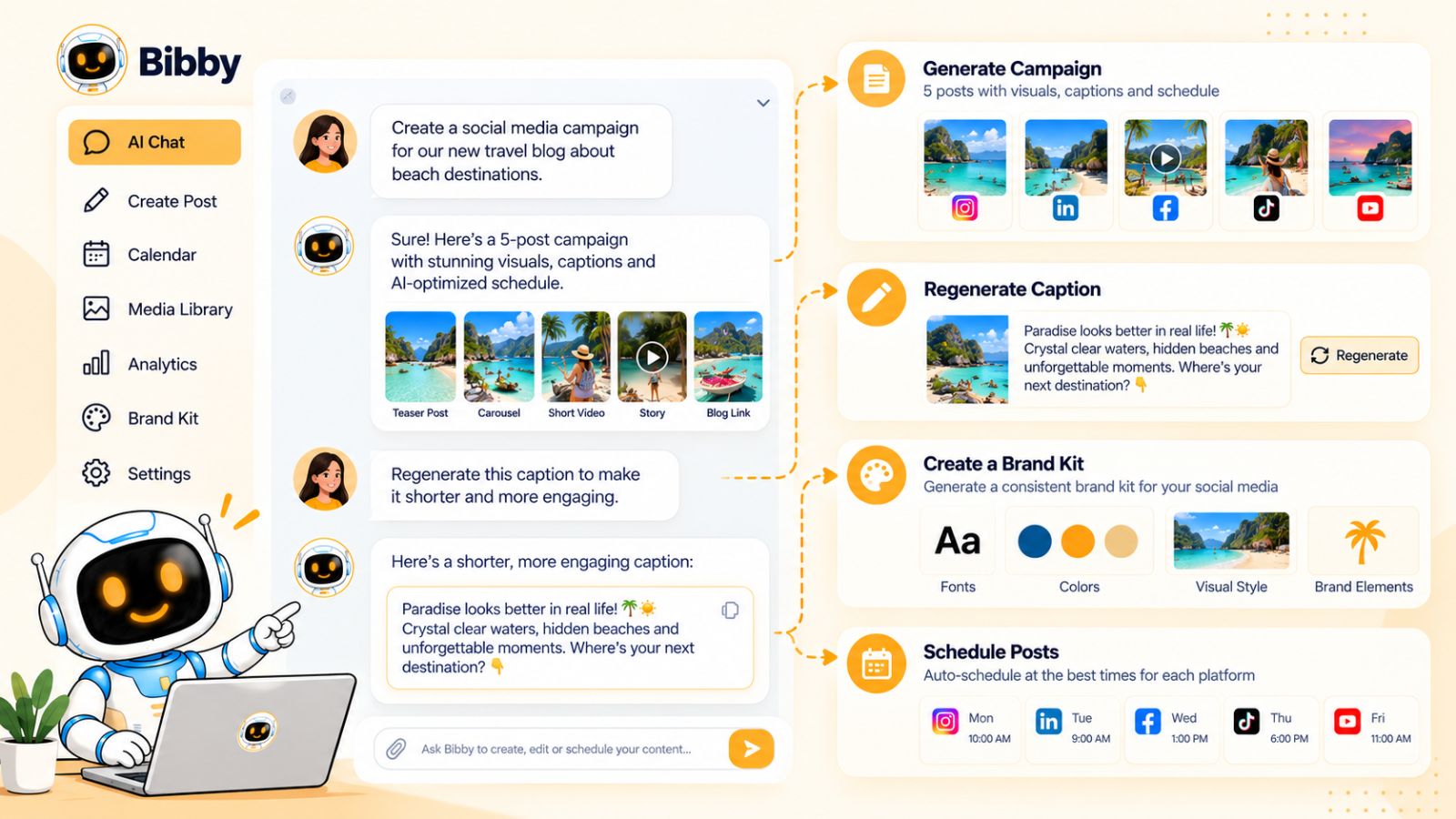
What Can You Do Through an AI Social Media Chat?
A conversational interface can become the central place for managing repetitive social media tasks.
With Bibby's chat interface, for example, you can use conversation to work on tasks such as:
- Creating a brand kit
- Creating a social media campaign
- Creating posts
- Regenerating captions
- Refining content
- Managing your social media workflow
Instead of switching between separate tools for each task, you can communicate the desired outcome directly.
Create a Brand Kit Through Conversation
Your brand identity provides the foundation for consistent AI-generated content.
Rather than treating the brand kit as something you configure once and never revisit, a conversational interface can make it easier to create and refine your brand information.
You might provide information about your company, audience, communication style, visual identity, and content preferences.
The AI can then use that context when generating future content.
This is particularly useful when multiple people are involved in social media management because the brand information can act as a shared reference for content creation.
Create Campaigns
A campaign usually involves more than one social media post.
For example, a product launch might require:
- Announcement posts
- Educational content
- Product demonstrations
- Customer-focused content
- Promotional posts
- Reminder posts
Instead of creating each post as an isolated task, you can describe the campaign you want to build and use AI to help turn the idea into a series of content pieces.
Bibby's chat interface allows you to create campaigns through conversation, making the interaction more focused on the campaign objective rather than individual publishing actions.
Create Social Media Posts
Once the campaign or content idea exists, you can ask the AI to create individual posts.
You can provide instructions about the topic, audience, tone, format, or objective.
The AI can then help generate the content based on that context.
This is particularly useful when you already know what you want to communicate but don't want to manually construct every caption and variation.
Regenerate Captions Without Starting Over
One of the most practical uses of conversational AI is revision.
Suppose the first caption is technically correct but doesn't sound like your brand.
You can simply ask for a change.
For example:
Make this more conversational.
Or:
Give me a stronger hook and make the caption shorter.
Or:
Rewrite this for a professional LinkedIn audience.
The conversation provides a natural way to iterate.
You are not limited to accepting the first AI-generated version, and you do not have to manually copy the content into another writing tool to make revisions.
Conversation as a Social Media Control Layer
The larger idea is that chat can become a control layer over your social media workflow.
Instead of thinking:
Which feature do I need to open?
you can think:
What do I want to accomplish?
For example, you might want to create a campaign, generate several posts, change the tone of a caption, or prepare content for multiple platforms.
A conversational system can interpret the request and guide the underlying workflow.
This can reduce the learning curve associated with complicated social media management software.
Chat Does Not Replace Strategy
There is still an important distinction between using AI to manage execution and letting AI decide your entire marketing strategy.
You should still determine:
- Who your audience is
- What your brand represents
- What you want to achieve
- Which products or services to promote
- What topics matter to your customers
- Which campaigns deserve priority
AI can then help turn those decisions into content and publishing actions.
That division of responsibility is important.
You provide the strategy and direction. AI handles more of the repetitive execution.
Why Conversational Social Media Management Matters
The value of an AI chat interface becomes clearer as your social media operation grows.
If you are managing only one occasional post, opening a scheduling tool and writing a caption manually may not be a major burden.
But if you're managing multiple campaigns, platforms, formats, and publishing schedules, the number of repetitive actions grows quickly.
A conversational interface can provide a simpler way to interact with all of those workflows.
With Bibby, the chat interface brings tasks such as brand-kit creation, campaign creation, post creation, and caption regeneration into the same conversational environment.
That makes AI social media management less about learning where every feature is located and more about communicating what you want the system to do.
Once you combine conversational management with automated scheduling, the next step is to understand how this approach differs from traditional social media scheduling.
AI Social Media Automation vs. Traditional Social Media Scheduling
Traditional social media scheduling and AI social media automation solve related problems, but they approach the workflow differently.
A traditional scheduler primarily helps you decide when content should be published. You create the content yourself, upload it, write the caption, select the platforms, and then use the scheduler to place the finished post on a calendar.
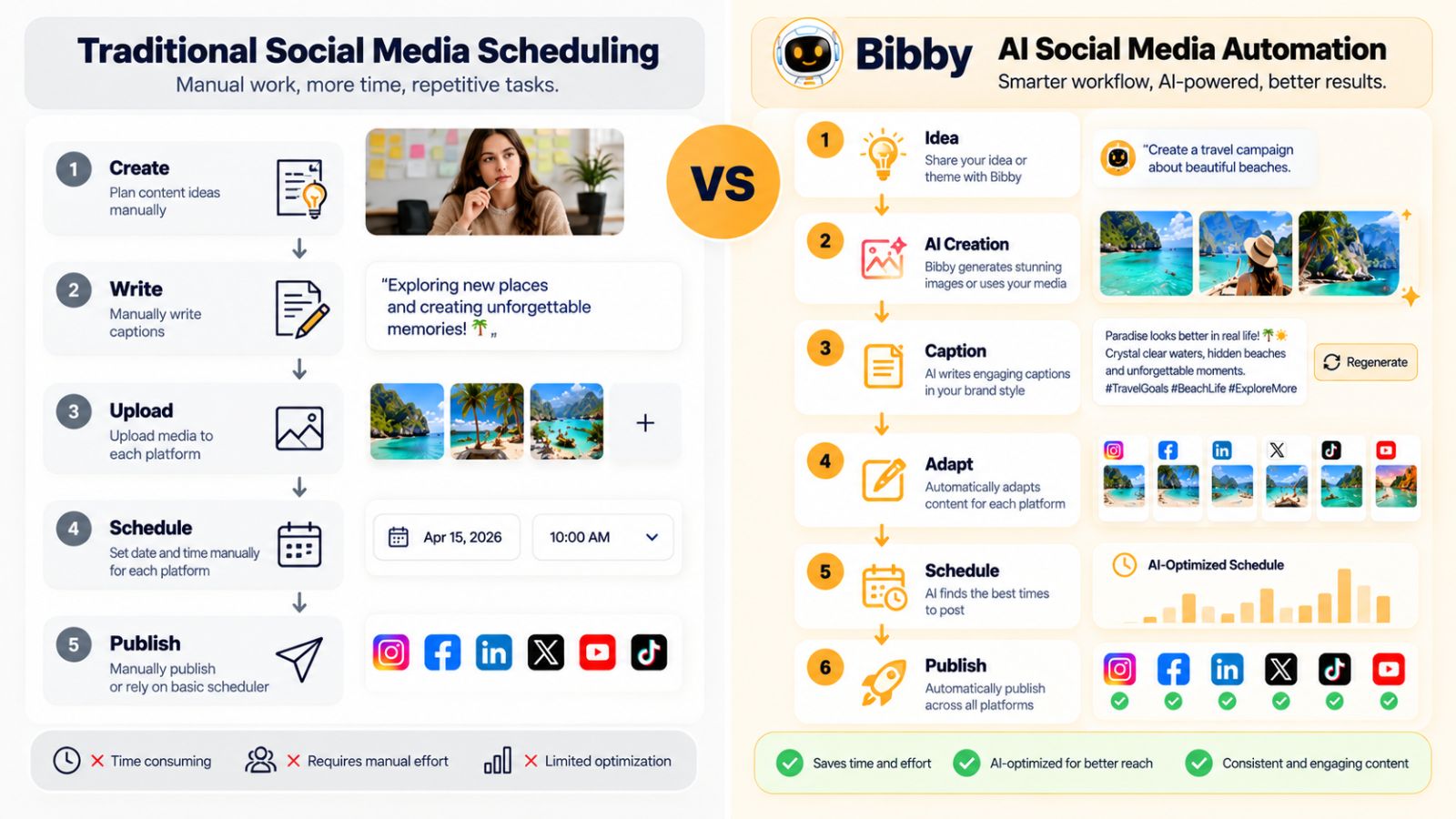
AI social media automation can extend that process by helping with what to create, how to write it, where to publish it, and when to schedule it.
The difference becomes clearer when you compare the workflows.
| Traditional social media scheduling | AI social media automation |
|---|---|
| You create the content | AI can assist with content creation |
| You write captions manually | AI can generate captions |
| You manually adapt posts | AI can help create platform-specific variations |
| You choose publishing times | AI can assist with optimized scheduling |
| You manage individual posts | AI can help manage content in batches |
| You revise copy manually | You can regenerate or refine content with AI |
| Scheduling is the main automation | Creation and scheduling can be connected |
Traditional Scheduling Starts With Finished Content
A conventional scheduling workflow generally looks like this:
Create → write → upload → schedule → publish
The scheduler becomes useful after the content already exists.
For example, you might create an Instagram graphic in a design application, write the caption yourself, upload the graphic to your scheduling tool, select a date and time, and then schedule it.
That can still save time compared with publishing manually every day.
But you remain responsible for most of the creative work.
AI Automation Starts Earlier
An AI-powered workflow can begin before the content is finished.
You can provide an image, campaign concept, product information, or content idea and use AI to help develop the post.
The workflow can become:
Idea/media → AI creation → caption → adaptation → platform selection → scheduling → publishing
This is a much broader form of automation.
Instead of automating only the calendar, you're automating parts of the content production process as well.
AI Reduces Repetitive Writing
Caption writing is one of the most obvious examples.
If you publish several times per week, writing every caption manually can become a significant recurring task.
AI can generate initial versions quickly based on your media, brand voice, and chosen posting style.
You still have the option to review and edit the content, but you're no longer starting with a blank page.
This is particularly useful for businesses that have plenty of things to say but limited time to turn those ideas into individual social posts.
AI Can Make Batch Creation More Practical
Traditional scheduling makes batch publishing possible, but you generally need to create the entire batch yourself first.
AI can help with that first stage.
Imagine you have 50 product images.
Instead of manually writing 50 captions before uploading anything, you could use an AI workflow to turn those assets into draft posts, review them, and then schedule the approved content.
That changes batch scheduling from simply scheduling a large amount of finished content into creating and scheduling a large amount of content as one connected process.
AI Can Help With Revisions
Another difference is what happens when the first version isn't right.
In a traditional workflow, you might open the caption, rewrite it, save it, and upload the revised version.
With conversational AI, you can simply provide another instruction.
For example:
Make this caption more concise.
Make the opening more attention-grabbing.
Rewrite this for LinkedIn.
Make the tone more educational.
The AI can generate another version while preserving the context of the original request.
Traditional Scheduling Still Has a Role
AI automation does not make traditional scheduling irrelevant.
A simple scheduler can be exactly what a business needs if its content is already produced and the primary problem is organizing publication.
The important question is how much of the workflow you want to automate.
If you only need a calendar, a traditional scheduler may be enough.
If you want assistance with content creation, captions, platform adaptation, campaign development, and scheduling, an AI-powered system can cover a larger part of the process.
Where Bibby Fits
Bibby is designed around this broader approach.
Rather than limiting the workflow to placing finished posts on a calendar, it combines media creation or uploading, posting styles, AI-generated captions, multi-platform scheduling, and AI-optimized publishing times.
Its chat interface also allows users to work conversationally on tasks such as creating a brand kit, building campaigns, creating posts, and regenerating captions.
That makes the workflow closer to having an AI-assisted social media workspace than simply having a digital calendar.
Ultimately, the difference comes down to the scope of automation.
Traditional scheduling automates publication. AI social media automation can help automate the work that happens before publication as well.
The next step is putting these capabilities together into a repeatable social media content system.
How to Build an Automated Social Media Content System
Automatically scheduling individual posts is useful, but the bigger opportunity is to create a repeatable social media content system.
A content system gives you a structured way to decide what to publish, create content in batches, automate repetitive tasks, and continuously improve your strategy.
Instead of asking every morning, “What should I post today?”, you build a process that can keep producing and distributing relevant content.
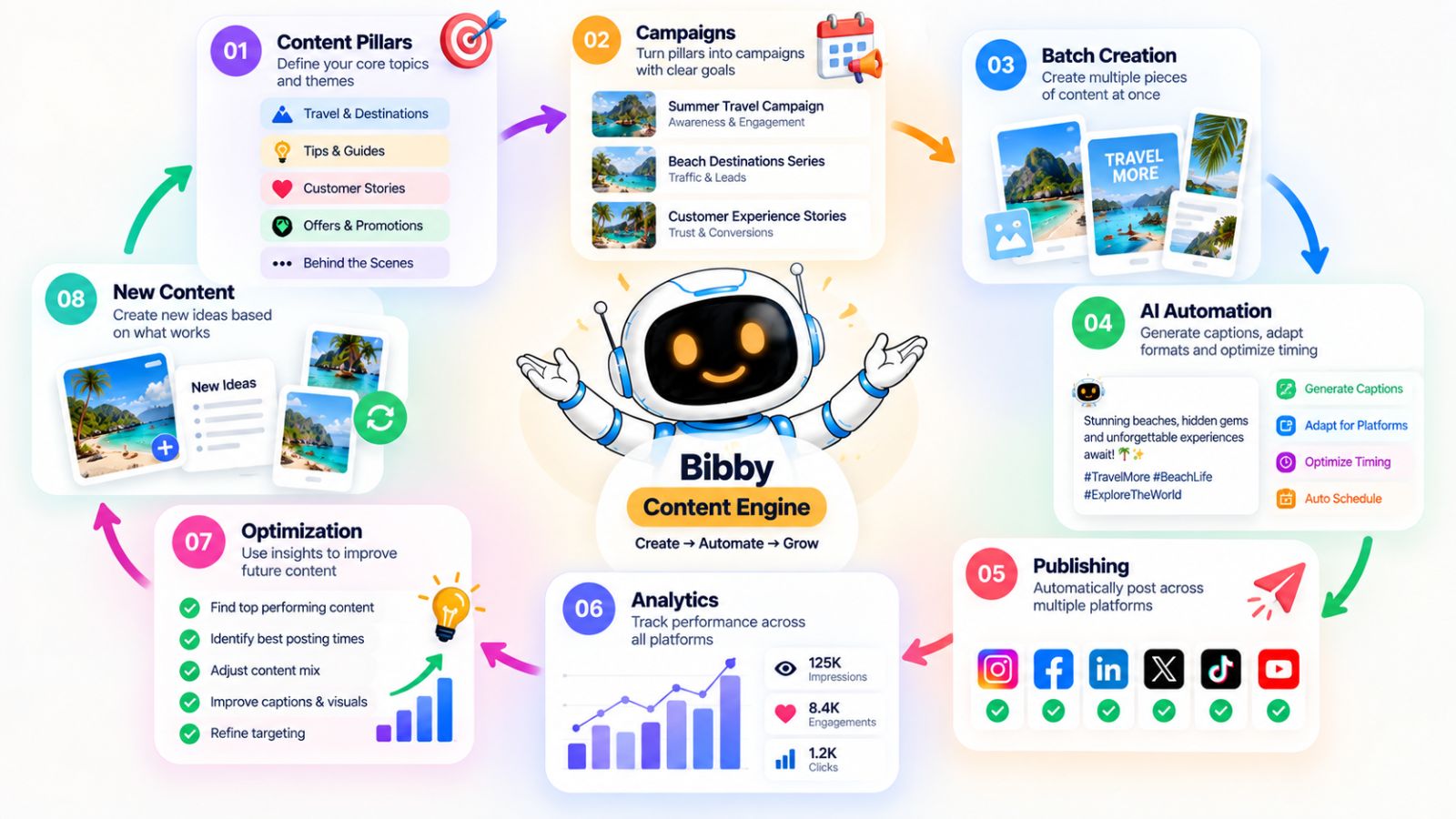
1. Define Your Content Pillars
Start by identifying the main topics your brand should consistently talk about.
These are your content pillars.
For example, a software company might have pillars such as:
- Product education
- Industry insights
- Customer success
- Productivity tips
- Company updates
- Product announcements
Content pillars give AI a framework for generating ideas without allowing your social media feed to become random.
They also make it easier to maintain a balanced content calendar.
2. Create a Reusable Brand Kit
Your AI system needs context if you want consistent output.
Create a brand kit containing the information that should influence your content, such as:
- Brand identity
- Target audience
- Tone of voice
- Visual preferences
- Key products or services
- Important messaging
- Words or phrases to avoid
This information can become the foundation for future AI-generated posts.
Bibby includes brand-kit creation within its conversational workflow, allowing you to establish this context as part of your social media management process.
3. Turn Content Pillars Into Campaigns
Once you have your content pillars, turn them into campaigns.
A campaign can revolve around a specific goal, product, topic, event, or period.
For example:
Content pillar: Productivity
Campaign: “Work Smarter With AI”
Content ideas:
- Three ways AI can reduce repetitive work
- Common AI automation mistakes
- A productivity workflow
- A customer example
- A product demonstration
Instead of creating disconnected posts, you now have several pieces of content working toward a common theme.
4. Create Content in Batches
Batch creation is one of the biggest advantages of automation.
Instead of creating one post every day, set aside a dedicated period to produce a larger group of posts.
You might create a week's worth of content or prepare an entire month's campaign.
AI can help turn your campaign ideas and media into individual posts, captions, and variations.
Once the batch has been reviewed, the scheduling system can distribute it over the appropriate dates.
5. Use AI for Repetitive Tasks
Not every part of social media management requires the same level of human attention.
Use automation for repetitive work such as:
- Generating first-draft captions
- Creating variations
- Repurposing content
- Organizing posts
- Scheduling publishing times
- Preparing platform-specific versions
Reserve more of your attention for decisions that require strategic judgment.
This creates a useful division:
Humans decide what matters. AI helps execute it at scale.
6. Build a Multi-Platform Workflow
If your brand uses multiple social networks, decide how each platform contributes to your overall strategy.
You might use:
Instagram for visual content and brand discovery.
Facebook for community-oriented content and broader reach.
LinkedIn for professional and industry-focused communication.
YouTube for deeper video content and demonstrations.
TikTok for short-form video and discovery.
The exact strategy will vary by business, but the principle is consistent: each platform should have a purpose.
Your AI scheduler can then help distribute and adapt the content accordingly.
7. Keep a Human Approval Step
Automation works best when you determine where human review is necessary.
Not every post needs the same level of scrutiny.
You might automatically schedule routine evergreen content while requiring approval for:
- Major announcements
- Sensitive topics
- Pricing changes
- Important promotions
- Crisis communications
- Legal or regulatory claims
This gives you the efficiency of automation without giving up control over important communication.
8. Analyze What Happens After Publishing
A content system should learn from its output.
Review your social media performance regularly and look for patterns.
Ask:
- Which topics generate the most engagement?
- Which formats perform consistently?
- Which platforms are producing useful results?
- Which posts generate clicks or leads?
- Which content receives little response?
- Are certain publishing periods performing differently?
These observations can influence your next content batch.
9. Feed Those Insights Into the Next Campaign
The final step is turning your observations into action.
Suppose you discover that your audience responds particularly well to educational carousels.
Instead of continuing to publish the same mix of content, you can increase the number of educational carousel posts in your next campaign.
The system becomes iterative:
Plan → create → automate → publish → analyze → improve → repeat
That is the foundation of sustainable social media automation.
The Goal Is a Content Engine, Not a Content Factory
There is an important difference between publishing more content and building a useful content system.
A content factory produces posts as quickly as possible.
A content engine connects your strategy, brand, audience, content creation, scheduling, and performance insights.
AI can make the engine faster, but the strategy still determines where it goes.
Tools such as Bibby can handle many of the operational steps—from creating media and captions to managing campaigns and scheduling content across multiple platforms—so you can spend more time deciding what your audience should actually see.
Once that system is in place, the next challenge is avoiding the mistakes that can make automated content feel repetitive, generic, or disconnected from your brand.
Also read: Stop Posting on YouTube Manually: How AI Social Tools Do 90% of Your Shorts Work
Common Mistakes When Automating AI Social Media Posts
AI can make social media creation and scheduling significantly faster, but automation does not automatically make the resulting content better.
The biggest mistakes usually happen when businesses focus on publishing more content instead of building a better content process.
Here are the problems to watch for when automating AI-generated social media posts.
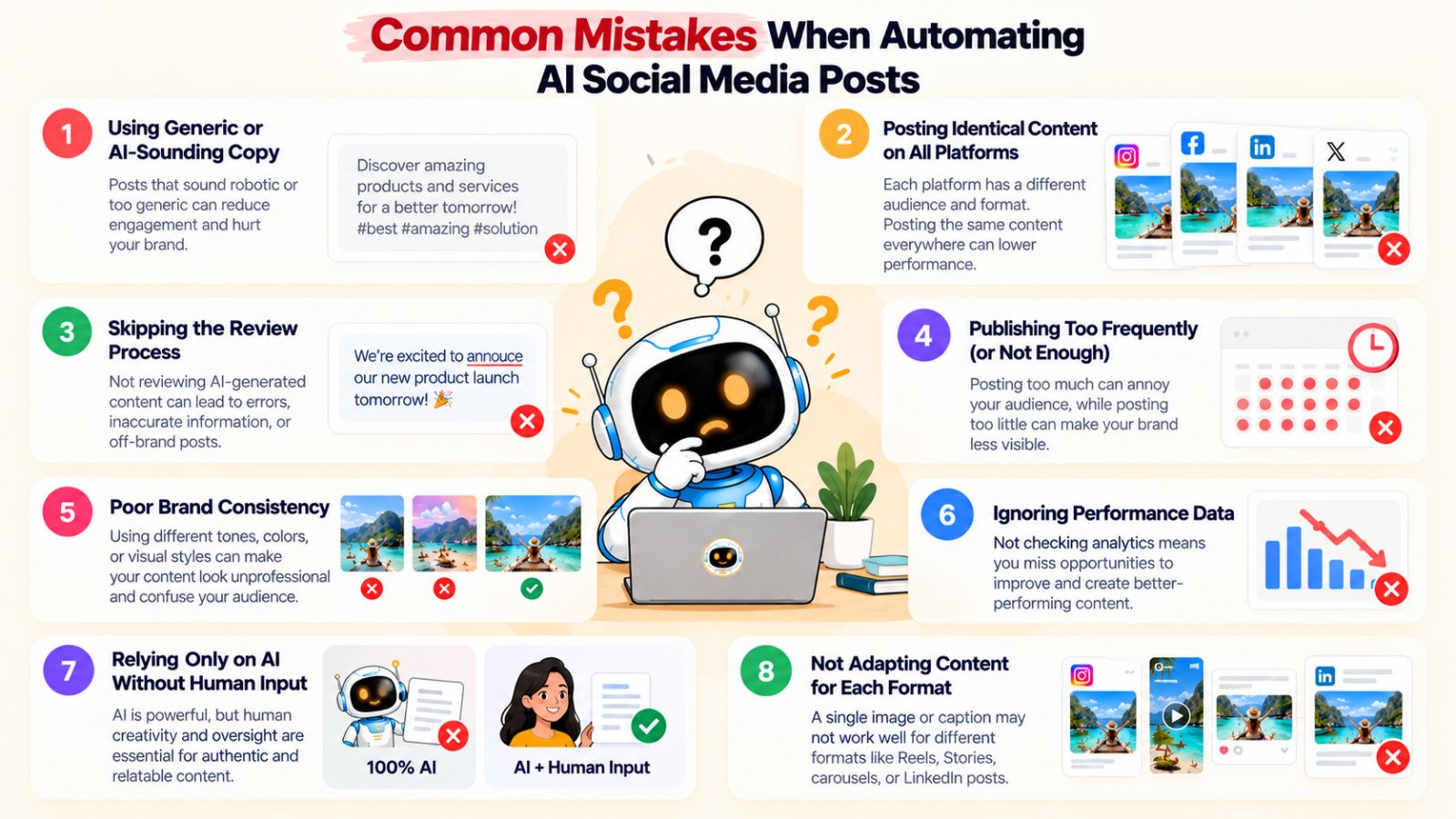
1. Publishing Generic AI Copy
One of the fastest ways to make automated content feel artificial is to accept every AI-generated caption without reviewing it.
Generic phrases, predictable openings, excessive enthusiasm, and vague statements can make posts sound interchangeable with thousands of other AI-generated posts.
The solution is to give AI more context.
Provide information about your audience, brand voice, products, content goals, and preferred communication style.
Then review the output before publishing.
AI should accelerate your writing process, not remove your brand from it.
2. Treating Every Platform the Same
Publishing the exact same caption and creative everywhere may be convenient, but it does not necessarily create effective platform-specific content.
Instagram, Facebook, LinkedIn, YouTube, and TikTok have different formats, audiences, and expectations.
A better approach is to keep the central idea consistent while adapting the presentation.
AI can help generate those variations without requiring you to write each one completely from scratch.
3. Automating Without Reviewing
Automation is most useful when it removes repetitive work—not when it removes judgment.
A caption might contain an incorrect claim. An image might communicate something unintended. A promotion might have expired. A post might be inappropriate for a particular platform.
A quick review can catch problems before they become published content.
For important campaigns, maintaining an approval step is especially valuable.
4. Using AI Without Brand Guidelines
If the AI does not know how your brand communicates, the output can vary significantly from post to post.
One caption might sound formal.
The next might sound overly casual.
Another might use terminology your business would never use.
A clear brand kit helps reduce this inconsistency.
Give the AI a reliable reference for your tone, audience, visual identity, products, and messaging.
5. Publishing Too Much
Automation makes it easy to schedule large quantities of content.
That does not mean you should publish everything you can generate.
More posts do not automatically mean more value.
If your audience sees repetitive promotional messages every day, increasing your publishing frequency may work against your broader content goals.
A better approach is to establish a sustainable publishing rhythm based on your audience and strategy.
6. Ignoring Content Variety
Another common problem is creating dozens of posts that all look and sound the same.
For example, an automated calendar might contain nothing but:
Product image → promotional caption → call to action
Repeated for weeks.
Instead, create variety through different topics and formats.
Mix educational posts with product content, stories, customer-focused content, videos, carousels, and conversations.
This makes your content calendar more useful and gives your audience different reasons to engage.
7. Assuming AI Timing Guarantees Performance
An AI-optimized publishing time can reduce the manual work involved in scheduling, but timing is only one factor affecting performance.
A perfectly timed weak post is still a weak post.
Content relevance, creative quality, audience interest, competition, platform behavior, and many other factors can influence results.
Treat AI scheduling as an optimization tool rather than a guarantee of engagement.
8. Forgetting to Refresh Your Content Strategy
Automation can create a dangerous illusion that your social media is “done.”
Once a month of posts is scheduled, it is tempting to leave everything running.
But audiences change. Products change. Trends change. Campaigns end. Your business priorities change.
Your content system should therefore be reviewed regularly.
Update campaigns, refresh creative, add new content pillars, and adjust your messaging when your business evolves.
9. Automating Sensitive Communications
Some posts deserve more attention than others.
Major company announcements, sensitive issues, legal statements, crisis communications, and important product changes should not necessarily follow the same automated workflow as routine evergreen content.
Identify content categories that require additional human review before publication.
Automation should give you more control over your time—not less control over your communication.
10. Measuring Activity Instead of Outcomes
A full calendar can look impressive.
But 100 scheduled posts do not necessarily mean your social media strategy is working.
Look beyond the number of posts published.
Depending on your goals, you may care about:
- Engagement
- Website traffic
- Leads
- Sales
- Audience growth
- Video views
- Conversations
- Brand awareness
Your metrics should connect back to the reason you are using social media in the first place.
The Principle Behind Good Automation
The best AI social media automation systems do not attempt to remove every human decision.
They remove repetitive execution while preserving strategic control.
That means you can automate caption generation, content variations, scheduling, and publishing while still deciding what your brand should say, who it should say it to, and which campaigns matter.
When implemented this way, automation becomes a way to improve consistency and efficiency rather than simply increasing the amount of content your business produces.
With those principles in place, you can get significantly more value from an AI social media scheduler.
Best Practices for AI Social Media Scheduling
Automating social media can save hours of repetitive work, but the quality of the system depends on how you set it up.
The goal should not be to automate everything as quickly as possible. The goal is to create a workflow that consistently produces relevant content, maintains your brand voice, reaches the right platforms, and reduces unnecessary manual work.
Here are the practices that can make AI social media scheduling more effective.
1. Give AI Enough Context
AI-generated content is only as useful as the direction behind it.
Instead of asking an AI system to “write a social media post,” provide information about:
- Your brand
- Your audience
- Your product
- Your objective
- Your preferred tone
- Your content format
- Your call to action
More context gives the system more information to work with.
This is one reason a brand kit can be valuable. Rather than repeatedly explaining your business every time you create a post, you can establish the relevant information once and reuse it throughout your workflow.
2. Build Around Content Pillars
Create a small set of recurring themes that define what your brand talks about.
This prevents your automated calendar from becoming a random collection of disconnected posts.
For example, a SaaS company might consistently publish content around:
- Product education
- Customer problems
- Industry insights
- Tutorials
- Customer success
AI can then generate different post ideas within those boundaries.
3. Create Content in Batches
Batching is one of the simplest ways to get more value from automation.
Instead of creating one post every morning, create a group of posts at once.
You can then review the batch, make adjustments, and schedule the content across the coming days or weeks.
This reduces context switching and makes your social media workflow more predictable.
4. Adapt Content for Each Platform
Cross-platform scheduling does not mean identical content everywhere.
Start with one central idea, then adapt it for the platform.
For example:
One idea: How AI can reduce repetitive marketing work.
LinkedIn: A detailed professional insight.
Instagram: A visual carousel explaining the workflow.
TikTok: A short video demonstrating the process.
Facebook: A conversational explanation and discussion prompt.
YouTube: A deeper tutorial or demonstration.
AI can help produce these variations while you maintain the underlying message.
5. Use AI for First Drafts and Revisions
You do not have to choose between completely manual writing and completely automated publishing.
A useful middle ground is to let AI create the first version and then refine it.
Ask the AI to:
- Make the hook stronger
- Shorten the caption
- Change the tone
- Add more detail
- Make it more conversational
- Adapt it for another platform
This can be considerably faster than writing each version from scratch.
6. Review Before Publishing
Even when the workflow is highly automated, review remains valuable.
Check the content for accuracy, brand consistency, platform suitability, and current relevance.
For routine evergreen content, that review may be quick.
For important campaigns or sensitive topics, you may want a more detailed approval process.
7. Use AI-Optimized Scheduling as a Starting Point
AI can help reduce the manual effort involved in selecting publishing times.
But do not treat an automated time recommendation as a permanent rule.
Review your actual results and adjust your strategy based on what you learn about your audience.
Your goal is continuous improvement rather than finding one supposedly perfect posting time.
8. Mix Content Formats
Avoid building an automated calendar entirely around one format.
Mix:
- Images
- Carousels
- Videos
- Stories
- Educational posts
- Promotional content
- Customer-focused content
- Conversational posts
Different formats allow you to communicate the same brand in different ways.
A platform such as Bibby can make this easier by supporting multiple media types within the same social media workflow.
9. Create a Repeatable Campaign Process
A repeatable campaign structure can make automation much more effective.
For example:
Campaign goal → content ideas → media → captions → platform variations → scheduling → publishing → analysis
Once this process works, you can reuse it for your next campaign.
Instead of reinventing your social media workflow every month, you improve an existing system.
10. Keep Humans in the Strategic Loop
AI is excellent at repetitive execution, but your marketing strategy still needs direction.
Humans should decide:
- What the brand wants to communicate
- Which audience it wants to reach
- Which products deserve attention
- What campaigns to prioritize
- What claims the brand is comfortable making
- Which content requires approval
AI can then help execute those decisions at scale.
11. Review Performance Regularly
Your social media automation should produce insights as well as posts.
Look at your performance data regularly and identify which topics, formats, platforms, and campaigns are generating useful results.
Then use those observations to influence your next batch of content.
This creates a feedback loop:
Publish → measure → learn → adjust → publish again.
12. Choose a Tool That Covers the Whole Workflow
Finally, consider how many separate tools your current process requires.
If you need one application for AI images, another for captions, another for content planning, another for scheduling, and another for managing campaigns, the workflow can become fragmented.
An integrated platform can reduce that complexity.
Bibby combines AI-assisted media creation, posting styles, caption generation, multi-platform scheduling, AI-optimized publishing times, multiple content formats, and a conversational management interface.
For someone looking to automatically schedule AI-generated social media posts, that type of end-to-end workflow can be more useful than a tool that only provides a scheduling calendar.
The objective is simple: create a system where AI handles more of the repetitive execution while you remain in control of the strategy and final message.
Final Words
Automatically scheduling AI-generated social media posts is about more than generating captions faster. The real benefit comes from connecting content creation, platform adaptation, scheduling, and publishing into one repeatable workflow.
AI can help you turn existing media or new ideas into social posts, generate captions that match your brand, distribute content across platforms, and reduce the manual work involved in choosing publishing times. Tools such as Bibby take this approach further by combining AI-assisted content creation, multi-platform scheduling, multiple media formats, and conversational social media management in one workflow.
The three key takeaways are simple:
- AI can automate much of the repetitive work behind social media publishing.
- Multi-platform scheduling can turn content creation into a scalable workflow.
- Human strategy and review still matter even when execution is automated.
Once you have this workflow in place, the natural next step is to decide what you should publish and when. Building an AI-powered social media content calendar can help you turn these automation capabilities into a consistent month-long content strategy.