Social media has become one of the most important channels for building a brand, reaching customers, and turning attention into business growth—but consistently managing it requires more than simply publishing posts.
The most effective social media operations work as a system: strategy determines what you say, creation turns ideas into content, adaptation makes that content fit each platform, distribution gets it in front of the right audience, and measurement shows you what to improve. When these five layers work together, tools like Bibby can automate much of the repetitive execution while leaving the strategic decisions in your hands.
Let’s break down each layer and see how they work together.
What Is a Social Media System?
Most businesses don't have a social media problem because they lack ideas. They have a social media problem because their ideas aren't connected to a repeatable system.
A business might create a great Instagram post one day, publish a LinkedIn update the next, forget about TikTok for two weeks, and then spend an entire afternoon trying to figure out what to post next. The individual posts may be good, but there is no system connecting strategy, content creation, publishing, and learning.
A social media system solves that problem.
Instead of treating every post as a separate task, you create a repeatable process that moves an idea from strategy to publication and then uses performance data to improve what you create next.
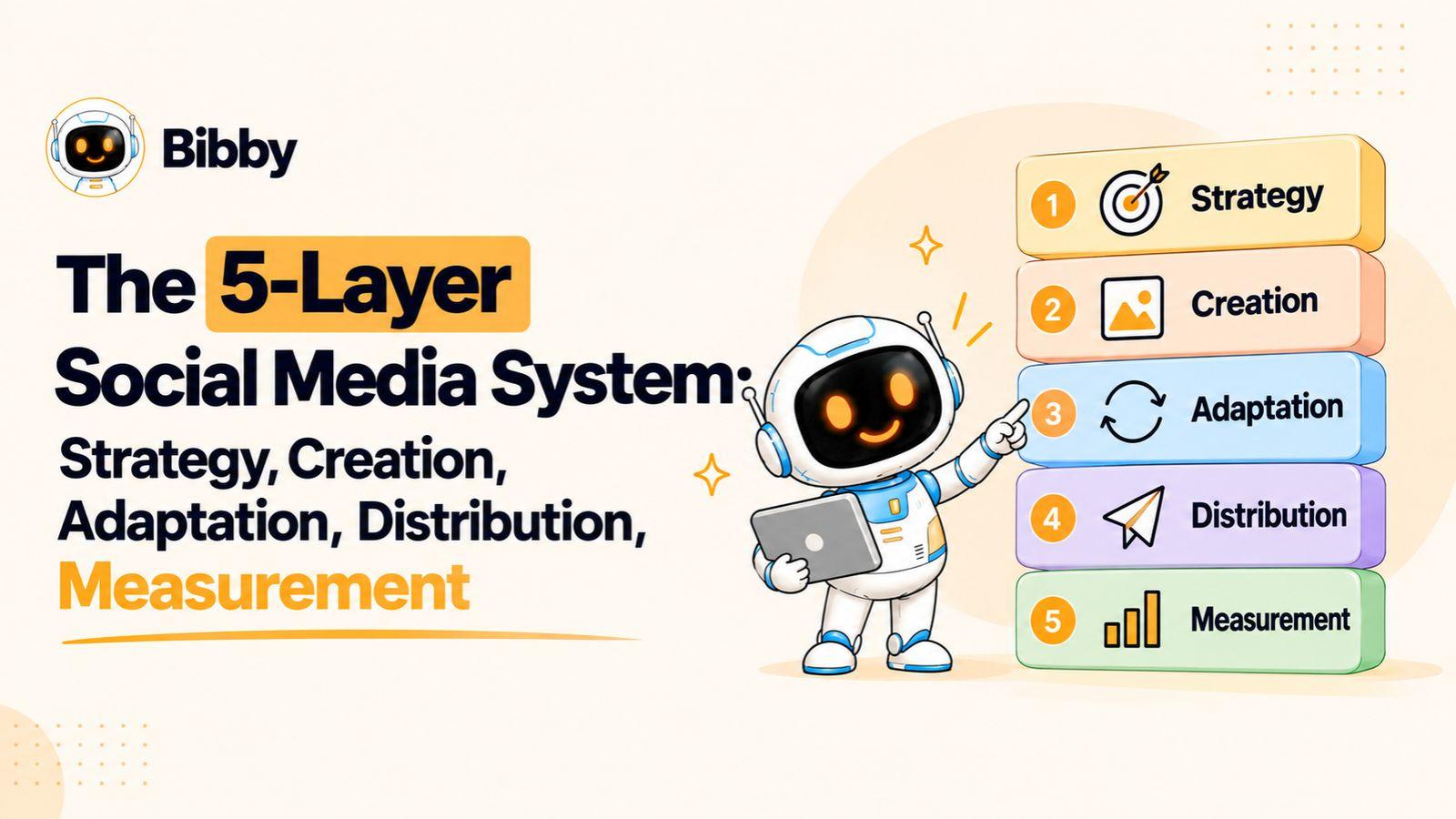
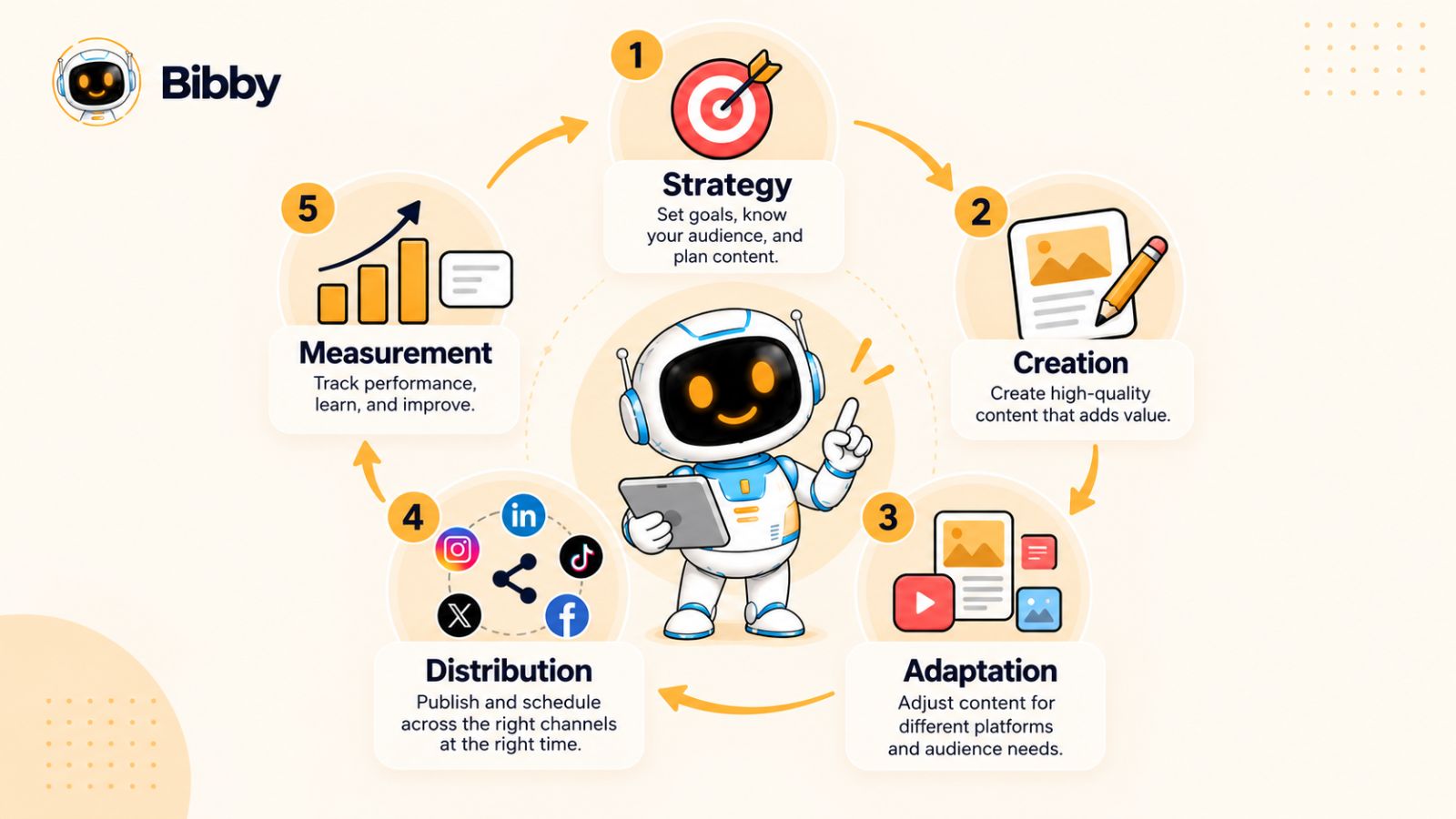
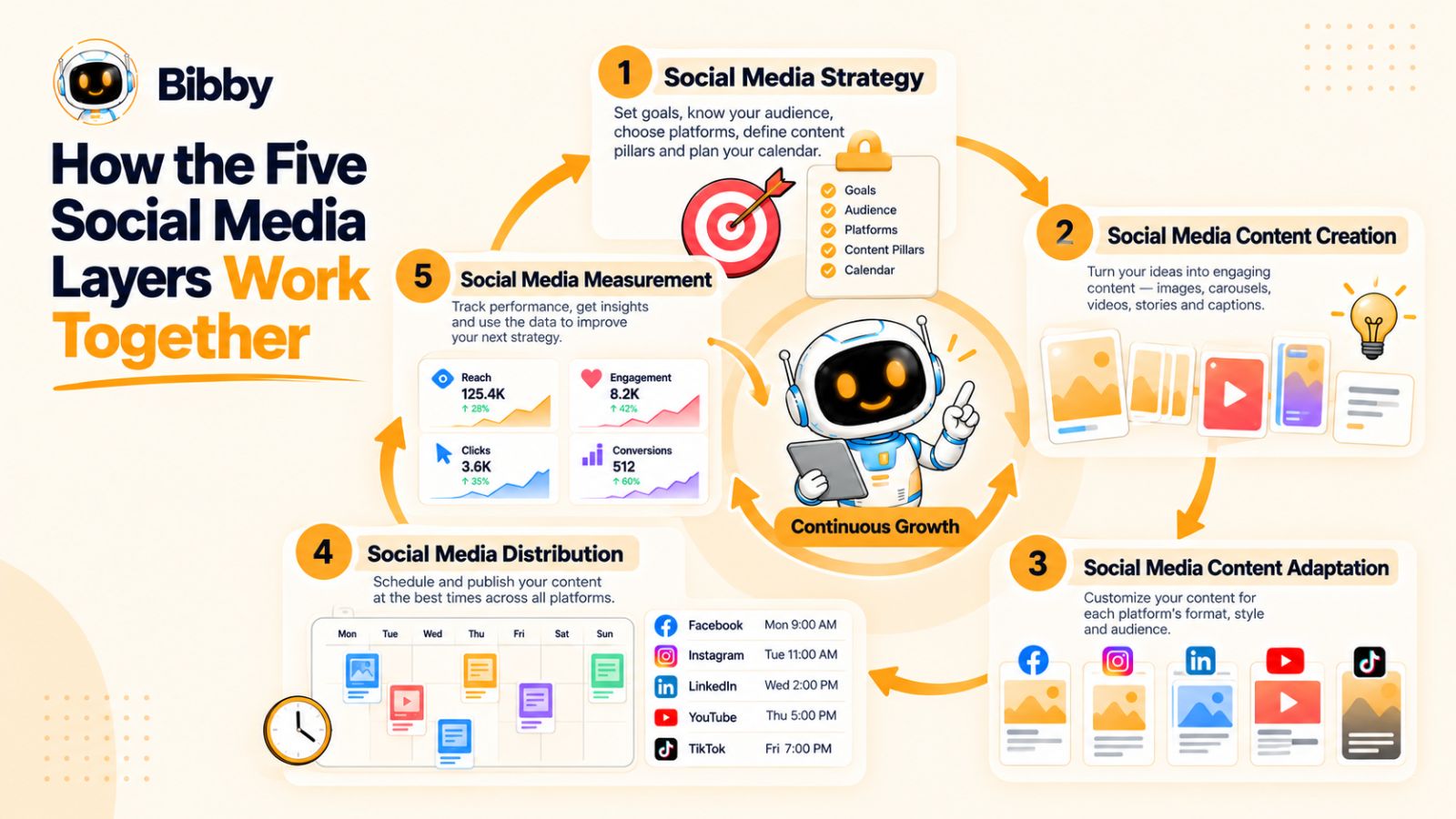
The system has five interconnected layers:
- Strategy — Decide what you want to achieve, who you want to reach, and what you should communicate.
- Creation — Turn your ideas into useful social media content, including images, carousels, videos, stories, and captions.
- Adaptation — Transform the core idea so it works naturally across different social media platforms.
- Distribution — Schedule and publish content consistently across the channels where your audience is active.
- Measurement — Analyze what happened, identify patterns, and use those insights to improve the next cycle.
Think of these layers as a loop rather than a straight line.
Your strategy determines what you create. Your content gets adapted for different platforms. Distribution puts that content in front of your audience. Measurement reveals what worked. Those insights then influence your next strategy.
Why Social Media Needs a System
The volume and variety of social media content have made manual management increasingly difficult.
A modern social media presence might involve Instagram posts and Stories, Facebook content, LinkedIn posts, YouTube videos, TikTok videos, carousels, short-form clips, promotional campaigns, educational content, customer-focused posts, and brand-building content.
Trying to manage every piece independently creates unnecessary operational work.
Without a system, teams commonly run into problems such as:
- Inconsistent publishing
- Repetitive content
- Last-minute content creation
- Platform-specific content being overlooked
- Too much time spent writing captions
- Difficulty maintaining brand consistency
- Content being created without a distribution plan
- Analytics being collected without changing future decisions
A social media system connects these activities so that each piece of work supports the next.
A Social Media System Is More Than a Content Calendar
A content calendar tells you what is being published and when.
A social media system explains why it is being created, how it should be adapted, where it should be distributed, and what you will learn from its performance.
That distinction matters.
For example, imagine you create one educational idea about a problem your customers frequently face. A basic content calendar might schedule one LinkedIn post for Monday.
A social media system asks a much broader set of questions:
- What business objective does this idea support?
- Who is the intended audience?
- Could the idea become a carousel?
- What would the LinkedIn version look like?
- Could it become a short-form video for TikTok or YouTube?
- Should a different version be published on Facebook?
- When should each version be distributed?
- Which calls to action make sense on each platform?
- How will you measure whether the idea worked?
- What should you do with the results?
Now one idea isn't just one post. It becomes a structured content asset that can move through the entire social media workflow.
Where Automation Fits In
Automation doesn't replace the strategy behind social media. Its real value is reducing repetitive execution.
For example, Bibby brings several parts of this workflow into one environment. You can upload an image or generate one with AI, select a posting style, have captions generated automatically, and schedule content across selected platforms at AI-optimized times.
That can be particularly useful when the alternative is manually preparing every caption, choosing publishing dates, and moving between multiple platforms.
Bibby also supports different content formats, including images, carousels, videos, and Stories. Its chat interface extends the workflow further: instead of navigating through separate screens for every task, you can use conversation to create a brand kit, build a campaign, create posts, regenerate captions, and manage other parts of your social media workflow.
The important distinction is that automation belongs inside the system. It doesn't replace the five layers. It helps make the system easier to execute consistently.
And that brings us to the first layer: social media strategy.
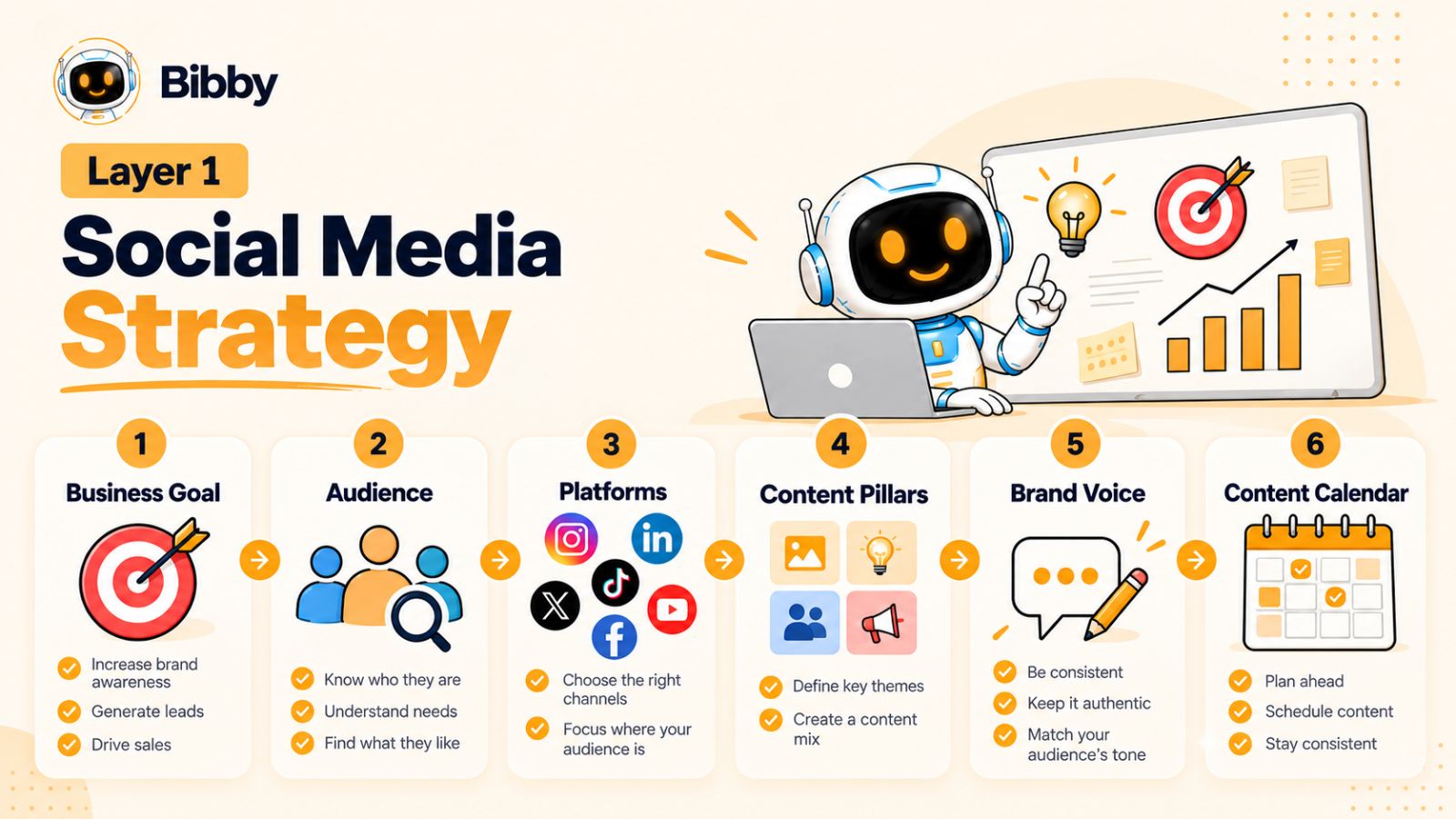
Layer 1: Social Media Strategy
Every effective social media system starts with a decision that is easy to overlook: what are you actually trying to accomplish?
Without a clear strategy, social media quickly becomes a publishing treadmill. You create a post because it has been a few days since the last one, choose a trending format because everyone else is using it, and measure success by likes and views without knowing whether any of it is contributing to the business.
A social media strategy gives every part of the system a job.
It connects your business objectives with your audience, messaging, content topics, platforms, and publishing priorities. More importantly, it gives you a framework for deciding what not to create.
Start With the Business Objective
Your social media strategy should begin with the outcome you want—not the platform you want to post on.
Depending on your business, social media might support objectives such as:
- Increasing brand awareness
- Generating qualified leads
- Driving website traffic
- Building an audience
- Educating potential customers
- Increasing product consideration
- Supporting customer retention
- Generating sales
- Building authority within an industry
These objectives require different types of content.
A company focused on brand awareness may prioritize memorable educational or entertaining content. A B2B company focused on lead generation may invest more heavily in expertise-driven posts, case studies, and problem-solving content. An ecommerce brand may need a stronger mix of product demonstrations, customer content, offers, and visual storytelling.
The mistake is assuming that every business should follow the same social media formula.
Define Who You're Creating For
The next question is simple:
Who should care about this content?
Your answer should go beyond demographics.
A useful social media audience profile considers the problems people are trying to solve, the questions they ask, the alternatives they are considering, and the information they need before taking action.
For example, instead of defining an audience simply as "small business owners," you might identify a more specific problem:
Small business owners who know they need consistent social media content but don't have the time or resources to manage multiple platforms manually.
That definition immediately gives you more useful content directions.
You can create content about content planning, social media automation, repurposing, scheduling, platform differences, content creation workflows, and measurement.
The audience's problems become your content map.
Choose Platforms Based on the Audience and Format
Being active on every social media platform isn't automatically a good strategy.
Facebook, Instagram, LinkedIn, YouTube, and TikTok each provide different environments for content discovery and consumption. Your strategy should determine which platforms deserve attention based on your audience, goals, resources, and content strengths.
The objective isn't to create five completely separate content strategies.
Instead, think in terms of a core idea and platform-specific execution.
One strong idea can potentially become a LinkedIn post, an Instagram carousel, a Facebook post, a YouTube Short, and a TikTok video. The underlying message remains consistent while the format, opening, pacing, caption, and call to action change.
That distinction becomes especially important in the third layer of this system: adaptation.
Build Content Pillars
Once you know your audience and objectives, define the subjects you want your brand to consistently talk about.
These are your content pillars.
For example, a social media software company might build its content around:
- Social media strategy
- Content creation
- Social media automation
- Platform-specific tactics
- Social media analytics
- Customer success stories
- Product education
Content pillars prevent the constant question of "What should we post today?"
They also help your audience understand what your brand is known for.
A strong content pillar should have enough depth to produce many individual ideas. If a topic can only generate three posts, it probably isn't a pillar—it is a single content idea.
Establish a Recognizable Brand Voice
Strategy also determines how your brand communicates.
Your social media content should sound like it comes from the same organization even when it appears on different platforms.
That doesn't mean every caption needs to use identical language.
Your LinkedIn content may be more analytical. Your TikTok content may be more conversational. Your Instagram captions might be shorter and more visual.
The personality underneath those variations should remain recognizable.
This is where a clearly defined brand voice and brand kit become valuable. Instead of reinventing your brand identity every time you create content, you establish the basic rules once and use them consistently.
Tools such as Bibby can make this easier by allowing you to create a brand kit and use that foundation when producing and managing social media content.
Turn Strategy Into a Content Calendar
A social media strategy becomes actionable when it is translated into a publishing plan.
Your content calendar should answer four basic questions:
What are we publishing?
Where are we publishing it?
When are we publishing it?
What is the purpose of the content?
The last question is particularly important.
A calendar filled with dates and post titles isn't necessarily a strategy. Each piece of content should have a reason for existing.
For example:
| Content | Platform | Purpose |
|---|---|---|
| Educational carousel | Build awareness | |
| Industry insight | Establish authority | |
| Product demonstration | TikTok | Show product value |
| Tutorial video | YouTube | Educate potential customers |
| Customer story | Build trust |
This simple framework makes your publishing activity much easier to evaluate later.
Strategy Should Guide Automation
Automation works best when the strategic decisions have already been made.
If you automate an unclear strategy, you simply produce and distribute more unclear content.
But when your strategy is defined, automation can remove much of the repetitive work that comes afterward.
For example, once you know your content themes, brand voice, preferred platforms, and publishing objectives, a tool like Bibby can help turn individual creative assets into scheduled social media content. Instead of manually writing every caption and coordinating every publishing date, you can use the workflow to handle much of that operational work.
The strategic thinking still comes first.
That's an important principle for the entire five-layer system:
Automate execution, not judgment.
Your strategy determines what deserves attention. Automation helps you execute that strategy consistently.
Once the strategy is in place, the next challenge is turning those strategic decisions into content people actually want to consume.
That's where the second layer begins: social media content creation.
Layer 2: Social Media Content Creation
A social media strategy tells you what you should talk about. Content creation turns those decisions into something your audience can actually see, read, watch, save, share, or act on.
This is where many social media workflows become inefficient.
A single post can involve brainstorming an idea, writing a hook, creating a visual, drafting a caption, editing the asset, adding a call to action, checking brand consistency, and preparing different versions for different platforms.
Multiply that process across several platforms and dozens of posts, and content creation can quickly become the biggest bottleneck in your social media operation.
The solution isn't simply to create content faster. It's to create content through a repeatable process.
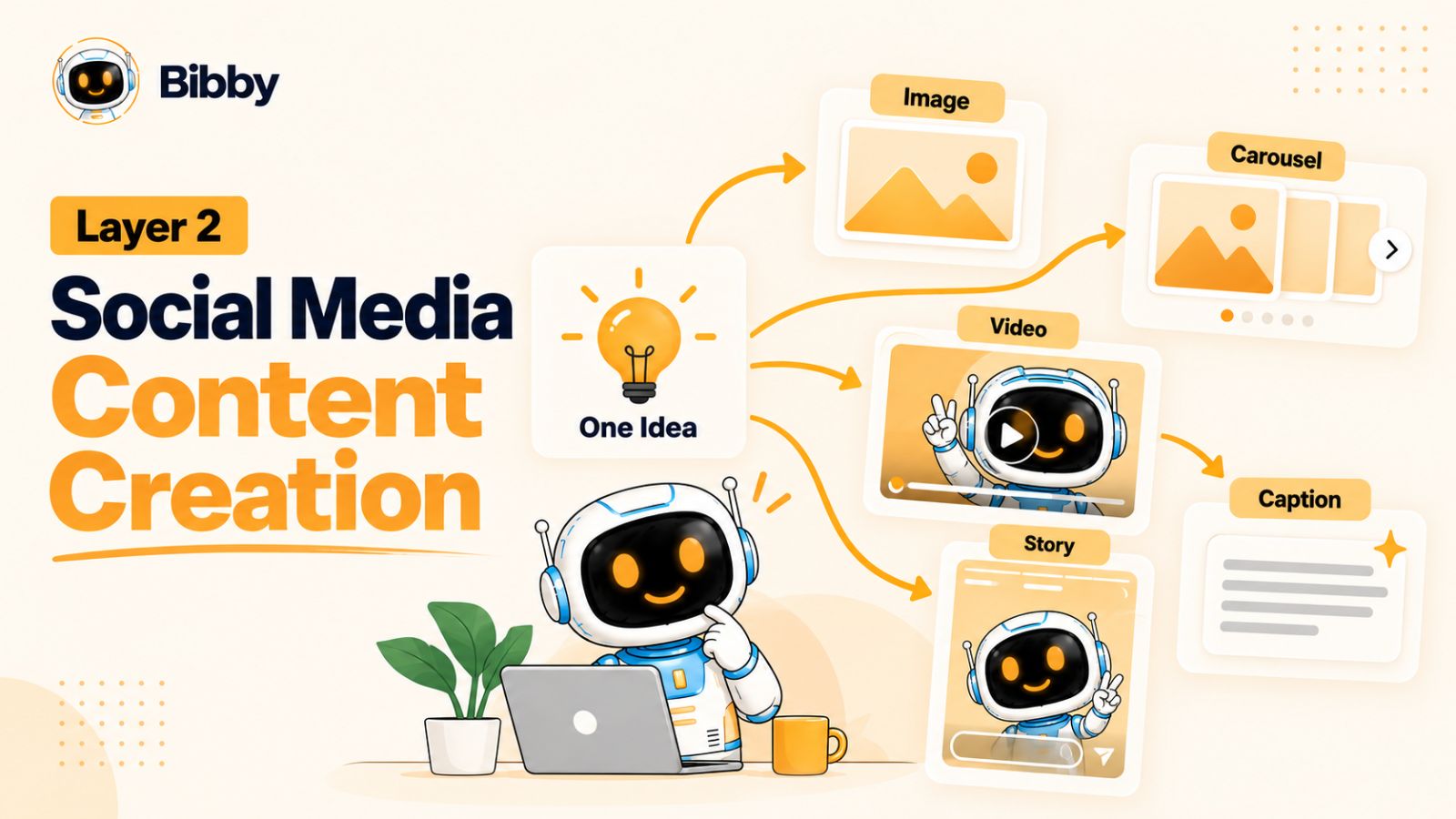
Start With Ideas, Not Formats
One of the easiest ways to make social media content repetitive is to begin with the format.
"Let's make a carousel."
"Let's make a Reel."
"Let's make a LinkedIn post."
A better starting point is the idea.
What does your audience need to know?
What problem can you help them solve?
What misconception can you clarify?
What experience can you share?
What question keeps coming up from customers?
Once you have a strong idea, you can decide which format and platform are best suited to communicate it.
For example, the idea "Five reasons your social media content isn't converting" could become:
- An Instagram carousel
- A LinkedIn text post
- A short-form video
- A YouTube Short
- A Facebook post
- A longer educational video
The idea is the source material. The format is the delivery mechanism.
Create Content in Multiple Formats
Modern social media is no longer limited to static posts.
Depending on the platform and your audience, your content mix can include:
- Single-image posts
- Carousels
- Short-form videos
- Long-form videos
- Stories
- Text posts
- Educational graphics
- Product demonstrations
- Customer stories
- Behind-the-scenes content
- User-generated content
Each format gives you a different way to communicate the same underlying message.
A carousel might be ideal for breaking down a complicated process step by step. A short video can demonstrate something visually. A Story can create a more immediate interaction with your audience.
The objective isn't to use every format simply because it exists.
The objective is to match the content format to the message and audience.
Use AI to Accelerate Production
AI has changed how social media content can be produced.
Instead of starting every post from an empty document, AI can help generate initial ideas, captions, hooks, variations, images, and other creative components.
But speed shouldn't become the only objective.
The best use of AI in social media is to remove repetitive production work while preserving the brand's point of view.
For example, you might provide an AI tool with your core idea and brand context and use its output as a starting point. You can then refine the message, add your expertise, and make sure the content reflects the way your business actually communicates.
This creates a useful balance:
Human expertise provides the substance. AI accelerates production.
Make Brand Consistency Part of Creation
Creating content at scale introduces another challenge: consistency.
If five people—or five different AI workflows—create your social media posts, your brand can quickly start looking and sounding different from one post to the next.
A consistent brand system can define elements such as:
- Brand colors
- Fonts
- Logo usage
- Visual style
- Tone of voice
- Writing style
- Common calls to action
- Preferred terminology
A tool like Bibby can support this process through its brand kit functionality, giving you a central foundation for creating social media content rather than treating every post as an isolated creative project.
This becomes increasingly valuable as your publishing volume grows.
Don't Write Every Caption From Scratch
Captions are another area where social media teams can lose enormous amounts of time.
The challenge isn't necessarily writing one good caption. It's producing dozens or hundreds of captions while keeping them relevant, varied, on-brand, and appropriate for each platform.
This is an area where automation can have a practical impact.
With Bibby, for example, you can upload an image or generate an image with AI, select a posting style, and have captions generated automatically as part of the workflow.
Instead of treating caption writing as a completely separate task, it becomes part of the content production pipeline.
You can then review and refine the output rather than starting from a blank page every time.
Build Once, Then Think Beyond One Post
The most efficient social media creators don't think of content as disposable.
They look for ways to extract more value from a strong idea.
Suppose your company publishes a detailed article explaining how to build a social media content calendar.
That article could become:
- An Instagram carousel explaining the process
- A LinkedIn post highlighting the biggest mistake
- A short video showing the workflow
- A YouTube video explaining the strategy
- A TikTok addressing a common misconception
- A Facebook post summarizing the key steps
- Several Stories containing individual tips
This approach changes the economics of content creation.
Instead of constantly searching for new ideas, you develop a process for getting more useful content from the ideas you already have.
But there is an important limitation.
Repurposing doesn't mean copying and pasting.
The same idea may need to be rewritten, shortened, expanded, reframed, or redesigned depending on where it will appear.
That brings us to the third layer of the social media system: adaptation.
Layer 3: Social Media Content Adaptation
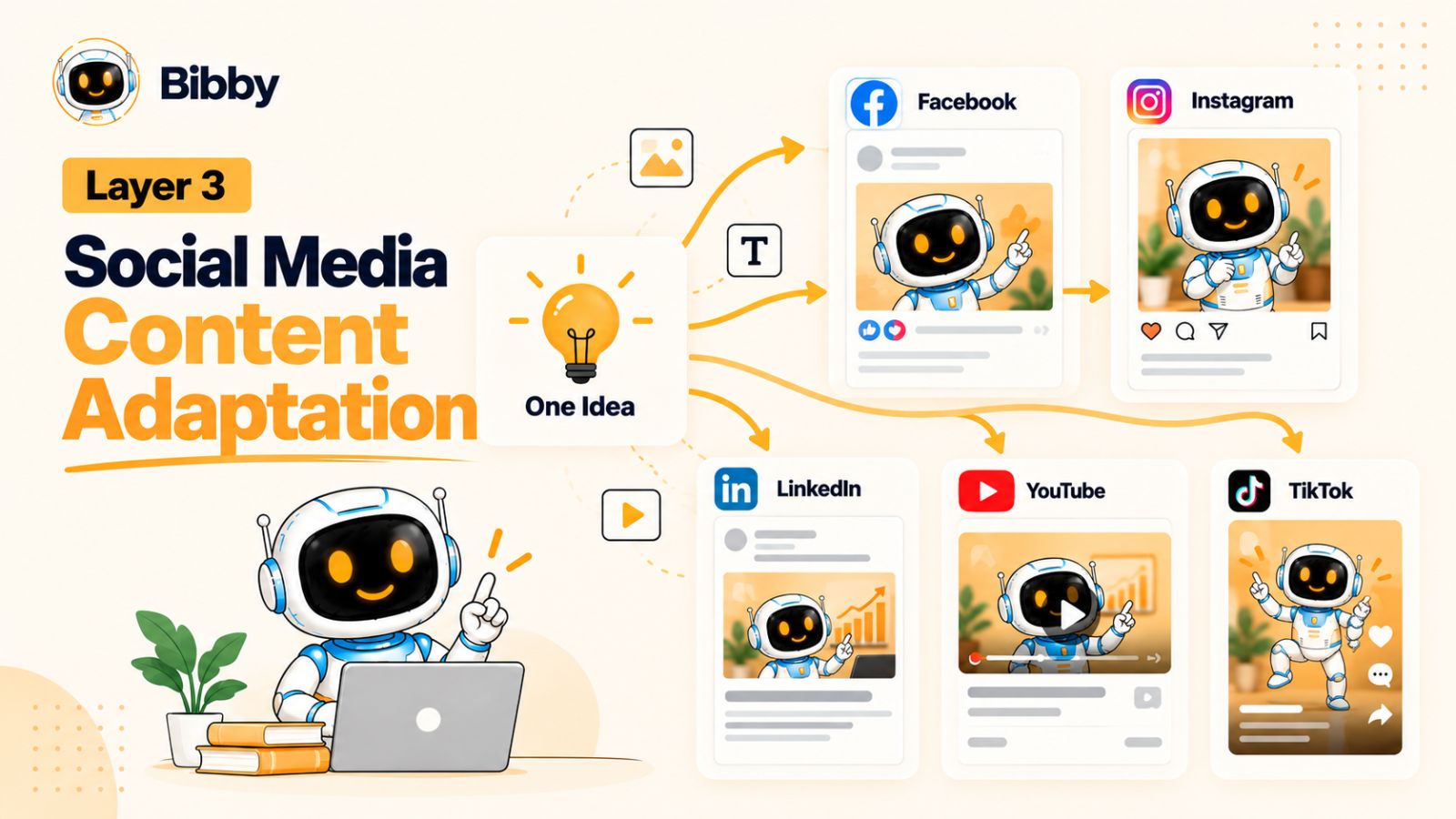
Creating one piece of social media content is useful. Creating multiple versions of that idea for different audiences and platforms is where the system starts to scale.
This is the purpose of content adaptation.
Adaptation means taking a core idea and changing its presentation so it makes sense in the environment where people encounter it.
The message can remain consistent. The execution should not always be identical.
A LinkedIn audience may respond to an analytical explanation. Instagram might be better suited to a visual carousel. TikTok may require a strong opening and fast visual storytelling. YouTube can support a deeper explanation.
The idea stays the same.
The experience changes.
Why Copy-and-Paste Repurposing Doesn't Work
One of the most common social media mistakes is publishing exactly the same content everywhere.
You write a LinkedIn post, copy it into Facebook, paste the same caption into Instagram, and then wonder why the results vary.
The problem isn't necessarily the idea.
It's the lack of adaptation.
Every social media platform has its own content conventions, audience expectations, formats, and consumption patterns. A message that works well as a professional LinkedIn post may feel unnatural as a TikTok script.
That doesn't mean you need five completely different content strategies.
It means you need one strategic idea with multiple executions.
Think in Terms of a Content Source
A useful adaptation workflow starts with a source idea.
Imagine your source content is:
"Why most businesses struggle to maintain consistent social media content."
From that one idea, you could create several platform-specific versions.
LinkedIn:
A text-based post explaining the operational reasons businesses struggle with consistency.
Instagram:
A carousel showing five common causes of inconsistent publishing.
TikTok:
A short video opening with a direct statement such as, "Your problem isn't that you don't have enough content ideas."
YouTube:
A longer video explaining how to build a repeatable content workflow.
Facebook:
A concise educational post inviting discussion around the biggest social media management challenge.
The strategic message is consistent.
The format and presentation are adapted.
Adapt the Hook
The first few seconds—or first few lines—often determine whether someone continues consuming the content.
That means your hook shouldn't necessarily be copied from one platform to another.
A professional insight might work well as a LinkedIn opening:
"Most social media teams don't have a content problem. They have a workflow problem."
For a short-form video, you might transform the same idea into:
"You're probably not running out of social media ideas. You're wasting the ones you already have."
Same concept.
Different entry point.
This is what makes adaptation valuable.
Adapt the Format
Different platforms provide different ways to communicate.
A long explanation can become a carousel by breaking the argument into individual slides.
A carousel can become a video by turning each slide into a spoken point.
A detailed article can become a series of short videos, individual social posts, or Stories.
The content isn't simply being duplicated. It is being repackaged around the way people consume information.
This is especially important when your social media strategy covers Facebook, Instagram, LinkedIn, YouTube, and TikTok simultaneously.
Instead of asking:
"What should I post on each platform?"
ask:
"How should this idea be expressed on each platform?"
That small change can make multi-platform content production considerably easier.
Adapt the Caption and Call to Action
The caption should also reflect the context of the platform.
A LinkedIn post may invite people to share their professional experience.
An Instagram caption might encourage saves or comments.
A TikTok caption may be shorter and reinforce the video's central idea.
A YouTube description can provide additional context and resources.
The call to action should follow the same principle.
Don't automatically add "Visit our website" to every piece of content.
Instead, ask what action makes sense at that stage of the audience journey.
Sometimes the right CTA is:
- Save this post
- Share it with your team
- Follow for more
- Watch the full video
- Read the complete guide
- Try the workflow
- Start a conversation
- Learn more about the product
Adaptation therefore applies to more than visuals. It includes the entire communication experience.
Adaptation Is Where AI Can Save Significant Time
Manually adapting every piece of content for every platform can become a major workload.
This is one reason AI-powered social media workflows are becoming useful.
Instead of asking AI to invent completely unrelated content for every platform, you can give it a central idea and ask it to generate platform-appropriate variations.
Bibby fits naturally into this part of the workflow because its social media automation process can take a creative asset and turn it into scheduled content rather than requiring you to manually prepare every variation from scratch.
Combined with a defined brand kit and posting style, this can help maintain consistency while reducing repetitive work.
The important part is still the human review.
AI can generate variations quickly, but your team should decide whether those variations actually sound like your brand and communicate the intended message.
Adapt Without Diluting the Core Message
There is a difference between adaptation and changing the message so much that the content loses its purpose.
Your brand should have a consistent underlying point of view.
If your core message is that businesses need a systematic approach to social media, every platform can communicate that idea differently without contradicting it.
Think of it like translating a concept into different formats.
You aren't changing what you believe.
You're changing how you explain it.
That distinction allows your social media presence to feel consistent without becoming repetitive.
Build an Adaptation Workflow
A simple workflow can look like this:
1. Start with one core idea.
Define the main point you want your audience to remember.
2. Identify the platforms.
Decide where the idea has the greatest potential.
3. Select the appropriate format.
Choose between a post, carousel, video, Story, or another format.
4. Rewrite the hook.
Give each version an opening suited to its platform.
5. Adjust the body.
Change the length, structure, tone, and visual presentation.
6. Customize the CTA.
Give the audience a relevant next action.
7. Review for brand consistency.
Make sure every variation still sounds like the same company.
Once this workflow is established, the next challenge is getting all those pieces published consistently.
That is the fourth layer: social media distribution.
Layer 4: Social Media Distribution
You can have a strong social media strategy and create excellent content, but none of it matters if the content doesn't consistently reach your audience.
That is the job of distribution.
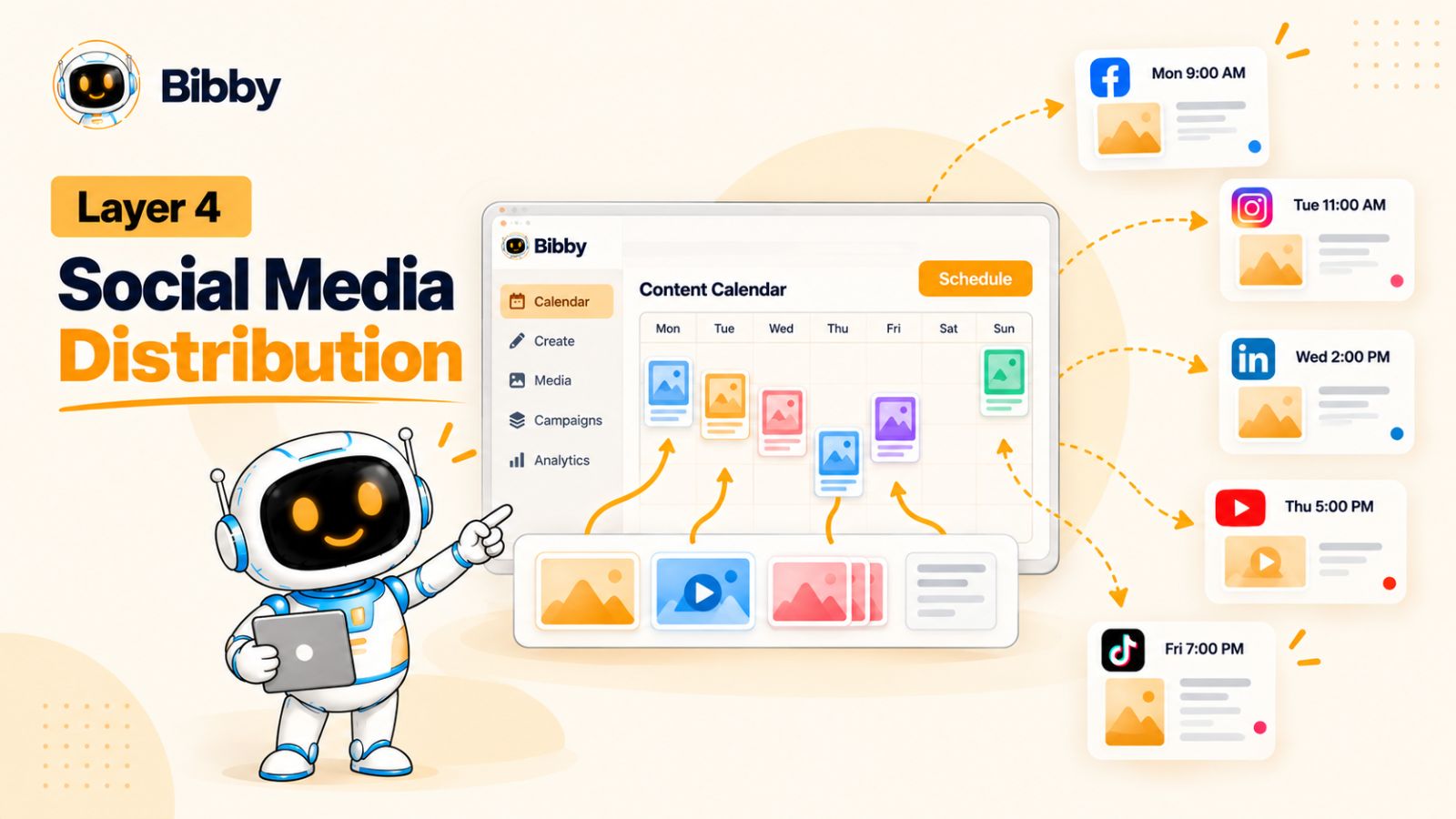
Social media distribution is the process of deciding where, when, and how your content gets published. It includes scheduling, publishing, platform management, content frequency, and the operational workflows that keep your social media presence active.
This layer is often underestimated because publishing a post looks simple.
Publishing one post is simple.
Publishing dozens of posts across multiple platforms every month—while maintaining consistency, adapting formats, managing schedules, and avoiding mistakes—is an entirely different problem.
Distribution Is More Than "Posting"
A common social media workflow looks like this:
Create a post → publish it → move on.
A system-based workflow looks different:
Create the content → adapt it → assign platforms → schedule it → publish it → measure it → improve the next cycle.
Distribution therefore connects the creative side of social media with the measurement layer that comes later.
It also creates an important operational question:
How much of this process needs to be done manually?
Why Manual Publishing Doesn't Scale
Imagine publishing three posts per week across five platforms.
That's potentially 15 publishing actions every week.
Now add different formats, Stories, videos, carousels, campaigns, different publishing dates, captions, platform-specific variations, and multiple people involved in approving content.
The administrative workload grows quickly.
Someone has to remember:
- What needs to be published
- Which platform it belongs on
- Which version should be used
- What caption goes with it
- When it should go live
- Whether it has been approved
- Whether it has already been published
None of these tasks are particularly strategic.
They're operational.
That makes them strong candidates for automation.
Social Media Scheduling Creates Consistency
A social media scheduler allows you to prepare content in advance and organize its publication around a defined calendar.
Instead of creating and publishing everything at the last minute, you can build a collection of content and schedule it ahead of time.
This creates several practical advantages.
Consistency: Your social media presence doesn't depend on someone remembering to publish a post every day.
Planning: Campaigns and content themes can be organized before publication.
Efficiency: You can prepare multiple pieces of content in one focused session rather than repeatedly switching between creation and publishing.
Visibility: Your team can see what is scheduled and identify gaps before they become problems.
Scheduling doesn't make your strategy better by itself.
It makes a good strategy easier to execute consistently.
Publish Across Multiple Platforms From One Workflow
Managing social media often means moving between multiple platforms.
You may create something for Instagram, switch to LinkedIn, open Facebook, upload a video to YouTube, and then prepare a TikTok version.
That fragmented workflow creates friction.
A centralized social media management tool can reduce the number of repetitive steps by bringing multiple publishing workflows into one place.
Bibby is designed around this type of workflow. You can select the social media platforms you want to use and schedule content across channels such as Facebook, Instagram, LinkedIn, YouTube, and TikTok.
Instead of treating every platform as a completely separate publishing operation, you can manage the distribution process from a more centralized workflow.
Use AI-Optimized Publishing Times
Scheduling content isn't only about choosing a date.
Timing can also matter.
Different audiences have different usage patterns, and the appropriate publishing time can vary by platform, audience, geography, and content type.
Rather than manually guessing every publishing time, an automated social media workflow can help determine appropriate times based on available data and scheduling rules.
Bibby incorporates AI-optimized publishing times into its scheduling workflow, allowing content to be distributed at selected dates and automatically timed rather than requiring you to manually choose every publication time.
That doesn't mean timing should become an obsession.
A strong piece of content published consistently is generally more useful to a social media system than endlessly searching for a supposedly perfect minute to publish.
The purpose of optimization is to remove unnecessary guesswork—not create another task to worry about.
Distribute Different Content Formats
A modern social media distribution system needs to handle more than standard image posts.
Your workflow may include:
- Images
- Carousels
- Videos
- Stories
- Short-form content
- Educational posts
- Promotional campaigns
- Product content
- Community-focused content
This matters because your distribution system should support the content strategy rather than force your content strategy into a limited set of formats.
Bibby supports multiple content formats, including images, carousels, videos, and Stories, allowing different types of social media assets to move through the same broader scheduling workflow.
Automation Should Create More Freedom
The ultimate goal of social media automation isn't to publish more content simply because you can.
It's to reduce the amount of repetitive work required to maintain a consistent presence.
Consider the difference.
Without automation:
Idea → create → write caption → log into platform → upload → select date → publish → repeat
With an integrated workflow:
Idea → create → select style → generate content → schedule → review
The second workflow doesn't eliminate strategic decisions.
It eliminates unnecessary repetition.
That distinction is important because automation should give your team more time to think, create, analyze, and engage with customers.
Managing Social Media Through Conversation
Social media management is also moving beyond traditional dashboards.
Bibby now includes a chat interface that allows you to interact with the social media workflow conversationally.
Instead of navigating through different functions manually, you can use the chat experience to perform tasks such as creating a brand kit, creating a campaign, creating posts, regenerating captions, and managing other social media activities.
This represents a broader shift in how social media tools can work.
The interface doesn't have to be:
Find the right menu → open the right screen → select the right settings → complete the task.
It can increasingly become:
Tell the system what you want to accomplish → review the result → refine it.
For repetitive social media operations, that can significantly simplify the workflow.
Distribution Doesn't End When You Hit Publish
Publishing is only the beginning of the final part of the distribution cycle.
Once content is live, you need to know what happened.
Did people see it?
Did they engage?
Did they click?
Did they save or share it?
Did it generate leads or sales?
Did one platform outperform another?
Did a particular topic consistently attract attention?
Those questions belong to the fifth and final layer of the system:
social media measurement.
Layer 5: Social Media Measurement
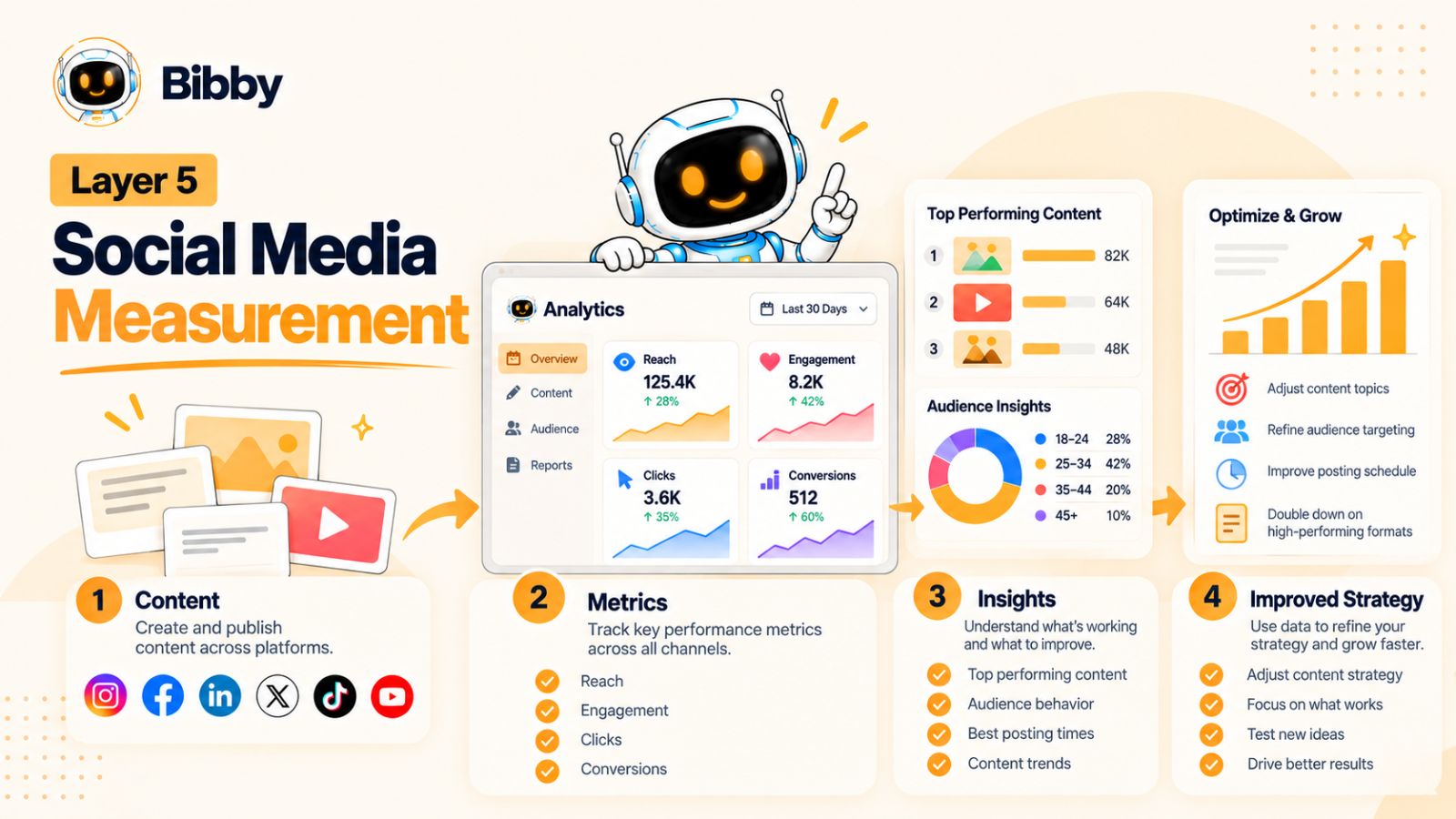
Publishing social media content without measuring what happens afterward is like running an experiment without recording the results.
You might be producing consistently. You might even be getting likes and views. But without measurement, you don't know which parts of your social media system are actually working.
That is why measurement is the fifth layer—and the feedback mechanism for all four layers before it.
The goal isn't to collect every available social media metric.
The goal is to identify useful signals, understand what they mean, and use them to make better decisions.
Start With the Objective, Not the Metric
One of the biggest mistakes in social media analytics is choosing metrics first and objectives second.
A post receives 20,000 views.
Is that good?
There isn't enough information to answer the question.
If the objective was brand awareness, reach and video views might be relevant.
If the objective was lead generation, you may care much more about clicks, leads, and conversions.
If the objective was community building, comments, shares, saves, and meaningful interactions may provide more useful signals.
The metric only becomes meaningful when you understand what the content was supposed to accomplish.
Understand the Main Social Media Metrics
Different metrics answer different questions.
Reach tells you approximately how many unique people were exposed to your content.
Impressions indicate how many times content was displayed.
Engagement captures interactions such as likes, comments, shares, and other actions.
Engagement rate helps put interactions into context relative to reach or another defined audience base.
Saves and shares can be particularly useful signals for educational or reference-worthy content because they indicate that someone found the content valuable enough to keep or distribute.
Clicks tell you whether content motivated people to move beyond the social platform.
Conversions connect social media activity to a business outcome such as a signup, inquiry, purchase, or other defined action.
No single metric tells the whole story.
Look for Patterns, Not Isolated Winners
A common mistake is looking at your best-performing post and trying to recreate it exactly.
Instead, look for patterns across multiple pieces of content.
Perhaps you discover that:
- Educational carousels consistently generate saves.
- Short videos attract more new viewers.
- Customer stories generate more comments.
- Product demonstrations produce more clicks.
- Certain topics repeatedly outperform others.
- Some platforms generate attention while another generates more website traffic.
These patterns are much more valuable than one viral post.
They tell you something about the relationship between your audience, your message, your format, and your platform.
Measure Content by Its Role
Not every post should be expected to generate the same result.
Think about your content as having different jobs.
An awareness post might be designed to reach new people.
An educational post might be designed to generate saves and shares.
A product post might be designed to generate clicks.
A customer story might be designed to build trust.
A promotional campaign might be designed to generate conversions.
If you judge every piece of content by the same metric, you can end up discarding valuable content simply because it wasn't designed to maximize that particular metric.
A better social media measurement system connects:
Content → Objective → Metric → Insight → Action
That final step is the one that matters most.
Turn Analytics Into Action
Data isn't useful simply because you have it.
The value comes from what you change because of it.
Suppose your analytics show that your audience consistently engages with practical how-to content but rarely interacts with generic promotional posts.
A reasonable response might be to increase the proportion of educational content and change how promotional content is presented.
Or suppose your videos receive strong reach but very few clicks.
That could prompt you to examine the call to action, landing-page journey, or the relationship between the video's promise and the destination.
Measurement should therefore produce decisions.
Ask:
What should we create more of?
What should we change?
What should we stop doing?
What should we test next?
Measurement Feeds Strategy
This is where the five-layer system becomes a loop.
Strategy determines what you want to achieve.
Creation turns the strategy into content.
Adaptation makes the content appropriate for each platform.
Distribution delivers it to the audience.
Measurement shows you what happened.
Then the results go back into strategy.
For example:
Strategy: Build authority around social media automation.
↓
Creation: Produce educational content about automation workflows.
↓
Adaptation: Turn the ideas into LinkedIn posts, Instagram carousels, TikToks, and YouTube content.
↓
Distribution: Schedule the content across relevant platforms.
↓
Measurement: Identify which topics, formats, and platforms generate the strongest response.
↓
New strategy: Create more content around the topics and formats showing meaningful demand.
That is the system.
Use Automation to Make Measurement More Useful
Automation can help with execution, but measurement still requires interpretation.
A social media management platform can help centralize your content workflow and make it easier to see what has been published across your channels. Tools such as Bibby can reduce the operational workload around creating and scheduling content, which means your team can spend less time managing individual posts and more time reviewing the overall performance of the system.
The goal isn't to automate every decision.
It's to make the information needed for those decisions easier to access and act on.
The Real Goal of Social Media Analytics
The ultimate purpose of social media measurement isn't to produce a beautiful report.
It's to make your next decision better than your last one.
Your first month of content gives you information.
Your second month should use that information.
Your third month should build on what you learned again.
Over time, your social media system becomes more informed by actual audience behavior rather than assumptions.
And that's what separates a collection of social media posts from a real operating system.
You aren't simply publishing.
You're learning, adapting, and improving.
Now that all five layers are defined, we can connect them into one continuous workflow—and see how a single idea can move from strategy to published, measured content.
How the Five Social Media Layers Work Together
The real power of the five-layer social media system doesn't come from any individual layer.
It comes from the connection between them.
Strategy without creation stays on paper. Creation without adaptation produces repetitive content. Adaptation without distribution leaves content unpublished. Distribution without measurement creates activity without learning. And measurement without strategy gives you data without direction.
The five layers solve this by creating a continuous workflow:
Strategy → Creation → Adaptation → Distribution → Measurement → Strategy
Each layer feeds the next.
Start With One Strategic Idea
Imagine you're a software company that helps businesses manage their social media.
Your strategy identifies a recurring customer problem:
Businesses struggle to maintain consistent social media content because too much of the workflow is manual.
That becomes the core idea.
You don't immediately start designing a carousel or writing a caption.
First, you establish what you want the content to accomplish.
Perhaps the objective is to educate potential customers about why their current social media workflow is inefficient.
Now the idea has a purpose.
Turn the Idea Into Content
Next, the creation layer takes over.
You could develop a visual explaining the hidden workload behind manual social media management.
You might also create a short video demonstrating the number of steps involved in manually preparing one post.
Or you could create a carousel showing:
- Choose an idea
- Create the visual
- Write the caption
- Adapt the content
- Log into each platform
- Select the publishing time
- Publish
- Repeat
The underlying message remains the same.
But now you have tangible content assets.
Adapt the Idea for Each Platform
The next step is adaptation.
The same core idea might become a professional insight on LinkedIn, a visual carousel on Instagram, a short demonstration on TikTok, a deeper explanation on YouTube, and a discussion-oriented post on Facebook.
You don't need to reinvent the message five times.
You need to translate the message into five appropriate experiences.
This is where an efficient social media workflow starts producing leverage.
One strategic decision can generate multiple useful assets.
Distribute the Content
Once the content is ready, it moves into distribution.
Instead of manually publishing every variation on every platform, you can organize the content into a schedule.
For example:
| Day | Platform | Format | Purpose |
|---|---|---|---|
| Monday | Text post | Education | |
| Tuesday | Carousel | Education | |
| Wednesday | TikTok | Short video | Awareness |
| Thursday | YouTube | Video | Education |
| Friday | Image + caption | Engagement |
The exact schedule will depend on your audience and strategy.
The important part is that distribution is planned rather than improvised.
Measure What Happened
After the content has been published, measurement begins.
You might discover that the Instagram carousel generated a high number of saves, while the TikTok video reached a much larger new audience.
Perhaps the LinkedIn post generated fewer impressions but significantly more meaningful conversations.
These results don't mean one platform is universally "better."
They tell you something about how different audiences responded to different versions of the same idea.
That information becomes your next strategic input.
The System Improves Through Feedback
Suppose the data shows that practical workflow content consistently performs better than generic social media advice.
Your next strategy can respond to that signal.
You create more practical content.
Then you adapt it.
Then you distribute it.
Then you measure it again.
Over time, you're not simply accumulating posts.
You're accumulating knowledge about your audience.
That is the real advantage of a system.
Where Bibby Fits Into the Workflow
This is also where a tool like Bibby can connect several operational pieces.
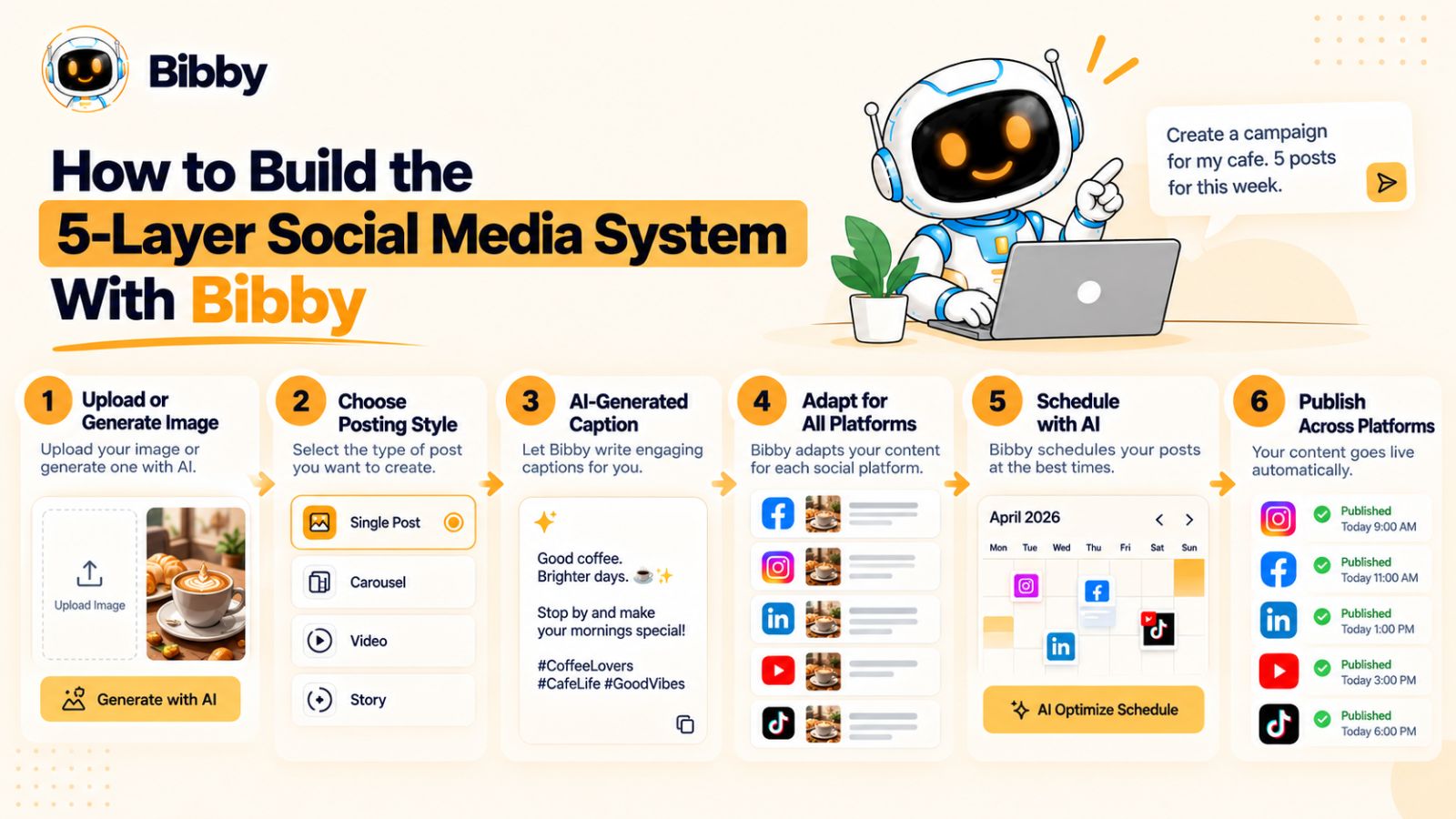
You can start by uploading an image or generating one with AI. From there, you can choose a posting style and have captions generated automatically, then schedule the resulting content across selected platforms at AI-optimized times.
The workflow can support different types of media, including images, carousels, videos, and Stories.
Bibby's chat interface adds another layer to this workflow. Instead of treating social media management as a collection of disconnected screens, you can use the conversational interface to work on tasks such as creating a brand kit, creating campaigns, creating posts, regenerating captions, and managing other social media activities.
This doesn't eliminate the five-layer system.
It helps operationalize it.
The strategy still determines what you want to accomplish. Your team still decides what ideas are worth publishing. Measurement still requires interpretation.
But repetitive execution can become considerably easier.
One Idea Can Become a Content Engine
The biggest mindset shift is this:
Stop thinking about social media one post at a time.
Think in terms of ideas, systems, and content lifecycles.
One strong idea can become multiple formats.
Multiple formats can become platform-specific content.
Platform-specific content can be distributed according to a schedule.
The resulting performance can produce insights.
Those insights can generate the next ideas.
That creates a flywheel:
One idea → multiple assets → multiple platforms → measurable results → better ideas.
When that process becomes repeatable, social media stops being a constant scramble for what to post next.
It becomes an operating system.
And the next question is practical: how do you actually run this system every week without turning it into another full-time job?
How to Build the 5-Layer Social Media System With Bibby
Understanding the five layers is useful. Building a workflow that actually connects them is where the framework becomes valuable.
This is where a social media scheduling and automation platform like Bibby can fit into the process.
Instead of using separate tools for visual creation, captions, content planning, scheduling, and day-to-day social media management, Bibby brings many of these activities into a single workflow.
The objective isn't to hand your entire social media strategy over to AI.
It's to remove the repetitive work between the strategic decision and the final published post.
Step 1: Establish Your Brand Foundation
Before creating content at scale, define how your brand should look and sound.
Your brand foundation can include your visual identity, tone of voice, preferred messaging, and other characteristics that should remain consistent across your social media presence.
Bibby allows you to create a brand kit, giving the system a central reference point for your brand.
This becomes particularly useful when AI is involved in content creation.
Instead of generating generic content and trying to make it sound like your company afterward, you can establish the brand context first and use it throughout the workflow.
Step 2: Create or Upload Your Visual
The next step is to create the content asset.
You can upload an existing image or use AI to generate an image.
This gives you flexibility depending on where your content is coming from.
If your design team has already created the asset, you can use it directly.
If you're building a campaign from scratch, AI-generated visuals can help you move from an idea to an initial creative asset more quickly.
The important thing is that the visual supports the underlying content strategy.
AI makes creation faster, but the idea still needs to be worth communicating.
Step 3: Choose Your Posting Style
Once the creative asset is ready, you can select the posting style you want to use.
This is important because the same visual can communicate different things depending on the context.
An educational post might explain a concept.
A promotional post might highlight a product benefit.
A thought-leadership post might introduce an industry perspective.
A conversational post might encourage discussion.
Giving the content a defined purpose helps the generated copy remain connected to your broader social media strategy.
Step 4: Generate the Caption
Writing captions individually can become one of the most repetitive parts of social media management.
Bibby can generate captions automatically based on the content and selected posting style.
That means you don't have to start every caption from a blank document.
The generated caption can then be reviewed and refined before publication.
This is an important distinction when using AI for social media:
Generation should accelerate the workflow, not remove editorial judgment.
You still want to check whether the caption communicates the intended message, sounds like your brand, and gives the audience an appropriate next action.
Step 5: Schedule the Content
Once your content is ready, you can move it into the distribution layer.
Bibby can schedule content for different dates and use AI-optimized times for publishing across selected social media platforms.
That means you can prepare content in advance rather than manually publishing every post when it is time to go live.
You can select platforms such as:
- YouTube
- TikTok
The exact platform mix should still be determined by your social media strategy.
Being able to publish everywhere doesn't mean you need to publish everything everywhere.
The system should follow the audience and business objectives you established in Layer 1.
Step 6: Publish Different Types of Media
A social media system becomes more useful when it supports the formats your strategy actually requires.
Bibby can be used for different types of social media content, including:
- Images
- Carousels
- Videos
- Stories
This allows your distribution workflow to accommodate more than a simple stream of image posts.
For example, an educational campaign might contain an Instagram carousel, a short video, several Stories, and a LinkedIn post built around the same central message.
Instead of managing every asset as a completely separate publishing project, you can organize them within the broader campaign workflow.
Step 7: Use the Chat Interface to Manage Social Media
One of the more interesting parts of the workflow is Bibby's chat interface.
Instead of navigating through a traditional dashboard for every task, you can interact with the system conversationally.
Within the chat experience, you can perform tasks such as:
- Create a brand kit
- Create a campaign
- Create posts
- Regenerate captions
- Manage other social media content tasks
This changes the interaction model from "operate the software" to "describe the work you want done."
For example, instead of manually navigating through several screens to create a campaign, the conversational workflow can provide a more direct way to communicate the objective and then refine the result.
That can be particularly useful for people who understand their social media strategy but don't want to spend their day managing publishing software.
Step 8: Keep Humans in the Strategic Loop
Automation is most useful when it removes repetitive work while keeping important decisions under human control.
You should still decide:
- Who your audience is
- What your brand stands for
- Which topics matter
- What campaigns you want to run
- Which platforms deserve attention
- What business outcomes matter
- Which content represents your brand
Bibby can help with the execution around those decisions.
This distinction is what makes the five-layer system practical.
Strategy remains human-led. Execution becomes increasingly automated.
From Manual Social Media Management to a Repeatable Workflow
Put the process together and you get a much simpler operating model:
Define the strategy → establish the brand kit → create or generate the visual → choose the posting style → generate the caption → adapt the content → schedule it → publish → measure the result → improve the next campaign.
Instead of managing each step as an isolated task, you can treat it as one connected social media workflow.
And that's ultimately what automation should accomplish.
Not more complexity.
Not more dashboards.
Not simply more posts.
More time for the work that actually requires human thinking.
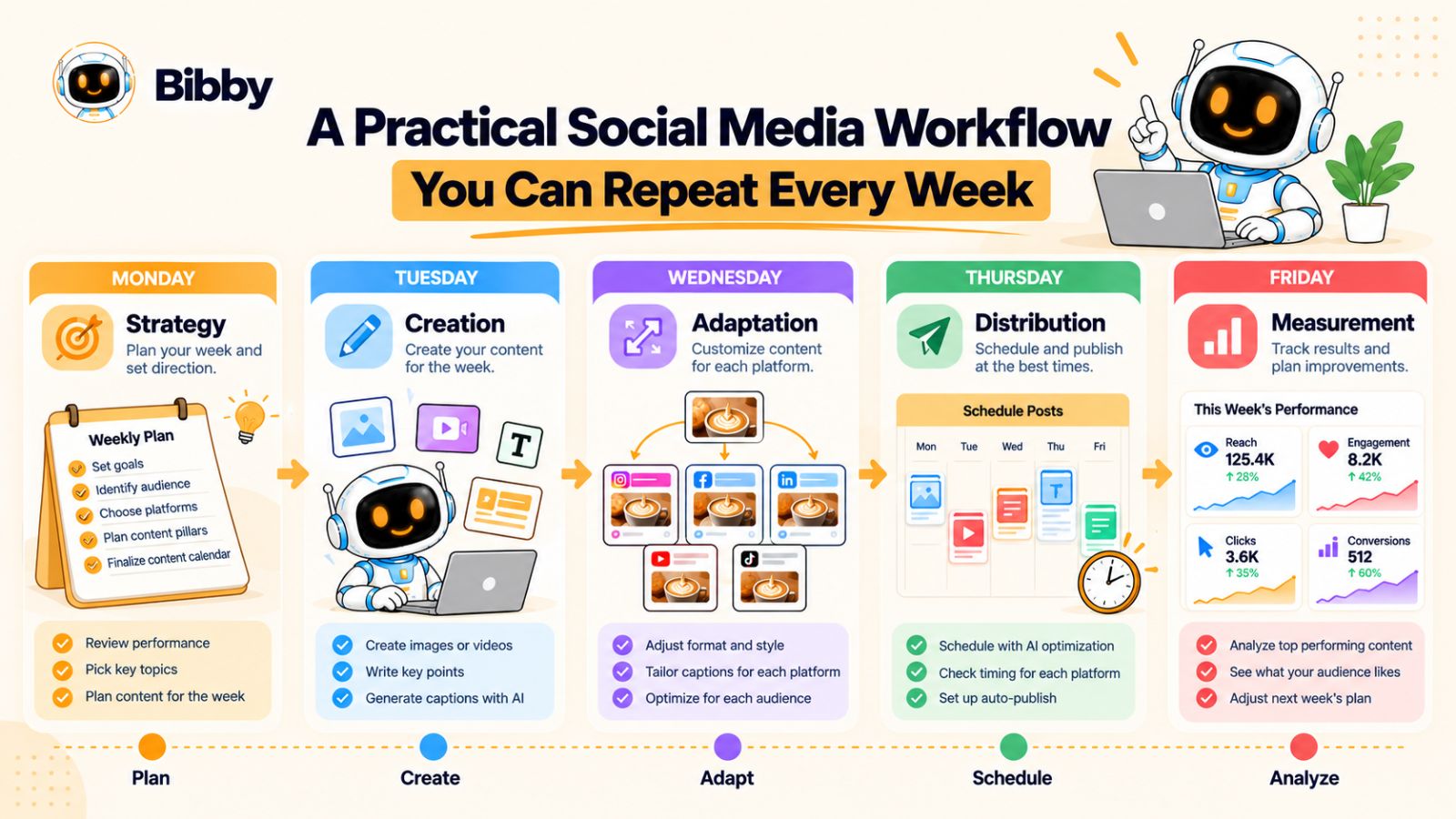
A Practical Social Media Workflow You Can Repeat Every Week
A social media system only becomes useful when you can repeat it.
You don't need to reinvent your process every Monday. You need a workflow that gives your team a clear path from ideas to published content and back to measurable insights.
The exact schedule will vary by business, but a simple weekly cycle can connect all five layers.
Monday: Strategy and Planning
Start the week by deciding what deserves attention.
Review your previous social media performance and identify the topics, formats, and messages that produced useful results.
Then choose the ideas you want to develop during the week.
For each idea, define:
- The target audience
- The business objective
- The core message
- The relevant content pillar
- The platforms where it could be useful
- The desired action from the audience
This prevents content creation from becoming a guessing game.
You don't need to plan every detail of every post before creating anything. You simply need enough strategic direction to make the production process purposeful.
Tuesday: Content Creation
Turn your selected ideas into actual assets.
Depending on the content plan, this could mean creating:
- Images
- Carousels
- Short-form videos
- Long-form videos
- Stories
- Text-based posts
This is also where AI can accelerate production.
For example, you can use Bibby to upload an existing image or generate a visual with AI, select an appropriate posting style, and generate a caption automatically.
Instead of spending the entire day moving between individual production tasks, you can focus more of your time on the ideas and creative decisions that require human input.
Wednesday: Adaptation
Now take your core content and prepare it for the platforms you've selected.
A single idea might become:
- A LinkedIn insight
- An Instagram carousel
- A Facebook post
- A YouTube video
- A TikTok clip
- Several Stories
Don't assume that the same version belongs everywhere.
Review the hook, length, visual structure, caption, and CTA for each platform.
The objective is not to create more work.
It's to make each version feel natural where it appears.
Thursday: Scheduling and Distribution
Once the content is ready, move it into your publishing workflow.
Organize the content by platform, format, campaign, and date.
Then schedule it in advance.
With a tool like Bibby, you can schedule content across selected platforms and use AI-optimized publishing times as part of the distribution process.
This means the week's publishing activity doesn't depend on someone remembering to manually post every piece of content.
You can also prepare different media types—such as images, carousels, videos, and Stories—within the broader social media workflow.
The result is a content calendar that is planned rather than improvised.
Friday: Measurement and Learning
End the cycle by looking at what happened.
Don't just ask:
"Which post got the most likes?"
Ask better questions:
- Which topics attracted attention?
- Which formats generated meaningful engagement?
- Which content earned saves or shares?
- Which posts drove clicks?
- Which platforms contributed to the objective?
- Did the audience respond differently to different versions?
- What should we test next?
Write down the insights.
Even a simple record of recurring patterns can become valuable over time.
Then Start the Cycle Again
The following Monday, your previous week's measurement becomes part of your strategy.
Maybe educational content performed better than promotional content.
Maybe short-form video generated strong reach.
Maybe a specific customer problem produced unusually high engagement.
Maybe one platform consistently generated better-quality traffic.
Those observations influence the next batch of ideas.
The workflow becomes:
Plan → Create → Adapt → Distribute → Measure → Plan again.
This is the social media system working as intended.
What Should You Automate?
A useful rule is to automate tasks that are repetitive, predictable, and operational.
These might include:
- Caption generation
- Content scheduling
- Publishing
- Repetitive content preparation
- Platform distribution
- Certain content variations
- Routine workflow management
Tools such as Bibby can help consolidate several of these activities into a single social media workflow.
What Should Stay Human?
Other activities benefit from human judgment.
Keep humans closely involved in:
- Brand strategy
- Audience research
- Campaign concepts
- Creative direction
- Sensitive communications
- Major announcements
- Customer relationships
- Performance interpretation
- Strategic decisions
The goal isn't to remove people from social media.
It's to remove unnecessary administrative work so people can spend more time on the parts of social media that require context, creativity, and judgment.
A Simple Weekly Checklist
By the end of each week, you should be able to answer five questions:
Strategy: Do we know what we're trying to achieve?
Creation: Did we produce content that supports that objective?
Adaptation: Did we make the content appropriate for each platform?
Distribution: Is everything scheduled and published consistently?
Measurement: Did we learn something that will improve the next cycle?
If you can answer all five, you have more than a content calendar.
You have a repeatable social media operating system.
And that distinction becomes even clearer when you compare this approach with traditional social media management.
Social Media System vs. Traditional Social Media Management
The difference between a social media system and traditional social media management isn't simply the number of tools you use.
It's the way the work is organized.
Traditional social media management often treats publishing as a collection of individual tasks. Someone creates a post, writes a caption, publishes it, moves to the next post, and checks analytics later.
A system-based approach connects those activities.
Instead of asking, "What do we need to post today?", you ask, "How does this piece of content move through our entire social media workflow?"
That shift can change how a team plans, creates, publishes, and learns.
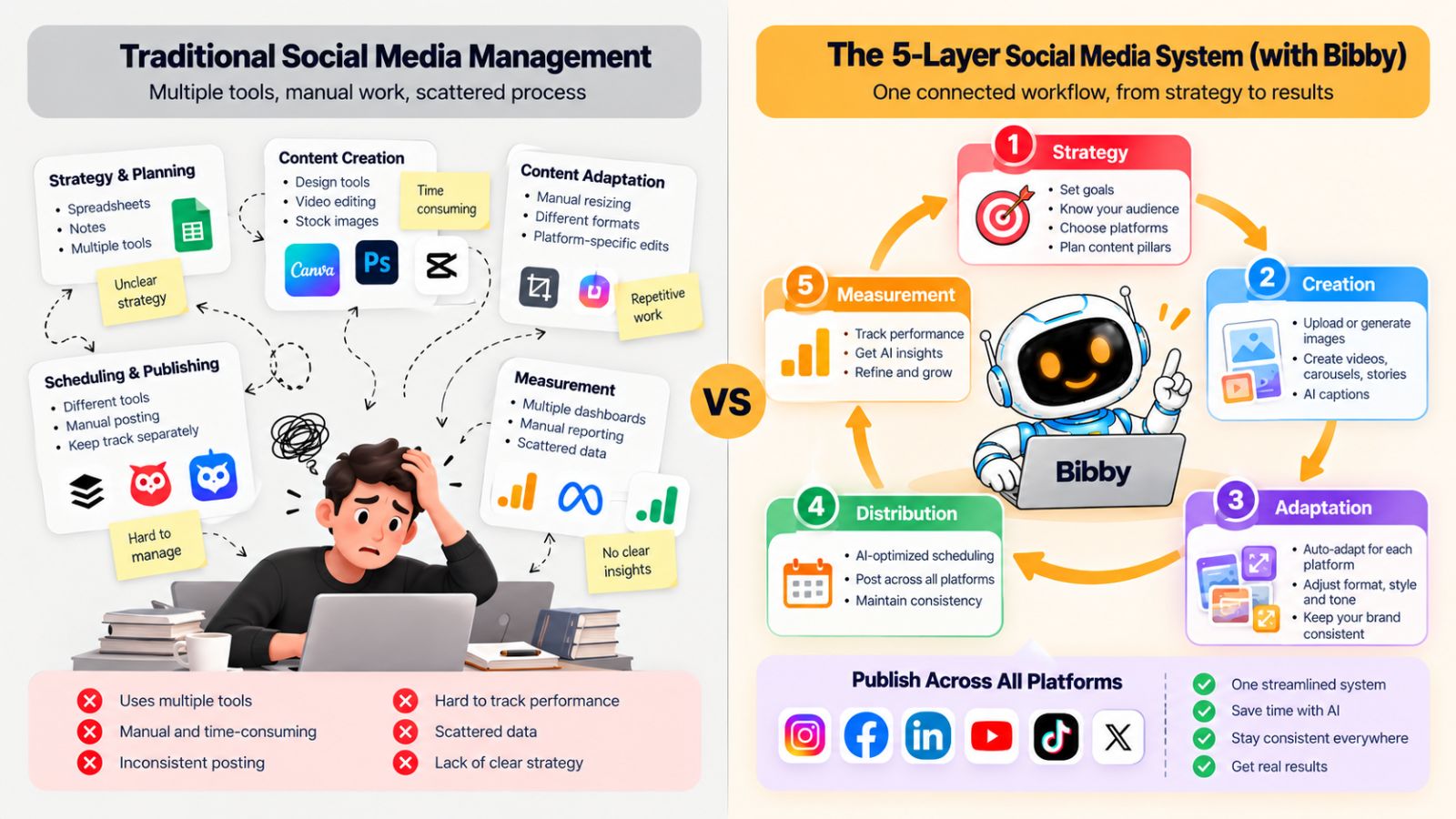
Traditional Social Media Management
A traditional workflow might look something like this:
Idea → create post → write caption → publish → repeat
When there are only a few posts and one platform, this can be manageable.
But complexity increases as soon as you add multiple platforms, different formats, campaigns, approval processes, and more frequent publishing.
The team may end up maintaining separate workflows for Instagram, Facebook, LinkedIn, YouTube, and TikTok.
The result can be a lot of repetitive work.
A System-Based Approach
A five-layer system looks more like this:
Strategy → Creation → Adaptation → Distribution → Measurement
The difference is that every stage has a defined purpose.
Strategy decides what deserves attention.
Creation turns the idea into an asset.
Adaptation makes the asset appropriate for each platform.
Distribution gets it published.
Measurement provides information for the next strategic decision.
The workflow is circular rather than linear.
The Difference in Practice
| Traditional approach | Five-layer system |
|---|---|
| "What should we post today?" | "What objective does this content support?" |
| Create individual posts | Develop ideas into content assets |
| Copy content across platforms | Adapt content for each platform |
| Publish manually | Schedule and automate distribution |
| Check likes and views | Measure against defined objectives |
| Start from scratch each week | Use previous results to guide the next cycle |
The second column isn't necessarily about doing more.
It's about connecting the work.
Fragmented Tools vs. Connected Workflow
Another difference is how the technology fits into the process.
A traditional workflow might involve one tool for graphic design, another for AI image generation, another for captions, separate native platforms for publishing, and spreadsheets for planning.
Using specialized tools isn't inherently bad.
But every additional handoff creates another opportunity for work to be duplicated, information to be lost, or a task to be forgotten.
An integrated platform such as Bibby can bring several operational activities into one social media workflow.
You can create or upload visuals, choose a posting style, generate captions, schedule content, and distribute different media formats across selected social platforms.
Its chat interface also allows tasks such as creating a brand kit, creating campaigns, creating posts, and regenerating captions through a conversational workflow.
That doesn't mean every social media activity should happen inside one tool.
It means reducing unnecessary handoffs can make the overall system easier to operate.
Manual Work vs. Automated Execution
Traditional management often requires someone to repeatedly perform the same actions.
Upload.
Copy.
Paste.
Schedule.
Repeat.
Automation changes the economics of those tasks.
Once the rules and content are established, software can handle many repetitive execution steps.
The team can then spend more time on:
- Strategy
- Creative direction
- Audience understanding
- Campaign development
- Community interaction
- Performance analysis
This is one of the strongest arguments for social media automation.
The value isn't simply that software can publish posts.
The value is that your people don't have to spend their time repeatedly doing work software can handle.
Content Volume vs. Content Leverage
A traditional approach can encourage a volume mindset:
"We need more posts."
A system encourages a leverage mindset:
"How much value can we get from this idea?"
One strategic idea can become multiple pieces of content.
One piece of source content can become multiple formats.
Those formats can be adapted across platforms.
The resulting performance can generate new insights.
That creates leverage without requiring an endless supply of completely new ideas.
The Goal Isn't Full Automation
It's tempting to look at an automated social media workflow and conclude that the ideal system should require no human involvement.
That's not the goal.
Social media involves context, culture, creativity, customer relationships, and brand reputation. Those things shouldn't be reduced to a collection of automated actions.
A better model is:
Human strategy + AI-assisted creation + automated execution + human interpretation.
People decide what matters.
AI and software help execute the repeatable parts.
People review the results and decide what happens next.
That balance keeps automation useful without allowing the workflow to become disconnected from the brand.
When a System Becomes Especially Valuable
A structured social media system becomes increasingly useful as complexity grows.
For example, you may benefit from one when:
- You're publishing across multiple platforms
- Your content volume is increasing
- Multiple people contribute to social media
- You are running recurring campaigns
- You regularly repurpose content
- Manual scheduling takes significant time
- Your team struggles to maintain consistency
- You have enough performance data to learn from
At that point, social media isn't just a collection of posts.
It's an ongoing operational process.
And like any operational process, it benefits from structure, automation, and feedback.
The next step is understanding what can break that system—and the common mistakes that prevent social media teams from getting the full benefit of it.
Common Social Media System Mistakes
A social media system can make content production and publishing more organized, but having a system doesn't automatically make the system effective.
The biggest problems usually happen when one of the five layers is skipped, disconnected, or over-automated.
Here are the mistakes worth watching for.
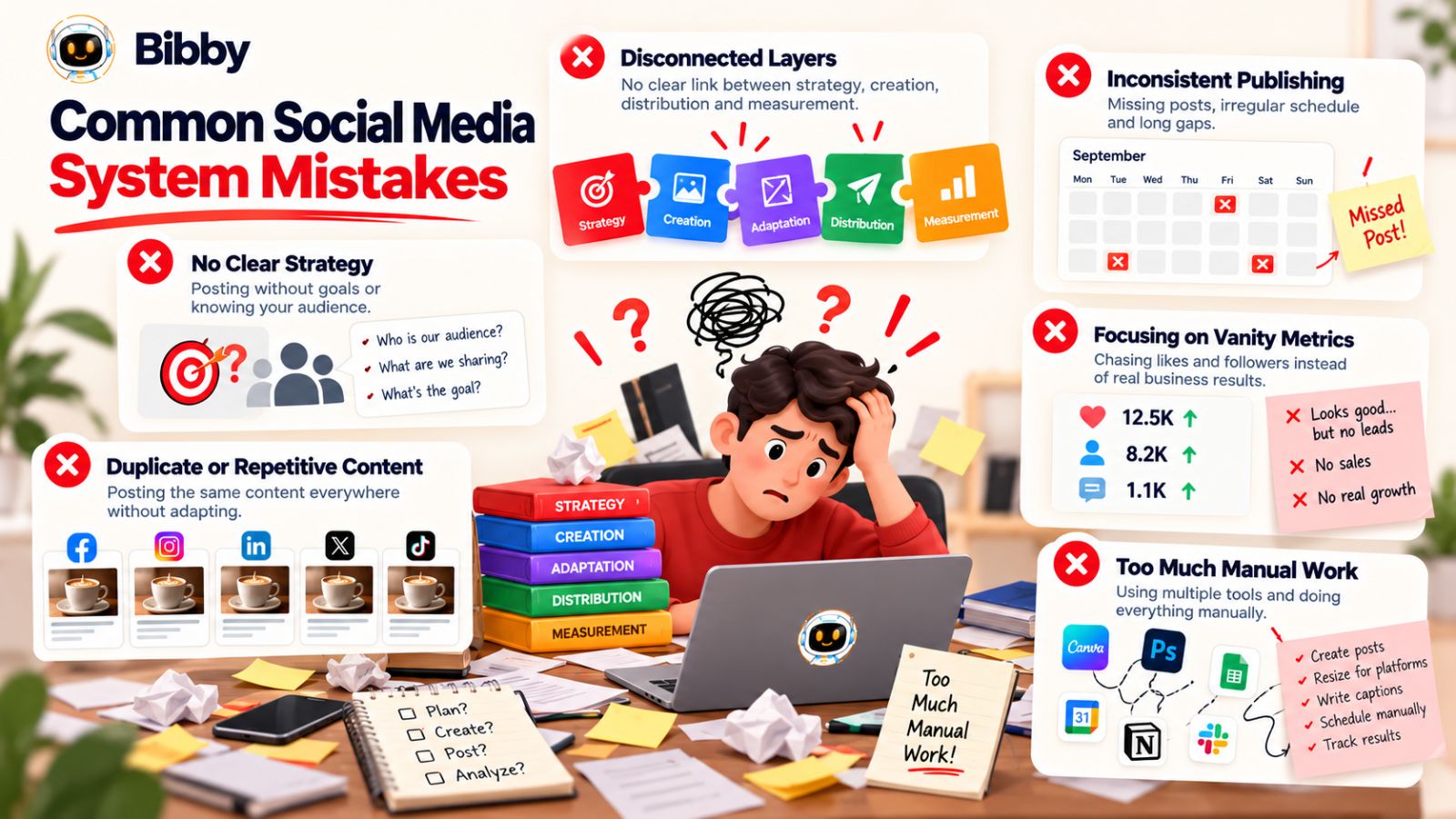
1. Starting With Content Instead of Strategy
One of the most common mistakes is opening a content calendar before deciding what the content needs to accomplish.
You start searching for ideas, trends, formats, and hashtags without establishing a clear objective.
That can produce a lot of activity without much direction.
Before creating content, establish:
- Who you're trying to reach
- What problem you're addressing
- What business objective the content supports
- What you want the audience to do
- How you'll evaluate the result
A strategy doesn't need to be complicated.
It needs to exist.
2. Treating Every Platform the Same
Publishing identical content everywhere may save time, but it can weaken the audience experience.
A LinkedIn post isn't automatically a good TikTok script.
An Instagram carousel isn't automatically a good YouTube video.
The underlying idea can travel across platforms, but the execution should be adapted.
This is why adaptation deserves its own layer in the five-layer system.
3. Creating Content Without a Distribution Plan
Another common mistake is spending significant time creating content and deciding how to distribute it afterward.
By the time the asset is finished, there may be no clear publishing date, platform, campaign context, or audience objective.
Distribution should be considered before the content is finished.
If you know that an idea will become an Instagram carousel, LinkedIn post, and short-form video, you can create those variations intentionally rather than trying to retrofit them later.
4. Confusing Automation With Strategy
Automation can save time.
It cannot decide what your business should say to your audience.
If you automate a weak content strategy, you'll simply produce weak content more efficiently.
Use automation for repetitive work such as:
- Caption generation
- Scheduling
- Publishing
- Content distribution
- Workflow management
- Repetitive variations
Keep strategic decisions with people who understand the business, audience, and brand.
Bibby can help automate many of the execution steps, but it works best when it is operating from a clear strategy and defined brand foundation.
5. Over-Relying on AI-Generated Content
AI can make content production significantly faster, but speed can create another problem: sameness.
If every brand uses AI to generate generic hooks, generic captions, and generic advice, the resulting social media feeds become increasingly difficult to distinguish.
The solution isn't to avoid AI.
It's to give AI better inputs.
Provide a clear brand voice, useful source material, specific audience context, real customer problems, original insights, and your own expertise.
Then review the output.
The goal should be AI-assisted content, not content with all of the human thinking removed.
6. Measuring Vanity Metrics Without Context
A post receiving thousands of views may look impressive.
But what did those views accomplish?
If the objective was awareness, reach might be useful.
If the objective was lead generation, you need to look further down the funnel.
If the objective was customer education, saves or meaningful interactions may matter more.
Always connect the metric to the objective.
Otherwise, your analytics can encourage you to optimize for attention instead of outcomes.
7. Never Feeding Results Back Into Strategy
Some teams measure their social media performance but don't change anything because of what they find.
They produce a report.
They discuss the numbers.
Then they return to the same content calendar.
That's not a feedback loop.
Measurement should influence future decisions.
If a topic consistently performs well, investigate why.
If a format repeatedly underperforms, test a different approach.
If a platform produces strong traffic but another generates stronger awareness, adjust your objectives and resources accordingly.
Your social media strategy should evolve as you learn.
8. Trying to Be Everywhere
Being present on every social media platform isn't necessarily a sign of a strong strategy.
It can simply mean your team is spreading its resources too thin.
Instead, identify where your audience actually spends time and where your business can consistently create useful content.
You can expand your platform mix later when the underlying system is strong enough to support it.
A smaller number of well-managed channels can be easier to operate than an enormous collection of neglected profiles.
9. Optimizing for Volume Instead of Leverage
More posts don't automatically create more value.
If increasing your publishing frequency means sacrificing quality, relevance, or strategic consistency, the additional volume may not help.
A better question is:
Can we create a stronger system for getting more value from each good idea?
That might mean turning one research project into a carousel, video, LinkedIn post, Story sequence, and email rather than constantly searching for unrelated topics.
Content leverage is often more sustainable than content volume.
10. Forgetting That Social Media Is Social
Automation can handle publishing.
It can't replace genuine relationships with your audience.
People may comment, ask questions, share experiences, criticize your product, recommend your brand, or ask for help.
Those interactions require context.
A strong social media system therefore leaves room for community management and human engagement.
The purpose of automation is to create more time for meaningful work—not eliminate the human element from social media.
Build the System Around These Principles
The five-layer model becomes much stronger when you follow a few simple rules:
Strategy before volume.
Ideas before formats.
Adaptation before duplication.
Distribution before last-minute publishing.
Measurement before assumptions.
Automation for repetition, humans for judgment.
Get those principles right, and the system becomes easier to scale without turning your social media operation into an increasingly complicated collection of tasks.
The final piece is bringing everything together into a concise framework you can use to evaluate your own social media operation.
Frequently Asked Questions About Social Media Systems
What is a social media system?
A social media system is a repeatable process for planning, creating, adapting, distributing, and measuring social media content. Instead of treating every post as an isolated task, the system connects these activities so that each stage supports the next.
The five layers are strategy, creation, adaptation, distribution, and measurement.
What are the five layers of social media?
The five layers are:
- Strategy — Decide what you want to achieve, who you want to reach, and what you should communicate.
- Creation — Turn ideas into social media assets such as images, carousels, videos, Stories, and captions.
- Adaptation — Adjust the content for different platforms and audiences.
- Distribution — Schedule and publish content consistently.
- Measurement — Analyze performance and use the results to improve future content.
Together, these layers create a continuous social media workflow.
How do you create a social media strategy?
Start with your business objective and target audience. Then choose relevant platforms, define your content pillars, establish your brand voice, determine the formats you can consistently produce, and create a publishing plan.
Finally, decide how you will measure whether the strategy is working.
The key is to build the strategy around your business and audience rather than simply copying what other brands are posting.
What is social media content adaptation?
Social media content adaptation means changing a core content idea so it fits different platforms, formats, and audiences.
For example, one idea could become an Instagram carousel, LinkedIn post, TikTok video, YouTube video, and Facebook post.
The central message remains consistent, but the hook, format, length, presentation, caption, and call to action can change.
What is social media automation?
Social media automation uses software and AI to handle repetitive parts of social media management, such as content scheduling, publishing, caption generation, and workflow management.
The purpose isn't necessarily to automate every decision. It's to reduce repetitive operational work so people can spend more time on strategy, creative direction, community engagement, and analysis.
What is social media scheduling?
Social media scheduling allows you to prepare content in advance and specify when it should be published.
Instead of manually logging into each platform every time you want to publish, you can organize your content in a scheduling workflow and automate publication.
Tools such as Bibby can help schedule different types of content across selected platforms and use AI-optimized publishing times as part of the workflow.
How often should a business post on social media?
There isn't one universal posting frequency that works for every business.
The right frequency depends on your audience, platform mix, content resources, business objectives, and ability to maintain quality.
A sustainable publishing schedule is generally more useful than choosing an arbitrary number of posts and struggling to maintain it.
Can AI manage social media?
AI can assist with many parts of social media management, including content ideation, image generation, caption creation, content adaptation, scheduling, and workflow management.
However, businesses should still maintain human oversight over strategy, brand positioning, creative direction, sensitive communications, and important business decisions.
A useful model is human strategy combined with AI-assisted creation and automated execution.
What is the best social media scheduling tool?
The right social media scheduling tool depends on your platform requirements, content formats, automation needs, workflow, and budget.
For businesses looking for a broader AI-assisted workflow, Bibby combines several functions—including AI-assisted image creation, caption generation, scheduling, multi-platform distribution, and a conversational interface for managing social media tasks.
The important thing is to evaluate a tool based on the workflow you actually need rather than choosing one based solely on the number of features it lists.
Can one piece of content be used across multiple social media platforms?
Yes, but it usually shouldn't be copied identically everywhere.
A stronger approach is to start with one core idea and adapt it for each platform. The message can remain consistent while the hook, format, caption, length, visuals, and call to action change.
This allows you to get more value from each idea without making every platform feel identical.
How can I automate social media without losing my brand voice?
Start by defining your brand voice, visual identity, messaging principles, and content guidelines.
Then use those guidelines as the foundation for AI-assisted content creation and automation.
A brand kit can help centralize these details. Bibby, for example, allows you to create a brand kit and use it within its broader social media workflow.
Always review important content before publication, particularly when it represents your brand publicly.
What should I measure on social media?
Measure the metrics that correspond to your objective.
For awareness, reach and impressions may be useful.
For engagement, look at interactions such as comments, shares, and saves.
For traffic, examine clicks and website activity.
For business outcomes, track relevant conversions such as leads, signups, or purchases.
The important question isn't simply "How many people interacted with this post?"
It's "What did this content accomplish relative to its purpose?"
How do I build a social media content workflow?
Start by defining your strategy and content pillars. Then create your core ideas, produce the required assets, adapt them for relevant platforms, schedule the content, and measure the results.
A repeatable workflow looks like:
Strategy → Creation → Adaptation → Distribution → Measurement → Strategy
Once the process is documented, automate repetitive steps wherever practical while keeping strategic and creative decisions under human control.
That is how social media becomes a system rather than a never-ending list of individual posts.
Final Thoughts
A successful social media presence isn't built by simply publishing more posts. It comes from connecting the entire process into a system: strategy gives your content direction, creation turns ideas into assets, adaptation makes them work across platforms, distribution gets them published consistently, and measurement shows you what to improve.
The biggest opportunity is to stop treating every post as an isolated task and start building a repeatable content engine. With AI and automation tools such as Bibby, repetitive work like caption generation, content scheduling, multi-platform publishing, and social media workflow management can become significantly easier.
The three ideas to remember are simple:
- Build social media around business objectives, not posting volume.
- Turn one strong idea into multiple platform-specific content assets.
- Use automation to execute faster while keeping humans in control of strategy.
The natural next step is to turn this five-layer framework into your own social media content workflow—one that defines what you publish, where you publish it, how often you publish, and how you use performance data to improve the next cycle.