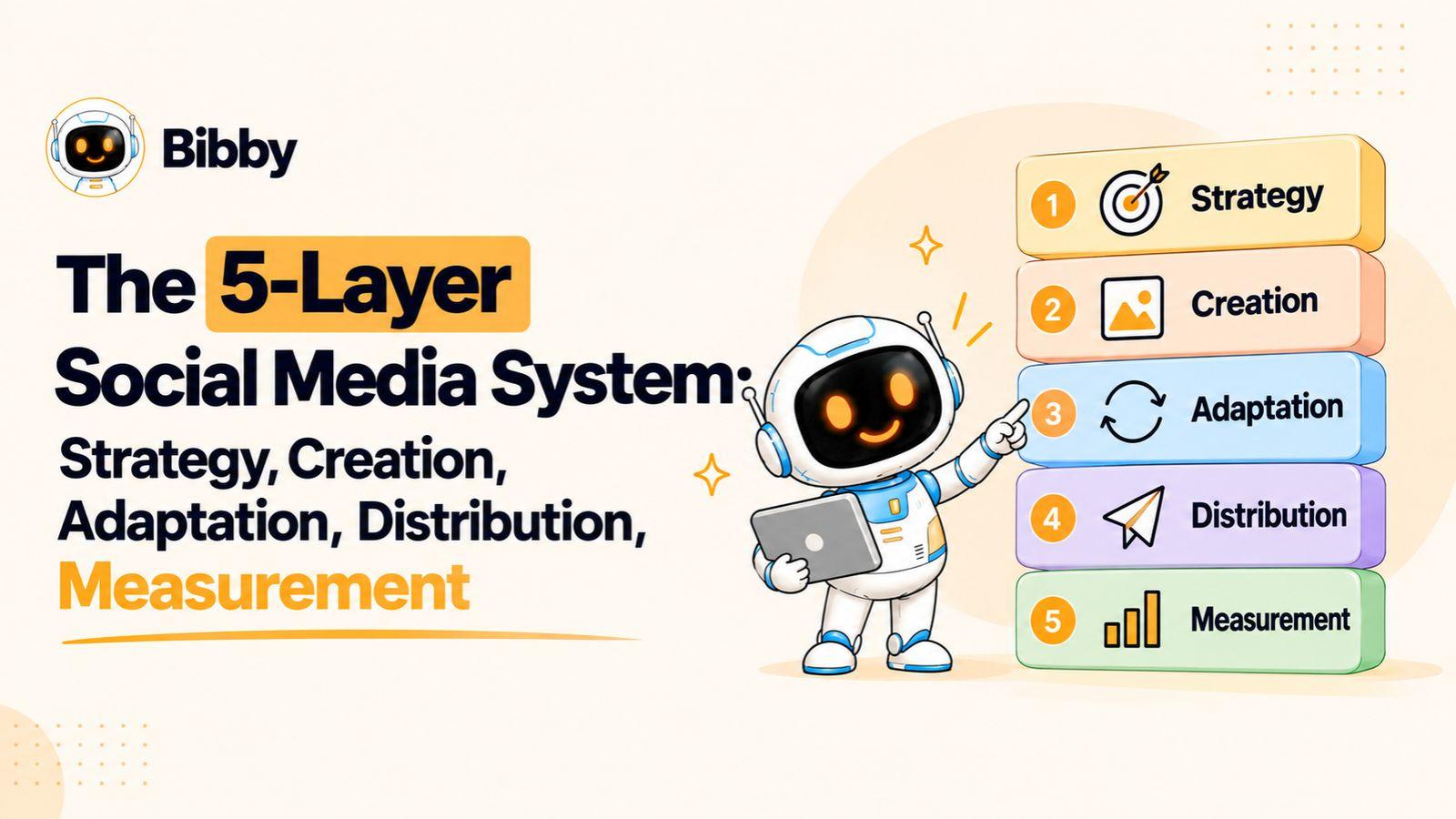
A social media content inventory gives marketing teams a structured view of every piece of content they create, publish, schedule, reuse, and measure across their social channels.
Without one, teams can easily lose track of existing assets, repeat topics unnecessarily, miss repurposing opportunities, or struggle to understand how individual posts fit into larger campaigns. A well-designed inventory turns scattered social media activity into an organized system that makes planning, production, publishing, and optimization easier.
Let’s start by defining exactly what a social media content inventory is—and how it differs from a content calendar.
What Is a Social Media Content Inventory?
A social media content inventory is a centralized record of the content your marketing team has created, is creating, has scheduled, or has already published across social media platforms.
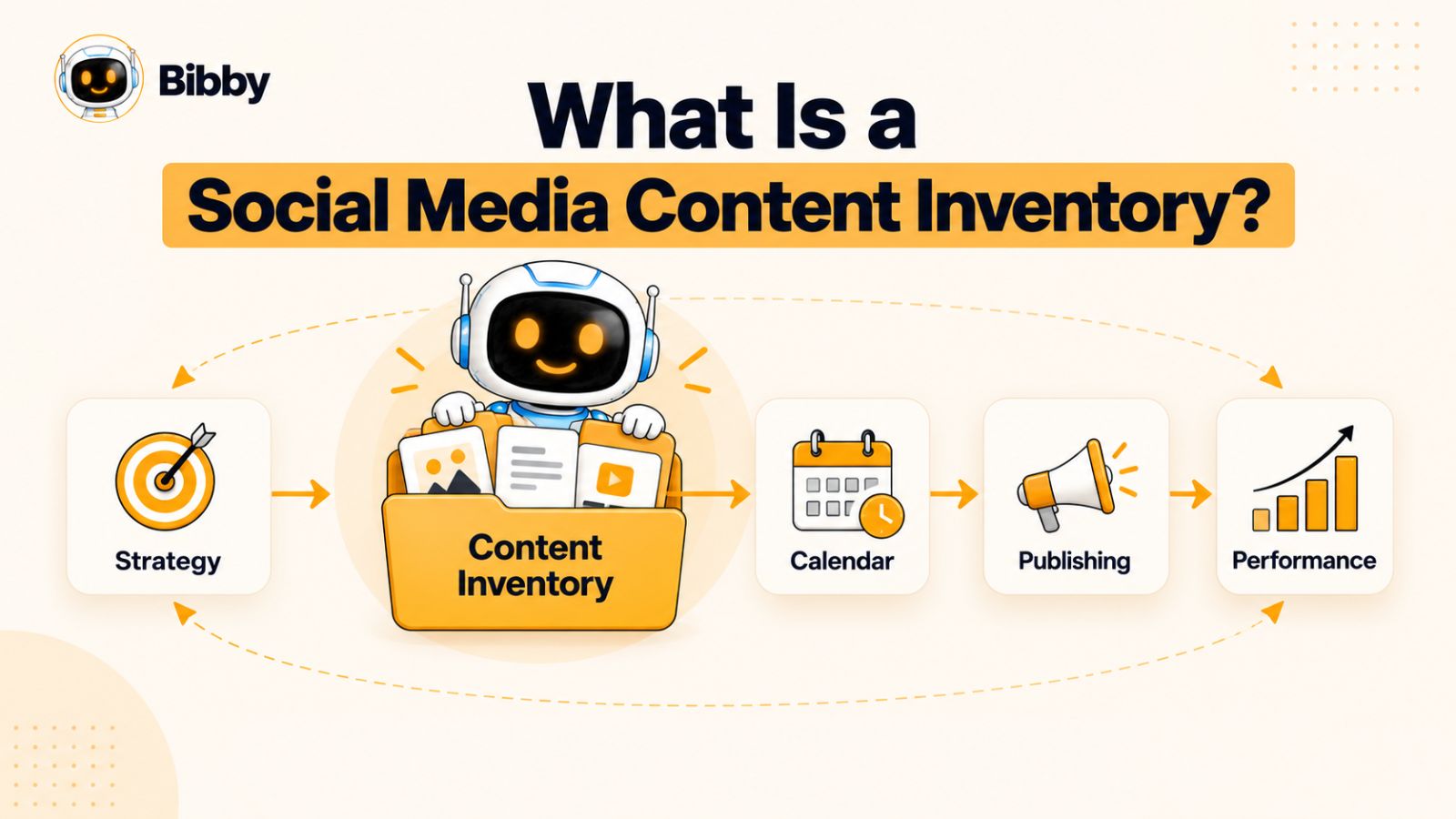
Think of it as a complete map of your social media content—not just a list of upcoming posts. It can show what an asset is about, which platform it belongs to, which campaign it supports, who owns it, when it was published, whether it can be reused, and how it performed.
This distinction matters because social media teams often have content scattered across spreadsheets, cloud folders, scheduling tools, design platforms, campaign documents, and individual team members' computers. Without an inventory, it becomes difficult to answer basic questions such as:
- Have we already created content about this topic?
- Which assets from our last campaign can we reuse?
- What content is scheduled for next week?
- Which posts belong to a particular campaign?
- Which content formats are we using too often?
- Which high-performing posts could be repurposed?
- Who is responsible for this piece of content?
- What content do we already have that hasn't been published?
A good inventory makes those answers visible.
Social Media Content Inventory vs. Social Media Content Calendar
A content inventory and a content calendar are closely related, but they solve different problems.
A Social Media Content Calendar primarily answers:
What are we publishing, where, and when?
A social media content inventory answers:
What content do we have, what is its status, where has it been used, and what can we do with it next?
For example, a calendar might show that your team is publishing an Instagram carousel about customer retention on Thursday.
The inventory can tell you much more: that the carousel is part of a customer-retention campaign, originated from a webinar, has a corresponding LinkedIn post and short-form video, is owned by a particular team member, has already been adapted for three platforms, and generated above-average engagement when a similar version was previously published.
In other words, the calendar is primarily about scheduling; the inventory is about visibility and control.
Social Media Content Inventory vs. Content Library
A content library is where your actual files live. It might contain images, videos, design files, thumbnails, templates, brand assets, and other creative materials.
The inventory provides the information about those assets.
For example:
Content library:
customer-retention-carousel-final.png
Content inventory:
Customer retention | Educational | LinkedIn + Instagram | Carousel | Q4 Campaign | Published | Repurpose: Yes | Performance: Above average
The two systems work best together. The library stores the files; the inventory provides the context needed to find, manage, reuse, and evaluate them.
Social Media Content Inventory vs. Content Strategy
A content strategy is the highest-level layer. It defines what the brand wants to communicate, who it wants to reach, what business objectives it supports, and what role social media plays in the broader marketing strategy.
The inventory sits much closer to execution.
A simple way to visualize the relationship is:
Strategy → Content → Inventory → Calendar → Publishing → Performance
The strategy determines what you should create. The inventory keeps track of what you actually have. The calendar determines when it should go out. Performance data then helps determine what you should create next.
What Belongs in a Social Media Content Inventory?
There is no single universal inventory structure, but a useful one can include:
- Published social media posts
- Scheduled posts
- Drafts and works in progress
- Evergreen content
- Campaign content
- Repurposed content
- Images and graphics
- Carousels
- Videos and short-form clips
- Stories
- User-generated content
- Educational posts
- Promotional posts
- Thought-leadership content
- Community-focused content
The goal isn't to record every possible detail just because you can. The goal is to capture the information your team needs to find, understand, manage, reuse, and improve its social media content.
That's why the next step is identifying the specific fields that belong in the inventory.
The Fields Every Social Media Content Inventory Should Track
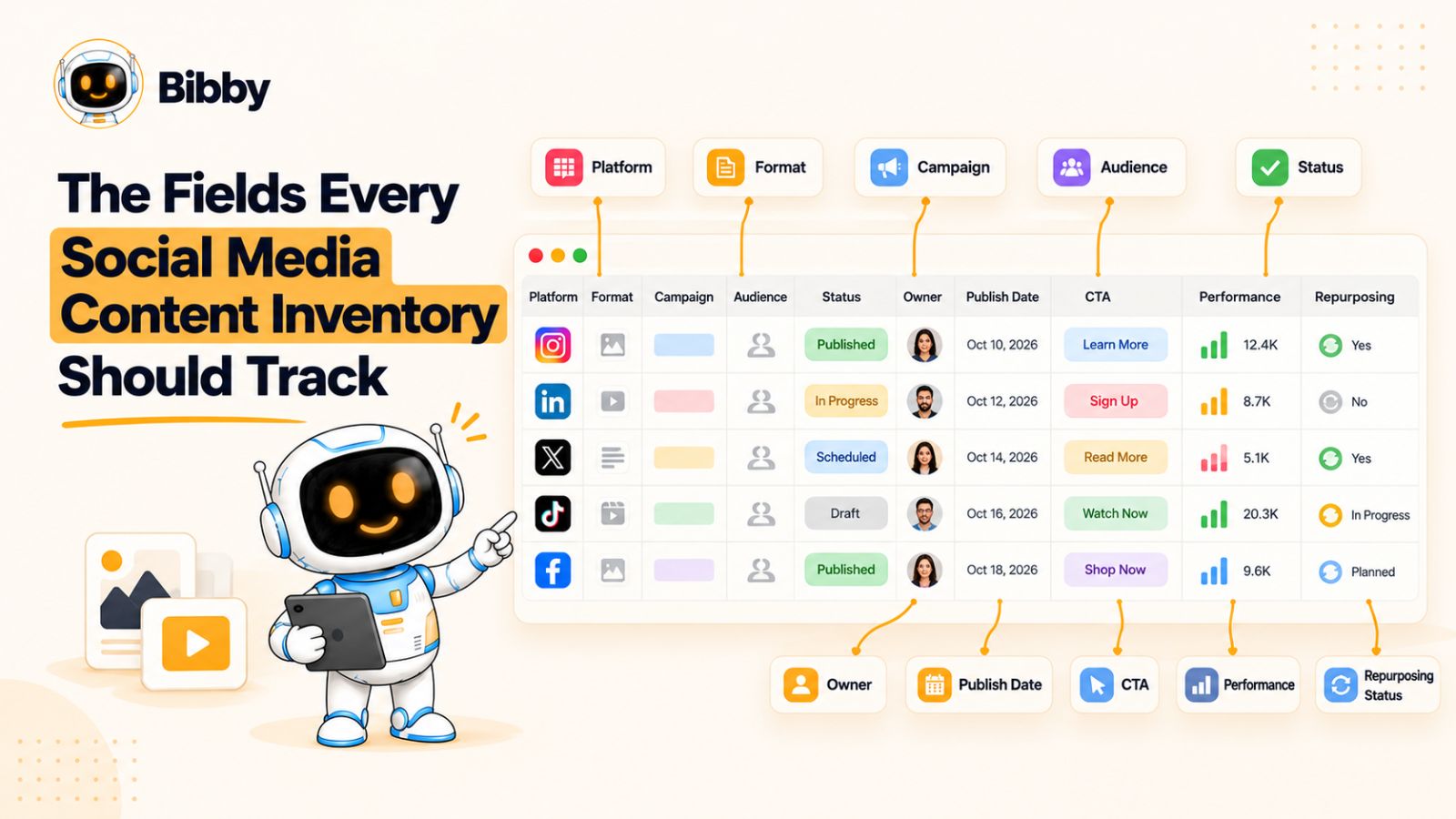
A social media content inventory is only as useful as the information it contains. If it records nothing more than a post title and publishing date, it may function as a basic list, but it won't give a marketing team enough context to manage content strategically.
The right fields should help your team answer four questions:
What is this content? Where is it going? Why are we publishing it? What should we do with it next?
You don't necessarily need every field below from day one. Smaller teams can start with the essentials and add more advanced fields as their content operation grows.
1. Content ID
Give every piece of content a unique identifier.
This could be as simple as SM-001, SM-002, and SM-003, or a more descriptive naming system such as LI-Q4-RET-024.
A consistent ID makes it easier to reference content across your inventory, creative files, campaign documents, approval workflows, and reporting.
2. Content Title or Working Name
Give the content a short, recognizable name.
Instead of:
IMG-final-v7.png
use something like:
5 Ways to Improve Customer Retention
A useful title lets someone understand the content without opening the creative file or reading the caption.
3. Content Type
Record what kind of social media content you're dealing with.
Common categories include:
- Image
- Carousel
- Video
- Short-form video
- Story
- Text post
- Link post
- Livestream
- User-generated content
Keeping this field standardized makes it much easier to identify whether your content mix is balanced.
4. Platform
Record where the content is intended to appear.
For example:
- YouTube
- TikTok
- X
Don't assume that one asset automatically represents one identical post across every platform. The same underlying idea may require different creative, captions, dimensions, hooks, or calls to action depending on where it is published.
5. Content Pillar
A content pillar describes the recurring subject or theme the content supports.
Typical pillars might include:
- Education
- Product
- Industry insights
- Customer stories
- Thought leadership
- Behind the scenes
- Community
- Entertainment
This field helps teams see whether they are maintaining a healthy mix of topics or repeatedly talking about the same thing.
6. Campaign
Connect each relevant piece of content to a campaign.
For example:
Campaign: Q4 Customer Retention
Then several different posts can be connected to that campaign across Instagram, LinkedIn, YouTube, and other channels.
This gives campaign managers a much clearer view of all supporting content without forcing them to search through individual platform accounts.
7. Topic
The topic should describe what the specific piece of content is about.
For example:
Content pillar: Education
Topic: Customer retention strategies
Keeping the pillar and topic separate is useful because one broad pillar can contain dozens of specific subjects.
8. Target Audience
Record who the content is intended for.
Depending on the business, this might be:
- Marketing managers
- Founders
- Enterprise buyers
- Existing customers
- Prospective customers
- Developers
- Job candidates
This becomes especially valuable when several audience segments are being served by the same social channels.
9. Funnel Stage
Identify where the content fits within the customer journey.
A simple framework is:
Awareness → Consideration → Conversion → Retention
Not every social media post needs to drive a sale. Some content exists to build awareness, establish expertise, nurture an audience, or strengthen relationships with existing customers.
Tracking this field helps reveal when a social media strategy is heavily weighted toward one stage of the funnel.
10. Caption or Copy
Store the caption, script, post text, or a link to where the copy lives.
This makes the inventory searchable and provides a record of what was actually published.
For teams using AI-assisted workflows, this field can also help distinguish between an initial generated caption, an edited version, and the final approved copy.
11. Creative Asset
Record the location of the underlying image, video, carousel, thumbnail, or other creative.
The inventory doesn't necessarily need to store the file itself. A link to the relevant asset can be enough.
The important thing is that someone looking at the inventory can quickly answer:
Where is the creative for this post?
12. Status
Status is one of the most important operational fields.
A simple workflow might be:
Idea → Draft → Review → Approved → Scheduled → Published → Repurpose
Use a standardized set of statuses rather than allowing everyone to invent their own.
For example, “Almost ready,” “Done,” “Waiting,” and “Good to go” may seem harmless, but they become ambiguous when multiple people are managing hundreds of pieces of content.
13. Owner
Every active piece of content should have an owner.
The owner might be responsible for:
- Writing
- Design
- Video production
- Approval
- Publishing
- Or coordinating the entire workflow
Ownership prevents content from becoming stuck between departments.
14. Publish Date and Time
Record when the content is scheduled or was actually published.
For mature teams, it can be useful to distinguish between:
- Planned publish date
- Actual publish date
That makes it possible to identify scheduling delays and understand whether performance is affected by changes to the publishing plan.
15. Call to Action
Record the action you want the audience to take.
Examples include:
- Comment
- Share
- Save
- Visit a website
- Download a resource
- Sign up
- Book a demo
- Make a purchase
- Watch a video
A CTA field helps connect individual posts to their intended business outcome.
16. Performance Metrics
Once a piece of content has been published, add the relevant performance information.
Depending on the platform and objective, this could include:
- Reach
- Impressions
- Engagement
- Engagement rate
- Video views
- Watch time
- Clicks
- Saves
- Shares
- Leads
- Conversions
You don't need to fill the inventory with every available metric. Track the measurements that actually help you evaluate the content's objective.
17. Repurposing Status
This is an increasingly valuable field for teams trying to get more mileage from their content.
You might use statuses such as:
- Not repurposed
- Repurposed
- Scheduled for repurposing
- Needs adaptation
- Evergreen candidate
You can also link derivative content back to its original source.
For example:
Original: 20-minute webinar
↓
Derivative: YouTube video
↓
Derivative: LinkedIn carousel
↓
Derivative: Instagram Reel
↓
Derivative: TikTok clip
This creates a content lineage that shows how one idea has been transformed into multiple pieces of social media content.
18. Source or Parent Content
For repurposing-heavy teams, it can be useful to track the original source of an asset separately.
For example:
Parent content: Annual marketing report
The resulting LinkedIn carousel, Instagram Reel, and YouTube Short can all point back to that source.
This prevents repurposed content from becoming disconnected from the original idea and makes future reuse much easier.
19. Evergreen or Time-Sensitive
Not every piece of content has the same shelf life.
Mark content as:
- Evergreen
- Seasonal
- Campaign-specific
- Time-sensitive
- Event-specific
An evergreen post might remain useful for months or years, while a post about a product launch or live event may become irrelevant shortly after publication.
This distinction becomes particularly valuable when your team is searching the inventory for content to reuse.
The goal isn't to track everything
The temptation with a social media content inventory is to add more and more columns until the system becomes impossible to maintain.
Don't.
The best inventory is not the one with the most fields. It's the one that gives your team enough context to make better decisions without creating unnecessary administrative work.
A small team might only need:
Content ID + Topic + Platform + Format + Status + Owner + Publish Date + Asset + Performance
A larger marketing organization may need campaign, audience, funnel stage, repurposing relationships, approval history, and additional performance data.
Start with the information your team repeatedly needs to find or make decisions about. Then expand the inventory only when a new field solves a real operational problem.
How to Build a Social Media Content Inventory From Scratch
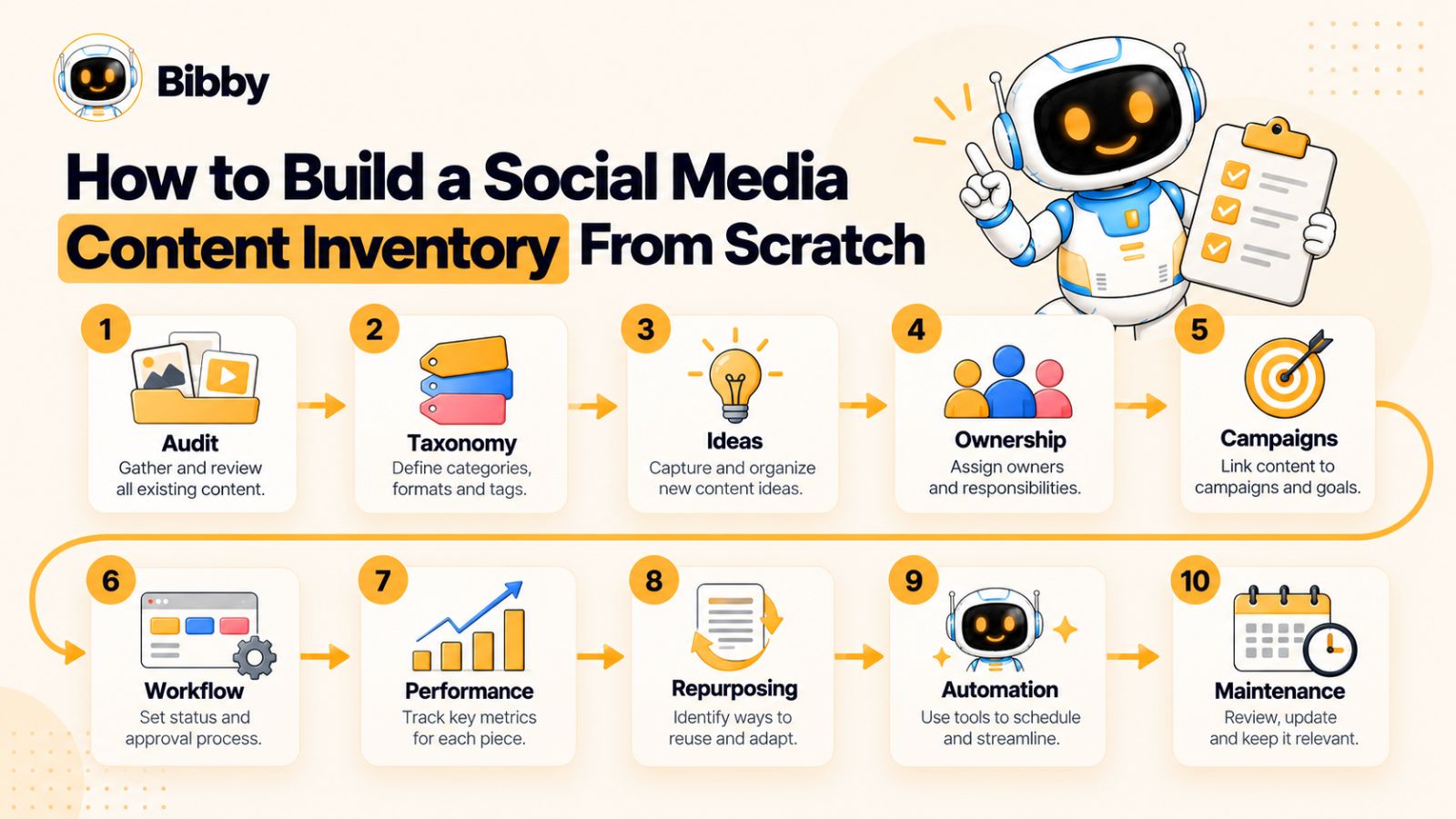
Knowing what to track is only half the problem. The bigger challenge is creating an inventory that your marketing team will actually maintain.
The best approach is to start with the content you already have, establish a consistent structure, and then connect the inventory to the team's existing creation and publishing workflow.
Step 1: Define What the Inventory Is For
Before creating columns or importing old posts, decide what you want the inventory to accomplish.
A team focused primarily on publishing might need visibility into:
- Upcoming posts
- Publishing status
- Platforms
- Owners
- Creative assets
- Captions
A larger team may also want the inventory to support:
- Campaign management
- Content repurposing
- Performance analysis
- Content audits
- Audience segmentation
- Funnel planning
- Evergreen content management
This decision matters because an inventory designed only for scheduling will look very different from one designed to manage an entire social media operation.
Step 2: Audit Your Existing Content
Don't build the inventory around future content alone.
Start by collecting what already exists.
Look across your:
- Social media accounts
- Scheduling tools
- Cloud storage
- Design platforms
- Video libraries
- Campaign folders
- Content calendars
- Shared documents
- Brand asset libraries
You will probably discover that your team has considerably more content than it realizes.
Some assets may already be published. Others may be sitting unused in folders. Some may have been created for campaigns that are now finished but could be adapted for future use.
The first audit is therefore not just an administrative exercise. It can reveal existing content opportunities before the team creates anything new.
Step 3: Create a Consistent Taxonomy
Your inventory becomes much more useful when everyone uses the same terminology.
For example, decide whether your team will call a format:
- “Carousel”
- “Multi-image”
- “Swipe post”
- “Document post”
Pick one term and use it consistently.
Do the same for:
- Content pillars
- Platforms
- Campaigns
- Funnel stages
- Statuses
- Content types
- Audience segments
Without a shared taxonomy, filtering and reporting eventually become unreliable.
For example, if one person labels content as Educational and another uses Education, a simple filter may incorrectly make it appear that your team has fewer educational posts than it actually does.
Step 4: Separate Ideas From Finished Content
Not every row in your inventory needs to represent a finished post.
It can be useful to distinguish between:
Ideas → Drafts → Approved content → Scheduled content → Published content
This gives the team visibility into the entire content pipeline.
It also helps prevent a common problem: treating a large collection of ideas as if it were a large collection of usable content.
An idea for a Reel is not the same thing as a finished Reel with an approved script, completed creative, caption, and publishing date.
Step 5: Assign Ownership
Every active piece of content should have a clear owner.
That doesn't necessarily mean one person does all the work. A post might involve a strategist, writer, designer, editor, legal reviewer, and social media manager.
But there should still be someone responsible for moving it through the workflow.
For example:
Owner: Social Media Manager
Design: Creative Team
Approval: Marketing Director
Clear ownership reduces the chance that content sits untouched because everyone assumes someone else is handling it.
Step 6: Connect Content to Campaigns
If your team runs campaigns, don't let campaign content live in isolation.
Add a campaign field and connect each relevant asset to it.
For example:
Campaign: New Product Launch
Could contain:
- Announcement post
- Product carousel
- Founder video
- Customer testimonial
- FAQ Reel
- Product demonstration
- Launch-day Story
- Follow-up post
Now the inventory can answer a much more useful question than “What are we posting?”
It can show:
How much content are we actually using to support this campaign?
Step 7: Add the Publishing Workflow
Your inventory should reflect the actual journey content takes through your organization.
A simple workflow might look like:
Idea → Brief → Creation → Review → Approval → Scheduling → Published → Analyzed → Repurposed
You don't need a separate status for every tiny action. The objective is to make the important bottlenecks visible.
If 30 posts are sitting in Review, for example, the problem isn't a lack of content. The problem is the approval process.
That is exactly the kind of operational insight an inventory can provide.
Step 8: Add Performance Data After Publishing
Once content goes live, don't let its record become frozen.
Add performance information back into the inventory.
This creates a useful feedback loop:
Create → Publish → Measure → Learn → Create better content
Over time, your inventory becomes more than a database of historical posts. It becomes a record of what your audience responds to.
For example, you might discover that:
- Educational carousels consistently generate saves.
- Short videos generate reach but few clicks.
- Customer stories produce unusually high comments.
- Product-focused posts perform better when paired with a specific use case.
Those insights can then influence future content decisions.
Step 9: Identify Content That Can Be Reused
During the audit, mark content that has additional potential.
Look for:
- High-performing posts
- Evergreen topics
- Strong customer questions
- Useful statistics
- Original research
- Webinars
- Tutorials
- Product demonstrations
- Expert interviews
A high-performing LinkedIn post might become an Instagram carousel. A webinar could produce several short videos. A long-form educational video could become multiple short-form clips.
Your inventory should make these relationships visible rather than forcing the team to rediscover them months later.
Step 10: Decide How the Inventory Will Stay Current
This is the step many teams overlook.
An inventory that was perfectly organized six months ago is worthless if nobody updates it.
Define simple rules.
For example:
When content is created: Add it to the inventory.
When content is approved: Update the status.
When content is scheduled: Add the scheduled date and platform.
When content is published: Record the actual publication.
After the reporting period: Add relevant performance data.
During monthly reviews: Identify repurposing and content-gap opportunities.
The process should be simple enough that maintaining the inventory becomes part of the normal workflow rather than a separate administrative project.
Automate the Repetitive Parts
As your publishing volume increases, manually maintaining every part of the inventory can become inefficient.
This is where modern social media management and automation tools can reduce administrative work.
For example, an AI-assisted platform such as Bibby can take a creative asset, help generate captions based on a selected posting style, and schedule content across selected social platforms at optimized times. Its workflow can also support formats such as images, carousels, videos, and Stories.
The useful lesson isn't that every team needs a particular tool. It's that content creation and content inventory management increasingly need to work together.
When automation handles repetitive execution, the inventory can remain focused on the information humans need to make decisions: what exists, where it is going, why it matters, who owns it, and what happened after publication.
Start Small, Then Expand
You don't need to import five years of social media history before your inventory becomes useful.
Start with:
- Your current active content
- Your upcoming campaigns
- Your most important evergreen assets
- Your recent high-performing content
Then expand the system as your team learns what information it actually needs.
A simple inventory that stays accurate will always outperform an elaborate inventory that nobody updates.
Social Media Content Inventory by Platform
A social media content inventory should give you a unified view of your content without pretending that every platform works the same way.
A single campaign might span Instagram, Facebook, LinkedIn, YouTube, and TikTok, but the content created for each channel can have different formats, audiences, captions, creative requirements, and performance goals.
That means platform should be a core inventory field—but it shouldn't be the only platform-related information you track.
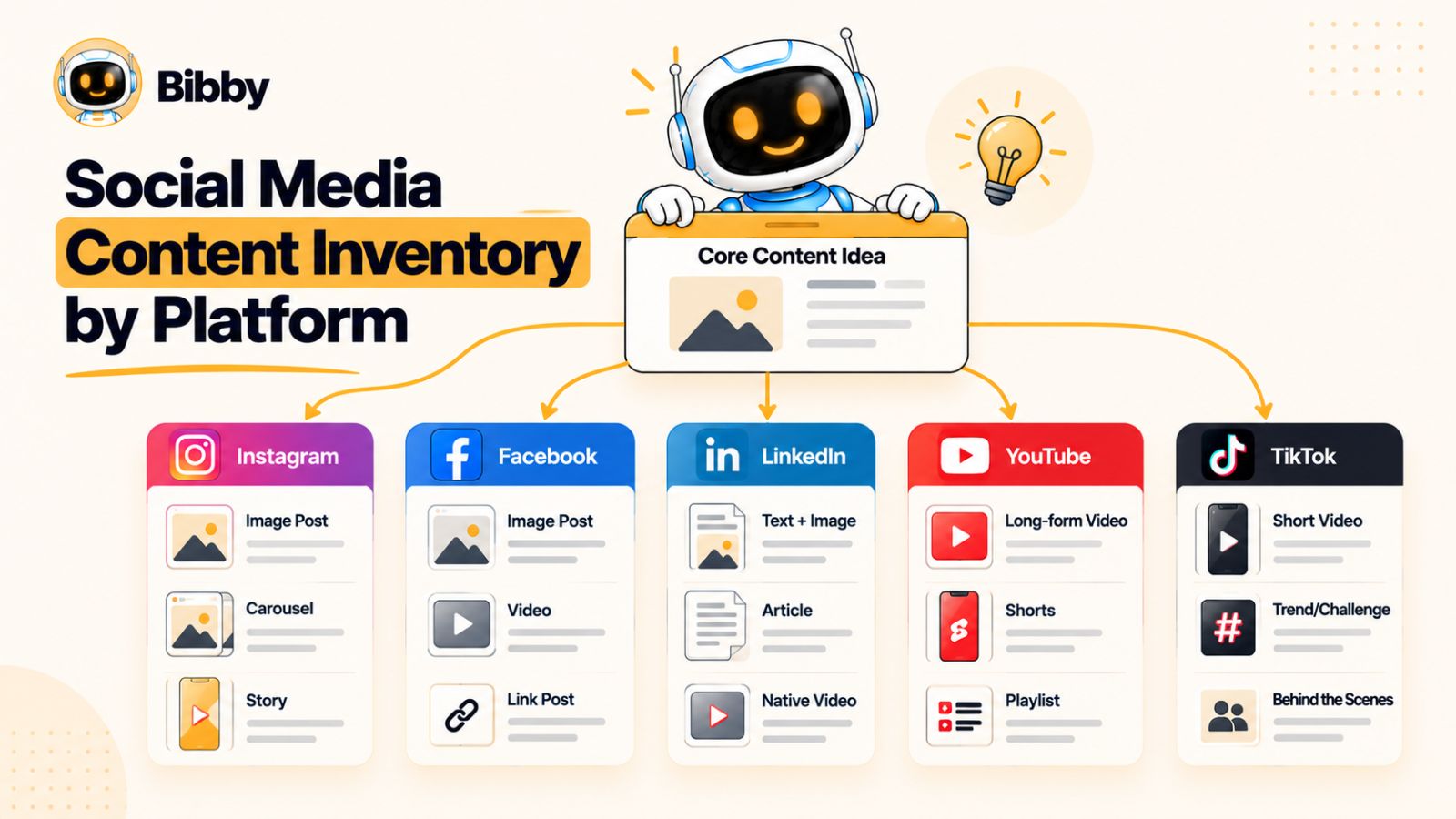
Instagram often requires a more detailed breakdown of content formats because a brand can publish through several distinct surfaces.
Your inventory may need to distinguish between:
- Feed posts
- Carousels
- Reels
- Stories
- Collaborative posts
- Live content
For each piece, consider tracking the creative format, caption, CTA, campaign, and whether the content is evergreen or time-sensitive.
A carousel about a marketing framework, for example, might later be converted into a Reel or Story sequence. Recording those relationships in the inventory makes repurposing much easier.
Facebook can support a broad mix of content, including:
- Images
- Videos
- Links
- Text-based posts
- Reels
- Stories
- Community-oriented content
Because Facebook content can overlap with content published elsewhere, your inventory should distinguish between cross-posted content and content specifically adapted for Facebook.
That distinction can help you understand whether your team is actually creating content for the platform or simply distributing content created somewhere else.
LinkedIn content often revolves around professional education, industry expertise, company communication, and thought leadership.
Your inventory might include:
- Text posts
- Document or carousel-style posts
- Images
- Videos
- Articles or related long-form content
- Company announcements
- Employee or executive thought leadership
For LinkedIn, it can also be useful to record the voice or author when multiple people contribute to the company's presence.
For example, a company page post and a founder's personal post might discuss the same topic but serve completely different purposes.
YouTube
YouTube deserves special treatment because the content lifecycle can be significantly longer than that of a typical social post.
Your inventory may include:
- Long-form videos
- Shorts
- Livestreams
- Tutorials
- Interviews
- Product demonstrations
- Educational series
Useful additional fields can include:
- Video title
- Thumbnail
- Video length
- Playlist
- Topic
- Source material
- Short-form derivatives
A single long-form YouTube video can become a source for numerous social assets, so recording the parent-child relationship between the original video and its derivatives can create significant repurposing opportunities.
TikTok
TikTok content is primarily short-form video, but the creative considerations can be very different from those of other platforms.
Your inventory might track:
- Video concept
- Hook
- Format
- Trend or sound
- Caption
- CTA
- Source footage
- Repurposing status
The hook can be particularly useful to track because the opening seconds of a short-form video can have a major influence on whether viewers continue watching.
If a particular hook repeatedly performs well, your inventory becomes a useful source of creative intelligence for future videos.
Don't Treat Cross-Platform Content as Identical
One of the most important rules for a social media content inventory is:
One idea does not have to mean one identical post.
Suppose your marketing team creates a report about customer acquisition.
The underlying idea could become:
LinkedIn: A data-driven carousel with several key findings.
Instagram: A visual carousel highlighting the most surprising statistics.
YouTube: A detailed video explaining the findings.
TikTok: A short video built around the most unexpected statistic.
Facebook: A discussion-oriented post linking back to the report.
The topic is the same, but the content isn't.
Your inventory should therefore allow multiple platform-specific records to connect to the same parent topic, campaign, or source asset.
Track Original Content vs. Adapted Content
Adding an Adaptation Type field can make this relationship even clearer.
For example:
- Original
- Cross-post
- Platform adaptation
- Repurposed
- Cut-down
- Updated
- Translated
This helps answer an important strategic question:
How much of our social media output is genuinely new, and how much is being intelligently reused?
There is nothing inherently wrong with repurposing content. In fact, effective repurposing can help teams get considerably more value from their best ideas.
The problem is losing track of what has already been published.
Track Platform-Specific Performance
Performance should also be interpreted in the context of the platform.
A video receiving 50,000 views on TikTok and a LinkedIn post receiving 5,000 impressions aren't necessarily comparable achievements.
Different platforms have different audiences, distribution systems, formats, and user behaviors.
Instead of asking:
Which platform gets the most engagement?
your inventory should help you ask:
Which types of content produce the desired outcome on each platform?
That distinction leads to better decisions.
For example, your team might discover that:
- LinkedIn carousels generate saves and qualified conversations.
- Instagram Reels generate reach.
- TikTok videos generate discovery.
- YouTube tutorials generate sustained watch time.
- Facebook posts generate community discussion.
The inventory gives you the structure needed to see those patterns.
Build Around Content Relationships, Not Just Platforms
The strongest social media inventories don't treat platforms as isolated silos.
They show relationships between:
Campaign → Topic → Original Asset → Platform Adaptations → Published Content → Performance
That structure gives your marketing team a much more complete picture of its content operation.
Instead of asking only “What are we posting on Instagram this week?”, you can start asking more valuable questions:
“Which ideas are we distributing across our channels?”
“Which content formats work best for each audience?”
“Which existing assets can we adapt next?”
“Which campaigns are missing supporting content?”
Those are the questions that turn a social media content inventory from a record-keeping tool into a strategic resource.
How to Track Content Repurposing
Creating more social media content doesn't always mean creating more ideas.
In many cases, the marketing team already has valuable material sitting inside webinars, customer interviews, blog posts, podcasts, reports, product demonstrations, presentations, and previously published social posts. The challenge is finding those ideas and turning them into formats that work across different channels.
This is where a social media content inventory can become especially valuable.
Instead of treating every post as an isolated piece of work, you can use the inventory to track the relationship between an original idea and all of the content created from it.
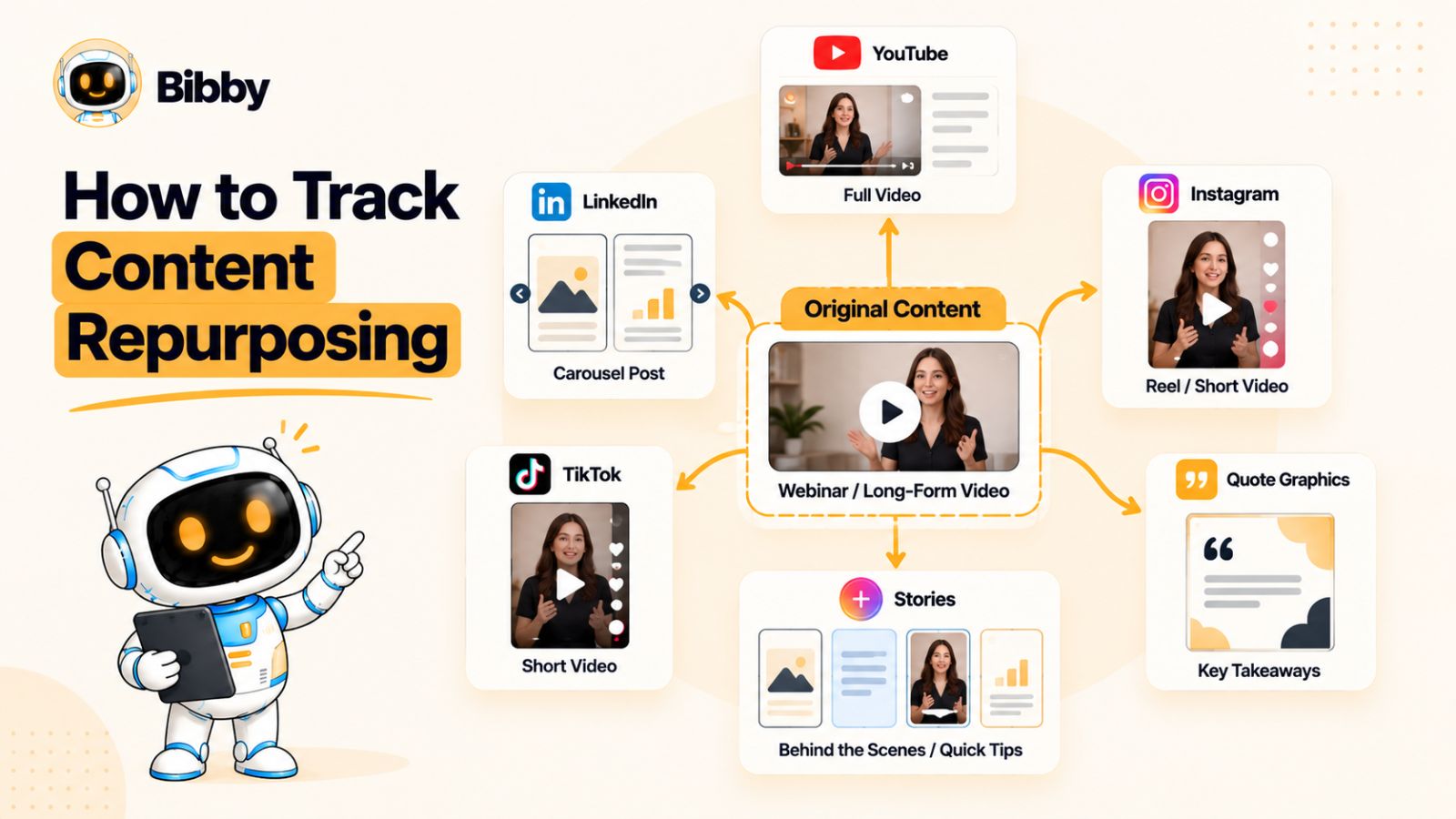
Think in Terms of Content Atoms
A useful way to approach repurposing is to think of a large piece of content as a collection of smaller ideas.
For example, imagine your company publishes a 45-minute webinar about improving customer retention.
The webinar could become:
- A YouTube video
- Three YouTube Shorts
- An Instagram Reel
- A TikTok video
- A LinkedIn carousel
- Several LinkedIn text posts
- Instagram Stories
- A quote graphic
- A blog article
- An email newsletter
- A customer-retention checklist
The team didn't need to invent eleven unrelated topics.
It started with one valuable source and adapted its ideas for different audiences and formats.
Your inventory should make that relationship visible.
Create a Parent-Child Relationship
One of the simplest ways to do this is to add a field such as Parent Content or Source Asset.
For example:
Parent content:
Customer Retention Webinar
Child content:
- LinkedIn carousel — 5 retention lessons
- Instagram Reel — The biggest retention mistake
- TikTok — One retention metric marketers overlook
- YouTube Short — Customer retention in 60 seconds
- LinkedIn post — Lessons from 50 customer interviews
Now, if the team wants to revisit the webinar six months later, it can immediately see which ideas have already been extracted and which haven't.
Track the Repurposing Status
A simple field can prevent valuable content from disappearing into your archive.
Consider statuses such as:
- Not reviewed
- Repurposing candidate
- In production
- Repurposed
- Published
- Needs refresh
- No longer relevant
You can also add a field for Repurposing Potential:
High / Medium / Low
A piece of original research might have high repurposing potential because it contains multiple statistics, insights, and conclusions.
A time-sensitive announcement might have almost none.
Identify Your Best Repurposing Candidates
Not everything deserves to be repurposed.
Your inventory can help you prioritize.
Look for content that has:
Strong performance
If an existing post significantly outperformed your typical content, investigate whether the underlying idea can be presented in another format.
Evergreen value
A tutorial or educational explanation can often remain useful long after its original publication.
Multiple insights
A long-form asset containing ten useful ideas can potentially produce ten smaller pieces of content.
Original information
Research, proprietary data, expert interviews, and customer insights can often support many derivatives.
Audience relevance
Even older content can be worth revisiting if the underlying problem remains important to your audience.
Don't Just Copy and Paste
Repurposing works best when you adapt the idea, not simply the original post.
A 1,500-word article shouldn't automatically become a 1,500-word LinkedIn post.
Instead, identify the strongest insight and rebuild it around the behavior of the target platform.
For example:
Original:
A detailed article explaining ten ways to improve social media reporting.
LinkedIn:
A concise post built around the three reporting mistakes marketers make most often.
Instagram:
A carousel explaining those three mistakes visually.
TikTok:
A short video opening with the most surprising mistake.
YouTube:
A deeper explanation of the complete reporting framework.
The underlying knowledge stays consistent while the presentation changes.
Track What Has Already Been Used
One of the biggest advantages of connecting content relationships inside your inventory is avoiding accidental repetition.
Suppose a statistic appears in:
- A LinkedIn carousel
- An Instagram Reel
- A Facebook post
- A newsletter
Six months later, someone discovers the same statistic in the content library.
Without an inventory, they may assume it has never been used.
With an inventory, they can see its publishing history immediately.
This doesn't mean you should never reuse an idea. In social media, repetition can be useful. It means you can reuse intentionally rather than accidentally.
Use Performance to Guide Repurposing
Repurposing should not be based solely on whether an asset exists.
Performance can help determine what deserves another life.
For example:
High reach + low conversion:
Consider adapting the idea with a stronger CTA.
Low reach + high engagement:
Try a stronger hook or a different distribution format.
High saves:
Turn the information into another educational format.
High comments:
Develop the topic into a discussion or follow-up post.
High watch time:
Extract additional clips or expand the topic into related videos.
The inventory can therefore connect three stages:
What you created → How you distributed it → What happened
That is far more useful than simply maintaining an archive.
AI Makes Repurposing Faster, But Doesn't Replace Judgment
AI-assisted social media tools can reduce some of the manual work involved in turning an existing idea into multiple social assets.
For example, a workflow might start with an image, video, or other creative asset, generate caption variations, adapt the content for selected platforms, and schedule the resulting posts.
Tools such as Bibby are built around this kind of workflow, combining AI-assisted caption creation and scheduling with support for different social formats. A team can also use its conversational interface for tasks such as creating campaigns, generating posts, or regenerating captions.
The important distinction is that automation can accelerate the transformation and distribution of content, but the marketing team still needs to decide whether the underlying idea is worth repurposing and how it should be adapted for each audience.
Your inventory provides the context for those decisions.
Build a Repurposing Loop
A mature content operation can turn repurposing into a repeatable process:
Create → Publish → Measure → Identify winners → Repurpose → Adapt → Publish → Measure again
The social media content inventory sits in the middle of that loop.
It tells the team what already exists, connects related pieces of content, records what has been published, and provides performance information that can influence the next round of content.
That is how an inventory stops being a passive archive and starts becoming a system for getting more value from the content your team has already created.
How AI and Automation Change the Social Media Content Inventory
Social media workflows are becoming increasingly automated.
Tasks that once required several separate steps—writing captions, adapting content, preparing different formats, scheduling posts, and coordinating publishing—can now be handled partially or entirely through AI-assisted tools.
That changes the role of a social media content inventory.
When content is created and distributed manually, the inventory primarily needs to tell the team what exists and where it is going. When AI and automation become part of the workflow, the inventory also needs to provide visibility into how content was generated, adapted, approved, and distributed.
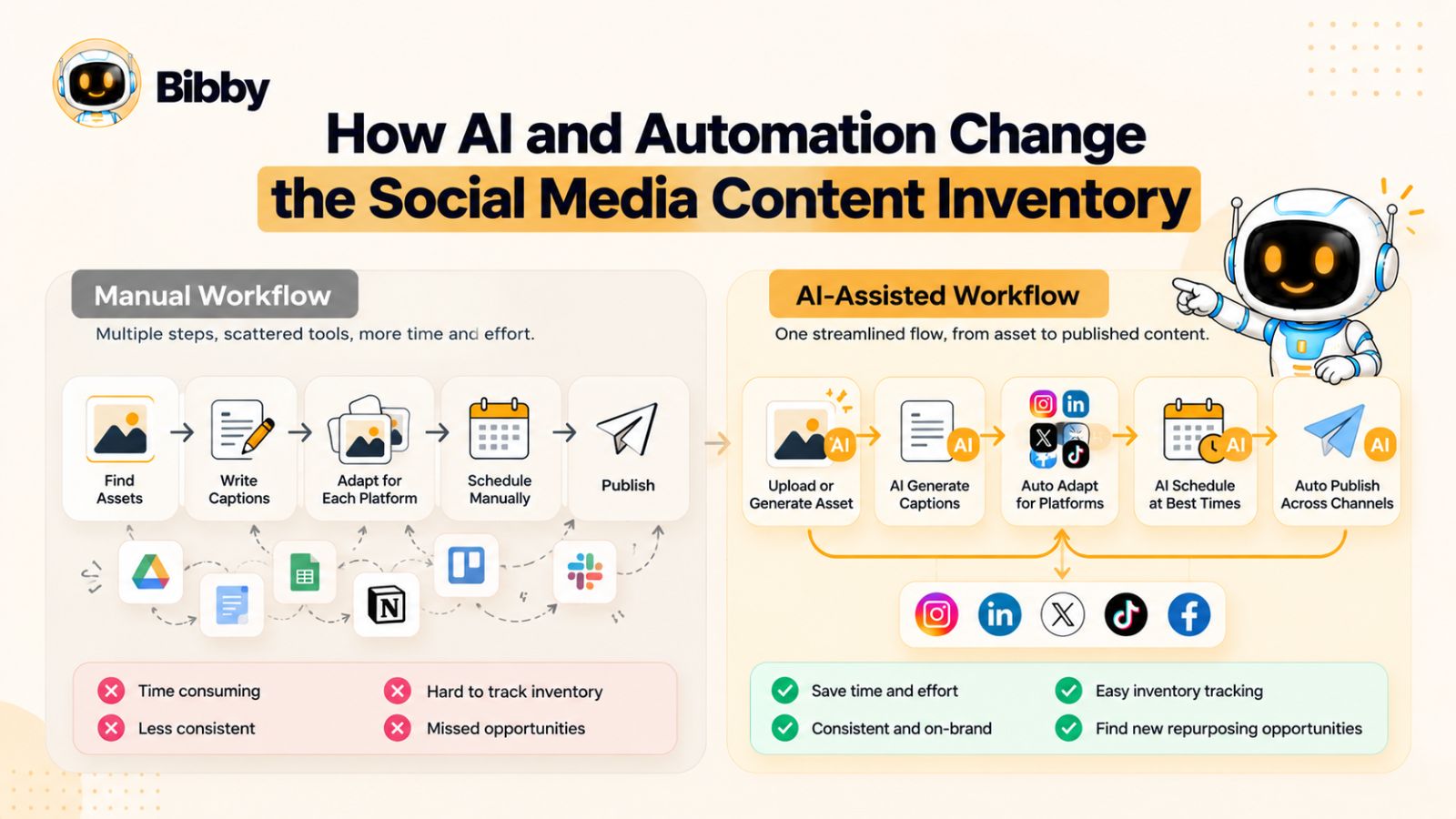
The Social Media Workflow Is Becoming More Connected
A traditional workflow might look like this:
Create creative → Write caption → Adapt for platforms → Schedule → Publish → Measure
Each step may happen in a different tool.
A more automated workflow can bring several of those steps together:
Upload or generate creative → Choose content style → Generate copy → Adapt → Schedule → Publish → Measure
The difference is important because more automation means more content can move through the system faster.
That creates an operational question:
Can your team still see what is being created and published?
A content inventory helps provide that visibility.
What Should You Track When AI Is Involved?
You don't need to document every AI interaction, but several additional fields can be useful.
Creation method
Record whether the content was:
- Human-created
- AI-assisted
- AI-generated
- Repurposed
- Adapted from existing content
This can help teams understand how their content production mix is changing.
Source asset
If AI-generated copy or creative is based on an existing asset, record the source.
For example:
Source: Product demo video
Output: LinkedIn post + Instagram carousel + TikTok clip
This keeps the relationship between the original material and the resulting content visible.
Approval status
Automation can increase the speed of content production, but it doesn't necessarily remove the need for human review.
Track whether content is:
Generated → Reviewed → Edited → Approved → Scheduled
This is particularly important for brands operating in regulated, technical, or reputation-sensitive industries.
Platform distribution
Record which platforms the automated workflow is targeting.
A single workflow may produce content for several networks, but that doesn't mean every version should be identical.
The inventory should still show where each version is intended to appear.
Regeneration or revision status
AI-generated content often goes through several iterations.
You don't necessarily need to preserve every discarded version, but it can be useful to know whether a caption or creative has been regenerated, substantially edited, or approved as-is.
Automation Doesn't Mean “Set It and Forget It”
One of the biggest misconceptions about AI-powered social media management is that automation eliminates the need for oversight.
It doesn't.
Automation can reduce repetitive work, but marketing teams still need to make decisions about:
- Brand voice
- Accuracy
- Relevance
- Timing
- Platform fit
- Audience
- Campaign priorities
- Creative quality
- Compliance
- Performance
A useful way to think about it is:
Automation handles execution. Humans provide direction and judgment.
Your inventory helps connect the two.
Where Tools Like Bibby Fit
Modern social media scheduling tools increasingly combine content creation and distribution into a single workflow.
For example, Bibby allows a user to upload an image or generate creative with AI, choose a posting style, generate captions, and schedule content across selected social platforms at AI-optimized times.
The workflow can accommodate formats such as images, carousels, videos, and Stories rather than limiting publishing to a single post type.
Bibby also has a conversational interface, which changes how some social media tasks can be managed. Instead of navigating through separate screens for every operation, a user can interact with the tool through chat to perform tasks such as creating a brand kit, setting up a campaign, creating posts, or regenerating captions.
That kind of workflow illustrates a broader trend in social media management: the distance between content creation, content planning, and content distribution is getting smaller.
But the inventory still has an important job.
If an automated system can create and schedule dozens of posts quickly, the marketing team needs a reliable way to understand what those posts are, which campaigns they support, which platforms they're going to, and what happened after they were published.
AI Makes Metadata More Important, Not Less
This may seem counterintuitive.
If AI makes content creation easier, you might assume that teams need less organization.
In practice, faster content creation can make organization more important.
Imagine a team that used to publish 20 social posts per month and now publishes 80.
Without a reliable inventory, the team may encounter:
- Duplicate topics
- Repeated creative
- Conflicting campaigns
- Unclear ownership
- Too much promotional content
- Forgotten evergreen assets
- Difficulty identifying what performed well
- Content being published on the wrong platform
The problem isn't a lack of content.
It's a lack of content visibility.
Build an Inventory That Works With Automation
A modern inventory should be able to answer questions such as:
What did AI help us create?
Which source asset was used?
Where was the resulting content published?
Was it reviewed by a human?
Which campaign does it belong to?
Can we repurpose it again?
How did it perform?
Those questions become increasingly valuable as content production becomes faster.
The goal isn't to document technology for its own sake. The goal is to maintain enough context that increased automation doesn't turn your social media operation into a black box.
The Future Is Not More Content. It's Better Content Operations.
AI can make it easier to produce captions, generate creative, adapt formats, and schedule content.
But producing more posts doesn't automatically create a better social media strategy.
The teams that benefit most from automation will likely be the ones that combine it with strong systems for:
Planning → Organization → Creation → Approval → Distribution → Measurement → Repurposing
A social media content inventory provides the organizational layer that connects those stages.
As automation accelerates the workflow, that layer becomes increasingly important—not less.
How to Use Your Inventory to Find Social Media Content Gaps
A social media content inventory shouldn't only tell you what you've already published. It should also help you identify what you're not publishing enough of.
Once your content is organized by topic, pillar, platform, format, audience, campaign, and funnel stage, patterns start to become visible.
You may discover that your team publishes dozens of educational posts but very little conversion-oriented content. Or that Instagram receives most of the creative attention while LinkedIn and YouTube are treated as secondary channels. You may even find that your team talks constantly about its products but rarely addresses the problems customers actually have.
These are content gaps—and your inventory can make them much easier to see.
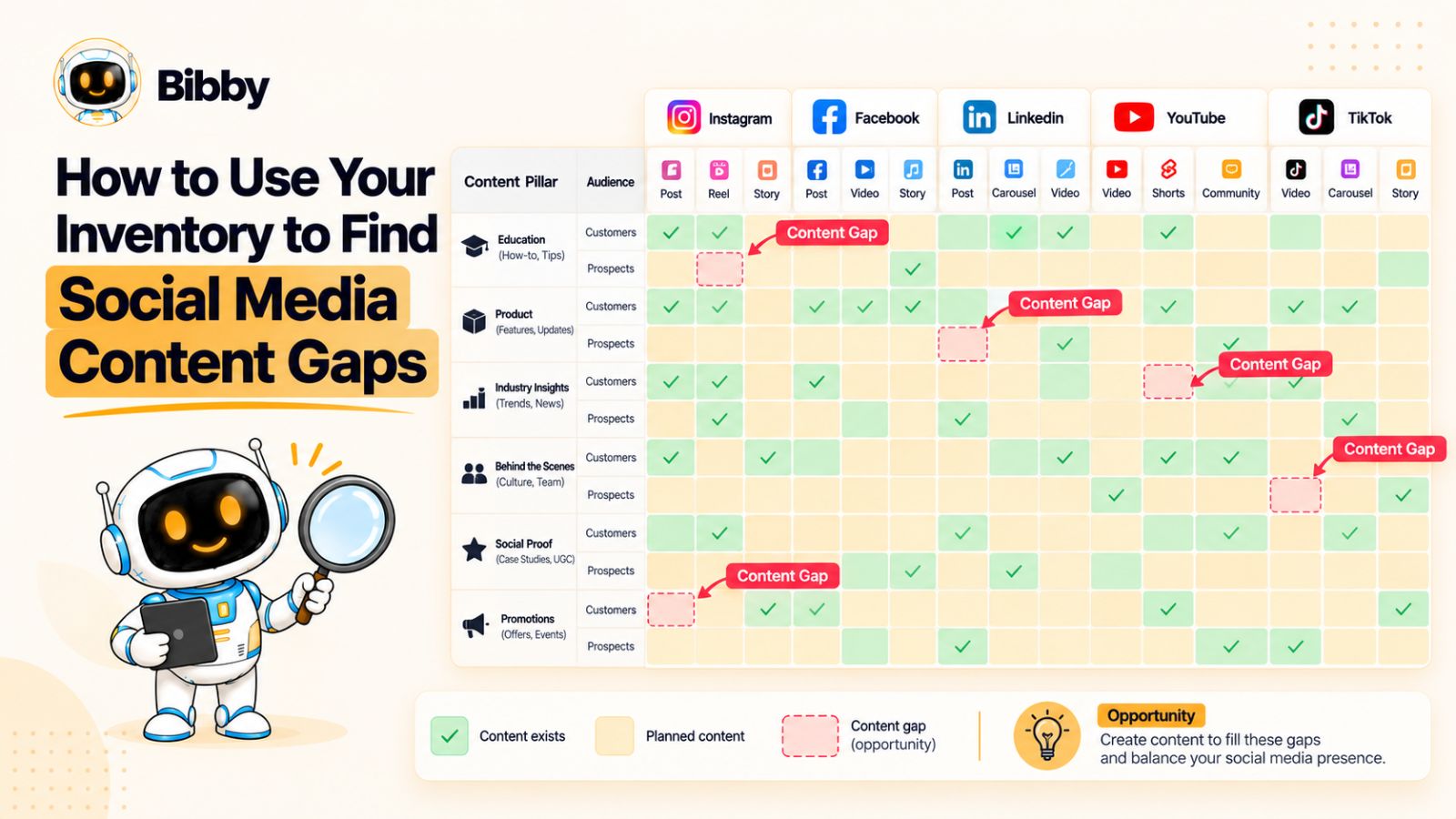
Start With Your Content Pillars
Begin by grouping your existing content according to your main content pillars.
For example:
| Content Pillar | Number of Posts | Share of Content |
|---|---|---|
| Education | 42 | 42% |
| Product | 28 | 28% |
| Thought Leadership | 15 | 15% |
| Customer Stories | 9 | 9% |
| Community | 6 | 6% |
The exact percentages aren't important by themselves.
What matters is what they tell you about your strategy.
If 70% of your content is educational and product-focused, for example, you may want to investigate whether you're giving enough attention to customer stories, community content, or thought leadership.
The inventory turns a vague feeling—“We're talking about the same things too much”—into something you can actually examine.
Look for Topic Gaps
Your content pillars are broad categories. Topics reveal what you're actually talking about.
Suppose your pillar is Social Media Marketing.
Your existing topics might include:
- Content calendars
- Scheduling
- Social media analytics
- Instagram growth
- Content creation
But perhaps almost nothing addresses:
- Social media measurement
- Content repurposing
- Community management
- Social listening
- Crisis communication
Those missing topics can represent opportunities.
The important point is that a content gap isn't automatically a reason to create another post. It is a signal that you should evaluate whether your audience would benefit from content in that area.
Check Your Funnel Coverage
Another useful analysis is to categorize content by customer journey stage.
For example:
Awareness: Educational content, industry insights, trends
Consideration: Comparisons, tutorials, case studies, product education
Conversion: Demonstrations, offers, testimonials, product-specific content
Retention: Customer education, support content, advanced tips, community
Now look at the distribution.
If nearly all your social media content sits at the awareness stage, your team may be generating reach without giving interested audiences enough information to move forward.
If almost everything is conversion-focused, the opposite problem may exist: you're asking people to buy before giving them enough reasons to care.
The inventory makes this imbalance visible.
Examine Audience Coverage
Content gaps can also exist at the audience level.
Imagine a B2B company serves:
- Marketing leaders
- Small business owners
- Agencies
- Enterprise teams
If 80% of the inventory targets marketing leaders, the other audiences may be receiving very little relevant content.
Add a Target Audience field to your inventory and periodically compare content volume across segments.
Then ask:
Which audience are we consistently creating content for?
Which audience are we barely addressing?
Are we creating content for the audience we want to acquire, or only the audience we already have?
That last question can reveal particularly important strategic gaps.
Look for Format Gaps
A content strategy can become repetitive even when the topics are varied.
Maybe your team publishes:
- 70% static images
- 20% text posts
- 10% video
That doesn't automatically mean the mix is wrong. The right format depends on the audience, platform, resources, and objectives.
But it is worth asking why the distribution looks that way.
If video consistently performs well but represents only a small percentage of your output, you may have an opportunity.
Likewise, if a team has invested heavily in video but very little of it generates meaningful results, the answer may not be “make more video.”
It may be to understand why the existing format isn't working.
Check Platform Coverage
Your inventory can also reveal whether your team is distributing content intentionally across platforms.
For example:
Instagram: High activity
Facebook: Moderate activity
LinkedIn: High activity
YouTube: Very low activity
TikTok: Occasional activity
Again, the numbers aren't automatically good or bad.
A platform should earn its place based on your audience, objectives, resources, and performance.
The useful question is:
Are our publishing decisions deliberate, or are we simply publishing wherever the workflow happens to be easiest?
Find Campaign Gaps
Campaigns need more than one announcement post.
A campaign might require:
Before launch:
Education, anticipation, problem awareness
During launch:
Announcement, demonstration, benefits, proof
After launch:
FAQs, customer reactions, use cases, follow-ups
Your inventory can reveal when a campaign has too little supporting content.
For example, if a campaign contains one launch announcement and nothing else, you may have identified a content gap before the campaign goes live.
Find Evergreen Gaps
Your inventory should also tell you whether you have enough reusable content.
Evergreen content can provide useful coverage when:
- The team has a busy week
- A campaign is delayed
- A planned post needs to be replaced
- A seasonal period requires additional content
- You need to fill an unexpected publishing gap
Marking evergreen assets in your inventory makes these resources much easier to find.
Compare Content Volume With Performance
The most valuable gap analysis combines quantity with outcomes.
Suppose you have:
40 educational posts → strong saves
35 promotional posts → weak engagement
8 customer stories → strong conversion activity
The obvious conclusion isn't necessarily “create more customer stories.”
Instead, investigate why those stories are working.
Maybe they demonstrate specific outcomes. Maybe they are more credible. Maybe they address objections that promotional posts ignore.
Your inventory gives you the evidence to ask better questions.
Turn Gaps Into a Content Backlog
Once you've identified gaps, don't immediately create dozens of posts.
Turn the findings into a prioritized backlog.
For each opportunity, record:
- Topic
- Audience
- Content pillar
- Platform
- Format
- Funnel stage
- Campaign
- Priority
- Owner
- Target date
Then prioritize based on potential impact and effort.
A useful framework is:
High impact + low effort → Create first
High impact + high effort → Plan carefully
Low impact + low effort → Fill when useful
Low impact + high effort → Usually deprioritize
This prevents content-gap analysis from becoming an excuse to create more content for the sake of creating more content.
A Content Gap Is Not Always a Missing Topic
This distinction is important.
You can have a topic in your inventory and still have a content gap.
For example, you might already have ten posts about customer retention.
But if all ten are beginner-level educational posts, you may still lack:
- Advanced content
- Customer examples
- Original research
- Practical tutorials
- Conversion-oriented content
- Platform-specific explanations
So don't ask only:
“Have we covered this topic?”
Ask:
“Have we covered this topic in the ways our audience needs?”
That's where a well-maintained social media content inventory becomes genuinely strategic.
It doesn't just show you what you've created. It helps you see what your content ecosystem is missing.
How to Use a Social Media Content Inventory for Repurposing
A social media content inventory becomes much more valuable when it helps your team answer a simple question:
What can we reuse?
Most marketing teams already have more ideas than they realize. The problem is that useful content becomes buried after publication. A high-performing LinkedIn post gets forgotten, an old webinar sits in a folder, or a useful customer interview never becomes anything beyond the original video.
A well-organized inventory gives those assets a second life.
Start With Your Highest-Value Content
Don't begin by trying to repurpose everything.
Start with content that has already demonstrated value.
Look for:
- High engagement
- Strong reach
- High saves or shares
- Strong click-through rates
- High video watch time
- Useful customer feedback
- Strong conversion performance
- Evergreen relevance
Performance doesn't guarantee that an asset will work in another format, but it gives you a useful starting point.
Identify the Core Idea
Before repurposing something, identify the idea that made the original content valuable.
For example, imagine a LinkedIn post explaining:
“Five reasons your social media content isn't converting.”
The original post may be useful, but the underlying ideas could become several different assets:
- An Instagram carousel covering the five problems
- A short video explaining the biggest mistake
- A LinkedIn follow-up focusing on one problem
- A TikTok built around a strong opening question
- A Story sequence asking followers which problem they experience
- A longer article exploring each issue in detail
The goal is not to reproduce the original post.
The goal is to extract the useful idea and rebuild it for another context.
Add a Repurposing Field to Your Inventory
A simple repurposing field can make this process much easier.
For example:
| Original Content | Repurposing Status | Potential Outputs |
|---|---|---|
| Customer webinar | Needs review | Reel, Short, carousel |
| Industry report | In production | LinkedIn posts, carousel |
| Product tutorial | Published | TikTok, Instagram Reel |
| Customer interview | Not started | Quote posts, video clips |
| High-performing carousel | Repurposed | Short-form video |
This creates a visible backlog of content opportunities.
Instead of asking the team to brainstorm new ideas every morning, you can look at the inventory and identify existing material worth adapting.
Create a Content Relationship
For larger teams, consider adding a Parent Content ID.
For example:
Parent: WEB-021 — Customer Retention Webinar
Then:
- LI-108 — Retention Lessons
- IG-244 — Retention Carousel
- TT-091 — Retention Mistake
- YT-133 — Retention Short
can all reference the same parent.
This creates a content family.
If someone opens the original webinar six months later, they can immediately see everything that has already been created from it.
Don't Repurpose Blindly Across Platforms
Repurposing doesn't mean publishing the exact same content everywhere.
Each platform has different expectations.
A detailed webinar might work well as long-form video on YouTube.
The strongest insight from that webinar might work as a LinkedIn text post.
A surprising statistic might become an Instagram carousel.
A controversial or counterintuitive statement might become a short-form video.
The idea stays connected, but the execution changes.
That is why platform should remain a core inventory field even when multiple pieces of content originate from the same source.
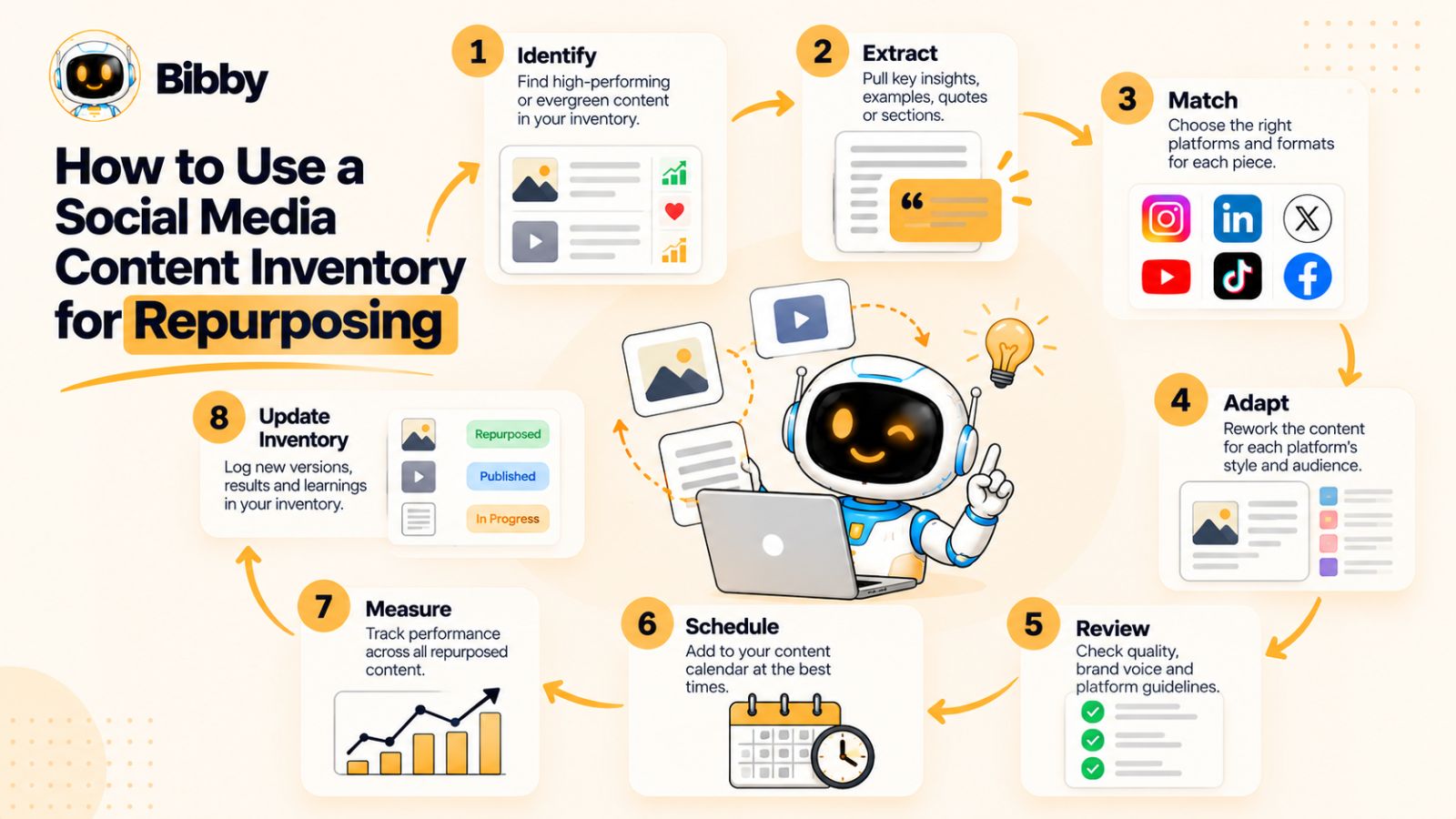
Build a Repurposing Workflow
A repeatable process might look like this:
1. Identify
Find high-value existing content.
2. Extract
Identify the strongest ideas, statistics, stories, questions, or insights.
3. Match
Determine which platforms and formats fit each idea.
4. Adapt
Rewrite, redesign, shorten, expand, or restructure the content.
5. Review
Check accuracy, brand voice, creative quality, and platform suitability.
6. Schedule
Add the new content to your publishing workflow.
7. Measure
Compare performance with the original.
8. Update the inventory
Record the relationship and results.
That final step matters.
If you repurpose content but don't update your inventory, you've created another disconnected asset—and eventually the same organizational problem returns.
Use Automation Where It Actually Helps
Repurposing can involve a lot of repetitive work.
Captions need to be written. Formats need to be adapted. Publishing dates need to be assigned. Different platform versions need to be organized.
AI-assisted social media tools can reduce some of that manual workload.
For example, a tool such as Bibby can take an uploaded creative asset, generate captions based on a selected posting style, and schedule content across multiple selected platforms. Its workflow also supports different content types, including images, carousels, videos, and Stories.
The useful part of this type of automation isn't simply that it lets a team publish faster.
It can help shorten the distance between:
“We already have a useful idea.”
and
“That idea has been adapted into several pieces of platform-specific content.”
But the inventory should remain the source of organizational context. Automation can execute the workflow; the inventory should show what happened.
Use Performance to Decide What Comes Next
Repurposing creates another useful feedback loop.
Suppose an original LinkedIn post generates unusually high engagement.
You adapt the idea into an Instagram carousel.
The carousel performs even better.
You then turn the same concept into a short video.
The video generates strong reach but relatively weak engagement.
Now you have learned something.
The original idea appears valuable, but its effectiveness depends on how it is packaged for each platform.
Your inventory can preserve those relationships and results.
Over time, this can help answer questions such as:
- Which topics consistently perform?
- Which formats work best for each topic?
- Which ideas travel well between platforms?
- Which content should be refreshed?
- Which content should remain platform-specific?
- Which assets have additional unused potential?
Build a “Next Use” Mindset
One of the simplest improvements a marketing team can make is to stop treating publication as the end of a piece of content's life.
When an asset is published, ask:
What could this become next?
A published article could become a carousel.
A webinar could become ten short videos.
A customer interview could become several testimonials.
A high-performing social post could become a deeper guide.
A product demonstration could become a series of tutorials.
Your inventory gives you a place to record those possibilities.
Repurposing Is a Strategy, Not a Shortcut
Good repurposing isn't about flooding every platform with identical content.
It's about extracting more value from ideas that deserve more attention.
The strongest systems combine:
One strong idea → Multiple useful adaptations → Platform-specific execution → Measurement → Further optimization
When your social media content inventory captures those relationships, content repurposing becomes a repeatable process rather than an occasional creative exercise.
And that can dramatically reduce the pressure on your team to come up with something completely new every time it needs to publish.
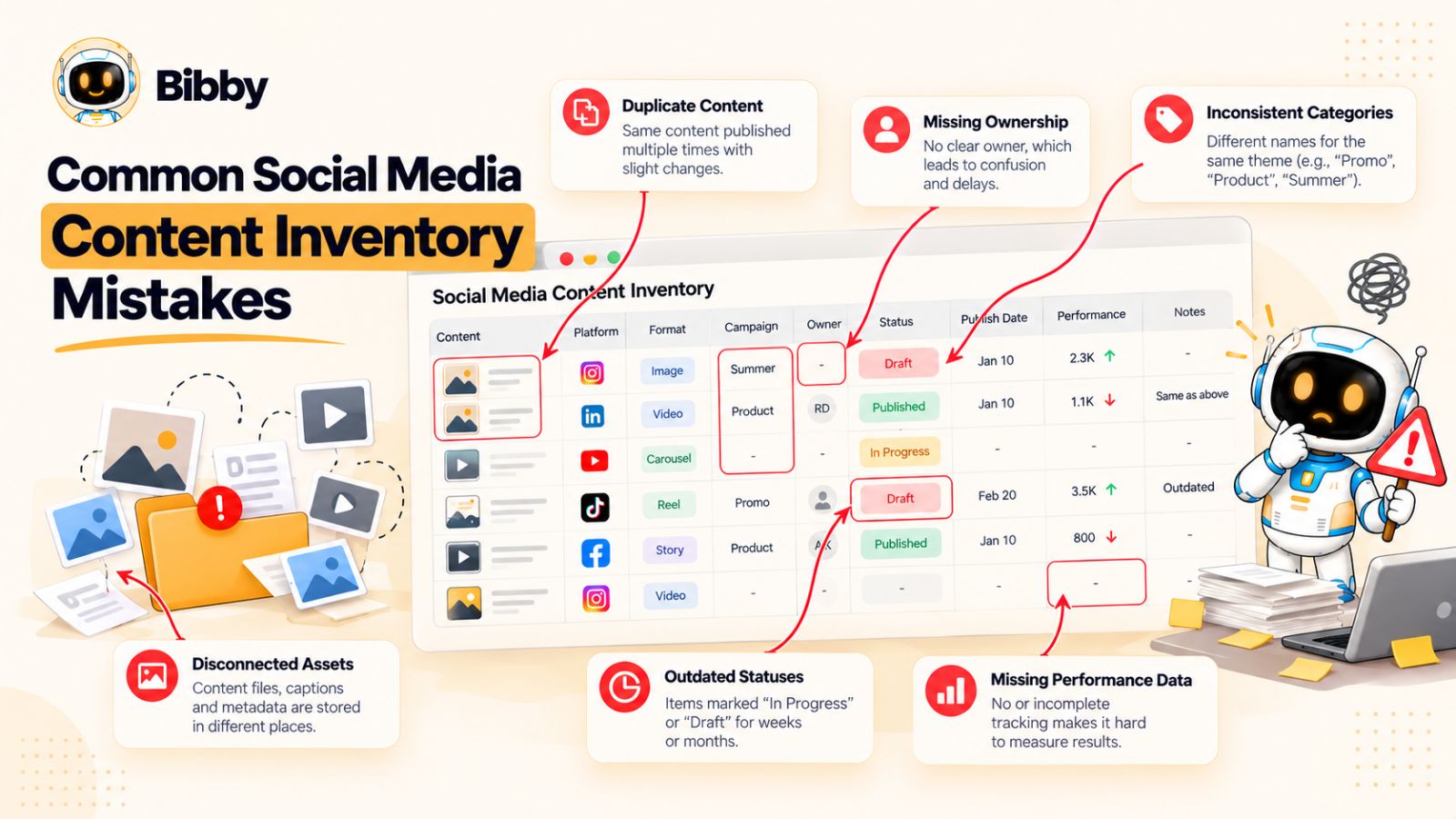
Common Social Media Content Inventory Mistakes
A social media content inventory can solve major organizational problems, but only if the system is designed around how the team actually works.
Many teams make the same mistakes: they track too little information, create too many fields, confuse the inventory with the content calendar, or build a system nobody updates.
Here are the problems worth avoiding.
Mistake 1: Treating the Inventory as a Content Calendar
A calendar tells you what is scheduled and when.
An inventory should give you a broader view of the content itself.
If your system contains only:
Post | Platform | Date | Caption
you have something closer to a publishing calendar than a true content inventory.
A useful inventory should also help you understand the content's topic, format, campaign, audience, status, source asset, repurposing potential, and performance.
The calendar answers “When are we publishing?”
The inventory answers “What do we have, what have we done with it, and what can we do next?”
Mistake 2: Tracking Too Little
The opposite problem is an inventory that doesn't contain enough context.
A row labeled:
“Product post — Instagram — October 15”
doesn't tell the next team member much.
What product?
Which campaign?
Who is the audience?
What is the objective?
Where is the creative?
Has this idea already been published elsewhere?
Can it be repurposed?
The inventory should contain enough information that another person can understand the content without having to track down its creator.
Mistake 3: Adding Every Possible Field
More information isn't automatically better.
Some teams create inventories with dozens of columns because every piece of information seems potentially useful.
Eventually, the team stops updating them.
That's a worse outcome than having a simpler inventory.
A good rule is:
If a field doesn't help someone make a decision, find something, manage something, or analyze something, question whether you need it.
Start with essential fields and add complexity only when there is a clear operational benefit.
Mistake 4: Using Inconsistent Categories
If one team member enters:
Educational
and another enters:
Education
and another enters:
Educational Content
your filters and reports become fragmented.
The same problem can happen with:
- Platforms
- Content formats
- Campaign names
- Funnel stages
- Statuses
- Audience segments
Create a simple taxonomy and document the terms your team should use.
Consistency matters more than sophistication.
Mistake 5: Forgetting Ownership
An inventory without ownership can become a list of things nobody is responsible for.
Every active piece of content should have a clear owner.
That doesn't mean the owner has to personally perform every task.
It means someone is accountable for moving the content forward or ensuring that the necessary people are involved.
Mistake 6: Ignoring Existing Content
Many teams maintain a database of new content while leaving years of useful material buried in folders and social accounts.
That's a missed opportunity.
Your inventory should ideally include at least your most valuable historical content, particularly:
- High-performing posts
- Evergreen resources
- Original research
- Customer stories
- Tutorials
- Webinars
- Product education
You don't need to catalog every post you've ever published.
Start with the content most likely to be reused or provide useful historical insight.
Mistake 7: Treating Every Platform the Same
Publishing the same idea across multiple platforms can be efficient.
Publishing the exact same content everywhere isn't always effective.
A LinkedIn post, Instagram carousel, YouTube video, and TikTok clip may originate from the same idea but require different executions.
Your inventory should preserve the relationship between those pieces without pretending they're identical.
Mistake 8: Forgetting About Repurposing
If your inventory doesn't show what can be reused, your team will repeatedly start from zero.
Add fields such as:
Repurpose?
Source content
Parent content
Potential formats
Repurposing status
Even simple indicators can help your team discover content that still has value.
Mistake 9: Recording Content but Not Performance
A content inventory that stops at publication becomes an archive.
Adding performance data turns it into a learning system.
You don't need to record every metric from every platform.
Track the measurements that matter to the content's objective and use them to identify patterns.
The important thing is to create a feedback loop:
Published → Measured → Learned from → Used to inform future content
Mistake 10: Relying Entirely on Manual Processes
Manual organization is manageable when a team publishes a small number of posts.
As volume increases, manually copying captions, dates, assets, and publishing information between systems becomes inefficient.
This is where scheduling and automation tools can help.
AI-assisted platforms can increasingly handle tasks such as caption generation, content adaptation, scheduling, and multi-platform publishing. That can reduce repetitive work and make it easier for teams to maintain a consistent publishing workflow.
But automation should reduce administration—not remove visibility.
The inventory still needs to show what was created, where it went, and what happened afterward.
Mistake 11: Letting the Inventory Become a Separate System
Perhaps the biggest mistake is creating an inventory that has nothing to do with the team's actual workflow.
If content creators work in one place, designers work somewhere else, scheduling happens in another tool, and the inventory is manually updated once a month, the system will eventually fall behind.
The inventory should be connected as closely as possible to the team's real process.
Ideally:
Content created → Inventory updated
Content approved → Status updated
Content scheduled → Publishing information captured
Content published → Performance added
Content identified for reuse → Repurposing status updated
The less duplicate administration required, the more likely the system is to stay accurate.
Mistake 12: Trying to Build the Perfect System Before Using It
You don't need a perfect inventory on day one.
In fact, trying to design the perfect system before anyone uses it is often counterproductive.
Build a basic version.
Use it for a few weeks.
Notice what the team keeps asking.
Then improve it.
Maybe you discover that the team needs a Campaign field.
Maybe nobody uses the Funnel Stage field.
Maybe Source Asset becomes essential because your team is heavily focused on repurposing.
Let actual usage determine the evolution of the system.
The Best Inventory Is the One Your Team Trusts
Ultimately, a social media content inventory doesn't succeed because it has the most columns or the most sophisticated workflow.
It succeeds when the team trusts it.
People should be able to open it and believe that:
- The content is there.
- The status is accurate.
- The ownership is clear.
- The assets can be found.
- The publishing information is reliable.
- The performance data is useful.
- The repurposing opportunities are visible.
When that happens, the inventory becomes part of the team's operating system rather than another marketing document that needs to be maintained.
Social Media Content Inventory Template
The easiest way to turn the ideas in this guide into a working system is to start with a simple template.
You don't need a complicated database to manage social media content. A spreadsheet, database, project-management system, or social media management platform can work as long as the structure gives your team the information it needs.
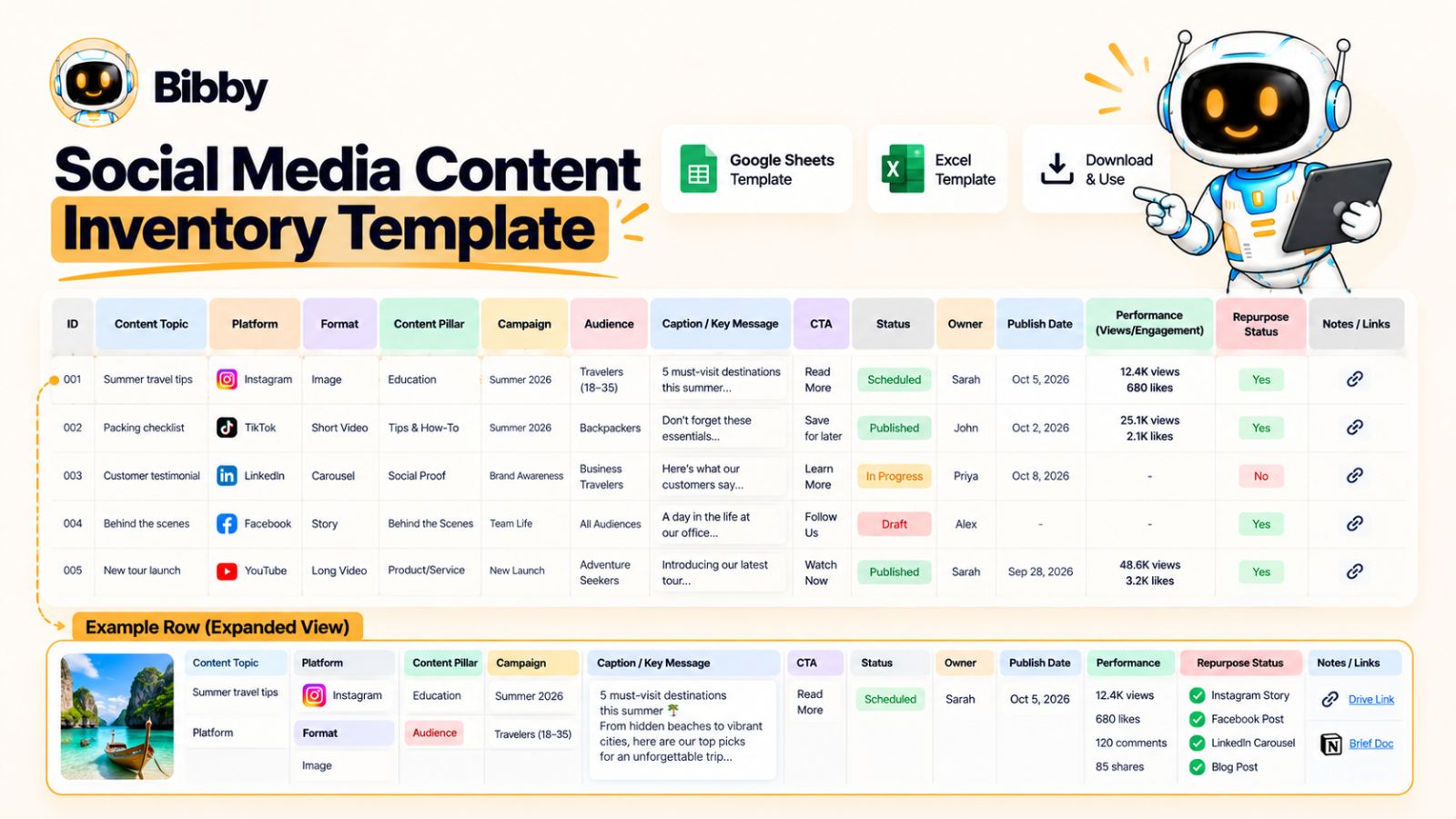
A practical starting point is:
| Field | What to Track | Example |
|---|---|---|
| Content ID | Unique identifier | SM-0248 |
| Title | Content name | 7 Social Media Metrics That Matter |
| Topic | Specific subject | Social media reporting |
| Content Pillar | Broader theme | Education |
| Platform | Publishing channel | |
| Format | Content format | Carousel |
| Campaign | Related campaign | Q4 Growth |
| Audience | Target audience | Marketing managers |
| Funnel Stage | Customer journey stage | Consideration |
| Caption | Final social copy | Caption text |
| Creative Asset | Image/video location | Asset link |
| Owner | Person responsible | Social Manager |
| Status | Workflow stage | Scheduled |
| Publish Date | Planned/actual date | October 15 |
| CTA | Desired action | Download guide |
| Parent Content | Original source | Webinar-018 |
| Repurpose Status | Reuse opportunity | Planned |
| Performance | Relevant results | 4.8% engagement |
This gives a team enough information to understand the content without making the inventory unnecessarily complicated.
Essential Fields for Smaller Teams
If you're a small marketing team or just starting to organize your social media content, begin with these:
Content ID
Title
Topic
Platform
Format
Status
Owner
Publish Date
Creative Asset
Performance
That's enough to create basic visibility into what you're producing and publishing.
You can add campaign, audience, funnel stage, and repurposing fields once you have a clear reason to use them.
Advanced Fields for Larger Teams
As your social media operation grows, additional fields can provide much more strategic value.
Consider adding:
- Campaign
- Content pillar
- Target audience
- Funnel stage
- CTA
- Parent content
- Repurposing status
- Creation method
- Approval status
- Evergreen status
- Content rights
- Localization
- Performance benchmark
- Repurposing potential
These fields become particularly useful when several people or departments are involved in content production.
Example of a Completed Inventory Record
Imagine your company has created a LinkedIn carousel about social media reporting.
The record might look like this:
| Field | Example |
|---|---|
| Content ID | LI-0248 |
| Title | 7 Social Media Metrics That Matter |
| Topic | Social media reporting |
| Content Pillar | Education |
| Platform | |
| Format | Carousel |
| Campaign | Q4 Marketing Education |
| Audience | Marketing managers |
| Funnel Stage | Consideration |
| Status | Published |
| Owner | Social Media Manager |
| Publish Date | October 15 |
| CTA | Download reporting guide |
| Parent Content | Social Reporting Webinar |
| Repurpose Status | Planned |
| Performance | 6.2% engagement |
Now imagine the same topic is adapted for Instagram.
Instead of creating a completely unrelated record, you can connect the Instagram carousel to the same campaign and parent content.
That gives you a much clearer view of how one idea moves through the social media ecosystem.
Use Consistent Statuses
Your template should also include a standardized workflow.
For example:
Idea
Content concept exists but hasn't entered production.
Draft
The content is being created.
In Review
The content is waiting for feedback or approval.
Approved
The content is ready to publish.
Scheduled
The content has been assigned a publishing date and time.
Published
The content is live.
Repurpose
The original content has been identified as a candidate for another format or platform.
Archived
The content is no longer active or relevant.
You don't need every one of these statuses. The important thing is that everyone understands what each status means.
Don't Confuse Inventory With File Storage
Your inventory doesn't have to contain every creative file.
Instead, it can point to where the asset lives.
For example:
Creative Asset: Brand Drive / Q4 Campaign / LinkedIn / SM-0248
This keeps the inventory lightweight while still making assets easy to find.
The same principle applies to captions, scripts, briefs, and other supporting documents.
Add a Performance Benchmark
For teams that publish frequently, raw performance numbers aren't always enough.
A post generating 10,000 impressions might sound impressive until you discover that similar posts normally generate 30,000.
Consider adding a simple performance assessment:
- Below benchmark
- At benchmark
- Above benchmark
- Top performer
This makes it easier to identify content worth studying or repurposing.
Create a “Next Action” Field
One additional field can make the inventory surprisingly useful:
Next Action
Examples:
- Repurpose into Reel
- Update statistics
- Reschedule
- Create follow-up
- Add to evergreen library
- Review performance
- Create campaign variation
- No action
This turns the inventory from a passive record into an active workflow.
Instead of simply documenting what happened, it tells the team what should happen next.
Spreadsheet or Social Media Management Tool?
There isn't one universally correct choice.
A spreadsheet can be perfectly adequate when:
- The team is small
- Publishing volume is manageable
- Workflows are relatively simple
- Most content is created manually
A dedicated social media management system becomes more attractive when:
- Publishing volume is high
- Multiple platforms are involved
- Several people need access
- Scheduling is frequent
- Approval workflows are complex
- Content needs to be repurposed regularly
- Automation is important
Modern platforms can combine content creation, scheduling, and automation, which can reduce the amount of information teams need to manually move between systems.
The important thing is not which tool you choose.
It's whether the system gives your team a reliable source of truth for its social media content.
Keep the Template Flexible
Your social media content inventory should evolve with your team.
Start with the essential fields.
Then ask:
What information are we repeatedly searching for?
What decisions are difficult because we don't have enough context?
What content keeps getting lost?
What work are we unnecessarily repeating?
Those answers should determine which fields you add next.
The objective isn't to create the most detailed inventory possible.
It's to create the most useful inventory your team will consistently maintain.
How Often Should You Update a Social Media Content Inventory?
A social media content inventory is only useful if it stays accurate.
An outdated inventory creates almost as many problems as having no inventory at all. If a post is marked as a draft after it has already been published, an asset is listed in the wrong campaign, or old content is still shown as active, your team can no longer rely on the system.
The solution isn't necessarily to spend hours updating it every day.
Instead, establish a maintenance rhythm that matches your publishing volume.
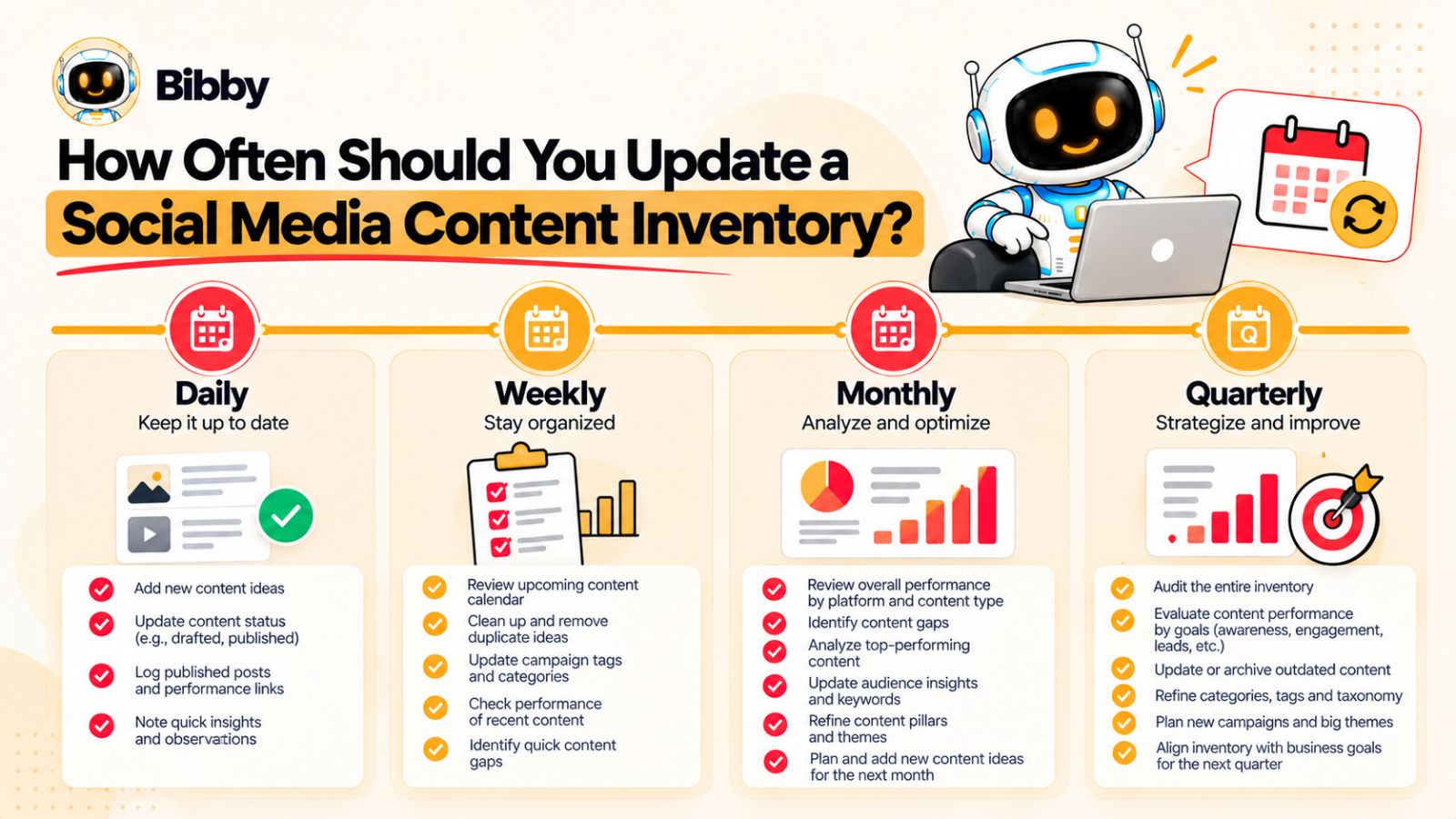
Update the Inventory When Content Changes
The most important rule is simple:
Update the inventory when something meaningful happens to the content.
For example:
- A new content idea is approved.
- A draft enters production.
- A post moves into review.
- Creative is finalized.
- A publishing date is assigned.
- Content is scheduled.
- A post goes live.
- Performance data becomes available.
- Content is selected for repurposing.
- An asset becomes outdated.
This is more effective than relying entirely on a monthly cleanup session.
If the inventory is updated as part of the normal workflow, it doesn't become a separate administrative task.
Daily: Update Publishing Status
Teams with active publishing schedules should make small updates throughout the day or as part of their normal workflow.
Typical daily changes include:
- New content added
- Status changes
- Approval updates
- Scheduling information
- Publishing confirmations
- Last-minute changes
- Asset links
The goal isn't to analyze performance every day.
It's simply to keep the operational information accurate.
Weekly: Review Upcoming Content
A weekly review is useful for checking what is about to be published.
Look at the next one to two weeks and ask:
- Is enough content ready?
- Are important campaigns represented?
- Are platforms balanced?
- Are there obvious topic repetitions?
- Is the content mix appropriate?
- Are any posts blocked by missing assets or approvals?
- Are there gaps that need to be filled?
This is where the inventory and content calendar work particularly well together.
The calendar shows the publishing schedule.
The inventory provides the context behind those scheduled posts.
Monthly: Analyze Content Patterns
A monthly review should move beyond individual posts.
Look for patterns across:
- Content pillars
- Topics
- Formats
- Platforms
- Audiences
- Campaigns
- Funnel stages
- Performance
For example, you might discover that your team has published 30 pieces of educational content but only three customer stories.
Or perhaps short-form videos have become 60% of your output while long-form educational content has almost disappeared.
Neither finding automatically tells you what to do.
But both are worth investigating.
Quarterly: Review the System Itself
Every few months, review not just your content but the inventory structure.
Ask:
Are we still using all these fields?
Which fields are consistently left blank?
Are our categories still accurate?
Have our platforms or formats changed?
Are there new content types we need to track?
Are we creating unnecessary administrative work?
Does the inventory still reflect how the team actually operates?
This prevents the system from becoming unnecessarily complicated over time.
Use Different Review Cycles for Different Data
Not every field needs the same update frequency.
For example:
| Information | Recommended Frequency |
|---|---|
| Status | As it changes |
| Owner | As it changes |
| Publish date | As scheduled/changed |
| Creative asset | When created or replaced |
| Campaign | When content is assigned |
| Performance | Weekly/monthly |
| Content gaps | Monthly |
| Repurposing opportunities | Monthly |
| Taxonomy | Quarterly |
| Evergreen library | Quarterly |
This prevents the team from treating every field as if it requires daily maintenance.
Don't Wait Until Reporting Time
One common mistake is collecting performance information only when the monthly or quarterly report is due.
By then, useful context can be missing.
For example, a social media manager may remember why a post was created or why its format was unusual immediately after publication. Several months later, that context may be difficult to reconstruct.
Capture useful information while it's still available.
The inventory should gradually build a history of:
What was created → Why it was created → Where it was published → What happened → What the team learned
Automate Where Possible
The more content your team publishes, the more valuable automation becomes.
Scheduling and social media management platforms can reduce repetitive tasks around:
- Publishing
- Scheduling
- Caption generation
- Platform distribution
- Content organization
AI-assisted workflows can reduce even more manual effort.
For example, tools such as Bibby can combine content creation assistance with scheduling across multiple social platforms, allowing teams to move from a creative asset to captions and scheduled posts without manually recreating each step.
The important principle is that automation should support the inventory rather than replace the need for one.
When content volume increases, visibility becomes more important because there is more activity to keep track of.
Assign Responsibility for Maintenance
Someone should own the health of the inventory.
This doesn't mean that one person must manually enter every piece of information.
Instead, define responsibilities.
For example:
Content creator: Adds the initial content record.
Designer: Links the final creative.
Approver: Updates approval status.
Social manager: Confirms scheduling and publishing.
Marketing analyst: Adds relevant performance data.
Content strategist: Reviews patterns and identifies gaps.
This distributes maintenance across the workflow rather than making one person responsible for all of it.
Create a Definition of “Current”
Your team should agree on what an accurate inventory looks like.
For example:
Every active piece of social media content has a current status, owner, platform, publishing information, and linked creative.
That simple standard can make audits much easier.
During a weekly review, you don't need to inspect every detail of every historical post.
You simply identify records that don't meet the minimum standard.
The Goal Is Reliable, Not Perfect
Your inventory doesn't need to contain every historical detail to be useful.
It needs to be reliable enough that the team trusts it when making decisions.
If someone asks:
“What are we publishing next week?”
you should be able to answer.
If someone asks:
“What did we publish for this campaign?”
you should be able to answer.
If someone asks:
“Which of our existing content can we repurpose?”
you should be able to answer.
And if someone asks:
“What is missing from our current social media strategy?”
the inventory should give you enough information to start answering that question too.
That's the real purpose of maintaining it.
Turning a Social Media Content Inventory Into an Operating System
A social media content inventory starts as a simple organizational tool.
But when it is connected to the rest of your marketing workflow, it can become something much more valuable: an operating system for social media content.
Instead of maintaining a record of isolated posts, your team can use the inventory to connect the entire content lifecycle.
Strategy → Ideas → Production → Approval → Scheduling → Publishing → Analytics → Repurposing
The inventory sits in the middle, connecting those stages.
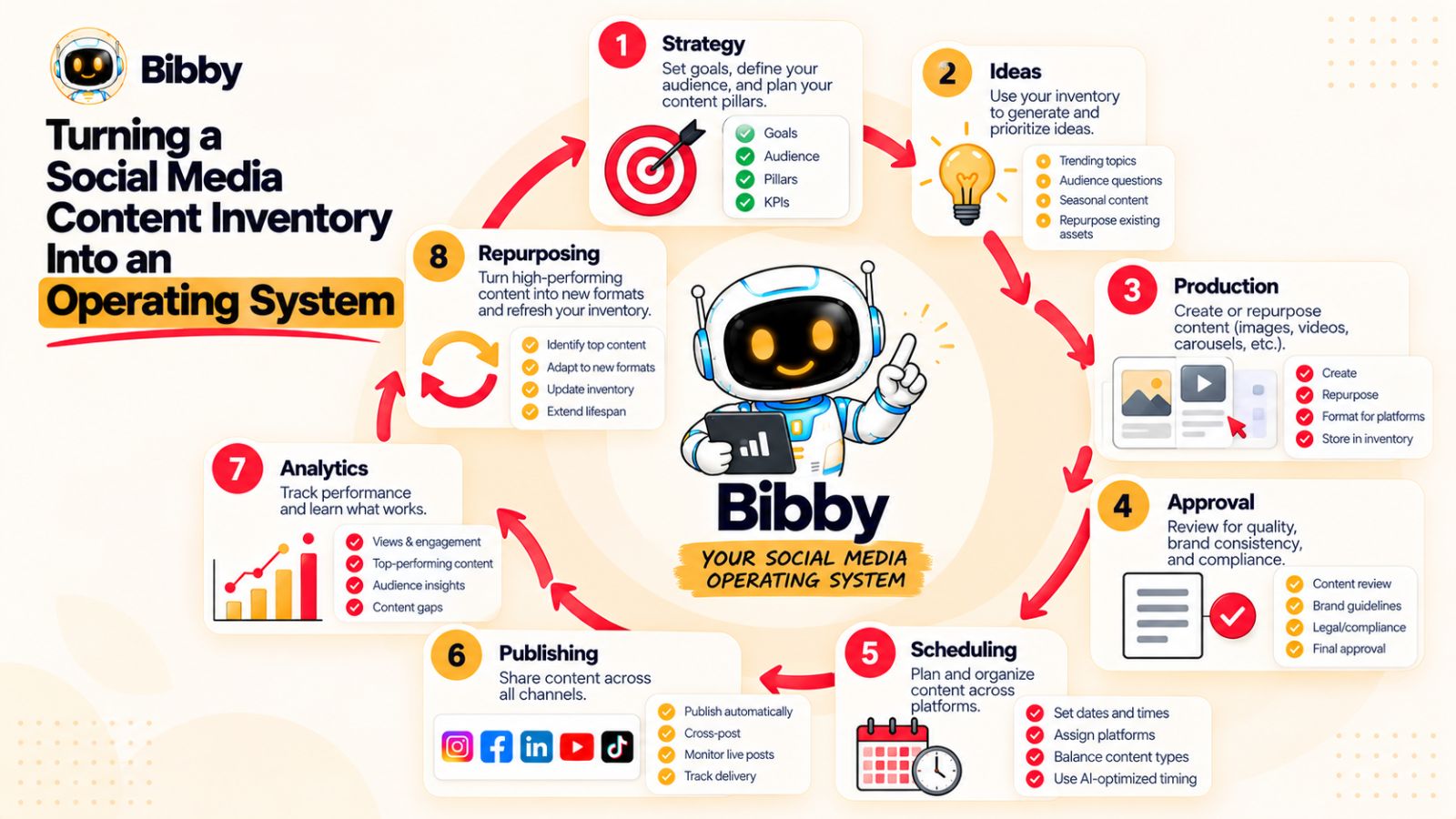
Connect Strategy to Individual Posts
Your social media strategy should influence what enters the inventory in the first place.
For example, if one of your strategic priorities is establishing authority in your industry, the inventory should contain content that supports that goal.
You might track:
- Thought-leadership topics
- Expert opinions
- Original research
- Industry commentary
- Educational content
- Customer insights
This creates a connection between a high-level marketing objective and the individual posts being published every week.
Without that connection, it's easy to become busy without necessarily moving toward a strategic goal.
Connect Ideas to Production
Your inventory can also function as a content pipeline.
An idea enters the system.
Then it moves through:
Idea → Brief → Production → Review → Approval
At each stage, the team knows what needs to happen next.
This is particularly useful when multiple people contribute to social media.
A content strategist might develop the idea. A writer creates the copy. A designer produces the creative. A manager approves it. A social media specialist schedules it.
The inventory gives everyone a shared view of the work.
Connect Production to Publishing
Once content is approved, the inventory should make the transition to publishing straightforward.
The team should be able to see:
- Which platform it is for
- Which format it uses
- The final creative
- The approved copy
- The campaign
- The publishing date
- The responsible owner
This reduces the amount of information that needs to be reconstructed when content moves from production into scheduling.
Automation can make this transition even more efficient.
For example, a social media workflow might take an approved creative asset, generate or refine its caption, adapt the publishing plan, and schedule it across selected platforms. Tools such as Bibby illustrate how these creation and scheduling steps can increasingly happen within a connected workflow rather than across several disconnected tools.
The inventory remains useful because it provides the broader context around that activity.
Connect Publishing to Measurement
Publishing shouldn't be the end of the workflow.
Once content goes live, performance information should eventually flow back into the inventory.
That creates a simple loop:
Content → Distribution → Performance → Learning
Now your team can compare content based on:
- Topic
- Format
- Platform
- Campaign
- Audience
- Funnel stage
- CTA
This makes performance analysis much more meaningful than simply looking at a list of individual posts.
You can start identifying patterns.
Perhaps customer stories consistently outperform product announcements.
Maybe short videos produce reach while carousels generate saves.
Perhaps thought-leadership content drives more qualified conversations than generic educational posts.
Those insights can influence what gets created next.
Connect Performance to Future Content
This is where the inventory becomes genuinely strategic.
Suppose your team identifies ten high-performing posts.
Instead of simply celebrating them, ask:
What do these posts have in common?
Maybe they:
- Address a specific customer problem
- Use original data
- Have strong opening hooks
- Provide actionable advice
- Tell customer stories
- Use a particular format
Those patterns can become inputs for future content briefs.
The system becomes:
What worked → Why it worked → What should we create next?
That is much more valuable than simply recording engagement numbers.
Connect Published Content to Repurposing
Your inventory should also tell you what happens after the original publication.
A successful LinkedIn post might become an Instagram carousel.
A webinar might produce several short videos.
A customer interview might produce quotes, clips, and case-study content.
A research report might support an entire campaign.
By connecting these assets to their original sources, your team can build a network of related content instead of a collection of disconnected posts.
This makes the content library increasingly valuable over time.
Create a Single Source of Truth
The ultimate goal is not necessarily to force every marketing activity into one piece of software.
It's to ensure that your team has a trusted source of truth about its social media content.
That means people should know where to look when they need to answer questions such as:
- What are we publishing?
- What have we already published?
- What campaigns are active?
- Which assets are available?
- Who owns this content?
- What can be repurposed?
- What performed well?
- What content gaps exist?
- What should we create next?
The tools can vary.
The underlying system should not.
The Inventory Should Reduce Work, Not Create It
There is an important paradox here.
A content inventory requires maintenance, but its purpose is ultimately to reduce unnecessary work.
It should help prevent:
- Recreating existing assets
- Repeating the same topics
- Searching for missing files
- Losing track of campaign content
- Forgetting high-performing posts
- Manually rebuilding the same information
- Creating content without a clear objective
If maintaining the inventory starts consuming more time than it saves, the system needs to be simplified.
Build the System Around Decisions
The strongest way to evaluate an inventory is not by asking how much information it contains.
Ask what decisions it helps your team make.
Can you use it to decide:
What should we publish next?
Which campaign needs more content?
Which audience needs more attention?
Which topics are overused?
Which content should be repurposed?
Which formats are working?
Which platforms deserve more or less attention?
What should we stop creating?
If the answer to those questions is yes, your inventory is doing its job.
From Content Database to Content Intelligence
The difference between a basic inventory and a mature content operation is the ability to learn from what has already happened.
A basic inventory says:
“Here is everything we published.”
A better inventory says:
“Here is everything we published, where it went, and how it performed.”
A mature content system goes one step further:
“Here is what we published, what worked, why it worked, what we can reuse, and what we should create next.”
That is the real potential of a social media content inventory.
It starts as a way to organize content.
It can eventually become the connective layer between your team's strategy, creativity, distribution, measurement, and continuous improvement.
Conclusion
A social media content inventory is more than a list of posts. It gives your marketing team a reliable view of what content exists, where it is being used, who owns it, how it is performing, and what opportunities remain.
The most useful inventories do three things well: organize content with enough context to manage it, connect original assets with platform-specific adaptations, and turn performance data into better future content decisions.
The key is to keep the system practical. Track the fields your team actually needs, maintain consistent categories, connect the inventory to your publishing workflow, and use automation where it removes repetitive work without sacrificing visibility.
Once your inventory is organized, the natural next step is turning that information into an actionable publishing plan. A social media content calendar can use the inventory to decide what gets published, on which platform, when, and as part of which campaign.
In other words:
Inventory tells you what you have. A content calendar tells you what to do with it next.