Social media automation is no longer just about scheduling posts in advance—it can now help with content creation, captions, publishing, repurposing, and much more.
The real question isn’t whether you should automate social media, but what you should actually automate. The right approach removes repetitive work and gives you more time for strategy, creativity, and genuine audience relationships without making your social presence feel robotic.
By the end, you’ll have a practical framework for deciding where automation belongs in your social media strategy—and where it doesn’t.
What Is Social Media Automation?
Social media automation is the use of software, artificial intelligence, and predefined workflows to handle repetitive social media tasks with little or no manual effort. Instead of creating, publishing, and managing every post individually, you can automate parts of the process so your content keeps moving even when you are not actively working on your social accounts.
But social media automation is broader than simply scheduling a post for tomorrow.
A basic scheduling tool might let you write a caption, upload an image, choose a date, and publish it automatically. A more advanced social media automation workflow can help you create the visual, generate a caption, adapt the content for different platforms, choose appropriate publishing times, schedule multiple pieces of content, and analyze what happened afterward.
That distinction matters because scheduling is only one part of social media automation.
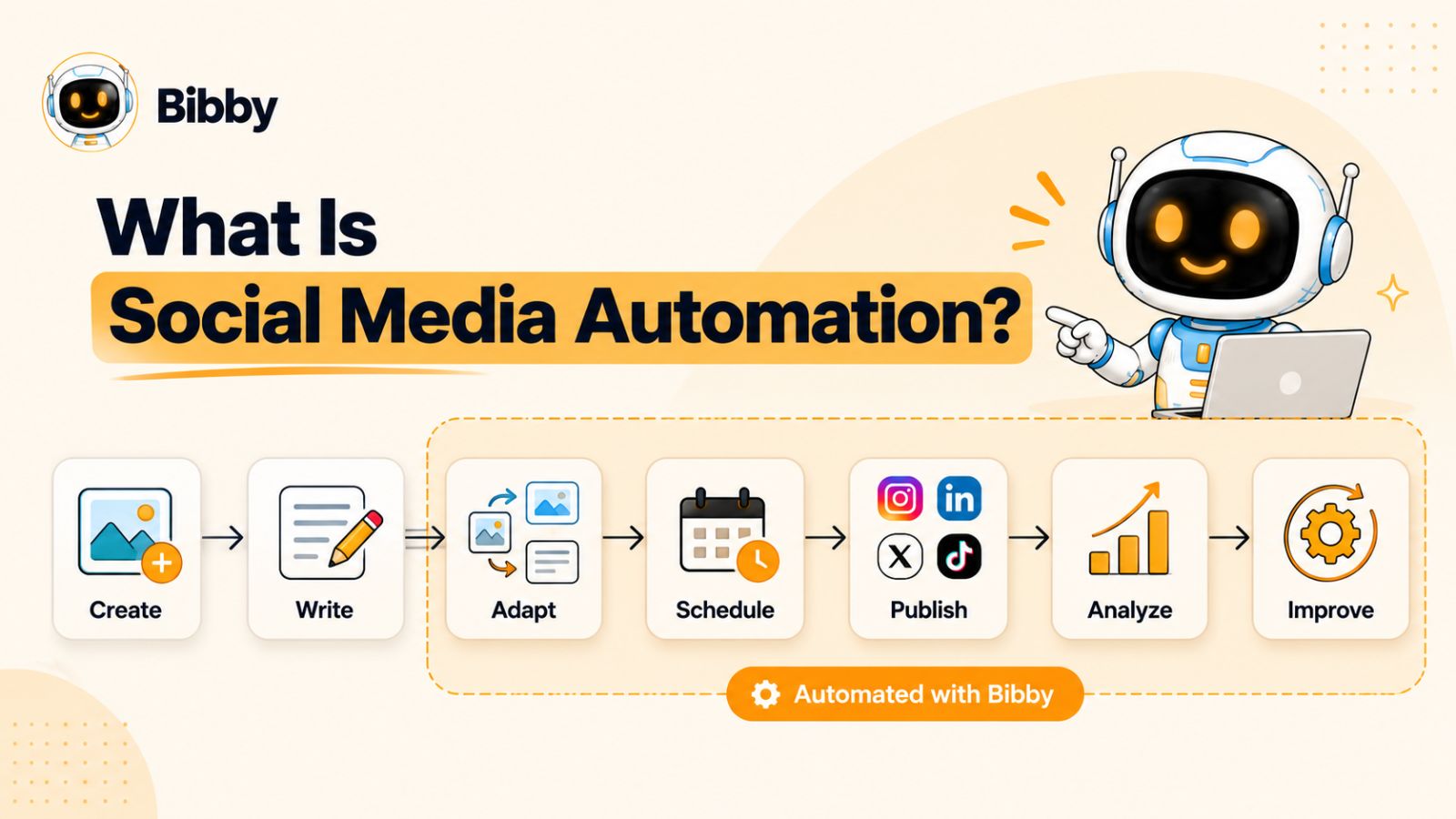
Think of your social media workflow as a series of connected tasks:
Create → Write → Adapt → Schedule → Publish → Analyze → Improve
You can automate some or all of these steps depending on your needs.
For example, imagine you have an idea for a post about a new product. Traditionally, you might need to create the graphic, write the caption, resize or adapt the content for each platform, decide when to publish it, schedule everything individually, and then return later to check performance.
Automation can reduce much of that repetitive work.
Tools such as Bibby take this approach further by combining content creation and AI assistance with scheduling and publishing. You can upload an image or generate one with AI, choose a posting style, and have captions generated automatically before scheduling the content across your selected social platforms at AI-optimized times. Depending on your workflow, you can also manage formats such as images, carousels, videos, and stories from the same system.
The goal, however, shouldn't be to automate everything.
The most useful social media automation handles work that is repetitive, predictable, and time-consuming while leaving important decisions—such as brand strategy, sensitive conversations, and meaningful audience engagement—to humans.
That leads to the more important question: which parts of your social media workflow should you actually automate?
What Should You Actually Automate on Social Media?
The best social media automation targets the work that consumes time without requiring much human judgment. If a task happens repeatedly, follows a predictable process, and can be reviewed before or after it runs, it is usually a strong candidate for automation.
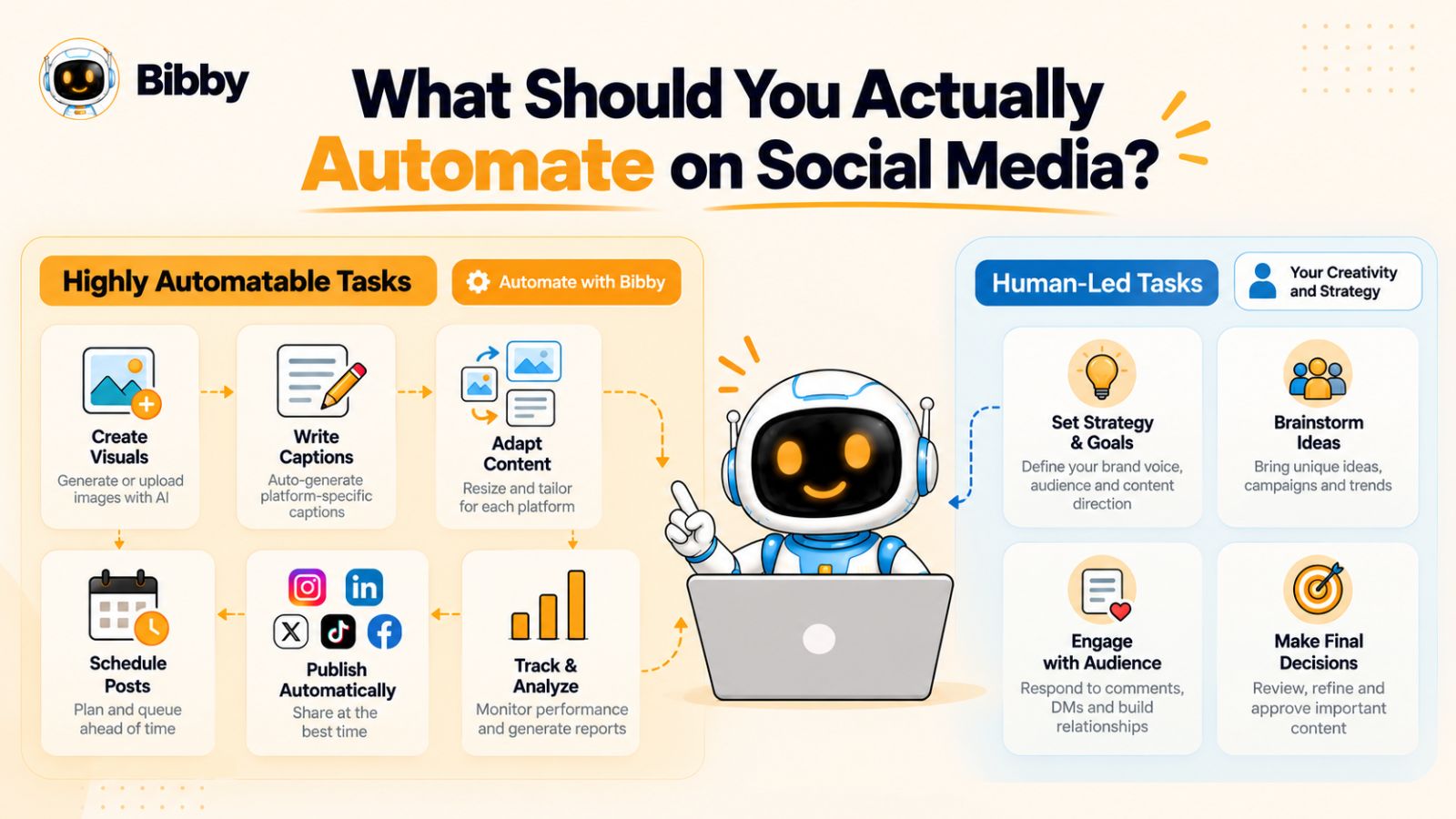
That means you can automate much more than simply publishing a post at 10 a.m. Here are the parts of your social media workflow where automation can make the biggest difference.
1. Automate Social Media Post Scheduling
Scheduling is one of the simplest and most valuable things to automate.
Instead of opening Instagram, Facebook, LinkedIn, TikTok, or YouTube every time you want to publish something, you can prepare your content in advance and let your social media automation tool handle the publishing.
This is particularly useful when you have a consistent content strategy. You might prepare a week's worth of content on Monday and have it automatically published throughout the week.
The bigger benefit isn't simply saving a few clicks. It's removing the need to remember to publish.
Consistent publishing becomes part of your system rather than another task competing for your attention.
2. Automate Social Media Publishing Times
Choosing when to publish can also be automated.
Rather than relying entirely on generic advice such as “post at 9 a.m.,” an automation platform can use available audience and performance signals to help determine appropriate publishing times.
This becomes particularly useful when you're managing multiple platforms. The time that makes sense for LinkedIn may not be the same time that makes sense for Instagram or TikTok.
Instead of manually maintaining separate schedules for every platform, automation can help distribute content according to the timing rules or optimization capabilities available in your chosen tool.
The important point is that automation should optimize the process, not replace your understanding of your audience.
3. Automate Caption Creation
Writing captions can become surprisingly repetitive.
If you're publishing several times a week across multiple platforms, you may spend a significant amount of time staring at a blank text box—even when you already know exactly what you want the post to communicate.
AI can help by turning your content or basic idea into a caption that you can review, edit, and approve.
For example, you could upload a product image and have an AI system generate an initial caption based on your chosen style. You can then adjust the wording rather than starting from scratch.
This is where tools such as Bibby can become useful. Instead of treating caption generation as a separate task, it can be part of the same workflow that takes your creative and turns it into scheduled social media content.
The objective isn't to publish whatever AI writes without checking it. The objective is to eliminate the blank-page problem and reduce repetitive writing.
4. Automate Content Adaptation Across Platforms
One piece of content rarely works identically on every social network.
A LinkedIn post may need a more professional framing, while an Instagram caption might benefit from a different structure. A TikTok or YouTube video may require a completely different title, description, or presentation.
Manually rewriting the same idea for every platform creates unnecessary work.
Social media automation can help you adapt a core piece of content into platform-appropriate versions while keeping the underlying message consistent.
This is especially valuable for businesses that want to maintain a presence across several networks without hiring someone to manually recreate every post for each one.
The goal isn't to publish the exact same thing everywhere. It's to automate the repetitive parts of adapting one idea into multiple platform-specific pieces of content.
5. Automate Cross-Platform Publishing
Once your content is created and adapted, distributing it across multiple platforms can also be automated.
Instead of separately uploading content to Facebook, Instagram, LinkedIn, TikTok, and YouTube, a centralized workflow can allow you to select the platforms you want and manage the publishing process from one place.
This can dramatically simplify social media management for businesses that maintain several active accounts.
However, cross-platform automation works best when you distinguish between distribution and duplication.
Distribution means getting your content where it needs to go.
Duplication means publishing the exact same content everywhere without considering the audience, format, or context of each platform.
Good automation handles the first while helping you avoid the second.
6. Automate Image and Creative Generation
Creating visual content for every social media post can become one of the biggest bottlenecks in a content workflow.
AI image generation can help when you need a visual but don't have the time or resources to create one manually.
You might start with a topic, product, promotion, or campaign and generate an appropriate visual before moving it into your publishing workflow.
This doesn't mean every piece of branded content should be AI-generated. Original photography, professional design, and custom creative still have important roles.
Instead, think of AI generation as another production option—particularly useful for filling content gaps, testing creative concepts, or producing supporting visuals quickly.
7. Automate Content Repurposing
One of the most valuable opportunities in social media automation is getting more mileage from content you've already created.
A single idea can potentially become:
- An image post
- A carousel
- A short video
- A story
- A LinkedIn post
- An Instagram caption
- A TikTok post
- A YouTube video or Short
Without a system, repurposing often means manually rebuilding the same idea several times.
With automation and AI, you can start with a core piece of content and use it as the foundation for multiple formats and platforms.
This changes the economics of content creation. Instead of constantly asking, “What should I post next?”, you can ask, “How many useful pieces of content can I create from this idea?”
8. Automate Campaign Scheduling
Individual posts are only one part of social media marketing. Many businesses also run campaigns around product launches, seasonal promotions, events, announcements, and other important moments.
These campaigns often contain multiple posts that need to go out at specific intervals.
Automation can coordinate those publishing sequences so you don't have to manually schedule every post at the beginning of each campaign.
For example, a product launch could include:
Announcement → Educational content → Product demonstration → Social proof → Launch reminder → Final call to action
Rather than treating each post as an isolated task, automation lets you build a repeatable campaign workflow.
9. Automate Social Media Performance Tracking
Automation shouldn't stop once your content is published.
You also need to know what happened afterward.
Automatically collected performance information can help you understand which content receives attention, which formats generate engagement, which platforms are producing results, and whether your publishing strategy is improving over time.
This doesn't mean an analytics dashboard should make your marketing decisions for you.
It means you shouldn't have to manually gather basic performance information every time you want to evaluate your social media strategy.
The most useful workflow creates a feedback loop:
Publish → Measure → Learn → Improve → Publish again
That is where social media automation becomes more than a convenience. It becomes part of an ongoing content system.
The Rule of Thumb for Social Media Automation
A simple rule can help you decide what belongs in your automation workflow:
Automate the repetitive execution. Keep the important judgment human.
If a task happens frequently, takes considerable time, follows predictable rules, and doesn't require much contextual judgment, automation is usually worth considering.
If a task involves relationships, sensitive situations, strategic decisions, or a nuanced understanding of your audience, it deserves more human involvement.
The best social media automation doesn't make your marketing less human. It gives you more time to be human where it actually matters.
What Should You NOT Automate on Social Media?
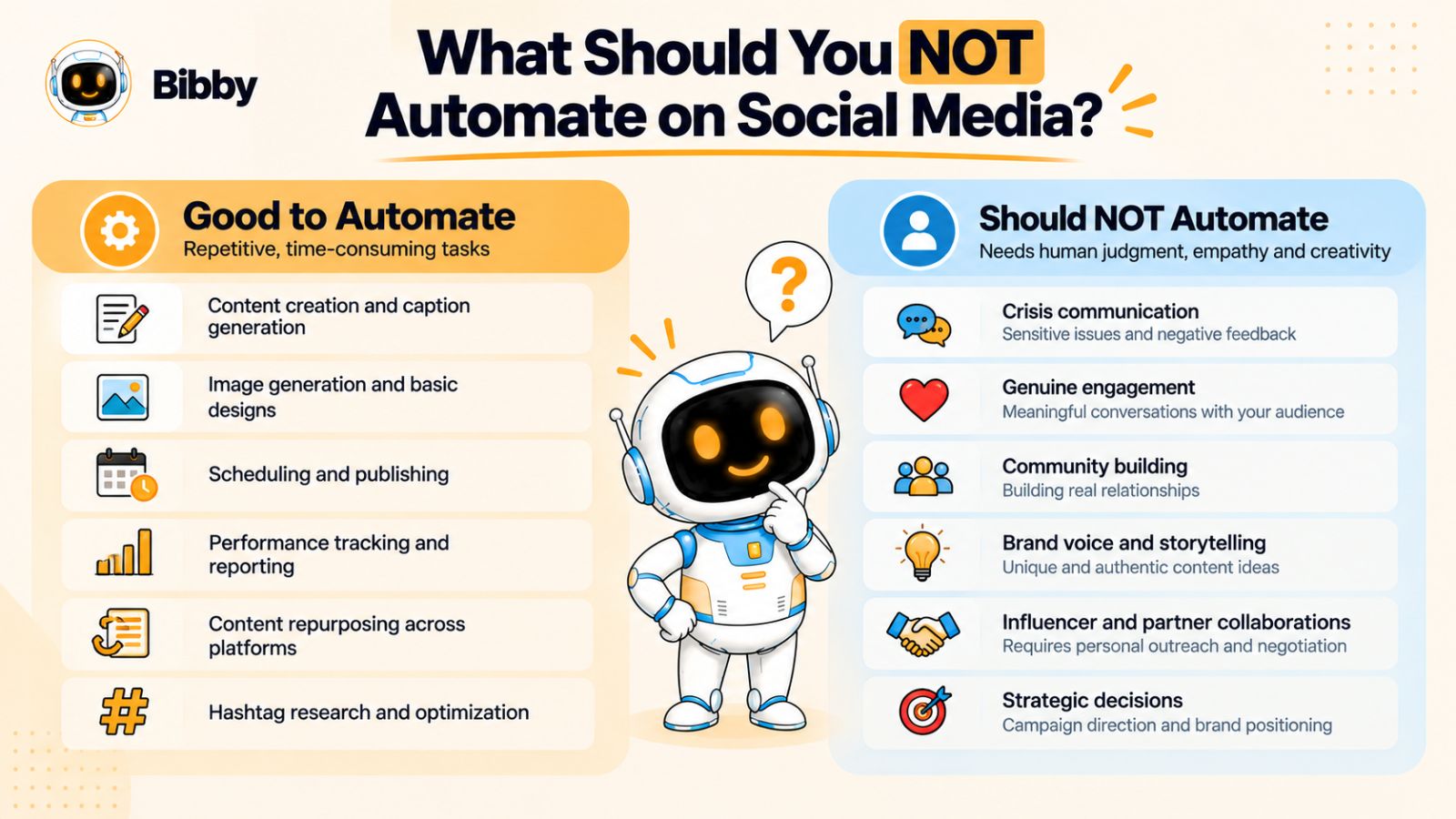
Social media automation can remove a huge amount of repetitive work, but that doesn't mean every part of social media should run automatically.
Social platforms are built around human attention and interaction. People follow brands because they want useful information, entertainment, expertise, personality, or a genuine connection—not because they want to interact with a machine that publishes perfectly on schedule.
The goal, therefore, isn't to automate your entire social media presence. It's to automate the repetitive work while protecting the parts of your marketing that depend on human judgment and relationships.
1. Don't Automate Every Conversation
Publishing a post automatically is very different from automatically responding to everyone who comments on it.
Comments often contain questions, jokes, criticism, personal experiences, or opportunities to start a real conversation. A generic automated response can make a brand feel disconnected very quickly.
Automation can help surface or organize conversations, but meaningful engagement should generally remain human.
If someone takes the time to leave a thoughtful comment, they should ideally receive a thoughtful response.
2. Don't Fully Automate Customer Complaints
Customer complaints require context.
A customer might be frustrated because an order arrived late, a product didn't work as expected, or they couldn't get the help they needed. A generic AI-generated response can easily make the situation worse if it doesn't understand what happened.
You can automate parts of the support workflow—for example, identifying messages that need attention or routing them to the right person.
But the actual resolution should involve a human whenever the situation requires judgment, empathy, or access to customer-specific information.
3. Don't Automate Your Brand Strategy
AI can help execute a strategy. It shouldn't be responsible for deciding what your brand fundamentally stands for.
Your content pillars, positioning, audience, tone, differentiation, and business objectives should come from your broader marketing strategy.
Once those decisions are made, automation can help turn them into consistent execution.
Think of it this way:
Humans decide the direction. Automation helps move faster in that direction.
4. Don't Automate Crisis Communication
A crisis is one of the worst times to rely on completely automated publishing.
When something unexpected happens, scheduled content can suddenly become inappropriate. A lighthearted promotional post might be published immediately after an industry incident, public controversy, product problem, or other sensitive event.
This is why automated social media workflows should include review and pause mechanisms.
You need the ability to stop scheduled content when circumstances change.
Automation is valuable when things are predictable. Crisis communication is valuable precisely because someone recognizes that the situation is no longer predictable.
5. Don't Let AI Define Your Personality
AI can generate captions, rewrite posts, suggest ideas, and adapt content for different platforms.
But if you let it completely determine how your brand communicates, your content can start sounding interchangeable.
Your audience should be able to recognize your brand's personality.
That means defining the fundamentals yourself:
- What does your brand sound like?
- What opinions can you confidently express?
- What language would you never use?
- How formal or casual should you be?
- What makes your perspective different?
- What should your audience remember about you?
Once those foundations exist, AI and automation can help you execute them consistently.
6. Don't Automate Strategic Decisions
Automation can tell you what happened. It can help organize the information. It can even identify patterns worth investigating.
But important strategic decisions still deserve human consideration.
For example, if a particular post performs well, you shouldn't automatically assume that producing hundreds of similar posts is the right move.
Ask why it worked.
Was the topic relevant?
Was the format better?
Did the timing matter?
Was the audience different?
Was the message particularly useful?
Automation can accelerate the feedback loop. It shouldn't replace the thinking inside the feedback loop.
A Better Way to Think About Automation
Instead of asking:
“How much of my social media can I automate?”
Ask:
“Which parts of my social media workflow don't need me personally?”
That question produces a much better automation strategy.
You want software to handle the repetitive execution while you focus your time on strategy, creativity, relationships, and decisions that require context.
Once you make that distinction, social media automation stops being about replacing people and starts being about giving people their time back.
Social Media Automation vs. Social Media Scheduling
Social media scheduling and social media automation are often used interchangeably, but they aren't exactly the same thing.
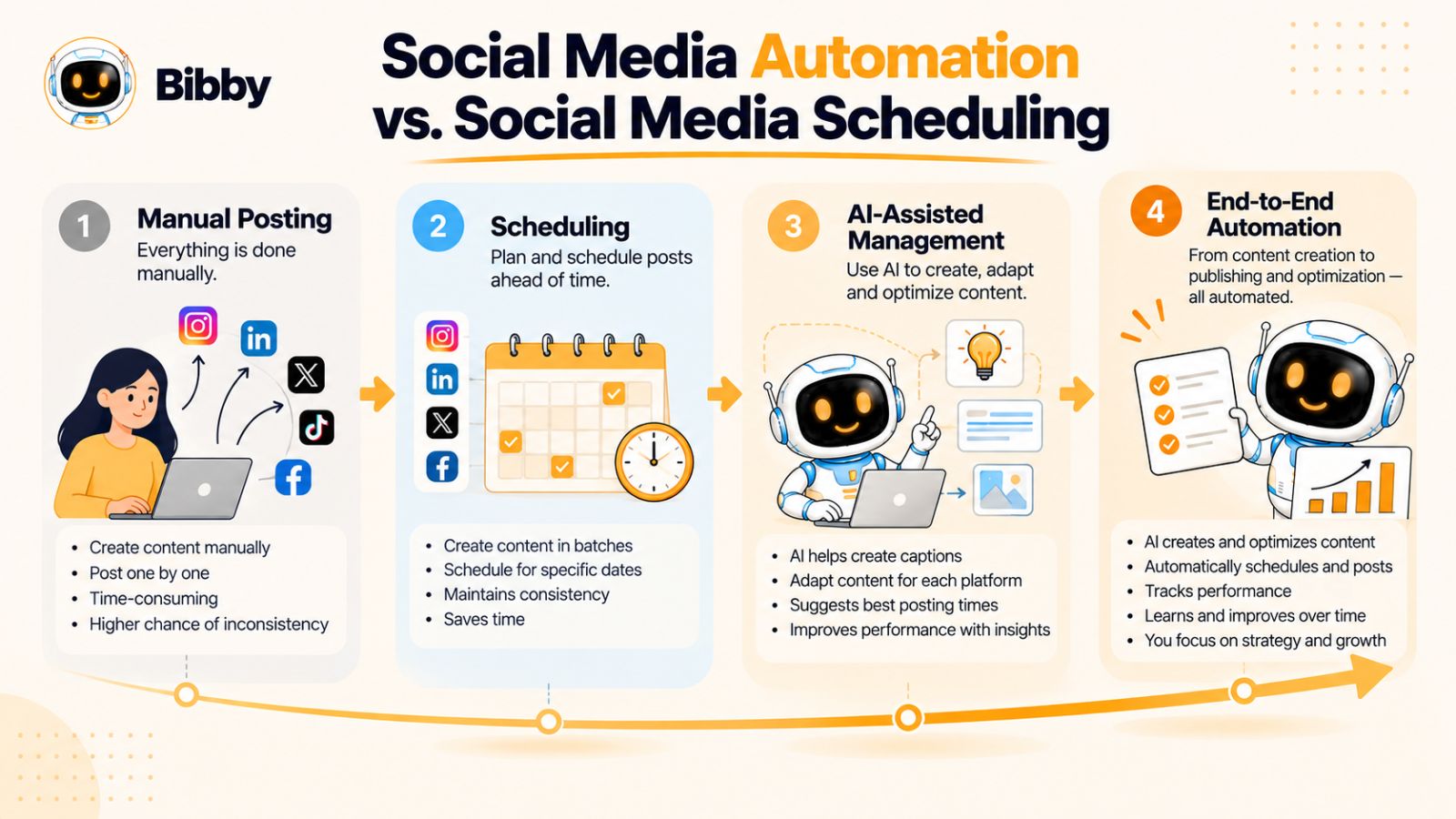
Scheduling is about when your content gets published. Automation is about how much of the workflow can happen without you manually completing every step.
That difference becomes increasingly important as your social media operation grows.
Imagine you have a week's worth of content ready to publish. A scheduling tool lets you choose the dates and times, queue the posts, and leave the platform to publish them automatically.
That's useful.
But what happens before the scheduling step?
Someone still needs to create the visual, write the caption, adapt the content for different platforms, decide which posts belong in the campaign, and prepare everything for publication.
And what happens afterward?
Someone needs to review performance, identify useful patterns, and decide what should be created next.
A broader social media automation workflow can connect more of these steps.
Scheduling Is One Step. Automation Is the Workflow.
A useful way to visualize the difference is:
Social media scheduling:
Create content → Choose date and time → Publish
Social media automation:
Create or generate content → Write caption → Adapt content → Select platforms → Schedule → Publish → Measure → Improve
The second workflow has considerably more opportunities for automation.
This doesn't mean every step should happen automatically. It means you can identify repetitive tasks throughout the process and remove unnecessary manual work.
Four Levels of Social Media Workflow
You can think about social media management as four increasingly sophisticated levels.
Level 1: Manual Posting
You create the content, write the caption, log into each platform, and publish everything manually.
This gives you maximum control, but it also creates the most repetitive work.
Level 2: Social Media Scheduling
You still create most of the content yourself, but you prepare it in advance and schedule it for future publication.
This solves the consistency problem and removes the need to be online every time a post needs to go live.
Level 3: AI-Assisted Social Media Management
AI begins helping with tasks such as caption writing, content ideas, creative generation, repurposing, and platform adaptation.
You still remain heavily involved, but you're no longer starting every task from a blank page.
Level 4: End-to-End Social Media Automation
The workflow becomes much more connected.
You can start with an idea or creative, use AI to assist with production, generate captions, adapt the content, schedule it across multiple platforms, publish it at appropriate times, and use performance information to improve future content.
This is where tools such as Bibby fit into the broader social media automation category.
Instead of treating content creation, caption generation, scheduling, and publishing as separate jobs, Bibby brings more of that workflow into one system. You can upload your creative or generate an image with AI, choose a posting style, generate captions, and schedule content across selected platforms.
The practical advantage is simple: fewer disconnected tools and fewer repetitive steps between having an idea and getting it published.
Why This Distinction Matters
If you're only looking for a social media scheduler, your main question might be:
“Can this tool publish my posts automatically?”
If you're looking for social media automation, your questions become broader:
“Can it help me create the content?”
“Can it write or adapt the captions?”
“Can it handle different content formats?”
“Can it publish across my platforms?”
“Can it help me manage campaigns?”
“Can I control the workflow without constantly jumping between tools?”
That shift in perspective can help you choose the right approach.
A scheduler solves one recurring problem: remembering to publish.
An automation workflow can solve a much larger problem: reducing the amount of manual work required to run social media consistently.
And once you understand that difference, the next question becomes even more useful: what does a complete automated social media workflow actually look like from start to finish?
How an Automated Social Media Workflow Actually Works
Knowing what you can automate is useful. Knowing how those automated tasks fit together is what makes the strategy practical.
A well-designed social media automation workflow should move content from an initial idea to publication with as little unnecessary manual work as possible.
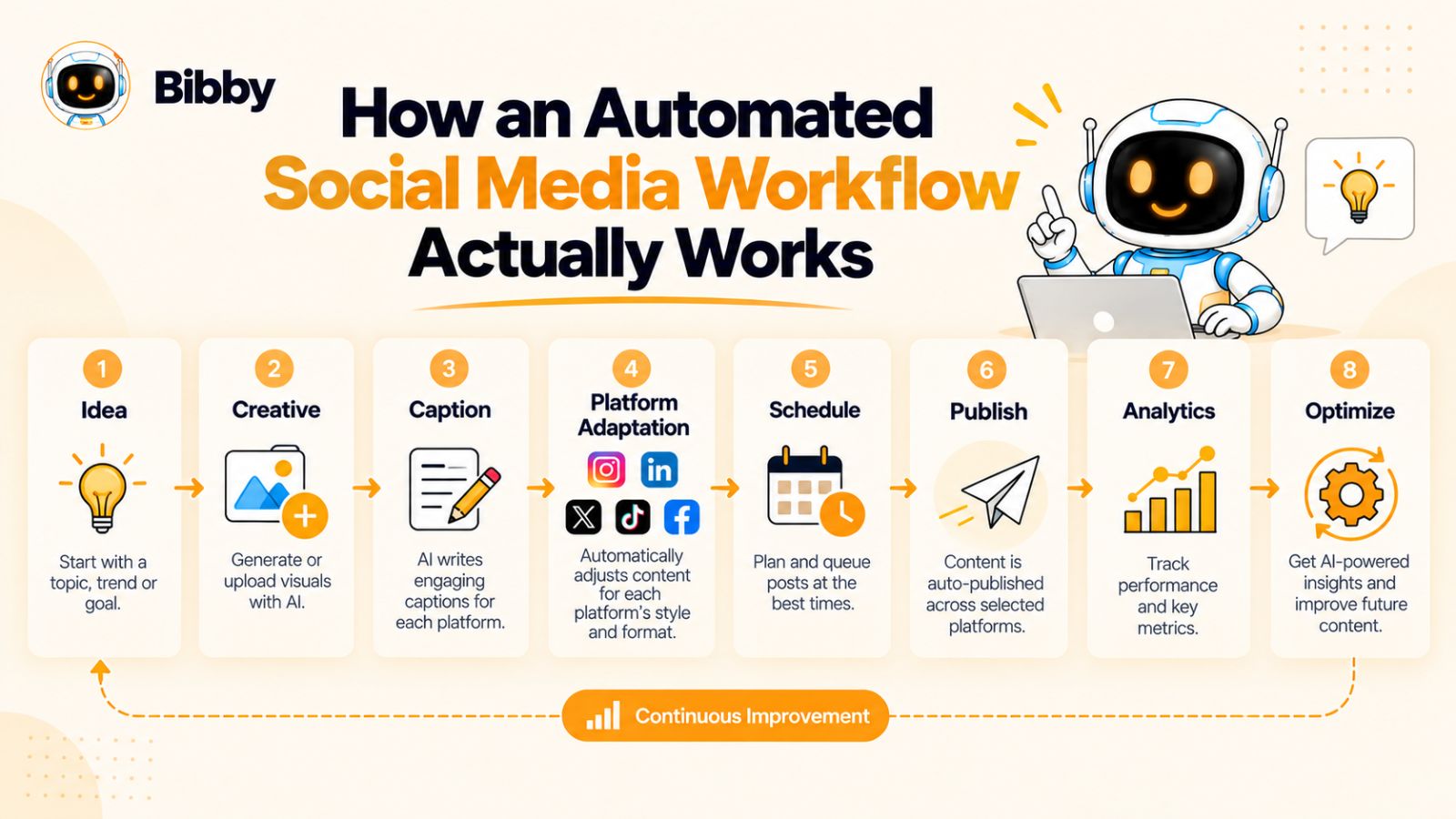
A simple version looks like this:
Idea → Creative → Caption → Platform Adaptation → Scheduling → Publishing → Analytics → Optimization
Each stage has a different job, and not every stage needs to be completely automated.
Step 1: Start With an Idea
Every social media workflow begins with something worth communicating.
That might be a product announcement, educational tip, customer story, industry insight, promotional offer, behind-the-scenes moment, or response to something happening in your market.
Automation shouldn't remove this strategic starting point.
You still need to know why you're creating the content and who it's for.
AI can help generate ideas, but your audience, positioning, and marketing objectives should guide which ideas actually become posts.
Step 2: Create the Creative
Once you know what you want to communicate, you need a format.
That could be:
- A single image
- A carousel
- A short-form video
- A longer video
- A story
- A text-based post
Depending on the workflow, you can create these assets yourself or use AI to help generate supporting visuals.
The important thing is to build a system where the creative doesn't become a bottleneck.
Step 3: Generate and Refine the Caption
Next comes the copy.
Instead of writing every caption from scratch, AI can create a first draft based on the content, your selected style, and the purpose of the post.
You then review it.
This is an important distinction: AI-generated doesn't have to mean AI-approved without review.
The most effective workflow gives you a strong starting point while allowing you to make the final call.
Step 4: Adapt the Content for Each Platform
Your audience isn't identical across every social network.
A piece of content may need a different caption, structure, length, or presentation depending on whether it is going to Facebook, Instagram, LinkedIn, TikTok, or YouTube.
Automation can reduce the repetitive work involved in those adaptations.
Rather than manually rebuilding the content several times, you can use a central workflow to prepare the variations you need.
Step 5: Choose Your Platforms
Once the content is ready, decide where it belongs.
Not every post needs to appear everywhere.
A useful automation system should make it easy to select the relevant platforms without forcing you to maintain completely separate workflows for each one.
For example, an educational carousel might make sense for LinkedIn and Instagram, while a short product demonstration might be more appropriate for TikTok, Instagram, and YouTube.
Automation should make those choices easier to execute—not make the choices for you.
Step 6: Schedule the Content
Now you can decide when each piece should be published.
This is where traditional scheduling tools have historically provided most of their value.
Instead of remembering to publish every day, you can prepare your content in advance and let the system handle the publishing schedule.
More advanced platforms can also help identify appropriate publishing times using available performance or audience data.
The result is a more consistent publishing cadence without requiring you to be online at the exact moment every post needs to go live.
Step 7: Publish Automatically
Once everything is approved and scheduled, the system handles the repetitive execution.
Posts can be published to the selected platforms according to the schedule you've established.
This is one of the clearest benefits of automation: your social media presence doesn't depend on someone remembering to press “Publish” every day.
Step 8: Measure What Happened
Publishing isn't the end of the workflow.
You need to understand what happened after the content went live.
Depending on the platforms and tools you're using, you might examine metrics such as reach, impressions, engagement, clicks, views, or other indicators relevant to your objectives.
The purpose isn't to collect numbers simply because they're available.
The purpose is to discover what your audience responds to.
Step 9: Improve the Next Cycle
Finally, feed those learnings back into your next round of content.
Maybe carousels consistently outperform single-image posts for a particular audience.
Maybe educational content generates more meaningful engagement than promotional posts.
Maybe certain topics work particularly well at specific times.
Those observations can influence your next content cycle.
That creates a continuous system:
Create → Publish → Measure → Learn → Create Better Content
This is ultimately where social media automation becomes powerful.
You're not simply saving time by scheduling posts. You're creating a repeatable operating system for your social media.
Where Bibby Can Fit Into This Workflow
A tool like Bibby is designed around this connected approach.
Instead of starting with a blank scheduling calendar, you can upload an image or generate one with AI, choose a posting style, and have captions generated as part of the process. You can then schedule the resulting content across selected platforms and different dates, with AI-optimized publishing times helping automate the timing decision.
The workflow can also accommodate different types of media, including images, carousels, videos, and stories.
That matters because the value of automation isn't necessarily having more individual features. It's reducing the number of separate steps you have to manage yourself.
And that's becoming even more interesting as social media tools move from traditional dashboards toward conversational interfaces—where you can tell the system what you want instead of manually navigating through every stage of the workflow.
How Bibby Fits Into the Social Media Automation Workflow
Once you understand what social media automation should actually do, the next challenge is finding a workflow that doesn't require you to stitch together a collection of different tools.
You might use one tool to generate images, another to write captions, another to schedule posts, and separate native platforms to publish and manage everything. Each tool may work well on its own, but moving content between them creates another layer of work.
Bibby takes a more connected approach to social media automation.
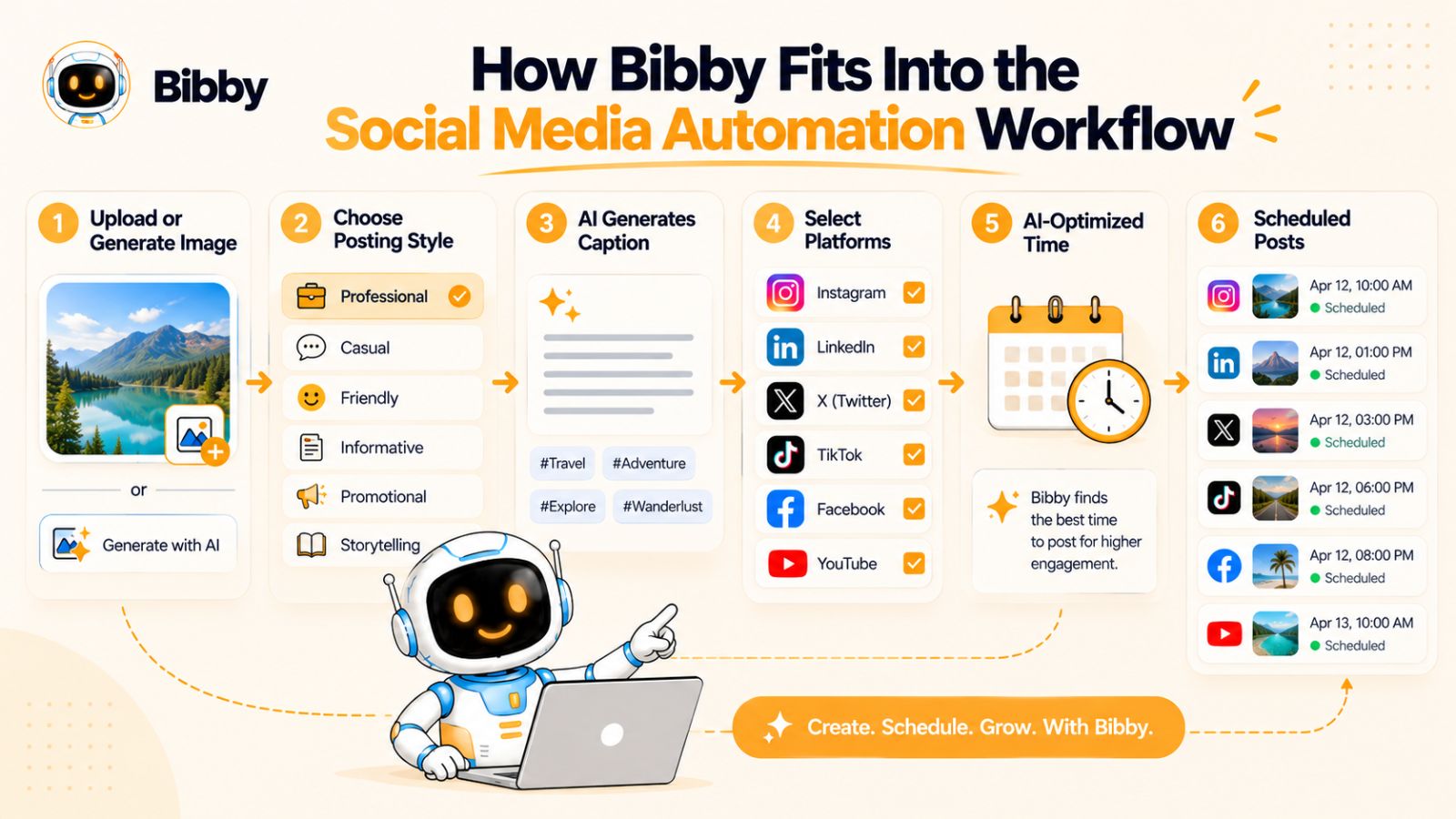
Instead of treating content creation, caption writing, scheduling, and publishing as completely separate tasks, Bibby brings them together into a single workflow.
Start With Your Creative
The process can begin with something as simple as an image.
You can upload your own creative or use AI to generate an image for the post.
This gives you flexibility depending on how you create content. If your business already has a library of product photography or branded designs, you can use those assets. If you need a visual for a new idea, AI generation can help you create one without starting the design process from scratch.
Choose How You Want the Post to Feel
Once the creative is ready, you can choose a posting style.
This gives the system context for the content you're trying to create rather than simply asking an AI to produce a generic caption.
The distinction is important because effective social media content isn't just about putting words underneath an image. The writing needs to fit the purpose and style of the post.
Let AI Generate the Caption
Bibby can then generate a caption automatically based on the content and selected posting style.
Instead of staring at an empty caption box, you get a starting point that can be reviewed and refined before publication.
For businesses publishing frequently, this can remove one of the most repetitive parts of the social media workflow.
You don't have to choose between writing every caption manually and publishing whatever AI generates. A better approach is to let AI handle the first draft while you retain control over the final message.
Schedule Across Your Selected Platforms
Once the content is ready, you can schedule it for different dates and distribute it across the social platforms you've selected.
That can include platforms such as Facebook, Instagram, LinkedIn, YouTube, and TikTok.
The benefit here isn't simply the number of platforms.
It's the fact that you can manage distribution from a centralized workflow rather than repeatedly uploading the same content and maintaining separate publishing processes.
Bibby can also schedule content at AI-optimized times, helping remove another repetitive decision from the publishing process.
Work With More Than One Content Format
Modern social media isn't limited to single-image posts.
Depending on the platform and your strategy, you may want to publish:
- Images
- Carousels
- Videos
- Stories
A social media automation workflow needs to accommodate the way people actually create and consume content today.
The more formats you use, the more valuable a centralized workflow becomes because you're no longer managing every content type as a completely separate process.
Manage the Workflow Through Chat
Bibby's approach also extends beyond traditional dashboards with its chat interface.
Instead of navigating through a series of menus for every task, you can interact with the tool conversationally to manage parts of your social media workflow.
From the chat interface, you can work on tasks such as:
- Creating a brand kit
- Creating a campaign
- Creating posts
- Regenerating captions
- Managing other social media tasks
This changes the interaction model.
Traditional social media software often asks you to understand the software first: find the right menu, open the right section, select the right options, and then complete the task.
A conversational workflow starts from the opposite direction.
You describe what you want to accomplish, and the system helps you execute it.
That can be particularly useful when your goal isn't simply to schedule one post but to manage an entire content workflow.
The Bigger Benefit: Fewer Manual Handoffs
The biggest value of a connected social media automation workflow isn't any single AI feature.
It's what happens when those features work together.
Without an integrated workflow, you might do this:
Generate image → Download image → Open another tool → Write caption → Copy caption → Open scheduler → Upload image → Paste caption → Select platforms → Choose dates → Schedule
With a more connected workflow, the same process can become considerably more streamlined:
Create → Generate → Review → Schedule → Publish
That's the fundamental promise of social media automation.
The objective isn't to eliminate your involvement. It's to eliminate the unnecessary work between your decisions.
You still decide what your brand should say, what content matters, which campaigns to run, and how you want to communicate with your audience.
Bibby can take care of much of the repetitive execution around those decisions—giving you more time to focus on the parts of social media that actually require you.
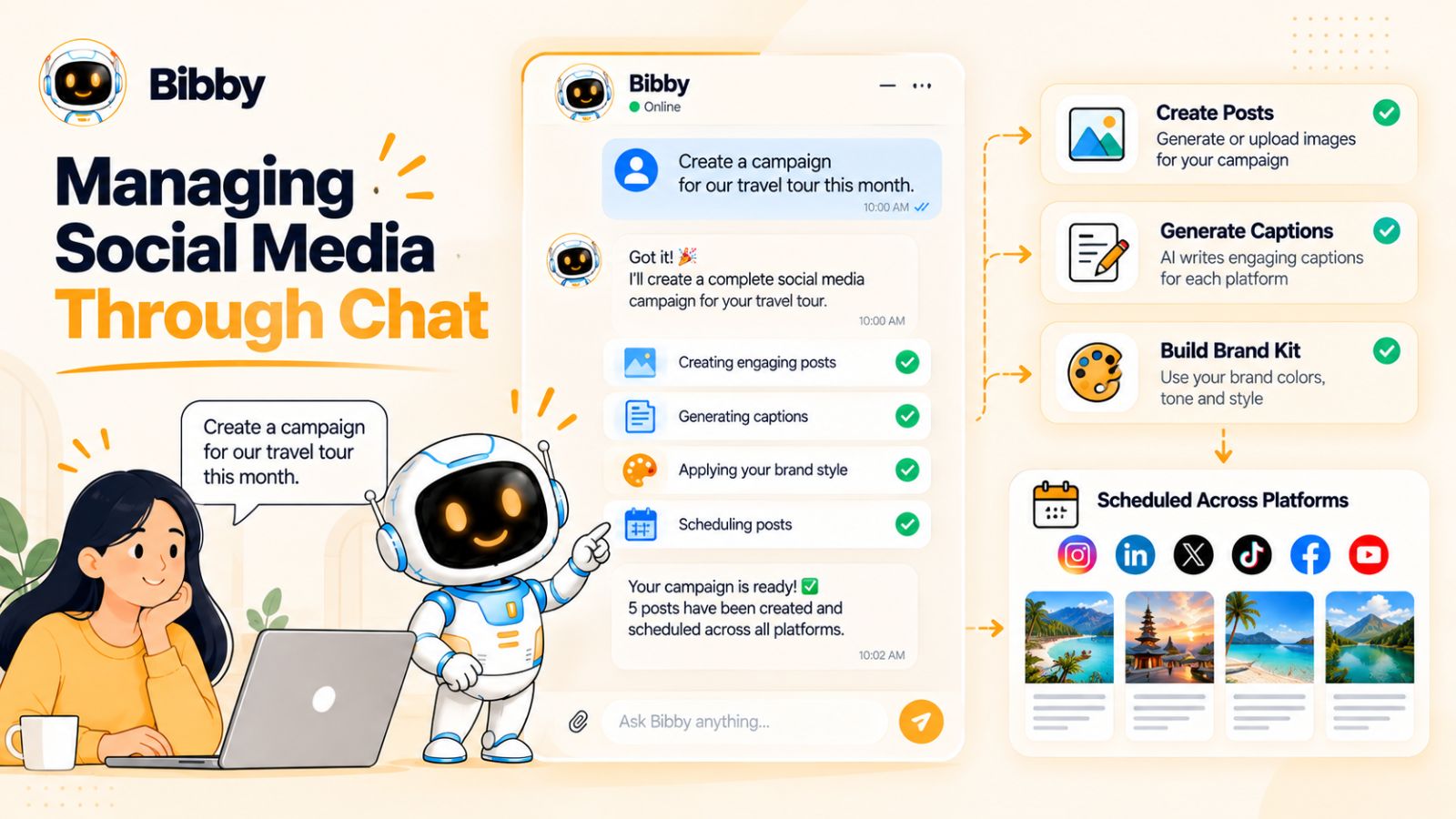
Managing Social Media Through Chat
For years, managing social media with software meant navigating dashboards.
You opened a content calendar, selected an account, uploaded an image, entered a caption, chose a date, selected a platform, and repeated the process whenever you wanted to make another change.
That workflow works, but it assumes you already know where to click to accomplish something.
A conversational interface changes the starting point.
Instead of thinking about which button you need, you can describe the outcome you want.
For example, rather than manually working through several screens to prepare a campaign, you could approach the task as a conversation: explain the campaign, provide the relevant context, and then work with the system to create and refine the content.
That's the broader idea behind Bibby's chat interface.
Create a Brand Kit Through Conversation
Your brand identity influences everything you publish.
Colors, visual style, tone of voice, messaging preferences, and other brand elements need to remain consistent as you create content.
A brand kit can provide those rules so your content creation workflow has a consistent foundation.
With Bibby, you can work on creating a brand kit through the chat interface rather than treating brand setup as an isolated technical task.
The benefit is not simply convenience.
A well-defined brand kit can give AI better context when generating content, helping reduce the amount of correction required later.
Create Campaigns Without Building Everything Manually
Campaigns often involve multiple pieces of content working toward the same objective.
Instead of creating every post independently, you can describe the campaign you want to build and use the conversational workflow to help turn that idea into a structured content plan.
For example, a campaign might need:
Launch announcement → Educational post → Product feature → Social proof → Reminder → Call to action
The conversation can become the starting point for building that sequence.
You can then review the content, make adjustments, and move it into the publishing workflow.
Create Posts From a Simple Prompt
Chat also makes the content creation process more direct.
You don't necessarily need to begin with a perfectly formatted brief.
You can start with an idea.
Perhaps you want to announce a new product, explain a concept, promote an upcoming event, or share an industry insight.
The conversational interface can help turn that initial thought into a social media post.
This is particularly useful for people who know what they want to communicate but don't want to spend time translating that idea into a series of software inputs.
Regenerate Captions When They Don't Feel Right
The first AI-generated caption isn't always going to be the final one.
Maybe it's too formal.
Maybe it's too long.
Maybe the opening isn't strong enough.
Maybe it doesn't sound like your brand.
In a traditional workflow, you might manually rewrite the caption or return to the generation interface and start again.
With a conversational workflow, you can simply provide feedback.
For example:
Make it shorter.
Make the tone more conversational.
Focus more on the product benefit.
Give me a stronger opening.
The important shift is that you're interacting with the content rather than repeatedly rebuilding it.
Conversation Becomes the Control Layer
This is perhaps the most interesting part of conversational social media management.
The chat interface doesn't have to be limited to content generation.
It can become a control layer for the broader workflow.
Instead of remembering where a particular function lives inside a complex dashboard, you can communicate what you want to accomplish and let the system help execute the task.
That can make social media management feel less like operating software and more like working with a digital assistant.
And that distinction matters as social media workflows become more complex.
The future of automation isn't necessarily about adding more buttons.
It may be about removing the need to understand every button in the first place.
Automation Still Needs Human Direction
A conversational interface doesn't eliminate the need for human input.
In fact, the quality of the result often depends on the quality of the direction you provide.
You still need to know your audience, understand your brand, define your objectives, and recognize whether the resulting content actually represents your business.
The AI can help execute.
You remain responsible for the judgment.
That combination—human direction plus automated execution—is what makes conversational social media management useful rather than simply another way to generate generic content.
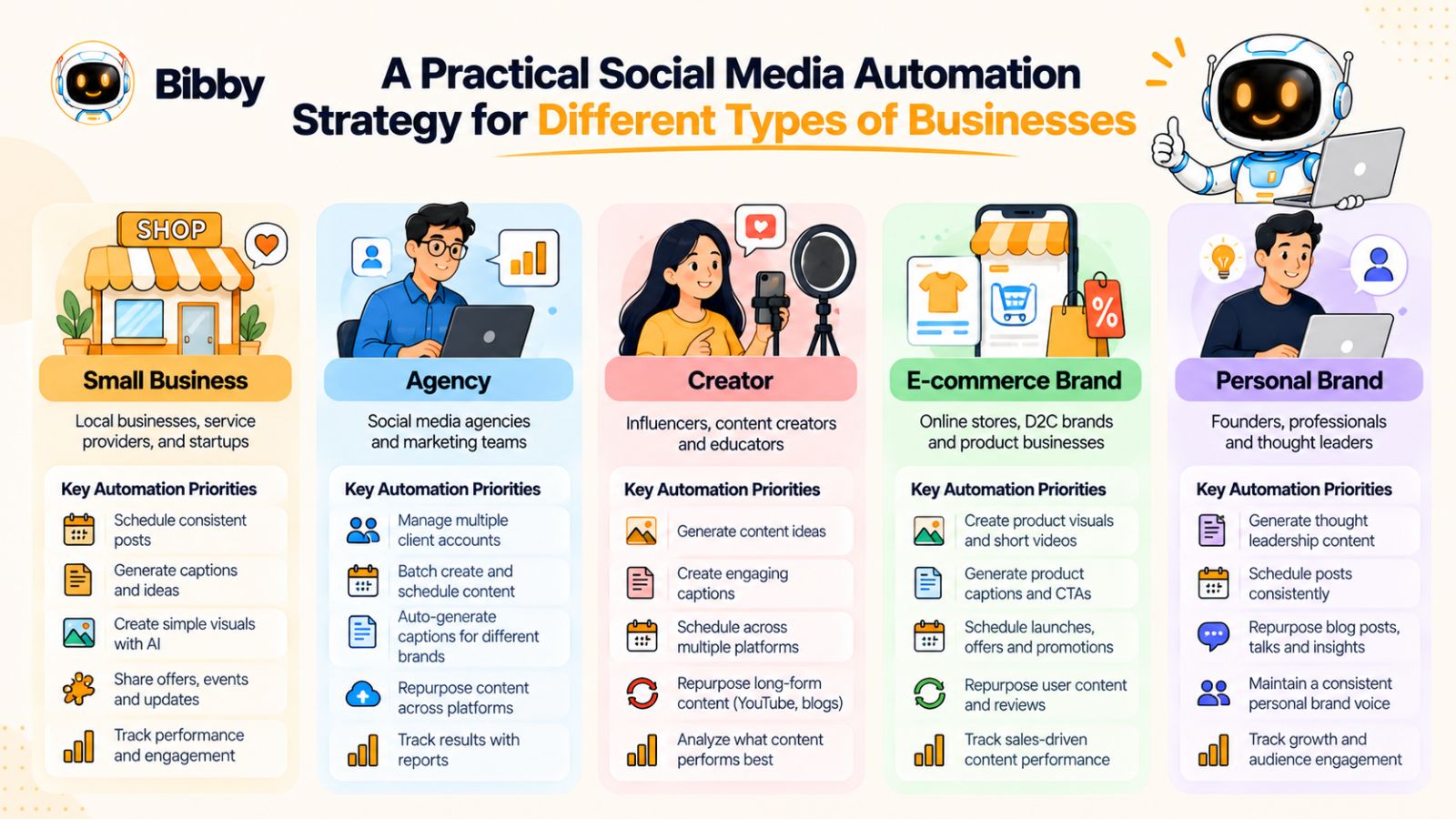
A Practical Social Media Automation Strategy for Different Types of Businesses
There isn't one perfect social media automation workflow for everyone.
A solo creator has different needs from an e-commerce brand. An agency managing ten clients has different problems from a local business with one Instagram account.
The principles stay the same, but the tasks worth automating change depending on how much content you produce, how many platforms you use, and how much human involvement your content requires.
For Small Businesses
Small businesses often have the biggest reason to automate social media: limited time.
The owner or a small team may be responsible for marketing, sales, customer service, operations, and social media at the same time.
For this type of business, automation can take care of repetitive publishing tasks such as:
- Preparing posts in advance
- Generating initial captions
- Scheduling content
- Publishing across multiple platforms
- Repurposing existing content
- Organizing campaigns
The goal isn't to create an enormous content operation.
It's to establish a consistent system that can keep the business visible without requiring someone to spend hours managing social media every day.
A tool such as Bibby can be particularly useful here because content creation, AI assistance, scheduling, and publishing can be handled within a more connected workflow.
For Agencies
Agencies face a different challenge: scale.
An agency might manage several brands, each with its own content calendar, brand identity, platforms, campaigns, and approval requirements.
The more clients an agency manages, the more time gets consumed by repetitive execution.
Automation can help agencies streamline tasks such as:
- Content preparation
- Caption generation
- Content repurposing
- Scheduling
- Cross-platform publishing
- Campaign management
- Routine workflow coordination
But agencies should be careful not to automate away the strategic value they're providing.
Clients aren't paying an agency simply to press the Publish button.
They're paying for strategy, creative thinking, positioning, expertise, and results.
Automation should therefore increase the agency's capacity rather than replace the work clients actually value.
For Creators
Creators often have a different constraint: content volume.
A creator may have plenty of ideas but limited time to turn those ideas into content for every platform.
One video might become a YouTube video, a TikTok, an Instagram Reel, a carousel, a story, and several text-based posts.
Automation and AI can help with this repurposing process.
Instead of creating every version independently, creators can start with one strong piece of content and build multiple platform-specific variations around it.
The creator still provides the personality, experience, opinions, and original ideas.
Automation helps distribute them.
For E-commerce Brands
E-commerce businesses often have a large library of products and promotional opportunities.
That creates many potential social media posts:
- Product features
- New arrivals
- Offers
- Customer stories
- Product demonstrations
- Seasonal campaigns
- Educational content
- User-generated content
Automation can help turn this product information into a consistent publishing system.
For example, a product launch could be planned as a sequence of posts rather than a single announcement.
The brand could introduce the product, explain the problem it solves, demonstrate how it works, highlight customer benefits, and create reminder content around the launch.
Automation can coordinate the publishing schedule while the marketing team remains responsible for the messaging and campaign strategy.
For Personal Brands
Personal brands need perhaps the most careful balance between automation and authenticity.
The advantage of automation is obvious: it can help you maintain a consistent publishing schedule even when you're busy.
But personal brands are built around the individual's perspective.
Your experiences, opinions, expertise, stories, and personality are the product.
So automation should focus primarily on execution:
Create once → Adapt → Schedule → Publish → Measure
It should not turn your personal brand into a stream of generic AI-generated content.
The more personality your audience expects from you, the more important human involvement becomes in the content itself.
Choosing the Right Automation Level
You can use the following principle regardless of your business type:
Automate according to repetition, not ambition.
You don't need the most sophisticated automation workflow simply because sophisticated tools exist.
Start with the tasks that consume the most time without adding much strategic value.
If scheduling takes too much time, automate scheduling.
If caption writing is the bottleneck, automate first drafts.
If creating platform-specific versions is slowing you down, automate adaptation.
If managing several campaigns has become difficult, automate campaign workflows.
Then expand your automation as your social media operation grows.
The best system isn't necessarily the one with the most automation.
It's the one that removes the most unnecessary work while preserving the human decisions that make your content worth following.
How Much of Your Social Media Should You Automate?
There is no universal percentage of social media that every business should automate.
A business publishing three times a week doesn't have the same automation needs as an agency managing hundreds of posts across multiple clients. A creator building a personal brand shouldn't use exactly the same workflow as an e-commerce company running large promotional campaigns.
Instead of asking, “What percentage should I automate?”, ask a more useful question:
“Which tasks genuinely need my attention?”
That question helps you separate valuable human work from repetitive execution.
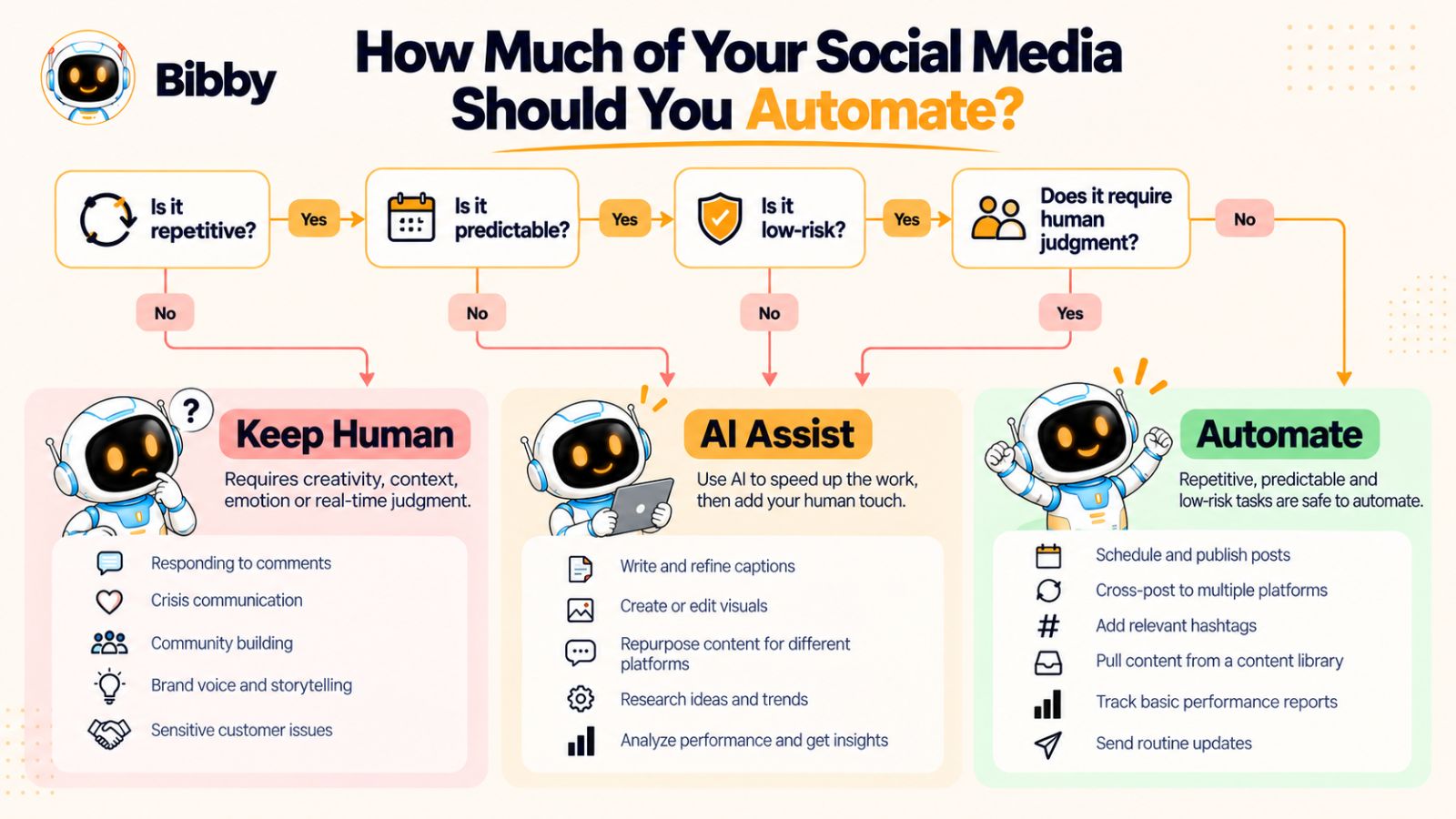
Automate It When the Task Is Repetitive
If you perform the same action over and over again, automation is worth considering.
Scheduling posts is a good example.
Uploading the same type of content, selecting dates, and publishing repeatedly doesn't usually require much creative judgment. Once the workflow is established, software can handle much of the repetition.
The same principle applies to caption drafts, Content Repurposing, campaign scheduling, and cross-platform publishing.
Automate It When the Process Is Predictable
Automation works particularly well when you can describe the process as a series of repeatable steps.
For example:
Upload creative → Generate caption → Select platforms → Schedule → Publish
That's a predictable workflow.
The more predictable the process, the easier it is to automate without creating unexpected results.
Automate It When It Is Time-Consuming but Low-Risk
Some tasks take a lot of time without being especially important.
Those are excellent automation candidates.
Imagine spending an hour every week manually copying captions, uploading the same creative to different platforms, and entering publishing times.
If software can handle those steps reliably, you're not losing anything valuable by automating them.
You're simply getting that hour back.
Keep It Human When Context Matters
The opposite is also true.
If a task requires understanding a complicated situation, interpreting someone's emotions, or making an important strategic decision, human involvement becomes more valuable.
A customer complaint is a good example.
You might automate the process of identifying the complaint and notifying the right person.
But deciding how to resolve the situation requires context.
Keep It Human When Relationships Matter
Social media isn't just a distribution channel.
It's also a place where brands and audiences interact.
A person asking a thoughtful question deserves more than a generic automated reply.
Likewise, an existing customer, industry expert, creator, or potential partner may be worth engaging with personally.
Automation should create more time for these interactions—not eliminate them.
Keep It Human When the Risk Is High
Some content has consequences beyond engagement metrics.
Crisis statements, sensitive announcements, controversial subjects, legal issues, and important customer communications deserve careful human review.
Even if AI can generate the content, that doesn't mean it should automatically publish it.
A strong automation system should make human approval easy when the stakes are high.
Use the Automation Test
When you're unsure whether to automate a particular task, run it through five questions:
1. Does this happen repeatedly?
If yes, automation may help.
2. Does it follow a predictable process?
If yes, automation becomes easier.
3. Does it consume meaningful time?
If yes, automation could create a measurable benefit.
4. Is the cost of a mistake relatively low?
If yes, automation is generally safer.
5. Does the task require genuine human judgment or relationship-building?
If yes, keep a human involved.
The more “yes” answers you get to the first four questions—and the less human judgment the task requires—the stronger the case for automation.
The Goal Isn't Maximum Automation
This is perhaps the most important principle in the entire article.
More automation isn't automatically better.
If you automate a process that never needed to exist, you've simply made an inefficient process faster.
If you automate an important human interaction, you may save time while damaging the relationship that made the interaction valuable.
The goal is therefore not to automate everything.
The goal is to build a social media system where software handles repetitive execution and people spend their time on strategy, creativity, relationships, and decisions that actually require them.
That is the balance that makes social media automation sustainable.
Social Media Automation Checklist
Knowing what to automate is one thing. Turning that knowledge into an actual workflow is another.
Before you start automating every available task, use this checklist to identify the repetitive work that is taking time away from more valuable marketing activities.
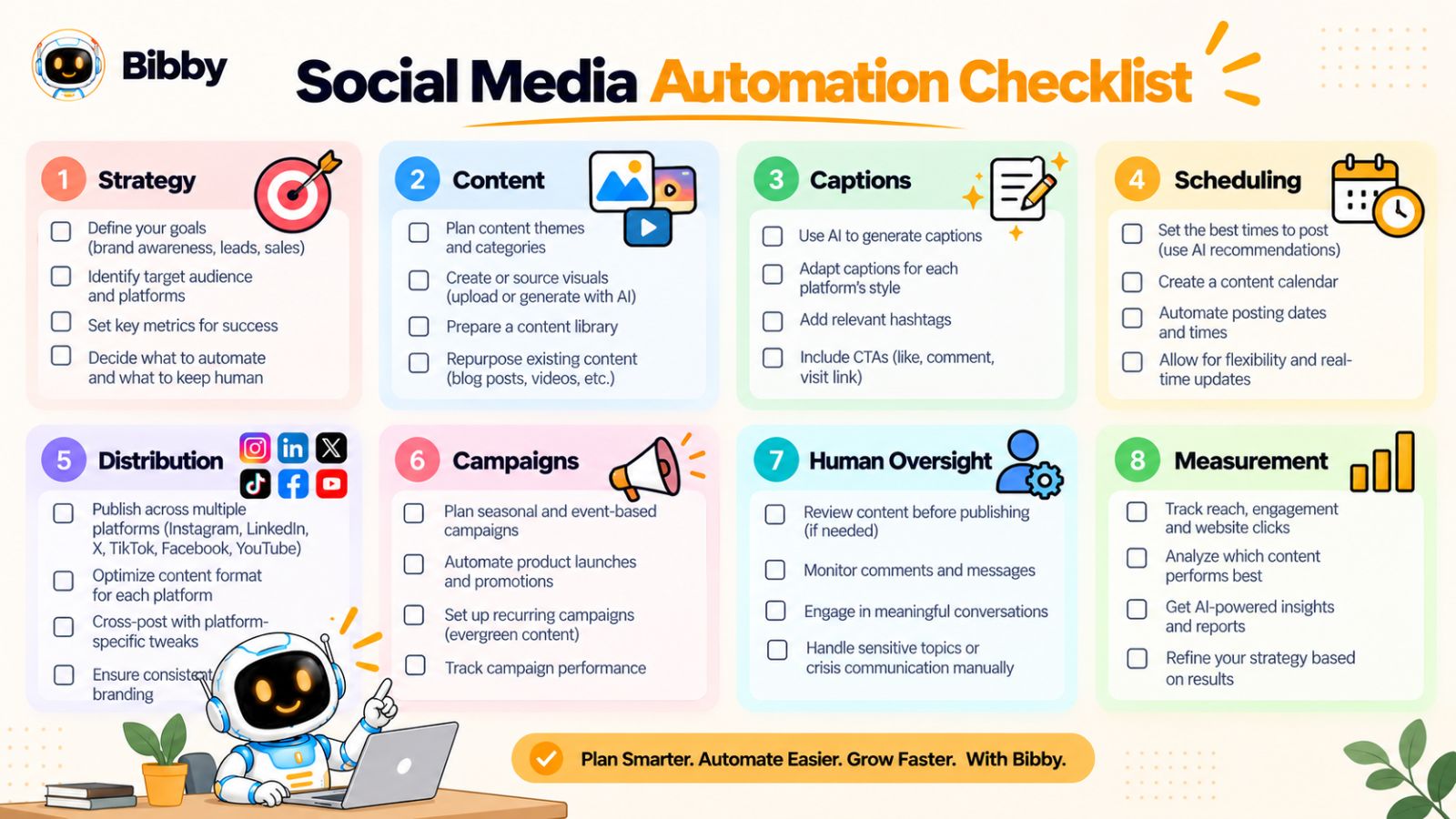
Define Your Content Strategy
Before automating anything, establish the fundamentals.
- Define your target audience
- Establish your main content pillars
- Define your brand voice
- Decide which platforms actually matter for your audience
- Establish your publishing goals
Automation works best when it has clear instructions to follow. If your strategy is unclear, automating your workflow won't solve the underlying problem.
Prepare Your Content
Create a repeatable process for producing your social media assets.
- Create reusable visual templates
- Build a library of brand assets
- Decide which content formats you'll use
- Identify opportunities for AI-generated visuals
- Create a process for repurposing existing content
The goal is to make content production repeatable without making every post look identical.
Automate Caption Creation
Reduce the amount of time spent starting captions from scratch.
- Use AI to generate initial caption drafts
- Define your preferred writing styles
- Adapt captions for different platforms
- Review AI-generated copy before publishing
- Keep your brand voice consistent
Tools such as Bibby can bring caption generation into the same workflow as content creation and scheduling, reducing the number of separate steps involved.
Automate Scheduling
Remove the need to manually publish every post.
- Build your content calendar
- Schedule posts in advance
- Use platform-appropriate publishing times
- Consider AI-assisted timing optimization
- Schedule content across relevant platforms
- Leave room for timely or reactive content
A scheduled calendar should never become so rigid that you can't respond to what's happening in the real world.
Automate Content Distribution
If you're active across several platforms, reduce unnecessary duplication of effort.
- Select which platforms each piece of content belongs on
- Adapt content where necessary
- Avoid blindly publishing identical content everywhere
- Centralize publishing where possible
- Review platform-specific formatting requirements
The objective is one efficient workflow, not one identical post copied across every network.
Automate Campaign Workflows
For launches and promotions, create a sequence rather than isolated posts.
- Define the campaign objective
- Map the campaign's content sequence
- Create supporting visuals
- Prepare captions
- Schedule campaign posts
- Review the entire sequence before launch
This can be particularly useful for product launches, seasonal campaigns, events, and promotional periods.
Keep Human Oversight
Automation should never mean abandoning the workflow after pressing a button.
- Review important AI-generated content
- Monitor comments and conversations
- Respond personally when context matters
- Review sensitive communications
- Pause scheduled content when circumstances change
- Keep strategic decisions under human control
This is what prevents automation from turning into autopilot.
Measure and Improve
Finally, build measurement into the workflow.
- Track relevant performance metrics
- Identify high-performing topics
- Compare content formats
- Review platform performance
- Identify content worth repurposing
- Use your findings to improve future content
Your workflow should continuously get smarter.
Create → Publish → Measure → Learn → Improve → Repeat.
Your Social Media Automation Audit
If you want to identify your biggest automation opportunities quickly, look at everything you currently do during a typical week and divide the tasks into three categories:
Automate: Repetitive, predictable, low-risk work.
Assist with AI: Tasks where AI can create a useful first draft but human review still adds value.
Keep human: Strategy, relationships, sensitive communication, and decisions requiring context.
That simple exercise can reveal where you're spending time unnecessarily.
The best social media automation system isn't the one that does the most things without you.
It's the one that makes sure your time is spent on the things that actually need you.
Final thoughts
Social media automation isn't about putting your entire marketing operation on autopilot. It's about identifying repetitive work—such as content scheduling, caption creation, cross-platform publishing, repurposing, and campaign coordination—and letting software handle more of the execution.
The three principles to remember are simple: automate repetitive tasks, keep strategic and relationship-driven decisions human, and connect your workflow so content can move from idea to publication with fewer manual steps.
Tools such as Bibby can help bring more of that workflow together, from AI-assisted creative and caption generation to scheduling content across platforms and managing social media through a conversational interface.
Once you've identified what to automate, the natural next step is building the system around it. The next useful question is: how do you create a social media automation strategy from scratch that consistently produces, publishes, and improves your content?