

Social media has become an important part of building a designer’s personal brand, attracting clients, showcasing creative work, and staying visible online—but consistently creating and publishing content can quickly become a job of its own.
AI social media automation for designers can change that by combining content creation, captions, scheduling, and publishing into a streamlined workflow. The key is using AI to remove repetitive work while keeping your creative direction, visual identity, and voice at the center of everything you publish.
You’ll also see how to build a practical automation workflow that saves time without making your social presence feel automated.
What Is AI Social Media Automation for Designers?
AI social media automation is the use of artificial intelligence and automation tools to handle repetitive parts of your social media workflow—from turning creative assets into posts to writing captions, scheduling content, and publishing it across multiple platforms.
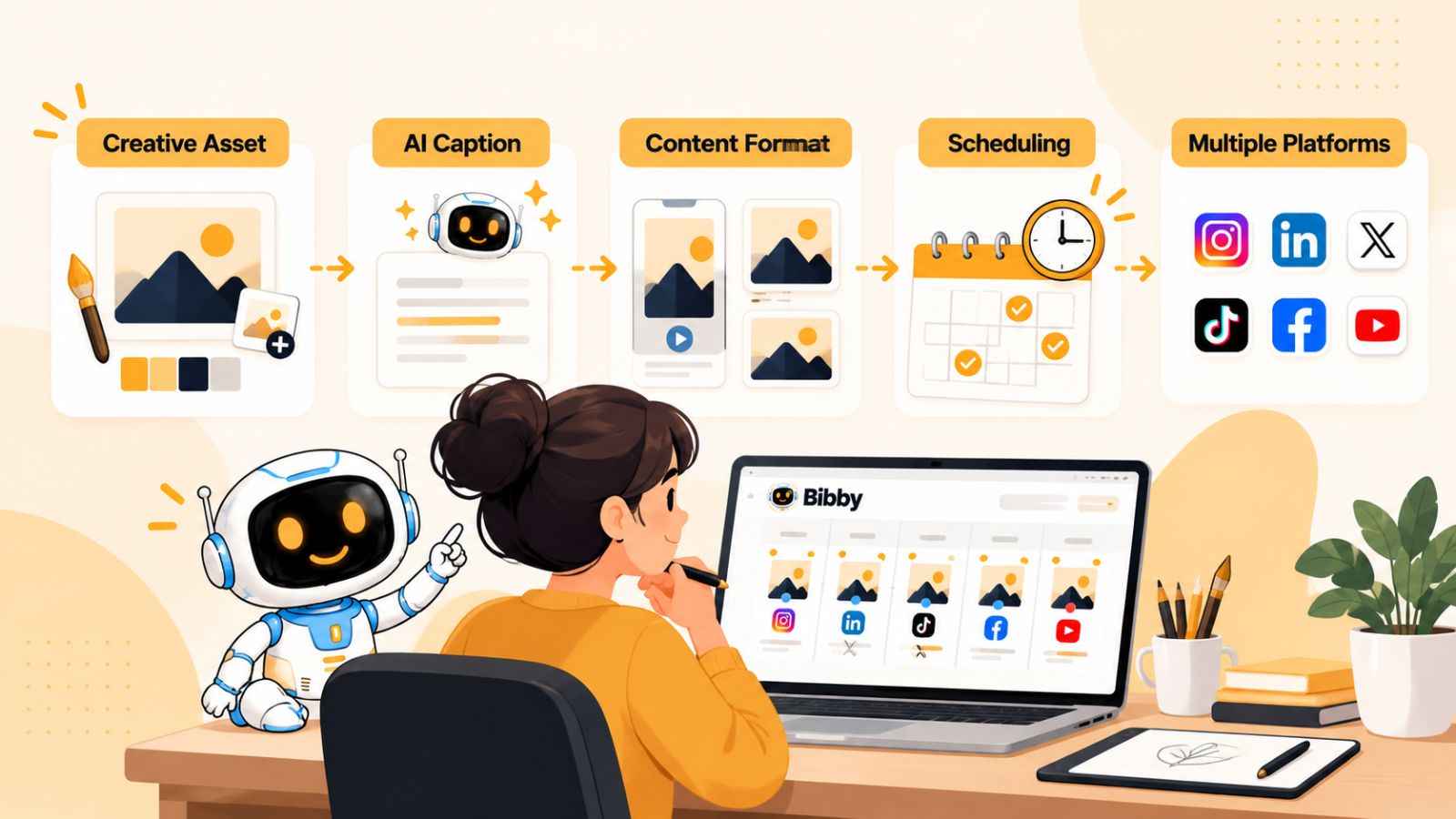
For designers, this is particularly useful because the biggest challenge usually isn’t creating the visual itself. You may already have finished designs, client work, illustrations, mockups, animations, or portfolio pieces. The challenge is consistently turning those assets into social media content and publishing them at the right time.
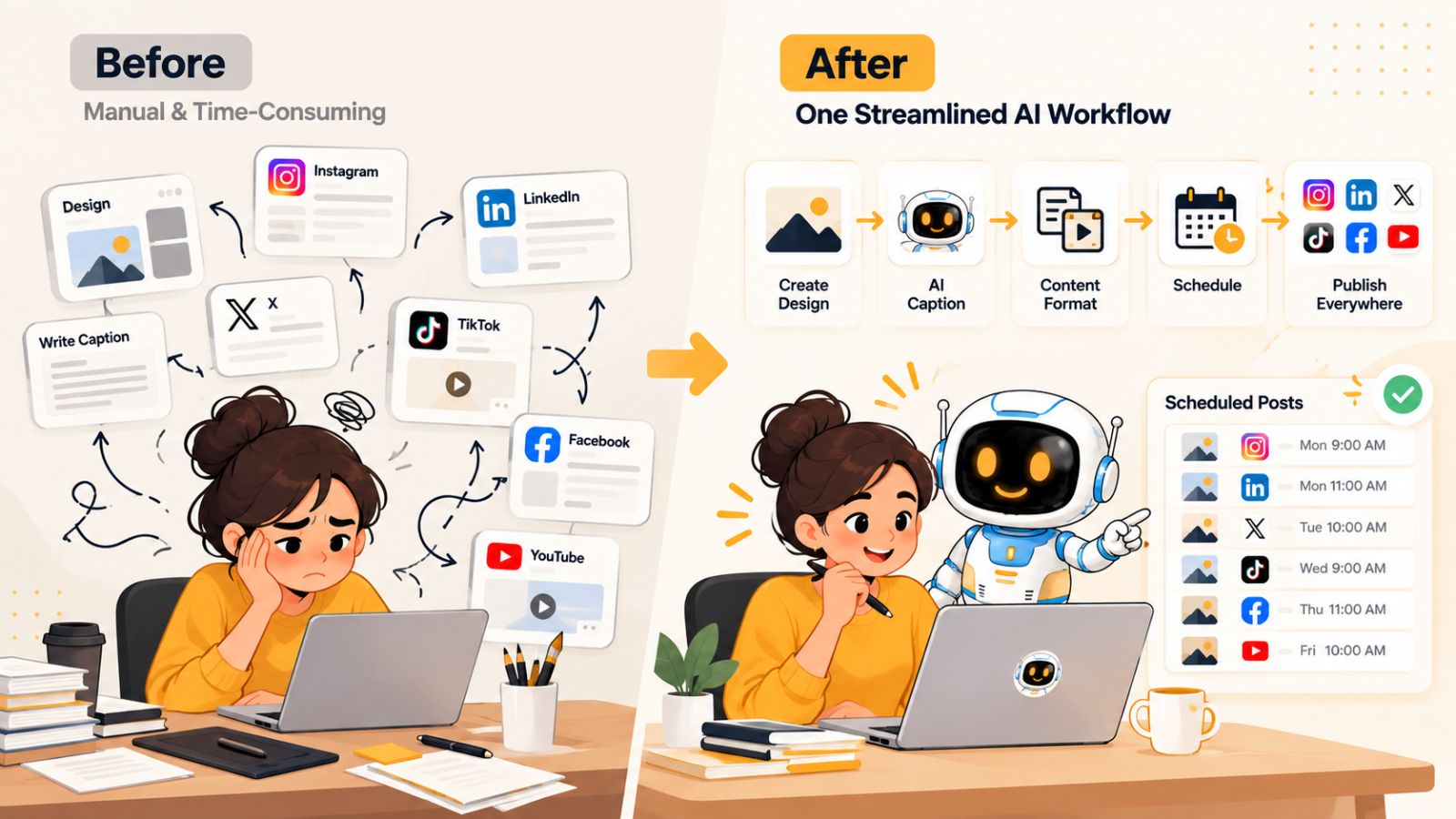
A typical manual workflow might look like this: create a design, decide what to say about it, write a caption, resize or adapt the content for different platforms, open several social media apps, schedule each post individually, and repeat the process several times a week.
AI automation can compress much of that process into a single workflow.
Instead of treating every social media post as a separate task, you can start with the creative asset you already have. An AI-powered tool can help generate the accompanying caption, adapt the content to your chosen posting style, organize your publishing schedule, and distribute the content across the platforms you select.
This is where a tool such as Bibby can fit into a designer’s workflow. You can upload an image or generate one with AI, choose the style you want for your posts, and let Bibby generate captions and schedule your content at AI-optimized times across supported platforms. The workflow can also accommodate different content formats, including images, carousels, videos, and stories.
The bigger idea is not to let AI replace the designer.
It is to let AI take over the repetitive operational work that surrounds the creative work.
That distinction matters. A designer still decides what represents their brand, which projects are worth showcasing, what visual direction to pursue, and what they want their audience to associate with their work. AI simply helps turn those decisions into a consistent publishing system.
Modern automation can go beyond scheduled posts, too. Bibby’s chat interface, for example, allows you to manage parts of your social media workflow conversationally. You can use the chat experience to work on things such as a brand kit, campaigns, posts, and caption regeneration rather than navigating every task manually.
For a designer managing multiple platforms, that shift can be significant: instead of spending hours acting as your own social media coordinator, you can spend more of that time designing while automation handles the repetitive execution.
The goal of AI social media automation, therefore, isn't simply to publish more content. It is to create a repeatable system that helps designers stay consistently visible without sacrificing their creative identity.
Why Designers Struggle With Consistent Social Media Content
Designers are often told to “post consistently,” but consistency is much easier to recommend than to maintain.
The problem is rarely a lack of content ideas. Designers already have a constant stream of potential material: finished projects, client work, behind-the-scenes sketches, moodboards, typography experiments, before-and-after designs, case studies, process videos, and personal projects.
The real problem is everything that has to happen after the design is finished.
Every post creates a chain of small tasks
A designer might spend hours creating a visual and then discover that publishing it requires another series of decisions:
- What should the caption say?
- Which platform should it go on?
- Should the caption be educational, promotional, or conversational?
- Should the same content be adapted for Instagram and LinkedIn?
- Should the design become a carousel?
- When should it be published?
- What should be posted next?
- How can the content be reused without making the feed repetitive?
None of these tasks is particularly difficult on its own. Together, however, they create a significant amount of administrative work.
This is why many designers end up posting in bursts. They publish several projects when they have time, become busy with client work, disappear for a few weeks, and then have to start the process again.
Designers have to think across multiple platforms
Social media also becomes more complicated when a designer wants to maintain a presence on multiple platforms.
Instagram may be useful for visual portfolios, carousels, Reels, and Stories. LinkedIn can provide opportunities to discuss design decisions, professional experiences, and case studies. TikTok and YouTube can be useful for video-based creative processes and educational content.
Creating a presence across several networks doesn't necessarily mean creating completely different content from scratch for every platform.
Instead, the same underlying creative idea can often be adapted into multiple formats.
For example, a branding project could become:
- An Instagram carousel showing the visual identity.
- A LinkedIn post explaining the strategic decisions behind the project.
- A short video showing the design process.
- A Story highlighting individual elements of the identity.
- A longer YouTube video explaining the complete project.
The creative asset stays at the center. What changes is the presentation.
Consistency can become a creative problem
There is another issue that is especially important for designers: automation can easily produce content that feels generic.
A designer's social media presence is an extension of their creative identity. If every caption sounds like it was written by the same generic AI assistant, or every post follows an identical formula, automation can make the account feel less personal rather than more professional.
That is why effective AI social media automation should not mean handing your entire creative identity over to AI.
Instead, designers should establish clear inputs: their visual style, brand voice, preferred content types, target audience, topics, and posting preferences. AI can then handle more of the repetitive execution while those creative decisions remain under the designer's control.
This is also where a brand kit becomes useful. Rather than treating every post as an isolated piece of content, designers can establish a consistent foundation that automation can work from.
The opportunity is to automate the workflow—not the creativity
The most useful way to think about AI automation is therefore simple:
Automate the repetitive decisions and execution around your content, while keeping creative direction human-led.
Once that distinction is clear, social media automation becomes much more practical for designers.
You don't need AI to decide what makes your work good.
You need it to help you turn good work into consistent, well-organized social content without spending your entire week managing posts.
That is where a structured AI-powered social media workflow starts to become valuable.
What Can AI Automate for Designers on Social Media?
The biggest advantage of AI social media automation is that it can connect several small tasks into one repeatable workflow.
Instead of using one tool to create an image, another to write captions, another to schedule posts, and several different apps to publish them, designers can increasingly manage these tasks through an integrated workflow.
Here are some of the most useful areas to automate.
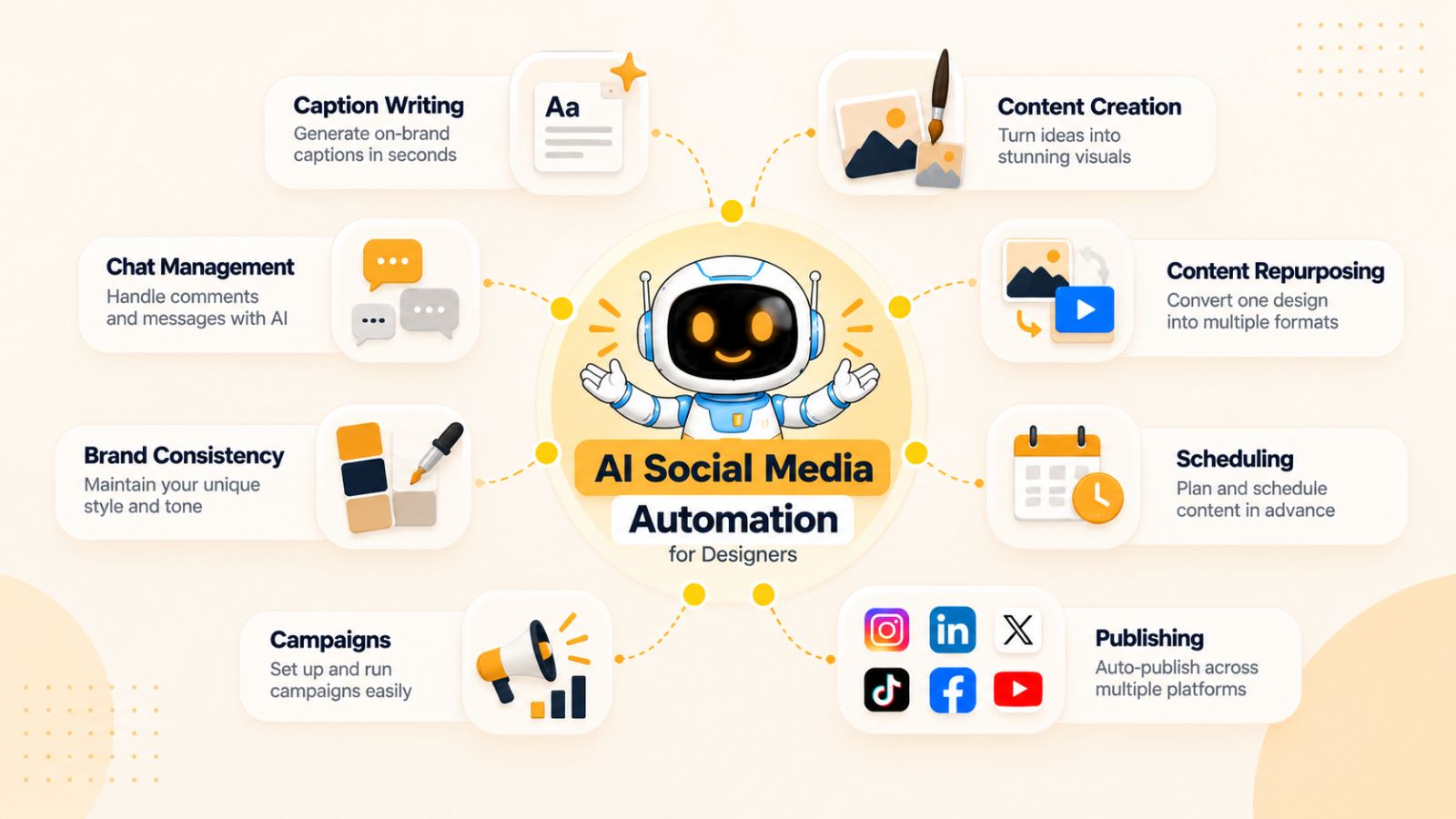
1. Social media content creation
AI can help turn an idea into a usable social media asset without requiring you to start every post from a blank canvas.
For designers, this might mean generating an image for a particular campaign, creating variations of an existing concept, or preparing content around a specific topic.
You can still provide the creative direction. AI simply reduces the amount of production work required to turn that direction into content.
With a platform such as Bibby, for example, you can either upload an existing image or use AI to generate an image as the starting point for your social media content.
2. Caption writing
Writing captions can be surprisingly time-consuming, particularly when you are publishing frequently across several platforms.
AI can take the context of your visual content and generate a starting caption based on the posting style you select.
That doesn't mean every generated caption should be published without review. Designers should still check whether the wording sounds natural and reflects their brand voice.
The advantage is that you don't have to stare at a blank caption box every time you have something worth sharing.
3. Content repurposing
One creative project can produce multiple pieces of social media content.
A logo design project, for example, could generate posts about:
- The original design concept
- The problem the project solved
- The design process
- Typography choices
- Color selection
- Before-and-after comparisons
- Lessons learned
- Final project results
AI can help identify different angles and turn one underlying idea into multiple content opportunities.
This is particularly useful for designers because the amount of effort required to create the original work is often much greater than the effort required to explain or repurpose it.
4. Social media scheduling
Scheduling is one of the most straightforward areas to automate.
Instead of remembering to publish every post manually, you can prepare content in advance and let an automation platform handle the publishing schedule.
Bibby is designed around this type of workflow. Once your content and posting preferences are established, it can schedule media across selected social platforms at AI-optimized times.
That means a designer can prepare a collection of content and create a publishing schedule without having to open every platform individually.
5. Multi-platform publishing
Managing several social networks manually creates unnecessary repetition.
You may have to upload the same asset multiple times, enter captions repeatedly, select publishing dates, and keep track of what has already been published.
An automation workflow can centralize much of this process.
For designers using Bibby, the workflow can extend across platforms such as Facebook, Instagram, LinkedIn, YouTube, and TikTok, depending on the content format and account setup.
The important benefit isn't simply “posting everywhere.”
It is having one place to manage a broader publishing workflow.
6. Content formats
Designers also have an advantage when it comes to visual content because they can work across several formats.
A social media automation system can support different types of content rather than limiting the workflow to single-image posts.
Depending on the platform and workflow, this can include:
- Images
- Carousels
- Videos
- Stories
This gives designers more flexibility to build a content mix instead of repeatedly publishing the same type of post.
7. Campaign management
Once social media becomes more strategic, individual posts are no longer enough.
A designer might be promoting a new service, launching a portfolio, building awareness for a personal brand, or preparing content around an event.
AI can help organize these posts into a broader campaign rather than treating each piece of content independently.
For example, you could create a campaign around a new branding service and use different posts to introduce the service, demonstrate your expertise, showcase examples, answer common questions, and encourage potential clients to get in touch.
8. Brand consistency
Automation becomes much more useful when it understands the identity behind the content.
A brand kit can provide a foundation for consistent visual and messaging decisions, including elements such as brand colors, typography, imagery, and tone.
Instead of explaining your preferences from scratch every time you create content, you can establish them once and use them as part of your ongoing workflow.
Bibby also brings this concept into its conversational interface, where you can work on elements such as a brand kit, campaigns, posts, and caption regeneration through chat.
This changes the interaction from simply “schedule this post” to something closer to managing your social media workflow through an AI assistant.
9. Social media management through chat
Perhaps the most interesting development is the move from traditional dashboards toward conversational workflows.
Rather than navigating through multiple menus, a designer can describe what they want to accomplish and use AI to help execute the task.
For example, instead of manually creating every component of a campaign, you could use a chat interface to work through the campaign, create posts, refine captions, and make changes.
This doesn't eliminate the need for human oversight. It changes how you interact with the automation system.
For busy designers, that can make social media management feel less like administrative software and more like delegating repetitive work to a digital assistant.
The result is a workflow where the designer remains responsible for the creative direction while AI handles more of the repetitive production, organization, and publishing work.
How to Build an AI Social Media Workflow for Designers
The best AI social media workflow isn't the one with the most tools. It's the one that removes the most repetitive work while keeping the designer in control of the creative process.
A simple workflow can take you from creative asset → content style → caption → schedule → publishing with minimal manual work.
Here is what that process can look like.
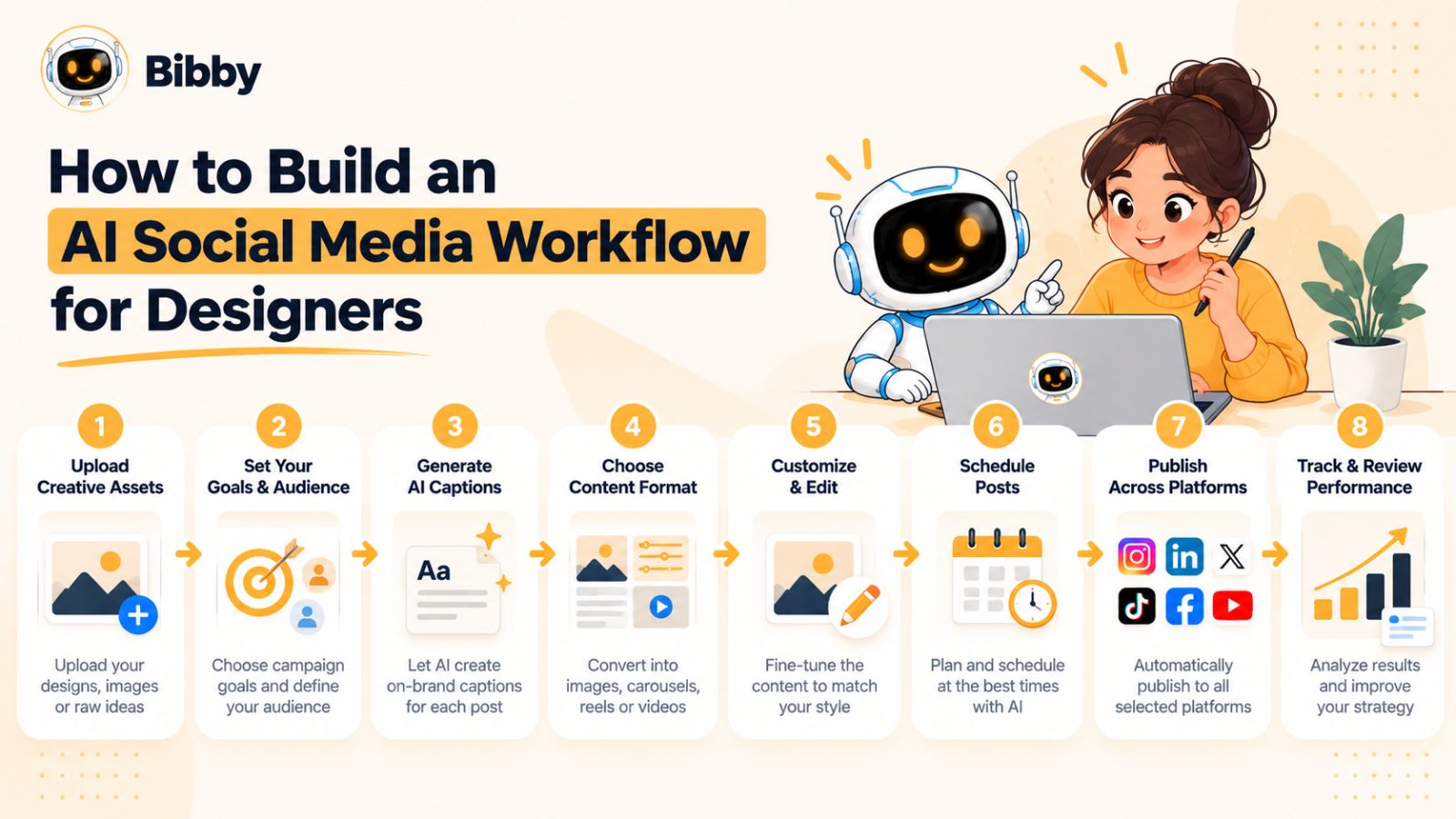
Step 1: Start with your creative assets
Every social media workflow should begin with something worth sharing.
For designers, that might be a finished client project, a logo concept, a UI design, an illustration, a product mockup, a personal project, or a short video showing your process.
You don't necessarily need to create something specifically for social media every time.
Your existing design work can become your content library.
For example, a single branding project might contain dozens of potential assets: the logo, color palette, typography, mockups, sketches, presentation slides, and final applications.
Instead of publishing everything at once, you can use those assets as the foundation for a longer content sequence.
Step 2: Decide what you want the post to accomplish
Before asking AI to write anything, determine the purpose of the content.
Are you trying to:
- Showcase your portfolio?
- Attract potential clients?
- Demonstrate your expertise?
- Educate other designers?
- Build a personal brand?
- Promote a service?
- Start conversations?
- Share your creative process?
This decision matters because the same image can support completely different posts.
A logo might be presented as a portfolio showcase on Instagram, a design-process lesson on LinkedIn, or a short educational video on TikTok.
AI works best when you give it a clear objective rather than expecting it to invent the strategy from nothing.
Step 3: Choose your posting style
Once the creative asset and objective are clear, define how you want to communicate.
Your posting style might be educational, conversational, promotional, inspirational, technical, storytelling-focused, or portfolio-oriented.
This is where AI can save considerable time.
Instead of manually figuring out the structure of every caption, you can select or describe the style you want and let the system generate an appropriate starting point.
Bibby follows this type of workflow: you provide the content, choose your posting style, and the platform can generate captions based on that direction.
You can then review and adjust the result before it becomes part of your publishing schedule.
Step 4: Build a content batch
One of the biggest productivity improvements comes from moving away from creating one post at a time.
Instead, create content in batches.
Suppose you have ten finished design projects sitting in your portfolio. Rather than posting one today and wondering what to publish tomorrow, you could prepare multiple pieces of content from those projects and build a publishing queue.
A batch might contain:
- Portfolio posts
- Educational posts
- Process content
- Carousel posts
- Short videos
- Stories
- Promotional content
The objective is to create enough variety that your social feed doesn't become repetitive.
Step 5: Schedule content across platforms
Once your content is ready, scheduling becomes the next major opportunity for automation.
Rather than manually opening Facebook, Instagram, LinkedIn, YouTube, and TikTok every time you have something to publish, you can organize your content in one workflow.
With Bibby, selected content can be scheduled across supported platforms, with AI-optimized publishing times helping determine when posts should go out.
This is particularly useful when you have several weeks of content ready.
You can prepare the content once and allow the system to handle the publishing calendar.
Step 6: Let AI handle the repetitive work
At this point, AI should be doing the work it is best suited for:
- Generating caption drafts
- Suggesting content variations
- Organizing posts
- Finding appropriate publishing times
- Scheduling content
- Helping adapt content for different platforms
- Regenerating captions when the first version doesn't fit
- Supporting campaign planning
The designer remains responsible for the parts that require creative judgment.
That division of responsibility is important.
AI should accelerate your workflow, not become the owner of your creative identity.
Step 7: Review before publishing
Automation doesn't mean you should stop reviewing your content.
A quick review can catch awkward wording, incorrect project details, unnecessary hashtags, inaccurate claims, or captions that simply don't sound like you.
For professional designers, this final review is especially important because your social media accounts can function as part of your portfolio.
A polished automation workflow should therefore include human approval where it matters.
Step 8: Use performance data to improve the workflow
Once you have published consistently for several weeks, you can start looking at what actually works.
Pay attention to patterns such as:
- Which topics generate engagement?
- Which formats receive the most attention?
- Which projects attract conversations?
- Which platforms drive profile visits or inquiries?
- Which posting styles feel most natural to your audience?
The purpose of automation isn't simply to keep the content calendar full.
It is to create a feedback loop.
Create → publish → measure → learn → improve → repeat.
That is what turns basic social media scheduling into a genuine AI-assisted social media system.
For designers, this approach creates an important shift. Instead of constantly asking, “What should I post today?”, you can build a system where your existing creative work continuously feeds a structured content pipeline.
AI Social Media Automation by Platform
Not every social media platform works the same way. A designer may use Instagram to showcase visual work, LinkedIn to build professional authority, TikTok to share creative processes, and YouTube for longer-form content.
AI social media automation is most useful when it helps you manage those differences without requiring you to rebuild your entire content workflow for every platform.
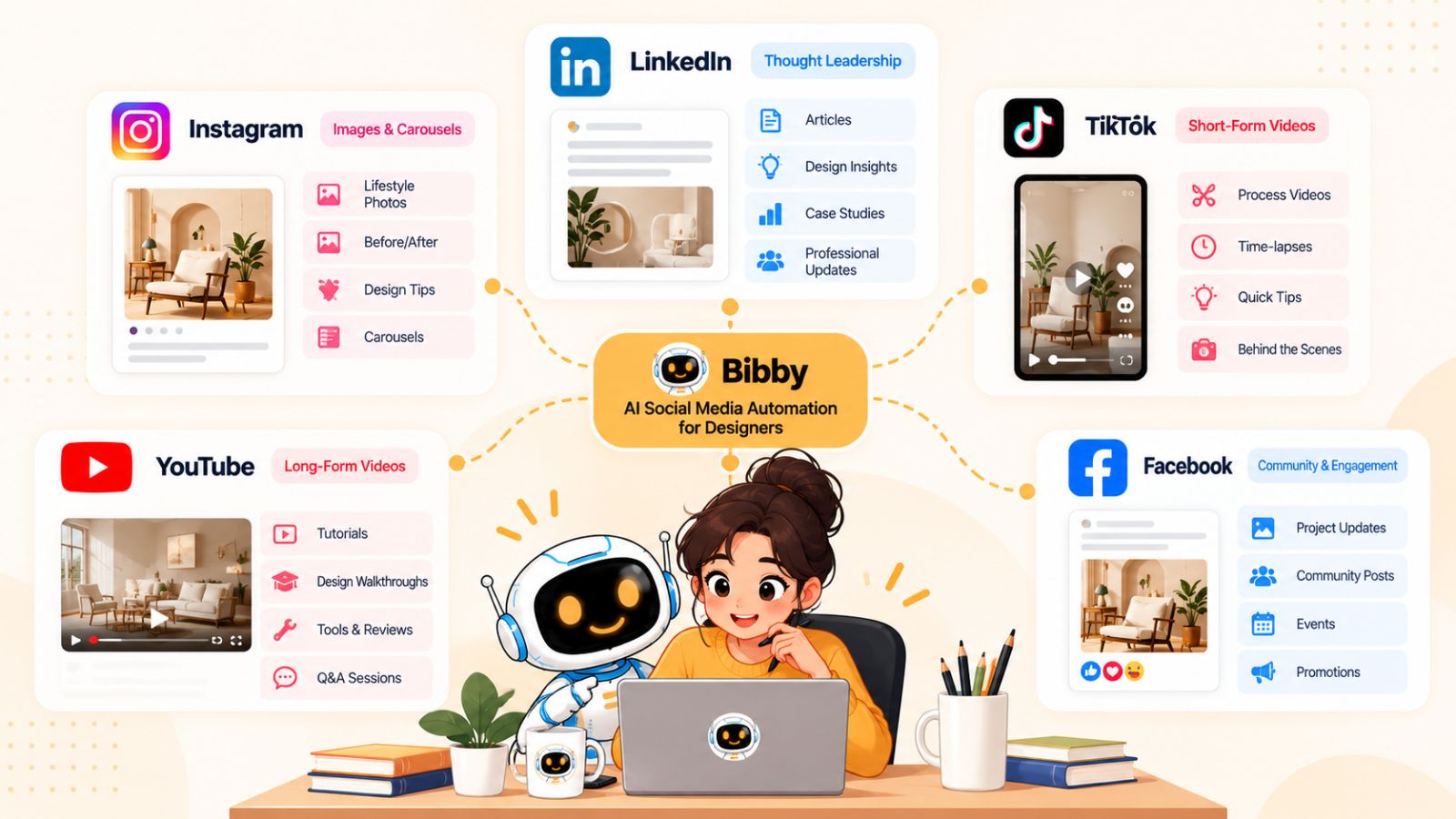
Instagram: Turn your portfolio into a content engine
Instagram is naturally suited to designers because visual work can communicate a significant amount without a long explanation.
A single project can potentially become several pieces of Instagram content:
- A finished-project image
- A multi-slide carousel
- A before-and-after post
- A design-process Story
- A short video
- A series of educational posts
The challenge is maintaining consistency without repeatedly creating completely new work.
AI can help generate captions, organize content, and schedule posts so that your portfolio continues working for you after the original project is finished.
For a designer, this creates an opportunity to turn a portfolio into an ongoing content library rather than a collection of work that is shown only when someone visits your website.
LinkedIn: Turn design work into professional expertise
LinkedIn requires a different approach.
Simply uploading a finished design may show what you created, but explaining why you made certain decisions can demonstrate expertise.
A branding project, for example, could become a post about:
- The business problem behind the project
- Why a particular visual direction was chosen
- How the brand strategy influenced the design
- A mistake that was discovered during the process
- A lesson other designers or business owners can apply
AI can help transform the same underlying project into a more narrative or educational caption while keeping the original creative work at the center.
This makes LinkedIn useful for designers who want social media to contribute not only to visibility but also to professional positioning.
TikTok: Show the process, not just the final result
TikTok can be particularly useful for showing how something was made.
Instead of only displaying a finished logo, illustration, website, or UI design, you can show the transformation from the initial idea to the final result.
Potential content includes:
- Screen recordings
- Timelapses
- Design transformations
- Quick tutorials
- Before-and-after videos
- Design tips
- Common mistakes
- Behind-the-scenes content
AI automation can help with the supporting work around these videos, such as developing captions, organizing a publishing schedule, and maintaining consistency.
The important principle is to preserve the actual creative process. Automation should make publishing the content easier, not remove the part that makes the content interesting.
YouTube: Build deeper content around your expertise
YouTube gives designers more room to explain concepts in depth.
A single project could become a longer video explaining the creative brief, research, design decisions, iterations, and final outcome.
You can also create educational videos around subjects such as typography, branding, UI design, creative software, freelancing, or portfolio development.
This type of content takes more effort to produce, which makes planning and scheduling particularly valuable.
Rather than creating every video immediately before publication, designers can build a content pipeline and schedule videos alongside shorter social posts.
Facebook: Extend your existing content
For many designers, Facebook may not be the primary place where they showcase their work. However, it can still be useful for maintaining a broader professional presence, reaching existing communities, or distributing content to an established audience.
Automation reduces the friction of maintaining that presence.
If a piece of content is appropriate for Facebook, you can include it in the same broader publishing workflow rather than recreating the post manually.
One idea, multiple platform-specific executions
The biggest mistake is to interpret multi-platform automation as publishing exactly the same thing everywhere.
Automation should make adaptation easier, not eliminate it.
Consider a fictional branding project.
The underlying creative idea is the same, but the social content could look like this:
| Platform | Possible content angle |
|---|---|
| Visual case study or carousel | |
| Strategic design lesson | |
| TikTok | Design process video |
| YouTube | Full project breakdown |
| Project showcase or community discussion |
The designer doesn't need five unrelated ideas.
They need one strong creative source and several relevant ways to communicate it.
This is where centralized automation becomes useful. Instead of manually moving between platforms and rebuilding every post, you can organize the content around the original creative asset and manage its distribution from one workflow.
With Bibby supporting workflows across Facebook, Instagram, LinkedIn, YouTube, and TikTok, designers can use this approach to manage a broader publishing system without treating each platform as a completely separate job.
The result is a more sustainable approach to social media: create once, adapt intelligently, and distribute consistently.
How to Automate Social Media Without Losing Your Creative Voice
For designers, automation comes with a legitimate concern: what happens when every post starts sounding like it was written by AI?
A social media account can be technically consistent and still feel completely forgettable.
Designers often build their reputation around a recognizable visual style, perspective, and way of communicating. If automation removes those characteristics, saving time may come at the cost of building a weaker personal brand.
The solution isn't to avoid AI.
It's to give AI better creative direction.
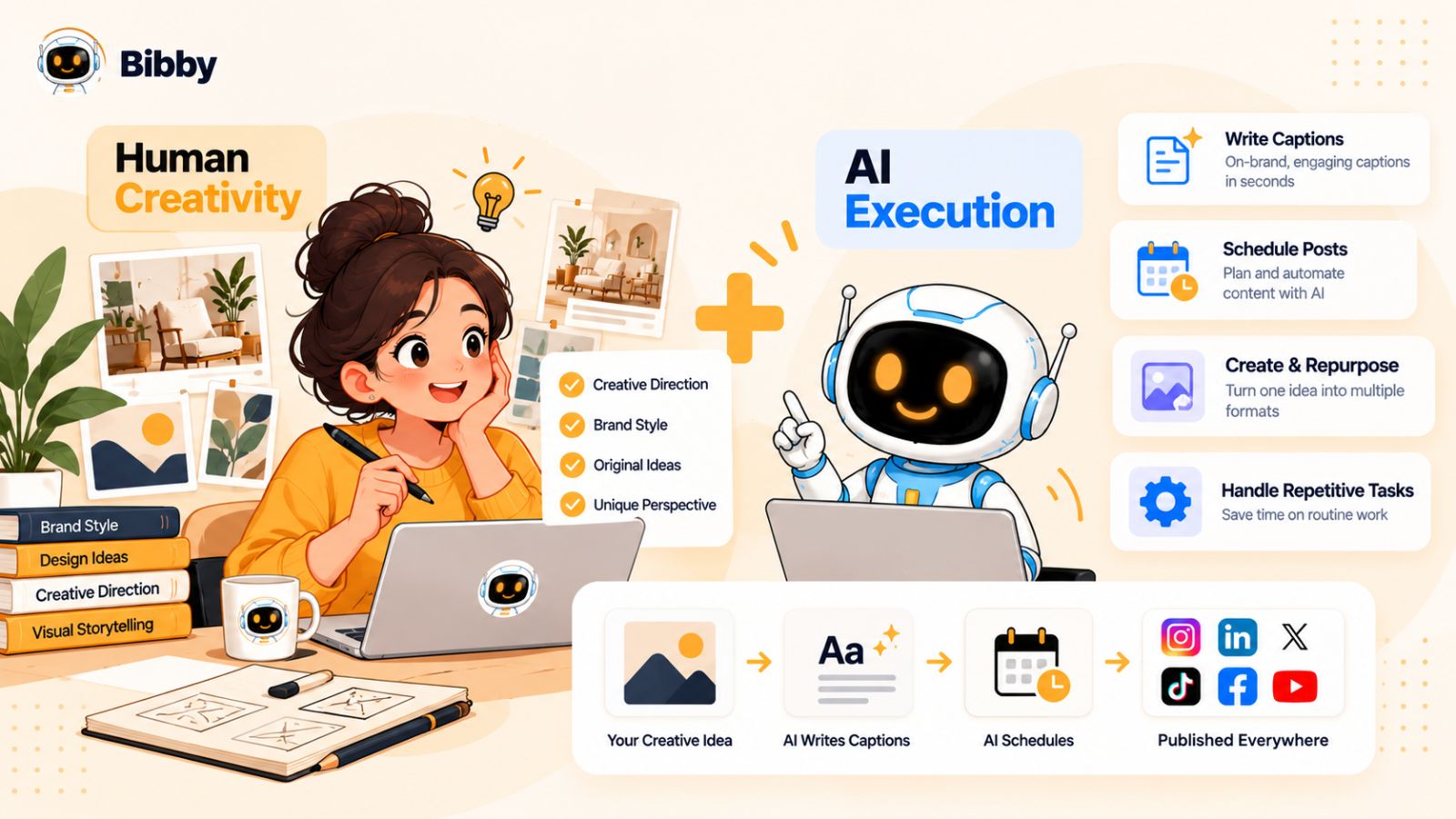
Define your brand voice first
AI can generate content quickly, but it needs context to consistently sound like your brand.
Before automating captions and campaigns, establish a simple set of guidelines.
Think about questions such as:
- Is your tone casual or professional?
- Do you write short or detailed captions?
- Do you use humor?
- Do you explain design terminology or assume your audience understands it?
- Do you prefer storytelling or direct advice?
- Do you use emojis?
- Are there phrases you never want to use?
The clearer these preferences are, the easier it becomes for AI to produce content that feels intentional.
Build a brand kit
Visual consistency is just as important as verbal consistency.
A brand kit can provide a centralized reference for the visual identity you want to maintain across your social media content.
For a designer, that could include brand colors, typography, logos, imagery preferences, and other visual guidelines.
This becomes particularly useful when content is being generated or adapted at scale.
Instead of treating every post as a completely new design decision, you establish a recognizable foundation that can be applied repeatedly.
Bibby's chat-based workflow includes the ability to create a brand kit, giving designers a way to establish this foundation as part of their broader social media workflow.
Don't automate every creative decision
One of the easiest mistakes is trying to automate everything.
Some decisions are better left to the designer.
For example, AI can help generate caption variations, but you should decide which story is worth telling.
AI can suggest content ideas, but you should determine which ideas genuinely represent your expertise.
AI can help schedule content, but you should decide which projects deserve the most attention.
This creates a useful division:
Human: strategy, taste, creativity, judgment, originality.
AI: repetition, organization, drafting, scheduling, adaptation, execution.
The more clearly those responsibilities are separated, the more useful automation becomes.
Use AI-generated captions as starting points
A generated caption doesn't have to be the final caption.
Think of it as a first draft.
If the AI produces something that is technically correct but doesn't sound like you, rewrite it.
You might change one sentence, add a personal observation, explain a design decision, or remove generic marketing language.
Those small edits can make a significant difference.
Over time, you can also identify which kinds of prompts and posting styles consistently produce content that fits your voice.
Add your own expertise
Your experience is one thing AI cannot automatically manufacture.
If you designed a logo, you know why the concept changed during the project.
If you redesigned an interface, you know which user problem influenced the decision.
If a client rejected an initial concept, you know what you learned from that experience.
Those details make social content interesting.
Instead of asking AI to invent a generic lesson about branding, give it the real experience and let it help structure the story.
That approach produces content that is both easier to create and more distinctive.
Don't confuse volume with visibility
Automation makes it possible to publish more frequently.
That doesn't mean you should publish as much as technically possible.
A large volume of repetitive content can make your social presence harder to follow, not easier.
A better goal is to create a sustainable publishing rhythm where your content has enough variety to remain useful.
For example, a designer might rotate between:
- Portfolio showcases
- Educational insights
- Behind-the-scenes content
- Client stories
- Design tips
- Personal observations
- Promotional posts
AI can help manage that system, but the underlying content strategy should still come from you.
The best automation should feel invisible
The ideal outcome is not for your audience to notice that AI is managing your social media.
They should notice your work.
Your design should remain recognizable. Your opinions should remain yours. Your experiences should remain authentic.
AI simply makes it easier to package those things into consistent content and distribute them across the platforms where your audience spends time.
That is the real promise of AI social media automation for designers: less time managing the machinery of social media and more time doing the creative work that gives your social presence something worth following.
Common AI Social Media Automation Mistakes Designers Should Avoid
AI can make social media management significantly easier, but automation doesn't automatically produce good content.
The biggest mistakes happen when designers automate without a clear strategy or assume that more automation always means better results.
Here are the problems worth avoiding.
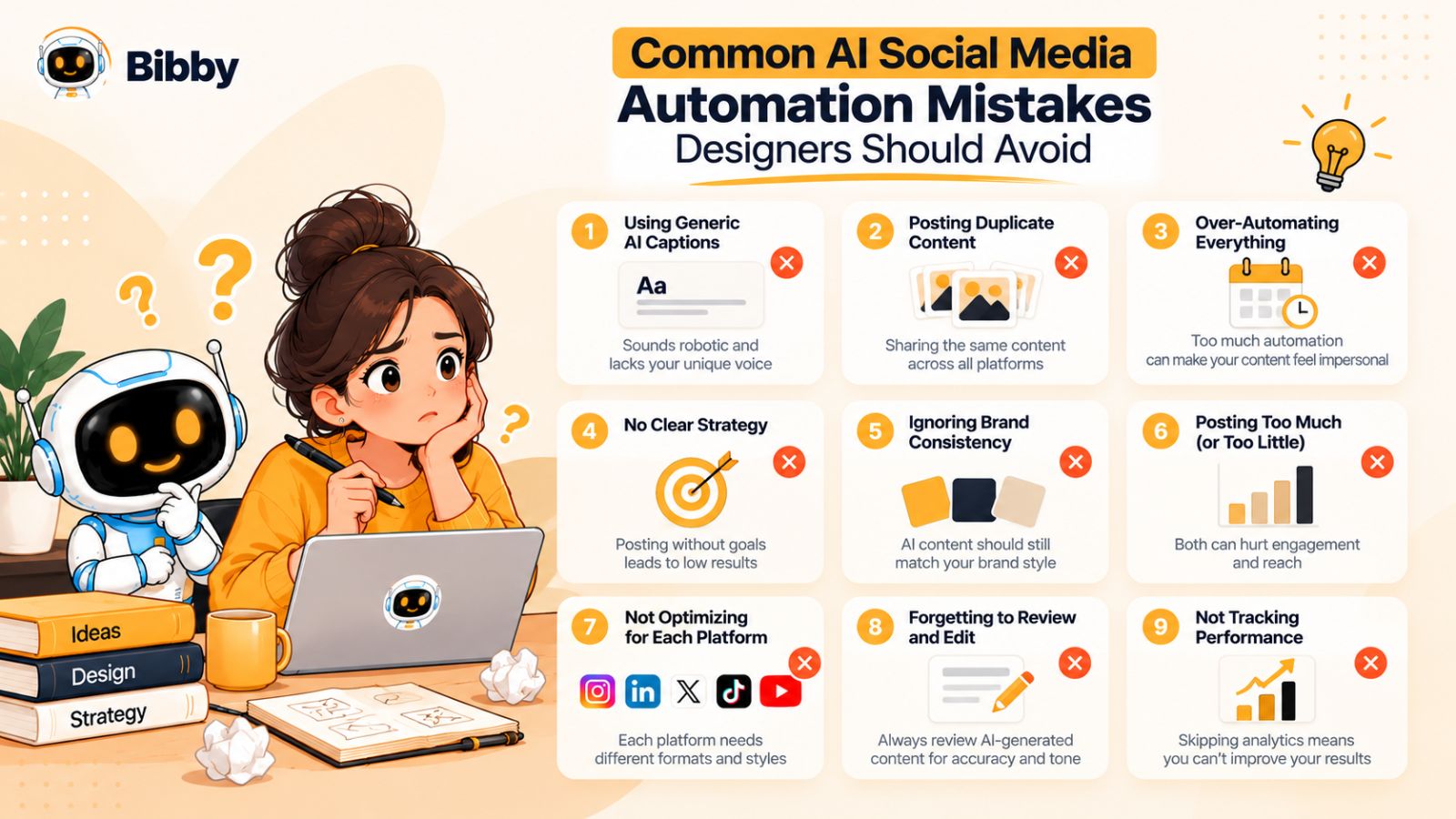
1. Publishing AI-generated content without reviewing it
AI-generated captions can save time, but they can also contain awkward phrasing, unnecessary claims, or language that doesn't sound like you.
Always review important content before it goes live.
A 30-second review can make the difference between a caption that feels personal and one that feels mass-produced.
2. Using the same post everywhere
Multi-platform publishing doesn't mean every platform should receive an identical post.
A portfolio image may work well on Instagram, but LinkedIn might benefit from the story behind the project. TikTok might work better with a process video, while YouTube could support a deeper breakdown.
Use automation to distribute and organize content—not to eliminate platform-specific thinking.
3. Automating without defining your audience
AI needs context.
If you don't know who your content is for, automation can produce posts that are broadly acceptable but specifically useful to nobody.
A freelance brand designer targeting startups, for example, will communicate differently from a UI designer trying to attract product companies or a student designer building an audience among other creatives.
Define your audience before building your automation system.
4. Publishing too much low-value content
Automation makes volume easy.
That can be dangerous.
If you have a system capable of producing dozens of posts, it can be tempting to fill the calendar simply because you can.
Instead, ask whether each post contributes something useful.
Does it demonstrate expertise? Show your work? Teach something? Start a conversation? Tell a meaningful story? Give potential clients a reason to remember you?
If not, publishing it may not improve your social presence.
5. Ignoring visual consistency
Designers have an advantage on social media because visual consistency is part of their professional skill set.
Don't let automation undermine that advantage.
Your posts should still feel like they belong to the same brand, even when they're created weeks apart or distributed across different platforms.
A defined visual system and brand kit can help maintain that consistency.
6. Treating automation as a replacement for strategy
A scheduling tool can tell you when something is scheduled.
It cannot automatically determine why your audience should care about your work.
Strategy still matters.
You need to decide what you want to be known for, who you want to reach, what services or expertise you want to demonstrate, and what role social media plays in your broader business.
AI works best when it executes within that strategy.
7. Never changing the content mix
If every post is a portfolio image, your audience may eventually stop learning anything new about you.
Likewise, if every post is a tutorial, people may never see the quality of your actual work.
A strong designer's content can show different dimensions of expertise.
Try combining:
- Work showcases
- Process content
- Educational posts
- Industry observations
- Case studies
- Personal insights
- Client-focused content
- Promotional content
Automation becomes more valuable when it manages a diverse content system rather than repeatedly producing one format.
8. Forgetting to measure what happens after publishing
Scheduling content is not the finish line.
Look at the results and learn from them.
You might discover that certain projects generate more profile visits, certain topics produce more meaningful conversations, or certain formats consistently attract attention.
Those observations should influence your future content.
The automation loop should therefore look something like:
Create → publish → measure → learn → adjust → create again.
The technology handles more of the repetitive execution, while you use the results to make better creative and strategic decisions.
9. Trying to automate the designer out of the process
This is perhaps the biggest mistake.
A designer's value isn't simply the ability to produce an image.
It's the combination of taste, experience, problem-solving, creative direction, and the ability to communicate an idea visually.
Those qualities are exactly what make a designer's social content worth following.
Use AI to remove the repetitive work around those qualities—not the qualities themselves.
The strongest automation system should give you more time to be a designer, not less involvement in your own creative identity.
How to Create a Social Media Content System That Runs on Autopilot
The real benefit of AI social media automation isn't saving a few minutes when publishing a single post.
It's building a system that keeps your social media active even when you're busy designing, working with clients, or running your business.
A good system starts with your creative work and turns it into a predictable content pipeline.
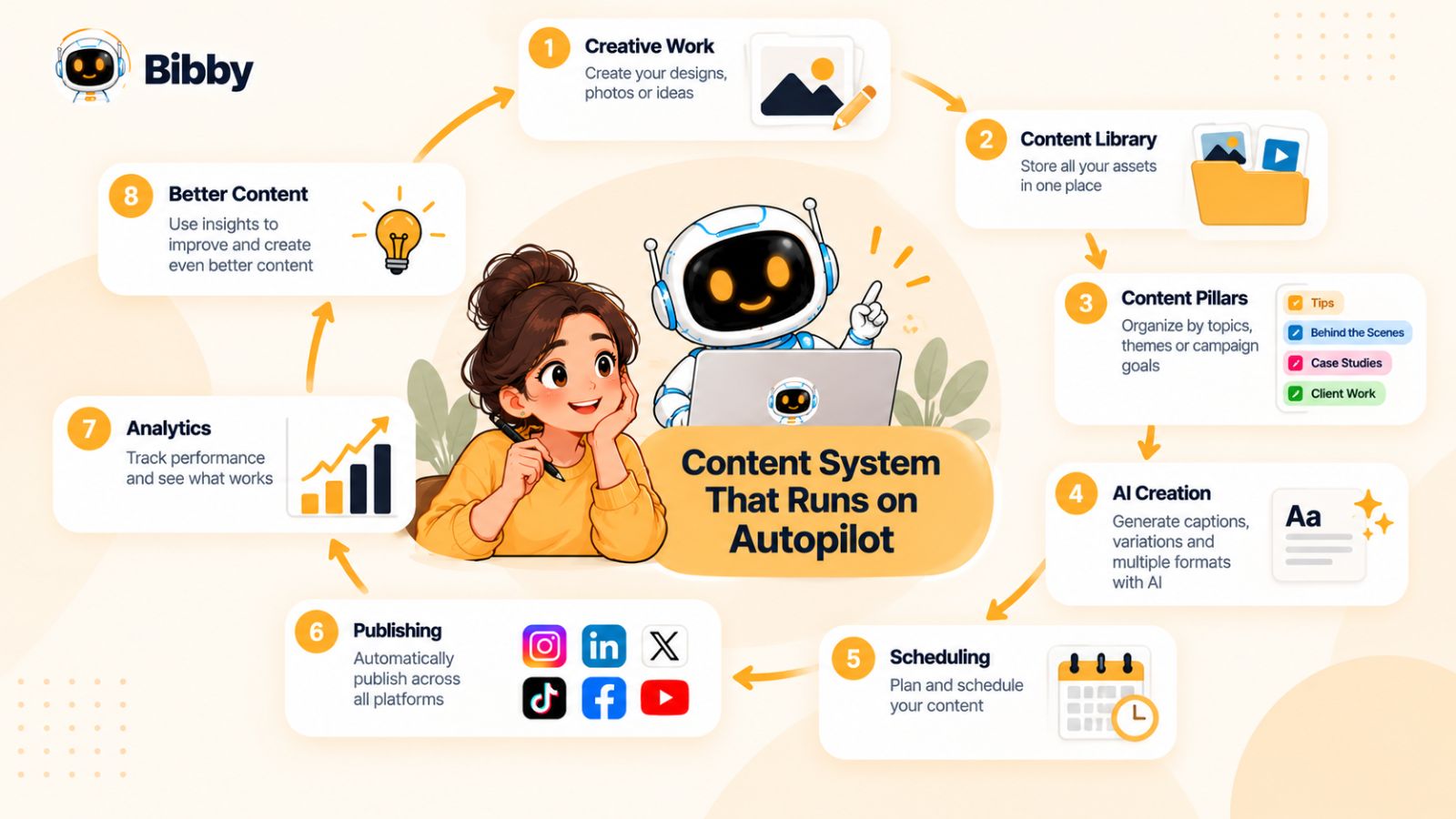
Start by building a content library
The first step is to collect the creative assets you already have.
Look through your recent work and identify projects that could become social media content.
For a designer, your content library might include:
- Completed client projects
- Personal projects
- Logo explorations
- UI designs
- Illustrations
- Brand identity systems
- Design mockups
- Sketches
- Work-in-progress screenshots
- Screen recordings
- Case studies
Don't worry about publishing everything immediately.
The goal is to build a pool of potential content that you can draw from over time.
Create content pillars
Next, organize your ideas into a small number of recurring content categories.
For example, a freelance designer might use five pillars:
Portfolio: Show finished work and project outcomes.
Process: Show how ideas develop from concept to final design.
Education: Share useful design knowledge and practical tips.
Perspective: Discuss opinions, lessons, trends, or experiences from your work.
Business: Talk about services, client problems, results, or ways people can work with you.
These pillars prevent your content calendar from becoming a random collection of posts.
They also make it easier for AI to help generate content because the system has clear categories to work within.
Turn one project into multiple posts
This is where designers can get significant leverage.
Imagine you have completed a website redesign.
Instead of treating that project as one social media post, break it into multiple content opportunities.
You could create:
- A carousel showing the final interface.
- A post explaining the biggest usability problem.
- A before-and-after comparison.
- A short video showing the design process.
- A post explaining one important design decision.
- A behind-the-scenes Story.
- A longer case study.
The project hasn't changed.
You've simply extracted more useful ideas from it.
AI can help identify these angles and turn them into drafts, while you provide the actual expertise and experience behind them.
Create content in batches
Batching is one of the simplest ways to make social media less disruptive.
Instead of stopping your design work every day to create a post, set aside dedicated time to prepare several pieces of content.
For example, you might spend one afternoon organizing your content library and preparing several weeks of posts.
Once the content is ready, an automation platform can take over much of the scheduling and publishing process.
This means social media becomes a planned activity rather than something that interrupts your creative work every day.
Use AI to fill the repetitive gaps
This is where an AI-powered tool becomes useful.
Once you have your assets, content pillars, and publishing strategy, AI can assist with the repetitive parts:
- Drafting captions
- Creating variations
- Organizing campaigns
- Scheduling posts
- Selecting publishing times
- Repurposing content
- Managing multiple platforms
- Regenerating content that doesn't fit
Bibby brings many of these capabilities into one workflow. You can provide your creative assets, select your preferred posting style, generate captions, and schedule content across selected platforms.
Its chat interface also provides another way to manage the system. Instead of navigating through separate workflows for every task, you can use conversational commands to work on brand kits, campaigns, posts, captions, and other parts of your social media process.
Build a publishing rhythm
Automation works best when you have a realistic publishing rhythm.
You don't necessarily need to post every day.
The right frequency depends on your audience, content capacity, platform mix, and goals.
What matters most is that your publishing schedule is sustainable.
A designer who can consistently publish three useful posts every week for six months may build a stronger content system than someone who publishes fifteen posts in one week and then disappears for two months.
Automation helps make that consistency easier to maintain.
Keep a human checkpoint
Even a highly automated workflow should have a quality-control step.
Before content goes live, check:
- Is the visual correct?
- Does the caption sound like you?
- Is the information accurate?
- Does the post fit your brand?
- Is this the right platform for this content?
- Does the post provide a reason for someone to stop scrolling?
This takes far less time than creating and scheduling every post manually.
Let the system improve over time
A content system should never be completely static.
After several weeks, look at what you've learned.
Maybe your audience responds strongly to process videos. Perhaps case studies generate more inquiries than generic design tips. Maybe LinkedIn brings conversations with potential clients while Instagram primarily builds your portfolio visibility.
Use those observations to adjust your content mix.
The result is a simple but powerful loop:
Your creative work → content ideas → AI-assisted production → automated scheduling → audience response → new insights → better content.
That is what “autopilot” should mean for a designer.
It doesn't mean disappearing from your social media accounts and letting AI publish endlessly.
It means creating a system where the repetitive work happens automatically while you remain responsible for the creative direction, quality, and strategy.
AI Social Media Automation vs. Manual Social Media Management
Designers don't necessarily need to automate every part of social media.
Manual management can work well when you're publishing occasionally, managing a single platform, or creating highly customized content that requires individual attention.
The problem appears when the amount of content and number of platforms grow.
At that point, repetitive tasks can consume time that would otherwise go toward design work, client projects, or business development.
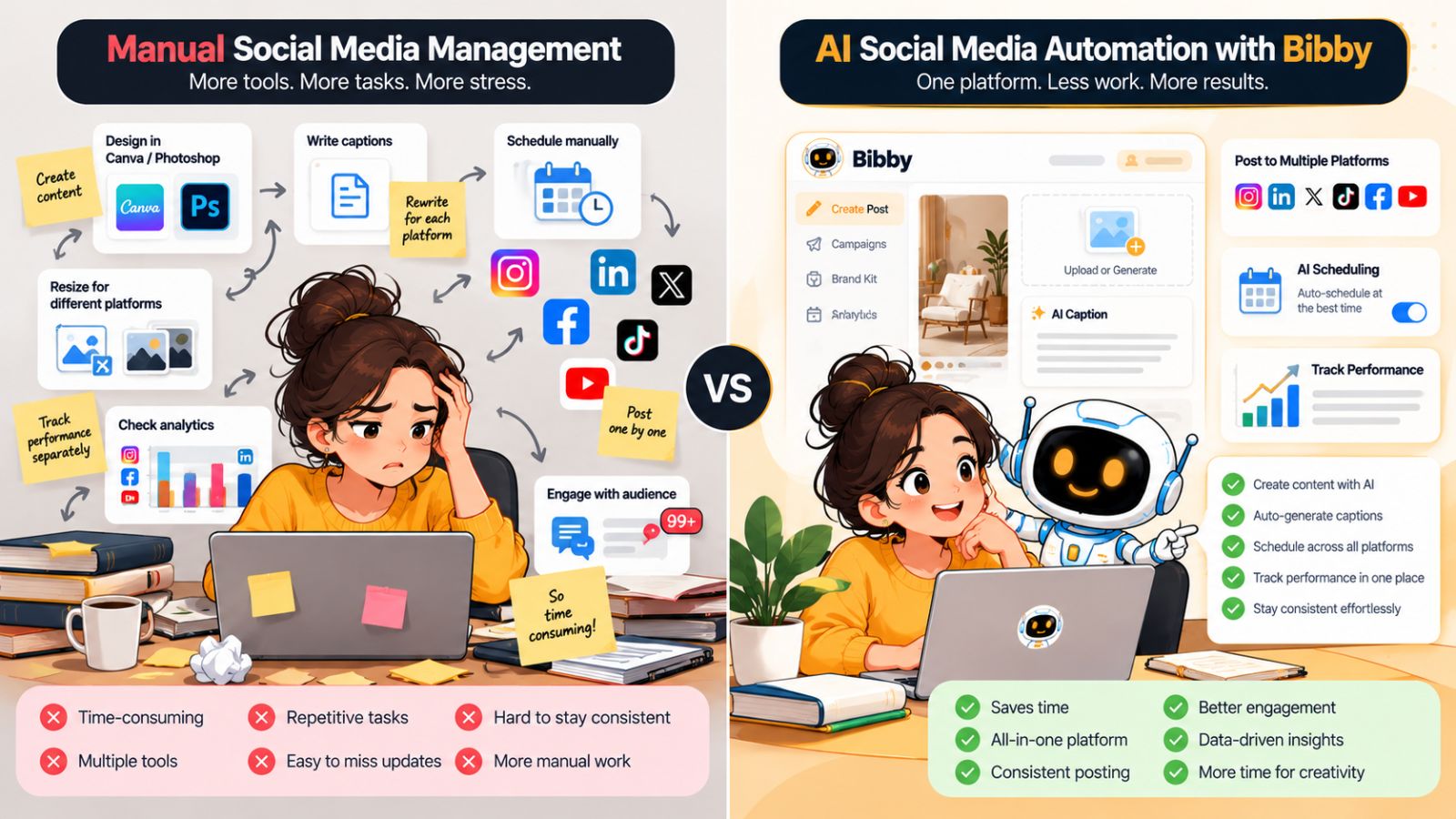
Manual social media management
With a traditional workflow, the designer handles almost every step:
Create → write → adapt → upload → schedule → publish → repeat.
This approach gives you complete control, but it also means you're responsible for every repetitive action.
For a single post, that may not matter.
Multiply that process across several platforms and several weeks, and the administrative workload can become substantial.
Manual management can still make sense when:
- You publish infrequently.
- Your content requires extensive customization.
- You manage only one or two platforms.
- You enjoy handling the publishing process yourself.
- Your social media activity is relatively small.
AI-assisted social media automation
An automated workflow shifts some of those repetitive responsibilities to AI and automation software.
The workflow can become:
Create → provide direction → generate → review → schedule → measure.
The designer still controls the creative decisions, but the system can assist with caption creation, content organization, scheduling, publishing, and other repetitive tasks.
This can be particularly valuable when you're managing multiple platforms or maintaining a larger content pipeline.
The difference in day-to-day work
Consider a designer who has ten pieces of content ready to publish.
With a manual workflow, they might need to:
- Upload each asset.
- Write each caption.
- Choose each platform.
- Select dates and times.
- Schedule each post.
- Repeat the process across multiple networks.
- Keep track of what has already been published.
With an automated workflow, much of that preparation can be consolidated.
For example, Bibby allows designers to upload or generate visual content, choose a posting style, generate captions, and schedule content across selected social platforms.
The difference isn't necessarily that the automated workflow produces better creative work.
It's that less of the designer's time is spent operating the publishing machinery.
Automation doesn't have to mean less control
One misconception is that automation requires you to surrender control over your content.
A well-designed workflow can do the opposite.
You can establish your brand guidelines, choose your content pillars, select your platforms, review generated captions, approve your creative assets, and determine what gets published.
AI then handles more of the repetitive execution.
Think of it as delegation rather than replacement.
You wouldn't hire a social media assistant and expect them to redefine your entire creative identity without your input.
The same principle applies to an AI social media assistant.
A hybrid approach often makes sense
The choice doesn't have to be completely manual or completely automated.
A designer can automate repetitive tasks while keeping high-value creative decisions manual.
For example:
| Task | Manual involvement | AI/automation |
|---|---|---|
| Creative direction | High | Low |
| Selecting portfolio work | High | Low |
| Caption drafting | Low | High |
| Content variations | Medium | High |
| Brand guidelines | High | Low |
| Scheduling | Low | High |
| Publishing | Low | High |
| Quality review | High | Low |
| Performance analysis | Medium | High |
The exact balance will vary by designer.
The principle is simple: keep the decisions that require your expertise and automate the repetition that doesn't.
When automation becomes particularly valuable
AI social media automation becomes increasingly useful as your publishing workload grows.
If you're managing multiple platforms, publishing several times a week, maintaining a personal brand, promoting services, or trying to turn your portfolio into a consistent content engine, the repetitive workload can add up quickly.
That's where an integrated workflow can have a meaningful impact.
Instead of asking whether AI can completely replace manual social media management, a more useful question is:
Which parts of my social media workflow don't require me to personally do them?
Those are usually the tasks worth automating first.
How to Choose an AI Social Media Automation Tool as a Designer
Not every AI social media tool is designed with creative professionals in mind.
Some focus primarily on scheduling. Others concentrate on AI image generation, caption writing, analytics, or content creation. The challenge is finding a workflow that connects enough of these functions without making social media management more complicated.
Before choosing a tool, evaluate it against the way you actually work.
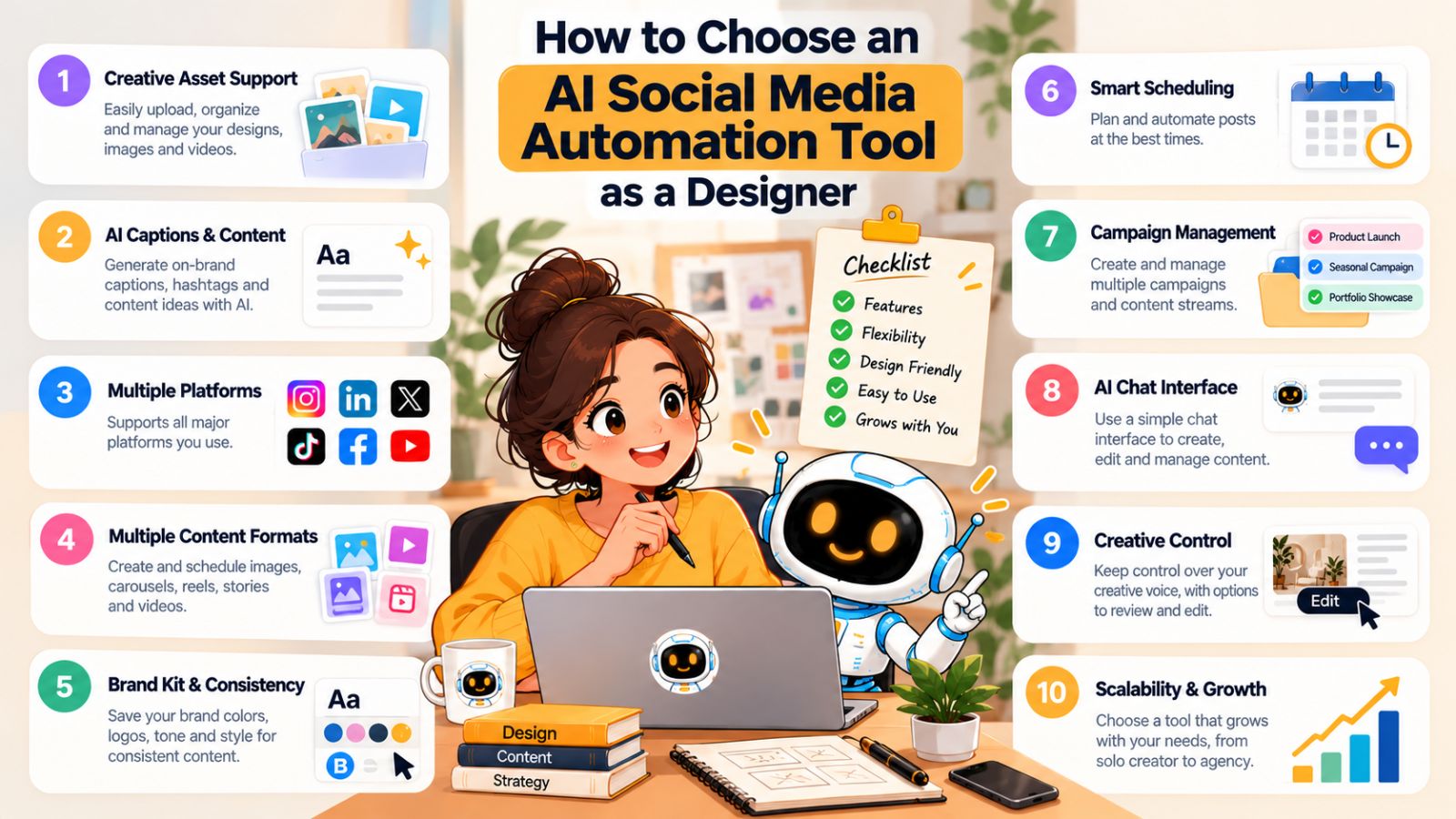
1. Can you start with your existing creative work?
Designers already have valuable content.
A useful tool should make it easy to upload existing images, videos, carousels, and other creative assets rather than forcing you to create everything inside the platform.
AI generation can be useful when you need new content, but it shouldn't become a requirement for publishing your own work.
2. Does it support the platforms you actually use?
Check whether the tool supports the social networks that matter to your audience.
For designers, that might include Instagram, LinkedIn, TikTok, YouTube, and Facebook.
Platform support also needs to be considered alongside content formats. A tool might support a network but have limitations around the types of content you can publish there.
3. Can it handle different content formats?
A modern social media workflow shouldn't be limited to single images.
Look for support for formats relevant to your content strategy, such as:
- Images
- Carousels
- Videos
- Stories
This matters particularly for designers because visual storytelling often works better when you can choose the format that suits the project.
4. Does AI actually reduce your workload?
“AI-powered” doesn't automatically mean “automated.”
Look at what the AI actually does.
Can it generate captions? Repurpose content? Suggest variations? Help organize campaigns? Schedule posts? Optimize publishing times?
The goal should be fewer repetitive steps, not simply another AI feature added to an existing dashboard.
Bibby, for example, combines image creation or upload, posting-style selection, AI-generated captions, scheduling, and multi-platform publishing within a broader workflow.
5. Can you maintain your brand voice?
This is especially important for designers.
If every caption sounds generic, automation can weaken the personality behind your brand.
Look for ways to establish brand guidelines and content preferences so that AI has context about how you want your content to look and sound.
A brand kit can be particularly useful here.
Bibby also allows users to work on a brand kit through its chat interface, making brand setup part of the broader content workflow rather than a completely separate process.
6. Is the scheduling system intelligent?
Basic scheduling lets you choose a date and time.
AI-assisted scheduling can go further by helping determine suitable publishing times based on the information available to the system.
That distinction matters if your goal is to reduce the amount of calendar management you have to do yourself.
For designers who want to prepare content in batches, AI-optimized scheduling can make it easier to create a queue and let the system handle more of the timing decisions.
7. Can you manage campaigns and content from one place?
As your social presence grows, individual posts become part of larger campaigns.
You might launch a new service, promote a portfolio project, announce an event, or build awareness around a particular topic.
A useful automation platform should make it possible to organize those pieces rather than treating every post as an isolated task.
8. Is there a conversational workflow?
Chat-based interfaces are becoming an interesting alternative to traditional dashboards.
Instead of remembering where every feature is located, you can describe what you want to accomplish and work through the task conversationally.
Bibby's chat interface allows designers to work on tasks such as creating a brand kit, creating campaigns and posts, and regenerating captions.
For someone who doesn't want to spend their time navigating social media management software, this can make the workflow more natural.
9. Does it give you enough control?
Automation should save time without forcing you to surrender control.
Before choosing a tool, make sure you can still review content, edit captions, choose platforms, modify schedules, and decide what ultimately gets published.
The best workflow is usually not the one with the fewest human interactions.
It's the one where human attention is reserved for the decisions that actually matter.
10. Can the tool grow with your workflow?
Your social media needs today may not be the same six months from now.
You might start with Instagram and LinkedIn, then add TikTok or YouTube. You may begin with portfolio posts and later introduce campaigns, educational content, and promotional content.
Choose a workflow that can accommodate that growth.
A good AI social media automation tool should make your workflow simpler as your content operation grows—not create another layer of complexity.
A simple evaluation framework
Before committing to any platform, ask yourself five questions:
Content: Can I easily turn my existing creative work into social content?
AI: Does the AI actually remove repetitive work?
Platforms: Can I manage the networks and formats I need?
Brand: Can I maintain my own visual identity and voice?
Workflow: Can I manage creation, scheduling, and publishing without jumping between multiple tools?
If the answer to those questions is yes, you're much closer to a workflow that can genuinely support your creative business rather than simply adding another piece of software to it.
A Practical 30-Day AI Social Media Automation Plan for Designers
If you've never automated your social media before, trying to redesign your entire workflow overnight can create more work than it saves.
A better approach is to build the system gradually.
The following 30-day plan gives designers a practical way to introduce AI social media automation without losing control over their content.
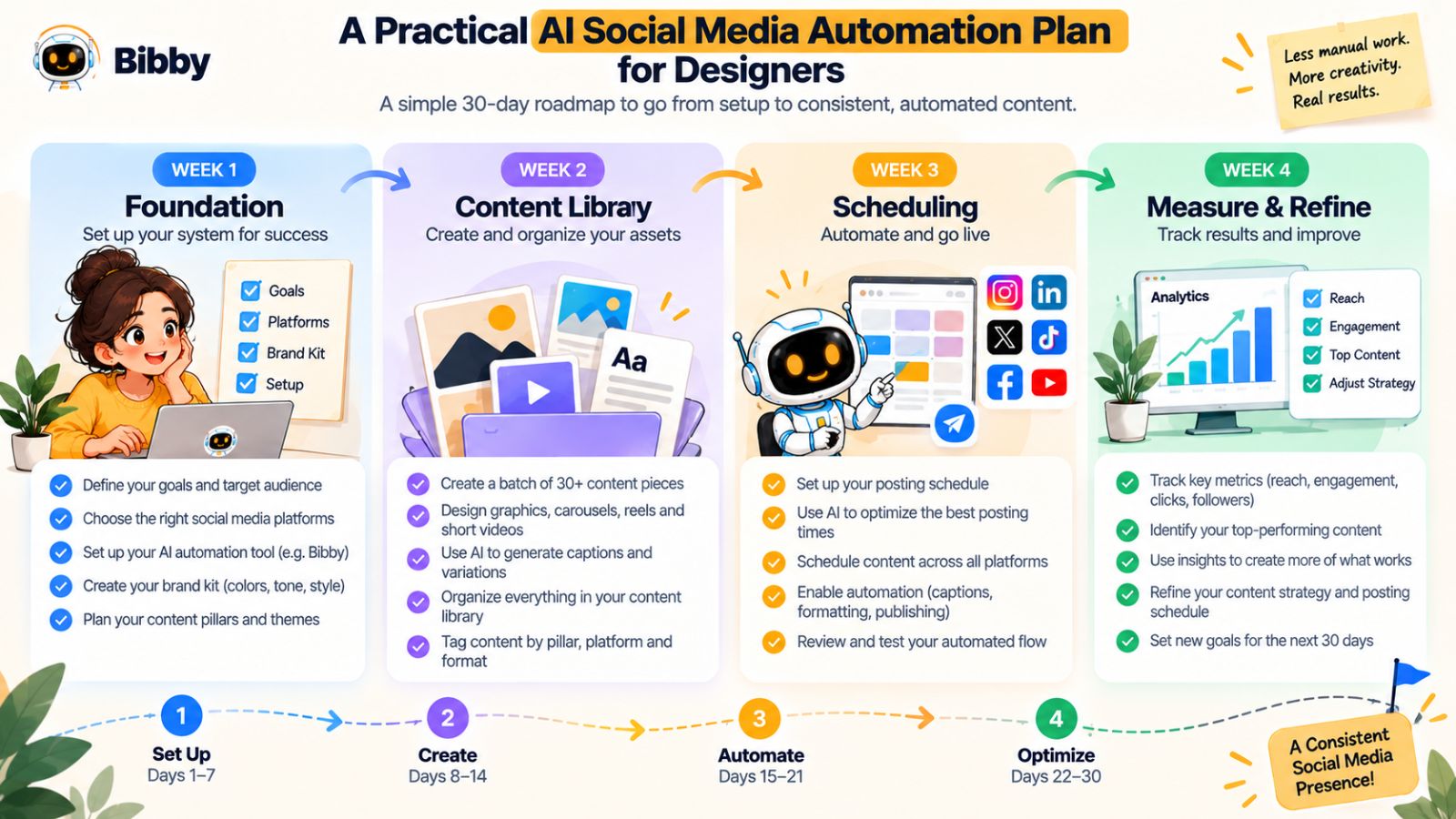
Week 1: Build your foundation
The first week is about creating the inputs your automation system will need.
Start by collecting your existing creative assets.
Look through your recent projects and gather:
- Finished designs
- Project screenshots
- Portfolio images
- Videos
- Sketches
- Behind-the-scenes material
- Client results
- Case studies
Then define three to five content pillars.
For example:
Showcase: Your best finished work.
Process: How you create and solve design problems.
Education: Practical lessons for your audience.
Perspective: Your opinions and experiences.
Business: Your services and client-focused content.
Finally, define your basic brand voice.
Write down how you want your social media content to sound and the types of language you want to avoid.
If you're using Bibby, this is also a good time to establish your brand kit so future content has a consistent foundation.
Week 2: Build your content library
Now turn your existing work into content opportunities.
Pick several projects and identify multiple angles for each one.
For a website redesign, for example, you could create posts about:
- The original problem
- The design process
- The final interface
- A before-and-after comparison
- A specific UX decision
- A lesson from the project
Don't worry about publishing everything immediately.
Your goal is to build a backlog.
Then use AI to help generate caption drafts and variations based on your chosen content style.
Review the drafts and adjust them so they sound like you.
Week 3: Create your publishing schedule
Once you have a collection of content, decide which platforms each piece belongs on.
You might prioritize:
- Instagram for visual portfolio content
- LinkedIn for professional insights
- TikTok for process videos
- YouTube for longer educational content
- Facebook for additional distribution
You don't need to publish every piece everywhere.
Match the content to the platform.
Then create your publishing queue.
With an automation platform such as Bibby, you can schedule selected content across supported platforms and use AI-optimized times as part of the scheduling process.
The goal is to build a few weeks of scheduled content rather than constantly deciding what to publish each day.
Week 4: Measure and refine
Once your automated workflow is running, don't immediately start adding more content.
First, see what happens.
Look for patterns in:
- Engagement
- Comments
- Shares
- Profile visits
- Audience responses
- Inquiries
- Content formats
- Topics
- Platform performance
You don't need to obsess over every metric.
Look for useful patterns.
Maybe your audience responds particularly well to before-and-after posts. Perhaps process videos lead to more profile visits. Maybe educational LinkedIn posts generate conversations with potential clients.
Those observations should influence what you create next.
Your ongoing weekly workflow
After the first 30 days, your process can become much simpler.
A practical weekly routine might look like this:
Monday: Add new creative work to your content library.
Tuesday: Turn projects into content ideas.
Wednesday: Generate and review captions.
Thursday: Prepare and schedule upcoming content.
Friday: Review performance and collect new ideas.
The exact schedule doesn't matter as much as the system.
The objective is to separate creative production from social media administration.
Once your content is prepared, automation can take care of much of the repetitive scheduling and publishing work.
What this looks like with Bibby
A designer could use a workflow such as:
1. Upload or generate the visual.
Start with an existing design asset or create an image with AI.
2. Select the posting style.
Choose the type of communication that fits the content.
3. Generate the caption.
Let AI create a caption draft based on the content and selected style.
4. Review and refine.
Make any changes needed to match your voice and expertise.
5. Select your platforms.
Choose the social networks where the content belongs.
6. Schedule the content.
Use the scheduling system and AI-optimized publishing times to organize when the content should go live.
7. Continue building the queue.
Add more assets and create a consistent publishing pipeline.
The chat interface adds another layer to this workflow. Instead of managing every task through separate screens, you can use conversational interaction to work on brand kits, campaigns, posts, captions, and other social media tasks.
The important point is that you don't need to automate everything on day one.
Start with the repetitive tasks that consume the most time.
Once those are working reliably, expand the system.
That approach makes AI social media automation feel less like a complicated technology project and more like what it should be: a practical way for designers to spend less time managing social media and more time creating.
Frequently Asked Questions About AI Social Media Automation for Designers
What is AI social media automation for designers?
AI social media automation uses artificial intelligence and automation to simplify repetitive social media tasks such as creating captions, generating content, repurposing creative assets, scheduling posts, and publishing content across multiple platforms.
For designers, the main benefit is reducing the administrative work surrounding their creative output while keeping creative direction under human control.
Can AI create social media posts for designers?
Yes. AI can help generate visual content, captions, content variations, and post ideas.
However, designers should provide the creative direction and review generated content before publishing. Your original projects, expertise, opinions, and experiences are what make the content distinctive.
What is the best way for designers to automate social media?
Start by identifying the repetitive tasks that consume the most time.
A practical workflow is to collect your creative assets, define content pillars and brand guidelines, use AI to help create captions and variations, and then schedule content across the platforms you use.
Tools such as Bibby can combine several of these steps into one workflow.
Can AI schedule social media posts automatically?
Yes. AI-powered social media tools can automate scheduling and, depending on the platform, help determine suitable publishing times.
Bibby can schedule selected media for different dates and use AI-optimized times as part of its publishing workflow.
Can designers manage Instagram, LinkedIn, TikTok, YouTube, and Facebook from one tool?
Some social media automation platforms support multiple networks from a centralized workflow.
Bibby supports workflows across Facebook, Instagram, LinkedIn, YouTube, and TikTok, allowing designers to manage selected content across multiple platforms rather than handling every network separately.
Can AI write captions for design posts?
Yes. AI can generate caption drafts based on the visual content, topic, audience, and posting style.
The best approach is to treat the generated caption as a starting point and add your own perspective, project details, or expertise where appropriate.
Will AI social media automation make my content sound generic?
It can if you use AI without providing enough context.
A defined brand voice, clear content pillars, real project information, and human review can help prevent generic content.
The goal should be to automate repetitive execution rather than automate your personality.
Can designers automate carousels, videos, and Stories?
Depending on the tool and platform, AI Social Media Workflows can support multiple content formats beyond standard image posts.
Bibby's workflow supports content types including images, carousels, videos, and Stories, allowing designers to build a more varied publishing schedule.
Can I manage social media using AI chat?
Yes. Some newer social media tools provide conversational interfaces for managing content workflows.
Bibby's chat interface can be used for tasks such as creating a brand kit, creating campaigns, creating posts, and regenerating captions.
This can make social media management more conversational instead of requiring users to navigate through separate tools for every task.
Should designers automate everything?
No.
Design strategy, creative direction, project selection, brand positioning, and final quality control should remain under the designer's control.
AI is most useful for repetitive tasks such as drafting, organizing, scheduling, and adapting content.
The best workflow is usually a combination of human creativity and AI-assisted execution.
Final words
AI social media automation can give designers something that is often more valuable than simply producing more posts: more time to focus on creative work.
The key is to use AI strategically. First, turn your existing creative work into a repeatable content system instead of creating every social post from scratch. Second, automate repetitive tasks such as caption generation, content organization, scheduling, and multi-platform publishing while keeping your creative direction and brand voice human-led. Third, use a tool such as Bibby to bring those steps together, from uploading or generating visual content to creating captions, scheduling posts, managing campaigns, and working through social media tasks conversationally.
You don't need to automate your entire social media operation overnight. Start with the tasks that consume the most time, build a small content library, establish your brand guidelines, and gradually create a publishing system that can run consistently.
The natural next step is to turn that system into a designer-specific social media content calendar—one that maps your portfolio, educational content, process posts, and promotional content across the platforms you actually use.