Social media automation is supposed to make publishing easier, yet many automated posts end up feeling strangely predictable, polished, and impersonal.
If you’ve ever wondered why social media automation feels robotic, the problem usually isn’t scheduling itself—it’s automating the wrong parts of the creative process. The goal isn’t to choose between doing everything manually and letting AI run your entire social presence; it’s to automate repetitive work while keeping the context, personality, and judgment that make content feel human.
The key is understanding where automation should take over—and where humans still need to lead.
Why Does Social Media Automation Feel Robotic?
The promise of social media automation is simple: create your content once, schedule it, and let technology handle the repetitive work of publishing. In practice, though, automated social media can quickly start feeling less like a brand having a conversation and more like a machine filling a content calendar.
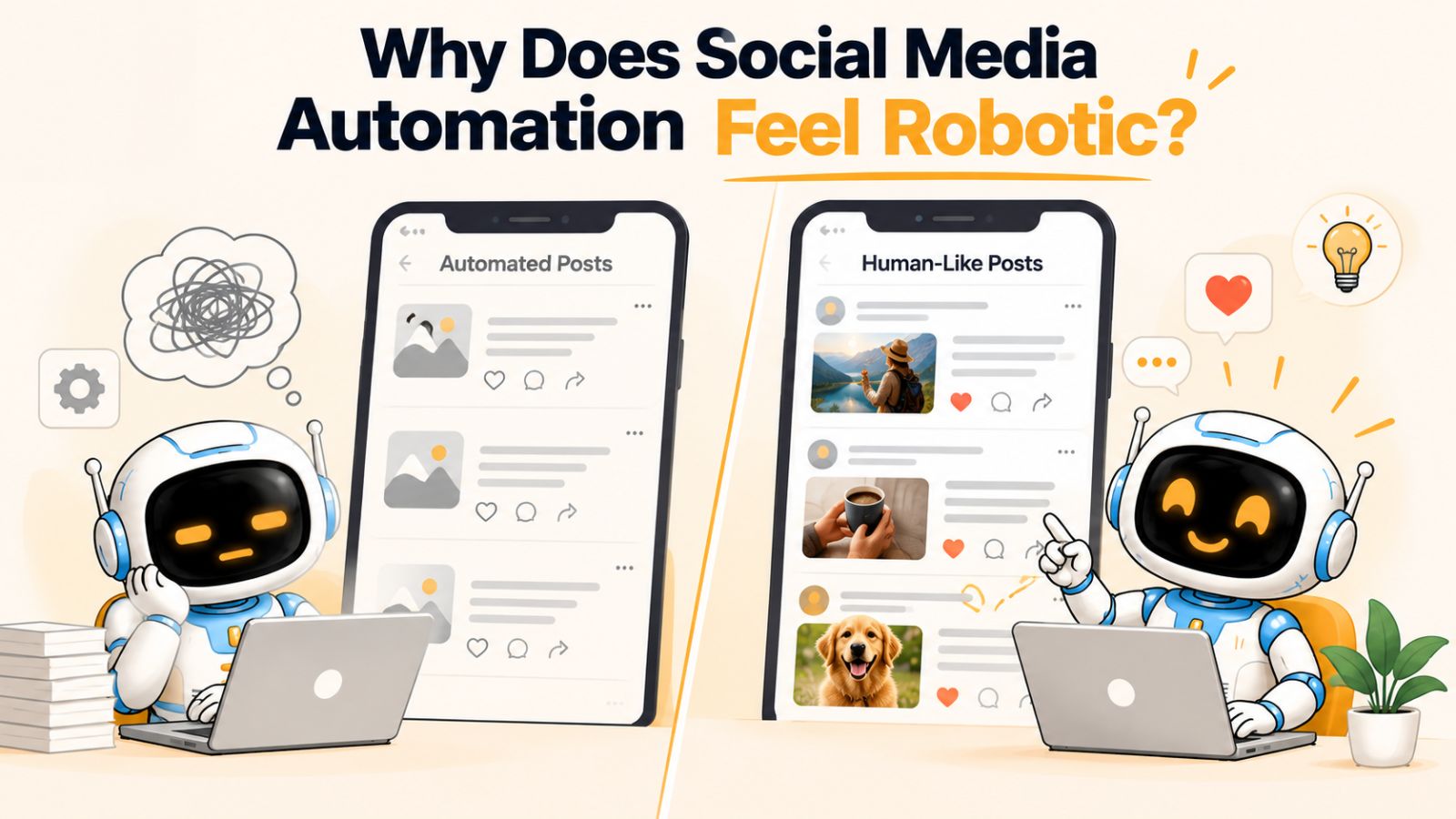
That happens because social media is not just a publishing problem. People respond to context, personality, timing, relevance, and small imperfections that make communication feel intentional. When automation removes those elements along with the repetitive work, the result can be technically consistent but emotionally flat.
The distinction is important: good automation removes busywork; bad automation removes judgment.
For example, scheduling a week of posts in advance is rarely what makes a brand feel robotic. The problem starts when the same caption structure is reused across every post, identical messages are pushed to every platform, AI generates generic copy without understanding the brand, and nothing changes when the conversation around that content changes.
There is also a temptation to optimize social media entirely around efficiency. A brand might aim to publish at the right frequency, use the right number of hashtags, include a call to action, and maintain a perfectly organized content calendar. All of those things can be useful, but none of them automatically make content worth paying attention to.
Human communication doesn't work that way.
A person doesn't talk to their friends using the same sentence structure every time. They adjust their words depending on who they're speaking to, what happened recently, and what they're trying to communicate. Social media content needs the same flexibility.
This is why why social media automation feels robotic is really a question about what gets automated. If technology handles repetitive execution while a human—or a well-informed AI workflow—still has access to brand context, creative direction, platform differences, and current circumstances, automation can feel surprisingly natural.
The challenge is finding that balance.
Once you understand where robotic automation comes from, it becomes much easier to identify which parts of your social media workflow should change.
The Same Caption Gets Pushed Everywhere
One of the fastest ways to make automated social media content feel robotic is to create one caption and publish it everywhere.

It is easy to understand why brands do this. A single piece of content can be sent to Facebook, Instagram, LinkedIn, TikTok, and other platforms with almost no additional effort. From an operational perspective, that sounds like exactly what automation should do.
But efficiency and relevance are not the same thing.
Each platform has its own culture, content formats, audience expectations, and reasons people open it in the first place. A caption that works as a short LinkedIn thought may feel awkward on Instagram. A message written for Facebook may not make sense as the description accompanying a TikTok video. Even when the underlying idea is identical, the way that idea should be communicated can change significantly.
Consider a simple post announcing a new product.
On LinkedIn, the audience may respond better to the business problem the product solves, the lesson behind its development, or an observation about the industry. On Instagram, the visual may do most of the work while the caption adds context or encourages interaction. On TikTok, the opening seconds of the video and its accompanying text may matter far more than a traditional promotional caption.
The mistake is assuming that republishing is the same as adapting.
Good social media automation should make adaptation easier, not eliminate it.
That distinction becomes particularly important when AI is involved. An AI system can generate a perfectly grammatical caption in seconds, but if it simply produces one generic version and distributes it everywhere, the workflow has automated publishing without actually solving the content problem.
A better approach is to start with the same content idea and create platform-appropriate variations.
For example, imagine the core idea is:
“Small businesses don't need to post more. They need a better system for turning ideas into consistent content.”
The underlying message can remain consistent, while the execution changes:
- LinkedIn: Expand the business insight and explain why consistency often breaks down.
- Instagram: Turn the idea into a concise caption supporting a carousel or visual.
- Facebook: Make the message more conversational and discussion-oriented.
- TikTok: Build the idea around a quick video hook and spoken explanation.
- YouTube: Develop the concept into a longer educational explanation if the format warrants it.
Nothing about this requires abandoning automation. In fact, automation can make this process easier by generating variations from the same source material.
The important difference is that the system understands “create five versions of this idea for five different environments” rather than “publish this exact thing five times.”
This is also one reason integrated social media workflows are becoming more useful. When the creative asset, posting style, caption generation, platform selection, and scheduling exist within the same workflow, there is more opportunity to adapt content before it reaches the audience.
The goal isn't to make every platform completely different. Your brand should still be recognizable everywhere.
The goal is to make the content feel like the same brand speaking naturally in different rooms, rather than a bot shouting the exact same sentence through five different microphones.
That distinction alone can make automated social media feel considerably more human.
The AI Writes Without Enough Brand Context
Give an AI tool a blank prompt and ask it to “write a social media caption,” and you will probably get something perfectly readable.
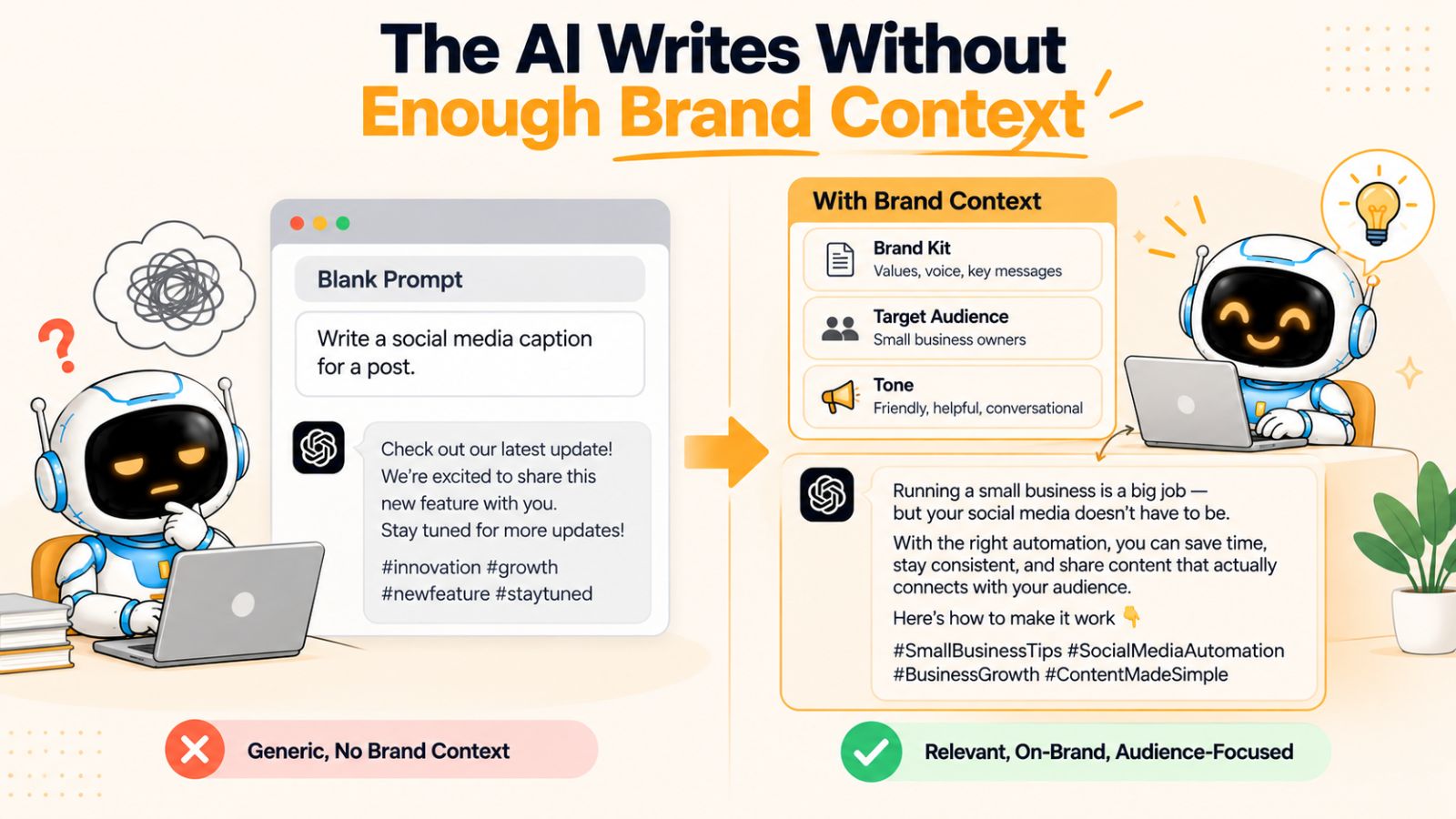
You may also get something that could have been written by almost any company on the internet.
This is one of the biggest reasons AI-powered social media automation can feel robotic. The system knows what a caption is supposed to look like, but it doesn't necessarily know how your brand is supposed to sound.
Without enough context, AI tends to fall back on patterns it has learned from enormous amounts of existing content. That can produce familiar hooks, predictable phrases, excessive enthusiasm, generic calls to action, and language that sounds polished without saying anything particularly distinctive.
Consider the difference between these two approaches.
“Write an Instagram caption about our new productivity app.”
versus:
“Write an Instagram caption for our productivity app. Our brand is practical, direct, and slightly playful. We speak to busy small-business owners, avoid exaggerated claims, don't use corporate jargon, and prefer useful observations over promotional language. The post should explain how the app helps users organize recurring tasks without making them feel overwhelmed.”
The second prompt gives the AI something to work with.
It provides an audience, a personality, a communication style, a subject, and boundaries. Those details give the system a much better chance of producing content that sounds intentional rather than interchangeable.
Brand voice is more than a list of adjectives
A common approach to defining brand voice is to write down three or four words:
Friendly. Professional. Authentic. Helpful.
Those words aren't wrong, but they're not particularly useful on their own. Thousands of brands could describe themselves the same way.
A useful brand voice needs examples and rules.
For instance:
- Do you use short sentences or longer explanations?
- Do you write casually or formally?
- Do you use humor?
- Do you use emojis frequently, occasionally, or never?
- Do you make bold claims or qualify them?
- Do you speak directly to the reader?
- What words or phrases should never appear?
- How do you explain complicated ideas?
- What does your brand sound like when it disagrees with something?
These details give automation something far more valuable than a generic personality label: a recognizable pattern of communication.
Context makes automation better
This is where the idea of a brand kit becomes particularly useful.
Instead of giving an AI tool a new explanation every time you create a post, you can establish important brand information once and allow the system to use that context across future content.
A workflow such as Bibby's, for example, brings brand information, content creation, posting styles, captions, and scheduling into the same broader social media workflow. That doesn't magically make every generated caption perfect, but it addresses an important weakness of disconnected automation: the writing process has more context available than a one-off prompt.
The same principle applies regardless of which tool you use.
The more useful context an automation system has, the less it has to rely on generic patterns.
And that leads to an important distinction between AI-generated content and robotic content.
AI-generated content isn't necessarily robotic.
Content becomes robotic when the AI has insufficient context, repeatedly falls back on predictable patterns, and is allowed to publish those patterns without meaningful direction or review.
The solution isn't necessarily to stop using AI. It's to give AI a better understanding of the person, company, audience, and message behind each post.
Once that context exists, automation can handle much more of the repetitive work without making every post sound like it came from the same template.
Automation Optimizes for Consistency, Not Conversation
Consistency is one of the biggest advantages of social media automation.
You can plan content in advance, maintain a publishing schedule, avoid missed posting days, and keep your brand visible even when you're busy with everything else involved in running a business.
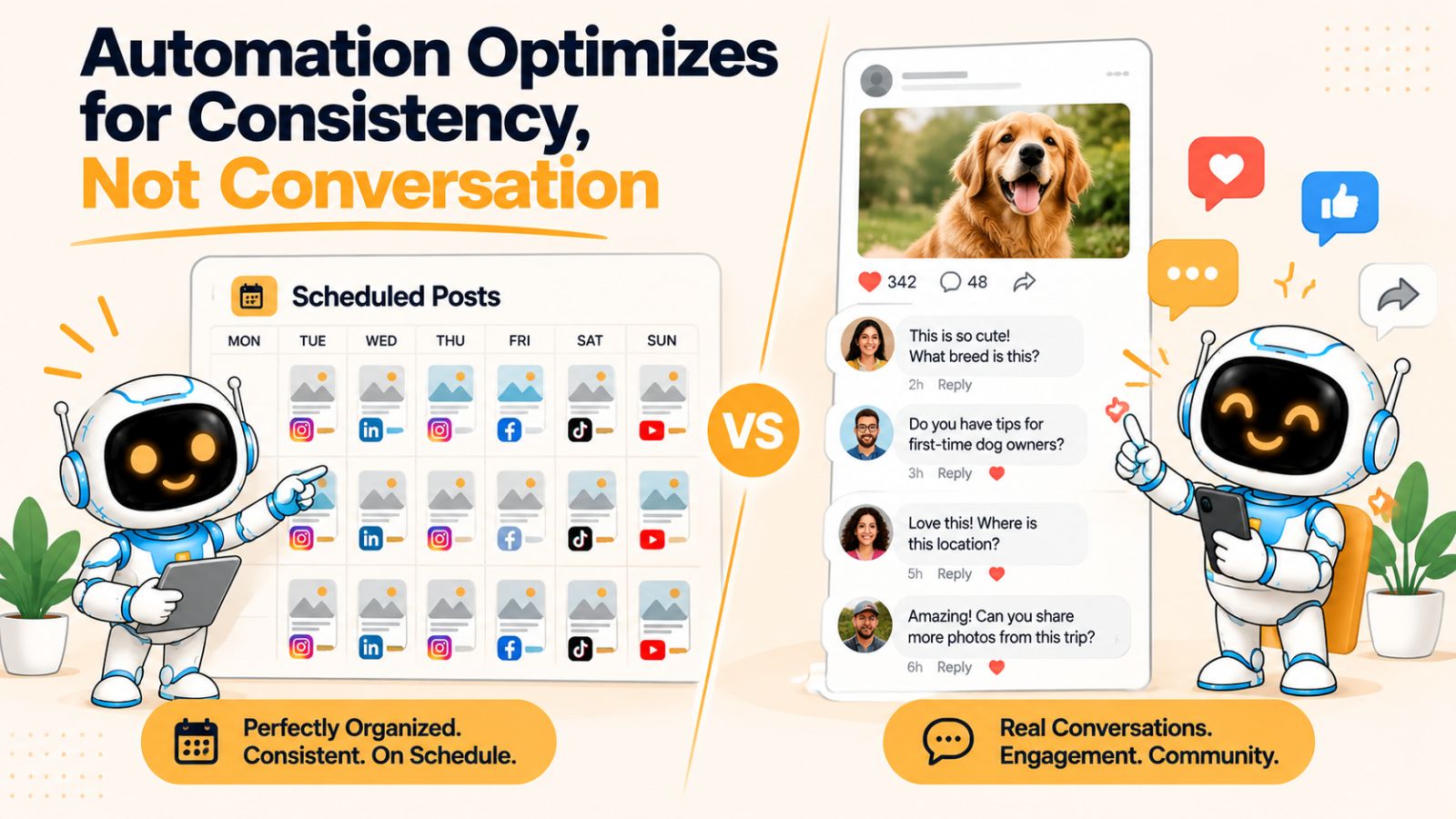
The problem begins when consistency becomes the main objective.
A social media account can publish every day and still feel completely disconnected from its audience. It can have a perfectly organized content calendar, carefully scheduled posts, and professionally designed graphics while generating very little sense that an actual person is behind the account.
That's because publishing is only one part of being social.
Social media was built around interaction. People comment, ask questions, share experiences, respond to news, disagree with opinions, recommend products, and start conversations that nobody could have predicted when a content calendar was created.
A purely automated workflow tends to struggle with this because scheduled content is designed around what you already know.
Conversation happens around what is happening now.
The content calendar isn't the conversation
Imagine a company schedules ten posts on Monday for publication throughout the next two weeks.
On Wednesday, one of those scheduled posts goes live. But the industry has just experienced a major development that changes how people are thinking about the subject.
The scheduled post may still be factually correct. It may still contain a useful insight. It may even perform reasonably well.
But publishing it without acknowledging the new context can make the account feel strangely detached.
A human social media manager might recognize the change and ask:
Should we adjust this post?
Should we delay it?
Should we publish something responding to what just happened?
Should we change the angle completely?
Automation doesn't inherently answer those questions. It needs to be designed to support them.
Consistency should create space for better work
This doesn't mean businesses should abandon scheduling and manually publish every post.
That would defeat much of the value of automation.
The point is that automation should create time for conversation, not replace conversation.
If a business spends hours every week manually resizing images, writing repetitive captions, copying content between platforms, choosing dates, and setting up individual posts, there is less time available for responding to customers or thinking about what the audience actually needs.
A better workflow removes those repetitive tasks.
For example, AI can help turn a prepared creative into a caption, adapt the message to different platforms, organize several pieces of content, and schedule them across the publishing calendar. A tool such as Bibby is designed around this kind of workflow, combining content creation and scheduling rather than requiring every step to happen in a separate application.
The benefit isn't simply that more posts can be published.
The bigger benefit is that less human attention is wasted on mechanical work.
That attention can then go toward the parts of social media that benefit from human judgment: answering meaningful comments, spotting opportunities, developing ideas, understanding customers, and deciding what the brand should say next.
Don't confuse automation with absence
The most effective automated accounts don't necessarily look like accounts with no human involvement.
They can look like accounts where humans have stopped spending their time on tasks that machines are good at.
That's a much healthier definition of automation.
The objective isn't:
“How can we make our social media run without us?”
It's:
“How can we make our social media require less repetitive work while giving us more time to do the work that actually matters?”
Once that distinction is clear, automation becomes less about filling a content calendar and more about building a system that supports ongoing communication.
And that brings us to another reason automated content can become painfully predictable: when every post starts sounding like an advertisement.
Every Post Starts to Sound Like an Advertisement
There is a particular kind of social media post that almost everyone recognizes instantly.
It starts with a dramatic hook.
Then comes a broad statement about a problem.
Then a few lines explaining why the problem matters.
Finally, there is a call to action:
“Ready to take your business to the next level? Try it today.”
None of these elements are inherently bad. Hooks can work. Calls to action can work. Promotional posts have an important place in a content strategy.
The problem is what happens when every post uses the same formula.
Automation makes repetition particularly easy. Once a brand discovers a caption structure that seems to work, it can be tempting to reuse it again and again. Add AI to the process, and you can produce dozens of variations without realizing that the underlying structure hasn't changed at all.
The words are different.
The experience is the same.

People notice patterns faster than brands expect
Imagine seeing five posts from the same company over two weeks.
The first says:
“Want to save time managing your business? Here's how…”
The next says:
“Ready to transform the way you manage your business?”
Then:
“Struggling to stay productive? You're not alone…”
Then:
“Here's the secret to working smarter…”
Each sentence looks different.
But they all perform the same job.
Eventually, the audience stops experiencing the content as individual ideas and starts recognizing the template behind it.
That's when automation begins to feel robotic.
Not every post needs to sell something
One way to break the pattern is to stop treating every piece of content as a sales opportunity.
A healthy social media presence can contain different types of posts:
- Educational explanations
- Opinions and observations
- Behind-the-scenes content
- Customer stories
- Questions
- Industry commentary
- Product demonstrations
- Useful tips
- Entertaining content
- Direct promotions
A product can appear in a useful explanation without becoming the subject of a sales pitch.
For example, a scheduling tool doesn't always need to post:
“Save hours every week with our powerful social media automation platform.”
It could instead share an observation about why small businesses struggle to maintain consistent publishing, demonstrate a practical workflow, or explain how to turn one creative idea into several platform-specific posts.
The product can still be relevant.
But the content is doing something more valuable than simply asking for a purchase.
Variation should happen at the idea level
Another important distinction is the difference between rewriting and creating variety.
AI is very good at rewriting the same idea ten different ways.
But ten rewrites are not necessarily ten pieces of content.
If every post communicates the same message, uses the same emotional angle, and ends with the same CTA, changing the wording doesn't solve the underlying problem.
A better automation system should help vary:
The topic.
The format.
The angle.
The audience problem.
The storytelling approach.
The level of awareness.
The call to action.
This is where choosing a posting style can be useful. Instead of asking AI to generate “another caption,” you can give the content a different purpose or voice—educational, conversational, opinion-led, storytelling-focused, promotional, and so on.
The result is more than linguistic variation.
It's editorial variation.
And that matters because people don't follow brands simply to receive advertisements at perfectly scheduled intervals. They follow accounts because the content gives them a reason to keep paying attention.
Automation should help you produce more of those reasons—not simply more advertisements.
Once promotional repetition is under control, there's another problem that automation has difficulty solving: timing and context. A scheduled post can be perfectly written and still feel wrong if the world around it has changed.
Automation Removes the “Why Now?”
A social media post can be well written, visually appealing, and completely on-brand—and still be the wrong post for the moment.
That's because relevance isn't only about what you say. It's also about when and why you're saying it.
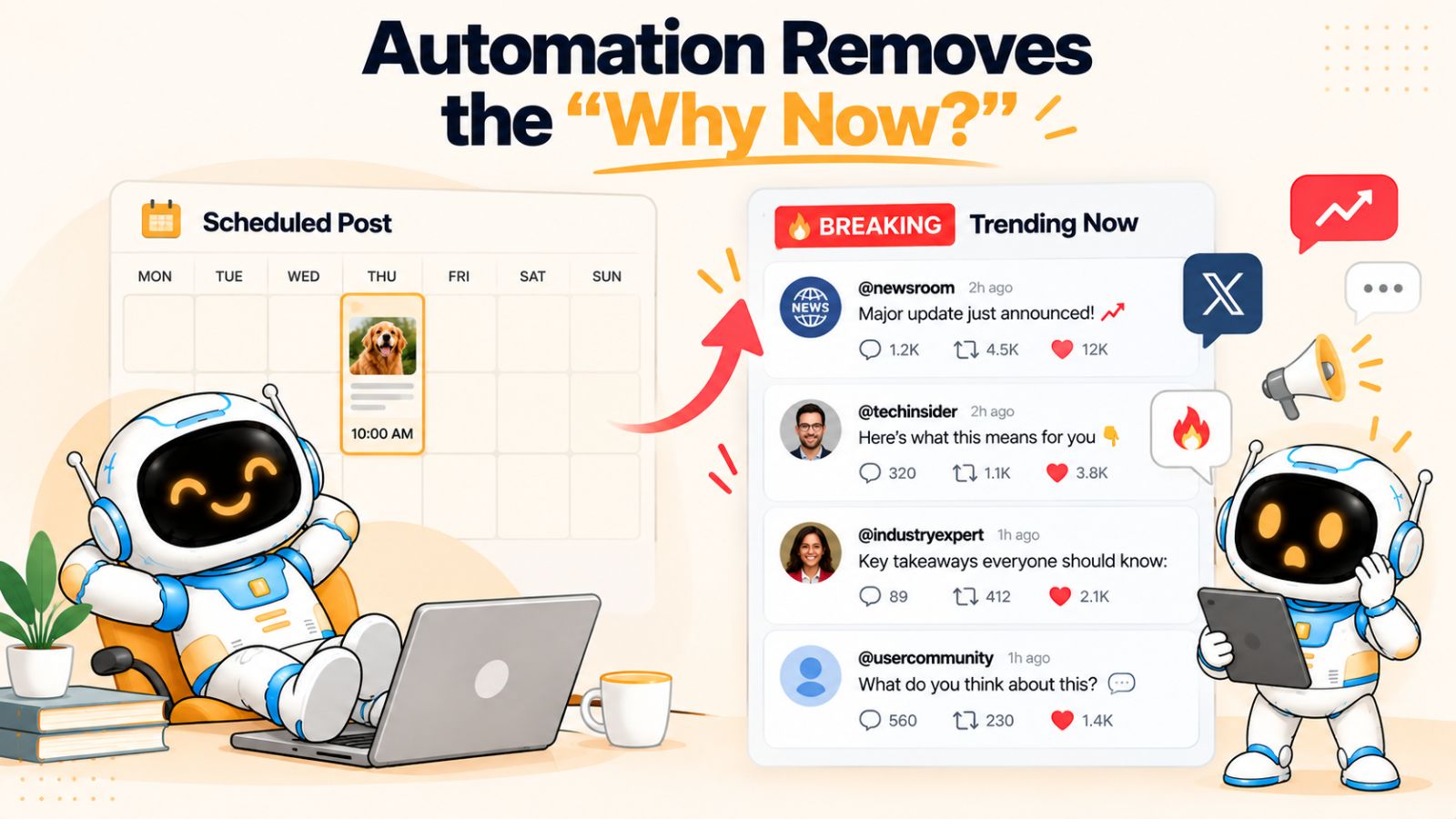
A content calendar usually answers a straightforward question:
“What are we publishing on Thursday?”
A human social media manager often asks a different question:
“Why should we publish this on Thursday?”
That second question is where context enters the picture.
Social media doesn't happen in a vacuum
Conversations change constantly.
A customer asks an unexpected question. A competitor launches something new. An industry story suddenly gets attention. A product update changes the way people use your service. A video unexpectedly starts trending. Your audience begins discussing a problem you hadn't planned to address.
None of those things necessarily existed when your monthly content calendar was created.
A rigid automation system doesn't know what to do with that uncertainty. It simply follows the schedule.
And sometimes that creates awkward situations.
Imagine a company has scheduled a lighthearted promotional post for Friday. On Thursday, an important event happens in its industry. By Friday morning, customers are talking about the event everywhere.
The scheduled promotional post may still be technically appropriate.
But publishing it without acknowledging the larger conversation can make the brand appear disconnected.
The problem isn't that the post was automated.
The problem is that the automation had no mechanism for context.
Scheduling and timing are not the same thing
This is also why simply choosing a publishing time isn't enough.
Many social media tools can schedule a post for Tuesday at 10 a.m. That's useful, but it doesn't necessarily mean Tuesday at 10 a.m. is the right moment for that particular piece of content.
More sophisticated workflows can use historical engagement patterns and other signals to help determine when content should be published. Bibby, for example, combines scheduling with AI-assisted timing rather than requiring users to manually select every publishing slot.
That can remove a tedious decision from the workflow.
But timing should still be treated as one part of a broader content strategy.
A “perfect” posting time cannot rescue content that is irrelevant, repetitive, or poorly matched to the audience.
The solution isn't to abandon scheduled content
Real-time relevance doesn't mean everything should be spontaneous.
In fact, trying to manually create every post in real time can create its own problems: inconsistent publishing, rushed writing, missed opportunities, and unnecessary workload.
A better approach is to divide your content into two broad categories.
Planned content can include:
- Educational posts
- Evergreen tips
- Product explanations
- Customer stories
- Repurposed content
- Campaign assets
- Regular brand content
Responsive content can include:
- Industry developments
- Emerging conversations
- Customer questions
- Trends
- Timely observations
- Unexpected opportunities
Automation works extremely well for the first category.
The second requires more judgment.
The strongest social media workflows leave room for both.
Good automation leaves room for interruption
This may sound counterintuitive, but a good automated content system should make it easy to change the plan.
If a scheduled post needs to be edited, delayed, regenerated, or replaced, that should be straightforward.
The goal isn't to build a machine that refuses to deviate from the calendar.
The goal is to build a system where the calendar handles predictable work while people remain free to respond to unpredictable events.
That distinction matters because the most human social media content often comes from something that couldn't have been scheduled weeks in advance.
Automation should handle what you already know.
Human judgment should remain available for what you don't.
Content Is Created in Isolation
Sometimes social media content feels robotic even when the caption itself sounds perfectly natural.
The problem isn't the writing.
It's the disconnect between everything around it.
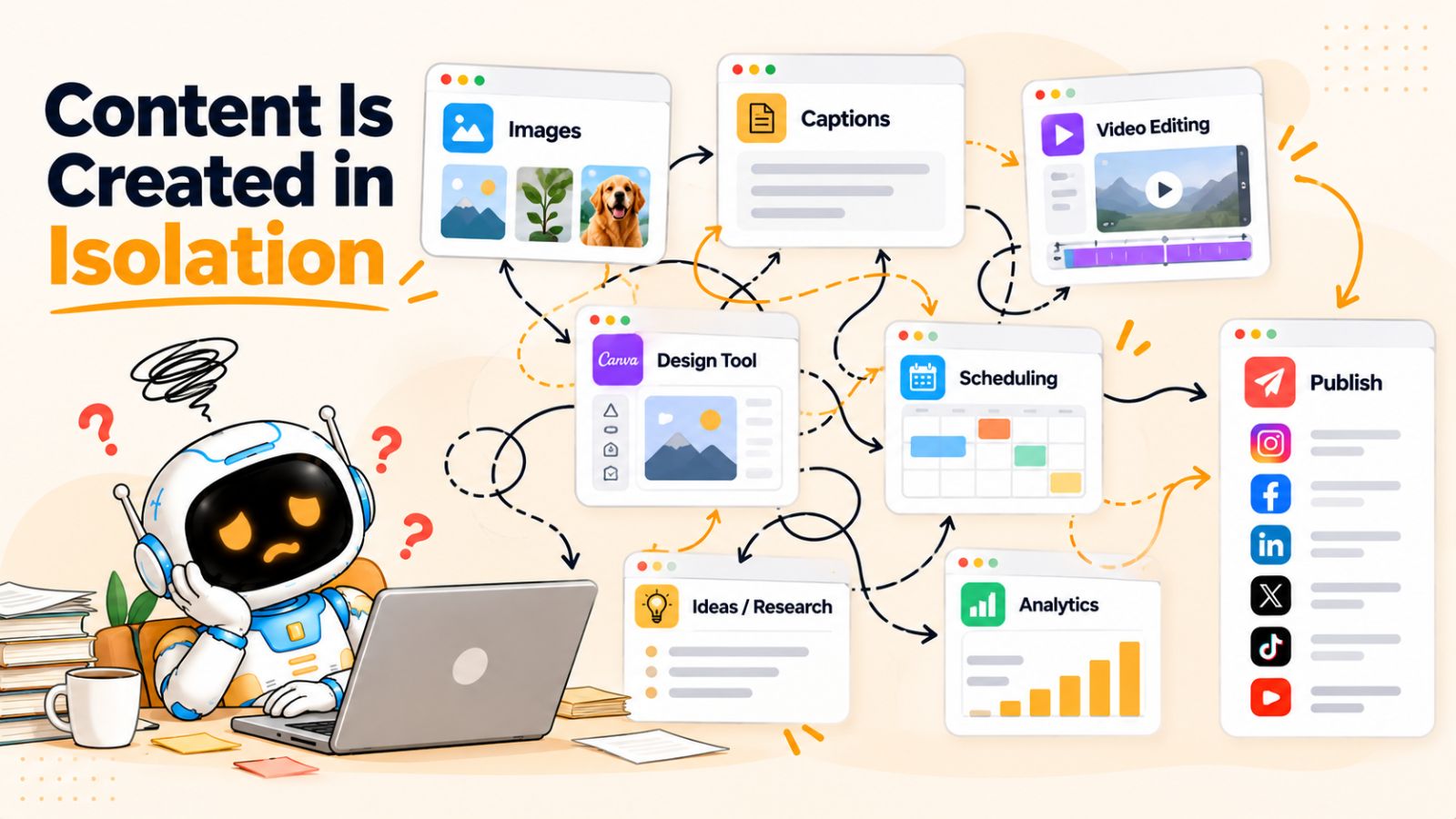
The image was created in one tool. The caption was generated in another. The video was edited somewhere else. The content was copied into a scheduling platform. Hashtags were added manually. The publishing time was chosen separately. Then someone had to check whether everything actually looked right on each platform.
Each individual step can work.
The overall workflow can still feel strangely mechanical.
That's because a social media post isn't really a collection of independent tasks. The creative, caption, format, platform, timing, and message all influence one another.
A post is more than a caption
Consider an Instagram carousel explaining five common mistakes businesses make with social media automation.
The images establish the visual structure.
The first slide creates curiosity.
The caption provides additional context.
The final slide might encourage readers to save or share the post.
The publishing format determines how people encounter the content.
If each of those elements is created independently, important connections can get lost.
You might end up with a carousel about one idea and a caption that talks about another. Or a short-form video paired with a long caption that repeats everything viewers just heard. Or a LinkedIn post that sounds like an Instagram caption because the same text was copied across platforms.
Nothing is necessarily “wrong.”
But nothing feels deliberately connected either.
Disconnected tools create disconnected decisions
This is one reason social media teams often accumulate a surprisingly complicated stack of tools.
One tool creates images.
Another generates AI copy.
Another stores the content calendar.
Another schedules posts.
Another manages videos.
Another handles analytics.
Another might manage community interactions.
There's nothing inherently wrong with using multiple tools. Specialized software can be extremely powerful.
But every handoff creates another opportunity for context to disappear.
Someone has to move the asset.
Someone has to explain the campaign.
Someone has to copy the caption.
Someone has to remember which platform needs which format.
Someone has to decide when it should be published.
And eventually, the person managing social media spends more time moving information between tools than thinking about the audience.
Integrated workflows change the equation
An integrated workflow can reduce some of that friction.
For example, instead of starting with an empty caption box, you can begin with the actual creative asset. From there, the system can use the content, selected posting style, brand context, and target platforms to help generate the rest of the post.
That is one of the ideas behind tools such as Bibby. Its workflow brings creative uploads or AI-generated images, posting styles, caption generation, platform selection, and scheduling into a more connected process. It also supports multiple content formats, including images, carousels, videos, and Stories.
The value isn't simply having more features in one dashboard.
It's having more context available at the moment each decision is made.
That distinction is important.
An AI caption generator knows you're asking for a caption.
A more connected social media workflow can potentially know that you're creating a particular campaign, for a particular brand, using a particular creative, intended for particular platforms.
The second situation gives AI considerably more information to work with.
Automation should preserve relationships between decisions
The best automation doesn't necessarily automate every individual action independently.
It connects related actions.
Instead of:
Image → caption → scheduler
you can think about the workflow as:
Campaign → creative → content style → platform adaptation → caption → schedule → publish
Each step has context from the previous one.
That makes the process more coherent and reduces the chance that the final post feels like several unrelated pieces assembled by software.
Ultimately, social media content feels human when the individual parts appear to have been created for a reason.
Automation becomes robotic when those parts are produced independently simply because the workflow requires something to be filled in.
And even a highly connected workflow can still go wrong if there is no human judgment involved at the end.
There Is No Human Review Layer
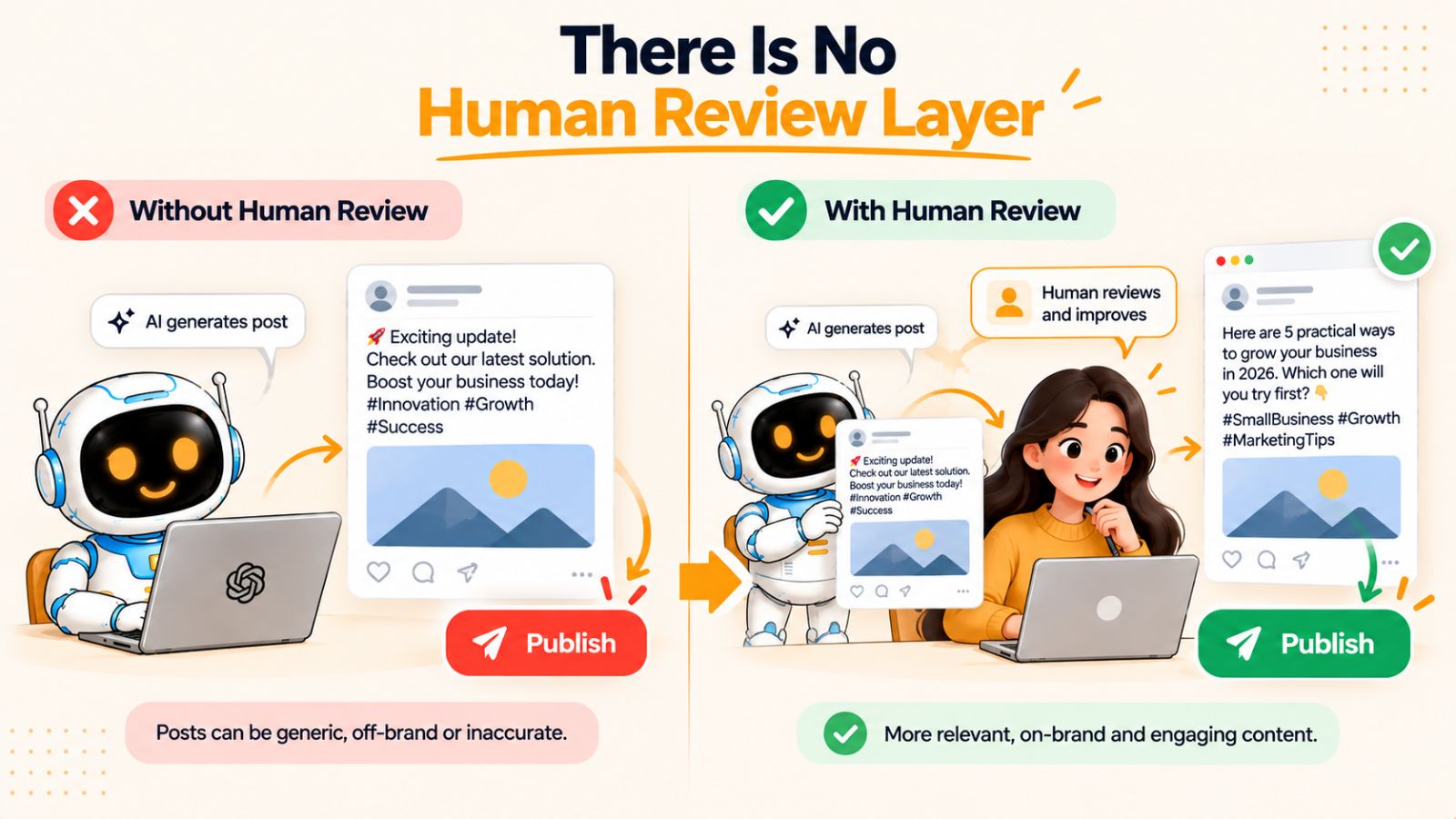
The final reason automated social media can feel robotic is also one of the simplest: nobody is checking what the system is actually producing.
It's tempting to think that if an AI tool can generate a caption, choose a posting time, and publish the content, the process is finished.
Technically, it is.
Creatively, it may not be.
AI can produce grammatically correct copy that is completely wrong for the moment. It can misunderstand the intended tone, repeat an idea you've already published, make a claim that needs verification, or choose wording that sounds unlike your brand.
A human reviewing the post can catch those problems in seconds.
Human review doesn't mean manual publishing
This distinction is important.
A human-in-the-loop workflow does not require someone to manually create every post, upload every image, write every caption, and schedule every piece of content.
That's not automation.
The human role can be much smaller and more strategic.
For example, someone might:
- Define the campaign objective.
- Provide the brand context.
- Upload or create the visual.
- Choose the desired content style.
- Let AI generate the initial caption and variations.
- Review important posts.
- Approve the content or make a quick adjustment.
- Let automation handle scheduling and publishing.
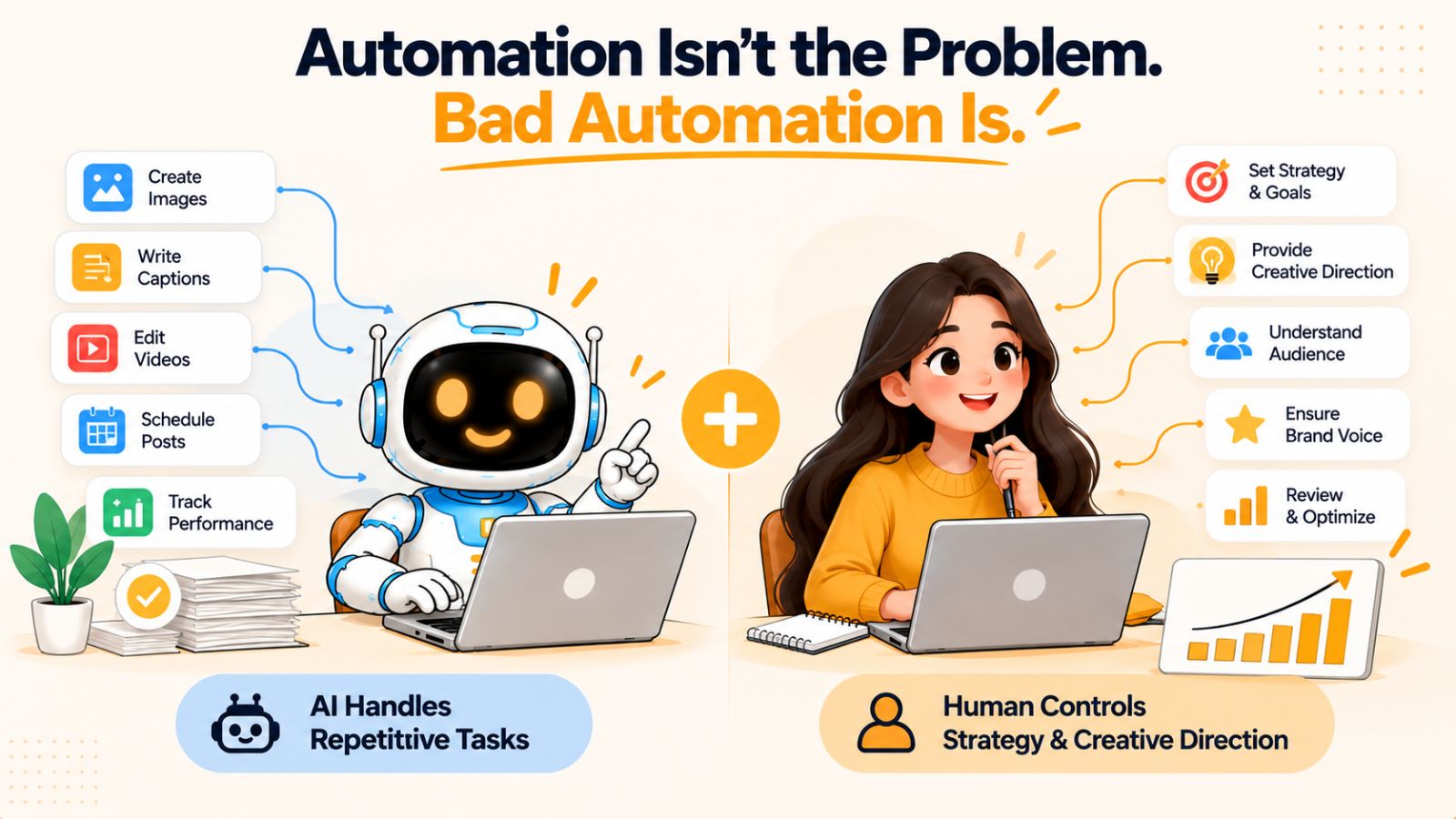
The machine handles repetitive execution.
The human handles judgment.
Not every post deserves the same level of review
You also don't need to scrutinize every piece of content equally.
A simple evergreen tip that has already been approved as part of a recurring content series might require very little attention.
A post discussing a sensitive subject, making a significant product claim, responding to an industry event, or representing a major campaign deserves more scrutiny.
You can think about review in levels:
Low-risk content: automate heavily.
Medium-risk content: generate automatically and review before publishing.
High-risk content: involve a human closely in creation, editing, and approval.
This makes automation practical without pretending that every social media decision can be reduced to a rule.
AI should be your first draft, not your unquestioned publisher
There is also a psychological benefit to treating AI output as a starting point.
When people assume that generated content is automatically ready to publish, they tend to accept generic language simply because it is grammatically correct.
When they treat it as a draft, they naturally ask better questions:
Does this actually sound like us?
Would we say this to a customer?
Is this claim accurate?
Is this useful?
Does the opening earn attention?
Does this make sense for this platform?
Does this add something new to our feed?
Those questions are difficult to turn into universal automation rules because they depend on context.
That's exactly why human judgment still matters.
The goal is not human versus AI
The debate around AI social media automation is sometimes framed as if businesses must choose between completely manual content creation and completely autonomous publishing.
That's a false choice.
There is a much larger middle ground.
AI can handle the repetitive parts of content production while humans remain responsible for direction, taste, context, and important decisions.
That is often where automation creates the most value.
You don't need a person spending three hours every morning moving posts through a publishing dashboard.
You need a person who can spend a fraction of that time deciding what the brand should actually say.
The difference is subtle but fundamental.
Automation should reduce the amount of work humans have to do—not reduce the amount of human thinking behind the work.
Once that principle is in place, the question changes from “Should we automate social media?” to a much more useful one:
“Which parts of social media should we automate, and which parts should remain human?”
That distinction leads directly to the next part of the problem: automation itself isn't necessarily the enemy. Bad automation is.
Automation Isn't the Problem. Bad Automation Is.
After looking at all the ways automated social media can go wrong, it would be easy to reach the wrong conclusion: perhaps businesses should stop automating altogether.
That isn't the lesson.
The problem isn't that a post was scheduled automatically. The problem isn't that AI helped write it. The problem isn't even that one piece of content was adapted for several platforms.
The problem is automation without enough context, variation, or judgment.
There is a meaningful difference between using technology to remove repetitive work and using technology to remove the thinking behind your content.
Scheduling is not the same as content automation
Traditional social media scheduling solves a relatively simple problem:
“We already know what we want to publish. Make sure it goes out at the right time.”
That's useful.
But modern social media workflows can go much further.
Instead of creating the content manually and then handing it to a scheduler, AI can help with parts of the creative process itself:
- Generating or adapting visuals
- Writing captions
- Creating content variations
- Repurposing ideas
- Adjusting content for different platforms
- Organizing campaigns
- Selecting publishing times
- Scheduling multiple formats
- Managing a larger content pipeline
The more of the workflow you automate, the more important context becomes.
A scheduler doesn't need to understand your brand voice. It only needs to know what to publish and when.
An AI system helping create your content needs much more information.
The three layers of good automation
A useful way to think about social media automation is in three layers.
Layer 1: Execution
This includes repetitive actions such as uploading, formatting, scheduling, and publishing.
These are excellent candidates for automation.
Layer 2: Assistance
This includes generating captions, suggesting content ideas, adapting posts, creating variations, and identifying useful publishing times.
AI can be extremely valuable here, particularly when it has enough context.
Layer 3: Direction
This includes deciding what the brand stands for, what campaigns to run, what audiences to prioritize, what conversations matter, and what the business should say.
This is where human judgment becomes especially important.
The mistake is trying to push all three layers into the same category.
Not every decision needs a human.
Not every decision should be made by a machine.
The best workflows combine both
Imagine a business wants to publish a month of social media content.
A completely manual workflow might require someone to create every asset, write every caption, choose every publishing date, upload everything to each platform, and repeat the process week after week.
That's expensive in time.
At the other extreme, a completely hands-off workflow might ask AI to generate everything and publish it without review.
That's efficient, but it risks producing repetitive, context-free content.
A hybrid workflow looks different.
The human establishes the campaign and creative direction. AI helps turn that direction into content. The system adapts and schedules the posts. The human reviews important pieces and remains available to change the plan when circumstances change.
That is automation with direction, rather than automation without oversight.
More automation can actually make content more human
This sounds contradictory, but it can happen.
Suppose a business spends ten hours every week performing repetitive social media tasks.
If automation reduces that to two hours, those eight recovered hours don't have to disappear.
They can be used to:
- Talk to customers
- Read comments
- Research audience questions
- Develop better ideas
- Record original videos
- Respond to current events
- Improve products
- Think about the next campaign
In other words, automation can remove the mechanical work that was preventing people from doing the human work.
That's the real opportunity.
The objective isn't to make social media completely autonomous.
It's to make the machinery behind social media quiet enough that the human side can become more visible.
Once you approach automation this way, the next question becomes practical: what does a social media workflow actually look like when the goal is to automate execution without sacrificing personality?
What Human-Looking Social Media Automation Actually Looks Like
If robotic social media comes from automating without context, the solution is not to eliminate automation. It's to build a workflow where automation has enough information to make useful decisions.
Human-looking automation starts before the caption is written.
It starts with the content itself, the purpose behind it, the audience receiving it, and the way the brand communicates.
From there, AI and automation can handle much of the repetitive execution without making every post feel like it came from a template.
Start With the Asset, Not the Caption
A social media post often begins with something tangible: an image, a carousel, a video, a product demonstration, a customer story, or an idea that needs to become a piece of content.
Starting with that asset gives AI useful context.
Instead of asking an AI system to invent a caption from nothing, you can give it the actual creative and ask it to explain, frame, or extend the idea.
That changes the task.
The system isn't simply trying to produce “a good caption.”
It's trying to produce a caption that belongs with this particular piece of content.
For example, an image showing a product being used tells the system something different from an educational infographic or a behind-the-scenes photograph.
The creative gives the writing somewhere to start.
Tools such as Bibby follow this broader workflow by allowing users to upload an image or generate a visual with AI before moving into caption creation, posting style, platform selection, and scheduling.
The important principle isn't the specific tool.
It's context before generation.
Give AI a Posting Style
The next layer is direction.
“Write a caption” is an extremely broad instruction.
A posting style narrows the possibilities.
You might want the same underlying idea presented as:
- An educational explanation
- A short conversational post
- A personal observation
- A storytelling post
- An opinion
- A product demonstration
- A promotional announcement
The content doesn't necessarily need to change.
The way you communicate it does.
This is one of the simplest ways to prevent AI-generated social media from becoming monotonous. Instead of repeatedly asking for another caption, you're deliberately changing the editorial approach.
Adapt the Content to the Platform
The next step is platform adaptation.
The underlying idea can remain consistent, but the execution should account for where the content is being published.
A LinkedIn audience may expect more context around a business lesson. Instagram may place greater emphasis on the visual and concise supporting copy. TikTok and YouTube may revolve around video structure and the opening hook.
The goal isn't to create completely unrelated content for every platform.
It's to avoid treating every platform as a copy-and-paste destination.
A good automation workflow can help create these variations without requiring someone to manually rewrite everything.
Schedule Strategically
Once the content is ready, automation becomes particularly valuable.
Scheduling dozens of posts manually is tedious. Repeating the same publishing process across several platforms wastes time that could be spent on strategy or community interaction.
This is where AI-assisted scheduling can help.
Instead of asking someone to manually choose every date and time, an automation system can use available signals to help determine suitable publishing windows. Bibby, for example, includes AI-optimized scheduling as part of its workflow, allowing content to be distributed across selected platforms without requiring every publishing slot to be chosen manually.
That doesn't mean timing alone determines performance.
It means one repetitive decision can be taken off the user's plate.
Keep Humans in the Loop Where They Add Value
Finally, don't automate judgment simply because you can.
A human should still be able to look at important content and ask:
Does this sound like us?
Is this useful?
Is this still relevant?
Would our audience understand it?
Should this be published right now?
Those questions don't need to be asked for every low-risk post, but they matter for major campaigns, sensitive subjects, important announcements, and anything that could materially affect how the brand is perceived.
The result is a workflow where machines handle repetition and humans handle meaning.
That is what human-looking automation ultimately comes down to.
The system should make publishing easier without making the brand less recognizable.
Can AI Social Media Automation Actually Sound Human?
Yes—but not simply because the AI is powerful.
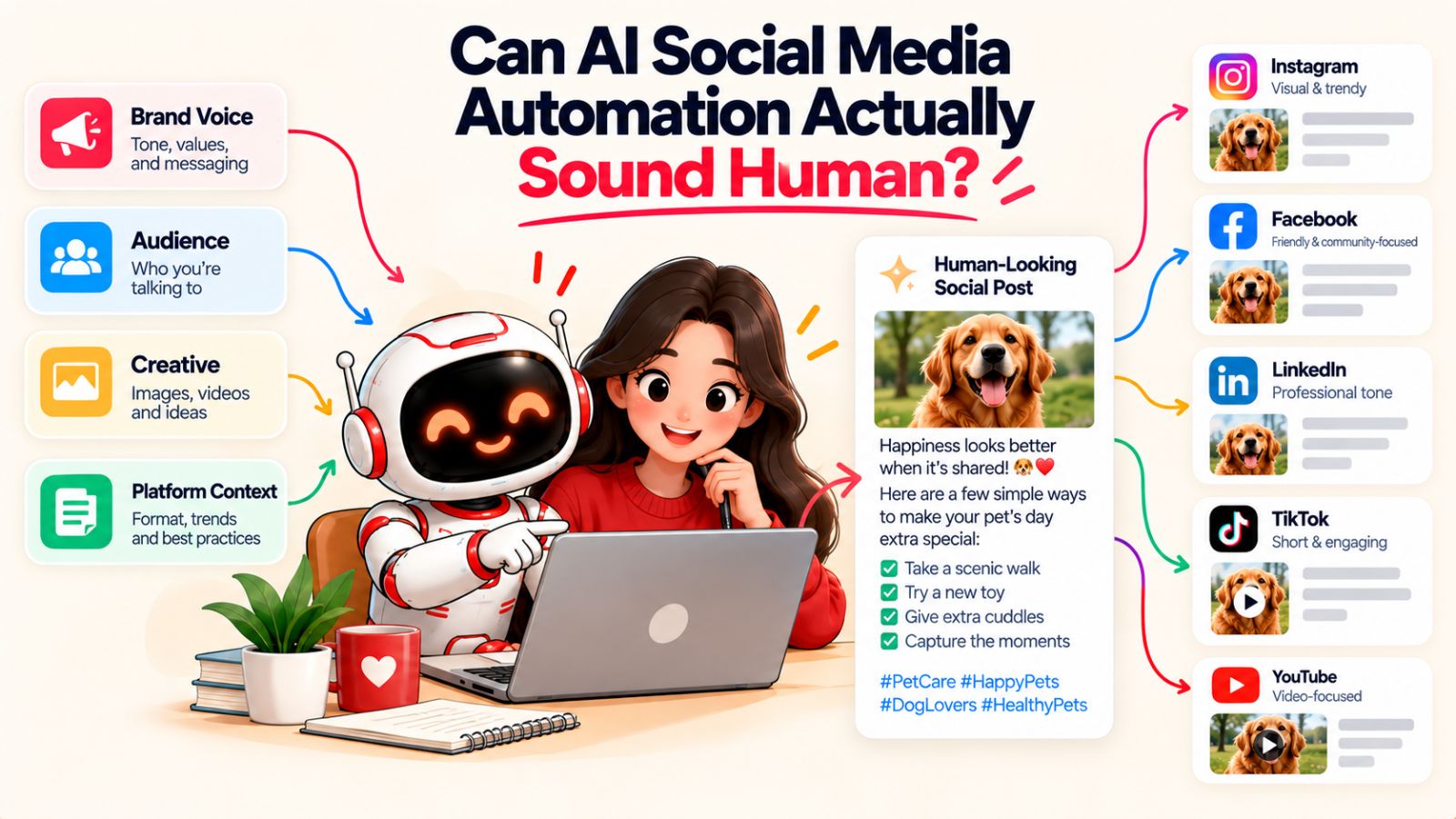
The quality of AI-generated social media content depends heavily on the quality of the context surrounding it. Give an AI system little more than a topic and a request for a caption, and you're likely to get something polished but generic. Give it a clear brand voice, audience, creative asset, content purpose, and platform, and the result can be considerably more specific and natural.
This is an important distinction because AI-generated and robotic are not synonyms.
A human can write robotic content. AI can help produce human-sounding content.
The difference is usually found in the process.
Context is what makes AI output specific
Imagine asking an AI to write a post about social media automation.
There are millions of possible ways to approach that subject.
Without direction, the AI has to choose one based on general patterns. That's where familiar phrases and predictable structures often appear.
Now give it additional information:
- The audience is small-business owners.
- The brand prefers practical advice over hype.
- The post is educational rather than promotional.
- The visual explains why excessive automation makes content feel repetitive.
- The audience already understands basic scheduling.
- The platform is LinkedIn.
- The tone should be direct and conversational.
Suddenly, the system has constraints.
Constraints aren't the enemy of creativity. In content creation, they often make creativity more useful.
The AI has fewer opportunities to fall back on generic language because it has a clearer understanding of what the post is supposed to accomplish.
Human-sounding doesn't mean imperfect
There's also a common misconception that making AI content “human” means intentionally adding typos, awkward sentences, excessive slang, or random imperfections.
It doesn't.
Human communication can be polished.
What makes it feel human is usually specificity and intent.
A useful post contains an actual observation.
A good story contains a reason for being told.
A strong opinion has a point of view.
A helpful tutorial addresses a real problem.
A product demonstration shows something rather than simply claiming that the product is “powerful.”
Those qualities matter more than whether a sentence contains an emoji or uses informal language.
The real test: would the audience recognize the brand?
One practical test is surprisingly simple:
If you removed the logo, would someone who knows the brand still recognize the content?
Not because of the colors.
Not because of the company name.
Because of the way the idea is explained.
That recognition comes from repeated patterns of thought, not merely repeated phrases.
A brand might consistently explain complicated ideas in simple language. Another might use strong opinions and short sentences. Another might rely heavily on storytelling and customer examples.
Those patterns can be documented and incorporated into an AI-assisted workflow.
Over time, that makes generated content more consistent with the brand without requiring every caption to be manually written.
Automation should create variations, not clones
Another way to keep AI-generated content from feeling repetitive is to deliberately introduce variation.
The same campaign can produce:
- A short educational post
- A longer explanation
- A customer-focused example
- A carousel
- A short-form video
- A question designed to start discussion
- A behind-the-scenes post
- A direct product demonstration
The underlying message remains coherent.
The expression changes.
That is much closer to how a real social media team behaves.
A good team doesn't take one sentence and publish it 30 times. It takes a campaign idea and finds multiple ways to communicate it.
AI can help with that process.
The final ingredient is judgment
Even a highly capable AI system benefits from someone deciding whether the output deserves to exist.
That's why the best model isn't:
AI creates → AI publishes → nobody looks at it.
It's closer to:
Human direction → AI assistance → platform adaptation → human judgment where necessary → automated execution.
This model preserves the efficiency of automation while maintaining the qualities that make social media worth following in the first place.
So yes, AI social media automation can sound human.
But the objective shouldn't be to make AI pretend to be a human.
The objective should be to give AI enough context to help a real brand communicate like itself.
A Better Social Media Automation Workflow
The easiest way to understand good social media automation is to stop thinking about it as a single button that says “automate.”
It's a sequence of decisions.
The more intelligently those decisions connect, the less likely the final content is to feel generic.
A practical workflow looks something like this:
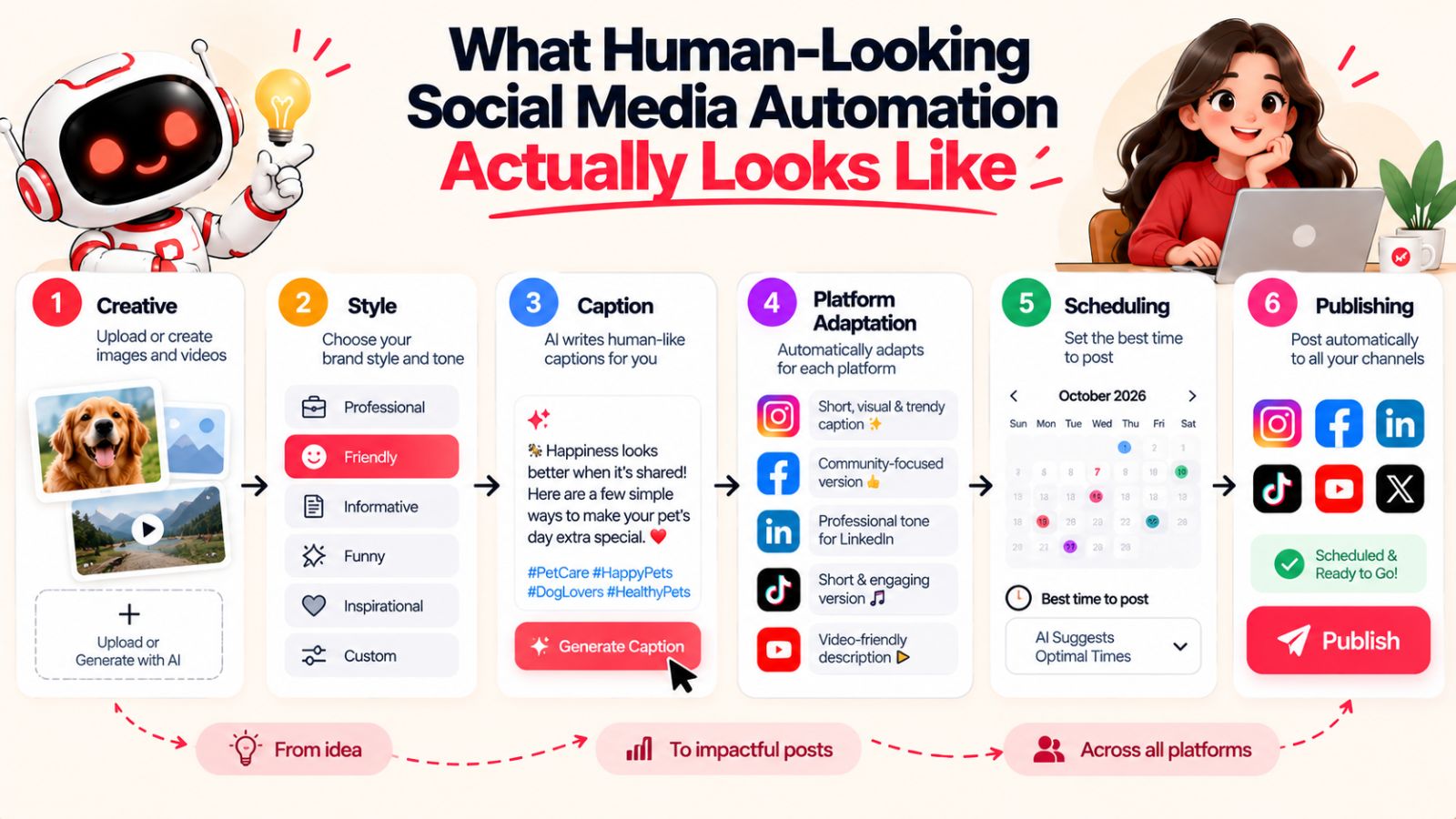
Creative → Style → Caption → Platform adaptation → Scheduling → Publishing → Review → Learning
Each stage has a different job, and not every stage needs the same level of human involvement.
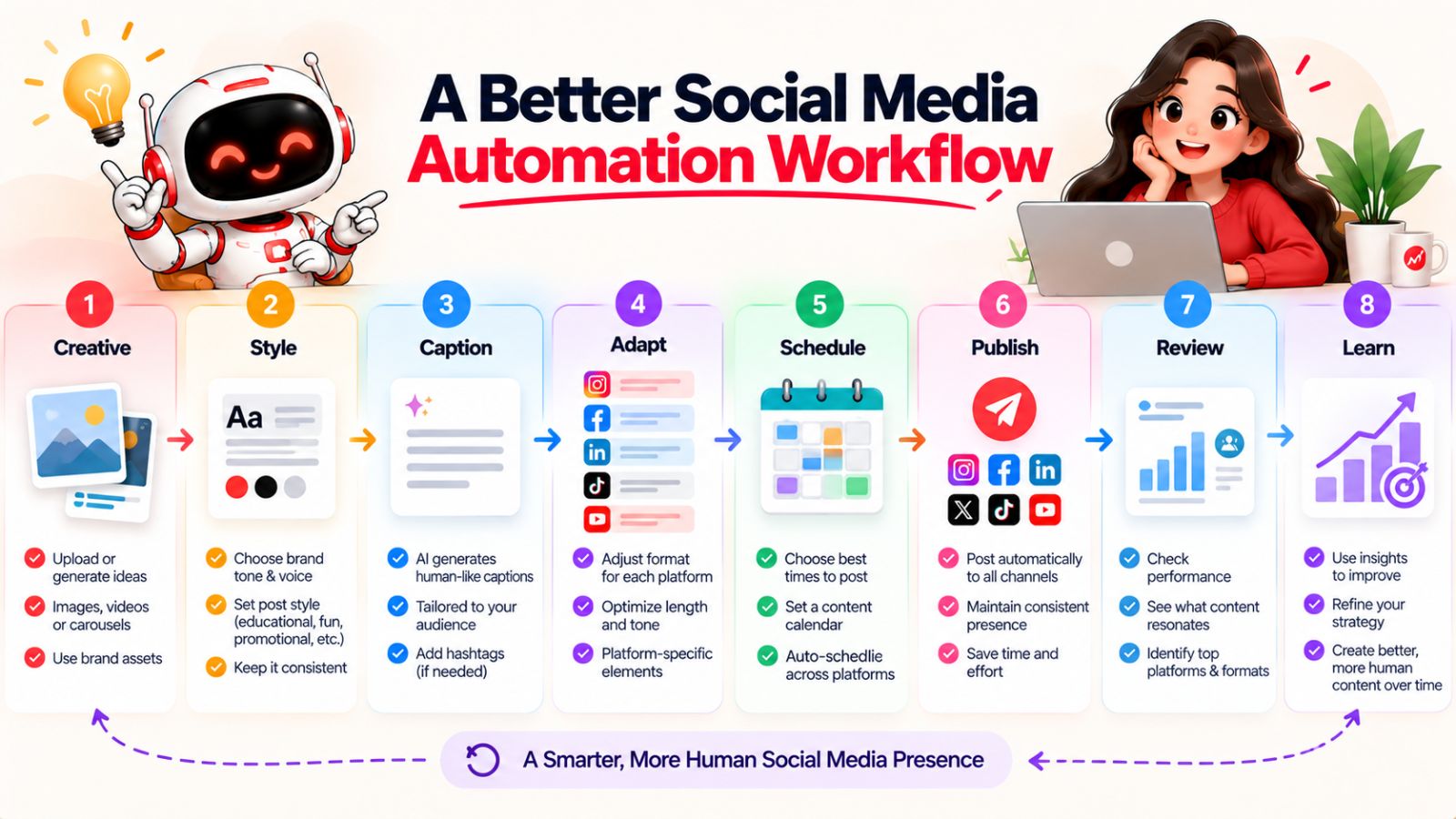
1. Start With the Creative
Begin with the thing you actually want people to see.
That could be an image, carousel, video, product demonstration, customer story, screenshot, infographic, or another visual asset.
If you don't have an asset yet, an AI image-generation workflow can help create one.
Starting here gives the rest of the process a concrete foundation.
Instead of asking AI to invent an entire social media post from an empty text box, you're giving it something meaningful to work from.
2. Choose the Communication Style
Next, decide how the idea should be communicated.
Should this be educational?
Conversational?
Opinion-led?
Story-driven?
Promotional?
The same creative can support different messages depending on the objective.
This step is particularly useful because it prevents your content calendar from becoming a collection of captions written in one indistinguishable voice.
3. Generate the Caption
Now AI can do what it's particularly good at: producing a first draft quickly.
The important word is first.
The system should have access to the brand context and the content style before it generates the copy.
That gives it a much better starting point than simply asking:
“Write a caption for this.”
If the workflow already knows the brand, audience, creative, and intended style, caption generation becomes less like filling in a blank and more like extending an existing idea.
4. Adapt for Each Platform
Next, decide how the content should appear on each selected platform.
The idea can remain consistent.
The presentation doesn't have to.
A single campaign might produce an Instagram carousel, a Facebook post, a LinkedIn explanation, a TikTok video, and a YouTube version without simply duplicating the same text everywhere.
This is where automation can save a significant amount of time.
Instead of manually recreating every variation, the system can help adapt the content while the person responsible for the brand retains control over the underlying message.
5. Schedule the Content
Once the posts are ready, let automation handle the repetitive publishing work.
Rather than manually choosing a date and time for every individual post, AI-assisted scheduling can help distribute content according to available timing signals and the publishing plan.
The important thing is that scheduling should come after content direction, not replace it.
A perfectly timed generic post is still generic.
6. Publish Across the Selected Platforms
This is where a connected social media automation workflow becomes particularly useful.
Instead of logging into multiple platforms and repeating the same publishing process, one system can handle the distribution.
A tool such as Bibby brings multiple formats and platforms into a single workflow, allowing users to work with images, carousels, videos, Stories, and other content while managing distribution across channels such as Facebook, Instagram, LinkedIn, YouTube, and TikTok.
The practical benefit is straightforward:
less time spent operating publishing dashboards.
7. Review What Matters
Not every post needs a ten-minute editorial meeting.
But important content deserves attention.
Review campaign launches, sensitive topics, major announcements, unusual claims, and content that represents an important shift in brand messaging.
For routine content, a lighter review process may be enough.
The objective is to put human attention where it has the greatest value.
8. Learn From What Happens
Publishing shouldn't be the end of the workflow.
Performance can tell you which topics, formats, hooks, styles, and messages your audience responds to.
That information should influence what you create next.
This is where social media automation becomes a system rather than a scheduling tool.
You aren't simply repeating the same process every week.
You're creating a feedback loop:
Create → Publish → Observe → Learn → Adjust → Create again.
The system becomes increasingly useful when each cycle informs the next one.
The workflow should feel invisible to the audience
This is ultimately the goal.
Your audience shouldn't be thinking about whether a post was manually scheduled, generated with AI, or published through an automation platform.
They should simply encounter content that feels relevant, recognizable, and worth their attention.
The technology should disappear into the workflow.
The brand should remain visible.
And that's the standard worth aiming for when automating social media: automate the process so thoroughly that the audience notices the content—not the machinery behind it.
Where a Tool Like Bibby Fits Into This Workflow
Once you understand the difference between useful automation and robotic automation, the appeal of an integrated social media workflow becomes easier to see.
The problem with many social media processes isn't necessarily that any individual tool is bad. It's that creating one post can involve too many disconnected steps.
You create the visual in one place.
Write the caption somewhere else.
Adapt it for different platforms.
Open a scheduling tool.
Choose dates.
Choose times.
Upload everything again.
Then repeat the process for the next piece of content.
Do that across dozens of posts and multiple platforms, and a large portion of your time goes toward operating the machinery of social media rather than thinking about what you want to communicate.
This is where a tool such as Bibby can fit naturally into the workflow.
The basic idea is straightforward: you start with your creative asset—or generate one with AI—then choose how you want the content to be presented. From there, the system can help generate captions, prepare the content for selected platforms, and schedule it across different dates and times.
That connects several steps that are often handled separately.
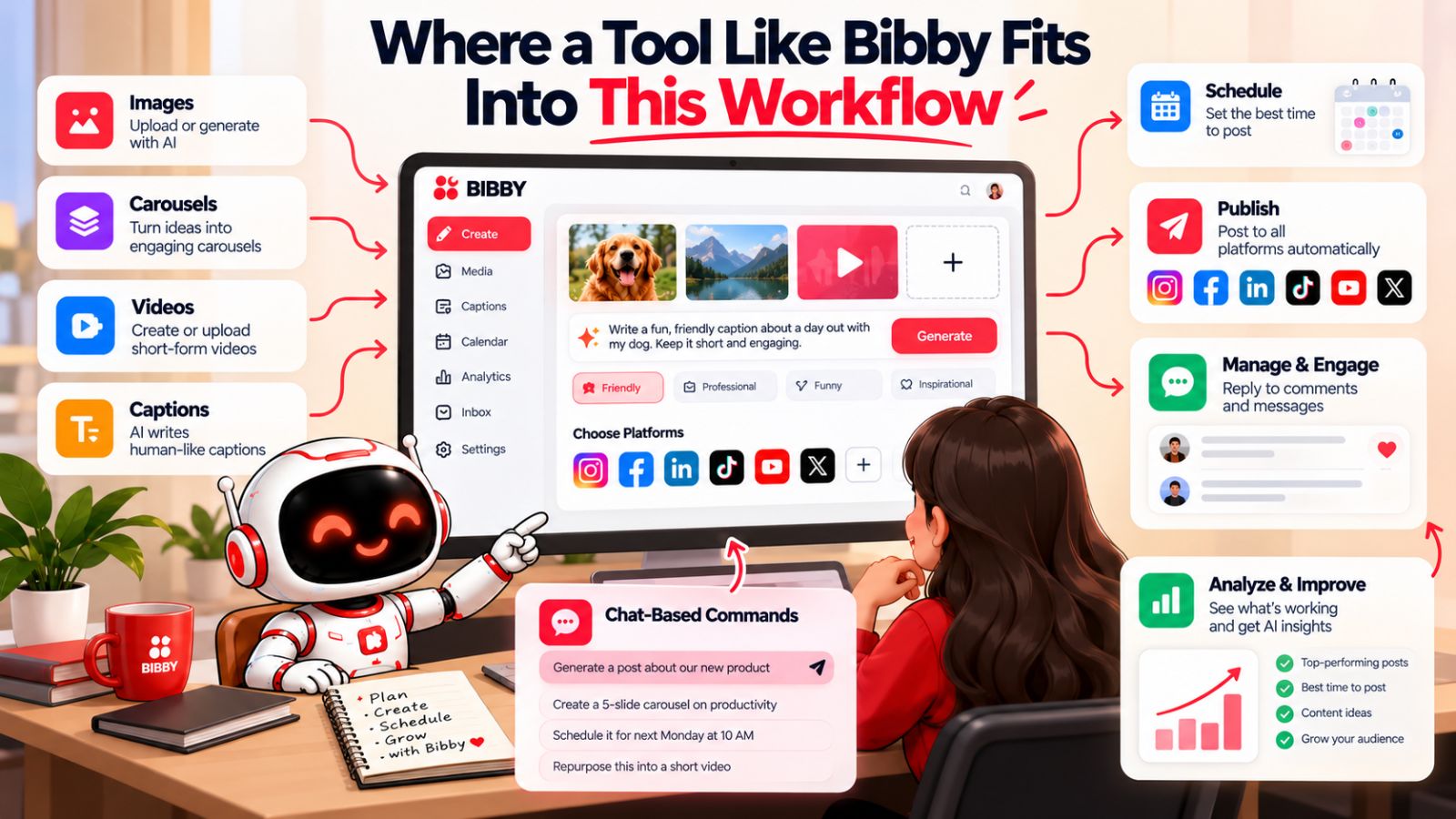
From one asset to an entire publishing workflow
Suppose you have a product image you want to turn into social content.
Instead of opening a caption generator, writing the copy, copying it into a scheduler, uploading the image again, and manually selecting publishing times, the workflow can begin with the image itself.
You can then choose a posting style, let AI generate the caption, select the platforms you want to use, and schedule the content.
Bibby supports formats beyond standard image posts as well, including carousels, videos, and Stories. That matters because modern social media isn't built around a single post format.
Different ideas need different forms.
A tutorial might work better as a carousel.
A product demonstration might work better as video.
A quick update might only need an image and short caption.
The ability to manage those formats within a broader workflow can reduce the amount of manual coordination required.
Scheduling becomes part of the creation process
There's another useful distinction here.
In a disconnected workflow, scheduling often happens after the creative work is finished.
You create the content first.
Then you figure out when and where to publish it.
An integrated workflow can treat distribution as part of the content process from the beginning.
That doesn't mean timing should dictate what you create. It means the system can take the publishing requirements into account while you're building the content plan.
Bibby's AI-assisted scheduling, for example, is designed to distribute content across selected platforms at different dates and suggested times rather than requiring every slot to be manually selected.
Again, the benefit isn't that an algorithm has discovered a magical time when every post will perform perfectly.
No scheduling system can guarantee that.
The benefit is simpler: one more repetitive operational decision can be taken off the user's hands.
The chat interface changes the interaction
Bibby also illustrates another direction social media software is moving toward: conversational control.
Instead of navigating through individual features every time you want to make a change, a chat interface lets you describe what you want to do.
That can include tasks such as creating a brand kit, setting up a campaign, creating posts, regenerating captions, and managing other parts of the social workflow.
The interesting part isn't simply that these actions can be performed through chat.
It's that conversation can become the interface for managing a collection of related marketing tasks.
Instead of thinking:
“Which button do I need to click?”
the user can think:
“What do I want my social media to accomplish?”
That is a meaningful shift in how automation can work.
The tool isn't the strategy
It's worth keeping one distinction clear.
No social media automation platform can decide what your brand should care about.
A tool can help create, adapt, schedule, and distribute content. It can reduce repetitive work and make a complicated publishing workflow easier to manage.
But the strategy still comes from the business.
You still need to know your audience.
You still need something worth saying.
You still need a recognizable point of view.
And you still need to know when automation should stop and human judgment should take over.
That's why Bibby fits the broader argument of this article.
The interesting question isn't whether a tool can automate social media.
It's whether it can automate enough of the repetitive workflow to give you more room to be intentional about the content itself.
When automation handles the machinery while humans retain the direction, the technology becomes much less visible—and the social media starts to feel much more like a brand speaking to people.
5 Signs Your Social Media Automation Has Gone Too Far
Automation becomes a problem when you stop using it to save time and start using it to avoid thinking about your social media entirely.
That doesn't mean every automated post is bad. It means there are warning signs that your system has become too rigid, repetitive, or disconnected from your audience.
Here are five of the most common.
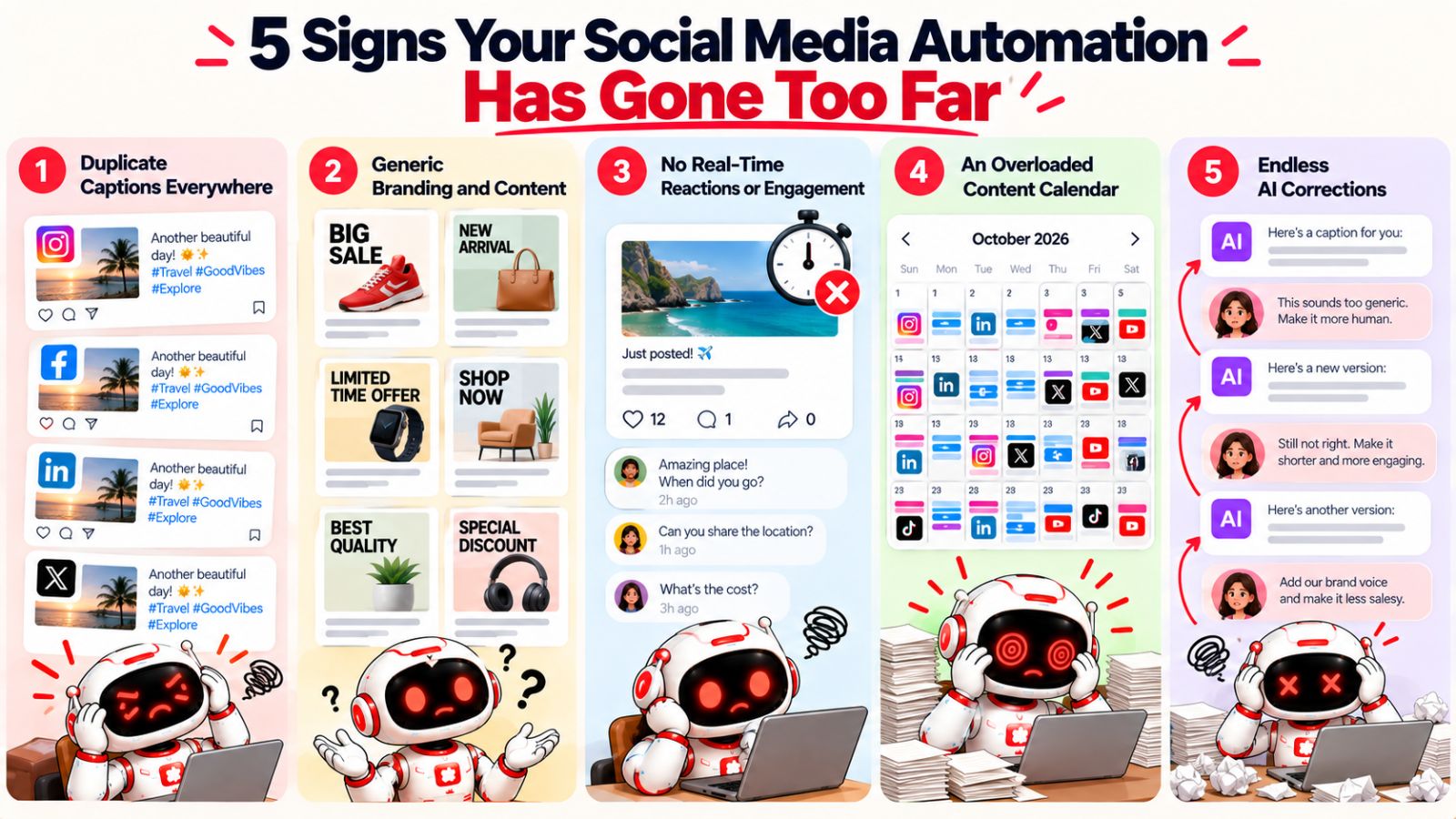
1. Every Platform Receives Essentially the Same Post
If someone can copy your Instagram caption, paste it into LinkedIn, and publish it without changing a word, your workflow may be optimized for convenience rather than relevance.
Your core message can stay consistent across platforms.
Your execution shouldn't always be identical.
Look at your recent posts side by side. If the opening lines, structure, length, calls to action, and overall tone are nearly identical everywhere, you're probably distributing content rather than adapting it.
2. Your Captions Could Belong to Any Company in Your Industry
This is one of the easiest problems to spot.
Remove the brand name from one of your posts.
Could a competitor publish it without changing much?
If the answer is yes, the problem probably isn't your scheduler. It's your content inputs.
AI needs enough information to understand what makes your brand different.
That might include your terminology, beliefs, audience problems, examples, product context, writing patterns, and subjects you actually have something unique to say about.
Generic input tends to produce generic output.
3. You Never React to Anything Between Scheduled Posts
A content calendar should provide structure.
It shouldn't become a wall around your social media strategy.
If something important happens in your industry, your customers start asking the same question repeatedly, or a relevant conversation suddenly gains attention, you should be able to respond without waiting for the next available slot in your calendar.
A useful test is to look at your last month of content and ask:
How much of this could have been scheduled six months ago?
If the answer is almost everything, your strategy may be too dependent on evergreen automation.
4. Your Calendar Is Full, but Your Content Feels Empty
A busy content calendar can create a false sense of progress.
You might celebrate having 30 posts scheduled for the month.
But quantity isn't the same as value.
Ask yourself:
- Are the posts answering real audience questions?
- Are they teaching anything?
- Are they expressing a point of view?
- Are they showing something people haven't seen before?
- Are they starting conversations?
- Are they connected to actual business goals?
If the answer is consistently no, adding more automation won't solve the problem.
You need better inputs before you need more output.
5. You Spend More Time Fixing AI Output Than Creating Strategy
This is perhaps the most important warning sign.
AI automation is supposed to reduce workload.
If you're constantly rewriting captions, correcting tone, removing repetitive phrases, fixing platform mismatches, and repairing irrelevant content, the system isn't saving you much time.
The solution may not be to abandon AI.
It may be to improve the information you're giving it.
Build a clearer brand voice. Give it better examples. Define content styles. Provide audience context. Connect the creative asset with the caption-generation process. Create clearer rules for different platforms.
And then measure the result.
Automation should reduce friction, not create another job
The purpose of automation is not to produce the maximum number of posts with the minimum number of clicks.
It's to remove repetitive work while preserving the quality of the decisions that matter.
If your automation system is creating more cleanup work than it eliminates, something in the workflow needs to change.
That could mean improving your prompts.
It could mean giving AI more brand context.
It could mean adapting content for each platform.
It could mean introducing a human review step.
Or it could simply mean automating fewer things.
The right level of automation is the level that makes your social media process easier without making your content less useful.
Once you've identified where your current system is becoming robotic, the next step is to deliberately add the human elements back into the workflow.
How to Humanize Automated Social Media Content
Once you know why automated content feels robotic, fixing it becomes much more practical.
You don't need to abandon scheduling. You don't need to write every caption yourself. And you don't need to manually publish every post on every platform.
Instead, improve the information and decisions surrounding the automation.
The following principles can make a significant difference.
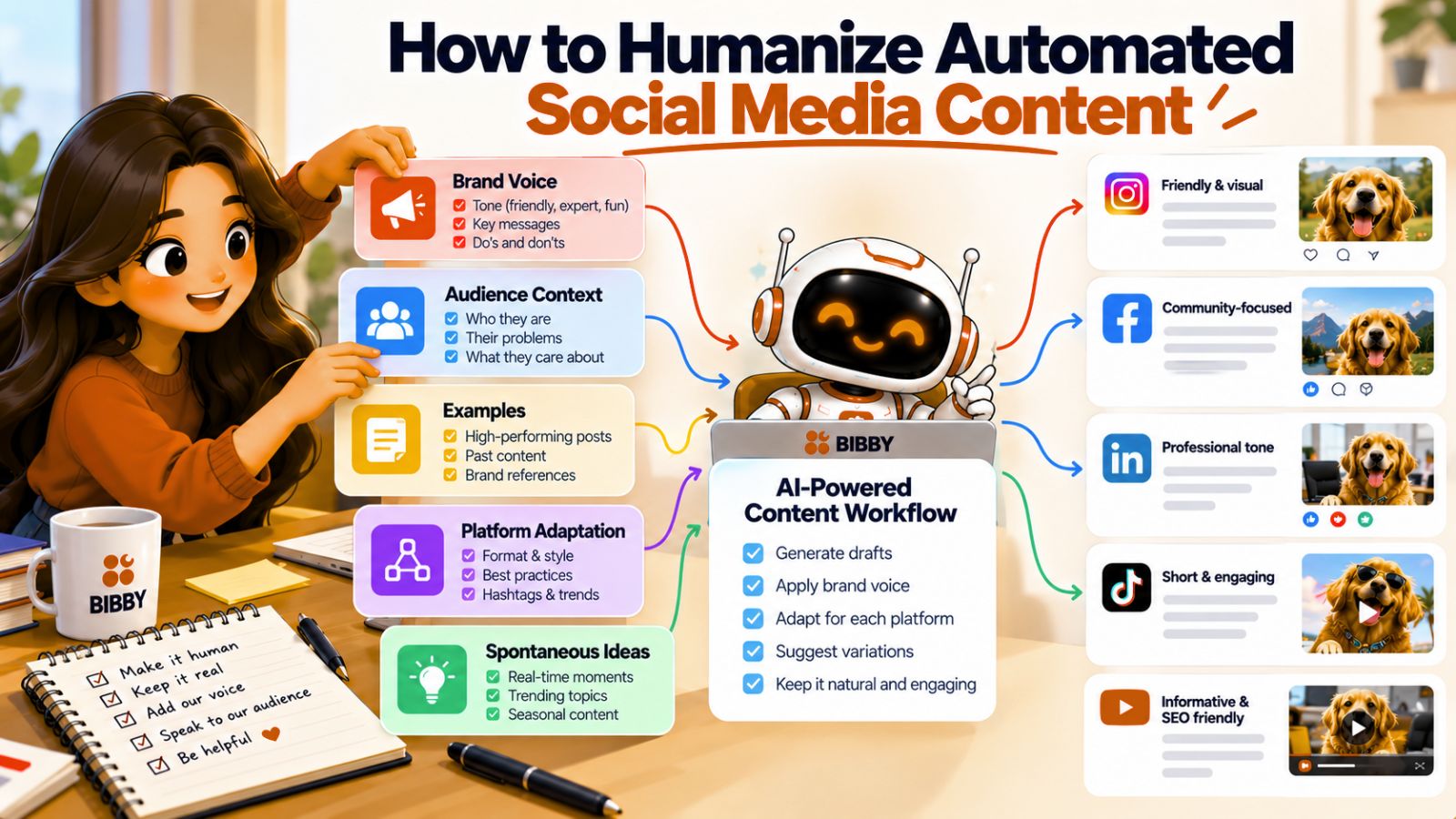
Build a Recognizable Brand Voice
Start by defining how your brand actually communicates.
Don't stop at vague descriptions such as “friendly” or “professional.” Document the details that someone—or an AI system—can consistently apply.
Include things such as:
- Sentence length
- Vocabulary
- Level of formality
- Humor
- Use of emojis
- Preferred phrases
- Words to avoid
- How directly you address the audience
- How you explain complicated ideas
- How promotional your content should be
Even better, provide examples of existing content that sounds exactly like the brand.
A few real examples can often communicate more than a long list of adjectives.
Create Content Pillars Instead of Repeating Templates
a content calendar should contain different reasons for people to follow you.
Instead of creating 30 variations of the same promotional post, divide your content into meaningful categories.
For example:
Education: Teach something useful.
Opinion: Explain what you believe about an industry issue.
Proof: Show customer outcomes, examples, or results.
Behind the scenes: Let people see how the business works.
Product: Demonstrate what the product actually does.
Conversation: Ask questions and invite useful discussion.
Now automation has a broader set of ideas to work with.
You're not simply generating different sentences.
You're generating different types of value.
Give AI Examples, Not Just Instructions
One of the easiest ways to improve AI-generated content is to show it what good looks like.
Instead of saying:
“Make this sound human.”
Provide several examples of how your brand already communicates.
AI can then identify patterns in those examples and use them as a reference when generating new content.
This is especially useful for brands with a distinctive writing style.
The objective isn't to make every new post identical to your old posts.
It's to preserve the recognizable characteristics that make the brand feel consistent.
Adapt Content by Platform
Keep the core idea consistent, but change the presentation.
A useful rule is:
Repurpose the idea. Don't blindly republish the post.
The same insight can become a LinkedIn explanation, Instagram carousel, Facebook discussion, TikTok video, or YouTube piece.
This gives you the efficiency of repurposing without the sameness of duplication.
Mix Scheduled Content With Spontaneous Content
Your scheduled content should handle predictable communication.
But leave room for posts that respond to what's happening now.
This creates a healthier balance between consistency and relevance.
You might schedule your educational posts, product demonstrations, and evergreen content several weeks in advance while leaving part of your publishing capacity open for trends, customer questions, industry news, and unexpected opportunities.
The content calendar provides the foundation.
Spontaneity provides the pulse.
Don't Automate Every Interaction
Publishing is one thing.
Conversation is another.
Automating the distribution of a post can save significant time.
Automatically responding to every meaningful comment with generic language can make a brand feel even more artificial.
Community interaction often benefits from genuine human attention.
Someone asking a detailed question deserves a useful answer.
Someone sharing a personal experience may deserve acknowledgment rather than an automated “Thanks for sharing!”
Automation should make it easier for humans to participate in conversations—not make conversations feel automated.
Review the Posts That Matter Most
You don't need to manually approve every low-risk post.
But you should pay more attention to content that carries more risk or importance.
Review:
- Major campaigns
- Product announcements
- Sensitive subjects
- Industry commentary
- Strong opinions
- Customer stories
- Important claims
- Content targeting a new audience
For routine evergreen content, automation can do much more of the work.
This gives you a practical compromise between efficiency and control.
Measure Quality, Not Just Volume
Finally, don't judge your automation system by how many posts it can produce.
Measure whether those posts are actually useful.
Look at meaningful signals such as:
- Saves
- Shares
- Comments
- Watch time
- Click-throughs
- Qualified traffic
- Leads
- Conversions
- Audience growth
- Repeat engagement
The exact metrics will depend on your goals.
But the principle is consistent:
More automated content is not automatically better content.
A system that publishes 100 forgettable posts isn't necessarily more effective than one that publishes 30 useful ones.
The goal is to create a workflow where automation increases your capacity without reducing your standards.
When you do that, the audience doesn't need to know how much of the process was automated.
They simply experience a brand that consistently has something useful, relevant, or interesting to say.
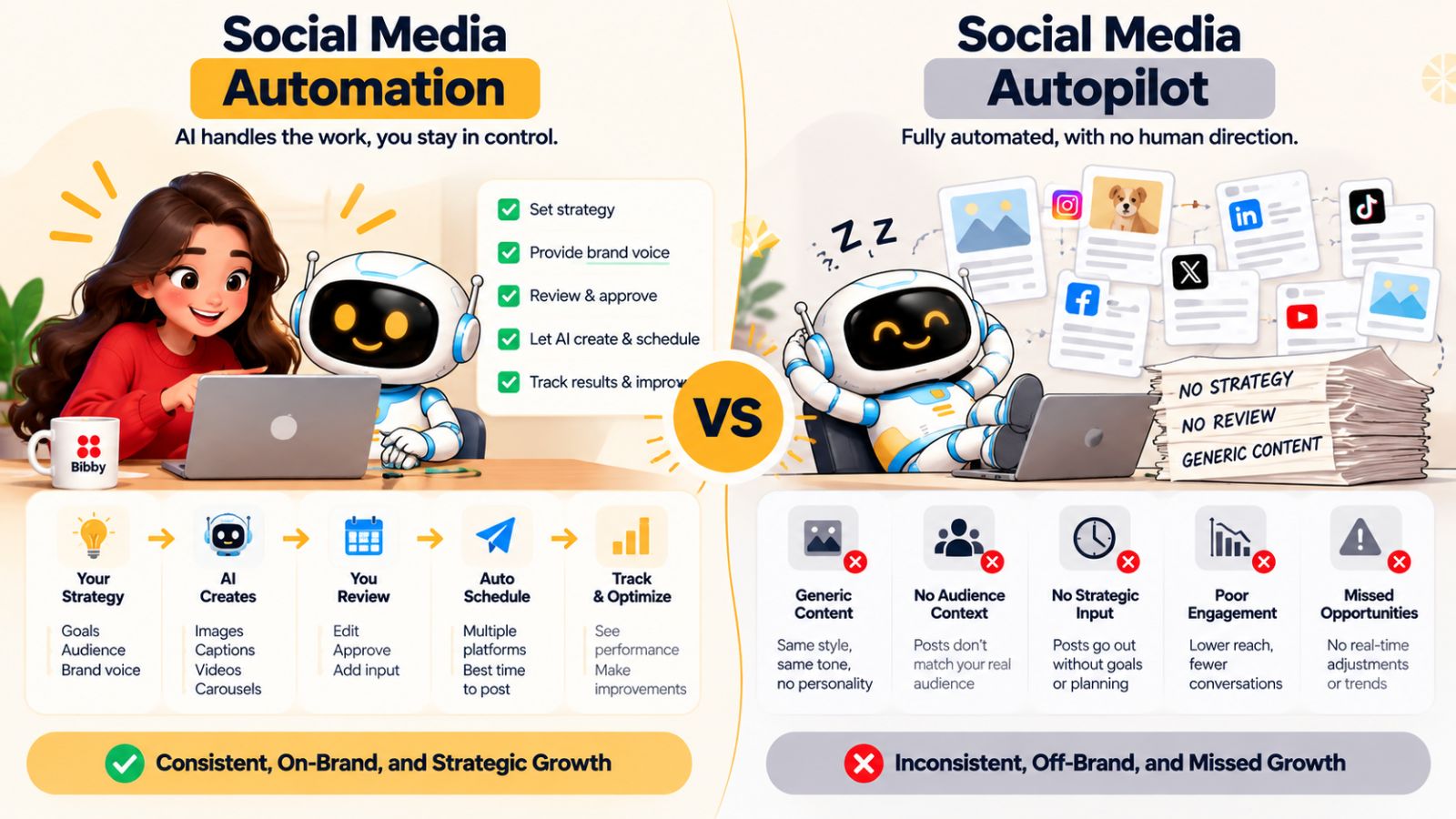
Social Media Automation vs. Social Media Autopilot
The words automation and autopilot are often used as if they mean the same thing.
They don't.
That distinction matters because the goal of good social media automation isn't to make your brand completely independent of human involvement. It's to remove repetitive work while keeping the decisions that require context, creativity, and judgment.
Think of it this way:
| Social Media Automation | Social Media Autopilot |
|---|---|
| Removes repetitive work | Attempts to remove most decisions |
| Human sets the direction | The system largely determines the direction |
| AI assists with execution | AI is expected to handle the entire process |
| Content can be reviewed and adjusted | Content may be published with minimal oversight |
| Humans remain responsible for strategy | Strategy risks becoming an automated output |
Neither column describes a particular software product. They describe two different approaches to using technology.
Automation gives you leverage
Suppose you know exactly what you want to communicate.
You have a campaign idea, the creative assets, a defined audience, and a clear brand voice.
What you don't want to do is spend three hours uploading posts individually to five platforms.
That's a perfect automation problem.
Let the system handle the repetitive execution.
You don't lose control over the strategy. You simply stop spending human time on mechanical tasks.
That's leverage.
Autopilot tries to replace the decision-making
Now imagine the opposite approach.
You tell an AI system to:
“Run my social media for the next month.”
It chooses the topics.
It decides the messaging.
It creates the visuals.
It writes the captions.
It chooses the formats.
It decides what to publish.
It schedules everything.
And it publishes without anyone checking the results.
That's much closer to autopilot.
The appeal is obvious: almost no effort.
The risk is equally obvious: the system may optimize for producing content rather than producing content that actually represents what the business wants to say.
More automation doesn't necessarily mean less human involvement
This is the paradox at the heart of the entire topic.
The best automation can actually make human involvement more valuable, not less.
If technology handles routine publishing, a social media manager can spend more time researching customers, developing campaigns, reviewing performance, creating original content, and engaging with the community.
The human role becomes smaller in volume but more important in quality.
That's a much more useful future for social media automation.
The goal isn't to remove people from social media.
It's to remove unnecessary administrative work from the people responsible for social media.
Use AI for speed. Use humans for meaning.
This doesn't mean AI can't make strategic contributions.
It can identify patterns, suggest ideas, adapt content, summarize information, generate alternatives, and help people make decisions.
But there is a difference between helping someone decide and deciding without them.
For most brands, the first approach provides a more practical balance.
AI can accelerate the workflow.
Automation can execute the workflow.
Humans can decide what the workflow is trying to accomplish.
That is the difference between social media automation that supports a brand and social media automation that gradually makes every brand sound the same.
And once you understand that distinction, the answer to the original question becomes much clearer: social media automation feels robotic when it automates the personality along with the process.
Final words
Social media automation feels robotic when it automates more than the repetitive work. When every platform receives the same caption, AI lacks brand context, content ignores current conversations, and no one reviews what gets published, consistency can quickly become sameness.
The solution isn't to abandon automation. It's to use it more intelligently: give AI enough context to understand the brand, adapt ideas for different platforms, vary the content, automate repetitive publishing tasks, and keep human judgment involved where it matters.
The biggest opportunity is to let automation handle the machinery of social media while humans remain responsible for the meaning behind it. When technology saves time instead of replacing personality, a brand can publish more consistently without sounding like a machine.
If you're ready to take that approach further, the natural next step is to build a practical AI social media workflow that takes you from content idea to creation, platform adaptation, scheduling, publishing, and performance feedback without turning your brand voice into a template.