Keeping a social media feed consistent and engaging is difficult when every post requires new ideas, visuals, captions, scheduling, and publishing across multiple platforms.
Autonomous AI tools are changing that by turning social media from a manual publishing task into a repeatable content system. Instead of spending hours managing every step, you can use AI to create, optimize, schedule, and distribute content while keeping your brand voice and strategy in your hands.
Here we will discuss:
- How autonomous AI can automate your social media workflow
- How to maintain consistency without constantly creating content
- How AI can increase your opportunities for high-performing posts
You’ll also see how tools such as Bibby bring these capabilities together in one social media workflow.
The key is not simply posting more—it’s building a system that makes consistent, strategic publishing easier.
Why Consistency Is Harder Than Creating Social Media Content
Most businesses and creators do not struggle because they have nothing to say. They struggle because turning an idea into a steady stream of high-quality social media posts requires far more work than it appears.
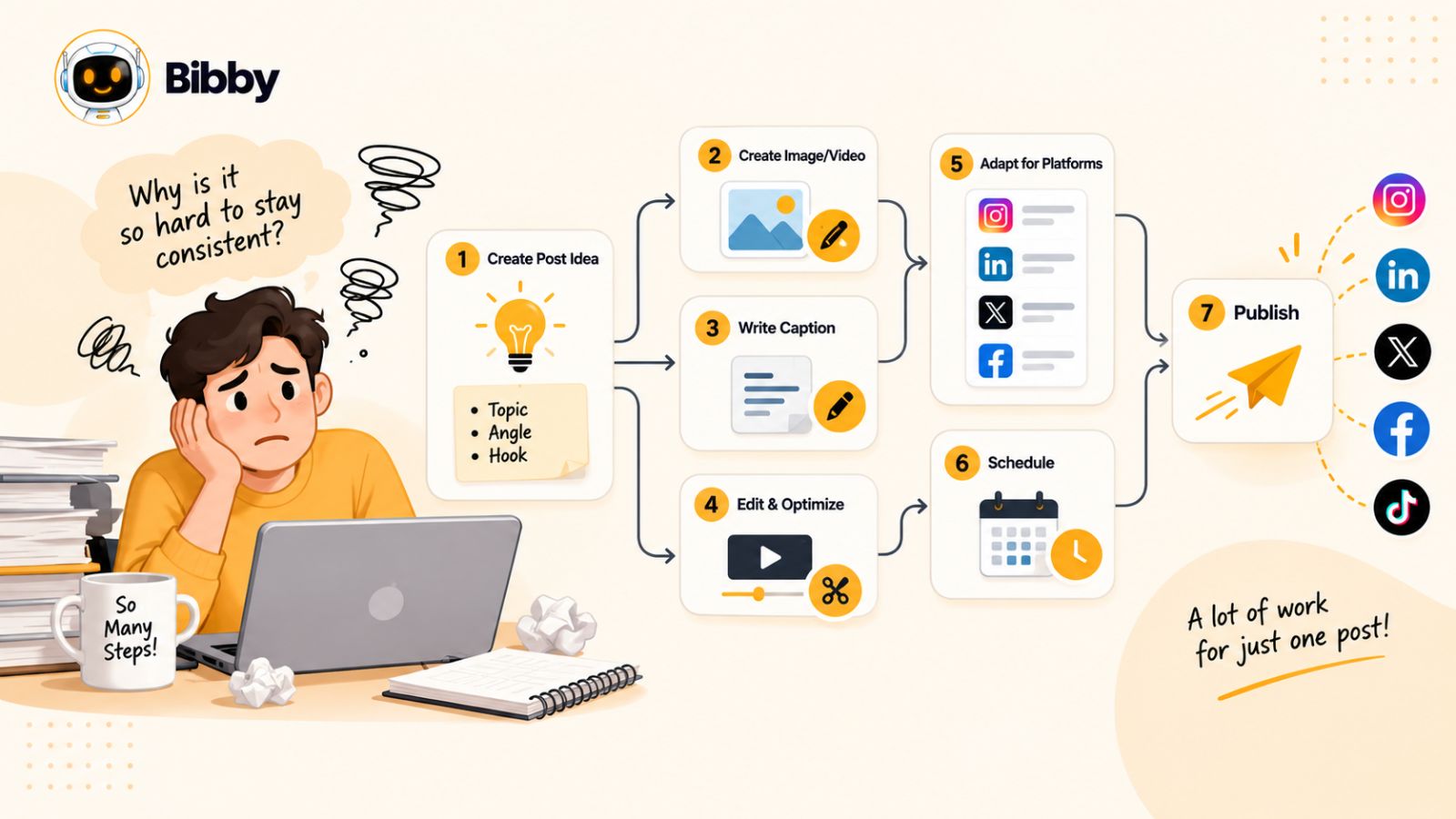
A single post can involve choosing or creating a visual, writing a caption, adapting the message for different platforms, selecting hashtags or keywords, deciding when to publish, scheduling the content, and then repeating the process several times each week.
Multiply that workflow across Instagram, Facebook, LinkedIn, YouTube, and TikTok, and social media quickly becomes an operations problem rather than simply a content problem.
Creating One Post Is Easy. Creating 100 Is a System Problem.
Publishing occasionally is relatively simple. Building a feed that looks active, recognizable, and intentional over months requires a system.
Imagine a business wants to publish five pieces of content per week. That could mean more than 20 pieces of content every month. If every post is handled manually, someone has to repeatedly move through the same production cycle:
Idea → Media → Caption → Editing → Platform Selection → Scheduling → Publishing → Review
The problem becomes even larger when the business wants to use multiple formats.
An image may work well as a LinkedIn post. The same idea might become an Instagram carousel, a TikTok video, a YouTube Short, or a Facebook post. Each format creates another opportunity—but also another task.
This is where social media consistency often breaks down.
Consistency Is More Than Posting Every Day
There is an important distinction between posting frequently and maintaining a consistent social media presence.
Consistency can include:
- A recognizable visual identity
- A predictable publishing cadence
- A consistent brand voice
- Recurring content themes
- Relevant topics for your audience
- A healthy mix of formats
- Content adapted to each platform
- Regular experimentation with new ideas
A feed can contain 30 posts and still feel inconsistent if every post looks and sounds completely different.
On the other hand, a smaller publishing schedule can feel highly intentional when the audience repeatedly encounters the same recognizable themes, voice, and visual identity.
That is why the goal should not simply be to automate more posts. The goal is to create a repeatable content system that makes quality and consistency easier to maintain.
Why Manual Social Media Management Does Not Scale
Manual publishing creates another problem: context switching.
You might create an image in one application, write your caption in another, upload it to Instagram, open LinkedIn to rewrite the post, switch to a scheduling platform, and then repeat the process for another piece of content.
None of these individual tasks is necessarily difficult. The friction comes from performing all of them repeatedly.
Eventually, one of three things usually happens:
- Posting becomes inconsistent because there is not enough time.
- Content quality drops because publishing becomes rushed.
- The publishing workload grows until managing social media takes time away from more valuable work.
This is precisely the type of repetitive workflow that autonomous AI tools can help simplify.
From Social Media Scheduler to Autonomous Workflow
Traditional scheduling software primarily solves one part of the problem: when your content gets published.
Autonomous AI tools aim to handle more of the workflow around that publication.
Instead of starting with a finished post and asking, “When should this go live?”, an AI-powered workflow can help move from media and an idea toward a finished, scheduled piece of content.
For example, a modern workflow could look like:
Upload or generate media → choose a posting style → generate the caption → select platforms → schedule → publish
The advantage is not that AI eliminates the need for human judgment. Your strategy, expertise, brand positioning, and creative direction still matter.
The advantage is that AI can take over many of the repetitive execution steps between an idea and a published post.
That distinction is important because the future of social media automation is not simply about having a better calendar. It is about reducing the amount of manual work required to keep that calendar full.
The Goal Is a Sustainable Content Engine
The most useful way to think about autonomous AI for social media is as a content engine.
You provide the strategic ingredients: your brand, audience, ideas, products, expertise, visual direction, and goals.
The system helps turn those ingredients into publishable content consistently.
This approach also creates more opportunities to experiment. Instead of spending most of your time manually preparing posts, you can spend more time deciding which topics deserve attention, which formats fit your audience, and which ideas are worth testing.
And that leads to an important question: what exactly makes an AI social media tool autonomous rather than just another scheduler?
Also read: TikTok Algorithm Explained: How to Get More Views in 2026 →
What Are Autonomous AI Tools for Social Media?
Autonomous AI tools for social media go beyond simply helping you schedule posts. They are designed to handle multiple connected steps of the content workflow with less manual intervention—from creating and adapting content to generating captions, organizing campaigns, and scheduling publications.
That distinction matters because traditional social media tools and autonomous AI systems solve different problems.
A traditional scheduler might let you upload a finished post and choose a date and time.
An autonomous AI workflow can start much earlier.
You might provide an image, generate a visual with AI, choose how you want your content to sound, and let the system help turn that input into a finished social media post. From there, it can help organize when and where that content should be published.
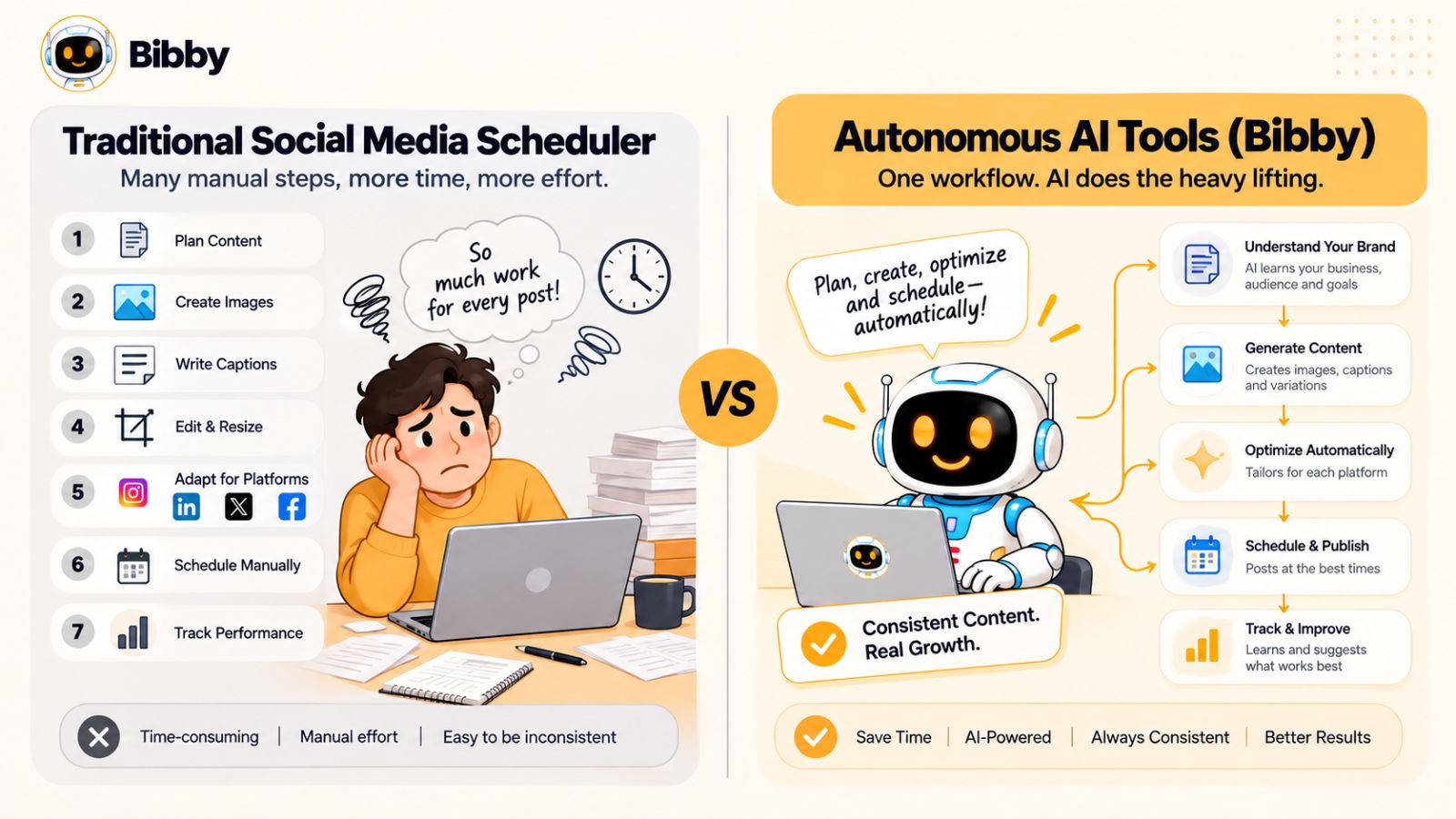
Traditional Automation vs. Autonomous AI
The easiest way to understand the difference is to look at how much of the workflow you still have to manage yourself.
| Traditional social media scheduling | Autonomous AI workflow |
|---|---|
| You create the post | AI can help create the post |
| You write the caption | AI can generate or regenerate captions |
| You select publishing times | AI can help optimize scheduling |
| You manually prepare platform variations | AI can assist with adaptation |
| You manage individual publishing tasks | AI can connect multiple workflow steps |
| You operate mainly through menus | Some systems allow conversational control |
Traditional automation is usually rule-based.
You tell the software exactly what to do, and it executes those instructions.
Autonomous AI introduces another layer: the system can interpret your intent and perform several related tasks toward an outcome.
For example, instead of manually creating a campaign, writing individual captions, and scheduling each post, you could describe the campaign you want and let an AI-powered system help turn that request into actionable content.
What Makes a Social Media AI Tool Autonomous?
“AI-powered” and “autonomous” are not automatically the same thing.
A tool that generates a caption using AI is AI-powered. A tool that automatically schedules a post is automated. But a more autonomous system connects several capabilities into a broader workflow.
A useful autonomous social media system can potentially help with:
- Content creation: Generate or assist with text and visual content.
- Content transformation: Turn one idea or asset into different formats.
- Caption generation: Create captions based on your chosen style and context.
- Brand consistency: Apply predefined brand information and communication preferences.
- Campaign management: Organize multiple pieces of content around a common objective.
- Scheduling: Plan content across future dates and publishing windows.
- Multi-platform publishing: Distribute content across the social networks you use.
- Conversational control: Allow you to manage tasks by describing what you want in natural language.
The more of these steps can be connected without repeatedly moving between separate tools, the closer the experience gets to an autonomous social media workflow.
AI Should Handle Execution, Not Your Entire Strategy
There is an important limitation to understand.
Autonomous does not mean you should hand your entire social media strategy to AI and walk away.
Your business still needs to determine what it stands for, who it wants to reach, what it wants to communicate, and what outcomes matter.
AI is most useful when it handles the repetitive execution around those decisions.
Think of the relationship like this:
Human: “This is what our brand stands for and who we want to reach.”
AI: “I can help turn that direction into consistent content and manage the repetitive publishing workflow.”
This human-AI division can make automation considerably more useful. The human provides context, judgment, expertise, and creative direction. AI handles repetitive production and operational tasks.
The Rise of the AI Social Media Manager
This is also why the concept of an AI social media manager is becoming more interesting.
A social media manager traditionally has to jump between different tasks and interfaces throughout the day. They might work on campaigns, create posts, write captions, schedule content, maintain brand guidelines, and make changes based on feedback.
A conversational AI interface can bring many of those actions into one place.
For example, instead of navigating through multiple menus, you could theoretically say:
“Create a campaign around our new product, use our brand style, prepare several posts, and schedule them across our selected platforms.”
The important development is not simply that AI understands natural language. It is that conversational interfaces can become an entry point for taking action, rather than merely answering questions.
Why This Matters for Social Media Consistency
The biggest benefit of autonomy may not be producing a single post faster.
It is reducing the friction between having an idea and actually publishing it.
If every post requires ten manual steps, you will eventually skip some of those steps.
If a system can compress those steps into a repeatable workflow, maintaining a content schedule becomes easier.
This is particularly valuable when you are publishing across multiple platforms. Instead of treating Facebook, Instagram, LinkedIn, YouTube, and TikTok as completely separate publishing operations, you can build a connected workflow around the same underlying content strategy.
That does not mean every platform should receive an identical post. It means the content operation can be centralized while the output can still be adapted to the format and audience of each platform.
And that brings us to the practical question: what should an autonomous social media workflow actually look like from start to finish?
Also read: Social Media Habits of Fast-Growing Companies (That You Can Copy Today) →
The Autonomous Social Media Workflow You Actually Need
The value of autonomous AI becomes clearer when you stop thinking about individual posts and start thinking about the entire publishing workflow.
A strong workflow should reduce the number of repetitive decisions you have to make without removing the strategic decisions that require human judgment.
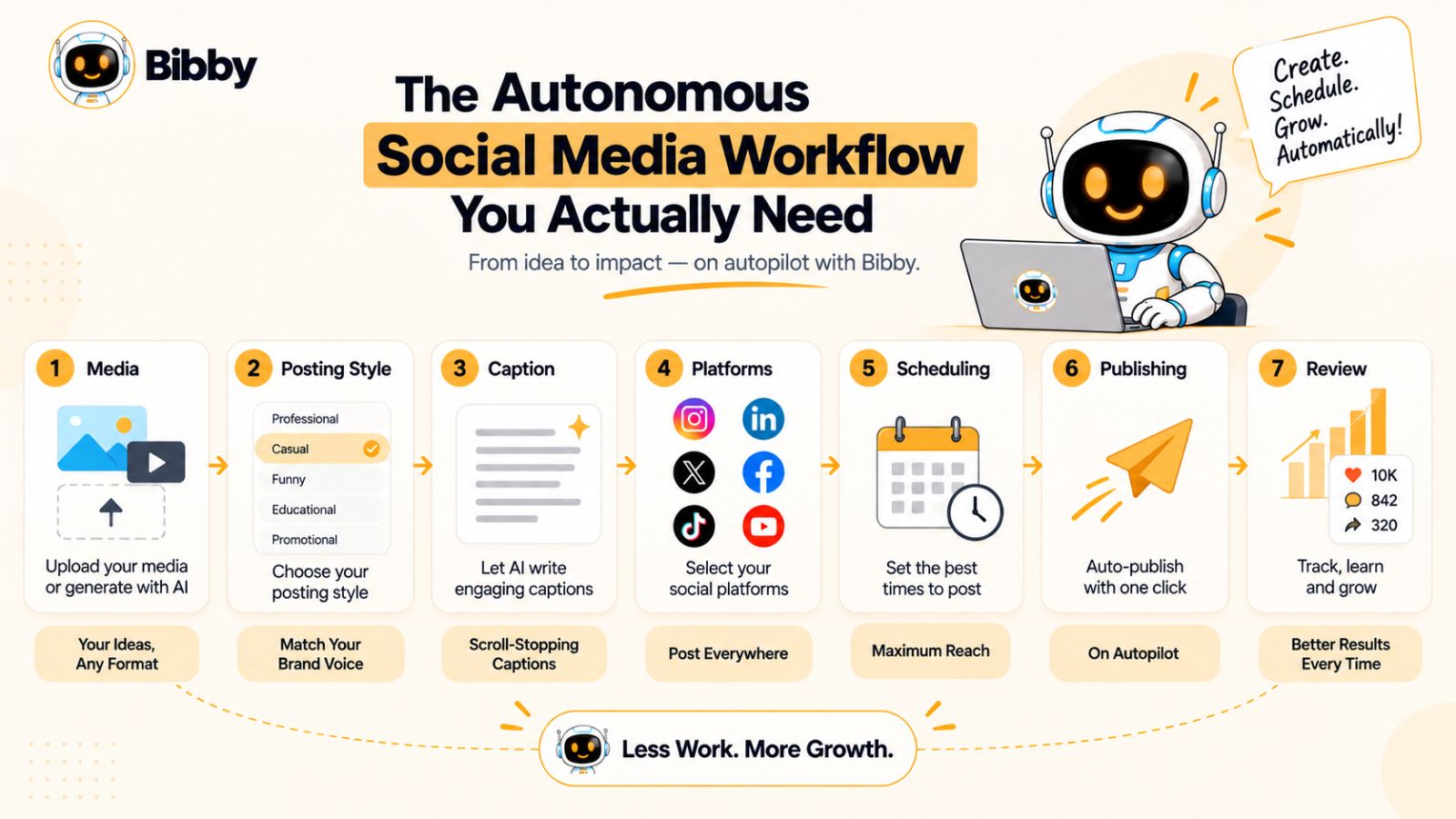
At a high level, the process can look like this:
Media → Posting Style → Caption → Platform Selection → Scheduling → Publishing → Review
The goal is to make that process repeatable enough that creating a week or month of social content does not require starting from scratch every time.
Step 1: Start With Your Media
Every social media workflow needs an asset to publish.
That might be:
- A product photograph
- A branded graphic
- An AI-generated image
- A carousel
- A short-form video
- A story
- A promotional creative
- An educational visual
- A behind-the-scenes clip
AI can also reduce the friction of creating the asset itself. Instead of searching through stock libraries or opening a separate design application for every idea, AI image-generation capabilities can help you produce visuals that fit the concept you want to communicate.
The important point is that the media becomes the starting point for the workflow rather than something you have to prepare separately for every platform.
Step 2: Choose Your Posting Style
The same image can communicate very different things depending on how you frame it.
A product image could become an educational post, a promotional announcement, a conversational question, a customer-focused story, or a direct call to action.
That is why giving AI context about your preferred posting style is more useful than simply asking it to “write a caption.”
Your posting style can influence:
- Tone
- Length
- Hook
- Structure
- Call to action
- Level of promotion
- Educational vs. conversational messaging
This helps transform AI from a generic caption generator into a system that follows a repeatable communication pattern.
Step 3: Let AI Generate the Caption
Once the media and style are established, AI can handle one of the most repetitive parts of social media management: writing the accompanying copy.
Instead of staring at a blank text box for every post, you can give the AI the context it needs and let it generate a starting point.
The benefit is not that every AI-generated caption will be perfect.
The benefit is that the first draft can be created almost instantly, leaving you to refine the message when refinement is actually necessary.
This also makes experimentation easier.
You can test different hooks, tones, calls to action, or positioning without manually rewriting every version from scratch.
Step 4: Select Your Platforms
A modern social media strategy rarely revolves around one network.
A brand might use Instagram for visual discovery, LinkedIn for professional content, Facebook for its broader community, YouTube for video, and TikTok for short-form discovery.
Managing these platforms individually creates unnecessary operational work.
An autonomous workflow allows you to select the platforms you want to use and manage the publishing process from a more centralized system.
The strategic decision remains yours: not every piece of content needs to appear everywhere.
But once you decide where a piece of content belongs, the software should make distribution as simple as possible.
Step 5: Schedule Content for Future Dates
Scheduling is where automation starts producing a major practical benefit.
Instead of remembering to publish tomorrow, next Tuesday, or three weeks from now, you can build your publishing queue in advance.
This creates an important psychological advantage as well.
When your future content is already organized, you no longer have to wake up every day asking:
“What should I post today?”
You can focus on creating better ideas while your publishing system handles the operational calendar.
Step 6: Use AI-Optimized Publishing Times
Scheduling content is useful. Choosing appropriate publishing times can make the workflow more intelligent.
Rather than treating every social network as if audiences behave identically, an AI-powered system can use available signals and scheduling logic to determine appropriate publishing windows.
The important distinction is that timing should be treated as an optimization variable—not a guarantee of virality.
There is no universal “viral time” that guarantees a post will succeed.
Content quality, audience relevance, competition, platform dynamics, creative format, and countless other factors influence performance.
AI can help remove some of the guesswork from scheduling, but it cannot eliminate uncertainty from social media.
Step 7: Publish Across Your Selected Platforms
Once the content is prepared and scheduled, the final operational burden is distribution.
A centralized workflow can help you avoid repeatedly uploading the same asset, copying captions, switching between platforms, and maintaining several separate content calendars.
This is especially useful when you are publishing different formats.
A single social media workflow might contain:
Images + carousels + videos + stories
Instead of treating every format as a completely separate production process, you can organize them within the same broader publishing system.
Step 8: Review and Iterate
Autonomous does not mean “set it once and never look at it again.”
The strongest workflow includes feedback.
After publishing, look at what your audience responds to. Identify the topics, formats, hooks, and creative approaches that deserve more experimentation.
Then feed those insights back into your next content cycle.
This creates a continuous loop:
Create → Publish → Observe → Learn → Improve → Create again
That loop is more valuable than any individual automation feature because it turns social media into a learning system.
Where Bibby Fits Into This Workflow
This is the type of workflow that tools such as Bibby are designed to simplify.
Instead of requiring you to manually move through every stage, Bibby brings several parts of the process into a single social media workflow. You can upload your own image or generate an image with AI, choose a posting style, and have captions generated automatically before scheduling your content across selected social platforms.
The workflow can include different types of media, including images, carousels, videos, and stories, while scheduling content across platforms such as Facebook, Instagram, LinkedIn, YouTube, and TikTok.
Bibby also adds a conversational layer to social media management. Rather than relying exclusively on traditional menus and scheduling screens, you can use its chat interface to manage tasks such as creating a brand kit, building a campaign, creating posts, and regenerating captions.
That changes the interaction model from:
“Open the scheduler and configure a post.”
to:
“Tell the social media system what you want to accomplish.”
The more connected these capabilities become, the closer social media management gets to an autonomous workflow—one where you provide the direction and AI handles more of the repetitive execution.
But automation alone does not create a consistent feed. You also need a system for maintaining the visual identity, voice, topics, and publishing patterns that make your content recognizable over time.
How to Keep Your Social Media Feed Consistent With AI
Automation can solve the problem of publishing frequently, but frequency alone does not create a consistent social media presence.
If every post uses a different tone, visual style, topic, and messaging approach, your audience may see individual pieces of content without developing a clear sense of the brand behind them.
The goal is therefore not to make every post identical.
The goal is to create recognizable patterns while leaving enough room for variation.
AI can help with that when you give it the right structure.
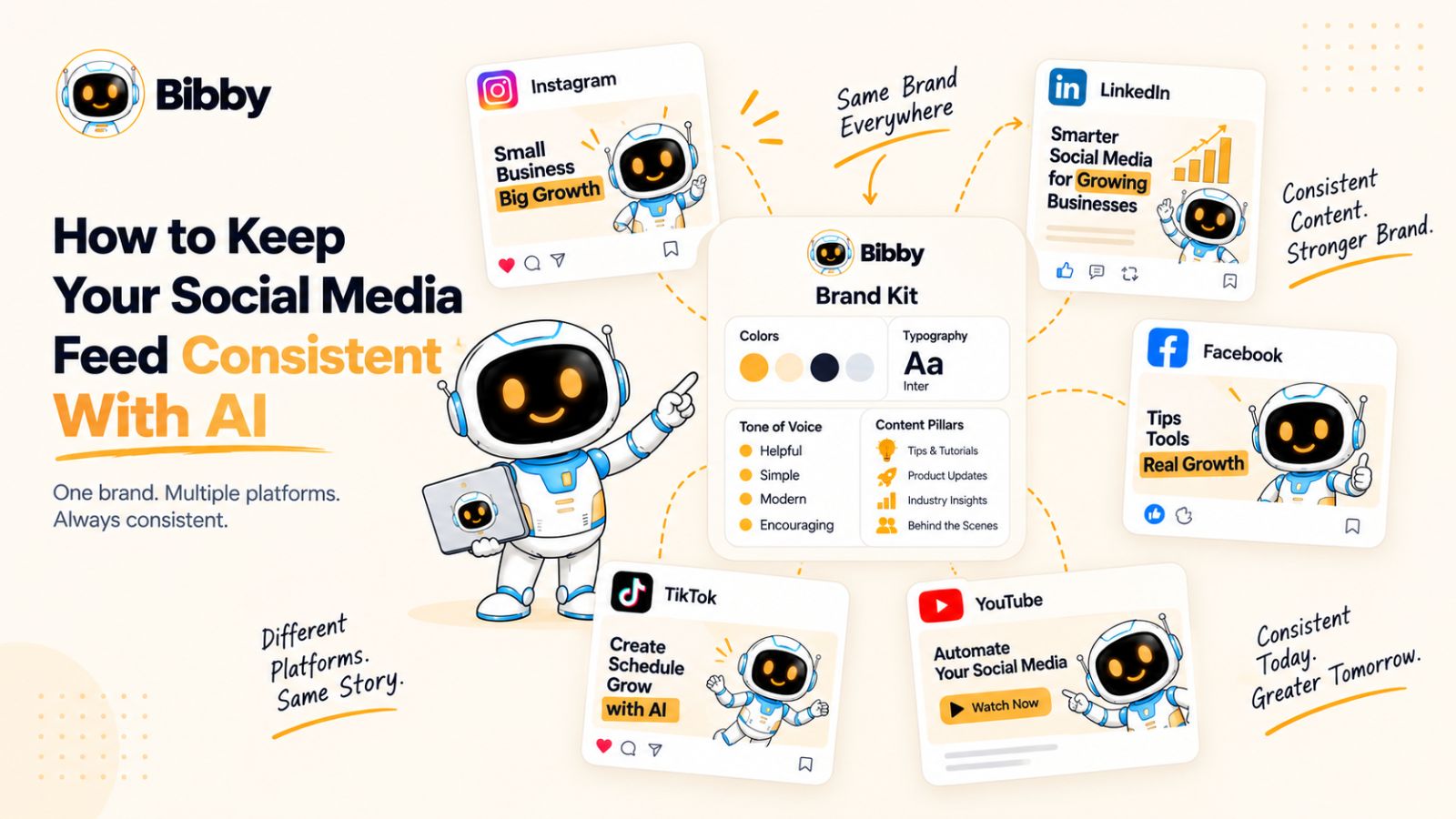
1. Establish a Recognizable Visual Identity
Visual consistency is one of the fastest ways to make a social media feed feel connected.
That does not mean every image needs to use the exact same template.
Instead, define recurring visual characteristics such as:
- Brand colors
- Typography
- Logo treatment
- Image style
- Graphic style
- Photography direction
- Illustration style
- Layout preferences
Once these elements are defined, AI can work within those boundaries rather than producing completely unrelated creative directions every time.
This is where a brand kit becomes particularly useful.
A brand kit can act as a central reference for the visual and communication elements that should remain consistent across your content.
Rather than explaining your brand from scratch every time you create a post, the system can use those predefined guidelines as part of the workflow.
2. Create a Consistent Brand Voice
Visual consistency gets attention, but language creates recognition.
Think about the difference between a brand that communicates in a confident, concise, educational style and one that uses casual jokes, exaggerated claims, and sales-heavy language.
Both approaches can work.
The important thing is that the chosen voice feels intentional and remains relatively consistent.
Define characteristics such as:
- Formal or conversational
- Educational or entertaining
- Direct or storytelling-driven
- Technical or accessible
- Short-form or detailed
- Bold or understated
You can then use those preferences when generating captions.
This is more effective than simply asking an AI tool to “write a good caption” because “good” is subjective.
A useful AI workflow needs to understand what good means for your brand.
3. Build Repeatable Content Pillars
One of the easiest ways to make a feed feel inconsistent is to publish whatever idea happens to appear that day.
Content pillars solve that problem.
A content pillar is a recurring subject or category that your audience can associate with your brand.
For example, a marketing company might use:
- Marketing education
- Customer success stories
- Industry insights
- Product demonstrations
- Behind-the-scenes content
- Company opinions
These pillars give your AI workflow a strategic framework.
Instead of asking:
“What should I post today?”
you can ask:
“Which content pillar should we publish today?”
That small change can make content creation much more systematic.
4. Use Different Formats Without Losing Your Identity
Consistency does not require using the same format repeatedly.
In fact, relying on a single format can make a feed predictable.
A stronger approach is to maintain a consistent identity across multiple formats:
Image → Carousel → Video → Story → Text-based post
The format changes, but the underlying brand remains recognizable.
For example, a single educational topic could become a carousel explaining the concept, a short video demonstrating it, an image highlighting the key lesson, and a story asking the audience a related question.
The content becomes more diverse without becoming disconnected.
5. Maintain a Predictable Publishing Rhythm
Consistency also means showing up regularly.
Your ideal frequency will depend on your audience, resources, platform mix, and content strategy. There is no universal posting frequency that guarantees success.
What matters is establishing a publishing rhythm that you can maintain.
This is one of the areas where automation becomes particularly useful.
If you can prepare and schedule content in advance, you are less dependent on your motivation or available time on a particular day.
Instead of relying on:
“I need to remember to post today.”
you create:
“The next several pieces of content are already planned and scheduled.”
That distinction can make consistency much easier to maintain.
6. Avoid Making Every Post Sound Like AI
There is a potential downside to automating too much: repetition.
If every caption follows the same structure, uses the same opening phrase, ends with the same call to action, and communicates ideas in the same rhythm, your audience may start noticing the formula.
AI should therefore be used to increase production capacity—not to eliminate creative variation.
You can deliberately rotate:
- Hooks
- Caption structures
- Calls to action
- Content formats
- Storytelling approaches
- Educational angles
- Content pillars
The objective is consistent identity, not repetitive content.
7. Use a Brand Kit as the Source of Truth
As your content volume increases, maintaining consistency manually becomes increasingly difficult.
This is where centralized brand information can become valuable.
A brand kit can keep essential information in one place, including visual guidelines and communication preferences. When connected to AI-powered content workflows, it can reduce the amount of repeated instruction required during content creation.
For example, if your brand uses a particular visual identity and a specific communication style, you want those characteristics reflected across your campaign rather than manually restating them for every individual post.
Bibby's chat-based workflow makes this approach particularly practical because you can create and manage a brand kit through the conversational interface, alongside other social media tasks.
That means your brand guidelines can become part of the operating system behind your content rather than simply being a document that sits somewhere unused.
8. Build Consistency Around Systems, Not Memory
The biggest lesson is simple:
Do not make yourself responsible for remembering everything.
If you need to remember your brand voice, content pillars, publishing schedule, campaign themes, platform mix, and content formats every time you create a post, inconsistency becomes inevitable.
A better system stores those decisions and turns them into repeatable workflows.
AI can then help execute within those boundaries.
That is the real opportunity behind autonomous social media management: not replacing your brand's personality, but creating a system that makes it easier to express that personality consistently.
Once consistency is handled systematically, you can turn your attention to the other half of the equation: creating content with a greater opportunity to perform well and reach more people.
How Autonomous AI Can Help You Create More Viral Content
“Go viral” sounds like a simple goal, but there is no button that guarantees it.
Social platforms are influenced by constantly changing recommendation systems, audience behavior, competition, content quality, timing, format, and countless other variables. A post can have all the characteristics of successful content and still perform differently from what you expected.
What autonomous AI can do is improve the process around creating and distributing content.
Instead of trying to predict which single post will go viral, you can use AI to create more opportunities to discover what your audience responds to.
Virality Starts With Relevance
A viral post is not necessarily the most polished post.
Sometimes a simple observation, useful explanation, entertaining video, strong opinion, or relatable experience can outperform content that took hours to produce.
The common thread is usually relevance.
Your audience needs a reason to stop scrolling and pay attention.
That means your content system should continuously explore questions such as:
- What problems does the audience care about?
- What questions keep appearing?
- What ideas are worth explaining?
- What experiences are relatable?
- What topics generate discussion?
- What can be demonstrated visually?
- What can be presented from a fresh angle?
AI can help you explore these directions faster, but the underlying subject matter still needs to be useful or interesting to the people you want to reach.
Use AI to Generate More Content Angles
One idea does not have to produce one post.
Suppose your original idea is:
“Why businesses should automate social media.”
That could become several different content angles:
- The five repetitive social media tasks businesses should automate
- Why scheduling alone is not enough
- What an AI social media manager actually does
- The difference between AI assistance and autonomous AI
- How to create a week's worth of social content
- Common mistakes when automating social media
- How AI can help maintain brand consistency
The underlying topic remains the same, but the angle changes.
This gives you more opportunities to discover which framing resonates with your audience.
Hooks Matter Because Attention Is Limited
On social media, your content competes with everything else in a user's feed.
The opening line, first visual, or first few seconds of a video therefore matter.
AI can help generate multiple hooks for the same underlying idea.
For example, an educational post could begin with:
“Posting every day isn't the same as having a consistent social media strategy.”
Another version could focus on the operational problem:
“If creating one social media post takes 30 minutes, here's where your time is going.”
Another could challenge an assumption:
“You don't need more social media ideas. You need a better content system.”
None of these guarantees engagement.
But generating multiple approaches makes experimentation considerably easier.
Test Ideas Instead of Guessing
One of the biggest advantages of automation is the ability to test more variations without multiplying your workload.
You can experiment with:
- Different hooks
- Different content formats
- Different topics
- Different caption structures
- Different calls to action
- Different visual approaches
- Different publishing windows
The goal is not to blindly produce hundreds of posts.
It is to create a feedback loop where publishing teaches you something about your audience.
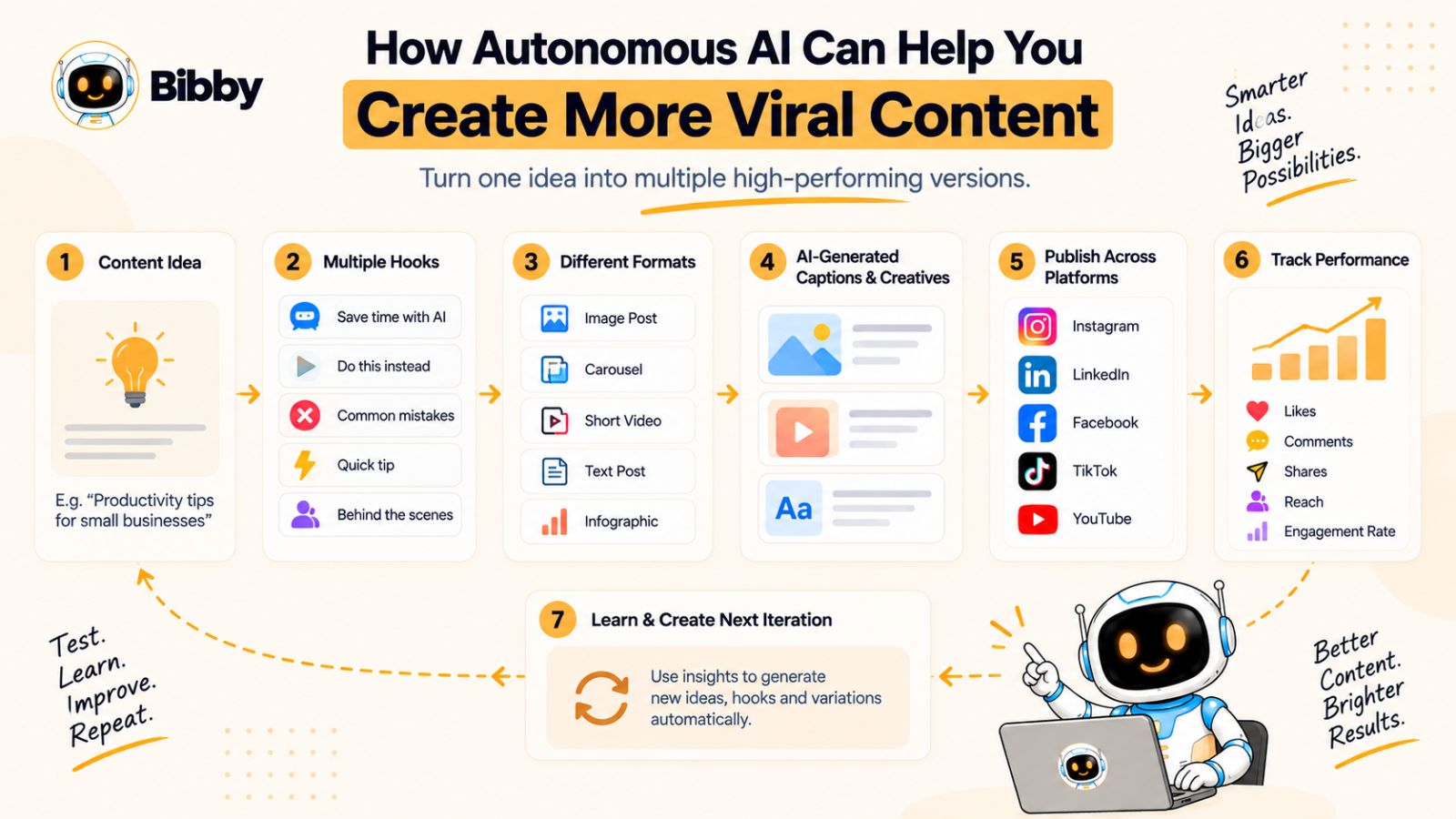
A useful cycle looks like this:
Hypothesis → Content → Distribution → Audience Response → Learning → New Hypothesis
Over time, this can help you identify patterns that are worth repeating.
Repurpose Winning Ideas
Suppose an educational carousel performs particularly well.
That does not mean the idea should disappear after one publication.
The underlying concept can potentially become:
- A short-form video
- A LinkedIn post
- An Instagram Story
- A YouTube Short
- A follow-up carousel
- A customer-focused example
- A longer educational post
This is one of the most valuable uses of AI in social media.
AI can help transform an existing idea into multiple content formats, reducing the amount of manual work required to extend the life of good ideas.
Instead of constantly searching for completely new topics, you can build content ecosystems around ideas that have already demonstrated audience interest.
Timing Can Increase Your Opportunities
Publishing time is another variable that can be optimized.
If your audience tends to be more active during certain periods, scheduling content around those windows can make the publishing process more deliberate.
AI-powered scheduling systems can help automate this decision rather than requiring you to manually choose a time for every post.
But timing should not be confused with a viral formula.
A perfectly timed post with weak content is still weak content.
Think of timing as helping your content enter the conversation at an appropriate moment—not as a mechanism that guarantees reach.
Consistency Creates More Chances to Learn
This is where the connection between consistency and virality becomes important.
You cannot learn much from a social media strategy that publishes once every few weeks.
There simply are not enough observations.
A consistent publishing system gives you more opportunities to discover:
- Which topics attract attention
- Which formats generate interaction
- Which hooks make people stop
- Which content gets shared
- Which messages create discussion
- Which ideas deserve follow-up content
Consistency therefore becomes more than a branding exercise.
It becomes a learning advantage.
The more systematically you publish, observe, and improve, the more informed your future content decisions can become.
How Bibby Fits Into the Experimentation Loop
A tool such as Bibby can reduce the operational work involved in this process.
You can provide your media, choose a posting style, generate captions, and schedule content across your selected platforms. If you want to change the messaging, you can regenerate captions rather than rebuilding the entire post manually.
Its chat interface also provides another way to work with content. Instead of navigating through separate workflows for every task, you can use conversational commands to create posts, build campaigns, manage a brand kit, or regenerate content.
That matters because experimentation only works when experimentation is affordable in terms of time.
If testing a new content angle requires an hour of manual work, you will probably test fewer ideas.
If the operational cost falls significantly, you can spend more of your time thinking about what to test rather than manually executing every test.
The Real Goal Is a Repeatable Discovery Engine
The most sustainable approach to viral content is therefore not chasing a mythical formula.
It is building a system that continuously creates opportunities for strong ideas to emerge.
Create more intelligently.
Test different angles.
Publish consistently.
Study what resonates.
Repurpose promising ideas.
Repeat.
Autonomous AI can make that loop faster and easier to operate.
And when content creation, caption generation, scheduling, multi-platform publishing, campaigns, and brand management begin working together, the social media tool itself starts to look less like a calendar—and more like an AI-powered social media manager.
Also read: How to Create a Social Media Funnel That Actually Converts (Step-by-Step Guide) →
Bibby: Turning Social Media Automation Into an Autonomous Workflow
The biggest limitation of many social media workflows is not a lack of tools. It is having too many disconnected tools.
You might use one application to create images, another to write captions, another to manage your content calendar, and separate platforms to publish across your social channels.
Every additional handoff creates friction.
Bibby takes a different approach by bringing key parts of the social media workflow together. Instead of treating content creation, caption writing, scheduling, and publishing as completely separate jobs, it connects them into a more streamlined process.
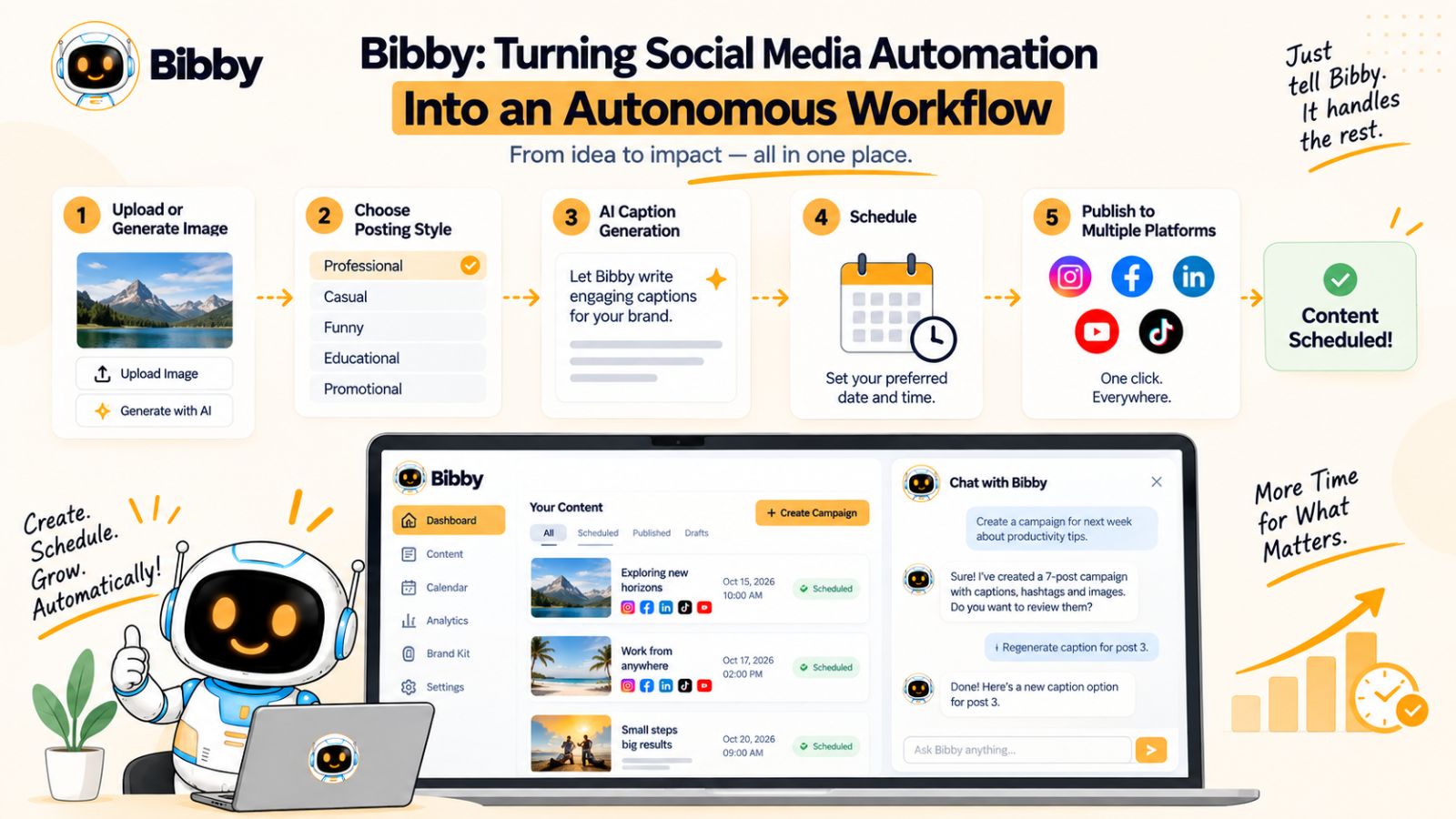
Start With an Image—or Generate One With AI
The workflow can begin with content you already have.
Upload an image, or use AI to generate the visual you need.
This gives you flexibility depending on how your content is produced. A business with an existing library of product photography can use those assets, while a creator or marketer starting with an idea can use AI-generated visuals as part of the workflow.
The important part is that you do not need to prepare every component of the post independently before entering the social media workflow.
Choose Your Posting Style
Once your media is ready, you can choose how you want the post to communicate.
This matters because the same visual can support very different messages.
You might want a post to be:
- Educational
- Promotional
- Conversational
- Story-driven
- Inspirational
- Direct and action-oriented
Giving the system this context helps move beyond generic AI-generated captions.
Instead of starting with a blank caption field, you establish the direction first and allow AI to generate content within that direction.
Let AI Generate Your Captions
Writing captions manually for every social media post can become one of the most repetitive parts of content management.
Bibby can generate captions automatically based on the content and posting style you select.
That gives you a faster starting point and makes it easier to maintain a steady publishing schedule.
It also creates room for iteration.
If the first version does not communicate the idea the way you want, you can regenerate the caption instead of starting over.
That small change can significantly reduce the friction involved in refining social media content.
Schedule Content Across Different Dates
Once the content is ready, the next challenge is keeping your publishing calendar full.
Bibby allows you to schedule media for different dates rather than requiring you to manually publish each piece when it is time to go live.
This is particularly useful for businesses and creators who want to prepare content in batches.
For example, instead of spending 20 minutes every morning preparing and publishing a post, you could spend one focused session preparing several pieces of content and scheduling them ahead of time.
Your future feed is then already organized.
Schedule Around AI-Optimized Times
Timing is another part of the workflow that can be automated.
Bibby can schedule content at AI-optimized times, helping reduce the need to manually decide when every individual post should be published.
Again, optimized timing should not be interpreted as a guarantee of reach or virality.
Social media performance depends on many factors beyond publishing time.
The benefit is that timing becomes another part of the system rather than another recurring decision you need to make manually.
Manage Multiple Platforms From One Workflow
Modern brands rarely want to build an audience on only one social network.
Depending on your strategy, you may want to publish across platforms such as:
- YouTube
- TikTok
Managing each platform separately can quickly become tedious.
A centralized workflow allows you to select the platforms you want to use and manage your publishing process without repeatedly recreating the same operational steps.
The objective is not necessarily to publish identical content everywhere.
Instead, you can use one underlying content operation to manage distribution across multiple channels.
Publish More Than Just Images
Social media is no longer an image-only environment.
Different platforms and audiences consume different formats, and a strong content strategy can use several of them.
Bibby supports multiple media types, including:
Images, carousels, videos, and stories.
That means your consistency system does not have to depend on publishing the same type of post every day.
You can build a more varied feed while keeping the underlying brand, campaign, and publishing workflow organized.
Manage Social Media Through Chat
One of the more significant shifts in Bibby's workflow is its chat interface.
Traditional social media software often makes you navigate through menus, tabs, calendars, forms, and configuration screens.
A conversational interface changes the interaction.
Instead of figuring out where a particular setting lives, you can describe what you want to accomplish.
For example, within Bibby's chat workflow, you can use natural-language instructions to help:
- Create a brand kit
- Create a campaign
- Create posts
- Regenerate captions
- Manage content
This moves the experience closer to having a conversational social media assistant.
The difference is subtle but important.
A traditional interface asks:
“Which function do you want to open?”
A conversational workflow asks:
“What do you want to accomplish?”
Your Brand Kit Becomes Part of the Workflow
A brand kit is particularly important when AI is involved.
Without brand context, AI can produce content that is technically polished but disconnected from the identity you are trying to build.
A brand kit can provide the foundation for consistency by keeping your brand information centralized.
Instead of repeatedly explaining how your brand should look and communicate, you can establish those preferences and use them as part of your broader content workflow.
This becomes increasingly valuable as the volume of content increases.
Campaigns Can Be Managed Conversationally
Individual posts are only one part of social media marketing.
Campaigns require multiple related pieces of content working toward a common objective.
For example, a product launch might require:
Announcement → Educational content → Product demonstration → Social proof → Reminder → Call to action
Managing that sequence manually can involve a significant amount of planning.
A conversational AI workflow can simplify the operational side of campaign creation by allowing you to describe the campaign and then work through the resulting content.
The strategic direction still comes from you.
The AI helps turn that direction into a structured publishing workflow.
From “Social Media Tool” to “Social Media Operator”
This is ultimately what makes an autonomous workflow different from a collection of disconnected AI features.
AI image generation by itself is useful.
AI caption generation is useful.
Scheduling is useful.
A brand kit is useful.
Campaign management is useful.
But connecting those capabilities creates a different experience.
The workflow becomes:
Create → Style → Caption → Schedule → Publish → Iterate
And the chat interface adds another layer:
Tell the system what you want → let it help execute the workflow.
That is the direction autonomous social media management is moving toward.
Instead of spending your time operating software, you increasingly spend your time directing the system.
The Human Still Sets the Direction
Automation should not mean abandoning judgment.
You still decide:
- What your brand represents
- Who your audience is
- Which topics matter
- What products or services to promote
- What opinions your brand should express
- What content deserves your expertise
- Which campaigns support your business goals
Bibby can help with the operational layer between those decisions and the final published content.
That division is what makes autonomous AI particularly useful.
You provide the strategy. AI helps execute the system.
When those two roles are clearly defined, you can create a social media workflow that is faster, more consistent, and easier to maintain without turning your feed into an endless stream of generic automated posts.
Also read: How to Build a Winning Social Media User-Generated Content Strategy (Complete Guide) →
How to Build a Week of Social Media Content in One Sitting
One of the biggest advantages of autonomous AI social media tools is the ability to separate content creation from content publishing.
Instead of creating a post every time you need one, you can build several pieces of content in a focused session and schedule them for the days ahead.
This approach is often called batch content creation, and AI can make the process significantly more efficient.
The objective is not to fill your calendar with random posts.
It is to create a balanced week where every piece of content has a purpose.
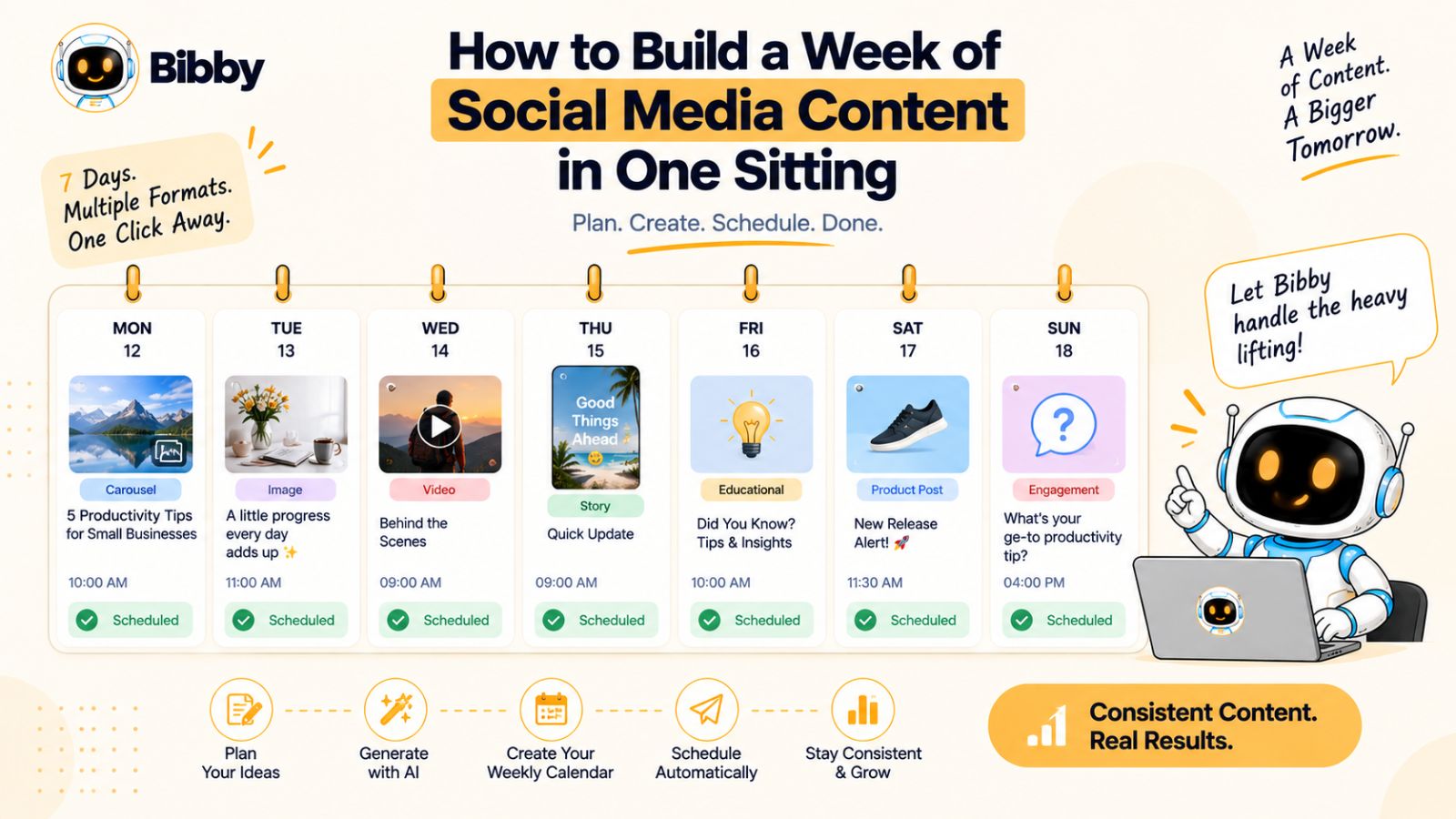
Step 1: Choose Your Weekly Content Themes
Start by deciding what you want your audience to see during the week.
You might choose four or five themes based on your business.
For example, a software company could structure a week around:
- Monday: Educational tip
- Tuesday: Customer problem
- Wednesday: Product demonstration
- Thursday: Industry insight
- Friday: Behind-the-scenes content
A creator might use an entirely different structure.
The point is to establish the themes before producing the individual posts.
This prevents your content calendar from becoming a collection of unrelated ideas.
Step 2: Prepare Your Media
Once your themes are defined, gather the media required for the week.
That could include product photos, graphics, short videos, screenshots, carousels, or AI-generated images.
You do not necessarily need five completely unique creative concepts.
One strong topic can often generate multiple related pieces of content.
For example, a single product feature could become:
Product image → educational carousel → demonstration video → customer-focused post → Story
This lets you extract more value from the same underlying idea.
Step 3: Establish the Posting Styles
Next, decide how each piece should communicate.
An educational post might use a teaching-oriented style.
A product announcement might be more direct.
A behind-the-scenes post could be conversational.
This is where AI can save considerable time.
Rather than manually figuring out the tone of every caption, you can provide the desired posting style and let the system generate an appropriate starting point.
The key is to vary the style intentionally while keeping the underlying brand voice consistent.
Step 4: Generate and Refine Captions
With your media and posting styles ready, generate the captions.
Do not assume the first AI-generated version is automatically the final version.
Read it.
Ask whether it sounds like your brand.
Check whether the opening actually communicates the point.
Remove unnecessary claims.
Add specific information that only your business can provide.
If a caption needs a different angle, regenerate it.
The advantage of AI is not that you never have to edit.
It is that producing and revising the first draft becomes dramatically faster.
Step 5: Organize the Week
Now arrange your content into a logical sequence.
Avoid publishing five promotional posts back-to-back.
A stronger weekly mix might look like:
Teach → Engage → Demonstrate → Educate → Promote
The exact structure will depend on your audience and business.
The principle is to create variation.
Your audience should not feel as though every post exists for the sole purpose of selling something.
Step 6: Select Your Platforms
Decide which content belongs on which platform.
You might distribute a product demonstration to Instagram, TikTok, and YouTube while using the same underlying idea for a more professional LinkedIn post.
Similarly, an educational carousel might be particularly useful on Instagram and LinkedIn, while a shorter version could become a Story.
The goal is centralized management without forcing identical content everywhere.
A multi-platform strategy works best when the core idea remains consistent while the execution fits the platform.
Step 7: Schedule Everything in Advance
Once your week's content is ready, schedule it.
This is where the difference between a content creator and a content system becomes obvious.
Without scheduling, your plan exists only as a list of intentions.
With scheduling, the plan becomes an operational calendar.
A tool such as Bibby can help turn that calendar into an automated publishing workflow. You can prepare your media, choose posting styles, generate captions, select your platforms, and schedule content for future dates.
If the system can also help identify AI-optimized publishing times, you can remove another recurring decision from your weekly workload.
Step 8: Leave Room for Real-Time Content
Batch creation does not mean every minute of your social media calendar needs to be predetermined.
Leave space for content that responds to:
- Current events within your industry
- Customer questions
- New product developments
- Trends
- Unexpected opportunities
- Conversations happening within your community
This balance is important.
Your scheduled content provides consistency.
Your real-time content provides responsiveness.
Together, they create a feed that is both organized and alive.
A Sample Weekly Autonomous Workflow
Here is what the process could look like in practice:
| Day | Content | Format | Purpose |
|---|---|---|---|
| Monday | Educational lesson | Carousel | Teach |
| Tuesday | Customer problem | Image | Relate |
| Wednesday | Product feature | Video | Demonstrate |
| Thursday | Industry insight | Text/image | Build authority |
| Friday | Offer or campaign | Image/video | Convert |
You can prepare these assets in advance, use AI to assist with captions, and schedule the content across your selected platforms.
The result is not simply five scheduled posts.
It is a structured weekly content system.
The One-Hour Content Planning Mindset
The exact amount of time required will vary depending on your content complexity, but the broader idea is simple:
Do the strategic thinking in batches and automate the repetitive execution.
Instead of repeatedly asking yourself what to post every morning, make the major content decisions once.
Instead of writing every caption from scratch, use AI to generate drafts.
Instead of manually publishing every post, schedule them.
Instead of recreating your brand instructions for every campaign, maintain them in a brand system.
This creates a powerful separation:
Strategy happens deliberately.
Execution happens continuously.
And that is one of the biggest reasons autonomous AI tools can make social media consistency sustainable.
But there is one danger: if you automate too aggressively, your feed can become predictable, repetitive, and obviously machine-generated. The next section looks at how to automate social media without losing the human qualities that make content worth following.
How to Automate Social Media Without Making Your Feed Feel Robotic
Automation can make social media easier to manage, but more automation does not automatically mean better content.
If you let AI produce hundreds of posts using the same formulas, your feed can quickly become repetitive. The captions may start sounding interchangeable, the visuals may lack personality, and every post may appear to be optimized for a platform rather than created for a real audience.
The solution is not to avoid AI.
It is to automate the repetitive work while keeping human expertise in the content.
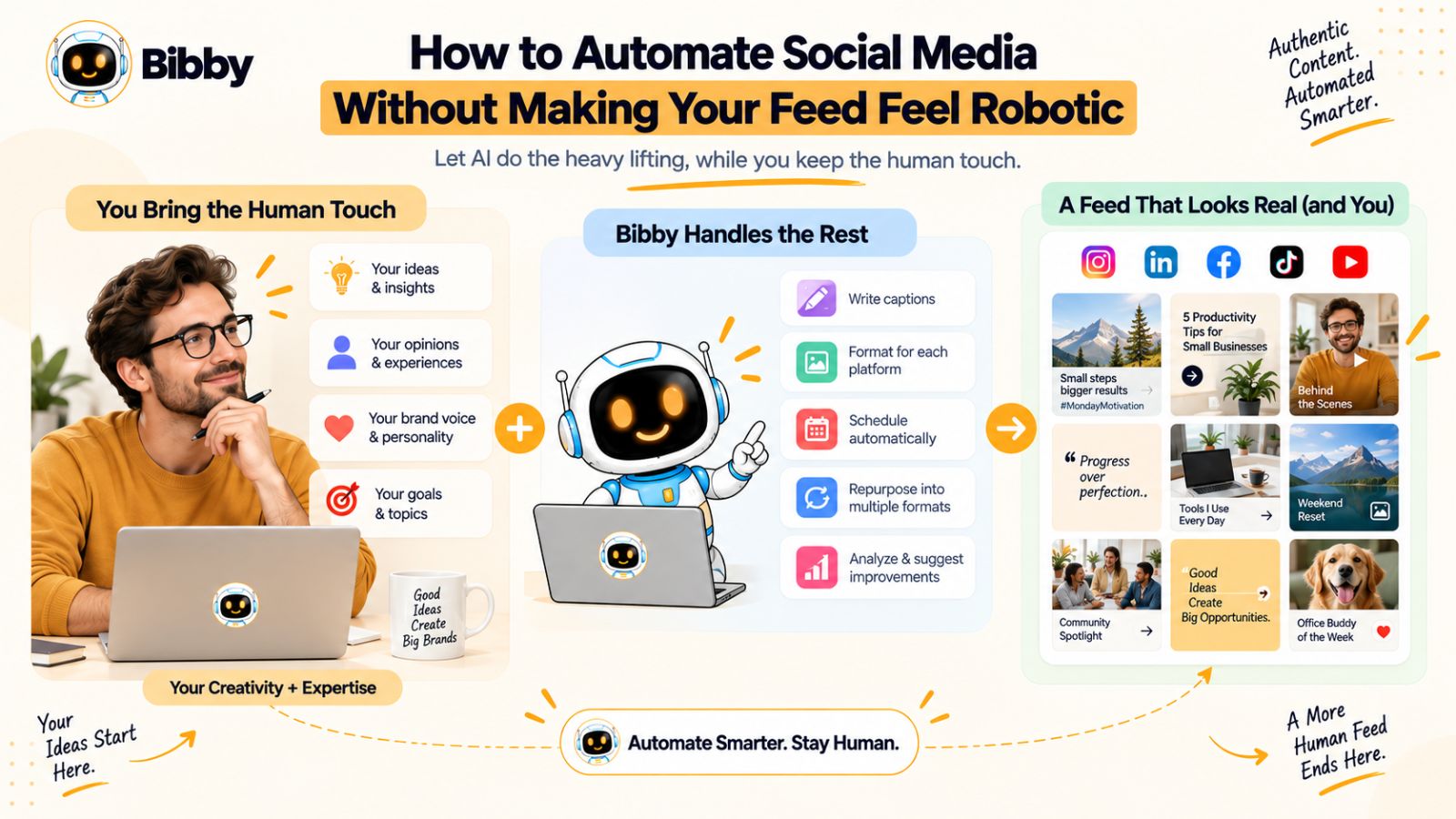
Keep Human Opinions in Your Content
Generic information is easy for AI to produce.
Your actual perspective is harder to replicate.
For example, almost any AI tool can explain why businesses should post consistently.
But only your business can explain:
- What you learned from your customers
- Which strategy worked for you
- What failed
- What surprised you
- Why you made a particular decision
- What you believe your industry gets wrong
These details give content personality.
A useful workflow therefore starts with human input and uses AI to expand or package it.
Instead of:
AI → generic idea → generic caption
try:
Human expertise → specific insight → AI-assisted execution
That small difference can dramatically improve the usefulness of automated content.
Give AI Better Inputs
AI output is heavily influenced by the information you provide.
If you give an AI tool nothing except:
“Write an Instagram caption about social media.”
you should expect a generic result.
But if you provide:
“Explain the three biggest mistakes we see small businesses make when scheduling social media content. Keep the tone practical and direct, and include an example from our workflow.”
the system has considerably more context.
The same principle applies to autonomous social media tools.
Your brand information, posting styles, campaigns, content pillars, audience information, and product details give AI the context it needs to produce more relevant content.
Do Not Use the Same Formula for Every Post
Consistency and repetition are not the same thing.
A consistent brand can use dozens of different creative structures.
For example, rotate between:
The lesson:
Teach the audience something useful.
The story:
Explain what happened and what you learned.
The opinion:
Take a clear position on an industry topic.
The demonstration:
Show how something works.
The question:
Invite the audience into a conversation.
The case study:
Show how a problem was solved.
The behind-the-scenes post:
Show the process behind the result.
These formats allow your feed to remain recognizable without becoming predictable.
Mix Evergreen and Timely Content
Evergreen content remains useful over time.
Timely content responds to what is happening now.
You need both.
Evergreen posts give you a reliable foundation for your publishing calendar. Timely posts allow you to participate in conversations and developments relevant to your audience.
An autonomous AI workflow can handle much of the evergreen publishing in advance while leaving room for real-time content.
For example:
70–80% planned content + 20–30% flexible content
could be a starting framework for some brands, but there is no universal ratio. Your actual mix should depend on your industry, audience, and strategy.
The important principle is to avoid turning your entire feed into a pre-programmed sequence.
Use Different Formats
A robotic feed often has another recognizable characteristic: everything looks the same.
Five identical graphics with five nearly identical captions may technically represent consistency, but they do not create a particularly interesting content experience.
Instead, rotate formats.
Use:
- Images
- Carousels
- Videos
- Stories
- Text-based posts
- Product demonstrations
- Educational content
- Customer-focused content
This creates visual and structural variety while allowing the underlying brand identity to remain consistent.
Know When to Intervene
Autonomous systems should not necessarily operate without oversight.
There are certain types of content where human review is especially valuable.
These can include:
- Major announcements
- Sensitive topics
- Product claims
- Customer stories
- Legal or regulatory statements
- Crisis communication
- Highly opinionated content
- Important campaign launches
A useful approach is to establish levels of automation.
Low-risk content:
AI can handle more of the workflow automatically.
Medium-risk content:
AI creates the content, but a person reviews it before publishing.
High-risk content:
Human strategy and approval remain central.
This creates a human-in-the-loop system rather than an uncontrolled publishing machine.
Avoid Chasing Virality at the Expense of Your Brand
Another way automated feeds become robotic is by chasing whatever format appears to be trending.
A trend may generate attention, but that does not automatically make it relevant to your audience.
Before using a trend, ask:
Does this reinforce what our brand is known for?
If the answer is no, skipping it may be more valuable than forcing your brand into an unrelated format.
Your objective should be to build a recognizable content identity—not to make every post look like something currently receiving attention.
Use AI for Scale, Not Authenticity
There is a useful rule to remember:
AI can scale your content process. It cannot manufacture your experience.
Your expertise, customer knowledge, stories, opinions, examples, and perspective are what make the content yours.
AI can help turn those raw materials into captions, campaigns, schedules, and platform-ready posts.
Bibby fits naturally into this model because its workflow can automate much of the operational side—creating posts, generating or regenerating captions, organizing campaigns, managing brand information, and scheduling different types of media across selected platforms.
You can therefore spend less time performing repetitive publishing tasks and more time supplying the ideas and expertise that make the content worth publishing.
The Best Automation Feels Invisible
The ultimate goal is not for your audience to think:
“Wow, this brand uses AI.”
They should think:
“This brand consistently publishes useful content that feels like it understands me.”
If AI is doing its job properly, the automation should mostly be invisible to the audience.
They see the result—not the machinery behind it.
That is the balance to aim for:
Automate the process.
Protect the personality.
Keep the expertise human.
Once that balance is established, autonomous AI can become a genuine productivity advantage rather than another source of generic content.
A Practical Autonomous AI Social Media System
Knowing what autonomous AI can do is useful. Knowing how to organize it into an actual operating system is more valuable.
The goal is to create a workflow where content does not depend on someone remembering every task every day.
Instead, you establish a repeatable cycle:
Plan → Create → Schedule → Publish → Analyze → Improve
The exact tools and publishing frequency will vary by business, but the underlying system can remain the same.
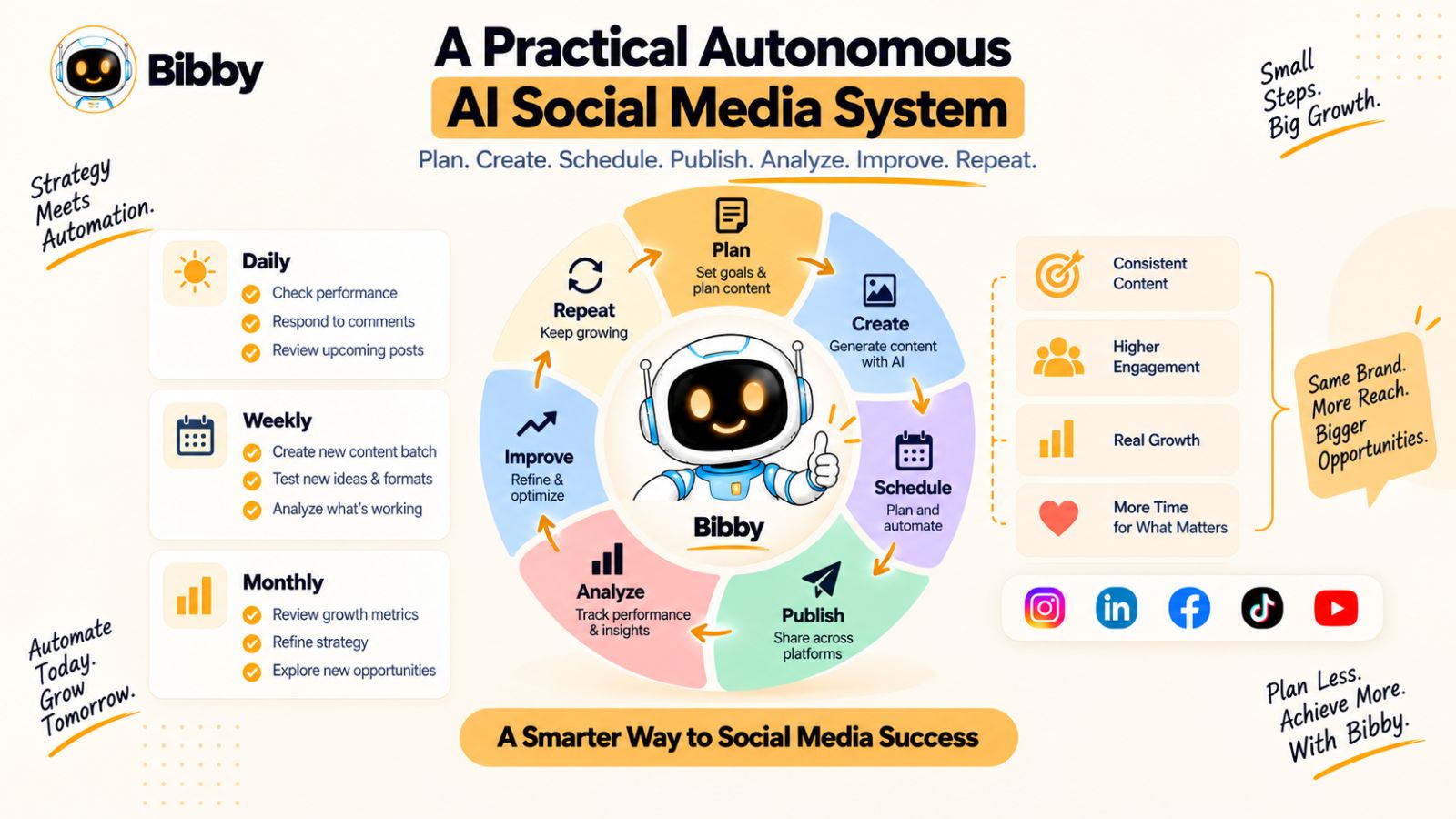
The Daily Workflow
Your daily social media work should ideally focus on the things that require human attention.
That might include:
- Capturing new ideas
- Responding to comments and messages
- Reviewing important scheduled posts
- Monitoring conversations in your industry
- Collecting customer questions
- Identifying timely opportunities
- Recording insights from your audience
You do not necessarily need to spend your entire day creating and scheduling posts.
If the repetitive publishing work has already been automated, your time can shift toward interaction and strategy.
This is an important distinction.
Social media automation should give you more time to be social—not eliminate the social part.
The Weekly Workflow
Once a week, create a dedicated content-planning session.
Start by reviewing what happened during the previous week.
Ask:
- Which topics attracted attention?
- Which posts generated meaningful conversations?
- Which formats performed well?
- Which ideas should be expanded?
- What questions did customers ask?
- What should we stop repeating?
Then plan the upcoming week's content.
A simple weekly structure might be:
Monday: Educational content
Tuesday: Audience engagement
Wednesday: Product or service content
Thursday: Industry insight
Friday: Promotional or community content
Again, this is a framework rather than a universal formula.
Your actual schedule should reflect your audience and business objectives.
The Monthly Workflow
The monthly layer is where you move from individual posts to campaigns.
Instead of asking only:
“What should we post this week?”
ask:
“What do we want our audience to understand or do this month?”
A monthly campaign might revolve around:
- A product launch
- A seasonal promotion
- An educational theme
- A new service
- A customer success story
- A major industry event
- A company milestone
Once the campaign objective is clear, break it into smaller content themes.
For example:
Campaign objective → Content pillars → Individual posts → Formats → Publishing schedule
This gives your social media feed a strategic direction instead of making every post an isolated piece of content.
Workflow for a Small Business
A small business often has limited time and a small marketing team.
The system might look like this:
Monthly:
Choose the primary campaign and content themes.
Weekly:
Prepare several pieces of media and generate captions.
During the week:
Respond to customers, collect ideas, and add timely content.
End of week:
Review results and identify what deserves another iteration.
An AI-powered system can handle much of the repetitive work between those strategic decisions.
For example, Bibby can help bring together media creation, posting styles, caption generation, scheduling, and multi-platform publishing in one workflow.
The business owner still controls what the brand says.
The system simply reduces the operational workload required to say it consistently.
Workflow for a Creator
Creators often face a different challenge: producing enough content without losing their personal voice.
A useful system can begin with an idea bank.
Every time you have an idea, capture it.
Do not wait until content-creation day.
Then, during your weekly production session, turn the strongest ideas into different formats.
For example:
One idea → video → carousel → image → Story → follow-up post
AI can help with the transformation and operational work, while the creator supplies the original perspective.
This approach means you are not constantly trying to invent something new.
You are systematically developing ideas that already came from your own expertise and experience.
Workflow for a Marketing Team
A larger team can introduce additional layers.
For example:
Strategist: Defines campaigns and content priorities.
Subject-matter expert: Supplies expertise and raw ideas.
Creative team: Produces or approves visual assets.
AI workflow: Assists with captions, organization, scheduling, and repurposing.
Social manager: Reviews content and monitors publishing.
Analyst: Reviews performance and identifies patterns.
This creates a human-AI workflow rather than trying to replace the entire marketing function with automation.
Create a Content Pipeline
One of the most useful concepts is to stop thinking of content as either “not created” or “published.”
Instead, create stages.
A simple pipeline might look like:
Ideas → Planned → In Production → Ready → Scheduled → Published → Analyzed
This makes it much easier to identify where your content operation is getting stuck.
If you have 100 ideas but nothing scheduled, your problem is production or execution.
If you have plenty of content but very few ideas, your problem is ideation.
If you publish consistently but never review performance, your problem is the feedback loop.
An autonomous AI system becomes much more valuable when it fits into this larger pipeline.
Build a Feedback Loop
Automation without feedback eventually becomes stale.
After content is published, collect the signals that matter to your business.
Depending on your goals, that might include:
- Views
- Reach
- Saves
- Shares
- Comments
- Profile visits
- Clicks
- Leads
- Sales
- Audience growth
Do not judge every post using the same metric.
A brand-awareness video and a lead-generation post may have completely different objectives.
The important thing is to understand what each piece of content was supposed to accomplish.
Then use the results to influence future content.
The Autonomous Social Media Flywheel
When all of these pieces work together, you get a flywheel:
1. Capture ideas
↓
2. Turn ideas into content
↓
3. Use AI to assist with captions and formats
↓
4. Schedule across selected platforms
↓
5. Publish consistently
↓
6. Observe audience response
↓
7. Identify promising ideas
↓
8. Create new variations
↓
9. Repeat
The system gets more useful as it accumulates information.
You are no longer treating every post as a completely new project.
You are building a content engine.
Where Bibby Can Fit
Bibby can serve as the execution layer within this system.
You can bring your media into the workflow, choose posting styles, generate captions, schedule content for different dates, and distribute content across selected social platforms.
The conversational interface adds another dimension because the workflow can also be managed through chat. Tasks such as creating a brand kit, creating a campaign, creating posts, and regenerating captions can be handled through conversational instructions.
That means the system can move closer to a model where you are directing social media rather than manually operating every step of it.
The important part is knowing what should remain automated and what should remain human.
Automate repetition.
Keep strategy, expertise, judgment, and meaningful audience interaction human.
That balance gives you the operational efficiency of AI without sacrificing the qualities that make social media effective in the first place.
Also read: The Complete Guide to Cross-Posting on Social Media →
Common Mistakes When Automating Social Media With AI
Autonomous AI can remove a significant amount of repetitive work from social media management, but automation is not automatically a good strategy.
The wrong workflow can simply make bad or generic content appear faster.
Before automating your entire publishing process, it is worth understanding the most common mistakes and how to avoid them.
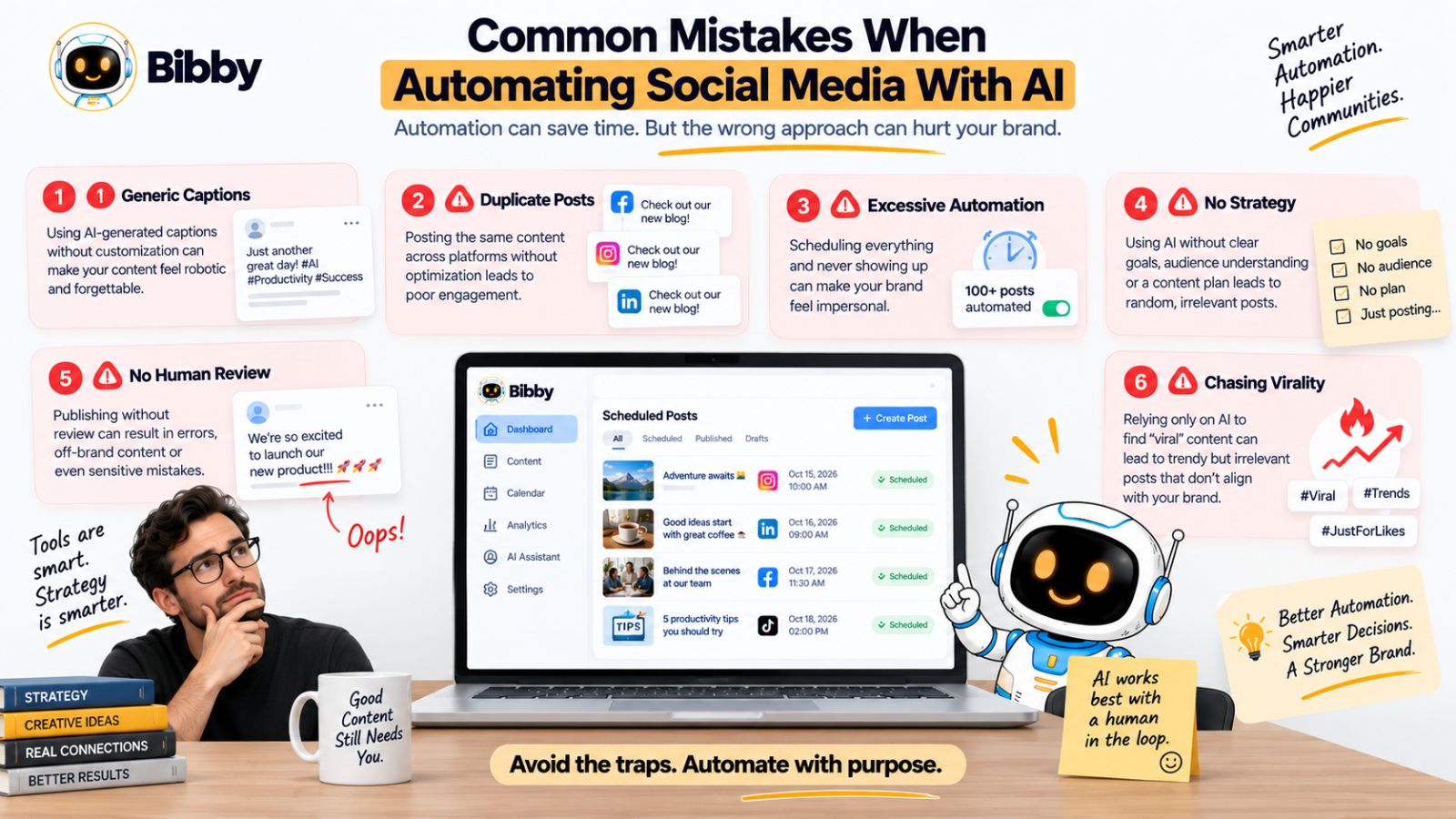
1. Automating Before Establishing a Strategy
One of the biggest mistakes is opening an AI social media tool before deciding what you want your content to accomplish.
If you have no clear audience, content pillars, brand voice, or campaign objectives, AI has little meaningful direction to work from.
The result is often a calendar full of disconnected posts.
Before automating, define:
- Who you want to reach
- What you want to be known for
- Which topics you consistently cover
- Which products or services you want to promote
- What actions you want your audience to take
Then use AI to help execute that strategy.
2. Publishing the Same Content Everywhere
Multi-platform publishing is useful, but copying and pasting the exact same content onto every network is not always the best approach.
Different platforms have different formats, audiences, and user expectations.
A LinkedIn post may need a different structure from a TikTok video.
An Instagram carousel may communicate an idea differently from a YouTube Short.
The underlying idea can be reused, but the presentation should make sense for the platform.
The goal is content repurposing, not blind duplication.
3. Accepting Every AI Caption Without Reviewing It
AI-generated captions can save time, but “generated” does not mean “finished.”
An AI caption may:
- Use generic language
- Repeat familiar phrases
- Make assumptions about your product
- Miss an important detail
- Sound unlike your brand
- Include unnecessary claims
Treat AI output as part of your production workflow rather than an unquestionable final answer.
A quick human review can often turn a generic caption into something substantially more specific.
4. Using the Same AI Prompt Forever
Even if a particular content prompt works, using the exact same structure repeatedly can produce repetitive content.
Your audience should not feel like every post came from the same template.
Rotate your:
- Hooks
- Formats
- Content pillars
- Storytelling structures
- Calls to action
- Visual concepts
- Post lengths
You want consistency in your brand, not consistency in every sentence.
5. Chasing Posting Volume Instead of Value
Automation makes it easier to publish more.
That does not mean you should automatically publish more.
If you have doubled your posting frequency but your audience is seeing increasingly repetitive content, the additional volume may not be creating additional value.
Ask a more useful question:
“What does this post give the audience that the previous post did not?”
A smaller number of genuinely useful posts can be more meaningful than a large volume of interchangeable content.
6. Ignoring Your Existing Audience
AI can help you generate content ideas, but your audience is already giving you a constant supply of them.
Pay attention to:
- Questions in comments
- Customer support conversations
- Frequently asked questions
- Sales objections
- Product feedback
- Common misconceptions
- Topics that repeatedly generate discussion
These are valuable content inputs because they come directly from the people you want to reach.
Your best AI prompts may begin with real conversations rather than abstract brainstorming.
7. Automating Sensitive Content Without Oversight
Not every post should pass directly from AI generation to automatic publication.
Human review is particularly important for content involving:
- Major business announcements
- Pricing
- Legal claims
- Financial information
- Health-related claims
- Customer testimonials
- Sensitive social issues
- Crisis communication
For these categories, establish an approval process before publication.
Autonomy should be configurable.
You should be able to decide where AI can act independently and where a human needs to make the final decision.
8. Treating “Viral” as a Guaranteed Outcome
No AI tool can reliably guarantee that a particular social media post will go viral.
Anyone promising a universal formula for guaranteed virality is oversimplifying a system influenced by audience behavior, platform distribution, competition, content quality, timing, and many other variables.
A better objective is to increase the number of high-quality opportunities you create.
Produce useful content.
Test different angles.
Publish consistently.
Learn from audience response.
Then improve the next iteration.
That is a process you can control.
9. Forgetting to Leave Room for Real-Time Content
A fully automated calendar can become a problem if it leaves no room for anything unexpected.
Your industry may have breaking news.
A customer may ask an interesting question.
A new product feature may launch.
A trend may become relevant.
A major event may change what your audience cares about.
Leave some capacity for these moments.
Your scheduled content creates stability.
Your real-time content creates responsiveness.
10. Using Too Many Separate Tools
Ironically, trying to automate everything can create more complexity if every function requires another application.
One tool generates images.
Another writes captions.
Another manages campaigns.
Another stores brand guidelines.
Another schedules posts.
Another publishes videos.
Another analyzes performance.
Soon, the automation stack itself becomes something you have to manage.
This is one reason integrated AI social media platforms are becoming more useful.
When related tasks can be managed within one workflow, there are fewer handoffs and fewer opportunities for information to get lost.
Bibby illustrates this approach by bringing media creation, posting styles, AI caption generation, scheduling, multi-platform publishing, campaigns, brand-kit management, and conversational control into a connected workflow.
The benefit is not simply having more features.
It is reducing the number of separate steps required to move from an idea to published content.
Forgetting That Automation Needs Maintenance
A social media workflow should evolve.
Your audience changes.
Your products change.
Your brand positioning changes.
Platforms introduce new formats.
Content that worked six months ago may stop working.
Review your automation system periodically.
Ask:
Is our brand voice still accurate?
Are our content pillars still relevant?
Are we using the right formats?
Are we publishing on the platforms that matter to our audience?
Are we learning from performance?
If the answer to any of these questions is no, update the system.
The Best Automation Is Not the Most Automated
The objective is not to remove humans from social media.
It is to remove unnecessary manual work.
That means automating the tasks where human involvement adds little value while keeping human attention focused on strategy, creativity, expertise, relationships, and judgment.
A strong autonomous workflow therefore looks less like:
AI does everything.
And more like:
Human defines direction → AI handles repetitive execution → Human reviews important decisions → Audience provides feedback → AI helps scale the next iteration.
That model gives you the efficiency of automation without turning your social media feed into a content factory that produces posts simply because it can.
The Future of Social Media Management: From Scheduler to AI Social Media Manager
Social media management has traditionally been built around calendars.
You create the content somewhere else, upload it to a scheduling platform, choose a date, select a time, and wait for it to publish.
That model solved an important problem: remembering to post.
But the next generation of social media tools is moving beyond scheduling.
The emerging model is closer to an AI social media manager—a system that can understand a goal, work across multiple connected tasks, and help execute the workflow required to achieve it.
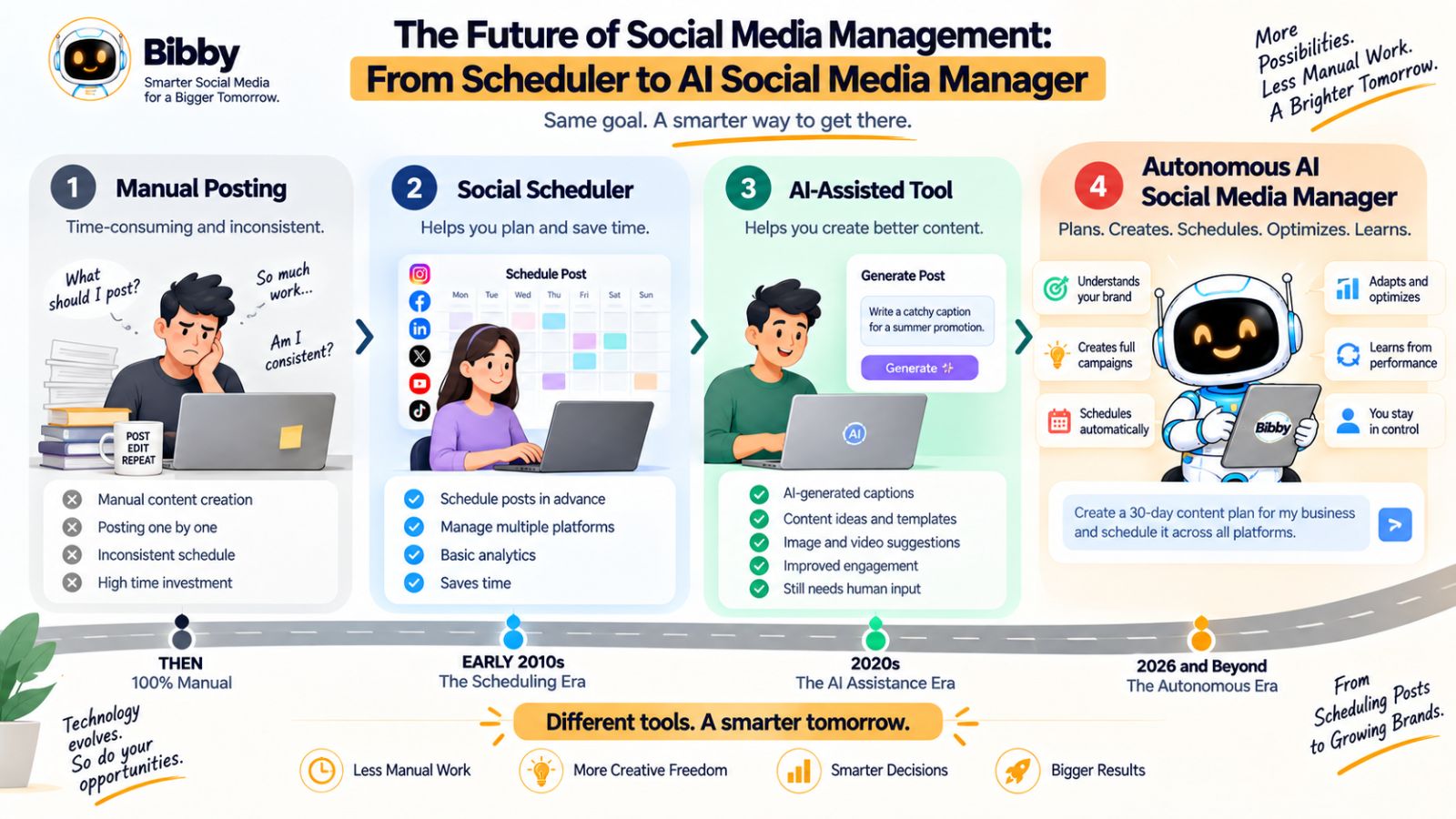
From “When Should This Post?” to “What Should We Accomplish?”
A traditional scheduler starts with a finished asset.
You already have the image.
You already have the caption.
You already know the platform.
The scheduler primarily answers:
“When should this be published?”
An autonomous AI workflow can start with a much broader request.
For example:
“Create a campaign around our new product and prepare social content for the next two weeks.”
That request potentially involves several tasks:
Campaign planning → content creation → captions → formats → platforms → scheduling
The important development is that AI can connect these tasks rather than treating them as isolated functions.
Conversational Interfaces Are Changing How We Use Software
For decades, software has required people to learn the interface.
You learn where the campaign button is.
You learn where the scheduling calendar lives.
You learn where to configure your brand settings.
You learn how to duplicate a post.
You learn where to regenerate a caption.
Conversational interfaces introduce another possibility.
You simply describe what you want.
This is the approach behind Bibby's chat experience.
Instead of navigating through every individual workflow, you can use conversation to work on tasks such as creating a brand kit, creating a campaign, creating posts, and regenerating captions.
The interface becomes less about finding a feature and more about communicating an outcome.
That is a significant shift in how people can interact with marketing software.
AI Agents Can Connect Multiple Tasks
The real potential of autonomous AI is not any individual capability.
Generating an image is useful.
Writing a caption is useful.
Scheduling a post is useful.
But the greater value comes from connecting these capabilities.
Imagine a workflow where you provide a campaign objective and the system can help move through:
Campaign → Content ideas → Media → Captions → Platform selection → Schedule → Publishing
The fewer times you have to manually transfer information between these stages, the less operational friction exists in your marketing process.
This is why autonomous AI is fundamentally different from simply adding an “AI” button to existing software.
Social Media Management Becomes More Intent-Based
Traditional software is largely function-based.
You select a function and complete it.
AI-powered software can increasingly become intent-based.
You communicate the outcome you want and let the system determine the sequence of tasks required.
For example:
Function-based:
“Create post” → upload media → write caption → select platform → select date → schedule.
Intent-based:
“Create three posts about our new feature and schedule them across our selected platforms next week.”
The second interaction is closer to how people naturally think.
People generally begin with an objective rather than a list of software functions.
The Human Role Does Not Disappear
The rise of autonomous AI does not mean social media managers become irrelevant.
In many cases, their role can become more strategic.
Instead of spending hours moving files, copying captions, and manually scheduling posts, they can spend more time on:
- Audience research
- Brand strategy
- Campaign planning
- Creative direction
- Customer relationships
- Content quality
- Performance analysis
- Experimentation
AI handles more execution.
Humans provide more direction.
That can be a more productive division of labor.
The Future Is Not “AI vs. Human”
The more useful question is:
Which parts of social media management should AI handle, and which parts should humans own?
AI is well suited to repetitive, structured, high-volume tasks.
Humans are better positioned to provide context, judgment, personal experience, original expertise, and accountability.
The strongest systems combine both.
A practical model is:
Human strategy + AI execution + human oversight + continuous feedback
That model is likely to be more sustainable than either extreme.
Why an Integrated Workflow Matters
As AI capabilities expand, having individual tools for every step can become increasingly inefficient.
Imagine managing:
- One tool for AI images
- One for captions
- One for brand guidelines
- One for campaigns
- One for scheduling
- One for publishing
- One for conversational assistance
Even if every tool is individually powerful, you still have to connect them.
An integrated platform can reduce those handoffs.
Bibby's positioning around a connected social media workflow is an example of this direction: media creation, AI captions, posting styles, scheduling, multi-platform publishing, campaigns, brand-kit management, and chat-based management can be handled within a broader system rather than as completely separate activities.
Autonomous Does Not Mean Unsupervised
There is another important distinction.
The future of autonomous social media management does not necessarily mean publishing without any human involvement.
Instead, autonomy can exist at different levels.
For routine content, you might allow the system to handle more of the process automatically.
For important campaigns, you might review every post.
For sensitive content, you might require explicit approval.
This creates a flexible model where the amount of human oversight matches the importance and risk of the content.
What This Means for Social Media Consistency
The biggest long-term advantage of autonomous AI may ultimately be simple:
Consistency becomes easier to maintain.
Not because AI magically creates better content.
Not because every AI-generated post will perform well.
And not because automation guarantees virality.
Consistency becomes easier because fewer repetitive tasks stand between an idea and publication.
You can create content in batches.
You can maintain brand information centrally.
You can generate captions faster.
You can schedule content across platforms.
You can manage campaigns more efficiently.
And you can use a conversational interface to reduce the friction of performing those tasks.
That changes the economics of content creation.
Instead of spending most of your time keeping the machine running, you can spend more time deciding where the machine should go.
The Social Media Manager Becomes a Content System Operator
This may be the most important shift of all.
The future social media workflow is less about manually publishing individual posts and more about managing a system that continuously turns ideas into content.
The process becomes:
Strategy → Ideas → AI-assisted creation → Distribution → Feedback → Optimization
The person managing that system is not simply a scheduler.
They are directing an intelligent content operation.
And for brands, creators, and marketing teams trying to maintain a consistent presence across multiple platforms, that shift could make social media significantly easier to operate at scale.
The technology will continue changing.
The fundamental principle will not:
Use automation to remove repetitive work, use AI to accelerate execution, and keep human expertise at the center of what your audience actually sees.
Also read: How to Manage Multiple Brands on Social Media Efficiently
Final Words
Keeping your social media feed consistent does not mean manually creating and publishing content every day. It means building a system where your strategy, content creation, AI assistance, scheduling, distribution, and feedback work together.
Autonomous AI tools can reduce the repetitive work behind social media management, from generating captions and organizing campaigns to scheduling different formats across multiple platforms. They can also make experimentation easier by helping you produce, test, repurpose, and refine more content without multiplying the manual workload.
The key is to remember three things:
- Automation creates consistency: A repeatable workflow makes it easier to maintain your publishing rhythm.
- AI creates more opportunities: Faster creation and experimentation give you more chances to discover content that resonates.
- Humans provide the value: Your expertise, opinions, experiences, and brand strategy are what prevent automation from becoming generic.
Tools such as Bibby bring many of these capabilities into one workflow, including AI-assisted content creation, captions, campaigns, brand management, scheduling, multi-platform publishing, and conversational social media management.
The natural next step is to turn these ideas into an actual AI-powered social media content calendar—one that maps your content pillars, formats, campaigns, publishing frequency, and AI automation into a repeatable monthly system.