
On social media, a thread is built around sequence. Five unrelated updates in a day are not a thread. Five posts that develop one argument are.
Threads are closely associated with X (formerly Twitter). Connected conversation also appears on other networks through replies, comment chains, or multi-part posts. Bibby does not publish to X or Meta Threads. Use Bibby to draft captions, turn points into carousels, videos, or Stories, and schedule them on Facebook, Instagram, LinkedIn, YouTube, and TikTok.
Browse more terms in the dictionary, tactics on the blog, and generators in free tools.
What Is a Thread on Social Media?
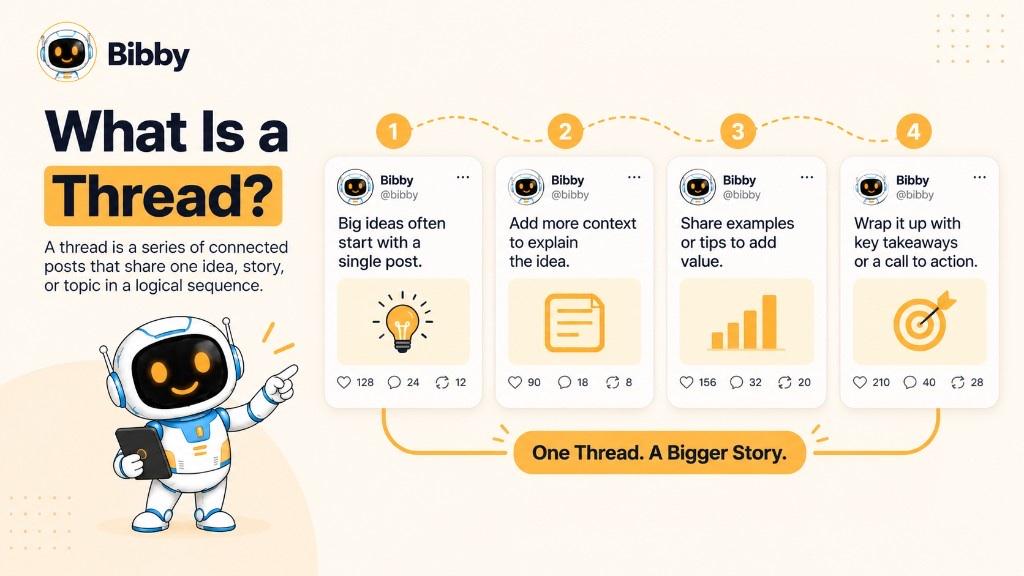
A social media thread is a sequence of related posts around one topic, story, question, or conversation. Each post adds a piece so the idea can go deeper than a single character-limited update.
Example: “5 common social media mistakes”
- Opening — name the five mistakes and create curiosity (without clickbait you cannot keep).
2–5. One mistake per post, with a specific example.
- Summarize and invite experience.
Hook → context → main points → supporting detail → conclusion → optional CTA.
How Does a Social Media Thread Work?
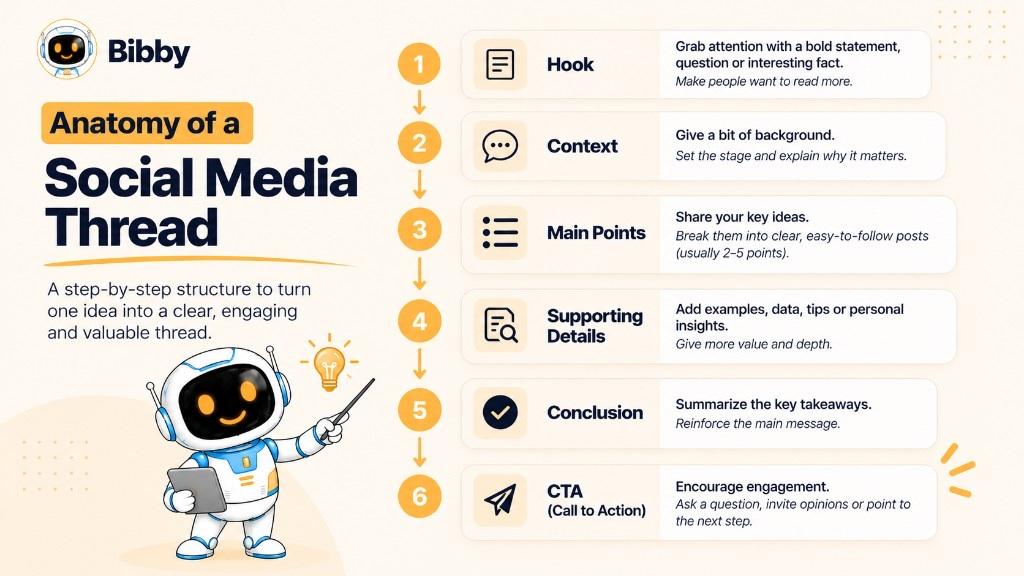
The hook tells people what they will get. Context is only what they need next. Main points each earn a post. Supporting details can be examples, quotes, or steps—not filler. The conclusion restates the lesson. A CTA might ask a question or point to a link in bio, a guide, or Bibby onboarding when that is actually the next step.
What Makes a Thread Different From Multiple Separate Posts?
Connection. “Three marketing trends,” “new feature,” “thoughts on AI,” and “productivity tips” in one day are separate posts. “I analyzed 100 campaigns—here are 7 patterns” plus one pattern per post is a thread.
That structure fits explanations, education, storytelling, commentary, and thought leadership—the same jobs digital marketers and freelancers need for brand awareness without stuffing one wall of text.
Why Do Creators Use Threads?
One post is not enough: step-by-step explainers, stories, news context, research, tutorials, lists, product context, conversation starters, or turning a long-form idea into social-sized chunks. Later, the same outline can become a LinkedIn post, Instagram carousel, or TikTok script. Start ideas with the post idea generator.
What Does “Thread” Mean on Social Media?
Thread means connected posts or messages in one conversation or topic. Each new post adds to the last.
Why Is It Called a Thread?
A thread joins separate pieces into a continuous whole—the same metaphor as forum “threads.” Social apps borrowed it for sequential publishing.
Thread Meaning vs. Threads Meaning
| Term | Meaning |
|---|---|
| thread | Connected series of posts or messages |
| Threads | Meta’s social app |
You can write a thread on Threads. You can also publish a one-off Threads post that is not a numbered explainer. Bibby does not post to either X or Threads.
What Is a Thread on X (Twitter)?
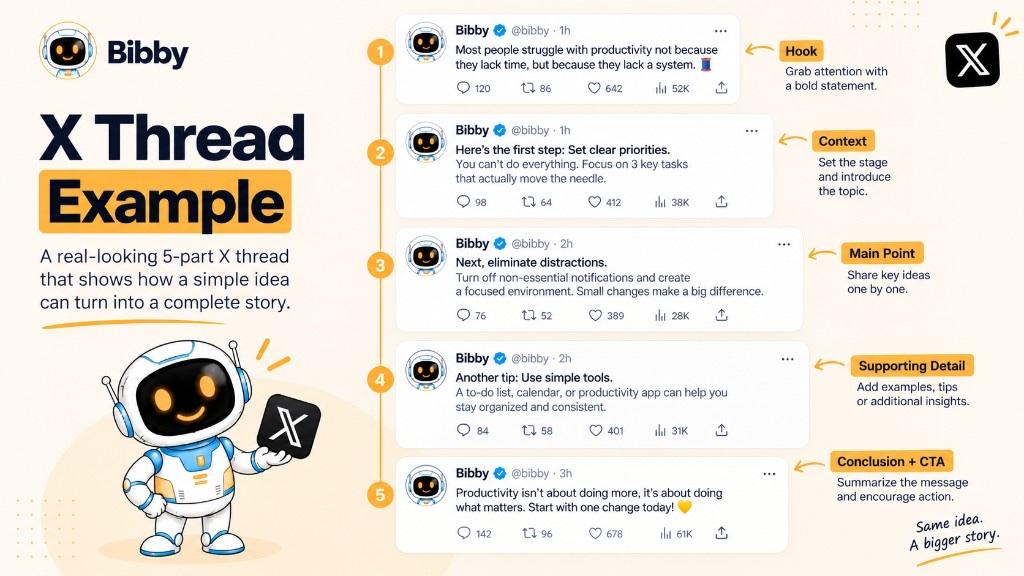
An X thread (Twitter thread) is connected posts from the same account when one post is too thin. Typical arc: opening → development → supporting points → conclusion.
X is a conversation network, not a Bibby publish channel. Plan the outline in a content calendar; post the chain in X.
X Thread Example
Post 1: Traffic dropped 35% after a redesign—six issues.
Posts 2–5: Redirects, discoverability, templates, internal links.
Post 6–7: Fixes and the lesson: a redesign is not only visual.
Numbers in examples are teaching fiction unless you have your own data. Check KPIs in Search Console or analytics—not in Bibby.
What Makes an X Thread Effective?
- Clear hook
- One main idea
- Every post has a purpose
- Logical flow (chrono, problem→solution, steps)
- Easy to scan
- Value before a sales CTA
- A real takeaway
Do not judge success by vanity metrics alone. Replies and questions often matter more than a like count.
Thread vs. Single Social Media Post
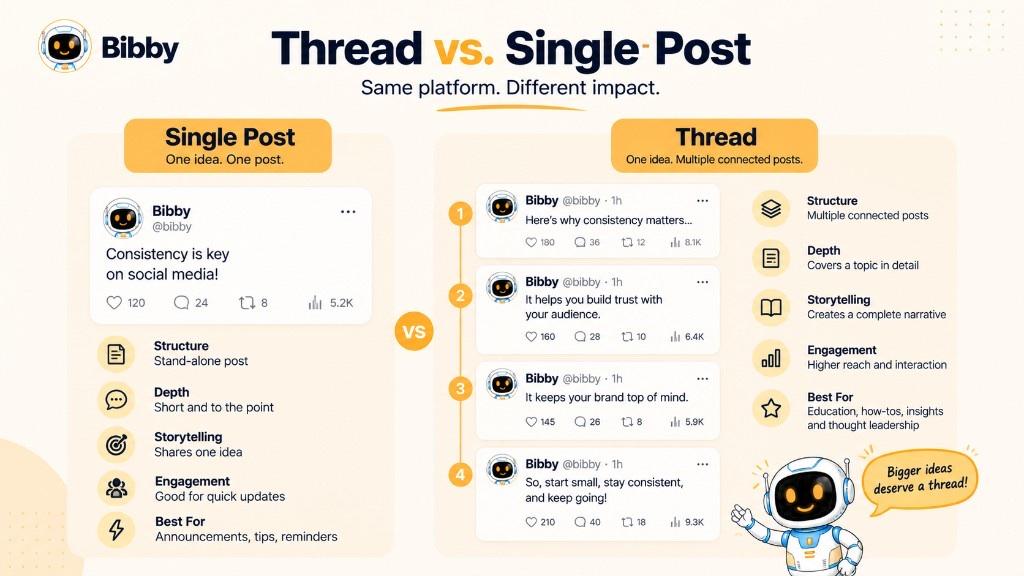
| Single post | Thread | |
|---|---|---|
| Structure | Standalone | Connected sequence |
| Purpose | One focused message | Larger idea |
| Depth | Usually one point | Several related points |
| Best for | Tip, announcement, question | Tutorial, story, analysis, list |
Use a post when the message is complete. Use a thread when sequence helps. Longer is not automatically better.
Types of Threads
- Educational — phishing signs, strategy basics, how engagement rate is calculated
- Storytelling — founder journey, failure → lesson
- How-to — launch a newsletter; build a calendar
- News/commentary — what happened, why it matters (separate fact from opinion)
- List — 7 marketing lessons; 5 design resources
- Promotional — problem → why it matters → approach → benefits → CTA (value first)
- Q&A — from support questions; ecommerce and financial services teams reuse these often
- Discussion — “What lesson did you learn the hard way?” plus community replies
Pick the format that matches the job: teach, narrate, list, or converse.
Why Are Threads Used on Social Media?
- More room than one post
- Complex topics in slices
- Stories with a beginning and end
- Education (e.g. how to build a calendar—then measure in Insights)
- Research with method before findings
- Conversation
- Thought leadership with evidence
- Product updates with context
- Related ideas under one roof
- A source file for evergreen repurposing
See Bibby case studies and industry pages for how different businesses keep education and promotion in the same strategy.
Benefits of Social Media Threads
Space to explain, better storytelling, easier teaching, more places to reply (not a guarantee of engagement), a bounded series, room for thought leadership, mixed media, and a backbone for carousels and videos. It sits between a short update and a full article.
Progression matters. Extra posts for length add noise.
How to Create a Social Media Thread
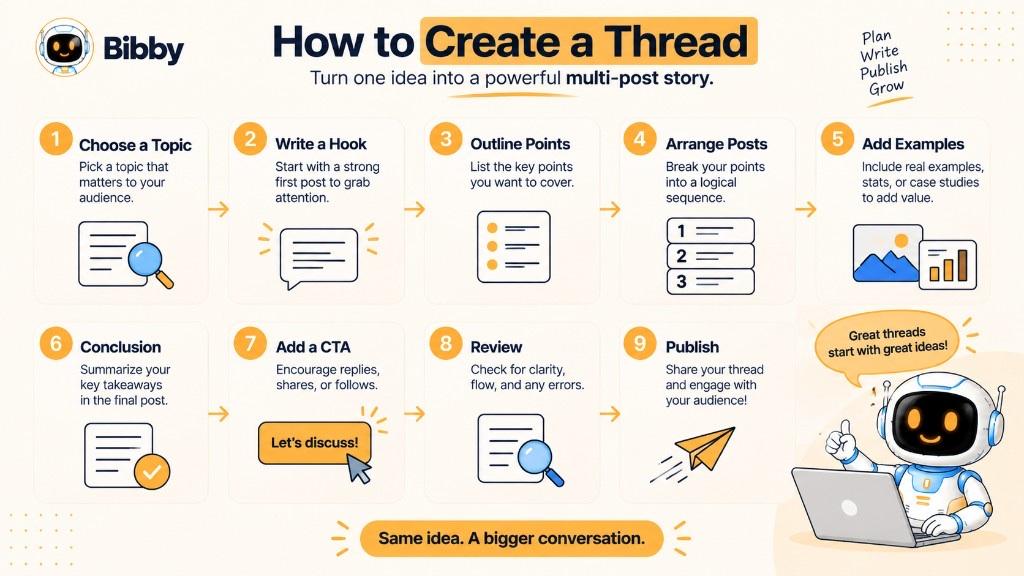
- One topic — “7 SEO mistakes after a redesign,” not “digital marketing.”
- Opening — problem or promise in one breath.
- Break into points — validate, audience, MVP, launch…
- Order — steps, story arc, or analysis.
- Specifics — “test three hooks in your first three posts” beats “work hard.”
- Transitions — “That’s problem one. The second is easier to miss.”
- Takeaway — protect URLs and internal links, not only pixels.
- CTA — question, related article, or pricing only if it fits.
- Review — first-time-reader pass on mobile.
- Learn — replies, saves, clicks, questions. Use best time to post as a hypothesis, then check native Insights. Read how AI suggests posting times.
Formula: idea → hook → outline → order → details → connect → summarize → CTA → review → publish.
Draft captions with the caption generator; collect hashtags in the hashtag generator only where they help, not as stuffing.
How to Write an Effective Social Media Thread
Hook → context → value → development → takeaway → CTA
Weak: “Today I want to talk about marketing.”
Stronger: “We reviewed 50 campaigns. One mistake showed up again and again.”
If removing a post loses nothing, cut it. One main idea per post. Transitions when the jump is unclear. Specific examples. Clear language. No restating “be consistent” four times—explain *how* to build a cadence. Build toward an answer. End with a lesson people can use.
Golden rule: every post earns its place.
Social Media Thread Examples
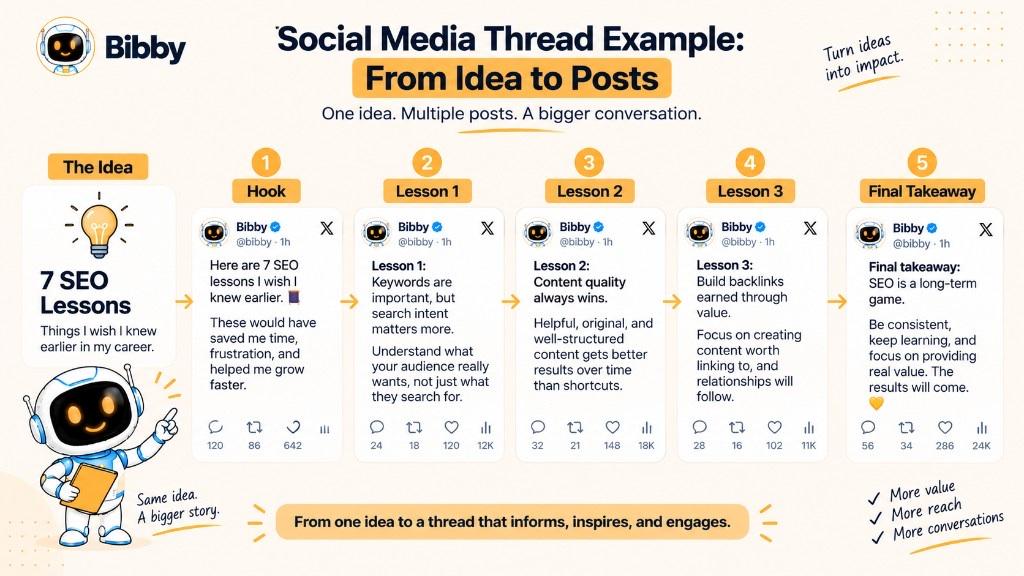
Educational (SEO): intent → useful content → structure → keep improving.
Marketing: failed campaign—too-broad audience, features not problems, brand-centric copy, clicks without after-click conversion.
Story: months of build → users didn’t want it → talked to users → smaller version → “learn earlier.”
Product: creating is half the job; campaigns and a calendar reduce tool-hopping—then show the workflow in Bibby without claiming X publishing.
How-to calendar: 3–5 pillars → purpose → days → review gaps. Use templates if you need a starting layout.
Freelance year: expectations, fit, process, pipeline—useful for freelancers.
Finish this line first: *After reading, I want my audience to ______.* Learn, follow a process, feel a story, or understand a launch.
How Threads Work on Different Social Media Platforms
X — classic connected posts. Publish there.
Meta Threads — the *platform*; a post there is not automatically a multi-part explainer.
Instagram / Facebook / LinkedIn / TikTok / YouTube — you may use carousels, documents, comment chains, or series instead of an X-style thread. Adapt. Instagram carousels often replace numbered tweets. LinkedIn may prefer one longer post.
Remember: thread = format. Threads = Meta app. “I wrote a thread on X” vs “I posted on Threads.”
Thread vs. Threads: What’s the Difference?
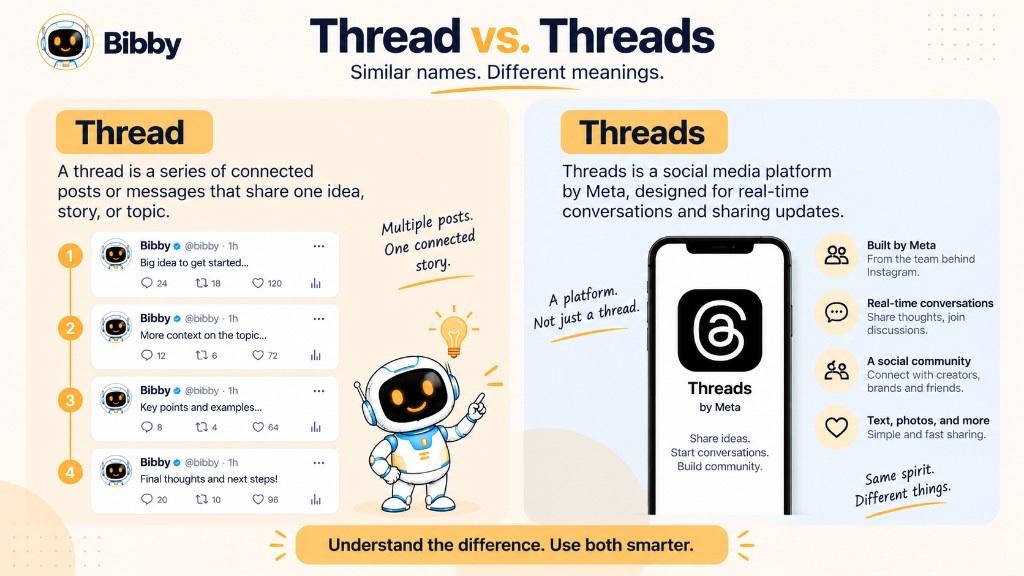
| Term | Meaning | Example |
|---|---|---|
| Thread | Connected posts | “I published a thread on SEO.” |
| Threads | Meta’s app | “I shared the update on Threads.” |
| X thread | Connected posts on X | “A founder thread on the company journey.” |
| Threads post | A post on Meta Threads | “The brand posted on Threads.” |
Searches for “what is a thread?” and “what is Threads?” are different intents. This page is the format. For product publishing, see Bibby channels—X and Threads are not on that list.
Thread vs. Tweet
A tweet was a single Twitter message; X now says post. A thread is multiple connected posts.
| Tweet / X post | Thread | |
|---|---|---|
| Count | One | Several connected |
| Structure | Standalone | Sequential |
| Purpose | One message | Larger idea |
Older phrases: Twitter thread, tweetstorm. Same idea. If one post is enough, stop there.
How Threads Fit Into a Social Media Content Strategy
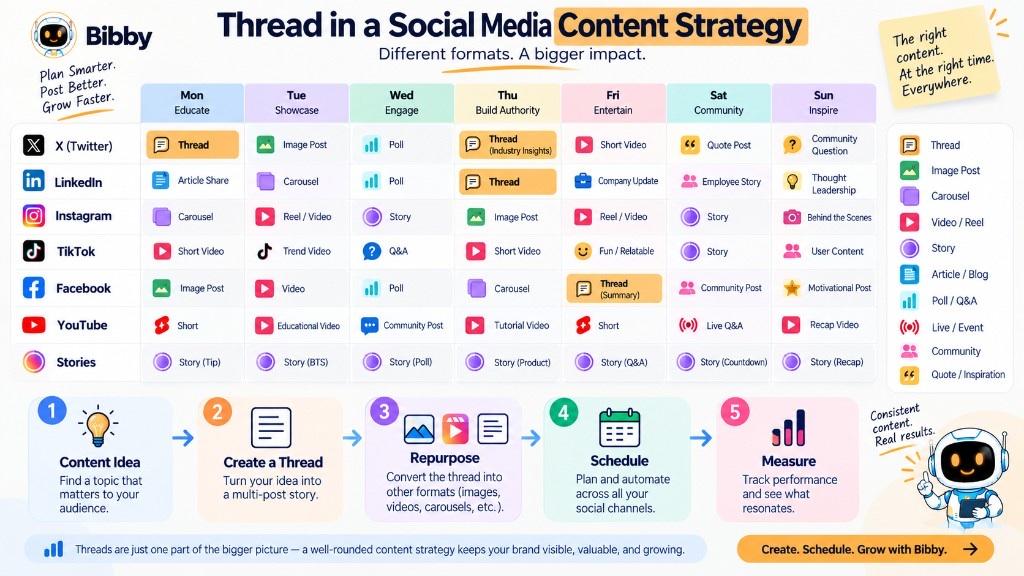
Give the thread a job inside your strategy and pillars (education, product, stories, culture, commentary). Pair it with automation for *other* formats—not for native X threading.
Campaign example: teaser → educational thread (on X) → product video (schedule in Bibby) → social proof story → announcement.
Calendar sketch: Monday short tip, Tuesday deep thread (native), Wednesday video, Thursday customer story, Friday discussion. Timing ideas: best time to post tool and AI posting-time article. Growth tactics: Instagram follower tactics and the Instagram calculator—those are Instagram metrics, not X thread scores.
Match depth to the reader. Gyms may want a short how-to; consultants may want evidence. Measure impressions for awareness, replies for conversation, clicks for traffic, on-site conversions for revenue. Growth Insights and report card help you think about profiles you *do* manage in Bibby’s world—not X analytics inside Bibby.
How Brands Can Use Social Media Threads
Helpfulness first. Explain product context, industry change, customer stories (accurate claims), complex topics, launches, BTS, FAQ, research (no fake causation), expertise, and evergreen from blogs.
Repurpose: article → thread (native) → LinkedIn post → carousel → short video. Ecommerce brands often turn list threads into shoppable-looking carousels—still no Bibby checkout.
Do not make every post an ad. Ask what the reader gains. See case studies, industries, and help center.
Can Social Media Threads Be Scheduled?
Plan always. Native schedule only if that app or a tool that supports *that* network allows connected posts. Order, time, media, and line breaks all matter.
Bibby’s workflow: prepare visuals (AI content), posting style, captions, campaigns, brand kit, then schedule images, carousels, videos, and Stories to Facebook, Instagram, LinkedIn, YouTube, and TikTok. That is not “schedule my X thread.” Chat can create a campaign and posts for supported networks.
Schedule evergreen education; publish live commentary now. Combine both in the calendar.
How to Repurpose a Thread
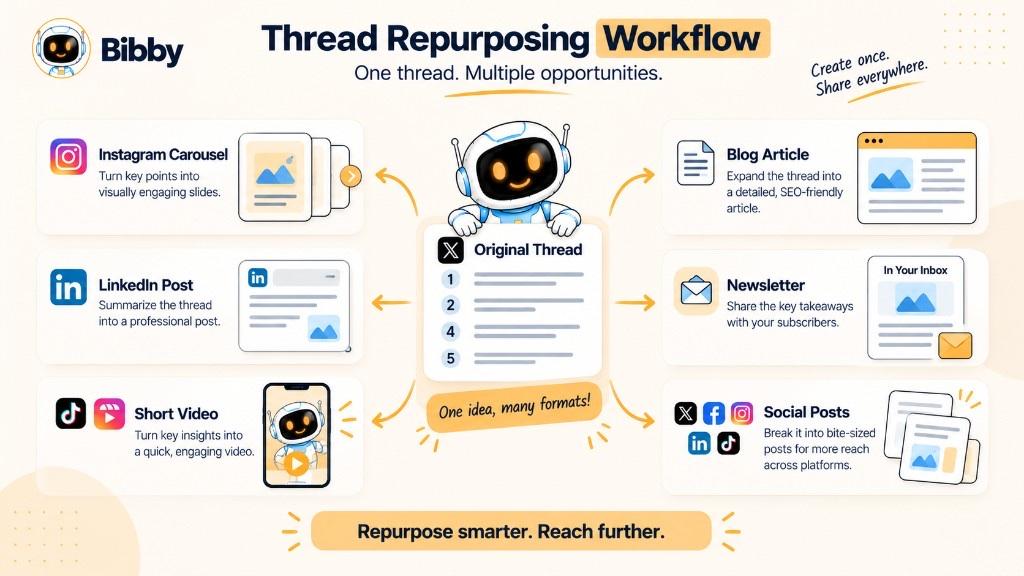
Idea stays; execution changes.
- Carousel — one point per slide (carousel generator)
- LinkedIn — three strongest lessons, professional tone
- Short video — hook + points (Reel script generator)
- Blog — expand each section (Bibby blog)
- Standalone posts — one tip, one question, one quote graphic
- Newsletter — more context and links
- Series — split 10 lessons into five deeper pieces
Captions, hashtags, bio, and post ideas are free helpers. Then schedule the adapted assets—not the X chain—inside Bibby. Plans and sign up if you want the full workflow. More on resources.
Common Mistakes When Creating a Thread
- Weak opening
- Unrelated ideas
- Too many posts
- Repeating the same sentence
- Jumps without structure
- Walls of text inside one “post”
- Clickbait without delivery
- Pure ads
- Wrong audience level
- Unsupported stats
- No conclusion
- No full-sequence review
Biggest mistake: treating a thread as a pile of posts instead of one piece of content.
Social Media Thread Best Practices
One idea. First post counts. Logical order. Each post has a job. Readable. Specific examples. Media only when it helps. Consistent voice. Jargon with a gloss. Sourced claims. CTA only when earned. Adapt per platform. Review. Measure against the goal. Respect the reader’s time.
Make every post contribute to the whole.
Conclusion
A thread is connected posts around one idea. Threads is Meta’s app. X popularized the format; Bibby does not publish there.
Remember:
- Sequence, not volume
- Hook, development, takeaway
- Repurpose into carousels and videos you *can* schedule on supported channels
- Judge the goal, not likes alone
Next: pair threads with a social media strategy and a content calendar.