LinkedIn growth used to depend heavily on manual posting, scheduling tools, and repetitive automation—but AI agents are changing how social media workflows are built and managed.
If you’re comparing LinkedIn automation with AI agents, the real question isn’t simply which technology is newer; it’s which approach helps you consistently create relevant content, distribute it effectively, and build genuine audience engagement. The answer depends on how much of your social media workflow you want to automate versus delegate to AI.
Let’s start by understanding what actually separates traditional LinkedIn automation from AI-powered workflows.
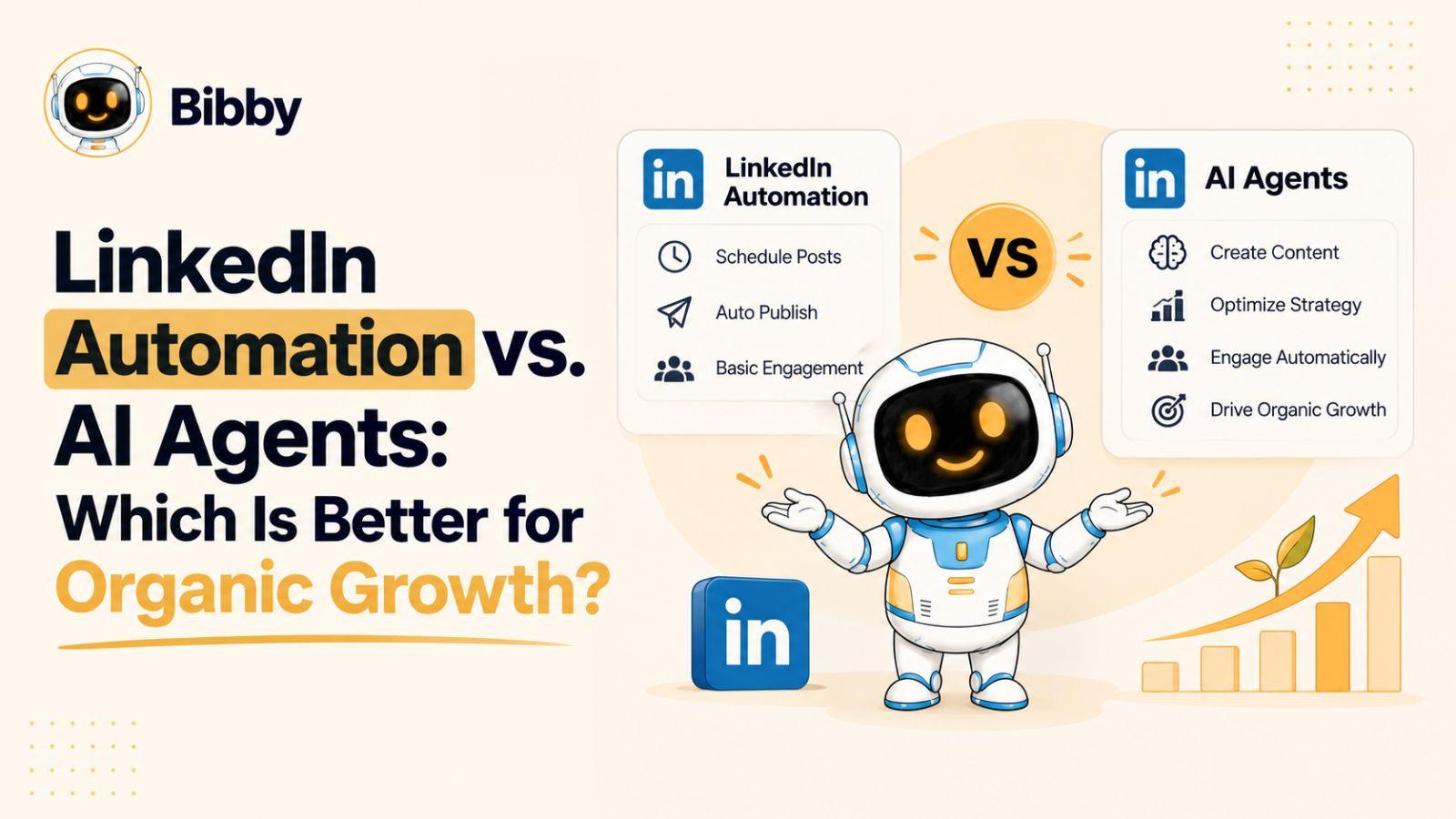
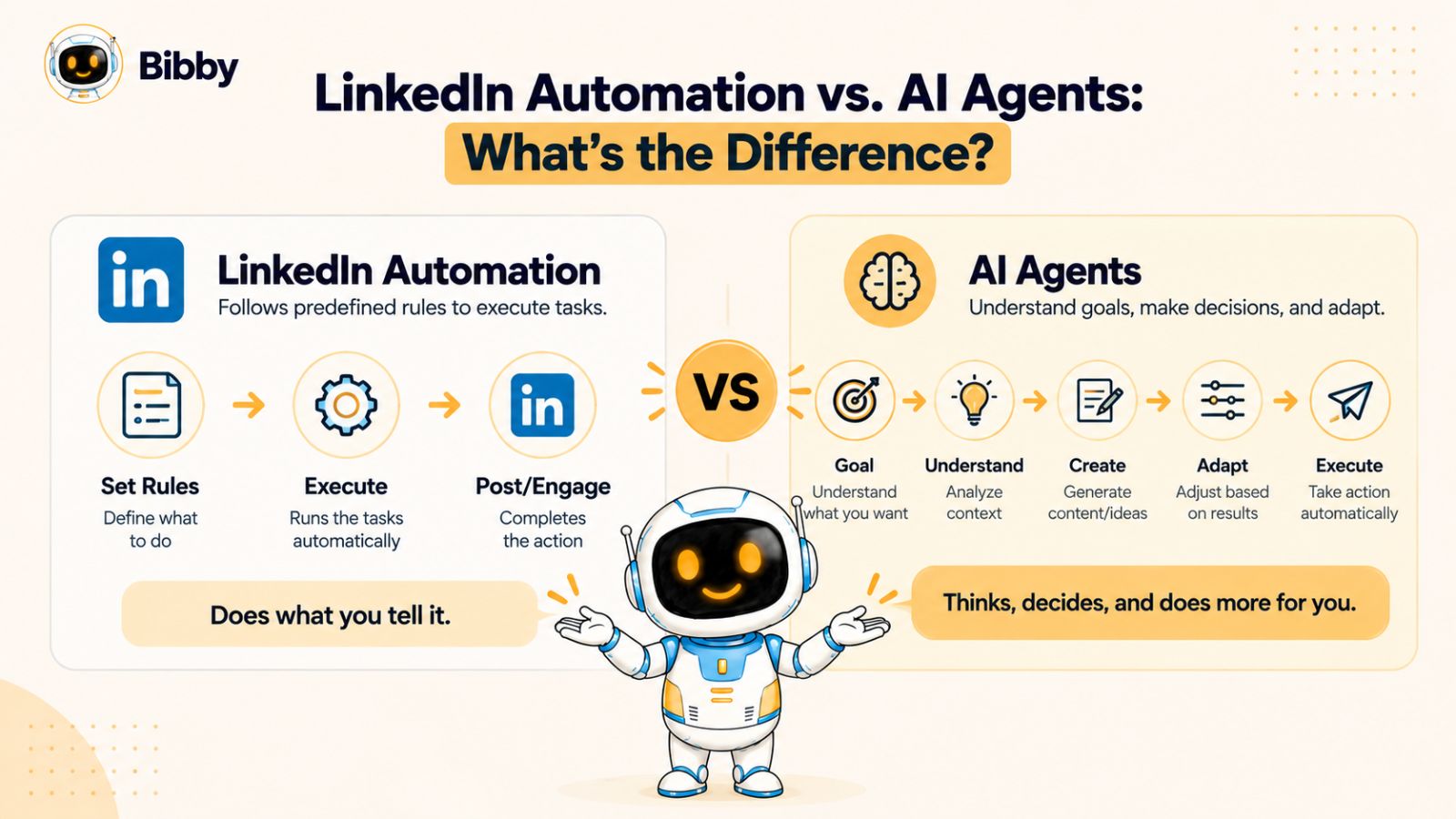
LinkedIn Automation vs. AI Agents: What’s the Difference?
LinkedIn automation and AI agents can both reduce the amount of manual work involved in social media management, but they operate in fundamentally different ways. Understanding that difference makes it easier to decide which type of workflow fits your organic growth strategy.
What LinkedIn Automation Means
LinkedIn automation generally refers to software that performs predefined tasks automatically. Instead of manually carrying out the same action every day, you configure a workflow once and let the software handle the repetitive steps.
For content marketing, this can include scheduling LinkedIn posts, publishing content at predetermined times, organizing a content calendar, or automating other repeatable parts of your publishing workflow.
The strength of traditional automation is consistency. Once your content is ready, automation can help ensure that it gets published according to your schedule without requiring you to remember every individual posting task.
However, traditional automation usually depends on rules and instructions that have already been defined. If the workflow changes, someone generally needs to change the workflow.
What AI Agents Mean
AI agents take a different approach. Instead of simply executing a fixed sequence of instructions, an AI-powered workflow can interpret a goal, work with context, generate content, and help determine the steps needed to accomplish a task.
For social media, that could mean going beyond scheduling a finished LinkedIn post. An AI system might help develop an idea, create a caption, adapt the message for different platforms, organize a campaign, or modify content based on your instructions.
The important distinction is that AI can assist with decisions and content creation, while traditional automation primarily executes predefined actions.
Automation Executes. AI Can Reason About the Workflow.
Consider a simple example.
With traditional automation, your workflow might look like this:
Create post → write caption → select date → schedule post → publish
Once those instructions are configured, the system can repeatedly execute them.
An AI-assisted workflow can involve more steps:
Define objective → develop content → generate variations → adapt content → determine publishing workflow → schedule → review results
That doesn't mean AI should operate without human oversight. Your brand voice, expertise, positioning, and final judgment still matter. Instead, the advantage is that AI can potentially reduce the amount of repetitive thinking and manual execution required between having an idea and getting useful content in front of your audience.
This distinction becomes especially important when you're managing more than LinkedIn. Modern social media strategies often involve LinkedIn, Instagram, Facebook, TikTok, and YouTube, each with different content formats and audience expectations.
That's where the conversation moves beyond LinkedIn automation and toward AI-powered social media management—and why the technology you choose can affect much more than how often you publish.
How LinkedIn Automation Helps With Organic Growth
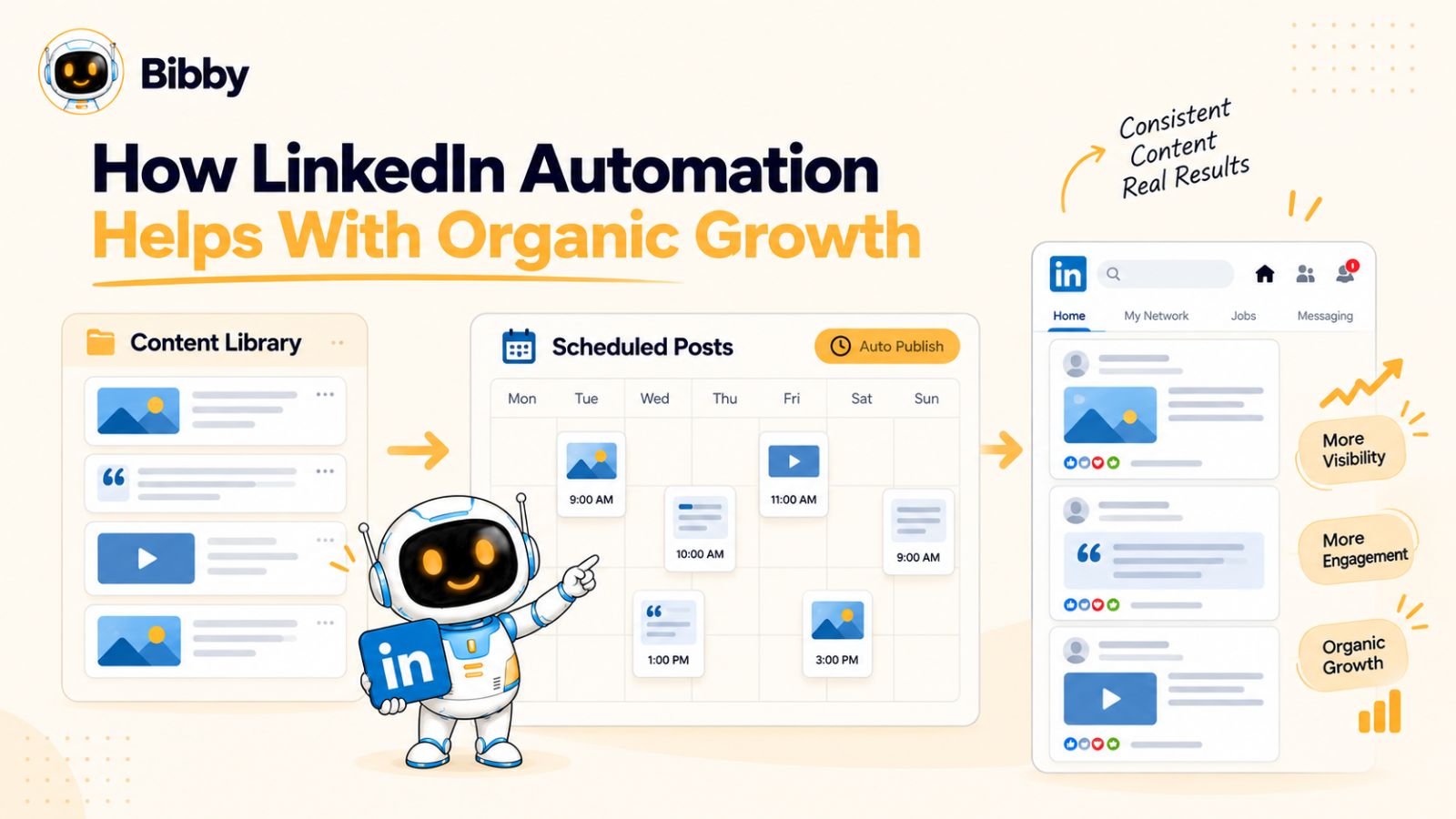
Organic growth on LinkedIn rarely comes from publishing one exceptional post and waiting for an audience to appear. It usually requires a consistent stream of useful content, repeated exposure, and enough publishing discipline to learn what resonates with your audience.
That is where LinkedIn automation can be useful.
Automation doesn't automatically make your content better, but it can make your content strategy easier to execute consistently. By removing repetitive publishing tasks, automation gives you more time to focus on the parts of organic growth that require human judgment.
1. Consistent LinkedIn Posting
Consistency is one of the biggest operational challenges in social media marketing.
You may have plenty of ideas, but turning those ideas into published posts every week requires time. When publishing depends entirely on remembering to post manually, your content schedule can quickly become inconsistent.
A LinkedIn automation or scheduling tool can solve the operational part of this problem.
You can prepare multiple pieces of content in advance and schedule them for different dates. Instead of interrupting your work every day to publish something, you can build a publishing calendar and let the software handle the distribution.
The benefit isn't that automation magically produces organic reach. The benefit is that it makes consistent execution easier.
2. Scheduling Content in Advance
Scheduling is particularly useful when you want to maintain a regular publishing rhythm.
For example, instead of creating a LinkedIn post Monday morning, another one Thursday afternoon, and another one whenever you happen to have time, you can prepare several posts together and schedule them across the week.
This creates a more predictable content pipeline.
It also separates content creation from content distribution. You can dedicate one block of time to creating content and allow your scheduling system to handle publishing afterward.
3. Reducing Repetitive Social Media Tasks
Publishing isn't the only repetitive task involved in managing social media.
Depending on your workflow, you may need to:
- Upload media
- Add captions
- Select publishing dates
- Choose platforms
- Organize content
- Maintain a content calendar
- Republish or adapt existing content
Automating these repetitive steps can reduce the administrative workload surrounding content marketing.
That matters because time spent managing the publishing process is time that isn't being spent researching your audience, developing ideas, talking to customers, or creating genuinely useful content.
4. Creating a Repeatable Content Workflow
A repeatable workflow can make organic social media growth easier to manage.
For example, a simple LinkedIn workflow might be:
Research → Create → Review → Schedule → Publish → Analyze → Improve
Once the process is established, automation can handle some of the predictable steps.
This is particularly valuable for businesses where social media isn't someone's full-time job. A founder, consultant, marketer, or small marketing team may not have hours every day to manually manage publishing.
Automation helps turn social media from an occasional activity into a process.
5. Making Content Distribution More Scalable
There is another advantage that becomes important as your social presence grows: scale.
Publishing five posts manually isn't particularly difficult. Publishing consistently across several platforms, content formats, and campaigns is a different challenge.
Automation can provide the infrastructure for handling more content without increasing manual effort at the same rate.
But there is an important limitation to remember:
Automation can scale your workflow. It doesn't automatically scale the value of your content.
If the underlying content is repetitive, irrelevant, or poorly matched to your audience, publishing it more efficiently won't solve the underlying problem.
That distinction is exactly where traditional LinkedIn automation begins to show its limitations—and where AI-powered workflows start becoming more interesting.
Where Traditional LinkedIn Automation Falls Short
LinkedIn automation can make publishing more consistent, but consistency alone doesn't guarantee organic growth. A social media workflow can be perfectly automated and still produce content that gets ignored.
The reason is simple: automation is generally good at repeating a process, while organic growth requires responding to people, context, ideas, and changing audience interests.
Generic Content Can Become Repetitive
One of the biggest limitations of rule-based automation is that it can encourage a “set it and forget it” approach.
You create a batch of posts, schedule them, and move on to other work. If you continue using the same formulas, topics, hooks, and publishing patterns, your content can eventually start sounding predictable.
That is a problem because people don't follow a LinkedIn account simply because it publishes frequently. They follow accounts that consistently give them something worth reading, learning, discussing, or sharing.
Automation can distribute content efficiently. It cannot, by itself, guarantee that the content is useful.
Fixed Workflows Have Limited Context
Traditional automation generally works from predefined instructions.
For example:
If content is ready → publish it Monday at 10 AM.
That workflow is useful because it is predictable. But it doesn't necessarily understand why the content is being published, who it is intended for, or how the message could be improved.
Consider a company launching a new product.
A rigid automation workflow might continue publishing the same types of posts it has always published. A more context-aware system could potentially help organize the launch into multiple pieces of content, adapt messaging for different platforms, and change the publishing workflow as the campaign develops.
The difference is context.
Content Creation Still Takes Human Effort
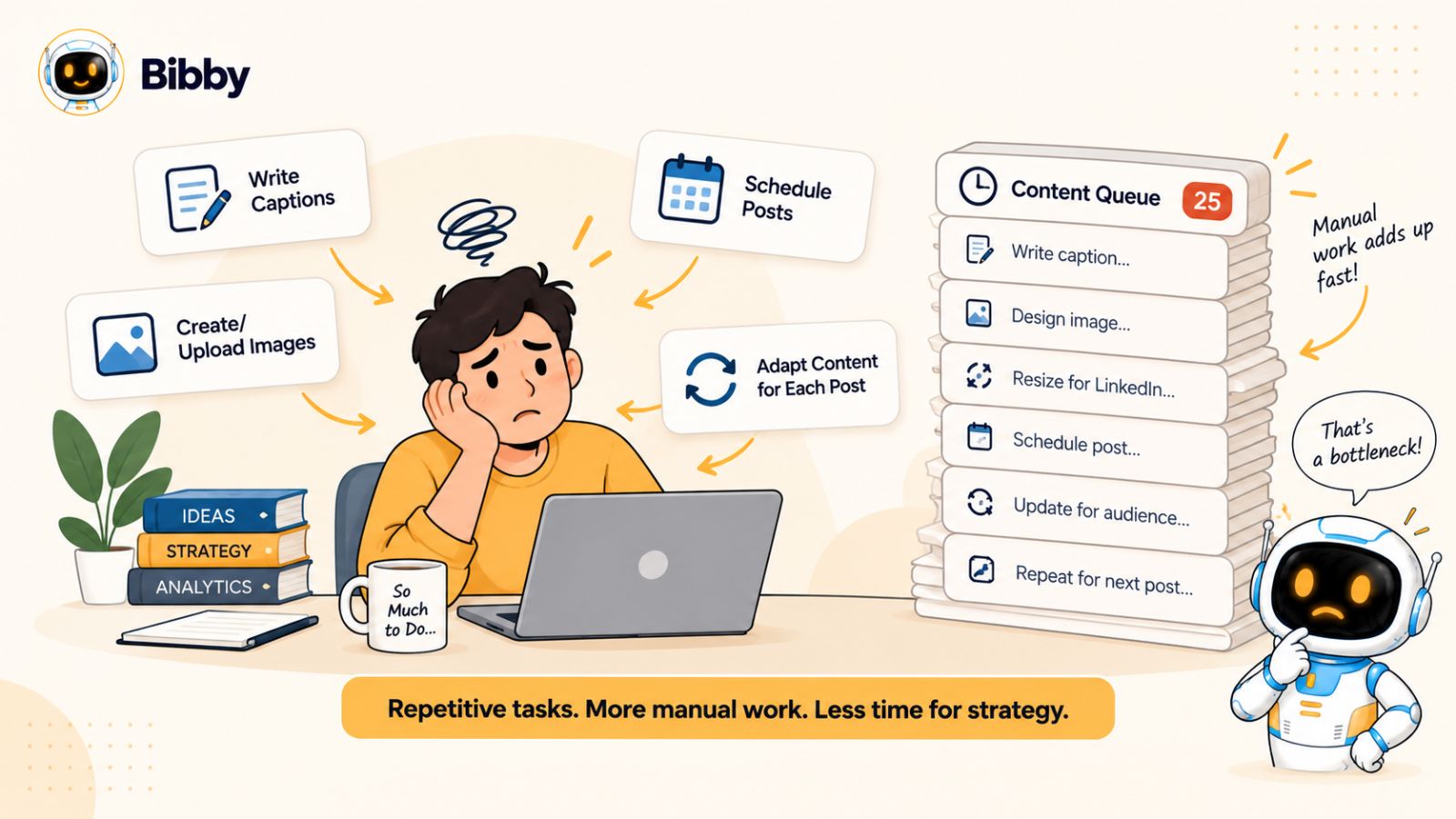
A scheduler can publish your post, but someone still has to create the post in the first place.
That means a traditional workflow often looks like:
Think of an idea → write the post → create the visual → write the caption → upload it → choose the date → schedule it
Automation may eliminate some of the final steps, but much of the creative workload remains manual.
For an individual creator, this can become a bottleneck.
You might have an excellent content strategy but struggle to execute it because creating and preparing every post takes too much time.
Managing Multiple Platforms Creates More Complexity
LinkedIn is only one part of today's social media landscape.
A business may also publish on Instagram, Facebook, TikTok, and YouTube. But simply copying the same post everywhere isn't necessarily an effective cross-platform strategy.
A LinkedIn post might be text-led. Instagram might require a carousel or visual. TikTok and YouTube may depend heavily on video. Stories introduce another format and publishing workflow.
As the number of platforms increases, manually adapting and scheduling every piece of content becomes increasingly time-consuming.
Traditional automation can help with distribution, but it doesn't necessarily solve the broader content-management problem.
Automation Doesn't Understand Your Entire Campaign
Organic growth also involves campaigns, not just individual posts.
Imagine you're promoting a webinar.
You may need:
- An announcement post
- Educational content before the event
- Reminder posts
- Short-form video
- A carousel
- Post-event content
- Follow-up messaging
A basic scheduler can distribute these posts once you've created them.
But the larger question is: How should all these pieces fit together?
That requires planning, context, and coordination—not simply scheduling.
The Real Limitation: Execution Without Context
This is why comparing LinkedIn automation with AI agents isn't really a question of whether automation is useful.
It is.
The more important question is how much of the content workflow you want technology to help manage.
Traditional automation is particularly effective when the task is predictable:
“Publish this content at this time.”
AI-powered workflows become more interesting when the task is broader:
“Help me run this social media campaign.”
That difference—from automating individual actions to assisting with an entire workflow—is what has driven the shift toward AI-powered social media management.
How AI Agents Change Social Media Management
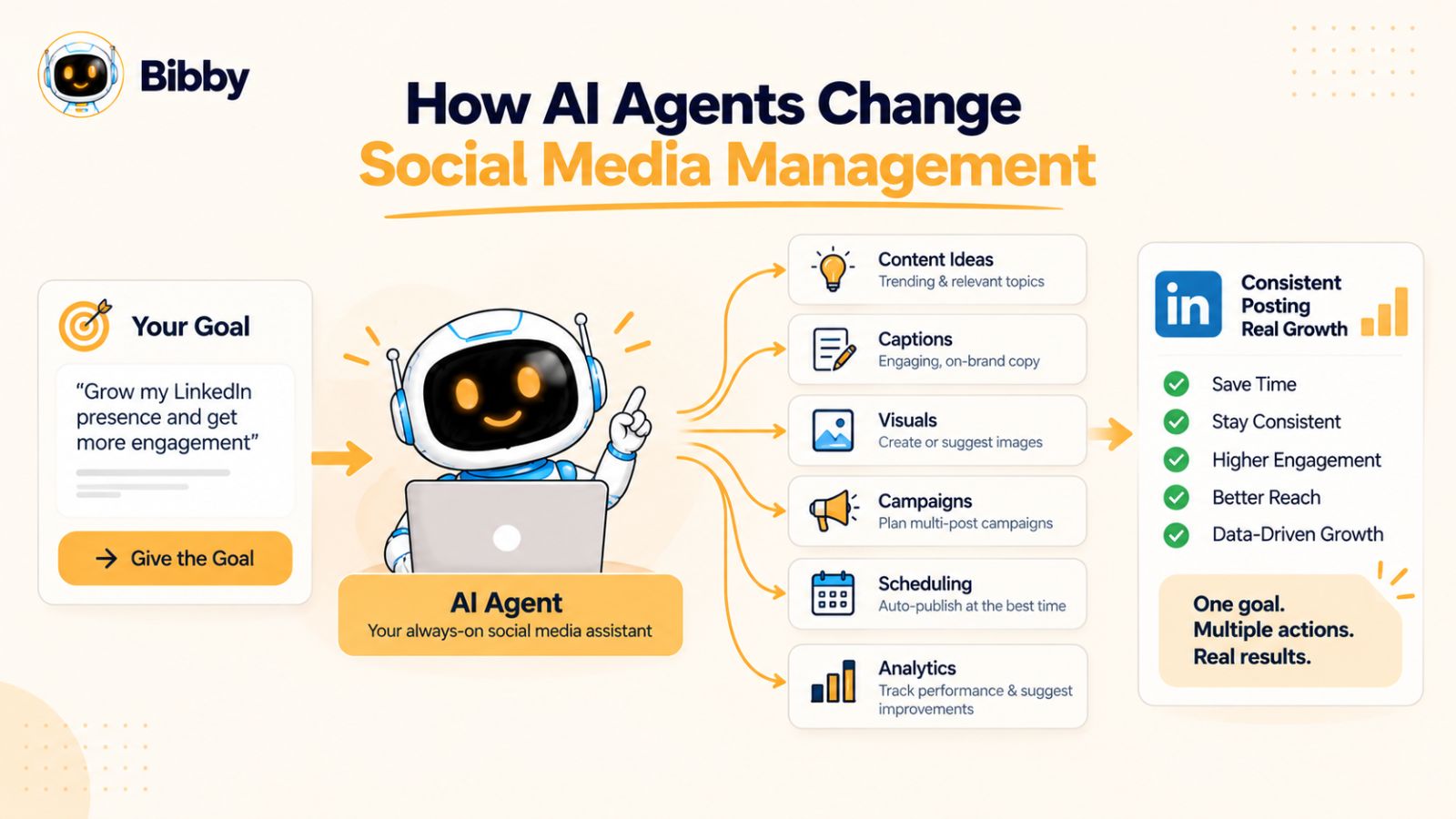
The biggest change AI brings to social media isn't simply the ability to generate a caption. It is the ability to connect multiple tasks that previously required separate tools, instructions, and manual decisions.
Instead of treating content creation, publishing, scheduling, and campaign management as completely separate activities, AI-powered workflows can bring more of those steps into one process.
AI Can Move From Scheduling to Execution
Traditional automation usually starts with something that is already finished.
You have the post. You have the image. You have the caption. The automation tool's job is to publish everything according to your instructions.
AI can participate earlier in the workflow.
For example, you might start with a simple instruction such as:
“Create a week of LinkedIn content around the biggest mistakes SaaS founders make when scaling.”
From that starting point, an AI-powered workflow can help turn the idea into multiple content concepts, captions, formats, and publishing tasks.
The important shift is from “automate this task” toward “help me accomplish this objective.”
AI Can Assist With Content Ideation
Coming up with useful social media ideas consistently is one of the biggest challenges for creators and marketing teams.
An AI system can help transform a broad topic into different content angles.
For example, one topic could become:
- An educational LinkedIn post
- A list-based carousel
- A short video concept
- A common-mistake post
- A customer-focused question
- A myth-versus-reality post
This doesn't eliminate the need for human expertise. Your experience is still what makes the content distinctive.
Instead, AI can reduce the time between having expertise and turning that expertise into publishable content.
AI Can Adapt Content for Different Platforms
Cross-platform content creation introduces another challenge.
A message that works well on LinkedIn doesn't necessarily need to look identical on Instagram, TikTok, Facebook, or YouTube.
AI can help transform a core idea into different formats and captions while preserving the central message.
That creates a workflow such as:
One idea → multiple formats → multiple platforms → coordinated publishing
This is particularly useful for teams that want to maintain a consistent brand message without manually recreating every piece of content from scratch.
AI Can Help With Campaign Planning
Individual posts are only one part of social media marketing.
A campaign might require several related pieces of content published over days or weeks.
An AI-assisted workflow can help organize those pieces around a common objective.
For example:
Campaign goal → content themes → individual posts → creative formats → captions → publishing schedule
This is different from simply scheduling ten unrelated posts.
The system is working with the relationship between the pieces rather than treating every post as an isolated task.
Conversational Interfaces Change the Workflow
Another major development is the ability to manage social media through conversation.
Instead of navigating through multiple menus to create a campaign, generate content, and schedule posts, you can describe what you want in natural language.
For example:
“Create a campaign promoting our new product. Give me five LinkedIn posts, three Instagram carousels, and two short-form video ideas.”
A conversational AI workflow can then help translate that request into individual tasks.
This approach reduces the need to understand the mechanics of the software before you can use it.
AI Doesn't Make Human Strategy Obsolete
There is an important distinction here.
AI can help with execution, ideation, adaptation, and organization. It doesn't automatically know what your customers genuinely care about, what your company should stand for, or what unique expertise your brand can contribute.
The strongest workflow is therefore not necessarily:
AI does everything.
It is:
Human expertise + AI assistance + automated execution.
That combination allows people to spend more time on strategy, original thinking, relationships, and quality control while technology handles more of the repetitive work.
And that brings us to the central question of this comparison: if AI agents can handle more of the social media workflow, which approach actually makes more sense for organic growth?
LinkedIn Automation vs. AI Agents: Side-by-Side Comparison
The difference between LinkedIn automation and AI agents becomes clearer when you compare what each approach is designed to handle.
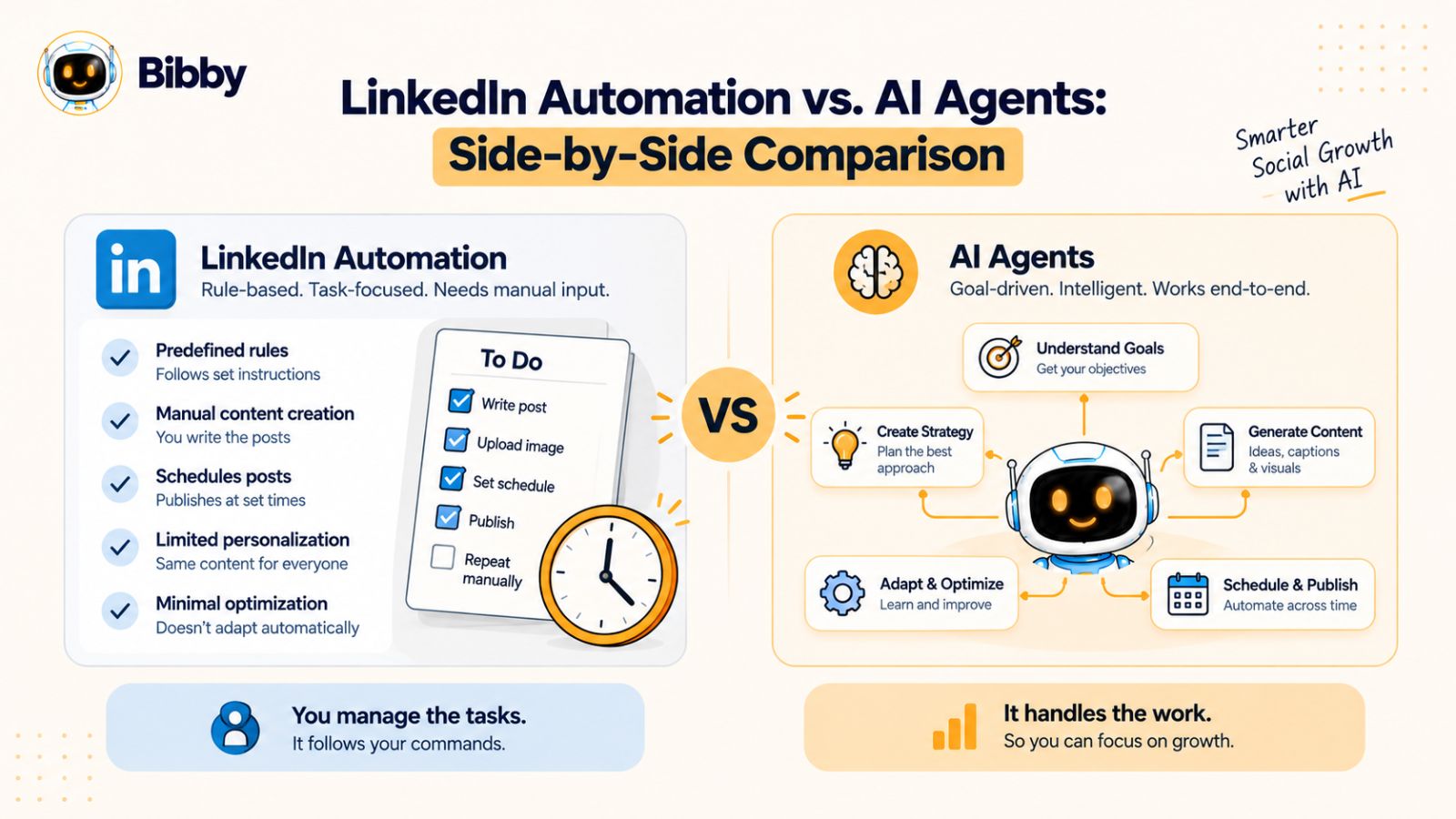
Traditional automation focuses primarily on repeatability. AI-powered workflows can extend that automation into areas such as content creation, adaptation, planning, and conversational management.
Neither approach eliminates the need for a thoughtful social media strategy. The difference is how much of the workflow technology can assist with.
| Capability | Traditional Automation | AI-Powered Workflow |
|---|---|---|
| Schedule LinkedIn posts | Yes | Yes |
| Publish content automatically | Yes | Yes |
| Follow predefined workflows | Yes | Yes |
| Generate captions | Depends on the tool | Common capability |
| Generate content ideas | Limited | Yes |
| Adapt content | Usually limited | Yes |
| Create content variations | Limited | Yes |
| Manage campaigns | Primarily rule-based | Can assist with campaign workflows |
| Conversational control | Usually limited | Common capability |
| Cross-platform content workflows | Varies by tool | Often supported |
| Repurpose content | Usually requires setup | Can assist with adaptation |
| Human oversight | Recommended | Recommended |
Scheduling: Both Can Automate It
If your primary requirement is simply scheduling LinkedIn content, traditional automation may already solve the problem.
You create your content, select your publishing dates, and allow the system to handle distribution.
AI doesn't necessarily provide a meaningful advantage for every basic scheduling task.
The difference becomes more apparent when scheduling is only one part of what you want the system to do.
Content Creation: AI Has a Larger Role
Traditional automation generally expects you to provide the content.
AI-powered tools can participate in creating it.
That might include generating captions, developing content ideas, producing variations, or helping turn one piece of content into multiple social media assets.
This can significantly reduce the number of manual steps between an idea and a scheduled post.
Adaptation: Context Becomes More Important
Suppose you have one core idea that you want to distribute across LinkedIn, Instagram, Facebook, TikTok, and YouTube.
A basic automation workflow can publish content across platforms if the tool supports those channels.
But the content itself may still need to be adapted manually.
An AI-powered workflow can help transform the underlying idea into different captions, formats, or creative concepts appropriate to each platform.
The distinction is subtle but important:
Automation distributes content. AI can help transform content.
Campaign Management: From Individual Posts to Systems
A scheduler is typically organized around individual publishing tasks.
AI-powered workflows can help you think in terms of campaigns.
Instead of:
Post 1 → Post 2 → Post 3 → Post 4
you can structure the workflow around:
Campaign objective → content themes → creative assets → platform-specific content → publishing schedule
This is particularly relevant for businesses that use social media to support launches, lead generation, education, events, or ongoing brand campaigns.
Conversational Management
Traditional social media tools usually require you to navigate the interface and configure individual actions.
AI-powered social media tools can introduce another option: simply telling the system what you want.
For example:
“Create three LinkedIn posts from this article and schedule them over the next week.”
Instead of manually creating each asset and configuring each publishing action, the AI can help coordinate the workflow.
That doesn't mean every AI tool can perform every action autonomously. Capabilities vary significantly between products, so it's important to evaluate the actual workflow a tool supports rather than assuming that all AI agents work the same way.
The Practical Difference
Ultimately, the comparison can be reduced to two different approaches:
Traditional automation:
“Here are the tasks. Execute them automatically.”
AI-powered workflow:
“Here is what I want to accomplish. Help me plan, create, adapt, and execute the necessary tasks.”
For someone who only needs reliable LinkedIn scheduling, the first approach may be sufficient.
For someone managing a broader content operation, the second approach can potentially reduce more of the work involved in running social media.
The next question, therefore, isn't simply which technology is more advanced. It's which capabilities actually contribute to sustainable organic growth.
Which Is Better for Organic Growth?
The answer depends on what you mean by “better.”
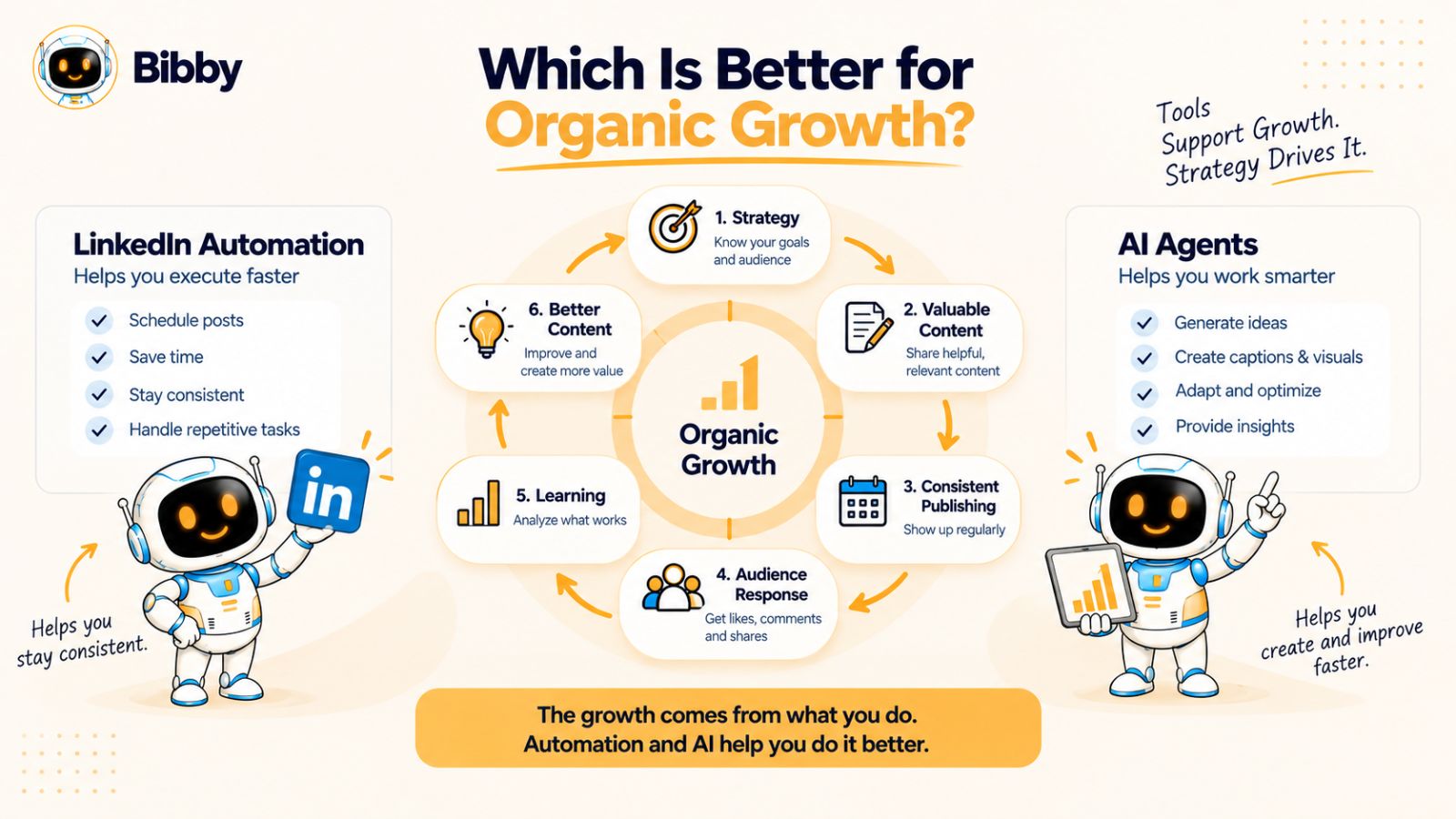
If your goal is simply to publish LinkedIn content consistently, traditional automation can handle much of the operational work. If your goal is to build a broader social media system that helps with content creation, adaptation, campaigns, and distribution, AI-powered workflows can handle more parts of that process.
But neither technology creates organic growth on its own.
Organic growth ultimately depends on the value of what you publish and how well it connects with the people you want to reach.
Consistency Matters
A strong content strategy is difficult to sustain if publishing is entirely manual.
Automation helps solve this problem by making it easier to maintain a regular publishing schedule.
AI can take this further by helping reduce the work required to create the content in the first place.
The combination can be powerful:
AI helps create and organize content → automation helps distribute it consistently.
The technology supports the process, but consistency still needs a clear strategy behind it.
Content Quality Matters More Than Automation
Publishing ten mediocre posts more efficiently doesn't necessarily create a stronger organic presence than publishing three genuinely useful posts.
Your audience needs a reason to stop scrolling.
That reason could be:
- A useful insight
- Original expertise
- A practical framework
- A compelling story
- A fresh perspective
- A solution to a specific problem
- Evidence from real experience
AI can help you produce content faster, but human knowledge and experience are what can make the content genuinely distinctive.
This is why the most effective AI-assisted social media workflows shouldn't be designed around producing the maximum possible number of posts.
They should be designed around producing useful content consistently without wasting unnecessary time on repetitive work.
Relevance Matters
Organic growth depends on reaching the right audience, not simply a larger audience.
A post about a technical problem may be highly relevant to software engineers and almost irrelevant to someone outside the industry.
Your content strategy therefore needs a clear understanding of:
Who are you speaking to?
What problems do they have?
What information are they looking for?
Why should they pay attention to your perspective?
Automation doesn't answer these questions.
AI can help organize and execute a strategy based on these answers, but the underlying positioning still needs to come from the business or creator.
Authenticity Still Has Value
One of the biggest concerns surrounding AI-generated social media content is that everything can start sounding the same.
If thousands of accounts use similar prompts and generic AI-generated language, simply increasing publishing volume won't necessarily make a brand more memorable.
Your own experiences, opinions, customer conversations, case studies, lessons, and expertise can provide the raw material that makes AI-assisted content more distinctive.
Think of AI as a production layer rather than a replacement for your point of view.
Platform-Specific Content Matters
Organic social media isn't one-size-fits-all.
LinkedIn, Instagram, Facebook, TikTok, and YouTube have different formats and audience behaviors.
A useful social media workflow should therefore make it easier to adapt a core idea rather than blindly duplicate the exact same post everywhere.
This is another area where AI-assisted workflows can be useful.
Instead of manually recreating every asset for every platform, AI can help transform a central idea into different content formats.
Experimentation Matters
Organic growth is rarely a straight line.
Some topics will attract attention. Others won't. Some formats will generate discussion. Others may receive little response.
That means your content system needs to support experimentation.
You might test:
- Different hooks
- Different content formats
- Different topics
- Different publishing frequencies
- Different calls to action
- Different creative styles
The important thing is to use what you learn to improve future content rather than treating your publishing calendar as fixed forever.
So, Which Approach Should You Use?
For a simple LinkedIn publishing workflow, traditional automation can be enough.
For a more comprehensive social media operation, AI-powered workflows can reduce more of the manual work involved in creating, adapting, organizing, and publishing content.
But the strongest approach doesn't have to be automation versus AI.
It can be:
Human strategy + AI assistance + automation.
That combination separates the technology from the actual objective. AI can help with creation and decision support, automation can handle repeatable execution, and humans can provide the expertise, judgment, and authenticity that make the content worth consuming.
This is also where newer platforms such as Bibby become relevant: rather than treating social media scheduling as an isolated task, they aim to bring content creation, publishing, scheduling, and social media management into a more connected workflow.
Where Bibby Fits Into the Shift From Automation to AI
The evolution from social media scheduling to AI-powered management is easier to understand when you look at the workflow as a whole.
A traditional scheduler typically starts with finished content. You upload the asset, write or paste the caption, choose the platforms, select a publishing time, and schedule it.
An AI-powered social media platform can move further upstream by helping with content creation, captions, campaigns, scheduling, and day-to-day management.
Bibby is built around this broader workflow.
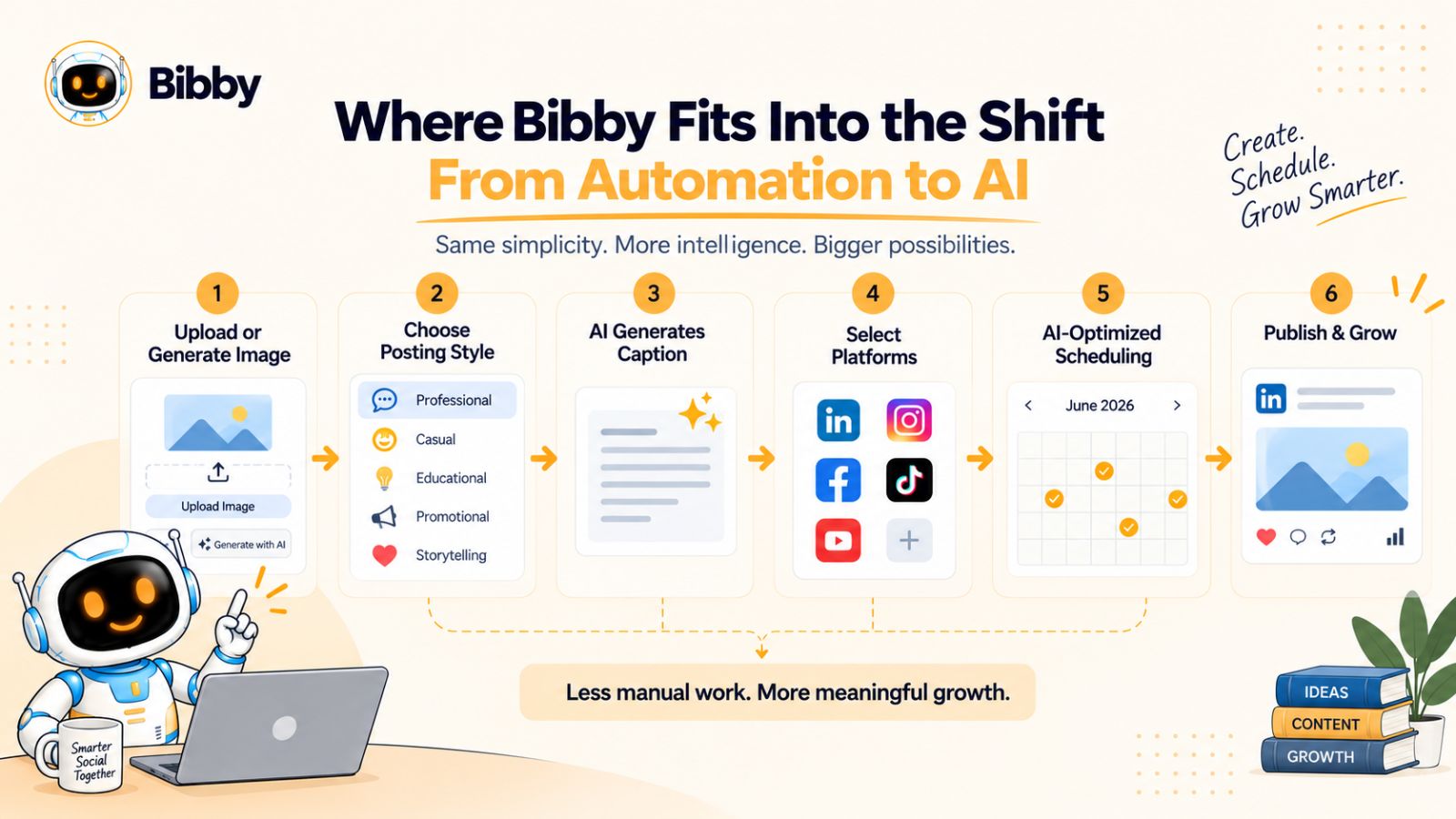
Instead of treating social media scheduling as a standalone task, Bibby combines content creation and scheduling into a single workflow. You can upload an image or generate one with AI, choose a posting style, and have the platform generate captions for your content before scheduling it across your selected social channels.
Start With an Image or AI-Generated Creative
The workflow can begin with your existing creative assets.
You can upload an image or use AI to generate an image, depending on what you want to publish.
This matters because visual content is no longer limited to static social posts. Modern social media strategies can involve images, carousels, videos, and stories, with different formats serving different content goals.
Having those formats within the same workflow can reduce the need to move between multiple tools.
Generate Captions Automatically
Once you've provided your content, Bibby can generate captions based on the posting style you select.
That removes one of the repetitive steps that often slows down social media publishing.
Instead of starting with a blank caption box every time, you can use AI to create a starting point and then refine it when necessary.
This approach also preserves an important role for human input: AI can accelerate the first draft, while you can still adjust the message to reflect your brand's voice and expertise.
Schedule Content Across Multiple Platforms
Bibby is designed to extend beyond LinkedIn.
The platform can schedule social media content across platforms including Facebook, Instagram, LinkedIn, YouTube, and TikTok.
That makes the workflow more relevant to businesses and creators managing a multi-platform presence.
Rather than creating one LinkedIn workflow, another Instagram workflow, and another TikTok workflow independently, you can manage the publishing process from a central system.
Publish Different Types of Content
A social media strategy isn't limited to text posts.
Depending on your strategy, you may want to publish:
- Images
- Carousels
- Videos
- Stories
Supporting multiple formats makes it possible to build a more varied content calendar without treating every content type as a completely separate operation.
The broader idea is simple: your social media tool should adapt to your content strategy rather than forcing your strategy into one publishing format.
AI-Optimized Scheduling
Bibby can also schedule content at AI-optimized times across the selected platforms.
This addresses another repetitive part of social media management: deciding when each piece of content should be published.
Timing shouldn't be treated as a substitute for useful content, but optimizing the publishing process can remove another manual decision from a high-volume content workflow.
Managing Social Media Through Chat
One of Bibby's more notable workflow changes is its chat interface.
Instead of managing every task through separate menus, you can interact with the platform conversationally.
For example, you can use the chat interface to:
- Create a brand kit
- Create a campaign
- Create posts
- Regenerate captions
- Manage your social media workflow
This is a meaningful shift in how social media software can be operated.
Instead of thinking in terms of individual buttons—create, upload, schedule, edit, publish—you can describe the outcome you want and use conversation as the interface.
For someone Managing Social Media regularly, that can make the workflow feel less like operating a publishing dashboard and more like working with a digital social media assistant.
Why This Matters for Organic Growth
Bibby's role in this comparison isn't that AI automatically creates organic growth.
It doesn't.
The value is in reducing the operational friction between having an idea and consistently publishing useful content.
If creating and scheduling social media content takes less manual effort, creators and businesses can spend more time on the parts AI shouldn't replace: developing original ideas, understanding their audience, building relationships, and adding genuine expertise.
That is ultimately the larger shift from traditional automation to AI-powered social media management.
The question is no longer only, “Can this tool schedule my LinkedIn post?”
It becomes:
“How much of my social media workflow can this tool help me manage?”
Bibby vs. Traditional Social Media Automation
The difference between a traditional social media scheduler and an AI-powered platform becomes most obvious when you compare the number of steps required to publish content.
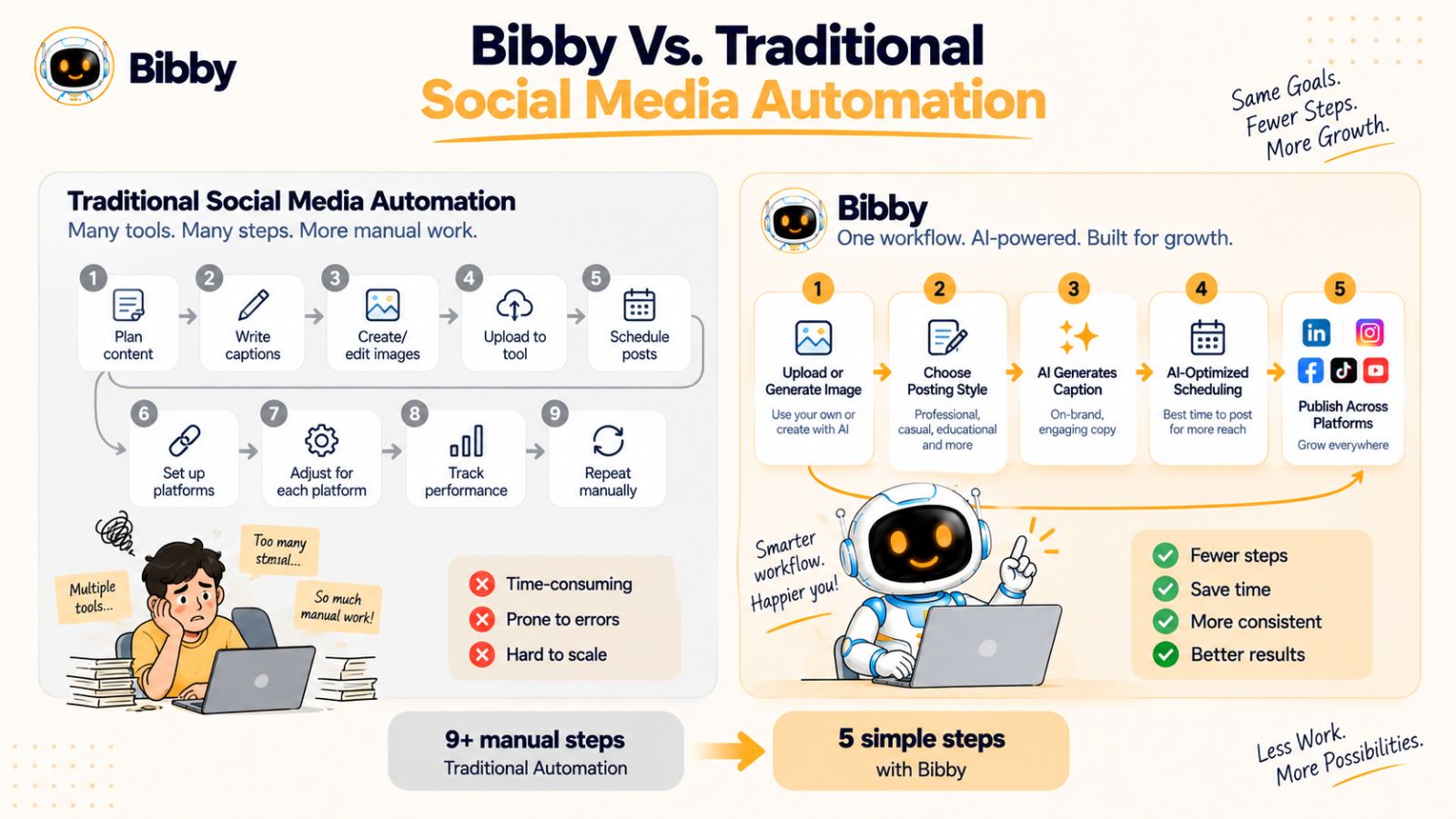
A conventional workflow often looks something like this:
Create content → write caption → upload media → choose platform → select date → choose time → schedule → repeat
None of these steps is particularly difficult. The challenge is that they have to be repeated for every piece of content.
When you manage several platforms and multiple content formats, those small tasks can add up quickly.
The Traditional Automation Workflow
Imagine you have created five LinkedIn posts for the coming week.
With a traditional scheduler, you might need to:
- Upload each piece of media.
- Write or paste each caption.
- Select LinkedIn as the destination.
- Choose a date and time.
- Schedule the post.
- Repeat the process for the remaining posts.
If you also want to publish the content on Instagram, Facebook, TikTok, or YouTube, you may need to adapt the content and repeat additional steps.
The scheduler makes the final distribution easier, but much of the preparation remains manual.
An AI-Assisted Workflow
An AI-assisted workflow can bring more of those steps together.
For example, with Bibby, you can start by uploading your creative or generating an image with AI. You can then select a posting style and have AI generate a caption.
From there, you can schedule the content across the platforms you want to use, with AI-assisted timing helping organize when the content should be published.
The workflow becomes closer to:
Create or upload → choose style → generate caption → select platforms → schedule → publish
And because Bibby supports multiple content formats—including images, carousels, videos, and stories—the same overall system can support more than a simple LinkedIn text-post workflow.
The Difference Is the Amount of Work Around Scheduling
This is an important distinction.
Traditional automation isn't necessarily being replaced by AI. Instead, AI can sit before and around the automation layer.
Think of it this way:
Traditional automation
“Publish this content according to these instructions.”
AI-assisted automation
“Help me turn this content into a social media publishing workflow.”
The first is primarily about execution.
The second combines creation, adaptation, organization, and execution.
Conversational Management Adds Another Layer
Bibby's chat interface takes this concept further by allowing you to manage social media through conversation.
Instead of manually navigating through every part of the interface, you can use the chat experience to work on tasks such as creating a brand kit, building a campaign, creating posts, or regenerating captions.
That can be particularly useful when your social media strategy changes frequently.
For example, you might start with a campaign and then decide that the captions don't match the tone you want. Rather than rebuilding the workflow from scratch, you can ask the system to regenerate them.
The interface becomes less about operating individual features and more about communicating what you want to change.
Automation Still Has an Important Role
This doesn't make traditional automation obsolete.
In fact, automation remains one of the core components of an efficient AI-powered social media workflow.
AI can help determine or generate what should be created, while automation can handle when and where it should be published.
The two technologies are therefore complementary.
A useful way to visualize the relationship is:
Human expertise → AI-assisted creation → automated distribution → performance feedback → improved content
That workflow can help reduce repetitive work without removing the human perspective that gives a social media account its identity.
For organic growth, that balance matters more than whether a tool is labeled an “automation platform” or an “AI agent.”
Can AI Agents Replace a Social Media Manager?
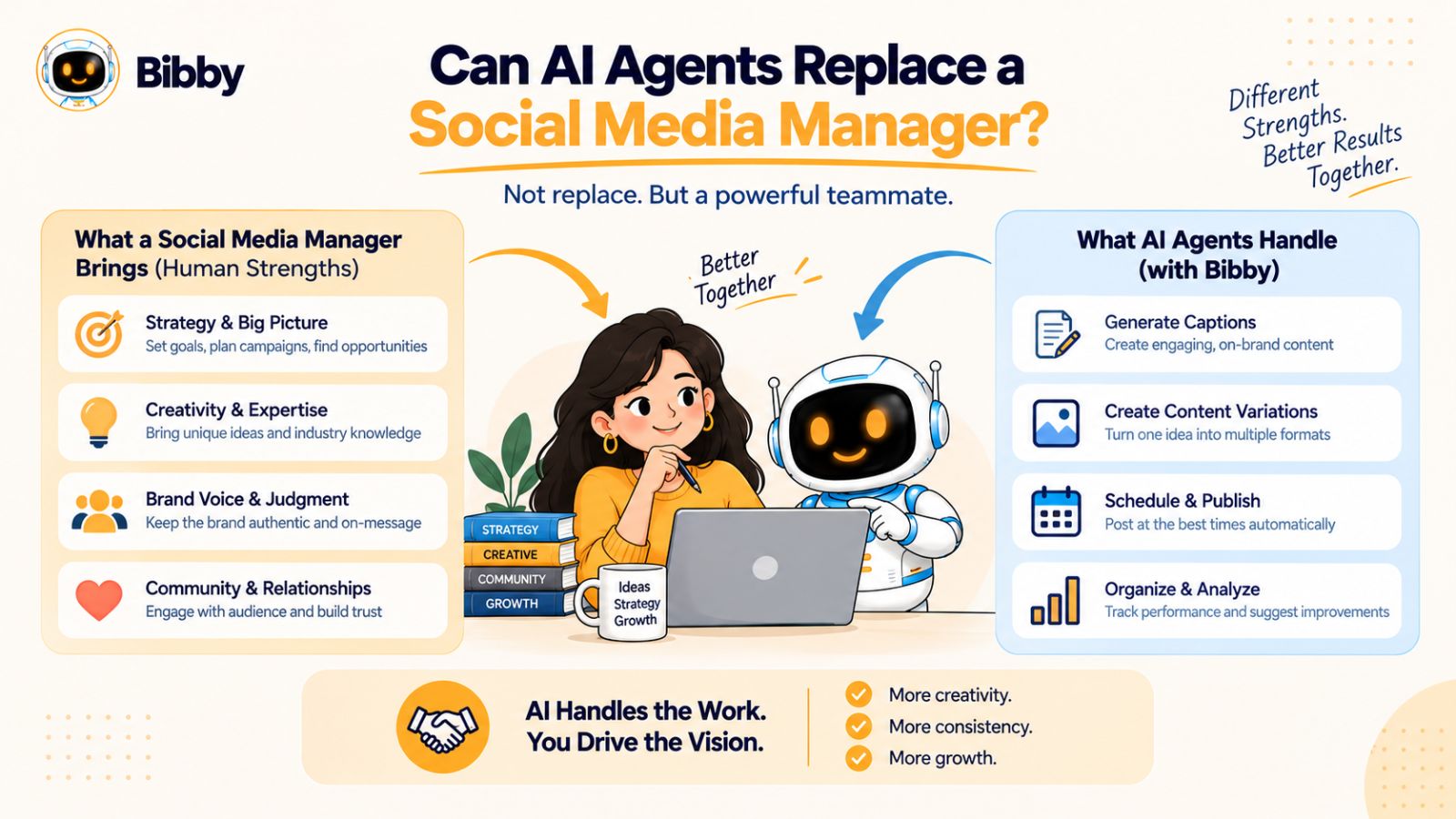
AI agents can automate and assist with many social media tasks, but replacing a social media manager completely is a different question.
Social media management isn't only about creating captions and scheduling posts. It also involves understanding a brand, interpreting audience reactions, developing a content strategy, responding to unexpected situations, and making decisions about what the business should communicate.
AI can support many of these workflows, but human judgment remains important.
What AI Can Handle
AI-powered social media tools can take care of an increasing number of repetitive and production-focused tasks.
Depending on the platform, these can include:
- Generating content ideas
- Writing caption drafts
- Creating or assisting with visual content
- Repurposing content
- Scheduling posts
- Organizing campaigns
- Managing publishing workflows
- Creating content variations
- Helping maintain a content calendar
For example, a tool such as Bibby can bring several of these activities into one workflow. You can upload or generate creative assets, select a posting style, generate captions, schedule content across multiple platforms, and use its chat interface to work on campaigns, brand kits, posts, and caption revisions.
That can significantly reduce the amount of repetitive operational work involved in social media management.
What Humans Still Need to Control
The more strategic parts of social media are harder to delegate completely.
A human still needs to understand questions such as:
What should our brand be known for?
Which audience are we trying to attract?
What experiences can we share that competitors cannot?
Which customer problems should we address?
What should we avoid saying?
How should we respond when something unexpected happens?
These questions involve context, business knowledge, judgment, and responsibility.
An AI system can help you explore possible answers, but blindly delegating those decisions can create content that is technically polished but strategically disconnected from the business.
Brand Voice Needs Human Direction
AI can generate content that follows instructions about tone and style, but a strong brand voice usually comes from more than a set of adjectives.
It develops through experience.
A founder might communicate differently from a corporate brand. A cybersecurity company may need a different voice from a lifestyle creator. A consultant may rely heavily on personal experience and opinions.
AI can help reproduce a defined style, but someone still needs to define what that style should be and review whether the output actually sounds authentic.
Human Expertise Is the Differentiator
This is especially important for organic growth.
If your competitors are also using AI to generate generic posts about the same topics, simply using AI doesn't give you a meaningful content advantage.
Your advantage comes from the information AI doesn't automatically have:
- Your customer experiences
- Your original research
- Your mistakes and lessons
- Your industry knowledge
- Your unique processes
- Your opinions
- Your case studies
AI can help turn those inputs into more content, but the underlying expertise remains yours.
The Better Model Is Collaboration
Instead of thinking about AI as a replacement for a social media manager, it can be more useful to think about it as a force multiplier.
The human provides:
Strategy + expertise + judgment + brand direction
AI provides:
Ideation + production assistance + adaptation + organization
Automation provides:
Scheduling + distribution + repeatable execution
Together, these layers can create a more efficient social media operation.
For a solo creator, that could mean managing a larger content pipeline without hiring immediately. For a marketing team, it could mean spending less time on repetitive production and more time on strategy and experimentation.
The goal isn't necessarily to remove humans from social media.
It's to remove as much unnecessary manual work as possible so humans can spend more time doing the work that actually requires them.
How to Use AI Agents for LinkedIn Organic Growth
Understanding AI agents is useful, but the bigger question is how to use them without turning your LinkedIn strategy into a stream of generic AI-generated posts.
The most effective approach is to use AI to reduce repetitive work while keeping your expertise and strategic direction at the center of the workflow.
A practical AI-assisted LinkedIn workflow can look like this.
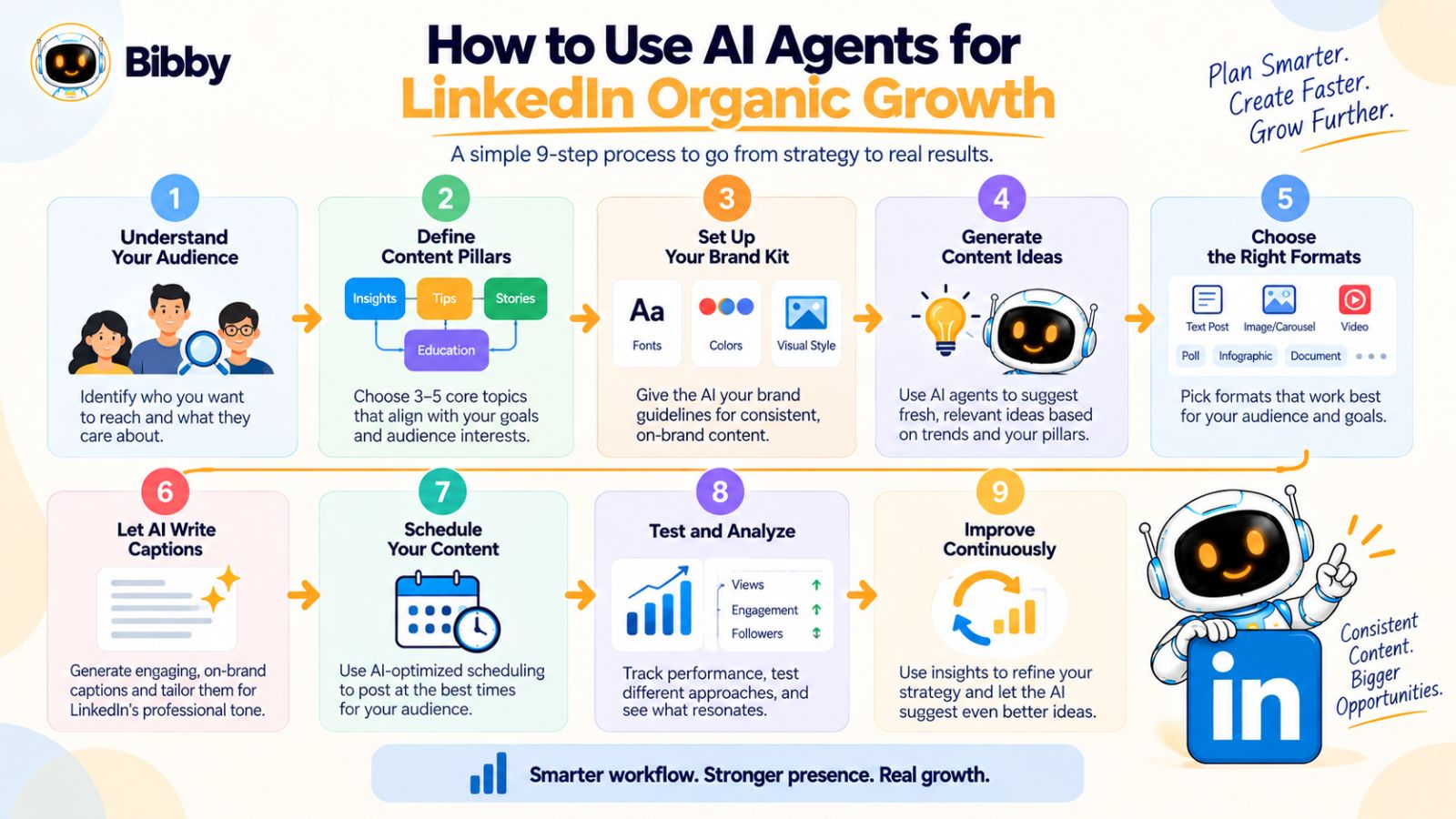
Step 1: Define Your Audience
Before asking AI to create content, define who you're trying to reach.
For example, a B2B SaaS company might target startup founders, marketing leaders, or sales teams. A consultant might focus on a specific industry or job role.
The narrower the audience, the easier it becomes to create content around problems that actually matter to them.
Start with questions such as:
- Who do we want to reach?
- What problems do they face?
- What questions do they repeatedly ask?
- What outcomes are they trying to achieve?
- What expertise can we offer that is genuinely useful?
AI can help organize these answers, but your business knowledge should provide the foundation.
Step 2: Create Your Content Pillars
Don't ask AI to generate random LinkedIn posts indefinitely.
Give your content a structure.
For example, a marketing consultant could use four content pillars:
- Marketing strategy
- Customer acquisition
- Marketing mistakes
- Real-world lessons
These pillars give AI useful boundaries while keeping your publishing strategy coherent.
Step 3: Build Your Brand Direction
Your AI workflow should understand how your brand communicates.
That can include:
- Tone of voice
- Target audience
- Preferred vocabulary
- Topics to emphasize
- Topics to avoid
- Content style
- Visual preferences
A tool such as Bibby can help centralize this information through a brand kit, giving your social media workflow a consistent foundation.
The goal isn't to make every post sound identical.
It's to make different posts feel like they belong to the same brand.
Step 4: Turn Ideas Into Multiple Content Formats
Once you have a topic, don't limit it to one LinkedIn post.
A strong idea can become several assets.
For example, the topic “Why most SaaS onboarding fails” could become:
- A LinkedIn educational post
- A carousel explaining the five biggest mistakes
- A short-form video
- A Facebook post
- An Instagram caption
- A YouTube discussion
This is where AI-powered social media workflows can create significant leverage.
Instead of starting from zero for every platform, you begin with one strong idea and adapt it into multiple formats.
Step 5: Generate Captions and Variations
AI can help create initial captions, hooks, and variations.
But don't treat the first generated version as the final answer.
Review the output and add information that only you can provide.
For example, replace:
“Businesses should focus on customer experience.”
with a specific lesson from your own experience:
“We discovered that our onboarding completion rate dropped whenever customers had to complete more than three setup steps.”
Specificity makes content more useful and harder to replicate.
Step 6: Build a Publishing Schedule
Once the content is ready, scheduling becomes the execution layer.
Instead of manually publishing each post, you can create a batch of content and distribute it over a defined period.
Bibby can help automate this part by scheduling content across platforms and using AI-assisted timing to organize when different pieces should be published.
That means your workflow can move from individual daily publishing to batch-based content management.
Step 7: Test Different Formats and Topics
Don't assume you know exactly what your audience wants before you publish.
Use your content workflow to test different approaches.
You might compare:
- Educational posts vs. opinion posts
- Text posts vs. carousels
- Short posts vs. detailed posts
- Industry trends vs. practical tutorials
- Personal experiences vs. data-driven insights
The goal isn't to chase every spike in engagement.
It's to identify patterns that help you create increasingly useful content for the audience you're trying to build.
Step 8: Review Performance and Improve the Next Cycle
Your publishing process shouldn't end when a post goes live.
Look at what happened afterward.
Which topics generated meaningful conversations?
Which formats received useful responses?
Which posts attracted the audience you actually wanted?
Which content produced little interest?
Use those observations to inform the next content cycle.
This creates a feedback loop:
Create → Publish → Observe → Learn → Improve → Create again
AI can help organize and analyze parts of this process, but the strategic interpretation should remain connected to your business goals.
Step 9: Keep Your Expertise in the Loop
The final step is arguably the most important.
Don't let AI become the source of your entire LinkedIn presence.
Use it as the system that helps you turn your knowledge into consistent content.
Your original insights should remain the raw material.
Your workflow might ultimately look like this:
Your expertise → content ideas → AI-assisted creation → human review → automated scheduling → audience response → new insights
That is a much more sustainable approach to using AI for LinkedIn organic growth than simply asking a tool to generate hundreds of posts.
The technology should make your strategy easier to execute—not replace the strategy itself.
LinkedIn Automation vs. AI Agents: Which Should You Choose?
There isn't one technology that makes sense for every social media workflow.
The right choice depends on what you need the technology to accomplish. If your main problem is remembering to publish content, a scheduling tool may be enough. If your problem is the entire process of creating, adapting, organizing, and distributing content, an AI-powered workflow can address a much larger part of the process.
The easiest way to decide is to start with the problem you're trying to solve.
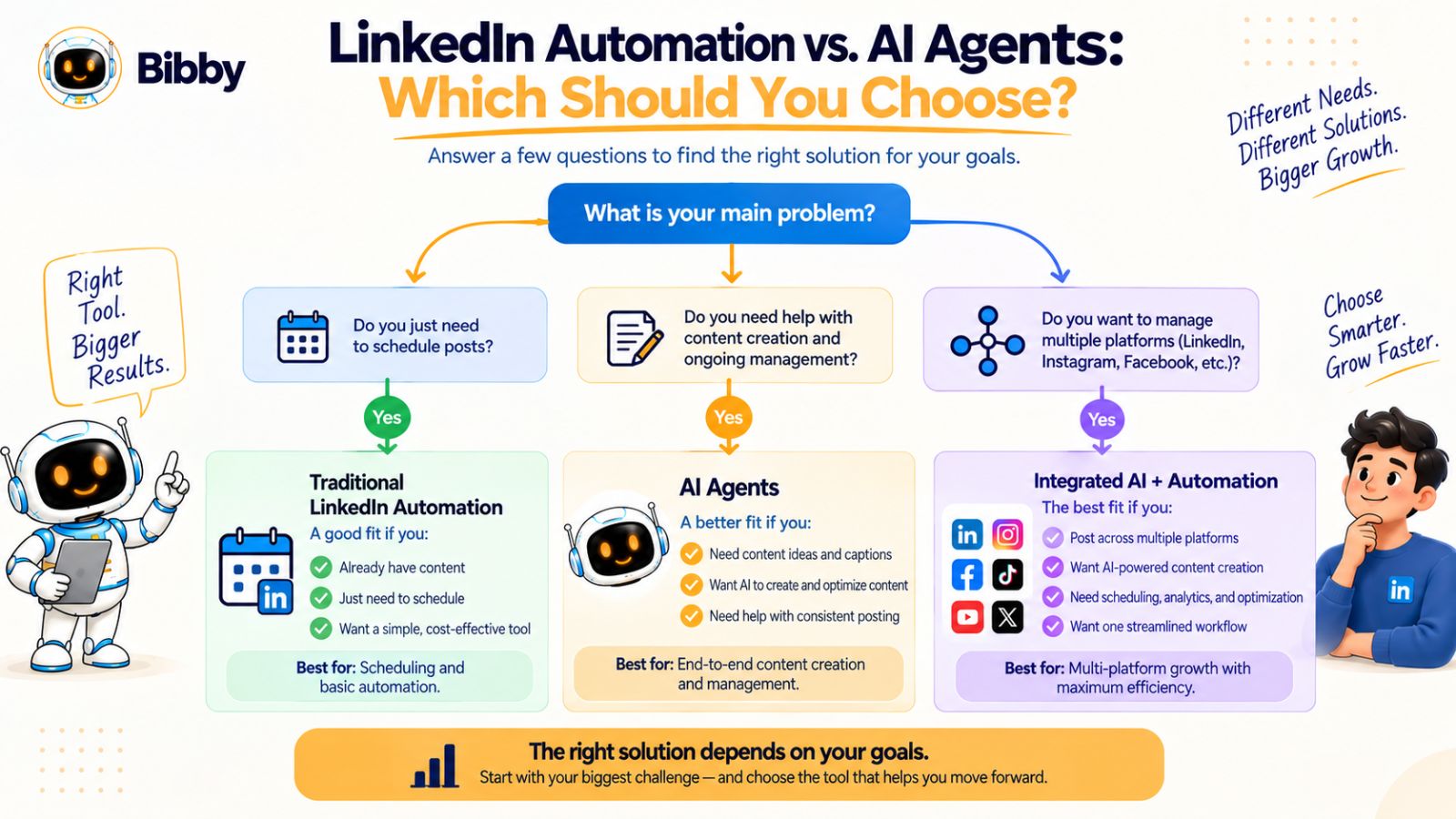
Choose Traditional Automation When Your Workflow Is Predictable
Traditional LinkedIn automation can make sense when you already have a reliable content-production process.
For example, you may already have:
- A library of finished content
- An established brand voice
- Someone responsible for writing posts
- A defined publishing calendar
- A simple set of platforms
- A clear scheduling process
In that situation, you may not need AI to generate or manage every part of the workflow.
Your primary requirement may simply be:
“Publish this content consistently without requiring me to do it manually every time.”
Traditional scheduling and automation can handle that effectively.
Consider AI-Powered Workflows When Content Creation Is the Bottleneck
If the biggest problem is creating enough useful content, scheduling alone won't solve it.
You may know what you want to talk about but struggle with:
- Generating ideas
- Turning ideas into posts
- Writing captions
- Creating content variations
- Adapting content for different platforms
- Organizing campaigns
That's where AI-powered social media management becomes more relevant.
Instead of only automating publication, you can use AI to assist with the steps leading up to publication.
Consider AI When You're Managing Multiple Platforms
Managing LinkedIn alone is one workflow.
Managing LinkedIn, Instagram, Facebook, TikTok, and YouTube is another.
The number of content formats and publishing decisions increases quickly.
If you're creating images, carousels, videos, stories, and platform-specific captions, an AI-assisted system can help reduce the amount of manual coordination involved.
This is one reason an all-in-one workflow can be useful.
For example, Bibby brings content creation, AI-generated captions, scheduling, multiple content formats, and cross-platform publishing into the same social media workflow.
Consider Combining AI With Automation
The choice doesn't have to be binary.
In many cases, the most useful setup combines both technologies.
Think of the workflow as three layers:
Human:
Strategy, expertise, positioning, judgment
AI:
Ideas, content assistance, variations, adaptation, organization
Automation:
Scheduling, publishing, and repeatable execution
Each layer solves a different problem.
AI doesn't need to replace automation. Instead, it can make the automation layer more useful by helping determine what should be created and how it should be prepared before publication.
Ask These Questions Before Choosing a Tool
Rather than choosing a platform simply because it calls itself an “AI agent” or an “automation tool,” evaluate the actual workflow.
Ask:
- Can I create or upload the content I need?
- Can I generate captions efficiently?
- Can I manage multiple platforms?
- Does it support the content formats I use?
- Can I schedule content in advance?
- Can I manage campaigns?
- Can I maintain consistent brand guidelines?
- Can I make changes through a conversational interface?
- Can I review and edit AI-generated content?
- Can I understand how my content is performing?
The answers will tell you more about whether a platform fits your workflow than the label attached to its technology.
The Bigger Question Is Workflow, Not Technology
The most useful way to compare LinkedIn automation and AI agents is to stop asking:
“Which technology is better?”
Instead, ask:
“Which workflow removes the most unnecessary work while helping me publish better content consistently?”
If scheduling is your only problem, automation may be enough.
If content creation and management are slowing you down, AI can help with a much larger portion of the process.
And if you combine human expertise, AI-assisted creation, and automated distribution, you can build a social media system that is both efficient and adaptable.
That shift—from automating individual tasks to managing the entire content workflow—is likely to shape how businesses approach organic social media going forward.
The Future of Organic Social Media Growth
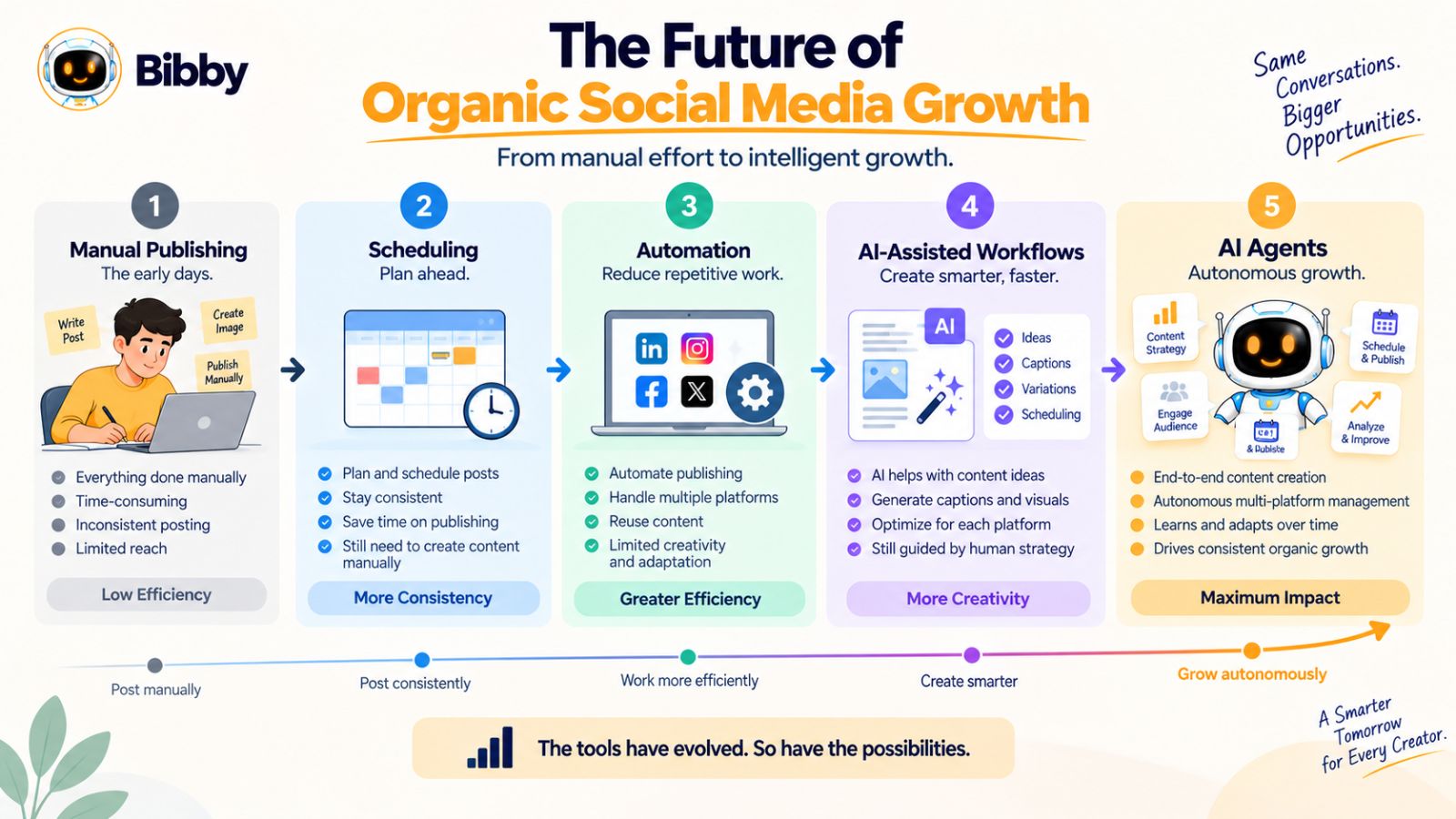
Social media management is moving through a clear progression.
First came manual publishing. Then scheduling tools made it possible to automate repetitive tasks. More advanced automation connected multiple workflows. Now AI is beginning to participate in content creation, campaign planning, adaptation, and management.
The progression looks something like this:
Manual publishing → Scheduling → Automation → AI-assisted workflows → AI agents
The important change isn't simply that software is becoming more intelligent.
It's that the unit of automation is getting larger.
From Automating Posts to Automating Workflows
Early social media tools focused on individual actions.
Schedule a post.
Publish an image.
Repeat the process tomorrow.
Modern AI-powered platforms can approach the problem at a broader level.
Instead of asking only:
“When should this post be published?”
you can ask:
“How should I run this campaign across my social channels?”
That is a fundamentally different way of thinking about social media software.
The focus shifts from automating individual actions to coordinating multiple related tasks.
Content Will Become Easier to Produce
AI is already reducing the time required to turn ideas into social media content.
Generating a caption, creating a visual, adapting a message, or producing several variations can happen much faster than it traditionally could.
But easier content production also creates a new challenge.
When everyone can produce more content, content quality and differentiation become more important.
Publishing more isn't necessarily the answer.
Publishing content that gives the right audience a reason to pay attention becomes increasingly important.
One Idea Can Power Multiple Channels
The future of social media management is also likely to become more connected.
A single idea might become a LinkedIn post, Instagram carousel, Facebook post, TikTok video, and YouTube content.
The goal isn't to duplicate identical content everywhere.
It's to preserve the core insight while adapting the presentation to each platform.
AI can help with that transformation, while automated scheduling can handle distribution.
Tools such as Bibby reflect this direction by bringing content creation, caption generation, multiple content formats, cross-platform scheduling, and conversational social media management into a connected workflow.
Humans Will Still Supply the Differentiation
AI can make production faster.
It cannot automatically make a brand interesting.
The strongest organic social media strategies will still depend on things that come from humans:
- Original expertise
- Real experiences
- Strong opinions
- Customer knowledge
- Original research
- Brand positioning
- Meaningful relationships
AI can help package and distribute those inputs at scale.
It shouldn't become the only source of them.
The Competitive Advantage Will Shift
When publishing content required significant manual effort, simply maintaining consistency was difficult.
As AI reduces that effort, consistency becomes easier for more businesses.
That means the advantage can shift toward the quality of the ideas being produced, how effectively they are adapted to an audience, and how quickly a business can learn from its content.
In other words, the future isn't necessarily about who can publish the most.
It is increasingly about who can create useful ideas, turn them into effective content, learn from the response, and repeat the process efficiently.
That is where the combination of human expertise, AI, and automation becomes particularly valuable.
The tools may change, but the underlying objective remains the same: create something worth consuming, put it in front of the right audience consistently, and use what you learn to make the next piece of content better.
Conclusion
LinkedIn automation and AI agents solve different parts of the social media problem. Traditional automation is useful for repeatable tasks such as scheduling and publishing, while AI-powered workflows can extend into content creation, adaptation, campaign management, and conversational control.
For organic growth, neither technology is a substitute for useful content and genuine expertise. The strongest approach combines human strategy with AI-assisted creation and automation that keeps distribution consistent.
Tools such as Bibby illustrate this broader shift by bringing content creation, AI-generated captions, multiple content formats, cross-platform scheduling, and conversational social media management into one workflow.
If you're ready to put these ideas into practice, the natural next step is to build an AI-powered social media workflow that turns your expertise into consistent LinkedIn, Instagram, Facebook, TikTok, and YouTube content without making content management a daily manual task.