

An AI-driven social media content engine turns the repetitive process of creating, adapting, and publishing social content into a streamlined system that can run with far less manual work.
Instead of jumping between tools to create visuals, write captions, manage content calendars, and schedule posts, you can build one connected workflow that takes content from idea to publication. The goal isn’t simply to generate more AI content—it’s to create a repeatable system that helps you publish consistently, maintain your brand voice, and spend less time managing the mechanics of social media.
Let’s break down exactly how to build an AI social media content engine that works across the platforms your audience already uses.
What Is an AI-Driven Social Media Content Engine?
An AI-driven social media content engine is a connected system that helps you plan, create, adapt, schedule, publish, and improve social media content with the help of artificial intelligence.
The important word is engine.
Using an AI tool to generate a caption is useful, but it is only one part of the social media workflow. A content engine connects multiple steps so that you can move from an idea to a published post without manually rebuilding the process every time.
A typical AI social media content engine looks something like this:
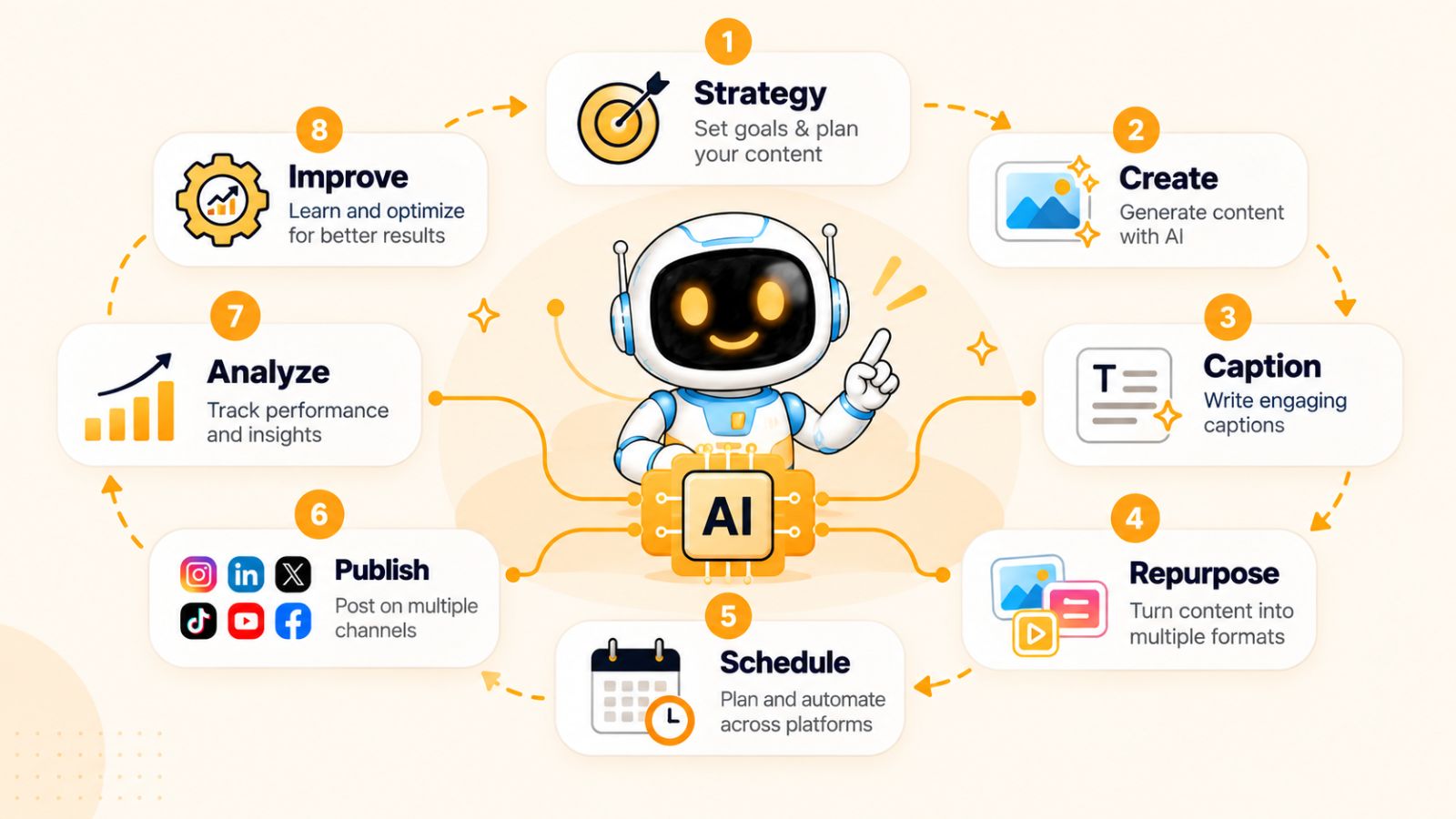
Strategy → Content Creation → Caption Generation → Repurposing → Scheduling → Publishing → Performance Analysis → Optimization
AI content creation
The first part of the engine is creating the actual content.
Depending on your workflow, that could mean uploading an existing product image, creating an AI-generated visual, turning an idea into a carousel, or producing video content for short-form platforms.
AI can reduce the amount of time spent starting from a blank page, while your strategy and brand guidelines determine what should actually be created.
AI-powered caption generation
Once you have the visual or content concept, the next challenge is writing copy that fits the platform and your audience.
An AI social media tool can use information about your brand, content, audience, and preferred posting style to generate captions rather than forcing you to write every post from scratch.
You can also generate multiple variations when the first caption doesn't match the tone you want.
Content repurposing
A strong content engine doesn't treat every social post as a completely separate piece of work.
One idea can become a LinkedIn post, Facebook post, Instagram image, carousel, TikTok video, YouTube content, or story—provided the content is adapted appropriately for each format and audience.
This is where AI can become particularly useful: instead of repeatedly recreating the same idea, you can use the original content as the starting point for several platform-specific pieces.
Automated scheduling and publishing
Creating content is only half the job. Someone still needs to decide when and where it gets published.
An AI social media scheduler can take your finished content and organize it across multiple platforms, reducing the need to manually upload and schedule every post.
For example, a workflow could take a batch of approved content and distribute it across Facebook, Instagram, LinkedIn, YouTube, and TikTok on different dates and at optimized publishing times.
This turns social media from a daily administrative task into a system you can manage in batches.
Performance-driven optimization
The final component is learning from what happens after publication.
A mature content engine should give you a way to identify which topics, formats, hooks, and publishing patterns are producing useful results. Those insights can then influence what you create next.
This creates a continuous loop:
Create → Publish → Measure → Learn → Improve → Create again
That loop is what separates a genuine AI social media content engine from a simple AI caption generator.
Where Bibby fits into the workflow
Bibby brings many of these steps into a single social media workflow. You can upload an image or generate one with AI, choose a posting style, and have captions generated automatically before scheduling your content across your selected social platforms.
The workflow can support different types of social content, including images, carousels, videos, and stories, while scheduling content for different dates and AI-optimized publishing times.
Bibby also adds a conversational layer to social media management. Instead of relying entirely on a traditional dashboard, you can use its chat interface to work with your social media workflow—such as creating a brand kit, building a campaign, creating posts, or regenerating captions.
The bigger idea is simple: AI shouldn't just help you create individual posts. It can help connect the entire process of turning ideas into consistent social media output.
Once you understand that distinction, the next step is building the workflow itself.
How an AI Social Media Content Engine Works
An AI social media content engine works by connecting the individual tasks involved in social media management into one repeatable workflow.
Instead of thinking, “I need to create a post today,” you start thinking in systems: What should we publish, how should we create it, where should it go, and when should it be published?
A practical workflow looks like this:
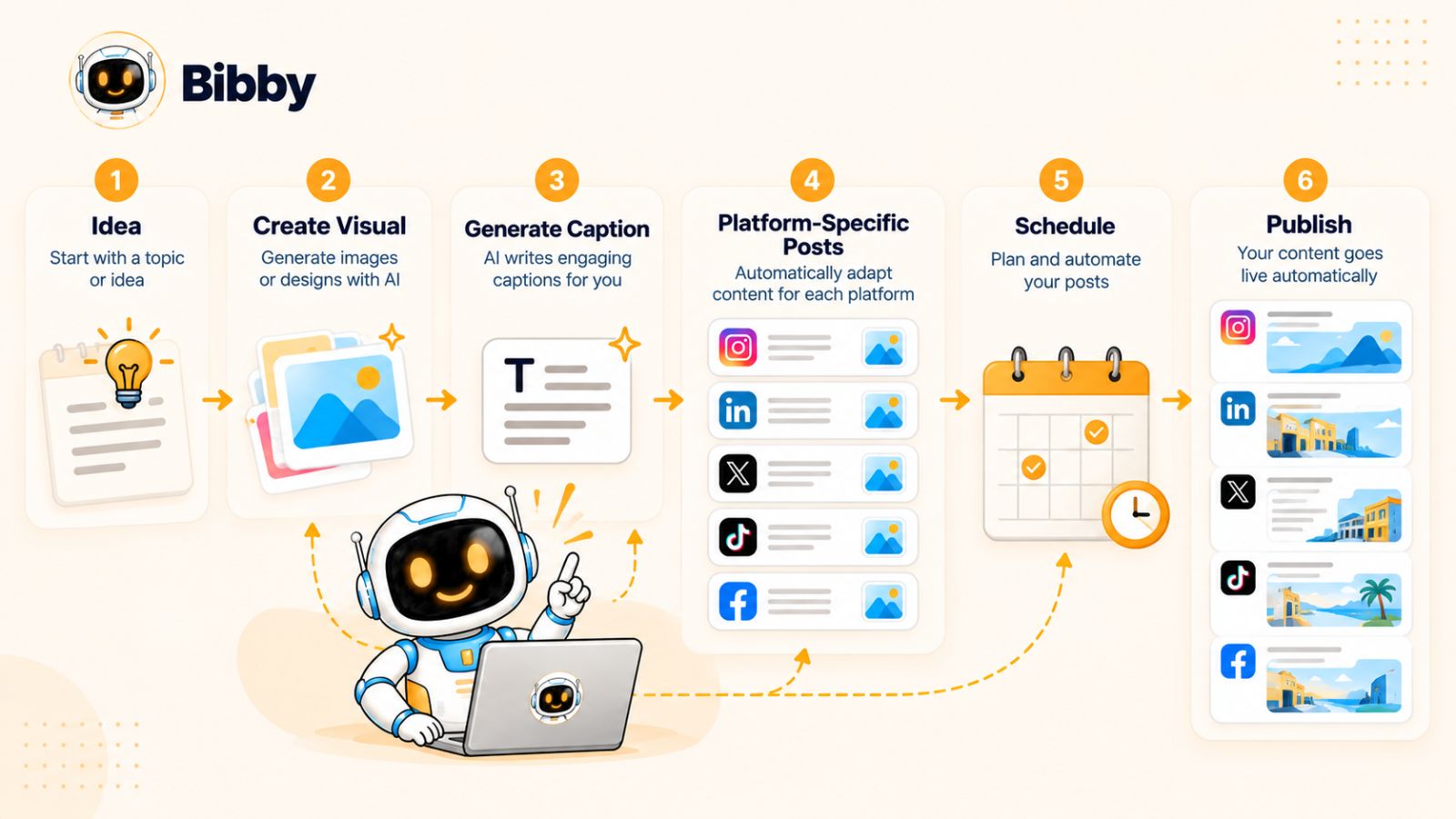
Choose a topic → Create the visual → Select the posting style → Generate the caption → Adapt the content → Schedule it → Publish → Learn from the results
Here’s how each step works.
Step 1: Choose your content topic or campaign
Every piece of content should start with a reason for existing.
That could be a product launch, educational topic, customer question, industry trend, promotional campaign, company update, or a recurring content series.
Rather than generating random posts simply because you need to stay active, organize your ideas around a few consistent content pillars. This gives your AI tools enough context to create content that supports your broader social media strategy.
For example, a SaaS company might use:
- Product education
- Customer success stories
- Industry insights
- Behind-the-scenes content
- Product announcements
These pillars give the content engine a framework to work within.
Step 2: Upload an existing visual or generate one with AI
Once you know what you want to communicate, create the visual.
You might already have a product photograph, brand graphic, video, or other asset. If you don't, AI image generation can help you create a visual based on your concept.
The important thing is to treat the visual as part of the message—not as decoration added at the end.
For example, a product launch might require a clean product image, while an educational post could benefit from an infographic or carousel.
Step 3: Choose your posting style
The same idea can sound completely different depending on your brand and audience.
A professional B2B company might prefer an educational and authoritative style. A consumer brand could use a conversational or playful voice.
This is where defining your posting style becomes important.
Instead of asking AI to “write a caption,” give it a consistent framework for how your brand communicates. The result is more likely to sound like your business rather than generic AI-generated copy.
Step 4: Generate the caption
With the content and posting style established, AI can generate the social media caption.
A good caption-generation workflow considers more than the topic. It can take into account the intended audience, platform, tone, objective, call to action, and the actual content being published.
You can then review the result and regenerate it if the wording doesn't fit your brand.
The goal isn't to publish every AI-generated sentence without checking it. The goal is to eliminate unnecessary manual writing while keeping humans in control of the final message.
Step 5: Adapt the content for different platforms
Publishing the exact same content everywhere isn't necessarily the best form of social media automation.
Different platforms have different formats, audiences, and expectations.
A single campaign might therefore become:
- A professional post for LinkedIn
- A visual post or carousel for Instagram
- A discussion-oriented post for Facebook
- A short-form video for TikTok
- Video content for YouTube
The underlying idea can remain consistent while the presentation changes for each platform.
This is one of the biggest advantages of treating social media as a content engine: one strategic idea can produce an entire family of related content.
Step 6: Schedule your content
Once the content is ready, scheduling removes one of the most repetitive parts of social media management.
Instead of opening each platform individually every day, you can prepare content in batches and schedule it ahead of time.
Tools such as Bibby are designed around this type of workflow. You can select your social platforms, organize your content across different dates, and use AI-optimized publishing times as part of the scheduling process.
This means your content doesn't have to be created and published on the same day.
You can spend an hour preparing a batch of content and have that content distributed throughout the coming days or weeks.
Step 7: Publish across your selected platforms
After scheduling, the content can move through the publishing workflow according to the schedule you've created.
A centralized system is particularly useful when you're managing several platforms because it reduces the number of separate publishing workflows you need to maintain.
Instead of remembering which post belongs on which platform and which day, the content engine keeps the publishing plan organized.
Step 8: Learn from the results
Publishing is not the end of the process.
Your audience's response provides information that can improve your next batch of content.
Look for patterns in areas such as:
- Which topics attract attention
- Which formats generate engagement
- Which hooks encourage people to continue reading or watching
- Which content produces meaningful actions
- Which publishing times perform well for your audience
Over time, these observations can feed back into your content strategy.
That creates a much more useful cycle than simply generating posts continuously:
Plan → Create → Publish → Measure → Improve → Repeat
And the more structured this workflow becomes, the easier it is to automate without losing the strategic thinking behind your social media presence.
The next step is to establish that strategy before handing more of the execution to AI.
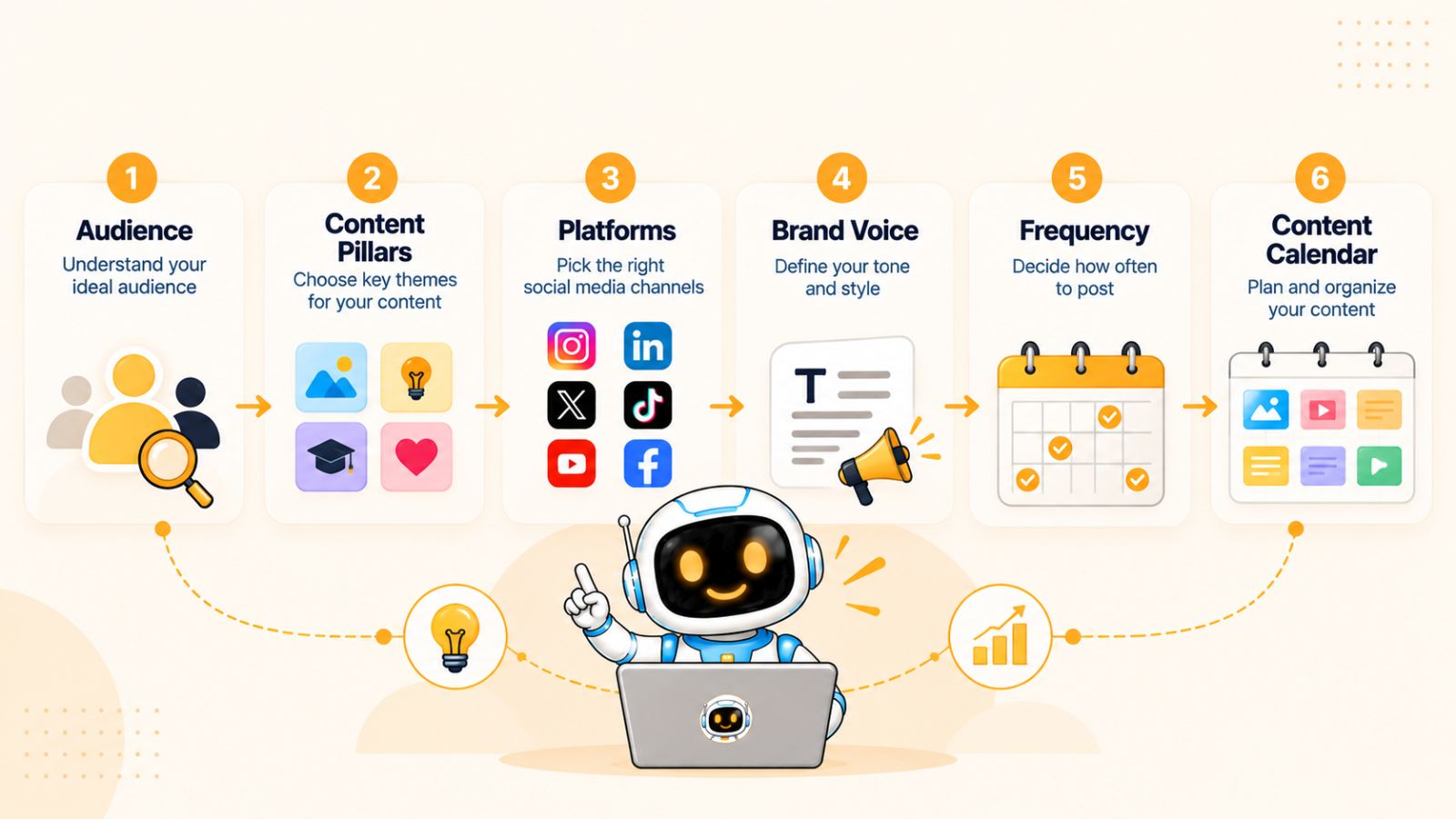
Build Your Social Media Content Strategy Before Automating It
AI can help you create and schedule social media content faster, but automation cannot decide what your business should communicate unless you give it the right strategic foundation.
Before building an automated social media workflow, define who you want to reach, what you want to say, and what action you want your audience to take.
Think of your strategy as the operating system for your AI social media content engine. The better the inputs, the more useful the output.
Define your target audience
Start by identifying the people your social media content is intended to reach.
You don't need an overly complicated customer persona. A useful starting point is understanding:
- Who they are
- What problems they have
- What they are trying to achieve
- What questions they regularly ask
- What type of content they already consume
- What would make them trust your brand
This information gives AI context when generating ideas, captions, and content variations.
For example, a social media strategy targeting startup founders should probably communicate differently from one targeting professional photographers—even if both businesses sell software.
Establish your content pillars
Content pillars are the recurring subjects your brand wants to be known for.
Instead of asking AI to come up with completely new topics every day, define several categories that your content can consistently draw from.
A typical business might use four or five pillars:
Education: Teach the audience something useful.
Expertise: Share opinions, insights, research, or industry knowledge.
Product: Explain how your product or service solves specific problems.
Proof: Share customer stories, results, testimonials, or use cases.
Personality: Show the people, values, culture, or behind-the-scenes side of the business.
Your exact pillars should reflect your business and audience. The important thing is having a framework that prevents your content calendar from becoming a collection of unrelated posts.
Decide which platforms actually matter
More platforms don't automatically mean better social media marketing.
Choose the platforms where your target audience is most relevant and where your business can realistically create good content.
Depending on your audience, that might include Instagram, Facebook, LinkedIn, YouTube, TikTok, or a combination of them.
You can then adapt your content for each platform instead of trying to maintain an identical presence everywhere.
An AI social media automation tool becomes much more useful when it is connected to a deliberate platform strategy.
Define your brand voice
Your brand voice tells AI how your business should sound.
For example, you might want your content to be:
- Clear rather than complicated
- Confident rather than aggressive
- Helpful rather than promotional
- Conversational rather than corporate
- Educational rather than overly technical
You can also provide examples of existing content that represents your preferred style.
This matters because AI can produce technically correct captions that still feel completely wrong for your brand. A clear voice gives the system boundaries.
Determine your publishing frequency
Consistency is more useful than creating an unrealistic publishing schedule you cannot maintain.
Decide how frequently you can realistically produce quality content for each platform.
For example, your strategy might include several short-form posts each week, a weekly educational carousel, and longer-form video content on a different schedule.
The exact frequency matters less than having a sustainable system.
Once you establish the cadence, an AI social media scheduler can help turn that plan into an actual publishing calendar.
Create recurring content formats
Recurring formats make content creation easier because you don't have to reinvent the structure of every post.
Examples include:
- “Tip of the Week”
- Customer story
- Frequently asked question
- Industry myth
- Product walkthrough
- Behind-the-scenes post
- Weekly industry insight
- Educational carousel
- Short-form tutorial
These formats can become reusable templates inside your content workflow.
AI can then help generate new topics within each format while maintaining a consistent structure.
Build a content calendar around themes
Instead of planning posts independently, organize them around weekly or monthly themes.
For example, a software company could dedicate one week to onboarding, another to productivity, and another to a particular customer problem.
This creates continuity between posts and gives AI additional context when generating related content.
A content calendar can then answer three important questions at a glance:
What are we publishing?
Where are we publishing it?
When are we publishing it?
That simple framework becomes much more powerful when connected to automated creation and scheduling.
Let automation handle repetition—not strategy
This is the principle to keep in mind throughout your AI social media workflow:
Automate the repetitive work while keeping strategic decisions intentional.
AI can help generate variations, write captions, create visuals, repurpose ideas, and schedule content. But your business still needs to decide what it stands for, who it serves, and what it wants its social presence to accomplish.
Once those decisions are clear, automation becomes significantly more valuable.
And the next piece of the system is your brand kit—the information that helps your AI-generated content look and sound consistently like your brand.
Create a Brand Kit Your AI Can Actually Use
One of the biggest challenges with AI-generated social media content is consistency.
Also read: Why Every Business Needs an AI Social Media Agent →
You can give an AI tool the same basic instruction ten times and get ten different interpretations of your brand. One caption might sound professional, another overly casual, and another might use language your business would never use.
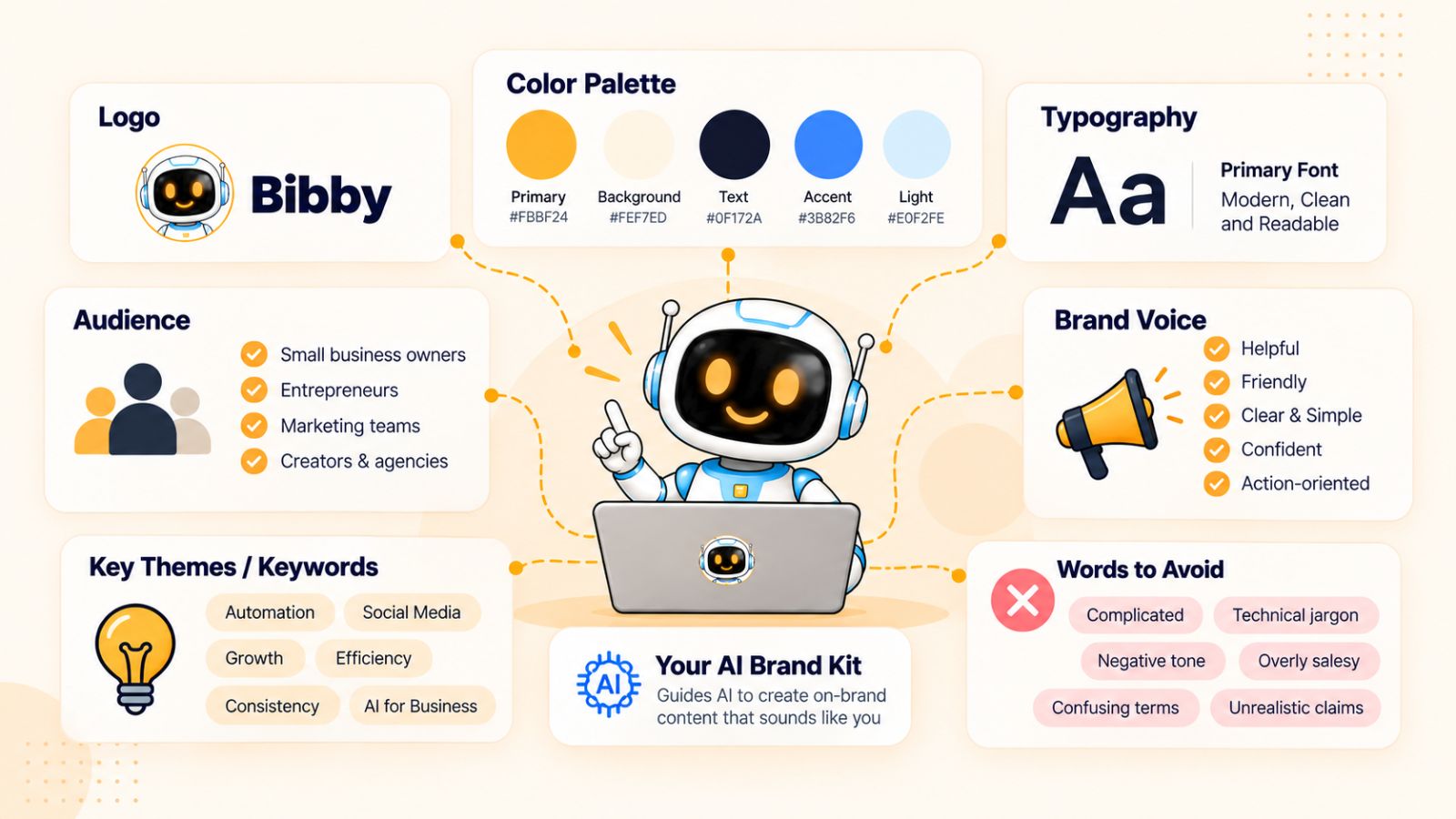
A brand kit gives your AI social media content engine a consistent foundation to work from.
Instead of repeatedly explaining your brand every time you create a post, you define the important information once and use it throughout your content workflow.
What should a social media brand kit include?
A useful brand kit should cover both your visual identity and your communication style.
At a minimum, consider including:
- Brand name and description
- Logo
- Brand colors
- Fonts
- Visual preferences
- Target audience
- Brand voice
- Preferred terminology
- Words and phrases to avoid
- Common calls to action
- Key products or services
- Core differentiators
You can also include examples of previous social media posts that represent your preferred style.
The goal isn't to create a huge document that nobody uses. The goal is to give your AI tools enough context to make decisions that are consistent with your brand.
Define how your brand sounds
Your brand voice is especially important when using AI to generate captions.
Instead of simply saying “make it professional,” be more specific.
For example:
Voice: Clear, confident, conversational, and practical.
Avoid: Corporate jargon, exaggerated claims, unnecessary emojis, and overly complicated sentences.
Preferred: Short paragraphs, direct language, useful examples, and a clear takeaway.
This gives AI something concrete to work with.
You can take this one step further by defining different styles for different types of content.
An educational post might be straightforward and instructional, while a product announcement could be more energetic and persuasive.
The underlying brand voice remains consistent even when the format changes.
Create visual consistency
Your visual identity matters just as much as your written voice.
If your social feed uses completely different colors, fonts, compositions, and imagery from one post to the next, your audience may struggle to recognize your content.
Your brand kit can establish visual rules such as:
- Primary and secondary colors
- Typography
- Image style
- Illustration style
- Photography preferences
- Logo placement
- Graphic layout
- Preferred aspect ratios
These guidelines become particularly useful when you're combining existing assets with AI-generated images.
Instead of generating completely random visuals, you can establish a recognizable creative direction.
Use your brand kit across campaigns
Your brand kit shouldn't exist in isolation.
When you create a campaign, the campaign should inherit the core characteristics of your brand while adding campaign-specific instructions.
For example, a product launch might have its own visual theme and messaging while still using the company's established colors, tone, and terminology.
This creates a useful hierarchy:
Brand → Campaign → Content → Individual Post
The brand establishes consistency. The campaign establishes context. The individual post delivers the message.
Use Bibby's chat interface to manage your brand setup
This is also where conversational AI can simplify the process.
With Bibby's chat interface, you can work with your social media setup conversationally rather than treating every task as a separate configuration exercise.
For example, you can use the chat workflow to create a brand kit, then use that context when working on campaigns and posts.
That can make the process feel less like configuring a complicated social media dashboard and more like giving instructions to a social media assistant.
You could start with a request such as:
“Create a brand kit based on my company's existing visual identity and make the tone clear, professional, and conversational.”
From there, you can refine the instructions as your needs become clearer.
The same conversational workflow can then be used for other social media tasks, including creating campaigns, generating posts, and regenerating captions.
Don't try to automate an unclear brand
There's an important distinction here.
AI can help you apply your brand consistently, but it shouldn't be expected to magically discover what your brand represents.
If you don't know your audience, messaging, tone, or visual identity, adding more automation may simply produce more inconsistent content faster.
Take the time to define the fundamentals first.
Once your brand kit is ready, you have something much more valuable than a collection of colors and fonts: you have a reusable set of instructions that can guide your AI social media content engine.
Now you can use that foundation to build your first campaign.
Create Your First AI-Powered Social Media Campaign
Once your brand strategy and brand kit are in place, the next step is to stop thinking about social media as a collection of individual posts.
Instead, build campaigns.
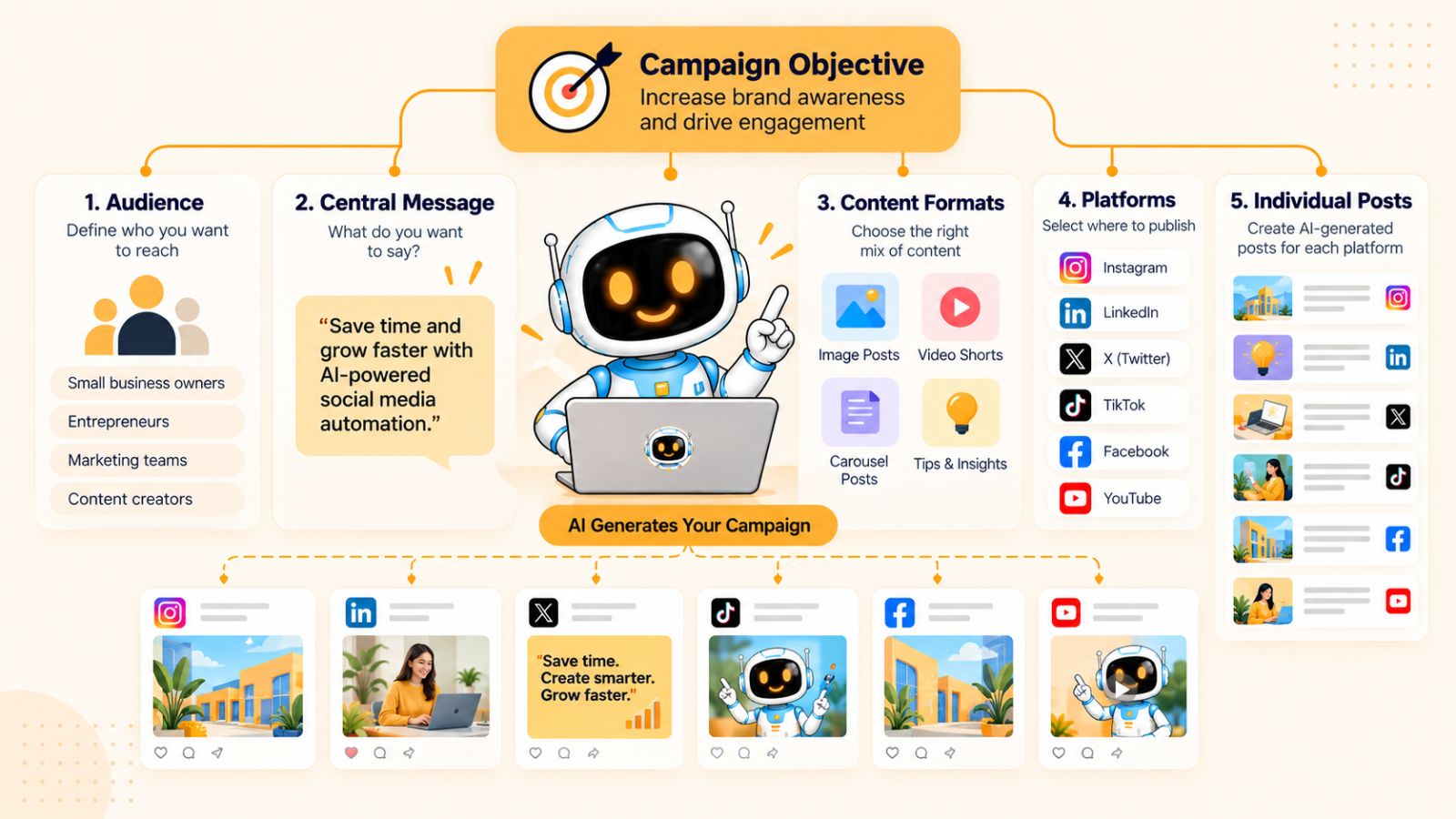
A social media campaign gives multiple pieces of content a shared objective, message, and timeframe. This makes it easier to create a consistent story across platforms while giving your AI social media content engine enough context to generate useful content.
Step 1: Define the campaign objective
Start with one clear goal.
Your campaign might be designed to:
- Launch a new product
- Generate leads
- Promote an offer
- Educate your audience
- Increase awareness
- Drive traffic
- Promote an event
- Build engagement around a specific topic
Avoid trying to accomplish everything with one campaign.
If the objective is clear, it becomes much easier to decide what content to create and what call to action each post should use.
Step 2: Define the campaign audience
Next, identify who the campaign is for.
Your overall brand may target several customer segments, but an individual campaign can focus on one specific audience or problem.
For example, instead of creating a campaign about “social media automation,” you could create one specifically for:
Small business owners who spend several hours every week manually scheduling social media posts.
That additional context gives AI a much clearer starting point for generating ideas and messaging.
Step 3: Establish the central message
Every campaign should have a central idea that connects the individual posts.
Imagine you're launching a new social media automation feature.
Your central message might be:
“Spend less time managing social media and more time growing your business.”
Individual posts can then approach that message from different angles:
- The problem with manual scheduling
- How automated scheduling works
- A feature demonstration
- A customer use case
- A practical social media workflow
- A final call to try the product
Now your content has a narrative instead of feeling like unrelated posts.
Step 4: Decide on the content mix
A campaign shouldn't necessarily consist of ten versions of the same promotional message.
Create a mixture of content types.
For example:
Educational: Explain the problem.
Problem-focused: Show the cost or frustration of the existing workflow.
Demonstration: Show how the solution works.
Proof: Provide an example, result, or customer experience.
Promotional: Give the audience a reason to take action.
This variety helps keep the campaign useful while still moving toward its objective.
Step 5: Choose your platforms
Decide where the campaign should appear.
You might choose Instagram and Facebook for visual content, LinkedIn for professional audiences, TikTok for short-form video, and YouTube for longer or video-focused content.
You don't necessarily need every platform.
Select the channels that make sense for the campaign and the audience you're trying to reach.
Step 6: Turn the campaign into individual posts
Now you can break the central idea into specific pieces of content.
For example, one campaign could include:
- A problem-focused image post
- An educational carousel
- A short-form video
- A customer example
- A product demonstration
- A behind-the-scenes post
- A final promotional post
This is where an AI content engine can reduce the amount of manual work involved.
Instead of starting every post from a blank document, the campaign provides the context. AI can then help generate individual concepts, captions, and variations while keeping them connected to the same objective.
Step 7: Adapt the campaign to each platform
A campaign should have a consistent message, but that doesn't mean every platform needs an identical post.
For example, a LinkedIn post might focus on the business problem and practical lessons, while an Instagram carousel could communicate the same idea visually.
A TikTok or YouTube Short might turn the concept into a quick demonstration.
The campaign remains unified at the strategic level while the execution changes according to the platform.
Creating campaigns through Bibby
Bibby's conversational interface can make this campaign-building process more direct.
Instead of manually navigating through multiple creation steps, you can use the chat interface to ask Bibby to create a campaign based on your requirements.
You could provide information such as the campaign objective, audience, topic, platforms, and preferred style.
From there, the campaign can become the foundation for creating the associated social posts.
The same workflow can be used to create posts, generate captions, and regenerate captions when you want a different approach.
This is one of the more interesting developments in AI social media management: the interface itself becomes conversational.
Rather than learning where every feature lives inside a dashboard, you can describe what you want to accomplish and use the AI workflow to help execute it.
Don't let AI replace the campaign idea
There's still an important human role here.
AI can help you turn a campaign brief into dozens of content variations, but the campaign should begin with a real business objective and a useful message.
The strongest workflow is therefore not:
AI → Random posts → Schedule
It's:
Objective → Audience → Message → Campaign → Content → AI-assisted execution → Scheduling
Once the campaign is defined, the next challenge is creating the visual assets that will bring those ideas to life.
Generate Social Media Visuals With AI
Social media is visual by nature, but creating fresh visual content for every post can quickly become one of the most time-consuming parts of content production.
An AI social media content engine can reduce that workload by letting you work with both existing visual assets and AI-generated images.
The key is not to use AI to generate an image simply because you can. The visual should support the message, fit your brand, and make sense for the platform where it will be published.

Start with the content idea
Before generating an image, identify what the visual needs to communicate.
Suppose you're creating a post about five ways to improve social media productivity.
You could use:
- An educational graphic
- A branded illustration
- A carousel explaining each tip
- A photograph representing the workflow
- A short video demonstrating the process
The format should follow the message—not the other way around.
Use existing images when you already have the right asset
AI image generation isn't always necessary.
If you have high-quality product photography, event photos, customer images, screenshots, or other brand assets, those may be more appropriate than generating something from scratch.
Existing assets can also make your social content feel more authentic, particularly when you're showcasing real people, products, locations, or customer experiences.
Your AI content workflow should therefore accommodate both:
Existing assets → upload and use them.
New creative → generate it with AI when appropriate.
This flexibility keeps the content engine practical rather than forcing every post through the same process.
Generate AI images when you need new creative
AI-generated imagery can be useful when you need a visual concept that doesn't already exist.
For example, you might need:
- A conceptual illustration
- A background for a social graphic
- A campaign visual
- An editorial-style image
- A creative interpretation of an abstract idea
- Supporting imagery for an educational post
Instead of searching through stock libraries or waiting for a designer to create every variation, AI can provide a starting point quickly.
However, generated imagery should still follow your brand's visual direction.
Maintain visual consistency
One of the biggest risks of AI-generated social media content is inconsistency.
If every image uses a completely different aesthetic, your audience may not immediately associate the content with your business.
Your brand kit can help establish rules around:
- Color palette
- Typography
- Photography style
- Illustration style
- Composition
- Subject matter
- Level of visual complexity
These guidelines create a recognizable visual language.
Consistency doesn't mean every post needs to look identical. It means the posts should feel like they belong to the same brand.
Think beyond single-image posts
A modern social media content engine shouldn't be limited to static images.
Different ideas work better in different formats.
Images
Useful for announcements, quotes, product visuals, simple educational messages, and branded creative.
Carousels
Useful when you need several slides to explain a concept, tell a story, or break a complicated topic into smaller steps.
Videos
Useful for demonstrations, tutorials, product walkthroughs, storytelling, and short-form educational content.
Stories
Useful for timely updates, behind-the-scenes content, polls, reminders, and lightweight audience interaction.
The objective is to build a content system capable of producing the formats your audience actually consumes.
Create once, distribute intelligently
This is where visual creation connects with the larger content engine.
Imagine you have one campaign idea:
“How to save five hours a week on social media management.”
That idea could become:
- A five-slide Instagram carousel
- A LinkedIn educational post
- A Facebook image post
- A short TikTok video
- A YouTube Short
- An Instagram Story
The underlying message stays connected, but each piece can be adapted to its format.
Tools such as Bibby can fit into this workflow by allowing you to upload your own image or generate an image with AI before moving into the caption and scheduling process.
That means visual creation doesn't have to be a separate production stage disconnected from publishing.
Don't let AI visuals become the content
A polished image isn't automatically a useful social media post.
The visual should support a meaningful idea.
Before publishing an AI-generated image, ask:
Does it communicate something useful?
Does it fit the brand?
Does it make sense for this audience?
Does it support the caption rather than simply repeat it?
If the answer is no, creating another image won't necessarily improve the post.
The strongest AI social media workflows use visuals as one component of a broader content strategy.
Once the visual is ready, the next step is turning the idea into copy that gives the audience a reason to stop, read, watch, or take action.
Generate Better Social Media Captions With AI
Creating the visual is only half of a social media post. You also need copy that gives people a reason to stop scrolling, understand the message, and take the next step.
Also read: TikTok Algorithm Explained: How to Get More Views in 2026 →
This is where AI-generated social media captions can save a significant amount of time.
But there is a difference between asking AI to “write a caption” and giving an AI social media content engine enough context to create useful copy.
Why generic AI captions don't work
A generic prompt often produces generic results.
If you simply tell an AI tool:
“Write an Instagram caption about social media marketing.”
You may get something grammatically correct, but it could sound like thousands of other posts online.
The problem isn't necessarily the AI. The problem is the lack of context.
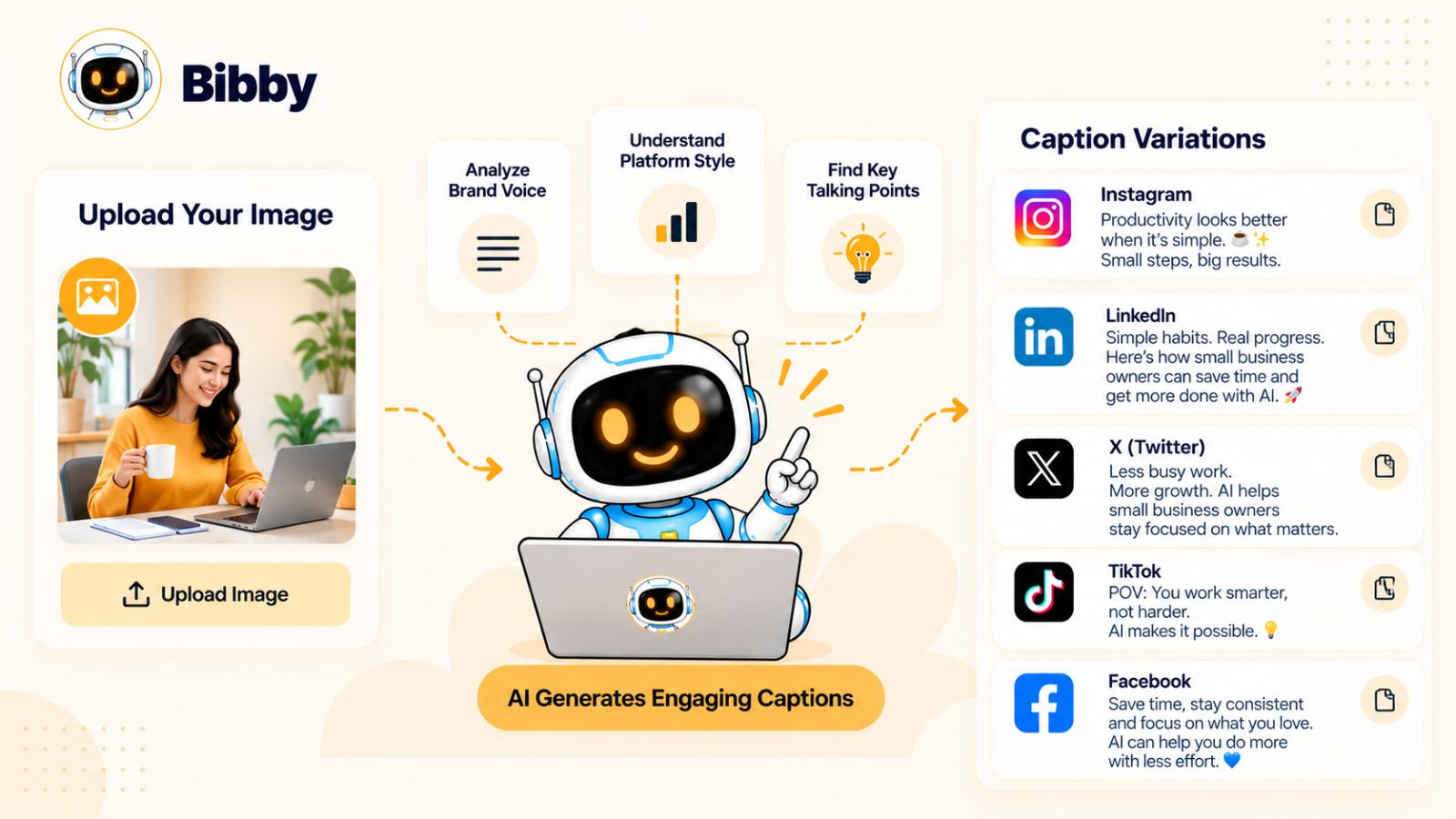
A useful caption needs to understand what you're saying, who you're saying it to, why you're saying it, and what you want the audience to do next.
Give AI the right context
Before generating a caption, consider providing information such as:
- The topic of the post
- Your target audience
- The purpose of the content
- Your brand voice
- The platform
- The desired call to action
- Important product or campaign information
- The visual accompanying the caption
The more relevant context your content engine has, the less likely you are to receive generic copy.
For example, an educational LinkedIn post for business owners should probably be structured differently from a short promotional Instagram post.
The underlying message may be the same, but the execution can change.
Match the caption to the platform
Social media platforms aren't interchangeable.
A LinkedIn caption may need more context and a professional point of view.
Instagram might benefit from a concise hook followed by useful information and a clear CTA.
Facebook content can be more conversational and discussion-oriented.
Short-form video platforms may need a caption that supports the video rather than attempting to explain everything inside the text.
AI can help generate these variations, but you should still define the purpose of each platform in your strategy.
Create multiple caption variations
One advantage of AI is that you're not limited to the first draft.
If a caption feels too formal, ask for a more conversational version.
If it's too long, shorten it.
If the opening isn't compelling enough, generate new hooks.
If the CTA feels too promotional, ask for a softer alternative.
This makes AI useful as a creative partner rather than a one-click replacement for editorial judgment.
Regenerate instead of starting over
This is particularly useful when your social media tool allows you to regenerate captions within the same workflow.
You don't necessarily need to rebuild the post every time the copy misses the mark.
With Bibby, for example, captions can be generated as part of the content workflow and regenerated when you want a different version.
You can also use Bibby's chat interface to interact with your social media workflow conversationally, making it possible to request changes rather than manually rebuilding the content.
That could be useful when you want to move from:
“Create a caption.”
to:
“Make this shorter, more conversational, and end with a question.”
The difference is small in wording but significant in workflow.
Use AI for speed, not blind publishing
Even when AI generates a strong caption, review it before publishing.
Look for:
- Unsupported claims
- Repetitive wording
- Incorrect product information
- Unnatural phrasing
- Unnecessary hashtags
- Generic introductions
- CTAs that don't fit the post
- Language that doesn't sound like your brand
AI can reduce the amount of writing you need to do, but quality control still matters.
Build a repeatable caption workflow
A simple process might look like this:
Visual + Topic → Brand Context → Platform → Caption → Review → Regenerate if Needed → Schedule
Once that workflow is established, caption writing becomes another repeatable component of your AI social media content engine rather than a task you have to start from scratch every day.
And there's an even bigger opportunity.
Instead of creating one caption for one post, you can take a single idea and turn it into multiple pieces of platform-specific content.
Turn One Idea Into Multiple Social Media Posts
Creating social media content from scratch for every platform is one of the fastest ways to turn content marketing into a full-time job.
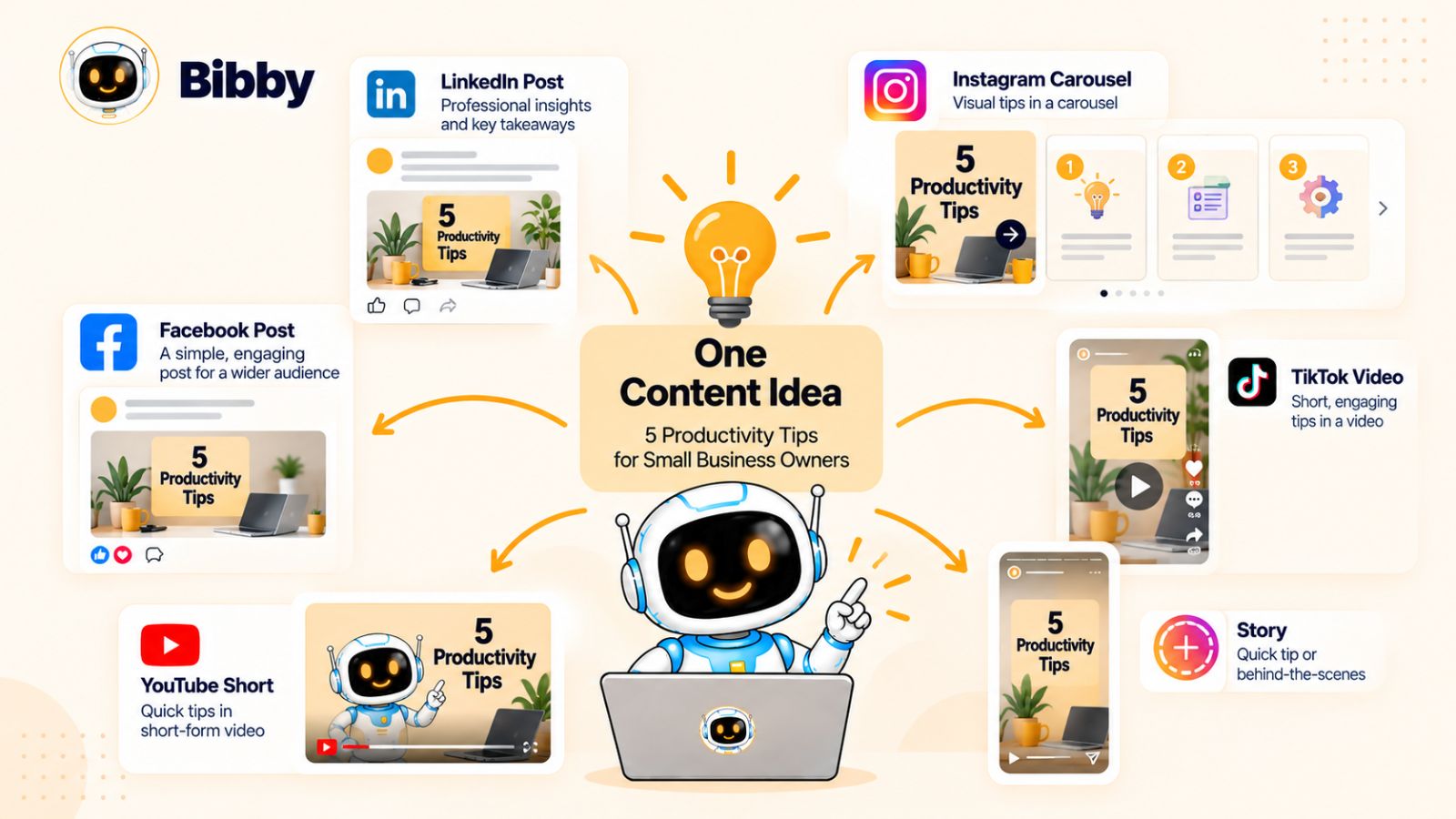
A better approach is to start with one strong idea and build multiple pieces of content around it.
This is the foundation of social media content repurposing.
Instead of asking, “What should I post today?” you can ask:
“How many useful pieces of content can I create from this idea?”
Start with one core idea
Imagine your company has published an article about how small businesses can automate social media marketing.
That single topic contains dozens of potential angles.
You could extract:
- Three common automation mistakes
- Five benefits of scheduling content
- A step-by-step workflow
- A before-and-after comparison
- A checklist
- A customer example
- A short tutorial
- A list of useful tools
The original idea becomes the source material for an entire content series.
Turn the idea into different formats
The next step is to match those angles with different content formats.
For example:
Instagram: Create a carousel explaining five automation mistakes.
LinkedIn: Turn the topic into a practical post about building a scalable social media workflow.
Facebook: Create a discussion-oriented post asking businesses how much time they spend scheduling content manually.
TikTok: Turn one of the key lessons into a short video.
YouTube: Expand the workflow into a longer tutorial or video.
Stories: Break one useful tip into a quick sequence of story slides.
The content doesn't need to be identical across platforms.
Instead, each version should make sense in the environment where it appears.
Repurposing isn't copying and pasting
There's an important distinction between repurposing and simply cross-posting.
Cross-posting means publishing essentially the same content everywhere.
Repurposing means taking the underlying idea and changing the format, angle, length, or presentation to suit the destination.
For example, a detailed LinkedIn post might become a six-slide Instagram carousel. The same concept could become a 30-second TikTok explaining the most important point.
The message is related, but the experience is different.
This approach also reduces the risk of making your social feeds feel repetitive.
Use AI to accelerate the transformation
This is where an AI social media content engine can save substantial time.
Once you've established the original idea, AI can help generate:
- Alternative hooks
- Platform-specific captions
- Carousel outlines
- Short-form video scripts
- Story sequences
- Different calls to action
- Content variations
- Follow-up posts
You still need to review the output, but you're no longer starting from an empty document for every format.
Create a content multiplication system
A useful framework is:
1 core idea → 3–5 angles → multiple formats → multiple platforms
For example:
Core idea: AI can reduce the manual work involved in social media management.
Angle 1: The problem with manual scheduling.
Angle 2: How batch creation works.
Angle 3: How AI can generate captions.
Angle 4: How automated scheduling works.
Angle 5: How to build a repeatable workflow.
Those five angles could then become several images, carousels, videos, stories, and text posts.
Suddenly, one strategic idea can support a much larger content calendar.
Keep the brand message consistent
Repurposing doesn't mean changing the message so much that the campaign loses its identity.
Your brand voice, positioning, and core message should remain consistent.
This is why the earlier steps—strategy and brand-kit creation—matter.
When your AI content engine has access to those foundations, it can generate variations while keeping the overall communication aligned.
Use Bibby to connect creation and scheduling
A tool like Bibby can fit naturally into this workflow because content creation doesn't have to stop at generating the first post.
You can upload or generate the visual, choose your posting style, generate captions, and then schedule the resulting content across your selected platforms.
That means the process can move from:
Idea → Content → Caption → Platform variations → Schedule
without requiring you to manually recreate the entire workflow for every post.
Bibby's chat interface adds another layer to this process. You can interact with the social media workflow conversationally to create posts, regenerate captions, create campaigns, and manage other parts of your content operation.
The result is less about “letting AI post for you” and more about building a system where one good idea can produce a coordinated stream of useful content.
Once you have that content ready, the next challenge is making sure it reaches the right platform at the right time.
Automate Social Media Scheduling Across Multiple Platforms
Creating a month's worth of social media content is useful only if that content actually gets published.
For many businesses, publishing is where the workflow starts to break down. Posts are created in batches, but someone still has to remember which platform gets which post, choose a date, select a time, upload the creative, paste the caption, and repeat the process.
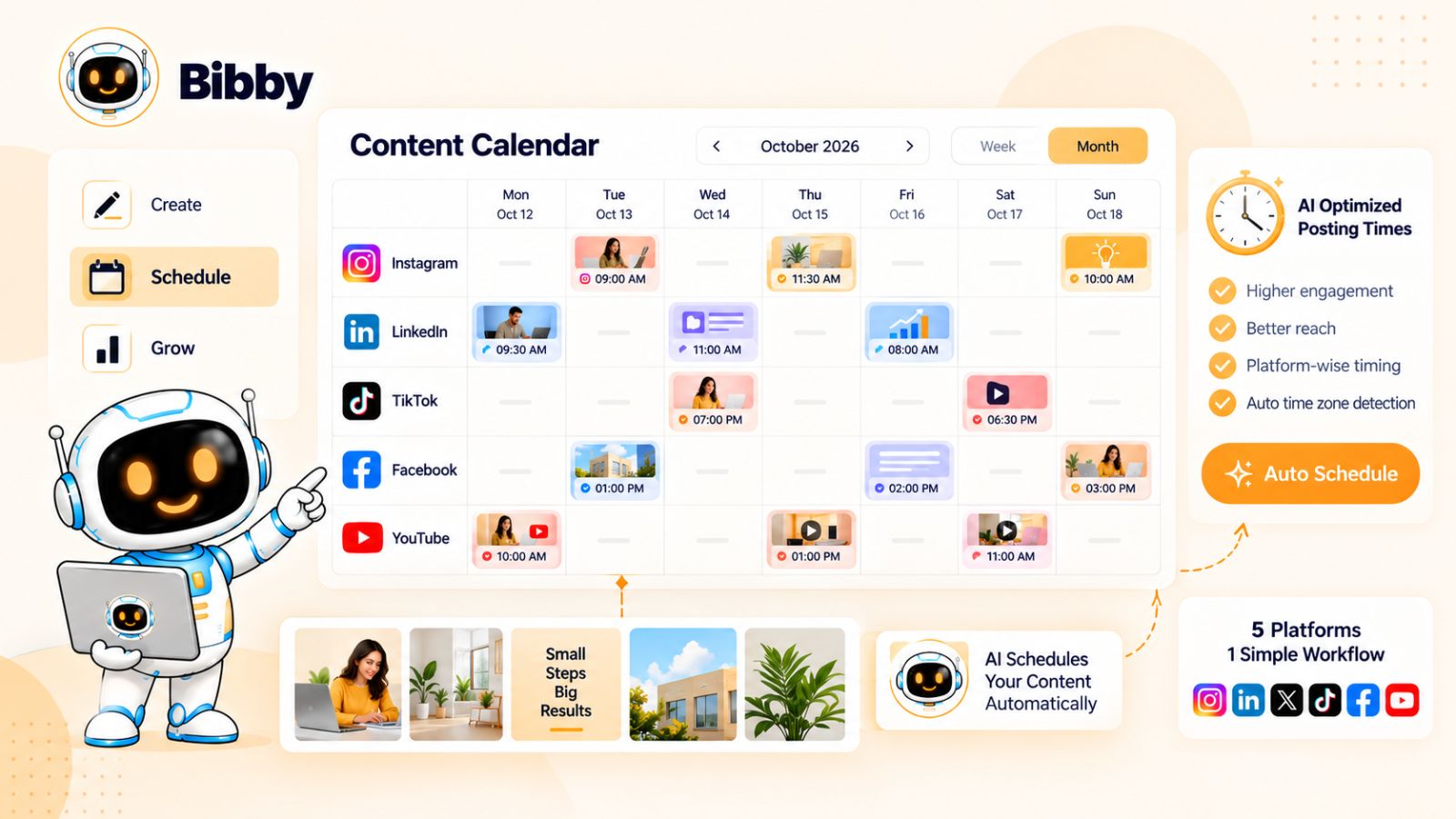
A social media scheduling tool can turn that repetitive process into a centralized workflow.
Instead of treating publishing as a daily task, you can prepare content in advance and let your scheduling system handle the distribution.
Why manual scheduling becomes a bottleneck
Imagine managing five social platforms.
Every new piece of content potentially creates several separate tasks:
- Upload the media.
- Write or paste the caption.
- Select the platform.
- Choose the date.
- Choose the publishing time.
- Check the formatting.
- Schedule the post.
- Repeat for the next platform.
Multiply that by dozens of posts each month and the administrative workload becomes significant.
The problem isn't that any individual task is particularly difficult.
It's that there are so many of them.
Automation is valuable precisely because it removes this repetition.
Build your publishing calendar in batches
Instead of creating and publishing content one post at a time, use a batch workflow.
For example, you might dedicate one session to preparing the next two weeks of content.
During that session, you can:
- Select your content ideas.
- Create or upload visuals.
- Generate captions.
- Review the content.
- Assign platforms.
- Select dates.
- Schedule everything.
Afterward, your content can continue publishing according to the calendar while you focus on other work.
This is one of the simplest ways to turn social media management from a daily interruption into a repeatable process.
Schedule different content for different dates
Not every platform needs to receive the same content at the same moment.
A campaign could be distributed over several days.
For example:
Monday: Educational LinkedIn post
Tuesday: Instagram carousel
Wednesday: TikTok video
Thursday: Facebook post
Friday: YouTube content
The exact schedule should depend on your strategy, audience, and content rather than following a universal formula.
The important principle is that a centralized scheduler gives you control over the sequence.
Use AI-optimized publishing times carefully
Some AI social media scheduling tools can recommend or select publishing times based on available audience or engagement signals.
Bibby, for example, incorporates AI-optimized publishing times into its scheduling workflow.
This can reduce the need to manually guess when every post should go live.
However, optimization should be treated as a tool rather than a guarantee.
Your own audience behavior, content type, geography, industry, and platform can all influence when your audience is active.
The best workflow is therefore to use optimization as a starting point and then learn from your actual results over time.
Manage multiple platforms from one workflow
A major advantage of centralized social media automation is reducing the number of places you need to work.
Instead of switching between individual platforms every time you schedule a campaign, you can manage the publishing workflow from one system.
Bibby is designed around this type of multi-platform workflow, allowing you to schedule content across selected platforms such as Facebook, Instagram, LinkedIn, YouTube, and TikTok.
It can also work with different content formats, including images, carousels, videos, and stories.
That makes the scheduling process part of the same workflow as content creation rather than a completely separate task.
Don't automate without reviewing the content
Automation should reduce repetitive work—not remove quality control.
Before content enters your publishing queue, check:
- Is the caption accurate?
- Does the visual match the message?
- Is the post appropriate for the selected platform?
- Are dates and times correct?
- Are links working?
- Does the content still make sense in context?
- Does the post sound like your brand?
A few minutes of review can prevent mistakes from being automatically distributed across multiple platforms.
Build a publishing system, not just a queue
The real benefit of social media automation isn't simply having posts scheduled.
It's having a predictable system.
Your workflow can become:
Plan → Create → Review → Schedule → Publish → Analyze
Once the content is scheduled, you can stop thinking about every individual publishing task and start focusing on the performance of the overall content system.
And when that system is connected to an AI-powered content calendar, scheduling becomes even more useful: you can plan campaigns, distribute different formats, and maintain a consistent publishing rhythm without manually managing every post.
The next step is turning that publishing system into a social media content calendar that keeps your content organized over weeks and months.
Use AI to Build a Social Media Content Calendar
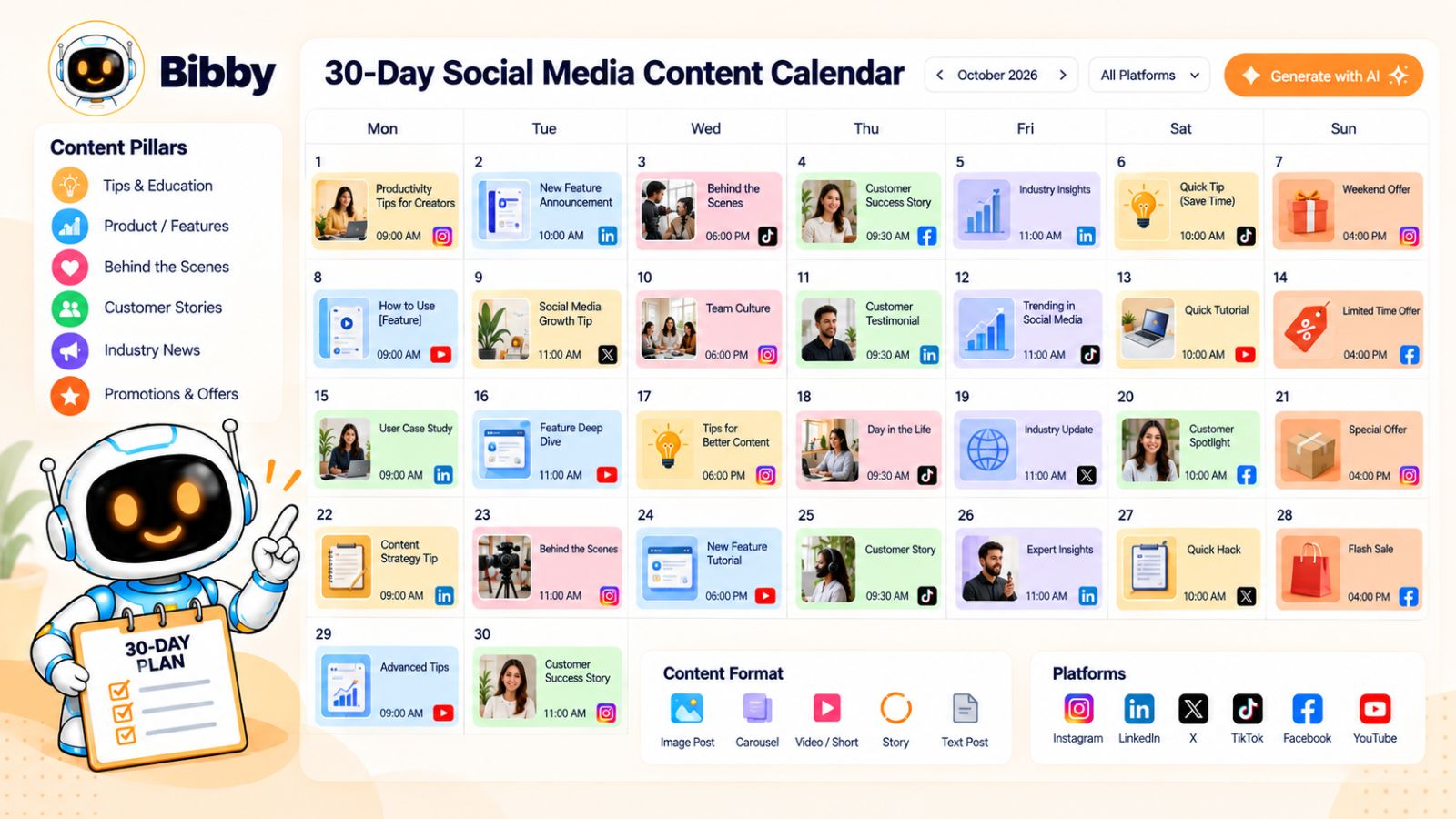
A social media content calendar gives your AI content engine something it can execute against.
Also read: How Social Media Scheduling Tools Increase Engagement →
Without a calendar, even a powerful automation tool can turn into a stream of disconnected posts. With one, you can see the bigger picture: what you're publishing, why you're publishing it, where it will appear, and how different pieces of content fit together.
The goal isn't to fill every available date with a post.
The goal is to build a consistent, intentional publishing system.
Start with campaigns, not individual posts
One of the easiest ways to make a content calendar more strategic is to organize it around campaigns and themes.
Instead of starting with:
“What should we post on Tuesday?”
Start with:
“What do we want our audience to understand or do this month?”
From there, break the larger objective into weekly themes and individual pieces of content.
For example, a social media automation company could structure a month like this:
Week 1: The problem
Why manual social media management consumes so much time.
Week 2: The solution
How AI can automate repetitive content workflows.
Week 3: The workflow
How to create, adapt, and schedule content efficiently.
Week 4: The application
Examples of how businesses can implement the system.
Now individual posts have context.
Create a balanced content mix
A content calendar shouldn't be a list of promotional messages.
Your audience needs different reasons to follow your brand.
A useful mix might include:
Educational content: Teach something useful.
Inspirational content: Share ideas, stories, or perspectives.
Engagement content: Encourage discussion or participation.
Product content: Explain features and use cases.
Proof content: Demonstrate results, experiences, or customer stories.
Promotional content: Give people a clear reason to take action.
The exact mix depends on your business and audience.
The important thing is avoiding a calendar where every post asks the audience to buy something.
Plan content by format
Your calendar should also account for different media formats.
For example:
| Format | Potential use |
|---|---|
| Image | Announcements, tips, quotes |
| Carousel | Educational step-by-step content |
| Video | Tutorials and demonstrations |
| Story | Timely updates and interaction |
| Short-form video | Quick education or entertainment |
| Text post | Insights, opinions, discussions |
This gives your content engine a wider range of creative inputs.
It also prevents your social media presence from becoming visually repetitive.
Use AI to generate calendar ideas
Once your content pillars, audience, campaigns, and brand voice are defined, AI can help fill the calendar with relevant ideas.
Instead of asking:
“Give me 30 social media posts.”
You can provide much more useful context:
“Create a four-week social media content plan for small businesses interested in automating their social media. Focus on education, practical workflows, product use cases, and common mistakes.”
The second approach gives AI a strategic framework.
You can then review the proposed ideas, remove weak ones, add your own expertise, and turn the approved concepts into actual content.
Leave room for real-time content
A content calendar should provide structure without becoming a prison.
Leave some capacity for:
- Industry news
- Customer conversations
- Current events relevant to your business
- Product updates
- Unexpected opportunities
- Community responses
- Trends that genuinely fit your brand
If every publishing slot is locked weeks in advance, you may miss opportunities to participate in timely conversations.
A good system therefore combines planned content with flexible space.
Turn your calendar into an automated publishing system
Once your calendar is approved, the next step is execution.
This is where a tool like Bibby can connect planning and publishing.
You can create or upload your visual content, select a posting style, generate captions, and schedule content across your selected social platforms.
Instead of maintaining one document for your calendar and another workflow for publishing, the content can move directly from creation into the scheduling process.
Bibby's support for images, carousels, videos, and stories also allows a content calendar to contain more than simple text-and-image posts.
Review the calendar before it goes live
Before scheduling a large batch, look at the calendar as a whole.
Ask:
- Are we repeating the same topic too often?
- Is there enough educational content?
- Are promotional posts balanced with useful content?
- Are we using different formats?
- Does each platform receive content appropriate to its audience?
- Do the posts support our current campaigns?
- Does the calendar reflect our brand voice?
A post can look perfectly fine by itself while making the overall calendar feel repetitive.
Reviewing the calendar as a complete system helps catch that problem.
The calendar becomes your operating rhythm
Once this process is established, your social media workflow becomes much easier to repeat.
Strategy → Campaign → Content Calendar → Creation → Scheduling → Publishing → Analysis
You no longer need to wake up every morning and decide what to post.
You have already made the strategic decisions. AI helps accelerate the execution, and automation helps keep the publishing process moving.
The next evolution is making that workflow even simpler: instead of navigating through multiple screens and settings, you can manage more of your social media operation through conversation with an AI assistant.
Manage Your Social Media Through an AI Chat Interface
Traditional social media management tools usually make you work through a dashboard.
You open a calendar, find a content editor, select a platform, upload an image, write a caption, choose a date, and save the post. Then you repeat the process for the next piece of content.
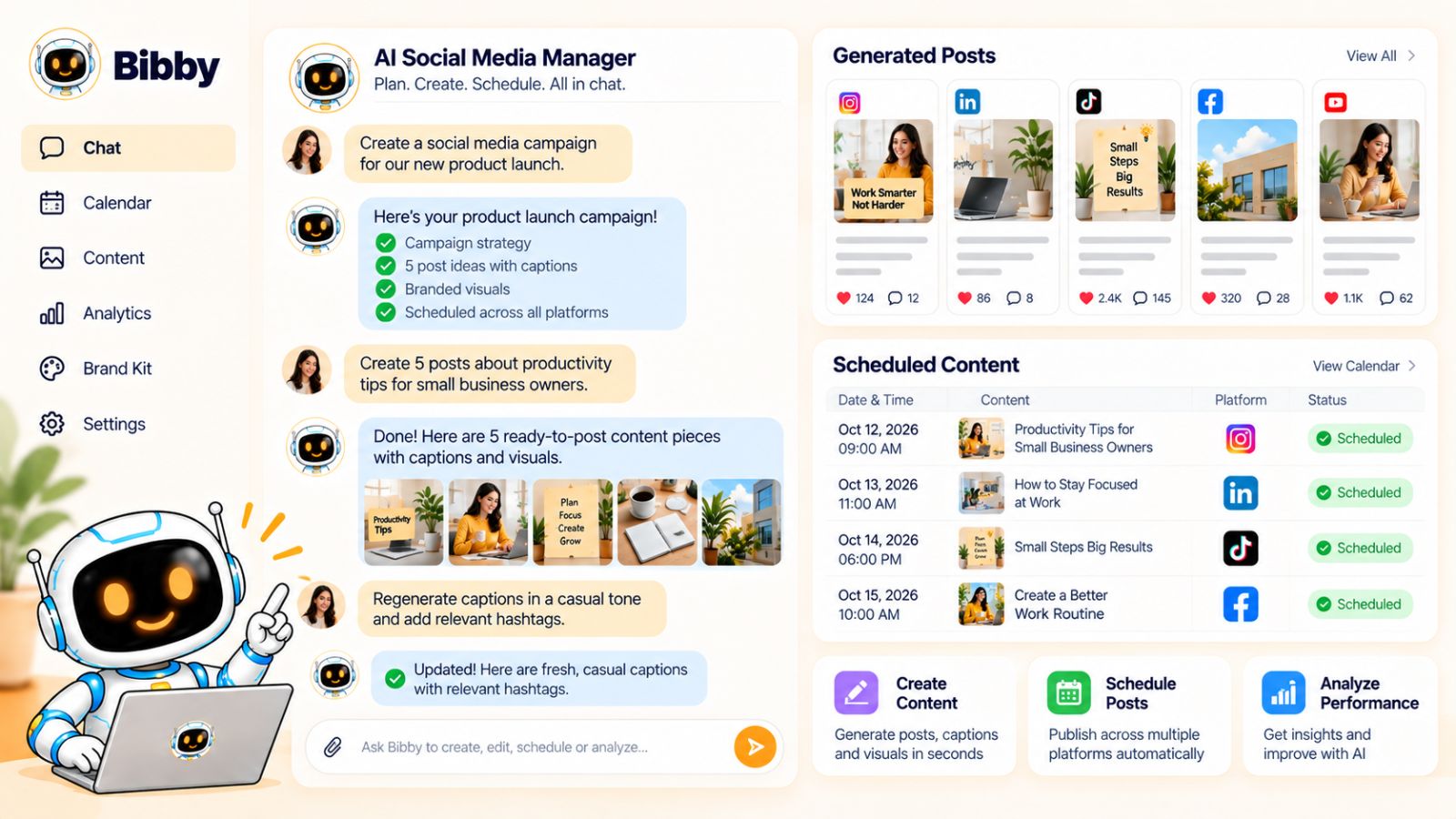
An AI social media manager with a chat interface changes the interaction model.
Instead of navigating through every step manually, you can describe what you want to accomplish and let the AI help translate that instruction into actions.
The difference may seem small, but it can significantly change how you interact with your social media workflow.
From clicking through menus to giving instructions
Imagine you want to create a week's worth of content around a new product feature.
With a traditional workflow, you might need to:
- Create a campaign.
- Add campaign information.
- Create individual posts.
- Upload visuals.
- Write captions.
- Select platforms.
- Choose dates.
- Schedule each post.
With a conversational interface, the starting point can be much simpler.
You could tell the AI what you want:
“Create a one-week campaign promoting our new feature. Focus on education first, then product benefits, and finish with a call to try it.”
The AI can then help turn that instruction into a structured content workflow.
You still need to review the resulting content, but the interface becomes more natural.
What can you manage through chat?
A useful AI social media chat interface should go beyond answering questions.
It should help you do things.
For example, within Bibby's chat interface, you can work on tasks such as:
- Creating a brand kit
- Creating a campaign
- Creating social media posts
- Generating captions
- Regenerating captions
- Managing your content workflow
That makes the chat interface more than a chatbot sitting alongside your social media dashboard.
It becomes another way of interacting with the underlying content system.
Create a brand kit through conversation
Instead of navigating through a settings page and entering every field individually, you can describe your brand requirements conversationally.
For example:
“Create a brand kit for a modern B2B software company. Keep the voice clear, practical, confident, and conversational. Avoid corporate jargon.”
You can then refine the result through follow-up instructions.
This conversational approach is particularly useful when you're still developing your brand guidelines because you can iterate naturally rather than trying to define everything perfectly in a single form.
Create campaigns with natural language
The same principle applies to campaign creation.
You could describe:
- What you're promoting
- Who you're targeting
- The campaign objective
- The platforms you want to use
- The tone you want
- The timeframe
- The type of content you need
Instead of translating that information into multiple dashboard fields yourself, you can communicate the brief directly.
The AI can then help turn the brief into a campaign structure.
Create and modify posts
Once the campaign exists, conversational commands can make content creation more iterative.
For example:
“Create a LinkedIn post from this campaign.”
Then:
“Make the opening more direct.”
Then:
“Create an Instagram version as a carousel.”
Then:
“Regenerate the caption with a more conversational tone.”
This is closer to how people naturally work with a human social media manager: they give feedback, request revisions, and move from one task to the next.
Regenerate instead of rebuilding
One of the practical advantages of conversational AI is that you can refine content without starting from zero.
If a caption doesn't work, ask for another.
If a post is too promotional, request a more educational version.
If the hook is weak, ask for alternatives.
If the content needs to be shorter, tell the AI to shorten it.
This creates a simple feedback loop:
Generate → Review → Give feedback → Regenerate → Approve
The human remains involved in the creative judgment while AI handles much of the iteration.
Think of the chat as a social media command center
The broader opportunity is that conversational AI can become a layer across your entire social media workflow.
Instead of remembering which menu contains which feature, you can focus on the outcome you want.
For example:
“Create five posts for next week from our current campaign.”
“Regenerate the captions for the Instagram posts.”
“Create a new campaign around our upcoming launch.”
“Create a brand kit using these guidelines.”
The exact capabilities depend on the tool, but the underlying concept is powerful: the interface becomes the instruction rather than the dashboard.
Why this matters for an AI content engine
An AI social media content engine is ultimately supposed to reduce friction.
If AI generates captions but you still have to manually move between six different tools to complete the workflow, much of that friction remains.
A conversational interface can connect more of the workflow:
Strategy → Brand → Campaign → Content → Captions → Scheduling
Bibby's chat interface is built around this type of interaction, giving users another way to manage core social media tasks without treating every action as an isolated dashboard operation.
The result is a workflow that can feel less like operating a collection of social media tools and more like working with an AI-powered social media manager.
The next question is therefore practical: what should you look for when choosing an AI social media automation tool?
How to Choose an AI Social Media Automation Tool
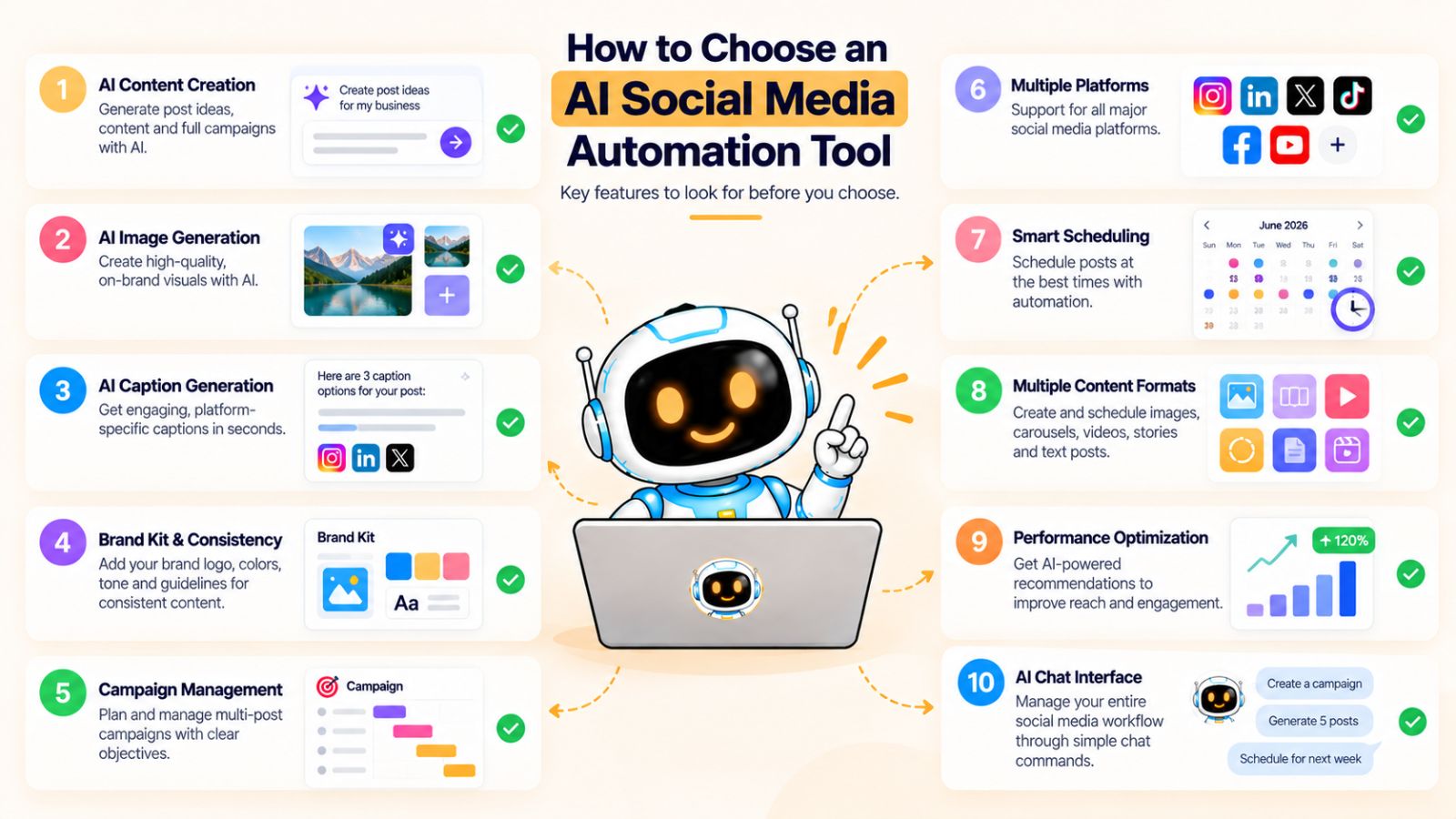
Choosing an AI social media automation tool isn't simply about finding the platform with the longest feature list.
The more important question is whether the tool can support the workflow you actually need—from creating content to getting it published consistently.
A tool that generates excellent captions but doesn't handle scheduling won't solve the entire problem. Likewise, a powerful scheduler may not help much if you're still creating every visual and caption manually.
The goal is to find a system that removes meaningful friction from your workflow.
1. Look at the entire content workflow
Start by mapping your current process.
Ask yourself:
How do we come up with ideas?
How do we create visuals?
How do we write captions?
How do we adapt content for different platforms?
How do we schedule it?
How do we manage campaigns?
How do we review performance?
Then look for tools that can eliminate multiple manual steps rather than solving only one small part of the process.
An integrated workflow can be easier to maintain than constantly moving content between separate AI generators, design tools, caption generators, and scheduling platforms.
2. Check AI content creation capabilities
If AI is a core part of your workflow, examine what the tool can actually create.
Useful capabilities may include:
- AI-assisted content ideas
- AI image generation
- Caption generation
- Caption regeneration
- Content variations
- Platform-specific adaptations
- Support for different media formats
The important question isn't whether a tool says it has “AI.”
Ask what the AI actually does inside your publishing workflow.
3. Look for brand consistency
AI-generated content is only useful if it can represent your business consistently.
Look for support for:
- Brand kits
- Brand voice
- Visual guidelines
- Reusable preferences
- Campaign-specific instructions
The more often you have to remind the AI how your brand works, the less automated the workflow really is.
4. Check platform support
Make sure the tool supports the platforms that matter to your business.
Depending on your strategy, that might include:
- YouTube
- TikTok
But don't choose a tool simply because it supports the largest number of networks.
The relevant question is whether it supports your publishing strategy and the formats you actually plan to use.
5. Look beyond simple post scheduling
Scheduling is important, but modern social media automation can go further.
Check whether the platform supports different content types such as:
- Images
- Carousels
- Videos
- Stories
Also look at whether you can schedule different pieces of content for different dates and whether the system provides AI-assisted or optimized publishing times.
Bibby, for example, combines content creation and scheduling in the same workflow and supports these different content formats across selected platforms.
6. Consider the user interface
A tool can have dozens of features and still be frustrating to use.
Pay attention to how many steps are required to complete common tasks.
Can you quickly create a post?
Can you change a caption?
Can you regenerate content?
Can you schedule a batch?
Can you manage multiple campaigns?
Can you understand what's scheduled without digging through multiple screens?
These questions matter because automation should reduce operational complexity—not add another complicated system to manage.
7. Consider conversational control
An AI chat interface is becoming another useful capability to evaluate.
Instead of only asking whether the tool has a dashboard, ask whether you can interact with the system conversationally.
For example, can you say:
“Create five posts from this campaign.”
or:
“Regenerate the captions and make them more conversational.”
or:
“Create a brand kit for this business.”
Bibby's chat interface is an example of this approach, allowing users to work with tasks such as brand-kit creation, campaigns, posts, and caption regeneration through conversation.
For users who prefer giving instructions rather than navigating through multiple settings, this can make the workflow feel considerably more natural.
8. Evaluate automation versus control
More automation isn't automatically better.
You should still be able to review content before it gets published.
Look for a workflow that gives you the ability to:
Generate → Review → Edit → Approve → Schedule
rather than forcing you to automatically publish everything AI creates.
This is particularly important for businesses where accuracy, brand reputation, and compliance matter.
9. Consider how the tool scales
A tool that works for ten posts a month may not work the same way when you're managing hundreds.
Think about your future workflow.
Will you eventually manage multiple campaigns?
Multiple brands?
Multiple team members?
More platforms?
More content formats?
Choosing an AI social media platform based only on today's workload can create another migration problem later.
A practical evaluation checklist
Before committing to an AI social media automation tool, ask:
| Capability | What to look for |
|---|---|
| AI creation | Can it help create useful content? |
| Visuals | Can you upload or generate images? |
| Captions | Can it generate and regenerate copy? |
| Brand kit | Can it maintain brand consistency? |
| Campaigns | Can you organize related content? |
| Formats | Images, carousels, videos, stories |
| Platforms | Supports the networks you actually use |
| Scheduling | Batch scheduling and future publishing |
| Optimization | AI-assisted publishing times |
| Chat | Can you manage tasks conversationally? |
| Control | Can you review content before publishing? |
The strongest option for your business will depend on which of these capabilities actually removes the most work from your existing process.
The important shift is to stop evaluating AI social media tools as isolated generators or schedulers.
Evaluate them as content engines.
And that leads directly to the next issue: even with a powerful automation platform, there are several mistakes that can make an AI-powered social media strategy ineffective.
Common AI Social Media Automation Mistakes to Avoid
AI can make social media creation and scheduling significantly faster, but automation doesn't automatically make the content better.
In fact, a poorly designed AI workflow can create more problems at a higher speed.
The solution isn't to avoid automation. It's to automate the right parts of the process while keeping strategy, quality control, and human judgment in the loop.
Here are some of the most common mistakes to avoid.
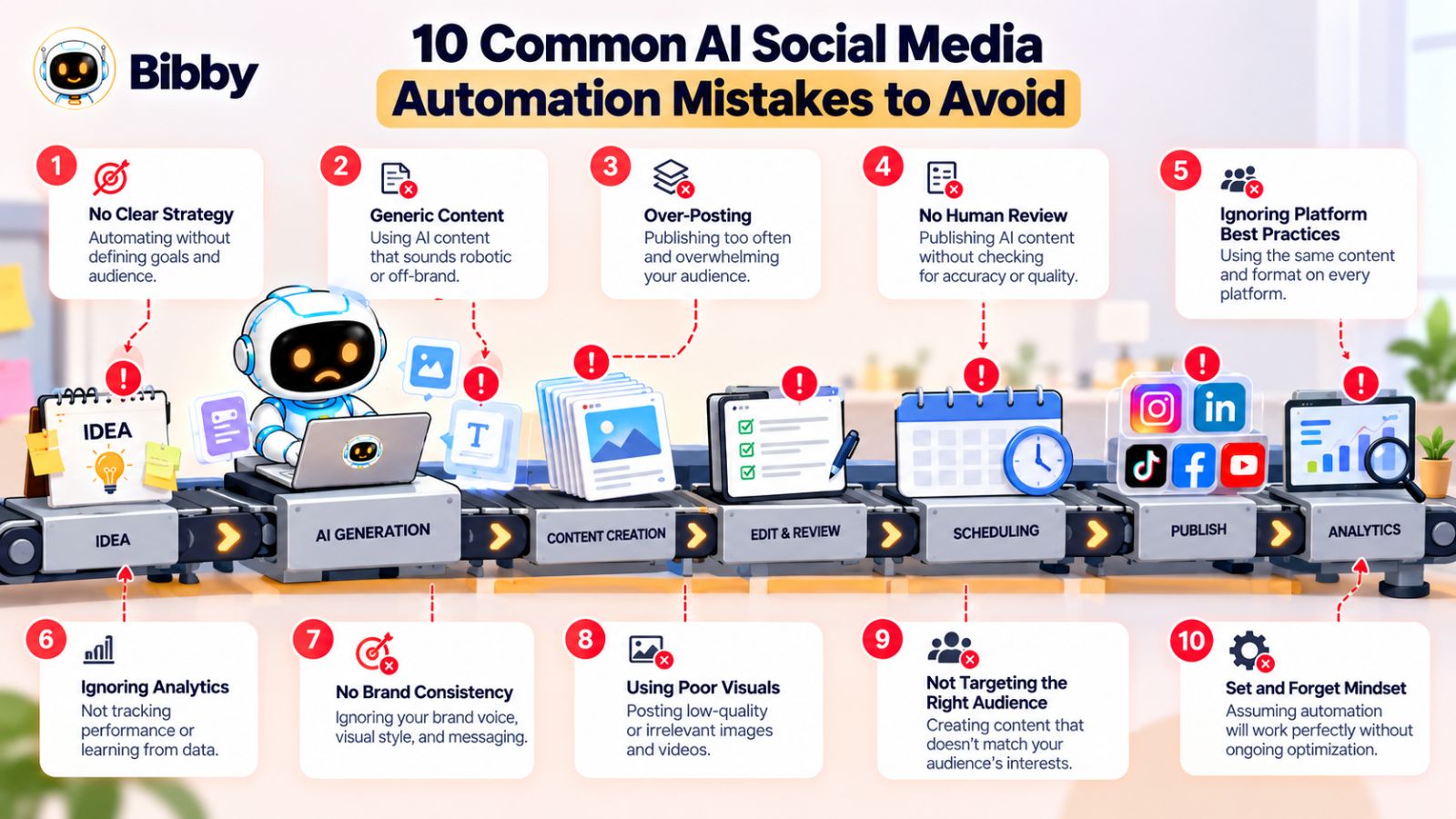
1. Automating before developing a strategy
One of the easiest mistakes is connecting an AI tool and immediately generating dozens of posts.
More content doesn't solve a strategy problem.
Before automating, define your:
- Target audience
- Content pillars
- Brand voice
- Platforms
- Campaign objectives
- Publishing cadence
Otherwise, your automation system may simply produce a larger volume of disconnected content.
Better approach: Create the strategy first, then use AI to execute it more efficiently.
2. Publishing generic AI-generated content
AI can produce grammatically correct content that says very little.
Phrases such as “In today's fast-paced digital world” or generic advice that could apply to any business make it difficult to build a distinctive social presence.
The solution is context.
Give AI information about your audience, product, expertise, examples, opinions, and brand voice.
Most importantly, add your own knowledge.
Your experience is often what makes the content valuable—not the fact that AI generated it.
3. Posting the same content everywhere
Cross-posting can save time, but identical content isn't always appropriate for every platform.
A LinkedIn audience may respond to a detailed professional insight, while TikTok may require a completely different presentation.
The core campaign can remain consistent while the format, hook, caption, and delivery change.
Better approach: Repurpose the idea rather than blindly duplicating the post.
4. Ignoring your brand voice
If every AI-generated caption sounds different, your social presence can quickly become inconsistent.
A brand kit helps prevent this by giving your AI workflow reusable information about your voice, terminology, visual identity, and communication preferences.
Tools such as Bibby can use a brand-kit workflow as part of the larger content creation process.
The goal isn't for every caption to sound identical.
It's for every caption to feel like it came from the same business.
5. Automating too much without review
The fact that AI can create and schedule content doesn't mean every generated post should be published automatically.
AI can make mistakes.
It can misunderstand context, create inaccurate claims, use awkward wording, or produce a visual that doesn't represent the brand properly.
A simple review step can catch many of these problems.
A practical workflow is:
AI generates → Human reviews → AI revises → Human approves → Content is scheduled
That gives you efficiency without surrendering editorial control.
6. Treating every platform the same
Each social platform has its own content conventions.
The mistake is assuming that one format works everywhere.
Instead, think in terms of platform-native adaptations.
One campaign can produce several versions, but each version should be designed for the audience and format of its destination.
7. Publishing too much just because automation makes it easy
Automation removes friction.
That can be useful—but it can also remove the natural limit that used to prevent businesses from publishing low-value content.
Before scheduling another post, ask:
Does this add something useful?
If the answer is no, don't publish it simply because you have an empty slot in the calendar.
Consistency matters, but usefulness matters more.
8. Never learning from performance
Automation shouldn't end when a post is published.
Your results should influence what you create next.
Look for patterns such as:
- Topics that attract meaningful engagement
- Formats that perform well
- Posts that generate conversations
- Content that drives traffic or conversions
- Topics that consistently underperform
Then use those observations to refine your content strategy.
Your AI system should become smarter through better inputs and better decisions—not simply through producing more posts.
9. Using too many disconnected tools
You can easily end up with one tool for images, another for captions, another for content calendars, another for scheduling, and another for analytics.
Each individual tool may be useful, but the workflow between them creates additional work.
An integrated platform can reduce some of that friction by bringing more of the process together.
This is one reason tools such as Bibby can be useful within an AI social media content engine: the workflow can move from visual creation and captions into scheduling without requiring every stage to be managed separately.
10. Forgetting that humans still provide the advantage
The biggest mistake is assuming AI itself is the strategy.
AI can generate content quickly.
Your expertise determines whether that content is actually worth publishing.
The strongest approach combines both:
Human strategy + AI execution + human judgment
That combination allows you to use automation for repetitive work while keeping the unique perspective that makes your brand worth following.
Once these mistakes are avoided, the next step is to put everything together into one repeatable workflow you can use every week.
A Practical AI Social Media Content Engine Workflow
By now, the individual pieces should be clear: strategy, brand guidelines, campaigns, visual creation, captions, repurposing, scheduling, and optimization.
The real value comes from connecting them.
A practical AI social media content engine can be summarized in one repeatable loop:
Plan → Create → Adapt → Caption → Schedule → Publish → Analyze → Improve
The objective isn't to automate every decision. It's to create a system where repetitive work happens efficiently while important strategic decisions remain under your control.
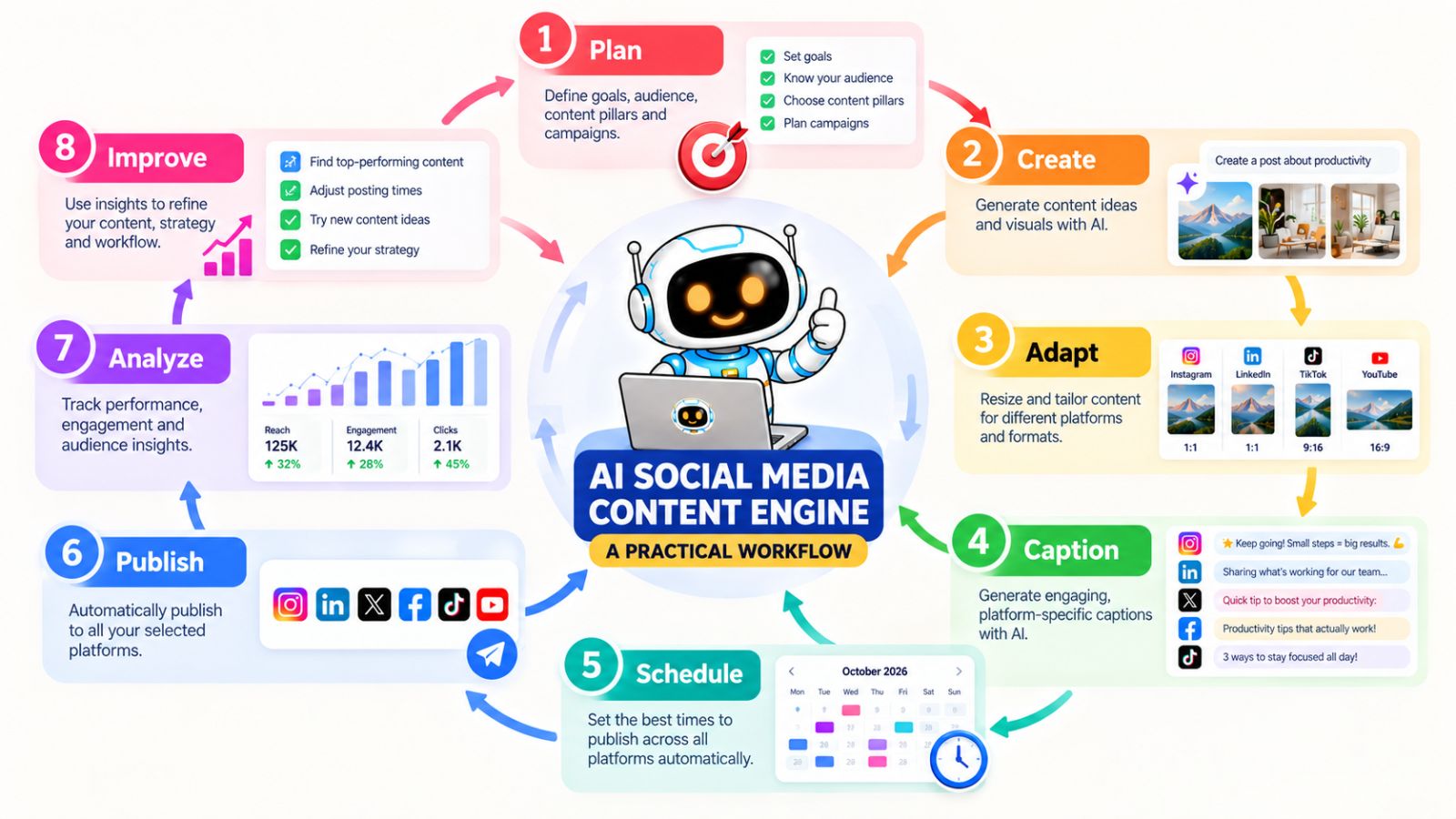
Step 1: Plan your content
Start by deciding what you want to communicate.
Review your:
- Business objectives
- Target audience
- Content pillars
- Current campaigns
- Upcoming launches
- Relevant customer questions
- Recent content performance
Then choose the topics you want to cover.
This is where human expertise should have the strongest influence.
Step 2: Create the visual
For each approved idea, decide whether you already have an appropriate asset.
If you do, upload it.
If you don't, create a new visual using your preferred design process or AI image generation.
The visual should support the idea and follow your brand guidelines.
With a platform such as Bibby, you can work with an uploaded image or generate an image with AI as part of the content workflow.
Step 3: Adapt the content
Decide which platforms should receive the content.
A single idea might become:
- An Instagram carousel
- A LinkedIn post
- A Facebook post
- A TikTok video
- A YouTube Short
- An Instagram Story
The objective is not to maximize the number of posts.
It's to maximize the usefulness of a strong idea by adapting it into formats that make sense.
Step 4: Generate the captions
Now provide the content engine with the context it needs.
Your brand voice, campaign information, platform, audience, and objective can all influence the caption.
Generate the first version, review it, and regenerate it if necessary.
This is much faster than writing every caption manually while still leaving room for editorial judgment.
Step 5: Review everything
Before scheduling, review the complete batch.
Check:
- Accuracy
- Brand voice
- Visual quality
- Platform fit
- Calls to action
- Links
- Dates
- Repetition
Batch review is usually more efficient than repeatedly interrupting your day to review individual posts.
Step 6: Schedule the content
Once everything is approved, schedule the posts across your selected platforms.
Assign different dates and times based on your publishing strategy.
If your scheduling platform provides AI-assisted publishing-time optimization, you can use that as an additional input.
Bibby combines content creation and scheduling in this workflow, allowing you to move from media and captions into scheduled publishing across supported platforms.
Step 7: Let the system publish
Once your content is scheduled, the publishing process no longer needs to be a daily manual task.
You can move your attention back to other work while the content calendar executes.
That doesn't mean social media becomes completely passive.
You should still monitor important conversations, respond to your audience, and remain flexible when circumstances change.
Step 8: Analyze what happened
After the content has been published, look at the results.
Don't focus only on vanity metrics.
Depending on your objective, you might care about:
- Engagement
- Comments
- Shares
- Saves
- Clicks
- Leads
- Conversions
- Video retention
- Audience growth
Look for patterns rather than judging every post independently.
One post might underperform for many reasons. A pattern across several posts is usually more informative.
Step 9: Feed the learning back into the system
This is the step that turns automation into an ongoing engine.
Suppose you discover that educational carousels consistently generate more saves than promotional graphics.
That observation can influence your next content calendar.
Or perhaps short videos generate more reach while detailed LinkedIn posts generate more qualified conversations.
Your next campaign can reflect those differences.
The loop becomes:
Plan → Create → Publish → Measure → Learn → Plan again
Every cycle gives you more information to improve the next one.
A weekly operating rhythm
You can also turn this into a simple weekly routine.
Monday: Review performance and choose topics.
Tuesday: Create visuals and content.
Wednesday: Generate and refine captions.
Thursday: Review the upcoming batch.
Friday: Schedule the next set of posts.
The exact days don't matter.
The principle does: separate content production from daily publishing.
That separation is what makes a social media system scalable.
Where Bibby fits
Bibby can sit across several stages of this workflow.
You can upload or generate visuals, select a posting style, generate captions, regenerate them when needed, and schedule content across selected social platforms.
Its chat interface can also provide a conversational way to manage tasks such as creating a brand kit, building campaigns, creating posts, and refining captions.
That makes it possible to think about your social media operation as one connected workflow rather than a collection of isolated tasks.
The finished system looks like this:
Strategy → Brand → Campaign → Content → Captions → Review → Scheduling → Publishing → Learning
That's the core of an AI-driven social media content engine.
The next question is how to choose the right platform to power that system—and what capabilities actually matter when you're comparing your options.
How Bibby Fits Into an AI Social Media Content Engine
An AI social media content engine works best when the major parts of the workflow connect instead of living in separate tools.
That is where Bibby fits into the picture.
Rather than using one application to generate an image, another to write captions, another to build a content calendar, and another to schedule posts, Bibby brings several of these activities into a single social media workflow.
The result is a simpler path from idea to published content.
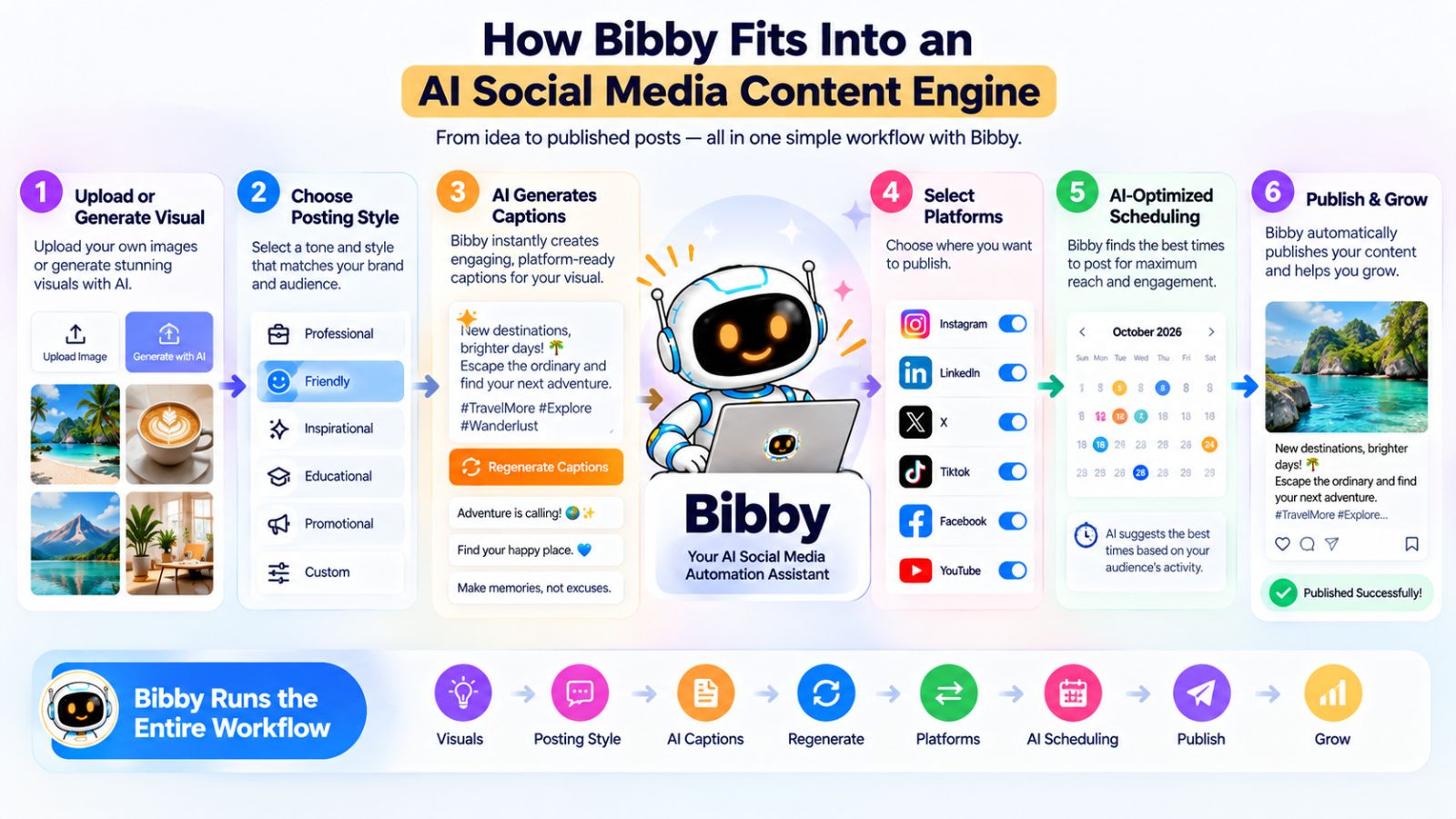
Start with an image
The workflow can begin with content you already have.
Upload your image into Bibby and use it as the starting point for your social post.
Or, when you need a new creative asset, you can generate an image with AI.
This gives you two practical options:
Have an asset? Upload it.
Need an asset? Generate one with AI.
You don't have to completely change your content-production process just because you're introducing automation.
Choose your posting style
Once your visual is ready, you can select the style you want for the post.
This gives the AI additional direction when creating the accompanying content.
Instead of treating every post as an isolated AI generation request, your preferred style becomes part of the workflow.
That matters when you're creating content at scale because consistency becomes much harder to maintain when every post starts with a blank prompt.
Generate captions automatically
Bibby can then generate captions for your content automatically.
Instead of opening a separate AI writing tool, describing the image, explaining the topic, and copying the resulting caption back into your scheduler, the caption-generation step happens within the social media workflow.
If the first version isn't right, you can regenerate the caption.
This makes the process iterative:
Generate → Review → Regenerate → Approve
You get the speed of AI while retaining control over what ultimately gets published.
Schedule content across your social platforms
Once the content is ready, you can schedule it across your selected platforms.
Bibby supports social media workflows for platforms such as:
- YouTube
- TikTok
You can schedule different pieces of content for different dates rather than publishing everything simultaneously.
Bibby also incorporates AI-optimized publishing times, helping automate another decision that would otherwise have to be made manually for each post.
The result is a publishing calendar that can continue running after you've finished creating the content.
Work with more than images
A modern social media strategy requires more than static posts.
Bibby supports different content formats, including:
- Images
- Carousels
- Videos
- Stories
That means your content engine can be built around a mix of formats rather than forcing every idea into the same template.
For example, one campaign could include an educational carousel, a short-form video, several image posts, and supporting stories.
Manage social media through chat
One of Bibby's more distinctive workflow features is its chat interface.
Instead of interacting with social media management entirely through traditional menus, you can use conversation to work with your content system.
Within the chat workflow, you can do things such as:
Create a brand kit
Give Bibby information about your brand and establish the foundation for future content.
Create a campaign
Describe what you're promoting, who you're targeting, and what you want the campaign to accomplish.
Create posts
Turn campaign ideas into individual social media posts.
Regenerate captions
Ask for a different version when the first caption doesn't match your preferred style.
This conversational approach can make social media management feel more like working with an assistant than operating a complex publishing dashboard.
A complete Bibby workflow
Put the pieces together and the workflow can look like this:
1. Create your brand kit
Establish your brand's visual and communication guidelines.
2. Create a campaign
Define the objective, audience, and central message.
3. Create your content
Upload existing media or generate visuals with AI.
4. Choose your posting style
Give the content the appropriate creative direction.
5. Generate captions
Let AI create the accompanying social copy.
6. Review and regenerate
Make changes until the content fits your requirements.
7. Select your platforms
Choose where the content should be published.
8. Schedule your posts
Assign different dates and use AI-optimized publishing times.
9. Publish
Let the scheduled workflow distribute the content.
This is the fundamental idea behind an AI social media content engine: connect creation, intelligence, and distribution into one repeatable system.
Why an integrated workflow matters
The advantage of a connected workflow isn't simply having more features.
It's reducing the number of times you have to move information from one tool to another.
Every handoff creates friction.
You download an image from one tool, upload it to another, copy a caption from somewhere else, adjust the formatting, open a scheduler, select the date, and repeat.
An integrated system can eliminate some of those unnecessary steps.
For businesses and creators producing content consistently, those small efficiencies can add up quickly.
Bibby's approach is to bring content creation, AI assistance, caption generation, scheduling, multiple formats, and conversational social media management into a unified workflow.
That doesn't eliminate the need for strategy or human review.
It simply means more of the repetitive execution can happen inside the same system.
And once that system is running, the final step is creating a practical 30-day plan you can use to turn the framework into an actual publishing habit.
Your 30-Day Plan for Building an AI Social Media Content Engine
Knowing how an AI social media content engine works is one thing. Building one that you can actually use every week is another.
The easiest way to make the transition is to implement the system gradually rather than trying to automate your entire social media operation overnight.
Use the next 30 days to build the foundation, create your first content system, automate the repetitive work, and then improve it using real-world feedback.
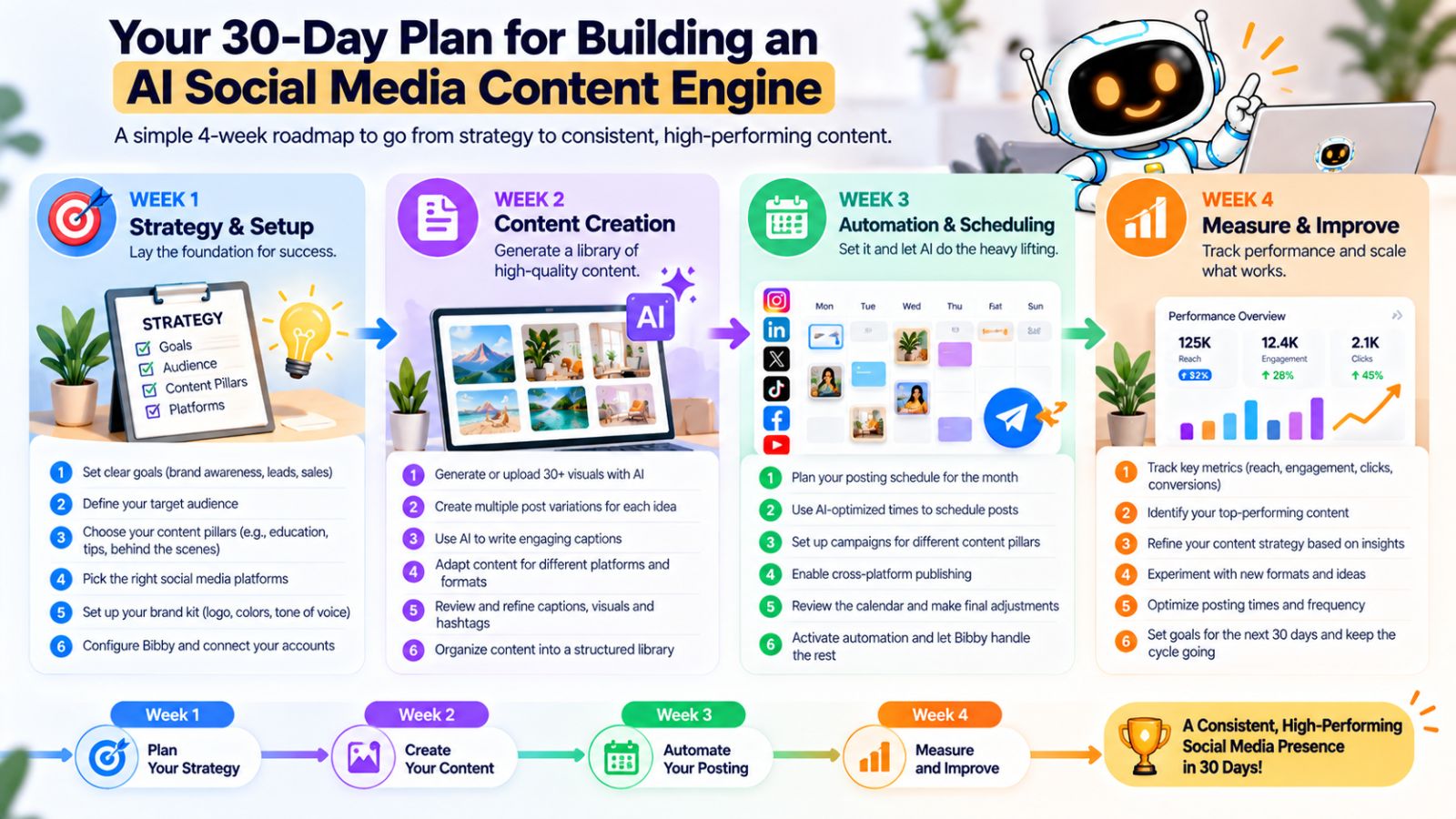
Week 1: Build the foundation
The first week is about strategy rather than automation.
Start by defining:
- Your target audience
- Your primary social platforms
- Your content pillars
- Your brand voice
- Your visual identity
- Your publishing frequency
- Your current business priorities
Then create your brand kit.
If you're using Bibby, this is also a good time to set up your brand information so your future content has a consistent foundation.
By the end of Week 1, you should know who you're creating for, what you want to talk about, and how your brand should look and sound.
Week 2: Build your content system
Now start turning your strategy into actual content.
Choose several topics from your content pillars and organize them into one or more campaigns.
For each campaign, define:
- Objective
- Audience
- Central message
- Content angles
- Platforms
- Formats
- Calls to action
Then create your first batch of visuals.
Use existing assets where they make sense and AI-generated visuals where they provide value.
Don't try to create an enormous content library yet.
Focus on building a repeatable process.
Week 3: Add AI and automation
Now connect the execution layer.
For each piece of content:
Create → Select the posting style → Generate the caption → Review → Adapt → Schedule
Use AI to accelerate the parts that are repetitive.
For example, you can use Bibby to upload or generate visuals, generate captions, create content, and schedule posts across your selected social platforms.
If you're managing several networks, start scheduling content in batches rather than publishing manually every day.
This is also a good time to experiment with the conversational workflow.
Instead of navigating through every feature manually, try using Bibby's chat interface to create a campaign, create posts, build a brand kit, or regenerate captions.
The objective isn't to automate everything immediately.
It's to discover which repetitive tasks are easiest to hand over to the system.
Week 4: Measure and improve
By the fourth week, you should have enough published content to start identifying patterns.
Review the performance of your content and ask:
- Which topics generated the most meaningful engagement?
- Which formats performed well?
- Which posts generated clicks or leads?
- Which hooks attracted attention?
- Which content received little response?
- Which platforms appear most valuable for your goals?
Don't treat the first month as a final verdict on your strategy.
Treat it as data.
Use what you learn to improve your next campaign.
Create your repeatable weekly workflow
After the first 30 days, you should be able to settle into a repeatable operating rhythm.
A simple version looks like this:
Monday: Review performance and choose topics.
Tuesday: Create campaign content and visuals.
Wednesday: Generate and refine captions.
Thursday: Review the content batch.
Friday: Schedule upcoming posts.
Then let the publishing system handle the repetitive distribution while you continue monitoring conversations and responding to your audience.
Keep improving the engine
Your first version doesn't need to be perfect.
Over time, you can improve:
- Brand instructions
- Content pillars
- Campaign structures
- AI prompts
- Visual styles
- Caption preferences
- Platform selection
- Publishing schedules
- Content formats
The goal is to make every cycle slightly more efficient and useful than the previous one.
Eventually, your social media workflow should stop feeling like a collection of tasks you have to remember and start functioning like a system.
Plan → Create → Adapt → Schedule → Publish → Learn → Repeat
That's the real promise of an AI-driven social media content engine: not simply creating more posts, but creating a repeatable system that makes consistent social media publishing easier to manage.
Final thoughts
Building an AI-driven social media content engine isn't about handing your entire social media strategy over to AI. It's about creating a system where strategy stays intentional while repetitive execution becomes faster and easier.
The three biggest takeaways are simple: start with a clear strategy, connect creation with scheduling, and continuously improve the system using real audience feedback. When those pieces work together, you can turn individual ideas into campaigns, transform them into multiple formats, and distribute them consistently across the platforms that matter to your business.
Tools like Bibby can bring much of that workflow together—from uploading or generating visuals and creating captions to scheduling images, carousels, videos, and stories across multiple platforms. Its chat interface can also make tasks such as creating brand kits, campaigns, posts, and caption variations more conversational.
The natural next step is to turn this framework into your own 30-day social media content calendar—with content pillars, post ideas, formats, platforms, captions, and publishing dates already mapped out.