Instagram is no longer just a feed where people discover content by scrolling; it is also a search engine where users actively look for answers, products, creators, ideas, and recommendations.
If you want your content to appear when people search for topics related to your niche, you need more than a handful of hashtags—you need to understand how Instagram interprets search queries and how different parts of your content signal relevance. The right Instagram search query optimization techniques can help Instagram understand what your content is about and connect it with people actively searching for that information.
Let’s start by understanding exactly what Instagram search query optimization means and why it matters.
What Is Instagram Search Query Optimization?
Instagram search query optimization is the process of making your profile and content easier for Instagram to understand, match, and surface when someone searches for a specific topic, question, product, service, or type of content.
Think of it as optimizing for what people type into Instagram, not simply optimizing for what you want to talk about.
For example, a fitness creator might publish a Reel about exercise but get very different search opportunities depending on the topic. “Workout” is broad and ambiguous, while searches such as “beginner home workout,” “15 minute ab workout,” or “workout for lower back strength” communicate much clearer intent. Creating content that directly addresses those specific searches gives Instagram stronger contextual information about what the content is relevant to.
Instagram SEO vs. Traditional SEO
The underlying idea is similar to search engine optimization on Google: understand what people are looking for, create useful content that satisfies that intent, and make the subject of the content clear.
The difference is that Instagram has a much more visual and social environment.
On Google, a search result might be a webpage containing thousands of words. On Instagram, the relevant result could be a Reel, carousel, profile, post, or hashtag. Instagram therefore has to understand signals across multiple parts of an account and its content.
That means optimizing one keyword in one place is rarely enough.
Your username, profile name, bio, captions, hashtags, visual content, on-screen text, and overall account topic can all contribute to helping Instagram understand what you publish about. The goal isn't to force the same phrase into every field. The goal is to create a consistent set of signals around the topics you want to be discovered for.
Instagram Search Is About Intent, Not Just Keywords
One of the biggest mistakes creators make is treating Instagram search optimization as a keyword-placement exercise.
Suppose you want to reach people interested in social media marketing. You could repeatedly use the phrase “social media marketing” in your captions and hashtags. But that doesn't necessarily make your content the best answer for someone searching for a specific problem.
A better approach is to identify the intent behind the search.
Someone searching for “how to schedule Instagram posts” wants instructions. Someone searching for “Instagram content ideas” wants inspiration. Someone searching for “social media scheduling tool” may be evaluating software.
Those searches are related, but they represent different needs. Your content should match the specific need rather than trying to optimize every post for the broadest possible keyword.
This is where search query optimization becomes more powerful than simply adding keywords.
Search Queries Give You Content Ideas, Too
There is another important advantage to thinking in terms of search queries: they can help you decide what content to create in the first place.
Instead of starting with:
“What should I post today?”
You can start with:
“What is my audience trying to find out?”
That shift can produce much more focused content.
For example, a social media manager could build a group of related Instagram content around searches such as:
- How to create an Instagram content calendar
- How often should you post on Instagram?
- How to write Instagram captions
- How to get more saves on Instagram
- How to schedule Instagram posts
- How to optimize Instagram Reels
Each query represents a potential piece of content with a defined purpose. Together, these pieces can establish a stronger topical identity for the account.
Don't Confuse Search Optimization With Hashtag Stuffing
Hashtags still have a role in Instagram discovery, but they shouldn't be treated as the entire search strategy.
Adding dozens of loosely related hashtags to a post doesn't automatically make the content relevant to a search query. In fact, irrelevant optimization can make your content less coherent because the signals surrounding the post don't consistently describe the same subject.
A better strategy is to make the actual content useful for the searcher, then reinforce that topic naturally through the caption, visual context, profile information, and relevant hashtags where appropriate.
In other words, don't optimize a post around hashtags. Optimize the post around a search intent, and use hashtags as one supporting signal.
The Goal: Make Your Topic Obvious
The simplest way to think about Instagram search query optimization is this:
Make it extremely easy for Instagram—and the person searching—to understand what your content is about.
When your profile consistently covers a defined subject, your captions provide meaningful context, your visual content reinforces the topic, and your posts answer specific questions people care about, you're building a much stronger foundation for search discovery.
The next step is understanding how Instagram actually processes those signals when deciding which results to show for a search.
How Instagram Search Works
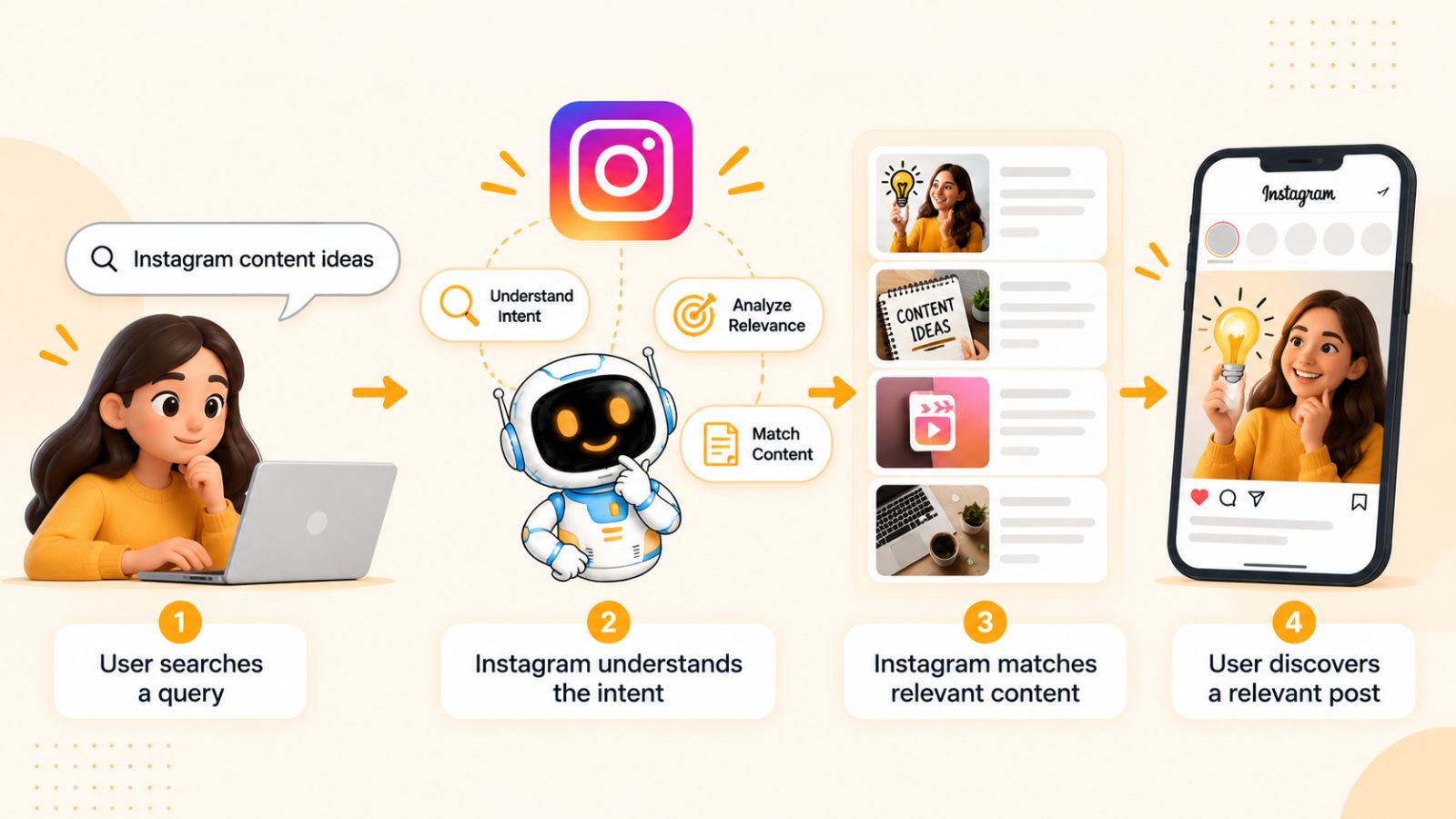
When someone searches on Instagram, the platform has to determine what that person is looking for and then identify accounts, posts, Reels, and other content that are relevant to the query.
That makes Instagram search fundamentally different from simply showing the most popular content. A post can have thousands of likes and still be a poor result for a particular search if its subject doesn't match the user's intent.
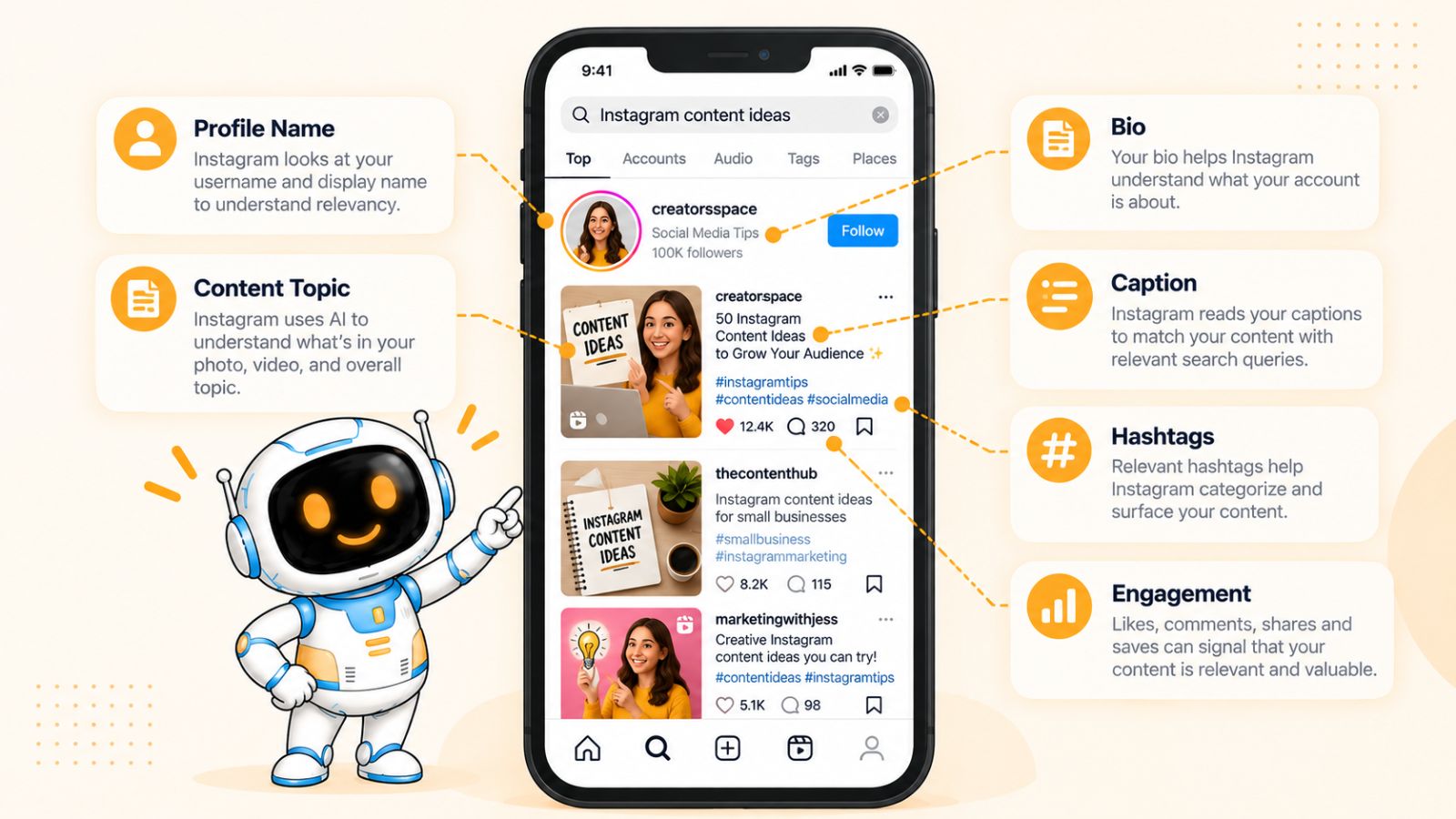
Instagram has publicly described search as a system that primarily tries to match a person's query with relevant usernames, bios, captions, hashtags, and other information associated with accounts and content. It also considers signals such as the activity of the person searching and the popularity of the results.
1. Instagram Starts With the Search Query
The search itself is the starting point.
Imagine someone searches for:
“easy vegetarian dinner recipes”
Instagram has to determine which content and accounts are actually related to that phrase. An account focused on vegetarian recipes is likely to be more relevant than a general lifestyle account that happened to publish one vegetarian dinner post.
This is why understanding the wording of your audience matters.
A creator might think their audience wants “healthy food content,” while their audience may actually be searching for much more specific things such as:
- high protein vegetarian recipes
- easy vegetarian meal prep
- vegetarian dinner ideas
- quick healthy lunch recipes
- vegetarian recipes for beginners
These aren't simply different keywords. They're different expressions of user intent.
2. Instagram Looks at Textual Signals
Instagram needs information that helps it understand what your account and content are about.
That information can come from several places, including your:
- Username
- Profile name
- Bio
- Captions
- Hashtags
- Content context
This creates an important optimization principle: don't rely on a single keyword placement.
If your profile says you teach photography, your captions consistently discuss photography, and your posts demonstrate photography techniques, Instagram receives several reinforcing signals about your topical focus.
On the other hand, if your profile says “digital marketing,” one post is about fitness, another is about travel, and another is about recipes, the account provides a much less consistent topical signal.
3. Instagram Considers the Searcher's Activity
Search results aren't necessarily identical for every person.
Instagram can take the searcher's activity and previous interactions into account when determining which results are most useful. Someone who frequently interacts with photography content may see different results from someone whose activity is primarily focused on fashion or fitness.
This means there isn't necessarily one permanent ranking position for your content in Instagram Search.
Instead of obsessing over whether your post is “number one,” think about whether Instagram has enough contextual information to understand which searches your content is relevant to.
4. Popularity Can Influence Which Results Appear
Relevance isn't the only consideration.
Instagram has also explained that the popularity of accounts or posts can influence search results. Signals such as engagement and how widely an account or piece of content is interacted with can help determine which relevant results are surfaced.
This creates an important distinction:
Search optimization can help Instagram understand your content, but it doesn't replace the need to create content people actually want to consume.
If two pieces of content are similarly relevant to a query, the one generating stronger positive signals may have an advantage.
That's why Instagram search optimization and content quality should be treated as complementary strategies rather than separate activities.
5. Search Ranking Is About Relevance Before Tricks
There is no reliable shortcut where adding a particular number of keywords or hashtags guarantees a top position.
The stronger strategy is to make the relationship between the query and your content obvious.
For example, suppose someone searches:
“how to edit Instagram Reels”
A strong piece of content might have:
- A Reel demonstrating the editing process
- On-screen text clearly identifying the topic
- A caption explaining the process
- A profile that consistently covers Instagram content creation
- Relevant terminology throughout the content
- A clear answer to the searcher's question
Every element contributes to the overall context.
Compare that with a generic Reel titled “You need to try this!” with a caption containing unrelated trending hashtags. Even if the second Reel receives high engagement, Instagram has less explicit information connecting it to the search query.
6. Think in Terms of a Search-to-Content Match
The most useful mental model is to imagine a chain:
Search query → user intent → relevant topic → useful content → supporting signals → engagement
Your job as a creator is to make that chain as strong as possible.
Start with what the person wants. Create something that genuinely satisfies that need. Then make the topic clear through the language and context surrounding the content.
This approach is considerably more sustainable than trying to reverse-engineer individual ranking tricks.
What This Means for Creators
Understanding Instagram Search changes how you approach content creation.
Instead of asking only:
“How can I get more views?”
you can also ask:
“What searches should this piece of content be relevant for?”
That question leads to better topic selection, clearer content, stronger captions, and a more focused account.
And once you understand the signals Instagram can use to interpret relevance, you can start optimizing each one deliberately.
The next section breaks down the Instagram search ranking factors that matter most and how they fit together.
The Instagram Search Ranking Factors That Matter Most
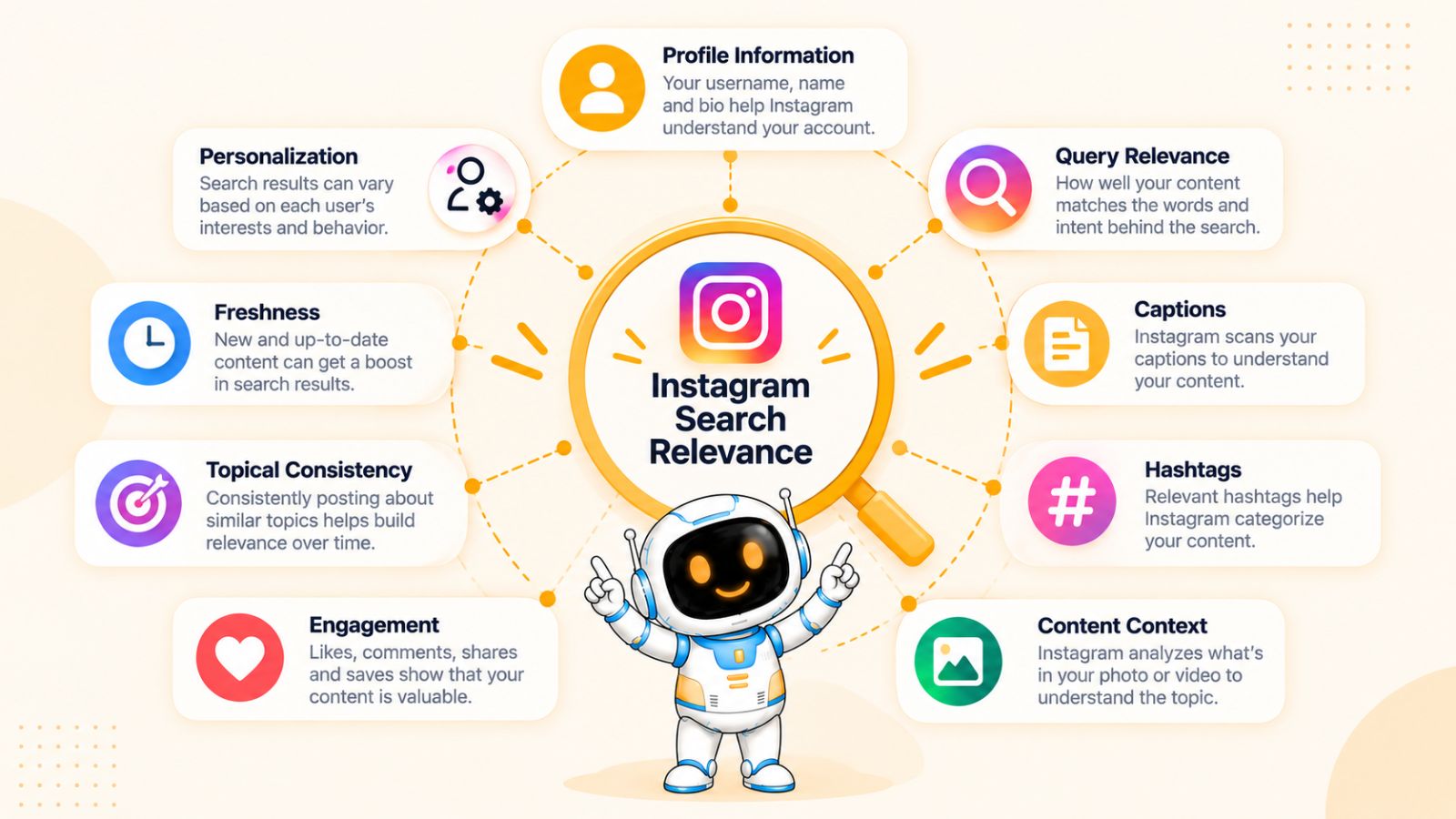
There is no single Instagram SEO factor that guarantees your content will appear at the top of Search. Instagram evaluates multiple signals to determine which results are relevant and useful for a particular query.
For creators, the important distinction is between relevance signals and performance signals.
Relevance signals help Instagram understand what your content is about. Performance and popularity signals help determine which relevant content is worth surfacing. Your optimization strategy needs both.
Here are the factors worth paying the most attention to.
1. Search-Query Relevance
The most fundamental signal is whether your content actually relates to the search.
If someone searches for “Instagram carousel ideas”, content specifically about creating Instagram carousels has a much clearer relationship to the query than a generic social media post.
This sounds obvious, but it has major implications for content strategy.
Don't start by choosing a keyword and then forcing it into unrelated content. Start with the searcher's problem and create content that genuinely addresses it.
The closer the connection between the query, the topic, and the content, the stronger your relevance foundation.
2. Username and Profile Name
Your profile itself can help communicate what your account is about.
For businesses and creators who want to be discovered for a particular category, the name field can be especially useful because it gives Instagram additional contextual information about the account.
For example, a profile called:
Sarah | Nutritionist
communicates considerably more topical information than simply:
Sarah Smith
If your brand already has strong recognition, you don't necessarily need to turn your username into a string of keywords. Instead, look for natural opportunities to make your area of expertise clear while keeping the profile understandable to humans.
3. Bio Keywords
Your bio gives Instagram and potential followers another concise description of your account.
A useful bio should answer:
Who are you, what do you cover, and who is your content for?
For example:
Helping small businesses create better Instagram content and grow through organic social media.
This naturally establishes several related concepts without turning the bio into keyword stuffing.
The goal is not to repeat a phrase ten times. It's to make your account's topical identity unmistakable.
4. Caption Context
Captions provide substantial context about individual posts.
A caption that naturally explains a topic gives Instagram more information than a caption consisting of emojis, generic statements, and unrelated hashtags.
Suppose your post is about Instagram content calendars.
Instead of:
“Save this! 🔥🔥”
you could explain what a content calendar is, why creators use one, and what the post teaches.
That doesn't mean every caption needs to become an essay. It means the language surrounding your content should accurately describe what the content actually provides.
5. Hashtags
Hashtags can reinforce the topic of your content, but they should support your optimization strategy rather than replace it.
For a post about Instagram content calendars, relevant hashtags might reinforce terms around content planning, Instagram marketing, or social media strategy.
The important word is relevant.
Adding unrelated high-volume hashtags simply because they're popular doesn't create a better search result. Your hashtag selection should describe the actual subject of the post and align with the audience you want to reach.
6. On-Screen Text and Content Context
Instagram is increasingly capable of understanding more than just the written caption surrounding a post.
For visual content such as Reels and carousels, the actual content communicates important context to both the platform and the person viewing it.
That makes clear titles and on-screen explanations useful from a discoverability perspective.
For example, instead of putting:
“3 Things You Need to Know”
on a Reel, a more descriptive title might be:
“3 Instagram Caption Mistakes Killing Your Reach”
The second version immediately establishes the subject.
It also helps users decide whether the content matches what they were looking for.
7. Engagement and Popularity
Relevance gets your content into consideration; performance can help determine whether it deserves greater visibility.
Instagram has stated that popularity signals can influence search results. Engagement is therefore important, but it should not be interpreted as “get as many likes as possible.”
Different content types can generate different forms of useful interaction.
A tutorial might generate saves.
A controversial opinion might generate comments.
A useful carousel might generate shares.
A product demonstration might generate profile visits.
The better question is:
Does this content create the type of response that naturally follows from the user's intent?
8. Account-Level Topical Consistency
One of the most overlooked Instagram SEO opportunities is consistency.
If your account repeatedly creates useful content around one subject, it becomes easier to establish what the account represents.
For example, an account consistently covering:
- Instagram marketing
- content strategy
- social media analytics
- Instagram Reels
- social media workflows
has a much clearer topical identity than an account that jumps between unrelated subjects every day.
This doesn't mean you can never experiment. It means your experiments should generally make sense within the broader audience and expertise of the account.
9. Freshness and Recency
Instagram is a fast-moving platform. What is useful and relevant can change quickly.
For some queries, newer content may be particularly valuable because the underlying information, trends, features, or recommendations change over time.
This is especially important for topics such as:
- Instagram features
- social media trends
- platform updates
- current strategies
- tools and workflows
Don't assume that publishing something once means you've permanently optimized the topic.
When information changes, update your approach and create new content that reflects the current reality.
10. The Searcher's Context
Finally, remember that Instagram Search is personalized.
Two people searching for the same phrase may not necessarily receive exactly the same results because Instagram can consider information about the searcher and their activity.
This means your objective shouldn't be to manipulate one fixed ranking position.
Instead, aim to become highly relevant to a clearly defined audience and set of search intents.
That's a much more useful long-term goal.
How These Ranking Factors Work Together
The biggest mistake is looking at these factors individually.
Imagine you create a Reel targeting the query “how to create an Instagram content calendar.”
You could reinforce that topic through your profile positioning, Reel title, spoken explanation, on-screen text, caption, and relevant hashtags. Then you could make the actual tutorial genuinely useful enough that people save and share it.
Now Instagram has multiple consistent signals pointing toward the same topic:
Profile topic → content topic → search query → user intent → engagement
That's considerably stronger than simply putting “Instagram content calendar” into a hashtag field.
The practical lesson is simple: optimize the entire content experience, not one isolated field.
With those ranking factors in mind, we can now move from theory to the specific Instagram search query optimization techniques you can apply to your own content.
Instagram Search Query Optimization Techniques That Actually Work
Knowing how Instagram Search works is useful, but the real advantage comes from turning that knowledge into a repeatable optimization process.
The most effective Instagram search query optimization techniques don't involve stuffing keywords into every available field. They involve creating a strong connection between what someone searches, what they expect to find, and what your content actually delivers.
Here are the techniques worth building into your Instagram strategy.
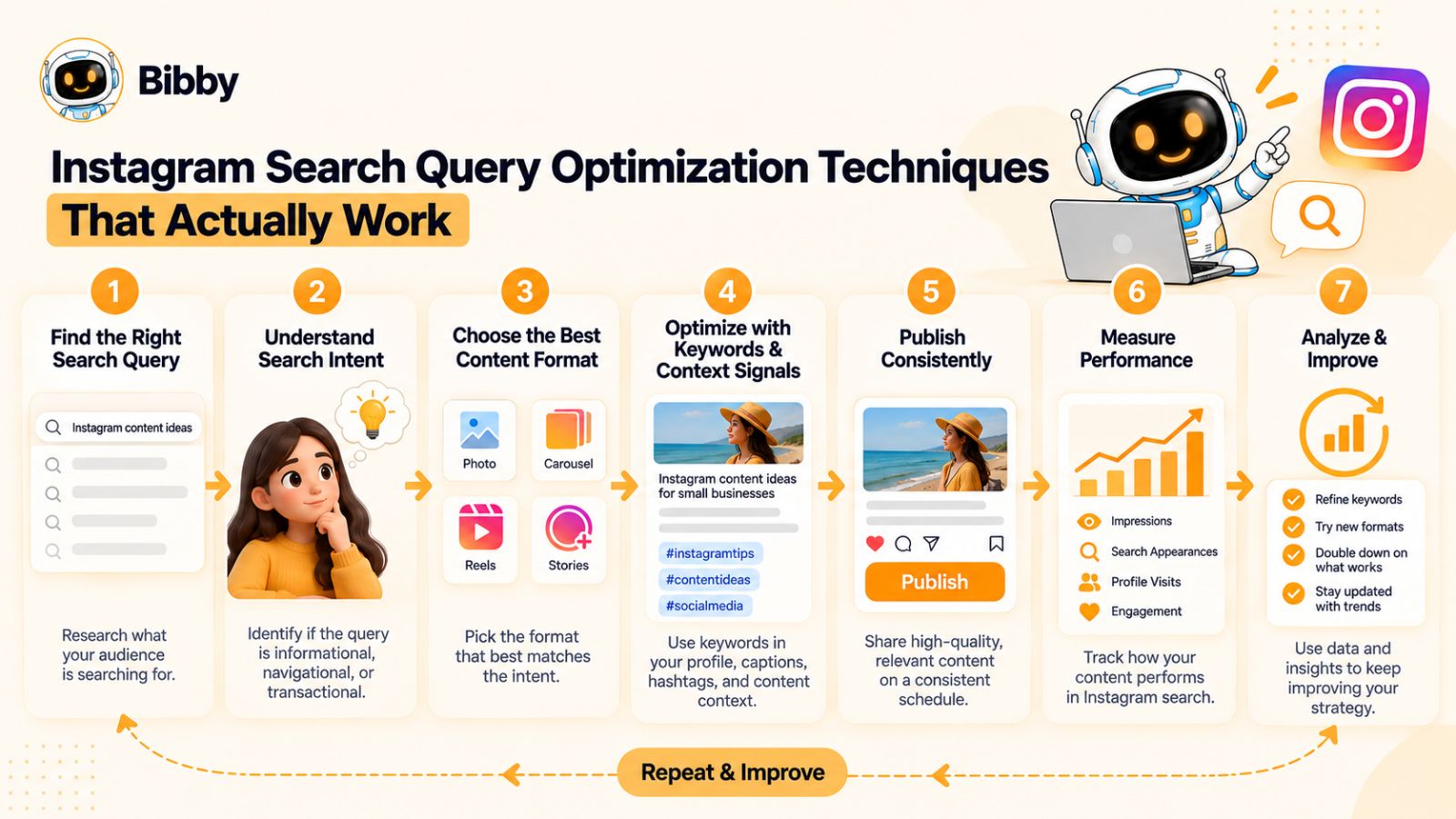
1. Start With the Search Query, Not the Post Idea
Most creators begin with a content idea and then try to optimize it afterward.
Reverse the process.
Start by asking:
What would my ideal audience type into Instagram when they need the information I can provide?
For example, a social media consultant could start with:
- how to plan Instagram content
- Instagram content calendar ideas
- how to write Instagram captions
- how to get more Instagram saves
- how to create Instagram Reels
- best Instagram posting times
Each query gives you a potential content opportunity.
This approach also makes your content more specific. Instead of creating another generic post about “Instagram tips,” you can answer one clearly defined question.
2. Match the Content to Search Intent
Finding a query isn't enough. You need to understand why someone is searching it.
Consider these three searches:
“Instagram carousel ideas”
The searcher probably wants examples and inspiration.
“How to make an Instagram carousel”
The searcher wants instructions.
“Instagram carousel templates”
The searcher may be looking for a resource they can use.
All three searches concern Instagram carousels, but the best content format and angle are different.
Before creating content, identify whether the search intent is primarily:
- Informational
- Educational
- Inspirational
- Commercial
- Navigational
- Problem-solving
Then create the content that best satisfies that intent.
3. Use the Primary Search Query Naturally
Once you've selected a target query, use it where it makes sense.
Depending on the content, this may include your:
- Profile name
- Bio
- Caption
- Reel title
- On-screen text
- Carousel headline
- Hashtags
- Spoken content
But don't interpret this as a checklist requiring the exact phrase everywhere.
Natural variations can be more useful.
If your target query is “Instagram caption ideas,” related language might include:
- caption examples
- Instagram captions
- caption hooks
- captions for Reels
- engaging Instagram captions
- caption writing tips
These phrases help establish the broader subject without making your writing sound robotic.
4. Put Context Near the Beginning
The opening part of your content is particularly important because it immediately tells the viewer what they're about to get.
Compare:
“Here's something most creators get wrong…”
with:
“Here are 7 Instagram caption mistakes that can make your posts harder to discover.”
The second opening immediately establishes the topic and expected value.
For a Reel, this principle can apply to the spoken hook, on-screen text, and caption.
For a carousel, it can apply to the cover slide and first few slides.
For a caption, it can apply to the opening sentence.
The more quickly the subject becomes clear, the easier it is for both users and platforms to understand the content.
5. Create Content Around Specific Problems
Broad topics are often difficult to differentiate.
“Instagram marketing tips” is extremely broad.
“How to find Instagram content ideas when you have nothing to post” is much more specific.
Specific problems give you three advantages:
- They make the content easier to position.
- They give you a clearer search intent.
- They allow you to provide a more satisfying answer.
Instead of trying to cover an entire topic in every post, build content around individual problems your audience repeatedly encounters.
Over time, those individual posts can create a comprehensive topical footprint around your niche.
6. Build Topic Clusters Instead of One-Off Posts
One of the strongest long-term approaches is to create multiple pieces of content around related searches.
Suppose your primary topic is Instagram content strategy.
You could create content around:
- Instagram content strategy
- Instagram content pillars
- Instagram content calendar
- Instagram content ideas
- Instagram posting frequency
- Instagram caption strategy
- Instagram Reel ideas
- Instagram analytics
- Instagram engagement strategy
These topics are closely related.
Creating useful content across the cluster gives your account a stronger and more consistent topical identity than publishing disconnected posts about whatever happens to be trending.
7. Make Your Profile Reinforce Your Content
Your individual posts don't exist in isolation.
When someone discovers a post through search, they may visit your profile before deciding to follow you.
That's why your profile should make the relationship between your account and your target topics obvious.
For example, if you want to be known for Instagram marketing, your:
Name → Bio → Recent posts → Content themes
should collectively reinforce that positioning.
This also creates a better experience for people who discover you through Search.
They shouldn't have to investigate your last 30 posts to figure out what you actually do.
8. Write Captions That Add Semantic Context
A caption shouldn't simply repeat the headline.
Instead, use it to explain the subject in natural language.
Suppose your Reel is about Instagram search optimization.
A weak caption might be:
Instagram SEO tips. #instagramseo #instagramtips #socialmedia
A stronger caption could explain what Instagram search optimization means, identify a few important elements, and tell the viewer what they'll learn from the Reel.
The second approach gives the content substantially more context.
Think of your caption as an opportunity to answer:
What is this content about, who is it for, and what question does it answer?
9. Use Hashtags as Supporting Context
Hashtags should describe the content you actually published.
Instead of selecting hashtags purely by popularity, consider a mixture of:
- The primary topic
- Specific subtopics
- Your niche
- The audience
- The problem being solved
For example, content about Instagram content planning might use terminology related to Instagram marketing, content strategy, social media planning, and content calendars where relevant.
The exact hashtag set should change according to the individual post.
There is no strategic advantage in using the same block of hashtags on every piece of content regardless of subject.
10. Make Visual Content Self-Explanatory
A surprising number of social posts rely on a vague headline to create curiosity.
Curiosity has its place, but search-focused content benefits from clarity.
Instead of:
“Stop Doing This!”
try:
“Stop Making These 5 Instagram Caption Mistakes”
Instead of:
“Save This Before You Post”
try:
“Instagram Reel Checklist: 9 Things to Check Before Posting”
The second versions communicate the topic immediately.
That matters because search-oriented content should satisfy a recognizable need, not force the user to guess what the post is about.
11. Choose the Content Format Based on the Query
Not every search deserves the same format.
A query asking for a step-by-step process may work well as a carousel or tutorial Reel.
A query seeking inspiration could work better as a list of examples.
A comparison might work well as a carousel.
A quick definition could be answered with a short Reel.
The optimization opportunity isn't simply “put keywords into a Reel.”
It's:
Query → intent → format → answer
That sequence produces more useful content.
12. Optimize for the Next Action
Search visibility is only useful if the content satisfies the person who discovers it.
If someone searches for “how to schedule Instagram posts” and your content gives them a vague promotional message, you may have created an initial relevance match but failed the user.
A better post could explain the scheduling process, compare approaches, or show a practical workflow.
For example, a creator managing multiple platforms might use a social media scheduling tool to upload content, prepare captions, organize posts, and schedule publishing across different networks. Tools such as Bibby can fit into this kind of workflow when the goal is to reduce repetitive publishing work, but the underlying strategy should still begin with the audience's content and search intent—not the tool.
The same principle applies regardless of what software you use.
Optimize for the searcher's outcome, not merely for the search query.
13. Create Content That Earns Saves and Shares Naturally
Search optimization shouldn't happen independently from content quality.
If your content answers a question particularly well, people may save it for later or share it with someone who has the same problem.
That's especially valuable for educational content.
For example, instead of publishing:
“5 Instagram SEO tips”
you could create:
“Instagram Search Optimization Checklist: 12 Things to Check Before Publishing”
The second concept is naturally more useful as a reference resource.
People have a reason to save it.
The key isn't to ask everyone to save your post. It's to create something worth saving.
14. Refresh Your Strategy When Instagram Changes
Instagram evolves constantly.
Features change. Search behavior changes. Content formats change. Recommendations change.
That means an optimization technique that worked well a year ago shouldn't automatically become a permanent rule.
Review your search-focused content periodically.
Ask:
- Are people still searching for this topic?
- Has the underlying information changed?
- Are newer competitors answering the query better?
- Are there new content formats that fit the intent?
- Are there related queries emerging?
- Which posts are actually attracting discovery?
This turns Instagram SEO from a one-time optimization task into an ongoing content strategy.
The Bigger Principle Behind Instagram Search Optimization
All of these techniques point to the same conclusion:
The best Instagram SEO strategy is not to make content look optimized. It is to make the content genuinely relevant to a specific search.
When you know the query, understand the intent, create a useful answer, communicate the topic clearly, and reinforce it through your profile and content signals, optimization becomes much more natural.
And importantly, you don't have to manually build every part of the publishing workflow from scratch. Once you have a library of search-driven content ideas, tools that automate parts of creation and scheduling can help you turn those ideas into a consistent publishing system. The strategic work—choosing the right audience, query, angle, and value—still comes first.
Next, we'll look at how to find the Instagram search queries worth targeting, including how to use Instagram itself as a source of search-intent data.
How to Find Instagram Search Queries People Actually Use
The quality of your Instagram search optimization depends heavily on the quality of the queries you target.
You can write an excellent caption, create a polished Reel, and use relevant hashtags, but if you're optimizing for phrases your audience rarely searches, your optimization effort has limited value.
The good news is that you don't need to guess what people are searching for. Instagram itself provides several clues, and you can combine those clues with audience research and broader search data to build a much stronger query list.
1. Start With Instagram's Search Suggestions
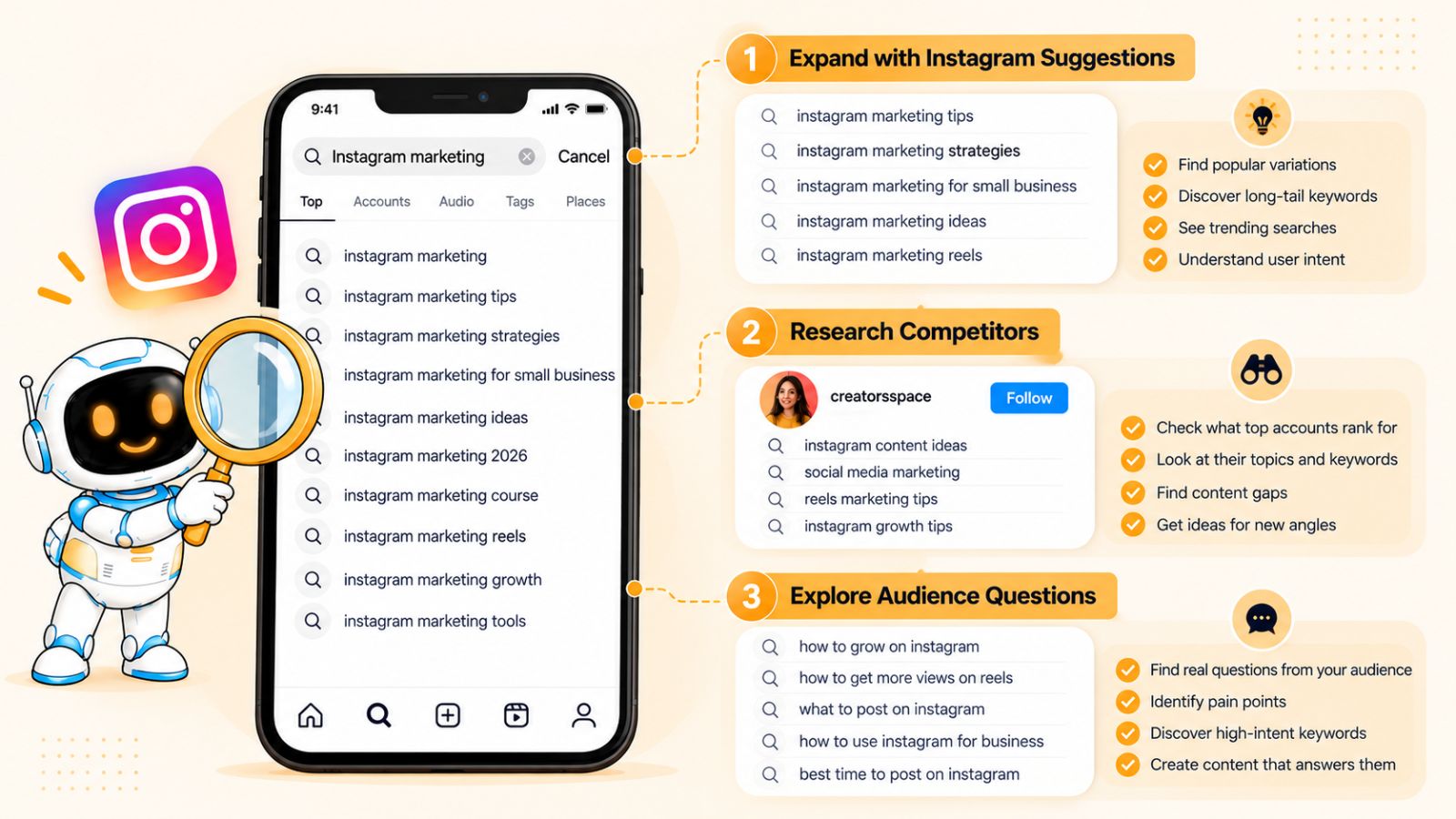
Instagram's search interface is one of the most useful places to begin.
Enter a broad topic related to your niche and pay attention to the suggestions Instagram provides as you continue typing.
For example, if you create content about social media marketing, start with terms such as:
Instagram marketing
Then explore increasingly specific variations.
You may discover searches related to:
- Instagram marketing strategy
- Instagram marketing tips
- Instagram marketing for small businesses
- Instagram marketing ideas
- Instagram marketing tools
These suggestions are valuable because they reflect how people interact with Instagram's own search system.
Don't treat every suggestion as a keyword you must target. Instead, use them as starting points for understanding search demand and intent.
2. Search the Query Yourself
After finding a potential query, search it on Instagram.
Don't immediately look only at the number of results. Study what Instagram is actually showing you.
Ask:
- What types of accounts appear?
- What topics dominate the results?
- Are the results mostly Reels, posts, or profiles?
- What wording do successful creators use?
- What questions are they answering?
- How specific are the top results?
- What appears to be missing?
This is essentially competitive search-intent research.
You're trying to understand what Instagram currently considers a good answer to the query.
3. Study the Language Successful Accounts Use
Look beyond the obvious keyword.
Suppose you search for “Instagram content ideas.”
The strongest accounts may repeatedly use related language such as:
- content pillars
- content calendar
- Reel ideas
- carousel ideas
- educational content
- engagement posts
- content planning
These related terms can reveal the broader vocabulary surrounding the topic.
Your goal is not to copy competitors word-for-word.
Instead, identify the semantic neighborhood around the query.
That gives you more ways to communicate the subject naturally.
4. Look at the Questions People Ask
Comments can be an excellent source of search intent.
When people repeatedly ask questions such as:
“How often should I post?”
“What's the best time to post Reels?”
“How do I get my posts discovered?”
you've found potential content topics.
The advantage is that these questions come directly from your audience or an audience interested in your niche.
Turn recurring questions into specific content opportunities.
One question can become:
- A Reel answering the question
- A carousel explaining the answer
- A longer caption providing context
- A follow-up post addressing a common misconception
One search-intent insight can therefore generate multiple pieces of content.
5. Use Google as Supporting Research
Instagram shouldn't be your only source of query research.
Google can reveal broader questions and related searches around the same topic. This is particularly useful because people often move between search engines and social platforms when researching a subject.
For example, if your Instagram niche is social media marketing, Google research might reveal demand around:
- how to create a content calendar
- how to schedule social media posts
- Instagram content strategy
- social media post ideas
- how to write social media captions
You can then investigate which of those concepts also make sense as Instagram searches.
But don't make the mistake of assuming that a popular Google keyword automatically represents an equally popular Instagram search.
Use Google to expand your research, then validate the idea on Instagram.
6. Analyze Competitor Profiles
Choose several accounts that already attract the audience you want.
Then study their content systematically.
Look for:
- Topics they return to repeatedly
- Questions they answer
- Wording used in hooks
- Keywords appearing in captions
- Terms used in profile descriptions
- Content formats that generate strong engagement
- Posts that appear designed around specific questions
You're looking for patterns rather than individual viral posts.
If five successful accounts repeatedly create content around the same specific problem, that is a much stronger strategic signal than one competitor having a viral post about an unrelated trend.
7. Mine Your Own Audience Data
Your existing audience can give you some of the best query ideas.
Look at:
- Comments
- Direct messages
- Story replies
- Poll responses
- Questions from clients
- Customer-support conversations
- Frequently asked questions
- Search terms from your broader website analytics
Write down the exact language people use.
This matters because the way you describe a problem may be different from the way your audience describes it.
For example, a marketer may call something “content distribution optimization,” while the customer simply asks:
“How do I get more people to see my Instagram posts?”
The second phrase may be much closer to the language a beginner actually uses.
8. Build a Search Query Map
Once you've collected enough ideas, don't keep them in an unstructured list.
Group them by topic and intent.
For example:
| Topic | Search Query | Intent | Potential Format |
|---|---|---|---|
| Instagram content | Instagram content ideas | Inspiration | Carousel |
| Instagram content | Instagram content calendar | Educational | Carousel |
| Reels | How to create Instagram Reels | Educational | Reel |
| Captions | Instagram caption ideas | Inspiration | Carousel |
| Scheduling | How to schedule Instagram posts | Problem-solving | Reel |
| Analytics | Instagram engagement rate | Informational | Carousel |
This becomes your Instagram search content map.
It helps prevent random posting because every content idea has a reason for existing.
9. Prioritize Queries Instead of Targeting Everything
You don't need to optimize for hundreds of searches.
Start with a small group of queries that are closely connected to your business or expertise.
A useful prioritization framework is:
Relevance × Intent × Opportunity
Ask three questions:
Relevance: Is this query directly connected to what I offer?
Intent: Does the person searching have a problem I can genuinely help solve?
Opportunity: Can I create something meaningfully better or more useful than what already exists?
A query that scores highly across all three deserves priority.
A huge search volume is less useful if the topic attracts people who have no relationship with your business.
10. Turn One Query Into a Content Cluster
Don't assume one Instagram post is enough to cover a valuable topic.
Suppose you identify:
“How to schedule Instagram posts”
as an important query.
You could build a small cluster around it:
- How to schedule Instagram posts
- Instagram scheduling mistakes
- Best time to schedule Instagram posts
- How to create an Instagram posting calendar
- How to schedule Reels
- How to schedule Instagram carousels
- Instagram scheduling workflow for small businesses
Now you're not creating one isolated post.
You're building a body of related content around a recognizable subject.
This is especially useful when you want your account to become associated with a particular area of expertise.
11. Look for Query Gaps
One of the most valuable opportunities is finding questions that existing content doesn't answer well.
When researching a query, ask:
What is missing from the current results?
Perhaps existing posts are:
- Too generic
- Outdated
- Too promotional
- Missing examples
- Focused only on beginners
- Overly complicated
- Not addressing a specific use case
That gap is your opportunity.
You don't need to invent a completely new topic.
Sometimes the best content opportunity is simply:
Take an existing search query and provide a substantially better answer.
A Simple Instagram Query Research Workflow
If you want to make this process repeatable, use this sequence:
1. Pick a broad topic.
Start with something directly connected to your niche.
2. Expand it using Instagram Search.
Look for specific suggestions and related language.
3. Search each promising query.
Study the results and identify the dominant search intent.
4. Analyze successful content.
Look for patterns in topics, hooks, formats, and terminology.
5. Collect audience questions.
Use comments, DMs, customer questions, and other first-party insights.
6. Validate with broader search research.
Use Google and other sources to discover related questions, but confirm their relevance to Instagram.
7. Group the queries.
Organize them into topic clusters and search intents.
8. Prioritize the best opportunities.
Focus on queries that are relevant, useful, and realistically addressable with your expertise.
9. Turn the query map into a content calendar.
Now your publishing schedule has a strategic foundation instead of being a list of random post ideas.
The result is a much more sustainable approach to Instagram SEO: you're not constantly asking what to post next. You're building content around a growing database of questions your audience actually cares about.
With your query research complete, the next optimization layer is your Instagram profile itself—because your profile can determine whether both Instagram and potential followers understand what your account is about.
How to Optimize Your Instagram Profile for Search
Your Instagram profile is more than a digital business card. It is a concentrated summary of who you are, what you publish, and what kind of audience should care about your account.
That makes profile optimization one of the most important parts of an Instagram search strategy.
If your content targets “Instagram search optimization” but your profile gives Instagram and visitors no clear indication that you cover Instagram marketing, you're creating unnecessary friction.
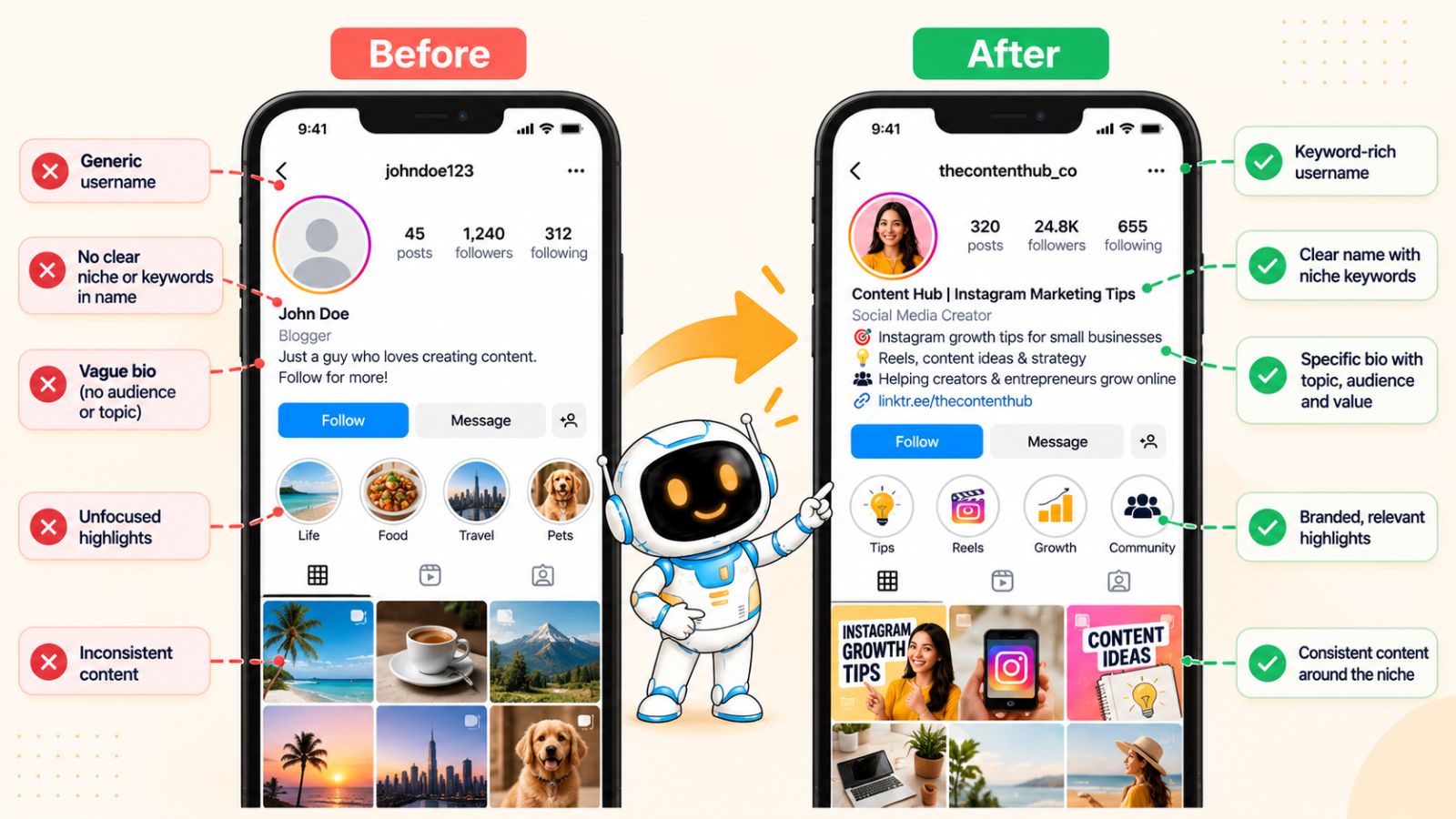
A search-optimized profile should make three things obvious:
What you do. What you talk about. Who you help.
1. Optimize Your Username Without Ruining Your Brand
Your username is one of the first identifiers associated with your account.
If your brand already has a recognizable name, you don't need to turn it into an awkward collection of keywords.
For example, a fictional marketing brand might use:
@growthlab
rather than:
@bestinstagrammarketingtips2026
The first is memorable and brandable.
If there's a natural way to incorporate your niche without damaging the brand, that's worth considering. But don't sacrifice recognition simply to insert another keyword.
Your username should primarily be easy to remember, type, and associate with your brand.
2. Use the Name Field Strategically
The profile name gives you another opportunity to clarify your niche.
Consider the difference between:
Alex Johnson
and:
Alex Johnson | Instagram Strategist
The second immediately communicates what Alex does.
Similarly, a business could use:
Bibby | Social Media Automation
rather than relying entirely on a brand name that gives a new visitor no information about the category.
The goal isn't to make the field look like an SEO title.
The goal is to add useful context while keeping the profile natural.
3. Write a Bio That Explains Your Value
A strong Instagram bio shouldn't read like a keyword list.
Instead, structure it around three questions:
Who do you help?
What do you help them achieve?
What subject do you specialize in?
For example:
Helping small businesses create better Instagram content
Social media strategy, Reels & content planning
Practical tips for growing without paid ads
Notice that the relevant terminology appears naturally.
There is no need to repeat “Instagram” five times.
4. Include Relevant Topic Language
Think about the words your ideal audience would use when describing your expertise.
If you're a wedding photographer, relevant terminology could include:
- wedding photography
- couples
- engagement sessions
- wedding portraits
- destination weddings
If you're a fitness coach, it might include:
- strength training
- home workouts
- fat loss
- mobility
- beginner fitness
The terminology should reflect what you actually publish.
This creates consistency between your profile and individual posts.
5. Make Your Category Consistent With Your Positioning
Your profile category can provide additional context about your business or professional identity.
Choose the category that most accurately represents what you do.
Don't select a category simply because you think it has more search potential.
Your objective is to create a coherent profile where the category, name, bio, and content all point toward the same general identity.
6. Think About the Content Grid as Part of Your Profile
Profile optimization doesn't stop at the bio.
When someone discovers your account through Search, they may immediately scan your recent content.
Imagine someone searching:
“Instagram content strategy”
and landing on your profile.
If your recent posts cover:
- Instagram content pillars
- Content calendars
- Reel strategy
- Caption writing
- Instagram analytics
the account reinforces the original search.
But if the next posts are about travel, personal updates, random memes, and unrelated trends, the topical connection becomes much weaker.
Your content history should make your expertise visible.
7. Build a Clear Topical Identity
You don't need to talk about one narrow subject forever.
Instead, establish a clear topic neighborhood.
For example, a social media educator might cover:
Instagram marketing → content strategy → Reels → captions → analytics → social media workflows
Those subjects are different, but they belong to the same broader ecosystem.
This gives you room to create varied content without making your account appear random.
8. Optimize for the Human Who Finds You
There's an important balance here.
Your profile isn't only being interpreted by an algorithm. It's being evaluated by people.
Someone discovers your post, visits your profile, and has a few seconds to decide:
“Is this account worth following?”
A profile overloaded with keywords can feel spammy.
A profile with a clever brand name but no explanation can feel confusing.
The best profile balances discoverability with clarity.
9. Create a Strong Path From Search to Follow
Think about the entire journey:
Search → Post → Profile → Follow → Future content
Each step should make sense.
If someone discovers a Reel about Instagram content planning, your profile should make it obvious that you regularly discuss related subjects.
This is why topical consistency matters so much.
You're not simply trying to get a post discovered.
You're trying to turn relevant discovery into a long-term audience relationship.
10. Keep Your Profile Aligned With Your Current Strategy
Your profile shouldn't be optimized once and forgotten.
If your business changes its focus, your profile should change with it.
Review your:
- Username
- Name field
- Bio
- Category
- Pinned content
- Recent posts
- Link destination
at regular intervals.
For example, if you originally positioned yourself as a general social media consultant but now specialize in Instagram content strategy, your profile should communicate that specialization.
An Example of a Search-Optimized Profile
Imagine a creator named Maya who helps small businesses with Instagram.
A weak profile might look like:
Name: Maya Smith
Bio: Entrepreneur | Coffee lover | Helping businesses grow 🚀
There's nothing inherently wrong with it, but it gives little topical information.
A stronger version might be:
Name: Maya Smith | Instagram Marketing
Bio:
Helping small businesses grow on Instagram
Reels • Content Strategy • Instagram SEO
Practical marketing tips for busy business owners
The second profile gives both visitors and Instagram considerably more context.
More importantly, it accurately reflects the content Maya should be publishing.
The Profile Optimization Rule
Don't ask:
“Where can I add more keywords?”
Ask:
“If someone discovered this profile through an Instagram search, would they immediately understand why this account is relevant?”
If the answer is yes, you're probably on the right track.
Your profile establishes the account-level context. Your individual posts then provide the opportunity to target specific searches in much greater detail.
The next step is optimizing one of the most important pieces of that content: your Instagram captions.
How to Optimize Instagram Captions for Search
Your Instagram caption has two jobs.
First, it needs to help the reader understand and act on your content.
Second, it can provide additional context that helps Instagram understand what the post is about.
The mistake is treating those two goals as separate. The best search-optimized captions accomplish both at the same time.
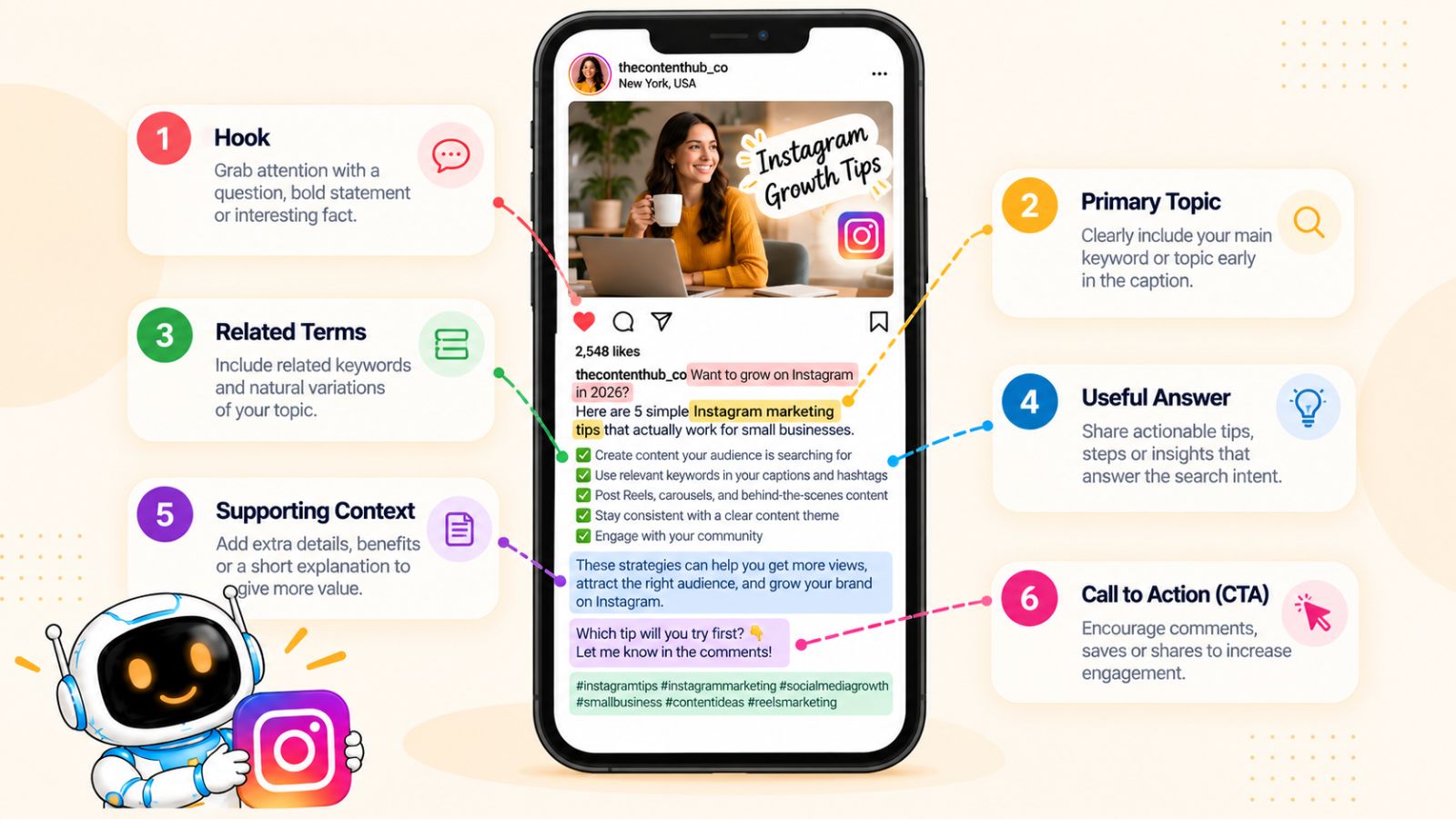
Instead of writing a caption and then stuffing a target keyword into it, build the caption around the question, topic, or problem your post is designed to solve.
1. Start With the Topic
Your caption should make the subject clear early.
Suppose your post is about creating Instagram content calendars.
A vague opening might be:
“If you're struggling with this, you're not alone…”
A more useful opening would be:
“Creating an Instagram content calendar doesn't have to take hours every week.”
The second sentence immediately establishes the topic.
That clarity helps the reader understand the post and gives Instagram additional contextual information.
2. Use the Primary Query Naturally
If you're targeting a specific search query, incorporate it where it genuinely fits.
For example, if the target topic is Instagram content calendar, you could write:
“An Instagram content calendar can help you plan Reels, carousels, and promotional posts before the week begins.”
That sounds natural because the phrase belongs in the sentence.
You don't need to repeat the exact phrase throughout the caption.
Once Instagram understands the topic, related language can provide additional context.
3. Use Related Terms Instead of Repeating One Keyword
Search engines and social platforms don't need every sentence to contain the same phrase.
If you're discussing Instagram scheduling, related concepts might include:
- content planning
- publishing schedule
- scheduled posts
- Reels
- carousels
- social media calendar
- posting workflow
- content batching
These terms create a richer description of the subject.
More importantly, they make your writing useful for humans.
4. Answer the Searcher's Question
This is one of the most important principles in the entire article.
If someone searches:
“How to schedule Instagram posts”
don't write a caption that simply says:
“Want more Instagram growth? Try scheduling your posts!”
That doesn't answer the question.
Instead, explain the actual process.
For example:
“To schedule an Instagram post, prepare the creative, write the caption, choose the publishing date and time, review the post, and schedule it in advance.”
Now the caption provides an answer.
The more closely your content satisfies the reason someone searched, the stronger the overall content experience becomes.
5. Use the First Lines to Establish Context
People don't always expand captions.
That means the opening should communicate the value quickly.
Instead of starting with several lines of emojis or generic engagement prompts, begin with the subject.
For example:
Weak:
“🔥🔥 SAVE THIS 🔥🔥
You need to know this…”
Stronger:
“If your Instagram posts feel random, an Instagram content calendar can give your publishing strategy structure.”
The second version gives the reader an immediate reason to continue.
6. Don't Write for an Algorithm at the Expense of People
Keyword optimization can become counterproductive when it makes the caption difficult to read.
For example:
“Instagram SEO is important for Instagram SEO because Instagram SEO helps Instagram SEO users find Instagram SEO content…”
This is obviously unnatural.
Good optimization should be almost invisible.
If you removed the keyword and the sentence suddenly became awkward, you probably forced it into the copy.
Write the caption as if you're explaining the topic to a real person. Then make sure the important terminology naturally appears where appropriate.
7. Use Questions to Address Search Intent
Questions can be particularly useful when they reflect the way your audience thinks.
For example:
“How often should you post on Instagram?”
“Can you schedule Instagram Reels?”
“What should you put in an Instagram bio?”
You can then answer the question directly.
This creates a simple structure:
Question → Explanation → Recommendation → Next step
That structure works especially well for educational Instagram content.
8. Make Captions Specific to the Content
Avoid writing one generic caption template and changing only a few words for every post.
If your Reel teaches five ways to improve Instagram captions, the caption should discuss captions.
If your carousel explains Instagram analytics, the caption should provide context around analytics.
If your post is about content scheduling, the caption should reinforce the scheduling topic.
This consistency creates a stronger connection between the visual, written, and account-level signals.
9. Use Captions to Add Information the Visual Doesn't Have
Your caption doesn't need to repeat every word on the image.
Instead, use it to expand the topic.
For example, a carousel might say:
“7 Instagram Search Optimization Techniques”
The caption could explain why search optimization matters, summarize the techniques, and provide a practical recommendation.
This creates a more complete content experience.
Think of the visual and caption as two parts of the same answer.
10. Use a Clear Call to Action After Providing Value
Calls to action aren't inherently bad for search-focused content.
The problem occurs when the entire caption is a CTA.
Instead:
Answer the question first. Then tell the reader what to do next.
For example:
“If you're building an Instagram content strategy, start by listing the 10 questions your audience asks most often. Turn each question into one piece of content and organize the ideas into a weekly publishing plan.”
Then:
“Save this framework for your next content-planning session.”
The CTA follows the value instead of replacing it.
11. Write Different Captions for Different Search Intents
A useful framework is to adapt your caption structure according to the query.
Informational query
“What is Instagram SEO?”
Focus on definition, explanation, and examples.
How-to query
“How to schedule Instagram posts?”
Focus on steps and implementation.
Comparison query
“Instagram scheduling tools comparison”
Focus on differences, use cases, and decision criteria.
Inspiration query
“Instagram content ideas”
Focus on examples and possibilities.
This prevents every caption from becoming the same generic format.
12. Optimize Captions at Scale Without Making Them Generic
For businesses managing content across multiple platforms, writing and scheduling every caption manually can become repetitive.
A workflow might involve preparing the visual, selecting the content style, generating or refining a caption, reviewing it, and scheduling the post across a content calendar.
Tools such as Bibby can automate parts of that workflow, including generating captions and scheduling different media across platforms. That can be useful when you're managing a large volume of content, but the underlying optimization still needs human direction: the tool can help execute the workflow, while you decide what your audience should discover and why.
That distinction matters.
Automation can increase publishing efficiency.
It doesn't replace search-intent research.
A Simple Instagram Caption SEO Formula
For many educational posts, this structure works well:
1. State the topic.
Tell the reader what the post addresses.
2. Identify the problem.
Explain why the topic matters.
3. Provide the answer.
Give the useful information promised by the post.
4. Add relevant context.
Use related terminology naturally.
5. Give the next step.
Tell the reader what to do with the information.
For example:
Trying to get more visibility from Instagram Search?
Start by creating content around specific questions your audience already searches for. Instead of targeting broad phrases like “Instagram tips,” create posts around specific problems such as “how to write Instagram captions” or “how to schedule Instagram Reels.”Then reinforce the topic through your profile, visual content, caption, and relevant hashtags. The goal isn't to repeat one keyword—it is to make the subject of the content unmistakably clear.
Start with five questions your audience asks repeatedly and turn each one into a search-focused post.
That's search-aware writing without sounding like SEO writing.
The same principle becomes even more important for visual-first formats, where the content itself carries much of the context. Next, we'll apply these techniques specifically to Instagram Reels.
How to Optimize Instagram Reels for Search
Reels can be powerful discovery assets because they combine visual content, audio, text, captions, and engagement in a single format.
That also makes Reel optimization more nuanced than simply adding a keyword to the caption.
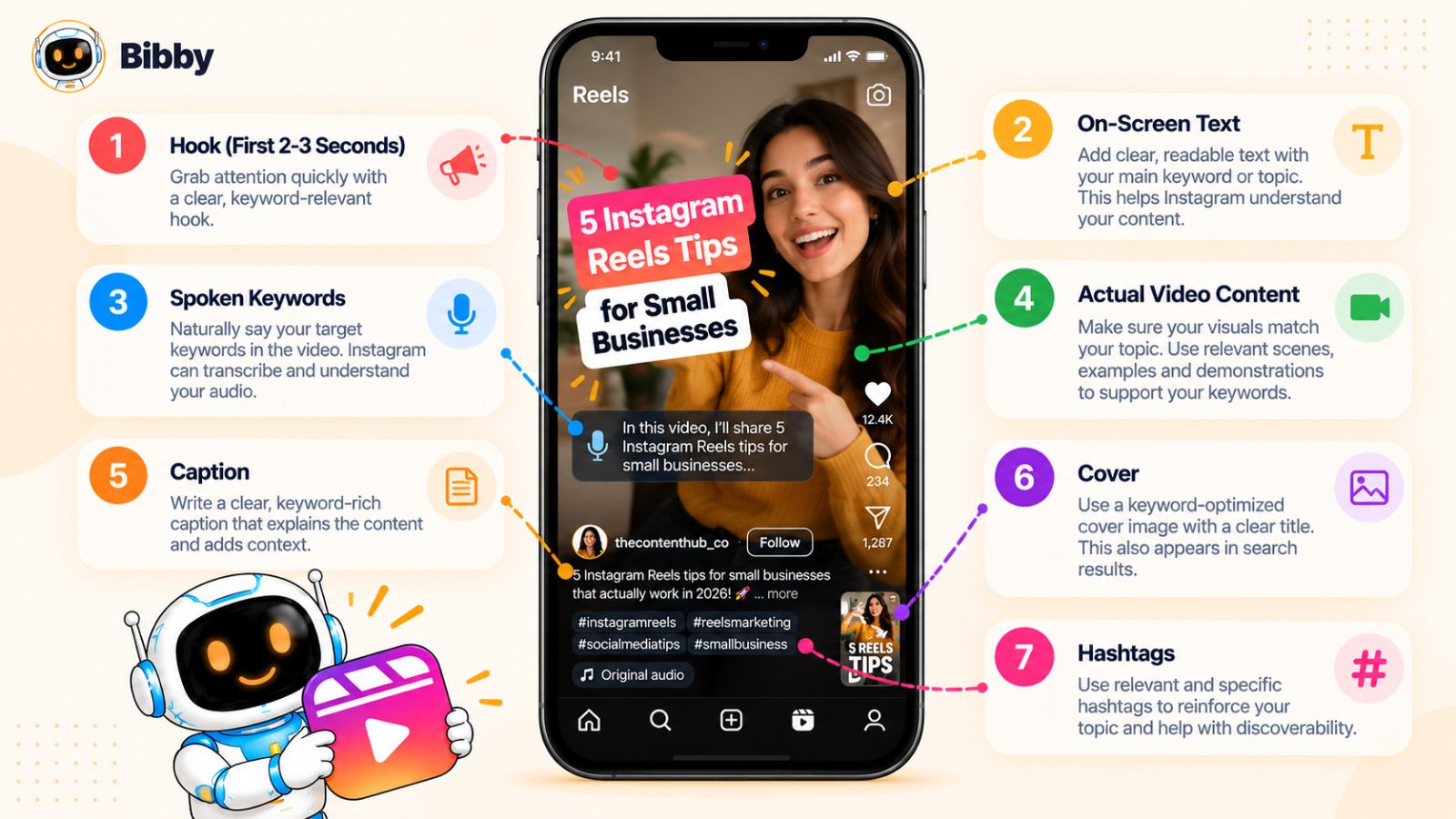
If you want a Reel to have a chance of being discovered through Instagram Search, the topic should be clear across as many relevant parts of the content as possible. The viewer should quickly understand what the Reel is about, while Instagram should have enough contextual information to associate it with the right topic and search intent.
1. Build the Reel Around One Search Intent
Start with the query.
If your target is:
“how to create an Instagram content calendar”
don't create a Reel that briefly mentions content calendars alongside ten unrelated Instagram tips.
Make the entire Reel answer the query.
For example:
Hook:
“How to create an Instagram content calendar in 5 steps”
Then walk through:
- Choose your content pillars.
- Research audience questions.
- Select your formats.
- Assign publishing dates.
- Batch and schedule the content.
The entire Reel reinforces one topic.
That creates a much clearer relationship between the search and the content.
2. Make the Topic Obvious in the Hook
The first few seconds determine whether someone understands why they should keep watching.
For search-focused Reels, avoid being so mysterious that the viewer cannot identify the topic.
Compare:
“You're doing this wrong…”
with:
“You're probably making your Instagram content calendar too complicated.”
The second hook provides curiosity while establishing the subject.
An even more direct approach works well for instructional searches:
“Here's how to schedule Instagram Reels step by step.”
The viewer immediately knows what they're going to learn.
3. Put the Topic in On-Screen Text
Text displayed within a Reel can reinforce its subject.
If the Reel answers:
“How to write better Instagram captions”
make that topic visible in the opening frame or early text.
You can then use descriptive text throughout the video:
- Step 1: Write the hook
- Step 2: Explain the problem
- Step 3: Give the solution
- Step 4: Add a CTA
This helps the viewer follow the content and makes the subject more explicit.
4. Say Important Terms Naturally
If you're creating an educational Reel, don't ignore the words you use verbally.
If you're explaining Instagram content calendars, naturally say phrases such as:
“Instagram content calendar”
“content planning”
“weekly Instagram schedule”
“content pillars”
There's no need to awkwardly repeat them.
The principle is the same as caption optimization:
Use the language that naturally describes what you're teaching.
5. Optimize the Cover
Your Reel cover is often the first visual someone sees when browsing your profile.
A vague cover such as:
“Do This!”
doesn't tell the viewer much.
A descriptive cover such as:
“Instagram Content Calendar: 7-Step Setup”
communicates the subject immediately.
This matters beyond search.
When someone lands on your profile, descriptive covers help them quickly understand the topics you specialize in.
6. Write a Search-Focused Caption
The Reel should stand on its own, but the caption gives you another opportunity to establish context.
If the Reel is about Instagram Search optimization, your caption might naturally discuss:
- Instagram SEO
- search queries
- search visibility
- captions
- profile optimization
- hashtags
Don't turn the caption into a keyword list.
Explain what the Reel teaches.
7. Use Relevant Hashtags
Hashtags can provide additional context, but they shouldn't be the foundation of your Reel's optimization.
For a Reel about Instagram content calendars, use hashtags that genuinely describe the subject and audience.
Avoid adding unrelated viral hashtags simply because they have large audiences.
A million-person hashtag is not useful if the people viewing it have no interest in your content.
Relevance beats volume.
8. Create Reels for Specific Search Problems
Some of the strongest opportunities come from highly specific questions.
Instead of:
“Instagram tips”
create:
- How to plan a week of Instagram content
- How to write an Instagram Reel hook
- How to schedule Instagram carousels
- How to create Instagram content pillars
- How to find Instagram content ideas
- How to improve Instagram profile SEO
Specific queries give you a much clearer content angle.
They also make it easier to create a satisfying answer.
9. Demonstrate Instead of Just Explaining
If the query involves a process, show the process.
For example, if you're targeting:
“How to schedule Instagram posts”
a Reel could show the actual workflow:
Upload → Edit → Caption → Select date → Schedule → Review
A visual demonstration can be more useful than a talking-head explanation alone.
This is particularly effective for software tutorials, workflows, design processes, recipes, fitness exercises, and other subjects where showing the action improves comprehension.
10. Design for Saves and Shares
Search discovery shouldn't be your only goal.
A useful Reel can also generate saves and shares, which can contribute to stronger content performance.
Think about what would make someone save your Reel.
A checklist?
A tutorial?
A framework?
A list of tools?
A step-by-step process?
A concise reference?
For example:
“Instagram Reel Publishing Checklist: 10 Things to Check Before Posting”
has a natural reason to be saved.
Again, the goal isn't to manipulate engagement.
It's to create something people genuinely want to keep.
11. Don't Make Every Reel a Sales Pitch
Searchers usually have a question or problem before they have a purchasing intention.
If every Reel immediately tries to sell something, your content may fail to satisfy informational search intent.
For example, someone searching:
“How to create a social media content calendar”
may want a useful framework before they're ready to consider a scheduling platform.
Give them the framework.
If a product naturally helps with the problem, you can mention it in context, but the content should still stand on its own.
This is also where a tool such as Bibby can fit naturally into an educational workflow. If you're demonstrating how a creator moves from creating visual assets to generating captions and scheduling content across platforms, Bibby can be one example of how that workflow can be handled. But the Reel should still teach the underlying process rather than becoming an advertisement for the software.
12. Build Series Around Related Queries
One Reel can answer one question.
A series can establish an entire topic.
For example, a social media educator could create:
Part 1: How Instagram Search works
Part 2: How to find Instagram search queries
Part 3: How to optimize your Instagram bio
Part 4: How to write Instagram captions for search
Part 5: How to optimize Instagram Reels
Part 6: How to use hashtags strategically
Now the account is repeatedly demonstrating expertise around Instagram search optimization.
This is much more strategically useful than publishing one isolated “Instagram SEO tips” Reel and moving on.
13. Update Reels When the Topic Changes
Some Reel topics become outdated quickly.
If you're teaching a current Instagram feature, publishing strategy, or platform workflow, revisit the topic when Instagram changes how the feature works.
This protects the usefulness of your content and gives you opportunities to create updated versions targeting the same underlying search intent.
For evergreen subjects, you can also revisit the topic from a new angle rather than simply reposting the same content.
A Practical Reel Optimization Checklist
Before publishing a search-focused Reel, ask:
- Does the Reel answer one clearly defined question?
- Is the topic obvious in the opening?
- Does the on-screen text describe the subject?
- Do I naturally use relevant terminology while speaking?
- Does the cover clearly communicate the topic?
- Does the caption add useful context?
- Are the hashtags genuinely relevant?
- Does the Reel provide a useful answer rather than just tease one?
- Is there a reason someone would save or share it?
- Does the topic fit my account's broader niche?
If most of these answers are yes, you're building a Reel around search intent rather than simply hoping a generic video gets discovered.
Reels aren't the only format where this approach works. Carousels can be particularly powerful when the searcher needs a structured explanation, list, comparison, or step-by-step guide. That's what we'll optimize next.
How to Optimize Instagram Carousels for Search
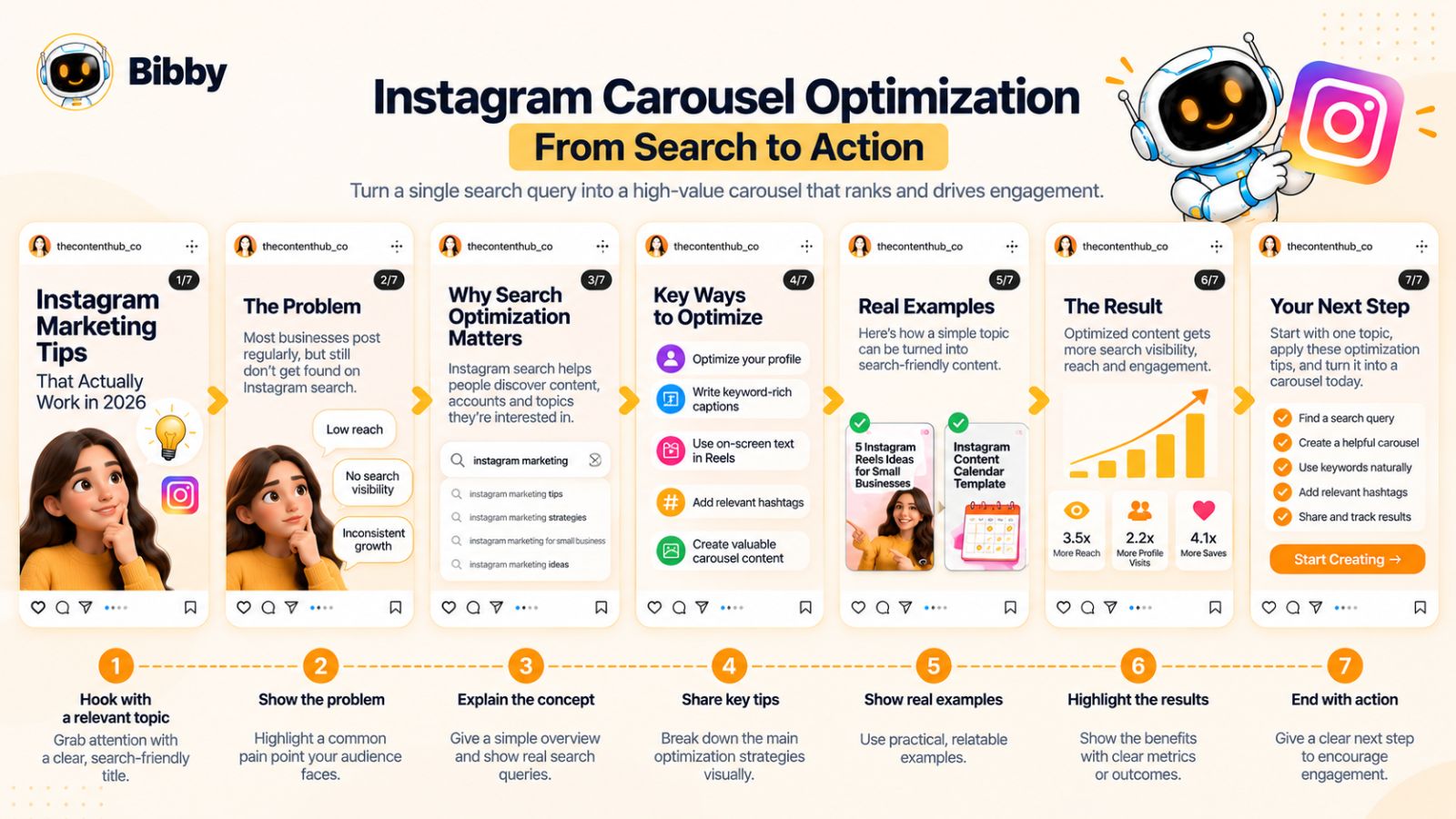
Instagram carousels are particularly well suited to search-focused content because they allow you to answer a question in a structured, step-by-step format.
A single image may communicate one idea. A well-designed carousel can explain an entire process, compare options, provide examples, or turn a complicated topic into a practical checklist.
That makes carousels valuable for queries where the searcher wants depth rather than a quick answer.
1. Give the Carousel One Clear Topic
Start with one search intent.
If you're targeting:
“Instagram content calendar ideas”
the carousel should focus on content calendar ideas.
Don't turn the post into:
5 content ideas + 3 hashtag tips + 4 Reel hooks + a scheduling tutorial.
That creates multiple topics competing for attention.
Instead, make the carousel a complete answer to one problem.
For example:
Slide 1: 15 Instagram Content Calendar Ideas
Slide 2: Educational posts
Slide 3: Behind-the-scenes posts
Slide 4: Customer-focused posts
Slide 5: Product demonstrations
Slide 6: FAQs
Slide 7: Industry insights
Slide 8: How to turn these into a weekly calendar
Now the entire carousel supports one recognizable search intent.
2. Make the Cover Descriptive
Your cover is effectively the title of the carousel.
A vague cover such as:
“You Need This”
creates curiosity but gives very little context.
A descriptive cover such as:
“15 Instagram Content Ideas for Small Businesses”
does much more work.
It tells the viewer:
- What the post is about
- Who it is for
- What value they will get
For search-oriented content, clarity generally beats cleverness.
You can still make the design visually interesting without hiding the subject.
3. Treat Each Slide as Part of the Answer
A carousel isn't simply a collection of images.
It should have a logical progression.
A useful structure is:
Problem → Explanation → Examples → Solution → Action
For a carousel targeting “how to create Instagram content pillars,” that could look like:
Slide 1: How to Create Instagram Content Pillars
Slide 2: What content pillars are
Slide 3: Why they matter
Slide 4: Identify your audience's main problems
Slide 5: Choose 3–5 recurring topics
Slide 6: Turn topics into content formats
Slide 7: Example content pillar framework
Slide 8: How to use your pillars in a calendar
The result is a complete educational resource rather than a collection of disconnected tips.
4. Use Natural Keyword Variations
Your primary search query doesn't need to appear on every slide.
Instead, use terminology that naturally belongs to the topic.
For Instagram content pillars, related language could include:
- content themes
- content categories
- audience interests
- content strategy
- educational content
- promotional content
- content planning
These terms help communicate the topic while keeping the carousel readable.
5. Answer Questions Directly
Question-based carousel titles can be especially effective.
For example:
“How Often Should You Post on Instagram?”
Then each slide can answer a different part of the question:
- What posting frequency actually means
- Why there isn't one universal number
- How your format affects frequency
- How to choose a sustainable schedule
- What to measure
- How to adjust your strategy
This format aligns the content closely with informational search intent.
6. Create Comparison Carousels
Some searches are inherently comparative.
For example:
- Instagram Reels vs. carousels
- Manual posting vs. scheduling
- Instagram Stories vs. Reels
- Organic Instagram vs. paid advertising
A carousel lets you present the comparison visually.
For example:
Slide 1: Instagram Reels vs. Carousels: Which Should You Use?
Slide 2: Best for discovery
Slide 3: Best for education
Slide 4: Best for engagement
Slide 5: Best for tutorials
Slide 6: Best for repurposing
Slide 7: How to choose
The important thing is to actually help the reader make the decision.
7. Use Examples Instead of Abstract Advice
Searchers often want to know what something looks like in practice.
Compare:
“Create valuable content.”
with:
“Turn one customer question into a 7-slide carousel that answers the problem step by step.”
The second gives the reader something they can visualize.
Examples also make carousels more useful as reference material—which can increase the likelihood that people save them.
8. Make the Carousel Worth Saving
A search-focused carousel can be particularly effective when it functions as a reference.
Consider creating:
- Checklists
- Frameworks
- Templates
- Step-by-step guides
- Swipe files
- Examples
- Comparison tables
- Decision trees
For example:
“Instagram Profile SEO Checklist: 12 Things to Review”
has a built-in reason to save.
The person may not need every item immediately, but they can return to the carousel when optimizing their profile.
9. Use the Caption to Complete the Carousel
Don't simply repeat every slide in the caption.
Use the caption to add context.
For example, if the carousel provides 10 Instagram search optimization techniques, the caption could explain:
- Why search optimization matters
- Who should use these techniques
- Which three techniques to implement first
- What to measure afterward
This creates another layer of useful context without duplicating the entire post.
10. Make the Last Slide Actionable
A carousel should ideally end somewhere.
Instead of ending with:
“Thanks for reading!”
give the reader a next step.
For example:
Your next step: Choose one search query your audience uses and create a post that answers it this week.
Or:
Save this checklist and review your Instagram profile before publishing your next five posts.
This turns passive consumption into action.
11. Use Carousel Series to Build Topic Depth
Just like Reels, carousels can become part of a topic cluster.
For Instagram search optimization, a sequence might include:
Carousel 1: How Instagram Search Works
Carousel 2: Instagram Search Ranking Factors
Carousel 3: How to Find Instagram Search Queries
Carousel 4: Instagram Profile SEO Checklist
Carousel 5: Instagram Caption SEO
Carousel 6: Instagram Reel SEO
Carousel 7: Instagram Hashtag Strategy
Each post answers a different question while reinforcing the broader topic.
This is a more strategic approach than trying to make one post rank for every related search.
12. Don't Sacrifice Readability for Keywords
One of the easiest ways to ruin an otherwise good carousel is to cram every slide with search terms.
A carousel is still a visual communication format.
If every slide looks like:
Instagram SEO Instagram SEO Instagram SEO Instagram search optimization Instagram keywords Instagram SEO tips
you've optimized the wrong thing.
Use clear language.
Use headings.
Give each slide one job.
Let the topic naturally emerge from the complete carousel.
A Practical Carousel Optimization Checklist
Before publishing, ask:
- Does the carousel target one clear search intent?
- Is the topic obvious from the cover?
- Does every slide contribute to the answer?
- Are related terms used naturally?
- Does the carousel contain specific examples?
- Is the information genuinely useful?
- Is there a reason to save the post?
- Does the caption add context?
- Does the final slide give the reader a useful next step?
- Does the topic fit the rest of your account?
If the answer is yes, your carousel isn't merely optimized for discovery. It's designed to satisfy the person who discovers it.
That distinction matters because search visibility without useful content rarely produces a meaningful long-term audience.
Next, we'll tackle one of the most misunderstood parts of Instagram SEO: hashtags—and why hashtag stuffing is a much weaker strategy than many creators assume.
Instagram Hashtag Optimization: What to Do Instead of Hashtag Stuffing
Hashtags have been part of Instagram discovery for years, which has led to one persistent misconception: if you use enough hashtags, your content will automatically reach more people.
That isn't a reliable Instagram search strategy.
Hashtags can help categorize and contextualize content, but they work best when they support a post that is already clearly about a relevant topic. They shouldn't be used as a substitute for search-intent research, strong content, or clear captions.
The better approach is to think of hashtags as supporting signals within a broader Instagram SEO strategy.
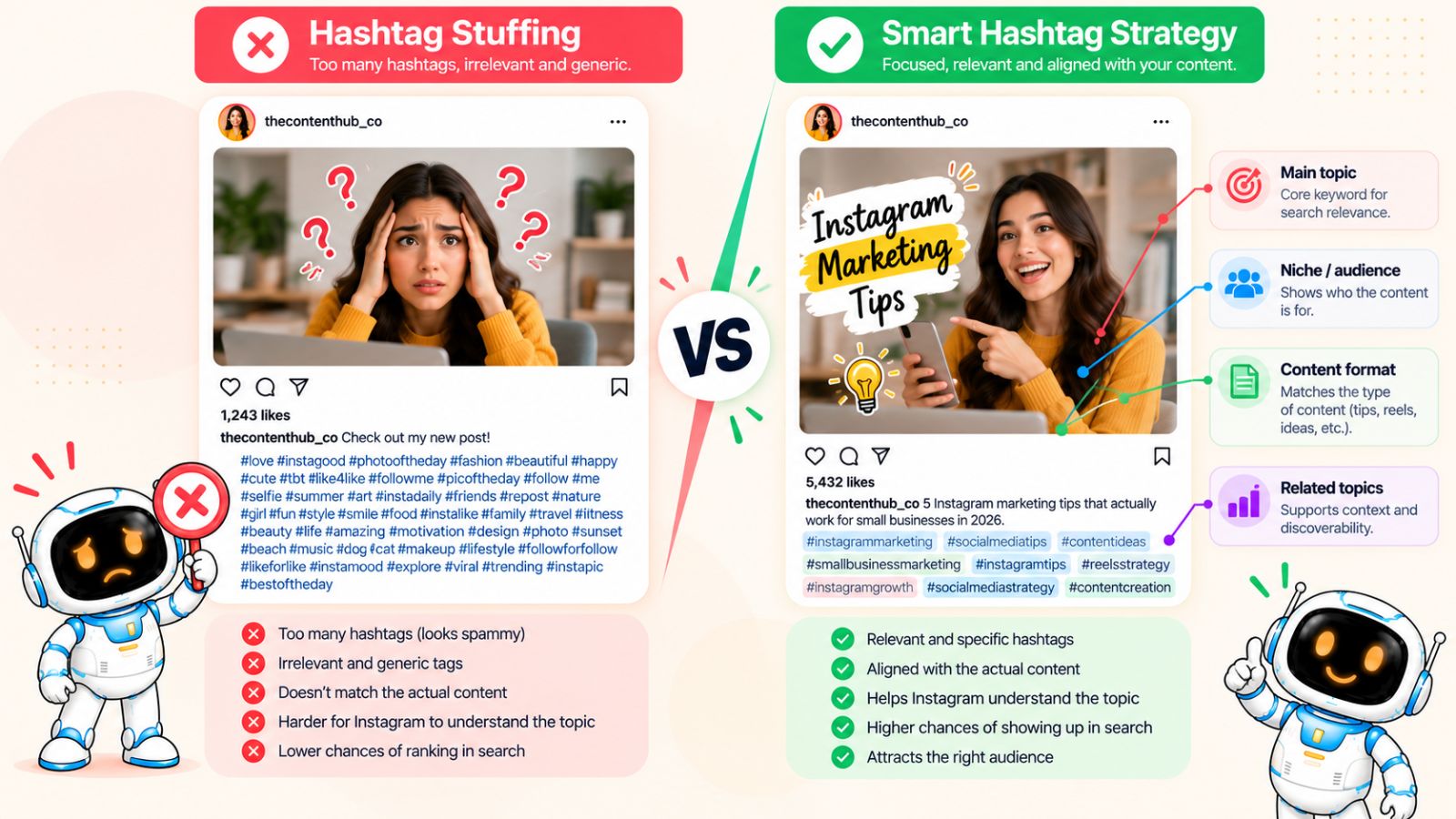
1. Choose Hashtags That Actually Describe the Content
The simplest rule is also the most important:
If a hashtag doesn't accurately describe your post, don't use it.
Suppose you've published a carousel explaining Instagram content calendars.
Relevant terminology might include:
- Instagram content
- content calendar
- content planning
- social media strategy
- Instagram marketing
But a trending hashtag with millions of posts isn't automatically useful just because it has a large audience.
If the people browsing that hashtag aren't looking for your subject, you've created a relevance problem rather than an opportunity.
2. Don't Build Your Strategy Around Hashtag Volume
A common tactic is to find the largest possible hashtags and add them to every post.
The logic sounds reasonable:
More searches → more potential visibility → more reach.
The problem is that broad hashtags also attract enormous amounts of unrelated content.
A smaller, highly relevant topic can sometimes be much more useful than an enormous generic category.
For example, a post specifically about Instagram content calendars should communicate that specific topic rather than relying entirely on broad terms such as:
#instagram #marketing #business
Those broad categories may describe the general niche, but they don't tell the full story.
3. Match Hashtags to Search Intent
Think about hashtags in the same way you think about search queries.
What is the person interested in?
If the content teaches someone how to create Instagram Reels, your hashtags should reinforce that subject.
If the content explains Instagram analytics, use terminology relevant to analytics.
If the content targets small business Instagram marketing, include terminology that accurately represents that audience and problem.
The hashtag should make sense when viewed alongside the rest of the post.
4. Use Specific and Broader Terms Together When Appropriate
You don't have to choose between only tiny niche hashtags and only massive broad hashtags.
A more balanced approach can include:
Broad topic:
Social media marketing
Specific topic:
Instagram marketing
Narrow topic:
Instagram content strategy
Content type:
Instagram carousel tips
The exact combination should depend on the post.
The point is to create a coherent topic structure rather than blindly maximizing hashtag count.
5. Stop Copying the Same Hashtag Block Onto Every Post
If every post on your account uses exactly the same hashtags, regardless of subject, you're missing an opportunity to make each post more contextually specific.
Imagine an account that publishes:
- Instagram SEO
- Facebook advertising
- LinkedIn content
- TikTok strategy
- Email marketing
Using exactly the same hashtags for all five topics doesn't accurately describe the individual posts.
Instead, choose hashtags according to the subject of each piece of content.
6. Avoid Irrelevant Trending Hashtags
Trending doesn't mean relevant.
A hashtag can be extremely popular because of a celebrity, event, meme, or unrelated cultural moment.
If your business publishes a tutorial about Instagram content strategy, adding an unrelated trending hashtag doesn't make the tutorial more relevant to people searching for content strategy.
In fact, it can attract viewers who have no reason to engage with the post.
The objective isn't maximum exposure to random people.
It's relevant exposure to the right people.
7. Don't Stuff Captions With Hashtags
A caption should still read like something a human would want to read.
If the valuable information ends and is followed by a giant wall of hashtags, the post can look less intentional and less professional.
Use only the hashtags that genuinely contribute to describing the content.
More isn't automatically better.
8. Use Hashtags to Reinforce Your Content Cluster
Hashtags become more strategically useful when they align with the broader topics you consistently publish.
For example, an account focused on Instagram marketing might repeatedly cover:
- Instagram SEO
- Instagram content strategy
- Instagram Reels
- Instagram captions
- Instagram analytics
Relevant hashtags can reinforce these topic areas while the actual content provides the depth.
This creates a more coherent relationship between:
Profile → Content → Caption → Hashtags → Audience
Again, the hashtag is only one component.
9. Don't Confuse Hashtag Discovery With Search Optimization
This distinction is important.
A person can discover your content because they:
- Search for a topic
- Search for an account
- Browse a hashtag
- See a recommendation
- Find a Reel
- Visit a profile
- Receive a shared post
These are different discovery pathways.
Hashtags can support one part of this ecosystem, but Instagram Search optimization is broader.
If your entire Instagram SEO strategy consists of researching hashtags, you're optimizing only one piece of the discovery system.
10. Test What Actually Works for Your Account
There isn't one universal hashtag formula that works equally well for every niche.
Your audience, topic, content format, and account history all matter.
Instead of constantly searching for the “perfect hashtag set,” test different relevant combinations over time.
Pay attention to:
- Non-follower reach
- Profile visits
- Saves
- Shares
- Follows
- Content discovery
- Overall engagement quality
More importantly, compare posts targeting different search intents.
You may discover that your strongest discovery content doesn't depend on broad hashtags at all.
Hashtag Optimization: A Better Mental Model
Think of the hierarchy this way:
Search intent → useful content → clear topic → supporting caption → relevant hashtags
Not:
Trending hashtag → add more hashtags → hope for reach
The first approach starts with the person.
The second starts with exposure.
Instagram search optimization works better when you start with what someone is trying to find.
A Simple Hashtag Review
Before publishing, ask:
Does this hashtag describe my actual content?
Would someone interested in this hashtag care about this post?
Does it reinforce the topic I'm trying to be discovered for?
Am I using it because it's relevant—or simply because it's popular?
If you can't answer those questions confidently, remove the hashtag.
You don't need to eliminate hashtags from your strategy. You need to stop asking them to do a job they were never meant to do.
Your content, profile, caption, and overall topical consistency should carry most of the strategic weight.
Next, we'll look at the mistakes that can undermine all of that work—even when your keywords and hashtags appear to be correct.
Instagram SEO Mistakes That Prevent Search Visibility
Instagram search optimization is relatively simple in principle: understand what people search for, create content that satisfies the intent, and make the subject clear.
In practice, creators often undermine their own efforts by optimizing the wrong things.
Some mistakes make content less relevant. Others create weak topical signals. And some simply waste time on tactics that don't address the underlying reason a post isn't being discovered.
Here are the most common problems to avoid.
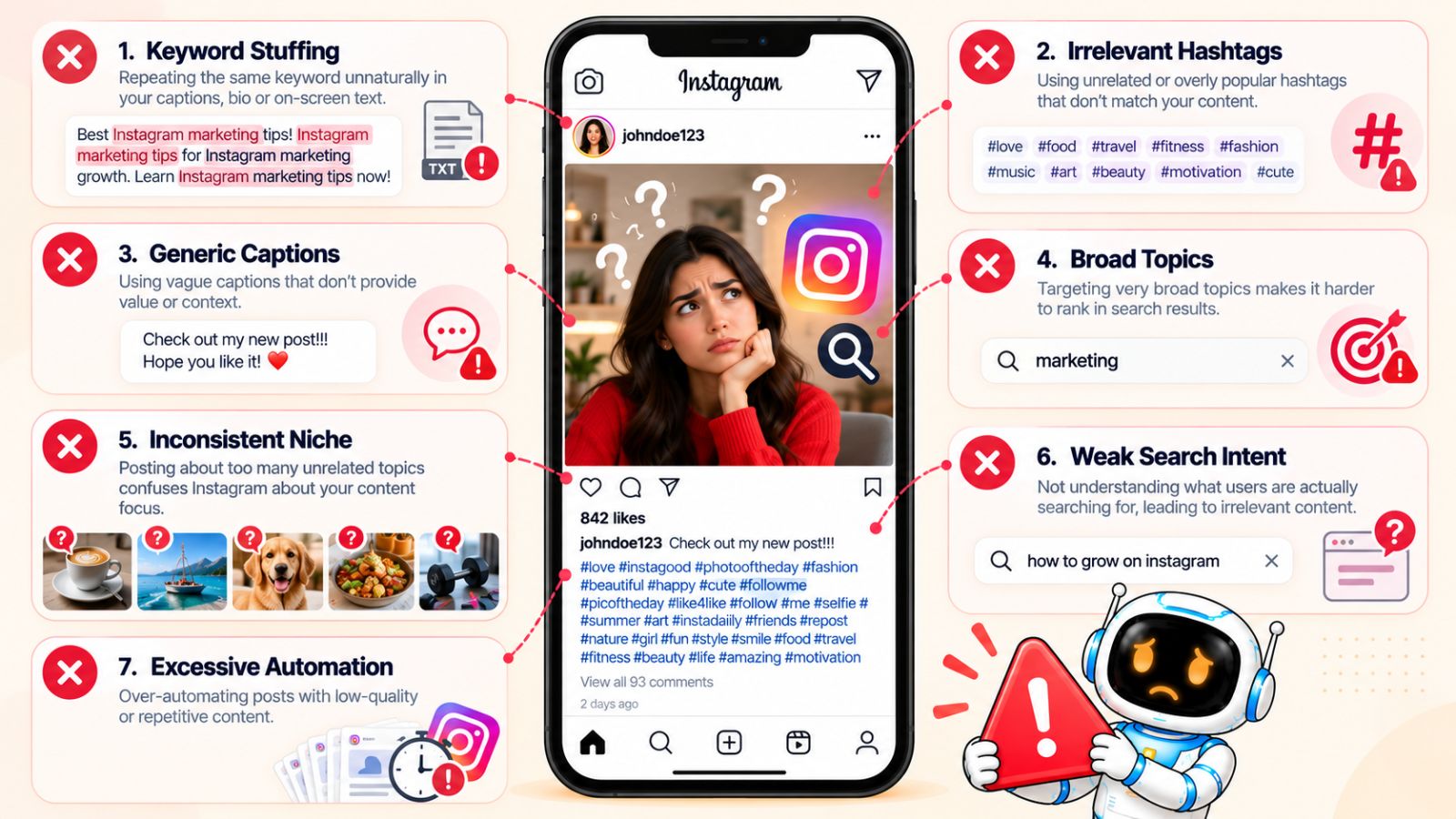
1. Keyword Stuffing
The first mistake is treating Instagram SEO like a game of repetition.
If your target phrase is Instagram search optimization, you don't need to write it in every sentence, add it to every slide, and repeat it across your hashtags.
That creates unnatural content.
Instead, mention the primary topic naturally and use related terminology where it genuinely improves the explanation.
Good optimization should feel like normal writing.
2. Optimizing Only the Hashtags
Hashtags are easy to optimize because they're visible and measurable.
That makes them tempting to overemphasize.
But if your caption, profile, visual content, and actual topic provide weak context, a list of hashtags won't magically transform the post into a strong search result.
Ask:
If I removed every hashtag, would Instagram still understand what this content is about?
If the answer is no, you probably need to improve the content itself.
3. Using Irrelevant Trending Keywords
Trending topics can generate attention, but attention isn't the same as relevance.
Adding a popular term to an unrelated post can attract the wrong audience and create a poor content experience.
For example, if your post is about Instagram analytics, adding a trending entertainment hashtag doesn't make the post more useful to someone interested in analytics.
Use trends when they genuinely connect to your topic.
4. Targeting Broad Topics With No Specific Intent
“Instagram tips” is a topic.
It isn't necessarily a strong content strategy.
Compare it with:
“How to improve Instagram Reel hooks for educational content.”
The second topic has a defined audience, problem, and outcome.
Specific search intent gives you a better foundation for content creation.
Instead of asking:
“What keyword has the biggest audience?”
ask:
“What specific problem can I solve better than the alternatives?”
5. Changing Topics Constantly
An account that publishes about completely unrelated subjects makes it harder to establish a clear topical identity.
One day:
Instagram marketing
Next:
Cryptocurrency
Then:
Travel photography
Then:
Fitness supplements
Then:
Interior design
Experimentation is fine, especially for personal accounts.
But if you want to build authority around a particular subject, your content should generally live within a recognizable topic ecosystem.
6. Writing Generic Captions
A caption such as:
“What do you think? 👇”
doesn't tell anyone—or Instagram—much about the post.
Engagement prompts can be useful, but they shouldn't replace context.
Instead, explain the subject first.
Then invite discussion.
For example:
“If you're planning Instagram content for the next month, start by organizing your posts around three recurring content pillars. Which pillar do you find hardest to maintain?”
Now the caption communicates the topic while still encouraging engagement.
7. Optimizing the Keyword but Not the Content
This is perhaps the biggest mistake.
You can target:
“How to create an Instagram content calendar”
perfectly.
But if your post contains three generic tips and doesn't actually explain how to create one, you've optimized the label rather than the answer.
Search optimization can't compensate for poor search satisfaction.
If you promise an answer, deliver it.
8. Creating Content for Algorithms Instead of People
When creators become overly focused on ranking signals, content can start sounding robotic.
You see this in captions packed with repeated keywords, awkward hooks, and unnatural phrases.
Remember:
The algorithm doesn't become your customer.
The person who discovers your content does.
Write for the person first.
Then make the topic clear enough that the platform can understand what you've written.
9. Using the Same Optimization Formula for Every Post
Not every post should target the same type of search.
A tutorial, comparison, list of ideas, product explanation, and opinion post can all require different approaches.
If you use identical captions, hashtags, hooks, and content formats for every topic, you're likely missing the nuances of search intent.
Adapt the optimization to the question.
10. Ignoring the Profile After Optimizing Individual Posts
Imagine someone discovers your excellent Reel about Instagram content strategy.
They visit your profile.
Your bio says nothing about marketing.
Your recent posts are unrelated.
Your pinned posts don't explain what you do.
The search discovery has nowhere to go.
Profile optimization matters because discovery is only the first step.
You want relevant visitors to understand your expertise quickly and have a reason to follow.
11. Chasing Every New Instagram Feature
New features can create opportunities, but adopting every feature simply because it's new isn't an SEO strategy.
Ask whether the format is actually appropriate for the query and your audience.
A search for a detailed tutorial may be better served by a carousel.
A quick demonstration might work better as a Reel.
The best format is the one that most effectively satisfies the intent.
12. Publishing Without Learning From Results
Optimization is an iterative process.
If you publish 20 search-focused posts and never review what happened, you're throwing away valuable information.
Look for patterns.
Which topics attract non-followers?
Which posts generate profile visits?
Which questions produce saves?
Which content formats consistently perform?
Which topics seem to bring people who actually follow?
Use those patterns to improve your next batch of content.
13. Automating Without a Strategy
Automation can solve a workflow problem, but it can't solve a positioning problem.
For example, a scheduling tool can help you prepare captions and publish content at planned times. It can't decide which search query your audience cares about unless you provide the strategic direction.
This is why automation should come after content strategy.
A tool such as Bibby can be useful for the execution layer—especially if you're managing images, carousels, videos, captions, and publishing across multiple platforms—but it shouldn't determine your entire Instagram search strategy.
The workflow should be:
Research → Strategy → Create → Optimize → Review → Schedule → Analyze
not:
Automate → Publish → Hope
14. Treating Instagram SEO as a One-Time Task
Instagram search behavior changes.
Your audience changes.
Your business changes.
Your competitors improve.
Your content library grows.
That means your optimization process needs to evolve too.
Review your search queries, content performance, profile positioning, and topic clusters periodically.
The goal isn't to find one perfect formula.
It's to build a system that gets better as you learn.
The Biggest Lesson
Most Instagram SEO mistakes come down to one fundamental misunderstanding:
Creators optimize for visibility instead of relevance.
They chase popular hashtags, broad keywords, viral formats, and engagement tricks.
But sustainable search discovery starts with a much simpler question:
What does this person want to find, and does my content give them a genuinely useful answer?
If the answer is yes, your profile, captions, visual content, and supporting signals can reinforce that relevance.
If the answer is no, no amount of keyword placement will fix the underlying problem.
Once you've avoided these mistakes, you can turn the techniques in this article into a repeatable publishing system—which is what we'll build next.
A Practical Instagram Search Optimization Workflow
Knowing individual Instagram SEO techniques is useful, but applying them consistently is where the real advantage comes from.
Without a workflow, search optimization can become a collection of disconnected tasks: researching hashtags one day, rewriting your bio the next, and adding keywords to captions without a clear strategy.
A better approach is to build a repeatable process that takes you from search query → content idea → optimized post → publication → measurement.
Here's a practical workflow you can use.
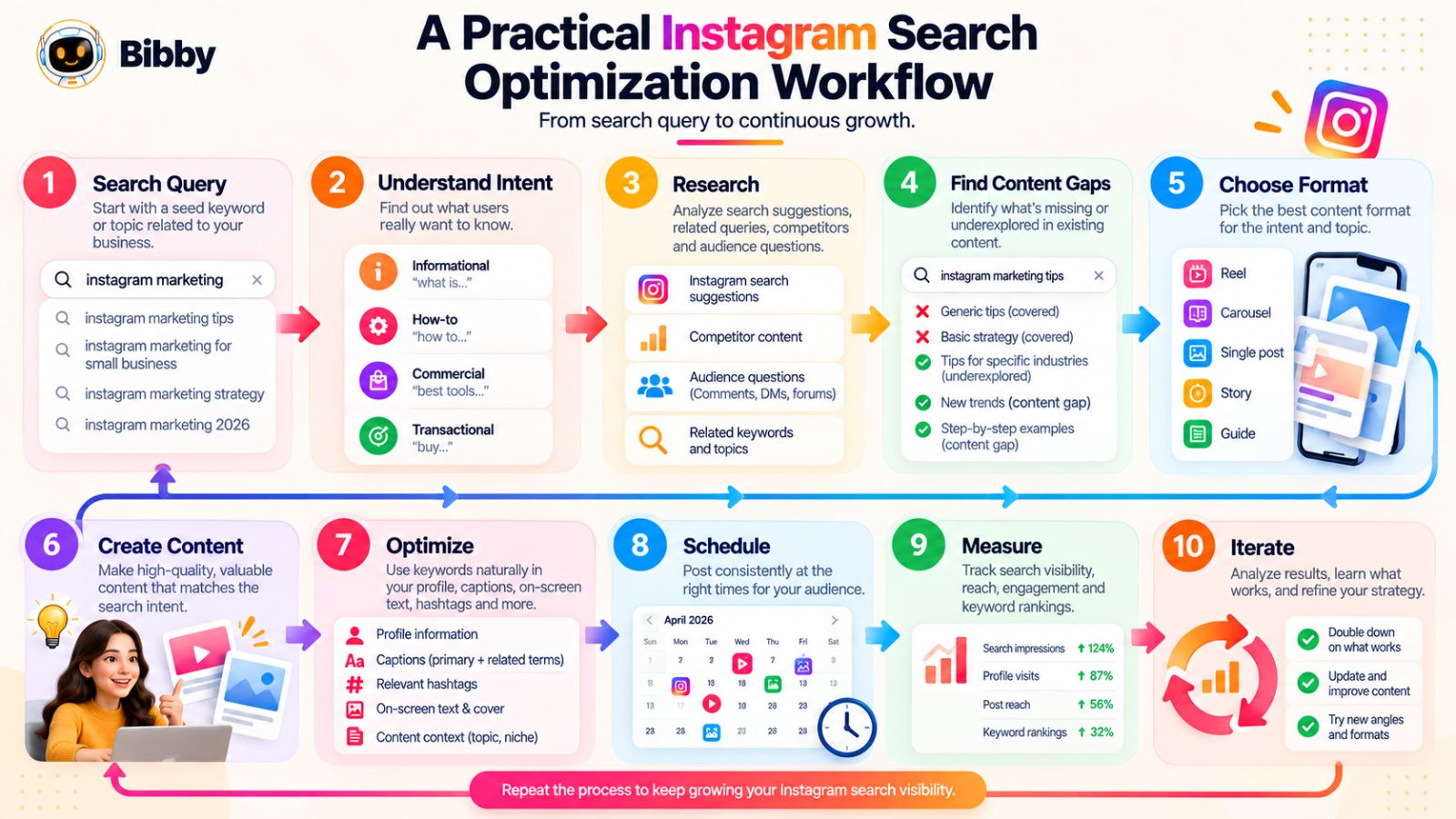
Step 1: Choose a Topic You Want to Be Known For
Start with your broader area of expertise.
For example:
- Fitness
- Personal finance
- Social media marketing
- Interior design
- Skincare
- Photography
- B2B software
Your account should have a recognizable relationship with the topic.
This doesn't mean every post needs to target the same phrase. It means your search-focused content should contribute to a coherent subject area.
Step 2: Find Specific Search Queries
Take the broad topic and turn it into questions or problems.
For a Social media marketing account:
Broad topic: Instagram marketing
Potential queries:
- How to grow an Instagram account
- How to create Instagram content
- How to schedule Instagram posts
- How to write Instagram captions
- How to optimize Instagram Reels
- How to get more Instagram saves
Use Instagram's search suggestions, competitor research, audience questions, and broader search research to expand the list.
Then prioritize queries that are highly relevant to your audience and expertise.
Step 3: Identify Search Intent
Before creating anything, ask:
What does the person actually want?
A query might be asking for:
- An explanation
- A tutorial
- Examples
- Inspiration
- A comparison
- A recommendation
- A solution to a problem
This determines what you should create.
For example:
“Instagram content ideas”
could become a list-style carousel.
“How to create an Instagram content calendar”
could become a step-by-step Reel or carousel.
“Instagram scheduling tools”
could become a comparison or educational post.
The query should influence the format.
Step 4: Study the Existing Instagram Results
Search the query yourself.
Look at the results and ask:
What is Instagram currently showing as relevant?
Then go deeper.
What do the strongest posts have in common?
Look at:
- Content format
- Hook
- Topic depth
- Caption structure
- Profile positioning
- Examples
- Visual presentation
- Engagement
- Recurring terminology
You're not trying to copy what's already ranking.
You're trying to understand the current search landscape and identify opportunities to provide something more useful.
Step 5: Find the Content Gap
Once you've studied the results, ask:
What can I do better?
Maybe existing content is too basic.
Maybe it lacks examples.
Maybe it doesn't address beginners.
Maybe the information is outdated.
Maybe everyone gives the same five tips.
Maybe no one addresses a particular audience or use case.
That's your opportunity.
The strongest search content doesn't simply repeat what already exists.
It improves on it.
Step 6: Choose the Right Format
Now decide how to deliver the answer.
Use a:
Reel for demonstrations, quick tutorials, visual explanations, and processes.
Carousel for detailed explanations, lists, comparisons, checklists, and frameworks.
Static post for simple concepts, strong statements, announcements, or visual references.
Story for interactive follow-ups, questions, polls, and audience research.
The objective is to match the format to the intent.
Step 7: Build the Content Around the Query
Create the actual answer.
Make the subject obvious.
For a Reel:
- Mention the topic in the hook.
- Reinforce it with on-screen text.
- Explain the answer.
- Use natural terminology.
- Write a relevant caption.
For a carousel:
- Put the topic in the cover.
- Give every slide a purpose.
- Explain the concept.
- Include examples.
- End with an actionable next step.
The content should satisfy the query rather than simply mention it.
Step 8: Optimize the Supporting Signals
Once the core content is finished, review the surrounding context.
Check your:
Caption: Does it clearly explain the subject?
Hashtags: Are they genuinely relevant?
Profile: Does the account clearly cover this topic?
Cover: Does it communicate the subject?
On-screen text: Is the topic obvious?
Language: Are important terms used naturally?
Think of this as a final relevance audit.
Step 9: Publish Consistently
Search optimization becomes more valuable when it is part of a broader content system.
You don't need to publish every day just because someone on the internet told you that you should.
Instead, choose a publishing cadence you can maintain while preserving quality.
The objective is to steadily build a library of useful content around the topics you want your account associated with.
Step 10: Organize and Schedule Your Content
Once you have multiple search-driven posts ready, scheduling can make the workflow considerably easier.
For example, you might prepare a week's content in one session:
Monday: Instagram SEO tutorial
Wednesday: Instagram caption carousel
Friday: Instagram Reel optimization checklist
Sunday: Instagram content planning post
Instead of manually publishing each one at the last minute, you can organize the assets and schedule them in advance.
Tools such as Bibby can handle parts of this operational workflow by letting you upload or generate visual assets, select a posting style, generate captions, and schedule different media across platforms at optimized times. It also supports multiple formats such as images, carousels, videos, and Stories.
For teams or creators publishing across Facebook, Instagram, LinkedIn, YouTube, and TikTok, that kind of centralized workflow can reduce the repetitive work around execution.
The important distinction remains:
Automation handles execution; your search strategy determines what gets executed.
Step 11: Review Discovery and Engagement
After publishing, don't look only at likes.
For search-focused content, pay attention to indicators such as:
- Non-follower reach
- Profile visits
- Follows
- Saves
- Shares
- Comments
- Content discovery
- Overall engagement quality
You're trying to determine whether your content is attracting the right people, not simply more people.
A post that reaches fewer people but attracts highly relevant profile visits can be strategically more valuable than a generic viral post.
Step 12: Turn Performance Into New Queries
Your analytics can generate your next round of content ideas.
Suppose you publish:
“How to write Instagram captions.”
It performs well.
That suggests opportunities for related content:
- Instagram caption hooks
- Instagram caption examples
- How long should Instagram captions be?
- Instagram CTA examples
- Instagram caption mistakes
- How to write captions for Reels
One successful topic can become an entire content cluster.
This is how a search optimization system becomes self-reinforcing.
The Complete Workflow
Put the entire process together:
1. Choose your topic
↓
2. Research search queries
↓
3. Identify search intent
↓
4. Analyze existing results
↓
5. Find a content gap
↓
6. Choose the right format
↓
7. Create the answer
↓
8. Optimize profile and content signals
↓
9. Publish or schedule
↓
10. Measure discovery and engagement
↓
11. Learn from the results
↓
12. Create the next related piece of content
This workflow is more sustainable than trying to find a secret Instagram SEO trick.
You're essentially building a search-driven content engine.
And once you understand the workflow, it's easier to see how the same principles apply across different businesses and creator niches.
Let's look at some concrete examples next.
Instagram Search Optimization Examples
The principles behind Instagram search optimization are consistent, but the execution should change depending on the business, audience, and search intent.
A fitness creator shouldn't optimize content exactly like a SaaS company. A local business has different search opportunities from a personal brand. And a product-focused account may need to balance discovery with commercial intent.
The following examples show what a search-focused Instagram strategy can look like in practice.
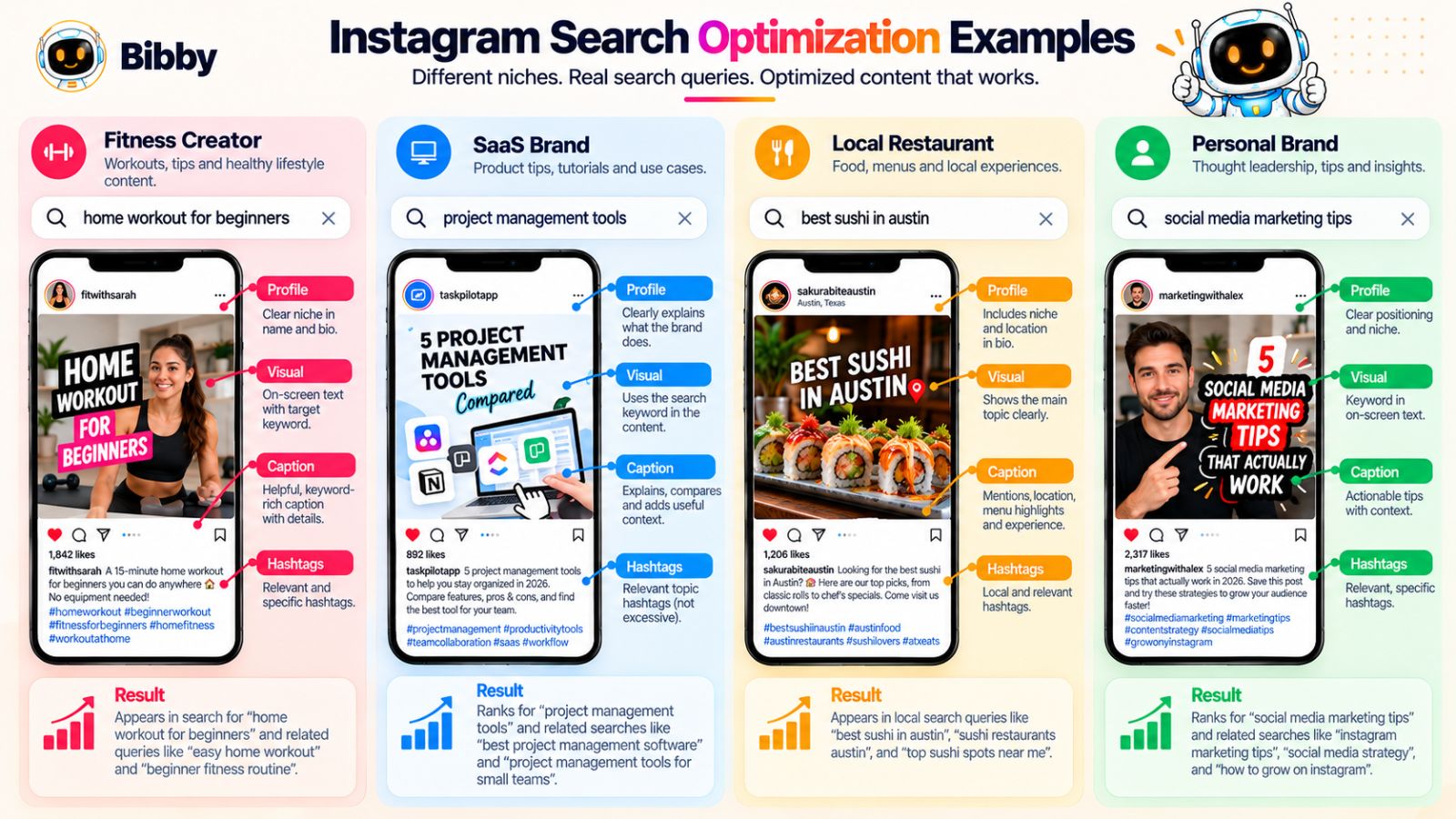
Example 1: Fitness Creator
Imagine a personal trainer who wants to attract people searching for beginner-friendly workouts.
A broad content idea might be:
“5 exercises you should try.”
That's easy to publish, but it's not particularly specific.
A search-focused approach could target:
“Beginner home workout with no equipment.”
Now the content has a defined audience and problem.
Content approach
The Reel could open with:
“Need a beginner home workout with no equipment? Try these five exercises.”
Then demonstrate each exercise.
The caption could naturally explain:
- Who the workout is suitable for
- How many repetitions to perform
- How long to rest
- How to modify the exercises
- How often beginners should repeat the workout
The cover could say:
“Beginner Home Workout — No Equipment”
The profile could clearly communicate that the account focuses on beginner fitness and home workouts.
Now the query, content, profile, and caption all reinforce one another.
Example 2: SaaS or Marketing Software Brand
Now imagine a company selling social media management software.
The temptation might be to publish constant promotional content:
“Our platform makes social media easy!”
That may communicate the product, but it doesn't necessarily capture search intent.
Instead, the company could create content around questions such as:
- How to schedule Instagram posts
- How to plan a social media calendar
- How to manage multiple social media accounts
- How to create social media content in batches
- How to schedule Instagram Reels
Content approach
A carousel could be titled:
“How to Build a Weekly Social Media Publishing Workflow”
The slides could explain:
- Choose your weekly topics.
- Create your visual assets.
- Write the captions.
- Review the content.
- Schedule the posts.
- Analyze performance.
The product could appear naturally in the workflow if it genuinely solves part of the problem.
For example, Bibby could be mentioned as one way to handle the execution stage—creating or uploading visuals, generating captions, and scheduling content across multiple platforms.
But the content would still be valuable to someone who isn't using Bibby.
That's important.
Search-focused content should solve the problem before it tries to sell the solution.
Example 3: Local Restaurant
Local businesses can approach Instagram search differently because location and local intent matter.
Imagine a restaurant specializing in Indian vegetarian food.
Instead of only posting:
“Tonight's special 🌶️”
the restaurant could create content around specific local discovery topics such as:
- Best vegetarian restaurant in [city]
- Vegetarian dinner ideas
- What to order at an Indian restaurant
- Best dishes for a family dinner
- Indian vegetarian food recommendations
A Reel could show:
“5 Indian Vegetarian Dishes to Try If You're Visiting [City]”
The caption could describe each dish.
The profile could clearly communicate the restaurant's cuisine and location.
The content then has a much stronger relationship with local discovery intent than a generic food photo.
Example 4: Personal Brand
Consider a career coach targeting professionals looking for interview advice.
A generic post might say:
“5 interview tips.”
A search-focused strategy could target specific questions:
- How to answer “tell me about yourself”
- How to explain a career gap in an interview
- What to say when asked about salary expectations
- How to answer behavioral interview questions
- How to prepare for a job interview
Each query can become a separate piece of content.
For example:
Reel: “How to Answer ‘Tell Me About Yourself’ in an Interview”
The opening immediately matches the query.
The video provides a framework.
The caption gives an example answer.
The profile establishes the creator as a career and interview specialist.
The content is now positioned around a specific problem rather than a generic category.
Example 5: E-commerce Brand
Imagine a skincare company selling products for people with dry skin.
Instead of optimizing every post around the product name, the brand can create educational content around customer problems.
Potential searches might include:
- skincare routine for dry skin
- how to moisturize dry skin
- dry skin skincare routine
- ingredients for dry skin
- how to layer skincare products
A carousel could be:
“Simple Skincare Routine for Dry Skin: 5 Steps”
The product can appear naturally where appropriate.
For example:
Cleanse → Hydrate → Treat → Moisturize → Protect
If one of the brand's products genuinely belongs in that routine, it can be included as part of the explanation.
The searcher gets useful information first.
The product becomes a relevant solution rather than an interruption.
Example 6: Photographer
A photographer can use search optimization to target both broad expertise and specific client needs.
Instead of:
“New photos from this weekend 📸”
consider:
“What to Wear for a Family Photoshoot”
or:
“How to Prepare for Your First Engagement Photoshoot”
These topics answer specific questions potential clients may have.
A carousel could provide:
- Outfit guidelines
- Color suggestions
- What to avoid
- Location considerations
- Preparation tips
The photographer's profile can establish their specialty and location.
Now educational content also serves a business-development purpose.
What These Examples Have in Common
The industries are completely different, but the underlying process is the same.
1. Start with a specific problem.
Don't begin with a generic desire for “more reach.”
2. Find the language people use.
Use actual questions and search behavior.
3. Match the format to the intent.
A demonstration might belong in a Reel. A detailed framework might belong in a carousel.
4. Make the subject obvious.
Use clear hooks, covers, captions, and profile positioning.
5. Provide the complete answer.
Don't create content that merely teases the solution.
6. Connect the post to your broader topic.
Your account should reinforce the expertise represented by the individual post.
7. Let the commercial outcome follow the value.
When the content genuinely solves a problem, the relevant product, service, or expertise becomes more credible.
One Query Can Produce Multiple Content Assets
There's another important lesson here.
A single search query doesn't have to produce only one post.
Take:
“How to schedule Instagram posts.”
You could create:
Reel: How to schedule an Instagram post step by step.
Carousel: 7 Instagram scheduling mistakes.
Story: Ask followers what makes content planning difficult.
Carousel: Instagram posting calendar template.
Reel: How to batch a week's Instagram content.
Long-form caption: How scheduling fits into a sustainable content workflow.
This turns one search opportunity into an entire mini content ecosystem.
For creators and businesses, that's much more efficient than constantly starting from a blank page.
The Strategic Takeaway
The purpose of these examples isn't to give you a list of templates to copy.
It's to demonstrate how search intent changes content strategy.
The better you understand what someone wants when they search, the easier it becomes to decide:
- What to publish
- What format to use
- What language to use
- What information to include
- How to position the profile
- Where a product or service naturally fits
Once you've created and published search-focused content, the next question is obvious:
How do you know whether your Instagram search optimization is actually working?
That's what we'll measure next.
How to Measure Whether Instagram Search Optimization Is Working
Instagram search optimization is difficult to improve if you never measure the outcome.
The challenge is that search visibility isn't always represented by one simple metric. A post can generate relatively modest engagement while still attracting valuable non-followers, profile visits, and new followers who are highly relevant to your business.
That's why you need to evaluate Instagram SEO as a discovery-to-conversion journey, not just a collection of likes.
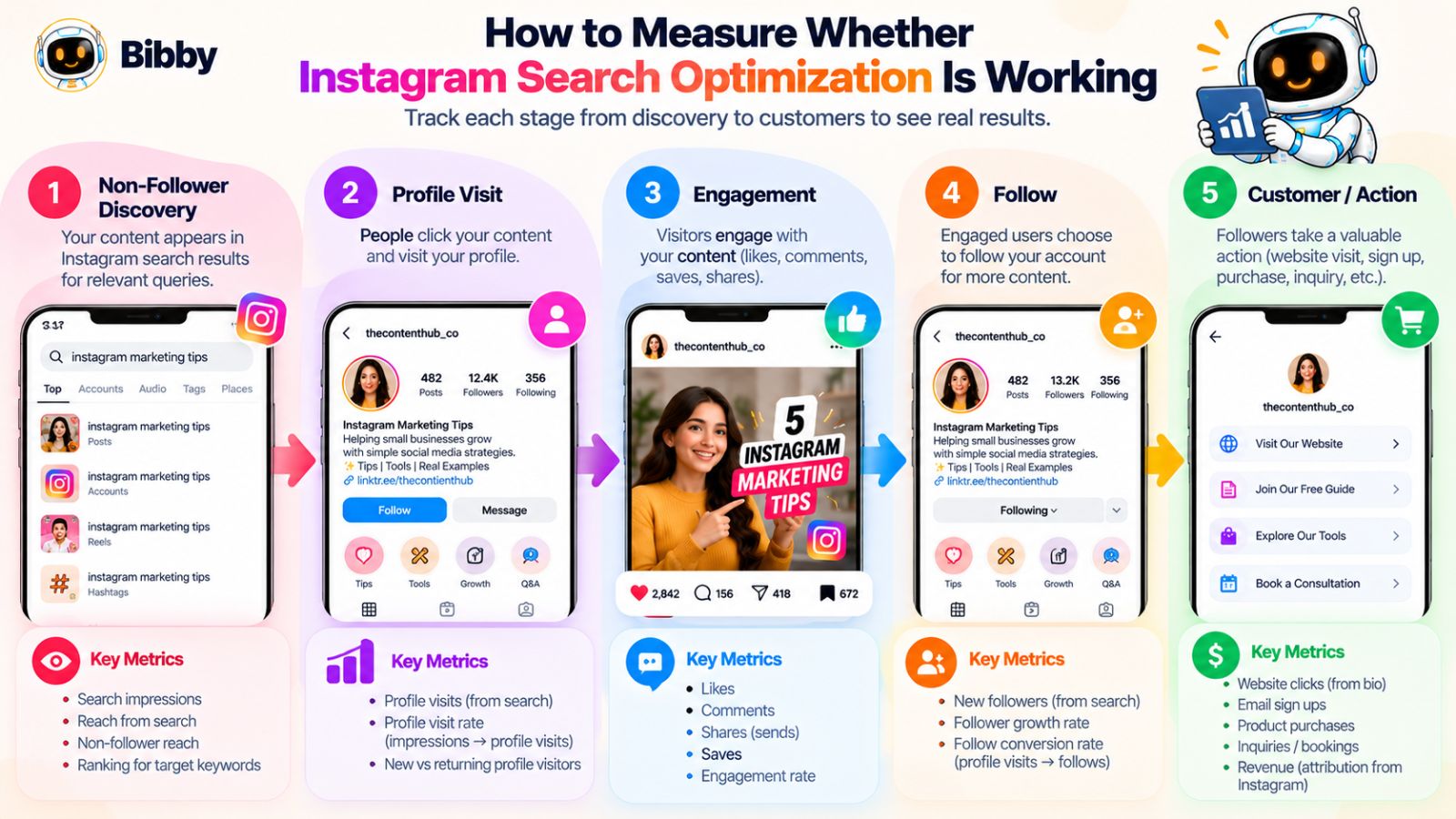
1. Watch Non-Follower Reach
One of the first questions to ask is:
Are people who don't already follow me discovering this content?
If your search-focused content consistently reaches people outside your existing audience, that's a positive sign that your content is finding distribution beyond your current followers.
But non-follower reach alone isn't enough.
You also want to know whether those people are actually interested in what you offer.
2. Track Profile Visits
A useful next step is measuring how many people visit your profile after discovering your content.
Consider this sequence:
Content discovery → profile visit → follow
If a search-focused post generates substantial profile visits, it suggests the topic is attracting people who want to learn more about the account behind the content.
This makes profile optimization important again.
Your post may win the discovery click, but your profile has to win the follow.
3. Measure Follows Generated by Content
A post that generates 100,000 views but almost no relevant followers may be less valuable than a post that generates 10,000 views and attracts 200 people who genuinely care about your niche.
Look at which content topics consistently generate followers.
You may discover that:
- Tutorials generate strong follows.
- Generic motivational posts generate views.
- Checklists generate saves.
- Comparisons generate profile visits.
- Product content generates fewer views but more conversions.
Those patterns tell you what your audience actually values.
4. Pay Attention to Saves
Saves are particularly useful for educational content.
Someone is more likely to save:
“Instagram Profile SEO Checklist”
than:
“Have a great day!”
That doesn't mean every post needs to maximize saves.
It means you should consider whether the content provides a reason to return.
Checklists, frameworks, tutorials, examples, and reference posts naturally lend themselves to saves.
5. Measure Shares
Shares can tell you whether your content is useful enough for someone to pass along.
For example:
“Send this to someone who needs to fix their Instagram bio.”
can be useful when the content genuinely solves a problem.
But don't optimize solely for share count.
Look at why people are sharing.
Educational content may be shared because it's useful.
Humorous content may be shared because it's entertaining.
Both are valuable, but they support different business objectives.
6. Track Engagement Quality
Raw engagement isn't enough.
A comment such as:
“🔥”
tells you less about content usefulness than:
“I've been struggling with this exact issue. Does this work for Reels too?”
The second indicates genuine interest in the subject.
Pay attention to:
- Relevant comments
- Questions
- Conversations
- Saves
- Shares
- Profile visits
These signals can help you understand whether your content is reaching people with the right intent.
7. Compare Topics, Not Just Individual Posts
One of the biggest measurement mistakes is evaluating every post independently.
Instead, group content into topic categories.
For example:
| Topic | Reach | Saves | Profile Visits | Follows |
|---|---|---|---|---|
| Instagram SEO | High | High | High | High |
| Content ideas | High | Medium | Medium | Medium |
| Social media motivation | Very high | Low | Low | Low |
| Scheduling | Medium | High | High | High |
The exact numbers will vary, but the pattern can reveal something important:
The content that gets the most views isn't necessarily the content that produces the most valuable audience.
8. Compare Search Intent Types
You can also categorize your content by intent.
For example:
Informational:
“What is Instagram SEO?”
How-to:
“How to optimize an Instagram bio?”
Inspiration:
“Instagram content ideas.”
Commercial:
“Best Instagram scheduling tools.”
Then compare the results.
You may find that how-to content produces more saves, while commercial content produces more profile visits or website clicks.
This gives you a much more useful picture of your content strategy.
9. Track Profile Search Performance When Available
Instagram's analytics and reporting capabilities can change over time, so the exact search-related metrics available to every account may vary.
Where Instagram provides search or discovery insights, use them.
If detailed query-level data isn't available, use the surrounding signals to infer what is working:
Topic → content → non-follower discovery → profile activity → followers
You can also manually test important queries periodically to understand what type of content Instagram is surfacing.
Don't treat a manual ranking check as a permanent position.
Search results can vary by user, location, activity, and other contextual factors.
10. Build a Simple Monthly SEO Review
You don't need a complicated analytics system.
Once a month, review your search-focused content and record:
Top-performing queries
Which topics consistently attract discovery?
Top-performing formats
Are Reels, carousels, or other formats performing better for specific intents?
Best discovery posts
Which posts reach the most relevant non-followers?
Best conversion posts
Which posts generate the most profile visits and follows?
Best reference posts
Which posts generate saves and shares?
Content gaps
Which questions haven't you answered yet?
This creates a feedback loop for the next month.
11. Turn Winners Into Content Clusters
Suppose you publish:
“How to optimize your Instagram bio”
and it generates unusually strong profile visits and follows.
Don't stop there.
Create related content:
- Instagram bio examples
- Instagram name field optimization
- Instagram profile SEO checklist
- Instagram bio mistakes
- How to write an Instagram bio for a business
- Instagram profile conversion tips
You already have evidence that the broader topic interests your audience.
Use that evidence.
12. Don't Panic Over One Poor-Performing Post
Search optimization is a long-term strategy.
One post failing doesn't necessarily mean the query is bad.
Possible reasons include:
- Weak hook
- Poor execution
- Wrong format
- Weak visual
- Poor timing
- Insufficient content depth
- Stronger competing content
- Misunderstood search intent
Instead of abandoning the topic immediately, ask what can be improved.
Try a different format.
Try a more specific query.
Improve the answer.
Change the hook.
Then test again.
A Useful Instagram Search Optimization Scorecard
You can simplify your monthly review into five questions:
1. Discovery:
Are search-focused posts reaching non-followers?
2. Relevance:
Are those people interacting with the content?
3. Interest:
Are they visiting the profile?
4. Conversion:
Are relevant visitors becoming followers or customers?
5. Learning:
What topics should you create more—or less—content about?
This keeps the focus on business value rather than vanity metrics.
The Real Goal of Measurement
The purpose of measuring Instagram SEO isn't to produce a beautiful analytics report.
It's to answer one strategic question:
Which topics and search intents consistently attract the people I actually want to reach?
Once you know that, content creation becomes much easier.
You can create more content around winning topics, identify related queries, build stronger content clusters, and stop wasting time on subjects that attract attention without business value.
That leads naturally to the final practical step: turning everything in this guide into a simple Instagram search optimization checklist you can use before publishing your next post.
Instagram Search Optimization Checklist
Instagram search optimization becomes much easier when you turn the strategy into a repeatable checklist.
You don't need to complete dozens of complicated SEO tasks every time you publish. You need to make sure the important pieces agree with one another: the search query, user intent, content, profile, caption, and overall topic.
Use this checklist before publishing search-focused Instagram content.
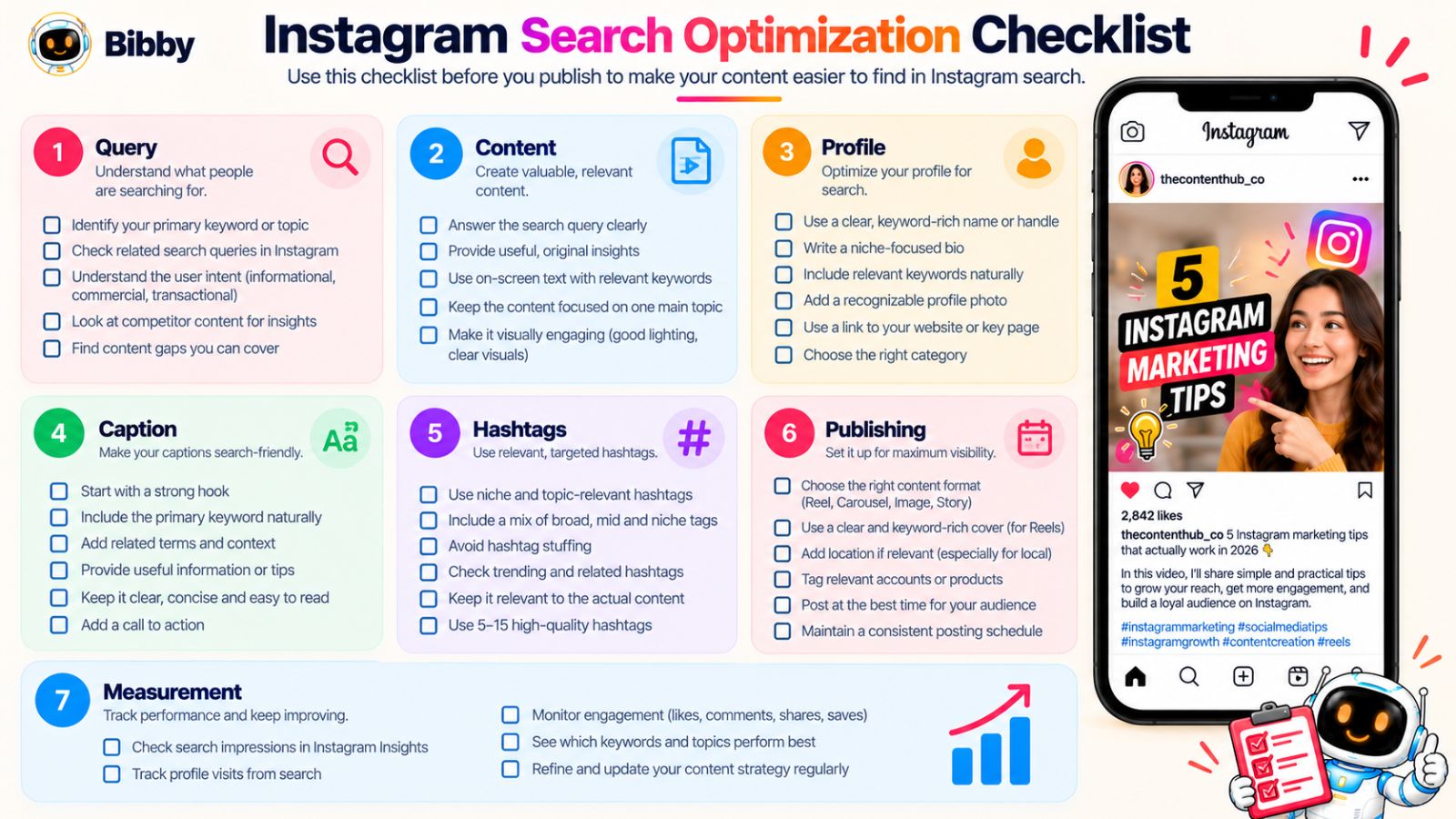
Search Query
☐ Have I identified a specific search query or question?
☐ Is the query relevant to my audience and business?
☐ Do I understand what the person searching actually wants?
☐ Have I checked Instagram to understand the existing results?
☐ Is there an opportunity to provide a better, clearer, or more useful answer?
Content Strategy
☐ Does this post answer one primary question or problem?
☐ Have I chosen the format that best matches the search intent?
☐ Does the content provide a complete answer rather than simply tease one?
☐ Have I included specific examples where they would help?
☐ Does the topic fit within my account's broader subject area?
Profile
☐ Does my profile name clearly communicate what I do?
☐ Does my bio naturally include relevant topic language?
☐ Is my account's niche immediately obvious?
☐ Do my recent posts reinforce the same general expertise?
☐ Would someone who discovers me through Search understand why they should follow?
Reel Optimization
☐ Is the topic clear in the opening hook?
☐ Does the on-screen text reinforce the subject?
☐ Do I naturally use relevant terminology while speaking?
☐ Does the cover clearly describe the Reel?
☐ Does the caption add useful context?
☐ Is the Reel genuinely useful enough to save or share?
Carousel Optimization
☐ Does the cover clearly communicate the topic?
☐ Does every slide contribute to answering the main query?
☐ Is the information organized logically?
☐ Have I used examples, frameworks, or actionable advice?
☐ Does the final slide provide a useful next step?
Caption
☐ Does the caption clearly establish the topic?
☐ Does the primary query or a natural variation appear where appropriate?
☐ Have I included related terminology without keyword stuffing?
☐ Does the caption answer or expand on the searcher's question?
☐ Does the call to action come after providing value?
Hashtags
☐ Does every hashtag genuinely describe the content?
☐ Are the hashtags relevant to the audience I want to reach?
☐ Am I avoiding unrelated trending hashtags?
☐ Have I avoided relying on hashtags as my entire SEO strategy?
☐ Does the hashtag selection reflect the specific topic of this post?
Publishing
☐ Is the content scheduled at a sustainable time?
☐ Have I reviewed the visual, caption, hashtags, and profile connection together?
☐ Have I checked the post for accuracy and clarity?
☐ Am I publishing consistently enough to build a useful content library?
If you're managing a large content pipeline, scheduling tools can reduce the operational workload. For example, a workflow such as create or upload the asset → choose the posting style → generate or refine the caption → review → schedule can make it easier to maintain a consistent publishing system across platforms. Bibby can handle this kind of workflow across formats such as images, carousels, videos, and Stories, which can be useful when execution becomes the bottleneck.
The important distinction is that the strategy still comes first. Automation should help you execute a good content plan, not replace the research that determines what you should publish.
Measurement
After publishing, don't stop at “Did it get likes?”
☐ Did the post reach non-followers?
☐ Did it generate profile visits?
☐ Did relevant people follow the account?
☐ Did people save or share it?
☐ Did the content generate meaningful comments or questions?
☐ Does this topic deserve a follow-up post?
☐ Did the content reveal a new search query worth targeting?
The 10-Second Pre-Publish Test
If you don't have time to run through the entire checklist, ask yourself these five questions:
1. What search query is this content answering?
2. Is that query relevant to the people I want to reach?
3. Is the topic obvious within the first few seconds or slides?
4. Does the content actually satisfy the search intent?
5. Does my profile reinforce the subject?
If you can answer all five confidently, you've covered the most important strategic foundations.
The rest is refinement.
Turn the Checklist Into a System
The biggest benefit of this checklist isn't that it helps you optimize one post.
It's that it gives you a repeatable standard.
Over time, you can build a content library where every post has a purpose:
Query → Intent → Content → Optimization → Distribution → Measurement
That is much more powerful than chasing individual Instagram SEO tricks.
Search optimization works best when it becomes part of how you think about content from the beginning—not something you remember five minutes before hitting “Publish.”
And that brings us to the bigger takeaway from this entire guide.
Final thoughts
Instagram search optimization isn't about finding a magic keyword or filling every caption with hashtags. It's about understanding what your audience searches for, creating content that genuinely satisfies that intent, and giving Instagram enough consistent context to understand who the content is for.
The three biggest takeaways are simple: target real search queries instead of vague topics, optimize the entire content experience instead of one keyword field, and use performance data to build deeper content around the topics that attract the right audience.
Once you have that foundation, the next step is turning your search opportunities into a repeatable publishing system. Build a content calendar around your highest-value queries, create the right mix of Reels and carousels, and schedule the content consistently so your Instagram account steadily builds topical depth.
The goal isn't to optimize one post perfectly. It's to build an Instagram presence that becomes increasingly relevant to the searches your ideal audience makes.