Every comment your audience leaves can be more than a reply to write—it can be the starting point for your next piece of social media content.
If you’re constantly running out of social media content ideas, the problem may not be a lack of creativity; you may simply be overlooking the conversations happening underneath the content you already publish. When you learn how to turn comments into content, questions, objections, experiences, and recurring discussions can become a repeatable source of posts instead of one-off interactions.
By the end, you’ll have a practical system for turning audience conversations into your next 50 posts.
The first step is understanding why comments can be one of your most valuable sources of content ideas.
What Does It Mean to Turn Comments Into Content?
To turn comments into content means using the questions, problems, opinions, objections, and experiences your audience shares in your comment sections as raw material for new social media posts. Instead of treating comments as the final destination of a post, you treat them as research that tells you what your audience wants to know next.
Imagine you publish a post explaining how to create a social media content calendar. Someone comments, “How do I know what to post when I have a different audience on LinkedIn and Instagram?”
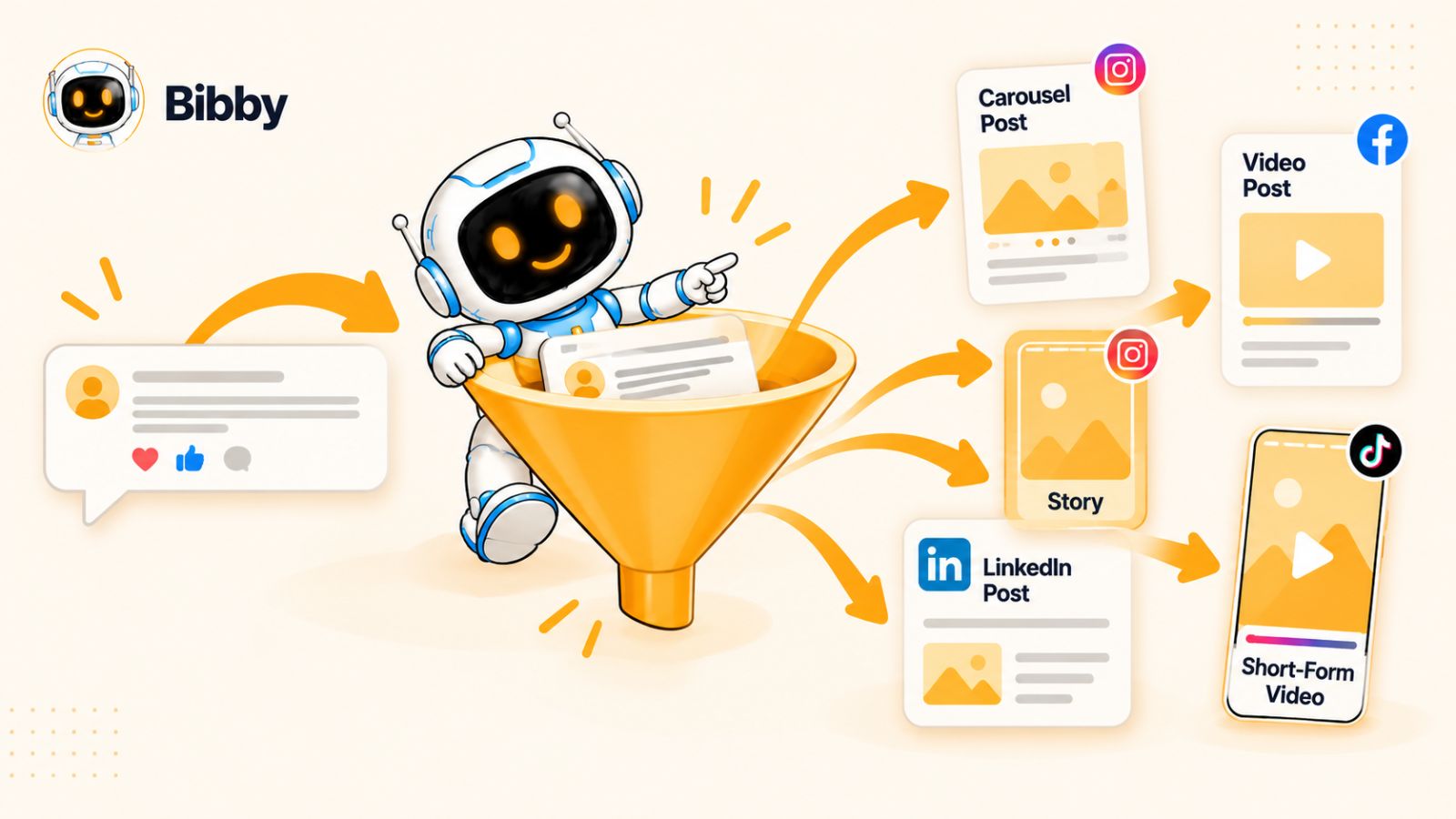
You could simply answer the question in the comments. But that question also reveals a broader content opportunity. It could become a carousel explaining how to adapt one content idea across platforms, a short video demonstrating the process, a LinkedIn post about platform-specific content strategy, or a follow-up post asking other creators how they handle the same problem.
That is the comment-to-content loop:
Publish → Listen → Identify → Create → Publish → Listen again
The important distinction is that you are not copying comments and turning them into posts word for word. You are extracting the underlying audience need behind each conversation and developing it into something genuinely useful.
A comment such as “But what if I don't have enough content to post every day?” contains more than a question. It may reveal a problem with content planning. A comment saying “I tried this and it didn't work because…” can expose an objection or real-world limitation. A request for an example can signal that your audience understands the concept but needs to see how it works in practice.
These signals are valuable because they come directly from the people you are trying to reach.
Comments Are a Form of Audience Research
Traditional content planning often starts with a blank document and questions like:
- What should we post this week?
- What topic will get engagement?
- What social media trend should we follow?
- What haven't we talked about yet?
There is nothing inherently wrong with brainstorming. The problem is that brainstorming can produce content based on what you think your audience wants rather than what they are actually asking for.
Comments give you a different starting point.
Your audience is already telling you what confuses them, what they disagree with, what they want explained, what they have tried, and what they want to learn next. When the same type of question appears repeatedly, you have something much stronger than a random content idea—you have evidence of demand.
This makes comments particularly useful for building a social media content strategy that stays connected to real audience needs.
The Goal Isn't to Turn Every Comment Into a Post
A common mistake is assuming that every interesting comment deserves its own piece of content.
It doesn't.
One unusual comment might be entertaining but have little relevance to your wider audience. Another comment might look simple but represent a question hundreds of other people are silently asking.
The skill is learning to distinguish between an individual interaction and a repeatable content signal.
Look for comments that reveal:
- A question other people are likely to have
- A recurring problem or frustration
- A common misconception
- A strong objection
- A request for an example or tutorial
- An unexpected use case
- A personal experience others can learn from
- A disagreement that could create a useful discussion
When you consistently identify these signals, your comment section starts functioning like an informal editorial calendar.
And that changes the content creation process completely. Instead of asking, “What should I post next?”, you can start asking a much better question:
“What is my audience already telling me they need?”
That question is the foundation of the comment-to-content loop.
Why Your Comments May Be Your Best Source of Social Media Content Ideas
Coming up with social media content ideas is usually treated as a creativity problem. But for most brands and creators, the harder problem isn't finding something to say—it's knowing what is worth saying.
Your comment section can help solve that problem.
When someone takes the time to leave a question, challenge an idea, share an experience, or ask for more detail, they're giving you a small piece of audience research. Unlike a generic brainstorming exercise, that research is connected to something your audience has already seen and cared enough about to respond to.
That makes comments one of the most overlooked sources of content intelligence on social media.
Comments Reveal the Questions People Actually Have
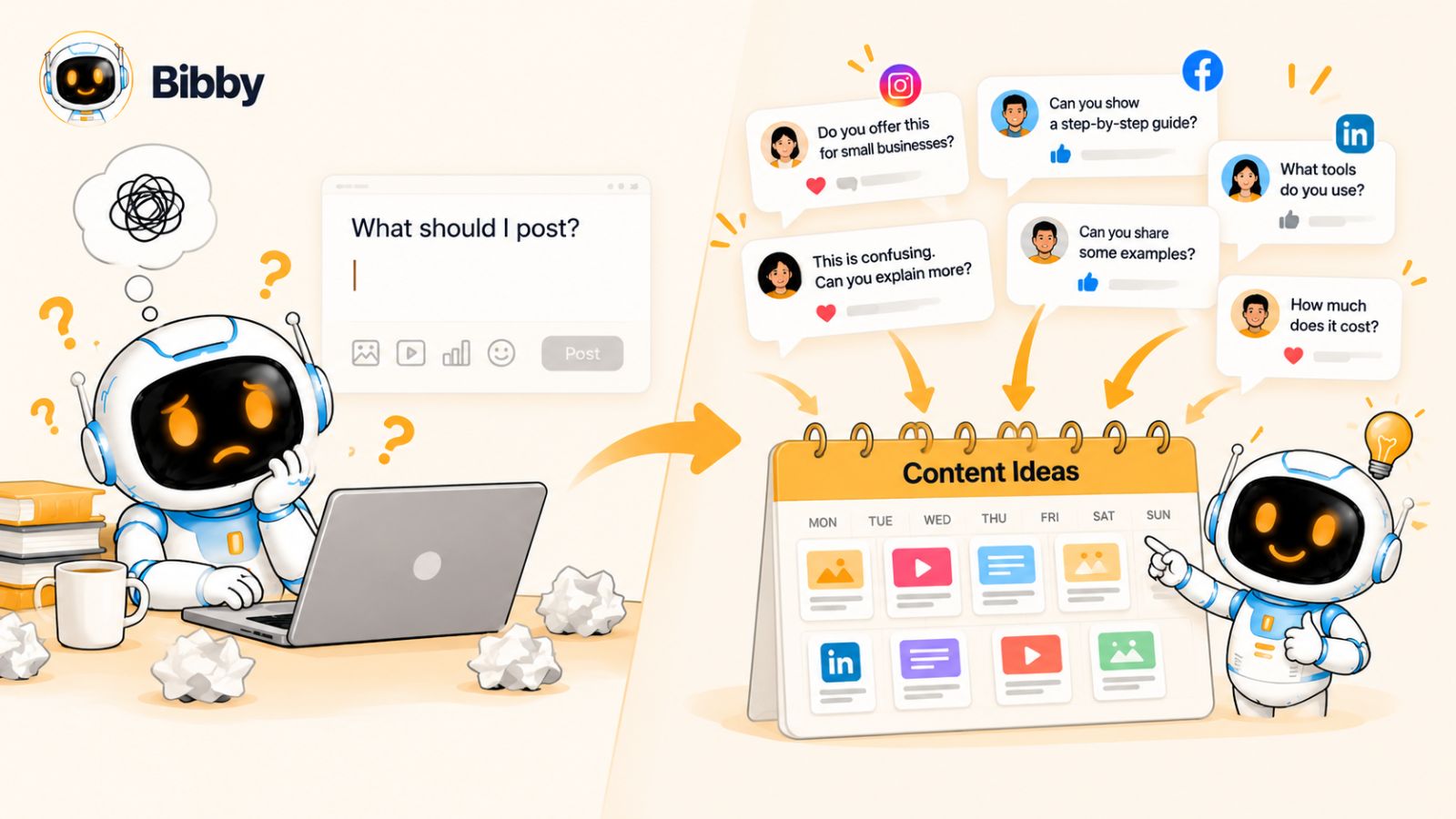
You can use keyword research, competitor analysis, surveys, and analytics to understand your audience. But comments give you something those methods often miss: the exact language people use when they are trying to solve a problem.
Suppose you publish a post about creating a social media calendar and receive comments such as:
“How far ahead should I actually plan?”
“What if I don't have enough content for seven posts a week?”
“Should I create different posts for Instagram and LinkedIn?”
Those aren't just three comments to answer.
They're three potential content topics.
The first could become a post about realistic content planning. The second could become a guide to creating fewer, higher-value posts. The third could become a comparison of how to adapt content across platforms.
The audience has already done part of the research for you.
Comments Expose Objections Before They Become Lost Opportunities
Questions aren't the only useful signals.
Pay attention when someone says:
- “This sounds good, but…”
- “I tried this and…”
- “Does this actually work for…?”
- “What about people who…?”
- “I don't have the time to…”
- “Isn't this basically the same as…?”
These comments expose friction.
And friction is valuable content.
If one person publicly raises an objection, there is a reasonable chance other people are wondering about the same thing without commenting. Creating content that addresses the objection allows you to answer that uncertainty before it prevents someone from taking action.
For example, if your audience repeatedly says that creating social media content takes too much time, you could create content around simplifying the creation process, batching posts, repurposing ideas, or using automation.
Instead of trying to convince people that their objection is wrong, you are creating content that takes the objection seriously and helps them work through it.
Comments Give You Your Audience's Vocabulary
There is another advantage that is easy to overlook.
Your audience may describe a problem differently from the way you describe it.
You might call something “content repurposing,” while your audience says, “How do I turn one post into five?” You might describe “audience segmentation,” while they ask, “Should I talk differently to beginners and experts?”
Those differences matter.
When you use the language your audience naturally uses, your content can feel more relevant and easier to understand. Their wording can also help you discover new angles, hooks, titles, and questions to address.
The comment section therefore becomes more than an idea bank. It becomes a source of audience language.
One Conversation Can Create an Entire Content Cluster
The biggest opportunity comes when you stop looking at comments individually.
Imagine five people ask variations of the same question over several weeks.
Instead of creating five nearly identical posts, identify the underlying topic and build a small content cluster around it.
For example:
Audience question:
“How do I consistently come up with social media posts?”
That could lead to:
- A post explaining a repeatable idea-generation system
- A carousel showing five sources of content ideas
- A video demonstrating the process
- A post about common content-planning mistakes
- A case study showing how one idea became multiple posts
- A discussion post asking followers where they find inspiration
One recurring question has now become an entire group of related content.
This is where the comment-to-content loop becomes more powerful than simply collecting post ideas. Each conversation can lead to another conversation, which can reveal another content opportunity.
Your Audience Can Help Decide What You Should Create Next
The result is a subtle but important shift in your content strategy.
Instead of building your calendar entirely from trends, guesses, and predetermined topics, you allow audience behavior to influence what comes next.
Your workflow becomes:
Create something → observe the response → study the conversations → identify the strongest signals → create around those signals → repeat.
Over time, your content becomes increasingly connected to the questions and problems your audience cares about.
And once you know what signals to look for, you can start turning specific types of comments into specific types of content.
The 7 Types of Comments You Should Turn Into Content
Not every comment deserves to become a social media post.
A simple “Great post!” is useful for engagement, but it probably doesn't give you enough information to build a meaningful piece of content. The comments worth paying attention to are the ones that contain signals—a question, problem, objection, experience, or idea that can be useful beyond the original conversation.
Here are seven types of comments that deserve a second look.
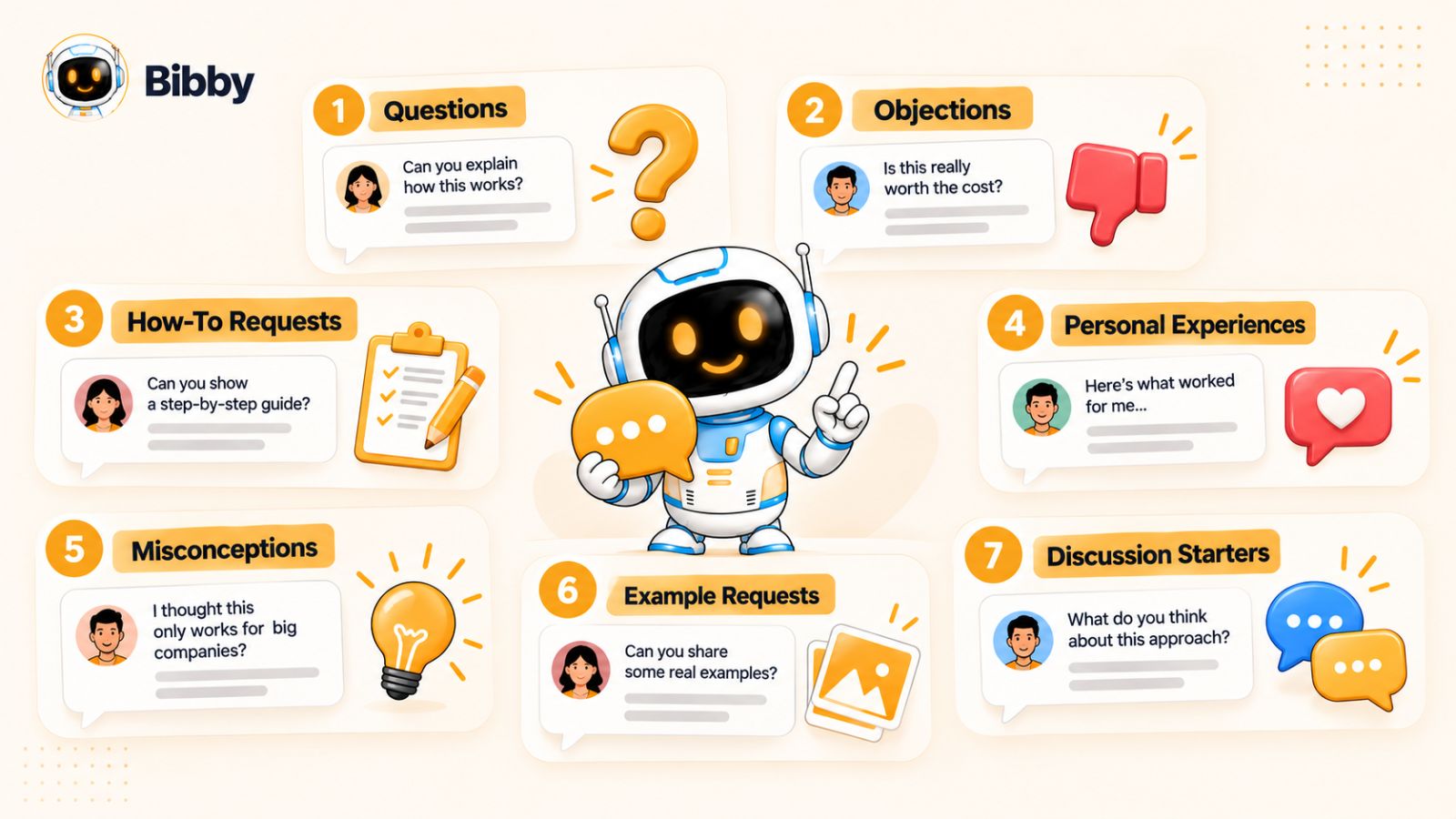
1. Questions
Questions are the most obvious content opportunities because they tell you exactly what someone wants to understand.
Look for questions that:
- Come up repeatedly
- Require more than a one-sentence answer
- Relate to a common problem
- Reveal confusion about an important topic
- Could help other people in your audience
For example, if someone asks, “How many times should I post on LinkedIn each week?” you could answer them directly. But you could also turn the question into a post explaining how to choose a realistic posting frequency based on your goals, resources, and audience.
A useful question is often a ready-made content brief.
2. Objections
Objections are particularly valuable because they reveal why someone might not act.
Comments such as “But won't this take too much time?” or “Does this work for small businesses?” tell you where your audience has doubts.
Those doubts can become content.
You could create:
- An objection-handling video
- A myth-busting carousel
- A detailed LinkedIn post
- A case study
- A “What nobody tells you about…” post
Don't automatically treat an objection as something you need to defeat. Sometimes the best content acknowledges that the concern is legitimate and explains how to work around it.
3. “How Do I…?” Comments
“How do I do this?” is one of the strongest signals for tutorial content.
These comments indicate that someone doesn't just want information—they want to apply it.
A single how-to question can become:
- A step-by-step carousel
- A screen-recorded tutorial
- A short-form video
- A checklist
- A longer educational post
For example, someone asking, “How do I turn one video into multiple social posts?” could become an entire piece about content repurposing.
If you repeatedly receive implementation questions, you have a strong opportunity to build a library of practical content.
4. Personal Experiences
Comments containing personal experiences can reveal stories and situations your audience relates to.
Someone might say:
“I tried posting every day for a month, but engagement actually dropped.”
That isn't merely feedback. It could lead to a post about why posting frequency doesn't automatically equal better results.
Another person might share how they solved a problem, what failed for them, or what surprised them.
With permission and appropriate privacy considerations, these experiences can inspire:
- Lessons
- Case studies
- Discussion posts
- Contrarian perspectives
- “What we learned” content
The important thing is to extract the lesson, rather than simply republishing someone's comment.
5. Misconceptions
If someone confidently misunderstands a concept, don't dismiss the comment.
Ask yourself whether the misconception is common.
If it is, you've found an educational opportunity.
For example, someone might say:
“You need to post three times a day to grow on social media.”
Instead of simply correcting them in the comments, you could create a post explaining what actually influences sustainable social media growth and why posting volume is only one variable.
Misconceptions work especially well as hooks because they create a natural information gap:
“You don't actually need X to achieve Y. Here's what matters instead.”
6. Requests for Examples
When someone says, “Can you show me an example?” or “What would this look like in practice?” they're telling you that the existing explanation hasn't gone far enough.
That is a powerful content signal.
You can turn example requests into:
- Before-and-after posts
- Real or hypothetical scenarios
- Templates
- Demonstrations
- Screen recordings
- Case studies
- “Here's exactly how I'd do it” content
This is particularly useful for abstract topics. A concept that seems obvious to an expert can become much more valuable when you show exactly what it looks like in the real world.
7. Comments That Spark More Conversation
Some comments don't contain a question or objection. They simply open the door to a bigger discussion.
Someone might write:
“I actually think short-form video is becoming overrated.”
Or:
“Most brands are making social media way too complicated.”
These comments can become conversation-led content.
You could expand the underlying opinion, present the opposing view, share evidence, or ask your audience whether they agree.
The goal isn't to manufacture controversy. It's to identify ideas that naturally make people want to think, respond, and contribute.
The Signal Behind the Comment Matters More Than the Comment Itself
The most important habit is to stop asking, “Can I turn this exact comment into a post?”
Instead, ask:
“What is this comment telling me about my audience?”
A question may reveal a knowledge gap.
An objection may reveal friction.
A personal story may reveal a relatable problem.
A disagreement may reveal a topic worth exploring.
Once you learn to recognize those signals, your comment section stops being a collection of isolated replies and starts becoming a continuous source of social media content opportunities.
And the next step is to take that idea even further: one useful comment can often produce far more than one post.
How to Turn One Comment Into 10 Pieces of Content
The real power of the comment-to-content approach becomes obvious when you stop treating a comment as a single content idea.
A strong comment can contain a problem, a question, an objection, and several possible solutions at the same time. Instead of answering it once and moving on, you can unpack the underlying idea and develop it into multiple pieces of content.
For example, imagine you publish a post about creating a consistent social media content schedule and someone comments:
“I know I should post consistently, but I work alone. How am I supposed to create, write, design, and schedule content for multiple platforms every week?”
That comment contains a much bigger topic than “how often should I post?”
It contains a problem: content creation is time-consuming.
It contains a constraint: the person is working alone.
It contains a platform challenge: multiple social networks require different formats.
And it contains an implicit question: how can the process become more efficient?
From that one comment, you could create an entire mini content campaign.
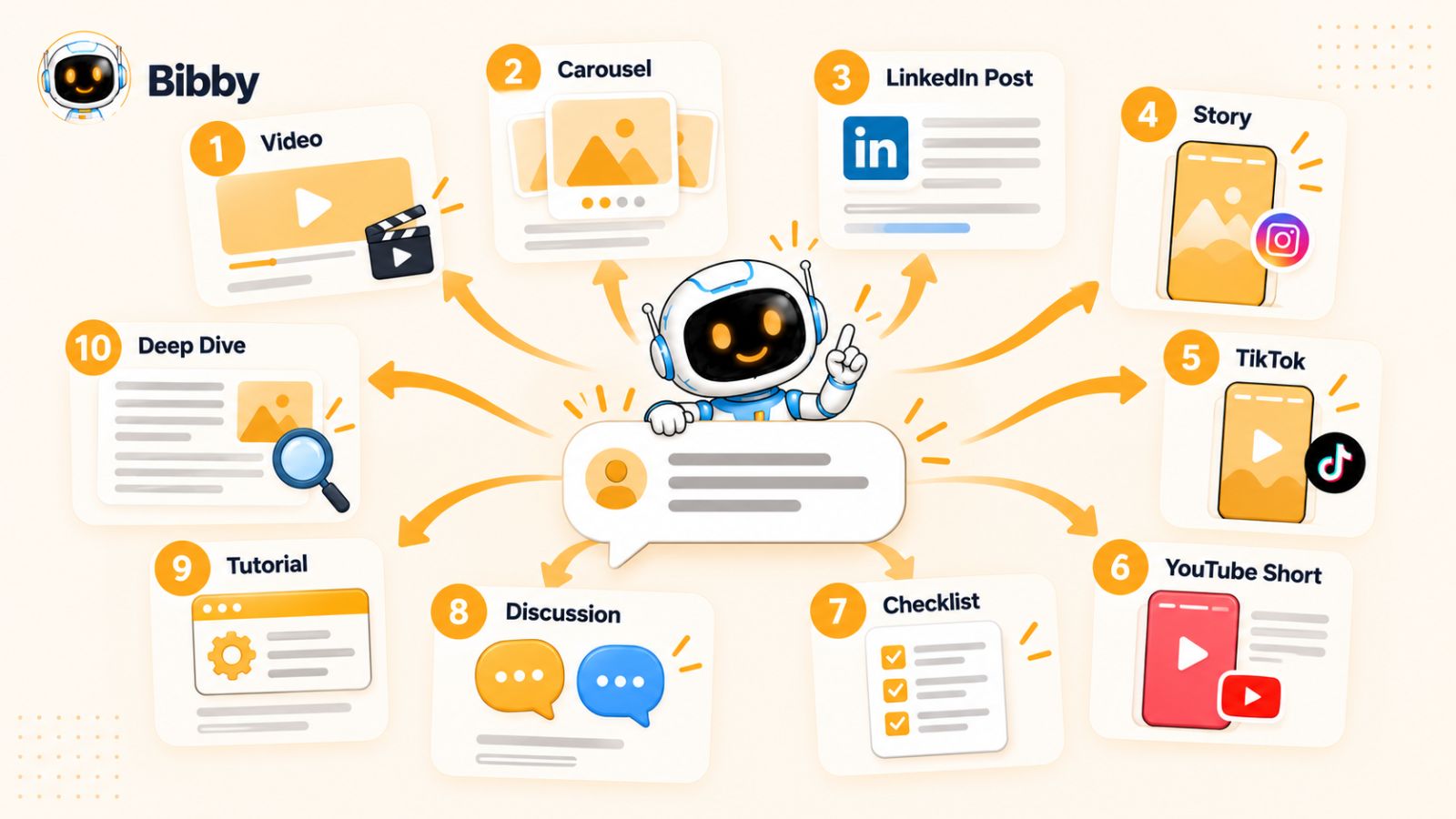
1. Create an Educational Post
Start with the straightforward answer.
Create a post explaining how a solo creator can simplify social media content production by separating idea generation, creation, repurposing, and scheduling.
This addresses the original problem directly.
2. Turn It Into a Carousel
Break the answer into a visual sequence:
“How to Manage Social Media When You're a Team of One”
Each slide can address one part of the workflow:
- Collect ideas
- Batch creation
- Repurpose intelligently
- Adapt for each platform
- Schedule ahead
- Review performance
The underlying idea remains the same, but the format makes it easier to consume and save.
3. Make a Short-Form Video
The same topic could become a 30–60 second video:
“If you're managing social media alone, stop trying to create every post from scratch.”
Then demonstrate a simpler workflow.
The video doesn't need to repeat the carousel word for word. It can focus on the most useful insight from the original conversation.
4. Create a LinkedIn Post
For LinkedIn, you could turn the idea into a more opinion-driven post about the hidden cost of fragmented content workflows.
The angle might be:
“The problem isn't that solo marketers don't have enough ideas. It's that they're using too many disconnected tools to turn one idea into a finished post.”
Now the same underlying topic has become a professional perspective rather than a tutorial.
5. Create an Instagram or Facebook Story Sequence
Stories can turn the same idea into an interactive conversation.
For example:
Story 1: “Do you manage your social media yourself?”
Story 2: “What's the hardest part?”
Story 3: Poll: “Creating content / Writing captions / Designing / Scheduling”
Story 4: Share your recommended workflow.
This does something the original post couldn't: it generates new audience data.
And that new data can feed the next round of content.
6. Create a Comment-Response Video
You can respond directly to the original question in a video.
This format works particularly well on platforms where audiences are accustomed to creators responding to comments.
The hook can be simple:
“Someone asked me how to manage multiple social platforms when you're doing everything yourself. Here's what I'd do.”
Now the original comment becomes part of the story behind the content.
7. Create a “Common Mistake” Post
Take the same underlying problem and approach it from the opposite direction.
For example:
“5 Reasons Your Social Media Workflow Takes Too Long”
You could cover:
- Creating every post from scratch
- Writing captions separately for every platform
- Constantly switching between tools
- Failing to batch related tasks
- Manually scheduling every post
This gives the audience a new angle without needing a completely new idea.
8. Create a Practical Checklist
Turn the solution into something people can save.
Solo Creator Social Media Checklist:
- Collect audience questions
- Select recurring themes
- Create the core content
- Adapt it for each platform
- Create supporting formats
- Schedule posts
- Review audience responses
Checklists are especially useful because they transform an abstract strategy into an actionable workflow.
9. Create a Discussion Post
You can also use the original comment to generate another conversation.
Ask:
“If you manage your own social media, what's the one part of content creation that takes you the most time?”
Now you're not just publishing another piece of content.
You're collecting the raw material for your next pieces of content.
If people repeatedly answer “writing captions,” “coming up with ideas,” or “creating videos,” each response can become another content opportunity.
10. Create a Follow-Up Deep Dive
Finally, take the most important insight from the original discussion and go deeper.
If the biggest issue appears to be scheduling, create a detailed post about building a sustainable social media publishing system.
If the problem is content creation, create a tutorial about batching.
If the problem is adapting content across platforms, create a guide to platform-specific repurposing.
This is how one comment can turn into an entire content cluster, rather than simply one additional post.
The Key Is Repurposing the Idea, Not the Post
There is an important distinction here.
Repurposing isn't copying.
If you publish the exact same caption on Instagram, LinkedIn, Facebook, and TikTok, you've technically distributed the same content, but you haven't necessarily adapted it for the people using those platforms.
Instead, identify the core insight inside the comment.
Then ask:
- What would make this useful as a carousel?
- What would make this interesting as a video?
- What would make this valuable on LinkedIn?
- What question could turn this into a Story?
- What practical checklist could come from it?
- What disagreement could create a discussion?
One idea can then become many pieces of content without making your audience feel like they're seeing the same post repeatedly.
This Is Where a Content Workflow Starts to Matter
Once you're producing multiple formats from every strong audience signal, manually moving between image creation, caption writing, formatting, and scheduling can become the next bottleneck.
That's where social media automation tools can become useful—not because automation should replace the thinking, but because it can reduce the repetitive work after you've decided what you actually want to say.
For example, a workflow might start with an audience comment, turn the underlying idea into a core post, adapt that idea into different formats, generate platform-specific captions, and schedule the resulting content across your chosen networks.
Tools such as Bibby are built around this type of workflow. You can upload an image or generate one with AI, select a posting style, and have captions generated for the content before scheduling different media at AI-optimized times across platforms. It also supports formats such as images, carousels, videos, and stories, which can make the execution side of a repurposing workflow less fragmented.
The technology isn't the strategy, though.
The strategy comes first:
Listen to the audience → identify the insight → develop the idea → adapt it → distribute it → listen again.
Once you have that process, you can start turning individual conversations into a much larger content system.
And the next question is: how do you make this process repeatable instead of relying on inspiration every time you open your comment section?
How to Build a Comment-to-Content Workflow
Knowing that comments can become content is useful. Having a repeatable system for doing it is what makes the strategy scalable.
Without a workflow, comment mining tends to happen randomly. You notice an interesting question, make a post about it, forget about the process, and eventually find yourself staring at an empty content calendar again.
A better approach is to make audience conversations a regular part of your content creation process.
The workflow can be as simple as:
Collect → Categorize → Identify → Develop → Adapt → Schedule → Measure → Repeat
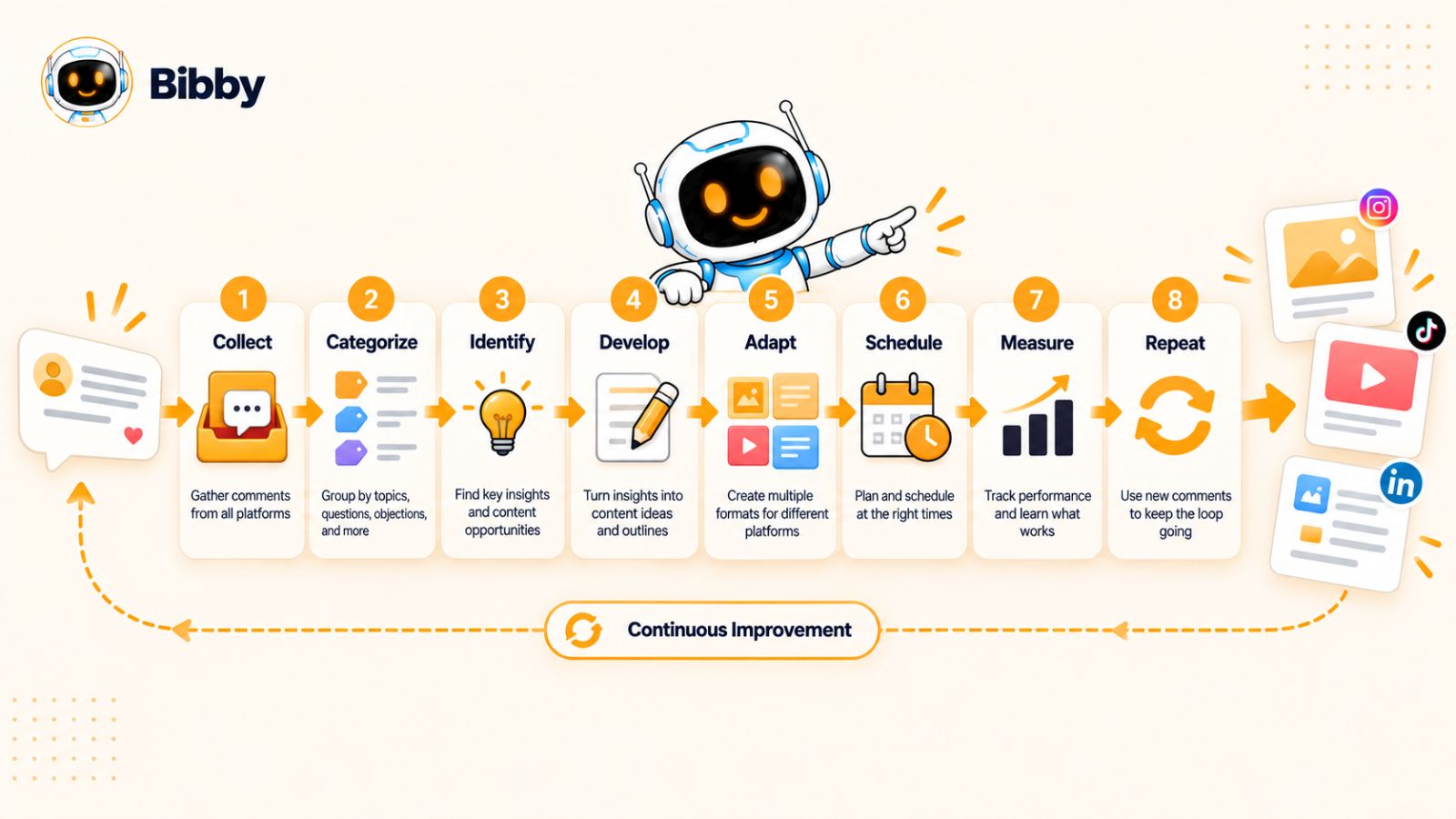
Here's how each stage works
Step 1: Collect Your Comments
Start by gathering comments from the platforms where your audience is active.
Depending on your business, that could include:
- TikTok
- YouTube
- Community platforms
- Comments on your website
You don't need to save every comment.
Focus on comments that contain a question, problem, objection, experience, request, or strong opinion.
A useful rule is:
Don't collect comments because they're interesting. Collect them because they reveal something about your audience.
You can keep a simple spreadsheet, database, document, or content-management system where useful comments are stored for later review.
Step 2: Categorize the Comments
Once you've collected comments, group them into broad themes.
For example:
| Category | What you're looking for |
|---|---|
| Questions | “How do I…?” |
| Problems | “I'm struggling with…” |
| Objections | “But what if…?” |
| Misconceptions | “I thought that…” |
| Examples | “Can you show me…?” |
| Experiences | “I tried this…” |
| Opinions | “I disagree because…” |
This makes patterns easier to see.
If you have 50 comments sitting in one giant list, recurring topics can be difficult to identify. If you have 15 questions about content creation sitting together, the opportunity becomes much more obvious.
Step 3: Look for Repeated Signals
This is where comment collection becomes content strategy.
Look for topics that appear repeatedly.
One person asking a question might be useful.
Five people asking variations of the same question is a signal.
For example:
- “How often should I post?”
- “Do I need to post every day?”
- “Is three posts a week enough?”
- “What's the ideal posting frequency?”
These may look like four separate questions, but they're really one underlying topic:
How often should I publish on social media?
That topic could support several pieces of content without becoming repetitive.
Step 4: Identify the Content Angle
Once you've identified the underlying topic, decide what you want the audience to take away.
The same comment can produce very different pieces of content depending on the angle.
You could:
Teach:
Explain the concept from scratch.
Simplify:
Break down something complicated.
Correct:
Challenge a common misconception.
Demonstrate:
Show exactly how something works.
Compare:
Explain different approaches.
Tell a story:
Use an experience to illustrate the lesson.
Challenge:
Present a contrarian but defensible perspective.
Start a conversation:
Ask your audience for their experience or opinion.
Choosing the angle before creating the post prevents you from simply rewriting the original comment.
Step 5: Choose the Right Format
Now decide which format best communicates the idea.
A complicated process may work well as a carousel or tutorial video.
A strong opinion might work better as a text-based LinkedIn post.
A quick answer could become a short-form video.
A simple question could become an Instagram Story poll.
A visual example might work best as an image or demonstration.
The goal isn't to force every idea into every format.
It's to match the idea to the format.
Step 6: Adapt the Idea for Each Platform
If an idea is worth publishing on multiple platforms, don't assume that one version is automatically ideal everywhere.
The same insight might become:
- A concise, visual carousel on Instagram
- A discussion-oriented post on Facebook
- A professional perspective on LinkedIn
- A quick demonstration on TikTok
- A Short answering the original question on YouTube
The core idea stays consistent while the presentation changes.
This approach allows you to get more value from your content without making your audience consume identical posts everywhere.
Step 7: Create and Schedule the Content
Once you've chosen your angles and formats, the remaining challenge is execution.
For a small team, this can become surprisingly time-consuming. You may need to create visuals, write captions, adapt posts for different networks, upload different media formats, and schedule everything individually.
This is where automation can remove some of the repetitive work.
For example, a social media workflow might allow you to upload an image or create one with AI, select the desired posting style, generate a caption, and schedule the resulting content across several platforms. Bibby follows this type of workflow and also supports images, carousels, videos, and stories, so the same content idea can move from creation to distribution without requiring every step to be handled separately.
The important distinction is that automation should handle execution, while you retain control over the strategy.
You decide which audience signal matters.
You decide what the content should say.
You decide whether the generated version actually represents your expertise and brand.
The tool simply helps reduce the mechanical work between those decisions and publication.
Step 8: Measure What Happens Next
The process doesn't end when you publish.
Watch what happens afterward.
Which posts generate:
- More comments?
- Better questions?
- Saves?
- Shares?
- Longer discussions?
- New objections?
- Requests for examples?
- Direct messages?
The most valuable metric isn't always the highest number of likes.
A post that generates 20 thoughtful questions may give you more future content opportunities than a post that generates 2,000 passive views.
The responses themselves become new inputs.
Step 9: Feed the New Conversations Back Into the System
This is what turns the workflow into a loop.
You publish a post.
People respond.
Their responses reveal new questions.
Those questions become new content.
The new content generates more conversations.
Those conversations reveal even more opportunities.
Eventually, you aren't starting your content calendar from a blank page. You're building it from an expanding library of audience insights.
Publish → Listen → Learn → Create → Publish again.
That is the real comment-to-content loop.
And once you have enough audience questions and recurring themes, you can take the process one step further: systematically turn those signals into your next 50 posts instead of creating them one at a time.
How to Build Your Next 50 Posts From Your Comments
The promise of turning comments into 50 posts sounds ambitious until you stop thinking about content as a collection of completely separate ideas.
You don't need 50 original thoughts.
You need a handful of real audience problems, and a systematic way to explore each one from different angles.
A simple framework is:
10 audience questions × 5 content angles = 50 potential posts
The exact numbers aren't important. The principle is.
Instead of constantly asking, “What should I post today?”, collect the questions your audience is already asking and build multiple useful perspectives around each one.
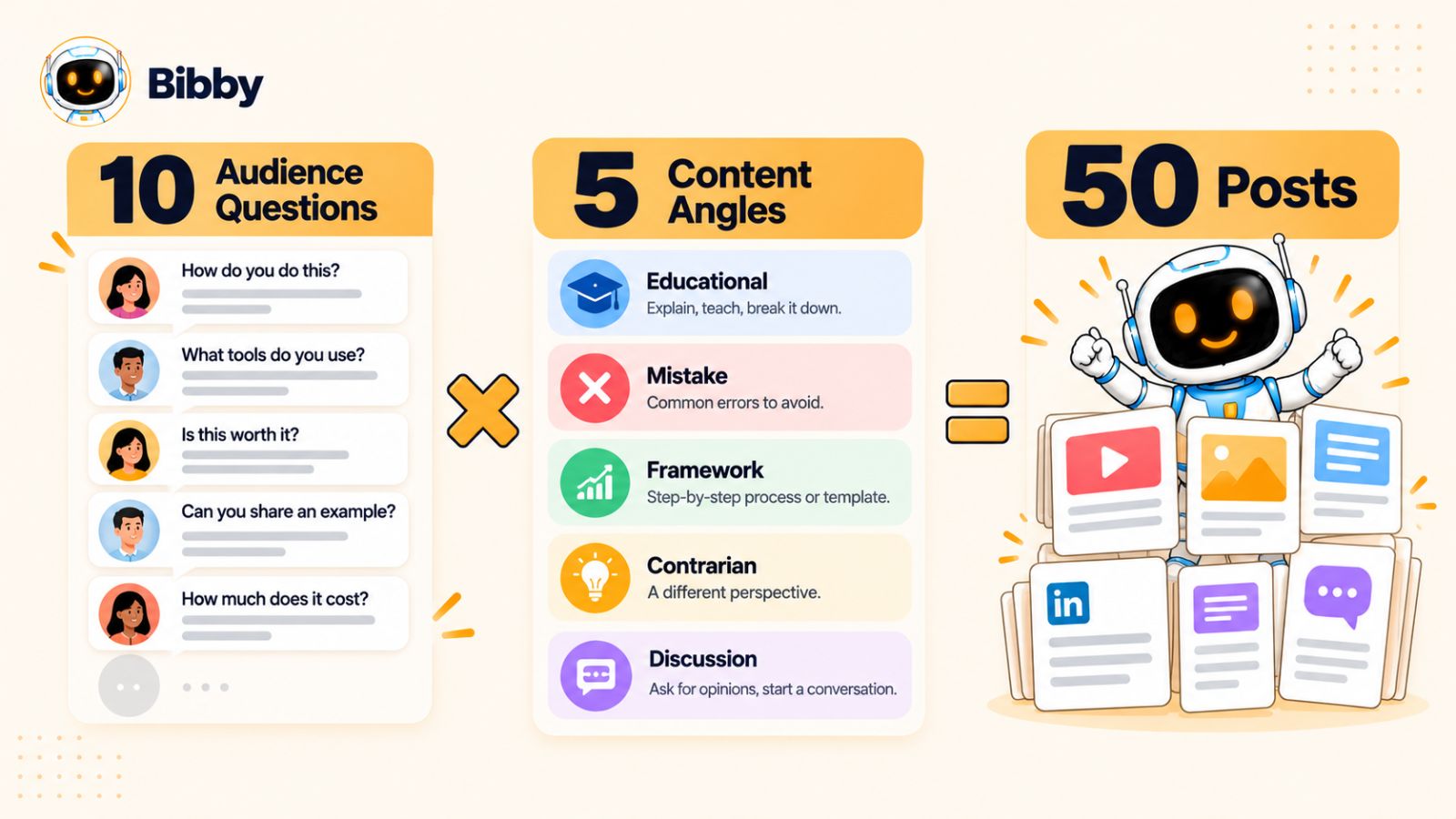
Start With 10 Real Audience Questions
Go through your comments and identify ten questions or problems that appear particularly relevant to your audience.
For example, a social media-focused brand might discover these questions:
- How often should I post?
- What should I post when I have no ideas?
- Should every platform get different content?
- How do I create content consistently?
- How do I know what my audience wants?
- How can I save time creating posts?
- Should I focus on videos or images?
- How far ahead should I schedule content?
- Why aren't my posts generating comments?
- How do I turn one idea into multiple posts?
Now you have ten content pillars.
But don't immediately turn each question into one post and move on.
That's where the multiplication happens.
Give Every Question Five Different Angles
Take the first question:
“How often should I post?”
Instead of producing one answer, explore five different angles.
Angle 1: The Educational Post
Explain the factors that should influence posting frequency.
This is the straightforward “here's what you need to know” version.
Angle 2: The Common Mistake
Discuss why posting more frequently doesn't automatically produce better results.
This introduces a problem and challenges a common assumption.
Angle 3: The Practical Framework
Give readers a simple method for deciding their own publishing frequency.
Now the content becomes actionable.
Angle 4: The Contrarian Perspective
Ask whether businesses should stop worrying so much about posting frequency and focus more on consistency and content quality.
This creates a discussion opportunity.
Angle 5: The Conversation Starter
Ask your audience:
“How many times per week do you actually post—and what makes that schedule sustainable for you?”
Now you're generating the next batch of audience insights.
Five angles from one question.
Repeat that process across ten questions and you have a potential 50-post content bank.
Use the Five-Angle Framework Across Every Question
Here's what the complete framework might look like:
| Audience question | Educational | Mistake | Framework | Contrarian | Discussion |
|---|---|---|---|---|---|
| How often should I post? | Explain frequency | Posting too much | Choose a schedule | Frequency is overrated | How often do you post? |
| What should I post? | Sources of ideas | Random posting | Idea-generation system | Stop chasing trends | Where do your ideas come from? |
| Different content per platform? | Platform differences | Cross-posting blindly | Repurposing framework | One idea can work everywhere | Do you customize posts? |
| How do I stay consistent? | Consistency principles | Relying on motivation | Weekly workflow | Consistency isn't daily posting | What's hardest about consistency? |
| How do I save time? | Content batching | Creating from scratch | Repurposing system | More tools aren't always better | What takes you longest? |
And that's only the beginning.
The same process can be applied to all ten audience questions.
Don't Force Yourself to Publish All 50 Immediately
A 50-post content bank isn't a command to publish 50 posts as quickly as possible.
It's a strategic reservoir.
Some ideas will be more relevant this week.
Some will work better as seasonal content.
Some will become outdated.
Others may inspire completely new ideas before you ever publish them.
Think of the 50 posts as raw material for your content calendar rather than a rigid queue.
You can then prioritize based on:
- Audience demand
- Business relevance
- Current events
- Seasonality
- Previous engagement
- Content production effort
- Platform
- Your current marketing goals
Let Performance Change the Next 50
There's another important advantage to this system.
Your first 50 posts shouldn't be the end of the process.
They should generate information for the next 50.
Suppose you create five posts around social media consistency and one of them generates significantly more meaningful discussion than the others.
Don't simply celebrate the result and move on.
Look at the comments.
What did people ask next?
Perhaps several people say:
- “How do you batch content?”
- “How far ahead should I plan?”
- “What if something changes after I've scheduled everything?”
- “How do you manage multiple platforms?”
You now have another set of content opportunities.
Your audience is effectively helping you write the next chapter of your content strategy.
The 50-Post System Is Really a Feedback System
This is the most important idea in the framework.
The goal isn't to manufacture 50 posts from ten comments and then return to brainstorming.
The goal is to create a self-renewing content system.
10 audience questions → 50 content angles → 50 posts → new comments → new questions → more content angles
That is why the comment-to-content approach can become more valuable over time.
Your content library grows.
Your understanding of your audience grows.
Your collection of proven topics grows.
And your ability to recognize valuable content opportunities gets better.
Instead of constantly starting from zero, every post gives you information that can improve the next one.
That is what turns audience conversations from a passive engagement metric into an active engine for social media content creation.
The Comment-to-Content Matrix
Once you start looking at comments as content signals, the next challenge is deciding what to do with each signal.
A useful way to simplify the process is to connect the type of comment to the most natural content angle and format.
Think of this as a translation layer:
Audience signal → Content angle → Format
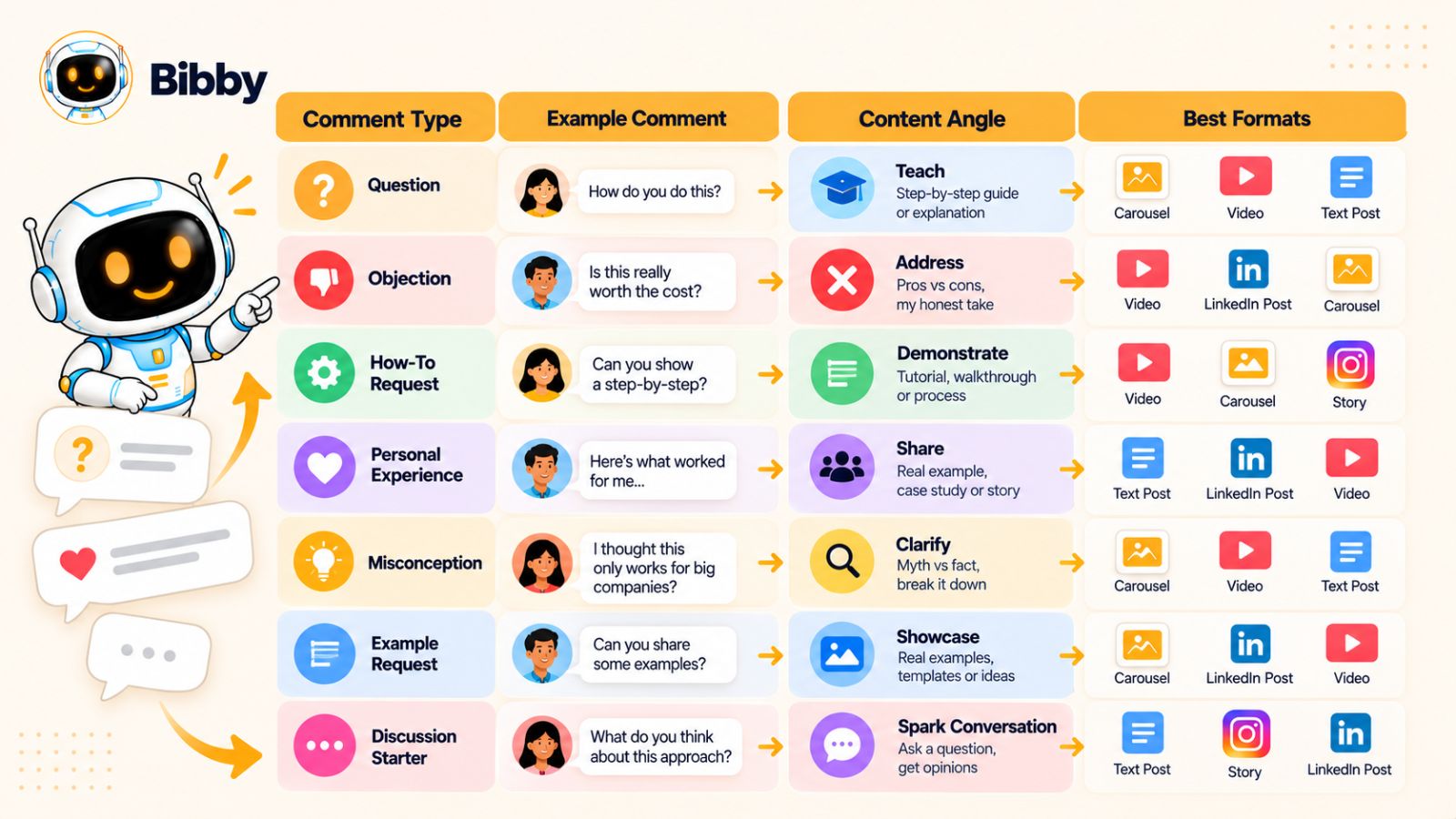
You don't need to follow it rigidly. Its purpose is to help you move from “That's an interesting comment” to “I know what I can create from this.”
| Comment signal | What it may reveal | Content angle | Useful formats |
|---|---|---|---|
| Question | Knowledge gap | Explain the answer | Carousel, video, text |
| Objection | Friction or hesitation | Address the concern | Video, carousel, post |
| “How do I?” | Need for implementation | Step-by-step tutorial | Video, carousel, checklist |
| “What about…?” | Unanswered edge case | Explore the exception | Text, video, carousel |
| Personal experience | Real-world challenge | Extract the lesson | Story, video, case study |
| Misconception | Incorrect assumption | Correct and explain | Carousel, video |
| Example request | Need for context | Demonstrate the concept | Video, carousel |
| Disagreement | Different perspective | Explore both sides | Text, video |
| Success story | Proven approach | Explain what worked | Case study, post |
| Repeated question | Recurring demand | Build a content cluster | Multiple formats |
Questions → Teach
When someone asks a straightforward question, your first instinct might be to answer it and move on.
Instead, ask whether the question represents a broader knowledge gap.
If it does, turn it into educational content.
For example:
Comment:
“What's the difference between scheduling content and automating content?”
Possible content:
“Social Media Scheduling vs. Automation: What's the Difference?”
The comment gives you the topic. Your expertise provides the explanation.
Objections → Address Friction
Objections are often more valuable than compliments because they tell you what could prevent someone from taking action.
Comment:
“I don't think I have enough time to create content for five platforms.”
Possible content:
“How to Create Multi-Platform Content Without Creating Five Times as Much Work”
The content doesn't need to tell the commenter they're wrong. It can acknowledge the underlying problem and offer a practical solution.
“How Do I?” → Demonstrate
Implementation questions are ideal for tutorials.
Comment:
“How do I turn one video into several social media posts?”
Possible content:
“One Video, Seven Social Posts: A Practical Repurposing Workflow”
You can then demonstrate the workflow visually rather than simply describing it.
“What About…?” → Explore Edge Cases
These comments often appear after you've explained a general rule.
For example:
Comment:
“What if my audience is completely different on LinkedIn?”
That suggests a deeper topic:
“How to Adapt One Content Idea for Different Social Media Audiences.”
These edge cases are particularly valuable because they make your content more comprehensive.
Personal Experiences → Extract Lessons
Someone sharing an experience can give you a real-world starting point.
Comment:
“I stopped posting every day and started getting better engagement.”
Rather than simply repeating their experience, explore what it teaches.
Possible content:
“What Happened When We Stopped Chasing Daily Posting.”
The experience becomes evidence for a broader lesson.
Misconceptions → Educate
Misconceptions naturally create curiosity.
Comment:
“You need to post every day to grow.”
Possible content:
“No, You Don't Need to Post Every Day to Build an Audience.”
The important part is supporting the correction with useful reasoning rather than turning the post into clickbait.
Example Requests → Show
When someone asks for an example, they're often telling you that the concept is too abstract.
If you originally explained “content repurposing,” for example, an example request could become:
“Here's Exactly How One Social Media Idea Becomes 10 Posts.”
Showing the process can often be more useful than explaining it again.
Disagreements → Discuss
Not every disagreement needs to become a debate.
But thoughtful disagreement can reveal an interesting difference in perspective.
If someone comments:
“I think AI is making social media content worse.”
You could explore:
“Is AI Making Social Media Content Worse—or Are We Using It Wrong?”
Now the comment becomes the starting point for a nuanced conversation.
Repeated Questions → Build a Content Cluster
This is perhaps the most important row in the matrix.
If the same underlying question appears again and again, don't keep answering it with slightly different posts.
Build a content cluster around it.
For example, repeated questions about social media scheduling could lead to:
- How social media scheduling works
- When you should schedule posts
- How far ahead to schedule
- Scheduling vs. real-time posting
- Common scheduling mistakes
- How to build a weekly scheduling workflow
- How to choose scheduling tools
- How to measure scheduled content performance
One recurring audience need can therefore become a complete educational sequence.
Use the Matrix as a Decision Tool
You can make the process even simpler.
When reviewing a comment, ask three questions:
1. What is the audience signal?
Question? Objection? Experience? Misconception?
2. What does the person actually need?
Information? Proof? A demonstration? A different perspective?
3. What format communicates that best?
Video? Carousel? Image? Story? Text?
Once you answer those three questions, the content idea often becomes obvious.
And because different platforms support different formats and behaviors, this matrix also helps you avoid the trap of treating every content idea as a generic “social media post.”
The next step is making this system work across the platforms where your audience actually spends its time.
How to Turn Comments Into Platform-Specific Content
Turning comments into content doesn't mean publishing the same response everywhere.
The audience insight can stay the same, but the way you present it should change depending on the platform, format, and context.
Imagine someone comments:
“How can I create enough social media content when I only have a few hours each week?”
The underlying problem is the same whether the person is on Instagram, LinkedIn, Facebook, TikTok, or YouTube.
But the best content response isn't necessarily the same on each platform.
The goal is to repurpose the insight, not duplicate the post.
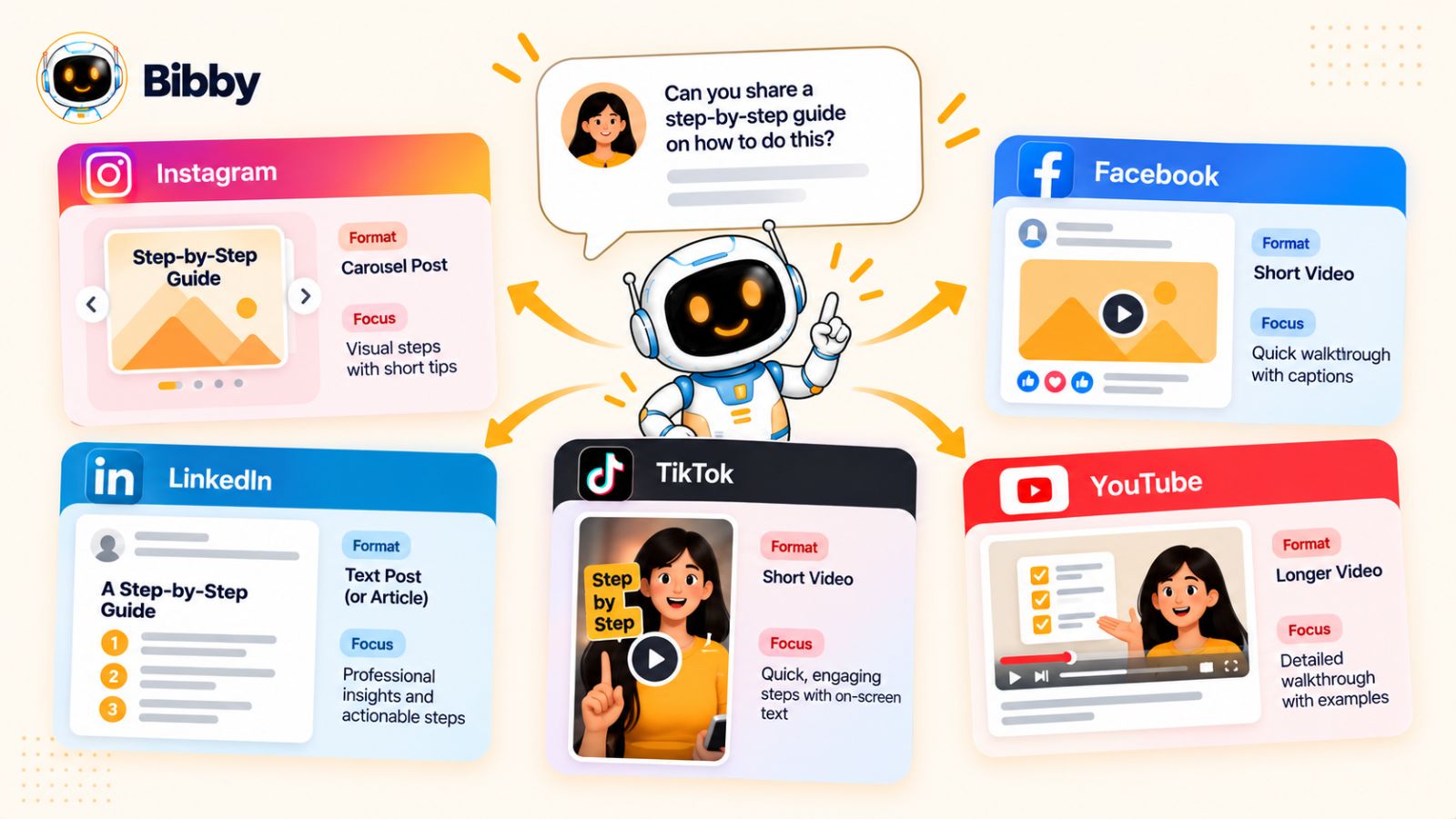
Instagram: Make the Insight Visual and Saveable
Instagram works well when an idea can be communicated visually or broken into a sequence.
That same comment could become a carousel:
“How to Create a Week of Social Content in 2 Hours”
Possible slides:
- Start with one core idea
- Break it into smaller insights
- Choose multiple formats
- Create everything in one batch
- Schedule the posts
- Review what generated engagement
You could also turn the same idea into a Reel explaining the workflow or a Story sequence asking followers which part of content creation takes them the longest.
The important thing is to use the comment as the starting insight, then choose the Instagram format that communicates it most effectively.
Facebook: Encourage Discussion
Facebook can be particularly useful when the original comment represents a topic people have different experiences with.
Instead of simply answering:
“How do you create content when you don't have much time?”
You might post:
“If you only had two hours a week for social media, what would you prioritize?”
Then share your own framework.
This turns the original audience question into a broader community discussion.
And the responses give you another round of audience research.
LinkedIn: Add a Professional Perspective
On LinkedIn, the same topic could become a lesson about efficiency, marketing operations, or content strategy.
For example:
“Most small marketing teams don't have a content problem. They have a workflow problem.”
You could explain how fragmented processes—separate tools for creation, captions, formatting, and scheduling—can consume more time than the actual strategy.
The comment provided the problem.
Your expertise provides the professional interpretation.
That distinction is important. You're not simply reposting someone's question; you're using it as evidence of a broader problem worth discussing.
TikTok: Answer the Comment Directly
Short-form video makes comment-driven content especially natural.
You can literally use the comment as the hook:
“Someone asked me how I'd manage five social platforms if I only had two hours a week. Here's exactly what I'd do.”
Then answer the question quickly.
This format has another advantage: the comment itself provides context for why the video exists.
Instead of inventing a hook from scratch, you already know someone in your audience wants the answer.
YouTube: Go Deeper
YouTube gives you more room to turn one audience question into a comprehensive explanation.
A comment asking:
“How do I turn one idea into multiple social media posts?”
could become a longer tutorial showing the entire process from beginning to end.
You could then extract shorter sections from that video for Shorts and other platforms.
This creates another useful loop:
Comment → long-form video → short-form clips → social posts → new comments
The original conversation can therefore become the seed for an entire multi-format content ecosystem.
Don't Assume Every Platform Needs Its Own Idea
One of the biggest misconceptions about platform-specific content is that you need completely different ideas for every network.
You don't.
That approach can create unnecessary work.
Instead, start with a core audience insight and adapt it.
For example:
Core insight:
“Small businesses struggle to maintain consistent social media content because their workflow is too fragmented.”
From that one insight:
Instagram:
Carousel showing a simplified workflow.
Facebook:
Discussion about the biggest content bottleneck.
LinkedIn:
Professional analysis of fragmented marketing workflows.
TikTok:
Quick video showing three ways to reduce content creation time.
YouTube:
Detailed tutorial explaining the entire workflow.
Five pieces of content.
One underlying idea.
That is much more sustainable than trying to invent five unrelated topics.
Match the Format to the Conversation
Comments can also tell you which format might work best.
A question asking “Can you show me how?” suggests a demonstration.
A controversial opinion suggests discussion.
A complicated question may deserve a carousel or longer video.
A quick factual question might only require a short-form response.
A personal story might work better as a narrative post.
The comment doesn't just give you the topic.
It can also help you decide how the audience wants the answer delivered.
Keep the Human Context
There is one more reason not to simply copy and distribute the same response everywhere.
Social media is contextual.
A person scrolling TikTok isn't necessarily in the same mindset as someone reading LinkedIn. A Facebook discussion may invite more back-and-forth than an Instagram carousel. A YouTube viewer may expect considerably more depth.
Your audience's underlying problem can remain constant while your response changes to fit the environment.
That's what makes content repurposing useful rather than repetitive.
And once you've learned how to identify the right platform and format, there's still one critical question to answer:
Which comments should you prioritize when you have hundreds—or thousands—to choose from?
How to Know Which Comments Deserve a Post
Once you start actively mining comments for content ideas, you may run into a new problem:
There are too many opportunities.
If you have an active audience across several platforms, you could collect hundreds of comments every month. Turning all of them into content isn't practical—and it isn't necessary.
The goal isn't to find the most comments.
It's to find the most valuable content signals.
A simple way to do that is to score potential ideas against a few criteria.
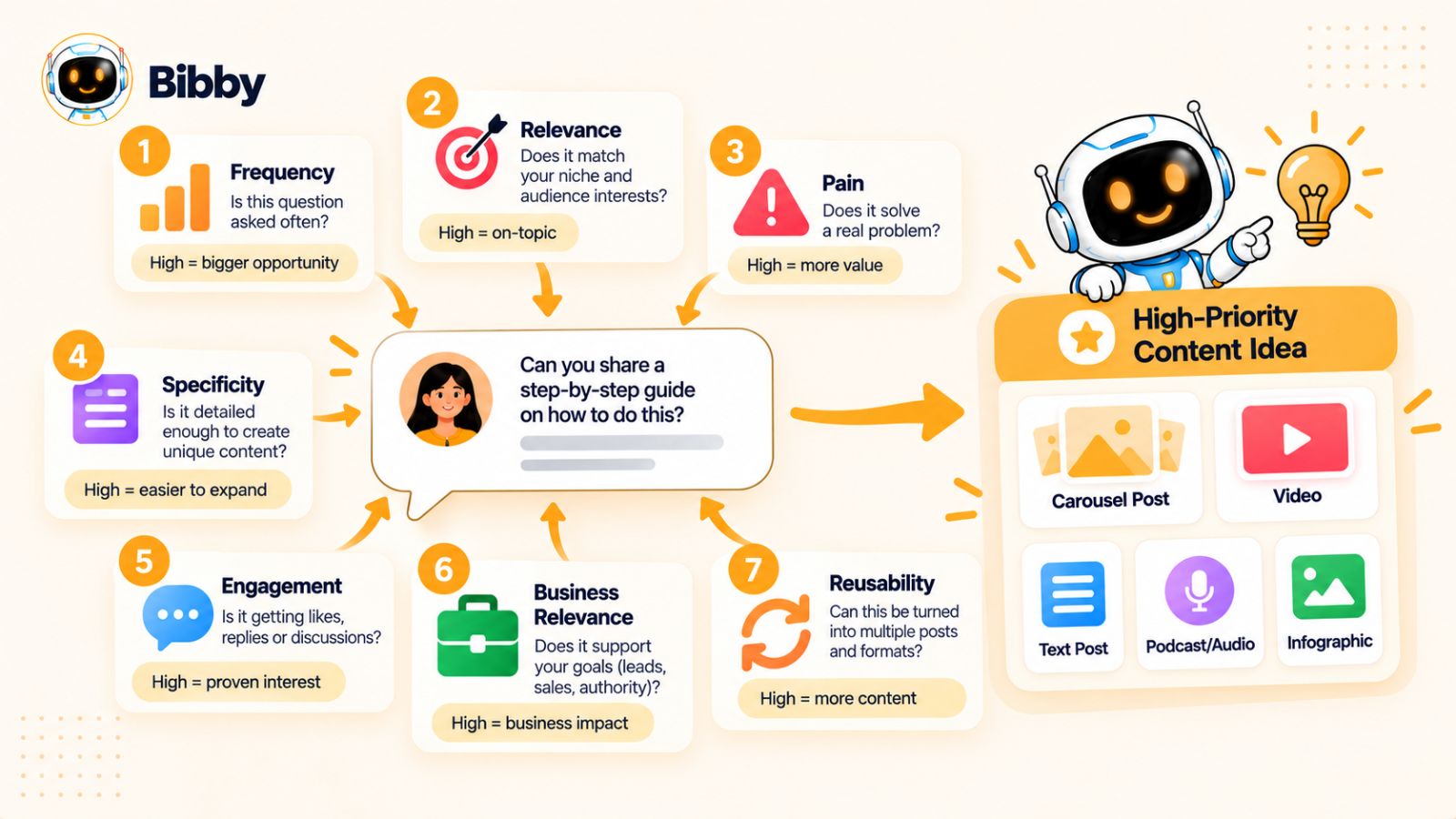
1. Frequency: Is This Question Repeated?
Repeated questions are strong signals.
If one person asks something once, it may be worth answering.
If ten people ask variations of the same question, it's probably worth creating dedicated content.
For example:
- “What time should I post?”
- “When should I publish?”
- “What's the best time to post on Instagram?”
These may all point toward the same underlying content opportunity.
Frequency doesn't guarantee that a topic deserves a post, but it increases confidence that the topic matters to your audience.
2. Relevance: Does It Matter to Your Audience?
Some comments generate interesting conversations but have little connection to what you want to be known for.
Ask:
“Would solving this problem attract or help the kind of audience I want?”
A comment can generate a lot of engagement and still be strategically irrelevant.
The best content opportunities sit at the intersection of:
What your audience cares about + what you can genuinely help them with.
3. Pain: Is There a Real Problem Behind It?
Problems tend to create stronger content opportunities than casual curiosity.
Compare:
“What's your favorite scheduling tool?”
with:
“I've spent three hours scheduling next week's content and still haven't finished.”
The second comment reveals a meaningful pain point.
Pain can give you opportunities for educational content, workflow improvements, tutorials, comparisons, and problem-solving posts.
4. Specificity: Can You Give a Useful Answer?
Vague comments can be difficult to build content around.
“Social media is hard” doesn't tell you much.
“I'm getting views on my videos, but almost nobody comments or shares them” is much more specific.
Specific problems are easier to transform into useful content because you can address the actual situation rather than giving generic advice.
5. Engagement Potential: Will the Topic Invite Conversation?
Some subjects naturally encourage people to share their own experiences.
For example:
“How often should a business post on social media?”
can generate very different opinions.
A topic such as that can produce comments, examples, disagreements, and follow-up questions—which means it can feed the content loop again.
This doesn't mean you should manufacture controversy.
It means you should recognize topics where your audience naturally has something to contribute.
6. Business Relevance: Does It Connect to Your Goals?
Not every useful audience question needs to lead directly to a sale.
But your content strategy should still support your broader goals.
If your business helps people manage social media, for example, questions about:
- Content creation
- Scheduling
- Repurposing
- Consistency
- Publishing workflows
- Audience engagement
are naturally more strategically valuable than unrelated conversations.
The best opportunities educate the audience and strengthen your authority around the problems you solve.
7. Reusability: Can One Idea Produce Multiple Pieces?
This is one of the most important criteria for the comment-to-content approach.
A comment that can become:
- A carousel
- A short video
- A LinkedIn post
- A Story
- A tutorial
- A discussion post
has more potential than an idea that can only support one narrow response.
When you're short on time, prioritize ideas with multiple possible angles.
Create a Simple Comment Content Score
You can turn these criteria into a simple scoring system.
Give each potential topic a score from 1 to 5 for:
- Frequency
- Relevance
- Pain
- Specificity
- Engagement potential
- Business relevance
- Reusability
Then add the scores.
A comment opportunity scoring 30+ out of 35, for example, would deserve much more attention than one scoring 12.
You don't need mathematical precision here.
The purpose is to force yourself to think strategically rather than automatically turning every interesting comment into content.
Don't Ignore Negative Comments
Negative comments can be especially valuable—but they require judgment.
A complaint might reveal:
- A misunderstanding
- A product problem
- A content gap
- A customer objection
- An unmet expectation
Don't automatically turn every criticism into public content.
First determine whether the underlying issue is useful to address publicly.
If several people are confused about the same thing, however, that confusion may be an excellent content opportunity.
For example:
“Why does this strategy work for some businesses but not others?”
could become a nuanced post explaining the conditions under which the strategy works—and when it doesn't.
Honest content is often more useful than content that pretends every strategy works universally.
Prioritize Patterns Over Virality
A comment doesn't need to come from your most viral post to be valuable.
A small post with 15 highly relevant comments may provide more strategic information than a viral post with thousands of passive views.
That's because comments can reveal why people are responding.
When evaluating content opportunities, look beyond volume.
Ask:
What did people actually talk about?
The answer can tell you what to create next.
Once you have a reliable way to identify high-value comments, the next challenge is avoiding the mistakes that can turn this powerful strategy into repetitive, low-value content.
Mistakes to Avoid When Turning Comments Into Content
Turning comments into content sounds straightforward: find a useful comment, turn it into a post, and publish it.
But doing this well requires more judgment than simply converting questions into captions.
The difference between a strong comment-to-content strategy and a low-value one usually comes down to how you interpret the audience signal.
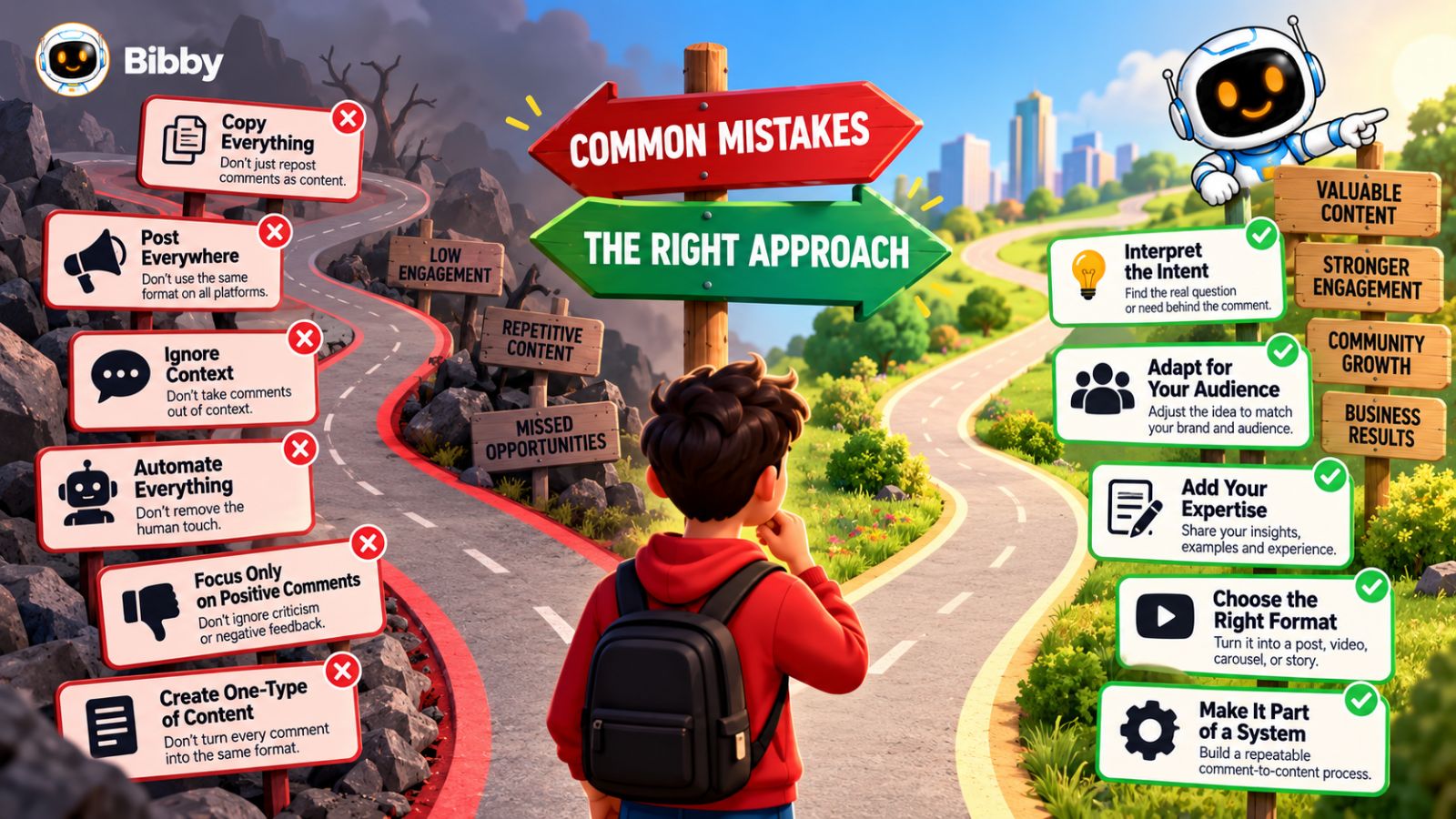
Here are the mistakes worth avoiding.
1. Turning Every Comment Into a Post
Not every comment contains a content opportunity.
“Love this!”
“Exactly.”
“Great advice.”
These are positive signals, but they don't give you enough information to build a useful standalone post.
Instead of asking whether a comment can become content, ask whether it reveals a problem, question, insight, or recurring theme.
Quality matters more than quantity.
2. Copying the Comment and Calling It Content
A comment is raw material.
It isn't necessarily the finished idea.
If someone asks:
“How often should I post on Instagram?”
simply turning that sentence into a headline doesn't create valuable content.
You still need to provide the answer, context, examples, nuance, and practical guidance.
The comment identifies the problem.
Your expertise creates the value.
3. Creating the Same Post for Every Platform
One audience insight can support multiple platforms, but that doesn't mean you should publish an identical caption everywhere.
A LinkedIn audience may respond to a professional argument.
A TikTok audience may prefer a quick demonstration.
An Instagram audience may engage with a visual breakdown.
The underlying idea can remain consistent while the format, hook, pacing, and presentation change.
Think:
One insight → multiple executions
rather than:
One post → copy and paste everywhere.
4. Making Every Post an FAQ
If you turn every question into a straightforward answer, your content can quickly become repetitive.
Questions are useful because they reveal the underlying need.
A question about content consistency could become:
- A tutorial
- A personal story
- A myth-busting post
- A workflow breakdown
- A case study
- A contrarian perspective
The question is the starting point, not the format.
5. Ignoring Negative or Critical Comments
It's tempting to focus only on positive feedback.
But criticism can reveal where your audience is confused, skeptical, or experiencing friction.
That doesn't mean you should turn every negative comment into public content.
Instead, look for patterns.
If multiple people raise the same concern, investigate it.
Sometimes the best content opportunity is hiding inside the objection you would rather ignore.
6. Chasing Individual Comments Instead of Patterns
One person asking something doesn't automatically mean the entire audience wants a post about it.
When possible, look for repetition.
If several people independently ask similar questions, your confidence increases that you've found a meaningful topic.
Think of individual comments as signals to investigate, not automatic instructions.
7. Automating the Thinking Instead of the Repetitive Work
AI can help analyze comments, identify themes, generate angles, write drafts, create captions, and organize publishing workflows.
But there is a difference between automating production and automating judgment.
You still need to decide:
- Is this topic actually relevant?
- Is the interpretation accurate?
- Does the content reflect our expertise?
- Is the advice useful?
- Does the tone sound human?
- Should this be published at all?
Automation is most useful when it removes repetitive execution while leaving strategic decisions with the person who understands the audience.
8. Forgetting to Respond to the Original Comment
This is an easy mistake.
You discover a fantastic content idea inside someone's comment, turn it into a post, and never actually answer the person who raised the question.
Don't do that.
If appropriate, respond to the original comment first.
You can then develop the broader idea into content for the wider audience.
That creates a better relationship between the individual conversation and the public content.
9. Treating Engagement as the Only Measure of Success
A comment-driven post might not be your most viral post.
That doesn't necessarily mean it failed.
Look at whether it generated:
- Useful questions
- Saves
- Shares
- Qualified conversations
- Direct messages
- New content ideas
- Stronger audience understanding
Sometimes a post with modest reach can produce significantly more strategic value than a viral post that attracts the wrong audience.
10. Forgetting That the Loop Needs to Continue
The biggest mistake is treating the process as a one-time content hack.
The real value comes from the loop:
Comments → insights → content → comments → insights → better content
If you publish a post based on an audience question, then completely ignore the responses it generates, you've stopped the process halfway through.
The new comments are your next source of information.
The Goal Is Better Conversations, Not Just More Posts
It's easy to interpret the comment-to-content strategy as a way to fill your content calendar faster.
It certainly can do that.
But the deeper benefit is that it helps you make content that is increasingly connected to what your audience actually cares about.
You aren't simply producing more posts.
You're creating a feedback system where every conversation can improve the next piece of content.
That distinction becomes especially important when you start combining audience insight with AI-assisted content creation and social media automation. The technology can make the loop faster, but the quality still depends on the signals you choose to act on.
And when the loop is working properly, your content calendar stops feeling like a list you have to fill and starts behaving more like a system that generates its own next steps.
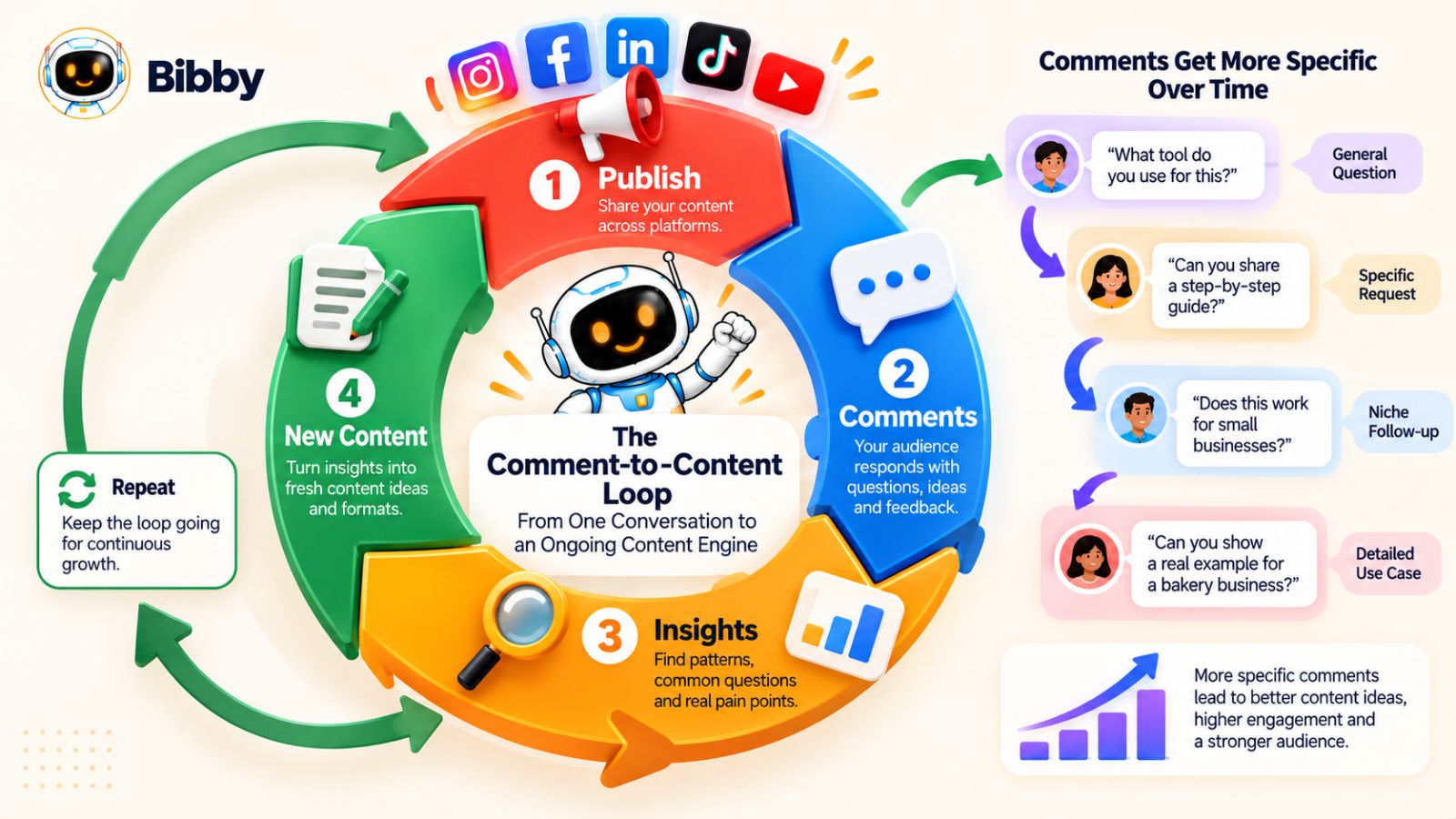
The Comment-to-Content Loop: From One Conversation to an Ongoing Content Engine
Most content strategies move in one direction.
You choose a topic, create a post, publish it, and move on to the next idea.
The comment-to-content approach works differently.
It turns publishing into a feedback system.
Instead of treating a post as the end of the content process, you treat it as the beginning of another round of audience research.
The loop looks like this:
Publish → Collect comments → Identify patterns → Create new content → Publish → Collect more comments
Every cycle gives you more information about your audience.
Over time, that information can make your content strategy more precise, more relevant, and easier to maintain.
Your Content Starts Generating Its Own Research
Imagine you publish a post explaining how to create a social media content calendar.
The post generates three types of comments:
Question:
“How far ahead should I plan?”
Objection:
“But what if something changes after everything is scheduled?”
Problem:
“I spend hours planning and still struggle to stay consistent.”
You now have three new content opportunities.
You could create:
- A guide to planning content ahead
- A post about balancing scheduling with flexibility
- A workflow for creating content consistently
Those posts generate new comments.
Perhaps someone then asks:
“How do you actually schedule everything across multiple platforms?”
Now you have another topic.
The content is beginning to generate its own editorial roadmap.
This Creates a Compounding Content System
The first few cycles may not produce dramatically different results.
But as your library of audience insights grows, patterns become easier to recognize.
You begin to understand:
- Which questions appear repeatedly
- Which problems generate strong reactions
- Which topics produce meaningful discussions
- Which formats your audience responds to
- Which objections need more explanation
- Which ideas deserve deeper coverage
You are no longer relying entirely on intuition.
You're building an increasingly detailed picture of what your audience wants to understand.
That knowledge can improve your future content before you even publish it.
The Loop Can Reveal Your Audience's Content Journey
Another benefit is that comments can show you what your audience needs next.
Someone might first ask:
“What is content repurposing?”
After learning the concept, they might ask:
“How do I repurpose a video?”
Then:
“How do I adapt that video for LinkedIn?”
Then:
“How do I schedule all those posts?”
Those aren't random questions.
They're stages of the same journey.
Your comments can therefore help you map the progression from beginner questions to more advanced ones.
That can inform an entire content series.
You could create:
- What content repurposing means
- How to choose content worth repurposing
- How to turn one video into multiple posts
- How to adapt content for different platforms
- How to organize your repurposed content
- How to schedule the finished content
- How to measure what worked
Now you're not just answering individual questions.
You're guiding the audience through a learning journey.
The Loop Also Improves Your Content Positioning
Pay attention to the words people repeatedly use.
If your audience constantly describes a problem as “I don't know what to post,” but your industry usually calls it “content ideation,” that's useful information.
You can use the audience's language in:
- Hooks
- Headlines
- Captions
- Videos
- Landing pages
- FAQs
- Email content
This can make your communication feel more aligned with how your audience actually thinks about the problem.
Their comments can effectively become a living vocabulary for your content strategy.
Automation Can Make the Loop Easier to Maintain
As the number of conversations and platforms grows, the manual side of the loop can become difficult.
You may need to:
- Capture ideas
- Develop content
- Create visuals
- Write captions
- Adapt content
- Schedule posts
- Track performance
- Review responses
This is where automation can support the system.
The goal isn't to automate the audience understanding itself.
It's to reduce the repetitive work required to act on what you've learned.
For example, once you've decided that a recurring audience question deserves a carousel, a video, and several supporting posts, an AI-assisted social media workflow can help with tasks such as generating captions, preparing different content formats, and scheduling them across selected platforms.
A tool such as Bibby can fit into that execution layer: you can provide an image or generate one with AI, choose a posting style, have captions generated, and schedule different media at optimized times across platforms including Facebook, Instagram, LinkedIn, YouTube, and TikTok. Its chat-based interface also lets you handle tasks such as creating a brand kit, setting up campaigns, creating posts, or regenerating captions through conversation.
The useful principle is broader than any particular tool:
Use automation to reduce repetitive execution so you can spend more time interpreting the audience signals.
The End Goal Is Not 50 Posts
The “next 50 posts” is a useful way to visualize the opportunity.
But the real goal is bigger.
You want to build a system where:
Your audience influences what you create.
What you create generates new conversations.
Those conversations reveal new audience needs.
Those needs influence what you create next.
That is the comment-to-content loop.
Once it becomes part of your regular workflow, content creation stops being an endless search for inspiration.
Your audience is already giving you the raw material.
You just need a system for listening to it.
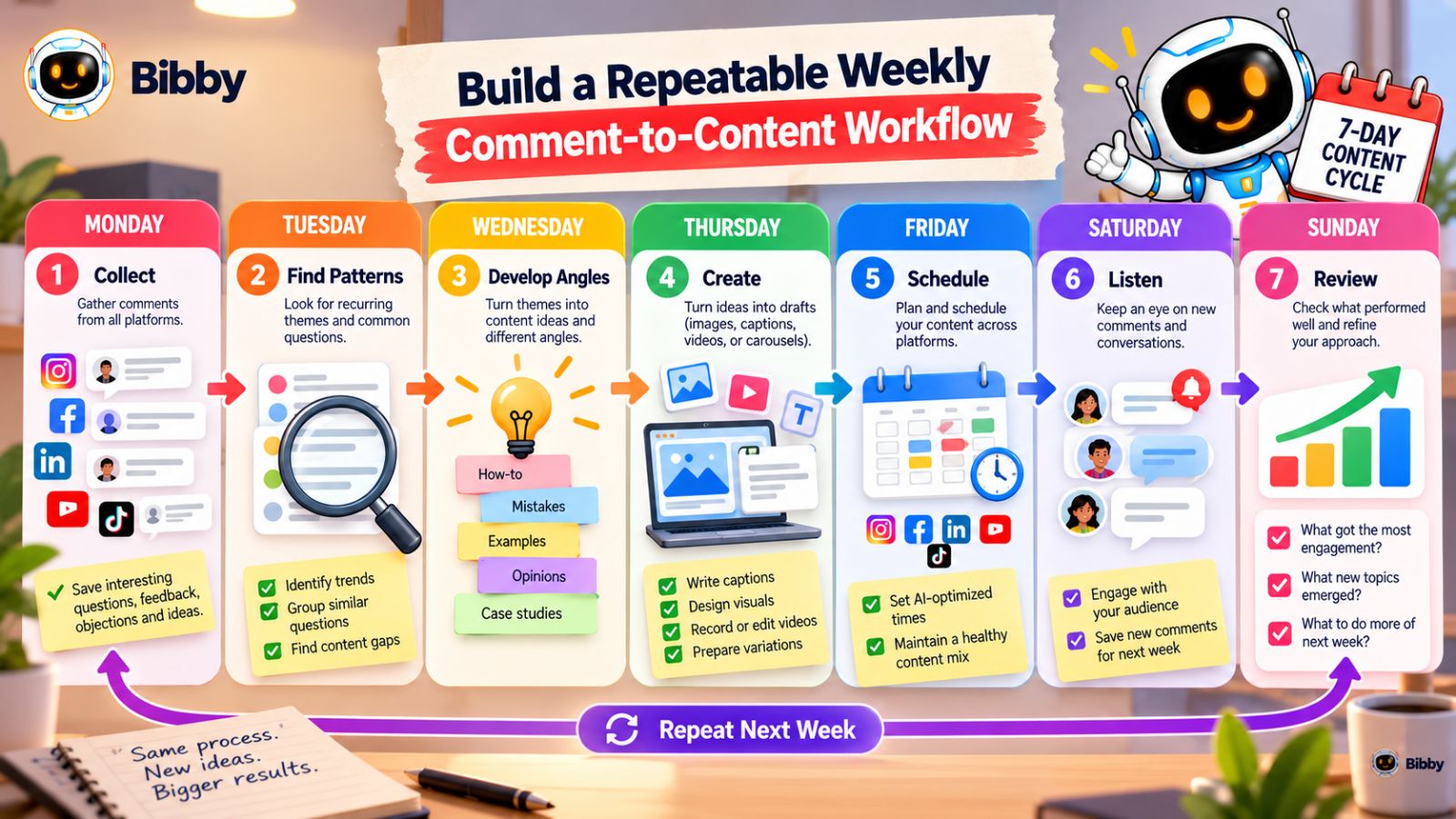
Build a Repeatable Weekly Comment-to-Content Workflow
A comment-to-content strategy only becomes valuable when you use it consistently.
You don't need to spend hours every day analyzing comments. A simple weekly workflow can turn audience conversations into a steady supply of content ideas while leaving enough time for creation, publishing, and engagement.
The exact schedule will depend on how active your audience is, but the following process gives you a useful starting point.
Monday: Collect the Best Conversations
Start the week by reviewing comments from the previous few days.
Look across your most important platforms and save comments that contain:
- Questions
- Objections
- Problems
- Requests for examples
- Interesting experiences
- Strong opinions
- Recurring themes
Don't try to turn them into content yet.
Your only job is to collect the signals.
Tuesday: Find the Patterns
Now group the comments into topics.
You might discover that:
- Four people are asking about posting frequency
- Three are struggling with content consistency
- Five want to know how to repurpose content
- Two are asking about scheduling
Those patterns are more valuable than individual comments.
Choose the topics that have the strongest combination of audience demand, relevance, and content potential.
Wednesday: Build the Content Angles
Take your strongest topics and develop several angles.
For example:
Topic: Turning one idea into multiple social posts.
Possible angles:
- A step-by-step tutorial
- Five common repurposing mistakes
- A real example
- A platform comparison
- A discussion about whether repurposing makes content repetitive
You now have several potential posts from one audience signal.
Thursday: Create the Content
Turn the strongest angles into actual assets.
Depending on your strategy, that might mean creating:
- Images
- Carousels
- Videos
- Stories
- Text posts
- Short-form videos
Batching related content can make this stage significantly more efficient because you're working from the same underlying idea.
You can also use AI-assisted tools to speed up repetitive tasks such as drafting captions, adapting content formats, or preparing assets for different platforms.
Friday: Schedule the Content
Once the content is ready, organize it into your publishing calendar.
This is where a social media scheduling workflow can save significant manual effort, especially when you're publishing across several networks.
Instead of uploading each asset, writing each caption, and choosing each publishing time separately, you can use a scheduling system to organize the content in batches.
For example, Bibby allows users to upload or generate visuals, choose a posting style, generate captions, and schedule different media across selected platforms. That can be useful when your comment-to-content process produces several related posts that need to be distributed over multiple days.
The important thing is to schedule after you've decided what deserves to be published—not to let the scheduling tool determine your content strategy.
Every Day: Watch the New Conversations
The weekly workflow doesn't mean ignoring your audience between planning sessions.
Continue responding to comments and paying attention to what people say.
You may discover an urgent question or unexpectedly strong discussion that deserves to move ahead of your planned calendar.
Your content calendar should give you structure, not prevent you from responding to useful signals.
End of Week: Review What You Learned
At the end of the week, review more than performance numbers.
Ask:
- Which topics generated the most meaningful comments?
- Which questions appeared repeatedly?
- Which posts produced new content ideas?
- Which format created the strongest conversations?
- Which audience objections appeared?
- Did people misunderstand anything?
- What should we create next?
This creates the final connection in the loop.
The week's content produces conversations.
The conversations produce insights.
The insights influence next week's content.
A Simple Weekly Template
You can reduce the entire process to seven actions:
1. Collect
Save useful comments.
2. Group
Organize them by topic.
3. Prioritize
Identify the strongest signals.
4. Develop
Turn signals into content angles.
5. Create
Produce the chosen formats.
6. Schedule
Distribute them across the right platforms.
7. Listen
Study the new conversations.
Then start again.
The beauty of this workflow is that it doesn't require you to predict exactly what your audience will want months from now.
You only need to pay attention to what they're telling you now.
And when you do that consistently, your content calendar becomes less dependent on inspiration and more connected to the people you're actually trying to reach.
Conclusion: Your Audience Is Already Telling You What to Post
The easiest way to run out of social media content ideas is to treat every post as a completely new creative challenge. When you learn to turn comments into content, your audience becomes an ongoing source of questions, objections, examples, stories, and ideas.
The most important lessons are simple: comments reveal what your audience actually wants to know, one useful comment can become multiple platform-specific pieces of content, and a consistent feedback loop can continually generate your next ideas.
You don't need to create 50 unrelated posts from scratch. Start with real audience questions, find the patterns behind them, develop multiple angles, and let the conversations generated by those posts guide what you create next.
The natural next step is to make this system easier to execute. Once you know what your audience wants to hear, you need a workflow for creating, repurposing, captioning, and scheduling that content without turning social media management into a full-time job.
That’s where an AI-powered social media content workflow can turn the comment-to-content loop from a good strategy into a repeatable publishing system.