Managing Facebook, Instagram, LinkedIn, YouTube, and TikTok at the same time can quickly turn social media into a full-time content production job.
The problem isn’t that you need more content—it’s that you need a smarter way to turn one strong idea into platform-specific content, distribute it at the right times, and keep the entire system manageable. A successful multi-platform social media strategy treats your content as a connected ecosystem rather than five separate publishing schedules.
The result is a social media workflow that can scale without requiring you to manually manage every post, caption, format, and publishing time.
What a Multi-Platform Social Media Strategy Actually Means
A multi-platform social media strategy is more than publishing the same post on Facebook, Instagram, LinkedIn, YouTube, and TikTok. It is a system for taking a central message, idea, or campaign and adapting it to the way people actually consume content on each platform.
That distinction matters.
If you publish an identical image, identical caption, and identical message everywhere, you may technically have a presence on five platforms, but you don't necessarily have a multi-platform strategy. You're simply cross-posting.
A strategic approach starts with one core content idea and then asks a different question for every platform:
How should this idea be presented here?
For example, imagine your core idea is: “Three ways small businesses can use AI to save time.”
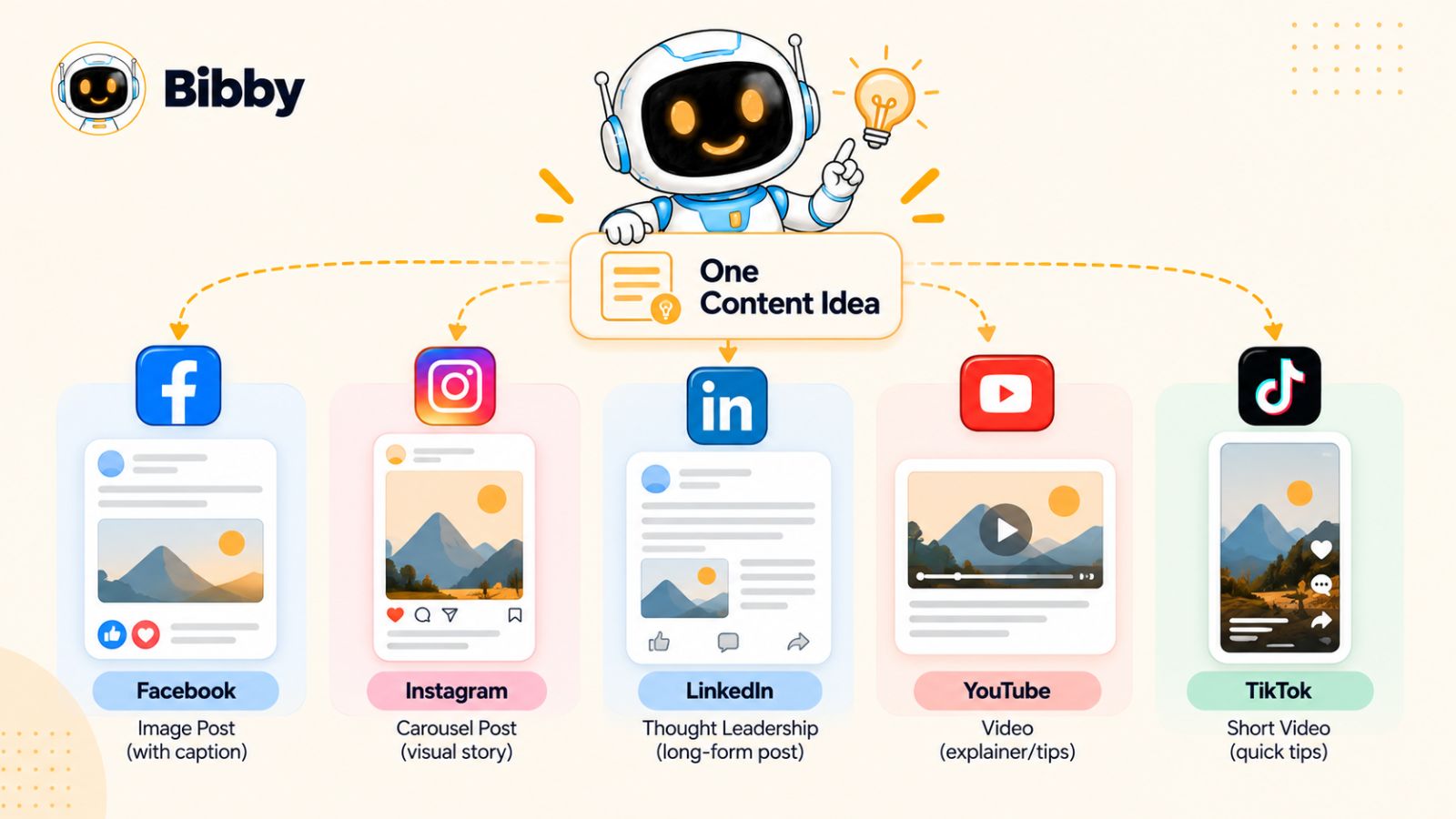
On LinkedIn, that idea might become a practical text post explaining the three workflows. On Instagram, it could become a carousel breaking down each use case. On TikTok, the same idea could become a short video with a strong opening hook. On YouTube, it could become a longer tutorial, with a Short highlighting one particularly useful tip. On Facebook, it could become a discussion-oriented post that invites business owners to share how they currently use AI.
The idea stays consistent. The execution changes.
Cross-Posting vs. Content Distribution
Cross-posting asks:
“How can I publish this post on every platform?”
Content distribution asks:
“How can I get the most value from this idea across every platform?”
That difference can completely change the way you approach social media.
With cross-posting, your workflow often looks like this:
Create → Publish everywhere → Move on.
With a multi-platform strategy, the workflow becomes:
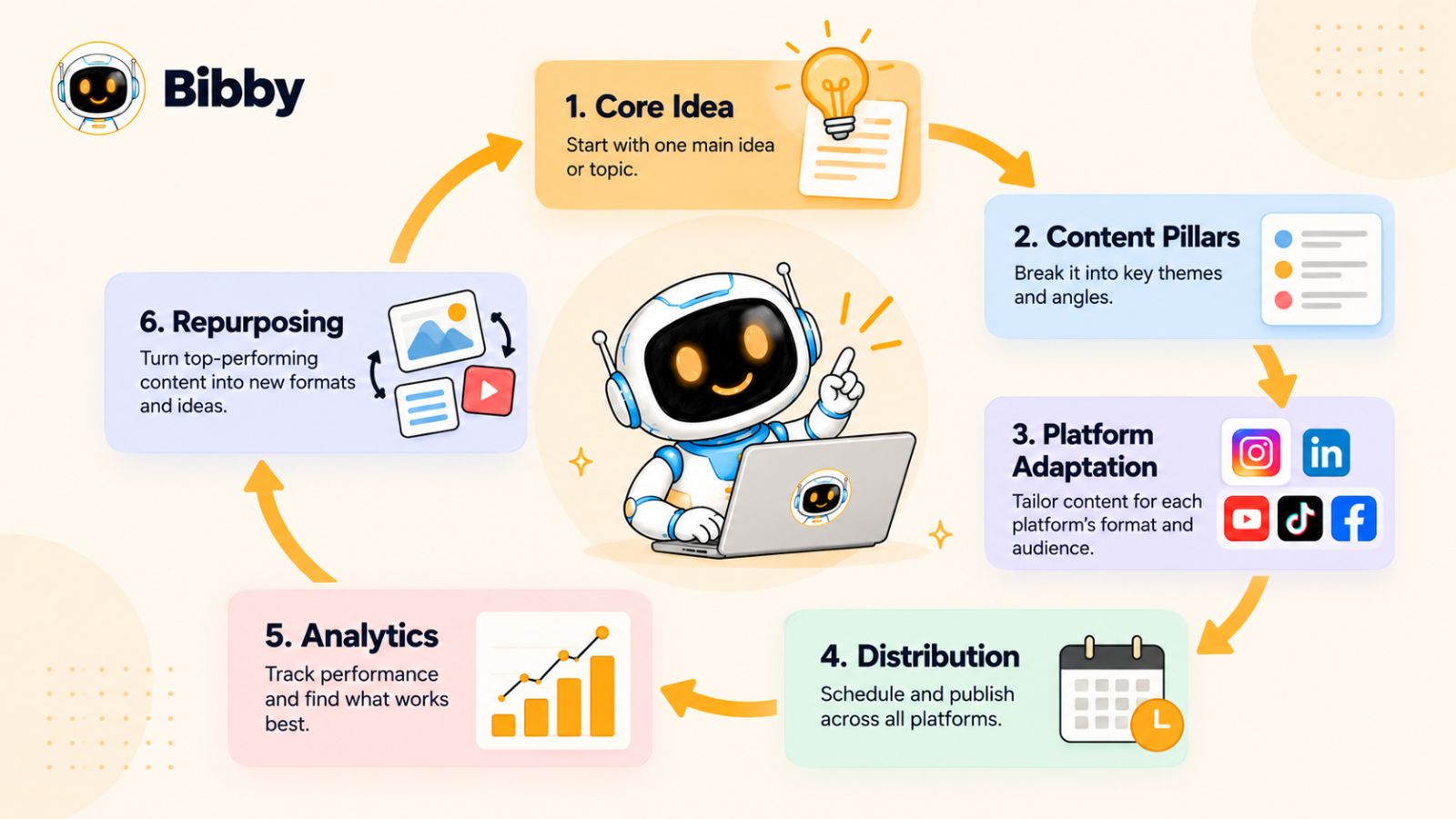
Research → Create the core idea → Adapt → Schedule → Publish → Analyze → Repurpose.
The second approach creates more opportunities to extend the lifespan of your content.
A single idea doesn't have to disappear after one Instagram post. It can become a LinkedIn insight, a YouTube video, a TikTok, a Facebook discussion, an Instagram Story, or a carousel. Each version can reach a different audience segment while reinforcing the same underlying message.
Why Every Platform Needs Its Own Treatment
People don't use every social network in exactly the same way.
Someone scrolling TikTok is generally consuming content differently from someone reading LinkedIn. Someone watching YouTube may be prepared to spend several minutes with a topic, while someone browsing Instagram Stories may give you only a few seconds to earn their attention.
That's why effective multi-platform social media marketing isn't about making more content.
It's about making your existing content more adaptable.
This is where content repurposing becomes one of the most valuable parts of a social media strategy. Instead of starting from a blank page for every platform, you create a strong central idea and build multiple pieces of content around it.
The result is a content system rather than a collection of disconnected posts.
The One-Idea-to-Many-Assets Model
A useful way to think about this strategy is as a content pyramid.
At the top is your core idea.
From that idea, you create several platform-specific assets:
One core idea → multiple formats → multiple platforms → multiple publishing opportunities.
For example:
- Core idea: How to create better social media content with AI
- Instagram: Educational carousel
- Instagram Stories: Quick tips and audience questions
- Facebook: Discussion post
- LinkedIn: Detailed professional insight
- YouTube: Step-by-step tutorial
- TikTok: Short-form demonstration
You're not creating six completely unrelated pieces of content. You're creating six different ways for people to discover and consume the same valuable idea.
This is also where automation becomes important. Once your strategy depends on adapting, scheduling, and distributing content across several platforms, manually handling every caption, format, publishing date, and posting time can become a significant operational burden.
Tools such as Bibby are designed around this exact workflow: you can upload an image or generate one with AI, choose a posting style, and have captions generated and content scheduled across selected platforms. That allows the strategy to remain centralized while the individual content pieces are distributed according to the needs of each channel.
The real advantage of a multi-platform strategy, then, isn't simply being present everywhere.
It's building a system where one good idea can keep working long after the first post is published.
The Multi-Platform Social Media Strategy Nobody Talks About
Most social media strategies start with a platform.
You decide you need to post on Instagram, then figure out what to publish. Next, you open LinkedIn and start thinking about LinkedIn content. Then you move to TikTok, Facebook, and YouTube.
That approach creates a problem: every platform becomes a separate content machine.
The strategy that scales better starts somewhere else.
It starts with the idea.
Instead of asking, “What should I post on Instagram today?” ask:
“What valuable idea do I want my audience to understand this week?”
Once you have that answer, you can turn the idea into multiple pieces of platform-specific content.
Step 1: Start With a Core Content Idea
Every multi-platform campaign should have a central message.
That could be:
- A problem your audience is experiencing
- A question customers frequently ask
- A new product or feature
- A tutorial
- An industry insight
- A customer story
- A common mistake
- A trend relevant to your audience
- A strong opinion supported by experience or evidence
The important thing is that the idea is valuable before you start worrying about the format.
For example, suppose a marketing agency wants to educate small businesses about why posting more often doesn't necessarily produce better social media results.
That's the core idea.
Now the agency has something it can distribute across multiple channels.
Step 2: Build a Content Pillar Around the Idea
Instead of squeezing the entire idea into one post, break it into smaller angles.
The agency might turn the original idea into:
- Why posting more isn't always better
- How to identify content that actually performs
- The difference between consistency and repetition
- How to build a sustainable posting schedule
- Which metrics matter beyond likes
Now one idea has become an entire mini content campaign.
This is one of the biggest shifts in scalable social media marketing:
You don't always need more ideas. You need to extract more useful content from the ideas you already have.
Step 3: Give Each Platform a Different Job
The next step is deciding what role each platform plays.
Your platforms don't have to compete with one another. They can work together.
For example:
| Platform | Potential Role | Suitable Content |
|---|---|---|
| Visual discovery | Reels, carousels, Stories | |
| Community and conversation | Videos, images, discussions | |
| Professional expertise | Insights, text posts, carousels | |
| YouTube | Deep education | Long-form videos, Shorts |
| TikTok | Short-form discovery | Short videos, demonstrations |
These aren't rigid rules. Your audience and industry should determine the exact strategy. But thinking in terms of platform roles helps prevent the common mistake of treating every network identically.
Step 4: Adapt the Message, Don't Duplicate It
This is where many social media strategies fall apart.
A marketer creates one post and publishes the exact same version everywhere.
It's efficient—but it can waste the unique characteristics of each platform.
Instead, keep the message consistent while changing the presentation.
Imagine your campaign is about improving productivity with AI.
Your LinkedIn post might explain the business implications.
Your Instagram carousel might present five practical workflows.
Your TikTok could demonstrate one workflow in 30 seconds.
Your YouTube video could walk through the complete process.
Your Facebook post could ask the community which workflow they use.
Same subject. Different experience.
That's the difference between content duplication and content adaptation.
Step 5: Turn Publishing Into Distribution
Once the assets are created, don't necessarily publish everything at once.
A multi-platform campaign can unfold over several days.
For example:
Monday: Publish the main LinkedIn insight.
Tuesday: Publish the Instagram carousel.
Wednesday: Publish the short-form video.
Thursday: Publish the YouTube tutorial.
Friday: Use Facebook to continue the conversation and Instagram Stories to reinforce the topic.
This creates a distribution sequence.
More importantly, it gives the original idea multiple opportunities to reach people who weren't exposed to the first post.
Step 6: Let AI Handle the Repetitive Work
There is another layer to this strategy that has become increasingly important: execution automation.
Creating the strategy still requires human judgment. You need to understand your audience, choose meaningful topics, establish your positioning, and decide what you want your content to achieve.
But many execution tasks don't need to be performed manually every time.
Captions can be generated.
Images can be created with AI.
Content can be adapted into different formats.
Posts can be scheduled.
Publishing dates can be distributed across platforms.
Posting times can be optimized.
This is where a tool such as Bibby can fit naturally into the workflow. Rather than treating social media scheduling as a final administrative task, Bibby brings creation, caption generation, scheduling, and multi-platform publishing into the same workflow.
You can upload an image or generate one with AI, select your preferred posting style, and let the system generate captions and schedule the content across selected platforms. It can also handle different content types, including images, carousels, videos, and Stories.
And the workflow is becoming increasingly conversational.
With Bibby's chat interface, you can interact with your social media workflow directly—whether that's creating a brand kit, setting up a campaign, creating posts, or regenerating captions.
That changes the role of a social media scheduling tool.
Instead of simply asking, “When should this post go live?”
You can start asking:
“What should we create, where should it go, and how should we distribute it?”
That's the larger opportunity behind AI-powered social media management.
The goal isn't to automate your strategy.
The goal is to automate the repetitive execution behind your strategy so you have more time to improve the strategy itself.
And once you understand this framework, the next question becomes much more practical: how do you take one piece of content and turn it into something genuinely native for Facebook, Instagram, LinkedIn, YouTube, and TikTok?
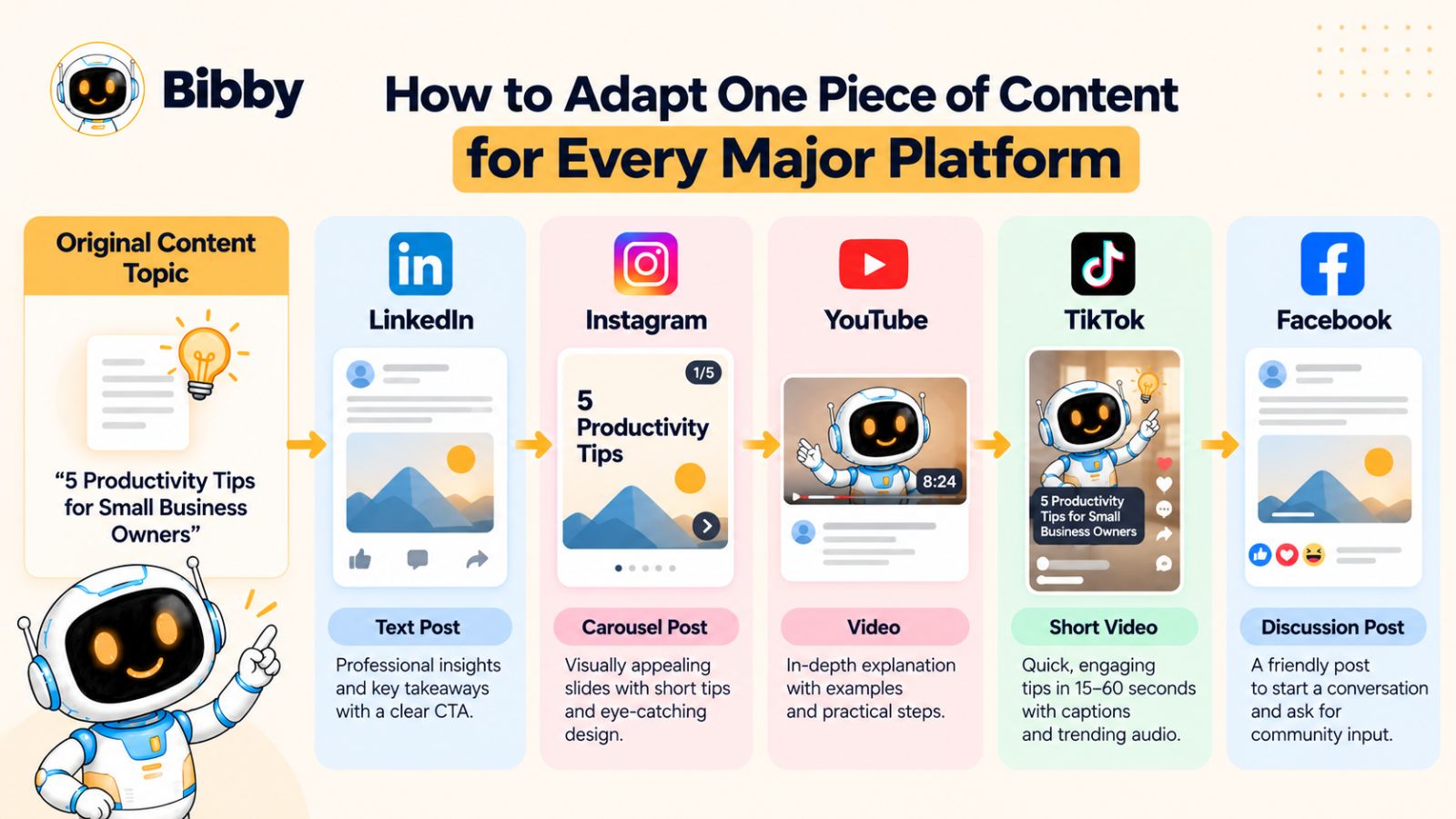
How to Adapt One Piece of Content for Every Major Platform
Creating content for multiple social media platforms doesn't mean creating five completely different strategies.
It means understanding what makes each platform different and adjusting the same underlying idea accordingly.
Think of your original content as the raw material. Each platform is a different format through which that material can be turned into something useful.
For example, a business might start with one topic:
“How small businesses can use AI to save five hours every week.”
That single idea can become a LinkedIn post, Instagram carousel, Facebook discussion, YouTube tutorial, TikTok video, and several Stories.
The subject remains consistent. The experience changes.
Facebook: Start Conversations, Not Just Broadcasts
Facebook can be useful when your content encourages people to react, discuss, share experiences, or participate in a community.
Instead of simply posting:
“Here are five ways AI can save your business time.”
You could turn the idea into a discussion:
“What's the most repetitive task in your business that you wish AI could handle?”
Then provide a few examples and invite people to share their experiences.
Visual posts, videos, carousels, and discussion-driven content can all fit into a Facebook strategy. The important consideration is what you want the audience to do after seeing the content.
For some brands, that might mean commenting. For others, it could mean clicking through to a resource, watching a video, or learning more about a product.
The same core idea can therefore be presented as information on one platform and conversation on another.
Instagram: Make the Idea Visually Easy to Consume
Instagram gives you several formats for developing the same idea.
A complex topic might become a carousel:
Slide 1: 5 AI workflows saving small businesses time
Slide 2: Automating repetitive emails
Slide 3: Generating social media content
Slide 4: Summarizing meetings
Slide 5: Creating customer FAQs
Slide 6: Building simple reports
Slide 7: Save this for later
The same topic could become a Reel demonstrating one of those workflows.
Then Instagram Stories could extend the conversation with a poll, question, behind-the-scenes clip, or a short reminder about the original post.
This is why Instagram shouldn't be treated as simply an image-publishing platform. A single content idea can be distributed across several formats, each serving a different purpose.
LinkedIn: Turn the Idea Into Expertise
LinkedIn provides an opportunity to add context, experience, and professional insight.
The AI productivity example could become a post explaining why automation changes the economics of small teams, followed by specific examples from real workflows.
Instead of focusing exclusively on the tool, the content can focus on the underlying business problem.
For example:
“Small businesses don't necessarily need more employees to handle repetitive work. They need to identify which repetitive workflows can be redesigned.”
The post could then explain several examples and end with a question that encourages professionals to discuss their own processes.
For founders, consultants, agencies, and B2B companies, this approach can turn social content into an extension of their expertise rather than a constant stream of promotional messages.
YouTube: Go Deeper
YouTube is particularly useful when the subject benefits from explanation, demonstration, or storytelling.
Take the same five AI workflows and turn them into a seven-minute tutorial.
The video might cover:
- The problem with repetitive administrative work
- How to identify automation opportunities
- Five practical AI workflows
- A live demonstration
- Mistakes to avoid
- How to build an AI workflow for your own business
The content is related to the Instagram carousel and LinkedIn post, but it isn't simply a longer version of either one.
It offers something YouTube viewers can get from spending more time with the topic: depth.
You can also extract shorter clips from the longer video and turn them into Shorts or other short-form content.
That creates another layer of repurposing.
TikTok: Lead With the Most Interesting Part
Short-form video requires a different approach.
You don't have several minutes to establish context before delivering the value. The opening needs to quickly communicate why someone should keep watching.
The AI productivity topic could begin with:
“If you're still doing these five tasks manually, you're probably wasting hours every week.”
Then demonstrate one or two workflows.
The video doesn't need to explain everything covered in the YouTube tutorial. Its job can simply be to deliver one useful insight quickly.
That distinction is important.
Long-form content can explore an idea. Short-form content can create curiosity around an idea.
The two formats can therefore support each other.
Stories: Keep the Conversation Moving
Stories are particularly useful for extending a campaign beyond the primary feed post.
Suppose you've published your AI productivity carousel.
Your Stories could then ask:
“Which task takes up most of your time?”
Follow that with a poll:
- Emails
- Content creation
- Meetings
- Admin work
The responses can give you information about your audience while keeping the original topic active.
This creates a feedback loop:
Publish → engage → learn → create the next piece of content.
One Message, Multiple Experiences
The important lesson is that you shouldn't think:
“I need five posts.”
Think:
“I have one valuable idea. How can I create five useful experiences around it?”
That mindset makes multi-platform social media marketing much more scalable.
It also creates a natural place for automation.
Once you've decided what the core idea is and how you want each platform to approach it, the repetitive execution—creating variations, generating captions, organizing media, scheduling posts, and distributing content—can be handled more efficiently with an AI-powered workflow such as Bibby.
The human decides what is worth saying.
The system helps determine how, when, and where it gets published.
And that distinction becomes even more powerful when you start building an entire content campaign from a single idea rather than treating every post as an isolated task.
The Content Repurposing Framework: One Idea, Five Platforms
The biggest mistake in content repurposing is thinking that repurposing means copying.
It doesn't.
True content repurposing means taking the value inside an original idea and rebuilding it for different contexts, formats, and audiences.
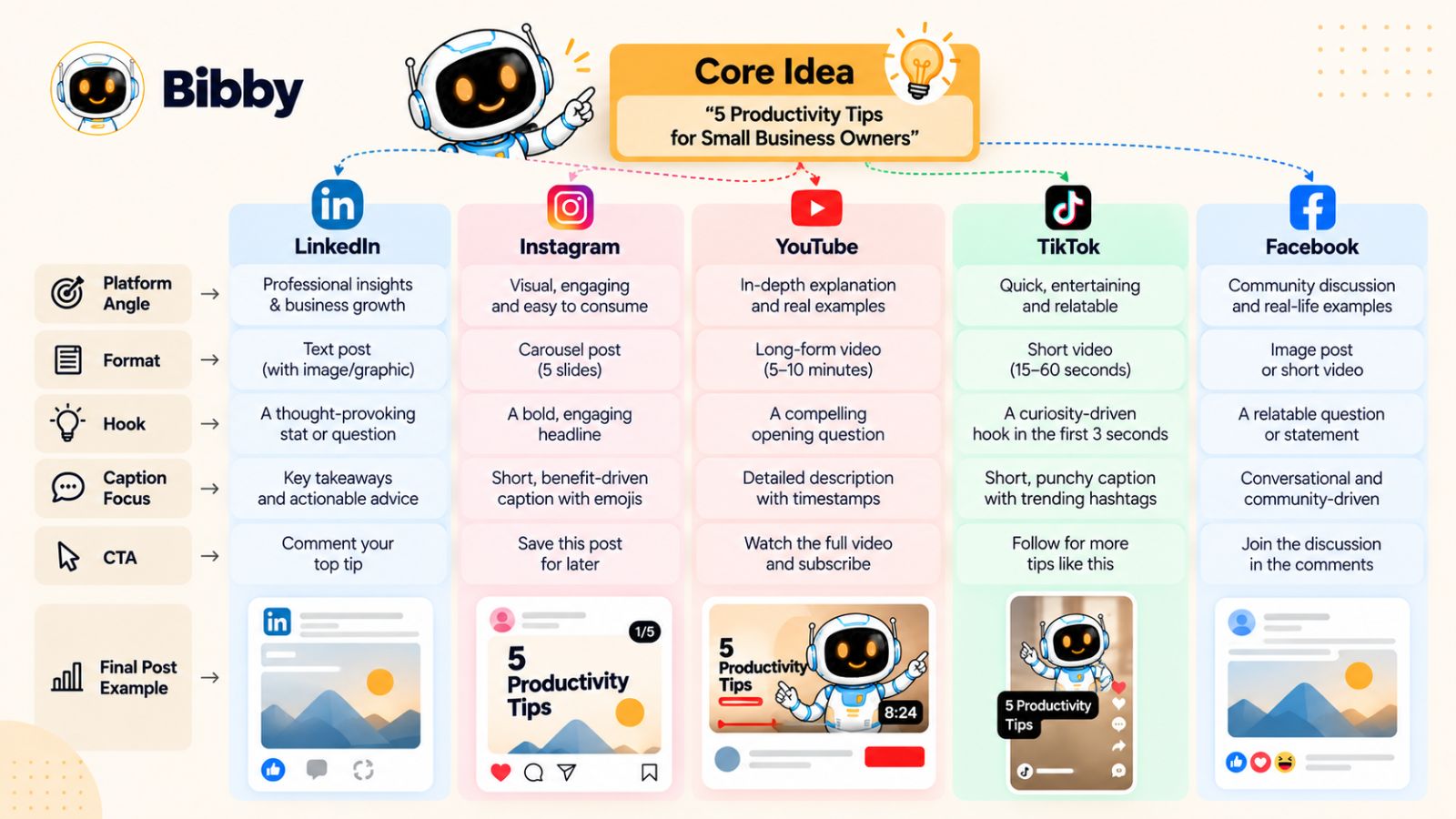
A useful framework is:
Core Idea → Platform Angle → Format → Hook → Caption → CTA
Once you understand this sequence, creating multi-platform content becomes much less overwhelming.
1. Start With the Core Idea
Everything begins with one useful idea.
It could be an educational topic, customer problem, product announcement, case study, opinion, tutorial, or industry observation.
For example:
Core idea: “Most businesses don't need to post more. They need to distribute their best content more intelligently.”
That's the strategic message.
Everything else should support or expand on it.
2. Choose the Platform Angle
Next, decide what part of that idea makes the most sense for each platform.
You don't need to change the underlying message. You change the perspective.
For example:
| Platform | Angle |
|---|---|
| Why businesses struggle with content consistency | |
| 5 signs your content strategy is inefficient | |
| Why content distribution matters more than volume | |
| YouTube | Complete guide to building a content distribution system |
| TikTok | One reason you're wasting your best content |
Notice what happened.
The topic didn't change.
The entry point changed.
That's what makes the content feel native rather than recycled.
3. Choose the Format
The next decision is the format.
Different ideas work better in different formats.
An educational framework might work as an Instagram carousel.
A demonstration might work better as a short video.
A detailed explanation could become a YouTube video.
A professional perspective could become a LinkedIn text post.
A conversation starter could become a Facebook post.
The format should serve the idea—not the other way around.
4. Create a Platform-Specific Hook
Once you know the format, create the opening.
The hook is especially important for short-form content because users decide quickly whether something deserves their attention.
Instead of starting every version with the same sentence, build hooks around the platform's context.
For example:
LinkedIn:
“Most companies don't have a content shortage. They have a distribution problem.”
Instagram:
“Your best content might be disappearing after 24 hours.”
TikTok:
“Stop creating five posts when one idea could give you twenty.”
YouTube:
“Here's how to turn one piece of content into a complete weekly social media campaign.”
The core concept is identical.
The hooks make each version feel different.
5. Write the Caption Around the Platform
The caption shouldn't simply be copied from one network to another.
Instead, use it to support the way the audience is consuming the content.
A LinkedIn caption might explain the business lesson.
An Instagram caption might add context to a carousel.
A Facebook caption might encourage discussion.
A TikTok caption might be short and complementary to the video.
This doesn't mean every caption needs to be completely rewritten from scratch.
It means the caption should earn its place on that platform.
And this is an area where AI can eliminate a large amount of repetitive work.
For example, instead of manually writing five variations of every caption, you can provide the core content and desired style to an AI-powered social media tool and use the generated versions as a starting point.
Bibby's workflow is designed around this kind of execution. After you upload or generate your visual content, you can choose a posting style and have captions generated automatically before scheduling the content across your selected platforms.
That means the strategic decision remains yours, while the repetitive writing and scheduling work becomes much easier to manage.
6. Give Each Version a Clear CTA
Every piece of content should have a reason for existing.
But the desired action doesn't have to be the same everywhere.
For example:
Instagram: Save this post for later.
Facebook: Tell us which approach you use.
LinkedIn: Share your experience in the comments.
YouTube: Watch the next video to see the workflow in action.
TikTok: Follow for more practical social media tips.
The CTA should match the content and the audience's position in the journey.
The Complete Framework in Action
Let's put everything together.
Imagine the core idea is:
“AI can reduce the repetitive work involved in social media management.”
You could turn that into:
Facebook:
A discussion about which social media tasks businesses spend the most time doing manually.
Instagram:
A carousel showing five social media tasks AI can help automate.
LinkedIn:
A professional post explaining how automation changes the workflow for small marketing teams.
YouTube:
A detailed walkthrough showing how an AI-powered social media workflow works from content creation to scheduling.
TikTok:
A short demonstration showing how quickly a social media post can go from idea to scheduled content.
Now you have five pieces of content.
But you only needed to develop one central idea.
That's the leverage.
Why This Framework Scales
Without a repurposing system, every new post starts with a blank screen.
With a repurposing system, every strong idea becomes an opportunity to create a collection of related assets.
And when you combine that approach with automation, the workflow becomes even more efficient.
A tool like Bibby can help bring the operational side together—from generating visuals and captions to organizing different content formats and scheduling them across multiple platforms at AI-optimized times.
That doesn't replace the need for a strategy.
It makes it easier to execute one.
The ultimate goal isn't to flood every platform with content.
It's to build a system where your best ideas get more opportunities to be discovered, consumed, discussed, and remembered.
And once you have those assets ready, there is another important question: when should each one actually be published?
Why Posting at the Same Time Everywhere Is a Mistake
Creating platform-specific content solves only half of the multi-platform social media problem.
The other half is deciding when that content should be published.
A common workflow looks like this: create a post, select every social network, choose the same date and time, and publish everywhere simultaneously.
It feels efficient.
But efficient publishing isn't necessarily effective distribution.
Different platforms have different audiences, different consumption patterns, and different content environments. Your audience may be active on LinkedIn during one part of the day and consuming short-form video somewhere else at a completely different time.
That means your content doesn't necessarily need to arrive everywhere at once.
Think in Distribution Sequences, Not Publishing Moments
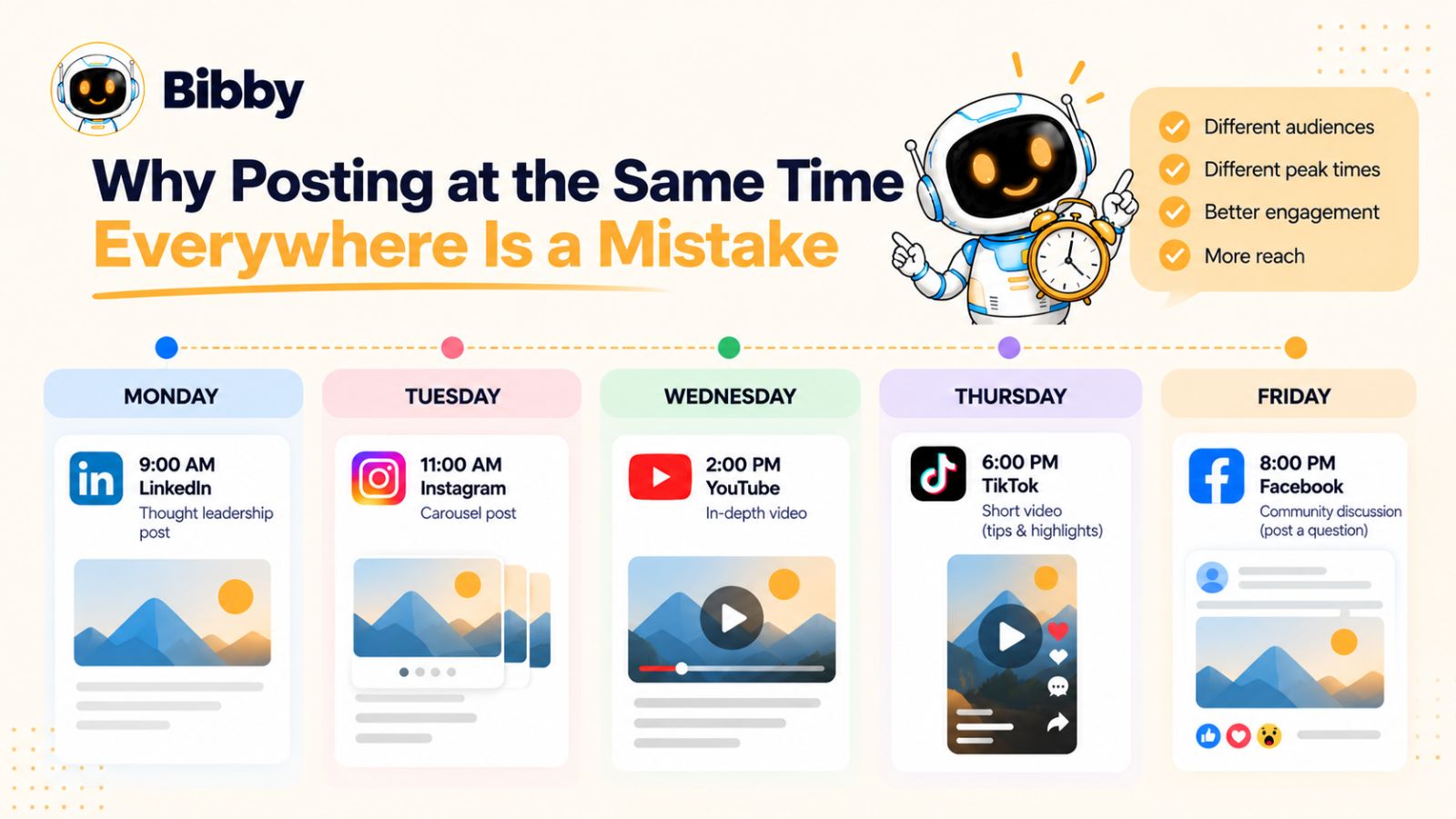
Instead of treating a campaign as one publishing event, think of it as a sequence.
For example, imagine you've created a new guide about using AI for social media management.
You could distribute it like this:
Monday: LinkedIn introduces the core insight.
Tuesday: Instagram publishes a carousel explaining the framework.
Wednesday: TikTok demonstrates one practical tactic.
Thursday: YouTube publishes the detailed walkthrough.
Friday: Facebook continues the conversation with a question based on the original topic.
Weekend: Instagram Stories reinforce the strongest points and direct interested followers toward the longer content.
The campaign now has a life of several days instead of disappearing across five platforms within the same hour.
Why Staggered Distribution Can Be Useful
Staggering content gives you several advantages.
First, it creates multiple opportunities for discovery.
Someone who missed Monday's LinkedIn post may encounter the same underlying idea on Instagram later in the week.
Second, it allows each platform to contribute something different.
The YouTube video can provide depth. The TikTok can provide a quick demonstration. Instagram can provide a visual summary.
Third, it makes your content ecosystem feel connected.
A person who discovers your brand on one platform can encounter related content somewhere else without necessarily seeing an identical post repeated everywhere.
Your Best Posting Time Isn't Universal
There is no single social media posting time that guarantees strong performance for every account.
Your audience matters.
Your industry matters.
Your location and audience distribution matter.
The type of content matters.
And your historical performance matters.
This is why blindly following a generic recommendation such as “post at 9 AM” is usually less useful than understanding your own audience data.
Instead of asking:
“What's the best time to post on Instagram?”
a better question is:
“When does my audience tend to engage with this type of content on Instagram?”
That's a much more useful starting point.
AI Can Help With the Scheduling Layer
This is one area where AI-powered social media automation can reduce manual work.
Once you have dozens of assets across multiple platforms, manually choosing dates and times becomes tedious.
An AI-powered scheduling workflow can use available signals to help distribute content rather than requiring you to make every timing decision manually.
Bibby, for example, allows users to select their platforms and schedule content across different dates using AI-optimized posting times. Instead of manually opening five different publishing systems and building five separate calendars, the scheduling process can be managed from one workflow.
That matters because the purpose of automation isn't simply saving a few clicks.
It's reducing the coordination cost of running a multi-platform strategy.
Don't Confuse Automation With “Set It and Forget It”
There's an important distinction here.
Automation should handle repetitive execution.
It shouldn't eliminate human oversight.
A good workflow might look like:
Human: Choose the campaign objective.
Human: Define the audience and message.
AI: Generate content variations.
Human: Review and refine the content.
AI: Recommend scheduling and distribution.
AI: Publish according to the approved schedule.
Human: Review performance and audience feedback.
AI: Help identify opportunities for repurposing and future content.
This creates a partnership between strategy and automation.
The human remains responsible for the brand, positioning, quality, and judgment.
The system handles repetitive operational work.
Build a Distribution Calendar, Not Just a Posting Calendar
A traditional social media calendar might tell you:
Tuesday — Instagram post at 10 AM.
A distribution calendar gives you more context:
Campaign: AI Productivity
Core idea: Reduce repetitive work
LinkedIn: Professional insight
Instagram: Educational carousel
TikTok: Quick demonstration
YouTube: Detailed tutorial
Facebook: Community discussion
Distribution window: Monday–Friday
CTA: Varies by platform
This small change in thinking can make your content strategy much easier to manage.
You're no longer scheduling isolated posts.
You're managing campaigns and content journeys.
And when the number of campaigns, assets, and platforms starts increasing, the next challenge becomes obvious: how do you automate the repetitive parts without losing control over the content?
How AI Changes Multi-Platform Social Media Management
A multi-platform social media strategy sounds simple until you actually have to execute it.
One campaign can involve research, ideas, copywriting, image creation, video production, captions, formatting, platform adaptation, scheduling, publishing, analytics, and repurposing.
Multiply that by five platforms and several campaigns each month, and the workload becomes difficult to manage manually.
This is where AI changes the equation.
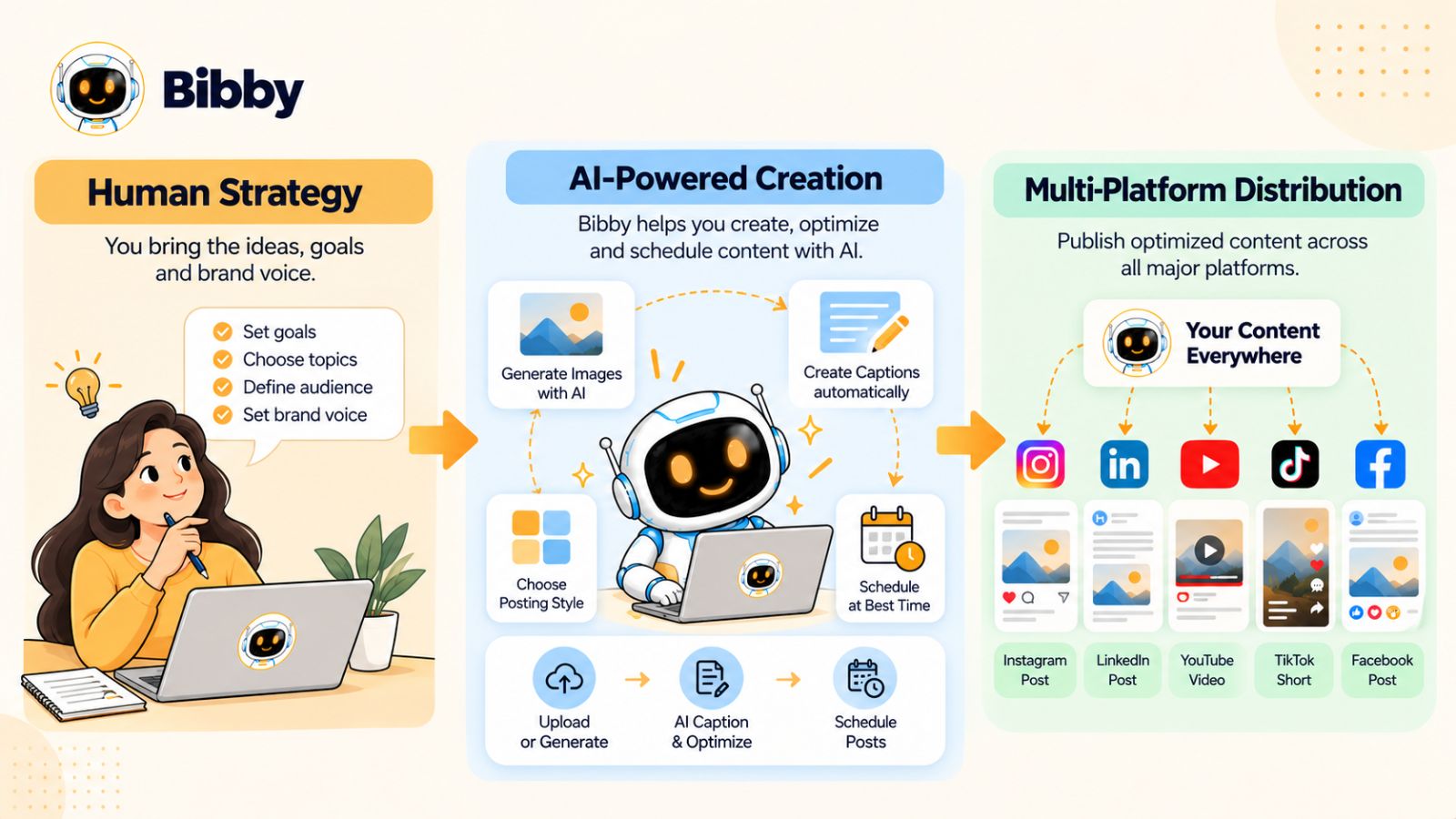
The biggest opportunity isn't simply asking AI to “write a social media post.” It's using AI across the entire workflow so that repetitive tasks no longer slow down the strategy.
AI Can Help With More Than Caption Writing
When people think about AI and social media, captions are usually the first thing that comes to mind.
But captions are only one small part of the workflow.
AI can assist with:
- Generating content ideas
- Turning ideas into post concepts
- Creating or editing visual assets
- Writing platform-specific captions
- Adapting content for different audiences
- Suggesting hooks
- Creating content variations
- Organizing campaigns
- Scheduling posts
- Recommending publishing times
- Repurposing existing content
- Helping analyze what to create next
The value comes from connecting these capabilities rather than using each one as a separate tool.
From Content Creation to Content Operations
Consider what happens when you create a single campaign manually.
You might need to:
- Write the original idea.
- Create an image.
- Write an Instagram caption.
- Rewrite the idea for LinkedIn.
- Create a TikTok script.
- Prepare a Facebook version.
- Develop a YouTube concept.
- Upload the assets.
- Open several scheduling tools.
- Select dates and times.
- Schedule everything.
- Return later to check whether everything published correctly.
None of these tasks is particularly complicated on its own.
The problem is the accumulated friction.
AI can reduce that friction by bringing multiple steps into one connected workflow.
AI Image Generation Makes Visual Production Faster
Visual content can be one of the biggest bottlenecks in social media production.
If every post requires finding an appropriate image, editing it, resizing it, and preparing it for different formats, production time adds up quickly.
AI image generation changes the starting point.
Instead of searching endlessly for an image that approximately matches your idea, you can generate a visual based on the content you actually want to communicate.
That doesn't mean every AI-generated image will automatically be good. Brand consistency, composition, accuracy, and creative direction still matter.
But it can dramatically reduce the distance between idea and usable visual asset.
This is particularly useful when you're producing multiple variations of a campaign.
AI-Generated Captions Can Remove Repetitive Writing
Writing one thoughtful caption can be enjoyable.
Writing 30 variations of captions for 30 posts is a different story.
AI can handle much of that repetitive work.
For example, you might specify:
Educational + confident + concise
or:
Friendly + conversational + community-focused
The AI can then generate captions that fit the selected style.
Bibby incorporates this concept directly into its workflow. After uploading or generating your media, you can select a posting style and have captions generated automatically rather than starting each caption from a blank document.
The benefit isn't that AI magically understands your brand without guidance.
The benefit is that it gives you a fast first draft that can be reviewed, edited, approved, and scheduled.
AI Can Help With Scheduling Too
Content creation is only useful if the content actually gets distributed.
And scheduling becomes increasingly complicated as your number of platforms and posts increases.
Imagine managing:
- 5 platforms
- 4 campaigns
- 20 pieces of content
- Multiple formats
- Different publishing dates
- Different audience time zones
Suddenly, your calendar becomes an operational project.
AI-powered scheduling can help simplify that process by using available data and signals to recommend or apply optimized publishing times.
Bibby brings this into the same workflow, allowing content to be scheduled across selected platforms at AI-optimized times rather than requiring you to manually determine a publishing slot for every individual post.
That can be particularly useful for teams and creators who want a consistent publishing system without spending hours inside scheduling dashboards.
AI Doesn't Replace Strategy
This distinction is critical.
AI can help you execute a strategy.
It doesn't automatically know what your business should stand for.
It doesn't automatically understand which customers you want to attract.
It doesn't know which product positioning will differentiate you.
And it can't replace genuine experience, original insights, or a strong understanding of your audience.
The strongest workflow therefore isn't:
AI → Publish everything automatically.
It's:
Strategy → AI-assisted creation → Human review → Automated distribution → Performance analysis → Strategy refinement.
The human provides direction.
AI accelerates execution.
The Next Evolution: Conversational Social Media Management
There is another shift happening beyond individual AI features.
Instead of interacting with social media software through dozens of menus, users can increasingly interact with their content systems through natural language.
Rather than navigating through:
Campaigns → Create → Platform → Format → Caption → Schedule
you can describe what you want.
For example:
“Create a campaign around our new product launch, use our brand style, make five social posts, and distribute them across Instagram, Facebook, LinkedIn, TikTok, and YouTube over the next week.”
That kind of workflow changes the interface itself.
The software becomes less like a collection of settings and more like an assistant that understands the task you're trying to accomplish.
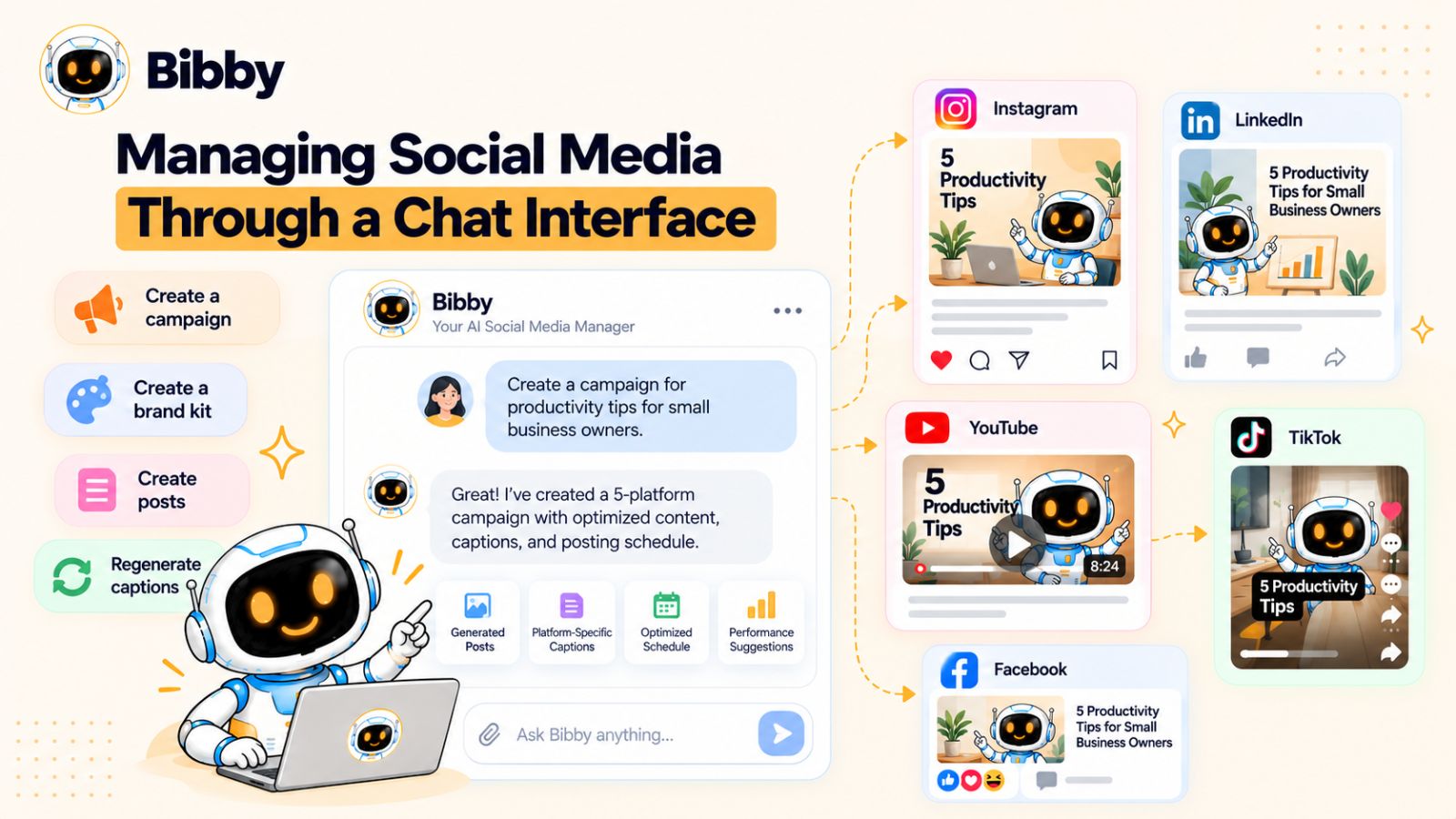
Bibby's chat interface follows this direction by allowing users to manage social media tasks conversationally, including creating a brand kit, creating campaigns, generating posts, and regenerating captions.
That makes the distinction between social media scheduler and AI social media manager increasingly important.
A scheduler answers:
“When should this post be published?”
A broader AI social media workflow can help answer:
“What should we create, how should we present it, where should it go, and when should it be distributed?”
That is the direction in which multi-platform social media management is evolving.
And it brings us to the practical question: what does this entire workflow look like when you put it together inside one tool?
Where Bibby Fits Into the Multi-Platform Workflow
A multi-platform social media strategy can be powerful on paper.
The challenge is turning that strategy into a repeatable workflow.
You need to create the media, adapt the message, write captions, choose platforms, organize publishing dates, and keep everything consistent with your brand. If every step happens manually, the operational workload can eventually become larger than the creative work itself.
This is where an all-in-one social media automation workflow can make a difference.
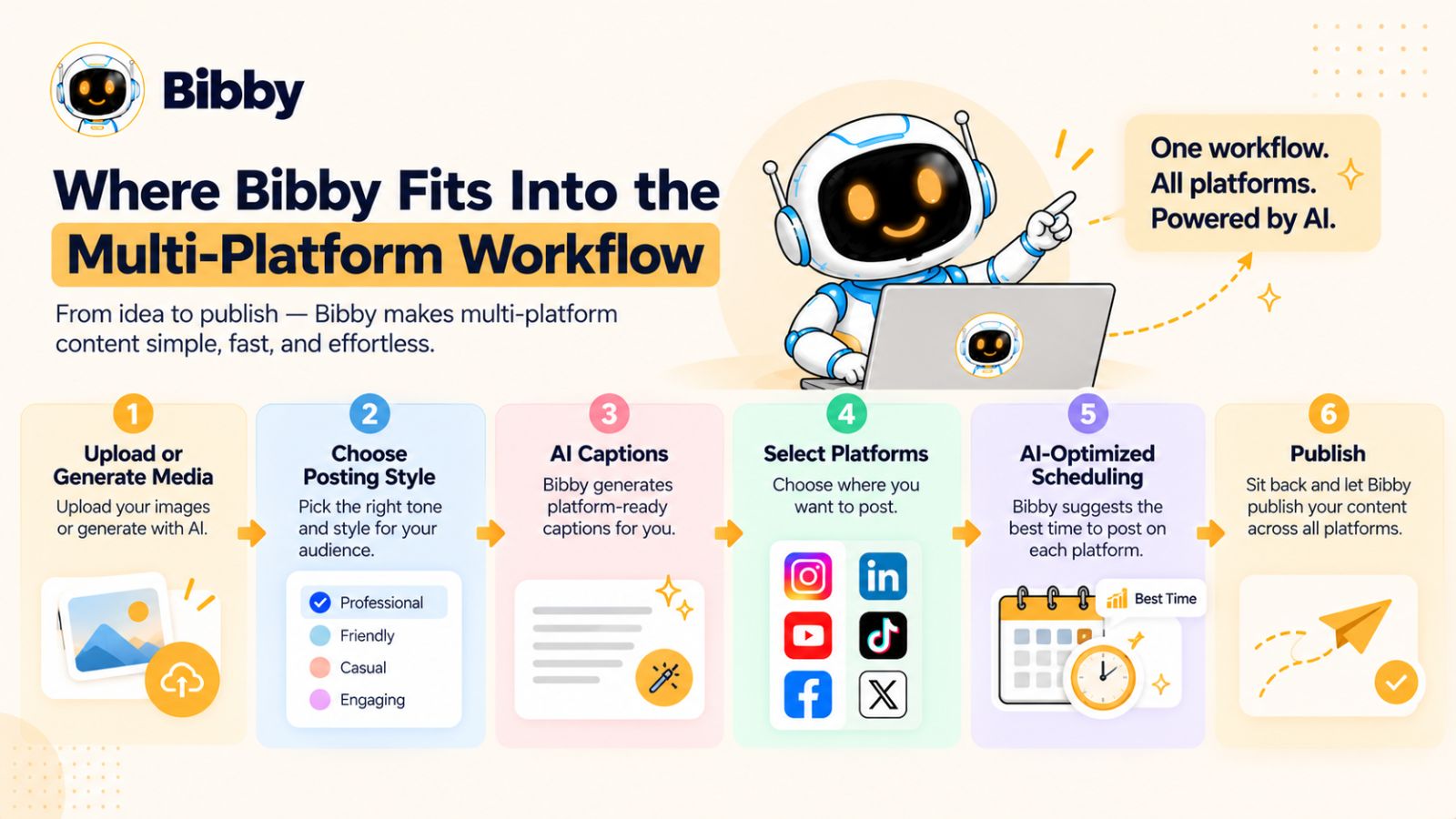
Bibby is built around this idea: instead of treating content creation, caption writing, scheduling, and publishing as separate jobs, it brings them together into one workflow.
Start With Your Media
The workflow begins with the content itself.
You can upload an image you already have or generate an image using AI.
That matters because the visual creation stage doesn't have to be disconnected from the rest of your social media workflow.
You can start with an existing asset, create something new, and then move directly into preparing it for distribution.
The same workflow can support different types of content, including:
- Images
- Carousels
- Videos
- Stories
That gives you more flexibility when building a campaign instead of forcing every idea into a single post format.
Choose the Posting Style
Once your media is ready, the next step is deciding how you want the content to sound.
This is where the difference between content generation and content direction becomes important.
You don't necessarily want AI producing random captions.
You want it to generate content according to a recognizable style.
For example, your brand might want content that is:
- Educational
- Conversational
- Professional
- Bold
- Friendly
- Promotional
- Story-driven
Bibby can use the selected posting style to generate captions automatically, reducing the amount of repetitive copywriting required for each piece of content.
You can then review the generated content and make adjustments before publishing.
Select Your Platforms
The next step is distribution.
Instead of managing each network independently, you can select the platforms you want your content to reach.
For a typical multi-platform campaign, that could include:
Facebook + Instagram + LinkedIn + YouTube + TikTok
The advantage isn't simply having all five options in one place.
It's that the distribution process becomes connected to the creation process.
You're no longer creating content in one application, writing captions somewhere else, and then manually transferring everything into several scheduling tools.
The workflow becomes much closer to:
Create → Adapt → Schedule → Publish.
Let Scheduling Become Part of the Strategy
Scheduling is often treated as administrative work.
But in a multi-platform strategy, it is part of distribution.
The timing of one post can affect when the next piece of a campaign appears. A YouTube video might follow several short-form posts. An Instagram carousel might introduce a topic before a longer LinkedIn explanation. A Facebook discussion might continue the conversation after the main campaign asset has been published.
Bibby can schedule content across different dates and use AI-optimized posting times to help determine when the content should go live.
This allows you to build a distribution sequence without manually selecting every publishing time.
The result is a content calendar that can operate in the background while you focus on the next campaign.
One Workflow for Different Content Formats
A major advantage of a multi-platform system is being able to think beyond the traditional “one image, one caption” model.
A single campaign might include:
Image: A visual announcement.
Carousel: A step-by-step educational breakdown.
Video: A demonstration.
Story: A quick reminder or interaction.
Short-form video: A fast version of the core idea.
Instead of treating these as unrelated pieces, you can treat them as different assets within the same content system.
That makes it easier to create campaigns that feel connected while still giving your audience different ways to consume the message.
Bibby as the Execution Layer
This is ultimately where Bibby fits into the strategy we've discussed throughout this article.
Your strategy still comes first.
You decide:
- Who you're talking to
- What you want to communicate
- Which topics matter
- What your brand stands for
- What the campaign should accomplish
- Which platforms matter most to your audience
Bibby can then help with the execution layer:
Media → Captions → Platforms → Dates → Scheduling → Publishing
That separation is useful because automation works best when it is attached to a clear strategy.
The tool doesn't need to replace the person running the brand.
It needs to remove the repetitive work that prevents that person from spending more time on strategy, creative direction, audience research, and growth.
From Social Media Scheduler to Social Media Operating System
This is also why the category is changing.
A traditional scheduler primarily solves one problem:
“Help me publish my existing content at a specific time.”
An AI-powered platform can solve a much larger set of problems:
“Help me turn my ideas into organized, distributed social media content.”
That difference becomes especially important as the number of platforms continues to grow.
When you're managing Facebook, Instagram, LinkedIn, YouTube, and TikTok simultaneously, the real challenge isn't opening each platform.
It's maintaining a coherent system across all of them.
Bibby's combination of AI media generation, caption creation, multi-platform scheduling, different content formats, and conversational management is designed around that broader problem.
And the chat interface takes the workflow one step further: instead of navigating through multiple menus, you can manage social media tasks through conversation.
That leads to an even more interesting question:
What happens when your social media management tool can understand instructions almost like a member of your marketing team?
Managing Social Media Through a Chat Interface
Traditional social media tools make you work through their interface.
You open a dashboard, find the right section, select a platform, choose a format, upload media, write a caption, set a date, and repeat the process for the next piece of content.
That workflow works.
But it becomes increasingly cumbersome as your social media operation grows.
A chat interface offers a different approach.
Instead of thinking about which button to click, you can start by describing what you want to accomplish.
From Clicking Through Menus to Giving Instructions
Imagine starting your social media workflow with a simple instruction:
“Create a campaign for our new product launch. Use our existing brand style, create posts for Instagram, Facebook, LinkedIn, TikTok, and YouTube, and spread them across the next seven days.”
The important change isn't simply that the instruction is shorter.
It's that you're describing the outcome rather than manually specifying every individual action.
An AI-powered social media platform can then help translate that instruction into the individual tasks required to execute the campaign.
This is the broader promise of conversational software: you interact with the system using the language you already use to describe your work.
Create a Brand Kit Through Conversation
Brand consistency becomes increasingly important when you're publishing across several platforms.
Your audience should be able to recognize your content even when the format changes.
A brand kit can help establish that consistency by defining elements such as:
- Brand identity
- Visual direction
- Colors
- Typography
- Tone
- Messaging preferences
With Bibby's chat interface, you can create a brand kit conversationally rather than treating brand setup as a completely separate technical process.
Once your brand foundation is established, it can provide direction for future content.
That matters when you're generating dozens of pieces of content rather than just one campaign.
Create Campaigns Without Starting From Scratch
Campaigns are another area where conversational interaction can simplify the process.
Instead of manually creating every post individually, you can describe the campaign you want to build.
For example:
“Create a seven-day campaign explaining why businesses should automate their social media workflow.”
From there, the campaign can be broken into individual content opportunities.
You might have an educational post, a short video, a carousel, a discussion post, and supporting Stories.
The important part is that these assets can be thought about as one campaign rather than a collection of unrelated posts.
This fits directly with the multi-platform strategy described earlier in this article.
Create Posts Through Chat
The same principle applies to individual posts.
You might tell Bibby:
“Create an Instagram carousel explaining five social media automation mistakes.”
Or:
“Create a LinkedIn post about why businesses should repurpose their best content.”
Instead of navigating through multiple creation screens, you're describing the content you want.
That can make the process particularly useful when you already know what you want to say but don't want to manually handle every production step.
Regenerate Captions When the First Version Isn't Right
AI-generated content shouldn't be treated as a final answer simply because it was generated by AI.
Sometimes the first caption is too formal.
Sometimes it's too long.
Sometimes the hook isn't strong enough.
Sometimes it doesn't sound like your brand.
A conversational interface makes iteration much easier.
You can simply ask for another version.
For example:
“Make this more conversational.”
“Shorten the caption.”
“Make the opening more attention-grabbing.”
“Give me three alternative captions.”
“Make this sound more educational and less promotional.”
That is a more natural editing experience than repeatedly rebuilding the content from scratch.
Conversation Becomes the Control Layer
This is perhaps the most important shift.
The chat interface isn't valuable simply because chatting feels easier than clicking.
It's valuable because conversation can become the control layer for the entire social media workflow.
You can use it to create a brand kit.
You can use it to create campaigns.
You can use it to create posts.
You can regenerate captions.
You can refine content.
You can give additional instructions.
And as these capabilities become more connected, social media management starts to feel less like operating a piece of software and more like directing a digital assistant.
The Human Still Controls the Brand
There is an important caveat.
Conversational AI doesn't eliminate the need for human judgment.
You still need to decide what your business should communicate.
You need to recognize when an idea doesn't fit your audience.
You need to review important campaigns.
You need to protect your brand voice.
And you need to understand the difference between content that is merely polished and content that is genuinely valuable.
The ideal workflow is therefore collaborative.
You provide the context.
AI handles the repetitive execution.
You review the result.
AI helps you refine and distribute it.
That can be much more powerful than either extreme: doing everything manually or blindly automating everything.
Social Media Management Is Becoming More Conversational
This shift also changes what people should expect from social media software.
A social media management platform doesn't have to be just a calendar with a publishing button.
It can become a place where you plan campaigns, create content, manage your brand, generate variations, schedule posts, and coordinate distribution through a single conversational workflow.
Bibby's chat-based approach is built around this direction.
And for marketers managing multiple platforms, the real benefit isn't that you can “chat with your social media tool.”
It's that conversation can reduce the distance between having an idea and turning that idea into a distributed campaign.
Once the content system is working this way, the next challenge is making sure you have a repeatable calendar that keeps the machine running—not just during one campaign, but every week.
The Social Media Content Calendar That Actually Scales
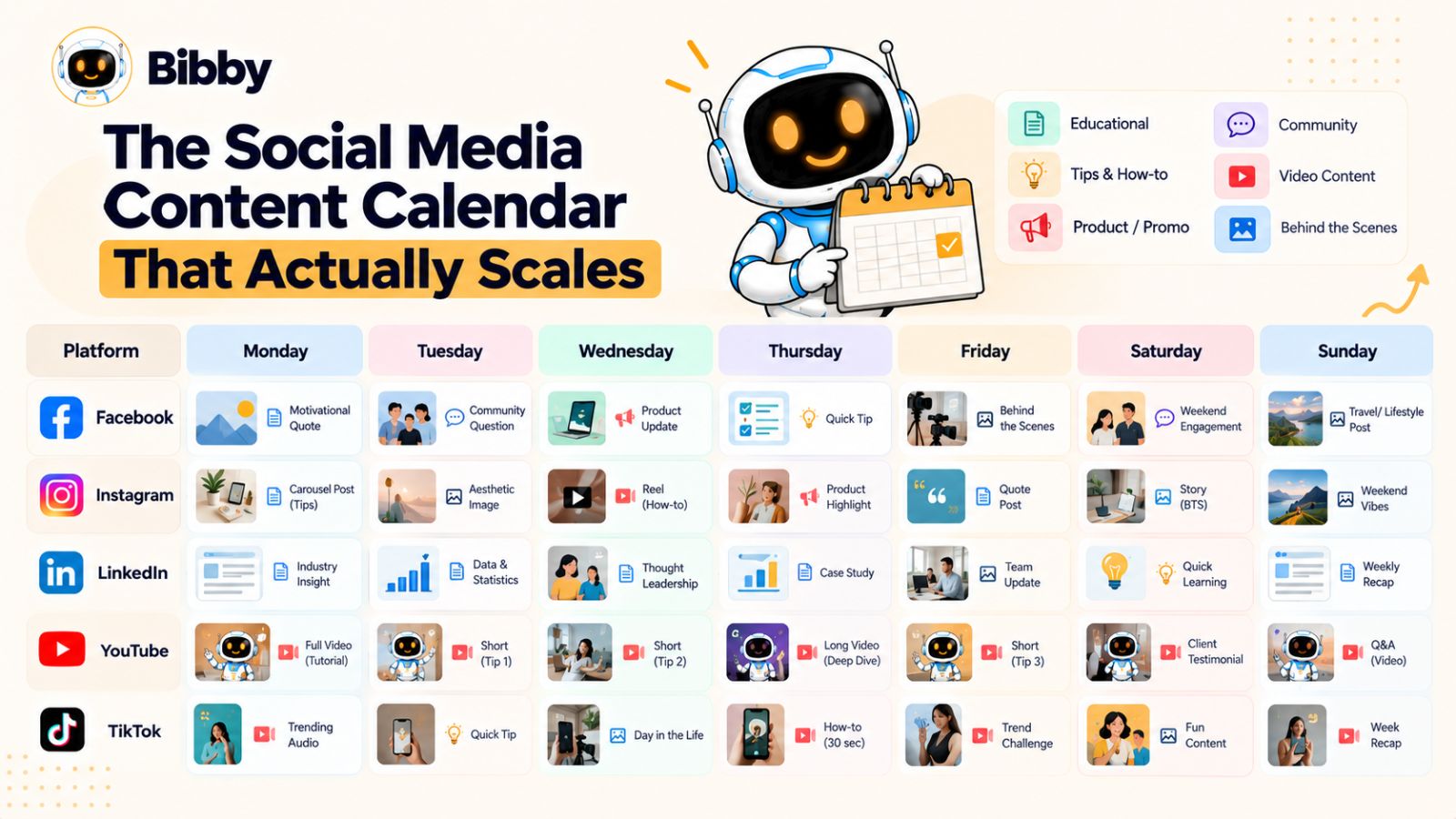
A social media strategy becomes much easier to execute when you stop treating every post as an isolated task.
Instead, organize your content around pillars, campaigns, formats, and distribution windows.
This creates a system where you always know what you're publishing, why you're publishing it, and how each piece connects to the larger strategy.
The goal isn't to fill every empty space in your calendar.
The goal is to create a calendar that can keep producing useful content without exhausting the person running it.
Start With Content Pillars
Content pillars are the recurring subjects your brand wants to be known for.
For a social media management company, for example, pillars might include:
- Social media strategy
- Content creation
- Social media automation
- AI marketing
- Productivity
- Customer education
These pillars give you a starting point whenever you need new content.
Instead of asking:
“What should I post today?”
you can ask:
“Which content pillar should we develop this week?”
That makes ideation considerably easier.
Add Campaigns to Your Pillars
Pillars tell you what subjects to talk about.
Campaigns tell you what you want to accomplish with a particular group of content.
For example:
Pillar: Social media automation
Campaign: How small businesses can save time with AI
That campaign could include:
- An educational LinkedIn post
- An Instagram carousel
- A TikTok demonstration
- A YouTube tutorial
- A Facebook discussion
- Several Stories
- A follow-up post addressing common questions
Now the content has a clear narrative.
Use a Content Mix
A scalable calendar shouldn't consist entirely of promotional posts.
A useful mix can include:
Educational content — Teach something useful.
Thought leadership — Share perspectives and expertise.
Engagement content — Ask questions and encourage discussion.
Product content — Show how your product or service works.
Social proof — Share results, testimonials, or customer experiences.
Behind-the-scenes content — Show the people and processes behind the brand.
Repurposed content — Repackage strong existing ideas.
The exact ratio depends on your business and audience.
The important point is that your audience shouldn't feel as though every post is trying to sell them something.
Build a Weekly Distribution Rhythm
A simple weekly structure might look like this:
| Day | Primary Content | Supporting Content |
|---|---|---|
| Monday | LinkedIn insight | Instagram Story |
| Tuesday | Instagram carousel | Facebook post |
| Wednesday | TikTok video | Story |
| Thursday | YouTube video | LinkedIn follow-up |
| Friday | Facebook discussion | TikTok/Shorts clip |
| Weekend | Repurposed or community content | Stories |
This isn't a universal posting schedule.
It's an example of how a campaign can move through multiple platforms without requiring you to invent a completely new topic every day.
You can increase or reduce the frequency depending on your audience, resources, and goals.
Separate Evergreen and Timely Content
Another useful distinction is between evergreen and timely content.
Evergreen content remains useful for months or potentially years.
Examples include:
- Tutorials
- Frameworks
- Frequently asked questions
- Educational guides
- Best practices
Timely content is connected to something happening now.
Examples include:
- Product launches
- Industry news
- Seasonal campaigns
- Events
- Trends
- Company announcements
Your calendar should leave room for both.
Evergreen content gives you a reliable content library.
Timely content keeps your brand connected to what's happening around your audience.
Keep a Repurposing Queue
One of the most underused parts of a social media content calendar is a repurposing queue.
When something performs well, don't automatically move on to the next idea.
Ask:
Can we get more value from this?
A successful LinkedIn post could become:
- An Instagram carousel
- A TikTok script
- A YouTube topic
- A Facebook discussion
- An email topic
- A follow-up post
Likewise, a successful YouTube video could generate multiple short-form clips and social posts.
This creates a feedback loop:
Create → Publish → Measure → Identify winners → Repurpose → Publish again.
That is far more sustainable than constantly trying to invent something completely new.
Automate the Calendar Without Losing Control
Once your calendar contains multiple platforms, formats, campaigns, and publishing dates, managing it manually can become difficult.
This is where automation becomes useful.
Bibby can help turn your content library into a scheduled distribution system. You can upload or generate media, choose a posting style, generate captions, select the platforms, and schedule content across different dates with AI-optimized posting times.
The benefit is especially noticeable when you're working ahead.
Instead of needing to remember to publish every day, you can prepare a batch of content and let the scheduling system handle the operational side.
And because Bibby supports different formats—including images, carousels, videos, and Stories—you can build a calendar around actual campaigns rather than limiting yourself to one type of post.
Your Calendar Should Create Breathing Room
This may be the most important principle.
A good content calendar shouldn't make you feel like you're constantly behind.
It should create breathing room.
If your content is planned, your media is prepared, your captions are generated, and your publishing is scheduled, you can spend your time on the things automation can't replace easily:
- Talking to customers
- Developing ideas
- Studying your audience
- Reviewing performance
- Improving your product
- Creating genuinely original insights
The calendar is therefore not the strategy itself.
It's the operating system that helps the strategy happen consistently.
But even the best calendar can fail if the underlying content strategy is built around the wrong assumptions. The next step is understanding the mistakes that cause multi-platform social media strategies to become inefficient, repetitive, or difficult to scale.
Common Multi-Platform Social Media Mistakes
Being active on multiple social media platforms doesn't automatically mean your strategy is working.
In fact, adding more platforms can make an inefficient strategy even more difficult to manage.
The solution isn't necessarily to reduce the number of platforms. It's to understand where multi-platform strategies commonly go wrong and build systems that prevent those problems.
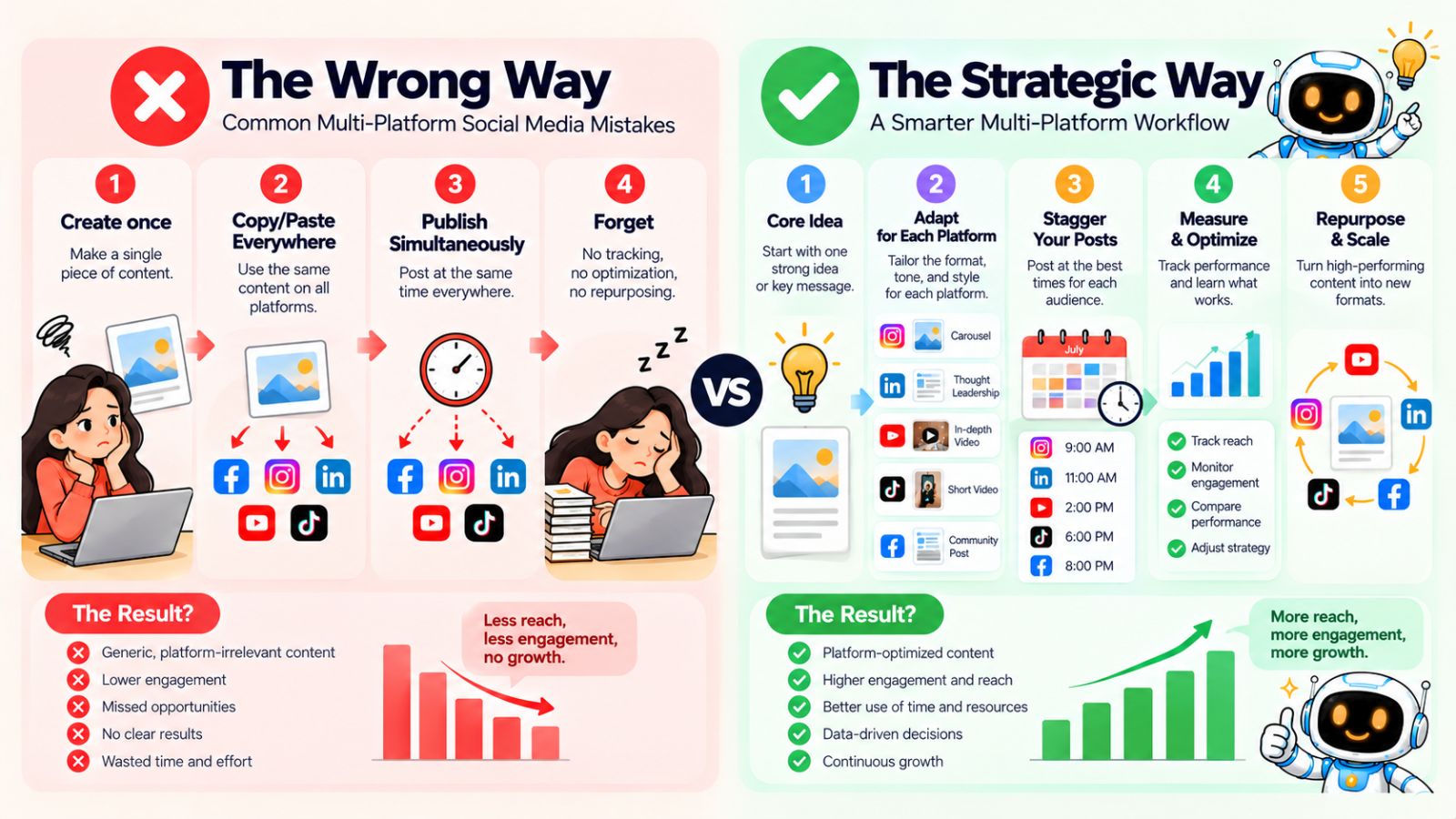
1. Copy-Pasting the Same Post Everywhere
The fastest approach is often to create one post and publish it everywhere unchanged.
But the fastest approach isn't always the most useful.
Each platform has its own formats, audience expectations, and consumption patterns. A caption written for LinkedIn may not make sense as a TikTok description. A detailed YouTube explanation can't simply be pasted into an Instagram carousel.
The better approach is:
Keep the core idea. Change the execution.
This allows you to repurpose content without making your audience feel like they're seeing the exact same thing repeatedly.
2. Creating Completely New Content for Every Platform
The opposite mistake is equally inefficient.
Some marketers try to create completely original content for every network.
Five platforms then become five separate content calendars.
That can quickly become unsustainable.
If the same topic could produce a LinkedIn post, Instagram carousel, TikTok video, YouTube tutorial, and Facebook discussion, there's little reason to reinvent the underlying idea five times.
A better system is strategic repurposing.
Create once at the idea level.
Adapt multiple times at the execution level.
3. Treating Every Platform as Equally Important
Being present everywhere doesn't mean every platform deserves exactly the same amount of attention.
Your audience may be highly active on one platform and barely present on another.
Your content may also naturally fit certain formats better.
For example, a visual consumer brand may have very different priorities from a B2B software company.
Instead of asking:
“How do I maximize every platform?”
ask:
“Which platforms matter most for this particular audience and business objective?”
You can maintain a presence across several platforms while allocating your creative and strategic resources according to where they have the most relevance.
4. Publishing Everything at the Same Time
As we discussed earlier, simultaneous publishing isn't automatically wrong—but making it your default can limit your distribution strategy.
If a campaign contains five different assets, you can use those assets to create a sequence.
One idea can introduce the topic.
Another can explain it.
Another can demonstrate it.
Another can deepen it.
Another can start a conversation.
That gives the campaign a longer lifespan.
5. Automating Without Reviewing
Automation can save enormous amounts of time.
But automation without oversight can create unnecessary problems.
An AI-generated caption might contain a claim that needs checking.
A generated image might not match your brand.
A post might accidentally use the wrong tone.
A campaign might be scheduled for an inappropriate date.
Automation should therefore reduce repetitive work—not eliminate quality control.
A sensible workflow is:
Generate → Review → Approve → Schedule → Monitor.
Tools such as Bibby can handle much of the generation and scheduling workflow, but your brand's final judgment should remain part of the process.
6. Letting AI Replace Your Brand Voice
AI can write a polished caption.
That doesn't automatically make it a good caption for your company.
Your brand should have recognizable characteristics.
Maybe you're direct.
Maybe you're playful.
Maybe you're highly technical.
Maybe you're conversational.
Maybe you use stories and personal experiences.
AI works best when it has clear direction.
That's why creating a brand kit and defining your preferred style can be valuable. Bibby's conversational workflow, for example, allows you to create a brand kit and use that foundation when managing future content.
The goal isn't for every AI-generated post to sound like generic AI.
The goal is for AI to help you produce content that still sounds like your brand.
7. Focusing on Vanity Metrics
Likes and follower counts can be useful signals.
But they aren't the entire picture.
A post with thousands of views isn't necessarily more valuable than a post that generates qualified leads.
Depending on your objective, you might care more about:
- Saves
- Shares
- Comments
- Watch time
- Profile visits
- Website clicks
- Leads
- Sales
- Sign-ups
- Customer conversations
The metric should match the goal.
A brand-awareness campaign and a lead-generation campaign shouldn't necessarily be evaluated in exactly the same way.
8. Creating Content Without a Distribution Strategy
Another common mistake is spending 90% of the effort on creation and almost no time thinking about distribution.
You can create an excellent video and still underuse it if you publish it once and never revisit the idea.
A better question is:
“How many useful ways can we distribute this idea?”
One strong piece of content might generate several smaller assets.
A successful post might inspire a follow-up.
A customer question might become a new content pillar.
A high-performing video might become a carousel.
Content creation and distribution should therefore operate as one system.
9. Measuring Individual Posts Instead of Content Themes
A single post can perform poorly for many reasons.
Maybe the hook was weak.
Maybe the timing was wrong.
Maybe the format wasn't suitable.
Maybe the audience simply wasn't interested.
That doesn't necessarily mean the underlying topic is bad.
Instead of judging every idea based on one post, look for patterns.
If five different pieces of content around one topic consistently generate saves, shares, comments, or conversions, you've found something worth exploring further.
That insight can feed the next campaign.
The Goal Isn't Maximum Automation
This is the mistake behind many automation-first approaches.
The goal isn't to remove yourself from social media completely.
The goal is to remove unnecessary manual work.
Your time should increasingly move toward:
Strategy → Creativity → Audience understanding → Analysis → Improvement
while repetitive execution moves toward:
Generation → Formatting → Caption creation → Scheduling → Distribution
That balance is what makes automation useful.
And once you have that balance, you can measure the strategy based on something more meaningful than how many posts you published: whether the content is actually producing the outcomes your business cares about.
How to Measure a Multi-Platform Social Media Strategy
A multi-platform social media strategy creates a lot of data.
Every platform gives you numbers for reach, impressions, engagement, video views, clicks, followers, and other interactions.
The challenge isn't finding metrics.
It's knowing which metrics actually matter.
A useful measurement system starts with the objective of the content rather than the platform itself.
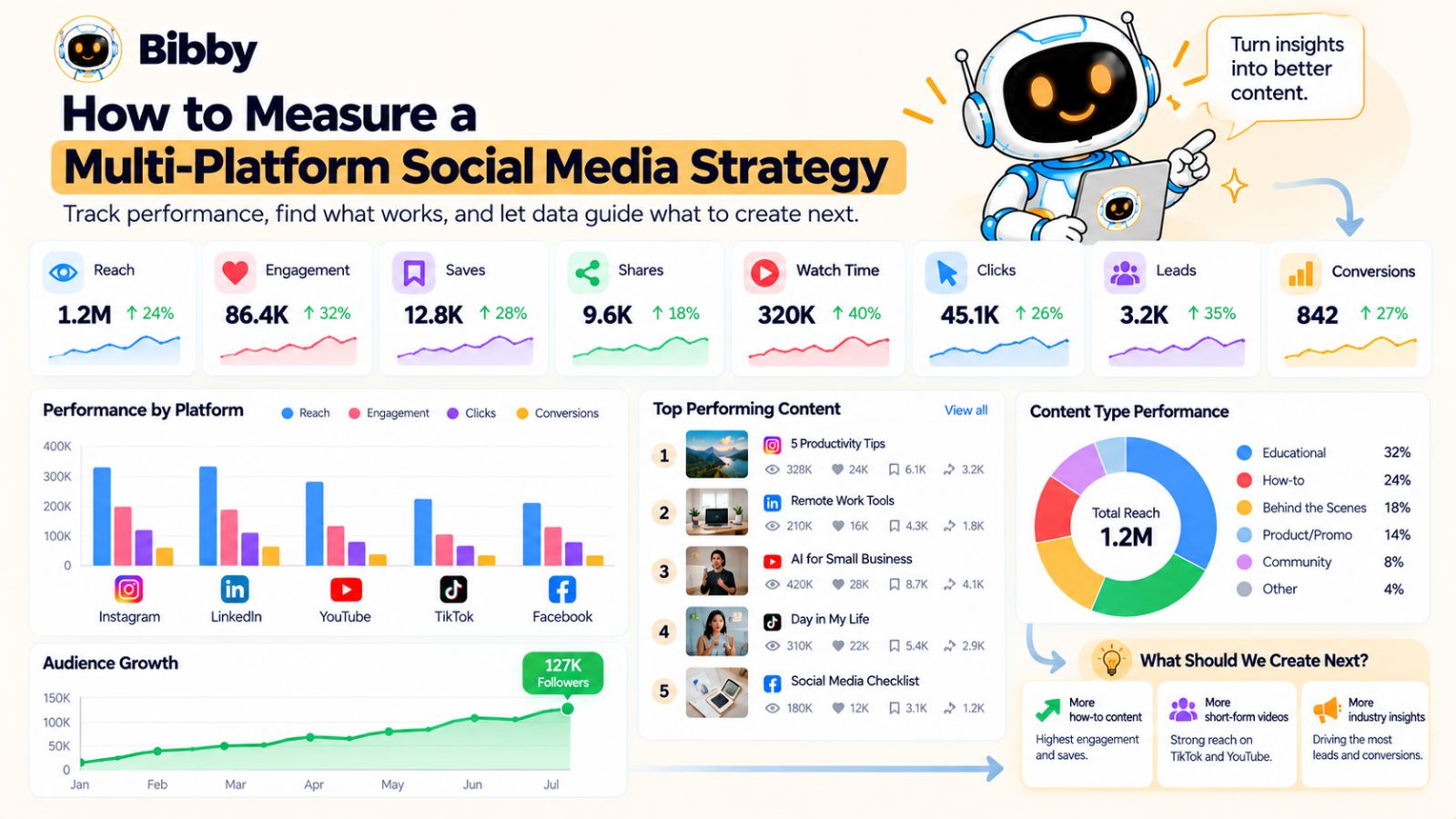
Start With the Business Goal
Before measuring a post, ask what the post was supposed to accomplish.
If the objective is awareness, reach and qualified views may matter.
If the objective is engagement, comments, shares, saves, and meaningful interactions may matter more.
If the objective is traffic, clicks and landing-page sessions become more relevant.
If the objective is lead generation, you may care about leads and conversion rates.
If the objective is sales, revenue and customer acquisition become much more important than likes.
This sounds obvious, but it's easy to lose sight of when every platform puts engagement numbers directly in front of you.
Measure Reach and Discovery
Reach helps you understand how many people your content is getting in front of.
It's particularly useful for understanding whether your distribution strategy is expanding your audience.
But reach by itself doesn't tell you whether the audience cared about the content.
That's why it should be evaluated alongside engagement and downstream actions.
For example:
High reach + low engagement could indicate that the content was widely distributed but didn't create enough interest.
Moderate reach + high engagement could indicate that the content resonated strongly with the people who saw it.
Neither pattern automatically tells you what to do next.
You need to look at the broader context.
Measure Engagement Quality
Not every engagement carries the same meaning.
A quick like requires very little effort.
A share, save, detailed comment, or direct message can indicate a deeper level of interest.
Depending on the platform and content type, you might monitor:
- Likes
- Comments
- Shares
- Saves
- Replies
- Profile visits
- Mentions
- Direct messages
Look for patterns rather than obsessing over a single number.
If educational carousels consistently generate saves, for example, that can be a useful signal that your audience finds that format valuable.
Measure Video Behavior
Video gives you another layer of information.
Views are useful, but they don't tell the whole story.
You can also look at:
- Watch time
- Average view duration
- Retention
- Completion rate
- Rewatches
- Click-through behavior
These metrics can help you identify where your content holds attention and where viewers lose interest.
That information can then influence future hooks, pacing, structure, and video length.
Measure Traffic and Conversion
For many businesses, social media isn't the final destination.
It's part of a larger customer journey.
A person might discover your brand through TikTok, visit your Instagram profile later, read a LinkedIn post, watch a YouTube video, and eventually visit your website.
That means platform-level metrics don't always tell the complete story.
Where possible, connect social activity to measurable business outcomes such as:
- Website visits
- Sign-ups
- Demo requests
- Downloads
- Leads
- Purchases
- Revenue
This helps you move from:
“Which post got the most likes?”
to:
“Which content is contributing to the outcome we actually want?”
Compare Content Themes, Not Just Platforms
One of the most useful ways to analyze a multi-platform strategy is to compare topics.
Suppose you publish content about:
- AI automation
- Content strategy
- Social media analytics
- Productivity
After several weeks, you may discover that AI automation consistently produces stronger engagement and more website activity.
That's a strategic insight.
You can then create more content around that topic.
This is why your analytics shouldn't simply tell you what happened.
They should help determine what you create next.
Look for Repurposing Winners
High-performing content deserves a second look.
If a LinkedIn post performs unusually well, ask:
Could this become an Instagram carousel?
If a YouTube video attracts strong watch time, ask:
Which sections could become short-form videos?
If a TikTok gets unusually strong engagement, ask:
Could we develop the topic into a deeper article or video?
This creates a continuous content loop:
Publish → Measure → Identify winners → Repurpose → Measure again.
The best content can therefore become a source of future content rather than a one-time asset.
Use AI to Reduce the Analysis Work
As your content library grows, manually reviewing every platform can become another time-consuming task.
AI can help organize performance information and surface patterns that deserve attention.
The objective isn't to let AI decide your entire strategy.
It's to reduce the amount of time spent collecting and organizing information so you can spend more time interpreting it.
The same principle applies to the broader social media workflow.
Bibby can help reduce the operational burden around content creation and scheduling, while your analytics process can help determine which ideas deserve more attention.
Together, those systems create a feedback loop:
Strategy → Content → Distribution → Measurement → Learning → Better Strategy.
Don't Chase Every Spike
One final point: not every viral post deserves to become your new strategy.
Sometimes content performs well because of timing, a trend, a particularly interesting hook, or circumstances that can't easily be repeated.
Look for repeatable patterns.
If a particular subject, format, hook, or audience angle repeatedly produces useful results, that's stronger evidence that you should incorporate it into your ongoing strategy.
The goal isn't to make every post go viral.
The goal is to build a social media system that becomes more intelligent over time.
And that brings everything together: once you have the strategy, the content framework, the distribution system, the automation, and the measurement loop, you can turn the entire process into a repeatable workflow.
A Practical Multi-Platform Social Media Workflow
A strategy becomes useful when you can repeat it.
You shouldn't need to reinvent your social media process every Monday. The goal is to build a workflow that takes you from an idea to published content, then from published content to insights that improve the next campaign.
A practical multi-platform workflow can be organized into seven stages:
Plan → Create → Adapt → Review → Schedule → Publish → Learn
Here's what that can look like in practice.
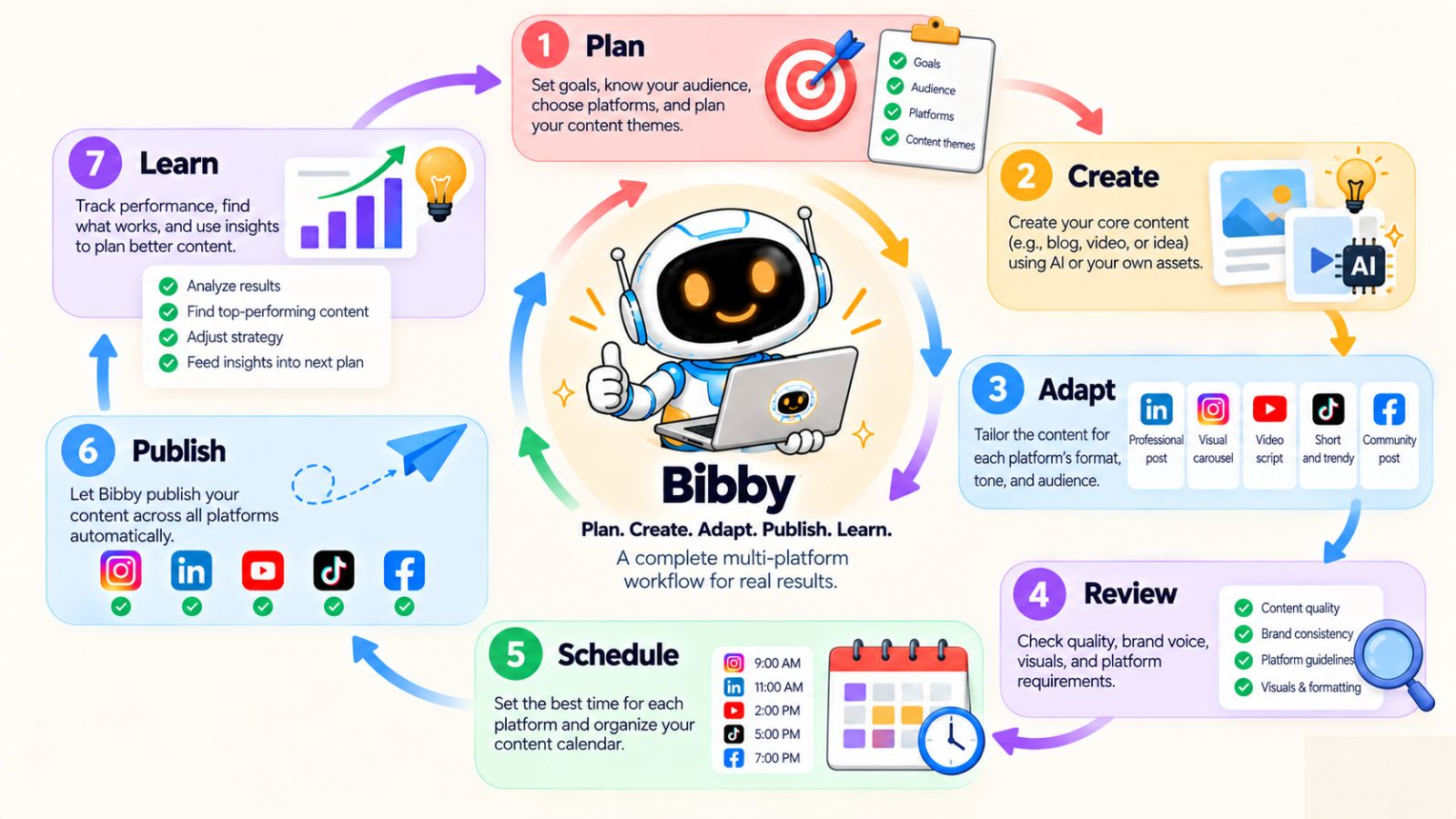
1. Plan the Week Around a Core Theme
Start by choosing the main topic or campaign you want to develop.
For example:
Weekly theme: How AI can simplify social media management.
Then identify several angles around that theme:
- What social media tasks can AI automate?
- How does AI help with captions?
- How can businesses repurpose content?
- How should AI-generated content be reviewed?
- How can businesses schedule content more efficiently?
You now have a content direction instead of starting each day with a blank page.
2. Create the Core Assets
Next, produce the primary media.
Depending on the campaign, this could include:
- An image
- A carousel
- A video
- A Story
- A long-form YouTube video
- Supporting graphics
You don't necessarily need to create every format immediately.
Start with the strongest expression of the idea, then identify how it can be adapted.
AI can also help accelerate this stage by generating visual concepts or assisting with content production.
With Bibby, for example, you can upload an existing image or generate an image with AI before moving into the rest of the social media workflow.
3. Adapt the Idea for Each Platform
Now turn the core idea into platform-specific content.
For example:
Instagram:
Carousel explaining five ways AI can simplify social media.
Facebook:
Discussion asking businesses which social media task takes them the most time.
LinkedIn:
Professional perspective on how AI changes social media operations.
TikTok:
Short demonstration of an automated social media workflow.
YouTube:
Detailed tutorial explaining the complete process.
You aren't starting from scratch five times.
You're adapting one central idea into several experiences.
4. Review Before Scheduling
This is the human quality-control stage.
Check:
- Does the content sound like the brand?
- Is the information accurate?
- Does the visual fit the brand?
- Is the hook clear?
- Does the format make sense for the platform?
- Is the CTA appropriate?
- Does the content provide genuine value?
AI can accelerate production, but review protects quality.
This step is especially important for brands where trust and accuracy matter.
5. Schedule the Campaign
Once the content is approved, organize the distribution sequence.
You might decide:
Monday: LinkedIn
Tuesday: Instagram
Wednesday: TikTok
Thursday: YouTube
Friday: Facebook
Supporting Stories or short-form content can be distributed throughout the week.
The exact schedule should depend on your audience, historical performance, content type, and business objectives.
The important part is that the publishing sequence is intentional.
This is where a tool such as Bibby can simplify the operational workload.
Instead of manually scheduling each asset across separate platforms, you can select your channels, choose your content, and schedule it across different dates using AI-optimized posting times.
6. Let the System Handle Publishing
Once everything is approved and scheduled, the content can move through the publishing workflow without requiring you to manually post every day.
This is where automation creates breathing room.
You're not constantly thinking:
“I need to remember to publish today's Instagram post.”
Instead, you can spend that time working on the next campaign, talking to customers, improving your product, or reviewing your content performance.
And because the content has already been planned as a campaign, each post has a purpose beyond simply filling a calendar slot.
7. Learn From What Happened
At the end of the week, review the results.
Don't just ask:
“Which post got the most likes?”
Ask:
- Which topic generated the most interest?
- Which format performed well?
- Which hook attracted attention?
- Which platform produced meaningful engagement?
- Which content generated traffic?
- Did any post generate leads or conversations?
- What deserves to be repurposed?
- What should we test next?
Then feed those insights into the next week's planning.
That creates a continuous cycle:
Plan → Create → Distribute → Measure → Learn → Plan again.
What This Looks Like With Bibby
The entire workflow can become even more centralized when your creation and distribution tools are connected.
A simplified Bibby workflow could look like:
1. Upload or generate your media
Start with an image, carousel, video, or other content asset.
2. Choose your posting style
Give the content a defined tone and direction.
3. Generate captions
Let AI create captions rather than manually writing every variation.
4. Select your platforms
Choose the social networks where you want the content distributed.
5. Schedule across different dates
Build a distribution sequence instead of publishing everything simultaneously.
6. Use AI-optimized posting times
Let the scheduling system assist with timing decisions.
7. Manage the workflow through chat
Create brand kits, campaigns, posts, and caption variations through Bibby's conversational interface.
This is where the individual features start becoming more valuable as a system.
The real benefit isn't any single capability.
It's the fact that creation, adaptation, scheduling, and distribution can become part of one connected workflow.
Build a System That Gets Better
The strongest multi-platform social media strategy isn't the one with the most posts.
It's the one that becomes more effective with every cycle.
Every campaign gives you new information.
Every post gives you audience feedback.
Every successful piece of content gives you something to repurpose.
Every underperforming piece gives you something to learn from.
And every repetitive task you automate gives you more time to focus on the work that actually requires human judgment.
That's the real opportunity behind multi-platform social media management.
You aren't simply trying to maintain five social media accounts.
You're building a content distribution system that can turn ideas into platform-specific content, distribute them intelligently, and continuously learn from the results.
Once that system is in place, social media stops being a daily scramble for something to post and starts becoming a repeatable marketing process.
Final thoughts
A successful multi-platform social media strategy isn't about being everywhere and posting as often as possible. It's about building a system that turns one strong idea into platform-specific content, distributes it intelligently, and uses performance data to make the next campaign better.
The three biggest takeaways are simple: repurpose ideas instead of constantly starting from scratch, adapt content to each platform instead of blindly cross-posting, and automate repetitive execution without giving up human control. Tools such as Bibby can bring much of that execution into one workflow, from AI-generated media and captions to multi-platform scheduling, AI-optimized publishing times, and conversational campaign management.
The next step is to turn this strategy into a repeatable content engine. Once you understand the framework, you can build an AI-powered social media content calendar that consistently generates, repurposes, schedules, and distributes content without turning social media management into a full-time manual job.