
A pinned post is a social media post that you choose to keep prominently displayed on your profile, rather than letting newer posts push it down.
If you are wondering what a pinned post means or why businesses use one, the answer is simple: it gives you more control over the first content visitors see when they discover your profile. Used strategically, a pinned post can introduce your brand, highlight an important message, promote an offer, or guide visitors toward a specific action.
In this article, you will learn:
- What a pinned post is and how it works
- What to pin and why pinned posts matter
- How pinned posts differ across major social platforms
Understanding pinned posts can help you turn your social media profile into a more intentional destination for new and existing followers.
What Is a Pinned Post?
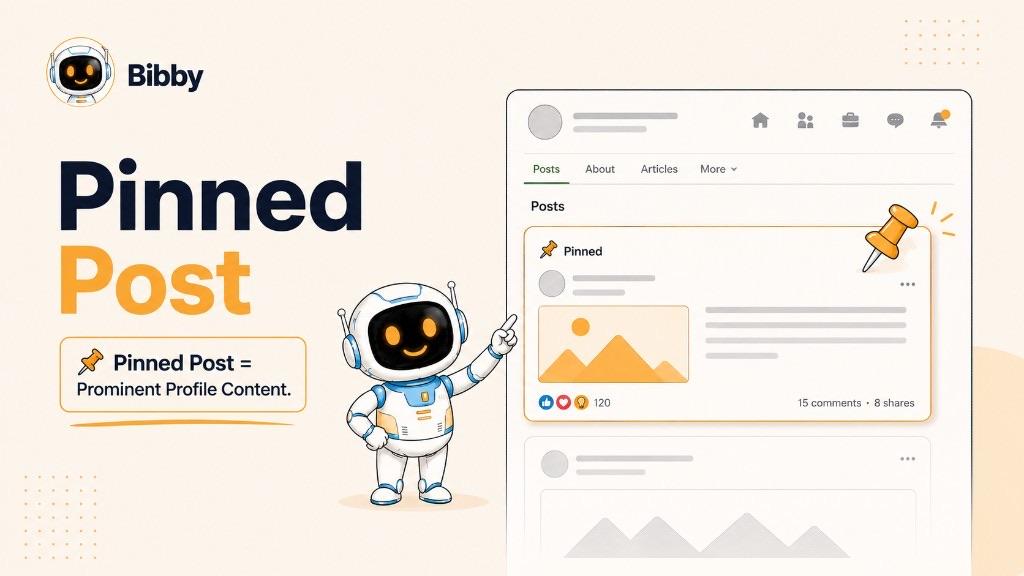
A pinned post is a social media post that you choose to keep prominently displayed at the top of your profile or page. Unlike regular posts, which are typically pushed further down as you publish new content, a pinned post stays in a prominent position until you remove or replace it.
Think of a pinned post as a featured message for anyone visiting your profile. Instead of leaving visitors to scroll through your latest content to understand who you are or what you offer, you can use a pinned post to immediately highlight something important.
What Does “Pinned Post” Mean?
“Pinned” means that a post has been deliberately fixed or featured in a prominent location on a social media profile or page.
The word describes the placement of the post, not a special type of content. A pinned post can be an image, video, carousel, announcement, promotion, educational post, or another format supported by the social platform.
For example, a business might pin a post introducing its brand, while a creator might pin their most important video or a post explaining what new followers can expect.
How Does a Pinned Post Work?
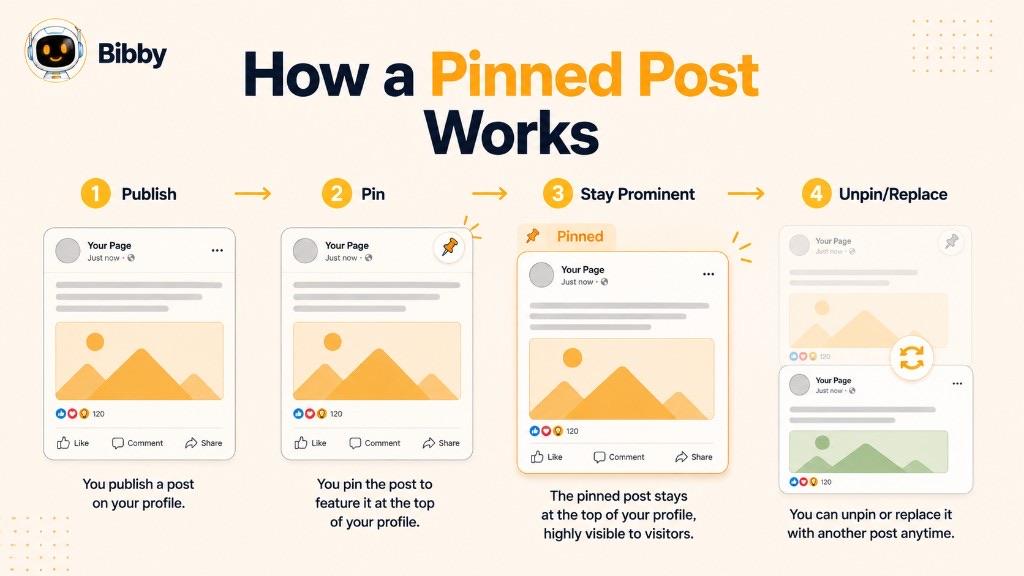
The basic process is straightforward:
- Publish a post on a supported social media platform.
- Choose the post you want to feature.
- Use the platform's pinning or featuring option.
- Keep the post prominently displayed on your profile.
- Unpin or replace it when it is no longer the most important message.
Pinning does not necessarily mean the post will appear more often in people's feeds or automatically receive more engagement. Its primary benefit is giving selected content prominent placement on your profile or page.
This makes a pinned post particularly useful for content that you want profile visitors to notice, even after newer posts have been published.
Why Do People Pin Posts?
People pin posts to control which content gets the most prominent position on their social media profile. While regular posts are designed to keep a feed active, a pinned post can communicate a specific message to someone who visits the profile today, tomorrow, or weeks from now.
For businesses, creators, and marketers, this makes pinned posts particularly useful for shaping a visitor's first impression.
Why Pin a Post?
There are several reasons to pin a social media post:
- Introduce your brand: Explain who you are, what you do, and who you help.
- Highlight an important announcement: Keep a product launch, company update, event, or major news visible.
- Promote an offer: Direct profile visitors toward a sale, free trial, product, service, or other promotion.
- Showcase valuable content: Feature an educational post, guide, video, or resource that represents your expertise.
- Direct visitors to an action: Encourage people to visit your website, sign up, shop, contact you, or explore another piece of content.
- Support a campaign: Keep campaign-related content visible while the campaign is active.
- Build social proof: Feature testimonials, customer stories, achievements, or other credibility-building content.
The best reason to pin something is not simply that it performed well. The better question is: “What do I most want a new visitor to see?”
Why Pinned Posts Matter for Businesses
A social media profile often acts as a lightweight landing page. Someone who discovers a company through a search, recommendation, advertisement, or shared post may visit the profile before deciding whether to follow, engage, or take the next step.
A pinned post gives that business an opportunity to influence what happens next.
For example, a software company could pin a post explaining its product and linking visitors to a free trial. A creator could pin an introduction explaining their content. An ecommerce brand could pin a current product launch or seasonal campaign.
This makes pinned posts different from ordinary social media publishing. Regular posts keep your audience engaged; pinned posts help communicate your current priorities to people visiting your profile.
When Should You Change a Pinned Post?
A pinned post does not have to remain pinned indefinitely. In fact, businesses should review pinned content regularly and update it when the information or priority changes.
Consider replacing a pinned post when:
- A promotion has ended
- An event has passed
- A product launch is no longer current
- Your brand positioning has changed
- A more important announcement needs attention
- The existing post no longer represents what you want new visitors to see
A useful rule is to treat your pinned post as dynamic profile real estate. Keep it focused on the message that is most valuable to your audience right now.
Pinned Post Examples
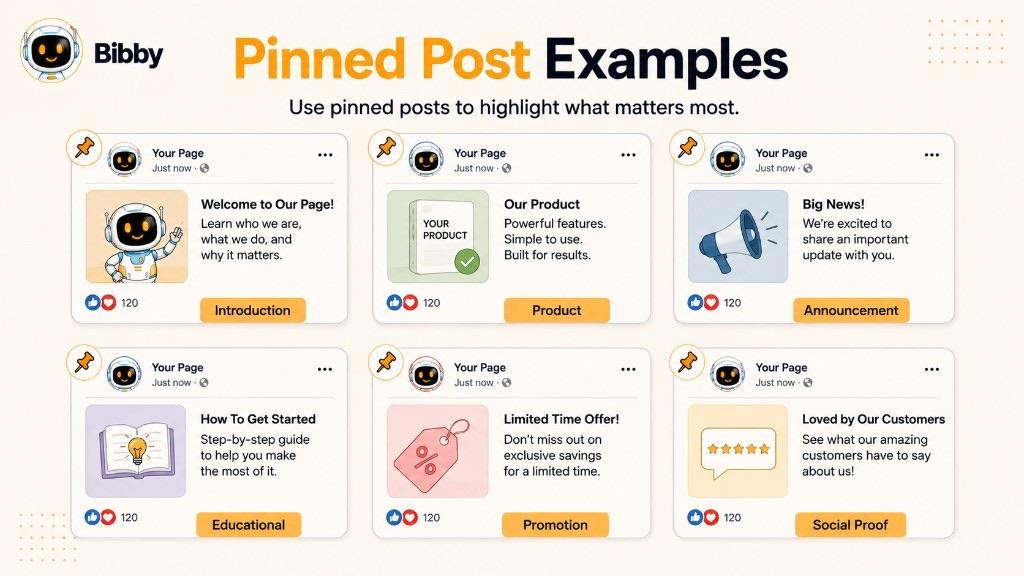
The best pinned post depends on what you want a visitor to understand, notice, or do when they land on your profile. There is no single format that works for every account.
Here are some practical pinned post examples for different goals.
Introduction Pinned Post
An introduction post can explain who you are, what your business does, and what followers can expect from your account.
For example, a social media automation company might pin a post explaining how its platform helps businesses create, schedule, and manage social media content.
Best for: New brands, creators, businesses, and accounts that frequently attract new visitors.
Product or Service Pinned Post
A product-focused pinned post can introduce your main product or explain the problem your service solves.
For example:
“Meet our social media automation platform. Create your content, generate captions, schedule posts, and manage your social channels from one place.”
The goal is not necessarily to explain every feature. Instead, the post should quickly communicate what you offer and why someone should care.
Best for: SaaS companies, ecommerce businesses, service providers, and product-focused brands.
Important Announcement Pinned Post
A pinned announcement can keep important information visible instead of allowing it to disappear into your feed.
Examples include:
- A new product launch
- A major company announcement
- A new location
- An upcoming event
- A significant business update
- A change that customers need to know about
Best for: Time-sensitive or high-priority communications.
Educational Pinned Post
You can pin an educational post that helps visitors understand a topic related to your expertise.
For example, a marketing consultant might pin a beginner's guide to creating a social media strategy. A fitness creator might pin a post explaining how their training program works.
Educational pinned posts can be particularly useful when you want your profile to immediately demonstrate expertise.
Best for: Consultants, educators, creators, coaches, and professional brands.
Promotional Pinned Post
A promotional post can highlight an offer that you want visitors to discover immediately.
Examples include:
- A limited-time discount
- A free trial
- A free resource
- A product bundle
- A seasonal promotion
- A special launch offer
Because promotions can become outdated quickly, remember to unpin them when the offer ends.
Best for: Product launches, campaigns, sales, and lead generation.
Best-Performing Content Pinned Post
Another option is to pin a post that has already demonstrated strong engagement or generated meaningful results.
For example, if a particular educational video consistently attracts comments, shares, or profile visits, you might choose to feature it prominently.
However, high engagement alone is not a sufficient reason to pin something. A post should also make sense for someone discovering your profile for the first time.
Social Proof Pinned Post
A business can use a pinned post to showcase evidence that helps establish credibility.
Examples include:
- Customer testimonials
- Case studies
- Milestones
- Awards
- Media coverage
- Customer success stories
This can be especially useful when a visitor is already interested in your business but needs additional confidence before taking the next step.
The Best Pinned Post Depends on Your Goal
Rather than asking, “Which type of pinned post is best?”, ask:
“What is the most important thing I want a profile visitor to see right now?”
That answer should determine what you pin. Your choice might change from an introduction post to a product announcement, campaign, offer, or educational resource as your business priorities change.
What Should You Pin on Social Media?
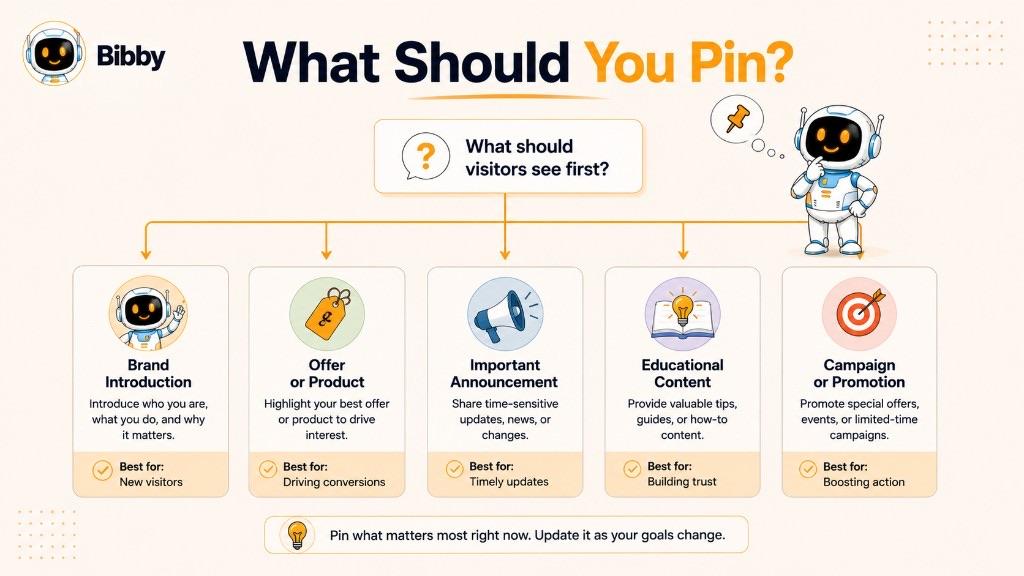
The best content to pin is content that helps a new profile visitor quickly understand who you are, what you offer, or what they should do next.
Instead of automatically pinning your most popular post, choose content based on your current objective. A viral post might generate impressive engagement but tell a new visitor very little about your brand. A less popular post may be much more valuable as a persistent introduction or conversion point.
Use these principles to decide what belongs at the top of your profile.
Pin Content That Helps New Visitors
Most people who discover your social profile will not know your entire content history. A pinned post can give them the context they need without requiring them to scroll through dozens of posts.
Consider pinning content that answers questions such as:
- Who is this account for?
- What does this business or creator do?
- What type of content will I find here?
- Why should I follow this account?
An effective introduction post can make your profile easier to understand within seconds.
Pin Important Announcements
If you have information that your audience should not miss, pinning it can keep it visible while the announcement remains relevant.
This could include a new product, major company update, upcoming event, or important change.
Once the announcement is no longer relevant, replace it with something more useful.
Pin Your Most Important Offer
If your primary goal is generating sales, leads, or sign-ups, consider using your pinned post to highlight your most relevant offer.
The post should quickly explain:
What is it? → Who is it for? → Why does it matter? → What should the visitor do next?
The pinned post does not need to contain every detail. Its job is to create enough interest and clarity for the visitor to take the next step.
Pin Content That Explains Your Brand
A strong pinned post can act as an introduction to your brand's positioning.
For example, instead of simply saying what your company sells, you could explain the problem you solve and the audience you serve.
This is particularly useful for businesses whose products or services require some explanation.
Pin Your Best Content for New Visitors
Your best content is not necessarily your content with the highest number of likes.
Think about relevance, usefulness, and context.
A post may be worth pinning if it:
- Demonstrates your expertise
- Explains your product
- Answers a common customer question
- Shows your unique perspective
- Generates meaningful conversations
- Helps visitors understand what makes your brand different
The ideal pinned post should work even when someone encounters it without knowing anything about your previous content.
Pin Content With a Clear Next Step
A pinned post becomes more useful when visitors know what to do after reading it.
Depending on your goal, the next step could be:
- Follow the account
- Visit your website
- Read an article
- Download a resource
- Try a product
- Contact your business
- Shop a product
- Watch another video
Avoid forcing a call to action where one does not make sense. The next step should naturally follow from the purpose of the post.
A Simple Rule for Choosing a Pinned Post
If you are unsure what to pin, use this simple test:
Imagine someone has discovered your profile for the first time. What single post would you most want them to see?
That post is often a better candidate than whichever post happens to have the most engagement.
Your pinned post should represent your current priority, while your regular content continues telling the broader story of your brand.
Pinned Post vs. Regular Post
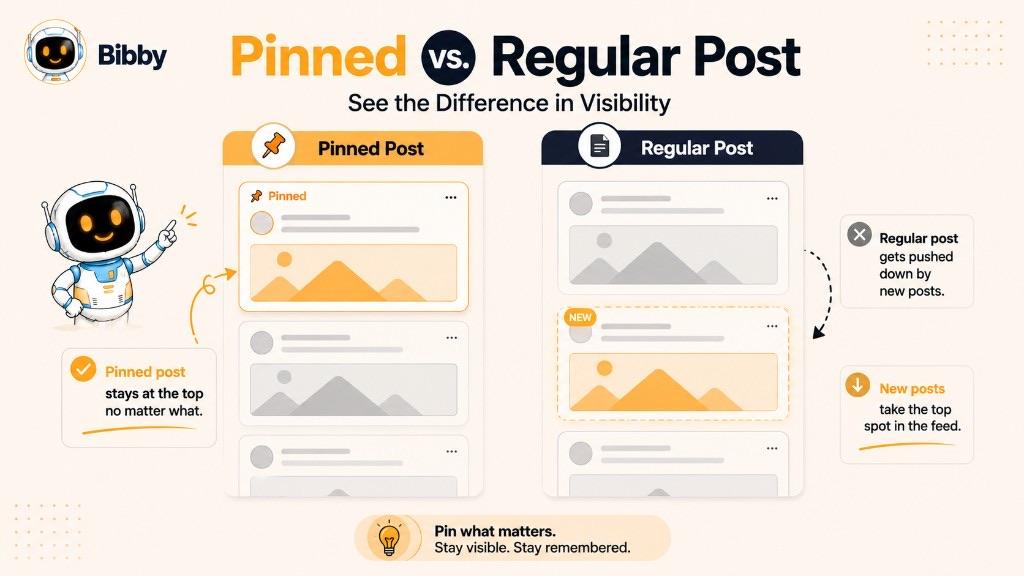
A pinned post and a regular social media post can contain the same types of content, but they serve different purposes. The main difference is where the content is displayed and how intentionally it is kept visible.
A regular post is part of your ongoing publishing activity. As you publish more content, older posts generally move further down your profile or feed. A pinned post is deliberately given a prominent position so visitors can continue to find it easily.
| Feature | Pinned Post | Regular Post |
|---|---|---|
| Position | Kept prominently displayed on the profile or page | Moves down as newer content is published |
| Purpose | Highlight an important message or piece of content | Maintain regular publishing and audience engagement |
| Visibility on profile | Designed to remain prominent | Becomes less prominent over time |
| Typical use | Introductions, announcements, offers, campaigns, or key resources | Everyday updates, educational content, news, and engagement posts |
| Duration at the top | Remains there until unpinned, replaced, or otherwise changed | Naturally moves through the content timeline |
Is a Pinned Post Still a Regular Post?
Yes. In most cases, a pinned post starts as a normal published post. Pinning does not turn it into an entirely different type of content.
Instead, the platform gives that existing post special placement on your profile or page.
For example, you could publish a product announcement today and later decide to pin it because it is currently the most important message for visitors. The post itself remains the same; its position and prominence change.
Pinned Post vs. Regular Feed Content
The easiest way to understand the difference is to think about ongoing communication versus persistent visibility.
Regular posts answer:
“What do I want to publish to my audience today?”
A pinned post answers:
“What do I want someone visiting my profile to see first?”
That distinction is important for businesses and creators. You can continue publishing fresh content every day while keeping one strategically important post prominently displayed.
Should You Pin Your Best-Performing Post?
Not necessarily.
A post with high engagement may be an excellent candidate, but performance should not be the only consideration. The more important question is whether the post is useful and relevant to someone discovering your profile now.
For example, an old humorous post might have thousands of likes but do little to explain your business. A newer product introduction with fewer likes could be a much stronger pinned post because it communicates your current value proposition.
In other words, optimize your pinned post for profile visitors, not just historical engagement.
Pinned Posts on Different Social Media Platforms
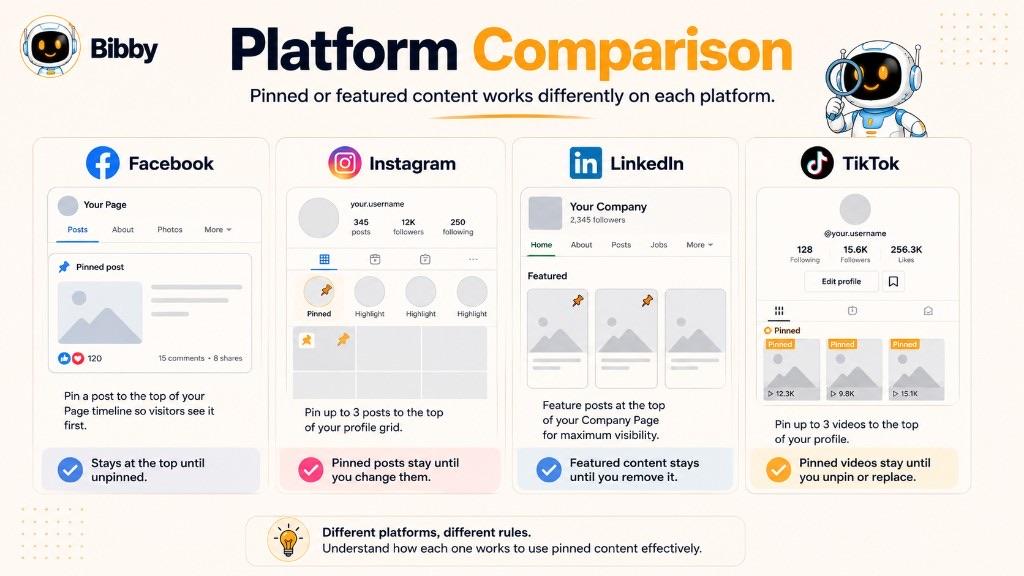
The basic idea behind a pinned post is consistent across social media: select important content and give it prominent placement on your profile or page.
However, the exact feature, placement, number of posts you can pin, and supported content formats can vary between platforms. Because social networks regularly change their interfaces and features, always check the platform's current options when following step-by-step instructions.
Pinned Posts on Facebook
On Facebook, businesses, creators, and organizations can use pinned content to keep an important post prominently displayed on a Page or other supported profile or community surface.
A Facebook pinned post can be useful for:
- Announcing an important update
- Promoting an event
- Highlighting an offer
- Introducing a business
- Directing visitors toward important information
For a business Page, the pinned content can help communicate what visitors should know or see first rather than relying entirely on the chronological feed.
Pinned Posts on Instagram
Instagram allows users to pin selected posts or Reels to the top of their profile, making them particularly useful for controlling the first impression of an account.
Businesses and creators can use pinned Instagram content to:
- Introduce themselves
- Explain what their account offers
- Highlight a product or service
- Showcase important content
- Support a current campaign
Because Instagram profiles are highly visual, pinned posts can also be used together to create a more intentional introduction to the account.
Pinned Posts on LinkedIn
On LinkedIn, the concept of highlighting important content can vary depending on whether you are using a personal profile or a Page and which features are currently available.
For professional audiences, prominent content can be particularly useful for communicating:
- Professional expertise
- Company announcements
- Product launches
- Important resources
- Events or initiatives
When using LinkedIn, distinguish between a traditional pinned post and other profile or Page features that allow content to be highlighted.
Pinned Posts on TikTok
TikTok lets eligible accounts use pinned videos to keep selected content at the top of their profile.
This can be valuable because someone discovering a TikTok account may decide whether to follow based on only a few pieces of content.
Creators and businesses can use pinned TikTok videos to:
- Introduce the account
- Explain what they create
- Showcase a popular or representative video
- Highlight a product
- Promote an important campaign
A strong pinned video should give a new visitor a reason to understand or explore the rest of the account.
Pinned Posts on YouTube
YouTube uses different mechanisms for highlighting content, so the traditional concept of a “pinned post” does not map directly onto every part of the platform.
For example, creators can use channel-level organization, featured content, comments, playlists, and other available features to direct viewers toward important information or videos.
This distinction matters when discussing pinned posts across social platforms: not every platform uses the same feature or terminology, even when the underlying goal—highlighting important content—is similar.
Why Platform Differences Matter
A pinned post is not a universal feature with identical rules everywhere.
Before creating a social media workflow around pinned content, consider:
- Which platforms support pinning
- What types of content can be pinned
- Where pinned content appears
- How many items can be pinned
- Whether personal accounts and business accounts have different options
- Whether the platform has recently changed the feature
For social media managers, this is one reason platform-specific workflows remain important even when content creation and scheduling can be managed from a single tool.
How to Pin a Post
Pinning a social media post is usually a simple process, although the exact steps depend on the platform and account type. In general, you first publish or locate the post you want to feature, open its available options, and select the platform's pin or feature command.
Pinning is done inside each social app. Bibby can help you create the visual, write the caption, and schedule the post; it does not pin the post to your profile.
How to Pin a Post on Social Media
The general process looks like this:
- Publish or find the post you want to keep prominent.
- Open the post's options, usually through a menu associated with the post.
- Select the pinning or featuring option if it is available.
- Confirm the action when the platform asks you to do so.
- Visit your profile or page and verify that the post appears in its prominent position.
If you no longer want the post featured, you can generally use the same menu to unpin it and, where supported, replace it with another post.
How to Pin a Post on Facebook
For supported Facebook Pages and surfaces, locate the post you want to feature and open its post options. If the pinning feature is available for that account and location, select the relevant pin or feature option.
Before pinning a Facebook post, consider whether the content is still useful to someone discovering your Page. An outdated announcement or expired promotion is usually a poor choice for long-term visibility.
How to Pin a Post on Instagram
On Instagram, open the post or Reel you want to feature, access its post options, and choose the option to pin it to your profile when available.
After pinning, the selected content can appear prominently near the top of your Instagram profile. This makes the feature useful for introductions, important announcements, product content, and other posts that you want profile visitors to notice.
How to Pin a Post on LinkedIn
LinkedIn's available highlighting and pinning capabilities can vary depending on whether you are using a personal profile or a Page and which features are currently available.
If a pinning option is available for your content, open the relevant post options and select the feature that keeps the content prominently displayed.
For LinkedIn, it is particularly important to distinguish a genuinely pinned post from other ways the platform allows users or organizations to showcase content.
How to Pin a Post on TikTok
On TikTok, open the video you want to feature on your profile and access its available options. If pinning is available for your account, select the option to pin the video.
The video can then appear prominently among the content visitors see when they open your profile.
A useful approach is to use pinned TikTok videos to explain who you are, demonstrate what your account is about, or highlight content that represents your brand.
Can You Unpin a Post?
Yes, on platforms that support pinned posts, you can generally remove a post from its pinned position without deleting the original post.
This distinction is important: unpinning usually changes the post's placement rather than removing the content itself.
You can then choose another post to feature when your priorities change.
What Makes a Post Worth Pinning?
The technical process takes only a few moments, but choosing the right post requires more thought.
Before pinning something, ask:
“If someone sees only this post when they first discover my profile, does it communicate what I want them to know?”
If the answer is yes, the post is likely a stronger candidate for prominent placement.
How Many Posts Can You Pin?
The number of posts you can pin depends on the social media platform, account type, and the specific feature being used. There is no universal pinning limit that applies across every social network.
Some platforms allow multiple pieces of content to remain pinned at the same time, while others may limit the number or provide different ways to feature content.
Can You Pin Multiple Posts?
Yes, some social media platforms allow users or businesses to pin multiple posts, videos, or other pieces of content to their profiles.
When multiple pinned posts are available, think of them as a small featured content collection rather than several unrelated posts.
For example, a business might use its available pinned positions for:
- An introduction — who the company is and what it offers.
- A key product or service — what visitors can buy or use.
- A current priority — an active campaign, announcement, or important resource.
The exact number and available formats depend on the platform.
Should You Pin as Many Posts as Possible?
Not necessarily.
More pinned posts do not automatically mean better visibility or better results. If every available position is filled with competing messages, visitors may have a harder time understanding what matters most.
Instead, prioritize content according to your current goals.
A useful hierarchy is:
Current priority → Important context → Supporting content
For example, if you are launching a new product, the launch announcement may deserve priority over an older high-performing post.
How Often Should You Change Pinned Posts?
There is no universal schedule for changing a pinned post.
Instead, update pinned content whenever the message stops being the most useful thing for a profile visitor to see.
You may want to review your pinned posts when:
- A campaign ends
- An offer expires
- A new product launches
- Your business changes direction
- An important announcement replaces an older one
- Your current pinned content becomes outdated
- You create a significantly more useful piece of evergreen content
For evergreen content, a pinned post can remain relevant for a long time. For campaigns and promotions, it may need to be replaced as soon as the campaign ends.
Do Pinned Post Limits Change?
Yes. Social platforms can change their features, account rules, and available pinning options over time.
That means information about the number of posts you can pin should always be treated as platform-specific and subject to change.
For a social media manager, the more useful principle is not memorizing a particular limit. It is making sure every pinned position is occupied by content that serves a clear purpose.
Pinned Post Best Practices
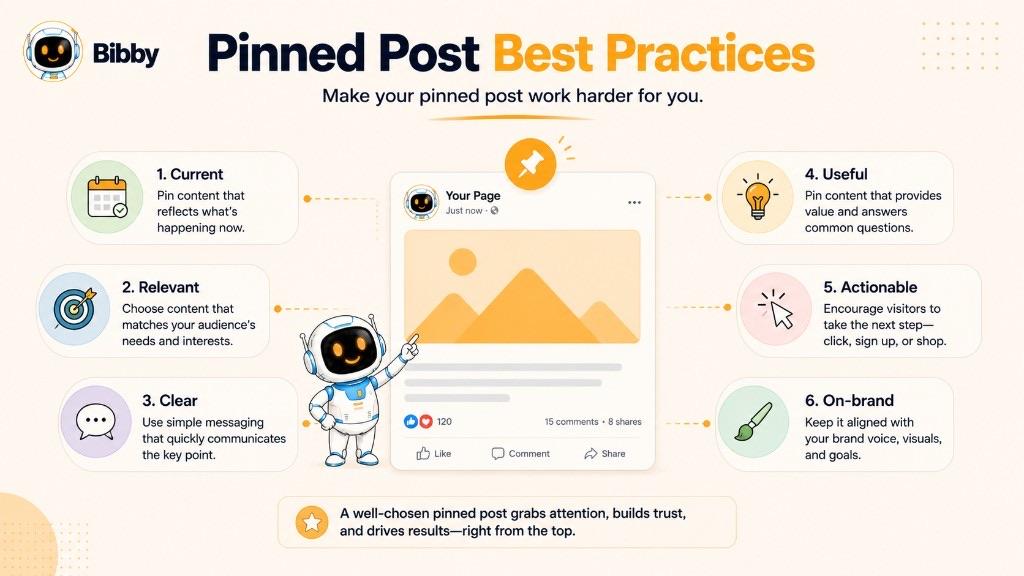
A pinned post gets prominent placement, but simply pinning content does not make it effective. The best pinned posts are chosen deliberately, written for profile visitors, and updated as your priorities change.
Use these pinned post best practices to get more value from the limited attention available at the top of your profile.
Make the Purpose Obvious
A visitor should understand the purpose of your pinned post quickly.
If you are introducing your brand, say what you do. If you are promoting a product, make the offer clear. If you are sharing an important announcement, explain what changed.
Avoid making visitors work to figure out why the post matters.
Prioritize New Profile Visitors
Your regular followers may already understand your business. A new profile visitor does not.
Write and design your pinned post so that someone encountering your account for the first time can understand its context without reading your previous posts.
Ask yourself:
“Would this post make sense to someone who discovered my profile today?”
If not, another piece of content may be a better choice.
Use a Strong Hook
Your pinned post competes with everything else on your profile for attention.
Start with a clear statement that tells visitors why they should keep reading or watching.
Depending on the purpose, your hook could:
- Identify a problem
- State a valuable benefit
- Introduce your brand
- Announce something important
- Ask a relevant question
- Present a compelling result
The hook should match the actual content rather than relying on exaggerated claims.
Give the Viewer a Clear Next Step
A useful pinned post should make the next action obvious when an action is appropriate.
You might ask visitors to:
- Follow your account
- Visit your website
- Try your product
- Read a resource
- Contact your business
- Shop a product
- Watch another piece of content
The call to action should support the purpose of the post instead of being added simply because every post is expected to have one.
Keep Pinned Content Current
One of the easiest pinned post mistakes is forgetting about it.
A post about a promotion that ended three months ago can make a profile look neglected. An outdated announcement can also confuse visitors.
Create a simple habit of reviewing pinned content whenever your business enters a new campaign, launches something important, changes an offer, or reaches a new stage.
Match the Post to Your Current Business Priorities
Your pinned post should reflect what matters now.
For example, a software company might normally pin an evergreen product introduction but temporarily replace it with a major launch announcement.
Once the launch is over, the company can restore the evergreen introduction or select another priority.
This makes pinned content a strategic part of your social media presence rather than a permanent decoration.
Don't Pin Content Just Because It Performed Well
Engagement is useful evidence, but it should not be the only deciding factor.
A post with thousands of likes may be entertaining but irrelevant to someone considering your business. Meanwhile, a post with modest engagement might explain your product perfectly.
When choosing between the two, consider:
Relevance + usefulness + current importance > historical engagement alone
Review Pinned Posts Regularly
There is no universal rule for how frequently you need to change a pinned post. The right review frequency depends on how quickly your business, campaigns, and priorities change.
A practical approach is to review pinned content whenever you:
- Launch a campaign
- Introduce a product
- Change an offer
- Publish a major announcement
- Update your positioning
- Notice that the existing pinned content is no longer relevant
The goal is simple: make sure the content receiving your most prominent profile placement still deserves it.
Use Pinned Posts as Part of a Larger Content Strategy
A pinned post should not replace your regular social media content.
Think of your content in two layers:
Regular posts: Keep your audience engaged with ongoing updates, education, entertainment, promotions, and conversations.
Pinned posts: Highlight the message or content you most want profile visitors to notice.
When these two layers work together, your profile can communicate both what your brand is doing now and what you want new visitors to understand first.
Common Pinned Post Mistakes
A pinned post has valuable profile real estate, so choosing the wrong content can make your account less useful to visitors. Most pinned post mistakes happen when businesses treat pinning as a one-time task instead of an ongoing part of their social media strategy.
Here are the most common mistakes to avoid.
Pinning Outdated Information
One of the biggest mistakes is leaving old information pinned after it stops being relevant.
For example, an expired discount, past event, old product announcement, or outdated business update can confuse visitors and make your profile appear neglected.
Fix: Review pinned content whenever your offers, campaigns, events, or priorities change.
Pinning an Irrelevant Viral Post
A viral post may have generated thousands of views or likes, but that does not automatically make it a good pinned post.
If the content does not explain your brand, demonstrate your expertise, support your current goals, or help new visitors understand your account, its engagement history may not matter.
Fix: Evaluate a post based on its value to profile visitors, not just its historical performance.
Making the Post Too Promotional
A pinned post is one of the first things people may see when they visit your profile. Turning it into an aggressive sales pitch can make the account feel less welcoming.
Promotion can absolutely be the right purpose, particularly during a launch or campaign. The problem is promotional content that provides little context or value.
Fix: Clearly explain the problem, product, benefit, or reason the offer matters before asking visitors to take action.
Giving Visitors No Clear Next Step
A pinned post can attract attention but still fail to accomplish anything if visitors do not know what to do next.
If the purpose of the post is to introduce your business, perhaps the next step is following the account. If it promotes a product, the next step might be visiting the product page.
Fix: Add a relevant and easy-to-understand call to action when one makes sense.
Ignoring New Visitors
A post written entirely for existing followers may lack the context needed by someone discovering your account for the first time.
References to previous conversations, old campaigns, or unexplained terminology can leave new visitors confused.
Fix: Review the post from the perspective of someone who knows nothing about your brand.
Leaving Old Campaigns Pinned
Campaign content has an expiration date.
A post promoting a Black Friday sale, product launch, webinar, contest, or limited-time offer can be highly effective while active and completely inappropriate afterward.
Fix: Add pinned-post reviews to your campaign workflow so content is replaced when the campaign ends.
Treating the Pinned Post as Permanent
A pinned post does not need to stay pinned forever.
Your most important message can change as your business grows. What made sense six months ago may no longer represent your current priorities.
Fix: Think of your pinned post as flexible profile real estate that should evolve with your business.
Failing to Align the Pinned Post With Your Brand
Your pinned content should feel consistent with the rest of your brand's messaging, visual identity, and positioning.
A polished profile can feel inconsistent if its pinned post communicates an outdated brand message or uses a completely different tone.
Fix: Make sure the pinned post reflects your current brand voice, visual identity, audience, and positioning.
Pinning Too Much Without a Clear Hierarchy
When a platform allows multiple pinned posts, it can be tempting to feature everything important.
But if every post is treated as equally important, visitors may struggle to understand what deserves their attention first.
Fix: Give each pinned position a clear role and prioritize the content that matters most right now.
Ultimately, the best pinned post is not necessarily the newest, most popular, or most promotional piece of content. It is the content that creates the most useful first impression for the people you want to reach.
How Businesses Use Pinned Posts
For businesses, a pinned post can do more than keep an interesting piece of content visible. It can act as a persistent message for people who discover the brand through social media.
While regular posts keep your audience updated over time, pinned content can focus attention on a specific business objective. That makes pinned posts particularly useful for brands that want to turn profile visits into follows, website visits, leads, or sales.
Brand Awareness
A business can pin an introduction post that explains:
- Who the company is
- What it offers
- Who it serves
- What makes it different
- What visitors can expect from the account
This can be especially useful for newer accounts or businesses that attract people who may not recognize the brand immediately. It supports brand awareness at the profile level.
Lead Generation
Businesses can also use pinned posts to direct visitors toward a lead-generation opportunity.
For example, a company might pin a post promoting:
- A free guide
- Newsletter
- Webinar
- Free consultation
- Product demo
- Free trial
- Downloadable resource
The post should explain the value of the resource clearly and provide an appropriate next step.
Product Marketing
A pinned post can serve as a simple introduction to a product or service.
Rather than trying to explain every feature, focus on the central value proposition:
What problem does the product solve, who is it for, and why should someone care?
This makes the pinned post useful for visitors who are evaluating the business for the first time.
Campaign Promotion
Pinned posts can provide additional visibility for an active social media campaign.
For example, during a product launch, a business might pin its launch announcement so visitors can immediately discover the campaign even as new content continues appearing on the profile.
Once the campaign ends, the business should review the pinned content and replace it if necessary. Paid social ads can still run separately in each ads manager; pinning is a profile-placement decision, not an ad campaign.
Social Proof
Businesses can use pinned content to demonstrate credibility through:
- Customer testimonials
- Case studies
- Customer success stories
- Awards
- Milestones
- Reviews
- Media mentions
The goal is to give potential customers additional evidence that the business can deliver what it promises.
Education
Educational content can also make an effective pinned post.
A business might pin a beginner's guide, product tutorial, frequently asked question, or explanation of a common problem.
This approach is particularly useful for businesses selling products or services that require some explanation before a customer understands their value.
Pinned Posts as a Profile-Level Marketing Tool
The most useful way to think about a pinned post is as profile-level marketing real estate.
Your regular social media content answers:
“What are we publishing today?”
Your pinned content answers:
“What should someone who discovers us know first?”
That distinction allows businesses to continue publishing varied content while maintaining a consistent, intentional message for profile visitors.
A strong social media strategy can therefore combine ongoing content distribution with strategically selected pinned content. The regular feed keeps the account active, while the pinned post helps communicate the brand's current priority to people discovering the profile.
Can Pinned Posts Be Part of a Social Media Content Strategy?
Yes. Pinned posts can be an important part of a broader social media content strategy because they serve a different purpose from your regularly scheduled content.
Regular posts are designed to keep your social channels active and engage your audience over time. A pinned post is designed to stay prominently visible and communicate a specific priority to profile visitors.
Use Pinned Posts as Strategic Profile Assets
Think of your pinned posts as the content that represents your account at a glance.
For example, while your regular content might include educational posts, product updates, videos, customer stories, and promotional content, your pinned post could consistently communicate your most important message.
That message might be:
- What your business does
- What product you are currently promoting
- An important announcement
- A current campaign
- A valuable resource
- A strong introduction to your brand
This creates a useful separation between content you publish regularly and content you deliberately keep prominent.
Combine Pinned Content With Scheduled Posts
Social media scheduling and pinned posts can work together.
A typical workflow might look like:
Create content → Generate a caption → Schedule regular posts → Publish across platforms → Review profile priorities → Update pinned content in each native app when needed
Scheduling helps maintain a consistent publishing rhythm, while pinned posts give you greater control over what profile visitors see prominently.
The two functions solve different problems.
Automate Your Regular Social Media Workflow
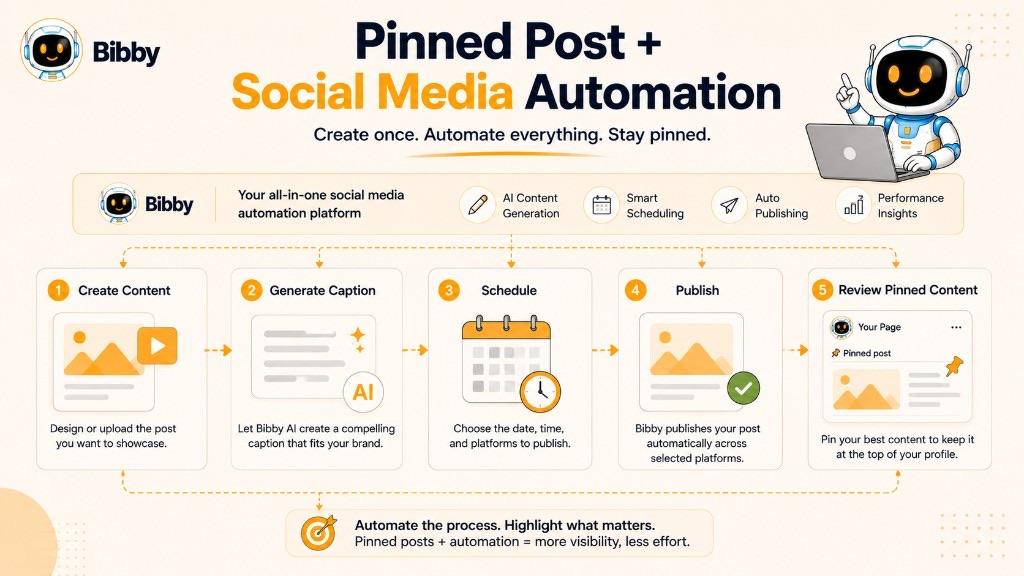
For businesses managing multiple social networks, the ongoing publishing process can involve creating visuals, writing captions, selecting platforms, choosing publishing times, and keeping a consistent schedule.
Bibby can simplify this workflow by allowing you to upload or generate visual content, select a posting style, automatically generate captions, and schedule content across Facebook, Instagram, LinkedIn, YouTube, and TikTok.
Bibby's chat interface can also help with tasks such as creating a brand kit, building campaigns, creating posts, and regenerating captions through conversation.
Automation can handle much of the ongoing content workflow. The decision about what deserves prominent profile placement—and the pin action itself—remains a strategic choice inside each social platform.
Don't Automatically Pin Every High-Performing Post
Automation should not remove judgment from your pinned-content strategy.
A post might perform exceptionally well in the feed but still be a poor choice for your profile. Conversely, a post with relatively modest engagement might be exactly what a new visitor needs to understand your business.
Before pinning content, consider:
Is it current? Is it relevant? Does it represent the brand? Does it help a new visitor? Does it support our current objective?
If the answer is yes, it may deserve prominent placement.
Build Pinned-Post Reviews Into Your Content Workflow
Pinned posts are easiest to manage when they are treated as part of your regular social media planning process, alongside a content calendar.
When creating a new campaign, launching a product, changing an offer, or publishing an important announcement, ask whether the new content should replace the current pinned post.
This prevents the common problem of an outdated campaign remaining at the top of a profile long after the campaign has ended.
Ultimately, social media automation keeps your publishing engine running, while strategic pinned posts help control the message visitors see when they arrive. Using both together can make a social media presence more consistent, intentional, and easier to manage.
Pinned Post vs. Other Featured Content
A pinned post is only one way to highlight important information on social media. Platforms also offer features such as profile bios, story highlights, featured content, and other profile-level elements.
Understanding the difference helps you choose the right format for the message you want visitors to see.
Pinned Post vs. Featured Post
The terms pinned post and featured post are sometimes used interchangeably, but they do not always describe the same platform feature.
A pinned post generally refers to content deliberately kept in a prominent position on a profile or page. “Featured” can describe a broader range of platform-specific tools that highlight selected content.
Because terminology varies between social networks, check the platform's current feature definitions rather than assuming the two terms are identical.
Pinned Post vs. Story Highlight
A pinned post and a Story Highlight can both help profile visitors discover important content, but they work differently.
A pinned post keeps a selected post or piece of content prominently positioned within the profile's main content area.
A Story Highlight typically groups selected Stories into a persistent collection that visitors can access from the profile.
Use pinned posts when you want to emphasize a specific piece of content. Use Story Highlights when you want to organize multiple temporary Stories around a topic, category, product, or theme.
Pinned Post vs. Regular Post
A regular post is part of your ongoing publishing stream. As new content is published, it generally becomes less prominent.
A pinned post receives intentional placement so it remains easier for profile visitors to find.
In simple terms:
Regular post = ongoing communication
Pinned post = prominent profile message
Both can be valuable, but they serve different roles within a social media content strategy.
Pinned Post vs. Profile Bio
Your profile bio provides a short, persistent description of your account. It can communicate who you are, what you do, and sometimes where visitors should go next.
A pinned post provides much more room to communicate an idea.
For example, a bio might say:
“AI-powered social media automation for growing businesses.”
A pinned post could then explain what that means, demonstrate the product, introduce the company, or invite visitors to try it.
Think of the distinction this way:
Bio = quick identity
Pinned post = expanded message
Which Should You Use?
You do not necessarily need to choose only one.
A strong social media profile can use different profile elements for different jobs:
- Bio: Explain who you are.
- Pinned post: Highlight your most important message.
- Story Highlights: Organize useful temporary content where supported.
- Regular posts: Publish ongoing content and engage your audience.
- Featured content: Use platform-specific tools when they provide a useful way to showcase important material.
The goal is not to maximize the number of things you feature. The goal is to make the profile easy for a new visitor to understand and navigate.
Conclusion
A pinned post is more than an ordinary social media post that stays at the top of your profile. It is a strategic piece of content that can introduce your brand, highlight an important message, promote a current offer, or guide new visitors toward a useful next step.
The three most important things to remember are:
- Pinned posts create prominent visibility for content you want profile visitors to notice.
- The best pinned post depends on your current goal, not simply its historical engagement.
- Pinned content should be reviewed regularly so outdated campaigns, offers, and announcements do not remain featured.
Once you understand how pinned posts work, the next step is to build a broader social media content strategy around them—using consistent content creation, scheduling, and automation to keep your profiles active while your most important message stays front and center. Create and schedule that ongoing content with Bibby, pin the right post in each native app, then explore more terms in the social media dictionary or start publishing.