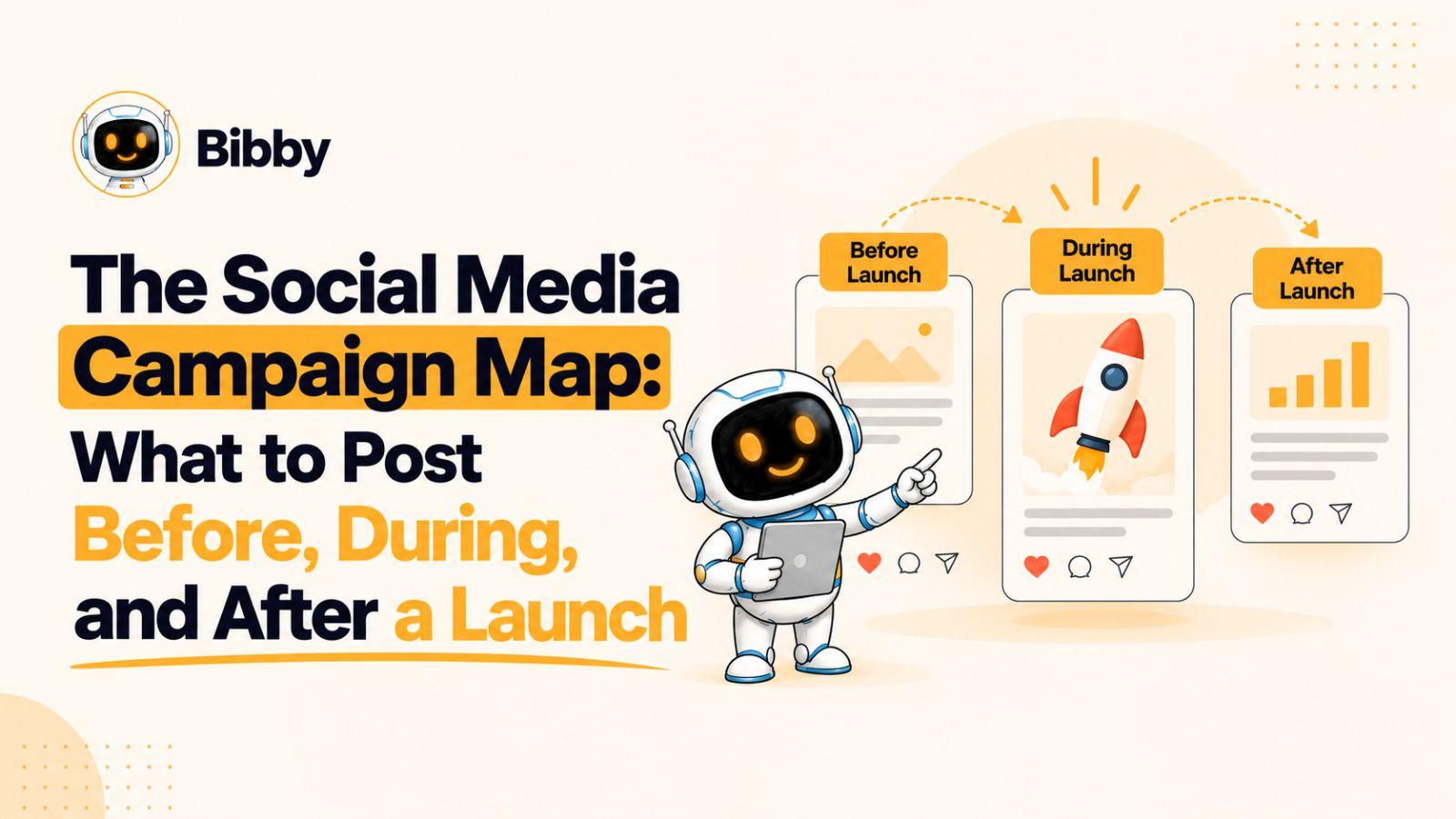
A social media campaign map shows you exactly what to post before, during, and after a launch so every piece of content works toward the same goal.
A successful launch needs more than a collection of scheduled posts—it needs a sequence that builds awareness, creates momentum, and keeps the conversation going after launch day. This guide gives you a practical social media campaign map you can use to plan content across platforms without guessing what to publish next.
The first step is understanding what makes a campaign map different from an ordinary social media content calendar.
What Is a Social Media Campaign Map?
A social media campaign map is a strategic plan that connects your posts to the different stages of a campaign, from the first hint of an upcoming launch to the content that keeps the momentum going afterward.
Think of it as the route your audience follows.
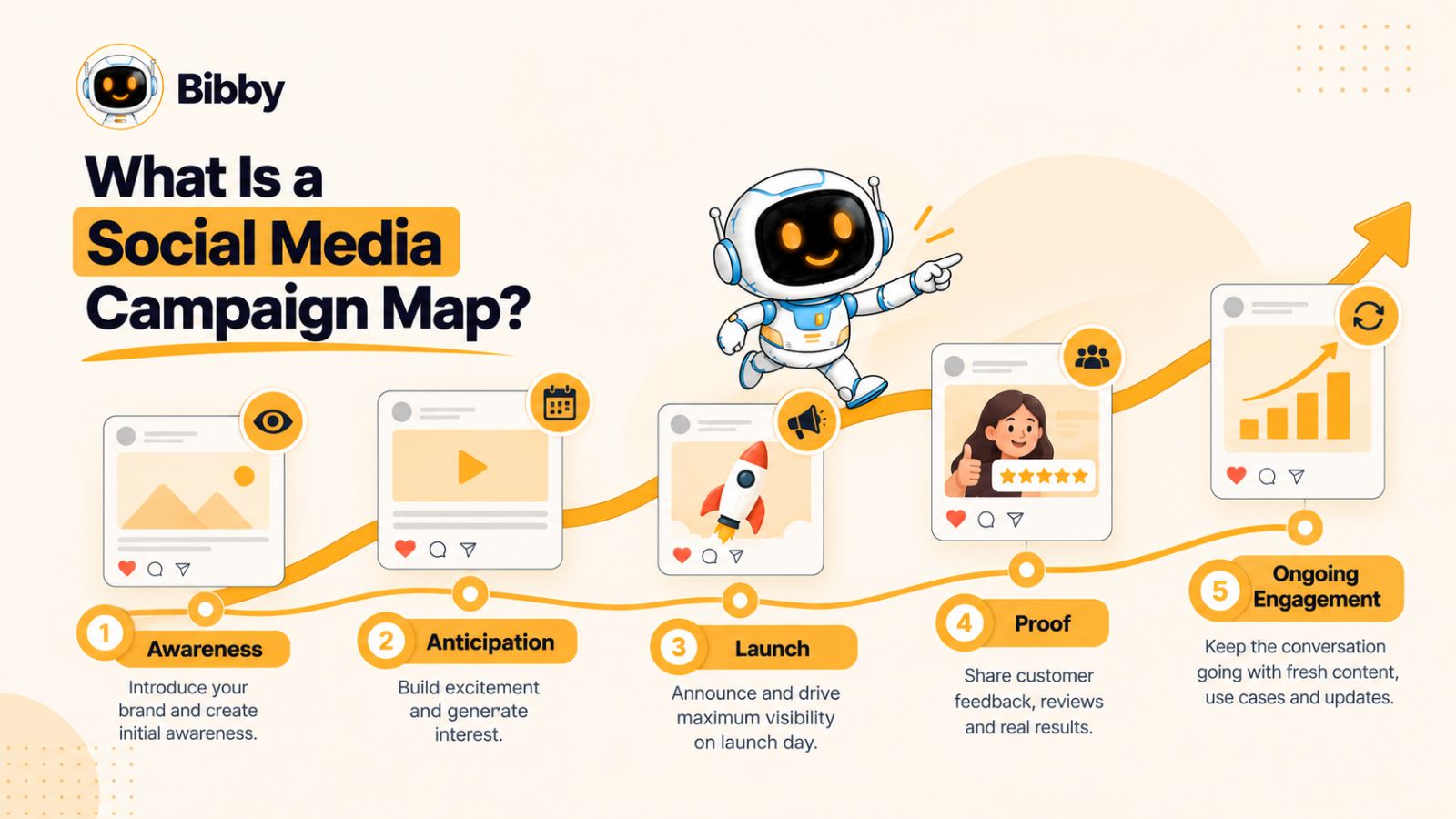
A traditional social media content calendar might tell you that you need to publish a post on Tuesday, a Reel on Thursday, and a LinkedIn update on Friday. A campaign map goes one step further: it explains why each piece of content exists, what stage of the launch it supports, and what you want the audience to do next.
That distinction matters during a launch because people rarely move from seeing one post directly to becoming customers. Someone may first discover your brand through an educational video, see a teaser several days later, watch a product demonstration on launch day, and finally decide to buy after seeing a customer result the following week.
Content should follow the customer journey
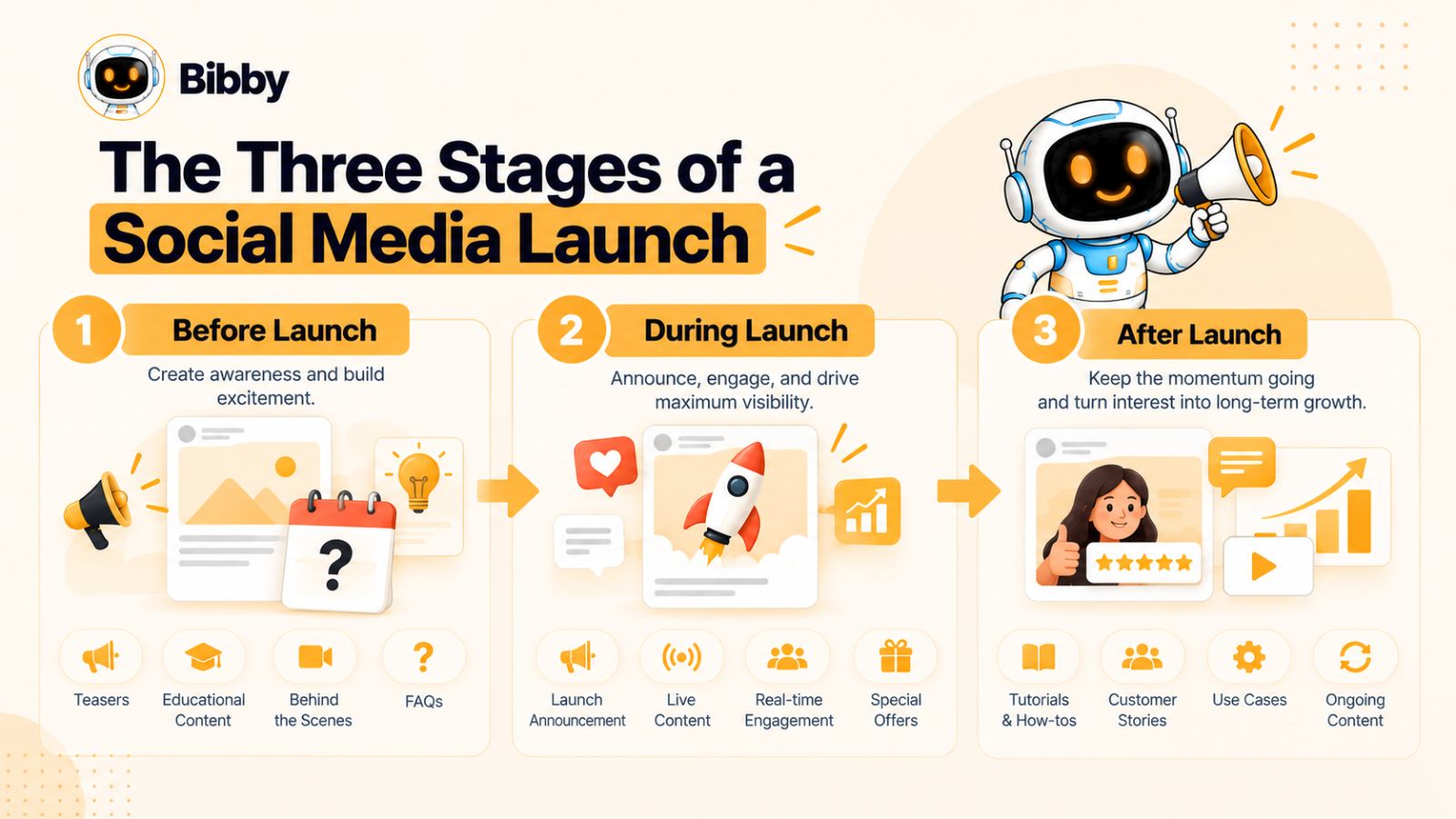
A useful social media campaign map typically has three major stages:
- Before the launch: Build awareness, curiosity, anticipation, and intent.
- During the launch: Make the announcement visible, explain the offer, and give people a reason to act.
- After the launch: Reinforce the value, answer questions, showcase proof, and continue generating demand.
Each stage has a different job.
Before launch, constantly asking people to buy can feel premature because many of them are still learning about the problem or your solution. During launch, however, your audience needs clear information about what has changed, what's available, and where to take action. After launch, the focus can shift toward education, proof, objections, use cases, and customer experiences.
A campaign map is not just a posting schedule
The date and time of a post are only one part of the plan.
A stronger campaign map also answers questions such as:
- What is the purpose of this post?
- Which audience stage does it target?
- Which platform is it designed for?
- What format should it use?
- What message should the audience remember?
- What action should someone take next?
- How does this post connect to the previous and next pieces of content?
This makes it easier to create a campaign that feels like a connected story rather than a stream of unrelated updates.
It also makes repurposing much more effective. A single launch asset might become an Instagram carousel, a LinkedIn explanation, a short-form video, a YouTube video, a Story sequence, and several follow-up posts. The content changes to fit the platform, but the underlying campaign message stays connected.
Why campaign mapping matters for launches
Launches create a temporary concentration of attention. You have a specific event, product, feature, offer, or announcement that you want people to notice.
Without a plan, that attention can disappear quickly.
You might spend weeks preparing the product and then publish one announcement on launch day, only to move back to unrelated content the following morning. A campaign map prevents that gap by planning the entire content journey in advance.
Tools can make the execution easier, too. For example, a workflow such as Bibby can take visual assets, generate captions based on a chosen posting style, and schedule different content across selected platforms and dates. Its chat interface can also be used for campaign-related tasks such as creating posts or organizing a campaign. The important point, however, is that automation supports the campaign map—it doesn't replace the strategy behind it.
Once the campaign has a clear structure, the next question is how those three stages should work together.
The Three Stages of a Social Media Launch
A social media launch works best when your content changes as your audience moves from unaware, to interested, to ready to act, and eventually to engaged customers.
That is why a useful social media campaign map divides the launch into three connected stages: before, during, and after the launch. Each stage has a different objective, content style, and call to action.
1. Before the launch: Build awareness and anticipation
The pre-launch period is where you create the context for your announcement.
Instead of immediately revealing everything, use this stage to introduce the problem, educate your audience, create curiosity, and give people reasons to pay attention. Depending on the campaign, this might include educational posts, teasers, behind-the-scenes content, product previews, founder stories, countdowns, or questions that encourage discussion.
The goal isn't necessarily to generate the maximum number of sales immediately. It's to make the eventual launch announcement meaningful to people who have been following the story.
For example, if you're launching a project-management product, your pre-launch content could explore why teams lose track of work, show common workflow problems, share productivity insights, and gradually introduce the approach your product takes to solve them.
By launch day, the audience has already encountered the problem and understands why a solution could matter.
2. During the launch: Capture attention and drive action
Launch day changes the job of your content.
Now people need clarity.
What are you launching? Who is it for? What does it do? Why does it matter? What's different about it? Where can people learn more or take action?
Your launch content should answer these questions quickly.
This is also the point where different formats can work together. An announcement post can introduce the launch, a short video can demonstrate the product, Stories can provide real-time updates, and a longer YouTube or LinkedIn piece can explain the launch in greater depth.
The key is consistency without repetition. Your audience should recognize that the posts belong to the same campaign, but each post should give them a reason to keep paying attention.
3. After the launch: Extend the momentum
Launch day is not the end of the campaign.
In many cases, it is when the most useful content opportunities begin appearing.
After launch, you can respond to questions, explain features, share customer experiences, publish tutorials, address objections, show use cases, and turn early feedback into new content.
This stage is particularly valuable because your audience now has something concrete to react to.
For example, instead of repeatedly saying that a new product is available, you could publish:
- A tutorial showing how to use a key feature
- A customer story describing the problem it solved
- A post answering a frequently asked question
- A comparison of different ways to use the product
- A behind-the-scenes look at how it was built
- A short video demonstrating a specific workflow
- A collection of early user feedback
The campaign therefore evolves from “Something is coming” to “Here it is” to “Here's why it matters and how to use it.”
How the three stages connect
The strongest campaigns don't treat these stages as separate campaigns.
They form a sequence:
Before: Create awareness and anticipation →
During: Reveal, explain, and invite action →
After: Educate, prove value, and sustain interest
This sequence also gives you a practical way to judge whether a planned post belongs in the campaign. If you cannot explain what role a post plays in the journey, it may be a standalone social post rather than part of the launch campaign.
With this framework established, we can now look at the first stage in detail: exactly what to post before a launch.
What to Post Before a Launch
The pre-launch stage is where you turn an upcoming launch into something your audience has a reason to care about.
The mistake many brands make is treating pre-launch content as a countdown: “10 days to go,” “7 days to go,” “3 days to go.” A countdown can create urgency, but it cannot create interest on its own.
A stronger pre-launch social media strategy gradually moves people from problem awareness to curiosity to anticipation.
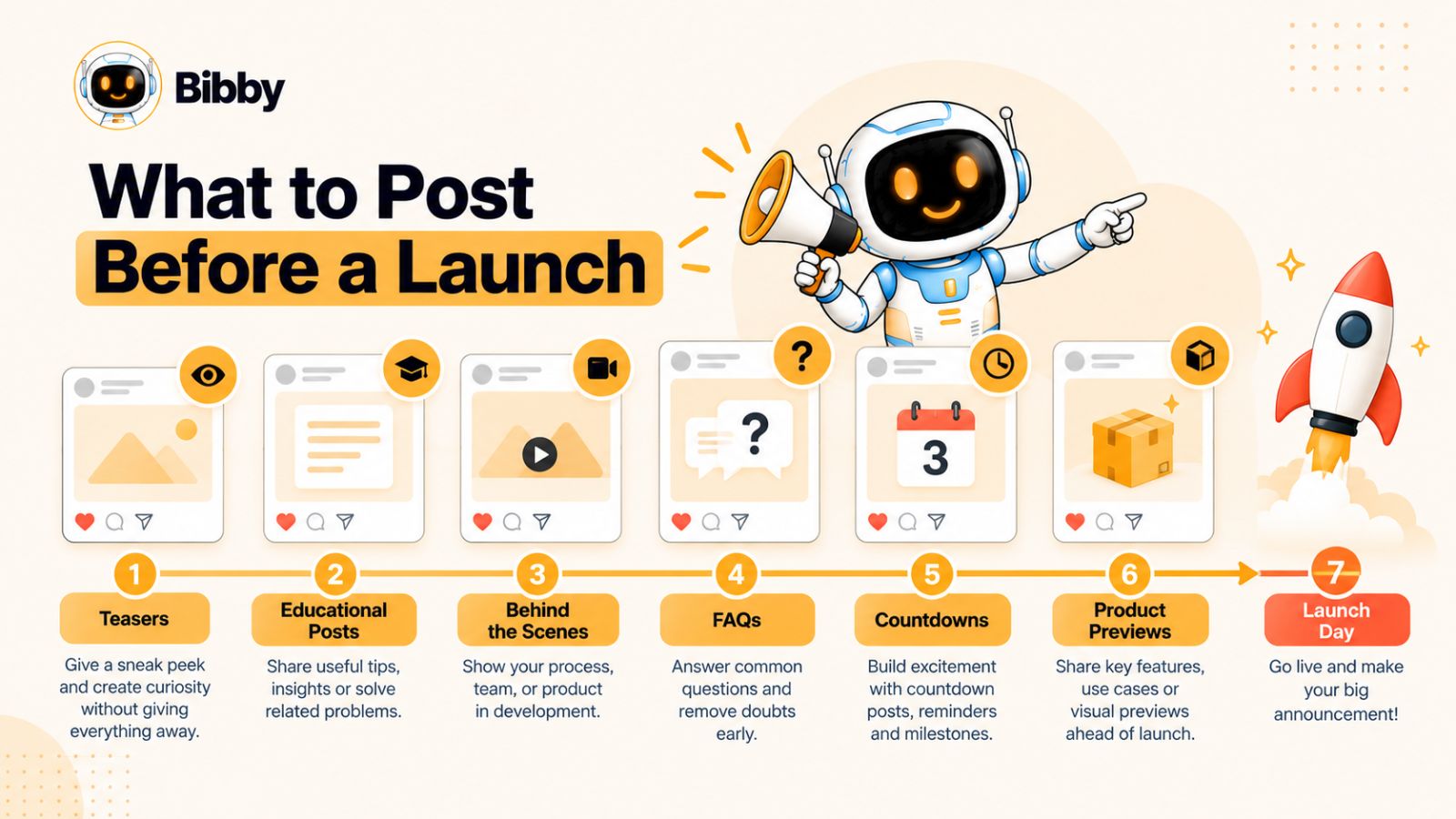
1. Start with the problem
Before asking people to care about your new product, feature, event, or offer, give them a reason to care about the problem it addresses.
Create posts around questions such as:
- What frustrating problem does your audience repeatedly experience?
- What are they currently doing to solve it?
- What mistakes are they making?
- What takes too much time or effort?
- What result are they trying to achieve?
For example, a company launching an automated social media workflow could publish content about the time marketers spend creating captions, resizing content, coordinating platforms, and manually scheduling posts.
The product does not need to be mentioned in every post. The audience should first recognize the problem.
2. Publish educational content
Educational posts give people value before asking them to take action.
Depending on the campaign, these could include:
- How-to posts
- Checklists
- Tutorials
- Industry insights
- Common mistakes
- Frameworks
- Statistics and research
- Frequently asked questions
- Before-and-after workflows
This content can also become the foundation for later launch content. A topic you explain before launch can become a product demonstration when the launch happens.
3. Create curiosity with teasers
Once you've established the problem, you can begin introducing hints about the upcoming launch.
A teaser doesn't need to reveal everything.
You might show:
- A small part of the product
- A blurred or cropped visual
- A new feature in action
- A behind-the-scenes moment
- A short quote
- An unexpected result
- A question about an upcoming change
The objective is to create a reason to watch the next post.
However, avoid turning every post into a mystery. If your audience has no idea why they should care, curiosity can quickly become confusion.
4. Show behind the scenes
People don't only want to know what you're launching. They can also be interested in how it came together.
Behind-the-scenes content can show product development, creative decisions, testing, packaging, preparation, team discussions, or the process of solving a particular problem.
This content can make an upcoming launch feel tangible rather than purely promotional.
For a digital product, for example, you might show how a particular workflow evolved during development or demonstrate an early version of a feature.
5. Use founder and team content
A launch is often an opportunity to introduce the people behind the product.
Founders and team members can explain:
- Why they decided to build it
- What problem they noticed
- What they learned while developing it
- What surprised them
- What they hope customers will do with it
This type of content can provide context that a polished product announcement cannot.
6. Answer objections before launch day
Your audience is likely to have questions before they ever click a launch link.
Use pre-launch content to address them.
For example:
“Is this designed for beginners?”
“Does it work with my existing workflow?”
“How long does setup take?”
“Which platforms does it support?”
“What happens if I already use another tool?”
Turning these questions into social posts reduces the amount of explanation you need to cram into the launch announcement.
7. Introduce the product gradually
As launch day approaches, you can move from discussing the problem to showing more of the solution.
This might mean:
Problem → Insight → Teaser → Feature → Demonstration → Launch
For a social media tool such as Bibby, for instance, a campaign could move from content about the complexity of managing multiple social channels to showing how a marketer can upload an image, select a posting style, generate captions, and organize posts across platforms. The product appears as a natural answer to the problem rather than being inserted into every earlier post.
8. Add countdown content strategically
Countdowns become more useful when they accompany meaningful information.
Instead of publishing:
“3 days until launch!”
you could combine the countdown with something useful:
“3 days until launch: Here's the workflow we've built to eliminate three repetitive steps from your content process.”
That gives the audience both information and anticipation.
9. Tell people what to do next
Not every pre-launch post needs a sales CTA.
Your calls to action can include:
- Follow the account
- Join a waitlist
- Turn on notifications
- Comment with a question
- Share an opinion
- Save the post
- Visit a landing page
- Sign up for early access
- Watch the next video
The right CTA depends on how close the audience is to launch and how much information they already have.
A simple pre-launch progression
A practical sequence might look like this:
| Timing | Content focus | Primary purpose |
|---|---|---|
| 2–3 weeks before | Problem + educational content | Build awareness |
| 1–2 weeks before | Insights + stories + teasers | Build curiosity |
| 7 days before | Product hints + FAQs | Build understanding |
| 3–5 days before | Demonstrations + benefits | Build intent |
| 1–2 days before | Countdown + key details | Build anticipation |
| Launch day | Announcement | Drive action |
The exact timing will vary by campaign, audience, and launch type. A major product launch may need months of preparation, while a small feature release might need only a few days.
What matters is the progression: give people a reason to care before asking them to act.
Once that groundwork is complete, launch day has a much more important job: turning accumulated attention into action.
What to Post During Launch Day
Launch day is when your social media campaign moves from anticipation to action.
By this point, your audience should already have some context about what is coming. Your job now is to make the launch easy to understand, easy to discover, and easy to act on.
That does not mean publishing the exact same announcement on every platform. Instead, think of launch day as a set of coordinated messages, with each piece of content doing a specific job.
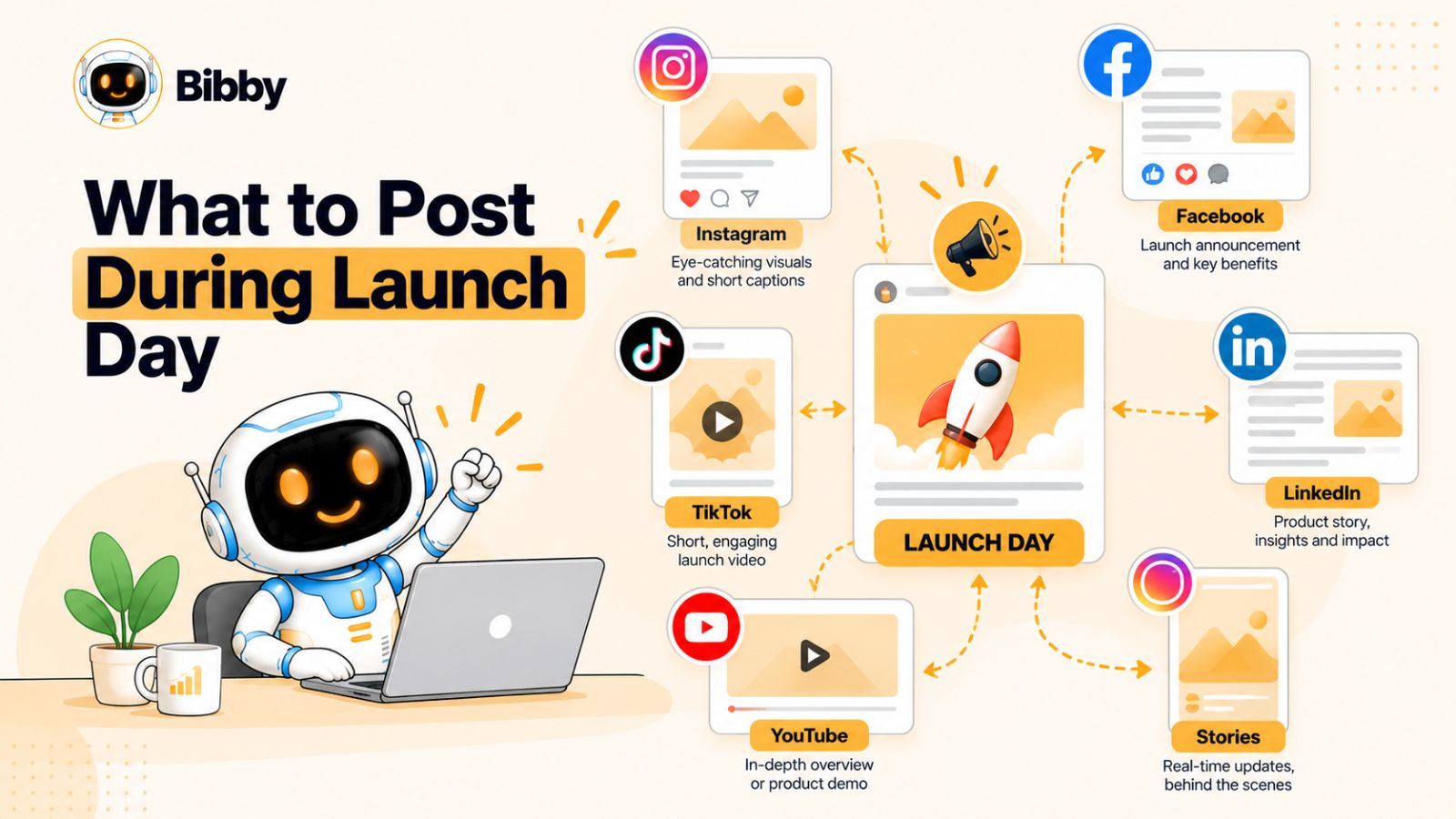
1. Publish the main launch announcement
Your primary launch post should answer the most important questions immediately:
- What has launched?
- Who is it for?
- What problem does it solve?
- What is the most important benefit?
- Where can people learn more?
- What should they do next?
Keep the core message consistent across the campaign, but adapt the presentation to each platform.
An Instagram launch might emphasize a strong visual and concise caption. A LinkedIn post could explain the business problem behind the launch. A TikTok might demonstrate the product in seconds. A YouTube video could provide a complete walkthrough.
The campaign remains unified even though the individual posts are different.
2. Show the product in action
A launch announcement tells people that something exists. A demonstration shows them why it matters.
Whenever possible, show the actual experience.
For a software launch, this could be a screen recording, walkthrough, before-and-after workflow, or short feature demonstration.
For a physical product, it could be an unboxing, demonstration, comparison, or real-world use case.
The shorter the format, the more important it becomes to show the outcome quickly.
Instead of explaining every feature, demonstrate one meaningful transformation.
3. Use short-form video
Short-form video can give launch content a different level of immediacy.
A simple structure is:
Problem → Product → Result → CTA
For example:
“Still creating every social post manually? Here's how this workflow turns one visual into a scheduled multi-platform campaign.”
Then show the workflow.
The video does not need to explain everything. Its job can simply be to make the value obvious enough that the viewer wants to learn more.
4. Use Stories and real-time updates
Stories can complement the main launch announcement because they allow you to communicate throughout the day.
Possible Story content includes:
- Launch countdown completion
- Product screenshots
- Quick demonstrations
- Team reactions
- Customer reactions
- Polls
- Questions and answers
- Links to the launch page
- Behind-the-scenes moments
- Reminders later in the day
This gives your audience multiple opportunities to encounter the launch without requiring the main announcement to carry the entire campaign.
5. Turn audience questions into content
Launch day generates questions.
Instead of treating comments and messages only as customer support, look for recurring questions that could become additional content.
If several people ask how a feature works, make a short video.
If people don't understand who the product is designed for, publish a clarification.
If someone asks for an example, create one.
This creates a feedback loop:
Launch → Questions → Content → Better understanding → More questions → More content
The result is often more useful than trying to anticipate every possible question before launch.
6. Add social proof when available
If you already have legitimate customer feedback, testimonials, beta-user experiences, or documented results, launch day can be a good time to incorporate them.
Social proof gives prospective customers evidence beyond your own marketing claims.
However, don't manufacture urgency, testimonials, or results that don't exist. A launch campaign becomes more credible when its claims can be supported.
If customer feedback is not available yet, that's fine. You can build this content into the post-launch stage as real users begin interacting with the product.
7. Create platform-specific versions
One of the easiest ways to weaken a launch campaign is to publish one identical post everywhere.
Cross-platform distribution is useful, but the content should account for differences in audience behavior and format.
For example:
| Platform | Possible launch format |
|---|---|
| Reel, carousel, Stories | |
| Announcement, video, community discussion | |
| Launch story, product explanation, founder post | |
| TikTok | Fast demonstration or problem/solution video |
| YouTube | Full walkthrough, launch video, Shorts |
The same campaign idea can power all of these formats without forcing the audience to consume an identical post five times.
8. Schedule strategically, but stay present
Scheduling can reduce the operational workload of launch day.
A tool such as Bibby can be useful when you have multiple visual assets and platforms to coordinate. You can prepare images, carousels, videos, Stories, and other content ahead of time, generate captions, and schedule the campaign across selected channels.
That automation handles the publishing workflow.
But launch day still benefits from human attention.
Someone should be available to respond to comments, notice unexpected reactions, answer questions, and identify opportunities for follow-up content. Automation can publish the plan; it cannot replace paying attention to what the audience is actually saying.
9. Don't try to say everything on launch day
A common launch mistake is attempting to explain every feature, benefit, use case, testimonial, FAQ, and announcement in a single post.
You don't need to.
The launch announcement establishes the story. Subsequent content can unpack it.
Think of launch day as the beginning of the next conversation rather than the final piece of content in the campaign.
That leads to one of the most overlooked parts of a social media launch: what happens after everyone has finished saying, “We launched.”
What to Post After the Launch
The launch announcement may create a spike in attention, but your post-launch content determines whether that attention disappears or turns into sustained interest.
After launch, you no longer need to spend every post explaining that something exists. The audience has a new set of questions: How does it work? Is it right for me? What can I do with it? Does it actually deliver value?
Your post-launch social media strategy should answer those questions.
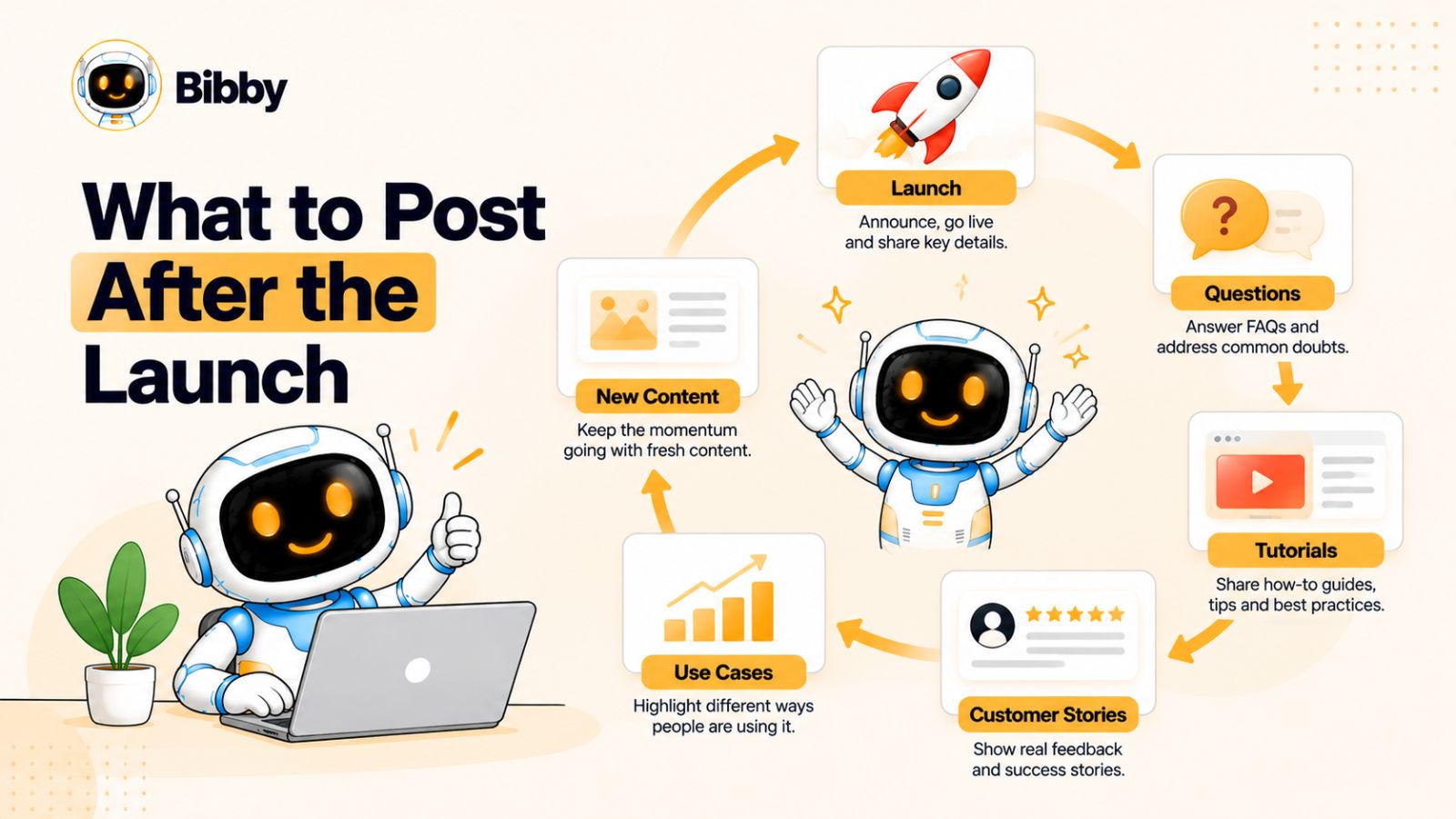
1. Turn features into use cases
A feature tells people what your product does. A use case shows them why they might need it.
Instead of publishing:
“Our platform now supports automated scheduling.”
show:
“Here's how a social media manager can prepare two weeks of content in one afternoon.”
Use cases make abstract features easier to understand and give you a large supply of post-launch content.
One feature can often produce several pieces of content because different audiences can use it in different ways.
2. Publish tutorials and walkthroughs
Once the launch has happened, educational content becomes particularly valuable.
Create posts that answer practical questions such as:
- How do I get started?
- How do I use the main feature?
- What's the fastest way to complete a specific task?
- What does a good workflow look like?
- What mistakes should I avoid?
- Which features work well together?
For a tool such as Bibby, for example, a post-launch series could demonstrate different workflows: creating a campaign, turning a visual into multiple social posts, using the chat interface to manage content, or organizing posts across several platforms.
That feels more useful than repeatedly telling people that the tool exists.
3. Share customer experiences
As customers begin using the product, look for authentic experiences that can become content.
These might include:
- Testimonials
- Customer stories
- Screenshots
- User-generated content
- Before-and-after workflows
- Case studies
- Specific outcomes
- Interesting customer use cases
The strongest examples are specific.
“Customers love it” tells the audience very little.
A customer explaining how they reduced a repetitive workflow, changed their publishing process, or used a particular feature gives prospective users something concrete to understand.
4. Answer frequently asked questions
Your launch creates a new source of content ideas: the questions people actually ask.
Monitor comments, messages, sales conversations, customer support questions, and community discussions.
If multiple people ask the same question, create content around it.
This creates a simple post-launch content engine:
Audience question → useful answer → social post → new questions
Over time, your social channels become a searchable library of answers rather than an endless sequence of promotional announcements.
5. Address objections
Some people will see your launch but won't take action.
That's normal.
Instead of assuming they aren't interested, consider what information might be missing.
Possible objections include:
- “I don't know whether this is for me.”
- “I already have a tool for this.”
- “It looks complicated.”
- “I don't have enough time to learn it.”
- “I'm not sure it will work for my use case.”
- “I need to see it in practice.”
Each objection can become a piece of educational content.
The goal isn't to pressure people into buying. It's to provide the information they need to make an informed decision.
6. Repurpose the launch into multiple formats
A launch contains far more content than most teams realize.
Your original announcement can become a carousel. The product demonstration can become several short videos. A frequently asked question can become a LinkedIn post. A customer comment can become a Story. A long-form launch video can produce several Shorts or TikToks.
This is where a structured workflow can save considerable time.
For example, you could upload the campaign's visual assets into a scheduling platform such as Bibby, choose the desired posting style, generate captions, and organize different formats across your social channels. The important part is not simply producing more posts; it's extracting more useful ideas from the work you've already done.
7. Show what happens next
Your audience also wants to know whether the launch is the beginning of something bigger.
You might share:
- Upcoming improvements
- Product roadmap themes
- New use cases
- Lessons learned
- Community feedback
- What the team is working on next
- Future educational content
You don't have to reveal confidential plans. Even explaining what you're learning from the launch can keep the conversation moving.
8. Don't stop talking about the launch too quickly
A common mistake is believing that mentioning the launch more than once is repetitive.
It isn't—provided each post adds something new.
Consider the difference:
Post 1: “We launched.”
Post 2: “Here's how it works.”
Post 3: “Here's who it's designed for.”
Post 4: “Here's how one customer uses it.”
Post 5: “Here's the most common question we received.”
Post 6: “Here's a mistake to avoid.”
All six posts relate to the same launch, but they serve different informational needs.
A practical post-launch sequence
A simple sequence might look like this:
| Timing | Content focus | Purpose |
|---|---|---|
| Day 1–2 | Launch recap + key feature | Reinforce awareness |
| Day 3–5 | Demonstration + FAQ | Build understanding |
| Week 2 | Use cases + tutorial | Help people visualize usage |
| Week 2–3 | Customer stories + proof | Build confidence |
| Week 3–4 | Objections + advanced tips | Support consideration |
| Ongoing | Education + new use cases | Sustain demand |
The exact schedule depends on the campaign and audience, but the principle remains the same: after launch, move from announcement to evidence, education, and application.
That gives your campaign a much longer life than a single launch-day announcement ever could.
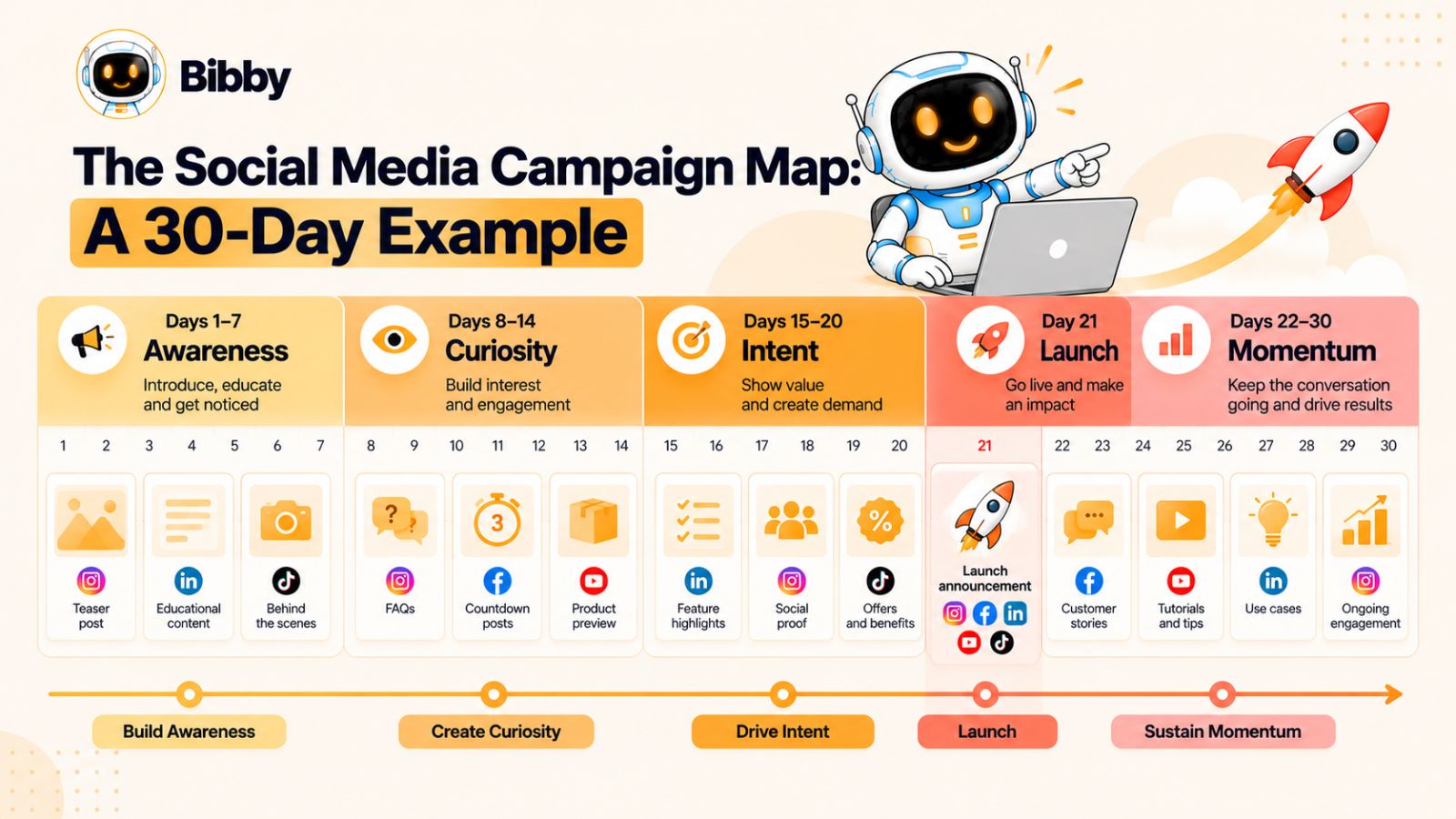
The Social Media Campaign Map: A 30-Day Example
A framework becomes much easier to use when you can see how the pieces fit together on an actual timeline.
The following 30-day social media campaign map assumes a launch happening around the middle of the schedule. You can shorten or extend it depending on the size of your launch, audience, and available content.
The important part is the progression—not following these exact dates mechanically.
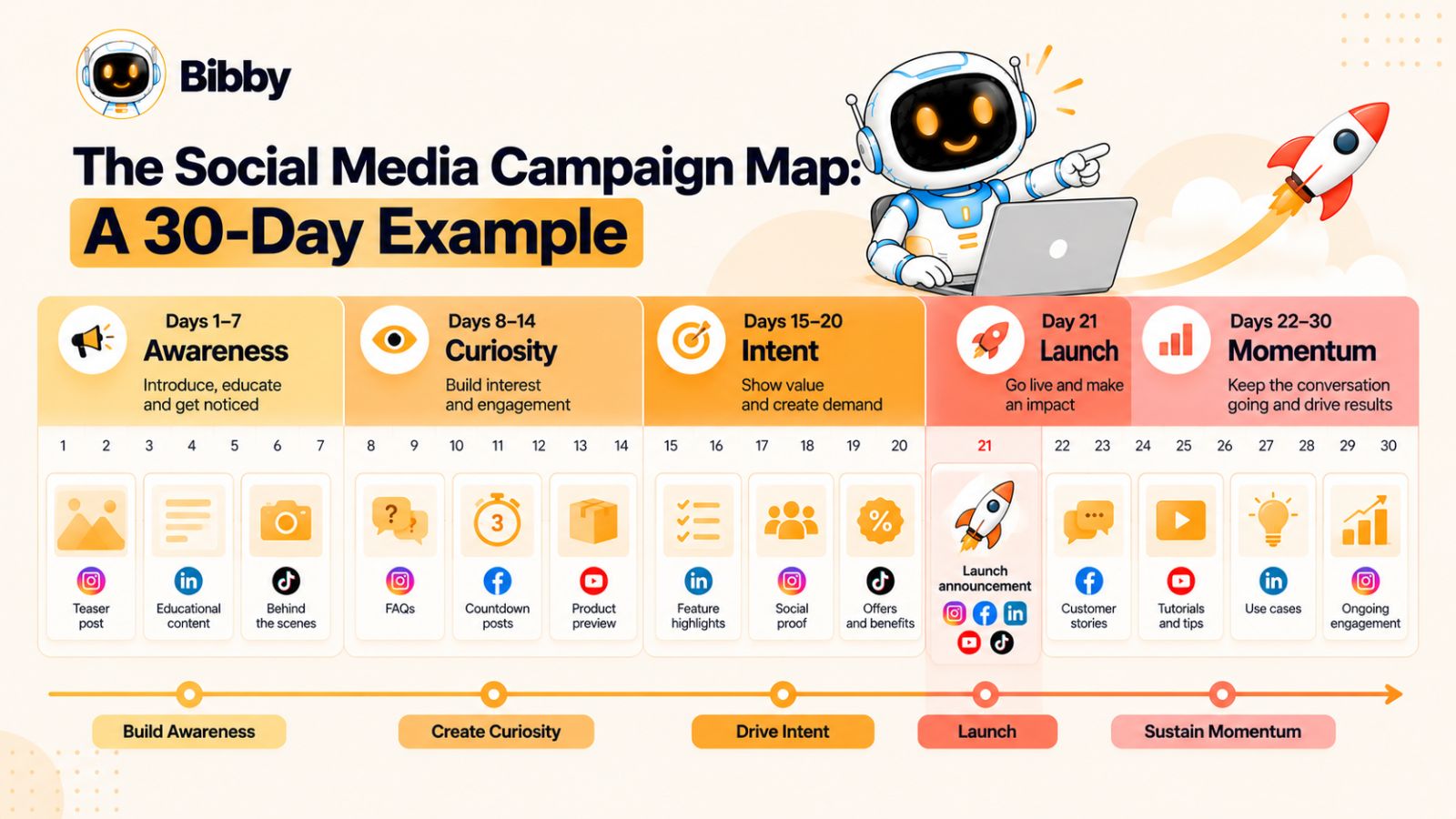
Days 1–7: Build the problem and the story
The first week should establish why the launch matters without immediately turning every post into a sales message.
Day 1 — Problem-focused post
Identify a problem your audience already recognizes.
Day 2 — Educational post
Teach something useful related to that problem.
Day 3 — Audience question
Ask your audience how they currently handle the problem.
Day 4 — Behind-the-scenes content
Show part of the process behind what you're preparing.
Day 5 — Insight or mistake
Share a common mistake people make when dealing with the problem.
Day 6 — Founder/team story
Explain why you decided to work on the problem.
Day 7 — First teaser
Give the audience a small hint that something is coming.
At this point, the audience should understand the problem and begin becoming curious about your solution.
Days 8–14: Build curiosity and anticipation
The second week gradually moves from the problem toward the solution.
Day 8 — Educational carousel
Break down a useful framework or process.
Day 9 — Feature or solution teaser
Reveal one small aspect of what you're launching.
Day 10 — Short-form video
Show a quick transformation or workflow.
Day 11 — FAQ
Answer a question your audience is likely to have.
Day 12 — Behind-the-scenes
Show more of the product, service, event, or preparation.
Day 13 — Benefit-focused post
Explain what people will be able to do differently.
Day 14 — Countdown begins
Introduce the launch date and make the next step clear.
You are now giving people enough information to understand that the launch is relevant without giving them every detail at once.
Days 15–20: Move toward launch
As launch day approaches, increase clarity.
Day 15 — Product introduction
Give the audience a clearer look at what is coming.
Day 16 — Use case
Show how the solution can be used in a real situation.
Day 17 — Demonstration
Show the product or service in action.
Day 18 — Objection handling
Address a common concern directly.
Day 19 — Countdown + key benefit
Connect the countdown to a useful piece of information.
Day 20 — Final preview
Give the audience a strong reason to return on launch day.
At this stage, your audience should not have to wonder what the launch is about.
Day 21: Launch day
Your launch-day content can operate as a coordinated sequence rather than one isolated post.
Main announcement: What launched and where to find it.
Demonstration: Show the most important feature, experience, or result.
Short-form video: Give people a fast explanation or visual demonstration.
Stories: Share reminders, reactions, questions, and real-time updates.
Community engagement: Respond to comments and identify recurring questions.
The objective is not to flood every platform with identical content. It is to create several opportunities for people to discover, understand, and act on the launch.
Days 22–24: Reinforce the launch
Immediately after launch, focus on clarity and education.
Day 22 — Launch recap
Summarize what was launched and the key reason it matters.
Day 23 — How it works
Show the workflow from beginning to end.
Day 24 — FAQ
Answer questions that appeared during launch day.
This is where real audience feedback can begin shaping your content.
Days 25–27: Build proof and relevance
Now shift toward helping potential customers imagine themselves using the solution.
Day 25 — Use case
Show how a specific type of customer could use it.
Day 26 — Customer reaction
Share authentic feedback or early user experience where available.
Day 27 — Tutorial
Teach people how to accomplish something useful with the product.
Days 28–30: Extend the campaign
The final few days should prevent the launch from simply disappearing from your social feeds.
Day 28 — Objection or comparison
Answer a common hesitation or explain an important distinction.
Day 29 — Advanced use case
Show something beyond the basic introduction.
Day 30 — What's next
Explain what you've learned, what's coming next, or where people can continue learning.
What this campaign map looks like at a glance
| Period | Primary goal | Typical content |
|---|---|---|
| Days 1–7 | Awareness | Problems, education, stories |
| Days 8–14 | Curiosity | Teasers, benefits, FAQs |
| Days 15–20 | Intent | Demonstrations, use cases, objections |
| Day 21 | Action | Announcement, video, Stories |
| Days 22–24 | Understanding | Recap, tutorials, FAQs |
| Days 25–27 | Proof | Use cases, feedback, customer content |
| Days 28–30 | Momentum | Advanced content, objections, next steps |
You can also adjust the ratio of content formats throughout the month. A campaign might use carousels for education, short-form video for demonstrations, Stories for real-time communication, LinkedIn posts for professional context, and YouTube for deeper explanations.
The result is not simply a 30-day content calendar. It is a connected campaign where each stage prepares the audience for the next one.
Once the timeline is clear, the next challenge is distributing that campaign intelligently across different social platforms.
How to Adapt One Launch Across Multiple Social Platforms
A launch campaign can have one central message without having one identical post everywhere.
Different platforms encourage different formats, audience behaviors, and levels of attention. Your campaign map should therefore define the core message once, then adapt how that message is expressed on each channel.
Start with one campaign narrative
Before creating platform-specific posts, define three things:
The problem: What does the audience need to solve?
The solution: What are you launching that addresses it?
The action: What should interested people do next?
These elements remain consistent across the campaign.
The format, length, tone, and level of detail can then change from platform to platform.
Instagram gives you several formats within the same platform, making it useful for both discovery and ongoing engagement.
A launch campaign might use:
- Reels for demonstrations, teasers, and quick educational content
- Carousels for frameworks, feature explanations, and FAQs
- Stories for countdowns, questions, polls, reminders, and behind-the-scenes content
- Static posts for major announcements or visual statements
For example, the same product launch could become a 20-second demonstration Reel, a five-slide carousel explaining the problem, and a Story sequence answering questions.
The content shares the same campaign message without forcing every format to say the same thing.
Facebook can support launch announcements, video, community discussion, and longer-form explanations.
Depending on your audience, useful content might include:
- Launch announcements
- Demonstration videos
- Customer stories
- Educational posts
- Questions designed to encourage discussion
- Event or offer reminders
Facebook can also be useful for extending content beyond the immediate launch audience through sharing and community interaction.
LinkedIn requires a different framing when the launch has a professional or business audience.
Instead of simply announcing a product, consider explaining:
- The business problem behind the launch
- What changed in your industry
- Lessons learned while building the product
- A founder's perspective
- A customer workflow
- A practical framework related to the launch
For example, a social media automation product could use LinkedIn to discuss the operational cost of manually managing multiple channels, then introduce its workflow as one possible approach.
The emphasis is on the professional context rather than simply reproducing an Instagram caption.
TikTok
TikTok can be particularly useful for demonstrating an idea quickly.
Launch content could include:
- Before-and-after demonstrations
- Quick tutorials
- Problem/solution videos
- Product reactions
- Common mistakes
- Short educational explanations
- Behind-the-scenes clips
A strong TikTok doesn't necessarily need to feel like a traditional advertisement. Showing a useful transformation can communicate the product's value more naturally.
YouTube
YouTube gives you more room to explain.
Possible launch content includes:
- Full product demonstrations
- Tutorials
- Detailed walkthroughs
- Launch videos
- Customer case studies
- Comparisons
- Educational videos connected to the problem you're solving
You can then turn sections of a longer YouTube video into shorter clips for other platforms.
Don't confuse repurposing with duplication
Repurposing means changing the presentation while preserving the underlying idea.
Suppose your core campaign message is:
“Managing social media across multiple platforms takes too much manual work.”
That idea could become:
Instagram: A carousel showing five repetitive tasks.
TikTok: A short demonstration of the old workflow versus a streamlined one.
LinkedIn: A post discussing the operational cost of fragmented social media workflows.
YouTube: A detailed walkthrough of a more efficient process.
Facebook: A discussion asking how other marketers currently manage their publishing workflow.
The campaign remains recognizable, but every platform gets content that makes sense in its environment.
Use a content matrix
A simple matrix can make this easier to manage:
| Campaign idea | TikTok | YouTube | |||
|---|---|---|---|---|---|
| Problem | Carousel | Post | Insight | Short video | Explainer |
| Teaser | Reel | Image/video | Founder post | Short teaser | Preview |
| Feature | Reel | Video | Use case | Demo | Walkthrough |
| FAQ | Stories | Post | Text/video | Quick answer | Detailed answer |
| Customer story | Carousel | Story | Case study | Reaction/video | Case study |
| Launch | Reel + Stories | Announcement | Launch post | Launch video | Launch video |
| Tutorial | Carousel/Reel | Video | Guide | Quick tutorial | Full tutorial |
The exact formats will depend on your audience and resources, but the matrix prevents you from treating every platform as an isolated content operation.
Coordinate the campaign without creating extra work
A multi-platform campaign can quickly become difficult to manage if every post is created and scheduled manually.
This is where a scheduling workflow can become useful. For example, a tool such as Bibby can help organize visual assets, generate captions, create different post formats, and schedule content across selected channels. Its conversational interface can also make campaign management more direct when you need to create or revise posts.
But automation should happen after the campaign logic is clear.
First decide what you want to communicate. Then determine where each message belongs. Finally, use tools to reduce the repetitive work involved in producing and publishing it.
That distinction keeps your campaign from becoming a collection of automatically generated posts with no strategic connection.
The next challenge is making this entire system manageable without spending every day manually creating and scheduling content.
How to Build a Social Media Campaign Map Without Getting Overwhelmed
A social media campaign can look simple on paper and become surprisingly complicated once you start creating dozens of posts across multiple platforms.
The solution isn't necessarily to publish less. It is to separate strategy, production, and distribution so that each part of the workflow has a clear purpose.
Start with the campaign objective
Before opening a content calendar, define what the launch needs to accomplish.
Your objective could be:
- Generate product awareness
- Drive registrations
- Increase event attendance
- Generate leads
- Drive sales
- Introduce a new feature
- Re-engage existing customers
- Build an audience around a new offer
A single launch can have several goals, but one primary objective makes content decisions easier.
If the objective is lead generation, for example, a post that receives thousands of likes but produces no meaningful traffic may not be as useful as a smaller post that sends qualified visitors to the landing page.
Define the audience
Next, decide who the campaign is actually speaking to.
Avoid stopping at broad descriptions such as “business owners” or “marketers.”
Consider:
- What problem are they experiencing?
- What do they already know?
- What alternatives are they using?
- What objections might they have?
- What would make them pay attention?
- What information would help them make a decision?
These answers influence both your messaging and the platforms you prioritize.
Create a small set of content pillars
Content pillars prevent every post from becoming a variation of the same sales message.
For a product launch, you might use:
Education: Teach the audience something useful.
Problem: Explore the challenge your product addresses.
Product: Explain features and workflows.
Proof: Demonstrate results, customer experiences, or evidence.
People: Show founders, team members, customers, or the process behind the product.
Community: Ask questions and encourage discussion.
These pillars can remain consistent while the individual topics change.
Build the campaign around assets
Instead of starting with dozens of individual post ideas, identify the major assets you already have or need to create.
For example:
- Product screenshots
- Product demo
- Launch video
- Founder video
- Customer testimonial
- Product photography
- Educational graphics
- FAQ content
- Blog post
- Case study
Then ask how each asset can produce multiple pieces of content.
One 10-minute product demonstration might become a YouTube video, several short videos, an Instagram carousel, a LinkedIn post, Stories, and FAQ content.
This approach is usually more sustainable than creating every social post from scratch.
Separate creation from scheduling
Trying to create, edit, write, approve, and publish every post immediately can make social media feel like an endless daily task.
Instead, batch the workflow.
A simplified process could be:
Strategy → Assets → Content variations → Review → Scheduling → Publishing → Analysis
This gives you a clearer production pipeline.
Scheduling tools can help with the repetitive part. For example, Bibby lets you work from uploaded or AI-generated visuals, choose a posting style, generate captions, and schedule content across selected social platforms. Its chat interface can also be used to manage tasks such as creating campaigns, creating posts, regenerating captions, and building a brand kit.
The advantage isn't that every decision becomes automatic. It's that repetitive execution can happen without requiring you to manually coordinate every post.
Keep a human review step
Automation is most useful when it handles repetitive execution while people remain responsible for judgment.
Before publishing, review:
- Accuracy
- Brand voice
- Claims
- Links
- Calls to action
- Visual quality
- Platform fit
- Timing
- Comments or context that may have changed since creation
AI can generate a useful first version quickly, but a campaign still benefits from human context.
Create a campaign dashboard
You don't need a complicated system.
A campaign map can track:
| Field | Example |
|---|---|
| Campaign | Product launch |
| Stage | Pre-launch |
| Topic | Common workflow mistakes |
| Platform | |
| Format | Text + image |
| CTA | Join waitlist |
| Publish date | June 10 |
| Status | Scheduled |
| Asset | Workflow graphic |
| Owner | Marketing |
| Result | Track after publishing |
The purpose is visibility.
When you can see what's planned, what's ready, what's scheduled, and what's already performing, the campaign becomes easier to manage.
Leave room for real-time content
Don't schedule every minute of a launch campaign.
Leave some capacity for things you cannot predict:
- Customer reactions
- Trending conversations
- Unexpected questions
- Product updates
- Industry news
- Strong-performing content that deserves a follow-up
- Community discussions
A campaign map should provide structure without becoming a cage.
The best systems therefore combine planned content with responsive content.
Automate the repetitive, not the important
This is the principle worth remembering.
Automate:
- Scheduling
- Repetitive formatting
- Caption drafts
- Content variations
- Asset organization
- Routine publishing tasks
Keep human attention on:
- Strategy
- Positioning
- Creative direction
- Claims
- Customer conversations
- Unexpected opportunities
- Performance interpretation
When you approach social media this way, automation becomes a way to create more room for strategic work rather than a substitute for strategy.
And once the workflow is organized, AI can take this one step further by helping with the planning and production of the campaign itself.
Using AI to Plan and Schedule a Launch Campaign
AI can make a social media launch easier to execute, but its biggest value comes from reducing repetitive work rather than removing the need for strategy.
A launch can require dozens of captions, multiple content formats, platform-specific variations, visual assets, publishing times, and follow-up posts. Creating every element manually can consume more time than the strategic work that actually determines whether the campaign succeeds.
The useful approach is to give AI a defined role within your campaign map.
Use AI to expand your content ideas
Once you know your campaign objective, audience, and content pillars, AI can help turn those inputs into a larger set of content ideas.
For example, a single launch topic could generate ideas for:
- Educational posts
- Short-form videos
- Carousels
- FAQs
- Product demonstrations
- Customer-focused content
- Founder posts
- Objection-handling posts
- Behind-the-scenes content
- Post-launch tutorials
The important distinction is that AI should expand a strategy you have already defined. Asking it to “create 30 social media posts” without giving it campaign context can produce a large quantity of content without a coherent narrative.
Generate captions from the actual content
Captions become more useful when they are connected to the visual or video being published.
Instead of writing every caption from a blank document, an AI-assisted workflow can use the asset, campaign context, audience, and desired posting style to create a starting point.
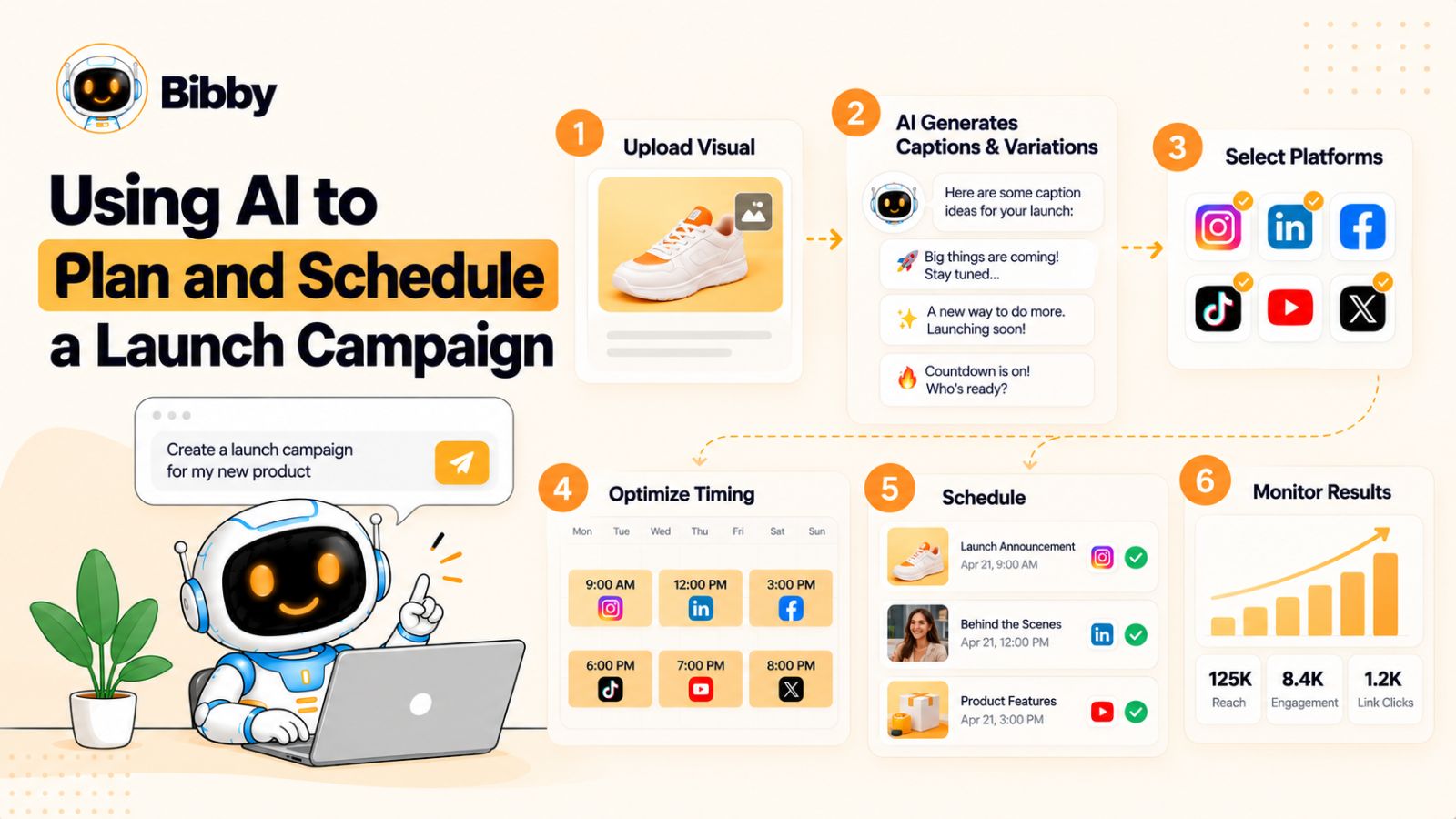
For example, Bibby allows users to upload an image or generate one with AI, select a posting style, and have captions generated as part of the publishing workflow. That can be useful when a campaign contains many visual assets that need accompanying copy.
The generated caption should still be reviewed for accuracy, tone, specificity, and whether it gives the audience a useful reason to engage.
Create multiple versions of the same campaign idea
AI is also useful when one campaign idea needs to become several different pieces of content.
Imagine your core message is:
“Social media teams spend too much time manually turning one piece of content into posts for multiple platforms.”
That idea could become:
- An Instagram carousel explaining the workflow problem
- A LinkedIn post discussing the operational cost
- A TikTok showing the manual process
- A short video demonstrating an alternative
- A YouTube tutorial
- A Facebook discussion
- A Story sequence with questions and answers
The strategic idea stays consistent while the execution changes.
This is more useful than simply copying one caption across every platform.
Use AI to organize scheduling
Timing becomes another operational challenge when a campaign contains multiple platforms and formats.
Instead of manually deciding when every post should go live, some social media tools can help organize content around recommended or optimized publishing times.
Bibby, for example, can schedule media across selected social platforms at different dates and AI-optimized times. That can be particularly useful when the campaign contains a mixture of images, carousels, videos, Stories, and other formats that would otherwise require separate scheduling workflows.
But optimized timing should remain a supporting factor.
A perfectly timed post with a weak message is still a weak post. Campaign relevance, creative quality, audience fit, and the strength of the offer matter before scheduling optimization.
Use conversational AI for campaign management
The workflow becomes even more interesting when campaign management can happen through conversation rather than a series of disconnected menus.
For example, you might want to:
Create a launch campaign for our new product.
Then:
Turn these three product images into posts.
Then:
Regenerate the captions with a more educational style.
Then:
Create a seven-day follow-up campaign.
A conversational interface can make these kinds of iterative tasks easier to manage because the campaign context can remain part of the interaction.
Bibby now supports this type of chat-based workflow, including tasks such as creating a brand kit, creating campaigns, creating posts, and regenerating captions. Used properly, this can make social media management feel less like operating a collection of publishing controls and more like working through a campaign with an assistant.
Don't let AI flatten your brand voice
One risk of using AI across an entire campaign is that every post starts sounding the same.
A launch should have consistency, but consistency doesn't mean repetition.
Give your AI workflow clear information about:
- Brand voice
- Target audience
- Words to use
- Words to avoid
- Product terminology
- Positioning
- Content pillars
- Campaign objective
- Platform
- Desired action
Then review the output.
The strongest AI-assisted campaigns usually combine machine-assisted production with human editorial judgment.
Know what AI should and shouldn't automate
A useful rule is:
Let AI handle volume. Keep humans responsible for meaning.
AI can help with:
- Content ideas
- Caption drafts
- Variations
- Scheduling
- Repurposing
- Content organization
- Routine campaign operations
Humans should remain responsible for:
- Campaign positioning
- Strategic decisions
- Brand promises
- Factual claims
- Sensitive topics
- Customer relationships
- Creative direction
- Final approval
Used this way, AI doesn't replace the campaign map. It makes the campaign map easier to execute.
The next step is turning all of these decisions into a reusable template that you can use for your next launch instead of rebuilding the strategy from scratch.
Social Media Campaign Map Template
A social media campaign map becomes much easier to use when you can see every important campaign decision in one place.
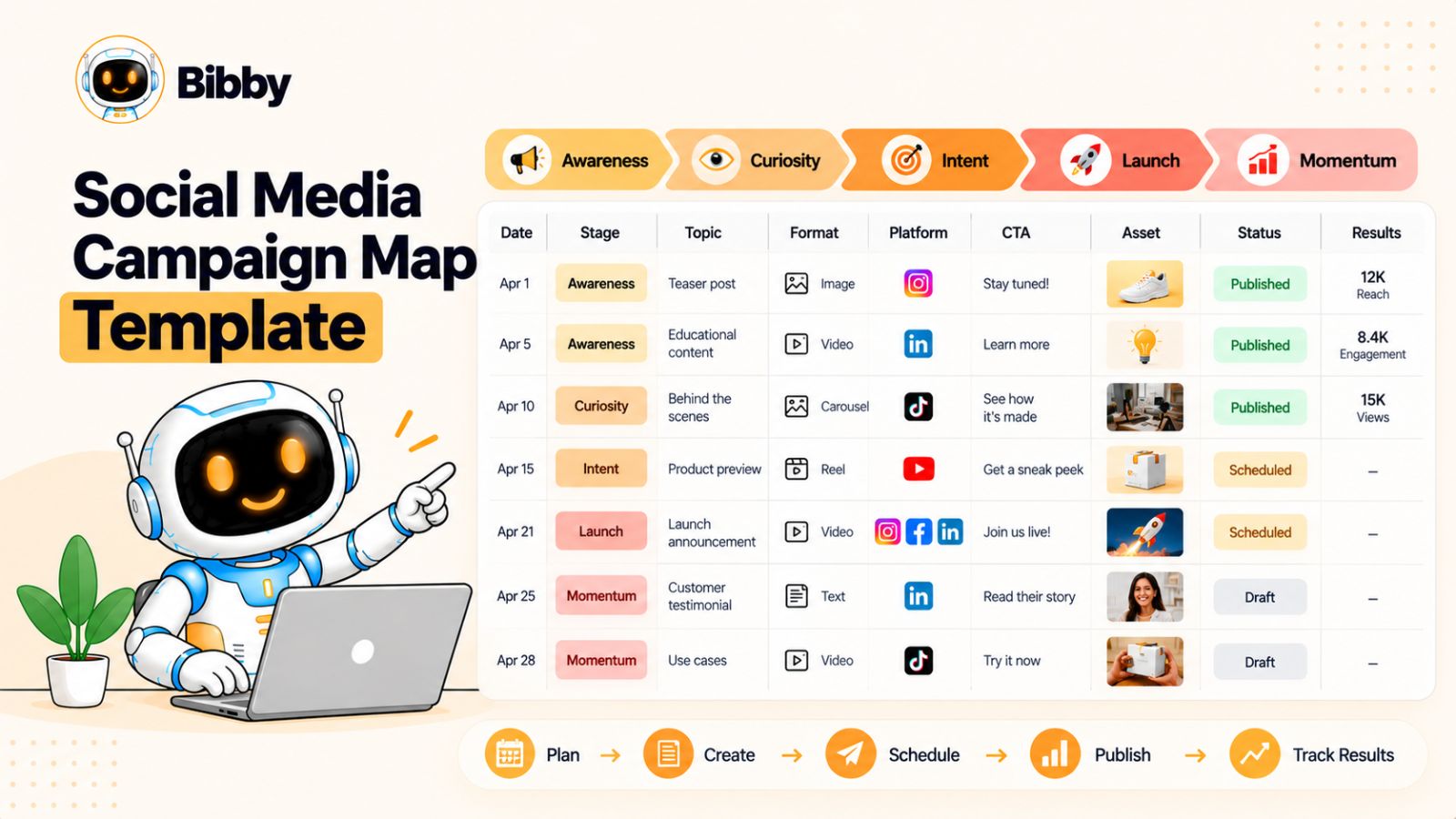
Instead of keeping your launch strategy scattered across a content calendar, project-management tool, spreadsheets, and notes, use a single campaign map to connect the goal, audience, message, content, platform, timing, and results.
You can adapt the following template to almost any product, service, event, feature, or promotional launch.
Campaign overview
Start with the information that defines the campaign.
| Campaign element | What to define |
|---|---|
| Campaign name | What are you launching? |
| Launch date | When does the main launch happen? |
| Primary objective | What should the campaign accomplish? |
| Target audience | Who is the campaign for? |
| Core problem | What problem does the launch address? |
| Main message | What should people remember? |
| Primary CTA | What should interested people do? |
| Landing page | Where should traffic go? |
| Platforms | Where will the campaign appear? |
This section becomes the strategic reference point for everything that follows.
Content map
Next, map individual content pieces against the launch timeline.
| Date | Stage | Topic | Format | Platform | CTA | Status |
|---|---|---|---|---|---|---|
| Day -14 | Pre-launch | Problem | Carousel | Save | Planned | |
| Day -12 | Pre-launch | Educational insight | Post | Comment | Planned | |
| Day -10 | Pre-launch | Teaser | Short video | TikTok | Follow | Planned |
| Day -7 | Pre-launch | Feature preview | Reel | Learn more | Planned | |
| Day -3 | Pre-launch | FAQ | Video | Visit page | Planned | |
| Day 0 | Launch | Announcement | Video | All key platforms | Try it | Scheduled |
| Day +2 | Post-launch | Tutorial | Carousel | Learn | Planned | |
| Day +5 | Post-launch | Use case | Video | TikTok | Learn more | Planned |
| Day +7 | Post-launch | Customer story | Post | Visit page | Planned |
You don't have to use this exact cadence. The value comes from seeing how every post fits into the larger campaign.
Add a content purpose
One useful improvement is adding a column for content purpose.
For example:
| Content | Purpose |
|---|---|
| Problem post | Awareness |
| Educational post | Trust |
| Teaser | Curiosity |
| Feature demonstration | Understanding |
| Launch announcement | Action |
| Tutorial | Education |
| Customer story | Proof |
| FAQ | Objection handling |
| Advanced use case | Consideration |
This makes it much easier to identify gaps.
If your campaign contains ten promotional posts but no educational content, for example, the map makes that imbalance obvious.
Track the assets
Your campaign map can also track the assets required for each post.
Useful fields include:
- Asset name
- File location
- Format
- Dimensions
- Video duration
- Caption
- CTA
- Approval status
- Scheduled date
- Published URL
This becomes especially important when one launch generates content across multiple platforms.
A single product demonstration might need a full video, several short clips, screenshots, a carousel, and supporting graphics.
Track performance after publishing
Your campaign map should not stop once the post has been published.
Add performance fields such as:
- Reach
- Impressions
- Engagement
- Saves
- Shares
- Comments
- Video views
- Profile visits
- Link clicks
- Leads
- Conversions
Which metrics matter most depends on the campaign objective.
For an awareness campaign, reach and qualified engagement may be important. For a conversion-focused launch, clicks, leads, and sales may matter more.
The purpose is not to create a giant reporting spreadsheet. It is to connect what you published with what happened afterward.
A simple campaign-map checklist
Before launching, confirm that you have:
- Defined the campaign objective
- Identified the target audience
- Established the core message
- Planned pre-launch content
- Planned launch-day content
- Planned post-launch content
- Adapted content for each platform
- Created the required assets
- Written or generated captions
- Added clear calls to action
- Scheduled the appropriate content
- Left room for real-time engagement
- Defined the metrics you will monitor
Tools can simplify the execution layer of this process. A scheduling workflow such as Bibby can help bring assets, captions, formats, campaigns, and publishing schedules into a more centralized process. But the campaign map should remain the source of strategic direction.
The template is useful because it separates what the campaign needs to accomplish from how the publishing work gets done.
Once the map is built, there is one more thing to consider: the mistakes that can quietly undermine an otherwise well-planned launch.
Common Social Media Launch Mistakes
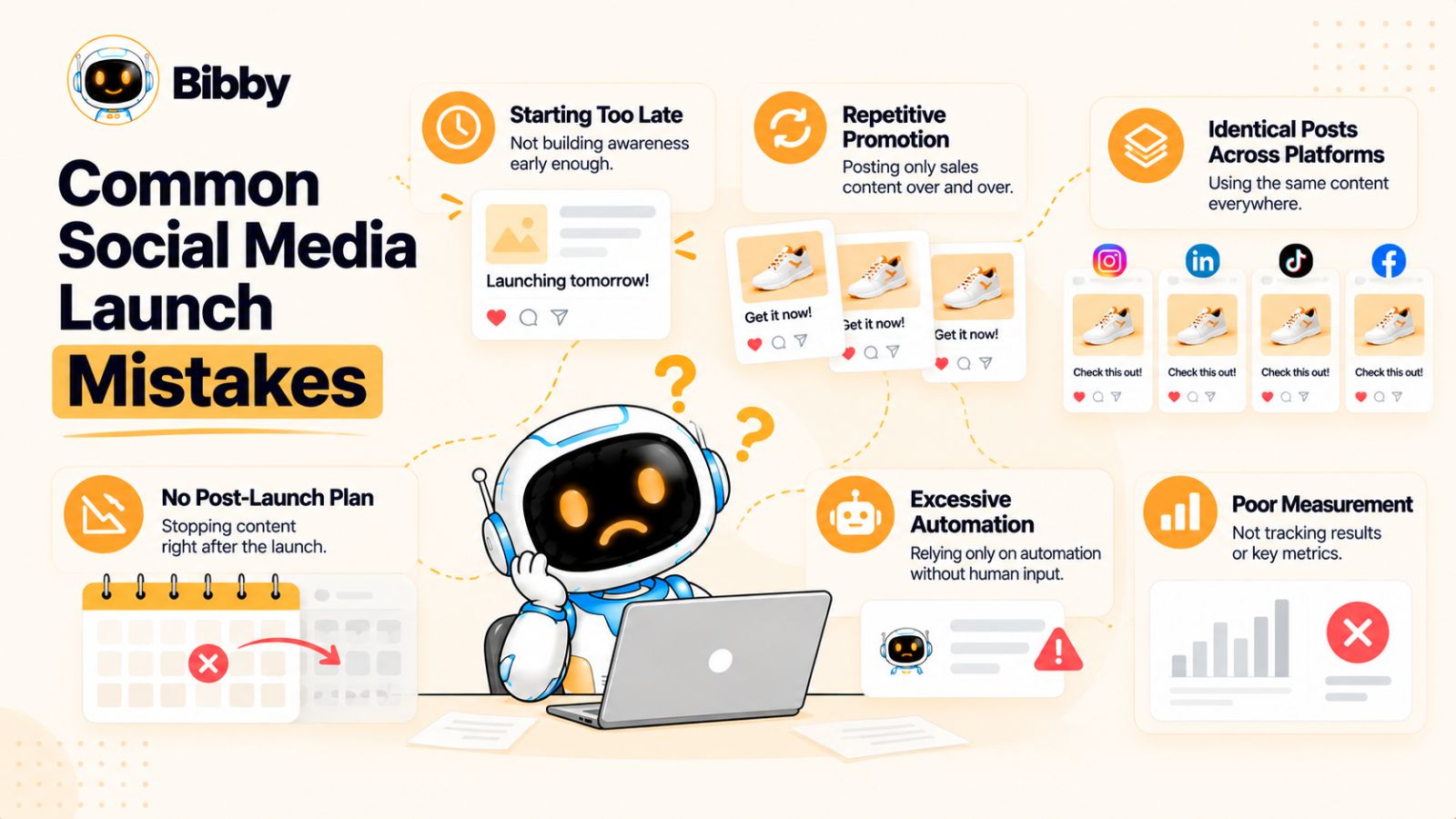
A detailed social media campaign map can help you avoid many launch problems, but planning more posts does not automatically create a better campaign.
The biggest issues usually come from strategy: starting too late, talking only about the product, failing to adapt content for different platforms, or treating launch day as the finish line.
1. Starting promotion too late
One announcement on launch day rarely gives an audience enough context.
If people have never heard of the problem, product, or brand, asking them to take action immediately creates unnecessary friction.
Pre-launch content gives you time to introduce the problem, educate the audience, build familiarity, and create anticipation.
The longer or more important the launch, the more useful this runway can become.
2. Making every post about the product
A campaign becomes repetitive when every post says some variation of:
“Our product is launching. Check it out.”
Your audience needs more than promotional information.
Mix product content with:
- Education
- Industry insights
- Stories
- Examples
- Customer problems
- Behind-the-scenes content
- Tutorials
- Questions
- Useful frameworks
The product should have a role in the conversation, not become the entire conversation.
3. Using identical content everywhere
Publishing the same caption and creative across every platform may save time, but it can reduce the relevance of the campaign.
An Instagram Reel, LinkedIn post, TikTok video, and YouTube walkthrough can communicate the same idea in completely different ways.
Create a central campaign message, then adapt the content to the platform.
4. Having no post-launch strategy
This is one of the most common gaps in launch planning.
Teams spend weeks preparing for launch day and then have no clear answer to:
“What do we post tomorrow?”
The post-launch period should already be mapped.
Plan tutorials, use cases, customer stories, FAQs, demonstrations, and objection-handling content before the launch happens.
That way, launch momentum has somewhere to go.
5. Publishing too much promotional content
More posts don't necessarily mean more attention.
If every post asks people to buy, sign up, or click, audiences may stop paying attention.
A healthier campaign balances promotional content with content that earns attention independently.
For example, an educational post can be valuable even if someone never becomes a customer.
That value can create familiarity that makes later promotional content more meaningful.
6. Ignoring audience questions
Your audience can tell you what content to create next.
Comments, messages, customer calls, sales conversations, and support questions can reveal confusion or objections you didn't anticipate.
Don't treat these interactions as separate from the campaign.
They can become your most relevant post-launch content.
7. Automating without reviewing
Automation can save time, but scheduled content still needs oversight.
A caption generated weeks ago may no longer make sense when the post is published. A product detail might change. A link could break. A conversation might change the context around the launch.
Whether you're using a scheduling platform such as Bibby or managing your campaign manually, maintain a review process.
Automation should reduce repetitive work—not remove accountability.
8. Measuring vanity metrics alone
Likes and impressions can be useful indicators, but they don't tell you everything.
Depending on your objective, you may also need to examine:
- Saves
- Shares
- Comments
- Profile visits
- Link clicks
- Leads
- Registrations
- Purchases
- Customer acquisition
- Conversion rate
A post with fewer likes can sometimes contribute more directly to the campaign objective than a highly shareable but commercially irrelevant post.
9. Leaving no room for unexpected opportunities
A campaign map should create structure, not eliminate flexibility.
If a customer posts an excellent testimonial, a relevant industry event happens, or one of your launch videos unexpectedly generates a strong conversation, you may want to adjust the schedule.
Keep some publishing capacity available for these moments.
The campaign should have a plan—and enough flexibility to respond to reality.
10. Treating scheduling as the strategy
Scheduling is execution.
Strategy comes first.
A scheduling tool can help you publish content consistently, but it cannot decide what your audience needs to hear, why the launch matters, or which message should come next.
The strongest workflow is therefore:
Strategy → Campaign map → Content → Review → Scheduling → Engagement → Measurement → Optimization
When these pieces work together, social media becomes more than a sequence of scheduled posts. It becomes a coordinated launch system.
The final piece of that system is measurement: determining whether the campaign actually achieved what it was designed to accomplish.
How to Measure a Social Media Launch Campaign
A social media campaign map is only useful if you can learn from what happens after the posts go live.
The key is to measure performance according to the stage and objective of the campaign. A pre-launch teaser, a launch-day announcement, and a post-launch tutorial are not designed to accomplish the same thing, so they shouldn't all be judged by the same metric.
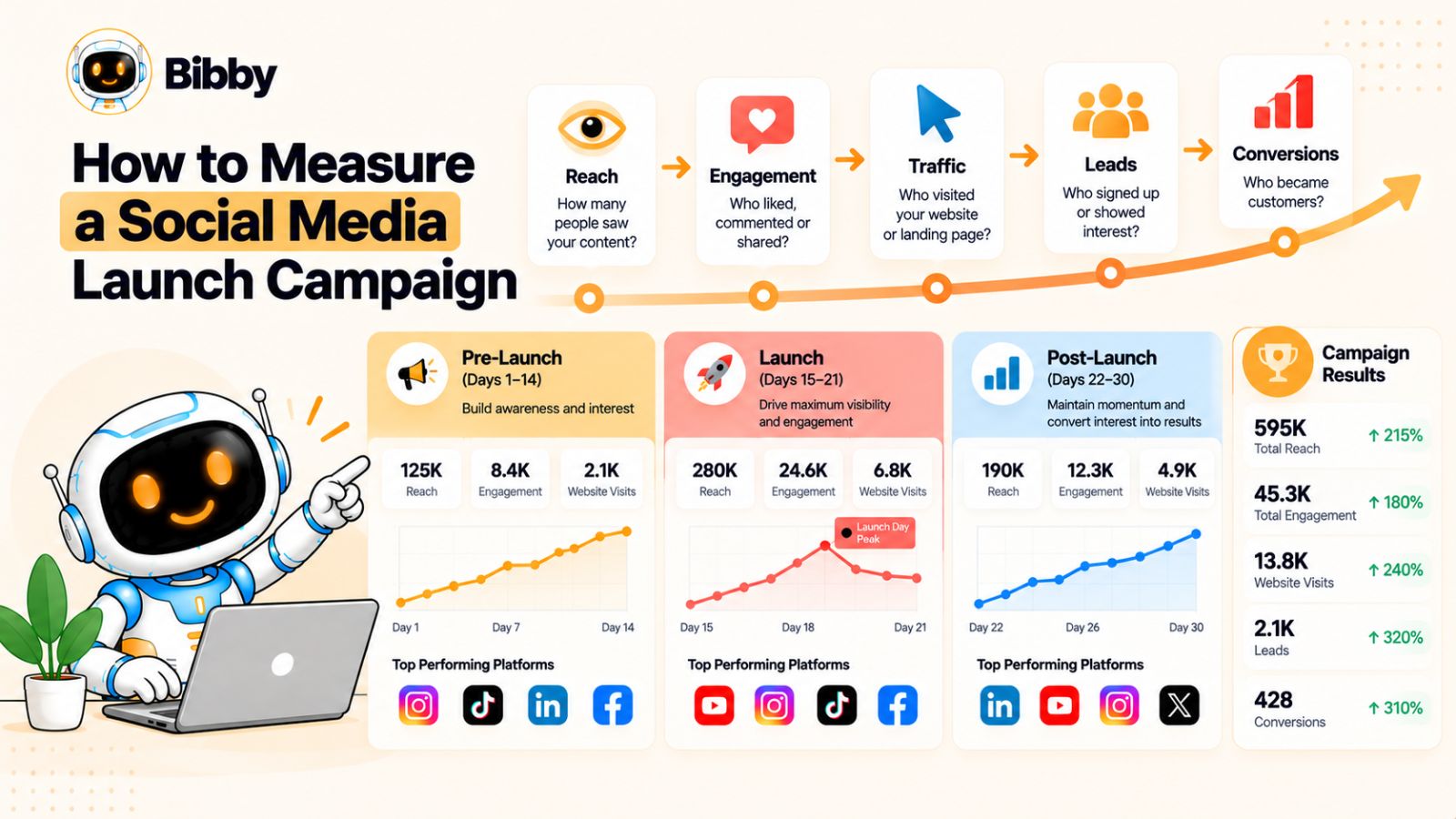
Measure awareness before launch
Pre-launch content is primarily about getting the right people to notice and understand the upcoming launch.
Useful metrics can include:
- Reach
- Impressions
- Video views
- Follower growth
- Profile visits
- Shares
- Saves
- Engagement from your target audience
Don't look only at the biggest number.
A post reaching 100,000 people isn't necessarily more useful than one reaching 10,000 if the smaller audience is substantially more relevant to your campaign.
Also look for signals that people are becoming more interested as launch day approaches.
Are profile visits increasing? Are people asking questions? Are more people joining a waitlist? Are people sharing your educational content?
These signals can tell you whether your pre-launch content is creating momentum.
Measure action during the launch
Launch-day metrics should move closer to the campaign's primary business objective.
Depending on the launch, that could mean:
- Link clicks
- Landing-page visits
- Registrations
- Sign-ups
- Event registrations
- Product purchases
- Demo requests
- App downloads
- Qualified leads
You can still track engagement, but don't let engagement become the only definition of success.
For example, a launch video might receive fewer likes than an entertaining unrelated post but generate significantly more qualified traffic. If the campaign's purpose is conversion, that difference matters.
Measure education and proof after launch
Post-launch content has a different role.
You may want to track whether tutorials, use cases, FAQs, and customer stories are helping people move closer to action.
Useful signals include:
- Saves
- Shares
- Repeat visits
- Video completion
- Product-page visits
- Feature-page visits
- Leads
- Conversions
- Questions and comments
- Customer feedback
Tutorials can be particularly valuable because high saves or repeat views may indicate that people find the content useful enough to return to later.
Compare content by purpose
Don't only compare posts against one another.
Compare content types.
For example:
| Content type | Useful signals |
|---|---|
| Educational | Saves, shares, engagement |
| Teaser | Reach, views, profile visits |
| Product demo | Video completion, clicks |
| Launch announcement | Traffic, sign-ups, conversions |
| FAQ | Saves, comments, clicks |
| Customer story | Engagement, traffic, conversions |
| Tutorial | Saves, views, repeat engagement |
This helps you identify which types of content are doing different jobs within the campaign.
Look across the entire customer journey
A social media launch rarely follows a simple path where someone sees one post and immediately converts.
A person might:
See a teaser → watch a demonstration → visit your profile → return after launch → read a tutorial → click a link → convert later.
That means individual post performance doesn't always tell the complete story.
Where possible, look at the campaign as a connected sequence.
Which content introduced the campaign?
Which content generated interest?
Which content produced meaningful traffic?
Which content helped people understand the offer?
Which content contributed to conversion?
This is one reason a campaign map is more useful than a basic publishing calendar: it gives you a framework for interpreting the results.
Turn performance data into the next campaign
The most valuable measurement isn't simply a report at the end of the launch.
It's what you do with what you learned.
Suppose your data shows that short product demonstrations consistently generated more qualified traffic than static announcements.
Your next campaign might include more demonstrations.
If educational posts generated strong saves and shares but very little traffic, you might use them earlier in the customer journey and introduce stronger transition points toward the product.
If FAQ content repeatedly generated useful conversations, you might move those questions earlier into the pre-launch stage.
The goal is not to find one universally “best” type of social media post. It's to understand which content performs which job for your particular audience and campaign.
Create a simple post-launch review
Within a week or two of the campaign, review:
- What content reached the intended audience?
- What generated meaningful engagement?
- What drove traffic?
- What contributed to conversions?
- What questions kept appearing?
- Which formats were easiest to produce?
- Which content should be repurposed?
- What should change in the next campaign?
A tool that handles scheduling and publishing can make execution easier, but the strategic advantage comes from closing the loop between planning, publishing, measurement, and learning.
Once you've completed that loop, your next social media campaign doesn't have to start from zero. You already have a tested map, real audience feedback, and performance data to improve it.
Conclusion
A successful social media launch isn't built around one announcement. It's built around a connected sequence of content that moves your audience from awareness before the launch, to action during the launch, to education and proof afterward.
The three ideas to remember are simple:
- Map the entire journey: Plan what your audience needs before, during, and after launch.
- Adapt the message: Repurpose your campaign across platforms without simply copying the same post everywhere.
- Extend the momentum: Use tutorials, FAQs, customer stories, and use cases to keep the launch working long after launch day.
A good social media campaign map also makes execution easier. Once your strategy, assets, captions, formats, and publishing dates are organized, scheduling and AI-assisted workflows can take much of the repetitive work off your plate while leaving strategic decisions in human hands.
The natural next step is to turn this framework into a social media content calendar—one that converts your campaign map into specific daily posts, formats, captions, and publishing dates for each platform.