

Social media scheduling is supposed to make consistency easier, yet many businesses end up with a full content calendar and a social presence that still feels inconsistent, repetitive, or disconnected.
The problem usually isn’t scheduling itself—it’s how the scheduling system is being used. From treating every platform the same to relying on arbitrary posting times and automating content without a strategy, small scheduling mistakes can quietly weaken your social media marketing even when you’re posting regularly.
Here we will discuss:
- The social media scheduling mistakes that undermine consistency
- How to build a smarter, more sustainable scheduling workflow
- How AI can simplify content creation, captions, and publishing
Once you understand where scheduling goes wrong, you can turn your content calendar from a publishing queue into a system that actually supports your social media strategy.
What Social Media Scheduling Actually Solves—and What It Doesn’t
Social media scheduling solves one of the most obvious problems in social media marketing: you don't have to remember to publish everything manually. Instead of stopping what you're doing several times a day to upload a post, write a caption, choose a platform, and hit publish, you can prepare content in advance and let a scheduling system handle the distribution.
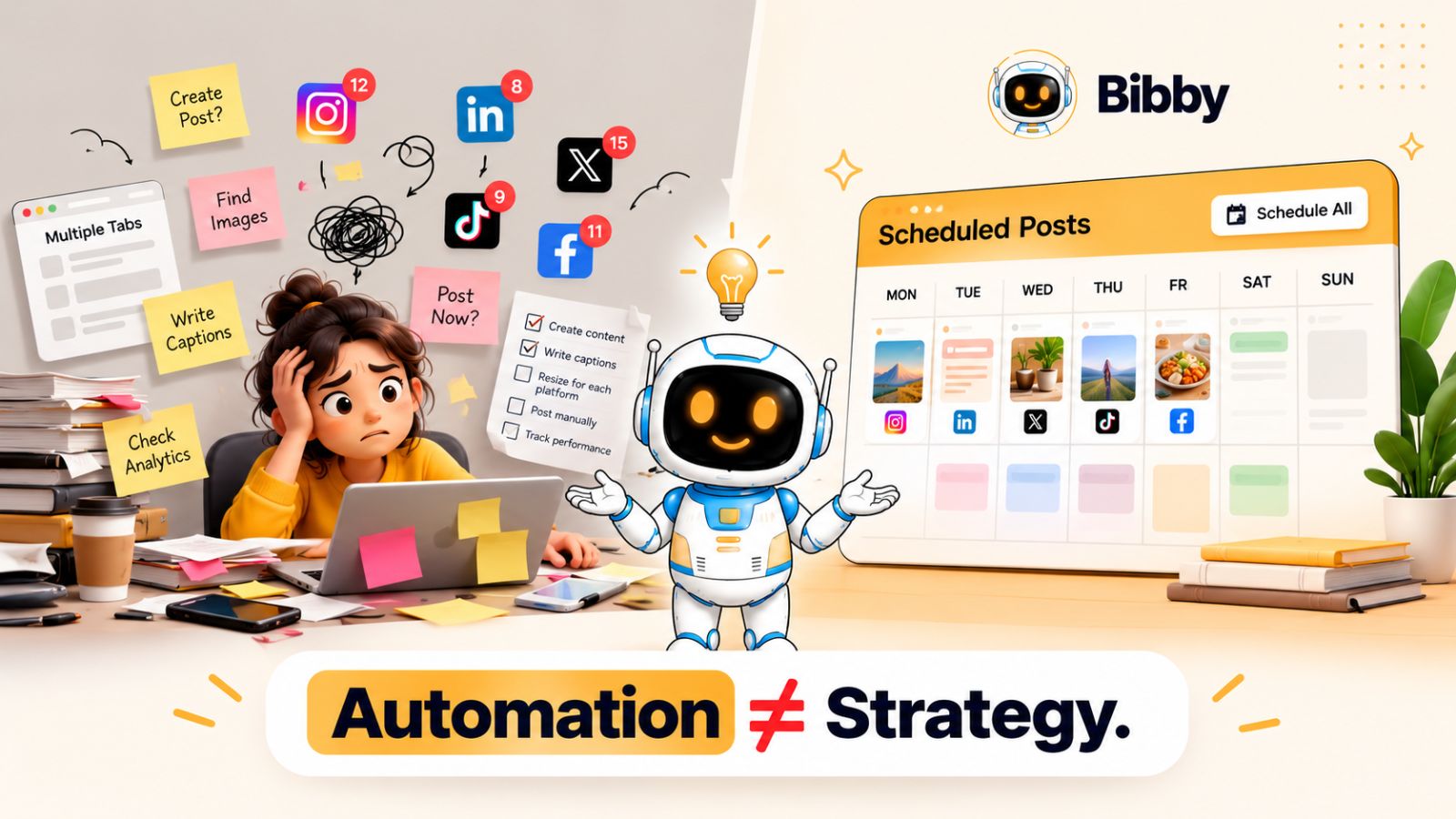
But that's only the operational side of consistency.
A scheduled post can still be the wrong post, published at the wrong time, in the wrong format, with a caption that doesn't fit the platform. You can have 30 posts scheduled for the next month and still have a social media presence that feels random.
That's because consistency isn't the same as frequency.
Real social media consistency means your audience repeatedly sees content that feels connected to your brand, relevant to their interests, and appropriate for the platform they're using. Your publishing schedule is simply the system that helps you deliver that content reliably.
Scheduling removes friction—not strategy
Think of social media scheduling as an engine. It can help your content move from your content calendar to your audience, but it doesn't automatically determine what your audience should see.
You still need to decide:
- What topics does your brand want to own?
- Who are you creating content for?
- What types of posts should you publish?
- Which platforms deserve your attention?
- What should each post accomplish?
- How often can you realistically create valuable content?
- Which formats make sense for each platform?
This is where many scheduling workflows break down. Businesses often start with the tool instead of the strategy.
They create a batch of posts, schedule them several weeks ahead, and assume the consistency problem is solved.
It isn't.
The better approach is to build a content system first and use scheduling to execute it.
For example, a business might have four core content pillars: educational content, customer stories, product-focused content, and behind-the-scenes content. Instead of randomly filling empty slots on a calendar, every scheduled post has a reason for existing.
That makes automation considerably more useful.
Automation should give you more freedom, not less control
There's also an important distinction between automation and abandoning control.
Good social media automation handles repetitive work while leaving room for human judgment. You should be able to prepare content in batches, generate captions faster, distribute different formats across platforms, and schedule posts without manually repeating the same process every day.
At the same time, you need opportunities to review what's coming next and make adjustments when your business, audience, or the wider conversation changes.
This is one reason an integrated workflow can be more practical than constantly moving between separate tools for images, captions, scheduling, and publishing. A platform such as Bibby is designed around bringing those steps into a more connected workflow—from uploading or generating visuals and selecting a posting style to generating captions and scheduling content across selected platforms.
The goal isn't to automate your entire social media presence and walk away.
The goal is to automate the repetitive parts so you have more time for the parts that require judgment, creativity, and actual audience interaction.
And that distinction leads directly to the first major scheduling mistake: assuming that one scheduling strategy can work equally well everywhere.
Mistake #1: Treating Every Social Platform the Same
One of the most common social media scheduling mistakes is creating one post, writing one caption, and sending it to every platform at exactly the same time.
It feels efficient. It can also make your brand look like it's broadcasting rather than participating.
Facebook, Instagram, LinkedIn, YouTube, and TikTok have different content formats, audience expectations, and consumption habits. A post that works as a professional insight on LinkedIn may need a completely different opening on Instagram. A short-form video designed for TikTok may need a different title, description, or presentation when published on YouTube.
That doesn't mean you need to create completely separate content from scratch for every platform.
It means you should adapt the same core idea to the platform instead of blindly duplicating the same post.
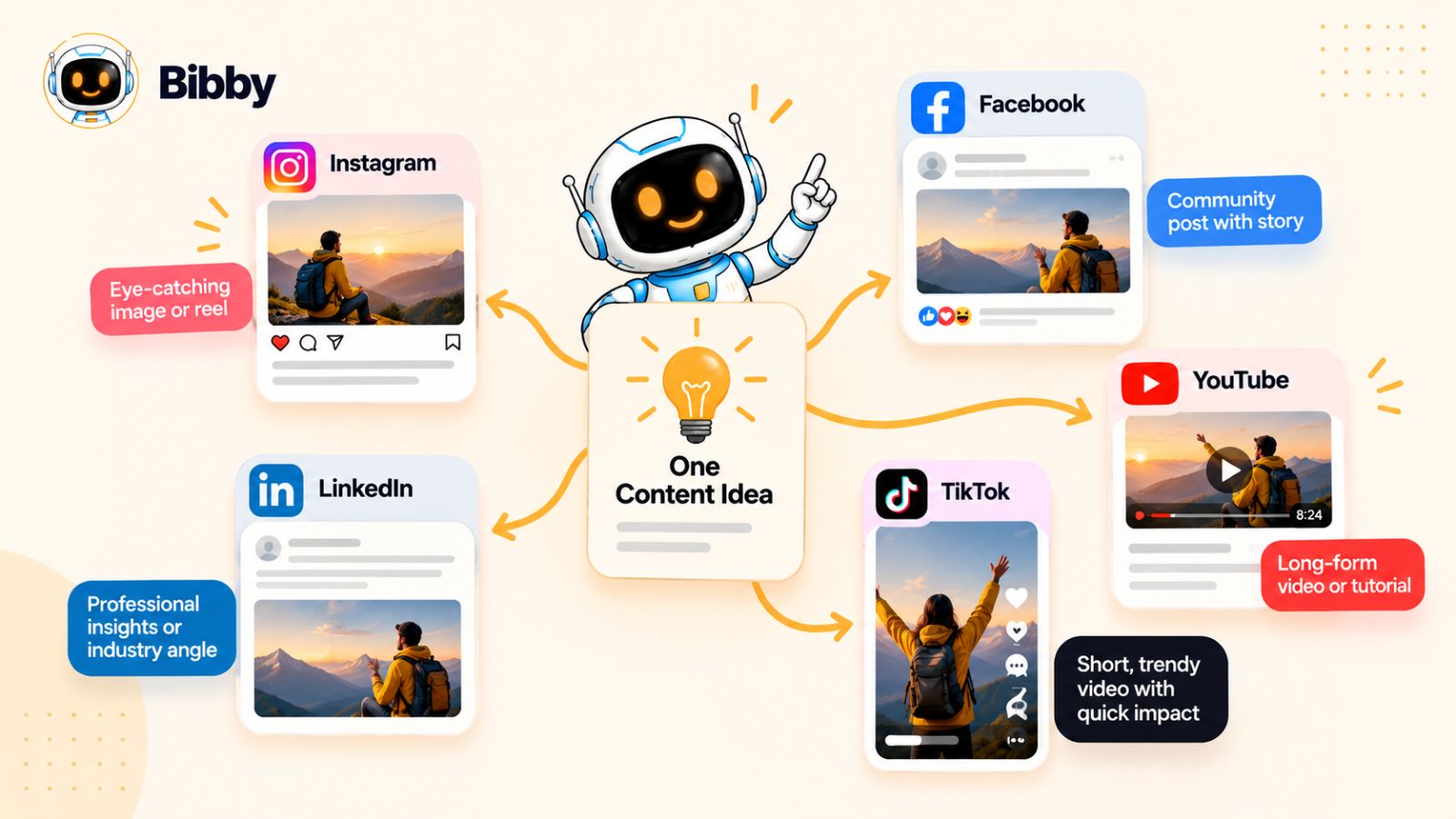
One idea can become multiple platform-specific posts
Imagine you're a SaaS company launching a new feature.
The underlying idea is the same: your product now solves a specific problem more easily.
But the presentation can change:
- LinkedIn: Explain the problem, the insight behind the feature, and what it means for businesses.
- Instagram: Turn the feature into a visual carousel showing the problem and solution.
- Facebook: Use a conversational post that explains the benefit and invites discussion.
- TikTok: Create a short demonstration showing the problem before revealing the solution.
- YouTube: Expand the demonstration into a longer walkthrough or tutorial.
You're not creating five unrelated pieces of content.
You're creating five versions of one content idea, each designed for the environment where it will appear.
This distinction matters when you're building a social media scheduling system. Your scheduler should make distribution easier without encouraging you to stop thinking about the individual platforms.
Cross-platform scheduling should reduce work, not remove context
This is where modern social media scheduling tools can make a significant difference.
The ideal workflow isn't:
Create → copy → paste → publish everywhere.
It's closer to:
Create → adapt → schedule → review → publish.
For example, if you're preparing a week's worth of content, you can start with your core ideas and media, then customize the presentation for the platforms you're targeting.
A tool such as Bibby can help streamline the operational side of this process. You can upload an image or generate one with AI, choose a posting style, generate captions, and schedule your content across selected social platforms. Instead of manually repeating the same publishing process for every channel, the scheduling workflow can handle much of the repetitive distribution work.
That becomes particularly useful when your content mix includes images, carousels, videos, and stories, rather than only static posts.
But the important principle remains the same: automation should preserve platform context.
If your scheduling workflow makes publishing easier but encourages you to treat every network identically, you've automated the wrong part of the process.
Build once, adapt intelligently
A sustainable social media workflow should therefore separate content creation from content distribution.
Start with the idea.
Then ask:
- What is the most useful version of this idea for each platform?
- Which format makes the idea easiest to consume?
- What should the opening line or hook accomplish?
- Does the caption sound natural for that platform?
- Should the content be published everywhere, or only where it makes sense?
Once those decisions are made, scheduling becomes much easier.
And that brings us to another problem: even perfectly adapted posts can underperform when there's no strategy behind what you're scheduling in the first place.
Mistake #2: Scheduling Content Without a Clear Content Strategy
A content calendar can look impressively full and still produce a weak social media presence.
You might have posts scheduled every day for the next month, yet if those posts don't work together, you're essentially filling empty spaces on a calendar rather than building an audience.
This is one of the easiest social media scheduling mistakes to make because scheduling tools naturally encourage you to think in terms of dates and times. But before asking “What should we post on Thursday?”, you should ask “What should our audience consistently learn, feel, or do when they see our content?”
That's the difference between a posting schedule and a content strategy.
Start with content pillars
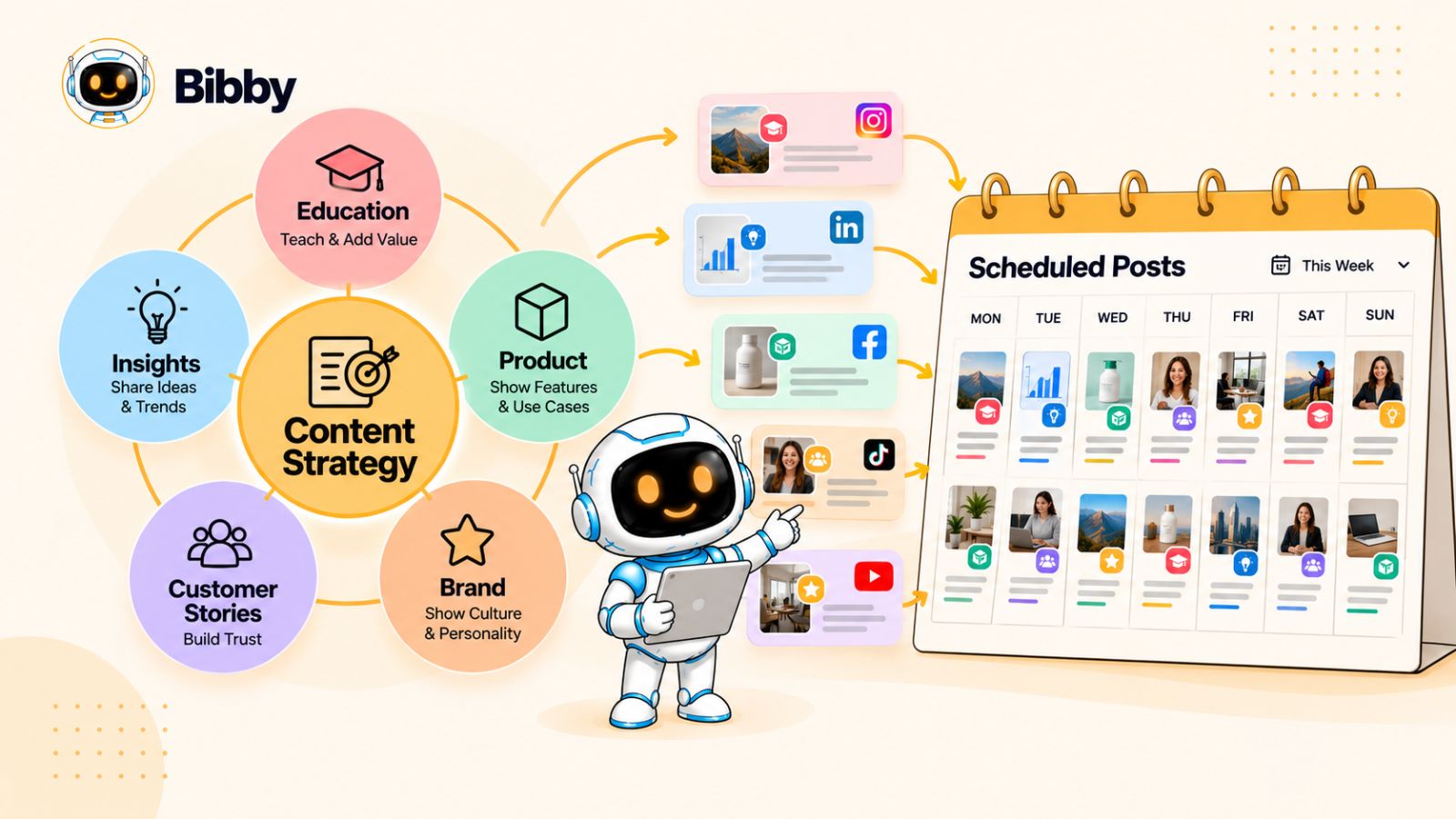
A simple way to create structure is to establish a small number of content pillars.
For example, a marketing software company might build its social media content around:
- Education: Tips, tutorials, and actionable strategies
- Insights: Industry trends, observations, and original perspectives
- Proof: Customer stories, results, and testimonials
- Product: Features, use cases, and demonstrations
- Brand: Behind-the-scenes content and company culture
Now the scheduling process has context.
Instead of opening your scheduler and thinking, “We need something for Monday,” you can look at your content mix and identify what belongs next.
This also prevents another common problem: publishing promotional content repeatedly because it's the easiest content to create.
Consistency needs variety
Being consistent doesn't mean talking about the same thing every day.
In fact, excessive repetition can make your social media feed predictable. If every scheduled post is a product announcement, sales pitch, or recycled motivational quote, publishing more frequently won't necessarily make the account more valuable.
A stronger schedule creates recognition without repetition.
Your audience should understand what your brand is about while still having a reason to pay attention to the next post.
That's why content pillars work so well with scheduling. They give you a framework for producing content in batches without making every post feel identical.
Don't confuse a content calendar with a strategy
A content calendar tells you when something will be published.
A strategy explains why you're publishing it.
You need both.
For example:
| Scheduling question | Strategy question |
|---|---|
| What are we posting Monday? | What audience problem are we addressing? |
| What time should it go live? | What is this post supposed to achieve? |
| Which platform should receive it? | Why does this content belong there? |
| How many posts are scheduled? | Are we covering our key content pillars? |
| What's next in the queue? | What should our audience remember about us? |
This is also where AI can make a scheduling workflow more useful—but only when it's working from a clear direction.
With a tool like Bibby, you can move from creating or uploading media to selecting a posting style, generating captions, and scheduling content across your chosen platforms. Its chat interface can also be used to create campaigns, build a brand kit, create posts, and regenerate captions through conversation.
The technology can reduce the amount of manual work involved.
But your content pillars still determine what you're asking the technology to produce.
Build the strategy before filling the calendar
Before scheduling a month of content, define three things:
1. Your audience
Who are you trying to reach, and what problems or interests should your content address?
2. Your content pillars
What recurring topics should your brand become known for?
3. Your content goals
Are you trying to build awareness, educate an audience, generate conversations, drive traffic, generate leads, or support existing customers?
Once these are clear, scheduling becomes an execution task rather than a guessing game.
And there's another problem with filling your calendar too far in advance: even a well-planned content strategy can become outdated when circumstances change.
Mistake #3: Scheduling Too Far Ahead Without Reviewing Your Content
Scheduling content in advance is one of the biggest advantages of social media automation. It gives you breathing room, reduces last-minute publishing, and makes it easier to maintain a consistent presence.
But there is a point where planning ahead becomes a liability.
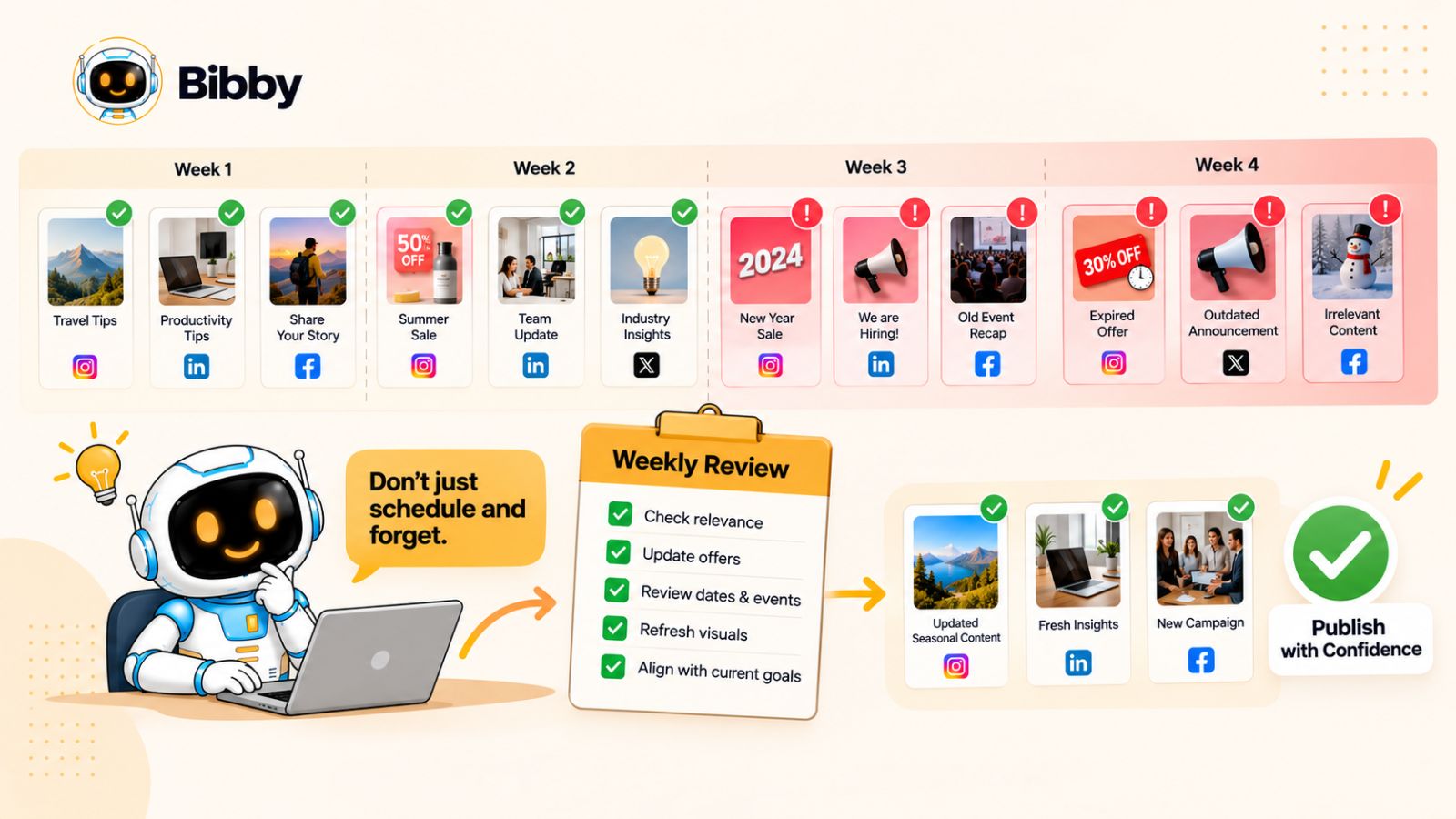
If you schedule everything weeks or months in advance and never review what's coming up, your social media account can become disconnected from what's actually happening in your business and industry.
A content calendar should create control, not remove it.
Your scheduled content exists in a changing environment
Social media doesn't happen in isolation.
A product launch can move. A campaign can change direction. A trend can disappear. A major industry event can make yesterday's planned post feel irrelevant. Even something as simple as a change to your company's offer can make scheduled promotional content inaccurate.
Imagine scheduling a post saying:
“Our biggest offer of the year ends Friday.”
Then your team extends the promotion for another week.
If that post is sitting in an automated queue and nobody reviews it, your scheduling system isn't saving you time anymore. It's publishing outdated information automatically.
The same problem applies to content that isn't technically wrong but simply feels poorly timed.
A lighthearted post scheduled during a major industry event, a product announcement that goes live after the feature has already been discussed elsewhere, or a “coming soon” post published after the launch has happened can all make a brand appear disconnected.
Avoid the “set it and forget it” approach
The solution isn't to stop scheduling.
It's to build a review layer into your social media scheduling workflow.
Before scheduled content goes live, quickly review:
- Is the information still accurate?
- Is the offer or product detail still current?
- Does the post still fit the current campaign?
- Has something happened that changes the context?
- Does the visual and caption still represent the brand?
- Does this content still deserve to be published?
This doesn't have to become a daily manual process.
A weekly review of your upcoming content can catch many problems while preserving most of the time savings that scheduling provides.
Separate evergreen content from time-sensitive content
Another useful approach is to categorize scheduled content by how quickly it can become outdated.
Evergreen content can usually be scheduled further ahead. Tutorials, educational tips, frameworks, and foundational explanations may remain useful for weeks or months.
Time-sensitive content deserves more attention. Product announcements, promotions, event-related posts, industry commentary, seasonal campaigns, and trend-based content should generally remain closer to the publishing date.
This creates a more flexible content calendar.
You can batch-produce evergreen material and schedule it well ahead of time while keeping enough space in your calendar for current content.
AI scheduling should still leave room for judgment
Modern social media automation can take this further by helping with more than simply choosing a date.
For example, Bibby can take uploaded or AI-generated media, generate captions based on your selected posting style, and schedule content across your chosen platforms at AI-optimized times. That can significantly reduce repetitive scheduling work when you're managing multiple channels and formats.
But automation works best when you treat it as an assistant rather than an autopilot.
The more content you automate, the more valuable a simple review process becomes.
You don't need to inspect every post from scratch. You need to make sure the system's output still matches reality.
Leave space in your calendar
One of the most practical social media scheduling habits is to avoid filling every available publishing slot months in advance.
Leave some capacity for:
- Breaking industry news
- New product announcements
- Customer stories
- Trending conversations
- Seasonal opportunities
- Unexpected business updates
- Content inspired by audience questions
That flexibility can make an automated social media presence feel much more human.
The goal isn't to predict everything that will happen.
It's to automate the predictable work while leaving enough room to respond to what you couldn't predict.
And even when your content is strategically planned and regularly reviewed, another scheduling mistake can quietly undermine performance: assuming every platform should have the same posting frequency.
Mistake #4: Using the Same Posting Frequency for Every Platform
There is a tempting idea in social media marketing: if posting consistently is good, posting more consistently must be better.
That logic often leads to a rigid publishing schedule—three posts a week on every platform, or perhaps one post every day everywhere.
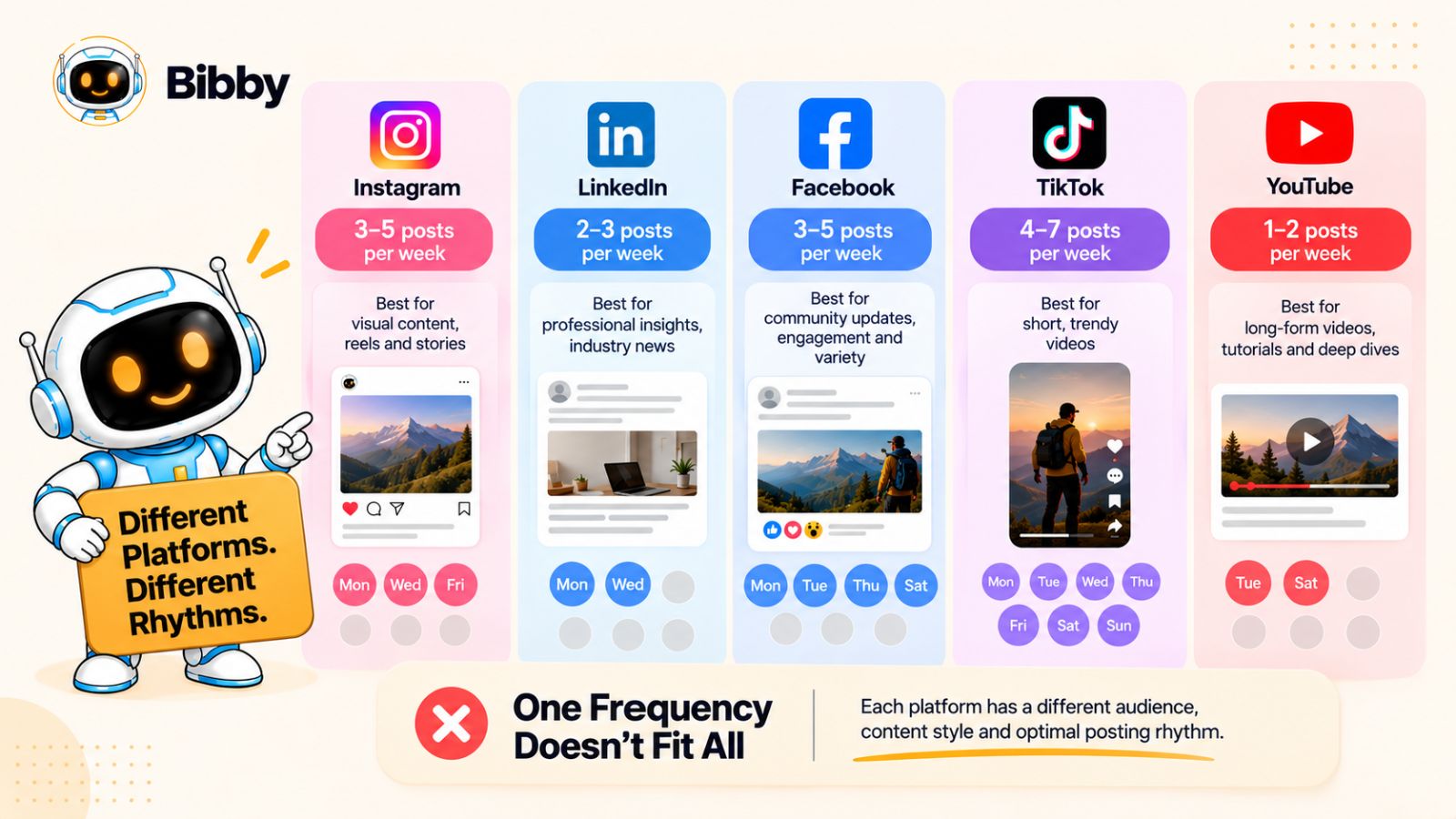
The problem is that there is no universal social media Posting Frequency that works equally well for every platform, audience, and business.
Your audience may behave differently on LinkedIn than on Instagram. Your video strategy on TikTok may require a different cadence from your YouTube content. And a business that can realistically produce three valuable videos a week shouldn't force itself into a daily video schedule simply because a generic social media calendar says so.
Consistency is about sustainability
A sustainable posting schedule is one your team can maintain without sacrificing the quality of the content.
Consider two businesses.
Business A publishes seven times a week because it wants to appear active. But its team is rushing captions, recycling ideas, and publishing low-value content simply to fill the calendar.
Business B publishes less frequently but has a clear content strategy, strong visuals, useful information, and enough time to engage with its audience.
The number of posts alone doesn't tell you which account is creating a better experience.
This is why your social media scheduling strategy should begin with capacity and content quality, not an arbitrary posting target.
Different platforms require different rhythms
Your social media calendar should account for the role each platform plays in your marketing.
For example, a business might decide that:
- LinkedIn is primarily used for industry insights and thought leadership.
- Instagram focuses on visual education, carousels, Reels, and Stories.
- TikTok focuses heavily on short-form video.
- YouTube is used for deeper video content and tutorials.
- Facebook supports community-oriented content and broader brand communication.
That naturally creates different publishing requirements.
A single idea might be adapted across several channels, but that doesn't mean every version needs to appear at the same frequency.
Instead of asking, “How many times should I post on social media?”, ask:
“What publishing rhythm can we sustain while consistently giving each platform content worth publishing?”
That's a much more useful question.
Don't let the scheduler dictate your strategy
Scheduling tools are designed to make publishing easier. But an empty calendar can create a psychological trap.
You see an unused slot and think:
“We should put something there.”
Then you create content simply because there is an available slot.
Eventually, your calendar becomes full—but your audience isn't necessarily getting more value.
A better system lets your content strategy determine the schedule.
If you have five genuinely useful pieces of content ready for Instagram this week, schedule them. If you only have two strong YouTube videos ready, don't manufacture three more just to make the numbers look symmetrical.
A consistent brand is not necessarily one that posts constantly. It's one that delivers a recognizable level of value on a sustainable basis.
Use automation to make sustainable frequency easier
This is where an integrated scheduling workflow becomes particularly valuable.
Instead of manually publishing each piece of content, you can prepare content in batches and let your scheduling system handle the repetitive distribution work.
With Bibby, for example, you can upload or generate media, choose a posting style, have captions generated automatically, and schedule content across selected platforms. Because the workflow can handle different formats—including images, carousels, videos, and stories—you can build a broader content mix without managing every publishing task separately.
The benefit isn't simply being able to publish more.
It's being able to maintain your chosen publishing rhythm with less operational effort.
That distinction matters.
If automation gives you the capacity to create more valuable content, great. But if it simply helps you publish more mediocre content, you've made your scheduling process more efficient without necessarily making your social media strategy better.
And that leads to the next mistake: using automation to increase volume while allowing the quality of the content itself to decline.
Mistake #5: Focusing on Quantity Instead of Content Quality
Once social media scheduling becomes easier, it's natural to start thinking about volume.
If you can schedule 30 posts in the time it previously took to schedule 10, why not publish 30?
Because the ability to publish more doesn't automatically create a reason for your audience to consume more.
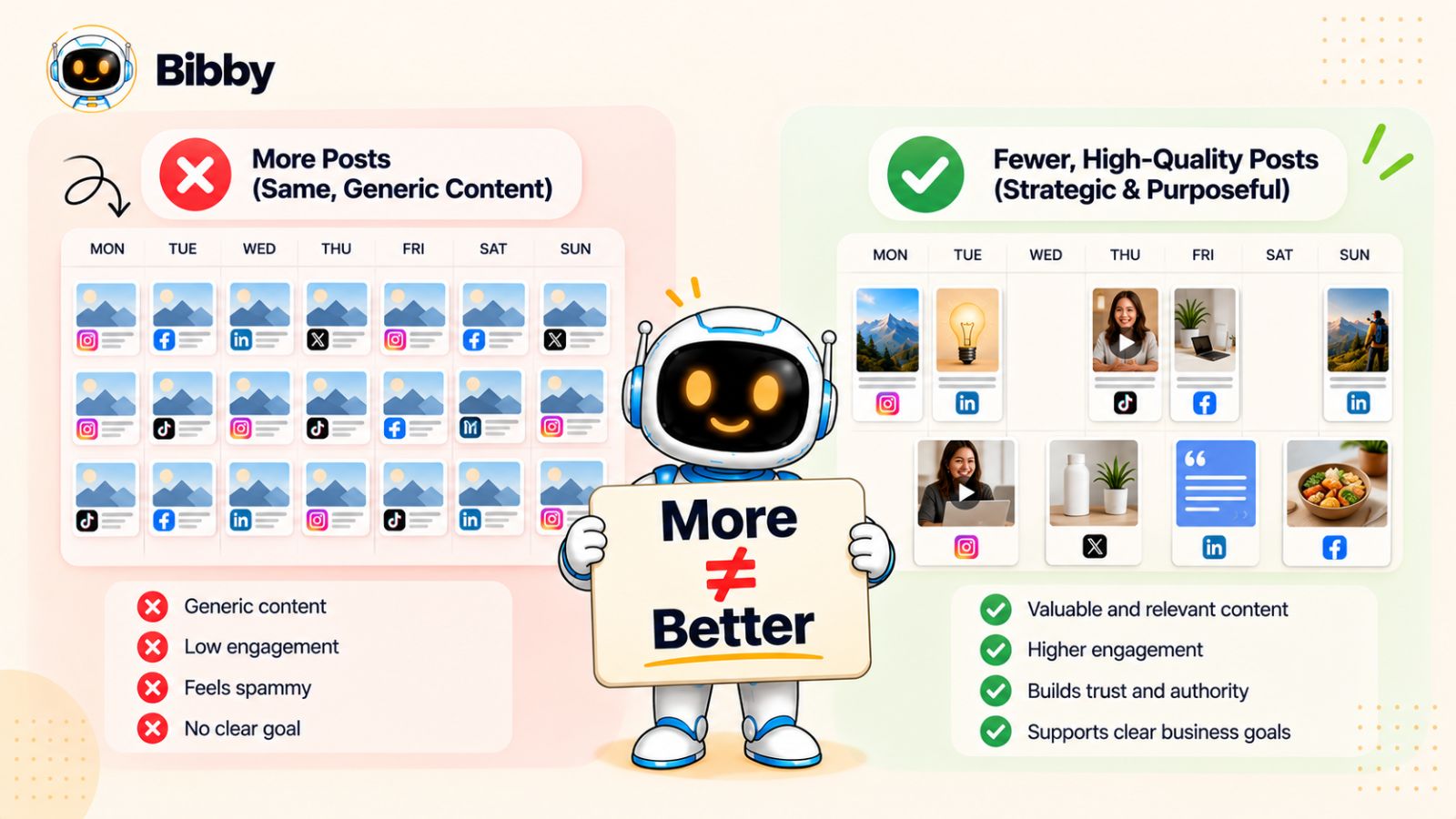
This is one of the quieter social media scheduling mistakes because the calendar can make the problem look like progress. Your queue is full. Your posts are going out on time. Your team feels productive.
But if the content is repetitive, generic, or irrelevant, you're simply automating a larger volume of content that your audience has little reason to care about.
More posts don't automatically mean more value
Imagine following a brand that publishes twice a day.
Monday: a generic motivational quote.
Tuesday: a product graphic with “Learn more.”
Wednesday: another generic tip.
Thursday: a recycled promotional post.
Friday: another product graphic.
Technically, the brand is extremely consistent.
But consistency without value can become background noise.
Now imagine another brand that publishes fewer posts but uses those posts to answer real customer questions, explain complicated ideas, demonstrate its product, share useful insights, and show evidence of its results.
The second account may have a much clearer reason for its audience to keep paying attention.
The lesson isn't that you should post less.
It's that your publishing frequency should never become more important than the value of what you're publishing.
Build a system that protects quality
A good social media scheduling workflow should make quality easier to maintain, not encourage you to lower the bar.
Before scheduling a post, ask:
- Does this teach, entertain, inspire, or help the audience in some meaningful way?
- Is there a clear reason this post exists?
- Would someone stop scrolling for it?
- Does it sound like our brand?
- Is the visual appropriate for the platform?
- Does it repeat something we've already said too many times?
- Does the post support one of our content pillars?
If you can't answer these questions, adding the post to your scheduler simply because there's an empty slot probably isn't the right move.
AI should accelerate quality—not manufacture filler
AI can make content production significantly faster, particularly when you're managing multiple platforms.
But speed creates a new risk: low-effort content can now be produced at scale.
Generating ten captions in seconds doesn't make those captions useful. Creating dozens of AI images doesn't automatically give you a coherent visual identity. And scheduling everything automatically doesn't make a content strategy strategic.
The strongest workflow uses AI for the repetitive parts while keeping humans involved in the decisions that affect quality and brand identity.
For example, Bibby can help turn a media asset into a scheduled social post by letting you upload an image or generate one with AI, choose a posting style, and automatically generate captions. You can then schedule the content across your selected platforms rather than manually rebuilding the same post for each channel.
That can save substantial production time.
But the time you save should be reinvested into better ideas, better creative, better audience research, and better engagement—not simply into filling more calendar slots.
Think in terms of content efficiency
Instead of measuring your social media system only by how many posts it produces, consider how much value you get from the content you create.
One strong idea can become:
- An Instagram carousel
- A LinkedIn insight
- A short-form video
- A TikTok
- A Facebook post
- A YouTube explanation
- A Story sequence
The goal isn't to copy and paste the same post everywhere. It's to identify the central idea and adapt it intelligently to different formats and audiences.
That approach can increase your content output without requiring an equal increase in content ideation.
And once you have a system for creating quality content efficiently, there's another bottleneck worth addressing: the time it takes to turn each piece of content into a caption that actually sounds like your brand.
Mistake #6: Writing Captions Manually for Every Post
Creating the visual is often only half the work.
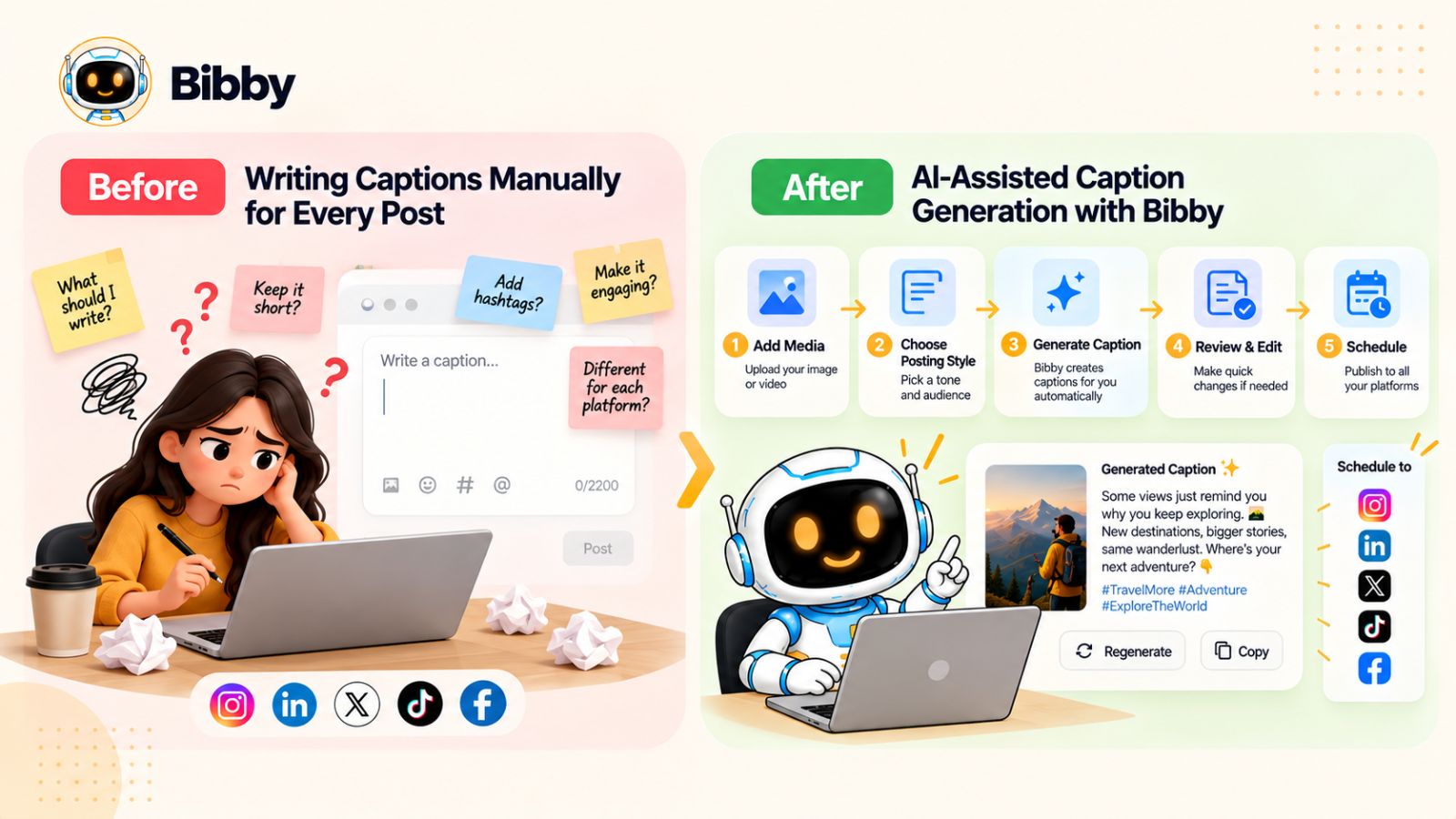
Once you've designed an image, edited a video, or finished a carousel, you still have to write the caption, adapt it for different platforms, add a call to action, check the tone, and then schedule everything.
Repeat that process across dozens of posts and multiple platforms, and caption writing can quietly become one of the biggest time drains in your social media workflow.
That doesn't mean captions don't matter. It means you shouldn't spend most of your social media management time doing repetitive writing that can be accelerated.
Captions should support the content—not slow it down
A good caption has a job.
Depending on the post, it might explain an idea, provide context, encourage discussion, tell a story, highlight a benefit, or direct someone toward the next action.
The mistake is treating every caption as a completely blank page.
If you're publishing similar types of content regularly, you can create repeatable structures for different post styles.
For example:
Educational post
Hook → problem → useful insight → practical takeaway → CTA
Product post
Problem → solution → key benefit → proof/context → CTA
Thought-leadership post
Observation → perspective → explanation → question
These structures give your content team a starting point without forcing every caption to sound identical.
AI can remove the blank-page problem
This is one area where AI-powered social media scheduling can make a noticeable difference.
Instead of opening a blank document for every post, you can provide the content and direction, then let AI generate an initial caption that you review and refine.
Bibby is built around this kind of workflow. You can upload an image or generate media with AI, choose your preferred posting style, and have captions generated automatically before scheduling the content across your selected platforms.
That means the workflow can move from:
Media → caption → scheduling
without requiring you to manually rebuild every step.
And because Bibby supports different social media formats—including images, carousels, videos, and stories—you can use the same broader workflow across different types of content.
Don't let AI erase your brand voice
There is one important caveat.
AI-generated captions shouldn't mean generic captions.
If every post sounds like it was written by the same AI template, your audience will notice. Phrases become repetitive. Hooks start sounding interchangeable. Every caption eventually develops the same rhythm.
That's why your brand voice matters.
Your AI workflow should have enough context to understand things such as:
- How your brand communicates
- Who your audience is
- What tone you use
- What terminology you prefer
- What claims you can make
- What types of CTAs fit your brand
This is also where a brand kit can become useful. Instead of repeatedly explaining your brand from scratch, you can establish the basic identity and use it as part of your content workflow.
Bibby's chat interface extends this idea beyond individual captions. You can use conversational commands to create a brand kit, create campaigns, create posts, regenerate captions, and manage other parts of your social media workflow.
The result is less time spent moving between disconnected tools and more time spent reviewing the content that actually represents your business.
Use AI for speed, humans for judgment
The most effective approach isn't “let AI write everything.”
It's:
Let AI create the first version. Let humans decide whether it's worth publishing.
That distinction protects both efficiency and quality.
You can generate multiple caption variations, choose the strongest direction, make a few edits, and move on. What previously took several minutes per post can become a much faster review process.
And when you're managing dozens of posts across multiple platforms, those saved minutes add up quickly.
But captions aren't the only thing that can become repetitive. If your entire social media calendar consists of the same type of post, even excellent captions won't fix the underlying problem.
That's why the next scheduling mistake is about content format.
Mistake #7: Scheduling Only One Type of Content
A social media calendar can be perfectly organized and still feel boring.
One reason is simple: every post looks the same.
If your scheduling workflow is built almost entirely around static images, your audience may eventually recognize the pattern before they even read the content. The same can happen if every post is a promotional graphic, every update is a text post, or every piece of content uses the same format regardless of the platform.
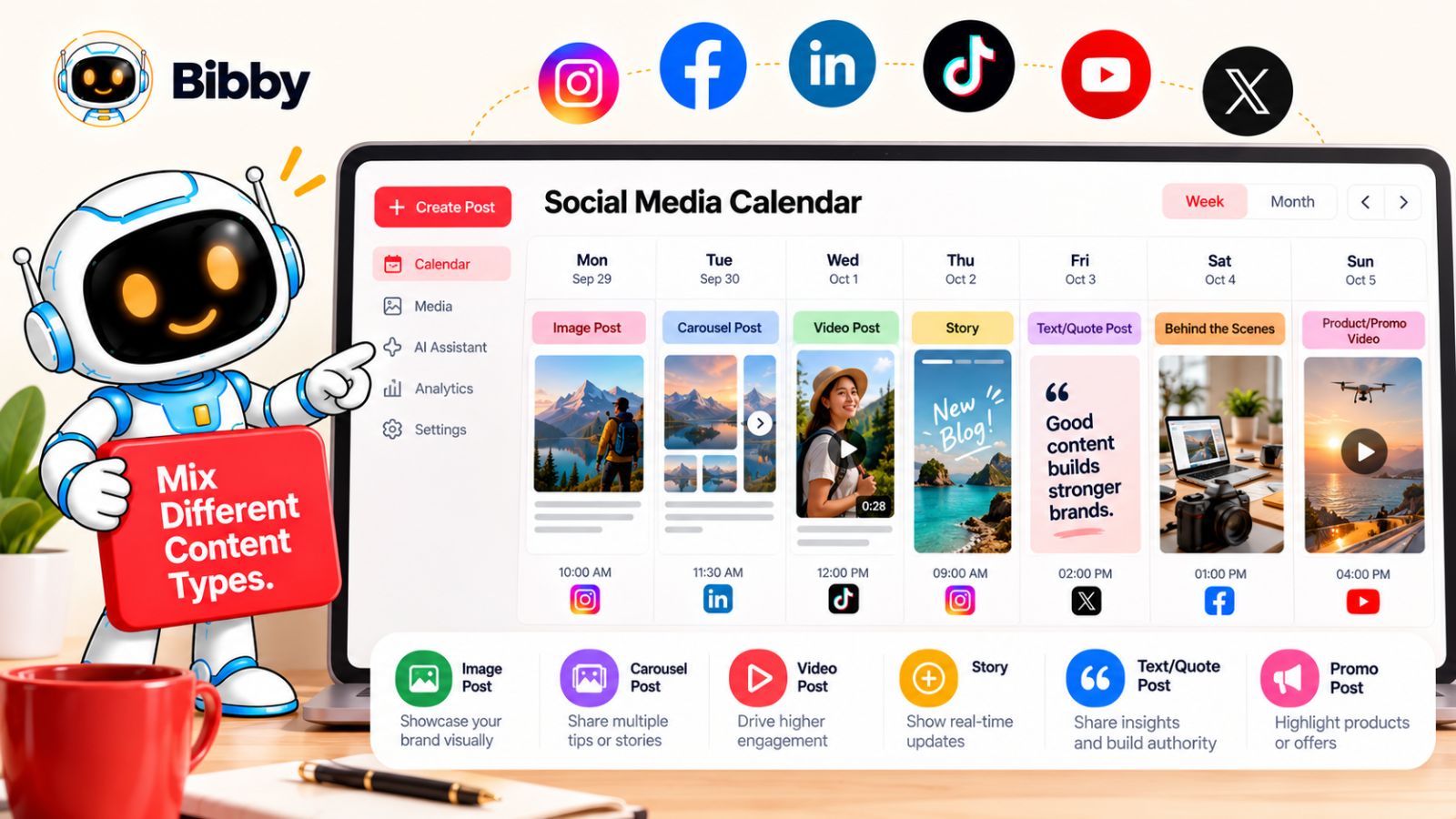
Modern social media isn't built around one universal content format. Different formats give you different ways to communicate an idea, demonstrate something, tell a story, or encourage interaction.
Your content format should match the idea
Not every idea should become a single-image post.
Consider a fitness brand explaining a new workout.
A single image might introduce the exercise. A carousel could break the movement into several steps. A video could demonstrate the technique. A Story could turn it into a quick question-and-answer sequence.
The underlying topic hasn't changed.
The format has.
That's the important distinction: don't choose a format because it's convenient to schedule. Choose it because it's appropriate for the content.
Build a format mix
A balanced social media content system might include:
- Images for announcements, quotes, visual insights, and branded messages
- Carousels for tutorials, lists, comparisons, and step-by-step education
- Videos for demonstrations, explanations, interviews, and storytelling
- Stories for timely updates, behind-the-scenes content, polls, and lighter interactions
You don't need to use every format on every platform.
Instead, look at your strategy and decide which formats help you communicate each content pillar most effectively.
This also makes your content calendar easier to manage. Rather than scheduling 20 nearly identical posts, you're building a collection of content assets that serve different purposes.
Don't confuse format variety with random content
Adding more formats doesn't mean randomly throwing videos, carousels, and Stories into your calendar.
The format should still connect to the content strategy.
For example:
Content pillar: Educational
- Instagram → Carousel explaining three common mistakes
- LinkedIn → Text-led insight expanding on the same topic
- TikTok → Short video demonstrating the solution
- YouTube → Longer tutorial
One subject can create multiple useful assets without becoming repetitive.
This is particularly valuable when you're managing several platforms. Instead of constantly asking, “What should we post next?”, you can ask, “What's the best format for this idea on this platform?”
Make your scheduler handle the variety
A social media scheduling tool becomes much more useful when it can accommodate the way you actually create content.
If you're using separate workflows for images, carousels, videos, Stories, captions, and scheduling, the administrative overhead can quickly become significant.
Bibby brings multiple parts of that process into one workflow. You can upload media or generate it with AI, choose a posting style, generate captions, and schedule different types of social content across your selected platforms.
That means your scheduling system doesn't have to be limited to a queue of static images.
You can build a calendar that includes images, carousels, videos, and Stories, while keeping the operational process centralized.
And because Bibby also provides a chat-based interface, managing those content workflows can become more conversational. Instead of navigating through multiple disconnected steps every time you want to make a change, you can use chat to create posts, create campaigns, regenerate captions, or work with your brand kit.
Variety keeps your calendar useful
The goal isn't to maximize the number of formats you publish.
It's to make sure your content calendar gives you enough flexibility to communicate effectively.
A strong scheduling system should let you say:
“This idea needs a carousel.”
“This one needs a video.”
“This announcement works as an image.”
“This behind-the-scenes update belongs in Stories.”
When your scheduling workflow supports those decisions instead of restricting them, consistency becomes much easier to maintain without making your feed feel repetitive.
But even with a strong mix of content formats, there's another scheduling variable that can quietly affect performance: when your content actually reaches your audience.
Mistake #8: Ignoring the Timing and Distribution Problem
You can have the right content, the right format, and the right caption—and still make your social media scheduling less effective by treating publishing time as an afterthought.
A common approach is to choose a convenient time, such as 9 a.m. every weekday, and schedule everything around it.
It's simple. It's predictable. But convenience isn't necessarily the same as optimization.
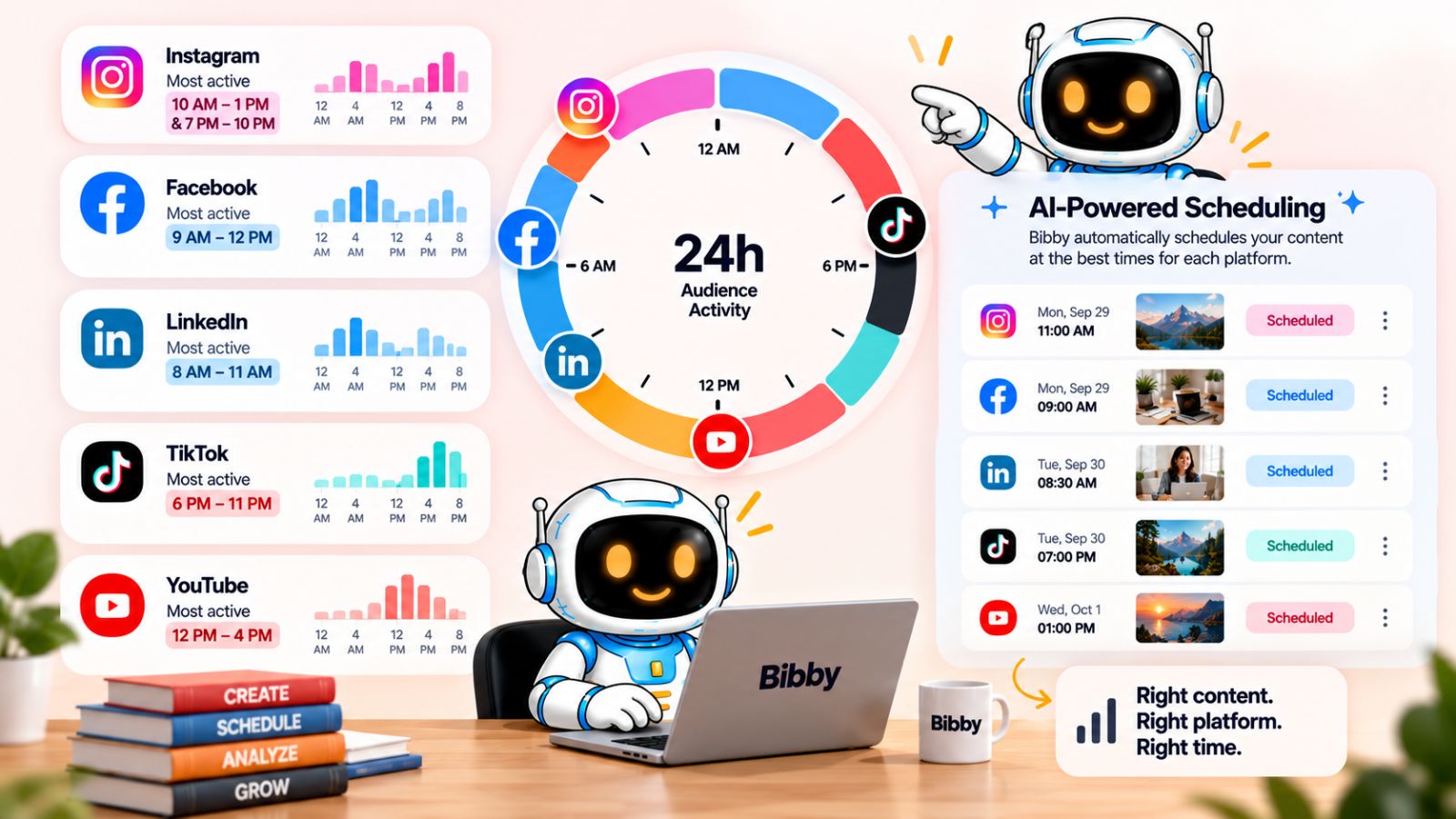
Your audience doesn't necessarily use every platform at the same time, and the best publishing window can vary based on your audience, platform, content type, and historical performance.
Stop treating posting time as a fixed rule
You'll find plenty of advice online claiming that you should post at a particular hour.
The problem is that generic posting-time recommendations can only take you so far.
A B2B audience may behave differently from a consumer audience. A global audience may be spread across multiple time zones. A video might perform differently from a text-based insight. Even the same audience can develop different usage patterns over time.
Instead of asking:
“What is the best time to post on social media?”
a better question is:
“When is my audience most likely to be receptive to this type of content on this platform?”
That shifts your scheduling strategy from generic rules toward your own audience and data.
AI can make timing part of the workflow
This is one area where automation can be particularly useful.
Rather than manually choosing a date and time for every post, an AI-powered scheduling system can use optimization to help determine when content should be published.
Bibby incorporates AI-optimized posting times into its scheduling workflow. After you upload or generate your media, select a posting style, and prepare the caption, you can schedule your content across your selected platforms without manually choosing every publishing slot.
That can be particularly useful when you're managing several platforms at once.
Instead of maintaining separate spreadsheets for publishing times or manually calculating schedules for every channel, the scheduling system can take care of much of the repetitive timing work.
Timing isn't a substitute for good content
There's an important limitation to remember.
Optimizing the publishing time of weak content doesn't turn it into strong content.
Timing is a distribution variable, not a replacement for strategy.
If your post doesn't solve a problem, entertain, educate, demonstrate something useful, or give your audience a reason to care, moving it from 10 a.m. to 11 a.m. won't fundamentally change the value of the content.
Think of the hierarchy this way:
Useful idea → appropriate format → strong presentation → suitable platform → optimized distribution
Timing belongs toward the end of that process.
Use timing as something to learn from
Your publishing schedule shouldn't be static forever.
As you collect performance data, look for patterns:
- Which publishing windows consistently generate engagement?
- Which formats perform differently at different times?
- Does audience behavior vary between platforms?
- Are certain content pillars more effective at particular times?
- Are you reaching the audience you actually want?
You don't need to obsess over tiny fluctuations in performance. The goal is to identify meaningful patterns and gradually improve your scheduling decisions.
This is another reason automated scheduling can be valuable: it frees your team from manually managing every publishing detail so they can spend more time interpreting what the content is actually doing.
And that brings us to another problem that often appears once businesses start automating: they increase the amount of content they publish without creating a consistent system for how the brand itself should look and sound.
Mistake #9: Creating Content in Batches Without a Brand System
Batching social media content is one of the easiest ways to save time.
Instead of creating one post every morning, you can spend a few hours preparing several pieces of content at once and schedule them throughout the week or month.
But there's a hidden problem: when you create content quickly without a defined brand system, consistency can actually get worse.
One post may use a completely different visual style from another. Captions may sound like they came from different companies. Colors, fonts, terminology, and messaging can change from one week to the next.
Your publishing schedule is consistent.
Your brand isn't.
Social media consistency goes beyond posting frequency
When people talk about social media consistency, they often mean publishing regularly.
But audiences also recognize brands through repeated visual and verbal cues.
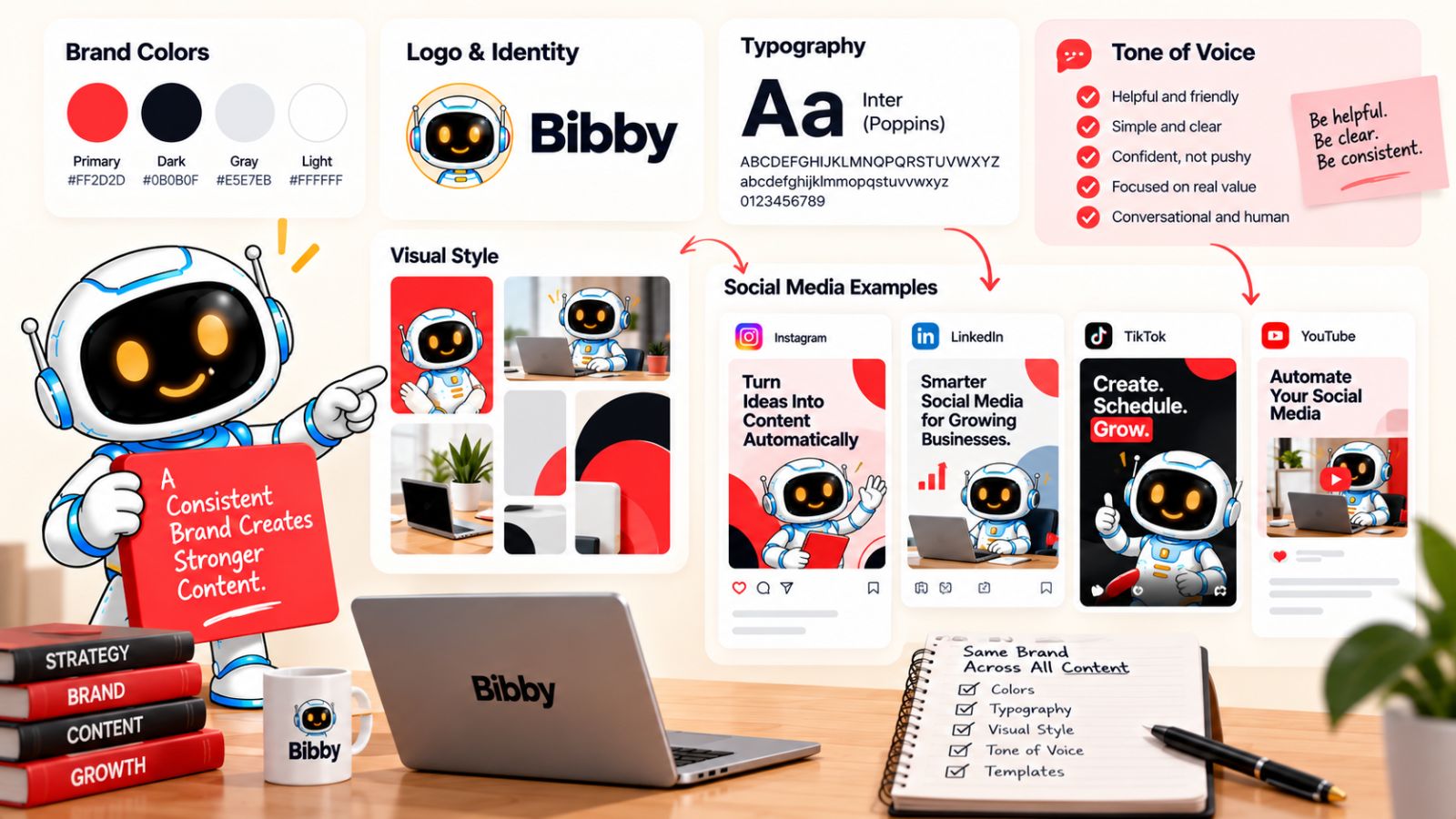
Think about the elements that should remain familiar across your content:
- Colors and visual identity
- Typography
- Image style
- Logo treatment
- Tone of voice
- Common terminology
- Messaging themes
- Calls to action
- Overall content style
You don't need every post to look identical.
You need the posts to look like they belong to the same brand.
That becomes especially important when multiple people—or AI tools—are creating content for the same social media accounts.
Create a brand system before you scale production
A simple brand kit can act as a reference point for your content creation process.
At minimum, it should define your core visual identity and communication style.
For example:
Visual: Primary colors, secondary colors, fonts, logo usage, image direction
Voice: Professional, conversational, educational, bold, technical, playful—or whatever fits your audience
Messaging: Core positioning, recurring themes, terminology, and phrases your brand uses
Content: Preferred formats, recurring content pillars, and examples of strong posts
Once those elements are defined, batching becomes much easier.
Instead of reinventing the brand every time you create a post, you're working from an established system.
This is where AI needs context
AI can generate content quickly, but it needs direction.
Without brand context, AI-generated captions can become generic. AI-generated visuals can drift away from your established identity. And if different prompts produce different results, your feed can gradually become visually inconsistent.
A tool such as Bibby addresses part of this workflow through its brand kit functionality.
Rather than treating every post as an isolated creation task, you can establish brand information and use the platform's workflow to support more consistent content creation. Its chat interface also lets you work conversationally—for example, creating a brand kit, creating campaigns, generating posts, or regenerating captions.
That matters because social media management increasingly involves combining human direction with AI-assisted production.
The more content you produce, the more important it becomes to give the system a clear definition of what your brand should sound and look like.
Batch creation should create leverage, not sameness
There is another subtle distinction here.
A brand system shouldn't make every post identical.
If every carousel uses the exact same layout, every caption follows the same structure, and every video starts with the same hook, your audience may recognize the template—but they may also stop noticing the content.
The goal is recognizable variety.
Your audience should be able to identify your brand without feeling like they're seeing the same post repeatedly.
A strong system therefore gives creators boundaries without removing creativity.
Build the brand system before scaling automation
Before you dramatically increase your social media publishing volume, make sure you've answered:
- What should our content look like?
- What should our content sound like?
- What topics should we consistently talk about?
- What visual elements should remain recognizable?
- What should AI-generated content follow?
- What should never appear in our brand communication?
Once those rules are established, automation becomes much safer to scale.
But there's another issue waiting underneath all of this.
Even if your content is strategic, varied, on-brand, well-captioned, and scheduled at appropriate times, your workflow can still become inefficient if you're jumping between a different tool for every step.
That leads to one of the biggest operational mistakes in modern social media management.
Mistake #10: Managing Social Media From Too Many Tools
At first, using several specialized tools can seem like the smartest approach.
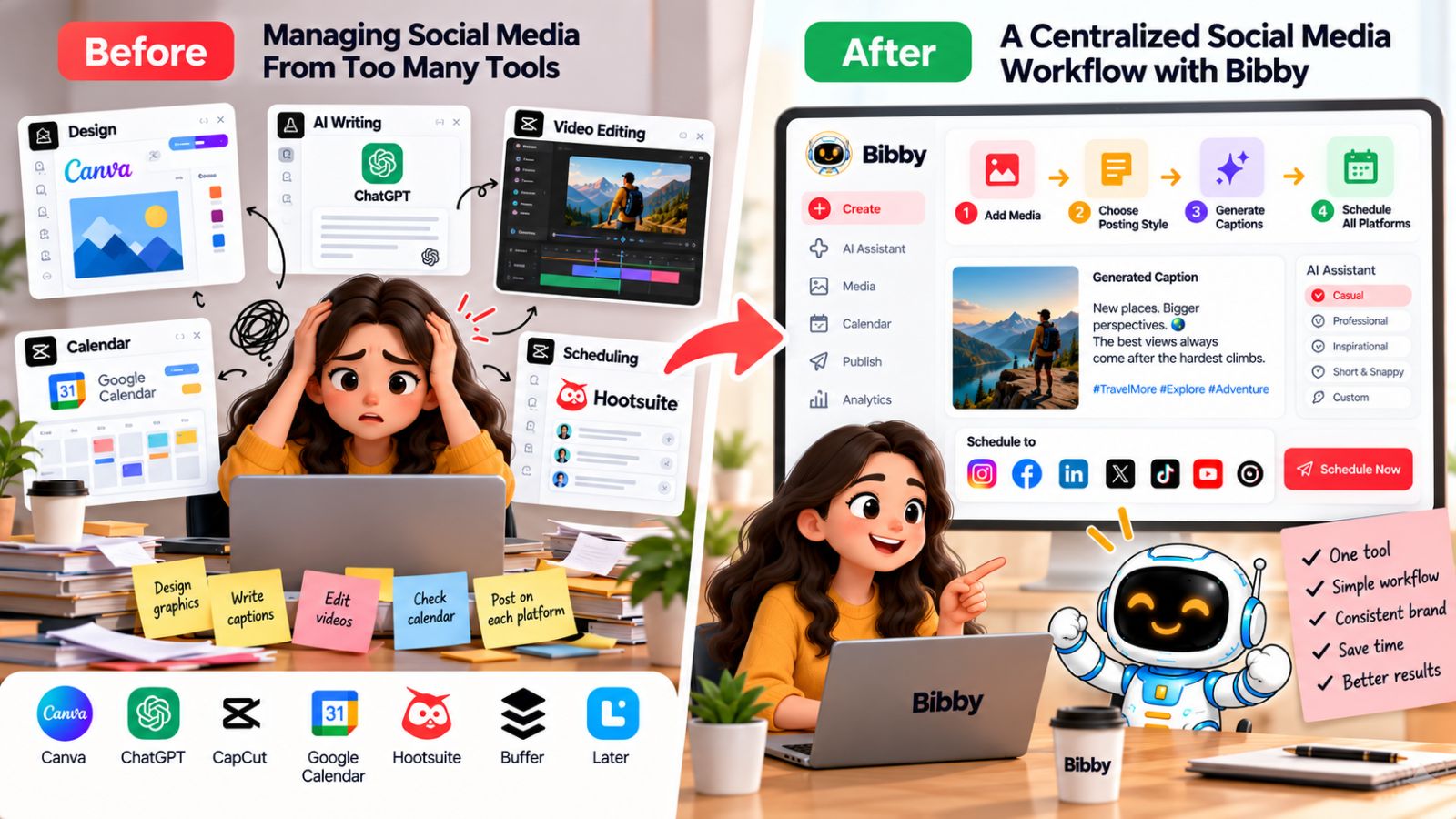
One tool for designing images. Another for generating AI visuals. Another for writing captions. Another for managing your content calendar. Another for scheduling. Another for videos. Another for campaigns.
Each tool may solve a specific problem well.
The problem appears when your social media workflow becomes a chain of disconnected tools.
You create something in one application, download it, upload it somewhere else, copy the caption into another platform, switch to a scheduler, adjust the publishing time, then repeat the process for every social network.
Eventually, managing the workflow becomes almost as time-consuming as creating the content.
The hidden cost of fragmented workflows
The biggest problem isn't necessarily the subscription cost of multiple tools.
It's the friction between them.
Every handoff creates another opportunity for something to go wrong:
- The wrong image gets uploaded.
- A caption gets copied incorrectly.
- A platform-specific version is forgotten.
- A scheduled post uses an outdated asset.
- Brand information has to be entered repeatedly.
- A campaign is scattered across several systems.
- Someone forgets to schedule one of the platforms.
When you're publishing one post a week, these problems may be insignificant.
When you're managing dozens of posts across multiple platforms, they compound quickly.
The ideal workflow has fewer unnecessary handoffs
A more efficient social media workflow brings related tasks closer together.
Instead of:
Design → download → caption tool → copy → scheduler → platform
you want something closer to:
Create → customize → caption → schedule → review
That's one reason all-in-one social media platforms are becoming increasingly useful.
The objective isn't to eliminate every specialized tool. If you have a dedicated design or video workflow that your team loves, there may be no reason to replace it.
The goal is to eliminate unnecessary switching and repetitive work.
Bibby brings creation and scheduling closer together
Bibby is designed around this more connected approach.
You can upload your existing media or generate an image with AI, select a posting style, generate captions, and schedule the resulting content across your selected platforms. The workflow supports different media types, including images, carousels, videos, and Stories.
That means the process doesn't have to stop after content creation.
You can move from the asset itself into the publishing workflow without manually rebuilding everything somewhere else.
And Bibby's chat interface adds another layer to that workflow.
Instead of treating social media management as a collection of menus and disconnected actions, you can use conversation to manage tasks such as:
- Creating a brand kit
- Creating a campaign
- Creating posts
- Regenerating captions
- Managing content ideas
- Making changes to your social media workflow
For a busy team, the value isn't simply having more features.
It's having fewer steps between deciding what you want to publish and actually getting it ready to publish.
Don't automate fragmentation
This is an important distinction.
Adding automation to a complicated workflow doesn't necessarily make the workflow simple.
If you're still moving content through six different tools, you've merely made a six-tool process faster.
A better approach is to look at your entire social media production system and identify where the repetitive handoffs happen.
Ask:
Where are we copying information?
Where are we downloading and re-uploading assets?
Where are we repeating the same instructions?
Where are we manually performing the same action for multiple platforms?
Those are the areas where consolidation can have the greatest impact.
Use fewer tools where it actually makes sense
The goal isn't to have the fewest possible apps.
It's to have a workflow where each tool has a clear purpose and the overall system doesn't create unnecessary work.
If your team can create, prepare, customize, and schedule content from a more centralized workflow, consistency becomes easier to maintain because there are fewer opportunities for the process to break.
But there's one mistake that no scheduling platform can completely solve for you:
assuming that scheduled publishing means you no longer need to interact with your audience.
Mistake #11: Thinking Scheduling Means You Can Stop Engaging
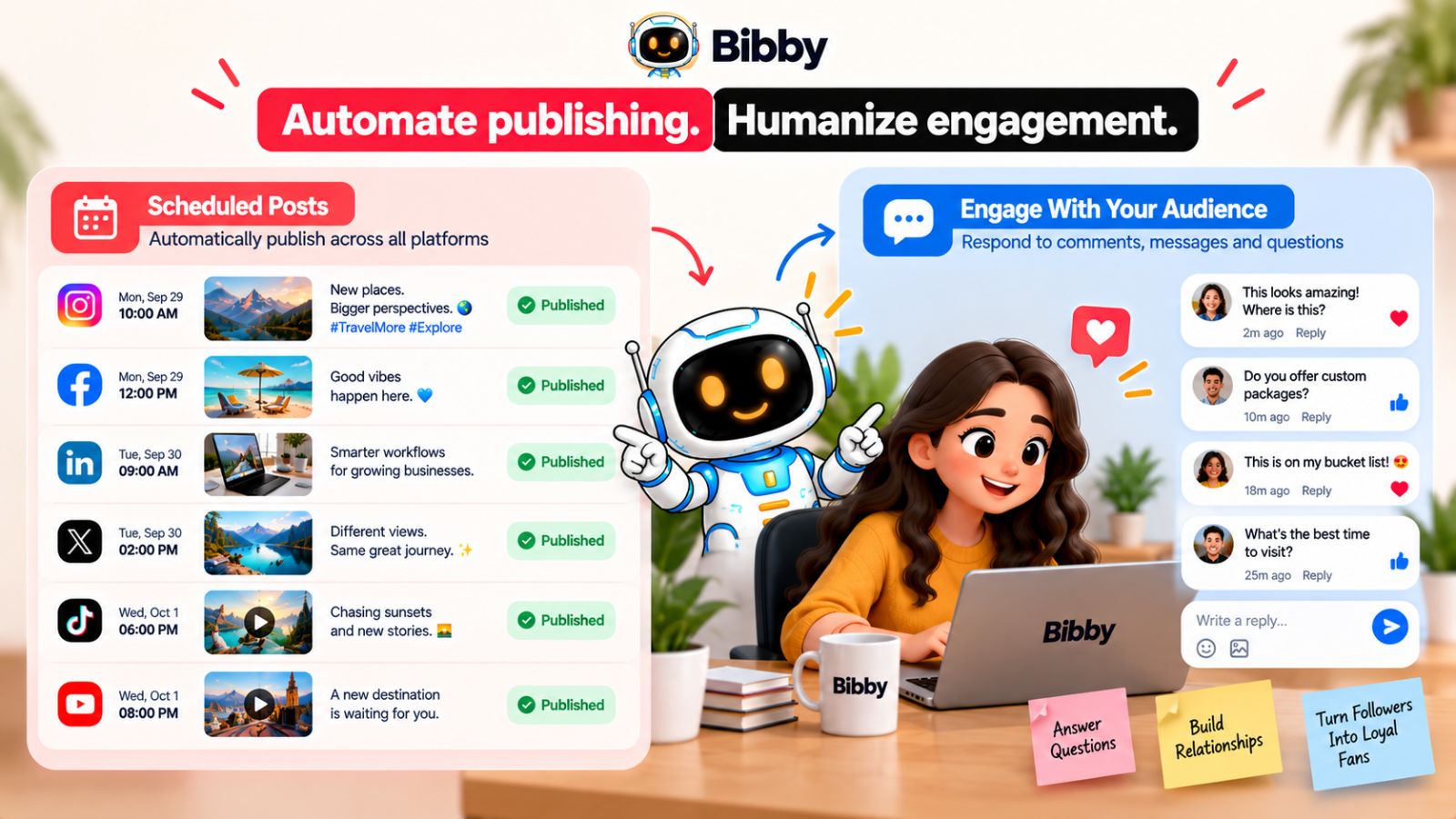
Scheduling can automate publishing.
It cannot replace a relationship with your audience.
This distinction is easy to lose when your social media workflow becomes highly automated. Once you've scheduled a week's worth of content, it can feel like the work is finished.
But publishing is only one part of social media management.
Your audience may comment on a post, ask a question, mention your brand, share your content, or send you a message. If nobody is there to respond, the account can look active while the brand itself feels absent.
Publishing and engagement are different jobs
A scheduling system is excellent at repetitive publishing tasks.
It can help you prepare content in advance, generate captions, distribute posts across platforms, and publish according to your schedule.
Engagement is different.
It requires context.
Someone asking a question about your product may need a specific answer. A customer sharing an experience may deserve a personal response. A thoughtful comment may turn into a useful conversation.
Those interactions aren't simply publishing tasks that need to happen at a certain time.
They're opportunities to build relationships.
Automation should create time for engagement
This is actually one of the strongest arguments for social media automation.
If your team spends less time manually uploading posts, copying captions, selecting publishing times, and repeating the same scheduling steps across platforms, that time can be redirected toward higher-value work.
Instead of spending 30 minutes manually scheduling tomorrow's posts, you can spend that time:
- Responding to comments
- Answering customer questions
- Joining relevant conversations
- Reviewing audience feedback
- Identifying recurring questions
- Talking with potential customers
- Finding ideas for future content
The objective of automation shouldn't be to remove humans from social media.
It should be to remove unnecessary manual work so humans can spend more time where they matter.
Build engagement into your social media workflow
A simple system can help.
For example, you might schedule content several days ahead and reserve a specific period each day for community management.
Your workflow becomes:
Create → schedule → publish → engage → learn → improve
rather than:
Create → schedule → forget
That final loop is important.
The conversations happening around your content can tell you what your audience actually wants.
If people repeatedly ask how to solve a particular problem, that's a potential future post.
If several customers misunderstand the same feature, that's a potential educational carousel.
If one topic consistently generates thoughtful discussion, it may deserve a deeper video or article.
Your audience can effectively become part of your content research process.
Let Bibby handle the repetitive work while you handle the human work
This is where the broader Bibby workflow fits naturally.
You can use Bibby to prepare media, generate captions, organize campaigns, create posts, and schedule content across selected platforms. Its chat interface can also let you manage tasks conversationally, such as creating campaigns, creating a brand kit, or regenerating captions.
The more of the repetitive publishing process you can centralize and automate, the less time your team needs to spend on administrative work.
But the conversations with your audience still need attention.
Automation should make your brand more available, not less human.
Don't measure consistency only by your publishing calendar
A calendar showing 30 scheduled posts doesn't tell you whether your social media strategy is working.
You also need to look at what happened after those posts went live.
Which posts generated meaningful conversations?
Which topics attracted the right audience?
Which formats encouraged people to respond?
Which questions appeared repeatedly?
Which content led people to visit your website or take another valuable action?
Those answers turn social media scheduling from a simple publishing process into a feedback system.
And that brings us to the final mistake: creating a sophisticated scheduling system but never reviewing whether the content it publishes is actually working.
Mistake #12: Not Reviewing What Your Scheduling System Is Producing
Automation can make social media publishing remarkably efficient.
But efficiency creates a potential blind spot: once everything is scheduled, it's easy to stop looking at what happens afterward.
Your calendar can be full. Posts can go out on time. Captions can be generated automatically. Your publishing workflow can run smoothly.
And yet, you may have no idea which parts of that system are actually producing results.
That's why one of the most important social media scheduling best practices is to create a feedback loop between what you publish and what you learn from it.
A full calendar doesn't mean a successful strategy
Imagine that you scheduled 50 posts last month.
You know:
- 50 posts were published.
- They went out on schedule.
- Multiple platforms were covered.
- Your content calendar stayed consistent.
Those are useful operational metrics.
But they don't tell you whether the content connected with your audience.
You also need to ask:
- Which topics generated the most meaningful engagement?
- Which formats attracted attention?
- Which posts generated clicks?
- Which content produced conversations?
- Which posts drove leads or other business outcomes?
- Which content consistently underperformed?
The answers can reveal whether your scheduling strategy is supporting your broader social media goals.
Don't track every metric just because you can
social media platforms provide enormous amounts of data.
That doesn't mean you need to monitor every number.
Choose metrics that connect to what you're trying to accomplish.
If your goal is awareness, you might pay closer attention to reach and impressions.
If your goal is engagement, interactions and meaningful conversations may matter more.
If your goal is traffic, clicks and visits become more relevant.
If your goal is lead generation, you'll need to connect social activity with downstream conversions rather than judging success purely by likes.
The important thing is to establish a relationship between the content you're scheduling and the outcome you're trying to achieve.
Turn performance into your next content plan
The real value of analytics isn't reporting what happened.
It's deciding what to do next.
Suppose your data shows that educational carousels consistently generate more useful engagement than generic promotional graphics.
That insight can influence your next content calendar.
Perhaps you create more educational content.
Maybe you turn your strongest carousel topics into videos.
Maybe you use questions from the comments as the basis for future posts.
Maybe you reduce the amount of promotional content that isn't generating meaningful responses.
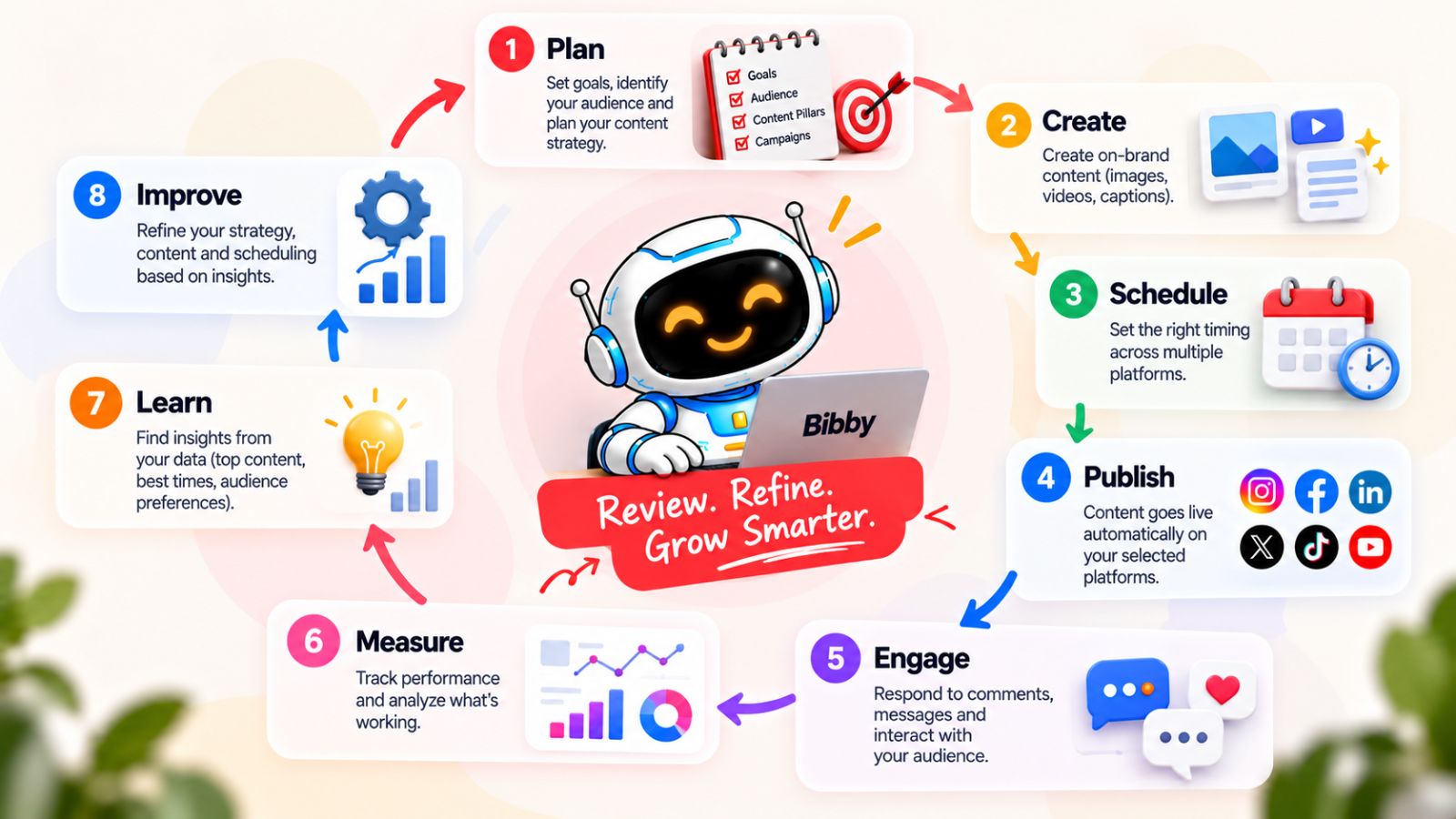
This creates a continuous loop:
Publish → measure → learn → adjust → publish again
That's far more powerful than creating a calendar once and repeating it indefinitely.
AI can make the workflow easier, but strategy still comes first
Tools like Bibby can reduce the operational work involved in creating and scheduling social media content.
You can create or upload media, generate captions, choose posting styles, schedule different content formats, and manage campaigns across selected platforms. The chat interface can also make it easier to make changes or regenerate content without rebuilding the workflow from scratch.
But the smartest use of automation is not simply to produce more posts.
It's to create a system where the repetitive work becomes easier while the strategic decisions become more informed.
You can spend less time manually scheduling content and more time looking at what your audience responds to.
That's the point at which social media automation becomes genuinely useful.
Schedule with a feedback loop, not a finish line
Your content calendar should never be considered finished.
Every publishing cycle gives you information that can improve the next one.
The best scheduling workflow therefore isn't:
Create → schedule → publish → repeat.
It's:
Plan → create → schedule → publish → engage → measure → learn → improve.
Once that feedback loop is in place, scheduling stops being merely a way to keep your social media accounts active.
It becomes part of a larger system for consistently producing, distributing, and improving content.
And now that we've covered the mistakes that quietly undermine social media scheduling, let's put everything together into a practical workflow you can use to make your publishing process more consistent without making it more complicated.
A Better Social Media Scheduling Workflow
Avoiding scheduling mistakes is only half the battle. The bigger opportunity is to build a workflow that makes consistent social media publishing easier without turning your calendar into a source of repetitive, low-value content.
A strong system doesn't begin with a scheduling tool. It begins with your strategy, then uses automation to remove repetitive execution work.
Here's a practical workflow you can adapt to your business.
1. Define your content pillars
Start by deciding what your brand should consistently talk about.
Choose a manageable set of themes that connect your expertise with your audience's interests and problems.
For example:
- Educational content
- Industry insights
- Customer stories
- Product content
- Behind-the-scenes content
These pillars prevent your calendar from becoming a random collection of posts.
2. Create your content assets
Once you know what you want to communicate, create the media.
Depending on the idea, that could mean an image, carousel, video, Story, or another format.
You don't need to create every asset from scratch. AI can help generate visuals, transform ideas into content concepts, and speed up production.
The important thing is to start with a useful idea rather than starting with an empty calendar slot.
3. Adapt the idea for each platform
Don't automatically publish identical content everywhere.
Take the central idea and determine how it should appear on each selected platform.
A carousel may make sense on Instagram. A professional perspective might work better on LinkedIn. A short demonstration could become a TikTok or YouTube video.
This gives you the efficiency of repurposing without sacrificing platform relevance.
4. Generate and refine captions
Writing every caption from scratch can consume a surprising amount of time.
AI can provide a strong first draft, particularly when it understands your content, posting style, audience, and brand voice.
Bibby can help here by generating captions based on the media and posting style you select. Instead of starting from a blank text box, you can review, refine, or regenerate the caption before scheduling it.
The goal isn't to remove human editing.
It's to remove the repetitive blank-page work.
5. Schedule across your selected platforms
Once the content is ready, schedule it instead of manually publishing every post.
This is where a centralized workflow can create substantial time savings.
With Bibby, you can schedule content across selected platforms and use AI-optimized publishing times rather than manually choosing every date and time. The workflow also supports different content types, including images, carousels, videos, and Stories.
That means your calendar can represent your actual content strategy rather than being limited by what is easiest to schedule.
6. Review the upcoming calendar
Automation shouldn't eliminate oversight.
Before scheduled content goes live, review what's coming up.
Check for:
- Outdated information
- Conflicting campaigns
- Repetitive topics
- Incorrect offers
- Poor platform fit
- Current events that change the context
- Content that no longer represents your brand
A short review can prevent the kind of mistakes that make automated accounts feel disconnected.
7. Publish and engage
Once content goes live, your job isn't finished.
Respond to comments. Answer questions. Pay attention to recurring problems. Join relevant conversations.
The scheduling system handles distribution.
You handle the relationship.
8. Analyze what happened
At the end of each publishing cycle, look at the results.
Identify the topics, formats, platforms, and content styles that produced meaningful outcomes.
Don't simply ask, “Which post got the most likes?”
Ask:
“What did our audience respond to, and what should we do differently next time?”
9. Feed those insights back into your next calendar
This is the step that turns a collection of scheduled posts into a genuine social media system.
If a particular topic consistently performs well, develop it further.
If a format isn't producing results, experiment with a different presentation.
If your audience repeatedly asks the same question, turn that question into content.
If a campaign worked, identify why before simply repeating it.
Over time, your scheduling system should become smarter because your content decisions are informed by what you've learned from previous publishing cycles.
The complete workflow
Put everything together and the process becomes:
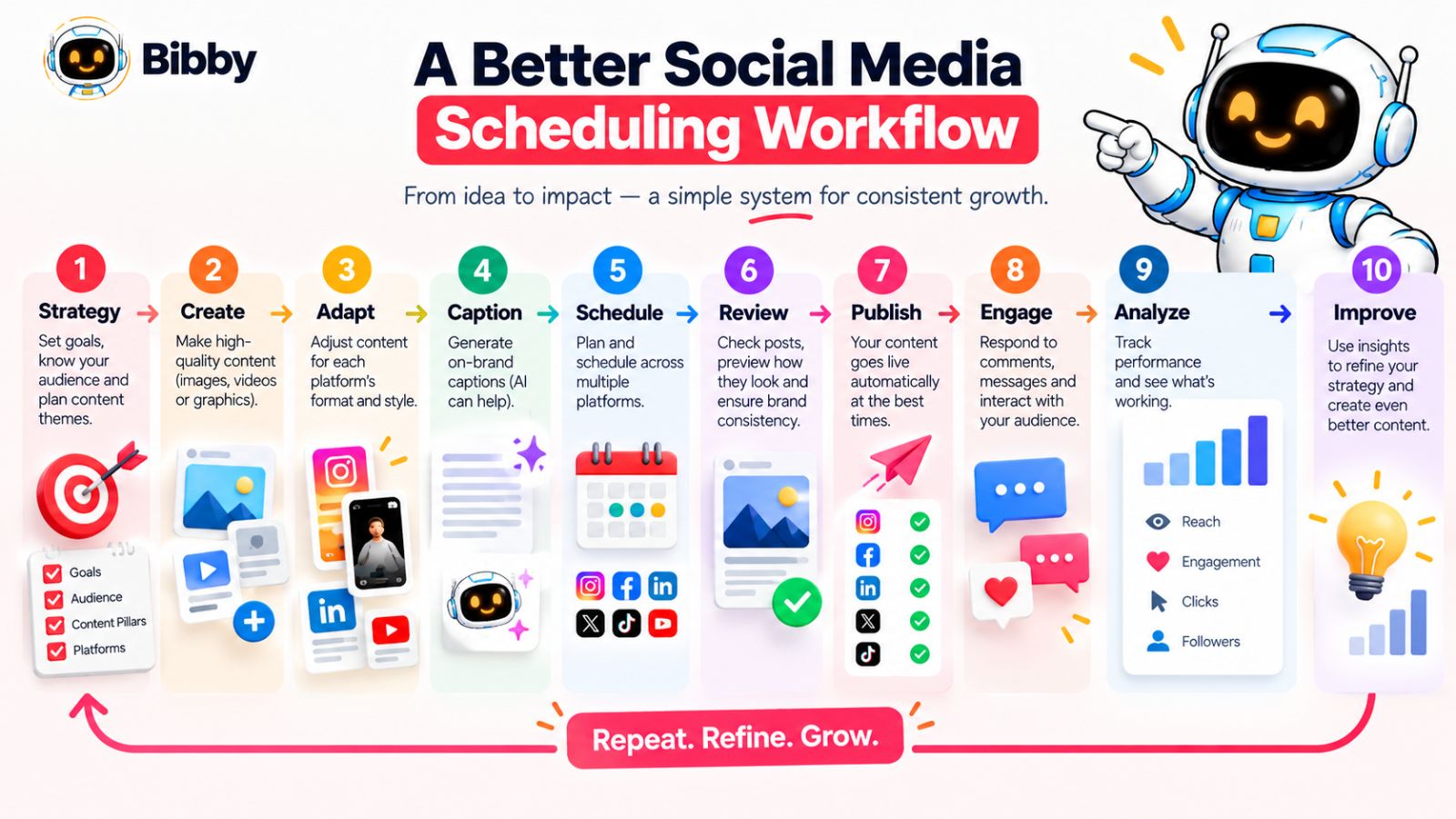
Strategy → Create → Adapt → Caption → Schedule → Review → Publish → Engage → Analyze → Improve
The scheduling tool sits in the middle of that system.
It doesn't replace the strategy.
It makes executing the strategy easier.
That's the fundamental difference between using a scheduler to fill a calendar and building a social media system that can actually scale.
And when the right creation, AI, scheduling, and management capabilities are brought into one workflow, the process can become considerably simpler—which is exactly where a tool like Bibby fits into the picture.
How Bibby Changes the Social Media Scheduling Workflow
The biggest improvement in social media scheduling isn't necessarily publishing more posts. It's removing the repetitive work that makes consistent publishing difficult in the first place.
That's the idea behind Bibby's workflow.
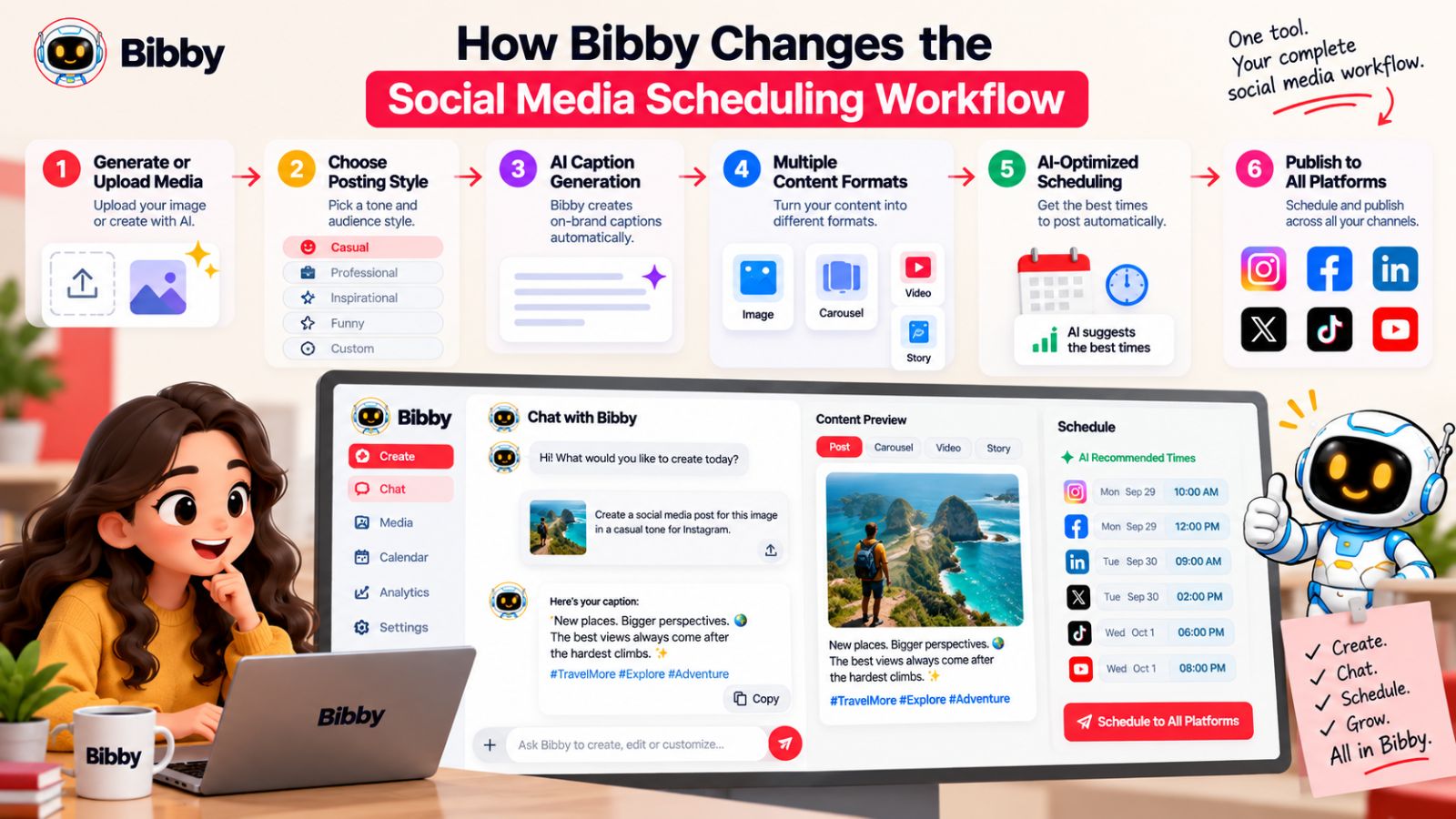
Instead of treating image creation, caption writing, content planning, and scheduling as completely separate tasks, Bibby brings them into a more connected social media workflow. You can create or upload your media, define how you want the post to feel, generate the caption, and schedule the content across your selected platforms.
The result is a workflow designed around a simple principle:
Create once, organize intelligently, and spend more time on the parts of social media that actually require you.
Start with your media
Every social media post starts with an asset.
You can upload an image you've already created or use AI to generate an image as part of your workflow.
From there, you can select the type of posting style you want rather than having to build every caption and publishing decision from scratch.
This is useful when you're managing a large content calendar because the creative process doesn't have to stop once the visual is ready.
Let AI help with captions
The next step is the caption.
Instead of opening a separate writing tool and manually transferring your content, Bibby can automatically generate captions based on the post and your selected style.
You can then review the result and make changes when necessary.
If the first version doesn't sound right, you can regenerate it rather than starting over.
That turns caption creation from a blank-page exercise into an editing workflow.
And when you're managing dozens of posts, that distinction can save a significant amount of time.
Schedule content at AI-optimized times
Once the content is ready, Bibby can schedule it across the social platforms you've selected.
Rather than requiring you to manually decide the publishing time for every post, the workflow can use AI-optimized posting times.
This is particularly useful when you're managing several accounts or publishing across multiple platforms. The scheduling process becomes less about remembering when everything needs to go live and more about preparing the content and letting the system handle the repetitive distribution work.
Manage different types of social content
A social media strategy shouldn't be limited to static images.
Bibby supports a broader range of content, including:
- Images
- Carousels
- Videos
- Stories
That matters because different ideas work better in different formats.
A tutorial might become a carousel. A product demonstration might become a video. A quick update might work better as a Story.
Having those formats within the same broader scheduling workflow makes it easier to build variety into your content calendar without creating a separate process for every format.
Manage social media through conversation
One of the more distinctive parts of Bibby's workflow is its chat interface.
Instead of navigating through a series of separate screens for every task, you can use conversation to manage parts of your social media operation.
For example, you can use the chat interface to:
- Create a brand kit
- Create a campaign
- Create posts
- Regenerate captions
- Make changes to your content
- Manage other social media tasks
This changes the interaction from “Which setting do I need to find?” to “What do I want to accomplish?”
For people managing social media regularly, that can make the workflow feel much more direct.
Create a brand system once
A brand kit is particularly useful when AI is involved in content production.
Instead of repeatedly explaining your brand's visual and communication preferences, you can establish those guidelines as part of your workflow.
That gives your content creation process a consistent reference point as you produce more posts.
And consistency matters even more as your publishing volume grows.
The goal isn't for every post to look identical.
It's for your audience to recognize the same brand behind the different posts, formats, and platforms.
Build campaigns instead of isolated posts
Social media becomes more strategic when individual posts connect to larger campaigns.
Rather than thinking only in terms of:
“What should we publish today?”
you can think:
“What are we trying to accomplish over the next few weeks?”
A campaign might involve several posts, different formats, multiple platforms, and different stages of the customer journey.
Bibby's ability to manage campaigns through its broader workflow can help connect those individual pieces rather than leaving them as unrelated scheduled posts.
The bigger advantage is workflow simplicity
The real value of a tool like Bibby isn't that it eliminates the need for social media strategy.
It doesn't.
You still need good ideas, a clear understanding of your audience, strong creative judgment, and a reason for publishing.
What it can eliminate is some of the repetitive operational work between those decisions.
Instead of:
Create image → open caption tool → write caption → copy caption → open scheduler → upload image → choose platform → choose time → repeat
you can move toward:
Create or upload → choose style → generate → review → schedule
That's a meaningful difference when social media is no longer ten posts a month but dozens of posts across multiple platforms.
The best scheduling system isn't the one that makes you publish the most.
It's the one that lets you maintain a consistent, high-quality presence with less unnecessary manual work.
And with the mistakes we've covered, you now have a practical framework for deciding whether your current scheduling process is actually helping—or quietly creating more problems than it's solving.
Social Media Scheduling Mistakes: Quick Diagnostic Checklist
Before you change your social media scheduling workflow, it's worth checking where the actual problems are.
You don't need to rebuild everything at once. In many cases, a few small changes can eliminate the friction that's making consistency harder than it needs to be.
Use this checklist to audit your current social media scheduling process.
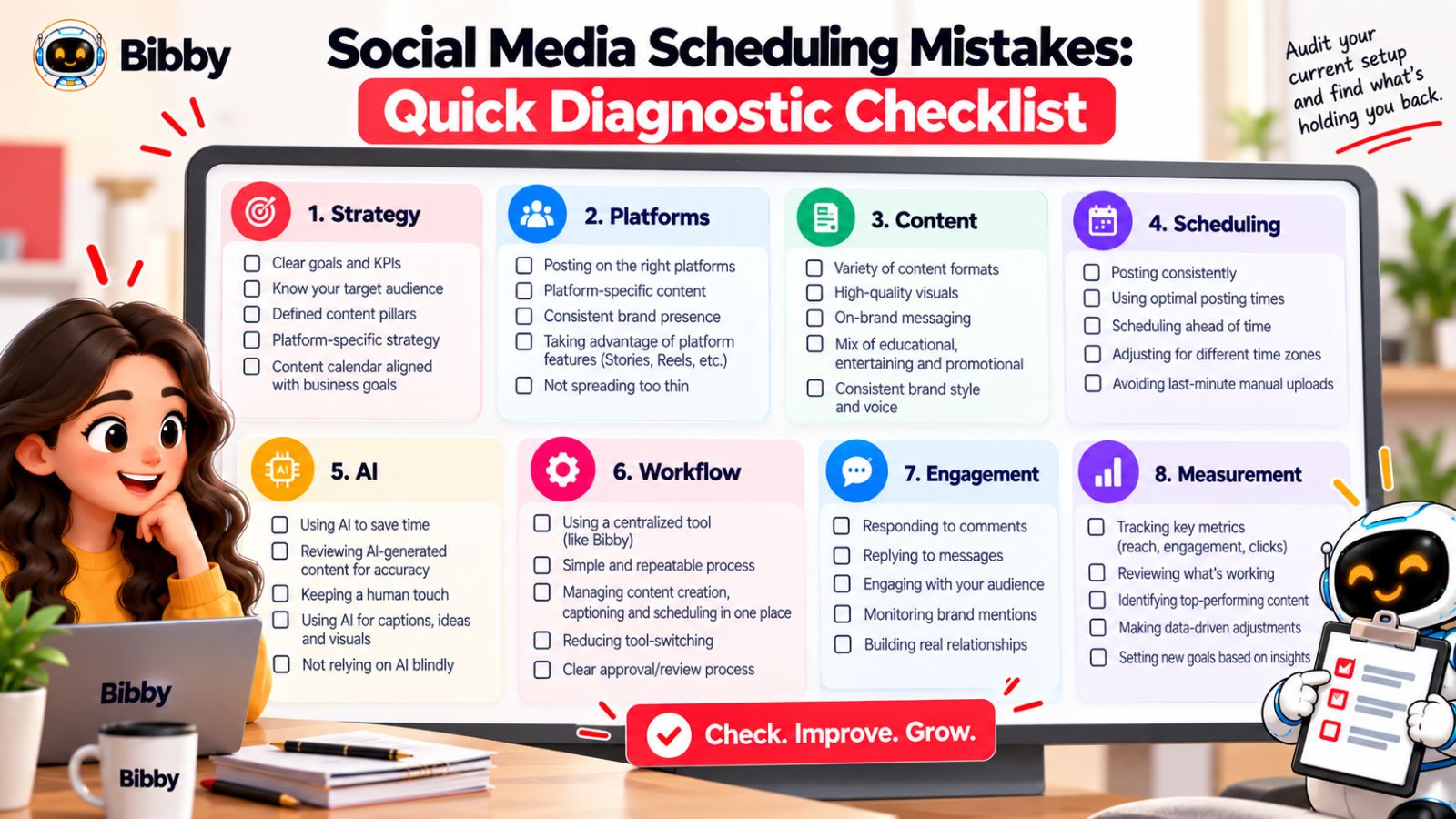
Strategy
- Do you have clearly defined content pillars?
- Does every scheduled post have a specific purpose?
- Are you creating content around audience needs rather than empty calendar slots?
- Is your content mix balanced between educational, promotional, entertaining, and brand-focused content?
Platform management
- Are you adapting content for each platform?
- Are you using formats that make sense for each channel?
- Are you avoiding identical captions and posts everywhere?
- Does each platform have a sustainable publishing rhythm?
content quality
- Are you prioritizing useful content over publishing volume?
- Does every scheduled post give your audience a reason to care?
- Are you using a mix of images, carousels, videos, and Stories?
- Does your content still sound and look like your brand?
Scheduling
- Are you scheduling content far enough ahead to reduce stress?
- Are you leaving room for timely or unexpected content?
- Do you review scheduled posts before they go live?
- Are you using data or AI-assisted optimization rather than relying entirely on arbitrary publishing times?
AI and automation
- Are you using AI to accelerate repetitive work rather than replace strategic judgment?
- Do AI-generated captions reflect your brand voice?
- Can you regenerate or refine content without starting from scratch?
- Are you spending the time saved by automation on higher-value activities?
Workflow
- Are you constantly moving content between multiple tools?
- Are you manually repeating the same scheduling process for every platform?
- Do you have a centralized place for campaigns and content?
- Could your team accomplish the same workflow with fewer unnecessary steps?
Engagement and measurement
- Are you responding to comments and audience questions?
- Are you using audience conversations as future content ideas?
- Do you regularly review which content performs well?
- Are your performance metrics connected to actual business or marketing goals?
If you answered “no” to several of these questions, the problem may not be a lack of effort.
It may be the structure of your workflow.
A social media scheduling system should make consistency easier—not force your team to constantly fight the process. The objective is to create a repeatable system where strategy determines what gets created, automation handles repetitive execution, and performance data helps improve what happens next.
Once those pieces work together, scheduling stops being just a way to keep your social profiles active. It becomes a practical part of your overall social media strategy.
Final Thoughts : Turn Social Media Scheduling Into a System, Not a Calendar
Social media scheduling can make consistency dramatically easier, but only when it's built around a clear strategy. The biggest mistakes aren't usually about forgetting to post—they come from treating every platform the same, prioritizing quantity over quality, automating without review, and letting disconnected tools turn publishing into a complicated process.
The three biggest takeaways are simple:
- Consistency is more than frequency. Your content needs strategy, variety, platform relevance, and a recognizable brand voice.
- Automation should remove repetitive work, not remove human judgment. AI can help with creation, captions, timing, and distribution while your team focuses on creativity and audience relationships.
- Your scheduling system should continuously improve. Plan, publish, engage, measure, and use what you learn to improve the next content cycle.
Tools such as Bibby can bring much of that workflow together, from AI-assisted media and captions to campaigns, brand kits, conversational management, and multi-platform scheduling.
The natural next step is to turn these principles into a repeatable system. A useful follow-up would be how to build a social media content calendar that runs almost on autopilot—without sacrificing quality, authenticity, or strategic control.