If you're only posting on LinkedIn when inspiration strikes, you're leaving valuable visibility, engagement, and professional opportunities on the table.
The reality is that LinkedIn rewards consistency far more than occasional bursts of activity. Whether you're a business owner, marketer, creator, recruiter, or job seeker, maintaining a regular posting schedule helps you stay visible to your network, build credibility in your industry, and increase the chances of your content reaching the right audience. The challenge isn't knowing that consistency matters—it's finding the time to create, publish, and manage content without it becoming a full-time job.
The good news is that with the right LinkedIn scheduling strategy, you can plan content in advance, publish at optimal times, and automate repetitive tasks while maintaining an authentic presence. Instead of scrambling to create a post every morning, you can build a streamlined workflow that keeps your profile active even during your busiest weeks.
In this article, you'll learn:
- How to build a sustainable LinkedIn scheduling workflow that saves hours every week.
- Twelve proven LinkedIn scheduling tips to improve consistency, visibility, and engagement.
- How AI-powered scheduling and automation tools like Bibby can simplify content creation, optimize posting times, and manage publishing across LinkedIn, Facebook, Instagram, YouTube, TikTok, and other social platforms from a single dashboard.
Whether you're scheduling your first LinkedIn post or refining an established content strategy, these practical tips will help you spend less time managing social media and more time building meaningful professional relationships and growing your brand.
Why Consistency Matters More Than Frequency on LinkedIn
Many LinkedIn users believe they need to publish every day to grow their audience. In reality, consistency is far more important than sheer volume. A predictable posting schedule helps you remain visible in your audience's feed, strengthens your professional brand, and gives LinkedIn more opportunities to surface your content to relevant users.
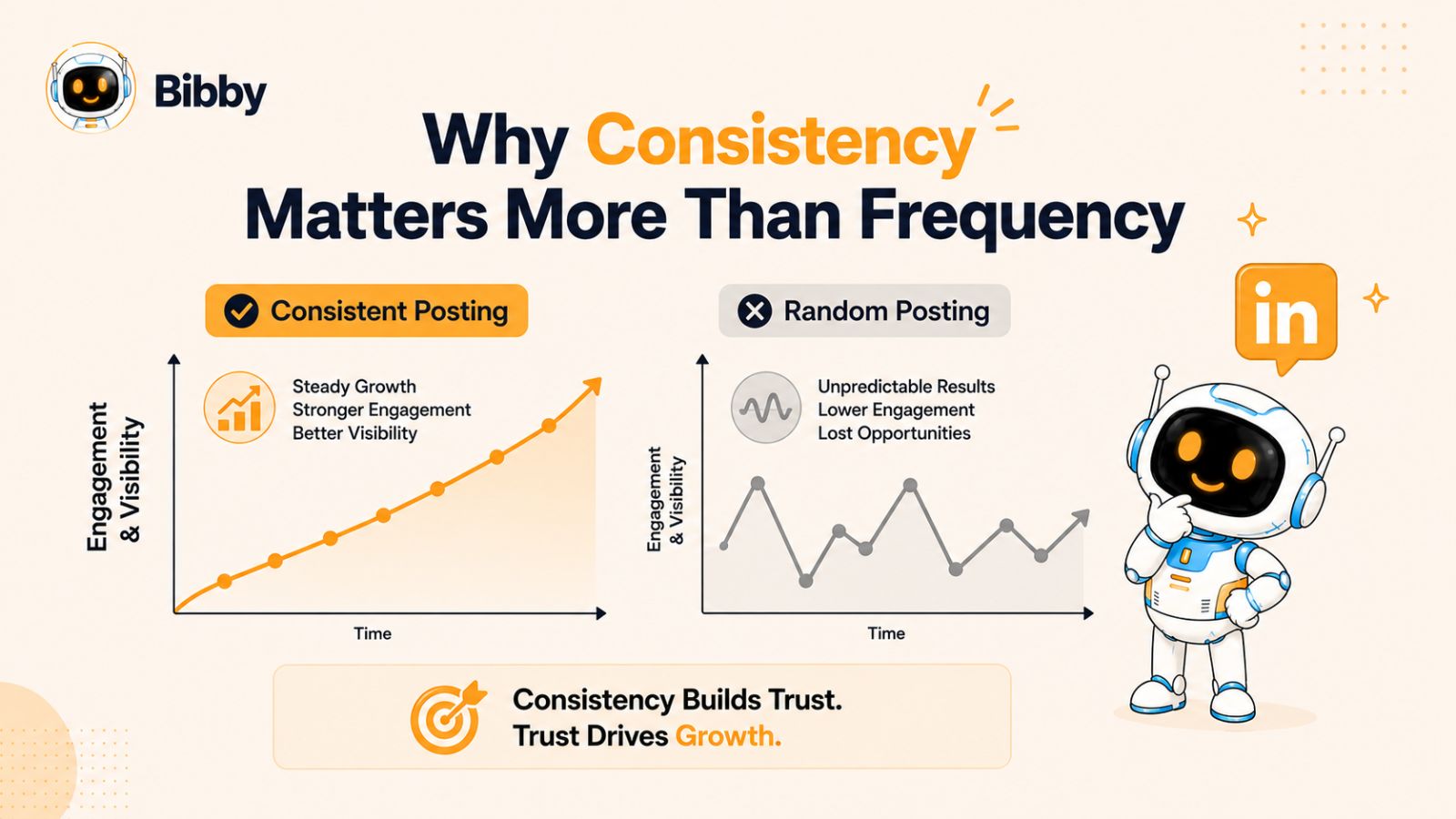
When you post consistently, you're not just filling your feed with content—you're building familiarity and trust. Professionals who regularly share valuable insights, industry updates, or educational content are more likely to be recognized as credible voices in their niche. Over time, this consistent presence can lead to stronger engagement, increased profile views, more connection requests, and even business or career opportunities.
Consistency also helps you better understand what resonates with your audience. By publishing on a regular schedule, you generate enough data to identify which topics, formats, and posting times drive the highest engagement. Instead of relying on guesswork, you can refine your content strategy based on real performance metrics.
On the other hand, long gaps between posts can make it difficult to maintain momentum. Even high-quality content may struggle to gain traction if your audience hasn't seen activity from you in weeks. Staying active keeps your profile relevant and increases the likelihood that your future posts will receive meaningful interactions.
The challenge, of course, is maintaining that consistency while juggling work, meetings, client projects, or running a business. That's why scheduling has become an essential part of a successful LinkedIn strategy. Planning content in advance removes the pressure of creating posts at the last minute and ensures your audience hears from you regularly—even when your schedule gets busy.
Rather than asking, "How often should I post on LinkedIn?" a better question is, "Can I maintain this posting schedule over the long term?" A sustainable routine—whether that's three times a week or every weekday—will almost always outperform an ambitious schedule that quickly becomes impossible to maintain.
The following LinkedIn scheduling tips will help you build that sustainable system, allowing you to stay consistently visible, maximize engagement, and save valuable time through smarter planning and automation.
Tip #1: Build a Monthly Content Calendar Before You Start Scheduling
One of the biggest reasons people struggle to stay active on LinkedIn isn't a lack of ideas—it's a lack of planning. Without a clear content roadmap, posting often becomes reactive. You spend valuable time deciding what to write, creating graphics at the last minute, and trying to find the "perfect" time to publish. Before long, consistency disappears.
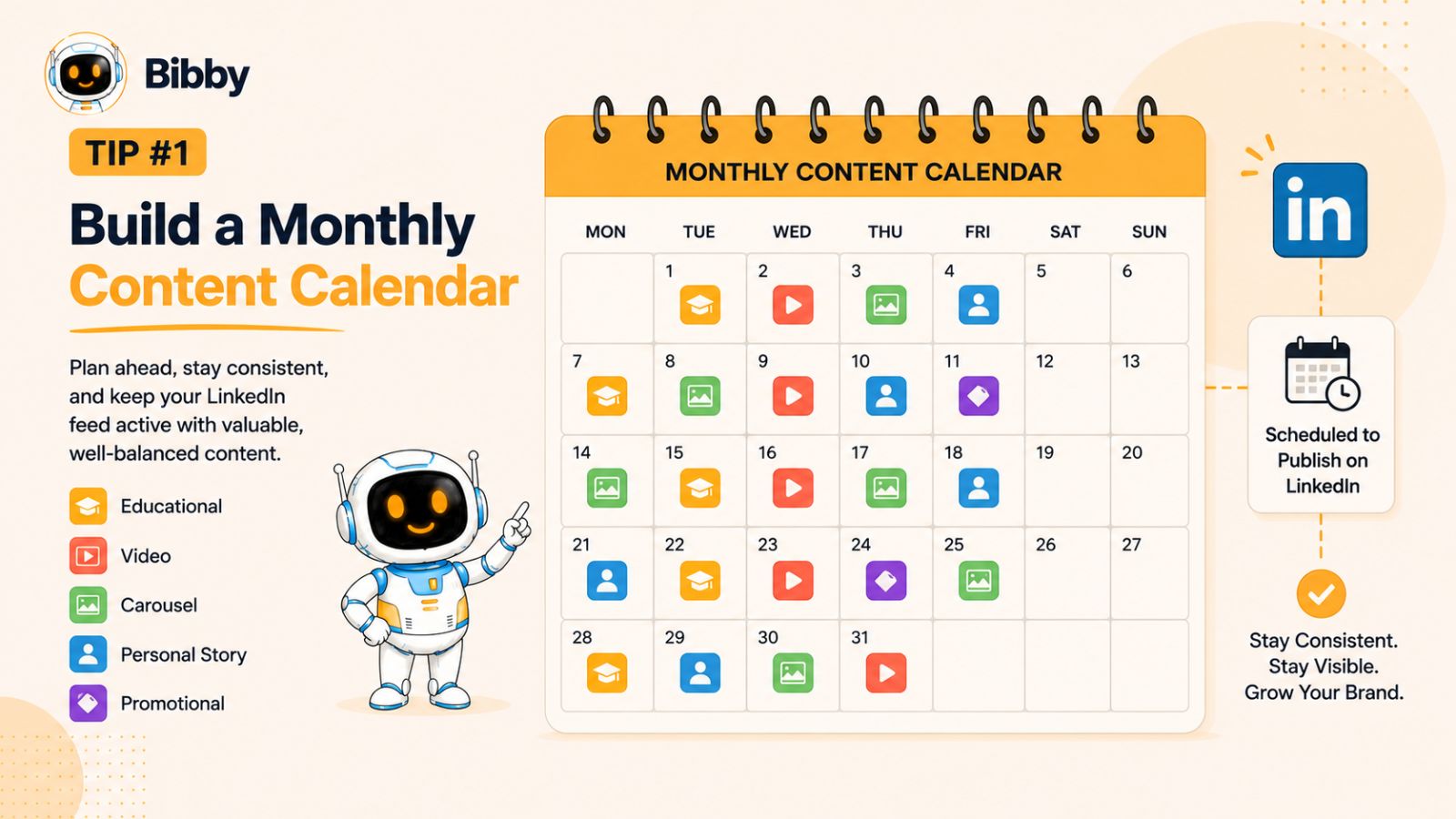
A monthly content calendar eliminates this problem by giving every post a purpose before the month even begins. Instead of wondering what to publish each day, you'll already know which topics to cover, when they'll go live, and how they support your personal or business goals.
Start With Clear Content Pillars
Content pillars are the core topics your audience expects to hear from you. They keep your messaging focused and help establish authority in your niche.
For example, if you're a digital marketer, your content pillars might include:
- Social media marketing
- Content creation
- AI productivity tools
- LinkedIn growth strategies
- Case studies and client success stories
When you consistently publish around these themes, LinkedIn users begin to associate your profile with valuable expertise rather than random updates.
Balance Educational, Personal, and Promotional Content
A common mistake is treating LinkedIn like an advertising platform. While promoting your products or services has its place, most of your content should educate, inform, or inspire your audience.
A simple framework is the 70-20-10 rule:
- 70% Educational content: Share tips, tutorials, industry insights, and practical advice.
- 20% Personal content: Tell stories, lessons learned, behind-the-scenes moments, or professional experiences that build authenticity.
- 10% Promotional content: Introduce your products, services, events, or company updates without overwhelming your audience.
This balanced approach keeps your content engaging while building trust over time.
Batch Your Content Planning
Rather than planning posts one day at a time, dedicate a single session each month to brainstorming ideas. Outline topics, draft key points, collect visuals, and map each post to a specific date.
Batch planning offers several benefits:
- Reduces decision fatigue
- Improves content quality
- Maintains consistent messaging
- Saves hours every week
- Ensures you never run out of ideas
Even if you don't write every caption immediately, having a clear publishing roadmap makes content creation significantly easier.
Schedule Around Important Dates
Your calendar should also include:
- Industry events
- Product launches
- Company announcements
- Holidays and seasonal campaigns
- Awareness days relevant to your audience
Planning these posts ahead of time ensures you never miss valuable opportunities to join trending conversations or promote timely content.
Let Automation Handle the Publishing
Once your monthly calendar is complete, the next step is to automate execution.
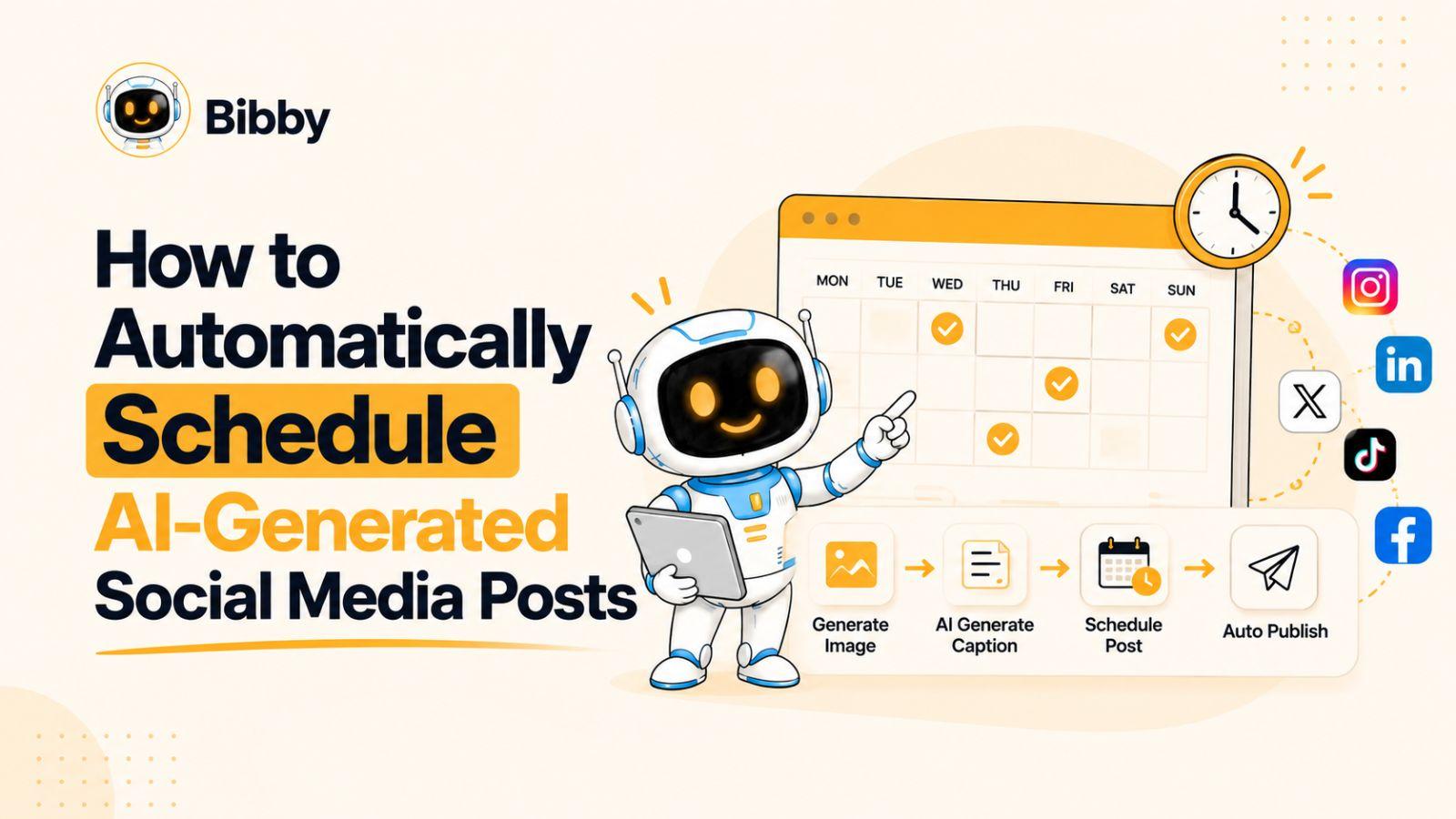
Instead of manually uploading each post to every platform, tools like Bibby streamline the entire workflow. You can upload your images—or generate them with AI—choose your preferred posting style, let Bibby generate engaging captions automatically, and schedule your content across LinkedIn, Facebook, Instagram, YouTube, TikTok, and other platforms from a single dashboard. It also publishes your posts at AI-optimized times, helping you maintain a consistent presence without constantly checking the clock.
By separating planning from publishing, you spend less time managing your social media and more time creating content that delivers real value to your audience. A well-organized content calendar is the foundation that makes every other LinkedIn scheduling tip in this guide more effective.
Tip #2: Schedule Posts During Peak Audience Activity
Creating valuable content is only half the equation. If your audience isn't active when you publish, even your best LinkedIn posts may receive fewer impressions and interactions than they deserve. While quality content always comes first, publishing at the right time can significantly improve its initial momentum.
LinkedIn's algorithm evaluates how people interact with your content shortly after it's published. Posts that receive early engagement—such as reactions, comments, and shares—are more likely to continue appearing in other users' feeds. That's why choosing the right posting time is an important part of any LinkedIn scheduling strategy.
Understand When Your Audience Is Online
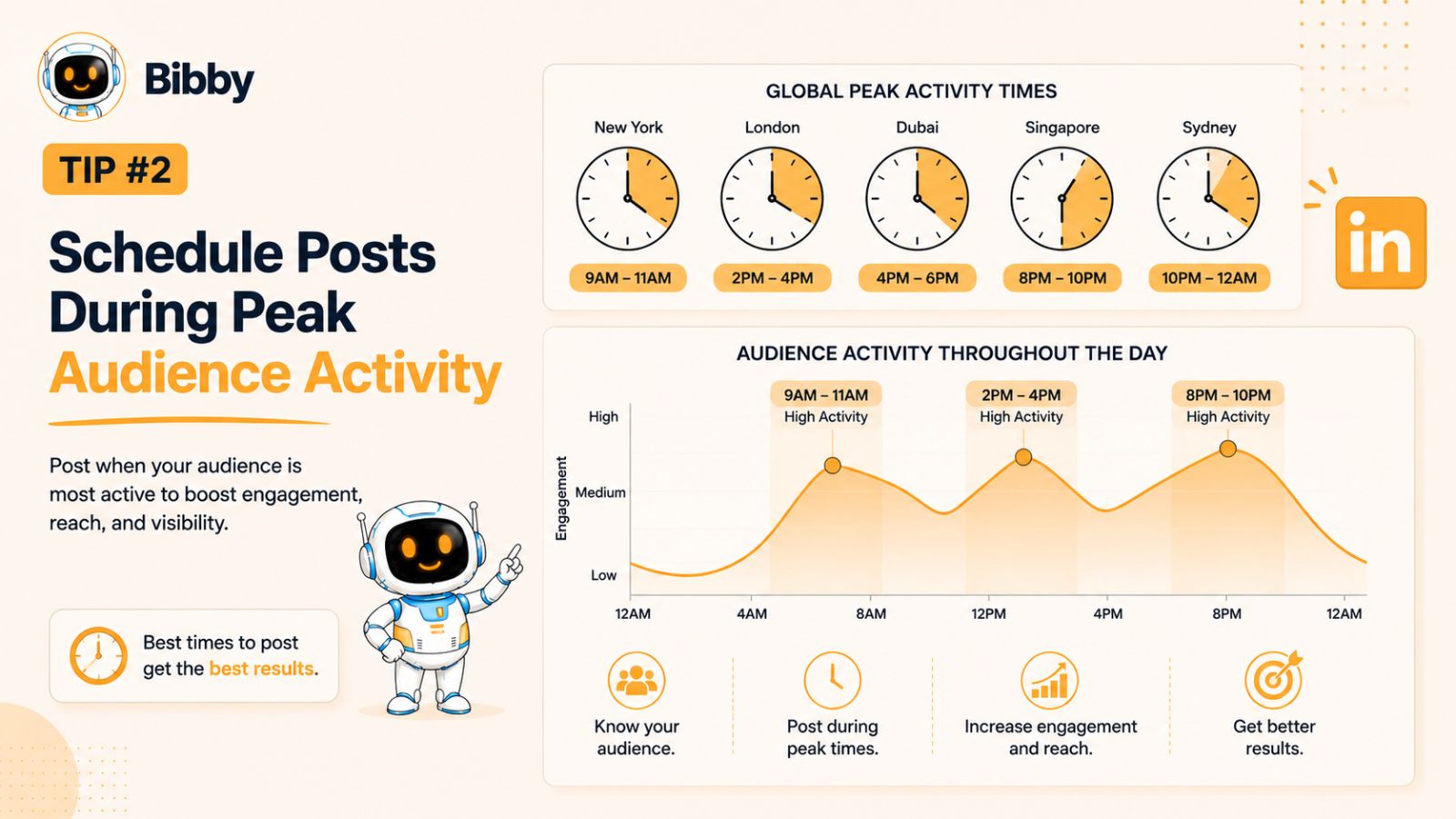
There's no universal "best time" to post on LinkedIn because every audience behaves differently. Factors such as industry, location, job roles, and time zones all influence when your followers are most active.
That said, many marketers find that these periods often perform well:
- Tuesday through Thursday generally see the highest professional engagement.
- Morning hours before the workday begins often attract professionals checking LinkedIn.
- Lunch breaks can provide another opportunity for increased visibility.
- Early evenings may also perform well for audiences browsing after work.
Treat these as starting points—not fixed rules. The most effective posting schedule is the one based on your own audience's behavior.
Test, Measure, and Optimize
One of the biggest mistakes creators make is sticking to a single posting time without evaluating the results. Instead, experiment with different publishing windows over several weeks and monitor key performance metrics such as:
- Impressions
- Engagement rate
- Comments
- Shares
- Profile visits
- Follower growth
Over time, patterns will emerge, helping you identify when your audience is most likely to engage with your content.
Stay Consistent With Your Publishing Schedule
Publishing at different times every day makes it harder to identify what actually works. Establish a consistent schedule—whether that's three times a week or daily—and adjust one variable at a time. This approach gives you more reliable data and makes it easier to refine your strategy.
For example, if you publish every Monday, Wednesday, and Friday at 9:00 a.m. for a month, you'll have a meaningful benchmark. You can then test 11:00 a.m. or 2:00 p.m. to see whether engagement improves.
Let AI Optimize the Timing
Finding the ideal posting time manually can take months of testing. AI-powered scheduling tools simplify this process by analyzing engagement patterns and automatically selecting publishing times that are more likely to maximize visibility.
With Bibby, you don't have to guess when your audience is online. After creating your content, you can schedule it to publish at AI-optimized times across LinkedIn and other social platforms. Combined with automatic caption generation, image resizing for each platform, and multi-platform scheduling, this allows you to maintain a consistent posting schedule while reducing the time spent managing your social media.
Remember, the goal isn't simply to post more often—it's to ensure your content reaches the right people at the right time. Pairing high-quality content with smart scheduling gives every post the best chance to perform well.
Tip #3: Batch Create Your LinkedIn Content to Save Time and Stay Consistent
One of the most effective ways to maintain a consistent LinkedIn presence is to stop creating content one post at a time. Constantly switching between brainstorming, writing, designing, and publishing can quickly become overwhelming, especially if you're balancing work, client projects, or running a business.
Instead, adopt a batch content creation workflow. By dedicating a few focused hours each week or month to creating multiple posts, you'll spend less time context-switching and more time producing high-quality content.
Why Batch Creation Works
Every time you sit down to create a single LinkedIn post, your brain has to go through the same creative process—coming up with an idea, writing a compelling hook, structuring the content, finding or designing visuals, proofreading, and finally publishing.
When you repeat this process every day, it becomes inefficient and mentally exhausting.
Batching groups similar tasks together, allowing you to stay in the same creative mindset for longer. Instead of writing one post, you might draft ten. Instead of designing one graphic, you could create an entire month's worth of visuals in a single session.
The result? Higher productivity, better quality, and significantly less stress.
A Simple Batch Creation Workflow
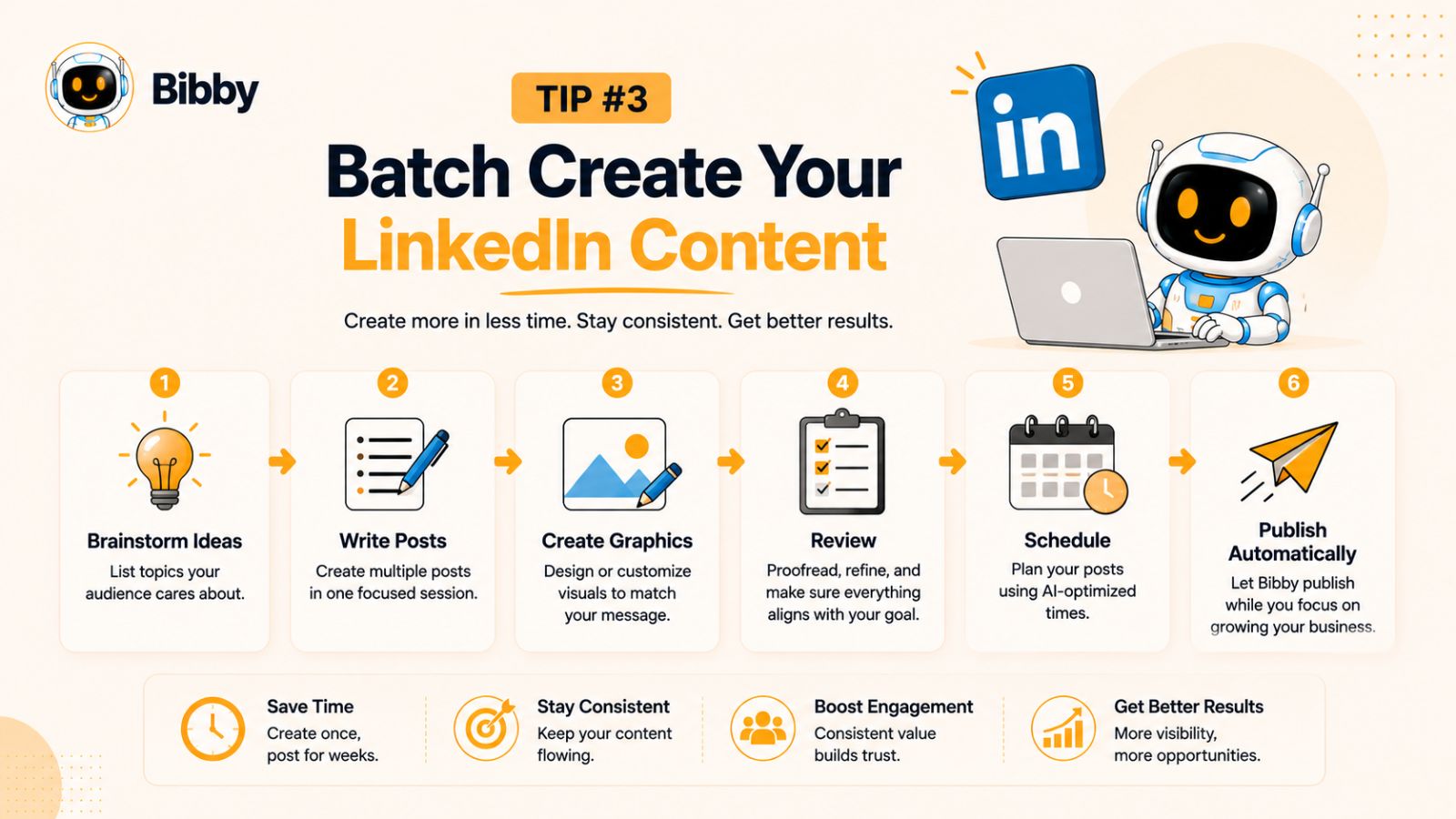
Here's an easy process you can follow:
- Brainstorm ideas: List 15–20 topics your audience cares about.
- Write all your hooks: Focus only on creating attention-grabbing opening lines.
- Draft your posts: Expand each hook into a complete LinkedIn post.
- Create visuals: Design graphics, carousels, or videos in one session.
- Review everything: Edit for clarity, grammar, and consistency.
- Schedule your content: Upload your completed posts to your scheduling tool for automated publishing.
Breaking the work into stages helps you maintain momentum and reduces the mental effort of constantly switching tasks.
Repurpose Existing Content
You don't need to reinvent the wheel every time you post.
Look for opportunities to repurpose content you've already created, such as:
- Turning a blog post into several LinkedIn posts.
- Converting a webinar into a carousel.
- Breaking a podcast into short video clips.
- Sharing key insights from client projects or case studies.
- Refreshing older high-performing posts with updated information.
Repurposing allows you to create more content without significantly increasing your workload, while reinforcing your expertise across multiple topics.
Create Once, Publish Everywhere
If you're active on multiple social media platforms, creating separate content for each one can become a full-time job. A smarter approach is to create your content once and adapt it for different platforms.
This is where Bibby can dramatically simplify your workflow. After uploading your image—or generating one with AI—you can choose your preferred posting style, let Bibby generate captions automatically, and schedule your content across LinkedIn, Facebook, Instagram, YouTube, TikTok, and other supported platforms. It also automatically resizes your visuals to fit each platform's specifications, eliminating the need to manually edit images for different channels.
Instead of spending hours preparing the same content for multiple platforms, you can manage your entire publishing process from one intuitive dashboard.
Consistency Becomes Much Easier
The biggest advantage of batch creation isn't just saving time—it's removing the daily pressure to "come up with something to post." When you already have weeks of content planned, created, and scheduled, staying consistent becomes effortless.
Rather than interrupting your workday to write a last-minute post, you can focus on engaging with your audience, responding to comments, and building meaningful professional relationships—activities that often have a greater impact on long-term LinkedIn growth than publishing alone.
Tip #4: Repurpose Your Best-Performing Content Instead of Starting From Scratch
One of the biggest misconceptions about content marketing is that every LinkedIn post needs to be completely original. In reality, experienced marketers and successful creators rarely start with a blank page. Instead, they maximize the value of their existing content by repurposing it into multiple formats.
If a post has already resonated with your audience, there's a strong chance it can continue delivering value when presented in a different way or to a different audience segment. Repurposing not only saves time but also helps you maintain a consistent publishing schedule without constantly chasing new ideas.
Identify Your Top-Performing Content
Before creating new posts, review your LinkedIn analytics to identify content that generated above-average results. Look for posts that received:
- High impressions
- Strong engagement rates
- Meaningful comments and discussions
- Shares and reposts
- Profile visits
- New followers or connection requests
These metrics indicate topics your audience already finds valuable, making them excellent candidates for repurposing.
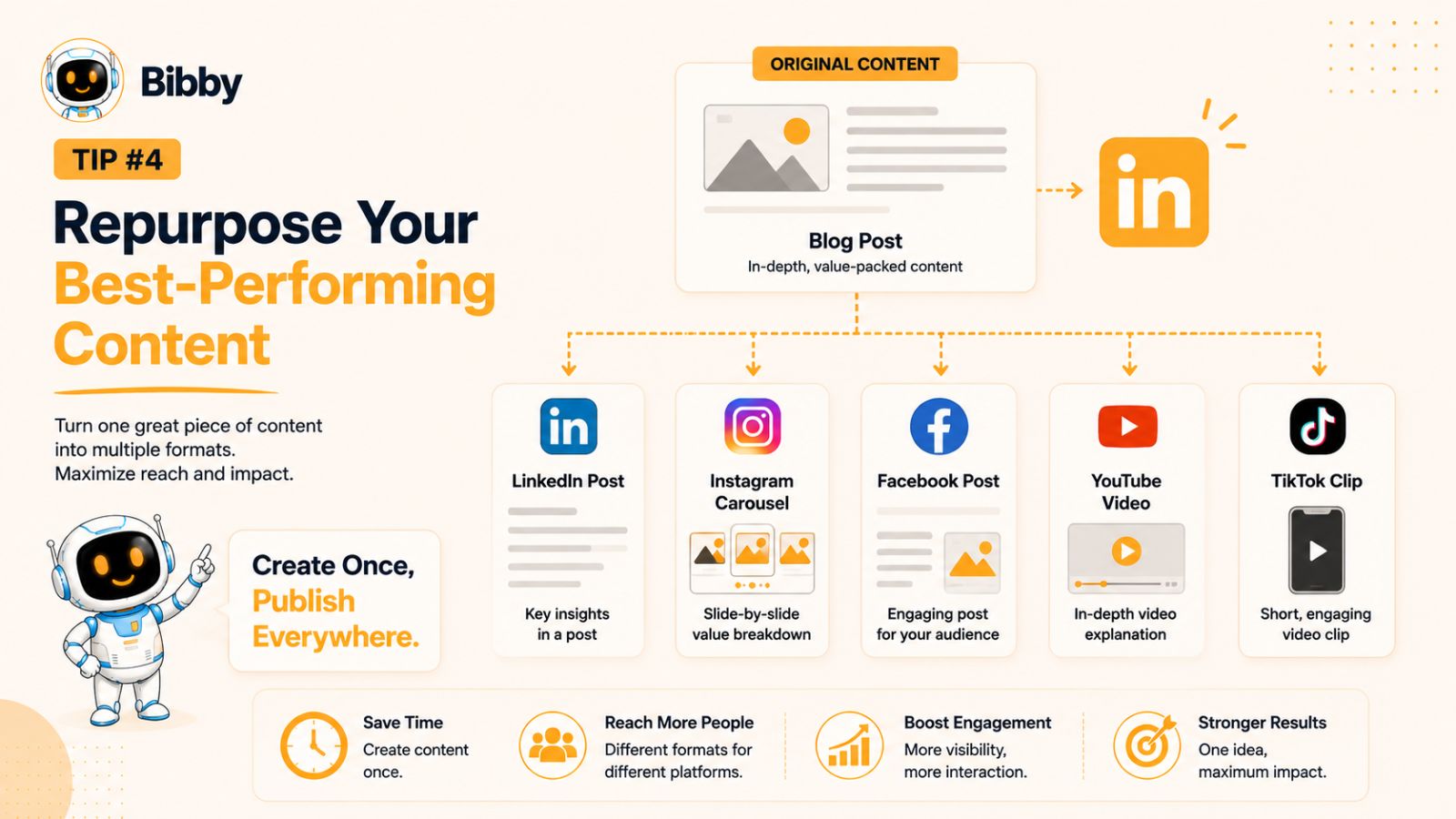
Turn One Piece of Content Into Many
A single idea can often become several pieces of content across different formats. For example:
- Transform a detailed blog post into a series of LinkedIn tips.
- Convert webinar highlights into a carousel or document post.
- Break a long-form video into short clips for LinkedIn and other platforms.
- Turn frequently asked questions into educational posts.
- Expand a popular comment into a standalone post.
- Refresh an older high-performing post with updated insights or statistics.
This approach allows you to get significantly more value from the time you've already invested in creating content.
Update Rather Than Repeat
Repurposing doesn't mean copying and pasting the same post every few months. Instead, build on what you've already shared by adding new perspectives, recent examples, updated data, or lessons you've learned since the original post.
For example, if you previously shared "5 LinkedIn Growth Tips," you could revisit the topic a year later with fresh strategies, recent algorithm changes, or new tools that have improved your workflow. This keeps your content relevant while reinforcing your expertise.
Adapt Content for Different Platforms
Every social platform has its own audience and preferred content style. While the core message can remain the same, the presentation should be tailored to each platform.
For example:
- A LinkedIn article can become an Instagram carousel.
- Key takeaways can be turned into an X thread.
- A short educational video can be shared on TikTok, YouTube Shorts, and LinkedIn.
- An infographic can be resized for Facebook and Pinterest.
Creating one high-quality piece of content and adapting it across multiple platforms is far more efficient than producing separate content from scratch every time.
Simplify Multi-Platform Repurposing with Bibby
Repurposing becomes even more powerful when the publishing process is automated. With Bibby, you can upload your content once, generate AI-powered captions based on your preferred posting style, and schedule it across LinkedIn, Facebook, Instagram, YouTube, TikTok, and other supported platforms from a single dashboard.
Bibby also automatically resizes images for each platform, eliminating one of the most time-consuming parts of multi-platform publishing. Combined with AI-optimized scheduling, this makes it easy to extend the reach of your best-performing content without adding extra work.
Remember, successful content creators don't necessarily create more content—they make better use of the content they already have. Repurposing allows you to increase your visibility, reinforce your expertise, and maintain a consistent posting schedule while working more efficiently.
Tip #5: Mix Different Content Formats to Keep Your Audience Engaged
If every LinkedIn post looks the same, your audience will eventually stop noticing it. Even valuable insights can lose their impact when they're presented in the same format repeatedly. One of the easiest ways to improve engagement and maintain interest is to diversify the types of content you publish.
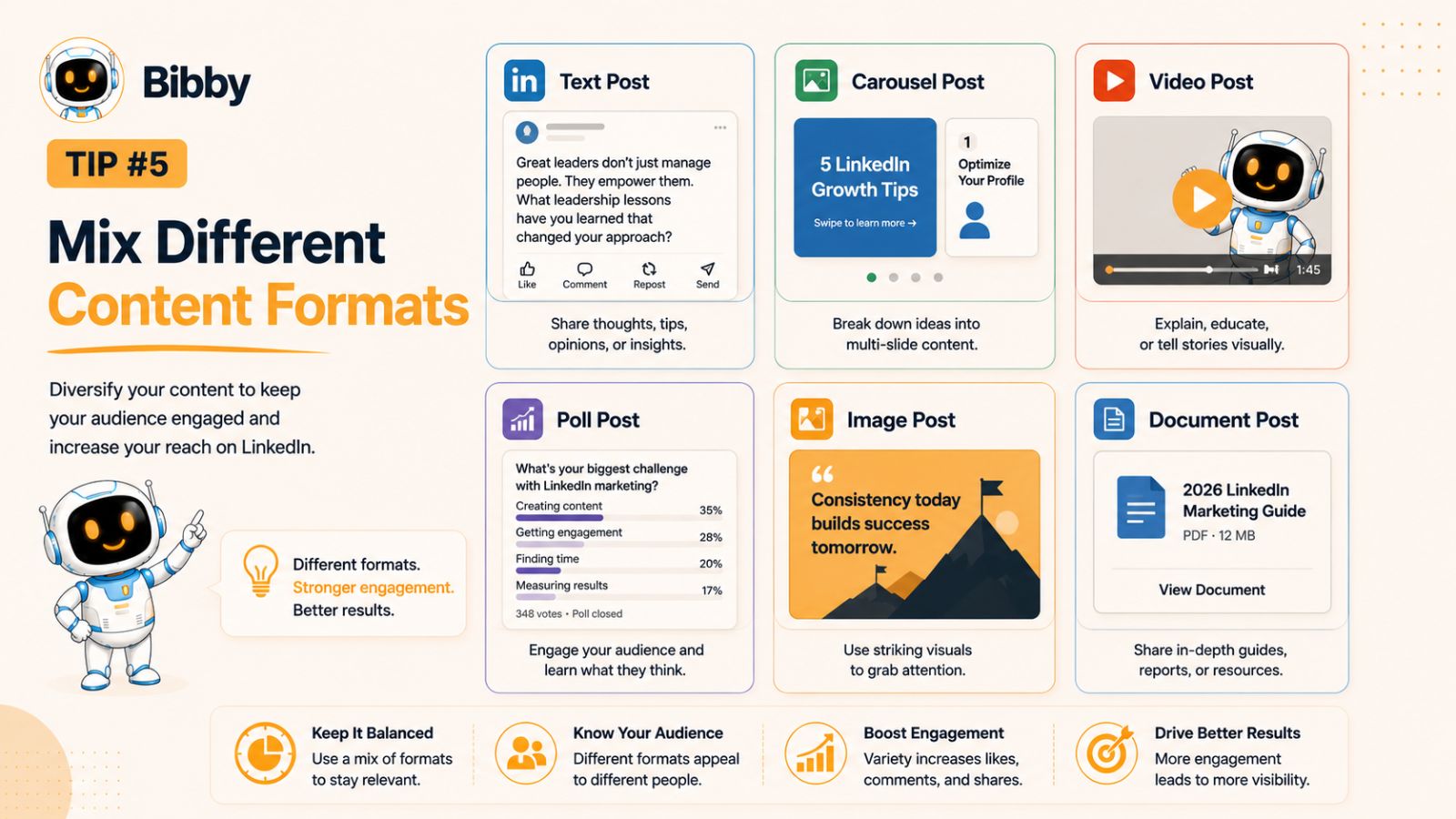
LinkedIn supports a variety of content formats, each serving a different purpose. By mixing these formats strategically, you can reach different audience preferences, encourage more interactions, and keep your content fresh without changing your core message.
Use Text Posts to Share Quick Insights
Simple text posts remain one of the most effective formats on LinkedIn. They are easy to consume, encourage conversations, and allow you to share personal experiences, industry opinions, or actionable tips without requiring visual assets.
Text posts work especially well for:
- Professional lessons learned
- Industry trends
- Personal stories
- Thought leadership
- Quick productivity tips
A compelling opening line and a clear takeaway are often all you need to spark meaningful discussions.
Add Images to Capture Attention
Visual content naturally stands out in a crowded LinkedIn feed. High-quality images can increase the likelihood that users stop scrolling and engage with your post.
Consider sharing:
- Branded graphics
- Infographics
- Behind-the-scenes photos
- Event highlights
- Team updates
- Product screenshots
Ensure your visuals are clear, professionally designed, and optimized for mobile viewing.
Publish Carousels for Educational Content
Document and carousel posts are excellent for breaking down complex topics into easy-to-follow slides. They encourage users to spend more time interacting with your content, which can positively influence engagement.
Popular carousel ideas include:
- Step-by-step guides
- Checklists
- Case studies
- Frameworks
- Industry statistics
- Before-and-after comparisons
If your goal is to educate your audience, carousels often outperform long blocks of text.
Incorporate Videos Into Your Strategy
Video content continues to gain popularity because it allows you to communicate personality, expertise, and authenticity in a way that static posts cannot.
You don't need expensive equipment to get started. Short videos explaining a concept, sharing a quick tip, or offering behind-the-scenes insights can be highly effective.
Keep videos concise, include captions for viewers watching without sound, and focus on delivering immediate value.
Experiment With Polls and Stories
Interactive content encourages participation rather than passive consumption.
Polls can help you:
- Gather audience opinions
- Start conversations
- Understand customer preferences
- Generate ideas for future content
Stories and other short-form updates provide a more casual way to stay visible between your primary posts while keeping your audience connected to your brand.
Build a Balanced Content Mix
Instead of relying on a single format, create a publishing schedule that includes a variety of content types throughout the month. For example:
- Monday: Educational carousel
- Wednesday: Personal story
- Friday: Short video
- Following Tuesday: Industry insight with an image
- Thursday: Interactive poll
This balanced approach keeps your audience engaged while helping you discover which formats deliver the strongest results.
Manage Every Format from One Place
Publishing multiple content formats across different platforms can quickly become time-consuming. Bibby simplifies the process by allowing you to schedule images, videos, stories, and other media from a single dashboard. Whether you upload your own visuals or generate them with AI, Bibby automatically creates captions, resizes media for each platform, and schedules posts at AI-optimized times across LinkedIn, Facebook, Instagram, YouTube, TikTok, and more.
The goal isn't to use every format available—it's to use the right format for the message you're sharing. By combining educational, visual, and interactive content, you'll create a more engaging LinkedIn presence that encourages your audience to keep coming back for more.
Tip #6: Optimize Your Visuals for Every Social Media Platform
Strong visuals can be the difference between someone scrolling past your content and stopping to engage with it. Whether you're sharing a LinkedIn infographic, a product announcement, a behind-the-scenes photo, or a promotional video, the quality and formatting of your visuals directly impact how your content performs.
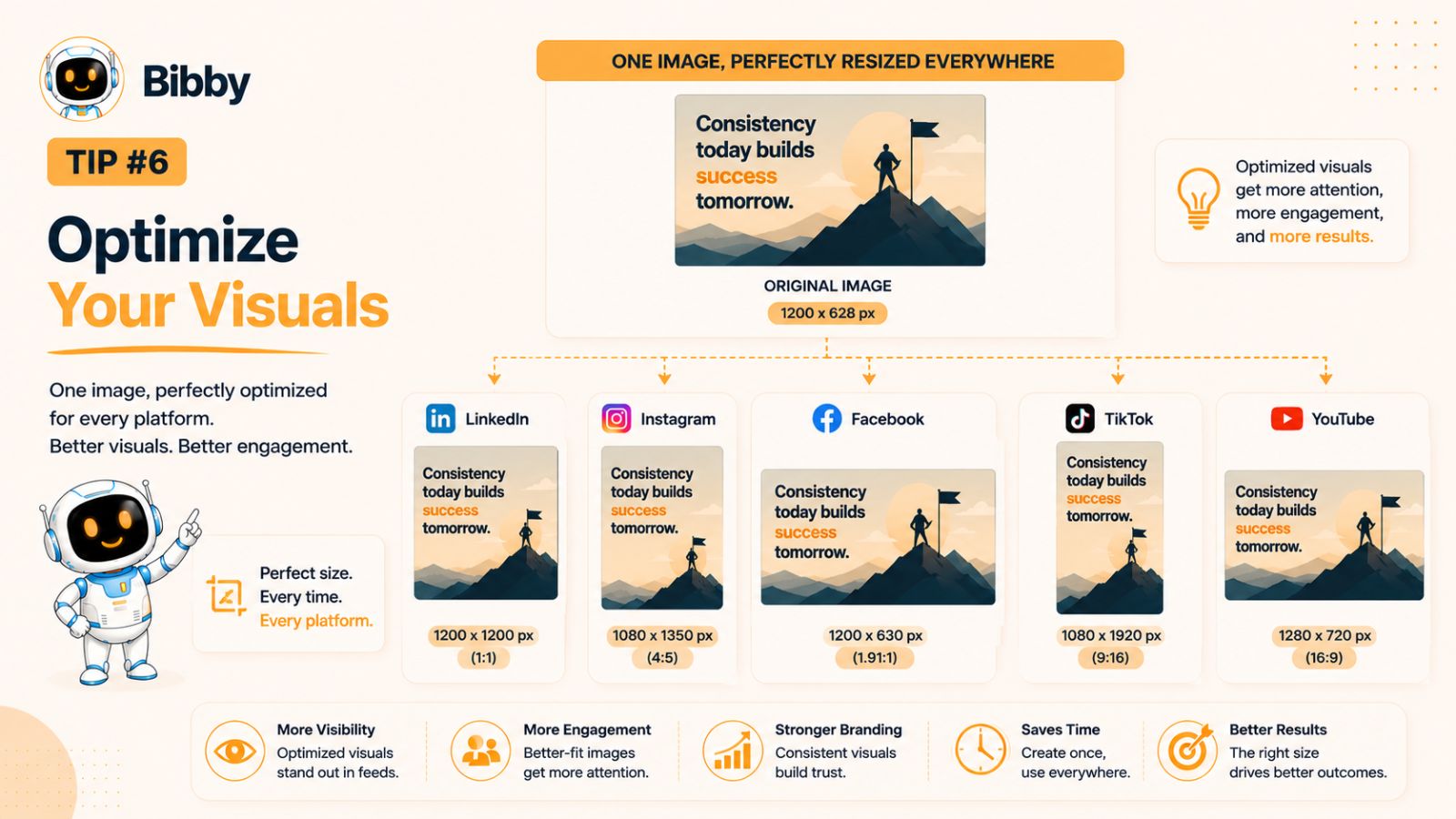
Unfortunately, one of the biggest challenges for creators and marketers is that every social media platform has different image and video size requirements. A graphic that looks perfect on LinkedIn might be cropped awkwardly on Instagram or appear stretched on Facebook. Manually creating separate versions for every platform isn't just time-consuming—it also increases the risk of inconsistencies in your branding.
Design for Mobile First
The majority of social media users browse on mobile devices. That means your visuals should be easy to understand on smaller screens.
When creating images or videos:
- Use large, readable fonts.
- Keep text concise and avoid overcrowding.
- Leave enough white space for a clean layout.
- Choose high-resolution images that remain sharp on all devices.
- Ensure logos and key elements aren't placed too close to the edges, where platform-specific cropping may occur.
A simple, well-designed graphic often performs better than a cluttered one packed with information.
Maintain Consistent Branding
Every post you publish is an opportunity to reinforce your brand identity. Consistent visuals help your audience recognize your content instantly, even before they read the caption.
Consider maintaining consistency with:
- Brand colors
- Typography
- Logo placement
- Graphic styles
- Icons and illustrations
- Overall visual tone
Over time, this consistency builds familiarity and strengthens your professional presence across LinkedIn and other social platforms.
Use the Right Dimensions
Different platforms prioritize different aspect ratios and media formats. For example:
- LinkedIn favors professional images, carousels, and document posts.
- Instagram performs best with square and vertical visuals.
- Facebook supports multiple formats but often prioritizes mobile-friendly images.
- TikTok and YouTube Shorts rely on vertical videos.
- Stories require a full-screen vertical layout.
If you're publishing across multiple channels, manually resizing every image and video can quickly become a repetitive task.
Let Automation Handle the Technical Work
Instead of exporting multiple versions of the same graphic, use tools that automate the resizing process.
With Bibby, you only need to upload your image once—or generate one with AI inside the platform. Bibby automatically adjusts your visuals to match the recommended dimensions for LinkedIn, Facebook, Instagram, YouTube, TikTok, and other supported platforms. This eliminates the need for manual editing while ensuring your content looks professional wherever it's published.
Combined with AI-generated captions, multi-platform scheduling, and AI-optimized posting times, Bibby streamlines one of the most time-consuming parts of social media management.
Don't Forget Video Optimization
If you're publishing video content, apply the same attention to quality and formatting.
For better results:
- Capture video in high resolution.
- Add captions for viewers watching without sound.
- Keep introductions short to grab attention quickly.
- Use compelling thumbnails where supported.
- Optimize videos for vertical or square viewing when appropriate.
High-quality visuals combined with valuable content create a stronger first impression and encourage users to stop scrolling.
At the end of the day, your audience judges your content within seconds. By investing in clean, professional visuals—and using automation to handle platform-specific formatting—you'll improve both the appearance and performance of your social media posts without adding unnecessary work to your publishing process.
Tip #7: Write Captions That Spark Conversations, Not Just Clicks
Even the most eye-catching image or professionally edited video won't perform well if the caption fails to capture attention. On LinkedIn, captions do more than explain your content—they provide context, showcase your expertise, and encourage meaningful conversations. Since engagement is a key signal for LinkedIn's algorithm, writing compelling captions should be a core part of your scheduling strategy.
Rather than treating captions as an afterthought, create them with the same level of care as the content itself. A well-written caption can significantly improve your post's reach, engagement, and overall impact.
Start With a Strong Hook
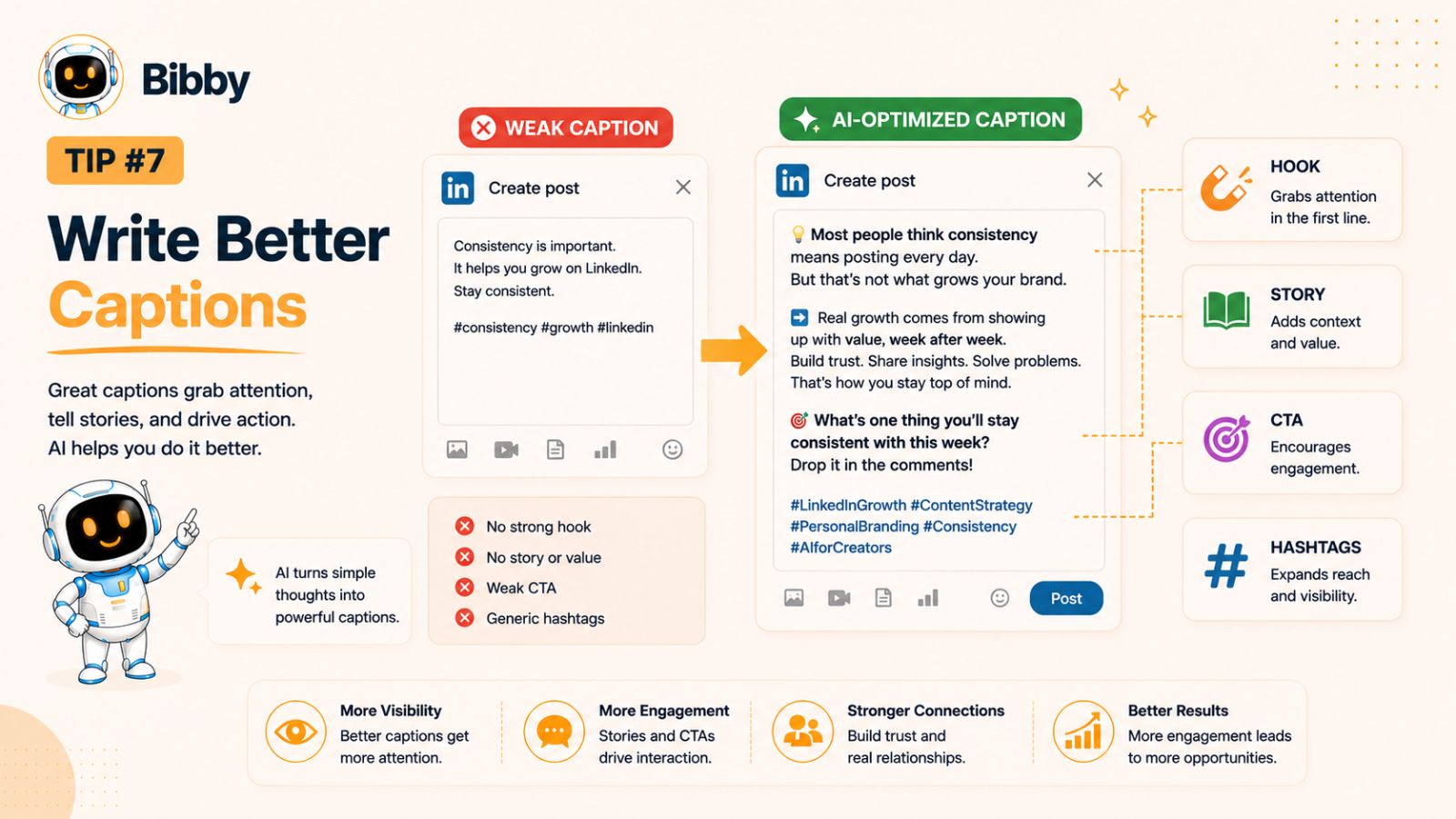
The first one or two lines of your caption determine whether someone continues reading or scrolls past your post. Your opening should immediately create curiosity, address a common challenge, or promise a valuable takeaway.
For example, instead of writing:
"Here are some LinkedIn tips."
Try something more engaging:
"Most professionals don't struggle with LinkedIn because they lack ideas—they struggle because they don't have a system."
Or:
"I stopped posting every day and started scheduling instead. Here's what changed."
A compelling hook encourages readers to click "See more," increasing the chances they'll engage with your content.
Focus on Value Before Promotion
Every caption should answer one simple question:
"Why should someone spend their time reading this?"
Share practical advice, personal experiences, lessons learned, or actionable insights that your audience can apply immediately. If every post is promotional, readers are less likely to engage over time.
Aim to educate, inspire, or solve a problem first. Promotions become much more effective when they're built on a foundation of trust and value.
Keep Your Writing Clear and Easy to Read
Most LinkedIn users skim content before deciding whether it's worth reading in full.
Improve readability by:
- Writing short paragraphs.
- Using simple, conversational language.
- Breaking up long sections with spacing.
- Highlighting key points with bullet lists when appropriate.
- Ending with one clear takeaway.
Readable content keeps users engaged for longer and makes your message easier to remember.
End With a Conversation Starter
LinkedIn is designed for professional networking, so encourage interaction rather than simply broadcasting information.
Instead of ending with:
"Thanks for reading."
Try asking a thoughtful question, such as:
- What's been your biggest challenge with staying consistent on LinkedIn?
- Which scheduling strategy has worked best for you?
- Do you create content daily or batch it in advance?
Questions invite comments, helping your post generate meaningful discussions and stronger engagement.
Use AI to Speed Up Caption Writing
Writing engaging captions consistently can be one of the most time-consuming aspects of content creation. That's where AI can help.
With Bibby, you simply upload your image—or generate one with AI—select your preferred posting style, and the platform automatically creates captions tailored to your content. You can edit the suggestions, personalize the tone, and schedule everything from one place. This makes it easier to maintain a consistent voice while significantly reducing the time spent writing every post from scratch.
Don't Forget to Personalize
AI is a powerful productivity tool, but your unique perspective is what makes your content memorable. Before scheduling any post, review the generated caption and add your own experiences, opinions, or insights. These personal touches build authenticity and help establish your credibility.
The best LinkedIn captions don't sound like advertisements—they sound like conversations between professionals. Combine a strong hook, practical value, and an authentic voice, and you'll create posts that not only attract attention but also encourage meaningful engagement long after they're published.
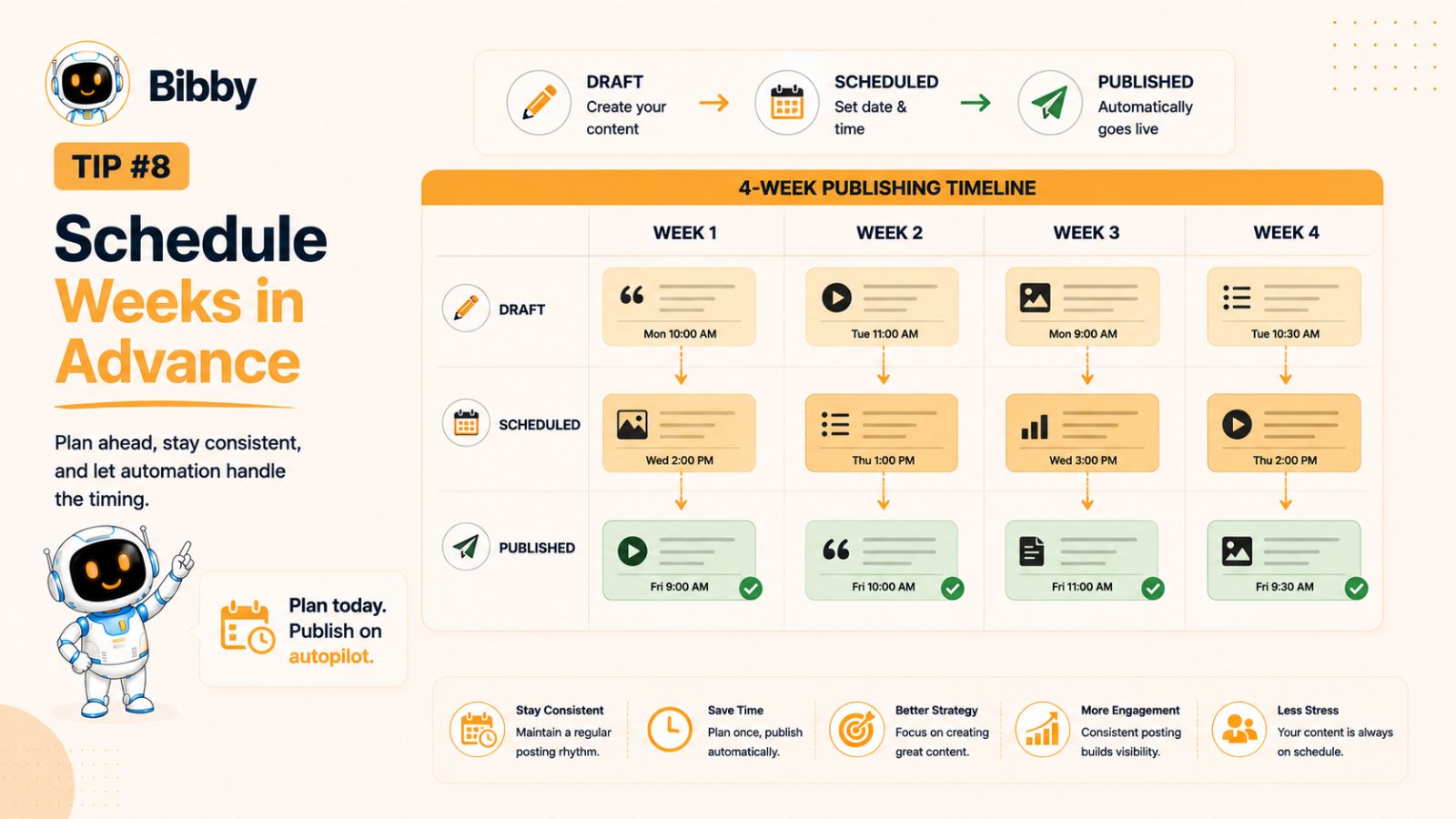
Tip #8: Schedule Your Content Weeks in Advance
One of the simplest ways to stay consistent on LinkedIn is to remove the daily pressure of publishing. Instead of creating and posting content whenever you find a spare moment, build a content pipeline that keeps your profile active for weeks—or even months—ahead.
Scheduling content in advance doesn't make your LinkedIn presence less authentic. It gives you the freedom to focus on engaging with your audience while ensuring your content continues to reach them consistently.
Think Beyond Today's Post
Many creators make the mistake of asking, "What should I post today?" High-performing marketers ask a different question:
"What will my audience need over the next month?"
Planning ahead allows you to create content around product launches, seasonal events, industry trends, webinars, conferences, and business milestones before they become urgent. As a result, your content feels more intentional and aligned with your broader marketing goals.
Build a Content Queue
A content queue acts as your publishing safety net. Instead of having just one post ready, aim to maintain a backlog of scheduled content.
For example:
- One week ahead is a good starting point.
- Two to four weeks provides greater flexibility.
- A month or more is ideal for evergreen educational content.
With a healthy queue, unexpected meetings, deadlines, vacations, or personal commitments won't interrupt your posting schedule.
Leave Room for Timely Content
Planning ahead doesn't mean filling every available slot weeks in advance. Industry news, trending topics, and company announcements often require immediate attention.
A practical approach is to schedule around 70–80% of your content in advance while leaving the remaining 20–30% available for timely updates. This balance allows you to remain both consistent and relevant.
For example, you might schedule:
- Educational tips
- Case studies
- Evergreen advice
- Customer success stories
- Thought leadership content
Then leave open spaces for:
- Industry news
- Event highlights
- Product launches
- Trending discussions
- Company achievements
This strategy gives you the best of both worlds: consistency and flexibility.
Automate Your Publishing Workflow
Once your content is ready, automation ensures it reaches your audience without requiring manual intervention.
Instead of logging into multiple social media platforms every day, Bibby lets you upload your media once, generate AI-powered captions, select your preferred posting style, and schedule content weeks in advance. It then publishes your posts at AI-optimized times across LinkedIn, Facebook, Instagram, YouTube, TikTok, and other supported platforms—all from a single, streamlined workflow.
Because Bibby also supports videos, stories, and platform-specific media formats, you can manage virtually your entire social media calendar without switching between different tools.
Use the Time You Save More Strategically
Scheduling content ahead of time doesn't replace human interaction—it creates more time for it.
Instead of worrying about publishing today's post, you can focus on activities that deliver greater long-term value, such as:
- Responding to comments and messages.
- Engaging with industry conversations.
- Building relationships with potential clients and partners.
- Networking with other professionals.
- Analyzing which content performs best.
These interactions strengthen your presence on LinkedIn far more than simply hitting the "Publish" button.
Ultimately, successful LinkedIn marketing isn't about being online every hour of the day—it's about building a reliable system. By scheduling content weeks in advance, you'll eliminate last-minute stress, maintain consistent visibility, and free yourself to focus on creating meaningful connections and growing your professional brand.
Tip #9: Use AI to Speed Up Content Creation and Scheduling
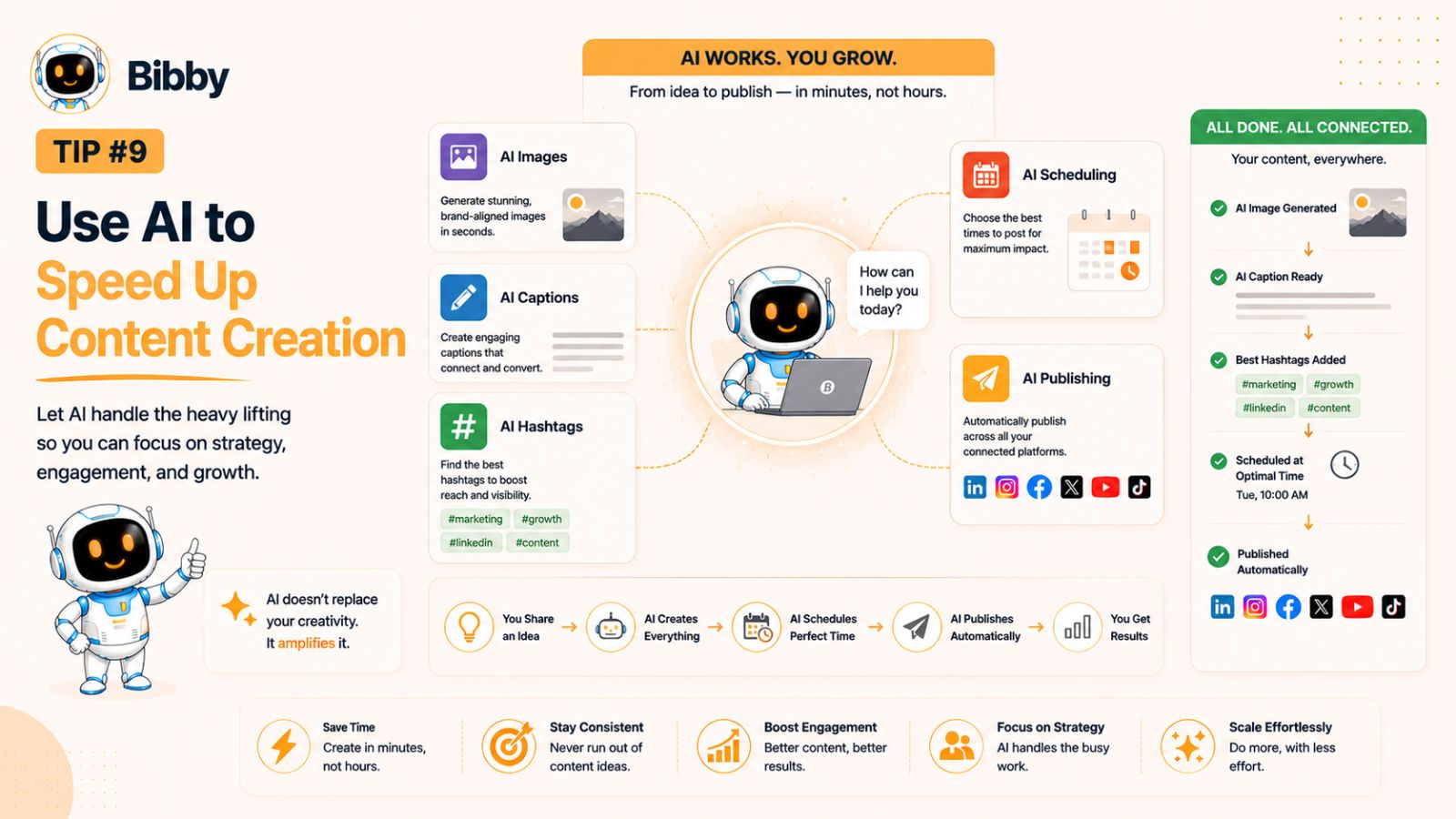
Creating high-quality LinkedIn content consistently can be one of the biggest challenges for professionals and businesses. Between brainstorming ideas, designing visuals, writing captions, choosing hashtags, and publishing at the right time, a single post can take 30 minutes—or even several hours—to complete.
Artificial intelligence (AI) is changing that. Instead of replacing creativity, AI helps eliminate repetitive tasks so you can focus on sharing valuable insights and building relationships with your audience.
Brainstorm Content Ideas Faster
Staring at a blank screen is rarely productive. AI can help generate fresh content ideas based on your niche, audience, and business goals.
For example, you can use AI to create:
- Industry trend discussions
- Educational post ideas
- Thought leadership topics
- Frequently asked question (FAQ) content
- Case study outlines
- Content series for an entire month
Rather than spending hours deciding what to post, you can quickly build a list of ideas and refine the ones that best match your expertise.
Generate Better Captions in Less Time
Writing engaging captions consistently can become a bottleneck, especially if you're publishing across multiple platforms.
AI can help you:
- Write attention-grabbing hooks.
- Improve readability.
- Adjust tone and style.
- Create stronger calls to action.
- Suggest relevant hashtags.
- Rewrite content for different audiences.
The result is a faster writing process without sacrificing quality.
Create Visuals Without a Design Team
Professional visuals often improve engagement, but not everyone has access to graphic designers or advanced editing software.
Modern AI tools can generate original images, social media graphics, and creative concepts in minutes. This makes it easier for individuals, startups, and small businesses to maintain a polished online presence without a large creative budget.
Automate Your Entire Publishing Workflow
The real power of AI comes from combining content creation with automation.
Instead of using one tool for images, another for captions, and a third for scheduling, Bibby brings everything together into a single workflow.
With Bibby, you can:
- Upload your own images or generate new visuals with AI.
- Select a posting style that matches your brand's voice.
- Automatically generate engaging captions.
- Schedule posts across multiple dates.
- Publish at AI-optimized times for better visibility.
- Manage LinkedIn, Facebook, Instagram, YouTube, TikTok, and other supported platforms from one dashboard.
This integrated workflow removes repetitive manual tasks, allowing you to create and schedule weeks of content in a fraction of the time.
Let AI Handle the Repetitive Work—Not Your Expertise
While AI is excellent at speeding up workflows, it shouldn't replace your unique knowledge and experience. Your audience follows you for your perspective, insights, and real-world expertise—not generic content.
The best approach is to let AI handle repetitive tasks like brainstorming, caption generation, scheduling, and formatting, while you focus on adding personal stories, industry expertise, and practical advice that only you can provide.
By combining your experience with AI-powered efficiency, you'll produce content that's both authentic and scalable.
As LinkedIn and other social platforms continue to evolve, creators who embrace AI thoughtfully will be better positioned to stay consistent, save time, and maintain a high-quality publishing schedule without sacrificing authenticity.
Tip #10: Track Your Analytics and Refine Your Strategy
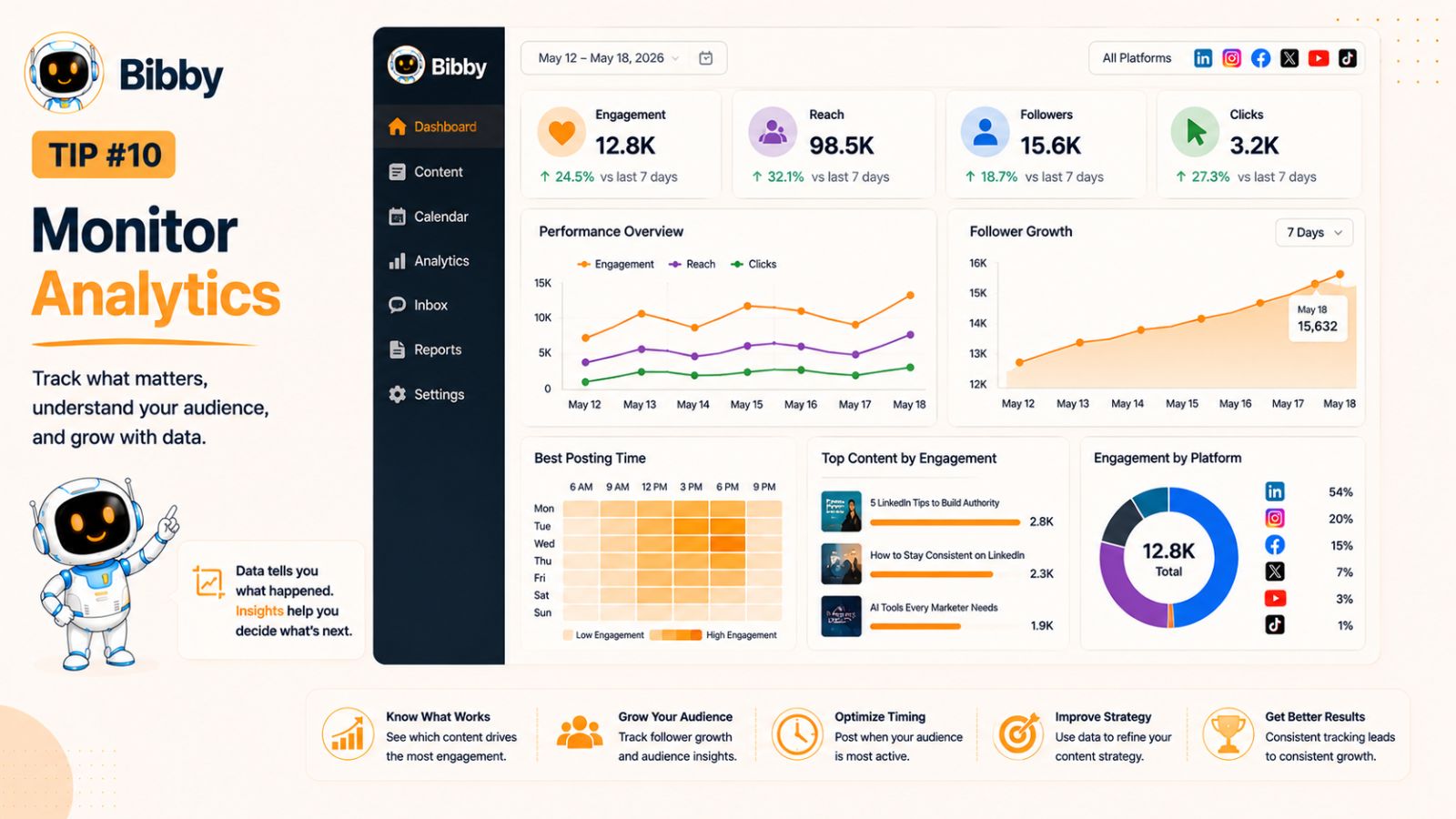
Consistently publishing content is only the first step. To grow your visibility on LinkedIn, you also need to understand what's working—and what isn't. Without reviewing your performance data, you're relying on assumptions instead of evidence.
Analytics provide valuable insights into your audience's behavior, helping you make informed decisions about your content strategy. Rather than posting more frequently, focus on publishing smarter by using data to guide your next steps.
Monitor the Metrics That Matter
It's easy to get caught up in vanity metrics like likes and follower counts, but they only tell part of the story. Instead, pay attention to metrics that reflect genuine audience interest and engagement.
Some of the most valuable LinkedIn metrics include:
- Impressions: How many times your content was displayed.
- Reach: The number of unique users who saw your post.
- Engagement Rate: The percentage of people who interacted with your content.
- Comments: A strong indicator that your content sparked meaningful conversations.
- Shares: A sign that your audience found your content valuable enough to recommend to others.
- Profile Views: An increase often indicates your content is generating curiosity about you or your business.
- Follower Growth: A helpful measure of whether your content strategy is attracting the right audience.
Looking at these metrics together provides a more complete picture of your content's performance.
Identify Your Top-Performing Content
Review your analytics regularly to answer questions like:
- Which topics consistently generate the most engagement?
- Do videos outperform text posts?
- Are carousels driving more profile visits?
- Which posting times produce the strongest results?
- What types of headlines encourage more clicks and comments?
Patterns will begin to emerge over time. Once you identify them, create more content around the themes and formats your audience responds to best.
Test One Variable at a Time
Optimization is an ongoing process. Instead of changing everything at once, experiment with one element at a time so you can clearly measure its impact.
For example, you might test:
- Different posting times.
- Short versus long captions.
- Educational content versus personal stories.
- Images compared to videos.
- Different calls to action.
Small improvements, repeated consistently, often lead to significant long-term growth.
Use Analytics to Build a Smarter Content Calendar
Your analytics shouldn't sit in a dashboard—they should influence your future content.
For example:
- If educational carousels consistently outperform text posts, schedule more of them.
- If Tuesday mornings generate higher engagement than Friday afternoons, adjust your publishing schedule.
- If personal stories receive more comments than promotional updates, include them more frequently in your content mix.
A data-driven content calendar is far more effective than one based solely on assumptions.
Keep Everything in One Dashboard
Managing analytics across multiple social platforms can quickly become overwhelming. Instead of logging into each platform separately, Bibby gives you access to performance insights from one centralized dashboard. You can monitor engagement, evaluate content performance, and identify trends that help refine your publishing strategy over time.
Combined with AI-generated captions, automatic image resizing, multi-platform scheduling, and AI-optimized posting times, Bibby not only simplifies publishing but also helps you understand which content delivers the greatest results.
Treat Every Post as a Learning Opportunity
Not every post will go viral—and that's perfectly normal. Every piece of content provides valuable feedback about your audience's interests and preferences.
The most successful LinkedIn creators don't rely on luck. They publish consistently, analyze their results, and continuously refine their strategy based on real data. By making analytics a regular part of your workflow, you'll steadily improve your content, increase engagement, and build a stronger professional presence over time.
Tip #11: Automate More Than Just Your LinkedIn Posts
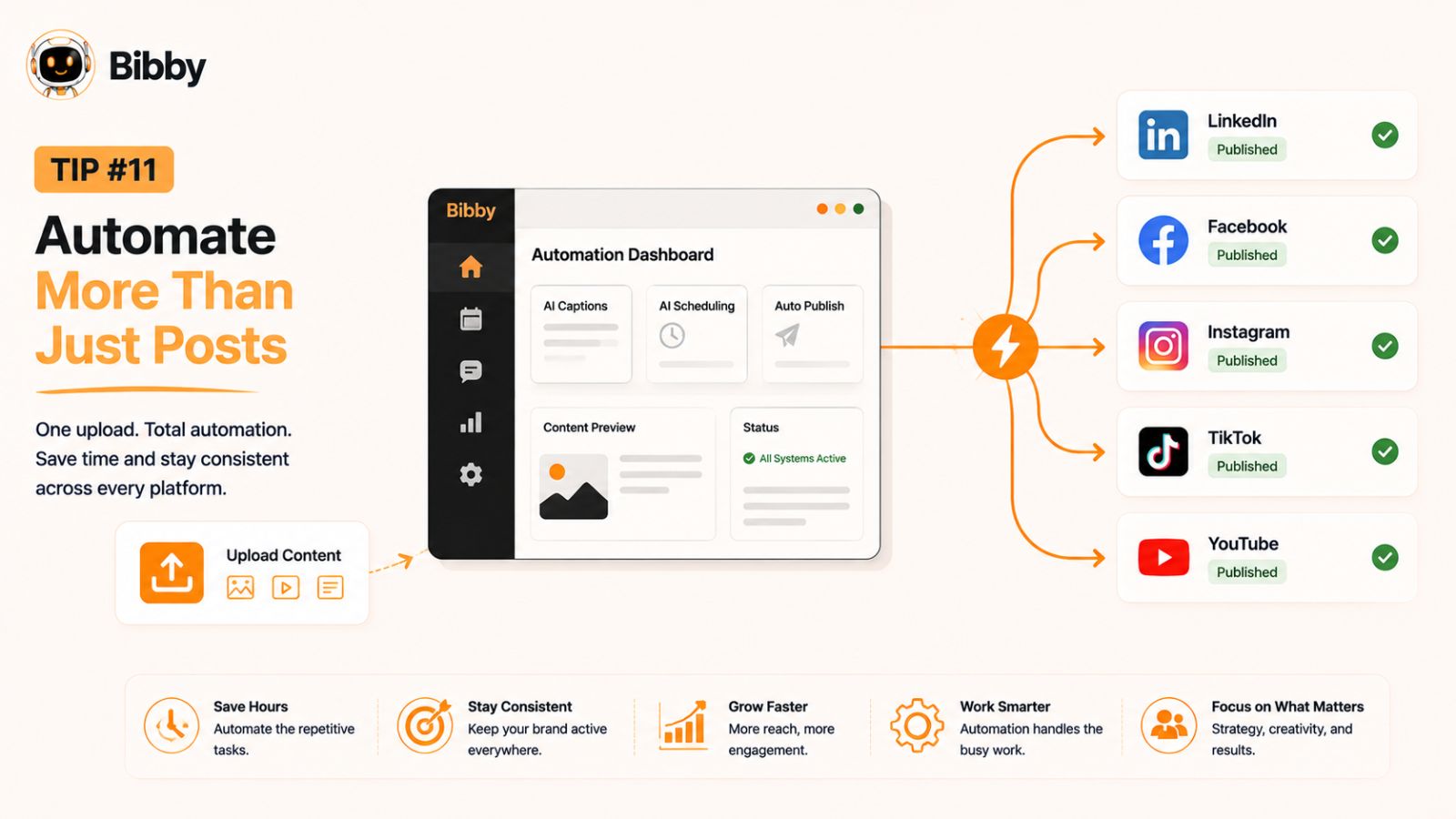
Scheduling LinkedIn posts is a great first step, but true productivity comes from automating your entire social media workflow. As your content strategy grows, you'll likely publish across multiple platforms, experiment with different content formats, and manage an increasingly busy editorial calendar. Handling each task manually can quickly become inefficient.
The goal of automation isn't to remove the human element from your content—it's to eliminate repetitive tasks so you can focus on creating valuable content and engaging with your audience.
Expand Beyond Text Posts
Modern social media strategies involve much more than simple text updates. Depending on your goals, you may also be publishing:
- Videos
- Stories
- Image posts
- Carousels
- Product announcements
- Event promotions
- Short-form clips
- Educational graphics
Managing each content type individually across multiple platforms can consume hours every week. A comprehensive scheduling solution allows you to organize everything from one place.
Publish Across Multiple Platforms Simultaneously
Your audience isn't limited to LinkedIn. They may also follow your brand on Facebook, Instagram, YouTube, TikTok, and other social media platforms.
Instead of uploading the same content repeatedly, automation allows you to publish across multiple channels with a single workflow. This not only saves time but also ensures your messaging remains consistent while adapting your content for each platform.
For businesses, agencies, and creators managing several accounts, this level of automation can significantly improve productivity.
Build Evergreen Campaigns
Some content remains valuable long after it's is published. Educational guides, onboarding tips, customer success stories, and frequently asked questions are excellent examples of evergreen content.
By scheduling evergreen campaigns in advance, you can maintain a steady flow of valuable posts without constantly creating new material. This keeps your profiles active while freeing up time to produce timely, trend-driven content when opportunities arise.
Streamline Your Workflow With Bibby
If you're looking for an all-in-one social media management solution, Bibby brings together content creation, scheduling, automation, and analytics in a single platform.
With Bibby, you can:
- Upload your own images or generate new ones using AI.
- Choose a posting style that matches your brand's tone.
- Automatically generate engaging captions.
- Schedule posts, videos, stories, and other media formats.
- Publish across LinkedIn, Facebook, Instagram, YouTube, TikTok, and other supported platforms.
- Let AI determine optimized posting times for maximum visibility.
- Automatically resize media to meet each platform's recommended dimensions.
- Monitor performance through built-in analytics.
By combining these capabilities into one intuitive workflow, Bibby reduces the need to switch between multiple tools and helps you manage your social media more efficiently.
Automation Doesn't Replace Authenticity
A common misconception is that automation makes social media feel robotic. In reality, automation should handle the repetitive work—not the conversations.
Continue responding to comments, participating in industry discussions, and building relationships with your audience. These genuine interactions are what foster trust and long-term engagement.
Think of automation as your behind-the-scenes assistant. It ensures your content is published consistently, while you remain focused on the activities that require creativity, expertise, and human connection. When used strategically, automation helps you scale your social media presence without sacrificing authenticity.
Tip #12: Review, Refine, and improve your strategy Every Month
A successful LinkedIn strategy isn't something you create once and forget. Social media trends evolve, audience preferences change, and LinkedIn continues to update its platform. The creators and businesses that achieve long-term success are those who regularly review their performance and make small, data-driven improvements.
Instead of asking whether a single post performed well, evaluate your content as a whole. Monthly reviews help you identify patterns, uncover new opportunities, and ensure your strategy continues to align with your goals.
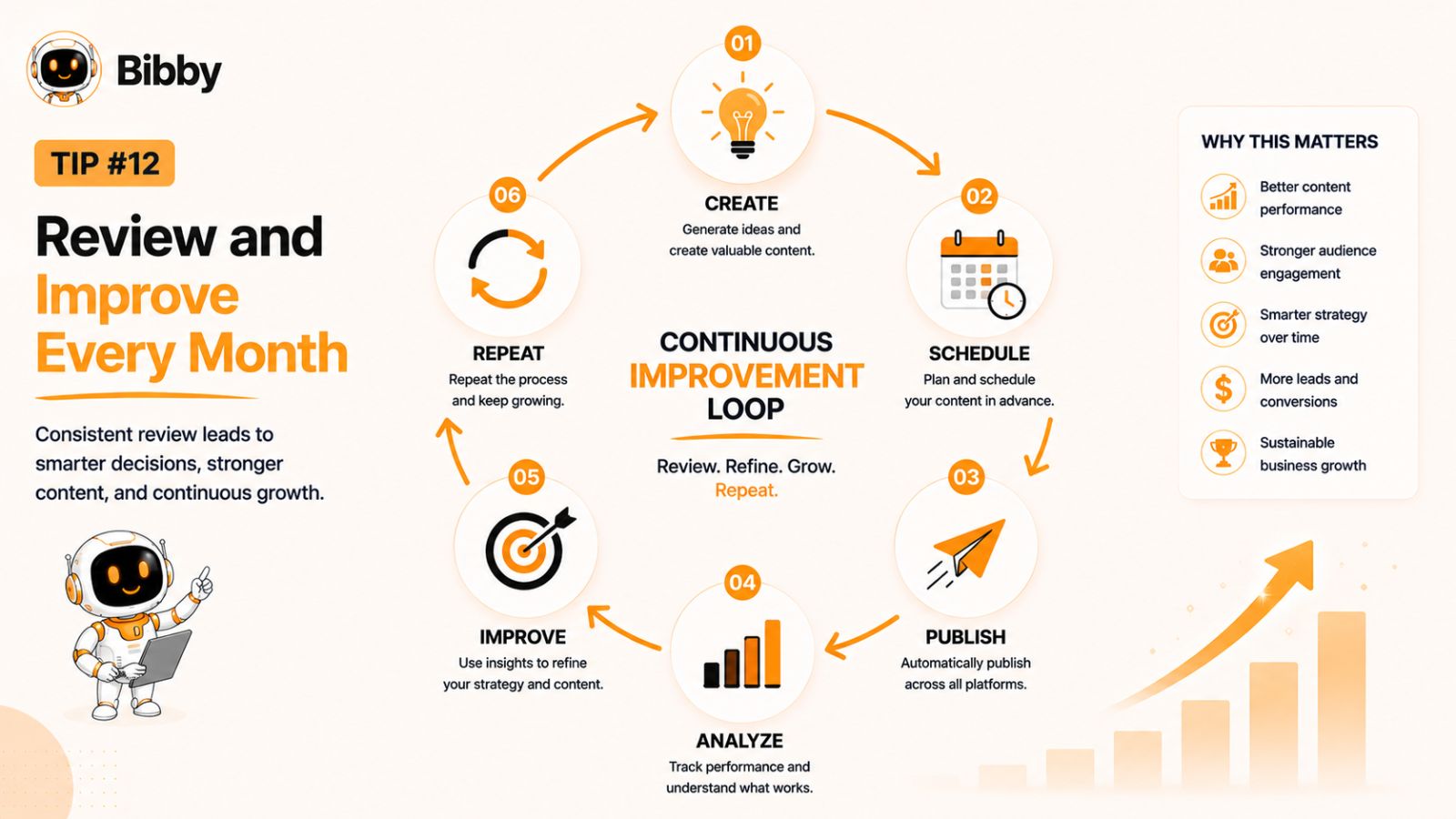
Conduct a Monthly Content Audit
Set aside time at the end of each month to review your published content.
Ask yourself questions like:
- Which posts generated the highest engagement?
- What topics sparked the most conversations?
- Which content formats performed best?
- Did your posting schedule remain consistent?
- Which posts attracted new followers or profile visits?
- Were there any recurring questions from your audience?
These insights provide a roadmap for planning your next month's content.
Double Down on What Works
Not every content idea will resonate equally—and that's completely normal.
If educational carousels consistently outperform text posts, create more educational carousels. If personal stories generate thoughtful discussions, include them more often. If videos lead to more profile visits, make them a regular part of your publishing schedule.
The goal isn't to chase every trend. It's to identify the content that consistently delivers value to your audience and build on that success.
Refresh or Retire Underperforming Content
Some posts may underperform because of timing, formatting, or presentation—not because the idea itself lacks value.
Before discarding an idea entirely, consider whether you can improve it by:
- Writing a stronger opening hook.
- Using a more engaging visual.
- Turning it into a carousel or video.
- Updating outdated information.
- Publishing it at a different time.
If a topic repeatedly fails to resonate despite multiple improvements, it may be worth replacing it with content that better aligns with your audience's interests.
Keep Your Workflow Efficient
As your content library grows, organization becomes increasingly important. Managing ideas, scheduled posts, media assets, and performance data across multiple tools can quickly become overwhelming.
With Bibby, you can streamline the entire process—from generating AI-powered visuals and captions to scheduling posts, videos, and stories across LinkedIn, Facebook, Instagram, YouTube, TikTok, and other supported platforms. Combined with built-in analytics and AI-optimized posting times, Bibby makes it easier to review performance, identify trends, and continuously improve your strategy without adding unnecessary complexity.
Focus on Continuous Improvement
The most successful LinkedIn creators don't become successful because every post goes viral. They succeed because they consistently publish valuable content, measure the results, learn from their audience, and improve over time.
Even small adjustments—such as refining your posting schedule, testing a new content format, or improving your captions—can compound into significant long-term growth.
By treating your LinkedIn strategy as an ongoing process rather than a one-time task, you'll build a stronger professional presence, increase engagement, and create a sustainable system that continues delivering results month after month.
Also try: Carousel Post Generator
Common LinkedIn Scheduling Mistakes to Avoid
Scheduling your LinkedIn posts can save hours every week and help you maintain a consistent online presence. However, simply scheduling content isn't enough. Small mistakes in your workflow can limit your reach, reduce engagement, and make your content feel impersonal.
Here are some of the most common LinkedIn scheduling mistakes—and how to avoid them.
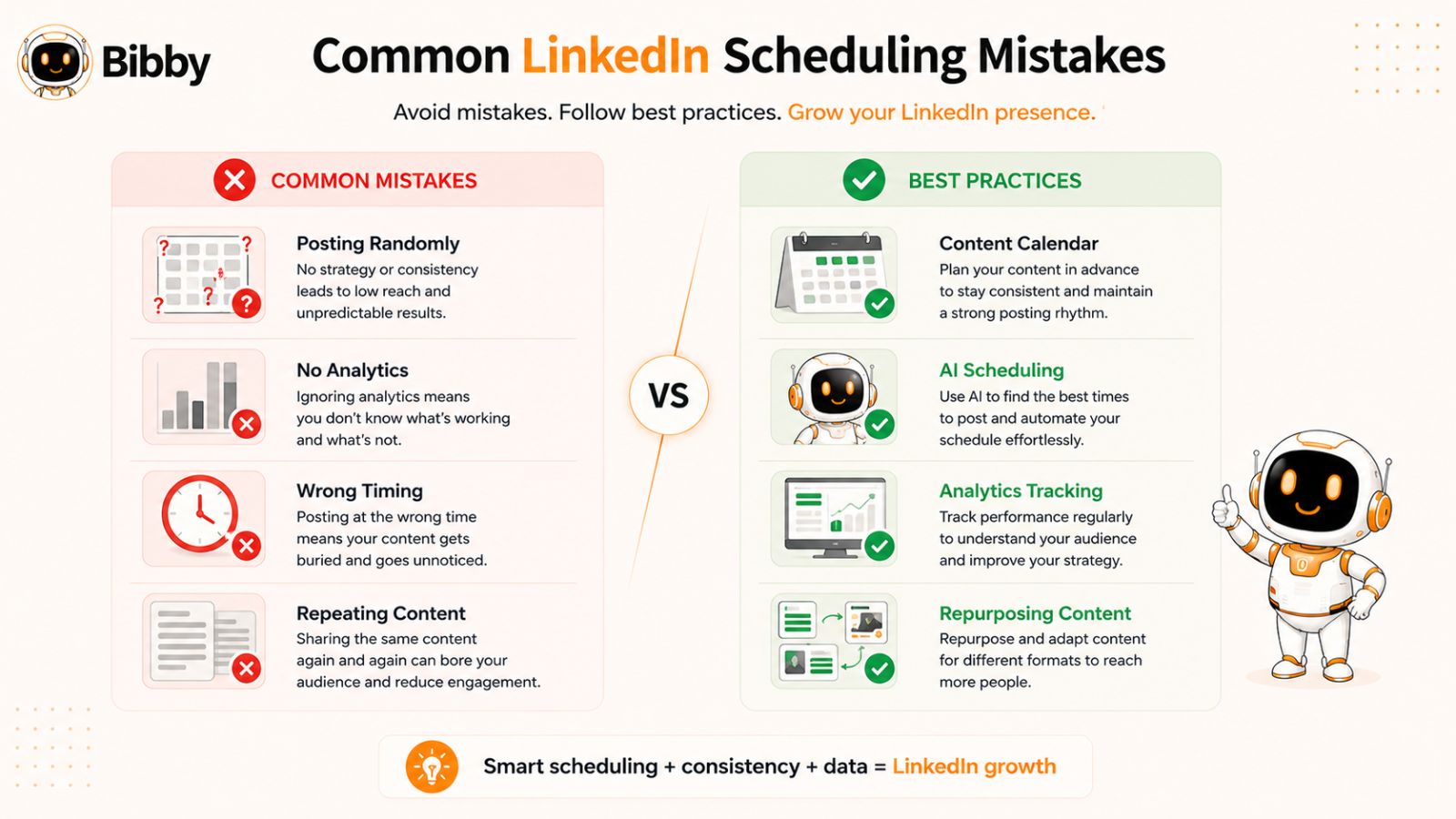
1. Posting Without a Clear Strategy
Scheduling random posts just to stay active rarely delivers meaningful results. Every post should support a broader objective, whether that's building your personal brand, generating leads, educating your audience, or establishing thought leadership.
Before scheduling content, ask yourself:
- Who is this post for?
- What value does it provide?
- What action do I want readers to take?
A well-planned content calendar will always outperform a collection of disconnected posts.
2. Scheduling Everything at the Same Time
Publishing every post at exactly the same time each day isn't always the best approach. While consistency is important, your audience's behavior can change depending on the day of the week, industry trends, and seasonal factors.
Experiment with different publishing windows and use your analytics to identify when your audience is most active.
3. Ignoring Engagement After Publishing
Scheduling should automate publishing—not conversations.
One of the biggest mistakes professionals make is scheduling content and disappearing. LinkedIn rewards genuine engagement, so make time to respond to comments, answer questions, and participate in discussions after your posts go live.
Even a few thoughtful replies can strengthen relationships and encourage further engagement.
4. Publishing the Same Caption Everywhere
Every social media platform has its own audience and content style. Copying the exact same caption across LinkedIn, Facebook, Instagram, TikTok, and other platforms may reduce its effectiveness.
Instead, tailor your messaging to match each platform while keeping your core message consistent. Small adjustments in tone, formatting, or calls to action can make a significant difference.
5. Forgetting to Review Scheduled Content
Scheduling weeks in advance is a smart strategy—but don't forget to review your content before it goes live.
Business priorities change, industry news emerges, and scheduled posts can become outdated. Regularly reviewing your content calendar helps ensure every post remains accurate, relevant, and aligned with your current goals.
6. Over-Automating Your Social Media
Automation saves time, but relying on it entirely can make your online presence feel robotic.
Use automation for repetitive tasks like scheduling, resizing media, generating captions, and publishing across multiple platforms. Continue to personally engage with your audience, share genuine experiences, and contribute to conversations that require a human perspective.
7. Neglecting Analytics
If you never review your performance data, you'll continue repeating the same mistakes.
Make it a habit to analyze your:
- Engagement rate
- Reach
- Impressions
- Profile visits
- Follower growth
- Best-performing content
- Highest-performing posting times
These insights help you continuously improve your content strategy and make smarter scheduling decisions.
8. Using Too Many Separate Tools
Managing one tool for graphic design, another for AI writing, another for scheduling, and another for analytics creates unnecessary complexity and slows down your workflow.
An all-in-one platform like Bibby simplifies the entire process. You can upload or generate AI images, automatically create captions, resize visuals for every platform, schedule posts, videos, and stories, publish at AI-optimized times, and track performance from a single dashboard. Fewer tools mean fewer manual tasks, fewer opportunities for errors, and more time to focus on creating valuable content.
The Bottom Line
Scheduling is one of the most effective ways to stay consistent on LinkedIn, but success depends on more than simply setting a publishing date. By avoiding these common mistakes, you'll create a more strategic, authentic, and data-driven social media workflow that helps you maximize visibility, strengthen your professional brand, and achieve better long-term results.
Conclusion
Building a strong presence on LinkedIn doesn't require posting every day or spending hours managing your content. What matters most is creating a sustainable system that helps you stay consistent, deliver value to your audience, and continuously refine your strategy based on real performance data.
The 12 LinkedIn scheduling tips covered in this guide—from planning a monthly content calendar and batching content creation to optimizing posting times, repurposing high-performing posts, and tracking analytics—are designed to help you work smarter, not harder. By combining these best practices with automation, you can maintain a consistent publishing schedule while freeing up more time to focus on networking, engaging with your audience, and growing your professional brand.
If you're looking to simplify your entire social media workflow, Bibby brings everything together in one intuitive platform. You can upload your own images or generate them with AI, choose a posting style, automatically generate engaging captions, schedule posts at AI-optimized times, and publish content across LinkedIn, Facebook, Instagram, YouTube, TikTok, and other supported platforms. Bibby also automatically resizes your media for each platform, supports videos and stories, and provides built-in analytics to help you measure performance and improve your strategy over time.
Ultimately, consistency isn't about working longer hours—it's about building a smarter workflow. The right combination of planning, quality content, and automation can help you stay visible, reach the right audience, and achieve better results with less effort.
Start implementing these LinkedIn scheduling tips today, and you'll be well on your way to building a more consistent, engaging, and impactful social media presence.