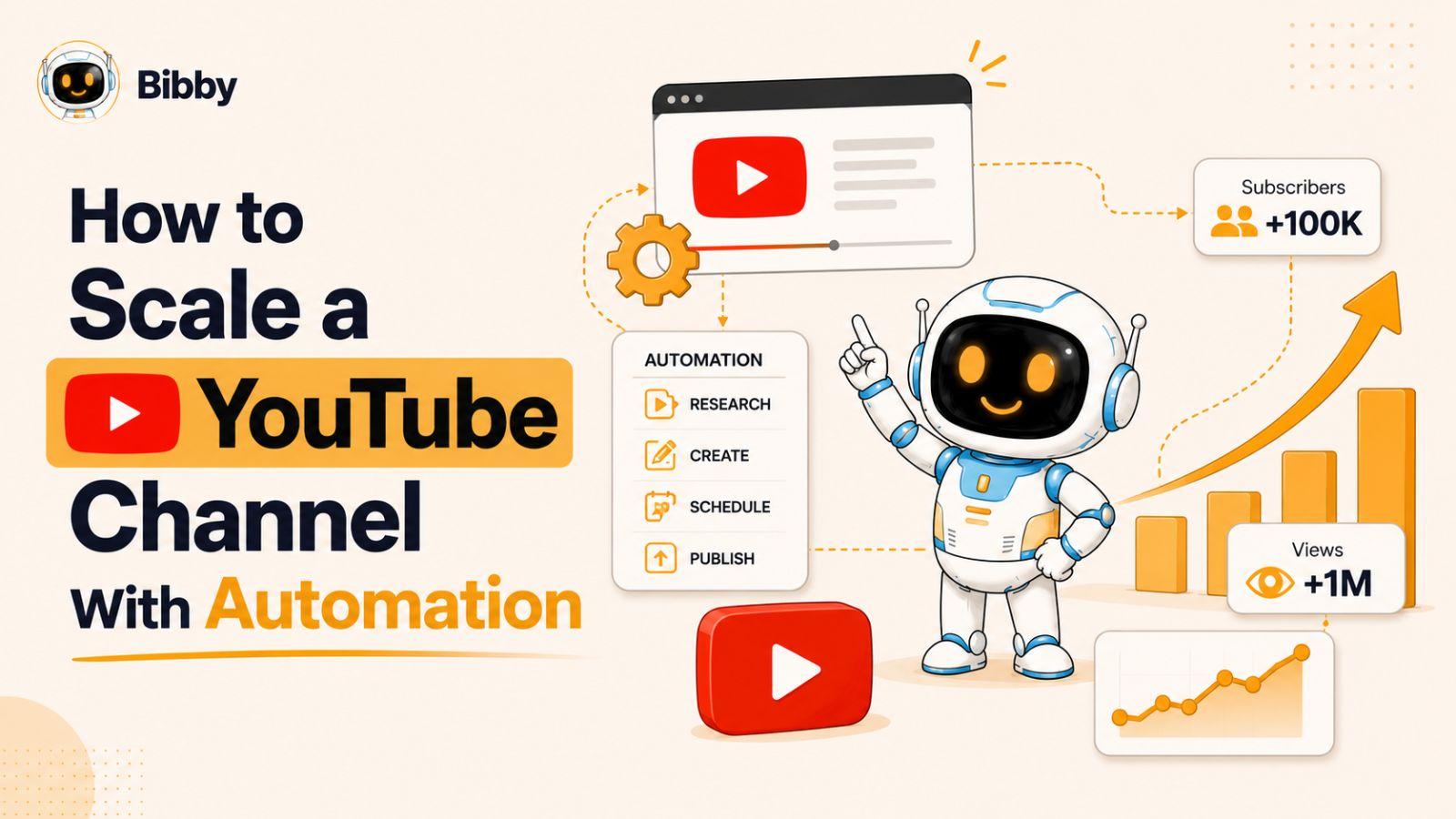
Growing a successful YouTube channel is no longer just about creating great videos—it’s about building systems that help you produce, publish, and promote content consistently.
Many creators struggle to scale because they spend too much time on repetitive tasks like research, editing, scheduling, and social media promotion. The good news is that automation can eliminate many of these bottlenecks, allowing you to grow faster while spending less time managing your workflow. Whether you're a solo creator or building a media brand, the right automation strategy can help you reach more viewers and maximize your results.
In this guide, we will discuss:
- How to build a scalable YouTube content production system
- Which automation tools save creators the most time
- How to use AI and scheduling tools to accelerate growth
Let's start by understanding what YouTube automation really means and how it can help creators scale efficiently.
Looking for a YouTube Automation Tool?
If you're looking for a way to automate the publishing and distribution side of your YouTube workflow, explore Bibby's YouTube automation tool. Bibby helps creators plan, create, schedule, and automate content across YouTube and other social platforms from one place.
This guide focuses on the broader strategy of scaling a YouTube channel with automation, including content research, production workflows, AI-assisted creation, repurposing, distribution, and performance optimization.
What Is YouTube Automation?
YouTube automation is the process of using systems, software, AI tools, and repeatable workflows to reduce the amount of manual work required to run and grow a YouTube channel. Contrary to popular belief, automation does not mean removing the creator from the process. Instead, it allows creators to spend less time on repetitive tasks and more time on strategy, creativity, and audience engagement.
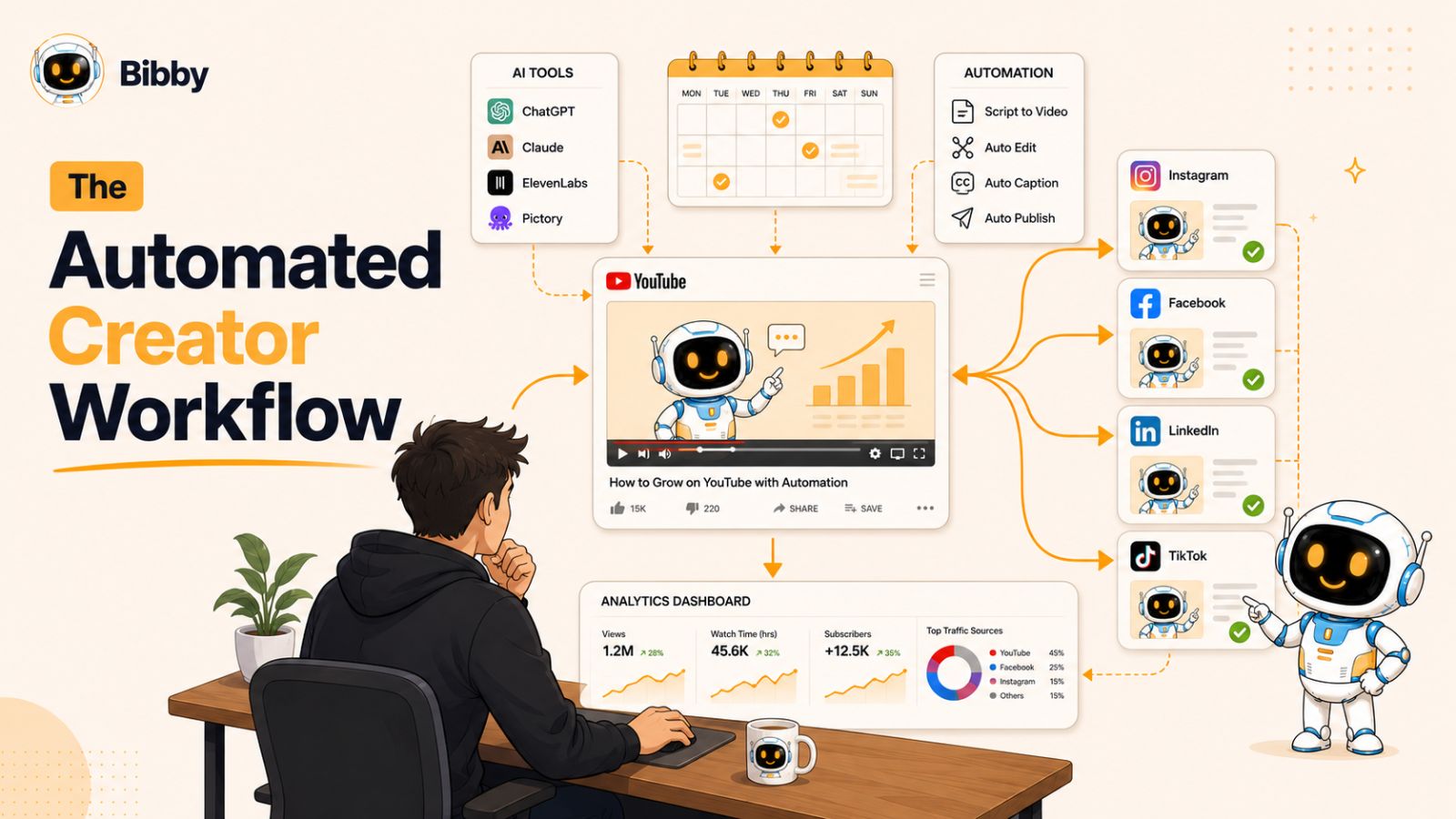
Many people associate YouTube automation with faceless channels or outsourced content production, but automation can benefit any type of creator. Whether you run a personal brand, educational channel, business channel, or entertainment channel, automation can help streamline your operations and improve consistency.
Some of the most common areas creators automate include:
- Content research and topic discovery
- Keyword research and SEO optimization
- Script writing and content planning
- Video editing workflows
- Thumbnail creation
- Video scheduling and publishing
- Social media promotion
- Performance tracking and analytics
The biggest advantage of automation is scalability. Instead of being limited by the number of hours you can personally work each week, you can build systems that continuously support content creation, publishing, and promotion. This allows your channel to grow more efficiently without sacrificing quality.
The goal of YouTube automation is not to replace creativity—it is to eliminate repetitive tasks so creators can focus on producing better content and growing their audience.
You may also like reading: How to automate posting Instagram Reels?
The YouTube Automation Workflow
A scalable YouTube channel needs a workflow that moves an idea from research to publication without relying on one person to manually handle every step. The most effective approach is to automate repetitive tasks while keeping strategy, creativity, and quality control under human supervision.
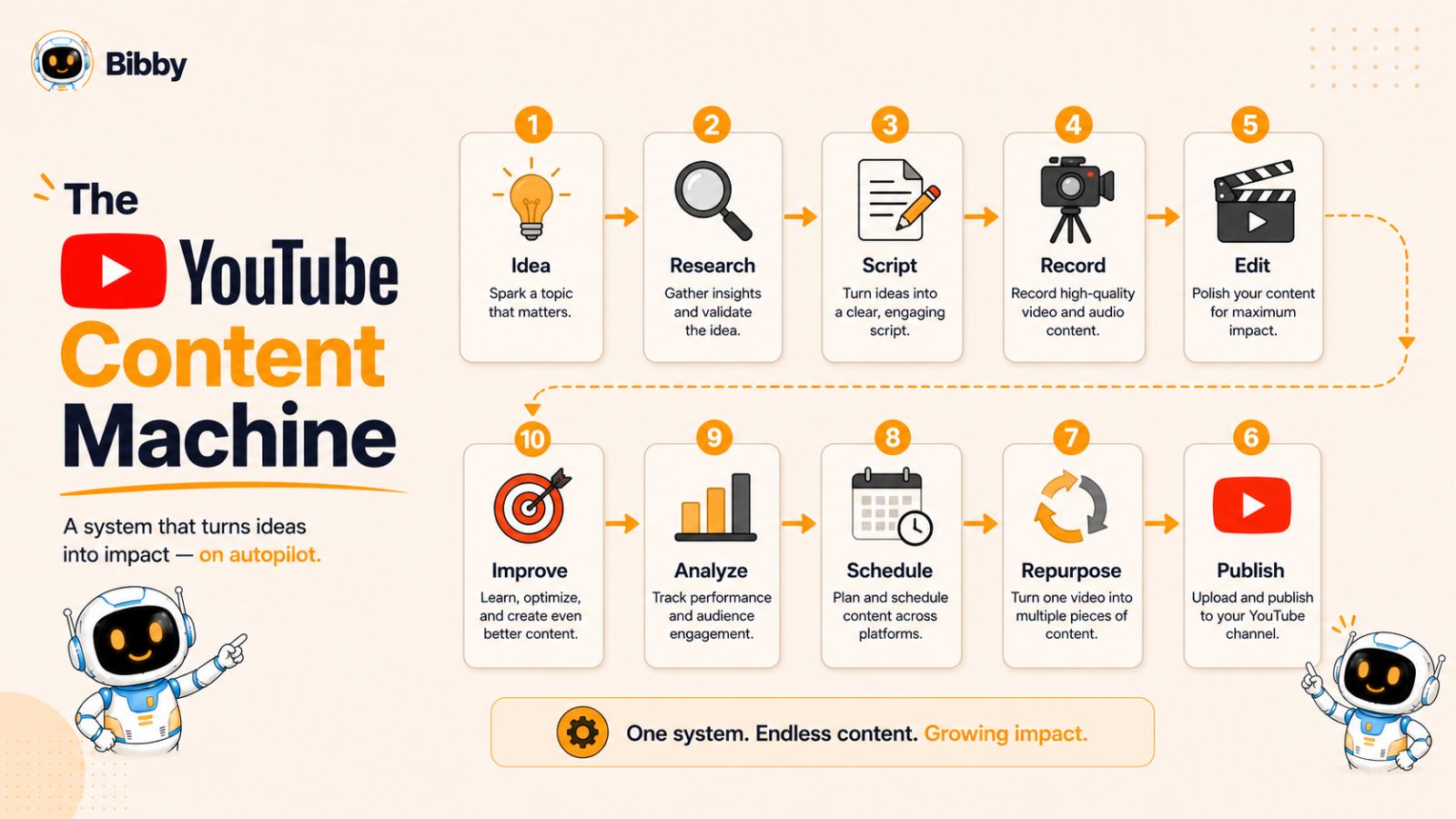
A typical YouTube automation workflow looks like this:
Topic research → Content brief → Script → Video production → Thumbnail → Publishing → Repurposing → Distribution → Analytics → Optimization
Each stage has a different level of automation. Some tasks can be almost completely automated, while others still benefit from human input.
| Stage | What happens | Automation level |
|---|---|---|
| Topic research | Find topics, keywords, trends, and audience questions | High |
| Content brief | Organize the angle, structure, and key points | High |
| Script | Create and refine the first draft | Medium |
| Video production | Editing, captions, voiceovers, and repetitive production tasks | Medium |
| Thumbnail | Generate concepts and variations | Medium |
| Publishing | Uploading, scheduling, descriptions, and metadata | High |
| Repurposing | Turn videos into Shorts and social posts | High |
| Distribution | Share content across other social platforms | High |
| Analytics | Collect performance data and generate reports | High |
| Optimization | Decide what to change based on performance | Low |
The important distinction is that automation should remove repetitive work, not remove decision-making.
For example, software can help collect performance data and identify videos with unusually high or low engagement. It cannot reliably decide why a particular video connected with viewers or what your audience will care about next. That still requires context and judgment.
A good YouTube automation system therefore has three layers:
- Automation: repetitive tasks that software can handle.
- AI assistance: tasks where AI can accelerate research, writing, analysis, or production.
- Human decisions: strategy, creative direction, quality control, and final approval.
This combination lets you increase your publishing capacity without sacrificing the originality and quality that make a channel worth following.
What Should You Automate on YouTube?
Not every part of running a YouTube channel should be automated. The best results usually come from automating repetitive work while keeping creative and strategic decisions under human control.
A useful rule is simple: if a task happens repeatedly and follows a predictable process, it is a good candidate for automation. If it requires taste, context, or a deep understanding of your audience, keep a human involved.
Tasks You Can Automate
Several parts of the YouTube workflow are well suited to automation:
- Content research: Collect topic ideas, search queries, trends, and audience questions.
- Content planning: Organize ideas into a content calendar and maintain a consistent publishing schedule.
- First-draft scripts: Use AI to turn a content brief into a starting point for a script.
- Captions and transcripts: Generate subtitles and transcripts without creating them manually.
- Video repurposing: Turn long-form videos into Shorts, clips, quotes, or social media content.
- Publishing and scheduling: Prepare videos and schedule them for publication instead of uploading each one manually.
- Social media distribution: Automatically share new videos and related content across platforms.
- Performance reporting: Collect metrics and create recurring reports so you can spend less time gathering data.
Tasks You Should Keep Human
Automation becomes less useful when a task depends heavily on creativity or judgment.
Keep humans involved in:
- Choosing the final topic and angle
- Developing original ideas
- Writing the final script
- Fact-checking claims
- Creating the channel's voice and personality
- Reviewing the final video
- Selecting the strongest thumbnail
- Interpreting audience behavior
- Deciding what content to make next
For example, an AI tool can generate ten possible video topics in seconds. That does not mean all ten are worth producing. Someone still needs to understand the channel, audience, competition, and business goal before deciding which idea deserves production.
The same principle applies to analytics. Automation can tell you that a video's retention dropped sharply at a particular point. The valuable work is figuring out why viewers left and what you should change in the next video.
The Best YouTube Automation Model
Think of automation as an assistant inside your content operation rather than a replacement for your content team.
Automate the repetition.
Use AI to accelerate the work.
Keep humans responsible for the decisions.
That model gives you the benefits of scale without turning your channel into a stream of generic, interchangeable content.
How to Build a Scalable YouTube Content Workflow
Once you know which tasks to automate, the next step is turning them into a repeatable workflow. The goal is to make every video follow a consistent process, so increasing your publishing frequency does not mean increasing the amount of manual work at the same rate.
A scalable workflow can be broken into eight stages.
1. Research and Validate Topics
Start by identifying topics your target audience already cares about. Look at search demand, YouTube suggestions, competitor videos, comments, trends, and questions your audience repeatedly asks.
AI can speed up this research by organizing large amounts of information and generating potential angles. However, validate the final topic yourself. A topic with search volume is not automatically a topic your particular audience will watch.
Before moving into production, answer three questions:
- Does the topic have clear audience demand?
- Can we offer a better angle or more useful information?
- Does the topic fit the channel's overall strategy?
2. Create a Content Brief
A content brief turns a promising idea into a production plan.
Define the video's:
- Target audience
- Main topic
- Search intent
- Primary takeaway
- Unique angle
- Key points
- Suggested title
- Thumbnail concept
- Call to action
A standardized brief makes it much easier for multiple people or AI tools to work on the same video without losing the original direction.
3. Write and Refine the Script
AI can help create the first draft, research supporting points, organize information, and suggest different hooks.
But don't publish an AI-generated script without reviewing it.
The final script should sound like your channel, contain accurate information, remove unnecessary repetition, and give viewers a reason to keep watching.
A strong process is:
AI first draft → human editing → fact-checking → final script
This gives you speed without sacrificing the channel's voice.
4. Produce the Video
Once the script is ready, move it through your production workflow.
Depending on your channel, this may involve:
- Recording
- Voiceover
- Stock footage
- Screen recordings
- AI-generated visuals
- B-roll
- Editing
- Captions
- Music and sound design
Standardize these steps with templates, reusable assets, naming conventions, and production checklists. The more predictable your production process becomes, the easier it is to increase output.
5. Create the Thumbnail
The thumbnail and title work together to earn the click.
Create several concepts rather than automatically accepting the first design. AI can help generate ideas and variations, but a person should make the final decision based on the video's actual promise.
Avoid creating thumbnails that promise something the video does not deliver. A high click-through rate is not useful if viewers immediately leave because the content does not match the expectation.
6. Schedule and Publish
Once the video passes your quality check, prepare the publishing details:
- Title
- Description
- Thumbnail
- Chapters, when appropriate
- Captions
- Links
- Playlist
- Publishing date
Scheduling removes one more repetitive task from your weekly workload and makes consistent publishing easier.
7. Repurpose the Content
One long-form YouTube video can become the source material for multiple pieces of content.
For example:
1 YouTube video → Shorts → Instagram Reels → LinkedIn post → Facebook post → quotes → carousel → email
This is one of the highest-leverage opportunities in a YouTube content workflow because you are extending the value of content you have already produced.
For the distribution stage, Bibby's YouTube automation tool can help automate scheduling and cross-platform publishing rather than requiring you to manually distribute every piece of content.
8. Analyze and Improve
After publication, review the performance of the video and look for patterns.
Pay attention to metrics such as:
- Impressions
- Click-through rate
- Average view duration
- Audience retention
- Watch time
- Traffic sources
- Subscribers gained
Don't treat analytics as a report you look at once and forget. Use the findings to improve the next video.
The real automation loop is therefore:
Create → Publish → Measure → Learn → Improve → Create again
That feedback loop is what turns a collection of automated tasks into a scalable YouTube growth system.
Why Automation Is Essential for Scaling a YouTube Channel
Most YouTube creators hit a growth ceiling because they rely entirely on manual processes. In the beginning, researching topics, writing scripts, editing videos, designing thumbnails, publishing content, and promoting videos across multiple platforms may seem manageable. However, as your channel grows, these responsibilities quickly become overwhelming.
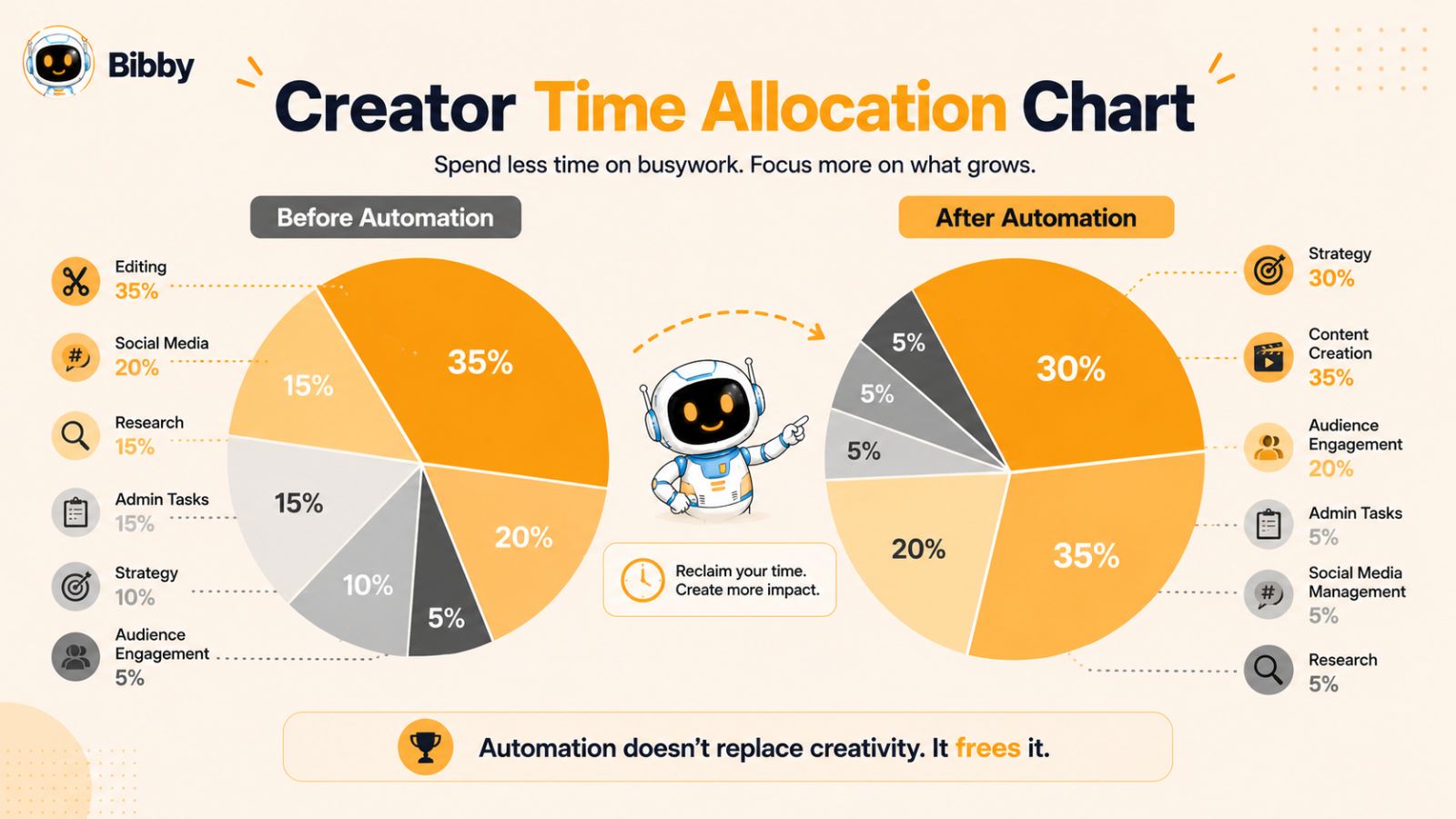
The challenge is simple: there are only so many hours in a day. If every task depends on your direct involvement, your channel's growth will always be limited by your available time. This is why many creators experience inconsistent upload schedules, burnout, and slower growth despite working harder than ever.
Automation solves this problem by creating systems that handle repetitive tasks efficiently. Instead of spending hours manually publishing content, scheduling social media posts, or organizing workflows, creators can use automation tools to complete these tasks automatically.
Successful YouTubers often use automation in several key areas:
Content Planning
Automation tools can help identify trending topics, discover content opportunities, organize content calendars, and streamline keyword research. This makes it easier to maintain a consistent pipeline of video ideas.
Content Production
AI-powered tools can assist with script drafting, video editing, transcription, subtitle generation, and thumbnail creation. While human oversight remains essential, these tools significantly reduce production time.
Content Distribution
Publishing a YouTube video is only part of the growth process. Successful creators distribute content across multiple platforms to maximize visibility. Automated scheduling tools can publish content to Facebook, Instagram, LinkedIn, TikTok, YouTube Shorts, and other channels without requiring manual uploads every day.
Performance Analysis
Analytics tools automatically track performance metrics, identify trends, and reveal which content formats generate the highest engagement. This allows creators to make smarter decisions based on data rather than guesswork.
By combining these systems, creators can transform their channels from time-intensive projects into scalable content businesses. The result is more consistent publishing, better audience growth, increased efficiency, and a significantly reduced risk of burnout.
Before implementing automation, however, it's important to understand how to build a scalable content workflow that supports long-term growth.
How AI Fits Into YouTube Automation
AI can speed up almost every stage of a YouTube workflow, but using AI everywhere is not the same as having an effective automation strategy. The biggest gains come from using AI for repetitive or time-consuming work while keeping humans responsible for creative direction and quality.
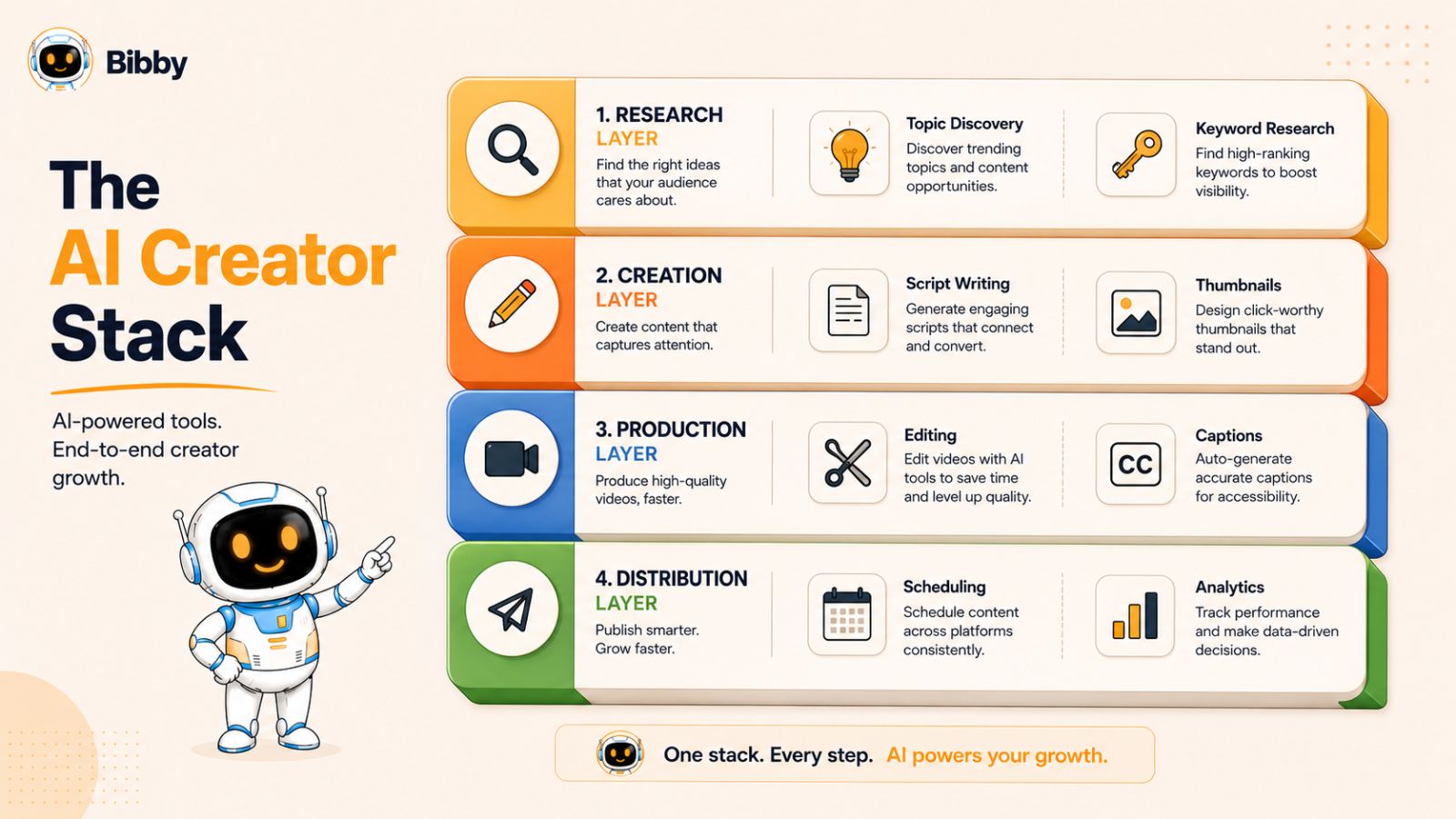
AI for YouTube Topic Research
Instead of starting every video from a blank page, AI can help turn audience questions, search trends, competitor content, and existing data into a list of potential topics.
For each idea, ask AI to identify:
- The audience problem behind the search
- The likely search intent
- Related questions viewers may have
- Possible content angles
- Gaps in competing content
- Potential titles and hooks
The important step is validation. AI-generated ideas should be treated as candidates, not automatically approved topics.
AI for Script Development
AI is particularly useful during the early stages of scripting.
It can help you:
- Create an initial outline
- Generate alternative hooks
- Organize research
- Turn notes into a first draft
- Suggest transitions
- Identify repetitive sections
- Create different versions of an introduction
However, the final script should still reflect your channel's expertise and voice. A script that is technically polished but sounds identical to thousands of other AI-generated videos will struggle to create a memorable channel.
AI for Video Production
Depending on your format, AI can assist with several production tasks, including transcription, captions, voice generation, background removal, visual creation, editing assistance, and converting longer videos into shorter clips.
This can significantly reduce production time, particularly when you're working with repeatable formats.
But automation should not become an excuse to publish low-effort videos. Viewers still notice weak storytelling, irrelevant visuals, poor pacing, and unnatural narration.
AI for Content Repurposing
Repurposing is one of the most practical applications of AI.
A single long-form video can be analyzed to identify:
- Short-form clips
- Key quotes
- Important statistics
- Social media post ideas
- Educational tips
- Discussion points
- Carousel topics
Instead of creating every social post from scratch, AI can transform the original video into multiple content formats while keeping the core message consistent.
AI for YouTube Analytics
AI can also help make analytics easier to understand.
Instead of manually collecting numbers from different reports, an AI-assisted workflow can summarize performance and highlight unusual changes in metrics.
For example, it could flag:
"This video's click-through rate is higher than your recent average, but audience retention falls sharply during the first 30 seconds."
The important part comes next: deciding what caused the pattern and what to test in the next video.
AI Should Accelerate Your Workflow, Not Replace Your Strategy
The strongest YouTube automation systems use AI as a force multiplier.
AI handles speed.
Automation handles repetition.
Humans handle judgment.
That combination lets a channel increase its output without losing the originality, expertise, and personality that make viewers come back.
Also read: Why Every Small Business Should Use a Social Media Scheduling Tool?
AI for Content Distribution
Creating a great video is only half the battle. The next challenge is getting that content in front of as many people as possible.
This is where automation platforms such as Bibby become valuable. After creating content, creators can upload images or generate AI images directly within Bibby, choose a posting style, and automatically generate platform-specific captions.
Instead of manually publishing content across multiple channels, Bibby schedules posts across Facebook, Instagram, LinkedIn, YouTube, and TikTok at AI-optimized times. It also supports videos, stories, content scheduling, and analytics, making it easier to maintain a consistent online presence without additional manual effort.
This type of automation allows creators to extend the reach of every piece of content while saving hours each week.
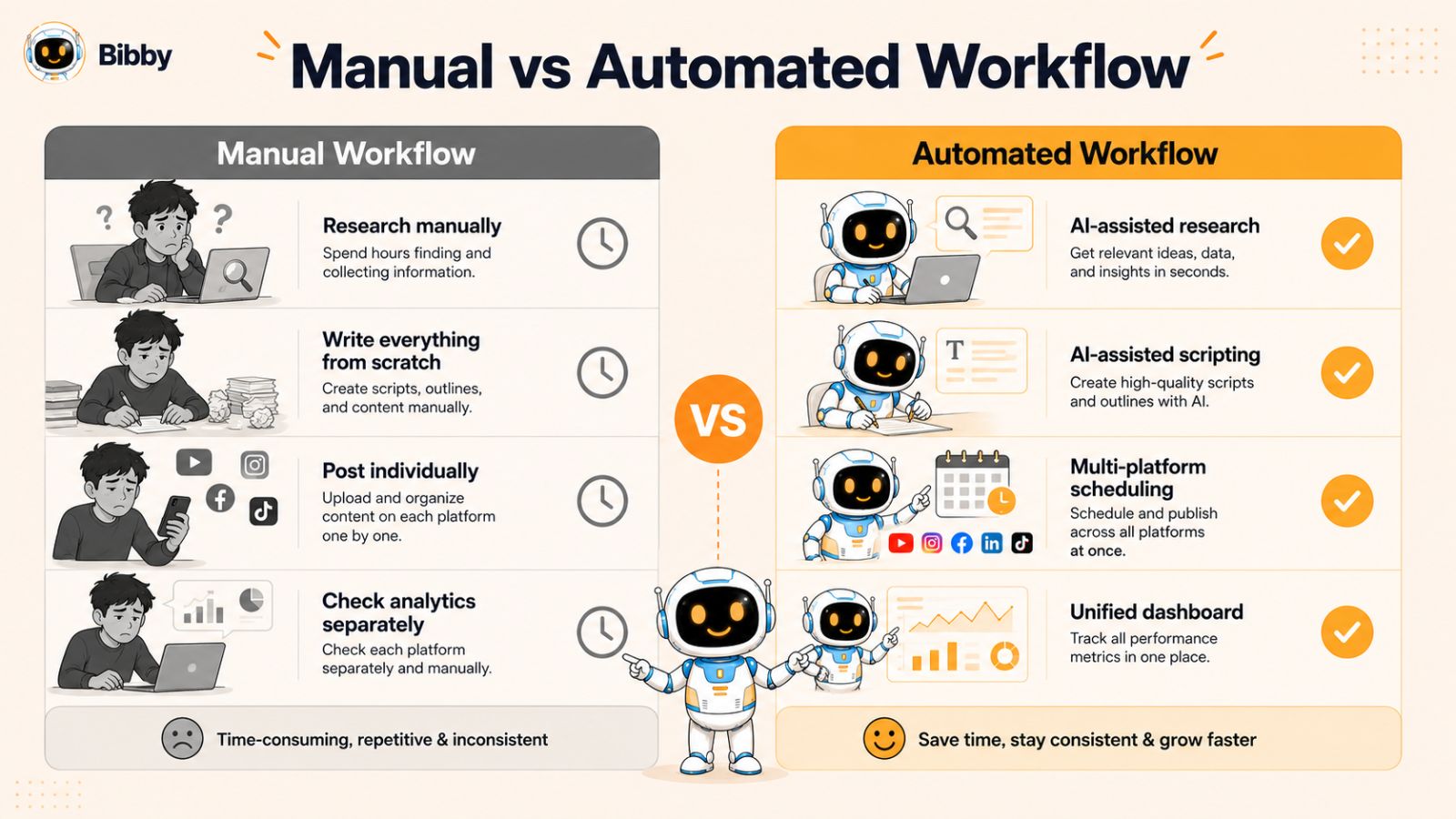
AI for Analytics and Decision-Making
Many creators rely on guesswork when deciding what content to create next. AI-powered analytics tools help eliminate that uncertainty.
These tools can identify:
- Top-performing topics
- Viewer behavior patterns
- Audience retention trends
- Engagement opportunities
- Content gaps
By making decisions based on data instead of assumptions, creators can continuously improve their content strategy and maximize growth.
The Best Approach to AI-Powered Growth
The goal is not to automate creativity. The goal is to automate repetitive work so creativity can flourish.
The most successful YouTube channels combine human expertise with AI-powered systems. AI handles research, organization, production support, distribution, and analytics, while creators focus on storytelling, audience connection, and delivering unique value.
When used strategically, AI becomes a force multiplier that enables creators to scale their channels faster without sacrificing quality.
How to Actually Scale a YouTube Channel With Automation
The biggest mistake creators make when trying to scale a YouTube channel is simply trying to publish more videos.
Going from four videos a month to sixteen does not require you to work four times harder. It requires you to build a production system where the same idea can move through research, production, publishing, and distribution with less manual effort at every stage.
Think of your YouTube channel as a content operation rather than a collection of individual videos.
Start With the Right Scaling Model
A simple scaling model looks like this:
1 creator → 1 workflow → repeatable processes → automation → delegation → higher output
At the beginning, one person may handle almost everything. As the channel grows, repetitive tasks should gradually move into templates, AI-assisted workflows, automation, or specialized roles.
For example:
| Stage | Small channel | Scaled channel |
|---|---|---|
| Topic research | Creator | Research workflow |
| Content planning | Creator | Content calendar |
| Script | Creator | AI draft + editor |
| Video editing | Creator | Editor + templates |
| Thumbnail | Creator | Designer + reusable formats |
| Publishing | Creator | Scheduled workflow |
| Repurposing | Manual | Automated workflow |
| Distribution | Manual | Automated |
| Analytics | Manual checks | Automated reporting |
| Strategy | Creator | Creator/team |
The objective is not to remove people from the process. It is to make sure people spend their time on the decisions that actually affect channel growth.
Build a Content Production Line
A scalable channel should have a defined path for every video:
Idea → Research → Brief → Script → Production → Thumbnail → Quality Check → Publish → Repurpose → Distribute → Analyze
Once this workflow is documented, you can identify where time is being wasted.
For example, if every video requires someone to manually create social posts after publication, that task does not need to remain part of the creator's weekly workload. It can become an automated step in the workflow.
The same applies to scheduling, reporting, transcription, captions, content repurposing, and other repetitive tasks.
Scale Output Without Scaling Complexity
Imagine a creator currently publishes four videos per month.
Instead of immediately trying to publish sixteen, first document the process for producing one video.
Measure how long each stage takes:
- Research: 2 hours
- Brief: 30 minutes
- Script: 3 hours
- Production: 5 hours
- Thumbnail: 1 hour
- Publishing: 30 minutes
- Distribution: 1 hour
- Analytics: 30 minutes
Now look for the repetitive work.
If publishing and distribution take 1.5 hours per video, automating those steps could save approximately six hours per month at four videos.
At sixteen videos per month, the same inefficiency would consume approximately 24 hours.
This is why automation becomes more valuable as your publishing volume increases.
The goal is not simply to automate everything. It is to identify the tasks that become expensive when repeated at scale.
Create Once, Distribute Everywhere
One of the most powerful ways to scale a YouTube operation is to stop treating every social platform as a separate content project.
A long-form YouTube video can become:
1 YouTube video
→ YouTube Short
→ Instagram Reel
→ TikTok video
→ LinkedIn post
→ Facebook post
→ Quote or statistic
→ Carousel
→ Email content
Instead of creating ten pieces of content independently, you create one strong piece of content and build a distribution system around it.
This is where cross-platform automation can remove a significant amount of repetitive work. Bibby's YouTube automation tools can be used to automate scheduling and distribution across supported social platforms, allowing the original YouTube content to travel further without requiring a separate publishing workflow for every platform.
Know What Should Never Be Fully Automated
Scaling does not mean handing your entire channel to AI.
Keep human control over the decisions that determine whether your content is actually worth watching:
- Which topics are worth pursuing
- What your unique angle is
- What your audience needs
- The final script
- Storytelling and creative direction
- Fact-checking
- Final video quality
- Thumbnail selection
- Interpreting performance
- Deciding what to make next
Automate the process, not the point of view.
That distinction becomes increasingly important as AI-generated content becomes easier to produce. If everyone can generate ten videos in an afternoon, the advantage shifts toward creators who have better ideas, stronger expertise, better storytelling, and a more efficient system for turning those ideas into content.
The YouTube Scaling Flywheel
A mature YouTube automation system should eventually create a feedback loop:
Research → Create → Publish → Measure → Learn → Repurpose → Distribute → Research again
Your analytics should influence your next content decisions.
A video that performs unusually well can reveal a topic, format, hook, or audience need worth exploring further. A video that performs poorly can reveal what needs to change.
This is the real advantage of automation.
You're not simply publishing faster.
You're building a system that lets you create, distribute, learn, and improve faster.
The Goal Is a Better System, Not More Videos
Publishing more content is only useful when the quality and strategy remain strong.
The most scalable YouTube channels therefore focus on three things:
Better content decisions + repeatable production + intelligent automation
When those three pieces work together, you can increase your publishing capacity without turning every new video into another pile of manual work.
That is what makes YouTube automation valuable: not replacing the creator, but giving the creator a system capable of scaling.
How to Repurpose YouTube Content Across Multiple Platforms
One of the biggest mistakes creators make is treating each piece of content as a one-time asset. In reality, a single YouTube video can generate dozens of additional content pieces that reach new audiences across multiple platforms.
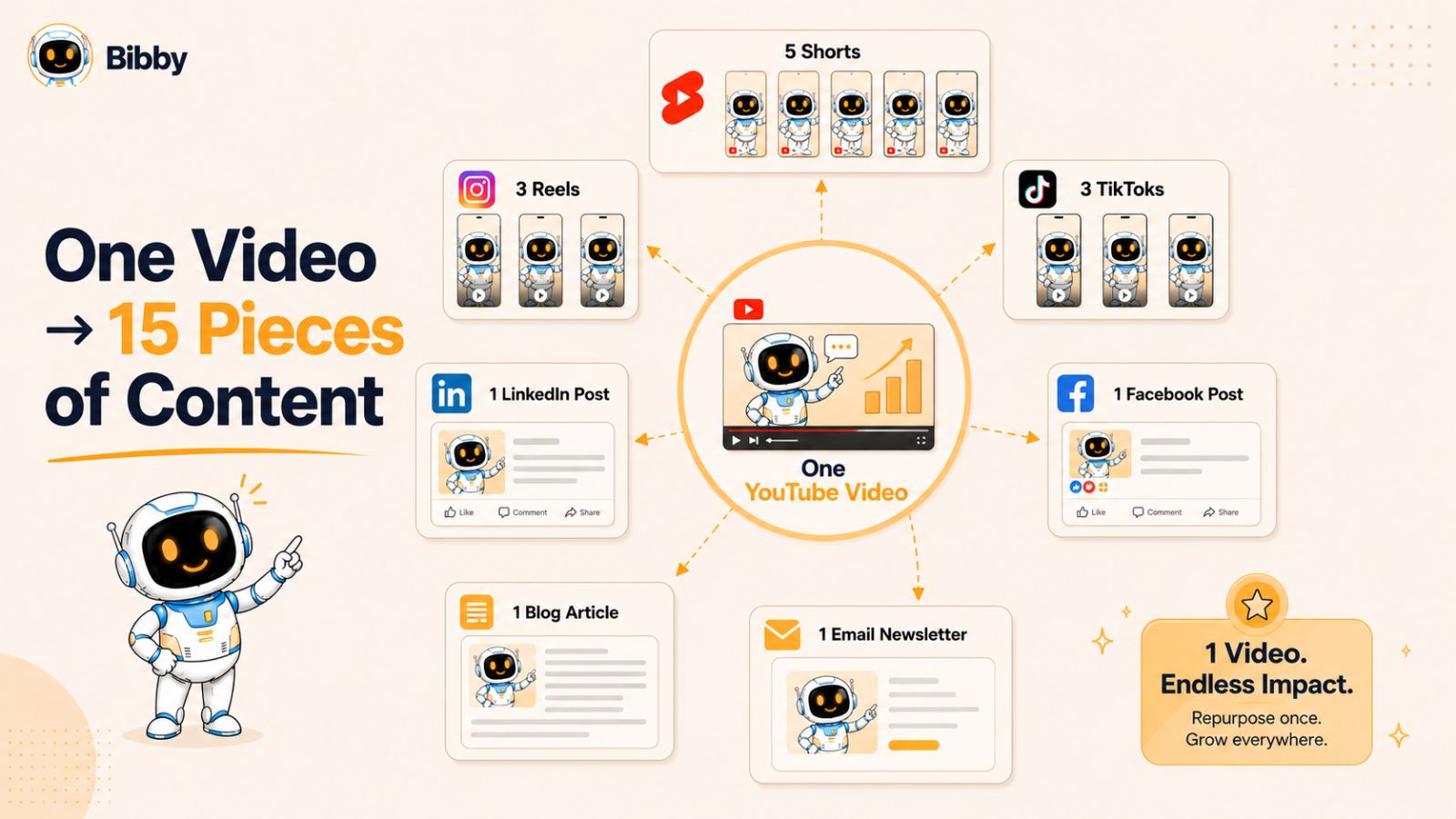
Content repurposing allows creators to maximize the value of every video they produce. Instead of constantly creating new content from scratch, you can transform existing content into different formats that are optimized for various platforms. This approach increases visibility, strengthens brand awareness, and drives more traffic back to your YouTube channel.
Why Content Repurposing Matters
Creating high-quality YouTube videos requires significant time and effort. Repurposing ensures that effort delivers the highest possible return.
Key benefits include:
- Increased content output without increasing workload
- More touchpoints with your audience
- Greater brand visibility across platforms
- Improved audience growth opportunities
- Better return on content investment
- Additional traffic sources beyond YouTube
Creators who consistently repurpose content often achieve faster growth because they are able to reach audiences wherever they consume content.
Turn One Video Into Multiple Content Assets
A single YouTube video can be transformed into:
- Multiple YouTube Shorts
- TikTok videos
- Instagram Reels
- Facebook videos
- LinkedIn posts
- Story content
- Carousel posts
- Community updates
- Quote graphics
- Email newsletter content
- Blog articles
Instead of producing ten separate pieces of content, you create one high-quality video and distribute its key insights across multiple channels.
Example Repurposing Workflow
Imagine you publish a 15-minute YouTube video about growing a channel with automation.
From that single video, you could create:
YouTube Shorts
Extract 3–5 powerful insights and convert them into short-form clips designed to attract new viewers.
TikTok Videos
Create fast-paced clips featuring quick tips, statistics, or engaging hooks from the original content.
Instagram Reels
Repurpose the same short-form clips while tailoring captions and hashtags for Instagram users.
LinkedIn Posts
Transform key lessons into professional thought leadership content for entrepreneurs, marketers, and business owners.
Facebook Content
Share clips, graphics, quotes, and discussion-based posts that encourage engagement.
Stories
Create behind-the-scenes content, polls, questions, or highlights from the video to increase audience interaction.
This strategy allows one piece of content to generate weeks of social media activity.
Automating the Distribution Process With Bibby
While repurposing content is powerful, manually publishing content across multiple platforms can quickly become overwhelming.
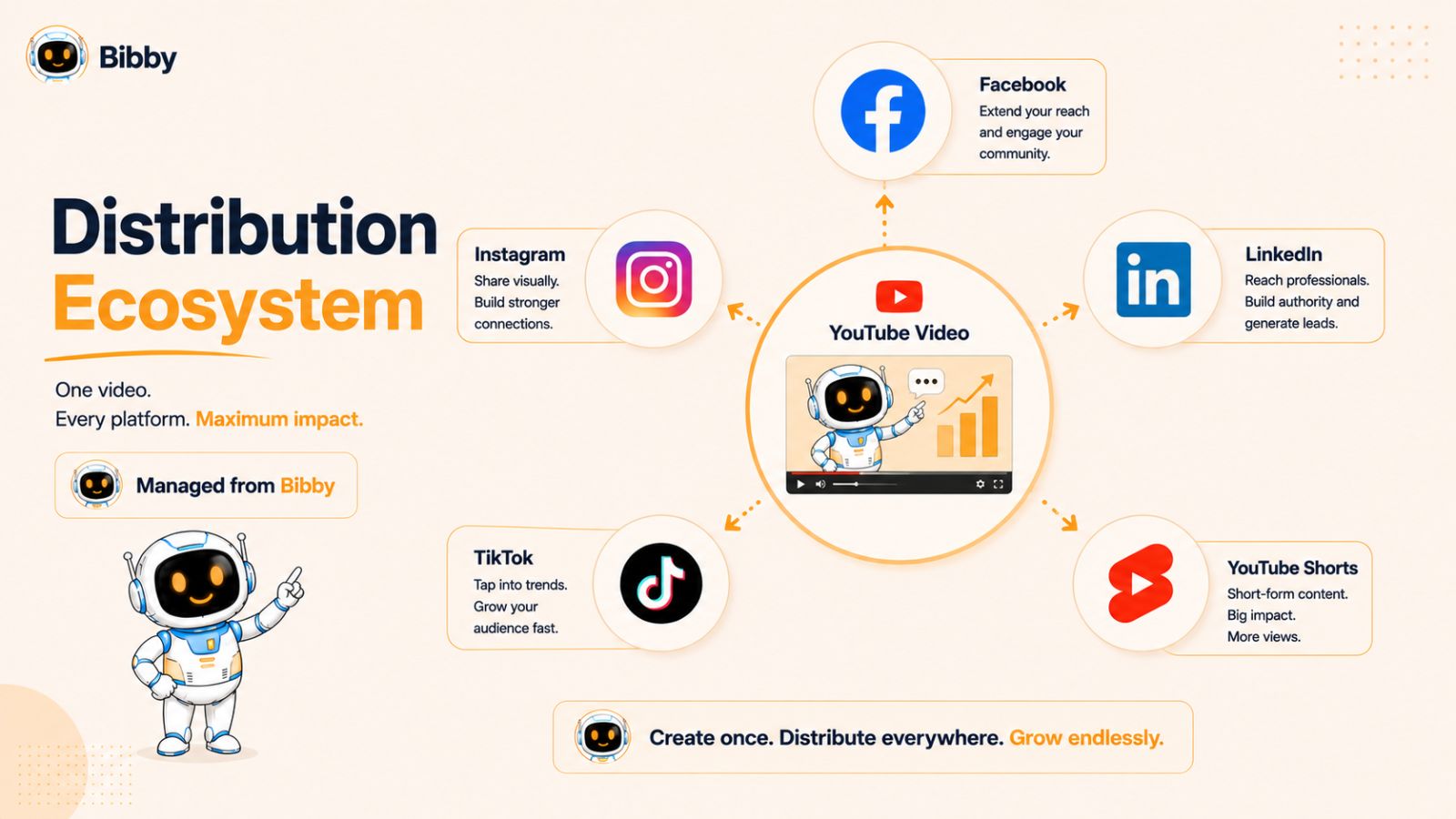
This is where Bibby simplifies the process.
After creating your content, you can upload an image or generate one with AI directly inside Bibby. Next, select your preferred posting style, and Bibby automatically generates captions tailored for your content.
Once approved, Bibby schedules and publishes content across:
- YouTube
- TikTok
The platform uses AI-optimized scheduling to determine ideal publishing times, helping maximize visibility and engagement. Instead of logging into multiple platforms every day, creators can manage their entire publishing workflow from one dashboard.
Bibby also supports:
- Video publishing
- Story scheduling
- Multi-platform content management
- Performance analytics
- Content calendar planning
This allows creators to maintain a consistent online presence while focusing their time on creating better content.
Create a Content Distribution System
The most successful creators don't rely on random posting. They build repeatable systems.
A simple content distribution framework might look like this:
- Publish a long-form YouTube video.
- Extract 3–10 short-form clips.
- Create supporting images and graphics.
- Generate captions.
- Schedule content across platforms.
- Monitor performance analytics.
- Double down on top-performing formats.
By following a structured process, every video becomes a growth asset that continues generating views, engagement, and subscribers long after publication.
When content repurposing and automation work together, creators can dramatically increase their reach without dramatically increasing their workload.
Also read: Best Hootsuite Alternative for Small Business
How Bibby Helps Automate Social Media Growth
Creating great content is only one part of growing a successful YouTube channel. To maximize reach and attract new viewers, creators need a consistent presence across multiple social media platforms. The problem is that manually creating posts, writing captions, scheduling content, and managing several accounts can quickly consume hours every week.
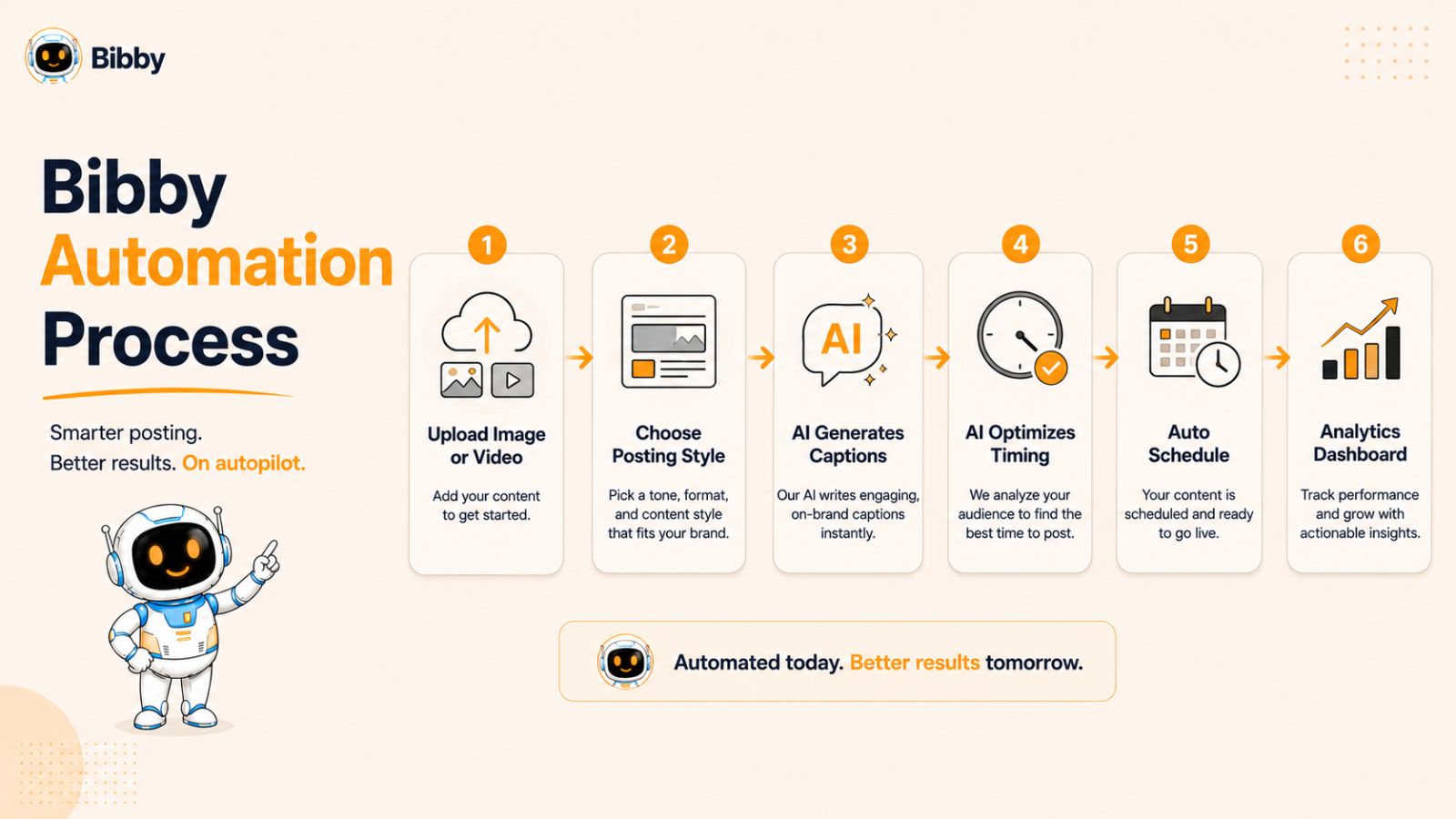
Bibby solves this problem by bringing content creation, scheduling, automation, and analytics into a single platform.
What Is Bibby?
Bibby is a social media scheduling and automation platform designed to help creators, marketers, businesses, and agencies manage their content more efficiently.
Instead of juggling multiple tools and manually publishing posts every day, users can create, schedule, and distribute content across major social media platforms from one centralized dashboard.
The platform is designed to simplify social media management while helping users maintain a consistent posting schedule that supports long-term growth.
How Bibby's Workflow Works
One of Bibby's biggest advantages is its simple and streamlined workflow.
Step 1: Upload or Generate Content
Users can either:
- Upload their own images
- Upload videos
- Generate images using AI
This gives creators flexibility whether they already have content prepared or need help creating visuals.
Step 2: Choose a Posting Style
After selecting media, users choose their preferred posting style.
This helps ensure that generated content aligns with the desired tone, audience, and platform requirements.
Step 3: AI Generates Captions Automatically
Writing captions for multiple platforms can be surprisingly time-consuming.
Bibby automatically generates captions that can be customized before publishing. This reduces content creation time while maintaining consistency across channels.
Step 4: Schedule Content Across Multiple Platforms
Once content is ready, Bibby allows users to schedule posts across:
- YouTube
- TikTok
Rather than manually uploading content to each platform individually, creators can manage everything from a single interface.
Step 5: AI-Optimized Posting Times
Timing plays a major role in content performance.
Bibby uses AI-powered scheduling to determine optimized posting times based on engagement opportunities, helping creators increase visibility without needing to constantly monitor platform activity.
Beyond Basic Scheduling
Many scheduling tools stop at publishing content. Bibby extends beyond basic scheduling by offering features that support a complete social media workflow.
These include:
- Video publishing
- Story scheduling
- Content calendar management
- Multi-platform posting
- Analytics and performance tracking
- AI-assisted content creation
- Centralized content organization
This allows creators to manage a significant portion of their marketing workflow without switching between multiple tools.
Why YouTube Creators Benefit From Bibby
For YouTube creators, content distribution is often the missing piece of the growth equation.
A creator may spend days producing a video but only minutes promoting it. As a result, valuable content often reaches fewer people than it deserves.
Bibby helps solve this challenge by making content promotion systematic and scalable.
Creators can:
- Promote every video consistently
- Repurpose content into multiple formats
- Maintain a presence across major platforms
- Increase content reach
- Save hours of manual work every week
- Focus more time on creating videos
By automating repetitive publishing tasks, creators can spend more energy on activities that directly impact growth, such as content quality, audience engagement, and strategy.
A Practical Example
Imagine a creator publishes one YouTube video each week.
Without automation, they would need to:
- Create social posts manually
- Write multiple captions
- Upload content to several platforms
- Schedule each post individually
- Track performance across separate dashboards
With Bibby, the creator can upload media once, generate captions automatically, schedule content across all major platforms, and monitor performance from a single dashboard.
What might have taken several hours can often be completed in a fraction of the time.
Automation Creates Freedom
The ultimate benefit of automation is not simply saving time. It is creating freedom.
Freedom to focus on content quality.
Freedom to experiment with new ideas.
Freedom to engage with your audience.
Freedom to grow your business without being overwhelmed by repetitive tasks.
For creators looking to scale beyond manual workflows, Bibby provides a practical way to automate content distribution while maintaining a consistent presence across the platforms that matter most.
Building a YouTube Content Machine
Many creators approach YouTube as a series of individual tasks: come up with an idea, make a video, publish it, and repeat. While this approach can work in the early stages, it becomes increasingly difficult to sustain as your channel grows.
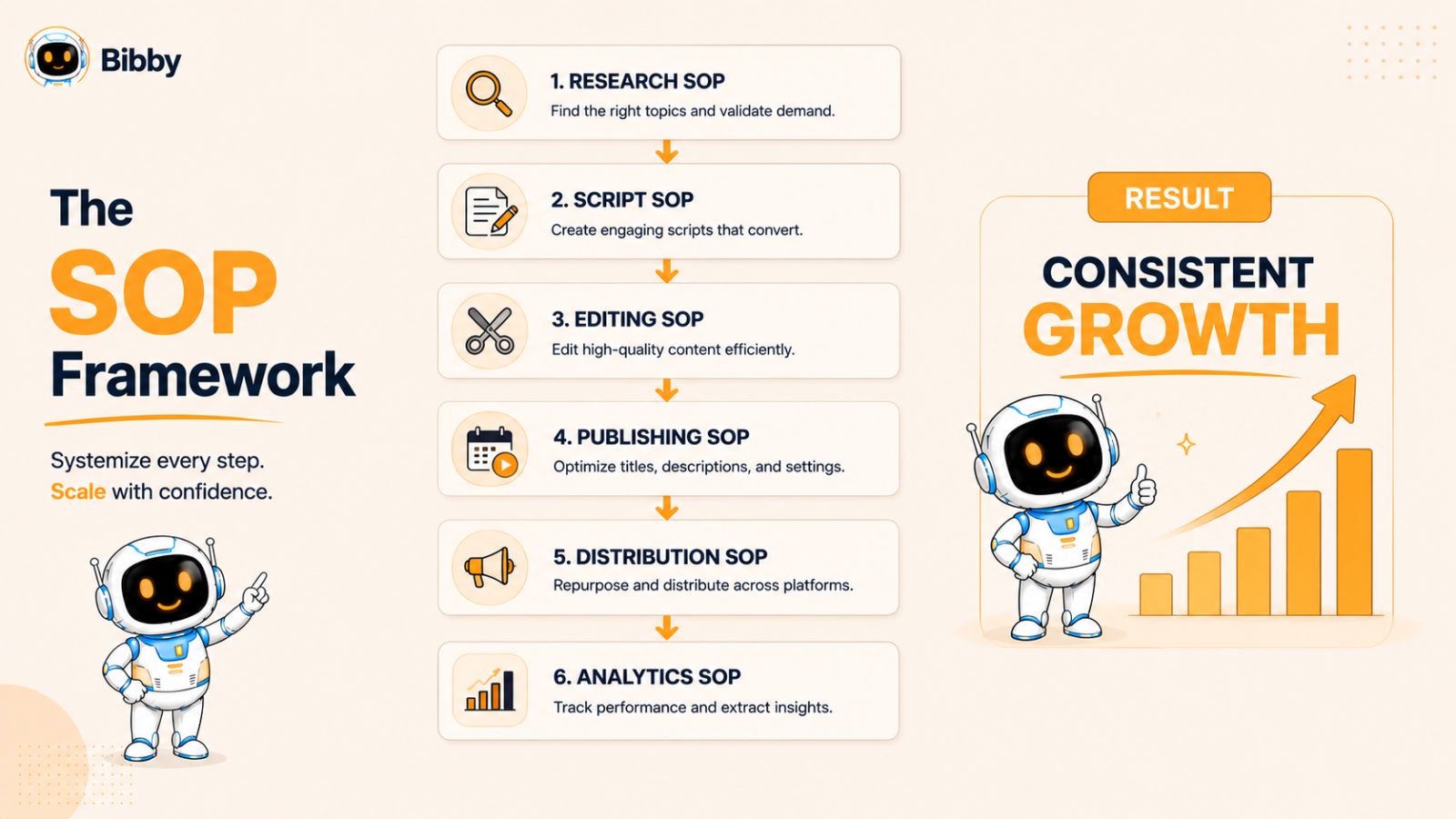
To scale effectively, you need to think beyond individual videos and build a content machine—a repeatable system that consistently generates, produces, publishes, and promotes content without relying entirely on your daily effort.
The goal is simple: create a workflow that delivers predictable results while minimizing bottlenecks.
Create Standard Operating Procedures (SOPs)
The most scalable YouTube channels rely on documented processes.
An SOP (Standard Operating Procedure) is a step-by-step guide for completing a task the same way every time.
Document processes for:
- Content research
- Topic validation
- Script creation
- Thumbnail design
- Video editing
- Upload optimization
- Content distribution
- Analytics reviews
When processes are documented, tasks become easier to delegate, automate, and improve over time.
Build a Content Pipeline
Successful channels rarely operate video-to-video. Instead, they maintain a content pipeline that keeps multiple videos moving through different stages of production.
For example:
| Stage | Activity |
|---|---|
| Research | Discover and validate content ideas |
| Planning | Create outlines and scripts |
| Production | Record and edit videos |
| Publishing | Upload and optimize content |
| Distribution | Promote content across platforms |
| Analysis | Review performance data |
This approach prevents gaps in publishing and helps maintain consistency.
Batch Similar Tasks Together
Task switching is one of the biggest productivity killers for creators.
Rather than completing one video from start to finish before starting another, consider batching similar activities.
Examples include:
- Researching multiple video ideas at once
- Writing several scripts in one session
- Recording multiple videos in a single day
- Designing thumbnails in batches
- Scheduling social content weekly or monthly
Batching reduces setup time and improves efficiency.
Leverage Automation Wherever Possible
Automation becomes increasingly valuable as your content volume grows.
Tasks that can often be automated include:
- Topic research
- Content organization
- Caption generation
- Social media scheduling
- Analytics reporting
- Audience monitoring
Tools like Bibby help automate content distribution by generating captions, scheduling posts, managing content calendars, and publishing content across multiple platforms from a single dashboard.
The more repetitive work you automate, the more time you can dedicate to creating high-value content.
Also read: How to Grow on Social Media With AI?
Build a Team Around Your System
Many creators eventually reach a point where automation alone is not enough.
At this stage, growth often comes from combining automation with delegation.
Common roles include:
- Video editors
- Thumbnail designers
- Scriptwriters
- Researchers
- social media managers
- Virtual assistants
Because your workflows are already documented, onboarding new team members becomes significantly easier.
Focus on Quality Control
Scaling should never come at the expense of quality.
As systems become more automated and team members become more involved, it's important to establish quality checkpoints throughout the workflow.
Review:
- Scripts before production
- Thumbnails before publishing
- Video edits before upload
- Social posts before scheduling
- Analytics regularly
This ensures that growth does not dilute the quality that attracted your audience in the first place.
Think Like a Media Company
The biggest mindset shift for scaling a YouTube channel is moving from creator thinking to system thinking.
Instead of asking:
"How do I make my next video?"
Ask:
"How do I build a system that helps me produce great videos consistently for years?"
When every part of your workflow—from research and production to distribution and analytics—is supported by systems, automation, and documented processes, your channel becomes more resilient, more scalable, and less dependent on constant manual effort.
That is the foundation of a true YouTube content machine.
Tracking Performance and Optimizing Growth
Creating and publishing content consistently is only part of the growth equation. To scale a YouTube channel successfully, you need to understand what is working, what is underperforming, and where opportunities for improvement exist.
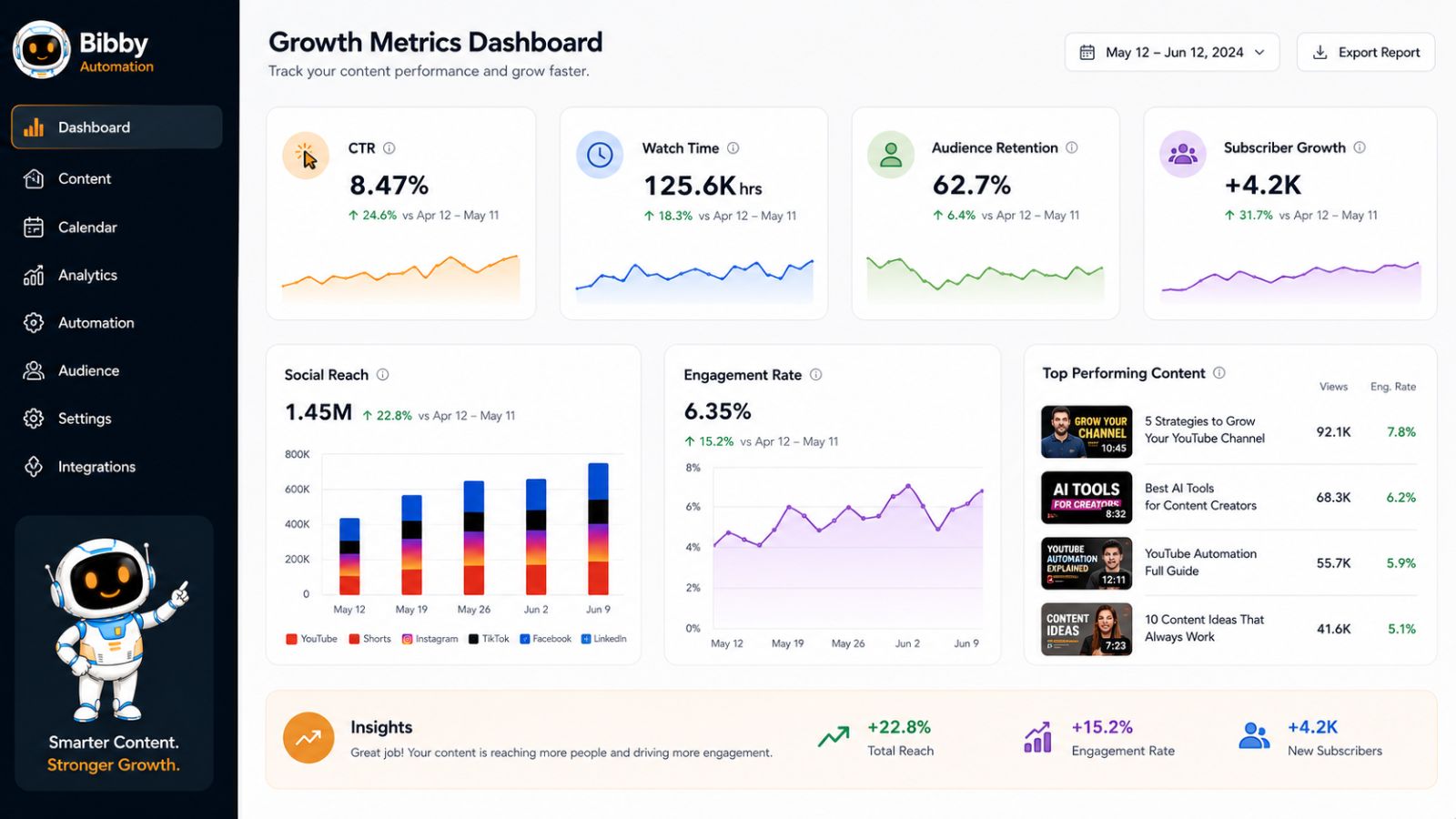
The most successful creators don't rely on guesswork. They use data to make informed decisions about content strategy, publishing schedules, audience engagement, and platform distribution.
By consistently reviewing analytics, you can identify patterns that accelerate growth and eliminate activities that don't contribute meaningful results.
Key YouTube Metrics Every Creator Should Track
YouTube provides a wealth of performance data, but focusing on a few critical metrics can have the biggest impact on growth.
Click-Through Rate (CTR)
CTR measures how often people click on your video after seeing the thumbnail and title.
A low CTR may indicate:
- Weak thumbnails
- Unclear titles
- Poor positioning
- Lack of audience interest
Improving thumbnails and titles can often increase views without creating additional content.
Audience Retention
Audience retention shows how long viewers stay engaged with your videos.
High retention signals that:
- Your content matches viewer expectations
- The pacing is effective
- The topic remains interesting throughout the video
Low retention often highlights areas where viewers lose interest or leave.
Watch Time
Watch time remains one of YouTube's most important ranking signals.
The more total watch time your content generates, the more likely YouTube is to recommend it to additional viewers.
Subscriber Growth
Subscriber growth helps measure how effectively your content converts viewers into long-term audience members.
Consistent subscriber growth often indicates that your content is delivering value and encouraging viewers to return.
Traffic Sources
Understanding where viewers come from helps you identify your most effective distribution channels.
Traffic may come from:
- YouTube Search
- Suggested Videos
- Browse Features
- External Websites
- Social Media Platforms
This data helps you focus your promotional efforts where they generate the greatest return.
Use Data to Improve Content Strategy
Analytics should guide future content decisions.
Review your highest-performing videos and look for common patterns such as:
- Similar topics
- Similar thumbnails
- Comparable video lengths
- Shared audience interests
- Similar hooks or introductions
When patterns emerge, create more content around those successful elements.
Likewise, analyze underperforming videos to understand what may have reduced engagement.
Test and Optimize Continuously
Growth rarely comes from a single breakthrough. More often, it comes from continuous improvement.
Consider testing:
- Thumbnail designs
- Video titles
- Publishing schedules
- Video formats
- Content lengths
- Intro structures
- Calls-to-action
Small improvements across multiple areas can compound into significant channel growth over time.
Track Performance Across Multiple Platforms
If you're repurposing content and distributing it across social media, YouTube analytics alone won't provide the complete picture.
It's important to evaluate:
- Social engagement
- Reach
- Shares
- Profile visits
- Referral traffic
- Audience growth across platforms
Understanding how content performs beyond YouTube helps identify additional growth opportunities.
Using Bibby Analytics to Improve Results
One advantage of managing content through Bibby is having access to centralized analytics and performance insights.
Instead of reviewing multiple social media dashboards separately, creators can monitor content performance from a single platform.
This helps answer important questions such as:
- Which platforms drive the most engagement?
- Which content formats perform best?
- What posting times generate the highest reach?
- Which campaigns deliver the strongest results?
By combining scheduling, publishing, and analytics in one workflow, creators can make faster and more informed decisions.
Focus on Trends, Not Individual Results
Many creators make the mistake of overreacting to the performance of a single video.
A more effective approach is to analyze trends across multiple pieces of content.
Ask questions like:
- Which topics consistently perform well?
- Which content formats attract subscribers?
- Which platforms drive the most traffic?
- Which posting schedules produce the strongest engagement?
These long-term insights are far more valuable than isolated wins or losses.
Data Creates Predictable Growth
The creators who scale the fastest are often the ones who learn the fastest.
Analytics provide a roadmap for improvement by showing exactly how audiences respond to your content. When you combine consistent publishing, automation, cross-platform distribution, and data-driven decision-making, growth becomes more predictable and easier to sustain.
The next step is understanding the common automation mistakes that prevent many creators from achieving the results they're capable of reaching.
Common YouTube Automation Mistakes to Avoid
Automation can dramatically improve efficiency and help creators scale their YouTube channels faster. However, automation is not a magic solution. When implemented incorrectly, it can reduce content quality, weaken audience trust, and slow growth instead of accelerating it.
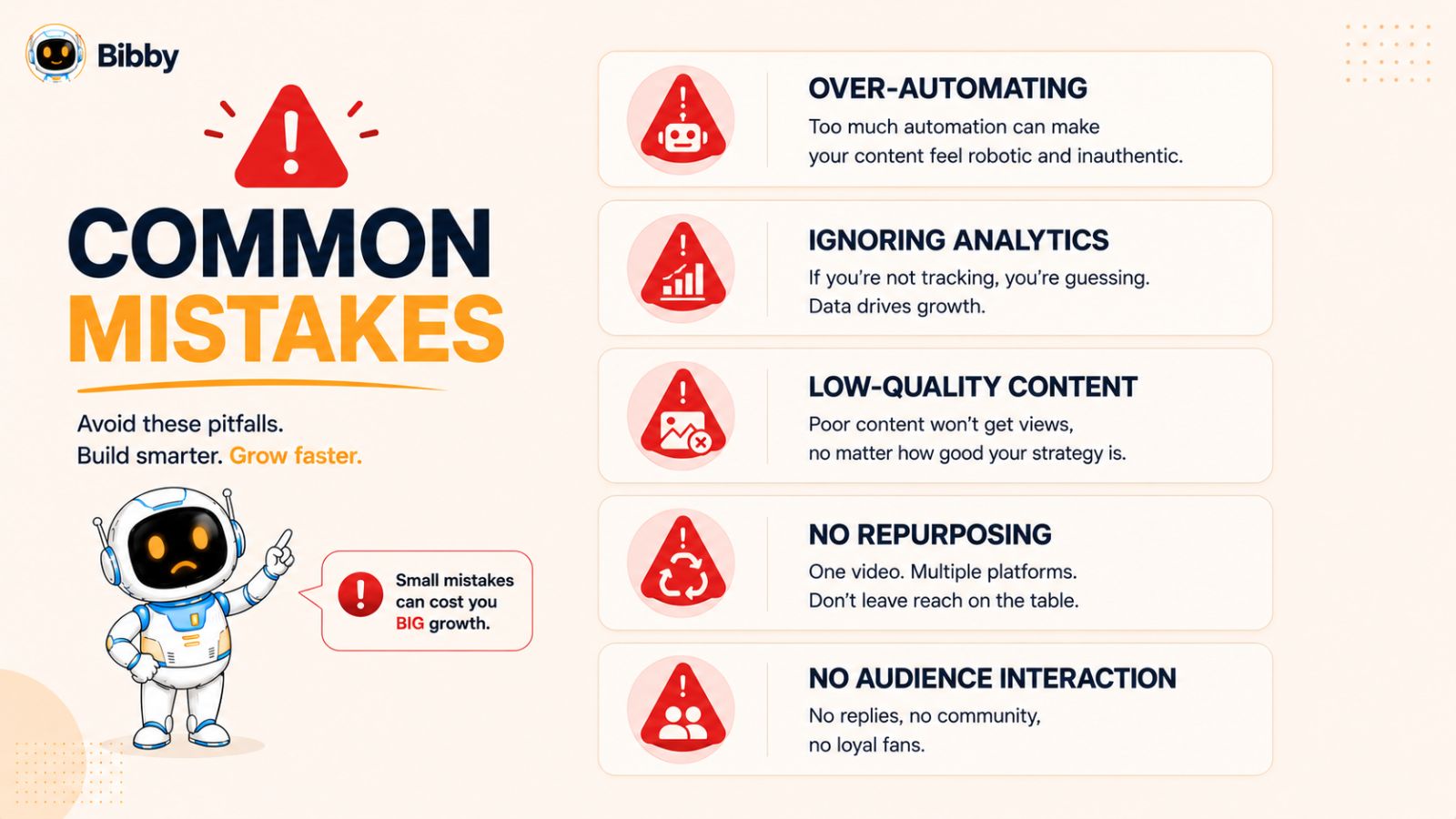
Understanding the most common mistakes can help you build effective systems while maintaining the authenticity and quality that audiences expect.
Mistake #1: Automating Everything
One of the biggest misconceptions about YouTube automation is that every part of the content creation process should be automated.
While automation is excellent for repetitive tasks, it should not replace the human elements that make content valuable.
These areas still require significant human input:
- Storytelling
- Personal experiences
- Expert insights
- Audience engagement
- Brand voice
- Creative direction
The best creators use automation to support creativity, not replace it.
Mistake #2: Prioritizing Quantity Over Quality
Many creators become focused on publishing more content and forget that quality remains the foundation of growth.
Publishing five average videos per week is often less effective than publishing one exceptional video.
Before scaling production, ensure that:
- Content provides genuine value
- Videos are engaging
- Information is accurate
- Production quality meets audience expectations
Automation should increase efficiency while preserving quality standards.
Mistake #3: Ignoring Audience Feedback
No amount of automation can replace direct audience insights.
Comments, messages, surveys, and community engagement often reveal valuable information about:
- Content preferences
- Viewer frustrations
- Topic requests
- Improvement opportunities
Creators who rely solely on automated systems may miss important feedback that could guide future growth.
Mistake #4: Over-Relying on AI-Generated Content
AI can significantly speed up research, scripting, editing, and content planning. However, publishing AI-generated content without proper review often leads to generic or inaccurate videos.
Always:
- Fact-check information
- Add original insights
- Include real-world examples
- Refine language and tone
- Maintain your unique perspective
Audiences subscribe to creators because of their expertise and personality, not because content was generated quickly.
Mistake #5: Neglecting Content Distribution
Many creators spend days producing videos and only minutes promoting them.
Without a distribution strategy, even excellent content can struggle to reach its potential audience.
Every video should be promoted across multiple channels through:
- YouTube Shorts
- TikTok
- Instagram Reels
- Stories
- Community posts
Using tools such as Bibby can automate much of this process by generating captions, scheduling content, and publishing across multiple platforms from one dashboard.
Mistake #6: Failing to Monitor Analytics
Automation should save time, but it should not create a "set it and forget it" mindset.
Creators still need to monitor performance regularly.
Review metrics such as:
- Click-through rate
- Audience retention
- Watch time
- Engagement
- Subscriber growth
- Social media performance
Analytics reveal whether your systems are producing the desired results and where adjustments may be needed.
Mistake #7: Building Complex Systems Too Early
Many creators attempt to implement sophisticated workflows before they have a proven content strategy.
Before adding advanced automation:
- Identify content that resonates with your audience.
- Develop a consistent publishing schedule.
- Establish repeatable workflows.
- Then automate repetitive tasks.
Automation works best when it enhances processes that already produce results.
Mistake #8: Ignoring Brand Consistency
As content production scales, maintaining a consistent brand becomes increasingly important.
Ensure consistency across:
- Visual identity
- Messaging
- Content quality
- Posting frequency
- Audience experience
Automation should reinforce your brand rather than create a fragmented experience across platforms.
Balance Is the Key to Successful Automation
The most successful YouTube creators understand that automation is a tool, not a strategy.
Automation handles repetitive tasks.
Systems create consistency.
Analytics guide decisions.
Creativity drives growth.
When these elements work together, creators can scale efficiently without sacrificing quality, authenticity, or audience trust.
Avoiding these common mistakes will help you build sustainable growth systems that support long-term success rather than short-term output.
As automation technology continues to evolve, understanding upcoming trends can help creators stay ahead of competitors and prepare for the future of content creation.
Future Trends in YouTube Automation
YouTube automation has evolved rapidly over the past few years, and the pace of innovation shows no signs of slowing down. As artificial intelligence becomes more sophisticated and automation platforms continue to expand their capabilities, creators will have access to even more powerful tools for scaling content production and distribution.
Understanding these trends can help creators prepare for the future and maintain a competitive advantage.
AI-Powered Content Creation Will Become More Advanced
AI tools are already helping creators generate ideas, write scripts, edit videos, create thumbnails, and optimize content. In the coming years, these capabilities will become even more intelligent and personalized.
Future AI systems will likely:
- Predict content trends before they peak
- Generate highly customized content suggestions
- Improve audience targeting
- Assist with creative decision-making
- Automate more production tasks
Rather than replacing creators, these tools will enable them to focus more on strategy, storytelling, and audience relationships.
Content Repurposing Will Become Fully Automated
Today, many creators manually convert long-form videos into shorts, reels, and social posts.
Future automation platforms will streamline this process by automatically:
- Identifying key moments in videos
- Creating short-form clips
- Generating captions
- Formatting content for different platforms
- Scheduling distribution
This will allow creators to maximize the value of every video with minimal effort.
Cross-Platform Publishing Will Become Standard
Audiences are increasingly consuming content across multiple platforms.
As a result, creators will need systems that allow them to manage content from a single location.
Platforms such as Bibby already support centralized publishing across Facebook, Instagram, LinkedIn, YouTube, and tiktok. Future solutions will likely provide even deeper integrations, making content distribution virtually seamless.
This shift will help creators maintain a consistent presence across all major channels without significantly increasing their workload.
Smarter Analytics and Predictive Insights
Analytics tools are moving beyond reporting what happened to predicting what will happen next.
Future analytics systems may help creators:
- Forecast video performance
- Predict audience interests
- Recommend content opportunities
- Identify growth trends earlier
- Optimize publishing schedules automatically
These predictive insights will allow creators to make more proactive decisions rather than reacting to historical data.
Personalized Audience Experiences
As AI continues to improve, content experiences will become increasingly personalized.
Creators may be able to:
- Deliver targeted content recommendations
- Segment audiences more effectively
- Customize messaging for different viewer groups
- Improve engagement through personalized communication
This level of personalization can strengthen audience relationships and improve long-term retention.
Automation Will Support Small Teams and Solo Creators
Historically, scaling a media brand often required a large team.
Automation is changing that reality.
Today, a solo creator can leverage AI tools, scheduling platforms, analytics dashboards, and automated workflows to achieve results that once required multiple employees.
This trend will continue, making it easier for independent creators to compete with larger organizations.
Human Creativity Will Remain the Competitive Advantage
Despite rapid advancements in automation, one thing is unlikely to change: audiences connect with people.
Stories, experiences, opinions, humor, expertise, and authenticity remain difficult to automate.
The creators who thrive in the future will not be those who automate everything. They will be those who use automation strategically while continuing to provide unique value that technology alone cannot replicate.
The Future Belongs to System-Driven Creators
The future of YouTube growth is not about working longer hours. It is about building smarter systems.
Creators who embrace automation, leverage AI, optimize distribution, and make data-driven decisions will be positioned to scale more efficiently than ever before.
By combining technology with creativity, today's creators can build channels that continue growing even as the demands of content production increase.
The question is no longer whether automation will become part of content creation. The question is how effectively creators will use it to accelerate their growth.
Also read: How Social Media Automation Helps Startups Grow Faster
Conclusion
Scaling a YouTube channel is no longer about working harder—it is about building smarter systems. The most successful creators understand that sustainable growth comes from combining automation, content repurposing, and data-driven decision-making into a repeatable workflow.
Throughout this guide, we've explored three key principles for scaling a YouTube channel with automation:
- Build repeatable systems that streamline content creation and publishing.
- Leverage AI and automation tools to eliminate repetitive tasks.
- Repurpose and distribute content across multiple platforms to maximize reach.
By implementing these strategies, creators can spend less time managing workflows and more time creating high-quality content that attracts viewers and subscribers.
As your channel grows, the next natural step is learning how to turn that audience into a long-term business through monetization, sponsorships, digital products, memberships, and other revenue streams. After building an efficient content engine, you'll be in a much stronger position to transform your YouTube channel from a content platform into a scalable media business.
The creators who succeed in the years ahead won't necessarily be the ones who work the most hours. They'll be the ones who build the best systems, use automation strategically, and consistently deliver value to their audience.