Instagram Stories are one of the fastest ways to stay visible, engage followers, and drive daily traffic on social media.
But manually posting Stories every single day quickly becomes time-consuming, inconsistent, and difficult to scale—especially for creators, brands, and agencies managing multiple platforms. The good news is that modern automation tools like Bibby make it possible to automatically publish Instagram Stories, generate AI-powered content, and maintain a consistent posting schedule without daily manual work.
In this blog, you will read:
- How Instagram Story auto posting actually works
- How to automate Stories using Bibby step-by-step
- Best practices for scalable Story automation
Let’s start by understanding why Instagram Stories are still one of the most valuable content formats for social media growth.
Why Instagram Stories Matter for Brands and Creators
Instagram Stories have become one of the most powerful tools for staying consistently visible online. Unlike traditional feed posts that may disappear in crowded timelines, Stories appear at the very top of the Instagram app, making them one of the first things users see when they open the platform.
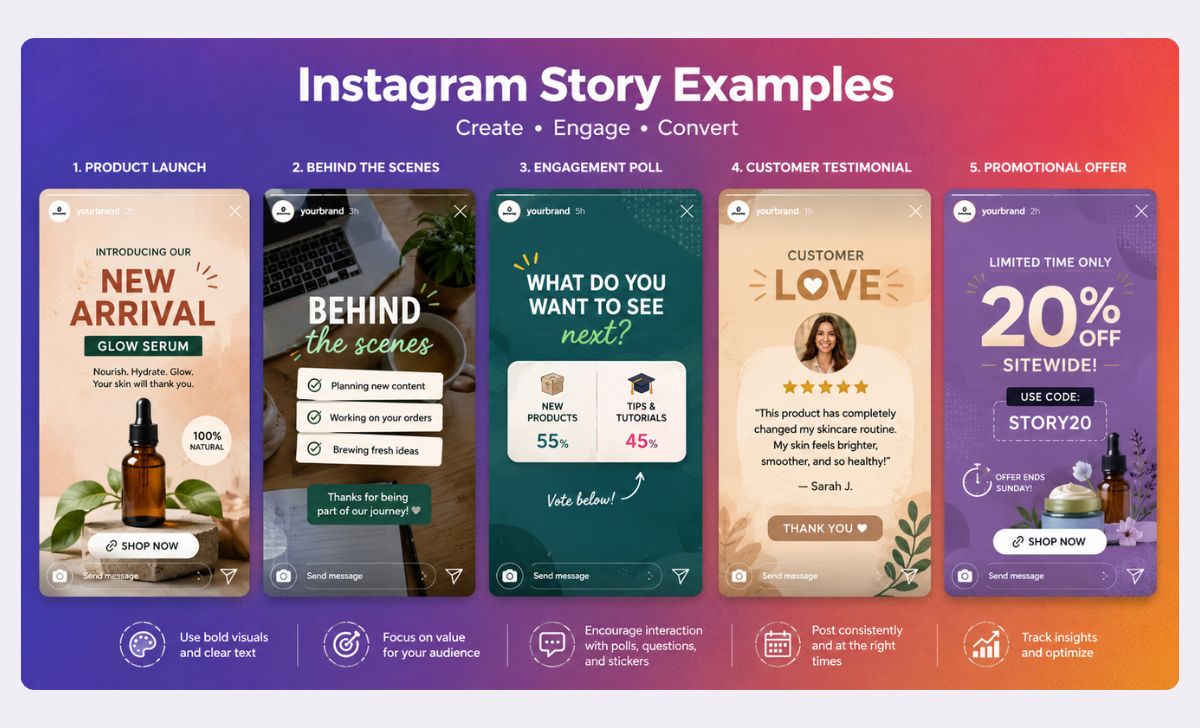
For brands, creators, and businesses, this visibility matters because attention on social media is increasingly driven by frequency and consistency—not just occasional viral posts. Posting Stories regularly helps maintain audience awareness, increase engagement, and create more touchpoints throughout the day.
Stories are especially effective because they feel fast, casual, and interactive. Features like polls, questions, countdowns, links, and reactions encourage users to actively engage instead of passively scrolling. This makes Stories ideal for:
- Product launches
- Flash promotions
- Behind-the-scenes updates
- Educational content
- Community engagement
- Daily brand visibility
The challenge is that maintaining this level of consistency manually is difficult.
Most businesses start with good intentions but eventually struggle to keep up with daily Story publishing. Teams get busy, creators run out of content ideas, and manually uploading Stories every day becomes repetitive and time-consuming. Over time, inconsistent posting can reduce audience engagement and weaken overall social media momentum.
This is where automation becomes valuable.
Instead of interrupting your day to manually upload Stories, automation platforms like Bibby allow you to plan, create, schedule, and publish Stories in advance. That means your Instagram presence stays active even when you are focused on running your business, creating content, or managing clients.
The result is a more sustainable social media strategy that saves time while improving consistency and reach.
Also read: How to Schedule Instagram Reels Automatically?
Can You Automatically Post Instagram Stories?
Yes — Instagram Stories can now be automatically posted using approved social media automation platforms.
However, there is still a lot of confusion around how Instagram Story automation actually works because not all scheduling tools offer true auto publishing. Some tools only send reminders to your phone when it is time to post manually, while others can publish Stories automatically through Instagram’s official API.
Understanding this difference is important if your goal is to fully automate your social media workflow.
Scheduling Reminders vs True Auto Posting
Many traditional social media schedulers advertise “Instagram Story scheduling,” but in reality, they simply notify you when it is time to manually upload the Story yourself. You still need to:
- Open Instagram
- Upload the Story manually
- Add finishing touches
- Publish it yourself
That process saves some planning time, but it does not eliminate the daily manual workload.
True automation works differently.
Platforms like Bibby connect directly with Instagram’s publishing system, allowing Stories to be scheduled and automatically published without requiring manual posting every day.
What You Need to Auto Post Instagram Stories
To use Instagram Story automation properly, you typically need:
- An Instagram Business account
- A connected Facebook Page
- Permission authorization through Meta
- A supported automation platform
Once connected, you can upload or generate Story content, choose your posting schedule, and let the platform handle publishing automatically.
Why Businesses Are Moving Toward Automation
The biggest reason businesses automate Instagram Stories is consistency.
Manually posting multiple Stories every day becomes difficult as content demands increase across Instagram, TikTok, Facebook, LinkedIn, and other platforms. Automation allows brands to maintain visibility without constantly interrupting their workflow.
This becomes even more valuable when combined with AI-powered content tools.
Instead of only scheduling content, platforms like Bibby also help users:
- Generate AI captions
- Create social media content ideas
- Produce AI-powered posts and reels
- Schedule content across multiple platforms
- Build automated publishing workflows
That combination of AI content creation and automatic publishing helps businesses scale social media marketing much more efficiently than manual posting alone.
Also read: How to Automate Instagram Posts for Your Restaurant?
Benefits of Auto Posting Instagram Stories
Automating Instagram Stories is not just about convenience — it fundamentally changes how brands, creators, and businesses manage social media consistently at scale.
Instead of relying on daily manual posting, automation creates a systemized workflow that keeps your content active even when your schedule gets busy.
Here are the biggest benefits of auto posting Instagram Stories.
1. Maintain Consistent Visibility
Consistency is one of the most important factors in social media growth.
When you disappear from Instagram Stories for days or weeks at a time, audience engagement often drops because users stop seeing your brand regularly. Automated Story publishing helps maintain a steady presence without requiring constant manual effort.
With a platform like Bibby, you can batch schedule Stories in advance so your account remains active every day.
This is especially useful for:
- Small businesses
- Content creators
- Ecommerce brands
- Marketing agencies
- Personal brands
2. Save Significant Time Every Week
Manually posting Stories may seem quick at first, but the time adds up fast.
Creating visuals, writing captions, uploading files, and publishing multiple Stories every day can easily consume several hours each week. Automation reduces repetitive tasks so teams can focus on strategy, creativity, and growth instead of routine publishing.
By combining AI-generated content with automated scheduling, Bibby helps streamline the entire process from creation to publishing.
3. Improve Content Planning
Automation allows you to think strategically instead of reactively.
Rather than scrambling to post something at the last minute, you can organize Story campaigns in advance around launches, promotions, events, or seasonal content.
This makes it easier to:
- Maintain a consistent brand message
- Coordinate campaigns across platforms
- Balance promotional and educational content
- Create long-term content calendars
Planned content almost always performs better than rushed content.
4. Publish at Optimal Times
Many businesses miss engagement opportunities simply because they post inconsistently or at random times.
Scheduling tools help ensure your Stories go live when your audience is most active, even if you are unavailable during those hours.
For example:
- Ecommerce brands may schedule Stories during peak shopping times
- Coaches may post morning motivation content automatically
- Global brands can schedule content across multiple time zones
Automation removes the need to manually post at inconvenient hours.
5. Reduce Social Media Burnout
One of the biggest hidden problems in social media marketing is content fatigue.
Constantly thinking about what to post every day becomes mentally exhausting over time. Automation creates breathing room by turning social media into a repeatable system instead of a nonstop daily task.
When paired with AI-powered content generation, tools like Bibby can help users:
- Generate fresh content ideas
- Create captions faster
- Repurpose content efficiently
- Maintain posting consistency with less stress
This makes long-term social media growth far more sustainable.
How to Auto Post Instagram Stories Using Bibby
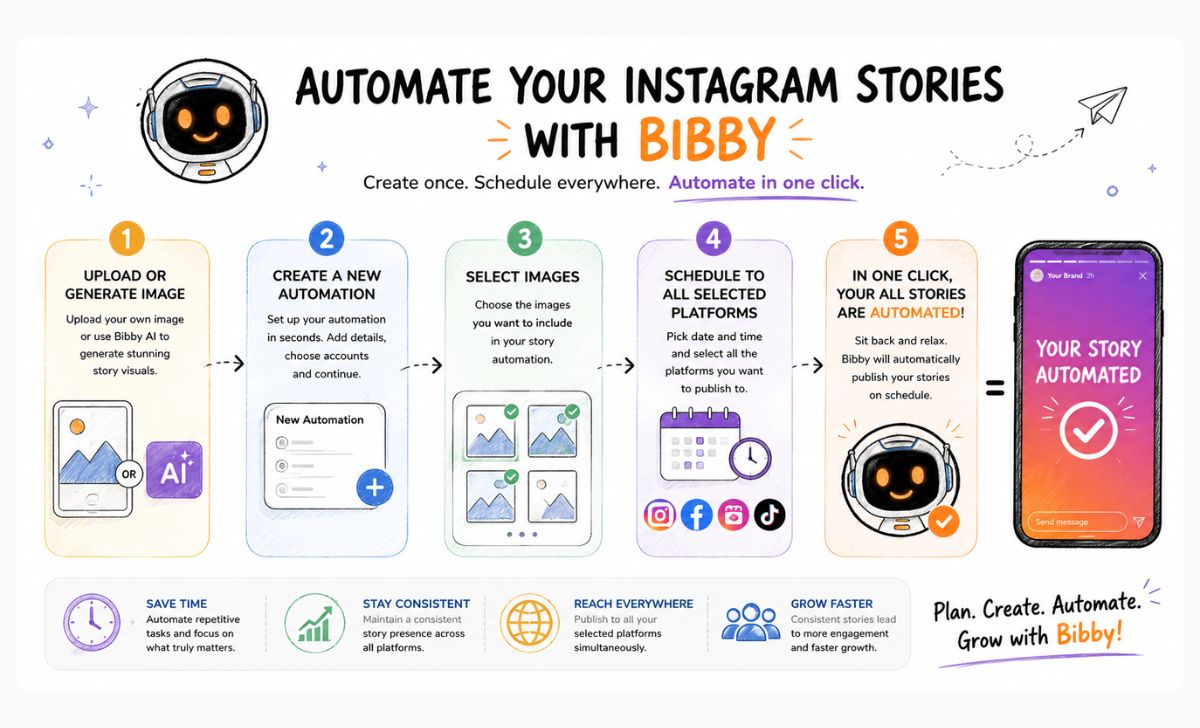
What Is Bibby?
Bibby is an AI-powered social media automation platform designed to help businesses, creators, and marketers simplify content creation and publishing across multiple social platforms.
Instead of juggling separate tools for scheduling, caption writing, content generation, and publishing, Bibby combines everything into one automated workflow.
For Instagram specifically, Bibby helps users:
- Automatically publish Instagram Stories
- Schedule posts and reels in advance
- Generate AI-powered captions
- Create social media content faster
- Maintain consistent posting across platforms
- Reduce manual social media management
This allows brands to move from reactive posting to a scalable content system.
Why Bibby Is Different From Basic Scheduling Tools
Many social media tools focus only on scheduling content. While that helps organize posts, it still leaves users responsible for creating captions, designing content, brainstorming ideas, and managing publishing manually.
Bibby goes beyond simple scheduling by combining AI content generation with automated publishing.
That means users can:
- Generate Story content ideas using AI
- Create captions automatically
- Produce AI-assisted posts and reels
- Schedule everything in one workflow
- Automatically publish content without manual reminders
The result is a much faster and more efficient social media process.
Who Bibby Is Best For
Instagram Story automation is especially valuable for users who need consistent publishing without spending hours managing content every day.
Bibby works particularly well for:
- Small businesses
- Ecommerce brands
- Influencers and creators
- Marketing agencies
- Coaches and consultants
- Startup teams
- Personal brands
Whether you publish a few Stories per week or run large-scale social media campaigns, automation helps maintain consistency while reducing workload.
In the next section, we’ll walk through exactly how to auto post Instagram Stories step-by-step using Bibby.
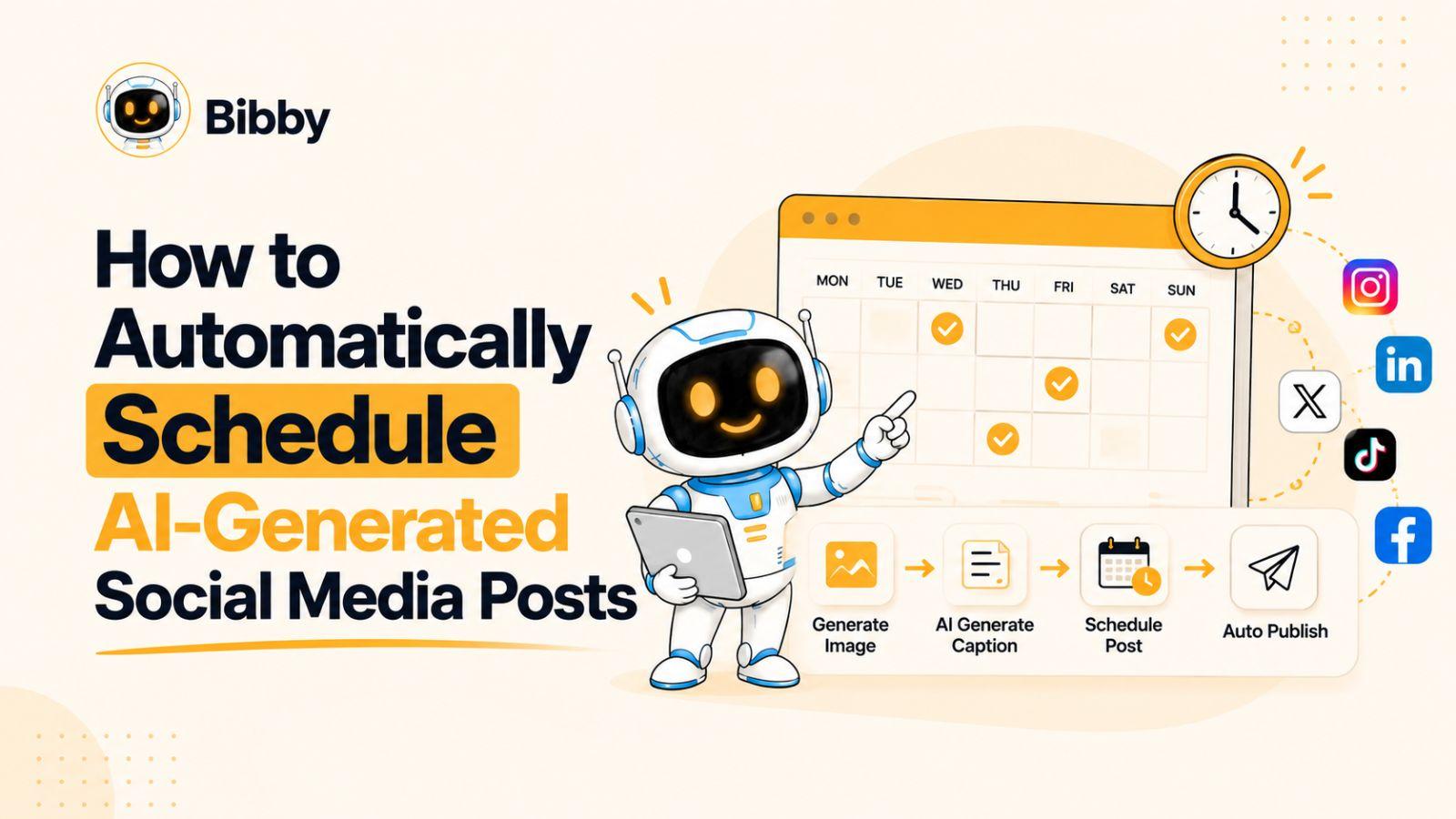
Step-by-Step Guide to Auto Post Instagram Stories with Bibby
Setting up Instagram Story automation with Bibby is designed to be simple, even for users with little technical experience.
Once your account is connected, you can plan and automate Story publishing in advance instead of manually posting every day.
Here’s how the process works.
Step 1: Connect Your Instagram Business Account
Before you can automate Instagram Stories, you need to connect an eligible Instagram account to Bibby.
Typically, this requires:
- An Instagram Business account
- A connected Facebook Page
- Authorization through Meta’s permissions system
After connecting your account, Bibby can securely manage publishing access for scheduled Stories and posts.
This setup process usually only takes a few minutes.
Step 2: Upload or Generate Story Content
Next, choose the content you want to publish.
You can:
- Upload existing Story images or videos
- Repurpose content from previous campaigns
- Create new Story content directly inside Bibby
- Generate AI-assisted content ideas
This is where automation becomes much more powerful than traditional scheduling tools.
Instead of needing separate design and brainstorming tools, Bibby helps streamline content creation using AI-powered workflows.
For example, you can quickly generate:
- Promotional Story ideas
- Product announcement copy
- Engagement-focused captions
- Educational Story sequences
- Content variations for different audiences
This significantly speeds up content production.
Step 3: Add Captions and Engagement Elements
Once your Story visuals are ready, you can optimize them for engagement.
Depending on your content strategy, you may add:
- Captions
- Calls-to-action
- Promotional messaging
- Brand elements
- Interactive prompts
Bibby’s AI caption generation tools can also help create caption ideas faster, which is especially useful when scheduling large amounts of content.
Good Instagram Stories typically encourage users to:
- Reply
- Click links
- Visit a profile
- Watch additional content
- Participate in polls or questions
The goal is not just publishing consistently, but creating Stories people actually engage with.
Step 4: Schedule Your Instagram Story
After finalizing the content, choose when your Story should be published.
Scheduling ahead allows you to:
- Plan campaigns strategically
- Publish during peak engagement hours
- Maintain a consistent posting cadence
- Coordinate content across platforms
Many brands batch schedule an entire week or month of Stories at once to reduce daily workload.
For example:
- Ecommerce brands may schedule promotional Stories around product launches
- Agencies may plan client Stories weeks ahead
- Creators may automate educational content series
Automation makes these workflows much easier to manage.
Step 5: Enable Auto Publishing
Once scheduling is complete, Bibby handles the publishing process automatically.
This eliminates the need for:
- Manual upload reminders
- Last-minute posting
- Interrupting your day to publish content
Your Stories are automatically posted according to the schedule you set.
This is one of the biggest advantages of true Instagram automation compared to reminder-based scheduling tools.
Step 6: Monitor Performance and Improve Results
After your Stories are published, review performance data regularly to improve future content.
Track metrics such as:
- Story views
- Completion rates
- Replies and interactions
- Link clicks
- Audience engagement patterns
Over time, this helps you identify:
- Which Story formats perform best
- Best posting times
- Which content drives the most engagement
- What your audience responds to consistently
Combined with AI-powered content generation, this creates a feedback loop that helps improve your social media strategy over time.
Best Practices for Automated Instagram Stories
Automating Instagram Stories can save enormous amounts of time, but successful automation still requires strategy. The goal is to create a consistent presence that feels authentic and engaging—not robotic or repetitive.
Here are the best practices for using Instagram Story automation effectively.
Batch Create Story Content Weekly
One of the easiest ways to improve consistency is to create Story content in batches instead of day-by-day.
Rather than interrupting your workflow every morning to create content, dedicate a few hours each week to planning and scheduling Stories in advance.
This approach helps you:
- Stay organized
- Reduce creative fatigue
- Maintain consistent branding
- Plan campaigns more strategically
Using Bibby, you can generate AI-assisted content ideas and schedule multiple Stories at once, making batch creation much faster.
Mix Promotional and Non-Promotional Content
One of the biggest mistakes brands make is turning Stories into nonstop advertisements.
If every Story is selling something, engagement usually declines over time.
A healthier content mix often includes:
- Educational tips
- Behind-the-scenes updates
- User-generated content
- Polls and questions
- Testimonials
- Product promotions
- Personal or brand storytelling
Automation works best when your content still feels human and varied.
Use Interactive Story Features
Instagram prioritizes engagement, so interactive Stories often perform better than passive content.
Try incorporating:
- Polls
- Question boxes
- Quizzes
- Countdown stickers
- Link stickers
- Emoji sliders
These features encourage users to interact with your content, which can improve visibility and engagement over time.
Even when automating content, interaction should remain part of your strategy.
Maintain a Consistent Brand Style
Consistency helps audiences recognize your content instantly.
Your Stories should maintain:
- Similar visual themes
- Consistent fonts and colors
- Recognizable messaging
- Cohesive brand tone
This becomes especially important when publishing at scale across multiple platforms.
Automation platforms like Bibby help centralize content workflows so your brand identity stays consistent even when scheduling large amounts of content.
Schedule Around Audience Activity
Publishing time still matters.
Review analytics regularly to identify when your audience is most active and schedule Stories around those windows.
For example:
- Morning Stories may work well for fitness or productivity brands
- Evening content may perform better for entertainment or ecommerce
- Weekend timing may differ significantly from weekdays
Automation gives you the flexibility to post at ideal times without needing to be online manually.
Leave Room for Real-Time Content
Not everything should be automated.
The strongest Instagram strategies usually combine scheduled content with spontaneous real-time updates.
Automation handles consistency, while live content keeps your brand feeling current and authentic.
For example, you might automate:
- Daily educational Stories
- Product promotions
- Weekly campaigns
While still posting manual Stories for:
- Live events
- Trending topics
- Customer interactions
- Real-time announcements
This balance creates a more natural social media presence.
Types of Instagram Stories You Can Automate
One of the biggest advantages of automation is that almost any repeatable Story format can be scheduled in advance. This makes it much easier to maintain a consistent Instagram presence without constantly creating content from scratch.
Here are some of the most effective Instagram Story types businesses and creators commonly automate.
Product Launch Stories
Launching a new product often requires multiple pieces of content spread across several days or weeks.
Instead of manually posting each update, you can automate:
- Teaser announcements
- Countdown Stories
- Feature highlights
- Launch reminders
- Limited-time offers
- Customer reactions
Using Bibby, brands can schedule entire launch campaigns ahead of time while also generating AI-powered promotional copy and captions.
Educational Tips and Mini Tutorials
Educational Stories perform especially well because they provide immediate value in a fast, easy-to-consume format.
Popular examples include:
- Quick marketing tips
- Fitness advice
- Productivity hacks
- Beauty tutorials
- Industry insights
- Step-by-step walkthroughs
These content formats are ideal for automation because they can be planned in batches weeks in advance.
Testimonials and Social Proof
Customer testimonials help build trust and credibility consistently over time.
You can automate Stories featuring:
- Customer reviews
- User-generated content
- Case study snippets
- Before-and-after results
- Client success stories
This keeps social proof visible without needing to manually repost content every day.
Promotional and Sales Campaigns
Instagram Stories are one of the best channels for driving urgency and short-term conversions.
Automated promotional Stories can include:
- Flash sales
- Discount announcements
- Coupon codes
- Seasonal offers
- Cart abandonment reminders
- Product restocks
Scheduling these campaigns ahead of time ensures promotions go live exactly when intended.
Behind-the-Scenes Content
Behind-the-scenes Stories help brands feel more relatable and authentic.
Examples include:
- Workspace clips
- Team updates
- Creative process videos
- Packaging orders
- Event preparation
- Day-in-the-life content
Many businesses batch record this type of content weekly and schedule it gradually throughout the month.
Event and Webinar Reminders
If you host webinars, launches, livestreams, or events, automation can help maintain visibility leading up to important dates.
Common Story sequences include:
- Registration reminders
- Countdown Stories
- Speaker highlights
- Event agendas
- Last-chance reminders
This prevents important promotions from being forgotten during busy work periods.
Evergreen Content Series
Evergreen Stories are especially useful because they remain relevant long-term.
These can include:
- Frequently asked questions
- Beginner tips
- Brand introductions
- Product education
- Myth-busting content
- Resource recommendations
Because the content stays relevant, it can often be repurposed and rescheduled repeatedly with small updates.
Cross-Platform Promotional Content
Many brands now repurpose content across multiple social platforms simultaneously.
With automation tools like Bibby, users can create workflows that help coordinate:
- Instagram Stories
- Instagram posts
- Reels
- Facebook content
- Other social media publishing schedules
This creates a more efficient multi-platform content strategy without multiplying manual work.
Common Instagram Story Automation Mistakes
Instagram Story automation can dramatically improve consistency and save time, but poor automation habits can also hurt engagement if content starts feeling repetitive, low quality, or overly promotional.
Avoiding these common mistakes helps ensure your automated Stories still feel authentic and valuable to your audience.
Over-Automating Everything
Automation should support your social media strategy — not completely replace human interaction.
One of the biggest mistakes brands make is automating every single Story while never posting real-time updates or engaging directly with followers.
Accounts that feel too robotic often experience:
- Lower engagement
- Reduced authenticity
- Audience fatigue
- Weaker community connection
The best approach combines automation with occasional spontaneous content and direct audience interaction.
For example:
- Automate educational and promotional Stories
- Manually post live updates, trends, and community moments
This creates a more balanced and natural presence.
Posting Repetitive Content
Repetition is one of the fastest ways to lose audience attention.
If your Stories constantly repeat the same:
- Promotions
- Templates
- Messaging
- Calls-to-action
- Visual styles
followers may start skipping your content entirely.
Platforms like Bibby help reduce repetition by supporting AI-powered content generation and caption creation, making it easier to produce fresh variations consistently.
Ignoring Analytics
Scheduling content without reviewing performance data is a major missed opportunity.
Many users automate content and never analyze:
- Story completion rates
- Audience drop-off points
- Link clicks
- Replies
- Engagement patterns
Over time, this prevents optimization and limits growth.
Instead, regularly evaluate:
- Which Story formats perform best
- Which posting times generate the most engagement
- Which CTAs drive action
- Which topics resonate most with your audience
Automation works best when paired with continuous improvement.
Publishing Low-Quality Visuals
Automation does not compensate for weak content quality.
Poorly designed Stories with:
- Blurry visuals
- Overcrowded layouts
- Hard-to-read text
- Weak branding
- Generic stock content
can reduce credibility and hurt engagement.
Before scheduling Stories, ensure content is:
- Mobile-friendly
- Visually clear
- Consistent with your brand
- Optimized for fast viewing
Consistency matters, but quality still matters more.
Using Generic Captions
Generic captions often make automated content feel impersonal.
Phrases like:
- “Check this out”
- “New post live”
- “Don’t miss this”
without context or value tend to perform poorly.
Instead, captions should:
- Create curiosity
- Encourage interaction
- Highlight benefits
- Speak directly to audience pain points
AI caption generation tools can help accelerate this process while still keeping messaging relevant and engaging.
Automating Without a Content Strategy
Automation is a tool — not a strategy by itself.
Some brands automate random content without clear goals, which usually leads to inconsistent messaging and weaker results.
Before automating Stories, define:
- Your target audience
- Content pillars
- Brand voice
- Posting frequency
- Campaign goals
- Engagement objectives
A strong strategy makes automation significantly more effective.
Forgetting Audience Interaction
Even automated accounts still need engagement.
If followers reply to Stories, ask questions, or interact with polls, timely responses still matter.
Social media automation should reduce repetitive tasks so you have more time for:
- Community management
- Relationship building
- Customer support
- Strategic content planning
The most successful brands use automation to increase efficiency—not to eliminate human connection.
Why Bibby Is a Smarter Instagram Automation Solution
Not all Instagram automation tools are built the same.
Some platforms only offer basic scheduling, while others still rely on manual posting reminders that interrupt your workflow every day. As social media demands continue to grow, businesses increasingly need tools that go beyond simple scheduling and actually help automate the entire content process.
That is where Bibby stands out.
More Than Just a Scheduling Tool
Traditional social media schedulers typically focus on one task: setting publishing times.
But social media management involves much more than scheduling alone. Brands still need to:
- Brainstorm content ideas
- Write captions
- Design creatives
- Create videos and reels
- Maintain posting consistency
- Coordinate across platforms
Managing all of that manually can quickly become overwhelming.
Bibby simplifies this workflow by combining AI-powered content creation with automated publishing inside one platform.
AI-Powered Content Creation
One of Bibby’s biggest advantages is that it helps users create content faster—not just schedule it.
Instead of staring at a blank screen every day, users can leverage AI tools to:
- Generate Instagram captions
- Create social media post ideas
- Produce AI-powered reels and posts
- Develop Story concepts
- Repurpose content efficiently
This dramatically reduces the amount of time required to maintain an active social media presence.
True Instagram Story Automation
Many tools advertise Instagram Story scheduling but still require users to manually publish content when they receive a reminder notification.
Bibby helps eliminate that extra step through automated publishing workflows, allowing users to:
- Schedule Stories in advance
- Automatically publish content
- Maintain consistency without manual posting
- Reduce interruptions throughout the day
This is especially valuable for businesses managing high-volume content calendars.
Multi-Platform Publishing Workflows
Most businesses are no longer managing only Instagram.
Modern social media strategies often include:
- TikTok
- Other publishing channels
Managing multiple platforms manually can create major inefficiencies.
Bibby helps centralize content scheduling and publishing workflows so users can coordinate campaigns across platforms from a single system.
Designed for Consistency at Scale
Consistency is one of the hardest parts of social media growth.
Many brands start strong but eventually struggle with:
- Content burnout
- Inconsistent posting
- Last-minute publishing
- Creative fatigue
- Lack of planning
Bibby helps solve these problems by turning social media into a repeatable system instead of a daily manual task.
With AI-assisted content generation and automated publishing combined, users can maintain consistent visibility while spending significantly less time managing social media manually.
For creators, agencies, startups, and growing brands, that creates a much more scalable approach to content marketing.
Frequently Asked Questions About Auto Posting Instagram Stories
Can Instagram Stories be auto posted?
Yes. Instagram Stories can now be automatically published using approved social media automation platforms that integrate with Instagram’s publishing system.
Tools like Bibby allow users to schedule and automatically publish Stories without needing manual reminders or daily uploads.
Do I need an Instagram Business account to automate Stories?
In most cases, yes.
Instagram Story automation typically requires:
- An Instagram Business account
- A connected Facebook Page
- Authorization through Meta
These requirements allow approved platforms to access Instagram publishing permissions securely.
Is Instagram Story automation safe?
Yes, as long as you use trusted platforms that follow Instagram and Meta’s official API guidelines.
Avoid tools that rely on unsafe automation methods or request suspicious login access. Official integrations are designed to support secure publishing workflows while remaining compliant with platform policies.
Can I auto post Instagram Stories and Reels together?
Yes.
Many modern automation platforms support scheduling multiple content formats, including:
- Instagram Stories
- Feed posts
- Reels
- Cross-platform content
Bibby helps streamline these workflows so users can manage different content types from one platform.
Can AI generate Instagram Story content?
Yes.
AI-powered social media tools can help generate:
- Story ideas
- Captions
- Promotional copy
- Content variations
- Creative inspiration
Bibby combines AI-assisted content generation with automated publishing to help users create and publish content faster.
What are the biggest benefits of automating Instagram Stories?
The biggest advantages typically include:
- Saving time
- Maintaining posting consistency
- Reducing manual workload
- Improving content planning
- Scaling social media marketing more efficiently
Automation is especially valuable for brands and creators publishing content frequently across multiple platforms.
What is the best time to schedule Instagram Stories?
The best posting time depends on your audience behavior, industry, and content type.
In general, businesses should review analytics regularly to identify:
- Peak engagement hours
- Audience activity patterns
- Completion rates
- Interaction trends
Scheduling tools make it easier to consistently publish during high-engagement windows without needing to post manually.
Can small businesses benefit from Instagram Story automation?
Absolutely.
Small businesses often have limited time and smaller marketing teams, making automation especially valuable. Scheduling and AI-powered content tools help maintain a professional, consistent social media presence without requiring hours of manual work every day.
Conclusion
Instagram Stories have become one of the most effective ways to maintain visibility, engage audiences, and grow consistently on social media. But manually posting Stories every day can quickly become difficult to sustain—especially as content demands increase across multiple platforms.
By automating Instagram Stories, businesses and creators can save time, maintain consistent publishing schedules, and scale their content workflows more efficiently. Combined with AI-powered content creation, automation also helps reduce creative fatigue and simplify day-to-day social media management.
Platforms like Bibby take this a step further by combining AI caption generation, content creation, multi-platform scheduling, and automated publishing into one streamlined workflow.
As your content strategy grows, the next step is learning how to automate your entire social media calendar—not just Stories. A natural continuation from here is building a fully automated social media workflow that helps you consistently create, schedule, and publish content across every major platform.