LinkedIn has become one of the most powerful platforms for professionals, entrepreneurs, and business owners looking to build their personal brand and attract new opportunities.
Yet many beginners struggle to gain traction because they post inconsistently, run out of content ideas, or simply don't know what to share. The truth is that successful LinkedIn growth isn't about posting more—it's about following a clear content strategy that helps you create valuable content consistently. With the right framework and tools, you can grow your audience, establish authority, and generate meaningful business results without spending hours every day on content creation.
In this blog, you will look into:
- How to build a simple LinkedIn content strategy from scratch
- The content pillars and post types that drive engagement
- How to stay consistent using scheduling and automation tools
Whether you're a founder, freelancer, consultant, or aspiring creator, this guide will walk you through the exact process of creating a LinkedIn content strategy that supports long-term growth and makes content creation far more manageable.
Also read: How to Automate Your LinkedIn Posting Strategy for B2B Growth
What Is a LinkedIn Content Strategy?
A LinkedIn content strategy is a structured plan for creating, publishing, and managing content that helps you achieve specific goals on LinkedIn. Rather than posting whenever inspiration strikes, a content strategy gives you a repeatable framework for deciding what to post, who you're posting for, and how your content supports your overall objectives.
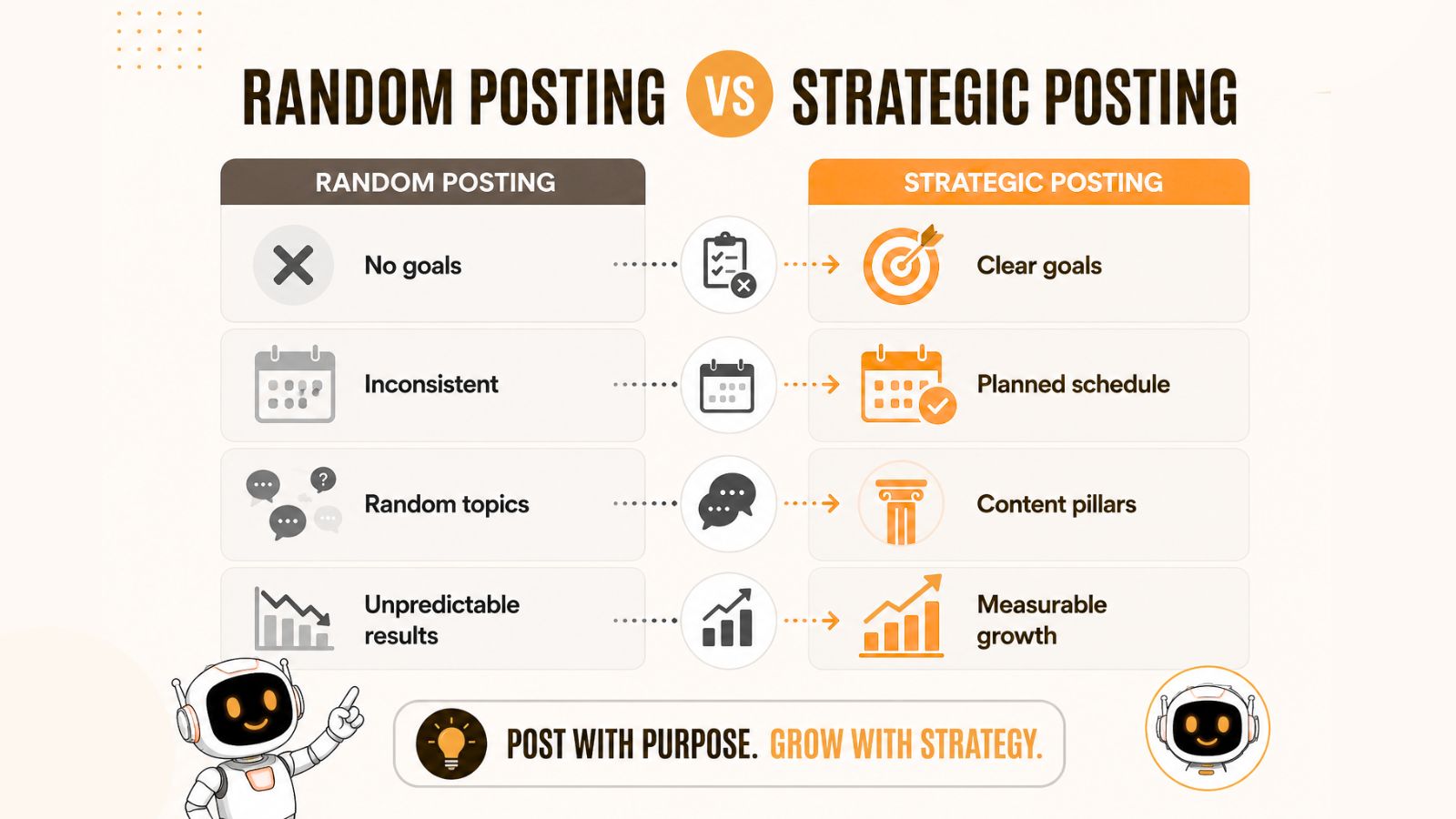
Many beginners approach LinkedIn by sharing random thoughts, occasional updates, or promotional posts. While some of these posts may perform well, this approach often leads to inconsistent results because there is no clear direction behind the content.
A well-designed LinkedIn content strategy answers four fundamental questions:
- Who is your target audience?
- What topics will you consistently discuss?
- How often will you publish content?
- What outcome are you trying to achieve?
When these elements work together, every post serves a purpose. Instead of creating content just to stay active, you're creating content that moves you closer to your goals.
Why Beginners Need a Content Strategy
One of the biggest reasons people abandon LinkedIn content creation is that they lack a system. They spend time thinking about what to post, second-guess their ideas, and eventually stop publishing altogether.
A content strategy removes this uncertainty by creating a clear roadmap.
Benefits of having a LinkedIn content strategy include:
Faster Audience Growth
Consistently publishing content around specific topics helps LinkedIn understand who should see your content. Over time, this can increase your visibility among the people most likely to engage with your posts.
Stronger Personal Brand
When people repeatedly see valuable insights from you on the same core topics, they begin to associate your name with expertise in those areas.
Higher Engagement
Content that is tailored to a specific audience is far more likely to generate comments, reactions, and shares than generic content designed for everyone.
More Business Opportunities
Whether you're looking for clients, partnerships, job opportunities, or speaking engagements, a strategic content approach helps attract the right opportunities over time.
Common Mistakes New LinkedIn Creators Make
Before building your strategy, it's important to avoid several mistakes that slow growth.
Posting Without Clear Goals
If you don't know why you're posting, it's difficult to measure success. Define your primary objective before creating content.
Talking Only About Yourself
While personal stories can perform well, every story should provide a lesson, insight, or takeaway that benefits your audience.
Being Inconsistent
Posting five times one week and disappearing for a month rarely produces meaningful results. Consistency matters far more than occasional bursts of activity.
Focusing Too Much on Promotion
People come to LinkedIn to learn, connect, and discover new ideas. If every post is a sales pitch, engagement typically declines.
Creating Content Without a Plan
Without content pillars or a publishing schedule, many creators quickly run out of ideas. Planning ahead makes content creation significantly easier.
The good news is that every one of these challenges can be solved with a simple framework. The first step is identifying exactly what you want LinkedIn to help you accomplish.
You may also like looking into: How to Build a Strong LinkedIn Presence?
Define Your LinkedIn Goals Before Creating Content
Before you write a single LinkedIn post, you need to determine what success looks like for you.
Many creators fail to see results because they start posting without a clear objective. They focus on vanity metrics like likes and impressions instead of identifying the outcome they actually want to achieve. A strong LinkedIn content strategy starts with a goal, and every piece of content should support that goal.
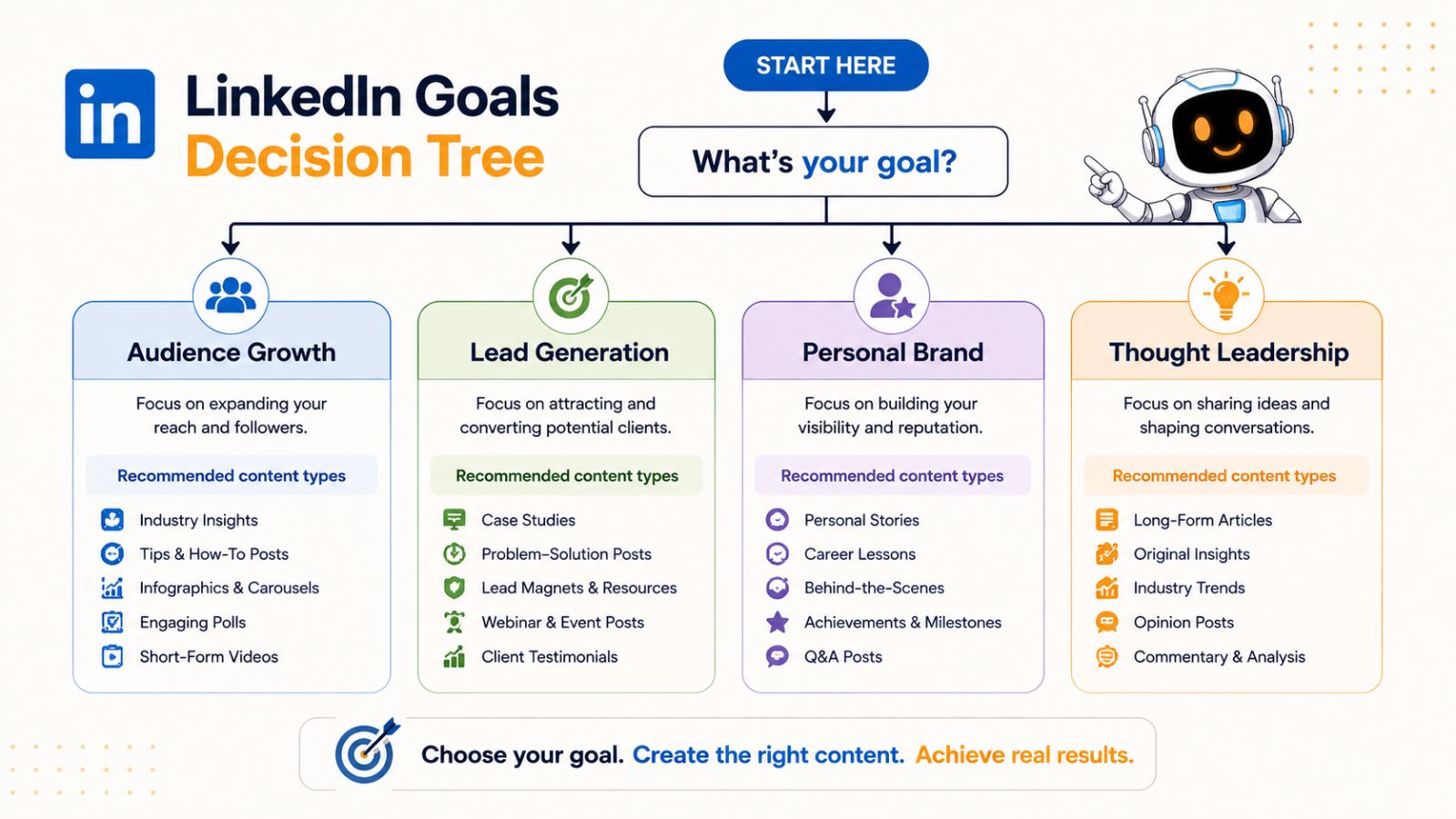
The most successful LinkedIn creators are intentional. They know exactly why they're publishing content and how each post contributes to their larger business or career objectives.
Goal #1: Grow Your Audience
If you're new to LinkedIn, audience growth is often the best place to start.
Growing your audience increases your visibility and expands the number of people who regularly see your content. The larger your relevant audience becomes, the easier it is to generate engagement, opportunities, and relationships.
Content that typically supports audience growth includes:
- Educational tips and tutorials
- Industry insights and trends
- Personal stories with actionable lessons
- Contrarian opinions and unique perspectives
- Engaging questions and discussions
When audience growth is your primary goal, focus on creating highly shareable content that provides immediate value.
Goal #2: Generate Leads and Clients
Many entrepreneurs use LinkedIn as a lead-generation platform.
In this case, your content should demonstrate expertise, build trust, and position you as the logical solution to your audience's problems.
Effective lead-generation content often includes:
- Case studies
- Client success stories
- Problem-solving frameworks
- Industry expertise
- Lessons learned from real-world experiences
The goal is not to sell directly in every post. Instead, you build credibility over time so potential clients naturally seek you out.
Goal #3: Build Your Personal Brand
A personal brand is the reputation people develop about you based on the content you consistently share.
When people repeatedly see valuable insights from you, they begin to associate your name with specific skills, industries, or expertise.
Personal branding content often includes:
- Professional experiences
- Career lessons
- Personal stories
- Behind-the-scenes content
- Opinions on industry developments
Over time, this helps establish authority and differentiate you from others in your field.
Goal #4: Become a Thought Leader
Thought leadership focuses on influencing conversations within your industry.
Rather than simply sharing information, thought leaders introduce new ideas, challenge conventional wisdom, and provide unique perspectives.
Examples include:
- Original frameworks
- Industry predictions
- Trend analysis
- Deep insights from experience
- Strong opinions supported by evidence
This goal is especially valuable for founders, executives, consultants, and industry experts.
Choose One Primary Goal
While LinkedIn can help you accomplish multiple objectives, beginners should avoid trying to achieve everything at once.
For the next 90 days, select one primary goal:
- Grow your audience
- Generate leads
- Build your personal brand
- Establish thought leadership
Once you've chosen a goal, every content decision becomes easier. You'll know what topics to cover, what types of posts to create, and how to measure success.
After defining your goal, the next step is identifying exactly who you want your content to reach.
Also read: Best LinkedIn Scheduling Tool for Agencies
Identify Your Ideal LinkedIn Audience
One of the fastest ways to stall your LinkedIn growth is trying to create content for everyone.
The most successful LinkedIn creators have a clear understanding of who they are speaking to. They know their audience's goals, challenges, interests, and questions. As a result, their content feels highly relevant and consistently attracts engagement.
Before creating your content strategy, take time to define your ideal audience.
Why Audience Clarity Matters
Your audience influences every aspect of your content strategy, including:
- The topics you discuss
- The language you use
- The examples you share
- The problems you solve
- The products or services you eventually promote
For example, a LinkedIn creator targeting startup founders will create very different content than someone targeting corporate recruiters or marketing professionals.
When your audience feels like your content was written specifically for them, engagement naturally increases.
Define Your Target Audience
Start by identifying the primary group you want to reach.
Common LinkedIn audiences include:
Entrepreneurs
Business owners looking to grow revenue, improve operations, and scale their companies.
Founders and Startup Leaders
Individuals focused on fundraising, hiring, product development, and company growth.
Freelancers and Consultants
Professionals seeking clients, referrals, and authority within their niche.
Corporate Professionals
Employees looking to advance their careers, improve skills, or expand their network.
Recruiters and Hiring Managers
Professionals interested in talent acquisition, leadership, and workplace trends.
Choose one primary audience before expanding to additional groups.
Understand Your Audience's Challenges
Once you've identified your audience, think about the problems they face daily.
Ask yourself:
- What keeps them awake at night?
- What goals are they trying to achieve?
- What mistakes do they frequently make?
- What information are they actively searching for?
- What frustrations do they experience regularly?
The answers to these questions become a valuable source of content ideas.
For example, if your audience consists of entrepreneurs, common challenges might include:
- Finding customers
- Generating leads
- Hiring employees
- Managing cash flow
- Building a personal brand
Every challenge can become multiple LinkedIn posts.
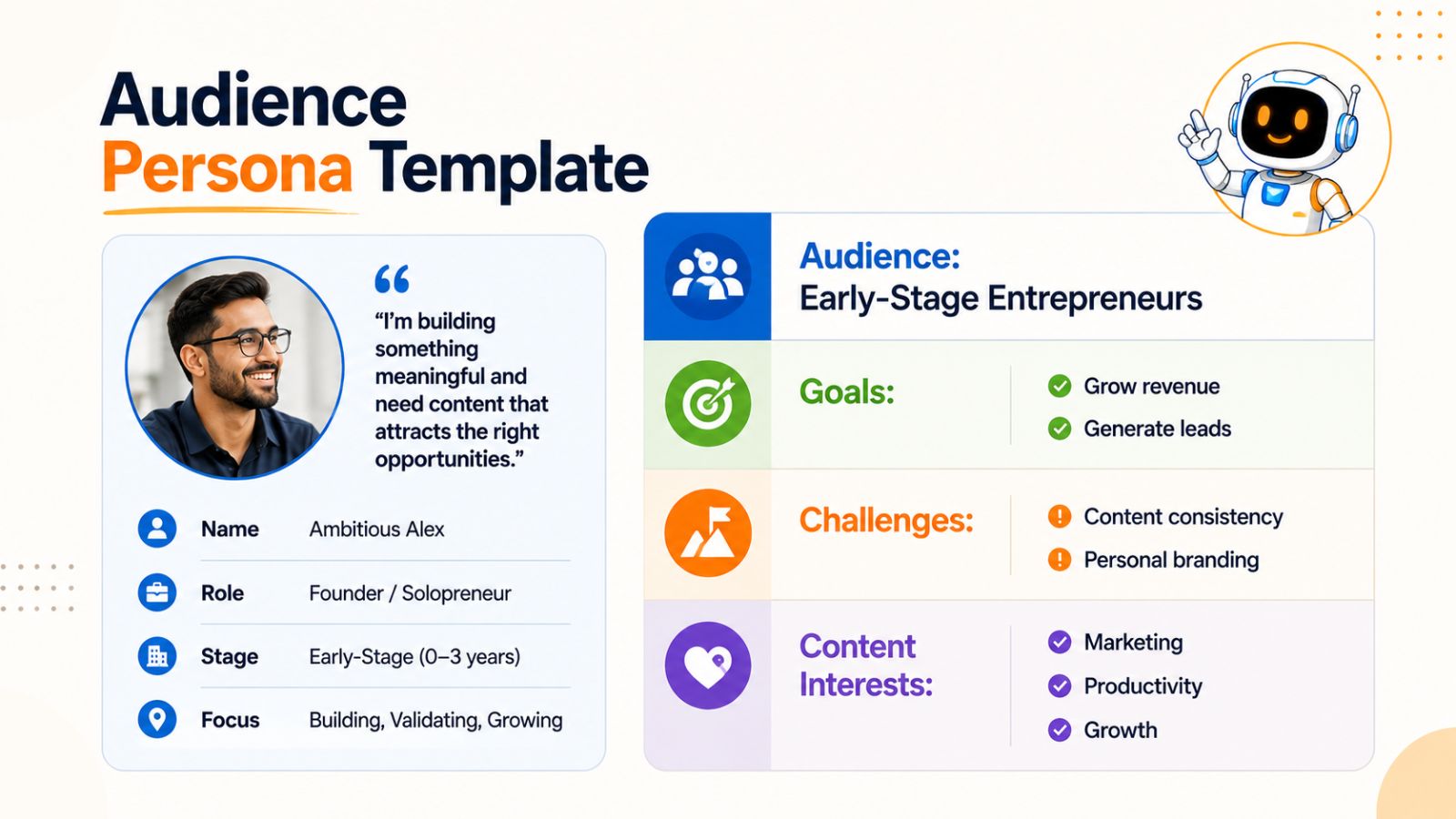
Create an Audience Profile
A simple audience profile helps keep your content focused.
Example:
Audience: Early-stage entrepreneurs
Primary Goal: Grow their business
Biggest Challenges:
- Generating consistent leads
- Standing out in a crowded market
- Managing limited time and resources
Content Interests:
- Marketing strategies
- Productivity systems
- Personal branding
- Business growth tactics
This profile gives you a reference point whenever you're planning content.
Study What Your Audience Already Engages With
You don't need to guess what your audience wants.
LinkedIn provides valuable clues through existing content.
Research creators who already serve your target audience and pay attention to:
- Which posts receive the most comments
- Which topics generate discussion
- What questions people ask in the comments
- What pain points appear repeatedly
This research can reveal content opportunities that you may have overlooked.
Focus on Serving Before Selling
Many creators make the mistake of viewing their audience as potential customers first.
A better approach is to view them as people who need help.
When your content consistently educates, inspires, or solves problems, trust develops naturally. That trust becomes the foundation for audience growth, business opportunities, and long-term success on LinkedIn.
Now that you know who you're creating content for, the next step is deciding what topics you'll consistently cover. This is where content pillars become the foundation of your LinkedIn content strategy.
Also read: Social Media Marketing Statistics You Need to Know
Choose Your Core Content Pillars
One of the biggest reasons creators struggle with consistency is that they constantly ask themselves the same question:
"What should I post today?"
Content pillars solve this problem.
A content pillar is a broad topic that you commit to discussing regularly. Instead of creating content on random subjects, you focus on a small number of themes that align with your expertise, audience, and goals.
When your content pillars are clearly defined, creating content becomes significantly easier because you'll always have a framework for generating ideas.
What Are Content Pillars?
Think of content pillars as the categories your LinkedIn content falls into.
For example, if you're an entrepreneur, your content pillars might include:
- Marketing
- Business growth
- Productivity
- Leadership
- Personal branding
Every post you publish should connect to one of these topics.
This approach helps your audience understand what you stand for and what type of value they can expect from your content.
Why Content Pillars Matter
Content pillars create consistency without making your content repetitive.
Benefits include:
Easier Content Creation
Instead of starting from scratch every time, you simply create another angle, lesson, or story related to one of your pillars.
Stronger Personal Brand
People begin to associate your name with specific topics and expertise.
Better Audience Alignment
Followers know exactly why they should continue following you.
More Sustainable Growth
You'll never run out of content ideas because each pillar can generate dozens or even hundreds of posts.
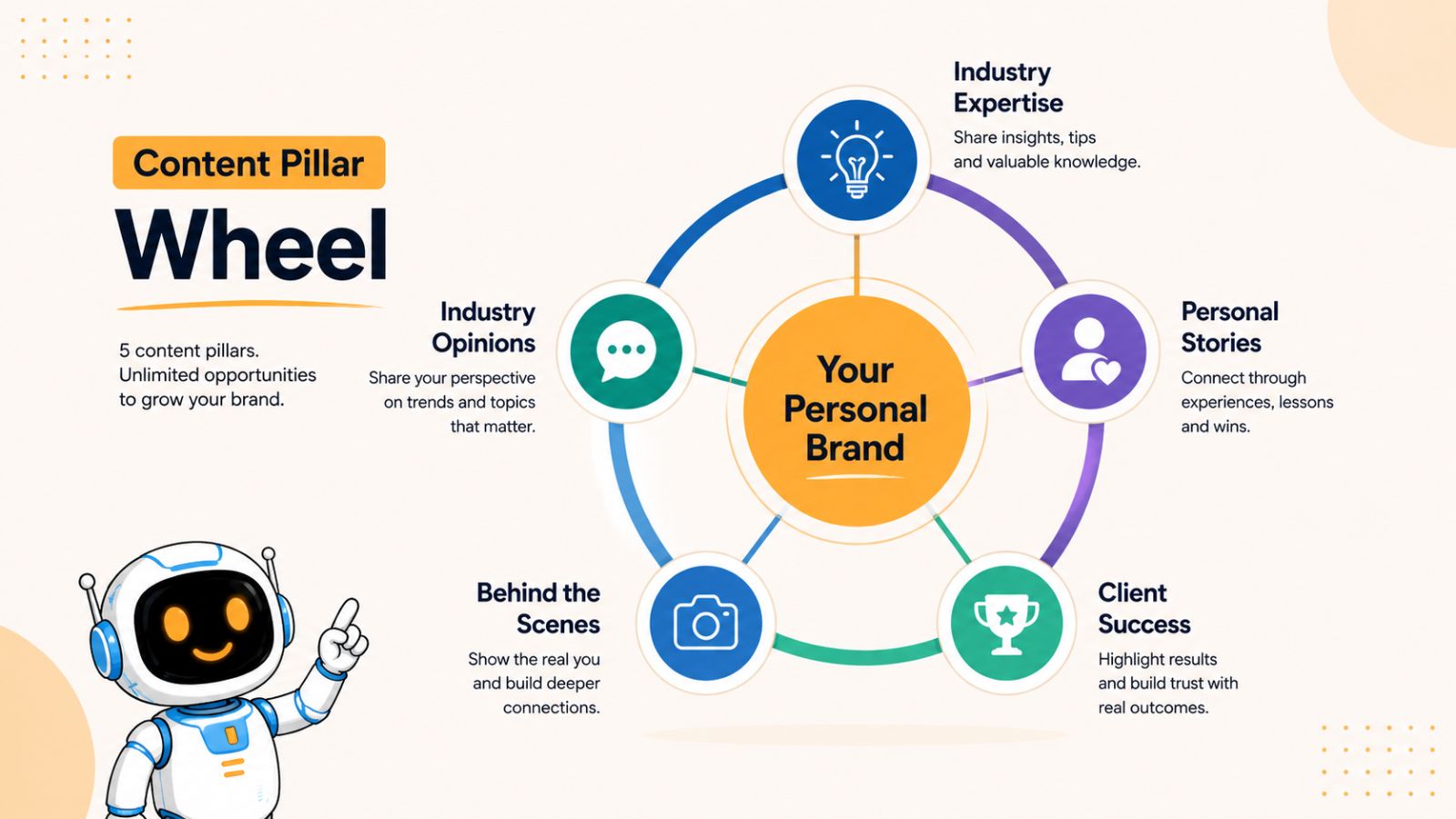
Five Effective Content Pillars for Entrepreneurs
If you're building a business and growing a LinkedIn presence, these pillars work exceptionally well.
1. Industry Expertise
Share your knowledge, insights, and practical advice.
Examples:
- Industry trends
- Best practices
- Frameworks and strategies
- Lessons from experience
- Common mistakes to avoid
Educational content often performs well because it provides immediate value.
2. Personal Experiences
People connect with people more than they connect with brands.
Share:
- Wins and successes
- Failures and setbacks
- Important lessons learned
- Challenges you've overcome
- Personal growth stories
These posts build trust and make your content more relatable.
3. Behind-the-Scenes Content
Show your audience how things work behind the curtain.
Examples:
- Daily workflows
- Team processes
- Business operations
- Product development
- Content creation systems
This type of content creates transparency and authenticity.
4. Client Success Stories and Case Studies
Nothing builds credibility like real-world results.
You can share:
- Customer transformations
- Business outcomes
- Lessons from client projects
- Before-and-after examples
- Key insights from successful campaigns
Case studies demonstrate expertise without feeling overly promotional.
5. Opinions and Industry Commentary
People often engage with strong perspectives.
Share your views on:
- Industry changes
- Emerging trends
- Popular advice you disagree with
- New technologies
- Market shifts
Thoughtful opinions can spark conversations and increase visibility.
Example Content Pillars for LinkedIn Growth
If your goal is building a personal brand on LinkedIn, your pillars might look like this:
| Content Pillar | Purpose |
|---|---|
| LinkedIn Growth | Teach audience-building strategies |
| Content Marketing | Share content creation insights |
| Entrepreneurship | Discuss business-building lessons |
| Productivity | Provide systems and workflows |
| Personal Experiences | Build trust and relatability |
With just five pillars, you can generate months of content.
How Bibby Makes Content Pillars Easier to Execute
Many creators know what they want to post but struggle to stay consistent.
This is where planning and automation become valuable.
For example, you could dedicate one week to creating content across all five pillars, generate or upload accompanying images, and schedule everything in advance using Bibby. Instead of worrying about daily posting, your content continues publishing automatically for weeks or months while you focus on growing your business.
This approach turns content pillars from a strategy on paper into a repeatable system that consistently builds your LinkedIn presence.
The 5-Pillar Exercise
Before moving to the next section, write down:
- Your primary audience.
- Your main LinkedIn goal.
- Three to five topics you can discuss confidently.
- The pillar that best demonstrates your expertise.
- The pillar that best reflects your personality.
These answers will become the foundation of your LinkedIn content strategy.
Once you've selected your content pillars, the next step is understanding which types of LinkedIn posts perform best and how to use each format effectively.
Also read: How to Automate Your LinkedIn Posting Strategy for B2B Growth
What Types of LinkedIn Posts Perform Best?
Once you've defined your content pillars, the next step is choosing the right format for your ideas.
Many beginners assume success on LinkedIn comes from writing long posts every day. In reality, different content formats serve different purposes. Some formats are excellent for driving engagement, while others are better for building authority, educating your audience, or generating leads.
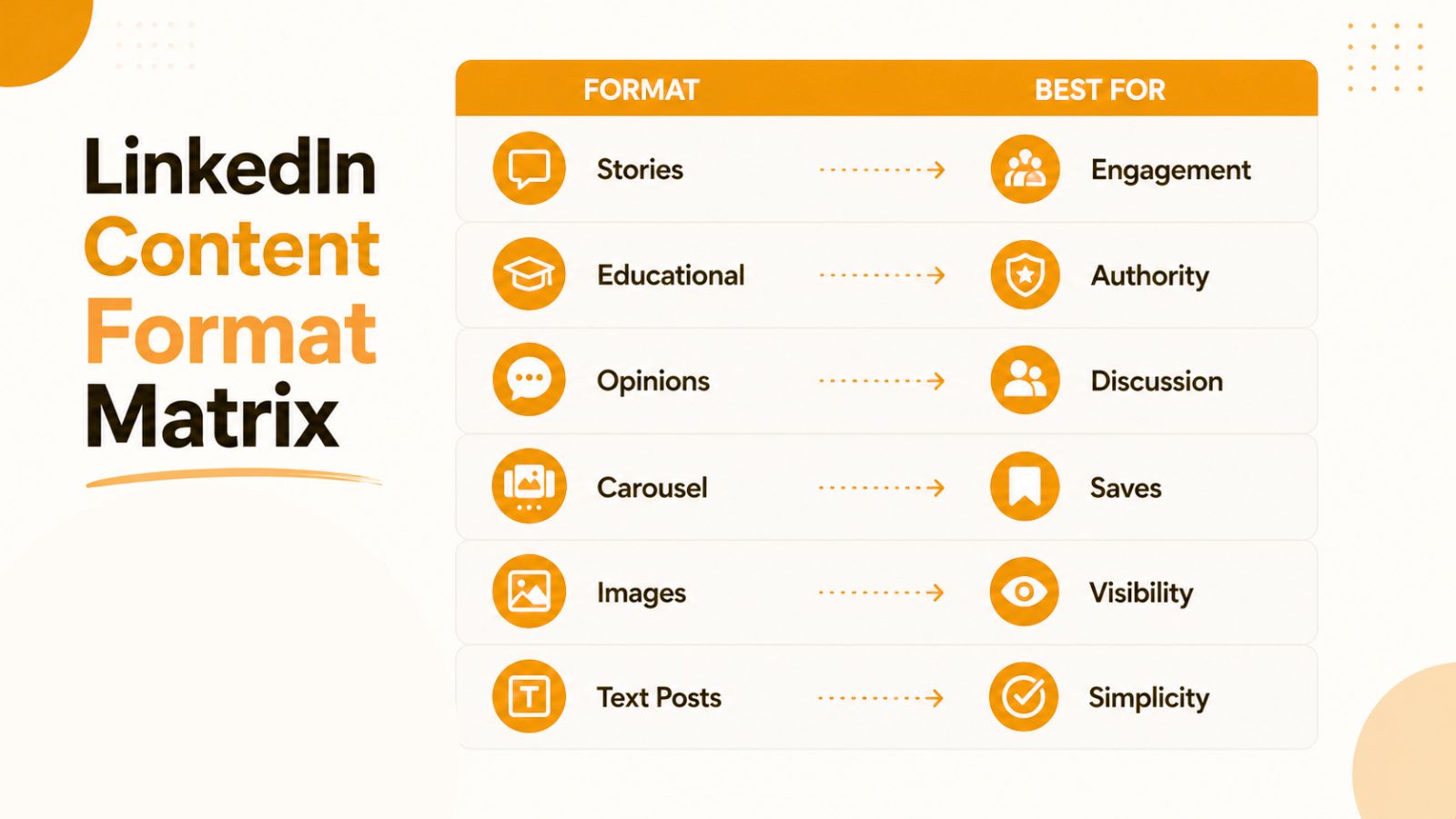
The most successful LinkedIn creators use a mix of formats to keep their content fresh and engage their audience in different ways.
Personal Story Posts
Personal stories are among the most effective content formats on LinkedIn because they create emotional connection.
People remember stories far more easily than facts or statistics. A lesson learned from a business failure, a surprising career experience, or a challenge you recently overcame can often generate meaningful engagement.
A strong story post usually follows this structure:
- Present a situation or challenge
- Explain what happened
- Share the lesson learned
- End with a takeaway for the audience
The key is ensuring the story serves the reader, not just yourself.
Example:
Instead of:
"I landed my biggest client this month."
Try:
"Landing my biggest client taught me three lessons about building trust online."
The second version creates curiosity and delivers value.
Educational Posts
Educational content is the foundation of most successful LinkedIn strategies.
These posts teach your audience something useful and position you as a knowledgeable resource.
Examples include:
- Step-by-step guides
- Frameworks
- Checklists
- Tutorials
- Industry tips
- Mistakes to avoid
Educational content tends to attract saves and shares because readers want to reference it later.
Example Topics:
- How to write better LinkedIn posts
- Three mistakes entrepreneurs make when networking
- A framework for creating content consistently
- Five ways to improve personal branding
If you're unsure what to post, educational content is often the safest place to start.
Opinion Posts
Opinion posts allow you to share your perspective on trends, strategies, or industry topics.
These posts work particularly well because they encourage discussion.
Examples:
- Popular advice you disagree with
- Emerging trends
- Industry predictions
- Lessons from your experience
The goal isn't to be controversial for the sake of attention. Instead, provide thoughtful perspectives backed by experience or reasoning.
A unique viewpoint can help differentiate your content from everyone else discussing the same topics.
Carousel Posts
Carousel posts allow you to break complex ideas into easy-to-digest slides.
They are particularly useful for:
- Frameworks
- Tutorials
- Checklists
- Case studies
- Step-by-step processes
Because readers interact with multiple slides, carousel posts often generate strong engagement.
Examples:
- "7 LinkedIn Post Hooks That Increase Engagement"
- "The Content Strategy Framework I Use Every Week"
- "How I Planned 30 Days of Content in One Afternoon"
Image-Based Posts
Images can significantly increase attention and stop users from scrolling.
Common image types include:
- Personal photos
- Screenshots
- Infographics
- Charts
- Branded graphics
Visual content often performs best when it supports the message rather than distracting from it.
For creators who don't have design experience, tools like Bibby simplify this process by allowing users to upload their own images or generate AI-powered visuals directly within their content workflow. This makes it easier to consistently pair strong visuals with scheduled LinkedIn posts.
Text-Only Posts
Despite the popularity of visual content, text-only posts remain one of the most powerful formats on LinkedIn.
Well-written text posts can generate significant engagement because they focus entirely on the message.
Text posts work particularly well for:
- Personal stories
- Opinions
- Lessons learned
- Short educational insights
In many cases, simplicity outperforms complexity.
Which Format Should Beginners Prioritize?
If you're just starting out, focus on three formats:
- Educational posts
- Personal stories
- Opinion posts
These formats are easy to create, require minimal design work, and help build both authority and audience engagement.
As your content strategy matures, you can introduce additional formats such as carousels, videos, and image-based content.
The Best Strategy: Mix Formats Consistently
Many creators search for a "best" post type, but the reality is that successful LinkedIn growth comes from consistency across multiple formats.
A balanced weekly schedule might include:
- Monday: Educational post
- Wednesday: Personal story
- Friday: Opinion post
- Weekend: Carousel or image-based post
Using a variety of formats keeps your audience engaged while helping you discover which content resonates most strongly with your followers.
Now that you understand the most effective LinkedIn content formats, it's time to combine them into a simple content framework that makes posting consistently much easier.
Also read: Best LinkedIn Scheduling Tool for Agencies
The Beginner's LinkedIn Content Formula
One of the most common questions new creators ask is:
"What percentage of my content should be educational, personal, or promotional?"
While there's no universal formula that works for everyone, most successful LinkedIn creators follow a similar pattern: they provide significantly more value than promotion.
If every post is designed to sell something, engagement tends to decline. On the other hand, if you never talk about your products, services, or expertise, your content may generate attention without producing meaningful business results.
A balanced content mix allows you to grow your audience while creating opportunities for leads, partnerships, and revenue.
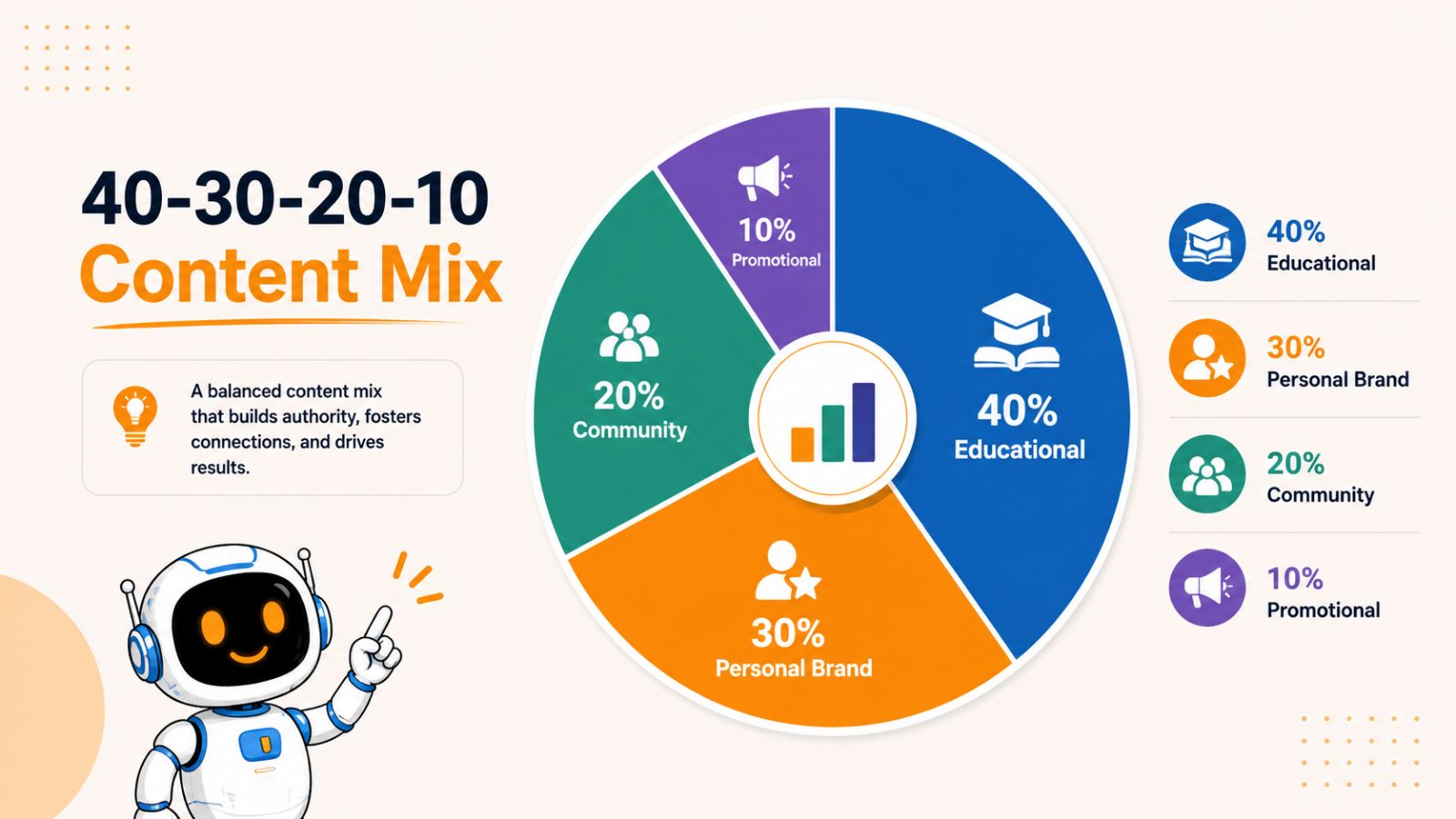
The 40-30-20-10 Framework
A simple framework for beginners is:
- 40% Educational Content
- 30% Personal Brand Content
- 20% Community Content
- 10% Promotional Content
Let's break down each category.
40% Educational Content
Educational content should make up the largest portion of your LinkedIn strategy.
These posts help people solve problems, learn new skills, and gain valuable insights.
Examples include:
- Tutorials
- Frameworks
- Checklists
- Industry lessons
- Step-by-step guides
- Common mistakes to avoid
Educational content helps establish authority and often attracts shares and saves.
Examples:
- "5 LinkedIn Post Hooks That Increase Engagement"
- "A Simple Framework for Planning Content"
- "3 Mistakes Founders Make When Building Their Personal Brand"
When in doubt, teach something useful.
30% Personal Brand Content
People don't just follow expertise—they follow people.
Personal brand content helps your audience understand your experiences, values, and perspective.
Examples include:
- Business lessons
- Career milestones
- Challenges you've faced
- Failures and setbacks
- Personal growth stories
- Behind-the-scenes insights
This type of content builds trust and strengthens audience relationships.
Example:
Instead of simply sharing a business win, explain what you learned and how others can apply the lesson.
20% Community Content
LinkedIn is a social platform, not just a publishing platform.
Community-focused content encourages interaction and conversation.
Examples include:
- Questions
- Polls
- Discussions
- Industry observations
- Requests for opinions
- Audience spotlights
Community content signals to LinkedIn that people are engaging with your posts, which can increase visibility over time.
Examples:
- "What's one business lesson you wish you learned earlier?"
- "Do you think AI will replace content creation or enhance it?"
- "What's your biggest challenge with LinkedIn right now?"
The goal is participation rather than broadcasting.
10% Promotional Content
Promotional content is where you talk about your products, services, offers, or business.
The mistake many beginners make is treating LinkedIn like an advertising channel.
A better approach is to earn attention first through valuable content and then occasionally introduce relevant promotions.
Examples include:
- Product announcements
- Service launches
- Client success stories
- Free resources
- Webinar invitations
- Special offers
Because the majority of your content provides value, occasional promotional posts feel natural rather than intrusive.
Example Weekly Content Mix
Here's how the framework might look in practice.
| Day | Content Type |
|---|---|
| Monday | Educational |
| Tuesday | Personal Brand |
| Wednesday | Educational |
| Thursday | Community |
| Friday | Educational |
| Saturday | Personal Brand |
| Sunday | Promotional |
This balance keeps your audience engaged while still supporting your business goals.
Turn the Formula Into a System
The biggest challenge isn't understanding the formula—it's executing it consistently.
Many entrepreneurs know what they should post but struggle to find time for daily content creation.
A more efficient approach is to batch content creation. For example, you can write several educational posts, a few personal stories, and a promotional post in a single session. Once your content is ready, scheduling tools like Bibby allow you to upload or generate accompanying images and schedule weeks or even months of LinkedIn posts in advance.
Instead of worrying about publishing every day, your content strategy operates on autopilot while you focus on engaging with your audience and growing your business.
Remember: Consistency Beats Perfection
Many creators spend too much time optimizing every post.
The reality is that a simple, valuable post published consistently will outperform a perfect strategy that never gets implemented.
Use this formula as a starting point, adjust it based on your audience's response, and focus on showing up consistently.
The next step is determining how often you should post and creating a schedule you can realistically maintain long term.
How Often Should You Post on LinkedIn?
One of the biggest misconceptions about LinkedIn growth is that you need to publish content every day to see results.
While daily posting can work, it isn't a requirement. In fact, many successful creators and entrepreneurs grow their audience by posting just three to five times per week.
The key isn't frequency alone—it's consistency.
A realistic schedule that you can maintain for months will almost always outperform an aggressive schedule that leads to burnout after a few weeks.
How Often Should Beginners Post?
If you're new to LinkedIn, start with a manageable posting schedule.
Option 1: Three Posts Per Week
This is ideal for beginners who are balancing content creation with other responsibilities.
Example schedule:
- Monday: Educational post
- Wednesday: Personal story
- Friday: Educational or opinion post
This approach allows you to build consistency without feeling overwhelmed.
Option 2: Five Posts Per Week
Once content creation becomes more comfortable, increasing to five posts per week can accelerate growth.
Example schedule:
- Monday: Educational content
- Tuesday: Personal brand content
- Wednesday: Educational content
- Thursday: Community-focused post
- Friday: Opinion or trend analysis
This schedule provides a healthy mix of value and engagement opportunities.
Option 3: Daily Posting
Daily posting can increase visibility, but only if quality remains high.
Many creators attempt daily posting before they have a reliable content system, which often leads to:
- Lower-quality content
- Missed posting days
- Creative burnout
- Inconsistent messaging
For most beginners, consistency is a better goal than daily volume.
Consistency Is More Important Than Frequency
LinkedIn growth is typically the result of sustained effort over time.
Consider these two creators:
Creator A
- Posts every day for two weeks
- Stops posting for a month
Creator B
- Posts three times per week
- Maintains the schedule for six months
Creator B will almost always see better long-term results because their audience learns to expect consistent value.
A predictable publishing schedule also helps you develop a content creation habit, making it easier to stay committed over time.
Create a Weekly Content Calendar
A content calendar removes the daily decision-making process and ensures your content pillars receive balanced coverage.
Here's a simple example:
| Day | Content Type |
|---|---|
| Monday | Educational |
| Wednesday | Personal Story |
| Friday | Industry Opinion |
As your content library grows, you can expand the calendar to include additional formats and topics.
The Problem With Creating Content Daily
Many entrepreneurs approach LinkedIn with good intentions.
They sit down every morning, open LinkedIn, and try to think of something to post.
This usually creates three problems:
- Content quality becomes inconsistent.
- Valuable ideas are forgotten.
- Posting feels like a daily chore.
A better approach is to separate content creation from content publishing.
Create content in batches, then schedule it in advance.
Build a Month of Content at Once
Imagine creating 20 LinkedIn posts in a single afternoon.
Instead of constantly worrying about what to publish tomorrow, you would already have weeks of content ready to go.
This is the approach many high-performing creators use.
A typical workflow looks like this:
- Brainstorm ideas.
- Write multiple posts in one session.
- Create or upload visuals.
- Schedule everything in advance.
- Focus on engagement rather than publishing.
How Bibby Helps Maintain Consistency
Consistency is where most LinkedIn strategies succeed or fail.
Even creators with excellent content ideas often struggle to publish regularly because business responsibilities take priority.
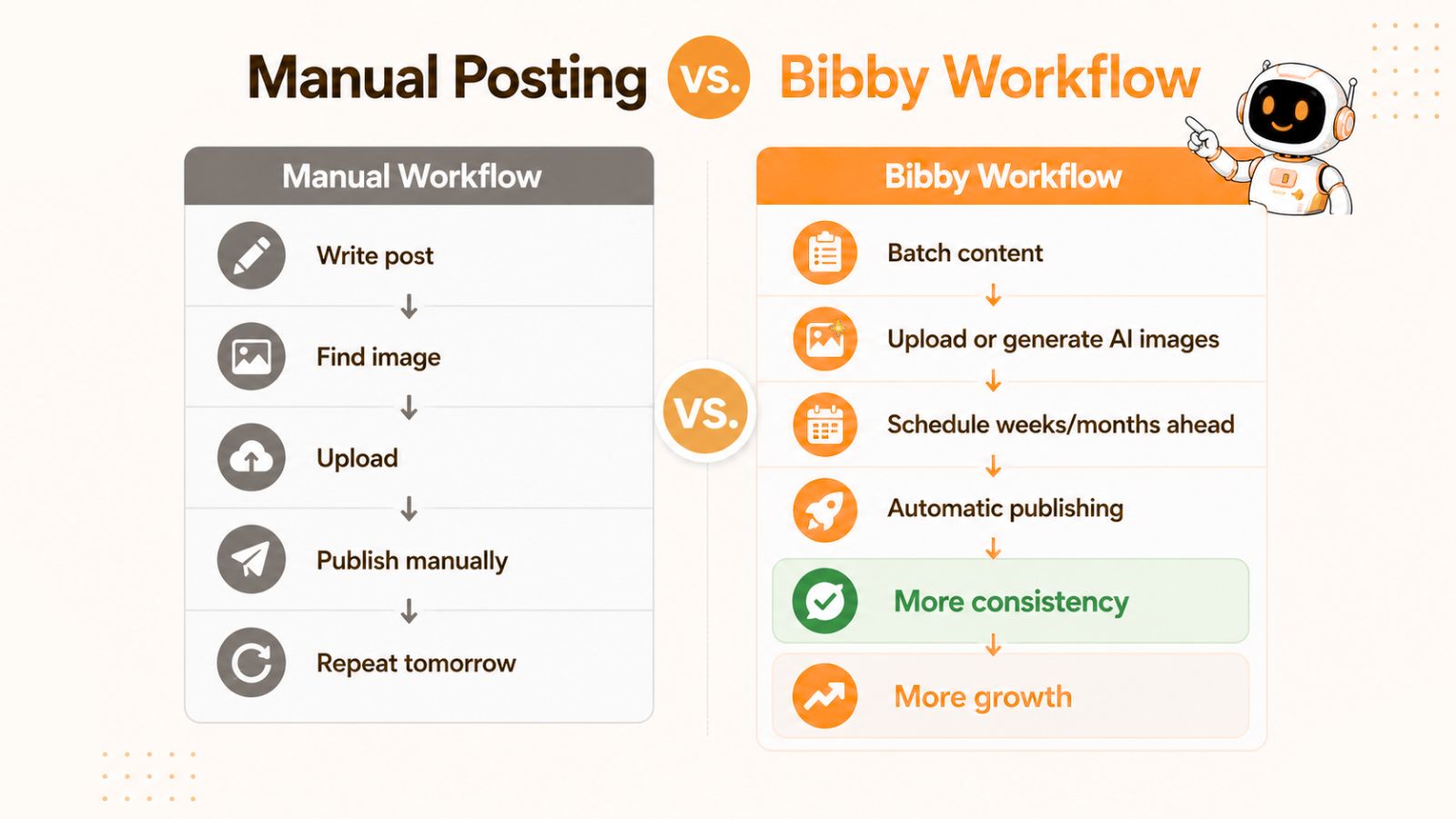
Bibby simplifies this process by allowing you to create content in batches, upload your own images or generate visuals with AI, and schedule posts weeks or months ahead of time. Instead of manually publishing every day, your LinkedIn content continues working in the background while you focus on networking, sales, customer relationships, and business growth.
This turns consistency from a daily challenge into a repeatable system.
Find the Schedule You Can Sustain
There is no perfect posting frequency.
The best schedule is the one you can realistically maintain for the next six months.
For most beginners, that means:
- Start with three posts per week.
- Increase frequency as your workflow improves.
- Focus on quality and consistency.
- Use scheduling tools to remove friction.
Once you establish a sustainable posting rhythm, the next challenge becomes producing enough content ideas to support it. Fortunately, there are simple systems that allow you to create an entire month's worth of LinkedIn content in a single day.
You may also like looking into: How Often Should Businesses Post on LinkedIn?
How to Create a Month of LinkedIn Content in One Day
One of the biggest reasons entrepreneurs struggle to stay active on LinkedIn is that they treat content creation as a daily task.
Every morning, they open LinkedIn, stare at a blank screen, and try to come up with a new idea. This approach consumes time, drains creativity, and often leads to inconsistent posting.
The solution is batch content creation.
Instead of creating one post at a time, dedicate a few hours to producing an entire month's worth of content in a single session. This approach reduces context switching, improves efficiency, and ensures you always have content ready to publish.
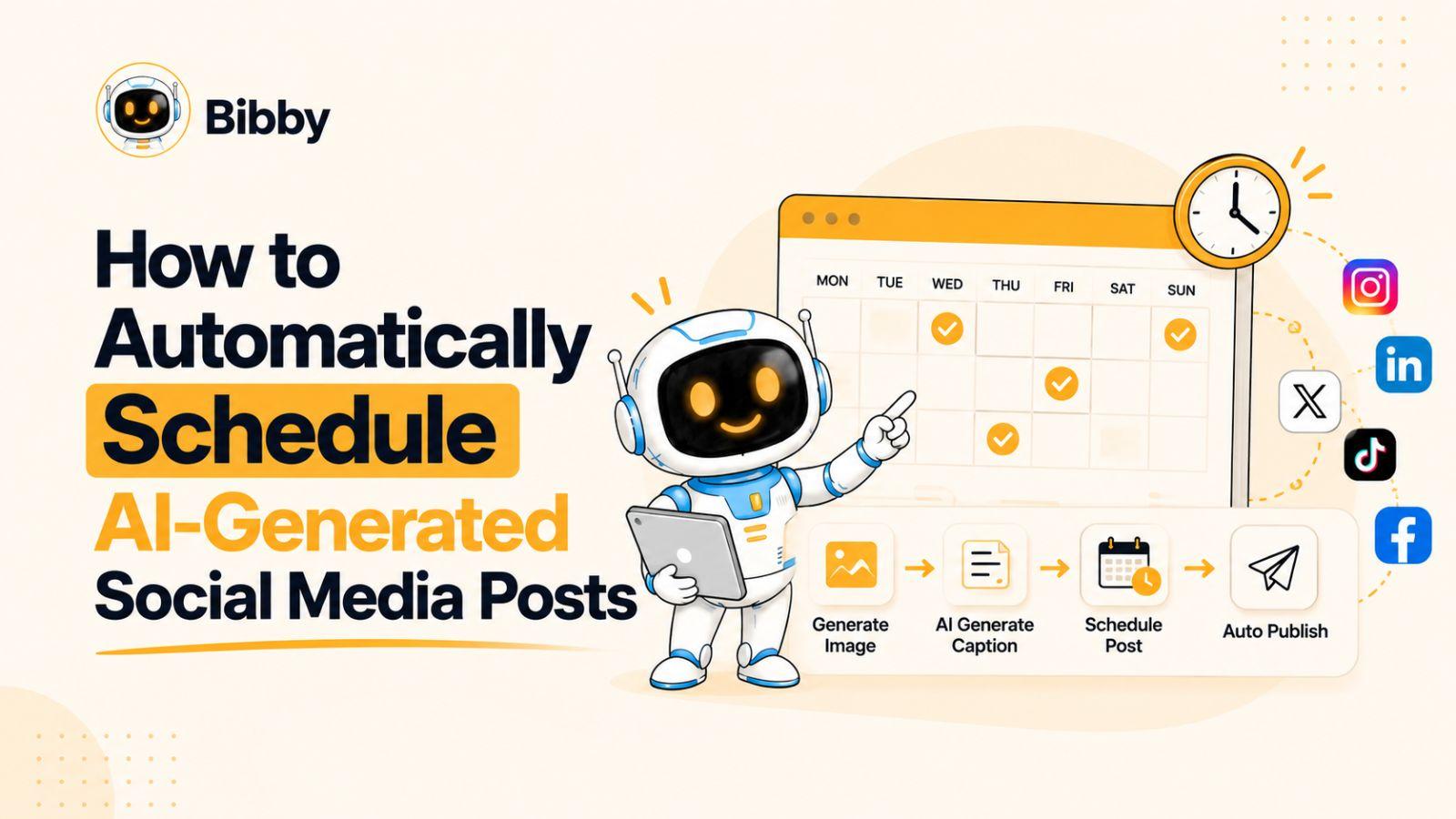
Step 1: Upload Your Image or Generate One with AI
Every content workflow starts with the content itself.
You can either upload your own image, screenshot, graphic, or media asset, or generate a brand-new visual using AI. Both approaches work well depending on your content strategy.
For example:
- Upload a personal photo for a thought leadership post
- Share a screenshot of business results
- Use branded graphics for educational content
- Generate AI images for inspirational or storytelling posts
The goal is simple: start with a visual asset that supports your message and captures attention in the LinkedIn feed.
Step 2: Set Your Posting Style
Before creating captions, it's important to define how you want your content to sound.
Your posting style helps maintain consistency across every post and ensures your content reflects your personal or business brand.
This includes selecting:
- Tone of voice
- Writing style
- Target audience
- Content objectives
- Brand personality
For example, you may choose a professional and educational style for B2B audiences or a more personal and conversational style for founder-led content.
Establishing a clear posting style creates a consistent experience for your audience and strengthens brand recognition over time.
Step 3: Generate Captions with AI
Once your visual and posting style are ready, the next step is creating the content itself.
Rather than staring at a blank page, AI can generate engaging captions tailored to your image, audience, and communication style.
These captions can include:
- Educational insights
- Personal stories
- Industry observations
- Thought leadership content
- Promotional messaging
- Engagement-focused questions
Instead of spending hours writing every post manually, AI helps transform ideas into polished LinkedIn content within minutes while keeping your messaging aligned with your chosen style.
Step 4: Schedule Your Content
Consistency is one of the biggest drivers of LinkedIn growth, but maintaining a daily posting routine can be challenging.
Scheduling solves this problem.
After creating your content, you can plan when and how frequently it should be published.
This allows you to:
- Maintain a regular posting schedule
- Reach audiences at optimal times
- Plan content weeks in advance
- Eliminate last-minute publishing stress
- Build a predictable content system
Many successful creators and business owners dedicate a few hours each month to scheduling content rather than managing posts every day.
Step 5: Publish Automatically on LinkedIn
The final step is automated publishing.
Once your content is scheduled, it is published automatically on LinkedIn at the selected date and time.
This transforms content creation from a daily task into a scalable system.
Instead of worrying about publishing, you can focus on:
- Responding to comments
- Building professional relationships
- Generating leads
- Growing your network
- Running your business
How Bibby Simplifies the Entire Process
Traditional LinkedIn content creation often involves multiple tools, scattered workflows, and significant manual effort. Creating visuals, writing captions, scheduling posts, and publishing content can quickly become time-consuming.
Bibby brings the entire process together into a single streamlined workflow.
You can upload your own media or generate AI images, define your preferred posting style, create captions automatically with AI, schedule content in advance, and publish directly to LinkedIn from one platform.
The result is a repeatable content system that helps entrepreneurs, consultants, coaches, and business owners stay consistent without spending hours every week managing social media.
Instead of asking, "What should I post today?", you can build weeks of content in advance and let automation handle the execution while you focus on growing your business.
Also read: How Social Media Automation Improves Content Quality Over Time
The Real Goal: Eliminate Daily Content Stress
The purpose of batch content creation isn't simply efficiency.
It's freedom.
When your content is planned and scheduled in advance:
- You stop worrying about what to post.
- You maintain consistency.
- You avoid creative burnout.
- You create better content.
- You free up time for higher-value activities.
The creators who succeed on LinkedIn aren't necessarily the most talented writers. They're often the people who build reliable systems that make consistency easy.
The next step is understanding how automation can help you maintain that consistency and turn your LinkedIn strategy into a scalable growth engine.
How Social Media Automation Makes Consistency Easier
Creating great content is only half the battle.
The real challenge is maintaining consistency week after week, month after month.
Most entrepreneurs start with good intentions. They create content, post regularly for a few weeks, and begin seeing encouraging results. Then client work, meetings, deadlines, and everyday business responsibilities take over. Posting becomes less frequent, momentum slows, and eventually the content strategy is abandoned altogether.
This isn't usually a content problem.
It's a systems problem.
The creators who successfully grow on LinkedIn rarely rely on motivation alone. Instead, they use systems and automation to ensure their content continues reaching their audience consistently.
Why Most LinkedIn Creators Quit
The majority of LinkedIn creators don't stop because they run out of ideas.
They stop because content creation becomes difficult to maintain alongside everything else they need to do.
Common challenges include:
- Lack of time
- Content fatigue
- Inconsistent workflows
- Difficulty creating visuals
- Forgetting to publish posts
- Constantly switching between business tasks and content tasks
Without a process in place, even the best content strategy can fall apart.
The Benefits of Scheduling Content
Scheduling content removes many of the obstacles that prevent consistency.
Instead of creating and publishing content on the same day, you separate those activities.
This creates several advantages.
Consistent Publishing
Your content continues to go live according to your schedule, regardless of how busy you become.
Better Content Quality
When you're not rushing to publish something immediately, you have more time to improve your ideas, refine your writing, and create stronger posts.
Reduced Stress
Knowing that your content is already planned and scheduled eliminates the daily pressure of deciding what to post.
More Strategic Planning
Scheduling allows you to view your content calendar as a whole and ensure a balanced mix of educational, personal, community, and promotional content.
Using Bibby to Streamline Your LinkedIn Workflow
As your content strategy grows, managing posts manually becomes increasingly time-consuming.
This is where automation platforms can make a significant difference.
Bibby is designed to help entrepreneurs and professionals maintain a consistent social media presence without turning content management into a full-time job.
A typical workflow might look like this:
- Create content in batches.
- Upload your own images or generate visuals using AI.
- Organize content into a publishing schedule.
- Schedule posts for weeks or months in advance.
- Let your content publish automatically.
Instead of spending time every day preparing content, you create a system that keeps your LinkedIn presence active long after your content creation session is finished.
Automation Doesn't Mean Being Less Human
One concern some creators have is that automation makes content feel impersonal.
The reality is that automation should handle publishing—not relationships.
The most successful LinkedIn creators automate repetitive tasks while remaining highly active in conversations.
For example:
- Schedule content automatically.
- Reply to comments personally.
- Participate in discussions.
- Send connection requests manually.
- Build genuine relationships.
Automation creates more time for human interaction, which is where the real value of LinkedIn exists.
Best Practices for LinkedIn Automation
To get the most value from scheduling and automation, follow these guidelines.
Create Content in Advance
Avoid creating content at the last minute. Maintain a content backlog whenever possible.
Review Scheduled Posts Regularly
Business priorities, industry news, and audience interests can change. Periodically review your content calendar to ensure posts remain relevant.
Monitor Performance
Track metrics such as:
- Impressions
- Engagement
- Profile views
- Follower growth
- Leads generated
Use these insights to improve future content.
Stay Active After Publishing
Publishing content is only the beginning. Engagement often determines how far your content reaches.
Spend time:
- Responding to comments
- Asking follow-up questions
- Connecting with new followers
- Participating in conversations
Build a Content Engine, Not a Content Habit
Many creators rely on discipline to stay consistent.
A more sustainable approach is to build a content engine.
A content engine combines:
- Clear goals
- Defined content pillars
- Batch content creation
- Scheduled publishing
- Performance tracking
When these components work together, LinkedIn growth becomes more predictable and less dependent on daily effort.
Automation is the mechanism that keeps the engine running.
Once your content strategy is operating consistently, the next step is measuring what's working so you can improve results over time and focus on the content that drives the greatest impact.
Also read: How AI Helps Maintain Brand Consistency Across Social Platforms
Measuring the Success of Your LinkedIn Content Strategy
Many beginners make the mistake of judging every LinkedIn post by the number of likes it receives.
While engagement is important, it's only one piece of the puzzle.
A successful LinkedIn content strategy should support your overall goals, whether that's growing an audience, generating leads, building a personal brand, or establishing thought leadership. The only way to know if your strategy is working is to track the right metrics consistently.
Without measurement, you're guessing.
With measurement, you're improving.
Start With Your Original Goal
Before analyzing performance, revisit the goal you selected earlier.
Ask yourself:
- Are you trying to grow your audience?
- Generate leads?
- Build authority?
- Increase visibility?
Your goal determines which metrics matter most.
For example:
| Goal | Primary Metrics |
|---|---|
| Audience Growth | Followers, impressions, profile views |
| Lead Generation | Inbound messages, inquiries, conversions |
| Personal Branding | Profile views, engagement, mentions |
| Thought Leadership | Shares, comments, audience growth |
Different goals require different success measurements.
Key LinkedIn Metrics to Track
While LinkedIn provides a variety of analytics, beginners should focus on a handful of core metrics.
Impressions
Impressions represent how many times your content was displayed to users.
This metric helps you understand your overall reach.
If impressions are increasing over time, LinkedIn is likely distributing your content to a larger audience.
Engagement
Engagement includes:
- Likes
- Comments
- Shares
- Reposts
- Saves
Engagement often indicates whether your content resonates with your audience.
Pay particular attention to comments and shares, as they typically signal stronger interest than likes alone.
Profile Views
Profile views can be an important indicator that your content is creating curiosity.
When people repeatedly encounter valuable content from you, they often visit your profile to learn more.
An increase in profile views usually suggests your personal brand is gaining visibility.
Follower Growth
Follower growth helps measure whether your content strategy is attracting new people consistently.
Rather than focusing on viral spikes, look for steady month-over-month growth.
Sustainable growth is generally more valuable than temporary attention.
Leads and Opportunities
For entrepreneurs, this is often the most important metric.
Examples include:
- Direct messages
- Consultation requests
- Sales inquiries
- Partnership opportunities
- Speaking invitations
- Newsletter signups
A post that generates business opportunities may be more valuable than a post that generates thousands of impressions.
What Metrics Matter Most for Beginners?
When you're just starting out, avoid overanalyzing every number.
Focus primarily on:
- Consistency
- Engagement
- Audience growth
These metrics provide enough feedback to validate whether your strategy is moving in the right direction.
Remember, early growth often appears slow.
The creators who succeed are usually the ones who remain consistent long enough for momentum to compound.
Identify Your Best-Performing Content
One of the fastest ways to improve your results is to analyze your top-performing posts.
Ask:
- What topic did the post cover?
- Which content pillar did it belong to?
- What format was used?
- Did it include a story, lesson, or opinion?
- What kind of comments did it generate?
Patterns will begin to emerge.
For example, you may discover:
- Personal stories outperform educational content.
- Industry opinions attract more comments.
- Certain content pillars consistently generate engagement.
- Specific topics attract potential customers.
These insights help guide future content decisions.
Double Down on What Works
Many creators spend too much time trying to fix weak content.
A better strategy is often to expand on what is already working.
If a post performs exceptionally well:
- Turn it into a carousel.
- Expand it into a blog post.
- Create a follow-up post.
- Record a video version.
- Add new examples and republish later.
Successful content can often be repurposed multiple times.
Use Data to Refine Your Content Strategy
Content strategy is not something you create once and never revisit.
The best creators continuously refine their approach based on audience feedback and performance data.
Over time, you'll learn:
- Which topics generate the most engagement.
- Which formats perform best.
- Which content attracts customers.
- Which pillars deserve more attention.
This allows your content strategy to become increasingly effective as you gather more information.
Consistency Comes Before Optimization
Many beginners obsess over analytics before they've built a publishing habit.
The reality is simple:
You need enough content before you have enough data.
Focus first on publishing consistently for several months. Once you've established a solid content library, the patterns become easier to identify and optimize.
At this point, you have all the core elements of a successful LinkedIn content strategy. The final step is bringing everything together into a practical checklist you can use before publishing your next post.
LinkedIn Content Strategy Checklist for Beginners
Creating a successful LinkedIn presence doesn't require complicated tactics or endless hours of content creation.
What matters most is having a simple system that helps you consistently create valuable content for the right audience.
Use the following checklist before launching or refining your LinkedIn content strategy.
Strategy Foundation
Before creating content, make sure you have clearly defined:
☐ A primary LinkedIn goal
☐ A specific target audience
☐ Three to five content pillars
☐ A realistic posting schedule
☐ Key metrics for measuring success
Without these fundamentals, it's difficult to create content that produces consistent results.
Content Creation Checklist
Before publishing content, ask yourself:
☐ Does this post align with one of my content pillars?
☐ Does it provide value to my audience?
☐ Is the message clear and easy to understand?
☐ Does it include a lesson, insight, or actionable takeaway?
☐ Does the opening hook encourage people to keep reading?
☐ Is the formatting easy to scan?
Great LinkedIn content doesn't need to be complicated. It simply needs to be useful.
Consistency Checklist
To maintain momentum:
☐ Create content in batches
☐ Maintain a content idea bank
☐ Repurpose existing content
☐ Review performance regularly
☐ Engage with comments and conversations
The easier your process becomes, the more likely you are to stay consistent.
Automation Checklist
If you're using a scheduling platform like Bibby:
☐ Upload or generate visuals for upcoming posts
☐ Schedule content several weeks ahead
☐ Maintain a balanced content mix
☐ Review your content calendar regularly
☐ Monitor analytics and audience feedback
☐ Continue engaging manually after posts are published
Automation should support your strategy, not replace your relationships.
The Beginner's LinkedIn Success Formula
At its core, LinkedIn growth is surprisingly simple:
- Choose a clear goal.
- Understand your audience.
- Create content around a few core pillars.
- Publish consistently.
- Measure results.
- Improve over time.
Most creators fail because they overcomplicate the process.
The creators who succeed are often the ones who consistently execute the fundamentals for months rather than weeks.
Also read: Social Media KPIs Every Business Should Track
Final Thoughts
Building a successful LinkedIn presence doesn't require viral posts, advanced marketing skills, or spending hours every day creating content. What it does require is a clear strategy that helps you consistently deliver value to the right audience.
Throughout this guide, you've learned that successful LinkedIn growth starts with defining clear goals, choosing focused content pillars, and maintaining a consistent publishing schedule. You've also seen how batching content, scheduling posts in advance, and leveraging automation can make consistency significantly easier to maintain over the long term.
The creators who achieve the best results on LinkedIn aren't necessarily the most talented writers—they're the ones who build repeatable systems that allow them to show up consistently.
As your next step, consider learning how to write high-performing LinkedIn posts that capture attention, generate engagement, and turn visibility into meaningful business opportunities. When combined with the strategy you've built in this guide, strong post-writing skills can help accelerate your growth and maximize the impact of every piece of content you publish.