Managing LinkedIn content across multiple clients can quickly become overwhelming without the right scheduling and automation tools.
Agencies today need more than just a basic post scheduler. They need AI-powered workflows, approval systems, analytics, content calendars, and automation features that help them scale client content without sacrificing consistency or quality.
In this article, you will learn:
- The best LinkedIn scheduling tools for agencies in 2026
- Which platforms offer the strongest automation and AI features
- How agencies can automate LinkedIn posting workflows efficiently
Let’s start by looking at why LinkedIn scheduling tools have become essential for modern agencies.
Why Agencies Need a LinkedIn Scheduling Tool
Managing LinkedIn for one brand is manageable. Managing it for multiple clients across different industries, posting schedules, and campaigns is where agencies start losing time.
Without a scheduling platform, teams often rely on spreadsheets, reminders, and manual publishing. This creates bottlenecks, increases the chance of missed posts, and makes it difficult to maintain consistent engagement for every client account.
If you are looking for a smarter way to manage LinkedIn content consistently, LinkedIn Post Automation Tool helps automate your entire posting workflow. From scheduling posts and organizing content calendars to generating AI-powered captions and visuals, it simplifies LinkedIn management for agencies, founders, and B2B teams trying to scale their content strategy without spending hours publishing manually.
A LinkedIn scheduling tool helps agencies streamline their entire publishing workflow. Instead of logging in daily to publish content manually, agencies can plan weeks or even months of content in advance while keeping everything organized in a single dashboard.
Here are the biggest benefits agencies get from using LinkedIn scheduling tools:
Save Time With Automation
Automation removes repetitive publishing tasks from your workflow. Agencies can batch-create content, schedule posts in advance, and let the platform automatically publish content at the right times.
This allows social media managers to focus more on strategy, content quality, and client growth instead of manual posting.
Maintain Consistent Posting Schedules
Consistency is one of the biggest factors behind LinkedIn growth. Scheduling tools ensure client accounts stay active even during weekends, holidays, or busy campaign periods.
Regular posting helps agencies:
- Increase engagement
- Improve brand visibility
- Build audience trust
- Generate more inbound leads
Manage Multiple Clients More Efficiently
Most agencies manage several LinkedIn accounts simultaneously. Scheduling platforms make it easier to switch between clients, organize content calendars, and avoid publishing mistakes.
Many tools also include:
- Team collaboration features
- Client approval workflows
- Shared content calendars
- Role-based permissions
Use AI to Improve Performance
Modern scheduling tools now include AI-powered features that help agencies scale faster.
These can include:
- AI-generated captions
- AI image generation
- AI-optimized posting times
- Content suggestions
- Automated post variations
Instead of manually testing publishing times, AI tools can automatically schedule posts when audiences are most active.
Track Analytics and Reporting
Clients expect measurable results. Scheduling tools give agencies access to analytics dashboards that track:
- Engagement rates
- Follower growth
- Reach and impressions
- Best-performing posts
- Posting consistency
This makes client reporting much easier while helping agencies improve future content strategies.
As LinkedIn marketing becomes more competitive, agencies that use automation and AI scheduling tools gain a significant advantage in both efficiency and scalability.
How We Evaluated the Best LinkedIn Scheduling Tools
Not every social media scheduler is built for agencies. Some platforms work well for individual creators but lack the collaboration, automation, and reporting features agencies need to manage multiple clients efficiently.
To identify the best LinkedIn scheduling tools for agencies, we evaluated each platform across several important categories.
Ease of Use
A scheduling tool should simplify your workflow, not make it more complicated.
We looked for platforms with:
- Clean dashboards
- Fast onboarding
- Simple scheduling workflows
- Easy account management
- Minimal learning curves for team members
Agencies often onboard new employees and clients regularly, so usability matters.
Agency-Focused Features
Many scheduling tools are designed primarily for small businesses or creators. Agencies require additional capabilities such as:
- Multi-client workspaces
- Team collaboration
- Approval workflows
- Shared calendars
- Role-based permissions
Tools that support agency operations at scale ranked higher.
Automation Capabilities
Automation is one of the biggest reasons agencies invest in scheduling software.
We evaluated:
- Automated publishing
- Recurring posts
- AI-assisted scheduling
- Bulk scheduling
- Queue management
- AI-generated content workflows
The stronger the automation system, the more time agencies can save.
Analytics and Reporting
Agencies need to prove ROI to clients.
We compared platforms based on:
- Engagement analytics
- Growth tracking
- Performance reporting
- Exportable reports
- Cross-platform insights
- Post-performance analysis
Advanced reporting features are especially important for larger agencies managing multiple campaigns.
AI Features
AI has quickly become a major differentiator in social media tools.
We prioritized platforms that offer:
- AI content generation
- AI image creation
- AI caption assistance
- AI-optimized posting times
- Smart scheduling recommendations
These features help agencies scale content production while maintaining consistency.
Pricing and Scalability
Some tools become extremely expensive as agencies add more clients and team members.
We evaluated:
- Entry-level pricing
- Cost per social account
- Team member pricing
- Scalability for growing agencies
- Overall value for money
Affordable platforms with strong feature sets ranked especially well for small and mid-sized agencies.
LinkedIn Integration Quality
Not all LinkedIn integrations offer the same level of functionality.
We looked at:
- Reliability of publishing
- Support for personal profiles and company pages
- Media support
- Carousel/document post support
- Scheduling flexibility
- API stability
Strong LinkedIn-specific functionality was essential for this list.
Now that we’ve covered the evaluation criteria, let’s compare the top LinkedIn scheduling tools agencies should consider in 2026.
Want to build a scalable LinkedIn growth system instead of posting randomly? This guide on How to Automate Your LinkedIn Posting Strategy for B2B Growth explains how businesses can automate content planning, scheduling, publishing, and engagement workflows using AI and smart automation tools. It is especially useful for agencies and startups looking to generate consistent inbound leads from LinkedIn.
Top 10 Best LinkedIn Scheduling Tools for Agencies
1. Bibby — Best AI-Powered LinkedIn Automation Tool for Agencies
Bibby is designed for agencies that want to automate LinkedIn content workflows using AI. Instead of simply scheduling posts manually, Bibby focuses on helping teams create, organize, automate, and optimize social content from a single platform.
For agencies managing multiple client accounts, Bibby combines automation, AI-generated content workflows, visual scheduling, and analytics into one streamlined system.
Why Agencies Like Bibby
Agencies typically use several separate tools for content creation, scheduling, approvals, and reporting. Bibby simplifies this process by bringing everything together into a single workflow.
Some standout features include:
- AI-powered post automation
- AI image generation
- Multi-account scheduling
- Visual content calendar
- AI-optimized posting times
- Post previews
- Performance analytics
- Simple automation setup
This makes Bibby especially useful for agencies trying to scale LinkedIn management without increasing manual workload.
How to Automate LinkedIn Posts With Bibby
One of Bibby’s biggest advantages is how simple the automation process is for agencies and social media managers.
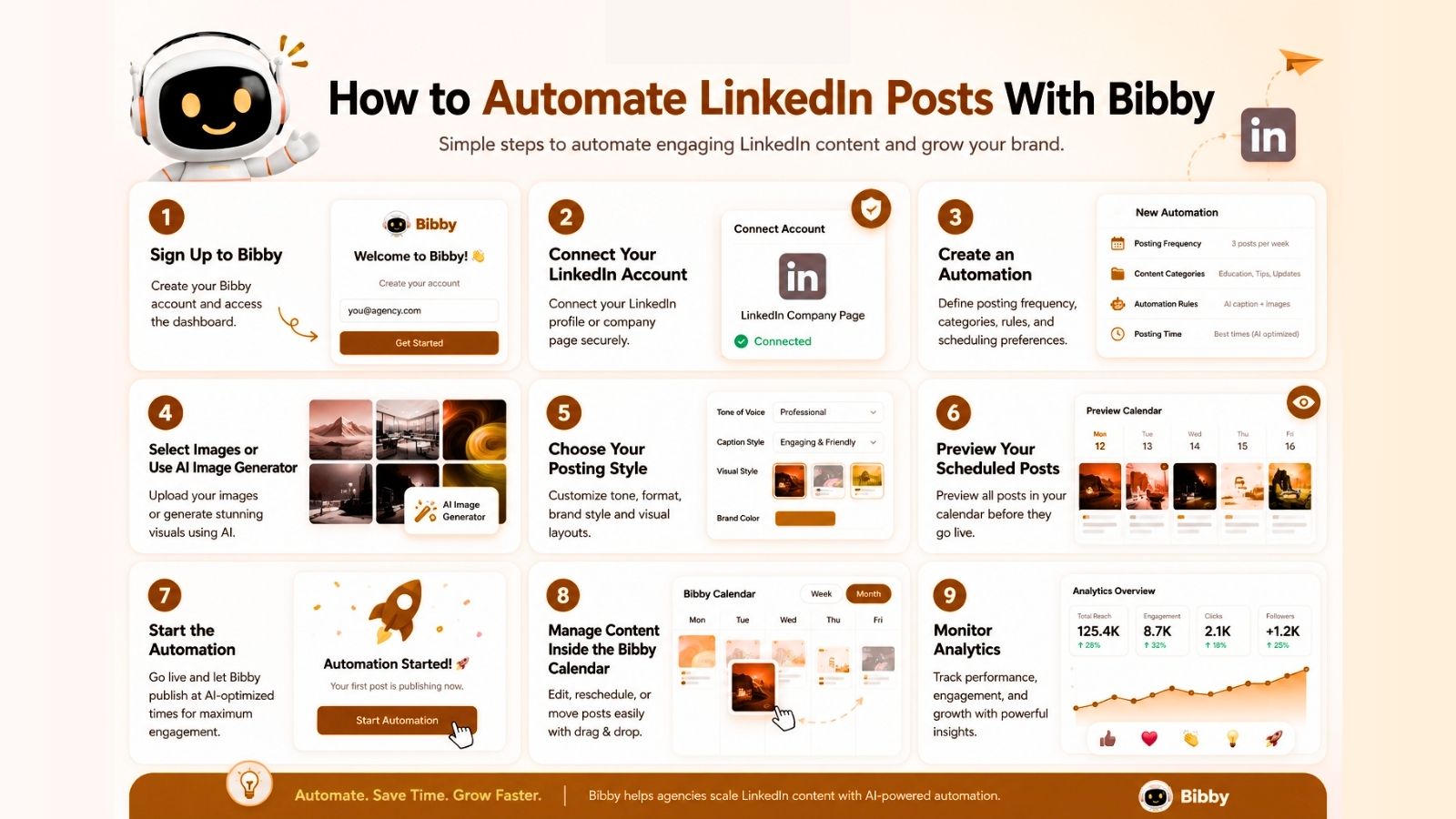
Step 1: Sign Up to Bibby
Create your Bibby account and access the dashboard. The onboarding process is designed to be quick so teams can start automating content immediately.
Step 2: Connect Your LinkedIn Account
Connect your LinkedIn profile or company page securely inside Bibby.
Agencies managing multiple clients can connect several accounts and organize them within one workspace.
Step 3: Create an Automation
Inside the dashboard, create a new automation workflow for your LinkedIn content.
You can define:
- Posting frequency
- Content categories
- Automation rules
- Scheduling preferences
This allows agencies to build repeatable systems instead of scheduling every post manually.
Step 4: Select Images or Use the AI Image Generator
Bibby allows users to upload their own images or generate visuals using AI.
This helps agencies:
- Speed up content production
- Maintain consistent branding
- Create visuals at scale
- Reduce dependency on design teams
Step 5: Choose Your Posting Style
Customize how your LinkedIn posts will appear.
Agencies can adjust:
- Formatting style
- Brand tone
- Caption structure
- Visual layouts
This helps maintain unique brand identities across multiple client accounts.
Step 6: Preview Your Scheduled Posts
Before publishing, Bibby shows a visual preview of all scheduled posts.
Teams can review:
- Weekly schedules
- Monthly content calendars
- Publishing times
- Post layouts
This makes campaign planning much easier and helps avoid scheduling conflicts.
Step 7: Start the Automation
Once everything is ready, click “Start Automation.”
The first post publishes instantly, while all remaining posts are automatically scheduled at AI-optimized times designed to maximize engagement.
This removes the need for constant manual publishing.
Step 8: Manage Content Inside the Bibby Calendar
The built-in calendar provides a centralized view of all scheduled content.
Agencies can quickly:
- Edit upcoming posts
- Move scheduled content
- Review publishing gaps
- Coordinate campaigns visually
Step 9: Monitor Analytics
After posts go live, Bibby provides analytics to help agencies measure performance.
Teams can track:
- Engagement
- Reach
- Post performance
- Audience growth
- Content trends
These insights help agencies refine future LinkedIn strategies for better results.
Best For
Bibby is best for:
- Agencies managing multiple LinkedIn accounts
- Teams wanting AI-powered automation
- Businesses scaling content production
- Social media managers seeking visual workflows
- Agencies looking for AI-generated content and scheduling in one platform
Next, let’s compare Bibby against other popular LinkedIn scheduling tools agencies commonly use.
2. Buffer
Buffer is one of the most popular social media scheduling tools for small businesses, creators, and agencies that want a simple and easy-to-use platform.
Its clean interface and straightforward scheduling workflow make it especially attractive for teams that prioritize simplicity over advanced automation.
Key Features
- LinkedIn post scheduling
- Multi-platform publishing
- Content calendar
- Basic analytics
- Team collaboration
- Draft and approval workflows
Pros
- Very beginner-friendly
- Clean and intuitive dashboard
- Affordable pricing for smaller teams
- Fast post scheduling workflow
- Supports multiple social platforms
Cons
- Limited AI automation features
- Analytics are less advanced than enterprise tools
- Fewer customization options for agencies
- Approval workflows are more basic
Best For
Buffer works best for:
- Small agencies
- Freelancers managing client accounts
- Teams wanting a lightweight scheduling platform
- Agencies focused on simplicity and affordability
3. Hootsuite
Hootsuite is one of the oldest and most established social media management platforms on the market. It offers enterprise-level features designed for larger agencies and brands managing high volumes of social content.
Its strongest advantage is its extensive analytics and collaboration capabilities.
Key Features
- LinkedIn scheduling
- Multi-platform management
- Advanced analytics
- Team collaboration tools
- Social listening
- Approval workflows
- Enterprise integrations
Pros
- Powerful reporting and analytics
- Excellent team management features
- Supports large-scale social operations
- Strong enterprise security and permissions
- Advanced scheduling capabilities
Cons
- Higher pricing compared to competitors
- Interface can feel overwhelming for smaller teams
- Learning curve for new users
- Some AI features are still limited
Best For
Hootsuite is ideal for:
- Enterprise agencies
- Large marketing teams
- Agencies managing many client accounts
- Businesses needing advanced reporting and governance
4. Publer
Publer has become a popular choice for agencies looking for affordable scheduling software with modern automation features.
It combines bulk scheduling, AI tools, and visual content management while remaining budget-friendly.
Key Features
- LinkedIn scheduling
- Bulk scheduling
- AI caption assistance
- Content recycling
- Media library
- Visual calendar
- Team collaboration
Pros
- Strong value for the price
- Bulk scheduling saves time
- AI tools improve workflow speed
- Easy-to-use interface
- Good automation options for smaller agencies
Cons
- Analytics are less advanced than premium platforms
- Fewer enterprise-level collaboration tools
- Smaller integration ecosystem
Best For
Publer is best for:
- Budget-conscious agencies
- Growing social media teams
- Agencies managing moderate publishing volume
- Teams wanting affordable automation features
5. Later
Later originally became popular as an Instagram scheduling platform, but it has expanded into broader social media management including LinkedIn scheduling.
Its visual-first workflow makes it attractive for creative agencies and brands focused heavily on visual content.
Key Features
- LinkedIn scheduling
- Visual content calendar
- Media organization
- Multi-platform publishing
- Analytics
- Link-in-bio tools
- Content planning tools
Pros
- Excellent visual planning experience
- Easy media management
- User-friendly scheduling calendar
- Helpful for content-heavy workflows
- Strong support for visual campaigns
Cons
- Historically more Instagram-focused
- Some LinkedIn features are less advanced
- Fewer automation capabilities than AI-first platforms
Best For
Later works best for:
- Creative agencies
- Visual brands
- Content marketing teams
- Agencies prioritizing media organization and visual workflows
6. Planable
Planable is built around collaboration and content approval workflows, making it especially useful for agencies that work closely with clients before publishing social content.
Its visual interface allows teams and clients to review, comment on, and approve posts in real time.
Key Features
- LinkedIn scheduling
- Client approval workflows
- Team collaboration
- Visual content previews
- Shared content calendars
- Commenting and feedback system
- Multi-platform publishing
Pros
- Excellent approval and collaboration features
- Very client-friendly interface
- Easy content review process
- Reduces back-and-forth communication
- Strong visual post previews
Cons
- Analytics are less advanced than enterprise tools
- Limited AI automation features
- Not as focused on advanced publishing automation
Best For
Planable is ideal for:
- Agencies with frequent client approvals
- Collaborative social media teams
- Content review-heavy workflows
- Agencies prioritizing communication efficiency
7. CoSchedule
CoSchedule combines social media scheduling with broader marketing calendar functionality, making it useful for agencies managing blogs, email campaigns, and social content together.
Its strength lies in organizing content marketing workflows across multiple channels.
Key Features
- LinkedIn scheduling
- Marketing calendar
- Campaign planning
- Task management
- Team collaboration
- Workflow organization
- Content planning tools
Pros
- Excellent campaign organization
- Strong marketing calendar features
- Helpful for content-heavy agencies
- Combines social and content workflows
- Good project management functionality
Cons
- Can feel overwhelming for smaller teams
- Learning curve for advanced features
- Social automation is less AI-focused
Best For
CoSchedule works best for:
- Content marketing agencies
- Editorial teams
- Agencies managing multi-channel campaigns
- Teams wanting centralized marketing organization
8. Sprout Social
Sprout Social is one of the most advanced social media management platforms available for agencies and enterprise brands.
It offers premium analytics, reporting, social listening, and collaboration features designed for data-driven teams.
Key Features
- LinkedIn scheduling
- Advanced analytics
- Social listening
- Team collaboration
- Approval workflows
- CRM integrations
- Performance reporting
Pros
- Industry-leading analytics
- Excellent reporting dashboards
- Strong collaboration tools
- Powerful audience insights
- Enterprise-ready infrastructure
Cons
- Expensive compared to competitors
- Pricing may be difficult for smaller agencies
- Some features may be excessive for simple workflows
Best For
Sprout Social is best for:
- Enterprise agencies
- Data-driven marketing teams
- Agencies needing advanced analytics
- Large organizations managing complex campaigns
9. Metricool
Metricool is a multi-platform social media management and analytics platform designed to help agencies monitor performance across several channels from one dashboard.
Its analytics and reporting capabilities are particularly strong for agencies handling cross-platform campaigns.
Key Features
- LinkedIn scheduling
- Unified analytics dashboard
- Content calendar
- Competitor analysis
- Performance reporting
- Multi-platform management
- Campaign tracking
Pros
- Strong analytics and reporting
- Helpful cross-platform insights
- Good value for agencies
- Centralized performance dashboard
- Useful competitor tracking features
Cons
- Dashboard can feel busy for beginners
- Interface may require onboarding time
- AI features are less advanced than newer platforms
Best For
Metricool works best for:
- Agencies managing multiple platforms
- Analytics-focused teams
- Performance marketers
- Agencies wanting centralized reporting
10. SocialPilot
SocialPilot is an affordable social media scheduling platform designed for agencies and growing businesses that need scalable account management without enterprise pricing.
It offers strong scheduling capabilities at a lower price point than many competitors.
Key Features
- LinkedIn scheduling
- Bulk scheduling
- Team collaboration
- White-label reporting
- Content calendar
- Client management
- Multi-platform publishing
Pros
- Affordable agency pricing
- Easy bulk scheduling
- White-label reporting options
- Good multi-account management
- Simple onboarding experience
Cons
- AI capabilities are more limited
- Analytics are less advanced than premium tools
- Fewer automation features compared to AI-first platforms
Best For
SocialPilot is ideal for:
- Growing agencies
- Budget-conscious teams
- Agencies managing many client accounts
- Businesses wanting scalable scheduling at lower cost
Now that we’ve reviewed the top LinkedIn scheduling tools individually, let’s compare them side-by-side to see which platform fits different agency needs best.
Comparison Table: Best LinkedIn Scheduling Tools for Agencies
Choosing the right LinkedIn scheduling platform depends on your agency’s workflow, team size, automation needs, and budget.
Some tools focus heavily on collaboration and approvals, while others prioritize AI automation, analytics, or affordability. The table below compares the most important features agencies should consider before choosing a platform.
| Tool | Best For | AI Features | Analytics | Collaboration | Pricing Level |
|---|---|---|---|---|---|
| Bibby | AI-powered automation | Excellent | Strong | Strong | Mid-range |
| Buffer | Simplicity and ease of use | Basic | Moderate | Moderate | Affordable |
| Hootsuite | Enterprise agencies | Moderate | Advanced | Excellent | Premium |
| Publer | Budget-friendly automation | Good | Good | Moderate | Affordable |
| Later | Visual content planning | Moderate | Good | Moderate | Mid-range |
| Planable | Client approvals and collaboration | Basic | Moderate | Excellent | Mid-range |
| CoSchedule | Marketing campaign management | Moderate | Good | Good | Mid-range |
| Sprout Social | Advanced analytics and reporting | Advanced | Excellent | Excellent | Premium |
| Metricool | Multi-platform analytics | Moderate | Excellent | Good | Mid-range |
| SocialPilot | Affordable scaling | Basic | Good | Good | Affordable |
Which Tool Is Best for Different Agency Types?
Different agencies have different priorities. Here’s a quick breakdown based on common agency needs.
Best for AI Automation
If your agency wants to automate as much of the content workflow as possible, Bibby stands out with:
- AI-generated images
- AI-assisted scheduling
- Automated publishing workflows
- AI-optimized posting times
- Visual content automation
This makes it especially useful for agencies trying to scale content production efficiently.
Best for Enterprise Agencies
Larger agencies often prioritize advanced analytics, permissions, reporting, and collaboration.
Strong enterprise options include:
- Hootsuite
- Sprout Social
These platforms are built for larger teams managing complex campaigns and multiple stakeholders.
Best Budget-Friendly Option
Smaller agencies and freelancers often need affordable scheduling tools that still offer solid functionality.
The strongest budget-friendly options include:
- Publer
- SocialPilot
- Buffer
These platforms provide strong scheduling capabilities without enterprise-level pricing.
Best for Client Collaboration and Approvals
For agencies with heavy review and approval processes, Planable is one of the strongest options available.
Its collaborative workflows help reduce communication friction between teams and clients.
Best for Visual Content Planning
Creative agencies that rely heavily on visual campaigns may prefer platforms with stronger media organization and calendar visualization.
Later performs particularly well in this category.
Best for Analytics and Reporting
If reporting and performance tracking are your top priorities, Sprout Social and Metricool offer some of the most advanced analytics dashboards on this list.
These tools help agencies demonstrate ROI and optimize future campaigns more effectively.
Ultimately, the best LinkedIn scheduling tool depends on how your agency operates, how many clients you manage, and how much automation you want in your workflow.
LinkedIn carousel posts often generate higher engagement because they keep users interacting longer with your content. The LinkedIn Carousel Generator by Bibby helps you quickly create professional carousel-style posts for thought leadership, educational content, case studies, and B2B storytelling. It is especially useful for marketers and creators who want visually engaging LinkedIn content without spending hours designing slides manually.
Tips for Successfully Automating LinkedIn Content
Automation can dramatically improve efficiency for agencies, but simply scheduling posts is not enough to guarantee strong LinkedIn performance.
The most successful agencies combine automation with strategy, consistency, and ongoing optimization.
Here are some best practices to help agencies get better results from LinkedIn scheduling tools.
Maintain a Consistent Posting Schedule
Consistency plays a major role in LinkedIn growth.
Publishing regularly helps:
- Increase visibility in the LinkedIn algorithm
- Keep audiences engaged
- Build trust with followers
- Improve long-term brand awareness
Instead of posting randomly, agencies should create structured publishing schedules for each client account.
Many scheduling tools now allow agencies to automate weekly or monthly posting calendars in advance, making consistency much easier to maintain.
Use AI Without Losing Brand Voice
AI can significantly speed up content production, but agencies should still review and refine automated content before publishing.
Every client has a unique:
- Brand voice
- Audience tone
- Messaging style
- Industry positioning
The best approach is using AI as an assistant rather than relying on fully untouched AI-generated content.
Agencies should:
- Edit AI-generated captions
- Customize visuals
- Add industry expertise
- Include personal insights when relevant
This creates more authentic and higher-performing LinkedIn content.
Optimize Posting Times
Publishing at the right time can improve engagement significantly.
Modern scheduling platforms use AI and analytics to identify when audiences are most active. Instead of guessing manually, agencies can rely on data-driven scheduling recommendations.
Over time, reviewing engagement data helps refine publishing schedules further.
Track Analytics Weekly
Automation should always be paired with performance analysis.
Agencies should regularly review:
- Engagement rates
- Reach and impressions
- Follower growth
- Click-through rates
- Top-performing content
- Posting consistency
This helps identify what content resonates most with audiences and where adjustments are needed.
Repurpose Top-Performing Content
Not every piece of content needs to be created from scratch.
High-performing LinkedIn posts can often be repurposed into:
- Carousels
- Short-form posts
- Thought leadership content
- Visual quotes
- Multi-platform campaigns
Repurposing strong content allows agencies to scale output while maintaining quality.
Combine Automation With Real Engagement
Scheduling tools help automate publishing, but LinkedIn still rewards genuine interaction.
Agencies should encourage clients to:
- Reply to comments
- Engage with industry discussions
- Network actively
- Respond to messages
- Participate in conversations
Automation works best when combined with human engagement and relationship-building.
When used strategically, LinkedIn scheduling tools can help agencies scale content operations, improve consistency, and generate better long-term results for clients.
Common Mistakes Agencies Make With LinkedIn Scheduling
LinkedIn scheduling tools can save agencies a significant amount of time, but poor automation practices can hurt engagement and reduce content performance.
Many agencies focus too heavily on automation while ignoring strategy, audience behavior, and content quality.
Here are some of the most common mistakes agencies should avoid when automating LinkedIn content.
Posting Too Frequently
More content does not always mean better results.
Overposting can:
- Reduce engagement rates
- Overwhelm audiences
- Make content feel repetitive
- Lower overall post quality
Agencies should prioritize consistency and value instead of simply increasing posting volume.
For most brands, a balanced schedule performs better than publishing multiple low-quality posts every day.
Ignoring Analytics
Scheduling content without reviewing performance data is one of the biggest mistakes agencies make.
Analytics help identify:
- Which posts generate engagement
- What topics resonate most
- Best-performing formats
- Optimal posting times
- Audience growth trends
Without analytics, agencies are essentially guessing instead of optimizing.
Regular reporting and performance reviews are critical for improving LinkedIn strategies over time.
Over-Automating Content
Automation should improve efficiency, not remove authenticity.
Fully automated content often feels:
- Generic
- Repetitive
- Robotic
- Detached from real industry conversations
LinkedIn audiences typically respond better to content that includes:
- Personal insights
- Industry expertise
- Storytelling
- Real experiences
- Human perspectives
Agencies should always review and personalize AI-assisted content before publishing.
Using the Same Content Across Multiple Clients
Recycling identical content templates across different clients can weaken brand identity and reduce engagement.
Each client has:
- Different audiences
- Different positioning
- Different goals
- Different communication styles
Agencies should tailor content strategies for each account instead of relying on one-size-fits-all automation.
Not Optimizing Posting Times
Publishing at random times can significantly limit reach and engagement.
Audience activity varies depending on:
- Industry
- Geography
- Audience demographics
- Work schedules
Modern scheduling platforms often include AI-optimized publishing times that help improve visibility.
Agencies should regularly test and refine posting schedules based on engagement data.
Forgetting to Review Scheduled Content
Sometimes scheduled posts become outdated due to:
- Industry news
- Client changes
- Market shifts
- Sensitive current events
Agencies should review scheduled calendars regularly to ensure content remains relevant and appropriate.
Treating Automation as a Complete Strategy
Scheduling tools are only one part of a successful LinkedIn strategy.
Strong LinkedIn growth still requires:
- High-quality content
- Audience engagement
- Thought leadership
- Networking
- Community interaction
Automation supports these efforts, but it cannot replace them entirely.
Agencies that combine automation with strong strategy and authentic engagement typically achieve the best long-term LinkedIn results.
Final Verdict: What Is the Best LinkedIn Scheduling Tool for Agencies?
The best LinkedIn scheduling tool for your agency ultimately depends on your workflow, team size, client volume, and automation needs.
Some agencies prioritize advanced analytics and enterprise collaboration, while others focus on affordability, simplicity, or content approvals. However, one trend is becoming increasingly clear across the industry: AI-powered automation is quickly becoming essential for scaling LinkedIn marketing efficiently.
In this article, we covered:
- Why LinkedIn scheduling tools are critical for modern agencies
- The top LinkedIn scheduling platforms available in 2026
- How AI automation can streamline content workflows and improve consistency
For agencies looking to combine automation, AI-generated content workflows, visual scheduling, analytics, and scalable publishing in one platform, Bibby stands out as one of the strongest modern solutions.
Its workflow allows agencies to:
- Automate LinkedIn publishing
- Generate AI-powered visuals
- Preview content calendars visually
- Schedule posts at AI-optimized times
- Manage multiple client accounts efficiently
- Track performance analytics in one dashboard
Instead of relying on several disconnected tools, agencies can centralize much of their LinkedIn workflow into a single automated system.
As LinkedIn continues becoming more competitive for brands and creators, agencies that adopt smarter automation systems will have a significant advantage in both efficiency and content scalability.
The next step is learning how to build a complete AI-powered LinkedIn content strategy that consistently generates engagement, leads, and inbound opportunities for clients.