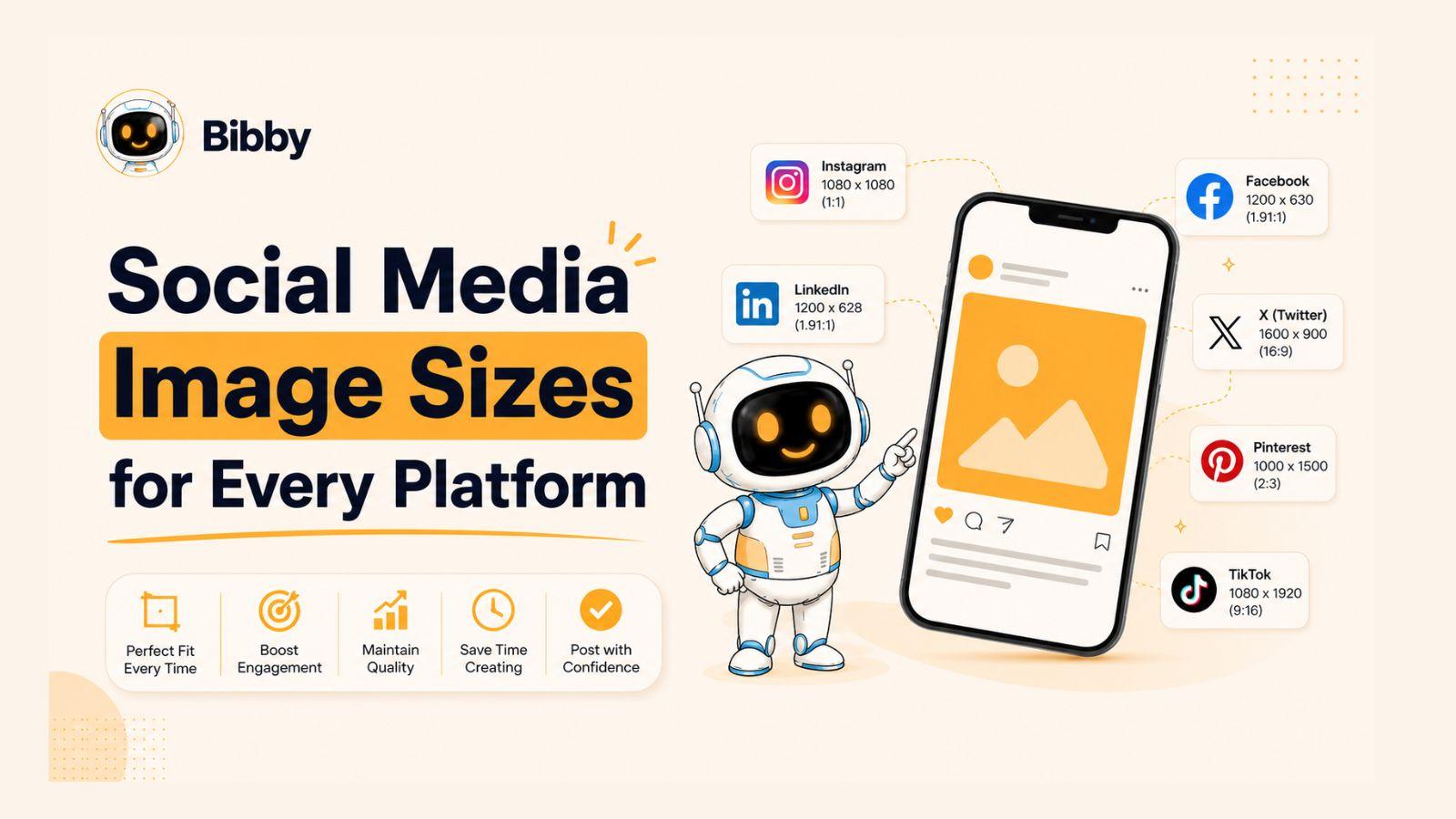
Social media image sizes continue to evolve as platforms introduce new layouts, content formats, and algorithm preferences.
Whether you're managing a brand, growing a business, or creating content for clients, keeping up with the latest image dimensions for Facebook, Instagram, LinkedIn, TikTok, YouTube, and other platforms can be surprisingly time-consuming. Using the wrong size can result in blurry images, awkward cropping, reduced engagement, and a less professional appearance. The good news is that staying current doesn't have to be complicated. This guide provides the latest social media image sizes for 2026 and shows you how to simplify the entire publishing process.
In this article, you will learn:
- The correct image sizes for every major social platform.
- How image dimensions impact reach, engagement, and performance.
- How to automate creation, scheduling, and publishing with Bibby.
Let's start by exploring why social media image sizes matter more than ever in 2026 and how they directly affect your content's performance.
Why Social Media Image Sizes Matter More Than Ever in 2026
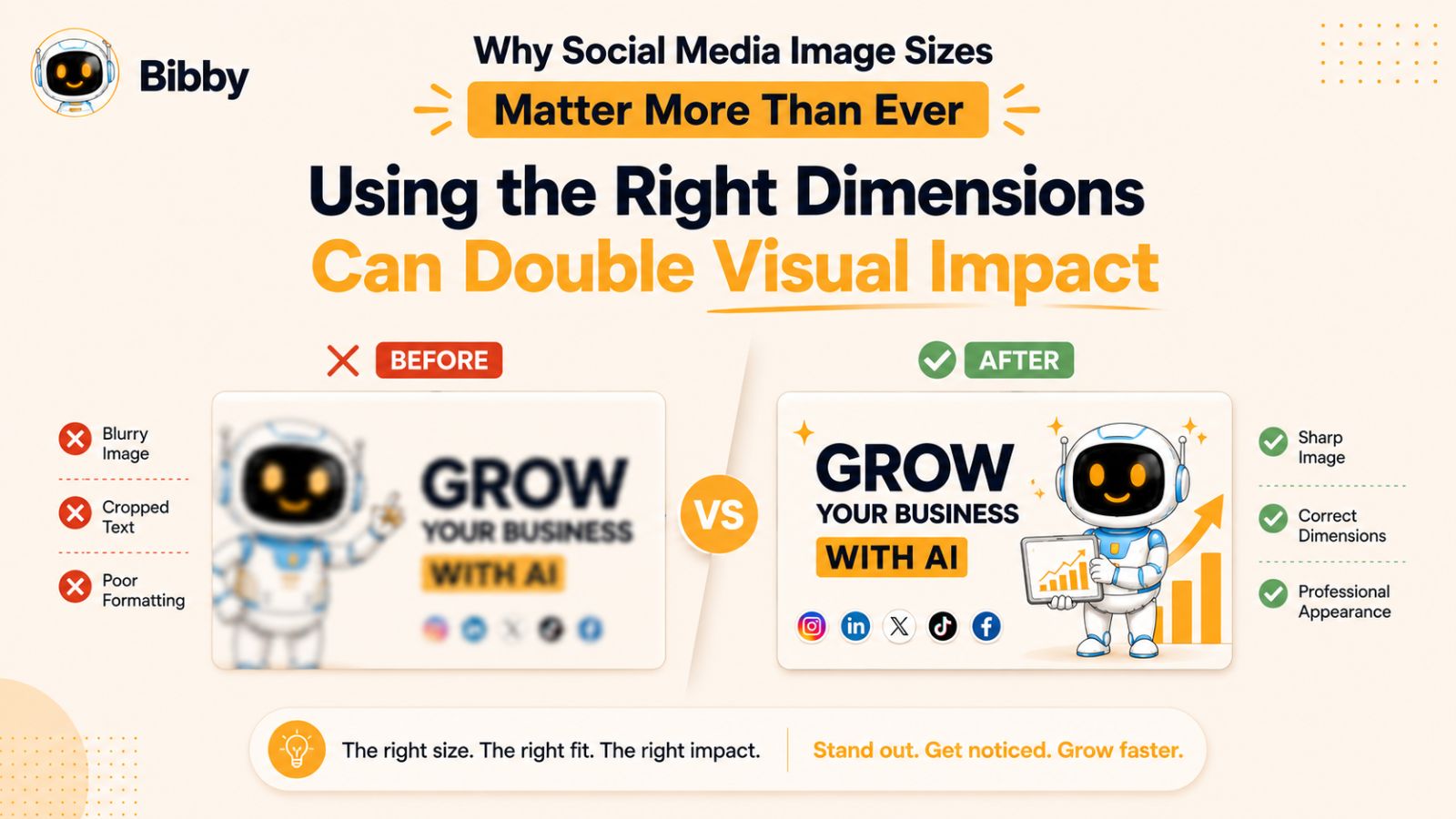
Social media platforms have become increasingly sophisticated in how they display content. What looked perfect on a feed a few years ago may now appear cropped, compressed, or misaligned due to evolving layouts, mobile-first interfaces, and new content formats. As a result, using the correct image dimensions is no longer just a design best practice—it's a critical part of maximizing visibility and engagement.
The Impact of Image Quality on Engagement
Visual content remains one of the strongest drivers of engagement across social media. High-quality images help attract attention, encourage users to stop scrolling, and increase the likelihood of likes, shares, comments, saves, and click-throughs.
When images are properly optimized for each platform, they appear sharper, load correctly, and create a more professional experience. This can strengthen brand credibility and improve overall campaign performance.
What Happens When You Use Incorrect Dimensions
Using the wrong image size can create several problems:
- Important parts of the image may be cropped out.
- Text overlays may become unreadable.
- Images can appear blurry or pixelated.
- Platform algorithms may compress content more aggressively.
- User experience can suffer, reducing engagement rates.
Even a great design can lose its effectiveness if it isn't formatted correctly for the platform where it's being displayed.
The Growing Complexity of Multi-Platform Publishing
Managing social media content has become significantly more challenging because every platform has its own requirements.
For example:
- Instagram feed posts use different dimensions than Instagram Stories.
- Facebook feed images differ from Facebook cover photos.
- LinkedIn company pages require different banner sizes than personal profiles.
- TikTok, YouTube Shorts, Instagram Reels, and Stories all prioritize vertical formats.
- Video thumbnails, carousel posts, and ads often have separate specifications.
For businesses posting across multiple channels, manually tracking these requirements can quickly become overwhelming.
Why Many Marketers Are Moving Toward Automation
Rather than manually resizing images, creating captions, and scheduling content for every platform individually, many marketers are turning to AI-powered social media tools to streamline the process.
Platforms like Bibby help eliminate much of the complexity by allowing users to upload an image—or generate one with AI—choose a posting style, and automatically create platform-ready content. Bibby can generate captions, schedule posts across Facebook, Instagram, LinkedIn, TikTok, YouTube, and other networks, and publish them at AI-optimized times designed to maximize engagement.
Instead of spending hours adapting content for different platforms, marketers can focus on strategy and creativity while automation handles the repetitive work.
Now that you understand why image dimensions matter, let's look at the latest social media image sizes for every major platform in 2026.
Also have a look at the guide: How to Schedule Instagram Reels Automatically?
Quick Reference Social Media Image Size Cheat Sheet for 2026
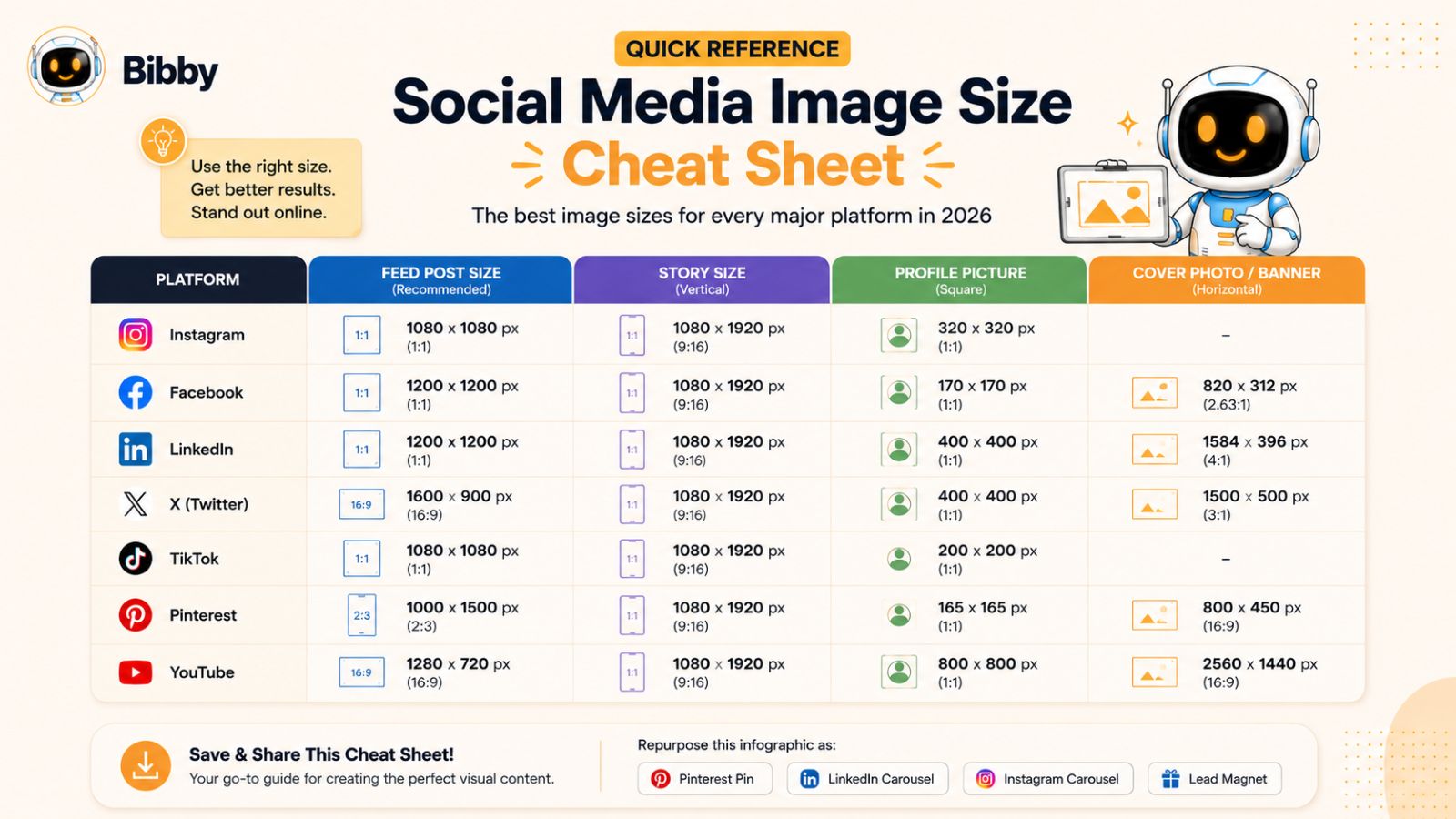
If you're looking for the fastest way to find the correct dimensions for your next social media post, this cheat sheet provides a quick overview of the most commonly used image sizes across major platforms in 2026. While platforms occasionally update their recommendations, the dimensions below are widely accepted best practices for achieving the best image quality and presentation.
| Platform | Feed Post Size | Story Size | Profile Image | Cover/Banner Image |
|---|---|---|---|---|
| 1080 × 1350 px | 1080 × 1920 px | 320 × 320 px | 851 × 315 px | |
| 1080 × 1350 px | 1080 × 1920 px | 320 × 320 px | N/A | |
| 1200 × 1200 px | N/A | 400 × 400 px | 1584 × 396 px | |
| TikTok | 1080 × 1920 px | 1080 × 1920 px | 200 × 200 px | N/A |
| YouTube | Community Post: 1200 × 1200 px | Shorts: 1080 × 1920 px | 800 × 800 px | 2560 × 1440 px |
| X (Twitter) | 1600 × 900 px | N/A | 400 × 400 px | 1500 × 500 px |
| 1000 × 1500 px | Idea Pins: 1080 × 1920 px | 165 × 165 px | N/A | |
| Threads | 1080 × 1350 px | N/A | 320 × 320 px | N/A |
Recommended Universal Image Size
If you're creating a single image that needs to work reasonably well across multiple platforms, a portrait format of 1080 × 1350 pixels is often the safest option. This size performs particularly well on Instagram, Facebook, Threads, and many mobile-first feeds.
However, no single image size is truly optimal for every platform. Each network has its own layout, cropping behavior, and display preferences. For the best results, content should ideally be tailored to the destination platform.
The Challenge of Managing Different Image Sizes
Looking at the table above, it's easy to see why social media managers and business owners struggle with content production. A single campaign may require multiple versions of the same creative:
- Feed posts
- Stories
- Reels covers
- Video thumbnails
- Profile banners
- Platform-specific ads
Creating and organizing all of these assets manually can consume hours every week.
A Smarter Alternative
Instead of exporting endless image variations, many businesses now use automation platforms like Bibby to simplify the process. You can upload an image or generate one with AI, select your posting style, and let Bibby prepare content for multiple platforms from a single workflow. Combined with AI-generated captions, automated scheduling, and cross-platform publishing, this significantly reduces the time spent managing social media content.
In the following sections, we'll break down the exact image size requirements for each major platform, starting with Facebook.
Facebook Image Sizes in 2026
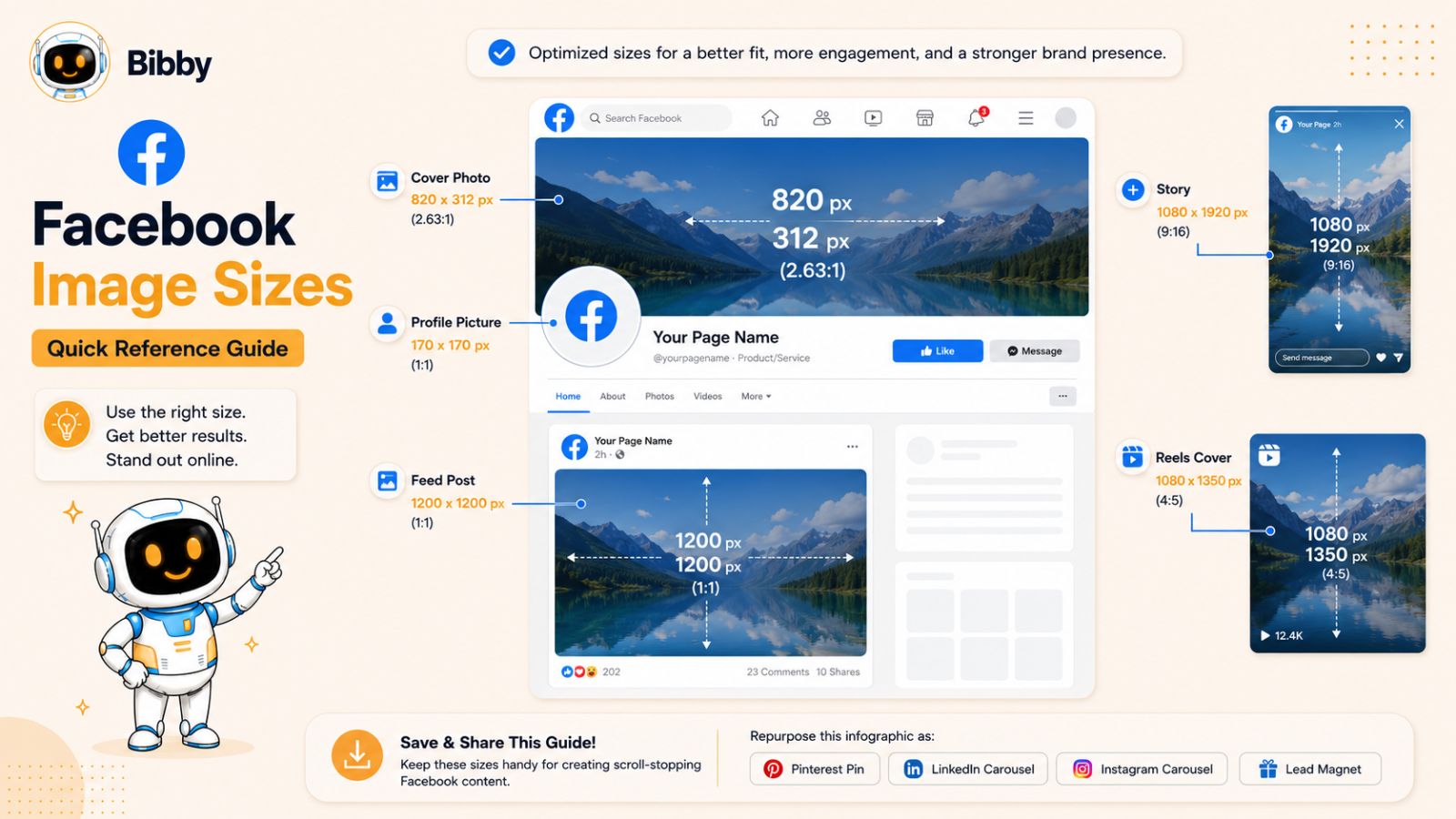
Facebook remains one of the largest social media platforms for businesses, creators, and brands. While the platform now supports a wide variety of content formats, using the correct image dimensions is essential for maintaining image quality, avoiding unwanted cropping, and maximizing engagement across feeds, pages, groups, and ads.
Below are the most important Facebook image sizes to use in 2026.
Facebook Profile Picture Size
Recommended Size: 320 × 320 pixels
Your profile picture represents your personal brand or business across Facebook. It appears in comments, posts, Messenger conversations, search results, and page interactions.
Best practices:
- Use a high-resolution square image.
- Keep important elements centered.
- Avoid placing text near the edges.
- Use a logo for business pages whenever possible.
Facebook Cover Photo Size
Recommended Size: 851 × 315 pixels
The cover photo is often the first visual visitors see when they land on your Facebook page.
Best practices:
- Design with mobile users in mind.
- Keep important content away from the outer edges.
- Avoid excessive text.
- Update cover images regularly to promote campaigns, events, or offers.
Facebook Feed Post Size
Recommended Size: 1080 × 1350 pixels
Portrait-oriented images generally occupy more screen space and tend to attract more attention while users scroll through their feeds.
Benefits of this format:
- Increased visibility on mobile devices.
- Better engagement potential.
- More space for visual storytelling.
- Strong compatibility with other social platforms.
Facebook Story Size
Recommended Size: 1080 × 1920 pixels
Stories continue to be one of the most engaging content formats on Facebook. Since Stories are displayed vertically and full-screen, using the proper dimensions is critical.
Best practices:
- Leave safe space at the top and bottom.
- Avoid placing text too close to screen edges.
- Use bold visuals and concise messaging.
- Design specifically for mobile viewing.
Facebook Reels Cover Size
Recommended Size: 1080 × 1920 pixels
The cover image plays a significant role in whether users choose to watch your Reel.
Best practices:
- Use clear, high-contrast visuals.
- Include a concise headline when appropriate.
- Ensure important design elements remain centered.
- Maintain consistency with your overall brand style.
Facebook Event Cover Image Size
Recommended Size: 1920 × 1005 pixels
If you're hosting webinars, conferences, promotions, or community events, a properly optimized event cover image helps create a professional first impression.
Best practices:
- Use event branding consistently.
- Include event name and key details.
- Keep text readable on mobile devices.
- Test how the image appears across desktop and mobile layouts.
Facebook Ad Image Sizes
Although Facebook supports multiple advertising formats, these dimensions are among the most commonly used:
| Ad Type | Recommended Size |
|---|---|
| Single Image Ad | 1080 × 1080 px |
| Carousel Ad | 1080 × 1080 px |
| Story Ad | 1080 × 1920 px |
| Reel Ad | 1080 × 1920 px |
Always verify current ad specifications before launching campaigns, as Meta periodically updates advertising requirements.
Facebook Image Optimization Tips
To get the best results from Facebook images in 2026:
- Upload high-resolution images whenever possible.
- Use PNG files for graphics and logos.
- Keep text overlays minimal and easy to read.
- Prioritize mobile-first design.
- Test different image styles to identify what drives the most engagement.
- Maintain consistent branding across posts, Stories, Reels, and ads.
Simplifying Facebook Content Creation with Bibby
Managing Facebook feed posts, Stories, Reels, cover images, and ad creatives manually can quickly become overwhelming—especially when you're publishing across multiple platforms.
Bibby simplifies the process by allowing you to upload an image or generate one with AI, choose your preferred posting style, and automatically create platform-ready content. Bibby can generate captions, schedule Facebook posts at AI-optimized times, and publish alongside your Instagram, LinkedIn, TikTok, YouTube, and other channels from a single dashboard.
Instead of worrying about image sizes, captions, publishing schedules, and analytics separately, you can manage your entire social media workflow from one place.
Also read: How to Grow a Facebook Business Page Faster with AI Social Media Automation
Instagram Image Sizes in 2026
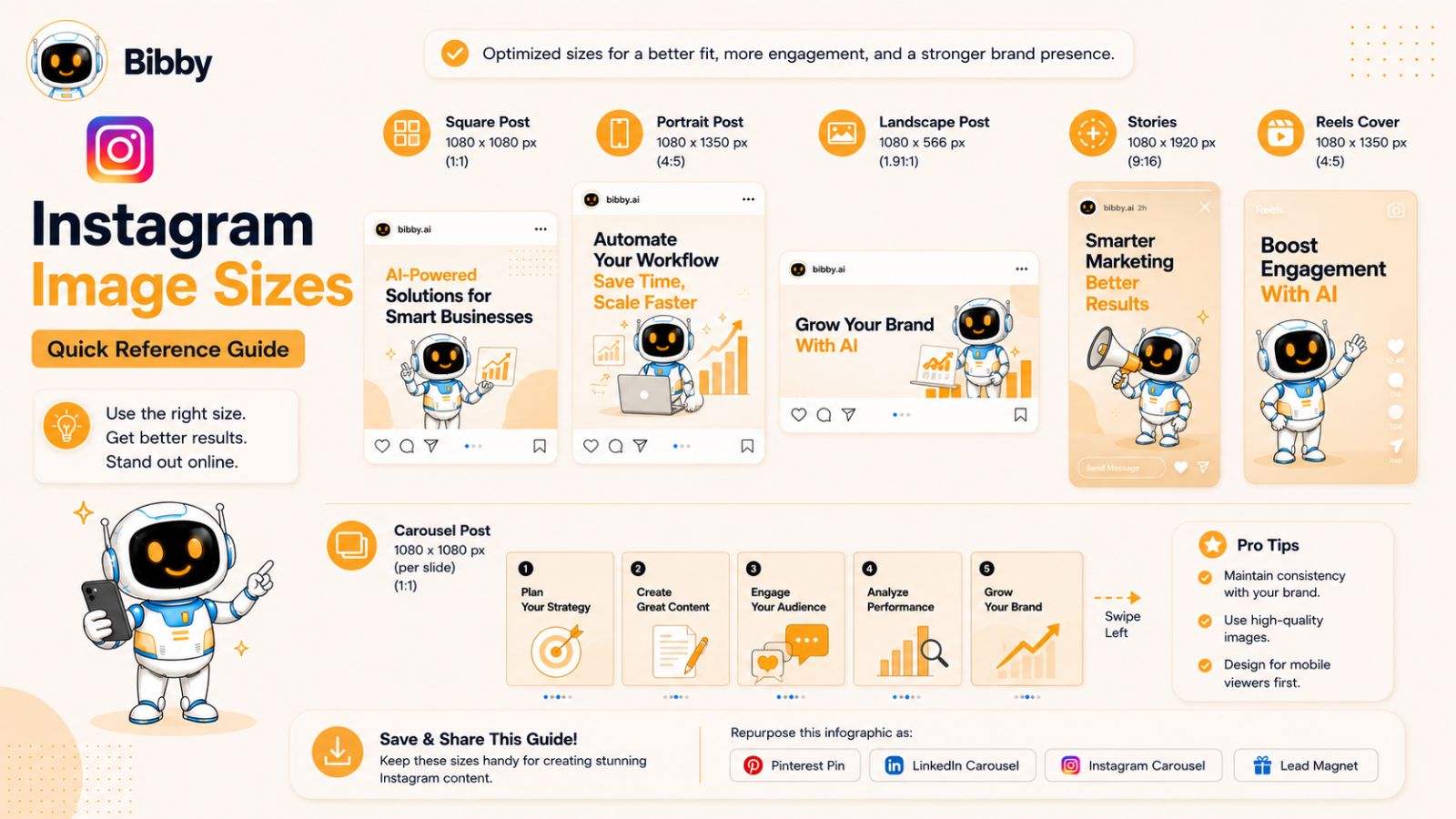
Instagram remains one of the most visual social media platforms, making image quality and proper dimensions more important than ever. Whether you're publishing feed posts, Stories, Reels, carousels, or ads, using the correct image size helps ensure your content looks professional and performs at its best.
Below are the recommended Instagram image sizes for 2026.
Instagram Profile Picture Size
Recommended Size: 320 × 320 pixels
Although Instagram displays profile photos as circles, you should upload a square image to ensure maximum quality.
Best practices:
- Keep logos and faces centered.
- Avoid text near the edges.
- Use high-resolution images.
- Maintain consistency across all social profiles.
Instagram Square Post Size
Recommended Size: 1080 × 1080 pixels
Square posts remain popular because they are simple to design and work well across various content types.
Ideal for:
- Product images
- Quotes
- Announcements
- Brand graphics
Instagram Portrait Post Size
Recommended Size: 1080 × 1350 pixels
Portrait images typically generate stronger engagement because they take up more vertical space within the feed.
Benefits include:
- Increased visibility while scrolling.
- More space for storytelling.
- Better mobile viewing experience.
- Strong performance for educational and promotional content.
For most brands, portrait posts should be the default feed format whenever possible.
Instagram Landscape Post Size
Recommended Size: 1080 × 566 pixels
Landscape images are useful when displaying wide scenes or horizontal graphics.
Common use cases:
- Event photography
- Team photos
- Product collections
- Scenic imagery
However, landscape posts generally occupy less feed space than portrait images.
Instagram Stories Size
Recommended Size: 1080 × 1920 pixels
Stories continue to be one of Instagram's most engaging formats because they appear in a full-screen vertical experience.
Best practices:
- Design specifically for mobile devices.
- Keep important text within safe zones.
- Use large, readable fonts.
- Create visually engaging first frames.
- Include interactive stickers when appropriate.
Instagram Reels Cover Photo Size
Recommended Size: 1080 × 1920 pixels
Your Reel cover image acts like a thumbnail and often determines whether users stop and engage with your content.
Best practices:
- Use bold, high-contrast visuals.
- Include a short headline when relevant.
- Ensure key elements remain centered.
- Maintain consistent branding across Reels.
A well-designed cover can significantly improve profile aesthetics and click-through rates.
Instagram Carousel Post Size
Recommended Size: 1080 × 1350 pixels
Carousels remain one of the highest-performing content formats on Instagram.
Why carousels work:
- Encourage longer engagement.
- Increase swipe interactions.
- Allow deeper educational content.
- Create multiple opportunities to capture attention.
For best results, use the same dimensions across every slide.
Instagram Ad Image Sizes
Common Instagram ad dimensions include:
| Ad Type | Recommended Size |
|---|---|
| Feed Ad | 1080 × 1350 px |
| Square Ad | 1080 × 1080 px |
| Story Ad | 1080 × 1920 px |
| Reel Ad | 1080 × 1920 px |
| Carousel Ad | 1080 × 1350 px |
Always review Meta's latest advertising specifications before launching paid campaigns.
Instagram Image Optimization Tips
To maximize engagement on Instagram in 2026:
- Prioritize portrait images whenever possible.
- Use high-resolution visuals.
- Maintain consistent branding.
- Optimize content for mobile viewing first.
- Create custom covers for Reels.
- Use carousels to increase engagement and watch time.
- Test different visual styles regularly.
The Easier Way to Manage Instagram Content
Instagram now requires creators and businesses to manage feed posts, Stories, Reels, carousels, captions, hashtags, publishing schedules, and performance tracking. Doing all of this manually can quickly become a full-time job.
Bibby streamlines the entire process. You can upload an image or generate one with AI, choose your posting style, and let Bibby automatically create captions tailored for Instagram. The platform can schedule your content at AI-optimized posting times, publish across multiple social networks, and provide analytics that help you understand what content performs best.
Rather than designing, captioning, scheduling, and publishing each post separately, you can manage everything from a single workflow and focus on creating better content.
Also read: What to Post on Instagram When You Have No Ideas
LinkedIn Image Sizes in 2026
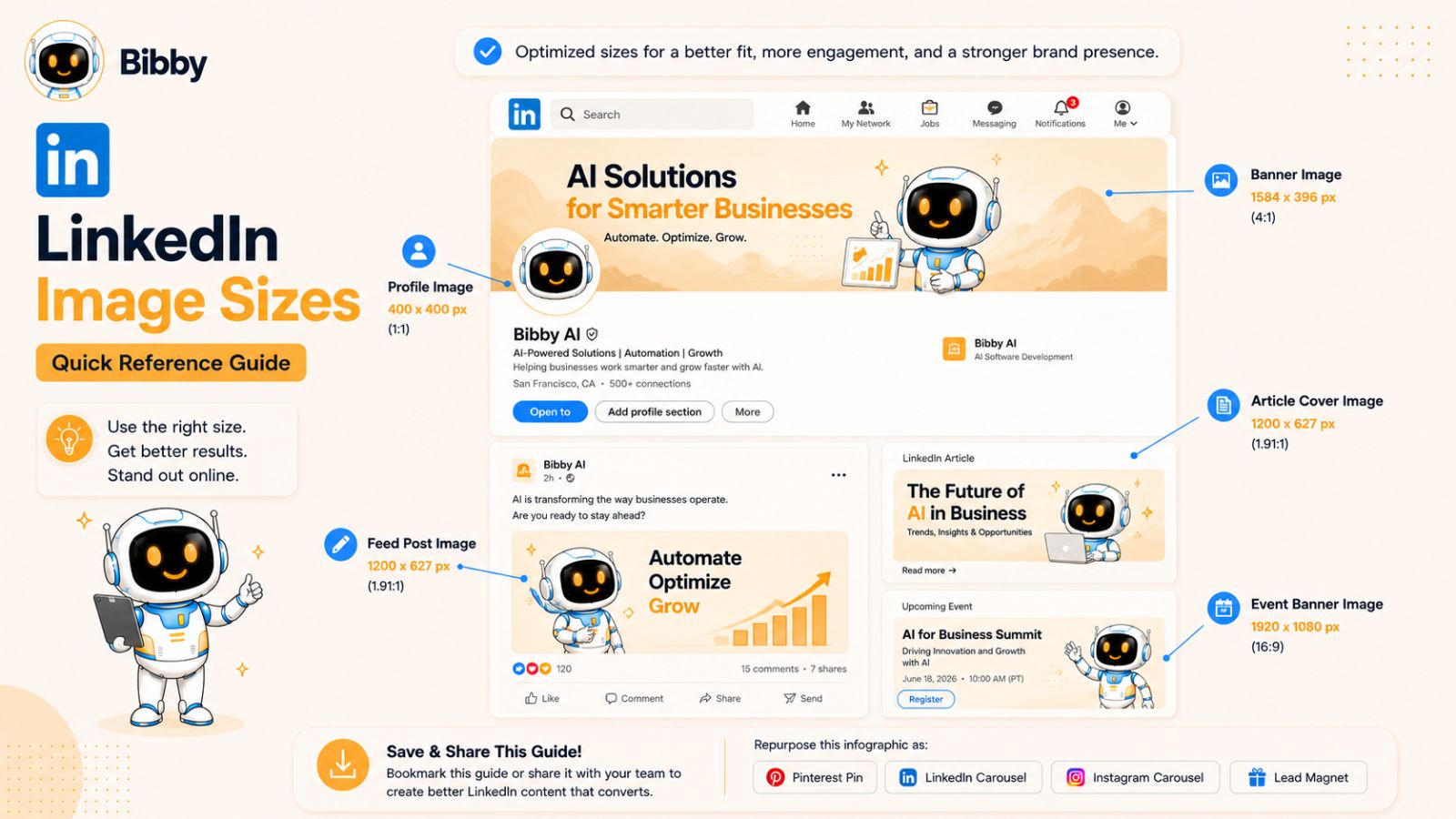
LinkedIn has evolved far beyond an online resume platform. Today, it's one of the most important channels for B2B marketing, personal branding, lead generation, recruiting, and thought leadership. Using the correct image dimensions helps ensure your content looks professional and builds credibility with your audience.
Whether you're managing a personal profile, company page, or content marketing strategy, these are the key LinkedIn image sizes to know in 2026.
LinkedIn Profile Picture Size
Recommended Size: 400 × 400 pixels
Your profile picture is often the first thing people notice when they view your profile, comment on your posts, or receive your connection requests.
Best practices:
- Use a professional headshot.
- Keep your face centered and well-lit.
- Avoid busy backgrounds.
- Maintain consistency across professional platforms.
LinkedIn Personal Banner Size
Recommended Size: 1584 × 396 pixels
The profile banner provides valuable branding space at the top of your profile.
Effective banner ideas include:
- Your company or business branding.
- Core services or expertise.
- Personal brand messaging.
- Awards, certifications, or achievements.
- Contact information or website details.
Keep important elements away from the profile image area, which partially overlaps the banner.
LinkedIn Company Page Cover Image Size
Recommended Size: 1128 × 191 pixels
Company page banners help reinforce your brand identity and create a stronger first impression for visitors.
Best practices:
- Use clean, professional designs.
- Highlight your brand value proposition.
- Update banners during campaigns and promotions.
- Ensure mobile-friendly readability.
LinkedIn Feed Post Image Size
Recommended Size: 1200 × 1200 pixels
While LinkedIn supports various image formats, square posts remain highly effective for professional content.
Common content types include:
- Industry insights
- Company updates
- Case studies
- Infographics
- Educational content
- Event announcements
For content-heavy graphics, prioritize readability on mobile devices.
LinkedIn Shared Link Preview Image
Recommended Size: 1200 × 627 pixels
When sharing blog posts, landing pages, or resources, LinkedIn often pulls a preview image automatically.
To improve click-through rates:
- Use compelling headlines.
- Maintain clear branding.
- Include visual hierarchy.
- Optimize images for readability.
- Also read: Best LinkedIn Scheduling Tool for Agencies
LinkedIn Article Cover Image Size
Recommended Size: 1200 × 644 pixels
If you're publishing long-form articles on LinkedIn, the cover image plays an important role in attracting readers.
Best practices:
- Use professional imagery.
- Keep text minimal.
- Align visuals with the article topic.
- Maintain brand consistency.
LinkedIn Event Cover Image Size
Recommended Size: 1776 × 444 pixels
LinkedIn Events are increasingly used for webinars, virtual conferences, networking sessions, and workshops.
Strong event cover images should:
- Clearly display the event title.
- Include date and key information.
- Maintain readability across devices.
- Match your overall branding.
LinkedIn Image Optimization Tips
To maximize performance on LinkedIn:
- Prioritize clarity over flashy design.
- Use professional visuals.
- Design for mobile-first viewing.
- Make text large and readable.
- Use consistent branding across personal and company pages.
- Incorporate data visualizations and educational content where appropriate.
LinkedIn users tend to engage most with content that provides professional value, so your visuals should support that objective.
Why LinkedIn Content Management Gets Complicated
Many businesses create separate content workflows for LinkedIn, Facebook, Instagram, TikTok, and YouTube. This often results in duplicate work, inconsistent posting schedules, and significant time spent manually adapting content for each platform.
A single campaign may require:
- LinkedIn posts
- Company updates
- Event promotions
- Article cover images
- Cross-platform content variations
Managing all of this manually can quickly become inefficient.
How Bibby Simplifies LinkedIn Publishing
Bibby helps businesses streamline LinkedIn content creation and distribution from a single dashboard. You can upload an image or generate one with AI, select a posting style, and let Bibby automatically create captions tailored to your audience.
Once your content is ready, Bibby can schedule LinkedIn posts alongside Facebook, Instagram, TikTok, YouTube, and other channels at AI-optimized posting times. You can also monitor performance through built-in analytics and refine your strategy based on real engagement data.
Instead of juggling multiple tools for design, scheduling, publishing, and reporting, Bibby brings everything together into one simple workflow.
You may also like looking into: How Often Should Businesses Post on LinkedIn?
TikTok Image Sizes in 2026
TikTok continues to dominate short-form content consumption, making it one of the most important platforms for creators, brands, and businesses. While TikTok is known primarily for video content, image dimensions still play a critical role in profile branding, photo posts, Stories, cover images, and advertising campaigns.
Because TikTok is designed for mobile-first consumption, vertical content performs best across nearly every format.
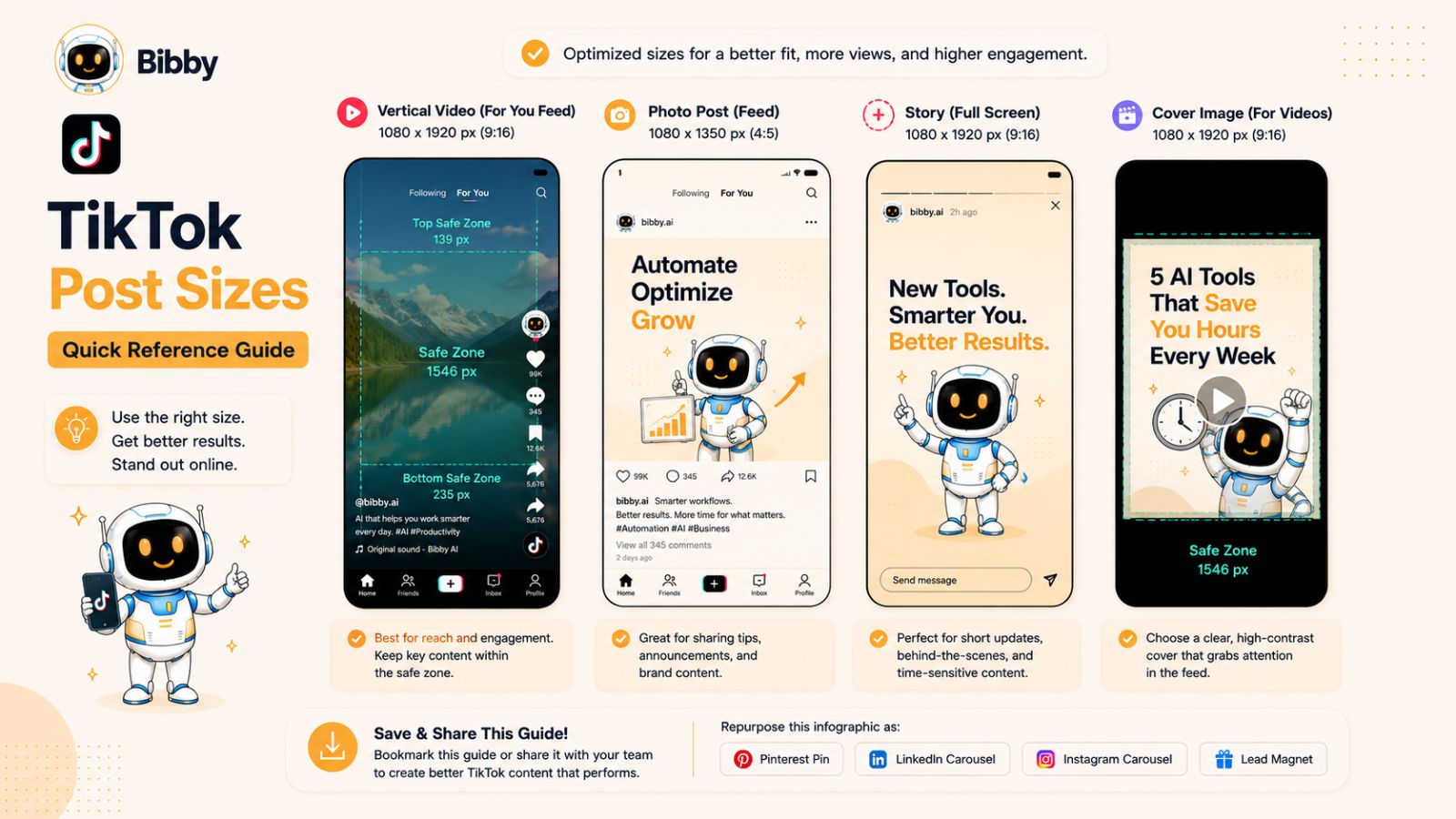
TikTok Profile Picture Size
Recommended Size: 200 × 200 pixels
Your profile image serves as your brand identity throughout the platform and appears on videos, comments, search results, and profile pages.
Best practices:
- Use a high-resolution square image.
- Keep logos and faces centered.
- Maintain consistency across social channels.
- Avoid excessive text.
TikTok Photo Post Size
Recommended Size: 1080 × 1920 pixels
TikTok's photo post format has become increasingly popular for storytelling, tutorials, product showcases, and educational content.
Benefits of vertical photo posts:
- Full-screen mobile experience.
- Higher visual impact.
- Better compatibility with TikTok's interface.
- Strong engagement potential.
Using the full vertical canvas helps maximize visibility and user attention.
TikTok Stories Size
Recommended Size: 1080 × 1920 pixels
Stories are displayed in a full-screen vertical format similar to Instagram Stories and Facebook Stories.
Best practices:
- Use bold visuals.
- Keep messaging concise.
- Leave room for TikTok interface elements.
- Place important text within safe zones.
TikTok Video Cover Size
Recommended Size: 1080 × 1920 pixels
The cover image acts as a thumbnail for your video and influences whether users choose to watch your content.
A strong cover should:
- Include a compelling visual hook.
- Feature a short, readable headline.
- Use high contrast for visibility.
- Match your overall content style.
Consistent cover designs can also help create a more professional-looking profile grid.
TikTok Ad Creative Sizes
Common TikTok advertising dimensions include:
| Ad Format | Recommended Size |
|---|---|
| In-Feed Ads | 1080 × 1920 px |
| Spark Ads | 1080 × 1920 px |
| Story Ads | 1080 × 1920 px |
| Collection Ads | 1080 × 1920 px |
Since most TikTok ads appear within users' content feeds, maintaining a native, platform-friendly appearance is essential for performance.
TikTok Image Optimization Tips
To improve content performance on TikTok:
- Design vertically whenever possible.
- Use high-resolution assets.
- Keep text large and easy to read.
- Capture attention within the first second.
- Use strong visual contrast.
- Ensure graphics remain mobile-friendly.
TikTok audiences move quickly, so clarity and visual impact are critical.
The Challenge of Managing TikTok Alongside Other Platforms
While TikTok thrives on vertical content, other platforms often require different image dimensions and formatting. Businesses publishing across Facebook, Instagram, LinkedIn, YouTube, Threads, and TikTok frequently find themselves creating multiple versions of the same content.
This can lead to:
- Increased design workload.
- More scheduling complexity.
- Inconsistent branding.
- Slower publishing cycles.
As content volume grows, these challenges become even more difficult to manage manually.
How Bibby Helps Automate TikTok Publishing
Bibby eliminates much of the manual work involved in creating and publishing TikTok content. You can upload existing images or generate new visuals with AI, select your preferred posting style, and allow Bibby to generate captions automatically.
The platform can schedule TikTok content alongside posts for Facebook, Instagram, LinkedIn, YouTube, and other networks using AI-optimized publishing times. This helps ensure your content reaches audiences when engagement is most likely without requiring constant manual oversight.
From content creation and caption generation to scheduling and analytics, Bibby provides a streamlined workflow that helps businesses maintain a consistent presence across every major social platform.
Also read: How to Scale a YouTube Channel With Automation
YouTube Image Sizes in 2026
YouTube is the world's largest video platform and one of the most powerful channels for creators, brands, educators, and businesses. While video content drives engagement, image assets such as thumbnails, channel banners, profile pictures, and Community Post graphics play a major role in attracting viewers and strengthening your brand.
Optimizing these visuals with the correct dimensions helps ensure a professional appearance and can significantly improve click-through rates.
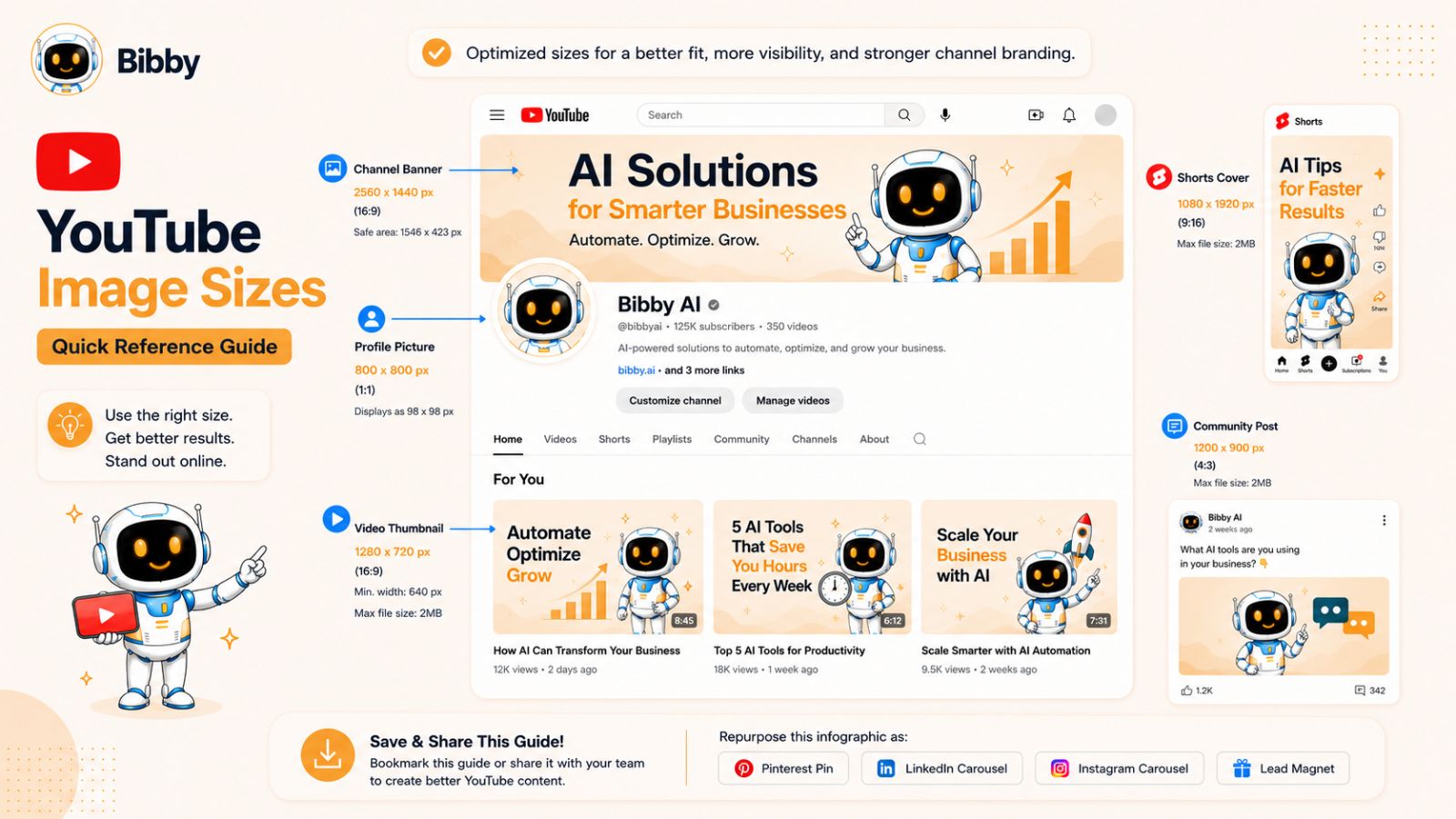
YouTube Channel Banner Size
Recommended Size: 2560 × 1440 pixels
Your channel banner is one of the first things visitors see when they land on your channel.
Important considerations:
- Design for multiple screen sizes.
- Keep key information within the center safe area.
- Avoid placing important text near the edges.
- Ensure branding remains visible on desktop, mobile, and TV devices.
A strong banner should immediately communicate what your channel is about and who it's for.
YouTube Profile Picture Size
Recommended Size: 800 × 800 pixels
Your profile image appears across your channel, comments, subscriptions, and search results.
Best practices:
- Use a high-resolution square image.
- Keep logos and faces centered.
- Maintain consistent branding.
- Ensure visibility even at smaller sizes.
YouTube Thumbnail Size
Recommended Size: 1280 × 720 pixels
Thumbnails are arguably the most important image asset on YouTube.
Even the best video can struggle to gain traction if the thumbnail fails to capture attention.
Effective thumbnails typically include:
- High-contrast visuals.
- Large, readable text.
- Clear emotional cues.
- Strong visual hierarchy.
- Consistent branding elements.
Many successful YouTube creators spend as much time optimizing thumbnails as they do producing videos because thumbnails directly influence click-through rates.
YouTube Shorts Thumbnail Recommendations
Recommended Size: 1080 × 1920 pixels
Shorts continue to grow rapidly and require a mobile-first vertical approach.
Best practices:
- Use bold visuals.
- Keep text concise.
- Design for small-screen viewing.
- Maintain a strong visual focal point.
Because Shorts are consumed quickly, clear visual communication is essential.
YouTube Community Post Image Size
Recommended Size: 1200 × 1200 pixels
Community Posts allow creators and brands to engage audiences between video uploads.
Popular Community Post content includes:
- Polls
- Announcements
- Product launches
- Behind-the-scenes updates
- Educational graphics
- Promotional campaigns
Square images typically display well across desktop and mobile experiences.
YouTube Ad Creative Sizes
Depending on the campaign type, advertisers commonly use:
| Ad Format | Recommended Size |
|---|---|
| Video Thumbnail | 1280 × 720 px |
| Display Companion Banner | 300 × 60 px |
| Community Promotion Graphics | 1200 × 1200 px |
| Shorts Ads | 1080 × 1920 px |
Always review current advertising requirements before launching campaigns, as specifications can evolve.
YouTube Image Optimization Tips
To maximize performance on YouTube:
- Invest time in thumbnail design.
- Use high-resolution imagery.
- Create consistent branding across videos.
- Test different thumbnail styles.
- Prioritize readability on mobile devices.
- Use clear visual hooks that encourage clicks.
Many creators focus heavily on video production while overlooking thumbnail optimization, even though thumbnails often have a greater impact on whether viewers click.
Managing YouTube Content Across Multiple Platforms
For many businesses and creators, YouTube is only one part of a larger social media strategy. A single piece of content may need to be repurposed into:
- YouTube videos
- Shorts
- Instagram Reels
- TikTok posts
- LinkedIn content
- Facebook updates
- Stories and promotional graphics
Managing these formats separately can quickly become time-consuming.
How Bibby Simplifies YouTube Marketing
Bibby helps streamline content creation and publishing across YouTube and other social networks. Users can upload images, create visuals with AI, generate captions automatically, and schedule content from a single dashboard.
Instead of manually coordinating uploads across YouTube, Facebook, Instagram, LinkedIn, TikTok, and additional platforms, Bibby can publish content at AI-optimized times designed to maximize engagement. Built-in analytics also provide insights into performance, helping marketers refine their strategy over time.
By combining content creation, scheduling, publishing, and reporting into one workflow, Bibby allows creators and businesses to spend less time managing content and more time growing their audience.
Next, let's look at the latest X (formerly Twitter) image sizes and dimensions for 2026.
X (Twitter) Image Sizes in 2026
X remains one of the fastest-moving social media platforms for news, thought leadership, brand engagement, customer support, and real-time conversations. Because users scroll quickly through their feeds, properly optimized images can make the difference between capturing attention and being ignored.
Using the correct image dimensions helps ensure your content appears sharp, professional, and fully visible across devices.
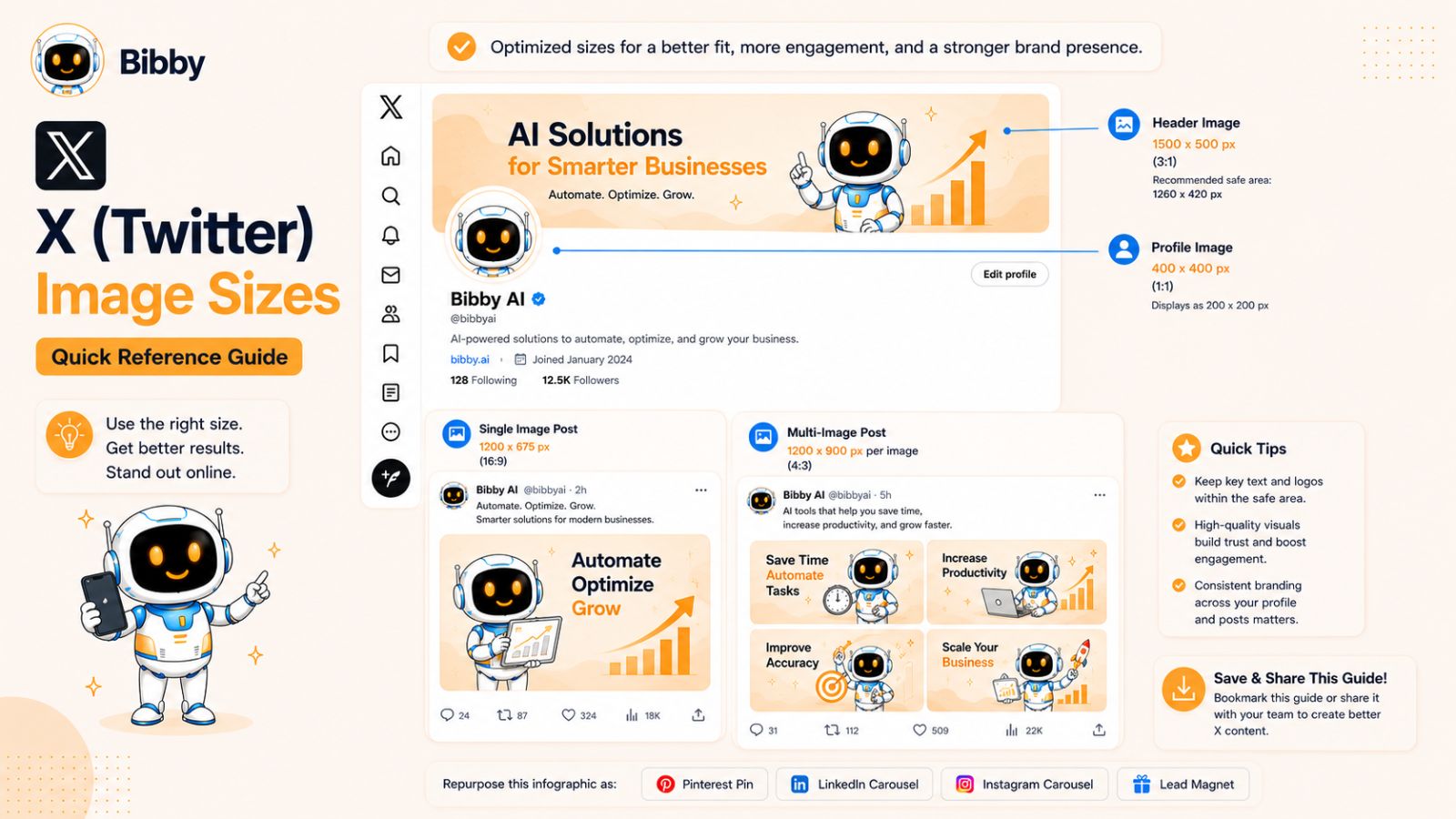
X Profile Picture Size
Recommended Size: 400 × 400 pixels
Your profile picture appears throughout the platform whenever you post, reply, or engage with other users.
Best practices:
- Use a high-resolution square image.
- Keep important elements centered.
- Ensure logos remain recognizable at smaller sizes.
- Maintain consistency across social platforms.
X Header Image Size
Recommended Size: 1500 × 500 pixels
The header image provides valuable branding space at the top of your profile.
Effective header designs may include:
- Brand messaging.
- Product showcases.
- Promotional campaigns.
- Event announcements.
- Personal branding elements.
Always test how the banner appears on both desktop and mobile devices.
Single Image Post Size
Recommended Size: 1600 × 900 pixels
Landscape-oriented images continue to perform well on X because they fit naturally within the feed layout.
Benefits include:
- Larger feed presence.
- Better visibility during fast scrolling.
- Strong compatibility with link previews.
- Improved readability for graphics and charts.
Multi-Image Post Size
Recommended Size: 1200 × 1200 pixels per image
When sharing multiple images in a single post, square formats generally provide the most consistent presentation.
Popular use cases include:
- Product launches.
- Tutorials.
- Before-and-after examples.
- Event recaps.
- Educational content.
X Link Preview Image Size
Recommended Size: 1200 × 675 pixels
When sharing blog posts, landing pages, or other website content, the preview image can significantly influence click-through rates.
Best practices:
- Use clear headlines.
- Include strong visual hierarchy.
- Keep branding visible.
- Ensure readability on mobile devices.
X Ad Image Sizes
Common advertising formats include:
| Ad Type | Recommended Size |
|---|---|
| Image Ad | 1600 × 900 px |
| Carousel Ad | 1200 × 1200 px |
| Website Card | 1200 × 675 px |
| Vertical Ad | 1080 × 1920 px |
As with any advertising platform, specifications may change over time, so verify current requirements before launching campaigns.
X Image Optimization Tips
To maximize engagement on X:
- Use attention-grabbing visuals.
- Keep text overlays concise.
- Prioritize readability on mobile.
- Use strong contrast and visual hierarchy.
- Pair images with compelling copy.
- Test different image formats and styles.
Because content moves quickly on X, visuals must communicate value immediately.
Why Managing X Separately Creates More Work
Many social media teams still maintain separate workflows for X, Facebook, Instagram, LinkedIn, TikTok, and YouTube. This often results in:
- Duplicate content creation.
- Manual resizing.
- Inconsistent publishing schedules.
- More time spent coordinating campaigns.
As your content output grows, managing each platform individually becomes increasingly difficult.
Also read: How to Increase Instagram Followers: What Actually Works
How Bibby Streamlines Multi-Platform Publishing
Bibby removes much of the complexity from social media management. Instead of creating separate workflows for every platform, you can upload an image—or generate one using AI—and let Bibby handle the rest.
After selecting your preferred posting style, Bibby can automatically generate captions, prepare content for multiple networks, and schedule posts at AI-optimized publishing times. Whether you're posting to X, Facebook, Instagram, LinkedIn, TikTok, YouTube, or Threads, everything can be managed from a single dashboard.
With built-in analytics, content scheduling, AI-assisted creation, and cross-platform publishing, Bibby helps marketers save time while maintaining a consistent and professional social media presence.
Pinterest Image Sizes in 2026
Pinterest is more than a social media platform—it's a visual discovery engine where users actively search for ideas, products, inspiration, and solutions. Unlike many social networks where content quickly disappears from feeds, Pinterest content can continue generating traffic, engagement, and conversions for months or even years.
Because Pinterest is highly visual, using the correct image dimensions is essential for maximizing reach and visibility.
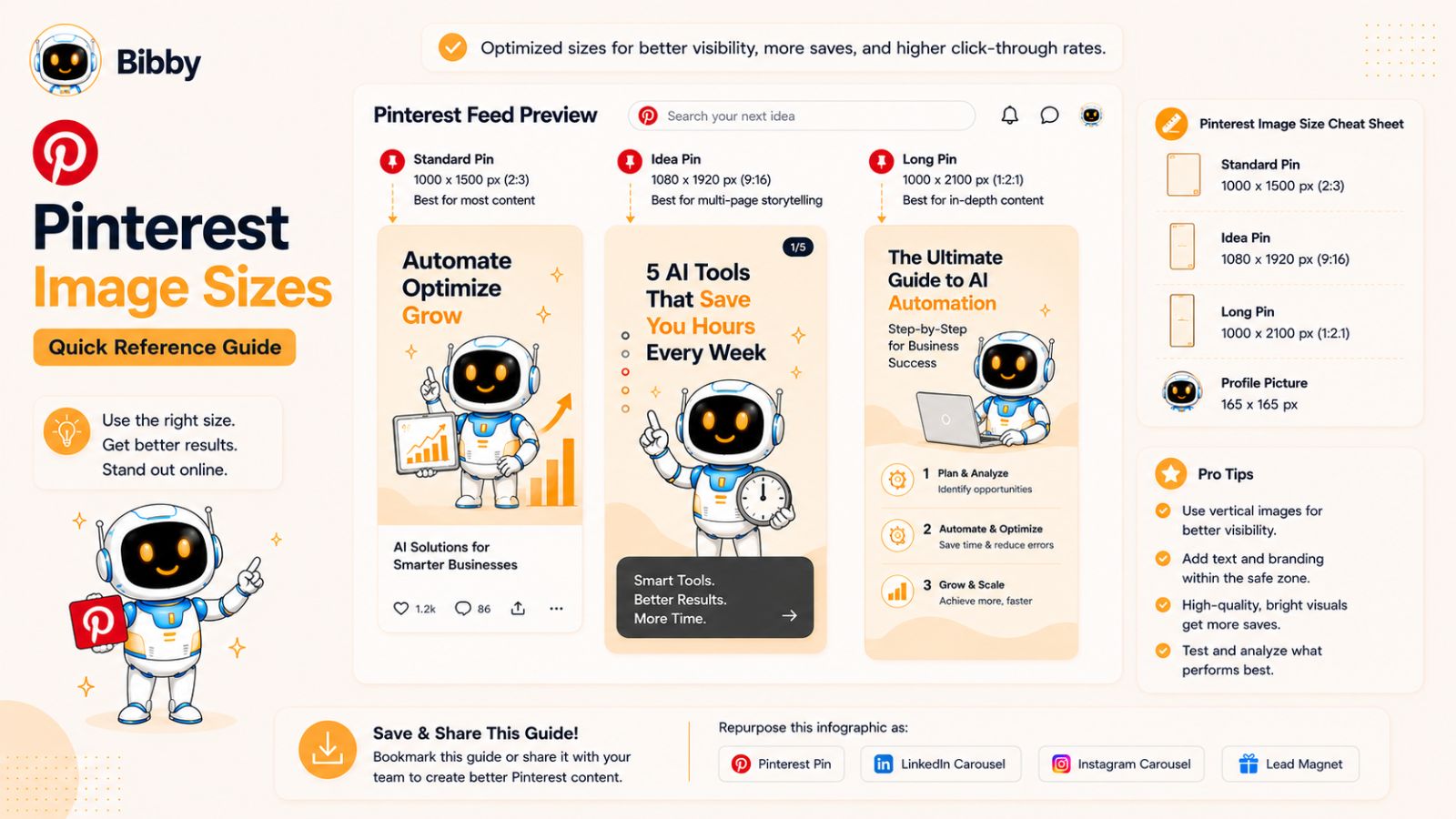
Pinterest Profile Picture Size
Recommended Size: 165 × 165 pixels
Your profile image helps establish brand recognition across Pins, boards, and search results.
Best practices:
- Use a clear logo or professional headshot.
- Keep important elements centered.
- Maintain consistency across all social platforms.
- Ensure the image remains recognizable at smaller sizes.
Standard Pin Size
Recommended Size: 1000 × 1500 pixels
The 2:3 aspect ratio remains the recommended format for standard Pins.
Why this size works:
- Optimized for Pinterest's vertical layout.
- Occupies more screen space.
- Encourages higher engagement.
- Provides room for compelling visuals and text overlays.
Standard Pins are ideal for blog promotion, product discovery, tutorials, recipes, and educational content.
Long Pin Considerations
While Pinterest supports longer images, extremely tall Pins may be truncated in users' feeds.
For best results:
- Stay close to the recommended 2:3 aspect ratio.
- Prioritize readability.
- Avoid excessive scrolling requirements.
- Focus on delivering value quickly.
Idea Pin Size
Recommended Size: 1080 × 1920 pixels
Idea Pins use a full-screen vertical format similar to Stories and short-form video content on other platforms.
Popular uses include:
- Step-by-step tutorials.
- Product demonstrations.
- Educational content.
- Behind-the-scenes content.
- Brand storytelling.
Pinterest Board Cover Size
Recommended Size: 1000 × 1000 pixels
Board covers help organize content and create a more polished profile appearance.
Best practices:
- Use consistent branding.
- Select visually appealing images.
- Create clear visual categories.
- Ensure covers remain recognizable at smaller sizes.
Pinterest Ad Image Sizes
Common Pinterest advertising formats include:
| Ad Format | Recommended Size |
|---|---|
| Standard Pin Ad | 1000 × 1500 px |
| Idea Pin Ad | 1080 × 1920 px |
| Carousel Ad | 1000 × 1500 px |
| Shopping Ad | 1000 × 1500 px |
Advertisers should regularly review Pinterest's latest specifications to ensure compliance.
Pinterest Image Optimization Tips
To maximize Pinterest performance:
- Use vertical images whenever possible.
- Include readable text overlays.
- Design with search intent in mind.
- Use high-quality photography and graphics.
- Maintain consistent branding.
- Create visually compelling titles directly within the image.
Pinterest users often discover content through search, making optimization especially important.
Pinterest SEO and Image Design
Unlike most social networks, Pinterest functions much like a search engine. This means image design and SEO work together.
To improve discoverability:
- Use keyword-rich Pin titles.
- Write descriptive Pin descriptions.
- Organize content into relevant boards.
- Create multiple Pin designs for the same content.
- Optimize visuals around specific search intent.
A well-designed Pin can continue driving traffic long after publication.
Managing Pinterest Alongside Other Social Platforms
Pinterest often requires different image dimensions than Facebook, Instagram, LinkedIn, TikTok, and X. As a result, marketers frequently end up creating multiple versions of the same content.
This can lead to:
- More design work.
- More scheduling tasks.
- Inconsistent branding.
- Reduced efficiency.
When managing content across several platforms, these challenges quickly multiply.
How Bibby Simplifies Pinterest Marketing
Bibby helps businesses streamline content creation and distribution across Pinterest and other major social networks. You can upload existing creatives or generate new visuals with AI, then select a posting style that matches your content strategy.
Bibby automatically generates captions, helps prepare content for multiple platforms, and schedules posts at AI-optimized times. Rather than manually coordinating Pinterest, Instagram, Facebook, LinkedIn, TikTok, YouTube, and X separately, you can manage everything from one unified workflow.
Combined with built-in analytics and performance tracking, Bibby makes it easier to maintain a consistent publishing schedule while saving valuable time.
Next, let's examine Threads image sizes in 2026 and how to optimize content for Meta's rapidly growing conversation-focused platform.
Threads Image Sizes in 2026
Threads has rapidly established itself as one of the most important conversation-focused social platforms. Built by Meta and closely connected to Instagram, Threads combines real-time discussions with visual content, making image optimization increasingly important for brands, creators, and businesses.
While Threads shares some similarities with Instagram, using the correct image dimensions helps ensure your content looks professional and performs consistently across devices.
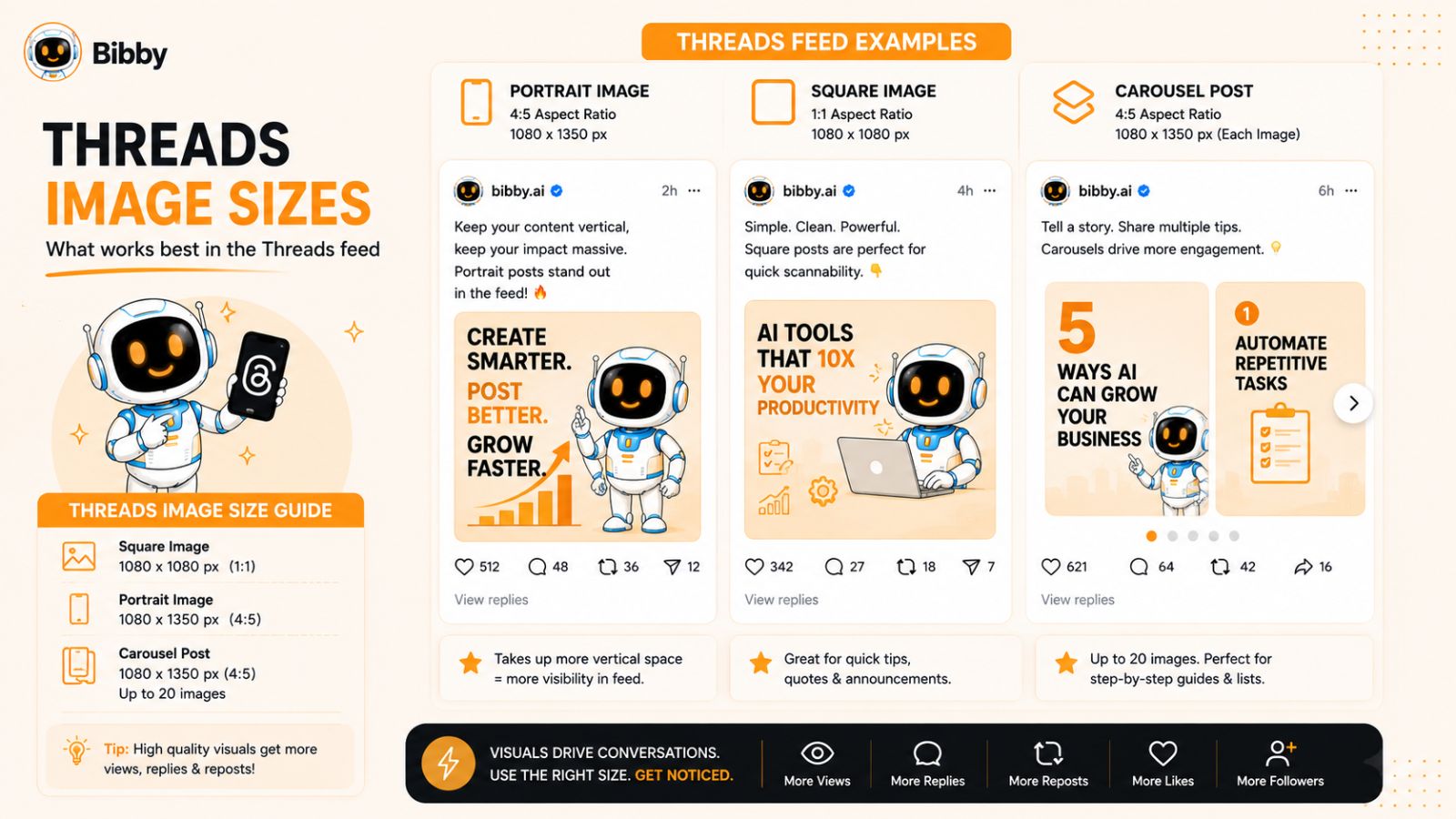
Threads Profile Picture Size
Recommended Size: 320 × 320 pixels
Your profile image is imported from Instagram and serves as your primary visual identity on the platform.
Best practices:
- Use a high-resolution square image.
- Keep logos and faces centered.
- Maintain consistent branding across platforms.
- Ensure visibility at smaller display sizes.
Threads Feed Image Size
Recommended Size: 1080 × 1350 pixels
Portrait-oriented images typically perform best because they occupy more screen space within mobile feeds.
Benefits include:
- Greater visual impact.
- Improved visibility during scrolling.
- Better mobile presentation.
- More room for visual storytelling.
For most businesses and creators, portrait images should be the preferred format for feed content.
Threads Square Image Size
Recommended Size: 1080 × 1080 pixels
Square images remain useful for:
- Quotes.
- Product announcements.
- Educational graphics.
- Brand updates.
- Event promotions.
They are easy to create and generally display consistently across multiple social networks.
Threads Carousel Post Size
Recommended Size: 1080 × 1350 pixels per image
Carousel posts allow users to swipe through multiple images within a single post.
Common use cases include:
- Step-by-step tutorials.
- Product showcases.
- Educational content.
- Case studies.
- Before-and-after comparisons.
Using consistent dimensions across every slide creates a more professional viewing experience.
Threads Media Attachment Recommendations
Threads supports various image formats, but these guidelines help ensure the best results:
- Upload high-resolution images.
- Prioritize portrait orientation when possible.
- Maintain readable text overlays.
- Design with mobile-first viewing in mind.
- Avoid placing important elements near image edges.
Threads Image Optimization Tips
To maximize engagement on Threads:
- Use images that support conversations.
- Create visually engaging educational content.
- Encourage comments and discussion.
- Keep branding consistent but subtle.
- Prioritize clarity over overly complex designs.
Because Threads is heavily conversation-driven, visuals should complement and strengthen the discussion rather than distract from it.
How Threads Fits Into a Modern Social Media Strategy
Most businesses aren't managing Threads in isolation. They're typically publishing content across:
- TikTok
- YouTube
- X
- Threads
Each platform introduces unique image requirements, content formats, and audience expectations.
Without a streamlined workflow, maintaining consistency across all channels can become extremely time-consuming.
Managing Threads and Every Other Platform with Bibby
This is where Bibby becomes especially valuable. Rather than creating separate workflows for every social network, Bibby centralizes your entire content process.
The workflow is simple:
- Upload an image or generate one using AI.
- Choose your preferred posting style.
- Let Bibby automatically generate captions.
- Select your desired platforms.
- Schedule content at AI-optimized posting times.
- Monitor performance through built-in analytics.
Bibby supports publishing across Facebook, Instagram, LinkedIn, TikTok, YouTube, Threads, and other major social networks from a single dashboard. You can also publish videos, Stories, Reels, and other content formats without constantly switching between tools.
Instead of spending hours resizing images, writing captions, scheduling posts, and analyzing results, Bibby automates much of the process so you can focus on strategy, creativity, and growth.
Now that we've covered the image dimensions for every major social platform, let's look at the most common social media image size mistakes and how to avoid them.
Also read: How AI Helps Maintain Brand Consistency Across Social Platforms
Common Social Media Image Size Mistakes to Avoid
Even when marketers know the recommended image dimensions for each platform, mistakes still happen. A single formatting issue can reduce engagement, create an unprofessional appearance, or weaken the effectiveness of an otherwise excellent piece of content.
The good news is that most image-related problems are easy to avoid once you know what to look for.
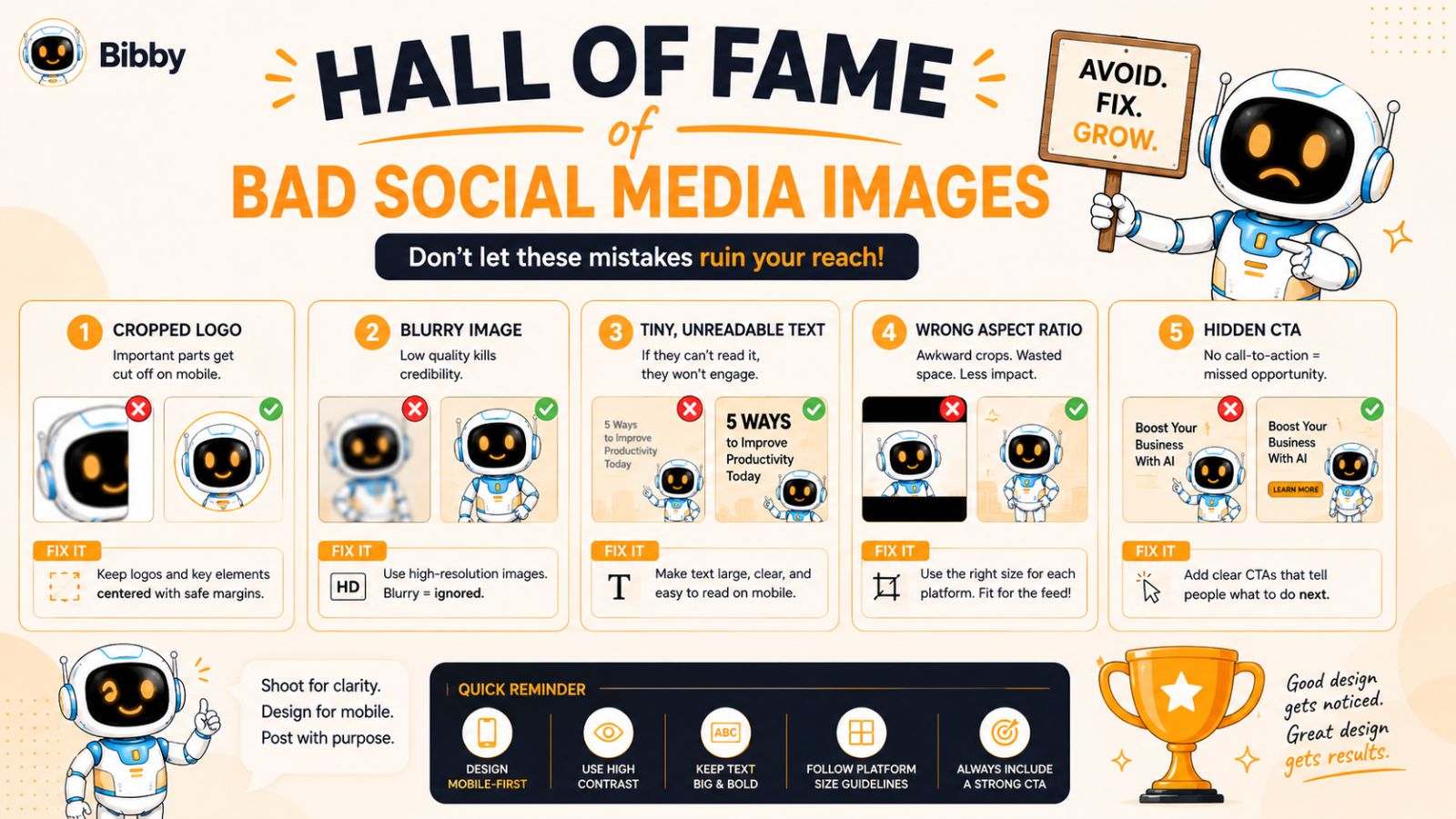
Uploading Low-Resolution Images
One of the most common mistakes is uploading images that are too small or heavily compressed.
This often results in:
- Blurry visuals.
- Pixelated graphics.
- Poor brand perception.
- Reduced engagement.
Always start with high-resolution source files whenever possible. Social media platforms may compress images during upload, so beginning with a quality image helps preserve visual clarity.
Ignoring Safe Zones
Many social platforms place interface elements on top of images.
Examples include:
- Profile icons.
- Like and comment buttons.
- Story controls.
- Reel overlays.
- Video controls.
When important text or design elements are placed too close to the edges, they can become partially hidden.
To avoid this issue:
- Keep critical content near the center.
- Leave sufficient padding around text.
- Test designs on mobile devices before publishing.
Using the Same Image Everywhere
A design that looks perfect on Instagram may not display correctly on LinkedIn, Pinterest, or YouTube.
Common problems include:
- Cropped text.
- Missing visual elements.
- Reduced readability.
- Awkward compositions.
While repurposing content is smart, each platform has unique requirements that should be considered during content creation.
Designing Only for Desktop Users
Most social media consumption now occurs on mobile devices.
Yet many businesses still create graphics primarily for desktop viewing.
This can cause:
- Small unreadable text.
- Poor image scaling.
- Crowded layouts.
- Reduced engagement.
Always preview content on a smartphone before publishing.
Overloading Images with Text
Many brands try to communicate too much information in a single graphic.
The result is often:
- Visual clutter.
- Reduced readability.
- Lower engagement.
- Weaker messaging.
Instead, focus on one core message per image and allow your caption to provide additional context.
Forgetting About Stories and Vertical Content
Stories, Reels, Shorts, and TikTok content now represent a significant portion of social media engagement.
Many businesses still focus almost exclusively on traditional feed posts.
This creates missed opportunities for:
- Increased reach.
- Better engagement.
- Higher visibility.
- Improved audience retention.
A modern social media strategy should include both feed content and vertical content formats.
Inconsistent Branding Across Platforms
Using different fonts, colors, styles, and layouts across social channels can create a fragmented brand experience.
Strong brands typically maintain:
- Consistent visual identity.
- Recognizable design elements.
- Similar messaging.
- Cohesive content themes.
Consistency builds trust and improves brand recognition over time.
Spending Too Much Time on Manual Formatting
Perhaps the biggest mistake of all is treating image preparation as a completely manual process.
Many marketers still spend hours every week:
- Resizing images.
- Creating platform-specific versions.
- Writing captions.
- Scheduling posts individually.
- Tracking performance manually.
As the number of social platforms grows, this workflow becomes increasingly inefficient.
A Better Approach to Social Media Content Management
The most successful businesses are moving toward automation wherever possible. Rather than manually handling every step of the publishing process, they're using tools that simplify content creation, scheduling, and distribution.
With Bibby, you can upload an image or generate one with AI, select a posting style, and automatically generate captions tailored for your content. From there, Bibby can schedule posts across Facebook, Instagram, LinkedIn, TikTok, YouTube, Threads, and other platforms at AI-optimized publishing times.
This eliminates many of the mistakes discussed above while dramatically reducing the amount of time required to maintain an active social media presence.
Now let's look at how modern marketers are creating social media content faster in 2026 and why automation has become a competitive advantage.
Also read: How to Scale a YouTube Channel With Automation
How to Create Social Media Images Faster in 2026
The demand for social media content has never been higher. Businesses are expected to maintain active profiles across multiple platforms, publish consistently, respond to trends quickly, and create content tailored to different audiences and formats.
Unfortunately, many social media teams are still relying on workflows that were designed for a much simpler social media landscape.
In 2026, speed and efficiency have become major competitive advantages.
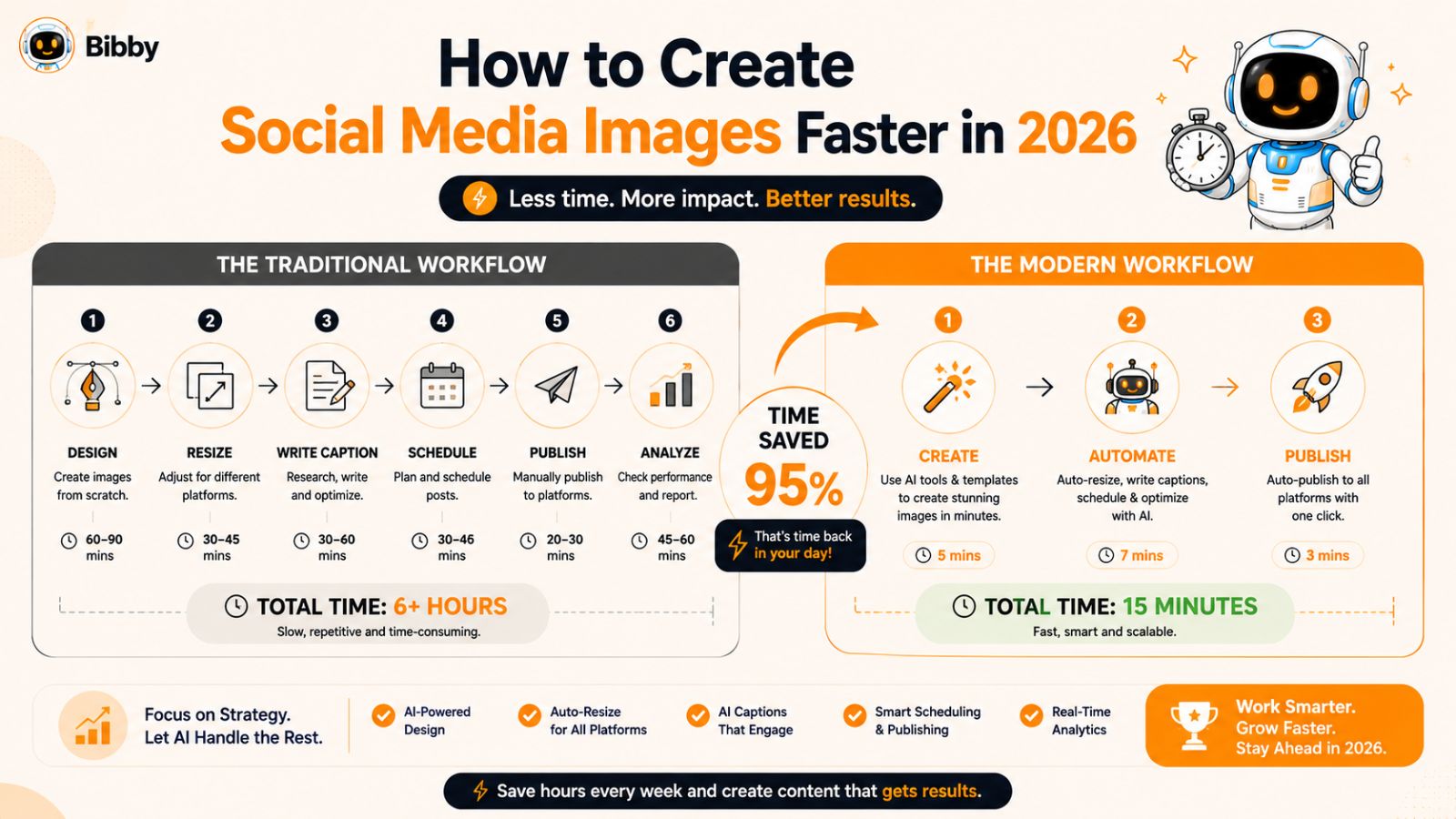
The Traditional Social Media Workflow Problem
For many businesses, the content creation process still looks something like this:
- Design an image.
- Resize it for Facebook.
- Resize it again for Instagram.
- Create additional versions for LinkedIn.
- Adapt it for Stories and Reels.
- Write captions for every platform.
- Schedule posts manually.
- Monitor performance using separate tools.
While this approach works, it's incredibly time-consuming.
A single campaign can require dozens of content variations before it is ready to publish.
Why Most Social Media Teams Waste Hours Every Week
The biggest productivity challenges often include:
Constant Resizing
Different dimensions for every platform mean marketers spend excessive time exporting multiple image versions.
Caption Creation
Writing engaging captions for Facebook, Instagram, LinkedIn, TikTok, X, and Threads separately can take longer than designing the content itself.
Scheduling Complexity
Publishing manually across multiple networks increases the risk of missed posts and inconsistent publishing schedules.
Analytics Fragmentation
Performance data is often spread across several platforms, making reporting and optimization more difficult.
Content Repurposing Challenges
Transforming one piece of content into multiple formats requires significant effort without the right tools.
The Rise of AI-Powered Social Media Workflows
Artificial intelligence is transforming how marketers create and distribute content.
Modern AI-powered workflows can help teams:
- Generate content ideas.
- Create images faster.
- Write captions automatically.
- Schedule content intelligently.
- Analyze performance.
- Repurpose content across platforms.
Instead of spending time on repetitive tasks, marketers can focus on strategy, creativity, and audience growth.
The Benefits of Automation
Businesses that automate parts of their social media process often experience:
- More consistent posting.
- Faster content production.
- Improved efficiency.
- Better audience engagement.
- Reduced operational costs.
- Greater scalability.
Automation doesn't replace creativity—it removes repetitive work so creative teams can focus on higher-value activities.
Why Managing Multiple Platforms Has Become So Difficult
Today's marketers are expected to manage content for:
- TikTok
- YouTube
- Threads
- X
Each platform introduces different:
- Image dimensions
- Video formats
- Caption styles
- Posting schedules
- Audience behaviors
Trying to manage all of these requirements manually often leads to burnout and inconsistent execution.
From Content Creation to Content Automation
The most effective social media strategies now focus on creating content once and distributing it intelligently across multiple platforms.
This approach helps businesses:
- Save time.
- Increase consistency.
- Reach larger audiences.
- Publish more frequently.
- Improve overall marketing efficiency.
The key is finding a system that can automate as much of the process as possible without sacrificing quality.
Enter Bibby: A Simpler Way to Manage Social Media
Bibby was built to eliminate the complexity that comes with modern social media management.
Instead of juggling multiple tools and workflows, users can create, schedule, publish, and analyze content from one platform.
Whether you're a solo creator, small business owner, agency, or marketing team, Bibby simplifies the entire process—from content creation to performance tracking.
In the next section, we'll take a closer look at how Bibby's AI-powered workflow helps automate image creation, caption writing, scheduling, publishing, and analytics across every major social media platform.
Also read: Social Media Marketing Statistics You Need to Know
How Bibby Automatically Handles Social Media Image Sizes and Publishing
Managing social media in 2026 involves much more than simply posting an image online. Marketers need to create content, adapt it for different platforms, write captions, schedule posts, monitor analytics, and maintain a consistent publishing cadence.
For businesses managing multiple social networks, this process can quickly become overwhelming.
Bibby was designed to simplify social media management by bringing content creation, automation, publishing, and analytics into one intuitive workflow.
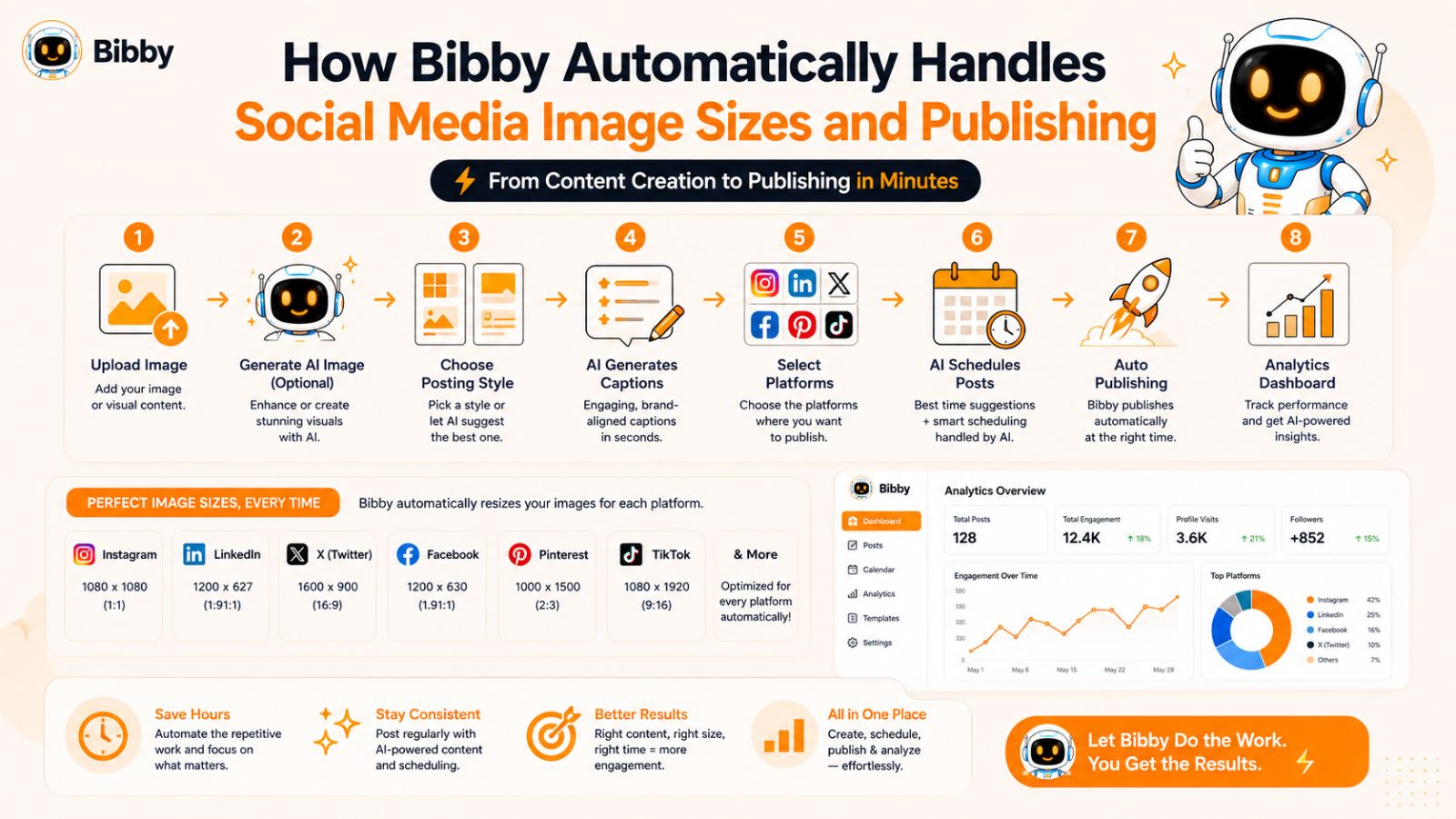
Step 1: Upload an Image or Generate One with AI
Every post starts with content.
With Bibby, you can either:
- Upload an existing image.
- Upload a video.
- Repurpose existing content.
- Generate new visuals using AI.
This gives businesses the flexibility to work with existing creative assets while also accelerating content production when new visuals are needed.
Instead of switching between multiple design tools, content can be created and prepared directly within the platform.
Step 2: Choose Your Posting Style
Different brands have different goals.
Some businesses want educational content. Others focus on lead generation, entertainment, product promotion, or brand awareness.
Bibby allows users to select their preferred posting style so content aligns with their overall social media strategy.
Examples include:
- Educational posts
- Promotional content
- Thought leadership
- Product marketing
- Community engagement
- Brand storytelling
This helps maintain consistency across every social platform.
Step 3: Let AI Generate Captions Automatically
Writing captions is often one of the most time-consuming parts of social media management.
Bibby's AI can automatically generate captions tailored to your content and posting style.
Benefits include:
- Faster content creation.
- Platform-appropriate messaging.
- Improved consistency.
- Reduced writer's block.
- Scalable content production.
Rather than spending time crafting captions for every platform individually, users can create content at scale with minimal effort.
Step 4: Publish Across Multiple Platforms from One Dashboard
One of the biggest challenges marketers face is managing multiple social networks simultaneously.
Bibby helps solve this by supporting publishing across major platforms, including:
- TikTok
- YouTube
- Threads
- X
Instead of logging into each platform separately, users can manage everything from a single interface.
Step 5: Schedule Content at AI-Optimized Times
Timing can have a significant impact on engagement.
Many marketers spend hours researching the best posting times for each platform.
Bibby removes this guesswork by automatically scheduling content at AI-optimized publishing times based on engagement patterns and platform behavior.
This helps businesses:
- Reach audiences when they're most active.
- Increase visibility.
- Improve engagement rates.
- Maintain consistent publishing schedules.
The result is a more effective social media strategy with less manual effort.
Step 6: Publish More Than Just Feed Posts
Modern social media requires a variety of content formats.
Bibby supports:
- Images
- Videos
- Stories
- Reels
- Shorts
- Carousel posts
- Promotional content
- Educational content
This allows businesses to manage their entire content strategy from one place instead of relying on multiple specialized tools.
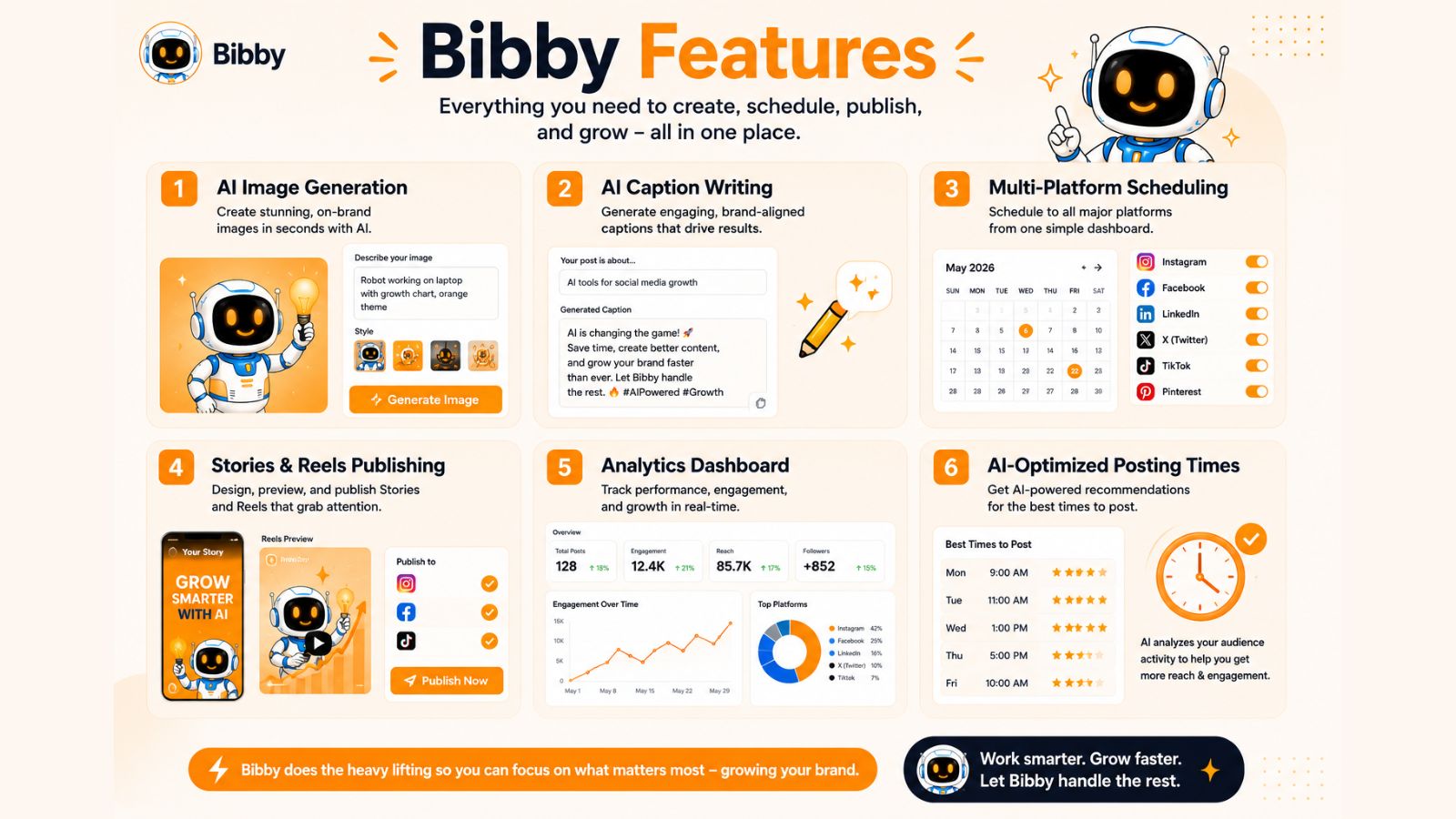
Step 7: Track Performance with Built-In Analytics
Publishing content is only half the battle.
Understanding what's working is equally important.
Bibby's analytics dashboard helps users monitor:
- Engagement rates
- Reach
- Audience growth
- Content performance
- Publishing effectiveness
These insights make it easier to refine your strategy and focus on the content that drives the best results.
You may also like looking into: How Often Should Businesses Post on LinkedIn?
Why Bibby Is Different
Many social media tools focus on only one part of the workflow.
Some specialize in scheduling.
Others focus on analytics.
Others help with content creation.
Bibby combines everything into a single platform.
You can:
- Create content.
- Generate AI-powered visuals.
- Write captions automatically.
- Schedule posts.
- Publish across multiple platforms.
- Monitor analytics.
- Scale your content operation.
This reduces complexity and eliminates the need to manage multiple disconnected tools.
The Complete Bibby Workflow
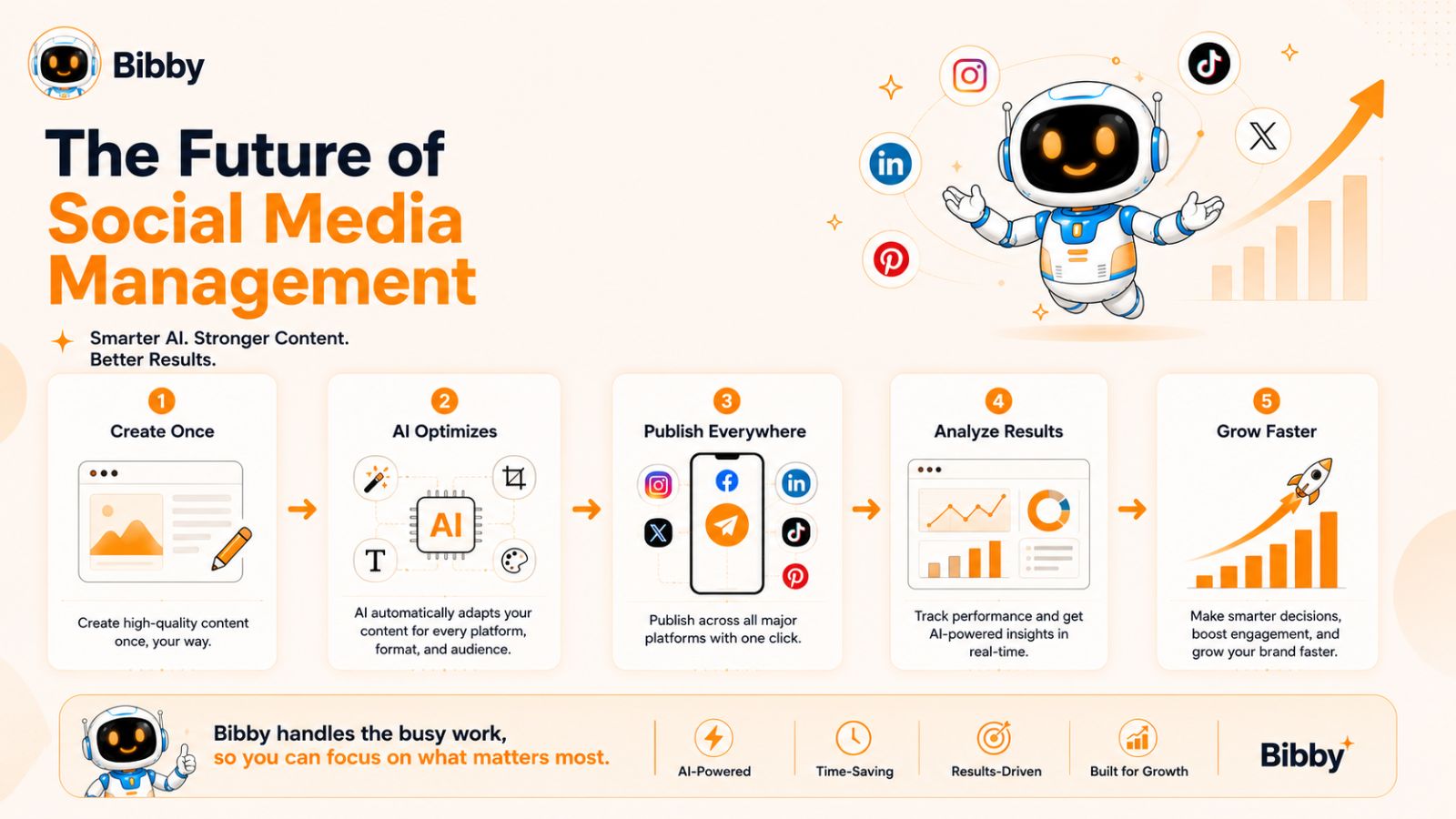
The entire process can be summarized in a few simple steps:
- Upload an image or generate one with AI.
- Select your preferred posting style.
- Let Bibby generate captions automatically.
- Choose the platforms where you want to publish.
- Schedule content at AI-optimized posting times.
- Publish images, videos, Stories, Reels, and Shorts.
- Track results through built-in analytics.
That's it.
Instead of spending hours every week resizing images, writing captions, scheduling posts, and reviewing analytics, Bibby automates the process so you can focus on growing your business.
Who Should Use Bibby?
Bibby is ideal for:
- Small business owners
- Content creators
- Influencers
- Marketing teams
- Agencies
- E-commerce brands
- Startups
- Personal brands
Anyone looking to save time while maintaining a consistent presence across multiple social media platforms can benefit from a more automated workflow.
As social media continues to evolve, the businesses that embrace automation will be better positioned to scale their content production, maintain consistency, and stay ahead of competitors.
Frequently Asked Questions About Social Media Image Sizes
What is the best image size for Instagram in 2026?
For most Instagram feed posts, 1080 × 1350 pixels is the recommended size. Portrait-oriented images occupy more screen space, making them more noticeable in users' feeds and often resulting in higher engagement than square or landscape formats.
What size should Facebook posts be in 2026?
The recommended Facebook feed post size is 1080 × 1350 pixels. This format displays well on mobile devices and provides a larger visual footprint within the feed, helping posts stand out while users scroll.
What is the ideal YouTube thumbnail size?
The recommended YouTube thumbnail size is 1280 × 720 pixels with a 16:9 aspect ratio. High-quality thumbnails can significantly improve click-through rates and are one of the most important factors in attracting viewers to your videos.
What is the best size for Instagram Stories, Facebook Stories, and TikTok content?
For Stories and most vertical content formats, the recommended size is 1080 × 1920 pixels. This full-screen vertical format is used across Instagram Stories, Facebook Stories, TikTok videos, Reels, and YouTube Shorts.
Can I use the same image across every social media platform?
Technically, yes—but it's not ideal.
Different platforms use different layouts, aspect ratios, and display formats. An image that looks perfect on Instagram may appear cropped or poorly formatted on LinkedIn, Pinterest, or YouTube.
For the best results, content should be optimized for each platform whenever possible.
What is the best universal social media image size?
If you need a single image that works reasonably well across multiple platforms, 1080 × 1350 pixels is often the best choice.
This size performs well on:
- Threads
- LinkedIn (in many use cases)
However, platform-specific optimization will usually deliver better results.
How often do social media image dimensions change?
Major social platforms occasionally update image specifications as new features, layouts, and content formats are introduced.
While core dimensions often remain stable for long periods, marketers should review platform recommendations regularly to ensure optimal image quality and presentation.
Why do my images look blurry after uploading?
Common causes include:
- Uploading low-resolution images.
- Using incorrect dimensions.
- Excessive image compression.
- Exporting files with poor quality settings.
Starting with high-resolution images and using platform-recommended dimensions can help maintain image quality.
Should I design for desktop or mobile users?
Mobile should always be the priority.
The majority of social media engagement now occurs on smartphones. Images should be designed to remain readable and visually appealing on smaller screens.
What's the easiest way to manage image sizes across multiple platforms?
The easiest solution is to use a social media management platform that simplifies content creation and distribution.
Instead of manually resizing images, creating separate versions, writing captions, and scheduling posts across multiple platforms, automation tools can streamline the process and save significant time.
How Does Bibby Help With Social Media Image Management?
Bibby simplifies the entire social media workflow.
Users can:
- Upload images or generate them with AI.
- Choose a posting style.
- Generate captions automatically.
- Schedule content at AI-optimized times.
- Publish across multiple platforms.
- Track performance through built-in analytics.
Rather than managing Facebook, Instagram, LinkedIn, TikTok, YouTube, Pinterest, X, and Threads separately, Bibby allows users to manage everything from one centralized dashboard.
For businesses, creators, and agencies looking to save time while maintaining a consistent publishing schedule, automation can significantly reduce the workload associated with social media management.
Final words
Keeping up with social media image sizes in 2026 is essential for maintaining a professional brand presence, maximizing engagement, and ensuring your content looks its best across every platform.
Throughout this guide, we've covered the latest image dimensions for Facebook, Instagram, LinkedIn, TikTok, YouTube, X, Pinterest, and Threads. We've also explored why image optimization matters, common mistakes to avoid, and how platform-specific formatting can improve overall content performance.
The biggest takeaway is simple: every social platform has unique requirements, and managing them manually can quickly become overwhelming. As your content strategy grows, the time spent resizing images, writing captions, scheduling posts, and tracking analytics can become a major bottleneck.
That's why more businesses, creators, and marketers are turning to automation. With Bibby, you can upload an image or generate one with AI, select your posting style, automatically create captions, schedule content at AI-optimized times, publish across multiple platforms, and monitor performance—all from a single workflow.
As a next step, consider building a complete AI-powered social media workflow that combines content creation, automation, scheduling, and analytics. Doing so can help you spend less time managing social media and more time growing your audience, brand, and business.