
A tracking pixel is a small piece of code, image, or tracking technology used to collect information about activity on a website, email, advertisement, or other digital content. When the pixel loads or an associated tracking event is triggered, it can send information to a server or analytics platform, allowing businesses to understand what users do after interacting with their content.
Tracking pixels are widely used in digital marketing, advertising, analytics, conversion tracking, and retargeting. For example, a business may use a tracking pixel to determine whether someone who clicked a social media advertisement later visited a product page, submitted a form, added an item to a cart, or completed a purchase. This information can help marketers measure campaign performance and make better decisions about advertising and audience targeting.
Despite the name, a modern tracking pixel is not always a literal invisible 1×1 image. The term is commonly used more broadly for technologies and tags that send tracking events from a user's browser or digital content to a measurement or advertising platform. Tracking pixels can also work alongside cookies, JavaScript tags, analytics tools, and server-side tracking systems.
For social media marketers, tracking pixels are particularly useful because they can connect social media activity with actions that happen on a website. While a platform such as Bibby can help create, schedule, and publish social media content across platforms, tracking technology can help measure what happens after people interact with that content and reach a website.
What Is a Tracking Pixel?
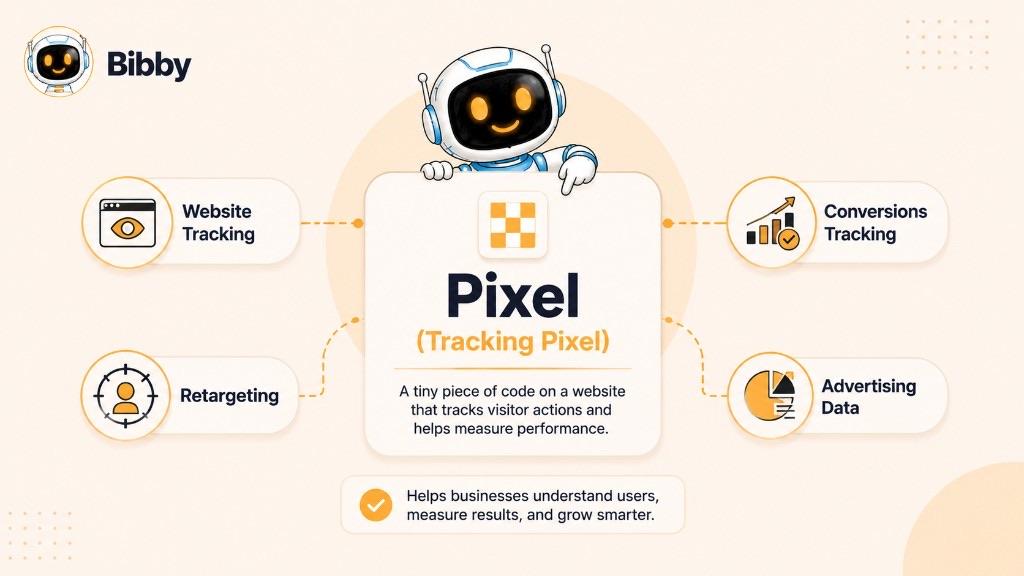
A tracking pixel is a small piece of code, an invisible image, or another tracking mechanism placed within digital content to record when a user interacts with that content. When the pixel is loaded or a specific event occurs, it can send information to a tracking, analytics, or advertising server.
Tracking pixels are commonly used to monitor website visits, ad interactions, conversions, email activity, and other user events. Marketers use the resulting data to understand how people interact with their campaigns, measure conversions, improve advertising performance, and create audiences for retargeting.
The term “pixel” comes from an early method of tracking that used a tiny, often transparent image embedded in a webpage or email. Loading that image generated a request to a server, which could record information about the interaction. Today, however, tracking pixels are not necessarily literal images. Modern marketing platforms may use JavaScript tags, browser-based events, APIs, and server-side technologies to collect and transmit event data.
For example, an ecommerce business might place a tracking pixel or advertising tag on its website. When someone clicks an ad and visits the site, the tracking mechanism can record a page view. Additional events can be configured for actions such as viewing a product, adding an item to a cart, submitting a form, or completing a purchase.
In simple terms, a tracking pixel helps answer an important marketing question:
“What happened after someone interacted with my digital content?”
The answer can help marketers connect advertising and content activity with measurable website actions.
Tracking Pixel Definition in Simple Terms
Tracking Pixel at a Glance
A tracking pixel is primarily used to collect and transmit information about digital interactions. The exact functionality depends on the platform, implementation, configured events, and privacy settings.
| Attribute | Details |
|---|---|
| Term | Tracking Pixel |
| Also known as | Pixel Tag, Marketing Pixel, Web Beacon, Conversion Pixel |
| Primary purpose | Track digital activity and user interactions |
| Common uses | Website analytics, conversion tracking, advertising measurement, retargeting |
| Common locations | Websites, landing pages, emails, advertisements, confirmation pages |
| How it works | A tracking mechanism triggers an event or request and sends relevant data to a server or platform |
| Common data signals | Page views, events, timestamps, campaign information, device or browser signals, and other configured parameters |
| Marketing applications | Campaign measurement, audience building, conversion optimization, and remarketing |
| Related technologies | Cookies, JavaScript tags, web beacons, APIs, server-side tracking |
| Common limitations | Ad blockers, browser restrictions, consent requirements, implementation errors, and incomplete attribution |
In One Sentence
A tracking pixel is a mechanism that helps marketers record digital interactions and use the resulting event data for measurement, conversion tracking, advertising optimization, and retargeting.
How Does a Tracking Pixel Work?
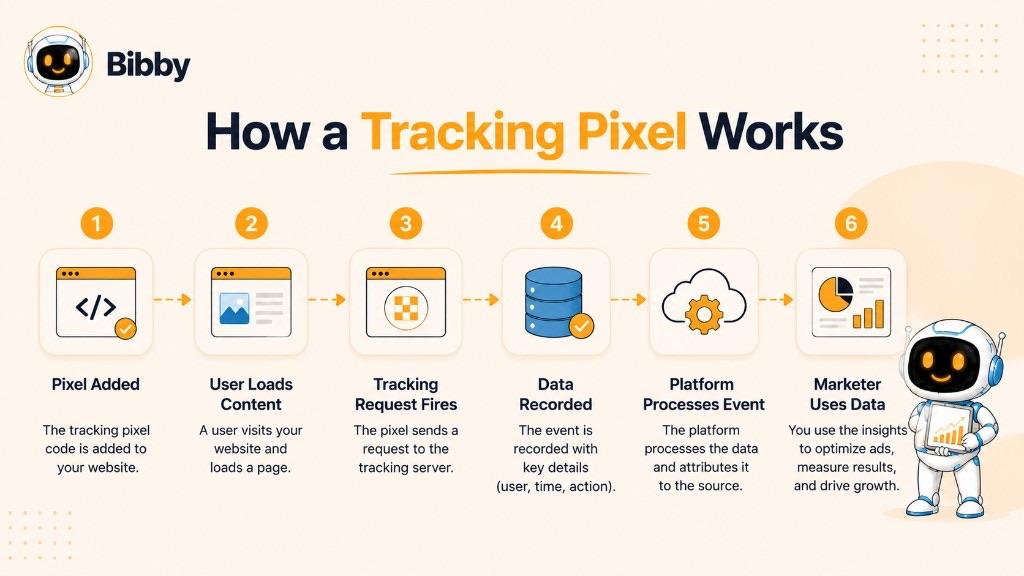
A tracking pixel works by creating a way for a website, email, advertisement, or other digital content to send an event or request to a tracking server when a defined interaction takes place. The server or marketing platform can then process that information and make it available for analytics, attribution, audience building, or advertising optimization.
Although early tracking pixels commonly used tiny invisible images, modern tracking systems can use JavaScript tags, browser events, APIs, and server-side technologies. The exact process depends on the platform and implementation.
Here is a simplified view of how a tracking pixel works:
Digital Content → Pixel or Tracking Tag → Tracking Request/Event → Tracking Platform → Marketing Data
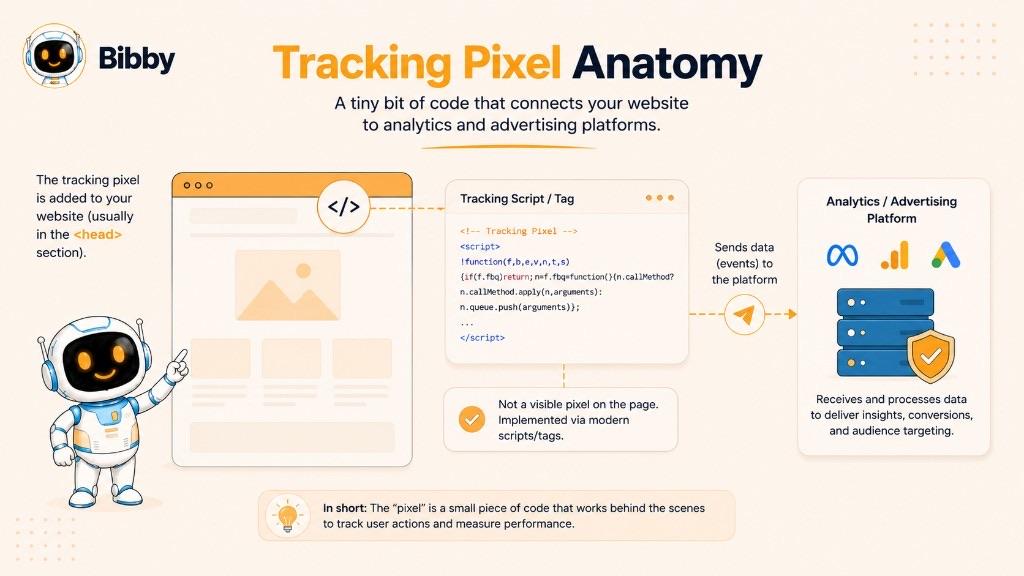
1. The Tracking Pixel Is Added to Digital Content
The first step is placing the tracking mechanism where the desired activity can be measured.
On a website, this may involve adding a tracking tag to the site's code or through a tag management system. Different events can also be configured for specific actions, such as viewing a product, submitting a form, or completing a purchase.
Tracking technology can also be associated with:
- Website pages
- Landing pages
- Product pages
- Checkout pages
- Confirmation pages
- Online advertisements
- HTML emails
- Campaign destinations
The placement and configuration determine which interactions the system can measure.
2. A User Loads the Content or Takes an Action
When someone visits a webpage, opens supported email content, or interacts with a digital experience, the browser or application may load the relevant tracking resource or execute the associated tracking code.
For example, imagine someone clicks a social media advertisement and lands on an ecommerce product page. If a tracking mechanism is configured on that page, the visit can trigger a page-view event.
Additional tracking events can be configured for actions such as:
- Viewing a product
- Clicking a button
- Adding an item to a cart
- Starting checkout
- Submitting a lead form
- Registering for an account
- Completing a purchase
3. The Tracking Request or Event Is Triggered
When the configured condition occurs, the tracking mechanism can generate a request or event containing relevant information.
With a traditional tracking pixel, loading a small image could generate a request to a remote server. Modern tracking implementations can use JavaScript or other event-based technologies instead.
The event may contain information such as:
- The event type
- Page or content information
- Time of the event
- Campaign or advertising identifiers
- Browser or device signals
- Relevant event parameters
The precise information available depends on the implementation, platform, browser, permissions, and configured tracking settings.
4. Data Is Sent to a Tracking or Advertising Server
The event or request is transmitted to the relevant analytics, advertising, or measurement infrastructure.
For example, an advertising platform may receive an event indicating that a visitor viewed a product page. A conversion platform may receive another event when that visitor completes a purchase.
The tracking server processes these events and associates them with the information available to the platform.
5. The Platform Processes the Event
Once received, the platform can use the event for different measurement and marketing purposes.
Depending on the system, the event may contribute to:
- Website analytics
- Conversion measurement
- Campaign reporting
- Audience creation
- Retargeting
- Advertising optimization
- Attribution analysis
For example, if many users who interacted with a particular advertisement later generated purchases, the resulting conversion data can help a marketer evaluate that campaign.
6. Marketers Use the Data
The final step is turning tracking data into marketing decisions.
A marketer might discover that a social media campaign generated many website visits but few purchases. Another campaign may have generated fewer visitors but a much higher purchase rate.
This information can be used to evaluate:
Which campaign generated conversions?
Which audience interacted with the website?
Which advertisements produced valuable actions?
Which visitors may be eligible for retargeting?
Which campaigns should receive more or less investment?
This is why tracking pixels are valuable in digital advertising. They help connect an interaction with digital content to measurable actions that happen afterward.
A Simple Tracking Pixel Example
Consider an online store running a social media advertising campaign:
User sees an ad
↓
User clicks the ad
↓
User visits the website
↓
Tracking event records the visit
↓
User views a product
↓
User adds the product to the cart
↓
User completes the purchase
↓
Conversion event is recorded
The tracking system can provide the advertiser with information about these events, subject to the platform's capabilities, browser restrictions, consent requirements, and the way the tracking has been implemented.
Important: A Tracking Pixel Does Not Magically Track Everything
A common misconception is that installing a tracking pixel automatically gives a business complete visibility into everything a visitor does.
It does not.
A tracking pixel or tag can generally record only the events it has been configured and permitted to observe. Browser privacy controls, ad blockers, consent choices, technical errors, platform restrictions, and other factors can also prevent or limit event collection.
That means tracking pixel data should be viewed as a measurement signal rather than a perfect record of every user interaction.
Tracking Pixel Example
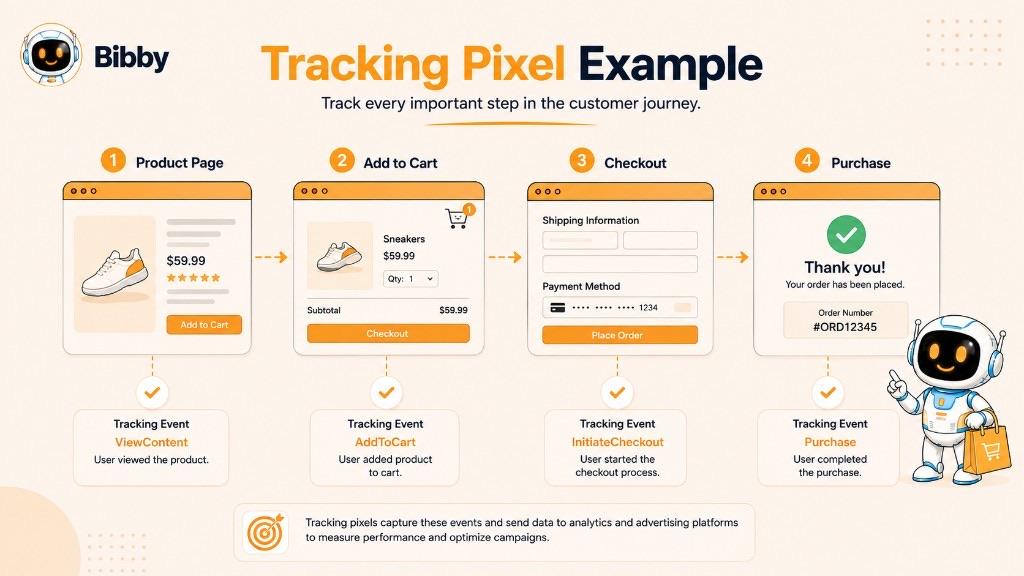
The easiest way to understand a tracking pixel is to see how it fits into an actual digital marketing journey. A tracking pixel can help a business connect an interaction, such as an advertisement click, with what happens after the visitor reaches a website.
For example, an ecommerce company may run an advertisement promoting a new product on a social media platform. The company wants to know whether people who click the advertisement actually visit the website, view the product, add it to their cart, or make a purchase.
A tracking pixel or related tracking technology can help measure these events.
Example 1: Someone Clicks a Social Media Ad
Imagine a clothing company launches a social media campaign for a new collection.
The journey could look like this:
Social Media Ad → Website Visit → Product View → Add to Cart → Purchase
Here's what happens at each stage:
- The user sees the advertisement. The person encounters the company's promotional content on a social media platform.
- The user clicks the advertisement. The click takes the person to a product or landing page on the company's website.
- The website tracking mechanism records the visit. When the relevant page loads, a configured tracking pixel or tag can trigger a page-view event.
- The user views a product. A separate event can be configured to record a product view.
- The user adds the product to the cart. An add-to-cart event can provide another signal to the advertising or analytics platform.
- The user completes the purchase. A purchase or conversion event can be triggered on the appropriate confirmation page or through another configured implementation.
- The marketer analyzes the results. The resulting event data can help the business understand campaign performance and evaluate which advertising activity contributed to conversions.
The tracking system does not necessarily know every detail about the person. Instead, it receives the events and signals made available by the implementation, platform, browser, and applicable permissions.
Example 2: Retargeting a Website Visitor
Now consider a visitor who clicks an advertisement but does not purchase anything.
The journey might look like:
Ad Click → Website Visit → Product View → No Purchase
A website tracking mechanism can record the relevant events. Depending on the advertising platform and available signals, the visitor may subsequently become part of an audience that can be used for a retargeting campaign.
The company could then show that audience another advertisement, such as:
“Still interested in this product?”
This is one of the major reasons tracking pixels and related tracking technologies are important in digital advertising. They can help marketers reconnect advertising activity with previous website interactions.
Example 3: Measuring a Lead Generation Campaign
Tracking pixels are not limited to ecommerce.
Suppose a software company runs an advertisement offering a free product demonstration.
The journey could be:
Social Media Ad → Landing Page → Form Submission → Lead
A tracking event can be configured to record when the visitor submits the form.
The marketing team can then compare campaigns based on the number and quality of leads generated rather than simply measuring clicks or impressions.
Example 4: Measuring a Content Campaign
A publisher, SaaS company, or content-driven business may also use tracking technology to understand how visitors interact with content.
For example:
Social Post → Blog Article → Signup Page → Registration
The business can measure relevant events along the journey and determine whether social media traffic is contributing to meaningful business outcomes.
Why These Examples Matter
The main value of a tracking pixel is not simply knowing that someone visited a webpage. Its real marketing value comes from connecting digital interactions with measurable events.
For example:
- An ad was clicked.
- A landing page was visited.
- A product was viewed.
- An item was added to a cart.
- A form was submitted.
- A purchase was completed.
When these events are configured correctly, marketers can use them to understand campaign performance, improve advertising strategies, build eligible audiences, and make more informed decisions about where to invest their marketing budget.
Tracking Pixel Example in a Social Media Workflow
For social media marketers, the broader workflow can look like this:
Create Content → Publish Content → Generate Traffic → Track Website Events → Measure Conversions → Optimize Campaigns
This is where social media automation and tracking can complement each other.
For example, Bibby can help marketers create captions, prepare different types of social media content, schedule posts at AI-optimized times, and publish across supported platforms. Tracking technology can then help measure what happens when people move from that social content to the company's website.
In other words, social media automation manages the publishing workflow, while tracking technology helps measure the results that happen beyond the post itself.
What Does a Tracking Pixel Track?
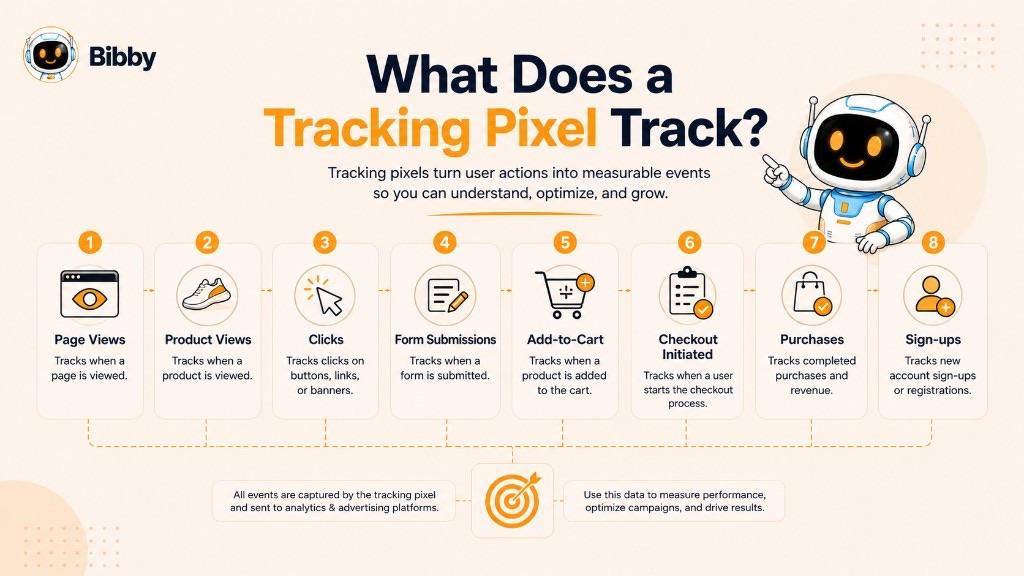
A tracking pixel can track specific actions and events that have been configured by the website owner, advertiser, analytics provider, or marketing platform. The information collected depends on how the tracking technology is implemented, which events are enabled, the platform receiving the data, browser behavior, and applicable privacy or consent settings.
Tracking pixels and related tracking technologies are commonly used to measure website activity, advertising interactions, conversions, and other digital events.
Common Events a Tracking Pixel Can Track
| Event | What It Can Indicate |
|---|---|
| Page View | A user loaded a specific webpage |
| Product View | A visitor viewed a product or service |
| Ad Interaction | A user interacted with an advertisement |
| Button Click | A visitor clicked a configured element |
| Form Submission | A visitor submitted a lead or contact form |
| Sign-Up | A visitor registered for an account or service |
| Add to Cart | A shopper added a product to their cart |
| Checkout | A visitor began the checkout process |
| Purchase | A completed transaction was recorded |
| Download | A visitor downloaded a file or resource |
| Registration | A visitor completed a registration event |
| Email Interaction | A supported email tracking mechanism recorded an interaction |
Website Visits
One of the most basic uses of a tracking pixel is recording a page-view event.
When a visitor loads a webpage containing the relevant tracking technology, an event can be sent to the associated platform. Marketers can use these events to understand how much traffic reaches a particular page or campaign destination.
For example:
Advertisement → Landing Page → Page-View Event
This can help connect advertising activity with website traffic.
Product Views, Carts, and Conversions
An ecommerce website can configure tracking events for product pages, add-to-cart actions, and purchases. A campaign might produce a funnel such as:
1,000 website visitors → 150 product views → 40 add-to-cart events → 12 purchases
The marketer can use these events to better understand where visitors are progressing or dropping out of the funnel. Conversion events allow marketers to move beyond measuring simple traffic and evaluate whether campaigns are producing meaningful business outcomes.
Campaign Information
Depending on the implementation, tracking events can also include information that helps identify the marketing context surrounding an action, such as campaign identifiers, advertising identifiers, landing-page information, or other configured parameters.
This can help answer questions such as:
Which campaign generated the conversion?
Which advertisement produced the most valuable traffic?
Which audience generated the highest number of leads?
The exact attribution available depends on the advertising or analytics platform and the signals it can receive.
Browser and Device Signals
Some tracking implementations can receive technical information associated with the user's browser or device environment. Depending on the technology and permissions involved, this may include information such as browser type, operating system, device characteristics, language settings, screen-related information, IP-related information, referrer information, and timestamp.
Not every tracking pixel collects all of these signals, and their availability can be affected by browser settings, privacy controls, consent choices, and platform policies.
User Behavior, Event Sequences, and Retargeting Signals
A tracking system can also help marketers understand sequences of configured events:
Page View → Product View → Add to Cart → Checkout → Purchase
Looking at these events together can provide more useful information than looking at a single page view in isolation. An advertising platform may use available website event signals to create audiences based on actions such as visited a website, viewed a product, added an item to a cart, started checkout, or completed a purchase—subject to the platform's capabilities and applicable privacy requirements.
What a Tracking Pixel Does Not Necessarily Track
It is important not to think of a tracking pixel as a universal surveillance tool that automatically records everything a visitor does.
A tracking pixel generally records specific events and signals that have been implemented and are available to the tracking system.
Tracking can also be limited by:
- Browser privacy protections
- Ad blockers
- Consent settings
- Tracking prevention technologies
- Email client restrictions
- Technical implementation errors
- Platform limitations
- Network restrictions
For this reason, tracking data should be treated as a measurement signal rather than a guaranteed, complete record of every action performed by every visitor.
In Simple Terms
A tracking pixel can help answer three fundamental marketing questions:
Who interacted with my digital content?
What measurable action did they take?
Did that action contribute to my marketing goal?
The answers can help businesses measure campaigns, understand conversion journeys, build eligible audiences, and optimize their digital marketing efforts.
Why Do Marketers Use Tracking Pixels?
Marketers use tracking pixels and related tracking technologies to understand what happens after people interact with digital content. A social media post, advertisement, email, or search campaign may generate clicks and website visits, but those numbers alone do not tell a marketer whether the activity produced a meaningful result.
Tracking pixels can help connect those interactions with configured website events such as product views, lead submissions, registrations, and purchases. This makes them useful for conversion tracking, campaign measurement, audience building, retargeting, attribution, and advertising optimization.
Conversion Tracking
One of the most important uses of a tracking pixel is conversion tracking.
A conversion is a desired action that a business wants a visitor to complete. Depending on the business, that action could be purchasing a product, submitting a contact form, signing up for a service, starting a free trial, booking an appointment, registering for an event, downloading a resource, or subscribing to a service.
For example, a social media advertisement may generate 5,000 impressions and 200 clicks. Those numbers show that people interacted with the advertisement, but a configured purchase event can provide additional information about whether those visitors actually became customers.
This helps marketers evaluate campaigns based on outcomes rather than clicks alone.
Ad Attribution
Tracking pixels can also contribute to ad attribution, which is the process of understanding how marketing interactions relate to conversions.
For example:
Social Media Ad → Website Visit → Product View → Purchase
If the relevant events and attribution signals are available, the advertising platform can use them to help determine which campaign or advertisement contributed to the conversion.
Attribution is not always exact. Different platforms use different attribution models, identifiers, reporting windows, and measurement methods. Browser restrictions, consent choices, and blocked tracking can also reduce the amount of information available.
Even with those limitations, conversion and event signals can provide valuable context for evaluating advertising performance.
Retargeting and Audience Building
Another major use of tracking pixels is retargeting.
Suppose someone visits an online store after clicking an advertisement but leaves without making a purchase. A tracking mechanism may record the relevant website event. Depending on the platform and available signals, that activity can contribute to an audience that may be used in a future advertising campaign.
Tracking events can also help marketers build audiences of people who visited a website, viewed a specific product, added an item to a cart, started checkout, submitted a form, or completed a purchase. Marketers may want to reach people who viewed a product but did not purchase it, while excluding people who have already completed the purchase.
Campaign Optimization and Marketing Analytics
Advertising platforms can use available conversion and event signals to help optimize campaigns toward a selected objective. For example, if a campaign is configured to optimize toward purchases, purchase-related events can provide a stronger signal than simple page views.
Tracking pixels can also contribute to broader marketing analytics by helping businesses understand how visitors move through a digital experience:
1,000 Visitors → 400 Product Views → 80 Add-to-Cart Events → 45 Checkouts → 20 Purchases
This type of funnel can reveal where users are progressing and where they are dropping out.
Measuring Social Media Performance
For social media marketers, tracking pixels can help extend measurement beyond platform-level engagement metrics.
A post might receive likes, comments, shares, saves, video views, and clicks. These metrics are useful, but marketers may also want to know what happened after someone clicked through to the website.
This distinction is important because engagement does not necessarily equal business results. A post with fewer likes may ultimately generate more qualified leads or purchases than a post with much higher engagement.
Conversion Suppression and Customer Journey
Tracking data can also be used to exclude people from campaigns when they have already completed a desired action, where the platform supports exclusion audiences.
Looking at a sequence such as advertisement impression → click → landing page → product view → add to cart → checkout → purchase can help marketers identify which stages are performing well and which may need improvement. The advertisement may generate strong traffic while the landing page or checkout experience creates the larger conversion problem.
Tracking Pixels in a Modern Marketing Workflow
A typical digital marketing workflow might look like:
Create Content → Publish → Drive Traffic → Track Events → Measure Conversions → Analyze Results → Optimize Campaign
For social media teams, this creates a useful distinction between content distribution and performance measurement.
Tools such as Bibby can help marketers manage the publishing side of the workflow by creating social media content, generating captions, scheduling posts, and publishing across supported platforms. Tracking pixels and other measurement technologies can complement that workflow by helping marketers understand what happens after social media users reach their website.
The result is a more complete view of the journey from content to interaction to conversion.
Types of Tracking Pixels
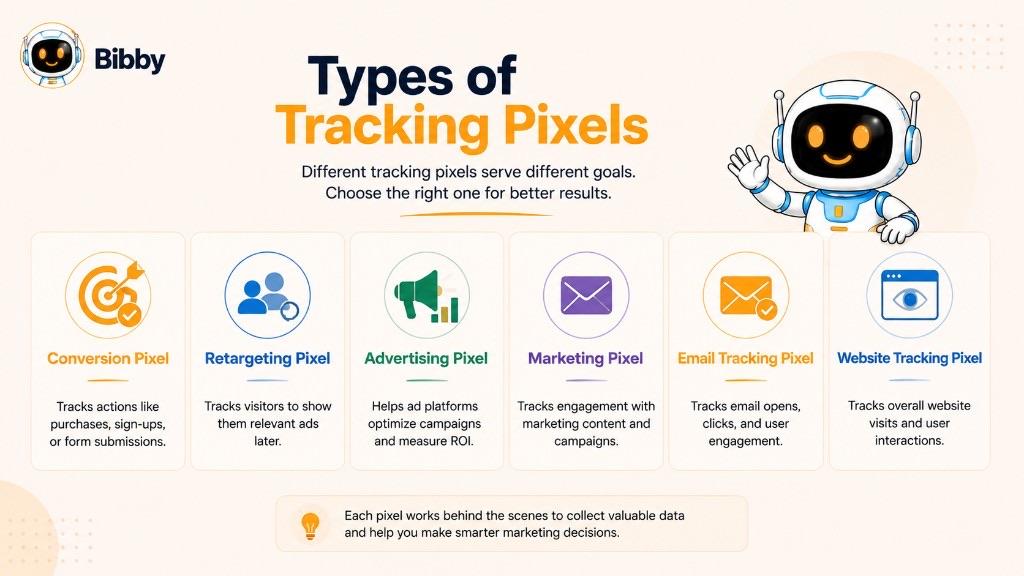
Tracking pixels can be categorized according to what they are designed to measure or accomplish. The terminology is not always standardized, and different marketing platforms may use different names for similar tracking technologies.
For example, a conversion pixel may be used to record purchases or leads, while a retargeting pixel may be used to collect signals that support audience creation. In practice, one tracking implementation can sometimes support multiple purposes.
Conversion Pixel
A conversion pixel is a tracking mechanism configured to record when a user completes a desired action such as a purchase, lead submission, account registration, free-trial sign-up, subscription, appointment booking, download, or form completion.
In simple terms: A conversion pixel helps answer, “Did the visitor complete the action I wanted?”
Retargeting Pixel
A retargeting pixel is a tracking mechanism used to collect website interaction signals that can contribute to retargeting audiences—for example, website visitor audiences, product-view audiences, cart-abandonment audiences, and audience exclusions.
In simple terms: A retargeting pixel helps answer, “Who interacted with my website and may be relevant to a future campaign?”
Advertising Pixel and Marketing Pixel
An advertising pixel is a broader term for tracking technology used in connection with digital advertising. A marketing pixel is another broad term for tracking technology implemented for marketing and measurement purposes. Neither should be interpreted as a specific technical standard; functionality depends on the platform and configuration.
Email Tracking Pixel
An email tracking pixel is a tracking mechanism embedded in an HTML email to help determine whether the email's tracking content was requested. Historically, email tracking commonly relied on a tiny transparent image. Email tracking can be affected by modern email-client privacy features. Some services automatically load or proxy images, while others allow users to block remote content. An email tracking pixel should not necessarily be interpreted as a perfectly accurate record of whether a person actually read an email.
Website Tracking Pixel, Pixel Tag, and Web Beacon
A website tracking pixel refers to a tracking mechanism implemented on a website to record defined visitor activity. A pixel tag is another term frequently used for a tracking pixel or similar tracking mechanism. The term "tag" is important because modern tracking systems are not necessarily limited to invisible images.
A web beacon is a broader technical term for a mechanism that can signal when digital content has been accessed or an interaction has occurred. Tracking pixels are often described as a type of web beacon, particularly when they use a small embedded resource to generate a request to a remote server.
Are These Types Completely Different?
Not necessarily. The terms above often describe the purpose of the tracking implementation rather than a completely different underlying technology. The same website tracking implementation could support page view, product view, add to cart, and purchase events for analytics, conversion measurement, audience creation, or campaign optimization.
Tracking Pixel Types at a Glance
| Type | Primary Purpose | Common Example |
|---|---|---|
| Conversion Pixel | Measure conversions | Purchase or lead |
| Retargeting Pixel | Support retargeting audiences | Previous product viewer |
| Advertising Pixel | Measure and optimize advertising | Ad-to-purchase journey |
| Marketing Pixel | General marketing measurement | Campaign activity |
| Email Tracking Pixel | Measure email tracking events | Email content request |
| Website Tracking Pixel | Measure website activity | Page view or product view |
| Pixel Tag | General tracking implementation | Event tracking code |
| Web Beacon | Signal digital activity | Embedded tracking resource |
The most important point is that tracking pixel terminology is often purpose-based and overlapping. The exact capabilities depend on the platform, implementation, configured events, available signals, and applicable privacy controls.
Tracking Pixel vs. Cookie: What’s the Difference?
Tracking pixels and cookies are both commonly associated with digital marketing, analytics, and online tracking, but they serve different technical roles.
The simplest distinction is:
A tracking pixel or tag can trigger an event and send information to a server, while a cookie is a piece of data stored by a website or service in a user's browser.
They can also work together. A tracking pixel may trigger a request while a cookie provides information that can help a platform recognize a browser or maintain information across requests.
Tracking Pixel vs. Cookie
| Tracking Pixel | Cookie |
|---|---|
| A tracking mechanism that can trigger or communicate an event | Data stored in a user's browser |
| Often implemented in webpages, emails, advertisements, or through tracking code | Stored locally by the browser |
| Can send information to a remote server when it fires | Can be sent back to a website or service with subsequent requests |
| Commonly used for event and conversion tracking | Commonly used for sessions, preferences, identifiers, and other purposes |
| Can be implemented using images, JavaScript, or other tracking technologies | Stored as browser data |
| Does not necessarily store information in the browser itself | Specifically designed to store data in the browser |
| Can work alongside cookies | Can work alongside pixels and other tracking technologies |
How Each Works
A traditional tracking pixel can be thought of as a signal mechanism: webpage loads → tracking resource is requested → server receives request → event is recorded. Modern tracking systems can use JavaScript and other technologies instead of a literal image.
A cookie works differently. A website or service can instruct the browser to store a small piece of information. The browser can then provide that information back to the relevant domain in later requests, subject to browser rules and privacy controls. Cookies can be used for login sessions, preferences, shopping carts, recognizing returning browsers, measuring activity, and advertising. Not every cookie is a tracking cookie, and cookies are not inherently advertising technologies.
Can a Tracking Pixel Use Cookies?
Yes. A tracking pixel and a cookie can operate together as part of the same tracking system. This is one reason it can be misleading to describe pixels and cookies as competing technologies. They can perform different functions within the same measurement architecture.
Think of a tracking pixel as an event messenger and a cookie as browser-held information. The pixel or tracking tag can help signal that an event just happened. A cookie can provide information that helps the browser or service maintain state or recognize the relevant browser in subsequent interactions.
Why the Difference Matters to Marketers
The distinction becomes important when marketers analyze attribution, audience data, and conversion tracking. Both technologies can be affected by changes in the privacy and browser environment.
Tracking pixels can be affected by ad blockers, tracking protection, browser restrictions, consent choices, network restrictions, and incorrect implementation. Cookies can be affected by browser restrictions, cookie blocking, cookie expiration, consent choices, third-party cookie restrictions, and privacy settings.
Modern browsers and advertising platforms have increasingly changed how tracking technologies can be used, which has encouraged marketers to explore alternatives and complementary approaches such as first-party data and server-side event tracking.
Tracking Pixel vs. Cookie in Simple Terms
A tracking pixel is primarily a mechanism for triggering or communicating tracking information, while a cookie is primarily a mechanism for storing information in a browser.
They can be used independently in some situations, but they are also frequently part of the same broader measurement system. Neither term should automatically be interpreted as meaning "advertising tracker." Their actual purpose depends on how the technology is implemented and what data it is configured to process.
Tracking Pixel vs. Cookie vs. Tracking Tag vs. Web Beacon
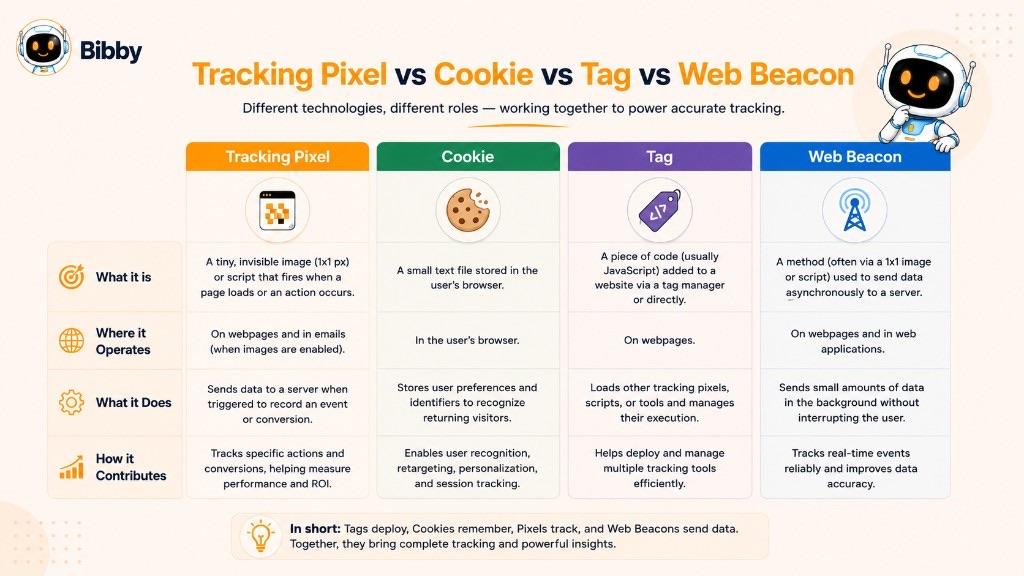
Digital marketing uses several terms for technologies that collect or communicate information about online activity. Tracking pixel, cookie, tracking tag, and web beacon are related, but they describe different mechanisms or concepts.
Quick Comparison
| Technology | What It Is | Primary Role |
|---|---|---|
| Tracking Pixel | A tracking mechanism historically implemented as a tiny image and now often used more broadly | Trigger or communicate tracking events |
| Cookie | Data stored by a browser | Store information that can persist between requests or visits |
| Tracking Tag | A broad term for code or technology used to collect or send event data | Implement tracking and measurement |
| Web Beacon | A broader tracking mechanism that can signal digital activity | Detect or signal access or interaction |
These technologies can overlap. A single marketing implementation may use more than one of them.
A tracking tag is broader than a pixel. Modern advertising systems often use JavaScript-based tags rather than literal image pixels. Someone might casually call a modern website tracking implementation a "pixel" even though the underlying technology includes JavaScript.
A web beacon is a broader technical concept describing a mechanism that can signal when digital content has been accessed. Traditional tracking pixels can be considered a type of web beacon.
Why These Terms Are Often Confused
Early web and email tracking frequently relied on tiny transparent images. Because these images were commonly only a pixel or a few pixels in size, the term tracking pixel became widely used. As digital advertising and analytics became more sophisticated, tracking systems began incorporating JavaScript, event APIs, browser identifiers, server-side systems, and other technologies. The industry continued to use familiar terminology even as the underlying technology evolved.
The Modern Meaning of "Tracking Pixel"
Today, tracking pixel should generally be understood as a marketing term rather than a requirement that the technology literally be a 1×1 image. A modern "pixel" may involve JavaScript, event tracking, browser-based requests, APIs, cookies or other identifiers, first-party technologies, and server-side event processing.
The more useful question is not simply “Is this an image?” It is:
“What event is being measured, what information is being transmitted, and how is that information being processed?”
Tracking Pixels in Social Media Advertising
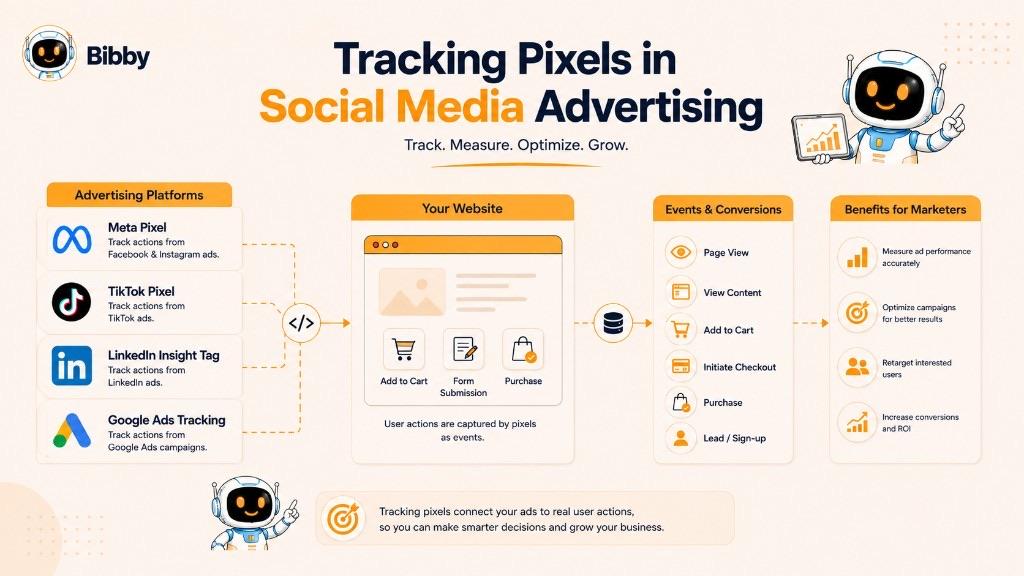
Tracking pixels and related website tracking technologies play an important role in social media advertising. They can help advertisers understand what happens after someone interacts with an advertisement and visits a website.
A social media platform can tell an advertiser that an advertisement received impressions, clicks, or other platform-level interactions. Website tracking can provide additional signals about what happened after the visitor left the social platform.
For example:
Social Media Ad → Website Visit → Product View → Add to Cart → Purchase
Why Do Social Media Advertisers Use Tracking Pixels?
Social media advertising is not only about generating clicks. Advertisers often want to know whether those clicks resulted in valuable actions. Tracking pixels and related event-tracking technologies can help with conversion tracking, website activity measurement, retargeting, audience building, campaign optimization, advertising attribution, and conversion reporting.
An advertiser might discover that one campaign generates many clicks but few purchases, while another generates fewer clicks but substantially more conversions. That difference can be difficult to understand from social platform engagement metrics alone.
Meta Pixel
Meta Pixel is the commonly used name for Meta's website-based tracking technology associated with advertising measurement and event tracking across its advertising ecosystem. Advertisers can configure website events to measure actions such as page views, product views, add-to-cart activity, lead submissions, purchases, and other configured conversions. Although it is called a "pixel," modern implementations are not limited to a traditional invisible image.
TikTok Pixel
TikTok Pixel is TikTok's website tracking technology used to help advertisers measure activity and conversions that occur on their websites after users interact with TikTok advertising. Depending on the implementation, advertisers can configure events associated with website visits, product interactions, lead generation, add-to-cart activity, and purchases.
LinkedIn Insight Tag
LinkedIn Insight Tag is LinkedIn's website tracking technology used by advertisers and businesses to measure website activity associated with LinkedIn campaigns. It can support capabilities such as conversion tracking, website audience insights, retargeting, and campaign measurement.
Google Ads Tracking
Google Ads uses several forms of conversion tracking and measurement technology. While marketers sometimes use the word "pixel" generically, Google's systems are better understood in terms of Google tags, conversion tracking, event tracking, and related measurement technologies.
How Social Media Pixel Tracking Works
A simplified social advertising workflow looks like this:
- Advertiser creates an advertisement promoting a product, service, article, or other offer.
- User interacts with the advertisement and clicks through to the advertiser's website.
- Website tracking technology records configured events when the configured conditions are met.
- Event data is transmitted to the relevant advertising or analytics infrastructure.
- The platform processes the event for reporting, attribution, audience functions, or campaign optimization, depending on its capabilities.
- The advertiser analyzes performance across campaigns, audiences, advertisements, and conversions.
Social Media Engagement vs. Website Conversion
One of the most important reasons marketers use tracking pixels is that engagement does not necessarily equal conversion.
Consider two social media campaigns.
Campaign A: 100,000 impressions, 5,000 clicks, 100 purchases
Campaign B: 60,000 impressions, 2,500 clicks, 180 purchases
If the marketer only looks at clicks, Campaign A appears stronger. If the marketer measures purchases, Campaign B may be more valuable. Website conversion tracking can provide the additional data needed to understand this difference.
Tracking Pixels in a Social Media Marketing Workflow
Tracking pixels are therefore best viewed as one part of a broader social media marketing system:
Content Creation → Social Media Publishing → Audience Engagement → Website Traffic → Event Tracking → Conversion Measurement → Campaign Optimization
Tools such as Bibby can help manage the publishing side of this workflow by allowing marketers to create content, generate captions, schedule posts, and publish different formats across supported social platforms.
Tracking technology addresses a different part of the journey: measuring what happens after social media activity leads people to a website.
Together, these systems help marketers move from simply publishing content to understanding the relationship between social media activity, website behavior, and business outcomes.
How Tracking Pixels Enable Retargeting
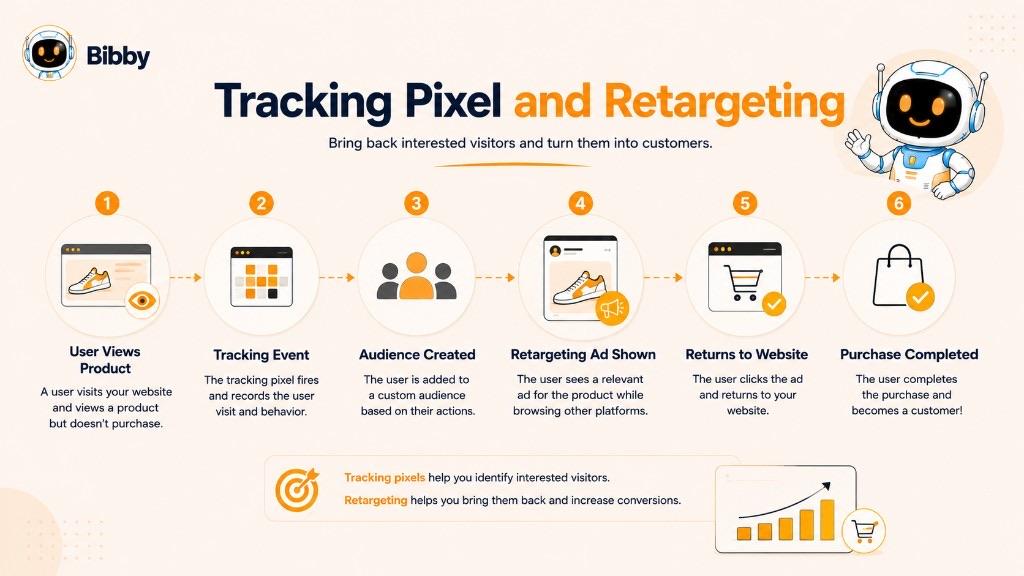
Retargeting is a digital advertising strategy that allows businesses to reach people who have previously interacted with their website, products, or digital content. Tracking pixels and related event-tracking technologies can provide the signals that advertising platforms use to identify or build eligible retargeting audiences.
The basic idea is simple:
Someone visits your website → Their relevant activity is recorded → An eligible audience is created → You can reach that audience with another campaign
How Pixel-Based Retargeting Works
A typical retargeting journey can look like this:
- User interacts with an advertisement.
- User visits the website.
- A tracking event is triggered (for example, a page view or product view).
- The platform receives the event, subject to the implementation, available signals, and applicable privacy controls.
- The visitor may become part of an eligible audience.
- The advertiser creates a retargeting campaign.
For example:
Product Viewer → No Purchase → Retargeting Audience → Follow-Up Ad
Retargeting can become more specific when different website events are configured, such as cart-abandonment retargeting based on add-to-cart without purchase. Marketers may also distinguish visitors by page, such as pricing page visitors versus blog visitors.
Tracking events can also be useful for audience exclusion: purchasers might be excluded from the same acquisition campaign and shown a different advertisement instead.
Pixel Retargeting vs. Remarketing
The terms retargeting and remarketing are often used interchangeably, although some platforms and marketers use them differently. In general, both refer to marketing strategies designed to reconnect with people who have previously interacted with a business or its digital content.
Therefore, retargeting is a marketing strategy, while a tracking pixel is one possible measurement and audience signal mechanism supporting that strategy.
Do Tracking Pixels Automatically Retarget Users?
No.
A tracking pixel does not automatically mean that someone will see another advertisement. The pixel or tracking mechanism can provide an event signal. The advertising platform, campaign configuration, audience rules, eligibility requirements, and available targeting options determine what happens next.
A visitor may generate a tracking event but still not receive a retargeting advertisement because of audience size requirements, campaign settings, privacy choices, platform rules, browser restrictions, or other factors.
Limitations of Pixel-Based Retargeting
Pixel-based retargeting is not perfectly reliable. Audience collection can be affected by ad blockers, browser tracking restrictions, consent choices, privacy settings, cookie limitations, incorrect implementation, platform policies, insufficient audience size, cross-device behavior, and incomplete event collection.
Modern retargeting increasingly relies on more than traditional browser-based pixels. Depending on the advertising platform and business setup, marketers may combine browser events, first-party data, server-side events, conversion APIs, and customer data.
In Simple Terms
Tracking Pixel = Measurement Signal
Retargeting = Marketing Strategy
Advertising Platform = Audience and Campaign Infrastructure
Together, these components can help marketers turn previous website interactions into more relevant follow-up advertising.
Tracking Pixels for Conversion Tracking
Conversion tracking is the process of measuring whether users complete a desired action after interacting with a marketing campaign. Tracking pixels and related event-tracking technologies can help record these actions and send conversion signals to analytics or advertising platforms.
A website visit tells a marketer that someone arrived. A conversion event provides a deeper signal by showing that the visitor completed an action that matters to the business.
What Is a Conversion?
A conversion is a completed action that represents a desired outcome for a business. The definition depends on the business and campaign objective: a product purchase for ecommerce, a demo request for B2B, a free-trial registration for SaaS, or a newsletter signup for a content business.
A tracking pixel does not determine what counts as a conversion. The business or advertising platform defines the desired event and configures the tracking system to measure it.
How Tracking Pixels Measure Conversions
A simplified conversion-tracking workflow looks like this:
- User interacts with marketing content.
- User reaches the website.
- Tracking technology records website activity.
- User completes the desired action.
- Conversion event is triggered.
- Platform processes the event for reporting, measurement, attribution, audience functions, or campaign optimization where supported.
Conversion Tracking vs. Click Tracking
Click tracking measures an interaction with an advertisement, link, button, or other clickable element.
Conversion tracking measures whether the user completes a desired outcome.
For example:
10,000 Ad Impressions → 500 Ad Clicks → 200 Website Visitors → 50 Add-to-Cart Events → 15 Purchases
The 500 clicks and 15 purchases tell very different stories. A campaign can have a high click-through rate but a low conversion rate.
Tracking Pixels and Conversion Attribution
Tracking pixels can provide signals that contribute to conversion attribution, which attempts to connect conversions with marketing interactions. Attribution is not necessarily a perfect representation of causality. A tracking pixel can provide an event signal, but determining which marketing activity deserves credit involves additional rules and measurement systems.
Why Conversion Data Is Not Always Perfect
Tracking pixels cannot guarantee complete conversion measurement. Conversion data can be affected by ad blockers, browser privacy restrictions, consent choices, incorrect event configuration, duplicate events, missing event parameters, tracking failures, cross-device activity, platform attribution rules, and delayed or incomplete data.
Marketers should treat pixel-based conversion reporting as measurement data with limitations, rather than an absolute record of every conversion.
Tracking Pixels and Server-Side Conversion Tracking
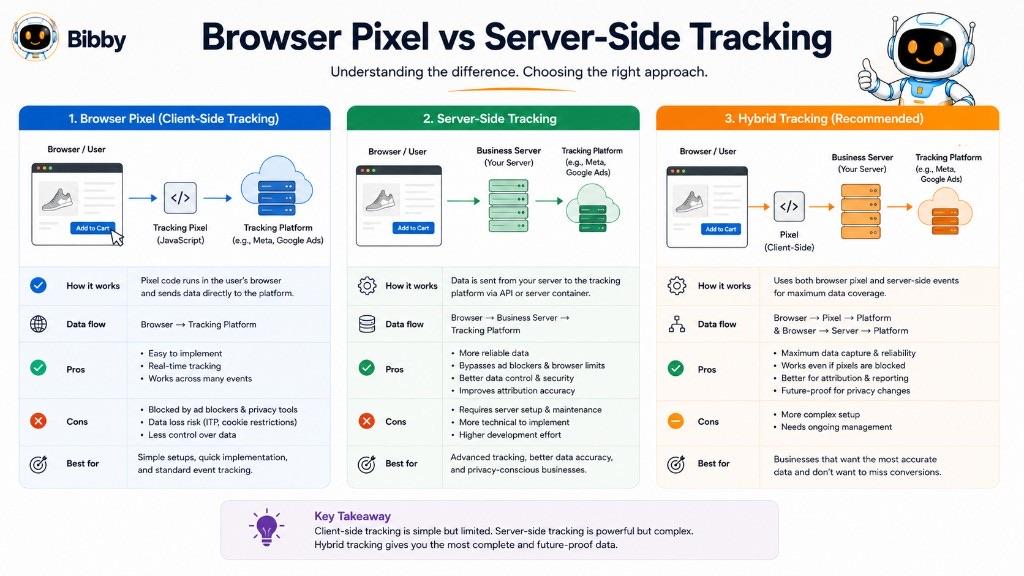
Modern conversion measurement increasingly combines browser-based and server-side approaches. A browser-based pixel can capture an event when the visitor interacts with a website. A server-side implementation can send an event directly from the business's server when a transaction or other event is confirmed. Using multiple event sources can potentially improve measurement reliability, although it requires careful implementation to avoid duplicate conversions.
In Simple Terms
Tracking Pixel = Records the Event
Conversion = Desired Action
Conversion Tracking = Measures Whether the Desired Action Happened
Attribution = Helps Connect the Action With Marketing Activity
Together, these concepts allow marketers to move from measuring attention and clicks to measuring actual marketing outcomes.
How to Add a Tracking Pixel to a Website
Adding a tracking pixel to a website generally involves creating or obtaining the tracking code from an analytics or advertising platform, placing it on the appropriate website pages, configuring the events you want to measure, and testing the implementation.
The exact installation process depends on the platform. The basic process is:
Create Tracking Source → Add Tracking Code → Configure Events → Verify Installation → Test Events
1. Choose the Tracking Platform
First, determine which platform you want to use for tracking: measuring website traffic, tracking advertising conversions, building retargeting audiences, measuring lead generation, tracking ecommerce purchases, or connecting website activity with marketing campaigns.
A business may also use separate analytics and advertising systems for different measurement purposes.
2. Create or Retrieve the Tracking Code
The selected platform generally provides instructions or code for connecting the website with its measurement system. Historically, this might have been a small image URL. Modern implementations are more commonly based on JavaScript tags, event code, APIs, or other tracking mechanisms.
The code or configuration should come directly from the relevant platform rather than being copied from an unrelated website.
3. Add the Tracking Code to the Website
Common approaches include:
#### Add the Code Directly to the Website
A developer can add the required tracking code to the site's HTML or application code. For site-wide tracking, the implementation may be placed in a common template.
#### Use a Tag Management System
A tag management system can deploy and manage tracking technologies without manually editing every page:
Website → Tag Manager → Tracking Tags → Analytics/Advertising Platforms
#### Use a CMS, Website, or Ecommerce Integration
Many content management systems and ecommerce platforms provide integrations that simplify installation, sometimes including events such as product views, add to cart, checkout, and purchase.
4. Configure the Events You Want to Track
Installing the base tracking technology is only part of the process. The business also needs to determine which actions should count as events or conversions.
For example, an ecommerce website may configure:
Page View → Product View → Add to Cart → Checkout → Purchase
A lead-generation website might use:
Page View → Form Submission → Lead
5. Place Conversion Tracking Where the Action Happens
Some events occur on specific pages or after specific actions. A purchase conversion may be recorded after a successful transaction rather than simply when someone visits the product page. The implementation should distinguish between visitor viewed the page and visitor completed the desired action.
6. Configure Relevant Event Parameters
Depending on the tracking platform, events may include additional parameters such as product, category, transaction value, currency, quantity, or order information. Only information that is necessary and appropriate for the intended measurement purpose should be configured.
7. Check the Website Installation and Test Events
After installing the tracking technology, verify that the code or integration is actually present where it should be. Testing should confirm that the event fires, the correct event is recorded, the correct page or action triggers it, important parameters are populated correctly, the event is not duplicated, and the event reaches the intended platform.
Should a Tracking Pixel Be Installed on Every Page?
There is no universal rule that every tracking implementation must be installed on every page. A site-wide tracking mechanism may be appropriate when a business wants to measure general website activity. Specific conversion events, however, may need to be configured only when particular actions occur.
What Happens If the Pixel Is Installed Incorrectly?
An incorrect implementation can produce misleading or incomplete data: events not firing, events firing multiple times, conversions being counted incorrectly, events firing on the wrong page, missing event parameters, incorrect tracking IDs, conflicting implementations, or consent settings preventing tracking.
For example, if a purchase event fires every time someone refreshes a confirmation page, the platform could potentially receive multiple purchase events for one transaction unless the implementation includes appropriate safeguards.
Privacy and Consent Considerations
Before adding tracking technology, businesses should consider applicable privacy and consent requirements. A business should not assume that because a tracking platform provides installation code, it can automatically be deployed without considering privacy requirements. This page is not legal advice.
Modern Alternatives and Complementary Methods
A website does not necessarily need to rely exclusively on a traditional browser-based tracking pixel. Modern measurement systems can also use JavaScript event tracking, tag management, first-party data, server-side tracking, conversion APIs, analytics platforms, and ecommerce integrations.
The Simple Installation Checklist
Before considering a tracking pixel implementation complete, check:
✓ Correct platform selected
✓ Correct tracking code or integration used
✓ Tracking installed on the intended pages
✓ Important events configured
✓ Conversion events defined correctly
✓ Event parameters verified
✓ Test events completed
✓ Duplicate events checked
✓ Privacy and consent requirements reviewed
✓ Platform diagnostics checked
The goal is not simply to make a tracking pixel "work." The goal is to create a tracking implementation that produces relevant, reliable, and appropriately collected event data for the marketing objective.
How to Check if a Tracking Pixel Is Working
Installing a tracking pixel or tracking tag does not necessarily mean it is collecting data correctly. A pixel can be installed on the wrong page, configured for the wrong event, fire multiple times, or fail to send data altogether.
A basic testing process looks like this:
Trigger an Action → Check the Event → Verify the Data → Test the Conversion → Check for Duplicates
1. Visit the Page Where the Pixel Is Installed
Start by opening the webpage where the tracking technology should operate. For an event-specific implementation, visit the page or experience where the event should occur—for example, a product page for a product-view event, a lead form for a lead event, or checkout confirmation for a purchase event.
2. Trigger the Event Yourself
Perform the action that should generate the tracking event. This gives you a known action against which you can compare the tracking platform's data.
3. Check the Platform's Testing or Diagnostics Tools
Many advertising and analytics platforms provide tools for checking whether events are being received. The platform's own diagnostics should generally be treated as the primary source for confirming whether it is receiving the event.
4. Verify the Correct Event and Parameters
A tracking implementation can technically be working while still recording the wrong event. You may expect a purchase but the platform receives only a page view. Review event name, trigger point, required parameters, and conversion configuration. Incorrect parameters can produce misleading campaign reporting even when the basic event is being received.
5. Check for Duplicate Events
Duplicate events are a common tracking problem. Suppose a customer completes one purchase, but the tracking system sends the purchase event twice. This can inflate conversion numbers. Duplicate events can occur when the same tracking code is installed more than once, browser and server events are both sent without deduplication, a confirmation page reload triggers another purchase event, or multiple plugins send the same event.
6. Test the Conversion Path
If the tracking pixel is being used for conversion tracking, test the complete customer journey rather than only the homepage.
Common Tracking Pixel Problems
A tracking pixel may appear to be installed correctly but still fail to collect the expected data:
- Pixel not firing because of incorrect installation, JavaScript errors, incorrect event configuration, consent restrictions, or browser restrictions.
- Pixel fires on the wrong page, such as a purchase event on a product page.
- Pixel fires multiple times, inflating reported conversions.
- Missing event parameters, such as a purchase without transaction value or currency.
- Consent prevents the event, which can be expected behavior rather than a technical error.
- Ad blockers or browser privacy restrictions prevent tracking in some environments.
How to Check a Tracking Pixel Without Making a Real Purchase
For ecommerce websites, businesses should avoid unnecessarily creating real transactions simply to test tracking. Where supported, use the platform's test-event functionality or a controlled testing environment.
What If the Pixel Works but Data Is Missing?
Sometimes a pixel is working correctly even though the reported numbers are lower than expected. Potential causes include ad blockers, browser privacy settings, consent choices, network restrictions, cross-device activity, platform attribution rules, event processing delays, incomplete implementation, and differences between website analytics and advertising-platform reporting.
A difference between website traffic and tracked events does not automatically mean that the pixel is broken.
In Simple Terms
A tracking pixel is working correctly when the right event fires at the right time, reaches the intended platform, contains the expected information, and is counted correctly.
The better question is not merely “Is my pixel installed?” It is:
“Is my tracking system accurately recording the events I actually want to measure?”
Common Tracking Pixel Problems and How to Fix Them
A tracking pixel can be installed but still fail to produce accurate marketing data. The most important rule is to diagnose the specific event that is failing rather than assuming the entire tracking system is broken.
1. Tracking Pixel Is Not Firing
Possible causes include incorrect tracking code, code installed in the wrong location, JavaScript errors, incorrect platform ID, tag configuration problems, consent restrictions, browser privacy controls, and ad-blocking software.
Start by checking whether the base tracking implementation is actually present on the relevant page. Then use the platform's official testing or diagnostics tool. If the base event works but a specific conversion does not, investigate the conversion event separately.
2. Pixel Is Installed but No Conversions Are Reported
Website traffic may appear normal while the advertising platform reports zero conversions because the conversion event was never configured correctly. Test the complete conversion journey and confirm that the specific conversion event is triggered when the desired action occurs.
3. Wrong Event Is Being Recorded
Check event name, trigger condition, page URL, button or form trigger, event configuration, and conversion settings. The event should correspond to the actual business action.
4. Pixel Fires Multiple Times
Duplicate events can distort conversion counts, revenue reporting, return-on-ad-spend calculations, and campaign optimization. Check whether the tracking code is installed more than once, multiple plugins are sending the same event, a tag manager contains duplicate tags, browser and server events are being sent without deduplication, or page refreshes trigger the conversion again.
5. Conversion Value or Currency Is Incorrect
For ecommerce campaigns, marketers may need to pass the transaction value and currency associated with a purchase. Check event parameters and confirm that the correct value and currency correspond to the transaction being reported.
6. Pixel Is Installed More Than Once
A tracking pixel can accidentally be added through website code, a plugin, and a tag manager at the same time. Audit every location where tracking has been implemented and remove redundant implementations where appropriate.
7. Tracking Works in One Browser but Not Another
Tracking behavior can differ between browsers because of privacy settings, tracking prevention, extensions, or other technical differences. Test in more than one environment. Differences caused by privacy protections may be expected behavior rather than an implementation error.
8. Ad Blockers Are Blocking the Pixel
Some browser extensions and privacy tools can block known tracking scripts, requests, or domains. There is no universal technical fix that guarantees a browser-based tracking pixel will operate when a user or browser intentionally blocks it. Businesses should account for measurement gaps and consider privacy-conscious first-party and server-side measurement approaches where appropriate. Do not try to defeat a user's privacy choices.
9. Consent Settings Prevent Tracking
A consent management system may prevent tracking technologies from operating until the visitor gives the required permission. That may be the intended behavior. Do not disable privacy controls simply to increase the number of tracked events.
10. Pixel Is Firing on the Wrong Page
Identify the exact action that represents the conversion and configure the event around that action. For purchases, the implementation should generally distinguish a successful transaction from simply visiting a checkout page.
11. Events Are Missing From the Advertising Platform
Possible causes include incorrect destination configuration, network failures, platform processing delays, incorrect account or tracking ID, event filtering, consent restrictions, and browser limitations. A useful diagnostic sequence is:
Website Action → Browser Event → Network Request → Platform Receipt → Platform Reporting
12. Website Analytics and Advertising Data Do Not Match
It is normal for different platforms to report different numbers. Different platforms may use different definitions, attribution models, session rules, reporting windows, filtering, consent behavior, and identity methods. The goal should be to understand why the numbers differ, not to assume that one platform must exactly match another.
13. Purchase Events Are Not Deduplicated
Businesses using both browser-side and server-side tracking need to pay particular attention to deduplication. Use the platform's supported deduplication mechanism and ensure the relevant event identifiers or matching information are implemented correctly.
14. Tracking Data Is Delayed
Some platforms do not display events instantly in every reporting interface. Use the platform's real-time or testing interface where available, then allow appropriate processing time before judging the regular reporting interface.
Tracking Pixel Troubleshooting Checklist
When a pixel is not working, follow this sequence:
Step 1: Confirm the correct tracking platform and ID.
Step 2: Confirm the tracking implementation exists on the intended page.
Step 3: Trigger the event manually.
Step 4: Check whether the event fires.
Step 5: Check whether the platform receives it.
Step 6: Verify the event name.
Step 7: Verify event parameters.
Step 8: Check for duplicate events.
Step 9: Test consent behavior.
Step 10: Test relevant browser and device environments.
Step 11: Compare website and platform reporting carefully.
Step 12: Check the platform's official diagnostics for additional errors.
The Most Important Diagnostic Question
When tracking fails, break the system into stages:
Is the code installed? → Is the tag executing? → Is the event firing? → Is the request being sent? → Is the platform receiving the event? → Is the platform processing the event correctly? → Is the event appearing correctly in reporting?
Most tracking pixel problems fall into one of four categories:
Installation: The tracking technology is not correctly implemented.
Configuration: The wrong event or parameters are being sent.
Environment: Browser, privacy, consent, or network conditions prevent collection.
Reporting: The event is collected but appears differently because of processing or attribution rules.
Tracking Pixels and Privacy: What You Need to Know
Tracking pixels can provide valuable marketing and analytics data, but they also raise important privacy considerations because they may collect or transmit information about website interactions.
The privacy impact of a tracking pixel depends on what it collects, why it is collected, where it is sent, how long it is retained, whether it is combined with other information, and the laws and policies that apply to the business and its users.
A tracking pixel is therefore not automatically "good" or "bad" for privacy. Its impact depends largely on how the tracking technology is designed and used. This section is educational, not legal advice. Businesses should obtain appropriate legal advice when determining their compliance requirements.
What Information Can a Tracking Pixel Collect?
Depending on the technology and platform, an event may include the webpage or resource involved, the time an event occurred, browser or device-related information, referrer information, advertising or campaign identifiers, event information, product or transaction information, IP-related information, and other parameters configured by the website or platform.
A tracking pixel does not automatically have access to every piece of information on a visitor's device.
Tracking Pixels and Personal Data
One of the most important privacy questions is whether the tracking system processes personal data or personal information under the laws that apply to the organization. Businesses should understand exactly what information their tracking implementation sends rather than assuming that a tracking pixel only collects anonymous statistics.
A tracking pixel does not inherently know a person's name simply because it fires. However, tracking systems can sometimes receive identifiers or other information that may allow activity to be associated with a browser, device, account, or other identifier. A better question than “Does the pixel know the user's name?” is “What information is collected, what can it be linked to, and how is it used?”
First-Party vs. Third-Party Tracking
A first-party technology generally operates in the context of the website the user is visiting. A third-party technology involves a service or domain associated with another organization. Browsers and privacy tools increasingly place restrictions on certain forms of third-party tracking.
Tracking Pixels and User Consent
Depending on the jurisdiction, technology, and purpose of tracking, a business may need to obtain user consent before deploying certain tracking technologies. Consent requirements can vary significantly. Businesses should not assume that one consent approach works everywhere.
Adding a cookie banner to a website does not automatically make every tracking implementation compliant. If a particular tracking technology should not operate before consent, simply displaying a banner while allowing the tracker to fire immediately does not necessarily solve the underlying issue.
Data Minimization and Sensitive Information
A useful privacy principle is data minimization: collect and process only the information that is reasonably necessary for the intended purpose. Marketers should be cautious about placing personal information directly into URLs, event parameters, page titles, custom tracking fields, or conversion metadata.
Businesses should not automatically assume that a piece of data is anonymous simply because a name or email address is not included.
Browser Privacy Changes, Ad Blockers, and Server-Side Tracking
Modern browsers increasingly limit certain forms of tracking. Ad blockers and privacy extensions can prevent some tracking scripts or requests from executing. Businesses should expect some measurement gaps rather than assuming that every website visitor will generate a corresponding tracking event.
Server-side tracking is sometimes presented as a solution to browser-based tracking limitations. It can provide additional measurement capabilities, but it does not automatically remove privacy obligations. Moving an event from the browser to the server does not eliminate questions about what data is collected, why, where it is sent, whether consent is required, how long it is retained, who can access it, and which laws apply.
Questions Businesses Should Ask Before Installing a Tracking Pixel
- What exactly are we trying to measure?
- Which events are necessary?
- What information will each event transmit?
- Where will that information go?
- Who will have access to it?
- Does the implementation involve cookies or other identifiers?
- Is user consent required?
- How will consent choices affect tracking?
- How long will relevant data be retained?
- Are we accidentally sending unnecessary or sensitive information?
- How will users exercise applicable privacy rights?
- How will we monitor changes in browser and platform policies?
In Simple Terms
Track what you need, understand what you collect, respect user choices, and handle the resulting data responsibly.
Because privacy obligations vary by jurisdiction and implementation, businesses should rely on current legal and regulatory guidance for compliance decisions rather than assuming that one tracking setup is appropriate for every website or audience.
Are Tracking Pixels Still Relevant?
Yes. Tracking pixels are still relevant in modern digital marketing, but the meaning of "pixel" has evolved.
The original tracking pixel was essentially a tiny, often invisible image that generated a request when it loaded. Today, marketing platforms frequently use more sophisticated combinations of JavaScript tags, browser events, cookies, first-party data, server-side events, APIs, and conversion tracking systems.
Despite these technical changes, marketers still commonly use the term tracking pixel to describe website-based tracking technology used to measure advertising and conversion activity.
Why Tracking Pixels Are Still Used
Tracking pixels remain useful because marketers need to understand what happens after someone interacts with an advertisement or other marketing content. The social platform may provide information about the advertisement interaction, while website tracking can provide signals about subsequent website events.
Browser-Based Tracking Has Become More Challenging
Tracking pixels remain relevant, but marketers cannot assume that every website interaction will be captured. Modern browsers, privacy tools, extensions, consent systems, and network environments can restrict tracking. This does not make tracking pixels useless. It means marketers need to understand the limitations of the data they receive.
First-Party Data and Server-Side Tracking
As third-party tracking becomes more restricted, businesses are placing greater emphasis on first-party data—information a business collects directly through interactions with its own customers and users, subject to applicable privacy requirements.
Another important development is the growth of server-side tracking. Instead of relying entirely on the user's browser to send an event, a business can send certain events from its own server to an analytics or advertising platform. The implementation must be configured correctly to prevent the same transaction from being counted twice.
Are Tracking Pixels Becoming Obsolete?
Not exactly.
It is more accurate to say that traditional pixel-only tracking is becoming less sufficient for many modern marketing environments.
Tracking Pixel ≠ Outdated
Instead:
Tracking Pixel = One Component of Modern Measurement
The future of digital marketing measurement is likely to involve a combination of privacy-conscious tracking, first-party data, browser-based events, server-side measurement, conversion APIs, consent-aware implementations, improved attribution methods, and better event quality.
The underlying marketing requirement is unlikely to disappear: businesses still need to know whether their marketing activity produces meaningful results.
In Simple Terms
The modern approach is better represented as:
Pixel + Tags + First-Party Data + Server-Side Events + APIs + Analytics
The pixel may have changed its technical costume, but the marketing question remains the same:
What happened after someone interacted with my marketing?
Can Tracking Pixels Be Blocked?
Yes. Tracking pixels can be blocked or prevented from sending data by browsers, ad-blocking software, privacy extensions, network controls, consent settings, and other technologies.
This means a tracking pixel does not guarantee that every visitor or every website action will be recorded. A tracking platform may report 800 tracked visitors even though the website received more actual visitors because some users or environments prevented the tracking mechanism from operating.
How Are Tracking Pixels Blocked?
A simplified tracking journey is:
User Loads Website → Tracking Code Executes → Tracking Request Is Sent → Platform Receives Event
Blocking can happen at any of these stages. The website itself may continue working normally even though the tracking event is never recorded.
Ad blockers may maintain lists of known advertising and tracking domains, scripts, and requests. Privacy-focused browser extensions can restrict tracking scripts, third-party requests, cookies, known analytics services, advertising technologies, and cross-site tracking mechanisms. Modern web browsers increasingly provide built-in privacy protections. Cookie blocking can reduce tracking capability when a system relies partly on cookies. A visitor's consent choice can also prevent tracking. Corporate networks, security systems, DNS filters, and firewalls can prevent certain requests from reaching their destination. Mobile browsers and operating systems have introduced additional privacy controls.
Can a Tracking Pixel Be Blocked Without Breaking the Website?
Yes. A tracking pixel is generally separate from the core content that a visitor wants to access. A user can potentially block the tracking request while continuing to read an article, browse a website, view a product, add an item to a cart, or complete a purchase.
Business Transaction ≠ Marketing Tracking Event
A purchase can happen even when the advertising platform does not record the corresponding purchase event.
Does Blocking a Pixel Make Someone Anonymous?
Not necessarily. Blocking one tracking technology does not mean that all forms of measurement or data collection have stopped. A website may still collect information required for normal operation, analytics, security, account functionality, or other purposes through separate systems.
Can Marketers Prevent Pixels From Being Blocked?
There is no universal way to guarantee that a browser-based tracking pixel cannot be blocked. Instead of attempting to defeat a user's privacy choices, marketers can improve measurement resilience through legitimate approaches such as first-party data, server-side event tracking, conversion APIs, privacy-conscious analytics, proper consent management, accurate event configuration, and reliable first-party customer records.
Why Blocked Pixels Matter for Advertising Reports
Blocked tracking can cause marketers to underestimate campaign performance. Suppose an advertising campaign generates 100 actual purchases but only 82 purchases are reported by the advertising platform. The difference may have several possible causes, including blocked tracking, consent restrictions, attribution differences, cross-device activity, technical implementation issues, reporting delays, and platform measurement rules.
The missing conversions should not automatically be attributed to one specific cause. Marketers should compare multiple data sources when evaluating campaign performance.
In Simple Terms
When a pixel is blocked, the underlying website action can still happen. What changes is that the corresponding tracking event may not reach the advertising or analytics platform.
A missing tracking event does not necessarily mean a missing customer or conversion.
Modern marketers should therefore treat pixel data as one measurement signal within a broader, privacy-conscious measurement strategy.
Advantages and Limitations of Tracking Pixels
Tracking pixels remain widely used because they give marketers a practical way to measure website activity, conversions, and advertising interactions. However, they are not a perfect measurement system.
Advantages of Tracking Pixels
- Track website activity such as page views, product views, form submissions, add-to-cart actions, and purchases.
- Measure conversions so marketers can evaluate outcomes rather than clicks alone.
- Support retargeting where platforms, signals, and privacy requirements allow.
- Improve advertising optimization by providing conversion signals where the platform supports such optimization.
- Measure marketing funnels from ad impression through purchase.
- Connect website activity with marketing campaigns.
- Relatively accessible to implement through website integrations, plugins, tag managers, ecommerce integrations, or direct code.
- Works with many marketing platforms across social, search, display, email, ecommerce, analytics, and lead generation.
Limitations of Tracking Pixels
- Tracking can be blocked by ad blockers, privacy extensions, browser settings, network-level controls, and tracking prevention.
- Consent can limit data collection.
- Browser privacy changes can reduce tracking.
- Tracking data is not always complete.
- Incorrect configuration can produce bad data, such as one purchase recorded as three events.
- Duplicate events can distort reporting.
- Attribution is not the same as causation.
- Cross-device journeys are difficult to measure perfectly.
- Requires ongoing maintenance when websites, checkouts, CMS systems, plugins, or consent systems change.
- Privacy responsibilities remain. The fact that a tracking platform provides a pixel does not automatically determine whether a particular implementation is appropriate for every website or jurisdiction.
Tracking Pixel Advantages vs. Limitations
| Advantages | Limitations |
|---|---|
| Measures website events | Can be blocked |
| Supports conversion tracking | Consent may restrict tracking |
| Can support retargeting | Browser privacy can reduce measurement |
| Helps analyze marketing funnels | Data may be incomplete |
| Supports campaign optimization | Incorrect setup can produce inaccurate data |
| Relatively accessible to implement | Requires ongoing maintenance |
| Works with many marketing platforms | Duplicate events can distort reporting |
| Helps connect campaigns with website activity | Attribution does not prove causation |
| Can provide valuable event signals | Cross-device journeys remain difficult |
| Can complement server-side tracking | Privacy requirements must be considered |
When a Pixel Alone May Not Be Enough
A pixel-only approach may be insufficient when a business has significant browser tracking loss, complex ecommerce transactions, multiple conversion sources, server-side customer data, offline conversions, CRM-based sales processes, complex cross-device journeys, or strict measurement requirements.
In these situations, marketers may benefit from combining browser tracking with server-side events, first-party data, analytics, and CRM information.
In Simple Terms
A tracking pixel can be a valuable measurement tool, but it should not be treated as a perfect record of everything every website visitor does.
Tracking Pixels and Social Media Automation
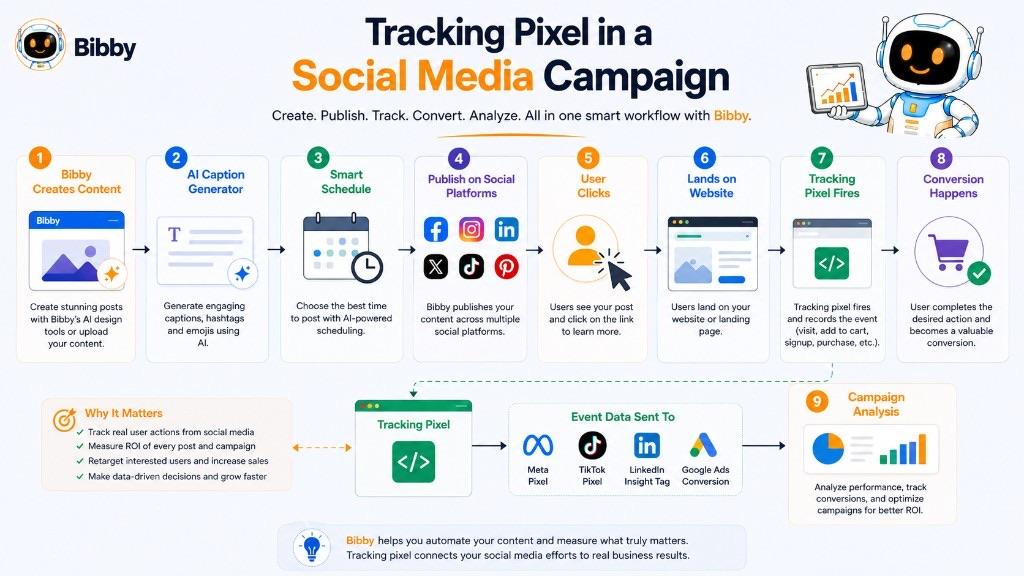
Tracking pixels and social media automation solve different parts of the marketing workflow. Social media automation helps businesses create, organize, schedule, and publish content, while tracking pixels help measure what users do after interacting with that content and reaching a website.
A simplified workflow looks like:
Create Content → Schedule Content → Publish → Generate Traffic → Track Website Activity → Measure Conversions
What Does Social Media Automation Do?
A social media automation workflow can include creating social media content, generating captions, preparing images and videos, creating carousels, scheduling posts, publishing content, managing multiple social platforms, organizing campaigns, and maintaining a consistent publishing schedule.
The automation platform handles the content workflow and distribution.
What Does a Tracking Pixel Do?
Once a user interacts with social media content and reaches a website, tracking technology can help measure what happens there. The social media automation system manages the first part of this journey. The tracking implementation helps measure the website activity that follows.
Engagement Is Not the Same as Conversion
Social media platforms provide metrics such as impressions, reach, likes, comments, shares, saves, video views, and clicks. These metrics can be useful for understanding content performance. Tracking pixels and conversion events can provide additional measurement signals for downstream outcomes such as leads, purchases, or revenue.
Example: Social Media Campaign With Tracking
Imagine a business promoting an online course:
Bibby → Create Course Promotion → Generate Caption → Schedule Across Social Platforms → User Sees Post → User Clicks Link → Course Landing Page → Tracking Event → Registration → Purchase
The social media automation layer handles publishing. The website tracking layer measures relevant website activity. The payment or backend system confirms the actual transaction.
Tracking Pixels and AI Social Media Automation
AI-powered social media automation can make content production and scheduling significantly more efficient. For example, Bibby can support a workflow where a marketer uploads an image or generates one with AI, chooses a posting style, generates AI captions, schedules content, and publishes across selected platforms.
The tracking system can then operate independently on the website side to measure relevant downstream events.
AI Automation → Creates and distributes content
Tracking → Measures website behavior and conversions
Bibby and Tracking Pixels
Bibby is designed around simplifying the social media management workflow. Users can use the chat interface to create a brand kit, create a campaign, create posts, regenerate captions, manage content, and plan social media activity.
The role of tracking pixels is different. A tracking pixel does not replace a social media automation platform. It provides measurement signals that can help a marketer understand what happens after social media users reach a website. Bibby does not install pixels, run ads, or replace advertising analytics.
Tracking Pixels Do Not Track Social Media Engagement Automatically
A common misconception is that placing a tracking pixel on a website automatically tracks everything users do on Facebook, Instagram, LinkedIn, YouTube, or TikTok.
It does not.
A website tracking implementation primarily operates within the environment where it has been deployed. Social platforms have their own analytics and advertising measurement systems.
Social Platform Analytics → Measures Social Activity
Website Tracking → Measures Configured Website Activity
Tracking Pixels and UTM Parameters
Tracking pixels can also be used alongside UTM parameters—tags added to URLs to help analytics systems identify the source and campaign associated with website traffic.
UTM parameters help answer: Where did the visitor come from?
Tracking events help answer: What did the visitor do?
Tracking Pixels Are Part of the Measurement Layer
Content Layer: What are we publishing?
Automation Layer: When and where are we publishing it?
Traffic Layer: Where are users coming from?
Tracking Layer: What do users do after arriving?
Conversion Layer: What desired actions do they complete?
Business Layer: What revenue, leads, or customer outcomes result?
Bibby primarily helps streamline the content and automation layers, while tracking technologies contribute to the tracking and measurement layers.
In Simple Terms
Social Media Automation: Creates, organizes, schedules, and publishes social media content.
Tracking Pixel: Measures configured website activity and marketing events.
For a modern social media campaign, the complete picture is therefore:
Create → Automate → Publish → Attract → Track → Convert → Analyze → Improve
Common Tracking Pixel Mistakes
A tracking pixel can provide valuable marketing data, but an incorrect implementation can produce misleading reports, duplicate conversions, missing events, or inaccurate campaign optimization.
Many tracking problems are not caused by the pixel technology itself. They come from incorrect installation, poor event configuration, duplicate tracking, website changes, or a misunderstanding of what the tracking data actually represents.
1. Installing the Pixel Incorrectly
If the code is missing from important pages, incorrectly implemented, or prevented from executing, the expected events may never reach the tracking platform. Always verify that the tracking implementation exists where the relevant events are supposed to occur.
2. Installing the Same Pixel More Than Once
Duplicate installation can cause duplicate events through direct website code, a plugin, a tag manager, and an ecommerce integration at the same time. A pixel should generally have a clearly defined installation method.
3. Creating Duplicate Conversion Events
Even when the base pixel is installed correctly, conversion events can be duplicated when browser and server events both represent the same transaction without deduplication.
4. Tracking the Wrong Event or the Wrong Page
A campaign designed to generate purchases should not rely exclusively on a generic page-view event. Tracking should be tied to a reliable business event rather than assumptions about URLs.
5. Forgetting Important Conversion Events
Some marketers track website visits but fail to track the actions that actually matter to the business. The events selected should reflect the actual marketing funnel.
6. Tracking Everything Without a Clear Purpose
More tracking does not automatically mean better measurement. An effective tracking strategy should prioritize events that answer meaningful business questions: Business Goal → Important User Action → Relevant Event.
7. Sending Unnecessary Data
Tracking implementations can sometimes be configured to send more information than is necessary. Collect and transmit what is necessary for the intended purpose.
8. Ignoring Consent Requirements
Depending on the jurisdiction, technology, purpose, and circumstances, certain tracking may require user consent or other privacy controls. Do not treat tracking as purely a technical implementation.
9. Assuming Every Visitor Will Be Tracked
A tracking pixel does not guarantee 100% measurement. Actual website activity is not always equal to tracked activity. A difference between website analytics, advertising reports, and internal business records is not automatically evidence that one system is broken.
10. Assuming Pixel Data Is Perfect Attribution
Tracking provides measurement signals. It does not automatically answer every causal question about why someone purchased.
11. Ignoring UTM Parameters
Tracking pixels and event tracking can be more useful when combined with properly configured UTM parameters.
12. Not Testing After Installation or Website Changes
A pixel should not be considered finished simply because its code appears on the website. Website redesigns, checkout changes, CMS migrations, URL changes, plugin updates, and new consent systems can unintentionally break tracking. Test important conversion paths across desktop and mobile.
13. Mixing Different Tracking Systems Without Documentation
Businesses sometimes accumulate multiple analytics and advertising tools over time. A basic tracking inventory can prevent unnecessary complexity.
14. Optimizing Campaigns Against the Wrong Conversion
If the selected conversion does not represent meaningful business value, optimization can move in the wrong direction. The conversion event should align as closely as practical with the actual campaign objective.
15. Assuming Server-Side Tracking Fixes Everything
Server-side tracking can reduce reliance on browser execution, but it cannot fix incorrect event definitions, bad data, duplicate conversions, poor attribution, missing business events, privacy problems, or incorrect configuration.
16. Not Creating a Tracking Plan
One of the most effective ways to prevent tracking mistakes is to create a tracking plan before implementation:
| Event | When It Fires | Purpose | Important Data |
|---|---|---|---|
| Page View | Page loads | Measure website activity | Page information |
| Product View | Product is viewed | Measure product interest | Product information |
| Add to Cart | Item is added | Measure purchase intent | Product information |
| Lead | Form successfully submitted | Measure lead generation | Relevant lead event data |
| Purchase | Transaction completed | Measure conversion | Transaction information |
17. Not Having a Clear Source of Truth
Different platforms can report different numbers. Businesses should define which system is the source of truth for each business metric—for example, actual revenue from the order database, advertising performance from the advertising platform, and website behavior from the analytics platform.
A Better Tracking Pixel Checklist
Before considering a tracking implementation complete, verify:
- Pixel or tracking code is installed correctly
- Important pages are covered
- Important conversion events are configured
- Duplicate events are prevented
- Browser and server events are properly deduplicated where applicable
- Event parameters are accurate
- Unnecessary data is not being transmitted
- Applicable consent controls are implemented
- Desktop and mobile journeys have been tested
- Major conversion paths have been tested
- UTM parameters are configured where appropriate
- Tracking has been tested after website changes
- Reporting is monitored regularly
- Business outcomes are compared with platform reporting
- The tracking setup is documented
In Simple Terms
Most tracking pixel problems are not caused by the pixel itself. They come from poor implementation, incorrect events, duplicate tracking, missing conversions, privacy oversights, broken website integrations, or incorrect interpretation of the data.
The best tracking setup starts with a simple question:
“What business outcome do I need to measure?”
Then work backward:
Business Outcome → Conversion → Event → Tracking Implementation → Validation → Analysis
That approach produces much more useful data than simply installing a pixel and assuming the numbers will take care of themselves.
Key Takeaways
A tracking pixel is a measurement mechanism—historically a tiny image, now often a JavaScript tag or broader event system—that helps marketers record configured digital interactions.
- It can support conversion tracking, retargeting audiences, funnel analysis, and advertising optimization, subject to platform capabilities and privacy rules.
- It is not the same as a cookie, though the two can work together.
- It does not automatically track everything a visitor does, and it can be blocked.
- Social media automation and tracking solve different jobs: publishing versus website measurement.
Continue with related dictionary entries on retargeting, paid social, lookalike audiences, conversion rate, CPC, and CPM—or browse the social media dictionary. Then start a free Bibby trial to create, caption, and schedule content across your channels.