
A GIF, short for Graphics Interchange Format, is a popular image file format known for its ability to display short, looping animations. Unlike a standard static image, an animated GIF can combine multiple frames to create movement, making it a simple way to communicate reactions, ideas, demonstrations, and visual moments without requiring sound.
GIFs have become a familiar part of online communication and social media. You can find them in memes, reactions, product demonstrations, tutorials, marketing campaigns, and everyday conversations. Their short, repeatable format makes them especially useful when a few seconds of visual movement can say more than a static image.
For businesses and social media marketers, GIFs are another useful format for creating engaging visual content. They can be incorporated alongside images, carousels, videos, and other social media posts as part of a broader content strategy. Understanding what GIFs are, how they work, and when to use them can help you choose the right format for each piece of social media content.
In this article, you will learn:
- What GIF stands for and how the format works
- How GIFs differ from video and static images
- When GIFs are useful for social media marketing
What Does GIF Stand For?
GIF stands for Graphics Interchange Format. It is an image file format developed to store and display digital images, including simple animations made from a sequence of frames.
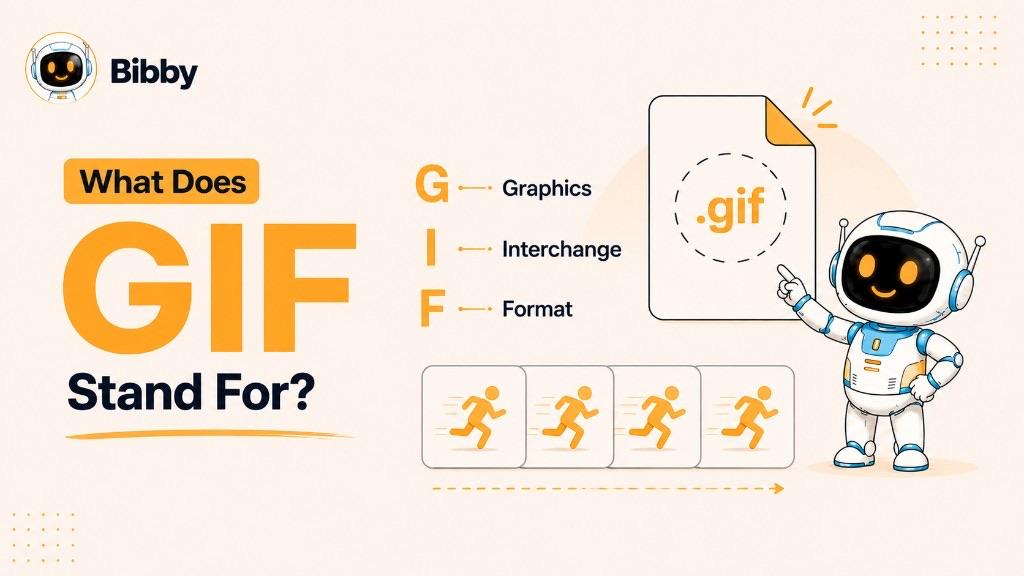
The format is commonly recognized by the .gif file extension. While GIFs can be used as static images, they are best known today for short animations that play repeatedly, often without requiring the viewer to press a play button.
GIFs are widely used across websites, messaging platforms, social media, digital marketing, and online communities. A short GIF can capture a reaction, demonstrate a product feature, explain a simple process, or add movement to otherwise static content.
In social media marketing, GIFs can be particularly useful when a brand wants to communicate something quickly and visually. They offer a middle ground between a static image and a full video, although they have limitations in areas such as color depth, file size, and audio support.
What Is a GIF?
A GIF is a digital image file that can contain either a single static image or a sequence of images displayed one after another to create a short animation. GIFs are most commonly associated with short, looping animations that play automatically when supported by the platform or website.
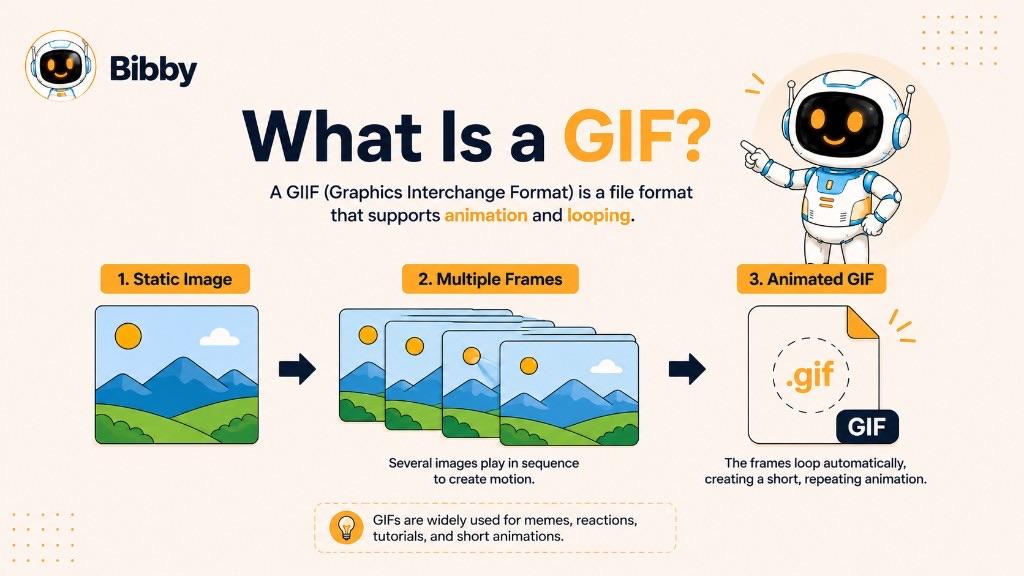
An animated GIF is essentially a series of individual frames packed into one file. When those frames are displayed in sequence, they create the appearance of movement. The animation can then repeat continuously, making GIFs useful for showing reactions, expressions, simple demonstrations, and short visual moments.
Unlike video, GIFs do not normally contain audio. They are also different from standard image formats because an animated GIF can contain multiple frames rather than just one. This makes GIFs a convenient option when a visual idea needs a little movement but does not require a full video.
GIFs have become deeply embedded in online communication. People use them in memes, conversations, customer communications, tutorials, product demonstrations, and social media content. Businesses can also use GIFs to make posts more expressive, demonstrate how something works, or capture attention with a brief animated visual.
For social media marketers, the value of a GIF comes from its simplicity. A few seconds of carefully chosen movement can communicate an emotion, action, or idea quickly without asking the audience to watch a longer video.
How Does a GIF Work?
An animated GIF works by storing multiple image frames inside a single GIF file. When the file is opened by a compatible browser, app, or platform, those frames are displayed one after another at a specific speed, creating the appearance of movement.
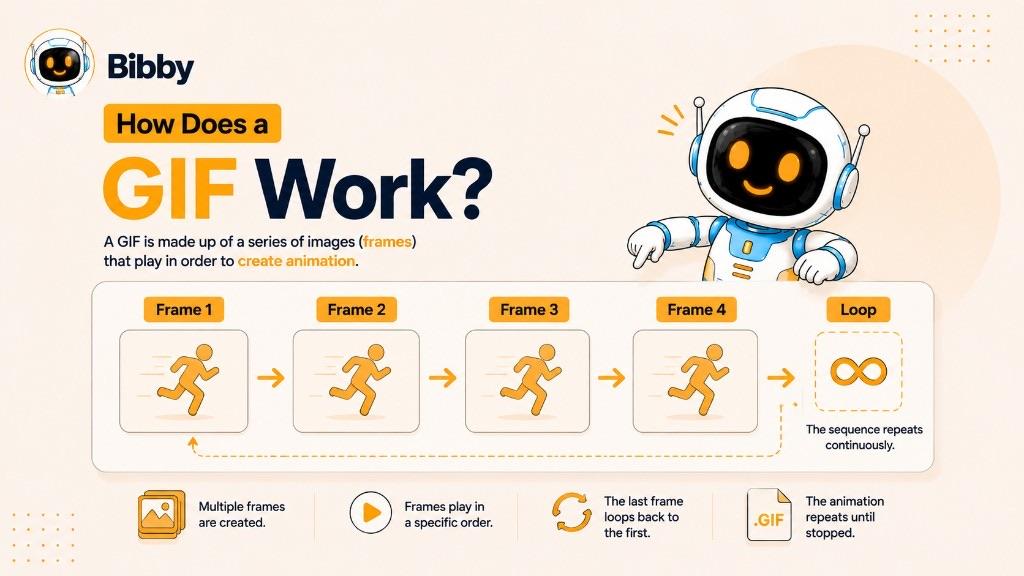
The process is fairly simple:
- Multiple frames are created: Each frame represents a different moment in the animation.
- Frames are stored in one file: The individual images are combined into a single GIF file.
- Frame timing is defined: The GIF determines how long each frame should remain visible.
- Frames play sequentially: The viewer sees the images rapidly change from one to the next.
- The animation repeats: GIFs can be configured to loop continuously or stop after a specified number of repetitions.
GIF Frames
The individual frames are the building blocks of an animated GIF. A simple GIF might contain only a handful of frames, while a more complex animation can contain many more. Generally, adding more frames can make movement smoother, but it can also increase the file size.
Frame-by-Frame Animation
GIF animation creates movement by showing slightly different images in sequence. For example, a GIF of a bouncing ball might show the ball at several different positions. When those frames play quickly one after another, the viewer perceives continuous motion.
GIF Looping
Looping is one of the features that made GIFs particularly popular online. An animation can restart automatically after reaching its final frame, allowing a short visual sequence to play repeatedly without requiring the viewer to press a play button.
GIF Compression and File Size
GIF uses lossless compression, meaning the compression process does not intentionally discard image information in the same way that lossy compression does. However, GIF has a limited color palette, which can affect visual quality. More complex animations with many frames can also result in relatively large files.
For this reason, GIFs are generally better suited to short, simple animations than long or highly detailed moving content. For longer, high-quality animations, modern video formats can often provide better compression and visual quality.
What Makes GIFs Different?
GIFs stand out because they combine the simplicity of an image file with the ability to display animation. A single GIF can contain one static image or multiple frames that create a short moving sequence.
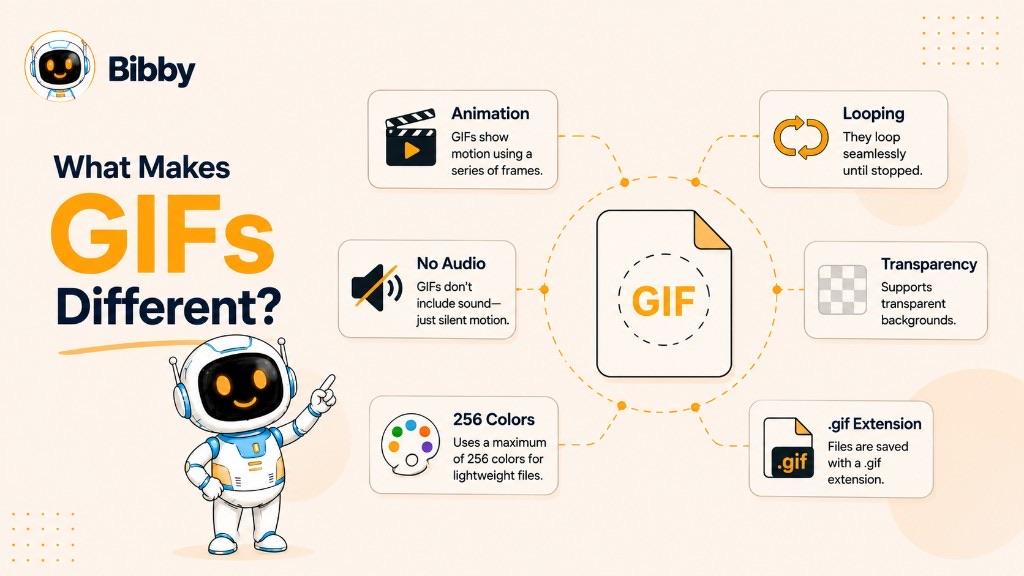
Several characteristics make the GIF format particularly recognizable:
GIFs Can Be Static or Animated
A GIF does not have to be animated. It can contain a single static image, although animated GIFs are far more common in modern online communication.
GIFs Support Animation
An animated GIF can contain multiple frames that play sequentially to create movement. This makes it useful for short reactions, demonstrations, memes, and other visual content.
GIFs Commonly Loop
GIF animations are often configured to repeat continuously. This creates an effortless viewing experience because the audience does not need to manually restart the animation.
GIFs Do Not Normally Include Audio
Unlike video formats, GIFs do not support an audio track. This makes them useful for visual communication that does not depend on sound, particularly in social feeds where users may browse with audio turned off.
GIFs Support Transparency
GIF files can support transparent areas, allowing certain parts of an image to remain see-through. This can be useful for simple animations, logos, icons, and other visual elements that need to appear over different backgrounds.
GIFs Have a Limited Color Palette
One of the format's main technical limitations is its color support. GIF uses a palette of up to 256 colors per frame, which makes it less suitable for photographs, detailed gradients, and visually complex content compared with many modern image and video formats.
GIFs Are Widely Supported
GIF is an established format that is broadly supported by web browsers, websites, applications, and many digital communication platforms. This widespread compatibility has helped keep GIFs relevant for decades.
GIFs Are Easy to Share
Because GIFs are packaged as image files and can contain short animations without audio, they are convenient for sharing across online conversations and social media. Their compact visual format makes it easy to communicate a reaction, action, or idea without creating a full video.
Together, these characteristics make GIFs particularly effective for short, visual, repeatable content. They are not designed to replace every image or video, but they can be a useful format when a small amount of movement adds meaning or grabs attention.
Why Are GIFs Popular on Social Media?
GIFs have become a familiar part of social media because they make visual communication quick, expressive, and easy to understand. A short looping animation can communicate a reaction or idea in seconds, often without requiring sound, a long explanation, or a full video.
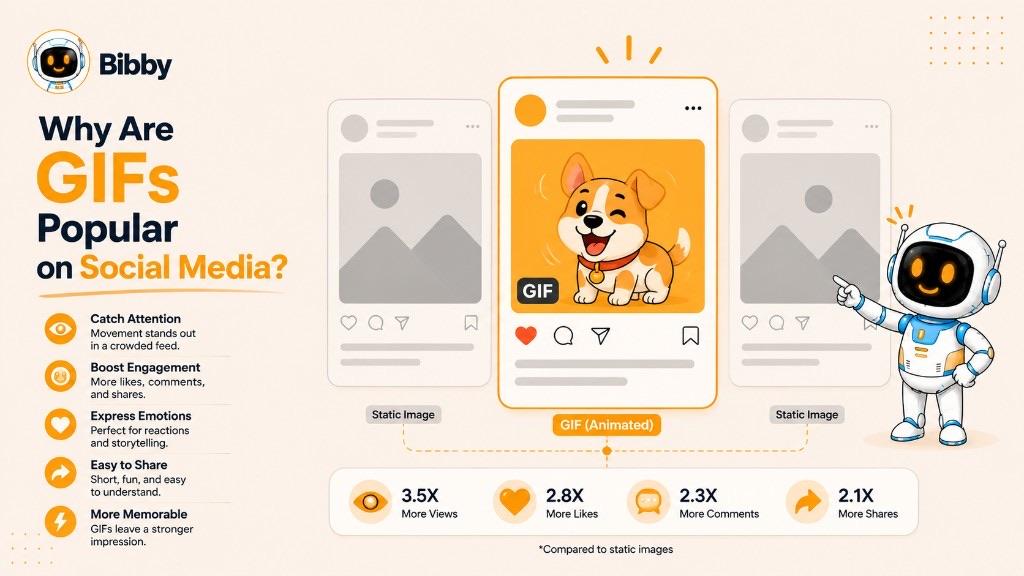
For brands and creators, GIFs can also add movement to social content without the production effort associated with longer-form video. Their usefulness depends on the platform and content type, but they can be a practical addition to a well-planned social media strategy.
GIFs as Reaction Content
One of the most recognizable uses of GIFs is reaction content. A GIF can communicate emotions such as excitement, surprise, confusion, celebration, or humor through a short visual loop.
For example, a brand responding to a customer's comment might use an appropriate reaction GIF to make the interaction feel more expressive and conversational.
GIFs for Brand Communication
Businesses can use GIFs to give their social media content more personality. A simple animated element can make an announcement, promotion, or brand message feel more dynamic than a completely static image.
Brands can also create custom GIFs using recognizable visual elements, product shots, animations, or branded graphics.
GIFs for Engagement
Movement can naturally draw attention when users are scrolling through a busy social feed. A well-designed GIF can create a visual pause and encourage someone to look at the content for a moment longer.
However, animation alone does not guarantee engagement. The GIF still needs to support a useful, entertaining, or relevant message.
GIFs for Product Demonstrations
GIFs can be useful for showing a short process or product interaction. For example, a software company could use a GIF to demonstrate how to navigate a feature, while an e-commerce brand could show a product from different angles.
For simple actions that take only a few seconds to demonstrate, a GIF can sometimes communicate the idea more efficiently than a longer video.
GIFs Across Social Platforms
GIFs and GIF-style animations appear across many major social platforms and online communities, including Facebook, Instagram, LinkedIn, TikTok, and YouTube. However, each platform handles media differently, and a GIF file may be converted, embedded, or displayed differently depending on where it is published.
For this reason, marketers should check the requirements and supported formats of each platform before adding GIFs to a social media publishing workflow.
Ultimately, GIFs remain popular because they occupy a useful space between static images and video. They provide movement without sound and can deliver a visual message in a short, repeatable format.
Where Are GIFs Commonly Used?
GIFs are used across websites, social media, messaging platforms, digital marketing, and online communities. Their ability to communicate a short visual sequence without sound makes them useful in situations where a static image feels too limited but a full video feels unnecessary.
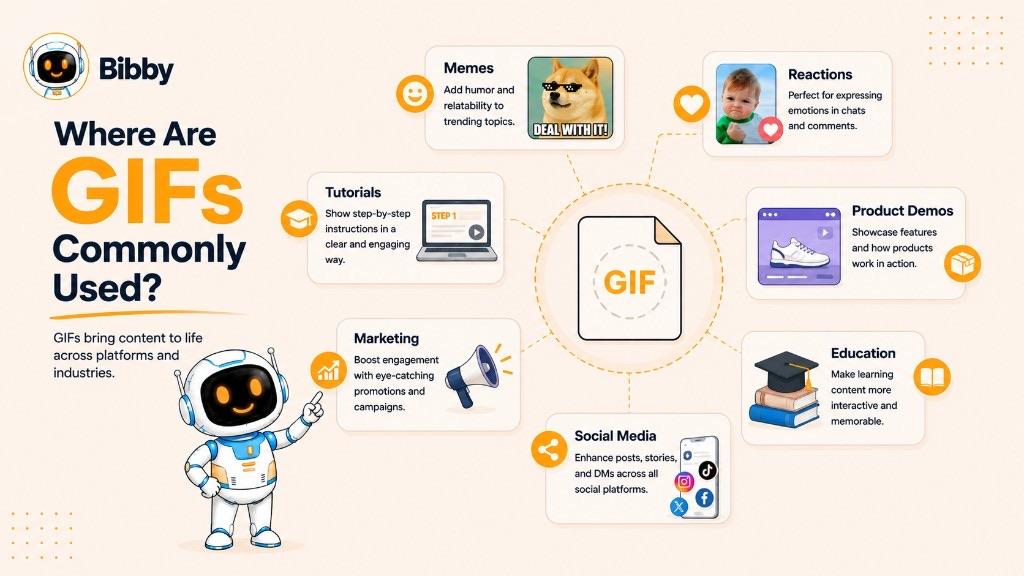
Here are some of the most common uses of GIFs:
Memes and Internet Humor
GIFs are widely used in memes and online humor. A short animated reaction, facial expression, movie moment, or visual joke can communicate an idea that would take several sentences to explain.
Reaction Content
Reaction GIFs are commonly used to express emotions such as excitement, surprise, frustration, confusion, approval, or celebration. They are especially popular in online conversations because the animation adds context and personality to a response.
Product Demonstrations
Businesses can use GIFs to demonstrate simple product features or actions. For example, an e-commerce brand might show how a product works, while a software company could demonstrate a feature within its application.
Software and UI Tutorials
GIFs can capture a sequence of actions on a screen, making them useful for explaining simple digital processes. A short GIF can show where to click, which menu to open, or how a particular feature works.
Educational Content
Educators and content creators can use GIFs to illustrate concepts that are easier to understand visually. Simple processes, movements, diagrams, and demonstrations can sometimes be communicated more clearly through a short animation.
Marketing Campaigns
GIFs can be incorporated into digital marketing campaigns to add movement to promotional content. Brands may use them to highlight a product, announce an offer, demonstrate a feature, or create a memorable visual moment.
Digital Conversations
GIFs have become part of everyday online communication. People frequently use them in messaging and social platforms to respond to conversations with humor, emotion, or visual context rather than relying only on text.
Social Media Content
Social media marketers can use GIFs alongside images, carousels, videos, and other content formats. A short animation can make a post more dynamic, demonstrate an idea, or add personality to a brand's communication.
The best use of a GIF depends on the message. A simple reaction may need only a few frames, while a product demonstration may require a slightly longer sequence. The goal is not simply to add movement, but to use movement where it makes the content easier to understand or more engaging.
Why Are GIFs Useful for Social Media Marketing?
GIFs can be a practical format for social media marketing when a brand needs to communicate a short visual idea quickly. They can add movement to a feed, demonstrate a simple action, or express an emotion without requiring the audience to watch a full video.
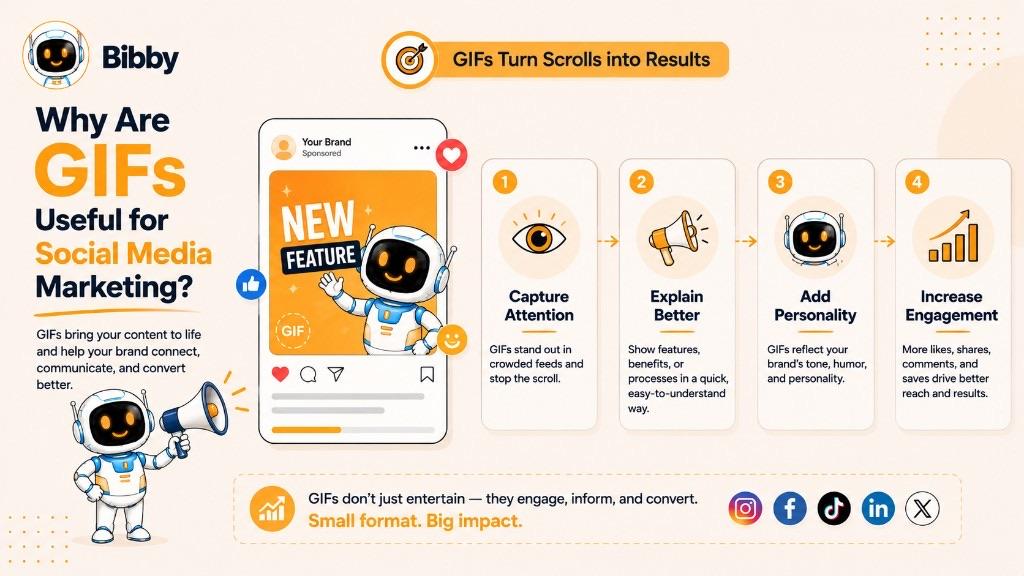
For marketers, the biggest advantage is simplicity. A well-made GIF can communicate something in a few seconds and work without audio, which is useful when people are scrolling through social media with sound turned off.
Capture Attention With Movement
Static images can be effective, but movement can create an additional visual cue in a busy social feed. A subtle animation, product movement, or changing graphic can encourage users to pause and look at the content.
The key is to make the movement purposeful. Excessive or distracting animation can have the opposite effect.
Explain Simple Ideas Quickly
GIFs are useful for showing processes that are difficult to explain with a single image. A short animation can demonstrate a product feature, website interaction, before-and-after transformation, or simple tutorial.
For example, a SaaS company could use a GIF to show how a user creates a social media post inside its platform.
Add Personality to Brand Content
GIFs can make social media communication feel more expressive. Reaction GIFs, branded animations, and playful visual elements can help a brand communicate emotions that would otherwise require additional text.
This can be particularly useful for brands that maintain a conversational social media voice.
Support Product Marketing
A GIF can highlight a product feature without requiring a complete product video. An e-commerce brand could animate a product detail, while an app company could show a short screen recording of a feature.
This makes GIFs useful for product launches, feature announcements, educational posts, and promotional campaigns.
Create More Dynamic Social Posts
GIFs can be combined with captions, graphics, and other content formats to create more visually varied social media posts. They can also be used as part of larger content campaigns rather than as standalone pieces.
For businesses managing multiple social channels, this means GIFs can become one component of a broader content system that includes images, carousels, videos, and other visual formats.
Keep Content Short and Focused
A GIF works best when it communicates one clear idea. Trying to fit too much information into a single animation can make it difficult to follow and may increase the file size unnecessarily.
A simple rule is useful: if the idea can be communicated through a short visual loop, a GIF may be worth considering. If the message requires detailed explanation, sound, or extended storytelling, video is usually the better option.
GIF vs. Video
GIFs and videos can both display moving visuals, but they are designed for different purposes. A GIF is an image format that can contain multiple frames and create a short animation, while video formats are designed specifically for moving images and can support features such as audio, longer playback, and more advanced compression.
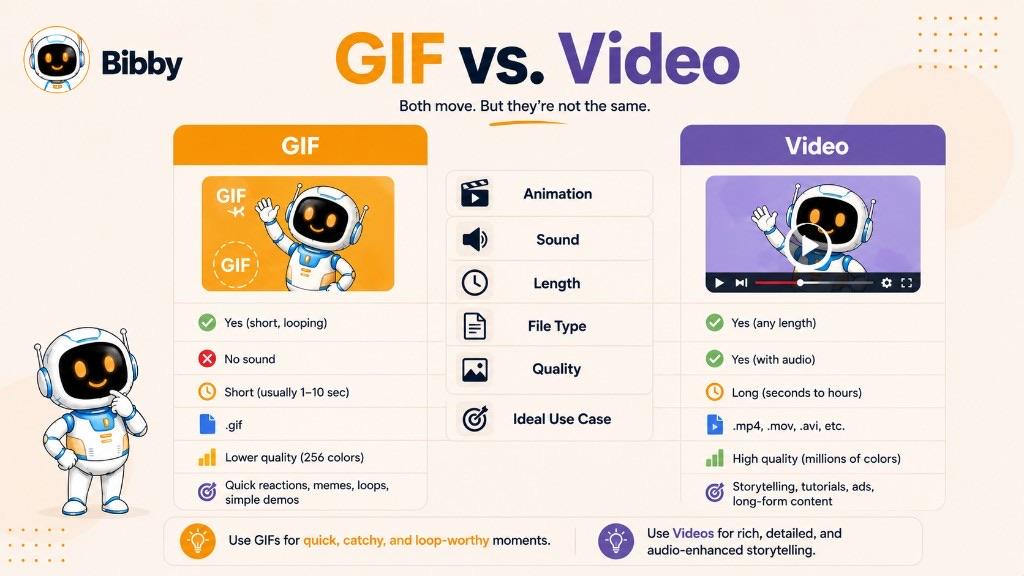
The right choice depends on what you want the content to communicate.
| Feature | GIF | Video |
|---|---|---|
| Format type | Image format | Video format |
| Animation | Yes | Yes |
| Audio | No | Usually supported |
| Color capabilities | Limited | Generally much broader |
| Typical duration | Short | Can be short or long |
| Looping | Common | Optional |
| File size | Can become large for complex animations | Often more efficient for longer content |
| Best suited for | Short visual moments and simple animations | Richer visual storytelling and demonstrations |
When Should You Use a GIF?
A GIF can be a good choice when you want to show a short, repeatable visual sequence without sound. For example, a GIF can work well for a reaction, a simple interface demonstration, a product movement, or a short visual joke.
GIFs are also useful when the content needs to communicate immediately without requiring the viewer to press play.
When Should You Use Video?
Video is generally more suitable when the content requires sound, longer explanations, detailed visuals, or storytelling. Product tutorials, interviews, demonstrations, advertisements, educational videos, and longer-form social content are usually better suited to video.
Modern video formats can also provide better compression and higher visual quality, particularly for longer or more detailed content. Short-form video is often a better fit when the idea needs sound, higher quality, or more than a few seconds.
GIF or Video for Social Media?
For social media marketers, the decision should come down to the complexity of the message. A short visual reaction or simple demonstration may work well as a GIF, while a detailed product explanation or campaign video will usually benefit from video.
GIFs and videos do not necessarily compete with each other. They can serve different roles within the same social media content strategy. A brand might use a GIF for a quick product interaction and a video for the complete product demonstration.
GIF vs. Static Image
GIFs and static images are both image formats, but they can communicate information in different ways. A static image displays a single visual frame, while an animated GIF can display multiple frames to create movement.
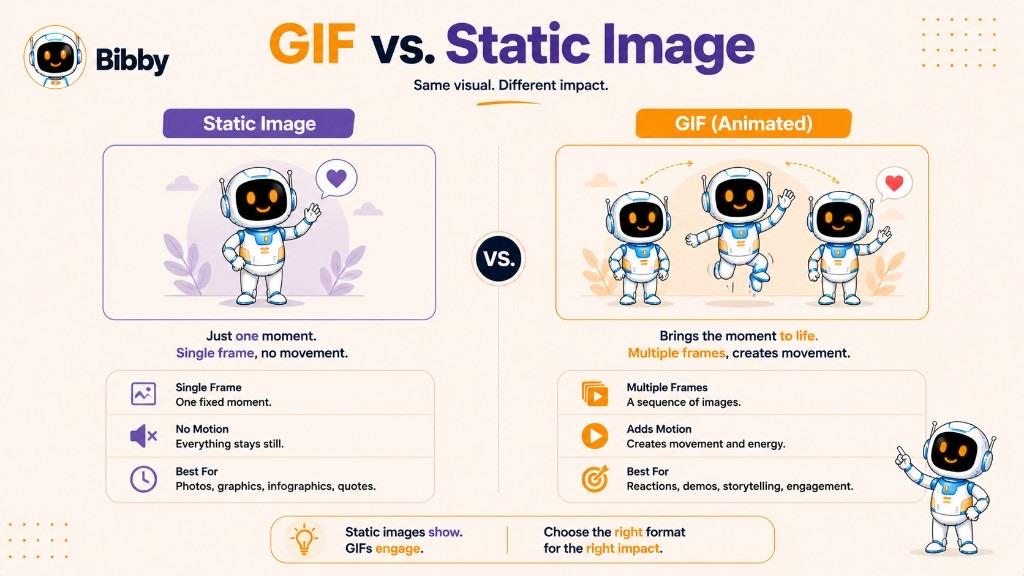
The choice between them depends on whether animation adds meaningful value to the content.
| Feature | GIF | Static image |
|---|---|---|
| Movement | Can contain animation | No animation |
| Frames | Can contain multiple frames | Usually one frame |
| Audio | No | No |
| File extension | .gif | Depends on format, such as .jpg or .png |
| Best for | Short animations and visual sequences | Photos, graphics, illustrations, and static information |
| File size | Can increase with animation | Usually simpler to manage |
| Looping | Common for animated GIFs | Not applicable |
GIF vs. PNG
PNG is primarily used for static images and supports features such as transparency and a broad range of colors. GIF can also support transparency, but its limited color palette makes it less suitable for detailed images.
The major advantage of GIF is its ability to contain animation. If the content does not need movement, PNG may be a more appropriate choice in many situations.
GIF vs. JPG
JPG, also known as JPEG, is commonly used for photographs and other images containing many colors and visual details. It uses lossy compression and does not support animation.
GIF, on the other hand, can create simple animations but has a much more limited color palette. As a result, JPG is generally better suited to photographs, while GIF is better suited to simple graphics or short animations.
When Should You Use a GIF Instead of a Static Image?
Use a GIF when movement helps communicate the message. For example, showing a button interaction, product movement, reaction, or short process may be more effective as an animation.
If the message can be communicated clearly with a single visual, a static image may be the better option. Static images are often simpler to create, easier to optimize, and more appropriate for detailed photographs or information-heavy graphics.
For social media marketers, the goal should be to choose the format that supports the message rather than adding animation simply to make a post look different.
Benefits of Using GIFs
GIFs can be useful when you need to communicate a short visual idea quickly. Their combination of image-based simplicity and animation makes them suitable for social media, digital marketing, tutorials, online conversations, and product demonstrations.
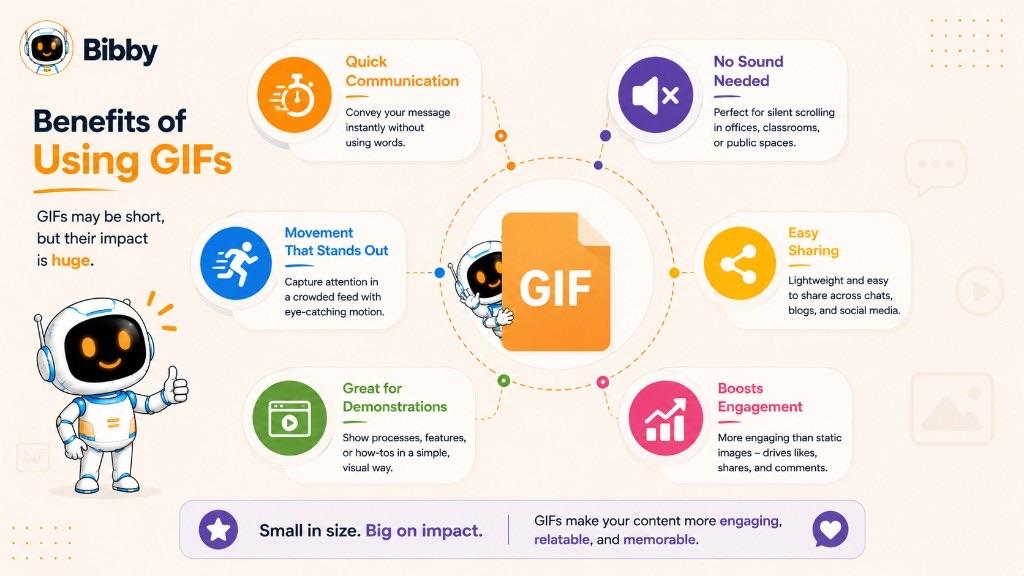
Here are some of the main benefits of using GIFs:
Communicate Ideas Quickly
A short animation can demonstrate an action or explain a visual idea without requiring a long description. This makes GIFs useful for showing simple processes, reactions, and product features.
Work Without Sound
GIFs do not normally contain audio, so the message depends entirely on the visual. This can be useful on social media, where users may browse content with sound turned off.
Add Movement to Static Content
A GIF can turn an otherwise static visual into a short animation. Subtle movement can make a social media graphic, product demonstration, or promotional message more dynamic.
Easy to Share
GIFs are widely recognized and supported across many digital environments. Their familiar format makes them convenient for sharing in online conversations, websites, and social media content.
Useful for Short Demonstrations
GIFs can show simple actions such as clicking a button, navigating an interface, using a product, or demonstrating a visual transformation. They can communicate these actions without requiring a full video tutorial.
Encourage Visual Engagement
Movement can attract attention when users are scrolling through content. A relevant and well-designed GIF may encourage someone to stop and examine a post more closely.
However, animation by itself does not guarantee engagement. The GIF still needs to be relevant to the audience and support a clear message.
Add Personality to Social Media Content
Reaction GIFs, branded animations, and playful visual sequences can make social media communication feel more expressive. Brands can use them to complement their tone and make certain posts more conversational.
Support Different Types of Content
GIFs can be used alongside other formats rather than replacing them. A social media strategy might include static images for detailed information, GIFs for short animations, carousels for educational content, and videos for deeper storytelling.
The most effective use of GIFs comes from understanding what the format does well. When a short, looping visual can communicate an idea more clearly or quickly, a GIF can be a useful addition to the content mix.
Limitations of GIFs
Although GIFs are convenient for short animations and visual communication, they are not ideal for every type of content. The format has several technical limitations that can affect image quality, file size, performance, and usability.
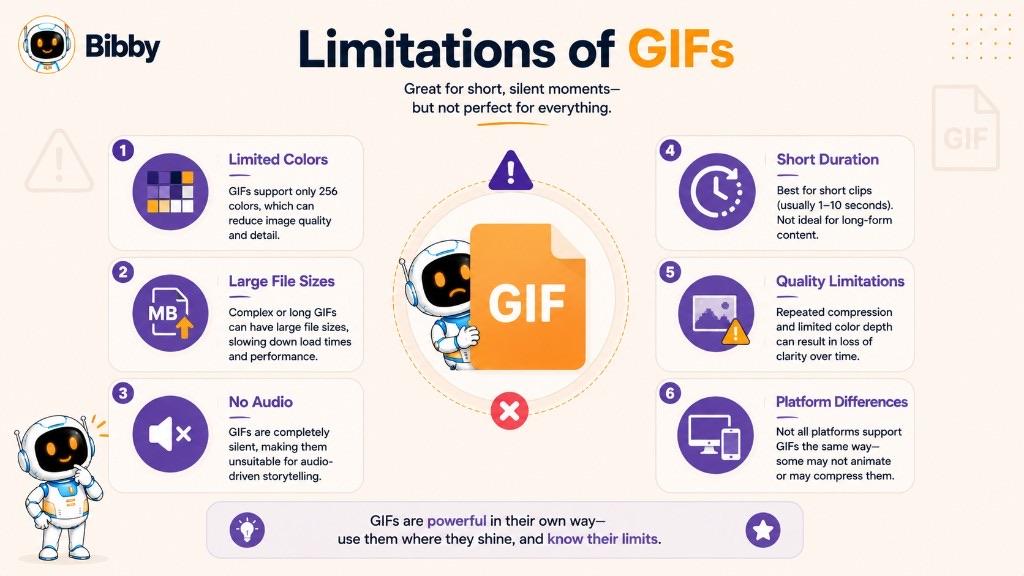
Understanding these limitations helps marketers and creators decide when a GIF is appropriate and when another format would work better.
Limited Color Palette
GIFs support a palette of up to 256 colors per frame. This is considerably more limited than many modern image and video formats.
As a result, GIFs may not reproduce photographs, detailed illustrations, gradients, and complex visual designs as accurately as other formats.
GIF Files Can Become Large
An animated GIF contains multiple image frames. As the number of frames, dimensions, and visual complexity increase, the file can become significantly larger.
Large files may take longer to load and can negatively affect the performance of a webpage or digital experience. Keeping GIFs short and optimizing them before publishing can help reduce this problem.
No Audio
GIFs are designed for visual content and do not provide a standard audio track. If a message depends on narration, dialogue, music, or sound effects, a video format will generally be more appropriate.
Not Ideal for Long Animations
GIFs work best for short visual loops. Using them for long sequences can result in unnecessarily large files and an inefficient viewing experience.
For longer demonstrations, tutorials, advertisements, or storytelling, modern video formats typically provide more flexibility.
Lower Quality for Complex Visuals
The limited color palette and format characteristics can make GIFs unsuitable for high-quality photographs and visually complex animations. Banding, dithering, and reduced color detail may become noticeable in some GIFs.
Less Efficient Than Modern Formats in Some Situations
Modern image and video formats can offer better compression and quality for many types of animated content. Depending on the platform and use case, formats such as WebP, animated WebP, or video formats may provide a better balance between quality and file size.
Platform Compatibility Can Vary
Although GIF is widely supported, social media platforms and other digital services may handle GIF files differently. Some platforms may convert an uploaded GIF into another format or display it through an integrated GIF service.
Marketers should therefore check the current media requirements of each platform before building GIFs into a publishing workflow.
Not Every Message Needs Animation
Perhaps the simplest limitation is also the most important: animation does not automatically make content better.
If a static image communicates the message clearly, adding movement may provide little value. GIFs work best when the animation itself helps demonstrate, explain, entertain, or emphasize something.
For social media marketers, the goal should be to use GIFs selectively as part of a broader content strategy rather than treating them as a replacement for images or video.
Are GIFs Still Useful for Social Media?
Yes. GIFs remain useful for social media when they are used for the right type of content. Their ability to communicate short, looping visual moments makes them particularly effective for reactions, simple demonstrations, memes, product interactions, and lightweight visual storytelling.
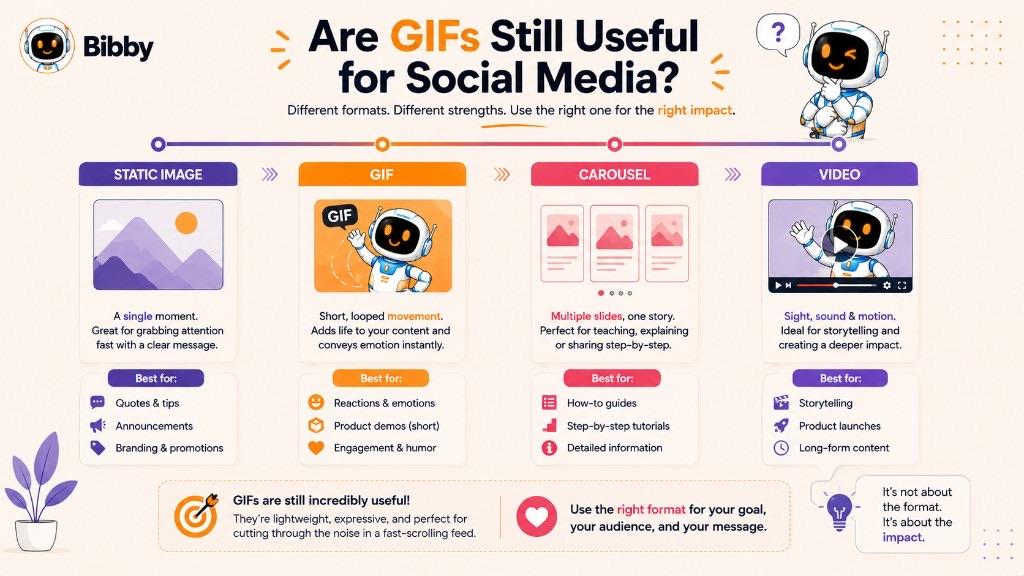
However, GIFs are no longer the only practical option for animated content. Modern social platforms support high-quality video, short-form video, carousels, and other visual formats, so marketers should choose a format based on the message they want to communicate.
When GIFs Work Well
GIFs can be a good choice when:
- The message can be communicated in a few seconds.
- The animation does not require sound.
- The content benefits from continuous looping.
- You want to demonstrate a simple action.
- A reaction or visual expression is the main purpose.
- A short product interaction needs to be shown.
- You want to add movement to an otherwise static piece of content.
For example, a software company could use a short GIF to show a user clicking through a new feature. An e-commerce business could use one to demonstrate how a product opens, folds, rotates, or functions.
When Video Is Better
Video is generally a better choice when the content requires narration, music, dialogue, extended demonstrations, detailed storytelling, or higher visual quality.
A product tutorial that takes several minutes to explain should not be compressed into a GIF simply because GIFs are easy to share. Likewise, content that depends on sound should use a format that supports audio.
GIFs Still Have a Place in the Content Mix
The continued usefulness of GIFs comes from their simplicity. They can fill the space between a static image and a full video.
A social media strategy might use:
Images for static information → GIFs for short animations → Carousels for step-by-step content → Videos for deeper demonstrations and storytelling.
The format should follow the purpose of the content, not the other way around.
For businesses managing multiple social media channels, GIFs can therefore remain a useful part of a broader content workflow. The key is knowing when a short looping animation adds genuine value and when a static image or video would communicate the message more effectively.
How Businesses Use GIFs in Social Media Marketing
GIFs are not limited to memes and reaction content. Businesses can also use short animations as part of their social media marketing strategy to explain products, highlight features, communicate announcements, and make everyday posts more visually engaging.
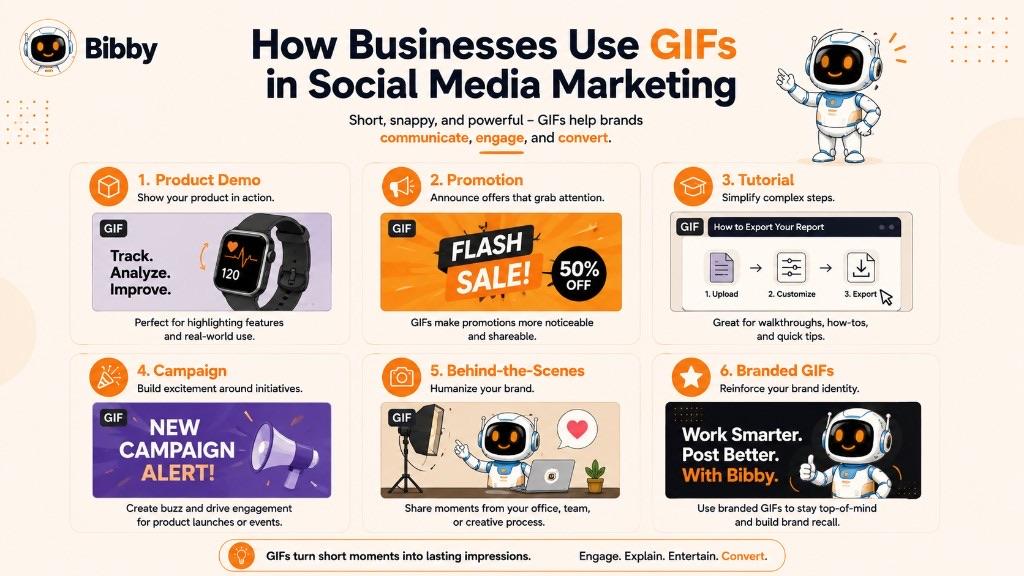
The most effective business GIFs usually have one clear purpose. Instead of trying to tell an entire story in a few seconds, they focus on one action, message, or visual moment.
Showing Product Features
A GIF can demonstrate how a product works without requiring a complete video. For example, a software company can show a new feature in action, while an e-commerce brand can demonstrate a product's functionality through a short looping animation.
This approach can make a complex feature easier to understand at a glance.
Creating Promotional Content
Businesses can use GIFs to add movement to promotional messages. A product image can transition between different views, a discount message can appear through animation, or a visual element can highlight a limited-time offer.
The animation should support the promotional message rather than distract from it.
Teaching Through Short Visuals
GIFs can work well for educational social media content when the concept involves a simple sequence of actions.
For example, a marketing software company could create a GIF showing how to schedule a post, while a design brand could demonstrate a quick editing technique.
Supporting Social Media Campaigns
GIFs can also become part of a larger social media campaign. A brand might create a collection of related animations using the same visual identity, messaging, and campaign theme.
This can help maintain consistency across multiple posts while giving the campaign more visual variety.
Sharing Behind-the-Scenes Content
Short animated clips can provide quick glimpses into how a product is made, how a team works, or what happens behind a campaign. These moments can make brand communication feel more human without requiring a highly produced video.
Creating Engagement-Focused Posts
Reaction GIFs, humorous animations, and interactive-looking visuals can encourage audiences to respond or share their own reactions.
For example, a brand could use a GIF to accompany a question, celebrate a milestone, or respond to a common customer experience.
Adding Movement to Branded Content
Businesses can create GIFs using their own brand colors, typography, illustrations, product visuals, or other recognizable elements. This allows animation to become part of the brand's visual language rather than appearing as unrelated content.
A strong GIF should still follow the same brand guidelines as other social media assets.
Where GIFs Fit Into a Social Media Strategy
GIFs work best as one part of a broader content mix. A business might use static images for announcements, carousels for educational content, GIFs for short visual demonstrations, and videos for detailed storytelling.
The goal is not to publish more GIFs simply because they are animated. The goal is to choose the format that makes each piece of content clearer, more engaging, or easier to understand.
How to Create a GIF for Social Media
Creating a GIF for social media does not have to be complicated. A GIF can be made from a series of images, a short video clip, a screen recording, or custom-designed frames. The process becomes easier when the animation has a clear purpose and is designed for the platform where it will be used.
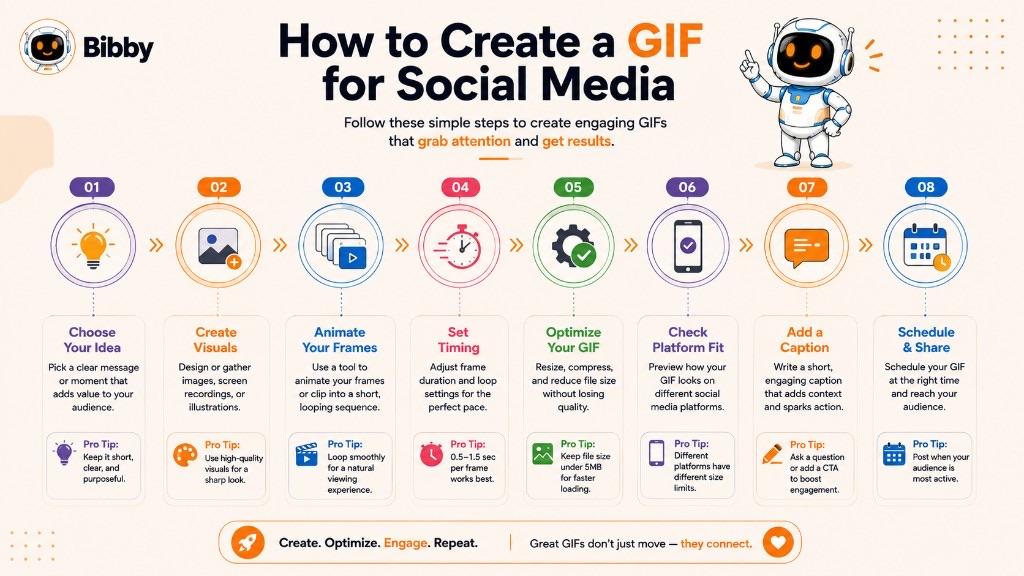
A simple GIF creation workflow looks like this:
Choose the Idea
Start with one clear idea. Decide what the GIF needs to communicate before creating it.
For example, you might want to:
- Demonstrate a product feature
- Show a quick tutorial
- Create a reaction
- Highlight an offer
- Animate a branded graphic
- Show a before-and-after change
Keeping the concept focused helps prevent the animation from becoming unnecessarily long or complicated.
Create or Select the Visuals
GIFs can be created from individual images or extracted from a short video. You can also design custom frames specifically for the animation.
For branded social media content, use consistent colors, fonts, logos, and visual elements so the GIF fits naturally with the rest of your content.
Keep the Animation Short
GIFs are generally most effective when they communicate one idea quickly. Remove unnecessary frames and avoid adding movement simply for decoration.
A short, focused animation is usually easier for viewers to understand and easier to manage as a digital asset.
Set the Frame Timing
The speed at which frames change affects how the animation feels. Frames that change too quickly can make the GIF difficult to follow, while slow timing can make it feel unresponsive.
Adjust the timing until the movement feels natural and the main message is easy to understand.
Optimize the File
Before publishing, optimize the GIF to keep the file as small as reasonably possible. Large GIFs can take longer to load and may create performance issues.
Reducing unnecessary frames, dimensions, or visual complexity can help control file size.
Check the Platform
Different social media platforms can handle animated content differently. Before publishing, check the platform's current media specifications and determine whether the GIF should be uploaded directly, converted to another format, or shared through a supported GIF feature.
This is especially important when managing content across multiple social networks.
Add Your Caption and Context
A GIF can communicate a visual idea, but the accompanying caption can provide additional context. Explain what viewers are seeing, add a relevant message, or include a call to action when appropriate.
The GIF and caption should work together rather than repeating exactly the same information.
Schedule and Publish
Once the GIF is ready, add it to your social media content workflow. If you are managing multiple platforms, organizing the content in advance can make publishing more consistent and reduce repetitive manual work.
Tools such as Bibby can help businesses manage social media content through a centralized workflow, allowing users to create content, generate captions, organize campaigns, and schedule posts across selected social platforms.
The important thing is not simply to create a GIF because it is animated. Create one when movement helps communicate the message better than a static image or a longer video.
GIFs and Social Media Automation
GIFs can become part of an automated social media workflow just like images, carousels, and videos. Instead of creating and publishing every piece of content manually, businesses can organize their visual assets, captions, campaigns, and publishing schedules within a centralized workflow.
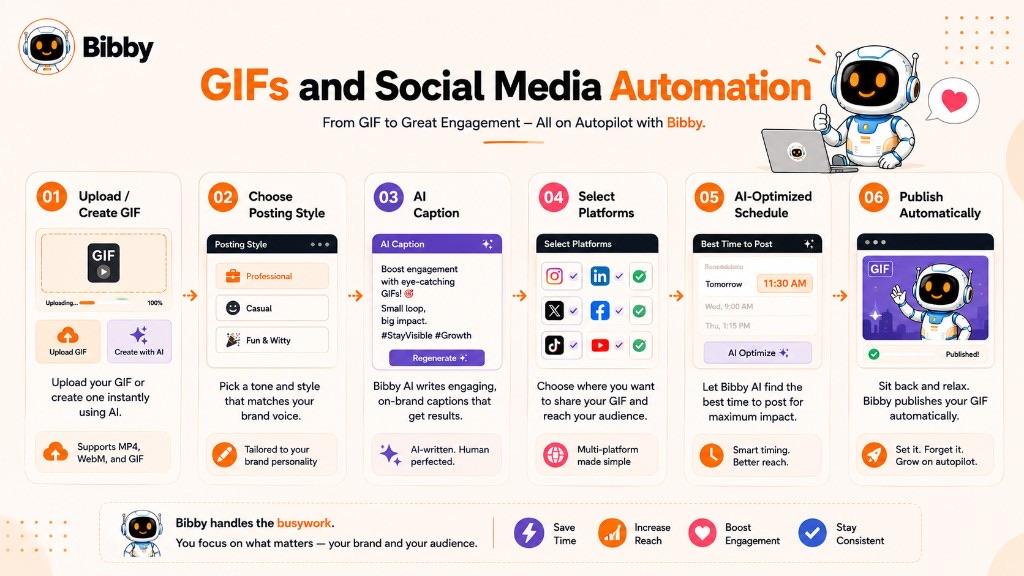
For teams managing several social platforms, this can be particularly useful because the same content often needs to be planned, adapted, and scheduled across multiple channels.
Where GIFs Fit Into an Automated Workflow
A simple social media automation workflow can look like this:
Create or upload a GIF → Choose the posting style → Generate a caption → Select platforms → Schedule → Publish
The GIF becomes the visual asset, while automation handles repetitive parts of the publishing process.
Create or Upload Your GIF
Start by uploading an existing GIF or creating one as part of your content production process. The visual should already be optimized and appropriate for the intended platform.
You can also combine GIFs with other visual formats in the same content strategy, including static images, carousels, and videos.
Generate the Caption
The visual is only one part of a social media post. A relevant caption can provide context, communicate the key message, and encourage the audience to take action.
With AI-powered social media tools, captions can be generated based on the visual, selected posting style, brand voice, and campaign objective, reducing the need to write every caption manually.
Schedule Content Across Platforms
Once the GIF and caption are ready, the post can be added to a publishing schedule. A social media automation platform can help organize content for different dates and publishing times instead of requiring marketers to manually publish each post.
When publishing across multiple platforms, marketers should still consider each platform's media requirements and make adjustments where necessary.
Manage GIFs as Part of a Campaign
GIFs can also be included in larger campaigns. For example, a business launching a new product might combine:
- GIFs for short feature demonstrations
- Carousels for educational information
- Images for announcements
- Videos for detailed demonstrations
This creates a more varied content mix while keeping the campaign focused on the same objective.
Managing Social Media Through Bibby
Bibby brings content creation and social media automation into one workflow. Users can upload an image or generate a visual with AI, choose a posting style, and let Bibby generate captions and schedule content for selected social platforms.
Bibby also includes a chat interface that allows users to manage social media tasks through conversation. From the chat, users can create a brand kit, launch a campaign, create posts, regenerate captions, and manage other parts of their social media workflow.
For businesses that regularly publish GIFs alongside other visual content, this approach can reduce repetitive publishing work and make it easier to keep content organized.
The goal of automation is not to replace creative decisions. It is to remove repetitive tasks so marketers can spend more time deciding what to create, who it is for, and why it matters.
Platforms may convert or display GIF files differently, so confirm each network's current media requirements before you assume a scheduled GIF will publish exactly as uploaded.
GIF Examples
GIFs can be used for everything from simple reactions to product demonstrations and educational content. The best examples are usually short, focused, and designed around one clear visual idea.
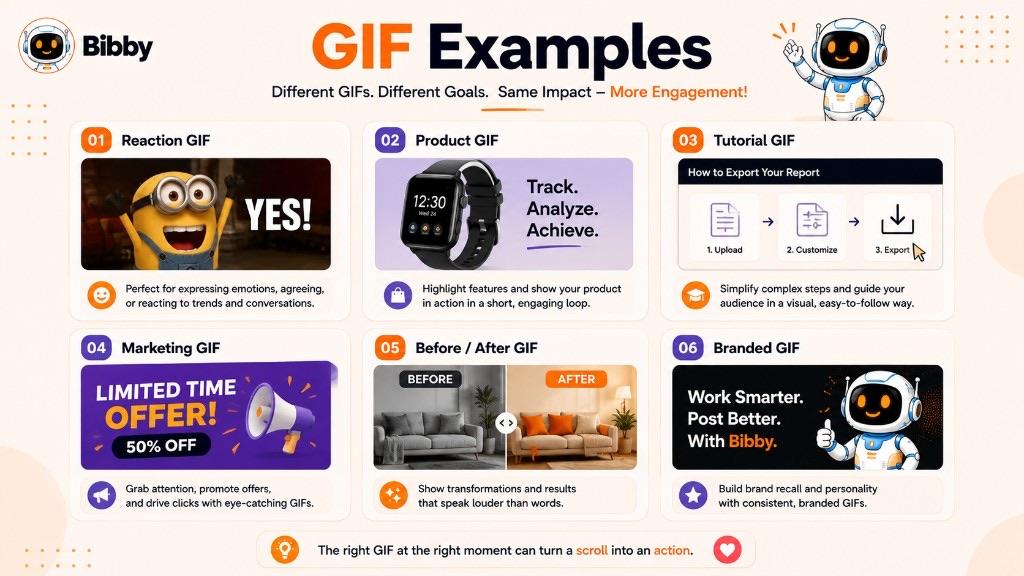
Here are some common examples of how GIFs can be used:
Reaction GIF
A reaction GIF uses a short looping animation to express an emotion or response. For example, a person celebrating, laughing, clapping, or looking surprised can communicate a reaction more visually than plain text.
Reaction GIFs are especially common in online conversations and social media interactions.
Product GIF
A product GIF demonstrates a specific feature or action. An e-commerce brand might show a product opening, rotating, folding, or being used, while a software company might show a feature working inside its application.
Because the animation is short, viewers can understand the basic action without watching a full product video.
Tutorial GIF
A tutorial GIF can show a short sequence of steps on a website or application.
For example:
Open the dashboard → Click “Create Post” → Add an image → Select a platform
Instead of describing every action in text, the GIF can visually demonstrate the process.
Marketing GIF
Marketing teams can use GIFs to add movement to promotional content. A product image might transition between different views, a headline might animate onto the screen, or a visual element might highlight an offer.
The animation should support the campaign message and remain easy to understand.
Social Media GIF
A social media GIF can be used to add personality or movement to a post. Examples include a short product demonstration, an animated statistic, a branded reaction, or a looping visual that supports the post's message.
Before-and-After GIF
Before-and-after animations can show a transformation by switching between two or more visual states.
This can work particularly well for industries where visual results matter, such as design, beauty, home improvement, photography, or creative services.
Educational GIF
Educational GIFs can illustrate a process or concept that involves movement. For example, an animation could demonstrate how a simple mechanism works, how a user interacts with software, or how a visual process changes over time.
Branded GIF
A branded GIF incorporates elements such as a company's logo, colors, typography, illustrations, or product visuals. This can help businesses create recognizable animated content while maintaining consistency with their overall visual identity.
When creating GIFs for social media, the strongest examples usually have one thing in common: the animation serves a purpose. Whether it makes a reaction clearer, demonstrates a product, or explains a process, the movement should help the audience understand or enjoy the content.
What Is the GIF File Extension?
The GIF file extension is .gif. It identifies files that use the Graphics Interchange Format and is commonly found at the end of a GIF filename, such as product-demo.gif or reaction.gif.
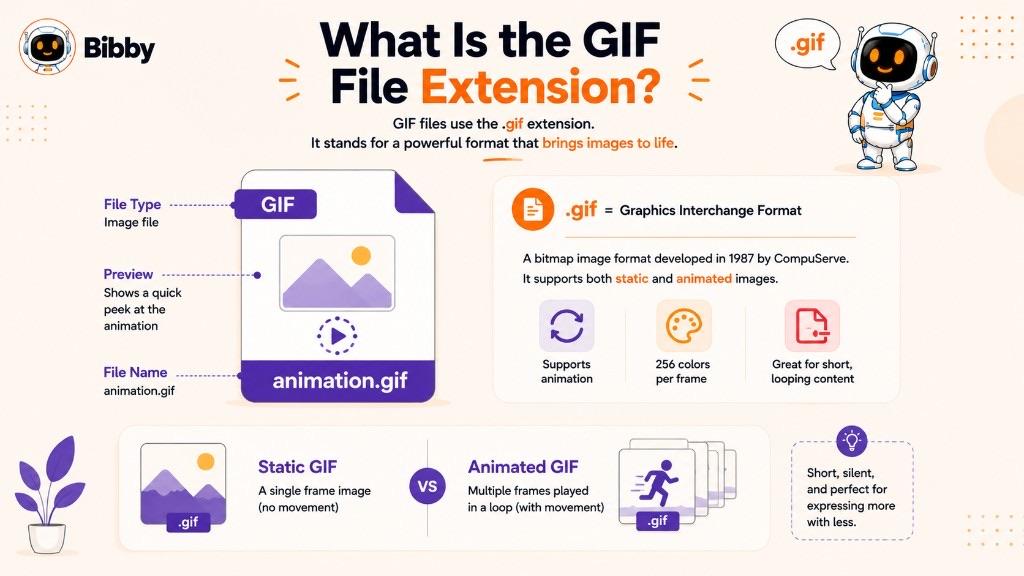
The .gif extension can represent both static images and animated images. An animated GIF contains multiple frames that are displayed sequentially to create movement, while a static GIF contains a single image.
GIF files are widely supported by web browsers, websites, applications, and many digital communication platforms. This broad compatibility is one reason the format has remained popular for online visual content.
How to Open a GIF File
Most modern web browsers and operating systems can open GIF files without requiring specialized software. A GIF can also be viewed or shared through many messaging, social media, image-editing, and content-creation applications.
Can a GIF File Be Edited?
Yes. GIFs can be created or edited using various image and animation tools. Depending on the software, you can add or remove frames, change frame timing, resize the animation, adjust colors, add text, or optimize the file size.
For businesses, GIFs can also be created from short video clips, screen recordings, or a sequence of designed images.
GIF File Size
The size of a GIF depends on factors such as its dimensions, number of frames, color complexity, and animation length. A simple GIF may be relatively small, while a long or detailed animation can become much larger.
For use on websites and social media, optimizing GIFs before publishing can help improve loading performance and make the content easier to manage.
In short, .gif is the standard file extension for the Graphics Interchange Format, whether the file contains a static image or a short animation.
How Do You Pronounce GIF?
The word GIF has two widely recognized pronunciations: “jif” with a soft G and “gif” with a hard G, as in “gift.”
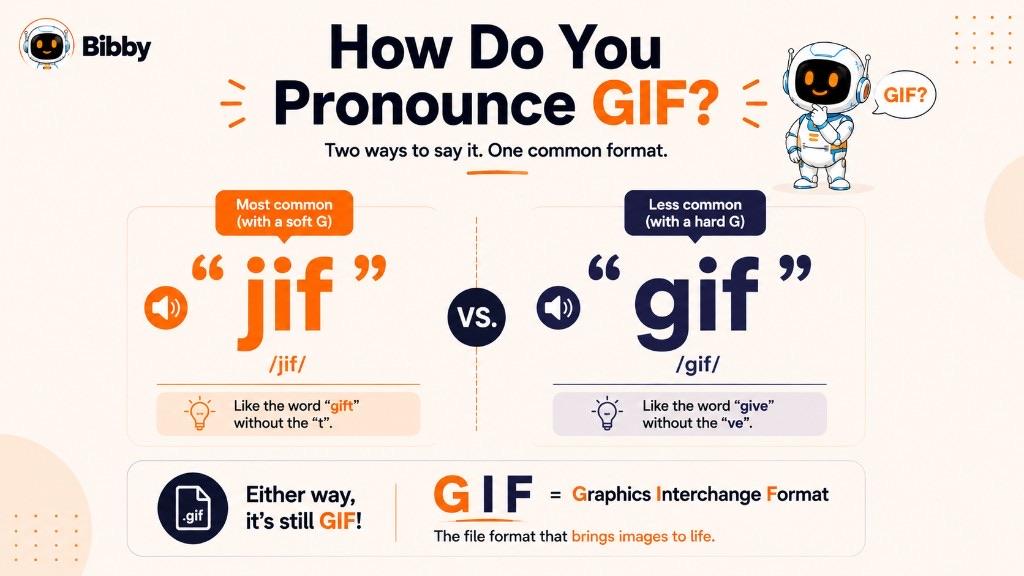
The debate has been around for years because the letters in the acronym can be interpreted differently when spoken as a word. Both pronunciations are commonly used in everyday online communication.
For most social media users, marketers, and content creators, the pronunciation is less important than understanding what a GIF actually is: an image file format that can contain short, looping animations.
So whether you say “jif” or “gif,” you are referring to the same Graphics Interchange Format.
Key Takeaways
A GIF (Graphics Interchange Format) is an image file format that can contain a static image or multiple frames displayed in sequence to create a short animation. Animated GIFs are commonly designed to loop, making them useful for communicating quick visual ideas without sound.
GIFs are widely used in social media, digital marketing, memes, online conversations, tutorials, and product demonstrations. They can add movement and personality to content while remaining simpler than a full video.
For social media marketers, the best use of a GIF is usually focused and intentional. Use one when a short looping animation can explain, demonstrate, entertain, or emphasize something better than a static image.
When managing a mix of images, GIFs, carousels, and videos, social media automation can also make the publishing process easier. With a tool such as Bibby, businesses can organize visual content, generate captions, create campaigns, and schedule social media posts through a centralized workflow.
You can upload an image or generate one with AI, choose a posting style, generate captions, create images, carousels, videos, and Stories, and schedule posts across Facebook, Instagram, LinkedIn, YouTube, and TikTok. Bibby's chat interface also lets you create campaigns, create posts, build a brand kit, and regenerate captions through conversation.
In simple terms: A GIF is a digital image format that can turn a sequence of frames into a short, looping visual animation.
Continue learning with related dictionary entries on memes, short-form video, carousel posts, captions, engagement, and viral content—or browse the social media dictionary. Then start a free Bibby trial to create, caption, and schedule visual content across your channels.